

Page 1
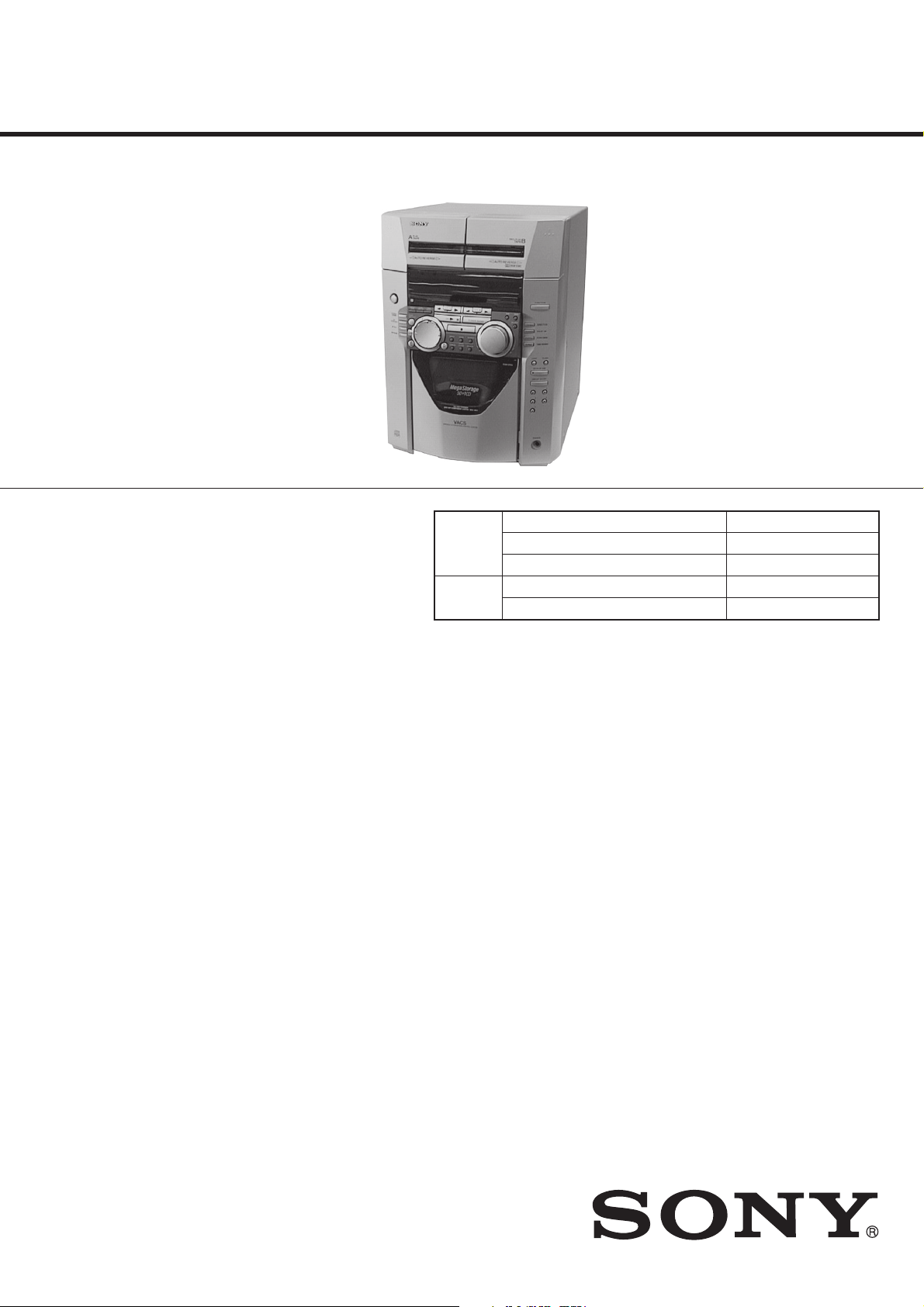
HCD-MC1
SERVICE MANUAL
Ver 1.1 2001. 10
• This set is the tuner, deck, CD
and amplifier section in MHC-MC1.
Manufactured under license from Dolby Laboratories
Licensing Corporation.
“DOLBY” and the double-D symbol a are trademarks
of Dolby Laboratories Licensing Corporation.
CD
Section
Tape deck
Section
Model Name Using Similar Mechanism HCD-F150/FR10
CD Mechanism Type CDM-46B1
Optical Pick-up Name KSS-213BA/F-NP
Model Name Using Similar Mechanism HCD-DR8AV
Tape Transport Mechanism Type TCM-230AWR2/230PWR2
US Model
E Model
SPECIFICATIONS
Amplifier section
U.S.A models:
AUDIO POWER SPECIFICATIONS
POWER OUTPUT AND TOTAL HARMONIC DISTORTION:
With 8 Ω loads both channels driven, from 70 – 20,000 Hz; rated 80 W per
channel minimum RMS power, with no more than 0.9% toral harmonic
distortion from 250 mW to read output.
Continuous RMS power output
80 + 80 W(8Ω at 1kHz, 10% THD)
Tortal harmonic distortion
less than 0.09%(8Ω at 1kHz, 40W)
Inputs
VIDEO/MD IN (phono jack):
voltage 250mV/450mV,
impedance 47kΩ
Outputs
VIDEO/MD OUT (phono jack):
voltage 250mV,
impedance 1kΩ
PHONES (stereo phone jacks):
accepts headphones of 8Ω or more
SPEAKER :accepts impedance of 8 to 16Ω
REAR SPEAKER :
accepts impedance of 16Ω
SUPER WOOFER :
Voltage 1V, impedance 1kΩ
CD player section
System Compact disc and digital audio system
Laser Semiconductor laser (λ =780mm)
Emission duration:
continuous
Laser output Max. 44.6µW*
*This output is the value measured at a distance of
200 mm from the objective lens surface on the
Optical Pick-up Block with 7 mm aperture.
Frequency response 2Hz – 20kHz (±0.5dB)
Wavelength 780 – 790nm
Signal-to-noise retio More than 90dB
Dynamic range More than 90dB
CD OPTICAL DIGIT AL OUT
(Square optical connector jack, rear panel)
Output Level –18dBm
Tape player section
Recording system 4-track 2-channel stereo
Frequency response (DOLBY NR OFF)
40 – 13,000Hz (±3dB),
using Sony TYPE I
cassette
40 – 14,000Hz (±3dB),
using Sony TYPE II
cassette
Tuner section
FM stereo, FM/AM superheterodyne tuner
FM tuner section
Tuning range 87.5 – 108.0MHz
Antenna FM lead antenna
Antenna terminals 75Ω unbalanced
Intermediate frequency 10.7MHz
— Continued on next page —
9-928-899-12
2001J1600-1
© 2001.10
MINI HI-FI COMPONENT SYSTEM
Sony Corporation
Home Audio Company
Published by Sony Engineering Corporation
Page 2

AM tuner section
Tuning renge 530 – 1,710kHz
Antenna AM loop antenna
Antenna terminals External antenna terminal
Intermediate frequency 450kHz
General
Power requirements US model : 120V AC, 60Hz
Power consumption US model : 200W
Dimensions (w/h/d) Apprex. 280 × 373 × 437mm
Mass Apprex. 11.2kg (24 lb 11 oz)
Supplied accessories: AM loop antenna (1)
Design and specifications are subject to change without notice.
(with the interval set at 10kHz)
531 – 1,710kHz
(with the interval set at 9kHz)
E model : 110 - 120V or 220 - 240V AC, 50/60Hz
E model : 250W
1
(11
/8 × 143/4 × 171/4 in)
Remote RM-SF150 (1)
Batteries (2)
FM lead antenna (1)
Speaker cords (2)
Front speaker pads (8)
— 2 —
Page 3
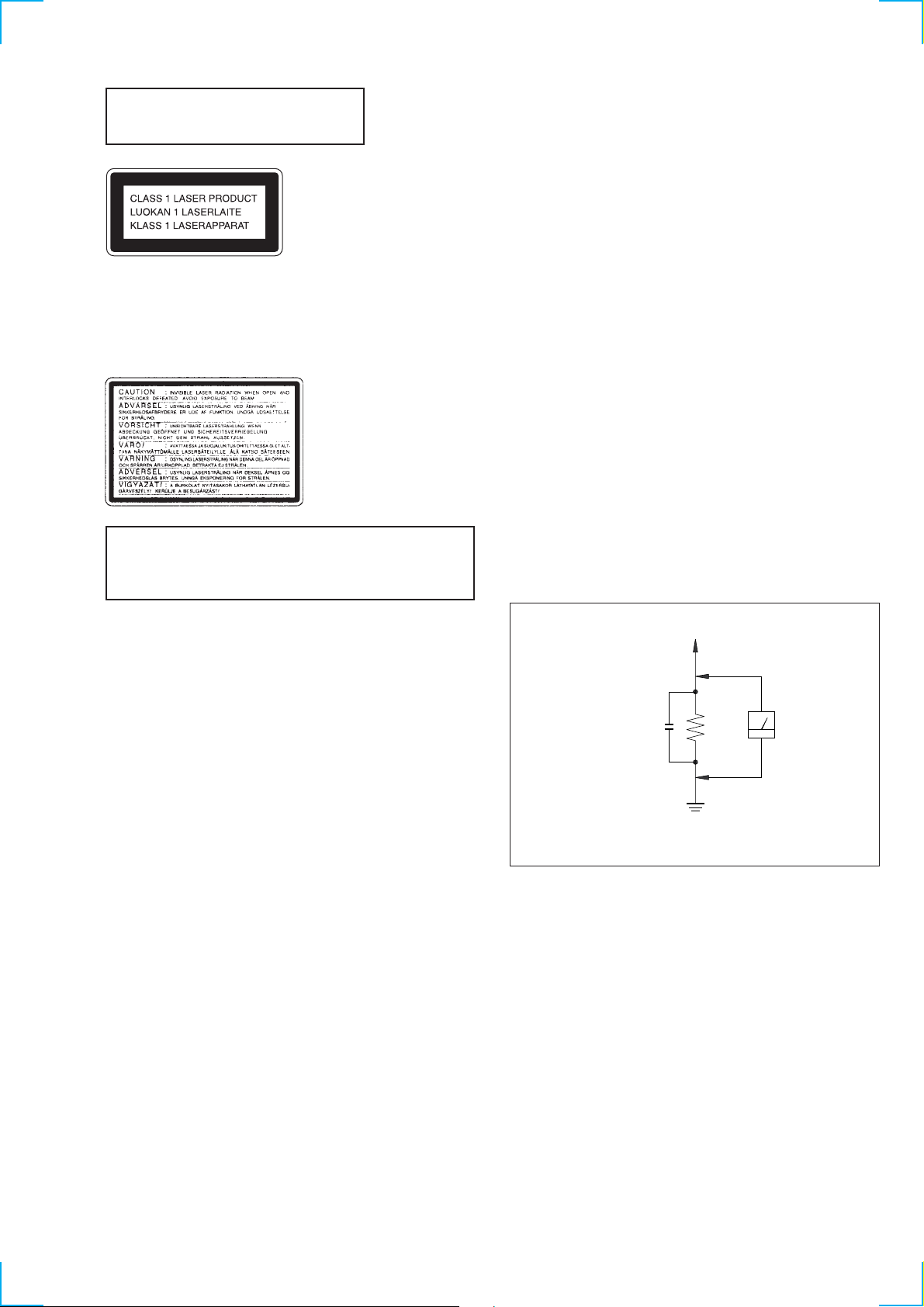
Laser component in this product is capable
of emitting radiation exceeding the limit for
Class 1.
SAFETY CHECK-OUT
(US model only)
After correcting the original service problem, perform the
following safety checks before releasing the set to the customer:
Check the antenna terminals, metal trim, “metallized” knobs, screws,
and all other exposed metal parts for AC leakage. Check leakage as
described below.
LEAKAGE
This appliance is classified as a CLASS 1 LASER product. The
CLASS 1 LASER PRODUCT MARKING is located on the rear
exterior.
The following caution label is located inside the unit.
CAUTION
Use of controls or adjustments or performance of procedures
other than those specified herein may result in hazardous radiation
exposure.
The AC leakage from any exposed metal part to earth ground
and from all exposed metal parts to any exposed metal part having
a return to chassis, must not exceed 0.5 mA (500 microampers).
Leakage current can be measured by any one of three methods.
1. A commercial leakage tester , such as the Simpson 229 or RCA
WT -540A. Follow the manufacturers’ instructions to use these
instruments.
2. A battery-operated AC milliammeter. The Data Precision 245
digital multimeter is suitable for this job.
3. Measuring the voltage drop across a resistor by means of a
VOM or battery-operated AC voltmeter . The “limit” indication
is 0.75 V, so analog meters must have an accurate low-voltage
scale. The Simpson 250 and Sanwa SH-63Trd are examples of
a passive VOM that is suitable. Nearly all battery operated
digital multimeters that have a 2V AC range are suitable. (See
Fig. A)
To Exposed Metal
Parts on Set
AC
0.15µF
1.5k
Ω
voltmeter
(0.75V)
SAFETY-RELATED COMPONENT WARNING!!
COMPONENTS IDENTIFIED BY MARK ! OR DOTTED LINE WITH
MARK ! ON THE SCHEMATIC DIAGRAMS AND IN THE PARTS
LIST ARE CRITICAL TO SAFE OPERATION. REPLACE THESE
COMPONENTS WITH SONY PARTS WHOSE PART NUMBERS
APPEAR AS SHOWN IN THIS MANUAL OR IN SUPPLEMENTS
PUBLISHED BY SONY .
Earth Ground
Fig. A. Using an AC voltmeter to chec k AC leakage .
— 3 —
Page 4

SERVICING NOTES
NOTES ON HANDLING THE OPTICAL PICK-UP
BLOCK OR BASE UNIT
The laser diode in the optical pick-up block may suffer electrostatic
break-down because of the potential difference generated by the
charged electrostatic load, etc. on clothing and the human body.
During repair, pay attention to electrostatic break-down and also
use the procedure in the printed matter which is included in the
repair parts.
The flexible board is easily damaged and should be handled with
care.
TABLE OF CONTENTS
1. GENERAL
FRONT PANEL ·····································································5
REAR PANEL········································································ 6
2. DISASSEMBLY ·······························································8
3. TEST MODE ··································································· 16
4. MECHANICAL ADJUSTMENTS ···························· 18
NOTES ON LASER DIODE EMISSION CHECK
The laser beam on this model is concentrated so as to be focused on
the disc reflective surface by the objective lens in the optical pickup block. Therefore, when checking the laser diode emission, observe
from more than 30 cm away from the objective lens.
LASER DIODE AND FOCUS SEARCH OPERATION
CHECK
Carry out the “S curve check” in “CD section adjustment” and check
that the S curve waveform is output repeatedly.
Notes on chip component replacement
• Never reuse a disconnected chip component.
• Notice that the minus side of a tantalum capacitor may be damaged
by heat.
Flexible Circuit Board Repairing
• Keep the temperature of the soldering iron around 270 ˚C during
repairing.
• Do not touch the soldering iron on the same conductor of the
circuit board (within 3 times).
• Be careful not to apply force on the conductor when soldering or
unsoldering.
5. ELECTRICAL ADJUSTMENTS
Deck Section ········································································ 21
CD Section ··········································································· 24
6. DIAGRAMS
6-1. Block Diagram CD Section ············································27
Block Diagram Main Section ········································ 29
Block Diagram Audio Section········································ 31
6-2. Circuit Boards Location ··················································· 33
6-3. Printed Wiring Board BD Section·································· 35
6-4. Schematic Diagram BD Section·····································37
6-5. Printed Wiring Board CD Motor Section······················· 39
6-6. Schematic Diagram CD Motor Section·························· 41
6-7. Printed Wiring Board Audio Section······························43
6-8. Schematic Diagram Audio Section································· 45
6-9. Printed Wiring Board Leaf SW Section ························· 47
6-10. Schematic Diagram Leaf SW Section ····························49
6-11. Printed Wiring Board Main Section ······························· 51
6-12. Schematic Diagram Main (1/5) Section ·························53
6-13. Schematic Diagram Main (2/5) Section ·························55
6-14. Schematic Diagram Main (3/5) Section ·························57
6-15. Schematic Diagram Main (4/5) Section ·························59
6-16. Schematic Diagram Main (5/5) Section ·························61
6-17. Printed Wiring Board Panel Section······························· 63
6-18. Schematic Diagram Panel Section ································· 65
6-19. Printed Wiring Board Power Section ····························· 67
6-20. Schematic Diagram Power Section ································69
6-21. Waveforms········································································ 71
6-22. IC Pin Function Description············································· 72
6-23. IC Block Diagrams··························································· 80
— 4 —
7. EXPLODED VIEWS ····················································· 81
8. ELECTRICAL PARTS LIST ····································· 89
Page 5
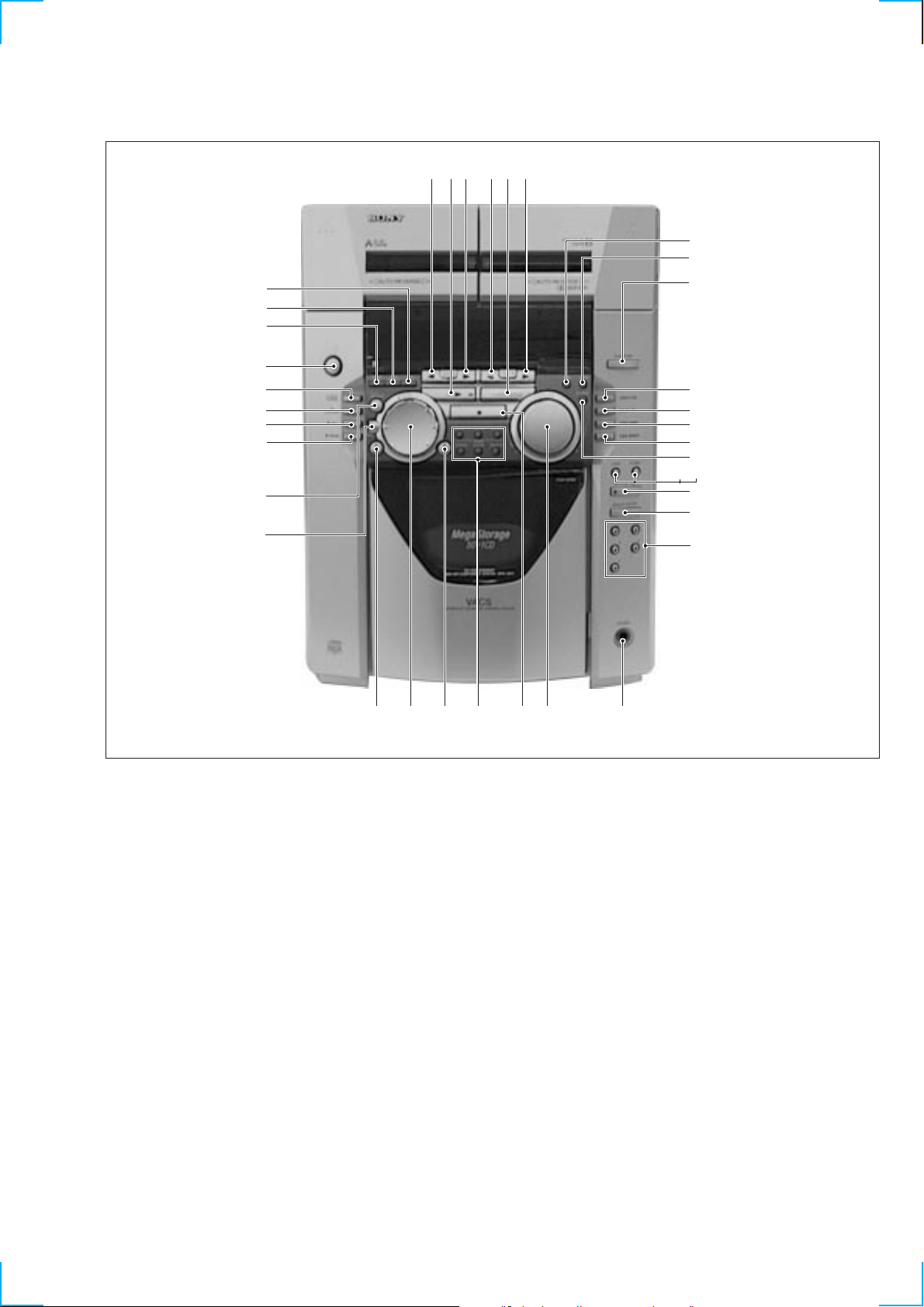
FRONT PANEL
4
3
2
1
#§
#∞
#¢
#£
#™
#¡
SECTION 1
GENERAL
576980
!¡
!™
!£
!¢
!∞
!§
!¶
!•
@º!ª
@¡
@™
@£
1 1/u button
2 DISPLAY/MEMO button
3 CLOCK TIMER SET button
4 TIMER SELECT button
5 TAPE A ª button
6 CD fl button
7 TAPE A · button
8 TAPE B ª button
9 TUNER/BAND button
0 TAPE B · button
!¡ SUR button
!™ DBFB button
!£ FUNCTION button
!¢ CONTINUE/DIRECTION button
!∞ PROGRAM/DOLBY-NR button
!§ SHUFFLE/STEREO/MONO button
!¶ REPEAT/TUNER MEMORY button
!• GROOVE button
@¢@∞@ª @•#º @§@¶
!ª LOOP button
@º FLASH button
@¡ CD PLUS ONE button
@™ GROUP ENTRY button
@£ Numeric buttons
@¢ PHONES jack
@∞ VOLUME Knob
@§ STOP button
@¶ INPUT, SCAN, SEARCH, CHECK,
CLEAR, DELETE buttons
@• CD )+, + button
@ª SELECTOR button
#º CD -0, = button
#¡ ENTER button
#™ FILE SELECT button
#£ P PAUSE button
#¢ r REC button
#∞ CD SYNCHRO button
#§ HI-SPEED DUBBING button
— 5 —
Page 6
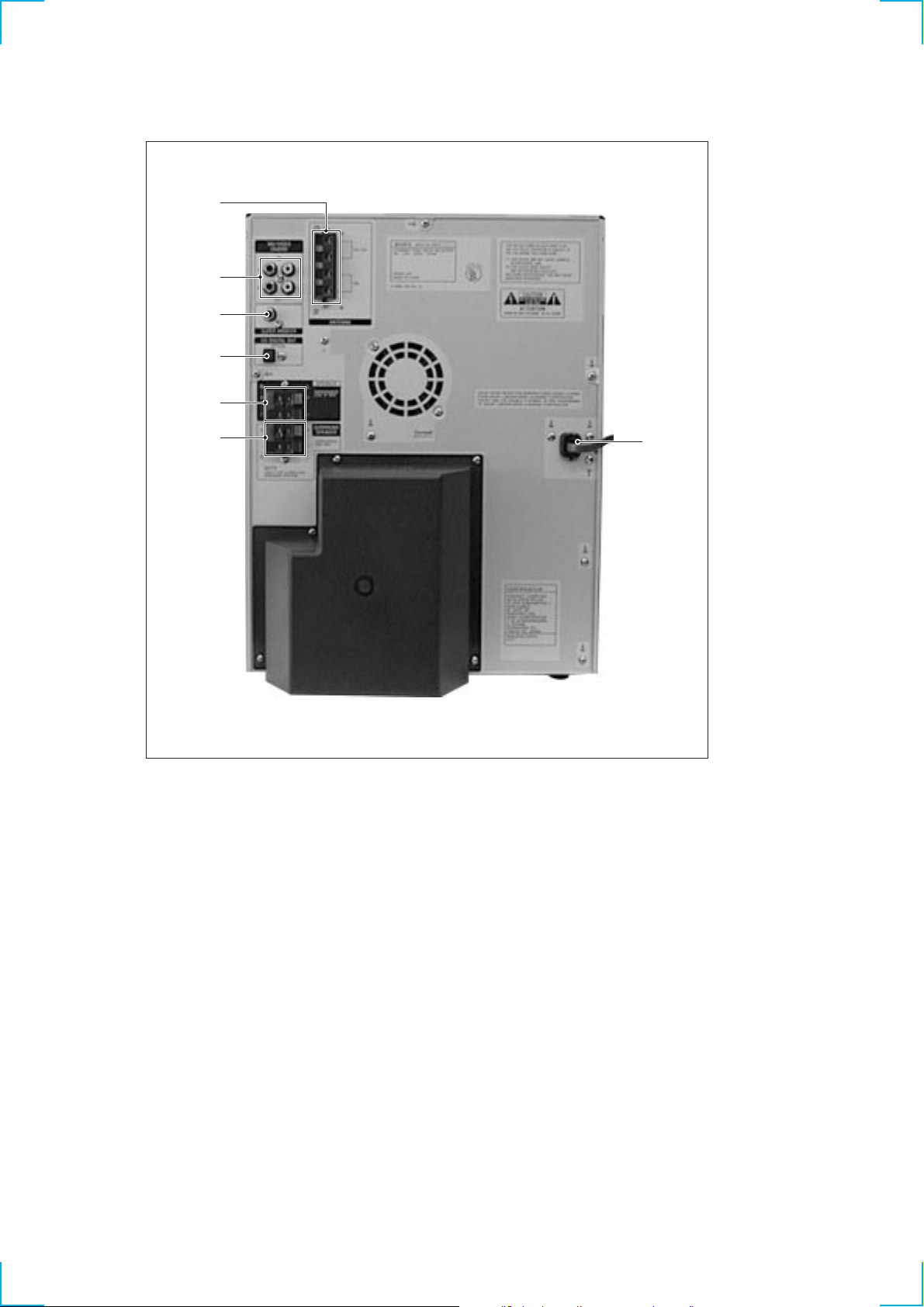
REAR PANEL
2
1
7
6
5
4
3
1 VIDEO/MD (AUDIO) jack
2 ANTENNA terminal
3 AC power cord
4 REAR SPEAKER terminal
5 SPEAKER terminal
6 CD DIGITAL OUT connector
7 SUPER WOOFER jack
— 6 —
Page 7
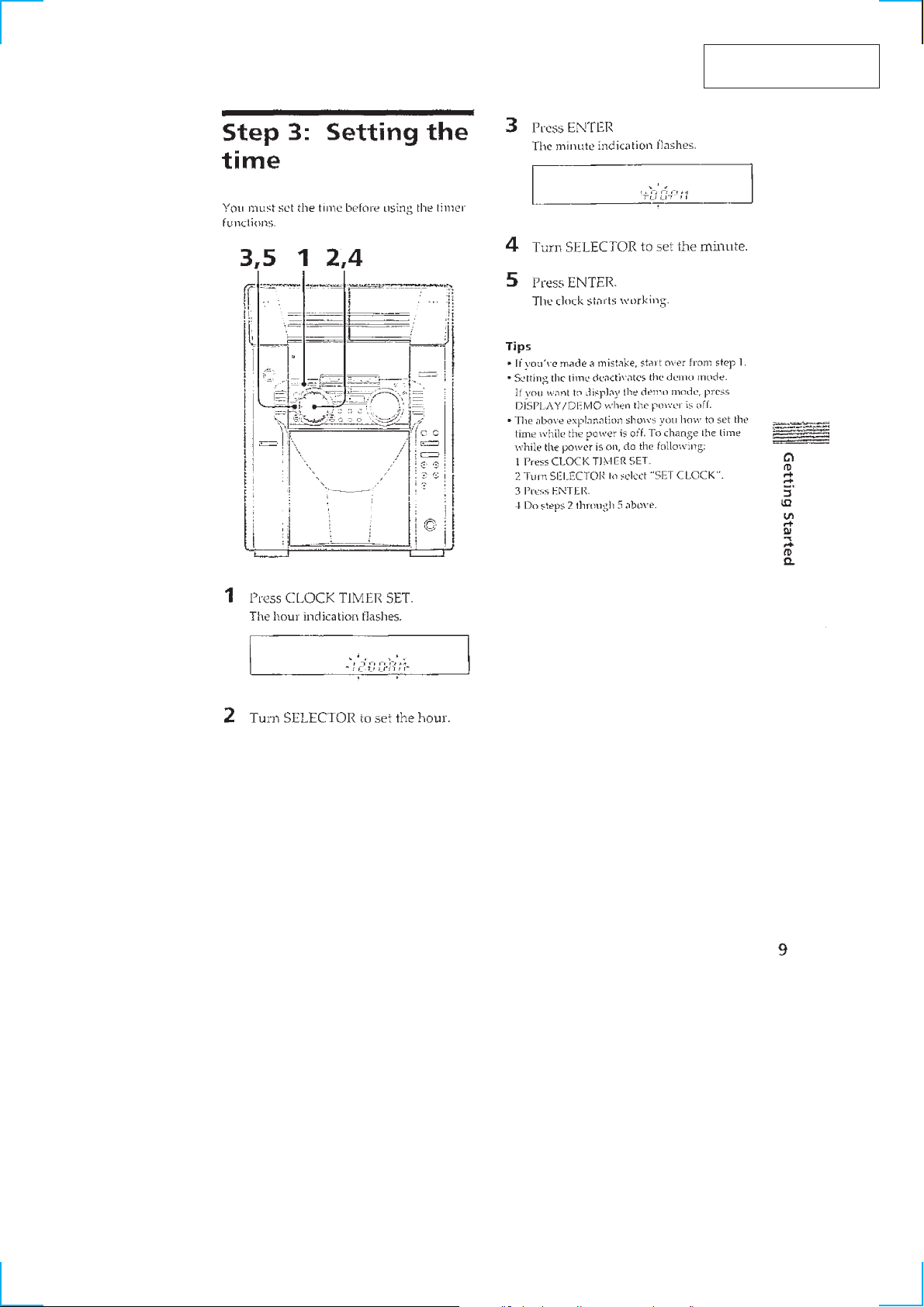
This section is extracted
from instruction manual.
— 7 —
Page 8
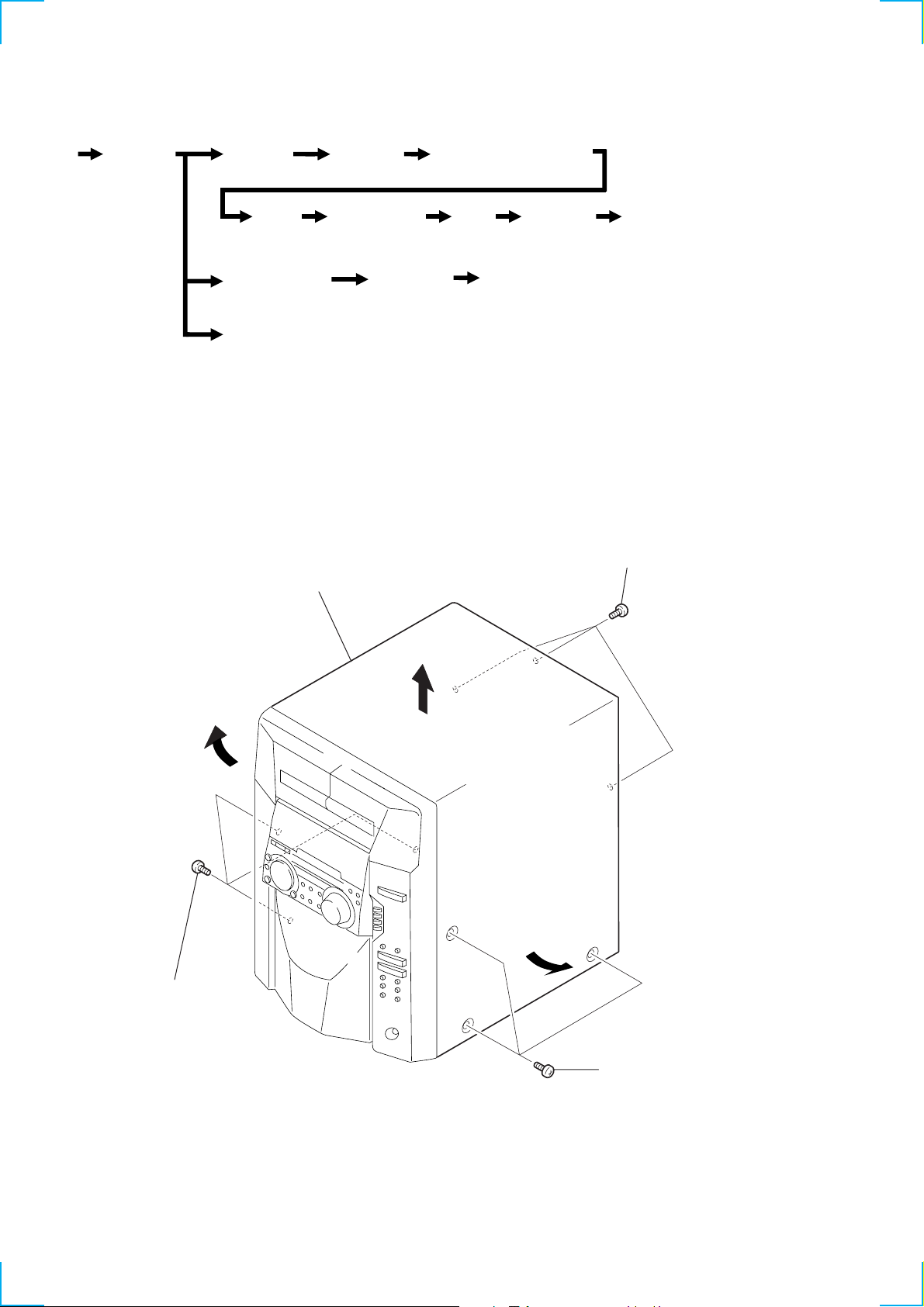
• This set can be disassembled in the order shown below.
)
SECTION 2
DISASSEMBLY
Case
(Page 8)
Note: Follow the disassembly procedure in the numerical order given.
Front panel
section
(Page 9)
Back panel
(Page 10)
Sub
chassis
(Page 11)
Tape mechanism
deck section
(Page 14)
Door assy
(Page 9)
Main board
(Page 10)
CD mechanism
deck section
(Page 12)
Audio board
(Page 14)
2-1. CASE
3
Case
Power transformer (T901)
(Page 11)
Base
unit
(Page 12)
BD board,
sled motor
(M102)
(Page 13)
Capstan motor (M1)
(Page 15)
Optical
pick-up
(KSS-213D/Q-NP)
(Page 13)
2
Three screws
(BVTP 3
×
8)
1
Three screws
(CASE3 TP2)
— 8 —
1
Three screws
(CASE3 TP2
Page 9
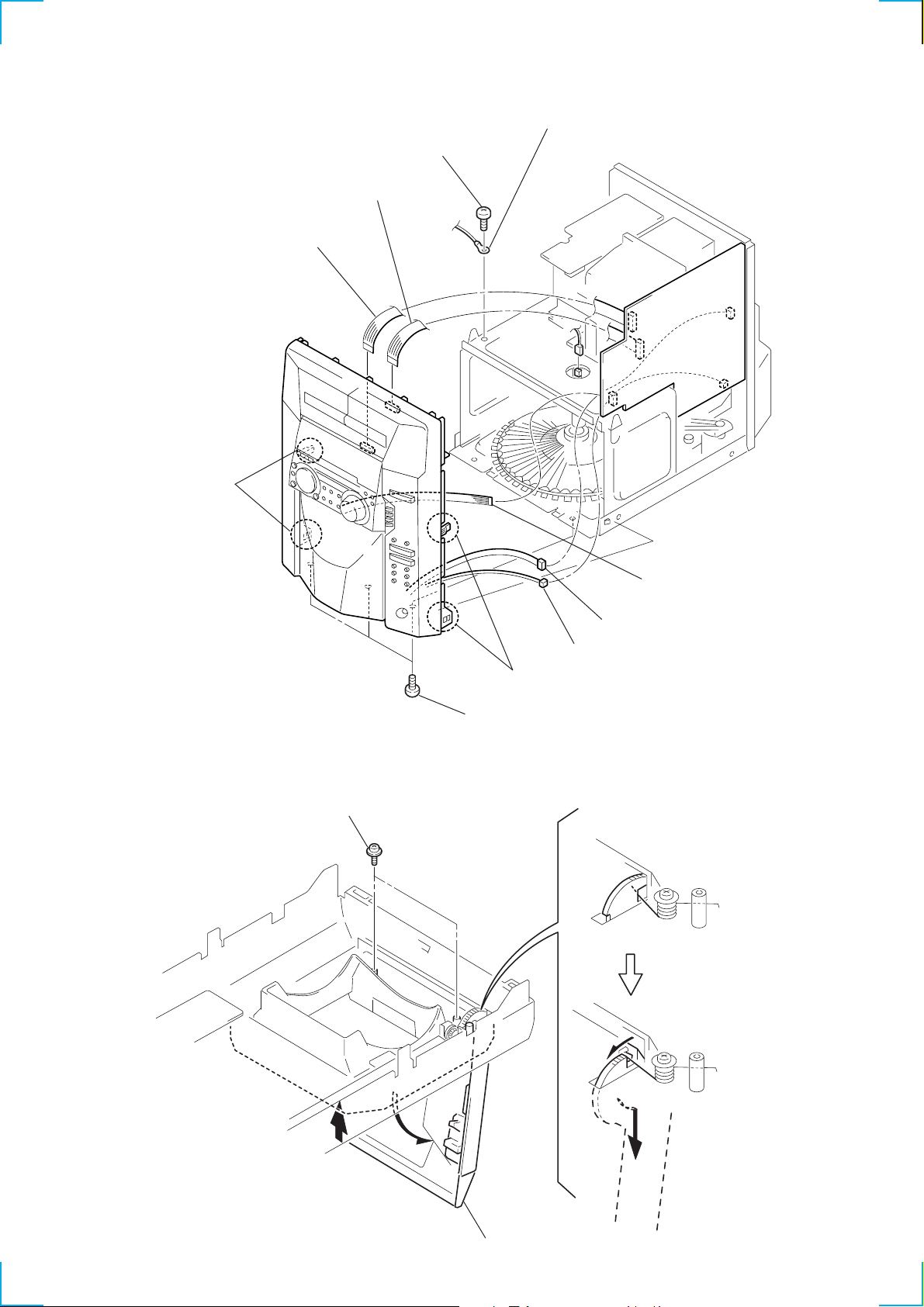
2-2. FRONT PANEL SECTION
y
2
(17 core)
1
Wire (flat type)
(15 core)
9
Two claws
6
(BVTT 3
Wire (flat type)
Screws
7
Lug
×
8)
2-3. DOOR ASSY
1
T wo screws
(PTPWH 2.6
3
Wire (flat type) (15 core)
4
Connector CN108
5
Connector CN454
9
Two claws
8
Three screws
(BVTP 3
×
8)
×
8)
2
Open the door ass'y
— 9 —
A
Remove the door ass'
3
to direction of the
arrow
A
.
Page 10
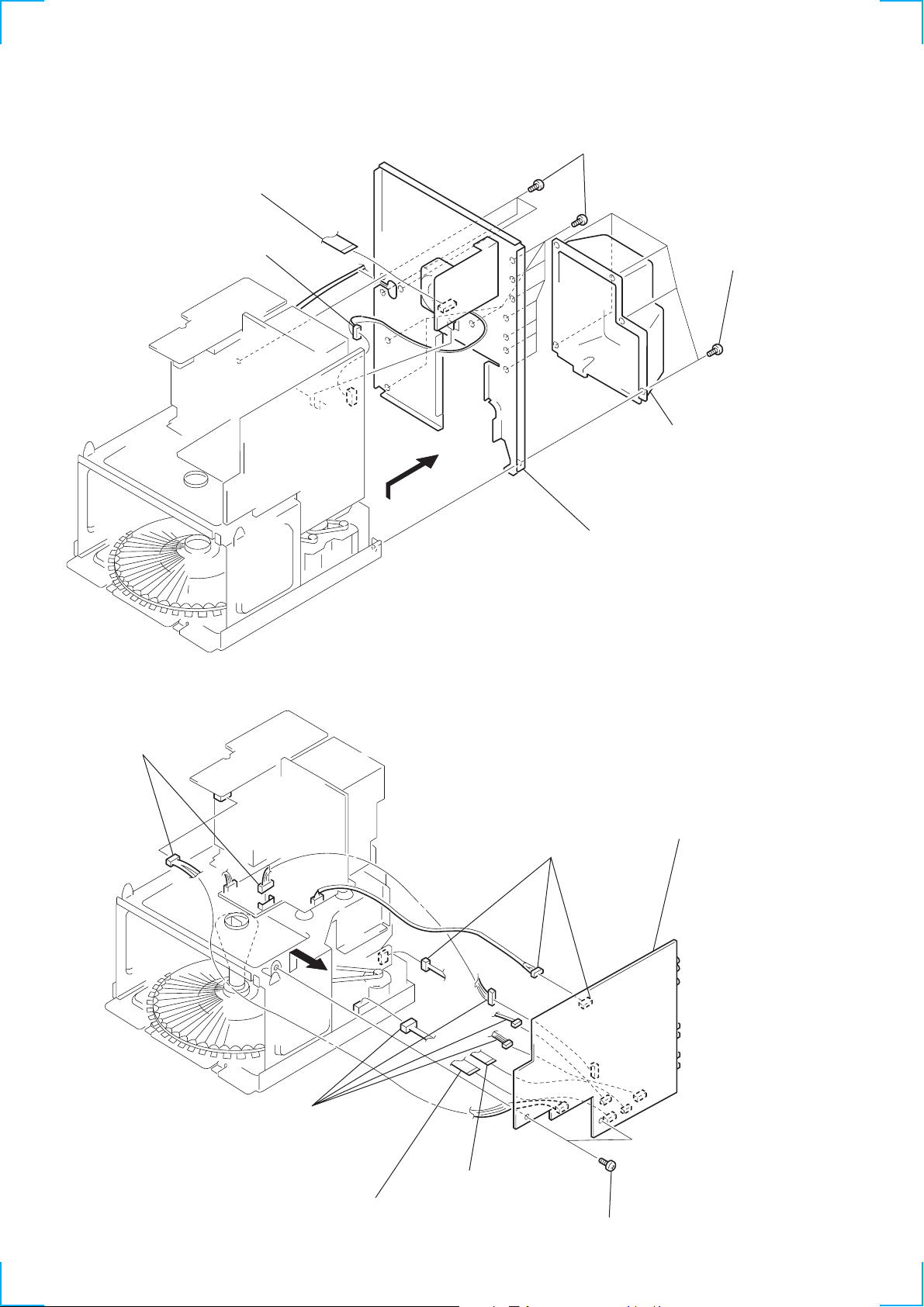
2-4. BACK PANEL
)
N
1
Wire (flat type) (13 core)
2
Connector
5
Thirteen screws
(BVTP 3
6
Remove the back panel
to direction of the arrow.
×
8)
4
Cover
3
Five screws
(BVTP 3
×
8
2-5. MAIN BOARD
5
Two connectors
3
Four connectors
4
Three connectors
7
Remove the MAI
board to direction
of the arrow.
1
Wire (flat type) (16 core)
— 10 —
2
Wire (flat type) (9 core)
6
Two screws
(BVTP 3
×
8)
Page 11
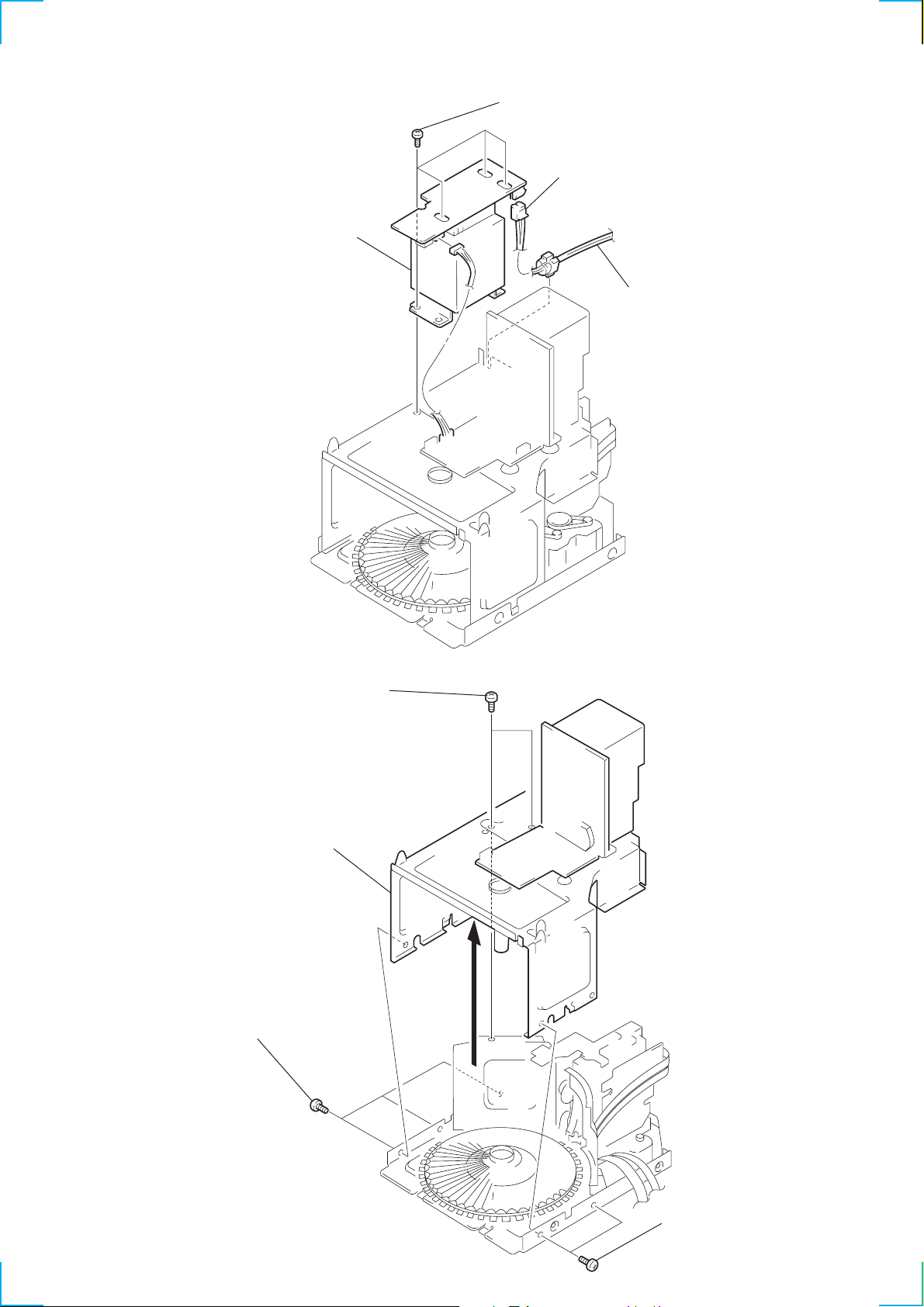
2-6. POWER TRANSFORMER (T901)
d
)
4
Power transforme
3
Four screws
(BVTT 3
1
×
8)
Connector
2
Power cor
2-7. SUB CHASSIS
2
Three screws
(BVTP 3 × 8)
1
(BVTT 3 × 8)
3
Sub chassis
Two screws
— 11 —
2
Two screws
(BVTP 3 × 8
Page 12
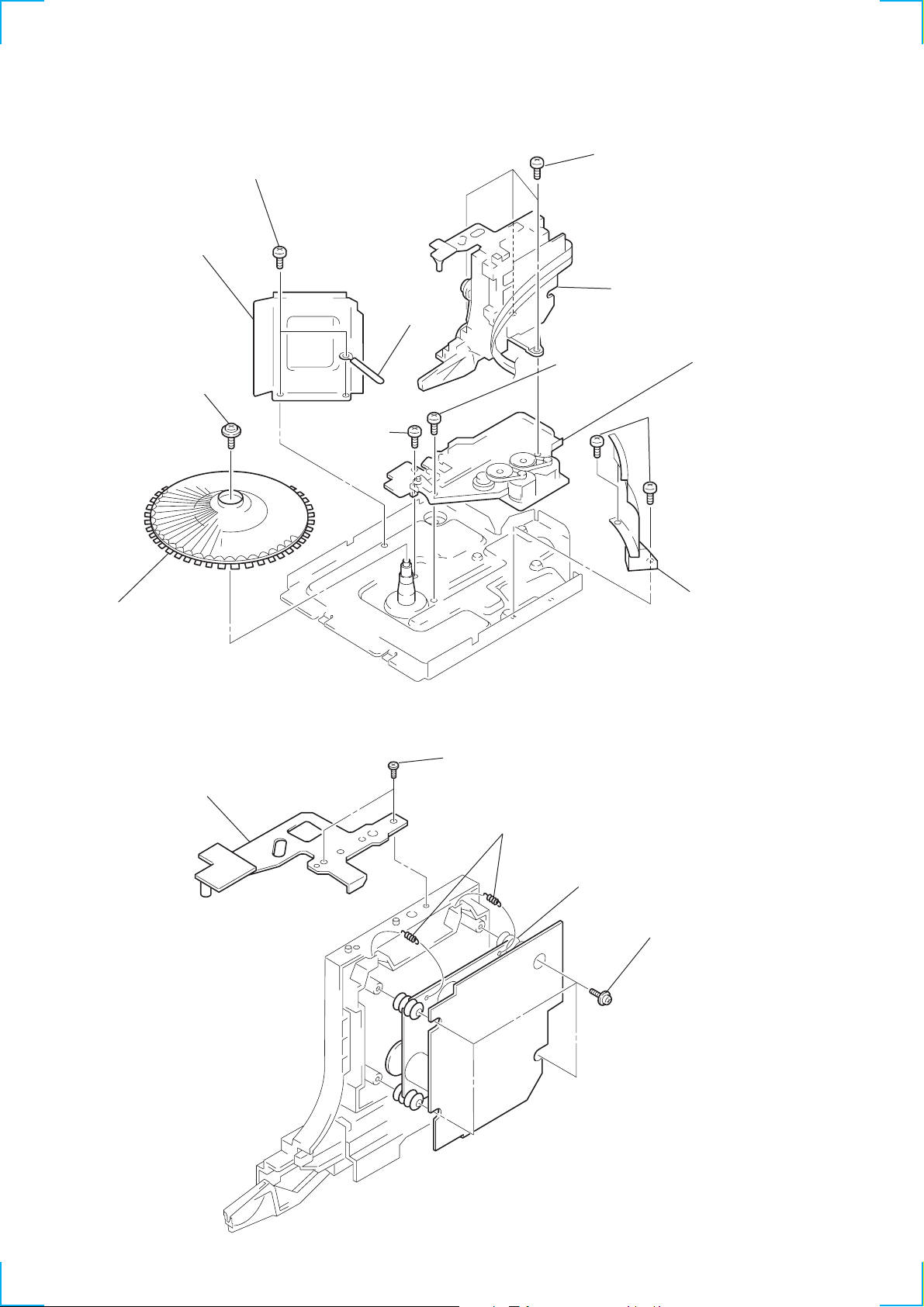
2-8. CD MECHANISM DECK SECTION
)
5
7
Reinforcement
1
Screw
(PTPWH 2.6
Two screws
(BVTT 3
×
8)
×
6)
0
Screw
(BVTP 3
6
×
14)
Wire holder
8
Three screws
(BVTT 3
9
!¡
Screw
(BVTT 3
×
10)
Base (LOADING)
!™
×
10)
3
Bwo screws
(BVTP 3
Base (CDM
×
8)
2
Table (SO)
2-9. BASE UNIT
2
Bracket
1
Two screws
(BTVP 3 × 8)
3
Two tention springs
5
Base unit
4
Cover (CD)
4
Four screws
(PTPWH 2.6 × 8)
— 12 —
Page 13
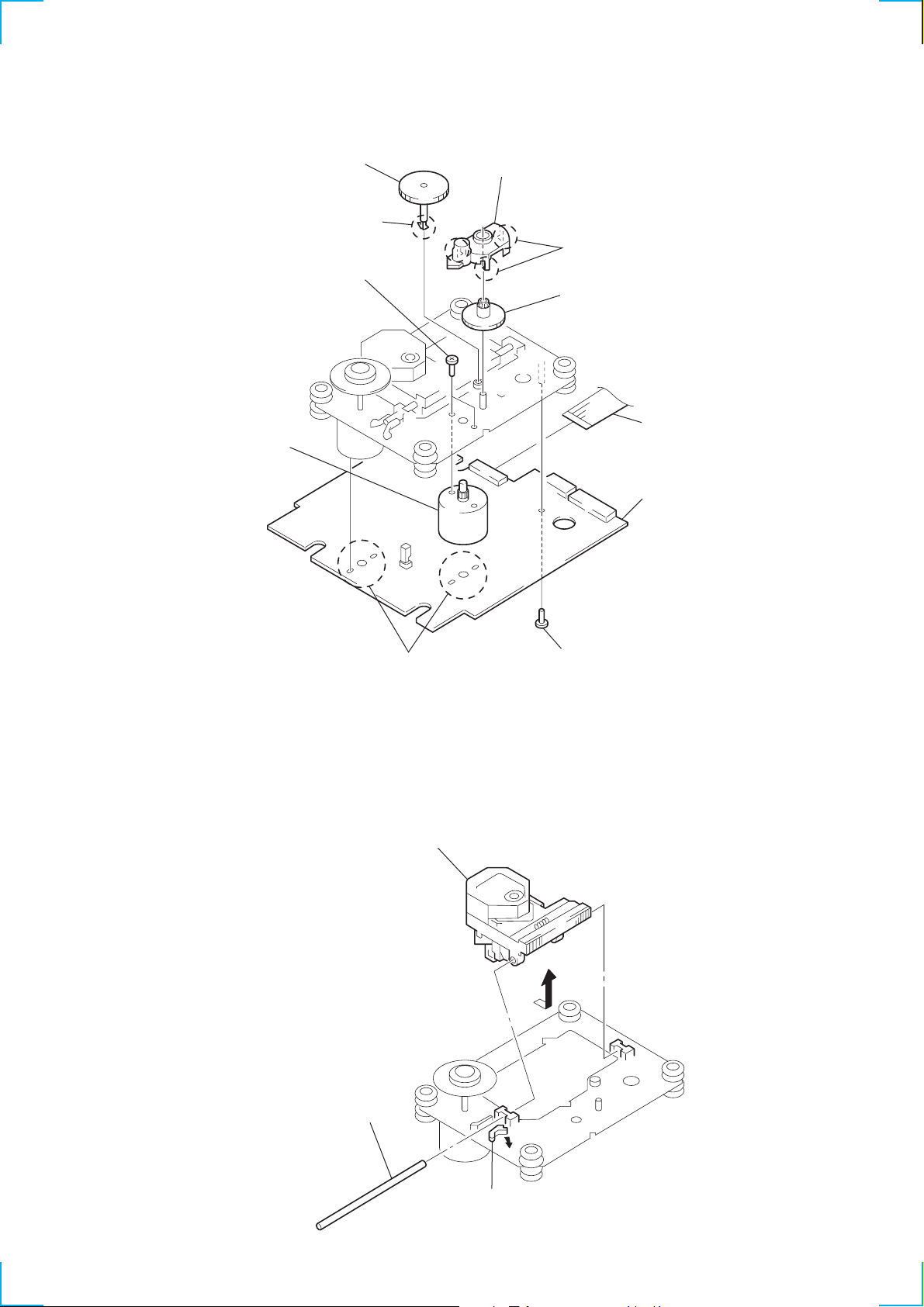
2-10. BD BOARD, SLED MOTOR (M102)
)
6
Gear (A) (S)
5
Claw
!º
Two screws (+P 2 × 2)
!¡
Sled motor
(M102)
8
Gear cover
7
Three claws
9
Gear (B) (RP)
1
Wire (flat type) (16 core
4
BD board
3
Removal
four solders.
2-11. OPTICAL PICK-UP (KSS-213BA/F-NP)
3
Remove the optical
pick-up to direction
of the arrow
A
2
Screw (+PTPWH 2 × 5)
.
A
2
Sled shaft
1
Claw
— 13 —
Page 14
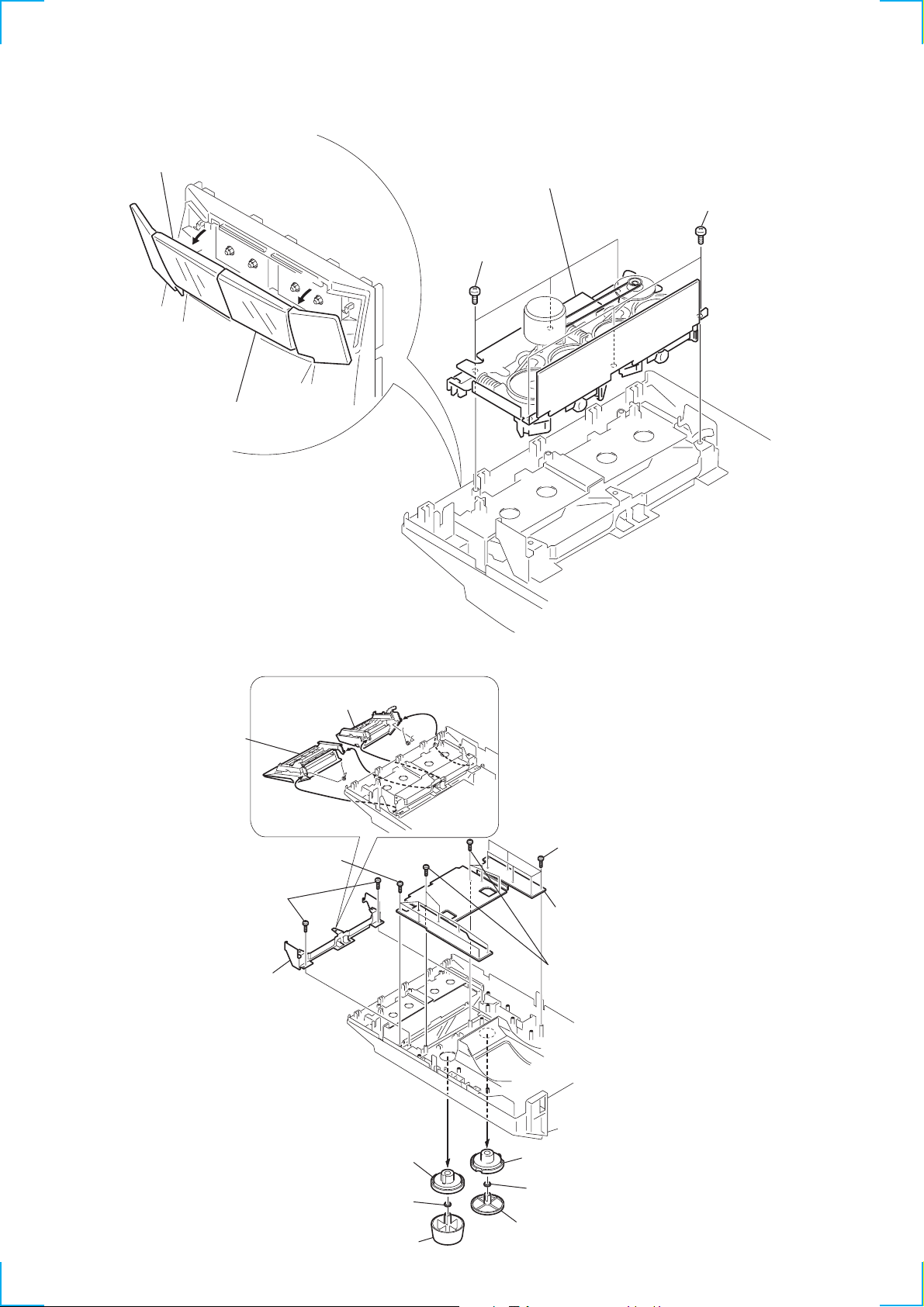
2-12. TAPE MECHANISM DECK SECTION
d
2
Remove the cassette lid (L) ass'y
to direction of the arrow
B
1
Remove the cassette lid (R) ass'y
to direction of the arrow
B
.
A
A
.
4
Remove the tape mechanism
deck section.
3
Three screws
(BVTP 2.6
3
Three screws
(BVTP 3
×
8)
×
6)
2-13. PANEL BOARD
3
Remove the
cassette lid (R) assy
4
(BVTP 2.6
5
TC bracket
3
cassette lid (L) assy
TORSION SPRING
(DOOR2)
!™
Seven screws
(BVTP 2.6
Two screws
Remove the
Remove the
1
×
×
8)
8)
TORSION SPRING
(DOOR1)
2
2
1
!™
Six screws
(BVTP 2.6
!£
Remove the panel boar
!™
Six screws
(BVTP 2.6
×
8)
×
8)
8
VOL ring
7
VOL ring
6
VOL knob
— 14 —
!¡
JOG ring
0
JOG ring
9
JOG ring
Page 15
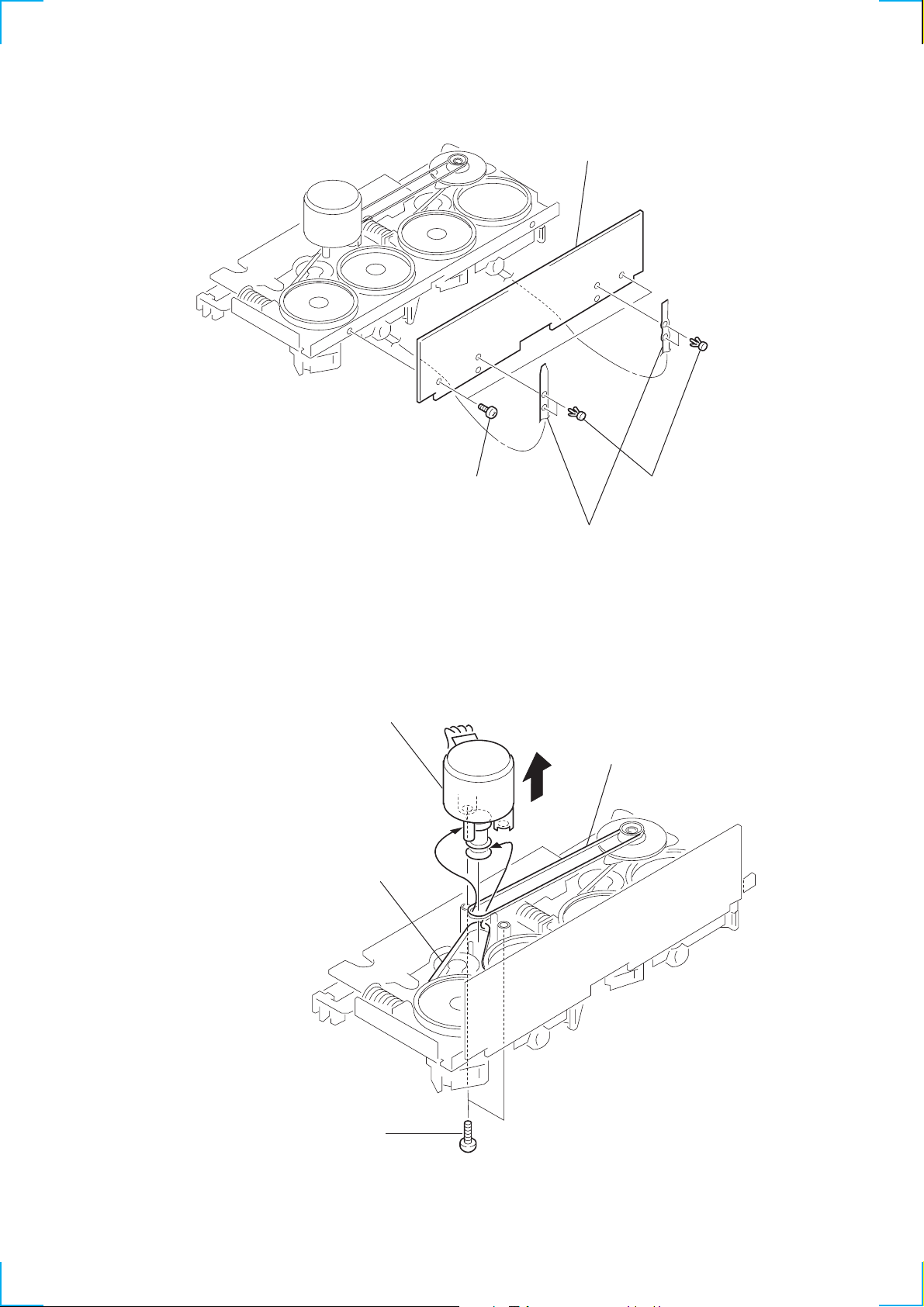
2-14. AUDIO BOARD
3
Two screws
(BTP 2.6
4
AUDIO board
×
4)
2
Break the soldering of two
flexible flat cables.
1
Four rivets
2-15. CAPSTAN MOTOR (M1)
4
Removal the capstan motor
to direction of the arrow.
2
Hang the belt.
3
Hang the belt.
1
Two screws
(BTP 2.6 × 8)
— 15 —
Page 16

SECTION 3
TEST MODE
[MC Cold Reset]
* The cold reset clears all data including preset data stored in the
RAM to initial conditions. Execute this mode when returning
the set to the customer.
Procedure:
1. Press the three buttons STOP , ENTER and FUNCTION at
the same time.
2. The fluorescent indicator tube turns off for a moment and the
RAM is reset to the initial conditions.
[MC Hot Reset]
* This mode resets the set with the preset data kept stored in the
memory. This hot reset mode is performed also when the power
cord is plugged in and out.
Procedure:
1. Press the three buttons STOP , ENTER and GROUP 1 at the
same time.
2. The fluorescent indicator tube turns off for a moment and the
RAM is reset to the initial conditions.
[CD Initial]
* The CD INITIAL clears all of the CD related data. Execute
this mode when returning the set to the customer.
Procedure:
1. Press the three buttons STOP , ENTER and GROUP 4 at the
same time.
2. The message “STANDBY” appears on the fluorescent indicator
tube and the CD related data is reset to the initial conditions.
[CD Line Test]
* The CD Line test displays the rotating time required for one
rotation by rotating the disc tray.
Procedure:
1. Press the three buttons STOP , ENTER and GROUP 5 at the
same time. The CD PLAY LED and the CD PAUSE LED flash
alternately and the disc tray starts rotation.
2. The message “xx << y.y” appears on the fluorescent indicator
tube. The left numbers count up the discs starting from 1 to 51.
The left numbers “y.y” indicate the rotating time required for
one rotation by rotating the disc tray.
3. To exit the CD LINE test mode, execute the MC Hot Reset.
[CD Memo All Clear]
* The mode clears all contents of the CD disc memo. Execute
this mode when returning the set to the customer.
Procedure:
1. Press the three buttons STOP , ENTER and GROUP 2 at the
same time. The HCD-MC1 enters the GC test mode, and all of
the fluorescent tubes and LEDs turn on.
2. From this state, any one of the three modes GROUP 1, GROUP
2 and GROUP 3 can be selected. Go to step 3 to enter the
GROUP 1 test mode. Go to step 5 to enter the GROUP 2 test
mode. Go to step 11 to enter the GROUP 3 test mode.
3. [GROUP 1 test mode ] From the state of step 2, press the
GROUP 1 button. Every pressing of the GROUP 1 button
advances the following check modes and displays in the given
order. Model name display, destination display, MC version
display, GC version display, DC version display, VC version
display and CC version display.
4. To exit the GC test mode and to return to the ST ANDBY mode,
press the STOP , ENTER and GROUP 2 buttons again.
5. [GROUP 2 test mode ] You can enter this mode directly from
step 2. When you performed steps 3, perform steps 4, then 1
and 2 before starting the step 5.
[GROUP 2 test mode ] From the GC test mode, press the
GROUP 2 button to enter the key check mode.
The display: K 1, J 0, V 0 appears.
6. The value after K indicates the number of times that the key is
pressed. 1 is displayed because the GROUP 2 button has
already been pressed.
7. When other keys are pressed one after another, the key count
increases up to 43. The keys which have already been pressed,
are not counted.
8. The value after J indicates the number of clicks that the JOG
dial is rotated. The clockwise rotation increases the count value.
The counter-clockwise rotation decreases the count value.
9. The value after V also indicates amount of rotation of volume
control. The clockwise rotation increases the count value. The
counter-clockwise rotation decreases the count value.
10. T o exit the GC test mode and to return to the STANDBY mode,
press the STOP , ENTER and GROUP 2 buttons again.
11. [GROUP 3 test mode ] You can enter this mode directly from
step 2. When you performed steps 3, perform steps 4, then 1
and 2 before starting the step 5.
[GROUP 3 test mode ] From the GC test mode, press the
GROUP 3 button to enter the VACS attenuation check mode.
The display: VOL NORMAL appears.
12. T o exit the GC test mode and to return to the STANDBY mode,
press the STOP , ENTER and GROUP 2 buttons again.
[MC Test Mode]
* This mode checks operation of amplifier and cassette deck.
How to enter the MC test mode:
Press the three buttons of STOP , ENTER and GROUP 3 . “EQ
CHECK” display on the FL tube and the VOLUME display flash.
In addition the LEDs of the JOG dial, FF and REW flash indicating
the MC test mode.
Procedure:
1. Press the two buttons MEMO INPUT and FLASH at the
same time.
2. The message “ALL ERASE” appears on the fluorescent
indicator tube and the CD disc memo is all cleared.
[GC Test Mode]
* This mode checks microprocessor version number, keys,
fluorescent tubes, LEDs and VACS (Variable Attenuation
Control System).
— 16 —
Check procedure:
You can perform any of the following five steps. However, it is
recommended to perform them in the following order because the
skipped cannot be performed if the checks are not performed in the
given order.
1. EQ Check Mode
The GEQ becomes maximum when the JOG dial is turned
clockwise.
The GEQ becomes minimum when the JOG dial is turned
counter-clockwise.
The GEQ comes to center when the FILE SELECT button is
pressed.
Page 17

2. VOLUME Check Mode
The maximum volume is set, and the VOLUME MAX display
and the GEQ display are displayed for a moment regardless of
the amount of volume rotation.
The minimum volume is set, and the VOLUME MIN display
and the GEQ display are displayed for a moment regardless of
the amount of volume rotation.
3. Deck Check Mode
Install a tape to the deck B. Select T APE B with the FUNCTION
button.
Recording starts and PAUSE is released when the REC button
is pressed.
VIDEO is selected by the input FUNCTION.
Press the STOP button to stop recording and select TAPE B
with the FUNCTION button.
Rewind the tape by pressing the REW button and stop at the
recording start point. Start playback from the recording start
point.
4. High Speed Check Mode-1
Install a tape to the deck A. Select TAPE A with the FUNCTION
button.
Press the PLA Y button then press the HI-SPEED DUBBING
button during playback.
The normal playback is obtained during normal speed playback
and the double speed playback is obtained during the double
speed playback.
5. High Speed Check Mode-2
Install a tape to the deck B. Select T APE B with the FUNCTION
button.
Press the REC button. When the P AUSE is released , recording
is started.
When the HI-SPEED DUBBING button is pressed during
recording, the double speed recording is established only when
the button is pressed.
[Aging Mode]
The decks A and B are operated automatically for aging purpose.
When errors occur during aging, causes of errors are displayed and
the aging mode is stopped.
5. The tape A is rewound and stops at the shut-off. The aging
mode advances to the next step.
The message: TAPE A AG-5 appears.
6. The tape B is played back in the FWD mode. After two minutes
of the FWD playback, the aging mode advances to the next
step.
The message: TAPE B AG-2 appears.
7. The tape B runs in fast forward. After two minutes of fast
forward, or at the shut-off point, the tape is stopped and the
aging mode advances to the next step.
The message: TAPE B AG-3 appears.
8. The tape B is played back in the RVS mode. After two minutes
of the R VS playback, the aging mode advances to the next step.
The message: TAPE B AG-4 appears.
9. The tape B is rewound and stops at the shut-off. The aging
mode advances to the next step.
The message: TAPE B AG-5 appears.
[Function Change Mode]
* Select either VIDEO or MD of the external FUNCTION input.
Procedure:
1. Turn off the power.
2. Press the two buttons ENTER and POWER at the same time.
The main power is turned on and the other function of the
previous function is selected and displayed. “MD” or “VIDEO”
[AM TUNER STEP 9 kHz/10 kHz Selection Mode]
* Either the 9 kHz step or 10 kHz step can be selected for the AM
channel step.
Procedure:
1. Turn on the power and select TUNER using the FUNCTION
button.
2. Select AM with the TUNER/BAND button and turn off the
power.
3. Press the two buttons FUNCTION and POWER at the same
time. The main power is turned on and the other frequency step
of the previous mode is selected and displayed. “AM 9k STEP”
or “AM 10k STEP”
How to enter the aging mode
1. Turn on the main power. Install a playback tape to deck A and
install a blank tape to deck B.
2. Select TAPE A with the FUNCTION button.
3. Press the three buttons of STOP , ENTER and GROUP
ENTRY at the same time to enter the aging mode.
How to exit the aging mode.
Turn off the main power.
1. Rewind the tapes A and B. Tapes stop at the shut-off of tape A
and the aging mode advances to the next step.
The message: TAPE A AG-1 appears.
2. The tape A is played back in the FWD mode. After two minutes
of the FWD playback, the aging mode advances to the next
step.
The message: TAPE A AG-2 appears.
3. The tape A runs in fast forward. After two minutes of fast
forward, or at the shut-off point, the tape is stopped and the
aging mode advances to the next step.
The message: TAPE A AG-3 appears.
4. The tape A is played back in the RVS mode. After two minutes
of the R VS playback, the aging mode advances to the next step.
The message: TAPE A AG-4 appears.
— 17 —
Page 18
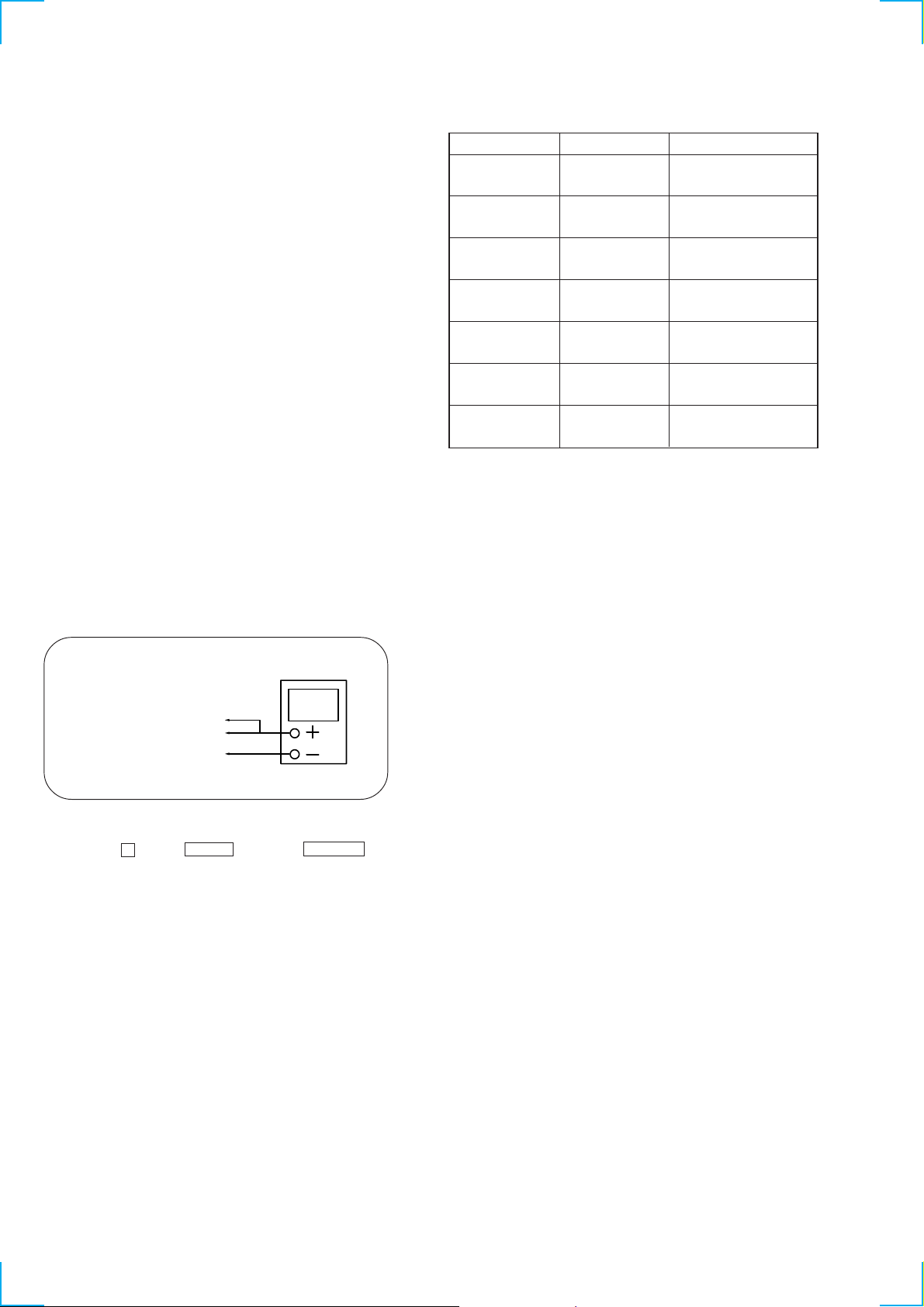
SECTION 4
e
MECHANICAL ADJUSTMENTS
• TAPE MECHANISM DECK SECTION
Precaution
1. Clean the following parts with a denatured alcohol-moistened
swab:
record/playback heads pinch rollers
erase head rubber belts
capstan idlers
2. Demagnetize the record/playback head with a head
demagnetizer.
3. Do not use a magnetized screwdriver for the adjustments.
4. After the adjustments, apply suitable locking compound to the
parts adjusted.
5. The adjustments should be performed with the rated power
supply voltage unless otherwise noted.
• T orque Measurement
Mode
FWD
FWD
back tension
REV
REV
back tension
FF/REW
FWD tension
REV tension
• CD MECHANISM DECK SECTION
To adjust the mechanism section, enter the mechanism section adjustment mode.
For how to enter the mechanism section adjustment mode, refer to each adjustment section.
Torque meter
CQ-102C
CQ-102C
CQ-102RC
CQ-102RC
CQ-201B
CQ-403A
CQ-403R
Meter reading
31 to 71 g • cm
(0.43 – 0.98 oz • inch)
2 to 6 g • cm
(0.02 – 0.08 oz • inch)
31 to 71 g • cm
(0.43 – 0.98 oz • inch)
2 to 6 g • cm
(0.02 – 0.08 oz • inch)
71 to 143 g • cm
(0.98 – 1.99 oz • inch)
100 g or more
(3.53 oz or more)
100 g or more
(3.53 oz or more)
DISC SENSOR ALIGNMENT
1. Make sure that there is no disc in the unit.
2. Connect an oscilloscope to IC401$™, IC4024 of the MAIN board.
oscilloscop
IC401$™ D.SENS (CH1)
IC401
4
HHOUT (CH2)
GND
3. Turn the power switch on.
4. Press the p button, ENTER button and GROUP 5 button simultaneously.
— 18 —
Page 19
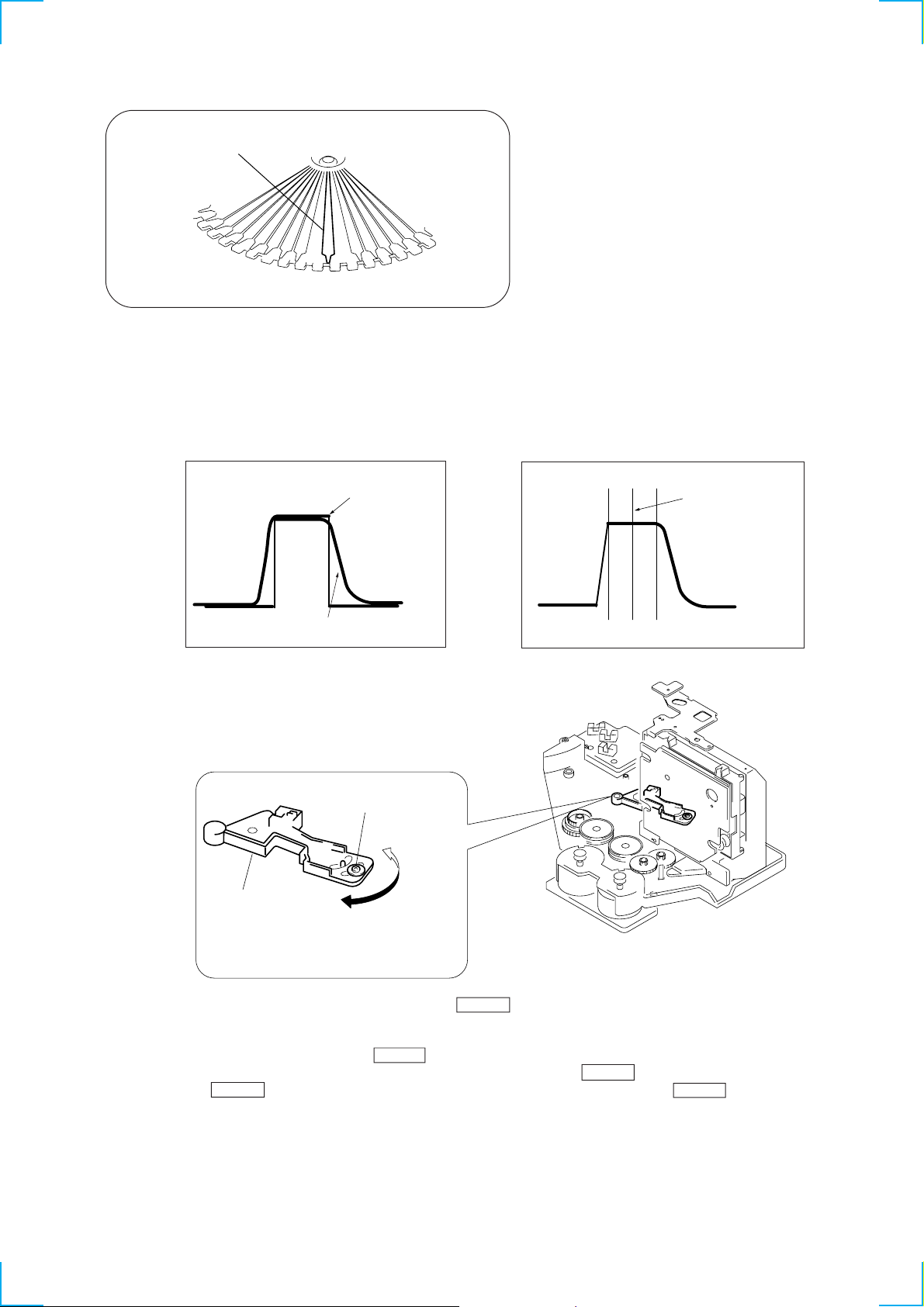
PLUS ONE
5. The disc table rotates in the clockwise direction. The disc table rotation time is displayed with ‘’PLUS ONE” slit as a measuring point.
6. Measure the waveform of the oscilloscope when the disc table is rotating.
7. Move the holder (sensor) center so that the flat portion center at the top of the D.SENS (CH1) input waveform and the ‘’H” center of
HHOUT (CH2) coincide.
D.SENS (CH1) waveform
Holder (sensor)
HHOUT (CH2) waveform
Fixed screw
Flat portion center of
D.SENS (CH1) waveform
8. Tighten the fixed screw to fix the disc table, then press the CLEAR button.
9. The disc table rotates in the counterclockwise direction. Measure the waveform and make sure that the flat portion center at the top of the
D.SENS (CH1) input waveform and the ‘’H” center of HHOUT (CH2) coincide.
10. If the adjustment is not successful, press the CLEAR button to rotate the disc table in the clockwise direction, and perform steps 6 to 9.
Note:During the adjustment mode, the rotational direction is switched each time the CLEAR button is pressed.
Pressing the CHECK button enters the loading mode which will be described later. Pressing the CLEAR button rotates the disc table
again.
— 19 —
Page 20
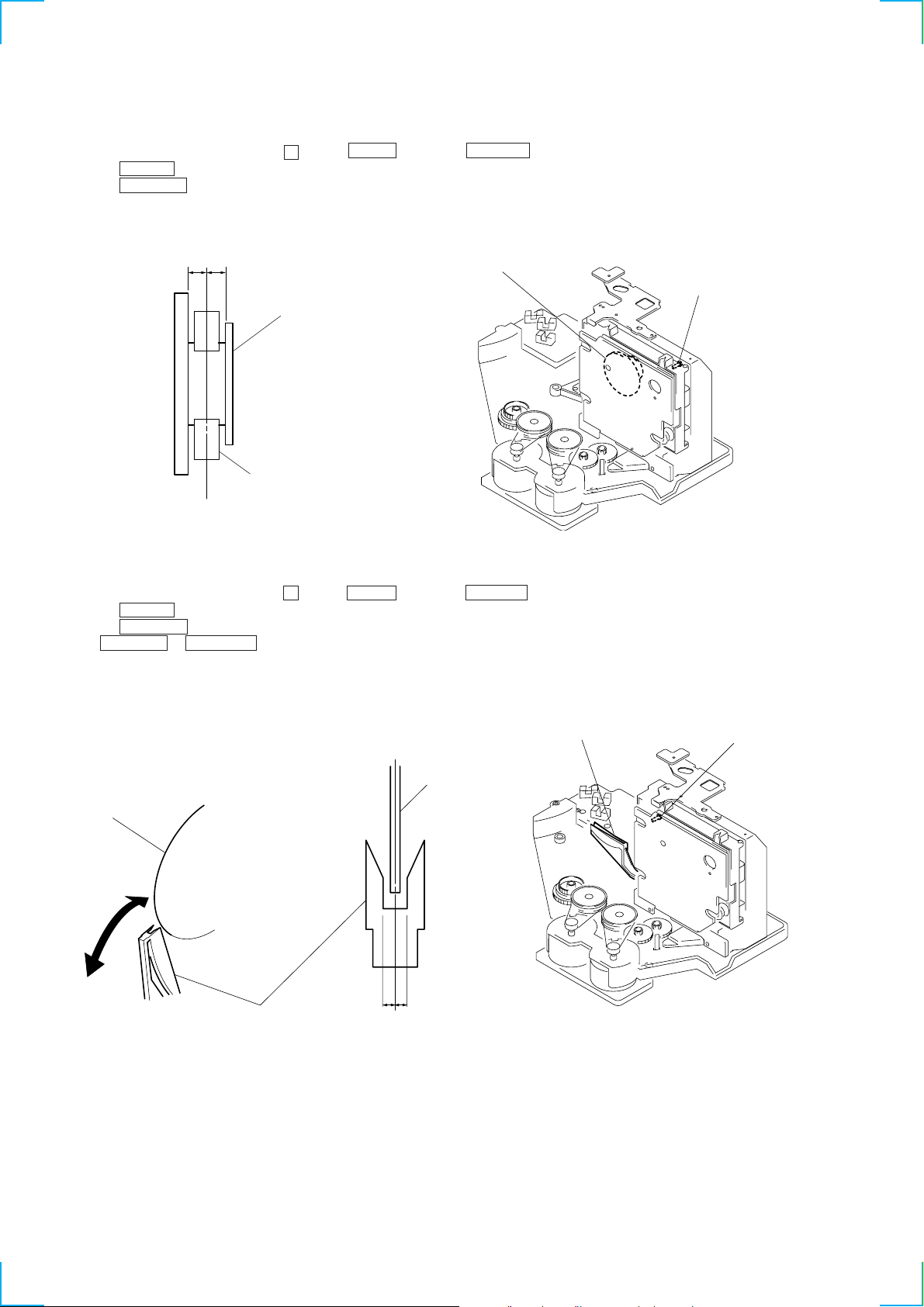
MAGNET ASSY ALIGNMENT
)
1. Check that there is no disc in the unit and then turn ON the power. Open the door, and set a disc in the PLUS ONE slit.
2. Close the door, and while pressing the p button, ENTER button and GROUP 5 button simultaneously.
3. Press the CHECK button, and set the loading mode.
4. Press the + ‚± button and chuck the disc.
5. Adjust the magnet assembly and magnet holder so that A=B as shown in the figure.
AB
Magnet ASSY
Magnet holder
Magnet ASSY
Screw (For adjustment
DISC HOLDER A ALIGNMENT
1. Check that there is no disc in the unit and then turn ON the power. Open the door, and set a disc in the PLUS ONE slit.
2. Close the door, and while pressing the p button, ENTER button and GROUP 5 button simultaneously.
3. Press the CHECK button, and set the loading mode.
4. Press the + ‚± button and chuck the disc.
5. Press + ‚± or ≠º – button to stop the disc holder A slightly away from the disc.
6. Rotate and adjust the adjusting screw so that the center of the disc and that of the disc holder coincide.
Disc
Disc holder A
a
a = b
Disc holder A
Disc
b
Screw (For adjustment)
— 20 —
Page 21
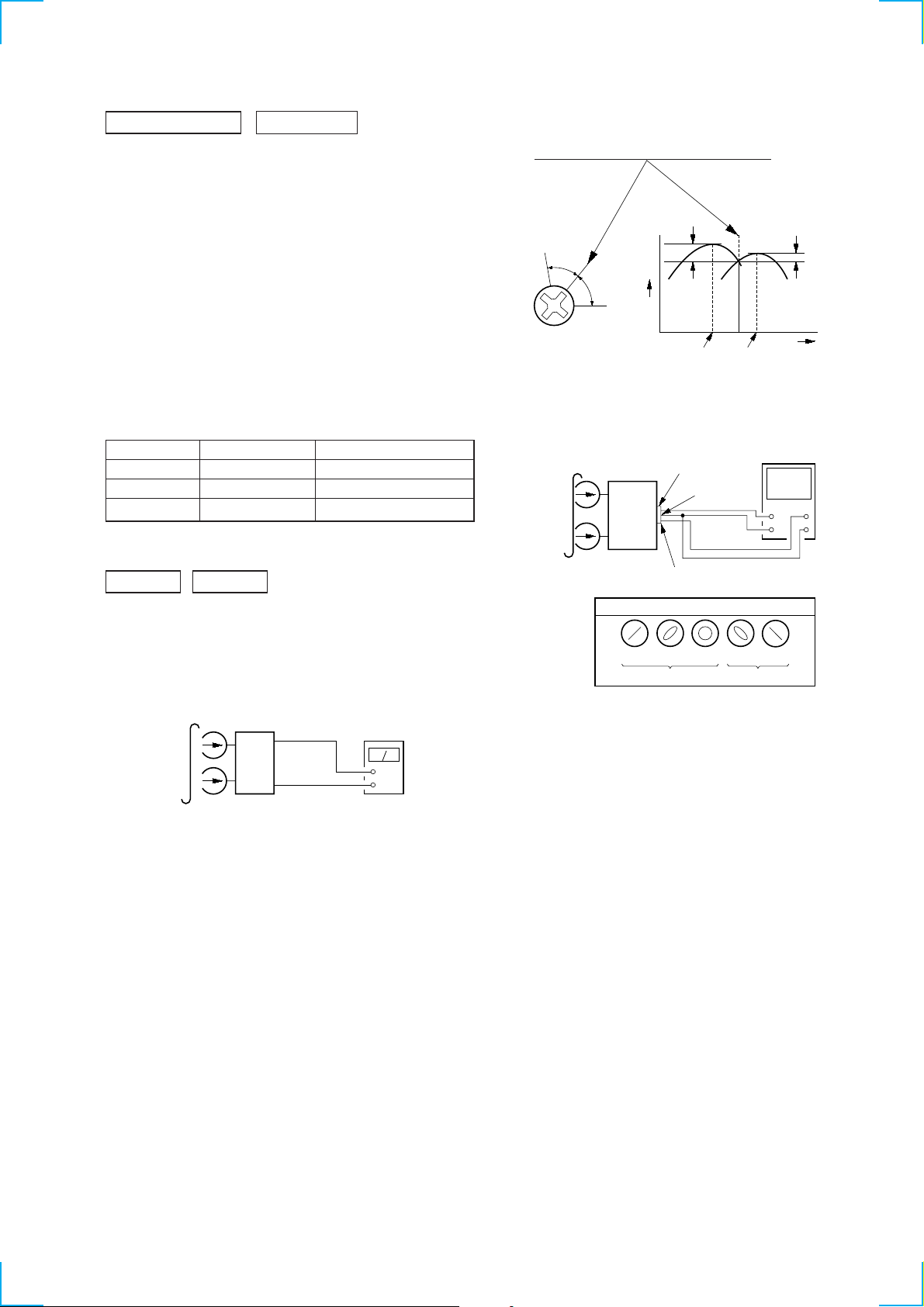
SECTION 5
MAIN
board
CN301
set
test tape
P-4-A100
(10 kHz, –10 dB)
pin
1
oscilloscope
L-CH
R-CH
V
H
waveform of oscilloscope
in phase 45°90°135°180
°
good
wrong
pin
2
pin
3
L
R
ELECTRICAL ADJUSTMENTS
DECK SECTION
0 dB=0.775 V
1. Demagnetize the record/playback head with a head
demagnetizer.
2. Do not use a magnetized screwdriver for the adjustments.
3. After the adjustments, apply suitable locking compound to the
parts adjust.
4. The adjustments should be performed with the rated power
supply voltage unless otherwise noted.
5. The adjustments should be performed in the order given in this
service manual. (As a general rule, playback circuit adjustment
should be completed before performing recording circuit
adjustment.)
6. The adjustments should be performed for both L-CH and RCH.
7. Switches and controls should be set as follows unless otherwise
specified.
• Test Tape
Tape Signal Used for
P-4-A100 10 kHz, –10 dB Azimuth Adjustment
WS-48B 3 kHz, 0 dB Tape Speed Adjustment
P-4-L300 315 Hz, 0 dB Level Adjustment
Record/Playback Head Azimuth Adjustment
DECK A DECK B
2. Turn the adjustment screw and check output peaks. If the peaks
do not match for L-CH and R-CH, turn the adjustment screw
so that outputs match within 1dB of peak.
Output
level
within
1dB
L-CH
peak
R-CH
peak
within
1dB
Screw
position
L-CH
peak
Screw
position
R-CH
peak
3. Mode: Playback
Note: Perform this adjustments for both decks
Procedure:
1. Mode: Playback
test tape
P-4-A100
(10 kHz, –10 dB)
set
main board
CN301
3
(L-CH)
Pin
Pin
1
(R-CH)
main board
CN301
Pin
2
(GND)
level meter
+
–
4. After the adjustments, apply suitable locking compound to the
pats adjusted.
Adjustment Location:Playback Head (Deck A).
Record/Playback/Erase Head (Deck B).
— 21 —
Page 22
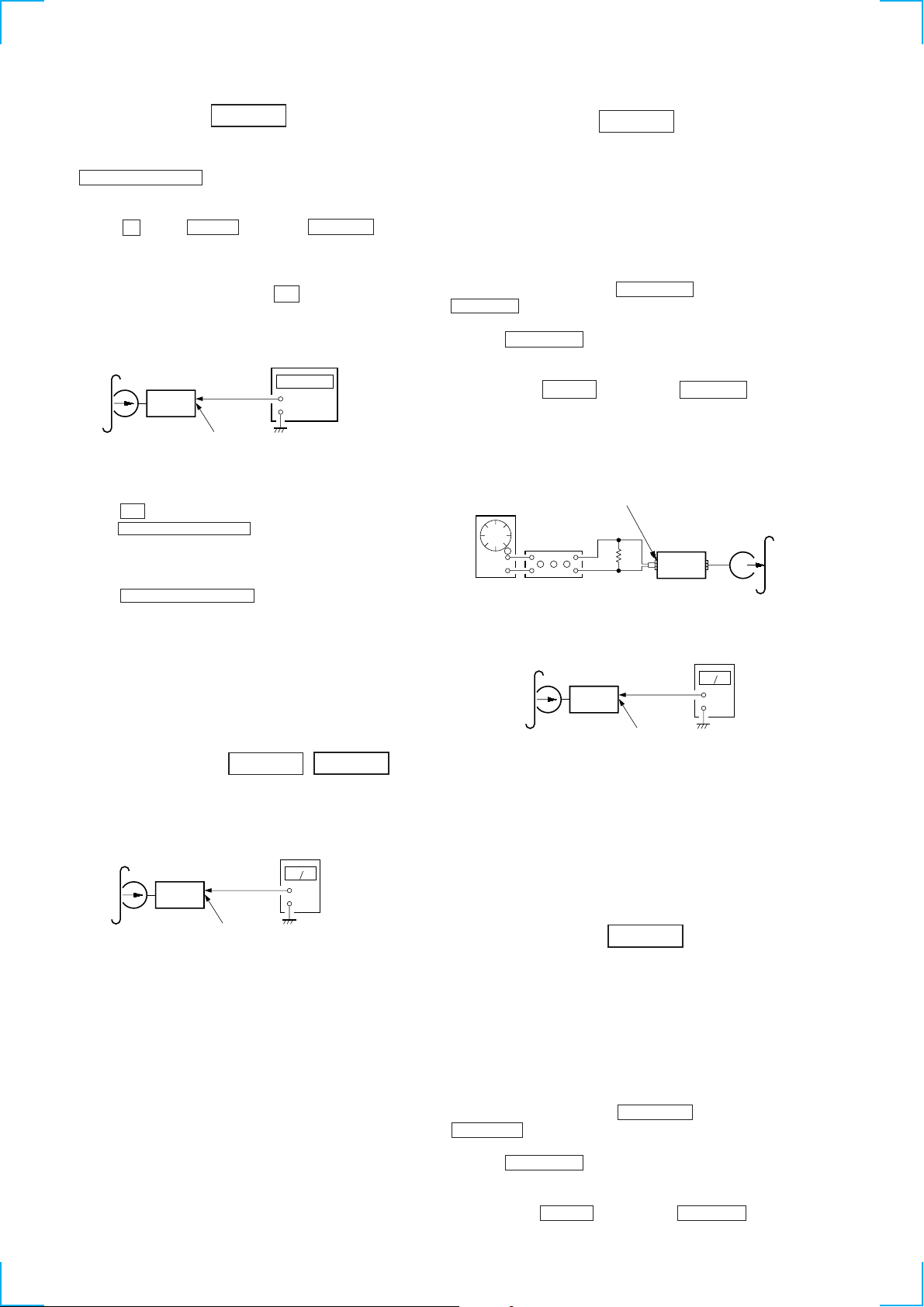
Tape Speed Adjustment DECK B
r
Note: Start the Tape Speed adjustment as below after setting to the test
mode.
In the test mode, the tape speed is high during pressing the
HI-SPEED DUBBING button.
Procedure:
1. Turn the power switch on.
2. Press the p button, ENTER button and GROUP 3 button
simultaneously.
(The “VOLUME” on the fluorescent indicator tube will blink
while in the test mode.)
To exit from the test mode, press the I/u button.
Mode: Playback
REC Bias Adjustment
DECK B
Procedure:
INTRODUCTION
When set to the test mode performed in T ape Speed Adjustment ,
when the tape is rewound after recording, the “REC memory mode”
which rewinds only the recorded portion and playback is set.
This “REC memory mode” is convenient for performing this
adjustment. During recording, the input signal FUNCTION will
automatically switch to VIDEO.
(If do not operation of stopped from recording complete, after
selecting DECK B with the FUNCTION button, and press
≠º – button then rewind to recording start position.)
test tape
WS-48B
(3 kHz, 0 dB)
set
main board
CN301 (Pin
frequency counter
3
: L-CH)
1
: R-CH)
(Pin
+
–
1. Insert the WS-48B into the deck B.
2. Press the · button on the deck B.
3. Press the HI-SPEED DUBBING button in playback mode.
Then at HIGH speed mode.
4. Adjust RV1001 on the LEAF SW board do that frequency
counter reads 6,000 ± 180 Hz.
5. Press the HI-SPEED DUBBING button.
Then back to NORMAL speed mode.
6. Adjust RV1002 on the LEAF SW board so that frequency
counter reads 3,000 ± 90 Hz.
Adjustment Location: LEAF SW board
Sample Value of Wow and filter
W,RMS (JIS) within 0.3%
(test tape: WS-48B)
Playback level Adjustment
DECK A DECK B
Procedure:
Mode: Playback
test tape
P-4-L300
(315 Hz, 0 dB)
set
level meter
+
–
1. Press FUNCTION button to select VIDEO. (This step is not
necessary if the above test mode has already been set.)
2. Insert a tape into deck B.
3. After press r REC button, press P PAUSE button, then
recording start.
4. Mode: Record
MD/VIDEO (AUDIO) IN
1) 315 Hz
2) 10 kHz
AF OSC
attenuator
50 mV (–23.8 dB)
600
Ω
set
blank tape
CN-123
5. Mode: Playback
recorded
portion
set
CN301 (Pin
(Pin
3
1
: L-CH)
: R-CH)
level mete
+
–
6. Confirm playback the signal recorded in step 3 become
adjustable level as follows.
If these levels do not adjustable level, adjustment the RV341
(L-CH) and R V441 (R-CH) on the AUDIO board to repeat steps
4 and 5.
Adjustable level: Playback output of 315 Hz to playback
output of 10 kHz: ±1.0 dB
Adjustment Location: AUDIO board
main board
CN301 (Pin
(Pin
3
1
: L-CH)
: R-CH)
Deck A is RV311 (L-CH) and RV411 (R-CH), Deck B is RV301
(L-CH) and RV401 (R-CH) so that adjustment within adjustment
level as follows.
Adjustment Level:
CN301 PB level: 301.5 to 338.3 mV (–8.2 to –7.2 dB) level
difference between the channels: within ±0.5 dB
Adjustment Location: AUDIO board
— 22 —
REC Level Adjustment
DECK B
Procedure:
INTRODUCTION
When set to the test mode performed in T ape Speed Adjustment ,
when the tape is rewound after recording, the “REC memory mode”
which rewinds only the recorded portion and playback is set.
This “REC memory mode” is convenient for performing this
adjustment. During recording, the input signal FUNCTION will
automatically switch to VIDEO.
(If do not operation of stopped from recording complete, after
selecting DECK B with the FUNCTION button, and press
≠º – button then rewind to recording start position.)
1. Press FUNCTION button to select VIDEO. (This step is not
necessary if the above test mode has already been set.)
2. Insert a tape into deck B.
3. After press r REC button, press P PAUSE button, then
recording start.
Page 23
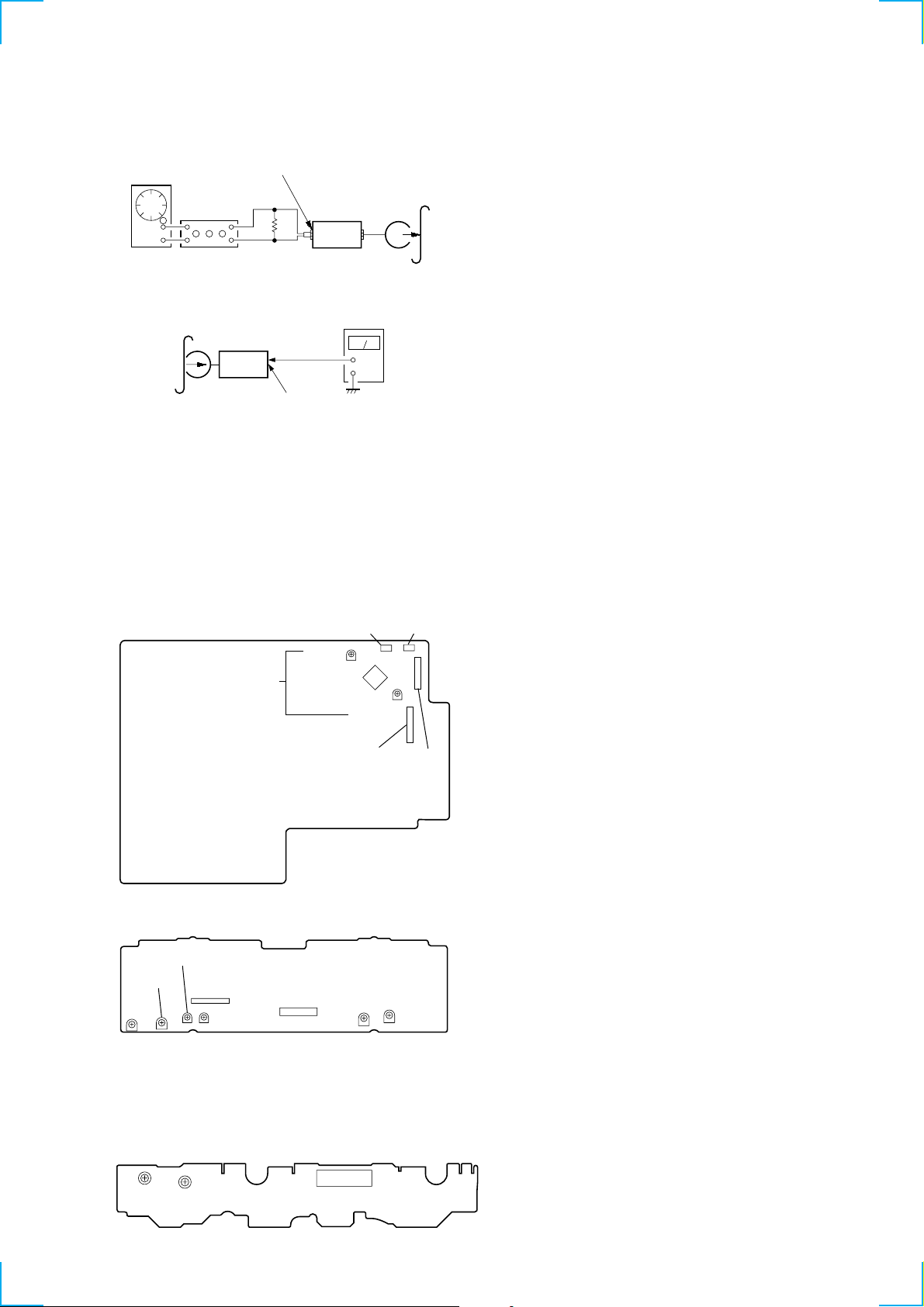
4. Mode: Record
r
MD/VIDEO (AUDIO) IN
AF OSC
315 Hz, 50 mV (–23.8 dB)
attenuator
5. Mode: Playback
600
blank tape
Ω
set
CS-123
recorded
portion
set
CN301 (Pin
(Pin
level mete
3
: L-CH)
1
: R-CH)
+
–
6. Confirm playback the signal recorded in step 3 become
adjustable level as follows.
If these levels do not adjustable level, adjustment the RV301
(L-CH) and R V351 (R-CH) on the MAIN board to repeat steps
4 and 5.
Adjustable level:
CN301 PB level: 47.2 to 53.0 mV (–24.3 to –23.3 dB)
Adjustment Location: MAIN board
[MAIN BOARD] (Component Side)
RV351
R
CN107
CN302
CN106
REC LEVEL
CN301
RV301
L
IC301
[AUDIO BOARD] (Component Side)
RV441
RV401
RV301
LR
PB LEVEL
– DECK B –
[LEAF SW BOARD] (Component Side)
TAPE SPEED
(NORMAL) (HIGH)
RV1002
IC602
RV341
RL
REC BIAS
RV1001
CN601
RV311
PB LEVEL
– DECK A –
CN1001
RV411
LR
— 23 —
Page 24
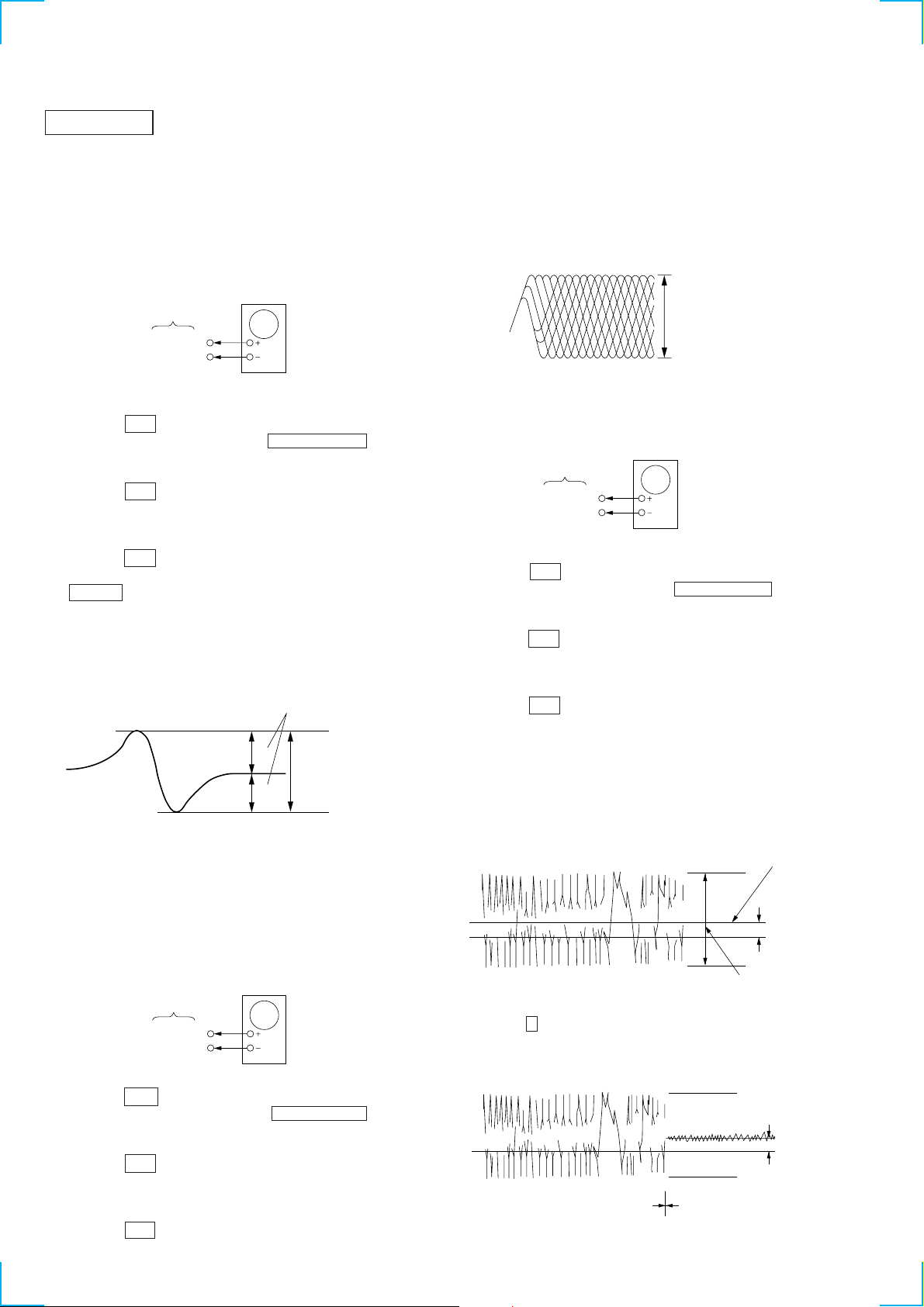
CD SECTION
Note :
1. CD Block is basically designed to operate without adjustment.
Therefore, check each item in order given.
2. Use YEDS-18 disc (3-702-101-01) unless otherwise indicated.
3. Use an oscilloscope with more than 10MΩ impedance.
4. Clean the object lens by an applicator with neutral detergent
when the signal level is low than specified value with the
following checks.
oscilloscope
BD board
TP (FE)
TP (VC)
10. Confirm that oscilloscope waveform is clear and check RF signal
level is correct or not.
11. Turn OFF the power, and remove the lead wire connected at
step 7.
Note : A clear RF signal waveform means that the shape “◊” can be
clearly distinguished at the center of the waveform.
RF signal waveform
VOLT/DIV : 200mV
TIME/DIV : 500ns
level : 1.8 ± Vp-p
+0.3
–0.2
S Curve Check
Procedure :
1. Press the 1/u button to turn ON the power .
2. Open the front cover, and press the CD PLUS ONE button.
3. Set the disc (YEDS-18) into the “PLUS ONE” slit.
4. Close the front cover, and chuck the disc.
5. Press the 1/u button to turn OFF the power.
6. Connect the oscilloscope to TP (FE) of the BD board.
7. Connect TP (ADJ) of the MAIN board and connect TP (GND)
with a lead wire.
8. Press the 1/u button to turn ON the power.
9. The first track will be played back automatically. When the
CHECK button is pressed, “S JI” will be displayed on the
fluorescent indicator tube, and focus search will be repeated.
10. Check the oscilloscope waveform (S-curve) is symmetrical
between A and B. And confirm peak to peak level within 1.8 ±
0.6 Vp-p.
S-curve waveform
symmetry
A
within 1.8 ± 0.6Vp-p
B
11. Turn OFF the power, and remove the lead wire connected at
step 7.
Note : • Try to measure several times to make sure than the ratio
of A : B or B : A is more than 10 : 7.
• Take sweep time as long as possible and light up the
brightness to obtain best waveform.
RF Level Check
oscilloscope
BD board
TP (RF)
TP (VC)
Procedure :
1. Press the 1/u button to turn ON the power.
2. Open the front cover, and press the CD PLUS ONE button.
3. Set the disc (YEDS-18) into the “PLUS ONE” slit.
4. Close the front cover, and chuck the disc.
5. Press the 1/u button to turn OFF the power.
6. Connect the oscilloscope to TP (RF) of the BD board.
7. Connect TP (ADJ) of the MAIN board and connect TP (GND)
with a lead wire.
8. Press the 1/u button to turn ON the power.
9. Playback the fifth track of the disc.
— 24 —
E-F Balance (Traverse) Check
The procedure for this checking method differs for when a general
remote control unit is used and not used.
oscilloscope
BD board
TP (TE)
TP (VC)
When a general remote commander is used:
1. Press the 1/u button to turn ON the power.
2. Open the front cover, and press the CD PLUS ONE button.
3. Set the disc (YEDS-18) into the “PLUS ONE” slit.
4. Close the front cover, and chuck the disc.
5. Press the 1/u button to turn OFF the power.
6. Connect the oscilloscope to TP (TE) of the BD board.
7. Connect TP (ADJ) of the MAIN board and connect TP (GND)
with a lead wire.
8. Press the 1/u button to turn ON the power.
9. Playback the fifth track of the disc.
10. Press the 3 button on the remote commander. (The tracking
servo and the sledding servo are turned OFF.)
11. Check the level B of the oscilliscope's waveform and the A (DC
voltage) of the center of the Traverse waveform.
Confirm the following :
A/B x 100 = less than ± 10%
Traverse waveform
0V
Center of the waveform
B
A (DC voltage)
level : 0.7 ± 0.3 Vp-p
12. Press the 8 button on the remote control unit. (The tracking
servo and sledding servo are turned ON.) Confirm the C (DC
voltage) is almost equal to the A (DC voltage) is step 11.
Traverse waveform
0V
Tracking servo
Sled servo
OFF
Tracking servo
Sled servo
ON
C (DC
voltage)
13. Turn OFF the power, and remove the lead wire connected at
step 7.
Page 25

HCD-F150/FR10
oscilloscope
BD board
TP (TE)
TP (VC)
When a general remote commander is not used:
1. Solder lead wires to TP (DVDD) and TP (TOFF) on the BD
board severally.
2. Connect the oscilloscope to TP (TE) of the BD board.
3. Press the POWER button to turn ON the power.
4. Open the front cover, and press the CD PLUS ONE button.
5. Set the disc (YEDS-18) into the “PLUS ONE” slit.
6. Close the front cover, and chuck the disc.
7. Playback the fifth track of the disc.
8. Short-circuit the lead wire connected at step 1. (The tracking
servo is turned OFF)
9. Check the level B of the oscilloscope's waveform and the A
(DC voltage) of the center of the Traverse waveform.
Confirm the following :
A/B × 100 = less than ± 10%
Traverse waveform
Center of the waveform
B
Adjustment Location :
[ BD BOARD ] — CONDUCTOR SIDE —
IC102
(PLCK)
TP
(DVDD)
TP
(FE)
TP
(VC)
TP
(RF)
TP
(TOFF)
IC101
TP
(TE)
TP
CN102
CN103
CN101
0V
A (DC voltage)
level : 0.7 ± 0.3 Vp-p
10. Disconnect the lead wire short-circuited at step 8. (The tracking
servo is turned ON.) Confirm the C (DC voltage) is almost equal
to the A (DC voltage) is step 8.
Traverse waveform
C (DC
0V
Tracking servo
OFF
Tracking servo
ON
voltage)
11. Turn OFF the power, and remove the lead wire connected at
step 1.
RF PLL Free-run Frequency Check
Procedure :
1. Connect the frequency counter to TP (PLCK) of the BD board.
[ MAIN BOARD ] — COMPONENT SIDE —
CN301
RV301
IC301
RV351
CN107
CN302
CN106
BD board
TP (PLCK)
frequency counter
2. Press the POWER button to turn ON the power.
3. Open the front cover, and press the CD PLUS ONE button.
4. Set the disc (YEDS-18) into the “PLUS ONE” slit.
5. Close the front cover, and chuck the disc.
6. Playback the fifth track of the disc.
7. Confirm that reading on frequency counter is 4.3218 MHz ±
30 kHz.
— 25 —
Page 26

HCD-MC1
6-1. BLOCK DIAGRAMS
CD SECTION
OPTICAL PICK-UP
BLOCK
(KSS-213BA/F-NP)
DETECTOR
VCC
VC
A
B
C
D
E
F
10
SECTION 6
DIAGRAMS
FOCUS/TRACKING/
SLED/SPINDLE SERVO
RF AMP
IC101
7
8
4
2
1
5
6
LD
A+5V
Q103
LD
DRIVER
58
VR
2
FIN 1
1
FIN 2
3
E
4
F
62
LDD
RF SM
TES
HFL
41
44SLI
49DEF
36
37
33JP+
32JP-
10
EFMI
9
EFMO
1
DEF
16
TES
15
HFL
19
JP+
20
JP-
DIGITAL SIGNAL
PROCESSOR
IC102
D OUT
A+5V
31
XI
45
XO
44
X101
16.9344MHz
IC402
VDD
D IN
GND
CD
DIGITAL
OUT
• SIGNAL PATH
:CD
:DIGITAL OUT
FOCUS
COIL
TRACKING
COIL
M102
MOTOR
M101
SPINDOL
MOTOR
S101
LIMIT
SLED
GND
PD
VR
FCS/TRK COIL
SL/SP MOTOR
DRIVER
IC103
F+
F
T+
T
18
F+
17
F
19
T+
20
T
8
SL+
M
7
SL
6
SP+
M
SP
5
F IN
T IN
SL IN
SP IN
MUTE
15
22
10
3
2
63
LDS
16
FD
15
TO
29
SLD
27
SPD
CLK
TGL
DRF
SL+
SL-
CV-
52DATA
50
CL
51
CE
53
34
54
35TOFF
31
30
40CV+
39
Q102
Q101
56
COIN
61
4.2M
57
CQCK
54
RWC
18
TGL
17
TOFF
26
CONT3
12
CLV+
13
CLV-
27
CONT4
L CH
R CH
PW
SFSY
16M
CBCK
SBSY
WRQ
SQOUT
PDO
RESET
37
40
49
50
60
51
47
53
55
3
58
R CH
D151
FILTER AMP
IC441
CD CHANGER
CONTROL
IC401
IIC DATA
80
IIC CLK
78
CD TEXT
DECODER
IC104
2
SBSO
4
WFCK
5
MCK
1
FXCK
3
SCOR
SRDT
SCLK
12
11
13DQSY
6XMODE
X401
66
65
64
67
55
49
32
31
SRDT
SCLK
DQSY
XMODE
WRQ
SQOUT
XTAL
EXTAL
RESET
D0
D7
A0
A14
WE
30
8
SRAM
IC411
27
29
WE
815
CE
20
U+5V
D402
Q411
RESET
SW
D51
D51
DISC
SENSOR(S)
CD L
IIC DATA
IIC CLK
RESET
B
TO/FROM
MAIN
BLOCK
(Page 29)
M61
LOADING
MOTOR
M62
TABLE
MOTOR
2
DB RESET
50
COIN
48
CQCK
58
RWC
57
TGL
54
DRF
47
MOTOR DRIVER
8
L+
IC461
L+
3
59
76
SL+
SL-
LD OUT
M
9
L
11
T+
L
2
T+
16
77
LD IN
75
TBL L
DOWN SW
M
T
10
16
T
17
74
TBL R
TSENS 1
TSENS 2
TSENS 3
UP SW
DOOR SW
42D SENS
62
61
63
70
71
69
SENSOR
IC51-53
S51
(UP)
S52
(DOWN)
S413
(DOOR)
TABL
Q51
DISC
SENSOR
— 27 — — 28 —
Page 27

MAIN SECTION
HCD-MC1
VIDEO/
MD
IN
OUT
TO/FROM
TUNER
B
TO/FROM
CD
BLOCK
(Page 28)
A
TO/FROM
AUDIO
BLOCK
(Page 32)
UNIT
R CH
17
14
13
IIC DATA
IIC CLK
R CH
Q703,704
FAN
DRIVE
IC191
Q191
MUTE
34
37
32
26
29
19
VOL A
20
VOL B
21
JOG A
22
JOG B
33
SIRCS
10
24
23
Q901,902,915
REG
Q916,951,952
REG
IC901
REG
IC902
REG
LR
DISPLAY CONTROL
IC601
SPEANA0
SPEANA3
L+R
KEY0
KEY3
RESET
DATA
CLOCK
MAIN +B
MAIN -B
13
13
TM701
SEG1
SEG20
LED1
LED16
D821
E MODEL
D901-904
G1
G13
SOUND
ST D IN
66
ST D IN
ST D OUT
CONTROL
IC101
69
IN A
66
IN B
67
IN C
68
IN D
57
REC B
58
REC A
33
DATA
DATA
52
DATA
DATA
CLOCK
32
CLOCK
CLOCK
51
CLK
L OUT
BB A
BB B
34
LATCH
LATCH
3
LATCH
VOL
LATCH
36
MUTE
CONT
1
LINE MUTE
SYSTEM
CONTROL
IC501 (2/2)
Q113
MUTE
D141
IIC DATA
IIC CLK
56
IIC CLK
Q111,112
DBFB
SWITCH
2
Q571,572
DBFB H/L
39
38
60
KIY
40
IIC DATA
55
Q575
MUTE
100
1
6
STK MUTE
6
F RELAY
POWER
AMP
IC801
15
RESET
10
RESET
Q501
16
AC CUT
LOAD DET
RESET
3 1
IC502
Q801
OVER
CD POWER
POWER
M U D+5V
46
5
D813
Q811,812
HEAT
SENSOR
Q731
OVER
LOAD DET
+B
AUDIO D+5V
ST A+10V
PL VCC
TC M+12V
RDS D+5V
TC D+5V
CD A+5V
MUTE +5V
2 6
RELAY
CONTROL
IC701
1
7
Q733
MUTE
D917
IC904
REG
IC903
REG
4
Q732
Q907,908
POWER
SWITCH
Q905,906
POWER
SWITCH
13
13
D914
Q903
Q911-914
POWER
SWITCH
Q701,702
RELAY
DRIVE
P U+5V
FAN M -UNREG
TC EMRG M+5V
RY701
SPEANA
4
IC603
S601-623,625-644
FUCTION
KEY
S651
VOLUME
S652
JOG
SIRCS
IC602
A +7V
TC +7V
A-7V
TC -7V
CD -UNREG
CD M+7V
P U+5V
CD U+5V
M U D+5V
J101
L
R
L
R
CN102
ST L
ST D OUT
ST D IN
ST CLK
ST CE
TUNED
STEREO
ST MUTE
CD L
IIC DATA
IIC CLK
RESET
PB L
REC L
R CH
R CH
ST CE
ST CLK
TUNED
STEREO
70
72
ST MUTE
16
69
STEREO
68
TUNED
ST CE
65
ST CLK
ST D OUT
67
FAN101
XO
XI
VKK
J781
PHONS
(FRONT)
SPEAKER
(REAR)
J191
F1 F2
54
77
41
53
79
.
80
.
Q601-604
1
Q608-612
6
.
11
.
12
.
14
18
.
31
25LED SEL
8
9
78
X601
8MHz
Q910
-30V
REG
LED
DRIVER
JW996
F993
JW997
F994
F1
F2
SUPER
WOOFER
FL601
DISPLAY
• RCH is omitted
• Signal Path
D611-626,628
D630-633,637-640
US MODEL
T991
E MODEL
: PB
: REC
: FM
: CD
: VIDEO/MD
F992
F991
JW992
S991
VOLTAGE
SELECTOR
US MODEL
AC
IN
— 29 — — 30 —
Page 28

HCD-MC1
AUDIO SECTION
HP101
(PLAYBACK)
L-CH
R-CH R-CH
HRPE101 (1/2)
(RECORD/PLAYBACK)
L-CH
R-CH R-CH
PB EQ AMP
(DECK A)
IC611
PB EQ AMP
(DECK B)
IC601
RV311
PB LEVEL (L)
(DECK A)
RV301
PB LEVEL (L)
(DECK B)
DECK PROCESS
DECK A/B SELECT, PB/REC EQ AMP,
DOLBY NR AMP, ALC, AMS
IC301
AIN (L)
48
BIN (L)
46
BIAS (N)
33
32
31
BIAS (C)
BIAS (M)
BIAS
CONTROL
CIRCUIT
B NORM/CROM
ALC ON/OFF
A 120/70
1516182022 23242517
19
NORM/HIGH
PB A/B
70
120
R-CH
NR ON/OFF
BIAS ON/OFF
RM ON/OFF
+
L.P.F.
BUFFER
28
27
AMS
CIRCUIT
REC/PB/PASS
LM ON/OFF
26
MAOUT
MSIN
MSOUT
RIN (L)
43
ALC (L)
44
DOLBY PASS
ALC
ROUT (L)
35 34
DOLBY NR
AMP
CIRCUIT
ALC
IN (L)
REC OUT (L)
39
RV301
REC LEVEL (L)
(DECK B)
EQ IN (L)
38
REC
EQ AMP
PB OUT (L)
EQ OUT
• SIGNAL PATH
: PLAYBACK (DECK A)
40
(L)
36
PB-L
A
TO/FROM
MAIN
BLOCK
(Page 29)
REC-L
: PLAYBACK (DECK B)
: RECORD
RV441
REC BIAS (R)
(DECK B)
HRPE101 (2/2)
(ERASE)
R-CH
3
2
RV341
REC BIAS (L)
(DECK B)
BIAS OSC
T621
R-CH
REC/PB SWITCHING
1
BIAS OSC
Q621, 622
IC602
R-CH
REC BIAS
SWITCH
Q623
C331, L331
BIAS
TRAP
4
(A+7V)
S1004
(DECK A 120/70)
S1008
(DECK B 120/70)
RV1001
TAPE SPEED
82
CAP-M-H/L
(HIGH)
CAPM-CNT1P
CAPM-CNT2P
CAPM-CNT1M
CAPM-CNT2M
CAPSTAN MOTOR
CONTROL SWITCH
Q1001
17
77
85
86
SL1
TRIGGER PLUNGER
DECK A
ROTATION
DETECT SENSOR
(DECK A)
B+
TC-MUTE
R/P-PASS
31
AMS-IN
A-HALF
98
97
TC-RELAY
A-PLAY-SW
95 96
9994939290 898887
BIAS
PB-A/B
EQ-H/N
REC-MUTE
ALC-ON/OFF
B-PLAY-SW
NR-ON/OFF
IC1001
26
A-SHUT
B-HALF
28
ROTATION
DETECT SENSOR
(DECK B)
IC1002
27
B-SHUT
TRIGGER
PLUNGER DRIVE
(DECK A)
Q333, 334
84
A-TRG
SYSTEM CONTROLLER
IC501 (2/2)
SL2
TRIGGER PLUNGER
DECK B
TRIGGER
PLUNGER DRIVE
(DECK B)
Q331, 332
83
B-TRG
Q335
RV1002
TAPE SPEED
(NORMAL)
CAPSTAN
MOTOR DRIVE
Q336 – 339
CAPSTAN
MOTOR DRIVE
Q340 – 343
M
M1
(CAPSTAN)
S1003
(DECK A HALF)
16
S1001
(DECK A PLAY)
S1002
(DECK B PLAY)
B+
(DECK B HALF)
(DECK B REC)
S1006
S1009
B+
S1005
(DECK A REC)
— 31 — — 32 —
Page 29

HCD-MC1
d
6-2. CIRCUIT BOARD LOCATION
PANEL board
SW/POWER board
DOOR LED board
TRANS board
CD DOOR board
HP/MIC board
DISC SENSOR (S) board
POWER AMP board
FUNC board
MAIN board
THIS NOTE IS COMMON FOR PRINTED WIRING
BOARDS AND SCHEMATIC DIAGRAMS.
(In addition to this necessary note is printed in each
block.)
For schematic diagrams.
Note:
• All capacitors are in µF unless otherwise noted. pF: µµF
50 WV or less are not indicated except for electrolytics
and tantalums.
• All resistors are in Ω and 1/
specified.
• % : indicates tolerance.
¢
•
• 2 : nonflammable resistor.
• 1 : fusible resistor.
• C : panel designation.
• U : B+ Line.
• V : B– Line.
• H : adjustment for repair.
• Voltages and waveforms are dc with respect to ground
• Voltages are taken with a VOM (Input impedance 10 MΩ).
• Waveforms are taken with a oscilloscope.
• Circled numbers refer to waveforms.
• Signal path.
• Abbreviation
: internal component.
The components identified by mark ! or dotted
line with mark ! are critical for safety.
Replace only with part number specified.
under no-signal (detuned) conditions.
Voltage variations may be noted due to normal produc-
tion tolerances.
F : FM
g : VIDEO/MD
E : PB (DECK A)
d : PB (DECK B)
G : REC (DECK B)
J : CD
c : CD DIGITAL
CND : Canadian
4
W or less unless otherwise
For printed wiring boards.
Note:
• X : parts extracted from the component side.
¢
•
• b : Pattern from the side which enables seeing.
: internal component.
LEAF SW board
AUDIO board
TABLE SENSOR board
CD LED board
BD board
DOOR SW boar
CD MOTOR board
DISC SENSOR (R) board
— 33 — — 34 —
Page 30

HCD-MC1
6-3. PRINTED WIRING BOARD BD SECTION • See page 33 for Circuit Boards Location.
• Semiconductor
Location
Ref. No. Location
D151 B-4
IC101 E-4
IC102 E-7
IC103 B-8
IC104 C-8
Q101 H-6
Q102 G-6
Q103 B-2
A
B
C
12
BD BOARD
345678910
M101
SPINDLE
MOTOR
E
TP
(VC)
M
(LIMIT)
M102
14 8
71
SLED
MOTOR
M
D
E
F
G
H
TP
(TE)
TP
(FE)
TP
(RF)
TP
(TOFF)
TP
(DVDD)
JW135
E
TP
(PLCK)
E
I
OPTICAL
PICK-UP
J
16
M
— 35 — — 36 —
TO
MAIN BOARD
CN402
(Page 52)
TO
MAIN BOARD
N
CN401
(Page 52)
1-664-
353-
12
(12)
Page 31

6-4. SCHEMATIC DIAGRAM BD SECTION • See page 71 for Waveforms. • See page 72 for IC Pin Functions.
BA/F-NP
HCD-MC1
1SS133T
7
6
5
3
2
1
4
— 37 — — 38 —
CD
The components identified by mark ! or dotted
line with mark ! are critical for safety.
Replace only with part number specified.
Page 32

HCD-MC1
6-5. PRINTED WIRING BOARD CD MOTOR SECTION • See Page 33 for Circuit Boards Location.
A
B
C
D
E
12
TABLE SENSOR BOARD
345678910111213
TO
MAIN BOARD
CN461
(Page 52)
L
CD MOTOR BOARD
TO
MAIN BOARD
J
CN451
(Page 52)
1-663-971-
11
(11)
M62
TABLE MOTOR
M
TO
MAIN BOARD
CN453
(Page 52)
I
M61
LOADING MOTOR
M
1-663-974-
11
(11)
F
G
DISC SENSOR (S)
DISC SENSOR (R)
BOARD
Q51
16
1
1-663-972-
BOARD
11
(11)
1-663-973-
11
(11)
DOOR SW BOARD
(DOWN)
(UP)
1-663-975-
TO
MAIN BOARD
CN454
(Page 52)
K
11
(11)
— 39 — — 40 —
Page 33

6-6. SCHEMATIC DIAGRAM CD MOTOR SECTION
HCD-MC1
CD
— 41 — — 42 —
Page 34

HCD-MC1
6-7. PRINTED WIRING BOARD AUDIO SECTION • See page 33 for Circuit Boards Location.
• Semiconductor
Location
Ref. No. Location
IC601 E-12
IC602 E-9
IC611 E-2
Q621 E-5
Q622 E-5
Q623 E-5
C
D
A
B
12
3456789101112
E
F
G
16
P
MAIN BOARD
CN106
16
16
(Page 51)
— 43 — — 44 —
Page 35

6-8. SCHEMATIC DIAGRAM AUDIO SECTION • See page 80 for IC Block Diagrams.
50V
50V
HCD-MC1
MAIN BOARD
P
CN106
(Page 55)
220
220
0.01
The components identified by mark ! or dotted
line with mark ! are critical for safety.
16
Replace only with part number specified.
— 45 — — 46 —
Page 36

HCD-MC1
6-9. PRINTED WIRING BOARD LEAF SW SECTION • See page 33 for Circuit Boards Location.
A
B
C
D
12
345678910111213
E
• Semiconductor
Location
Ref. No. Location
D1001 D-5
D1002
IC1001 C-3
IC1002 C-11
Q1001 D-4
12
16
MAIN BOARD
CN107
Q
(Page 51)
12
— 47 — — 48 —
Page 37

6-10. SCHEMATIC DIAGRAM LEAF SW SECTION
HCD-MC1
Q
MAIN BOARD
CN107
(Page 55)
16
— 49 — — 50 —
Page 38

HCD-MC1
6-11. PRINTED WIRING BOARD MAIN SECTION • See page 33 for Circuit Boards Location.
• Semiconductor
Location
Ref. No. Location
D141 C-10
D333 D-1
D401 I-10
D402 I-10
D411 I-10
D501 D-7
D502 D-7
D503 D-7
D504 D-7
D505 D-6
D506 D-6
D701 E-13
D702 F-11
D703 E-10
D704 E-11
D705 E-13
D712 G-11
D731 H-10
D732 H-2
D733 H-5
D751 E-11
D901 H-4
D902 H-4
D903 H-5
D904 H-5
D905 F-6
D906 F-7
D907 H-6
D908 H-6
D909 H-4
D910 H-3
D911 H-2
D912 H-2
D913 G-4
D914 F-3
D917 F-3
IC101 B-11
IC191 D-13
IC301 C-4
IC401 I-11
IC402 E-13
IC411 I-12
IC441 G-8
IC461 J-13
IC501 B-6
IC502 D-6
IC701 H-10
IC901 H-7
IC902 G-4
IC903 F-2
IC904 E-8
Q111 C10
Q112 B-10
Q113 C-9
Q191 C-13
Q161 B-10
Q162 B-10
Q163 C-9
Q331 E-2
Q332 E-1
Q333 F-2
Q334 F-1
Q335 E-3
Q336 E-2
Q337 E-2
Q338 E-1
Q339 E-1
Q340 D-2
Q341 D-2
Q342 D-1
Q343 D-1
Q411 J-13
Q501 D-7
Q505 C-5
Q571 D-5
Q572 D-5
Q575 D-8
Q701 F-10
Q702 F-10
Q703 E-13
Q704 E-13
Q711 G-9
Q712 F-9
Q713 F-9
Q731 H-10
Q732 G-10
Q733 H-9
Q901 E-6
Q902 F-6
Q903 F-7
Q905 F-4
Q906 F-3
Q907 F-4
Q908 F-4
Q910 H-2
Q911 F-7
Q912 F-7
Q913 G-4
Q914 G-4
Q915 E-6
Q916 E-5
Q951 E-5
Q952 F-5
A
B
C
D
E
G
H
12
MAIN BOARD
(Page 44)
TO
AUDIO BOARD
CN601
P
(Page 48)
TO
LEAF SW BOARD
CN1001
Q
EEE
E
E
EEE
E
E
E
E
F
TO
PANEL BOARD
CN601
A
(Page 64)
HP/MIC BOARD
I
J781
PHONES
J
K
16
— 51 — — 52 —
345678910111213
(N.C)
E
13
E
C797
C795
(N.C)
E
E
3
C798
1
C796
5
1-674-315-
56
1
EE
NO781
E
1
1
11
(11)
42
43
15
14
E
29
28
E
TRANS BOARD
(Page 68)
E
E
7
TO
CN993
E
E
POWER AMP BOARD
X1: E MODEL
X2: US MODEL
51
50
X1X2
31
80
81
100
1
EE
E
30
R512
X1
E
1
3
E
E
E
EE
R511
X2
13
58
4
13
B
E
1
CD DOOR
BOARD
(CD DOOR)
1-674-314-
11
(11)
TO
NO801
(Page 68)
EE
TO
BD BOARD
CN102
(Page 36)
12
13
E
E
E
(N.C)
N
TO
DISC SENSOR(S)
BOARD
CN53
(Page 39)
EE
25
24
40
41
E
65
E
1
8
E
8
1
E
40
41
IMJ
TO
BD BOARD
CN103
(Page 36)
64
24
25
65
64
TO
TABLE SENSOR
BOARD
CN51
(Page 39)
1
80
RY701
1
80
DOOR SW BOARD
E
58
1
4
1
E
5
19
1018
1-669-644-
TO
K
CN54
(Page 40)
J101
VIDEO/MD
AUDIO
R
IN
L
R
OUT
L
J191
SUPER
WOOFER
*
FM/AM TUNER UNIT IS SUPPLIED
AS THE ASSEMBLED BLOCK
TUNER
E
E
UNIT
*
FAN (FAN101)
IC402
CD DIGITAL
OUT
POWER AMP BOARD
C
TM701
R
L
R
L
R
L
R
L
TM702
CENTER
SPEAKER
CD MOTOR BOARD
L
11
TO
CN803
(Page 67)
SPEAKER
REAR
SPEAKER
CN61
(Page 40)
TO
(11)
Page 39

6-12. SCHEMATIC DIARGAM MAIN (1/5) SECTION
EQUALIZER
MICRO
PROC.
INTERFACE
HCD-MC1
*
*
FM/AM TUNER
UNIT IS SUPPLIED
AS THE
ASSEMBLED
BLOCK
POWER AMP
69
— 53 — — 54 —
PB
(DECK A)
Page 40

HCD-MC1
6-13. SCHEMATIC DIARGAM MAIN (2/5) SECTION • See page 51 for Printed Wiring Board. • See page 71 for Waveforms. • See page 77 for IC Pin Functions.
024
2SA115
E MODEL
US
0.01µF
BN1F4M
BN1F4M
BN1F4M
— 55 — — 56 —
PB (DECK A)
[ ]: PB (DECK B)
< > : REC
Page 41

6-14. SCHEMATIC DIARGAM MAIN (3/5) SECTION • See page 51 for Printed Wiring Board. • See page 71 for Waveforms. • See page 56 for IC Pin Functions.
(CD DOOR)
HCD-MC1
0.01uF
0.01uF
0.01uF
0.33
150
33k 33k
— 57 — — 58 —
CD
Page 42

HCD-MC1
6-15. SCHEMATIC DIARGAM MAIN (4/5) SECTION • See page 51 for Printed Wiring Board. • See page 80 for IC Block Diagrams.
POWER AMP
70
BN1F4M
BN1F4M
E
0.01uF
0.01uF
FM
— 59 — — 60 —
The components identified by mark ! or dotted
line with mark ! are critical for safety.
Replace only with part number specified.
Page 43

6-16. SCHEMATIC DIARGAM MAIN (5/5) SECTION • See page 51 for Printed Wiring Board.
HCD-MC1
2SB1375
70
BN1A4M
1375
2200
16V
-1C
FM
— 61 — — 62 —
Page 44

HCD-MC1
6-17. PRINTED WIRING BOARD PANEL SECTION • See page 33 for Circuit Boards Location.
• Semiconductor
Location
Ref. No. Location
D601 E-5
D602 D-8
D611 E-8
D612 E-10
D613 D-4
D614 C-4
D615 C-7
D616 D-10
D617 D-11
D618 E-11
D619 F-2
D620 H-2
D621 H-1
D622 H-2
D623 H-1
D624 I-2
D625 C-8
D626 C-7
D628 C-9
D630 C-6
D631 C-5
D632 C-7
D633 H-4
D637 F-9
D638 F-9
D639 G-9
D640 G-9
IC601 B-6
IC602 B-10
IC603 B-8
Q601 E-8
Q602 D-8
Q603 D-8
Q604 D-10
Q608 E-4
Q609 E-4
Q611 C-4
Q612 E-4
Q621 B-9
A
B
C
D
E
F
G
H
J
12
3456789101112
PANEL BOARD
FL601
FUNC BOARD
C604
R680
R629
D614
SUR
1
NO603
C606
JP601
JP602
S651
VOLUME
C617
S631
FUNCTION
S632
CONTINUE
R686
R687
R688
PROGRAM
R689
S638
FLASH
R690
R693
R694
R695
R696
R697
R698
D621
S641
2
D623 D622
S643
4
S637
R691
R692
D619
S636
CD PLUSE ONE
S639
GROUP ENTRY
D620
D624
I
NO604
1
2
SHUFFLE
REPEAT
R643
R644
S644
5
R652
1-674-310-
S634
S633
S635
R641
R642
LOOP
R639
R640
S640
S642
DOOR LED
BOARD
1
3
11
(11)
S621
DBFB
Q611
E
D613
S620
GROOVE
Q609
E
Q608
Q612
E
1-674
-316-
(11)
S622
R635
R636 R682
R681
E
2
11
R650
C603
D601
X601
L601
D631
FB601
C608
C605
R613
FB602
9
MAIN BOARD
CN501
(Page 51)
80
1
R603
S618
FB603
TUNER/BAND
28
1
A
64
IC601
R678
S603
R607R616
CN601
40
24
R649
R677
S617
R683
C611
R608
S607 S608
R612
R615 R611R605
S612
R672
SEARCH
S612 S611 S610
DELETE CLEAR
D630
S623
R684
R667
R602
R646
R685
S601
D615 D632
R668 R669
R671
R670
S611
SCAN
D626
R679
C601
R601
R661
R651
C652
S609
S610
INPUT
CHECK
16
C655
R621
R662
R637
S619
R627
E
Q603
E
C651
E
S616
R622
C645
C641
R604
Q602
Q601
D611
S616S607 S608 S609
R617
C633
C632
C631
C630
C629
C628
C627
C626
1018
IC603
19
C643
D625
R620
R619
R618
R663
L602
D602
R625R626
R628
R633
+
C642
C625
C621
R623
R624
Q621
C644
DISPLAY
MEMORY
R664
R648
R610
R606
SELECTOR
C624
C623
C622
E
CLOCK
TIMER SET
C615
S606 S605
D628
R666
R609
C614
C613
C609
IC602
R665
S604
E
Q604
R634
R676
R675
R674
R673
1-674-309-
C610
S614
D616
S613
13
S615
D612
11
(11)
S604
DISPLAY/MEMO
S614
FILE SELECT
R614
S615
ENTER
S613
HI-SPEED
DUBBING
S626
CD SYNCHRO
S627
REC
S628
PAUSE
S629
SW/POWER BOARD
S625
R656
R647
R657
R630
R658
D617
D618
R631
R659
1-674-312-
11
(11)
— 63 — — 64 —
Page 45

6-18. SCHEMATIC DIAGRAM PANEL SECTION • See page 80 for IC Block Diagrams. • See page 71 for Waveforms. • See page 79 for IC Pin Function Description.
HCD-MC1
R652
100
FM
— 65 — — 66 —
Page 46

HCD-MC1
6-19. PRINTED WIRING BOARD POWER SECTION • See page 33 for Circuit Boards Location.
A
B
C
D
E
12
POWER AMP BOARD
C801
IC801
1
18
R802
C853
R851
R804
R857
C810
C855
R854
R801
R803
C803
R853
C854
C804
R821
C802
R824
C852
R852
C856
C806
R805
R870
R861
R856
R822
R855
Q801
R812
R806
R862
E
Q851
C851
E
C812
C862
D801
C817
R811
R858
R851
R863
R813
R808
R859
C861
1
C811
R809
R816
NO801
C813
C823
C857
R815
C814
C807
EE
Q811
R826
R825
4
345678910111213
ACM
GND
MCA
14
C821
CN802
CN803
C822
C871
D821
1-674-311-
(11)
11
F991
F992
TRANS BOARD
CLP1
S991
C809
C819
C818
D812
D811
R823
Q812
R827
EP801
D813
C872
19
C
MAIN BOARD
CN104
(Page 52)
F
G
16
• Semiconductor
Location
Ref. No. Location
D801 B-2
D811 C-3
D812 B-3
D813 D-4
D821 B-6
IC801 C-1
B
MAIN BOARD
CN101
(Page 52)
C991
R992
R994
R993
R991
F993
CN992CN993
17
13
E
MAIN BOARD
CN111
(Page 51)
F994
US MODEL
E MODEL
E MODEL
R995
T991
POWER
TRANS FORMER
US MODEL
1-674-313-
CN991
S991
VOLTAGE
SELECTOR
E MODEL
11
(11)
AC
Q801 B-2
Q811 D-3
Q812 D-3
Q851 E-2
— 67 — — 68 —
Page 47

6-20. SCHEMATIC DIAGRAM POWER SECTION
HCD-MC1
VOLTAGE
CHANGE
S991
JW993
E MODEL
US MODEL
US MODEL
E MODEL
250V
US MODEL
— 69 — — 70 —
FM
The components identified by mark ! or dotted
line with mark ! are critical for safety.
Replace only with part number specified.
Page 48

HCD-MC1
6-21. WAVEFORMS 6-22. IC PIN FUNCTION DESCRIPTION
– MAIN Section – – PANEL Section –
5
1
IC501 0 (X2)
2
IC501 !£ (XT2)
32.768 kHz
5 MHz
5.5Vp-p
4.8Vp-p
3
IC501 (¡ (CLK-OUT)
32.768 kHz
4
IC401 #¡ (EXTAL)
10 MHz
5.0Vp-p
3.6Vp-p
IC601 8 (X-OUT)
8MHz
– BD Section –
5
1
IC101 $¡ (RFSM)TP(RF)
2
IC101 @º (FE)
(PLAY MODE)
3
IC101 7 (TE)TP(TE)
4
IC102@¡(PCK)TP(PLCK)
230ns
1.7Vp-p
0.5Vp-p
0.4Vp-p
5.2Vp-p
IC102 $¢ (XOUT)X101
16.9344 MHz
6
IC102 ^º (16M)
16.9344 MHz
7
IC102 ^¡ (4.2M)
4.2336 MHz
5.2Vp-p
5.3Vp-p
5Vp-p
4.2Vp-p
BD BOARD IC101 LA9240M (FOCUS/TRACKING/SLED SERVO, RF AMP)
Pin No. Pin Name I/O
1
2
3
4
5
6
7
8
9
10
11
12
13
14
15
16
17
18
19
20
21
22
23
24
25
26
27
28
29
30
31
32
33
34
35
36
37
FIN2
FIN1
E
F
TB
TE–
TE
TESI
SCI
TH
TA
TD–
TD
JP
TO
FD
FD–
FA
FA–
FE
FE–
AGND
SP
SPI
SPG
SP–
SPD
SLEQ
SLD
SL–
SL+
JP–
JP+
TGL
TOFF
TES
HFL
I
I
I
I
I
I
O
I
I
I
O
I
O
I
O
O
I
O
I
O
I
—
O
I
I
I
O
I
O
I
I
I
I
I
I
O
O
Function
Connected to the pick-up photodiode
Added with FIN1 to create RF signal, subtracted with FIN1 to create FE signal
Connected to the pick-up photodiode
Connected to the pick-up photodiode Subtracted with F to create TE signal
Connected to the pick-up photodiode
DC component of the TE signal is input
Connects the TE signal gain setting resistor between TE pins
TE signal output
TES (Track Error Sense) comparator input. The TE signal is band-passed and input
Shock detection input
Tracking gain time constant setting
TA amplifier output
Creates a tracking phase compensation constant between TD and VR pins
Tracking phase compensation setting
Tracking jump signal (kick pulse) amplitude setting
Tracking control signal output
Focusing control signal output
Creates a focusing phase compensation constant between FD and FA pins
Creates a focusing phase compensation constant between FD- and FA- pins
Creates a focusing phase compensation constant between FA and FE pins
FE signal output
Connects the FE signal gain setting resistor between TE pins
Analog signal Ground
Single end output of CV+ and CV- pin signal
Spindle amplifier input
Gain setting resistor is connected when the spindle 12cm mode
Works together with the SPD pin to connect to the spindle phase compensation constant
Spindle control signal output
Sled phase compensation constant is connected
Sled control signal output
Sled feeding signal is input from the microprocessor
Sled feeding signal is input from the microprocessor
Tracking jump signal is input from the DSP
Tracking jump signal is input from the DSP
Tracking gain control signal is input from the DSP Gain becomes low when TGL is “H”
Tracking off control signal is input from the DSP
Tracking becomes off when TOFF is “H”
Outputs TES signal to the DSP
HFL (High Frequency Level) is used to determine whether the main beam is
positioned on a pit or a mirror
— 71 — — 72 —
Page 49

Pin No.
38
39
40
41
42
43
44
45
46
47
48
49
50
51
52
53
54
55
56
57
58
59
60
61
62
63
64
Pin Name I/O
SLOF
CV–
CV+
RFSM
RFS–
SLC
SLI
DGND
FSC
TBC
NC
DEF
CLK
CL
DAT
CE
DRF
FSS
VCC2
RFFI
VR
LF2
PH1
BH1
LDD
LDS
VCC1
O
O
—
O
—
O
O
—
O
O
—
Function
Sled servo off control input
I
CLV error signal is input from the digital signal processor
I
CLV error signal is input from the digital signal processor
I
RF output
Works together with the RFSM pin to set the RF gain and the 3T compensation constant for
I
the EFM signal
SLI (Slice Level Control) is output to control a data slice level of the RF waveform by the
digital signal processor
Input pin for controlling a data slice level by the digital signal processor
I
Digital Ground
Focus search smoothing capacitor output
TBC (Tracking Balance Control) sets a EF balance variable range
I
Not used
Defect detection output for a disc
Reference clock input The 4.23 MHz of the digital signal processor is input
I
Microprocessor command clock input
I
Microprocessor command data input
I
Microprocessor command chip enable input
I
DRF (Defect RF) outputs a RF level detection
FSS (Focus Search Select) is a switching pin for the focus search mode
I
(±search/+search for a reference voltage)
Servo system and digital system VCC
Reference voltage bus control is connected
I
Reference voltage output
Constant setting for a disc defect detection
I
Connected to the capacitor for the RF signal peak hold
I
Connected to the capacitor for the RF signal bottom hold
I
APC circuit output
APC circuit input
I
RF system VCC
• Abbreviation
EFM : Eight to Fourteen Modulation
APC : Auto Power Control
— 73 —
Page 50

BD BOARD IC102 LC78622E (DIGITAL SIGNAL PROCESSOR)
Pin No. Pin Name I/O Function
1
2
3
4
5
6
7
8
9
10
11
12
13
14
15
16
17
18
19
20
21
22
23
24
25
26
27
28
DEFI
TAI
PDO
VVSS
ISET
VVDD
FR
VSS
EFMO
EFMIN
TEST2
CLV+
CLV–
V/P
HFL
TES
TOFF
TGL
JP+
JP–
PCK
FSEQ
VDD
CONT1
CONT2
CONT3
CONT4
CONT5
I
Defect detection signal (DEF) input (Be sure to connect to 0 when not in use)
I
PLL test input to incorporates a pull-down resistor (Be sure to connect to 0V)
O
PLL phase comparison output for external VCO control
—
PLL ground for the built-in VCO (Be sure to connect to 0 when not in use)
I
Connected to a current adjusting resistor for the PDO output
—
Built-in VCO power supply
I
Adjusts the VCO frequency range
—
Digital Ground to be sure to connect to 0
O
Slice level control to EFM signal output
I
Slice level control to EFM signal input
I
Test input to incorporates a pull-down resistor (Be sure to connect to 0V)
O
Disc motor control output (3-value output available depending on the command)
O
Rough servo/phase control automatic switching monitor output
O
“H”:rough servo, ‘’L”:phase servo
I
Tracking detection signal input (Schmidt input)
I
Tracking error signal input (Schmidt input)
O
Tracking OFF output
O
Tracking gain switching output (Raises gain when “L”)
O
Track jump control output (3-value output available depending on the command)
O
O
EFM data playback clock monitor (4.3218 MHz when phase is locked)
Sync signal detection output (“H” when a sync signal detected from the EFM signal and that
O
generated internally coincide)
—
Digital power supply
General purpose output 1. Performs control using a serial data command from the
I/O
microprocessor (When not in use, connect to 0V by setting to an input or set to an open state
by setting to an output)
General purpose output 2. Performs control using a serial data command from the
I/O
microprocessor (When not in use, connect to 0V by setting to an input or set to an open state
by setting to an output)
General purpose output 3. Performs control using a serial data command from the
I/O
microprocessor (When not in use, connect to 0V by setting to an input or set to an open state
by setting to an output)
General purpose output 4. Performs control using a serial data command from the
I/O
microprocessor (When not in use, connect to 0V by setting to an input or set to an open state
by setting to an output)
General purpose output 5. Performs control using a serial data command from the
I/O
microprocessor (When not in use, connect to 0V by setting to an input or set to an open state
by setting to an output)
• Abbreviation
PLL : Phase Locked Loop
EFM : Eight to Fourteen Modulation
— 74 —
Page 51

Pin No.
29
30
31
32
33
34
35
36
37
38
39
40
41
42
43
44
45
46
47
48
49
50
51
52
53
54
55
56
57
58
59
60
61
62
63
64
Pin Name I/O
EMPH
C2F
DOUT
TEST3
TEST4
NC
MUTEL
LVDD
LCHO
LVSS
RVSS
RCHO
RVDD
MUTER
XVDD
XOUT
XIN
XVSS
SBSY
EFLG
PW
SFSY
SBCK
FSX
WRQ
RWC
SQOUT
COIN
CQCK
RES
TEST11
16M
4.2M
TEST5
CS
TEST1
O
O
O
—
O
—
O
—
—
O
—
O
—
O
—
O
O
O
O
O
O
O
O
O
O
Function
Deemphasis monitor The deemphasis disc is being played back when “H”
C2 flag output
Digital OUT output (EIAJ format)
I
Test input Incorporates a pull-down resistor Be sure to connect to 0V
I
Test input Incorporates a pull-down resistor Be sure to connect to 0V
Not used Be sure to use it in an open state
L channel 1-bit DAC L channel mute output
L channel 1-bit DAC L channel power supply
L channel 1-bit DAC L channel output
L channel 1-bit DAC L channel ground Be sure to connect to 0V
R channel 1-bit DAC R channel ground Be sure to connect to 0V
R channel 1-bit DAC R channel output
R channel 1-bit DAC R channel power supply
R channel 1-bit DAC R channel mute output
Power supply for the crystal oscillator
Connected to the 16.9344 MHz crystal oscillator
I
Ground for the crystal oscillator Be sure to connect to 0V
Sync signal output for the subcode block
C1, C2, single correction, and double correction monitor
Subcode P, Q, R, S, T, U, W output
Subcode frame sync signal output
Rises when the subcode is in a standby
I
Subcode read clock input Schmidt input (Connect to 0V when not in use)
7.35 kHz sync signal output divided from the crystal oscillation
Subcode Q output standby output
I
Read/write control input Schmidt input
Subcode Q output
I
Command input from the microprocessor
Command input fetching clock input or subcode extracting clock input from SQOUT Schmidt
I
input
I
LC78622 reset input Temporarily set to “L” when the power is turned ON
Test output Use it in an open state (Normally, “L” output)
16.9344 MHz output
4.2336 MHz output
I
Test input. Incorporates a pull-down resistor. Be sure to connect to 0V
Chip select input Incorporates a pull-down resistor
I
Be sure to connect to 0V when not in control
I
Test input Does not incorporates a pull-down resistor Be sure to connect to 0V
Note) Supply the same potential to each power supply pin (VDD, VVDD, LVDD, RVDD, XVDD).
— 75 —
Page 52

MAIN BOARD IC401 CXP84632-031Q (CD CHANGER CONTROL)
Pin No.
1
2
3
4
5
6 to 13
14 to 28
29
30
31
32
33
34, 35
36
37
38 to 41
42
43 to 46
47
48
49
50
51 to 53
54
55
56
57
58
59
60
61 to 63
64
65
66
67
68
69
70
71
72
73
74
75
76
77
78
79
80
Pin Name
—
ICSW
—
HHOUT
—
D0 to D7
A0 to A14
/WE
RESET
10MHz
10MHz
VSS
—
AVSS
AVREF
—
D-SENS
—
SLED-P
CLK
SUBQ
DATA
—
FOK
WRQ
—
TGL
RWC
SLED-M
—
TSENS1 to TSENS3
DQSY
TCLK
TDATA
TMODE
—
DOORSW
OUTSW
INSW
VDD
—
TBLR
TBLL
LODOUT
LODIN
IICCLK
—
IICDAT
I/O
—
Not used
O
IC reset signal output
—
Not used
O
Plus one LED signal output
—
Not used
I/O
SRAM data I/O
O
SRAM address output
O
SRAM write enable output
I
Reset signal input
O
X’tal(10MHz)
I
X’tal(10MHz)
—
Ground
—
Not used
—
Analog ground
I
Analog refernce voltage input
—
Not used
I
Disc detect sensor signal input
—
Not used
O
Sled motor control signal output
O
Clock signal output for LC78622E
I
CD sub-code input from LC78622E
O
Command output for LC78622E
—
Not used
I
DRF(FOK) signal input from LC78622E
I
Sub-code synchronizing signal input from LC78622E
—
Not used
I
Tracking gain control signal input from LC78622E
O
RWC(latch) output for LC78622E
O
Sled motor control output
—
Not used
I
Table sensor input
I
Data synchronizing signal input from decoder
O
Clock output for decoder
I
Data input from decoder
O
System down signal output for decoder
—
Not used
I
Front cover close detect input
I
Loading motor out detect input
I
Loading motor in detect input
—
Power supply(+5V)
—
Not used
O
Table motor counter clock wise turn signal output
O
Table motor clock wise turn signal output
O
Loading motor out direction signal output
O
Loading motor in direction signal output
I
Serial data clock input
—
Not used
I/O
Serial data I/O
Function
— 76 —
Page 53

MAIN BOARD IC501 uPD780016AYGF-011-3BA (MAIN CONTROL)
Pin No.
1
2
3
4
5
6
7
8
9
10
11
12
13
14
15
16
17
18
19
20
21
22
23
24
25
26
27
28
29
30
31
32
33
34
35
36
37
38
39
40
41
42
43
44
45
46
47
48
49
50
Pin Name
LINE-MUTE
DBFB-H/L
442-LT
—
POWER
F-RELAY
R-RELAY
PL-RELAY
VSS
X2
X1
VDD
XT2
XT1
RESET
AC-CUT
CAPM-CNT1P
SCOR
SOFT-TEST
CAPM-CNT2P
RDS-INT
RDS-DATA
VDD
AVREF
ADJ
A-SHUT
B-SHUT
B-HALF
—
SPEC-IN
AMS-IN
—
AVSS
SQ-DATA-IN
—
SQ-CLK
SW-ON/OFF
SW-MODE
—
VSS
VOL-LAT
PL-LAT
COM-DIN
COM-DOUT
COM-CLK
CD-POWER
CD-DATA
CD CLK
PL-CLK
PL-DATA
I/O
O
Line mute signal output
O
DBFB H/L select signal output
O
Latch signal output for IC101(M62442FP)
—
Not used
O
Power control signal output
O
Main speaker relay control signal output
O
Surround speaker relay control signal output(Not used)
O
Surround speaker relay control signal output
—
Ground
O
X’tal(5MHz)
I
X’tal(5MHz)
—
Power supply(+5V)
O
X’tal(32.768kHz)
I
X’tal(32.768kHz)
I
Reset signal input
I
AC check input
I
Capstan motor control 1(+) signal output
O
Subcode data request signal output(Not used)
O
Software test port
I
Capstan motor control 2(+) signal output(Not used)
I
Sirial data transfer clock input
I
Serial data input
—
Power supply(+5V)
I
Analog reference voltage input
I
CD adjust point port
I
Deck-A reel pulse detector
I
Deck-B reel pulse detector
I
Half detector signal input
—
Not used
I
Versin select signal input
I
AMS signal input
—
Not used
—
Analog ground
I
Sub code Q data input(Not used)
—
Not used
I
Sub code Q data clock input(Not used)
O
Super woofer ON/OFF control output(Not used)
O
Super woofer mode control output(Not used)
—
Not used
—
Ground
O
Latch signal 2 output for IC201(LV1041M)
O
Latch signal 1 output for IC201(LV1041M)
I
Common serial data input(Not used)
O
Common serial data output(Not used)
O
Common serial clock output(Not used)
O
CD power ON/OFF control output
O
CD data output(Not used)
O
CD clock output(Not used)
O
Clock signal output for IC201(LV1041M)
O
Data signal output for IC201(LV1041M)
Function
— 77 —
Page 54

Pin No. Pin Name I/O Function
O
51
52
53
54
55
56
57
58
59
60
61
62
63
64
65
66
67
68
69
70
71
72
73
74
75
76
77
78
79
80
81
82
83
84
85
86
87
88
89
90
91
92
93
94
95
96
97
98
99
100
442-CLK
442-DATA
CENTER-MUTE
-
IIC-DATA
IIC-CLK
XRST
XLT
FOCUS-SW
TBL-L
TBL-R
-
LOAD-OUT
LOAD-IN
ST-CLK
ST-DIN
ST-DOUT
ST-CE
TUNED
STEREO
VSS
ST-MUTE
SENS2
SENS
DISC-SENS
T-SENS
CAPM-CNT2P
ENC3
ENC2
ENC1
OUT-OPEN
CAP-M-H/L
B-TRG
A-TRG
CAPM-CNT1M
CAPM-CNT2M
TC-MUTE
R/PB/PAS
NR-ON/OFF
REC-MUTE
CLOCK-OUT
BIAS
EQ-H/N
PB-A/B
A-PLAY-SW
B-PLAY-SW
TC-RELAY
A-HALF
ALC
STK-MUTE
Clock signal output for IC101(M62442FP)
O
Data signal output for IC101(M62442FP)
O
Center speaker mute signal output
-
Not used
O
Serial data output
O
Serial data clock output
O
CD reset signal output(Not used)
O
CD latch signal output(Not used)
O
Focus switching signal output(Not used)
O
Table motor control signal output(Not used)
O
Table motor control signal output(Not used)
-
Not used
O
Loading motor control signal output(Not used)
O
Loading motor control signal output(Not used)
O
Tuner clock output
I
Tuner data input
O
Tuner data output
O
Tuner chip enable output
I
Tuned detection for tuner
I
Stereo detection for tuner
-
Ground
O
Tuner mute signal output
I
BD condition signal input(Not used)
I
BD condition signal input(Not used)
I
CD detection signal input(Not used)
I
CD table detection signal input(Not used)
O
Capstan motor control 2(+) signal output(Not used)
I
Disctray address detect encoder input(Not used)
I
Disctray address detect encoder input(Not used)
I
Disctray address detect encoder input(Not used)
I
Out switch signal input(Not used)
O
Capstan motor High/Nomal speed select signal output(Not used)
O
B-deck trigger motor control signal output
O
A-deck trigger motor control signal output
O
Capstan motor control 1(-) signal output
O
Capstan motor control 2(-) signal output
O
TC mute control signal output
I
REC/PB/PASS selection output
O
NR ON/OFF signal output
O
REC mute signal output
O
Clock check output
O
Bias control signal output
O
Equalizer High/Normal control output
O
PB deck A/B select output
I
Deck A play detect input
I
Deck B play detect input
O
Relay control output
I
Deck A cassette detect input
O
ALC control output
O
Power amp mute signal output
— 78 —
Page 55

PANEL BOARD IC601 TMP87CM74AF-6660 (DISPLAY CONTROL)
Pin No.
1 to 6
7
8
9
10
11,12
13
14 to 18
19,20
21,22
23
24
25
26 to 29
30
31
32
33
34 to 37
38
39
40
41 to 53
54 to 77
78
79,80
Pin Name
LED3 to LED8
VSS
XOUT
XIN
RESET
LED9,LED10
TEST
LED11 to LED15
VOLA,VOLB
JOGA,JOGB
SCL(IIC)
SDA(IIC)
LED SELECT
KEY0 to KEY3
MODEL
LED16
L+R
SIRCS
SPEANA0 to SPEANA3
AVSS
VAREF
VDD
GRID1 to GRID13
SEG1 to SEG24
VKK
LED1,LED2
I/O
O
LED driver output
—
Ground
O
X’tal(5MHz)
I
X’tal(5MHz)
I
Reset signal input
O
LED driver output
—
Not used
O
LED driver output
I
Rotaly encoder pulse input for Volume
I
Rotaly encoder pulse input for Jog
I
Serial data clock input
I
Serial data input
O
LED select signal output
I
Key input
I
Model No. input
O
LED driver output
I
Spectrum analyzer(high frequency)input
I
Remote commander signal input
I
Spectrum analyzer signal input
—
Ground
—
Analog reference voltage input
—
Power supply(+5V)
O
Fluorescent disply tube gride signal output
O
Fluorescent disply tube segment signal output
—
—
O
LED driver output
Function
— 79 —
Page 56

6-23. IC BLOCK DIAGRAMS
IC603 (PANEL BOARD) BA3833F-E2
RESET
C
PREF
LINE
NF
1
2
3
REFFERENCE
CURRENT
RESET
BPF
DET
IC461 (MAIN BOARD) BA6780
18
RESET
1
VIN1
17
f01
2
FIN1
16
f02
18
VIN2
17
FIN2
LINE
IN
GND
BIAS
4
5
6
Bias
C
7
NC
8
NC
9
NC
BPF DET
BPF DET
BPF DET
IC602 (AUDIO BOARD) uPC1330HA
DET
INVERTER
3
15
f03
14
f04
13
f
12
VCC
11
NC
10
NC
RIN1
IOUT
VREF
VREG
VCC
OUT1+
OUT1-
REVERSIBLE DRIVER
4
5
VOLTAGE
REFERENCE
6
LOW VOLTAGE
7
8
+-
9
FWD/REV CONTROLLER
VEE
OUTPUT
OUTPUT
COVERNER
16
COVERNER DRIVER
FWD/REV CONTROLLER
VEE VCC
15
14
13
AMPLIFIER
DETECTION
12
LOAD CURRENT
11
OUTPUT
10
COVERNER
RIN2
CT2
VEE
FBIN-
FBIN+
OUT2+
OUT2-
COMPARATER
2
1
SW R1 GND SW P1
3
5 6 7 8 9
4
CONT GND VCC SW P2 GND
SW R2
IC701 (MAIN BOARD) UPC1237HA
OVER LOAD DET
CC
ON
OFFSET DET
LATCH/
AUTORESET
AC OFF
DET
1 2 3 4 5 6 7 8
F/F
V
MUTE
V
CC
— 80 —
Page 57

NOTE:
• -XX, -X mean standardized parts, so they may
have some differences from the original one.
• Items marked “*” are not stocked since they
are seldom required for routine service. Some
delay should be anticipated when ordering these
items.
7-1. CASE SECTION
2
1
SECTION 7
EXPLODED VIEWS
• The mechanical parts with no reference number
in the exploded views are not supplied.
• Hardware (# mark) list and accessories and
packing materials are given in the last of this
parts list.
#1
The components identified by mark ! or
dotted line with mark ! are critical for safety.
Replace only with part number specified.
3
#1
#1
#1
4
not suppliednot supplied
#1
#2
not
supplied
1
FAN101
#1
#1
5
8
6
7
9
#1
Ref. No. Part No. Description Remarks Ref. No. Part No. Description Remarks
1 3-363-099-11 SCREW (CASE 3 TP2)
* 2 4-999-792-01 CASE
* 3 4-221-076-21 PANEL, BACK (US)
* 3 4-221-076-31 PANEL, BACK (E)
* 4 4-990-365-11 COVER
5 1-693-457-11 ENCAPSULATED COMPONENT (TUNER UNIT)
6 1-769-972-11 WIRE(FLAT TYPE) (13 CORE)
* 7 A-4426-587-A MAIN BOARD, COMPLETE (US)
* 7 A-4426-588-A MAIN BOARD, COMPLETE (E)
8 1-765-332-11 WIRE (FLAT TYPE) (15 CORE)
9 1-773-055-11 WIRE (FLAT TYPE) (17 CORE)
FAN101 1-698-792-11 FAN, DC
— 81 —
Page 58

3
Ver 1.1 2001.10
7-2. FRONT PANEL SECTION
84
not supplied
58
62
61
56
53
55
not supplied
59
63
64
52
81
51
60
75
96
91
65
88
60
57
68
87
#10
74
#10
54
95
61
66
74
#1
69
86
83
66
54
73
82
89
74
67
94
80
TAPE
MECHANISM
SECTION
#8
90
70
74
93
85
74
92
74
79
81
71
76
72
74
78
74
74
not
supplied
77
71
#
#8
Ref. No. Part No. Description Remarks Ref. No. Part No. Description Remarks
51 4-222-507-01 CDDOOR (FRONT)
52 4-222-508-01 PLATE (CD DOOR)
53 4-222-483-01 PING(VOLUME)
54 4-222-537-01 SPRING (LOCK), COMPRESSION
55 4-222-486-01 KNOB(VOLUME)
56 4-222-482-01 RING(SELECTOR)
* 57 4-991-854-01 LABEL (DISC)
58 4-222-485-01 KNOB(SELECTOR)
59 4-222-516-01 WINDOW (FL)
60 4-989-312-01 LATCH, NS
61 4-222-487-01 WINDOW (CASSETTE)
62 4-222-536-01 LID(L), CASSETTE
63 4-999-686-01 SPRING (A DECK)
64 4-222-513-01 HOLDER (L), CASSETTE
65 4-222-481-01 CABINET, FRONT
66 4-222-505-01 HOLDER LOCK
67 4-222-503-01 BRACKET, (LOCK L)
68 4-222-506-01 BRACKET, (LOCK R)
69 X-4952-107-1 BUTTON (POWER) ASSY
70 1-769-920-11 WIRE(FLAT TYPE) (9 CORE)
* 71 3-973-975-21 DAMPER, OIL
* 72 4-999-677-01 BRACKET (TC)
73 4-957-577-31 SCREW PTP WH (2.6 × 8) (DIA. 10)
74 4-951-620-01 SCREW (2.6 × 8), +BVTP
75 A-4411-815-A FRONT PANEL ASSY
76 A-4426-605-A FUNCBOARD,COMPLETE
77 4-222-495-01 BUTTON (FUNCTION)
78 X-4952-106-1 BUTTON (GROUP) ASSY
79 1-674-315-11 HP/MIC BOARD
80 4-222-514-01 HOLDER (R), CASSETTE
81 4-959-229-11 DETENT, CASSETTE
82 4-999-687-01 SPRING (B DECK)
83 4-222-488-01 LID(R), CASSETTE
84 4-962-708-71 EMBLEM (4-A), SONY
85 4-933-134-61 SCREW (+PTPWH M2.6 × 6)
86 4-977-358-31 CUSHION
87 4-222-509-01 CD DOOR (REAR)
88 4-222-510-01 PLATE (CD DOOR LENS)
89 1-674-312-11 SW/POWER BOARD
90 A-4426-571-A PANEL BOARD,COMPLETE
91 1-674-316-11 DOOR LED BOARD
92 4-222-490-01 SPRING (DOOR 2), TORSION
93 1-674-314-11 CD DOOR BOARD
94 3-354-963-01 DAMPER
95 4-222-501-01 SPRING (DOOR 1), TORSION
96 X-4952-103-1 SUB PANEL ASSY
— 82 —
Page 59

7-3. CHASSIS SECTION
107
T991
not
supplied
104
105
#2
E MODEL
109
#2
#3
114
108
US MODEL
114
#4
115
#2
#6
#2
not supplied
CD MECHANISM
DECK SECTION-1
#5
110
111
#5
103
102
#1
#1
#3
#3
106
101
not
supplied
Ref. No. Part No. Description Remarks Ref. No. Part No. Description Remarks
101 4-988-439-01 HOLDER, TABLE
102 4-988-434-01 TABLE (50)
103 4-957-577-31 SCREW PTP WH (2.6 × 8) (DIA. 10)
* 104 4-990-371-11 HOLDER (LED)
* 105 1-669-645-11 CD LED BOARD
106 4-951-620-01 SCREW (2.6X8), +BVTP
107 1-674-313-11 TRANS BOARD
108 3-703-244-00 BUSHING (2104), CORD
108 3-703-571-11 BUSHING (S) (4516), CORD
! 109 1-569-007-11 ADAPTOR, CONVERSION 2P (E)
not
supplied
CD MECHANISM
DECK SECTION-2
#1
112
#1
113
#1
110 1-782-558-21 WIRE (FLAT TYPE) (16 CORE)
111 1-782-559-21 WIRE (FLAT TYPE) (9 CORE)
* 112 4-990-370-11 COVER (CD)
113 4-965-822-01 FOOT
! 114 1-783-531-11 CORD, POWER (US)
! 114 1-575-653-11 CORD, POWER (E)
* 115 A-4426-598-A POWER AMP BOARD, COMPLETE (US)
* 115 A-4426-599-A POWER AMP BOARD, COMPLETE (E)
! T991 1-431-348-31 TRANSFORMER, POWER (US)
! T991 1-431-842-21 TRANSFORMER, POWER (E)
— 83 —
The components identified by mark ! or dotted
line with mark ! are critical for safety.
Replace only with part number specified.
Page 60

7-4. CD MECHANISM DECK SECTION-1 (CDM-46B1)
321
327
324
326
324
A
302
326
306
305
OPTICAL PICK-UP
SECTION
307
A
304
322
not supplied
328
308
323
319
309
#3
329
325
#15
313
316
#15
#10
315
314
320
312
#16
311
310
#10
303
#10
Ref. No. Part No. Description Remarks Ref. No. Part No. Description Remarks
* 301 1-663-975-11 DOOR SW BOARD
* 302 4-988-427-01 COVER, CAM
303 4-988-420-01 SLIDER (LOADING)
304 4-988-436-01 SPRING (LOADING), TORSION
305 4-988-418-01 HOLDER (A), DISC
* 306 4-988-417-01 SLIDER (CAM)
307 4-988-433-01 SLIDER (LOCK)
308 X-4948-020-1 LEVER (LOADING) ASSY
309 4-988-438-01 SPRING (LEVER), TENSION
310 4-988-437-01 SPRING (HOLDER), TORSION
* 311 4-988-416-01 BASE, LOADING
312 4-988-419-01 HOLDER (B), DISC
313 4-992-069-01 SCREW (+PTPWH) (M2) (DIA. 7)
* 314 4-988-454-01 COVER (LEVER)
301
* 315 4-988-421-01 HOLDER (MAGNET)
316 A-4672-522-A MAGNET ASSY
* 319 4-976-473-01 HOLDER (LED-S)
320 4-988-431-01 ROLLER (DISC)
321 X-4948-019-1 HOLDER ASSY, BU
322 1-777-874-11 WIRE (FLAT TYPE) (16 CORE)
* 323 1-663-973-11 DISC SENSOR (S) BOARD
324 4-988-440-01 SPRING (F-1), TENSION
325 4-988-441-01 SPRING (F-2), TENSION
326 4-957-577-21 SCREW PTP WH (2.6X8) (DIA. 10)
327 4-992-413-02 STOPPER
328 3-910-095-31 RUBBER, VIBRATION PROOF
329 4-951-620-01 SCREW (2.6X8), +BVTP
— 84 —
Page 61

7-5. CD MECHANISM DECK SECTION-2 (CDM-46B1)
351
#17
355
354
352
354
353
356
#17
#14
358
#20
360
M62
357
M61
359
#1
Ref. No. Part No. Description Remarks Ref. No. Part No. Description Remarks
* 351 1-663-971-11 TABLE SENSOR BOARD
352 4-988-414-01 BELT
353 4-988-423-01 GEAR (A) (LOADING)
354 4-988-425-01 PULLEY
355 4-988-424-01 GEAR (TABLE)
356 4-988-432-01 GEAR (B) (LOADING)
* 357 4-988-426-01 BASE (CDM)
* 358 1-663-972-11 DISC SENSOR (R) BOARD
* 359 1-663-974-11 CDMOTOR BOARD
* 360 4-990-669-01 HOLDER (SENSOR)
M61 X-4948-434-1 MOTOR ASSY(LOADING)
M62 X-4948-434-1 MOTOR ASSY(TABLE)
— 85 —
Page 62

7-6. OPTICAL PICK UP SECTION (KSS-213BA/F-NP)
not supplied
403
#19
406
M102
406
M101
406
404
401
402
406
405
407
Ref. No. Part No. Description Remarks Ref. No. Part No. Description Remarks
! 401 8-848-379-31 DEVICE,OPTICAL KSS-213BA/F-NP
402 2-626-907-01 GEAR(A)(S)
403 2-627-003-02 GEAR(B)(RP)
404 2-626-908-01 SHAFT,SLED
* 405 A-4699-869-A BD BOARD,COMPLETE
* 406 4-992-054-01 RUBBER, VIBRATION PROOF
407 4-996-243-01 SCREW (M2), +PSW
M101 X-2646-110-1 T.T CHASSIS ASSY(MG)(F)(SPINDLE)
M102 X-2625-769-1 MOTOR GEAR ASSY(MB)(RP)(SLED)
The components identified by mark ! or dotted
line with mark ! are critical for safety.
— 86 —
Replace only with part number specified.
Page 63

7-7. TAPE MECHANISM DECK SECTION-1
(TCM-230AWR2)
(TCM-230PWR2)
*NOTE: Two types of parts which are not interchangeable are available
for the Head deck (A) ASSY and Head deck (B) ASSY.
When replacing the parts, refer to the following figure, and use the
appropriate part.
458
Parts with “P” mark: 230PWR2
Parts without “P” mark: 230AWR2
462
not supplied
457
456
454
HP101
453
HRPE101
453
455
454
457
455
458
456
460
not supplied
459
452
452
451
Ref. No. Part No. Description Remarks Ref. No. Part No. Description Remarks
451 3-376-464-11 SCREW(+PTT 2.6X6),GROUND POINT
452 3-911-116-42 RIVET, PUSH
453 3-016-574-11 SPRING (HEAD), TENSION
454 X-3374-156-4 PINCH LEVER (REV) ASSY
455 X-3374-155-4 PINCH LEVER (FWD) ASSY
456 3-016-564-01 BASE (PINCH LEVER FWD)
457 3-016-565-01 BASE (PINCH LEVER REV)
458 3-026-892-01 SPRING (CASSETTE), LEAF
459 A-2007-731-A AUDIO BOARD,COMPLETE
460 3-016-573-01 LEVER (EJECT PREVENTION R)
462 3-016-572-01 LEVER (EJECT PREVENTION L)
HP101 A-2056-681-B DECK (A) ASSY, HEAD(230AWR2)(*NOTE)
HP101 A-2056-683-B DECK (A) ASSY, HEAD(230PWR2)(*NOTE)
HRPE101A-2056-682-B DECK (B) ASSY, HEAD(230AWR2)(*NOTE)
HRPE101A-2056-684-B DECK (B) ASSY, HEAD(230PWR2)(*NOTE)
— 87 —
Page 64

7-8. TAPE MECHANISM DECK SECTION-1
(TCM-230AWR2)
(TCM-230PWR2)
505
#9
511
508
515
509
515
*NOTE: Two types of parts which are not interchangeable are available
for the mechanical block assembly. When replacing the parts,
refer to the following figure, and use the appropriate part.
Parts with “P” mark: 230PWR2
Parts without “P” mark: 230AWR2
501
512
510
#12
513
515
#11
510
502
504
506
#18
515
509
514
508
505
502
M1
506
#19
507
503
Ref. No. Part No. Description Remarks Ref. No. Part No. Description Remarks
* 501 X-3374-214-3 CHASSIS ASSY, MAIN
502 3-016-570-01 BELT (CAPSTAN)
503 3-016-569-01 BELT (TENSION)
504 3-017-360-01 BRACKET (MOTOR)
505 X-3376-497-2 FLYWHEEL (FWD) ASSY
509 A-2004-630-A MECHANICAL BLOCK ASSY(230PWR2)(*NOTE)
510 3-016-566-01 SLIDER, REVERSE
511 A-2007-732-A LEAF (SW) BOARD,COMPLETE
512 3-016-575-11 SPRING, TORSION
513 3-019-208-01 WASHER, STOPPER
506 X-3374-235-1 FLYWHEEL (REV) ASSY
507 X-3374-238-1 PULLEY ASSY, TENSION
508 3-024-405-01 BELT (FR2)
509 A-2004-629-A MECHANICAL BLOCK ASSY(230AWR2)(*NOTE)
— 88 —
514 3-027-453-01 SPRING (GROUND), TENSION
515 3-030-823-01 SCREW (+BVTT) (2X3.5)
M1 A-2004-628-A MOTOR ASSY, CAPSTAN
Page 65

SECTION 8
ELECTRICAL PARTS LIST
AUDIO
NOTE:
When indicating parts by reference number,
please include the board name.
The components identified by mark ! or
dotted line with mark ! are critical for safety.
Replace only with part number specified.
Ref. No. Part No. Description Remarks Ref. No. Part No. Description Remarks
* A-2007-731-A AUDIO BOARD, COMPLETE
**********************
< CAPACITOR >
C301 1-162-289-31 CERAMIC 390PF 10% 50V
C302 1-126-968-11 ELECT 100uF 20% 6.3V
C303 1-162-282-31 CERAMIC 100PF 10% 50V
C304 1-130-483-00 MYLAR 0.01uF 5% 50V
C305 1-107-715-11 ELECT 22uF 20% 16V
C311 1-162-289-31 CERAMIC 390PF 10% 50V
C313 1-162-282-31 CERAMIC 100PF 10% 50V
C314 1-130-487-00 MYLAR 0.022uF 5% 50V
C315 1-126-233-11 ELECT 22uF 20% 50V
C331 1-137-427-11 FILM 120PF 5% 50V
C332 1-162-288-31 CERAMIC 330PF 10% 50V
C333 1-162-209-31 CERAMIC 27PF 5% 50V
C401 1-162-289-31 CERAMIC 390PF 10% 50V
C402 1-126-968-11 ELECT 100uF 20% 6.3V
C403 1-162-282-31 CERAMIC 100PF 10% 50V
C404 1-130-483-00 MYLAR 0.01uF 5% 50V
C405 1-107-715-11 ELECT 22uF 20% 16V
C411 1-162-289-31 CERAMIC 390PF 10% 50V
C413 1-162-282-31 CERAMIC 100PF 10% 50V
C414 1-130-487-00 MYLAR 0.022uF 5% 50V
C415 1-126-233-11 ELECT 22uF 20% 50V
C431 1-137-427-11 FILM 120PF 5% 50V
C432 1-162-288-31 CERAMIC 330PF 10% 50V
C433 1-162-209-31 CERAMIC 27PF 5% 50V
C601 1-104-396-11 ELECT 10uF 20% 16V
C602 1-104-396-11 ELECT 10uF 20% 16V
C611 1-104-396-11 ELECT 10uF 20% 16V
C612 1-104-396-11 ELECT 10uF 20% 16V
C621 1-137-150-11 FILM 0.01uF 5% 100V
C622 1-126-961-11 ELECT 2.2uF 20% 50V
C623 1-136-155-00 FILM 0.015uF 5% 50V
C624 1-130-481-00 MYLAR 0.0068uF 5% 50V
C625 1-130-481-00 MYLAR 0.0068uF 5% 50V
C627 1-124-903-11 ELECT 1uF 20% 50V
C628 1-136-153-00 FILM 0.01uF 5% 50V
C642 1-104-664-11 ELECT 47uF 20% 16V
< CONNECTOR >
• Due to standardization, replacements in the
parts list may be different from the parts
specified in the diagrams or the components
used on the set.
• -XX, -X mean standardized parts, so they may
have some difference from the original one.
• Items marked “*” are not stocked since they
are seldom required for routine service. Some
delay should be anticipated when ordering these
items.
• CAPACIT ORS:
uF: µF
IC601 8-759-111-44 IC UPC4570C-1
IC602 8-759-143-54 IC UPC1330HA
IC611 8-759-111-44 IC UPC4570C-1
L331 1-410-780-11 INDUCTOR 27mH
L431 1-410-780-11 INDUCTOR 27mH
L601 1-414-193-41 INDUCTOR 220uH
L602 1-414-193-41 INDUCTOR 220uH
Q621 8-729-142-46 TRANSISTOR 2SC2001-LK
Q622 8-729-142-46 TRANSISTOR 2SC2001-LK
Q623 8-729-801-93 TRANSISTOR 2SD1387
R301 1-247-881-00 CARBON 120K 5% 1/4W
R302 1-249-409-11 CARBON 220 5% 1/4W F
R303 1-249-433-11 CARBON 22K 5% 1/4W
R304 1-247-889-00 CARBON 270K 5% 1/4W
R305 1-247-858-11 CARBON 13K 5% 1/4W
R311 1-247-881-00 CARBON 120K 5% 1/4W
R312 1-247-807-31 CARBON 100 5% 1/4W
R314 1-247-882-11 CARBON 130K 5% 1/4W
R315 1-247-850-11 CARBON 6.2K 5% 1/4W
R331 1-249-430-11 CARBON 12K 5% 1/4W
R401 1-247-881-00 CARBON 120K 5% 1/4W
R402 1-249-409-11 CARBON 220 5% 1/4W F
R403 1-249-433-11 CARBON 22K 5% 1/4W
R404 1-247-889-00 CARBON 270K 5% 1/4W
R405 1-247-858-11 CARBON 13K 5% 1/4W
R411 1-247-881-00 CARBON 120K 5% 1/4W
R412 1-247-807-31 CARBON 100 5% 1/4W
R414 1-247-882-11 CARBON 130K 5% 1/4W
R415 1-247-850-11 CARBON 6.2K 5% 1/4W
R431 1-249-430-11 CARBON 12K 5% 1/4W
R601 1-249-409-11 CARBON 220 5% 1/4W F
R602 1-249-409-11 CARBON 220 5% 1/4W F
R608 1-249-409-11 CARBON 220 5% 1/4W F
R609 1-249-433-11 CARBON 22K 5% 1/4W
R611 1-249-409-11 CARBON 220 5% 1/4W F
• RESISTORS
All resistors are in ohms.
METAL: metal-film resistor
METAL OXIDE: Metal Oxide-film resistor
F: nonflammable
• COILS
uH: µH
• SEMICONDUCTORS
In each case, u: µ, for example:
uA...: µA... , uPA... , µPA... ,
uPB... , µPB... , uPC... , µPC... ,
uPD..., µPD...
< IC >
< COIL >
< TRANSISTOR >
< RESISTOR >
CN601 1-568-834-11 SOCKET, CONNECTOR 15P
R612 1-249-409-11 CARBON 220 5% 1/4W F
R621 1-212-851-00 FUSIBLE 5.6 5% 1/4W F
R622 1-212-851-00 FUSIBLE 5.6 5% 1/4W F
R623 1-249-432-11 CARBON 18K 5% 1/4W
R624 1-249-432-11 CARBON 18K 5% 1/4W
R625 1-249-429-11 CARBON 10K 5% 1/4W
— 89 —
Page 66

BDAUDIO
Ref. No. Part No. Description Remarks Ref. No. Part No. Description Remarks
< VARIABLE RESISTOR >
RV301 1-238-598-11 RES, ADJ, CARBON 2.2K
RV311 1-238-598-11 RES, ADJ, CARBON 2.2K
RV341 1-241-768-11 RES, ADJ, CARBON 220K
RV401 1-238-598-11 RES, ADJ, CARBON 2.2K
RV411 1-238-598-11 RES, ADJ, CARBON 2.2K
RV441 1-241-768-11 RES, ADJ, CARBON 220K
< TRANSFORMER >
C156 1-163-085-00 CERAMIC CHIP 2PF 50V
C157 1-164-232-11 CERAMIC CHIP 0.01uF 50V
C158 1-163-038-91 CERAMIC CHIP 0.1uF 25V
C159 1-163-101-00 CERAMIC CHIP 22PF 5% 50V
C160 1-163-117-00 CERAMIC CHIP 100PF 5% 50V
C161 1-163-038-91 CERAMIC CHIP 0.1uF 25V
C162 1-163-038-91 CERAMIC CHIP 0.1uF 25V
C163 1-163-038-91 CERAMIC CHIP 0.1uF 25V
C164 1-163-227-11 CERAMIC CHIP 10PF 0.5PF 50V
C165 1-163-227-11 CERAMIC CHIP 10PF 0.5PF 50V
T621 1-423-980-11 TRANSFORMER, BIAS OSCILLATION
************************************************************
* A-4699-869-A BD BOARD, COMPLETE
*******************
< CAPACITOR >
C101 1-163-038-91 CERAMIC CHIP 0.1uF 25V
C102 1-163-038-91 CERAMIC CHIP 0.1uF 25V
C103 1-164-489-11 CERAMIC CHIP 0.22uF 10% 16V
C104 1-163-003-11 CERAMIC CHIP 330PF 10% 50V
C105 1-163-023-00 CERAMIC CHIP 0.015uF 5% 50V
C106 1-110-501-11 CERAMIC CHIP 0.33uF 10% 16V
C107 1-163-989-11 CERAMIC CHIP 0.033uF 10% 25V
C108 1-164-492-11 CERAMIC CHIP 0.15uF 10% 16V
C109 1-164-161-11 CERAMIC CHIP 0.0022uF 10% 100V
C110 1-163-037-11 CERAMIC CHIP 0.022uF 10% 25V
C111 1-163-989-11 CERAMIC CHIP 0.033uF 10% 25V
C112 1-163-009-11 CERAMIC CHIP 0.001uF 10% 50V
C113 1-164-492-11 CERAMIC CHIP 0.15uF 10% 16V
C114 1-164-492-11 CERAMIC CHIP 0.15uF 10% 16V
C115 1-164-232-11 CERAMIC CHIP 0.01uF 50V
C116 1-164-232-11 CERAMIC CHIP 0.01uF 50V
C117 1-163-001-11 CERAMIC CHIP 220PF 10% 50V
C118 1-107-823-11 CERAMIC CHIP 0.47uF 10% 16V
C119 1-164-489-11 CERAMIC CHIP 0.22uF 10% 16V
C120 1-124-234-00 ELECT 22uF 20% 16V
C166 1-124-443-00 ELECT 100uF 20% 10V
C167 1-163-038-91 CERAMIC CHIP 0.1uF 25V
C171 1-163-038-91 CERAMIC CHIP 0.1uF 25V
C172 1-126-177-11 ELECT 100uF 20% 10V
C173 1-124-589-11 ELECT 47uF 20% 16V
C174 1-163-038-91 CERAMIC CHIP 0.1uF 25V
C175 1-163-038-91 CERAMIC CHIP 0.1uF 25V
C181 1-104-664-11 ELECT 47uF 20% 16V
C182 1-104-664-11 ELECT 47uF 20% 16V
C183 1-163-003-11 CERAMIC CHIP 330PF 10% 50V
C184 1-163-003-11 CERAMIC CHIP 330PF 10% 50V
< CONNECTOR >
CN101 1-770-173-11 CONNECTOR, FFC/FPC 16P
CN102 1-691-894-21 SOCKET, CONNECTOR 16P
* CN103 1-568-852-11 SOCKET, CONNECTOR 9P
< DIODE >
D151 8-719-911-19 DIODE 1SS119
D151 8-719-991-33 DIODE 1SS133T-77
< IC >
IC101 8-759-449-64 IC LA9240M
IC102 8-759-449-65 IC LC78622E
IC103 8-759-449-66 IC LA6541
IC104 8-759-428-57 IC LC89170M
C121 1-164-182-11 CERAMIC CHIP 0.0033uF 10% 50V
C122 1-126-963-11 ELECT 4.7uF 20% 50V
C123 1-163-038-91 CERAMIC CHIP 0.1uF 25V
C124 1-104-396-11 ELECT 10uF 20% 16V
C125 1-126-177-11 ELECT 100uF 20% 10V
C126 1-126-177-11 ELECT 100uF 20% 10V
C127 1-163-989-11 CERAMIC CHIP 0.033uF 10% 25V
C128 1-163-809-11 CERAMIC CHIP 0.047uF 10% 25V
C129 1-110-501-11 CERAMIC CHIP 0.33uF 10% 16V
C130 1-124-443-00 ELECT 100uF 20% 10V
C131 1-163-009-11 CERAMIC CHIP 0.001uF 10% 50V
C132 1-163-038-91 CERAMIC CHIP 0.1uF 25V
C133 1-163-038-91 CERAMIC CHIP 0.1uF 25V
C141 1-163-038-91 CERAMIC CHIP 0.1uF 25V
C142 1-164-505-11 CERAMIC CHIP 2.2uF 16V
C151 1-107-725-11 CERAMIC CHIP 0.1uF 10% 16V
C152 1-107-725-11 CERAMIC CHIP 0.1uF 10% 16V
C153 1-107-725-11 CERAMIC CHIP 0.1uF 10% 16V
C154 1-163-009-11 CERAMIC CHIP 0.001uF 10% 50V
C155 1-163-093-00 CERAMIC CHIP 10PF 5% 50V
— 90 —
< JUMPER RESISTOR >
JW1 1-216-295-91 SHORT 0
JW2 1-216-295-91 SHORT 0
JW4 1-216-295-91 SHORT 0
JW5 1-216-295-91 SHORT 0
JW6 1-216-295-91 SHORT 0
JW7 1-216-295-91 SHORT 0
JW8 1-216-295-91 SHORT 0
JW9 1-216-295-91 SHORT 0
JW10 1-216-295-91 SHORT 0
< TRANSISTOR >
Q101 8-729-119-78 TRANSISTOR 2SC403SP-51
Q102 8-729-119-78 TRANSISTOR 2SC403SP-51
Q103 8-729-119-76 TRANSISTOR 2SA1175-HFE
The components identified by mark ! or dotted
line with mark ! are critical for safety.
Replace only with part number specified.
Page 67

BD
Ref. No. Part No. Description Remarks Ref. No. Part No. Description Remarks
< RESISTOR >
R101 1-216-097-91 RES,CHIP 100K 5% 1/10W
R102 1-216-093-00 METAL CHIP 68K 5% 1/10W
R103 1-216-093-00 METAL CHIP 68K 5% 1/10W
R104 1-216-093-00 METAL CHIP 68K 5% 1/10W
R105 1-216-093-00 METAL CHIP 68K 5% 1/10W
R106 1-216-097-91 RES,CHIP 100K 5% 1/10W
R107 1-216-097-91 RES,CHIP 100K 5% 1/10W
R108 1-216-068-00 METAL CHIP 6.2K 5% 1/10W
R109 1-216-076-00 METAL CHIP 13K 5% 1/10W
R110 1-216-093-00 METAL CHIP 68K 5% 1/10W
R111 1-216-057-00 METAL CHIP 2.2K 5% 1/10W
R112 1-216-101-00 METAL CHIP 150K 5% 1/10W
R113 1-216-099-00 METAL CHIP 120K 5% 1/10W
R114 1-216-055-00 METAL CHIP 1.8K 5% 1/10W
R115 1-216-085-00 METAL CHIP 33K 5% 1/10W
CD DOOR CD LED DISC SENSOR (R)CD MOTOR
R171 1-216-025-91 RES,CHIP 100 5% 1/10W
R172 1-216-025-91 RES,CHIP 100 5% 1/10W
R173 1-216-025-91 RES,CHIP 100 5% 1/10W
R174 1-216-025-91 RES,CHIP 100 5% 1/10W
R181 1-216-057-00 METAL CHIP 2.2K 5% 1/10W
R182 1-216-057-00 METAL CHIP 2.2K 5% 1/10W
R183 1-216-073-00 METAL CHIP 10K 5% 1/10W
R184 1-216-073-00 METAL CHIP 10K 5% 1/10W
R191 1-216-025-91 RES,CHIP 100 5% 1/10W
R192 1-216-041-00 METAL CHIP 470 5% 1/10W
R193 1-216-041-00 METAL CHIP 470 5% 1/10W
R194 1-216-025-91 RES,CHIP 100 5% 1/10W
R195 1-216-041-00 METAL CHIP 470 5% 1/10W
R196 1-216-025-91 RES,CHIP 100 5% 1/10W
R197 1-216-025-91 RES,CHIP 100 5% 1/10W
< SWITCH >
R116 1-216-057-00 METAL CHIP 2.2K 5% 1/10W
R117 1-216-085-00 METAL CHIP 33K 5% 1/10W
R118 1-216-081-00 METAL CHIP 22K 5% 1/10W
R119 1-216-064-00 METAL CHIP 4.3K 5% 1/10W
R120 1-216-085-00 METAL CHIP 33K 5% 1/10W
R121 1-216-059-00 METAL CHIP 2.7K 5% 1/10W
R122 1-216-083-00 METAL CHIP 27K 5% 1/10W
R123 1-216-099-00 METAL CHIP 120K 5% 1/10W
R124 1-216-093-00 METAL CHIP 68K 5% 1/10W
R125 1-216-089-91 RES,CHIP 47K 5% 1/10W
R126 1-216-037-00 METAL CHIP 330 5% 1/10W
R127 1-216-089-91 RES,CHIP 47K 5% 1/10W
R128 1-216-077-00 METAL CHIP 15K 5% 1/10W
R129 1-216-069-00 METAL CHIP 6.8K 5% 1/10W
R130 1-216-113-00 METAL CHIP 470K 5% 1/10W
R131 1-216-113-00 METAL CHIP 470K 5% 1/10W
R132 1-216-065-91 RES,CHIP 4.7K 5% 1/10W
R133 1-216-113-00 METAL CHIP 470K 5% 1/10W
R134 1-216-113-00 METAL CHIP 470K 5% 1/10W
R135 1-216-065-91 RES,CHIP 4.7K 5% 1/10W
R136 1-216-073-00 METAL CHIP 10K 5% 1/10W
R137 1-216-009-00 METAL CHIP 22 5% 1/10W
R138 1-216-089-91 RES,CHIP 47K 5% 1/10W
R141 1-216-083-00 METAL CHIP 27K 5% 1/10W
R151 1-216-045-00 METAL CHIP 680 5% 1/10W
R152 1-216-093-00 METAL CHIP 68K 5% 1/10W
R153 1-216-051-00 METAL CHIP 1.2K 5% 1/10W
R154 1-216-085-00 METAL CHIP 33K 5% 1/10W
R155 1-216-089-91 RES,CHIP 47K 5% 1/10W
R156 1-216-081-00 METAL CHIP 22K 5% 1/10W
S101 1-572-085-11 SWITCH, LEAF (LIMIT SW)
< VIBRATOR >
X101 1-577-576-21 VIBRATOR, CRYSTAL 16.93MHz
************************************************************
* 1-669-650-11 CD DOOR BOARD
**************
< SWITCH >
S413 1-762-386-11 SWITCH, PUSH (CD DOOR)
************************************************************
* 1-669-645-11 CD LED BOARD
*************
< DIODE >
D637 8-719-058-64 DIODE SEL5823A
D638 8-719-058-64 DIODE SEL5823A
D639 8-719-058-03 DIODE SEL5423E
D640 8-719-058-04 DIODE SEL5223S
< RESISTOR >
R653 1-249-402-11 CARBON 56 5% 1/4W F
R654 1-249-402-11 CARBON 56 5% 1/4W F
************************************************************
* 1-663-974-11 CD MOTOR BOARD
***************
< CONNECTOR >
R157 1-216-077-00 METAL CHIP 15K 5% 1/10W
R158 1-216-049-91 RES,CHIP 1K 5% 1/10W
R159 1-216-083-00 METAL CHIP 27K 5% 1/10W
R160 1-216-037-00 METAL CHIP 330 5% 1/10W
R161 1-216-073-00 METAL CHIP 10K 5% 1/10W
R162 1-216-037-00 METAL CHIP 330 5% 1/10W
R163 1-216-049-91 RES,CHIP 1K 5% 1/10W
R164 1-216-065-91 RES,CHIP 4.7K 5% 1/10W
R165 1-216-025-91 RES,CHIP 100 5% 1/10W
R166 1-216-025-91 RES,CHIP 100 5% 1/10W
— 91 —
CN61 1-506-469-11 PIN, CONNECTOR 4P
M61 X-4948-434-1 MOTOR ASSY (LOADING)
M62 X-4948-434-1 MOTOR ASSY (TABLE)
************************************************************
* 1-663-972-11 DISC SENSOR (R) BOARD
*********************
* 4-990-669-01 HOLDER (SENSOR)
7-685-132-19 SCREW +BTP 2.6X5 TYPE2 N-S
< TRANSISTOR >
Q51 8-729-926-31 PHOTO TRANSISTOR PT483F1S
************************************************************
Page 68

DOOR LEDDISC SENSOR (S)
Ref. No. Part No. Description Remarks Ref. No. Part No. Description Remarks
* 1-663-973-11 DISC SENSOR (S) BOARD
*********************
* 4-976-473-01 HOLDER (LED-S)
< CONNECTOR >
* CN53 1-568-951-11 PIN, CONNECTOR 2P
< DIODE >
D51 8-719-055-84 DIODE GL-528VS1
< RESISTOR >
R54 1-249-409-11 CARBON 220 5% 1/4W F
************************************************************
1-674-316-11 DOOR LED BOARD
***************
< DIODE >
D633 8-719-075-49 DIODE FY3864X-J300K
************************************************************
* 1-663-975-11 DOOR SW BOARD
**************
< CONNECTOR >
* CN54 1-568-941-11 PIN, CONNECTOR 3P
< SWITCH >
S51 1-571-958-11 SWITCH, PUSH (1 KEY)(UP)
S52 1-571-958-11 SWITCH, PUSH (1 KEY)(DOWN)
************************************************************
DOOR SW
R688 1-216-039-00 METAL CHIP 390 5% 1/10W
R689 1-216-041-00 METAL CHIP 470 5% 1/10W
R690 1-216-045-00 METAL CHIP 680 5% 1/10W
R691 1-216-047-91 RES,CHIP 820 5% 1/10W
R692 1-216-051-00 METAL CHIP 1.2K 5% 1/10W
R693 1-216-053-00 METAL CHIP 1.5K 5% 1/10W
R694 1-216-057-00 METAL CHIP 2.2K 5% 1/10W
R695 1-216-061-00 METAL CHIP 3.3K 5% 1/10W
R696 1-216-065-91 RES,CHIP 4.7K 5% 1/10W
R697 1-216-069-00 METAL CHIP 6.8K 5% 1/10W
R698 1-216-073-00 METAL CHIP 10K 5% 1/10W
S631 1-762-875-21 SWITCH, KEYBOARD(FUNCTION)
S632 1-762-875-21 SWITCH, KEYBOARD(CONTINUE)
S633 1-762-875-21 SWITCH, KEYBOARD(SHUFFLE)
S634 1-762-875-21 SWITCH, KEYBOARD(PROGRAM)
S635 1-762-875-21 SWITCH, KEYBOARD(REPEAT)
S636 1-762-875-21 SWITCH, KEYBOARD(CD PAUSE ONE)
S637 1-762-875-21 SWITCH, KEYBOARD(LOOP)
S638 1-762-875-21 SWITCH, KEYBOARD(FLASH)
S639 1-762-875-21 SWITCH, KEYBOARD(GROUP ENTRY)
S640 1-762-875-21 SWITCH, KEYBOARD(1)
S641 1-762-875-21 SWITCH, KEYBOARD(2)
S642 1-762-875-21 SWITCH, KEYBOARD(3)
S643 1-762-875-21 SWITCH, KEYBOARD(4)
S644 1-762-875-21 SWITCH, KEYBOARD(5)
************************************************************
FUNC
1-674-315-11 HP/MICBOARD
HP/MIC LEAF SW
< SWITCH >
***********
< JACK >
A-4426-605-A FUNC BOARD, COMPLETE
*********************
< CONNECTOR >
CN604 1-506-481-11 PIN, CONNECTOR 2P
< DIODE >
D619 8-719-074-81 DIODE MAA3864X-J300K(CD PLUSE ONE)
D620 8-719-074-80 DIODE MVR3864X-J300K(1)
D621 8-719-074-80 DIODE MVR3864X-J300K(2)
D622 8-719-074-80 DIODE MVR3864X-J300K(3)
D623 8-719-074-80 DIODE MVR3864X-J300K(4)
D624 8-719-074-80 DIODE MVR3864X-J300K(5)
< RESISTOR >
R639 1-216-027-00 METAL CHIP 120 5% 1/10W
R640 1-216-029-00 METAL CHIP 150 5% 1/10W
R641 1-216-029-00 METAL CHIP 150 5% 1/10W
R642 1-216-029-00 METAL CHIP 150 5% 1/10W
R643 1-216-029-00 METAL CHIP 150 5% 1/10W
R644 1-216-029-00 METAL CHIP 150 5% 1/10W
R652 1-216-025-91 RES,CHIP 100 5% 1/10W
R652 1-216-029-00 METAL CHIP 150 5% 1/10W
R686 1-216-033-00 METAL CHIP 220 5% 1/10W
R687 1-216-035-00 METAL CHIP 270 5% 1/10W
J781 1-793-096-11 JACK (LARGE TYPE) (PHONES)
************************************************************
* A-2007-732-A LEAF SW BOARD, COMPLETE
************************
< CAPACITOR >
C1001 1-124-286-00 ELECT 33uF 20% 10V
< CONNECTOR >
CN1001 1-568-860-11 SOCKET, CONNECTOR 17P
< DIODE >
D1001 8-719-911-19 DIODE 1SS119
D1002 8-719-911-19 DIODE 1SS119
< IC >
IC1001 8-749-014-38 IC PHOTO INTERRUPTER SG-264
IC1002 8-749-014-38 IC PHOTO INTERRUPTER SG-264
< TRANSISTOR >
Q1001 8-729-900-65 TRANSISTOR DTA144ES
— 92 —
Page 69

MAINLEAF SW
Ref. No. Part No. Description Remarks Ref. No. Part No. Description Remarks
< RESISTOR >
R907 1-247-879-11 CARBON 100K 5% 1/4W
R1001 1-249-409-11 CARBON 220 5% 1/4W F
R1002 1-249-409-11 CARBON 220 5% 1/4W F
R1003 1-249-414-11 CARBON 560 5% 1/4W F
R1004 1-247-834-11 CARBON 1.3K 5% 1/4W
R1005 1-247-818-11 CARBON 300 5% 1/4W
R1006 1-247-864-11 CARBON 24K 5% 1/4W
R1007 1-247-856-00 CARBON 11K 5% 1/4W
R1008 1-249-417-11 CARBON 1K 5% 1/4W F
< VARIABLE RESISTOR >
RV1001 1-241-785-11 RES, ADJ, CARBON 10K
RV1002 1-241-785-11 RES, ADJ, CARBON 10K
C161 1-137-195-11 FILM 0.56uF 5% 50V
C162 1-136-158-00 FILM 0.027uF 5% 50V
C163 1-136-167-00 FILM 0.15uF 5% 50V
C164 1-130-480-00 MYLAR 0.0056uF 5% 50V
C165 1-130-489-00 MYLAR 0.033uF 5% 50V
C166 1-130-473-00 MYLAR 0.0015uF 5% 50V
C167 1-136-153-00 FILM 0.01uF 5% 50V
C168 1-162-288-31 CERAMIC 330PF 10% 50V
C169 1-130-479-00 MYLAR 0.0047uF 5% 50V
C170 1-136-153-00 FILM 0.01uF 5% 50V
C171 1-126-964-11 ELECT 10uF 20% 50V
C172 1-162-291-31 CERAMIC 560PF 10% 50V
C173 1-136-165-00 FILM 0.1uF 5% 50V
C174 1-136-165-00 FILM 0.1uF 5% 50V
C175 1-126-964-11 ELECT 10uF 20% 50V
< SWITCH >
S1001 1-570-953-11 SWITCH, PUSH (1 KEY) (A PLAY)
S1002 1-570-953-11 SWITCH, PUSH (1 KEY) (B PLAY)
S1003 1-771-333-11 SWITCH, LEAF (A HALF)
S1004 1-771-205-11 SWITCH, LEAF (A 120/70)
S1005 1-771-205-11 SWITCH, LEAF (REC A)
S1006 1-771-333-11 SWITCH, LEAF (B HALF)
S1008 1-771-205-11 SWITCH, LEAF (B 120/70)
S1009 1-771-205-11 SWITCH, LEAF (REC B)
************************************************************
A-4426-587-A MAINBOARD, COMPLETE (US)
********************
A-4426-588-A MAINBOARD, COMPLETE (E)
********************
< CAPACITOR >
C101 1-162-286-21 CERAMIC 220PF 10% 50V
C102 1-162-286-21 CERAMIC 220PF 10% 50V
C104 1-126-934-11 ELECT 220uF 20% 16V
C111 1-137-195-11 FILM 0.56uF 5% 50V
C112 1-136-158-00 FILM 0.027uF 5% 50V
C113 1-136-167-00 FILM 0.15uF 5% 50V
C114 1-130-480-00 MYLAR 0.0056uF 5% 50V
C115 1-130-489-00 MYLAR 0.033uF 5% 50V
C116 1-130-473-00 MYLAR 0.0015uF 5% 50V
C117 1-136-153-00 FILM 0.01uF 5% 50V
C118 1-162-288-31 CERAMIC 330PF 10% 50V
C119 1-130-479-00 MYLAR 0.0047uF 5% 50V
C120 1-136-153-00 FILM 0.01uF 5% 50V
C121 1-126-964-11 ELECT 10uF 20% 50V
C122 1-162-291-31 CERAMIC 560PF 10% 50V
C123 1-136-165-00 FILM 0.1uF 5% 50V
C124 1-136-165-00 FILM 0.1uF 5% 50V
C125 1-126-964-11 ELECT 10uF 20% 50V
C131 1-104-664-11 ELECT 47uF 20% 16V
C132 1-104-664-11 ELECT 47uF 20% 16V
C135 1-126-964-11 ELECT 10uF 20% 50V
C136 1-164-159-21 CERAMIC 0.1uF 50V
C141 1-126-959-11 ELECT 0.47uF 20% 50V
C151 1-162-286-21 CERAMIC 220PF 10% 50V
C152 1-162-286-21 CERAMIC 220PF 10% 50V
C176 1-136-495-11 FILM 0.068uF 5% 50V
C177 1-136-153-00 FILM 0.01uF 5% 50V
C191 1-126-964-11 ELECT 10uF 20% 50V
C192 1-162-292-31 CERAMIC 680PF 10% 50V
C193 1-126-964-11 ELECT 10uF 20% 50V
C194 1-162-286-21 CERAMIC 220PF 10% 50V
C195 1-162-306-11 CERAMIC 0.01uF 30% 16V
C196 1-162-306-11 CERAMIC 0.01uF 30% 16V
C301 1-126-960-11 ELECT 1uF 20% 50V
C302 1-130-479-00 MYLAR 0.0047uF 5% 50V
C303 1-136-165-00 FILM 0.1uF 5% 50V
C304 1-136-165-00 FILM 0.1uF 5% 50V
C305 1-126-964-11 ELECT 10uF 20% 50V
C306 1-126-960-11 ELECT 1uF 20% 50V
C307 1-126-959-11 ELECT 0.47uF 20% 50V
C308 1-126-964-11 ELECT 10uF 20% 50V
C309 1-136-173-00 FILM 0.47uF 5% 50V
C310 1-162-290-31 CERAMIC 470PF 10% 50V
C311 1-126-964-11 ELECT 10uF 20% 50V
C312 1-126-959-11 ELECT 0.47uF 20% 50V
C313 1-162-294-31 CERAMIC 0.001uF 10% 50V
C314 1-126-964-11 ELECT 10uF 20% 50V
C315 1-126-963-11 ELECT 4.7uF 20% 50V
C316 1-104-665-11 ELECT 100uF 20% 10V
C317 1-104-665-11 ELECT 100uF 20% 10V
C320 1-162-290-31 CERAMIC 470PF 10% 50V
C331 1-164-159-21 CERAMIC 0.1uF 50V
C332 1-164-159-21 CERAMIC 0.1uF 50V
C351 1-126-960-11 ELECT 1uF 20% 50V
C352 1-130-479-00 MYLAR 0.0047uF 5% 50V
C353 1-136-165-00 FILM 0.1uF 5% 50V
C354 1-136-165-00 FILM 0.1uF 5% 50V
C355 1-126-964-11 ELECT 10uF 20% 50V
C356 1-126-960-11 ELECT 1uF 20% 50V
C357 1-126-959-11 ELECT 0.47uF 20% 50V
C358 1-126-964-11 ELECT 10uF 20% 50V
C359 1-136-173-00 FILM 0.47uF 5% 50V
C401 1-104-665-11 ELECT 100uF 20% 10V
C402 1-162-306-11 CERAMIC 0.01uF 30% 16V
C403 1-162-306-11 CERAMIC 0.01uF 30% 16V
— 93 —
Page 70

MAIN
Ref. No. Part No. Description Remarks Ref. No. Part No. Description Remarks
C405 1-162-306-11 CERAMIC 0.01uF 30% 16V
C406 1-104-665-11 ELECT 100uF 20% 10V
C410 1-104-665-11 ELECT 100uF 20% 10V
C411 1-110-489-11 CAPACITOR 1F 5.5V
C412 1-164-159-21 CERAMIC 0.1uF 50V
C917 1-126-768-11 ELECT 2200uF 20% 16V
C918 1-126-968-11 ELECT 100uF 20% 50V
C919 1-126-968-11 ELECT 100uF 20% 50V
C921 1-126-947-11 ELECT 47uF 20% 35V
C922 1-164-159-21 CERAMIC 0.1uF 50V
C413 1-162-294-31 CERAMIC 0.001uF 10% 50V
C442 1-124-252-00 ELECT 0.33uF 20% 50V
C443 1-130-477-00 MYLAR 0.0033uF 5% 50V
C444 1-130-477-00 MYLAR 0.0033uF 5% 50V
C451 1-126-934-11 ELECT 220uF 20% 10V
C453 1-164-159-21 CERAMIC 0.1uF 50V
C455 1-164-159-11 CERAMIC 0.1uF 50V
C456 1-164-159-21 CERAMIC 0.1uF 50V
C457 1-164-159-21 CERAMIC 0.1uF 50V
C458 1-164-159-21 CERAMIC 0.1uF 50V
C460 1-164-159-21 CERAMIC 0.1uF 50V
C461 1-126-964-11 ELECT 10uF 20% 50V
C462 1-162-294-31 CERAMIC 0.001uF 10% 50V
C463 1-162-294-31 CERAMIC 0.001uF 10% 50V
C492 1-124-252-00 ELECT 0.33uF 20% 50V
C493 1-130-477-00 MYLAR 0.0033uF 5% 50V
C494 1-130-477-00 MYLAR 0.0033uF 5% 50V
C499 1-161-494-00 CERAMIC 0.022uF 25V
C501 1-104-664-11 ELECT 47uF 20% 10V
C502 1-164-159-21 CERAMIC 0.1uF 50V
C503 1-136-173-00 FILM 0.47uF 5% 50V
C504 1-126-926-11 ELECT 1000uF 20% 10V
C505 1-162-306-11 CERAMIC 0.01uF 30% 16V
C506 1-136-165-00 FILM 0.1uF 5% 50V
C507 1-164-159-21 CERAMIC 0.1uF 50V
C923 1-164-159-21 CERAMIC 0.1uF 50V
C924 1-126-934-11 ELECT 220uF 20% 10V
C951 1-136-165-00 FILM 0.1uF 5% 50V
C952 1-126-943-11 ELECT 2200uF 20% 25V
C953 1-104-666-11 ELECT 220uF 20% 25V
C955 1-126-940-11 ELECT 330uF 20% 16V
< CONNECTOR >
* CN101 1-564-506-11 PLUG, CONNECTOR 3P
* CN102 1-568-832-11 SOCKET, CONNECTOR 13P
CN106 1-784-776-41 CONNECTOR, FFC 15P
CN107 1-784-778-41 CONNECTOR, FFC 17P
* CN108 1-568-954-11 PIN, CONNECTOR 5P
* CN110 1-564-506-11 PLUG, CONNECTOR 3P
* CN301 1-568-449-11 HO(US)ING, CONNECTOR(PC BOARD)3P
CN401 1-784-738-41 CONNECTOR, FFC 16P
CN402 1-784-731-41 CONNECTOR, FFC 9P
* CN403 1-568-951-11 PIN, CONNECTOR 2P
* CN451 1-568-955-11 PIN, CONNECTOR 6P
* CN453 1-568-951-11 PIN, CONNECTOR 2P
CN454 1-506-468-11 PIN, CONNECTOR 3P
CN461 1-506-469-11 PIN, CONNECTOR 4P
CN501 1-784-770-41 CONNECTOR, FFC 9P
CN607 1-506-481-11 PIN, CONNECTOR 2P
C508 1-104-665-11 ELECT 100uF 20% 10V
C509 1-164-027-11 CERAMIC 22PF 5% 50V
C510 1-164-027-11 CERAMIC 22PF 5% 50V
C512 1-164-159-11 CERAMIC 0.1uF 50V
C513 1-136-165-00 FILM 0.1uF 5% 50V
C571 1-109-889-11 ELECT 1uF 20% 50V
C701 1-136-495-11 FILM 0.068uF 5% 50V
C702 1-136-495-11 FILM 0.068uF 5% 50V
C731 1-126-934-11 ELECT 220uF 20% 10V
C732 1-104-665-11 ELECT 100uF 20% 10V
C733 1-126-960-11 ELECT 1uF 20% 50V
C734 1-104-665-11 ELECT 100uF 20% 10V
C751 1-136-495-11 FILM 0.068uF 5% 50V
C752 1-136-495-11 FILM 0.068uF 5% 50V
C756 1-126-963-11 ELECT 4.7uF 20% 50V
C757 1-164-159-21 CERAMIC 0.1uF 50V
C901 1-136-165-00 FILM 0.1uF 5% 50V
C902 1-128-548-11 ELECT 4700uF 20% 25V
C903 1-104-666-11 ELECT 220uF 20% 25V
C904 1-104-664-11 ELECT 47uF 20% 16V
C905 1-126-940-11 ELECT 330uF 20% 16V
C908 1-162-301-11 CERAMIC 0.0015uF 30% 16V
C909 1-126-964-11 ELECT 10uF 20% 50V
C910 1-104-665-11 ELECT 100uF 20% 10V
C911 1-126-964-11 ELECT 10uF 20% 50V
C912 1-126-926-11 ELECT 1000uF 20% 10V
C913 1-126-943-11 ELECT 2200uF 20% 25V
C914 1-126-964-11 ELECT 10uF 20% 50V
C915 1-126-767-11 ELECT 1000uF 20% 16V
C916 1-126-964-11 ELECT 10uF 20% 50V
< DIODE >
D141 8-719-991-33 DIODE 1SS133T-77
D333 8-719-991-33 DIODE 1SS133T-77
D401 8-719-024-99 DIODE 11ES2-NTA2B
D402 8-719-991-33 DIODE 1SS133T-77
D411 8-719-991-33 DIODE 1SS133T-77
D501 8-719-024-99 DIODE 11ES2-NTA2B
D502 8-719-024-99 DIODE 11ES2-NTA2B
D503 8-719-991-33 DIODE 1SS133T-77
D504 8-719-991-33 DIODE 1SS133T-77
D505 8-719-991-33 DIODE 1SS133T-77
D506 8-719-991-33 DIODE 1SS133T-77
D701 8-719-991-33 DIODE 1SS133T-77
D702 8-719-991-33 DIODE 1SS133T-77
D703 8-719-024-99 DIODE 11ES2-NTA2B
D704 8-719-024-99 DIODE 11ES2-NTA2B
D705 8-719-024-99 DIODE 11ES2-NTA2B
D731 8-719-991-33 DIODE 1SS133T-77
D732 8-719-991-33 DIODE 1SS133T-77
D733 8-719-991-33 DIODE 1SS133T-77
D751 8-719-991-33 DIODE 1SS133T-77
D901 8-719-024-99 DIODE 11ES2-NTA2B
D902 8-719-024-99 DIODE 11ES2-NTA2B
D903 8-719-024-99 DIODE 11ES2-NTA2B
D904 8-719-024-99 DIODE 11ES2-NTA2B
D905 8-719-933-36 DIODE HZS6B1LTA
— 94 —
Page 71

MAIN
Ref. No. Part No. Description Remarks Ref. No. Part No. Description Remarks
D906 8-719-991-33 DIODE 1SS133T-77
D907 8-719-024-99 DIODE 11ES2-NTA2B
D908 8-719-024-99 DIODE 11ES2-NTA2B
D909 8-719-024-99 DIODE 11ES2-NTA2B
D910 8-719-024-99 DIODE 11ES2-NTA2B
Q163 8-729-141-30 TRANSISTOR 2SC3623ATP-LK
Q191 8-729-141-30 TRANSISTOR 2SC3623ATP-LK
Q331 8-729-116-59 TRANSISTOR 2SB1068TP
Q332 8-729-029-66 TRANSISTOR DTC114ESA-TP
Q333 8-729-116-59 TRANSISTOR 2SB1068TP
D911 8-719-934-25 DIODE HZS33-1LTA
D912 8-719-921-44 DIODE MTZJ-T-72-5.1C
D913 8-719-991-33 DIODE 1SS133T-77
D914 8-719-024-99 DIODE 11ES2-NTA2B
D917 8-719-991-33 DIODE 1SS133T-77
< EARTH >
EP401 1-537-771-21 TERMINAL BOARD, GROUND
EP901 1-537-771-21 TERMINAL BOARD, GROUND
< FERRITE BEAD >
FB401 1-412-473-41 INDUCTOR 0UH
FB402 1-412-473-41 INDUCTOR 0UH
FB403 1-412-473-41 INDUCTOR 0UH
FB404 1-412-473-41 INDUCTOR 0UH
FB405 1-412-473-41 INDUCTOR 0UH
FB406 1-412-473-41 INDUCTOR 0UH
FB407 1-412-473-41 INDUCTOR 0UH
FB408 1-412-473-41 INDUCTOR 0UH
FB409 1-412-473-41 INDUCTOR 0UH
< IC >
IC101 8-759-495-24 IC M62442FP-TP
IC191 8-759-634-51 IC M5218AP
IC301 8-759-495-26 IC HA12215F
IC401 8-752-896-35 IC CXP84632-031Q
IC402 8-749-923-04 IC TOTX178A
IC411 8-759-463-99 IC M5M5256DFP-70XL
IC441 8-759-634-51 IC M5218AP
IC461 8-759-356-03 IC BA6780
IC501 8-759-574-49 IC uPD780016AYGF-024-3BA
IC502 8-759-635-63 IC M51943BSL-TP
IC701 8-759-111-68 IC uPC1237HA
IC901 8-759-604-86 IC M5F7807L
IC902 8-759-231-53 IC M5F7805L
IC903 8-759-391-87 IC BA78M12P
IC904 8-759-604-38 IC M5F78M10L
< JACK >
Q334 8-729-029-66 TRANSISTOR DTC114ESA-TP
Q335 8-729-029-66 TRANSISTOR DTC114ESA-TP
Q336 8-729-116-59 TRANSISTOR 2SB1068TP
Q337 8-729-045-21 TRANSISTOR 2SD1513TP-LK
Q338 8-729-900-63 TRANSISTOR BN1F4M-TP
Q339 8-729-029-66 TRANSISTOR DTC114ESA-TP
Q340 8-729-116-59 TRANSISTOR 2SB1068TP
Q341 8-729-045-21 TRANSISTOR 2SD1513TP-LK
Q342 8-729-900-63 TRANSISTOR BN1F4M-TP
Q343 8-729-029-66 TRANSISTOR DTC114ESA-TP
Q411 8-729-900-36 TRANSISTOR BA1F4M-TP
Q501 8-729-620-05 TRANSISTOR 2SC2603TP-EF
Q571 8-729-900-63 TRANSISTOR BN1F4M-TP
Q572 8-729-119-76 TRANSISTOR 2SA1115TP-EF
Q575 8-729-620-05 TRANSISTOR 2SC2603TP-EF
Q701 8-729-119-76 TRANSISTOR 2SA1115TP-EF
Q702 8-729-620-05 TRANSISTOR 2SC2603TP-EF
Q703 8-729-119-76 TRANSISTOR 2SA1115TP-EF
Q704 8-729-111-29 TRANSISTOR 2SD1616-TP-LK
Q731 8-729-900-63 TRANSISTOR BN1F4M-TP
Q732 8-729-900-63 TRANSISTOR BN1F4M-TP
Q733 8-729-620-05 TRANSISTOR 2SC2603TP-EF
Q901 8-729-209-15 TRANSISTOR 2SD2012
Q902 8-729-620-05 TRANSISTOR 2SC2603TP-EF
Q903 8-729-620-05 TRANSISTOR 2SC2603TP-EF
Q905 8-729-040-20 TRANSISTOR RT1P137L-TP
Q906 8-729-422-57 TRANSISTOR BN1A4M-TP
Q907 8-729-040-20 TRANSISTOR RT1P137L-TP
Q908 8-729-620-05 TRANSISTOR 2SC2603TP-EF
Q910 8-729-030-19 TRANSISTOR 2SB1640(TP)
Q911 8-729-141-83 TRANSISTOR 2SB1375
Q912 8-729-119-76 TRANSISTOR 2SA1115TP-EF
Q913 8-729-620-05 TRANSISTOR 2SC2603TP-EF
Q914 8-729-620-05 TRANSISTOR 2SC2603TP-EF
Q915 8-729-620-05 TRANSISTOR 2SC2603TP-EF
Q916 8-729-119-76 TRANSISTOR 2SA1115TP-EF
Q951 8-729-141-83 TRANSISTOR 2SB1375
Q952 8-729-119-76 TRANSISTOR 2SA1115TP-EF
J101 1-573-028-31 JACK, PIN 4P (VIDEO/MD AUDIO)
J191 1-770-377-31 JACK, PIN 1P (SUPER WOOFER)
< COIL >
L101 1-410-521-11 INDUCTOR 100uH
L401 1-410-509-11 INDUCTOR 10uH
L402 1-410-509-11 INDUCTOR 10uH
L457 1-410-509-11 INDUCTOR 10uH
L501 1-410-509-11 INDUCTOR 10uH
L701 1-420-872-00 COIL, AIR-CORE
L751 1-420-872-00 COIL, AIR-CORE
< TRANSISTOR >
Q111 8-729-620-05 TRANSISTOR 2SC2603TP-EF
Q112 8-729-620-05 TRANSISTOR 2SC2603TP-EF
Q113 8-729-141-30 TRANSISTOR 2SC3623ATP-LK
Q161 8-729-620-05 TRANSISTOR 2SC2603TP-EF
Q162 8-729-620-05 TRANSISTOR 2SC2603TP-EF
< RESISTOR >
R101 1-249-417-11 CARBON 1K 5% 1/4W F
R102 1-249-417-11 CARBON 1K 5% 1/4W F
R111 1-247-826-00 CARBON 620 5% 1/4W
R112 1-247-903-00 CARBON 1M 5% 1/4W
R113 1-247-903-00 CARBON 1M 5% 1/4W
R114 1-249-419-11 CARBON 1.5K 5% 1/4W F
R115 1-247-863-91 CARBON 22K 5% 1/4W
R116 1-247-887-00 CARBON 220K 5% 1/4W
R117 1-249-429-11 CARBON 10K 5% 1/4W
R118 1-249-437-11 CARBON 47K 5% 1/4W
R119 1-249-421-11 CARBON 2.2K 5% 1/4W F
R120 1-249-441-11 CARBON 100K 5% 1/4W
R121 1-249-429-11 CARBON 10K 5% 1/4W
R123 1-249-437-11 CARBON 47K 5% 1/4W
R124 1-249-421-11 CARBON 2.2K 5% 1/4W F
— 95 —
Page 72

MAIN
Ref. No. Part No. Description Remarks Ref. No. Part No. Description Remarks
R125 1-249-429-11 CARBON 10K 5% 1/4W
R128 1-249-421-11 CARBON 2.2K 5% 1/4W F
R131 1-247-807-31 CARBON 100 5% 1/4W
R132 1-247-807-31 CARBON 100 5% 1/4W
R133 1-247-807-31 CARBON 100 5% 1/4W
R331 1-249-425-11 CARBON 4.7K 5% 1/4W F
R332 1-249-415-11 CARBON 680 5% 1/4W F
R333 1-249-421-11 CARBON 2.2K 5% 1/4W F
R334 1-249-415-11 CARBON 680 5% 1/4W F
R335 1-249-421-11 CARBON 2.2K 5% 1/4W F
R141 1-247-863-91 CARBON 22K 5% 1/4W
R142 1-247-863-91 CARBON 22K 5% 1/4W
R143 1-249-417-11 CARBON 1K 5% 1/4W F
R144 1-249-441-11 CARBON 100K 5% 1/4W
R145 1-247-903-00 CARBON 1M 5% 1/4W
R151 1-249-417-11 CARBON 1K 5% 1/4W F
R152 1-249-417-11 CARBON 1K 5% 1/4W
R161 1-247-826-00 CARBON 620 5% 1/4W
R162 1-247-903-00 CARBON 1M 5% 1/4W
R163 1-247-903-00 CARBON 1M 5% 1/4W
R164 1-249-419-11 CARBON 1.5K 5% 1/4W F
R165 1-247-863-91 CARBON 22K 5% 1/4W
R166 1-247-887-00 CARBON 220K 5% 1/4W
R167 1-249-429-11 CARBON 10K 5% 1/4W
R168 1-249-437-11 CARBON 47K 5% 1/4W
R169 1-249-421-11 CARBON 2.2K 5% 1/4W F
R170 1-249-441-11 CARBON 100K 5% 1/4W
R171 1-249-429-11 CARBON 10K 5% 1/4W
R173 1-249-437-11 CARBON 47K 5% 1/4W
R178 1-249-421-11 CARBON 2.2K 5% 1/4W F
R191 1-249-437-11 CARBON 47K 5% 1/4W
R192 1-249-437-11 CARBON 47K 5% 1/4W
R193 1-249-437-11 CARBON 47K 5% 1/4W
R194 1-247-843-11 CARBON 3.3K 5% 1/4W
R195 1-249-429-11 CARBON 10K 5% 1/4W
R336 1-249-437-11 CARBON 47K 5% 1/4W
R337 1-249-411-11 CARBON 330 5% 1/4W
R338 1-249-411-11 CARBON 330 5% 1/4W
R339 1-249-437-11 CARBON 47K 5% 1/4W
R340 1-249-437-11 CARBON 47K 5% 1/4W
R341 1-249-411-11 CARBON 330 5% 1/4W
R342 1-249-437-11 CARBON 47K 5% 1/4W
R343 1-249-417-11 CARBON 1K 5% 1/4W F
R351 1-249-435-11 CARBON 33K 5% 1/4W
R352 1-249-421-11 CARBON 2.2K 5% 1/4W F
R353 1-247-807-31 CARBON 100 5% 1/4W
R354 1-247-807-31 CARBON 100 5% 1/4W
R355 1-249-421-11 CARBON 2.2K 5% 1/4W F
R356 1-249-428-11 CARBON 8.2K 5% 1/4W F
R357 1-249-425-11 CARBON 4.7K 5% 1/4W F
R358 1-249-425-11 CARBON 4.7K 5% 1/4W F
R359 1-249-435-11 CARBON 33K 5% 1/4W
R401 1-249-437-11 CARBON 47K 5% 1/4W
R405 1-249-429-11 CARBON 10K 5% 1/4W
R411 1-249-437-11 CARBON 47K 5% 1/4W
R412 1-249-437-11 CARBON 47K 5% 1/4W
R414 1-249-429-11 CARBON 10K 5% 1/4W
R415 1-249-435-11 CARBON 33K 5% 1/4W
R416 1-249-437-11 CARBON 47K 5% 1/4W
R417 1-249-437-11 CARBON 47K 5% 1/4W
R196 1-249-417-11 CARBON 1K 5% 1/4W F
R197 1-249-441-11 CARBON 100K 5% 1/4W
R198 1-249-417-11 CARBON 1K 5% 1/4W F
R199 1-249-429-11 CARBON 10K 5% 1/4W
R301 1-249-435-11 CARBON 33K 5% 1/4W
R302 1-249-421-11 CARBON 2.2K 5% 1/4W F
R303 1-247-807-31 CARBON 100 5% 1/4W
R304 1-247-807-31 CARBON 100 5% 1/4W
R305 1-249-421-11 CARBON 2.2K 5% 1/4W F
R306 1-249-428-11 CARBON 8.2K 5% 1/4W F
R307 1-249-425-11 CARBON 4.7K 5% 1/4W F
R308 1-249-425-11 CARBON 4.7K 5% 1/4W F
R309 1-247-863-91 CARBON 22K 5% 1/4W
R311 1-247-903-00 CARBON 1M 5% 1/4W
R312 1-247-883-00 CARBON 150K 5% 1/4W
R313 1-249-441-11 CARBON 100K 5% 1/4W
R315 1-249-429-11 CARBON 10K 5% 1/4W
R316 1-249-432-11 CARBON 18K 5% 1/4W
R317 1-249-429-11 CARBON 10K 5% 1/4W
R318 1-249-429-11 CARBON 10K 5% 1/4W
R319 1-247-893-11 CARBON 390K 5% 1/4W
R321 1-249-422-11 CARBON 2.7K 5% 1/4W F
R322 1-249-428-11 CARBON 8.2K 5% 1/4W F
R324 1-247-876-11 CARBON 75K 5% 1/4W
R325 1-249-437-11 CARBON 47K 5% 1/4W
R418 1-249-437-11 CARBON 47K 5% 1/4W
R419 1-249-425-11 CARBON 4.7K 5% 1/4W F
R433 1-249-437-11 CARBON 47K 5% 1/4W
R434 1-249-437-11 CARBON 47K 5% 1/4W
R441 1-249-419-11 CARBON 1.5K 5% 1/4W F
R442 1-249-435-11 CARBON 33K 5% 1/4W
R443 1-249-429-11 CARBON 10K 5% 1/4W
R444 1-249-429-11 CARBON 10K 5% 1/4W
R446 1-249-420-11 CARBON 1.8K 5% 1/4W F
R451 1-247-807-31 CARBON 100 5% 1/4W
R461 1-249-382-11 CARBON 1.2 5% 1/6W F
R462 1-249-382-11 CARBON 1.2 5% 1/6W F
R463 1-249-429-11 CARBON 10K 5% 1/4W
R464 1-247-850-11 CARBON 6.2K 5% 1/4W
R465 1-249-429-11 CARBON 10K 5% 1/4W
R466 1-249-428-11 CARBON 8.2K 5% 1/4W F
R491 1-249-419-11 CARBON 1.5K 5% 1/4W F
R492 1-249-435-11 CARBON 33K 5% 1/4W
R493 1-249-429-11 CARBON 10K 5% 1/4W
R494 1-249-429-11 CARBON 10K 5% 1/4W
R496 1-249-420-11 CARBON 1.8K 5% 1/4W F
R501 1-249-413-11 CARBON 470 5% 1/4W F
R502 1-249-425-11 CARBON 4.7K 5% 1/4W F
R503 1-249-437-11 CARBON 47K 5% 1/4W
R504 1-249-437-11 CARBON 47K 5% 1/4W
R326 1-249-437-11 CARBON 47K 5% 1/4W
R327 1-249-437-11 CARBON 47K 5% 1/4W
R328 1-247-876-11 CARBON 75K 5% 1/4W
R329 1-249-417-11 CARBON 1K 5% 1/4W F
R330 1-249-425-11 CARBON 4.7K 5% 1/4W F
— 96 —
R505 1-249-429-11 CARBON 10K 5% 1/4W
R507 1-247-897-11 CARBON 560K 5% 1/4W
R508 1-249-425-11 CARBON 4.7K 5% 1/4W F
R511 1-249-425-11 CARBON 4.7K 5% 1/4W F
(E)
R512 1-249-427-11 CARBON 6.8K 5% 1/4W F
(E)
Page 73

MAIN
Ref. No. Part No. Description Remarks Ref. No. Part No. Description Remarks
R524 1-249-429-11 CARBON 10K 5% 1/4W
R526 1-249-429-11 CARBON 10K 5% 1/4W
R531 1-247-807-31 CARBON 100 5% 1/4W
R532 1-247-807-31 CARBON 100 5% 1/4W
R539 1-247-807-31 CARBON 100 5% 1/4W
R740 1-249-429-11 CARBON 10K 5% 1/4W
R741 1-249-429-11 CARBON 10K 5% 1/4W
R742 1-249-429-11 CARBON 10K 5% 1/4W
R751 1-247-791-91 CARBON 22 5% 1/4W
R752 1-247-791-91 CARBON 22 5% 1/4W
R540 1-247-807-31 CARBON 100 5% 1/4W
R541 1-247-807-31 CARBON 100 5% 1/4W
R542 1-247-807-31 CARBON 100 5% 1/4W
R543 1-247-807-31 CARBON 100 5% 1/4W
R544 1-249-429-11 CARBON 10K 5% 1/4W
R545 1-247-807-31 CARBON 100 5% 1/4W
R546 1-247-843-11 CARBON 3.3K 5% 1/4W
R547 1-247-807-31 CARBON 100 5% 1/4W
R560 1-249-429-11 CARBON 10K 5% 1/4W
R561 1-247-807-31 CARBON 100 5% 1/4W
R562 1-247-807-31 CARBON 100 5% 1/4W
R563 1-247-807-31 CARBON 100 5% 1/4W
R564 1-247-807-31 CARBON 100 5% 1/4W
R565 1-247-807-31 CARBON 100 5% 1/4W
R566 1-247-807-31 CARBON 100 5% 1/4W
R567 1-247-807-31 CARBON 100 5% 1/4W
R571 1-249-421-11 CARBON 2.2K 5% 1/4W F
R572 1-249-441-11 CARBON 100K 5% 1/4W
R575 1-249-429-11 CARBON 10K 5% 1/4W
R576 1-249-429-11 CARBON 10K 5% 1/4W
R577 1-247-863-91 CARBON 22K 5% 1/4W
R577 1-249-433-11 CARBON 22K 5% 1/4W(E)
R580 1-249-437-11 CARBON 47K 5% 1/4W
R581 1-249-417-11 CARBON 1K 5% 1/4W F
R653 1-249-402-11 CARBON 56 5% 1/4W F
R753 1-247-791-91 CARBON 22 5% 1/4W
R754 1-247-791-91 CARBON 22 5% 1/4W
R755 1-249-437-11 CARBON 47K 5% 1/4W
R756 1-249-425-11 CARBON 4.7K 5% 1/4W F
R757 1-249-441-11 CARBON 100K 5% 1/4W
R758 1-249-421-11 CARBON 2.2K 5% 1/4W F
R776 1-247-807-31 CARBON 100 5% 1/4W
R777 1-247-807-31 CARBON 100 5% 1/4W
R778 1-247-807-31 CARBON 100 5% 1/4W
R779 1-247-807-31 CARBON 100 5% 1/4W
R901 1-247-843-11 CARBON 3.3K 5% 1/4W
R902 1-249-415-11 CARBON 680 5% 1/4W F
R903 1-249-419-11 CARBON 1.5K 5% 1/4W F
R904 1-249-414-11 CARBON 560 5% 1/4W F
R905 1-249-425-11 CARBON 4.7K 5% 1/4W F
R906 1-247-843-11 CARBON 3.3K 5% 1/4W
R907 1-249-415-11 CARBON 680 5% 1/4W F
R908 1-249-429-11 CARBON 10K 5% 1/4W
R909 1-249-430-11 CARBON 12K 5% 1/4W
R910 1-249-429-11 CARBON 10K 5% 1/4W
R912 1-249-425-11 CARBON 4.7K 5% 1/4W F
R913 1-249-429-11 CARBON 10K 5% 1/4W
R914 1-247-815-91 CARBON 220 5% 1/4W
R915 1-247-815-91 CARBON 220 5% 1/4W
R916 1-249-437-11 CARBON 47K 5% 1/4W
R654 1-249-402-11 CARBON 56 5% 1/4W F
R700 1-247-863-91 CARBON 22K 5% 1/4W
R701 1-247-791-91 CARBON 22 5% 1/4W
R702 1-247-791-91 CARBON 22 5% 1/4W
R703 1-247-791-91 CARBON 22 5% 1/4W
R704 1-247-791-91 CARBON 22 5% 1/4W
R705 1-249-437-11 CARBON 47K 5% 1/4W
R706 1-249-437-11 CARBON 47K 5% 1/4W
R707 1-249-429-11 CARBON 10K 5% 1/4W
R708 1-249-429-11 CARBON 10K 5% 1/4W
R709 1-215-893-11 METAL OXIDE 1.5K 5% 2W F
(US)
R709 1-215-892-11 METAL OXIDE 1K 5% 2W F
(E)
R716 1-249-437-11 CARBON 47K 5% 1/4W
R726 1-247-807-31 CARBON 100 5% 1/4W
R727 1-247-807-31 CARBON 100 5% 1/4W
R728 1-247-807-31 CARBON 100 5% 1/4W
R729 1-247-807-31 CARBON 100 5% 1/4W
R731 1-249-438-11 CARBON 56K 5% 1/4W
R732 1-249-437-11 CARBON 47K 5% 1/4W
R734 1-249-429-11 CARBON 10K 5% 1/4W
R735 1-249-425-11 CARBON 4.7K 5% 1/4W F
R736 1-249-425-11 CARBON 4.7K 5% 1/4W F
R737 1-247-791-91 CARBON 22 5% 1/4W
R738 1-249-435-11 CARBON 33K 5% 1/4W
R739 1-249-429-11 CARBON 10K 5% 1/4W
R917 1-249-437-11 CARBON 47K 5% 1/4W
R918 1-249-437-11 CARBON 47K 5% 1/4W
R919 1-249-425-11 CARBON 4.7K 5% 1/4W F
R920 1-247-863-91 CARBON 22K 5% 1/4W
R921 1-247-863-91 CARBON 22K 5% 1/4W
R923 1-249-383-11 CARBON 1.5 5% 1/6W F
R924 1-249-383-11 CARBON 1.5 5% 1/6W F
< VARIABLE RESISTOR >
RV301 1-238-600-11 RES, ADJ, CARBON 10K
RV351 1-238-600-11 RES, ADJ, CARBON 10K
< RELAY >
RY701 1-515-920-11 RELAY (24V)
< TERMINAL >
TM701 1-694-055-31 TERMINAL BOARD (SP)
< VIBRATOR >
X401 1-579-175-11 VIBRATOR, CERAMIC 10MHz
X501 1-760-489-11 VIBRATOR, CERAMIC 5MHz
X502 1-567-098-41 VIBRATOR, CRYSTAL 32.768kHz
************************************************************
— 97 —
Page 74

PANEL
Ref. No. Part No. Description Remarks Ref. No. Part No. Description Remarks
A-4426-595-A PANEL BOARD, COMPLETE
**********************
4-222-479-01 HOLDER, FL TUBE
4-222-480-01 SHEET (FL FILTER)
* 4-949-935-91 CUSHION (FL)
D628 8-719-074-81 DIODE MAA3864X-J300K (SELECTOR)
D630 8-719-074-83 DIODE MPG3864X-J300K (TAPE B 9)
D631 8-719-074-83 DIODE MPG3864X-J300K (TAPE B ()
D632 8-719-074-83 DIODE MPG3864X-J300K (CD P)
< FERRITE BEAD >
< CAPACITOR >
C601 1-124-584-00 ELECT 100uF 20% 10V
C602 1-165-319-11 CERAMIC CHIP 0.1uF 50V
C603 1-126-157-11 ELECT 10uF 20% 16V
C604 1-165-319-11 CERAMIC CHIP 0.1uF 50V
C605 1-165-319-11 CERAMIC CHIP 0.1uF 50V
C606 1-126-163-11 ELECT 4.7uF 20% 50V
C608 1-163-009-11 CERAMIC CHIP 0.001uF 10% 50V
C609 1-124-584-00 ELECT 100uF 20% 10V
C610 1-165-319-11 CERAMIC CHIP 0.1uF 50V
C611 1-163-031-11 CERAMIC CHIP 0.01uF 50V
C612 1-163-031-11 CERAMIC CHIP 0.01uF 50V
C613 1-163-031-11 CERAMIC CHIP 0.01uF 50V
C614 1-163-031-11 CERAMIC CHIP 0.01uF 50V
C615 1-126-160-11 ELECT 1uF 20% 50V
C617 1-126-160-11 ELECT 1uF 20% 50V
C621 1-163-001-11 CERAMIC CHIP 220PF 10% 50V
C622 1-163-001-11 CERAMIC CHIP 220PF 10% 50V
C623 1-163-001-11 CERAMIC CHIP 220PF 10% 50V
C624 1-163-001-11 CERAMIC CHIP 220PF 10% 50V
C625 1-163-001-11 CERAMIC CHIP 220PF 10% 50V
C626 1-163-001-11 CERAMIC CHIP 220PF 10% 50V
C627 1-163-001-11 CERAMIC CHIP 220PF 10% 50V
C628 1-163-001-11 CERAMIC CHIP 220PF 10% 50V
C629 1-163-001-11 CERAMIC CHIP 220PF 10% 50V
C630 1-163-001-11 CERAMIC CHIP 220PF 10% 50V
C631 1-163-001-11 CERAMIC CHIP 220PF 10% 50V
C632 1-163-001-11 CERAMIC CHIP 220PF 10% 50V
C633 1-163-001-11 CERAMIC CHIP 220PF 10% 50V
C641 1-164-182-11 CERAMIC CHIP 0.0033uF 10% 50V
C642 1-126-157-11 ELECT 10uF 20% 16V
C643 1-126-157-11 ELECT 10uF 20% 16V
C644 1-124-584-00 ELECT 100uF 20% 10V
C645 1-165-319-11 CERAMIC CHIP 0.1uF 50V
C651 1-163-031-11 CERAMIC CHIP 0.01uF 50V
C652 1-163-031-11 CERAMIC CHIP 0.01uF 50V
< CONNECTOR >
* CN601 1-568-852-11 SOCKET, CONNECTOR 9P
CN601 1-784-731-11 CONNECTOR, FFC 9P
< DIODE >
D601 8-719-210-33 DIODE EC10DS2TE12L
D602 8-719-058-24 DIODE RB501V-40TE-17
D611 8-719-074-81 DIODE MAA3864X-J300K (+/))
D612 8-719-074-81 DIODE MAA3864X-J300K (=/0)
D613 8-719-074-81 DIODE MAA3864X-J300K (DBFB)
D614 8-719-074-81 DIODE MAA3864X-J300K (SUR)
D615 8-719-074-82 DIODE MAY3864X-J300K (CD ()
D616 8-719-074-80 DIODE MVR3864X-J300K (ENTER)
D625 8-719-074-83 DIODE MPG3864X-J300K (TAPE A 9)
D626 8-719-074-83 DIODE MPG3864X-J300K (TAPE A ()
FB601 1-500-242-22 FERRITE 0UH
FB602 1-500-242-22 FERRITE 0UH
FB603 1-500-242-22 FERRITE 0UH
< FILTER >
FL601 1-517-773-11 INDICATOR TUBE, FLUORESCENT
< IC >
IC601 8-759-573-63 IC TMP87CM74AF-6763
IC602 8-759-332-18 IC GP1U27XB
IC603 8-759-495-25 IC BA3833F-E2
< COIL >
L601 1-408-777-00 INDUCTOR CHIP 10uH
L602 1-408-777-00 INDUCTOR CHIP 10uH
< TRANSISTOR >
Q601 8-729-620-05 TRANSISTOR 2SC2603TP-EF
Q602 8-729-119-76 TRANSISTOR 2SA1115TP-EF
Q603 8-729-119-76 TRANSISTOR 2SA1115TP-EF
Q604 8-729-900-36 TRANSISTOR BA1F4M-TP
Q605 8-729-900-36 TRANSISTOR BA1F4M-TP
Q608 8-729-900-36 TRANSISTOR BA1F4M-TP
Q609 8-729-900-36 TRANSISTOR BA1F4M-TP
Q611 8-729-119-76 TRANSISTOR 2SA1115TP-EF
Q612 8-729-119-76 TRANSISTOR 2SA1115TP-EF
Q621 8-729-620-05 TRANSISTOR 2SC2603TP-EF
< RESISTOR >
R601 1-216-061-00 METAL CHIP 3.3K 5% 1/10W
R602 1-216-073-00 METAL CHIP 10K 5% 1/10W
R603 1-216-121-91 RES,CHIP 1M 5% 1/10W
R604 1-216-085-00 METAL CHIP 33K 5% 1/10W
R605 1-216-085-00 METAL CHIP 33K 5% 1/10W
R606 1-216-085-00 METAL CHIP 33K 5% 1/10W
R607 1-216-073-00 METAL CHIP 10K 5% 1/10W
R608 1-216-073-00 METAL CHIP 10K 5% 1/10W
R609 1-216-073-00 METAL CHIP 10K 5% 1/10W
R610 1-216-073-00 METAL CHIP 10K 5% 1/10W
R611 1-216-061-00 METAL CHIP 3.3K 5% 1/10W
R612 1-216-061-00 METAL CHIP 3.3K 5% 1/10W
R613 1-216-025-91 RES,CHIP 100 5% 1/10W
R613 1-216-028-00 METAL CHIP 130 5% 1/10W
R614 1-216-017-91 RES,CHIP 47 5% 1/10W
R615 1-216-009-91 RES,CHIP 22 5% 1/10W
R616 1-216-009-91 RES,CHIP 22 5% 1/10W
R617 1-216-081-00 METAL CHIP 22K 5% 1/10W
R618 1-216-107-00 METAL CHIP 270K 5% 1/10W
R619 1-216-097-91 RES,CHIP 100K 5% 1/10W
R620 1-216-089-91 RES,CHIP 47K 5% 1/10W
R621 1-216-061-00 METAL CHIP 3.3K 5% 1/10W
R622 1-216-089-91 RES,CHIP 47K 5% 1/10W
R623 1-216-073-00 METAL CHIP 10K 5% 1/10W
R624 1-216-097-91 RES,CHIP 100K 5% 1/10W
— 98 —
Page 75

PANEL POWER AMP
Ref. No. Part No. Description Remarks Ref. No. Part No. Description Remarks
R625 1-216-089-91 RES,CHIP 47K 5% 1/10W
R626 1-216-033-00 METAL CHIP 220 5% 1/10W
R627 1-216-089-91 RES,CHIP 47K 5% 1/10W
R628 1-216-033-00 METAL CHIP 220 5% 1/10W
R629 1-216-099-00 METAL CHIP 120K 5% 1/10W
S616 1-762-875-21 SWITCH, KEYBOARD(),+)
S617 1-762-875-21 SWITCH, KEYBOARD(TAPE B 9)
S618 1-762-875-21 SWITCH, KEYBOARD(TAPE B ()
S619 1-762-875-21 SWITCH, KEYBOARD(CD/PLAY)
S620 1-762-875-21 SWITCH, KEYBOARD(GROOVE)
R633 1-216-027-00 METAL CHIP 120 5% 1/10W
R634 1-216-027-00 METAL CHIP 120 5% 1/10W
R635 1-216-027-00 METAL CHIP 120 5% 1/10W
R636 1-216-027-00 METAL CHIP 120 5% 1/10W
R637 1-216-025-91 RES,CHIP 100 5% 1/10W
R637 1-216-028-00 METAL CHIP 130 5% 1/10W
R638 1-216-029-00 METAL CHIP 150 5% 1/10W
R645 1-216-033-00 METAL CHIP 220 5% 1/10W
R646 1-216-033-00 METAL CHIP 220 5% 1/10W
R648 1-216-033-00 METAL CHIP 220 5% 1/10W
R649 1-216-033-00 METAL CHIP 220 5% 1/10W
R650 1-216-033-00 METAL CHIP 220 5% 1/10W
R651 1-216-033-00 METAL CHIP 220 5% 1/10W
R655 1-216-069-00 METAL CHIP 6.8K 5% 1/10W
R661 1-216-069-00 METAL CHIP 6.8K 5% 1/10W
R662 1-216-033-00 METAL CHIP 220 5% 1/10W
R663 1-216-035-00 METAL CHIP 270 5% 1/10W
R664 1-216-039-00 METAL CHIP 390 5% 1/10W
R665 1-216-041-00 METAL CHIP 470 5% 1/10W
R666 1-216-045-00 METAL CHIP 680 5% 1/10W
R667 1-216-047-91 RES,CHIP 820 5% 1/10W
R668 1-216-051-00 METAL CHIP 1.2K 5% 1/10W
R669 1-216-053-00 METAL CHIP 1.5K 5% 1/10W
R670 1-216-057-00 METAL CHIP 2.2K 5% 1/10W
R671 1-216-061-00 METAL CHIP 3.3K 5% 1/10W
S621 1-762-875-21 SWITCH, KEYBOARD(DBFB)
S622 1-762-875-21 SWITCH, KEYBOARD(SUR)
S623 1-762-875-21 SWITCH, KEYBOARD(STOP)
S651 1-473-392-31 ENCODER, ROTARY(VOLUME)
S652 1-473-534-11 ENCODER, ROTARY(SELECTOR)
< VIBRATOR >
X601 1-579-952-21 VIBRATOR, CERAMIC(8MHz)
************************************************************
A-4426-598-A POWER AMP BOARD, COMPLETE (US)
***************************
A-4426-599-A POWER AMP BOARD, COMPLETE (E)
***************************
< CAPACITOR >
C801 1-128-582-11 ELECT 10uF 20% 100V
C802 1-163-007-11 CERAMIC CHIP 680PF 10% 50V
C803 1-163-001-11 CERAMIC CHIP 220PF 10% 50V
C804 1-126-967-11 ELECT 47uF 20% 50V
C806 1-126-967-11 ELECT 47uF 20% 50V
C807 1-128-560-11 ELECT 22uF 20% 100V
C809 1-128-560-11 ELECT 22uF 20% 100V
C810 1-163-038-91 CERAMIC CHIP 0.1uF 25V
C811 1-136-163-00 FILM 0.068uF 5% 50V
C812 1-136-163-00 FILM 0.068uF 5% 50V
R672 1-216-065-91 RES,CHIP 4.7K 5% 1/10W
R673 1-216-069-00 METAL CHIP 6.8K 5% 1/10W
R674 1-216-073-00 METAL CHIP 10K 5% 1/10W
R675 1-216-079-00 METAL CHIP 18K 5% 1/10W
R676 1-216-689-11 METAL CHIP 39K 0.5% 1/10W
R677 1-216-069-00 METAL CHIP 6.8K 5% 1/10W
R678 1-216-033-00 METAL CHIP 220 5% 1/10W
R679 1-216-035-00 METAL CHIP 270 5% 1/10W
R680 1-216-039-00 METAL CHIP 390 5% 1/10W
R681 1-216-041-00 METAL CHIP 470 5% 1/10W
R682 1-216-045-00 METAL CHIP 680 5% 1/10W
R683 1-216-047-91 RES,CHIP 820 5% 1/10W
R685 1-216-069-00 METAL CHIP 6.8K 5% 1/10W
< SWITCH >
S601 1-762-875-21 SWITCH, KEYBOARD(TAPE A ()
S602 1-762-875-21 SWITCH, KEYBOARD(TAPE A 9)
S603 1-762-875-21 SWITCH, KEYBOARD(TUNER/BAND)
S604 1-762-875-21 SWITCH, KEYBOARD(DISPLAY/MEMO)
S605 1-762-875-21 SWITCH, KEYBOARD(CLOCK/TIMWER SET)
S606 1-762-875-21 SWITCH, KEYBOARD(DISPLAY/MEMORY)
S607 1-762-875-21 SWITCH, KEYBOARD(SEARCH)
S608 1-762-875-21 SWITCH, KEYBOARD(SCAN)
S609 1-762-875-21 SWITCH, KEYBOARD(INPUT)
S610 1-762-875-21 SWITCH, KEYBOARD(CHECK)
C821 1-106-220-00 MYLAR 0.1uF 5% 100V
C822 1-117-750-11 ELECT 3300uF 20% 63V
C823 1-126-925-11 ELECT 470uF 20% 10V
C851 1-128-582-11 ELECT 10uF 20% 100V
C852 1-163-007-11 CERAMIC CHIP 680PF 10% 50V
C853 1-163-001-11 CERAMIC CHIP 220PF 10% 50V
C854 1-126-967-11 ELECT 47uF 20% 50V
C856 1-126-967-11 ELECT 47uF 20% 50V
C857 1-128-560-11 ELECT 22uF 20% 100V
C861 1-136-163-00 FILM 0.068uF 5% 50V
C862 1-136-163-00 FILM 0.068uF 5% 50V
C871 1-106-220-00 MYLAR 0.1uF 5% 100V
C872 1-117-750-11 ELECT 3300uF 20% 63V
< CONNECTOR >
* CN803 1-564-511-11 PLUG, CONNECTOR 8P
< DIODE >
D801 8-719-988-61 DIODE 1SS355TE-17
D811 8-719-988-61 DIODE 1SS355TE-17
D812 8-719-988-61 DIODE 1SS355TE-17
D813 8-719-988-61 DIODE 1SS355TE-17
D821 8-719-510-68 DIODE D5SBA204101
D851 8-719-988-61 DIODE 1SS355TE-17
S611 1-762-875-21 SWITCH, KEYBOARD(CLEAR)
S612 1-762-875-21 SWITCH, KEYBOARD(DELETE)
S613 1-762-875-21 SWITCH, KEYBOARD(0,=)
S614 1-762-875-21 SWITCH, KEYBOARD(FILE SELECT)
S615 1-762-875-21 SWITCH, KEYBOARD(ENTER)
< IC >
IC801 8-749-922-65 IC STK4221MK2 (US)
IC801 8-749-921-68 IC STK4231MK2 (E)
— 99 —
Page 76

POWER AMP
Ref. No. Part No. Description Remarks Ref. No. Part No. Description Remarks
SW/POWER TABLE SENSOR TRANS
< TRANSISTOR >
R659 1-216-041-00 METAL CHIP 470 5% 1/10W
Q801 8-729-140-84 TRANSISTOR 2SC1841TP-PAFAEA
Q811 8-729-900-36 TRANSISTOR BA1F4M-TP
Q812 8-729-620-05 TRANSISTOR 2SC2603TP-EF
Q851 8-729-140-84 TRANSISTOR 2SC1841TP-PAFAEA
< RESISTOR >
R801 1-216-049-91 RES,CHIP 1K 5% 1/10W
R802 1-216-089-91 RES,CHIP 47K 5% 1/10W
R803 1-216-041-00 METAL CHIP 470 5% 1/10W
R804 1-216-089-91 RES,CHIP 47K 5% 1/10W
R805 1-249-425-11 CARBON 4.7K 5% 1/4W F
R806 1-249-425-11 CARBON 4.7K 5% 1/4W F
! R807 1-212-881-11 F(US)IBLE 100 5% 1/4W F
R808 1-220-893-11 METAL 0.22 10% 5W
R809 1-260-076-11 CARBON 10 5% 1/2W
R811 1-216-049-91 RES,CHIP 1K 5% 1/10W
R812 1-216-077-00 METAL CHIP 15K 5% 1/10W
R813 1-216-097-91 RES,CHIP 100K 5% 1/10W
R815 1-247-843-11 CARBON 3.3K 5% 1/4W
R816 1-247-843-11 CARBON 3.3K 5% 1/4W
R821 1-216-069-00 METAL CHIP 6.8K 5% 1/10W
R822 1-216-109-00 METAL CHIP 330K 5% 1/10W
R823 1-216-073-00 METAL CHIP 10K 5% 1/10W
R824 1-216-073-00 METAL CHIP 10K 5% 1/10W
R825 1-216-097-91 RES,CHIP 100K 5% 1/10W
R826 1-216-097-91 RES,CHIP 100K 5% 1/10W
R827 1-216-095-00 METAL CHIP 82K 5% 1/10W
R851 1-216-049-91 RES,CHIP 1K 5% 1/10W
R852 1-216-089-91 RES,CHIP 47K 5% 1/10W
R853 1-216-041-00 METAL CHIP 470 5% 1/10W
R854 1-216-089-91 RES,CHIP 47K 5% 1/10W
R855 1-249-425-11 CARBON 4.7K 5% 1/4W F
R856 1-249-425-11 CARBON 4.7K 5% 1/4W F
! R857 1-212-881-11 F US IBLE 100 5% 1/4W F
R858 1-220-893-11 METAL 0.22 10% 5W
R859 1-260-076-11 CARBON 10 5% 1/2W
R861 1-216-049-91 RES,CHIP 1K 5% 1/10W
R862 1-216-077-00 METAL CHIP 15K 5% 1/10W
R863 1-216-097-91 RES,CHIP 100K 5% 1/10W
< THERMISTOR >
< SWITCH >
S625 1-762-875-21 SWITCH, KEYBOARD (POWER)
S626 1-762-875-21 SWITCH, KEYBOARD (HI-SPEED DUBBING)
S627 1-762-875-21 SWITCH, KEYBOARD (CD SYNCHRO)
S628 1-762-875-21 SWITCH, KEYBOARD (REC)
S629 1-762-875-21 SWITCH, KEYBOARD (PAUSE)
************************************************************
* 1-663-971-11 TABLE SENSOR BOARD
*******************
< CONNECTOR >
* CN51 1-568-944-11 PIN, CONNECTOR 6P
CN52 1-506-481-11 PIN, CONNECTOR 2P
< IC >
IC51 8-749-924-18 IC PHOTO INTERRUPTER RPI-1391
IC52 8-749-924-18 IC PHOTO INTERRUPTER RPI-1391
IC53 8-749-924-18 IC PHOTO INTERRUPTER RPI-1391
< RESISTOR >
R51 1-249-416-11 CARBON 820 5% 1/4W F
R52 1-249-416-11 CARBON 820 5% 1/4W F
R53 1-249-416-11 CARBON 820 5% 1/4W F
************************************************************
1-674-313-11 TRANS BOARD
************
1-533-217-31 HOLDER,FUSE
1-533-233-11 HOLDER,FUSE
< CONNECTOR >
CN991 1-564-321-00 PIN, CONNECTOR 2P
* CN992 1-564-518-11 PLUG, CONNECTOR 3P
* CN993 1-564-522-11 PLUG, CONNECTOR 7P
< FUSE >
! F991 1-532-504-51 FUSE TIMELAG 4A/250V (E)
! F992 1-533-310-51 FUSE GRASS TUBE 6.3A/125V
! F993 1-532-506-51 FUSE 6.3A/250V (E)
! F994 1-532-506-51 FUSE 6.3A/250V (E)
TH811 1-807-796-11 THERMISTOR
************************************************************
1-674-312-11 SW/POWER BOARD
****************
< DIODE >
D617 8-719-074-80 DIODE MVR3864X-J300K (REC)
D618 8-719-074-82 DIODE MAY3864X-J300K (PAUSE)
< RESISTOR >
R631 1-216-029-00 METAL CHIP 150 5% 1/10W
R632 1-216-025-91 RES,CHIP 100 5% 1/10W
R656 1-216-033-00 METAL CHIP 220 5% 1/10W
R657 1-216-035-00 METAL CHIP 270 5% 1/10W
R658 1-216-039-00 METAL CHIP 390 5% 1/10W
— 100 —
< RESISTOR >
! R991 1-219-119-81 FUSIBLE 0.1 5% 1/4W F
! R992 1-219-119-81 FUSIBLE 0.1 5% 1/4W F
! R993 1-219-119-81 FUSIBLE 0.1 5% 1/4W F
! R994 1-219-119-81 FUSIBLE 0.1 5% 1/4W F
! R995 1-202-725-00 SOLID 3.3M 10% 1/2W
(US)
! S991 1-572-675-11 SWITCH, POWER VOLTAGE CHANGE
************************************************************
The components identified by mark ! or dotted
line with mark ! are critical for safety.
Replace only with part number specified.
Page 77

Ref. No. Part No. Description Remarks Ref. No. Part No. Description Remarks
***************
MISCELLANEOUS
***************
5 1-693-457-11 ENCAPSULATED COMPONENT(TUNER UNIT)
6 1-769-972-11 WIRE(FLAT TYPE)(13 CORE)
6 1-773-004-11 WIRE(FLAT TYPE)(15 CORE)
8 1-765-332-11 WIRE (FLAT TYPE) (15 CORE)
9 1-773-055-11 WIRE (FLAT TYPE) (17 CORE)
95 1-769-920-11 WIRE (FLAT TYPE) (9 CORE)
! 109 1-569-007-21 ADAPTOR, CONVERSION 2P (E)
110 1-782-558-21 WIRE (FLAT TYPE) (16 CORE)
111 1-782-559-21 WIRE (FLAT TYPE) (9 CORE)
! 114 1-783-531-11 CORD, POWER (US)
! 114 1-575-653-11 CORD, POWER (E)
322 1-777-874-11 WIRE (FLAT TYPE) (16 CORE)
! 401 8-848-379-31 OPTICAL PICK-UP KSS-213BA/F-NP
FAN101 1-698-792-11 FAN, DC
HP101 A-2056-681-B DECK (A) ASSY, HEAD(230AWR2)(*NOTE)
HP101 A-2056-683-B DECK (A) ASSY, HEAD(230PWR2)(*NOTE)
HRPE101A-2056-682-B DECK (B) ASSY, HEAD(230AWR2)(*NOTE)
HRPE101A-2056-684-B DECK (B) ASSY, HEAD(230PWR2)(*NOTE)
M1 A-2004-628-A MOTOR ASSY, CAPSTAN
M101 X-2646-110-1 T, T CHASSIS ASSY (MG) (F) (SPINDLE)
M102 X-2625-769-1 MOTOR GEAR ASSY (MB) (RP) (SLED)
! T991 1-431-842-11 TRANSFORMER, POWER (E)
! T991 1-431-348-31 TRANSFORMER, POWER (US)
************************************************************
***************
HARDWARE LIST
***************
#1 7-685-646-79 SCREW +BVTP 3 × 8 TYPE2 N-S
#2 7-685-872-09 SCREW +BVTT 3 × 8 (S)
#3 7-685-871-01 SCREW +BVTT 3 × 6 (S)
#4 7-685-650-79 SCREW +BVTP 3 × 16 TYPE2 IT-3
#5 7-685-873-09 SCREW +BVTT 3 × 10 (S)
#6 7-685-875-09 SCREW +BVTT 3 × 14 (S)
#7 7-685-781-09 SCREW +PTT 2 × 4 (S)
#8 7-685-783-09 SCREW +PTT 2 × 6 (S)
#9 7-685-851-04 SCREW +BVTT 2 × 4 (S)
#10 7-685-534-19 SCREW +BTP 2.6 × 8 TYPE2 N-S
#11 7-628-254-15 SCREW +PS 2.6 × 6
#12 7-628-254-50 SCREW +PS 2.6 × 16
#13 7-685-850-04 SCREW +BVTT 2 × 3 (S)
#14 7-685-132-19 SCREW +BTP 2.6 × 5 TYPE2 N-S
#15 7-685-107-11 SCREW +P 2 × 12 TYPE2 NON-SLIT
#16 7-685-535-19 SCREW +BTP 2.6 × 10 TYPE2 N-S
#17 7-685-134-19 SCREW (+ PTPWH) (2.6 × 8)
#18 7-1685-103-19 + PTPWH (2 × 5)
#19 7-627-553-17 SCREW,PRECISION +P 2 × 2
#20 7-621-770-67 SCREW +PWH 2.6 × 6
#21 7-685-852-04 SCREW +BVTT 2 × 5 (S)
The components identified by mark ! or dotted
line with mark ! are critical for safety.
Replace only with part number specified.
— 101 —
Page 78

HCD-MC1
MEMO
— 102 —
Page 79

HCD-MC1
SERVICE MANUAL
CORRECTION-1
Correct your service manual as shown below.
PARTS CHANGED
! : indicates correct portion
Page INCORRECT CORRECT
US Model
E Model
Ref. No. Part No. Description Ref. No. Part No. Description
82
51 4-222-508-01 PLATE(CD DOOR)
65 4-222-481-01 CABINET, FRONT
51 4-222-510-11 PLATE(CD DOOR)
65 4-222-481-11 CABINET, FRONT
$
$
(ENG-00001)
9-928-899-91
Sony Corporation
Audio Entertainment Group
2000E001625-1D
Printed in Japan © 2000.5
Published by HA Quality Assurance Dept.
Page 80

HCD-MC1
REVISION HISTORY
Clicking the version allows you to jump to the revised page.
Also, clicking the version at the upper right on the revised page allows you to jump to the next revised
page.
Ver. Date Description of Revision
1.1 2001.10 Correction of exploded views (RPC-01003)
1.0 1999.05 New
2000.05 Correction-1
 Loading...