

Page 1

GUÍA RÁPIDA:
GUÍA DE
FUNCIONAMIENTO
TRANSMISOR
DE FM
MANDO A
DISTANCIA
1. Cómo reproducir y
detener la música
2. Cómo avanzar y
rebobinar
3. Cómo cambiar la
frecuencia
4. Cómo elegir música
5. Cómo ajustar el
volumen
6. Cómo para cambiar el
modo de repetición
7. Cómo cambiar
carpeta
8. Cómo responder y
colgar las llamadas
9. Cómo cambiar las
llamadas
Pulse el botón “PLAY” : reproducir la música
En segundo lugar Pulse “PLAY” Botón:
detener la música
Mantenga pulsado botón “ “: avanzar la
música;
Mantenga pulsado botón “ “: rebobinar
la música.
Pulse “CH” en primer lugar, a continuación,
Pulse “ “: aumentar la frecuencia
Pulse “ “: disminuir la frecuencia
Presione la tecla corto “ “ Button:
Reproducir la siguiente canción, pulse botón
“ “: Reproducir la canción anterior
Largo pulse “ “: aumentar el volumen
Largo Pulse “ “: disminuir el volumen
No puede ser controlada por el transmisor,
sólo desde el mando a distancia
No admite
Pulse botón “ “ para responder
Pulse “Play” para colgar.
Pulse botón “ “ para cambiar la llamada
entre el sonido de los altavoces y el teléfono
móvil
Pulse botón
No admite
Pulse “CH+” botón: Aumento 0,1 MHZ
Pulse “CH-” botón: Reducir 0,1 MHZ
O pulse el número de la frecuencia lo que
usted desee, pulse “CH+” de nuevo para
confirmar
Pulse el botón “SIGUIENTE”: Reproduce
la canción siguiente; Pulse botón “PREV”:
Reproducir la canción anterior.
O pulse el número de serie de la canción, a
continuación, pulse para confirmar
Pulse el botón “VOL+” aumentan el Volume
Pulse “VOL-” reducir el volumen
Pulse “ “ botón
Pulse carpeta “ +” o carpeta “ –”.
Pulse el botón
No admite
Preste atención: SS-8435 admite varias configuraciones regionales. Por favor, establezca la región” de potencia baja” en
la primera operación, con SS-8435 en el ámbito europeo. Pulse y mantenga pulsado el botón de menú para dos segundos
hasta que el menú aparezca. Elija “TX-poder” y confirmar la selección. Seleccionar “ potencia baja “ o “ROW” (Resto del
mundo), dependiendo en qué región del SS-8435 se va a utilizar.
ref. SS-8435
español english
Page 2

TRANSMISOR FM BLUETOOTH Manual de Instrucciones
CARACTERÍSTICAS:
1. Bluetooth manos libres con micrófono incorporado
2. Transmisor de FM incorporado, frecuencia completa: 87,6 -107.9MHZ
3. Es compatible con tarjetas SD, USB y función de “Line In” (Aux)
4. Con tecnología RDS (Radio data system), transmiten nombre de la canción y artista info para pantalla de la
radio.
5. Puerto USB para cargar iPhone 5, 5S, 4, 4S, 3G/3GS, Samsung S4, S3 y el resto de dispositivos con
alimentación USB de cargade 1A
USAR EL TRANSMISOR FM:
1. Inserte este transmisor de FM en el encendedor de cigarrillos de un vehículo o puerto de alimentación.
2. Sintonice la radio FM a una frecuencia vacía y, a continuación, Sintonice la misma frecuencia en transmisor
FM, mediante los botones en la unidad o desde control remoto.
3. Enchufe disco USB o tarjeta SD en este producto, que reproduce y transmite los archivos mp3 automáticamente
(tienes que copiar los archivos MP3 en el disco USB o una tarjeta SD con antelación.)
4. Line IN (AUX) función: Utilice el cable de audio para conectar el reproductor MP3 / MP4 / dispositivos externos
con el transmisor FM. (Comentarios: Cuando se usa LINE IN (AUX) función, la música desde un dispositivo USB
/ SD se detendrá automáticamente y todas las funciones se controlan mediante los dispositivos externos).
CON EL BLUETOOTH MANOS LIBRES:
1. Inserte este transmisor de FM en el encendedor de cigarrillos de un vehículo o puerto de alimentación.
2. Sintonice la radio FM a una frecuencia vacía y, a continuación, Sintonice la misma frecuencia en transmisor
FM, mediante los botones en la unidad o desde control remoto.
3. Bluetooth:
Por primera vez con función de manos libres, es necesario emparejar el teléfono móvil con el dispositivo:
activar la función Bluetooth del teléfono móvil, a continuación, buscar nuevos dispositivos móviles, mientras
que encuentra el “SOGO 8435 “, por favor, emparejar y conectar utilizando la contraseña original “0000”.
El logotipo de Bluetooth en la pantalla se detendrá saltando una vez conectado con el teléfono móvil.
4. En el modo de reproducción
estado del teléfono.
5. Bluetooth:
1) Para responder a las llamadas: Pulse el botón; o pulsar la tecla en el mando a distancia
2) Transferir llamadas: Pulse el botón de nuevo y poner el altavoz llamada entre Coche y teléfono móvil.
3) Para colgar llamadas: Pulse “PLAY” o presione la tecla de nuevo en el mando a distancia
Declaración de conformidad
Este aparato cumple con la Directiva 2006/95/EC de Baja Tensión, con la Directiva 2004/108/EC de
Compatibilidad Electromagnética, con la Directiva 2011/65/EU sobre restricciones a la utilización de
determinadas sustancias peligrosas en aparatos eléctricos y electrónicos y con la Directiva 2009/125/EC
sobre los requisitos de diseño ecológico aplicable a los productos relacionados con la energía.
de música, si hay una llamada entrante, la máquina pasa automáticamente al
- Este símbolo significa que si desea deshacerse del producto, una vez transcurrida la vida del mismo, debe
depositarlo por los medios adecuados a manos de un gestor de residuos autorizado para la recogida selectiva
de Residuos de Aparatos Eléctricos y Electrónicos (RAEE).
Importado por:
Sanysan Appliances S.L, CIF: B98753056, España Fabricado en P.R.C
ref. SS-8435
español english
Page 3
BLUETOOTH FM TRANSMITTER Operation Manual
FEATURES:
1. Bluetooth handsfree kit with built-in microphone
2. Built-in FM transmitter, full frequency: 87.6-107.9MHZ
3. Supports USB/SD card, Line-in function
4. With RDS technology (Radio data system), transmit song’s name and artist info to radio display
4. USB port for charging iPhone 5, 5S, 4, 4S, 3G/3GS, Samsung S4, S3 and other devices with usb charging slot
of 1A.
USING THE FM TRANSMITTER:
1. Insert this FM transmitter into your vehicle’s cigarette lighter or power port.
2. Tune your radio to an unused FM frequency, then match the same frequency of the FM Transmitter, by using
the buttons on the unit or on the remote control.
3. Plug USB disk or SD card into this product, It plays and transmits the Mp3 files automatically. (You have to copy
the MP3 files into the USB disk or SD card in advance.)
4. Line-in function: Use the provided audio cable to connect your MP3/MP4 players/external devices with the FM
Transmitter. (Remarks: When using line-in function, the music from USB /SD will be stopped automatically, and
all functions will be controlled by the external devices).
USING THE BLUETOOTH HANDSFREE:
1. Insert this FM transmitter into your vehicle’s cigarette lighter or power port.
2. Tune your radio to an unused FM frequency, then match the same frequency of the FM Transmitter, by using
the buttons on the unit or on the remote control.
3. Bluetooth matching:
For the first time using handsfree function, you need pair your mobile phone with the device: activate
your mobile phone’s bluetooth function on, then search new device, while the mobile searched the
“SOGO-8435”, please pair and connect it by using the original password “0000”.
The Bluetooth logo on the screen will stop leaping after connected with mobile phone.
4. In the music playing mode, if there is a incoming call, the machine will automatically switch to telephone state.
5. Bluetooth calling:
1) To answer calls: Press button; Or press key on remote controller
2) To transfer calls: Press button again; switch the calling between Car Speaker and Mobile Phone.
3) To hang up calls: Press “PLAY” button; Or press key again on remote controller
Declaration ofconformity
This device complies with Directive 2006/95/EC Low Voltage Directive 2004/108/EC Electromagnetic
Compatibility with Directive 2011/65/EU on the restriction of the use of certain hazardous substances in
electrical and electronic equipment and Directive 2009/125/EC on the eco-design requirements applicable
to energy-related products.
- This symbol means thatin case you wish to dispose of the product once its working life has ended,take it to
an authorised waste agent for the selective collection of wasteelectrical and electronic equipment (WEEE).
Imported by: Sanysan Appliances S.L, CIF: B98753056, Spain
Made in P.R.C
ref. SS-8435
español english
Page 4
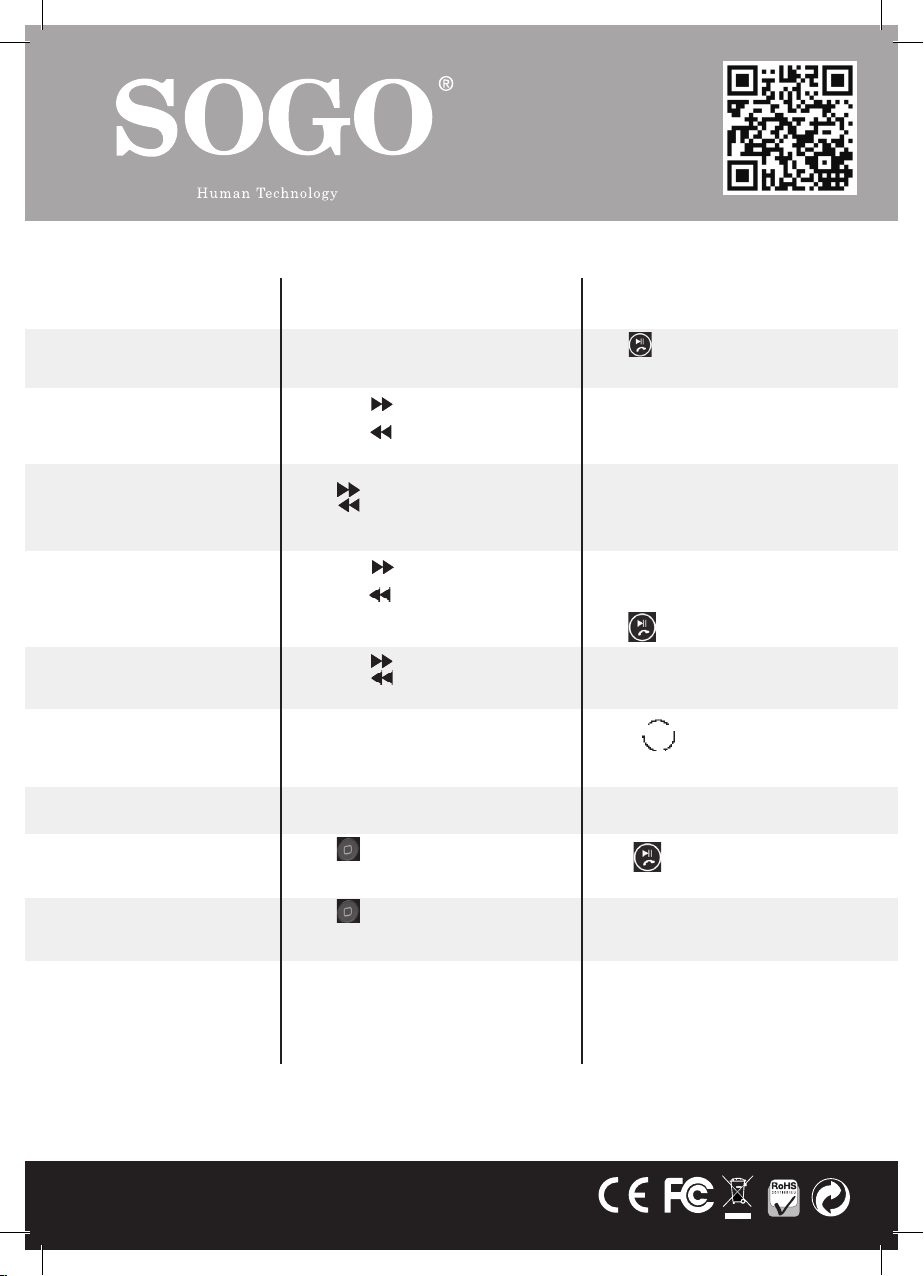
QUICK GUIDE:
OPERATION
GUIDE
1. How to play and
stop the music
2. How to Forward
and Rewind
3. How to change the
frequency
4. How to choose
music
5. . How to adjust the
Volume
6. . How to change
repeat mode
7. How to switch
folder
8. How to answer/
hang up the calls
9. How to Switch calls
FM
TRANSMITTER
Press “PLAY” Button : Play the music
Second Press “PLAY” Button: Stop the music
Long Press “ ” button: Forward the music;
Long press “ ” Button: Rewind the music.
Press “CH” button first, then
press “ ”: increase the frequency
Press ” ”: decrease the frequency
Short Press “ ” Button: Play the next song;
Short Press “ ” Button: Play the previous
song;
Long press “ ”: increase the Volume
Long Press ” ”: decrease the Volume
Cannot be controlled by the Transmitter, only
from the remote.
Doesn not support
Press “ ” button to Answer
Press “Play” button to hang off.
Press “ ” button to Switch the calling
between Car speaker and mobile phone
REMOTE
CONTROLLER
Press button
Does not support
Press “CH+” button: Increase 0.1MHZ
Press “CH-” button: reduce 0.1MHZ
Or press the number of the frequency what
you desired, press “CH+” again to confirm
Press “NEXT” button: Play the next song;
Press “PREV” button: Play the previous
song;
Or press the serial number of the song then
press to confirm
Press “VOL+” Increase the Volume
Press “VOL-” reduce the Volume
Press “ ” button
Press “folder+” or “folder -”
Press button
Does not support
Pay attention: SS-8435 supports various regional configurations. Please set the region to” Power Low” on first operation,
when using SS-8435 in the European area. Press and hold the menu button for two seconds till the menu appears. Choose
“TX-Power” and confirm your selection. Select “power low” or “ROW” (Rest of the World), depending in which Region the
SS-8435 will be used.
ref. SS-8435
español english
 Loading...