

Page 1
MULTI PLAYER
LECTEUR DE MULTI
MULTI-PLAYER
XDJ-700
LETTORE MULTIPLO
MULTI-SPELER
MULTI REPRODUCTOR
MULTI LEITOR
МНОГОФУНКЦИОНАЛЬНЫЙ
http://pioneerdj.com/support/
The Pioneer DJ support site shown above offers FAQs, information on software and various other types of
information and services to allow you to use your product in greater comfort.
Le site de support DJ de Pioneer indiqué ci-dessus propose une FAQ, des informations sur le logiciel et divers
types d’informations et de services qui permettent une utilisation plus confortable de ce produit.
Die oben gezeigte Pioneer DJ-Support-Website enthält häufig gestellte Fragen, Informationen über Software
und andere wichtige Informationen und Dienste, die Ihnen helfen, Ihr Produkt optimal zu verwenden.
Il sito di supporto DJ Pioneer indicato qui sopra offre una sezione FAQ, informazioni sul software ed
informazioni e servizi di vario tipo, per permettere un uso più confortevole dei nostri prodotti.
De bovengenoemde Pioneer DJ ondersteuningswebsite biedt een overzicht van de vaak gestelde vragen,
informatie over software en allerlei andere soorten informatie en diensten die u in staat stellen dit product met
meer gemak te gebruiken.
El sitio de asistencia Pioneer DJ mostrado arriba ofrece las preguntas frecuentes, información del software y
varios otros tipos de información y servicios que le permitirán usar su producto con mayor confort.
O site de suporte da Pioneer DJ mostrado acima oferece FAQs, informações sobre o software e outros tipos
de informações e serviços para permitir utilizar o produto com um maior conforto.
На указанном выше сайте поддержки Pioneer DJ содержатся раздел часто задаваемых вопросов,
информация по программному обеспечению, а также различные другие типы информации и услуг,
позволяющие использовать ваше изделие более лучшим образом.
ПРОИГРЫВАТЕЛЬ
Français Deutsch ItalianoEnglish Nederlands Español
http://rekordbox.com/
For various types of information and services regarding rekordbox™, see the Pioneer DJ website above.
Pour les différents types d’informations et de services concernant rekordbox™, consultez le site Pioneer DJ ci-dessus.
Weitere Informationen und Dienste bezüglich rekordbox™ finden Sie auf der oben angegebenen Pioneer DJ-Website.
Per quanto riguarda vari tipi di informazione e servizi riguardanti rekordbox™, vedere il sito Pioneer DJ menzionato qui
sopra.
Zie de hierboven genoemde Pioneer DJ website voor allerlei soorten informatie en diensten met betrekking tot
rekordbox™.
Para varios tipos de información y servicios acerca del rekordbox™, visite el sitio web de Pioneer DJ indicado arriba.
Para vários tipos de informações e serviços relativamente ao rekordbox™, consulte o site Web da Pioneer DJ acima.
Относительно различных типов информации и услуг относительно rekordbox™ смотрите вебсайт Pioneer DJ
выше.
Operating Instructions (Quick Start Guide)
Mode d’emploi (Guide de démarrage rapide)
Bedienungsanleitung (Kurzanleitung)
Istruzioni per l’uso (Guida di avvio veloce)
Handleiding (Snelstartgids)
Manual de instrucciones (Guía de inicio rápido)
Manual de instruções (Guia de início rápido)
Инструкции по эксплуатации (Краткое руководство пользователя)
Português Русский
Page 2
Thank you for buying this Pioneer DJ product. Please read through these operating instructions so you will know how to operate your model properly.
CAUTION
TO PREVENT THE RISK OF ELECTRIC SHOCK, DO NOT
REMOVE COVER (OR BACK). NO USER
PA
SERVICE PERSONNEL.
WARNING
This equipment is not waterproof
shock hazard, do not place any container filled with
liquid near this equipment (such as a vase or flower
pot) or expose it to dripping, splashing, rain or
moisture
WARNING
To
sources (such as a lighted candle) on the equipment.
Operating Envir
Operating environment temperature and humidit
+5 °C to +35 °C (+41 °F to +95 °F); less than 85 %RH
(cooling vents not blocked)
Do not install this unit in a poorly ventilated area, or in
locations exposed to high humidity or direct sunlight (or
strong artificial light).
VENTILATION CAUTION
When installing this unit, make sure to leave space
around the unit for ventilation to improve heat radiation
(at least 5 cm at rear
K058b_A1_En
After you have finished reading the instructions, put them away in a safe place for future reference.
In some countries or regions, the shape of the power plug and power outlet may sometimes differ from that shown in the explanatory drawings.
However the method of connecting and operating the unit is the same.
-SERVICEABLE
RTS INSIDE. REFER SERVICING TO QUALIFIED
. To prevent a fire or
.
prevent a fire hazard, do not place any naked flame
onment
D3-4-2-1-7c*_A2_En
, and 5 cm at each side).
D3-4-2-1-7d*_A1_En
This product satisfies electromagnetic noise
regulations when it is connected to other equipment
through shielded cables and connectors.
Use only the furnished accessory connecting cables.
D3-4-2-1-1_B1_En
D3-4-2-1-3_A1_En
D3-4-2-1-7a_A1_En
y:
D44-8-2_A1_En
CAUTION
The switch on this unit will not completely shut off
all power from the AC outlet. Since the power cord
serves as the main disconnect device for the unit,
you will need to unplug it from the AC outlet to shut
down all power. Therefore, make sure the unit has
been installed so that the power cord can be easily
unplugged from the AC outlet in case of an accident.
To avoid fire hazard, the power cord should also be
unplugged from the AC outlet when left unused for a
long period of time (for example, when on vacation).
D3-4-2-2-2a*_A1_En
When using this product, confirm the safety
information shown on the bottom of the unit.
D3-4-2-2-4_B1_En
This product is for general household purposes. Any
failure due to use for other than household purposes
(such as long-term use for business purposes in a
restaurant or use in a car or ship) and which requires
repair will be charged for even during the warranty
period.
K041_A1_En
POWER-CORD CAUTION
Handle the power cord by the plug. Do not pull out the
plug by tugging the cord and never touch the power
cord when your hands are wet as this could cause a
short circuit or electric shock. Do not place the unit, a
piece of furniture, etc., on the power cord, or pinch the
cord. Never make a knot in the cord or tie it with other
cords. The power cords should be routed such that they
are not likely to be stepped on. A damaged power cord
can cause a fire or give you an electrical shock. Check
the power cord once in a while. When you find it
damaged, ask your nearest service center or your
dealer for a replacement.
S002*_A1_En
If you want to dispose this product, do not mix it with general household waste. There is a separate collection system for used
electronic products in accordance with legislation that requires proper treatment, recovery and recycling.
Private households in the member states of the EU, in Switzerland and Norway may return their used electronic products free of charge to
designated collection facilities or to a retailer (if you purchase a similar new one).
For countries not mentioned above, please contact your local authorities for the correct method of disposal.
By doing so you will ensure that your disposed product undergoes the necessary treatment, recovery and recycling and thus prevent potential
negative effects on the environment and human health.
En
2
Page 3
Before you start
English
How to read this manual
Thank you for buying this Pioneer DJ product.
Be sure to read both this leaflet and the operating instructions! Both
documents include important information that you must understand
before using this product.
After you have finished reading the instructions, put them away in a safe
place for future reference.
! For instructions on acquiring the operating instructions, see
Acquiring this unit’s Operating Instructions (p. 3 ).
Features
This unit is a DJ player equipped with the technology of the Pioneer
DJ’s CDJ series, the world standard for club players. Full-fledged DJ
performances can be made using tracks not only on USB devices and
computers but also on mobile devices (smartphones, etc.). It is not only
equipped with a wide range of features for DJ performances, including
the PRO DJ LINK, quantize and beat sync functions, it also has a high
reliability design and a panel layout providing high operability, thereby
offering strong support for all types of DJ performances.
Acquiring this unit’s Operating
Instructions
Various instructions are sometimes provided as files in PDF format.
Adobe® Reader® must be installed in order to view PDF format files.
1 Launch a web browser on the computer and access
the Pioneer DJ support site below.
http://pioneerdj.com/support/
2 On the Pioneer DJ support site, click [Manuals] under
[XDJ-700].
3 Click on the required language on the download
page.
Downloading of the operating instructions begins.
What’s in the box
! Power cord
! Audio cable × 1
! LAN cable × 1
! AC adapter × 1
! Warranty × 1
! Operating Instructions (Quick Start Guide) (This document) × 1
Preparing the software
Music management software rekordbox and driver software are not
included.
To use rekordbox and the driver software, access the rekordbox site and
Pioneer DJ Support site, and download the software.
! The user is responsible for preparing the computer, network devices
and other elements of the Internet usage environment required for a
connection to the Internet.
Acquiring rekordbox (Mac/Windows)
1 Open your web browser on your computer, and
access the rekordbox site.
http://rekordbox.com/
2 Click [Download] in the rekordbox site and download
rekordbox from the download page.
! For inquiries on rekordbox (Mac/Windows), please see the sup-
port site indicated above.
About rekordbox (iOS/Android)
Tracks managed by rekordbox (iOS/Android) can be played by connecting the mobile device on which rekordbox (iOS/Android) is installed
via USB. For supported devices, see the Pioneer DJ website (http://pioneerdj.com/support/). For instructions on rekordbox (iOS/Android), see
the rekordbox (iOS/Android) user’s manual.
! For details on installing rekordbox (iOS/Android), see the Pioneer DJ
website (http://rekordbox.com/).
About the driver software (Windows)
This driver software is an exclusive ASIO driver for outputting audio
signals from the computer.
! There is no need to install the driver software when using Mac OS X.
Obtaining the driver software
1 Launch a web browser on the computer and access
the Pioneer DJ support site below.
http://pioneerdj.com/support/
2 Click [Software Download] under [XDJ-700] on the
Pioneer DJ support site.
3 Click the icon of the driver software to download the
driver software from the download page.
! For information on installing the driver software, see the Pioneer
DJ support site.
Usable media
This unit is compatible with USB mass storage class USB devices such
as mobile flash memory and digital audio player.
Supported file
systems
! Information such as cue points, loops points and hot cues can be
stored via USB.
! Depending on the USB device you are using, you may not achieve
the expected performance.
! There is no guarantee that all USB devices will operate on this unit.
For more information, please refer to the operational instruction of this
product published on the Pioneer DJ support site.
FAT16, FAT32 and HFS+ (NTFS is not supported.)
About rekordbox
rekordbox is a composite software that enables track management and
DJ performances.
An excellent DJ performance can be achieved by using the music files
managed by rekordbox together with this unit.
En
3
Page 4
Attaching the stand
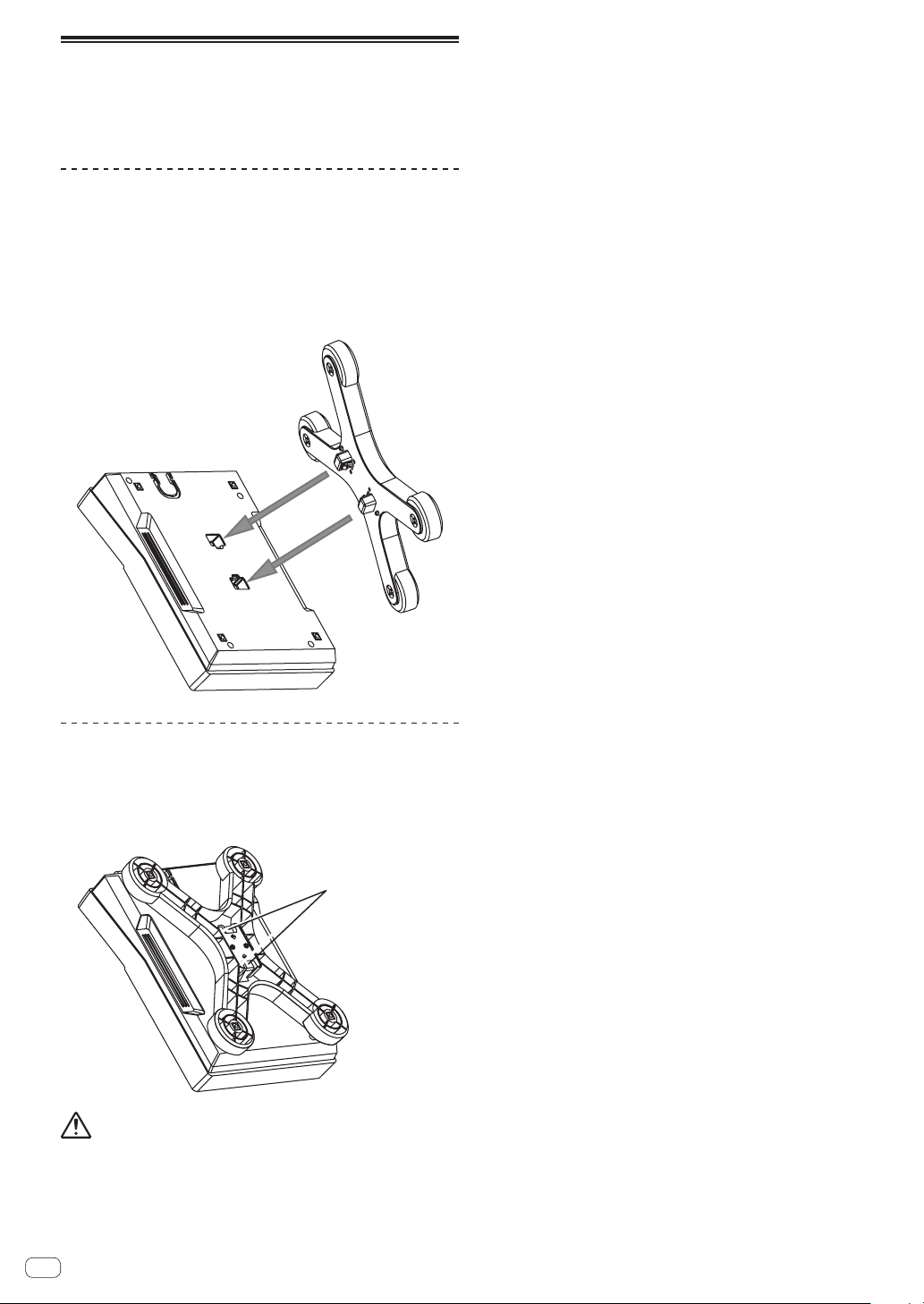
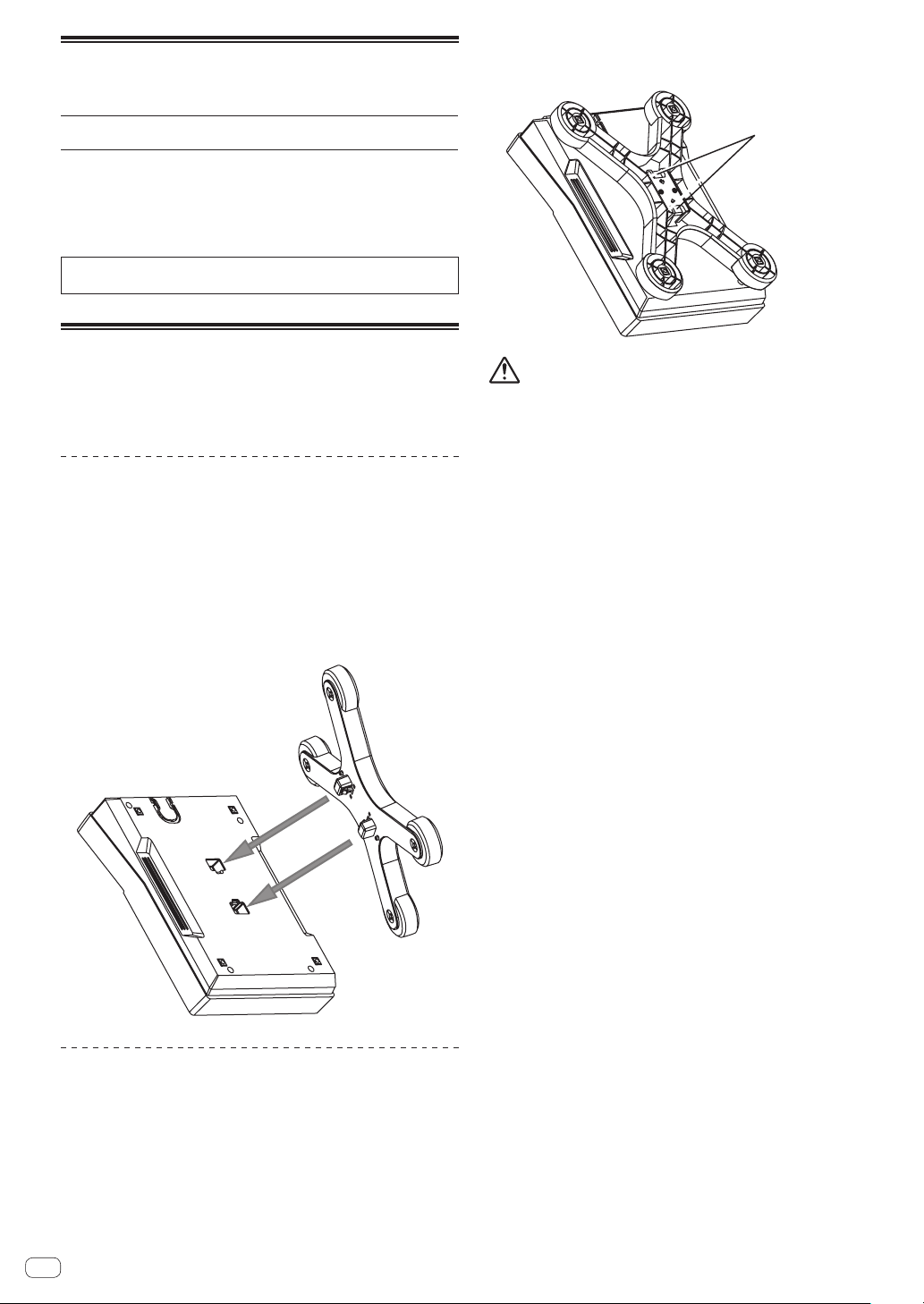
You can easily attach and remove the stand to/from this product. If using
this unit placed side by side with previous DJ players or DJ mixers, you
can align the operation panels at the same level by attaching the stand
to this unit.
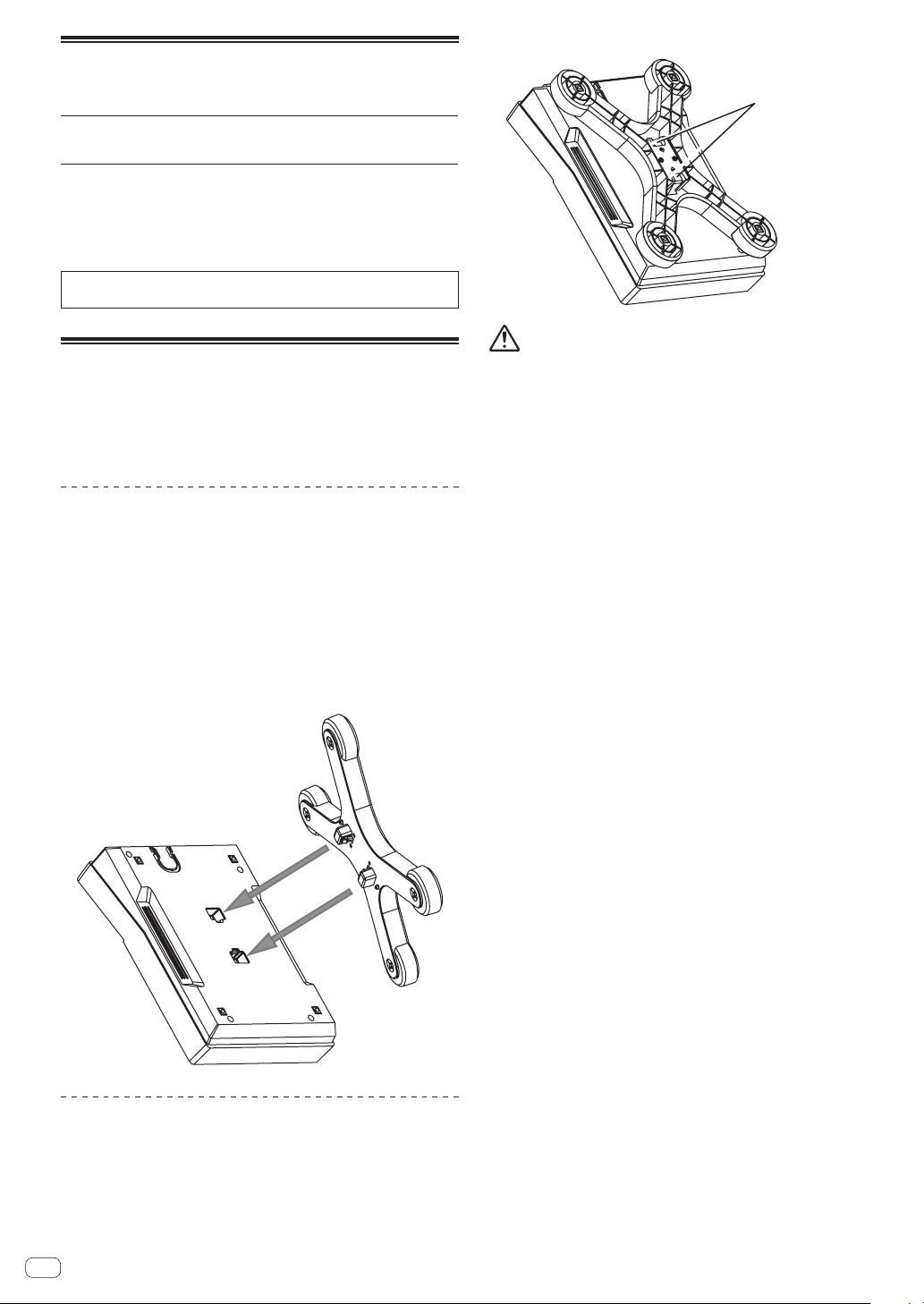
How to attach
1 Insert the protrusions on the stand into the guide
holes on the bottom of this unit.
2 Push the stand until it clicks into place.
3 Check that the two release levers are firmly hooked
on this unit and are not released.
How to remove
1 Move the two release levers on the bottom of the
stand inward to release the lock.
2 Remove the stand.
Release lever
CAUTION
You may drop the product if you release the lock of the release lever
while the product is lifted.Hold the product tightly and remove the stand
from it.
En
4
Page 5
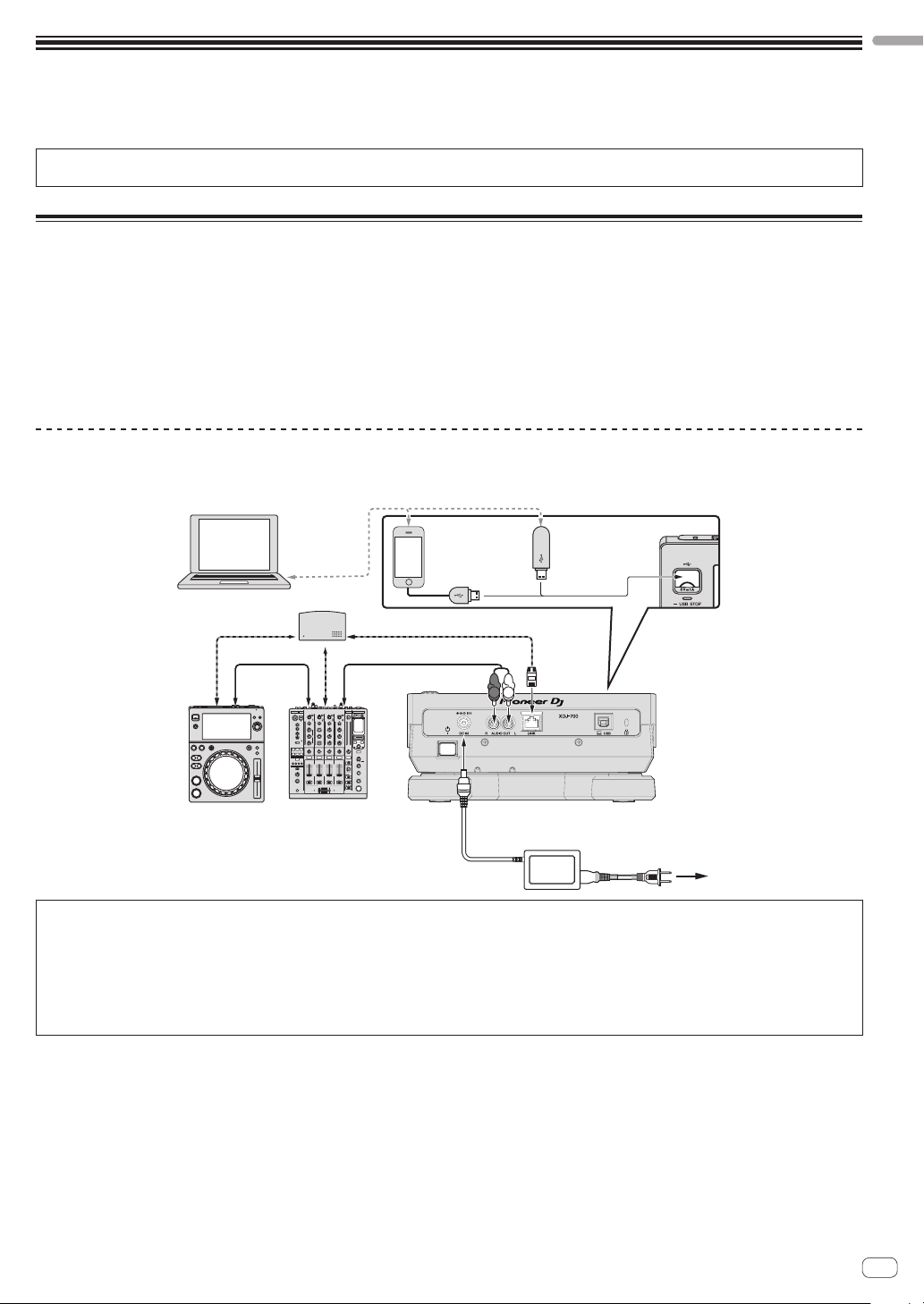
Connections
! Be sure to turn off the power and unplug the power cord from the power outlet whenever making or changing connections.
! Refer to the operating instructions for the component to be connected.
! Connect the power cord after all the connections between devices have been completed.
! When using a LAN cable for connection, be sure to use either the LAN cable included with this product or an STP (shielded twisted pair) cable.
! Do not disconnect the LAN cable when music files and/or information are being shared using PRO DJ LINK.
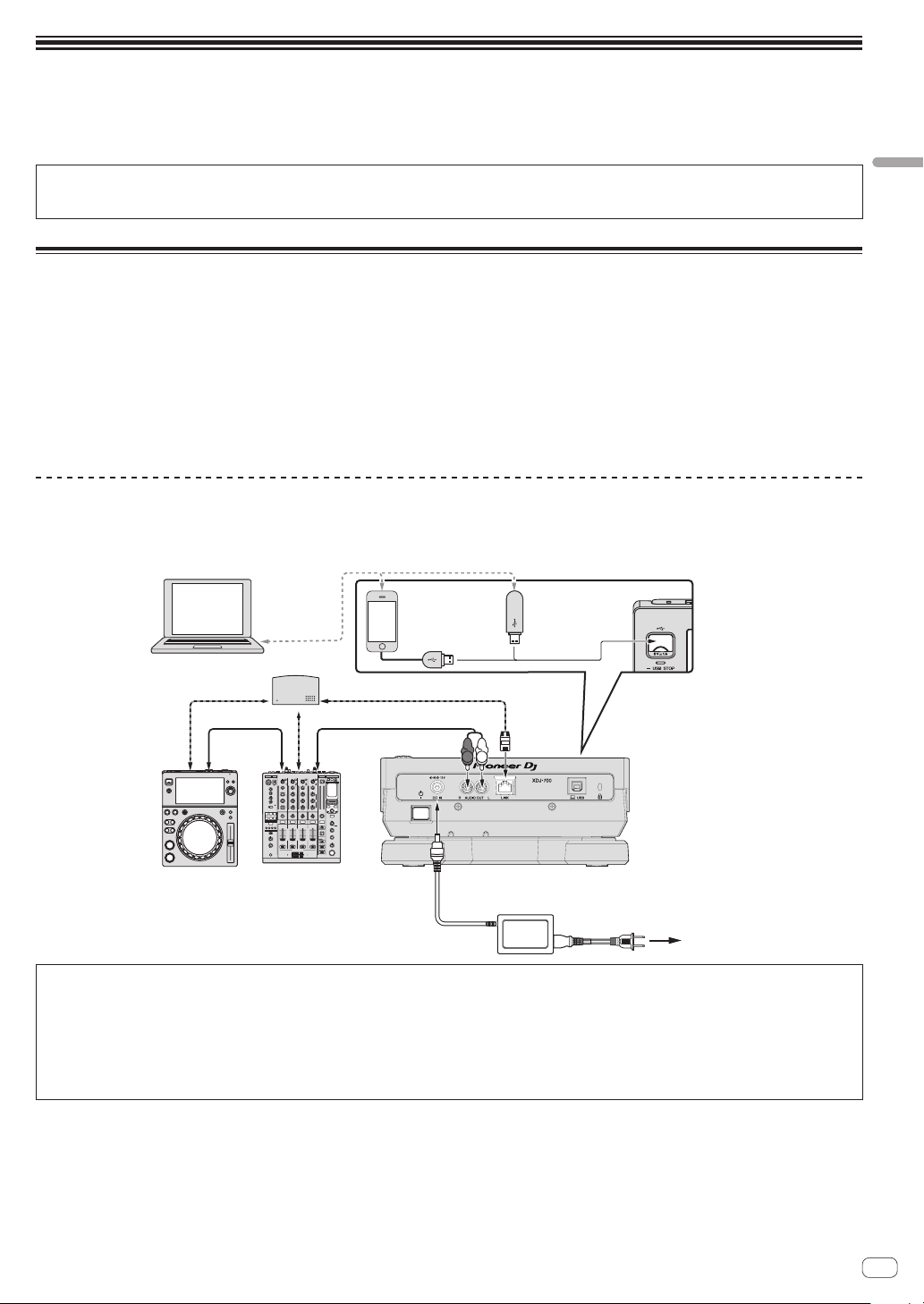
Basic style
Playback on this unit is performed mainly using tracks prepared with rekordbox installed on a computer.
! For instructions on operating rekordbox, see rekordbox (Mac/Windows)’s operating instructions. The rekordbox (Mac/Windows) operating instruc-
tions can be viewed from the rekordbox (Mac/Windows) [Help] menu.
! Also, for DJ players and DJ mixers, up to four PRO DJ LINK-compatible players can be connected with LAN cables (CAT5e) using PRO DJ LINK
connections.
! A switching hub (commercially available) may be necessary, depending on the combination of models used. Use a switching hub of 100 Mbps or
greater. Some switching hubs may not operate properly.
A switching hub (commercially available) is necessary to connect to a mixer equipped with only one LAN port. For mixers with enough LAN ports for
all the DJ players and computers in the system, connect directly to the LAN ports on the mixer’s rear panel, without using a hub.
PRO DJ LINK (USB Export)
! rekordbox music files and data can be exchanged with this unit using a memory device (flash memory, hard disk, etc.), eliminating the need to take
a computer into the DJ booth. Such information as playlists, cues, loops and hot cues set in advance with rekordbox can be used for playback.
English
rekordbox
LAN cable
DJ player DJ mixer
Computer
Switching hub
LAN cable
Audio cable
LAN cable
Audio cable
Mobile device
on which
rekordbox is
installed
R
L
AC adapter
USB device
on which
rekordbox
data is
recorded
Rear panel
To power outlet
Cautions
In order to maximize the use of music file management functions of rekordbox, please match the player number with the channel of audio cable
entered in the mixer.
If the player number is different, change the [PLAYER No.] setting on the [UTILITY] screen.
= For information on changing the settings of [UTILITY] screen, please refer to the operating instructions for this product published on the Pioneer
DJ support site.
! When a storage device is connected to this unit, [PLAYER No.] is displayed in gray and cannot be changed. Disconnect the storage device or LAN
cable to turn the link off, then change the setting.
En
5
Page 6
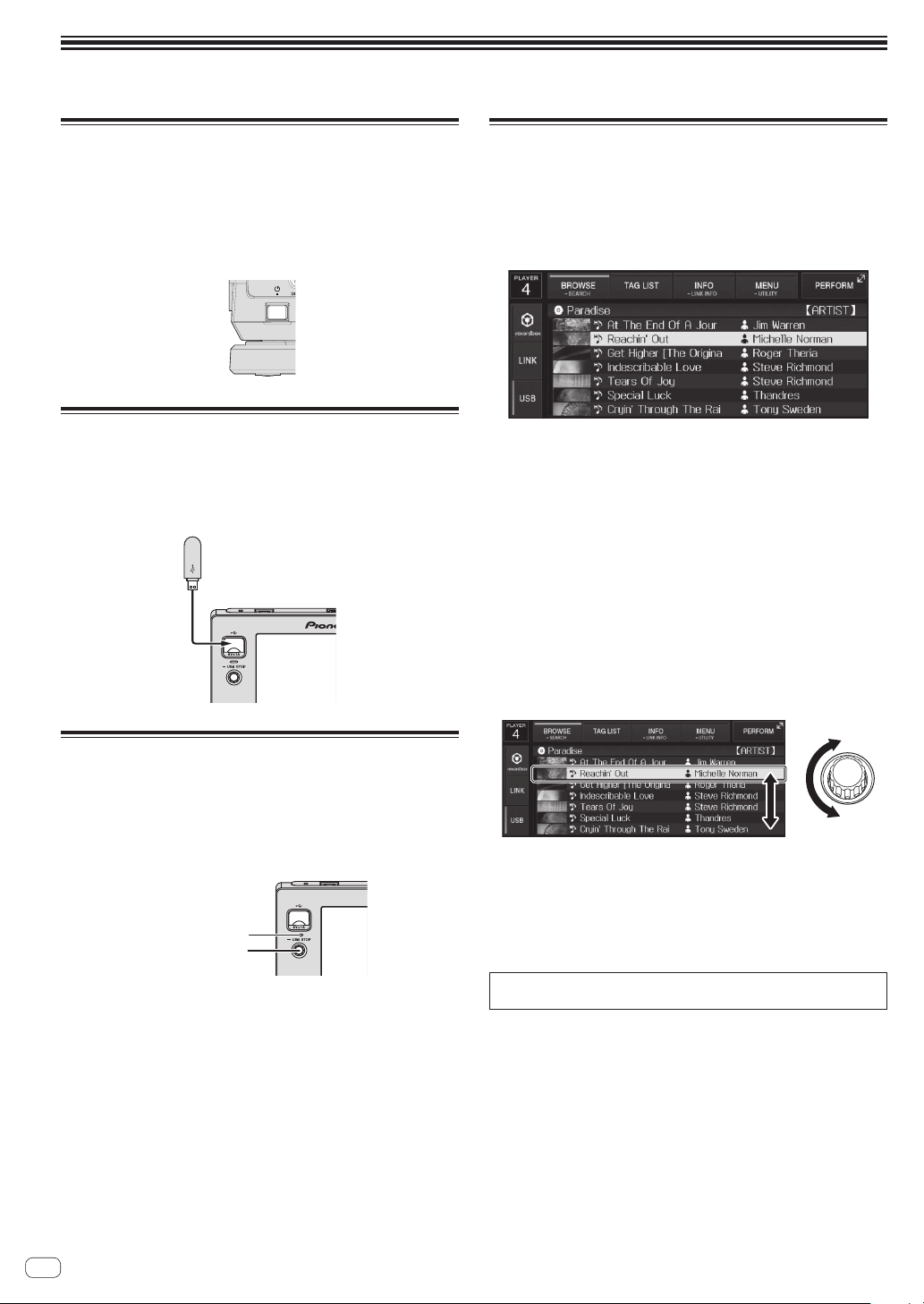
Operation
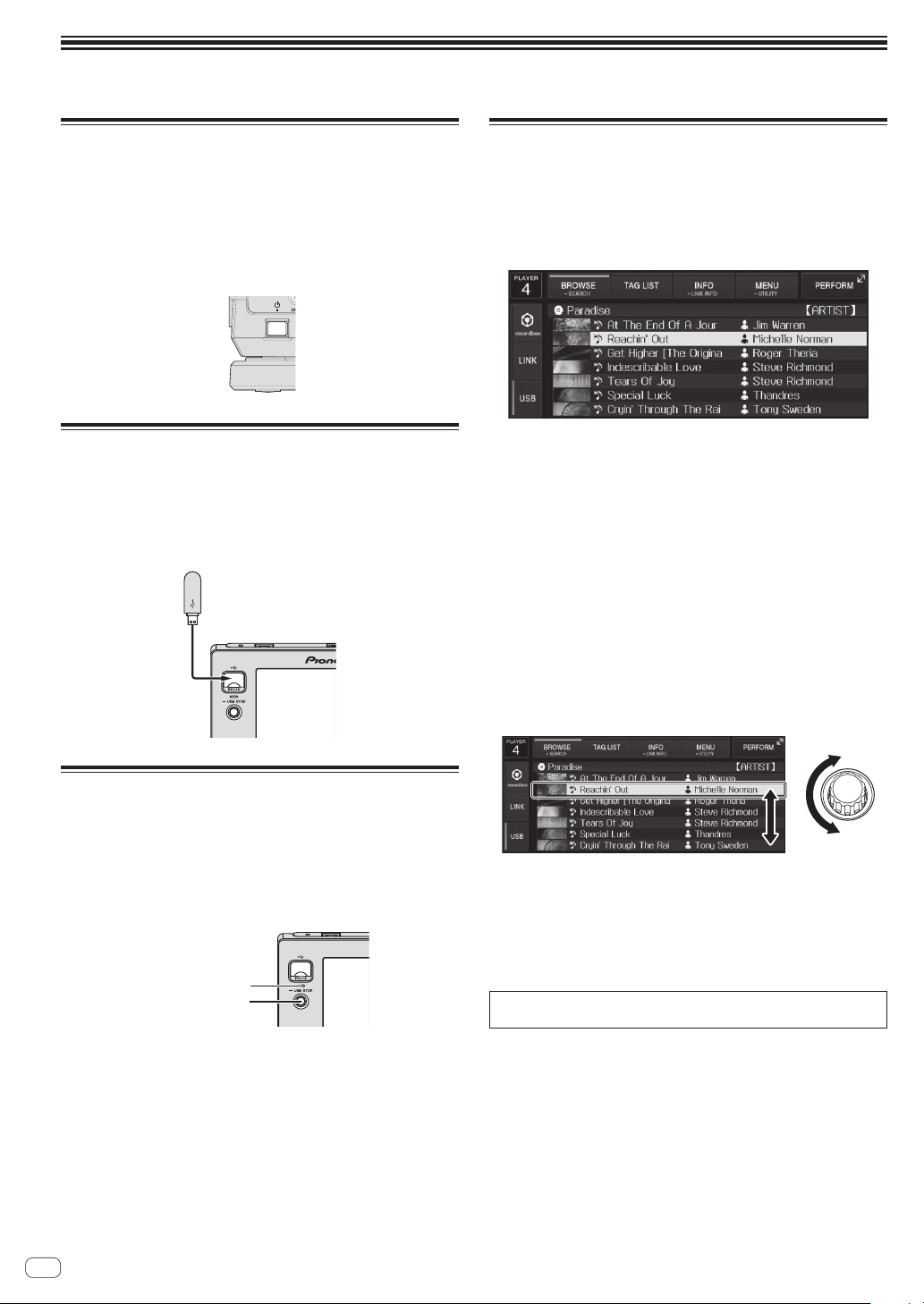
USB STOP butto
Turning the power on
1 Make all the connections, then plug the power cord
into a power outlet.
= Connections (p. 5 )
2 Press the [u] switch.
This unit’s indicators light and the power turns on.
Connecting USB devices
1 Press the [u] switch to turn this unit’s power on.
2 Connect the USB device to the USB device insertion
slot.
Playing media connected to or
inserted in this unit
1 Load the medium in this unit.
2 Touch [USB].
The tracks or folders are displayed on a list.
The contents of the media to be displayed on the main unit display can
be switched.
! [USB]: Displays the contents of the connected USB device and
mobile devices.
! When you touch [LINK], other music files in the DJ player will be
displayed.
! When you touch [rekordbox], music files in rekordbox will be
displayed.
! If the rekordbox library information was written on the USB device,
the rekordbox library is displayed.
= For information on library browsing of rekordbox, please refer
to the operating instructions for this product published on the
Pioneer DJ support site.
3 Turn the rotary selector.
Move the cursor and select the item.
! Press the rotary selector to move to a lower level in the folder. Press
the [BACK] button to return to the level above.
Disconnecting USB devices
1 Press and hold the [USB STOP] button until the USB
indicator stops flashing.
Do not remove the USB device or turn Off the power of the unit while
the USB indicator is blinking. The management data in the unit may get
deleted. Also, the USB device may become unreadable.
2 Disconnect the USB device.
6
En
USB indicator
4 Select the track and press the rotary selector.
When the track is loaded, the screen switches to the normal playback
screen.
The medium on which the track is loaded flashes.
= For information on normal playback screen, please refer to the
n
operating instructions for this product published on the Pioneer
DJ support site.
For information on other operations, please refer to the operating
instructions for this product published on the Pioneer DJ support site.
Page 7
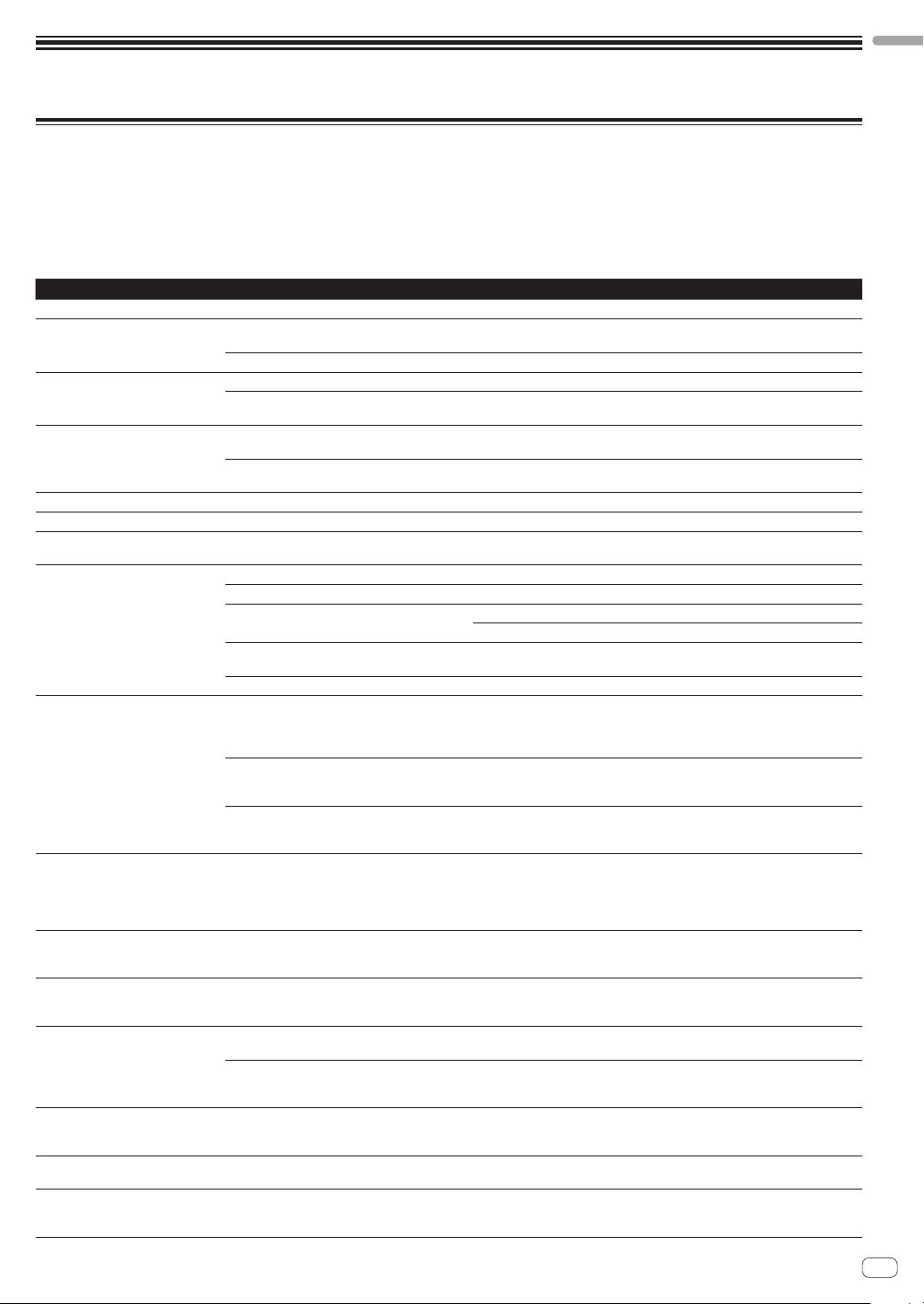
Additional information
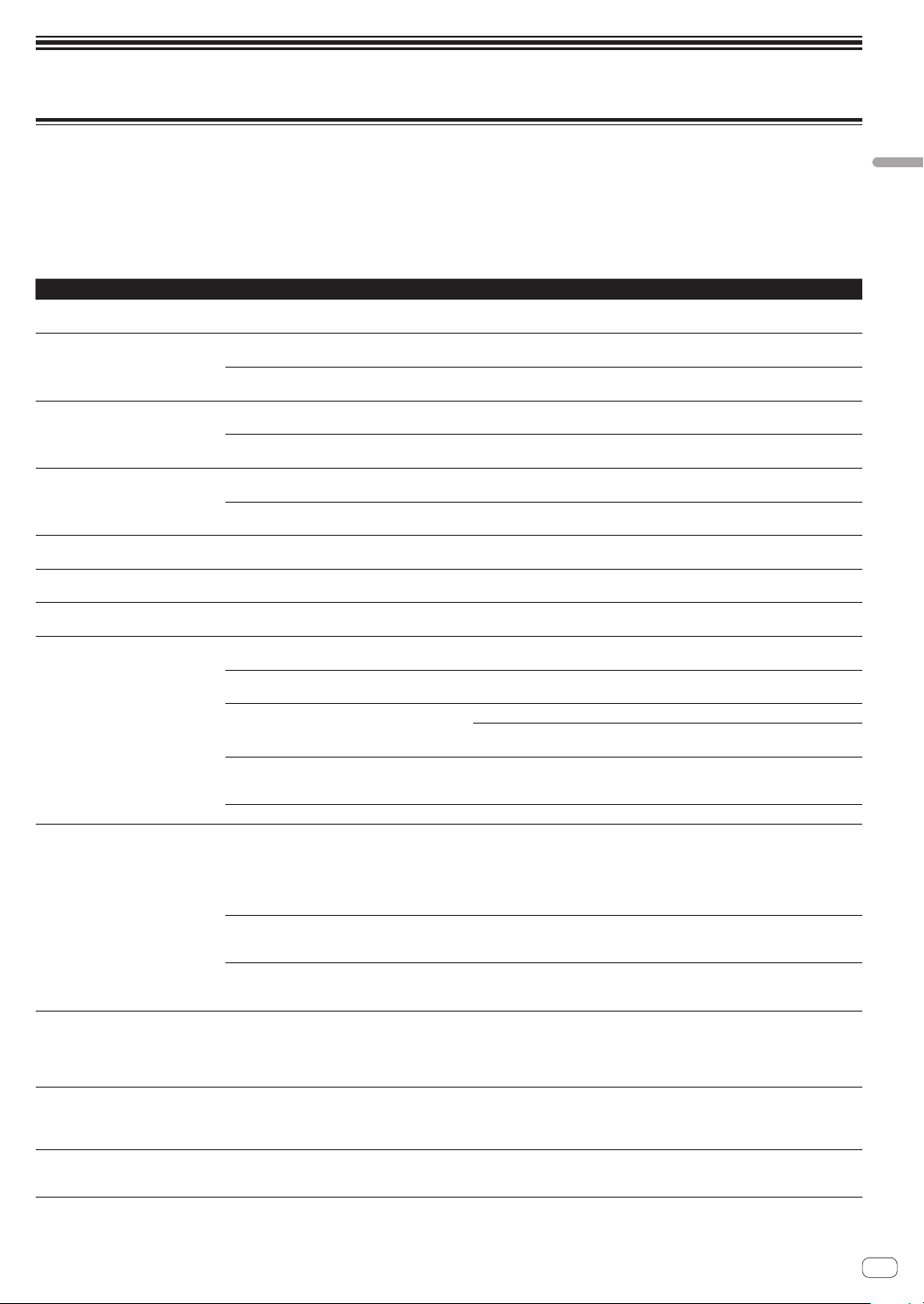
Troubleshooting
! Incorrect operation is often mistaken for trouble or malfunction. If you think that there is something wrong with this component, check the points
below and the [FAQ] for the [XDJ-700] on the Pioneer DJ support site.
http://pioneerdj.com/support/
Sometimes the problem may lie in another component. Inspect the other components and electrical appliances being used. If the problem cannot
be rectified, ask your nearest Pioneer authorized service center or your dealer to carry out repair work.
! This unit may not operate properly due to static electricity or other external influences. In this case, proper operation may be restored by turning the
power off, waiting 1 minute, then turning the power back on.
Problem Check Remedy
File cannot be played. Is the file copyright-protected (by DRM)? Copyright-protected files cannot be played.
No sound is produced, or sound is
distorted or noisy.
File information is not properly
displayed.
Track search operation takes too long. Is the auto cue function activated? Track searching may take some time when there are long silent sections
Back cue function does not work. Is a cue point set? Set a cue point.
Loop play function does not work. Are loop points set? Set loop points.
Settings are not stored in the memory. Has the power been turned off directly after
USB device is not recognized. Is the USB device properly connected? Connect the device securely (all the way in).
Cue points or loops are not stored on
a USB device.
Cue or loop points of tracks recorded
on USB devices are not displayed.
Playback does not start immediately
after pressing the button to reloop or
play in reverse.
The playing address display is not
displayed in the remaining time mode.
Time is required to read USB devices
(flash memory drives and hard discs).
Library browsing is not possible. Is a medium on which library information is
[HISTORY] is not displayed. Is a USB device loaded? The [HISTORY] function can only be used for DJ players on which a USB device
Nothing is displayed. Is the auto standby function activated? This unit is shipped with the auto standby function set to on. If you do not want
Are you operating the connected DJ mixer
properly?
Is this unit placed near a TV? Turn the TV’s power off or install this unit and TV away from each other.
Is [LANGUAGE] properly set? Set [LANGUAGE] to the proper language.
Is the information recorded in a language not sup-
ported by this unit?
— If track searching is not possible within 10 seconds, a cue point is set at the
changing the setting?
Is the USB device connected via a USB hub? USB hubs cannot be used.
Is the USB device supported by this unit? This player only supports USB mass storage class devices.
Is the file format supported by this unit? Check the file format of the connected USB device. For the file formats sup-
— Turn the power off then back on.
Are you trying to store more points than the limit? Ten cue points or loop points per track can be stored on a USB device.
Is the USB device write-protected? If the USB device is write-protected, [USB FULL] is displayed and the points
Is there sufficient free space on the USB device? If there is not enough free space on the USB device, [USB FULL] is displayed
Was the USB device properly stopped before it
was disconnected the last time?
Is the quantize function on? When the quantize function is on, playback starts from the nearest beat position
— When playing files recorded in VBR, it may happen that the set cannot detect the
Is there a large number of folders or files recorded
on the USB device?
Are files other than music files stored on the USB
device?
recorded loaded?
Check the operation of the DJ mixer.
When creating files using DJ software, etc., record the information in a language
supported by this unit.
between tracks.
beginning of the track.
After changing settings, wait at least 10 seconds before turning the power off.
This player supports portable flash memory and digital audio playback devices.
ported by this unit, see Usable media on page 3 .
If you try to store more points than the limit, [CUE/LOOPPOINT FULL] is displayed and the points cannot be stored. In this case, delete some points before
storing new ones.
cannot be stored. Disable the write-protection then store the cue or loop points
again.
and the points cannot be stored. Free up some space then store the cue or loop
points again.
Points may not be displayed if the SD memory card/USB device is removed
without performing the proper stopping procedure or if this unit’s power is
turned off.
Make sure the USB indicator has stopped blinking before removing the USB
device or turning off the power of the unit.
at the time the button is pressed. If you want the operation to be performed the
instant the button is pressed, turn the quantize function off.
length of the track immediately and that some time is required for the playing
address display to appear.
When there are many folders or files, some time may be required for loading.
When files other than music files are stored in folders, time is required to read
them as well. Do not store files or folders other than music files on the USB
device.
The library browse mode is only set when media on which library information
is recorded are loaded. When a medium on which no library information is
recorded is loaded, the folder browse mode is set.
is loaded.
to use the auto standby function, set [AUTO STANDBY] on the [UTILITY] menu
to [OFF].
English
En
7
Page 8
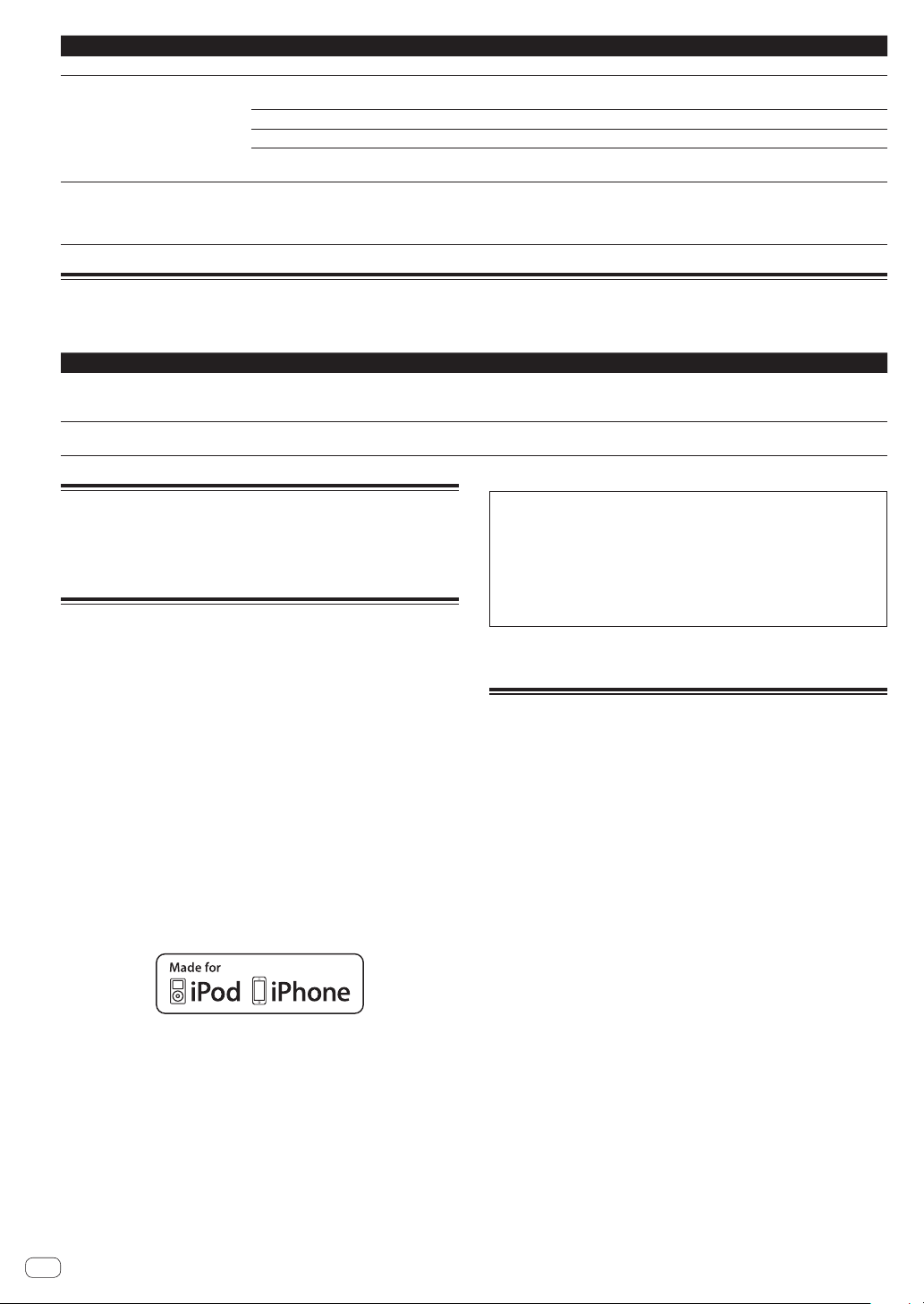
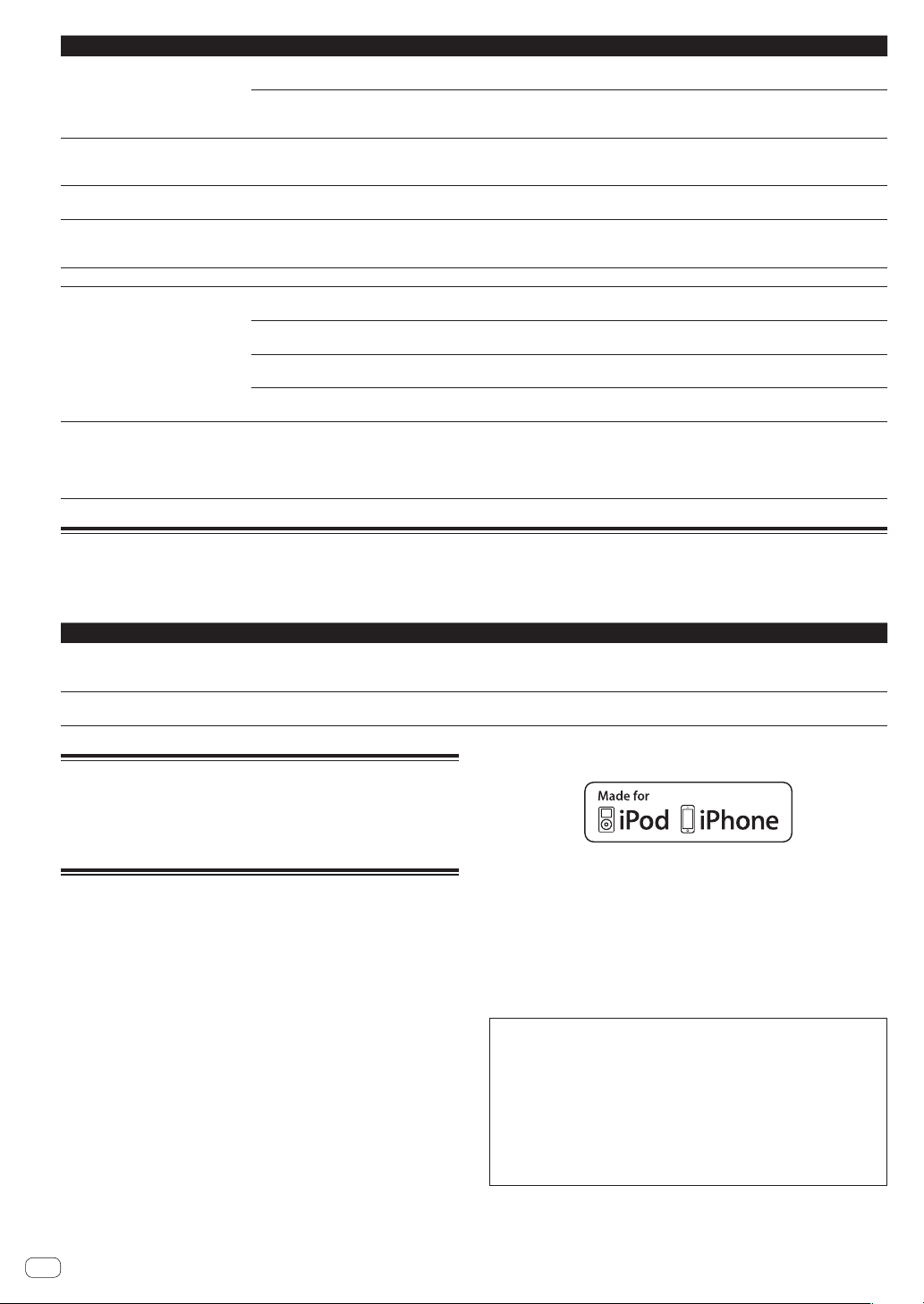
Problem Check Remedy
The scale is not displayed. Is the track over 15 minutes long? The scale is not displayed for tracks whose playing time is over 15 minutes.
PRO DJ LINK does not work well. Are the player numbers properly set? Set [PLAYER No.] to [AUTO] or to a number different from the number currently
Is the LAN cable properly connected? Connect the LAN cable properly to the [LINK] terminal.
Is the switching hub’s power turned on? Turn the switching hub’s power on.
Is an unnecessary device connected to the switch-
ing hub?
There is no response when you touch
the screen, or the response is bad. A
position different from the actually
touched location responds.
Calibration adjustment of touch display is
deviating.
set.
Disconnect the unnecessary device from the switching hub.
Adjust the touch display by using the [TOUCH DISPLAY CALIBRATION] settings
in the [UTILITY] screen.
Error messages
When this unit cannot operate normally, an error code appears on the display. Check the table below and take the measures indicated. If an error code
not shown on the table below is displayed, or if the same error code is displayed again after taking the indicated action, contact your store of purchase.
Error code Error type Description of error Cause and action
E-8302
E-8304
E-8305
CANNOT PLAY TRACK(****)
UNSUPPORTED FILE FORMAT
Track data (files) in the USB cannot be read
correctly.
Music files that cannot be played normally
are loaded.
The track data (file) may be corrupt. dCheck whether the track (file)
can be played on another player, etc., capable of playing the same
formats as this unit.
Format is wrong.dReplace with music files in the proper format.
Cleaning the touch display
Do not use organic solvents, acids or alkalis for cleaning the surface
of the touch display. Wipe with a dry soft cloth or a cloth immersed in
neutral detergent and squeezed properly.
About trademarks and registered
trademarks
! Pioneer DJ is a trademark of the PIONEER CORPORATION and is
used under license. rekordbox is a registered trademark of Pioneer
DJ Corporation.
! Windows is a registered trademark of Microsoft Corporation in the
United States and other countries.
! Adobe and Reader are either registered trademarks or trademarks
of Adobe Systems Incorporated in the United States and/or other
countries.
! ASIO is a trademark of Steinberg Media Technologies GmbH.
! “Made for iPod” and “Made for iPhone” mean that an electronic
accessory has been designed to connect specifically to iPod or
iPhone, respectively, and has been certified by the developer to meet
Apple performance standards. Apple is not responsible for the operation of this device or its compliance with safety and regulatory standards. Please note that the use of this accessory with iPod or iPhone
may affect wireless performance.
! iPod, iPhone, Mac, Mac OS are trademarks of Apple Inc., registered
in the U.S. and other countries.
! Android™ is a trademark of Google Inc.
! iOS is a trademark on which Cisco holds the trademark right in the
US and certain other countries.
! This software is based in part on the work of the Independent JPEG
Group.
About using MP3 files
This product has been licensed for nonprofit use. This product has not
been licensed for commercial purposes (for profit-making use), such
as broadcasting (terrestrial, satellite, cable or other types of broadcasting), streaming on the Internet, Intranet (a corporate network) or other
types of networks or distributing of electronic information (online digital music distribution service). You need to acquire the corresponding
licenses for such uses. For details, see http://www.mp3licensing.com.
! The names of companies and products mentioned herein are the
trademarks of their respective owners.
Cautions on copyrights
rekordbox restricts playback and duplication of copyright-protected
music contents.
! When coded data, etc., for protecting the copyright is embedded in
the music contents, it may not be possible to operate the program
normally.
! When rekordbox detects that coded data, etc., for protecting the
copyright is embedded in the music contents, processing (playback,
reading, etc.) may stop.
Recordings you have made are for your personal enjoyment and according to copyright laws may not be used without the consent of the copyright holder.
! Music recorded from CDs, etc., is protected by the copyright laws of
individual countries and by international treaties. It is the full respon-
sibility of the person who has recorded the music to ensure that it is
used legally.
! When handling music downloaded from the Internet, etc., it is the
full responsibility of the person who has downloaded the music to
ensure that it is used in accordance with the contract concluded
with the download site.
En
8
Page 9

Specifications
AC adapter
Power ............................................................ AC 100 V to 240 V, 50 Hz/60 Hz
Rated current ......................................................................................... 0.6 A
Rated output ............................................................................... DC 12 V, 2 A
Power consumption (standby) ............................................................. 0.5 W
General – Main Unit
Power consumption ..........................................................DC 12 V, 1200 mA
Main unit weight ................................................................................... 2.0 kg
(When not attached with the stand) ................................................... 1.7 kg
External dimensions ........... 238 mm (W) × 106.3 mm (H) × 307.8 mm (D)
(When not attached with the stand) .......... 238 mm (W) × 78.8 mm (H) ×
307.8 mm (D)
Tolerable operating temperature ........................................ +5 °C to +35 °C
Tolerable operating humidity ...................... 5 % to 85 % (no condensation)
Analog audio output (AUDIO OUT L/R)
Output terminals ...................................................................... RCA terminal
Output Level .........................................................................2.0 Vrms (1 kHz)
Frequency response................................................................ 4 Hz to 20 kHz
S/N ratio ............................................................................................... 115 dB
Total harmonic distortion ..................................................................0.003 %
USB downstream section (USB)
Port .......................................................................................................Type A
Power supply ........................................................................... 5 V/1 A or less
USB upstream section (USB)
Port .......................................................................................................Type B
LAN (PRO DJ LINK)
Rating .......................................................................................... 100Base-TX
Main display
Display type ...........................Active matrix TFT liquid crystal display (LCD)
Supported languages .............................................................. 18 languages
! The specifications and design of this product are subject to change
without notice.
! © 2015 Pioneer DJ Corporation. All rights reserved.
English
En
9
Page 10
Nous vous remercions d’avoir acquis un produit Pioneer DJ. Veuillez lire attentivement ce mode d’emploi afin de connaître la manière d’utiliser l’appa-
ATTENTION
câble abîmé peut provoquer un risque d’incendie ou un
reilcomme il convient. Cela fait, conservez le mode d’emploi de façon à pouvoir vous y référer en cas de nécessité.
Dans certains pays ou certaines régions, la forme de la fiche et de la prise d’alimentation est un peu différente de ce qui est montré dans les illustrations. Toutefois, l’appareil se raccorde et fonctionne de la même façon.
POUR ÉVITER TOUT RISQUE D’ÉLECTROCUTION, NE
PAS ENLEVER LE COUVERCLE (NI LE PANNEAU
ARRIÈRE). AUCUNE PIÈCE RÉPARABLE PAR
L’UTILISATEUR NE SE TROUVE À L’INTÉRIEUR.
CONFIER TOUT ENTRETIEN À UN PERSONNEL
QUALIFIÉ UNIQUEMENT.
AVERTISSEMENT
Cet appareil n’est pas étanche. Pour éviter les risques
d’incendie et de décharge électrique, ne placez près de
lui un récipient rempli d’eau, tel qu’un vase ou un pot
de fleurs, et ne l’exposez pas à des gouttes d’eau, des
éclaboussures, de la pluie ou de l’humidité.
AVERTISSEMENT
Pour éviter les risques d’incendie, ne placez aucune
flamme nue (telle qu’une bougie allumée) sur
l’appareil. D3-4-2-1-7a_A1_Fr
PRÉCAUTION DE VENTILATION
Lors de l’installation de l’appareil, veillez à laisser un
espace suffisant autour de ses parois de manière à
améliorer la dissipation de chaleur (au moins 5 cm à
l’arrière et 5 cm de chaque côté).
Milieu de fonctionnement
Température et humidité du milieu de fonctionnement :
De +5 °C à +35 °C (de +41 °F à +95 °F) ; Humidité
relative inférieure à 85 % (orifices de ventilation non
obstrués)
N’installez pas l’appareil dans un endroit mal ventilé ou
un lieu soumis à une forte humidité ou en plein soleil
(ou à une forte lumière artificielle).
D3-4-2-1-1_B1_Fr
D3-4-2-1-3_A1_Fr
D3-4-2-1-7d*_A1_Fr
Lorsque vous utilisez ce produit, vérifiez les
informations concernant la sécurité sous l’appareil.
D3-4-2-2-4_B1_Fr
D3-4-2-1-7c*_A1_Fr
ATTENTION
L’interrupteur de cet appareil ne coupe pas
complètement celui-ci de sa prise secteur. Comme le
cordon d’alimentation fait office de dispositif de
déconnexion du secteur, il devra être débranché au
niveau de la prise secteur pour que l’appareil soit
complètement hors tension. Par conséquent, veillez à
installer l’appareil de telle manière que son cordon
d’alimentation puisse être facilement débranché de
la prise secteur en cas d’accident. Pour éviter tout
risque d’incendie, le cordon d’alimentation sera
débranché au niveau de la prise secteur si vous
prévoyez une période prolongée de non utilisation
(par exemple avant un départ en vacances).
D3-4-2-2-2a*_A1_Fr
Ce produit est destiné à une utilisation domestique
générale. Toute panne due à une utilisation autre qu'à
des fins privées (comme une utilisation à des fins
commerciales dans un restaurant, dans un autocar
ou sur un bateau) et qui nécessite une réparation
sera aux frais du client, même pendant la période de
garantie. K041_A1_Fr
NOTE IMPORTANTE SUR LE CABLE
D’ALIMENTATION
Tenir le câble d’alimentation par la fiche. Ne pas
débrancher la prise en tirant sur le câble et ne pas
toucher le câble avec les mains mouillées. Cela risque
de provoquer un court-circuit ou un choc électrique. Ne
pas poser l’appareil ou un meuble sur le câble. Ne pas
pincer le câble. Ne pas faire de noeud avec le câble ou
l’attacher à d’autres câbles. Les câbles d’alimentation
doivent être posés de façon à ne pas être écrasés. Un
choc électrique. Vérifier le câble d’alimentation de
temps en temps. Contacter le service après-vente le
plus proche ou le revendeur pour un remplacement.
S002*_A1_Fr
Ce produit respecte la réglementation en matière
d’interférences électromagnétiques lorsqu’il est
raccordé à d’autres appareils par des câbles et
connecteurs blindés.
N’utilisez que les câbles de liaison fournis en
accessoires. D44-8-2_A1_Fr
Si vous souhaitez vous débarrasser de cet appareil, ne le mettez pas à la poubelle avec vos ordures ménagères. Il existe un système de
collecte séparé pour les appareils électroniques usagés, qui doivent être récupérés, traités et recyclés conformément à la législation.
Les habitants des états membres de l’UE, de Suisse et de Norvège peuvent retourner gratuitement leurs appareils électroniques usagés aux
centres de collecte agréés ou à un détaillant (si vous rachetez un appareil similaire neuf).
Dans les pays qui ne sont pas mentionnés ci-dessus, veuillez contacter les autorités locales pour savoir comment vous pouvez vous débarrasser
de vos appareils.
Vous garantirez ainsi que les appareils dont vous vous débarrassez sont correctement récupérés, traités et recyclés et préviendrez de cette façon
les impacts néfastes possibles sur l’environnement et la santé humaine.
Fr
10
K058b_A1_Fr
Page 11
Avant de commencer
Comment lire ce manuel
Merci d’avoir acheté ce produit Pioneer DJ.
Prière de lire cette brochure et le mode d’emploi ! Les deux documents
contiennent des informations importantes qui doivent être comprises
avant d’utiliser ce produit.
Cela fait, conservez le mode d’emploi de façon à pouvoir vous y référer
en cas de nécessité.
! Pour les instructions sur l’acquisition du mode d’emploi, repor-
tez-vous à Acquisition du Mode d’emploi de cet appareil (p. 11 ).
Caractéristiques
Cet appareil est un lecteur DJ équipé de la technologie de la série CDJ
de Pioneer DJ, la référence mondiale en matière de lecteurs pour discothèques. De véritables prestations DJ peuvent être réalisées à partir de
morceaux enregistrés non seulement sur des dispositifs USB et des ordinateurs mais aussi sur des dispositifs portables (smartphones, tablettes,
etc.). Il présente non seulement une grande variété de fonctionnalités,
parmi lesquelles les fonctions PRO DJ LINK, de quantification et de
synchronisation des temps, mais aussi une conception extrêmement
fiable et une disposition du panneau de commande facilitant les manipulations, et s’adapte ainsi à tous les types de prestations DJ.
Acquisition du Mode d’emploi de
cet appareil
Les différents modes d’emploi sont parfois fournis sous forme de
fichiers PDF. Adobe® Reader® doit être installé pour pouvoir consulter
les fichiers au format PDF.
À propos de rekordbox
rekordbox est un logiciel composite permettant la gestion des morceaux
et des performances DJ.
D’excellentes performances DJ peuvent être obtenues en utilisant les
fichiers musicaux gérés par rekordbox avec cet appareil.
Acquisition rekordbox (Mac/Windows)
1 Ouvrez votre navigateur Web sur votre ordinateur et
accédez au site rekordbox.
http://rekordbox.com/
2 Cliquez sur [Download] dans le site rekordbox
et téléchargez rekordbox depuis la page de
téléchargement.
! Pour toute demande d’informations au sujet de rekordbox
(Mac/Windows), veuillez consulter le site d’assistance indiqué
ci-dessus.
À propos de rekordbox (iOS/Android)
En raccordant via le port USB le dispositif portable sur lequel rekordbox
(iOS/Android) est installé, vous pouvez lire les morceaux gérés par
rekordbox (iOS/Android). Pour les dispositifs pris en charge, consultez le
site Pioneer DJ (http://pioneerdj.com/support/). Pour les instructions sur
rekordbox (iOS/Android), reportez-vous au mode d’emploi de rekordbox
(iOS/Android).
! Pour le détail sur l’installation de rekordbox (iOS/Android), consultez
le site Pioneer DJ (http://rekordbox.com/).
Français
1 Lancez votre navigateur web sur l’ordinateur et
accédez au site de support DJ Pioneer suivant.
http://pioneerdj.com/support/
2 Sur le site de support DJ de Pioneer, cliquez sur
[Manuals] dans [XDJ-700].
3 Cliquez sur la langue souhaitée sur la page de
téléchargement.
Le téléchargement du mode d’emploi commence.
Contenu du carton d’emballage
! Cordon d’alimentation
! Câble audio × 1
! Câble LAN × 1
! Adaptateur secteur × 1
! Garantie × 1
! Mode d’emploi (Guide de démarrage rapide) (le présent document)
× 1
Préparation du logiciel
Le logiciel de gestion musicale rekordbox et le pilote logiciel ne sont pas
inclus.
Pour utiliser rekordbox et le pilote logiciel, accédez au site rekordbox et
au site de support Pioneer DJ puis téléchargez le logiciel.
! Les préparatifs concernant l’ordinateur, les dispositifs réseau et l’en-
vironnement Internet nécessaires à la connexion Internet sont du
ressort de l’utilisateur.
À propos du pilote (Windows)
Ce logiciel est un pilote ASIO prévu exclusivement pour transmettre des
signaux audio de l’ordinateur.
! Il n’est pas nécessaire d’installer le pilote dans le cas de Mac OS X.
Obtention du pilote
1 Lancez votre navigateur web sur l’ordinateur et
accédez au site de support DJ Pioneer suivant.
http://pioneerdj.com/support/
2 Cliquez sur [Software Download] dans [XDJ-700] sur
le site de support DJ de Pioneer.
3 Cliquez sur l’icône du pilote pour télécharger le pilote
depuis la page de téléchargement.
! Pour plus d’informations sur l’installation du pilote logiciel,
rendez-vous sur le site de support Pioneer DJ.
Fr
11
Page 12
Support utilisable
Cet appareil est compatible avec les dispositifs USB de stockage de
masse les mémoires flash mobiles et les lecteurs audio numériques.
Systèmes de
fichiers pris en
charge
! Les informations telles que les points de repère, les points de boucle
et les repères instantanés peuvent être enregistrées via USB.
! Selon le dispositif USB utilisé, les performances souhaitées peuvent
ne pas être obtenues.
! Il n’est pas garanti que toutes les dispositifs USB fonctionneront sur
cet appareil.
Pour plus d’informations, veuillez consulter le mode d’emploi de ce
produit publié sur le site de support Pioneer DJ.
FAT16, FAT32 et HFS+ (NTFS n’est pas pris en charge.)
Montage du support
Vous pouvez aisément monter le support sur ce produit ou le démonter.
Si vous utilisez cet appareil en le disposant à côté de lecteurs DJ ou de
tables de mixage DJ de modèles précédents, vous pouvez aligner les
panneaux de commande au même niveau en montant le support sur cet
appareil.
Montage
1 Insérez les protubérances présentes sur le support
dans les trous de guidage qui se trouvent sur le dessous
de cet appareil.
2 Poussez sur le support jusqu’à ce qu’il se verrouille en
place.
3 Vérifiez que les deux leviers de libération sont
fermement accrochés à cet appareil et qu’ils ne sont pas
libérés.
2 Retirez le support.
Levier de libération
ATTENTION
Le produit risque de tomber si vous déverrouillez le levier de libération
alors que le produit est soulevé. Tenez bien le produit et retirez le support
de celui-ci.
Démontage
1 Déplacez les deux leviers de libération sur le dessous
du support vers l’intérieur pour déverrouiller.
Fr
12
Page 13
Raccordements
n
! Veillez à toujours éteindre les appareils et à débrancher le cordon d’alimentation de la prise secteur avant de raccorder un appareil ou de changer
les liaisons.
! Reportez-vous au mode d’emploi de l’appareil devant être raccordé.
! Lorsque tous les appareils ont été raccordés, vous pouvez brancher le cordon d’alimentation.
! Lorsque vous utilisez un câble LAN pour la connexion, veillez à utiliser soit le câble LAN fourni avec ce produit soit un câble STP (blindé à fils
torsadés).
! Ne débranchez pas le câble LAN lorsque des fichiers de musique et/ou des informations sont partagés avec PRO DJ LINK.
Style de base
Pour la lecture sur cet appareil, il faut utiliser principalement des morceaux préparés à l’avance dans rekordbox sur l’ordinateur.
! Pour les instructions sur le fonctionnement de rekordbox, reportez-vous au mode d’emploi de rekordbox (Mac/Windows). Le mode d’emploi de
rekordbox (Mac/Windows) peut être affiché depuis le menu rekordbox (Mac/Windows) [Help].
! Quant aux lecteurs DJ et aux tables de mixage DJ, en tout quatre lecteurs compatibles PRO DJ LINK peuvent être raccordés à l’aide de câbles LAN
(CAT5e) via les liaisons PRO DJ LINK.
! Un concentrateur commutateur (en vente dans le commerce) peut s’avérer nécessaire, selon les modèles utilisés ensemble. Utilisez un concentra-
teur commutateur de 100 Mbps ou plus. Certains concentrateurs-commutateurs peuvent ne pas fonctionner correctement.
Un concentrateur commutateur (en vente dans le commerce) est nécessaire pour se raccorder à une table de mixage pourvue d’un port LAN seule-
ment. Si la table de mixage présente suffisamment de ports LAN pour tous les lecteurs DJ et les ordinateurs du système, raccordez ceux-ci directement aux ports LAN du panneau arrière de la table de mixage sans concentrateur commutateur.
PRO DJ LINK (Exportation USB)
! Les fichiers de musique et les données rekordbox pouvant être échangés avec cet appareil à l’aide d’une mémoire (mémoire flash, disques durs,
etc.), il est inutile d’apporter son ordinateur dans la cabine DJ. Les informations, comme les listes de lecture, repères, boucles et points instantanés, préparées à l’avance dans rekordbox peuvent être utilisées pour la lecture.
Français
rekordbox
Câble LAN
Lecteur DJ Table de mixage DJ
Ordinateur
Concentrateur commutateur
Câble LAN
Câble audio
Câble LAN
Câble audio
Dispositif portable
sur lequel
rekordbox est
installé
L
R
Adaptateur secteur
Dispositif USB
sur lequel des
données de
rekordbox sont
enregistrées
Panneau arrière
À une prise d’ alimentatio
Attention
Afin de maximiser l’utilisation des fonctions de gestion des fichiers musicaux de rekordbox, veuillez faire correspondre le numéro du lecteur avec le
canal du câble audio entré dans le mélangeur.
Si le numéro de lecteur est différent, changez le réglage de [PLAYER No.] sur l’écran [UTILITY].
= Pour plus d’informations sur le changement des réglages de l’écran [UTILITY], veuillez consulter le mode d’emploi de ce produit publié sur le site
de support Pioneer DJ.
! Quand un dispositif de stockage est raccordé à cet appareil, [PLAYER No.] apparaît en gris et ne peut pas être changé. Débranchez le dispositif
de stockage ou le câble LAN pour couper la liaison, puis changez le réglage.
Fr
13
Page 14
Fonctionnement
T
Mise sous tension
1 Après avoir effectué tous les raccordements, branchez
le cordon d’alimentation sur une prise murale.
= Raccordements (p. 13 )
2 Appuyez sur le commutateur [u].
Les indicateurs de cet appareil s’allument et l’appareil se met sous
tension.
Connexion d’un dispositif USB
1 Appuyez sur le commutateur [u] pour mettre cet
appareil sous tension.
2 Insérez le dispositif USB dans la fente d’insertion du
dispositif USB.
Lecture d’un support raccordé à ou
inséré dans cet appareil
1 Insérez le support dans cet appareil.
2 Touchez [USB].
Les morceaux ou dossiers apparaissent dans une liste.
Le contenu du support à afficher sur l’afficheur de l’appareil principal
peut être changé.
! [USB] : Affiche le contenu du dispositif USB connecté et des
dispositifs portables.
! Si vous touchez [LINK], les autres fichiers musicaux du lecteur
DJ seront affichés.
! Si vous touchez [rekordbox], les fichiers musicaux dans
rekordbox seront affichés.
! Si les informations de la bibliothèque rekordbox ont été inscrites sur
le dispositif USB, la bibliothèque rekordbox apparaît.
= Pour plus d’informations sur la navigation dans la bibliothèque
de rekordbox, veuillez consulter le mode d’emploi de ce produit
publié sur le site de support Pioneer DJ.
3 Tournez le sélecteur rotatif.
Déplacez le curseur et sélectionnez l’élément.
! Appuyez sur le sélecteur rotatif pour avancer à une couche inférieure
du dossier. Appuyez sur la touche [BACK] pour revenir à la couche
précédente.
Déconnexion d’un dispositif USB
1 Appuyez et maintenez le bouton [USB STOP] enfoncé
jusqu’à ce que l’indicateur USB arrête de clignoter.
Ne retirez pas le dispositif USB et n’éteignez pas l’appareil pendant
que l’indicateur USB clignote. Les données de gestion de l’appareil
peuvent être supprimées. Le dispositif USB peut également devenir
illisible.
Indicateur USB
ouche USB STOP
2 Débranchez le dispositif USB.
Fr
14
4 Sélectionnez le morceau puis appuyez sur le sélecteur
rotatif.
Lorsque le morceau est chargé, l’écran de lecture normal réapparaît.
Le support sur lequel le morceau est chargé clignote.
= Pour plus d’informations sur l’écran de lecture normale, veuillez
consulter le mode d’emploi de ce produit publié sur le site de
support Pioneer DJ.
Pour plus d’informations sur les autres fonctions, veuillez consulter le
mode d’emploi de ce produit publié sur le site de support Pioneer DJ.
Page 15
Informations supplémentaires
En cas de panne
! Une erreur de commande est souvent prise pour une anomalie de fonctionnement ou une panne. S’il vous semble que quelque chose est anormal
avec cet appareil, vérifiez les points suivants et les [FAQ] du [XDJ-700] sur le site de support DJ de Pioneer.
http://pioneerdj.com/support/
Parfois, le problème peut provenir d’un autre composant. Examinez les autres composants et les appareils électriques utilisés. Si le problème ne
peut pas être résolu, contactez votre service après-vente agréé Pioneer ou votre revendeur pour une réparation.
! De l’électricité statique ou des influences externes ont peut être déréglé cet appareil. Dans ce cas, il est possible de faire fonctionner à nou-
veau l’appareil en l’éteignant, puis rallumant 1 minute plus tard.
Problème Vérification Solution
Le fichier ne peut pas être lu. Est-ce que le fichier est protégé (par le système
Aucun son produit ou son déformé
ou parasité.
Les informations d’un fichier ne s’affichent pas correctement.
La recherche de morceau prend trop
de temps.
La fonction de recherche arrière ne
fonctionne pas.
La lecture de boucle ne fonctionne
pas.
Les réglages ne sont pas enregistrés
dans la mémoire.
Le dispositif USB n’est pas reconnu. Est-ce que le dispositif USB est raccordé correc-
Aucun point de repère ni aucune
boucle n’est sauvegardé sur un
dispositif USB.
Les points de repères ou de boucles
de morceaux enregistrés sur des
dispositifs USB ne sont pas indiqués.
La lecture ne démarre pas immédiatement après une pression sur la
touche de rebouclage ou de lecture
inverse.
L’affichage d’adresse de lecture n’apparaît pas en mode de temps restant.
DRM) ?
Est-ce que la table de mixage DJ raccordée fonc-
tionne correctement ?
Est-ce que cet appareil se trouve près d’un télé-
viseur ?
Est-ce que la [LANGUAGE] correcte est sélec-
tionnée ?
Est-ce que les informations sont dans une langue
qui n’est pas prise en charge par cet appareil ?
Est-ce que la fonction de repère automatique est
en service ?
— S’il n’est pas possible de localiser le morceau en l’espace de 10 secondes, un
Est-ce qu’un point de repère a été posé ? Posez un point de repère.
Est-ce que les points des boucles sont posés ? Posez des points de boucle.
Est-ce que l’alimentation a été coupée directement après le changement de réglage ?
tement ?
Est-ce que l’appareil USB est raccordé par l’inter-
médiaire d’un concentrateur USB ?
Est-ce que le dispositif USB est pris en charge par
cet appareil ?
Est-ce que le format du fichier est pris en charge
par cet appareil ?
— Mettez le lecteur hors puis de nouveau en service.
Essayez-vous sauvegarder plus de points
qu’il n’est possible ?
Est-ce que le dispositif USB est protégé
contre l’écriture ?
L’espace disponible sur le dispositif USB est-il
suffisant ?
Est-ce que le dispositif USB a été arrêté correctement avant d’être débranché la dernière fois ?
Est-ce que la quantification est en service ? Lorsque la quantification est en service, la lecture démarre au temps le plus
— Lors de la lecture de fichiers enregistrés en VBR, il arrive parfois que l’appareil
Les fichiers protégés contre la copie ne peuvent pas être lus.
Assurez-vous que la table de mixage DJ fonctionne.
Éteignez le téléviseur ou installez cet appareil à l’écart du téléviseur.
Réglez [LANGUAGE] sur la langue appropriée.
Lors de la création de fichiers avec le logiciel DJ, etc. enregistrez les informations dans une langue prise en charge par cet appareil.
La recherche de morceau peut être longue quand il y a des passages silencieux
entre les morceaux.
point de repère est posé au début du morceau.
Après un changement de réglage, attendez au moins 10 secondes avant de
couper l’alimentation.
Raccordez l’appareil correctement (bien enfoncé).
Les concentrateurs USB ne peuvent pas être utilisés.
Ce lecteur prend en charge seulement les appareils USB de stockage de masse.
Ce lecteur prend en charge les lecteurs à mémoire flash et audio numériques
portables.
Vérifiez le format des fichiers du dispositif USB raccordé. Pour les formats de
fichiers pris en charge par cet appareil, reportez-vous à la page 12 , Support
utilisable.
Dix points de repère ou points de boucle par piste peuvent être enregistrés sur
un dispositif USB.
Si vous essayez de sauvegarder des points au-delà de la limite,
[CUE/LOOPPOINT FULL] s’affiche et les points ne peuvent pas être sauvegardés. Dans ce cas, supprimez quelques points avant d’en sauvegarder de
nouveaux.
Si dispositif USB est protégée, [USB FULL] s’affiche et les points ne peuvent pas
être sauvegardés. Désactivez la protection et sauvegardez à nouveau les points
de repère ou de boucle.
Si l’espace disponible sur le dispositif USB n’est pas suffisant, [USB FULL] s’affiche et les points ne peuvent pas être sauvegardés. Libérez de l’espace puis
sauvegardez à nouveau les points de repère ou de boucle.
Les points peuvent ne pas s’afficher si la procédure requise n’a pas été effectuée
lors du retrait de la carte mémoire SD ou du dispositif USB ou si l’appareil a été
éteint.
Assurez-vous que l’indicateur USB a arrêté de clignoter avant de retirer le dispositif USB ou d’éteindre l’appareil.
proche du moment où la touche a été pressée. Pour que la lecture démarre dès
que la touche est pressée, la quantification doit être hors service.
ne détecte pas immédiatement la longueur du morceau et, dans ce cas, il faut
attendre un peu avant que l’affichage d’adresse de lecture apparaisse.
Français
Fr
15
Page 16
Problème Vérification Solution
Il faut un certain temps pour lire un
dispositif USB (lecteur à mémoire
flash et disque dur).
L’exploration de bibliothèques n’est
pas possible.
[HISTORY] ne s’affiche pas. Est-ce qu’un dispositif USB est raccordé ? La fonction [HISTORY] ne peut être utilisée que pour les lecteurs DJ auxquels un
Rien de ne s’affiche. Est-ce que la veille automatique est en service ? En usine, la veille automatique a été mise en service sur cet appareil. Si vous ne
La gamme n’est pas indiquée. Est que le morceau dure plus de 15 minutes ? La gamme n’est pas indiquée pour les morceaux de plus de 15 minutes.
PRO DJ LINK ne fonctionne pas bien. Est-ce que les numéros de lecteurs sont réglés
Il n’y a aucune réponse quand vous
touchez l’écran ou la réponse est
mauvaise. Une position différente
de l’emplacement réellement touché
répond.
Est-ce qu’un grand nombre de dossiers ou fichiers
sont enregistrés sur le dispositif USB ?
Est-ce que des fichiers qui ne sont pas des fichiers
de musique sont enregistrés sur le dispositif
USB ?
Est-ce que le support inséré contient des bibliothèques ?
correctement ?
Est-ce que le câble LAN est correctement rac-
cordé ?
Est-ce que le concentrateur commutateur est en
service ?
Est-ce qu’un dispositif inutile est raccordé au
concentrateur commutateur ?
Le réglage de l’étalonnage de l’écran tactile dévie. Réglez l’écran tactile en utilisant les paramètres
Le chargement peut durer un certain temps si la quantité de dossiers ou de
fichiers est importante.
Lorsque des fichiers autres que des fichiers de musique sont enregistrés dans
des dossiers, il faut un certain temps pour les lire. N’enregistrez pas de fichiers
ou de dossiers autres que des fichiers de musique sur le dispositif USB.
Le mode d’exploration de bibliothèques ne peut être sélectionné que si le support inséré contient des bibliothèques. Si le support inséré ne contient pas de
bibliothèques, le mode d’exploration de dossiers est sélectionné.
dispositif USB est raccordé.
voulez pas utiliser la veille automatique, réglez [AUTO STANDBY] dans le menu
[UTILITY] sur [OFF].
Réglez [PLAYER No.] sur [AUTO] ou sur un autre numéro que celui qui est
actuellement spécifié.
Raccordez le câble LAN correctement à la prise [LINK].
Mettez le concentrateur commutateur en service.
Débranchez le dispositif inutile du concentrateur commutateur.
[TOUCH DISPLAY CALIBRATION] dans l’écran [UTILITY].
Messages d’erreur
Lorsque cet appareil ne peut pas fonctionner normalement, un code d’erreur apparaît sur l’afficheur. Reportez-vous au tableau suivant et prenez les
mesures indiquées. Si le code d’erreur indiqué ne se trouve pas dans le tableau ci-dessous ou si le même code d’erreur réapparaît bien que la mesure
suggérée ait été prise, contactez votre revendeur.
Code d’erreur Type d’erreur Description de l’erreur Cause et solution
E-8302
E-8304
E-8305
CANNOT PLAY TRACK(****)
UNSUPPORTED FILE FORMAT
Les données (fichiers) des pistes dans l’USB
ne peuvent pas être lues correctement.
Des fichiers de musique ne pouvant pas être
lus normalement sont chargés.
Les données (fichier) du morceau sont peut-être altérées. dVérifiez
si le morceau (fichier) peut être lu sur un autre lecteur, etc., capable
de lire les mêmes formats que cet appareil.
Mauvais format.dRemplacez les fichiers par des fichiers de
musique enregistrés dans le format approprié.
Nettoyer l’écran tactile
N’utilisez pas de solvants organiques, d’acides ou d’alcalins pour nettoyer la surface de l’écran tactile. Essuyez avec un chiffon doux et sec ou
un chiffon plongé dans un détergent neutre et essoré correctement.
À propos des marques commerciales
et des marques déposées
! Pioneer DJ est une marque commerciale de PIONEER
CORPORATION qui est utilisée sous licence. rekordbox est une
marque déposée de Pioneer DJ Corporation.
! Windows est une marque déposée de Microsoft Corporation aux
États-Unis et dans d’autres pays.
! Adobe et Reader sont soit des marques déposées soit des marques
commerciales de Adobe Systems Incorporated aux États-Unis et/ou
dans d’autres pays.
! ASIO est une marque commerciale de Steinberg Media Technologies
GmbH.
! Les accessoires électroniques portant la mention « Made for iPod
» et « Made for iPhone » ont été conçus pour fonctionner respectivement avec un iPod ou un iPhone et sont certifiés conformes aux
exigences d’Apple par le fabricant. Apple n’est pas responsable pour
le fonctionnement de cet appareil ou de sa compatibilité avec les
normes réglementaires et de sécurité. Veuillez noter que l’emploi de
cet accessoire avec un iPod ou un iPhone peut affecter les performances sans fil.
Fr
16
! iPod, iPhone, Mac, et Mac OS sont des marques commer-
ciales d’Apple Inc., déposées aux États-Unis et dans d’autres pays.
! Android™ est une marque commerciale de Google Inc.
! iOS est une marque commerciale dont les droits afférents sont
détenus par Cisco aux États-Unis et dans d’autres pays.
! This software is based in part on the work of the Independent JPEG
Group.
Le logiciel présent dans cet appareil emploie partiellement un logi-
ciel de l’Independent JPEG Group.
À propos de l’utilisation de fichiers MP3
La licence de ce produit a été accordée pour un usage non lucratif. La
licence n’a pas été accordée à ce produit pour un usage commercial
(but lucratif), comme la diffusion radiotélévision (terrestre, satellite,
câblée ou autre), la diffusion sur Internet ou Intranet (réseau d’entreprise) ou sur tout autre type de réseaux ou de services de distribution d’informations électroniques (services de distribution de musique
numérique en ligne). Pour de tels usages vous devez acquérir les
licences appropriées. Pour le détail, consultez le site: http://www.
mp3licensing.com.
! Les noms de sociétés et de produits mentionnés ici sont des
marques commerciales de leurs détenteurs respectifs.
Page 17
Précautions concernant les
droits d’auteur
rekordbox limite la lecture et la copie de contenus musicaux protégés
par des droits d’auteur.
! Si des données codées sont insérées dans le contenu musical, par
exemple pour la protection des droits d’auteur, le programme risque
de ne pas fonctionner normalement.
! Lorsque rekordbox détecte que des données codées sont insé-
rées dans le contenu musical, par exemple pour la protection des
droits d’auteur, l’opération en cours (lecture d’un morceau, lecture
de données, etc.) peut s’arrêter.
Les enregistrements effectués sont destinés à votre usage personnel et,
conformément aux lois sur les droits d’auteur, il se peut que leur utilisation soit soumise au consentement du détenteur des droits.
! La musique enregistrée à partir de CD, etc. est protégée par les lois
sur les droits d’auteur de divers pays et par des traités internatio-
naux. La personne qui effectue des enregistrements de musique est
responsable de leur utilisation légale.
! Lorsque de la musique est téléchargée d’Internet, etc., la personne
qui a effectué le téléchargement est responsable de l’utilisation
de cette musique conformément à l’accord conclus avec le site de
téléchargement.
Spécifications
Adaptateur secteur
Alimentation .................................................. CA 100 V à 240 V, 50 Hz/60 Hz
Courant nominal .................................................................................... 0,6 A
Sortie nominale ...........................................................................12 V CC, 2 A
Consommation (en veille) ..................................................................... 0,5 W
Caractéristiques générales – Appareil principal
Consommation ................................................................. 12 V CC, 1200 mA
Poids de l’appareil principal ................................................................. 2,0 kg
(Lorsque le support n’est pas monté) ................................................. 1,7 kg
Dimensions extérieures ........ 238 mm (L) × 106,3 mm (H) × 307,8 mm (P)
(Lorsque le support n’est pas monté) .......... 238 mm (L) × 78,8 mm (H) ×
307,8 mm (P)
Température de fonctionnement tolérée ............................. +5 °C à +35 °C
Humidité de fonctionnement tolérée .......5 % à 85 % (sans condensation)
Sortie audio analogique (AUDIO OUT L/R)
Prise de sortie ................................................................................Prise RCA
Niveau de sortie ...................................................................2,0 Vrms (1 kHz)
Réponse en fréquence ............................................................. 4 Hz à 20 kHz
Rapport S/B ......................................................................................... 115 dB
Distorsion harmonique totale ...........................................................0,003 %
Section aval USB (USB)
Port .......................................................................................................Type A
Alimentation électrique ......................................................5 V/1 A ou moins
Section amont USB (USB)
Port .......................................................................................................Type B
LAN (PRO DJ LINK)
Caractéristiques nominales ...................................................... 100 Base-TX
Écran principal
Type d’écran ..............Écran à cristaux liquides TFT à matrice active (LCD)
Langues prises en charge ............................................................18 langues
! Les caractéristiques et la présentation peuvent être modifiées, sans
avis préalable, dans un souci d’amélioration.
! © 2015 Pioneer DJ Corporation. Tous droits de reproduction et de
traduction réservés.
Français
Fr
17
Page 18
Vielen Dank, dass Sie sich für dieses Pioneer DJ-Produkt entschieden haben. Bitte lesen Sie diese Bedienungsanleitung gründlich durch, um sich mit
VORSICHTSHINWEIS ZUR BELÜFTUNG
Bei der Aufstellung dieses Gerätes muss für einen
ausreichenden
einwandfreie Wärmeabfuhr zu gewährleisten
(mindestens 5 cm hinter dem Gerät und jeweils 5 cm
an der Seite des Gerätes)
P
vorgesehenen Sammeleinrichtungen k
kaufen).
Bitte wenden Sie sich in den Ländern
Ko
Auf diese W
unter
derBedienung des Geräts vertraut zu machen. Nachdem Sie die Bedienungsanleitung gelesen haben, legen Sie sie griffbereit zum Nachschlagen ab.
In manchen Ländern oder Regionen können sich die Formen von Netzstecker und Netzsteckdose von denen in den Erklärungszeichnungen unterscheiden. Das Verfahren zum Anschließen und Bedienen des Geräts sind aber gleich.
ACHTUNG
UM SICH NICHT DER GEFAHR EINES ELEKTRISCHEN
SCHLAGES AUSZUSETZEN, DÜRFEN SIE NICHT DEN
DECKEL (ODER DIE RÜCKSEITE) ENTFERNEN. IM
GERÄTEINNEREN BEFINDEN SICH KEINE VOM
BENUTZER REPARIERBAREN TEILE. ÜBERLASSEN
SIE REPARATUREN DEM QUALIFIZIERTEN
KUNDENDIENST.
WARNUNG
Dieses Gerät ist nicht wasserdicht. Zur Vermeidung der
Gefahr von Brand und Stromschlag keine Behälter mit
Flüssigkeiten (z.B. Blumenvasen und -töpfe) in die
Nähe des Gerätes bringen und dieses vor Tropfwasser,
Spritzwasser, Regen und Nässe schützen.
WARNUNG
Keine Quellen offener Flammen (z.B. eine brennende
Kerze) auf dieses Gerät stellen.
Freiraum gesorgt werden, um eine
Dieses Produkt erfüllt die Anforderungen für
elektromagnetische Verträglichkeit bei Anschluss an
andere Geräte über abgeschirmte Kabel und Stecker.
Verwenden Sie nur die als Zubehör mitgelieferten
Verbindungskabel.
Bei Verwendung dieses Produktes machen Sie sich
bitte mit der Sicherheitsinformationen auf der
Unterseite des Gerätes vertraut.
Mischen Sie dieses Produkt, wenn Sie es entsorgen wollen, nicht mit gewöhnlichen Haushaltsabfällen. Es gibt ein getrenntes
Sammelsystem für gebrauchte elektronische Produkte, über das die richtige Behandlung, Rückgewinnung und Wiederverwertung
gemäß der bestehenden Gesetzgebung gewährleistet wird.
rivathaushalte in den Mitgliedsstaaten der EU, in der Schweiz und in Norwegen können ihre gebrauchten elektronischen Produkte an
.
ostenfrei zurückgeben oder aber an einen Händler zurückgeben (wenn sie ein ähnliches neues Produkt
D3-4-2-1-1_B1_De
D3-4-2-1-3_A1_De
D3-4-2-1-7a_A1_De
D3-4-2-1-7d*_A1_De
D44-8-2_A1_De
D3-4-2-2-4_B1_De
ACHTUNG
Der -Schalter dieses Gerätes trennt das Gerät nicht
vollständig vom Stromnetz. Um das Gerät vollständig
vom Netz zu trennen, muss der Netzstecker aus der
Netzsteckdose gezogen werden. Daher sollte das
Gerät so aufgestellt werden, dass stets ein
unbehinderter Zugang zur Netzsteckdose
gewährleistet ist, damit der Netzstecker in einer
Notsituation sofort abgezogen werden kann. Um
Brandgefahr auszuschließen, sollte der Netzstecker
vor einem längeren Nichtgebrauch des Gerätes,
beispielsweise während des Urlaubs, grundsätzlich
von der Netzsteckdose getrennt werden.
D3-4-2-2-2a*_A1_De
Dieses Gerät ist für den Heimgebrauch vorgesehen.
Falls bei Einsatz zu einem anderem Zweck (z.B.
Langzeitgebrauch zu gewerblichen Zwecken in einem
Restaurant oder Betrieb in einem Fahrzeug bzw.
Schiff) eine Funktionsstörung auftritt, die eine
Reparatur des Gerätes erforderlich macht, werden
die Reparaturkosten dem Kunden selbst dann in
Rechnung gestellt, wenn die Garantiefrist noch nicht
abgelaufen ist.
K041_A1_De
Betriebsumgebung
Betriebstemperatur und Betriebsluftfeuchtigkeit:
+5 °C bis +35 °C, 85 % rel. Feuchte max.
(Ventilationsschlitze nicht blockiert)
Eine Aufstellung dieses Gerät an einem unzureichend
belüfteten, sehr feuchten oder heißen Ort ist zu
vermeiden, und das Gerät darf weder direkter
Sonneneinstrahlung noch starken Kunstlichtquellen
ausgesetzt werden.
D3-4-2-1-7c*_A1_De
VORSICHT MIT DEM NETZKABEL
Fassen Sie das Netzkabel immer am Stecker. Ziehen Sie
nicht am Kabel selbst, und fassen Sie das Netzkabel
niemals mit nassen Händen an, da dies einen
Kurzschluss oder elektrischen Schlag verursachen
kann. Stellen Sie nicht das Gerät, Möbelstücke o.ä. auf
das Netzkabel; sehen Sie auch zu, dass es nicht
eingeklemmt wird. Machen Sie niemals einen Knoten
in das Netzkabel, und binden Sie es nicht mit anderen
Kabeln. Das Netzkabel sollte so gelegt werden, dass
niemand darauf tritt. Ein beschädigtes Netzkabel kann
einen Brand oder elektrischen Schlag verursachen.
Prüfen Sie das Netzkabel von Zeit zu Zeit. Sollte es
beschädigt sein, wenden Sie sich an Ihre nächste
Kundendienststelle oder Ihren Händler, um es zu
ersetzen.
S002*_A1_De
18
mmunalverwaltung.
eise stellen Sie sicher, dass das zu entsorgende Produkt der notwendigen Behandlung, Rückgewinnung und Wiederverwertung
zogen wird, und so mögliche negative Einflüsse auf die Umwelt und die menschliche Gesundheit vermieden werden.
De
, die oben nicht aufgeführt sind, hinsichtlich der korrekten Verfahrensweise der Entsorgung an die örtliche
K058b_A1_De
Page 19
Bevor Sie beginnen
Zum Lesen dieser Anleitung
Vielen Dank, dass Sie sich für dieses Pioneer DJ-Produkt entschieden
haben.
Lesen Sie immer sowohl dieses Infoblatt als auch die
Bedienungsanleitung! Beide Dokumente enthalten wichtige
Informationen, mit denen Sie sich vor dem Gebrauch dieses Produktes
vertraut machen müssen.
Nachdem Sie die Bedienungsanleitung gelesen haben, legen Sie sie
griffbereit zum Nachschlagen ab.
! Anweisungen zur Erhalten der Bedienungsanleitung siehe Erhalten
der Bedienungsanleitung dieser Einheit (S. 19 ).
Merkmale
Dieses Gerät ist ein DJ-Player, ausgestattet mit der Technologie der
CDJ-Serie der Pioneer DJ-Player, dem Weltstandard für Club-Player.
Umfassende DJ-Auftritte können damit durch Verwendung von
Tracks auf USB-Geräten, Computern und Mobilgeräten (Smartphones
usw.) ausgeführt werden. Dieser Player bietet nicht nur eine Vielzahl
von Funktionen für DJ-Auftritte, einschließlich PRO DJ LINK-,
Quantisierungs- und Beat-Sync-Funktionen, sondern auch ein hochzuverlässiges Design und ein Panellayout, das optimale Bedienbarkeit
bereitstellt und so eine solide Unterstützung bei allen Arten von
DJ-Auftritten bietet.
Erhalten der Bedienungsanleitung
dieser Einheit
Die verschiedenen Anleitungen werden manchmal in Form von PDFDateien angeboten. Adobe® Reader® muss installiert sein, um Dateien
im PDF-Format zu betrachten.
1 Starten Sie einen Webbrowser auf dem Computer
und gehen Sie zu der unten angegebenen Pioneer
DJ-Support-Website.
http://pioneerdj.com/support/
2 Auf der Pioneer DJ-Support-Website klicken Sie auf
[Manuals] unter [XDJ-700].
3 Klicken Sie auf die erforderliche Sprache auf der
Download-Seite.
Der Download der Bedienungsanleitung beginnt.
Lieferumfang
! Netzkabel
! Audiokabel × 1
! LAN-Kabel × 1
! Netzteil × 1
! Garantie × 1
! Bedienungsanleitung (Kurzanleitung) (dieses Dokument) × 1
Über rekordbox
rekordbox ist eine Verbundsoftware für DJ-Auftritte auf die Verwaltung
von Tracks.
Durch Verwendung der mittels rekordbox verwalteten Musikdateien
gemeinsam mit diesem Gerät kann ein gelungener DJ-Auftritt erzielt
werden.
Übernahme von rekordbox (Mac/Windows)
1 Öffnen Sie Ihren Webbrowser an Ihrem Computer
und greifen auf die rekordbox-Seite zu.
http://rekordbox.com/
2 Klicken Sie auf [Download] auf der rekordbox-Seite
und laden rekordbox von der Download-Seite herunter.
! Für Anfragen über rekordbox (Mac/Windows) sehen Sie bitte die
oben angegebene Support-Site.
Über rekordbox (iOS/Android)
Von rekordbox (iOS/Android) verwaltete Tracks können abgespielt
werden, indem das mobile Gerät, auf dem rekordbox (iOS/Android)
installiert ist, über USB angeschlossen wird. Angaben über unterstützte
Geräte finden Sie auf der Pioneer DJ-Website (http://pioneerdj.com/
support/). Anweisungen über rekordbox (iOS/Android) finden Sie im
Benutzerhandbuch von rekordbox (iOS/Android).
! Einzelheiten zur Installation von rekordbox (iOS/Android) siehe
Pioneer DJ-Website (http://rekordbox.com/).
Über die Treibersoftware (Windows)
Diese Treiber-Software ist ein exklusiver ASIO-Treiber für die Ausgabe
von Audio-Signalen vom Computer.
! Bei Verwendung von Mac OS X ist es nicht nötig, die Treiber-
Software zu installieren.
Herunterladen der Treibersoftware
1 Starten Sie einen Webbrowser auf dem Computer
und gehen Sie zu der unten angegebenen Pioneer
DJ-Support-Website.
http://pioneerdj.com/support/
2 Klicken Sie auf [Software Download] unter [XDJ-700]
auf der Pioneer DJ-Support-Website.
3 Klicken Sie auf das Symbol der Treibersoftware,
um die Treibersoftware von der Download-Seite
herunterzuladen.
! Informationen zum Installieren der Treibersoftware finden Sie auf
der Pioneer DJ-Support-Seite.
Deutsch
Vorbereiten der Software
Die rekordbox-Musikverwaltungssoftware und die Treibersoftware sind
nicht im Lieferumfang enthalten.
Zum Verwenden von rekordbox und der Treibersoftware rufen Sie die
rekordbox- und Pioneer DJ-Support-Seite auf und laden die jeweilige
Software herunter.
! Der Benutzer ist für die Vorbereitung des Computers, Netzwerkgeräte
und andere Elemente der Internetverwendungsumgebung verantwortlich, die für die Verbindung zum Internet erforderlich sind.
De
19
Page 20
Geeignete Datenträger
Dieses Gerät ist mit USB-Massenspeichergeräten, wie mobilem FlashSpeicher und digitalen Audioplayern, kompatibel.
Unterstützte
Dateisysteme
! Informationen, wie Cue-Punkte, Loop-Punkte und Hot Cues, können
per USB gespeichert werden.
! Je nach verwendetem USB-Gerät wird die erwartete Leistung mögli-
cherweise nicht erzielt.
! Es gibt keine Garantie, dass alle USB-Geräte auf dieser Einheit
arbeiten.
Weitere Informationen finden Sie in den Bedienungsanweisungen
dieses Produktes auf der Pioneer DJ-Support-Seite.
FAT16, FAT32 und HFS+ (NTFS ist nicht unterstützt.)
Anbringen des Ständers
Der Ständer lässt sich einfach anbringen und entfernen. Wenn Sie
dieses Gerät gemeinsam mit älteren DJ-Playern oder DJ-Mixern verwenden, können Sie die Bedienpulte gleichhoch ausrichten, indem Sie den
Ständer an dieses Gerät anbringen.
Anbringen
1 Bringen Sie die Vorsprünge am Ständer an, indem Sie
diese in die Führungsöffnungen auf der Unterseite des
Geräts stecken.
2 Üben Sie Druck auf den Ständer aus, bis die
Vorsprünge hörbar einrasten.
3 Stellen Sie sicher, dass die beiden Verriegelungshebel
am Gerät fest verschlossen sind.
2 Entfernen Sie den Ständer.
Verriegelungshebel
ACHTUNG
Wenn Sie die Verriegelungshebel entriegeln und das Gerät dabei
angehoben ist, kann Ihnen das Produkt entgleiten und zu Boden fallen.
Halten Sie das Produkt daher gut fest, wenn Sie den Ständer entfernen.
Entfernen
1 Schieben Sie die beiden Verriegelungshebel auf der
Unterseite des Ständers zur Entriegelung nach innen.
De
20
Page 21
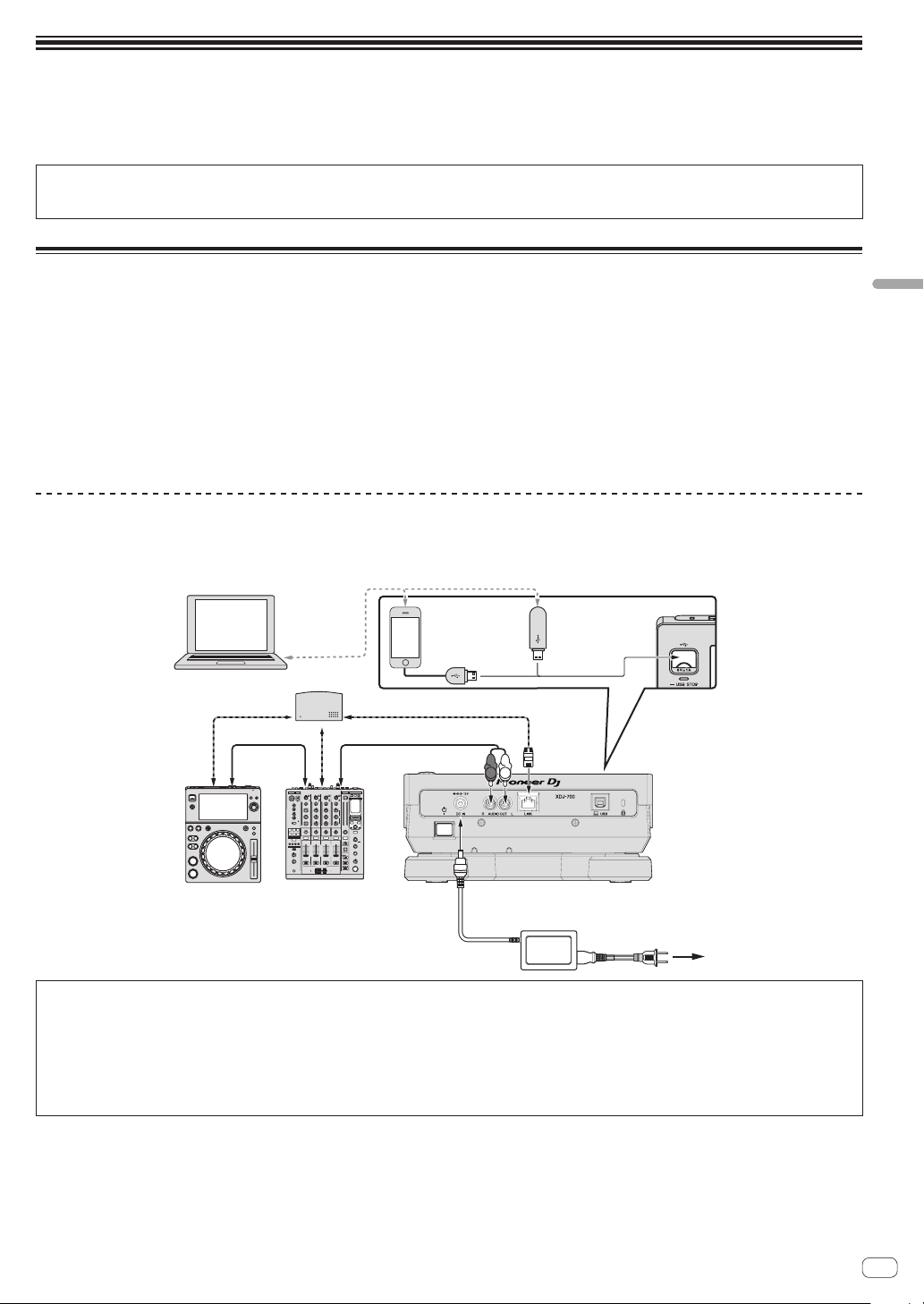
Anschlüsse
e
! Schalten Sie die Stromversorgung aus und ziehen Sie das Netzkabel aus der Netzsteckdose, bevor Sie Geräte anschließen oder die Anschlüsse
ändern.
! Beachten Sie die Bedienungsanleitung der angeschlossenen Komponente.
! Schließen Sie das Netzkabel an, nachdem alle Anschlüsse zwischen den Geräten vorgenommen wurden.
! Bei Verwendung eines LAN-Kabels zum Anschluss stellen Sie sicher, immer das mit diesem Produkt mitgelieferte LAN-Kabel oder ein STP-Kabel
(abgeschirmtes, verdrilltes Paar) zu verwenden.
! Trennen Sie nicht das LAN-Kabel ab, wenn Musikdateien und/oder Informationen mit PRO DJ LINK gemeinsam verwendet werden.
Basic-Stil
Die Wiedergabe auf diesem Gerät wird hauptsächlich mit Tracks ausgeführt, die vorbereitet wurden, während rekordbox auf einem Computer installiert
war.
! Anweisungen zur Bedienung von rekordbox siehe Bedienungsanleitung für rekordbox (Mac/Windows). Die Bedienungsanleitung für rekordbox
(Mac/Windows) kann aus dem rekordbox (Mac/Windows) [Help]-Menü betrachtet werden.
! Bei DJ-Playern und DJ-Mixern können bis zu vier PRO DJ LINK-kompatible Player über LAN-Kabel (CAT5e) mit PRO DJ LINK-Verbindungen ange-
schlossen werden.
! Ein Switching Hub (im Handel erhältlich) ist möglicherweise erforderlich, je nach der Kombination der verwendeten Modelle. Verwenden Sie einen
Switching Hub von 100 Mbps oder höher. Manche Switching Hubs arbeiten möglicherweise nicht ordnungsgemäß.
Ein Switching Hub (im Handel erhältlich) ist für den Anschluss eines Mixers erforderlich, der nur einen LAN-Anschluss hat. Für Mixer mit ausrei-
chend LAN-Anschlüssen für alle DJ-Player und Computer im System stellen Sie die Verbindung direkt zu den LAN-Anschlüssen an der Rückseite
des Mixers her, ohne einen Hub zu verwenden.
PRO DJ LINK (USB-Export)
! rekordbox-Musikdateien und Daten können mit diesem Gerät mittels eines Speichergeräts (Flash-Speicher, Festplatte usw.) ausgetauscht werden,
wodurch es unnötig wird, einen Computer in die DJ-Kabine mitzunehmen. Informationen wie Playlisten, Cues, Loops und Hot Cues, die im Voraus
mit rekordbox eingestellt werden, können für die Wiedergabe verwendet werden.
rekordbox
LAN-Kabel
Audiokabel
Computer
Switching Hub
LAN-Kabel
LAN-Kabel
Audiokabel
Mobiles Gerät,
auf dem
rekordbox
installiert ist.
R
L
USB-Gerät auf
dem
rekordbox-Daten
aufgezeichnet sind
Deutsch
DJ player DJ mixer
Netzteil
Rückseite
Zur Netzsteckdos
Vorsichtshinweise
Zum Maximieren der Nutzung der Musikdateiverwaltungsfunktionen von rekordbox bringen Sie bitte Player-Nummer und den im Mixer eingegebenen Kanal des Audiokabels in Übereinstimmung.
Wenn die Player-Nummer anders ist, ändern Sie die [PLAYER No.]-Einstellung im Bildschirm [UTILITY].
= Informationen zum Ändern der Einstellungen des [UTILITY]-Bildschirms finden Sie in den auf der Pioneer DJ-Support-Seite veröffentlichten
Bedienungsanweisungen für dieses Produkt.
! Wenn ein Speichergerät an diesem Gerät angeschlossen ist, wird [PLAYER No.] grau dargestellt und kann nicht geändert werden. Trennen Sie
das Speichergerät oder LAN-Kabel ab, um die Verbindung zu unterbrechen, und ändern Sie dann die Einstellung.
De
21
Page 22

Bedienung
USB STOP-Taste
Einschalten der Stromversorgung
1 Stellen Sie alle Verbindungen her und stecken Sie
dann den Netzstecker in eine Steckdose.
= Anschlüsse (S. 21 )
2 Drücken Sie den [u]-Schalter.
Die Anzeigen dieser Einheit leuchten auf, und sie wird mit Strom
versorgt.
Anschließen von USB-Geräten
1 Drücken Sie den [u]-Schalter zum Einschalten der
Stromversorgung dieser Einheit.
2 Stecken Sie das USB-Gerät im USB-GeräteEinsetzschacht ein.
Abspielen von Datenträgern, die an
diesem Gerät angeschlossen oder
eingesetzt sind
1 Legen Sie den Datenträger in das Gerät.
2 Berühren Sie [USB].
Die Tracks oder Ordner werden in einer Liste angezeigt.
Die am Display des Hauptgerätes angezeigten Inhalte des Mediums
können umgeschaltet werden.
! [USB]: Zeigt die Inhalte von angeschlossenen USB-Geräten und
mobilen Geräten.
! Wenn Sie [LINK] berühren, werden weitere Musikdateien im
DJ-Player angezeigt.
! Wenn Sie [rekordbox] berühren, werden Musikdateien in
rekordbox angezeigt.
! Wenn die rekordbox Bibliothek-Information auf das USB-Gerät
geschrieben wurde, wird die rekordbox-Bibliothek angezeigt.
= Informationen zum Durchsuchen der rekordbox-Bibliothek fin-
den Sie in den auf der Pioneer DJ-Support-Seite veröffentlichten
Bedienungsanweisungen für dieses Produkt.
3 Drehen Sie den Drehregler.
Verschieben Sie den Cursor und wählen Sie den Eintrag.
! Drücken Sie den Drehregler, zu einer niedrigeren Ebene im Ordner
zu gehen. Drücken Sie die [BACK]-Taste, um zu der höheren Ebene
zurückzukehren.
Abtrennen von USB-Geräten
1 Drücken und halten Sie die [USB STOP]-Taste, bis die
USB-Anzeige aufhört zu blinken.
Während die USB-Anzeige blinkt, dürfen Sie weder das USB-Gerät trennen noch das Gerät abschalten. Die Verwaltungsdaten im Gerät könnten
gelöscht werden. Zudem wird das USB-Gerät möglicherweise unlesbar.
2 Trennen Sie das USB-Gerät ab.
De
22
USB-Anzeige
4 Wählen Sie den Track und drücken Sie den
Drehregler.
Wenn der Track geladen ist, schaltet der Bildschirm auf den
Normalwiedergabe-Bildschirm um.
Der Datenträger, auf dem der Track geladen ist, blinkt.
= Informationen zum normalen Wiedergabebildschirm finden
Sie in den auf der Pioneer DJ-Support-Seite veröffentlichten
Bedienungsanweisungen für dieses Produkt.
Informationen zu weiteren Bedienschritten finden Sie in den auf der
Pioneer DJ-Support-Seite veröffentlichten Bedienungsanweisungen
für dieses Produkt.
Page 23

Zusätzliche Informationen
Störungssuche
! Bedienungsfehler werden oft irrtümlich für Störungen oder Ausfälle gehalten. Wenn Sie den Eindruck haben, dass diese Komponente nicht ord-
nungsgemäß funktioniert, überprüfen Sie bitte die Punkte unten und [FAQ] für [XDJ-700] auf der Pioneer DJ-Support-Website.
http://pioneerdj.com/support/
Manchmal wird das Problem auch durch ein externes Gerät verursacht. Überprüfen Sie die anderen verwendeten Komponenten und elektrischen
Geräte. Wenn Sie das Problem nicht beheben können, wenden Sie sich an die nächste Pioneer-Kundendienststelle oder an Ihren Händler zum
Ausführen der Reparaturarbeit.
! Dieses Gerät kann möglicherweise aufgrund von statischer Elektrizität oder anderen externen Faktoren nicht richtig arbeiten. In diesem Fall kann
richtiger Betrieb durch Ausschalten, mindestens 1 Minute Warten und dann erneutes Einschalten wieder hergestellt werden.
Problem Prüfen Abhilfe
Datei kann nicht abgespielt werden. Ist die Datei urheberrechtlich geschützt (durch
Es wird kein Ton produziert, oder der
Ton ist verzerrt oder laut.
Datei-Information wird nicht richtig
angezeigt.
Track-Suche dauert zu lange. Ist die Funktion Auto Cue aktiviert? Track-Suche kann einige Zeit dauern, wenn es zu lange stille Abschnitte zwi-
Back-Cue-Funktion funktioniert nicht. Ist ein Cue-Punkt gesetzt? Setzen Sie einen Cue-Punkt.
Loop Play-Funktion funktioniert nicht. Sind Loop-Punkte eingestellt? Stellen Sie Loop-Punkte ein.
Einstellungen werden nicht
gespeichert.
USB-Speichergerät wird nicht
erkannt.
Cue-Punkte oder Loops sind nicht auf
einem USB-Gerät gespeichert.
Cue- oder Loop--Punkte von Tracks,
die auf USB-Geräten aufgezeichnet
sind, werden nicht angezeigt.
Die Wiedergabe beginnt nicht sofort
nach dem Drücken der Taste für
Reloop oder Reverse-Wiedergabe.
Die Wiedergabe-Adresse wird nicht
im Restzeit-Modus angezeigt.
Zeit wird benötigt, um USB-Geräte
(Flash-Speicher-Laufwerke und
Festplatten) zu lesen.
DRM)?
Bedienen Sie den angeschlossenen DJ-Mixer
richtig?
Befindet sich der dieses Gerät in der Nähe eines
Fernsehers?
Ist [LANGUAGE] richtig eingestellt? Stellen Sie [LANGUAGE] auf die richtige Sprache ein.
Sind die Informationen in einer nicht von diesem
Gerät unterstützten Sprache aufgezeichnet?
— Wenn Track-Suche innerhalb von 10 Sekunden nicht möglich ist, ist ein Cue-
Wurde die Stromversorgung sofort nach dem
Ändern der Einstellung ausgeschaltet?
Ist das USB-Gerät richtig angeschlossen? Schließen Sie das Gerät sicher (vollständig) an.
Ist das USB-Gerät richtig über einen USB-Hub
angeschlossen?
Wird das USB-Gerät von dieser Einheit
unterstützt?
Wird das Dateiformat von dieser Einheit
unterstützt?
— Schalten Sie die Einheit aus und wieder ein.
Versuchen Sie, mehr Punkte als zulässig zu
speichern?
Ist das USB-Gerät schreibgeschützt? Wenn das USB-Gerät schreibgeschützt ist, wird [USB FULL] angezeigt und die
Gibt es ausreichend freien Speicherplatz auf dem
USB-Gerät?
Wurde das USB-Gerät richtig gestoppt, bevor es
zum letzten Mal abgetrennt wurde?
Ist die Quantisierungsfunktion eingeschaltet? Wenn die Quantisierungsfunktion eingeschaltet ist, startet die Wiedergabe von
— Bei der Wiedergabe von im VBR aufgezeichneten Dateien kann es vorkommen,
Gibt es eine große Anzahl von Ordnern oder
Dateien auf dem USB-Gerät?
Sind andere Dateien als Musikdateien auf dem
USB-Gerät gespeichert?
Urheberrechtlich geschützte Dateien können nicht abgespielt werden.
Überprüfen Sie die Funktion des DJ-Mixers.
Schalten Sie den Fernseher aus oder stellen Sie dieses Gerät und den Fernseher
weiter voneinander entfernt auf.
Bei der Erstellung von Dateien mit DJ-Software usw. zeichnen Sie die
Informationen in einer Sprache auf, die von diesem Gerät unterstützt wird.
schen den Tracks gibt.
Punkt am Anfang des Tracks gesetzt.
Warten Sie nach dem Ändern der Einstellungen mindestens 10 Sekunden, bevor
Sie das Gerät ausschalten.
USB-Hubs können nicht verwendet werden.
Dieser Spieler unterstützt die USB-Massenspeicherklasse.
Dieser Spieler unterstützt portablen Flash-Speicher und digitale
Audio-Wiedergabegeräte.
Überprüfen Sie das Dateiformat des angeschlossenen USB-Geräts. Für von die-
ser Einheit unterstützte Dateiformate siehe Geeignete Datenträger auf Seite 20 .
Zehn Cue-Punkte oder Loop-Punkte pro Titel können auf einem USB-Gerät
gespeichert werden.
Wenn Sie versuchen, mehr Punkte als zulässig zu speichern, wird
[CUE/LOOPPOINT FULL] angezeigt, und die Punkte können nicht gespeichert
werden. Löschen Sie in diesem Fall einige Punkte, bevor Sie neue speichern.
Punkte können nicht gespeichert werden. Deaktivieren Sie den Schreibschutz,
um die Cue- oder Loop-Punkte erneut zu speichern.
Wenn nicht genug freier Platz auf dem USB-Gerät vorhanden ist, wird
[USB FULL] angezeigt und die Punkte können nicht gespeichert werden.
Schaffen Sie freien Platz, um die Cue- oder Loop-Punkte erneut zu speichern.
Punkte können u.U. nicht angezeigt werden, wenn die SD-Speicherkarte / das
USB-Gerät entfernt wurde, ohne richtig gestoppt zu werden oder während die
Stromversorgung des ausgeschaltet ist.
Stellen Sie sicher, dass die USB-Anzeige aufgehört hat zu blinken, bevor Sie das
USB-Gerät trennen oder das Gerät abschalten.
der nächsten Beat-Position in dem Moment, wo die Taste gedrückt wird. Wenn
Sie die Bedienung in dem Moment ausführen wollen, wo die Taste gedrückt
wird, schalten Sie die Quantisierungsfunktion aus.
dass das Set nicht die Länge des Tracks erkennen kann dass einige Zeit für die
Anzeige der Wiedergabe-Anzeige benötigt wird.
Wenn es viele Ordner oder Dateien gibt, kann einige Zeit kann für das Laden
erforderlich sein.
Wenn andere Dateien als Musikdateien in Ordnern gespeichert sind, ist ebenfalls einige Zeit erforderlich, um sie zu lesen. Speichern Sie keine anderen
Dateien oder Ordner als Musikdateien auf dem USB-Gerät.
Deutsch
De
23
Page 24

Problem Prüfen Abhilfe
Bibliothek-Durchsuchen ist nicht
möglich.
[HISTORY] wird nicht angezeigt. Ist ein USB-Gerät eingesetzt? Die Funktion [HISTORY] kann nur für DJ-Player verwendet werden, in denen ein
Nichts wird angezeigt. Ist die Funktion Auto-Standby aktiviert? Diese Einheit ist werkseitig auf aktivierte Auto-Standby-Funktion eingestellt.
Die Skala wird nicht angezeigt. Ist der Track von über 15 Minuten lang? Die Skala wird nicht für Tracks angezeigt, deren Spielzeit länger als 15 Minuten
PRO DJ LINK funktioniert nicht gut. Sind die Player-Nummern richtig eingestellt? Setzen Sie [PLAYER No.] auf [AUTO] oder auf eine andere als die momentan
Bei Berührung des Bildschirms
erfolgt keine Reaktion oder die
Reaktionsfähigkeit ist schlecht. Die
Position weicht von der tatsächlich
berührten Stelle am Bildschirm ab.
Ist ein Datenträger, auf dem BibliothekInformationen aufgezeichnet sind, eingesetzt?
Ist das LAN-Kabel richtig angeschlossen? Schließen Sie das LAN-Kabel richtig an die Buchse [LINK] an.
Ist die Stromversorgung des Switching Hub
eingeschaltet?
Ist ein unnötiges Gerät am Switching Hub
angeschlossen?
Kalribierungsanpassung des Touchscreens
weicht ab.
Der Bibliothek-Durchsuchen-Modus wird nur eingestellt, wenn Datenträger
eingesetzt sind, auf denen Bibliothek-Informationen aufgezeichnet sind. Wenn
ein Datenträger eingesetzt wird, für den keine Bibliothek-Informationen aufgezeichnet sind, wird der Ordner-Durchsuchen-Modus eingestellt.
USB-Gerät eingesetzt ist.
Wenn Sie die Auto-Standby-Funktion nicht verwenden wollen, stellen Sie [AUTO
STANDBY] im [UTILITY]-Menü auf [OFF].
ist.
eingestellte Zahl.
Schalten Sie die Stromversorgung des Switching Hub ein.
Trennen Sie das unnötige Gerät vom Switching Hub ab.
Stellen Sie den Touchscreen mit den Einstellungen
[TOUCH DISPLAY CALIBRATION] am [UTILITY]-Bildschirm ein.
Fehlermeldungen
Wenn dieses Gerät nicht ordnungsgemäß betrieben werden kann, wird auf dem Display ein Fehlercode angezeigt. Informieren Sie sich in der nachfolgenden Tabelle über die zu ergreifenden Maßnahmen. Wenn ein Fehlercode angezeigt wird, der in der nachfolgenden Tabelle nicht aufgeführt ist, oder
wenn derselbe Fehlercode nach Ergreifen der angegebenen Maßnahme weiterhin angezeigt wird, wenden Sie sich an das Fachgeschäft, in dem das
Produkt gekauft wurde.
Fehlercode Fehlertyp Beschreibung des Fehlers Ursache und Abhilfe
E-8302
E-8304
E-8305
CANNOT PLAY TRACK(****)
UNSUPPORTED FILE FORMAT
Titeldaten (Dateien) im USB-Speicher können
nicht richtig gelesen werden.
Musikdateien, die nicht normal abgespielt
werden können, sind geladen.
Die Track-Daten (Datei) können korrumpiert sein. dPrüfen Sie, ob
der Track (die Datei) auf einem anderen Player usw., der das gleiche
Format wie dieses Gerät abspielen kann, abgespielt werden kann.
Das Format ist falsch.dDurch Musikdateien im richtigen Format
ersetzen.
Touchscreen reinigen
Verwenden Sie keine organischen Lösungsmittel, Säuren oder Basen
zur Reinigung der Oberfläche des Touchscreens. Wischen Sie sie mit
einem trockenen, weichen oder einem mit neutralem Reinigungsmittel
angefeuchteten und gründlich ausgewrungenen Tuch ab.
Über Markenzeichen und
eingetragene Markenzeichen
! Pioneer DJ ist ein Markenzeichen der PIONEER CORPORATION
und wird unter Lizenz verwendet. rekordbox ist ein eingetragenes
Markenzeichen der Pioneer DJ Corporation.
! Windows ist ein eingetragenes Markenzeichen der Microsoft
Corporation in den USA und anderen Ländern.
! Adobe und Reader sind eingetragene Markenzeichen oder
Markenzeichen von Adobe Systems Incorporated in den USA und/
oder anderen Ländern.
! ASIO ist ein Markenzeichen von Steinberg Media Technologies
GmbH.
! Die Kennzeichnungen „Made for iPod” und „Made for iPhone”
bedeuten, dass ein elektronisches Zubehörteil spezifisch zum
Anschluss an iPod oder iPhone konstruiert wurde und entsprechend
vom Entwickler als die Leistungsstandards von Apple erfüllend zertifiziert wurde. Apple übernimmt keine Verantwortung für die richtige
Funktion dieses Geräts oder seine Erfüllung von Sicherheits- oder
anderen Vorschriften. Bitte beachten Sie, dass der Gebrauch dieses
Zubehörteils in Verbindung mit einem iPod oder iPhone die drahtlose Leistung beeinträchtigen kann.
! iPod, iPhone, Mac, und Mac OS sind Markenzeichen der Apple Inc.,
die in den USA und anderen Ländern eingetragen sind.
! Android™ ist eine Marke der Google Inc.
! iOS ist eine Marke, für die Cisco das Markenrechte in den USA und
bestimmten anderen Ländern hält.
! This software is based in part on the work of the Independent JPEG
Group.
Die Software in dieser Einheit verwendet teilweise Software der
Independent JPEG Group.
Über Verwendung von MP3-Dateien
Dieses Produkt wurde für Nonprofit-Verwendung lizensiert. Dieses
Produkt ist nicht zu den Handelszwecken (für Gewinn bringenden Gebrauch), wie Sendung (terrestrisch, Satelliten-, Kabel oder
andere Arten von Sendungen), streaming im Internet, Intranet
(ein privates Kommunikationsnetz) oder anderen Typen von
Netzwerken oder zum Vertrieb elektronischer Information (online
digitale Musikvertriebsdienste) lizensiert worden. Für derartige
Verwendungszwecke müssen sie die entsprechenden Lizenzen erhalten. Für Einzelheiten besuchen Sie http://www.mp3licensing.com.
! Die hier erwähnten Produkt- oder Firmennamen sind Markenzeichen
der jeweiligen Eigentümer.
24
De
Page 25

Hinweise zum Urheberrechte
rekordbox beschränkt die Wiedergabe und Vervielfältigung von urheberrechtlich geschützten Musik-Inhalten.
! Wenn codierte Daten, usw. zum Schutz der Urheberrechte in Musik-
Inhalten eingebettet sind, kann es unmöglich sein, das Programm
normal auszuführen.
! Wenn rekordbox erkennt, dass kodierte Daten usw., für den Schutz
der Urheberrechte in Musik-Inhalten eingebettet ist, kann der ablau-
fende Vorgang (Wiedergabe, Lesen, usw.) stoppen.
Aufnahmen, die Sie vornehmen, sind für persönlichen Genuss gedacht
und dürfen nach dem Urheberrecht nicht ohne Zustimmung des
Urheberrechtsinhabers anderweitig verwendet werden.
! Musik, die von CDs, usw. aufgenommen wurde, ist durch die
Urheberrechtsgesetze der einzelnen Länder sowie durch internatio-
nale Abkommen geschützt. Es liegt in der vollen Verantwortung der
Person, die die Musik aufgenommen hat, sicherzustellen, dass die
Aufnehmen nicht gesetzwidrig verwendet werden.
! Beim Umgang mit Musik, die aus dem Internet heruntergeladen
wurde usw., liegt es in der vollen Verantwortung der Person, die
den Musik-Download ausgeführt hat, sicherzustellen, dass die
aufgenommenen Inhalte entsprechend den Vorschriften auf der
Download-Site verwendet werden.
Technische Daten
Netzteil
Stromversorgung .............100 V bis 240 V Wechselspannung, 50 Hz/60 Hz
Nennstrom ............................................................................................. 0,6 A
Nenn-Ausgang ............................................................ 12 V Gleichstrom, 2 A
Leistungsaufnahme (Standby) ............................................................. 0,5 W
Allgemein – Haupteinheit
Leistungsaufnahme ..........................................12 V Gleichstrom, 1200 mA
Gewicht des Hauptgeräts ..................................................................... 2,0 kg
(Ohne angebrachten Ständer) ............................................................ 1,7 kg
Außenabmessungen ............238 mm (B) × 106,3 mm (H) × 307,8 mm (T)
(Ohne angebrachten Ständer) .................... 238 mm (B) × 78,8 mm (H) ×
307,8 mm (T)
Betriebstemperatur ........................................................... +5 °C bis +35 °C
Betriebsluftfeuchtigkeit ........................ 5 % bis 85 % (keine Kondensation)
Analoger Audioausgang (AUDIO OUT L/R)
Ausgangsbuchse ....................................................................Cinch-Buchse
Ausgangspegel ...................................................................... 2,0 Veff (1 kHz)
Frequenzgang ........................................................................4 Hz bis 20 kHz
Signalrauschabstand ......................................................................... 115 dB
Gesamtklirrfaktor ...............................................................................0,003 %
USB Downstream-Bereich (USB)
Port .........................................................................................................Typ A
Stromversorgung ......................................................... 5 V/1 A oder weniger
USB-Upstream-Bereich (USB)
Port .........................................................................................................Typ B
LAN (PRO DJ LINK)
Bewertung ................................................................................... 100Base-TX
Haupt-Display
Displaytyp .............................Active Matrix TFT-Flüssigkristalldisplay (LCD)
Unterstützte Karten ...................................................................18 Sprachen
! Änderungen der technischen Daten und das Design dieses Geräts
ohne vorherige Ankündigung bleiben vorbehalten.
! © 2015 Pioneer DJ Corporation. Alle Rechte vorbehalten.
Deutsch
De
25
Page 26

Vi ringraziamo per avere acquistato questo prodotto Pioneer DJ. Vi preghiamo di leggere queste queste istruzioni per l’uso in modo da sapere usare
ATTENZIONE
PER EVIT
NON RIMUOVERE IL COPERCHIO (O IL RETRO). NON
CI SONO P
POSSA ESSERE EFFET
DI NECESSITÀ, RIVOLGERSI ESCL
PERSONALE DI SERVIZIO QU
ATTENZIONE
Questo apparecchio non è impermeabile.
pericoli di incendi o folgorazioni, non posizionare nelle
vicinanze di questo apparecchio contenitori pieni di
liquidi (quali vasi da fiori, o simili), e non esporre
l’apparecchio a sgocciolii, schizzi, pioggia o umidità.
ATTENZIONE
Pe
sull’apparecchio dispositivi con fiamme vive (ad
esempio una candela accesa, o simili)
Condizioni ambientali di funzionamento
Gamma ideale della temperatura ed umidità
dell’ambiente di funzionamento:
da +5 °C a +35 °C, umidità relativa inferiore all‘85 %
(fessure di ventilazione non bloccate
Non installare l’apparecchio in luoghi poco ventilati, o
in luoghi esposti ad alte umidità o alla diretta luce del
sole (o a sorgenti di luce artificiale molto forti)
AVVER
Installare l’apparecchio avendo cura di lasciare un
certo spazio all’intorno dello stesso per consentire una
adeguata circolazione dell’aria e migliorare la
dispersione del calore (almeno 5 cm sul retr
su ciascuno dei lati).
I privati cittadini dei paesi membri dell’UE, di Svizzera e Nor
ser
Pe
In questo modo
potenzialmente negativi sull’ambiente e sulla vita dell’uomo
l’unità, oppure dei mobili sopra il filo di alimentazione e
S002*_A1_It
correttamenteil proprio modello. Dopo aver letto queste istruzioni, riporle in un luogo sicuro per poterle consultare di nuovo al momento del bisogno.
In alcuni paesi o regioni, la forma della spina di alimentazione e della presa di corrente possono non essere quelle delle illustrazioni. Il metodo di collegamento e di uso dell’unità però non cambia.
ARE IL RISCHIO DI SCOSSE ELETTRICHE,
ARTI INTERNE LA CUI MANUTENZIONE
TUATA DALL’UTENTE. IN CASO
USIVAMENTE A
ALIFICATO.
r evitare il pericolo di incendi, non posizionare
.
)
TENZA PER LA VENTILAZIONE
Prima di usare il prodotto, controllare le norme sulla
sicurezza stampate sul suo fondo.
D3-4-2-1-1_B2_It
Per prevenire
D3-4-2-1-3_A1_It
D3-4-2-1-7a_A1_It
.
D3-4-2-1-7c*_A1_It
o, e 5 cm
D3-4-2-1-7d*_A1_It
D3-4-2-2-4_B1_It
AVVERTENZA
L’interruttore principale ( ) dell’apparecchio non
stacca completamente il flusso di corrente elettrica
dalla presa di corrente alternata di rete. Dal momento
che il cavo di alimentazione costituisce l’unico
dispositivo di distacco dell’apparecchio dalla
sorgente di alimentazione, il cavo stesso deve essere
staccato dalla presa di corrente alternata di rete per
sospendere completamente qualsiasi flusso di
corrente. Verificare quindi che l’apparecchio sia stato
installato in modo da poter procedere con facilità al
distacco del cavo di alimentazione dalla presa di
corrente, in caso di necessità. Per prevenire pericoli
di incendi, inoltre, il cavo di alimentazione deve
essere staccato dalla presa di corrente alternata di
rete se si pensa di non utilizzare l’apparecchio per
periodi di tempo relativamente lunghi (ad esempio,
durante una vacanza).
D3-4-2-2-2a*_A1_It
Questo prodotto è destinato esclusivamente all'uso
domestico. Eventuali disfunzioni dovute ad usi diversi
(quali uso prolungato a scopi commerciali, in
ristoranti, o uso in auto o su navi) e che richiedano
particolari riparazioni, saranno a carico dell'utente,
anche se nel corso del periodo di garanzia.
K041_A1_It
AVVERTIMENTO RIGUARDANTE IL FILO DI
ALIMENTAZIONE
Prendete sempre il filo di alimentazione per la spina.
Non tiratelo mai agendo per il filo stesso e non toccate
mai il filo con le mani bagnati, perchè questo potrebbe
causare cortocircuiti o scosse elettriche. Non collocate
controllate che lo stesso non sia premuto. Non
annodate mai il filo di alimentazione nè collegatelo con
altri fili. I fili di alimentazione devono essere collocati in
tal modo che non saranno calpestati. Un filo di
alimentazione danneggiato potrebbe causare incendi o
scosse elettriche. Controllate il filo di alimentazione
regolarmente. Quando localizzate un eventuale danno,
rivolgetevi al più vicino centro assistenza oppure al
vostro rivenditore per la sostituzione del filo di
alimentazione.
Se si vuole eliminare questo prodotto, non gettarlo insieme ai rifiuti domestici. Esiste un sistema di raccolta differenziata in conformità
alle leggi che richiedono appositi trattamenti, recupero e riciclo.
vizi di raccolta o a un rivenditore (se si desidera acquistarne uno simile).
r i paesi non citati qui sopra, si prega di prendere contatto con le autorità locali per il corretto metodo di smaltimento.
26
It
, si è sicuri che il proprio prodotto eliminato subirà il trattamento, il recupero e il riciclo necessari per prevenire gli effetti
Questo prodotto soddisfa le normative sul rumore
elettromagnetico quando è collegato ad altri
componenti attraverso cavi e connettori schermati.
Usare solo i cavi di collegamento allegati come
accessori. D44-8-2_A1_It
vegia, possono restituire senza alcun costo i loro prodotti elettronici usati ad appositi
.
K058b_A1_It
Page 27

Prima di iniziare
Come leggere questo manuale
Vi ringraziamo per avere acquistato questo prodotto Pioneer DJ.
Non mancare di leggere sia questo volantino, sia le istruzioni per l’uso!
I due documenti includono informazioni importanti che devono venire
comprese prima di usare questo prodotto.
Dopo aver letto queste istruzioni, riporle in un luogo sicuro per poterle
consultare di nuovo al momento del bisogno.
! Per sapere come ottenere le istruzioni per l’uso, vedere Come procu-
rarsi le “Istruzioni per l’uso” di questa unità (p. 27 ).
Caratteristiche
Questa unità è un lettore DJ dotato della tecnologia della serie CDJ per
DJ di Pioneer, lo standard mondiale dell’audio per club. Si possono fare
vere e proprie performance DJ usando brani non solo da dispositivi USB
e computer, ma anche da dispositivi mobili (smartphone, ecc.). Non
solo è dotato di una vasta gamma di caratteristiche per performance
DJ, incluso PRO DJ LINK e le funzioni di quantizzazione e beat sync, ma
offre anche un design di grande affidabilità ed un layout del pannello
che fornisce grande facilità d’uso, supportando ogni tipo di performance
DJ.
Come procurarsi le “Istruzioni
per l’uso” di questa unità
Varie istruzioni per l’uso sono a volte messe a disposizione in file di
formato PDF. La visione di file PDF richiede Adobe® Reader®.
1 Lanciare il web browser del proprio computer e
raggiungere il sito di supporto DJ di Pioneer che segue.
http://pioneerdj.com/support/
2 Nel sito di supporto DJ Pioneer, fare clic su [Manuals]
in [XDJ-700].
3 Nella pagina di download, fare clic sulla lingua
desiderata.
Il download delle istruzioni per l’uso inizia.
Acquisizione di rekordbox (Mac/Windows)
1 Aprire il browser sul computer e accedere al sito
rekordbox.
http://rekordbox.com/
2 Fare clic su [Download] nel sito rekordbox e scaricare
rekordbox dalla pagina di download.
! Per domande riguardanti rekordbox (Mac/Windows), consultare
il sito di supporto tecnico indicato qui sopra.
Informazioni su rekordbox (iOS/Android)
I brani gestiti con rekordbox (iOS/Android) possono venire riprodotti collegando il dispositivo mobile che contiene rekordbox (iOS/Android) via
USB. Per quanto riguarda i dispositivi compatibili, vedere il sito Web di
Pioneer DJ (http://pioneerdj.com/support/). Per istruzioni per rekordbox
(iOS/Android), vederne il manuale dell’utente rekordbox (iOS/Android).
! Per dettagli sull’installazione di rekordbox (iOS/Android), vedere il
sito Web di Pioneer DJ (http://rekordbox.com/).
Informazioni sul driver (Windows)
Questo software è un esclusivo driver ASIO per la produzione di segnali
audio da parte del computer.
! Non è necessario installare un driver se si usa Mac OS X.
Come ottenere il software del driver
1 Lanciare il web browser del proprio computer e
raggiungere il sito di supporto DJ di Pioneer che segue.
http://pioneerdj.com/support/
2 Fare clic su [Software Download] in [XDJ-700] del sito
di supporto DJ Pioneer.
3 Fare clic sull’icona del software del driver per
scaricarlo dalla pagina di download.
! Per informazioni sull’installazione del software del driver, consul-
tare il sito di assistenza Pioneer DJ.
Italiano
Contenuto della confezione
! Cavo di alimentazione
! Cavo audio × 1
! Cavo LAN × 1
! Adattatore CA × 1
! Garanzia × 1
! Istruzioni per l’uso (Guida di avvio veloce) (questo documento) × 1
Preparazione del software
I software di gestione della musica rekordbox e del driver non sono
inclusi.
Per utilizzare rekordbox e il software del driver, accedere al sito rekordbox e al sito di assistenza Pioneer DJ e scaricare il software.
! L’utente deve eseguire da sé l’impostazione del computer, dei dispo-
sitivi di rete e di altri elementi dell’ambiente di uso di Internet richiesti dal collegamento alla rete.
Informazioni su rekordbox
rekordbox è un software composito che consente la gestione delle
tracce e le prestazioni DJ.
Si possono ottenere eccellenti performance DJ utilizzando i file musicali
gestiti da rekordbox insieme a questa unità.
Supporti utilizzabili
La presente unità è compatibile con dispositivi di memoria di massa
USB, quali memoria flash mobile e lettore audio digitale.
File system
supportati
! Tramite USB è possibile memorizzare informazioni quali cue point,
loop point e hot cue.
! Con certi dispositivi USB può non essere possibile ottenere le presta-
zioni desiderate.
! Non si garantisce che tutti i dispositivi USB funzionino con questa
unità.
Per ulteriori informazioni, consultare le istruzioni per l’uso di questo
prodotto, pubblicate sul sito di assistenza Pioneer DJ.
FAT16, FAT32 e HFS+ (NTFS non è supportato.)
It
27
Page 28

Collegamento del supporto
È possibile collegare e scollegare con facilità il supporto a/da questa
unità. Se si utilizza questa unità allineata con i riproduttori o i mixer DJ
precedenti, è possibile allineare i pannelli operativi sullo stesso livello
collegando il supporto a questa unità.
Come collegare
1 Inserire le protrusioni sul supporto nei fori guida sulla
parte inferiore di questa unità.
2 Spingere il supporto fino a sentire lo scatto di
posizionamento.
3 Controllare che le due leve di rilascio siano
fermamente agganciate a questa unità e non vengano
rilasciate.
Come rimuovere
1 Muovere le due leve di rilascio sulla parte inferiore
del supporto verso l’interno per rilasciare il blocco.
2 Rimuovere il supporto.
Leva di rilascio
ATTENZIONE
Se si toglie il blocco della leva di rilascio mentre il prodotto viene sollevato è possibile che cada. Tenere ben fermo il prodotto e rimuovere il
supporto.
It
28
Page 29

Collegamenti
! Prima di fare o modificare collegamenti, non mancare di spegnere l’apparecchio e di scollegare il cavo di alimentazione.
! Consultare le istruzioni per l’uso del componente da collegare.
! Collegare il cavo di alimentazione dopo che tutti i collegamenti fra dispositivi sono stati fatti.
! Se si usa un cavo LAN per i collegamenti, non mancare di fare uso del cavo LAN accluso al prodotto o un cavo STP (shielded twisted pair).
! Non scollegare il cavo LAN quando file musicali e/o informazioni vengono condivisi usando PRO DJ LINK.
Stile di base
La riproduzione con questa unità viene fatta principalmente con brani preparati con rekordbox installato su di un computer.
! Per le modalità d’uso di rekordbox, vederne le istruzioni per l’uso di rekordbox (Mac/Windows). Le istruzioni per l’uso di rekordbox (Mac/Windows)
sono accessibili dal menu [Help] di rekordbox (Mac/Windows) stesso.
! Inoltre, per i lettori DJ e mixer DJ, è possibile collegare fino a quattro lettori compatibili con PRO DJ LINK usando cavi LAN (CAT5e) e connessioni
PRO DJ LINK.
! Con certe combinazioni di modelli, potrebbe anche essere necessario uno switching hub (da acquistarsi separatamente). Usare uno switching hub
da 100 Mbps o più. Alcuni switching hub potrebbero non funzionare correttamente.
Per collegarsi ad un mixer dotato di una sola porta LAN è necessario uno switching hub (da acquistarsi separatamente). Con mixer dotati di porte
LAN sufficienti per tutti i lettori DJ e computer del sistema, collegarli direttamente alle porte LAN del retro del mixer, senza usare hub.
PRO DJ LINK (USB Export)
! I file audio ed i dati di rekordbox possono venire trasferiti a questa unità con un dispositivo di memoria (memoria flash, disco fisso, ecc.) eliminando
la necessità di portare il computer nella cabina DJ. È possibile fissare in anticipo le playlist, i cue, i loop e gli hot cues con rekordbox ed usarli per la
riproduzione.
Italiano
rekordbox
Cavo LAN
Lettore DJ Mixer DJ
Computer
Hub con selettore
Cavo LAN
Cavo audio
Dispositivo mobile
sul quale
rekordbox è
installato
Cavo LAN
Cavo audio
R
Adattatore di CA
Dispositivo
USB
contenente dati
di rekordbox
L
Pannello posteriore
Ad una presa
Attenzione
Per ottimizzare l’uso delle funzioni di gestione dei file musicali di rekordbox, far corrispondere il numero del lettore con il canale del cavo audio
immesso nel mixer.
Se il numero del lettore è differente, cambiare l’impostazione [PLAYER No.] sullo schermo [UTILITY].
= Per informazioni sulla modifica delle impostazioni della schermata [UTILITY], consultare le istruzioni per l’uso di questo prodotto, pubblicate sul
sito di assistenza Pioneer DJ.
! Quando un dispositivo di memorizzazione è collegato a questa unità, [PLAYER No.] viene visualizzato in grigio e non può essere modificato.
Scollegare il dispositivo di memorizzazione o il cavo LAN per spegnere il collegamento , quindi modificare l’impostazione.
It
29
Page 30

Impiego
Pulsante USB STOP
Accensione
1 Fare tutti i collegamenti e collegare il cavo di
collegamento ad una presa di corrente.
= Collegamenti (p. 29 )
2 Premere l’interruttore [u].
Gli indicatori di questa unità si accendono ed essa si accende.
Collegamento di dispositivi USB
1 Premere l’interruttore [u] facendo accendere questa
unità.
2 Inserire il dispositivo USB nella slot USB.
Riproduzione di supporti collegati o
inseriti in questa unità
1 Caricare il supporto su questa unità.
2 Toccare [USB].
I brani o cartelle vengono visualizzati in una lista.
È possibile modificare il contenuto del supporto da visualizzare sul
display dell’unità principale.
! [USB]: Visualizza i contenuti della dispositivo USB collegata e dei
dispositivi mobili.
! Quando si tocca [LINK], vengono visualizzati altri file musicali nel
lettore DJ.
! Quando si tocca [rekordbox], vengono visualizzati i file musicali
di rekordbox.
! Se le informazioni della libreria rekordbox sono state salvate in un
dispositivo USB, vengono visualizzate.
= Per informazioni sulla ricerca della libreria di rekordbox, consul-
tare le istruzioni per l’uso di questo prodotto, pubblicate sul sito
di assistenza Pioneer DJ.
3 Ruotare la manopola selettrice.
Spostare il cursore e scegliere la voce desiderata.
! Premere la manopola selettrice per passare ad un livello inferiore
della cartella. Premere il pulsante [BACK] per tornare al livello
superiore.
Scollegamento di dispositivi USB
1 Tenere premuto il pulsante [USB STOP]
finché l’indicatore USB non cessa di lampeggiare.
Non rimuovere il dispositivo USB e non spegnere l’unità quando l’indicatore USB lampeggia. I dati di gestione dell’unità potrebbero essere
eliminati. Inoltre, il dispositivo USB potrebbe divenire illeggibile.
2 Scollegare il dispositivo USB.
It
30
Indicatore USB
4 Scegliere il brano e premere la manopola selettrice.
Caricato il brano, la schermata di riproduzione normale compare.
Il supporto contenente il brano lampeggia.
= Per informazioni sulla normale schermata di riproduzione, con-
sultare le istruzioni per l’uso di questo prodotto, pubblicate sul
sito di assistenza Pioneer DJ.
Per informazioni sulle altre operazioni, consultare le istruzioni
per l’uso di questo prodotto, pubblicate sul sito di assistenza Pioneer
DJ.
Page 31

Informazioni aggiuntive
Diagnostica
! L’uso scorretto dell’apparecchio viene spesso scambiato per un guasto. Se si ritiene che questa unità abbia qualche guasto, controllare i punti
seguenti e le [FAQ] del [XDJ-700] sul sito di supporto DJ di Pioneer.
http://pioneerdj.com/support/
A volte il problema risiede in un altro componente. Controllare tutti i componenti ed apparecchi elettronici usati. Se il problema non può venire
eliminato, chiedere assistenza tecnica al più vicino centro assistenza o rivenditore autorizzato Pioneer.
! Questa unità può non funzionare a causa di elettricità statica o altre influenze esterne. In questo caso, il funzionamento corretto dovrebbe tornare
spegnendo questa unità, attendendo un minuto e riaccende.
Problema Controllare Rimedio
Il file non può venire riprodotto. Il file è protetto dal sistema DRM (protezione dalla
Non viene prodotto alcun suono
oppure è distorto o disturbato.
Le informazioni sul file non vengono
visualizzate.
L’operazione di ricerca dei brani
richiede troppo tempo.
La funzione Back Cue non funziona. E’ stato impostato un cue point? Impostare un punto cue.
La funzione di riproduzione Loop non
funziona.
Le impostazioni non sono state
memorizzate.
Il dispositivo USB non viene
riconosciuto.
I cue point o loop non vengono memorizzati in un dispositivo USB.
I punti cue o loop dei brani registrati
su dispositivi USB non vengono
visualizzati.
La riproduzione non inizia immediatamente dopo aver premuto il pulsante
di reloop o riproduzione inversa.
Nel modo del tempo rimanente, il
display della posizione della riproduzione non viene visualizzato.
La lettura di dispositivi USB richiede
del tempo (memorie flash e dischi
fissi).
copia)?
Si sta utilizzando il mixer DJ collegato in modo
corretto?
Questa unità si trova vicino ad un televisore? Disattivare l’alimentazione del televisore oppure installare questa unità ed il
[LANGUAGE] è impostato correttamente? Impostare [LANGUAGE] sulla lingua appropriata.
Le informazioni sono registrate in una lingua non
supportata da questa unità?
La funzione auto cue è attivata? La ricerca di brani potrebbe richiedere un certo tempo se vi sono sezioni lunghe
— Se la ricerca del brano non fosse possibile entro 10 secondi, all’inizio del brano
I punti loop sono impostati? Impostare i punti loop.
L’alimentazione è stata disattivata direttamente
subito dopo il cambio delle impostazioni?
Il dispositivo USB è correttamente collegato? Inserire bene (a fondo) il dispositivo.
Il dispositivo di memoria di massa USB è collegato
attraverso un hub USB?
Il dispositivo USB è supportato da questa unità? Questo lettore supporta solo i dispositivi di memoria di massa USB.
Il formato del file è supportato da questa unità? Controllare il formato di file del dispositivo USB collegato. Per i formati di file
— Spegnere e riaccendere il dispositivo.
Si sta tentando di memorizzare più punti del
consentito?
Il dispositivo USB è protetto dalla scrittura? Se il dispositivo USB è protetto dalla scrittura, viene visualizzato [USB FULL] ed
C’è spazio a sufficienza sul dispositivo USB? Se un dispositivo USB non avesse spazio sufficiente, viene visualizzato
Il dispositivo USB è stato disattivato correttamente
prima di venire scollegato per l’ultima volta?
La funzione di quantizzazione è attivata? A funzione quantize attivata, la riproduzione inizia dalla posizione della battuta
— Quando si riproducono file registrati in VBR, potrebbe accadere che l’unità
Nel dispositivo USB vi è un grande numero di
cartelle o file registrati?
Nel dispositivo USB sono memorizzati file diversi
da quelli musicali?
I file protetti dalla copia non possono venire riprodotti.
Controllare il funzionamento del mixer DJ.
televisore lontani una dall’altro.
Quando si creano dei file usando il software DJ, ecc., registrare le informazioni
in una lingua supportata da questa unità.
e silenziose tra i brani.
viene impostato un punto cue point.
Dopo aver cambiato le impostazioni, attendere almeno 10 secondi prima di
disattivare l’alimentazione.
Gli hub USB non possono essere utilizzati.
Questo lettore supporta le memorie flash ed i dispositivi di riproduzione digitali
audio.
supportati da questa unità, vedere Supporti utilizzabili a pagina 27 .
Su una periferica USB è possibile memorizzare dieci cue point o loop point.
Se si prova a registrare più punti oltre il limite, viene visualizzato
[CUE/LOOPPOINT FULL] ed i punti non possono essere registrati. In tal caso,
cancellare alcuni punti per poterne memorizzare altri.
i punti non possono essere registrati. Disattivare la protezione della scrittura e
memorizzare di nuovo i cue o loop point.
[USB FULL] ed i punti non vengono memorizzati. Liberare dello spazio e riprovare
a memorizzare i cue o loop point.
I punti potrebbero non venire visualizzati se la scheda di memoria SD/dispositivo
USB è stato rimosso senza eseguire la procedura di arresto appropriata oppure
se l’alimentazione di questa unità è stata disattivata.
Assicurarsi che l’indicatore USB abbia cessato di lampeggiare prima di rimuovere il dispositivo USB o spegnere l’unità.
più vicina al momento della pressione del pulsante. Se si desidera che l’operazione avvenga quando si preme il pulsante, disattivare la funzione quantize.
non sia in grado di rilevare immediatamente la lunghezza del brano e che sia
necessario perciò del tempo prima che appaia il display della posizione della
riproduzione.
Quando vi sono molte cartelle o file, il caricamento potrebbe richiedere un certo
tempo.
Quando dei file diversi dai file musicali vengono memorizzati in cartelle, è
necessario del tempo anche per la loro lettura. Non memorizzare file o cartelle
che non siano file musicali nel dispositivo USB.
Italiano
It
31
Page 32

Problema Controllare Rimedio
Non è possibile scorrere la libreria. E’ stato caricato un supporto con registrate le
[HISTORY] non viene visualizzato. C’è un dispositivo USB caricato? La funzione [HISTORY] può essere utilizzata solo per lettori DJ su cui sia stato
Non viene visualizzato nulla. La funzione auto standby è attivata? Questa unità viene posta in vendita con la modalità auto standby attivata. Se non
La scala non viene visualizzata. Il brano dura oltre 15 minuti? La scala non viene visualizzata per brani lunghi oltre 15 minuti.
PRO DJ LINK non funziona bene. I numeri dei lettori sono stati impostati in modo
Non vie è alcuna risposta quando di
tocca lo schermo o la risposta non
è buona. Risponde una posizione
diversa da quella effettivamente
toccata.
informazioni per la libreria?
appropriato?
Il cavo LAN è collegato correttamente? Collegare il cavo LAN al terminale [LINK] in modo appropriato.
L’alimentazione dello hub con selettore è attivata? Attivare l’alimentazione dello hub con selettore.
Un dispositivo non necessario è collegato allo hub
con selettore?
Viene deviata la regolazione della calibrazione del
display a sfioramento.
Il modo di scorrimento della libreria viene impostato solo quando vengono caricati supporti con registrate le informazioni per la libreria. Quando viene caricato
un supporto su cui non è registrata alcuna informazione per la libreria, viene
impostato il modo di scorrimento delle cartelle.
caricato un dispositivo USB.
si desidera utilizzare la funzione auto standby, impostare [AUTO STANDBY] del
menu [UTILITY] su [OFF].
Impostare [PLAYER No.] su [AUTO] oppure su un numero diversi dal numero
correntemente impostato.
Scollegare il dispositivo non necessario dallo hub con selettore.
Regolare il display a sfioramento utilizzando le impostazioni di
[TOUCH DISPLAY CALIBRATION] nella schermata [UTILITY].
Messaggi di errore
Quando questa unità non può funzionare in modo normale, sul display viene visualizzato un messaggio di errore. Controllare la tabella che segue e
prendere le misure indicate. Se venisse visualizzato un codice di errore non indicato in tabella oppure se lo stesso codice di errore appare dopo aver
preso l’azione indicata, contattare il negozio di acquisto.
Codice di
errore
E-8302
E-8304
E-8305
Tipo di errore Descrizione errore Causa e azione
CANNOT PLAY TRACK(****)
UNSUPPORTED FILE FORMAT
I dati (file) delle tracce nella periferica USB
possono essere letti correttamente.
Sono stati caricati file musicali che non possono essere riprodotti normalmente.
I dati del brano (file) potrebbero essere corrotti. dVerificare che il
brano (file) sia riproducibile con altri lettori, ecc. capaci di riprodurre
file dello stesso formato.
Il formato è sbagliato.dSostituire con file musicali di formato
appropriato.
Pulizia del display a sfioramento
Non utilizzare solventi organici, acidi o alcali per la pulizia della superficie del display a sfioramento. Pulire con un panno morbido e asciutto o
con un panno imbevuto di detergente neutro e strizzato adeguatamente.
A proposito del marchi di fabbrica o
marchi di fabbrica depositati
! Pioneer DJ è un marchio di PIONEER CORPORATION e viene ripor-
tato su licenza. rekordbox è un marchio di fabbrica di Pioneer DJ
Corporation.
! Windows è un marchio depositato della Microsoft Corporation negli
Stati Uniti ed altri paesi.
! Adobe e Reader sono marchi di fabbrica depositati o marchi di
fabbrica della Adobe Systems Incorporated negli Stati Uniti e/o altri
paesi.
! ASIO è un marchio di fabbrica della Steinberg Media Technologies
GmbH.
! “Made for iPod” e “Made for iPhone” significano che un accessorio
elettronico è stato progettato specificamente rispettivamente per
il collegamento con l’iPod o l’iPhone ed è stato certificato dal suo
sviluppatore corrispondere agli standard operativi stabiliti da Apple.
Apple non può essere considerata responsabile di questo dispositivo
o della sua osservanza delle norme di sicurezza e dei vari regolamenti. Tenere presente che l’uso di questo accessorio con l’iPod
o l’iPhone può peggiorare le prestazioni wireless.
! iPod, iPhone, Mac, e Mac OS sono marchi di fabbrica della Apple
Inc., depositati negli U.S.A. ed in altri paesi.
! Android™ è un marchio di fabbrica della Google Inc.
! iOS è un marchio di fabbrica detenuto dalla Cisco negli USA ed altri
paesi.
! This software is based in part on the work of the Independent JPEG
Group.
Il software di questa unità include software dell’Independent JPEG
Group.
I file MP3
Questo prodotto è utilizzabile per fini non di lucro. Esso non è invece
utilizzabile per fini commerciali (a fini di lucro) via la trasmissione
(terrestre, satellitare, via cavo o di altro tipo), lo streaming su Internet,
Intranet (una rete aziendale) o altri tipi di rete o distribuzione elettronica dell’informazione (servizi digitali di distribuzione di musica in
linea). Tali usi richiedono licenze apposite. Per dettagli, visitare http://
www.mp3licensing.com.
! I nomi delle aziende e dei prodotti menzionati sono marchi di fab-
brica dei rispettivi proprietari.
32
It
Page 33

Precauzioni sui copyright
rekordbox limita la riproduzione e la copia di contenuti musicali protetti
da copyright.
! Quando nei contenuti musicali sono integrati dati codificati, ecc.,
per la protezione del copyright, il normale funzionamento del pro-
gramma potrebbe non essere possibile.
! Quando rekordbox rileva che vi sono dati codificati, ecc., per la pro-
tezione del copyright integrati nei contenuti musicali, l’elaborazione
(riproduzione, lettura, ecc.) potrebbe interrompersi.
Le registrazioni eseguite sono per il godimento personale e secondo le
leggi sul copyright non possono essere utilizzate senza il consenso di chi
detiene il copyright.
! La musica registrata da CD, ecc., è protetta da leggi sul copyright
di paesi individuali e da trattati internazionali. La piena responsa-
bilità per un utilizzo legale ricade sula persona che ha registrato la
musica.
! Quando si tratta con musica scaricata da Internet, ecc., la piena
responsabilità che essa venga utilizzata secondo le modalità del con-
tratto col sito di scaricamento ricade sulla persona che ha scaricato
tale musica.
Dati tecnici
Adattatore di CA
Alimentazione .......................................... CA da 100 V a 240 V, 50 Hz/60 Hz
Corrente dichiarata ................................................................................ 0,6 A
Uscita dichiarata .........................................................................12 V CC, 2 A
Consumo di corrente (in attesa) .......................................................... 0,5 W
Dati generali – Unità principale
Consumo di corrente ....................................................... 12 V CC, 1200 mA
Peso unità principale ............................................................................ 2,0 kg
(Quando non collegato al supporto) ................................................... 1,7 kg
Dimensioni esterne ............... 238 mm (L) × 106,3 mm (A) × 307,8 mm (P)
(Quando non collegato al supporto) ............ 238 mm (L) × 78,8 mm (A) ×
307,8 mm (P)
Temperature di funzionamento tollerabili ......................Da +5 °C a +35 °C
Umidità di funzionamento tollerabile ......Da 5 % a 85 % (senza condensa)
Uscita audio analogica (AUDIO OUT L/R)
Terminale di uscita ................................................................Terminale RCA
Livello in uscita .....................................................................2,0 Vrms (1 kHz)
Risposta in frequenza .........................................................Da 4 Hz a 20 kHz
Rapporto S/R ....................................................................................... 115 dB
Distorsione armonica totale ..............................................................0,003 %
Sezione USB a valle (USB)
Porta ..................................................................................................... Tipo A
Alimentazione ........................................................................5 V/1 A o meno
Sezione USB a monte (USB)
Porta ..................................................................................................... Tipo B
LAN (PRO DJ LINK)
Valutazione .................................................................................. 100Base-TX
Display principale
Tipo display ..................Display a cristalli liquidi (LCD) TFT a matrice attiva
Lingue supportate ........................................................................... 18 lingue
! I dati tecnici ed il design di questo prodotto sono soggetti a modifi-
che senza preavviso.
! © 2015 Pioneer DJ Corporation. Tutti i diritti riservati.
Italiano
It
33
Page 34

Hartelijk dank voor uw aankoop van dit Pioneer DJ product. Lees deze gebruiksaanwijzing aandachtig door om bekend te raken met de juiste bedie-
LET OP
OM HET GEV
VOORK
VERWIJDEREN. AAN DE BINNENZIJDE BEVINDEN
ZICH GEEN ELEMENTEN DIE DOOR DE GEBRUIKER
KU
GEK
WAARSCHUWIN
Dit apparaat is niet waterdicht. Om brand of een
elektrische schok te voor
dat vloeistof bevat in de buurt van het apparaat zetten
(bijvoorbeeld een bloemenvaas) of het apparaat op
andere wijze blootstellen aan waterdruppels,
opspattend water
WAARSCHUWIN
Om brand te voor
een brandende kaars) op de apparatuur zette
Zet het apparaat niet op een slecht geventileerde plaats
l
BELANGRIJKE INFORMATIE BETREFFENDE
DE VENTILATI
Let er bij het installeren van het apparaat op dat er
voldoende vrije ruimte rondom het apparaat is om een
goede doorstroming van lucht te waarborgen
(tenminste 5 cm achter en 5 cm aan de zijkanten va
het apparaat).
In de lidstaten van de EU, Zwitserland en Noor
bestemde ver
Indien u zich in een ander dan bovengenoemd land bevindt kunt u contact opnemen met de plaatselijke overheid voor informatie ov
ver
Zodoende zorgt u er
cycleerd en het
niet schadelijk is voor de gezondheid en het milieu.
ningvan uw apparaat. Na het doorlezen van de gebruiksaanwijzing dient u deze te bewaren op een veilige plaats, voor latere naslag.
In bepaalde landen of gebieden kan de vorm van de netsnoerstekker en het stopcontact verschillen van de afbeeldingen bij de onderstaande uitleg. De
aansluitmethode blijft overigens gelijk, evenals de bediening van het apparaat.
AAR VOOR EEN ELEKTRISCHE SHOCK TE
OMEN, DEKSEL (OF RUG) NIET
NNEN BEDIEND WORDEN. ENKEL DOOR
WALIFICEERD PERSONEEL TE BEDIENEN.
G
komen, mag u geen voorwerp
, regen of vocht.
G
komen, mag u geen open vuur (zoals
E
Controleer voor gebruik van het product de
veiligheidsinformatie aan de onderkant van het
apparaat. D3-4-2-2-4_B1_Nl
Dit product voldoet aan de regelgeving betreffende
elektromagnetische ruis en interferentie wanneer het
is verbonden met andere apparatuur via
afgeschermde kabels en aansluitingen.
Gebruik uitsluitend de meegeleverde
verbindingskabels. D44-8-2_A1_Nl
D3-4-2-1-1_B2_Nl
D3-4-2-1-3_A1_Nl
n.
D3-4-2-1-7a_A1_Nl
n
D3-4-2-1-7d*_A1_Nl
LET OP
De schakelaar van dit apparaat koppelt het
apparaat niet volledig los van het lichtnet. Aangezien
er na het uitschakelen van het apparaat nog een
kleine hoeveelheid stroom blijft lopen, moet u de
stekker uit het stopcontact halen om het apparaat
volledig van het lichtnet los te koppelen. Plaats het
apparaat zodanig dat de stekker in een noodgeval
gemakkelijk uit het stopcontact kan worden gehaald.
Om brand te voorkomen, moet u de stekker uit het
stopcontact halen wanneer u het apparaat langere
tijd niet denkt te gebruiken (bijv. wanneer u op
vakantie gaat).
D3-4-2-2-2a*_A1_Nl
Dit apparaat is bestemd voor normaal huishoudelijk
gebruik. Indien het apparaat voor andere doeleinden
of op andere plaatsen wordt gebruikt (bijvoorbeeld
langdurig gebruik in een restaurant voor zakelijke
doeleinden, of gebruik in een auto of boot) en als
gevolg hiervan defect zou raken, zullen de reparaties
in rekening gebracht worden, ook als het apparaat
nog in de garantieperiode is.
K041_A1_Nl
WAARSCHUWING NETSNOER
Pak het netsnoer beet bij de stekker. Trek de stekker er
niet uit door aan het snoer te trekken en trek nooit aan
het netsnoer met natte handen aangezien dit
kortsluiting of een elektrische schok tot gevolg kan
hebben. Plaats geen toestel, meubelstuk o.i.d. op het
netsnoer, en klem het niet vast. Maak er nooit een
knoop in en en verbind het evenmin met andere
snoeren. De netsnoeren dienen zo te worden geleid dat
er niet per ongeluk iemand op gaat staan. Een
beschadigd netsnoer kan brand of een elektrische
schok veroorzaken. Kontroleer het netsnoer af en toe.
Wanneer u de indruk krijgt dat het beschadigd is, dient
u bij uw dichtstbijzijnde onderhoudscentrum of uw
dealer een nieuw snoer te kopen.
S002*_A1_Nl
Gebruiksomgeving
Temperatuur en vochtigheidsgraad op de plaats van
gebruik:
+5 °C tot +35 °C, minder dan 85 % RH
(ventilatieopeningen niet afgedekt)
en stel het apparaat ook niet bloot aan hoge
vochtigheid of direct zonlicht (of sterke kunstmatige
Deponeer dit product niet bij het gewone huishoudelijk afval wanneer u het wilt verwijderen. Er bestaat een speciaal wettelijk
voorgeschreven verzamelsysteem voor de juiste behandeling, het opnieuw bruikbaar maken en de recycling van gebruikte
elektronische producten.
zamelplaatsen of een verkooppunt (indien u aldaar een gelijkwaardig nieuw product koopt) inleveren.
34
wijdering van het product.
voor dat het verwijderde product op de juiste wijze wordt behandeld, opnieuw bruikbaar wordt gemaakt, t gere
Nl
wegen kunnen particulieren hun gebruikte elektronische producten gratis bij de daarvoor
verlichting).
D3-4-2-1-7c*_A1_N
er de juiste
K058b_A1_Nl
Page 35

Voordat u begint
Opmerkingen over deze handleiding
Hartelijk dank voor uw aankoop van dit Pioneer DJ product.
U moet zowel dit document als de handleiding lezen! Beide documenten
bevatten belangrijke informatie die u moet begrijpen voor u dit product
gaat gebruiken.
Na het doorlezen van de gebruiksaanwijzing dient u deze te bewaren op
een veilige plaats, voor latere naslag.
! Zie Verkrijgen van de Handleiding van dit toestel (blz. 35 ) voor
instructies over hoe u de handleiding kunt verkrijgen.
Kenmerken
Dit apparaat is een DJ-speler, uitgerust met de technologie van de CDJserie van Pioneer DJ, de wereldwijde norm voor clubspelers. U kunt hele
DJ-optredens samenstellen met tracks, niet alleen op USB-apparaten
en computers maar ook op mobiele apparaten (smartphones, enz.). Het
toestel is niet alleen uitgerust met een breed scala aan mogelijkheden
voor DJ-optredens, inclusief PRO DJ LINK en kwantiserings- en beatsynchronisatiefuncties. Het heeft ook een zeer betrouwbaar ontwerp en een
gebruiksvriendelijke paneelindeling, en kan dus gebruikt worden voor
allerlei soorten DJ-optredens.
Verkrijgen van de Handleiding van
dit toestel
Instructies worden soms geleverd als PDF-bestanden. U kunt PDFbestanden lezen als Adobe® Reader® geïnstalleerd is.
1 Start op de computer een webbrowser op en open de
Pioneer DJ-ondersteuningssite hieronder.
http://pioneerdj.com/support/
2 Klik op de Pioneer DJ-ondersteuningssite op
[Manuals] onder [XDJ-700].
3 Klik op de downloadpagina op de gewenste taal.
Het downloaden van de handleiding zal nu beginnen.
Inhoud van de doos
! Stroomsnoer
! Audiokabel × 1
! LAN-kabel × 1
! Netstroomadapter × 1
! Garantie × 1
! Handleiding (Snelstartgids) (dit document) × 1
De software voorbereiden
De muziekbeheersoftware rekordbox en de stuurprogramma’s zijn niet
inbegrepen.
Om rekordbox en het stuurprogramma te gebruiken, gaat u naar de site
rekordbox en de Pioneer DJ Support-site en downloadt u de software.
! De gebruiker is verantwoordelijk voor het correct voorbereiden
van de computer, netwerkapparatuur en andere elementen van de
internet-gebruiksomgeving die vereist zijn voor verbinding met het
Internet.
Omtrent rekordbox
rekordbox is gecombineerde software voor het beheren van tracks en het
uitvoeren van DJ-optredens.
Een uitstekende DJ-prestatie kan worden bereikt door de muziekbestanden die door rekordbox worden beheerd, samen met dit toestel te
gebruiken.
Verkrijgen van rekordbox (Mac/Windows)
1 Open uw webbrowser op uw computer en ga naar de
site rekordbox.
http://rekordbox.com/
2 Klik op [Download] op de site rekordbox en
download rekordbox van de downloadpagina.
! Voor hulp of nadere inlichtingen over rekordbox (Mac/Windows)
kunt u terecht op de bovengenoemde website.
Omtrent rekordbox (iOS/Android)
Muziekstukken die beheerd worden met rekordbox (iOS/Android) kunnen worden afgespeeld door het mobiele apparaat waarop rekordbox
(iOS/Android) is geïnstalleerd via USB te verbinden. Raadpleeg de
hieronder vermelde Pioneer DJ website voor ondersteunde apparatuur
(http://pioneerdj.com/support/). Zie voor instructies met betrekking tot
rekordbox (iOS/Android) de handleiding van rekordbox (iOS/Android).
! Zie voor details over het installeren van rekordbox (iOS/Android) de
Pioneer DJ website (http://rekordbox.com/).
Omtrent het stuurprogramma (Windows)
Dit stuurprogramma is een exclusief ASIO-stuurprogramma voor het
weergeven van geluidssignalen via de computer.
! Het installeren van een stuurprogramma is niet nodig wanneer u
Mac OS X gebruikt.
Het stuurprogramma verkrijgen
1 Start op de computer een webbrowser op en open de
Pioneer DJ-ondersteuningssite hieronder.
http://pioneerdj.com/support/
2 Klik op [Software Download] onder [XDJ-700] op de
Pioneer DJ-ondersteuningssite.
3 Klik op het pictogram van het stuurprogramma om
het te downloaden van de downloadpagina.
! Voor informatie over het installeren van het stuurprogramma,
verwijzen we u naar de Pioneer DJ-ondersteuningssite.
Bruikbare media
Dit toestel is compatibel met USB-apparaten voor gegevensopslag, zoals
een mobiel flashgeheugen en een digitale audiospeler.
Geschikte
bestandssystemen
! Informatie zoals cue-punten, lus-punten en hot-cues, kunnen worden
opgeslagen via USB.
! Afhankelijk van het USB-apparaat dat u gebruikt, zult u mogelijk niet
altijd de verwachte prestaties kunnen bereiken.
! Er is geen garantie dat alle USB-apparatuur correct zal werken met
dit toestel.
Raadpleeg de handleiding van dit product, zoals gepubliceerd op de
Pioneer DJ-ondersteuningssite, voor meer informatie.
FAT16, FAT32 en HFS+ (NTFS wordt niet ondersteund.)
Nederlands
Nl
35
Page 36

De standaard bevestigen
De standaard kan eenvoudig bevestigd en losgemaakt worden. Als u dit
toestel naast een oudere DJ-speler of DJ-mengpaneel gebruikt, kunt u
het bedieningspaneel op dezelfde hoogte afstellen door de standaard
aan dit toestel te bevestigen.
Bevestigen
1 Steek de uitstekende delen van de standaard in de
daarvoor bedoelde openingen aan de onderkant van dit
toestel.
2 Duw de standaard aan tot hij op zijn plaats klikt.
3 Controleer of de twee ontgrendelhendels stevig op
dit toestel gehaakt zitten en niet loszitten.
Verwijderen
1 Beweeg de twee ontgrendelhendels onderaan de
standaard naar binnen om de vergrendeling op te
heffen.
2 Verwijder de standaard.
Ontgrendelhendel
WAARSCHUWING
Het product kan uit uw handen glippen en vallen als u de ontgrendelhendel ontkoppelt terwijl u het in de hand hebt. Houd het product stevig vast
wanneer u de standaard verwijdert.
Nl
36
Page 37

Aansluitingen
Naar stopcontact
! Schakel altijd eerst de stroom uit en trek de stekker uit het stopcontact alvorens u enige aansluiting maakt of verbreekt.
! Zie tevens de gebruiksaanwijzingen van de aan te sluiten apparatuur.
! Sluit het netnoer pas aan nadat alle aansluitingen tussen de apparatuur volledig zijn gemaakt.
! Bij gebruik van een LAN-kabel voor de verbinding moet u de LAN-kabel die wordt meegeleverd met dit product gebruiken of een STP (Shielded
Twisted Pair) kabel.
! Maak niet de LAN-kabel los wanneer er muziekbestanden en/of informatie wordt gedeeld via de PRO DJ LINK.
Basisstijl
Dit toestel speelt hoofdzakelijk muziekstukken af die zijn voorbereid met rekordbox geïnstalleerd op een computer.
! Zie voor instructies over het gebruiken van rekordbox de handleiding van rekordbox (Mac/Windows). De handleiding van rekordbox (Mac/Windows)
kunt u bekijken via het rekordbox (Mac/Windows) [Help] menu.
! Voor DJ-spelers en DJ-mengpanelen kunnen er maximaal vier PRO DJ LINK-compatibele spelers worden verbonden via LAN-kabels (CAT5e) met
PRO DJ LINK-verbindingen.
! Een schakelende verdeler (switching hub, los verkrijgbaar) is mogelijk vereist, afhankelijk van de combinatie van de gebruikte modellen. Gebruik
een schakelende verdeel-hub van 100 Mbps of meer. Het is mogelijk dat bepaalde switching hubs niet goed werken.
Een schakelende verdeler (switching hub) (los verkrijgbaar) is vereist om een mengpaneel met slechts één LAN-aansluiting aan te kunnen sluiten.
Voor mengpanelen met voldoende LAN-aansluitingen voor alle DJ-spelers en computers in het systeem, kunt u de verbinding rechtstreeks, zonder
hub, maken op één van de LAN-aansluitingen op het achterpaneel van het mengpaneel.
PRO DJ LINK (USB Export)
! rekordbox muziekbestanden en gegevens kunnen worden uitgewisseld met dit toestel met een geheugenapparaat (flashgeheugen, harde schijf,
enz.), zodat u niet uw computer mee hoeft te nemen in uw DJ-booth. Informatie als afspeellijsten, cues, lussen en hot-cues van tevoren ingesteld
met rekordbox kunnen worden gebruikt voor het afspelen.
Nederlands
rekordbox
LAN-kabel
DJ-speler DJ-mengpaneel
Computer
Schakelende verdeel-hub
LAN-kabel
Audiokabel
LAN-kabel
Audiokabel
Mobiele
apparatuur
waarop rekordbox
is geïnstalleerd
L
R
Netstroomadapter
USB-apparaat
waarop de
rekordbox-gege
vens zijn
opgeslagen
Achterpaneel
Waarschuwingen
Om het gebruik van beheerfuncties voor muziekbestanden van rekordbox te maximaliseren, past u het spelernummer aan op het kanaal van de
audiokabel die in de mixer is geplaatst.
Als het spelernummer anders is, moet u de instelling voor [PLAYER No.] veranderen op het [UTILITY]-scherm.
= Voor informatie over het wijzigen van de instellingen van het scherm [UTILITY], raadpleegt u de handleiding voor dit product, zoals gepubliceerd
op de Pioneer DJ-ondersteuningssite.
! Wanneer er een opslagapparaat is verbonden met dit toestel, zal [PLAYER No.] grijs worden aangegeven en kunt u dit niet veranderen. Koppel
het opslagapparaat of de LAN-kabel los om de verbinding te verbreken en verander vervolgens de instelling.
Nl
37
Page 38

Bediening
USB-aanduiding
USB STOP kno
Inschakelen van de stroom
1 Maak alle verbindingen en steek vervolgens de
stekker in het stopcontact.
= Aansluitingen (blz. 37 )
2 Druk op de [u]-schakelaar.
De aanduidingen van dit toestel lichten op en de stroom wordt
ingeschakeld.
Aansluiten van USB-apparaten
1 Druk op de [u]-schakelaar om dit toestel aan te
zetten.
2 Sluit een USB-apparaat aan op de USB-aansluitbus.
Losmaken van USB-apparaten
Afspelen van media die verbonden
zijn met of ingebracht zijn in dit
toestel
1 Laad het medium in dit apparaat.
2 Raak [USB] aan.
De muziekstukken of mappen worden getoond in een lijst.
De inhoud van het medium die moet worden weergegeven op het display
van het hoofdtoestel, kan worden geschakeld.
! [USB]: Toont de inhoud van het aangesloten USB-apparaat en
mobiele apparaten.
! Wanneer u [LINK] aanraakt, worden andere muziekbestanden in
de DJ-speler weergegeven.
! Wanneer u [rekordbox] aanraakt, worden muziekbestanden
weergegeven in rekordbox.
! Als de rekordbox-bibliotheekinformatie naar het USB-apparaat is
geschreven, zal de rekordbox-bibliotheek worden getoond.
= Voor informatie over het bladeren door de bibliotheek van rekor-
dbox, raadpleegt u de handleiding voor dit product die op de
Pioneer DJ-ondersteuningssite zijn geplaatst.
3 Draai aan de draaiknop.
Verplaats de cursor en selecteer het item.
! Druk de draaiknop in om over te schakelen naar een lager niveau in
de map. Druk op de [BACK]-toets om terug te keren naar het niveau
erboven.
1 Houd de knop [USB STOP] ingedrukt tot de USBaanduiding stopt met knipperen.
Verwijder het USB-apparaat niet of schakel het apparaat niet uit terwijl
de USB-aanduiding knippert. De beheergegevens in het apparaat kunnen verwijderd worden. Het is ook mogelijk dat niet meer kan worden
gelezen van het USB-apparaat.
2 Verwijder het USB-apparaat.
38
4 Selecteer het muziekstuk en druk dan de draaiknop
in.
Wanneer het muziekstuk geladen wordt, schakelt het scherm over naar
het normale weergavescherm.
p
Nl
Het medium waarop het muziekstuk is geladen gaat knipperen.
= Voor informatie over een normaal weergavescherm, raadpleegt
u de handleiding voor dit product, gepubliceerd op de Pioneer
DJ-ondersteuningssite.
Voor informatie over andere bewerkingen, raadpleegt u de handleiding
voor dit product, gepubliceerd op de Pioneer DJ-ondersteuningssite.
Page 39

Aanvullende informatie
Verhelpen van storingen
! Verkeerde bediening kan vaak de oorzaak zijn van een schijnbare storing of foutieve werking. Als u denkt dat er iets mis is met deze apparatuur,
moet u de punten hieronder controleren en de [FAQ] voor de [XDJ-700] op de Pioneer DJ-ondersteuningssite.
http://pioneerdj.com/support/
Soms ligt de oorzaak van het probleem bij een ander apparaat. Controleer daarom ook de andere componenten en elektrische apparatuur die
gebruikt wordt. Als u het probleem niet kunt verhelpen, verzoekt u dan uw dichtstbijzijnde officiële Pioneer onderhoudsdienst of uw vakhandelaar
om het apparaat te laten repareren.
! Dit apparaat kan soms niet goed werken vanwege statische elektriciteit of andere externe invloeden. In dat geval kunt u de juiste werking herstellen
door de stroom uit te schakelen, 1 minuut te wachten en dan de stroom weer in te schakelen.
Probleem Controle Oplossing
Een bestand kan niet worden
weergegeven.
Er klinkt geen geluid of erg lawaaiig
en vervormd geluid.
De bestandsgegevens worden niet
juist getoond.
Het opzoeken van een muziekstuk
duurt te lang.
De back-cue terugkeerfunctie werkt
niet.
De lus-weergavefunctie werkt niet. Zijn er lus-punten ingesteld? Stel lus-punten in.
De instellingen zijn niet in het geheu-
gen opgeslagen.
Het USB-apparaat wordt niet herkend. Is het USB-appparaat naar behoren aangesloten? Steek de stekker stevig helemaal in de aansluitbus.
Cue-punten of lussen worden niet
opgeslagen op USB-apparatuur.
De cue- of lus-punten in muziekstukken die zijn opgenomen op USBapparaten worden niet aangegeven.
Het afspelen begint niet onmiddellijk
nadat u op de toets hebt gedrukt om
de lus te herhalen of achteruit af te
spelen.
De aanduiding van het afspeeladres
verschijnt niet, in de resterende
speelduur-aanduiding.
Er is tijd voor nodig om de gegevens
van USB-apparaten (flash-geheugensticks en harde schijven) te lezen.
Is het bestand kopieerbeveiligd (met DRM)? Kopieerbeveiligde bestanden zijn niet afspeelbaar.
Bedient u het aangesloten DJ-mengpaneel wel
goed?
Staat dit toestel dicht bij een televisie? Schakel de televisie uit of zet dit toestel en de televisie verder uit elkaar.
Staat [LANGUAGE] juist ingesteld? Stel [LANGUAGE] in op de gewenste taal.
Zijn de gegevens opgenomen in een taal waarvoor
dit toestel niet geschikt is?
Staat de auto-cue functie wellicht ingeschakeld? Het opzoeken van muziekstukken kan wel eens lang duren als er lange stille
— Als het muziekzoeken binnen 10 seconden niet lukt, is er een cue-punt ingesteld
Is er een cue-punt ingesteld? Stel een cue-punt in.
Is de stroom uitgeschakeld kort nadat u de instellingen had gemaakt of gewijzigd?
Is het USB-apparaat aangesloten via een
USB-verdeelhub?
Is het USB-apparaat wel geschikt voor dit toestel? Deze speler herkent alleen USB-apparaten die bestemd zijn voor
Is het bestandsformaat wel geschikt voor dit
toestel?
— Schakel de stroom uit en dan weer in.
Probeert u meer punten op te slaan dan de limiet? Er kunnen tien cue-punten of lus-punten per muziekstuk worden opgeslagen op
Is het USB-appparaat tegen schrijven beveiligd? Als het USB-apparaat tegen schrijven is beveiligd, verschijnt de waarschuwing
Is er voldoende ruimte op de USB-stick
beschikbaar?
Was het USB-apparaat correct gestopt voor het de
laatste keer losgekoppeld werd?
Staat de kwantiseringsfunctie aan? Wanneer de kwantiseringsfunctie is ingeschakeld, begint het afspelen vanaf de
— Bij het afspelen van bestanden die zijn opgenomen in VBR-formaatbestaat de
Zijn er een groot aantal mappen of bestanden
opgenomen op de het USB-apparaat?
Zijn er andere dan muziekbestanden opgenomen
op het USB-apparaat?
Controleer de werking van het DJ-mengpaneel.
Bij het samenstellen van bestanden met de DJ-software e.d. kunt u de gegevens
het best opslaan in een taal die dit toestel ondersteunt.
stukken tussen de muziek zijn.
aan het begin van het muziekstuk.
Na het maken of wijzigen van instellingen dient u tenminste 10 seconden te
wachten voordat u de stroom uitschakelt.
USB-verdeelhubs zijn niet bruikbaar.
gegevensopslag.
Deze speler is geschikt voor draagbare flash-geheugensticks en digitale
muziekspelers.
Controleer het bestandsformaat van het aangesloten USB-apparaat. De
bestandsformaten die geschikt zijn voor dit toestel vindt u op Bruikbare media op
bladzijde 35 .
een USB-apparaat.
Als u probeert meer punten op te slaan dan toegestaan, verschijnt de waarschuwing [CUE/LOOPPOINT FULL] en worden de punten niet opgeslagen. Wis in een
dergelijk geval een aantal punten voor u nieuwe opslaat.
[USB FULL] en worden de punten niet opgeslagen. Schakel de schrijf-beveiliging
uit en sla vervolgens de cue- of lus-punten opnieuw op.
Als er niet genoeg vrije ruimte op het USB-apparaat is, zal de melding
[USB FULL] verschijnen en kunnen de punten niet worden opgeslagen. Maak
voldoende ruimte vrij en sla de cue- of lus-punten opnieuw op.
De punten kunnen niet worden aangegeven als de SD-geheugenkaart/het USBapparaat wordt verwijderd zonder de juiste uitschakelprocedure te volgen of als
dit toestel zonder meer wordt uitgeschakeld.
Controleer of de USB-aanduiding niet meer knippert voordat u het USB-apparaat
verwijdert of de voeding van het apparaat uitschakelt.
dichtstbijzijnde beatpositie op het moment dat de toets werd ingedrukt. Als u
wilt dat de handeling wordt uitgevoerd op het exacte moment dat de toets wordt
ingedrukt, dan moet u de kwantiseringsfunctie uitschakelen.
kans dat het apparaat niet onmiddellijk de lengte van het muziekstuk kan bepalen en dat het even duurt voordat het afspeeladres verschijnt.
Wanneer er veel mappen of bestanden zijn, kan het laden ervan enige tijd
vergen.
Wanneer er andere bestanden dan muziekbestanden zijn opgenomen in de
mappen, is er tijd voor nodig om die ook te lezen. Sla geen andere bestanden of
mappen dan muziekbestanden op in een USB-apparaat.
Nederlands
Nl
39
Page 40

Probleem Controle Oplossing
Het doorbladeren van een bibliotheek
lukt niet.
De [HISTORY]-lijst wordt niet
weergegeven.
Er wordt niets aangegeven. Staat de energiebesparingsfunctie ingeschakeld? Bij aflevering van dit apparaat staat de energiebesparingsfunctie aan. Als u de
De toonschaal wordt niet
weergegeven.
De PRO DJ LINK-verbinding werkt
niet goed.
Er is geen reactie als u het scherm
aanraakt of de reactie is slecht. Een
andere positie dan de werkelijk aangeraakte locatie reageert.
Zijn er op het opslagmedium wel bibliotheekgegevens opgeslagen?
Is het USB-apparaat juist aangesloten? De [HISTORY] is enkel te gebruiken voor DJ-spelers waarop een USB-apparaat
Is het muziekstuk langer dan 15 minuten? De toonschaal wordt niet weergegeven voor muziekstukken met een afspeeltijd
Zijn de spelernummers juist ingesteld? Stel [PLAYER No.] in op [AUTO] of op een ander nummer dan het nu gekozen
Is de LAN-kabel naar behoren aangesloten? Zorg dat de LAN-kabel juist is aangesloten op de [LINK]-aansluiting.
Staat de schakelende verdeel-hub wel
ingeschakeld?
Is er wellicht een overbodig apparaat aangesloten
op de schakelende verdeel-hub?
Afwijking van de kalibratieaanpassing van het
aanraakscherm.
De bibliotheek-doorbladerfunctie is alleen te gebruiken als er een medium
met daarop bibliotheekgegevens is geladen. Wanneer er een opslagmedium
zonder bibliotheekgegevens wordt geladen, wordt de mappen-doorbladerfunctie
ingeschakeld.
is aangesloten.
energiebesparingsfunctie niet wilt gebruiken, zet u [AUTO STANDBY] op het
[UTILITY]-menu op [OFF].
van meer dan 15 minuten.
nummer.
Schakel de stroom van de verdeel-hub in.
Maak het overbodige apparaat los van de schakelende verdeel-hub.
Pas het aanraakscherm aan met de instellingen
[TOUCH DISPLAY CALIBRATION] op het scherm [UTILITY].
Foutmeldingen
Wanneer dit toestel niet normaal werkt, wordt er een foutmelding weergegeven. Controleer de onderstaande tabel en neem de aanbevolen maatregel.
Als de foutcode niet vermeld staat in de onderstaande tabel, of als dezelfde foutcode ook na de aanbevolen maatregelen opnieuw verschijnt, raadpleeg
dan de handelaar van wie u het toestel hebt gekocht.
Storingscode Foutmelding (type storing) Beschrijving van de storing Oorzaak en oplossing
De muziekstukgegevens (het bestand) zijn mogelijk verminkt.
dControleer of het muziekstuk (het bestand) wel kan worden
afgespeeld op een andere speler enz. die hetzelfde soort formaten
aankan als deze speler.
Het formaat is niet juist.dGebruik muziekbestanden in het juiste
formaat.
E-8302
E-8304
E-8305
CANNOT PLAY TRACK(****)
UNSUPPORTED FILE FORMAT
Muziekstukgegevens (bestanden) op het
USB-apparaat kunnen niet correct worden
afgelezen.
De geladen muziekbestanden kunnen niet
goed worden afgespeeld.
Het aanraakscherm reinigen
Gebruik geen organische oplosmiddelen, zuren of alkalihoudende
stoffen om het oppervlak van het aanraakscherm te reinigen. Veeg het
schoon met een droge zachte doek of een doek die is ondergedompeld
in een neutraal reinigingsmiddel en goed is uitgewrongen.
Over handelsmerken en
gedeponeerde handelsmerken
! Pioneer DJ is een handelsmerk van PIONEER CORPORATION en
wordt in licentie gebruikt. rekordbox is een gedeponeerd handelsmerk van Pioneer DJ Corporation.
! Windows is een gedeponeerd handelsmerk van Microsoft
Corporation in de Verenigde Staten en andere landen.
! Adobe en Reader zijn handelsmerken of gedeponeerde handelsmer-
ken van Adobe Systems Incorporated in de Verenigde Staten en/of
andere landen.
! ASIO is een handelsmerk van Steinberg Media Technologies GmbH.
! “Made for iPod” en “Made for iPhone” wil zeggen dat een elektroni-
sche accessoire speciaal ontwikkeld is voor verbinding met respectievelijk een iPod of iPhone en door de maker gewaarborgd is als
conform de Apple werkingsnormen. Apple is niet verantwoordelijk
voor de werking van dit apparaat en voor het voldoen aan de veiligheidsnormen en wettelijke normen. Houd er rekening mee dat het
gebruik van dit accessoire met iPod of iPhone invloed kan hebben op
de draadloze prestatie.
! iPod, iPhone, Mac, en Mac OS zijn handelsmerken van Apple Inc.,
gedeponeerd in de V.S. en andere landen.
! Android™ is een handelsmerk van Google Inc.
! iOS is een handelsmerk waarvan Cisco de handelsmerkrechten bezit
in de VS en bepaalde andere landen.
! This software is based in part on the work of the Independent JPEG
Group.
De software in dit toestel maakt gedeeltelijk gebruik van software van
de onafhankelijke JPEG Group.
Over het gebruiken van MP3-bestanden
Dit product wordt geleverd onder licensie voor toepassing zonder
winstbejag. Dit product draagt geen licentie voor commerciële doeleinden (met winstbejag), zoals voor uitzendingen (via zendstations,
satelliet, kabel of andere vormen van uitzending), voor streamen over
Internet, Intranet (bedrijfsnetwerken) of andere soorten netwerken of
verspreiding van elektronische informatie (online digitale muziekverspreidingsdiensten). Voor dergelijke toepassingen zult u een aanvullende licensie moeten verkrijgen. Zie voor nadere details de website
http://www.mp3licensing.com.
! De hierin vermelde namen van bedrijven en hun producten zijn de
handelsmerken van hun respectieve eigenaars.
40
Nl
Page 41

Waarschuwingen betreffende
auteursrechten
Het rekordbox-programma beperkt het afspelen en kopiëren van muziekmateriaal met auteursrechtbescherming.
! Wanneer er gecodeerde gegevens e.d. voor auteursrechtbescher-
ming zijn opgenomen in de muziek, kan het niet altijd mogelijk zijn
het programma normaal te gebruiken.
! Wanneer rekordbox waarneemt dat er gecodeerde gegevens e.d.
voor auteursrechtbescherming zijn opgenomen in de muziek, kan de
bewerking (afspelen, lezen e.d.) tussentijds stoppen.
Opnemen die u hebt gemaakt kunnen slechts dienen voor uw eigen
luisterplezier en kunnen onder de auteursrechtwetten niet voor
andere doeleinden worden gebruikt zonder toestemming van de
auteursrechthouder.
! Muziek die is opgenomen vanaf CD’s e.d. wordt beschermd door de
auteursrechtwetten van de meeste landen en door internationale
verdragen. Het valt onder de verantwoordelijkheid van de persoon
die de muziek heeft opgenomen er op toe te zien dat de opnamen op
legale wijze worden gebruikt.
! Bij het behandelen van muziek die door downloaden van Internet e.d.
is verkregen, is het de volledige verantwoordelijkheid van de persoon
die het downloaden heeft verricht er op toe te zien dat de muziek
wordt gebruikt in overeenstemming met de voorwaarden van het
download-contract.
Specificaties
Netstroomadapter
Stroomvoorziening .................... 100 V tot 240 V wisselstroom, 50 Hz/60 Hz
Opgegeven stroomsterkte ..................................................................... 0,6 A
Opgegeven uitgangsvermogen ................................................. DC 12 V, 2 A
Stroomverbruik (in de ruststand) ......................................................... 0,5 W
Algemeen – Hoofdtoestel
Stroomverbruik ............................................................... DC 12 V, 1200 mA
Gewicht hoofdapparaat ....................................................................... 2,0 kg
(Zonder standaard) ..............................................................................1,7 kg
Buitenafmetingen ................ 238 mm (B) × 106,3 mm (H) × 307,8 mm (D)
(Zonder standaard) ...............238 mm (B) × 78,8 mm (H) × 307,8 mm (D)
Toegestane bedrijfstemperatuur........................................+5 °C tot +35 °C
Toegestane luchtvochtigheid ................ 5 % tot 85 % (zonder condensatie)
Analoge geluidsuitgangen (AUDIO OUT L/R)
Uitgangsaansluiting ....................................................... Tulpstekkerbussen
Uitgangsniveau ....................................................................2,0 Vrms (1 kHz)
Frequentierespons ................................................................. 4 Hz tot 20 kHz
Signaal/ruisverhouding ...................................................................... 115 dB
Totale harmonische vervorming .......................................................0,003 %
USB “downstream”-gedeelte (USB)
Aansluitbus ..........................................................................................Type A
Voeding ............................................................................... 5 V/1 A of minder
USB “upstream”-gedeelte (USB)
Aansluitbus ..........................................................................................Type B
LAN-netwerk (PRO DJ LINK)
Type .............................................................................................. 100Base-TX
Hoofdscherm
Type scherm ......................Actieve matrix TFT vloeikristallenscherm (LCD)
Beschikbare talen ..............................................................................18 talen
! De technische gegevens en het ontwerp van dit product kunnen van-
wege voortgaande verbetering zonder voorafgaande kennisgeving
worden gewijzigd.
! © 2015 Pioneer DJ Corporation. Alle rechten voorbehouden.
Nederlands
Nl
41
Page 42

Le damos las gracias por la adquisición de este producto Pioneer DJ. Lea a fondo estas instrucciones de utilización para que aprenda a utilizar correc-
PRECAUCIÓN
Las viviendas privadas en los estados miembros de la UE, en Suiza y Noruega pueden devolver gratuitamente sus productos electr
en las instalaciones de recolección previstas o bien en las instalaciones de minoristas (si adquieren un producto similar nuevo
En el caso de los países que no se han mencionado en el párrafo anterio
método de eliminación correcto
Al actuar siguiendo estas instrucciones, se asegurará de que el producto de desecho se somete a los procesos de tratamient
reciclaje necesarios, con lo que se previenen los efectos negativos potenciales para el entorno y la salud humana.
tamente su modelo. Después de haber terminado de leer estas instrucciones, guárdelas en un lugar seguro para, en caso de ser necesario, consultarlas en el futuro.
En algunos países o regiones, la forma de la clavija de alimentación y de la toma de corriente pueden ser algunas veces diferentes de la mostrada en
las ilustraciones explicativas. Sin embargo, el método de conexión y funcionamiento de la unidad es el mismo.
PARA PREVENIR EL PELIGRO DE CHOQUE ELÉCTRICO
NO REMOVER LA TAPA NI LAS PARTES DENTRO NO
UTILIZADAS, LLAMAR UNA PERSONA CUALIFICADA.
ADVERTENCIA
Este aparato no es impermeable. Para evitar el riesgo
de incendio y de descargas eléctricas, no ponga ningún
recipiente lleno de líquido (como pueda ser un vaso o
un florero) cerca del aparato ni lo exponga a goteo,
salpicaduras, lluvia o humedad.
ADVERTENCIA
Para evitar el peligro de incendio, no ponga nada con
fuego encendido (como pueda ser una vela) encima del
aparato. D3-4-2-1-7a_A1_Es
PRECAUCIÓN PARA LA VENTILACIÓN
Cuando instale este aparato, asegúrese de dejar
espacio en torno al mismo para la ventilación con el fin
de mejorar la disipación de calor (por lo menos 5 cm
detrás, y 5 cm en cada lado).
Este producto cumple las normas relacionadas con
el ruido electromagnético cuando se conecta a otro
equipo por medio de cables y conectores blindados.
Use sólo los cables de conexión accesorios
suministrados. D44-8-2_A1_Es
Cuando utilice este producto, confirme la
información de seguridad mostrada en la parte
inferior de la unidad. D3-4-2-2-4_B1_Es
Entorno de funcionamiento
Temperatura y humedad del entorno de funcionamiento
+5 °C a +35 °C; menos del 85 % de humedad relativa
(rejillas de refrigeración no obstruidas)
No instale este aparato en un lugar mal ventilado, ni en
lugares expuestos a alta humedad o a la luz directa del
sol (o de otra luz artificial potente).
D3-4-2-1-1_B2_Es
D3-4-2-1-3_A1_Es
D3-4-2-1-7d*_A1_Es
D3-4-2-1-7c*_A1_Es
PRECAUCIÓN
El interruptor de la alimentación de este aparato
no corta por completo toda la alimentación de la
toma de corriente de CA. Puesto que el cable de
alimentación hace las funciones de dispositivo de
desconexión de la corriente para el aparato, para
desconectar toda la alimentación del aparato deberá
desenchufar el cable de la toma de corriente de CA.
Por lo tanto, asegúrese de instalar el aparato de
modo que el cable de alimentación pueda
desenchufarse con facilidad de la toma de corriente
de CA en caso de un accidente. Para evitar correr el
peligro de incendio, el cable de alimentación también
deberá desenchufarse de la toma de corriente de CA
cuando no se tenga la intención de utilizarlo durante
mucho tiempo seguido (por ejemplo, antes de irse de
vacaciones).
D3-4-2-2-2a*_A1_Es
Este producto es para tareas domésticas generales.
Cualquiera avería debida a otra utilización que tareas
domésticas (tales como el uso a largo plazo para
motivos de negocios en un restaurante o el uso en un
coche o un barco) y que necesita una reparación
hará que cobrarla incluso durante el período de
garantía.
K041_A1_Es
PRECAUCIONES CONCERNIENTES A LA
MANIPULACIÓN DEL CABLE DE
ALIMENTACIÓN
Tome el cable de alimentación por la clavija. No
extraiga la clavija tirando del cable. Nunca toque el
cable de alimentación cuando sus manos estén
mojadas, ya que esto podría causar cortocircuitos o
descargas eléctricas. No coloque la unidad, algún
mueble, etc., sobre el cable de alimentación.
Asegúrese de no hacer nudos en el cable ni de unirlo a
otros cables. Los cables de alimentación deberán ser
dispuestos de tal forma que la probabilidad de que
sean pisados sea mínima. Una cable de alimentación
dañado podrá causar incendios o descargas eléctricas.
Revise el cable de alimentación está dañado, solicite el
reemplazo del mismo al centro de servicio más
cercano, o a su distribuidor.
S002*_A1_Es
Si desea deshacerse de este producto, no lo mezcle con los residuos generales de su hogar. De conformidad con la legislación
vigente, existe un sistema de recogida distinto para los productos electrónicos que requieren un procedimiento adecuado de
tratamiento, recuperación y reciclado.
.
42
Es
r, póngase en contacto con sus autoridades locales a fin de conocer el
ónicos usados
).
o, recuperación y
K058b_A1_Es
Page 43

Antes de comenzar
Cómo leer este manual
Gracias por adquirir este producto Pioneer DJ.
¡Asegúrese de leer este folleto y el manual de instrucciones! Ambos
documentos incluyen información importante que usted deberá entender antes de usar este producto.
Después de haber terminado de leer estas instrucciones, guárdelas
en un lugar seguro para, en caso de ser necesario, consultarlas en el
futuro.
! Para las instrucciones sobre cómo adquirir el manual de instruc-
ciones, vea Adquisición del Manual de instrucciones de esta unidad
(pág. 43 ).
Características
Esta unidad es un reproductor de DJ equipado con la tecnología de la
serie CDJ de Pioneer DJ, el estándar mundial para reproductores de
clubs. Se pueden realizar actuaciones de DJ completas utilizando pistas
no solo de dispositivos USB y de ordenadores sino también de dispositivos móviles (teléfonos inteligentes, etc.). No solo está equipado con una
amplia gama de funciones para las actuaciones de DJ, incluido PRO DJ
LINK, funciones de cuantización y Beat Sync, sino que también tiene un
diseño de alta fiabilidad y una disposición del panel que permite una alta
operabilidad, ofreciendo por lo tanto una asistencia imprescindible para
todo tipo de actuaciones de DJ.
Adquisición del Manual de
instrucciones de esta unidad
Las diversas instrucciones se proveen algunas veces como archivos
en formato PDF. Para ver archivos en formato PDF, deberá instalarse
Adobe® Reader®.
1 Inicie un navegador de Web en el ordenador y acceda
al sitio de asistencia Pioneer DJ de abajo.
http://pioneerdj.com/support/
2 En el sitio de asistencia Pioneer DJ, haga clic en
[Manuals] bajo [XDJ-700].
3 Haga clic en el idioma necesario de la página de
descarga.
La descarga del manual de instrucciones empieza.
Contenido de la caja
! Cable de alimentación
! Cable de audio × 1
! Cable LAN × 1
! Adaptador de ca × 1
! Garantía × 1
! Manual de instrucciones (Guía de inicio rápido) (este documento)
× 1
Acerca de rekordbox
rekordbox es un software compuesto que permite la gestión de pistas y
actuaciones de DJ.
Se pueden lograr excelentes actuaciones de DJ utilizando los archivos
de música gestionados por rekordbox junto con esta unidad.
Adquisición de rekordbox (Mac/Windows)
1 Abra su navegador Web y entre en el sitio rekordbox.
http://rekordbox.com/
2 Haga clic en [Download] desde el sitio de rekordbox y
descargue rekordbox de la página de descargas.
! Para obtener información acerca del rekordbox (Mac/Windows),
vea el sitio de asistencia indicado más arriba.
Acerca de rekordbox (iOS/Android)
Las pistas administradas por la rekordbox (iOS/Android) se pueden
reproducir conectando el aparato portátil en el que está instalado la
rekordbox (iOS/Android) por medio de USB. Para conocer los aparatos
compatibles, visite el sitio DJ de Pioneer (http://pioneerdj.com/support/).
Para conocer instrucciones de la rekordbox (iOS/Android), vea el
manual del usuario de la rekordbox (iOS/Android).
! Para conocer detalles de la instalación del rekordbox (iOS/Android),
consulte el sitio Web de Pioneer DJ (http://rekordbox.com/).
Acerca del software controlador
(Windows)
Este software controlador es un controlador ASIO exclusivo que se usa
para enviar señales de audio desde el ordenador.
! Cuando se usa Mac OS X no es necesario instalar el software
controlador.
Obtención del software controlador
1 Inicie un navegador de Web en el ordenador y acceda
al sitio de asistencia Pioneer DJ de abajo.
http://pioneerdj.com/support/
2 Haga clic en [Software Download] bajo [XDJ-700] en
el sitio de asistencia Pioneer DJ.
3 Haga clic en el icono del software controlador para
descargar el software controlador desde la página de
descarga.
! Para obtener más información sobre cómo instalar el software
controlador, visite el sitio de asistencia Pioneer DJ.
Español
Preparación del software
El software de administración de música rekordbox y el software controlador no están incluidos.
Para utilizar rekordbox y el software del controlador, acceda al sitio de
rekordbox y al sitio de asistencia Pioneer DJ y descargue el software.
! El usuario es responsable de preparar el ordenador, los aparatos de
la red y otros elementos que se usan en el ambiente de Internet y
que son necesarios para conectar a Internet.
Es
43
Page 44

Medio utilizable
Esta unidad es compatible con aparatos USB de almacenamiento en
masa USB, como las memorias flash portátiles y los reproductores de
audio digital.
Sistemas
de archivo
compatibles
! En los dispositivos USB es posible almacenar una gran variedad de
información, puntos cue de referencia, puntos de bucle y hot cues.
! Dependiendo del aparato USB que esté usando puede que no usted
no logre el rendimiento deseado.
! No hay garantías de que todos los aparatos USB funcionen en esta
unidad.
Para obtener más información, consulte el Manual de instrucciones
de este producto que está publicado en el sitio de asistencia Pioneer
DJ.
FAT16, FAT32 y HFS+ (NTFS no es compatible.)
Montaje de la base
La base de este producto se puede montar y desmontar fácilmente. Si se
utiliza esta unidad colocada al lado de reproductores de DJ o mezcladores de DJ anteriores, puede alinear los paneles de operación al mismo
nivel montando la base en esta unidad.
Cómo realizar el montaje
2 Retire la base.
Palanca de desbloqueo
AVISO
El producto se puede caer si suelta el bloqueo de la palanca de desbloqueo mientras esté elevado el producto. Sujete el producto firmemente y
retire la base de él.
1 Inserte las protuberancias de la base en los orificios
guía en la parte inferior de esta unidad.
2 Empuje la base hasta que encaje en su lugar.
3 Compruebe que las dos palancas de desbloqueo estén
firmemente enganchadas en esta unidad y que no se
suelten.
Cómo desmontar la base
1 Mueva las dos palancas de desbloqueo en la parte
inferior de la base hacia adentro para soltar el bloqueo.
Es
44
Page 45

Conexiones
A la toma de corriente
! Asegúrese de desconectar la alimentación y desenchufar el cable de alimentación de la toma de corriente siempre que haga o cambie conexiones.
! Consulte el manual de instrucciones del componente que va a ser conectado.
! Conecte el cable de alimentación después de terminar las conexiones entre los aparatos.
! Cuando se usa un cable LAN para la conexión, asegúrese de usar el cable LAN incluido con este producto o un cable STP (par retorcido
blindado).
! No desconecte el cable LAN cuando se están compartiendo archivos de música y/o información usando PRO DJ LINK.
Estilo básico
La reproducción en esta unidad se realiza principalmente usando las pistas preparadas con el rekordbox instalado en un ordenador.
! Para conocer instrucciones de la operación del rekordbox, vea el manual de instrucciones del rekordbox (Mac/Windows). El manual de instruccio-
nes del rekordbox (Mac/Windows) se pueden ver en el rekordbox (Mac/Windows) en el menú [Help].
! Además, para los reproductores y mezcladores DJ, usando las conexiones PRO DJ LINK, con cables LAN (CAT5e) se pueden conectar hasta cuatro
reproductores compatibles con PRO DJ LINK.
! Dependiendo de la combinación de modelos usados, puede que sea necesario usar un concentrador de conmutación (de venta en tiendas). Use un
concentrador de conmutación de 100 Mbps o más. Algunos concentradores de conmutación pueden no funcionar bien.
Para conectar a un mezclador equipado con un solo puerto LAN se necesita un concentrador de conmutación (de venta en tiendas). Para mezcla-
dores con suficientes puertos LAN para todos los reproductores DJ y ordenadores del sistema, conecte directamente a los puertos LAN del panel
trasero del mezclador, sin usar un concentrador.
PRO DJ LINK (USB Export)
! Los archivos de música y los datos del rekordbox se pueden intercambiar con esta unidad usando un aparato de memoria (memoria flash, disco
duro, etc.), eliminando la necesidad de llevar el ordenador a la cabina del DJ. La información tal como listas de reproducción, cues, bucles y hot
cues establecida con antelación con rekordbox se puede usar para la reproducción.
rekordbox
Cable LAN
Reproductor DJ Mezclador DJ
Ordenador
Concentrador de conmutación
Cable LAN
Cable de
audio
Aparato portátil en
el que está
instalado el
rekordbox
Cable LAN
Cable de audio
L
R
Adaptador de CA
Aparato USB en el
que están
grabados
los datos del
rekordbox
Panel trasero
Avisos
Para sacar el máximo partido de las funciones de administración de archivos de música de rekordbox, sincronice el número de reproductor con el
canal del cable de audio conectado en el mezclador.
Si el número del reproductor es diferente, cambie el ajuste [PLAYER No.] en la pantalla [UTILITY].
= Para obtener más información sobre cómo modificar los ajustes de la pantalla [UTILITY] , consulte el manual de instrucciones de este producto
que está publicado en el sitio de asistencia Pioneer DJ.
! Cuando se conecte un aparato de almacenamiento a esta unidad, [PLAYER No.] se visualizará en gris y no se podrá cambiar. Desconecte el
aparato de almacenamiento o el cable LAN para apagar el enlace, y luego cambie el ajuste.
Español
Es
45
Page 46

Operación
Botón USB STO
Conexión de la alimentación
1 Haga todas las conexiones y luego conecte el cable de
alimentación en una toma de corriente.
= Conexiones (pág. 45 )
2 Pulse el conmutador [u].
Los indicadores de esta unidad se encienden y se conecta la
alimentación.
Conexión de aparatos USB
1 Pulse el conmutador [u] para conectar la alimentación
de esta unidad.
2 Conecte el aparato USB en la ranura de inserción del
mismo.
Medios de reproducción conectados
o insertados en esta unidad
1 Cargue el medio en esta unidad.
2 Pulse [USB].
Las pistas o carpetas se visualizan en una lista.
Es posible cambiar el contenido de los medios que se reproducen en la
pantalla de la unidad principal.
! [USB]: Reproduce el contenido del aparato USB y de los aparato
portátil conectados.
! Al pulsar [LINK] se reproducirán los demás archivos de música
del reproductor DJ.
! Al pulsar [rekordbox], se reproducirán los archivos de música
de rekordbox.
! Si se escribió información de librería rekordbox en el aparato USB, la
librería rekordbox se visualiza.
= Para obtener más información sobre cómo explorar la biblioteca
de rekordbox, consulte el manual de instrucciones de este producto que está publicado en el sitio de asistencia Pioneer DJ.
3 Gire el selector giratorio.
Mueva el cursor y seleccione el elemento.
! Pulse el selector giratorio para ir a un nivel inferior en la carpeta.
Pulse el botón [BACK] para volver al nivel de arriba.
Desconexión de los aparatos USB
1 Presione sin soltar el botón [USB STOP] hasta que el
indicador USB deje de parpadear.
No quite el aparato USB ni desconecte la alimentación de la unidad
mientras el indicador USB parpadea. Si no sigue esta recomendación,
los datos de administración de la unidad pueden eliminarse. Asimismo,
el dispositivo USB puede quedar inutilizable.
2 Desconecte el aparato USB.
46
4 Seleccione la pista y pulse el selector giratorio.
Cuando se carga la pista, la pantalla cambia a la de reproducción
normal.
El medio en el que se ha cargado la pista parpadea.
= Para obtener más información sobre la pantalla de reproducción
normal, consulte el manual de instrucciones de este producto
que está publicado en el sitio de asistencia Pioneer DJ.
Indicador USB
P
Es
Para obtener más información sobre las demás funciones, consulte
el manual de instrucciones de este producto que está publicado en el
sitio de asistencia Pioneer DJ.
Page 47

Información adicional
Solución de problemas
! La operación incorrecta se confunde a menudo con un problema o un fallo de funcionamiento. Si piensa que algo no funciona bien con este com-
ponente, verifique los puntos de abajo y las [FAQ] para el [XDJ-700] en el sitio de asistencia Pioneer DJ.
http://pioneerdj.com/support/
Algunas veces, el problema puede estar en otro componente. Inspeccione los otros componentes y los aparatos eléctricos que esté utilizando. Si
no se puede rectificar el problema, pida al servicio de Pioneer autorizado más cercano o a su concesionario que realice el trabajo de reparación.
! Esta unidad puede no funcionar bien debido a la electricidad estática o a otras influencias externas. En este caso, el funcionamiento apropiado se
puede restaurar desconectando la alimentación, esperando 1 minuto y volviendo a conectar la alimentación.
Problema Verificación Remedio
No se puede reproducir un archivo. ¿Está protegido el archivo por derechos de autor
No se produce sonido, o éste está
distorsionado o tiene ruido.
La información de archivo no se
visualiza bien.
La búsqueda de pistas tarda demasiado tiempo.
La función de retroceso de cue no
funciona.
La función de reproducción de bucle
no funciona.
La configuración no se guarda en la
memoria.
No se reconoce el aparato USB. ¿Está bien conectado el aparato USB? Conecte el aparato firmemente (hasta el fondo).
Los puntos cue o los bucles no se
guardan en un aparato USB.
Los puntos cue o los de bucle de las
pistas grabadas en aparatos USB no
se visualizan.
La reproducción no empieza inmediatamente después de pulsar el botón
para hacer rebucles o reproducción
en retroceso.
La visualización de la dirección de
reproducción no se visualiza en el
modo de tiempo restante.
Se necesita tiempo para leer los
aparatos USB (unidades de memoria
flash y discos duros).
(por DRM)?
¿Está utilizando bien el mezclador DJ conectado? Verifique el funcionamiento del mezclador DJ.
¿Está esta unidad cerca de un TV? Apague el TV o instale esta unidad y el TV alejados el uno del otro.
¿Está bien ajustado [LANGUAGE]? Ponga [LANGUAGE] en el idioma apropiado.
¿No es compatible con esta unidad la información
grabada en un idioma?
¿Está activada la función cue automático? La búsqueda de pistas puede tardar algo cuando éstas tienen secciones de
— Si no se puede hacer la búsqueda dentro de 10 segundos se establece un punto
¿Está establecido el punto cue? Establezca un punto cue.
¿Están establecidos los puntos de bucle? Establezca los puntos de bucle.
¿Se ha desconectado la alimentación directamente después de cambiar la configuración?
¿Está el aparato USB conectado a través de un
concentrador USB?
¿Es el aparato USB compatible con esta unidad? Este reproductor sólo soporta aparatos de la clase de almacenamiento en masa
¿Es el formato de archivo compatible con esta
unidad?
— Desconecte la alimentación y vuelva a conectarla.
¿Está intentando guardar más puntos que el
límite?
¿Está protegido contra escritura el aparato USB? Si el aparato USB está protegido contra la escritura se visualiza [USB FULL] y los
¿Hay suficiente espacio libre en el aparato USB? Si no hay suficiente espacio libre en el aparato USB se visualiza [USB FULL] y
¿Fue parado correctamente el aparato USB
cuando se desconectó la última vez?
¿Está activada la función de cuantización? Cuando la función de cuantización está activada, la reproducción empieza
— Cuando se reproducen archivos grabados en VBR, puede que el aparato no
¿Hay un número grande de carpetas o archivos
grabado en el aparato USB?
¿Hay otros archivos que no son de música grabados en el aparato USB?
Los archivos protegidos por derechos de autor no se pueden reproducir.
Cuando se crean archivos usando el software DJ, etc., grabe la información en
un idioma compatible con esta unidad.
silencio largas entre ellas.
cue al comienzo de la pista.
Después de cambiar la configuración, espere un mínimo de 10 segundos antes
de desconectar la alimentación.
No se pueden usar concentradores USB.
USB.
Este reproductor soporta memorias flash portátiles y aparatos de reproducción
de audio digital.
Verifique el formato de archivo del aparato USB conectado. Para los formatos de
archivo compatibles con esta unidad, vea Medio utilizable en la página 44 .
Es posible almacenar hasta puntos cue de referencia o puntos de bucle por
pista en un aparato USB.
Si intenta guardar más puntos que el límite, se visualiza
[CUE/LOOPPOINT FULL] y los puntos no se pueden grabar. En este caso,
elimine algunos puntos antes de guardar nuevos.
puntos no se pueden guardar. Desactive la protección contra escritura y luego
guarde de nuevo los puntos de cue o bucle.
los puntos no se pueden guardar. Deje algo de espacio libre y luego guarde de
nuevo los puntos de cue y bucle.
Los puntos pueden no visualizarse si la tarjeta de memoria SD/aparato USB se
retira sin realizar el procedimiento de parada apropiado o si la alimentación de
esta unidad está desconectada.
Asegúrese de que el indicador USB ha dejado de parpadear antes de quitar el
aparato USB o desconectar la alimentación de la unidad.
desde la posición de tiempo de compás más próxima en el momento de pulsarse el botón. Si quiere que la operación se realice en el instante que se pulsa
el botón, desactive la función de cuantización.
detecte inmediatamente la duración de la pista y que se necesite algo de tiempo
para que aparezca la visualización de la dirección de reproducción.
Cuando haya muchas carpetas o archivos se necesitará algo de tiempo para
hacer la carga.
Cuando se graban en carpetas archivos que no son de música también se
necesita tiempo para leerlos. No guarde archivos o carpetas que no sean de
música en el aparato USB.
Español
Es
47
Page 48

Problema Verificación Remedio
El examen de librería no es posible. ¿Está cargado un medio en el que se ha grabado
[HISTORY] no se visualiza. ¿Está cargado un aparato USB? La función [HISTORY] sólo se puede usar para reproductores DJ en los que se
No se visualiza nada. ¿Está activada la función de espera automática? Esta unidad sale de fábrica con la función de espera automática activada. Si no
La escala no se visualiza. ¿Dura la pista más de 15 minutos? La escala no se visualiza para pistas cuyo tiempo de reproducción es superior a
PRO DJ LINK no funciona bien. ¿Están bien puestos los números del reproductor? Ponga [PLAYER No.] en [AUTO] o en otro número diferente del que está actual-
Cuando toca la pantalla no obtiene
ninguna respuesta o la respuesta no
es la correcta. La respuesta obtenida
procede de un lugar diferente a la
ubicación seleccionada.
información de librería?
¿Está bien conectado el cable LAN? Conecte bien el cable LAN al terminal [LINK].
¿Está conectada la alimentación del concentrador
de conmutación?
¿Está un aparato innecesario conectado al con-
centrador de conmutación?
Se han alterado los ajustes de calibración de la
pantalla táctil.
El modo de examen de librería sólo se establece cuando se cargan medios en
los que se ha grabado información de librería. Cuando se carga un medio en el
que no se ha grabado información de librería se establece el modo de examen
de carpeta.
ha cargado un aparato USB.
quiere usar la función de espera automática, ponga [AUTO STANDBY] en el
menú [UTILITY] en [OFF].
15 minutos.
mente puesto.
Conecte la alimentación del concentrador de conmutación.
Desconecte el aparato innecesario del concentrador de conmutación.
Ajuste la pantalla táctil a través de los ajustes [TOUCH DISPLAY CALIBRATION]
de la pantalla [UTILITY].
Mensaje de error
Cuando esta unidad no funciona normalmente, aparece un código de error en la pantalla. Consulte la tabla de abajo y tome las medidas indicadas. Si
se visualiza un código de error que no se muestra en la tabla de abajo, o si el mismo código de error se visualiza de nuevo después de tomar la medida
indicada, póngase en contacto con la tienda donde compró el aparato.
Código de
error
E-8302
E-8304
E-8305
Tipo de error Descripción del error Causa y medidas a tomar
CANNOT PLAY TRACK(****)
UNSUPPORTED FILE FORMAT
Los datos de las pistas (archivos) del dispositivo USB no se pueden leer correctamente.
Se cargan archivos de música que no se puede
reproducir normalmente.
Los datos de las pistas (archivos) pueden estar corrompidos. dVerifique si las pistas (archivos) se pueden reproducir en otro reproductor, etc, capaz de reproducir los mismos formatos que esta unidad.
El formato está equivocado.dEmplee archivos de música que estén
en el formato correcto.
Limpieza de la pantalla táctil
No utilice disolventes, ácidos o álcalis orgánicos para limpiar la superficie de la pantalla táctil. Pase un paño húmedo o empapado con detergente neutro y perfectamente escurrido.
Acerca de las marcas de fábrica y
marcas registradas
! Pioneer DJ es una marca comercial de PIONEER CORPORATION y
está bajo licencia. rekordbox es una marca registrada de Pioneer DJ
Corporation.
! Windows es una marca registrada de Microsoft Corporation en los
Estados Unidos y en otros países.
! Adobe y Reader son marcas registradas o marcas de fábrica de
Adobe Systems Incorporated en los Estados Unidos y/o en otros
países.
! ASIO es una marca de fábrica de Steinberg Media Technologies
GmbH.
! “Made for iPod” y “Made for iPhone” significan que un accesorio
electrónico ha sido diseñado para ser conectado específicamente a
un iPod o a un iPhone, respectivamente, y ha sido homologado por
quien lo desarrolló para cumplir con las normas de funcionamiento
de Apple. Apple no es responsable del funcionamiento de este aparato ni de que cumpla con las normas de seguridad y reguladoras.
Tenga presente que el empleo de este accesorio con un iPod o
iPhone puede afectar la operación inalámbrica.
! iPod, iPhone, Mac, e Mac OS son marcas comerciales de Apple Inc.,
registradas en los EE.UU. y en otros países.
! Android™ es una marca de fábrica de Google Inc.
! iOS es una marca de fábrica de la que Cisco tiene el derecho de
marca en los EE.UU. y en otros países.
! This software is based in part on the work of the Independent JPEG
Group.
El software de esta unidad usa en parte software del Grupo JPEG
Independiente.
Acerca del uso de archivos MP3
Este producto cuenta con licencia para se usado sin fines de lucro.
Este producto no tiene licencia para ser usado con fines comerciales
(con fines de lucro) como, por ejemplo, en emisiones (terrestres, por
satélite, por cable u otros tipos de emisiones), streaming en Internet,
Intranet (un red corporativa) u otros tipos de redes, ni para distribuir
información electrónica (servicio de distribución de música digital en
línea). Para tales usos necesita adquirir las licencias correspondientes. Para conocer detalles, visite http://www.mp3licensing.com.
! Los nombres de compañías y productos mencionados aquí son
marcas de fábrica de sus respectivos propietarios.
48
Es
Page 49

Cuidados para los derechos de autor
rekordbox restringe la reproducción y duplicación del contenido de
música protegido por derechos de autor.
! Cuando hay datos codificados, etc. para proteger los derechos de
autor embebidos en el contenido de música, puede no ser posible
utilizar el programa normalmente.
! Cuando el rekordbox detecta datos codificados, etc. para proteger
los derechos de autor embebidos en el contenido de música, el
proceso (reproducción, lectura, etc.) puede parar.
Las grabaciones que usted ha hecho son para su uso personal y, según
las leyes de los derechos de autor, no se pueden usar sin el consentimiento del propietario de tales derechos.
! La música grabada de CD, etc., está protegida por las leyes de los
derechos de autor de países individuales, y también por tratados
internacionales. La persona que ha grabado la música es la respon-
sable de asegurar que ésta se use legalmente.
! Cuando maneje música descargada de Internet, etc., la persona que
la haya descargado será la responsable de asegurar que ésta se use
según el contrato concluido con el sitio de la descarga.
Especificaciones
Adaptador de CA
Alimentación ................................................. CA 100 V a 240 V, 50 Hz/60 Hz
Corriente nominal .................................................................................. 0,6 A
Salida nominal ............................................................................CC 12 V, 2 A
Consumo de energía (modo de espera) .............................................. 0,5 W
General – Unidad principal
Consumo de energía....................................................... CC 12 V, 1200 mA
Peso de la unidad principal ................................................................. 2,0 kg
(Cuando no está montada la base) ..................................................... 1,7 kg
Dimensiones externas ..... 238 mm (An) × 106,3 mm (Al) × 307,8 mm (Pr)
(Cuando no está montada la base) ...............238 mm (An) × 78,8 mm (Al)
× 307,8 mm (Pr)
Temperatura de funcionamiento tolerable .......................... +5 °C a +35 °C
Humedad de funcionamiento tolerable .....5 % a 85 % (sin condensación)
Salida de audio analógico (AUDIO OUT L/R)
Terminal de salida ....................................................................Terminal RCA
Nivel de salida ......................................................................2,0 Vrms (1 kHz)
Respuesta de frecuencia ......................................................... 4 Hz a 20 kHz
Relación señal/ruido ........................................................................... 115 dB
Distorsión armónica total ..................................................................0,003 %
Sección descendente de USB (USB)
Puerto ................................................................................................... Tipo A
Fuente de alimentación .......................................................5 V/1 A o menos
Sección ascendente de USB (USB)
Puerto ................................................................................................... Tipo B
LAN (PRO DJ LINK)
Clasificación ................................................................................ 100Base-TX
Pantalla principal
Tipo de pantalla ........Pantalla de cristal líquido TFT de matriz activa (LCD)
Idiomas disponibles ......................................................................18 idiomas
! Las especificaciones y diseño de este producto están sujetos a cam-
bios sin previo aviso.
! © 2015 Pioneer DJ Corporation. Todos los derechos reservados.
Español
Es
49
Page 50

Obrigado por adquirir este produto da Pioneer DJ. Leia atentamente estas instruções de funcionamento de modo a saber como utilizar correctamente
CUIDADO
AVISO
Pa
de chamas nuas (tais como uma vela acesa) sobre o
aparelho
CUIDADOS COM A VENTILAÇÃO
Quando instalar esta unidade, certifique-se de que
deixa espaço em torno da unidade para ventilação de
modo a melhorar a radiação térmica (pelo menos 5 cm
atrás e 5 cm de cada lado)
Os consumidores dos Estados-membros da UE, da Suíça e da Noruega podem entregar equipamentos eletrónicos fora de uso em determ
instalações de recolha ou a um retalhista (se adquirirem um equipamento novo similar)
Nos países não mencionados acima, informe-se sobre o método de eliminação correto junto das autoridades locais
Ao fazê-lo estará a garantir que o produto que já não tem utilidade para si é submetido a processos de tratamento
adequados, evitando
K058b_A2_Pt
S002*_A1_Pt
oseu modelo. Após terminar de ler as instruções, coloque-as num local seguro para futura referência.
Em alguns países ou regiões, a forma da ficha de alimentação e da tomada por vezes podem diferir das apresentadas nos desenhos explicativos.
Contudo, o método para ligar e utilizar a unidade é o mesmo.
PARA PREVENIR O PERIGO DE CHOQUE ELÉTRICO,
NÃO REMOVA A COBERTURA (NEM A PARTE POSTERIOR). NÃO EXISTEM NO INTERIOR PEÇAS REPARÁVEIS PELO UTILIZADOR. A MANUTENÇÃO DEVE SER
EFETUADA POR PESSOAL ESPECIALIZADO.
AVISO
Este aparelho não é à prova de água. Para prevenir o
perigo de incêndio ou choque elétrico, não coloque
perto dele recipientes contendo líquidos (tais como
uma jarra ou um vaso de flores) nem o exponha a
pingos, salpicos, chuva ou humidade.
ra prevenir o perigo de incêndio, não coloque fontes
.
.
Ambiente de funcionamento
Temperatura e humidade do ambiente de
funcionamento:
+5 °C a +35 °C; humidade relativa inferior a 85 %
(respiradouros de refrigeração não bloqueados)
Não instale o aparelho num espaço insuficientemente
arejado ou em locais expostos a uma humidade
elevada ou a luz solar direta (ou a iluminação artificial
intensa).
Ao utilizar este produto, verifique as informações de
segurança indicadas na sua base.
D3-4-2-1-1_B1_Pt
D3-4-2-1-3_A1_Pt
D3-4-2-1-7a_A1_Pt
D3-4-2-1-7d*_A1_Pt
D3-4-2-1-7c*_A1_Pt
D3-4-2-2-4_B1_Pt
CUIDADO
O botão do aparelho não o desliga completamente
da energia fornecida pela tomada CA. Uma vez que o
cabo de alimentação serve como o principal
dispositivo de desconexão, será necessário desligá-lo
da tomada para desligar toda a alimentação. Por
isso, verifique se a unidade foi instalada de forma
que o cabo de alimentação possa ser facilmente
desligado da tomada CA, em caso de acidente. Para
prevenir o risco de incêndio, deverá desligar
igualmente o cabo de alimentação de energia da
tomada CA quando o aparelho não for utilizado
durante um período prolongado (por exemplo,
durante um período de férias).
D3-4-2-2-2a*_A1_Pt
Este produto destina-se a utilização doméstica geral.
A reparação de qualquer avaria devida a utilizações
fora desse âmbito (como, por exemplo, utilização
prolongada num restaurante, para efeitos comerciais,
ou utilização num automóvel ou num barco) será
cobrada, ainda que dentro da garantia.
K041_A1_Pt
AVISO SOBRE O CABO DE ALIMENTAÇÃO
Manuseie o cabo de alimentação através da ficha. Não
retire a ficha puxando o cabo e nunca toque no cabo
de alimentação com as mãos húmidas, pois pode
provocar um curto-circuito ou choque elétrico. Não
coloque a unidade, um móvel, etc., sobre o cabo de
alimentação nem trilhe o cabo. Nunca faça um nó no
cabo nem o amarre a outros cabos. Os cabos de
alimentação devem ser encaminhados de modo a não
serem pisados. Um cabo de alimentação danificado
pode provocar um incêndio ou um choque elétrico.
Verifique periodicamente o cabo de alimentação.
Quando estiver danificado, solicite um cabo de
alimentação de substituição junto do seu revendedor
ou centro de assistência.
Este produto está em conformidade com os
regulamentos de ruído eletromagnético quando
ligado a outro equipamento através de fichas e cabos
blindados. Utilize apenas os cabos de ligação de
acessórios fornecidos. D44-8-2_A1_Pt
Se quiser eliminar este produto, não o misture com resíduos domésticos gerais. Existe um sistema de recolha separado para produtos
eletrónicos usados de acordo com a legislação que requer tratamento, recuperação e reciclagem adequados.
.
-se assim potenciais efeitos negativos para o ambiente e a saúde humana.
50
Pt
.
, recuperação e reciclagem
inadas
Page 51

Antes de começar
Como ler este manual
Obrigado por adquirir este produto da Pioneer DJ.
Certifique-se de que lê a parte inferior deste panfleto e as instruções de
funcionamento! Ambos os documentos incluem informações importantes que deve compreender antes de utilizar este produto.
Após terminar de ler as instruções, coloque-as num local seguro para
futura referência.
! Para obter instruções sobre a aquisição das instruções de funcio-
namento, consulte Adquirir o Manual de instruções desta unidade
(pág. 51 ).
Características
Esta unidade é um leitor de DJ equipado com a tecnologia da série CDJ
para DJs da Pioneer, o padrão mundial em termos de leitores para clubes. É possível realizar atuações de DJ completas utilizando faixas que
se encontram não só em dispositivos USB e computadores, como também em dispositivos móveis (smartphones, etc.). Não está apenas equipada com uma vasta gama de funções para atuações de DJ, incluindo
as funcionalidades PRO DJ LINK e de quantificação e sincronização de
batidas, como também possui um design com uma fiabilidade elevada
e uma disposição do painel com funcionalidade elevada, oferecendo por
isso um suporte avançado para todos os tipos de atuações de DJ.
Adquirir o Manual de instruções
desta unidade
Por vezes, algumas instruções são fornecidas sob a forma de ficheiros
em formato PDF. O programa Adobe® Reader® deve estar instalado de
modo a poder visualizar ficheiros em formato PDF.
1 Inicie um browser Web no computador e aceda ao
site de suporte da Pioneer DJ abaixo.
http://pioneerdj.com/support/
2 No site de suporte da Pioneer DJ, clique em [Manuals]
em [XDJ-700].
3 Clique no idioma pretendido na página de
transferência.
A transferência das instruções de funcionamento inicia.
Conteúdo da embalagem
! Cabo de alimentação
! Cabo de áudio × 1
! Cabo LAN × 1
! Transformador de CA × 1
! Garantia × 1
! Manual de instruções (Guia de início rápido) (Este documento) × 1
Sobre o rekordbox
O rekordbox é um software composto que permite a gestão de faixas e
as atuações de DJ.
É possível atingir um excelente desempenho de DJ utilizando os ficheiros de música geridos pelo rekordbox em conjunto com esta unidade.
Adquirir o rekordbox (Mac/Windows)
1 Abra o navegador Web no seu computador e aceda
ao site rekordbox.
http://rekordbox.com/
2 Clique em [Download] no site rekordbox e transfira o
rekordbox a partir da página de transferência.
! Para questões relativas ao rekordbox (Mac/Windows), consulte o
site de suporte indicado acima.
Sobre o rekordbox (iOS/Android)
As faixas geridas através do rekordbox (iOS/Android) podem ser reproduzidas ligando o dispositivo móvel no qual o rekordbox (iOS/Android)
está instalado por USB. Para obter uma lista com os dispositivos suportados, consulte o Website da Pioneer DJ (http://pioneerdj.com/support/).
Para obter instruções sobre o rekordbox (iOS/Android), consulte o
manual do utilizador do rekordbox (iOS/Android).
! Para obter informações sobre como instalar o rekordbox (iOS/
Android), consulte o site Web da Pioneer DJ (http://rekordbox.com/).
Acerca do software controlador
(Windows)
Este software controlador é um controlador ASIO exclusivo para emitir
sinais de áudio a partir do computador.
! Não é necessário instalar o software controlador ao utilizar Mac
OS X.
Obter o software controlador
Português
1 Inicie um browser Web no computador e aceda ao
site de suporte da Pioneer DJ abaixo.
http://pioneerdj.com/support/
2 Clique em [Software Download] em [XDJ-700] no site
de suporte da Pioneer DJ.
3 Clique no ícone do software controlador para o
transferir a partir da página de transferência.
! Para obter informações sobre a instalação do software controla-
dor, consulte o site de suporte da Pioneer DJ.
Preparar o software
O software de gestão de música rekordbox e o software controlador não
estão incluídos.
Para utilizar o rekordbox e o software controlador, aceda ao site rekordbox e ao site de suporte da Pioneer DJ e transfira o software.
! O utilizador é responsável por preparar o computador, dispositivos
de rede ou outros elementos do ambiente de utilização da Internet
necessários para efetuar uma ligação à Internet.
Pt
51
Page 52

Suportes que podem ser utilizados
Esta unidade é compatível com dispositivos USB do tipo armazenamento de massa USB, tais como, unidades de memória flash e leitores
de áudio digital.
Sistemas de ficheiros suportados
! É possível armazenar informações através de USB como, por exem-
plo, cue points, loops points e hot cues.
! Dependendo do dispositivo USB utilizado, pode não obter o desem-
penho esperado.
! Não existem garantias de que todos os dispositivos USB irão funcio-
nar nesta unidade.
Para obter mais informações, consulte o Manual de instruções deste
produto publicado no site de suporte da Pioneer DJ.
FAT16, FAT32 e HFS+ (NTFS não suportado.)
Montar a base
Pode montar e retirar facilmente a base neste/deste produto. Se utilizar
esta unidade posicionada lado a lado com modelos anteriores de leitores de DJ ou misturadores de DJ, pode alinhar os painéis de funcionamento ao mesmo nível montando a base nesta unidade.
Como montar
1 Introduza as saliências da base nos orifícios guia
existentes na parte inferior desta unidade.
2 Exerça pressão sobre a base até a encaixar.
3 Verifique se as duas alavancas de libertação estão
firmemente presas nesta unidade e certifique-se de que
não estão em posição de libertação.
2 Retire a base.
Alavanca de libertação
ADVERTÊNCIA
Poderá deixar cair o produto se libertar (desbloquear) uma alavanca de
libertação enquanto o produto está a ser levantado. Segure firmemente
no produto e retire a base.
Como retirar
1 Desloque para dentro as duas alavancas de libertação
existentes na parte inferior da base para as libertar
(desbloquear).
Pt
52
Page 53

Ligações
! Certifique-se de desligar a energia e desligar o fio da tomada sempre que fizer ou mudar as conexões.
! Consulte as instruções de funcionamento do componente a ligar.
! Ligue o fio elétrico depois de terminar de fazer todas as conexões entre os dispositivos.
! Quando utilizar um cabo LAN para efetuar a ligação, certifique-se de que utiliza o cabo LAN incluído com este produto ou um cabo STP (par
trançado blindado).
! Não desligue o cabo LAN quando estiverem a ser partilhados ficheiros de música e/ou informações utilizando a função PRO DJ LINK.
Estilo básico
A reprodução nesta unidade é efetuada utilizando principalmente faixas preparadas através do rekordbox instalado num computador.
! Para obter instruções sobre como utilizar o rekordbox, consulte as instruções de funcionamento do rekordbox (Mac/Windows). É possível visualizar
as instruções de funcionamento do rekordbox (Mac/Windows) a partir do menu rekordbox (Mac/Windows) [Help].
! Além disso, relativamente a leitores de DJ e misturadores de DJ, podem ser ligados até quatro leitores compatíveis com PRO DJ LINK através de
cabos LAN (CAT5e) utilizando ligações PRO DJ LINK.
! Pode ser necessário um hub de switching (comercializado ao público), dependendo da combinação de modelos utilizados. Utilize um hub de
switching de 100 Mbps ou superior. Alguns hubs de switching podem não funcionar corretamente.
É necessário um hub de switching (comercializado ao público) para ligar a um misturador equipado com apenas uma porta LAN. Para misturado-
res com portas LAN suficientes para todos os leitores de DJ e computadores no sistema, ligue diretamente às portas LAN no painel posterior do
misturador sem utilizar um hub.
PRO DJ LINK (Exportação USB)
! Os dados e ficheiros de música do rekordbox podem ser transferidos desta unidade utilizando um dispositivo de memória (memória flash, disco
rígido, etc.), eliminando a necessidade da existência de um computador na cabine de DJ. Informações como listas de reprodução, cues, loops e
hot cues definidas previamente através do rekordbox podem ser utilizadas para reprodução.
rekordbox
Cabo LAN
Leitor de DJ Misturador de DJ
Computador
Hub de switching
Cabo de
áudio
Cabo LAN
Dispositivo móvel
no qual o
rekordbox está
instalado
Cabo LAN
Cabo de áudio
R
Transformador de CA
Dispositivo USB
no qual os
dados do
rekordbox são
gravados
L
Painel posterior
Para a saída de alimentação
Cuidados
Para maximizar a utilização das funções de gestão de música do rekordbox, faça coincidir o número do leitor com o canal do cabo de áudio introduzido no misturador.
Se o número do leitor for diferente, altere a definição [PLAYER No.] no ecrã [UTILITY].
= Para obter informações sobre a alteração das definições do ecrã [UTILITY], consulte o Manual de instruções deste produto publicado no site de
suporte da Pioneer DJ.
! Quando um dispositivo de armazenamento está ligado a esta unidade, o [PLAYER No.] é exibido a cinzento e não pode ser alterado. Desligue o
dispositivo de armazenamento ou o cabo LAN para desativar a ligação e, em seguida, altere a definição.
Português
Pt
53
Page 54

Funcionamento
Botão USB STOP
Ligar a alimentação
1 Efetue todas as ligações e, em seguida, ligue o cabo
de alimentação a uma tomada.
= Ligações (pág. 53 )
2 Prima o interruptor [u].
Os indicadores da unidade acendem-se e a alimentação é ligada.
Ligar dispositivos USB
1 Prima o interruptor [u] para ligar a alimentação da
unidade.
2 Ligue o dispositivo USB à ranhura de inserção de
dispositivos USB.
Reproduzir suportes ligados ou
introduzidos na unidade
1 Carregue o suporte na unidade.
2 Toque em [USB].
As faixas ou pastas são exibidas numa lista.
O conteúdo do suporte exibido no visor principal da unidade pode ser
alternado.
! [USB]: Exibe o conteúdo do dispositivo USB e dispositivos móveis
ligados.
! Quando tocar em [LINK], serão exibidos outros ficheiros de
música no leitor de DJ.
! Quando tocar em [rekordbox], serão exibidos outros ficheiros
de música no rekordbox.
! Se as informações da biblioteca rekordbox tiverem sido escritas no
dispositivo USB, a biblioteca rekordbox é exibida.
= Para obter informações sobre a navegação na biblioteca rekor-
dbox, consulte o Manual de instruções deste produto publicado
no site de suporte da Pioneer DJ.
3 Rode o seletor rotativo.
Mova o cursor e selecione o item.
! Prima o seletor rotativo e desloque-se para um nível inferior na
pasta. Prima o botão [BACK] para regressar ao nível superior.
Desligar dispositivos USB
1 Mantenha premido o botão [USB STOP] até que o
indicador USB pare de piscar.
Não remova o dispositivo USB nem desligue a unidade enquanto o
indicador USB estiver a piscar. Os dados de gestão da unidade poderão
ser eliminados. O dispositivo USB poderá também tornar-se ilegível.
2 Desligue o dispositivo USB.
Pt
54
Indicador USB
4 Selecione a faixa e prima o seletor rotativo.
Quando a faixa é carregada, o ecrã alterna para o ecrã de reprodução
normal.
O suporte no qual a faixa está carregada pisca.
= Para obter informações sobre o ecrã de reprodução normal,
consulte o Manual de instruções deste produto publicado no site
de suporte da Pioneer DJ.
Para obter informações sobre outras operações, consulte o Manual de
instruções deste produto publicado no site de suporte da Pioneer DJ.
Page 55

Informações adicionais
Resolução de problemas
! Geralmente confunde-se uma operação incorreta com um problema ou mau funcionamento. Caso ache que existe algo de errado com este compo-
nente, consulte os pontos abaixo e as [FAQ] para o [XDJ-700] no site de suporte da Pioneer DJ.
http://pioneerdj.com/support/
Algumas vezes o problema está relacionado com outro componente. Inspecione os outros componentes e os aparelhos elétricos que estão a ser
utilizados. Se o problema não pôde ser resolvido, peça à Assistência Técnica autorizada ou ao revendedor da Pioneer mais próximo para fazer o
conserto.
! Esta unidade pode não funcionar corretamente devido a eletricidade estática ou outras influências externas. Neste caso, o funcionamento normal
é reposto desligando a alimentação, aguardando 1 minuto e, em seguida, ligando novamente a alimentação.
Problema Verificar Solução
O ficheiro não consegue ser
reproduzido.
Não é produzido som ou o som é
distorcido ou ruidoso.
As informações do ficheiro não são
exibidas corretamente.
A operação de pesquisa por faixa
demora muito tempo.
A função cue anterior não funciona. Está definido um cue point? Defina um cue point.
A função de reprodução em loop não
funciona.
As definições não são armazenadas
na memória.
O dispositivo USB não é reconhecido. O dispositivo USB está conectado corretamente? Conecte bem o dispositivo (conecte-o até o fim).
Os cue points ou loops não são armazenados num dispositivo USB.
Os cue ou loop points de faixas
gravadas em dispositivos USB não
são exibidos.
A reprodução não inicia imediatamente após pressionar o botão para
reloop ou reprodução na direção
invertida.
O visor do endereço de reprodução
não é apresentado no modo de tempo
restante.
É necessário algum tempo para ler
dispositivos USB (unidades de memória flash e discos rígidos).
O ficheiro está protegido por DRM? Ficheiros com direitos de autor (copyright) protegidos não podem ser
Está a utilizar corretamente o misturador de DJ
ligado?
A unidade está colocada perto de uma televisão? Desligue a televisão ou instale esta unidade e a televisão afastadas entre si.
[LANGUAGE] está definido corretamente? Defina [LANGUAGE] para o idioma correto.
As informações estão gravadas num idioma não
suportado por esta unidade?
A função cue automático está ativada? A pesquisa por faixa pode demorar algum tempo quando existem longas sec-
— Se a pesquisa por faixa não for possível dentro de 10 segundos, é definido um
Os loop points estão definidos? Defina loop points.
A alimentação foi desligada diretamente após
alterar a definição?
O dispositivo USB está conectado num hub USB? Não podem ser utilizados hubs USB.
O dispositivo USB é suportado por esta unidade? Este leitor não é compatível com dispositivos USB de armazenamento de massa.
O formato de ficheiros é suportado por esta
unidade?
— Desligue a alimentação e volte a ligá-la.
Está a tentar armazenar mais pontos do que o
limite?
O dispositivo USB está protegido contra escrita? Se um dispositivo USB estiver protegido contra escrita, [USB FULL] é exibido e
Existe espaço livre suficiente no dispositivo USB? Se não existir espaço livre suficiente no dispositivo USB, [USB FULL] é exibido
O dispositivo USB foi parado corretamente antes
de ter sido desligado da última vez?
A função de quantificação está ligada? Quando a função de quantificação está ligada, a reprodução inicia a partir da
— Quando reproduzir ficheiros gravados no formato VBR, pode ocorrer que o con-
Existe um número elevado de pastas e ficheiros
gravados no dispositivo USB?
Existem outros ficheiros que não ficheiros de
música armazenados no dispositivo USB?
reproduzidos.
Verifique o funcionamento do misturador de DJ.
Ao criar ficheiros utilizando software de DJ, etc., grave as informações num
idioma suportado por esta unidade.
ções de silêncio entre faixas.
cue point no início da faixa.
Após alterar as definições, aguarde pelo menos 10 segundos antes de desligar
a alimentação.
Este aparelho é compatível com memória flash portátil e com dispositivos
reprodutores de áudio digital.
Verifique o formato de ficheiros do dispositivo USB conectado. Para obter informações sobre os formatos de ficheiros suportados por esta unidade, consulte
Suportes que podem ser utilizados na página 52 .
É possível armazenar dez cue points ou loop points num dispositivo USB.
Se tentar armazenar mais pontos do que o limite, [CUE/LOOPPOINT FULL] é
exibido e os pontos não podem ser armazenados. Nesse caso, elimine alguns
pontos antes de armazenar novos.
os pontos não podem ser armazenados. Desative a proteção contra escrita e, em
seguida, armazene novamente os cue ou loop points.
e os pontos não podem ser armazenados. Liberte algum espaço e, em seguida,
armazene novamente os cue ou loop points.
Os pontos podem não ser exibidos se o cartão de memória SD/dispositivo USB
for removido sem efetuar o procedimento de paragem correto ou se a alimentação desta unidade for desligada.
Certifique-se de que o indicador USB parou de piscar antes de remover o dispositivo USB ou desligar a unidade.
posição de batida mais próxima quando o botão é pressionado. Caso pretenda
que a operação seja efetuada assim que o botão é pressionado, desative a
função de quantificação.
junto não consiga detetar imediatamente a duração da faixa e que seja necessário algum tempo até que o visor do endereço de reprodução seja exibido.
Quando existirem muitos ficheiros e pastas, o carregamento poderá demorar
algum tempo.
Quando estão armazenados ficheiros que não ficheiros de música em pastas, é
necessário algum tempo para serem lidos corretamente. Não armazene ficheiros nem pastas que não ficheiros de música no dispositivo USB.
Português
Pt
55
Page 56

Problema Verificar Solução
Não é possível procurar na biblioteca. O suporte no qual as informações sobre a biblio-
[HISTORY] não é exibido. Existe um dispositivo USB ligado? A função [HISTORY] apenas pode ser utilizada para leitores de DJ nos quais um
Não são exibidas quaisquer
informações.
A escala não é exibida. A faixa tem mais de 15 minutos de duração? A escala não é exibida para faixas cujo tempo de reprodução é superior a 15
PRO DJ LINK não funciona
corretamente.
Não existe resposta ao tocar no ecrã
ou a resposta é incorreta. A posição
tocada e a posição respondida são
diferentes.
teca estão gravadas está carregado?
A função de espera automática está ativada? Esta unidade é enviada com a função de espera automática ativada. Se não
Os números de leitor estão definidos
corretamente?
O cabo LAN está ligado corretamente? Ligue corretamente o cabo LAN ao terminal [LINK].
A alimentação do hub de switching está ligada? Ligue a alimentação do hub de switching.
Existe um dispositivo desnecessário ligado ao hub
de switching?
O ajuste da calibragem do ecrã tátil é divergente. Ajuste o ecrã tátil utilizando as definições de [TOUCH DISPLAY CALIBRATION]
O modo de exploração da biblioteca apenas é definido quando o suporte no
qual as informações sobre a biblioteca estão gravadas é carregado. Quando é
carregado um suporte no qual não estão gravadas quaisquer informações sobre
a biblioteca, é definido o modo de pesquisa por pasta.
dispositivo USB está carregado.
quiser utilizar a função de espera automática, defina [AUTO STANDBY] no
menu [UTILITY] como [OFF].
minutos.
Defina [PLAYER No.] como [AUTO] ou como um número diferente do número
definido atualmente.
Desligue o dispositivo desnecessário do hub de switching.
no ecrã [UTILITY].
Mensagens de erro
Quando esta unidade não funcionar corretamente, é exibido um código de erro no visor. Verifique a tabela abaixo e proceda conforme indicado. Se for
exibido um código de erro não apresentado na tabela abaixo, ou se for exibido novamente o mesmo código de erro após efetuar a ação indicada, contacte a loja onde adquiriu o produto.
Código de
erro
E-8302
E-8304
E-8305
Tipo de erro Descrição do erro Causa e ação
CANNOT PLAY TRACK(****)
UNSUPPORTED FILE FORMAT
Não é possível ler corretamente os dados das
faixas (ficheiros) no dispositivo USB.
Foram carregados ficheiros de música que não
podem ser reproduzidos normalmente.
Os dados da faixa (ficheiro) podem estar corrompidos. dVerifique
se a faixa (ficheiro) pode ser reproduzida noutro leitor, etc., capaz de
reproduzir os mesmos formatos desta unidade.
Formato errado.dSubstitua por ficheiros de música no formato
correto.
Limpar o ecrã tátil
Não utilize solventes orgânicos, ácidos ou alcalinos para limpar a superfície do ecrã tátil. Limpe com um pano seco macio ou um pano humedecido com detergente neutro e devidamente espremido.
Acerca de marcas comerciais e
marcas comerciais registadas
! Pioneer DJ é uma marca comercial da PIONEER CORPORATION e é
utilizada sob licença. rekordbox é uma marca comercial registada da
Pioneer DJ Corporation.
! Windows é uma marca comercial registada da Microsoft
Corporation nos Estados Unidos da América e noutros países.
! Adobe e Reader são marcas comerciais registadas ou marcas
comerciais da Adobe Systems Incorporated nos Estados Unidos da
América e/ou noutros países.
! ASIO é uma marca comercial da Steinberg Media Technologies
GmbH.
! As qualificações "Made for iPod" e "Made for iPhone" significam que
um acessório eletrónico se destina a ser ligado especificamente a
um iPod ou a um iPhone e que foi certificado pelo seu fabricante
como correspondendo às normas de desempenho da Apple. A Apple
não se responsabiliza pelo funcionamento deste dispositivo ou pela
sua conformidade com os padrões de segurança e normativos.
Tenha em atenção que a utilização deste acessório com o iPod ou
iPhone pode afetar o desempenho da função sem fios.
! iPod, iPhone, Mac, e Mac OS são marcas registadas da Apple Inc.,
registadas nos E.U.A e outros países.
! Android™ é uma marca comercial da Google Inc.
! iOS é uma marca comercial da qual a Cisco detém o direito de
marca comercial nos EUA e em determinados países.
! This software is based in part on the work of the Independent JPEG
Group.
O software nesta unidade utiliza em parte software do Independent
JPEG Group.
Acerca da utilização de ficheiros MP3
Este produto foi licenciado para utilização não lucrativa. Este produto
não foi licenciado para fins comerciais (para utilização geradora de
lucro), tais como transmissão (terrestre, por satélite, cabo ou outros
tipos de difusão), transferência na Internet, Intranet (uma rede
empresarial) ou outros tipos de redes ou distribuição de informações
eletrónicas (serviço de distribuição de música digital online). Deverá
adquirir as respetivas licenças para tais utilizações. Para obter mais
informações, consulte http://www.mp3licensing.com.
! Os nomes de empresas e produtos aqui mencionados são marcas
comerciais dos seus respetivos proprietários.
56
Pt
Page 57

Cuidados a ter relativamente aos
direitos de autor
O rekordbox restringe a reprodução e duplicação de conteúdos de
música protegidos por direitos de autor.
! Quando existirem dados codificados, etc., para proteger os direitos
de autor integrados nos conteúdos de música, pode não ser possível
utilizar o programa normalmente.
! Quando o rekordbox deteta que nos conteúdos de música estão inte-
grados dados codificados, etc., para proteger os direitos de autor, o
processamento (reprodução, leitura, etc.) pode ser interrompido.
As gravações que fizer são para fruição pessoal e de acordo com as leis
de direitos de autor não podem ser utilizadas sem o consentimento do
detentor dos direitos de autor.
! A música gravada a partir de CDs, etc., poderá estar protegida
por leis de direitos de autor de países individuais, assim como por
acordos internacionais. É da inteira responsabilidade da pessoa que
gravou a música garantir que é utilizada legalmente.
! Ao manusear músicas transferidas a partir da Internet, etc., é da
inteira responsabilidade da pessoa que transferiu a música garantir
que é utilizada de acordo com o contrato celebrado com o site a
partir do qual fez as transferências.
Especificações
Transformador de CA
Energia........................................................... CA 100 V a 240 V, 50 Hz/60 Hz
Corrente nominal ................................................................................... 0,6 A
Saída nominal .............................................................................CC 12 V, 2 A
Consumo de energia (em espera) ........................................................ 0,5 W
Geral – Unidade principal
Consumo de energia....................................................... CC 12 V, 1200 mA
Peso da unidade principal .................................................................... 2,0 kg
(Com a base desinstalada) .................................................................. 1,7 kg
Dimensões externas ............. 238 mm (L) × 106,3 mm (A) × 307,8 mm (P)
(Com a base desinstalada) .... 238 mm (L) × 78,8 mm (A) × 307,8 mm (P)
Temperatura operacional tolerada ...................................... +5 °C a +35 °C
Humidade operacional tolerada ................5 % a 85 % (sem condensação)
Saída de áudio analógica (AUDIO OUT L/R)
Terminais de saída ...................................................................Terminal RCA
Nível de saída .......................................................................2,0 Vrms (1 kHz)
Frequência de resposta ............................................................. 4 Hz a 20 Hz
Relação sinal/ruído ............................................................................. 115 dB
Distorção total de harmónicas ..........................................................0,003 %
Secção USB downstream (USB)
Porta ..................................................................................................... Tipo A
Fonte de alimentação ........................................................5 V/1 A ou menos
Secção de upstream USB (USB)
Porta ..................................................................................................... Tipo B
LAN (PRO DJ LINK)
Classificação ............................................................................... 100Base-TX
Visor principal
Tipo de visor ................. Visor de cristais líquidos (LCD) TFT de matriz ativa
Idiomas suportados ......................................................................18 idiomas
! As especificações e design deste produto estão sujeitos a alterações
sem aviso prévio.
! © 2015 Pioneer DJ Corporation. Todos os direitos reservados.
Português
Pt
57
Page 58

Благодарим вас за покупку данного изделия Pioneer DJ. Пожалуйста, внимательно изучите данные инструкции по эксплуатации для надле-
ВНИМАНИЕ
В
ТО
СТ
ПРЕДНА
ПО
ОБР
С
ПРЕД
Данное обор
во
поражения э
ря
(например,
допу
или
ПРЕД
Во и
обор
(например, зажженные св
Ус
Из
те
+5 °C до +35 °C; в
засл
Не
пров
вл
св
ОБ
При
пространств
повышения
менее 5 см сзади и по 5 см слева и справа)
Чacтные клиенты-в странах-членах ЕС, в Швейцарии и Норв
в с
В странах, не пере
учре
Пост
пере
жа-щего использования данной модели. По завершению изучения инструкций, храните их в надежном месте для справок в будущем.
В некоторых странах или регионах форма вилки питания и розетки может иногда отличаться от того, что отображено на иллюстрациях.
Однако способ подключения и работы аппарата остается неизменным.
О ИЗБЕЖАНИЕ ПОРАЖЕНИЯ ЭЛЕКТРИЧЕСКИМ
КОМ НЕ СНИМАЙТЕ КРЫШКУ (ИЛИ ЗАДНЮЮ
ЕНКУ). ВНУТРИ НЕ СОДЕРЖАТСЯ ДЕАТЛИ,
ЗНАЧЕННЫЕ ДЛЯ РЕМОНТА
ЛЬЗОВАТЕЛЕМ. ДЛЯ ОБСЛУЖИВАНИЯ
АТИТЕСЬ К КВАЛИФИЦИРОВАННОМУ
ОТРУДНИКУ СЕРВИСНОЙ СЛУЖБЫ.
УПРЕЖДЕНИЕ
удование не является
донепроницаемым. Во избежание пожара или
лектрическим током не помещайте
дом с оборудованием емкости с жидкостями
вазы, цветочные горшки) и не
скайте попадания на него капель, брызг, дождя
влаги.
УПРЕЖДЕНИЕ
збежание пожара не приближайте к
удованию источники открытого огня
ечи).
ЯЗАТЕЛЬНАЯ ВЕНТИЛЯЦИЯ
установке устройства обеспечьте достаточное
о для вентиляции во избежание
температуры внутри устройства (не
ловия эксплуатации
делие эксплуатируется при следующих
мпературе и влажности:
оняйте охлаждающие вентиляторы)
устанавливайте изделие в плохо
етриваемом помещении или в месте с высокой
ажностью, открытом для прямого солнечного
ета (или сильного искусственного света).
лажность менее 85 % (не
Данное изделие соответствует стандартам по
электромагнитному шуму, когда он подключен к
другому оборудованию через экранированные
кабели и коннекторы.
Используйте только поставляемые кабели для
подключения аксессуаров.
D3-4-2-1-1_B1_Ru
D3-4-2-1-3_A1_Ru
D3-4-2-1-7a_A1_Ru
.
D3-4-2-1-7d*_A1_Ru
D3-4-2-1-7c*_A1_Ru
D44-8-2_A1_Ru
ВНИМАНИЕ
Выключатель данного устройства не
полностью отключает его от электросети. Чтобы
полностью отключить питание устройства,
вытащите вилку кабеля питания из
электророзетки. Поэтому устройство следует
устанавливать так, чтобы вилку кабеля питания
можно было легко вытащить из розетки в
чрезвычайных обстоятельствах. Во избежание
пожара следует извлекать вилку кабеля питания
из розетки, если устройство не будет
использоваться в течение долгого времени
(например, если вы уезжаете в отпуск).
D3-4-2-2-2a*_A1_Ru
При использовании данного изделия, прочтите
информацию по мерам безопасности на нижней
стороне аппарата.
D3-4-2-2-4_B1_Ru
K041_A1_Ru
МЕРЫ ПРЕДОСТОРОЖНОСТИ ПРИ
ОБРАЩЕНИИ С СЕТЕВЫМ ШНУРОМ
Держите сетевой шнур за вилку. Не вытаскивайте
вилку, взявшись за шнур, и никогда не касайтесь
сетевого шнура, если Ваши руки влажные, так как
это может привести к короткому замыканию или
поражению электрическим током. Не ставьте
аппарат, предметы мебели и т.д. на сетевой шнур,
не зажимайте его. Не завязывайте узлов на шнуре
и не связывайте его с другими шнурами. Сетевые
шнуры должны лежать так, чтобы на них нельзя
было наступить. Поврежденный сетевой шнур
может стать причиной возникновения пожара или
поразить Вас электрическим током. Время от
времени проверяйте сетевой шнур. В случае
обнаружения повреждения обратитесь за заменой
в ближайший сервисный центр или к Вашему
дилеру.
S002*_A1_Ru
Если вы желаете утилизировать данное изделие, не выбрасывайте его вместе с обычным бытовым мусором. Существует
отдельная система сбора использованных электронных изделий в соответствии с законодательством, которая предполагает
соответствующее обращение, возврат и переработку.
оответствующие пункты сбора или дилеру (при покупке сходного нового изделия).
58
ждения.
упая таким образом, вы можете быть уверены в том, что утилизируемый продукт будет соответствующим образом обработан,
дан в соответствующий пункт и переработан без возможных негативных последствий для окружающей среды и здоровья людей.
Ru
численных выше, для получения информации о правильных способах утилизации обращайтесь в cooтветcтвующие
егии могут бесплатно возвращать использованные электронные изделия
K058b_A1_Ru
Page 59

Перед началом работы
Как следует читать данное руководство
Благодарим Вас за покупку этого изделия компании Pioneer DJ.
Обязательно прочтите данную брошюру и инструкции по эксплуатации! В обеих документациях содержится важная информация,
которую требуется изучить до использования данного изделия.
По завершению изучения инструкций, храните их в надежном
месте для справок в будущем.
! Подробнее о том, как получить инструкции по эксплуатации
смотрите
аппарата
Получение Инструкций по эксплуатации данного
(стр. 59 ).
Свойства
Мы представляем DJ-проигрыватель с технологией международного стандарта для клубных устройств воспроизведения, используемой в моделях Pioneer CDJ. Теперь DJ-обработка возможна не
только для дорожек, сохраненных на устройствах USB и компьютерах, но также и для дорожек на мобильных устройствах (смартфонах и др.). Он не только оснащен широким спектром функций
для DJ-обработки, включая функции PRO DJ LINK, квантования и
синхронизации битов, но также обладает надежной конструкцией,
а компоновка панели гарантирует высокое удобство управления, тем самым открывая широкие возможности для всех типов
DJ-обработки.
Получение Инструкций по
эксплуатации данного аппарата
Различные инструкции иногда имеются в виде файлов в формате PDF. Для просмотра файлов в формате PDF требуется
установить Adobe® Reader®.
1 Запустите веб-браузер на компьютере и зайдите
на сайт поддержки Pioneer DJ ниже.
http://pioneerdj.com/support/
2 На сайте поддержки Pioneer DJ щелкните по
[Manuals] в [XDJ-700].
3 Щелкните по требуемому языку на странице
загрузки.
Запускается загрузка инструкций по эксплуатации.
Комплект поставки
! Силовой кабель
! Аудиокабель × 1 шт.
! Кабель LAN × 1 шт.
! Адаптер переменного тока × 1 шт.
! Гарантия × 1 шт.
! Инструкция по эксплуатации (Краткое руководство пользова-
теля) (этот документ) × 1 шт.
О rekordbox
rekordbox – это сложное программное обеспечение, которое открывает возможности управления дорожками и DJ-обработки.
Создать высококлассные эффекты DJ-обработки можно за
счет управления музыкальными файлами на rekordbox и этом
проигрывателе.
Приобретение rekordbox (Mac/Windows)
1 Откройте в браузере на своем компьютере сайт
rekordbox.
http://rekordbox.com/
2 Нажмите на сайте rekordbox кнопку [Download] и
со страницы загрузки загрузите файл rekordbox.
! Для справок по rekordbox (Mac/Windows), пожалуйста, смо-
трите сайт поддержки, обозначенный выше.
О rekordbox (iOS/Android)
Можно воспроизводить управляемые через rekordbox (iOS/Android)
дорожки, подключив мобильное устройство с установленным
rekordbox (iOS/Android) через USB. Информацию по поддерживаемым устройствам смотрите на вебсайте Pioneer DJ (http://pioneerdj.
com/support/). Инструкции к rekordbox (iOS/Android) смотрите в
руководстве пользователя к rekordbox (iOS/Android).
! Подробнее об установке rekordbox (iOS/Android) смотрите
вебсайт Pioneer DJ (http://rekordbox.com/).
О программном драйвере (Windows)
Данный программный драйвер является эксклюзивным драйвером
ASIO для вывода аудиосигналов от компьютера.
! При использовании Mac OS X нет необходимости устанавли-
вать программный драйвер.
Как получить драйвер
1 Запустите веб-браузер на компьютере и зайдите
на сайт поддержки Pioneer DJ ниже.
http://pioneerdj.com/support/
2 Щелкните по [Software Download] в [XDJ-700] на
сайте поддержки Pioneer DJ.
3 Щелкните по значку драйвера, чтобы загрузить
его со страницы загрузки.
! Подробную информацию об установке программного обе-
спечения драйвера см. на сайте поддержки Pioneer DJ.
Русский
Подготовка программного
обеспечения
Программное обеспечение для управления музыкой rekordbox и
драйвер не входят в комплект.
Требуемое программное обеспечение rekordbox и драйвер можно
загрузить на сайте поддержки rekordbox Pioneer DJ.
! Пользователь обязан подготовить компьютер, сетевые устрой-
ства и другие элементы среды использования Интернет, требу-
ющиеся для подключения к Интернет.
Ru
59
Page 60

Используемые носители
Данный аппарат совместим с устройствами USB, относящимися
к запоминающим устройствам USB большой емкости, такими как
флэш-память мобильных устройств и цифровые аудиоплееры.
Поддерживаемые
файловые
системы
! По USB-интерфейсу можно сохранить точки меток, точки
петель и метки быстрого доступа.
! В зависимости от используемого устройства USB ожидаемая
производительность может быть недостигнута.
! Нет гарантии, что все устройства USB будут срабатывать на
данном аппарате.
Для получения дополнительной информации см. инструкцию
по эксплуатации этого устройства, размещенную на сайте поддержки Pioneer DJ.
FAT16, FAT32 и HFS+ (NTFS не поддерживается.)
Установка на подставку
Это устройство легко устанавливается на подставку и снимается с нее. В случае расположения этого устройства рядом с
DJ-проигрывателями или DJ-микшерами предыдущих версий, за
счет установки проигрывателя на стойке можно отрегулировать
его высоту относительно остальных рабочих панелей.
Установка
2 Уберите подставку.
Фиксатор
ПРЕДОСТЕРЕЖЕНИЕ
Во время открывания фиксаторов и снятия подставки будьте особенно осторожны, так как существует вероятность уронить устройство. Снимая подставку, надежно удерживайте проигрыватель.
1 Вставьте выступы на подставке в направляющие
отверстия на нижней стороне проигрывателя.
2 Прижмите подставку, чтобы она встала на место с
характерным щелчком.
3 Убедитесь, что два фиксатора надежно
удерживают это устройство.
Снятие
1 Откройте два расположенных внизу стойки
фиксатора, переместите их вовнутрь.
Ru
60
Page 61

Подключения
! Привыполненииилиизмененииподключений,обязательноотключитепитаниеиотсоединитесиловойкабельотрозетки.
! Смотритеинструкциипоэксплуатациикподключаемомукомпоненту.
! Послезавершениявсехподключениймеждуустройствамиподключитесиловойкабель.
! ЕслидляподключенияиспользуетсяLANкабель,тоследуетиспользоватьпоставляемыйсданнымизделиемLANкабельилиSTP
(экранированнаявитаяпара)кабель.
! НеотсоединяйтеLANкабель,еслимузыкальныефайлыи/илиинформацияиспользуетсясовместночерезPRODJLINK.
Основной стиль
Воспроизведениенаданномаппаратевыполняетсявосновномсиспользованиемдорожек,подготовленныхспомощьюустановленногона
компьютереrekordbox.
! Подробнееобуправленииrekordboxсмотритеинструкциипоэксплуатациикrekordbox(Mac/Windows).Инструкциипоэксплуатациик
rekordbox(Mac/Windows)можноувидетьчерезменюrekordbox(Mac/Windows)[Help].
! Также,спомощьюподключенияPRODJLINK,дляDJпроигрывателейиDJмикшеровможноподключитьдочетырехсовместимыхс
PRODJLINKпроигрывателей,используяLANкабели(CAT5e).
! Взависимостиотиспользуемойкомбинациимоделейможетпотребоватьсяконцентратор-коммутатор(продаетсяотдельно).
Используйтеконцентратор-коммутаторна100Мбит/силибольше.Некоторыеконцентратор-коммутаторымогутнесрабатыватьсоот-
ветствующимобразом.
Концентратор-коммутатор(продаетсяотдельно)необходимдляподключениямикшера,оборудованноготолькооднимLANпортом.
ЕслимикшерыоборудованыколичествомLANпортов,достаточнымдлявсехDJпроигрывателейикомпьютероввсистеме,подключите
напрямуюкLANпортамназаднейпанелимикшерабезиспользованияконцентратора.
PRO DJ LINK (Экспорт USB)
! Можнообмениватьсямузыкальнымифайламииданнымиrekordboxсданнымаппаратомспомощьюустройствапамяти(устройство
флэш-памяти,жесткийдиск,др.),исключивнеобходимостьпереносакомпьютеравкабинкуDJ.Длявоспроизведенияможноиспользо-
ватьустановленнуюзаранееспомощьюrekordboxинформацию,какспискивоспроизведения,метки,петлииметкибыстрогодоступа.
rekordbox
LAN кабель
DJ проигрыватель DJ Микшер
Компьютер
Концентратор-коммутатор
LAN кабель
Аудио
кабель
Мобильное
устройство, на
котором установлен
rekordbox
LAN кабель
Аудио кабель
R
Адаптер переменного тока
Устройство USB, на
котором записаные
данные rekordbox
L
Задняя панель
К розетке
Предостережения
Длямаксимальногоиспользованияфункцийуправлениямузыкальнымифайламиrekordboxсопоставьтеномерпроигрывателяканалу
аудиокабеля,подключенногокмикшеру.
Еслиномерпроигрывателяотличается,переключитенастройку[PLAYER No.]наэкране[UTILITY].
= Сведенияобизменениинастроекэкрана[UTILITY]см.винструкциипоэксплуатацииэтогоустройства,размещеннойнасайтепод-
держкиPioneerDJ.
! Приподключенииустройствахранениякданномуаппарату[PLAYER No.]отображаетсясерыминеможетизменяться.Отсоедините
устройствохраненияилиLANкабельиотменитеподключение,затемпереключитенастройку.
Русский
Ru
61
Page 62

Управление
Кнопка USB STOP
Включение питания
1 Выполните все подключения, затем подключите
силовой кабель к розетке.
=
Подключения
(стр. 61 )
2 Нажмите переключатель [u].
Высвечиваются индикаторы данного аппарата и включается
питание.
Подключение устройств USB
1 Нажав переключатель [u], включите питание
данного аппарата.
2 Подключите устройство USB к установочному
слоту устройства USB.
2 Нажмите [USB].
Дорожки или папки отображаются в виде списка.
Можно выбрать содержимое носителя, которое должно быть отображено на дисплее основного блока.
! [USB]: Отображается содержимое подключенного устрой-
ства USB и мобильных устройств.
! При нажатии [LINK] будут отображены другие музыкальные
файлы DJ-проигрывателя.
! При нажатии [rekordbox] будут отображены музыкальные
файлы rekordbox.
! Если на устройстве USB была записана информация библио-
теки rekordbox, то отображается библиотека rekordbox.
= Для получения дополнительной информации о просмотре
библиотеки rekordbox см. инструкцию по эксплуатации этого
устройства, размещенную на сайте поддержки Pioneer DJ.
3 Поверните поворотный селектор.
Переместите курсор и выберите параметр.
! Нажмите поворотнй селектор и переместитесь на нижний уро-
вень в папке. Для возврата на верхней уровень нажмите кнопку
[BACK].
Отсоединение устройств USB
1 Нажмите и удерживайте кнопку [USB STOP], пока
индикатор USB не перестанет мигать.
Не извлекайте устройства USB и не выключайте питание оборудования, пока мигает индикатор USB. Данные менеджмента в оборудовании могут быть удалены. Кроме того, устройства USB может
стать не доступным.
2 Отсоедините устройство USB.
Воспроизведение подключенного
или вставленного в данный
аппарат носителя
1 Загрузите носитель в данный аппарат.
Ru
62
4 Выберите дорожку и нажмите поворотный
селектор.
После загрузки дорожки экран переключается на экран обычного
воспроизведения.
Мигает носитель, на котором загружена дорожка.
= Для получения дополнительной информации об экране
обычного воспроизведения см. инструкцию по эксплуатации
этого устройства, размещенную на сайте поддержки Pioneer
DJ.
Для получения дополнительной информации о других операциях
см. инструкцию по эксплуатации этого устройства, размещенную
на сайте поддержки Pioneer DJ.
Индикатор USB
Page 63

Дополнительная информация
Возможные неисправности и способы их устранения
! Зачастую неправильное срабатывание ошибочно воспринимается за неполадку или неисправность. Если вы думаете, что с данным
компонентом что-то не так, проверьте пункты ниже, а также [FAQ] для [XDJ-700] на сайте поддержки Pioneer DJ.
http://pioneerdj.com/support/
В некоторых случаях неполадка может заключаться на другом компоненте. Проверьте другие компоненты, а также используемые элек-
троприборы. Если проблему невозможно решить, обратитесь в ближайший авторизованный сервисный центр Pioneer или к дилеру для
проведения ремонта.
! Данный аппарат может не срабатьывать соответствующим образом по причине статического электричества или по другим внешним
причинам. В таком случае, обычную работу можно возобновить, отключив питание, обождав 1 минуту и затем снова включив питание.
Неисправность Проверьте Способ устранения
Файл не может воспроизводиться. Файл с защитой авторских прав (по системе
Звучание не выводится, или звучание искажено или содержит шум.
Файловая информация не отображается соответствующим образом.
Слишком много времени занимает
операция поиска дорожки.
Функция возврата к метке не
срабатывает.
Функция воспроизведения петли
не срабатывает.
Настройки не сохраняются в
памяти.
Устройство USB не распознается. Подключено-ли устройство USB соответству-
Точки меток или петель не сохраняются на устройстве USB.
Точки метки или петли дорожек,
записанные на устройствах USB,
не отображаются.
Воспроизведение не запускается
сразу-же после нажатия кнопки для
возврата в петлю или реверсного
воспроизведения.
Дисплей адреса воспроизведения
не отображается в режиме оставшегося времени.
DRM)?
Управляется-ли подключенный DJ микшер
соответствующим образом?
Не расположен-ли данный аппарат возле
телевизора?
Установлен-ли [LANGUAGE] соответствующим
образом?
Не записана-ли информация на языке, который не поддерживается на данном аппарате?
Не включена-ли функция автоматической
петли?
— Если поиск дорожки недоступен в течение 10 секунд, точка метки устанав-
Установлена-ли точка метки? Установите точку метки.
Установлены-ли точки петлей? Установите точки петлей.
Не было-ли отключено питание сразу после
изменения настройки?
ющим образом?
Подключено-ли устройство USB через концентратор USB?
Поддерживается-ли устройство USB на данном аппарате?
Поддерживается-ли формат файла на данном
аппарате?
— Отключите питание, затем снова включите его.
Не пытаетесь-ли вы сохранить точек больше,
чем разрешено?
Подключено-ли защищенное от записи устройство USB?
Имеется-ли на устройстве USB достаточно
свободного пространства?
Было-ли устройство USB приостановлено
надлежащим образом перед последним
отсоединением?
Не включена-ли функция квантования? Когда включена функция квантования, воспроизведение запускается с
— При воспроизведении файлов, записанных в режиме VBR, аппарат может
Файлы с защитой авторских прав не могут воспроизводиться.
Проверьте управление DJ микшера.
Отключите питание телевизора или установите данный аппарат и телевизор подальше друг от друга.
Установите [LANGUAGE] на соответствующий язык.
При создании файлов с помощью программного обеспечения DJ, др.,
записывайте информацию на языке, поддерживаемом на данном
аппарате.
Поиск дорожки может занимать некоторое время, когда между дорожками
содержатся длинные беззвучные разделы.
ливается на начало дорожки.
После изменения настройки подождите как минимум 10 секунд, и затем
можно отключать питание.
Надежно подключите устройство (до конца).
Концентраторы USB не могут использоваться.
Данный проигрыватель поддерживает только запоминающие устройства
USB большой емкости.
Данный проигрыватель поддерживает переносные флэш-карты памяти и
цифровые аудиовоспроизводящие устройства.
Проверьте формат файла подключенного устройства USB. По форматам
файлов, поддерживаемым на данном аппарате смотрите
носители
на стр. 60 .
На USB-устройстве можно сохранить десять точек меток или петель для
одной дорожки.
При попытке сохранения более разрешенного количества точек отображается [CUE/LOOPPOINT FULL] и точки не могут быть сохранены. В таком
случае, перед сохранением новых точек удалите некоторые старые точки.
Если устройство USB защищено от записи, отображается [USB FULL] и
точки не могут быть сохранены. Отмените защиту от записи, затем снова
сохраните точки меток или петель.
Если на устройстве USB недостаточно свободного пространства, отображается [USB FULL] и точки не могут быть сохранены. Освободите некоторое пространство, затем снова сохраните точки меток или петель.
Точки могут не отображаться, если карта памяти SD/устройство USB было
извлечено без выполнения соответствующей процедуры остановки или
если питание данного аппарата отключено.
Перед извлечением устройства USB или выключением питания оборудования убедитесь, что индикатор USB прекратил мигать.
позиции ближайшего удара в момент нажатия кнопки. Если нужно, чтобы
операция производилась незамедлительно при нажатии кнопки, то отключите функцию квантования.
не сразу определять длину дорожки, и на отображение дисплея адреса
воспроизведения требуется некоторое время.
Используемые
Русский
Ru
63
Page 64

Неисправность Проверьте Способ устранения
На чтение устройств USB уходит
время (устройства флэш-памяти
или жесткие диски).
Просмотр библиотеки невозможен. Загружен-ли носитель, на котором содержится
[HISTORY] не отображается. Подключено-ли устройство USB? Функция [HISTORY] может только использоваться для DJ проигрывателей,
Ничего не отображается. Не включена-ли функция автоматического
Не отображается шкала. Не превышает-ли продолжительность
PRO DJ LINK не срабатывает
соответствующим образом.
Реакция на прикосновение к экрану
отсутствует или неправильная.
Позиция срабатывания отличается
от фактического места касания.
Не содержится-ли на устройстве USB большое количество папок или файлов?
Не содержится-ли на устройстве USB других
видов файлов, кроме музыкальных файлов?
информация библиотеки?
режима ожидания?
дорожки 15 минут?
Правильно-ли установлены номера
проигрывателей?
Подключен-ли LAN кабель соответствующим
образом?
Включено-ли питание
концентратора-коммутатора?
Не подключено-ли к концентратору-коммутатору ненужное устройство?
Неправильная настройка калибровки сенсорного экрана.
Когда имеется много папок или файлов, на загрузку будет уходить некоторое время.
Если в папке содержатся другие виды файлов, кроме музыкальных файлов, на их чтение также уходит время. Не храните файлы или папки на
устройстве USB, кроме музыкальных файлов.
Режим просмотра библиотеки устанавливается только при загрузке
носителя, на котором содержится информация библиотеки. При загрузке
носителя, на котором нет информации библиотеки, устанавливается
режим просмотра папки.
к которым подключено устройство USB.
Данный аппарат отгружается с включенной функцией автоматического
режима ожидания. Если нет необходимости в использовании функции
автоматического режима ожидания, установите [AUTO STANDBY] в меню
[UTILITY] на [OFF].
Шкала не отображается для дорожек, время воспроизведения которых
превышает 15 минут.
Установите [PLAYER No.] на [AUTO] или на номер, отличный от текущего
установленного номера.
Подключите LAN кабель к терминалу [LINK] соответствующим образом.
Включите питание концентратора-коммутатора.
Отсоедините ненужное устройство от концентратора-коммутатора.
Отрегулируйте сенсорный экран с помощью настроек
[TOUCH DISPLAY CALIBRATION] на экране [UTILITY].
Сообщения об ошибках
В случае некорректной работы устройства на экране появится код ошибки. В таблице ниже приведено описание ошибок и возможные варианты их устранения. Если код ошибки не указан в таблице ниже, или если после выполнения указанного действия отображается тот же код
ошибки, обратитесь к своему продавцу.
Код ошибки Тип ошибки Описание ошибки Причина и действие
E-8302
E-8304
E-8305
CANNOT PLAY TRACK(****)
UNSUPPORTED FILE FORMAT
Невозможно правильно считать данные
дорожек (файлы) на устройстве USB.
Загружены музыкальные файлы, которые
не могут воспроизводиться как обычно.
Очистка сенсорного экрана
Не применяйте органические растворители, кислоты или щелочи
для чистки поверхности сенсорного дисплея. Протрите его сухим
мягким материалом или тканью, смоченной нейтральным чистящим раствором и хорошо выжатой.
Данные дорожки (файл) могут быть повреждены. dПроверьте,
может-ли дорожка (файл) воспроизводиться на другом проигрывателе, др., который может воспроизводить те-же форматы, что и данный аппарат.
Неправильный формат.dЗамените на музыкальные файлы в
соответствующем формате.
iPod или iPhone соответственно, и имеется сертифицикация
разработчика о соответствии с техническими характеристиками Apple. Apple не несет ответственности за работу данного
устройства или его соответствие со стандартами по технике
безопасности или регулятивными нормами. Пожалуйста, обратите внимание, что использование данного прибора с iPod или
iPhone может отрицательно сказываться на качестве беспроводной связи.
О торговых марках и
зарегистрированных торговых
марках
! “Pioneer DJ” является зарегистрированным товарным знаком
корпорации PIONEER CORPORATION и используется по
лицензии. rekordbox является зарегистрированной торговой
маркой Pioneer DJ Corporation.
! Windows является зарегистрированной торговой маркой
Microsoft Corporation в Соединенных Штатах Америки и в других
странах.
! Adobe и Reader являются зарегистрированными торговыми
марками или торговыми марками Adobe Systems Incorporated в
США и/или других странах.
! ASIO является торговой маркой Steinberg Media Technologies
GmbH.
! “Made for iPod” и “Made for iPhone” означает, что электронный
прибор был разработан с целью подключения определенно к
Ru
64
! iPod, iPhone, Mac, и Mac OS являются торговыми марками
компании Apple Inc., зарегистрированными в США и других
странах.
! Android™ является торговой маркой Google Inc.
! iOS является торговой маркой, право на торговую марку кото-
рой в США и определенных других странах принадлежит Cisco.
! This software is based in part on the work of the Independent JPEG
Group.
Установленное на данном аппарате программное обеспечение
частично использует программное обеспечение, принадлежащее Independent JPEG Group.
Page 65

Об использовании файлов МР3
Данное изделие было лицензировано для бесприбыльного
использования. Данное изделие не было лицензировано для
коммерческих целей (с целью извлечения прибыли) как трансляции (трансляции наземного, спутникового, кабельного или
другого типа), потоковой трансляции через Интернет, Интранет
(корпоративная сеть) или другие типы сетей или средства распространения электронной информации (услуга по распространению цифровой музыки в сети). Для таких видов использования
требуется получить соответствующие лицензии. Подробнее,
посетите http://www.mp3licensing.com.
! Указанные здесь названия компаний и изделий являются тор-
ковыми марками их соответствующих владельцев.
Предупреждения по авторским
правам
rekordbox ограничивает воспроизведение и копирование музыкального материала, защищенного от копирования.
! Если в музыкальном материале содержатся закодированные
данные, др., для защиты авторских прав, может быть невоз-
можно управлять программой как обычно.
! Когда rekordbox обнаруживает такие закодированные в
музыкальном материале данные, др., для защиты автор-
ских прав, обработка (воспроизведение, чтение, др.) может
приостановиться.
Выполненные вами записи предназначены для вашего личного
удовольствия и по законам о защите авторских прав не могут
использоваться без согласия владельца авторских прав.
! Музыка, записанная на CD дисках, др., защищается законами о
защите авторских правах отдельных стран и международными
соглашениями. Ответственность за легальное использование
записанной музыки полностью лежит на человеке, выполнив-
шем запись.
! При обращении с музыкой, загруженной с Интернета, др.,
загрузивший музыку человек несет полную ответственность за
использование музыки в соответствии с контрактом, заключен-
ным с сайтом загрузки.
Технические характеристики
Адаптер переменного тока
Питание .................от 100 В до 240 В переменного тока, 50 Гц/60 Гц
Номинальный ток ..........................................................................0,6 А
Номинальный выход .............................................12 В, 2 А пост. тока
Потребляемая мощность (в режиме ожидания) .......................0,5 Вт
Общий раздел – Основной блок
Энергопотребление .................................... 12 В, 1200 mА пост. тока
Вес основного аппарата .............................................................. 2,0 кг
(Без подставки) ............................................................................1,7 кг
Внешние габариты ............. 238 мм (Ш) × 106,3 мм (В) × 307,8 мм (Г)
(Без подставки) .................... 238 мм (Ш) × 78,8 мм (В) × 307,8 мм (Г)
Допускаемая рабочая температура ...................... от +5 °C до +35 °C
Допускаемая рабочая влажность . от 5 % до 85 % (без конденсации)
Аналоговый аудиовыход (AUDIO OUT L/R)
Выходной терминал .....................................................Терминал RCA
Выходной уровень ......................................................2,0 Vrms (1 кГц)
Частотная характеристика........................................от 4 Гц до 20 кГц
Соотношение сигнал/шум ......................................................... 115 дБ
Суммарный коэффициент гармоник .......................................0,003 %
Раздел нисходящего потока USB (USB)
Порт ............................................................................................. Тип А
Источник питания .................................................5 В/1 A или меньше
Раздел восходящего потока USB (USB)
Порт ............................................................................................. Тип В
LAN (PRO DJ LINK)
Допустимое значение ....................................................... 100Base-TX
Основной дисплей
Тип дисплея ........... Жидкокристаллический дисплей (ЖК дисплей) с
активной матрицей на тонкопленочных транзисторах
Поддерживаемые языки ...................................................... 18 языков
! Технические характеристики и конструкция данного изделия
могут изменяться без уведомления.
! © Pioneer DJ Corporation, 2015. Все права защищены.
Ru
Русский
65
Page 66

Примечание:
D3-7-10-7_A1_Ru
Корпорация Пайонир Диджей устанавливает следующую продолжительность срока службы официально
поставляемых на Российский рынок товаров.
Аудио и видеооборудование: 7 лет
Переносное аудиооборудование: 6 лет
Другое оборудование (наушники, микрофон и т.д.): 5 лет
D3-7-10-6_A1_Ru
Информация для покупателей в ЕАЭС:
Уполномоченной организацией в соответствии с требованиями ТР ТС 004/2011, 020/2011, 017/2011
является ООО "ПИОНЕР РУС", Россия, 105064, г. Москва, Нижний Сусальный переулок, дом 5,
строение 19, т. (495) 9568901
Дату изготовления оборудования можно определить по серийному номеру, который содержит информацию о
месяце и годе производства.
Серийный номер
12 цифр
2 цифры
10 цифр
P1 P2
Дата изготовления оборудования
P1 - Год изготовления
Год 2001A2002B2003C2004D2005E2006F2007G2008H2009I2010
Символ
Год 2011K2012L2013M2014N2015O2016P2017Q2018R2019S2020
Символ
P2 - Месяц изготовления
Месяц 1
Символ
A
2
B
3
C
4
D
5
E
6
F
7
G
8
H
9
10
I
J
11
J
T
12
K
L
66
Ru
Page 67

Page 68

© 2015 Pioneer DJ Corporation.
Tous droits de reproduction et de traduction réservés.
1-1, Shin-ogura, Saiwai-ku, Kawasaki-shi, Kanagawa 212-0031, Japan
Корпорация Пайонир Диджей
1-1, Син-Огура, Сайвай-ку, г. Кавасаки, префектура Канагава, 212-0031, Япония
Anteros Building, Odyssey Business Park, West End Road,South Ruislip, Middlesex, HA4 6QQ, U.K.TEL: 44-203-7617-220
© 2015 Pioneer DJ Corporation.
All rights reserved.
Printed in
/ Imprimé
Сделано в Малайзии
<DRH1314-A>
 Loading...