

Page 1
Handbook
Page 2
On-line handbook
Select one of the following means of access to view your
handbook on-line...
Find your handbook on the PEUGEOT website, under
"MyPEUGEOT".
This personal space offers advice and other useful information for
the care and maintenance of your vehicle.
Referring to the handbook on-line also gives you access to the latest information available, easily identified by the bookmark, associated with
this symbol:
Scan this code for direct access to your handbook.
If the "MyPEUGEOT" function is not available on the PEUGEOT
public website for your country, you can find your handbook at the
following address:
http://public.servicebox.peugeot.com/ddb/
Select:
the language,
the vehicle, its body style,
the print edition of your handbook appropriate for the date of registration of
your vehicle.
Page 3
Welcome
Thank you for choosing a 3008, a symbol of
condence, passion and inspiration
This handbook has been designed to help to make the most of your
3008 in all circumstances and in complete safety.
Take the time to read through it so as to familiarise yourself with your
vehicle.
This handbook covers all of the variations in equipment available
across the whole 3008 range.
Your vehicle will be fitted with only some of the equipment described
in this document, depending on its trim level, version and the
specification for the country in which it was sold.
The descriptions and illustrations are given as indications only.
Automobiles PEUGEOT reserves the right to modify the technical
characteristics, equipment and accessories without having to update
this edition of the handbook.
This document forms an integral part of your vehicle. Remember to
pass it on to the new owner in the event of the sale of the vehicle.
Key
For any work on your vehicle, use a qualified workshop that has the
technical information, competence and equipment required, which a
PEUGEOT dealer is able to provide.
We draw your attention to the following points:
- The fitting of electrical equipment or accessories not listed by
PEUGEOT may cause faults and failures with the electrical
system of your vehicle. Contact a PEUGEOT dealer or a
qualified workshop for information on the range of recommended
accessories.
- Any modification or adaptation not intended or authorised by
Automobiles PEUGEOT or carried out without meeting the
technical requirements defined by the manufacturer would lead
to the suspension of the new vehicle warranty.
Warning:
this symbol is for warnings that you must
observe for your own safety, the safety of
others, and to avoid the risk of damage to
your vehicle.
Information:
this symbol draws your attention to
additional information for the best use of
your vehicle.
Protection of the environment:
this symbol accompanies advice related to
the protection of the environment.
Page 4
Contents
Overview
Eco-driving
.
.
Monitoring
Instrument panels 14
Indicator and warning lamps 16
Indicators 27
Adjustment buttons 31
Screen A without audio equipment 32
Screen A with audio equipment 34
Screen C (PEUGEOT Connect Sound
(RD5)) 36
16/9 retractable colour screen
(PEUGEOT Connect Navigation (RT6)) 39
16/9 retractable colour screen (PEUGEOT
Connect Media Navigation (NG4 3D)) 41
Trip computer 44
Access
Remote control key 48
Alarm 53
Electric windows 55
Doors 57
Boot 60
Lower tailgate 61
Comfort
Heating and Ventilation 62
Manual air conditioning 64
Rear screen demist - defrost 66
Dual-zone digital air conditioning 67
Front seats 70
Rear seats 75
Mirrors 77
Steering wheel adjustment 79
Visibility
Lighting controls 80
Daytime running lamps 84
Automatic illumination of headlamps 86
Headlamp adjustment 87
Directional lighting 88
Wiper controls 89
Automatic rain sensitive wipers 92
Courtesy lamps 94
Interior mood lighting 95
Fittings
Interior ttings 97
Front armrest 99
Rear multimedia 101
Panoramic sunroof 104
Boot ttings 106
Child safety
Child seats 112
Deactivating the passenger's front airbag 114
ISOFIX mountings 121
Child lock 125
Page 5
Contents
Safety
Direction indicators 126
Hazard warning lamps 126
Horn 126
ESC system 127
Grip control 130
Front seat belts 132
Airbags 135
Driving
Starting-switching off the engine 139
Electric parking brake 142
Hill start assist 146
Head-up display 149
Distance alert 151
Speed limiter 154
Cruise control 157
Manual gearbox 160
Electronic gearbox 161
Automatic gearbox 166
Gear shift indicator 170
Stop & Start 171
Tyre under-ination detection 174
Parking sensors 176
Reversing camera 178
Parking space sensors 179
Checks
Fuel tank 182
Misfuel prevention (Diesel) 185
Running out of fuel (Diesel) 186
Opening the bonnet 187
Underbonnet - petrol engines 188
Underbonnet - Diesel engines 189
Checking levels 190
Checks 193
®
additive and SCR
AdBlue
system (BlueHDi Diesel) 195
Practical information
Tool kit 203
Temporary puncture repair kit 205
Changing a wheel 211
Snow chains 216
Changing a bulb 217
Changing a fuse 223
12 V battery 230
Energy economy mode 233
Changing a wiper blade 234
Towing the vehicle 234
Towbar with quickly detachable towball 236
Towing a trailer 238
Fitting roof bars 240
Very cold climate screen 241
Accessories 242
Technical data
Petrol engines 244
Petrol weights 245
Diesel engines 246
Diesel weights 248
Dimensions 251
Identication markings 252
Audio equipment and telematics
Emergency or assistance 253
PEUGEOT Connect Media Navigation
(NG4 3D) 257
PEUGEOT Connect Navigation (RT6) 301
PEUGEOT Connect Sound (RD5) 357
Alphabetical index
.
Page 6
Overview
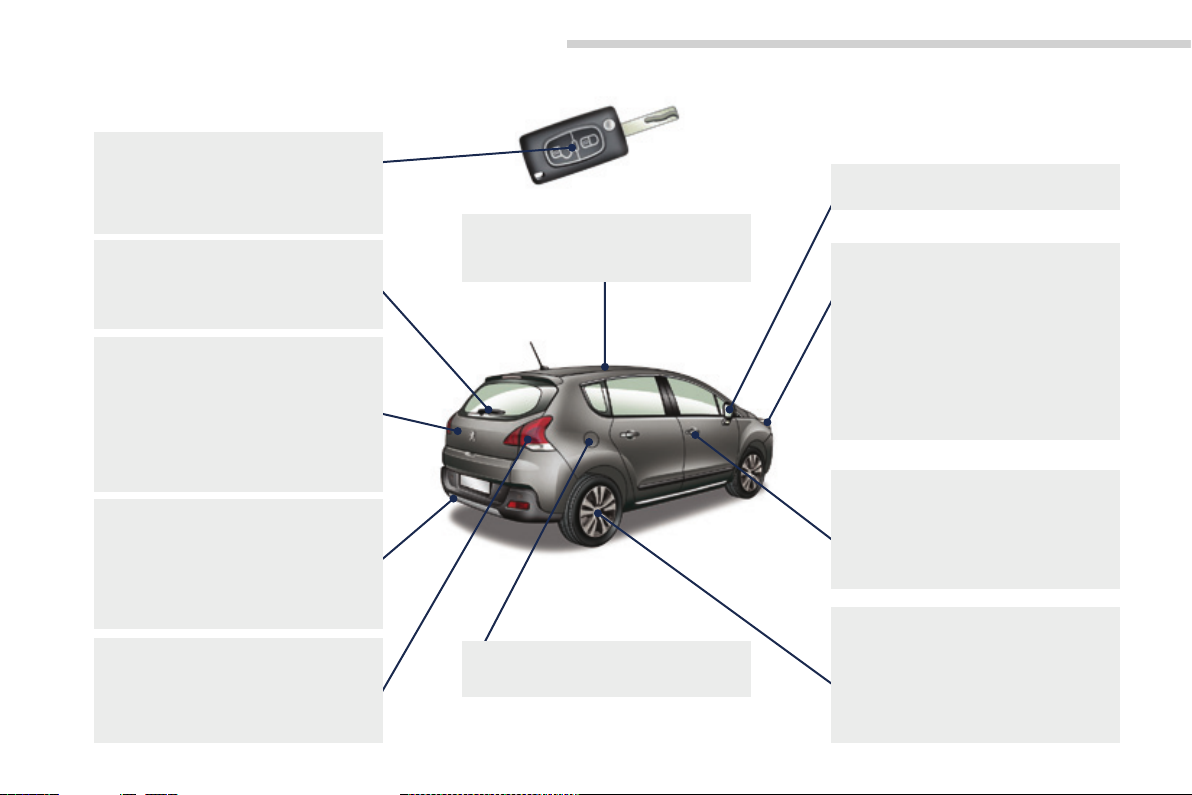
Exterior
Remote control key 48-52
- opening / closing
- anti-theft protection
- starting
- battery
Wiper 89-93
Changing a wiper blade 93, 234
Demisting-defrosting the
rear screen 66
Boot, tailgate 60- 61
- opening / closing
- emergency release
Temporary puncture repair kit 205-210
Changing a wheel 211-215
- tools
- removing
Parking sensors 176-177
Reversing camera 178
Parking space sensors 179-180
Quickly detachable towball 236-237
Towbar 238-239
Towing 234-235
Changing bulbs 220-222
- rear lamps
- 3rd brake lamp
- number plate lamps
- foglamps
Accessories 242-243
Roof bars 240
Panoramic sunroof 104-105
Fuel tank 182-184
Misfuel prevention 185
Door mirrors 77
Exterior welcome lighting 85
Door mirror spotlamps 95
Exterior lighting (automatic,
directional) 85-88
Headlamp height adjustment 87
Changing front bulbs 217-219
- front lamps
- foglamps
- direction indicator repeaters
Very cold climate screen 241
Doors 57-59
- opening / closing
- central locking
- emergency control
Alarm 53-54
Electric windows 55-56
ESC: ABS, EBFD, EBA,
ASR, CDS 127-129
Grip control 130-131
Tyre under-inflation detection 174-175
Tyre pressures 174, 210, 252
Snow chains 216
4
Page 7
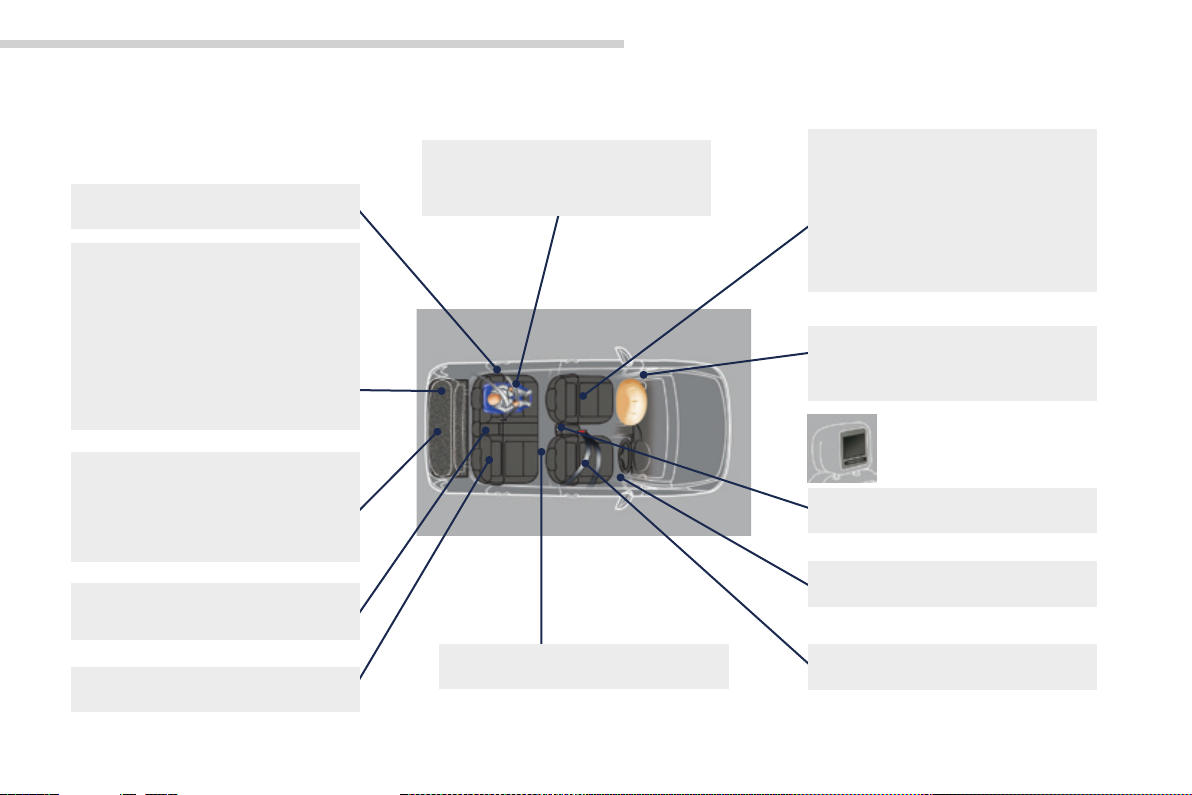
Interior
.Overview
Si de bli nd s 111
Adjustable boot floor 110
Boot fittings 106-109
- load space space cover
- hooks
- 12 V accessory socket
- luggage retaining net
- storage box
Boot lamp 96
Torch 96, 111
Temporary puncture repair kit 205-210
Spare wheel 211-215
Tool kit 203-204
Access to the AdBlue
Rear armrest 103
Ski flap 103
Rear seats 75-76
®
tank 200-201
Conventional child seats 112-120
ISOFIX child seats 121-124
Child lock 125
Storage compartments under
the footwells 103
Front seats 70-73
- manual
- electric
- head restraints
- lumbar
- heated
Seat in table position,
transporting long objects 74
Airbags 135 -138
Deactivating the passenger's
front airbag 114, 136
Rear multimedia 101-102
Mats 100
Seat belts 132-134
5
Page 8
Overview
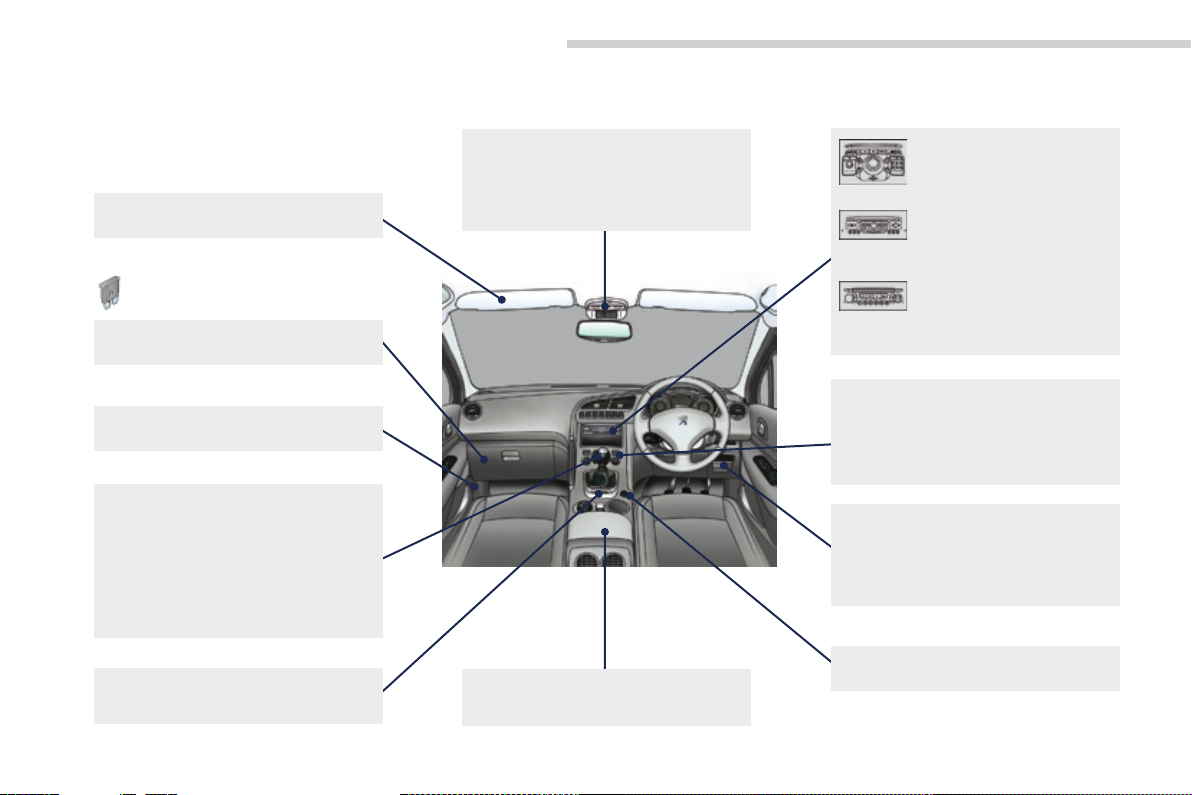
Instruments and controls
Sun visor 98
Dashboard fuses 223-226
Opening the bonnet 187
6-speed manual gearbox 160
Electronic gearbox 161-165
Automatic gearbox 166-169
Stop & Start 171-173
Hill start assist 146
Eco-driving 12-13
Electric parking brake 142-145, 147-148
Courtesy lamps 94
Seat belt / passenger's front airbag
warning lamps display 133, 135
Rear view mirror 78
Front armrest 99
PEUGEOT Connect
USB 99, 280, 338, 364
PEUGEOT Connect Media
Navigation (NG4 3D)
Setting the date/time 42
PEUGEOT Connect
Navigation (RT6) 301-356
Setting the date/time 40
PEUGEOT Connect
Sound (RD5) 357-377
Setting the date/time 38
Ventilation 62-63
Manual air conditioning 64-65
Digital air conditioning 67-69
Demisting-defrosting
the rear screen 66
Interior fittings 97-98, 100
- glove box
- driver's storage compartments
- mat
12 V accessory socket 100
257-300
6
Page 9
Instruments and controls (cont.)
.Overview
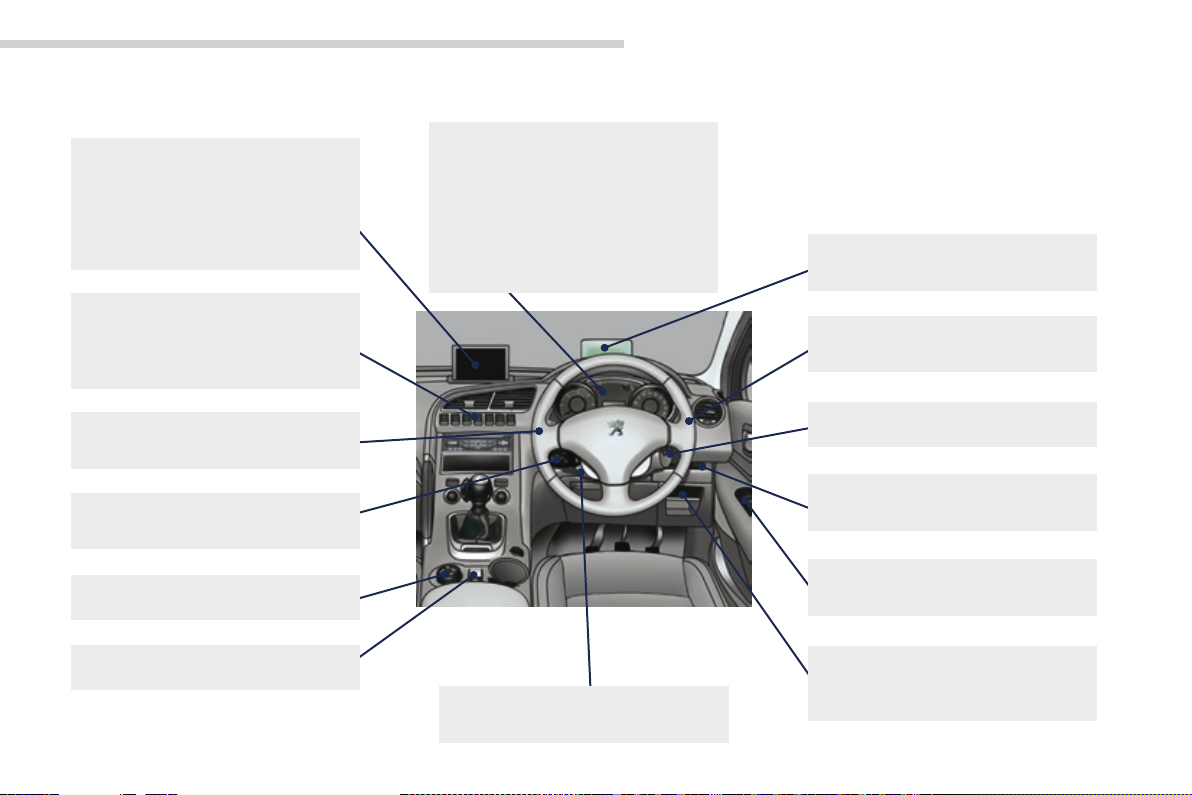
Multifunction screens 32-42
- Screen A
- Screen C
- 16/9 colour screen
Retractable screen 43
Screen A (setting the date/time) 32-35
Centre switch panel 8
Hazard warning lamps 126
Head-up display 149-150
Distance alert 151-153
Lighting controls 80-86
Direction indicators 126
Speed limiter 154-156
Cruise control 157-159
Grip control 130-131
Panoramic sunroof 104-105
Instrument panels, screens 14-16
Warning lamps 17-27
Indicators 27-31
Gear shift indicator 170
Buttons 29, 31
- service indicator / trip
distance recorder
- dashboard lighting dimmer
Steering wheel adjustment 79
Horn 126
Head-up display 149-150
Distance alert 151-153
Wiper controls 89-93
Trip computer 44-47
Ignition switch 139-140
Side switch panel 8
Stop & Start 171-173
Door mirrors 77
Electric windows, deactivating 55-56
PEUGEOT Connect Media Navigation
(NG4 3D) instrument panel navigator 15
Headlamp adjustment 87
7
Page 10
Overview
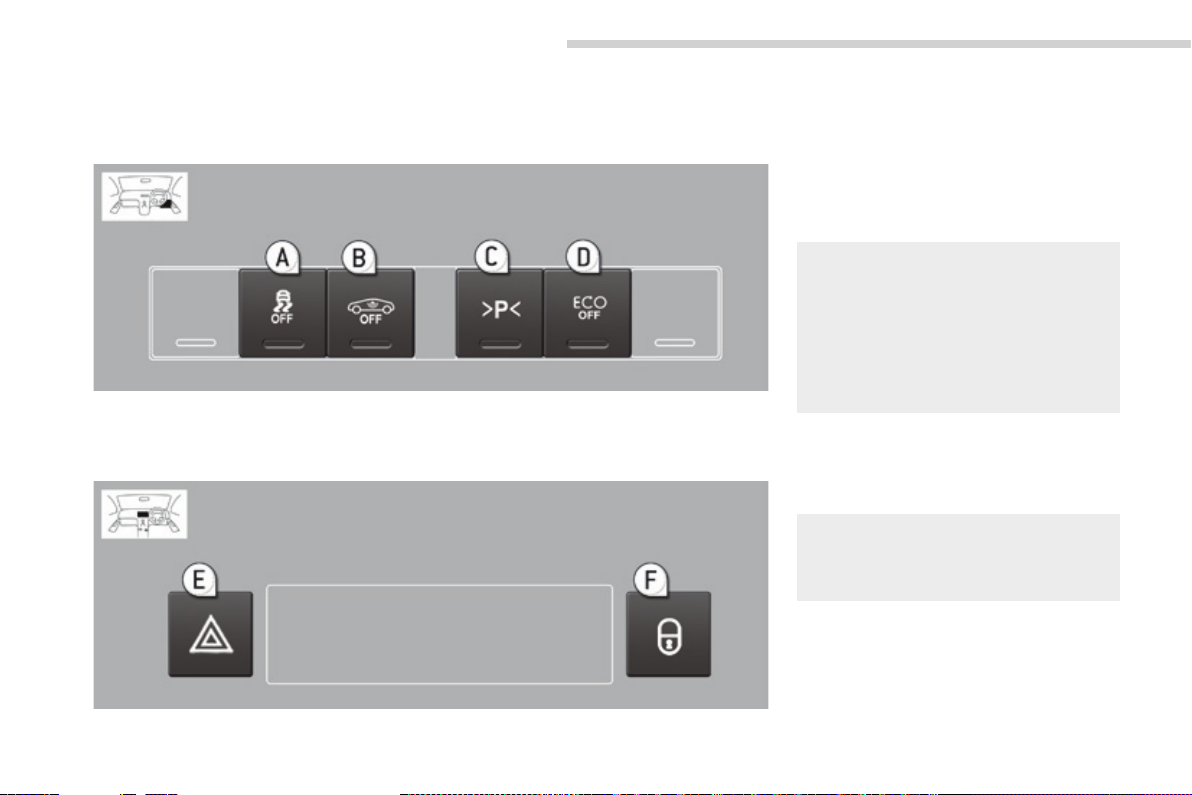
Switch panel
Version 1
Side
The illumination of the indicator lamp shows the
state of the corresponding function.
A. ASR/DSC OFF (without "Grip
control").
B. Volumetric alarm.
C. Parking space measurement.
D. Stop & Start.
127-129
53-54
179-180
171-173
Centre
E. Hazard warning lamps.
F. Central locking.
8
126
58-59
Page 11
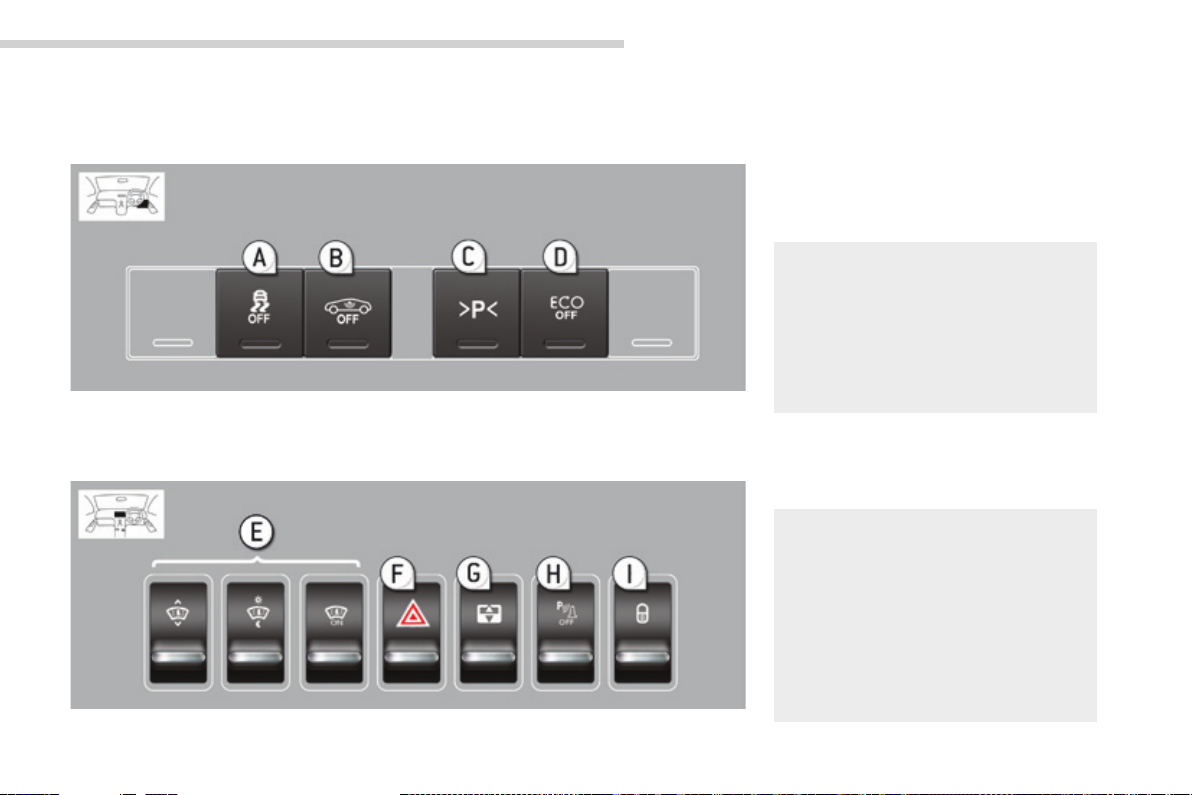
Version 2
Overview
Side
The illumination of the indicator lamp shows the
state of the corresponding function.
A. ASR/DSC OFF (without "Grip
control").
B. Volumetric alarm.
C. Parking space measurement.
127-129
53-54
179-180
.
D. Stop & Start.
Centre
E. Head-up display.
F. Hazard warning lamps.
G. Blind.
H. Visual and audible parking
assistance.
I. Central locking.
171-173
149-150
126
104-105
176-177
58-59
9
Page 12
Overview
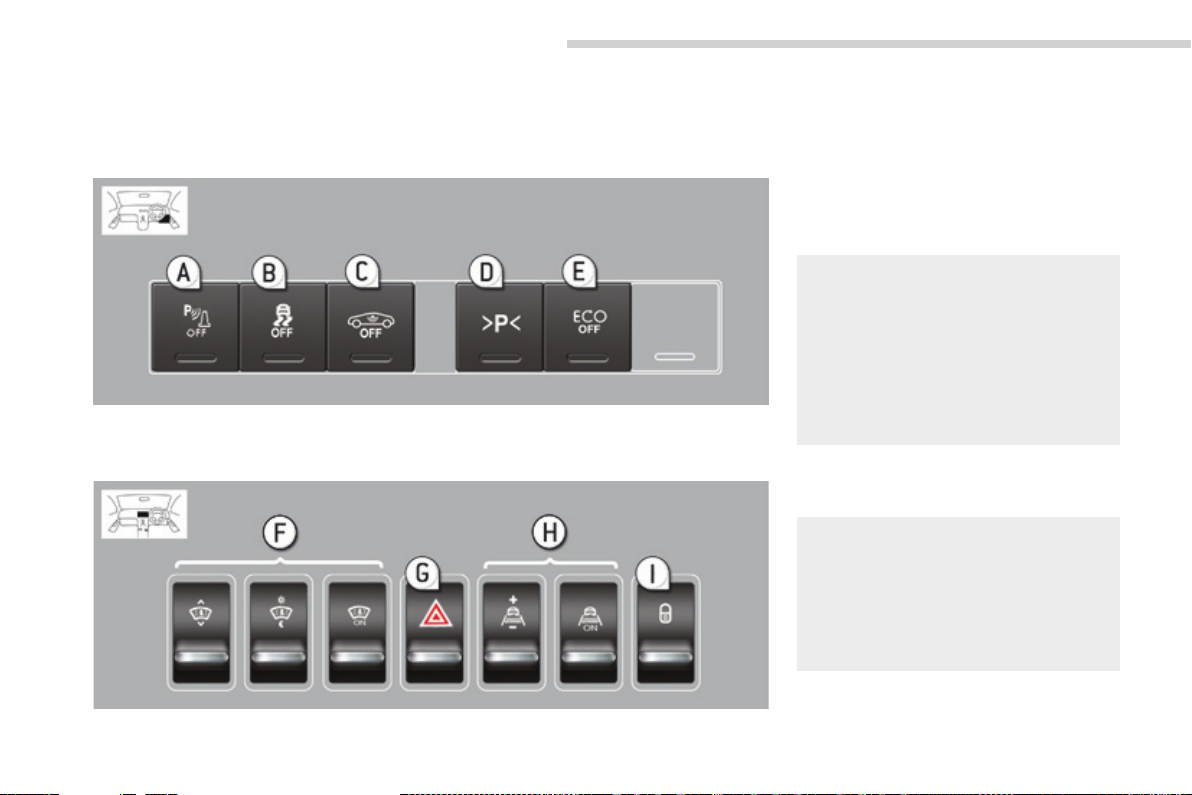
Version 3
Side
The illumination of the indicator lamp shows the
state of the corresponding function.
A. Visual and audible parking
assistance.
B. ASR /DSC OFF (without "Grip
control").
C. Volumetric alarm.
D. Parking space measurement.
E. Stop & Start.
176-177
127-129
53-54
179-180
171-173
Centre
10
F. Head-up display.
G. Hazard warning lamps.
H. Distance alert.
I. Central locking.
149-150
126
151-153
58-59
Page 13
Maintenance - Technical data
.Overview
AdBlue® and SCR system 195-202
Running out of fuel, Diesel 186
Checking levels 190-192
- oil
- brake fluid
- power steering fluid
- coolant
- screenwash/headlamp wash fluid
Checking components 193-194
- air filter
- passenger compartment filter
- oil filter
- brake pads / discs
Changing bulbs 217-222
- front
- rear
12 V battery 230-232
Load reduction, economy mode 233
Engine compartment
fuses 223, 227-229
Identification markings 252
Opening the bonnet 187
Under the bonnet, petrol 188
Under the bonnet, Diesel 189
Petrol engines 244
Diesel engines 246-247
Petrol weights 245
Diesel weights 248-249
Diesel LCV weights 250
Dimensions 251
11
Page 14

Eco-driving
Eco-driving
Eco-driving is a range of everyday practices that allow the motorist to optimise their fuel consumption and CO2 emissions.
12
Optimise the use of your gearbox
With a manual gearbox, move off gently and change up without waiting.
During acceleration change up early.
With an automatic or electronic gearbox, give preference to automatic
mode and avoid pressing the accelerator pedal heavily or suddenly.
The gear shift indicator invites you engage the most suitable gear: as
soon as the indication is displayed in the instrument panel, follow it
straight away.
For vehicles fitted with an electronic or automatic gearbox, this
indicator appears only in manual mode.
Drive smoothly
Maintain a safe distance between vehicles, use engine braking rather
than the brake pedal, and press the accelerator progressively. These
practices contribute towards a reduction in fuel consumption and CO
emissions and also helps reduce the background traffic noise.
If your vehicle has cruise control, make use of the system at speeds
above 25 mph (40 km/h) when the traffic is flowing well.
2
Control the use of your electrical
equipment
Before moving off, if the passenger compartment is too warm,
ventilate it by opening the windows and air vents before using the air
conditioning.
Above 30 mph (50 km/h), close the windows and leave the air vents open.
Remember to make use of equipment that can help keep the
temperature in the passenger compartment down (sunroof and window
blinds...).
Switch off the air conditioning, unless it has automatic regulation, as
soon as the desired temperature is attained.
Switch off the demisting and defrosting controls, if not automatic.
Switch off the heated seat as soon as possible.
Switch off the headlamps and front foglamps when the level of light
does not require their use.
Avoid running the engine before moving off, particularly in winter; your
vehicle will warm up much faster while driving.
As a passenger, if you avoid connecting your multimedia devices
(film, music, video game...), you will contribute towards limiting the
consumption of electrical energy, and so of fuel.
Disconnect your portable devices before leaving the vehicle.
Page 15
.Eco-driving
Limit the causes of excess consumption
Spread loads throughout the vehicle; place the heaviest items in the
bottom of the boot, as close as possible to the rear seats.
Limit the loads carried in the vehicle and reduce wind resistance (roof
bars, roof rack, bicycle carrier, trailer...). Use a roof box in preference.
Remove roof bars and roof racks after use.
At the end of winter, remove snow tyres and refit your summer tyres.
Observe the recommendations on
maintenance
Check the tyre pressures regularly, when cold, referring to the label in
the door aperture, driver's side.
Carry out this check in particular:
- before a long journey,
- at each change of season,
- after a long period out of use.
Don't forget the spare wheel and the tyres on any trailer or caravan.
Have your vehicle serviced regularly (engine oil, oil filter, air filter, passenger
compartment filter...) and observe the schedule of operations recommended
in the personalised service plan for your vehicle.
With a BlueHDi Diesel engine, if the SCR system is faulty your vehicle
becomes polluting; go to a PEUGEOT dealer or a qualified workshop
without delay to have the emissions of nitrous oxides brought back to
the legal level.
When refuelling, do not continue after the third cut-off of the nozzle to
avoid any overflow.
At the wheel of your new vehicle, it is only after the first 1 800 miles
(3 000 kilometres) that you will see the fuel consumption settle down to
a consistent average.
13
Page 16
Monitoring
Instrument panels
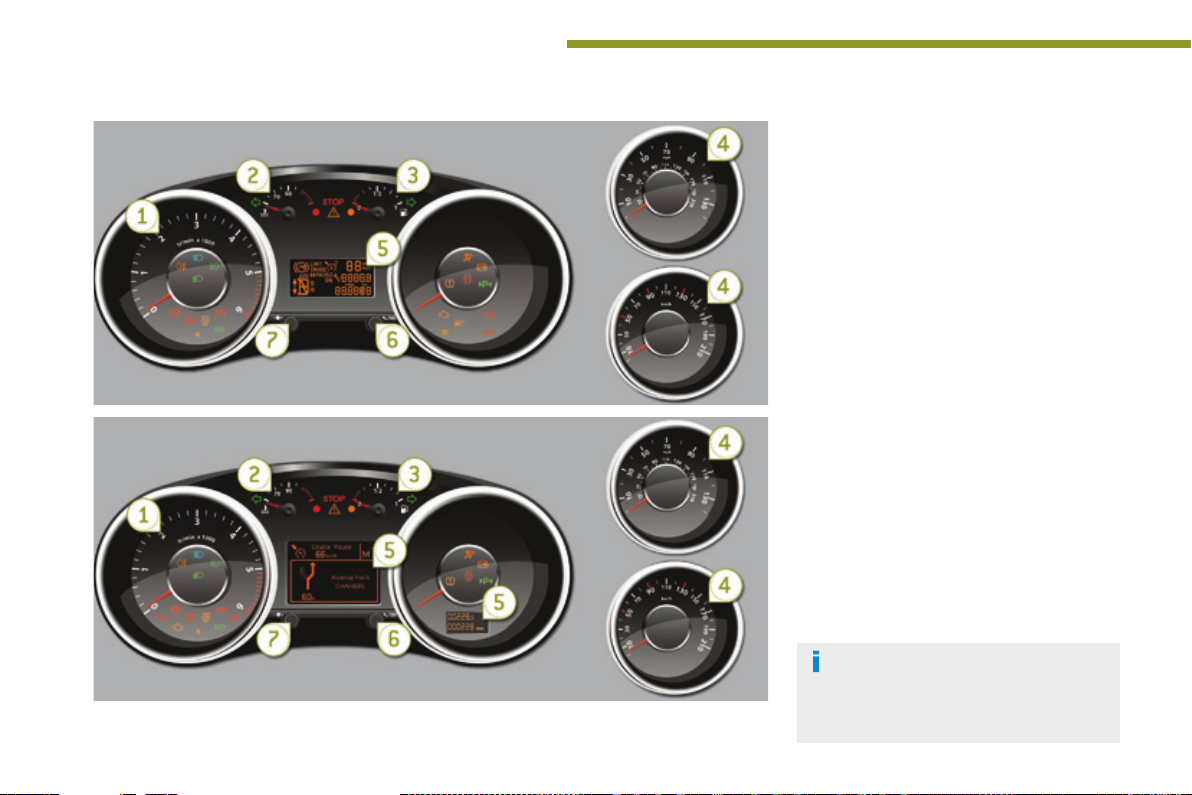
Panel grouping together the vehicle operation indication dials and warning lamps.
Dials
1. Rev counter.
Indicates the engine speed (x 1 000 rpm).
2. Coolant temperature.
Indicates the temperature of the engine
coolant (° Celsius).
3. Fuel gauge.
Indicates the quantity of fuel remaining in
the tank.
4. Speedometer.
Indicates the current speed of the moving
vehicle (mph or km/h).
5. Screen.
6. Control switch.
Temporary display of the service indicator
and driving range with the AdBlue
additive.
Display and reset the selected function (trip
distance recorder or service indicator).
7. Instrument panel lighting dimmer.
Adjusts the brightness of the lighting of
the instruments and controls, if the vehicle
lighting is on.
For more information, refer to the
section corresponding to the button or
function and its associated display.
®
14
Page 17
Monitoring
Screen(s)
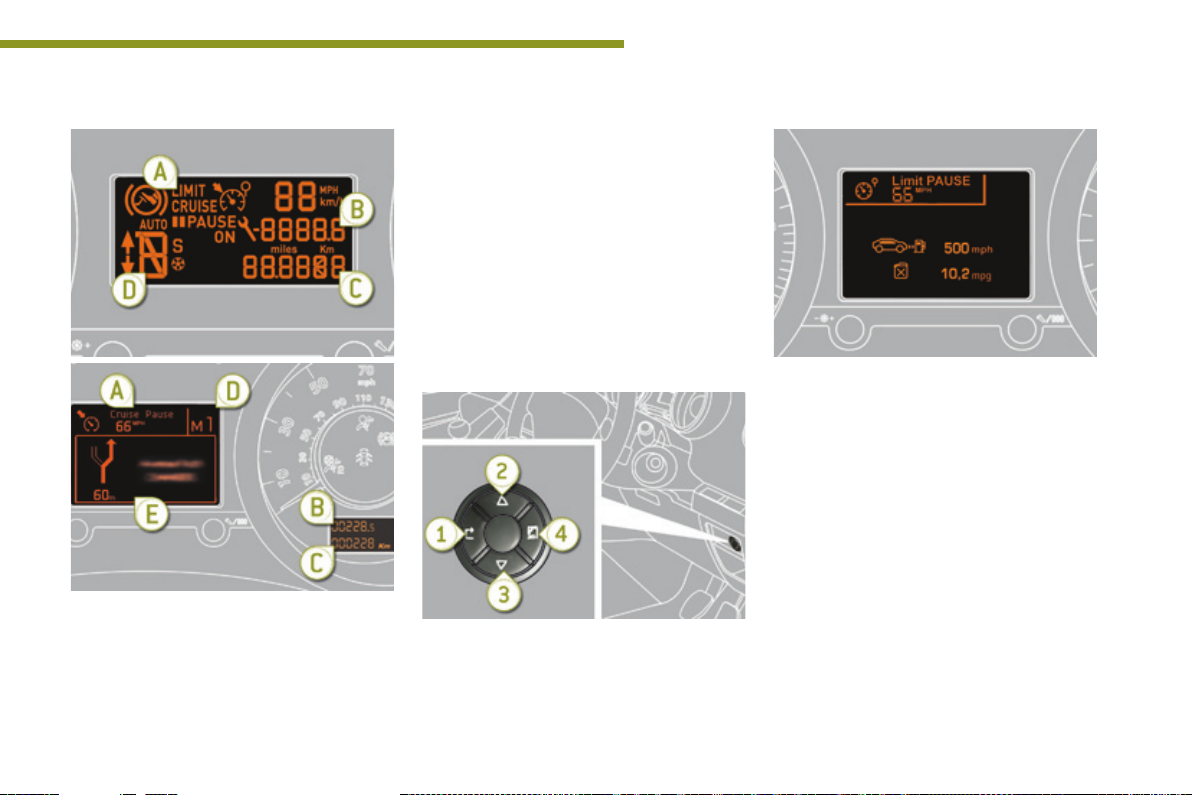
A. Speed limiter
or
Cruise control.
(mph or km/h)
B. Trip distance recorder.
(miles or km)
C. Service indicator.
(miles or km) or,
Engine oil level indicator (depending on
version).
or
distance recorder.
(miles or km)
D. Gear shift indicator.
Electronic or automatic gearbox.
E. Warning messages and function
status messages, trip computer,
GPS navigation information.
Instrument panel navigator
This group of buttons permits:
- When stationary, configuration of the
vehicle's equipment and the screen
settings (languages, units...),
- While driving, scrolling of the active
functions (trip computer, navigation...).
1
Controls
There are four buttons to control the screen in
the instrument panel:
1. Access the main menu, confirm the
selection.
2. Move up through the menu.
3. Move down through the menu.
4. Return to the previous display, exit from the
menu.
15
Page 18
Monitoring
16
The main menu and its associated
functions can only be accessed when
stationary, via buttons 1 to 4.
A message appears in the screen,
above a certain speed threshold,
indicating that the main menu cannot be
displayed.
The trip computer displays can only be
accessed while driving, via buttons 2
and 3 (refer to the "Trip computer"
section).
Main menu
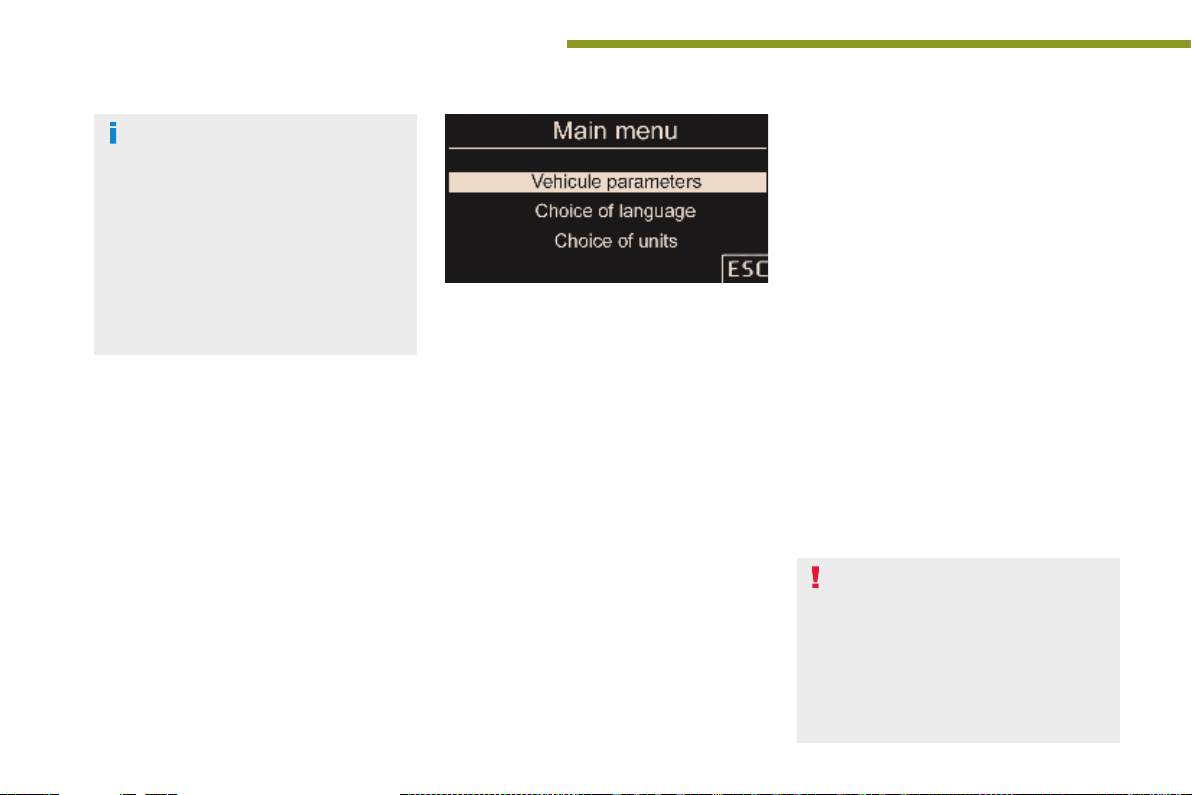
F Press button 1 for access to the main menu
and select one of the following functions:
- "Vehicle parameters",
- "Choice of language",
- "Choice of units".
F Press button 2 or 3 to move in the screen.
F Press button 1 again to confirm the
selection.
* Depending on the country of sale.
Vehicle parameters
This menu allows you to activate or deactivate
certain driving and comfort equipment*:
- wiper linked with reverse gear (refer to the
"Visibility" section),
- selective unlocking (refer to the "Access"
section),
- guide-me-home lighting (refer to the
"Visibility" section),
- directional headlamps (refer to the
"Visibility" section),
- automatic or manual parking brake* (refer
to the "Driving" section).
Choice of language
This menu allows you to select the display
language.
Choice of units
This menu allows you to select the units:
temperature (°Celsius or °Fahrenheit) and fuel
consumption (l/100 km, mpg or km/l).
Indicator and warning lamps
Visual indicators informing the driver
that a system is in operation (operation
or deactivation indicator lamps) or of the
occurrence of a fault (warning lamp).
When the ignition is switched on
Certain warning lamps come on for a
few seconds when the vehicle's ignition is
switched on.
When the engine is started, these same
warning lamps should go off.
If they remain on, before moving off, refer to the
information on the warning lamp concerned.
Associated warnings
The illumination of certain warning lamps may
be accompanied by an audible signal and a
message in the multifunction screen.
The warning lamps may come on
continuously (fixed) or flash.
Certain warning lamps may come on
in one of two different modes. Only by
relating the type of illumination to the
operating status of the vehicle can it
be ascertained whether the situation is
normal or whether a fault has occurred.
Page 19
Monitoring
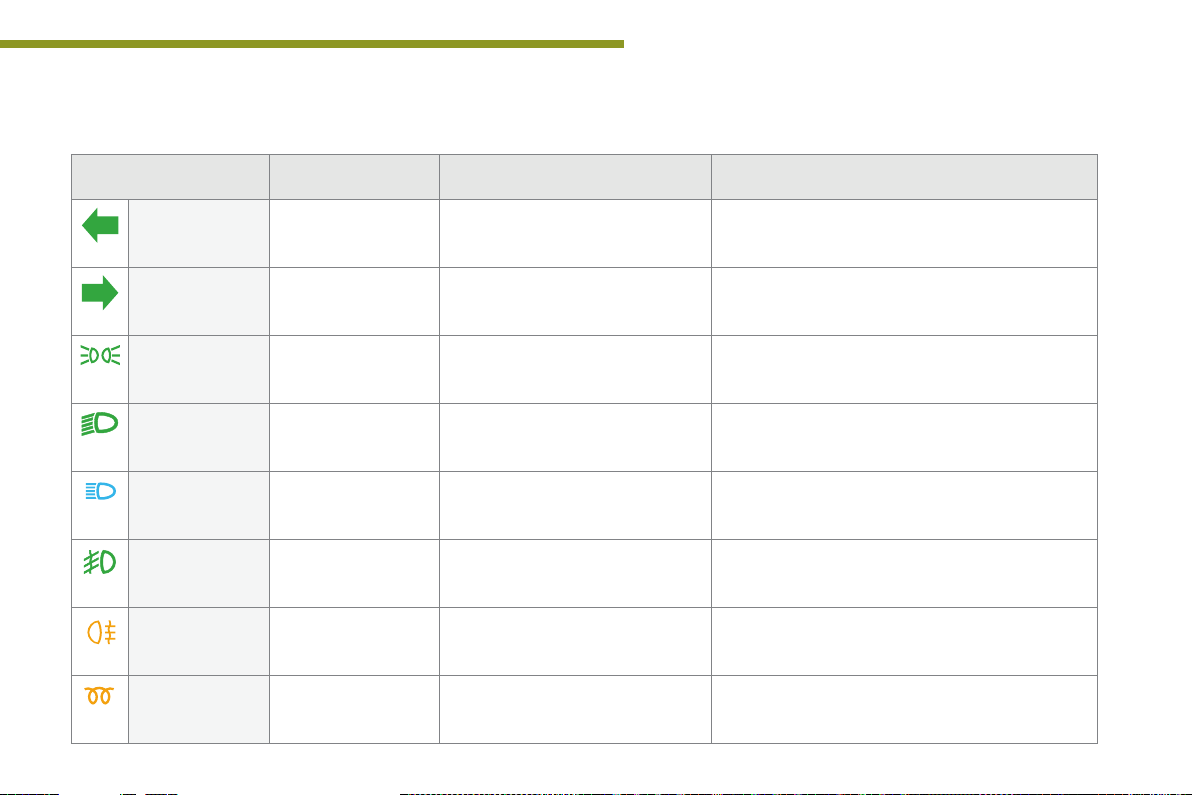
Operation indicator lamps
If one of the following indicator lamps comes on, this confirms that the corresponding system has come into operation.
Warning/indicator lamp is on Cause Action / Observations
Left-hand
direction
indicator
Right-hand
direction
indicator
Sidelamps fixed. The lighting stalk is in the
Dipped beam
headlamps
Main beam
headlamps
Front foglamps fixed. The front foglamps are switched on. Turn the ring on the stalk rearwards twice to switch off
Rear foglamps fixed. The rear foglamps are switched on. Turn the ring on the stalk rearwards to switch off the
flashing with buzzer. The lighting stalk is pushed down.
flashing with buzzer. The lighting stalk is pushed up.
"Sidelamps" position.
fixed. The lighting stalk is in the "Dipped
fixed. The lighting stalk is pulled towards
beam headlamps" position.
you.
Pull the stalk to return to dipped beam headlamps.
the front foglamps.
rear foglamps.
1
Diesel engine
pre-heating
fixed. The ignition switch is at the
2nd position (ignition on).
Wait until the warning lamp has switched off before starting.
The duration for which the warning lamp is on is
determined by the climatic conditions.
17
Page 20
Monitoring
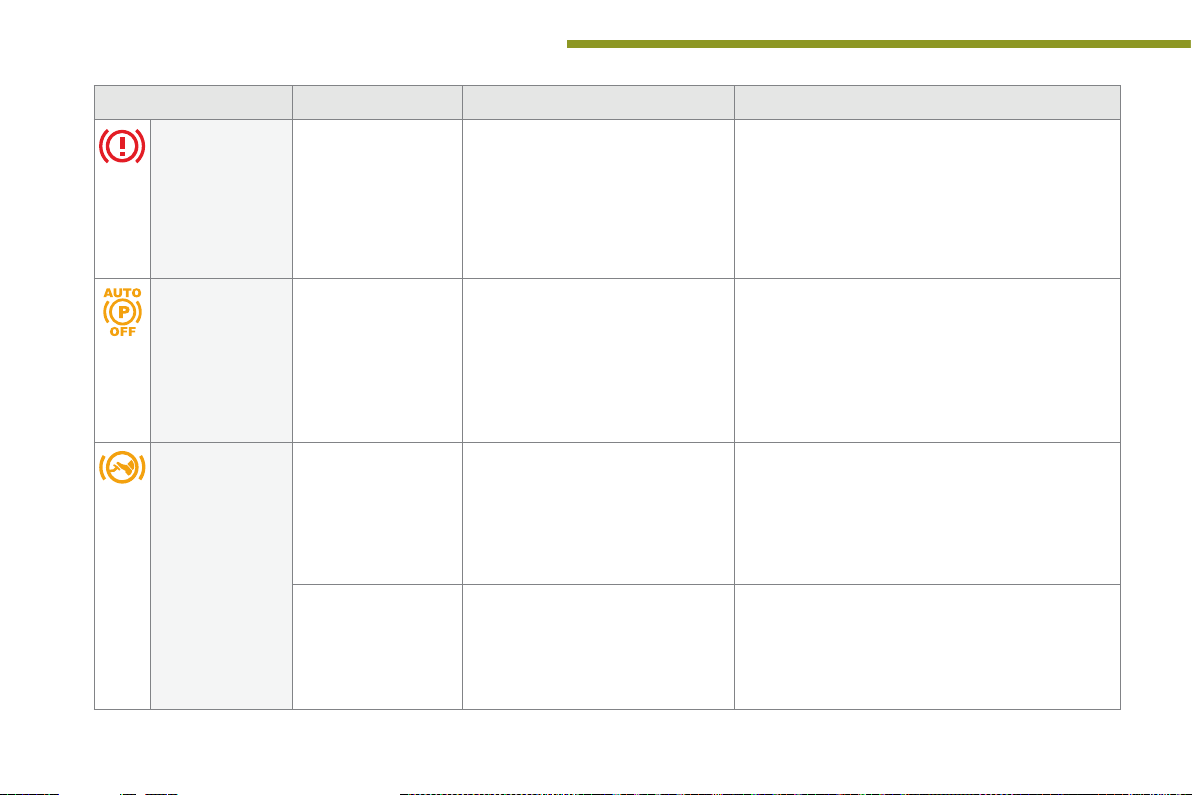
Warning/indicator lamp is on Cause Action / Observations
Electric parking
brake
fixed. The electric parking brake is applied.
Release the electric parking brake to switch off the
warning lamp: with your foot on the brake pedal, pull
the electric parking brake control lever.
Observe the safety recommendations.
For more information on the electric parking brake,
refer to the corresponding section.
18
Deactivation of
the automatic
functions of the
electric parking
brake
Foot on the
brake pedal
fixed. The "automatic application" (on
fixed. The brake pedal is not pressed. You must press the brake pedal firmly to:
flashing.
switching off the engine) and
"automatic release" functions are
deactivated or faulty.
With an electronic gearbox, if you
hold the vehicle on an incline using
the accelerator for too long, the
clutch overheats.
Activate the function (according to country) via the
vehicle configuration menu or contact a PEUGEOT
dealer or a qualified workshop if automatic
application / release is not possible.
For more information on the electric parking brake,
refer to the corresponding section.
- start the engine with an electronic gearbox (lever
in position N),
- manually release the parking brake.
Use the brake pedal and/or the electric parking brake.
Page 21
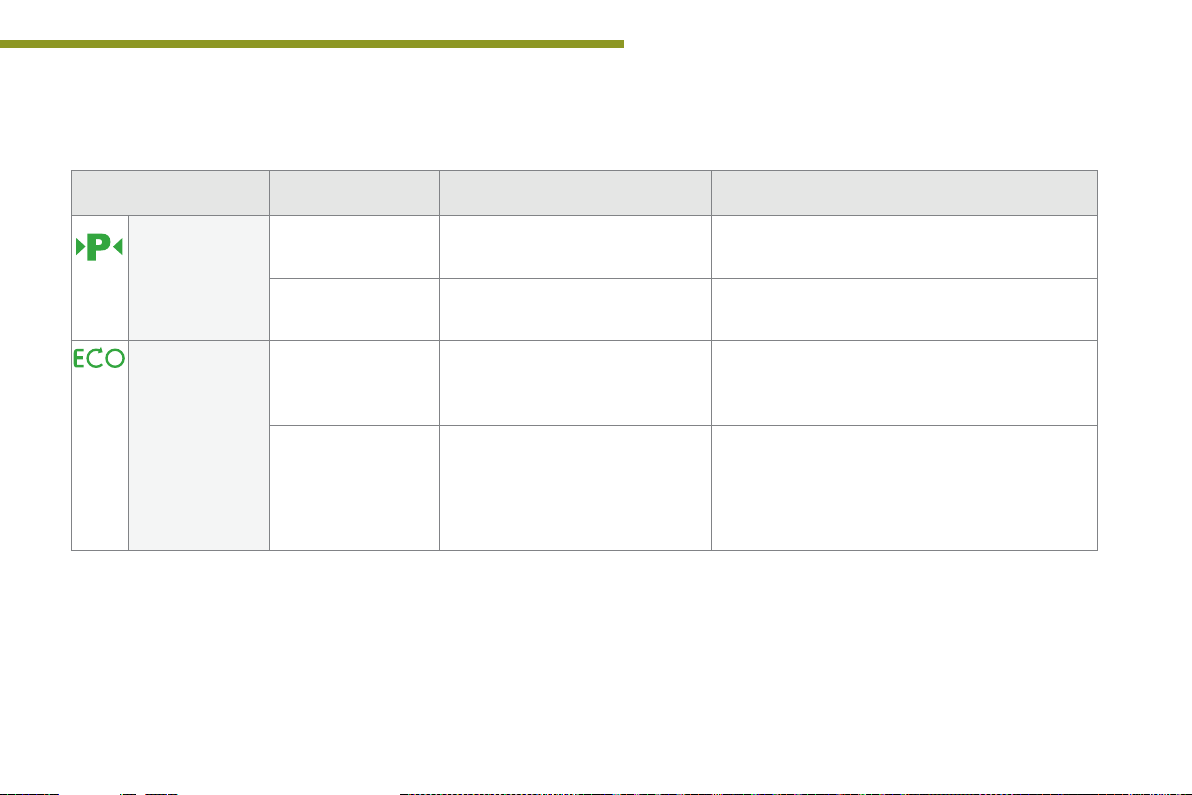
Warning/indicator lamp is on Cause Action / Observations
Monitoring
1
Parking space
sensors
Stop & Start fixed.
fixed. The parking space sensors function
flashing. The system is measuring the space. Once the measurement has been done, the warning
flashes for a
few seconds, then
goes off.
is active.
When the vehicle stops (red lights,
traffic jams, ...) the Stop & Start
system has put the engine into
STOP mode.
STOP mode is temporarily
unavailable.
or
START mode is invoked
automatically.
Press the corresponding button to deactivate it.
lamp comes on fixed again.
The warning lamp goes off and the engine restarts
automatically in START mode, as soon as you want to
move off.
For more information on special cases with STOP
mode and START mode, refer to the "Stop & Start"
section.
19
Page 22
Monitoring
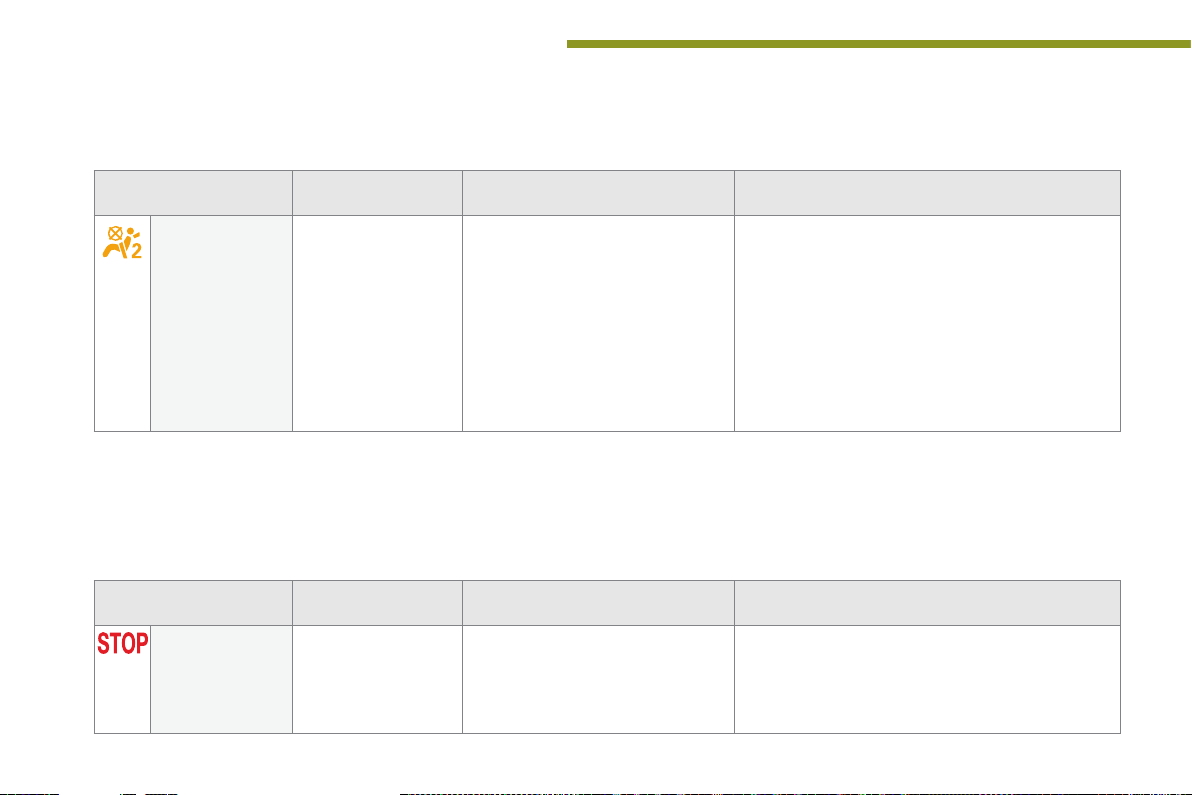
Deactivation indicator lamps
If one of the following indicator lamps comes on, this confirms that the corresponding system has been switched off intentionally.
This is may be accompanied by an audible signal and a message on the multifunction screen.
Warning/indicator lamp is on Cause Action / Observations
20
Passenger's
airbag system
fixed. The control, located in the glove box,
is set to the OFF position.
The passenger's front airbag is
deactivated.
You can install a "rearward facing"
child seat, unless there is a fault with
the operation of the airbags (Airbag
warning lamp on).
Set the control to the ON position to activate the
passenger's front airbag.
In this case, do not fit a child seat in the rear ward
facing position.
Warning lamps
When the engine is running or the vehicle is being driven, the illumination of one of the following warning lamps indicates a fault which requires action
on the part of the driver.
Any fault resulting in the illumination of a warning lamp must be investigated further by reading the associated message in the multifunction screen.
If you encounter any problems, do not hesitate to contact a PEUGEOT dealer or a qualified workshop.
Warning/indicator lamp is on Cause Action / Observations
STOP fixed, alone or
associated with
another warning lamp,
accompanied by an
audible signal and a
message in the screen.
Illumination of this warning lamp is
associated with a serious fault with
the braking system, power steering,
engine lubrication system or cooling
system.
Stop as soon as it is safe to do so as there is a risk
that the engine will cut out while driving.
Park, switch off the ignition and contact a PEUGEOT
dealer or a qualified workshop.
Page 23
Warning/indicator lamp is on Cause Action / Observations
Monitoring
1
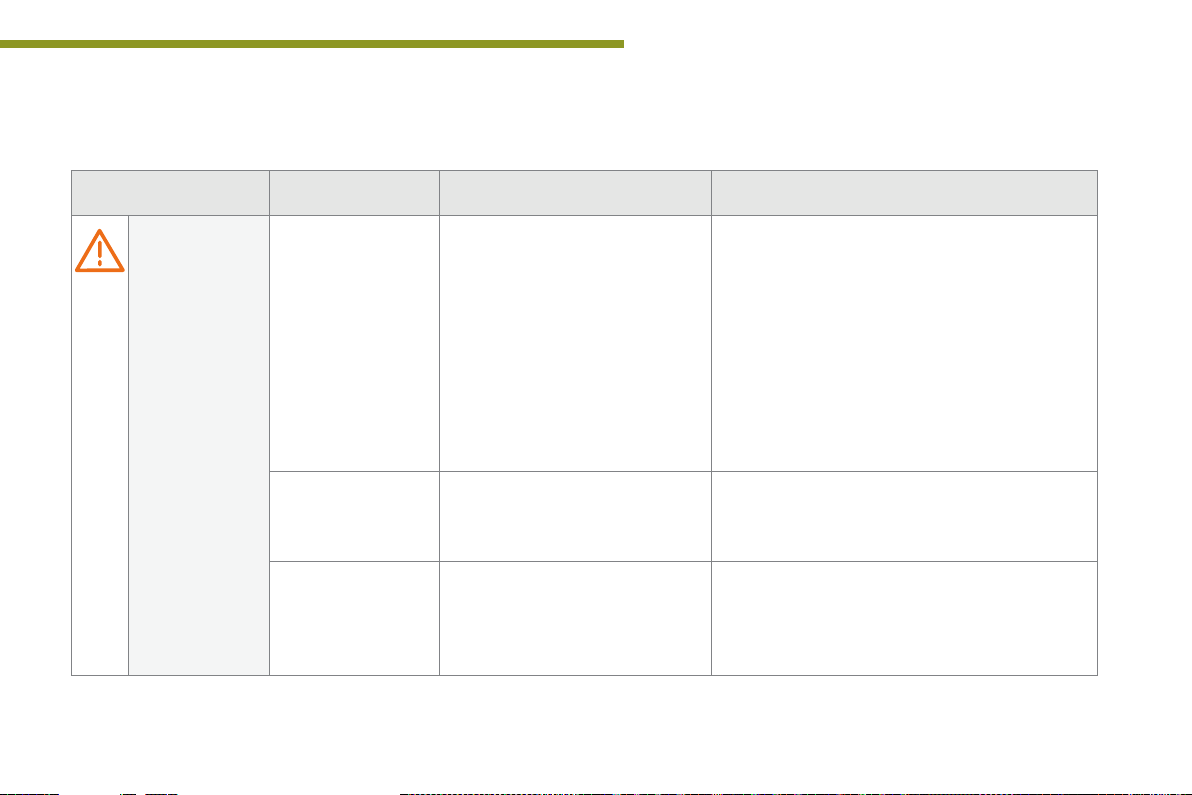
Service temporarily,
accompanied by a
message.
fixed, accompanied by
a message.
fixed, associated
with the flashing and
then fixed display of
the service indicator
spanner.
One or more minor faults for which
there is no specific warning lamp
have been detected.
One or more major faults for which
there is no specific warning lamp
have been detected.
The servicing interval has been
exceeded.
Identify the cause of the fault using the message
displayed in the screen.
You can deal with some problems yourself, such as a
door open or the start of saturation of the particle filter
(as soon as the traffic conditions allow, regenerate
the filter by driving at a speed of at least 40 mph
(60 km/h), until the warning lamp goes off).
For any other problems, such as a fault with the tyre
under inflation detection system, contact a PEUGEOT
dealer or a qualified workshop.
Identify the cause of the fault using the message
displayed in the screen; you must then contact a
PEUGEOT dealer or a qualified workshop.
Only on BlueHDi Diesel versions.
Your vehicle must be serviced as soon as possible.
21
Page 24
Monitoring
Warning/indicator lamp is on Cause Action / Observations
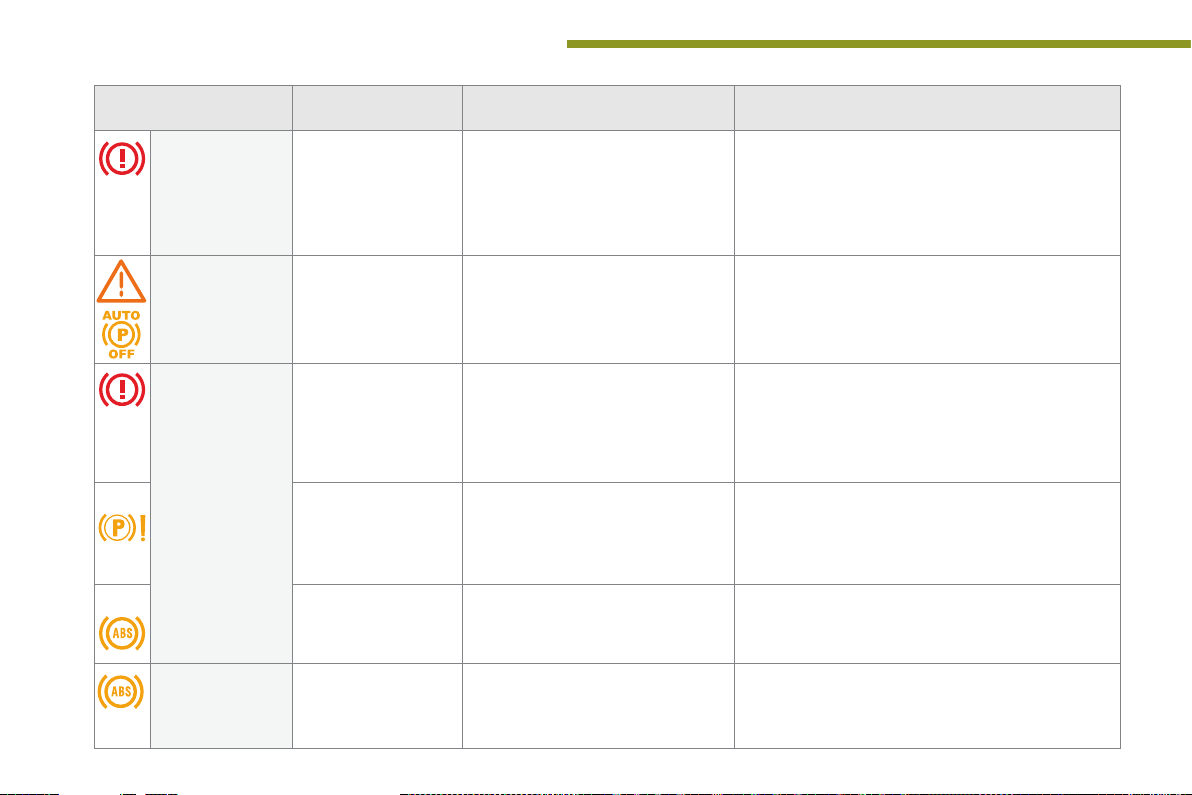
Electric parking
brake
flashing. The electric parking brake is not
applied automatically.
The application/release is faulty.
You must stop as soon as it is safe to do so.
Park on flat level ground, engage a gear (or place the
lever in position P for an automatic gearbox), switch
off the ignition and contact a PEUGEOT dealer or a
qualified workshop.
22
Electric parking
brake fault
Braking fixed, associated with
+
+ fixed, associated with
Anti-lock
Braking System
(ABS)
fixed. The electric parking brake has a fault.
the STOP warning
lamp.
fixed, associated with the
electric parking brake
malfunction warning
lamp, if the parking brake
is released.
the STOP and ABS
warning lamps.
fixed. The anti-lock braking system has a
Contact a PEUGEOT dealer or a qualified workshop
without delay.
For more information on the electric parking brake,
refer to the corresponding section.
The braking system fluid level has
dropped significantly.
The braking system has a fault. You must stop as soon as it is safe to do so.
The electronic brake force distribution
(EBFD) system has a fault.
fault.
You must stop as soon as it is safe to do so.
Top up with brake fluid recommended by PEUGEOT.
If the problem persists, have the system checked by a
PEUGEOT dealer or a qualified workshop.
Park, switch off the ignition and contact a PEUGEOT
dealer or a qualified workshop.
You must stop as soon as it is safe to do so.
Have it checked by a PEUGEOT dealer or a qualified
workshop.
The vehicle retains conventional braking.
Drive carefully at reduced speed and contact a PEUGEOT
dealer or a qualified workshop without delay.
Page 25
Monitoring
Warning/indicator lamp is on Cause Action / Observations
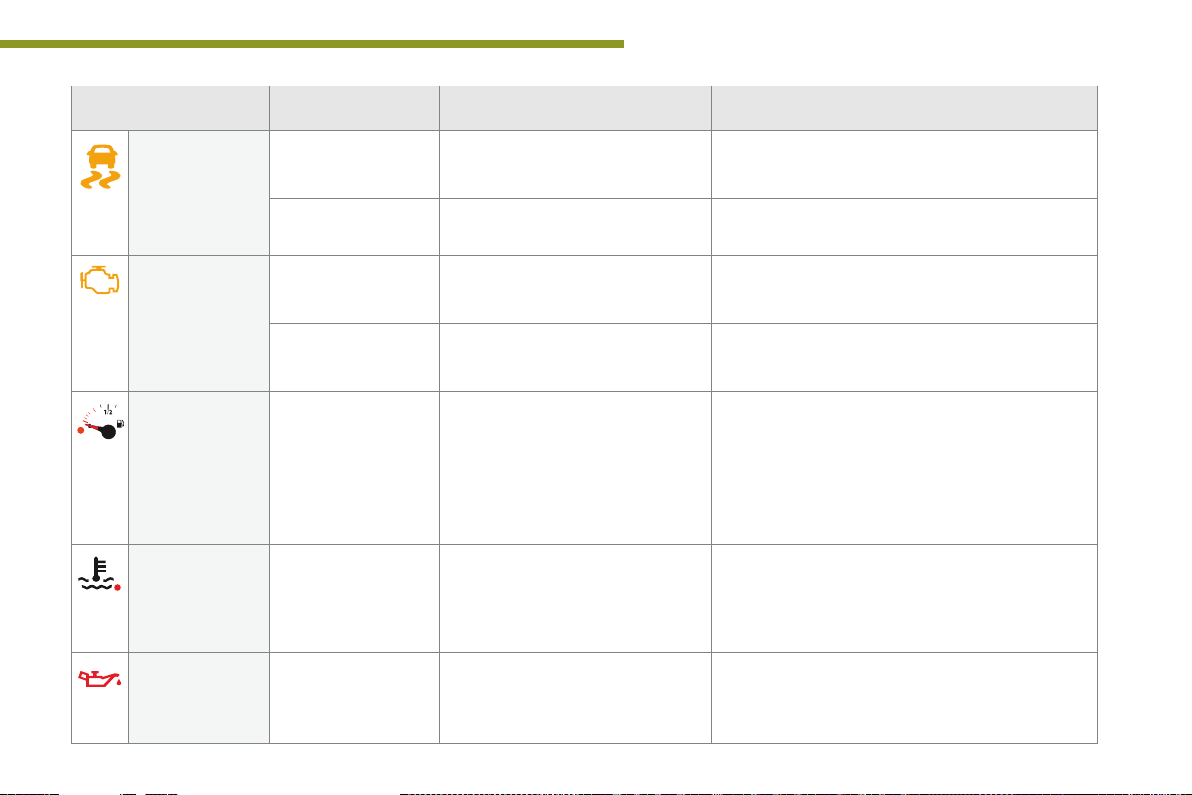
Dynamic
stability control
(DSC/ASR)
Engine
autodiagnosis
system
Low fuel level fixed with the needle
Maximum coolant
temperature
Engine oil
pressure
flashing. The DSC/ASR regulation is
fixed. The DSC/ASR system has a fault. Have it checked by a PEUGEOT dealer or a qualified
flashing. The engine management system has
fixed. The emission control system has a
in the red zone.
fixed with the needle
in the red zone.
fixed. There is a fault with the engine
operating.
a fault.
fault.
When it first comes on there remains
approximately 6 litres of fuel in the
tank.
At this point, you begin to use the fuel
reserve.
The temperature of the cooling
system is too high.
lubrication system.
The system optimises traction and improves the
directional stability of the vehicle in the event of loss of
grip or trajectory.
workshop.
Risk of destruction of the catalytic converter.
Have it checked by a PEUGEOT dealer or a qualified
workshop.
The warning lamp should go off when the engine is started.
If it does not go off, contact a PEUGEOT dealer or qualified
workshop without delay.
Refuel as soon as possible to avoid running out of fuel.
This warning lamp will come on every time the ignition is
switched on, until a sufficient addition of fuel is made.
Fuel tank capacity: approximately 60 litres.
Never continue to drive until you run out of fuel, as this
could damage the emission control and injection systems.
Stop as soon as it is safe to do so.
Wait until the engine has cooled down before topping
up the level, if necessary.
If the problem persists, contact a PEUGEOT dealer or
a qualified workshop.
You must stop as soon it is safe to do so.
Park, switch off the ignition and contact a PEUGEOT
dealer or a qualified workshop.
1
23
Page 26
Monitoring
Warning/indicator lamp is on Cause Action / Observations
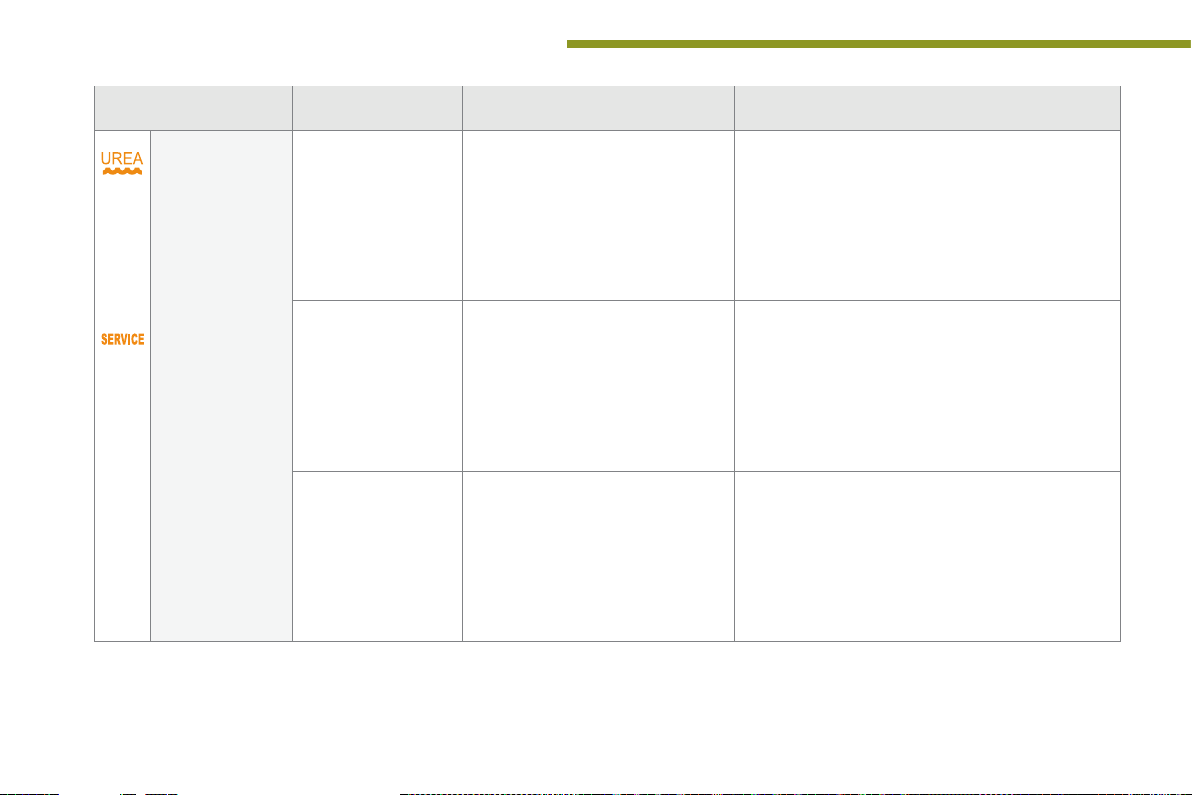
AdBlue® additive
(BlueHDi Diesel)
fixed, on switching
on the ignition,
accompanied by an
audible signal and a
The remaining driving range is
between 350 miles (600 km) and
1500 miles (2400 km).
Have the AdBlue
as possible: go to a dealer PEUGEOT or a qualified
workshop, or carry out this operation yourself by
referring to the corresponding section.
®
additive tank topped up as soon
message indicating
the remaining driving
range.
24
+ flashing associated
with the SERVICE
warning lamp,
accompanied by an
audible signal and a
message indicating
the remaining driving
range.
flashing, associated
with the SERVICE
warning lamp,
accompanied by an
audible signal and a
message indicating
that starting is
prevented.
The remaining driving range is
between 0 and 375 miles (600 km).
The AdBlue
®
tank is empty: the
starting inhibition system required
by legislation prevents starting of the
engine.
You must top-up the AdBlue
®
additive tank to avoid
a breakdown: go to a dealer PEUGEOT or a qualified
workshop, or carry out this operation yourself by
referring to the corresponding section.
To be able to start the engine, you must top-up the
®
AdBlue
additive tank: go to a dealer PEUGEOT or a
qualified workshop, or carry out this operation yourself
by referring to the corresponding section.
It is essential to add at least 3.8 litres of AdBlue
®
to
the tank.
Page 27
Monitoring
Warning/indicator lamp is on Cause Action / Observations
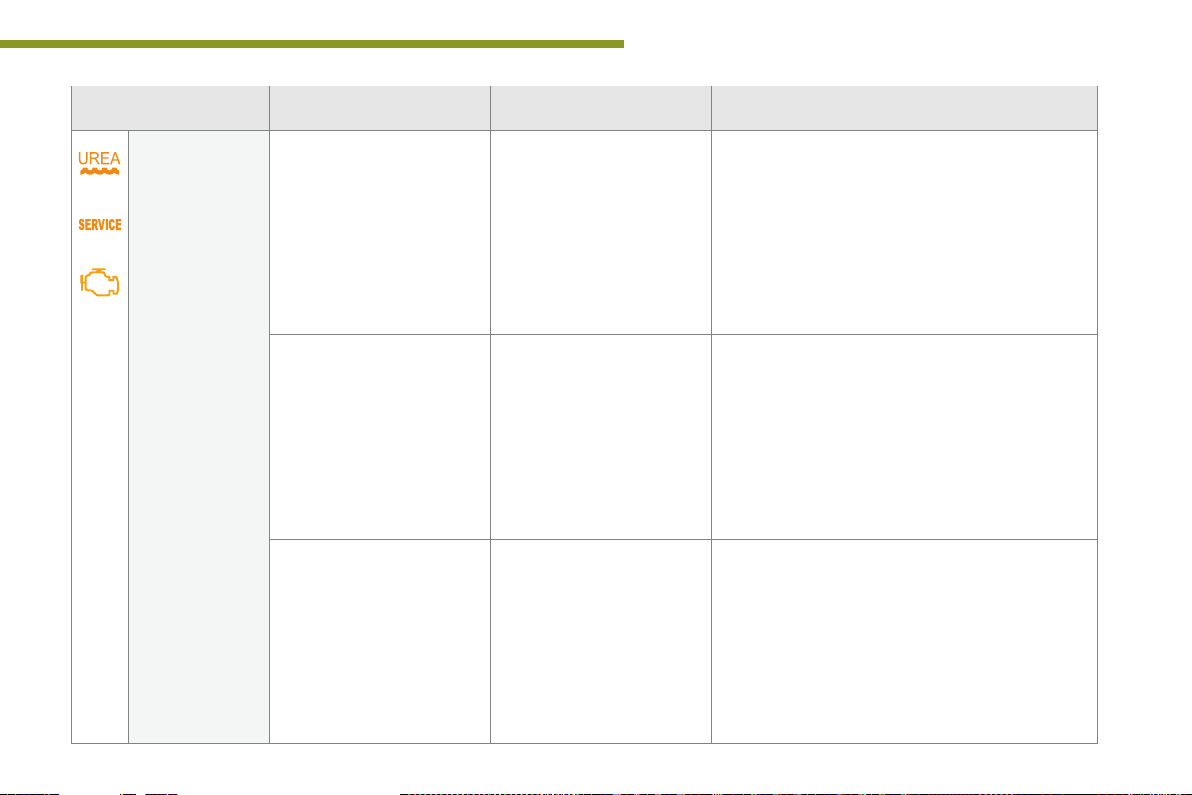
SCR emissions
control system
(BlueHDi Diesel)
+
+
fixed, on switching on the
ignition, associated with
the SERVICE and engine
diagnostic warning lamps,
accompanied by an audible
signal and a message
indicating an emissions
control fault.
flashing, on switching on
the ignition, associated with
the SERVICE and engine
diagnostic warning lamps,
accompanied by an audible
signal and a message
indicating the remaining
driving range.
flashing, on switching on
the ignition, associated with
the SERVICE and engine
diagnostic warning lamps,
accompanied by an audible
signal and a message
indicating that starting is
prevented.
A fault with the SCR
emissions control system has
been detected.
The remaining driving range
is between 0 and 650 miles
(1 100 km).
You have exceeded the
authorised driving limit: the
starting inhibition system
prevents starting of the
engine.
This alert disappears once the exhaust emissions
return to normal levels.
Contact a PEUGEOT dealer or a qualified workshop
without delay, to avoid a breakdown.
To be able to start the engine, you must call on a
PEUGEOT dealer or a qualified workshop.
1
25
Page 28
Monitoring
Warning/indicator lamp is on Cause Action / Observations
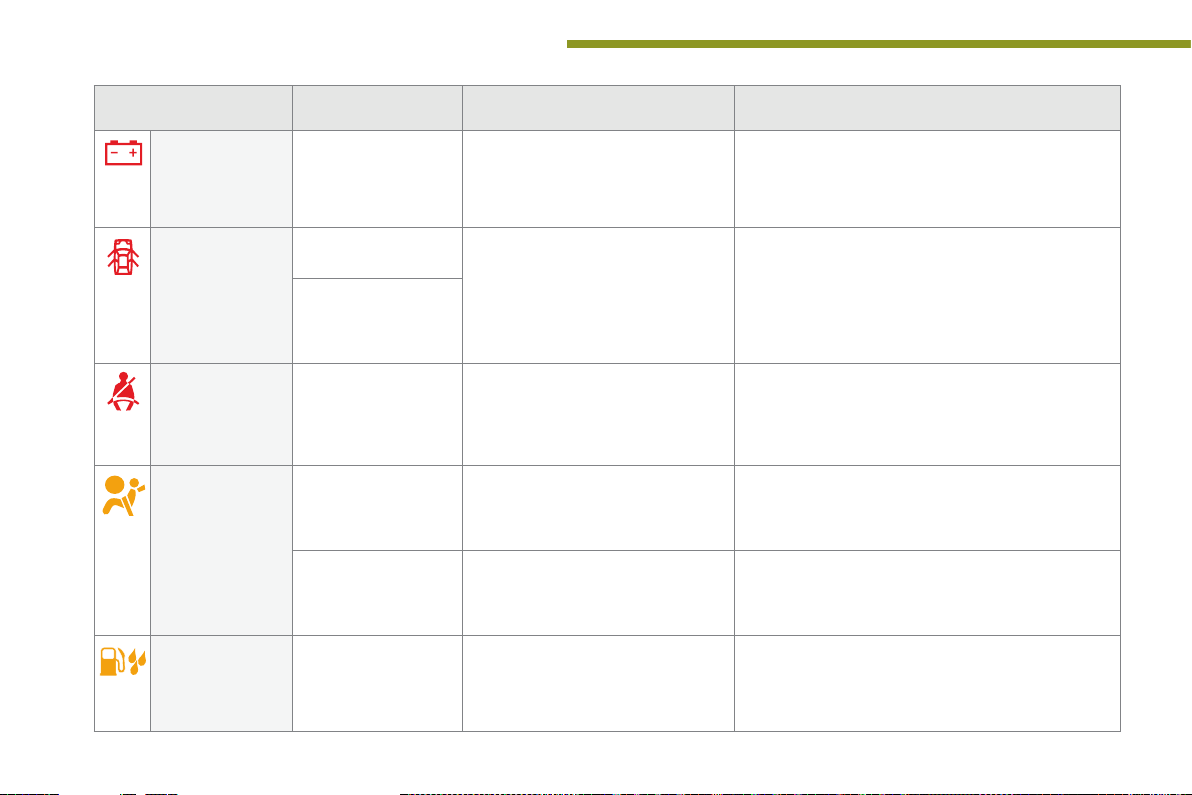
Battery charge fixed. The battery charging circuit has a
Door(s) open fixed if the speed is
Seat belt not
fastened /
unfastened
Airbags temporarily. This lamp comes on for a
Water in Diesel fixed. The Diesel fuel filter contains water. Risk of damage to the injection system on Diesel
below 6 mph (10 km/h).
fixed and accompanied
by an audible signal
if the speed is above
6 mph (10 km/h).
fixed then flashing
accompanied by an
increasing audible
signal.
fixed. One of the airbag or seat belt
fault (dirty or loose terminals, slack or
cut alternator belt, ...).
A door, the boot, the lower tailgate
or the bonnet (with alarm only) is still
open.
The driver and/or the front passenger
has not fastened or has unfastened
their seat belt.
few seconds when you turn on the
ignition, then goes off.
pretensioner systems has a fault.
The warning lamp should go off when the engine is
started.
If it does not go off, contact a PEUGEOT dealer or a
qualified workshop.
Close the door or boot.
Pull the strap then insert the tongue in the buckle.
This lamp should go off when the engine is started.
If it does not go off, contact a PEUGEOT dealer or a
qualified workshop.
Have it checked by a PEUGEOT dealer or a qualified
workshop.
engines.
Contact a PEUGEOT dealer or a qualified workshop
without delay.
26
Page 29
Monitoring
Warning/indicator lamp is on Cause Action / Observations
Directional
headlamps
Under-inflation fixed. The pressure in one or more wheels
+ flashing then fixed,
flashing. The directional headlamps system
accompanied by the
Service warning lamp.
has a fault.
is too low.
The tyre pressure monitoring system
has a fault or no sensor is detected
on one of the wheels.
Have it checked by a PEUGEOT dealer or a qualified
workshop.
Check the pressure of the tyres as soon as possible.
This check should preferably be carried out when the
tyres are cold.
Under-inflation detection is not assured.
Have the system checked by a PEUGEOT dealer or a
qualified workshop.
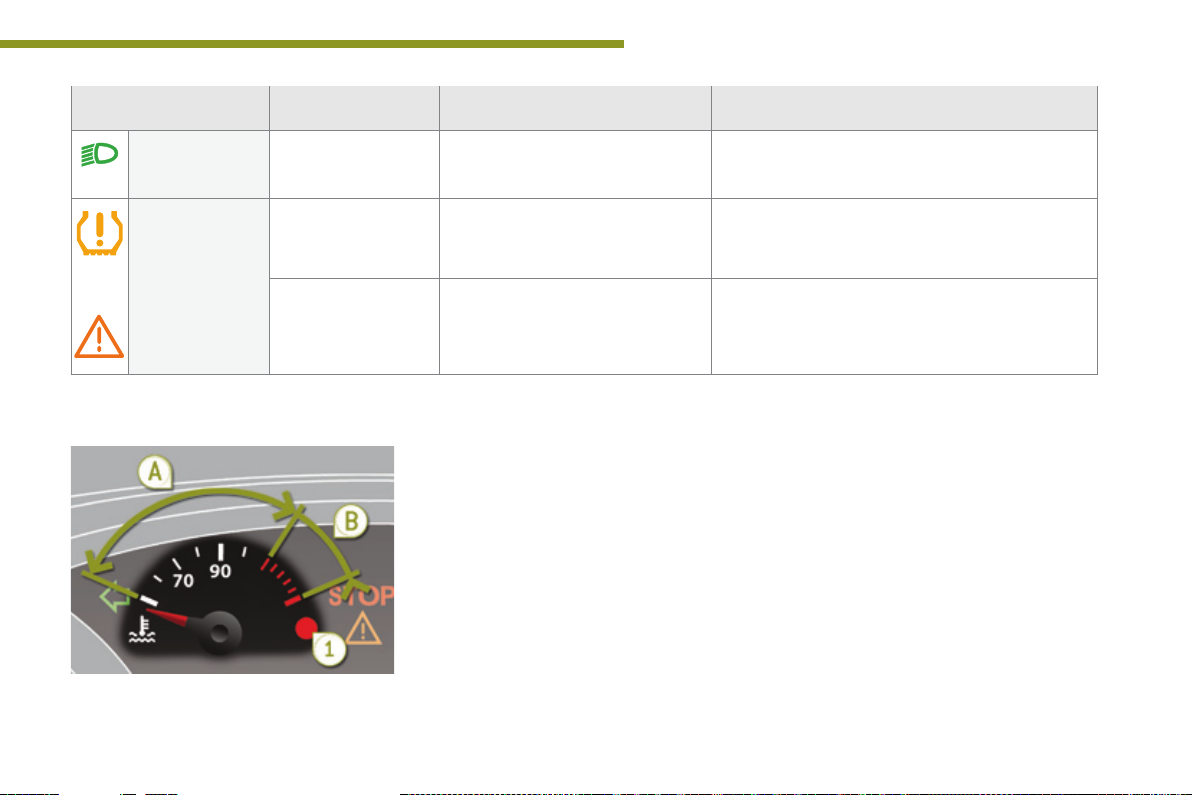
Coolant temperature gauge
With the engine running, when the needle is:
- in zone A, the temperature is correct,
- in zone B, the temperature is too high;
the max temperature warning lamp 1 and
the central STOP warning lamp come on,
accompanied by an audible signal and a
message in the screen.
You must stop as soon as it is safe to do so.
Wait a few minutes before switching off the
engine.
Contact a PEUGEOT dealer or a qualified
workshop.
After driving for a few minutes, the temperature
and pressure in the cooling system increase.
To top up the level:
F wait for the engine to cool,
F unscrew the cap by two turns to allow the
pressure to drop,
F when the pressure has dropped, remove
the cap,
F top up the level to the "MA X" mark.
1
27
Page 30
Monitoring
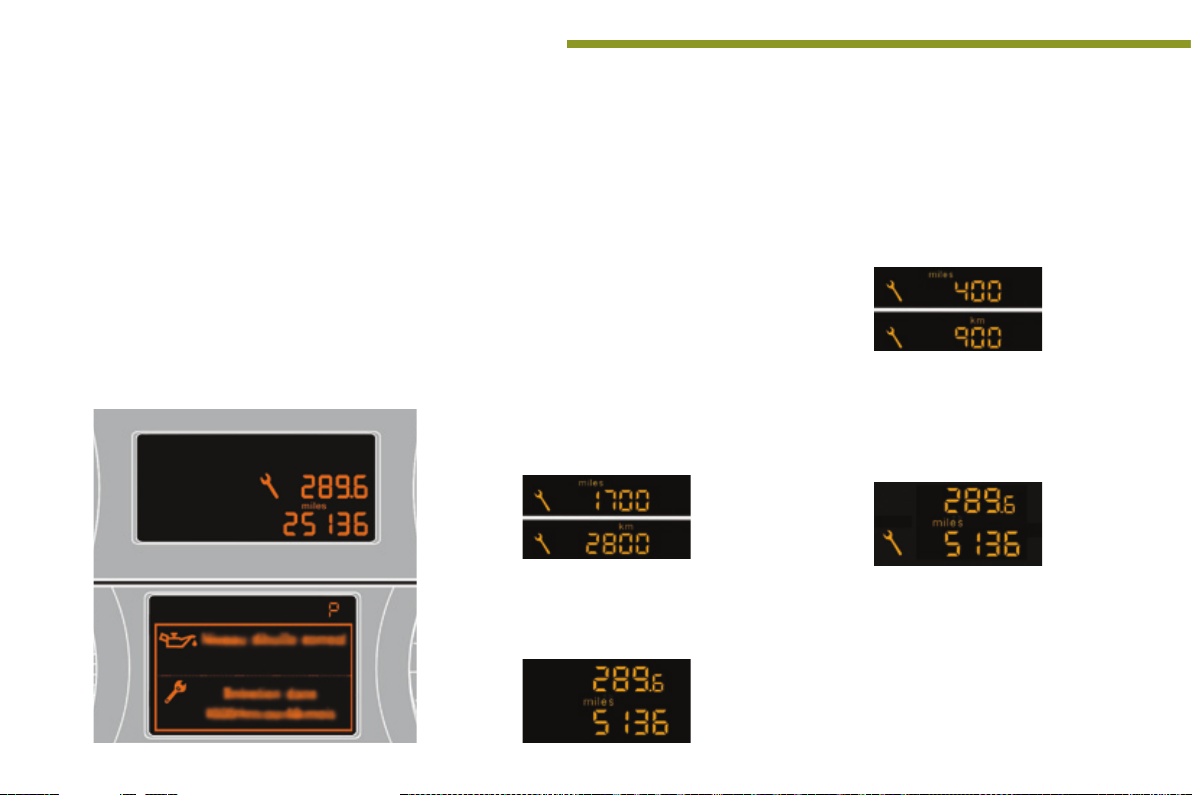
Service indicator
System which informs the driver when the
next service is due, in accordance with the
manufacturer's servicing schedule.
The point at which the service is due is
calculated from the last indicator zero reset,
according to the mileage covered since the last
service.
For BlueHDi Diesel versions, depending on the
country of sale, the level of deterioration of the
engine oil may also be taken into account.
More than 1 800 miles (3 000 km)
remain before the next service is due
When the ignition is switched on, no service
information appears in the screen.
Between 600 miles (1 000 km)
and 1 800 miles (3 000 km) remain
before the next service is due
For 5 seconds after the ignition is switched on, the
spanner symbolising the service operations comes
on. The distance recorder display line indicates the
distance remaining before the next service is due.
Example: 1 700 miles (2 800 km) remain before
the next service is due.
For 5 seconds after the ignition is switched on, the
screen indicates:
5 seconds after the ignition is switched on,
the spanner goes off; the distance recorder
resumes its normal operation. The screen then
indicates the total and trip distances.
Less than 600 miles (1 000 km)
remain before the next service is due
Example: 560 miles (900 km) remain before
the next service is due.
For 5 seconds after the ignition is switched on,
the screen indicates:
5 seconds after the ignition is switched on,
the distance recorder resumes its normal
operation. The spanner remains on to
indicate that a service must be carried out
soon.
28
Page 31

Service overdue
For 5 seconds after the ignition is switched on,
the spanner flashes to indicate that the service
must be carried out as soon as possible.
Example: the service is overdue by 186 miles
(300 km).
For 5 seconds after the ignition is switched on,
the screen indicates:
For BlueHDi versions, the spanner may
also come on early, according to the
level of deterioration of the engine oil,
which depends on the driving conditions
in which the vehicle is used.
Monitoring
1
If you have carried out the service on your
vehicle yourself:
F switch off the ignition,
F press and hold the trip distance recorder
zero reset button,
F switch on the ignition; the distance recorder
display begins a countdown,
F when the display indicates "=0", release
the button; the spanner disappears.
5 seconds after the ignition is switched on,
the distance recorder resumes its normal
operation. The spanner remains on.
With BlueHDi Diesel versions, the
Service warning lamp also comes on
when the ignition is switched on.
Service indicator zero reset
After each service, the service indicator must
be reset to zero.
Following this operation, if you wish to
disconnect the battery, lock the vehicle
and wait at least five minutes for the
zero reset to be registered.
Retrieving the service
information
You can access the service information at any
time.
F Press the trip distance recorder zero reset
button.
The service information is displayed for a
few seconds, then disappears.
29
Page 32

Monitoring
Engine oil level indicator*
On versions fitted with an electric oil level
indicator, the state of the engine oil level
is displayed in the instrument panel for a
few seconds when the ignition is switched on,
after the service information.
The level shown will only be correct
if the vehicle is on level ground and
the engine has been off for more than
30 minutes.
Oil level correct
Oil level low
This is signalled by the flashing of " O IL", or the
display of a message "Oil level incorrect" in the
instrument panel, accompanied by illumination
of the service warning lamp and an audible
signal.
If the low oil level is confirmed by a check using
the dipstick, the level must be topped up to
prevent damage to the engine.
Refer to the "Checks of levels" section.
Oil level indicator fault
This is signalled by the flashing of "OIL--" or the
display of a message "Oil level measurement
invalid" in the instrument panel Contact a
PEUGEOT dealer or a qualified workshop.
In the event of a fault with the electric indicator,
the engine oil level is no longer monitored.
When the system has a fault, you should check
the engine oil level using the manual dipstick
(located under the bonnet).
Refer to the "Checks of levels" section.
30
* Depending on version.
Page 33

Distance recorders
The total and trip distances are displayed for
thirty seconds when the ignition is switched off,
when the driver's door is opened and when the
vehicle is locked or unlocked.
When traveling abroad, you may
have to change the units of distance:
the display of road speed must be in
the official units (miles or km) for the
country. The change of units is done via
the screen configuration menu, with the
vehicle stationary.
Total distance recorder
It measures the total distance travelled by the
vehicle since its first registration.
Trip distance recorder
It measures the distance travelled since it was
reset to zero by the driver.
F With the ignition on, press the button until
zeros appear.
Lighting dimmer
System for manual adjustment of the
brightness of the instrument panel in relation to
the exterior brightness.
Monitoring
1
Activation
When the vehicle lighting is on:
F press the button to change the brightness
of the instrument panel,
F when the lighting reaches the minimum
setting, release the button, then press
again to increase it,
or
F when the lighting reaches the maximum
setting, release the button, then press
again to reduce it,
F when the lighting reaches the level of
brightness required, release the button.
When the vehicle lighting is on, you
cannot switch the instrument panel
lighting off but you can adjust it to
minimum.
Deactivation
When the lighting is off, or in day mode on
vehicles fitted with daytime running lamps,
pressing the button does not have any effect.
31
Page 34

Monitoring
Monochrome screen A (without audio equipment)
Displays in the screen
This displays the following information:
- time,
- date,
- ambient temperature* (this flashes if there
is a risk of ice),
- alert messages,
- trip computer (refer to the end of the
section).
Warning messages (e.g.: "Emission control
system faulty") or information messages (e.g.:
"Boot open") may appear temporarily. Some
can be cleared by pressing the "ESC" button.
Controls Main menu
F Press the "MENU" button to scroll through
the various menus of the main menu:
- vehicle configuration,
- options,
- display settings,
- languages,
There are three display control buttons:
- "ESC" to abandon the operation in
progress,
- "MENU" to scroll through the menus or
sub-menus,
- "OK" to select the menu or sub-menu
required.
- units.
F Press the "OK" button to select the menu
required.
32
* With air conditioning only.
Page 35

Vehicle conguration
Once the "Vehicle configuration" menu has
been selected, you can activate or deactivate
the following equipment (according to country):
- wiper linked with reverse gear (refer to the
"Visibility" section),
- selective unlocking (refer to the "Access"
section),
- "guide-me-home" lighting (refer to the
"Visibility" section),
- directional headlamps (refer to the
"Visibility" section),
- automatic parking brake** (refer to the
"Driving" section),
- parking space sensors (refer to the
"Driving" section),
- ...
Options
Once the "Options" menu has been selected,
you can start diagnostics of the status of the
equipment (active, not active, faulty).
Date and time
Once the "Display settings" menu has been selected,
you can gain access to the following settings:
- year,
- month,
- day,
- hour,
- minutes,
- 12 or 24 hour mode.
F Once you have selected a setting, press
the "OK" button to change its value.
** Depending on country of sale.
Monitoring
1
F Wait for approximately ten seconds without
any action to allow the changed data to
be recorded or press the "ESC" button to
cancel.
The screen then returns to the normal display.
Languages
Once the "Languages" menu has been
selected, you can change the language used
by the display (Français, Italiano, Nederlands,
Portugues, Portugues-Brasil, Türkçe, Deutsch,
English, Espanol).
Units
Once the "Units" menu has been selected, you
can change the units for:
- temperature (°C or °F),
- fuel consumption (l/100 km, mpg or km/l).
For safety reasons, configuration of the
multifunction screen by the driver must
only be done when stationary.
33
Page 36

Monitoring
Monochrome screen A (with audio equipment)
34
Displays in the screen
This displays the following information:
- time,
- date,
- ambient temperature* (this flashes if there
is a risk of ice),
- alert messages,
- audio sources (radio, CD, ...),
- trip computer (refer to the corresponding
section).
Warning messages (e.g.: "Emission control
system faulty") or information messages (e.g.:
"Boot open") may appear temporarily. Some
can be cleared by pressing the "
button.
* With air conditioning only.
<
] arrow"
Controls
From the audio equipment control panel, you
can:
F press the "MENU" button to gain access to
the main menu,
F press the "5" or "6" buttons to scroll
through the items on the screen,
F press the "MODE" button to change the
permanent application (trip computer,
audio source, ...),
F press the "7" or "8" buttons to change a
setting value,
F press the "OK" button to confirm,
or
F press this button to abandon the
operation in progress.
Main menu
F Press the "MENU" button for access to
the main menu, then press the "5" or
"6" buttons to scroll through the various
menus:
- radio-CD,
- vehicle configuration,
- options,
- display settings,
- languages,
- units.
F Press the "OK" button to select the menu
required.
Radio-CD
With the audio equipment switched on, once
the "Radio-CD" menu has been selected you
can activate or deactivate the functions linked
with use of the radio (RDS, REG), the CD or the
CD changer (introscan, shuffle, CD repeat).
For more information on the "RadioCD" application, refer to the "Audio
equipment and telematics" section.
Page 37

Monitoring
1
Vehicle conguration
Once the "Vehicle Configuration" menu has
been selected, you can activate or deactivate
the following equipment (according to country):
- wiper linked with reverse gear (refer to the
"Visibility" section),
- selective unlocking (refer to the "Access"
section),
- guide-me-home lighting (refer to the
"Visibility" section),
- directional headlamps (refer to the
"Visibility" section),
- automatic parking brake** (refer to the
"Driving" section),
- ...
Options
Once the "Options" menu has been selected,
you can start diagnostics of the status of the
equipment (active, not active, faulty).
Date and time Languages
Once the "DATE AND TIME" menu has been
selected, you can gain access to the following
settings:
- year,
- month,
- day,
- hour,
- minutes,
- 12 or 24 hour mode.
F Once you have selected a setting, press
the "7" or "8" buttons to change its value.
F Press the "5" or "6" buttons to switch
respectively to the previous or next setting.
F Press the "OK" button to record the
change and return to the normal display or
press the "
<
] arrow" button to cancel.
Once the "Languages" menu has been
selected, you can change the language used
by the display.
Units
Once the "Units" menu has been selected,
you can change the units of the following
parameters:
- temperature (°C or °F),
- fuel consumption (l/100 km, mpg or km/l).
For safety reasons, configuration of the
multifunction screen by the driver must
only be done when stationary.
** Depending on the country of sale.
35
Page 38

Monitoring
Monochrome screen C (with PEUGEOT Connect Sound (RD5))
Displays in the screen
Displays according to context:
- time,
- date,
- ambient temperature with air conditioning
(the value displayed flashes if there is a
risk of ice),
- audio functions,
- trip computer (see the corresponding
section),
- alert messages,
- screen and vehicle equipment parameter
setting menus.
Controls
From the audio equipment control panel, you
can:
F press the "MENU" button for access to the
main menu,
F press the "5" or "6" buttons to scroll
through the items on the screen,
F press the "MODE" button to change the
permanent application (trip computer,
audio source...),
F press the "7" or "8" buttons to change a
setting value,
F press the "OK" button to confirm,
or
F press this button to abandon the
operation in progress.
Main menu
F Press the "MENU" button for access to the
main menu:
- audio functions,
- trip computer (see the corresponding
section),
- personalisation-configuration,
- telephone (Bluetooth system).
F Press the "5" or "6" button to select the
menu required, then confirm by pressing
the "OK" button.
"Audio functions" menu
With the audio equipment switched on, once
this menu has been selected you can activate
or deactivate the functions linked with use
of the radio (RDS, REG, RadioText) or CD
(introscan, shuffle, CD repeat).
For more information on the "Audio
functions" application, refer to the
PEUGEOT Connect Sound (RD5) section.
36
Page 39

Monitoring
1
"Trip computer" menu
Once this menu has been selected, you can
consult information concerning the status of the
vehicle (alert log, status of the functions...).
F Press the "MENU" button to gain access
to the general menu.
F Press the arrows, then the "OK" button to
select the "Trip computer" menu.
F On the "Trip computer" menu, select one
of the applications:
Enter the distance to the
destination
This allows you to enter an approximate value
for the distance to the final destination.
Alert log
This summarises the active warning messages,
displaying them in succession in the
multifunction screen
Status of functions
This summarises the status of the functions
present on the vehicle.
* Depending on the country of sale.
"PersonalisationConfiguration" menu
Once this menu has been selected, you can
gain access to the following functions:
- define the vehicle parameters,
- display configuration,
- choice of language.
Dene the vehicle parameters
Once this menu has been selected, you can
activate or deactivate the following equipment
(according to country):
- wiper linked with reverse gear (refer to the
"Visibility" section),
- selective unlocking (refer to the "Access"
section),
- guide-me-home lighting (refer to the
"Visibility" section),
- directional headlamps (refer to the
"Visibility" section),
- automatic parking brake* (refer to the
"Driving" section),
- ...
37
Page 40

Monitoring
Example: setting of the duration of the guideme-home lighting
F Press the "5" or "6" buttons, then the "OK"
button to select the menu required.
F Press the "5" or "6" buttons, then the
"OK" button to select the "Guide-me-home
headlamps" line.
F Press the "7" or "8" buttons to set the
value required (15, 30 or 60 seconds), then
press the "OK" button to confirm.
F Press the "5" or "6" buttons, then the "OK"
button to select the "OK" box and confirm
or press the "
<
] arrow" button to cancel.
Display conguration
Once this menu has been selected, you have
access to the following settings:
- brightness-video setting,
- date and time setting,
- selection of the units.
Adjusting the date and time
F Press the "7" or "8" button to select the
"Display configuration" menu, then the
"OK" button.
F Press the "5" or "6" button, to select the
"Adjust date and time" line, then on the
"OK" button.
F Press the "7" or "8" button to select the
setting to modify. Confirm by pressing the
"OK" button then adjust the setting and
confirm again to save the modification.
F Adjust the settings one by one, confirming
with the "OK" button.
F Press the "5" or "6" button, then the "OK"
button to select the "OK" box and confirm,
or the "Back" button to cancel.
Choice of language
Once this menu has been selected, you can
change the screen display language.
"Telephone" menu
With the audio equipment switched on, once
this menu has been selected you can configure
your Bluetooth hands-free kit (pairing), consult
the various telephone directories (calls log,
services...) and manage your communications
(pick up, hang up, call waiting, secret mode...).
For more information on the telephone
application, refer to the PEUGEOT
Connect Sound (RD5) section.
For safety reasons, configuration of the
multifunction screen by the driver must
only be done when stationary.
38
Page 41

Monitoring
16/9 retractable colour screen (PEUGEOT Connect Navigation (RT6))
Displays in the screen
Depending on the context, it displays the
following information:
- time,
- date,
- altitude,
- ambient temperature (the value displayed
flashes if there is a risk of ice),
- parking sensor information,
- parking space measurement,
- audio functions,
- directory and telephone information,
- satellite navigation system information,
- trip computer,
- alert messages,
- settings menus for the screen, the satellite
navigation system and vehicle systems.
- the image from the reversing camera.
Controls
From the navigation system control panel, to
select one of the applications:
F press the dedicated "RADIO", "MUSIC",
"NAV", "TR AFFIC", "PHONE" or
"SETUP" button for access to the
corresponding menu,
F turn the dial A to select a function, an item
in a list,
F press button B to confirm the selection,
or
F press the "Back" button to abandon the
current operation and return to the previous
display.
With repeated presses on the C "MODE"
button, the screen displays:
- "RADIO / MEDIA"*,
- "TELEPHONE"*,
- "FULL SCREEN MAP"*,
- "MAP IN A WINDOW"*,
- "TRIP COMPUTER".
"SETUP" menu
F Press the "SETUP" button to open the
configuration menu:
- "Display configuration",
- "Speech synthesis setting".
- "Select language",
- "Define vehicle parameters",
- "Alert log".
For the operation of the retractable
screen (opening, closing, adjusting the
position...), refer to the "Access to the
retractable screen" section.
For safety reasons, configuration of the
multifunction screen by the driver must
only be done when stationary.
* For more information on these applications,
refer to the "Audio equipment and telematics"
section.
1
39
Page 42

Monitoring
Display conguration
This menu is used to select the colour scheme
for the screen, adjust the brightness, set
the date and time and to choose the units
for distance (km or miles), fuel consumption
(l/100 km, mpg or km/l) and temperature
(°Celsius or °Fahrenheit).
Adjusting the date and time
- Press on SETUP.
- Select "Display configuration" and confirm.
- Select "Set date and time" and confirm.
Select "Minute adjustment via GPS" so that the
minutes are adjusted automatically by satellite
reception.
- Select the setting to modify. Confirm by
pressing on OK, then modify the setting
and confirm again to save the modification.
- Adjust the settings one by one.
- Select "OK" in the screen then confirm to
save the setting.
Adjusting the voice synthesiser
This menu is used to adjust the volume setting
for navigation instructions and to choose the
type of voice (male or female).
Choice of language
This menu is used to choose the language
used by the screen from a defined list.
Vehicle parameters
This menu is used to activate or deactivate
certain driving and comfort systems, classified
by category:
- "Driver aid":
● "Electric brake*" (Automatic electric
parking brake; refer to the "Driving"
section),
- "Wiper operation":
● "Rear wiper operates in reverse: ON /
OFF" (rear wiper coupled to reverse
gear; refer to the "Visibility" section),
- "Vehicle access" (refer to the "Access"
section):
● "Plip action: all doors, driver only"
(Selective unlocking of the driver's door),
- "Lighting configuration" (refer to the
"Visibility" section):
● "Duration of guide me home lighting:
OFF / 15 s / 30 s / 60 s*" (Automatic
guide me home lighting),
● "Directional headlights": ON / OFF"
(Main / additional directional lighting).
Alert log
This lists the active alerts by displaying in turn
the different messages associated with them.
40
* Depending on country.
Page 43

Monitoring
16/9 retractable colour screen (PEUGEOT Connect Media Navigation (NG4 3D))
Displays in the screen
According to context, it displays the following
information:
- time,
- date,
- altitude,
- ambient temperature (the value displayed
flashes if there is a risk of ice),
- audio functions,
- satellite navigation system information.
- visual parking assistance,
- the result of the measurement of free
space,
- contacts and telephone information,
- configuration menus for the screen and the
navigation system,
Controls
For more information on these
applications, refer to the "Audio
equipment and telematics" section.
For operation of the retractable screen
(opening, closing, adjustment of the
position, etc.), refer to the paragraph
"Access to the retractable screen".
From the navigation system control panel:
F press the dedicated "RADIO", "MUSIC",
"NAV", "TR AFFIC", "SETUP" or
"PHONE" button for access to the
corresponding menu,
F turn the navigator knob A to move the
selection,
F press the "OK" navigator central button B
to confirm the selection,
or
F press the this button to abandon
the current operation and return
to the previous display.
1
41
Page 44

Monitoring
"SETUP" menu
F Press the "SETUP" button for access to
the "SETUP" menu. It allows you to adjust
settings for the following functions:
- "Languages and voice functions"
- "Date and time",
- "Display screen",
- "Units",
- "System parameters".
Languages and voice functions
This menu allows you to:
- select the language used by the display,
- select the settings for voice recognition
(on/off, instructions on use, personal voice
training...),
- adjust the volume of the voice synthesiser.
Date and time
F Press "SETUP".
F Select "Display configuration" and confirm.
F Select "Adjust date and time" and confirm.
Select "Synchronise minutes with GPS" for the
adjustment of minutes to be done automatically
by satellite reception.
F Select the setting to modify. Confirm by
pressing "OK", then adjust the setting and
confirm again.
F Adjust the settings one by one.
F Select "OK" in the screen then confirm to
save the settings.
Display
This menu allows you to set the brightness of
the screen, the screen colour scheme and the
colour of the map (day/night or auto mode).
Units
This menu allows you to select the units:
temperature (°C or °F) and fuel consumption
(km/l, l/100 or mpg).
System parameters
This menu allows you to restore the factory
configuration, display the software version and
activate scrolling text.
For safety reasons, configuration of the
multifunction screen by the driver must
only be done when stationary.
42
Page 45

Access to the retractable screen
The screen opens automatically when the
ignition is switched on. It closes automatically
three seconds after switching off the ignition if
the audio and telematics system is switched off.
You can open or close the screen at any time,
with the ignition on, using control A.
- Press button A: the screen folds.
- Press button A again: the screen opens
again.
If you have closed the screen, it will
open again automatically:
- on switching on the audio and
navigation system (unless it had
been closed manually while the
system was in operation),
- when an outgoing telephone call is
made,
- when a voice command is given,
- when a warning message linked
with the STOP warning lamp is
displayed (PEUGEOT Connect
Navigation (RT6)).
Monitoring
1
Adjusting the angle of the screen
You can adjust the angle of the screen to one of
four defined positions, by repeated presses on
the front or back of the control B. The position
of the screen is memorised on closing.
43
Page 46

Monitoring
Trip computer
System that gives you information on the current journey (range, fuel consumption…).
Monochrome screen A
F Press the button, located at the end of the
wiper stalk, to display the various items of
trip computer data in succession.
The trip computer provides the following
information:
- range,
- current fuel consumption,
- distance travelled,
- average fuel consumption,
- average speed.
F The next press returns you to the current
display.
Zero resetInformation displays
F Press the control for more than
two seconds to reset to zero the distance
travelled, the average fuel consumption
and the average speed.
44
Page 47

Monitoring
Trip computer
System which provides current information concerning the trip (range, consumption…).
Monochrome screen C
Information displays
16/9 colour screen
In the screen C or the colour screen
F Press the button, located at the end of
the wiper stalk, to display the various trip
Instrument panel screen
computer tabs in succession.
In the instrument panel screen
F Press the up and down arrows on
the navigator to display the various
trip computer tabs in succession.
1
Depending on your vehicle's equipment, the
trip computer information appears on the
multifunction screen or on the instrument panel
screen.
45
Page 48

Monitoring
- The current information tab
with:
● the range,
● the current fuel
consumption,
● the distance remaining to
be travelled.
- The trip "1" tab with:
● the distance travelled,
● the average fuel
consumption,
● the average speed,
for the first trip.
- The trip "2" tab with:
● the distance travelled,
● the average fuel
consumption,
● the average speed,
for the second trip.
F Pressing the button again takes you to a
black screen.
A further press returns you to the normal
display.
Trip zero reset
With the screen C or the colour screen
F When the trip required is displayed, press
the control for more than two seconds.
With the instrument panel screen
F When the required trip is displayed, press
the "OK" button on the navigator for more
than two seconds.
Trips "1" and "2" are independent but their use
is identical.
For example, trip "1" can be used for daily
figures, and trip "2" for monthly figures.
46
Page 49

Trip computer, a few definitions
Monitoring
1
Range
(miles or km)
The distance which can still be
travelled with the fuel remaining in the tank
(related to the average fuel consumption over
the last few miles (kilometres) travelled).
This value may vary following a change
in the style of driving or the relief,
resulting in a significant change in the
current fuel consumption.
When the range falls below 20 miles (30 km),
dashes are displayed. After filling with at least
5 litres of fuel, the range is recalculated and is
displayed when it exceeds 60 miles (100 km).
If dashes are displayed continuously
while driving in place of the digits,
contact a PEUGEOT dealer or a
qualified workshop.
Current fuel consumption
(mpg or l/100 km or km/l)
Calculated over the last few seconds.
This function is only displayed from
20 mph (30 km/h).
Average fuel
consumption
(mpg or l/100 km or km/l)
Calculated since the last trip
computer reset.
Average speed
(mph or km/h)
Calculated since the last trip
computer reset.
Distance travelled
(miles or km)
Calculated since the last trip
computer reset.
Distance remaining to
destination
(miles or km)
This is the distance remaining to be travelled
to the final destination. It is either calculated
instantly by the navigation system, if guidance
is activated, or entered by the user.
If the distance is not entered, dashes are
displayed in place of the digits.
Stop & Start time counter
(minutes / seconds or hours /
minutes)
If your vehicle is fitted with Stop & Start, a time
counter calculates the time spent in STOP
mode during a journey.
It resets to zero every time the ignition is
switched on with the key.
47
Page 50

Access
Remote control key
System which permits central unlocking or locking of the vehicle using the lock or from a distance. It is also used to locate and start the vehicle, as well
as providing protection against theft.
Unlocking the vehicle
Complete unlocking using the key
F Turn the key forwards in the driver's door
lock to unlock the vehicle.
The selective unlocking is only available
on versions fitted with deadlocking.
48
Unfolding the key
F First press this button to unfold
the key.
Complete unlocking using
the remote control
F Press the open padlock to
unlock the vehicle.
Selective unlocking using the
remote control
F Press the open padlock once to
unlock the driver's door only.
F Press the open padlock again to unlock the
other doors and the boot.
Selective unlocking using the key
F Turn the key to the left in the driver's door
lock once to unlock the driver's door only.
F Turn the key to the left in the driver's door
lock again to unlock the other doors and
the boot.
The complete or selective
unlocking parameter is set via
the vehicle configuration menu.
Complete unlocking is activated by default.
The direction indicators flash for a
few seconds.
According to version, the door mirrors
unfold, the welcome lighting comes on
and the alarm is deactivated.
Page 51

Access
Locking the vehicle
Normal locking using the remote
control
F Press the closed padlock to
lock the vehicle completely.
F
Press the closed padlock for more than
two seconds to close the windows automatically
in addition to locking (according to version).
Normal locking using the key
F Turn the key to the right in the driver's door
lock to lock the vehicle completely.
The direction indicators come on for a
few seconds.
Depending on version, the door mirrors
fold at the same time, the alarm is
activated.
If one of the doors or the boot is not fully
closed, locking does not take place.
However, the alarm (if fitted) will be fully
activated after about 45 seconds.
If the vehicle is unlocked inadvertently
and with no action then on the doors
or boot, it will relock automatically after
about thirty seconds.
If the alarm had been activated
previously, it will not be reactivated
automatically.
The folding and unfolding of the door
mirrors using the remote control can be
deactivated by a PEUGEOT dealer or a
qualified workshop.
2
Deadlocking using the remote
control
F Press the closed padlock to
lock the vehicle completely
or press the closed padlock
for more than two seconds
to close the windows
automatically in addition to
locking (according to version).
F Press the closed padlock again within
five seconds to deadlock the vehicle.
49
Page 52

Access
Deadlocking using the key
F Turn the key to the right in the driver's door
lock to lock the vehicle completely and hold
it in this position for more than two seconds
to close the windows automatically in
addition to locking (according to version).
F Turn the key to the right again within
five seconds to deadlock the vehicle.
Deadlocking is confirmed by fixed lighting
of the direction indicators for approximately
two seconds.
According to version, the door mirrors fold at
the same time.
Folding the key
F First press this button to fold
the key.
Locating your vehicle
F Press the closed padlock to
locate your locked vehicle in a
car park.
This is indicated by lighting of the direction
indicators for a few seconds.
50
Deadlocking renders the exterior and
interior door controls inoperative.
It also deactivates the manual central
control button.
Therefore, never leave anyone inside
the vehicle when it is deadlocked.
If you do not press the button when
folding the key, there is a risk of
damage to the mechanism.
Page 53

Access
Remote control problem
Following disconnection of the vehicle battery,
replacement of the remote control battery or
in the event of a remote control malfunction,
you can no longer unlock, lock or locate your
vehicle.
F First of all, use the key in the lock to unlock
or lock your vehicle.
F Then, reinitialise the remote control.
Reinitialisation
F Switch off the ignition.
F Turn the key to position 2 (Ignition on).
F Press the closed padlock immediately for a
few seconds.
F Switch off the ignition and remove the key
from the ignition switch.
The remote control is fully operational again.
If the problem persists, contact a
PEUGEOT dealer as soon as possible.
2
Changing the battery
Battery ref.: CR1620 / 3 volts.
If the battery is flat, you are informed
by illumination of this warning lamp,
an audible signal and a message.
F Unclip the casing using a coin at the notch.
F Slide the flat battery out of its location.
F Slide the new battery into its location
observing the original direction.
F Clip the casing.
F Reinitialise the remote control.
51
Page 54

Access
Lost keys
Go to a PEUGEOT dealer with the vehicle's registration document, your personal
identification documents and if possible the key code label.
The PEUGEOT dealer will be able to look up the key code and the transponder code
required to order a new key.
Remote control
The high frequency remote control is a sensitive system; do not operate it while it is in your
pocket as there is a possibility that it may unlock the vehicle, without you being aware of it.
Do not repeatedly press the buttons of your remote control out of range and out of sight of
your vehicle. You run the risk of stopping it from working and the remote control would have
to be reinitialised.
No remote control can operate when the key is in the ignition switch, even when the ignition
is switched off, except for reinitialisation.
Locking the vehicle
Driving with the doors locked may make access to the passenger compartment by the
emergency services more difficult in an emergency.
As a safety precaution, never leave children alone in the vehicle, except for a very short
period.
In all cases, it is essential to remove the key from the ignition switch when leaving the
vehicle.
Anti-theft protection
Do not make any modifications to the electronic engine immobiliser system; this could
cause malfunctions.
When purchasing a second-hand vehicle
Have the pairing of all of the keys in your possession checked by a PEUGEOT dealer, to
ensure that only your keys can be used to open and star t the vehicle.
Do not throw the remote control
batteries away, they contain metals
which are harmful to the environment.
Take them to an approved collection
point.
52
Page 55

Access
Alarm
System which protects and provides a deterrent against the theft of your vehicle. It provides two types of protection, exterior and interior, as well as an
anti-tamper function.
Exterior perimiter protection
The system detects opening of the vehicle.
The alarm is triggered if anyone tries to enter
the vehicle by forcing a door, the boot or the
bonnet.
Locking the vehicle with full
alarm
If a door, the boot or the bonnet is not
fully closed, the vehicle is then not
locked, but perimeter monitoring will
be active after a period of 45 seconds,
at the same time as the volumetric
monitoring.
2
Interior volumetric protection
The system detects any variation in the volume
in the passenger compartment.
The alarm is triggered if anyone breaks a
window or moves inside the vehicle.
If you wish to leave a pet in the vehicle or a
window partially open, deactivate the interior
volumetric protection.
Anti-tamper function
The system detects the putting out of service of
its components.
The alarm is triggered if anyone tries to put
the wires of the siren, the central control or the
battery out of service.
Do not make any modifications to
the alarm system, this could cause
malfunctions.
Activation
F Switch off the ignition and get out of the
vehicle.
F Lock or deadlock the vehicle using the
locking button on the remote control.
The alarm is activated; the indicator lamp in
button A flashes once per second.
Deactivation
F Unlock the vehicle using the unlocking
button on the remote control.
The alarm is deactivated; the indicator lamp in
button A switches off.
In the event of automatic relocking
of the vehicle (occurs after an
unintentional unlocking followed by a
period of 30 seconds without opening a
door or the boot), the monitoring system
is not reactivated automatically. To
reactivate the system, it is necessary to
unlock the vehicle and then lock it again
using the key or the remote control.
53
Page 56

Access
54
Locking the vehicle with
exterior protection alarm only
Deactivation of the interior
volumetric protection
F Switch off the ignition.
F Within ten seconds, press button A until
the indicator lamp is on continuously.
F Get out of the vehicle.
F Lock or deadlock the vehicle using the
locking button on the remote control.
The exterior protection alarm alone remains
activated; the indicator lamp in button A flashes
once per second.
To be effective, this deactivation must
be carried out each time the ignition is
switched off.
Reactivation of the interior
volumetric protection
F Unlock the vehicle using the unlocking
button on the remote control.
F Relock the vehicle using the remote control.
The alarm is activated again with both types
of protection; the indicator lamp in button A
switches off.
Triggering
This is indicated by sounding of the siren
and flashing of the direction indicators for
approximately thirty seconds.
After it has been triggered, the alarm is again
operational.
If the alarm is triggered ten times in
succession, the eleventh time will result
in it becoming inactive.
If the indicator lamp in button A flashes
rapidly, this indicates that the alarm was
triggered during your absence. When
the ignition is switched on, this flashing
stops immediately.
To avoid triggering the alarm when
washing your vehicle, lock it using the
key in the driver's door lock.
Do not activate the alarm before
disconnecting the battery, otherwise the
siren will sound.
Failure of the remote control
F Unlock the vehicle using the key in the
driver's door lock.
F Open the door; the alarm is triggered.
F Switch on the ignition; the alarm stops.
Locking the vehicle without
activating the alarm
F Lock or deadlock the vehicle using the key
in the driver's door lock.
The direction indicators do not come on.
Malfunction
When the ignition is switched on, illumination
the indicator lamp in button A for ten seconds
indicates a siren fault.
Have it checked by a PEUGEOT dealer or a
qualified workshop.
Automatic operation*
Depending on the legislation in force in your
country, one of these cases may occur:
- 45 seconds after the vehicle is locked
using the remote control, the alarm is
activated, regardless of the status of the
doors and boot.
- 2 minutes after the last door or the boot is
closed, the alarm is activated.
F To avoid triggering the alarm on entering
the vehicle, first press the unlocking
button on the remote control.
* According to country.
Page 57

Electric windows
System for opening or closing a window
manually or automatically. Fitted with a safety
anti-pinch system and a system for deactivation
in the event of misuse of the rear controls.
One-touch electric windows
Manual mode
F Press or pull the control gently. The
window stops when the control is released.
Automatic mode
F Press or pull the control firmly. The window
opens or closes fully when the control is
released.
F Pressing the control again stops the
movement of the window.
Access
After approximately ten consecutive
complete opening/closing movements
of the window, a protection function
is activated to prevent damage to the
electric window motor.
After this, you have approximately one
minute in which to close the window.
Once the window is closed, the controls
will become operational again after
approximately 40 minutes.
Safety anti-pinch
When the window rises and meets an obstacle,
it stops and partially lowers again.
2
1. Driver
2. Passenger
3. Rear right
4. Rear left
5. Deactivation of the rear electric
windows and doors.
The electric window controls remain
operational for approximately
45 seconds after the ignition is switched
off or until the vehicle is locked after a
front door is opened.
If one of the passenger windows cannot
be operated from the driver's door
control panel, carry out the operation
from the control pad of the passenger
door concerned, and vice versa.
If the window cannot be closed (for
example, in the presence of ice),
immediately after the movement is
reversed:
F Press and hold the control until the
window opens fully.
F Then pull the control immediately
and hold it until the window closes.
F Continue to hold the control for
approximately one second after the
window has closed.
The safety anti-pinch function is not
operational during these operations.
55
Page 58

Access
Reinitialisation
If a window does not rise automatically or
following disconnection of the battery, the antipinch function must be reinitialised:
For each window:
F Pull the control until the window stops.
F Release the control and pull it again, repeat
these operations until the window closes
fully.
F Continue to hold the control for
approximately one second after the window
has closed.
F Press the control to lower the window
automatically to the low position.
F Once the window has reached the low
position, press the control again for
approximately one second.
The safety anti-pinch function is not
operational during these operations.
Deactivation of the rear
electric windows and doors
F For the safety of your children, with the
ignition on, press control 5 to deactivate
the rear electric window controls
regardless of their position.
It is still possible to open the doors from the
outside and operate the rear electric windows
from the driver's control panel.
Indicator lamp on, the rear controls are
deactivated.
Indicator lamp off, the rear controls are
activated.
This control also deactivates the interior
controls for the rear doors (see "Child
lock").
Any other status of the indicator
lamp indicates a malfunction of the
electric child lock. Have it checked
by a PEUGEOT dealer or a qualified
workshop.
Always remove the key from the ignition
when leaving the vehicle, even for a
short time.
If an obstacle is encountered during
operation of the electric windows, you
must reverse the movement of the
window. To do this, press the control
concerned.
When the driver operates the controls
for the passengers' electric windows,
they must ensure that there is nothing
and no one preventing the correct
closing of the windows.
The driver must ensure that the
passengers use the electric windows
correctly.
Be particularly aware of children when
operating the windows.
56
Page 59

Doors
Access
Opening
From outside
F After unlocking the vehicle completely
using the remote control or the key, pull the
door handle.
From inside
F Pull the door control (front or rear) to
open the door; this unlocks this vehicle
completely.
The interior door controls do not
operate when the vehicle is deadlocked.
Closing
When a door or the boot is not closed correctly:
- When the engine is running,
this warning lamp comes on,
accompanied by a message in
the multifunction screen for a
few seconds,
- When the vehicle is moving (speed
higher than 6 mph (10 km/h)), this
warning lamp comes on, accompanied
by an audible signal and a message for a
few seconds.
2
57
Page 60

Access
Central locking control
System which provides full manual locking or
unlocking of the doors from the inside.
Locking
F Press this button to lock the vehicle.
The red indicator lamp in the button comes on.
If one of the doors is open, the central
locking from the inside does not take
place.
Unlocking
F Press this button again to unlock the
vehicle.
The red indicator lamp in the button goes off.
When locking / deadlocking from
the outside
When the vehicle is locked or deadlocked from
the outside, the red indicator lamp flashes and
the button is inactive.
F After normal locking, pull the interior door
lever to unlock the vehicle.
F After deadlocking, it is necessary to use
the remote control or the key to unlock the
vehicle.
Automatic central locking
System which provides full automatic locking or
unlocking of the doors and boot while driving.
You can activate or deactivate this function.
Activation
F Press this button for more than
two seconds.
A confirmation message is displayed,
accompanied by an audible signal.
58
Page 61

Access
Deactivation
F Press this button again for more than
two seconds.
A confirmation message is displayed,
accompanied by an audible signal.
Automatic locking
Above 6 mph (10 km/h), the doors and boot
lock automatically.
If one of the doors is open, the automatic
central locking does not take place.
If the boot is open, the automatic central
locking of the doors is active.
Unlocking
F Above 6 mph (10 km/h), press this button to
unlock the doors and boot temporarily.
In the event of an impact, the doors
unlock automatically.
Emergency control
System allowing the doors to be locked and
unlocked manually in the event of a malfunction
of the central locking system or battery failure.
Locking the driver's door
F Insert the key in the door lock, then turn it
to the rear.
You can also apply the procedure described for
the passenger doors.
Unlocking the driver's door
F Insert the key in the door lock, then turn it
to the front.
Locking the front and rear
passenger doors
F Open the doors.
F On the rear doors, check that the child lock
is not on (see the corresponding section).
F Remove the black cap, located on the edge
of the door, using the key.
F Insert the key in the socket without forcing
it, then without turning it, move the latch
sideways towards the inside of the door.
F Remove the key and refit the cap.
F Close the doors and check that the vehicle
has locked correctly from the outside.
Unlocking the front and rear
passenger doors
F Pull the interior door opening control.
2
59
Page 62

Access
Boot
Opening
F After unlocking the vehicle using the
remote control or the key, press the
handle A and raise the tailgate.
Closing
F Close the lower tailgate.
F Pull the handle B downwards to guide the
tailgate.
60
Page 63

Access
Lower tailgate
Opening Closing
F Push the handle C to the right and tilt the
tailgate D gently.
F Raise the tailgate D, push it fully to close it,
check that it is secured correctly.
Before opening the boot, ensure that
there is nothing or anyone within the
opening radius.
For reasons of safety, correct operation
and compliance with regulations, do
not drive with the boot and the lower
tailgate open.
If the battery is disconnected, the boot
cannot be opened.
Do not climb onto the lower tailgate and
do not subject it to heavy knocks, it may
be damaged.
Always close the lower tailgate and
check that it is secured correctly before
closing the boot.
When closing the lower tailgate, ensure
that no person or object is in the
proximity of the moving par ts to avoid
any risk of injury or damage.
Do not open the lower tailgate when a
towbar is fitted.
2
Maximum authorised weight on the
lower tailgate when open: 200 kg.
61
Page 64

Comfort
Heating and Ventilation
System which creates and maintains good
conditions of comfor t and visibility in the
vehicle's passenger compartment.
Air intake
The air circulating in the passenger
compartment is filtered and originates either
from the outside via the grille located at the
base of the windscreen or from the inside in air
recirculation mode.
Controls
The incoming air follows various routes
depending on the controls selected by
the driver, the front passenger and rear
passengers, according to the level of
equipment.
The temperature control enables you to obtain
the level of comfort required by mixing the air of
the various circuits.
The air distribution control enables you to
select the air vents used in the passenger
compartment by the combined use of the
associated buttons.
The air flow control enables you to increase or
reduce the speed of the ventilation fan.
These controls are grouped together on control
panel A on the centre console.
Air distribution
1. Windscreen demisting/defrosting vents.
2. Front side window demisting/defrosting
vents.
3. Side adjustable air vents.
4. Central adjustable air vents.
5. Air outlets to the front footwells.
6. Adjustable air vents for the rear
passengers.
7. Air outlets to the rear footwells.
62
Page 65

Comfort
Recommendations for ventilation and air conditioning
In order for these systems to be fully effective, follow the operation and maintenance
guidelines below:
F If the interior temperature remains very high after the vehicle has been parked in the sun for
a considerable time, first ventilate the passenger compartment for a few minutes.
Place the air flow control at a sufficient level to provide an adequate renewal of air in the
passenger compartment.
F To obtain an even air distribution, take care not to obstruct the exterior air intake grilles
located at the base of the windscreen, the nozzles, the vents and the air outlets, as well
as the air extractor located in the boot.
F Use in preference the intake of exterior air as prolonged use of the air recirculation may
cause misting of the windows and side windows.
F Do not cover the sunshine sensor, located on the dashboard; this is used for regulation
of the automatic air conditioning system.
F Operate the air conditioning system for 5 to 10 minutes, once or twice a month to keep it
in good working order.
F Ensure that the passenger compartment filter is in good condition and have the filter
elements replaced regularly (refer to the "Checks" section).
We recommend the use of a combined passenger compartment filter. Thanks to its
second special active filter, it contributes to the purification of the air breathed by the
occupants and the cleanliness of the passenger compartment (reduction of allergic
symptoms, bad odours and greasy deposits).
F The air conditioning uses power from the engine while operating. This results in an
increase in the vehicle's fuel consumption.
When towing at or near maximum capacity or on steep slopes in high ambient
temperatures, switching off the air conditioning saves engine power and so improves
towing capacity.
Condensation created by the air conditioning results in a discharge of water under the
vehicle when stationary, which is perfectly normal.
F To ensure correct operation of the air conditioning system, you are also advised to have
it checked regularly.
F If the system does not produce cold air, do not use it and contact a PEUGEOT dealer or
a qualified workshop.
The air conditioning system does not
contain chlorine and does not present
any danger to the ozone layer.
3
63
Page 66

Comfort
Manual air conditioning
The air conditioning can only operate with the
engine running.
F If you place the air flow control
in position 0 (deactivation of the
system), the temperature is no
longer maintained at a comfortable
level. However, a slight flow of air,
due to the movement of the vehicle,
can still be felt.
3. Air distribution adjustment
Windscreen and side windows.
4. Air intake / Air recirculation
The intake of exterior air limits misting of the
windscreen and side windows.
The recirculation of interior air insulates the
passenger compartment from exterior odours
and smoke.
Return to exterior air intake as soon as possible
to prevent deterioration of the air quality and
demisting performance.
64
1. Temperature adjustment
F Turn the dial from blue
(cold) to red (hot) to adjust
the temperature to your
requirements.
2. Air ow adjustment
F Turn the dial from position 1
to position 5 to obtain a
comfortable air flow.
Windscreen, side windows and
front-rear footwells.
Footwells, front-rear
(closing the vents increases the
flow to the footwells).
Central, side and rear vents.
The air distribution can be
adapted by placing the dial in
an intermediate position.
F Press the button to recirculate
the interior air. The indicator
lamp comes on to confirm this.
F Press the button again to permit the intake
of exterior air. The indicator lamp goes off
to confirm this.
Page 67

Demisting/defrosting
5. Air conditioning On / Off
The air conditioning is designed to
operate effectively in all seasons,
with the windows closed.
Comfort
With Stop & Start, when demisting has
been activated, the STOP mode is not
available.
3
The marking on the control panel
indicates the position of the
controls to quickly demist or
defrost the windscreen and side
windows:
F place the air intake control 4 in the
"Exterior air intake" position (indicator lamp
off),
F place the air distribution dial 3 in the
"Windscreen position",
F place the air flow dial 2 in position 5
(maximum),
F place the temperature dial 1 in the red
position (hot).
It enables you to:
- lower the temperature, in summer,
- increase the effectiveness of the demisting
in winter, above 3 °C.
Switching on
F Press the "A/C" button, the button's
indicator lamp comes on.
The air conditioning does not operate when the
air flow adjustment control 2 is in position "0".
To obtain cooled air more quickly, you can use
recirculation of interior air for a few moments.
Then return to fresh air intake.
Switching off
F Press the "A/C" button again, the button's
indicator lamp goes off.
Switching off may affect comfort levels
(humidity, condensation).
The rear screen demist - defrost
can only operate when the engine is
running.
65
Page 68

Comfort
Rear screen demist - defrost
The control button is located on
the air conditioning system control
panel.
66
Switching on
F Press this button to demist/defrost the rear
screen and, depending on version, the door
mirrors. The indicator lamp associated with
the button comes on.
Switching off
The demist/defrost switches off automatically to
prevent an excessive consumption of current.
F It is possible to stop the demist/defrost
operation before it is switched off
automatically by pressing the button again.
The indicator lamp associated with the
button goes off.
F Switch off the demist/defrost of the
rear screen and door mirrors as
soon as it is no longer needed as
lower current consumption results
in reduced fuel consumption.
Page 69

Dual-zone digital air conditioning
Comfort
The air conditioning can only operate with the
engine running.
Automatic operation
1. Automatic comfort programme
F Press the "AUTO" button. The
indicator lamp in the button
comes on.
We recommend the use of this mode: it permits
automatic and optimised adjustment of all
of the functions, passenger compartment
temperature, air flow, air distribution and air
recirculation, in accordance with the comfort
value that you have chosen.
This system is designed to operate effectively
in all seasons, with the windows closed.
To prevent too great a distribution of
cold air when the engine is cold, the
air flow will reach its optimum level
gradually.
In cold weather, it favours the
distribution of warm air to the
windscreen, side windows and footwells
only.
2-3. Driver-passenger side
adjustment
The driver and front passenger can
each adjust the temperature to their
requirements.
The value indicated in the screen corresponds
to a level of comfort and not to a temperature in
degrees Celsius or Fahrenheit.
F Turn control 2 or 3 to the left or to the right
respectively to decrease or increase this
value.
A setting around the value 21 provides
optimum comfort. However, depending on your
requirements, a setting between 18 and 24 is
normal.
You are advised to avoid a left / right setting
difference of more than 3.
On entering the vehicle, if the interior
temperature is much colder or warmer
than the comfort value, there is no
need to change the value displayed in
order to obtain the comfort required
more quickly. The system corrects the
difference in temperature automatically
and as quickly as possible.
4. Automatic visibility
programme
The automatic comfort programme
may not be sufficient to quickly
demist or defrost the windscreen
and side windows (humidity,
several passengers, ice, etc.).
F In this case, select the automatic visibility
programme.
The system automatically controls the air
conditioning, the air flow and the air intake and
provides optimum distribution of the ventilation
to the windscreen and side windows.
F To switch it off, press the "visibility"
button again or press the "AUTO" button,
the indicator lamp in the button goes off or
the indicator lamp in the "AUTO" button
comes on.
3
67
Page 70

Comfort
Manual operation
If you wish, you can make a different choice
from that offered by the system by changing
a setting. The other functions will still be
controlled automatically.
F Pressing the "AUTO" button returns the
system to completely automatic operation.
For maximum cooling or heating of the
passenger compartment, it is possible
to exceed the minimum value 14 or the
maximum value 28.
F Turn control 2 or 3 to the left
until "LO" (low) is displayed or
to the right until "HI" (high) is
displayed.
With Stop & Start, when demisting has
been activated, the STOP mode is not
available.
5. Air conditioning On / Off
F Press this button to switch off
the air conditioning.
Switching the system off could result in some
discomfort (humidity, condensation).
F Press this button again to return to
automatic operation of the air conditioning.
The indicator lamp in the "A /C" button
comes on.
To obtain cool air more quickly, you can use
interior air recirculation for a few moments. The
return to the intake of exterior air.
In winter, we recommend keeping the rear air
vents closed.
6. Air distribution adjustment
F Press one or more buttons to
direct the air flow towards:
- the windscreen and side windows
(demisting or defrosting),
- the windscreen, the side windows
and the vents,
- the windscreen, the side windows,
the vents and the footwells,
- the vents and the footwells,
- the vents,
- the footwells,
- the windscreen, the side windows
and the footwells.
7. Air ow adjustment
F Turn this control to the left to
decrease the air flow or to the
right to increase the air flow.
The air flow indicator lamps, between the
two fans, come on progressively in relation to
the value requested.
68
Page 71

8. Air recirculation
F Press this button to
recirculate the interior air. The
indicator lamp for the button
corresponding to the function
chosen comes on.
- Closed/Air intake (automatic
mode). Press this button, the
indicator lamp comes on.
- Forced closing of air intake
(manual mode). press this
button to recirculate the interior
air, the indicator lamp comes
on.
Air recirculation enables the passenger
compartment to be isolated from exterior
odours and smoke.
F As soon as possible, press the "auto"
button to allow the intake of exterior air and
avoid misting.
9. Mono-zone / Dual-zone
F Press this button to equalise
the comfort value on the
passenger side with that on
the driver's side (mono-zone).
The indicator lamp in the button
comes on.
Comfort
Switching the system off
and on again
F Turn the air flow control to the left until all
of the indicator lamps go off.
This action switches off all of the functions of
the system.
Temperature related comfort is no longer
guaranteed but a slight flow of air, due to the
movement of the vehicle, can still be felt.
F Turn the air flow control to the right or
press the "AUTO" button to reactivate the
system with the values set before it was
switched off.
Avoid driving for prolonged periods with
the system off.
3
69
Page 72

Comfort
Front seats with manual adjustments
Seat consisting of a seat cushion, a seat back and a head restraint which can all be adjusted to adapt your position for ease of driving and comfort.
Forwards-backwards
F Raise the control and slide the seat
forwards or backwards.
Before moving the seat backwards, ensure that there is nothing that might prevent the full travel of the seat, so as to avoid the risk of of
jamming the seat caused by the presence of objects on the floor behind the seat or rear passengers. If the seat jams, stop the movement
immediately.
Height
F Pull the control upwards to raise or push
it downwards to lower, as many times as
required, to obtain the position required.
Backrest angle
F Push the control rearwards.
70
Page 73

Comfort
Driver's electric seat
Seat consisting of a seat cushion, a seat back and a head restraint which can all be adjusted to adapt your position for ease of driving and comfort.
Forwards-backwards
F Push the control forwards or rear wards to
slide the seat.
Cushion height and
angle
F Tilt the rear part of the control upwards or
downwards to obtain the required height.
F Tilt the front part of the control upwards or
downwards to obtain the required angle.
Backrest angle
F Tilt the control for wards or rearwards to
adjust the angle of the seat back.
3
71
Page 74

Comfort
Head restraint height and
angle adjustment
72
The electric functions of the driver's
seat are active for approximately
one minute after opening the front door.
They are deactivated approximately
one minute after the ignition is switched
off and in economy mode.
To reactivate them, switch on the ignition.
Before moving the seat backwards,
ensure that there is nothing that might
prevent the full travel of the seat, so
as to avoid the risk of of jamming the
seat caused by the presence of objects
on the floor behind the seat or rear
passengers. If the seat jams, stop the
movement immediately.
F To raise the head restraint, pull it forwards
and upwards at the same time.
F To remove the head restraint, press the
lug A and pull the head restraint upwards.
F To put the head restraint back in place,
engage the head restraint stems in
the openings keeping them in line with
the seat back.
F To lower the head restraint, press the lug A
and the head restraint at the same time.
F To adjust the angle of the head restraint, tilt
its lower part forwards or rearwards.
The head restraint is fitted with a frame
with notches which prevents it from
lowering; this is a safety device in case
of impact.
The adjustment is correct when the
upper edge of the head restraint is
level with the top of the head.
Before moving off, check the
adjustment of the head restraint; adjust
it if the seat has been occupied by
someone of different size.
Never drive with the head restraints
removed; they must be in place and
adjusted correctly.
Page 75

Manual lumbar adjustment
F Turn the knob manually to obtain the
desired level of lumbar support.
Comfort
3
Heated seats control
With the engine running, the front seats can be
heated separately.
F Use the adjustment dial, placed on the side
of each front seat, to switch on and select
the level of heating required:
0: Off.
1: Low.
2: Medium.
3: High.
73
Page 76

Comfort
Table position, front passenger seat
74
Folding the seat backrest
F Check that no object, either on or
underneath the seat, could hinder its
movement.
F To make the operation easier, place the
head restraint in the low position (if the
seat is in the fully forward position).
F If your vehicle is fitted with the video pack,
place the protective cover on the head
restraint.
F Lift the control, located behind the seat,
then guide the seat backrest forwards.
When the seat backrest is in this position, the
seat behind it and the centre rear seat must not
be occupied.
This position, associated with that of the rear
seats, allows you to transport long objects
inside the vehicle.
The maximum weight on the seat is 30 kg.
Returning the seat to the normal position
F Guide the seat backrest rearwards until it
locks in place.
Page 77

Rear seats
Bench seat the left-hand (2/3) or right-hand (1/3) section of which can be folded to adapt the boot load space.
Comfort
Rear head restraints
These have a high position (comfort and safety)
and a low position (rear visibility).
They can also be removed.
To remove a head restraint:
F Pull the head restraint fully upwards.
F Then, press the lug A.
Never drive with rear passengers when
the head restraints are removed; the
head restraints must be in place and in
the high position.
Folding the seat from the
boot
Each section of the bench seat (1/3 or 2/3) has
its own control to release the seat back and its
seat cushion from the boot.
F Check that nothing is preventing the seat
backrest from folding (head restraint, seat
belts, ...).
F Check also that no object on or under the
seat could hinder its movement.
F Pull the control from the boot.
3
75
Page 78

Comfort
Folding the seat from the rear
Check that no object, either on or underneath
the seat, could hinder its movement.
F Move the corresponding front seat
forwards if necessary.
F Check that the seat belt is positioned
correctly on the side of the seat backrest.
F Place the head restraints in the low
position or remove them if necessary.
F Pull the control 1 forwards to release the
seat backrest 2 which tilts easily onto the
seat cushion 3.
Returning the seat backrest to its original position
F Put the seat backrest in the upright position
and secure it, the seat cushion also returns
to its original position.
F Check that the red indicator, located at the
control 1, is no longer visible,
F Refit the head restraints or put them back
in place.
When returning the rear seat backrest to its original
position, take care not to trap the seat belts and
ensure that their buckles are positioned correctly.
The seat cushion lowers to be covered
by the seat backrest; this leaves a flat
boot floor, if the adjustable floor is in the
intermediate position.
76
Page 79

Mirrors
Door mirrors
Each fitted with an adjustable mirror glass
permitting the lateral rearward vision necessary
for overtaking or parking. They can also be
folded for parking in confined spaces.
Demisting - Defrosting
If your vehicle is fitted with heated mirrors, the
demisting-defrosting operates by switching
on the heated rear screen (refer to the "Rear
screen demist-defrost" page).
The rear screen demist - defrost
can only operate when the engine is
running.
Adjustment
F Move control A to the right or to the left to
select the corresponding mirror.
F Move control B in all four directions to
adjust.
F Return control A to the central position.
As a safety measure, the mirrors should
be adjusted to reduce the blind spots.
The objects observed are, in reality,
closer than they appear.
Take this into account in order to
correctly judge the distance of vehicles
approaching from behind.
Comfort
Folding
- Automatic: lock the vehicle using the
remote control or the key.
- Manual: with the ignition on, pull control A
rearwards.
If the mirrors are folded using control A,
they will not unfold when the vehicle is
unlocked. Pull again on control A.
Unfolding
- Automatic: unlock the vehicle using the
remote control or the key.
- Manual: with the ignition on, pull control A
rearwards.
The folding and unfolding of the door
mirrors using the remote control can be
deactivated by a PEUGEOT dealer or a
qualified workshop.
Fold the mirrors when putting your
vehicle through an automatic car wash.
If necessary, it is possible to fold the
mirrors manually.
3
77
Page 80

Comfort
Rear view mirror
Adjustable mirror providing a central rearward
view.
Equipped with an anti-dazzle system, which
darkens the mirror glass and reduces the
nuisance to the driver caused by the sun,
headlamps from other vehicles...
Manual day/night model
Automatic day/night model
78
Adjustment
F Adjust the mirror so that the glass is
directed correctly in the "day" position.
Day / night position
F Pull the lever to change to the "night" anti-
dazzle position.
F Push the lever to change to the normal
"day" position.
By means of a sensor, which measures the
light from the rear of the vehicle, this system
automatically and progressively changes
between the day and night uses.
In order to ensure optimum visibility
during your manoeuvres, the mirror
lightens automatically when reverse
gear is engaged.
Page 81

Steering wheel adjustment
F When stationary, pull the control lever to
release the adjustment mechanism.
F Adjust the height and reach to suit your
driving position.
F Push the control lever to lock the
adjustment mechanism.
As a safety precaution, these
operations should only be carried out
with the vehicle stationary.
Comfort
3
79
Page 82

Visibility
Lighting controls
System for selection and control of the various front and rear lamps providing the vehicle's lighting.
Main lighting
The various front and rear lamps of the vehicle
are designed to adapt the lighting progressively
in relation to the climatic conditions and so
improve the driver's visibility:
- sidelamps, to be seen,
- dipped beam headlamps to see without
dazzling other drivers,
- main beam headlamps to see clearly when
the road is clear,
- directional headlamps for improved
visibility when cornering.
Additional lighting
Other lamps are installed to fulfil the
requirements of particular driving conditions:
- a rear foglamp to be seen from a distance,
- front foglamps for even better visibility,
- daytime running lamps to be seen during
the day.
Programming
Various automatic lighting control modes
are also available according to the following
options:
- guide-me-home lighting,
- automatic lighting,
- directional headlamps.
Travelling abroad
If using your vehicle in a country that
drives on the other side of the road, the
headlamps must be adjusted to avoid
dazzling on-coming drivers.
Contact an official dealer or a qualified
workshop.
80
Page 83

Visibility
Model without AUTO lighting
Model with AUTO lighting
Manual controls
The lighting is controlled directly by the driver
by means of the ring A and the stalk B.
A. Main lighting mode selection ring: turn
it to position the symbol required facing
the mark.
Lighting off / daytime running lamps.
Automatic illumination of
headlamps.
Sidelamps.
Dipped headlamps or main beam headlamps.
B. Stalk for switching headlamps: pull
the stalk towards you to switch the
lighting between dipped and main beam
headlamps.
In the lamps off and sidelamps modes, the driver
can switch on the main beam headlamps temporarily
("headlamp flash") by maintaining a pull on the stalk.
Displays
Illumination of the corresponding indicator
lamp in the instrument panel confirms that the
lighting selected is on.
4
81
Page 84

Visibility
C. Foglamp selection ring.
82
Model with rear foglamp only
Model with front and rear
foglamps
Rear foglamp
This operates with dipped and main beam
headlamps.
F To switch on the foglamp, turn the ring C
forward and release.
F To switch off the foglamp, turn the ring C
rearward and release.
When the lighting is switched on automatically
(with AUTO model), the dipped beam
headlamps and sidelamps remain on until the
rear foglamp is switched off.
Front and rear foglamps
The rear foglamp operates with the dipped and
main beam headlamps.
The front foglamps also operate with the
sidelamps.
F To switch on the front foglamps, turn the
ring C forward and release.
F To switch on the rear foglamp, turn the
ring C forward again and release.
F To switch off the rear foglamp, turn the
ring C rearward and release.
F To switch off the front foglamps, turn the
ring C rearward again and release.
When the lighting is switched on automatically
(with AUTO model), the dipped beam
headlamps and sidelamps remain on until the
rear foglamp is switched off.
When the lighting is switched off automatically
(with AUTO model) or when the dipped beam
headlamps are switched off manually, the
foglamps and the sidelamps will remain on.
Page 85

Visibility
In good or rainy weather, by both day
and night, the front foglamps and the
rear foglamps are prohibited. In these
situations, the power of their beams
may dazzle other drivers. They should
only be used in fog or falling snow.
In these weather conditions, you should
switch on the foglamps and dipped
beam headlamps manually, as the
sunshine sensor may detect sufficient
light.
Do not forget to switch off the front and
rear foglamps when they are no longer
necessary.
Switching off the lighting when
switching off the ignition
When the ignition is switched off, all of the
lamps switch off immediately, except for the
dipped beam headlamps if automatic guideme-home lighting is activated.
Switching on the lighting when
switching on the ignition
To reactivate the lighting control stalk, turn the
ring A to position "0" - lighting off, then to the
position of your choice.
If the lighting is switched on manually after
switching off the ignition, there is an audible
signal when a front door is opened to warn the
driver that they have forgotten to switch off the
vehicle's lighting, with the ignition off.
They switch off automatically after a period
which depends on the state of charge of the
battery (entry to energy economy mode).
4
83
Page 86

Visibility
Daytime running lamps
(LEDs)
They come on automatically when the engine
is started, when the lighting control stalk is in
position "0" or "AUTO".
In some weather conditions (e.g. low
temperature or humidity), the presence
of misting on the internal surface of the
glass of the headlamps and rear lamps
is normal; it disappears after the lamps
have been on for a few minutes.
Manual guide-me-home
lighting
The temporary illumination of the dipped beam
headlamps after the vehicle's ignition has been
switched off makes the driver's exit easier
when the light is poor.
Switching on
F With the ignition off, "flash" the headlamps
using the lighting stalk.
F A further "headlamp flash" switches the
function off.
Switching off
The manual guide-me-home lighting switches
off automatically after a set time.
84
Page 87

Exterior welcome lighting
The remote switching on of the lighting makes your approach to the vehicle easier in poor light. It is
activated according to the level of light detected by the sunshine sensor.
Visibility
Switching on
F Press the open padlock on the
remote control.
The dipped beam headlamps and the
sidelamps come on; your vehicle is also
unlocked.
Switching off
The exterior welcome lighting switches off
automatically after a set time, when the ignition
is switched on or on locking the vehicle.
Programming
The lighting duration is selected
via the vehicle configuration
menu.
The duration of the welcome lighting is
associated with and identical to that of
the automatic guide-me-home lighting.
4
85
Page 88

Visibility
Automatic illumination of headlamps
When a low level of ambient light is detected
by a sunshine sensor, the number plate
lamps, sidelamps and dipped beam headlamps
are switched on automatically, without any
action on the part of the driver. They can also
come on if rain is detected, at the same time as
automatic operation of the windscreen wipers.
As soon as the brightness returns to a
sufficient level or after the windscreen wipers
are switched off, the lamps are switched off
automatically.
Activation
F Turn the ring to the "AUTO" position. The
activation of the function is accompanied
by the display of a message in the screen.
Deactivation
F Turn the ring to another position. Deactivation
of the function is accompanied by the display
of a message in the screen.
Operating fault
appears in the screen, accompanied by an audible
signal.
Contact a PEUGEOT dealer or a qualified workshop.
In fog or snow, the sunshine sensor
may detect sufficient light. In this
case, the lighting will not come on
automatically.
Do not cover the sunshine sensor,
coupled with the rain sensor and
located in the centre of the windscreen
behind the rear view mirror; the
associated functions would no longer
be controlled.
In the event of a malfunction of the
sunshine sensor, the lighting comes
on, this warning lamp is displayed in
the instrument panel and/or a message
Automatic "guide-mehome" lighting
When the automatic illumination of headlamps
function is activated (lighting control stalk
in the "AUTO" position), under low ambient
light the dipped beams headlamps come on
automatically when the ignition is switched off.
Programming
Activation or deactivation, as well as the
duration of the guide-me-home lighting, is set
in the vehicle configuration menu.
86
Page 89

Visibility
Manual adjustment of halogen headlamps
Travelling abroad
If using your vehicle in a country that
drives on the other side of the road, the
headlamps must be adjusted to avoid
dazzling on-coming drivers.
Contact a PEUGEOT dealer or a
qualified workshop.
To avoid causing a nuisance to other road
users, the height of the halogen headlamps
should be adjusted according to the load in the
vehicle.
0. 1 or 2 people in the front seats.
-. 3 people.
1. 5 people.
-. Intermediate setting.
2. 5 people + maximum authorised load.
-. Intermediate setting.
3. Driver + maximum authorised load.
The initial setting is position "0".
Automatic
adjustment of the
xenon headlamps
4
In order to avoid causing a nuisance to other
road users, this system corrects the height of the
xenon headlamps beam automatically and when
stationary, according to the load in the vehicle.
If a fault occurs, this warning lamp is
displayed on the instrument panel,
accompanied by an audible signal
and a message in the multifunction screen.
The system then places your headlamps in the
lowest position.
If a fault occurs, do not touch the xenon
bulbs. Contact a PEUGEOT dealer or a
qualified workshop.
87
Page 90

Visibility
Directional lighting
When the dipped or main beam headlamps
are on, this function enables the light beams to
provide improved lighting of the side of the road
when cornering.
The use of this function, from approximately
12 mph (20 km/h) and associated with the
xenon headlamps only, considerably improves
the quality of your lighting when cornering.
with directional lighting
Programming
The function is activated or
deactivated via the vehicle
configuration menu.
Operating fault
If a fault occurs, this warning lamp
flashes in the instrument panel,
accompanied by a message in
the screen.
Contact a PEUGEOT dealer or a qualified
workshop.
88
without directional lighting
When stationary or moving at very low
speed or when reverse gear is engaged,
the function is inactive.
The status of the function remains in the
memory when the ignition is switched off.
Page 91

Wiper controls
System for selection and control of the various
front and rear wiping modes for the elimination
of rain and cleaning.
The vehicle's front and rear wipers are
designed to improve the driver's visibility
progressively according to the climatic
conditions.
Visibility
Manual controls
The wiper commands are issued directly by the
driver by means of the stalk A and the ring B.
Windscreen wipers
A. Wiping speed selection stalk.
Fast (heavy rain).
Normal (moderate rain).
4
Programming
Various automatic wiper control modes are also
available according to the following options:
- automatic rain sensitive windscreen wipers,
- rear wiping on engaging reverse gear.
Model with intermittent wiping
Model with AUTO wiping
Intermittent (proportional to the speed
of the vehicle).
Off.
Single wipe (press down and release).
or
Automatic, then single wipe
(see the corresponding
section).
89
Page 92

Visibility
Rear wiper
If a significant accumulation of snow
or ice is present, or when using a
bicycle carrier on the boot, deactivate
the automatic rear wiper via the
multifunction screen configuration
menu.
B. Rear wiper selection ring:
Park.
Intermittent wipe.
Wash-wipe (set duration).
Reverse gear
When reverse gear is engaged, the rear wiper
will come into operation if the windscreen
wipers are operating.
Programming
The function is activated or
deactivated via the vehicle
configuration menu.
This function is activated by
default.
90
Page 93

Windscreen wash
Pull the wiper stalk towards you.
The windscreen wash then the wipers operate
for a set time.
The headlamp wash is also activated if the
dipped beam headlamps are on.
Headlamp wash
Press the end of the lighting stalk to activate
the headlamp wash, when the dipped beam
headlamps are on.
To reduce the consumption of
screenwash fluid, the headlamp
washers only operate with the first
operation of the screenwash.
Visibility
Screenwash/headlamp wash low
level
In the case of vehicles fitted with
headlamp washers, when the
minimum level of the reservoir
is reached, this warning lamp is
displayed in the instrument panel, accompanied
by an audible signal and a message.
The warning lamp is displayed when the
ignition is switched on, or every time the stalk is
operated, until the reservoir is refilled.
Next time you stop, refill the screenwash /
headlamp wash reservoir.
4
91
Page 94

Visibility
Automatic rain sensitive
windscreen wipers
The windscreen wipers operate automatically,
without any action on the part of the driver, if
rain is detected (sensor behind the rear view
mirror), adapting their speed to the intensity of
the rainfall.
Activation
This is controlled manually by the driver by
pushing the stalk downwards to the "AUTO"
position.
It is accompanied by a message in the screen.
Switching off
This is controlled manually by the driver by
moving the stalk upwards then returning it to
position "0".
It is accompanied by a message in the screen.
The automatic rain sensitive wipers
must be reactivated if the ignition has
been off for more than one minute, by
pushing the stalk downwards.
Operating fault
If an automatic wiping malfunction occurs, the
wipers will operate in intermittent mode.
Have it checked by a PEUGEOT dealer or a
qualified workshop.
Do not cover the rain sensor, linked with
the sunshine sensor and located in the
centre of the windscreen behind the rear
view mirror.
Switch off the automatic rain sensitive
wipers when using an automatic car wash.
In winter, to avoid damaging the wiper
blades, it is advisable to wait until the
windscreen is completely clear of ice
before activating the automatic rain
sensitive wipers.
92
Page 95

Special position of the
windscreen wipers
Visibility
4
This position permits release of the windscreen
wiper blades.
It is used for cleaning or replacement of the
blades. It can also be useful, in winter, to
detach the blades from the windscreen.
F Any action on the wiper stalk in the minute
after switching off the ignition places the
blades vertically on the screen.
F To park the blades again, switch on the
ignition and operate the wiper stalk.
To maintain the effectiveness of the flat
wiper blades, it is advisable to:
- handle them with care,
- clean them regularly using soapy
water,
- avoid using them to retain
cardboard on the windscreen,
- replace them at the first signs of
wear.
93
Page 96

Visibility
Courtesy lamps
94
1. Front courtesy lamp
2. Map reading lamps
3. Rear side reading lamps
4. Rear courtesy lamp
Take care not to place anything in contact with
the courtesy lamps.
Front and rear courtesy lamps
In this position, the courtesy lamp
comes on gradually:
- when the vehicle is unlocked,
- when the key is removed from the ignition,
- when a door is opened,
- when the remote control locking button is
activated, in order to locate your vehicle.
It switches off gradually:
- when the vehicle is locked,
- when the ignition is switched on,
- 30 seconds after the last door is closed.
Permanently off.
Permanently on.
With the "permanent lighting" mode, the lighting
time varies according to the circumstances:
-
with the ignition off, approximately
ten minutes,
-
in energy economy mode, approximately
thirty seconds,
-
with the engine running, unlimited.
Map reading lamps
F With the ignition on, press the
corresponding switch.
Rear side reading lamps
F With the ignition on, the first press of the
reading lamp switch puts the reading lamp
in "permanently on" mode.
F Following a second press, it comes on:
- when the vehicle is unlocked,
- when the key is removed from the
ignition,
- when a door is opened,
- when the remote control locking button is
pressed, in order to locate your vehicle.
It switches off gradually:
- when the vehicle is locked,
- when the ignition is switched on,
- 30 seconds after the last door is closed.
Page 97

Visibility
Door mirror
spotlamps
To make your approach to the vehicle easier,
these illuminate:
- the zones facing the driver’s and
passenger’s doors,
- the zones forward of the door mirrors and
rearward of the front doors.
Switching on
The spotlamps come on:
- when you unlock the vehicle,
- when you remove the key from the ignition,
- when you open a door,
- when you use the remote control.
Switching off
They are timed to go off automatically.
Interior welcome
lighting
The remote switching on of the passenger
compartment lighting makes your approach to
the vehicle easier in poor light. It operates with
the automatic illumination of headlamps.
Switching on
F Press the open padlock on the remote
control.
The courtesy lamps come on; your vehicle is
also unlocked.
Switching off
The interior welcome lighting switches off
automatically after a set time or when one of
the doors is opened.
Programming
The function is activated or
deactivated via the vehicle
configuration menu.
The duration of the welcome lighting is
associated with and identical to that of
the automatic guide-me-home lighting.
Interior mood lighting
The dimmed passenger compartment lighting
improves visibility in the vehicle when the light
is poor.
4
Switching on
At night, the mood lamp in the front courtesy
lamp comes on automatically when the
sidelamps are switched on.
Switching off
The interior mood lighting switches off
automatically when the sidelamps are switched
off.
95
Page 98

Visibility
96
Footwell lighting
The soft lighting provided by the footwell lamps
improves visibility in the vehicle when the light
is poor.
Activation
Its operation is identical to that of the courtesy
lamps. The lamps come on when one of the
doors is opened.
Boot lamp Torch
This comes on automatically when the boot is
opened and switches off automatically when
the boot is closed.
Different lighting times are available:
- when the ignition is off, approximately
ten minutes,
- in energy economy mode,
approximately thirty seconds,
- when the engine is running, no limit.
Portable lamp, fitted in the boot wall, which can
be used to light the boot or as a torch.
For the torch function, refer to the
"Fittings" section.
Operation
Once engaged firmly in its location, it comes
on automatically when the boot is opened and
switches off automatically when the boot is
closed.
It operates with NiMH type rechargeable
batteries.
It has a battery life of approximately 45 minutes
and recharges while you are driving.
Observe the polarities when fitting the
rechargeable batteries.
Never replace the rechargeable batteries
with normal single-use batteries.
Page 99

Interior ttings
Fittings
1. Spectacles storage
2. Sun visor
3. Grab handle with coat hook
4. Storage compartment
5. Storage compar tment below the
steering wheel
6. Storage compartment
7. Console handle
8. Storage compartment with net
9. Illuminated glove box
10. Door pockets
11. Front 12 V accessory socket (120 W)
12. Cup holder
13. Front armrest with storage
compartment
14. Storage compartment
15. Rear 12 V accessory socket (120 W)
5
97
Page 100

Fittings
Sun visor
Component which protects against sunlight
from the front or the side, also equipped with an
illuminated vanity mirror.
F With the ignition on, raise the concealing
flap; the mirror is lit automatically.
This sun visor is also equipped with a ticket
holder.
Driver's storage
compartments
Storage box
This has storage areas for the handbook
pack, ...
F To open, pull the handle then tilt the box.
Card holder
This can be used for a toll payment ticket or
parking card, for example.
Storage
Illuminated glove
box
This has storage areas, audio sockets for a
portable player and a location for the SIM
card (only with PEUGEOT Connect Media
Navigation (NG4 3D)), ...
F To open the glove box, raise the handle.
The lamp comes on when the lid is opened.
To connect a portable player or a SIM
card, refer to the "Audio equipment and
telematics" section.
98
Coin storage
 Loading...