

Page 1

TABLE OF CONTENTS
Introduction. . . . . . . . . . . . . . . . . . . . . . . . . . . . . . . . . . . . . . . . . . . . . . . . . 2
Features. . . . . . . . . . . . . . . . . . . . . . . . . . . . . . . . . . . . . . . . . . . . . . . . . . . . 3
Safety Precautions. . . . . . . . . . . . . . . . . . . . . . . . . . . . . . . . . . . . . . . . . . . 4
Unpacking. . . . . . . . . . . . . . . . . . . . . . . . . . . . . . . . . . . . . . . . . . . . . . . . . . 6
CN4321
Model Configuration . . . . . . . . . . . . . . . . . . . . . . . . . . . . . . . . . . . . . . . 7
Specifications. . . . . . . . . . . . . . . . . . . . . . . . . . . . . . . . . . . . . . . . . . . . . 8
Outer Dimensions and Panel Cutout Size . . . . . . . . . . . . . . . . . . . . . 13
Installation . . . . . . . . . . . . . . . . . . . . . . . . . . . . . . . . . . . . . . . . . . . . . . 14
Wiring Instructions: . . . . . . . . . . . . . . . . . . . . . . . . . . . . . . . . . . . . . . 15
Front Panel Description . . . . . . . . . . . . . . . . . . . . . . . . . . . . . . . . . . . . 16
Front Panel Operation . . . . . . . . . . . . . . . . . . . . . . . . . . . . . . . . . . . . . 17
CN4431
Model Configuration . . . . . . . . . . . . . . . . . . . . . . . . . . . . . . . . . . . . . . 19
Specifications. . . . . . . . . . . . . . . . . . . . . . . . . . . . . . . . . . . . . . . . . . . . 20
Outer Dimensions and Panel Cutout Size . . . . . . . . . . . . . . . . . . . . . 25
Installation . . . . . . . . . . . . . . . . . . . . . . . . . . . . . . . . . . . . . . . . . . . . . . 26
Wiring Instructions: . . . . . . . . . . . . . . . . . . . . . . . . . . . . . . . . . . . . . . 27
System Wiring Diagrams. . . . . . . . . . . . . . . . . . . . . . . . . . . . . . . . . . . 32
Front Panel Description . . . . . . . . . . . . . . . . . . . . . . . . . . . . . . . . . . . . 33
Front Panel Operation . . . . . . . . . . . . . . . . . . . . . . . . . . . . . . . . . . . . . 34
Autotuning. . . . . . . . . . . . . . . . . . . . . . . . . . . . . . . . . . . . . . . . . . . . . . . . . 36
Programming
Setup Menu . . . . . . . . . . . . . . . . . . . . . . . . . . . . . . . . . . . . . . . . . . . . . . 37
System Menu. . . . . . . . . . . . . . . . . . . . . . . . . . . . . . . . . . . . . . . . . . . . . 40
Factory Preset Menu . . . . . . . . . . . . . . . . . . . . . . . . . . . . . . . . . . . . . . 57
Error Messages . . . . . . . . . . . . . . . . . . . . . . . . . . . . . . . . . . . . . . . . . . . . 62
Appendix A: Autotuning. . . . . . . . . . . . . . . . . . . . . . . . . . . . . . . . . . . . . . 63
Appendix B: Manual Tuning . . . . . . . . . . . . . . . . . . . . . . . . . . . . . . . . . . 66
Appendix C: Heat/Cool Option. . . . . . . . . . . . . . . . . . . . . . . . . . . . . . . . . 75
Quick Reference. . . . . . . . . . . . . . . . . . . . . . . . . . . . . . . . . . . . . . . . . . . . 79
Page 2

2
INTRODUCTION
The OMEGA®CN4321 and CN4431 controllers are economical
process controllers that accept temperature or process inputs, and
have sophisticated control capabilities, providing on/off control, PID, or
autotune PID, with Fuzzy Logic. They feature an 8-segment ramp/soak
function.
The CN4431 is a 1/16 DIN controller that has dual digital display for
simultaneous indication of process value and setpoint. It is available
with a single output that includes mechanical relay, 24V DC SSR driver,
or 4-20 mA output. Options available include alarms (configurable as
high/low, deviation, or zone alarm).
The CN4321 is a 1/32 DIN controller that has a single digital display.
It is available with either single or dual outputs; dual output models can
be used for heat/cool, heat/heat or cool/cool control. Output options
include mechanical relay and 5V DC SSR driver. It also has an optional
programmable alarm output.
The first section of this manual details the specifications and general description for the CN4321 controller. The second section will cover
the CN4431 controller, followed by a detailed description of the programming parameters, which are common to both the controllers. Several appendices describe some of the controlling techniques. Finally, a
Quick Reference guide gives a listing of all the parameters and their
default values.
Page 3

3
FEATURES
• Fuzzy Logic Control
• PID Autotune with manual override - heating or cooling
• Programmable control action reverse or direct
• Programmable cycle time
• Programmable inputs - Thermocouple/RTD, or Current/ Voltage
• Sensor burn-out protection
• Zero/span calibration
• Outputs: Relay, Solid-state relay
drive, or 4-20mA DC (4-20mA
not available on CN4321)
• Secondary output for
cooling (optional)
• High/low alarm
outputs (optional)
• Menu-driven format
• Setting – touch keys on front
panel
• Programmable 8-segment
ramp/soak function
• Digital filtering (to suppress
factory noise)
• Adjustable setpoint range
• Selectable °F/°C
• Offset adjustments
• Programmable decimal point
• Programmable lock-up feature
• Advanced security options to
prevent unauthorized parameter changes
• 4-digit, LED indication
• Output status indication
• Fault indication
• Non-volatile memory
• 1/32 or 1/16 DIN panel mount
package with plastic bracket
• NEMA 4X faceplate
• ABS plastic housing
• Termination– terminal block
(CN4321) or socket with screwdown terminals (CN4431)
• 85 to 264V AC free voltage
power supply
• 24V AC/DC optional power
supply (on CN4431 only)
• UL and C-UL recognized
• CE approved
Page 4
4
SAFETY PRECAUTIONS
Before using this product, the user is requested to read the following
precautions carefully to ensure safety. The safety requirements are
classified as either “warning” or “caution” according to the following
explanations:
Warning
Wiring
1. If there is danger of serious accident resulting from a failure or
defect in this unit, provide the unit with an appropriate external protective circuit to prevent an accident.
2. The unit is normally supplied without a power switch or a fuse. Use
power switch and fuse as required (Rating of the fuse: 250V, 1A)
Power supply
1. Be sure to use the rated power supply voltage to protect the unit
against damage and to prevent failure.
2. Keep the power off until all of the wiring is completed so that electric
shock and trouble with the unit can be prevented.
General
1. Never attempt to disassemble, modify, or repair this unit. Tampering
with the unit may result in malfunction, electric shock, or fire.
2. Do not use the unit in combustible or explosive gaseous atmos-
pheres.
Page 5

5
Caution
Installation
1. Avoid installing the unit in places where:
• the ambient temperature may reach beyond the range of -10 to 50°C
(14 to 122°F) while in operation
• the ambient humidity may reach higher than 90% RH while in
operation
• a change in the ambient temperature is so rapid as to cause
condensation
• corrosive gases (sulfide and ammonia gas, in particular) or
combustible gases are emitted
• the unit is subject to vibration or shock
• the unit is likely to come in contact with water, oil, chemicals, steam,
or vapor
• the unit is exposed to dust, salt, or air containing iron particles
• the unit is subject to interference with static electricity, magnetism,
or noise
• the unit is exposed to direct sunlight
• heat may be accumulated due to the radiation of heat
Maintenance
1. Do not use organic solvents such as alcohol or benzene to wipe this
unit. Use a neutral detergent.
Page 6

UNPACKING
Remove the Packing List and verify that you have received all equipment,
including the following (quantities in parenthesis):
• Process controller (1)
• Mounting bracket (1)
• Socket with CN4431 (1)
• Operator’s manual (1)
• Waterproof gasket (1)
• 250Ω precision resistor (when required) (1)
• Current transformer (when required) (1)
If you have any questions about the shipment, please call the OMEGA
®
Cus-
tomer Service Department.
When you receive the shipment, inspect the container and equipment for signs
of damage. Note any evidence of rough handling in transit. Immediately report
any damage to the shipping agent.
Note:
The carrier will not honor damage claims unless all shipping materials are
saved for inspection. After examining and removing contents, save packing
material and carton in the event reshipment is necessary.
6
Page 7

7
CN4321 MODEL CONFIGURATION
MODEL DESCRIPTION
Single Output Models
_________________________________________________________________
CN4321(*)-R1 1/32 DIN controller, relay output
CN4321(*)-D1 1/32 DIN controller, DC SSR driver output
_________________________________________________________________
Dual Output Models
_________________________________________________________________
CN4322(*)-R1-R2 1/32 DIN controller, dual relay output
CN4322(*)-D1-R2 1/32 DIN controller, DCSSR driver and relay output
_________________________________________________________________
* Specify TR for Thermocouple/RTD input or CV for current/voltage input
ALARM OPTION (Not Available with CN4322)
_________________________________________________________________
-A 1A, SPST relay
_________________________________________________________________
Page 8

8
CN4321 SPECIFICATIONS
INPUT RANGE TABLE:
_________________________________________________________
Input Signal Input Range Input Range Remarks
(°C) (°F)
_________________________________________________________
Thermocouple*
J 0 ~ 800 32 ~ 1472 Cold Junction
K 0 ~ 1200 32 ~ 2192 compensating
R 0 ~ 1600 32 ~ 2912 function built-in
B 0 ~ 1800 32 ~ 3272
S 0 ~ 1600 32 ~ 2912
T -199 ~ 200 -328 ~ 392
T -150 ~ 400 -238 ~ 752
E -199 ~ 800 -328 ~ 1472
N 0 ~ 1300 32 ~ 2372
PL2 0 ~ 1300 32 ~ 2372
_________________________________________________________
RTD*
Pt100 -150 ~ 850 -238 ~ 1562 Allowable wiring
α= .00385 resistance 10 ohms
max (per wire).
_________________________________________________________
DC Voltage/
Current**
1-5V Scaling Range: -1999 to 9999 For current input, use
0-5V Engineering the 250Ω resistor to
4-20mA units obtain 1-5V DC or
0-20mA 0-5V DC input.
_________________________________________________________
* For TR models
** For CV models
See also the description for parameter P-n2 in the programming section, on
how to program for a particular input.
Page 9

9
CONTROL FUNCTION
(SINGLE OUTPUT)
_________________________________________________________
Control action PID control with auto-tuning
Fuzzy control with auto-tuning
_________________________________________________________
Proportional band (P) 0-999.9% of full scale (FS), setting in 0.1% steps
_________________________________________________________
Integral time (I) 0-3200 sec, setting in 1 sec steps
_________________________________________________________
Differential time (D) 0-999.9 sec, setting in 0.1 sec steps
_________________________________________________________
P,I,D = 0: On/Off action
I,D = 0: Proportional action
_________________________________________________________
Proportional cycle 1-150 sec, setting in 1 sec steps, for relay contact
output and DC SSR driver output only
_________________________________________________________
Hysteresis width 0-50% FS, setting in 1 E.U. (Engineering Unit) steps
On/Off action only
_________________________________________________________
Anti-reset wind up 0-100% FS, setting in 1 E.U. steps, auto-setting
with auto-tuning
_________________________________________________________
Input sampling cycle 0.5 sec
_________________________________________________________
CONTROL FUNCTION
(DUAL OUTPUT) (Heat/Cool Type)
_________________________________________________________
Heating Proportional band P x 1/2 (P= 0-999.9%)
_________________________________________________________
Cooling Proportional band Heating proportional band x Cooling proportional
band coefficient
Cooling proportional band coefficient= 0-100
0: On/Off action
_________________________________________________________
Integral time 0-3200 sec for heating and cooling
_________________________________________________________
Differential time 0-999.9 sec for heating and cooling
_________________________________________________________
Page 10

10
_________________________________________________________
P,I,D= 0: On/Off action (without dead band) for heating and cooling
I,D= 0: Proportional action
_________________________________________________________
Proportional cycle 1-150 sec, for relay contact output and DC SSR
driver output only
_________________________________________________________
Hysteresis width On/Off action for heating and cooling:
0.5% FS
On/Off action for cooling: 0.5% FS
_________________________________________________________
Anti-reset wind-up 0-100% FS, setting in 1 E.U. steps, auto setting
with auto-tuning
_________________________________________________________
Overlap/dead band ±50% of heating proportional band
_________________________________________________________
Input sampling cycle 0.5 sec
_________________________________________________________
OUTPUT
_________________________________________________________
Relay contact output: 220V AC/30V DC 2A (resistive load)
Mechanical life: 10
7
times (under no load)
Electrical life: 10
5
times (under the rated load)
_________________________________________________________
SSR driver output: On-5V DC typ. (5.5V ±1V), 20mA max.
Off-0.5V or less
_________________________________________________________
Alarm output/ 1 point, 220V AC/ 30V DC 2A (resistive load)
2nd control output:
_________________________________________________________
Alarm: Configurable from the front panel keys as
Absolute, Deviation, Zone, or Combination alarms
with or without the hold feature.
_________________________________________________________
SETTING AND INDICATION
_________________________________________________________
Accuracy: ±0.5% of FS ±1 digit
R T/C: 0-400°C: ±1% FS ±1 digit
B T/C: 0-500°C: ±5% FS ±1 digit
_________________________________________________________
Indication: 4 digit, 7-segment LED (green)
_________________________________________________________
Page 11

11
ADDITIONAL FUNCTIONS
_________________________________________________________
8-segment ramp-soak: 4 ramp/4 soak with 16 different modes
Setpoint setting: 0-100% FS
Ramp/soak period: 0-99 hrs 59 mins
_________________________________________________________
Parameter mask: Parameters can be masked from being displayed
_________________________________________________________
Self-diagnosis: Watchdog timer monitors program error
_________________________________________________________
PROTECTION FROM POWER FAILURE
_________________________________________________________
Memory protection: Non-volatile memory. Parameter values
remain unchanged with disruption of power.
Ramp/soak function has to be re-initiated.
_________________________________________________________
OPERATING AND STORAGE CONDITIONS
_________________________________________________________
Operating temperature: -10 to 50°C (14 to 122°F)
_________________________________________________________
Operating humidity: Less than 90% RH (non-condensing)
_________________________________________________________
Storage temperature: -20 to 60°C (-4 to 140°F)
_________________________________________________________
GENERAL SPECIFICATIONS
_________________________________________________________
Rated voltage: 85-264V AC, 50/60 Hz, or
24V AC/DC ±10% (optional)
_________________________________________________________
Power consumption: 5VA or less (100V AC)
8VA or less (240V AC)
_________________________________________________________
Insulation resistance: 20MΩ or more (500V DC)
_________________________________________________________
Withstand voltage: Power source-Earth: 1500V AC, 1 min
Power source-input terminal: 1500V AC, 1 min
Earth-relay output: 1500V AC, 1 min
Earth-Alarm output: 1500V AC, 1 min
Between other terminals: 500V AC, 1 min
_________________________________________________________
Input impedance: Thermocouple: 1MΩor more
Voltage: 450KΩor more
Current: 250Ω (external resistor)
_________________________________________________________
Page 12

_________________________________________________________
Allowable signal Thermocouple: 100Ω or less
source resistance: Voltage: 1KΩ or less
_________________________________________________________
Allowable wiring RTD: 10Ω or less per wire
resistance:
_________________________________________________________
Reference junction ±1 °C (at 23°C)
compensation accuracy:
_________________________________________________________
Process variable offset: ±10% FS
_________________________________________________________
Setpoint variable offset: ±50% FS
_________________________________________________________
Input filter: 0-900.0 sec, setting in 0.1 sec steps
(primary lagging filter)
_________________________________________________________
Noise rejection ratio: Normal mode noise (50/60Hz): 50dB or more
Common mode noise (50/60Hz): 140dB or more
_________________________________________________________
STRUCTURE
_________________________________________________________
Mounting method: Panel mounting
_________________________________________________________
Enclosure: Plastic housing
_________________________________________________________
External terminal: Terminal block with screw connection
_________________________________________________________
External dimensions: 48 (W) x 24.5 (H) x 99 (D) mm
1.89 x 0.96 x 3.90 in.
_________________________________________________________
Weight: Approx. 100 g
_________________________________________________________
Finish color: Black (front panel)
_________________________________________________________
Protection: Front panel: NEMA 4X (equivalent to IEC IP66)
Protection against corrosion, windblown dust
and rain, and hose-directed water.
Rear case: IEC IP20. Protection against solid
objects up to 12mm.
_________________________________________________________
Installation category: II
_________________________________________________________
Pollution degree: 2
_________________________________________________________
12
Page 13
13
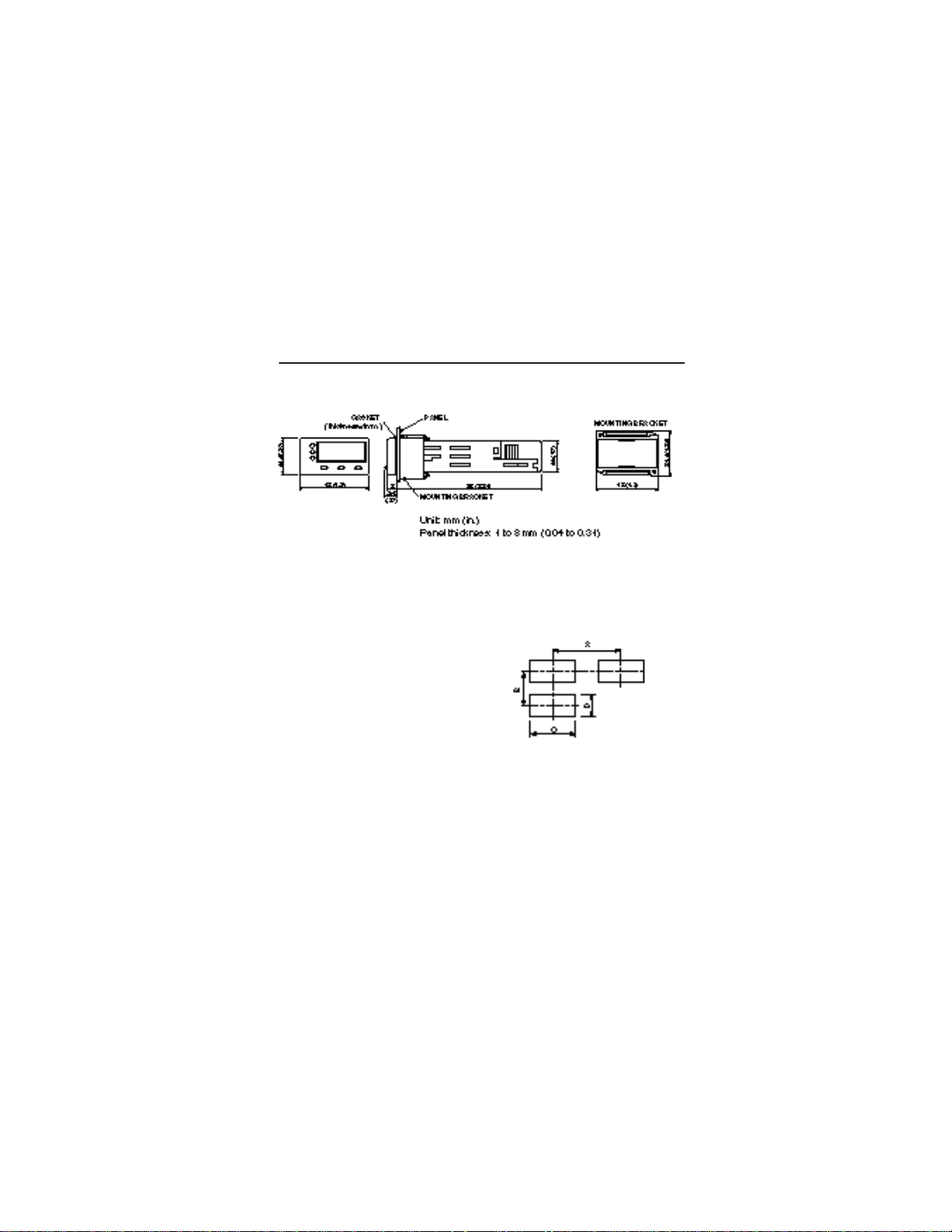
OUTER DIMENSIONS & PANEL CUTOUT SIZE
Outer Dimensions
Panel Cutout Size
When installing “n” number of units
+0.5(0.02)
-0
A: 57 (2.24) or more
B: 34 (1.34) or more
+0.3(0.01)
-0
D: 22.2 (0.87)
Page 14
14
INSTALLATION
NEMA 4X Integrity
The front side of this instrument conforms to NEMA 4X. To ensure the
waterproofness between the instrument and the panel, use the gasket
that is provided with the unit according to the installation procedure
described below.
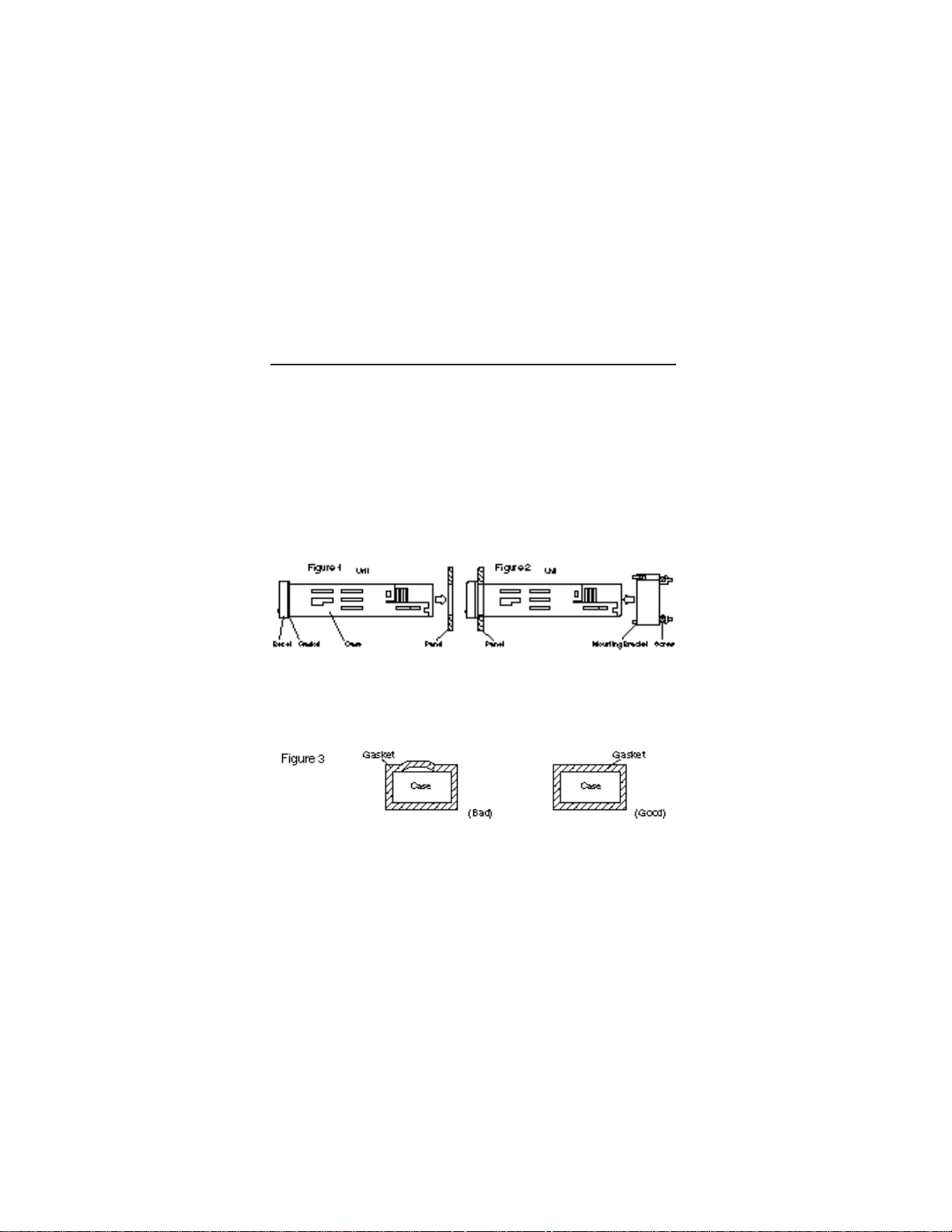
1. Install the gasket over the enclosure and insert the unit into the
panel as shown in Figure 1.
2. Slide the mounting bracket and tighten the screws as shown in
Figure 2.
Caution: After the mounting bracket is installed, check the gasket for
displacement and detachment as shown in Figure 3.
Page 15
15
WIRING INSTRUCTIONS
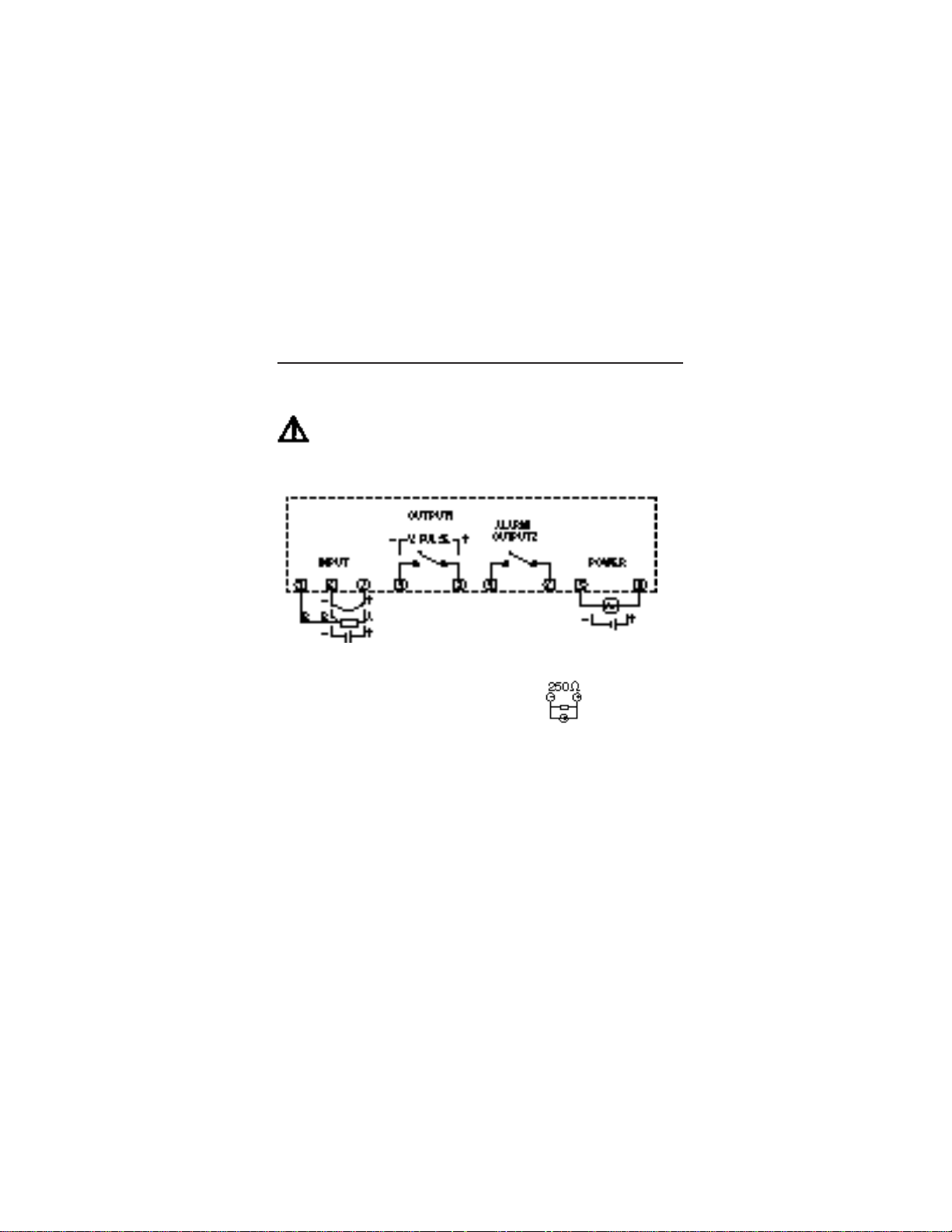
Terminal connection
Wiring material
1. For terminals 1, 2, 3, use 18 ~ 26 gauge wire.
2. For terminals 4 to 9, use 14 ~ 24 gauge wire.
Please refer to Page 28 for further instructions on wiring power,
input and output to the controller.
Warning
Be sure to use the rated power supply voltage and polarity.
* For current input, install the 250Ω precision
resistor (accessory) before using the unit.
Page 16
16
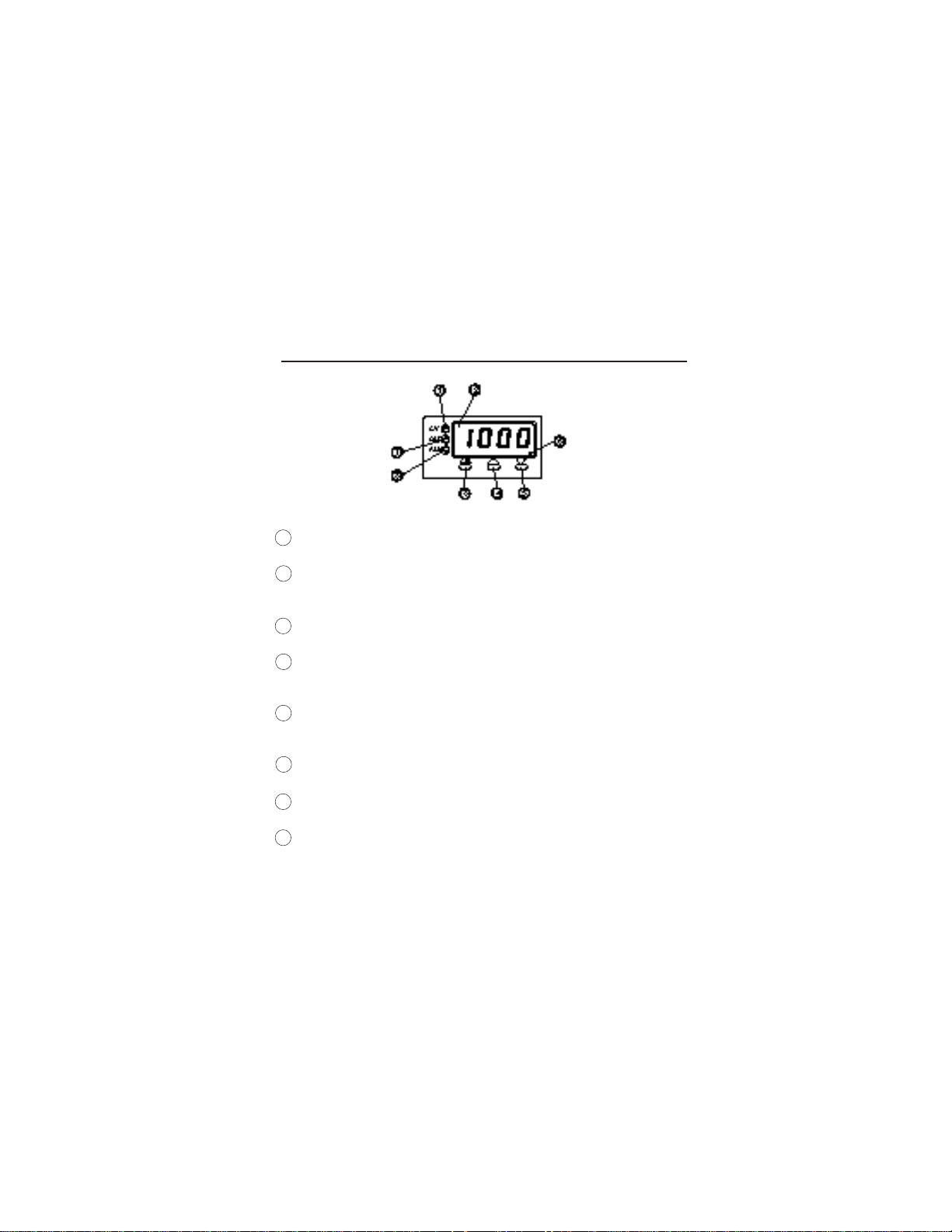
FRONT PANEL DESCRIPTION
NAME FUNCTION
1 Set value (SV) Comes on when the set value (SV)
indication lamp is displayed
2 Measured value (PV)/ Measured value (PV), Setpoint value (SV),
Set value (SV)/ or parameter symbols and codes are
parameter display displayed.
3 Select key To be used when the first, second, or
third block parameters are selected
4 UP key Pressing the key once will increase the
value by one. By pressing and holding it,
the value is continuously incremented.
5 DOWN key Pressing the key once will decrease the
value by one. By pressing and holding it,
the value is continuously decremented.
6 Autotuning indication Blinks while PID autotuning is being
lamp performed
7 Control output Comes on when the control output is ON
indication lamp
8 Alarm indication lamp Comes on when the alarm/second output
is activated. Blinks while the alarm is
being set.
Page 17

17
FRONT PANEL OPERATION
The programming menu consists of three blocks— SETUP MENU,
SYSTEM MENU, and FACTORY PRESET MENU. At power up the controller
will be in the operational mode– process variable (PV) will be displayed.
This is the variable that is being controlled, and it is not programmable.
When setting the parameters, turn off the power to the load (operating
equipment) to ensure safety. Allow 30 minutes for the unit to stabilize in
terms of temperature, and to achieve the rated accuracy. Option-related
features are displayed only when the options are provided.
Viewing and Setting Parameters
• The data is automatically registered in 3 seconds after the setting.
It can also be registered by pressing the SEL key.
How to set Setpoint value (SV)
Operation Display
1. Power on – Process value (PV)
2. Press SEL key – SV value; SV lamp is lit
3. Press UP or DOWN key – SVvalue changes accordingly
4. Press SEL key to go back to – Process value (PV); SV lamp off
the operational mode
SETUP MENU
Operation Display
1. Operational mode – Process value (PV)
2. Press SEL key for 3 seconds – roFF
3. Press UP key to select – rrUn/rHLd
rrUn/rHLd, if necessary
4. Press SEL key once – ALM LEDblinks; AH data (for
units with alarm option)
Page 18

18
5. Press SEL key to access the – AT 0, ......
next parameter
6. Press SEL key for 3 secs. – Operational mode
SYSTEM MENU
Operation Display
1. Operational mode – Process value
2. Press and hold SEL key – 3 seconds later, “roFF”
7 seconds later, “P”
3. Release and press SEL key again – “P” data
4. Press UP or DOWN key – “P” data changes accordingly
5. Press SEL key once – “P”
6. Press DOWN key to scroll down – “i”, “d”, ..... “Mod”
the menu
7. Press SEL key for 3 secs. – Operational mode
FACTORY PRESET MENU
Operation Display
1. Operational mode – Process value
2. Press and hold SEL key – 3 seconds later, “roFF”
7 seconds later, “P”
9 seconds later, “P-n1”
3. Release and press SEL key again – “P-n1” data
4. Press UP or DOWN key – “P-n1” data changed
5. Press SEL key once – “P-n1”
6. Press DOWN key to scroll down – “P-dF”, ........ “dSP7”
the menu
7. Press SEL key for 3 secs. – Operational mode
Please refer to Quick Reference guide for a listing of all the parameters.
Page 19

19
CN4431 MODEL CONFIGURATION
MODEL DESCRIPTION
_________________________________________________________________
CN4431(*)-R1 1/16 DIN controller, relay output
CN4431(*)-D1 1/16 DIN controller, DC SSR driver output
CN4431(*)-F1 1/16 DIN controller, 4-20 mA DC output
_________________________________________________________________
* Specify TR for Thermocouple/RTD input or CV for current/voltage input
ALARM OPTION
_________________________________________________________________
-A 2A, SPST relay
_________________________________________________________________
LOW VOLTAGE POWER SUPPLY OPTION
_________________________________________________________________
-24V 24V AC/DC, 50/60 Hz
_________________________________________________________________
Page 20

20
CN4431 SPECIFICATIONS
INPUT RANGE TABLE:
_________________________________________________________
Input Signal Input Range Input Range Remarks
(°C) (°F)
_________________________________________________________
Thermocouple*
J 0 ~ 800 32 ~ 1472 Cold Junction
K 0 ~ 1200 32 ~ 2192 compensating
R 0 ~ 1600 32 ~ 2912 function built-in
B 0 ~ 1800 32 ~ 3272
S 0 ~ 1600 32 ~ 2912
T -199 ~ 200 -328 ~ 392
T -150 ~ 400 -238 ~ 752
E -199 ~ 800 -328 ~ 1472
N 0 ~ 1300 32 ~ 2372
PL2 0 ~ 1300 32 ~ 2372
_________________________________________________________
RTD*
Pt100 -150 ~ 850 -238 ~ 1562 Allowable wiring
α= .00385 resistance 10 ohms
max (per wire).
_________________________________________________________
DC Voltage/
Current**
1-5V Scaling Range: -1999 to 9999 For current input, use
0-5V Engineering the 250Ω resistor to
4-20mA units obtain 1-5V DC or
0-20mA 0-5V DC input.
_________________________________________________________
* For TR models
** For CV models
See also the description for parameter P-n2 in the programming section, on
how to program for `a particular input.
Page 21

21
CONTROL FUNCTION
(SINGLE OUTPUT)
_________________________________________________________
Control action PID control with auto-tuning
Fuzzy control with auto-tuning
_________________________________________________________
Proportional band (P) 0-999.9%, of full scale (FS), setting in 0.1% steps
_________________________________________________________
Integral time (I) 0-3200 sec, setting in 1 sec steps
_________________________________________________________
Differential time (D) 0-999.9 sec, setting in 0.1 sec steps
_________________________________________________________
P,I,D = 0: On/Off action
I,D = 0: Proportional action
_________________________________________________________
Proportional cycle 1-150 sec, setting in 1 sec steps, for relay contact
output and DC SSR driver output only
_________________________________________________________
Hysteresis width 0-50% FS, setting in 1 E.U. (Engineering Unit) steps
On/Off action only
_________________________________________________________
Anti-reset wind up 0-100% FS, setting in 1 E.U. steps, auto-setting
with auto-tuning
_________________________________________________________
Input sampling cycle 0.5 sec
_________________________________________________________
OUTPUT
(Single Output)
_________________________________________________________
Control output One of the following three types is selected:
(1) Relay contact (SPDT)
220V AC/30V DC, 3A (resistive load)
Mechanical life: 10
7
times (under no load)
Electrical life: 10
5
times (under the rated load)
(2) DC SSR driver (voltage pulse):
15-30V DC at ON/0.5V DC or less at OFF.
Current– 60mA or less.
(3) 4-20mA DC:
Allowable load resistance– 600Ω or less.
_________________________________________________________
Page 22

22
ALARM
_________________________________________________________
Alarm output 1-point relay contact (SPST),
220V AC/30V DC, 1A (resistive load)
_________________________________________________________
SETTING AND INDICATION
_________________________________________________________
Parameter setting method Digital setting with three keys
_________________________________________________________
PV/SV display method Dual display for PV/SV
4 digits each, PV=red, SV=green
_________________________________________________________
Status display Control output, alarm output
_________________________________________________________
Indication accuracy Thermocouple: ±0.5% FS ±1 digit ±1°C
(at 23°C) R thermocouple: 0-400°C; ±1% FS ±1 digit ±1°C
B thermocouple: 0-500°C; ±5% FS ±1 digit ±1°C
RTD, voltage, current: ±0.5% FS ±1 digit
_________________________________________________________
ADDITIONAL FUNCTIONS
_________________________________________________________
8-segment ramp-soak: 4 ramp/4 soak with 16 different modes
Setpoint setting: 0-100% FS
Ramp/soak period: 0-99 hrs 59 mins
_________________________________________________________
Parameter mask: Parameters can be masked from being displayed
_________________________________________________________
Self-diagnosis: Watchdog timer monitors program error
_________________________________________________________
GENERAL SPECIFICATIONS
_________________________________________________________
Rated voltage 85-264V AC, 50/60 Hz, or
24V AC/DC ±10% (optional)
_________________________________________________________
Power consumption 10VA or less (100V AC)
15VA or less (240V AC)
_________________________________________________________
Insulation resistance 50MΩ or more (500V DC)
_________________________________________________________
Page 23

23
_______________________________________________________
Withstand voltage Power source-Earth: 1500V AC, 1 min
Power source-input terminal: 1500V AC, 1 min
Earth-relay output: 1500V AC, 1 min
Earth-Alarm output: 1500V AC, 1 min
Between other terminals: 500V AC, 1 min
_______________________________________________________
Input impedance Thermocouple: 1MΩ or more
Voltage: 450KΩor more
Current: 250Ω (external resistor)
_______________________________________________________
Allowable signal Thermocouple: 100Ω or less
source resistance Voltage: 1KΩ or less
_______________________________________________________
Allowable wiring RTD: 10Ω or less per wire
resistance
_______________________________________________________
Reference junction ±1°C (at 23°C)
compensation accuracy
_______________________________________________________
Process variable offset ±10% FS
_______________________________________________________
Setpoint variable offset ±50% FS
_______________________________________________________
Input filter 0-900.0 sec, setting in 0.1 sec steps
(primary lagging filter)
_______________________________________________________
Noise rejection ratio Normal mode noise (50/60Hz): 50dB or more
Common mode noise (50/60Hz): 140dB or more
_______________________________________________________
POWER FAILURE PROTECTION
_______________________________________________________
Memory protection: Non-volatile memory. Parameter values
remain unchanged with disruption of power.
Ramp/soak function has to be re-initiated.
_______________________________________________________
Page 24

24
OPERATING AND STORAGE CONDITIONS
_______________________________________________________
Operating temperature -10 to 50°C (14 to 122°F)
_______________________________________________________
Operating humidity Less than 90% RH (non-condensing)
_______________________________________________________
Storage temperature -20 to 60°C (-4 to 140°F)
_________________________________________________________
STRUCTURE
_______________________________________________________
Mounting method Panel mounting or surface mounting
_______________________________________________________
External terminal 8-pin or 11-pin socket
_______________________________________________________
Enclosure Black ABS plastic
_______________________________________________________
Dimensions 48 x 48 x 85.7mm (1/16 DIN)
1.89 x 1.89 x 3.37 in. (W x H x D)
_______________________________________________________
Weight Approx. 150g
_______________________________________________________
Protective structure Front panel: NEMA 4X (equivalent to IEC IP66)
Protection against corrosion, windblown dust
and rain, and hose-directed water.
Rear case: IEC IP20. Protection against solid
objects up to 12mm.
_______________________________________________________
Installation category: II
_______________________________________________________
Pollution degree: 2
_______________________________________________________
Page 25
25
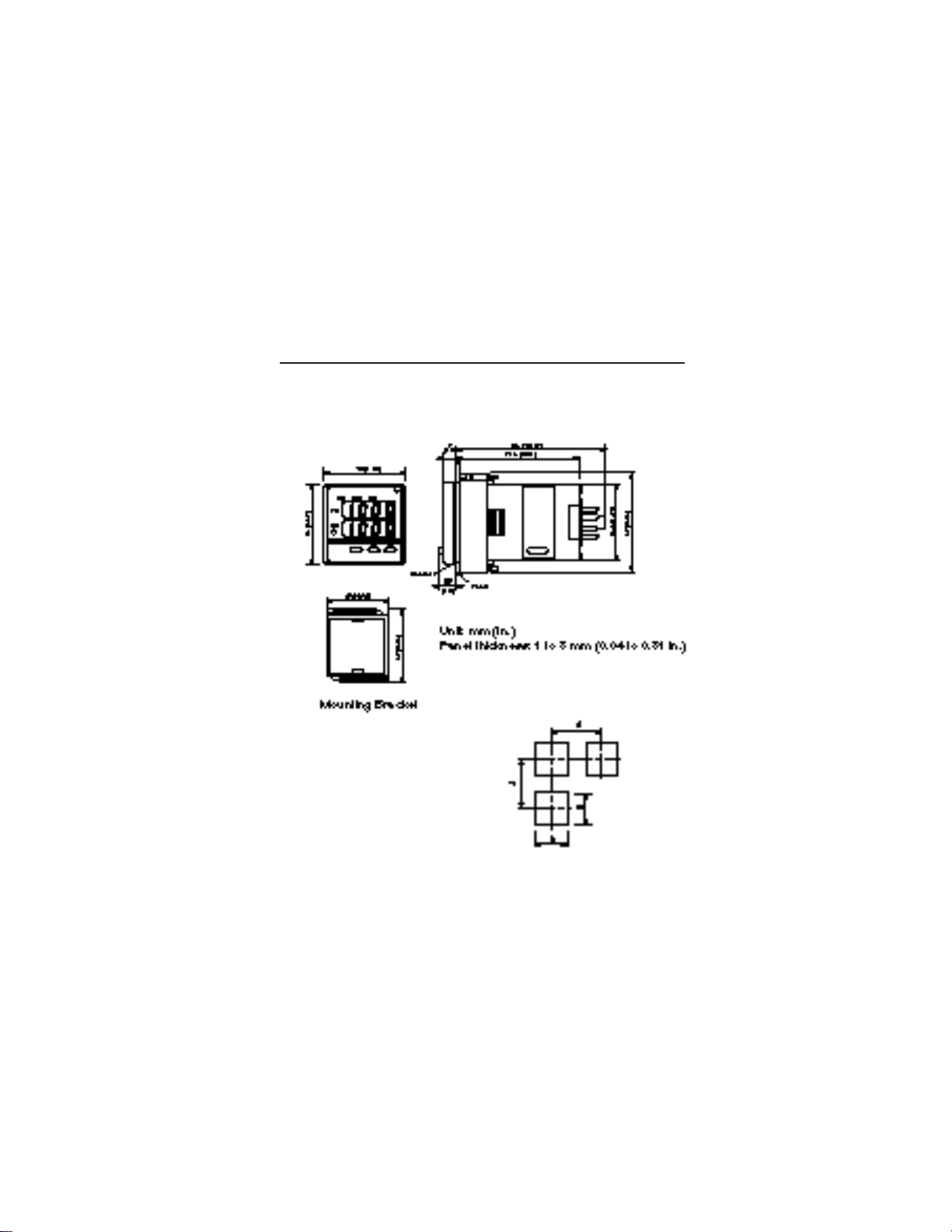
OUTER DIMENSIONS & PANEL CUTOUT SIZE
CN4431
Panel cutout size: when installing
“n” numbers of units.
+0.5(0.02)
-0
B: 45 (1.77)
A: 63 (2.48) or more
Page 26

26
INSTALLATION
NEMA 4X Integrity
The front side of this instrument conforms to NEMA 4X. To ensure the
waterproofness between the instrument and the panel, use the gasket
that is provided with the unit according to the installation procedure
described below.
How to install the unit
Install the unit in the panel as shown below, and tighten the screws on
the mounting bracket until the unit is secure. Make sure there is no
space between the front side of the unit and the gasket, and between
the gasket and the panel.
Caution: After the mounting bracket is installed, check the gasket for
any displacement as shown in Figure 3.
Page 27

27
* For current input, install the 250Ω precision
resistor (accessory) before using the unit.
WIRING INSTRUCTIONS
Warning
Be sure to use the rated power supply voltage and polarity.
Page 28

28
Wiring Power to the Controllers
• Be sure to use the rated power supply voltage and polarity to avoid
failure or damage to the unit.
• Keep the power off until all of the wiring is completed to prevent
electric shock and abnormal operation.
• Keep the power supply wires separated from the input and output
wires.
• Power connections should be made with 18-gauge or larger insulated
wire. Stranded wire improves noise immunity. Noise filters and isolation transformers are recommended in case of noisy power lines.
Wiring Inputs
There are two input categories available: Thermocouple/RTD or
current/voltage. Make sure you have the right type before wiring the
inputs. Refer to Table of Input Type Codes and set the parameter
“P-n2” accordingly.
Note: In order to minimize the risk of high frequency noise induced by
coils and windings in relays, solenoids, and transformers, use leads
which have braided sheath and ground one end of the sheath. Keep
your input leads separate from power and output leads. If you have to
bring the input signal from a long distance, a signal transmitter might be
needed to maintain an accurate reading; in this case, a unit that
accepts current/voltage input would be necessary.
Thermocouple
• Connect thermocouples directly to the input terminals whenever
possible.
Page 29

29
• If using extension wires, make sure they are of the same thermocouple material and grade; any dissimilar metal junctions will lead to
erroneous readings.
• Ungrounded thermocouples are recommended for optimal performance and to prevent ground loops.
• Make sure the polarity is correct.
RTD Pt100
• Use a 3-wire Pt100Ω RTD whenever possible. All three wires must
have low lead resistance (less than 10Ω) and no resistance differentials among them.
• If using a 2-wire RTD, jumper the two B-legs with a wire of equal
resistance.
• Make sure A and B leads are connected to the right terminals.
Current/Voltage
• The controller accepts 1-5V, 0-5V, 4-20mA, and 0-20mA DC signals. If
wiring for a voltage input, feed the signal directly to the input terminals. For current inputs, first connect the 250Ω precision resistor that
comes with the unit.
• Make sure the polarity is correct.
Wiring Outputs
Before wiring the outputs, make sure the unit has the right kind of
control output, and that all the load handling devices conform to the
controller specifications. Note that it takes 5 seconds for the outputs to
activate after the power is turned on.
Refer to parameter “P-n1” and to the Table of Output Type Codes to
choose the preferred type of control action– reverse-acting or directacting.
Page 30

30
If using two outputs in a heat/cool type control, please refer to
Appendix C for more details.
Relay
• Connecting a load to full capacity of the relay will shorten the relay
life, especially if it is operated at a rapid rate. To protect the output
relay, an external relay or a contactor should be used. If a higher
current rating is required, a solid-state relay driver type output is
recommended.
• Connect the load between the normally opened contacts of the relay.
This way, if power to the controller is disrupted, the output circuit
would open, preventing the load from running out of control.
• Set the proportional time cycle parameter, “TC” to 15 secs. or more.
(30 secs typical).
• Use of MOV circuit is recommended to protect the relay against
switching surges and to ensure the product’s long life. Connect it
between the contacts of the relay as shown in the example below.
Part No.: MOV-100 (power supply voltage: 100V)
MOV-200 (power supply voltage: 200V)
CN4431
(8-pin)
CN4321
Z-Trap
Page 31

31
DC SSR Driver (voltage pulse)
• The non-isolated DC output is used to drive an external load-handling
device such as Solid-State Relay(SSR) or Solid-State Contactor(SSC).
• The total current drawn should be within the allowed value.
• Make sure the polarity is correct.
• Set the proportional time cycle parameter, “TC” to 1 sec. or more.
4 to 20mA DC
• The output is a non-isolated analog signal used to drive a variety of
output devices such as SCRs and valve actuators.
• The load resistance must be less than 600Ω.
• Make sure the polarity is correct.
• The proportional time cycle parameter, “TC” is set to 0, and is not
displayed on the programming menu.
• Not available on CN4321.
Wiring Alarms
• Make sure the load does not exceed the rated capacity of the relay.
• Several types of alarm configurations can be programmed and does
not require a change in the wiring. Refer to parameters AL, AH, P-AH,
P-AL, P-An.
Page 32

32
SYSTEM WIRING DIAGRAMS
Example 1:
Example 2:
Page 33

33
FRONT PANEL DESCRIPTION
Name Function
1 Process Value (PV) display Displays the measured value.
2 Set value (SV) indication lamp Comes on while the set value is displayed.
3 Set value (SV) and Set value (SV), or parameter symbols and
parameter display codes are displayed.
4 SELECT key Key for switching between the parameter blocks
and for scrolling through the parameters.
5 UP key For incrementing the numerical value or scrolling
up the menu. Numerical value is incremented
continuously when held pressed.
6 DOWN key For decrementing the numerical value or scrolling
down the menu. Numerical value is decremented
continuously when held pressed.
7 Auto-tuning indicator Point LED blinks while PID auto-tuning is being
performed.
8 Control Output indication lamp Stays on while control output is ON.
9 Upper limit alarm Comes on when the upper limit alarm is activated.
indication lamp Blinks while the alarm value is being set.
10 Lower limit alarm Comes on when the lower limit alarm is activated.
indication lamp Blinks while the alarm value is being set.
Page 34

34
FRONT PANEL OPERATION
The CN4431 programming menu consists of three blocks— SETUP
MENU, SYSTEM MENU, and FACTORY PRESET MENU. At power up the
controller will be in the operational mode, and process variable (PV)
and setpoint variable (SV) will be displayed. PV is the variable that is
being controlled, and it is not programmable. When setting the parameters, turn off the power to the load (operating equipment) to ensure
safety. Allow 30 minutes for the unit to stabilize in terms of temperature,
and to achieve the rated accuracy. Option-related features are
displayed only when the options are used.
Viewing and Setting Parameters
• The data is automatically registered in 3 seconds after the setting.
It can also be registered by pressing the SEL key.
How to set Setpoint value (SV)
Operation Display
1. Power on – Operational mode
2. Press UP or DOWN key – SVvalue changes accordingly
SETUP MENU
Operation Display
1. Operational mode – PV, SV
2. Press SEL key for 3 seconds – roFF
3. Press UP key to select – rrUn/rHLd
rrUn/rHLd, if necessary
4. Press SEL key once – ‘H’ LED blinks; AH data (for
units with alarm option)
Page 35

35
5. Press SEL key to access the – ‘L’ LEDblinks, ....
next parameter
6. Press SEL key for 3 secs. – Operational mode
SYSTEM MENU
Operation Display
1. Operational mode – PV, SV
2. Press and hold SEL key – 3 seconds later, “roFF”
7 seconds later, “P”
3. Release and press SEL key again – “P” data
4. Press UP or DOWN key – “P” data changes accordingly
5. Press SEL key once – “P”
6. Press DOWN key to scroll down – “i”, “d”, ..... “Mod”
the menu
7. Press SEL key for 3 secs. – Operational mode
FACTORY PRESET MENU
Operation Display
1. Operational mode – PV, SV
2. Press and hold SEL key – 3 seconds later, “roFF”
7 seconds later, “P”
9 seconds later, “P-n1”
3. Release and press SEL key again – “P-n1” data
4. Press UP or DOWN key – “P-n1” data changed
5. Press SEL key once – “P-n1”
6. Press DOWN key to scroll down – “P-dF”, ........ “dSP7”
the menu
7. Press SEL key for 3 secs. – Operational mode
Please refer to Quick Reference guide for a listing of all the parameters.
Page 36

36
AUTOTUNING
Before initiating the autotune function, first decide if you would like
to autotune at setpoint or 10% of full scale below setpoint. Set the setpoint (SV), alarms (AL, AH) and the cycle time (TC). Bring your process
near setpoint before starting the autotune procedure. Autotuning works
best for heating processes in which the setpoint is 100°F (60°C) above
ambient temperature.
Set the parameter AT to either “1” (to auto-tune at setpoint) or “2” (to
auto-tune at 10% of full scale below setpoint) and press SEL key to start
auto-tuning. The point indicator at lower right will then start blinking.
When the auto-tuning is completed, the point indicator stops blinking
and the parameter AT will automatically be set to “0.”
Duration of the autotune process varies with every application. The
auto-tuning process may take between 1 and 30 minutes to complete.
If it fails to complete, an abnormality may be suspected. In this case,
recheck the wiring, control action, and input type code. Refer to
page 38 and Appendix A for additional details.
The PID parameters calculated by autotuning will be retained even if
the power is lost. However, if the power is turned off during the autotuning process, you must restart Autotuning. To abort the autotune
procedure, set AT to “0.” Auto-tuning has to be repeated if there is a
significant change in SV, P-SL or P-SU, or in the controlled process.
Autotuning can also be performed while fuzzy control is selected.
Page 37

37
SETUP MENU
See Quick Reference (p.74) for a listing of the menu.
PARAMETER DESCRIPTION
roFF - rhLd Ramp/Soak Command: The Ramp/Soak program auto-
matically changes the setpoint value with time
according to a preset pattern.
Setting: roFF : Normal operation is performed
rrUn : Ramp/Soak operation is performed
rhLd : Ramp/Soak operation is suspended
rEnd indicates that the operation is terminated.
AH High Alarm Setpoint: The High Alarm Setpoint is that
point of the process above which, the high alarm output
relay is energized. If the alarm type, programmed in the
setup menu, includes an absolute value for the High
Alarm Setpoint, enter the actual value you want the
alarm to be activated at regardless of what the main setpoint is set for. If the alarm type includes a deviation
value for the High Alarm Setpoint, enter the number of
units above main setpoint in which you want the alarm to
be activated at; the deviation alarm tracks main setpoint.
Set within the Input Range.
Not indicated without the alarm option.
AL Low Alarm Setpoint: The Low Alarm Setpoint is that
point of the process below which, the low alarm output
relay is energized. Absolute and deviation alarm configurations are programmable from within the secondary
menu.
Blinking
‘H’ LED
Blinking
‘L’ LED
Page 38

Set within the Input Range.
Not indicated without the alarm option, or in CN4321.
AT Autotuning: Autotuning is the automatic calculation and
entering of the control parameters (P, Iand D) into memory. Autotuning will also automatically set anti-reset windup (Ar).There are two types of Autotuning that can be
performed by the controller, Autotuning at main setpoint
or Autotuning at 10% of full scale below main setpoint.
The latter may yield slightly different values, not as precise, but the process overshoot encountered during the
autotuning procedure would not be as much. Enter the
value for the type of autotuning you would like to run on
your particular application based on overshoot tolerances
and the precision of the PID parameters needed. For
more information on principles of Autotuning, refer to
Appendix A. See also page 36.
Setting:
0 - Autotuning off
1 - Autotuning performed at setpoint
2 - Autotuning performed at 10% of F.S. below setpoint
38
Standard type (AT=1)
Low PV type (AT=2)
Page 39

LoC Parameter lock: This function enables or disables
changing the settings of parameters.
Code:
0 - All parameter settings are changeable
1 - All parameter settings are locked; cannot be changed
2 - Only the main setpoint can be changed; all other
parameter settings are locked and cannot be changed.
39
Page 40

40
SYSTEM MENU
P Proportional Band: The proportional band is that area
around main setpoint where the control output is neither
fully on nor fully off.
Setting range: 0.0 to 999.9% of full scale
For On/Off control, set to “0”
I Integral Time (reset): The Integral Time is the speed at
which a corrective increase or decrease in output is
made to compensate for offset which usually accompanies proportional only processes. The more Integral Time
entered, the slower the action. The less Integral Time
entered, the faster the action. Enter a value that would
eliminate offset without overcompensation, that could
result in process oscillations.
Setting Range: 0 to 3200 secs
Integral action is turned off when set to “0”
d Derivative Time (Rate): The Derivative Time is that time
used in calculating rate of change and thermal lag in
helping to eliminate overshoot that results in response to
process upsets. This overshoot usually accompanies
proportional-only and proportional-integral processes.
The derivative action dampens proportional and integral
action as it anticipates where the process should be.
The more Derivative Time entered, the more the damping
action. The less Derivative Time entered, the less the
damping action. Enter as much Derivative Time as necessary to eliminate overshoot without over-damping the
process, that could result in process oscillations.
Setting Range: 0.0 to 999.9 secs
Derivative action is disabled when set to “0”
Page 41

41
TC Cycle Time (Output #1): The Cycle Time for output #1 is
that time where the output is on for a percentage of that
time and off for a percentage of that time, creating a
proportioning effect. The Cycle Time is only used when
P, PI, PD, or PID control action is used, and when the
output is time proportional as with the relay or SSR driver outputs. The shorter the Cycle Time, the higher the
proportioning resolution is, and better is the control, but
there will be an increased strain on the output device.
Enter a value that is based on the limitations of your
controller’s output type.
Setting range: 1 to 150 secs.
For relay output: Set to 15 secs. or more (30 secs typ.).
For DC SSR driver output: Set to 1 sec or more.
For current output: Set to 0 (normally not indicated)
Page 42

42
HYS Hysteresis: Hysteresis is that area around the main set-
point where the output does not change condition. That
area or deadband is intended to eliminate relay chatter
at setpoint for On/Off control applications. The wider the
Hysteresis, the longer it takes for the controller to
change output condition. The narrower the Hysteresis,
the less time it takes for the controller to change output
condition. When the Hysteresis is narrow, the On/Off
control is more accurate but the wear on the output relay
is increased. Enter a value which is small enough to meet
the control tolerance of the application but large enough
to eliminate relay chatter.
Setting range: 0 to 50% of FS, set in E.U., for output #1.
Hysteresis for On/Off action for dual outputs (heating and
cooling) is fixed at 0.5% of full scale.
Page 43

43
TC2 Cycle Time (Output #2) The Cycle Time for output #2 is
similar in function to Cycle Time for output #1. Output #2
is the cooling side of heat/cool controller CN4321. Enter
a value that is based on the limitations of your controller’s output type.
Setting Range: 1 to 150 secs.
Not indicated without the control output #2 option
Not indicated with current output.
Cool Proportional Band Coefficient for Cooling: The Propor-
tional
Band
Coefficient for
Cooling
is a multiplier for
the pro-
portional
band on the cooling side of a heat/cool controller. It
varies the width of the proportional band on the cooling
side. A large value would establish a larger proportional
band for more powerful cooling loads. A small value
would establish a smaller proportional band for less
Page 44

44
Deadband/Overlap
Page 45

45
powerful cooling loads. Enter a value based on the
power of your cooling load.
Setting Range: 0.0 to 100.0
Not indicated without control output #2 option.
Set to “0” for On/Off control.
db Deadband/Overlap: The Deadband/Overlap is that per-
centage of the heating side of the proportional band
where the heating (output #1) and the cooling (output #2)
outputs are separated by a deadband or where they
overlap on a heat/cool controller. A value greater than
zero establishes a Deadband area where neither the
heating nor cooling outputs are energized, for more powerful heating and cooling loads. A value less than zero
establishes an Overlap area where both the heating and
cooling outputs are energized at the same time, for less
powerful heating and cooling loads. Enter a value based
on the power of your heating and cooling loads as well
as the application’s efficiency in maintaining tight
Page 46

46
heat/cool control.
Setting range: -50.0 to 50.0% of the heating proportional
band.
Not indicated without control output #2 option
bAL Balance: Balance is used to pre-position the proportional
band with respect to setpoint. With Balance (MV Offset)
set at 50% the proportional band will be centered around
setpoint. To move the band left or right, decrease or
increase the balance setting respectively.
Setting range: 0-100%
Ar Anti-Reset Wind-up: Anti-Reset is used to limit the range
where integration occurs. This helps in stabilizing a system. With Anti-Reset at 100%, integration will occur
throughout the proportional band. With Anti-Reset set to
90%, integration will occur at 90% of the band above the
setpoint and 90% of the band below the setpoint. Autotuning automatically sets Ar.
Setting range: 0-100% of full scale, set in E.U.
P-n2 Input type: The Input Type is the type of sensor to be
used with the controller in sensing the process variable.
The Input Type must be correctly programmed into the
controller in order for the controller to perform with the
selected sensor type. Depending on the type of sensor to
be used, the controller comes in two models. One model
accepts J, K, R, B, S, T, E, N thermocouples and RTDs
(Pt100), and the other model accepts 1-5/0-5V DC and 420/0-20mA DC signals.
The current/voltage model comes with a 250Ω precision
resistor. Wired directly to the controller, it converts a
current signal into a voltage signal. There is no need to
Page 47

47
Table of Input Type Codes
Page 48

48
use the resistor if a voltage signal is applied directly.
After the appropriate physical changes have been
made, the controller will still need the correct code for
the input type to be used. Enter the appropriate code
from the Table of Input Type Codes.
P-SL Lower Limit of Input Range: The Lower Limit of Input
Range is that value which establishes the desired low
limit for the type of input used. The value must be
greater than or equal to the input type’s lowest limit.
Setpoint settings are restricted to values greater than
the low limit. Parameters which are calculated as a percentage of full scale are affected by this setting. An
underscale error message is indicated on the process
variable display when the process variable goes below
the Lower Limit of Input Range setting by 5% of full
scale. The primary purpose of the Lower Limit of Input
Range when used with a thermocouple or RTD sensor
input is to limit setpoint settings. Making the input range
smaller does not increase the accuracy. The primary
purpose of the Lower Limit of Input range when used
with 1-5/0-5V DC or 4-20/0-20mA DC signal input is to
scale the range so that 1/0V DC on a 1-5/0-5V DC signal
and 4/0mA DC on a 4-20/0-20mA DC signal equals the
low limit of the engineering unit range used. The engineering unit range could be %, PSI, GPM, PH, or any
range which can be scaled between -1999 and 9999
units.
Enter a value to set Lower Limit of Input range based on
the type of input used.
P-SU Upper Limit of Input Range: The Upper Limit of Input
Range is that value which establishes the desired high
Page 49

49
Page 50

50
limit for the type of input used. The value must be less
than or equal to the input type’s highest limit. Setpoint
settings are restricted to values less than the high limit.
Parameters which are calculated as a percentage of full
scale are affected by this setting. An overscale error
message is indicated on the process variable display
when the process variable goes above the Upper Limit
of Input Range setting by 5% of full scale. The primary
purpose of the upper limit when used with a thermocouple or RTD input is to limit setpoint settings. Making the
input range smaller does not increase the accuracy. The
primary purpose of the Upper Limit of Input range when
used with 1-5/0-5V DC or 4-20/0-20mA DC signal input is
to scale the range so that 5V DC on a 1-5/0-5VDC signal
and 20mA DC on a 4-20/0-20mA DC signal equals the
high limit of the engineering unit range used. The engineering unit range could be %, PSI, PH, or any range
which can be scaled between -1999 and 9999 units.
Enter a value to set Upper Limit of Input range based on
the type of input used.
P-dP Decimal Point Position (Resolution): The Decimal Point
Position is the resolution at which the controller displays
the process variable and other parameter values. The
display can indicate integers, tenths or hundredths of a
unit. The Decimal Point Position does not increase the
accuracy of the controller, it only increases the resolution.
For a thermocouple, integers are usually sufficient due to
the accuracy rating and the programmed input range. For
a RTD (Pt100), integers or tenths of a degree may be
entered, because of the increased accuracy of these
sensors, depending on the programmed input range. For a
Page 51

51
1-5/0-5V DC or 4-20/0-20mA DC signal, integers, tenths or
hundredths of a unit may be entered depending on the
programmed input range.
Setting:
0 -None
1- Tenths of a unit
2 - Hundredths of a unit
P-AH Alarm Type 1:
P-AL Alarm Type 2: These functions set the control action
for the optional alarm output relays. They can be programmed for absolute, deviation, combination, or zone
alarm configuration. The high and low alarm setpoints
are set with primary menu parameters AH and AL (AL is
not applicable in the case of CN4321). The absolute
alarm configurations are independent of main setpoint.
The alarm output relays are energized when the
process variable exceeds the alarm setpoint, an
absolute value. The deviation alarm configuration is
main setpoint tracking. The alarm output relays are
energized when the process variable exceeds the main
setpoint by a deviation value set by AL or AH. The combination alarm
configurations are a mixture of both the deviation and
absolute value settings for the high and low alarms.
With zone alarm configurations the alarm output is
energized between the range set by AL and AH.
One of the alarm types is Alarm with Hold. In this case
the alarm is not turned on the first time the measured
value is in the alarm band. Instead it turns on only when
the measured value goes out of the band and enters it
again. This type is useful when using deviation alarm
with step type input.
Page 52

52
Table of Alarm Action Type Codes—CN4321
Page 53

53
Table of Alarm Action Type Codes—CN4431
Page 54

54
Enter the code for P-AH and P-AL from the Table of Alarm
Action Type Codes. See pages 57 &58.
P-AL is not applicable in the case of CN4321.
Note 1: A change of alarm action type can cause the alarm
set value to change, but this is not a malfunction.
Note 2: After the alarm type is changed, turn off the power
to the unit once.
PVOF Process Variable Offset: The Process variable Offset is
the amount by which the indicated process variable is
shifted in a positive or negative direction. Both the indicated as well as the measured process variable will be
changed. This parameter can be used to correct for differences in sensors, sensor placement, and standardization problems. Enter a value which is the difference
between the measured process value and the actual
process value of the system.
Setting range: -10 – 10% of full scale
SVOF Setpoint Variable Offset: The Setpoint Variable Offset
is that amount of offset which shifts the measured setpoint variable in a positive or negative direction. The
measured setpoint variable is changed but the
indicated
setpoint variable remains unchanged. Be careful when
using this variable because what you see as the setpoint variable may be very different from the actual setpoint variable.
Setting range: -50 – 50% of full scale
Indicated Setpoint Variable is Unchanged
Measured Setpoint Variable is Changed
P-F C/F Selection: The C/F Selection allows choosing either
the Celsius or the Fahrenheit scale. If using the con-
Page 55

55
troller to control a process other than temperature using
the current/voltage input model, the C/F Selection is not
important because the scaling is done using the lower
limit of the input range and upper limit of input range
parameters, and the indication is in engineering units.
Setting: °C or °F
STAT Ramp/Soak Status: The Ramp/Soak program automati-
cally changes the setpoint value with time in accordance
with a preset pattern, as shown in the figure. This device
allows a maximum of four ramp and four soak segments.
Ramp: Region in which the setpoint changes toward the target value.
Soak: Region in which the setpoint stays unchanged at the target value.
Note 1: SV cannot be changed while the operation is running or suspended.
Note 2: The use of fuzzy control is inhibited while Ramp-Soak operation is being performed.
Ramp is the region in which SV changes toward the target
value. Soak is the region in which the target value is maintained. STAT displays the current ramp/soak status. No setting can be made.
Page 56

56
1. Power on Start: Program starts from the current PV value.
2. Output on END: Output condition at the end of the program (rEnd)
3. Output on OFF: Output condition when program is terminated (roFF)
4. Repeat function: Ramp-soak program operates repeatedly.
If the repeat function is off, the SV value on the last
step is maintained.
Stand-by mode: Output -3%, Alarm off.
Going on Control: When program ends (rEnd), control is at the SV value
on the last step. When program is terminated (roFF), control
is at the main SV value.
MOD Power on start Output on END Output on OFF Repeat function
0 No Continue controlling Continue controlling No
1 No Continue controlling Continue controlling Yes
2 No Continue controlling Stand-by mode No
3 No Continue controlling Stand-by mode Yes
4 No Stand-by mode Continue controlling No
5 No Stand-by mode Continue controlling Yes
6 No Stand-by mode Stand-by mode No
7 No Stand-by mode Stand-by mode Yes
8 Yes Continue controlling Continue controlling No
9 Yes Continue controlling Continue controlling Yes
10 Yes Continue controlling Stand-by mode No
11 Yes Continue controlling Stand-by mode Yes
12 Yes Stand-by mode Continue controlling No
13 Yes Stand-by mode Continue controlling Yes
14 Yes Stand-by mode Stand-by mode No
15 Yes Stand-by mode Stand-by mode Yes
Table of Ramp/Soak Modes
Page 57

57
oFF: Not in operation
1-rP – 4-rP: Executing 1st – 4th ramp
1-St – 4-St: Executing 1st – 4th soak
End: End of program
SV-1 Ramp Target Value: Sets the target value for each ramp
to to segment.
SV-4 Setting range: 0-100% of full scale
TM1r Ramp Segment Time: Sets the duration of each ramp
to to segment.
TM4r Setting range: 00.00 to 99hrs 59mins.
TM1S Soak Segment Time: Sets the duration of each soak
to to segment.
TM4S Setting range: 00.00 to 99hrs 59mins.
Mod Ramp/Soak Mode: Up to 16 different modes of ramp/soak
operations are possible. Choose the appropriate code
from the Table of Ramp/Soak Modes
Setting: 0-15
FACTORY PRESET MENU
P-n1 Control Action & Sensor Burn-out Protection: The
Control Action is the direction of the output relative to
the process variable. The controller can be programmed
as either a reverse-acting or a direct-acting controller.
In a reverse-acting controller, the controller’s output
decreases as the process variable increases. A heating
Page 58

58
Table of Output Type Codes
Page 59

59
application would require reverse acting control. In a
direct-acting controller, the output increases as the
process variable increases. A cooling application would
require direct-acting control. Enter the code from the
Table of Output Type Codes which establishes the controller as either a reverse or direct-acting controller.
The Sensor Burn-out Protection is the intended direction of the output in the event of a thermocouple or RTD
sensor break, or a break in the analog input. The controller can be programmed with either upscale or downscale burn-out direction. With upscale burnout, 100%
output will be delivered in the event of sensor burnout.
With downscale burnout, 0% output will be delivered in
the event of sensor burnout. Enter the appropriate code
from the Table of Output Type Codes.
Refer to Error Messages on page 62 for more details.
P-dF Input Filter Constant: The Input Filter is used to filter out
the quick changes that occur to the process variable in
a dynamic or quick responding application that might
cause erratic control. By slowing down the response
Page 60

time, the controller averages out the peaks and valleys of
a dynamic system which, in turn, stabilizes the control.
The digital filter also aids in controlling processes where
the electrical noise is affecting the input signal. The larger the value entered, the more filter added and the slower the controller reacts to process variable changes. The
smaller the value entered, the less filter added and the
quicker the controller reacts to process variable
changes. Enter as small a value as possible that pro-
vides accurate and stable control.
Setting range: 0.0-900.0 secs
P-An Alarm Hysteresis: The Alarm Hysteresis is that area on
one side of the alarm setpoint where the output does not
change condition. That area or deadband is intended to
eliminate relay chatter at alarm setpoint with less wear
on the relay. With a wide Alarm Hysteresis, the controller
takes a longer time to change output condition. With a
narrow Alarm Hysteresis, the controller takes a shorter
time to change output condition. Enter a value which is
just large enough to eliminate relay chatter.
Setting Range: 0 to 50% of full scale, set in E.U.
60
Page 61

61
FUZY Fuzzy Logic Control: Employing Fuzzy Logic Control in
addition to PID control eliminates system overshoot and
effectively suppresses fluctuation of the process variable due to external disturbances. This function may be
enabled even during auto-tuning. Note that fuzzy control
is not effective in units with dual outputs, due to the
complexity of the process. Fuzzy control is also inhibited
while the Ramp/Soak function is in operation.
ADJ0 Zero/span Calibration: This function is used for zero/
ADJ span calibration of the input. Calibration is effected by
first applying the appropriate signal for zero and span
Page 62

ERROR MESSAGES
Error
Indication Cause Control Output
1. Thermocouple burnt out. When the burn-out
2. RTD (A) leg burnt out. control output is set for
3. PV value exceeds P-SU lower limit (standard):
by 5% FS. OFF,or 4mA or less.
1. When RTD (B or C) is When the burn-out
burnt out. control output is set for
2. When RTD (between upper limit: ON, or 20mA
A and B, or between or less.
A and C) is shorted.
3. When PV value is below
P-SL by 5% FS.
4. When analog input wiring
is open or short.
When PV value goes below Control is continued until
-1999. the value reaches -5% FS
or less, after which burnout condition will occur.
HB lamp ON Heater burnout condition Normal control output for
heating is continued.
When the setting of OFF, or, 4mA or less.
P-SL/P-SU is improper
Fault in the unit Undefined. Stop use
immediately.
62
Page 63

63
APPENDIX A
Autotuning
By autotuning, the controller selects what it calculates to be the optimal
PID control parameters for a particular process and then stores them in
EEPROM memory for future use. The PID parameters are stored so that
when the controller is powered up after being shut down, the controller
does not need to be autotuned again. The controller uses the same autotuned PID parameters until the Autotune function is again initiated. The
Autotune parameters are only good for the process the Autotune function was used on. If the setpoint is significantly changed, the input sensor is changed, the load or output device is changed or relocated, or any
other disturbances occur which might change the dynamics of the system, the Autotune function should be performed again. The autotuned
control parameters are not always perfect for every application but
almost always give the operator a good starting point from which further
refinement of the control parameters can be performed manually.
The autotuning algorithm used here is particularly suited for temperature
control applications and may not always autotune effectively for other
processes. Here are cases where the Autotune function does not perform well or does not perform at all:
1. The system is affected by process disturbances external to the control
loop. Adjacent heater zones, changing material levels, exothermic
reactions are examples of process disturbances which are external
to the control loop. The controller would never be able to autotune
such an unstable process.
2. The system is very dynamic. The process variable changes very quick-
ly. Certain pressure and flow applications would be characterized as
Page 64

64
very dynamic. Because of how the Autotune function is performed, a
very dynamic system would create very large overshoots which
could damage the process.
3. The system is very insulated and cannot cool down in a timely manner. With such heating systems the autotuning function would take a
long time to complete, with questionable results.
During autotuning test signals are sent to the process. The test signals
are 100% output and 0% output at the Autotune point. The Autotune
point can either be at setpoint or 10% of full scale below setpoint.
The controller performs as an On/Off controller. See diagram below.
The
Page 65

65
controller then reads the reaction of these test signals on the process.
Keep in mind that every process is different and therefore every reaction to the test signals is different. This is why PID parameters are not
the same for all processes. The amplitude (L) or lag time which is the
overshoot and undershoot of the system when autotuning, and the time
constant (T) which is the time the process takes to go through one
On/Off cycle are measured. See diagram below.
The measurements are then used with the Autotune algorithm for calculation of the proper PID parameters for the system, as shown below,
where K is the proportionality constant and S is the Laplace operator.
K
e
-LS
(1+TS)
Page 66

66
APPENDIX B
Manual Tuning
Tune the controller if any of the following occurs:
• The controller is installed in a new system
• The controller is used as a replacement in an existing system
• The input sensor is relocated or changed
• The output device is relocated or changed
• The setpoint is significantly changed
• Any other condition that will alter the dynamics of the system
Proportional Band
The proportional band is a band around the setpoint of the CN4431
where the output is between 0% and 100%. The percentage of output is
proportional to the amount of error between the setpoint variable (SV)
and the process variable (PV). Outside of the proportional band the output is either 0% or 100%
The proportional band on CN4321/CN4431 is equidistant from the main
setpoint as illustrated below.
Page 67

67
An example of proportioning would be a vehicle approaching a stop sign
at an intersection. If the driver were traveling at 50mph and only applied
his brakes once at the intersection, his car would skid through the intersection before coming to a full stop. This illustrates how On/Off control
acts. If, however, the driver started slowing down some distance before
the stop sign and continued slowing down at some rate, he could conceivably come to a full stop at the stop sign. This illustrates how proportional control acts. The distance where the speed of the car goes from 50
to 0 MPH illustrates the proportional band. As you can see, as the car
travels closer to the stop sign, the speed is reduced accordingly. In other
words, as the error or distance between the car and the stop sign
becomes smaller, the output or speed of the car is proportionally diminished. Figuring out when the vehicle should start slowing down depends
on many variables such as speed, weight, tire tread, and braking power
of the car, road conditions, and weather much like figuring out the proportional band of a control process with its many variables.
The width of the proportional band depends on the dynamics of the system. The first question to ask is, how strong must my output be to eliminate the error between the setpoint variable and process variable? The
larger the proportional band (low gain), the less reactive the process. A
proportional band too large, however, can lead to process wandering or
sluggishness. The smaller the proportional band (high gain), the more
Page 68

68
reactive the output becomes. A proportional band too small, however,
can lead to over-responsiveness leading to process oscillation.
A proportional band which is correct in width approaches main setpoint
as fast as possible while minimizing overshoot. If a faster approach to
setpoint is desired and process overshoot is not a problem, a smaller or
narrower proportional band may be used. This would establish an overdamped system or one where the output would change greatly, proportional to the error. If process overshoot cannot be tolerated and the
approach to setpoint does not have to be quick, a larger or wider proportional band may be used. This would establish an under-damped
system or one where the output would change little, proportional to the
error.
To Calculate Proportional Band:
Proportional Band Proportional Band
(as a percentage) =
____________________
X 100%
Input Range
Example:
30°C
3% =
__________
X 100%
100°C
Proportional Band
(as a percentage)
Proportional Band Range =
____________________
X 1000°C
100%
Example:
3%
30°C =
__________
X 1000°C
100%
Page 69

69
Integral Time
With the proportional band alone, the process tends to reach equilibrium at some point away from the main setpoint. This offset is due to the
difference between the output needed to maintain setpoint and the output of the proportional band at setpoint. Since the proportional band is
equidistant from the main setpoint, the output is around 50%. If anything
more or less than 50% output is required to maintain setpoint, an offset
error will occur. Integral action eliminates this offset. See the diagrams
below.
Integral action eliminates offset by adding to or subtracting from the
output of the proportional action alone. This increase or decrease in
output corrects for offset error within the proportional band in establishing steady-state performance at setpoint. It is not intended to correct for process disturbances. See the following diagram.
Page 70

70
Integral Time is the speed at which the controller corrects for offset. A
short integral time means the controller corrects for offset quickly. If the
integral time is too short, the controller would react before the effects
of previous output shifts–due to lead or lag time–could be sensed,
causing oscillation. A long Integral time means the control corrects for
offset over a long time. If the integral time is too long, the offset will
remain for some time causing a slow responding or sluggish control.
See the diagram below.
Derivative Time
In the case of a process upset, proportional only or proportional-integral action cannot react fast enough in returning a process back to setpoint without overshoot. The derivative action corrects for disturbances
providing sudden shifts in output which oppose the divergence of the
process from setpoint. See the diagram below.
Page 71

71
The derivative action changes the rate of reset or integration proportional to the rate of change and lag time of the system. By calculating
the rate of change of the process and multiplying it by the lag time
which is the time it takes the controller to sense an output change, the
controller can anticipate where the process should be and change the
output accordingly. This anticipatory action speeds up and slows down
the effect of proportional and proportional-integral actions to return a
process to setpoint as quickly as possible with minimum overshoot. See
the diagram below.
Derivative time is the amount of anticipatory action needed to return a
process back to setpoint. A short derivative time means little derivative
action. If the derivative time is too short, the controller would not react
quickly to process disturbances. A long derivative time means more
derivative action. If the derivative time is too large, the controller would
react too dramatically to process disturbances creating rapid process
oscillation. A process which is very dynamic such as pressure and flow
applications is more efficiently controlled if the derivative action is
turned off because of the oscillation problem that would result in.
Page 72

72
Tuning
Tuning, as with any PID loop, requires tuning each parameter separately and in sequence. To achieve good PID control manually, you can use
the trial and error method explained below.
Tune the Proportional Band
Set Integral Time = 0 (off)
Set Derivative Time = 0 (off)
Start with a large Proportional Band value which gives very sluggish
control with noticeable offset and tighten by decreasing the value in
half. Analyze the process variable. If the control is still sluggish, tighten
by decreasing the value in half again. Continue with the same procedure until the process starts to oscillate at a constant rate. Widen the
Proportional Band by 50%, or multiply the setting 1.5 times. From a cold
start, test and verify that the Proportional Band allows maximum rise to
setpoint while maintaining minimum overshoot and offset. If not completely satisfied, fine-tune the value, up or down, as needed and test
until correct. The Proportional Band is now tuned.
Add Integral Time
Start with a large Integral Time value which gives very sluggish
response to process offset and tighten by decreasing the value in half.
Analyze the process variable. If the response to process offset is still
sluggish, tighten by decreasing the value in half again. Continue with
the same procedure until the process starts to oscillate at a constant
rate. Increase the Integral Time value by 50%. From a cold start, test
and verify that the Integral Time allows maximum elimination of offset
with minimum overshoot. If not completely satisfied, fine-tune the value,
up or down, as needed and test until correct. The Integral Time is now
tuned.
Page 73

73
Add Derivative Time
Do not add Derivative Time if the system is too dynamic. Start with a
small Derivative Time value which gives sluggish response to process
upsets and double the value. Analyze the process variable. If the
response to process upsets is still sluggish, double the value again.
Continue with the same procedure until the process starts to oscillate
at a quick constant rate. Decrease the Derivative Time value by 25%.
From a cold start, test and verify that the Derivative Time value allows
maximum response to process disturbances with minimum overshoot. If
not completely satisfied, fine-tune the value, up or down, as needed and
test until correct. Note that the Derivative Time value is usually somewhere around 25% of the Integral Time value. The derivative Time is
now tuned.
Another tuning method is the closed-loop cycling or Zeigler-Nichols
method. According to J.G. Zeigler and N.B. Nichols, optimal tuning is
achieved when the controller responds to a difference between setpoint and the process variable with a 1/4 wave decay ratio. That is to
say that the amplitude of each successive overshoot is reduced by 3/4
until stabilizing at setpoint. The procedure is explained below.
1. Integral Time=0
Derivative Time=0
2. Decrease the Proportional Band to the point where a constant rate
of oscillation is obtained. This is the response frequency of the
system. The frequency is different for each process.
3. Measure the Time Constant which is the time to complete one cycle
of the response frequency. The Time Constant will be defined as “T”
when calculating Integral and Derivative Times.
Page 74

74
4. Widen the Proportional Band until only slightly unstable. This is the
Proportional Band’s Ultimate Sensitivity. The Proportional Band’s
Ultimate Sensitivity width will be defined as “P” when calculating
the actual Proportional Band.
5. Use the following coefficients in determining the correct PID settings
for your particular application.
Control P I D
Action Setting Setting Setting
P Only 2P * *
PI 2.2P .83T *
PID 1.67P .5T .125T
Page 75

75
APPENDIX C
Heat/Cool Option (Available on CN4321 only)
With the Heat/Cool Option, the CN4321 can control a temperature application with one input at one main setpoint using two outputs, a heating
output and a cooling output. By using a heating and cooling output, a
process is able to quickly bring the temperature to setpoint in both
directions and to limit the amount of overshoot. The larger the deviation
from setpoint, the more output applied to the system on both the heating and cooling sides. Heat/Cool control is a very effective way of controlling exothermic processes, processes that generate their own heat,
or processes where ambient temperature is not adequate or fast
enough in returning a process back to setpoint.
The two outputs on the CN4321 are independent and sent to two different output devices. The first output could be either a relay or a DC SSR
driver, while the second output has to be a relay output only.
The CN4321 controls the cooling side with three additional parameters,
TC-2, COOL, and DB as explained in the programming section.
TC2 Cycle Time (Output #2): Because Output #2 is not nec-
essarily the same as Output #1, the cycle time may be
different.
CooL Proportional Band Coefficient for Cooling:
Because
the cooling power may not necessarily be the same as
the heating power, the cooling proportional band may
be different from that of the heating proportional band.
Page 76

db Deadband/Overlap: Deadband is that area where neither out-
puts are energized. Overlap is that area when both outputs
are energized. This function lets you decide where you want
the heating action to stop and the cooling action to begin.
Notes:
1. The Heat/Cool Option is available on the CN4321 controller only.
Output #2 can be a relay output only.
2. Integral and Derivative Times are the same for both the heating and
cooling sides of a process with PID control because the response
frequency or time constant of the system does not change at main
setpoint when cooling is added.
3. The Proportional Band for heating and cooling are almost always
different. Rarely does the same amount of cooling output remove the
same percentage of process error as the heating output does. The
Cooling Proportional Band must be manually and separately tuned.
4. If the heating side is set for On/Off control, the cooling side will be
set for On/Off control also. Regardless of what the COOL parameter
is set for, if the Proportional Band is set to zero, the Heating Proportional Band and the Cooling Proportional Band will always be zero.
5. If the cycle times of one or both outputs are long and the process
dynamic, there is a good chance that both outputs will be cycling on
and off at the same time around main setpoint. This is evident if one
or both outputs are relays.
6. Autotune is not effective on the cooling side of Heat/Cool control.
Autotune the controller for heat only and then manually tune the
cooling parameters.
76
Page 77

77
Wiring and Setting
1. Make sure that the controller has a relay installed for Output #2.
Verify that parameters TC2, COOL, and db are indicated in the
Setup menu.
2. Wire your cooling load to the Output #2 terminals located on the
back of the controller.
3. In the Factory Preset menu, program the correct code for Heat/Cool
action. See Table of Output Type Codes.
4. In the System menu, program TC2, the cycle time for Output #2.
5. Autotune or manually tune the PID parameters of your controller.
Autotune will work for the heating PID parameters but not on the
cooling parameters. You must manually tune the cooling parameters.
6. With the heat side tuned, manually set the COOL parameter or
Proportional Band Coefficient for Cooling. If the cooling output is
less powerful than the heating output, the Cooling Proportional Band
must be narrower than the Heating Proportional Band; the COOL
parameter would be less than “1”. If the cooling output is more powerful than the heating output, the Cooling Proportional Band must be
wider than the Heating Proportional Band; the COOL parameter
would be more than “1”. See the programming section for more
details.
7. Finally, you can add a Deadband/Overlap. The programmed Deadband/
Overlap parameter can be within -50% to +50% of the Heating
Proportional band. To establish a Deadband, parameter “db” is set
Page 78

78
somewhere between 0% and 50% of the Heating Proportional band.
To establish an Overlap, “db” is set somewhere between -50% and
0% of the Heating Proportional Band.
8. Manually fine-tune the parameters, “CooL” and “db”, until just the
right amount of cooling is achieved. Refer to the programming
section for more details on these parameters.
Heating Side Cooling SIde
Heating Proportional Band Cooling Proportional Band
[P/2] [P/2 COOL]
I I (same as for heating)
D D (same as for heating)
Page 79

P 0.0 - 999.9%FS Proportional band 5.0 dSP1-128
I 0 - 3200sec Integral time 240 dSP2-1
D 0.0 - 999.9sec Derivative time 60 dSP2-2
TC 1 - 150sec Cycle Time (output #1) † dSP2-4
HYS 0 - 50%FS Hysteresis 1 dSP2-8
TC2** 1 - 150sec Cycle Time (output #2) † dSP2-16
CooL** 0.0 - 100.0 Proportional band 1.0 dSP2-32
coefficient for cooling
db** -50 - 50% of P Deadband/Overlap 0.0 dSP2-64
bAL 0 - 100% Balance 0.0/50.0 dSP2-128
Ar 0 - 100%FS Anti-reset wind-up 100%FS dSP3-1
P-n2 0 - 16 Input type code † dSP3-2
P-SL -1999 - 9999 Lower range of input 0%FS dSP3-4
79
Parameter Range Description Default DSP
settings settings
roFF - rHLd roFF/rrUn/rHLd Ramp/soak command roFF dSP1-1
AH 0 - 100%FS High Alarm Setpoint 10 dSP1-2
AL 0 - 100%FS Low Alarm Setpoint 10 dSP1-4
Hb - N/A 0.0 dSP1-8
AT 0 - 2 Auto-tuning 0 dSP1-16
LoC 0 - 2 Parameter lock 0 dSP1-32
CN4321/CN4431 QUICK REFERENCE
Setup Menu
System Menu
HB
H
L
Page 80

Parameter Range Description Default DSP
settings settings
P-SU -1999 - 9999 Upper range of input 100%FS dSP3-8
P-dP 0 - 2 Decimal point position 0 dSP3-16
P-AH 0 - 11 Alarm Type 1 code 5 dSP3-32
P-AL* 0 - 15 Alarm Type 2 code 9 dSP3-64
PVOF -10 - 10%FS PV offset 0 dSP3-128
SVOF -50 - 50%FS SV offset 0 dSP4-1
P-F °C/°F °C/°F selection † dSP4-2
STAT -- Ramp/soak status oFF dSP4-4
SV-1 0 - 100%FS 1st setpoint 0%FS dSP4-8
TM1r 0 - 99hr 59min 1st ramping time 0.00 dSP4-16
TM1S 0 - 99hr 59min 1st soaking time 0.00 dSP4-32
SV-2 0 - 100%FS 2nd setpoint 0%FS dSP4-64
TM2r 0 - 99hr 59min 2nd ramping time 0.00 dSP4-128
TM2S 0 - 99hr 59min 2nd soaking time 0.00 dSP5-1
SV-3 0 - 100%FS 3rd setpoint 0%FS dSP5-2
TM3r 0 - 99hr 59min 3rd ramping time 0.00 dSP5-4
TM3S 0 - 99hr 59min 3rd soaking time 0.00 dSP5-8
SV-4 0 - 100%FS 4th setpoint 0%FS dSP5-16
TM4r 0 - 99hr 59min 4th ramping time 0.00 dSP5-32
TM4S 0 - 99hr 59min 4th soaking time 0.00 dSP5-64
MOD 0-15 Ramp/soak Mode code 0 dSP5-128
80
Page 81

81
Parameter Range Description Default DSP
settings settings
P-n1 0 -19 Control Action code † dSP6-2
P-dF 0.0 - 900.0sec Input Filter Constant 5.0 dSP6-4
P-An 0 - 50%FS Alarm Hysteresis 1 dSP6-8
rCJ - N/A ON dSP6-16
PLC1 - N/A -3.0 dSP6-32
PHC1 - N/A 103.0 dSP6-64
PLC2 - N/A -3.0 dSP6-128
PHC2 - N/A 103.0 dSP7-1
PCUT - N/A 0 dSP7-2
FUZY OFF/ON Fuzzy control OFF dSP7-4
GAIN - N/A 1 dSP7-8
ADJ0 - Zero calibration 0 dSP7-16
ADJS - Span calibration 0 dSP7-32
OUT - N/A -3.0 dSP7-64
dSP1-7 0-255 Parameter mask † -
* Not applicable to CN4321
**Not applicable to CN4431
† Based on the model
Factory Preset Menu
 Loading...