

Page 1
OLYMPUS®
VOICE
RECORDER
NOTECORDER
DP-311
~
ENGLISH
•••••••••••••••
2
0!]
ITALIANO
••••••••••••
86
~
ROMANIA
•••••••••••
135
~
6bnrAPMH
••••••••••••
9 [ill
LIETUVIV
................
93
~
PYCCKMM
•••••••••••
142
~
CESTINA
••••••••••••••
16
~
LATVIESU
•••••••••••
100
~
SLOVENCINA
•••••••
149
~
DANSK
••••••••••••••••
23
ffih]
NEDERLANDS
•••••
107
[ill
SLOVENSCINA
•••••••
156
[@
DEUTSCH
••••••••••••
30
~
NORSK
•••••••••••••••
114
~
SRPSKI
•••••••••••••••••
163
[ill
EAAHNIK)l
••••••••••
37
~
POLSKI
••••••••••••••
121
~
SVENSKA
•••••••••••
170
[rn
ESPANOL
•••••••••••••
44
[f!J
PORTUGUES
•••••••
128
~
T0RK~E
••••••••••••••
177
[IT]
EESTI
••••••••••••••••••
51
~
YKPAIHCbKA
••••••
184
[ill
SUOMI
••••••••••••••••
58
~
~){(fiJi*)
•••••••••
191
~
FRAN~AIS
•••••••••••
65
@
~
~){(ifftl)
•••••••••
198
[HID
HRVATSKI
••••••••••••
72
205
••••••••••••••••
~yJ'
~
fUiil
MAGVAR
79
Registeryourproductonwww.olympus-
212
\.:.
I
FA
I
~
I J
•••••••••••••
consumer.com/register
and
get
additional
••••••••••••••••
~
_)~
benefits from Olympus!
Page 2
•
2
lflfl
Introduction
lilY
~""'·'~'
''"~"''~'='=~-,,_;::~,=<~,.;:~=<'··''"·
"'~'M";
.;
:·;.:=><=~=========="='='='='=~===========:::::,=::':~:
'~::<rc~·~,
·
<."'::
;:-.-·::;;=:::====:::::~:=,=~:::::::::::~~:::::.::=sc::~=-=
:=:=
=:~
;.;;::uw':·
::r-:~x~:.:"~
Thank you for purchasing
an
Olympus Digital
Voice Recorder.
Please
read
these instructions
for information about using the product
correctly and
safely.
Keep
the instructions
handy for future reference.
To
ensure
successful
recording, we recommend
that
you test the
record function and
volume
before
use.
The
contents
of
this document
are
subject
to change
without
notice. Contact our
Customer Support Center for the
latest
information
relating
to
product names and
model numbers.
Illustrations
of
the screen and the recorder
shown in this
manual
may differ from
the
actual
product.
The
utmost care
has
been taken
to
ensure the integrity
of
this
document
but
should you happen
to
find a
questionable
item, error or omission,
please
contact our Customer
Support
Center.
• Olympus
does
not
accept any
liability
for
passive damages or damage
of
any kind
incurred due
to
data
loss
resulting
from a
defect
of
the product, repair performed
by a third party other than
Olympus
or
an
Olympus
authorized service station, or for
any other reason.
•
MPEG
Layer-3 audio coding
technology
is
licensed
from Fraunhofer
liS
and Thomson.
•
SD
and
SDHC
are
registered trademarks
of
SD
Card
Association.
.s~
,s;~TM
·=·
....
General precautions:
•
Do
not
leave
the recorder in hot, humid
locations
such
as
inside a closed automobile
under direct
sunlight
or on the beach in the
summer.
•
Do
not
store the recorder in
places
exposed
to
excessive moisture or dust.
•
Do
not
use
organic
solvents such
as
alcohol
and
lacquer
thinner
to
clean
the unit.
•
Do
not
place
the recorder on
top
of
or
near electric appliances
such
as
TVs
or
refrigerators.
•
Avoid recording or
playing back near
cellular
phones or other
wireless equipment,
as
they
may cause interference and noise.
If
you
experience noise, move to another
place, or
move the recorder further away from such
equipment.
•
Avoid sand or dirt. These
can
cause
irreparable
damage.
•
Avoid strong vibrations or shocks.
•
Do
not
disassemble, repair or modify the
unit
yourself.
•
Do
not
operate the
unit
while
operating a
vehicle
(such
as
a
bicycle, motorcycle,
or
car).
•
Keep
the
unit
out
of
the reach
of
children.
•
Do
not
insert a card other than
SD
or
SDHC
card into the recorder.
If
you
accidentally
insert such a card,
do
not
try
to
forcibly
remove
it
but
contact our
repair center or service station.
Warning regarding data
loss:
•
Recorded content in memory may be
destroyed or erased by operating mistakes,
unit
malfunction, or during repair work.
• It
is
recommended
to
back
up
important
recorded content
to
an
SD
or
SDHC
card or
keep a written record
of
the
content.
•
Any
liability
for passive damages or damage
of
any kind occurred due
to
data
loss
incurred by a defect
of
the product, repair
performed by the third party other than
Olympus or
an
Olympus
authorized service
station, or any other reasons
is
excluded
from
Olympus's liability
.
Batteries:
Ltoanger:
• Batteries
should
never be exposed
to
flame,
heat, short-circuited or
disassembled.
•
Never store batteries where they
will
be
exposed
to
direct
sunlight,
or subjected
to
high temperatures in a
hot
vehicle,
near a
heat source, etc.
Lt
Warning:
•
Do
not
solder lead
wires or
terminals directly
onto
a battery or modify it.
•
Do
not
connect
the
(f)
and
8 terminals
together.
This
may cause fire, overheating or
electric
shock.
•
When carrying or storing the batteries, be
sure
to
put
them in the provided
case
to
protect their
terminals.
Do
not
carry or store
the batteries
with
any
metal objects (such
as
key rings).
If
this warning
is
not
followed,
fire,
overheating or
electric
shock may occur.
•
Do
not
insert the batteries
with
their
(f)
and
8 terminals
reversed.
• If
any liquid
from a battery gets
into
your
eyes,
promptly
wash
it
off
with
clean
water
and
consult your doctor at once.
• Do
not
attempt
to
recharge
alkaline, lithium
or any other non-rechargeable batteries.
• Never
use
any batteries
with
a torn or
cracked outer cover.
•
Keep
batteries
out
of
the reach
of
children.
• If
you notice anything
unusual when using
this product such
as
abnormal
noise, heat,
smoke, or a burning odor:
1 remove
the
batteries
immediately while
being
careful
not
to
burn
yourself,
and;
2 call
your dealer
or
local Olympus
representative for service.
• Do
not
expose the batteries
to
water. Do
not
allow water
to
contact the
terminals.
•
Do
not
remove or damage the batteries
insulating
sheet.
•
Do
not
use
the batteries
if
you find
something wrong
with
them such
as
leakage,
color
change or deformity.
• Unplug the charger
if
the charging
is
still
incomplete
after the specified time
it
should
take.
• Should
any batteries
liquid get on skin or
clothing, promptly
wash
it
off
with
clean
water.
•
Keep
batteries away from fire.
Lt
Caution:
• Do
not
subject batteries
to
strong shocks.
When using
rechargeable
batteries
that
have
not
been used for a
while, be sure
to
recharge them before
use.
• Rechargeable
batteries have a
limited
lifetime.
When the operating time becomes
shorter even
if
the
rechargeable
battery
is
fully
charged under the specified condition,
replace it with a new one.
Page 3
0
Insert
batteries.
~
Strap
eyelet
0 •
A strap
is
not
supplied
with
this
product.
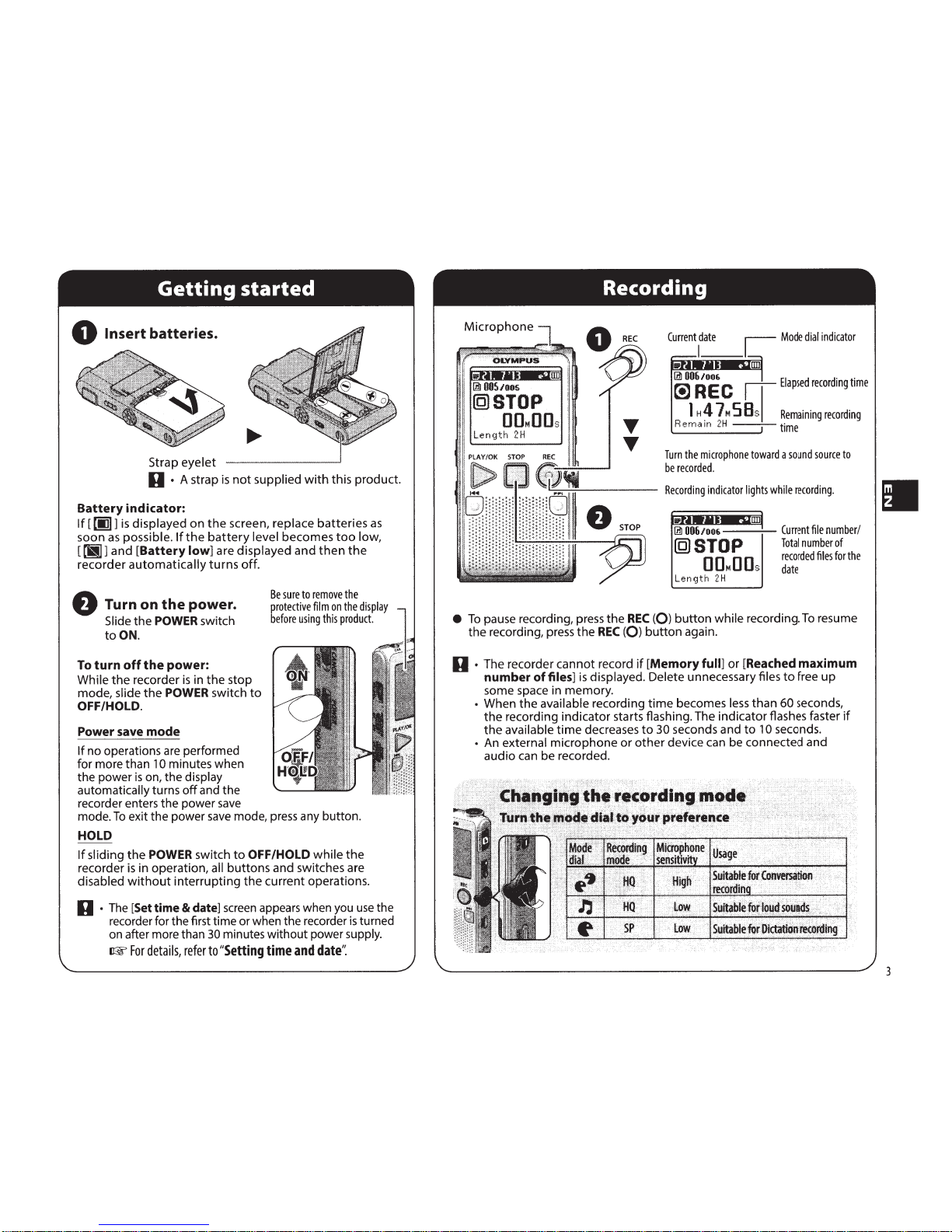
Battery
indicator:
If
[
00}]
is
displayed
on
the
screen,
replace
batteries
as
soon
as
possible.
If
the
battery
level
becomes
too
low,
[
riiJ]
and
[Battery
low]
are
displayed
and
then
the
recorder
automatically
turns
off.
8
Turn on
the
power.
Slide
the
POWER
switch
to
ON.
To
turn
off
the
power:
While
the
recorder
is
in
the
stop
mode,
slide
the
POWER
switch
to
OFF/HOLD.
Power save
mode
If
no
operations are
performed
for
more
than
1
0
minutes
when
the
power
is
on,
the
display
automatically
turns
off
and
the
recorder enters
the
power
save
Be
sure
to
remove
the
protective
film
on
the
display
before
using
this
product.
mode.
To
exit
the
power
save mode, press any
button.
HOLD
If
sliding
the
POWER
switch
to
OFF/HOLD
while
the
recorder
is
in
operation,
all
buttons
and
switches
are
disabled
without
interrupting
the
current
operations.
0 ·
The
[Set
time
&
date]
screen appears when you use the
recorder for
the
first
time
or when
the
recorder
is
turned
on after more than
30
minutes
without
power
supply.
rrw
For
details,
refer
to
"Setting
time
and
date':
!'.
1m
OOS/OOS
@STOP
[)[)M[)[)s
Len
gth
2H
PLAY/OK
STOP
REC
REC
...
...
Current
1
date
L
Mode
dial
indicator
~~
C
rl-
Elapsed
recording
time
I
"4 7
•
S
B
s
I
Remaining
recording
Re
m a
tn
2H
1
time
Turn
the
microphone
toward
a
sound
source
to
be
recorded
.
~-
::
::-
Recording
indicator
lights
while
recording.
--~
Current
file
number/
Total
number
of
recorded
files
for
the
date
Length
2H
•
To
pause recording, press
the
REC
(Q)
button
while
recording.
To
resume
the
recording, press
the
REC
(Q)
button
again.
0 ·
The
recorder
cannot
record
if
[Memory
full]
or
[Reached
maximum
number
of
files]
is
displayed.
Delete
unnecessary files
to
free
up
some
space
in
memory.
•
When
the
available
recording
time
becomes
less
than
60 seconds,
the
recording
indicator
starts flashing. The
indicator
flashes faster
if
the
available
time
decreases
to
30 seconds
and
to
10 seconds.
• An
external
microphone
or
other
device
can be
connected
and
audio
can be recorded.
3
Page 4

II
4
OLYMPUS
I
11~
0
s~roP
(](]M(](]s
llength
2H
Pii
.
Y/OK
STOP
REC
0
PLAY/OK
T
T
Length
2H
·
Recording
date
Current
file
number
Elapsed
playback
time
Playback
position
bar
indicator
Approximate
file
length
•
To
fast-forward or rewind a file,
press
and
hold~
or~
button
while
playing back a
file.
•
To
skip
to
the next file or previous file,
press~
or~
button.
•
Fast-forwarding or rewinding continues
to
the next file.
When
an
earphone
is
connected,
the
speaker
is
turned
off.
The
sound
output
will
be
monaural
when
using
earphones
.
Volume
To
avoid
irritation
to
the
ear,
turn
down
the
volume
before
inserting
the
earphones.
Do
not
raise
the
volume
too
high
when
using
earphones.
It
may
cause
hearing
impairment
and
a
decrease
in
hearing
ability.
D ·
Earphones
are
not
supplied
with this product.
Page 5

Press
the
SEARCH/MENU
button
to
switch
to
calendar display.
Selection
cursor
@ -
Today's
date
(highlighted)
@ I I t.
@
'"7
_8_
9
10
111.2
13
c
114
.1li
16 17 18 19
2D
@---f.ljg)'"22
'"23
24
25
26
27
® I ?Q
?Q
":!fl
":!
1
@]
®0
@,
Voice
memos
have
been
registered
to
days
displaying
this
symbol.
®
(B)
This
icon
will
be
selectable
if
the
files
saved
in
the
[Import]
folder
of
the
SO
card
(sold
separately)
are
playable.
------
File search and playback
@
Recording
files
have
been
registered
to
days
displaying
this
symbol.
Search for files by
the
date
they
were recorded
or
scheduled.
0
0 0
PLAY/OK
liD liD
~
s
1<11
...
.. ..
1
S M T W T F S
I
......
.. ..
1
1 2
':.1
'5 6
[9
or
[§
1 2
':.1
4 '5 6
[9
or
[§
'7..B..3 10111213
'7..B..310111213
........
14
.lli
16 17 18 19
2D
~9
14
.15.
16
17 18
19
2D
9
6]"2273
24
25 26
27
6]''22
"23
24
25
26
27
28
29
30
31
an
28
29
30
31
an
Select
the
date.
Create a
new
schedule using voice
memo
Start recording after selecting
the
date.
liD
S M T W T F S
1 2
':.lt1l'5
6
'7
_a_
9
10
1112
13
14
.lli
16
17 18 19
2D
6]"2273
24
25
26
27
28
29
3o
31
an
0
1<11...
~
[9
or
[§
~9
IIIl
S M T W T F S
1 2
':.1
4 '5 6
'7
_a_
9
10
1112
13
14
.15.
16
17
18 19
2D
6]"2273
24[l§]
26
27
28
2s
3o
31
an
Select
the
date.
0 0
REC
~
0
[QJ
or
[§
~~
9
I
IIIl
II
~
START'*~
PlAY
Select
[File]
or
[Memo].
liD
@j]IJ
START'*@REC
Select
[Memo].
If
you
select
[File],
the
file
will
be
attached
to
the
date
in
which
it
was
recorded.
0 · Up
to
10 voice memos per day
of a maximum
of 1 minute
each can be recorded.
• Voice memos are managed in internal memory.
~
For
details,
refer
to
"Memory':
0
IIIl
•
PLAY/OK
[lll
001/006
~~
~PLAY
1
H4
7MS8s
The
first
file
is
played
back.
0
•r•-.••-IIIl
REC
~~
ooMEMor
15/BOsec
-+-®
Press
the
SEARCH/MENU
button
to
go
back
to
the
calendar
screen.
®
Current
memo
number/Total
number
of
memos
for
the
date
@
Elapsed
recording
time/
Remaining
recording
time
II
5
Page 6

I
6
The recorder
has
different ways
to
erase files.
The menu
displayed
varies
depending
on
the
type
of
the
file
to
be erased.
Select
the
file you
want
to
erase beforehand.
Example:
Erasing
an
audio
file
Set
Memory
·~
.,.
..
1
01006/006
~~~m
tl~l"l~ll
~OKf~AVi
0
1+11
•~>~
~
[9
or§
~
·MilD
OK=*~PLAV
....·~
•.r•••I..UIID
File
Erase
~
0
~0@
or@
~
File
Erase
~
X
..,.o~
•.r•••I..UIID
Erased
®
Erase
all
files
@
Erase
all
files
which
were
recorded
on
the
selected
date
0 ·
Once erased, files cannot be restored. Double-check before
deleting it.
@
Erase
the
selected
file
only
@
Cancel
•
If
no operations are performed for 8 seconds,
the
recorder
returns
to
the
stop mode.
If
[Cancel]
is
selected
and
the
PLAY/OK([>)
button
is
pressed,
the
recorder
returns
to
the
stop
mode.
•
It
may take more than
1
0
seconds
to
complete
the
process. Do
not
remove
the
batteries while
processing,
as
this may result
in corrupted data.
Check
the
battery
level
beforehand
to
ensure
that
the
batteries
do
not
run
out
while
processing.
The
SO
card
allows
you
to
store more
files.
Switch
to
SO
card
If
you
have
any
recorded
data
in
the
internal
memory
and
when
you
insert
a
SD
card,
data
transfer
screen
will
be
automatically
shown.
Operate
according
to
the
instructions
on
screen.
When
you
finish
transferring
the
data
to
the
SO
card,
you
may
start
using
with
the
SO
card.
Playing
external
files
The
[Import]
folder
will
be
created
automatically
when
you
insert
the
SO
card.
Copy
the
MP3
files
from
computers
or
other
external
devices
into
the
[Import]
folder.
After
selecting
(£]
in
the
calendar,
external
files
can
be
played
back
by
pressing
the
PLAY/OK([>)
button.
About
MP3 files
•
Variable
bit
rate
MP3
files
may
not
be
played
back
properly.
•
Even
if
the
file
format
is
compatible
for
playback
on
this
recorder,
the
recorder
does
not
support
every
encoder.
0 ·
Inserting
the
SD
card in
the
wrong
way
or
at an angle could damage
the
contact area
or
cause
the
SD
card
to
jam.
•
If
the
SD
card
is
not
inserted
all
the
way, data may
not
be recorded on the
SD
card.
• Quickly moving your finger away after pushing the
SD
card inward may cause
it
to
eject
forcefully
out
of
the slot.
•
Even
with
the
SD
card inserted, voice memos
will
be saved
to
internal memory.
•
An
SD
card
is
not
supplied
with
this product.
Page 7

Press
SEARCH/
MENU
for
more
than
1
second.
Setting
time
and
date
Press~
or~
to
highlight
the
item
you
want
to
set,
then
press
PLAY/OK
([>).
......-------
Time
&
Date
a;
rm1
1 I
Beep
OJ
G>B
(
~)
-,
Language
PLAY/OK
0~.=9~PLAY
-j-
~
Set
In order
to
manage the
files conveniently,
it
is
recommended
to
set
the time and date.
0
Use
the~
and~
buttons
to
change
the
values.
20
13
Jan
26
OK~
~PLA
Y
0
PLAY/OK
~
~
The
clock
will
start
from
the
set
date
and
time.
Press
the
PLAY/OK([>)
button
according
to
the
time
signal.
Check
the
time
and
date
settings
before
using
the
product
again
if
it
is
left
unused
for
long
periods
of
time
.
When
the
recorder
is
in
stop
mode,
press
and
hold
the
STOP
(0)
button
to
display
the
[Time
&
Date]
and
[Remain]
.
Turning
the
beep
On/Off
0
Use
the~
and~
buttons
to
turn
the
operating sound
On/Off .
0
~'1
1
J
~~
Changing
the
display language
Use
the~
and
~
buttons
to
select
the
display language.
• Cestina
•
Dansk
·Deutsch
·English
• Espanol
•
Fran<;ais
·Italiano
OK
=}~PLA
Y
•
Nederlands
·Polski
•
PyccKVIIi1
•
Svenska
.
filf*t:p~
·IUit:p~
0
PLAY/OK
~~
•
7
Page 8

01:
The power cannot be turned on.
A
1:
·Batteries are exhausted.
·Batteries
are
inserted incorrectly.
Check®
and 8 before inserting new
batteries.
·Terminals
are
soiled.
Clean
them
with a dry
cloth.
02:
Nothing happens when a
button
is
pressed.
A2:
·The
POWER
switch
is
set
to
OFF/HOLD
position.
Slide the
POWER switch
to
the ON
position.
IJ
03:
The sound
is
quiet
or
there
is
no sound
from the speaker during playback.
A3:
The earphone plug
is
plugged into the
recorder.
8
The volume
is
set
to
the
low
level.
04:
Recording
is
not
possible.
A4:
By
pressing
the
REC
(Q)
button:
·Check
if
the
display shows [Memory full].
·Check
if
the display shows [Reached
maximum number
of
files].
Delete unnecessary files before recording.
A maximum
of
999 files can be recorded in
a day.
05:
The playback speed
is
too
fast (slow).
AS:
The recorder
is
set
to
fast (slow) Playback.
Use
the
PLAY
SPEED
button
to
set
to
normal playback.
Recording medium:
Built-in memory:
2GB
SD
card: 512MB
to
32GB
Overall frequency:
~'I
I
J:l:
70
to
11,000
Hz
~:
70
to
3,800 Hz
Guide
to
recording times (Internal memory):
~'I
I
J:1
: Approx. 62
h.
~
: Approx. 166
h.
Microphone:
Electret Condenser Microphone (monaural)
Speaker:
Built-in 0
36
mm
round dynamic speaker
Maximum
power:
200mW
Maximum
headphone output:
~
150 mV (according
to
EN
50332-2)
MIC jack (monaural}:
0
3.5
mm
mini-jack, impedance 2
kO
EAR
jack (monaural}:
0
3.5
mm
diameter, impedance 8 0 or more
Power supply:
Two AAA
(LR03)
batteries
Guide
to
alkaline
battery
life:
During recording mode
~'I
I
J:l
: Approx. 60
h.
~
: Approx.
81
h.
During playback mode (Built-in speakers)
~'I
I
J:1
: Approx.
23
h.
~:
Approx. 24
h.
During playback mode (Earphone)
~'I
I
J:l
: Approx.
57
h.
~
: Approx. 62
h.
Dimensions:
105.5
(L)
mm x 53
(W)
mm
x 19.7
(T)
mm
(without
protrusions)
Weight:
96 g (including battery)
Operating temperature:
ooc-
42°C
• Battery life
is
measured by Olympus.
It
varies
greatly according
to
the
type
of
batteries
used and the conditions
of
use.
• Your recorded contents are for your personal
use
or pleasure only.
It
is
prohibited
to
record
copyrighted
material
without
permission
of
the copyright holders according
to
copyright
law.
• Specifications and design are subject
to
change
without
notice for improvement
of
performance.
•
:a
:a
The
"CE"
mark indicates
that
this
product
complies
with
the
European requirements for safety,
health, environment and customer
protection.
This symbol [crossed-out wheeled
bin
WEEE
Annex IV] indicates
separate collection
of
waste electrical
and electronic
equipment
in the
EU
countries.
Please
do
not
throw
the
equipment
into
the domestic refuse.
Please
use
the return and collection
systems available in your country
for
the disposal
of
this product.
Applicable Product:
DP-311
This symbol [crossed-out wheeled
bin Directive
20061661EC
Annex
II]
indicates separate collection
of
waste batteries in
the
EU
countries.
Please
do
not
throw
the
batteries
into
the
domestic refuse.
Please
use
the return and collection systems
available in your country for
the
disposal
of
the waste batteries.
Page 9

222
For customers in
North
and
South America
USA
RFI:
This
equipment
has
been tested and
found
to
comply
with
the
limits
for
a
Class
B
digital
device, pursuant
to
part
15
of
the
FCC
Rules. These
limits
are designed
to
provide
reasonable
protection
against harmful
interference in a residential installation.
This
equipment
generates, uses and can
radiate radio
frequency
energy and,
if
not
installed and used in accordance
with
the
instructions, may cause harmful interference
to
radio communications. However, there
is
no
guarantee
that
interference
will
not
occur in a particular installation.
If
this
equipment
does cause
harmful
interference
to
radio
or
television reception,
which
can be
determined
by
turning
the
equipment
off
and
on,
the
user
is
encouraged
to
try
to
correct
the
interference
by
one
or
more
of
the
following
measures:
•
Reorient
or
relocate
the
receiving antenna.
• Increase
the
separation
between
the
equipment
and receiver.
• Connect
the
equipment
into
an
outlet
on
a circuit
different
from
that
to
which
the
receiver
is
connected.
• Consult
the dealer
or
an experienced
radio/
TV
technician
for
help.
Canadian
RFI:
This
digital
apparatus does
not
exceed
the
Class
B limits
for
radio noise emissions
from
digital
apparatus
as
set
out
in
the
Radio
Interference Regulations
of
the
Canadian
Department
of
Communications.
Cet
appareil
numerique
ne depasse pas
les
limites de
Categorie B
pour
les
emissions de
bruit
radio
emanant
d'appareils numeriques,
tel que prevu
dans les Reglements sur
!'Interference Radio du
Departement
Canadien
des Communications.
OLYMPUS
IMAGING
Br
AUDIO
KeyMed House, Stock Road, Southendon-Sea,
Essex,
SS2
5QH, United Kingdom
Tel.:
0800
1
1 1 4888,
Fax.:
+44
(0)
1702445134
email: consumer@olympus.co.uk
http:/
/www.olympus.co.uk
OLYMPUS
REP.
OFFICE
OCG,
BULGARIA
blvd.Bulgaria 88, entr.2,
fl.
1,
ap.3
1680
Sofia, Bulgaria
http:/
/www.olym
pus.bg
OLYMPUS
CZECH
GROUP
S.R.O.
Evropska 1 76
160
41
Praha 6
info-linka pro technicke dotazy:
+420 800
167 777
http:/
/www.olympus.cz
OLYMPUS
DANMARK
A/S
Tempovej 48-50
2750 Ballerup
Tlf.: +45 44
73
47
00
OLYMPUS
DEUTSCHLAND
GMBH
Wendenstr. 14-18,
D-20097
Hamburg
Tel.:
(040) 237730
Olympus Consumer Service
c/o
arvato
healthcare
Werner-Schroder
Strar3e
1 21035
Hamburg
AIKO
HELLAS
S.A.
24, Archelaou
Str.,
1 1 635 Athens
Tel.
+30
210 7290168
Fax
+30 210 7220197
e-mail: info@aiko.gr
http:/
/www.aiko.gr
OLYMPUS
ESPANA
S.A.U.
Domenico Scarlatti, 1 1 28003
Madrid
Tf.:
902.444.104,
Fax.:
91.343.1 9.17
AMETLIK
ESINDUS
http:/
/www.olympus.ee
Page 10

OLYMPUS FINLAND OY
Vanrikinkuja 3
FIN-02600
ESPOO
Puh. (09) 875 810
OLYMPUS FRANCE CENTRE
TECHNIQUE
Pare
d'Affaires Silic, 55, rue
de
Monthlery
94533 Rungis Cedex Service clients
Tel.:
os1
o 223 223
E-mail: serviceclient.gp@olympus.fr
OLYMPUS D.O.O.
ZA
TRGOVINU
Avenija Veceslava Holjevca 40
HR-
10020 Zagreb
Tel: +385 1 4899 000
OLYMPUS
REP.
OFFICE OCG,
HUNGARY
H-1 038 Budapest, Papfrgyar
u.
58-59
tel:
+36
1 2509377
http:/
/www.olympus.hu
POLYPHOTO S.P.A.
Via Cesare Pavese 1 1/1 3 - 20090 Opera
(MI)
info.microregistratori@olympus.it
Tel: (02) - 530021
http:/
/www.olym
pus.
it
OLYMPUS SERVISO CENTRAS
Kareivi4 g. 19,
LT-091
33, Vilnius
Lietuva
Tel.
+37061459773
E-mail: info@olympus.lt
OLYMPUS LATVIA SIA
Vienlbas
gatve
87 b
LV
- 1 004 Riga
http:/
/www.olympus.lv
OLYMPUS NEDERLAND B.V.
lndustrieweg
44
2382 NW
Zoeterwoude
Tel:
0031 (0)71-5821881
http:/
/www.olym
pus.n I
OLYMPUS NORGE
AS-
CONSUMER
Postboks 1 1 9 Kjelsas,
041 1 OSLO
Tlf.: 23 00 50 50
OLYMPUS POLSKA
SP. Z 0.0.
-
BIURO
Olympus Polska
sp.
z o.o.
ul. Suwak 3
02-676 Warszawa
Tel.:
(22) 366 00 77
Faks:
(22)
831
04
53
NAPRAWA
PRODUKT6W
OLYMPUS
lnformacje dotyczqce obstugi
napraw
gwarancyjnych
i
pogwarancyjnych
Olympus Polska
udziela w
dni
powszednie w godzinach
8:30-16:30
Olympus Polska
Sp.
z o.o.
Tel.:
(22) 366 00 66
Faks:
(22)
831
04
53
E-mail: serwis@olympus.pl
http:/
/www.olym
pus.pl
OLYMPUSPortuga~SA
Rua
Prof.
Orlando
Ribeiro, 5 B
Telheiras
1600-796
Lis
boa
Tel: +351 217 543 280
Olympus
rep.
office OCG, Romania
Calusei street 69 A
021
353 Bucuresti, Romania
http:/
/www.olympus.ro
000
«On
1,1
M
nYC
PYC»
r.
MocKsa,
yn.
3neKTpo3aBO,[\CKaR,
,[\.
27,
CTp.8
Ten.:
+7
495 926 70
71
http:/
/www.olym
pus.com.ru
Olympus
rep.
office OCG,
Slovakia
Olympus Czech Group,
s.r.o.
Slovnaftska 1 02
821
07 Bratislava
21
4
Tel: +421 2 49209411
http:/
/www.olym
pus.sk
OLYMPUS Slovenija
d.o.o.
Baznikova
2,
51-1000 Ljubljana
Tel:
+386
(1)
236 33 20
OLYMPUS D.O.O.
Dorda Stanojevica 12 (Office Park)
1 1 070 Beograd
Tel.:
(01
1)
2222 914
Fax.:
(01
1) 2222 910
http:/
/www.olympus.rs
Olympus
Sverige AB
Box 1816
171
23 SOLNA
Tel.:
08 735 34 00
Olympus
istanbul
Optik
Oriinler
Ticaret
ve
Servis A.$
Perdemsa<; Plaza Bayar
cad.~ulbahar
sok.
No:1
7,
34742 Kozyatag1 Istanbul,
Tel:
+90
216 372 9393 Fax:+90 216 372
1070, turkey@olympus-europa.com
http:/
/www.olympus.com.tr
EEE
Yonetmeligine
Uygundur
YKpa"iHa
TOB «CoHiKo
YKpa"iHa»,
M
KL,fls,
syn.
LUycEsa 1 0,
Ten.
+38
(044) 359-02-83
Ten.
+38
(044) 359-02-84
YKpa"iHa
TOB «KpoK-
TT~»,
M
K~·fls,
np-T
MaRKOBCbKoro,
26,
Ten.
+38
(044) 459-42-55
223
Page 11

OLYMPUS®
OLYMPUS
IMAGING
CORP.
2951
Ishikawa-machi,
Hachioji-shi, Tokyo 192-8507, Japan.
Tel.
+81
(0)42-642-6162
http://www
.
olympus
.com
OLYMPUS
EUROPA
HOLDING
GMBH
(Premises/Goods
delivery)
Modul
H,
Willi-Bleicher
Str.
36,
52353 Duren, Germany.
Tel. +49
(0)40-237730
(Letters) Postfach
10
49
08.20034
Hamburg, Germany.
http://www.olympus-europa.com
OLYMPUS
IMAGING
AMERICA
INC.
3500
Corporate
Parkway,
P.O.
Box
610,
Center Valley,
PA
18034-0610,
U.S.A.
Tel.
1-888-553-4448
http://www.olympusamerica.com
E1-BS1353-01
AP1302
Page 12

Register online at:
www.olympusamerica.com/prodreg
to
receive a
special
offer from Olympus!
(Offer valid
in
the
United States
only)
warranty
Continued
WHERE
TO
SEND
PRODUCT
FOR
REPAIR
OLYMPUS
SERVICE
CENTERS
Olympus
Imaging
America
Inc
.
Consumer
Products
Group
400
Rabro
Drive
Hauppauge,
NY
11788
1-800
622
-
6372
Out-of-warranty
service
may
also
be
obtained
at
the
Olympus
Service
Centers
listed
above
.
INTERNATIONAL
WARRANTY
SERVICE
Olympus
Canada
Trinitek
Electron
i
cs
Inc
.
3105
Un
i
ty
Drive
,
Unit
20
,
Miss
i
ssauga,
O
nt
ario
L5L
4
L3
1
-905-820-7018
Olympus
Imaging
de
Mexi
co
S.A.
de
C.V.
WTC
Mexico
,
Montecito
No.38
-
Lobby
-
Office
3
Col.
Napoles
,
Mexico
D.F.
03810
01800-800-2128
IF
YOU
HAVE
QUESTIONS
OR
NEED
HELP
If
you
have
questions
abou
t
the
use
or
performa
n
ce
of
you
r
Prod
ucts
or
if you
have
any
questions
or
comments
regarding
service
performed
in
the
Un
i
ted
Sta
t
es
wh
i
ch
have not
been
resolved
to
your
satis
f
actio
n,
wr
ite
di
r
ec
tl
y
t
o:
Olympus
Imaging
America
I
nc.
Cons
u
mer
Prod
u
cts
Group
3500
Co
r
pora
te
Pa
r
kwa
y,
P.O
.
Box
610,
Ce
n
te
r
Va
ll
ey,
PA
18034-06
10
,
U.
S.A.
Attn:
Serv
i
ce
Manager
Model:
Date of Purchase:
--------
Call
us
with any questions, comments or concerns at: 1-800-6-CAMERA,
or visit or website
at
www.olympusamerica.com
Please detach and keep this panel for your records
Page 13

OLYMPUS
VOICE
RECORDER
PRODUCTS
LIMITED
U.S.A.
WARRANTY
Olympus
Imaging
America
Inc.
("Olympus")
warrants
that
the
enclosed
Olympus®
audio
product(s)
and
related
Olympus®
accessories
(individually
a
"Product"
and
collectively
the
'Products')
will
be
free
from
defects
in
materials
and
workmanship
under
normal
use
and
service
for
a
period
of
one
(1)
year
from
the
date
of
purchase
for
desk-top
transcriber
,
slide-switch
Microcassette
Til,
and
digital
audio
Products
and
90
days
from
t
he
date
of
purchase
for
push-button
Microcassette
Til
audio
Products.
If
any
Product
proves
to
be
defective
within
the
relevant
aforementioned
warranty
period
,
the
customer
mus
t
return
the
defective
Product
to
an
Olympus
Service
Center
listed
below
(See
'WHERE
TO
SEND
PRODUCT
FOR
SERVICE'),
following
the
procedure
set
forth
below
(See
'WHAT
TO
DO
WHEN
SERVICE
IS
NEEDED').
However,
it
is
recommended
that
the
customer
first
call
Olympus's
Consumer
Support
Department
at
1·888-55-DIGITAL
(1-888-553-4448
)
for
digital
audio
products
or
1-800-622-6372
for
Microcassette%o
audio
Products
,
to
at-
tempt
to
determine
the
nature
of
the
problem.
Olympus
,
at
its
sole
discretion
,
will
repair
,
replace,
or
adjust
the
defective
Product
,
provided
that
Olympus
investigation
and
factory
inspection
disclose
that
(a)
such
defect
developed
under
normal
and
proper
use
and
(b
)
the
Product
is
covered
under
this
limited
warranty
.
Repair
,
replacement
,
or
ad
j
ustment
of
defective
Products
shall
be
Olympus's
sole
obligation
and
the
customer's
sole
remedy
hereunder.
The
customer
is
liable
and
shall
pay
for
shipment
of
the
Products
to
the
Olympus
Service
Center.
Olympus
shall
not
be
obligated
to
perform
preventive
maintenance
,
in-
stallation,
deinstallation,
or
maintenance.
Olympus
reserves
the
right
to
(i)
use
recondi-
tioned,
refurbished,
and/or
serviceable
used
parts
(that
meet
Olympus's
quality assur-
ance
standards)
for
warranty
or
any
other
repairs
and
(ii)
make
any
internal
or
external
design
and/or
feature
changes
on
or
to
its
products
without
any
liability
to
incorporate
such
changes
on
or
to
the
Products.
WHAT
IS
NOT
COVERED
BY
THIS
LIMITED
WARRANTY
Excluded
from
this
limited
warranty
and
not
warranted
by
Olympus
in
any
fashion
, either
express,
implied,
or
by
statute,
are:
(a)
products
and
accessories
not
manufactured
by
Olympus
and/or
not
bearing
the
"OLYMPUS"
brand
label
(the
warranty
coverage
for
products
and
accessories
of
other
manufacturers,
which
may
be
distributed
by
Olympus,
is
the
responsibility of
the
manu-
facturers
of
such
products
and
accessories
in
accordance
with
the
terms
and
duration
of
such
manufacturers' warranties);
(b)
any
Product
which
has
been
disassembled,
repaired,
tampered
with,
altered,
changed,
or
modified
by
persons
other
than
Olympus's
own
authorized
service
personnel
unless
repair
by
others
is
made
with
the
written
consent
of
Olympus;
(c)
defects
or
damage
to
the
Products
resulting
from
wear
,
tear,
misuse,
abuse,
negli-
gence
,
sand,
liquids,
impact,
improper
storage
,
non-performance
of
scheduled
operator
and
maintenance
items,
battery
leakage,
or
use
of
non-"OL
YMPUS"
brand
accessories
,
consumables,
or
supplies
;
(d)
software
programs;
(e)
supplies
and
consumables
(including
but
not
limited
to
tapes
and
batteries);
and/or
(f)
Products
which
do
not
contain
a
validly
placed
and
recorded
Olympus
serial
number
.
EXCEPT
FOR
THE
LIMITED
WARP.P.NTY
SET
FORTH
ABOVE,
OLYMPUS
MAKES
NO
AND
DIS-
CLAIMS
ALL
OTHER
REPRESENTATIONS,
GUARANTIES
,
CONDITIONS,
AND
WARRANTIES
CONCERNING
THE
PRODUCTS,
WHETHER
DIRECT
OR
INDIRECT,
EXPRESS
OR
IMPLIED
,
OR
ARISING
UNDER
ANY
STATUTE,
ORDINANCE,
COMMERCIAL
USAGE
OR
OTHERWISE,
IN-
CLUDING
BUT
NOT
LIMITED
TO
ANY
WARRANTY
OR
REPRESENTATION
AS
TO
THE
SUIT-
ABILITY
,
DURABILITY,
DESIGN,
OPERATION
,
OR
CONDITION
OF
THE
PRODUCTS
(OR
ANY
PART
THEREOF)
OR
THE
MERCHANTABILITY
OF
THE
PRODUCTS
OR
THEIR
FITNESS
FOR
A
PARTICULAR
PURPOSE,
OR
RELATING
TO
THE
INFRINGEMENT
OF
ANY
PATENT,
COPYRIGHT,
OR
OTHER
PROPRIETARY
RIGHT
USED
OR
INCLUDED
THEREIN
.
IF
ANY
IMPLIED
WARP.P.N-
TIES
APPLY
AS
A
MATIER
OF
LAW
,
THEY
ARE
LIMITED
IN
DURAT
I
ON
TO
T
HE
LENGTH
OF
THIS
LIMITED
WARP.P.NTY.
SOME
STATES
MAY
NOT
RECOGNIZE
A
DISCLAIMER
OR
LIMITA-
TION
OF
WARRANTIES
AND/OR
LIMITATION
OF
LIABILITY
SO
THE
ABOVE
DISCLAIMERS
AND
EXCLUSIONS
MAY
NOT
APPLY.
THE
CUSTOMER
MAY
ALSO
HAVE
DIFFERENT
AND/OR
ADDITIONAL
RIGHTS
AND
REMEDIES
THAT
VARY
FROM
STATE
TO
STATE.
THE
CUSTOMER
ACKNOWLEDGES
AND
AGREES
THAT
OLYMPUS
SHALL
NOT
BE
RESPON-
SIBLE
FOR
ANY
DAMAGES
THAT
THE
CUSTOMER
MAY
INCUR
FROM
DELA
YEO
SHIPMENT,
PRODUCT
FAILURE,
PRODUCT
DESIGN
,
SELECTION,
OR
PRODUCTION
OR
FROM
ANY
OTHER
CAUSE,
WHETHER
LIABILITY
IS
ASSERTED
IN
CONTRACT,
TORT
(INCLUDING
NEGLIGENCE
AND
STRICT
PRODUCT
LIABILITY)
OR
OTHERWISE.
IN
NO
EVENT
SHALL
OLYMPUS
BE
LIABLE
FOR
ANY
INDIRECT,
INCIDENTAL
,
CONSEQUENTIAL
OR
SPECIAL
DAMAGES
OF
ANY
KIND
(INCLUDING
WITHOUT
LIM
I
TATION
LOSS
OF
PROFITS
OR
LOSS
OF
USE
),
WHETHER
OR
NOT
OLYMPUS
SHALL
BE
OR
SHOULD
BE
AWARE
OF
THE
POSSIBILITY
OF
SUCH
PO-
TENTIAL
LOSS
OR
DAMAGE.
Representations
and
warranties
made
by
any
person,
i
ncl
u
ding
but
not
li
mited
to
deale
rs,
representatives,
salespersons,
or
agents
of
Olympus
,
which
are
inconsistent
or
in
conflict
with
or
in
addition
to
the
terms
of
this
limited
warranty,
shall
not
be
binding
upon
Olympus
unless
reduced
to
writing
and
approved
by
an
expressly
author
i
zed
officer of
Olympus.
This
limited
warranty
is
the
complete
and
exclusive
statement
of
warranty
wh
i
ch
Olympus
agrees
to
provide
with
respect
to
the
Products
and
it
shall
supersede
all
prior
and
con
-
temporaneous
oral
or
written
agreements,
understandings,
proposals,
and
communica-
tions
pertaining
to
the
subject
matter
hereof.
This
limited
warranty
is
exclusively
for
the
benefit
of
the
original
customer
and
cannot
be
transferred
or
assigned.
WHAT
TO
DO
WHEN
SERVICE
IS
NEEDED
Package
the
Product
carefully
using
ample
padding
material
to
prevent
damage
in
transit
and
either
deliver
it
to
the
Authorized
Olympus
Dealer
that
sold
you
the
Product
or
ship
it
postage
prepaid
and
insured
to
the
Olympus
Serv
i
ce
Center
listed
below
(See
'WHERE
TO
SEND
THE
PRODUCT
FOR
SERVICE'
) .
When
returning
Products
for
service,
your
package
should
include
the
following:
1.
Sales
receipt
showing
date
and
place
of
purchase.
2.
Copy
of
this
l
imited
warranty
bearing
the
Product
serial
number
corresponding
to
the
serial
number
on
the
Product.
3.
A
detailed
description
of
the
problem.
4.
Samp
le
tapes
,
files,
and
/
or
di
sks
(as
applicable)
.
When
service
is
completed,
the
Product
will
be
returned
to
you
postage
prepaid
.
Warranty
Continued
on
back
side
U1-BS0972-02
AU1203
 Loading...