

Page 1
In Wall
Mounting Kit
with Grille
CK320
yy
yCK340
yy
yy
yCK350
yy
Installation Guide
McIntosh Laboratory, Inc. 2 Chambers Street Binghamton, New York 13903-2699 Phone: 607-723-3512 FAX: 607-724-0549
Page 2
Installation
The following instructions are for installing the XLS320,
XLS340, and XCS350 Loudspeaker Systems into the wall using
the optional CK320, CK340 and CK350 In Wall Mounting Kits
with Grilles. The CK320, CK340 and CK350 Kits share a common mounting procedure with a varying number of mounting
brackets and fasteners used to install each Loudspeaker Model.
Before proceeding with these instructions refer to the
XLS320, XLS340 and XCS350 Owner’s Manual sections including “Unpacking the Loudspeaker” starting on page 10, to
“Locating the Loudspeaker System” on page 18, “Tweeter Array
Optimization” on page 19 and “How to Connect” starting on
page 20, before beginning the Mounting Process. It is recommended that the Professionals at your McIntosh Dealer, who are
skilled in all aspects of installation and operation, install the
Loudspeaker System and any associated audio/video equipment.
Caution: Due to the size and weight of the XLS340 and
XCS350 Loudspeakers, two or more persons may
be required to install them safely.
Unpacking the Loudspeaker
Unpacking the XLS320, XLS340 and XCS350 Loudspeaker by
referring to the instructions contained in the Owner’s Manual
starting on page 10. Then perform the following steps:
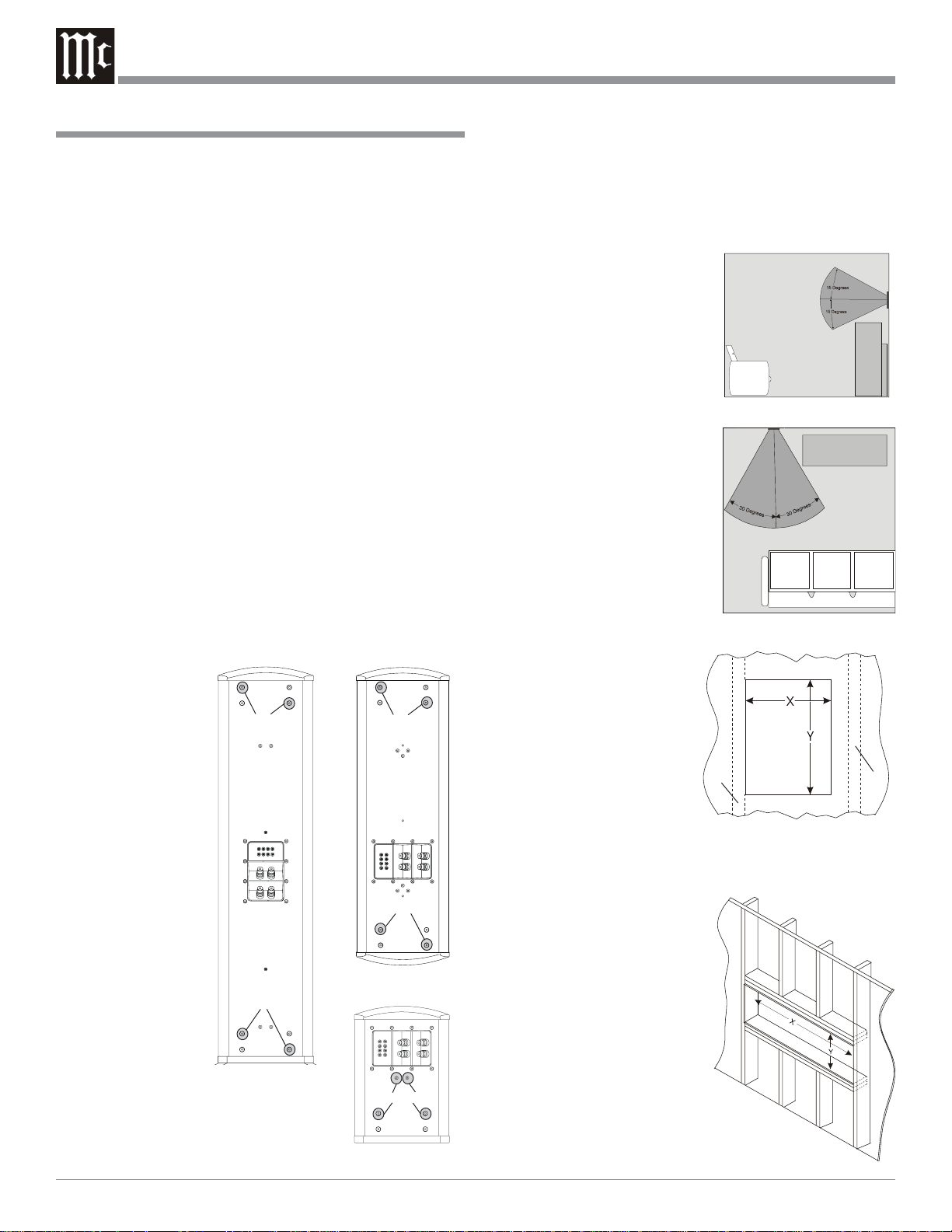
1. Place the Loudspeaker System, with the front facing
down, on top of the packing material located on top of the
shipping carton
as illustrated in
the Owner’s
Manual.
2. Using the supplied
Allen Wrench, remove the screws
at locations illustrated in figure
1.
Note: The
XCS350
Loudspeaker
requires
removal of
the
Stabilizer
Bar and
replacement
of the three
screws
used to
attach the
Stabilizer
Bar, with
screws of the same
type but shorter in
length (supplied
with the XCS350) to prevent
air leaks.
Screw Removal Location
XLS340
Remove Screws
Remove Screws
Figure 1
XCS350
Remove Screws
Remove Screws
XLS320
Remove Screws
Installing the Loudspeaker System
The XLS320, XLS340 and XCS350 Loudspeakers’ Smooth Frequency Response may be altered by a large object(s) located in
the sound waves path or by locating the Loudspeaker too close
to a side wall. There should be an unobstructed area in front of
the Loudspeaker of at least 15 degrees either top or bottom from
the center axis and 30 degrees side
to side for the best performance. Refer to figures 2 and 3.
3. Use a suitable wall stud finder
or metal detector to verify a
proper mounting location for
the Loudspeaker System before cutting into the wall. The
XLS320 and XLS340 are de-
Figure 2
signed for mounting between
vertical wall studs with 16
inch (40.64cm) centers. Refer
to figure 4. The XCS350 is
designed for mounting horizontally in a special prepared
opening. Refer to figure 5.
Note: Make sure there are
no Plumbing Pipes, AC
Electrical Wiring or
Heating/Cooling
Ductwork in the wall
Figure 3
between the studs
where the
Loudspeaker is to be
mounted.
4. For the XLS320 and
XLS340, cut an opening in
the existing finished wall
using the dimensions in the
Stud
Stud
figure 6 Chart. The In Wall
Mounting Bracket(s) can be
oriented for anchoring the
Figure 4
Bracket to the wall stud either on the left or right hand
side of the Loudspeaker. Refer to the Top Inside Views in
figures 7 and 8.
Note: The In Wall
Bracket(s) must be
secured to a wall stud
on one side, with the
other side clamped to
the dry wall. In new
construction the
Loudspeaker
Mounting Bracket(s)
should be secured to
wall studs on both
sides.
5. To mount the XCS350 Hori-
Figure 5
zontally requires wall con-
2
Page 3

Installation
Cut Out Dim e ns ions
In-Wa ll kit X Y
7/8
inches*
CK320
CK340
CK350
11-
11-
34
-5/8
30.16cm
7/8
inches*
30.16cm
inches
87.96cm
* F or new construction, place studs on a 12- 15/16 inch ce nt er
w ith a drywall cutout ope n ing of 11-3/16 inche s 28 .42cm
Figure 6
struction of a specially prepared opening with the dimensions in the figure 6 Chart.
6. Attach the single bracket for the XLS320 to the rear of the
Loudspeaker using the supplied machine screws. Refer to
figures 1 and 10.
7. Attach two brackets to the rear XLS340 and XCS350
Loudspeaker using the supplied machine screws. Refer to
figures 1 and 11.
8. For the XLS320, attach the wall clamp to the rear of the
bracket (left or right side) with the two machine screws,
lock washers and flat washers, rotate the screws several
turns into the clamp. Refer to figures 10 and 12.
Stud and
Screw
Top of the Loudspeaker
-15/16
15
40.48cm
-5/8
44
113.36cm
-3/16
11
28.42cm
Drywall
Clamp
and Screw
inches
inches
inches
Openings for the
screws securing the
bracket to the wall
stud
Bracket
Openings for the
screws securing the
bracket to the wall
stud
Openings for the
screws securing the
grille frame to the
bracket
Openings for the
screws securing dry
wall clamp to the
bracket
Openings for the
screws securing the
bracket to the
XLS320
Figure 10
Openings for the
screws securing dry
wall clamp to the
bracket
Openings for the
screws securing the
bracket to the
XLS340 and XCS350
Openings for the
screws securing the
bracket to the wall
stud
Openings for the
screws securing
the bracket to the
wall stud
Bracket
Bracket
Drywall
Clamp
and Screw
Figure 7
Top of the Loudspeaker
Figure 8
Bracket
Note: If new construction is applicable (with studs on 12-
15/16 inch centers) skip this step and proceed to
step 14 on the next page.
9. Position the clamp towards the center of the
bracket with the screw heads in the “Install”
position. Refer to figure 9.
Note: If you have not already done so, set
the Jumpers for Tweeter Array
Optimization and connect the hookup
cable to the Loudspeaker terminals at
this time.
10. For the XLS340 and XCS350, attach the
wall clamp to the rear of the brackets (left
or right side) with the two machine screws,
lock washers and flat washers, rotate the
Stud and
Screw
Bracket
Install
Figure 9
Clamp
Bracket
Openings for the screws securing
the grille frame to the bracket
Figure 11
screws several turns into the clamp. Refer to figures 11,
13 and 14.
Note: If new construction is applicable (with studs on 12-
15/16 inch centers) skip this step and proceed to
step 14.
11. Position the clamp towards the center of the bracket with
the screw heads in the “Install” position. Refer to figure
9.
Note: If you have not already done so, set the Jumpers for
Tweeter Array Optimization and connect the
hookup cable to the Loudspeaker terminals at this
time.
12. Place the Loudspeaker, with the attached bracket(s), into
the prepared wall opening with the side containing the
dry wall clamp first.
13. Secure the bracket(s) through the wall finish material and
into the studs, using the supplied wood screws. Refer to
figures 10, 11 and 12.
14. On the other side of the bracket, position the clamp to engage the inside of the dry wall with the screws moved to
the “Clamp” position and tighten the machine screws
3
Page 4

without compressing the dry wall. Refer to figures 9 and
12.
Note: If new construction is applicable secure the other
side of the bracket(s) into the stud using the supplied
wood screws instead of the above step.
15. Attach the grille frame to the just installed Loudspeaker/
Bracket(s) using the supplied sheet metal screws. Refer to
figures 10 and 12 for the XLS320; or 11 and 13 for the
XLS340; or 11 and 14 for the XCS350.
Note: Before tightening the sheet metal screws, check the
grille frame position with a leveling device.
16. Orient the Loudspeaker Grille even with the recessed cutout of the Loudspeaker Grille Frame. Carefully push in to
secure the Grille to the Column.
Note: The Loudspeaker Grille is held in place with
magnets embedded into the Grille Frame.
17. Attach the supplied McIntosh Logo to the Loudspeaker
Grille.
Figure 12
Figure 13
McIntosh Laboratory, Inc.
2 Chambers Street
Binghamton, NY 13903
Figure 14
The continuous improvement of its products is the policy of
McIntosh Laboratory Incorporated who reserve the right to
improve design without notice.
Printed in the U.S.A.
McIntosh Part No. 04093800
 Loading...