

Page 1

Copyright © Lexibook 2007
ST100
ST100.indd 1 4/9/07 18:05:13
Page 2
Copyright © Lexibook 2007
GB
FR
ES
PT
IT
DE
NL
ENGLISH
FRANÇAIS
PORTUGUÊS
ITALIANO
DEUTSCH
NEDERLANDS
ESPAÑOL
3-7
8-12
19-21
22-26
27-32
33-37
13-17
Codes, Códigos, Codici
38-51
ST100.indd 2 4/9/07 18:05:14
Page 3
Copyright © Lexibook 2007
3
ENGLISH
Introduction
Congratulations! You have just purchased a Lexibook® Universal 10 in 1
Remote Control. Compatible with over 12,000 audio-visual device, this universal
remote control combines the functions of several remotes: TV1, TV2, DVD, CD,
Video Recorder 1 (VCR1), Video Recorder 2 (VCR2), Satellite (SAT), CABLE
TV (CBL), Amplier (AMP) and Auxiliary (AUX). Digital TV receivers (like ADSL
modems, Freeview, DVB-T etc…) can be also controlled by the SAT key.
Caution: Before its rst use, you must set up the remote control so that it
functions with your chosen audio-visual products. To do so, please read these
instructions carefully.
Installing batteries
Before programming and using your remote control, install 4 x AAA/LR03
alkaline batteries (not included). To do so, open the battery compartment located
at the back of the remote. Make sure to install the batteries according to the
polarity (+/- signs) indicated inside the battery compartment. Close back the
battery compartment.
Notes:
Your remote control will not lose its settings when the batteries are out of power.
When changing the batteries, do not press any key on the remote control. Else,
the remote control’s settings will be affected.
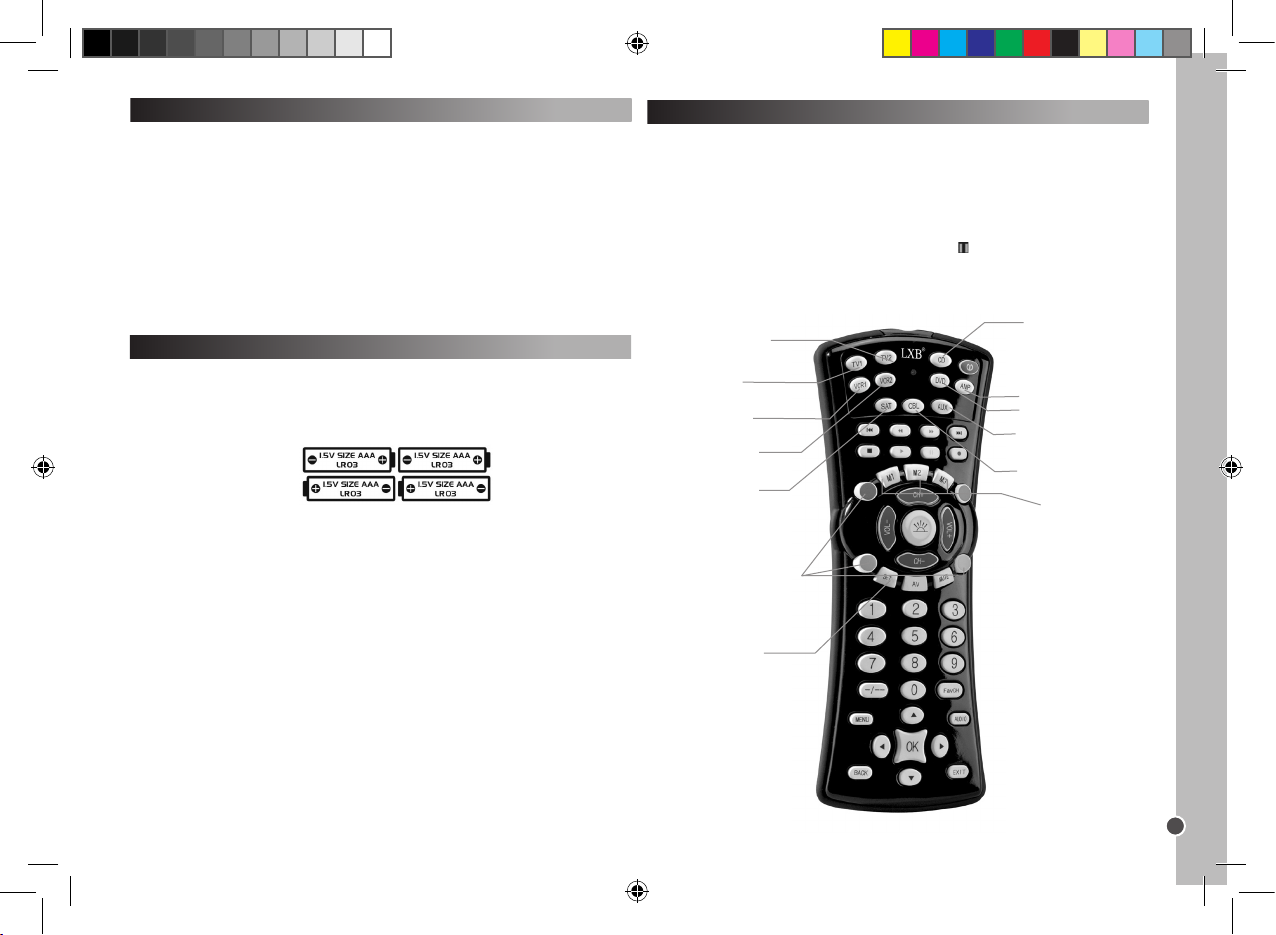
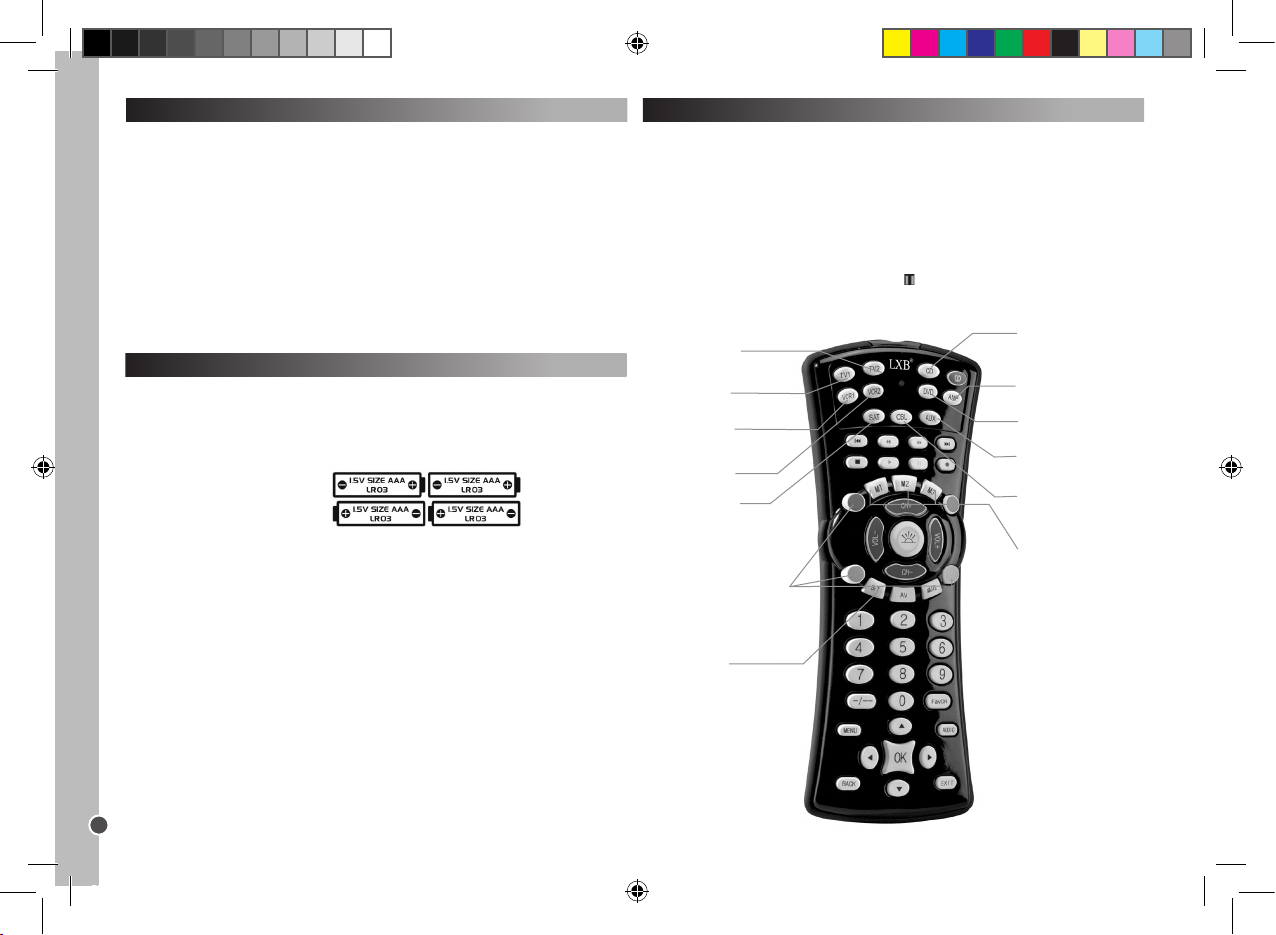
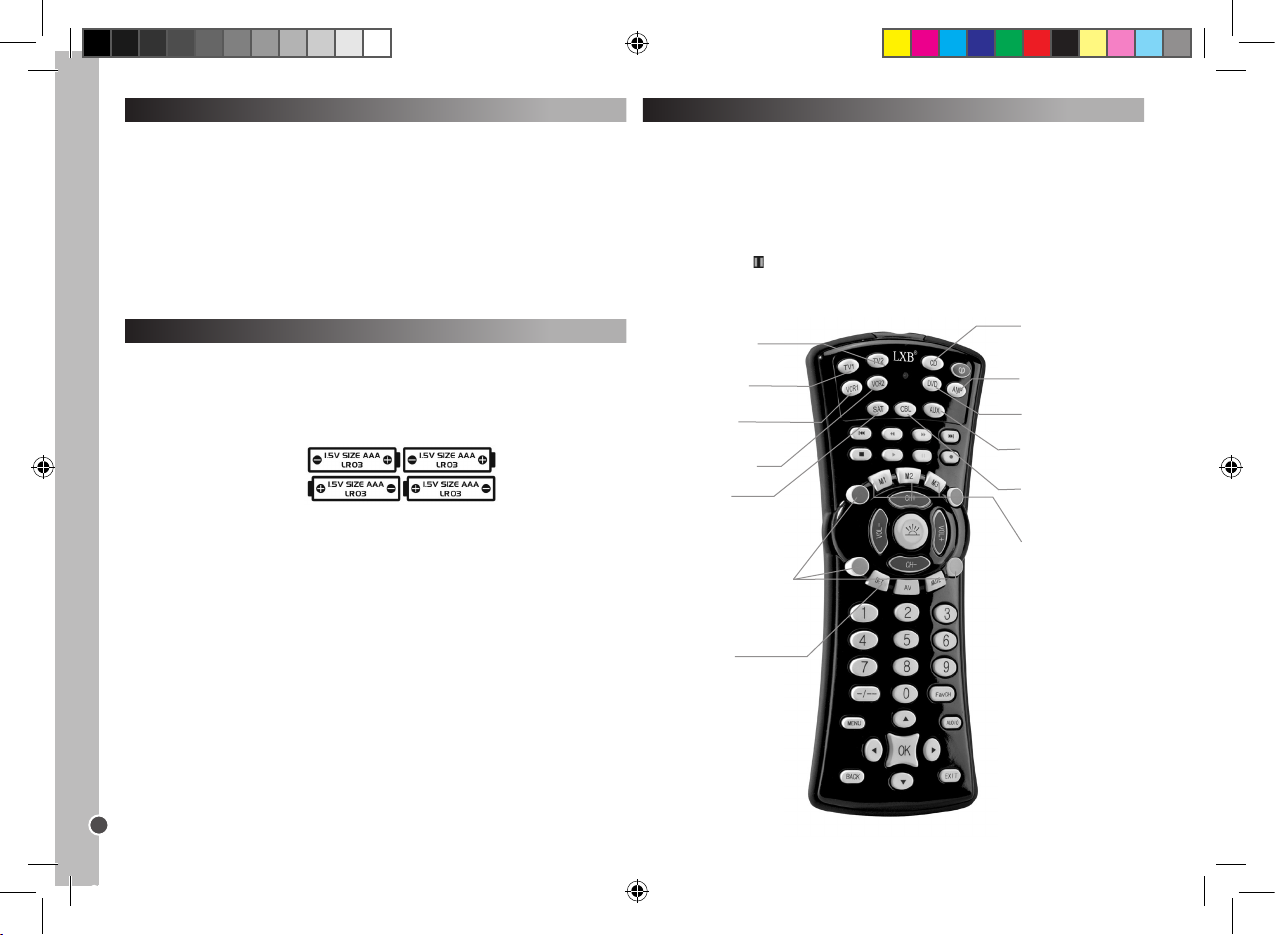
VCR1 – VCR selec tion
and set key.
AMP – Amp lier sel ection
and set key.
TV2 - TV2 select ion
and set key (seco nd
TV set).
VCR2– VCR 2 selection
and set key.
M1/M2/M 3 – Macro keys.
Using the buttons and functions
Once you complete the setup procedure, the Lexibook® Universal 10 in 1
Remote Control will allow you to control the various audio-video devices you
have at home. When you use the remote, rst select the type of device you wish
to use by pressing the corresponding device key (TV1, TV2, DVD, CD, VCR1,
VCR2, SAT, CBL, AMP or AUX). Aside from the 10 device keys and the macro
keys, all other keys on the remote control are only operative if your device also
has these functions. For example, the pause key ( ), will work in DVD/CD mode
but not in TV1/TV2 mode.
SET – to tri gger sett ing
mode.
LIGHT – to ena ble the backlight.
The red (R), gre en (G),
yellow( Y), and blue ( B) buttons
can have various functions
dependin g on whether y our TV
set suppor ts these applications.
TV1 – TV se lection and
set key.
SAT – Satellite T V
receiver selecti on and
set key.
DVD – DVD player
selecti on and set key.
AUX – Hi-F i system
selecti on and set key.
CBL – Cable T V selection
and set key.
CD – CD player
selecti on and set key.
ST100.indd 3 4/9/07 18:05:16
Page 4
Copyright © Lexibook 2007
4
ENGLISH
If your device cannot be programmed using manual setup or its code is not in
the list, program your remote control using the quick or auto search function. The
search function tests all the codes one after another and nds the right one for
your device.
Quick search
This search should be used only if Manual search failed or if the brand or
correct model code are missing.
1. Switch on the device to be set to the remote and aim the remote control at the
device.
- If VCR, insert a cassette.
- If SAT, select a program.
- If DVD, insert a DVD.
- If CD, insert a CD.
2. Press the SET key followed by the respective device key on your remote
control. Hold down both keys.
3. When the LED lights up, release the buttons.
4. Press the SET button again. The LED starts ashing and quick code search
starts.
5. In order to trigger the code search you will have to push the POWER key
( ). 5 codes will be transferred. Wait 3 seconds. If nothing happens, press
Power again. Each time the power key is pressed, it will look for 5 new different
codes during 3 seconds. You may need to press the power key up to 100 times
maximum. (approximately 5 minutes).
6. When your device switches off, the correct code has been found. DO NOT
press the POWER button again, as this would restart the code search.
7. Press the respective DEVICE button again to exit the current stage. The LED
stops blinking and remains solid.
8. Return to your device and switch it ON again (by using original remote control
or the device’s front panel buttons).
9. In order to ne tune the search within these 5 codes, you must press the
power key and wait 2 seconds. If nothing happens, repeat by pressing power
again and wait 2 seconds. If your device still does not respond, you should only
need to press the power key 5 times in total before your device turns back OFF.
10. When your device switches OFF, the correct code has been found. DO NOT
press the POWER button again, as this would re-start the code search.
11. Press the respective DEVICE button to store and exit. The LED turns off.
12. During step 8, SET button can be pressed to return to step 5.
Check whether all applications of your device can be operated using the remote
control keys.
Set-up
There are 3 programming modes: Manual, Quick Search and Automatic
Programming.
Please always try the manual set-up FIRST, then if no code in the list of brands
and models matches your device, try the Quick Search, and only if this one fails,
try Automatic Programming.
Warning: program one appliance at a time. For example, start by setting your
remote to your TV, then to your DVD player…
Manual setup
1. Select the device you wish to set (ex.: TV). Search your device’s brand in the
code list attached. There is a different code list for each of the 10 devices which
your remote control can be set to. Mark down the correspondent 3-digit code(s).
One brand may have up to 30 codes. You might have to try several of them
before nding the one relevant to your model (see hereunder). You will have to
repeat the full procedure.
2. Switch on the device to be set to the remote and aim the remote at the device.
- If VCR, insert a cassette.
- If SAT, select a program.
- If DVD, insert a DVD.
- If CD, insert a CD.
3. Press the SET key rst and hold it down while pressing the respective device
key on your remote control, hold both keys down. For example: To program your
TV, press rst SET and then TV1 simultaneously.
4. When the LED (on upper left corner of the unit) lights up, release the keys.
5. Use the numeric keys to enter the 3-digit code applicable for your device.
6. The LED will turn off; setup is completed.
7. Try some keys on your remote to check if they work properly. If they do, your
settings were successful: you found the right code. You are now ready to set
another device, with the same procedure.
8. If your remote control’s keys do not work, you did not nd the right code and
you need to try the next 3-digit code corresponding to your device’s brand in the
list: repeat steps 3 to 7, until your device responds correctly to the keys pressed
on the remote.
Notes: - Press the respective DEVICE button if you wish to stop the manual
setup.
If no button is pressed for more than 15 seconds, setup ends automatically and
the LED goes off.
ST100.indd 4 4/9/07 18:05:16
Page 5
Copyright © Lexibook 2007
5
ENGLISH
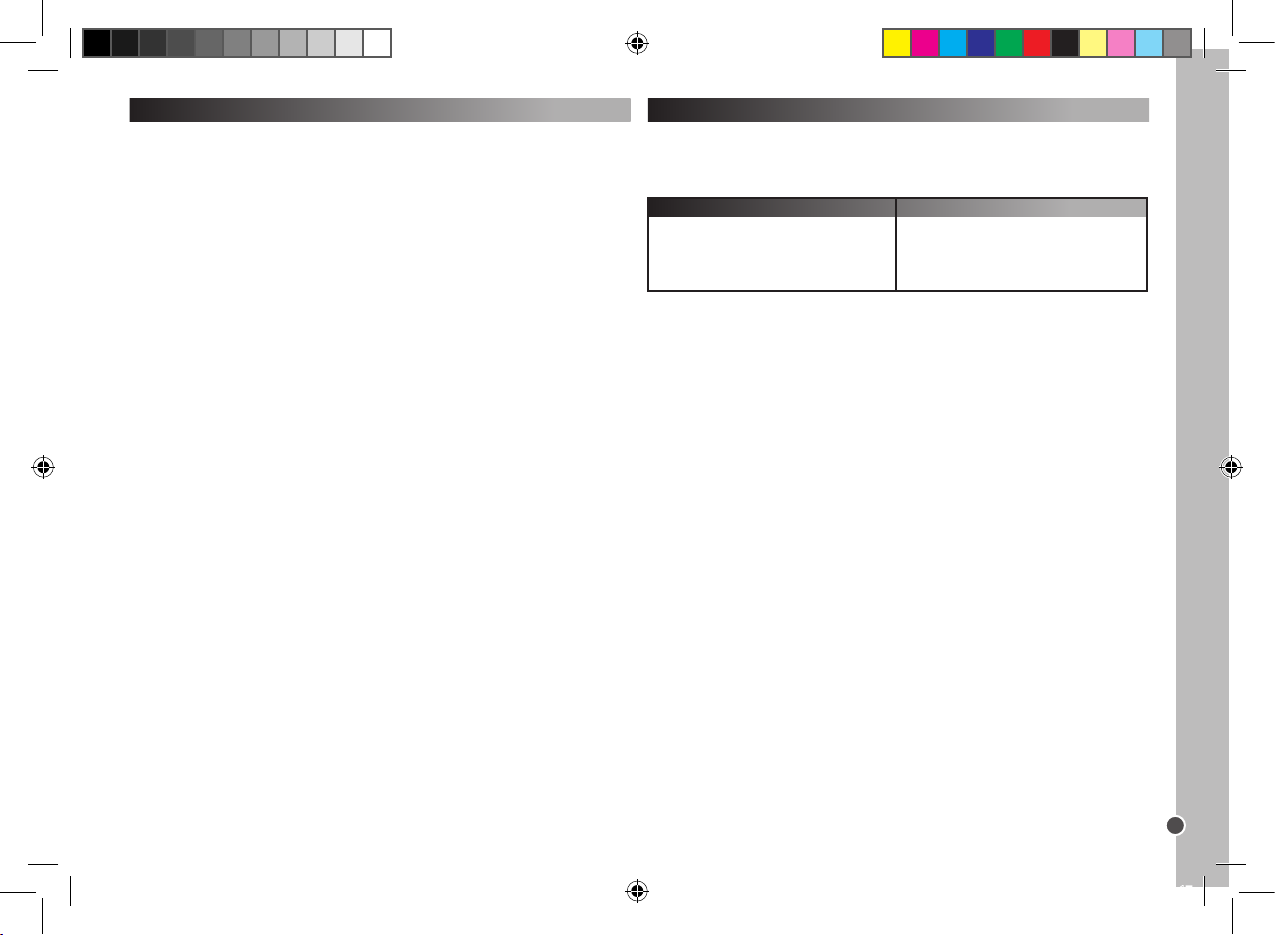
Channel (1-4-digit numbers)
Number of storable channels
One digit
Two digits
Three digits
Four digits
15
10
7
6
Storing your favourite channels
Example: store channels 02, 38, and 56.
1. Press and hold the SET button and the FavCH button simultaneously until the
LED lights up.
2. Then, subsequently press
0 – 2 – SET – 3 – 8 – SET – 5 – 6 – FavCH.
And for 3 digit numbers press
0 – 0 – 2 – SET – 0 – 3 – 8 – SET – 0 – 5 – 6 – FavCH.
Only numerical keys 1-9 can be set. 1 to 4-digit channel numbers can be stored.
Once you have stored your favourite channels, simply press the FavCH button
to browse through the channels in the order they were stored and select one of
them.
To delete the channels from the memory:
1. Simultaneously press and hold the SET button and TV1
2. Then, one after the other, press 9 – 2 – 0.
Child Lock
In Child Lock mode, only the following buttons will be operative: POWER VOL+/-,
MUTE, DEVICE buttons SET and FavCH.
1. Simultaneously press and hold the SET button and TV1.
2. Then, one after the other, press 9 – 2 – 1.
To switch off the child lock mode:
1. Simultaneously press and hold the SET button and TV1.
2. Then, one after the other, press 9 – 2 – 2.
To delete the channels from the memory:
1. Simultaneously press and hold the SET button and TV1.
2. Then, one after the other, press 9 – 2 – 0.
Auto search
This search should be used only if Quick Search did not work.
1. Turn on the device to be controlled and aim the remote control at the device.
2. Press the respective DEVICE key on your remote control.
3. Press the SET key followed by the POWER button on your remote control.
Hold down both keys until the LED remains solid. Release both keys; the LED
starts blinking. The automatic search begins.
4. 5 codes are transmitted at a time; there is a 5-second period between each
transmission, approximately 9 minutes in total.
5. When your device switches off, then the correct code range has been found.
6. Promptly press the respective DEVICE key to auto search within these ve
codes.
7. Go back to your device and switch it ON again (with original remote or using
the front panel buttons).
8. Aim the searching remote to it: when your device switches off, the correct
code has been found.
9. Press the respective DEVICE button to stop/store. The LED turns off.
10. During step 5, the SET button can be pressed to return to step 3
Check whether all applications of your device can be operated with the remote
control keys.
Tips for quick and auto search modes:
- Some devices cannot be powered on/off using the remote control. In such
case, use the PLAY button instead of POWER to check if the device responds to
the remote control.
- The search direction can be changed by pressing the CH+/- button.
- All the function buttons except POWER and PLAY can be veried without exiting the quick search mode.
If no button was pressed for more than 30 seconds, setup stops automatically,
the LED goes off.
Should your remote control still not work, check the codes list again and
repeat the setup procedure (manual or code search) until you nd the
correct code.
Storing your favourite channels and child lock
The FavCH key allows you to store your favourite channels or limit the number
of channels accessible to your children. The following number of channels can
be stored or retrieved using the FavCH button:
ST100.indd 5 4/9/07 18:05:17
Page 6
Copyright © Lexibook 2007
6
ENGLISH
Operational reset
Operational reset will erase all the set functions.
1. Simultaneously press and hold the SET button and TV1.
2. Then, one after the other, press 9 – 9 – 0.
Back light function
1. Press the LIGHT key to enable/disable the back light function.
2. The initial status is disabled.
3. When the back light function is enabled, press any key and the light will turn
on for 5 seconds and will remain on when a key is pressed.
4. When this function is disabled, the backlight remains off.
Note: continuous use of the backlight will exhaust battery power.
Macro Keys
With one of the macro keys, you can operate a series of up to 15 functions by
pressing one single key. In other words, you will be able to execute several
control commands in the order they were stored by simply pressing the
respective MACRO key.
Programming the MACRO Key
1. Press and hold the SET button, then press one of the MACRO keys (M1, M2,
and M3). When the LED lights up, release the two buttons.
2. Now press the buttons, the application of which you would like to activate successively in the respective order. (Press the SET button to stop the programming
mode.)
3. Finally, press the MACRO key again. When procedure is completed, the LED
is off.
For example:
You wish to store the following control command sequence on M1:
TV1 on – Switch to TV/VCR – VCR on – Play – Switch to TV.
Then, you have to enter :
SET + M1 – TV1 – POWER – TV/VCR – VCR – POWER – PLAY – TV1 – M1.
If more than 15 control commands have been selected or no button was pressed
for more than 30 seconds, programming stops automatically, the LED goes off
and the last MACRO settings will be stored.
Deleting the settings
1. To delete the MACRO key settings, press and hold the SET button and press
the respective MACRO key.
2. When the LED lights up, release the two buttons.
3. Press the MACRO key again. Any control command previously stored is now
deleted.
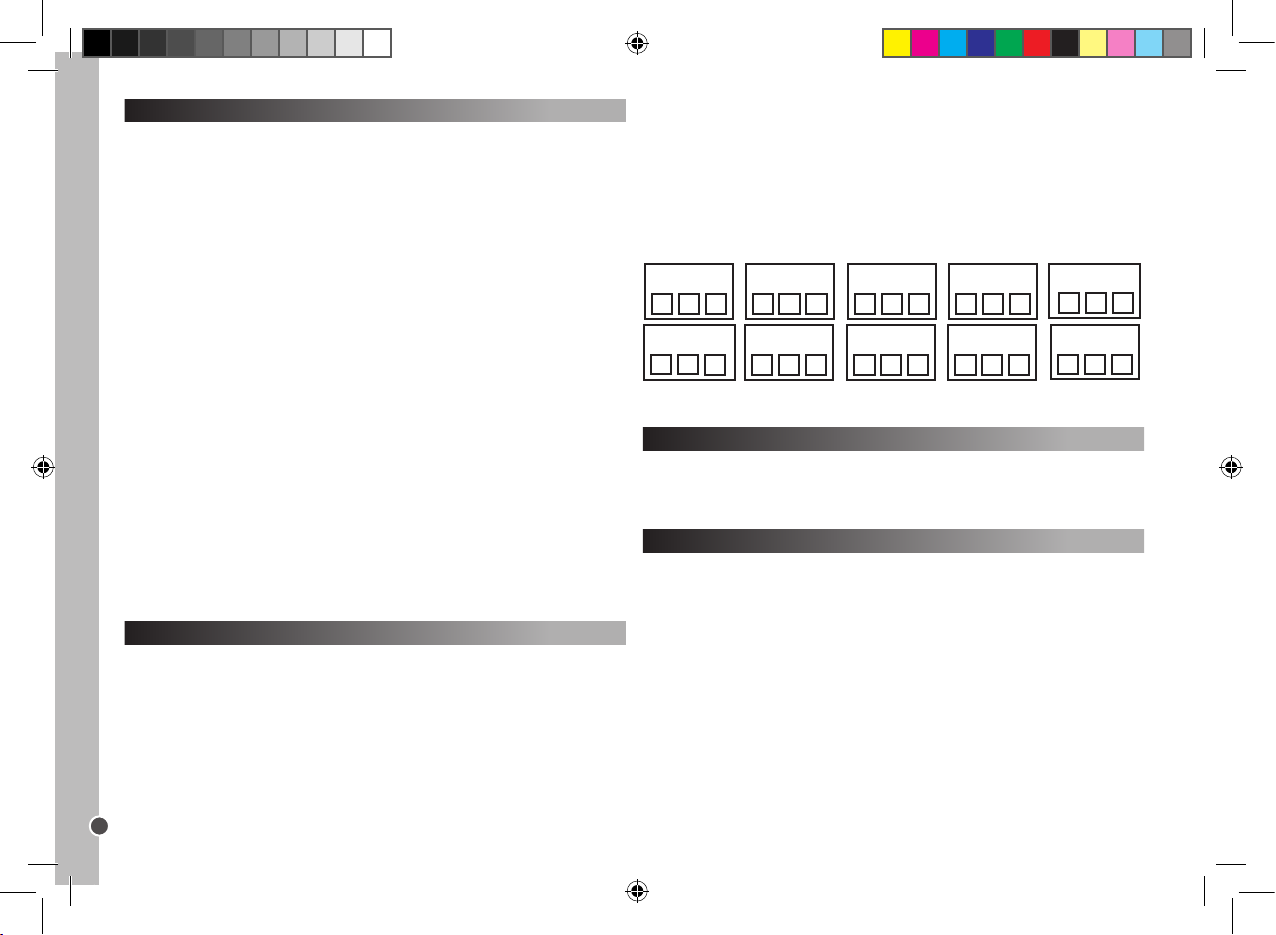
Noting the programmed code
Always write down the 3-digit code for your remote control after running the
search and saving the code. This may be useful if you need to reprogram your
remote control in the event of accidental cancellation or when you change used
batteries. When searching the code, the LED will ash corresponding to the
numerals of the 3-digit code. For example: For code 231, the LED would ash
two times, then three times, then once.
To nd the code for your remote control:
1. Press a device key. Simultaneously press and hold the SET button and 1.
Release the 2 buttons. The LED lights up; its ashing indicates the rst digit of
the code. If the LED does not turn on: digit = 0.
2. To display the second digit, press and hold the SET button and 2
simultaneously. The LED starts ashing.
3. To display the third digit, press and hold the SET and 3 simultaneously. The
LED starts ashing.
4. Repeat steps 1-4 to nd the codes of the other devices.
VCR2 Code SAT Code CBL Code
AMP Code
TV1 Code TV2 Code DVD Code CD Code
AUX Code
VCR1 Code
ST100.indd 6 4/9/07 18:05:17
Page 7
Copyright © Lexibook 2007
7
ENGLISH
Environ mental Protec tion
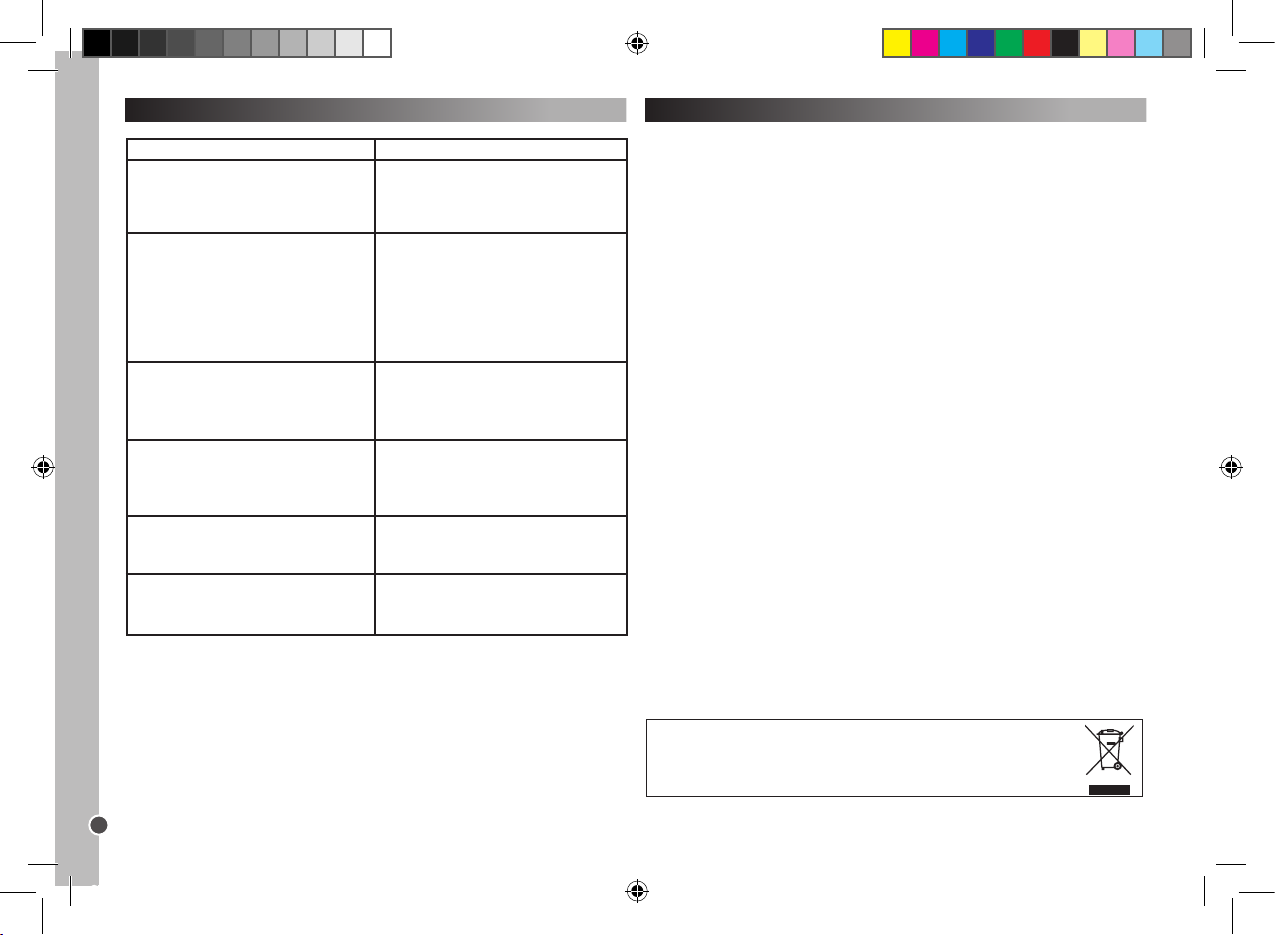
Unwanted el ectric al appliances can b e recycled and should n ot be discarded along with
regular ho usehold waste! Pleas e actively s upport the conse rvatio n of resourc es and help
protect the environm ent by returning this app liance to a collect ion centre (if availab le).
Troubleshooting
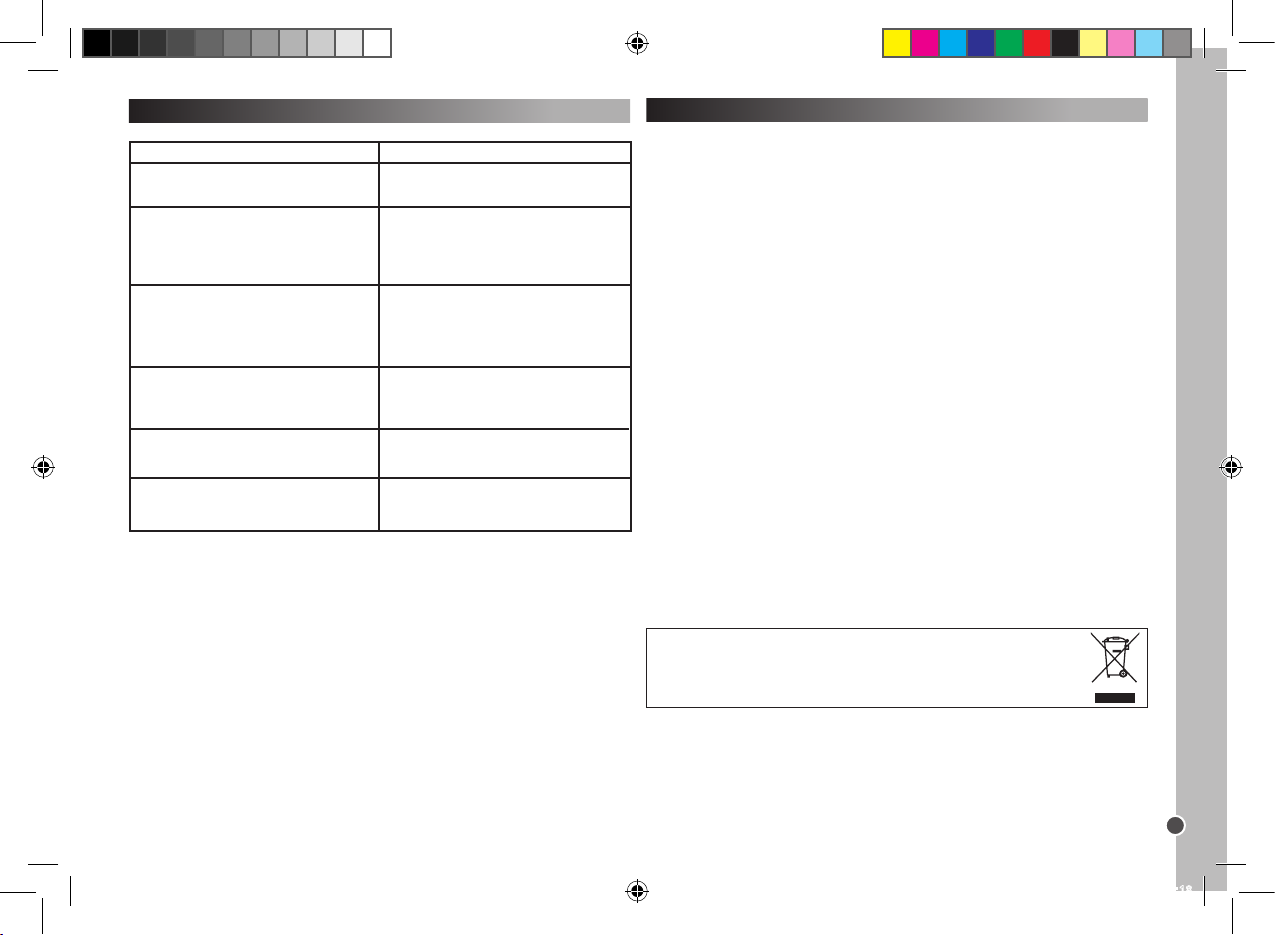
Problem
Solution
The brand of your audio-video device is not
listed in the code book.
A. Proceed to quick search set-up (page 5).
B. Proceed to auto search set-up (page 5).
The remote control does not operate your
audio-video device.
A. Check battery power.
B. Proceed to manual set-up (page 4).
C. Proceed to quick search set-up (page 5).
D. Proceed to auto search set-up (page 5).
Your remote control stops working after the
set-up is completed and successful.
A. Check battery power.
B. Make sure you have pressed the
corresponding device key (TV1, TV2, DVD,
CD, VCR1, VCR2, SAT, CBL, AMP or AUX).
Some of your remote control keys are not
working properly.
A. The ST100 Universal Remote Control may
not have all the functions of the original remote
control of your audio-video device.
Your remote control does not
respond after pressing a key.
A. Make sure you are using new batteries.
B. Aim the remote control at your device.
The LED indicator blinks or keeps lighting
during normal use (not during setting).
A. Replace the batteries with 4 new AAA
alkaline batteries.
Warranty
This product is covered by our two-year guarantee.
For all matters relating to the guarantee or our after-sales service, please contact
your retailer and have your receipt on hand. Our guarantee covers manufacturing or assembly defects with the exception of all damage resulting from a failure
to respect the instructions, or any inappropriate handling of the article (such as
taking it apart, exposing it to heat or humidity, etc).
Note: It is recommended that all packaging be kept for future reference. Keep
this instruction manual in a safe place as it contains important information.
Disclaimer: In our constant concern for improvement, the colours and details of
the product may differ slightly from those shown on the packaging.
Reference: ST100
2-year warranty
©2007 LEXIBOOK®
Designed and developed in Europe – Made in China
Customer Service
LEXIBOOK UK ltd
Unit 10 Peterseld Industrial Estate
Bedford Road, Peterseld
Hampshire, GU32 3QA,
United Kingdom
Freephone helpline: 0808 100 3015
http://www.lexibook.com
ST100.indd 7 4/9/07 18:05:18
Page 8
Copyright © Lexibook 2007
8
FRANÇAIS
Introduction
Félicitations! Vous venez d’acquérir une Télécommande Universelle 10 en 1 de
Lexibook®.
Compatible avec plus de 12,000 appareils audio-visuels, cette télécommande
universelle associe les fonctions de plusieurs télécommandes : TV1, TV2, DVD,
CD, Magnétoscope 1 (VCR1), Magnétoscope 2 (VCR2), Satellite (SAT), TV par
CABLE (CBL), Amplicateur (AMP) et Auxiliaire (AUX), et Auxiliaire (AUX). Les
récepteurs TV digitaux (comme les modems ADSL, Freeview, DVB-T etc…)
peuvent également être contrôlés par la touche SAT.
Attention: lors de première utilisation, vous devez régler la télécommande an
qu’elle fonctionne avec vos produits audio-visuels choisis. Pour réaliser cette
procédure, veuillez lire attentivement ces instructions.
Mise en place des piles
Avant de programmer et d’utiliser votre télécommande, insérez 4 piles alcalines
de type AAA/LR03 (non incluses). Pour cela, ouvrez le compartiment des
piles situé à l’arrière de la télécommande. Assurez-vous de placer les piles en
respectant la polarité (signes +/- ) indiquée à l’intérieur du compartiment. Refermez le compartiment des piles.
Remarques:
Votre télécommande ne perdra pas ses réglages lorsque les piles sont usées.
Lors du remplacement des piles, n’appuyez sur aucune touche de la
télécommande. Autrement, les réglages de la télécommande seront affectés.
Utilisation des touches et des fonctions
Une fois que vous aurez terminé la procédure de réglage, la Télécommande
Universelle 10 en 1 de Lexibook® vous permettra de contrôler les différents
appareils audio-visuels que vous avez à la maison. Lorsque vous utilisez la
télécommande, sélectionnez tout d’abord le type d’appareil que vous désirez
faire fonctionner en appuyant sur la touche correspondant à l’appareil (TV1,
TV2, DVD, CD, VCR1, VCR2, SAT, CBL, AMP ou AUX). Hormis les 10 touches
désignant les appareils et les touches macro, toutes les autres touches de la
télécommande ne sont fonctionnelles que si votre appareil offre également ces
fonctions. Par exemple, la touche pause ( ), fonctionnera en mode DVD/CD
mais ne fonctionnera pas en mode TV1/TV2.
AMP – Séle ction
d’amplic ateur et touc he
de réglage.
CD – Sélect ion de lecteur
CD et touche d e réglage.
M1/M2/M 3 – Touches
Macro.
DVD – Sélec tion de
lecteur DV D et touche de
réglage.
AUX – Sélect ion de
système Hi -Fi et touc he de
réglage.
CBL – Sélec tion de TV
par Câble et touche de
réglage.
VCR1 – Sélect ion
de magnétos cope et
touche de ré glage.
TV2 – Sélection T V2
et touche de réglage
(second tél éviseur).
VCR2 – Sélection de
magnétoscope 2 et
touche de ré glage.
SET – Pour déc lencher le
mode de rég lage.
LIGHT – Pour a ctiver le
rétro- éclairage.
Les bouton s rouge (R), vert (G),
jaune (Y ), et bleu (B) peuvent
avoir différentes fo nctions selon
si votre télév iseur supporte ces
applications.
TV1 – Sélec tion TV et
touche de ré glage.
SAT – Sélectio n de
récepteu r de satellite TV
et touche de réglage.
ST100.indd 8 4/9/07 18:05:19
Page 9
Copyright © Lexibook 2007
9
FRANÇAIS
Réglages
Il y a 3 modes de programmation : le réglage manuel, la recherche rapide et la
programmation automatique.
Veuillez toujours essayer le réglage manuel EN PREMIER, puis si aucun
code de la liste des marques et des modèles ne correspond à votre appareil,
essayez la recherche rapide, et uniquement si ce mode échoue également,
essayez la programmation automatique.
Avertissement: Programmez un appareil à la fois. Par exemple, commencez
par régler votre télécommande sur votre TV, puis sur votre lecteur DVD...
Réglage manuel
Remarque: Le réglage p eut prendre jusqu’à 10 minutes pour chaque
appareil.
1. Sélectionnez l’appareil que vous désirez régler (exemple: TV). Cherchez la
marque de votre appareil dans la liste de codes fournie à la n de ce manuel.
Il y a une liste différente de codes pour chacun des 10 appareils que votre télécommande peut contrôler. Notez le(s) code(s) à 3 chiffres correspondant(s).
Une marque peut avoir jusqu’à 30 codes. Vous devrez peut-être essayer
plusieurs de ces codes avant de trouver celui correspondant à votre modèle
(voir ci-dessous). Vous devrez répéter la procédure entière.
2. Mettez l’appareil à régler sur la télécommande en marche et pointez la
télécommande vers l’appareil.
- Si c’est un magnétoscope (VCR), insérez une cassette.
- Si c’est le SAT, sélectionnez un programme.
- Si c’est un lecteur DVD, insérez un DVD.
- Si c’est un CD, insérez un CD.
3. Appuyez tout d’abord sur la touche SET et maintenez-la tout en appuyant
sur la touche de l’appareil respectif de la télécommande, maintenez les deux
touches pressées. Par exemple : Pour programmer votre TV, appuyez tout
d’abord sur SET et sur TV1 en même temps.
4. Lorsque le voyant lumineux (situé sur le côté supérieur gauche de la télécommande) s’allume, relâchez les touches.
5. Utilisez les touches numériques pour entrer le code à 3 chiffres applicable
pour votre appareil.
6. Le voyant lumineux s’éteindra; le réglage est terminé.
7. Essayez quelques touches sur votre télécommande pour vérier si elles
fonctionnent correctement. Si c’est le cas, vos réglages ont réussi : vous avez
trouvé le bon code. Vous êtes maintenant prêt à régler un autre appareil, en
suivant la même procédure.
8. Si les touches de votre télécommande ne fonctionnent pas, cela signie
que vous n’avez pas trouvé le bon code et vous devez alors essayer le code
à 3 chiffres suivant correspondant à la marque de votre appareil dans la liste:
répétez les étapes 3 à 7, jusqu’à ce que votre appareil réponde correctement
aux touches pressées sur la télécommande.
Remarques: - Appuyez sur le bouton de l’APPAREIL correspondant si vous
désirez arrêter le réglage manuel.
Si aucun bouton n’est pressé durant plus de 15 secondes, le réglage s’arrêtera
automatiquement et le voyant lumineux s’éteindra.
Recherche rapide
Cette recherche doit être utilisée uniquement si la recherche manuelle
échoue ou si le code correct de la marque ou du modèle n’est pas dans
la liste. La fonction de recherche teste tous les codes l’un après l’autre
et trouve celui qui correspond à votre appareil.
1. Mettez l’appareil que vous désirez régler en marche et pointez la télécommande vers l’appareil.
- Si c’est un magnétoscope (VCR), insérez une cassette.
- Si c’est le SAT, sélectionnez un programme.
- Si c’est un CD, insérez un CD.
2. Appuyez sur la touche SET et appuyez ensuite sur la touche de l’appareil
respectif de votre télécommande. Maintenez les deux touches pressées.
3. Lorsque le voyant lumineux s’allume, relâchez les touches.
4. Appuyez de nouveau sur la touche SET. Le voyant lumineux commence à
clignoter et la recherche rapide du code commence.
5. An de déclencher la recherche du code, vous devez appuyer sur la touche
marche/arrêt ( ). 5 codes seront transmis. Patientez 3 secondes. Si rien ne
se produit, appuyez de nouveau sur la touche marche/arrêt. A chaque fois que
la touche marche/arrêt est pressée, le système cherchera 5 nouveaux codes
différents durant 3 secondes. Il sera peut-être nécessaire d’appuyer sur la
touche marche/arrêt jusqu’à 100 fois maximum. (environ 5 minutes).
6. Lorsque votre appareil s’éteint, le code correct a été trouvé. N’appuyez PAS
de nouveau sur le bouton marche/arrêt car cela redémarrerait la recherche de
code.
7. Appuyez une nouvelle fois sur le bouton de l’APPAREIL correspondant pour
quitter la procédure. Le voyant lumineux cesse de clignoter et reste allumé.
8. Remettez de nouveau votre appareil en marche (en utilisant la télécommande originale ou les boutons du panneau avant votre l’appareil).
9. An de régler précisément la recherche parmi les 5 codes, vous devez appuyer sur la touche marche/arrêt et attendre 2 secondes. Si rien ne se produit,
répétez la procédure en appuyant de nouveau sur la touche power et attendez
2 secondes. Si votre appareil ne répond toujours pas, il ne sera nécessaire
que d’appuyer sur la touche marche/arrêt que 5 fois au total avant que votre
ST100.indd 9 4/9/07 18:05:20
Page 10
Copyright © Lexibook 2007
10
FRANÇAIS
appareil ne s’éteigne de nouveau.
10. Lorsque votre appareil s’éteint, le code correct a été trouvé. N’appuyez
PAS de nouveau sur le bouton MARCHE/ARRET car cela redémarrerait la
recherche de code.
11. Appuyez une nouvelle fois sur le bouton de l’APPAREIL respectif pour
conrmer la sauvegarde et pour quitter. Le voyant lumineux s’éteint.
12. Durant l’étape 8, vous pouvez appuyer sur la touche SET si vous désirez
retourner à l’étape 5.
Vériez si toutes les fonctions de votre appareil peuvent être opérées en
utilisant les touches de la télécommande.
Recherche automatique
Cette recherche doit être uniquement utilisée si la Recherche rapide n’a
pas fonctionné.
1. Mettez l’appareil à régler en marche et pointez la télécommande vers
l’appareil.
2. Appuyez sur le bouton de l’APPAREIL respectif sur votre télécommande.
3. Appuyez sur la touche SET, puis sur la touche MARCHE/ARRET de votre
télécommande. Maintenez les deux touches appuyées jusqu’à ce que le voyant
lumineux reste allumé. Relâchez les deux touches; le voyant lumineux
commence à clignoter. La recherche automatique commence.
4. 5 codes sont transmis à chaque fois; il y a un inter valle de 5 secondes entre
chaque transmission, environ 9 minutes au total.
5. Lorsque votre appareil s’éteint, le code correct a été trouvé.
6. Appuyez rapidement sur la touche de l’APPAREIL respectif pour permettre
une recherche automatique parmi ces 5 codes.
7. Remettez de nouveau votre appareil en marche (en utilisant la
télécommande originale ou les boutons du panneau avant de l’appareil).
8. Pointez la télécommande vers l’appareil : lorsque votre appareil s’éteint, le
code correct a été trouvé.
9. Appuyez sur le bouton de l’APPAREIL respectif pour conrmer la
sauvegarde/quitter. L’indicateur lumineux DEL s’éteint.
10. Durant l’étape 5, vous pouvez appuyer sur la touche SET si vous désirez
retourner à l’étape 3.
Vériez si toutes les fonctions de votre appareil peuvent être opérées en
utilisant les touches de la télécommande.
Conseils conc ernant les modes de recherche rapide et automatique :
- Certains appareils ne peuvent pas être mis en marche/arrêtés avec la
télécommande. Dans ce cas, utilisez le bouton PLAY (LECTURE) au lieu du
bouton POWER (ALIMENTATION) pour voir si l’appareil répond à la télécommande.
Mémoriser vos chaînes préférées
Exemple: Mémorisez les chaînes 02, 38 et 56.
1. Appuyez et maintenez le bouton SET et le bouton FavCH simultanément
jusqu’à ce que le voyant lumineux s’allume.
2. Puis, appuyez sur
0 – 2 – SET – 3 – 8 – SET – 5 – 6 – FavCH.
Et pour les nombres composés de 3 chiffres, appuyez sur
0 – 0 – 2 – SET – 0 – 3 – 8 – SET – 0 – 5 – 6 – FavCH.
Seules les touches numériques de 1 à 9 peuvent être réglées. Les nombres
de chaînes de 1 à 4 chiffres peuvent être mémorisés.
Une fois que vous avez mémorisé vos chaînes préférées, appuyez simplement
sur le bouton FavCH pour naviguer parmi les chaînes dans l’ordre que vous
les avez enregistrées et pour sélectionner l’une d’entre elles.
Pour supprimer les chaînes de la mémoire :
1. Appuyez et maintenez le bouton SET et TV1 simultanément
2. Puis, une touche après l’autre, appuyez sur 9 – 2 – 0.
Verrouillage parent al
En mode verrouillage parental, seuls les boutons suivants seront opéra-
tionnels : POWER, VOL+/-, MUTE, les boutons des APPAREILS, SET et
FavCH.
1. Appuyez et maintenez le bouton SET et TV1 simultanément.
- La direction de recherche peut être changée en appuyant sur le bouton
CH+/- .
- Toutes les touches de fonctions, sauf MARCHE/ARRET et PLAY ( ) peuvent
être vériées sans sortir du mode de recherche rapide.
Si aucun bouton n’est pressé pendant plus de 30 secondes, le réglage s’arrête
automatiquement et le voyant lumineux s’éteint.
Si votre télécommande ne fonctionne toujours pas, vériez de nouveau
la liste des codes et répétez la procédure de réglage (manuelle ou par
recherche automatique) jusqu’à ce que vous trouviez le code correct .
Mémorisez vos chaînes préférées et réglez le verrouillage parental
La touche FavCH vous permet d’enregistrer vos chaînes préférées en mémoire
ou de limiter le nombre de chaînes accessibles par vos enfants. Le nombre de
chaînes suivant peut être mémorisé ou rappelé en utilisant le bouton FavCH :
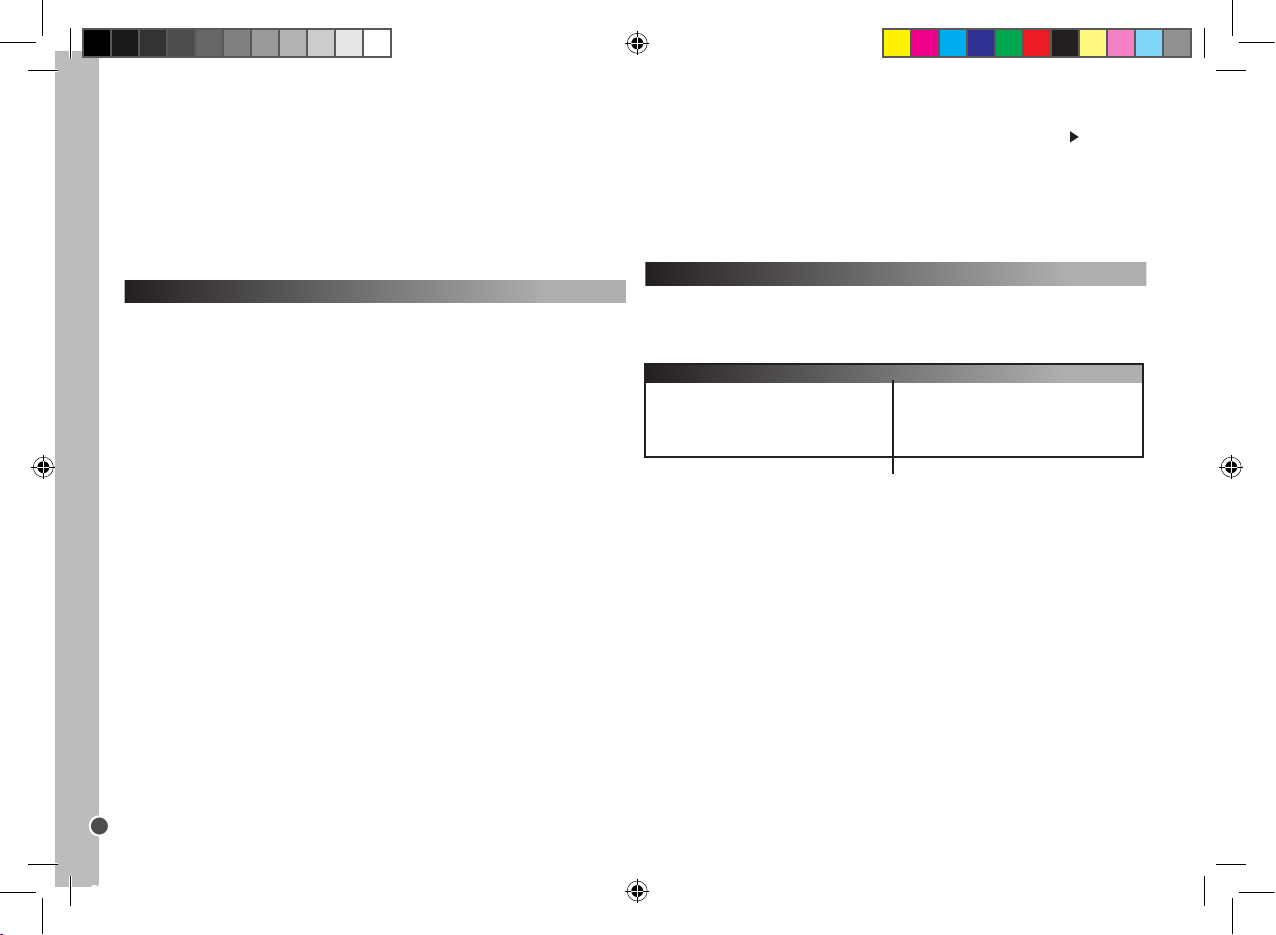
15
10
7
6
Un chiffre
Deux chiffres
Trois chiffres
Quatre chiffres
Chaîne (1 à 4 chiffres)
Nombre de chaînes mémorisables
ST100.indd 10 4/9/07 18:05:20
Page 11
Copyright © Lexibook 2007
11
FRANÇAIS
Touches Macro
Avec l’une des touches macro, vous pouvez faire fonctionner jusqu’à 15
fonctions en appuyant sur une seule touche. En fait, il vous sera possible
d’exécuter plusieurs commandes de contrôle dans le même ordre qu’elles ont
été enregistrées en appuyant simplement sur la touche MACRO
orrespondante.
Programmer la touche MACRO
1. Appuyez et maintenez le bouton SET, puis appuyez sur l’une des touches
MACRO (M1, M2 et M3). Lorsque le voyant lumineux s’allume, relâchez les
deux boutons.
2. Appuyez maintenant sur les boutons des fonctions que vous désirez activer
successivement dans l’ordre choisi. (Appuyez sur le bouton SET pour arrêter
le mode de programmation).
3. Finalement, appuyez de nouveau sur la touche MACRO. Une fois que la
procédure est terminée, le voyant lumineux s’éteint.
Par exemple:
Vous désirez mémoriser la séquence de commandes de contrôle sur M1 :
Mise en marche TV1 – Permuter sur T V/VCR – Mise en marche VCR1 – Lec-
ture – Permuter sur TV.
Vous devrez alors entrer :
SET + M1 – TV1 – POWER – TV/VCR – VCR1 – POWER – PLAY – TV1 – M1.
Si plus de 15 commandes de contrôle sont sélectionnées ou si aucun bouton
n’est pressé durant plus de 30 secondes, la programmation s’arrête automa-
tiquement, le voyant lumineux s’éteint et les derniers réglages MACRO seront
gardés en mémoire.
Supprimer les réglages
1. Pour supprimer les réglages d’une touche MACRO, appuyez et maintenez le
bouton SET et appuyez sur la touche MACRO respective.
2. Lorsque le voyant lumineux s’allume, relâchez les deux boutons.
3. Appuyez de nouveau sur la touche MACRO. Toute commande de contrôle
précédemment mémorisée sera alors supprimée.
Réinitialisation
Une réinitialisation effacera toutes les fonctions réglées.
1. Appuyez et maintenez simultanément le bouton SET et le bouton TV1.
2. Puis, une touche après l’autre, appuyez sur 9 – 9 – 0.
2. Puis, une touche après l’autre, appuyez sur 9 – 2 – 1.
Pour désactiver le mode de verrouillage parental :
1. Appuyez et maintenez le bouton SET et TV1 simultanément.
2. Puis, une touche après l’autre, appuyez sur 9 – 2 – 2.
Pour supprimer les chaînes de la mémoire :
1. Appuyez et maintenez le bouton SET et TV1 simultanément.
2. Puis, une touche après l’autre, appuyez sur 9 – 2 – 0.
Noter le code programmé
Notez toujours le code à 3 chiffres de votre télécommande après avoir effectué
la recherche et conrmé le code. Cela pourra être utile si vous avez besoin de
reprogrammer votre télécommande dans le cas d’une annulation accidentelle.
Lors de la recherche du code, le voyant lumineux clignotera le nombre de fois
correspondant aux 3 chiffres du code. Par exemple : Pour le code 231, le
voyant lumineux clignotera deux fois, puis trois fois, et une fois.
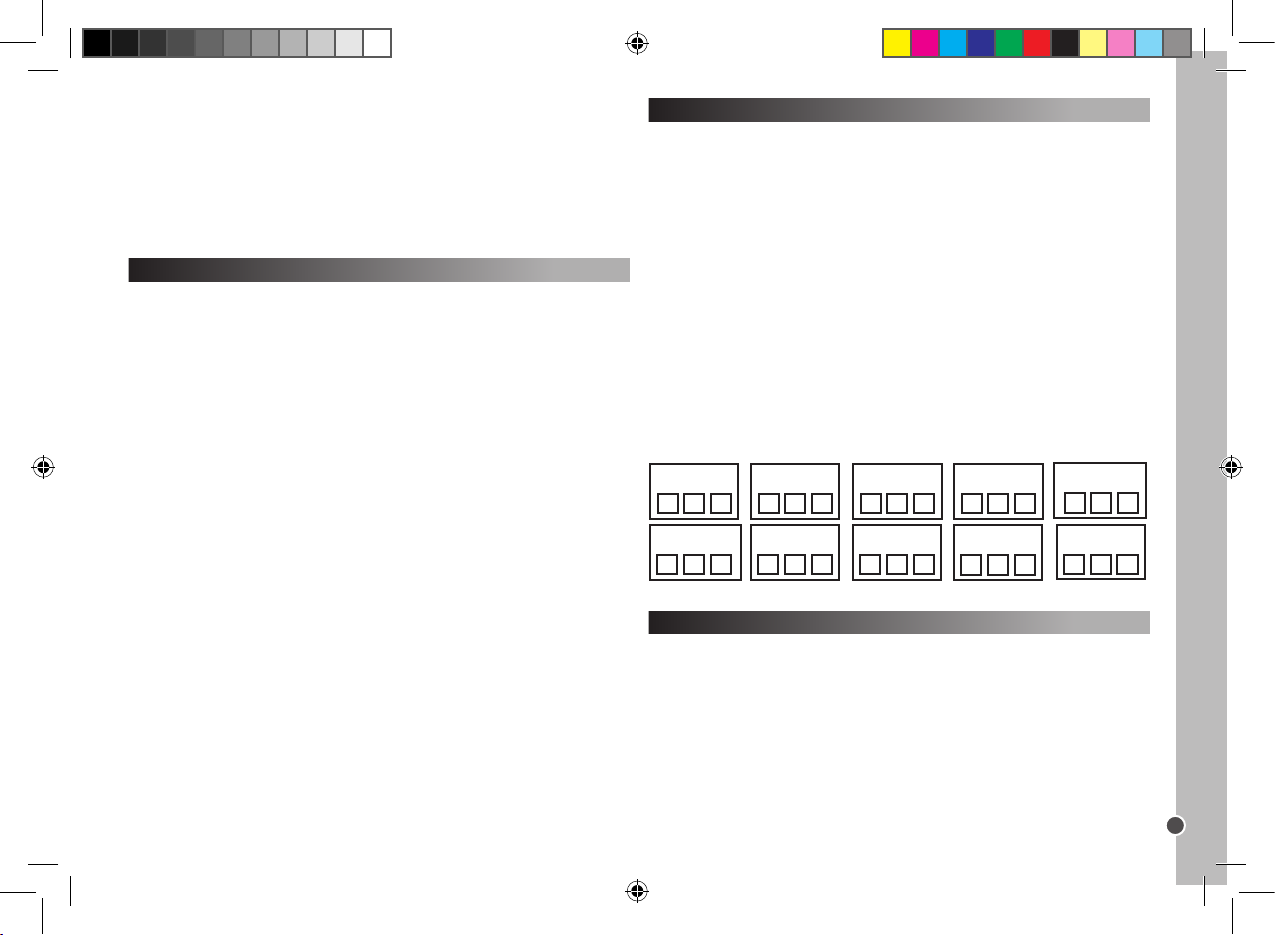
Pour trouver le code par la télécommande :
1. Appuyez sur la de l’appareil dont vous cherchez le code. Appuyez et maintenez simultanément le bouton SET et le bouton 1. Relâchez les deux boutons.
Le voyant lumineux s’allume; son clignotement indique le premier chiffre du
code. Si le voyant lumineux ne s’allume pas : le chiffre = 0.
2. Pour afcher le second chiffre, appuyez et maintenez simultanément le
bouton SET et le bouton 2. Le voyant lumineux commence à clignoter.
3. Pour afcher le troisième chiffre, appuyez et maintenez simultanément le
bouton SET et le bouton 3. Le voyant lumineux commence à clignoter.
4. Répétez les étapes 1 à 4 pour trouver les codes des autres appareils.
VCR2 Code SAT Code CBL Code
AMP Code
TV1 Code TV2 Code DVD Code CD Code
AUX Code
VCR1 Code
ST100.indd 11 4/9/07 18:05:21
Page 12
Copyright © Lexibook 2007
12
FRANÇAIS
Infor matio ns sur la pr otect ion de l’environne ment
Tout appareil él ectrique usé est une m atière rec yclable et ne devrait pas faire par tie des
ordures mé nagères ! Nous vous dem andons de bi en vouloir n ous soutenir en contr ibuant
activeme nt au ménagement des res sources et à la protec tion de l’environnement en
déposant c et appareil dans des si tes de coll ecte (si exist ants).
Guide de dépannage
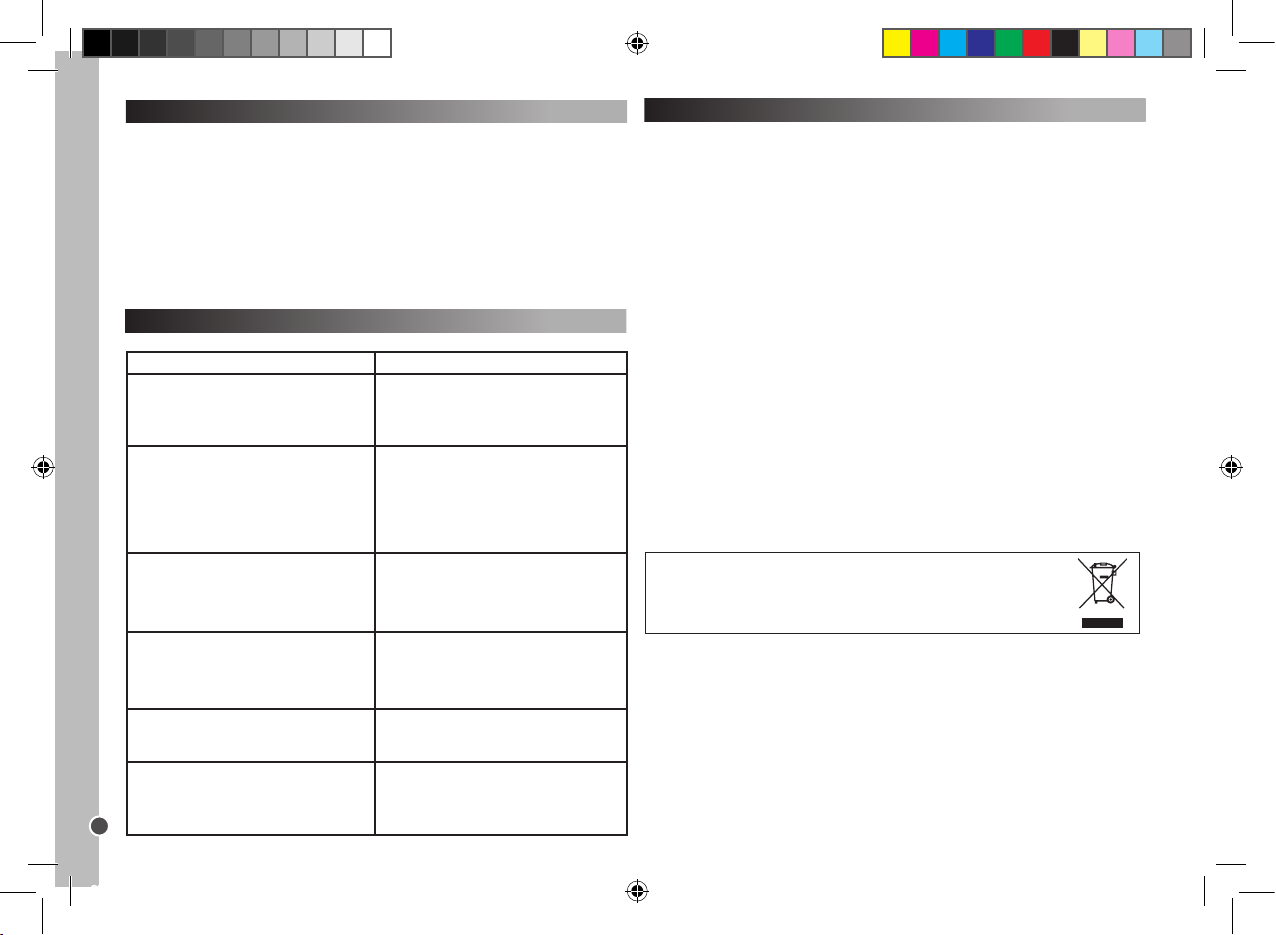
Problème
Solution
La marque de votre appareil
audio-vidéo n’apparaît pas dans le livre des
codes.
A. Essayez un réglage en recherche rapide
(page 9).
B. Essayez un réglage en recherche
automatique (page 10).
La télécommande ne peut pas contrôler
votre appareil audio-vidéo.
A. Vériez l’énergie des piles.
B. Procédez à un réglage manuel (page 9).
C. Procédez à un réglage
en recherche rapide (page 9).
D. Procédez à un réglage en
recherche automatique (page 10).
Votre télécommande s’arrête de fonctionner
une fois que le réglage est et réussi.
A. Vériez l’énergie des piles.
B. Assurez-vous d’avoir appuyé sur la touche
de l’appareil correspondant (TV1, TV2, DVD,
CD, VCR1, VCR2, SAT, CBL, AMP or AUX).
Certaines des touches de votre
télécommande ne fonctionnent pas
correctement.
A. La télécommande Universelle ST100 peut
ne pas offrir toutes les fonctions de la
télécommande originale de votre appareil
audio-vidéo.
Votre télécommande ne répond pas après
avoir appuyé sur une touche.
A. Assurez-vous d’utiliser des piles neuves.
B. Pointez la télécommande vers votre appareil.
Le voyant lumineux clignote ou reste allumé
durant une utilisation normale (en dehors des
réglages).
A. Remplacez les piles avec 4 piles neuves
alcalines de type LR03/AAA.
Fonction de rétro-éclairage
1. Appuyez sur la touche LIGHT pour activer/désactiver la fonction de
rétro-éclairage.
2. Le statut par défaut de la fonction est désactivé.
3. Lorsque la fonction de rétro-éclairage est activée, appuyez sur n’importe
quelle touche et la lumière s’allumera durant 5 secondes ou restera allumée si
une touche est pressée.
4. Lorsque cette fonction est désactivée, le rétro-éclairage reste éteint.
Remarque: Une utilisation continue du rétro-éclairage usera l’énergie des
piles.
Garantie
Ce produit est couvert par notre garantie de deux ans. Pour toute mise en
oeuvre de la garantie ou de service après vente, vous devez vous adresser à
votre revendeur muni de votre preuve d’achat. Notre garantie couvre les vices
de matériel ou de montage imputables au constructeur à l’exclusion de toute
détérioration provenant du non respect de la notice d’utilisation ou de toute
intervention intempestive sur l’article (telle que démontage, exposition à la
chaleur ou à l’humidité…).
Notes : Veuillez garder ce mode d’emploi, il contient d’importantes informations. Dans un souci constant d’amélioration, nous pouvons être amenés à
modier les couleurs et les détails du produit présenté sur l’emballage.
Référence : ST100
Garantie 2 ans
©2007 LEXIBOOK®
Conçu en Europe – Fabriqué en Chine
LEXIBOOK S.A
2, avenue de Scandinavie
91953 Courtaboeuf Cedex France
Assistante technique : 0892 23 27 26 (0,34 € TTC/Min)
Site Internet : www.lexibook.com
ST100.indd 12 4/9/07 18:05:22
Page 13
Copyright © Lexibook 2007
13
ESPAÑOL
Introducción
¡Enhorabuena! Acaba de adquirir un Mando a distancia Universal 10 en 1 de
Lexibook®. Compatible con más de 12,000 equipos de audio y vídeo, este
mando a distancia universal combina las funciones de varios mandos a
distancia: TV1, TV2. DVD, CD, Grabador de vídeo 1 (VCR1), Grabador de
vídeo 2 (VCR2), Satélite (SAT), TV por cable (CBC), Amplicador (AMP) y
Auxiliar (AUX). También pueden controlarse receptores digitales de TV (como
módems ADSL, Freeview, DVB-T, etc.) utilizando la tecla SAT.
Precaución: Antes de utilizarlo por primera vez, debe congurar el mando a
distancia de manera que pueda funcionar con sus equipos audiovisuales. Para
ello, siga cuidadosamente estas instrucciones.
Instalación de la pilas
Antes de programar y utilizar el mando a distancia, coloque 4 pilas alcalinas
“AAA/LR03” (no incluidas). Para ello, abra el compartimento de las pilas situado
en la parte trasera del mando. Asegúrese de colocar las pilas con los polos
(símbolos +/-) en la posición que se indica en el compartimento de las pilas.
Cierre el compartimento de las pilas.
Notas:
El mando a distancia no perderá la conguración cuando las pilas se agoten.
Mientras cambia las pilas, no pulse ninguna tecla del mando a distancia. Si lo
hace, la conguración se verá afectada.
Para utilizar las teclas y funciones
Una vez completado el procedimiento de conguración, el mando a distancia
Universal 10 en 1 Lexibook® le permitirá controlar los distintos equipos
audiovisuales que tiene en su hogar. Cuando utilice el mando, seleccione
primero el tipo de equipo que quiere usar, pulsando para ello la tecla de equipo
(TV1, TV2, DVD, CD, VCR1, VCR2, SAT, CBL, AMP o AUX). Aparte de las 10
teclas de equipo y de las teclas macro, las demás teclas solo serán operativas
si su equipo tiene también esas funciones. Por ejemplo, la tecla pausa ( )
funcionará solo en modo DVD/CD pero no en modo TV1/TV2.
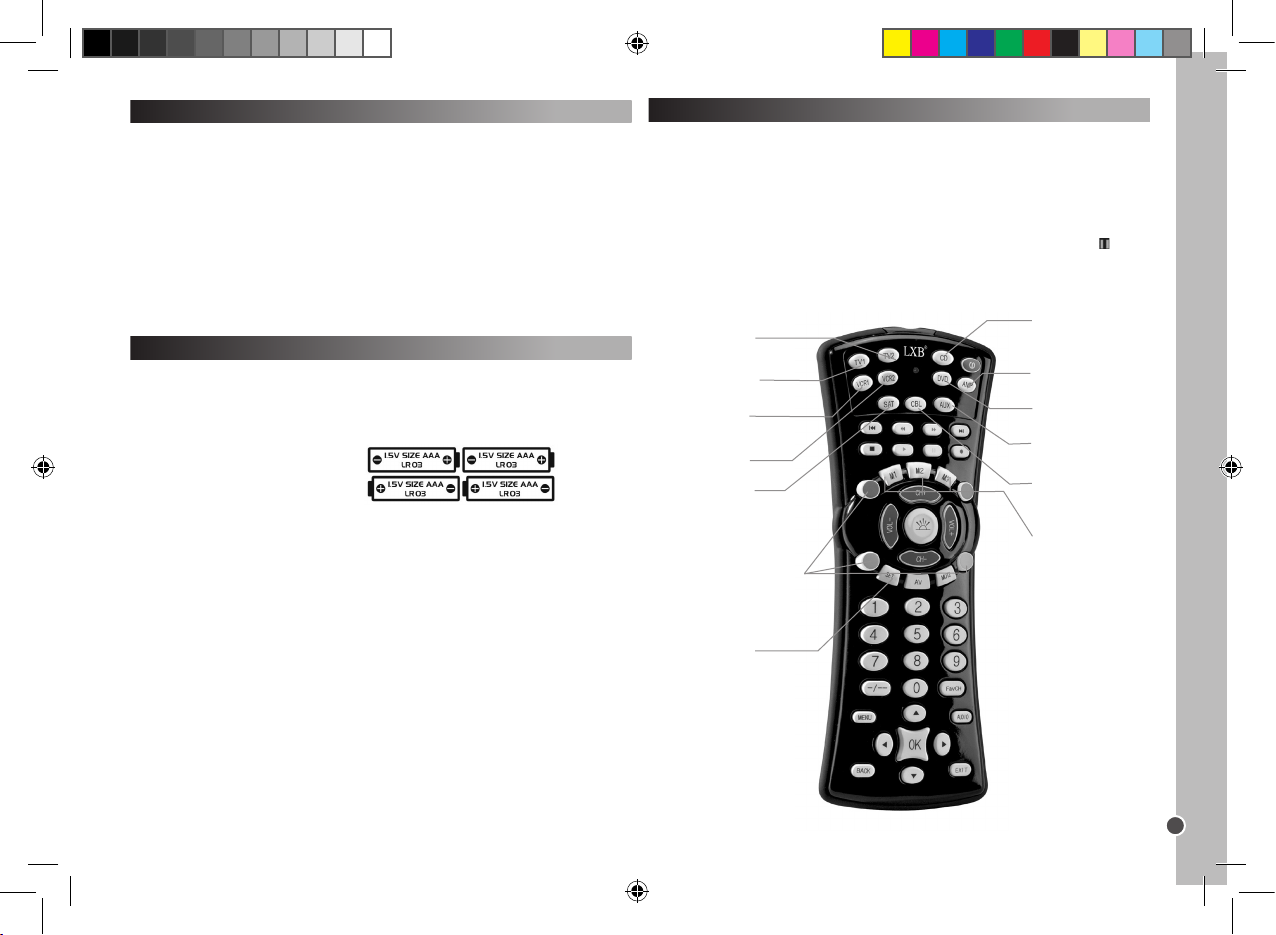
AMP – Sele cción de
amplic ador y tecla de
congur ación.
CD – Selección de
reproduc tor CD y tecla de
congur ación.
M1/M2/M 3 – Teclas
macro.
DVD – Selec ción de
reproduc tor DVD y tecla
de cong uración.
AUX – Selecc ión sistema
Hi-Fi y te cla de
congur ación.
CBL – Selec ción de
TV por cable y tecla d e
congur ación.
VCR1 – Selecc ión
de VCR y tecla de
congur ación.
TV2 – Selección de TV2 y
tecla de co nguración
(congura ción segunda TV ).
VCR2 – Selección
de VCR 2 y tecla de
congur ación.
SET – Para ac ceder al
modo de co ngurac ión.
LUZ – Para habil itar la indi cación
luminosa .
Las teclas rojo (R), verde (G),
amarillo (Y) y azu l (B) pueden
tener vari as funcio nes depend iendo de que su te levisor soporte
estas apli caciones.
TV1 – Selec ción de TV
y tecla de co nguración.
SAT – Selecció n de
receptor TV por satélite y
tecla de co nguración.
ST100.indd 13 4/9/07 18:05:24
Page 14
Copyright © Lexibook 2007
14
ESPAÑOL
Conguración
Hay 3 modos de programación: Programación manual, búsqueda rápida y
programación automática.
Intente siempre PRIMERO la programación manual; después, si ningún código
de la lista de marcas y modelos se ajusta a su equipo, intente la búsqueda
rápida; y solo si esto también falla intente la programación automática.
Para programar el mando manualmente, utilice el código especíco para el
fabricante o marca del equipo (código de 3 dígitos) de la lista que se
suministra.
Advertencia: programe solamente un equipo cada vez. Por ejemplo, comience
congurando el mando a distancia para su televisor, luego para el reproductor
DVD…
Conguración manual
Nota: está operación puede durar hasta 10 minutos para cada equipo.
1. Seleccione el equipo que quiere controlar (por ejemplo, el televisor). Busque
la marca de su equipo en la lista de códigos que se incluye. Hay una lista de
códigos diferente para cada uno de los 10 equipos que puede controlar con el
mando. Apunte el código o códigos de 3 dígitos correspondientes. Una marca
puede tener hasta 30 códigos. Tendrá que probar varios de ellos antes de encontrar el adecuado (ver a continuación). Tendrá que repetir el procedimiento
completo.
2. Encienda el equipo que quiere controlar con el mando a distancia y apunte
con el mando hacia el equipo.
- Si se trata de un grabador VCR coloque una cinta.
- Si se trata de un equipo SAT seleccione un programa.
- Si se trata de una unidad DVD coloque un DVD.
- Si se trata de una unidad CD coloque un CD.
3. Pulse primero la tecla SET y, sin soltarla, pulse la tecla del equipo correspondiente en el mando a distancia, y mantenga pulsadas las dos teclas. Por
ejemplo: Para programar el mando para su televisor mantenga pulsada la tecla
SET y pulse la tecla TV1, manteniendo pulsadas ambas teclas a la vez.
4. Cuando el indicador LED (en la esquina superior izquierda del mando) se
encienda, suelte las teclas.
5. Utilice las teclas numéricas para introducir el código de 3 dígitos aplicable
a su equipo.
6. El LED se apagará; la conguración ha terminado.
7. Pruebe algunas teclas del mando a distancia para comprobar que funcionan
correctamente. Si es así, la conguración se ha realizado con éxito: ha
encontrado el código correcto. Ahora está preparado para programar el mando
para otro equipo, siguiendo el mismo procedimiento.
8. Si las teclas del mando a distancia no funcionan, signica que el código no
es el correcto y deberá probar con el siguiente código de 3 dígitos
correspondiente a la marca del equipo: repita los pasos 3 a 7 hasta que el
equipo responda correctamente a las teclas presionadas en el mando a
distancia.
Notas: - Pulse la correspondiente tecla de EQUIPO si desea detener la
conguración manual.
Si no se pulsa ninguna tecla durante 15 segundos, la conguración termina
automáticamente y el LED se apaga.
Si el mando no puede programarse manualmente para su equipo o si el código
no está en la lista, programe el mando a distancia utilizando la búsqueda
rápida o la programación automática. La función de búsqueda comprueba
todos los códigos uno detrás de otro y encuentra el adecuado para su equipo.
Búsqueda rápida
1. Encienda el equipo que quiere controlar con el mando a distancia y apunte
con el mando hacia el equipo.
- Si se trata de un grabador VCR coloque una cinta.
- Si se trata de un equipo SAT seleccione un programa.
- Si se trata de un grabador DVD coloque un DVD.
2. Pulse en el mando a distancia la tecla SET seguida por la tecla correspondi-
ente al equipo. Mantenga pulsadas ambas teclas.
3. Cuando el LED se encienda, suelte las teclas.
4. Pulse de nuevo la tecla SET. El LED comienza a parpadear indicando que el
mando está en modo de búsqueda rápida de código.
5. Para comenzar la búsqueda de código, deberá pulsar la tecla POWER. Se
transferirán 5 códigos. Espere 3 segundos. Si no sucede nada, pulse POWER
de nuevo. Cada vez que se pulsa la tecla POWER, el mando comprobará 5
códigos nuevos diferentes durante 3 segundos. Puede que tenga que pulsar la
tecla POWER hasta 100 veces como máximo (5 minutos aproximadamente).
6. Cuando el equipo se desconecta, eso quiere decir que se ha encontrado el
código correcto. NO pulse de nuevo la tecla POWER ya que eso reiniciaría el
proceso de búsqueda.
7. Pulse la correspondiente tecla de EQUIPO de nuevo para salir del modo
actual. El LED dejará de parpadear y permanecerá encendido jo.
8. Vuelva a encender su equipo (utilice el mando original o pulse la tecla de
encendido en el equipo).
9. Para hacer un ajuste no de la búsqueda dentro de esos 5 códigos, debe
pulsar la tecla POWER y esperar 2 segundos. Si no sucede nada, vuelva a
ST100.indd 14 4/9/07 18:05:24
Page 15
Copyright © Lexibook 2007
presiona la tecla POWER y espere otros 2 segundos. Si su equipo sigue sin
responder, debería poder apagarlo pulsando la tecla POWER solo 5 veces en
total.
10. Cuando el equipo se desconecta, eso quiere decir que se ha encontrado el
código correcto. NO pulse de nuevo la tecla POWER ya que eso reiniciaría el
proceso de búsqueda.
11. Pulse la correspondiente tecla de EQUIPO para almacenar el código y
salir. El LED se apaga.
12. Durante el paso 8, puede pulsar la tecla SET para volver al paso 5.
Compruebe si puede manejar todas las aplicaciones de su equipo utilizando
las teclas de control del mando a distancia.
Búsqueda automática
Esta búsqueda debe utilizarse únicamente si la búsqueda rápida no ha
funcionado.
1. Encienda el equipo que desea controlar y apunte hacia él el mando a
distancia.
2. Pulse la correspondiente tecla de EQUIPO en el mando a distancia.
3. Pulse en el mando a distancia la tecla SET seguida por la tecla POWER.
Mantenga pulsadas ambas teclas hasta que el LED se encienda de manera
ja. Suelte ambas teclas; el LED comenzará a parpadear. Comienza entonces
la búsqueda automática.
4. Se transmiten 5 códigos cada vez; hay aproximadamente un periodo de 5
segundos entre cada transmisión, aproximadamente 9 minutos en total.
5. Cuando el equipo se desconecta, eso quiere decir que se ha encontrado el
intervalo correcto de códigos.
6. Pulse inmediatamente la correspondiente tecla de EQUIPO para que la
búsqueda automática se realice dentro de esos cinco códigos.
7. Encienda de nuevo el equipo (con el mando original del equipo o utilizando
el interruptor de encendido del equipo).
8. Apunte con el mando al equipo: cuando el equipo se desconecta, eso
quiere decir que se ha encontrado el código correcto.
9. Pulse la correspondiente tecla de EQUIPO para almacenar el código y
parar. El LED se apaga.
10. Durante el paso 5, puede pulsar la tecla SET para volver al paso 3.
Compruebe si puede manejar todas las aplicaciones de su equipo utilizando
las teclas de control del mando a distancia.
Consejos para los modos de búsqueda rápida y automática:
- Algunos equipos no pueden apagarse o encenderse mediante un mando a
Para alm acenar sus canales favoritos
Ejemplo: para almacenar los canales 02, 38 y 56.
1. Mantenga pulsadas simultáneamente las teclas SET y favCH hasta que el
LED se encienda.
2. Pulse luego sucesivamente
0 – 2 – SET – 3 – 8 – SET – 5 – 6 – favCH.
Y para números de 3 dígitos pulse
0 – 0 – 2 – SET – 0 – 3 – 8 – SET – 0 – 5 – 6 – favCH.
Solo pueden ajustarse códigos de canal numéricos. Pueden almacenarse
números de canal con 1 a 4 dígitos.
Una vez almacenados los canales favoritos, simplemente pulse la tecla favCH
para desplazarse a través de los canales en el orden en que han sido almacenados y seleccionar uno de ellos.
Para borrar canales de la memoria:
1. Mantenga pulsadas simultáneamente las teclas SET y TV1.
2. Luego pulse, uno detrás de otro, 9 – 2 – 0.
15
ESPAÑOL
distancia. En esos casos, utilice en su lugar la tecla PLAY para comprobar si el
equipo responde al mando a distancia.
- Se puede cambiar la dirección de búsqueda pulsando la tecla CH+ o el CH-.
- Se pueden vericar sin salir del modo de búsqueda rápida todas las teclas de
control excepto POWER y PLAY ( ).
Si no se pulsa ninguna tecla durante 30 segundos, la conguración termina
automáticamente y el LED se apaga.
En caso de que el mando a distancia todavía no funcionase, compruebe
la lista de códigos de nuevo y repita el procedimiento de conguración
(manual o búsqueda de código) hasta enc ontrar el código correcto.
Para almacenar sus canales favoritos y bloquear el uso a los niños
La tecla FavCH le permite almacenar sus canales favoritos o limitar el número
de canales accesibles por los niños. El número de canales que se puede
almacenar o recuperar utilizando la tecla FavCH es el siguiente, dependiendo
del número de dígitos del canal:
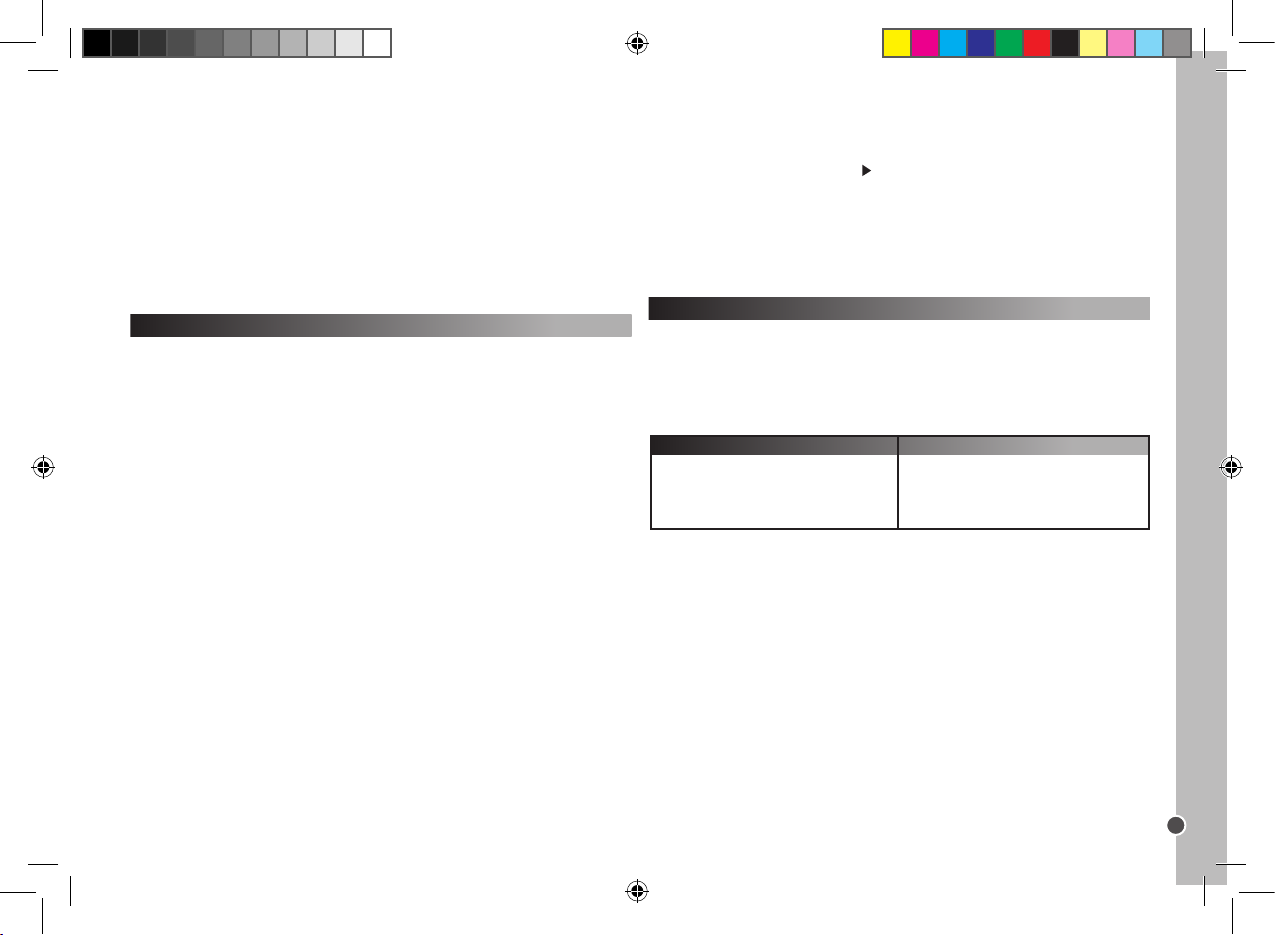
15
10
7
6
Un dígito
Dos dígitos
Tres dígitos
Cuatro dígitos
Canal (de 1 a 4 dígitos)
No. de canales que puede guardar
ST100.indd 15 4/9/07 18:05:25
Page 16
Copyright © Lexibook 2007
16
ESPAÑOL
Bloqueo para niños
En el modo de bloqueo para niños solo estarán operativas las siguientes
teclas: POWER, VOL+/-, MUTE, teclas de EQUIPO, SET y favCH.
1. Mantenga pulsadas simultáneamente las teclas SET y TV1.
2. Luego pulse, uno detrás de otro, 9 – 2 – 1.
Para desactivar el modo de bloqueo para niños:
1. Mantenga pulsadas simultáneamente las teclas SET y TV1.
2. Luego pulse, uno detrás de otro, 9 – 2 – 2.
Para borrar canales de la memoria:
1. Mantenga pulsadas simultáneamente las teclas SET y TV1.
2. Luego pulse, uno detrás de otro, 9 – 2 – 0.
Teclas macro
Con una de estas teclas macro puede hacer que se ejecuten hasta 15
funciones pulsando una sola tecla. En otras palabras, podrá ejecutar varios
comandos de control en el orden en que han sido almacenados pulsando
simplemente la tecla macro correspondiente.
Programación de la tecla macro
1. Mantenga pulsada la tecla SET, y pulse luego una de las teclas macro (M1,
M2 o M3). Cuando el LED se encienda, suelte las dos teclas.
2. Pulse ahora las teclas cuya acción quiere que se ejecute con la macro,
sucesivamente y en su orden. (Pulse la tecla SET para detener el modo de
programación.)
3. Finalmente, pulse de nuevo la tecla macro. Terminado el procedimiento, el
LED se apagará.
Por ejemplo:
Quiere almacenar la siguiente secuencia de comandos de control en M1:
Encender TV1 – cambiar a TV/VCR – encender VCR1 – Play – cambiar a TV.
Deberá entonces introducir la siguiente secuencia:
SET + M1 – TV1 – POWER – TV/VCR – VCR1 – POWER – PLAY – TV1 – M1.
Si se introducen más de 15 comandos de control, o si no se pulsa ninguna
tecla durante 30 segundos, la programación se detiene automáticamente, el
LED se apaga y se almacena la última secuencia entrada para la macro.
Para borrar las teclas macro
1. Para borrar las teclas macro mantenga pulsadas la tecla SET la correspondiente tecla macro.
2. Cuando el LED se encienda, suelte las dos teclas.
3. Pulse de nuevo la tecla macro. Cualquier comando de control almacenado
previamente quedará eliminado.
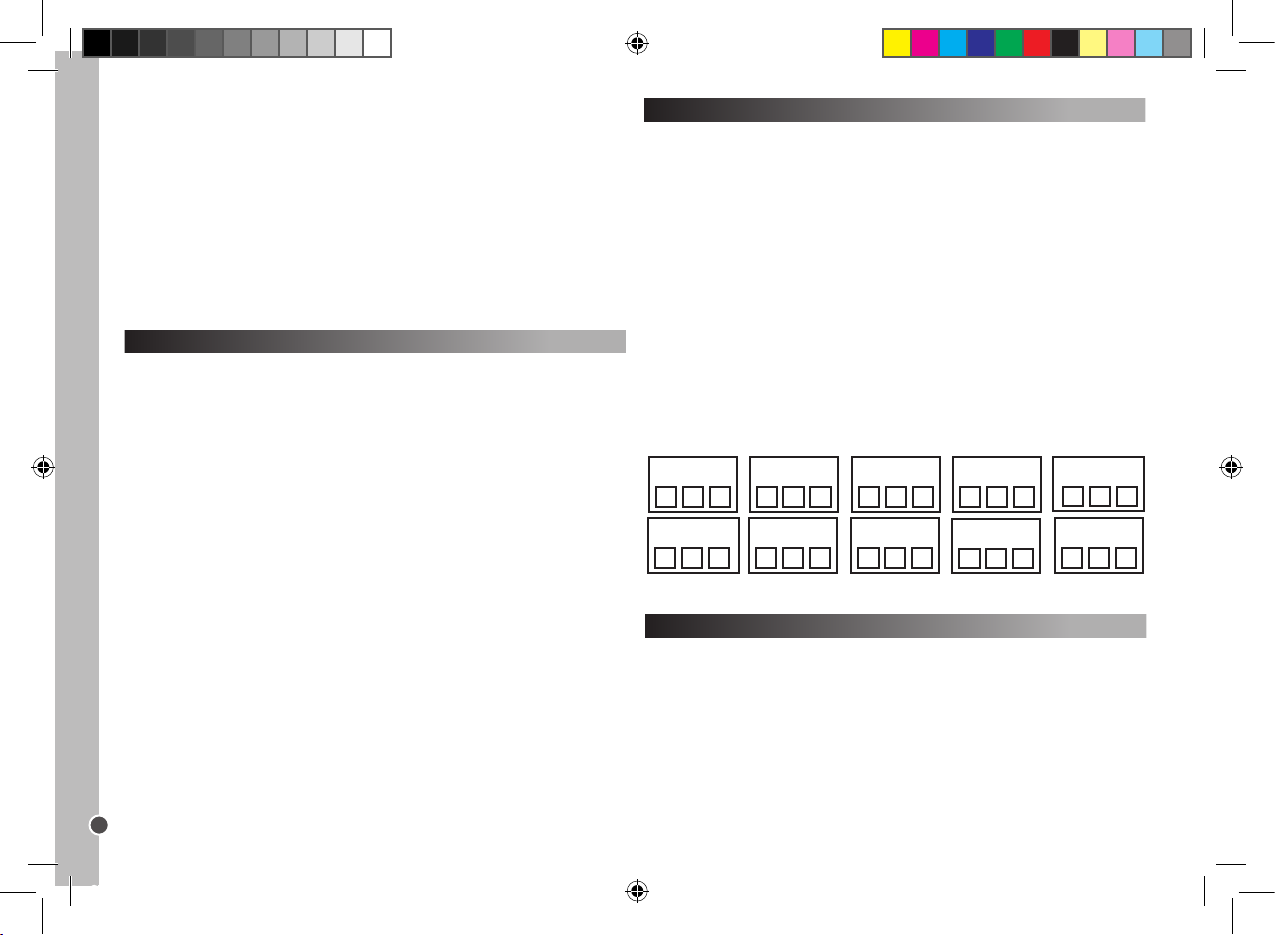
Anote el código de programación
Tome nota siempre del código de 3 dígitos del mando a distancia después de
realizar el procedimiento de búsqueda y de almacenar el código. Esto puede
ser muy útil si necesita reprogramar el mando a distancia en el caso de que
se borre por una cancelación accidental. Cuando busca el código, el LED
parpadea el número de veces correspondiente a cada dígito del código. Por
ejemplo: Para el código 231, le LED parpadearía dos veces, luego tres y luego
una.
Para sab er cuál es el código del mando a distancia:
1. Pulse una tecla de EQUIPO. Mantenga pulsadas simultáneamente las
teclas SET y 1. Suelte las dos teclas. El LED se enciende; el parpadeo indica
el primer dígito del código. Si el LED no se enciende, entonces el dígito es 0.
2. Para conocer el segundo dígito, mantenga pulsadas simultáneamente las
teclas SET y 2. El LED comenzará a parpadear.
3. Para conocer el tercer dígito, mantenga pulsadas simultáneamente las
teclas SET y 3. El LED comenzará a parpadear.
4. Repita los pasos 1-4 para conocer los códigos para los demás equipos.
Inicialización del mando
La inicialización del mando borrará todas las funciones programadas.
1. Mantenga pulsadas simultáneamente las teclas SET y TV1.
2. Luego pulse, uno detrás de otro, 9 – 9 – 0.
Código VCR2 Código SAT Código CBL
Código AMP
Código T V1 Código TV2 Código DVD Código CD
Código AUX
Código VCR1
ST100.indd 16 4/9/07 18:05:25
Page 17
Copyright © Lexibook 2007
17
ESPAÑOL
Función de iluminación de la pantalla
1. Pulse la tecla LIGHT para habilitar o deshabilitar la función de indicación
luminosa.
2. El estado inicial de esta la función es deshabilitado.
3. Cuando la función de indicación luminosa está activada, la luz se encenderá durante 5 segundos cuando se pulse una tecla.
4. Cuando está función está deshabilitada, la luz permanece siempre
apagada.
Nota: el uso continuado de la indicación luminosa hace que las pilas se gasten
antes.
Resolución de problemas
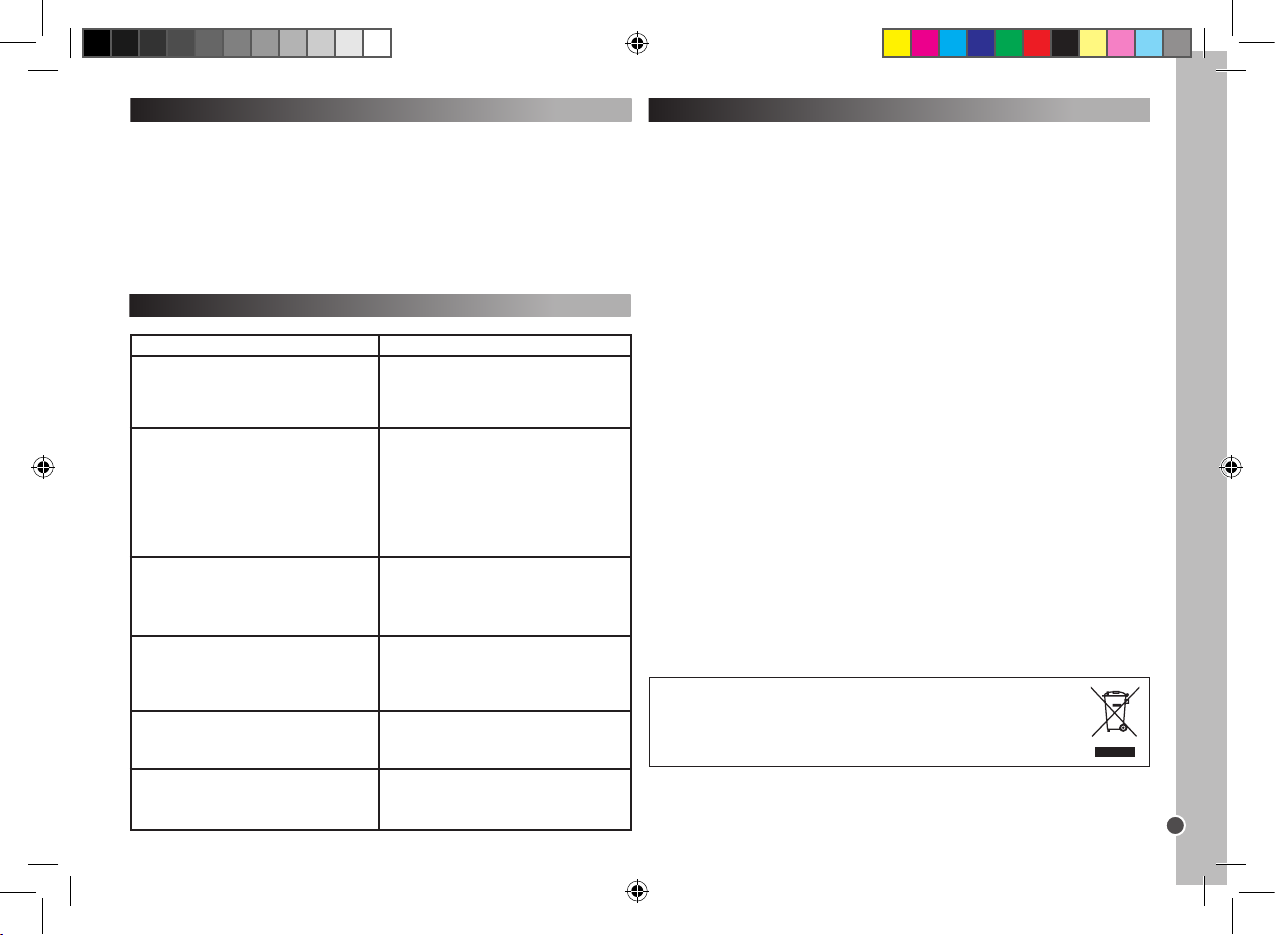
Problema
Solución
La marca de su equipo de audio o de vídeo no
aparece en el listado de códigos.
A. Proceda a realizar una búsqueda rápida
(página 14).
B. Proceda a realizar una búsqueda automática
(página 15).
El mando a distancia no es capaz de
manejar el equipo.
A. Compruebe la carga de las pilas.
B. Proceda a realizar una conguración
manual (página 14).
C. Proceda a realizar una conguración
mediante búsqueda rápida (página 14).
D. Proceda a realizar una conguración
mediante búsqueda automática (página 15).
El mando a distancia deja de funcionar
después de que la conguración
haya nalizado con éxito.
A. Compruebe la carga de las pilas.
B. Asegúrese de que ha pulsado la tecla de
EQUIPO adecuada (TV1, TV2, DVD, CD,
VCR1, VCR2, SAT, CBL, AMP or AUX).
Algunas de las teclas del mando a distancia
no funcionan correctamente.
A. El mando a distancia universal ST100
puede no tener todas las funciones del mando
a distancia original de su equipo de audio o
de vídeo.
El mando a distancia no responde después de
pulsar una tecla.
A. Asegúrese de que está utilizando pilas en
buen estado.
B. Apunte el mando a distancia hacia el equipo
El indicador LED parpadea o se queda
iluminado durante el funcionamiento normal
(no durante la conguración).
A. Sustituya las pilas con 4 pilas alcalinas
nuevas de tipo A AA
Protec ción med ioambienta l
¡Los aparatos eléct ricos pu eden ser reciclado s y no deben ser desechad os junto con la
basura dom éstica ha bitual! Apoye activamente el apr ovechamiento racio nal de los rec ursos y
ayude a prote ger el medio ambiente enviando est e producto a un centro de recolec ción para
recicla je (en caso de estar dis ponible).
Garantía
Este producto tiene una garantía de 2 años.
Para hacer uso de la garantía o del servicio posventa, contacte con el
vendedor y suministre el comprobante de la compra, o devuelva la unidad a
la dirección que se proporciona más abajo, completa y con comprobante de
compra.
Nuestra garantía cubre defectos relativos al material o al montaje atribuibles al
fabricante; con excepción del desgaste causado por no seguir las instrucciones de uso o cualquier manipulación no autorizada del equipo (como desensamblado, exposición al calor o a la humedad, etc.).
Nota: Se recomienda guardar todo el embalaje para futuras consultas. Guarde
este manual de instrucciones en un lugar seguro, ya que contiene información
importante.
Descargo de responsabilidad
Como resultado de nuestro empeño constante para mejorar nuestros productos, puede suceder que los colores y detalles del producto varíen respecto a
las imágenes mostradas en el embalaje.
Referencia: ST100
Garantía de 2 años
©2007 LEXIBOOK®
Diseñado y desarrollado en Europa – Fabricado en China
Servicio al cliente
Lexibook Ibérica S.L
C/ de las Hileras 4, 4° dpcho 14
28013 Madrid
España
Servicio consumidores: 91 548 89 32.
http://www.lexibook.com
ST100.indd 17 4/9/07 18:05:26
Page 18
Copyright © Lexibook 2007
18
PORTUGUÊS
Introdução
Parabéns! Acabou de adquirir um Telecomando Universal 10 em 1 da
Lexibook®. Compatível com mais de 12,000 aparelhos audiovisuais, este
telecomando universal combina as funções de vários telecomandos: TV1,
TV2, DVD, CD, Magnétoscope 1 (VCR1), Magnétoscope 2 (VCR 2), Satellite
(SAT), TV par CABLE (CBL), Amplicateur (AMP) et Auxiliaire (AUX),
amplicador (AMP) e auxiliar (AUX). Também pode controlar receptores de TV
digital (como modems ADSL, Freeview, DVB-T, etc…), através do botão SAT.
Atenção: Antes de utilizar o produto pela primeira vez, deverá congurá-lo, de
modo a que funcione com os produtos audiovisuais escolhidos. Para tal, por
favor leia com atenção estas instruções.
Colocação das pilhas
Antes de programar e utilizar o seu telecomando, coloque 4 pilhas AA A/LR03
alcalinas (não incluídas). Para tal, abra o compartimento das pilhas, que se
encontra na parte traseira do telecomando. Certique-se que coloca as pilhas
de acordo com a polaridade (sinais +/-) indicada no interior do compartimento
das pilhas. Volte a fechar o compartimento.
Notas:
O seu telecomando não perderá as congurações quando as pilhas carem
gastas.
Quando carregar as pilhas, não prima qualquer botão no telecomando. Caso
contrário, as congurações deste serão alteradas.
Utilizar os botões e as funções
Quando terminar o processo de conguração, o Telecomando Universal 10
em 1 da Lexibook® permite-lhe controlar os vários aparelhos audiovisuais que
possuir em casa. Quando utilizar o telecomando, primeiro escolha o tipo de
aparelho que deseja utilizar, premindo o botão correspondente ao aparelho
(TV1, TV2, DVD, CD, VCR1, VCR2, SAT, CBL, AMP ou AUX). Para além dos
10 botões dos aparelhos, todos os outros botões do telecomando só
funcionam se o seu aparelho também tiver estas funções. Por exemplo, o
botão da pausa ( ) funcionará no modo DVD/CD, mas não no modo T V1/
TV2.
VCR1 – Escolha do
vídeo e botão de
congur ar.
AMP – Esc olha do
amplic ador e botão de
congur ar.
TV2 - Esc olha da TV2
e botão de co ngurar (a
segunda televisão).
CD – Escolh a do leitor
de CDs e botã o de
congur ar.
VCR2 – Esc olha do vídeo
2 e botão de co ngurar.
M1/M2/M 3 – Botões
macro.
SET – Ser ve para
acciona r o modo de
congur ação.
LIGHT – Ser ve para ligar a luz
de fundo.
Os botões ve rmelho (R), ve rde
(G), amarelo (Y) e azul (B) podem
ter várias f unções, dependen do
do facto da su a televisão suport ar
ou não essas aplicaç ões.
TV1 – Esco lha da TV e
botão de co ngurar.
SAT – Escolha do
receptor de TV por
satélite e botão de
congur ar.
DVD – Escol ha do DVD e
botão de co ngurar.
AUX – Escolh a do
sistema Hi -Fi e botão de
congur ar.
CBL – Esco lha da TV
por cabo e b otão de
congur ar.
ST100.indd 18 4/9/07 18:05:27
Page 19
Copyright © Lexibook 2007
19
PORTUGUÊS
Congurar
Existem 3 modos de programação: Manual, Busca Rápida e Programação
Automática.
Por favor, tente congurar sempre PRIMEIRO no modo manual. Depois, se
nenhum código na lista de marcas e modelos equivaler ao seu aparelho,
tente a Busca Rápida e só se esta falhar é que deve tentar a Programação
Automática.
Para programar manualmente, utilize o código especíco do fabricante ou da
marca do aparelho (código de 3 dígitos) da lista fornecida.
Aviso: Programe um aparelho de cada vez. Por exemplo, comece por programar o telecomando para a sua televisão, depois para o seu leitor de DVDs
e assim sucessivamente...
Conguração manual
Nota: po de levar até 10 minu tos para congurar cada aparelho.
1. Escolha o aparelho que deseja congurar (por ex.: TV). Procure a marca do
seu aparelho na lista de códigos fornecida com este manual. Existe uma lista
de códigos diferente para cada um dos 10 aparelhos que o seu telecomando
pode controlar. Marque o(s) código(s) correspondente(s) de 3 dígitos. Uma
marca pode ter até 30 códigos. Poderá ter de tentar vários códigos antes de
encontrar aquele que se adeqúe ao seu modelo (consulte a informação
apresentada abaixo). Terá de repetir o procedimento por completo.
2. Ligue o aparelho a ser congurado no telecomando e aponte o
telecomando para esse aparelho.
- Se for um vídeo (VCR), insira uma cassete.
- Se for o satélite (SAT), escolha um programa.
- Se for um leitor de DVDs (DVD), insira um DVD.
- Se for um leitor de CDs (CD), insira um CD.
3. Prima primeiro o botão “SET” e mantenha-o premido enquanto prime o
botão correspondente ao aparelho no seu telecomando. Mantenha ambos
os botões premidos. Por exemplo, para programar a sua televisão, primeiro
prima o botão “SET” e, de seguida “TV1” em simultâneo.
4. Quando a LED (no canto superior esquerdo da unidade) acender, deixe de
premir os botões.
5. Utilize os botões dos números para inserir o código de 3 dígitos aplicável
ao seu aparelho.
6. Quando a LED se desligar, a conguração está completa.
7. Tente alguns botões do seu telecomando para vericar se funcionam
correctamente. Se for o caso, a sua conguração foi feita correctamente e
encontrou o código correcto. Está agora pronto para congurar outro
aparelho, utilizando o mesmo processo.
8. Se os botões do seu telecomando não funcionarem, signica que não
encontrou o código correcto e tem de tentar o código seguinte de 3 dígitos correspondente à marca do seu aparelho apresentado na lista. Repita os passos
3 a 7, até que o seu aparelho responda correctamente aos botões premidos no
telecomando.
Notas: - Prima o respectivo botão do APARELHO, caso deseje parar a con-
guração manual.
Se não premir qualquer botão durante mais de 15 segundos, a conguração
pára automaticamente e a LED desliga-se.
Se não conseguir programar o seu aparelho com a conguração manual, ou
se o código não estiver na lista, programe o seu telecomando utilizando a
função de busca rápida ou conguração automática. A função de busca testa
todos os códigos, um a seguir ao outro, e descobre o código correcto para o
seu aparelho.
Busca Rápida
Esta busca só deverá ser feita se a busca manual falhar, ou se o código
correcto da m arca ou do modelo não se encont rar na lista.
1. Ligue o aparelho a ser congurado no telecomando e aponte o telecomando
para esse aparelho.
- Se for um vídeo (VCR), insira uma cassete.
- Se for o satélite (SAT), escolha um programa.
- Se for um leitor de DVDs (DVD), insira um DVD.
2. Prima o botão “SET”, seguido do botão correspondente ao aparelho no seu
telecomando. Mantenha ambos os botões premidos.
3. Quando a LED acender, deixe de premir os botões.
4. Prima novamente o botão “SET”. A LED começa a piscar e a busca rápida
é iniciada.
5. De modo a iniciar a busca rápida do código, tem de premir o botão
“POWER” ( ). Serão transferidos 5 códigos. Espere 3 segundos. Se não
acontecer nada, prima novamente o botão “POWER”. Cada vez quer premir
este botão, o telecomando fará a busca a 5 novos códigos diferentes durante 3
segundos. Poderá ter de premir o botão “POWER” até 100 vezes no máximo.
(cerca de 5 minutos).
6. Quando o seu aparelho se desligar, signica que encontrou o código
correcto. NÃO prima novamente o botão “POWER”, pois daria início a uma
nova busca de códigos.
7. Prima novamente o respectivo botão do APARELHO para sair da
conguração. A LED deixa de piscar e permanece ligada.
8. Volte ao seu aparelho e ligue-o novamente (utilizando o telecomando
original, ou os botões do painel dianteiro do aparelho).
9. Para conseguir congurar correctamente a busca dentro destes 5 códigos,
terá de premir o botão “POWER” e esperar 2 segundos. Se não acontecer
nada, repita o processo, premindo novamente o botão “POWER” e
ST100.indd 19 4/9/07 18:05:28
Page 20
Copyright © Lexibook 2007
esperando 2 segundos. Se o seu aparelho continuar sem responder, só
deverá ser preciso premir o botão “POWER” até 5 vezes, antes do seu
aparelho voltar a desligar-se.
10. Quando o seu aparelho se desligar, signica que encontrou o código
correcto. NÃO prima novamente o botão “POWER”, pois daria início a uma
nova busca de códigos.
11. Prima o respectivo botão do APARELHO para memorizar e sair da
conguração. A LED desliga-se.
12. Durante o passo 8, pode premir o botão “SET” para voltar ao passo 5.
Verique se consegue controlar todas as aplicações do seu aparelho com os
botões do telecomando.
Busca automática
Esta busca só deverá ser feita se a Busca Rápida não funcionar.
1. Ligue o aparelho a ser congurado no telecomando e aponte o telecomando
para esse aparelho.
2. Prima o respectivo botão do APARELHO no seu telecomando.
3. Prima o botão “SET”, seguido do botão “POWER” no seu telecomando.
Mantenha ambos os botões premidos até que a LED permaneça ligada. Deixe
de premir ambos os botões e a LED começa a piscar. A busca automática
começou.
4. São transmitidos 5 códigos de cada vez. Há um período de 5 segundos
entre cada transmissão, cerca de 9 minutos no total.
5. Quando o seu aparelho se desligar, signica que foi encontrado o código
correcto.
6. Prima o botão do respectivo APARELHO para fazer uma busca automática
dentro destes cinco códigos.
7. Volte ao seu aparelho e ligue-o novamente (utilizando o telecomando
original, ou os botões do painel dianteiro do aparelho).
8. Aponte o telecomando enquanto faz a busca ao aparelho. Quando o
aparelho se desligar, signica que encontrou o código correcto.
9. Prima o respectivo botão do APARELHO para parar/memorizar. A LED
desliga-se.
10. Durante o passo 5, pode premir o botão “SET” para voltar ao passo 3.
Verique se consegue controlar todas as aplicações do seu aparelho com os
botões do telecomando.
Dicas para os modos de busca automática e busca automática:
- Alguns aparelhos não podem ser ligados ou desligados com o telecomando.
Nesses casos, utilize o botão “PLAY” ( ) em vez do botão para vericar se
Memorizar os seus canais p referidos
Exemplo: memorizar os canais 02, 38 e 56.
1. Prima e mantenha premido o botão “SET” e o botão “FavCH” em simultâneo, até que a LED acenda.
2. De seguida, prima
0 – 2 – SET – 3 – 8 – SET – 5 – 6 – FavCH.
E, para números de 3 dígitos, prima
0 – 0 – 2 – SET – 0 – 3 – 8 – SET – 0 – 5 – 6 – FavCH.
Só pode memorizar os botões numéricos de 1 a 9. Pode memorizar números
de canais com 1 a 4 dígitos.
Quando tiver memorizado os seus canais preferidos, basta premir o botão
“FavCH” para procurar entre os canais na ordem em que foram memorizados
e escolher um deles.
Para apagar os canais da memória:
1. Prima e mantenha premido em simultâneo os botões “SET” e “TV”.
2. De seguida, um a seguir ao outro, prima 9 – 2 – 0.
Controlo parental
No modo de controlo parental, só funcionarão os seguintes botões: “POWER”
“VOL+/-”-, “MUTE”, os botões do APARELHO “SET” e “FavCH”.
1. Prima e mantenha premido em simultâneo os botões “SET” e “TV1”.
20
PORTUGUÊS
o aparelho responde ao telecomando.
- A direcção da busca pode ser alterada premindo o botão “CH+/-”.
- Pode vericar todos os botões de funções, excepto o “POWER” e o “PLAY”,
sem sair do modo de busca rápida.
Se não premir qualquer botão durante mais de 30 segundos, a conguração
pára automaticamente e a LED desliga-se.
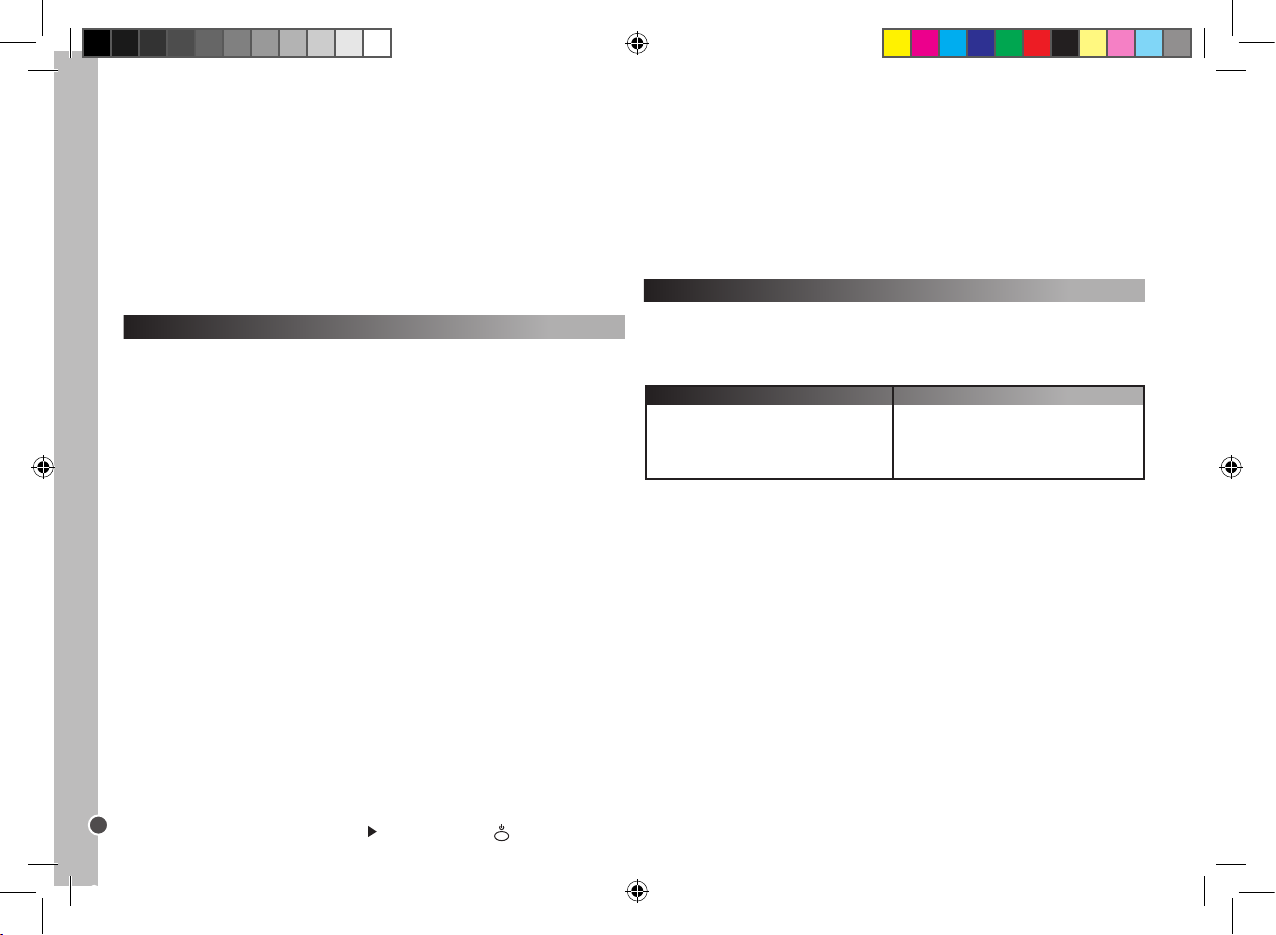
Caso o seu telecomando continue sem funcionar, veri que novamente a
lista de códigos e repita o processo de conguração (manual ou busca
de código), até conseguir encontrar o código correcto.
Memorizar os seus canais preferidos e bloqueio parental
O botão “FAVCH” permite-lhe memorizar os seus canais preferidos, ou limitar
o número de canais acessíveis às crianças. Poderá memorizar ou recuperar o
seguinte número de canais com o botão “FAVCH”:
15
10
7
6
Um dígito
Dois dígitos
Três dígitos
Quatro dígitos
Canal (números de 1 a 4 dígitos)
Canal (números de 1 a 4 dígitos)
ST100.indd 20 4/9/07 18:05:28
Page 21
Copyright © Lexibook 2007
Botões Macro
Com um dos botões macro, pode fazer um conjunto de até 15 funções
premindo apenas um botão. Por outras palavras, poderá executar vários
comandos na ordem em que foram memorizados, premindo simplesmente o
respectivo botão MACRO.
Programar o botão MACRO
1. Prima e mantenha premido o botão “SET” e, de seguida, prima um dos
botões MACRO (M1, M2 e M3). Quando a LED acender, deixe de premir os
dois botões.
2. De seguida, prima os botões da aplicação que gostaria de activar sucessivamente na respectiva ordem. (Prima o botão “SET” para parar o modo de
programação.)
3. Finalmente, prima novamente o botão MACRO. Quando o processo estiver
concluído, a LED desliga-se.
Por exemplo:
Se desejar memorizar a seguinte sequência de controlo em M1:
TV1 ligada – Passar para TV/VCR – VCR1 ligado – Reproduzir – Passar para
TV.
Terá de inserir:
SET + M1 – TV1 – POWER – TV/VCR – VCR1 – POWER – PLAY – TV1
– M1.
Se tiver escolhido mais de 15 comandos de controlo, ou não tiver premido
qualquer botão durante mais de 30 segundos, a programação pára auto-
maticamente, a LED desliga-se e as últimas congurações MACRO serão
memorizadas.
Apagar as congurações
1. Para apagar as congurações do botão MACRO, prima e mantenha
premido o botão “SET” e prima o respectivo botão MACRO.
2. Quando a LED acender, deixe de premir os dois botões.
3. Prima novamente o botão MACRO. Qualquer comando de controlo que
tenha memorizado anteriormente será apagado.
21
PORTUGUÊS
2. De seguida, um a seguir ao outro, prima 9 – 2 – 1.
Para desligar o modo de controlo parental:
1. Prima e mantenha premido em simultâneo os botões “SET” e “TV1”.
2. De seguida, um a seguir ao outro, prima 9 – 2 – 2.
Para apagar os canais da memória:
1. Prima e mantenha premido em simultâneo os botões “SET” e “TV1”.
2. De seguida, um a seguir ao outro, prima 9 – 2 – 0.
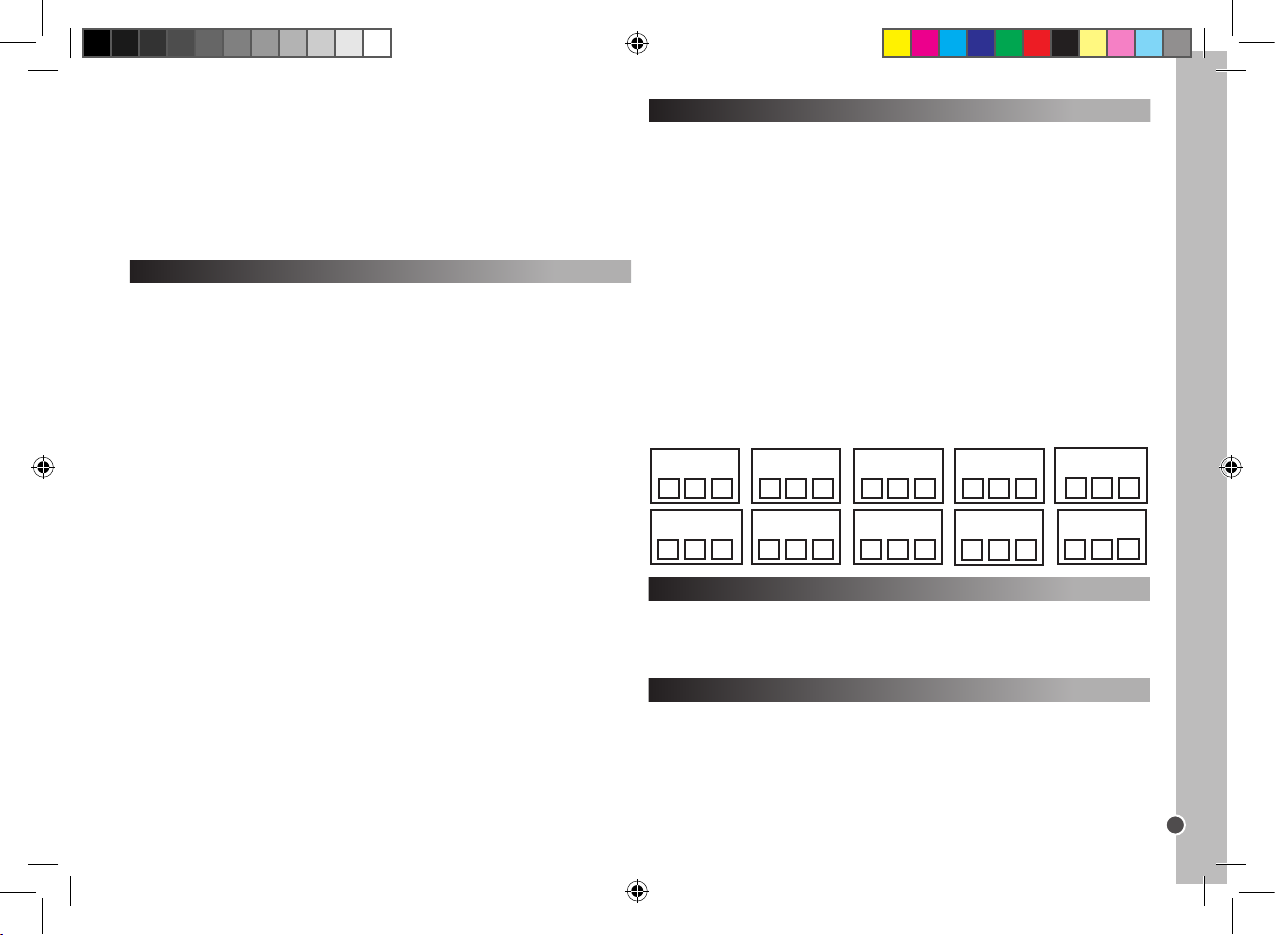
Anotar o código programado
Anote sempre o código de 3 dígitos do seu telecomando após ter feito a
busca e memorizado o código. Isso pode ser útil, caso precise de programar
novamente o seu telecomando no caso de um cancelamento acidental.
Quando estiver a procurar o código, a LED começa a piscar de acordo com os
números do código de 3 dígitos. Por exemplo: Para o código 231, a LED pisca
duas vezes, depois três e depois uma.
Para descobrir o código para o seu telecomando:
1. Prima o botão do aparelho. De seguida, prima e mantenha premido em
simultâneo o botão “SET” e 1. Deixe de premir os 2 botões. A LED acende e
o piscar desta indica o primeiro dígito do código. Se a LED não ligar, signica
que o número é = 0.
2. Para ver o segundo número, prima e mantenha premido em simultâneo o
botão “SET” e 2. A LED começa a piscar.
3. Para ver o terceiro número, prima e mantenha premido em simultâneo o
botão “SET” e 3. A LED começa a piscar.
4. Repita os passos 1 a 4 para encontrar os códigos dos outros aparelhos.
Reiniciar operacional
O reiniciar operacional apagará todas as funções conguradas.
1. Prima e mantenha premido em simultâneo o botão “SET” e “TV1”.
2. De seguida, um a seguir ao outro, prima 9 – 9 – 0.
Função da luz de fundo
1. Prima o botão “LIGHT” para ligar/desligar a função da luz de fundo.
2. O estado inicial é desligado.
3. Quando ligar a função da luz de fundo, prima qualquer botão e a luz acende
durante 5 segundos e permanece ligada quando premir um botão.
4. Quando desligar esta função, a luz de fundo permanece desligada.
Nota: a utilização contínua da luz de fundo gasta a energia das pilhas.
Código VCR2 Código SAT Código CBL
Código AMP
Código T V1 Código TV2 Código DVD Código CD
Código AUX
Código VCR1
ST100.indd 21 4/9/07 18:05:29
Page 22
Copyright © Lexibook 2007
22
PORTUGUÊS
Garantia
Este produto tem uma garantia de 2 anos.
Para utilizar a sua garantia ou os serviços pós-venda, por favor contacte o
seu vendedor e forneça uma prova de compra, ou envie a unidade para o
endereço apresentado abaixo com uma prova de compra.
A nossa garantia cobre defeitos de material ou de instalação que possam
ser atribuídos ao fabricante, com a excepção de desgaste causado pelo não
respeito das instruções de utilização, ou qualquer trabalho não autorizado no
equipamento (como desmontar, expor ao calor ou à humidade, etc.).
Nota: Recomendamos que guarde todo o pacote para futuras referências.
Guarde este manual de instruções num local seguro, pois contém informações
importantes.
Cláusula de desresponsabilização
Na nossa constante procura pela melhoria, as cores e detalhes do produto
podem ser ligeiramente diferentes das apresentadas na caixa.
Referência: ST100
Garantia de 2 anos
©2007 LEXIBOOK®
Criado e desenvolvido na Europa - Fabricado na China
Serviço de Apoio ao Cliente
LEXIBOOK Electronica Lda
Quinta dos Loios
Praceta José Domingos dos Santos, 6B-8A
2835-343 Lavradio-Barreiro
Portugal
Apoio Técnico: 212 039 600
http://www.lexibook.com
Protec ção amb iental
Os aparelh os eléctricos in desejado s podem ser recicla dos e não dever ão ser deitados
fora junta mente com o lixo convenc ional! Por favor, apoie act ivamente a conser vação de
recurso s e ajude a proteger o ambiente, devolvendo esta uni dade a um centro de reco lha
(se disponível).
Resolução de problemas
Problema
Solução
A marca do seu aparelho audiovisual não vem
listada no livro dos códigos.
A. Faça a conguração em busca rápida
(página 19).
B. Faça a conguração em busca automática
(página 20).
O telecomando não consegue controlar o
seu aparelho audiovisual.
A. Verique a energia das pilhas.
B. Faça a conguração manual (página 19).
C. Faça a conguração em busca rápida
(página 19).
D. Faça a conguração em busca automática
(página 20).
O seu telecomando pára de funcionar após ter
completado com sucesso a conguração.
A. Verique a energia das pilhas.
B. Certique-se que premiu o botão do aparelho
certo (TV1, TV2, DVD, CD, VCR1, VCR2, SAT,
CBL, AMP or AUX).
Alguns dos botões do seu telecomando não
funcionam correctamente.
A. O telecomando universal ST100 pode não
ter todas as funções do telecomando original
do seu aparelho audiovisual.
O seu telecomando não responde após premir
um botão.
A. Certique-se que está a utilizar pilhas novas.
B. Aponte o telecomando para o seu aparelho.
O indicador LED pisca ou permanece ligado
durante a utilização normal (e não durante a
conguração).
A. Substitua as pilhas usadas por 4 pilhas
alcalinas AA novas.
ST100.indd 22 4/9/07 18:05:30
Page 23
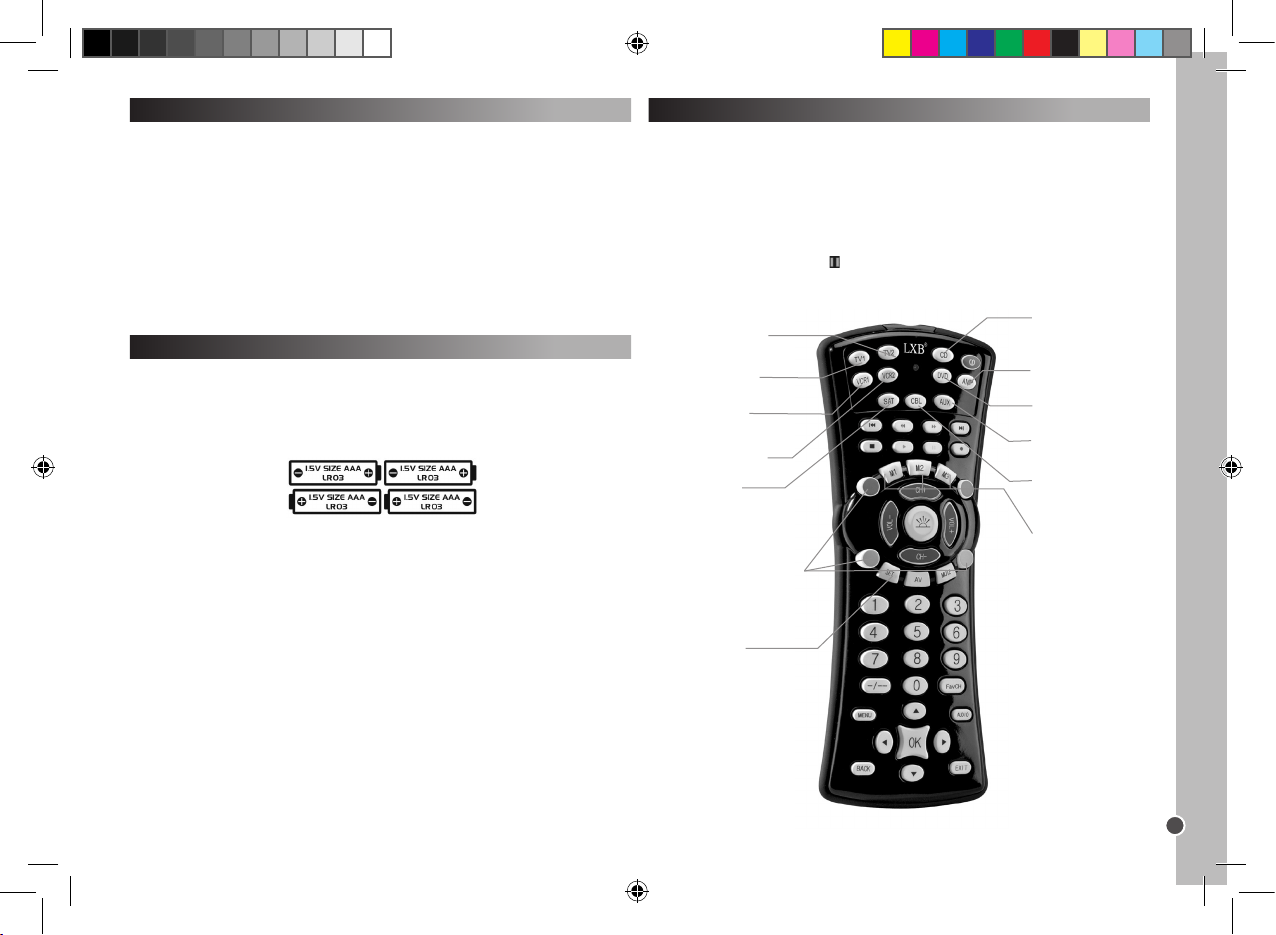
Copyright © Lexibook 2007
23
ITALIANO
Introduzioni
Congratulazioni per aver acquisto un Telecomando Universale 10 in 1
Lexibook®. Compatibile con oltre 12,000 dispositivi audio-video, questo
telecomando universale abbina le funzioni di parecchi telecomandi: TV1,
TV2, DVD, CD, Video Registratore 1 (VCR1), Video Registratore 2 (VCR2),
Satellite (SAT), TV via cavo (CBL), amplicatore (AMP) e Ausiliario (AUX).
Anche il ricevitore TV satellitare (come modem ADSL, Freeview, DVB-T
ecc…) può essere controllato dal tasto SAT.
Attenzione: Prima del primo utilizzo, occorre impostare il telecomando in
modo che funzioni con i prodotti audio-video scelti. Per fare ciò, si prega di
leggere attentamente le istruzioni.
Inserimento batterie
Prima di programmare e di utilizzare il telecomando, inserire 4 batterie
alcaline AAA/LR03 (non in dotazione). Per fare ciò, aprire il vano batterie
collocato sulla parte posteriore del telecomando. Prestare attenzione ad
inserire le batterie secondo la polarità (segni +/-) indicata all’interno del vano
batterie. Richiudere il vano batterie.
Note:
Il telecomando non perde le impostazioni quando le batterie sono scariche.
Quando si sostituiscono le batterie, non premere alcun tasto sul telecomando.
Altrimenti le impostazioni del telecomando saranno modicate.
Utilizzo di tasti e funzioni
Una volta completata la procedura di impostazione, il telecomando universale
10 in 1 Lexibook® consentirà di controllare i vari dispositivi audio-video della
vostra casa. Quando si utilizza il telecomando, selezionare prima di tutto il tipo
di dispositivo che si desidera utilizzare premendo il tasto dispositivo
corrispondente (TV1, TV2, DVD, CD, VCR1, VCR2, SAT, CBL, AMP or AUX).
Tranne gli 10 tasti dispositivo e i tasti macro, tutti gli altri tasti sul telecomando
sono funzionanti soltanto se il dispositivo è dotato di queste funzioni.
Ad esempio, il tasto Pausa ( ) funzionerà in modalità DVD/CD ma non in
modalità TV1/TV2.
VCR1 – Tasto
Selezion e VCR e
imposta zione.
AMP – Tasto Sele zione
amplic atore e
imposta zione.
TV2 - Tasto Sele zione TV2
e imposta zione (secondo
televisore).
CD – Tasto Selezio ne
lettore C D e
imposta zione.
VCR2 – Tasto Sele zione
VCR2 e impo stazione.
M1/M2/M 3 – Tasti Macr o.
SET – per av viare la
modalit à imposta zione.
LIGHT – per a bilitare l a retroilluminazi one.
I pulsanti r osso (R), verd e (G),
giallo (Y), e blu (B) poss ono avere
varie funz ioni secondo quanto
suppor tato dal televisore.
TV1 – Tasto Selezi one
TV e impostazion e.
SAT – Tasto Selezione
ricevit ore TV satellitar e e
imposta zione.
DVD – Tasto Selezione
lettore DV D e
imposta zione.
AUX – Tasto Selezio ne
sistema Hi -Fi e
imposta zione.
CBL – Tasto Selezione TV
via cavo e imp ostazione.
ST100.indd 23 4/9/07 18:05:31
Page 24
Copyright © Lexibook 2007
24
ITALIANO
Impostazione
Sono disponibili 3 modalità di programmazione: Manuale, Ricerca Veloce e
Programmazione Automatica.
Tentare sempre PRIMA l’impostazione manuale, poi se non ci sono codici
nell’elenco di marche e modelli che corrispondano al vostro dispositivo,
tentare la Ricerca Veloce, e solo se questa procedura fallisce, tentare la
Programmazione Automatica.
Per programmare manualmente, utilizzare il codice specico per il costruttore
o la marca del dispositivo (codice a 3 cifre) nell’elenco fornito.
Avvertenza: programmare un dispositivo alla volta. Ad esempio,
iniziare impostando il telecomando per il televisore, poi per il lettore DVD …
Impostazione Manuale
Nota: possono occorrere no a 10 minuti per dispositivo.
1. Selezionare il dispositivo che si desidera impostare (ad esempio: TV).
Cercare la marca del dispositivo nell’elenco di codici allegati. Esiste un elenco
di codici diverso per ciascuno degli 10 dispositivi per cui può essere impostato
il telecomando. Segnare il(i) codice(i) a 3 cifre corrispondente(i). Una marca
può avere no a 30 codici. Può essere necessario provarne parecchi prima
di trovarne uno adatto al vostro modello (vedere di seguito). Dovrà essere
ripetuta la procedura completa.
2. Accendere il dispositivo per cui deve essere impostato il telecomando e
puntare il telecomando verso il dispositivo.
- In caso di VCR, inserire una cassetta.
- In caso di SAT, selezionare un programma.
- In caso di DVD, inserire un DVD.
- In caso di CD, inserire un CD.
3. Premere prima il tasto SET e tenerlo premuto mentre si preme il tasto del
dispositivo corrispondente sul telecomando, tenere premuti entrambi i tasti.
Ad esempio: Per programmare il televisore, premere prima SET e poi TV1
simultaneamente.
4. Quando si accende il LED (sull’angolo in alto a sinistra dell’unità), lasciare i
tasti.
5. Utilizzare i tasti numerici per inserire il codice a 3 cifre applicabile al dispositivo.
6. Il LED si spegnerà; l’impostazione è completata.
7. Provare alcuni tasti sul telecomando per vericare se funzionano correttamente. Se funzionano, l’impostazione ha avuto esito positivo: è stato trovato
il codice giusto. Ora si può passare ad impostare un altro dispositivo, con la
stessa procedura.
8. Se i tasti del telecomando non funzionano, non è stato trovato il codice
giusto e occorre provare il codice a 3 cifre successivo corrispondente alla
marca del dispositivo in elenco: ripetere i passaggi da 3 a 7, no a che il
dispositivo risponde correttamente ai tasti premuti sul telecomando.
Note: - Premere il corrispondente tasto DISPOSITIVO se si desidera
interrompere l’impostazione manuale.
Se non si preme alcun pulsante per più di 15 secondi, l’impostazione termina
automaticamente e il LED si spegne.
Se il dispositivo non può essere programmato con l’impostazione manuale o
se il codice non è nell’elenco, programmare il telecomando utilizzando le
funzioni di ricerca veloce o automatica. La funzione di ricerca testa tutti i
codici uno dopo l’altro e trova quello giusto per il dispositivo.
Ricerca veloce
Quest a ricerca deve essere utilizzata soltanto se la ricerca manuale
non è riuscita o se il codice del marca o del modello giusto non sono
presenti.
1. Accendere il dispositivo per cui deve essere impostato il telecomando e
puntare il telecomando verso il dispositivo.
- In caso di VCR, inserire una cassetta.
- In caso di SAT, selezionare un programma.
- In caso di DVD, inserire un DVD.
2. Premere il tasto SET seguito dal tasto del dispositivo corrispondente sul
telecomando. Tenere premuti entrambi i tasti.
3. Quando si accende il LED, lasciare i tasti.
4. Premere nuovamente il tasto SET. Il LED inizia a lampeggiare e inizia la
procedura di ricerca veloce.
5. Per attivare la ricerca del codice occorre premere il tasto di accensione
( ). Saranno trasferiti 5 codici. Aspettare 3 secondi. Se non succede nulla,
premere nuovamente Power. Ogni volta che si preme il tasto di accensione,
cerca 5 nuovi codici diversi per 3 secondi. È possibile che si debba premere il
tasto di accensione no a 100 volte massimo. (circa 5 minuti).
6. Quando il dispositivo si spegne, è stato trovato il codice corretto. NON
premere di nuovo il tasto di accensione altrimenti riparte la ricerca codice.
7. Premere nuovamente il tasto dispositivo corrispondente per uscire dallo
stadio attuale. Il LED smette di lampeggiare e rimane acceso sso.
8. Tornare al dispositivo e accenderlo di nuovo (usando il telecomando
originale o il pulsante sul pannello frontale del dispositivo).
9. Per afnare la ricerca tra questi 5 codici, occorre premere il tasto di
accensione e aspettare 2 secondi. Se non succede nulla, ripetere premendo
nuovamente il tasto di accensione e aspettare 2 secondi. Se il dispositivo
ST100.indd 24 4/9/07 18:05:31
Page 25
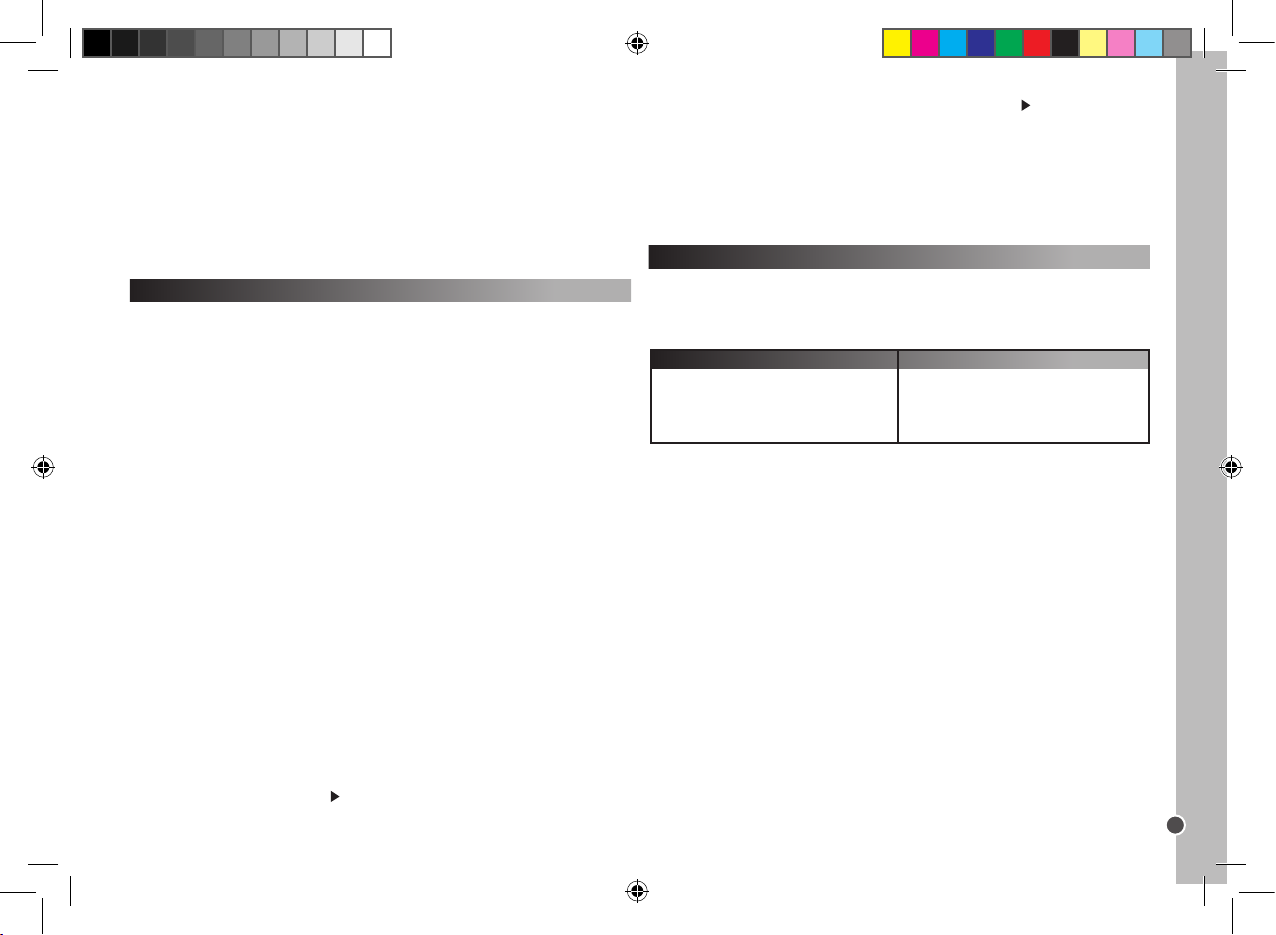
Copyright © Lexibook 2007
25
ITALIANO
continua a non rispondere, dovrebbe essere sufciente premere il tasto di accensione 5 volte in totale prima che il dispositivo si spenga nuovamente.
10. Quando il dispositivo si spegne, è stato trovato il codice corretto. NON
premere di nuovo il tasto di accensione altrimenti riparte la ricerca codice.
11. Premere il tasto dispositivo corrispondente per memorizzare e uscire. Il
LED si spegne.
12. Durante il passaggio 8, si può premere il tasto SET per tornare al passaggio 5.
Vericare se tutte le applicazioni del dispositivo funzionano utilizzando i tasti
del telecomando.
Ricerca automatica
Questo tipo di ricerca deve essere utilizzato soltanto se la Ricerca
veloce non ha funzionato.
1. Accendere il dispositivo da comandare e puntare il telecomando verso il
dispositivo.
2. Premere il tasto dispositivo corrispondente sul telecomando.
3. Premere il tasto SET seguito dal tasto di accensione sul telecomando.
Tenere premuti entrambi i tasti no a che il LED non rimane acceso sso.
Lasciare entrambi i tasti; il LED inizia a lampeggiare. Inizia la ricerca automatica.
4. Vengono trasmessi 5 codici per volta; c’è un intervallo di 5 secondi tra ogni
trasmissione, circa 9 minuti in totale.
5. Quando il dispositivo si spegne, è stato trovata la serie di codici corretta.
6. Premere subito il tasto dispositivo corrispondente per iniziare la ricerca
automatica tra questi cinque codici.
7. Tornare al dispositivo e accenderlo di nuovo (usando il telecomando
originale o il pulsante sul pannello frontale del dispositivo).
8. Puntare il telecomando che sta eseguendo la ricerca verso di esso: quando
il dispositivo si spegne, è stato trovato il codice corretto.
9. Premere il tasto dispositivo corrispondente per terminare/ memorizzare. Il
LED si spegne.
10. Durante il passaggio 5, può essere premuto il tasto SET per tornare al
passaggio 3.
Vericare se tutte le applicazioni del dispositivo funzionano utilizzando i tasti
del telecomando.
Suggerimenti per le modalità di ricerca veloce e automatica:
- Alcuni dispositivi non si possono accendere/ spegnere con il telecomando.
In tali casi, usare il tasto PLAY ( ) invece del tasto di accensione per vericare
se il dispositivo rispondere al telecomando.
- La direzione di ricerca può essere modicata premendo il tasto CH+/-.
Memorizz are i canali preferiti
Esempio: memorizzare 02, 38 e 56.
1. Tenere premuti il tasto SET e il tasto FavCH contemporaneamente no a
quando il LED si accende.
2. Poi premere in successione
0 – 2 – SET – 3 – 8 – SET – 5 – 6 – FavCH.
E per i numeri a 3 cifre premere
0 – 0 – 2 – SET – 0 – 3 – 8 – SET – 0 – 5 – 6 – FavCH.
Possono essere impostati solo i tasti numerici 1-9. Possono essere memorizzati numeri di canali da 1 a 4 cifre.
Una volta memorizzati i canali preferiti, premere semplicemente il tasto FavCH
per scorrere i canali per vericare se sono stati memorizzati e sceglierne uno.
Per cancellare i canali dalla memoria:
1. Tenere premuti simultaneamente i tasti SET e TV1
2. Poi, uno dopo l’altro, premere 9 – 2 – 0.
Blocco Bambino
In modalità Blocco bambino, funzioneranno solo i seguenti tasti: accensione,
VOL+/-, MUTE, pulsanti dispositivo SET e FavCH.
1. Tenere premuti simultaneamente i tasti SET e TV1.
2. Poi, uno dopo l’altro, premere 9 – 2 – 1.
- Tutti i tasti funzione tranne il tasto di accensione e PLAY ( ) si possono
vericare senza uscire dalla modalità di ricerca veloce.
Se non viene premuto nessun tasto per più di 30 secondi, la procedura di
impostazione si interrompe automaticamente e il LED si spegne.
Se il telecomando non dovesse ancora funzionare, vericare
nuovamente l’elenco dei codici e ripetere la procedura di impostazione
(manuale o ricerca codice) no a quando si trova il c odice corretto.
Memorizzazione canali preferiti e blocco bambino
Il tasto FavCH consente di memorizzare i canali preferiti o di limitare il numero
di canali accessibili ai bambini. Utilizzando il tasto FavCH è possibile
memorizzare o rilasciare il seguente numero di canali:
15
10
7
6
Una cifra
Due cifre
Tre cifre
Quattro cifre
Canali (1-4 cifre)
Numero di canali memorizzabili
ST100.indd 25 4/9/07 18:05:32
Page 26
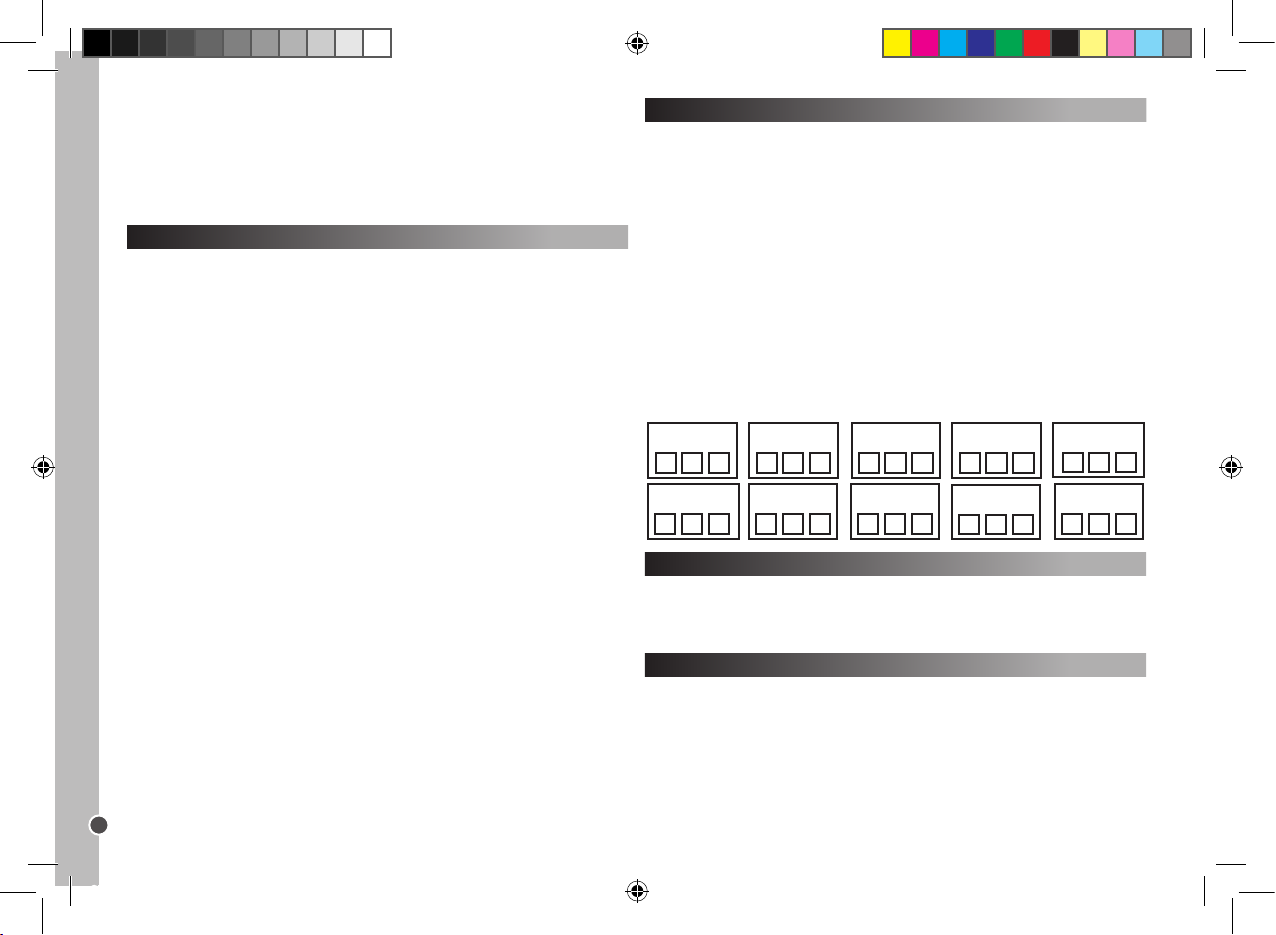
Copyright © Lexibook 2007
26
ITALIANO
Tasto Macro
Con uno dei tasti macro, è possibile attivare una serie di max 15 funzioni
premendo un solo tasto. In altre parole, è possibile eseguire parecchi comandi
nell’ordine in cui sono stati memorizzati semplicemente premendo il tasto
MACRO corrispondente.
Programmare il Tasto MACRO
1. Tenendo premuto il tasto SET, premere uno dei tasti MACRO (M1, M2, e
M3). Quando si accende il LED, lasciare i due tasti.
2. Ora premere i tasti, l’applicazione dei quali si desidera attivare
successivamente nell’ordine prestabilito. (Premere il tasto SET per terminare
la modalità di programmazione.)
3. Inne, premere nuovamente il tasto MACRO. Quando la procedura è
completata, il LED si spegne.
Ad esempio:
Si desidera memorizzare la sequenza di comandi qui di seguito su M1:
TV1 on – passare a TV/VCR – VCR1 on – Play – passare a TV.
Poi si deve inserire :
SET + M1 – TV1 – POWER – TV/VCR – VCR1 – POWER – PLAY – TV1 – M1.
Se sono stati selezionati più di 15 comandi o se non sono stati premuti pulsanti
per più di 30 secondi, la programmazione si interrompe automaticamente, il
LED si spegne e vengono memorizzate le ultime impostazioni MACRO.
Cancellare le impostazioni
1. Per cancellare le impostazioni dei tasti MACRO, tenere premuto il tasto SET
e premere il tasto MACRO corrispondente.
2. Quando il LED si accende, lasciare i due pulsanti.
3. Premere nuovamente il tasto MACRO. Qualsiasi comando
precedentemente memorizzato è stato cancellato.
Reset funzionale
Il reset funzionale annulla tutte le funzioni impostate.
1. Tenere premuto contemporaneamente il tasto SET e TV1.
2. Poi, uno dopo l’altro, premere 9 – 9 – 0.
Funzione retroilluminazione
1. Premere il tasto LIGHT per abilitare/ disabilitare la funzione di
retroilluminazione.
2. Lo stato iniziale è disabilitato.
3. Quando viene abilitata la funzione di retroilluminazione, premere un tasto
qualsiasi e la luce si accende per 5 secondi e rimane accesa quando viene
premuto un tasto.
4. Quando questa funzione è disabilitata, la retroilluminazione rimane spenta.
Nota: l’uso continuo della retroilluminazione esaurisce le batterie.
Per spegnere la modalità del blocco bambino:
1. Tenere premuti simultaneamente i tasti SET e TV1.
2. Poi, uno dopo l’altro, premere 9 – 2 – 2.
Per cancellare i canali dalla memoria:
1. Tenere premuti simultaneamente i tasti SET e TV1.
2. Poi, uno dopo l’altro, premere 9 – 2 – 0.
Annotare il codice di programmazione
Annotare sempre il codice a 3 cifre per il telecomando dopo aver eseguito la
ricerca e salvare il codice. Questo può essere utile se è necessario
riprogrammare il telecomando in caso di cancellazione accidentale. Quando si
ricerca il codice, il LED lampeggia in corrispondenza dei numeri del codice a 3
cifre. Ad esempio: Per il codice 231, il LED lampeggia due volte, poi tre volte,
poi una volta.
Per trovare il codice del telec omando:
1. Premere un tasto dispositivo. Contemporaneamente tenere premuto il tasto
SET e 1. Lasciare i 2 tasti. Il LED si accende; il numero di volte in cui
lampeggia indica la prima cifra del codice. Se il LED non si accende: cifra = 0.
2. Per visualizzare la seconda cifra, tenere premuto contemporaneamente il
tasto SET e 2. Il LED inizia a lampeggiare.
3. Per visualizzare la terza cifra, tenere premuto contemporaneamente il tasto
SET e 3. Il LED inizia a lampeggiare.
4. Ripetere i passaggi 1-4 per trovare i codici degli altri dispositivi.
Código VCR2 Código SAT Código CBL
Código AMP
Código T V1 Código TV2 Código DVD Código CD
Código AUX
Código VCR1
ST100.indd 26 4/9/07 18:05:32
Page 27
Copyright © Lexibook 2007
27
ITALIANO
Garanzia
Questo prodotto è coperto dalla nostra garanzia di 2 anni.
Per servirsi della garanzia o del servizio di assistenza post-vendita,
contattare il negoziante esibendo la prova d’acquisto, oppure rispedire
l’apparecchio all’indirizzo che segue, allegando la prova d’acquisto.
Nota bene: la garanzia non copre display LCD rotti.
La garanzia copre eventuali difetti di materiale o di fabbricazione attribuibili al
produttore, ad eccezione dell’usura causata dal mancato rispetto delle
istruzioni per l’uso o da qualsiasi tipo di intervento non autorizzato
sull’apparecchio (quali smantellamento, esposizione a fonti di calore o
all’umidità, ecc.).
Nota: conservare la confezione per eventuali riferimenti futuri. Conser vare il
manuale d’istruzioni in un luogo sicuro in quanto contiene informazioni
importanti.
Esclusione della responsabilità
Per via del costante impegno volto al miglioramento dei nostri prodotti, i colori
e i dettagli del prodotto possono differire leggermente da quanto illustrato sulla
confezione.
Riferimento: ST100
Garanzia di 2 anni
©2007 LEXIBOOK®
Progettato e sviluppato in a – Fabbricato in Cina
Servizio clienti
Lexibook Italia S.r.l
Via Eustachi, 45
20129 Milano
Italia
Servizio consumatori : 022040 4959
(Prezzo di una chiamata locale).
http://www.lexibook.com
Protez ione ambient ale
I disposit ivi elettrici po ssono essere ric iclati, no n vanno pertanto get tati insieme ai ri uti
domestici. Sosten ete attiva mente la difesa delle r isorse e aiutate a proteggere l’amb iente
restitue ndo l’apparecchio ad un c entro di raccolt a (se dispo nibile)
Ricerca guasti
Problema
Soluzione
La marca del dispositivo audio-video non è
presente nell’elenco dei codici.
A. Procedere con l’impostazione con ricerca
veloce (pagina 24).
B. Procedere con l’impostazione con ricerca
automatica (pagina 25).
Il telecomando non comanda il dispositivo
audio-video.
A. Vericare le batterie.
B. Procedere con l’impostazione manuale
(pagina 24).
C. Procedere con l’impostazione con ricerca
veloce (pagina 24).
D. Procedere con l’impostazione con ricerca
automatica (pagina 25).
Il telecomando smette di funzionare dopo
che l’impostazione è stata completata con
successo.
A. Vericare le batterie.
B. Assicurarsi di aver premuto il tasto dispositivo
corrispondente (TV1, TV2, DVD, CD, VCR1,
VCR2, SAT, CBL, AMP or AUX).
Alcuni tasti del telecomando non funzionano
correttamente.
A. Il Telecomando Universale ST100 può
non avere tutte le funzioni del telecomando
originale del dispositivo audio-video.
Il telecomando non risponde dopo aver
premuto un tasto.
A. Assicurarsi di aver usato batterie nuove.
B. Puntare il telecomando verso il dispositivo.
Il LED lampeggia o continua ad
accendersi durante l’utilizzo normale (non
durante l’impostazione).
A. Sostituire le batterie con 4 nuove batterie
alcaline tipo AAA.
ST100.indd 27 4/9/07 18:05:33
Page 28
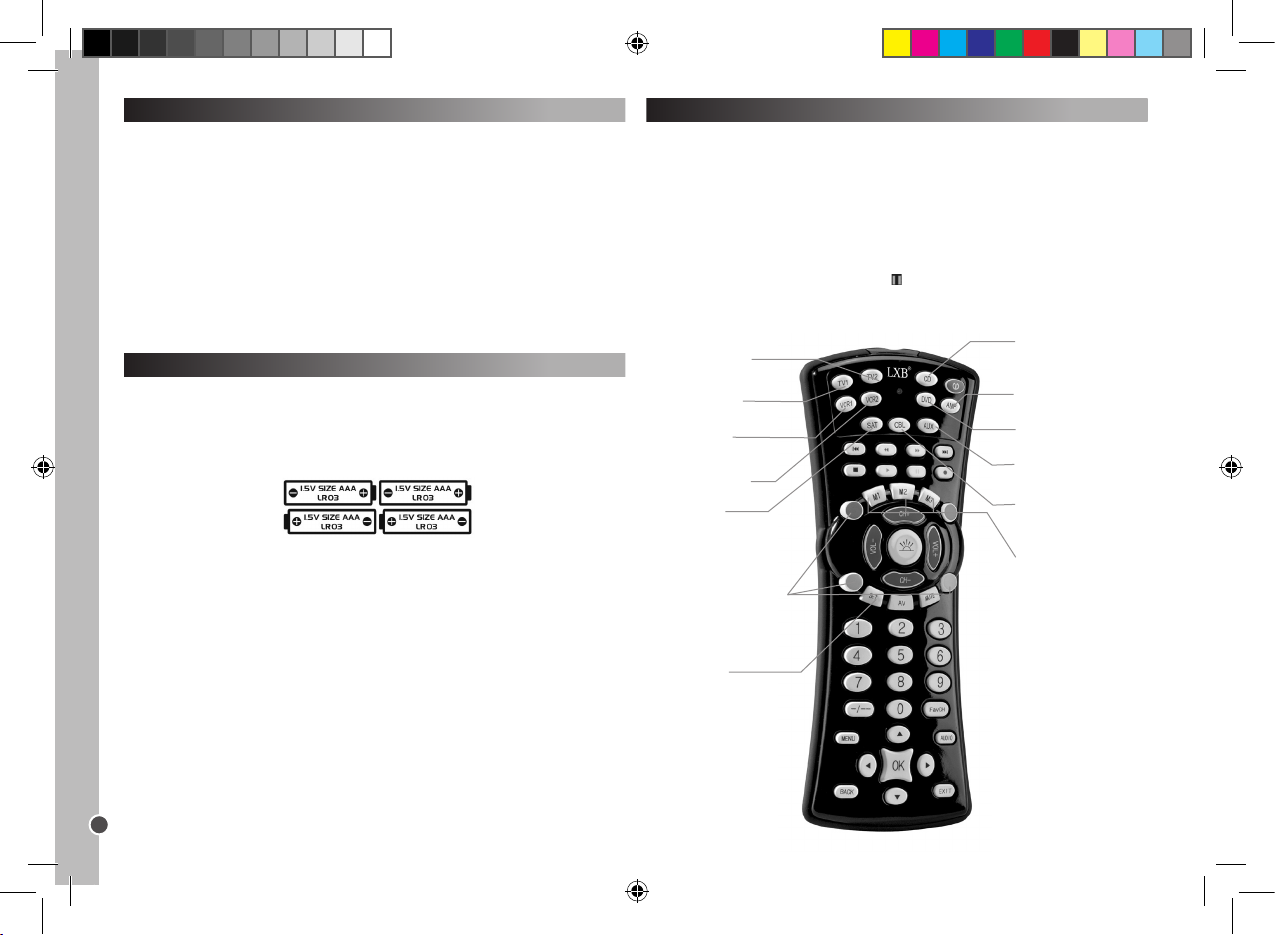
Copyright © Lexibook 2007
28
DEUTSCH
Einleitung
Herzlichen Glückwunsch! Sie eine Lexibook® 10-in-1 UniversalFernbedienung erworben. Diese universelle Fernbedienung, die mit über
12,000 Audio-Video-Geräten kompatibel ist, vereint die Funktionen mehrerer
Fernbedienungen in einem Gerät: TV1, TV2, DVD, CD, Video Recorder 1
(VCR1), Video Recorder 2 (VCR2), Satellit (SAT), Kabelfernsehen (CBL),
Verstärker (AMP) sowie Zusatzgeräte (AUX). Die digitalen
Fernsehempfangsgeräte (wie ADSL-Modems, Freewiew, DVB-TB usw.) können
ebenfalls über die SAT-Taste gesteuert werden.
Vorsicht: Vor der ersten Benutzung müssen Sie die Fernbedienung einrichten,
damit Sie mit den von Ihnen ausgewählten Audio- und Video-Produkten
arbeitet. Dazu lesen Sie bitte diese Bedienungsanleitung aufmerksam durch:
So setzen Sie die Batterien ein
Bevor Sie Ihre Fernbedienung programmieren und benutzen müssen Sie 4 x
AAA/LR03-Alkali-Batterien (nicht im Lieferumfang enthalten) einsetzen. Dazu
öffnen Sie das Batteriefach an der Unterseite der Fernbedienung. Setzen Sie
die Batterien bitte entsprechend der Polaritätsmarkierungen (+/-) in das
Batteriefach ein. Schließen Sie das Batteriefach.
Hinweise:
Sie Einstellungen der Fernbedienung gehen nicht verloren, wenn die Batterien
leer sind.
Drücken Sie, während Sie die Batterien austauschen, auf keine Fernbedien-
ungstaste. Sonst werden die Einstellungen gelöscht.
So verwenden Sie die Tasten und Funktionen
Nachdem Sie die Einstellungen vorgenommen haben, können Sie Ihre
verschiedenen Audio- und Videogeräte zuhause über die Lexibook® 10-in-1
Universal-Fernbedienung steuern. Wenn Sie die Fernbedienung das erste
Mal benutzen, drücken Sie zuerst die Gerätetaste jenes Geräts, mit dem Sie
sie verwenden möchten (TV1, TV2, DVD, CD, VCR1, VCR2, SAT, CBL, AMP
oder AUX). Die 10 Geräte- und Makro-Tasten können Sie stets verwenden. Die
anderen Tasten an der Fernbedienung haben nur dann eine Funktion, wenn
diese entsprechend auch bei dem ausgewählten Gerät vorhanden ist. Zum
Beispiel funktioniert die Pause-Taste ( ) im DVD- und CD-Modus, jedoch
nicht in den Modi TV1/TV2.
VCR1 - Videor ecorder-Auswahl
und Einstelltaste
AMP - Auswa hl des
Verstärker und
Einstellt aste
TV2 - Ausw ahl Fernsehgerät
2 und Einstelltaste (das
zweite Fer nsehgerät)
CD - Auswahl des CDSpieler s und
Einstellt aste.
VCR2 – Vid eoreco rder 2Auswahl und Einstellt aste
M1/M2/M 3 – Makro-
Tasten.
SET - Zugr iff auf den
Einstellm odus.
LIGHT - Ak tivierung der
Hintergr undbeleuchtung.
Die roten (R), grünen (GR),
gelben (GE) un d blauen (B)
Tasten können, abh ängig davon
ob Ihr Ferns ehgerät di ese
unterstützt, ver schiedene
Funktionen haben.
TV1 - Fernsehgeräteauswahl
und Einstelltaste
SAT – Auswahl des
Kabelfer nsehempfängers
und Einstelltaste.
DVD - Auswahl d es
DVD-S pielers und
Einstellt aste.
AUX – Auswahl de s
HiFi- Geräts und
Einstellt aste.
CBL Kabelfer nsehauswahl
und Einstelltaste
ST100.indd 28 4/9/07 18:05:34
Page 29
Copyright © Lexibook 2007
29
DEUTSCH
Schnellsuche
Nutzen Sie die Schnellsuche nur, wenn die manuelle Suche
fehlgeschlagen ist oder wenn der Marken - bzw. richtige Code nicht
vorhanden sein sollte.
1. Schalten Sie das Gerät ein, für das Sie die Fernbedienung einrichten
möchten und richten Sie die Fernbedienung auf das Gerät.
- Bei einem Videorecorder legen Sie eine Kassette ein.
- Bei SAT wählen Sie ein Programm aus.
- Bei einem DVD-Spieler legen Sie eine DVD ein.
2. Drücken Sie die Taste SET und die entsprechende Gerätetaste an der
Fernbedienung. Halten Sie beide Tasten gedrückt.
3. Wenn die LED-Leuchte erlischt, lösen Sie diese Tasten.
4. Drücken Sie erneut die Taste SET. Die LED-Leuchte blinkt und die
Code-Schnellsuche Code star tet.
5. Um die Code-Suche zu starten, müssen Sie den Ein- und Ausschalter
drücken ( ).Es werden fünf Codes übermittelt. Warten Sie 3 Sekunden.
Wenn nichts geschieht, drücken Sie erneut den Ein- und Ausschalter. Jedes
Mal, wenn diese Taste gedrückt wird, werden im 3-Sekunden-Intervall 5 neue
Codes durchsucht. Eventuell müssen Sie den Ein- und Ausschalter bis zu 100
Mal drücken. (Das nimmt circa 5 Minuten in Anspruch).
6. Wenn sich das Gerät abschaltet, bedeutet dies, dass der richtige Code
gefunden worden ist. Drücken Sie dann den Ein- und Ausschalter NICHT noch
einmal. Sonst startet der Suchvorgang erneut.
7. Drücken Sie erneut die entsprechende GERÄTE-Taste, um den Vorgang zu
beenden. Die LED-Leuchte blinkt nicht mehr; sie leuchtet rot.
8. Schalten Sie das Gerät wieder EIN (über die Taste an der Fernbedienung
oder an der Gerätekonsole).
Einrichtung
Es gibt 3 Programmiermodi: Manuell, Schnellsuche und
Automatikprogrammierung.
Versuchen Sie es bitte ZUERST mit der manuellen Einstellung; sollte kein
Code aus der Herstellerliste auf Ihr Fernsehgerät zutreffen, versuchen Sie es
mit der Schnellsuche. Sollte dies ebenfalls nicht zum Er folg führen, wählen
Sie die Automatikprogrammierung.
Für die manuelle Programmierung entnehmen Sie der beiliegenden Übersicht
den Hersteller- oder Gerätemarkencode (3-stelliger Code).
Warnung: Programmieren Sie stets nur ein Gerät. Beginnen Sie, zum
Beispiel, mit der Programmierung des Fernsehgeräts, gefolgt vom DVDSpieler usw.
Manuelle Einrichtung
Hinweis: Die Einrichtung kann pro Gerät bis zu 10 Minuten in Anspruch
nehmen.
1. Wählen Sie das gewünschte Gerät aus (z. B.: Fernsehgerät). Suchen Sie
den Geräte-Code in der beigefügten Übersicht. Jedes der 10 Geräte für die
Ihre Fernbedienung eingerichtet werden kann hat einen anderen Code. Notie-
ren Sie sich den oder die entsprechenden 3-stelligen Codes. Eine Marke kann
bis zu 30 Codes haben. Eventuell müssen Sie mehrere Codes eingeben,
bevor Sie den richtigen Code für Ihr Modell nden (dies wird anderer Stelle in
der Anleitung beschrieben). Sie müssen den gesamten Vorgang wiederholen.
2. Schalten Sie das Gerät ein, für das Sie die Fernbedienung einrichten
möchten und richten Sie die Fernbedienung auf das Gerät.
- Bei einem Videorecorder legen Sie eine Kassette ein.
- Bei SAT wählen Sie ein Programm aus.
- Bei einem DVD-Spieler legen Sie eine DVD ein.
- Bei einem CD-Spieler legen Sie eine CD ein.
3. Drücken Sie die Taste SET und halten Sie gleichzeitig die entsprechende
Geräte-Taste an der Fernbedienung gedrückt. Sie halten nun beide Tasten
gedrückt. Zum Beispiel: Um Ihr Fernsehgerät zu programmieren, drücken Sie
erst SET und dann gleichzeitig TV1.
4. Wenn die LED-Anzeige (obere linke Geräte-Ecke) leuchtet, lösen Sie die
Tasten.
5. Geben Sie den 3-stelligen Code für Ihr Gerät über die Zahlentasten ein.
6. Die Meldeleuchte erlischt. Die Einstellung wurde vorgenommen.
7. Betätigen Sie eine der Tasten an der Fernbedienung, um sich von der
korrekten Funktion zu überzeugen. Wenn dies der Fall ist, haben Sie die Einstellung korrekt vorgenommen: Sie haben den richtigen Code gefunden. Nun
können Sie für ein weiteres Gerät ebenso vorgehen.
8. Sollten die Tasten an Ihrer Fernbedienung nicht funktionieren, ist der Code
falsch und Sie müssen es mit den nächsten Code in der Geräteübersicht
versuchen: Wiederholen Sie die Schritte 3 bis 7, bis Ihr Gerät richtig auf die an
der Fernbedienung gedrückten Tasten reagiert.
Hinweise: - Wenn Sie die manuelle Einrichtung unterbrechen möchten,
drücken Sie die entsprechende GERÄTE-Taste.
Wird mehr als 15 Sekunden keine Taste gedrückt, ist der Einstellvorgang
beendet und die LED-Meldeleuchte erlischt.
Sollte es nicht möglich sein, Ihr Gerät manuell zu programmieren bzw. wenn
der Code nicht in der Übersicht enthalten ist, programmieren Sie Ihre
Fernbedienung mit der Funktion Schnellsuche oder Automatik. Mit der
Suchfunktion werden alle Codes nacheinander getestet, bis der richtige Code
für Ihr Gerät gefunden wird.
ST100.indd 29 4/9/07 18:05:35
Page 30
Copyright © Lexibook 2007
30
DEUTSCH
9. Für die Feinabstimmung der Suche dieser fünf Codes, drücken Sie den
Ein- und Ausschalter. Warten Sie zwei Sekunden. Wenn nicht geschieht,
drücken Sie die Taste erneut. Warten Sie wieder zwei Sekunden. Wenn Ihr
Gerät noch immer nicht reagiert, müssen Sie fünfmal auf den Ein- und
Ausschalter drücken, damit Ihr Gerät sich AUSSCHALTET.
10. Wenn sich das Gerät ABSCHALTET, bedeutet dies, dass der richtige Code
gefunden worden ist. Drücken Sie dann den Ein- und Ausschalter NICHT noch
einmal. Sonst startet der Suchvorgang erneut.
11. Drücken Sie die entsprechende GERÄTE-Taste, um die Einstellung zu
speichern und den Vorgang zu beenden. Die LED-Leuchte erlischt.
12. Unter Schritt 8 können Sie die Taste SET drücken, um zu Schritt 5
zurückzukehren.
Überprüfen Sie mit der Fernbedienung die korrekten Gerätefunktionen.
S
Suchautomatik
Verwenden Sie diese Funktion nur, wenn die Schnellsuche
fehlgeschlagen ist.
1. Schalten Sie das Gerät ein, für das Sie die Fernbedienung einrichten
möchten und richten Sie die Fernbedienung auf das GerätDrücken Sie die
entsprechende GERÄTE-Taste an Ihrer Fernbedienung.
2. Drücken Sie die Taste SET und die Taste POWER an der Fernbedienung.
Halten Sie beide Tasten gedrückt, bis die LED-Leuchte nicht mehr blinkt. Lösen
Sie beide Tasten. Die LED-Anzeige blinkt. Die Automatiksuche startet.
3. Es werden gleichzeitig 5 Codes übermittelt. Der Intervall zwischen den
Übertragungen beträgt 5 Sekunden; insgesamt dauert der Vorgang circa 9
Minuten.
4. Wenn sich das Gerät abschaltet, bedeutet dies, dass der richtige
Code-Bereich gefunden worden ist.
5. Drücken Sie, für die Automatiksuche, innerhalb dieser fünf Codes sofor t die
entsprechende GERÄTE-Taste.
6. Schalten Sie nun Ihr Gerät wieder EIN (mit der Fernbedienung oder über die
Tasten an der Konsole).
7. Halten Sie die Fernbedienung auf das Gerät gerichtet: Wenn sich das Gerät
abschaltet, bedeutet dies, dass der richtige Code gefunden worden ist.
8. Drücken Sie die entsprechende GERÄTE-Taste, um die Einstellung zu
speichern und den Vorgang zu beenden. Die LED-Leuchte erlischt.
9. Unter Schritt 5 können Sie die Taste SET drücken, um zu Schritt 3
zurückzukehren.
Überprüfen Sie mit der Fernbedienung die korrekten Gerätefunktionen.
So speichern Sie Ihren Lieblingssender
Beispiel: Speichern der Kanäle 02, 38 und 56.
1. Halten Sie gleichzeitig die Taste SET und FavCH gedrückt, bis die
LED-Anzeige leuchtet.
2. Drücken Sie dann nacheinander
0 – 2 – SET – 3 – 8 – SET – 5 – 6 – FavCH.
Für 3-stelligen Zahlen drücken Sie
0 – 0 – 2 – SET – 0 – 3 – 8 – SET – 0 – 5 – 6 – FavCH.
Es können nur die Zifferntasten 1-9 belegt werden. Es können nur 1- bis 4-
stellige Kanalnummern gespeichert werden.
Nachdem Sie Ihre Lieblingssender gespeichert haben, drücken Sie die Taste
FavCH, um die Kanäle in der Speicherreihenfolge zu durchsuchen und einen
Kanal auszuwählen.
So löschen Sie gespeicherte Kanäle:
1. Halten Sie gleichzeitig die Tasten SET und T V1 gedrückt.
2. Drücken Sie dann nacheinander 9 - 2 - 0.
Tipps für die Schnell- und die Automatiksuche:
- Nicht alle Geräte lassen sich über die Fernbedienung ein- und ausschalten.
In einem solchen Fall überprüfen Sie die Fernfunktionen nicht mit der
POWER-Taste sondern mit der TASTE PLAY ( ) an der Fernbedienung.
- Drücken Sie die Taste CH+/-, um die Suchrichtung zu verändern.
- Alle Funktionstasten, außer POWER und PLAY, können im
Schnellsuchmodus überprüft werden.
Wird mehr als 30 Sekunden keine Taste gedrückt, ist der Einstellvorgang
beendet und die LED-Meldeleuchte erlischt.
Sollte die Fernbedienung noch immer nicht möglich sein, über prüfen
Sie die Codes erneut und wiederholen den Einstellvorgang (manuell
oder Code- Suche), bis Sie den richtigen Code gefunden haben.
Senderspeicherung und Kindersperre
Mit der Taste FavCH können Sie Ihre Lieblingsprogramme speichern oder
Sender mit der Kindersicherung belegen. Die folgende Senderanzahl kann mit
der FavCH-Taste gespeicher t bzw. aufgerufen werden:
15
10
7
6
1-stellig
2-stellig
3-stellig
4-stellig
Sender (1- bis 4-stellige Nummern)
Anzahl der speicherbaren Kanäle
ST100.indd 30 4/9/07 18:05:35
Page 31
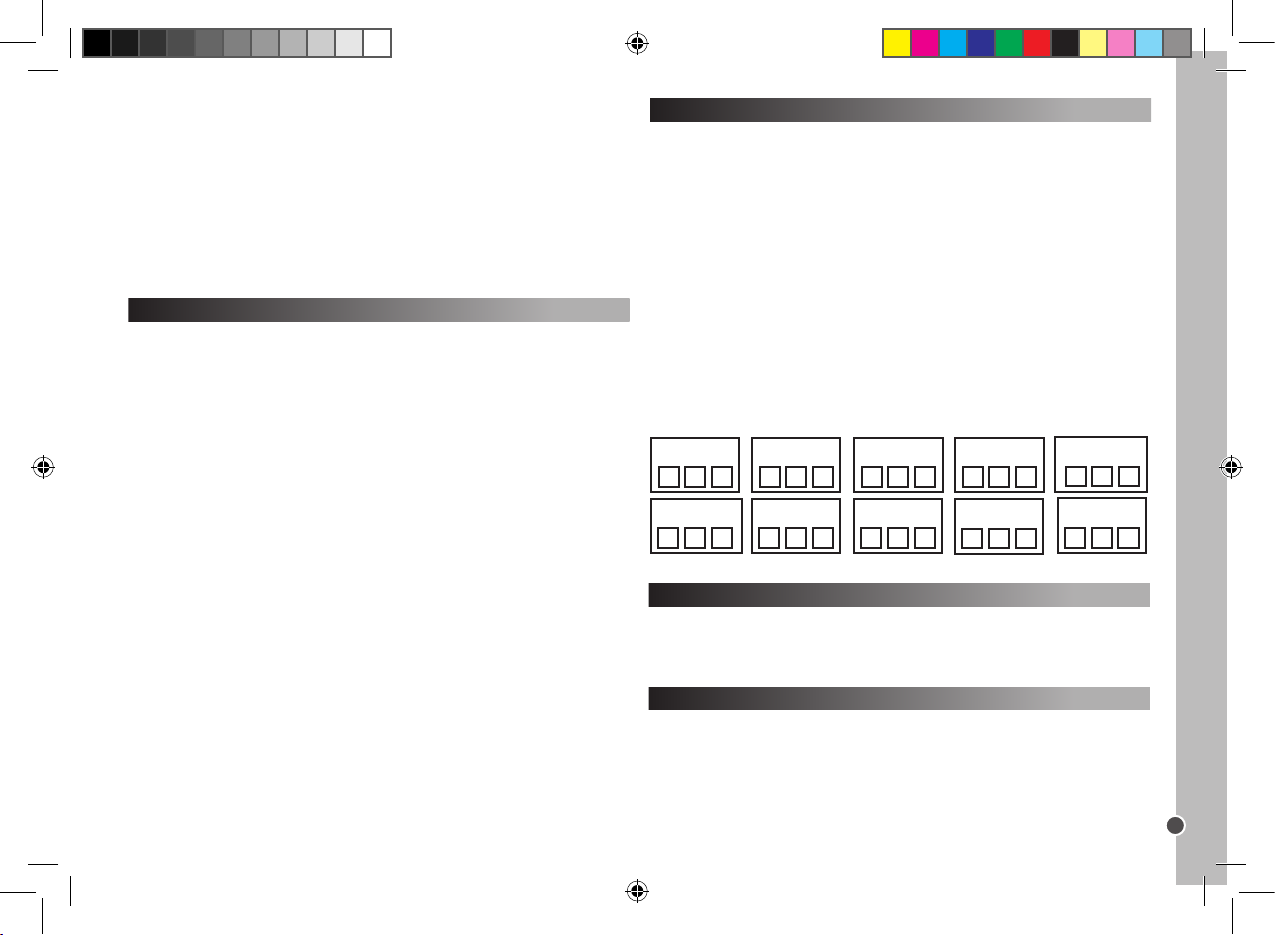
Copyright © Lexibook 2007
31
DEUTSCH
Makro-Tasten
Mit einer der Makro-Tasten können Sie auf Tastendruck bis zu 15 Funktionen
ausführen: Das bedeutet, Sie können verschiedene Befehle in der
programmierten Reihenfolge ausführen, indem Sie einfach auf die
entsprechende MAKRO-Taste drücken:
So programmieren Sie eine MAKRO-Taste:
1. Halten Sie die Taste SET gedrückt. Drücken Sie dann eine der
MAKRO-Tasten (M1, M2 und M3). Wenn die LED-Leuchte erlischt, lösen Sie
die beiden Tasten.
2. Drücken Sie nun die Tasten, die sie nacheinander aktivieren möchten
in der entsprechenden Reihenfolge. (Mit der Taste SET verlassen Sie den
Speichermodus).
3. Drücken Sie abschließend erneut die MAKRO-Taste. Nach Beendigung des
Vorgangs erlischt die LED-Anzeige.
Zum Beispiel:
Sie möchten die folgende Steuer-Befehlreihenfolge auf M1 programmieren:
TV1 ein - Umschalten auf TV/VCR - VCR1 ein - Wiedergabe - Umschalten auf
TV
Dann müssen Sie Folgendes eingeben:
SET + M1 – TV1 – POWER – TV/VCR – VCR1 – POWER – PLAY – TV1 – M1.
Nachdem mehr als 15 Befehle ausgewählt worden sind bzw. nach 30
Sekunden ohne Tastenbetätigung, erlischt die LED-Anzeige und die
MAKRO-Einstellungen sind gespeicher t.
So löschen Sie die Einstellungen
1. Um die gespeicherten MAKRO-Befehle einer Taste zu löschen, halten Sie
die Taste SET gedrückt. Drücken Sie dann die entsprechende MAKRO-Taste.
2. Wenn die LED-Leuchte erlischt, lösen Sie die beiden Tasten.
3. Drücken Sie abschließend erneut die MAKRO-Taste. Alle programmierten
Befehle sind gelöscht.
Zurücksetzen
Wenn Sie das Gerät zurücksetzen, werden alle Einstellungen gelöscht.
1. Halten Sie gleichzeitig die Tasten SET und T V1 gedrückt.
2. Drücken Sie dann nacheinander 9 - 9 - 0.
Hintergrundbeleuchtung
1. Mit der Taste LIGHT aktivieren und deaktivieren Sie die
Hintergrundbeleuchtung.
2. Die Beleuchtung wird entsprechend ein- oder ausgeschaltet.
3. Sollte die Hintergrundbeleuchtung ausgeschaltet sein, drücken Sie eine
beliebige Taste. Die Hintergrundbeleuchtung leuchtet 5 Sekunden. Sie bleibt
eingeschaltet, während eine Taste gedrückt wird.
Kindersich erung
Im Modus Kindersicherung können nur die folgenden Tasten bedient werden:
POWER, VOL+/-, MUTE (stumm schalten), GER ÄTE-Tasten, SET und FavCH.
1. Halten Sie gleichzeitig die Tasten SET und T V1 gedrückt.
2. Drücken Sie dann nacheinander 9 - 2 - 1.
So deak tivieren Sie die Kindersicherung:
1. Halten Sie gleichzeitig die Tasten SET und T V gedrückt.
2. Drücken Sie dann nacheinander 9 - 2 - 2.
So löschen Sie gespeicher te Kanäle:
1. Halten Sie gleichzeitig die Tasten SET und T V gedrückt.
2. Drücken Sie dann nacheinander 9 - 2 - 0.
Notieren Sie sich den programmierten Code
Notieren Sie sich nach der erfolgreichen Suche und Programmierung stets
den 3-stelligen Code für Ihre Fernbedienung. Sie benötigen den Code erneut,
wenn Sie die Einstellungen unbeabsichtigt gelöscht haben. Während der
Suche nach dem Code blinkt die LED-Anzeige entsprechend der Ziffern des 3stelligen Codes. Zum Beispiel: Bei Code 231 blinkt die LED-Anzeige zweimal,
dann dreimal, dann einmal.
So nden Sie den Code für Ihre Fernbedienung:
1. Drücken Sie eine Gerätetaste. Halten Sie gleichzeitig die Taste SET und 1
gedrückt. Lösen Sie dann beide Tasten. Die LED-Anzeige leuchtet. Die
Blinkfolge steht für die erste Zahl des Codes. Sollte die LED nicht blinken:
Ziffer = 0.
2. Um die zweite Ziffer zu suchen, drücken Sie gleichzeitig die Taste SET und
2. Die LED-Anzeige blinkt.
3. Um die dritte Ziffer zu suchen, drücken Sie gleichzeitig die Taste SET und 3.
Die LED-Anzeige blinkt.
4. Wiederholen Sie die Schritte 1-4, um die Codes für andere Geräte zu
ermitteln.
VCR2 Code SAT Code CBL Code
AMP Code
TV1 Code TV2 Code DVD Code CD Code
AUX Code
VCR1 Code
ST100.indd 31 4/9/07 18:05:36
Page 32
Copyright © Lexibook 2007
Garantie
Die Garantiezeit für dieses Gerät beläuft sich auf 2 Jahre.
Um die Garantie oder den Kundendienst in Anspruch zu nehmen, setzen Sie
sich bitte mit Ihrem Händler oder Lieferanten in Verbindung oder senden Sie
das Gerät an die unten angegebene Adresse ein. Fügen Sie Ihren Kaufbeleg
bei. Unsere Garantie bezieht sich auf Material- und Verarbeitungsfehler des
Herstellers, nicht jedoch auf Verschleiß, Nichteinhaltung der Anleitungen,
unautorisierte Arbeiten am Gerät und dessen Bestandteilen (Demontage,
Hitze, Dampf usw.).
Hinweis: Wir empfehlen, dass Sie die Originalverpackung für spätere Zwecke
aufbewahren. Bewahren Sie diese Bedienungsanleitung an einem sicheren
Ort auf, da sie wichtige Informationen enthält.
Haftungsausschluss
Wir verbessern unsere Produkte, deren Farben und Produktdetails ständig,
daher kann Ihr Produkt leicht von der Abbildung auf der Verpackung abweichen.
Referenz: ST100
Garantie: 2 Jahre
©2007 LEXIBOOK®
Design und Entwicklung in Europa - Made in China
Kundendienst
LEXIBOOK UK ltd
Unit 10 Peterseld Industrial Estate
Bedford Road, Peterseld
Hampshire, GU32 3QA,
Großbritannien
Gratis-Helpline: 0808 100 3015
http://www.lexibook.com
Umwelt schutz
Elektro nische Geräte können a ufbere itet werden u nd dürfe n nicht im Hau shaltsmü ll
entsorgt werden. Bitte unters tützen Sie die Wiederaufbereitung un d schützen Sie
die Umwelt, indem Sie A ltgeräte entsprech end der Umweltschut zbestimmungen
entsorgen bzw. abgeb en.
32
DEUTSCH
Fehlerbehebung
Problem
Lösung
Die Marke Ihres Audio- und Videogeräts wird
in der Code-Übersicht nicht aufgeführt.
A. Wählen Sie die Einrichtung mit
Schnellsuche (Seite 29).
B. Wählen Sie die Automatikeinrichtung (Seite
30).
Ihr Audio- und Videogerät lässt sich nicht
über die Fernbedienung bedienen.
A. Überprüfen Sie die Batterien.
B. Wählen Sie die manuelle Einrichtung (Seite
29).
C. Wählen Sie die Einrichtung mit
Schnellsuche (Seite 29).
D. Wählen Sie die Automatikeinrichtung
(Seite 30).
Ihre Fernbedienung funktioniert nicht,
nachdem die Einrichtung erfolgreich
abgeschlossen worden ist.
A. Überprüfen Sie die Batterien.
B. Vergewissern Sie sich, dass Sie die
entsprechende Gerätetaste gedrückt haben
(TV1, TV2, DVD, CD, VCR1, VCR2, SAT, CBL,
AMP or AUX).
Einige Tasten an der Fernbedienung arbeiten
nicht korrekt.
A. Eventuell verfügt die UniversalFernbedienung ST100 nicht über
alle Funktionen der OriginalGerätefernbedienung.
Ihre Fernbedienung reagiert nicht auf
Tastendruck.
A. Legen Sie neue Batterien ein.
B. Richten Sie die Fernbedienung auf das
Gerät.
Die LED-Anzeige blinkt bzw. blinkt auch
während der normalen Benutzung (nicht
während der Einrichtung).
A. Tauschen Sie die Batterien gegen 4 neue
AAA Alkali-Batterien aus.
4. Sollte diese Funktion deaktiviert sein, schaltet die Hintergrundbeleuchtung
nicht ein.
Hinweis: Die permanente Einschaltung der Hintergrundbeleuchtung wirkt sich
negativ auf die Batterieleistung aus.
ST100.indd 32 4/9/07 18:05:37
Page 33
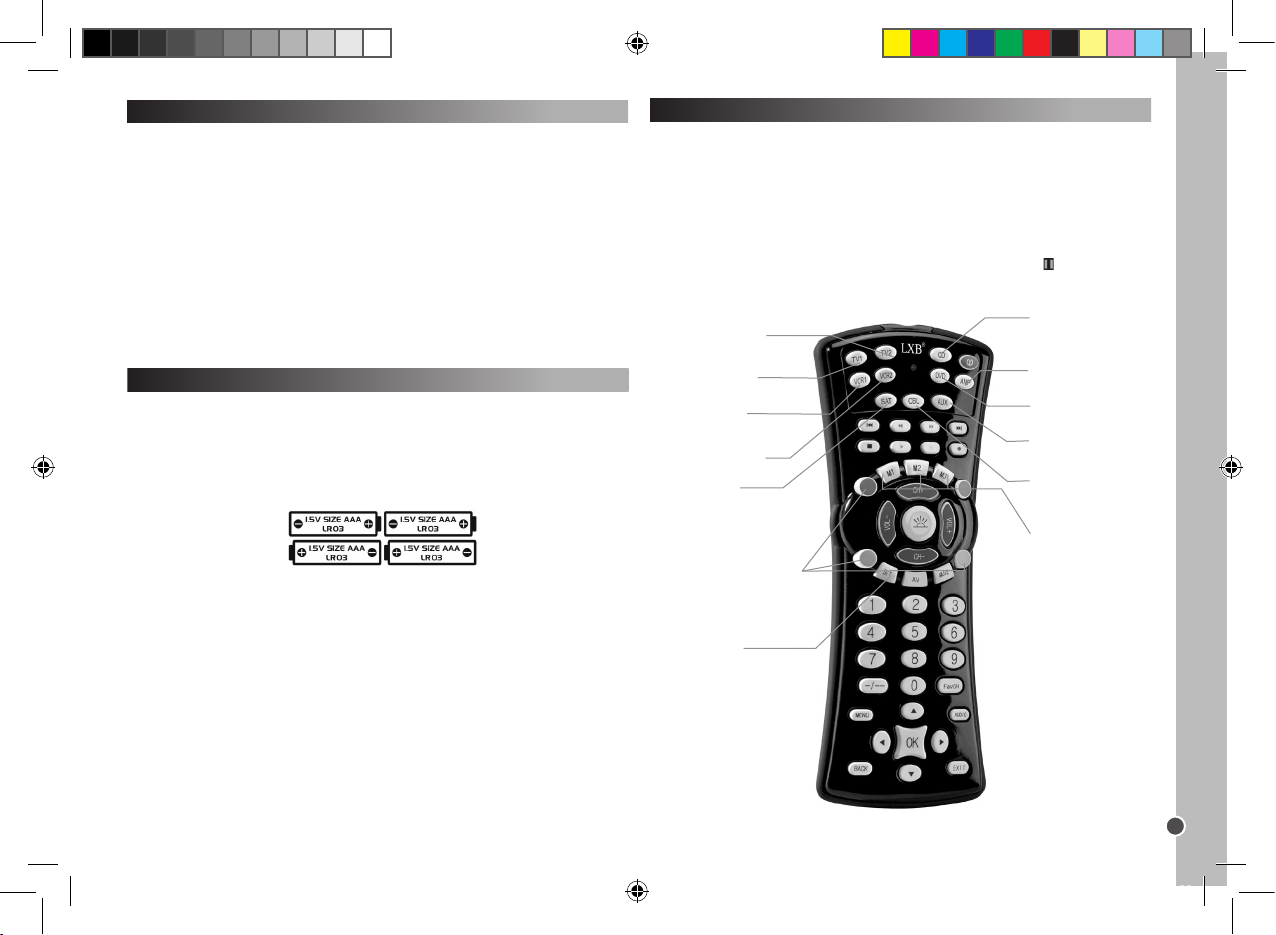
Copyright © Lexibook 2007
33
NEDERLANDS
Gebruik van de toetsen en functies
Eens je de instellingsprocedure hebt voltooid, zal de Lexibook® Universal 10in-1 Afstandsbediening jou toelaten de verschillende audio-visuele apparaten
die je thuis hebt, te behandelen. Wanneer je de afstandsbediening gebruikt,
moet je eerst het type apparaat selecteren dat je wenst te gebruiken door
op de overeenstemmende apparaattoets te drukken ( TV1, TV2, DVD, CD,
VCR1, VCR2, SAT, CBL, AMP of AUX). Naast de 10 apparaattoetsen en de
macrotoetsen, zullen alle andere toetsen enkel werken indien jouw apparaat
over dezelfde functies beschikt. Bijvoorbeeld, de pauzetoets ( ), zal werken
in DVD/CD modus maar niet in TV1/TV2 modus.
Inleiding
Gefeliciteerd! Je hebt net een Lexibook® Universal 10-in-1 Afstandsbediening gekocht. Compatibel met meer dan 12,000 audio-visuele apparaten,
combineert deze universele afstandsbediening de functies van verschillende
afstandsbedieningen: TV1, TV2, DVD, CD, Video Recorder 1 (VCR1), Video
Recorder 2 (VCR2), Sateliet (SAT), Kabel TV TV (CBL), Versterker (AMP) en
Auxiliar y (AUX). Digitale TV-ontvanger (zoals ADSL modems, Freeview, DVB-
T enz…) kan eveneens via de SAT-toets worden behandeld.
Opgelet: Wanneer je dit voor de allereerste keer gebruikt, moet je eerst
de afstandsbediening instellen zodat het werkt met de door jou gekozen
audio-visuele apparaten. Om dit te doen, moet je de onderstaande instructies
aandachtig lezen.
Het plaatsen van de batterijen
Voor het programmeren en het gebruik van de afstandsbediening, moet je
eerst 4 x AAA/LR03 alkaline batterijen (niet bijgeleverd) plaatsen. Om dit te
doen, open je de batterijkamer aan de achterkant van de
afstandsbediening. Let op de polariteit (+/- tekens) aangeduid aan de
binnenkant van de batterijkamer bij het plaatsen van de batterijen. Daarna
sluit je opnieuw de batterijkamer.
Opmerkingen:
Jouw afstandsbediening zal de instellingen niet verliezen wanneer de
batterijen leeg zijn.
Bij het vervangen van de batterijen, mag je op geen enkele toets van de
afstandsbediening drukken. Dit kan mogelijks de instellingen van de
afstandsbediening veranderen.
AMP – Verste rker-sele ctie
en instelli ngstoets .
CD – CD-s peler selectie
en instelli ngstoets .
M1/M2/M 3 – Macrotoetsen.
DVD – DVD- speler
selecti e en instellingstoet s.
AUX – Hi-F i
systeemse lectie en
instellin gstoets.
CBL – Kabel TV-selectie
en instelli ngstoets .
VCR1 – VCR-sel ectie en
instellin gstoets.
TV2 - TV2-selec tie en
instellin gstoets (tweede
TV-set).
VCR2 – VCR 2-selectie en
instellin gstoets.
SET – om de
instellin gsmodus op te
roepen.
LIGHT – om de
achtergr ondverli chting aan te
zetten.
De rode (R), gr oene (G), gele( Y)
en blauwe (B) toetsen kunne n
verschil lende functies bevatten,
afhankelijk van het feit d at jouw
TV-set de ze toepassingen wel of
niet onder steunt.
TV1 – TV-s electie en
instellin gstoets.
SAT – Sateliet T Vontvanger select ie en
instellin gstoets.
ST100.indd 33 4/9/07 18:05:38
Page 34
Copyright © Lexibook 2007
34
NEDERLANDS
Snel Zoeken
Deze zo ekfunctie mag enkel gebruikt worden indien het manueel
zoeken misluk te of indien het merk of de juiste mer kcode ontbreken.
1. Zet het apparaat dat je met de afstandsbediening wil instellen, aan en richt
de afstandsbediening naar het apparaat.
- Indien VCR, plaats een cassette in het toestel.
- Indien SAT, selecteer een programma.
- Indien DVD, plaats een DVD in het toestel.
2. Druk op de SET-toets (INSTELLINGS-toets) en daarna op de
respectievelijke apparaattoets op jouw afstandsbediening. Hou beide toetsen
ingedrukt.
3. Wanneer de LED brandt, laat je de toetsen los.
4. Druk nogmaals op de SET-toets. De LED zal knipperen en de functie Snel
Zoeken zal starten.
5. Om de functie Snel Zoeken te kunnen oproepen, moet je op de
POWER-toets drukken. Er zullen 5 codes verzonden worden. Wacht 3
seconden. Indien er niets gebeurt, druk nogmaals op Power. Telkens de
power-toets wordt ingedrukt, zal het toestel naar 5 nieuwe codes zoeken
gedurende 3 seconden. Het kan zijn dat je de power-toets verschillende
malen moet indrukken tot maximum 100 keer. (ongeveer 5 minuten).
6. Wanneer jouw apparaat uitschakelt, is de juiste code gevonden. DRUK niet
meer op de POWER-toets, daar dit het zoeken naar de code zal heropstar ten.
7. Druk nogmaals op de respectievelijke APPARAAT-toets om de huidige stap
te verlaten. De LED zal stoppen met knipperen en zal voortdurend blijven
branden.
8. Ga terug naar jouw apparaat en zet het opnieuw A AN. (gebruik hiervoor de
originele afstandsbediening of de toetsen op het voorpaneel van het
apparaat).
Instelling
Er zijn 3 verschillende programmeermodes: Manueel, Snel Zoeken en
Automatische Programmering.
Gelieve altijd EERST de manuele instelling te proberen. Indien er hierna geen
code in de lijst van merken en modellen overeenstemt met jouw apparaat, kan
je Snel Zoeken proberen, en indien dit ook niet werkt, probeer je de Automatische Programmering.
Om manueel te programmeren, moet je de specieke code gebruiken van de
fabrikant of het merk voor het apparaat (3-cijferige code) uit de bijgevoegde
lijst.
Waarschuwing: programmeer slechts ẻẻn apparaat per keer. Bijvoorbeeld,
start met het instellen van jouw afstandsbediening met jouw T V, nadien met
jouw DVD-speler……
Manuele instelling
Opmerking: dit kan tot 10 minuten in beslag nemen per apparaat.
1. Selecteer het apparaat dat je wil instellen (bv. TV). Zoek voor het merk van
jouw apparaat in de bijgevoegde codelijst. Er is een verschillende codelijst voor
elk van de 10 apparaten waarmee je jouw afstandsbediening kan instellen.
Noteer de corresponderende 3-cijferige code(s). Een merk kan tot 30 codes
bevatten. Het kan zijn dat je verschillende codes moet proberen alvorens je
de relevante code vindt voor jouw model (zie hieronder). Je zal de volledige
procedure moeten herhalen.
2. Zet het apparaat dat je met jouw afstandsbediening wil instellen, aan en richt
de afstandsbediening naar het apparaat.
- Indien VCR, plaats een cassette in het toestel.
- Indien SAT, selecteer een programma.
- Indien DVD, plaats een DVD in het toestel.
- Indien CD, plaats een CD in het toestel.
3. Druk eerst op de SET-toets (INSTELLINGS-toets) en hou deze ingedrukt
terwijl je op de respectievelijke toets drukt van het apparaat. Hou beide toetsen
ingedrukt. Bijvoorbeeld: Om jouw TV te programmeren, druk je eerst op SET
en daarna gelijktijdig op TV1.
4. Wanneer de LED (in de linker bovenhoek van het toestel) brandt, laat je de
toetsen los.
5. Gebruik de numerieke toetsen om de 3-cijferige code in te voeren die van
toepassing is voor jouw apparaat.
6. De LED zal doven en de instelling is hierbij voltooid.
7. Probeer enkele toetsen op jouw afstandsbediening om te controleren of
ze wel degelijk werken. Indien ze werken, betekent dit dat jouw instellingen
geslaagd zijn: je hebt de juiste code gevonden. Je bent nu klaar om een ander
apparaat in te stellen volgens dezelfde procedure.
8. Indien de toetsen van je afstandsbediening niet werken, heb je de juiste
code niet gevonden en moet je de volgende 3-cijferige code in de lijst voor
het merk van je apparaat proberen: herhaal stappen 3 tot 7 tot jouw apparaat
correct reageert op de ingedrukte toetsen op de afstandsbediening.
Opmerkingen: - Druk op de respectievelijke APPARA AT-toets (DEVICE)
indien je de manuele instelling wil stoppen.
Indien je voor meer dan 15 seconden geen toets indrukt, zal de instelling
automatisch stoppen en zal de LED doven.
Indien jouw apparaat niet geprogrammeerd kan worden via de manuele
instelling of indien de code niet terug te vinden is in de lijst, dan moet je de
functie voor Snel Zoeken of Automatisch Programmeren gebruiken. De
zoekfunctie test een voor een alle codes en zal de juiste code voor jouw
apparaat vinden.
ST100.indd 34 4/9/07 18:05:39
Page 35
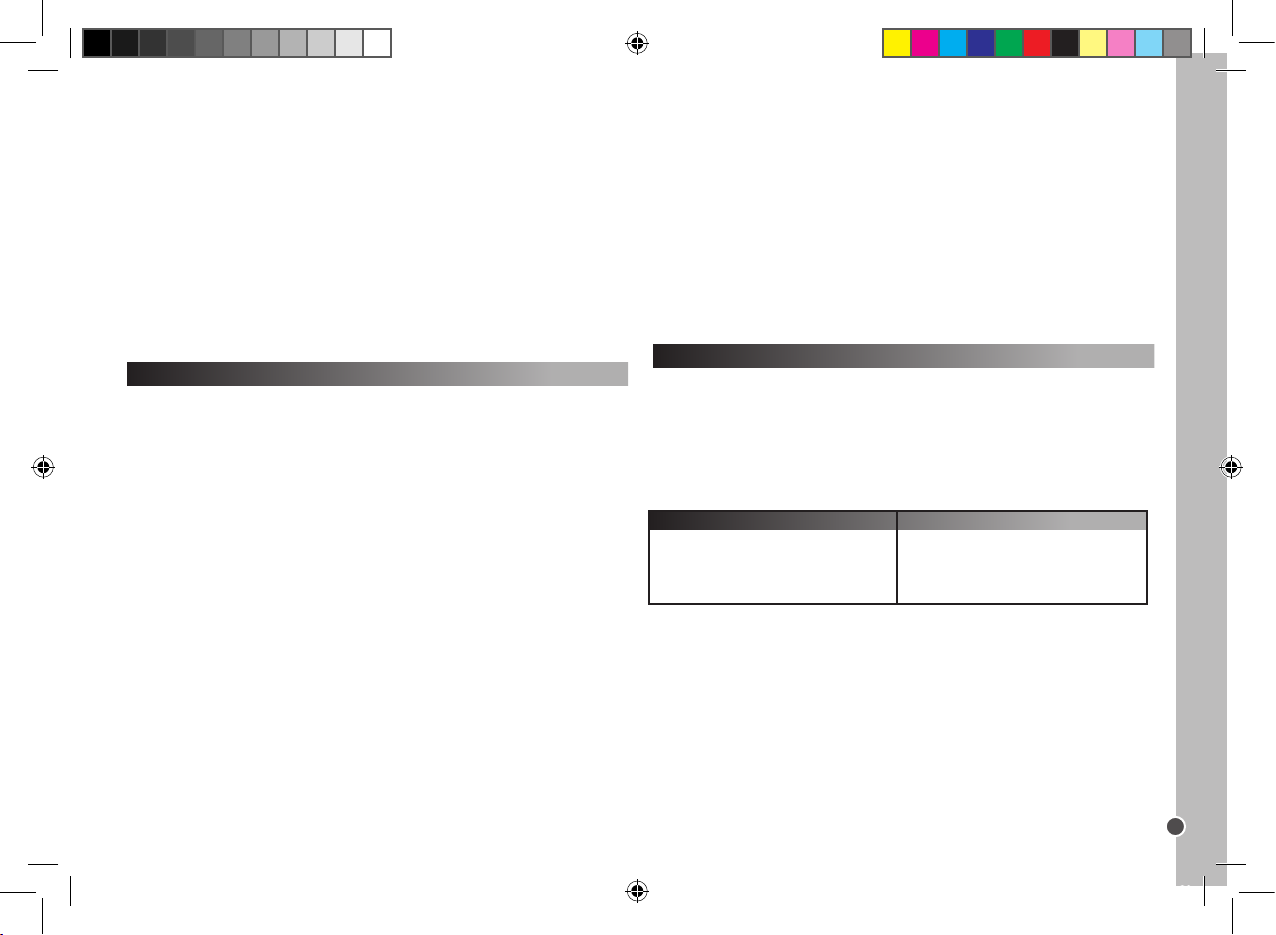
Copyright © Lexibook 2007
35
NEDERLANDS
9. Om binnenin deze 5 codes uitgebreid te zoeken, moet je op de power-toets
drukken en 2 seconden wachten. Indien er niets gebeurt, moet je dit herhalen
door opnieuw op de power-toets te drukken en 2 seconden te wachten. Indien
jouw apparaat nog niet reageert, moet je de power-toets in totaal slechts 5
maal indrukken alvorens jouw apparaat terug zal UITschakelen.
10. Wanneer jouw apparaat UITschakelt, is de juiste code gevonden. DRUK
NIET meer op de POWER-toets, daar dit het zoeken naar de code zal
heropstarten.
11. Druk op de respectievelijke APPARA AT-toets om dit te bewaren en de
functie te verlaten. De LED zal doven.
12. Tijdens stap 8 kan de SET-toets (INSTELLINGS-toets) ingedrukt worden
om terug te keren naar stap 5.
Controleer of alle toepassingen van jouw apparaat werken met de toetsen van
de afstandsbediening.
Automatisch zoeken (programmeren)
Deze zo ekfunctie mag enkel gebruikt worden indien het Snel Zoeken niet
slaagde.
1. Zet het apparaat dat je wil instellen aan en richt de afstandsbediening naar
het apparaat.
2. Druk op de recpectievelijke APPARA AT-toets op jouw afstandsbediening.
3. Druk op de SET-toets, en daarna op de POWER-toets van jouw
afstandsbediening. Hou beide toetsen ingedrukt tot de LED blijft branden. Laat
beide toetsen los en de LED zal nu knipperen. Het automatisch zoeken wordt
gestart.
4. Er worden per keer 5 codes verzonden, tussen elke transmissie is er een
periode van 5-seconden ongeveer 9 minuten in totaal.
5. Wanneer jouw apparaat uitschakelt, is de correcte code gevonden.
6. Druk onmiddellijk op de respectievelijke APPARAAT-toets (DEVICE) om het
automatisch zoeken binnenin deze 5 codes te starten.
7. Ga terug naar jouw apparaat en zet het opnieuw A AN (gebruik hiervoor de
originele afstandsbediening of de toetsen aan het voorpaneel van het
apparaat).
8. Richt de universele afstandsbediening naar het apparaat: wanneer jouw
apparaat uitschakelt, is de juiste code gevonden.
9. Druk op de respectievelijke APPARAAT-toets (DEVICE) om te stoppen/te
bewaren. De LED zal doven.
10. Tijdens stap 5, kan je op de SET-toets drukken om terug te keren naar stap
3.
Controleer of alle toepassingen van jouw apparaat werken met de toetsen op
jouw afstandsbediening.
Bewaren van jouw favoriete kanalen
Bijvoorbeeld: bewaar kanalen 02, 38 en 56.
1. Hou beide toetsen SET en FavCH gelijktijdig ingedrukt tot de LED begint te
branden.
2. Druk daarna achtereenvolgens op
0 – 2 – SET – 3 – 8 – SET – 5 – 6 – FavCH.
En voor 3 cijfers druk je op
0 – 0 – 2 – SET – 0 – 3 – 8 – SET – 0 – 5 – 6 – FavCH.
Enkel de numerieke toetsen 1-9 kunnen worden ingesteld. Je kan kanalen
met een kanaalnummer van 1 tot 4 cijfers, opslaan.
Eens je jouw favoriete kanalen hebt bewaard, druk je gewoon op de FavCHtoets om door de kanalen te bladeren in de volgorde dat ze werden opgeslagen en kan je een ervan selecteren.
Tips voor Snel Zoeken en Automatisch Zoeken:
-Sommige apparaten kunnen niet aan/uit gezet worden via de
afstandsbediening. Indien dit het geval is, gebruik dan de PLAY-toets
(SPEELtoets) in plaats van de POWER-toets om te controleren of het
apparaat wel degelijk reageert op de afstandsbediening.
- De zoekrichting kan veranderd worden door op de CH+/-toets te drukken.
- Alle functietoetsen, met uitzondering van POWER en PLAY, kunnen
gecontroleerd worden zonder de snel- zoekmodus te verlaten.
Indien er na 30 seconden geen toets werd ingedrukt, zal de instelling
automatisch stoppen en zal de LED doven.
Indien jouw af standsbediening nog steeds ni et werkt, check dan de
codelijst opnieuw en herhaal de instellingsp rocedure (manueel of
codezoeken) tot je de correc te cod e vindt.
Bewaren van jouw favoriete kanalen en kinderslot
Met de FAVCH-toets kan je jouw favoriete kanalen bewaren of kan je het
aantal kanalen die jouw kinderen kunnen bekijken, beperken. Hieronder
vind je het aantal kanalen die bewaard of opgeroepen kunnen worden via de
FAVCH-toets:
15
10
7
6
Een cijfer
Twee cijfers
Drie digits
Vier digits
Kanaal (1-4-cijfers)
Aantal opgeslagen (bewaarde) kanalen
ST100.indd 35 4/9/07 18:05:39
Page 36
Copyright © Lexibook 2007
36
NEDERLANDS
Macro-toetsen
Met één van de macro-toetsen kan je een reeks van maximaal 15 functies
hanteren door op een enkele toets te drukken. Met andere woorden, kan je
verschillende opdrachten uitvoeren in de volgorden waarin ze werden bewaard
door eenvoudig weg op de respectievelijke MACRO-toets te drukken.
Programmeren van de MACRO-toets
1. Hou de SET-toets ingedrukt en druk daarna op één van de MACRO -toetsen
(M1, M2, en M3). Wanneer de LED brandt, laat je beide toetsen los.
2. Druk nu op de toetsen voor de toepassing die je nu in een bepaalde volgorde wil uitvoeren. (Druk op de SET-toets om de programmeringsmodus te
verlaten)
3. Druk uiteindelijk nogmaals op de MACRO-toets. Wanneer de procedure is
voltooid, zal de LED doven.
Bijvoorbeeld:
Je wil de onderstaande volgorde van opdrachten bewaren op M1:
TV1 aan – Verspring van TV/VCR – VCR1 aan – Spelen – Spring naar T V.
Hiervoor moet je het volgende indrukken :
SET + M1 – TV1 – POWER – TV/VCR – VCR1 – POWER – PLAY – TV1 – M1.
Indien er meer dan 15 opdrachten werden geselecteerd of indien er voor meer
dan 30 seconden geen toets werd ingedrukt, zal de LED doven en
zullen de laatste MACRO -instellingen worden bewaard.
Operationele reset
Operationele reset zal alle ingestelde functies wissen.
1. Hou de SET-toets en TV1 gelijktijdig ingedrukt.
2. Druk daarna achtereenvolgens op 9 – 9 – 0.
Achtergrondverlichting
1. Druk op de LIGHT-toets (LICHT) om de functie voor de
achtergrondverlichting in/uit te schakelen.
2. De originele toestand zal uitgeschakeld worden.
3. Wanneer de achtergrondverlichting is ingeschakeld, druk je op eender
welke toets en zal het licht gedurende 5 seconden branden en zal het blijven
branden wanneer een toets wordt ingedrukt.
4. Wanneer deze functie is uitgeschakeld, zal de achtergrondverlichting niet
Om kanalen uit het geheugen te wissen:
1. Hou de SET-toets en TV-toets gelijktijdig ingedrukt
2. Daarna druk je achtereenvolgens op 9 – 2 – 0.
Kinderslot
In de modus voor Kinderslot, zullen enkel de volgende toetsen werken:
POWER (STROOM) VOL+/- , MUTE (GELUID UIT), DEVICE (APPARAAT)-
toetsen, SET en FavCH.
1. Hou de SET-toets en TV1-toets gelijktijdig ingedrukt.
2. Daarna druk je achtereenvolgens op 9 – 2 – 1.
Om het kinderslot uit te schakelen:
1. Hou de SET-toets en TV1-toets gelijktijdig ingedrukt.
2. Daarna druk je achtereenvolgens op 9 – 2 – 2.
Om kanalen uit het geheugen te wissen:
1. Hou de SET-toets en TV1-toets gelijktijdig ingedrukt.
2. Daarna druk je achtereenvolgens op 9 – 2 – 0.
Uitwissen van instellingen
1. Om een MACRO-toetsinstelling te wissen, hou je de SET-toets ingedrukt en
druk je daarna op de respectievelijke MACRO -toets.
2. Wanner de LED begint te branden, laat je beide toetsen los.
3. Druk nogmaals op de MACRO-toets. Alle vorige opgeslagen opdrachten
zijn nu gewist.
Noteren van de geprogrammeerde code
Noteer altijd de 3-cijferige code voor jouw afstandsbediening na het uitvoeren
van de zoekfuncties en het bewaren van de code. Dit kan jou helpen indien je
jouw afstandsbediening moet herprogrammeren. Bij het zoeken van de code,
zal de LED knipperen overeenkomstig met de cijfers van de 3-cijferige code.
Bijvoorbeeld: voor code 231, zal de LED eerst tweemaal ikkeren, daarna
driemaal en dan eenmaal.
Om de code voor jouw afstandsbediening te vinden:
1. Druk op de apparaattoets. Hou de SET-toets en 1 gelijktijdig ingedrukt. Laat
beide toetsen los. De LED zal branden, het zal knipperen ter aanduiding van
het eerste cijfer van de code. Indien de LED niet knippert, is het cijfer = 0.
2. Om het tweede cijfer weer te geven, hou SET en 2 gelijktijdig ingedrukt. De
LED zal knipperen.
3. Om het derde cijfer weer te geven, hou SET en 3 gelijktijdig ingedrukt. De
LED zal knipperen.
4. Herhaal stappen 1 tot 4 om de codes voor de andere apparaten te vinden.
ST100.indd 36 4/9/07 18:05:40
Page 37
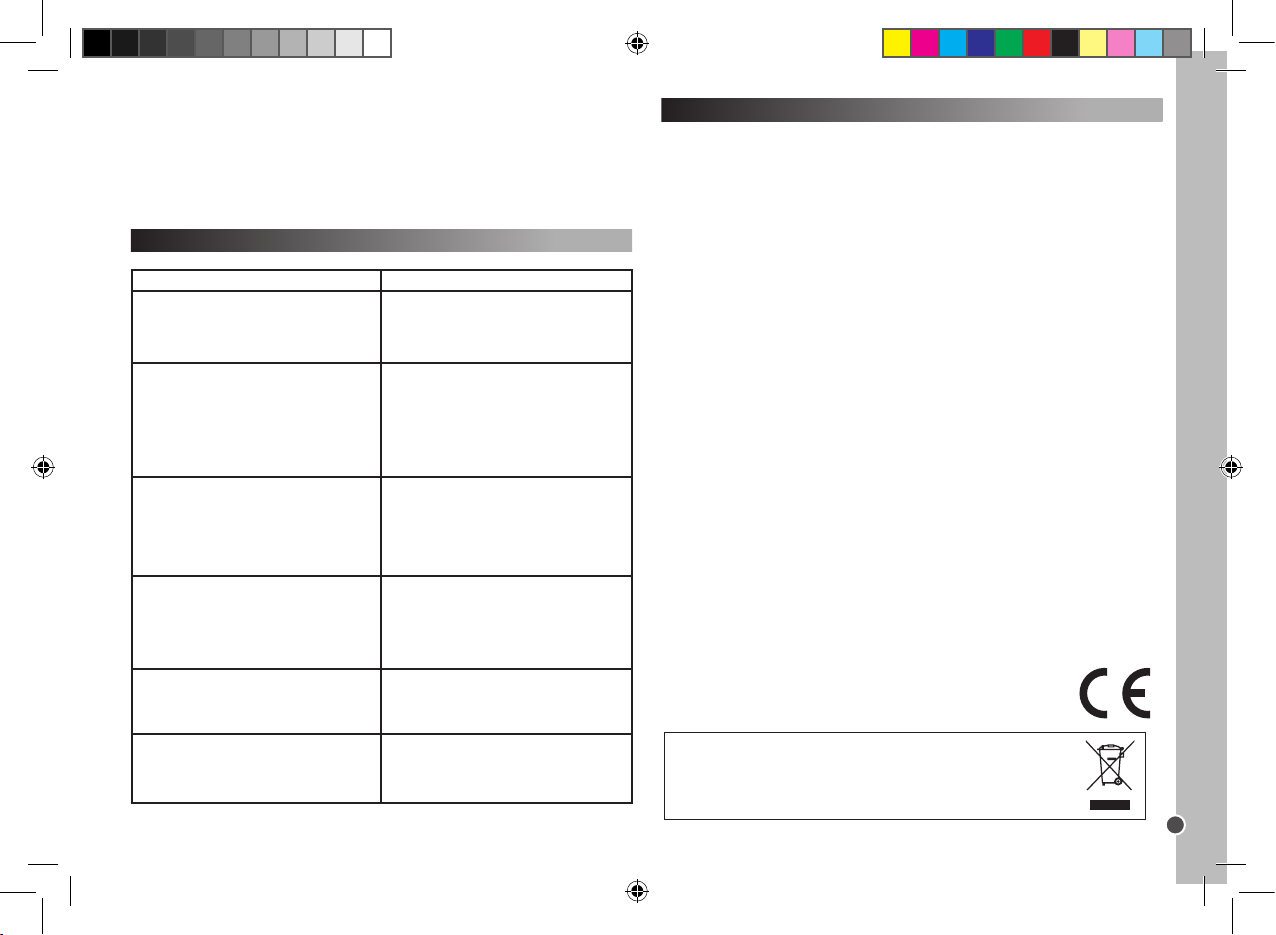
Copyright © Lexibook 2007
37
NEDERLANDS
Garantie
Dit product heeft een garantie van 2 jaar.
Om de garantie of naverkoopdienst te gebruiken, gelieve contact op te nemen met je verkoper met een aankoopbewijs of zend het toestel terug naar
ondervermeld adres met een aankoopbewijs.
Opmerking: Gebroken LCD-schermen zijn niet gedekt door de garantie.
Onze garantie dekt schade aan materialen of installatie-betreffende schade
met betrekking tot de fabrikant, met uitzondering van slijtage veroorzaakt
door het niet navolgen van de richtlijnen voor het gebruik van dit toestel of
door niet-geautoriseerde herstellingen aan het toestel (zoals demontage,
blootstelling aan hitte of vochtigheid, enz.).
Opmerking: Het is aangeraden alle verpakkingsmaterialen te bewaren als
referentiemateriaal voor later. Bewaar deze gebruikshandleiding op een
veilige plaats daar het belangrijke informatie bevat.
Disclaimer
Omwille van ons voortdurend streven naar verbetering, is het mogelijk dat
kleuren en details van het product lichtjes verschillen van deze die op de
verpakking zijn afgebeeld.
Referentie: ST100
2-jaar garantie
©2007 LEXIBOOK®
Ontworpen en ontwikkeld in Europa – Gefabriceerd in China
Klantendienst
LEXIBOOK UK ltd
Unit 10 Peterseld Industrial Estate
Bedford Road, Peterseld
Hampshire, GU32 3QA,
Groot-Brittannie
Gratis telefoonhulplijn: 0808 100 3015
http://www.lexibook.com
Milieu beschermin g
Niet lange r bruikba re electr ische apparaten kun nen gerecycleerd wo rden en mog en niet
weggego oid worden met het gewone huisvuil! G elieve acti ef de bescherming van
bronnen te o ndersteu nen en deel te n emen in de bes cherming van het milieu door dit
toestel terug te zende n naar een ver zamelcentrum (i ndien aanwezig).
Probleemoplossen
Proble em
Oplossing
Het merk van jouw audio-video apparaat is
niet vermeld in de codelijst
A. Ga naar de instelling voor Snel Zoeken
(pagina 34).
B. Ga naar de instelling voor Automatisch
Zoeken (pagina 35).
De afstandsbediening stelt jouw audiovideo apparaat in werking
A. Controleer de batterijen.
B. Ga naar de manuele instelling (pagina 34).
C. Ga naar de instelling voor Snel Zoeken
(pagina 34).
D. Ga naar de instelling voor Automatisch
Zoeken (pagina 35).
Jouw afstandsbediening stopt met werken
eens de instelling met succes werd voltooid.
A. Controleer de batterijen.
B. Zorg ervoor dat je de juiste
corresponderende apparaattoets hebt
ingedrukt (TV1, TV2, DVD, CD, VCR1, VCR2,
SAT, CBL, AMP or AUX).
Sommige van de toetsen van jouw
afstandsbediening werken niet juist.
A. De ST100 Universele Afstandsbediening
beschikt miscchien niet over al de functies van
jouw originele afstandsbediening voor jouw
audio-video apparaat.
Jouw afstandsbediening reageert niet na het
indrukken van een toets
A. Zorg ervoor dat je nieuwe batterijen gebruikt.
B. Richt de afstandsbediening naar jouw
apparaat.
De LED indicator knippert of blijft branden
tijdens het normale gebruik (niet tijdens een
instelling).
A. Vervang de batterijen met 4 nieuwe AAA
alkaline batterijen.
branden.
Opmerking: veelvuldig gebruik van de achtergrondverlichting zal de levensduur
van de batterijen verkorten.
ST100.indd 37 4/9/07 18:05:41
Page 38
Copyright © Lexibook 2007
A.R.S ystems 432,397,414,428
Accent 023
Accuphase 432,381
Acec 045
Acme 004,010,313
Acura 010,30 9
ADA 015
ADC 020,0 06
Adcom 447
Adimral 404,117,154,37 2
Admiral 001,002,003 ,020,050,054,109,187,196,
197,234,308
Adyson 004,186,210,213, 296
AEA 432,428
Agashi 185,187,212,214,29 6
Agazi 003,30 8
Agb 124
Agef 234
Aiko 432,3 40,396,071,409,0 98,392,216,372 ,
342,506,428
Aim 098,43 2,339,428,460
Aiwa 463
Akai 392,339,39 6,409,216,071,098,3 47,
470,154,426 ,,471,442,4 32,430, 439,342,
450,340,372,202 ,398,4 43,510,416,453,
428,506
AKI 185
Akiba 012,023,101,212
Akito 023,026
Akura 003,012,016,023,072,101,185,191,212,
308
Alaron 340
Alba 404,36 4,396,432,510,39 0,347,340,154,
420,439,438 ,470,411,506,428 ,009
Albe 004,010,012,023,028,0 29,054,063,0 69,
087,163,170,184,185,187,195,198,215,
217,296
Albiral 038,185,2 07
Alcyon 209
Alkos 165
Allorga n 021,027,195,212,219
Allstar 023,0 52
Ambassa dor 175
Amplivi sion 00 4,198,207,214,2 28
Amstrad 00 3,010,012,014,023,031,069,070, 072,
075,109,124,226, 3 08,309,317,341,
06 0
Anam 010,066 ,110,309
Anam Nati onal 432,4 54,428
Anex 405
Anglo 010,3 09
Anitech 003,010,016,0 23,04 4,110,183,184,209,
224 ,231,308 ,309
Ansonic 432,397,154,377,118,403,370 ,388,0 45,
120,42 8,506
Apollo 416
Arcam 340,342
Ardem 419,470,451,432,428
Arcam delta 004
Arc en ciel 04 6,127,140,20 4,207
38
TV
Aristona 016,023,052,170,195
Arthu r Marti n 154
Art-tech 212
ASA 001,017,018,019,050,111,234
Asberg 023,04 4,052,182,187,195,20 9
Astra 010,309
Astro sou nd 207,212
Asuka 003, 004,012,101,212,214,218, 296,308
ATD 462
Atlantic 004, 021,022,023,052 ,170,182,197,296
Atori 010,3 09
Auchan 154
Audiosonic 397,432,141,470,471,342, 384,372 ,347,
419,50 6,428
Audioton 00 4,182,198,231,23 3
Ausind 04 4,209,212
Autovox 001,003,004,021,044,0 58,102,126,209,
23 4,308
AWA 024,151,397,432,340,4 43,342,137,372,
00 9,506,460,42 8
Axxon 470
Baird 141,386,098,113,342,33 9,
Bang_Olufsen 117,373
Barco 154
Barcom 210
Basic Line 397,154,432,3 47,374,342,414,385, 510,
428, 506
Bastide 004
Baur 258,425,432, 216,39 2,509, 506,428 ,393
Bazin 183,185,201,217
Beijin 263
Bekntekn ik 228
Beaumark 202
Beko 419,071,470,404,510,432 ,443,471,428
Bennett 432,42 8
Beon 023,052,170
Best 114,115,198
Bestar 023,052,116,198,228,321
Bestar-D aewoo 397
Binatone 00 4
Black Dia mond 510,432
Black Pant her 118
Black Str ip 071
Black sta r 130
Blackt ron 101,212
Blackway 101,212
Blaupunk t 216,258,414,174,009
Blausoni c 207
Blue Sky 470,510,420,471,381,432,347,374,414,
428
Blue star 101,121
Bondstec 130
Boots 00 4,026
Boston 208, 218
BPL 023,096,101,121
Brandt 037,046,0 47,127,128,140,20 4
Brandt Ele ctronique 383
Brinkma nn 4 32,427,404,419,428
Brion veg a 001,023,052,058,170,208 ,234,343
Bristol 208
Britann ia 004, 296
Brother 372
Bruns 001,00 8,040, 227,234
BSR 027,132,197,210,212,215
BTC 012
Bush 010,012,020,0 23,025,026,028,029,033,
052,063,0 69,101,116,121,132,133,140,
168,170,172,309, 317,320,321,326
Canton 347
Califor nia 195
Capsonic 00 3,214,308
Carad 44 4,432,510,428
Carena 023, 212,214
Carrefour 432,0 09,428
Carver 174
Cascade 010,02 3,309
Casio 432,154,428,393
Cathay 023,052,170
CCE 432,3 42,428
Centrum 325,32 6
Centuri on 023,052,170
Centur y 001,191,234
CGE 044,05 4,130,132,187,198,204, 209
CGM 226,23 3
Changhon g 241,242, 245,246,247,248, 264,278,279,
288
CIE 196,212,226
Cihan 214
Cimline 010,029,212,213, 309
Cinex 45 3
Citizen 09 2
City 010,309
Clarivox 432,118,428
Clatroni c 003,0 04,010,012,023,031,044,052,08 4,
130,185,198,20 9,212,214,308,30 9
Clayton 510
CMS 3 40
CMS highte c 3 42
Cofadel 204
Colombi a 228
Colombu s 182
Concor de 010,3 09
Condor 004, 022,023,052,0 84,101,182,184,187,
198,211,296
Conrad 432,42 8
Conrowa 265
Contec 004,010,02 8,030,0 31,211,212,217,296,
30 9
Cont.edi so 2 04
Continental ediso n 037,046,047,112,127,140
Cosmel 010,3 09
Crezar 182,226
Crosley 001,0 44,130,132,209, 234
Crown 010,02 3,044,052,05 4,084,096,115,122,
170,198,20 9,228,309,371
Cs electr onics 00 4,012,130,29 6
Curtis M athes 092,159,49 6
CTC 130
BRAN D TV CODE
CTC clatronic 015,187,198,207,210,212,226
Cyberc om 308 ,309,310,311,312,313,314,315,
316,317,318,319,320,321,32 2,323,324,
325,326,327,328, 329,330,331,332, 333,
33 4,335,336,3 37,338
Cyberm axx 30 8,309,310,311,312,313,314,315,
316,317,318,319,320,321,32 2,323,324,
325,326,327,328, 329,330,331,332, 333,
33 4,335,336,3 37,338
Cyber tron 012
Cytro n 308 ,309,310,311,312,313,314,315,
316,317,318,319,320,321,32 2,323,324,
325,326,327,328, 329,330,331,332, 333,
33 4,335,336,3 37,338
D-Visio n 432,42 8
Daewoo 004,010,02 3,052,059,095 ,116,196,29 6,
30 9,321,345
Dainichi 012,212, 296
Dansai 003, 023,052 ,170,212,296, 308
Dantax 035,149,162,198,213,326
Datronic 196 ,211
Datsura 096,122
Dawa 023,195
Daytek 462,
Dayton 010,309
Daytron 023,196
De Graaf 339,07 8,154,430,
Deawoo 023
Decca 004,011,023,02 6,031,052,124,170
Decca(uk) 229
De graaf 007,020,03 4
Deitron 432,397,347,428
Denko 185, 214
Denver 211,212
Desmet 023,0 52,170,182
Diamant 023
Diamond 372,46 2,340,396,5 06
Digatro n 4 32,428
Digiline 432,123,428
Digital 212
Digitor 432,428
Digivis ion 392
Dik 432,428
Dixi 010,023,040,052,170,309
Domland 219
Domoh 182
Drean 023
DTS 010,309
Dual 00 4,023,090,126,127,132,140,161,185,
195,197,207,211,219,308,30 9,310,311,
312,313,314,315,316,317,318,319,320,
321,32 2,323,324,325,326,327,328,32 9,
33 0,332,333,334,335 ,338
Dual-Tec 004,010,132,197,309
Dumont 117,120,118,342,098
Dunai 154
Durabran d 388
Dux 023,170,195
BRAN D TV CODE BRAN D TV CODE
BRAN D TV CODE
ST100.indd 38 4/9/07 18:05:42
Page 39
Copyright © Lexibook 2007
39
Dynatro n 023,0 52,170
E-Elite 347
Edison- Minerva 420
Elbe 410,365,370,37 7,154,432,347,216,403 ,
44 4,342,426,39 2
Elbe-S harp 426
Elcit 117,426,118,154
Elekta 432,372,374
Electa 121
Electro Tech 010,309
Elektro nska 207
ELG 023
Elin 004,017,019,023,052,170,181,186,197,
23 3,296
Elite 012,022,023,052 ,179,184,197
Elman 015,132 ,207,213
Elsay 184,2 29
Elta 010,296, 309
Emerson 175,470,202 ,117,432,39 6,374,392,381,
419,154
Emperor 101
Engel 207,227
Erres 016,023,052,170
ESC 432,342
Estel 207
Estele 154
Etron 010,02 3,309
Eurocom 207,212
Euro-Fe el 003, 308
Euroline 089,170
Euroman 023,185,196,198,212,214, 296
Euromann 003,004,052,115,308
Europa 023,228
Europhon 00 4,015,023,026,052,073,124,132,207,
22 6
Excel 432
Eurotroni c 228
Exper t 281,370,154
Exquisit 023
Fagor 432
Family Life 432
Fenner 010,116,184,191,195,212,3 09,321
Ferguson 113,447,383,365,141,433,432,071,386,
120,137,392,430
Fidelis 182, 211
Fidelit y 154,425,4 32,396,340, 372,392,460
Filsai 217
Finlandia 339,387,430,392 ,154,098, 386,086
Finlux 001,004,011,015,017,018,019,023,04 4,
052,064,111,124,132,158,168,170,181,
20 9,225,234,314,315
Firstlin e 432,3 97,470,154,340,381,118,342,40 3,
36 5,098,364,3 39,392,510,393
Fisher 001,00 4,007,019,028,030,040, 041,084,
132,195,198,20 0,211,227,23 4
Flint 023,052,149,183,184,187,196,214
FNR 118
Formenti 001,0 02,004,022,044,126,132,134,170,
182, 209,234,29 6
Formenti -Phoenix 340
Fortre ss 001,002, 234
Fraba 432
France Con cept 18 4
Friac 432,118,405,423,456,444
Frontech 00 3,010,020,050,06 9,119,130,183,184,
191,213,3 08,309,317
Fujitsu 281,098,118,342,154,432 ,392,370
Fujitsu Gen eral 3 42,281,154
Funai 003,027,211,212,308 ,346
Futronic 372
Future 432
Galaxi 118,432,392,154
Galaxis 404,118,432
Galeria 196
Galway 184
GBC 010,028,132,226, 233,309
GE 38 6,202,374,433,141,383,447
Geant Casi no 154
GCM 195,212
GEC 004,011,023,0 42,050,0 52,124,133,142,
170
GEC(UK) 186,2 24,229,231
Geloso 010,020,132,231,309
General 141
General Techn ic 010,3 09
General El ectric 386
Genesis 432
Genexxa 012,023,0 50,052,212
Giant 342
Germanvox 226
Goldhand 231,2 96
Goldline 384
Goldsta r 004,010,013,020,02 3,052,085,09 4,130,
132,170,172,198,206,210,223,296,30 9,
326 ,344
Gooding 420
Goodman s 452,397,423,432,510,381,372, 098,42 6,
420, 396,386,36 4,071,433,342,38 3,347,
43 8
Gorenje 08 4,115,198
GPM 012,210,212
Gradient e 174,432
Graetz 392,39 6,154,385 ,432
Gran Prix 453
Granada 004,00 7,011,020,023,028,0 32,041,044,
052,055,0 65,124,128,129,134,135,139,
170,2 09
Grandin 432,154,444,470, 471,397,374,347,414,
43 8,510,
Gronic 180,191,212
Grundig 25 8,216,420, 432,440,411
GTT 187,211
H-150a 276
Haaz 338
Haier 46 2,372
Halifax 00 3,004,296,308
Hammers tein 372,09 2
Hampton 004,183,226,2 96
TV
BRAN D TV CODE
BRAN D TV CODE BRAN D TV CODE BRAN D TV CODE
Hanimex 347
Hanseati c 004,0 08,010,022,023,0 27,028,052 ,074,
09 6,101,119,132,142,170,198,234, 275,
30 9
Hantarex 010,023,124,30 9
Hantor 023
Harwo od 0 23,186,326
Hauppauge 023
HCM 003, 004,010,0 23,075,101,121,20 0,211,
22 6,308,309
Hedzon 432
Hema 342
Hemmerm ann 183,201
Hivox 140,204
Higashi 185
Highline 372,43 2
Hikona 347
Hinari 007,010,012,023,0 28,044,052,138,170,
20 0,212,213,227,230,309,326
Hisawa 374,347,0400,414,444,470
HISense 339
Hit 23 4
Hitachi 348,391,078,137,416,154,3 86,437,
342,257,426,09 8,417,423,432,141,430,
473,4 52,479,202,512,123,421,392,425, 510,393,0 09
Hitachi Fuj ian 137,348
Hitsu 414,347,444
HMV 117
Hoher 470
Horizon t 306,3 07
Home Elec tronics 443
Hornyph on 023,052
Hoshai 012,212,233
Huanyu 004,116,29 6,321
Hygashi 004,296
Hyper 004,010,130,132,226, 233,296,30 9
Hypersonic 392
Hypson 432,470,471,372,342 ,374,414,365
Hyudai 432
Iberia 023
Ibervisao 188,2 07
Ibico 196
ICE 003, 004,010,012,0 23,052,069,187,210,
212,2 96,308,309,317
Ices 347,340
Icos 045
ICT 512,432
Imperia l 0 23,04 4,050,0 52,054,084,130,132,187,
198,209
Indesit 025,102
Indiana 023,0 52,170
Ingelen 420,4 44,470,154,392
Ingerso l 010,309
Inno Hit 004,010,011,012,023,052,0 94,124,170,
20 6,209,211,222,3 09
Innovatio n 003,010,0 62,068,069, 088,104,108,112,
116,155,157,169,172,176,177,178,308,
30 9,314,316,317,318,319,320,321,32 2,
324, 325,326,327,328,329
Interact ive 432,04 5,117,425,373,154,3 92,141,403
Interbuy 010,110,130,309
Interf unk 001,016,023,050,052 ,130,140,142,170,
198,234
Internal 432,423,397,381
Internat ional 340
Intersou nd 182
Intervision 374,342,414,39 6,398,427,419,420,347,
118,408,154,372,432
Irradio 010,012,023,052 ,069,170,20 6,209,212,
30 9,317
Iskra 183,231
Isukai 012,023,101,212
ITC 00 4,132,184,204, 233
ITE 207
ITL 196
ITS 012,023,052,069,101,121,212,296,317
ITT 010,050, 062,133,134,135,142,143,144,
188, 220,309,314,34 9
ITT Nok ia 39 2,430,154,416,387,339,385,4 43,444,
45 0,393
ITV 023,30 9,326
JEC 165
Jet Point 199
JMB 423,452, 397,432,411
Jocel 469
Jubilee 432
JVC 028,052,0 69,082,189,317,350
Kaisui 00 4,010,012,023,121,212,296,30 9
Kamoson ic 004
Kamp 004,296
Kapsch 021,050,188,197,200
Karcher 432,405 ,444,154,374,118,372,470
Kasai 212
Kathrein 432
Kawa 396
Kawasho 340
KB Aristocrat 154
Kendo 015,02 0,023,029,109,180,183,186,196,
197,198,207,213
Kennedy 021,132,182,197,231
Kenwood 123
Kennex 182,226, 233
Kerion 182, 212
KIC 342
Kingsley 004, 296
Kiton 432
Kitt 212
Kneisse l 444 ,403,3 97,423,432,410,370,37 7,365,
Kolster 023,0 52,191,210,214
Konka 012,023,185,238 ,242,24 3,244,248, 249,
25 4,255,260, 261,285, 287,289,3 03,313
Kontakt 420
Kontact 20 4
Korpel 023,052,170
Kortin g 001,022,198,234
Kosmos 023
Kotron 226
Koyoda 010,3 09
Kraking 36 5
Kriesl er 0 45
ST100.indd 39 4/9/07 18:05:43
Page 40
Copyright © Lexibook 2007
40
TV
Murphy 004,019,134,29 6
Musiklan d 3 47,432
Myryad 432
NAD 159,20 2,392,154
Nagoya 207
Naiko 44 3,432
Nakimura 3 97,432
Naonis 020,109
NAT 351
National 065,102,194,284
NEC 174,414,397,342,432,024,423,00 9
Neckerm ann 216,5 09,432,154,404,117,342,403,425,3 93
NEI 023,0 52,069,114,170,183,199,212,317
Nesco 130
Netsat 432
Networ k 38 4
Neufunk 432,444, 347,374,470
Newmar 182,183,2 07
Newtec h 010,023,05 2,309
New World 012
Nicamag ic 004,29 6
Nikkai 00 3,004,011,012,023,052,114,165,170,
186, 205,211,212,296,3 08
Nikkei 22 6,233
Nikko 202
Noblex 023,184,199,20 0
Nobliko 004,015,018,0 44,209,29 6
Nogamat ic 140,204
Nokia 05 0,062,064,133,134,135,142,143,144,
188, 220,314,315,353
Nordic 212,213
Nordmen de 023, 025,037,046,047,050,052,0 58,112,
127,128,140,2 04,354
Nordvis ion 170
Nordway 217
Normerel 432
Norfo lk 154
Nortek 233
Novak 045,432
Novatroni c 0 23,183,187,212,2 26
NU-TEC 414,462
Nurnber g 154, 392
Oceanic 154,392, 339,416,430
Oceanic (F) 188,2 20
Octan 195
Odeon 372
Okano 023,0 84,187,198,233
Omega 372
Omni 46 2
Onceas 004,196,211
Onwa 396, 442,347,409,439,118,
Opera 023
Optimus 45 4,159
Orbit 023,052
Orion 010,014,022, 023,027,029,031,052,06 3,
076,100,124,143,148,160,170,172,213,
30 9,326,355
Orline 347,432
Ormond 510,432
Orsowe 207
Kronne 180
KTV 004,210
Kuba 186,195
Kuba Elect ronic 154, 393
Kuro 096,122,200
Kyoshu 404,372, 460
Kyoto 154, 340,342
LaSAT 419
Lavis 211
Lenco 010,02 3,226,233, 309
Lecson 432
Lemair 40 3
Lenco 154, 397,432,120
Lenoir 004,010,196,199,208,211,309
Lesa 130,191
Levis Austr ia 4 32
Leyco 003,011,023,027,052,170,214,30 8
LG 004, 010,013,020,023,052 ,085,0 89,094 ,
130,132,150,170,172,198,206 ,210,223,
29 6,309,326
Liesenk _Tter 432
Liesenk 170
Liesenkot ter 045,4 32
Life 00 3,010,062,068,0 69,088,104,108,
112,116,155,157,169,172,176,177,178,308 ,
30 9,314,316,317,318,319,320,321,32 2,
324, 325,326,327,328,329
Lifetec 003, 010,023,06 2,068,069,0 88,104,
108,112,116,155,157,169,172,176,177,178,
211,214,308 ,309,310,311,312,313,
314,315,316,317,318,319,320,321,32 2,
323 ,324,325,326,327,328, 329,330,331,
332,333, 334,3 35,336,337,338
Loewe 425,43 2,456, 451,117,377,426
Loewe Opta 001,052,170,190
Logik 024, 092,46 2,372,396
Luma 281,154,403,432,397,370
Lumatron 281,432,154,370,3 92,342,372,113
Lux May 023,0 52
Lux Man 438
Luxor 257,421,392,339, 391,430,154,387,416,
342,450,510,3 93
LXI 202
Madison 023,182,212
Magnadyn e 001,015,124,130,132,170,191,234
Magnafon 0 04,015,044,073,124,181,182,183,195,
207,209,296
Magnavox 43 2,
Magnum 003,010,0 62,068 ,069,088,104,108,
112,116,155,157,169,172,176,177,178,308 ,
30 9,314,316,317,318,319,320,321,32 2,
324, 325,326,327,328,329
Mandor 00 3,308
Manesth 003, 004,02 2,023,029,052,170,182,184,
188, 213,30 8
Manhatt an 432,510,154
Marant z 023, 052,170,187,195
Marech 182
Marelli 001,23 4
Mark 43 2,342,3 40,397,470,471
Marshal l 212
Master’s 423
Masuda 3 47,396,372,3 42,432
Matsui 432,42 0,364,175,024,390,09 8,342,396,
40 9,411,438,414,154,426,071,339,0 86,
25 8,216,38 3,470,510,393
Matsushi ta 06 6
Matsuvi ama 4 40
Mcmicha el 0 42
Mediasc reen 214
Mediator 016,023,052 ,170,195
Medion 003, 010,023,06 2,068,069,0 88,104,
108,112,116,155,157,169,172,176,177,178,
211,308,309,310,311,312,313,314,
315,316,317,318,319,320,321,32 2,323,
324, 325,326,327,328,329, 330,331,3 32,
33 3,334,335,3 36,337,338
Megas 444
Megatro n 202
M-Ele ctronic 004, 010,017,019,037,050,052,069,110,
111,116,140,170,30 9,317,321
Melect ronic 387,425,141,386,123,120,397,342, 421,
340,403,154,4 32,452, 392,216, 258,393
Memorex 010,3 09
Memphis 010,011,114,309
Mercur y 023
Metz 258,412,216,39 5,481,117,432, 373,440 ,
510
MGA 202,4 32,347,120
Microma xx 00 3,010,023,0 62,068,069, 088,104,
108,112,116,155,157,169,172,176,177,
178,3 08,30 9,310,311,312,313,314,
315,316,317,318,319,320,321,32 2,323,
324, 325,326,327,328,329, 330,331,3 32,
33 3,334,335,3 36,337,338
Microst ar 003,010,0 62,068,069 ,088,104,108,
112,116,155,157,169,172,176,177,178,308 ,
30 9,310,311,312,313,314,315,316,317,
318,319,32 0,321,322,323,324, 325,326,
327,328, 329,330,331,332,333,33 4,335,
33 6,337,338
Minato 432
Minerv a 42 0,258, 216,426,137
Minoka 02 3,052
Mitsubi shi 0 01,023,0 28,031,052,055,05 6,061,099,
102,136,171,192,2 34,276,278,2 79,280,
326 ,352
Mitsuri G eneral 154
Mivar 004 ,044,074,09 4,124,193,198,206,2 09,
275, 290,291,292, 293,294,2 95
Morgans 023
Motion 044,2 09
MTC 092,425,154,3 40,392
Mtlogic 470
Multist andard 118
Multi Sys tem 170
Multitec 432,419,510
Multitec h 0 04,010,015,020,023,0 28,04 4,046,130,
132,170,198,207,212,233,296, 309
Osaki 00 3,004,005,011,012,023,075,166,308
Osio 432,
OSO 012
Osume 151,098, 347,432
Otto Versand 50 9,425,432,258 ,216,392,364,141,351,
342,374,386,426,427,496,3 93
Pacic 432,512,470,510
Pael 004,181,185,296
Palladium 216,509, 404,43 2,117,154,342,403,4 56,427,470,512
Palsonic 372,3 42,398, 347,462,4 32,404,460
Panama 00 3,004,010,023,166,2 96,30 8,309
Panasonic 023,0 50,065,066,067,068,102,125,142,
143,152,153,194,266, 286,316,356
Panavisio n 403,432
Panda 267
Pathe Cinem a 004, 022,03 8,074,132,182,207,211,228,275,2 96
Pathe Marc oni 038,04 6,047,127,140,204
Pausa 010,309
PCM 211
Perdio 00 5,011,022,023,182,207,213
Perfek t 023
Philarmonic 185
Philco 001,0 23,04 4,054,130,132,187,198,209, 234
Philex 154
Philharm onic 00 4,166
Philips 001,00 4,016,023,042,04 4,052,089,09 0,
112,116,132,142,156,170,195,219,23 4,
321,32 3,357
Phoenix 001,023,052,170,182,195,198,234,29 6
Phonola 001,016,023,0 52,170,195,219,234, 296
Pilot 432,4 69
Pioneer 159,024,174,432,38 6,392,141,154,419,
425, 485
Pionier 419
Plantron 00 3,023,052,30 8
Playsonic 470, 342,385,471
Polar 305
Policom 118,141,281,365,373,39 2,154,117,
Polytron 374
Poppy 010,211,309
Portla nd 397,381
Powerpoi nt 420,432
Prandoni -Prince 0 20,124,142,182,197,207,209,212
Precision 004,166
Premier 372
Prima 010,050, 309
Princess 462
Prinston 510
Prinz 048,186,195,217,230,313
PRO2 30 8,309,310,311,312,313,314,315,
316,317,318,319,320,321,32 2,323,324,
325,326,327,328, 329,330,331,332, 333,
33 4,335,336,3 37,338
Profex 010,0 44,142,309
Prolo 172,326
Pro-Tronic 023,05 2
Proline 011,016,023,052,063,184,213, 214
Prosonic 023,043,108,162,170,172,198,296,311,
320 ,326
BRAN D TV CODE BRAND T V CODE BRAND T V CODE BRAND TV CO DE
ST100.indd 40 4/9/07 18:05:44
Page 41
Copyright © Lexibook 2007
41
TV
BRAN D TV CODE
BRAN D TV CODE BRAN D TV CODE BR AND TV CODE
Protech 003, 004,010,015,0 23,052,114,130,132,
133,166,170,308, 309
Proton 202,
Provisio n 423,432, 510,470
Pye 016,023,052 ,069,170,195,23 4,317
Pygmy 20 8
Pymi 010,3 09
Quadral 3 47
Quasar 130
Quelle 50 9,024,141,425,216,39 2,342,120,123,
432,151,258, 372,387,405,5 06
Questa 028
Radialva 141,347,154,432,3 84
R-Line 432,154
Radiola 016,02 3,052,170,195
Radiomar elli 001,023,124,130,191
Radionet te 017,019,181,188
RadioSha ck 432, 202
Radioton 185,211
Radiotone 432,4 38,404,453, 372,510
Raduga 307
Rank 018,028
Rank Aren a 151,442
RBM 018
Rc 259
RCA 447,433,3 83,38 6,496
Recor 404,432
Realisti c 2 02
Record 307
Rectiligne 023
Rediff usion 392,43 0,387
Redstar 023
Reex 432,510
Reoc 470,452,381
Revox 023,052,170,190,198
REX 00 3,020,021,050,109,158,197,308
Rhapsod y 340
Ricoh 432
RFT 001,00 8,040,198,227,234,2 75
R-Line 023,0 52,170
Rm-d 268
Roadstar 003, 010,012,023,2 26,233,308 ,309,359
Robotron 001,227,234
Rodex 432
Royal Lux 4 05,383
Rowa 372, 462,342,469, 340,440
RTF 001
Rubin 304, 306,307
Rukopir 432
Saba 001,037,046,047,050,0 59,112,124,127,
128,140,142,143,204,360
Saccs 03 8
Sadec 212
Sadko 307
Sagem 444,414,374
Saisho 00 3,004,010,014,029,031,124,183,213,
215,3 08,30 9
Saito 207
Saivod 432,469,510
Salora 020,048,0 50,094,096,108,109,119,122,
129,132,133,135,139,142,186,206, 313,
314,320 ,361
Sambers 015,044 ,073,124,181,207,209,211
Samsung 003,0 04,010,011,023,031,052,084, 091,
09 4,105,106,161,166,170,173,198,199,
20 6,296,308,309,3 62
Sandra 00 4,296
Sandra Co lor 195,231
Sanela 365
Sansui 432,396, 456,475,442,405,414,461
Sanwa 188
Sanyo 004,00 7,011,017,019,023,028,03 0,
031,032 ,040,041,044,074,096,128,132,
135,161,198,200, 244,252,275,278,29 6,363
Sakai 154
Sakyno 414
Save 023
SBR 016,023,042,170
Schaub Lor enz 430,470, 443,392,419,397,393
Scheider 512,432,427,045, 370,386, 342,396,392,
347,510,154,453,470,381
Schneider France 195, 212,219
Scotlan d 154
Scott 182
Sears 202
Seaway 452
Seelver 432,510
SEG 432,510,3 88,342,420,154,372,4 52,118,
340,347,381
SEI 117,118,509,154,426, 281,432,175
SEI-syn udyne 001,014,015,027,050,076,124
Seleco 281,370,154,403,396,372,387,410
Sencora 010,309
Senday 182
Sentra 165,2 05,212
Serino 44 4,414,34 0
Sharp 151,455,426,48 5
Shintoshi 432
Shivaki 432,411,397,202
Shiwan 212
Shorai 027,212
Show 404,09 8
Siam 023
Siarem 001,015,124,132,180,191,234
Sicatel 038,207
Siemens 216,258,151,432,392
Siera 432,045
Sierra 016,052
Siesta 161,198
Silva 023,211,212,224, 296
Silver 414,392,432,471,154
Singer 001,015,0 23,130,132,180,188,191,204,
211,234, 338
Sinudyne 001,014,015,023,027,029,076 ,132,170,201
Skantic 050,139,147
Sky 374,432
Skymast er 123
Skywo rth 239,271,272 ,273,3 01,338
Smaragd 420
Sogera 02 2
Sokol 306,307
Solavox 39 2,098,154,430,432
Sonawa 347
song 251,269,283
Soniko 214,217,233
Sonitro n 339,38 5,342
Sonnecl air 023
Sonoko 00 3,004,010,023,052,101,170,211,212,
214,308,30 9
Sonolor 339,154,509,430, 392,374
Sontec 023,0 52,161,170,196,198,210,2 20
Sony 010,011,028,030,031,077,107,128,131,
166,203, 237,302,3 09,367
Soundco lor 211,212,214,215
Soundesi gn 20 2
Soundmas ter 226
Sound_Vi sion 118,347,397,432
Soundwave 432,4 04,471
Standar d 004,010,012,022,0 23,052,166,182,183,
191,196,309
Starlight 170, 950, 951, 952, 95 3, 954, 955
Starlin e 228
Starlite 154,4 32,372,460
Starlux 196, 226
Stenway 101,121,185,212
Stern 281,370,154,372 ,403,410
STM 221
Strato 432,372
Stylan dia 342
Sunic Line 182
Sunkai 010,02 3,027,063 ,183,211,212,213,309
Sunstar 396, 432,438,372
Sunwood 010,02 3,052,309
Superla 426,3 40,342
Superso nic 339,4 32,462,372,
Supert ech 023,119,212,226, 233,296
Supert one 185,207
Supra 010,184,214,309
Susumu 383,347,
Sutron 010,309
Sydney 004,166,29 6
Sysline 170
Sytong 212,29 6
T+A 412
Taisho 207,213
Tamashi 212
Tandberg 3 95,403,141,384,392,154
Tandy 002, 004,011,012,049,0 50,166
Tashiko 004,02 0,028,0 42,057,129,166,296
Tatung 004,011,023,026,052,124,166,170,229
TCL 196,240, 241,250, 253,274,277,297,298,2 99,300
TCM 003,010,0 62,068 ,069,088,104,108,112,
116,155,157,169,172,176,177,178,308,
30 9,310,311,312,313,314,315,316,317,
318,319,32 0,321,322,323,324, 325,326,
327,328, 329,330,331,332,333,33 4,335,
33 6,337,338
Teac 46 2,425,38 8,510,432,469,414,342, 372,
381,2 02,474,374,174,470,506,460,393
Teak 190
TEC 342,415,383,384,370,432,3 92,154
Tech Line 432,388
Technema 182
Technics 066,194
Technisat 456 ,432,154
Tecnimagen 432
Tedelex 342,404,443,3 39,462, 440,432
Teknika 092
Tecnema 02 2
Teinelsa 182,207
Teknant 211
Teleavia 037,046,112,127,140,204
Telecor 432,154,347,342,370,
Telefunken 023,036,0 37,051,052,053,079,080,102,
103,112,127,128,140,164,2 04,36 8
Telefusion 023
Telegazi 154,370, 347,372,432
Telemeister 022,0 23
Teleopta 226
Telesoic 432
Telesonic 0 23
Telestar 432,4 38
Teletech 010,023,0 89,114,130,170,309
Teleton 004,021,081,119,133,166,197
Televideon 022,182,296
Teleview 432
Telexa 118
Tempest 432,372
Tennesee 2 33
Tensai 010,012,019,022,02 3,027,052,184,185,
207,211,213,217,325
Tenson 182
Tesla 180,207
Tesmet 052
Tetran 182,197
Tevion 003,010,02 3,062,068,0 69,088,104,
108,112,116,155,157,169,172,176,177,
178,3 08,30 9,310,311,312,313,314,
315,316,317,318,319,320,321,32 2,323,
324, 325,326,327,328,329, 330,331,3 32,
33 3,334,335,3 36,337,338
Texet 342,397,340,347
Thomson 004,023,037,046,047,051,052,05 3,059,
102,103,112,127,128,140,164,167,204,
331,3 69
Thorn 137,141,113,348 ,386,3 92,365,509, 423,
09 8,432,024,120,045,3 83,425,0 86,397,
071,391,428,009
Thorn- Ferguson 120 ,137,141,365,392,383,423 ,113,071
TMK 202,175
Tobishi 347
Tokai 098, 432,384,154,342,3 97,510
Tokaido 510
Tokyo 00 4,296
Tomashi 101,121,212
Top Vision 210
Toshiba 071,092 ,424,118,399,342,141,472,258,
216,4 45,462,009
ST100.indd 41 4/9/07 18:05:45
Page 42
Copyright © Lexibook 2007
42
TV
Towada 05 0,132
Toyoda 396,372
Trans Continens 3 42,510,432,419
TRAN S-continents 446
Transonic 432,414,440,425,372, 462,469,404
Transtec 296
Trevi 199, 226,233
Triad 432
Trical 151
Trident 426,3 42
Tristar 372,347
Triumph 014,023,083 ,124,181,211,226
TVT EXT9 5 432
Tsoshi 212
Uher 021,022,023 ,044,050,052 ,181,184,190,
195,197,198,209
Ultravox 001,004,015,023,130,132,134,182,183,
186,191,201,23 4,296
Unic Line 02 3,182,183,212
Unic Radio 180,188,228
Uniden 212
United 023,089,170,326
Universa l 4 32
United Satellite 228
Universum 3 87,123,258,416,392, 421,404, 024,
425,151,154,372,120,432,405,403,5 09,
342,141,384,175,450,510,388,174,009,
428, 393,506
Univox 023,038,188,191,195,207,234
Uranya 182,191,211
Utax 211
Vanguard 186, 212
Venus 262
Vestel 023,0 50,052,170,183,199,319,325,326
Vexa 010,023,170,212,231,3 09
Victor 028 ,052,066
Videolo gic 347,340
Videolo gique 00 4,012,296
Videosat 130
Video Sys tem 023,0 52
Videotechnic 340,3 42,397
Videoton 391,154
Vidikro n 118
Vidion 196
Vidtech 202
Viper 384
Visiola 004,180,296
Vision 02 2,023,052,182
Visorex 097
Vistar 04 9,188
Vityaz 30 6,307
Vortec 023,052,170
Voxson 001,020,023 ,044,050,052 ,109,189,197,
20 8,209,234
Walkie 197
Waltham 342,391,404,432,141,510,
Watson 432,154,347,438,427,510,388
Watt Radio 004,015,038 ,132,187,201,210, 231,296
Wega 001,023,028,234
Wegavox 432
Wellfund 233
Weltblick 0 23,052,170,182
Weston 132
Wharfedale 427,432
White 182
White Westinghouse 004,015,022,02 3,044,170,182,29 6
Windsor 510
Windsta r 374,384
Windy Sam 432
Wintel 470
Worldview 414
Xenius 45 2
Xlogic 46 2,
Xoceco 235,23 6,242,260
Xrypto n 02 3,182
Yamaha 45 4
Yamishi 374,414,347,432,3 42
Yokan 023
Yoko 003, 004,010,012,0 23,052,166,170,183,
198,212,224, 296,308,3 09
Yorx 012,185,196
Zanela 36 5
Zanussi 020,021,109,197
Zenith 381
Zenor 385
Zoppas 197
7el 256
Others 282
BRAN D TV CODE
BRAN D TV CODE
ST100.indd 42 4/9/07 18:05:46
Page 43
Copyright © Lexibook 2007
43
VCR
Accent 181
Accuphase 197
Adelsoun d 0 98
Adyson 099
Aim 187
Aiwa 001,002,0 03,004,017,100,101,102,103,
104,105,106,165,166
Akai 003,0 05,00 6,007,008,
009,019,0 63,102,105,113,121,145,146
Akashi 181
Akiba 041,099
Akitan 107
Akura 003,013,041,099,102
Alba 004,014,015,016,017,019,041,099,101,
103,104,105,107,108,109,110,111,113,165,166
Allorga n 073,145,169
Allstar 114,115
Ambassa dor 019
Amstrad 002,022, 023,09 9,101,108,116,117
Anitech 041,099,114
Anitsch 091
Ansonic 09 8
Aristona 115
ASA 025,026,08 6,106,115
Asuka 002,025,0 26,041,099,101,106,115,118
Audiosonic 10 8
Audioton 019
AVP 191.171
AWA 106,108,119,120
Baird 002,0 03,005,014,027,028,04 5,101,102,
107,108,121,122,123
Basic line 004 ,014,019,041,099,103,108,165
Baur 026, 032
Bestar 014,019,108
Black Dia mond 198,187
Black Pant her 108
Black pant her line 014
Blaupunk t 02 6,029,030,031,032,0 39,071,115,125,
126,127,128,129,
130,167
Blue Sky 173.190.181.191.187.171.194.198
Bondstec 019,099
Brandt 0 66,067,102,131,132,133,134
Brandt Ele ctronique 175
Brinkma nn 103,104
Brion veg a 033 ,135
Broksoni c 042
Bush 00 4,014,015,016,017,041,052,09 9,101,
103,104,105,107,108,109,110,113,136,
165,166
Canon 137
Carena 103,115
Carrefour 13 8
Casio 101
Cathay 108
Catron 019
CGE 003,0 03,101,102
CGM 089
Cimline 004,041,099,103,165
Clatroni c 172,181,171
Combitech 017,105,166
Condor 014,019,107,108
Crown 014,019,041,099,108,114
Cyberc om 165,166,167,168,169,170
Cyberm axx 165,166,167,168,169,170
Cytro n 16 5,166,167,168,169,170
Cyrus 182
Daewoo 014,019,034,040,079,103,105,108,138,
170
Dansai 0 41,099,107,108
Dantax 165
Daytron 014,108
Decca 002, 003,026,101,102,104,115,142,143
De graaf 026,035 ,115,122,139,140,141,147
Deitron 108
Denko 099
Diamant 106
Domland 103
Dual 0 03,026,101,102,108,115,165,166,167,
169,170
Dumont 002,026,035,0 45,101,115,122,144
Elbe 062,108,118
Elcatech 099
Elin 021,145
Elsay 099
Elta 041,099,107,108
Emerson 181,178,193,171
ESC 014,019,108,145
Etzuko 041,099
Europhon 019
Fast 051
Fenner 019
Ferguson 0 03,028,039,04 3,046, 057,067,101,102,
108,123,133,134,146
Fidelit y 002,099,101,116,145
Finlandia 182,176,184,171,180,192,173,177,183,185,174
Finlux 002,00 3,005,026,03 5,045,061,101,115,
122,144,147
First Line 004 ,025,03 4,035,041,061,099,103,104,
106,108,120,136,138,147,148,165
Fisher 019,0 44,045,118,122,141,149,150
Flint 00 4,103,165
Formenti -Pheonix 026
Frontech 019,114
Fujitsu 0 02,101
Fujitsu Gen eral 173
Funai 002,101
Galaxi 101
Galaxis 187
Galaxy 002
GBC 019,041
GE 189
GEC 026,115
Geloso 041
General 019
General Techn ic 004,017,038,073,104,165,166,167,169
Genexxa 122
Goldhand 041,099
Goldsta r 0 02,025,101,106
Goodman s 002,014,019,021,02 5,028,041,047,048,
099,101,103,104,106,108,115,129,136,
145,151,152
Gradient e 142
GPX 173
Graetz 003,033,045,102,122,135,145
Granada 010,026,029,0 35,039,045,0 49,101,106,
115,122,127,140,141,145,147
Grandin 0 02,014,019,025,041,099,101,103,
106,108
Grundig 02 6,029,032,039,0 41,052,05 4,084,
104,115,127,128,129,133,155
Haaz 165
Hanimex 105,107
Hanseati c 02 5,026,103,106,108,115
Hantor 172
Harwo od 099
HCM 041,052,0 99,114
Hinari 004 ,017,041,052,053,09 8,099,102,103,
105,108,114,136,148,152,156,165,166
Hisawa 004,103,105,165
Hischito 178
Hitachi 002,00 3,026,035,037,098,101,102,115,
129,139,144,145,147
Hoher 187,198
Hornyph on 115
Hypson 0 04,041,099,103,105,108,165
Impego 019
Imperia l 0 02,101,145
Ingerso ll 098,103,145
Inno Hit 014,019,021,026,041,099,108,114,145
Innovatio n 0 04,017,038,073,165,166,167,169
Interbuy 025,106
Interf unk 0 26,045,099,115,122
Internal 187,197
Internat ional 187,173
Intervision 0 02,101,103,104,106,107,108
Irradio 025,0 41,099,106,115
ITT 003,005, 033,04 5,055,056,102,121,122,
135,141,145,157
ITT/Nok ia 082,084,08 5,088,089,09 0,092,140
ITV 014,019,025,106,108
JMB 191,190
Joyce 171
JVC 003 ,056,057,058,059, 060,102,132,142,
143,157
Kaisui 041,099
Kambroo k 173
Karcher 026,108
Kendo 004,005,00 6,014,019,034,063,099,
103,104,106,113,121,146,165
Kenwood 003,102,118
KIC 171
Kimari 149
Kneisse l 103,104,105,106
Kolster 190
Korpel 041,099
Kuba 149
Kuba Elect ronic 179
BRAN D VCR CODE BRAN D VCR CODE
BRAN D VCR CODE BRAN D VCR CODE
Kuwa 185,050
Kyoto 099
Lenco 014
Leyco 041,099,148
LG 0 02,025,101,106,108
Lifetec 0 04,017,038,073 ,103,104,165,166,167,168,169,170
Loewe 031,03 6,098,106,115,126,127,144,158,
159,167
Loewe Opta 025,026,039
Logik 0 21,041,098,09 9,103,121,145
Luma 093
Lumatron 014,108
Lux May 181
Luxor 005,0 45,047,061,099,120,121,122,141,149,151
Magnason ic 04 5
Magnavox 115,129
Magnum 198
Manesth 034,041,09 9,103,115,138
Marant z 026 ,039,047,062,103,107,115,118,127,
151,160
Mark 187,172,171
Marquant 114
master’s 187
Matsui 0 04,017,025,05 3,064,098,101,103,104,
105,106,107,111,117,145,148,156,165,166
Mediator 02 6,115
Medion 004,017,038,073,103,104,105,165,166,
167,168,169,170
Melect ronic 0 02,101,106,118
Memorex 002,010,02 5,044, 045,101,106,122,140,141,149
Memphis 0 41,099
Mercur y 172
Metroni c 182
Metz 029,03 0,031,032,03 9,084,115,125,126,
127,128,158,159,161,167
Micorm ay 104
Microma xx 004 ,017,038,073,103,165,166,167,168,169,170
Microst ar 0 04,017,038,073 ,165,166,167,168,169,170
Migros 002 ,101
Minerv a 0 32,039,128
Migros 171
Mitsubi shi 00 2,026,0 57,061,115,119,120,143,162
Multitec 173
Multitec h 002, 019,026, 041,099,101,114,122
Murphy 002,101
Myryad 182
NAD 09 6,122
Naiko 198
National 029,031,126,167
NEC 003 ,057,062,102,106,118,122,143
Neckerm ann 0 03,026,033,05 3,102,115,127,135,156
NEI 026
Nesco 041,099,101,105
Neufunk 103
Nikkai 019,065,099,108
Nobliko 083,097
Nokia 0 03,005,010,021,033, 045,05 5,102,108,
113,115,121,122,135,140,141,145,147
ST100.indd 43 4/9/07 18:05:47
Page 44
Copyright © Lexibook 2007
44
Nordmen de 003,0 56,057,066,067,102,131,133,134,143,148,157
Nu-Tec 190
Oceanic 002,00 3,010,101,102,115,121,122,140,141
Okano 0 04,063,099,103,104,108,113,114,165
Onimax 198
Orbit 181
Orion 00 4,015,017,048,05 3,064,098,103,104,
105,107,109,110,148,152,156,165,166
Orson 002,101
Osaki 0 02,025,041,099,101,106
Osume 136
Otake 109,110
Otto Versand 026,032,115
Pace 191
Pacic 171
Palladium 0 03,025,039,041,063 ,098,099,102,103,
106,113,127,145
Palsonic 181,171,198
Panasonic 029,030, 031,038, 076,125,158,159,161,167
Pathe Cinem a 064,098,120
Pathe Marc oni 003,102
Penney 0 62
Pentax 03 5
Perdio 002,101,103
Philco 181,193
Philips 012,026,039,0 54,056,077,115,127,129,160
Phoenix 187
Phonola 026,115
Pioneer 026,0 57,115,143,147
Portla nd 014,019,107,108
Prinz 002 ,101,148
PRO2 165,166,167,168,169,170
Profex 041,114
Pro-Tronic 115,145
Proline 0 02,052,101,133,134,136
Prosco 108
Prosonic 101,103,107,108,165
Protech 182,187
Provisio n 108
Pye 026,115
Quasar 187
Quart z 045
Quelle 002,02 6,027,032,033 ,039,045,053 ,115,
127,135,156
Radialva 099,106,115,140
Radiola 02 6,115
Radionet te 173
Rank 102
Rank Aren a 175
RCA 09 4
Reoc 190,197,187
REX 0 03,056,102,157
RFT 019,026,09 9,129
Roadstar 014,021,0 25,041,099,106,108,145
Royal 099,114
Saba 003,0 46,056,066, 067,081,102,108,131,
132,133,134,151,157
Saisho 004,017,041,053,06 4,098,103,104,111,
148,156,165,166
Salora 005,045,055,061,120,121,122,141
Samsung 021,073 ,074,145,163,169
Samurai 019
Sansui 003,013,05 7,099,102,104,114,121,143
Sanwa 098
Sanyo 027,044,0 45,122,140,141,143,149
Saville 017,105,107,108,145,166
SBR 0 26,115
Scan Soni c 145
Schaub Lor enz 002,003 ,005,0 33,045,101,102,113,121,
122,135
Schneider 002,0 04,014,019,025,026,03 4,041,099,
101,106,108,115,145,165
Seaway 108
SEG 021,041,099 ,108,114,119,145
SEI 182
SEI sinudyne 029,09 8,115
Seleco 003,019,102,106,142,157
Semivox 103,138
Sentra 019,0 99,136
Sentron 041
Setron 099
Sharp 010,011,047,106,140,151
Shintom 041,045,09 9,122
Shivaki 025,106
Shorai 098,148
Siemens 02 5,032,03 9,045,106,115,122,127,128,150,155,160
Siera 115
Silva 025,106
Silver 108
Singer 190,178
Sinudyne 026,09 8,115
Smaragd 190
Solavox 019
Sonitro n 149
Sonnecl air 0 99
Sonoko 014,108
Sonolor 010,140
Sontec 02 5,106
Sony 018,020,024,070,071,072,075 ,078,112,
121,124,130,161,164
Soundwave 103,106
Ssangyon g 099
Standar d 014,108
Starlite 106,122
Stern 10 8
Strong 013
Sunkai 004,103,104,108,165
Sunstar 002,101
Suntroni c 0 02,101
Sunwood 041,099
Supra 173,186,190
Symphonic 09 9,101
T+A 05 0,185
Taisho 004 ,098,103,148,165
Tandberg 032,0 53,108
Tashiko 002,010,101,106,115,140,145
Tatung 0 02,003,026,101,102,103,104,115,120,
140,146
Tchibo 190
VCR
BRAN D VCR CODE BRAN D VCR CODE
BRAN D VCR CODE BRAN D VCR CODE
TCM 004,017,038,073 ,165,166,167,168,169,170
Teac 181,175,171,187,198,173,182,188,153,196,197,154
TEC 019,099,107,108
Tech Line 181
Technics 029,031,167
Technisat 103,104
Tedelex 173,190
Teleavia 003,102,131
Telefunken 003, 056,057,058,066 ,067,068 ,069,080,
081,102,108,131,133,134,157
Telemeister 095
Telestar 173
Teletech 099,101,108,114
Tempest 019
Tenosal 0 41,099
Tensai 002, 025,041,098,099,101,106,114
Tevion 004 ,017,038,073,103,104,165,166,167,
168,169,170
Texet 187,172
Thomson 003,012,05 6,057,058,067,080,081,102,
132,133,134,157
Thorn 003, 045,064,102,106,122
Thorn- Ferguson 189
Tivo Hdd 012,078
TMK 087
Tokai 025,0 41,099,102,106,122
Tokiwa 099
Tonsai 041
Topline 104
Toshiba 0 03,026,034,05 6,061,102,115,120,129,
138,157,170
Towada 0 41,099,114
Towika 041
Tradex 182
Trakton 019
Triumph 053,156
Tredex 187
Triad 187
TVA 019
Uher 025,033 ,106,135,145
Ultravox 033,107,108,135
Unitech 021,145
United 190
United Qui ck Star 014,107,108
Universum 00 2,005,009,02 2,025,026,032,0 39,
054,101,103,104,106,114,115,116,121,
127,128,129,145
Vector 062
Victor 057,058,142,143
Video 0 62
Video Pro 172
Video Technic 171
VideoPr o 172
Videon 0 04,017,038,073 ,165,166,167,169
Watson 182,191,187,198
Weltblick 025,106
White 085,086
White Westinghouse 033,08 5,086,135
Wharfedale 19 6,198
World 190
Xenon 093
Yamishi 0 41,099,107,108
yamaha 175
Yokan 041
Yoko 019,021,025,041,106,145
Zenith 197
Zx 190,191
ST100.indd 44 4/9/07 18:05:48
Page 45
Copyright © Lexibook 2007
45
CBL & SAT
BRAN D SAT
BRAN D SAT BRAN D SAT
BRAN D SAT
@sat 410
Absat 35 3,029,341,416
ADB 3 38,401,108
Aegir 329
AGS 249
Akai 003,125,242
Akena 249
Alba 003,004,005,0 06,007,008,009,102,133
Aldes 007,010,011
Allanti de 015
Allsat 012,014,05 5,125,242
Allsoni c 010,029,309
Alpha 242,249
Altai 187
Ampere 187,026
Amstrad 386,34 6,187,026,413,362,357,327,349,
379,337
Andover cablevisio n 258
Ankaro 010,029, 243,244,309
AntSat 369, 343
Anttro n 004,0 09,014,247
Apollo 0 04
Arcon 017,024,025,027,056, 243
Armstr ong 021, 242
Arnion 410
ASA 188
Asat 125,242
ASCI 020
AST 036
Astaco m 2 49,250
Aston 142,4 02
Astra 003,021,0 30,031,032,033,03 4,093,284
Astro 041,084,32 9,327,339, 333,379,373,374,
172
Astrx 288
Athena 249
Atlanta 359
Aurora 360, 338
Audioton 009, 055,247
Aura 034
Austar 401,357,338,32 6,360,387,385
Avalon 187
Axiel 249
Axis 017,029,033,0 50,309
Barcom 025, 243
Beko 325
Best 025,029,309
Blaupunk t 0 40,241
Blue Sky 362
Boca 021,093 ,246
Boston 02 6,341,348
Brain wave 044
Brandt 136,137,138,145,316
Broadca st 043
BskyB 386
Brunor 126
BT 249,250
BT cable 260
BT satellite 00 3,022,145
Bush 005,006, 012,045,102,133
Cabletim e 261,262 ,263,264
Cambrid ge 003,04 6
Camundos at 0 47
Canal+ 140,174,222
Canal Plus 229
Canal Satellite 172,340
Centur y 279
Channel mas ter 007
Chaparral 0 98
Cherokee 341,029,328
Chess 020,0 60,332,370
CityCo m 387,023,3 33,175,351
Claasen Na chricht en 329
Clark 247
Clatroni c 0 44
Clemens ka mphus 015,083
Clyde cabl evision 265
CNT 011
Cobra 187
Colombi a 026
Columbia 132 ,348
Columbus 069
Comag 026
Comcr ypt 229
Command er 24 4
Commlink 010
Comtech 050,051
Condor 029,309
Connexio ns 039,0 47,048
Conrad 333,331,023,327,026
Conrad Electroni c 333
Contec 050,052,24 6
Cosat 055
Crown 021
Cryptov ision 3 49
Cyberc om 306,3 07,308,309,310,311,312,313,314,
315,316,317,318,319,320,321
Cyberm axx 306 ,307,308,3 09,310,311,312,313,314,
315,316,317,318,319,320,321
Cytro n 3 06,307,308,309 ,310,311,312,313,314,
315,316,317,318,319,320,321
D-box 380,345
Daeryu ng 039
Daewoo 378,422
Dansat 012,014
Dauming 348
Delfa 357
DDC 007
Decca 053
Decsat 226
Delega 007
Deltasa t 368
DEW 050
DGTEC 397,185
Diamond 054
Digatro n 409
Digena 374
Digenius 29 9,383
Digialit y 333
DigiQue st 357
Digit All World 39 5
Discover er 332,060
Discover y 341,328
Diseqc 250
Disk Express 243
Diskxpress 0 25,048
Distrate l 018,362,405,419
Distrisat 242
Ditristrad 055
DMT 368
DNT 0 39,125,242
Dong Woo 092
Drake 056,128
DStv 338,3 60
Dual 3 06,307,308,309, 311,312,313,316,317,
318,319,320,321
Dynasat 031
Echostar 33 4,355,359,073, 371,389,324,187,411,
311,029,336,
EEC 015
Einhell 004 ,010,015,019,021
Elap 341
Elekta 011
Elta 004,0 08,029,055,125,242,309
Emanon 0 04
Emme Esse 029,031,045,083,3 09
eMTech 392
Engel 3 43
Ep Sat 005
Eurieult 018,3 62,413,057
Eurocr ypt 325, 415
Eurodec 0 62,063
Europa 022,242 ,244, 246
European 348
Eurosat 021
Europhon 175,333,02 6
Eurosky 333, 026,175,023,,020, 327
Eurospac e 0 61
Eurostar 333, 023,351
Exator 003,00 4,009,247
Fenner 060 ,332
Ferguson 0 05,012,014,045,062, 064,0 65,066
Fidelit y 017,019
Filmnet 229
Filmnet Cab lecrypt 26 7
Filmnet Co mcrypt 267
Finlandia 0 05
Finlux 003,00 5,030,067,072,079
Finnsat 050,062
Force 148
Fortec St ar 285,286
Foxtel 022,360, 344,325,326,3 49,387,385,384
Fracarro 133,24 9
France Telecom 26 6,350
France Sate llite/ Tv 069
Freebox 240
Freecom 004 ,068
Freesat 413
FTE 022 ,024,051,087,246
FTEmax imal 357
Fuba 00 4,025,029,032,03 9,040,069,072,122,
125,241,243,3 09
Galaxi 025, 243
Galaxis 010,029,03 3,050,055,070,076,152,153,
309,317
Gardiner 25 3
Garnet 368
GbSAT 392
GF 354,365
GF Star 365
GEC 265
General Instruments 150, 001
GMI 021
Goldbox 24 5,322
Goldbox- D+ 222,23 3
Goden lnte rstar 405
Goldsta r 0 68
Gooding 075
Goodman s 005,074
Gradient e 424
Granada 03 0
Grandin 018,0 57
Grothuse n 004 ,068
Grundig 0 05,009,040,0 45,075,077,086,124,154,
235,241,251,252
G-Sat 014,015
Hanseati c 33 2,373,374
Hansel & Gr etel 026,3 33
Hantor 004 ,019,044,0 92
Hanuri 011
Hauppauge 409
HB 392
HDT 3 63,382
Harting Und Helli ng 015
HEDY 27 7
Heliocom 024
Helium 333
High Per formanc e 08 2
Hinari 007,008, 014
Hirschm ann 015, 039,04 0,078,079,080,08 3,122,129,
178,179,180,181,241,250
Hisawa 044
Hitachi 005,0 45,115
HNE 346,026
Homecast 392
Houston 055,244,249
Humax 152,192,193,234, 281
Huth 010,013,021,043,04 4,050,0 55,083,244,
246
HyperV ision 412
Hypson 057
Hyundai 363,38 2,368
Ican 108
Id Digita l 387,357
Imex 018,057,329
Ingelen 187,413
ST100.indd 45 4/9/07 18:05:49
Page 46
Copyright © Lexibook 2007
46
Imperia l 10 2,133
Innovatio n 02 9,085,095,153,156,157,309,311,312,
313,317,318,319,320,321
Intertronic 021
Internat ional 02 6
Intersta r 392
Intervision 3 33
Invideo 359
Irdeto Technol ogy 36 0
Italtel -Strea m 223,224
Italtel 3 59
ITT/Nok ia 005 ,030,045,048 ,079,115,122
Jepssen 39 2
Jerrold 257,270
Johanss on 044
Jok 250
Jsr 055
JVC 003 ,075,236
Kabelvi sion 0 01
Kaon 410
Katelco 378
Kathrein 015,0 40,042,052,087,088 ,089,090,098,
125,177,241,242,247,249,253, 254,426
Kosmos 068 ,083,087,088
KR 009, 247
Kathrein Eu rostar 023
Key West 348 ,026
Kiton 020
Klap 341
Konig 33 3
Koscom 354,365
Kreiling 339,141,020,328
Kreisel meyer 04 0,241
Kyostar 0 04,247
L&S Electronic 365,026
Lasat 011,029,091,09 2,093,136,137,138,309,
316
Lenco 004,022,0 68,094,24 4
Leng 0 44
Lennox 055
Lenson 327
Lexus 242
Leyco 003
LG 0 68
Life 137,153,317
Lifesat 02 9,085,095,137,153,156,157,306,307,
308,3 09,310,311,312,313,314,315,316,
317,318,319,320 ,321
Lifetec 02 9,085,095,137,153,156,157,306,307,
308,3 09,310,311,312,313,314,315,316,
317,318,319,320 ,321
Lion 015,061
Lodos 414
Logix 3 68
Lorenzen 175,409,38 3,348,358, 333,3 46,026
Lorrain e 068
Lupus 029,309
Luxor 019,030,115,122
M&BL 332
Macab 062
Madrite l 3 38
Manata 341,057,026
Manhatt an 005,011,045,0 55,249,250
Marant z 125,2 42
Mascom 011,088
Maspro 005,045,06 4,075,098,129,235, 241,251
Matsui 0 03,075,145,2 35,241,250
Max 333
Maximum 368
Mb 095, 312
MDS 3 94
Mediabox 245
Mediaco m 39 0
Mediama rkt 021
Mediasa t 0 33,245
Mediast ar 3 85
Medion 029,085,0 95,137,153,156,157,214,
215,216,217,218,219,30 6,307,308,309,
310,311,312,313,314,315,316,317,318,
319,320,321
Mega 125,242
Melect ronic 2 53
Melita 001
Metroni c 393,4 04,329, 405,018,0 57,351,362
Metz 040,2 41
Micro 333 ,327,409
Microma xx 029,0 85,095,137,153,156,157,306, 307,
308,3 09,310,311,312,313,314,315,316,
317,318,319,320 ,321
Microst ar 02 9,085,095,137,153,156,157,306,307,
308,3 09,310,311,312,313,314,315,316,
317,318,319,320 ,321
Micro Techno logy 015,034,061
Mimtech 096
Minerv a 0 40,075,235
Mirage 411
Mitsubi shi 00 5,040,145
Mitsumi 093
MNet 2 29,002
Morgans 021,0 93,097,125,242,2 46
Movie Tim e 269
Motorol a 2 76
Multich oice 338,3 60
Mr Zapp 3 50
Multist ar 087,092
Multitec 318,319
Muratto 03 8,068
Navex 044
NEC 100,101
Netgem 219
Networ k 014
Neuhaus 033,05 5,071,244,2 46
Neusat 354
Neveling 383
Newton 187
Nextwave 016 ,155
Nikko 345
Nimbus 096
Nokia 0 05,030,045,0 48,079,110,111,122,134,
135,194,195,196,197,198,199,200,201,
202,203,20 4,222,223, 227,230 ,236, 280,
292,428
Noos 350
Nordmen de 004,0 05,007,011,062,065,123
Nova 360
Novis 044
NTL 149
OAK 271
Oceanic 015,054,0 61
Octago n 00 4,008,009,0 50,244,247
Octalt v 40 9
Okano 021,0 83,087,236,237,238, 239
Ondigit al 3 47,176,109,358, 041
Optex 354,40 5,365,020
Optus 360,172,381
Orbit 015,036
Orbiec h 373,374,172,327,060,020, 354
Origo 105
Osat 00 9
Otto Versand 040
Oxford 003,249
Pace 005,012,014,040,0 45,064,074,099,
107,112,130,154,186,189,191,195,20 4,
205,2 06,207,208,209 ,210,211,212,213,
424
Pacic 0 54
Pacic Sa tellite 35 4
Pachard Be ll 378
Packsat 25 0
Palcom 007,032,0 69,071
Palladium 021,075,077,235
Palsat 327,06 0
Paltec 03 2
Panasat 360
Panasonic 005,045,154,183,425,427
Panda 325,333 ,084,3 54
Patriot 026,341
Patriot Wor ldsat 00 3,249,250
Philips 0 05,014,028,035,037,045 ,049,059,
075,086, 099,104,121,124,125,132,169,
170,222, 224,225,235,237,238, 241,242,
243,24 4,245,246,247,248,249,25 0,251,
252,25 3,254, 311
Phoenix 014,050,074
Phonotre nd 010,055,083
Pioneer 245, 272,273 ,275,423
Planet 359,187
Pk Sat 015
Polsat 173
Polytron 052
Praxis 411
Predki 044
Preisner 02 6,187,348,379,417
Premier 172
Premiere 380,345,378,387,374,141,339,172
Primaco m 378
Priesner 0 21
PRO2 306,307,308, 309,310,311,312,313,314,
315,316,317,318,319,320,321
Pro 0 94
Prole 249
Promax 005
Prosat 006,0 07,010,102,133
Protek 015,054
Proton 015
Pro Visat 32 9
Provisio n 011
Prosonic 3 46
Ptt Telecom 047
PVP Stere o Visual 001
Pye 235
Pyxis 3 54
Quadral 0 07,010,029,24 6,249, 250,30 9
Quelle 333,3 46,023,175
Quiero 173
Radiola 125, 242
Radix 187,379,413
Rainbow 0 09,247
Rebox 392
RE 096
Rediff usion 101
Redpoint 033
Redstar 029,30 9
Remoshac k 296
Revox 096
RFT 010,103,125,242,244
Roch 057
Ruefach 094
S-Zwo 391
Saba 006,011,014,045 ,061,064 ,065,120,127,
133,136,142,143,144,146,250
Sabre 005
Sagem 352,380,39 9
Sakura 050,074
Salora 030,100,101,107,274
Samsung 357,398,361,39 0,408,421
Sansui 347
Sat 007,017,036,03 8
Satbox 276
Satcom 0 43,095,106,312
Sat Contr ol 410
Sat Cruiser 381
Sat Part ner 329,327
Satec 014,0 45
Satplus 060,374
Satstat ion 36 9
Satford 0 43
Satmaste r 0 43
Satpar tner 004 ,009,011,044, 068,083,247
Schäcke 247
Schneider 049,2 48,25 0,252, 254,309,313,317,318,
319,320
Schwaige r 013,014,052,054,089,095,137,144,146,
147,152,155,157,168,246,3 06,312,316,
317,319
Scienti c Atlanta 151
BRAN D SAT
BRAN D SAT BRAN D SAT
BRAN D SAT
CBL & SAT
ST100.indd 46 4/9/07 18:05:50
Page 47
Copyright © Lexibook 2007
47
Scienti c Atlanta Sts 255, 256,268
SCS 0 23,175
Sedea Elec tronique 026
Seemann 003, 021,033,039
SEG 00 4,008,029,03 4,044,0 95,119,309,312
Seleco 055
Septimo 362
Serino 334
Servi S at 0 57
Siemens 0 40,241
Silva 068
Skardin 03 3
Skinsat 327
Sky 154,182,190,191,220,221,2 78,282, 283,
323,424,4 30
Sky Digital 15 4
Sky Italia 3 88
Sky+ 38 6
Skymast er 010, 095,148,156,158,159,160,161,162,
293,2 94,295,297,298,299, 300,301,
302,3 03,30 4,305, 312,315,318,319
Skymax 015,125,242
Skysat 060 ,332,32 7,020,333
Skyvi sion 055
SL 026, 346
SM Electr onic 06 0,389,368,370
Smart 026,175,413,187,379,023,4 03,348
Sony 171,325,172
SR 021,065 ,093
Star Sat 370
Stario n 034
Starland 15 6,318
Starring 044
Star Trak 004
Stella 047
Stream 388
Strong 0 04,009,029,0 48,051,081,133,222,228,
247,289,309
Stvl 057
Sumida 021
Sun/Mo on/Star 184
Sunstar 348 ,026,338
Superma x 381
Systec 026
Tandberg 062
Tandy 0 09
Tantec 005,045,06 4,069,071
Tarbs 39 4
Tatung 053,105
TCM 029,08 5,095,137,153,156,157,306,3 07,
308,3 09,310,311,312,313,314,315,316,
317,318,319,320 ,321
Techniland 0 43
Teac 3 95,394,219
Tecatel 389
Technisat 172,373,374,327,219,020,060,32 5,357,
187
Technomate 405
Technosat 381,390
CBL & SAT
BRAN D SAT
BRAN D SAT BRAN D SAT
Technotrend 4 06
Technowelt 333, 362,026
Techwood 020
Teco 0 21,093
Telanor 0 07
Telasat 332,023,333
Tele Danmark 412
Tele+1 2 22,228,267
Teleciel 247
Telecom 047
Telepiu 229
Telefunken 004 ,045,131,136,137,138,145,25 0,316
Teleka 009, 021,027,039,088,247,251
Telemaster 011
Telemax 091
Telesat 095,312
Telestar 327,373,374,020,0 60,172
Telesystem 187
Teletech 020
Televes 325,327,026,3 92,411,410
Telewire 055
Tempo 381
Tevion 029,0 85,095,137,153,156,157,218,219,
306,3 07,308,3 09,310,311,312,313,314,
315,316,317,318,319,320,321
Thomson 325,396,172,023,333, 407,352,3 41,366,
Thorens 054
Thorn 005,012,014,045,0 64,066
Tioko 052
Tokai 242
Topeld 39 0,391
Tonna 005,043,0 55,249
Toshiba 367,325
TPS 352,39 9,260
Triad 015,036,038,0 68,113
Triasat 072
Triax 327,023,187,020,4 07,026,373, 379,395
Tristar 051
Trio 368
Tri-Vision 40 0
Tudi 259
Twinner 02 6,057
UEC 360,384
Uher 060
United Cab le 001
Uniden 114,287
Unisat 021,050,242
Unitor 025,04 4,243
Universum 08 4,330,188,333,175,023,34 6,372,020,
373
Van Hunen 383,175
Variosat 241
Variostat 040
Vector 015,061
Ventana 125, 242
Vestel 3 46,020
VH-S at 3 83,175
Via Digit al 135,139,231,232
Videotr on 149
Videoway 149
Videopa ss 266,3 50
Viasat 02 9,364,352
Visiosa t 044,0 55,156,163,164,165,166,167,318
Viva 244
Vivid 384
Vortec 004,027,078
VTech 253
V-Tech 036,03 8,104,115
Way 291
Wela 246
Welltech 060
Westminster Cable 2 60
Wetekom 0 60,332,327
Wevasat 0 05,015
Wewa 0 05
Winer 290
Winersa t 0 44
Wisi 00 5,036,0 38,039,040,113,116,117,118,
241,246
Wittenberg 017
Wolsey 082
Woorisat 011
Worldsat 341,020,328
Xcom 3 53
Xsat 353,392, 029
Xtreme 410
Yes 424
Zehnder 011,029,03 8,087,089,119,243, 253,
309
Zenith 35 6
Zeta Technolo gy 242
Zodiac 009, 247
Zinwell 387,385
Zwergnase 348
ST100.indd 47 4/9/07 18:05:51
Page 48
Copyright © Lexibook 2007
48
DVD
3Dlab 027
A-Trend 139
Acousti c Solutio ns 144
AEG 16 8,170
Afreey 130
Aim 131
Aiwa 06 4,097,20 0,016
Akai 042,170,163,168,157,090,140,210,138,
195,135,228, 241
Akashi 188
Aki 196,142,164
Akira 131
Akura213, 223
Alba 141,131,138,143,097,144,165,027,070,22 3
Albatro s 234
All-Tel 170,137
Amitech 166,193
Amoisonic 155,187
Amstrad 138,04 4(__ _,169_ ___
Ansonic 154,185
Apex Digital 070,173,234,224
AMW 091
Arena 120
Aria 211
Arianet 211
ATD 142
Audiosonic 09 0
Audix 2 28
Auvio 191,2 30
Awa 144, 202
Axion 14 4
Baier 152
Basic Line 138,161
BBK 075,076,077,078,079, 080,081,0 82,083,084,0 85
Bellagio 202
Best Buy 197
Black Dia mond 138,157
Blaupunk t 141
Blue Sky 131,097,138,070,191,065
Boman 165
Bosston 162
Brainwave 241
Brandt 065,02 9,002
Britann ia 148
Bush 131,090,088,141,138,004,178,180,097,
253,207,185,210,143,144
CMI 120
C-Tech 158
Cambrid ge Audio 151,128,229, 239
Cambrid ge Soundworks
128
CAT 131,167
Celesti al 070,218
Centrex 070,214
Centrum 138,163,211,161
CGV 151
Cinetec 138,202
Cineultr a 131
Cinevisio n 206
Classic 144
Clatroni c 168,163,180,070
Clayton 138
Coby 14 4
Conia 195,155,004,187,070
Contel 168
Continental Edison 2 02
Crown 065,090
Cyberc om 102,103,104,105,106,107,108,109,110,
111,112,113,114,115,116,117,118,119,
120,121,122,123,124
Cyberh ome 139,179,204,219
Cyberm axx 102,103,104,105,106,107,108,109,110,
111,112,113,114,115,116,117,118,119,
120,121,122,123,124
Cytro n 102,103,104,105,106,107,108,109,110,
111,112,113,114,115,116,117,118,119,
120,121,122,123,124
D-Visio n 241
Daewoo 135,186,139,201,2 02
Daewoo Inte rnation al 202,131
Dalton 221
Dansai 149,165,241
Dantax 143
Daytek 202
Dayton 202
DCE 185
DEC 131,180
Denon 005,03 6,058
Denver 131,168,213,180
Denzel 066
Desay 174
Diamond 0 65,158,151,143
Digihome 138
Digired 141
Digital i 211
Digitor 215
Digitrex 070, 234,172,224
Dik 114
Dinamic 168
Divido 135
Dk Digital 185,189
Dmtech 165,170
Dragon 185
DTS 173
Dual 102,103,104,105,107,108,109,110,111,
112,113,114,115,116,117,118,119,120
DVX 158
ECG 095
E-Boda 143
Easy Home 197
Eclipse 143,151
Electro home 16 6
Ellion 193
Elta 090,168,170,241,244
Eltax 157,231,177,232
Emerson 03 4,135
Encore 130
Enzer 066,132,166,157
Euroline 168 ,241,228
Ferguson 118
Finlux 146 ,165,034,070,151
Firstlin e 173,200,0 65
Funai 0 97
GE 141
Germati c 223
Global So lutions 158
Golden Sp here 108
Goldsta r 034,146
Goodman s 0 65,214,170,090 ,165,143,180,2 07,138,
144,248
Go-Vid eo 105
Gradient e 118
Graetz 066
Grandin 140
Grundig 027,097,065,135,170,132,138,068,143,
253,214, 254
GVG 096
Haaz 10 8,109
Haier 191,230
Hanseati c 146,165,245
Hrman/ Kardon 133
Haus 192
HCM 168
HDT 135
HE 144
Henb 138
Harman /Kardon 050
H&B 180,138,190,193
Himage 094
Himax 197,191,238
Hitachi 0 09,025,030,04 3,063,127
Hiteker 070
Hoher 185
Home Elec tronics 144
Hoyo 147
Hyundai 165 ,193
Hty 086
ICP 245
Ingelen 168
Interact 129
ISP 097
Innovatio n 012,013,014,114,116,117,118
JBL 133
JDB 14 4
Jeken 131
Jeutech 162
Jindian 173
JMB 097
JNL 145
Joclel 164
JVC 0 46,027,002,199,246,379
Jwin 223
Karcher 165
Kendo 114,120
Kenwood 0 05,028, 058
Kiiro 142,164,196
King Dhom e 173
Kingavon 180
BRAN D DVD
BRAN D DVD BRA ND DVD
BRAN D DVD
Kiss 19 0,066
Koda 180
Konka 136
Koss 118
Kotron 194
Kxd 197
Labwave 02 3,048
Lasonic 067,108
Lawson 135,140,158
Lecson 128,149
Lenco 131,065,180,138,185
Lenoxx 181,09 0,188
Lexia 131
LG 034 ,146,200,378
Life 012,013,014,116,117,118
Lifetec 012,013,014,102,103,104,105,106,107,
108,109,110,111,112,113,114,115,116,
117,118,119,120,121,122,123,124
Limit 140 ,158
Linn 0 35
Liteon 225
Logicla b 158
Logix 135,165,23 5
Lumatron 135
Luxman 032
Loewe 011,039
Luxor 214
Magnavox 056,08 9,125,126
Magnex 143
Manhatt an 135,138
Marant z 003,0 38
Mark 138
Mastec 216
Matsui 065,070,0 97,138,210
Maxdor f 168
Maxim 183,138
MBO 090,144
MDS 131
Medienc om 160,148,196
Medion 012,013,014,041,102,103,104,105,106,
107,108,109,110,111,112,113,114,115,
116,117,118,119,120,121,122,123,124
Memorex 185
Metz 031,015,138
Mico 143 ,151,248,249
Microb oss 142
Microma xx 012,013,014,102,103,104,105,106,107,
108,109,110,111,112,113,114,115,116,
117,118,119,120,121,122,123,124,
Microst ar 012,013,014,102,103,104,105,106,107,
108,109,110,111,112,113,114,115,116,
117,118,119,120,121,122,123,124,
Microme dia 002,027
Microme ga 027
Micros oft 010
Microst ar 185
Minato 152
Minax 138
Minerv a 135
ST100.indd 48 4/9/07 18:05:52
Page 49
Copyright © Lexibook 2007
49
DVD
BRAN D DVD
BRAN D DVD BRAN D DVD
BRAN D DVD
Minix 24 0
Minowa 137
Mirror 207,152
Mitsubi shi 007
Mizuda 180 ,197
Monyka 066
MP 191
Mpx 191
Mustek 0 69,071,072
Mx Onda 065 ,151,143
Noname 045
NAD 13 4,146,092
Naiko 214
Nakamichi 0 42
NEC 2 00,092
Neufunk 066
Nevir 185
Nintaus 171,223
Nordmen de 185
Noriko 152
Nowa 191
Nu-Tec 004
Norcent 093
Nortek 091
Okano 152
Omni 130,148,189,090, 209,131,226, 237
Onix 188
Onkyo 049,0 02,251
Optim 149,191
Optimus 031,015
Orava 180
Orion 097,242,253,216
Oritro n 118
P&B 180
Pacic 158,170,154,138,185
Palladium 097,163
Palsonic 088,187,195,070
Panasonic 0 05,006,017,022,036,0 51,054,0 55,058
Panda 141,165
Philco 053
Philips 003,011,039,040,047,052,125,126
Phonotre nd 131
Pioneer 009, 024,026,059,06 2
Plu2 193
Pointer 166
Portla nd 09 0
Powerpoi nt 196,202 ,164,142
Prima 157
Prima Elec tronic 157
Prinz 185
Prism 104
Prodisma 196
Pro2 102 ,103,104,105,106,107,108,109,110,
111,112,113,114,115,116,117,118,119,
120,121,122,123,124
Proline 065,087,070,170,214
Proscan 010
Prosonic 131
Radionet te 146,200
Raite 0 66
Rank Aren a 164,142
RCA 0 57,073
REC 0 88,157,148
Red Star 154,150,168,213,175,176
Reoc 158,152,205
Revoy 131,190
Rex 188
Rimax 24 4
Roadstar 131,090,08 8,138,180,144
Ronin 202
Rotel 0 46
Rowa 182,154,214,0 04,015,141
RTL 120
Saba 0 65,029
Sabaki 158
Saivod 154 ,185
Salora 146
Sampo 130,152
Samsung 008 ,030,0 63,105
Sansui 097,140,158,166,143,151
Sanyo 0 68,097,170,203,212
Scan 135,187,193
Scanmag ic 144,25 4
Schaub Lor enz 168
Schneider 0 65,165,163,135,170,168,245,23 5
Schwaige r 152
Scient c Latbs 158
Scott 142,164,065,070,196,221
SEG 0 66,138,158,210
Shanghai 070
Sharp 012,013,116
Sherwo od 141,146,06 0
Siltex 076
Shinco 141
Sigmatek 197
Silva 168, 213
Silva Schn eider 185
Singer 090,140,143,151,158
Sinotec 155
Skymast er 09 8,099,100,101
Skysoni c 157
Skywo rth 157,213
Slim Ar t 16 6
Slim Devic es 016
Sm Elecr tonic 144,158,09 0
Smart 142,135,138
Smc 178
Sogo 19 6
Sonashi 140
Sony 016,250,24 3,032,217
Strong 091
Soundmas ter 158
Soundma x 158
Soundwave 165
Spectra 202
Standar d 06 5,158,168
Star Clust er 158
Starme dia 180,211
Sunkai 193
Sunwood 168
Superv ision 144,158
Sva 074
Sylvania 106
Synn 158
Tatung 159
Tcm 012,013,014,102,103,104,105,106,107,
108,109,110,111,112,113,114,115,116,117,
118,119,120,121,122,123,124
Teac 141,146,00 4,031,092,158,034,153,154,
216,145,170,377
Tec 213
Technica 233
Technics 0 05,036,037,058
Technika 233, 241,185
Technosonic 223,241
Techwood 138
Tedelex 090
Telefunken 170,228,168
Teletech 138
Tensai 090,065
Terratec 183
Tevion 012,013,014,102,103,104,105,106,107,
108,109,110,111,112,113,114,115,116,117,
118,119,120,121,122,123,124
Theta Dig ital 0 31
Thomson 0 01,033
Tokai 066, 213,130,168,166
Tokaido 130
Tokiwa 135,140
Tongtel 155
Toshiba 002,153,222, 220
Trans-Con tinents 2 02,185
Transonic 070
Tredex 173,191
Truvision 197
Truvox 23 6
Umax 090,244
United 168,144,170,228
Universum 146,138,034,163
Venturer 170
Vestel 138
Vieta 135
Viewmaster 229,198
Voxson 144,185,090
Vtrek 2 08
Walkvisi on 141
Welkin 185
Wellington 13 8
Wesder 131
Wharfedale 087,158,128,130,143,151,152
Wilson 185
Windy Sam 032
Wintel 162
Woxter 244
Xbox 010
Xlogic 158
Xms 168,088 ,252,247
Xoro 176,184,2 27
Xenius 115,118
Yakumo 214
Yamada 214,202 ,244
Yamaha 005,036,058,061,125,126
Yamakawa 066,156,20 2,237
Yelo 142,164
Yukai 14 4
Zenith 002,03 4,146
Zenix 192
Zeus 194,166
Others 018,019,020,021
ST100.indd 49 4/9/07 18:05:53
Page 50
Copyright © Lexibook 2007
50
CD, TAPE & TUNER
Adcom 260
Aiwa 261,26 2,263,352
Akai 264 ,265, 266,267
Alba 268
Arcam 337
Asuka 269
Audiosonic 269
Bestar 270
Bsr 271
Bush 272
Califor nia Audio Lab 273
Carrera 274
Classic 373
Condor 271
Crown275
Cyberc om 357,358,359, 360,361,362,3 63,364,
365,3 66,367,36 8,369, 370,371,372,
373,374
Cyberm axx 357,358,359, 360,361,362,3 63,364,
365,3 66,367,36 8,369, 370,371,372,373, 374
Cytro n 357,358 ,359,360,361,3 62,363,364,
365,3 66,367,36 8,369, 370,371,372,373, 374
Denon 276,277
Dual 269,078,357,358,359,360,361,362,36 3,
364,3 65,366,367,368,369,370 ,371,372
Elta 359,362,367
Emerson 26 0,270,279
Fisher 280,281
Genexxa 270,279,28 2,283,284, 285,286,287,288 ,361
Goldsta r 274
Goodman s 279 ,289,290
Grundig 291,337
Harmon K ardon 26 4,292,293, 294
Hitachi 26 0,279,295,296,2 97
Innovatio n 335, 343,344,3 45,346,347,348, 363,
364,3 65,366,367,368,369
Intersou nd 269
Jvc 298
Kenwood 28 0,283,299,3 00,301,354
Kodak 25 9
Lg 274
Lifetec 335,343,34 4,345,346, 347,348,357,
358,3 59,360 ,361,362, 363,364,36 5,
366,3 67,368,3 69,370,371,372,373,374
Linn 3 37
Luxman 302,303
Magnum 335, 343,344,3 45,346,347,348, 363,
364,3 65,366,367,368,369
Marant z 305,3 06,337
Matsui 305,30 6,337
Mcintosh 3 08,30 9
Medion 335, 343,344,3 45,346,347,348, 357,
358,3 59,360 ,361,362, 363,364,36 5,
366,3 67,368,3 69,370,371,372,373,374
M-Ele ctronic 304
Memorex 26 0,270,279,28 5,288
Meridia n 337
Microma xx 335,3 43,34 4,345,346, 347,348,35 7,358,
359,36 0,361,362,363, 364,365,36 6,367,
368,3 69,370,371,372,373,374
Microme ga 337
Microst ar 335, 343,344,3 45,346,347,348, 357,358,
359,36 0,361,362,363, 364,365,36 6,367,
368,3 69,370,371,372,373,374
Mission 3 37
Nad 282,303,338 ,339,3 40,341
Naim 3 37
Nakamichi 310, 311
Onkyo 256, 312,313,314,315
Panasonic 272 ,273,316
Philips 257,317,318,336 ,337
Philips Cd -I 318
Philips Cd -V 25 6
Pioneer 284, 288,353
Pro2 3 57,358,3 59,360,361,362 ,363,364,3 65,
366,3 67,368,3 69,370,371,372,373,374
Proton 337
Quad 337
Realisti c 260,270,285, 286,361
Roadstar 304, 317,319
Rotel 3 37
Saba 278
Sae 337
Samsung 356
Sansui 257,279,320,321,32 2,337
Schneider 2 55,271,337
Scott 270,279
Sharp 283,323, 324,325
Siemens 326
Signature 264
Singer 372
Sony 282,327,328,329, 342,349,350 ,351
Sunwood 26 9
Tandberg 337
Tcm 335 ,343, 344,3 45,346,347,348 ,357,358,
359,36 0,361,362,363, 364,365,36 6,367,
368,3 69,370,371,372,373,374
Technics 273 ,316,331,355
Telefunken 278
Tevion 335,343, 344,345,3 46,347,348,357,358,
359,36 0,361,362,363, 364,365,36 6,367,
368,3 69,370,371,372,373,374
Thomson 25 8,278
Toshiba 303,332,3 33
Universum 337
Vector Research 274
Victor 298
Welltech 3 61,362,36 6
Yamaha 323,3 30,334
Yorx 319
BRAN D CD BRAN D CD
Aiwa 194,195,196,312,313
Akai 201,26 5,275,285,28 6,296
Amstrad 268
Aswo 203
Braun 2 22
Bush 189
Daewoo 25 9
Denon 188,192,193,231,244,318
Diora 251,252
Dual 202,287,288
Fischer 257,315
Goldsta r 314
Goodman ns 187
Goodman s 219
Grundig 203,207,212
Harman Ka rdon 243,278
Hitachi 231,2 67
ITT 270, 271
JVC 197,214,215,3 09,310
Kenwood 20 0,269,284, 287,288, 302,307,308
Linn 24 0
Luxman 228,229, 236,283
Marant z 203,2 39,274
NAD 255,256
Nakamichi 2 79
Nokia 272
Okano 299,30 0
Onkyo 198,199,20 8,253,254
Palladium 295
Panasonic 23 4,280,281
Philips 203,212,273
Pioneer 205, 206,264,2 90,292,293,294
Radmor 239
Revox 213
Revox/St uder 2 03
Samsung 235, 237,238, 248,249
Sany 257
Sanyo 25 8,282,289
Schneider 2 03,218,219,220, 221,224,225,2 26,
230,270 ,271,298, 314
Sharp 191,216, 302
Sherwo od 242,260 ,261,262 ,263
Siemens 201,203,297,298,301,303, 304,305,30 6,314
Sony 217,277,291,316,317,319
T+A 223,311
T+A Elektroakustik 311
Technics 190 ,241,250, 280
Thomson 20 4
Universum 220,2 27,238, 247,298,3 01
Yamaha 209, 210,211,266, 276
BRAN D TAPE
Aiwa 325,326,410
Akai 345,396,183
Amstrad 400, 412,416,417
Ash 372
Aswo 375
Bush 361
Daewoo 40 6
Denon 320,321,35 0,371,393,419
Diora 409
Dual 330,344
Fischer 382
Goldsta r 323
Goodman ns 39 6
Goodman s 361
Grundig 375,182
Harman Ka rdon 186
Hitachi 350,401
ITT 349
JVC 180,392,185
Kenwood 3 44,385,387,390,394
Linn 179
Luxman 386,422
Marant z 375
Minowa 358
Mission 3 37
NAD 3 32
Nakamichi 3 68
Nokia 359
Noname 361
Okano 398,411
Onkyo 181,335
Palladium 399
Panasonic 43 3
Philips 375
Pioneer 093,184,3 36
Radmor 376
Revox 335
Revox/St uder 375
Rotel 327
Samsung 328,3 60,397,413,421
Sanyo 094,085
Schneider 3 23,337,339,340,3 42,343,347,348,3 49,
351,352,35 3,356,357,358,3 61,389, 390,
399,411,412,417
Sharp 322,39 4
Sherwo od 361,404,4 05
Siemens 323,3 37,355,3 56,36 6,375,396,40 6,411,414,418
Sinotec 343
Sinotec( Pepsi-Dose) 343
Sony 338,365 ,381,341
Supert ech 361
T+A 354,373
T+A Elektroakustik 373
Technics 45 8,440,439,3 33
Thomson 331
Uher 324
Universum 352,396,411,367,421
Yamaha 334, 346,364,383,402
BRAN D TUNER
ST100.indd 50 4/9/07 18:05:53
Page 51
Copyright © Lexibook 2007
51
AMP
ADT 161
Aiwa 028,128,129
Akai 018,112,121
Ampli er 158
Amstrad 014,034,077,086 ,145
Arion 162
ASH 027
Aswo 043
Audio Com b1 040
Braun 104
Bush 032,116
CD Photo 039
CDR 041
CD Video 038
Cyberc om 169,170,171, 173,174,175,176,177,178
Cyberm axx 169,170,171, 173,174,175,176,177,178
Cytro n 169,170,171, 173,174,175,176,177,178
Daewoo 022
Denon 020,080,098,131,139 001(LD)
Diora 081
Disco Vi sion 003(LD)
DMT 161
Dual 0 62,124,169,170, 173,174,175,176
Elta 176
Fischer 021,085,134
Goldsta r 02 9
Gold Vision 16 6,167
Goodman ns 015,018,032
Grundig 043,142,148, 00 5(LD),043,044, 046
Harman Ka rdon 091
HDT 159
Hitachi 098 003(LD)
ITT 073
JBL 068,118
JVC 0 67,146,150
Kenwood 023,06 2,156 062
Lifetec 169,170,171 173,174,175,176,177,178
Linn 0 43,148 043
Luxman 099,100,149,152
Magnavox 046
Marant z 043,148,153 0 43,044,046
Medion 034,169,170,171 173,174,175,176,177,178
Meridia n 148 043
Microma xx 169,170,171 173,174,175,176,177,178
Microst ar 16 9,170,171 173,174,175,176,177,178
Minowa 013
Mission 155
Mitsubi shi 00 5(LD)
NAD 048 005(LD),047,048,049,050
Naim 043
Nakamichi 06 9
Niam 148
Nokia 072
Noname 032
Okano 016,017
Onkyo 024,125
Palladium 033,090,133
Palladium /Okano 143
Panasonic 136,138,141
Philips 043,101,140,148,153,154 004(LD),006(LD),043 ,044,045,046
Pioneer 011,119,148 003(LD),0 05(LD),043,05 5
PRO2 169,170,171 173,174,175,176,177,178
Quad 148 043
Radiola 006 (LD)
Radiotone 087
Radix 16 0
Radmor 140,153,154
Revox 089,120
Revox/St uder 101,153,154
Rotel 126,127
Saba 151
Samsung 010,074,083,092 065
Sansui 04 4,046
Sanyo 134,157
Schneider 012,013,016,019,026,0 29,
032,033,034,035,043,073,
075,086,088,096,105,106,
107,108,109,110,111,113,
114,115,143,144,145,147
Sharp 132,156
Sherwo od 071,078,079
Siemens 016,018,019,02 2,026,029,
031,034,043,075,0 93,094,
095,142
Sinotec 03 5
Sinotec( Pepsi-Dose) 035
Sony 036,117,133 002(LD),007(L D),
008(LD),051,052,05 3,
056,057,058,059,060,
061,168
Supert ech 032
T+A 025,103
T+A Elektroakustik 025
TCM 169,170,171,172 173,174,175,176,177,178
Techmate 163
Technics 082,097,135,138 0 63
Techsan 16 4,165
Telefunken 005(LD)
Tensai 102
Tevion 169 ,170,171 173,174,175,176,177,178
Thomson 123 0 64
Thorn 009 (LD)
Uher 130
Universum 010,016,018,084,107
Video CD 037
Welltech 173,178
Yamaha 030,070,076 ,122 042, 054,066
Others 137
BRAN D AMP LD /other BRAND AMP LD/o ther
IM code: ST100IM0367
ST100.indd 51 4/9/07 18:05:54
 Loading...