

Page 1
LTCCH10 - RGBW Colour Changing Harness
IP65
220-240V
Please read these instructions before commencing installation & retain them for future reference.
Important information
• These products are designed for connection to a 220-240V mains supply.
• Any broken or damaged parts should be replaced as soon as possible.
• We will not accept responsibility for any claims arising from a poor installation.
To reduce risk of fire, electric shock or injury to persons, please strictly adhere to the instructions below:
• Keep combustible material away from lamps. Do not allow lamps or sockets to come into contact with walls,
ceiling, fabrics and other materials. Lamps should hang freely in downwards direction.
• Make sure the linking socket is covered or closed.
• If cable is damaged do not use and replace as soon as possible.
• Replace lamps with LTCCHL RGBW lamps only.
SPECIFICATIONS:
• Voltage range: 220-240 V/AC
• Frequency: 50/60 Hz
• Output Voltage: DC 12V
• Ingress Protection: IP65
• Single RGBW Lamp Power: 0.6W
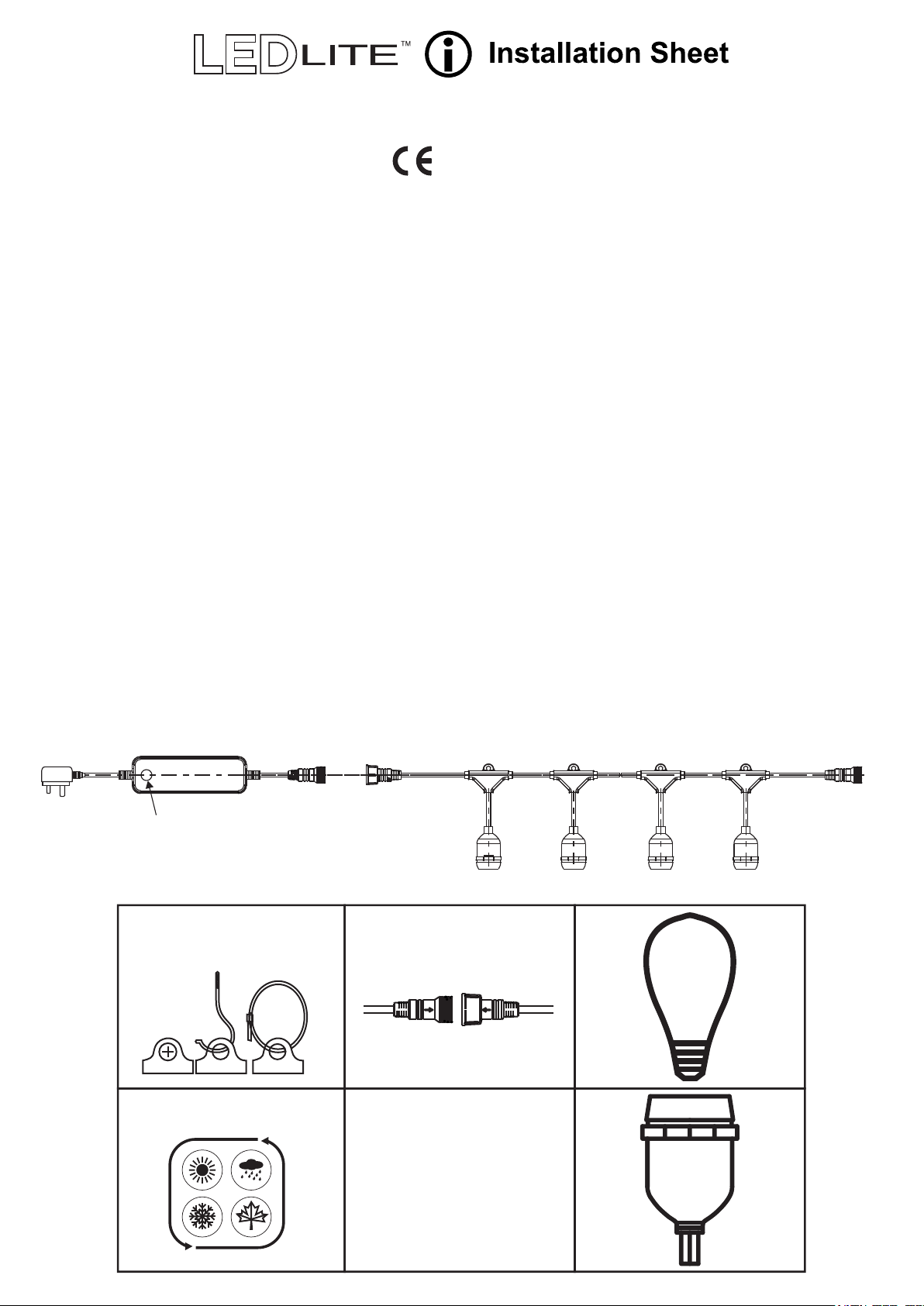
• 20 S14 RGBW Lamps included
• Lamp cap: E27
• Control Mode: Button and Remote Control
• 3 metres lead-in to the first lampholder
• 50 cm spacing between lampholders
• 20 lampholders / 10 metres
• Cable Type: 2 core VW-1 Cable
• Link up to 3 harnesses together
REMOTE CONTROL SPECIFICATIONS:
• Control Distance: up to 8m
• Remote Control Mode: RF
• Remote Control Frequency: 433MHz
• Number of Keys: 24 keys
• Modes: 8 modes adjustable
• Brightness and speed adjustments
• Battery Type: 2xAAA Batteries (not included)
3m 25cm 25cm50cm 50cm
Control Button
FLEXIBLE MOUNTING OPTIONS
Mount on a flat surface or hang from
above. Mounting hardware not included.
CONNECT MULTIPLE STRINGS
Link up to 3 harnesses together.
...
20
RGBW
LAMPS
WEATHERPROOF. IP65 RATED
• RGBW Harnesses for outdoor use
• 10m and 20 lamps (included)
• 3m lead-in to the first lampholder
20
LAMP
HOLDERS
• Replace lamps with RGBW lamps only
Page 2
LTCCH10 - RGBW Colour Changing Harness
Installation Instructions:
● Install each lamp into the lamp holders. Make sure the lamp is installed tight into the lamp holder.
● Plug the controller cable to the festoon using the weatherproof connection.
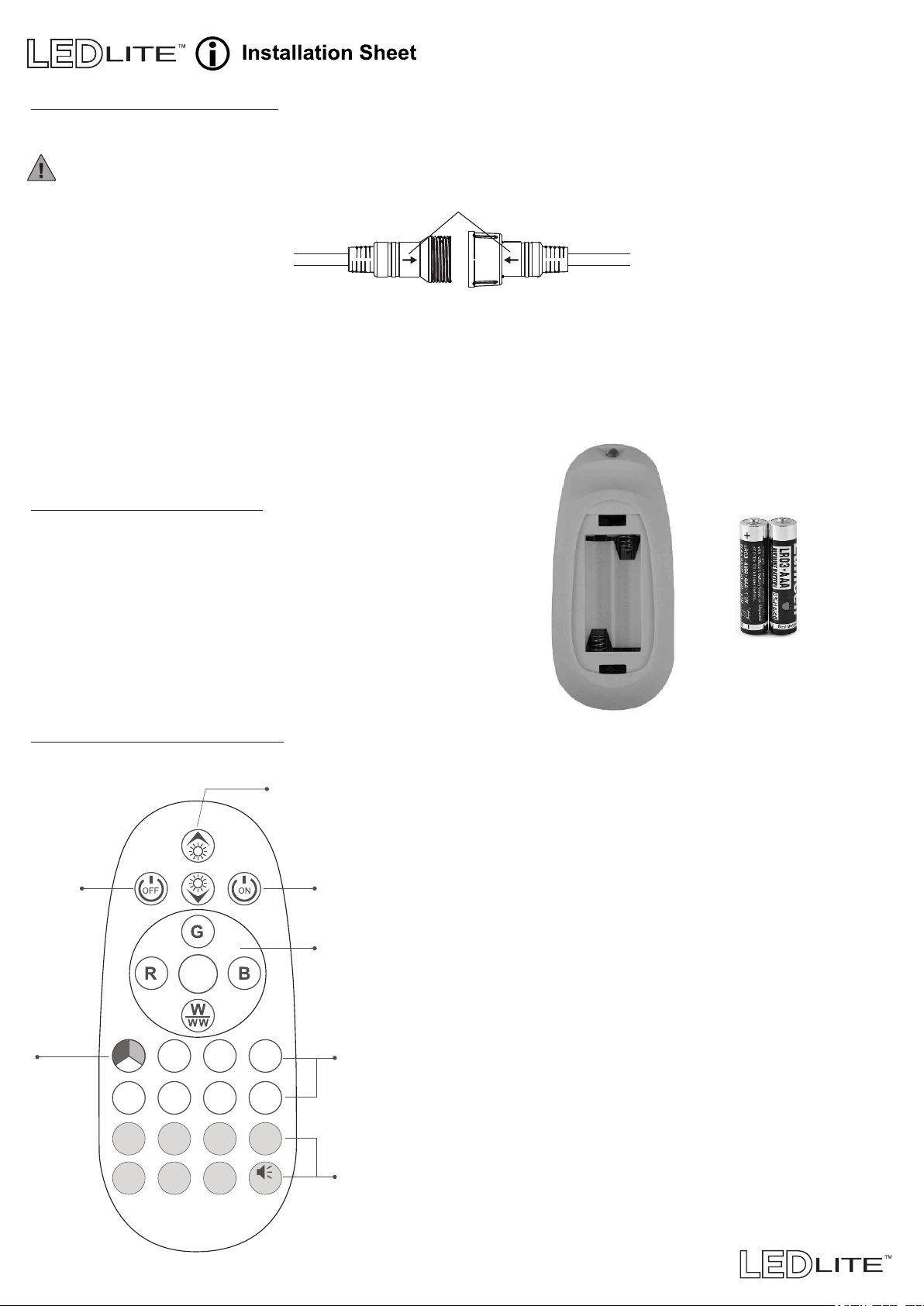
Please note that the arrows on the plug & socket must line up! (Fig. 1)
Fig. 1 Arrows on connector plug & socket
● You can link up to 3 harnesses using the IP65 connectors at each end.
● Plug the harness in to 220-240V socket and turn the light on to test the lights.
● Use the remote control provided to control the light (see below remote control functions).
● Use the controller button to randomly change the colour or modes.
● All buttons on the remote control have a memory function; after setting the harness will remember the
last mode set.
Remote Control Functions
Remote Control Setup:
● Insert 2 x AAA Batteries (not included) into the battery
compartment to activate remote control.
● The harness is controlled by the RF remote control.
Aim the remote at the controller when changing
colours or modes.
● If the remote control becomes insensitive or the
distance is reduced after a period of time replace
the batteries.
AAA Batteries
sold separately
Remote Control Buttons:
OFF button ON button
Static
multicolour
button
Strobe Fade
Chaser
IR Remoter
Dimming/Speed buttons
Twinkle
Breath
Random
RGB
flash
Voice
Static Red, Green
Blue and White
(Cool and Warm)
Static monochrome
buttons
(7 colour choices)
Mode selector
buttons
Toggle ON/OFF
(8 modes)
ON/OFF Buttons - Switch the unit ON or OFF.
Dimming/Speed - When in static monochrome mode
use this button to adjust the brightness of the light,
or change the speed of the colour modes.
Static R, G, B and White - Use the buttons to directly
select the desired colour. Press the White button to
change between Cool White and Warm White.
Static Multicolour - Multiple colour static mode.
Static Monochrome - Use the buttons to directly
select the desired colour (7 choices).
STROBE - Two colours jumping change. Press button
to change the colours.
FADE - Automatic change of colours with blending effect.
TWINKLE - Monochrome twinkle effect. Press button to
change the colour.
BREATH - Automatic change of colour with breathing
effect.
CHASER - Monochrome jumping effect. Press button to
change the colour.
RANDOM - Multicolour automatic jumping change of
colours.
RGB FLASH - Monochrome automatic change of
colours. Press button to change the colour.
VOICE - Multicolour Flash (Voice function not operational).
 Loading...