

Page 1
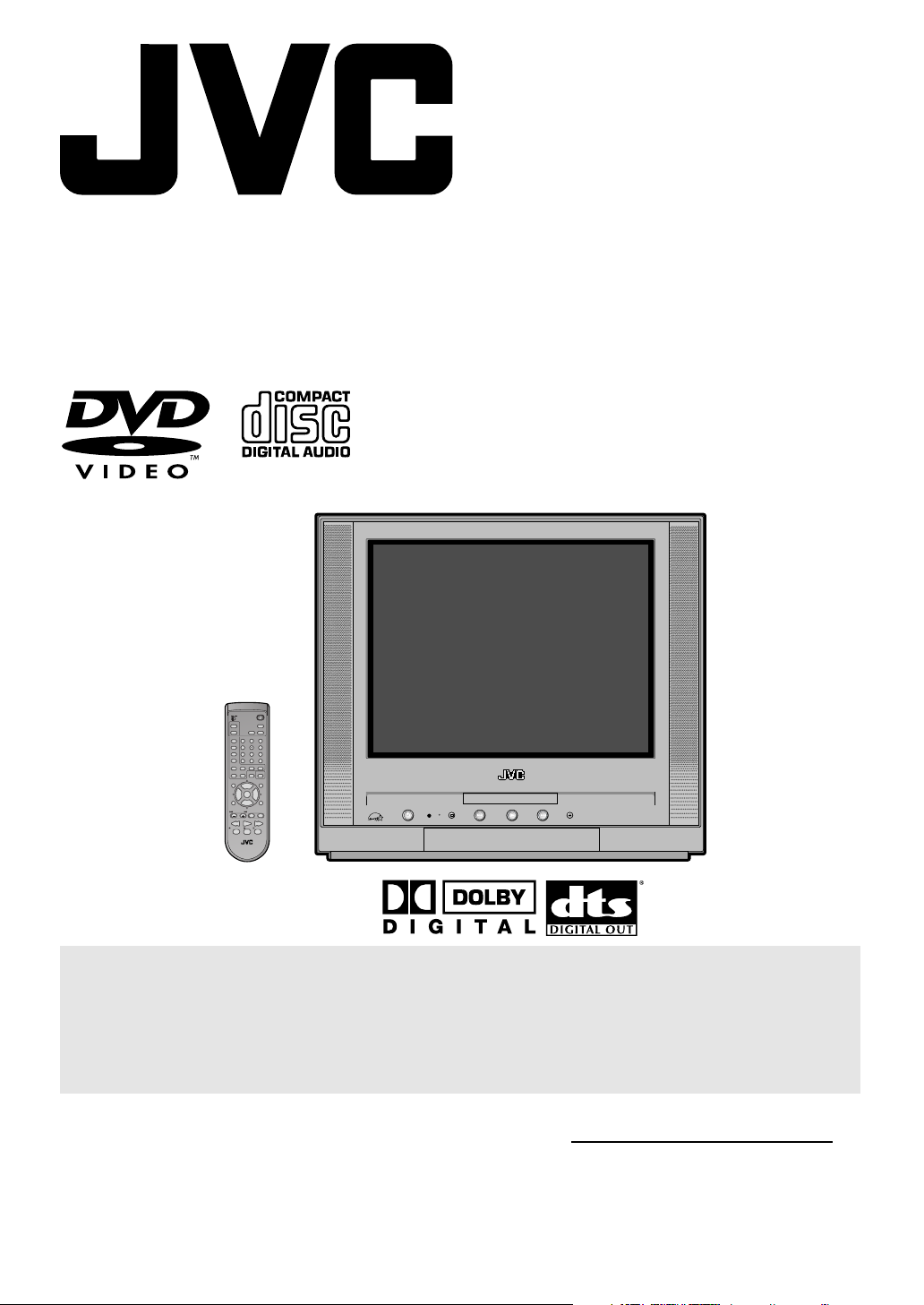
TV/DVD COMBO
USER'S GUIDE
®
For model:
AV-20FD24
POWER
TV CATV
DISPLAY
PLAY MODE
SLEEP
TIMER
AUDIO
AUDIO
TITLE
123
SUBTITLE
456
JUMP
789
C.C.
RETURN
ANGLE
0
REPEATA-BRETURN
MARKER ZOOM
–
SLOW
+
CANCEL
LIGHT
SELECT
MUTING
/ENTER
+
CH
VOL–VOL
INPUT
+
CH
–
DVD SETUP
TV MENU
DVD MENUTV/DVDNEXTPREV
B.SEARCH F.SEARCHPLAY
PAUSE/STILLSTOPOPEN/CLOSE
TV / DVD
IMPORTANT NOTE TO THE CUSTOMER:
In the space below, enter the serial number for your
television (located on the rear of the television cabinet).
Staple your sales receipt or invoice to the inside cover of this guide.
Keep this user's guide in a convenient place for future reference.
Keep the carton and original packaging for future use.
Serial Number
Page 2
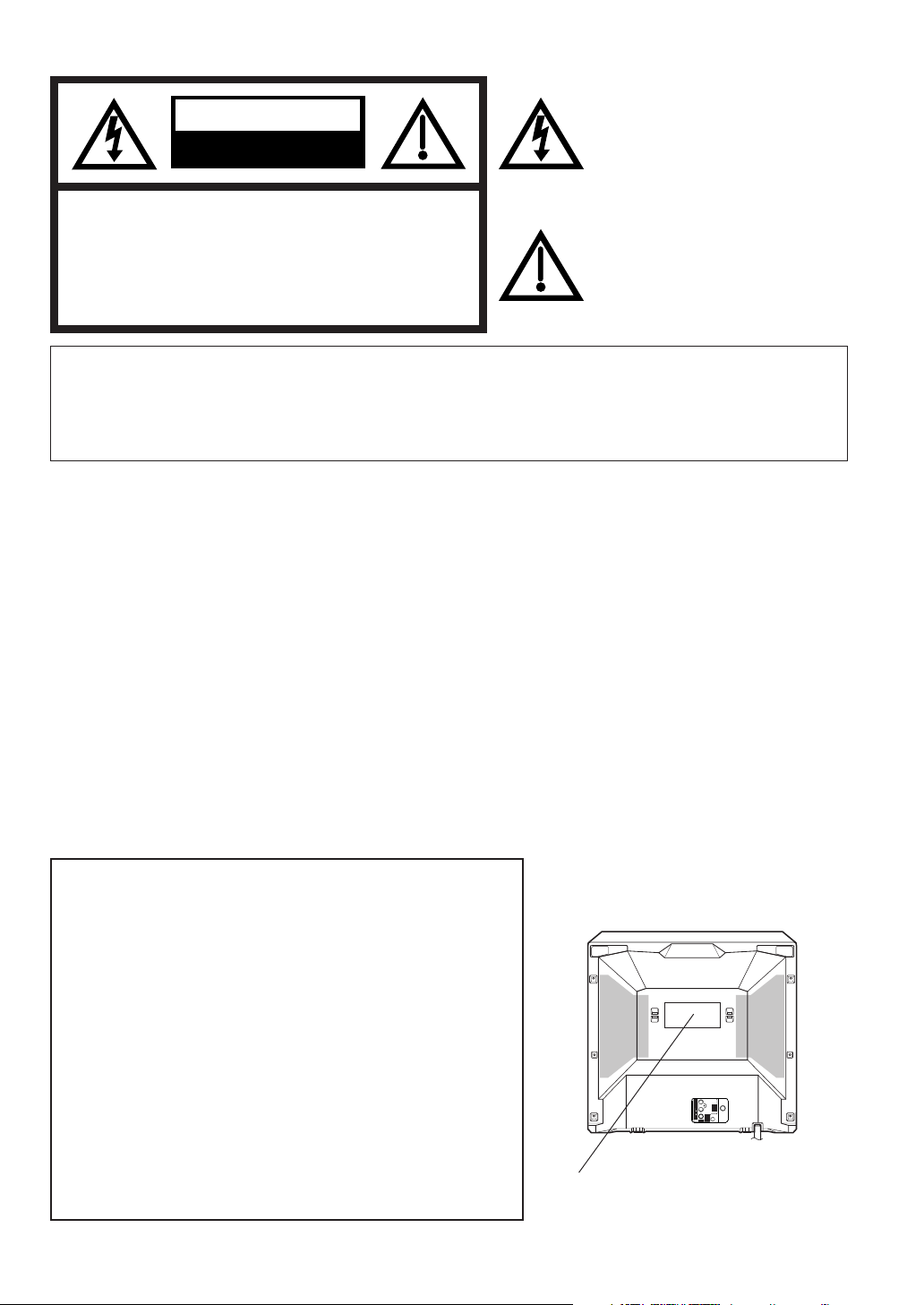
CAUTION
RISK OF ELECTRIC SHOCK
DO NOT OPEN
CAUTION: TO REDUCE THE RISK OF ELECTRIC
SHOCK, DO NOT REMOVE COVER (OR
BACK). NO USER-SERVICEABLE
PARTS INSIDE. REFER SERVICING TO
QUALIFIED SER VICE PERSONNEL.
The lightning flash with arrowhead
symbol, within an equilateral triangle is
intended to alert the user to the
presence of uninsulated dangerous
voltage within the product's
enclosure that may be of sufficient magnitude to constitute a risk of electric shock.
The exclamation point within an
equilateral triangle is intended to alert
the user to the presence of important
operating and maintenance (servicing)
instructions in the literature accompanying the appliance.
WARNING: TO PREVENT FIRE OR SHOCK HAZARD, DO NOT EXPOSE THIS APPLIANCE TO RAIN OR
MOISTURE.
CAUTION: TO PREVENT ELECTRIC SHOCK DO NOT USE THIS POLARIZED PLUG WITH AN
EXTENSION CORD, RECEPTACLE OR OTHER OUTLET UNLESS THE BLADES CAN
BE FULLY INSERTED TO PREVENT BLADE EXPOSURE.
WARNING: This equipment has been tested and found to comply with the limits for a Class B digital device,
pursuant to Part 15 of the FCC Rules. These limits are designed to provide reasonable protection
against harmful interference in a residential installation. This equipment generates, uses and can
radiate radio frequency energy and, if not installed and used in accordance with the instructions,
may cause harmful interference to radio communications.
However, there is no guarantee that interference will not occur in a particular installation. If this
equipment does cause harmful interference to radio or television reception, which can be
determined by turning the equipment off and on, the user is encouraged to try to correct the
interference by one or more of the following measures:
- Reorient or relocate the receiving antenna.
- Increase the separation between the equipment and receiver.
- Connect the equipment into an outlet on a circuit different from that to which the receiver is
connected.
- Consult the dealer or an experienced radio/TV technician for help.
CAUTION: Changes or modifications not expressly approved by the partly responsible for compliance with
the FCC Rules could void the user's authority to operate this equipment.
CAUTION:
THIS DIGITAL VIDEO PLAYER EMPLOYS A LASER SYSTEM.
Location of the required Marking
The rating sheet and the safety caution
are on the rear of the unit.
TO ENSURE PROPER USE OF THIS PRODUCT, PLEASE
READ THIS USER'S GUIDE CAREFULLY AND RETAIN FOR
FUTURE REFERENCE. SHOULD THE UNIT REQUIRE MAINTENANCE, CONT ACT A JVC A UTHORIZED SER VICE CENTER.
USE OF CONTROLS, ADJUSTMENTS OR THE PERFORMANCE OF PROCEDURES OTHER THAN THOSE SPECIFIED
HEREIN MAY RESULT IN HAZARDOUS RADIATION EXPOSURE.
TO PREVENT DIRECT EXPOSURE TO LASER BEAM, DO NO T
TRY TO OPEN THE ENCLOSURE. VISIBLE LASER RADIATION MA Y BE PRESENT WHEN THE ENCLOSURE IS OPENED .
DO NOT STARE INTO BEAM.
2
VIDEO
(MONO)
UHF/
VHF
AUDIO
DIGITAL
R
AUDIO OUT
COAXIAL
LINE IN 1
CERTIFICATION: COMPLIES WITH
FDA RADIATION PERFORMANCE
STANDARDS, 21 CFR SUBCHAPTER J.
Page 3

IMPORTANT SAFEGUARDS
1. READ INSTRUCTIONS
All the safety and operating instructions should be read before the unit is operated.
2. RETAIN INSTRUCTIONS
The safety and operating instructions should be retained for future reference.
3. HEED WARNINGS
All warnings on the unit and in the operating instructions should be adhered to.
4. FOLLOW INSTRUCTIONS
All operating and use instructions should be followed.
5. CLEANING
Unplug this unit from the wall outlet before cleaning. Do not use liquid cleaners or aerosol cleaners.
Use a damp cloth for cleaning the exterior cabinet only.
6. ATTACHMENTS
The manufacturer of this unit does not make any recommendations for attachments, as they may cause
hazards.
7. WATER AND MOISTURE
Do not use this unit near water. For example, near a bathtub, washbowl, kitchen sink, laundry tub, in a wet
basement, or near a swimming pool.
8. ACCESSORIES
Do not place this unit on an unstable cart, stand, tripod, bracket, or table.
The unit may fall, causing serious injury, and serious damage to the unit.
8A. An appliance and cart combination should be moved with care. Quick stops,
excessive force, and uneven surfaces may cause the appliance and cart
combination to overturn.
9. VENTILATION
Slots and openings in the cabinet back or bottom are provided for ventilation,
and to ensure reliable operation of the unit, and to protect it from overheating.
These openings must not be blocked or covered. The openings should never be blocked by placing the unit
on a bed, sofa, rug, or other similar surface. This unit should never be placed near or over a radiator or heat
source. This unit should not be placed in a built-in installations such as a bookcase or rack unless proper
ventilation is provided or the manufacturer’s instructions have been adhered to.
10. POWER SOURCES
This unit should be operated only from the type of power source indicated on the rating plate. If you are not
sure of the type of power supply to your home, consult your appliance dealer or local power company. For
units intended to operate from battery power, or other sources, refer to the operating instructions.
11. GROUNDING OR POLARIZATION
This unit is equipped with a polarized alternating-current line plug (a plug having one blade wider than the
other). This plug will fit into the power outlet only one way. This is a safety feature. If you are unable to insert
the plug fully into the outlet, try reversing the plug. If the plug should still fail to fit, contact your electrician to
replace your obsolete outlet. Do not defeat the safety purpose of the polarized plug, if your unit is equipped
with a 3-wire grounding-type plug, a plug having a third (grounding) pin. This plug will only fit into a grounding-type power outlet. This too, is a safety feature. If you are unable to insert the plug into the outlet, contact
your electrician to replace your obsolete outlet.
Do not defeat the safety purpose of the grounding-type plug.
PORTABLE CART WARNING
(symbol provided by RETAC)
S3126A
3
Page 4

IMPORTANT SAFEGUARDS (Continued)
12. POWER-CORD PROTECTION
Power-supply cords should be routed so that they are not likely to be walked on or pinched by items placed
upon or against them, paying particular attention to cords at plugs, convenience receptacles, and the point
where they exit from the appliance.
13. LIGHTNING
To protect your unit from a lightning storm, or when it is left unattended and unused for long periods of time,
unplug it from the wall outlet and disconnect the antenna or cable system. This will prevent damage to the
unit due to lightning and power line surges.
14. POWER LINES
An outside antenna system should not be located in the vicinity of overhead power lines or other electric
light or power circuits, or where it can fall into such power lines or circuits. When installing an outside
antenna system, extreme care should be taken to keep from touching such power lines or circuits, as
contact with them might be fatal.
15. OVERLOADING
Do not overload wall outlets and extension cords, as this can result in a risk of fire or electric shock.
16. OBJECT AND LIQUID ENTRY
Do not push objects through any openings in this unit, as they may touch dangerous voltage points or short
out parts that could result in fire or electric shock. Never spill or spray any type of liquid into the unit.
17. OUTDOOR ANTENNA GROUNDING
If an outside antenna or cable system is connected to the unit, be sure the antenna or cable system is
grounded to provide some protection against voltage surges and built-up static charges, Section 810 of the
National Electrical Code, ANSI/NFPA 70, provides information with respect to proper grounding of the mast
and supporting structure, grounding of the lead-in wire to an antenna discharge unit, size of grounding
conductors, location of antenna discharge unit, connection to grounding electrodes, and requirements for
the grounding electrode.
18. SERVICING
Do not attempt to service this unit yourself as opening or removing covers may expose you to dangerous
voltage or other hazards. Refer all servicing to qualified service personnel.
19. DAMAGE REQUIRING SERVICE
Unplug this unit from the wall outlet and refer servicing to qualified service personnel under the following
conditions:
a. When the power-supply cord or plug is damaged.
b. If liquid has been spilled, or objects have fallen into the unit.
c. If the unit has been exposed to rain or water.
d. If the unit does not operate normally by following the operating instructions. Adjust only those
controls that are covered by the operating instructions, as an improper adjustment of other controls
may result in damage and will often require extensive work by a qualified technician to restore the
unit to its normal operation.
e. If the unit has been dropped or the cabinet has been damaged.
f
. When the unit exhibits a distinct change in performance, this indicates a need for service.
20. REPLACEMENT PARTS
When replacement parts are required, be sure the service technician uses replacement parts specified by
the manufacturer or those that have the same characteristics as the original part.
Unauthorized substitutions may result in fire, electric shock or other hazards.
21. SAFETY CHECK
Upon completion of any service or repairs to this unit, ask the service technician to perform safety checks to
determine that the unit is in proper operating condition.
22. HEAT
The product should be situated away from heat sources such as radiators, heat registers, stoves, or other
products (including amplifiers) that produce heat.
23. DISC TRAY
Keep your fingers well clear of the disc tray as it is closing. It may cause serious personal injury.
24. CONNECTING
When you connect the product to other equipment, turn off the power and unplug all of the equipment from
the wall outlet. Failure to do so may cause an electric shock and serious personal injury. Read the owner's
manual of the other equipment carefully and follow the instructions when making any connections.
25. SOUND VOLUME
Reduce the volume to the minimum level before you turn on the product. Otherwise, sudden high volume
sound may cause hearing or speaker damage.
4
Page 5
26. SOUND DISTORTION
Do not allow the product output distorted sound for a longtime. It may cause speaker overheating and fire.
27. HEADPHONES
When you use the headphones, keep the volume at a moderate level. If you use the headphones continuously with high volume sound, it may cause hearing damage.
28. LASER BEAM
Do not look into the opening of the disc tray or ventilation opening of the product to see the source of the
laser beam. It may cause sight damage.
29. DISC
Do not use a cracked, deformed, or repaired disc. These discs are easily broken and may cause serious
personal injury and product malfunction.
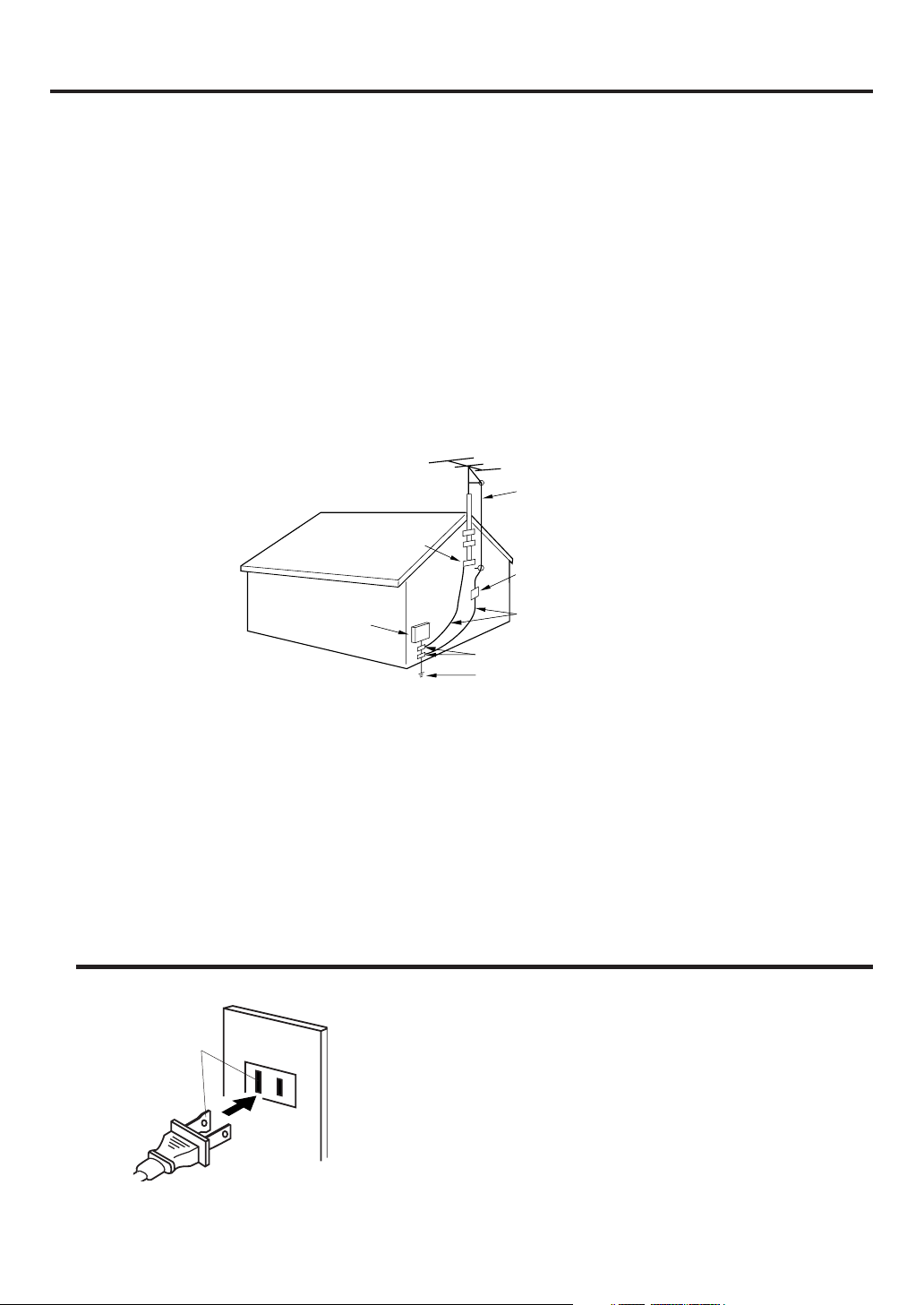
30. NOTE TO CATV SYSTEM INSTALLER
This reminder is provided to call the CATV system installer’s attention to Article 820-40 of the NEC that
provides guidelines for proper grounding and, in particular, specifies that the cable ground shall be connected to the grounding system of the building, as close to the point of cable entry as practical.
EXAMPLE OF ANTENNA GROUNDING AS PER THE
NATIONAL ELECTRICAL CODE
ANTENNA LEAD IN WIRE
GROUND CLAMP
ELECTRIC SERVICE
EQUIPMENT
NEC-NATIONAL ELECTRICAL CODE
S2898A
ANTENNA
DISCHARGE UNIT
(NEC SECTION 810-20)
GROUNDING CONDUCTORS
(NEC SECTION 810-21)
GROUND CLAMPS
POWER SERVICE GROUNDING
ELECTRODE SYSTEM
(NEC ART 250, PART H)
CONDENSATION
Moisture will form in the operating section of the player if the player is brought from cool surroundings
into a warm room or if the temperature of the room rises suddenly. When this happens, player's
performance will be impaired.
To prevent this, let the player stand in its new surroundings for about an hour before switching it on, or
make sure that the room temperature rises gradually.
Condensation may also form during the summer if the player is exposed to the breeze from an air
conditioner. In such cases, change the location of the player.
Power Source
AC Outlet
Wider Hole
and Blade
Polarized AC Cord Plug
(One blade is wider than the other.)
TO USE AC POWER SOURCE
Use the AC polarized line cord provided for operation on AC. Insert
the AC cord plug into a standard 120V 60Hz polarized AC outlet.
NOTES:
Never connect the AC line cord plug to other than the specified
•
voltage (120V 60Hz). Use the attached power cord only.
If the polarized AC cord does not fit into a non-polarized AC
•
outlet, do not attempt to file or cut the blade. It is the user’s
responsibility to have an electrician replace the obsolete outlet.
If you cause a static discharge when touching the unit and the
•
unit fails to function, simply unplug the unit from the AC outlet
and plug it back in. The unit should return to normal operation.
5
Page 6

Features
Color TV With DVD/CD player
Unique space saving design combines a 20" flat color TV and a DVD/CD player.
The DVD disc has much more capacity, but is the same size as the audio CD disc. Picture/Audio quality of the DVD
exceeds other software. Picture quality is higher than Super VHS. Audio quality is higher than audio CD. The DVD
also has special options; audio language selection, subtitle language selection or multi-angle, etc.
The DVD PLAYER can play back audio CDs.
High Quality Picture
Horizontal Resolution
More than 500 lines. It exceeds Super VHS (400 lines) or Laser Disc (430 lines) in resolution.
Compatible with a wide range of DVD audio outputs
Digital Audio Jack (Coaxial)
• When a component with a built-in Dolby Digital decoder is connected, Dolby Digital sound can produce the effect
of being in a movie theater or a concert hall.
• Surround standard different from Dolby Digital. This format is already in use in many theaters. By connecting this
unit to a DTS decoder or an AV amplifier with a built-in DTS decoder, the DTS audio of DVD discs recorded in this
format can be enjoyed. However, audio will not be output from the analog audio output jacks.
• By connecting this unit to an AV amplifier with a built-in MPEG decoder, the MPEG audio of DVD discs recorded
in this format can be enjoyed.
• The Linear PCM sound of a 48 kHz/16 bit through 96 kHz/20 bit exceeds audio CD sound.
Convenience Features
Frame Advance - The PAUSE/STILL moves one frame at a time.
Slow Motion - The SLOW moves you back and forth through the program by 4 steps of 1/8-1/2 times.
Repeat Playback - You can repeat chapter track or title between two selected points.
Program Playback - You can play back tracks in programmed sequences.
Zoom (DVD only) - You can zoom in the selected subject on the screen during playback.
Note: Make sure that discs are suitable for the following functions.
Multi-Language - Maximum 32 language subtitles and maximum 8 language soundtracks can be played back for
movies or programes.
Multi-Angle - Pictures of Sports or a Live Concert are recorded with many cameras. When you play such a disc,
you can change the angles during playback.
Parental Control - You can limit the play back of scenes or sounds of adult DVD discs which have parental level.
Video Aspect Ratio - You can change the aspect ratio of the screen for your monitor.
TV Features
Flat Picture Tube - It reduces the influence of surrounding light resulting in outstanding image detail and clarity.
181 Channel Tuner - Receives standard VHF and UHF broadcast channels and up to 113 cable channels. The
actual number of channels received depends upon channel reception in your area or your cable system.
Closed Caption Decoder With Full Text Mode - Displays text captions or full screen text on the screen for
hearing impaired viewers.
Picture Adjustments Using The Remote Control - The On-Screen display allows precise remote control adjustment of BRIGHTNESS, CONTRAST, COLOR, TINT and SHARPNESS.
Programmable TV Sleep Timer - Operable from the remote control, the TV can be programmed up to 120
minutes to turn off automatically.
On-Screen 3 Language Display - You can select one of 3 languages, English, Spanish or French for on-screen
programming.
V-Chip - The V-Chip function can read the rating of a TV program or movie content if the program is encoded
with this information. V-chip will allow you to set a restriction level.
This product incorporates copyright protection technology that is protected by method claims of certain U.S.
patents and other intellectual property rights owned by Macrovision Corporation and other rights owners. Use
of this copyright protection technology must be authorized by Macrovision Corporation, and is intended for
home and other limited viewing uses only unless otherwise authorized by Macrovision Corporation. Reverse
engineering or disassembly is prohibited.
6
Page 7
• As an “ENERGY STAR®” partner, JVC has determined that this product or product
model meets the “ENERGY STAR®” guidelines for energy efficiency.
ENER Y STAR
IMPORTANT RECYCLING INFORMATION
This product utilizes both a Cathode Ray Tube (CRT) and other components
that contain lead. Disposal of these materials may be regulated in your
community due to environmental considerations. For disposal or recycling
information, please contact your local authorities, or the Electronic Industries
Alliance: http://www.eiae.org
Contents
Before using your unit
IMPORTANT SAFEGUARDS ........................3
Power source .................................................5
Features .........................................................6
Contents ......................................................... 7
Parts and functions ........................................ 8
Remote control ............................................... 9
Antenna connections....................................11
Cable TV connections ..................................12
TV operation
Setting the language ....................................13
TV operation.................................................14
Closed captions............................................16
To memorize channels ................................. 17
Setting the V-Chip ........................................19
Picture control adjustment............................22
Stereo and separate audio program (SAP) .. 23
Sound control adjustment ............................ 24
Playback operation
Disc ..............................................................25
Preparation/Status display of disc ................ 26
Playback procedure ..................................... 27
Special playback ..........................................28
MP3 playback...............................................29
Advanced Function
Zooming/Locating desired scene .................30
Repeat, Random and Program playback/
Repeat A-B ................................................... 31
Marking desired scenes ...............................32
Changing soundtrack language/Subtitles.....33
Changing angles/Title selection/DVD menu
...34
Additional Information
Setting language ..........................................35
Setting the aspect ratio of TV screen/
Setting on screen display .............................36
Dynamic Range Control ...............................37
Parental control setting ................................ 38
To change the parental level ........................ 39
Temporary disabling of rating level by
DVD disc ......................................................40
Language code list .......................................41
Connections to other equipments ................ 42
Problems and troubleshooting ......................
Reception disturbances................................46
Specifications ...............................................47
Appendix (Remote programming) ................48
44
7
Page 8
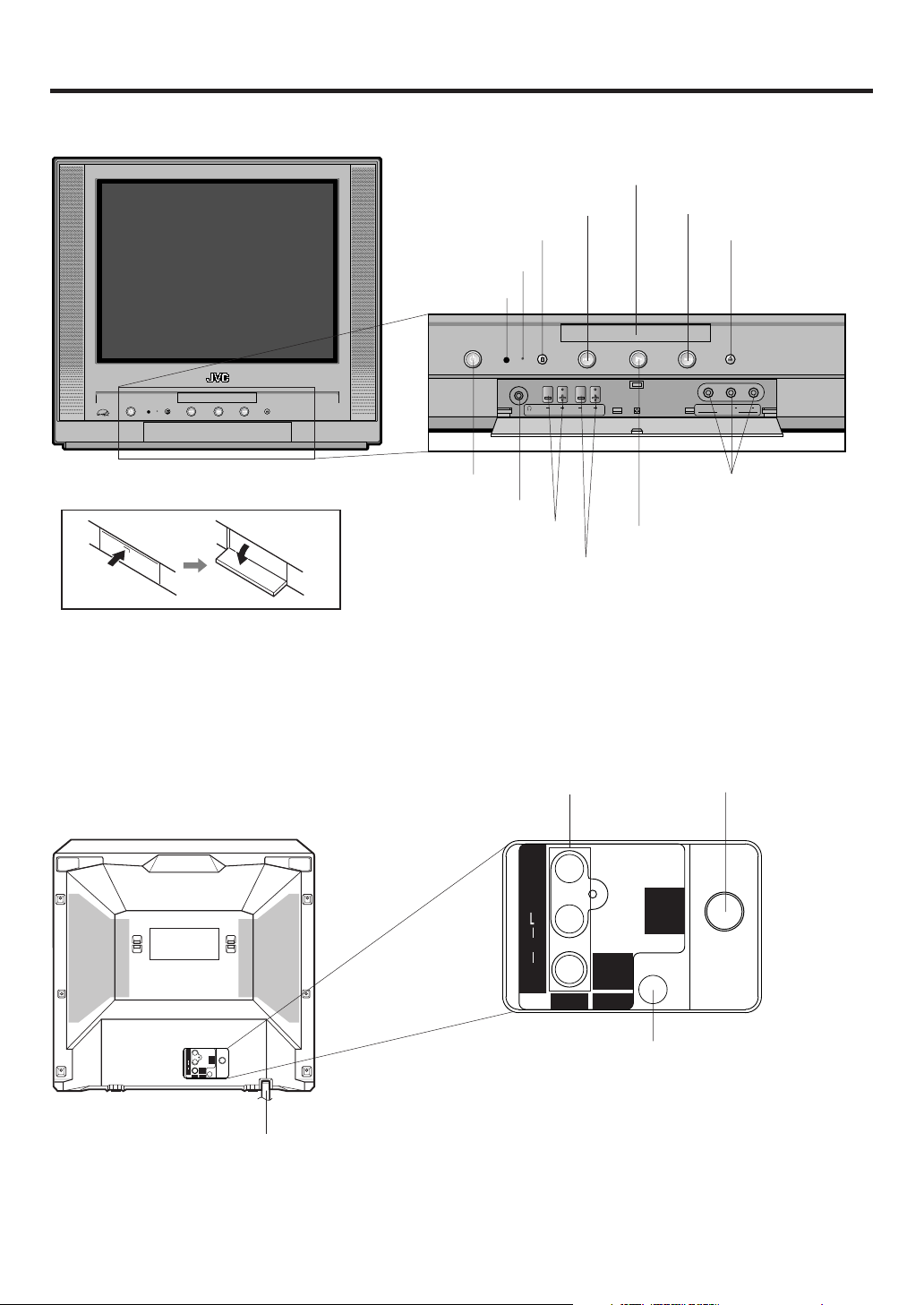
VOLUME
POWER STOP
POWER
PREVIOUS PLAY NEXT OPEN/CLOSE
CHANNEL
VIDEO
LINE 2 IN
L/MONO AUDIO R
Parts and functions
Front
PREVIOUS button NEXT button
STOP button
Power indicator
Remote sensor
Disc tray
OPEN/CLOSE button
HOW TO OPEN THE FRONT DOOR
Rear
POWER button
Headphone Jack
VOLUME +/– buttons
CHANNEL +/– buttons
AUDIO (L/R)/VIDEO IN jacks (LINE 1)
VIDEO
(MONO)
AUDIO
R
DIGITAL
AUDIO OUT
COAXIAL
LINE IN 1
AUDIO (L/R)/VIDEO IN jacks
(LINE 2)
PLAY button
RF IN jack
UHF/
VHF
8
VIDEO
(MONO)
UHF/
VHF
AUDIO
DIGITAL
R
AUDIO OUT
COAXIAL
LINE IN 1
AC power cord
COAXIAL DIGITAL AUDIO OUT jack
Page 9
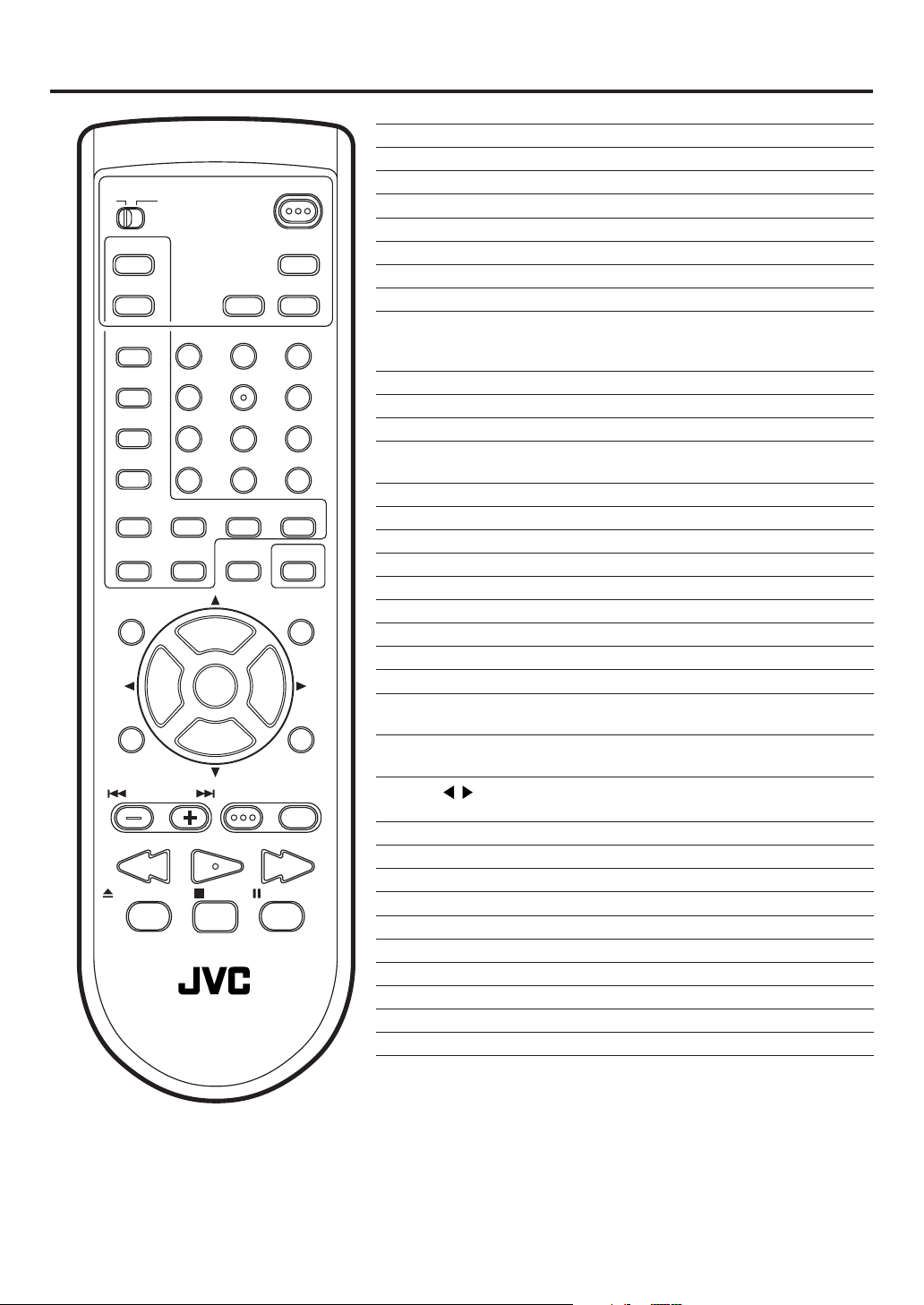
Remote control
SLEEP
TIMER
0
CANCEL
VOL
POWER
DISPLAY
AUDIO
RETURN
LIGHT
SELECT
/ENTER
+
DVD SETUP
DVD MENUTV/DVDNEXTPREV
PAUSE/STILLSTOPOPEN/CLOSE
TV CATV
PLAY MODE
AUDIO
TITLE
SUBTITLE
JUMP
ANGLE
MARKER ZOOM
C.C.
– SLOW +
MUTING
VOL
–
TV MENU
B.SEARCH F.SEARCHPLAY
TV / DVD
123
456
789
REPEATA-B RETURN
+
CH
INPUT
CH
–
Page
TV/CATV switch Switch to operate TV or CATV 10,48
POWER Power on/off 10,13,14,26
PLAY MODE Select playback mode 31
DISPLAY Call information 15,26
AUDIO (for DVD) Change sound track language of DVD 33
SLEEP TIMER Set sleep timer 15
AUDIO (for TV) Switch the sound of TV 23
TITLE Select title 34
0-9 Direct channel selection of TV 14,18
Input setting 29~31
Enter a password 19,21,38~40
SUBTITLE Set Subtitle 33
JUMP Locating desired scene 30
ANGLE Change playback angle 34
C.C. Switch between TV/Caption/Text in
Closed Caption mode 16
RETURN (for TV) Switch between present/last channels 15
MARKER Index 32
ZOOM Zoom 30
REPEAT A-B Repeat playback between A and B 31
RETURN (for DVD) Remove DVD set up menu 35~40
SLOW +/– Forward/Reverse-slow motion 28
CANCEL Reset information in the menu
LIGHT Turn the illumination on for CH and VOL 10
MUTING Turn the sound on and off 14
SELECT/ENTER Enter information in the menu 13,19,21,
Select option in the menu 27,29~32,34~40
CH +/– (▲▼) Select channel of TV 10,15
Cursor buttons 13,17~22,24,27,29,30,32,34~39
VOL +/– (
INPUT Switch between TV channel/LINE 43
TV MENU Display menu of TV setup 13,17~22,24
DVD SETUP Display menu of DVD setup 35~39
PREV/NEXT Skip chapter to forward or reverse direction 28
TV/DVD Switch between the TV mode/DVD mode 10,26
DVD MENU Display menu of DVD software 34
B.SEARCH/F.SEARCH Fast Forward/Review playback 28
PLAY Playback 27~29,31,34,40
OPEN/CLOSE Open the tray/ Close the tray 27,29,40
STOP Stop 27,29,31
PAUSE/STILL Pause CD sound/Still picture of DVD 28
) Adjust volume 10,14
Cursor buttons 13,17~22,24,27,29,30,32,34~39
22,24,30~32,38,39
9
Page 10
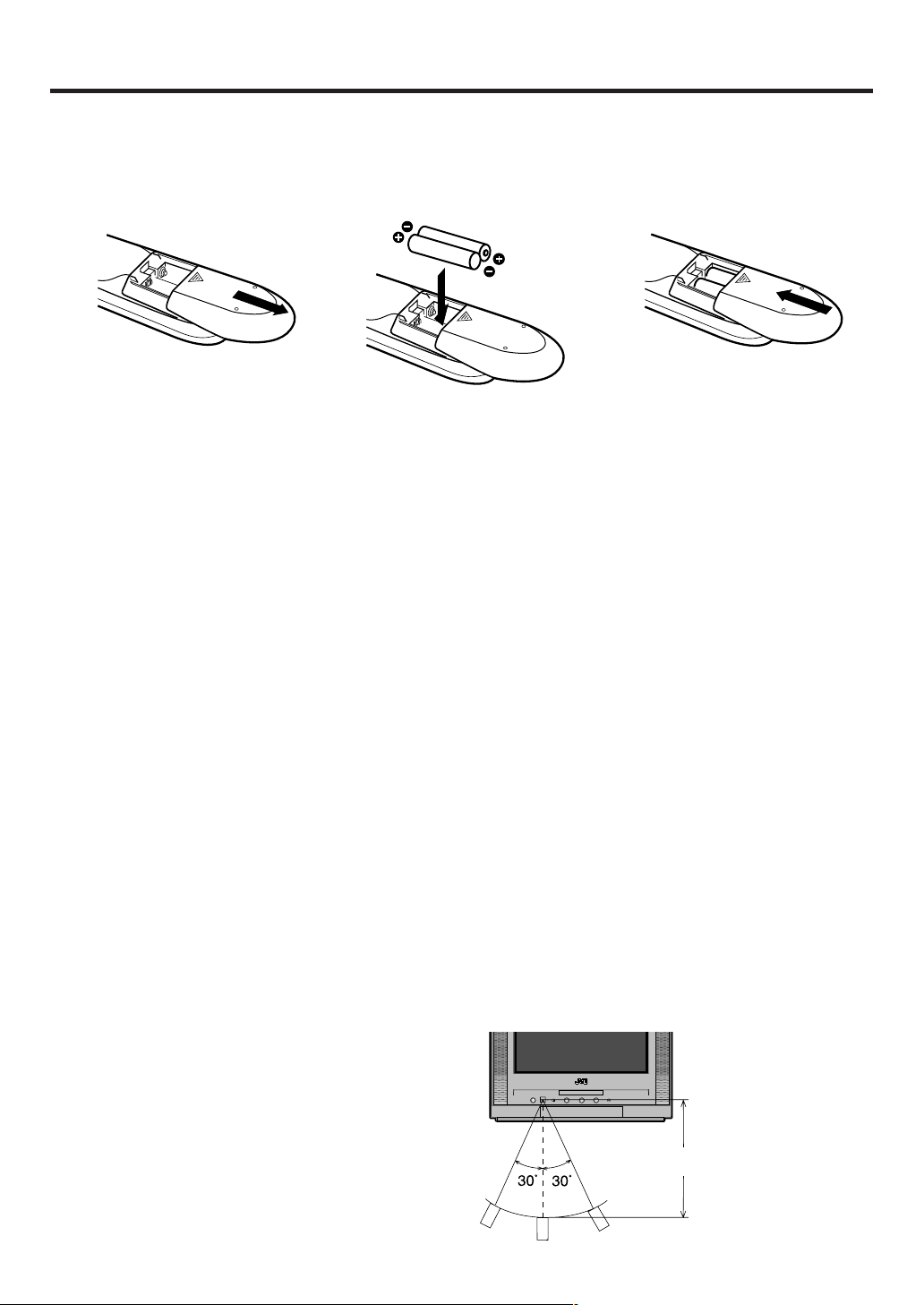
Remote control
Inserting Batteries
Slide the battery compartment
1
cover in the direction of the
arrow.
Install two “AA” batteries
23
(supplied), paying attention to
the polarity diagram in the
battery compartment.
Replace the compartment
cover.
BATTERY PRECAUTIONS
The precautions below should be followed when using batteries in this device:
1.Use only the size and type of batteries specified.
2.Be sure to follow the correct polarity when installing the batteries as indicated in the battery compartment.
Reversed batteries may cause damage to the device. To avoid a potential short circuit, insert the “–” end first.
3.
Do not mix different types of batteries together (e.g. Alkaline and Carbon-zinc) or old batteries with fresh ones.
4.If the device is not to be used for a long period of time, remove the batteries to prevent damage or injury from
possible battery leakage.
5.Do not try to recharge batteries not intended to be recharged; they can overheat and rupture. (Follow battery
manufacturer’s directions.)
6.When you change the batteries, try to complete the task within three minutes. If you take longer than three
minutes, the remote control codes for your Cable Box may have to be reset (see page 48).
REMOTE CONTROL BASICS
• Before you can operate the remote control, you must first install the batteries (included). See
“Inserting Batteries” on this page above for instructions.
• Press the POWER button to turn the television on or off.
• Make sure the TV/CATV switch is set to TV. Move the switch to CATV only if you need to operate a cable box.
(You must set the remote control to operate a cable box. Please see page 48 for instructions.)
• Press the CH + and CH – buttons to scan through the channels. Tap the CH + or CH – button to move through
the channels one channel at a time.
• Press VOL + or VOL – to raise or lower the volume. An indicator bar will appear on screen to show you the
television volume level.
• The CH +/– and VOL +/– buttons are also used to navigate JVC’s on screen menu system.
• You can directly access specific channels using the 10-key pad.
• This remote includes illuminated buttons for key features like CH +/–
LIGHT button to turn the
• Each press of TV/DVD on the remote control, switches the screen between the TV screen (TV mode) and the
DVD screen (DVD mode). You can operate a TV and TV menu in the TV mode, and a DVD and DVD SETUP
menu in the DVD mode.
Operation
• Aim the remote control at the remote sensor and
press control buttons to operate.
• Operate the remote control within 30° angle on
either side of the remote sensor, up to a distance of Approx. 5 meters.
illumination on.
buttons, and VOL +/– buttons. Press the
Approx. 5 meters
10
Page 11
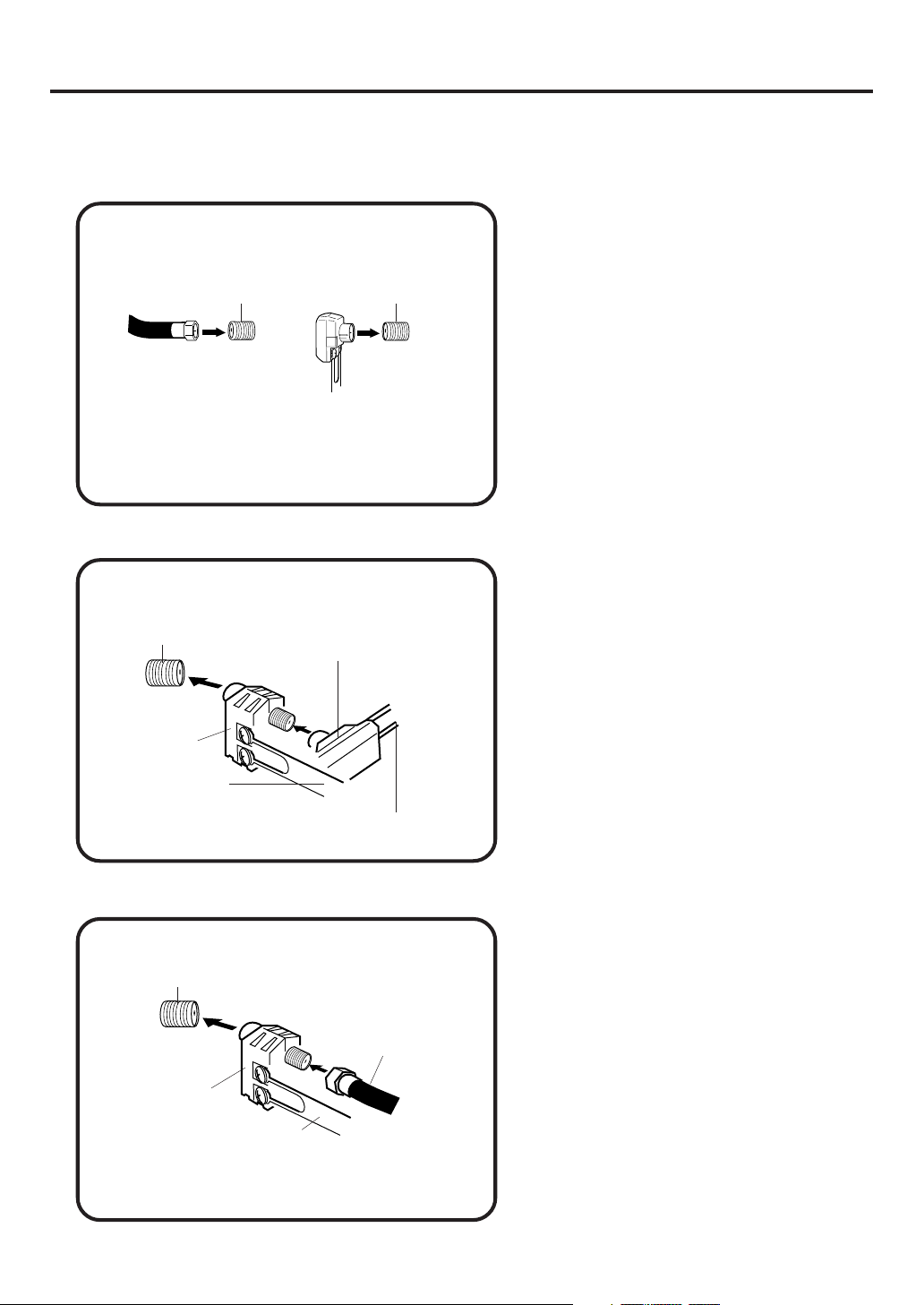
Antenna connections
If you are using an indoor or outdoor antenna, follow the instructions below that correspond to your antenna
system. If you are using a cable TV service (CATV), see page 12 for Cable TV connections.
Combination VHF/UHF Antenna (Single 75 ohm Cable or 300 ohm Twin-lead Wire)
Connect the 75 ohm Cable from the Combination
VHF/UHF Antenna to the Antenna Jack.
75 ohm
Coaxial
Cable
Antenna
Jack
UHF/
VHF
300-75 ohm Matching
Transformer (not supplied)
Antenna
Jack
UHF/
VHF
If your Combination VHF/UHF Antenna has a 300
ohm Twin-lead Wire, the use of the 300-75 ohm
Matching Transformer may be necessary.
Combination VHF/UHF Antenna (Separate VHF and UHF 300 ohm Twin-lead Wires)
Connect the UHF 300 ohm Twin-lead Wire to the
Antenna
Jack
UHF/
VHF
Combiner
(not supplied)
UHF 300 ohm
300-75 ohm Matching
Transformer (not supplied)
Combiner (not supplied). Connect the VHF 300
ohm Twin-lead Wire to the 300-75 ohm Matching
Transformer. Attach the Transformer to the Combiner, then attach the Combiner to the Antenna
Jack.
VHF 300 ohm
Separate VHF/UHF Antennas (75 ohm VHF Cable and 300 ohm UHF Twin-lead Wires)
Antenna
Jack
UHF/
VHF
Combiner
VHF 75 ohm
UHF 300 ohm
Connect the VHF 75 ohm cable and UHF 300 ohm
Twin-lead Wire to the Combiner. Attach the Combiner to the Antenna Jack.
11
Page 12
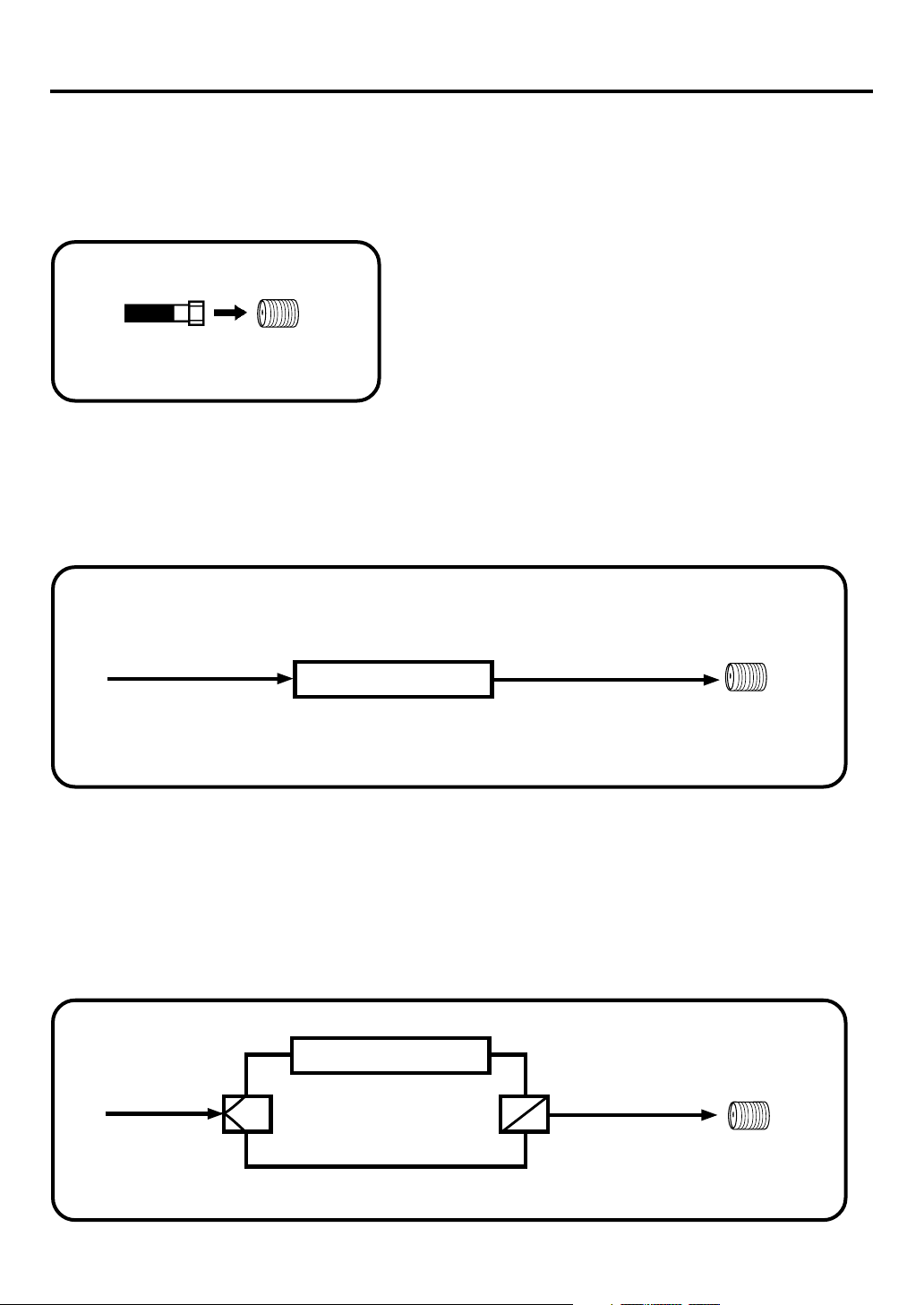
Cable TV connections
This TV/DVD has an extended tuning range and can tune most cable channels without using a Cable
TV Converter box. Some cable companies offer “premium pay channels” in which the signal is
scrambled. Descrambling these signals for normal viewing requires the use of a descrambler device
which is generally provided by the cable company.
FOR SUBSCRIBERS TO BASIC CABLE TV SERVICE
For basic cable service not requiring a Converter/Descrambler
box, connect the CATV 75 ohm Coaxial Cable directly to the
Antenna Jack on the back of the TV/DVD.
75 ohm
Coaxial Cable
Antenna
Jack
UHF/
VHF
FOR SUBSCRIBERS TO SCRAMBLED CABLE TV SERVICE
If you subscribe to a cable TV service which requires the use of a Converter/Descrambler box, connect the
incoming 75 ohm Coaxial Cable to the Converter/Descrambler box. Using another 75 ohm Coaxial Cable,
connect the output jack of the Converter/Descrambler box to the Antenna Jack on the TV/DVD. Follow the
connections shown below. Set the TV/DVD to the output channel of the Converter/Descrambler box (usually
channel 3 or 4) and use the Converter/Descrambler box to select channels.
Incoming
75 ohm
CATV Cable
Converter/
Descrambler
75 ohm Cable to
TV/DVD
Antenna
Jack
UHF/
VHF
FOR SUBSCRIBERS TO UNSCRAMBLED BASIC CABLE TV SERVICE WITH
SCRAMBLED PREMIUM CHANNELS
If you subscribe to a cable TV service in which basic channels are unscrambled and premium channels require the
use of a Converter/Descrambler box, you may wish to use a signal Splitter and an A/B Switch box (available from
the Cable company or an electronics supply store). Follow the connections shown below. With the switch in the “B”
position, you can directly tune any nonscrambled channels on your TV/DVD. With the switch in the “A” position, tune
your TV/DVD to the output of the Converter/Descrambler box (usually channel 3 or 4) and use the Converter/
Descrambler box to tune scrambled channels.
Incoming
75 ohm
CATV Cable
Splitter
Converter/
Descrambler
A/B Switch
75 ohm Cable
A
to TV/DVD
B
Antenna
Jack
UHF/
VHF
12
Page 13
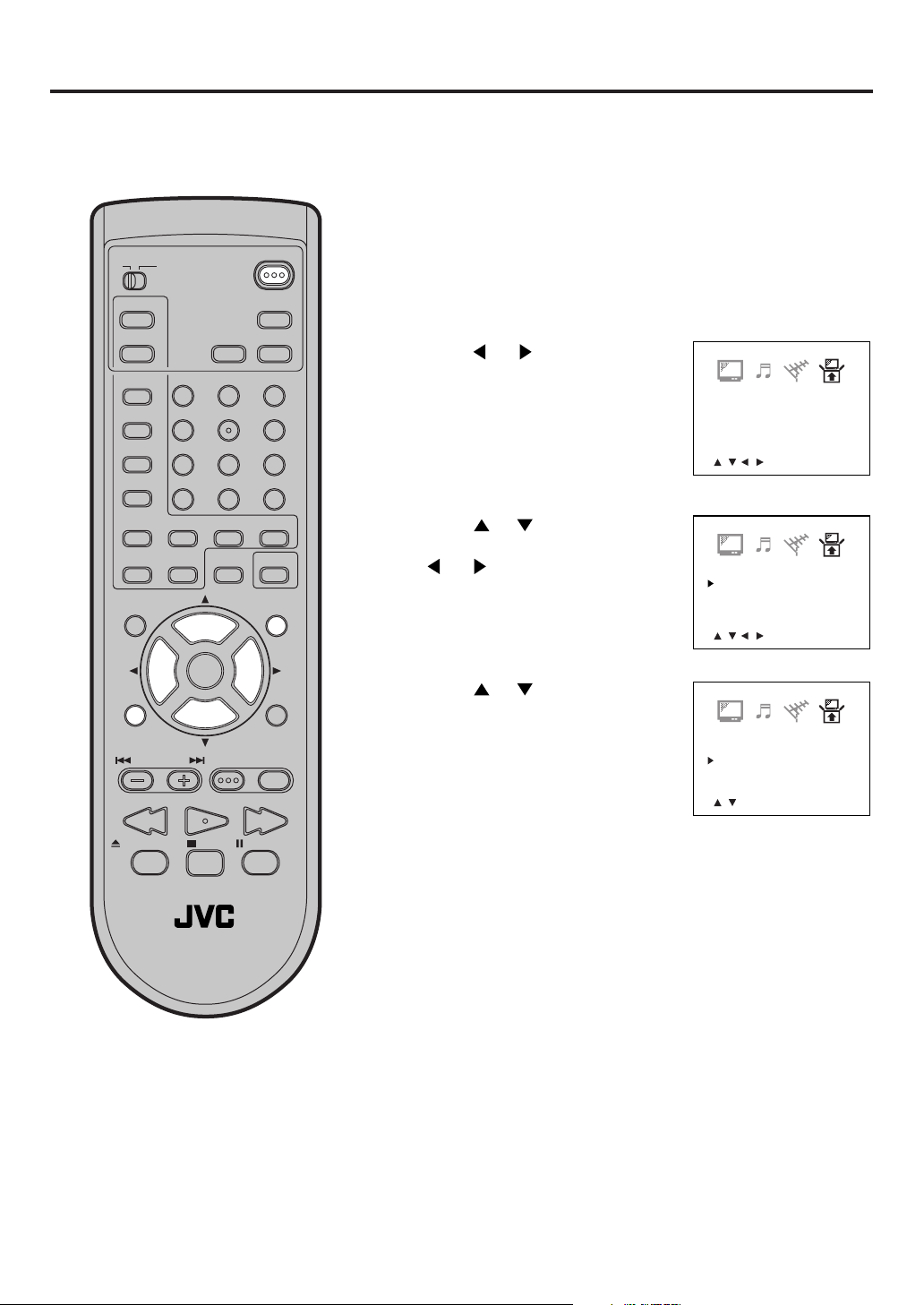
Setting the language
You can choose from three different languages (English, French and Spanish) for the on-screen displays.
Adjustment menus and messages will appear in the language of your choice.
On-screen language selection (step 5) will automatically appear on the screen when you press the MENU
button initially. Select the language you prefer first, then proceed with the other menu options.
To turn on the TV/DVD, press POWER. The Power indicator
1
will light.
TV CATV
PLAY MODE
AUDIO
TITLE
SUBTITLE
JUMP
ANGLE
MARKER ZOOM
MUTING
TV MENU
C.C.
–
SLOW
+
VOL
–
B.SEARCH F.SEARCHPLAY
POWER
DISPLAY
SLEEP
TIMER
AUDIO
123
456
789
RETURN
0
REPEATA-B RETURN
CANCEL
LIGHT
SELECT
/ENTER
+
CH
VOL
INPUT
CH
+
–
DVD SETUP
DVD MENUTV/DVDNEXTPREV
Press TV MENU. The TV menu
2
screen will appear.
Press or until the SET-UP
3
menu appears.
Press
4
“LANGUAGE” option, then press
or to select the
or button.
Press or to select the
5
desired language: English
(ENGLISH), Spanish
(ESPAÑOL) or French
(FRANCAIS), then press
ENTER.
V-CHIP SET
LANGUAGE/IDIOMA/LANGUE
<
/ / / /MENU
V-CHIP SET
LANGUAGE/IDIOMA/LANGUE
<
/ / / /MENU
LANGUAGE/IDIOMA/LANGUE
ENGLISH
ESPAÑOL
FRANCAIS
<
/ /ENTER/MENU
>
>
>
PAUSE/STILLSTOPOPEN/CLOSE
TV / DVD
NOTE:
If the unit does not operate properly,
•
or No key operation (by the unit and/
or the remote control): Static electricity,
etc., may affect the player's operation.
Disconnect the AC power cord once, then
connect it again.
The TV section has its own menu and also
•
DVD section has its own menu (see page
35).
Press TV MENU until the MENU
screen is cleared.
13
Page 14
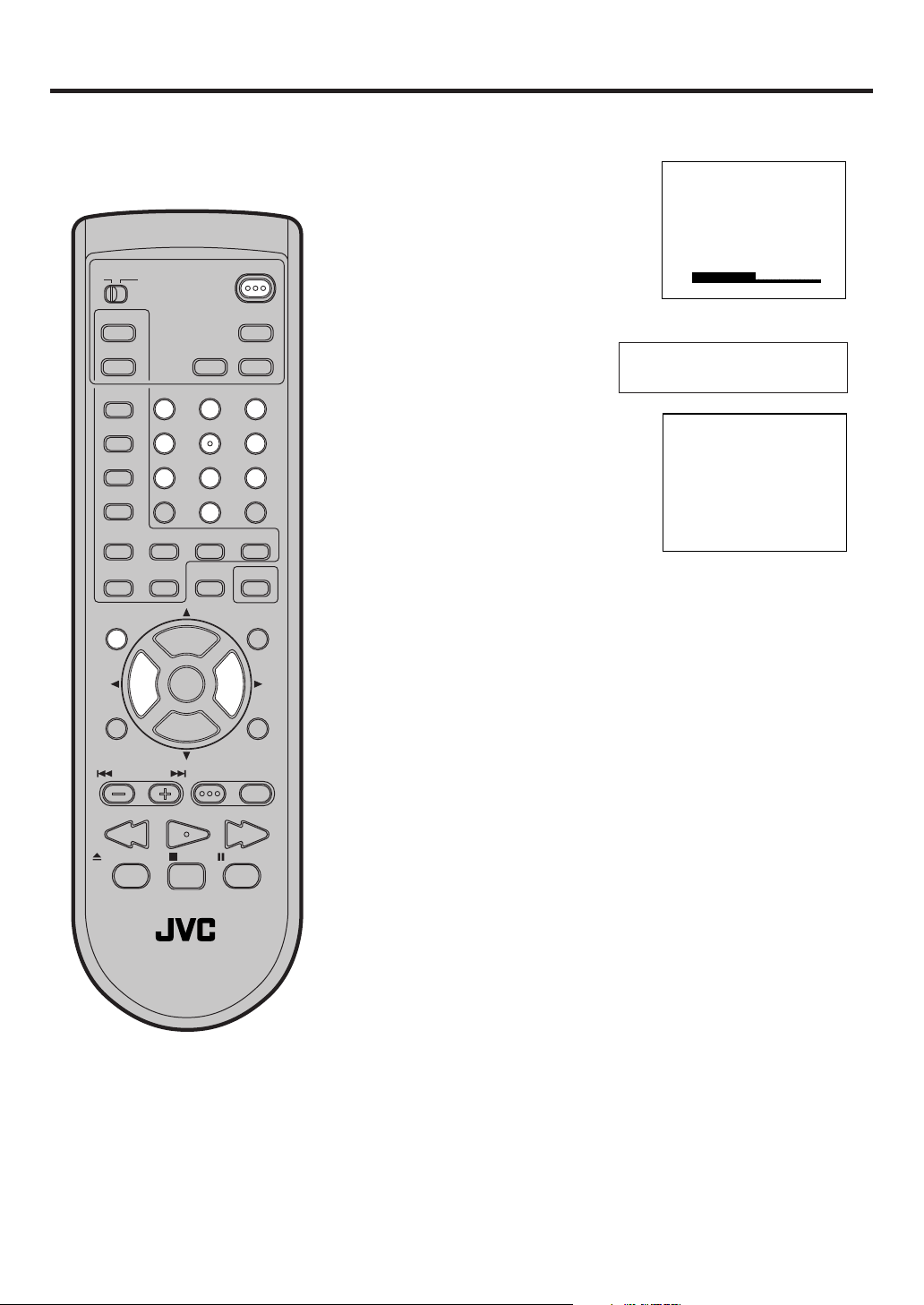
TV operation
VOLUME 32
CH 012
TV CATV
PLAY MODE
SLEEP
AUDIO
TITLE
SUBTITLE
JUMP
ANGLE
MARKER ZOOM
–
SLOW
MUTING
VOL
–
TV MENU
B.SEARCH F.SEARCHPLAY
TIMER
123
456
789
C.C.
+
0
REPEATA-B RETURN
CANCEL
+
CH
VOL
INPUT
+
CH
–
DVD SETUP
PAUSE/STILLSTOPOPEN/CLOSE
POWER
DISPLAY
AUDIO
RETURN
LIGHT
SELECT
/ENTER
DVD MENUTV/DVDNEXTPREV
To turn on the TV/DVD, press
1
POWER.
Adjust the volume level by
2
pressing VOL + or –. The volume
level will be indicated on the
screen by green bars. As the
volume level increases, so do
the number of bars. If the volume
decreases, the number of green
bars also decreases.
Set the TV/CATV menu
3
option to the appropriate
position. (See page 17.)
Press the Direct Channel selection
4
buttons to select the channel.
TV Mode Direct Channel Selection
When the TV/CATV menu option is
in the TV position, all channels can
be instantly selected by using two
buttons. (for example, to select
channel 2, press “0”, then “2”. If
you press only “2”, channel
selection will be delayed for a few
seconds.) For channels 10 and
above, press the 2 digits in order.
CATV Mode Direct Channel Selection
When the TV/CATV menu option is in the CATV position, channels
can be selected as follows:
TO SELECT CATV CHANNELS:
1-9: Press “0” twice, then 1-9 as needed. Example, to select
channel 2, press “002”.
10-12: Press “0”, then the remaining 2 digits. Example, to
select channel 12, press “012”.
13-99: Press the 2 digits in order. Example, to select channel
36, press “36”.
100-125: Press the 3 digits in order. Example, to select channel
120, press “120”.
TV - VHF/UHF channels
CATV - CABLE TV channels
NOTE FOR CHANNELS 1-12:
If only 1 or 2 buttons are pressed, the corresponding channel
will be selected in 2 seconds.
TV / DVD
NOTES:
If a channel with no broadcast is
•
selected, the sound will automatically be muted.
If a station being viewed stops
•
broadcasting, the TV will automatically shut itself off after 15 minutes.
14
MUTING
The MUTING button instantly turns the volume down completely when you press it.
Press MUTING button and the volume level will instantly go to
zero. To restore the volume to its previous level, press MUTING
button again.
Page 15
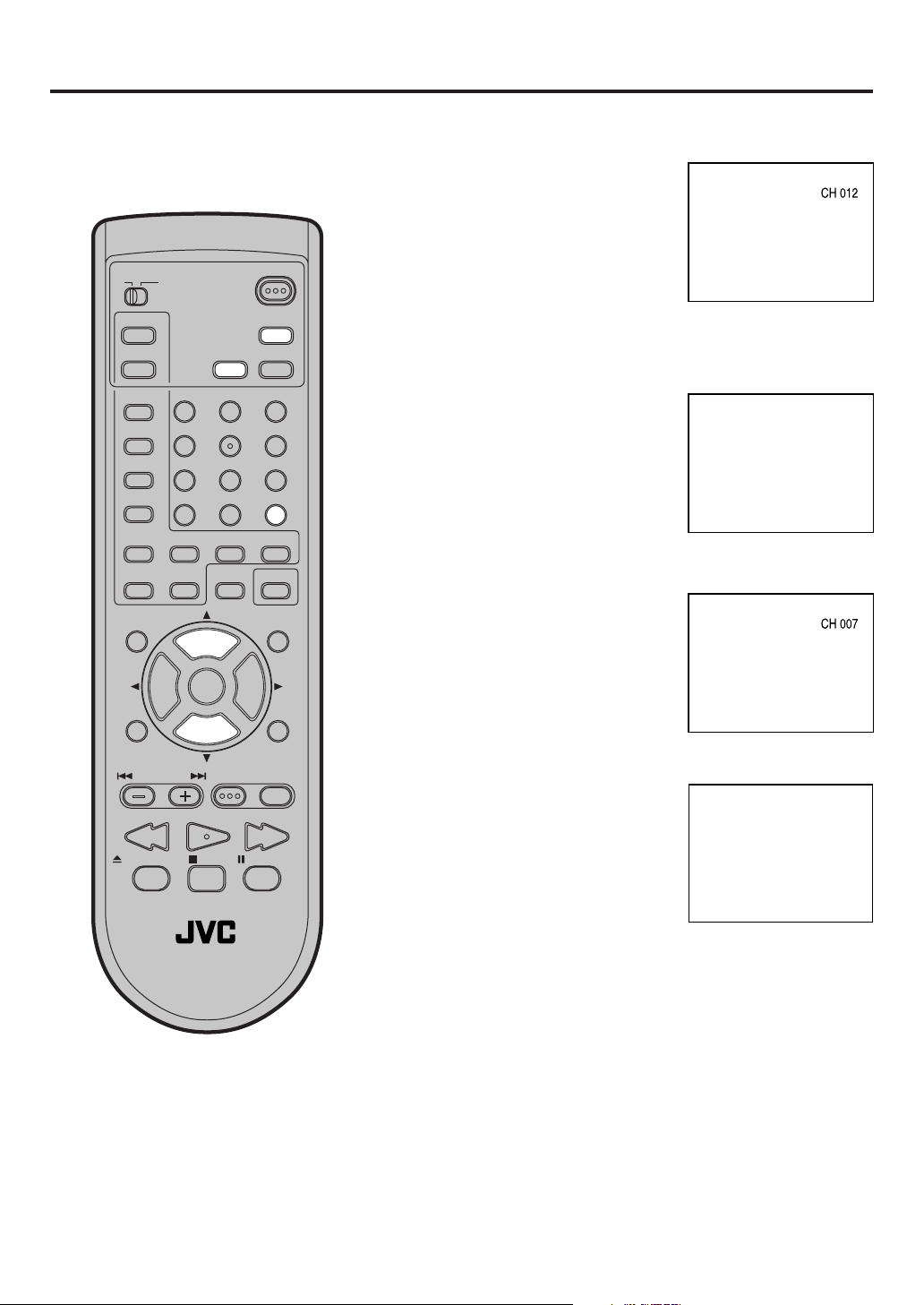
SLEEP
120
TV CATV
POWER
CHANNEL UP/DOWN
Press and release CH + or –. The
channel automatically stops at the
next channel set into memory.
For proper operation, before selecting channels, they should be set into
the memory. See pages 17 and 18
“To memorize channels”
PLAY MODE
AUDIO
TITLE
SUBTITLE
JUMP
ANGLE
MARKER ZOOM
MUTING
TV MENU
C.C.
–
SLOW
+
VOL
–
B.SEARCH F.SEARCHPLAY
TV / DVD
DISPLAY
SLEEP
TIMER
AUDIO
123
456
789
RETURN
0
REPEATA-B RETURN
CANCEL
LIGHT
SELECT
+
CH
INPUT
CH
–
/ENTER
VOL
+
DVD SETUP
DVD MENUTV/DVDNEXTPREV
PAUSE/STILLSTOPOPEN/CLOSE
DISPLAY
Press DISPLAY to display the
current informations on the screen.
Press DISPLAY again to disappear
the call display.
• Channel number or VIDEO mode
• Stereo or SAP (second audio
program) audio status
• Audio output status
RETURN
This button allows you to go back to
the last channel selected by
pressing RETURN. Press RETURN
again to return to the last channel
you were watching.
SLEEP TIMER
To set the TV/DVD to turn off after a
preset amount of time, press SLEEP
TIMER on the remote control. The
clock will count down 10 minutes for
each press of SLEEP TIMER (120,
110, ...10, 0). After the sleep time is
programmed, the display will appear
briefly every ten minutes to remind you
that the sleep timer is operating. To
confirm the sleep timer setting, press
SLEEP TIMER and the remaining time
will be displayed for a few seconds. To
cancel the sleep timer, press SLEEP
TIMER repeatedly until the display
turns to 0.
STEREO SAP CH 012
SEL. MONO+SAP
15
Page 16
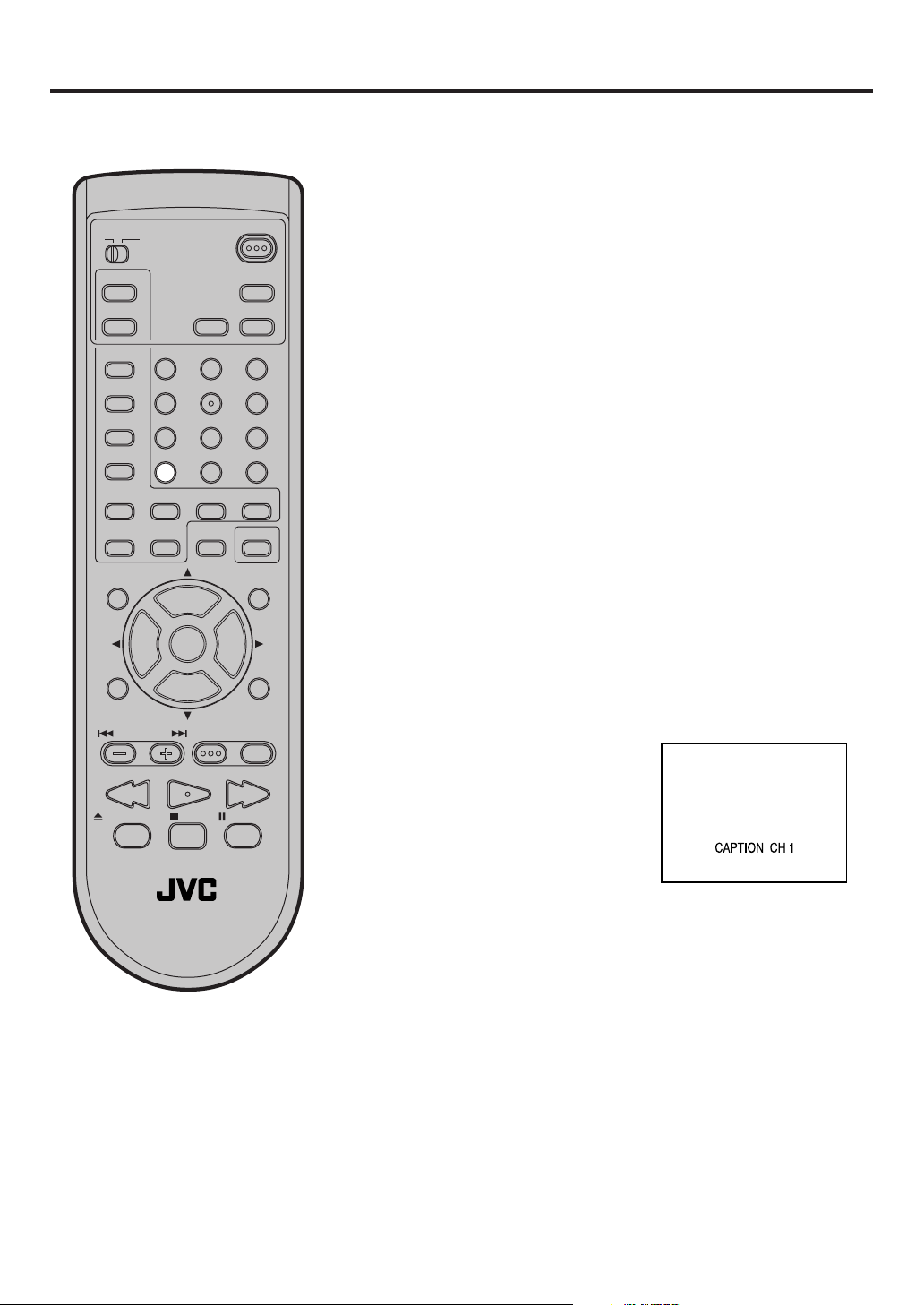
Closed captions
WHAT IS CLOSED CAPTIONING?
This television has the capability to decode and display Closed Captioned television programs. Closed Captioning
will display text on the screen for hearing impaired viewers or it will translate and display text in another language.
Captions: This Closed Caption Mode will display text on the
screen in English or another language (depending on the set-
TV CATV
PLAY MODE
AUDIO
TITLE
SUBTITLE
JUMP
C.C.
ANGLE
MARKER ZOOM
–
SLOW
+
MUTING
VOL
–
POWER
DISPLAY
SLEEP
TIMER
AUDIO
123
456
789
RETURN
0
REPEATA-B RETURN
CANCEL
LIGHT
SELECT
VOL
+
/ENTER
+
CH
INPUT
ting of the Closed Captions CH 1/2).
Generally, Closed Captions in English are transmitted on Captions Channel 1 and Closed Captions in other languages are
transmitted on Captions Channel 2.
Text: The Text Closed Caption Mode will usually fill the screen
with a programming schedule or other information.
After selecting a Closed Caption Mode, it will stay in effect until it
is changed, even if the channel is changed.
If the Captions signal is lost due to a commercial or a break in
the signal, the Captions will reappear when the signal is received
again. If the channels are changed, the Captions will be delayed
approximately 10 seconds. The Captions will appear in places
on the screen where they will least interfere with the picture,
usually on the bottom of the screen. News programs will usually
show three-line Closed Captions which scroll onto the screen.
Most other shows provide two or three lined Captions placed
near the character who is speaking so the viewer can follow the
dialogue. Words in italics or underlined describe titles, words in
foreign languages or words requiring emphasis. Words that are
sung usually appear enclosed by musical notes.
For television programs broadcasting with Closed Captions, look
in your TV guide for the Closed Captions symbol (CC).
CH
TV MENU
–
DVD SETUP
DVD MENUTV/DVDNEXTPREV
TO VIEW CLOSED CAPTIONS
B.SEARCH F.SEARCHPLAY
Press C.C. to switch between
normal TV and the two closed
PAUSE/STILLSTOPOPEN/CLOSE
caption modes (captions and full
screen text). Closed captioning will
display text on the screen for
hearing impaired viewers.
TV / DVD
NOTES:
• When selecting Closed Captions, the captioning will be delayed approximately 10 seconds.
• If no caption signal is received, no captions will appear, but the television will remain in the Caption Mode.
• Misspellings or unusual characters may occasionally appear during Closed Captioning. This is normal with
Closed Captioning, especially with live programs. This is because during live programs, captions are also
entered live. These transmissions do not allow time for editing.
• When Captions are being displayed, on-screen displays, such as volume and mute may not be seen or may
interfere with Closed Captions.
• Some cable systems and copy protection systems may interfere with the Closed Captioned signal.
• If using an indoor antenna or if TV reception is very poor, the Closed Caption Decoder may not appear or
may appear with strange characters or misspelled words. In this case, adjust the antenna for better reception
or use an outdoor antenna.
16
Page 17
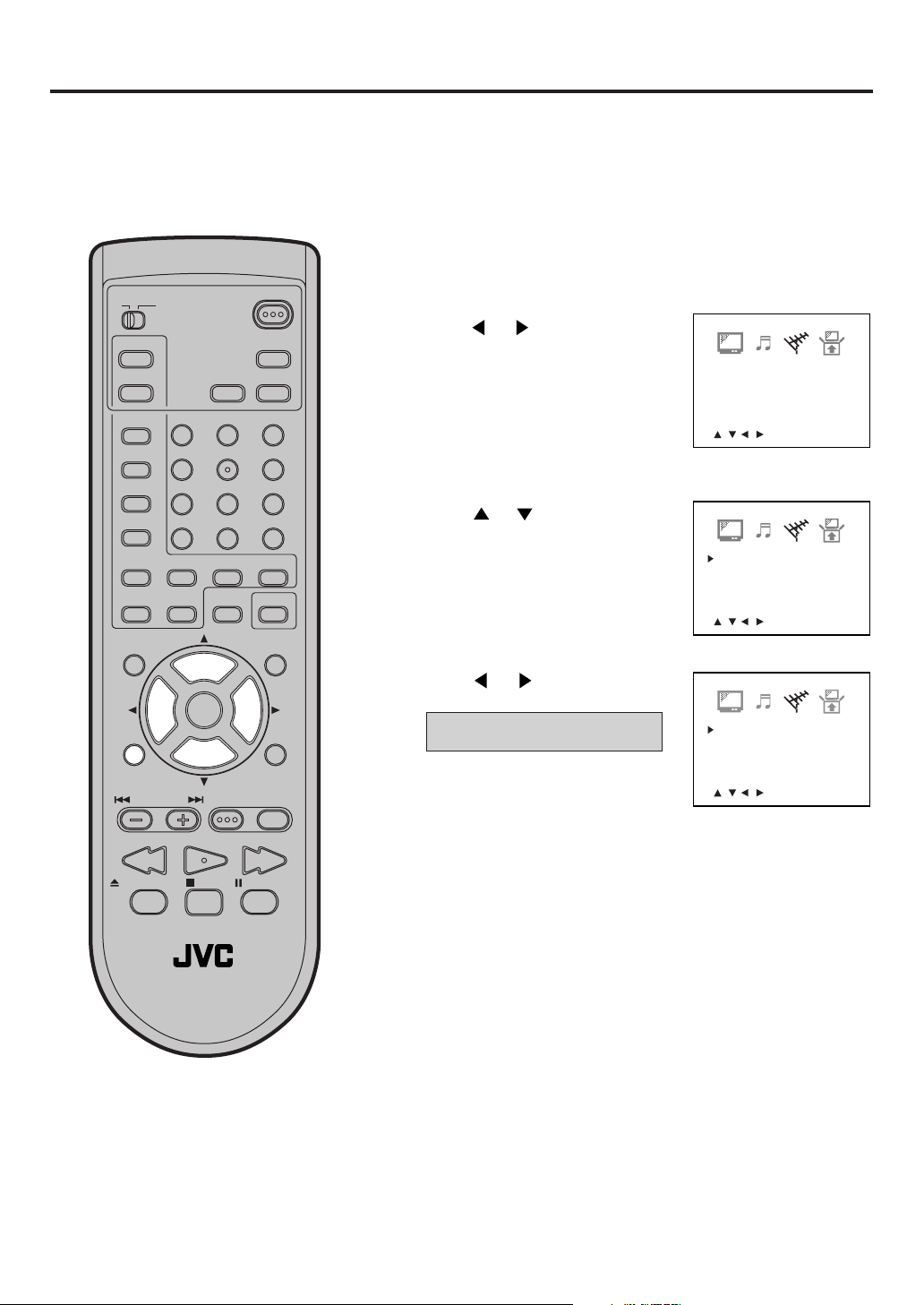
To memorize channels
This TV/DVD is equipped with a channel memory feature which allows channels to skip up or down to the next
channel set into memory, skipping over unwanted channels. Before selecting channels, they must be programmed into the TV/DVD’s memory. In addition to normal VHF and UHF channels, this TV/DVD can receive up
to 113 Cable TV channels. To use this TV/DVD with an antenna, set the TV/CATV menu option to the TV mode.
When shipped from the factory, this menu option is in the CATV mode.
TV/CATV SELECTION
Press TV MENU in the TV mode.
1
TV CATV
POWER
The TV menu screen will appear.
PLAY MODE
AUDIO
TITLE
SUBTITLE
JUMP
C.C.
ANGLE
MARKER ZOOM
–
SLOW
+
MUTING
VOL
–
TV MENU
B.SEARCH F.SEARCHPLAY
DISPLAY
SLEEP
TIMER
AUDIO
123
456
789
RETURN
0
REPEATA-B RETURN
CANCEL
LIGHT
SELECT
+
CH
INPUT
CH
–
/ENTER
VOL
+
DVD SETUP
DVD MENUTV/DVDNEXTPREV
Press or until the CHANNEL
2
SETUP menu appears.
Press
3
CATV”.
Press or to select the TV
4
or CATV mode.
or to select the “TV/
TV - VHF/UHF channels
CATV - CABLE TV channels
Press TV MENU until the MENU
5
screen is cleared.
-
TV/CATV
ADD/DELETE
AUTO CH MEMORY
<
/ / / /MENU
TV/CATV
ADD/DELETE
AUTO CH MEMORY
<
/ / / /MENU
TV/CATV TV
ADD/DELETE ADD
AUTO CH MEMORY
<
/ / / /MENU
CATV
ADD
>
CATV
ADD
>
>
TV / DVD
PAUSE/STILLSTOPOPEN/CLOSE
17
Page 18
TV CATV
PLAY MODE
AUDIO
TITLE
SUBTITLE
JUMP
ANGLE
MARKER ZOOM
MUTING
TV MENU
C.C.
–
SLOW
+
VOL
–
B.SEARCH F.SEARCHPLAY
POWER
DISPLAY
SLEEP
TIMER
AUDIO
123
456
789
RETURN
0
REPEATA-B RETURN
CANCEL
LIGHT
SELECT
+
CH
INPUT
CH
–
/ENTER
VOL
+
DVD SETUP
DVD MENUTV/DVDNEXTPREV
PAUSE/STILLSTOPOPEN/CLOSE
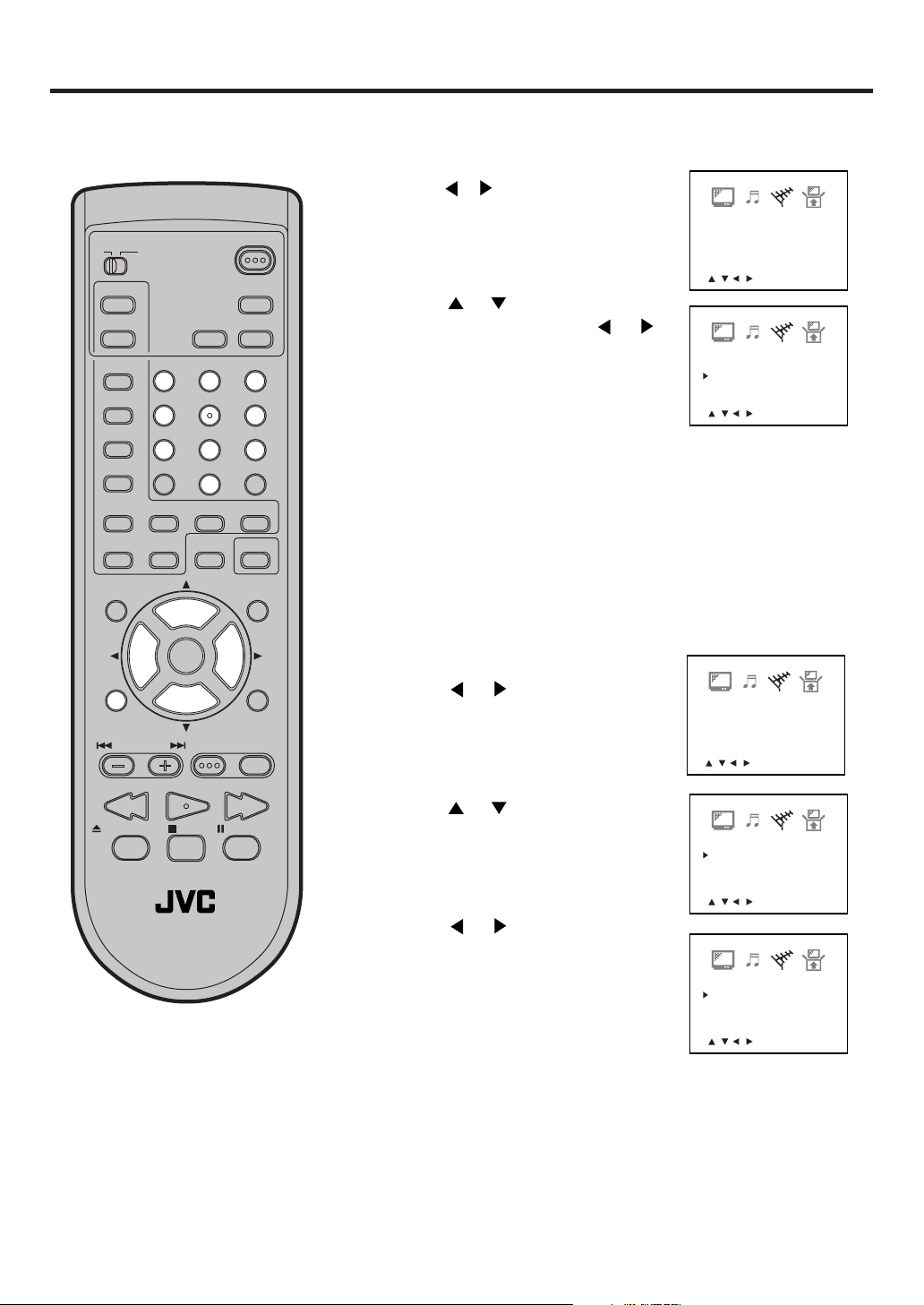
AUTOMATIC MEMORY TUNING
Press TV MENU in the TV mode. The TV menu screen
1
will appear.
Press or until CHANNEL-SETUP
2
menu appears.
Press or to select the “AUTO
3
CH MEMORY”, then press or .
The TV will begin memorizing all the
channels available in your area.
Press TV MENU until the MENU
4
screen is cleared.
TV/CATV
ADD/DELETE
AUTO CH MEMORY
<
/ / / /MENU
TV/CATV
ADD/DELETE
AUTO CH MEMORY
<
/ / / /MENU
TO ADD/DELETE CHANNELS
Select the desired channel to be
1
memorized or deleted using Direct
Channel Selection (0-9), or CH + or –.
Press TV MENU in the TV mode.
2
The TV menu screen will appear.
Press or until CHANNEL-
3
SETUP menu appears.
Press or to select the “ADD/
4
DELETE”.
TV/CATV
ADD/DELETE
AUTO CH MEMORY
<
/ / / /MENU
TV/CATV
ADD/DELETE
AUTO CH MEMORY
CATV
ADD
>
CATV
ADD
>
CATV
ADD
>
CATV
ADD
18
TV / DVD
Press or to select ADD or
5
DELETE, whichever function you
want to perform.
Press TV MENU until the MENU
6
screen is cleared.
Repeat steps 1-6 for other channels
7
you want to add or delete.
<
/ / / /MENU
TV/CATV
ADD/DELETE
AUTO CH MEMORY
<
/ / / /MENU
>
>
CATV
DELETE
Page 19
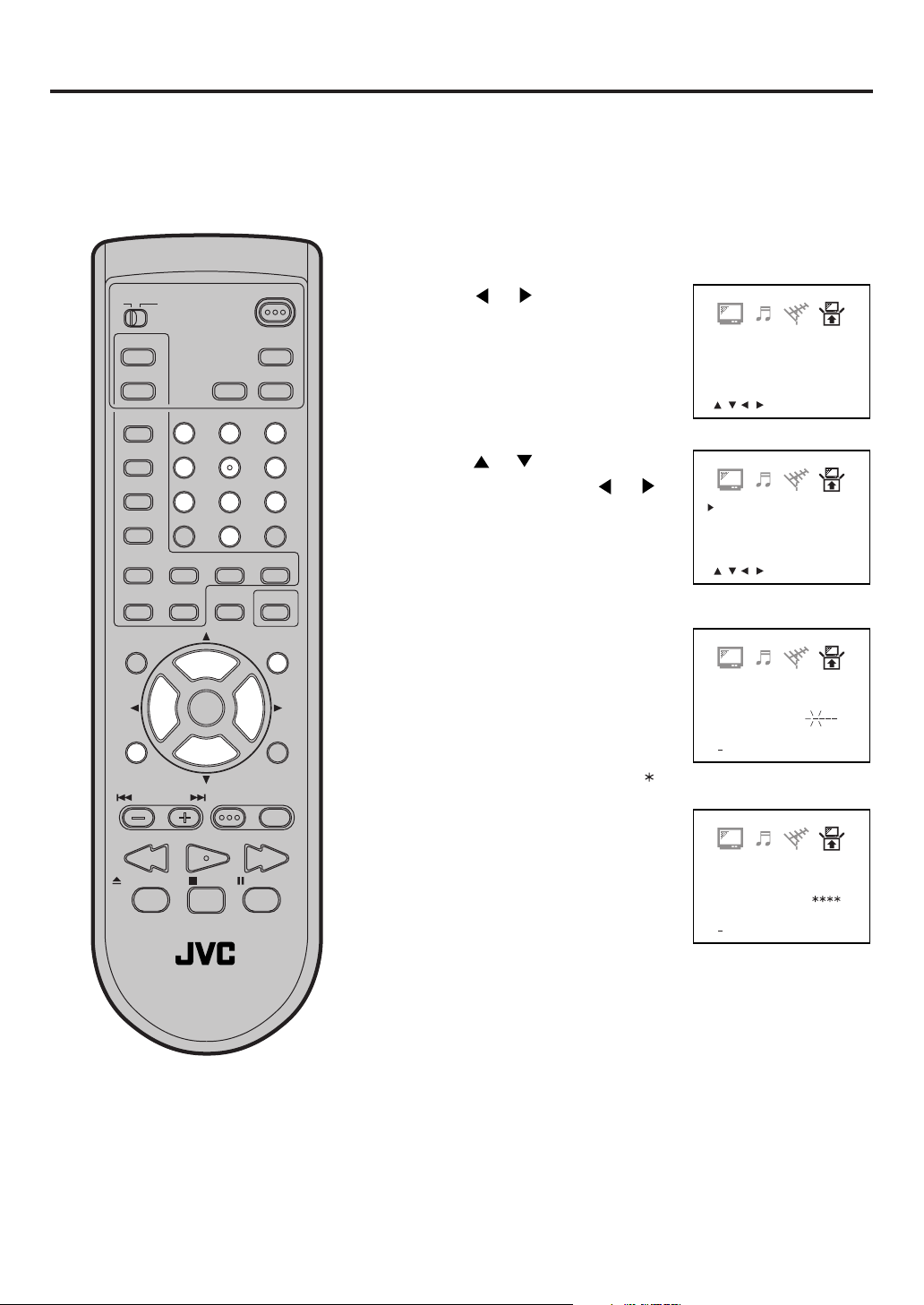
Setting the V-Chip
An age limitation can be set to forbid children to see and hear violent scenes or pictures for adults, etc.
The TV/DVD corresponds to “TV RATING” and “MOVIE RATING”. To use the V-Chip function, you must
register a password.
TO REGISTER PASSWORD
Press TV MENU in the TV mode. The TV menu
1
screen will appear.
TV CATV
PLAY MODE
AUDIO
TITLE
SUBTITLE
JUMP
C.C.
ANGLE
MARKER ZOOM
–
SLOW
+
MUTING
VOL
–
TV MENU
B.SEARCH F.SEARCHPLAY
POWER
DISPLAY
SLEEP
TIMER
AUDIO
123
456
789
RETURN
0
REPEATA-B RETURN
CANCEL
LIGHT
SELECT
+
CH
INPUT
CH
–
/ENTER
VOL
+
DVD SETUP
DVD MENUTV/DVDNEXTPREV
PAUSE/STILLSTOPOPEN/CLOSE
Press or until the SETUP
2
menu appears.
Press or to select the “V-
3
CHIP SET”, then press
Enter the password (4 digits)
4
using Direct Channel Selection
(0-9), then press ENTER.
Enter the same password again
5
for the safety, then press ENTER.
Now the password was registered
and V-Chip setting menu will
appear on the display.
V-CHIP SET
LANGUAGE/IDIOMA/LANGUE
<
/ / / /MENU
>
or .
V-CHIP SET
LANGUAGE/IDIOMA/LANGUE
<
/ / / /MENU
V-CHIP SET
NEW
PASSWORD
<
0 9/ENTER/CANCEL/MENU
>
:
“ ” appears instead of the number.
V-CHIP SET
CONFIRM
PASSWORD :
>
TV / DVD
NOTES:
If you forget the password, you can-
•
not set the V-Chip.
To avoid forgetting the password, write
•
it down and keep in the safe place.
<
0 9/ENTER/CANCEL/MENU
>
19
Page 20
CAN ENG RATING
CAN FRE RATING
CHANGE PASSWORD
: OFF
: OFF
<
/ / / /MENU
>
MOVIE RATING
V-CHIP SET
V-CHIP
US TV RATING
: G
: OFF
: OFF
<
/ / / /MENU
>
MOVIE RATING
V-CHIP SET
V-CHIP
US TV RATING
: OFF
: OFF
: TV-Y
CAN ENG RATING
CAN FRE RATING
CHANGE PASSWORD
: OFF
: OFF
Setting the V-Chip (Continued)
CAN ENG RATING
CAN FRE RATING
CHANGE PASSWORD
: G
: OFF
<
/ / / /MENU
>
MOVIE RATING
V-CHIP SET
V-CHIP
US TV RATING
: OFF
: OFF
: OFF
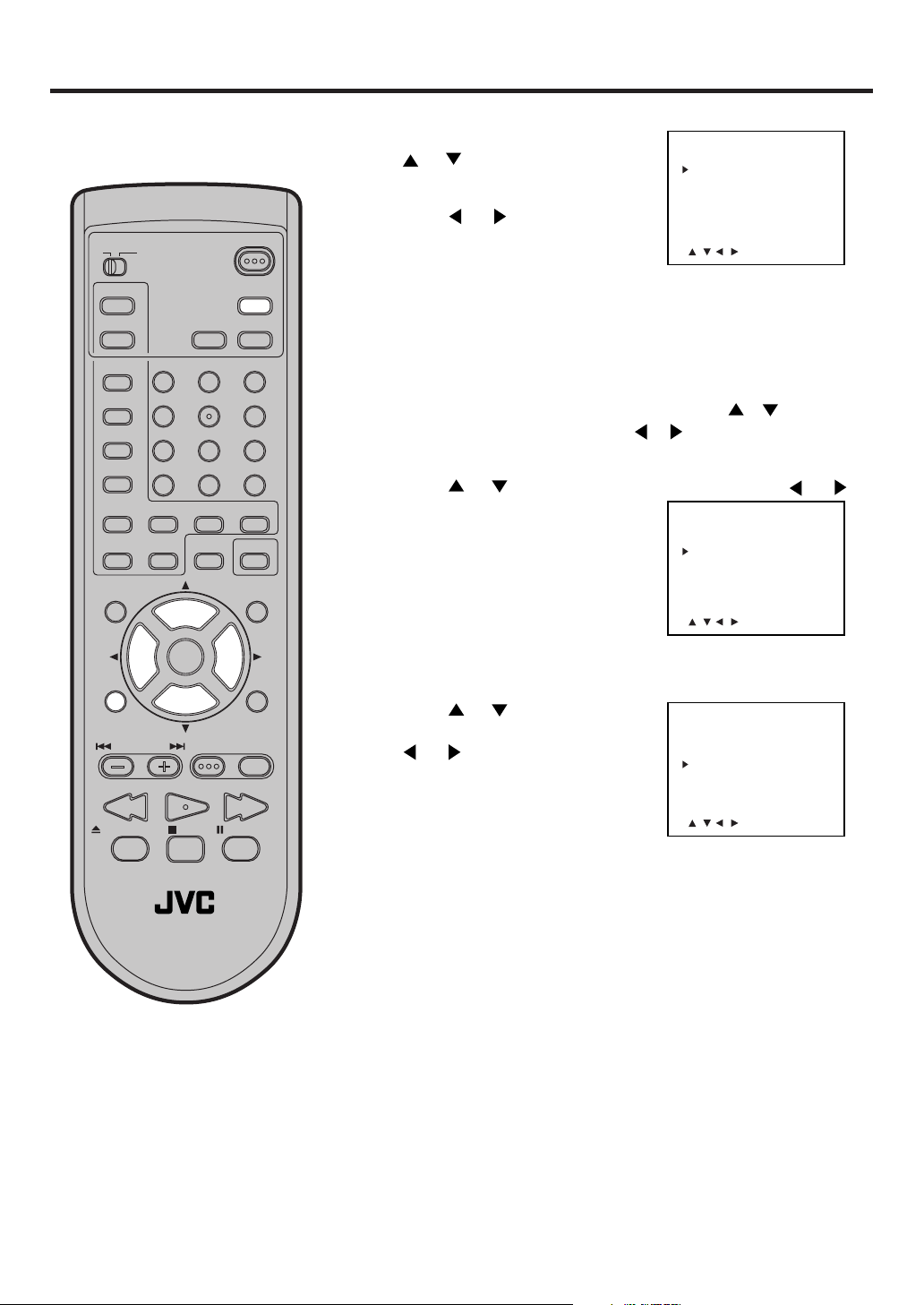
TO SET THE V-CHIP
In the V-CHIP SET menu, press
1
or to select the “US TV
RATING”.
Press or to display the
2
TV CATV
PLAY MODE
AUDIO
TITLE
SUBTITLE
JUMP
–
SLOW
VOL
–
C.C.
+
ANGLE
MARKER ZOOM
MUTING
TV MENU
POWER
DISPLAY
SLEEP
TIMER
AUDIO
123
456
789
RETURN
0
REPEATA-B RETURN
CANCEL
LIGHT
SELECT
+
CH
INPUT
CH
–
/ENTER
VOL
+
DVD SETUP
DVD MENUTV/DVDNEXTPREV
desired setting.
OFF : US TV RATING is not set
TV-Y : All children
TV-Y7 : 7 years old and above
TV-G : General Audience
TV-PG: Parental guidance
TV-14 : 14 years old and above
TV-MA: 17 years old and above
When you select TV- Y7, TV-PG, TV-14 or TV-MA, press
DISPLAY to show the contained rating. Press or to select
the desired item you want. Press or to select “ON” or “OFF”
If you want to back to V-CHIP SET menu, press TV MENU.
3
Press
to select
or to select the “MOVIE RATING”. Press or
desired rating.
OFF : MOVIE RATING is not set
G:All ages
PG : Parental guidance
PG-13 : Parental guidance
less than 13 years old
R:Under 17 years old
Parental guidance suggested
NC-17 : 17 years old and above
X:Adult only
Press or to select the
4
“CAN ENG RATING”, then press
or to select desired rating.
.
B.SEARCH F.SEARCHPLAY
PAUSE/STILLSTOPOPEN/CLOSE
TV / DVD
To use after the TV is protected
When the program applied to the VChip setting is received, enter the
password. Protection can be cancelled.
NOTE:
The V-Chip function is activated only
on programs and tapes that have the
rating signal.
20
E: Exempt
Exempt programming includes: news, sports,
documentaries and other information programming, talk shows, music videos, and variety programming.
C: Programming Intended for Children
Violence Guidelines: There will be no realistic scenes of violence. Depictions of
aggressive behavior will be infrequent and limited to portrayals that are clearly
imaginary, comedic or unrealistic in nature.
C8+: Programming Intended for Children 8 and Over
Violence Guidelines: Any realistic depictions of violence will be infrequent, discreet, of low intensity and will show the consequences of the acts. There will be
no offensive language, nudity or sexual content.
G: General Audience
Programming will contain little violence and will be sensitive to themes which
could affect younger children.
PG: Parental Guidance
Programming intended for a general audience, but which may not be suitable for
younger children. Parents may consider some content not appropriate for children aged 8-13.
14+: 14 Years and Older
Parents are strongly cautioned to exercise discretion in permitting viewing by preteens and early
teens. Programming may contain mature themes and scenes of intense violence.
18+: Adult
Material intended for mature audiences only.
Page 21
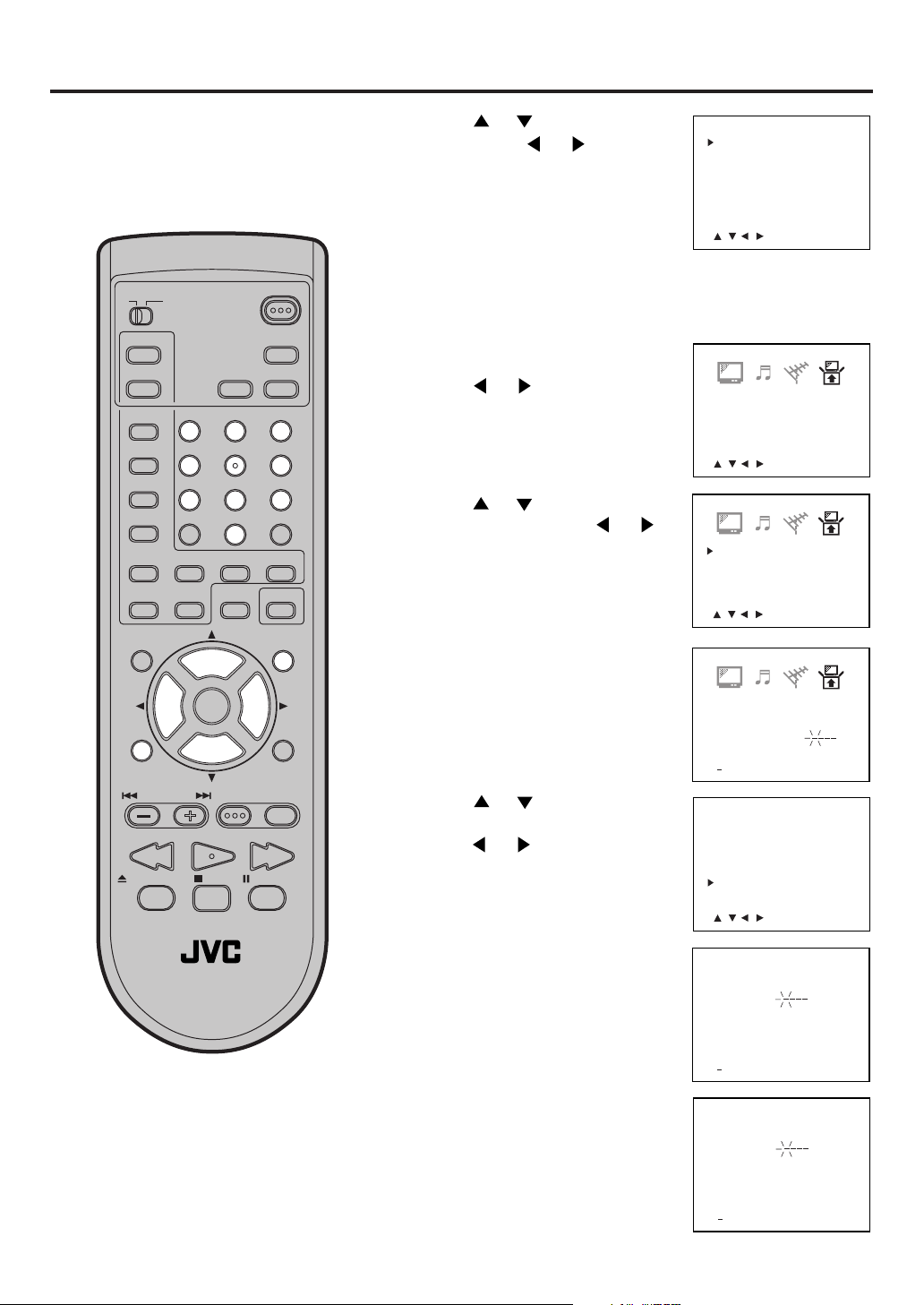
Press or to select “V-
5
CHIP”. Press
or to display
“ON” to activate the V-Chip
function.
V-CHIP SET
V-CHIP
MOVIE RATING
CAN ENG RATING
CAN FRE RATING
CHANGE PASSWORD
: ON
: TV-YUS TV RATING
: G
: OFF
: OFF
TV CATV
PLAY MODE
AUDIO
TITLE
SUBTITLE
JUMP
ANGLE
MARKER ZOOM
MUTING
TV MENU
C.C.
–
SLOW
+
VOL
–
B.SEARCH F.SEARCHPLAY
POWER
DISPLAY
SLEEP
TIMER
AUDIO
123
456
789
RETURN
0
REPEATA-B RETURN
CANCEL
LIGHT
SELECT
/ENTER
+
CH
VOL
INPUT
CH
+
–
DVD SETUP
DVD MENUTV/DVDNEXTPREV
PAUSE/STILLSTOPOPEN/CLOSE
Press TV MENU until the MENU
6
screen is cleared.
TO CHANGE PASSWORD
Press TV MENU in the TV mode.
1
The TV menu screen will appear.
Press or until SETUP
2
menu appears.
Press
3
CHIP SET”, then press
Enter the Password using Direct
4
Channel Selection (0-9), then
press ENTER.
Press
5
“CHANGE PASSWORD”, then
press
or to select the “V-
or .
or to select
or .
<
/ / / /MENU
V-CHIP SET
LANGUAGE/IDIOMA/LANGUE
<
/ / / /MENU
V-CHIP SET
LANGUAGE/IDIOMA/LANGUE
<
/ / / /MENU
V-CHIP SET
PASSWORD
<
0 9/ENTER/CANCEL/MENU
V-CHIP SET
V-CHIP
MOVIE RATING
CAN ENG RATING
CAN FRE RATING
CHANGE PASSWORD
>
>
>
::
: ON
: TV-YUS TV RATING
: G
: OFF
: OFF
>
TV / DVD
Enter the new password using
6
Direct Channel Selection (0-9),
then press ENTER.
Enter the same password again
7
for safety, then press ENTER.
Press TV MENU repeatedly to
8
return to normal screen.
<
/ / / /MENU
CHANGE PASSWORD
NEW
PASSWORD
<
0 9/ENTER/CANCEL/MENU
CHANGE PASSWORD
CONFIRM
PASSWORD
<
0 9/ENTER/CANCEL/MENU
>
:
:
>
>
21
Page 22
<
/ / / /CANCEL/MENU
>
BRIGHTNESS
CONTRAST0+32
0
0
0
COLOR
TINT
SHARPNESS
<
/ / / /MENU
>
BRIGHTNESS
CONTRAST0+32
0
0
0
COLOR
TINT
SHARPNESS
Picture control adjustment
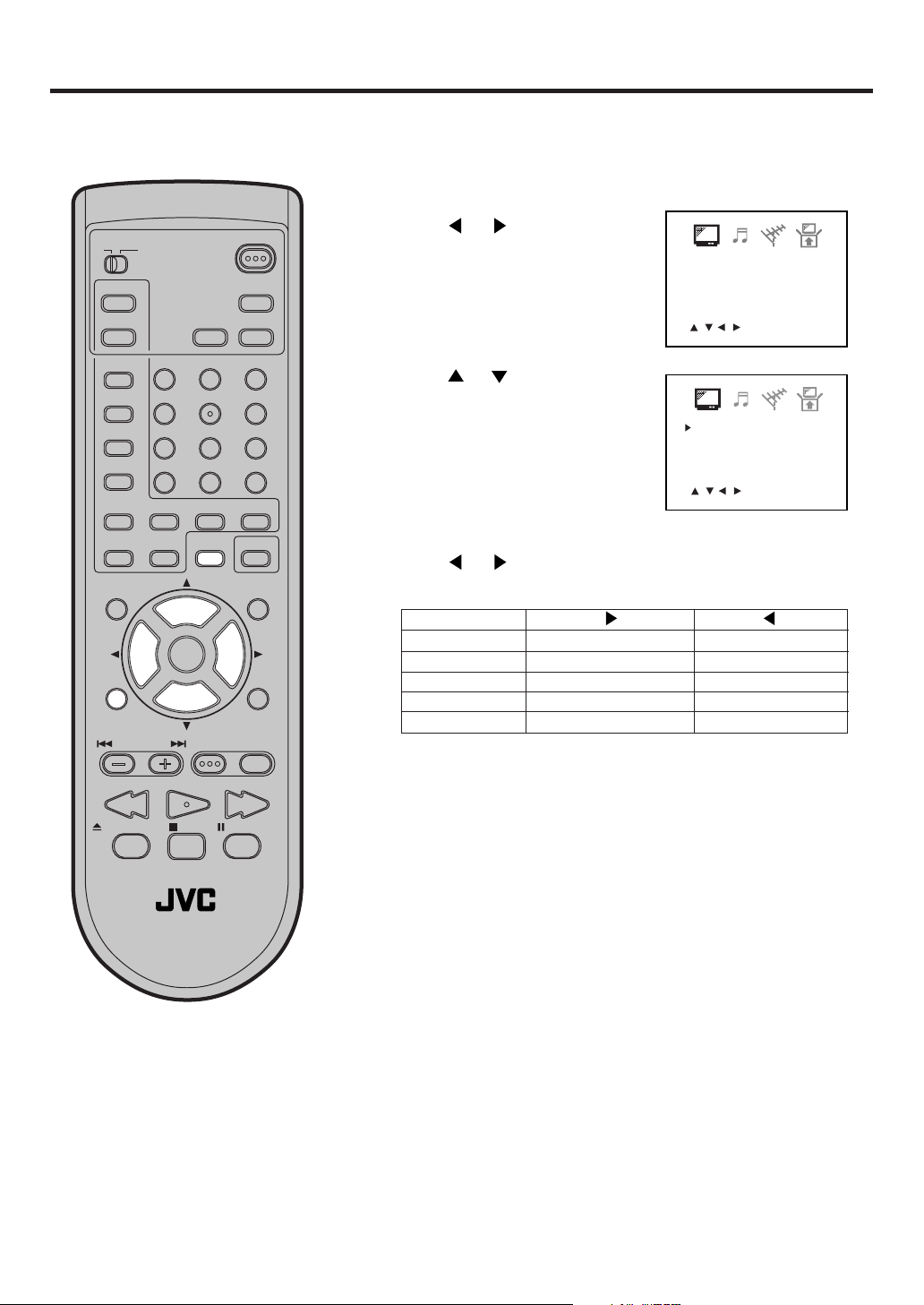
Picture controls are factory preset but you can adjust them individually as follows:
Press TV MENU in the TV mode. The TV menu
1
screen will appear.
TV CATV
PLAY MODE
AUDIO
TITLE
SUBTITLE
JUMP
–
SLOW
VOL
C.C.
–
ANGLE
MARKER ZOOM
MUTING
TV MENU
POWER
DISPLAY
SLEEP
TIMER
AUDIO
123
456
789
RETURN
0
REPEATA-B RETURN
+
CANCEL
LIGHT
SELECT
+
CH
INPUT
CH
–
/ENTER
VOL
+
DVD SETUP
DVD MENUTV/DVDNEXTPREV
Press or until PICTURE
2
menu appears.
Press or to select the item
3
you want to adjust.
Press or to adjust the
4
setting.
BRIGHTNESS
CONTRAST
COLOR
TINT
SHARPNESS
increase brightness
increase contrast
be brilliant color
be greenish color
makes picture clearer
decrease brightness
decrease contrast
be pale color
be reddish color
makes picture softer
B.SEARCH F.SEARCHPLAY
PAUSE/STILLSTOPOPEN/CLOSE
TV / DVD
NOTE:
The CONTRAST default setting is set
to maximum at the factory.
22
After your desired setting press
5
TV MENU until the MENU
screen is cleared.
CANCEL
Pressing CANCEL while making
picture adjustments will return all
adjustments to the factory preset
levels.
Page 23
Stereo and separate audio program (SAP)
The TV/DVD is equipped with a feature known as Multi-channel TV Sound or MTS. MTS broadcasts greatly
enhance TV viewing by bringing you programs with high fidelity stereo sound.
MTS also provides an extra channel called the Separate Audio Program or SAP which broadcasters can use to
transmit a second language for bilingual transmission or for other purposes.
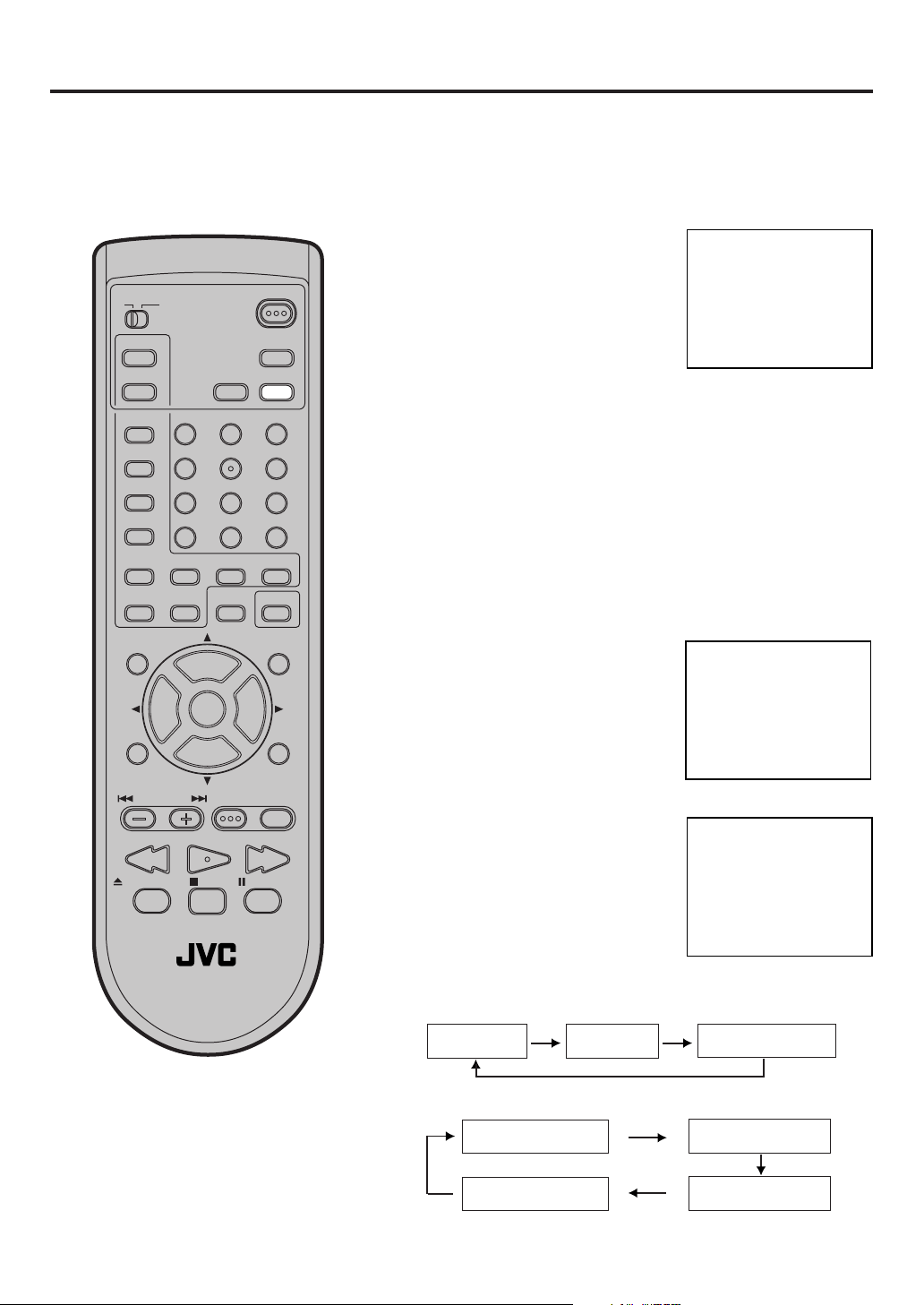
LISTENING TO STEREO SOUND
When the TV is turned on or a
TV CATV
PLAY MODE
AUDIO
TITLE
SUBTITLE
JUMP
C.C.
ANGLE
MARKER ZOOM
–
SLOW
+
MUTING
VOL
–
TV MENU
B.SEARCH F.SEARCHPLAY
POWER
DISPLAY
SLEEP
TIMER
AUDIO
123
456
789
RETURN
0
REPEATA-B RETURN
CANCEL
LIGHT
SELECT
+
CH
INPUT
CH
/ENTER
VOL
+
–
DVD SETUP
DVD MENUTV/DVDNEXTPREV
channel selection is made, make
certain the STEREO appears on
the screen. This means that
“Stereo” broadcasting is
available. You can enjoy stereo
sound from the left and right
speakers.
• When “Mono” broadcasting is
received, no indication is
displayed.
• If the broadcast signal is not
strong enough or clear stereo
sound is not available, press
AUDIO on the center of the
remote control to change to
mono sound. The noise should
be eliminated. Press it again to
return to the stereo sound.
LISTENING TO SAP (SEPARATE AUDIO PROGRAM)
When the TV is turned on or a
channel selection is made, make
certain the SAP appears on the
screen. This means that the
“Separate Audio Program”
broadcasting is available.
TO SELECT DESIRED SOUND
Press AUDIO to select the
desired sound.
STEREO CH 013
STEREO SAP CH 013
TV / DVD
PAUSE/STILLSTOPOPEN/CLOSE
SEL. STEREO
MONO+SAP BROADCASTING
MONO SOUND
(MAIN)
SAP SOUND
MONO + SAP SOUND
(MONO)
STEREO+SAP BROADCASTING
STEREO SOUND
(MAIN)
MONO SOUND
(MAIN)
SAP SOUND
MONO + SAP SOUND
(MAIN)
23
Page 24
Sound control adjustment
<
/ / / /CANCEL/MENU
>
BASS
TREBLE
BALANCE
0
0
0
HYPER SURROUND
STABLE SOUND ON
OFF
<
/ / / /MENU
>
BASS
TREBLE
0
0
0BALANCE
HYPER SURROUND
STABLE SOUND ON
OFF
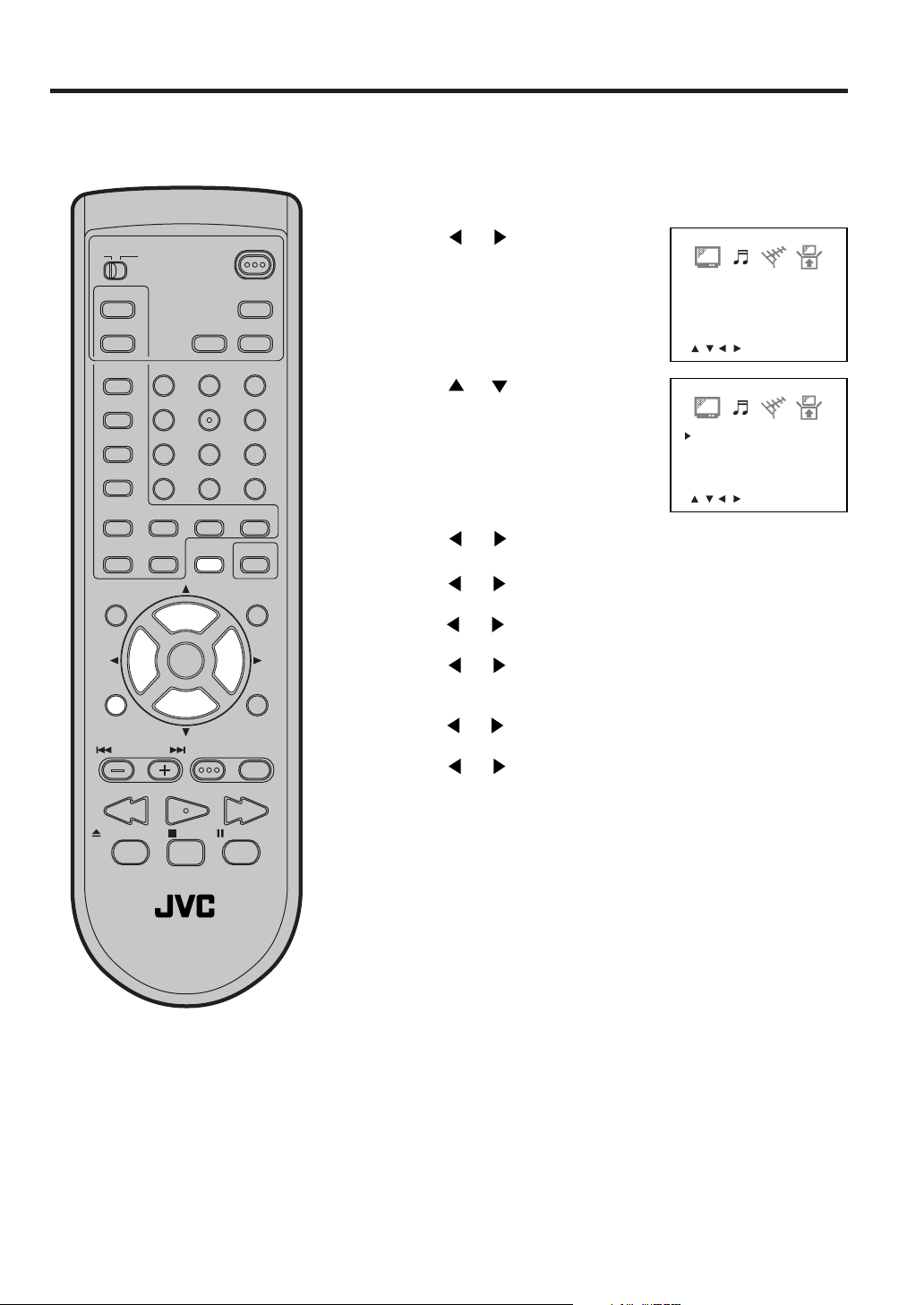
Sound controls are factory preset but you can adjust them individually as follows:
Press TV MENU in the TV mode.
1
The TV menu screen will appear.
TV CATV
PLAY MODE
AUDIO
TITLE
SUBTITLE
JUMP
ANGLE
MARKER ZOOM
MUTING
TV MENU
C.C.
–
SLOW
+
VOL
–
B.SEARCH F.SEARCHPLAY
TV / DVD
POWER
DISPLAY
SLEEP
TIMER
AUDIO
123
456
789
RETURN
0
REPEATA-B RETURN
CANCEL
LIGHT
SELECT
+
CH
INPUT
CH
–
/ENTER
VOL
+
DVD SETUP
DVD MENUTV/DVDNEXTPREV
PAUSE/STILLSTOPOPEN/CLOSE
Press
2
menu appears.
Press
3
you want to adjust.
Press or to adjust the setting.
4
BASS:
or until the AUDIO
or to select the item
Press or to adjust the bass sound.
TREBLE:
Press
or to adjust the treble sound.
BALANCE:
Press
or to obtain an equal sound level from both
speakers.
HYPER SURROUND:
Press or to set the hyper surround feature “ON” or “OFF”.
STABLE SOUND:
Press
or to set the stable sound feature “ON” or “OFF”.
Hyper surround feature
The hyper surround feature expands the audio listening field
wider and deeper to create exceptional sound quality from the
TV’s speakers. The feature uses stereo signals from a TV
broadcast or video input.
Stable sound feature
When the loud sound is made, the stable sound feature
automatically lower the sound.
24
After your desired setting press TV MENU until the MENU
5
screen is cleared.
CANCEL
Pressing CANCEL while making sound adjustments will return all
adjustments to the factory preset levels.
Page 25
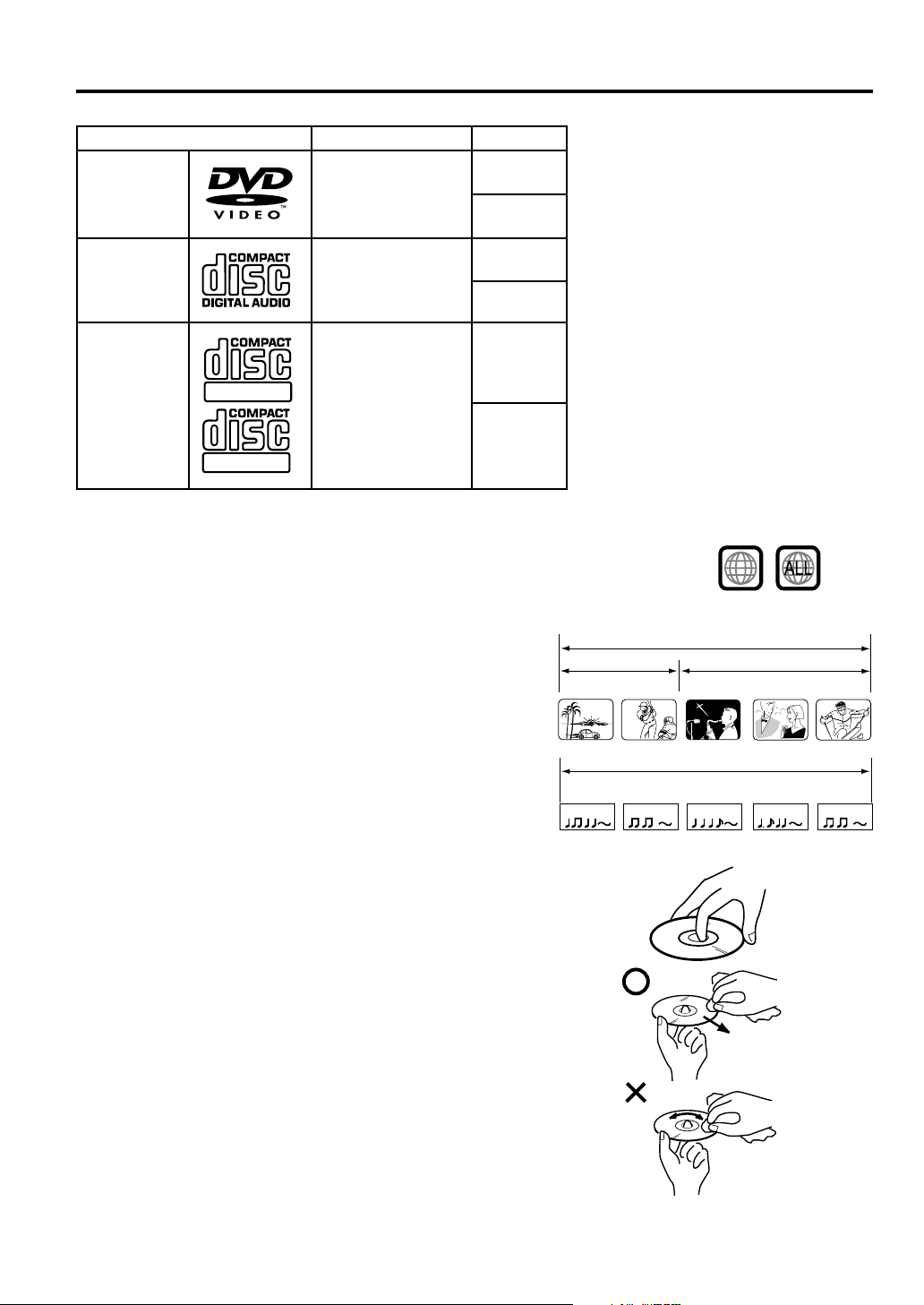
The following types of discs can be played on this unit.
Disc type and logo mark
DVD Video
Audio CD
CD-R/CD-RW
Recordable
ReWritable
Recorded content
Audio
+
Video
Audio
CD-DA/MP3 file
Disc size
5 inches
(12 cm)
3 inches
(8 cm)
5 inches
(12 cm)
3 inches
(8 cm)
5 inches
(12 cm)
3 inches
(8 cm)
• DVD-ROM, Video CD, SVCD, CVD,
Photo CD, etc. cannot be played.
• Some CD-R/RWs can not be played
back depending on the recording
conditions.
• This unit is to be used exclusively
with the NTSC color system. PAL and
SECAM system discs cannot be used
with this unit.
Region Number
Region number (Regional restriction code) is built-in to the unit and DVD video discs.
Region number “1” or “ALL” of DVD video discs can be used on this unit.
Disc
1
Title
When two or more movies are recorded on a disc,
the disc is divided into two or more sections.
Each section is called a “TITLE”.
CHAPTER 1
Chapter
The titles can be subdivided into many sections.
Each section is called a “CHAPTER”.
Audio CD Track
An Audio CD can contain several items.
These are assigned to the tracks.
TRACK 1 TRACK 2 TRACK 3 TRACK 4 TRACK 5
Removing Disc from Case
Be sure to hold the edge of disc. Do not touch the surface of the disc.
Pick up the disc gently from the case.
• Do not scratch the disc.
• Do not get dirt on the surface of the disc.
• Do not stick a label or adhesive tape on the disc.
• Do not drop or bend the disc.
Storing Disc
• Store the disc in the case to avoid risk of scratches, dirt or damage.
• Do not leave disc exposed to direct sunlight or in hot or humid places.
Cleaning Disc
Wipe the disc with a clean, dry cloth from center to edge.
• Do not wipe the disc round.
• Do not use liquid or aerosol cleaners.
DVD DISC
TITLE1 TITLE2
CHAPTER 2 CHAPTER 2 CHAPTER 3CHAPTER 1
CD
Audio CD
25
Page 26
Preparation/Status display of disc
The following pages describe the
setup/operation in DVD mode.
TV CATV
PLAY MODE
AUDIO
TITLE
SUBTITLE
JUMP
C.C.
ANGLE
MARKER ZOOM
–
SLOW
+
MUTING
VOL
–
TV MENU
B.SEARCH F.SEARCHPLAY
123
456
789
+
CH
INPUT
CH
–
POWER
DISPLAY
SLEEP
TIMER
AUDIO
RETURN
0
REPEATA-B RETURN
CANCEL
LIGHT
SELECT
/ENTER
VOL
+
DVD SETUP
DVD MENUTV/DVDNEXTPREV
Preparation
Before DVD/CD operation, please make preparations as follows.
Insert the AC cord plug into a standard 120V 60Hz polarized
1
AC outlet.
• If the AC cord plug is plugged in for the first time, wait for
about 5 seconds before pressing POWER.
NOTE: When connecting to other equipment, unplug the unit
from the AC outlet.
Press POWER on the unit or on the remote control to turn on
2
the unit. The POWER indicator will light.
• Every time you press POWER, the TV/DVD starts from TV
mode.
• When using an amplifier, switch on the amplifier.
Press TV/DVD to select DVD
3
mode.
The DVD startup screen will appear on the screen.
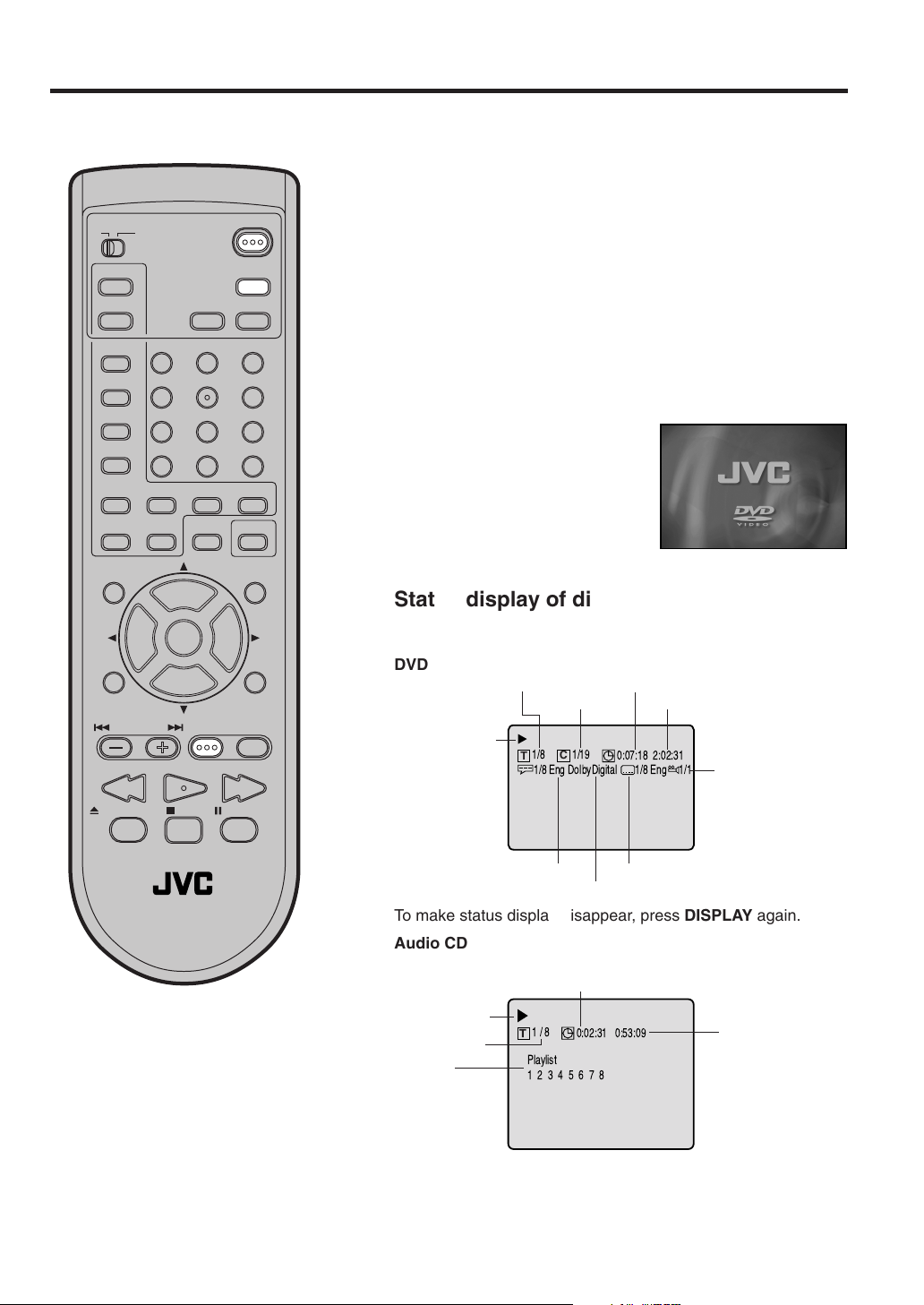
Status display of disc
Press DISPLAY. The status display of the disc will appear on the
screen.
DVD
Title elapsed playing time
1/19
C
0:07:18 2:02:31
1/8 Eng
Title total time
1/1
Camera angle
Disc operation
Title number
Chapter number
1/8
T
1/8 Eng DolbyDigital
PAUSE/STILLSTOPOPEN/CLOSE
TV / DVD
NOTE:
If the unit does not operate properly:
Static electricity, etc., may affect the player's operation. Disconnect the AC power
cord once, then connect it again.
26
Audio language
A kind of audio
Subtitle language
To make status display disappear, press DISPLAY again.
Audio CD
Track elapsed playing time
Disc operation
Track number
Play list
1/8
T
0:02:31 0:53:09
Playlist
12345678
Track total time
• When you play a CD disc, the status display will appear
and remain on the screen.
Page 27
TV CATV
POWER
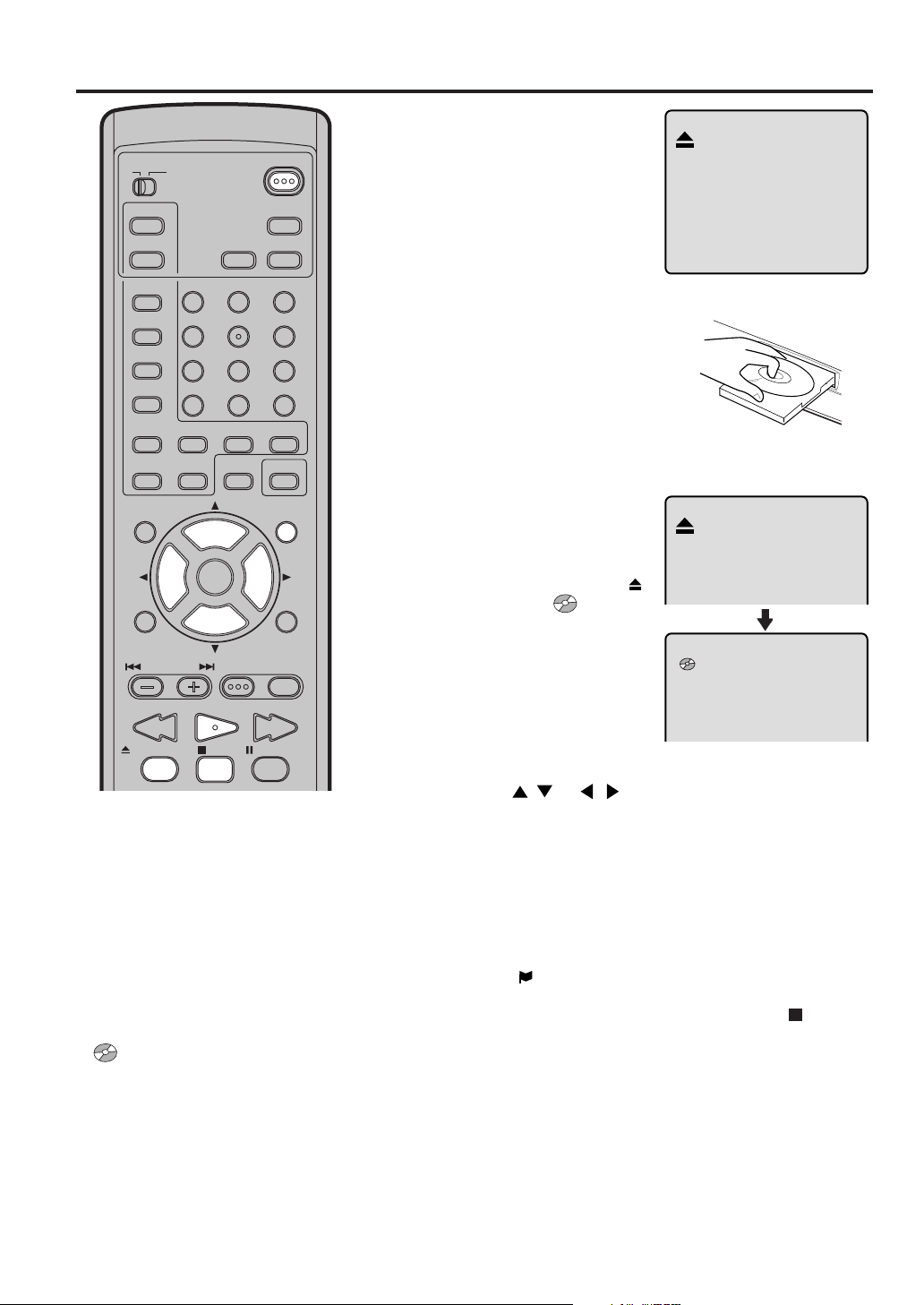
Playback procedure
Press OPEN/CLOSE on
1
the unit or the remote control.
The disc tray will open.
PLAY MODE
AUDIO
TITLE
SUBTITLE
JUMP
C.C.
ANGLE
MARKER ZOOM
–
SLOW
+
MUTING
VOL
–
TV MENU
B.SEARCH F.SEARCHPLAY
DISPLAY
SLEEP
TIMER
AUDIO
123
456
789
RETURN
0
REPEATA-B RETURN
CANCEL
LIGHT
SELECT
+
CH
INPUT
CH
–
/ENTER
VOL
+
DVD SETUP
DVD MENUTV/DVDNEXTPREV
PAUSE/STILLSTOPOPEN/CLOSE
Place a disc onto the tray.
2
Position it with the printed
label side up, align it with
the guides, and place it in
its proper position.
Press OPEN/CLOSE or
3
PLAY.
The disc tray closes automatically.
On the TV-screen, “ ”
changes to “ ” and then
playback commences.
• A menu screen will
appear on the TV screen,
if the disc has a menu
feature.
NOTES:
• If a non-compatible disc is loaded, “Incorrect Disc”, “Region Code Error” or “Paren-
tal Error” will appear on the TV screen according to the type of loaded disc. If these
appear, check your disc again (see pages
25 and 38).
• Some discs may take a minute or so to
start playback.
• When you set a single-faced disc label
downwards (ie. the wrong way up) and
press PLAY or OPEN/CLOSE on the unit,
“ ” will appear on the display for about
5 seconds and then “No Disc” or “Incor-
rect Disc” will be displayed.
• Some playback operations of DVDs may
be intentionally fixed by software producers. Since this unit plays DVDs according
to the disc contents the software producers designed, some playback features
may not be available. Also refer to the instructions supplied with the DVDs.
Press / or / to make a selection.
4
Press SELECT.
5
• Title is selected and play commences.
Press STOP to end playback.
6
• The unit memorizes the stopped point, depending on the
disc. “
” appears on the screen. Press PLAY to resume
playback (from the scene point).
• If you press STOP again or unload the disc (“
on the screen.), the unit will clear the stopped point.
To stop the playback, press STOP.
7
Then press OPEN/CLOSE.
The disc tray opens.
Remove the disc and then press POWER.
The disc tray closes automatically and unit turns off.
” appears
27
Page 28
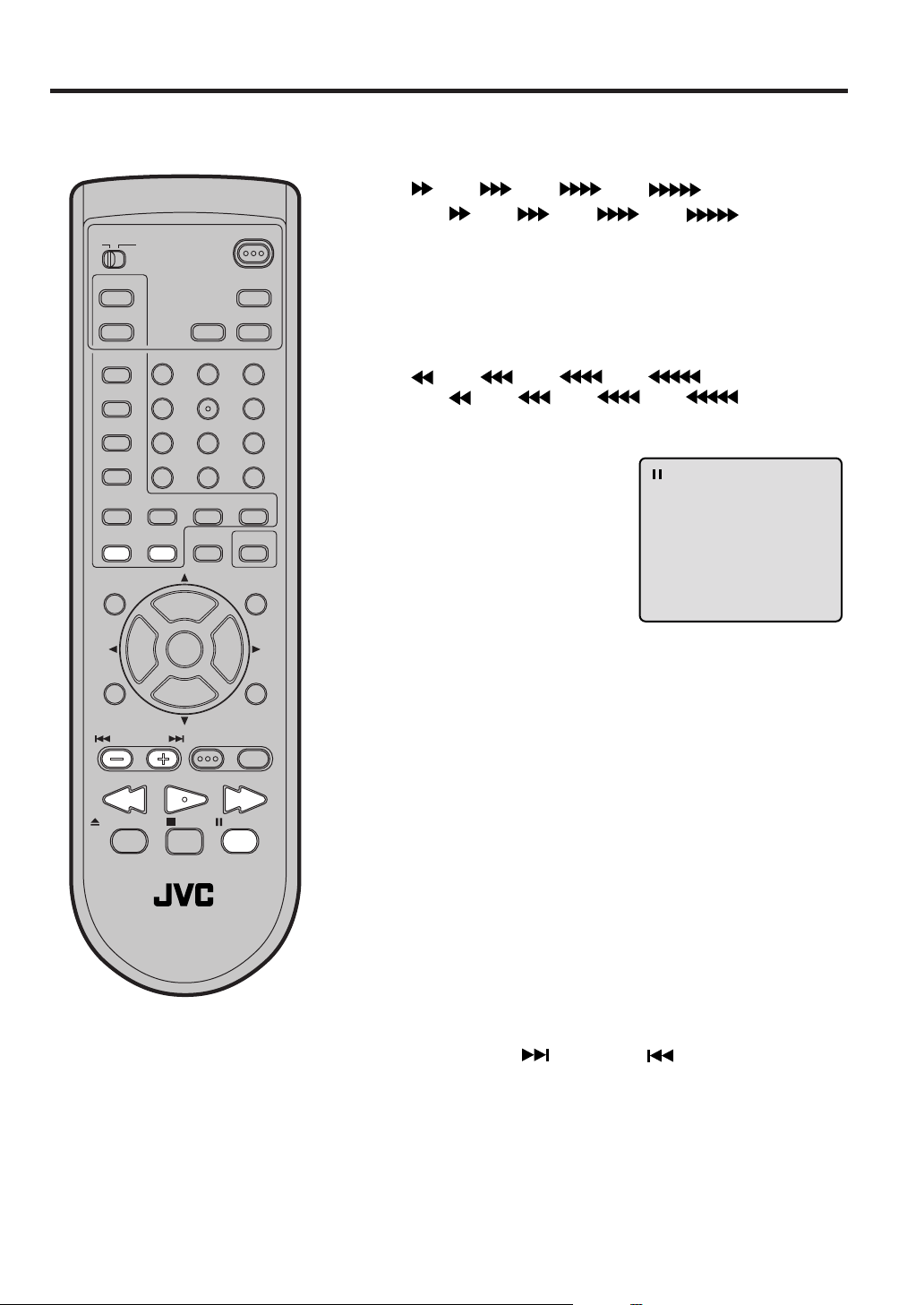
Special playback
Note: There may be a slight delay between when you press the button and
the function activating.
TV CATV
PLAY MODE
AUDIO
TITLE
SUBTITLE
JUMP
C.C.
ANGLE
MARKER ZOOM
–
SLOW
+
MUTING
VOL
–
TV MENU
B.SEARCH F.SEARCHPLAY
123
456
789
CH
INPUT
CH
POWER
DISPLAY
SLEEP
TIMER
AUDIO
RETURN
0
REPEATA-B RETURN
CANCEL
LIGHT
SELECT
+
–
/ENTER
VOL
+
DVD SETUP
DVD MENUTV/DVDNEXTPREV
Fast Forward Playback
Press F.SEARCH during normal playback.
Each press of F.SEARCH will increase the speed of the search
(x 2), (x 4), (x 8), (x 15).
(CD: (x 2), (x 4), (x 8), (x 20))
• To resume normal playback, press PLAY.
Review Playback
Press B.SEARCH during normal playback.
Each press of B.SEARCH will increase the speed of the search
(x 2), (x 4), (x 8), (x 15).
(CD:
(x 2), (x 4), (x 8), (x 20))
• To resume normal playback, press PLAY.
Still Playback
Press PAUSE/STILL during
normal playback to pause playback.
To resume normal playback,
press PLAY.
Frame Advance
Press PAUSE/STILL during still playback.
One frame is advanced each time you press PAUSE/STILL.
To resume normal playback, press PLAY.
PAUSE/STILLSTOPOPEN/CLOSE
TV / DVD
NOTE:
The unit is capable of holding a still video
image or On screen display image on your
television screen indefinitely. If you leave
the still video image or On screen display
image displayed on your TV for an extended period of time, you risk permanent
damage to your television screen. Projection televisions are very susceptible.
28
Slow-motion Playback
Press SLOW
normal playback or still playback.
Each press of SLOW will change the speed of the slow x1/2,
x1/4, x1/6, x1/8.
• To resume normal playback, press PLAY.
• To resume the still playback, press PAUSE/STILL.
(–)
Reverse or SLOW
(+)
Forward during
Locating a chapter or track
Press NEXT( ) or PREV( ) during playback to
locate a chapter that you want to watch.
Each time you press the button, a chapter or track is
skipped.
Page 29
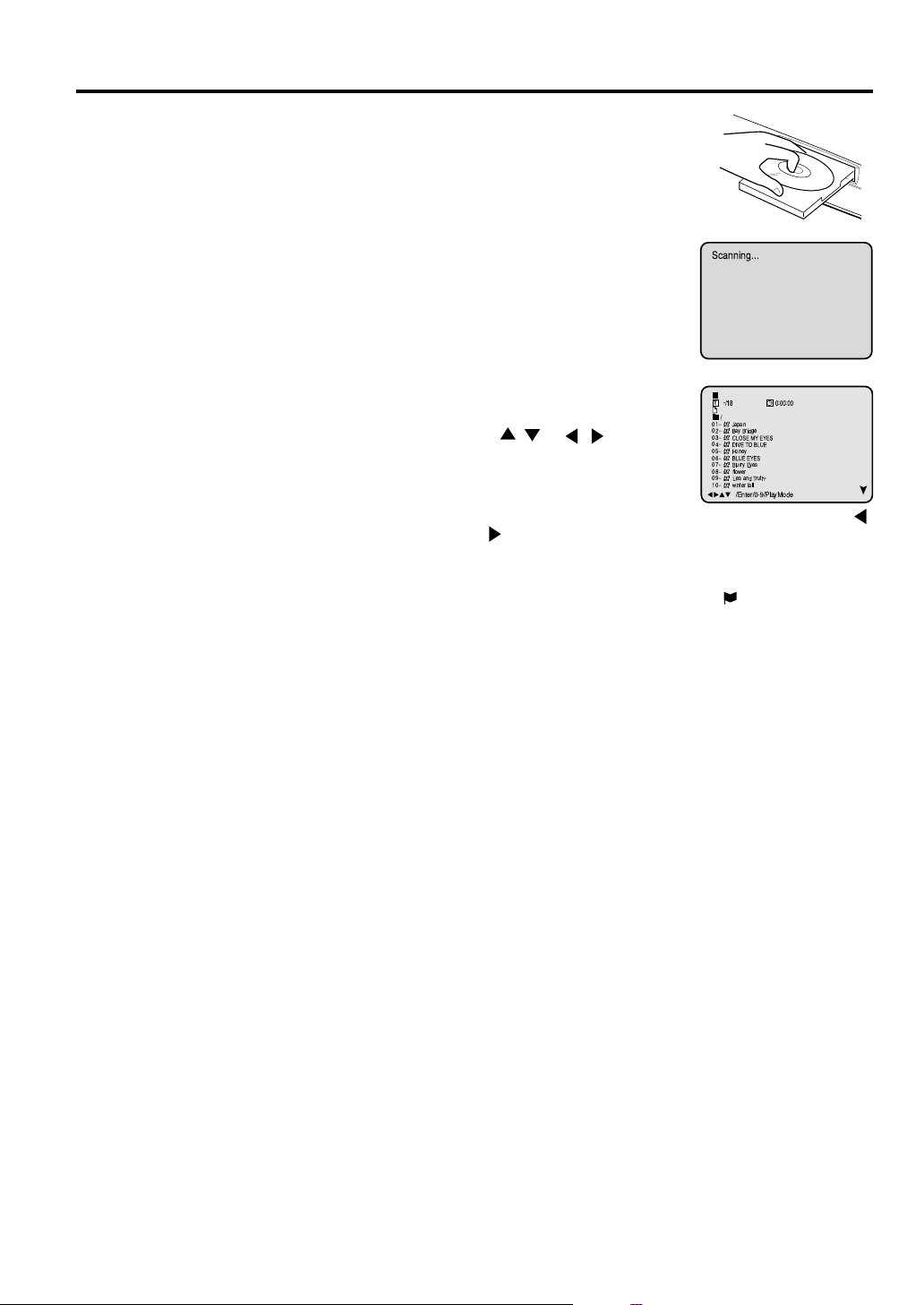
MP3 playback
This player can play back the MP3-data
which has been recorded on CD-R or CDRW. To produce the MP3-data, you need a
Windows-PC with CD-ROM drive and a MP3encoding Software (not supplied).
The Apple-HFS-System can not be played.
MP3 CD Information
Limitations on MP3 CD playback
• MP3 CD is the disc that is standardized by
ISO9660, its file name must include 3-digits
extension letters, “mp3”.
• The directory and file names of the MP3
CD must correspond to the ISO
standardized files.
• This unit can read 200 files per disc. If
one directory has more than 200 files, it
reads up to 200 files, the remaining files will
be omitted.
• MP3 CD’s cannot be used for playback for
the purpose of recording.
• It may take more than one minute for this
unit to read MP3 files depending on its
structure.
• Music recorded by “Joliet Recording
Specification” can be played back, the file
name is displayed on the screen. Long file
names will be condensed.
• The music files recorded by “Hierarchical
File System” (HFS) cannot be played.
Notes on MP3 files
To play back MP3 CD in the recorded order,
1. Use MP3 software that records data
alphabetically or numerically .
2. Name each file including two-digit or three-
digit number (e.g. “01” “02” or “001” “002”).
3. Refrain from making too many sub-folders.
CAUTION:
• Some MP3 CDs can not be played back
depending on the recording conditions.
• The CD-R/RW that has no music data or
non-MP3 files can not be played back.
Press OPEN/CLOSE.
1
The disc tray will open.
Place a disc onto the tray.
Press PLAY or OPEN/CLOSE.
2
The disc tray closes automatically .
Scanning...
On the TV-screen, “Scanning...”
will appear. Scanning will take as
much time as the number of file.
A MP3 menu screen will appear
3
on the TV screen.
Press / or / or Number
buttons (0-9) to select the desired
track, then press ENTER. Track is
selected and play commences.
T
-/18
/
01
Ð
Japan
02
Ð
Bay Bridge
03
Ð
CLOSE MY EYES
04
Ð
DIVE TOBLUE
05
Ð
Honey
06
Ð
BLUE EYES
07
Ð
Blurry Eyes
08
Ð
flower
09
Ð
Lies and Truth-
winter fall
10
Ð
/Enter/0-9/PlayMode
0:00:00
• In case the folder includes more than 11 tracks, press
or to display next track list.
Press STOP to end playback.
4
• The unit records the stopped point. “ ” appears on the
screen. Press PLAY to resume playback (from the scene
point).
• If you press STOP again or unload the disc, the unit will
clear the stopped point.
Then press OPEN/CLOSE.
5
The disc tray opens.
Remove the disc and press POWER.
The disc tray closes automatically and the unit turns off.
NOTES:
•
During MP3-Playback, you can not use SEARCH, A-B
Repeat functions.
•
You can use Repeat (Track or All), Random functions and
Program playback for MP3 CD Playback (see page 31).
29
Page 30
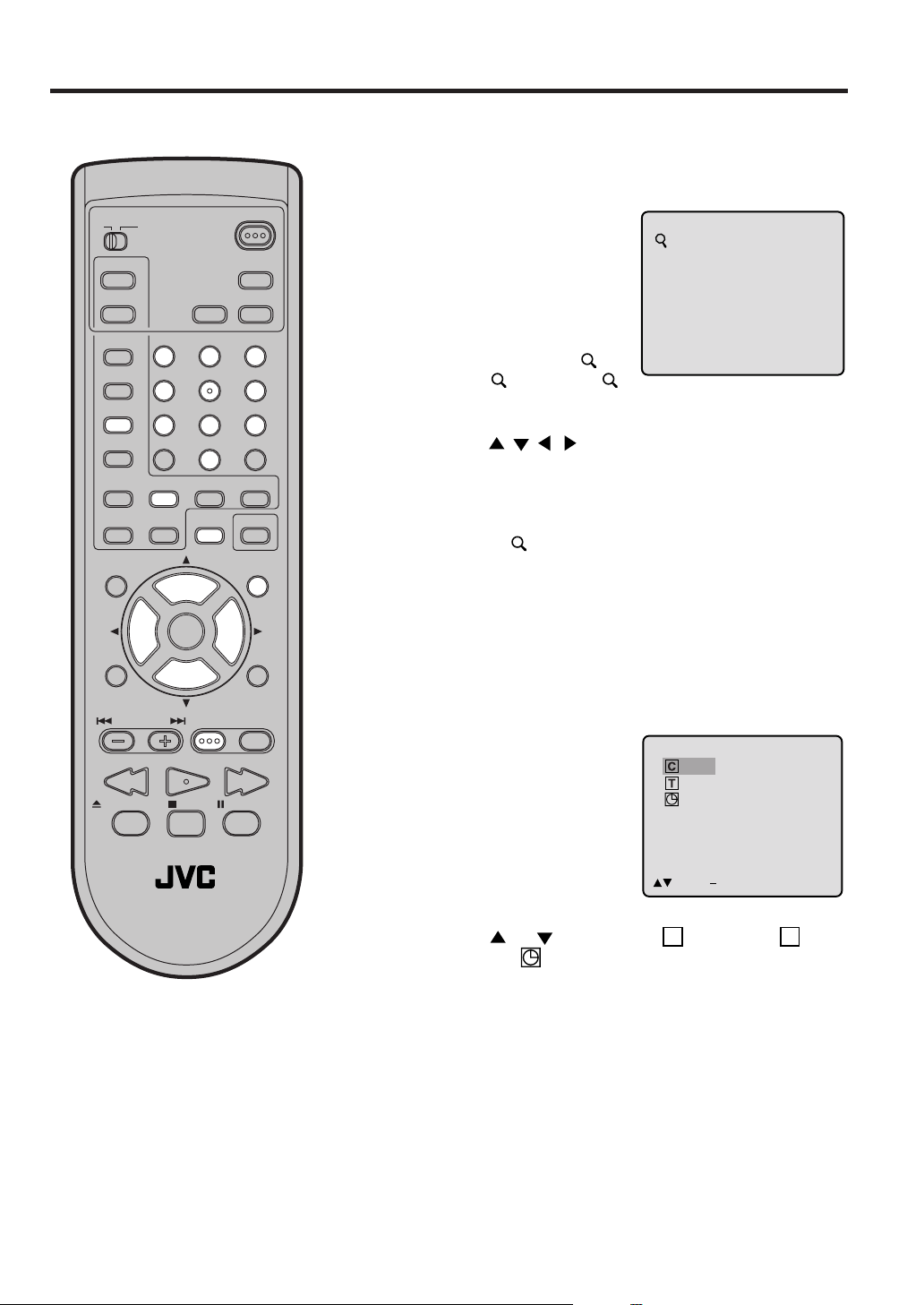
Zooming/Locating desired scene
Zooming
This unit will allow you to zoom in on the frame image. You
can then make selections by switching the position of the
frame.
TV CATV
PLAY MODE
AUDIO
TITLE
SUBTITLE
JUMP
ANGLE
MARKER ZOOM
MUTING
TV MENU
C.C.
–
SLOW
+
VOL
–
B.SEARCH F.SEARCHPLAY
POWER
DISPLAY
SLEEP
TIMER
AUDIO
123
456
789
RETURN
0
REPEATA-B RETURN
CANCEL
LIGHT
SELECT
+
CH
INPUT
CH
–
/ENTER
VOL
+
DVD SETUP
DVD MENUTV/DVDNEXTPREV
PAUSE/STILLSTOPOPEN/CLOSE
Press TV/DVD to select
1
DVD mode.
Press ZOOM during playback.
The center part of the
image will be zoomed in.
Each press of ZOOM will
change the ZOOM
(x 2),
(x 4).
Press / / / to view a different part of the frame.
2
You may move the frame from the center position to UP,
DOWN, LEFT or RIGHT direction.
In the zoom mode press ZOOM repeatedly to return to a
3
1:1 view (
2 (x 3) and 3
Off).
1
1
Locating Desired Scene
Use the title, chapter and time recorded on the disc to
locate the desired point to play back.
Press JUMP during play-
1
back.
Jump
_ _ / 19
1 / 8
0:00:00 / 2:02:31
TV / DVD
NOTES:
• You can select the Pause, Slow or
Search playback in the zoom mode.
• Some discs may not respond to zoom
feature.
30
/Enter/0 9/Cancel/Jump
Press or to select the “C (Chapter)”, “T (Title/
2
Track)” or “
Press Number buttons (0–9) to input the number.
3
• If you input a wrong number, press CANCEL.
• Refer to the package supplied with the disc to check the
numbers.
Press ENTER.
4
• Playback starts.
• When you change the title, playback starts from
Chapter 1 of the selected title.
• Some discs may not work in the above operation.
(Time)”.
Page 31

Repeat, Random and Program playback/Repeat A-B
Press PLAY MODE during playback or stop mode.
Each time you press PLAY MODE, playback mode changes as follows.
DVD
On screen
display
→ Title: Repeats the current title.
↓
Chapter: Repeats the current chapter.
↓
Off: Resumes normal playback.
• During stop mode, PLAY MODE key is not effective.
SLEEP
TIMER
DISPLAY
AUDIO
PLAY MODE
AUDIO
Operation
Audio CD/MP3 CD
On screen
display
→ All: Repeats entire disc.
↓
Track: Repeats the current track.
↓
Random Play:
Plays the tracks in random order.
↓
*Program: Plays the tracks in program order.
↓
(Status display)
: Resumes normal playback.
Operation
TITLE
SUBTITLE
JUMP
C.C.
ANGLE
MARKER ZOOM
–
SLOW
+
MUTING
VOL
–
TV MENU
B.SEARCH F.SEARCHPLAY
123
456
789
RETURN
0
REPEATA-B RETURN
CANCEL
LIGHT
SELECT
/ENTER
+
CH
VOL
INPUT
+
CH
–
DVD SETUP
DVD MENUTV/DVDNEXTPREV
PAUSE/STILLSTOPOPEN/CLOSE
*Program menu
Use number buttons (0–9) to
enter the track’s number you
want to program, then press
ENTER. The track number and
total time are displayed. Repeat
this step to enter additional
tracks. When you have finished
entering tracks, press PLAY to
start Program playback.
A playlist of your programmed
tracks is displayed.
• During stop mode, you can not select “ Track”.
Program
1 5 8:29
2 8 8:54
3 3 7:31
__
4
Total 3 0:24:54
/Enter/0 9/Cancel/Play/PlayMode
5/8
T
Playlist
583
NOTES:
• If you enter a wrong number – press CANCEL.
• To cancel program play, press STOP 3 times.
• To clear the programs on the program menu – press CANCEL until all programs are cleared.
• The program is cancelled when you open the disc tray or turn off the power.
Program Playback
0:02:31 0:08:29
Repeat A-B
Repeat A-B playback allows you to repeat material between two selected points.
Press REPEAT A-B during playback.
1
The start point is selected.
Press REPEAT A-B again.
2
The end point is selected. Playback starts at the point that you selected. Playback
stops at the end point, returns to Point A automatically, then starts again.
To resume normal playback press REPEAT A-B again. “ Off” appears on the
screen.
NOTES:
• Some discs may not work with the repeat operation.
• In Repeat A-B mode, subtitles near point A or B may not appear.
• You may not be able to set Repeat A-B, depending on the scenes of the DVD.
• Repeat A-B does not work with MP3 CD and interactive DVDs.
A
AB
31
Page 32

Marking desired scenes
The TV/DVD stores the points that you
want to watch again. You can resume
playback from that scene.
TV CATV
PLAY MODE
AUDIO
TITLE
SUBTITLE
JUMP
–
SLOW
VOL
–
C.C.
+
ANGLE
MARKER ZOOM
MUTING
TV MENU
123
456
789
+
CH
INPUT
CH
–
POWER
DISPLAY
SLEEP
TIMER
AUDIO
RETURN
0
REPEATA-B RETURN
CANCEL
LIGHT
SELECT
/ENTER
VOL
+
DVD SETUP
DVD MENUTV/DVDNEXTPREV
Marking the Scenes
Press MARKER during
1
playback.
Select the blank Marker
2
using / , then press
ENTER at the desired
scene.
• Up to 3 scenes can be
selected.
• Repeat this procedure to
set the other 2 scenes.
Press MARKER to remove this display.
3
Returning to the Scenes
Press MARKER during
1
playback or stop mode.
Marker
Marker
Marker
C
T
1
C
T
2
C
T
3
/Enter/Cancel/Marker
C
T
1
C
T
2
C
T
3
/Enter/Cancel/Marker
C
T
1
1
2
3
/Enter/Cancel/Marker
3
C
T
1
4
C
T
1
6
08 50013
08 500
12 270
17 040
B.SEARCH F.SEARCHPLAY
PAUSE/STILLSTOPOPEN/CLOSE
TV / DVD
NOTES:
•
The marking is canceled when you open
the disc tray or turn the power off.
•
Some subtitles recorded around the
marker may fail to appear.
32
Press or to select
2
the Marker 1-3.
Press SELECT.
3
Playback starts from the marked scene.
Marker
To Cancel the Mark
Press MARKER.
1
Press or to select the Marker 1-3.
2
Press CANCEL.
3
C
T
1
1
2
3
/Enter/Cancel/Marker
3
C
T
1
4
C
T
1
6
08 500
12 270
17 040
Page 33

TV CATV
PLAY MODE
AUDIO
TITLE
Changing soundtrack language/Subtitles
Changing soundtrack language
You can select the language when you play a multilingual
POWER
DISPLAY
SLEEP
TIMER
AUDIO
123
disc.
Press AUDIO during play-
1
back.
The current soundtrack
language will appear.
2/8 Fra Dolby Digital
SUBTITLE
JUMP
ANGLE
MARKER ZOOM
–
SLOW
MUTING
TV MENU
B.SEARCH F.SEARCHPLAY
456
789
VOL
–
C.C.
+
0
REPEATA-B RETURN
CANCEL
+
CH
VOL
INPUT
CH
–
RETURN
LIGHT
SELECT
/ENTER
+
DVD SETUP
DVD MENUTV/DVDNEXTPREV
PAUSE/STILLSTOPOPEN/CLOSE
NOTES:
• If the desired language is not heard after pressing the SUBTITLE button several times, the language is not recorded
on the disc.
• Changing soundtrack language is cancelled when you open the disc tray. The
initial default language or available language will be heard if the disc is played
back again.
• Changing subtitle language is cancelled
when you open the disc tray.
• Some functions may not work on some
DVDs. You may not be able to turn subtitles on or off or change subtitles. While
playing the DVD, the subtitle may
change when:
- you open or close the disc tray
- you change the title.
• In some cases, the subtitle language is
not changed to the selected one immediately.
Press AUDIO repeatedly
2
until the desired language
is selected.
1/8 Eng Dolby Digital
The on-screen display will
disappear after a few seconds.
Subtitles
Turning the Subtitles On and Off
When playing back a disc recorded with subtitles, you
can turn the subtitles on or off.
Press SUBTITLE during playback until “Off” appears.
Changing the subtitle language
You can select the language when playing back a disc
recorded with multi-lingual subtitles.
Press SUBTITLE repeat-
1
edly during playback until
your desired language appears.
The on-screen display will disappear after a few seconds.
2
Off
1/32 Eng
33
Page 34

Changing angles/Title selection/DVD menu
Changing angles
When playing back a disc recorded with multi-angle facility, you can change the view angle.
TV CATV
PLAY MODE
AUDIO
TITLE
SUBTITLE
JUMP
C.C.
ANGLE
MARKER ZOOM
–
SLOW
MUTING
VOL
–
TV MENU
POWER
DISPLAY
SLEEP
TIMER
AUDIO
123
456
789
RETURN
0
REPEATA-B RETURN
+
CANCEL
LIGHT
SELECT
+
CH
INPUT
CH
–
/ENTER
VOL
+
DVD SETUP
DVD MENUTV/DVDNEXTPREV
Press ANGLE during play-
1
back.
The current angle will appear.
Press ANGLE repeatedly until the desired angle is selected.
2
1/9
Title selection
Two or more titles are recorded on some discs. If the title
menu is recorded on the disc, you can select the desired
title.
Press TITLE during playback.
1
Title menu appears on the screen.
Press / or / to select the desired title.
2
Press ENTER or PLAY.
3
The playback of the selected title will start.
B.SEARCH F.SEARCHPLAY
PAUSE/STILLSTOPOPEN/CLOSE
TV / DVD
NOTES:
• Depending on the DVD, you may not
be able to change the angles even if
multi-angles are recorded on the DVD.
• Depending on the DVD, you may not
be able to select the title. Depending
on the DVD, a “title menu” may simply
be called a “menu” or “title” in the instructions supplied with the disc.
34
DVD menu
Some DVDs allow you to select the disc contents using the
menu.
When you play back these DVDs, you can select the subtitle language and sound-track language,etc. using the
DVD menu.
Press DVD MENU during playback.
1
The DVD menu appears on the screen.
• Press DVD MENU again to resume playback at the scene
when you pressed DVD MENU.
Press
2
Press ENTER.
3
The menu continues to another screen. Repeat steps 2
and 3 to set additional items if any.
/ or / to select the desired item.
Page 35

Setting language
You can change the default settings
to customise performance to your
preference.
TV CATV
PLAY MODE
AUDIO
TITLE
SUBTITLE
JUMP
ANGLE
MARKER ZOOM
MUTING
TV MENU
C.C.
–
SLOW
+
VOL
–
B.SEARCH F.SEARCHPLAY
123
456
789
CH
INPUT
CH
POWER
DISPLAY
SLEEP
TIMER
AUDIO
RETURN
0
REPEATA-B RETURN
CANCEL
LIGHT
SELECT
+
–
/ENTER
VOL
+
DVD SETUP
DVD MENUTV/DVDNEXTPREV
PAUSE/STILLSTOPOPEN/CLOSE
Press TV/DVD to select
1
DVD mode.
Press DVD SETUP in the
stop mode or No Disc.
Press or to select
“Language”, then press
or ENTER.
Press
2
“OSD Language”, then
press
Press
3
sired language (e.g. Eng-
or to select
or ENTER.
or to select de-
lish), then press ENTER.
The menu returns to “Lan-
Main Menu
Language
Picture
Sound
Parental
/Enter/Setup/Return
Language
OSD Language English
Menu English
Audio English
Subtitle English
/Enter/Setup/Return
OSD Language
English
Francais
Espanol
guage” menu automatically.
• If you want to return to the
/Enter/Setup/Return
previous menu, press
or RETURN.
Repeat steps 2-3 for other “Language” setting.
4
Other: (Menu/Audio/Subtitle)
If you want to select another language, enter the language
code (see the Language code list on page 41).
Off: (subtitle)
Subtitles do not appear.
TV / DVD
NOTES:
• If the selected soundtrack language is
not recorded on the disc, the original
language will be heard.
• If the selected subtitle language is not
recorded on the disc, the first-priority
language is selected.
Press DVD SETUP to remove the Menu screen.
5
35
Page 36

Setting the aspect ratio of TV screen/Setting on screen display
Setting the aspect ratio of TV screen
You can select the aspect ratio for your TV.
TV CATV
PLAY MODE
AUDIO
TITLE
SUBTITLE
JUMP
C.C.
ANGLE
MARKER ZOOM
–
SLOW
+
MUTING
VOL
–
TV MENU
B.SEARCH F.SEARCHPLAY
TV / DVD
POWER
DISPLAY
SLEEP
TIMER
AUDIO
123
456
789
RETURN
0
REPEATA-B RETURN
CANCEL
LIGHT
SELECT
+
CH
INPUT
CH
–
/ENTER
VOL
+
DVD SETUP
DVD MENUTV/DVDNEXTPREV
PAUSE/STILLSTOPOPEN/CLOSE
Press TV/DVD to select
1
DVD mode.
Press DVD SETUP in the
stop mode or No Disc.
Press or to select
“Picture”, then press or
ENTER.
Press or to select
2
“TV Screen”, then press
or ENTER.
Press
3
your desired screen type,
or to select
then press ENTER.
Main Menu
Language
Picture
Sound
Parental
/Enter/Setup/Return
Picture
TV Screen
Display
TV Screen
16:9
4:3
4:3
4:3
On
You have the following screen sizes to choose from:
16:9
Wide screen
Select this mode when connecting to a wide-screen TV.
A wide screen picture is displayed full size.
4:3 Letterbox
Select this mode when connecting to a conventional TV.
When playing back a wide screen-DVD disc, it displays
the wide picture with black bands at the top and bottom of
screen.
4:3
Panscan
It displays the wide picture on the whole screen with left
and right edges automatically cut off.
• If you want to return to the previous menu, press or
RETURN.
Press DVD SETUP to remove the Menu screen.
4
Status on screen display
On screen display can be switched on or off when you
press the buttons.
Press DVD SETUP in the stop mode or No Disc.
1
Press or to select “Picture”, then press or ENTER.
NOTE:
If the DVD disc is not formatted in the pan
& scan style, it displays 4:3 style.
36
Press
2
“Display”.
Press or ENTER to
3
select “On” or “Off”.
or to select
Picture
TV Screen
Display
Picture
TV Screen
Display
4:3
On
4:3
Off
On: On screen displays appear when you press the
buttons (factory setting).
Off: On screen displays do not appear when you press
any buttons.
• If you want to return to the previous menu, press
RETURN.
Press DVD SETUP to remove the Menu screen.
4
or
Page 37

Dynamic Range Control
DRC (Dynamic Range Control) enables you to control the dynamic range
so as to achieve a suitable sound for
your equipment.
TV CATV
PLAY MODE
AUDIO
TITLE
SUBTITLE
JUMP
C.C.
ANGLE
MARKER ZOOM
–
SLOW
MUTING
VOL
–
123
456
789
+
CH
INPUT
POWER
DISPLAY
SLEEP
TIMER
AUDIO
RETURN
0
REPEATA-B RETURN
CANCEL
LIGHT
SELECT
VOL
+
/ENTER
+
Press TV/DVD to select
1
DVD mode.
Press DVD SETUP in the
stop mode or No Disc.
Press or to select
Main Menu
Language
Picture
Sound
Parental
“Sound”.
/Enter/Setup/Return
Press or ENTER to se-
2
lect “DRC”.
Press or ENTER to se-
3
lect “On” or “Off”.
Sound
DRC On
/Enter/Setup/Return
Sound
DRC Off
/Enter/Setup/Return
• If you want to return to the previous menu, press or
RETURN.
CH
TV MENU
B.SEARCH F.SEARCHPLAY
–
DVD SETUP
DVD MENUTV/DVDNEXTPREV
PAUSE/STILLSTOPOPEN/CLOSE
TV / DVD
NOTES:
• This function works only during playback of Dolby Digital recorded discs.
• The level of Dynamic Range Reduction
may differ depending on DVD video
disc.
Press DVD SETUP to remove the Menu screen.
4
37
Page 38

Parental control setting
Some discs are specified not suitable
for children. Such discs can be prevented from play back with the unit.
TV CATV
PLAY MODE
AUDIO
TITLE
SUBTITLE
JUMP
C.C.
ANGLE
MARKER ZOOM
–
SLOW
+
MUTING
VOL
–
TV MENU
B.SEARCH F.SEARCHPLAY
123
456
789
+
CH
INPUT
CH
POWER
DISPLAY
SLEEP
TIMER
AUDIO
RETURN
0
REPEATA-B RETURN
CANCEL
LIGHT
SELECT
/ENTER
VOL
+
–
DVD SETUP
DVD MENUTV/DVDNEXTPREV
Press TV/DVD to select
1
DVD mode.
Press DVD SETUP in the
stop mode or No Disc.
Press or to select
“Parental”, then press or
ENTER.
Press or to select
2
“Parental Level”, then press
or ENTER.
Press or to select a
3
level from Off or 1–8. Press
or ENTER to set the se-
lected level.
Main Menu
Language
Picture
Sound
Parental
/Enter/Setup/Return
Parental
Password Off
Parental Level 8
Parental Level
Off
1
2
3
4
5
/Enter/Setup/Return
• Level Off: The parental control setting does not func-
tion.
• Level 8: Almost all DVD software can be played back.
• Level 1: DVD software for adults cannot be played
back.
• Select from the level 1 to level 8. The limitation will be
more severe as the level number is lower.
Press or to select
4
“Password”, then press
or ENTER.
Parental
Password Off
Parental Level 1
PAUSE/STILLSTOPOPEN/CLOSE
TV / DVD
NOTES:
• If each setup (P.35–39) has been
completed, the unit can always be
operated under the same conditions
(especially with DVD discs).
Each setup will be retained in the
memory when you turn the power off.
• Depending on the discs, the unit cannot limit playback.
• Some discs may not be encoded with
specific rating level information though
its disc jacket says “adult.” For those
discs, the age restriction will not work.
38
Press number buttons (0–
5
9) for the password.
Don’t forget the password.
Password
Password 1234
• If you input a wrong
number, press CANCEL.
Press ENTER to store the
6
password.
Note: Now the rating is
locked and the setting can-
Parental
Password On
Parental Level 1
not be changed unless you
enter the correct password.
• If you want to return to the previous menu, press
or RETURN.
Press DVD SETUP to remove the parental control screen.
7
Page 39

To change the parental level
Press TV/DVD to select DVD mode.
1
Press DVD SETUP in the stop mode or No Disc.
Press
ENTER.
or to select “Parental”, then press or
TV CATV
PLAY MODE
AUDIO
TITLE
SUBTITLE
JUMP
ANGLE
MARKER ZOOM
MUTING
TV MENU
C.C.
–
SLOW
+
VOL
–
B.SEARCH F.SEARCHPLAY
POWER
DISPLAY
SLEEP
TIMER
AUDIO
123
456
789
RETURN
0
REPEATA-B RETURN
CANCEL
LIGHT
SELECT
+
CH
INPUT
CH
–
/ENTER
VOL
+
DVD SETUP
DVD MENUTV/DVDNEXTPREV
PAUSE/STILLSTOPOPEN/CLOSE
Press or to select
2
“Password”, then press
or ENTER.
Press number buttons (0–
3
9) to enter the password
you have stored.
• If you input a wrong number, press CANCEL.
Press ENTER.
4
The password is now Off.
Press or to select
5
“Parental Level”. Then
press or ENTER. The
Parental Level screen is
displayed.
Press or to select a
6
level from Off or 1–8 and
then press or ENTER.
Parental
Password On
Parental Level 1
Password
Password 1234
Parental
Password Off
Parental Level 1
Parental
Password Off
Parental Level 1
Parental Level
3
4
5
6
7
8
/Enter/Setup/Return
TV / DVD
NOTE:
Do not forget the password. If you forget the
password, contact the dealer that you
purchased the unit from.
Press or to select
7
“Password” and then press
or ENTER.
Press number buttons (0–
8
9) to enter a 4-digit password.
Note: You can enter a new password.
Press ENTER.
9
The parental level is now
changed and locked.
• If you want to return to the previous menu, press or
RETURN.
Press DVD SETUP to remove the parental control screen.
10
Parental
Password Off
Parental Level 8
Password
Password 9876
Parental
Password On
Parental Level 8
39
Page 40

Temporary disabling of rating level by DVD disc
Your disc exceeds the parental control level.
Password
Enter/0–9/Cancel/Return
Depending on the DVD disc, the disc
may try to temporarily cancel the
rating level that you have set.
It is up to you to decide whether to
cancel the rating level or not.
TV CATV
PLAY MODE
AUDIO
TITLE
SUBTITLE
JUMP
– SLOW +
VOL
–
C.C.
ANGLE
MARKER ZOOM
MUTING
TV MENU
123
456
789
CH
INPUT
CH
POWER
DISPLAY
SLEEP
TIMER
AUDIO
RETURN
0
REPEATA-B RETURN
CANCEL
LIGHT
SELECT
+
–
/ENTER
VOL
+
DVD SETUP
DVD MENUTV/DVDNEXTPREV
Load a DVD disc and press
1
PLAY (see page 27).
If the DVD disc has been designed to temporarily cancel
2
the Rating level, the screen which appears after inserting
a DVD will change, depending on which disc is played. If
you select “YES” with the ENTER key, “Your disc exceeds
the parental control level.” screen will then appear.
If you wish to cancel the set rating level temporarily, enter
3
the 4-digit password.
Then press ENTER.
Alternatively, if the password has not been set, playback
will commence. If you don’t know (or have forgotten) the
password, select “STOP”.
The setting screen will disappear. Press OPEN/CLOSE to
remove the disc.
To quit entering, press RETURN.
B.SEARCH F.SEARCHPLAY
PAUSE/STILLSTOPOPEN/CLOSE
TV / DVD
NOTE:
The rating level will remain disabled until the
disc is ejected.
When the disc is ejected, the original rating
level will be set again automatically.
40
Playback will commence if the entered password was cor-
4
rect.
Page 41

Language code list
Enter the appropriate code number for the initial settings “Menu”, “Audio” and/or “Subtitle” (see page 35).
Language Name Code Language Name Code Language Name Code Language Name Code
Abkhazian 1112 Fiji 1620 Lingala 2224 Singhalese 2919
Afar 1111 Finnish 1619 Lithuanian 2230 Slovak 2921
Afrikaans 1116 French 1628 Macedonian 2321 Slovenian 2922
Albanian 2927 Frisian 1635 Malagasy 2317 Somali 2925
Amharic 1123 Galician 1722 Malay 2329 Spanish 1529
Arabic 1128 Georgian 2111 Malayalam 2322 Sundanese 2931
Armenian 1835 German 1415 Maltese 2330 Swahili 2933
Assamese 1129 Greek 1522 Maori 2319 Swedish 2932
Aymara 1135 Greenlandic 2122 Marathi 2328 Tagalog 3022
Azerbaijani 1136 Guarani 1724 Moldavian 2325 Tajik 3017
Bashkir 1211 Gujarati 1731 Mongolian 2324 Tamil 3011
Basque 1531 Hausa 1811 Nauru 2411 Tatar 3030
Bengali; Bangla 1224 Hebrew 1933 Nepali 2415 Telugu 3015
Bhutani 1436 Hindi 1819 Norwegian 2425 Thai 3018
Bihari 1218 Hungarian 1831 Oriya 2528 Tibetan 1225
Breton 1228 Icelandic 1929 Panjabi 2611 Tigrinya 3019
Bulgarian 1217 Indonesian 1924 Pashto, Pushto 2629 Tonga 3025
Burmese 2335 Interlingua 1911 Persian 1611 Turkish 3028
Byelorussian 1215 Irish 1711 Polish 2622 Turkmen 3021
Cambodian 2123 Italian 1930 Portuguese 2630 Twi 3033
Catalan 1311 Japanese 2011 Quechua 2731 Ukrainian 3121
Chinese 3618 Javanese 2033
Corsican 1325 Kannada 2124 Romanian 2825 Uzbek 3136
Croatian 1828 Kashmiri 2129 Russian 2831 Vietnamese 3219
Czech 1329 Kazakh 2121 Samoan 2923 Volapük 3225
Danish 1411 Kirghiz 2135 Sanskrit 2911 Welsh 1335
Dutch 2422 Korean 2125 Scots Gaelic 1714 Wolof 3325
English 1524 Kurdish 2131 Serbian 2928 Xhosa 3418
Esperanto 1525 Laothian 2225 Serbo-Croatian 2918 Yiddish 2019
Estonian 1530 Latin 2211 Shona 2924 Yoruba 3525
Rhaeto-Romance
2823 Urdu 3128
Faroese 1625 Latvian, Lettish 2232 Sindhi 2914 Zulu 3631
41
Page 42

Connections to other equipments
The exact arrangement you use to interconnect various video and audio components to the TV/DVD is dependent on the model and features of each component. Check the Owner's Manual provided with each component
for the location of video and audio inputs and outputs.
Using an AV Amplifier with built-in digital surround
If you are using an Amplifier with a built-in digital surround as follows, you can enjoy the various audio systems
including Dolby Digital Surround audio that sounds just like the movie.
Connect an AV amplifier with built-in Dolby Digital decoder, DTS decoder, MPEG decoder or etc as
shown below.
Rear of TV/DVD
VIDEO
(MONO)
AUDIO
R
LINE IN 1
Coaxial digital cable (not supplied)
To Coaxial Digital Audio Input
AV Amplifier with built-in digital surround
decoder as listed above
*
Manufactured under license from Dolby Laboratories. “Dolby” and the double-D symbol are trademarks of Dolby
UHF/
VHF
DIGITAL
AUDIO OUT
COAXIAL
Front
Speaker
(Left)
Coaxial Digital
Audio Output
TV/DVD
Surround
Speaker (Left)
Subwoofer
Center Speaker
Front
Speaker
(Right)
Surround
Speaker
(Right)
Laboratories. Confidential unpublished works. © 1992-1997 Dolby Laboratories, Inc. All rights reserved.
*
“DTS” and “DTS Digital Out” are trademarks of Digital Theater Systems, Inc.
NOTE:
When you make the connections above, do not set DOLBY DIGITAL to DOLBY DIGITAL, MPEG to MPEG to ON on the AV
•
Amplifier. If you do, a loud noise will suddenly come out from the speakers, affecting your ears or causing the speakers to be
damaged.
When playing DTS-encoded CDs, only noise will be heard from the speakers or analogue stereo outputs.
•
Some DTS decoders which do not support DVD-DTS interface may not work properly with the unit.
•
42
Page 43

Using the audio/video inputs
If you connect the TV/DVD to VCR, camcorder or TV game, you can select by pressing INPUT.
Press INPUT repeatedly to select the desired mode.
“LINE1”, “LINE2” or TV channel will display on the screen for 4 seconds.
LINE 1
TV Channel LINE 1
(Back)
NOTE: In the DVD mode this key will not operate.
1. To connect the TV/DVD to a VCR
Press the INPUT to select the desired mode to use the TV as a monitor.
Operate your VCR as usual.
VCR
To Audio/Video
OUT
LINE 2
(Front)
Rear of TV/DVD
VIDEO
(MONO)
AUDIO
DIGITAL
R
AUDIO OUT
COAXIAL
LINE IN 1
UHF/
VHF
AUDIO IN (L)
AUDIO IN (R)
VIDEO IN
2. To connect the TV/DVD to a camcorder
To playback from the camcorder, connect the camcorder to the TV/DVD as shown.
Camcorder
VIDEO IN
To Audio/Video OUT
Audio/Video cord (not supplied)
Front of TV/DVD
VIDEO L/MONO AUDIO R
LINE 2 IN
3. To connect the TV/DVD to a TV Game
Front of TV/DVD
VIDEO IN
VIDEO L/MONO AUDIO R
LINE 2 IN
To Audio/Video OUT
Audio/Video cord (not supplied)
AUDIO IN (R)
AUDIO IN (L)
AUDIO IN (R)
AUDIO IN (L)
43
Page 44

Problems and troubleshooting
Use the following check list for troubleshooting when you have problems with your unit. Consult your local dealer
or service outlet if problems persist.
Be sure all connections are properly made when using with other units.
SYMPTOMS POSSIBLE SOLUTIONS
POWER
TV/DVD does not operate.
TV BROADCAST RECEPTION
Poor sound or No sound
Poor picture or No picture
Poor reception on some channels
Poor color or no color
Picture wobbles or drifts
No CATV reception
Horizontal or diagonal bars on
screen
No reception above channel 13
TV shuts off
Closed - Caption is not activated.
Display is not shown in your
language.
•Make sure the power cord is plugged in.
•Try another AC outlet.
•Power is off, check fuse or circuit breaker.
•Unplug unit, then plug it back in.
•Station or CATV experiencing problems, tune to another station.
•Check Volume adjustments (Volume and Muting).
•Check for sources of possible interference.
•Station or CATV experiencing problems, tune to another station.
•Check antenna or CATV connections, reorient antenna.
•Check for sources of possible interference.
•Check picture control adjustments.
•Station or CATV experiencing problems, tune to another station.
•
Station signal is weak, reorient antenna to receive weaker station.
• Check for sources of possible interference.
•Station or CATV experiencing problems, tune to another station.
•Make sure channels are set into memory.
•Check picture control adjustments.
•Check antenna or CATV connections, reorient antenna.
•Check for sources of possible interference.
•Station or CATV experiencing problems, tune to another station.
•Make sure channels are set into memory.
•CATV company is scrambling signal.
•Check antenna orientation.
•Check all CATV connections.
•Set TV/CATV menu option to the CATV mode.
•Station or CATV system problems, try another station.
•Check antenna connections, reorient antenna.
•Check for sources of possible interference.
•Make sure TV/CATV menu option is in the appropriate mode.
•If using antenna, check UHF antenna connections.
•No broadcast on station tuned.
•Sleep Timer is set.
•Power interrupted.
•TV station experiencing problems or program tuned is not closed
captioned. Try another channel.
•Check CATV connection or VHF/UHF antenna, reposition or
rotate antenna.
•Press C.C. button to turn on the closed caption decoder.
•Select proper language in the menu options.
PAGE
5
10
–
5
14
14
46
14
11,12
46
22
14
11,12
46
14
18
22
11,12
46
14
18
–
11
12
17
14
11,12
46
17
11
18
15
–
18
11,12
16
13
44
Page 45

SYMPTOMS POSSIBLE SOLUTIONS
DVD
Playback doesn’t start.
No picture • TV/DVD selector is not set correctly.
No sound • Check the input selector of the amplifier is set properly.
Picture is distorted during CUE or
REVIEW.
Stopping playback, search, slowmotion play, repeat play, or
program play, etc. cannot be
performed.
• No disc is inserted.
• The disc may be dirty. Clean up the disc.
• The unit cannot play CD-ROMs, etc.
• The unit is in the Special playback mode.
• Select the correct Audio Output position on AV amplifier.
• The picture will be distorted occasionally.
• Some discs may not do some of the functions.
PAGE
27
25
–
26
–
28
42
–
–
No 4:3 (16:9) picture • The setup does not match your TV.
No on-screen display • Select Display On.
No surround sound • The setup does not match your stereo system.
The unit or remote operation key
is not functioning.
Playback does not start when the
title is selected.
Audio soundtrack and/or subtitle
language is not changed when
you play back a DVD.
No subtitle • Some discs have no subtitles.
Angle cannot be changed. • Multi-angles are not recorded on the DVD disc.
“ ” appears on the screen.
REMOTE CONTROL
The remote control does not
function.
• Turn off the unit and unplug the AC power cord for several
minutes, then replug it.
• Check the RATING LEVEL setup.
• Multilingual language is not recorded on the DVD disc.
• Subtitles are cleared. Press SUBTITLE.
• The function is prohibited with the unit or the disc.
• Aim at the remote control at the remote sensor.
• Operate within Approx. 5 Meters or reduce the light in the room.
• Clear the path of the beam.
• The batteries are weak. Replace the batteries.
• Check the batteries are inserted correctly.
36
36
42
–
38~40
35
33
34
–
–
10
45
Page 46

Reception disturbances
Most types of television interference can be remedied by adjusting the height and position of the VHF/UHF
antenna. Outdoor antennas are recommended for best results. The most common types of television
interference are shown below. If one of these symptoms appear when the TV/DVD is connected to a Cable
TV system, the disturbance may be caused by the local Cable TV company broadcast.
IGNITION
Black spots or horizontal streaks may appear, the picture may flutter or
drift. Usually caused by interference from automobile ignition systems,
neon lamps or AC powered tools and appliances such as drills or hair
dryers.
GHOSTS
Ghosts are caused by the television signal following two paths. One is
the direct path and the other is reflected by tall buildings, hills or other
large objects. Changing the direction or position of the antenna may
improve the reception.
SNOW
If the TV/VCR is located far from the TV station, in a fringe reception
area where the signal is weak, small dots may appear in the picture.
If the signal is extremely weak, the installation of a larger external
antenna may be necessary.
RADIO FREQUENCY INTERFERENCE (RFI)
Caused by two-way radios, this type of interference produces moving
ripples or diagonal streaks in the picture. Some cases may cause a
loss of contrast in the picture. Changing the direction and position of
the antenna or installing an RFI filter may improve the picture.
PICTURE SIZE VARIATION
A slight picture size variation is normal when you adjust the CONTRAST
or BRIGHTNESS settings.
CARE AND MAINTENANCE
To prevent fire or shock hazard, disconnect the TV/DVD from the power source before cleaning.
The finish on the cabinet may be cleaned with mild soap and a soft, damp cloth and cared for as other furniture.
Use caution when cleaning or wiping the plastic parts.
46
Page 47

GENERAL
Power supply:
Power consumption:
Weight:
Dimensions:
TELEVISION
Picture tube:
Tuner type:
Receiving channels:
Antenna input:
Speaker:
Audio output power:
Specifications
AC 120V 60Hz
Operation: 115W
Stand by: 4W
56.1lbs (25.5 kg)
Width : 22-5/8 inches (574 mm)
Height: 20-3/8 inches (515 mm)
Depth : 19-1/8 inches (483 mm)
Type 20 (508 mm diagonal)
Quartz PLL Frequency Synthesized
VHF 2-13
UHF 14-69
CATV 14-36 (A)-(W)
37-59 (AA)-(WW)
60-85 (AAA)-(ZZZ)
86-94 (86)-(94)
95-99 (A-5)-(A-1)
100-125 (100)-(125)
01 (5A)
VHF/UHF In 75 ohm coaxial
1-13/16 x 3-7/8 inches (46 x 99 mm), 8 ohm x 2
2.5W + 2.5W
DVD/CD player
Signal system:
Applicable disc:
Frequency response:
Input:
Headphone Jack:
Digital audio out:
Pickup:
ACCESSORIES:
NTSC
1. DVD (12cm, 8cm)
2. CD (12cm, 8cm)
DVD: 4Hz - 22KHz
CD: 4Hz - 20KHz
Video : (RCA) 1 Vp-p/75ohm
Audio : (RCA) –8 dB/50Kohm
3.5mm Stereo mini-jack
0.5Vp-p 75ohms terminated
CD : Wavelength: 775 - 815 nm
Maximum output power: 0.5 mW
DVD : Wavelength: 650 - 666 nm
Maximum output power: 2.0 mW
Remote control x 1
Batteries (2 x AA)
47
Page 48

Appendix (Remote programming)
REMOTE PROGRAMMING
Setting the CATV Codes
You can program your remote to operate your cable box, satellite receiver by using the instructions and codes
listed below. If the equipment does not respond to any of the codes listed below or to the code search function,
use the remote control supplied by the manufacturer.
Cable Box or Satellite setup
The remote control is programmed with CATV and/or Satellite codes for power on, power off, channel up, channel
down, and 10 key operation.
1) Find the CATV/Satellite brand from the list of codes shown below.
2) Slide the 2-way selector switch to “CATV ”.
3) Press and hold down the DISPLAY button.
4) With the DISPLAY button held down, enter the first code number listed using the 10 key pad.
5) Release the DISPLAY button.
6) Confirm the operation of the Cable Box/Satellite receiver.
• If your CATV or Satellite box does not respond to the first code, try the others listed. If it does not respond to any
code, try the Search Codes Function as shown below.
Cable Box CODES Cable Box CODES
ABC
Archer
Cableview
Citizen
Curtis
Diamond
Eagle
Eastern
GC Brand
Gemini
General Instrument
Hamlin
Hitachi
Jerrold
Macom
Magnavox
Memorex
Movietime
Oak
Panasonic
Paragon
Philips
Pioneer
Digital Satellite
Systems
Echostar
Express VU
G.E.
G.I.
Gradiente
Hitachi
HNS (Hughes)
Panasonic
032, 025
051, 032
022, 051
058, 059
024, 032, 025
029
034
032, 051
022, 043
065, 024, 025, 026, 027, 020, 021, 022, 057, 023
040, 041, 042, 045, 058, 064
049, 024
065, 024, 025, 026, 027, 020,021, 022, 057, 023
049, 050, 051, 054
033
030
032, 051
039, 037, 048
055, 056, 060, 071
063
028, 029, 030, 052, 053, 031, 069
047, 062
CODES
100, 113, 114
100, 113
106
108
112
104, 111
104
105
Pulsar024
Puser
RCA
Realistic
Regal
Regency
Rembrandt
Samsung
Scientific Atlanta
SLMark
Sprucer
Stargate
Telecaption
Teleview
Texscan
Tocom
Toshiba
Unika
Universal
Videoway
Viewstar
Zenith 063, 046
Zenith/Drake Satellite
Digital Satellite
Systems
Philips
Primestar
Proscan
RCA
Sony
Star Choice
Toshiba
Uniden
051, 032
032
061, 070
032
058, 064, 040, 041, 042, 045, 068
034
037, 032, 051, 038
051
057, 058, 059
051, 047
051, 056
032, 051
067
047, 051
044
035, 036, 066
050
032, 025
022, 032
052
029, 030
046
CODES
102, 103
108
106, 109, 110
106, 109, 110
107
104, 108
101
102, 103
Cable/Satellite Search Codes Function:
1) Slide the 2-Way Mode Selector switch to CATV.
2) Press the TV POWER and RETURN buttons. Hold for at least three seconds and release.
3) Press TV POWER, see if the CATV or Satellite box responds.
4)
If there was a response, press RETURN. The operating codes are now set. If there was no response, repeat Step 3.
If you repeat Step 3 a total of 52 times without a response, use the remote control which came with the equipment.
5) Press RETURN to exit.
48
Page 49

Memo
○○○○○○○○○○○○○○○○○○○○○○○○○○○○○○○○○○○○○○○○○○○○○○○○○○○○○○○○
○○○○○○○○○○○○○○○○○○○○○○○○○○○○○○○○○○○○○○○○○○○○○○○○○○○○○○○○
○○○○○○○○○○○○○○○○○○○○○○○○○○○○○○○○○○○○○○○○○○○○○○○○○○○○○○○○
○○○○○○○○○○○○○○○○○○○○○○○○○○○○○○○○○○○○○○○○○○○○○○○○○○○○○○○○
○○○○○○○○○○○○○○○○○○○○○○○○○○○○○○○○○○○○○○○○○○○○○○○○○○○○○○○○
○○○○○○○○○○○○○○○○○○○○○○○○○○○○○○○○○○○○○○○○○○○○○○○○○○○○○○○○
○○○○○○○○○○○○○○○○○○○○○○○○○○○○○○○○○○○○○○○○○○○○○○○○○○○○○○○○
○○○○○○○○○○○○○○○○○○○○○○○○○○○○○○○○○○○○○○○○○○○○○○○○○○○○○○○○
○○○○○○○○○○○○○○○○○○○○○○○○○○○○○○○○○○○○○○○○○○○○○○○○○○○○○○○○
○○○○○○○○○○○○○○○○○○○○○○○○○○○○○○○○○○○○○○○○○○○○○○○○○○○○○○○○
○○○○○○○○○○○○○○○○○○○○○○○○○○○○○○○○○○○○○○○○○○○○○○○○○○○○○○○○
○○○○○○○○○○○○○○○○○○○○○○○○○○○○○○○○○○○○○○○○○○○○○○○○○○○○○○○○
○○○○○○○○○○○○○○○○○○○○○○○○○○○○○○○○○○○○○○○○○○○○○○○○○○○○○○○○
○○○○○○○○○○○○○○○○○○○○○○○○○○○○○○○○○○○○○○○○○○○○○○○○○○○○○○○○
○○○○○○○○○○○○○○○○○○○○○○○○○○○○○○○○○○○○○○○○○○○○○○○○○○○○○○○○
○○○○○○○○○○○○○○○○○○○○○○○○○○○○○○○○○○○○○○○○○○○○○○○○○○○○○○○○
○○○○○○○○○○○○○○○○○○○○○○○○○○○○○○○○○○○○○○○○○○○○○○○○○○○○○○○○
○○○○○○○○○○○○○○○○○○○○○○○○○○○○○○○○○○○○○○○○○○○○○○○○○○○○○○○○
○○○○○○○○○○○○○○○○○○○○○○○○○○○○○○○○○○○○○○○○○○○○○○○○○○○○○○○○
○○○○○○○○○○○○○○○○○○○○○○○○○○○○○○○○○○○○○○○○○○○○○○○○○○○○○○○○
○○○○○○○○○○○○○○○○○○○○○○○○○○○○○○○○○○○○○○○○○○○○○○○○○○○○○○○○
○○○○○○○○○○○○○○○○○○○○○○○○○○○○○○○○○○○○○○○○○○○○○○○○○○○○○○○○
○○○○○○○○○○○○○○○○○○○○○○○○○○○○○○○○○○○○○○○○○○○○○○○○○○○○○○○○
○○○○○○○○○○○○○○○○○○○○○○○○○○○○○○○○○○○○○○○○○○○○○○○○○○○○○○○○
○○○○○○○○○○○○○○○○○○○○○○○○○○○○○○○○○○○○○○○○○○○○○○○○○○○○○○○○
49
Page 50

JVC COMPANY OF AMERICA
Division of U.S. JVC CORP.
1700 Valley Road
Wayne, New Jersey 07470
JVC CANADA, INC.
21 Finchdene Square
Scarborough, Ontario
Canada M1X 1A7
J5J00401A
03/05
K
Printed in Thailand
Page 51

MANUEL
D'INSTRUCTIONS
TÉLÉCOULEUR/DVD
POWER
TV CATV
DISPLAY
PLAYMODE
SLEEP
TIMER
AUDIO
AUDIO
TITLE
123
SUBTITLE
456
JUMP
789
C.C.
RETURN
ANGLE
0
MARKER ZOOM
REPEATA-BRETURN
ÐSLOW+
CANCEL
LIGHT
SELECT
MUTING
/ENTER
+
CH
VOLÐVOL
INPUT
+
CH
Ð
TVMENU
DVDSETUP
DVDMENUTV/DVDNEXTPREV
B.SEARCH F.SEARCHPLAY
PAUSE/STILLSTOPOPEN/CLOSE
TV/ DVD
Pour le modèle:
AV-20FD24
REMARQUE:
Veuillez inscrire dans les espaces ci-dessous le n˚ de série de
votre téléviseur (sités à l'arrière du téléviseur).
Agrafez votre reçu ou votre facture à la page intérieure de ce guide. Rangez ce
manuel dans un lieu où vous le retrouverez rapidement pour vous y référer.
Gardez le carton et l'emballage d'origine pour une utilisation ultéríeure.
Numéro de série
Page 52

ATTENTION
RISQUE DE CHOC ELECTRIQUE
NE PAS OUVRIR
ATTENTION: AFIN DE REDUIRE LES RISQUES DE
CHOC ELECTRIQUE, NE PAS RETIRER LE
COUVERCLE (OU LE PANNEAU ARRIERE).
AUCUNE PIECE NE PEUT ETRE REPAREE
PAR L'UTILISATEUR. CONFIEZ L'APPAREIL
A UN TECHNICIEN QUALIFIE.
Le signe représentant un éclair dans un
triangle équilatéral a pour but d'avertir
l'utilisateur du danger présenté par des
pièces non isolées à l'intérieur de l'appareil
et dont la tension est suffisante pour
provoquer des décharges électriques
dangereuses.
Le point d'exclamation dans un triangle
équilatéral a pour but d'avertir l'utilisateur
que des instructions importantes relatives à
l'utilisation et à l'entretien se trouvent dans
le manuel accompagnant l'appareil.
AVERTISSEMENT: AFIN D'EVITER TOUT RISQUE D'INCENDIE OU D'ELECTROCUTION, N'EXPOSEZ
PAS CET APPAREIL A LA PLUIE NI A L'HUMIDITE.
A TTENTION: POUR PREVENIR LES CHOCS ELECTRIQUES, N'UTILISEZ PAS CETTE FICHE
POLARISEE AVEC UNE RALLONGE, UNE PRISE DE COURANT OU UNE AUTRE
SORTIE DE COURANT, SAUF SI LES LAMES PEUVENT ETRE INSEREES A FOND
SANS EN LAISSER AUCUNE PARTIE A DECOUVERT.
AVERTISSEMENT: Cet appareil a fait l'objet de tests qui ont déterminé qu'il est en conformité avec les
limites imposées pour les appareils numériques de la classe B, selon le chapitre 15, des
règles de la FCC. Ces limites sont prescrites afin d'offrir une protection raisonnable
contre toute interférence préjudiciable dans une installation résidentielle. Cet appareil
produit, emploie et peut être la cause d'un rayonnement radioélectrique et, si
l'installation et l'emploi ne sont pas conformes aux instructions, risque de présenter un
brouillage nuisible aux radiocommunications.
Toutefois, il est impossible de garantir qu'aucune interférence ne sera produite par une
installation particulière. Si cet appareil est la source de brouillage nuisible à la réception
des émissions radiophoniques ou télévisuelles, déterminé en allumant et en éteignant
plusieurs fois de suite l'appareil, l'utilisateur pourra tenter de résoudre ce problème de
brouillage par une des mesures suivantes:
- Changer l'orientation ou l'installation de l'antenne de réception.
- Eloigner davantage l'appareil du récepteur.
- Brancher le cordon d'alimentation de l'appareil dans une prise ou sur un circuit séparé
du récepteur.
- Consulter le distributeur ou un technicien expérimenté en radio/TV pour assistance.
ATTENTION: Tout changement ou toute modification n'étant pas autorisée de façon explicite par
l'organisme responsable de la conformité aux règles de la FCC peut entraîner
l'interdiction à l'utilisateur d'utiliser cet appareil.
PRÉCAUTIONS :
CE LECTEUR DVD UTILISE UN SYSTEME LASER.
Emplacement des marquages nécessaires
La fiche signalétique et les instructions de
sécurité sont situées à l'arrière de l'appareil.
POUR UTILISER CORRECTEMENT CE PRODUIT, VEUILLEZ
LIRE CE GUIDE D'UTILISATION SOIGNEUSEMENT ET
GARDEZ-LE A TITRE DE RÉFÉRENCE FUTURE. SI
L'APPAREIL DOIT SUBIR DES OPÉRATIONS DE MAINTENANCE, CONT ACTEZ UN CENTRE DE SER VICE JVC A GRÉÉ.
L'UTILISATION DES COMMANDES, DES RÉGLAGES OU
L'EXÉCUTION DE PROCÉDURES QUI NE SONT PAS
SPÉCIFIÉES DANS CE DOCUMENT PEUVENT ENTRAINER
UNE EXPOSITION DANGEREUSE AU RAYON LASER.
POUR ÉVITER TOUTE EXPOSITION DIRECTE AU RAYON
VIDEO
(MONO)
UHF/
VHF
AUDIO
DIGITAL
R
AUDIO OUT
COAXIAL
LINE IN 1
LASER, NE TENTEZ PAS D'OUVRIR LE COMP AR TIMENT. UN
RA Y ONNEMENT LASER VISIBLE RISQUE D'ETRE PRÉSENT
QUAND LE COMPARTIMENT EST OUVERT. IL NE FAUT PAS
REGARDER LE FAISCEAU.
CERTIFICATION : CONFORME AUX NORMES
« FDA RADIATION PERFORMANCE STANDARDS, 21 CFR SUBCHAPTER J. »
2
Page 53

IMPORTANTES MESURES DE SECURITE
1. Lisez les instructions
Lisez attentivement toutes les instructions sur le fonctionnement et la sécurité avant de mettre l'appareil en
marche.
2. Conservez les instructions
Gardez les instructions, pour vous y référer plus tard, au besoin.
3. Tenez compte de ces mises en garde
Toutes les mises en garde imprimées sur l'appareil ou contenues dans le manuel d'instructions doivent être
observées.
4. Observez les instructions
Toutes les instructions sur le fonctionnement et l'utilisation doivent être suivies.
5. Nettoyage
Débranchez l'appareil de la prise électrique avant de le nettoyer. N'utilisez pas de produits de nettoyage
liquides ni en aérosol, mais essuyez l'appareil avec un linge humide.
6. Accessoires
Le fabricant de cet appareil ne conseille aucun accessoire car leur emploi peut être dangereux.
7. Eau et humidité
N'utilisez pas l'appareil dans des endroits humides ou près de l'eau, comme par exemple à proximité d'une
baignoire, d'un évier de cuisine ou de salle de bain, dans un sous-sol humide ou autour d'une piscine.
8. Emplacement de l'appareil
Ne placez pas cet appareil vidéo sur un chariot, support, trépied ou table
instable, car il pourrait en tomber, se casser et blesser sérieusement
quelqu'un se trouvant à proximité.
8A. Si vous voulez déplacer l'appareil avec le chariot sur lequel il est placé,
procédez avec prudence, car des arrêts brusques, une force excessive ou
des surfaces inégales peuvent causer le renversement de l'appareil avec le
chariot.
9. Ventilation
Les fentes et les orifices se trouvant à l’endos et sous le boîtier de l’appareil sont destinées à assurer sa
ventilation de manière à ce qu’il fonctionne sans anomalie et qu’il ne soit pas exposé à une surchauffe.
N'obstruez pas ces orifices d'aération en plaçant l'appareil sur une surface molle, comme un lit, un divan ou
un tapis. Ne le placez pas non plus près ou au-dessus d'un radiateur ou d'une bouche de chauffage ni sur une
étagère ou dans un meuble fermé, dont les parois pourraient bloquer la circulation d'air autour de l'appareil.
Suivez les instructions du fabricant.
10. Source d'alimentation
Cet appareil ne peut être raccordé qu'à la source d'alimentation indiquée sur sa plaque signalétique.
Si vous ne connaissez pas la tension de votre source de courant, questionnez votre marchand ou votre
compagnie d'électricité locale. Pour les appareils destinés à être alimentés par des piles ou autres sources
de courant, consultez le manuel d'instructions.
11. Mise à la terre ou polarisation
Cet appareil est doté d'une fiche polarisée de courant alternatif (une lame plus large que l'autre) qui ne peut
se brancher sur la prise que d'une seule façon. S'il vous est impossible de la brancher sur la prise, essayez
de l'inverser. Si c'est toujours impossible, demandez à un électricien de vous remplacer la prise désuète.
N'essayez pas de neutraliser l'objectif sécuritaire de la fiche polarisée si votre appareil est doté d'une fiche
à 3 broches à mise à la terre. Cette fiche peut se brancher seulement sur une prise électrique à mise à la
terre. Ceci est aussi un dispositif de sécurité.
12. Protection du cordon d'alimentation
Le cordon d'alimentation doit être acheminé de façon à ne pas être écrasé ni coincé. Il faut aussi faire
attention aux fiches, prises et points de sortie de l'appareil.
13. Orage électrique
Pour éviter les dommages causés par la foudre ou les soudaines hausses de tension, débranchez
l'appareil de la prise électrique et déconnectez l'antenne ou le système de câblodistribution si l'appareil doit
rester sans surveillance et inutilisé pendant une longue période.
MISE EN GARDE EN CAS
D'UTILISATION D'UN CHARIOT
(Symbole foumi par la RETAC)
S3126A
3
Page 54

IMPORTANTES MESURES DE SECURITE
14. Lignes de haute tension
L'antenne extérieure ne doit pas être placée à proximité de lignes d'alimentation aériennes ni de circuits de
courant, ni de telle façon qu'elle puisse toucher ces lignes ou circuits en tombant. Pendant l'installation de
l'antenne extérieure, il faut être très prudent de ne pas toucher ces lignes ou circuits car leur contact peut
être fatal.
15. Surcharge
Ne surchargez pas les prises électriques murales ni les cordons de rallonge, car cela risque de causer un
incendie ou des chocs électriques.
16. Pénétration de liquide ou corps étranger
Faites attention de ne pas laisser tomber un corps étranger ni de laisser pénétrer un liquide dans les
orifices de l'appareil, car cela peut toucher des points de tension dangereux, causer un court-circuit, un
incendie ou des chocs électriques. Ne versez jamais de liquide sur l'appareil.
17. Mise à la terre de l'antenne extérieure
Si une antenne extérieure ou un système de transmission par câble est relié à l'appareil, vous devez vous
assurer que l’antenne ou le système de transmission par câble est convenablement mis à la terre de
manière à être protégé, dans toute la mesure du possible, contre les surtensions et les charges d’électricité
statique. La section 810 du code national de l'électricité (ANSI/NFPA 70) vous renseigne sur les moyens
appropriés de mettre le mât et la structure de support à la terre, de la mise à la terre du fil de descente vers
un élément de décharge de l'antenne, et du raccordement des électrodes de mise à la terre.
18. Service ou réparation
Le consommateur ne doit pas essayer de réparer l'appareil lui-même, mais doit se limiter aux réglages
décrits dans le manuel d'instructions. En cas de besoin, confiez l'appareil à un centre de service autorisé.
19. Dommages exigeant des réparations
L'appareil doit être débranché de la prise électrique et confié à un réparateur qualifié si:
a. La fiche ou le cordon d'alimentation a été endommagé;
b. Un objet est tombé ou un liquide a pénétré à l'intérieur de l'appareil;
c. L'appareil a été exposé à la pluie;
d. L'appareil ne fonctionne pas convenablement quand vous suivez les instructions. Effectuez
seulement les réglages expliqués dans le manuel d'instructions, car des réglages inadéquats peuvent
endommager sérieusement l'appareil, qui exigera alors des réparations coûteuses par un technicien
qualifié pour retrouver son bon état de fonctionnement;
e. L'appareil est tombé ou son boîtier a été endommagé;
f. Le fonctionnement de l'appareil a changé de façon marquante.
20. Pièces de rechange
Quand il est nécessaire de remplacer certaines pièces de l'appareil, assurez-vous que le réparateur utilise
es pièces recommandées par le fabricant ou ayant les mêmes caractéristiques que les pièces originales.
Le remplacement par des pièces non autorisées peut causer un incendie, des chocs électriques ou
d'autres accidents.
21. Vérification de sécurité
Après service ou réparation, demandez au technicien d’effectuer des vérifications de sécurité pour
s’assurer que l’appareil est en bon état de fonctionnement.
22. Chaleur
N’exposez pas cet appareil à des sources de chaleur, comme des radiateurs, bouches de chauffage,
cuisinières ou autres appareils dégageant ou produisant de la chaleur, y compris un amplificateur.
23. Compartiment à disque
Gardez les doigts à l'écart du compartiment à disque quand il se ferme, sinon vous risquez de vous blesser
sérieusement.
24. Connexion
Quand vous connectez le produit sur un autre matériel, éteignez la machine et débranchez tout le matériel
de la prise murale. Sinon, un choc électrique peut se produire ainsi que des blessures graves. Lisez
soigneusement le manuel d'utilisateur des autres appareils et suivez les instructions quand vous effectuez
les connecxions.
25. Volume sonore
Réduisez le volume au niveau minimum avant d'allumer l'appareil. Sinon, un volume sonore élevé soudain
risque d'endommager les oreilles ou les hauts-parleurs.
(SUITE)
4
Page 55

26. Distortion sonore
Le produit de ne doit pas produire un son déformé pendant longtemps. Sinon, le haut-parleur risque de
surchauffer ou de brûler.
27. Écouteurs
Quand vous utilisez les écouteurs, maintenez le volume à un niveau modéré. Si vous utilisez les écouteurs
continuellement à un volume sonore élevé, l'ouïe peut être affectée.
28. Faisceau laser
Il ne faut pas regarder à l'intérieur de l'ouverture du compartiment à disque ou de la ventilation de l'appareil
pour regarder le faisceau laser. Sinon, vous risquez d'endommager la vue.
29. Disque
Il ne faut pas utiliser de disque craqué, déformé ou réparé. Ces disques se brisent facilement et peuvent
causer des blessures sérieuses et un mauvais fonctionnement de l'appareil.
30. Remarque à la personne qui effectuera le raccordement au réseau de câblodistribution
Cet avis est destiné à lui rappeler l'article 820-40 du Code national de l'électricité (NEC) qui donne les
lignes de conduite sur la mise à la terre correcte et qui stipule que "la mise à la terre du câble doit être
raccordée à un système de mise à la terre de l'édifice, aussi près que possible de son point d'entrée".
EXEMPLE DE LA MISE A LA TERRE DE L'ANTENNE SELON
LES INSTRUCTIONS DU CODE DE L'ELECTRICITE
Câble de descente d'antenne
Bride de mise à la terre
Equipement du
service électrique
NEC - Code national de l'électricité
S2898A
Elément de décharge de l'antenne
(Article 810-20 du NEC)
Conducteurs de mise à la terre
(Article 810-21 du NEC)
Brides de mise à la terre
Système d'électrodes de mise à la terre du courant
(Art. 250, section H, du NEC)
Condensation
Une couche d'humidité se formera dans la partie opérationnelle du lecteur si celui-ci passe d'un milieu froid
dans une salle chauffée ou si la température de la salle augmente subitement. Dans ces cas-là, la performance
du lecteur sera affectée.
A des fins préventives, placez le lecteur dans son nouvel environnement pendant environ une heure avant de
l'allumer, ou veillez à faire monter la température de la salle petit-à-petit.
Une couche de condensation peut également se former pendant l'été si le lecteur est exposé à l'air d'un
climatiseur. Dans ces cas, changez l'emplacement du lecteur.
Source d'alimentation
Prise du CA
Trou et lame
plus larges
Cordon CA à fiche polarisée
(une lame plus large que l’autre)
POUR UTILISER LA SOURCE D’ALIMENTATION
Utiliser le cordon du CA polarisé qui convient à l’opération du CA. Insérez la fiche du
CA à la prise du CA polarisée (120 volts, 60 hertz).
REMARQUES:
• Ne branchez jamais le cordon du CA sur une prise à tension autre que celle
spécifiée (120 volts, 60 hertz) et utilisez seulement le cordon d’alimentation fourni.
• S’il est impossible d’insérer la fiche polarisée dans une prise du CA non
polarisée, n’essayez pas de couper ni de limer la lame la plus large, Il incombe
à l’utilisateur de demander à un électricien de remplacer la prise désuète.
• Si vous recevez un choc électrique quand vous touchez l’appareil, et qu’il cesse
de fonctionner, débranchez-le simplement de la prise électrique, attendez
quelques minutes puis branchez-le de nouveau. L’appareil devrait alors
fonctionner normalement.
5
Page 56

Caractéristiques
Télécouleur avec lecture DVD/CD audio
Conception unique en son genre pour économiser l'espace qui combine un plat 20” de télécouleur et un lecture
DVD/CD audio.
Le disque DVD a une très grande capacité quoique sa taille soit celle d’un CD audio.
La qualité de l’image et du son du DVD est supérieure à celle des autres supports.
L’image est meilleure que celle du Super VHS, et la qualité du son est plus grande que celle du CD audio.
De plus, le disque DVD permet des options spécifiques telles que la sélection du langage du film ou des sous-titres,
et la vision en multi-angles.
Le lecteur DVD accepte le disque DVD ainsi que le CD audio.
La qualité d’image (HQ)
Résolution horizontale :
plus de 500 lignes c’est à dire plus que le S VHS (400 lignes) ou le laser disque (430 lignes).
Compatibilité à une large gamme de sorties audio :
prise audio digital optique , prise coaxial :
• Lorsque l’appareil connecté intègre un décodeur Dolby digital, le son produit est celui d’un “ son-cinéma ” ou “ son
théatre ”.
• Son “ surround ”, différent d’un son Dolby digital. Ce format de son est déjà utilisé dans de nombreux théatres : Par
simple connexion de cet appareil à un décodeur DTS ou à un ampli AV intégrant un décodeur DTS (Digital Theater
system), on retrouve en sortie le son DTS du DVD enregistré dans ce format. Toutefois, la sortie audio ne sera pas
possible à partir de la prise analogique.
• Si l’appareil est connecté à un ampli AV intégrant un décodeur MPEG, la lecture se fera en son MPEG (si le DVD a été
enregistré en MPEG).
• Le son linéaire PCM d’un 48 kHz/16 bit sur un 96kHz/20 bit dépasse le son d’un CD audio.
Les “ PLUS ” de cet appareil
Avance image par image - La fonction PAUSE/STILL permet l’avance image par image.
Ralenti - La touche SLOW vous permet de faire reculer ou avancer le programme par 4 fois 1/8 - 1/2.
Lecture répétée - Fonction “ Repeat ” applicable sur un chapitre, un titre, une piste, un segment entre deux points.
Lecture programmée (CD Audio) - Les plages ont été programmées dans un ordre préférenciel.
ZOOM (DVD) - Pendant la lecture, possibilité de Zoom avant.
Note: S’assurer que les disques intègrent les fonctions suivantes.
Multi-langages - possibilité de 8 langues maximum pour le film, 32 langues maxi pour les sous-titres.
Multi-angles - Les images de sport ou de concert sont filmées par plusieurs cameras. Cet appareil permet une lecture
à angles multiples par simple utilisation de la touche multi angle.
Contrôle parental parental.
Format écran vidéo - sélection du format de l’écran pour la lecture.
possibilité de verrouillage de scènes ou de son sur certains disques pour adultes intégrant le blocage
Fonctions TV
Tube cathodique plat - Il réduit les nuisances de la lumière ambiante en accentuant les détails et la clarté de l’image.
Système de syntonisation 181 canaux - Peut capter tous les canaux VHF/UHF de télévision disponibles dans
votre région et jusqu'à 113 canaux câblodistribués. Le nombre réel de canaux captés dépend de la réception des
canaux dans votre région ou de votre système de câblodistribution.
Décodeur de sous-titres avec mode de texte intégral - Fait apparaître les sous-titres ou un texte sur tout l'écran
pour les téléspectateurs malentendants.
Réglage de l'image par télécommande - L'affichage à l'écran permet de régler avec précision, au moyen de la
télécommande, la luminosité, la couleur, le contraste, la netteté et la teinte de l'image.
Minuterie d'arrêt différé programmable - Le télécouleur peut être programmé, par télécommande, pour s'éteindre
automatiquement après une période pouvant aller jusqu'à 120 minutes.
Affichage trilingue à l'écran - Vous pouvez choisir l'affichage des étapes de la programmation en trois langues:
français, anglais ou espagnol.
Puce V - La puce V permet de classer une émission télévisée ou le contenu d’un film. Grâce à cette information, il
est possible de définir un niveau de restriction.
Cet appareil int-ègre une technologie de protection des droits d’auteurs qui est couverte aux Etats-Unis par
des brevets détenus par Macrovision Corporation et d’autres sociétés, soit par d’autres formes de propriété
intellectuelle appartenant également à Macrovision et à d’autres sociétés. L’utilisation de la technologie visant
à la protection des droits d’auteur doit être autorisée par Macrovision Corporation, et doit être limitée à des fins
domestiques, ou similaires, sauf accord préalable de Macrovision Corporation. La rétro-technique et le
désassemblage sont interdits.
6
Page 57

• Comme société «ENERGY STAR®», JVC a déterminé que ce produit ou modèle
de produit est conforme aux directives «ENERGY STAR®» pour le rendement
énergétique.
ENER Y STAR
IMPORTANTES INFORMATIONS DE RECYCLAGE
Ce produit utilise à la fois un tube cathodique et d’autres composants qui
contiennent du plomb. Il se peut que l’évacuation de ces matériaux soit
réglementée dans votre communauté afin de protéger l’environnement. Pour de
plus amples renseignements sur l’évacuation ou le recyclage, veuillez contacter
vos autorités locales ou l’association Electronic Industries Alliance à http://
www.eiae.org
Table des matieres
Avant la première utilisation
IMPORTANTES MESURES DE SECURITE .3
Source d’alimentation.....................................5
Caractéristiques .............................................6
Table des matieres.........................................7
Commandes et fonctions ............................... 8
Télécommande .............................................. 9
Raccordements des antennes ..................... 11
Raccordements a la câblodistribution ..........12
Fonctionnement du télécouleur
Choix de la langue ....................................... 13
Fonctionnement du télécouleur .................... 14
Sous-titres ....................................................16
Mise en mémoire des canaux ......................17
Utilistion de la Puce V ..................................19
Ajustements de l’image ................................22
Stéréophonie et canal son séparé (SAP) ..... 23
Ajustement des réglages sonores ................ 24
Lecture d’un disque
A propos du disque ......................................25
Préparation/Affichage d'état disque ............. 26
Lecture en mode basique.............................27
Lecture en modes spéciaux .........................28
Lecture de fichiers MP3 ............................... 29
Fonctions évoluées
Zoom/Repérage de la scène désirée ...........30
Lecture répétée, Lecture au hasard et Lecture
programmée/Lecture à répétition A-B .......... 31
Indexage d’une scène ..................................32
Changement de langue de la bande son/
Sous-titres ....................................................33
Changement des angles/Sélection du titre/
Menu DVD....................................................34
Informations complémentaires
Sélection de la langue .................................. 35
Réglage du format écran/Réglage de
l’affichage .....................................................36
Dynamique audio (contrôle de la gamme
d’amplification) .............................................37
Réglage des différents niveaux de blocage ...
Pour changer le niveau parental ..................39
Fonction d’annulation temporaire du
verrouillage parental dans le disque DVD .... 40
Liste des codes langues...............................41
Connexion à un autre appareil .....................42
Problèmes et anomalies...............................44
Problemes de reception ...............................46
Fiche technique ............................................ 47
Appendice (Programmation avec la
télécommande) ............................................ 48
38
7
Page 58

VOLUME
POWER STOP
POWER
PREVIOUS PLAY NEXT OPEN/CLOSE
CHANNEL
VIDEO
LINE 2 IN
L/MONO AUDIO R
Commandes et fonctions
VUE AVANT
Interrupteur (POWER)
Prise d'écouteur (HEADPHONE)
COMMENT OUVRIR LE PANNEAU FRONTAL
Touche précédent (PREVIOUS)
Touche d'arrêt (STOP)
Voyant
d’alimentation
(POWER)
Capteur de la
télécommande
Commandes de volume
(VOLUME + / –)
Sélecteurs de canaux (CHANNEL + / –)
Conpartiment disque
Touche suivant (NEXT)
Touche ouverture/
fermeture (OPEN/CLOSE)
Prises d'entrée AUDIO (L/R)
VIDEO (LINE 2)
Touche de lecture (PLAY)
/
VUE ARRIERE
Cordon d'alimentation du CA
8
VIDEO
(MONO)
UHF/
VHF
AUDIO
DIGITAL
R
AUDIO OUT
COAXIAL
LINE IN 1
Prises d'entrée AUDIO (L/R) / VIDEO (LINE 1)
VIDEO
(MONO)
AUDIO
R
LINE IN 1
Prise de sortie audio digital coaxial
Prise d'antenne UHF/VHF
(UHF/VHF)
UHF/
VHF
DIGITAL
AUDIO OUT
COAXIAL
Page 59

TV CATV
PLAY MODE
AUDIO
TITLE
SUBTITLE
JUMP
ANGLE
MARKER ZOOM
C.C.
– SLOW +
MUTING
VOL
–
TV MENU
B.SEARCH F.SEARCHPLAY
TV / DVD
POWER
DISPLAY
SLEEP
TIMER
AUDIO
123
456
789
RETURN
0
REPEATA-B RETURN
CANCEL
+
CH
INPUT
CH
–
LIGHT
SELECT
/ENTER
VOL
+
DVD SETUP
DVD MENUTV/DVDNEXTPREV
PAUSE/STILLSTOPOPEN/CLOSE
Télécommande
Page
TV/CATV switch Commutation TV ou CATV 10,48
POWER Touche STANDBY/MARCHE-ARRET 10,13,14,26
PLAY MODE Sélection du mode de lecture 31
DISPLAY Recherche de l'information 15,26
AUDIO (pour DVD) Changer la langue du film (DVD) 33
SLEEP TIMER Réglage de l'arrêt différé 15
AUDIO Commande de son de la télévision 23
(pour la télévision)
TITLE Sélection du titre 34
0-9 Sélection directe de canal du réglage d'entrée
télévision 14,18
Réglage de l'arrêt différé 29~31
Entrer un mot de passe 19,21,38~40
SUBTITLE Sous-titres 33
JUMP Repérage de la scène désirée30
ANGLE Changer l’angle de lecture 34
C.C. Commutation entre TV/Sous-titres/Texte
dans le mode Sous-titres fermé 16
RETURN Commutation entre canaux présent/précédent 15
(pour la télévision)
MARKER Afficher un titre, un chapitre, la durée32
ZOOM Zoom 30
REPEAT A-B Répéter la lecture entre A et B 31
RETURN (pour DVD)
SLOW +/– Avance/Retour-Ralenti 28
CANCEL Réinitialisation des informations dans le menu
LIGHT Permet d'activer l'illumination pour CH (canal)
MUTING Activation et désactivation du son 14
SELECT/ENTER Permet de saisir les informations dans le menu
CH +/– (▲▼) Sélection du canal TV 10,15
VOL +/– ( ) Règlage du volume 10,14
INPUT Commutation entre canal TV/LIGNE 43
TV MENU
DVD SETUP Affichage du menu de configuration DVD 35~39
PREV/NEXT Sauter un chapitre en avant ou en arriere 28
TV/DVD Commutation entre le mode TV/mode DVD 10,26
DVD MENU Affichage du menu de logiciel DVD 34
B.SEARCH/F.SEARCH
PLAY Lecture 27~29,31,34,40
OPEN/CLOSE
STOP Arrêt 27,29,31
PAUSE/STILL Pause 28
Fait disparaître le menu de configuration DVD
22,24,30~32,38,39
et VOL 10
Sélection d'une option de menu 27,29~32,34~40
Curseurs de déplacement
13,17~22,24,27,29,30,32,34~39
Touches curseurs 13,17~22,24,27,29,30,32,34~39
Affichage du menu de configuration TV
Lecture en Avance Rapide/Retour 28
Ouverture/Fermeature du compartiment
35~40
13,19,21,
13,17~22,24
27,29,40
9
Page 60

Télécommande
INSERTION DES PILES
Ouvrez le couvercle du
1
compartiment à piles en le
faisant glisser dans la
direction de la flèche.
Insérez deux piles “AA” en
2
observant leurs polarités, tel
qu'indiqué sur le diagramme.
Fermez le couvercle.
3
PRECAUTIONS A PRENDRE AVEC LES PILES
Quand cet appareil est alimenté par des piles, vous devez observer les précautions suivantes:
1. Utilisez seulement des piles de format et de genre spécifiés.
2. Quand vous insérez les piles, assurez-vous d'observer leur polarité, tel qu'indiqué à l'intérieur du compartiment.
Si vous inversez les piles, vous pouvez endommager l'appareil. Pour éviter tout risque de court-circuit, introduisez
d'abord le pôle “–”.
3. Ne mélangez pas des piles de genres différents (par exemple des piles alcalines avec des piles au carbonezinc) ou
d'anciennes piles avec de nouvelles piles.
4. Si l'appareil ne doit pas être utilisé pendant un certain temps, retirez les piles du compartiment pour éviter qu'elles
coulent et endommagent l'appareil.
5. N'essayez pas de recharger des piles non rechargeables, car elles peuvent surchauffer et éclater. Suivez les
instructions du fabricant des piles.
6. Lorsque vous remplacez les piles, essayez de le faire en moins de trois minutes. Si vous dépassez les trois
minutes, les codes de télécommande relatifs au décodeur câble risquent d'être réinitialisés (voir page 48).
Fonctiones de base de la télécommande
• Avant de pouvoir utiliser la télécommande,vous devez d’abord poser les piles (fournies). Reportez-vous à la section
“INSERTION PES PILES” au bas de cette page pour instructions.
• Appuyez sur le bouton POWER pour mettre la télévision en marche ou à l’arrêt.
• Assurez-vous que le commutateur TV/CATV se trouve sur la position TV. Mettez le commutateur sur la position
CATV seulement si vous devez utiliser une boîte de câble.
(Il faut régler la télécommande pour utilisation avec boîtier de câbles. Consultez la page 48 pour lire les instructions.)
• Appuyez sur les boutons CH + et CH – pour balayer à travers les canaux. Tapez sur le bouton CH+ou CH – pour
passer à travers les canaux un à la fois.
• Appuyez sur VOL + ou VOL – pour augmenter ou baisser le volume. Une barre indicatrice apparaîtra à l’écran pour
vous montrer le niveau du volume de la télévision.
• Les boutons CH +/– et VOL +/– servent également à la navigation dans le système JVC de menus à l’écran.
• Vous pouvez accéder directement à des canaux particuliers à l’aide du pavé à clavier numérique.
• Certaines touches de ce boîtier de télécommande peuvent être éclairées, par exemple les touches CH +/– ou VOL
+/–. Appuyez sur la touche LIGHT pour que ces touches s'éclairent.
• Chaque fois que vous appuyez sur TV/DVD sur la télécommande, l'écran passe du mode TV au mode DVD. Vous
pouvez utiliser une télévision et un menu TV dans le mode TV, ainsi qu'un DVD et menu de configuration DVD dans
le mode DVD.
Fonctionnement
• Pointez la télécommande sur le capteur et
appuyez sur les commandes pour la faire
fonctionner.
• Utilisez la télécommande dans un angle de 30˚ de
chaque côté du capteur, jusqu'à une distance
d'environ 5 mètres.
Env. 5 metres (15 pieds)
10
Page 61

Raccordements des antennes
Si vous utilisez une antenne intérieure ou extérieure (non fourni), suivez les directives ci-dessous, qui
correspondent à votre genre d'antenne. Si vous êtes abonné à un service de câblodistribution (CATV),
voyez les directives de la page 12.
Antenne combinée VHF/UHF (câble unique de 75 ohms ou fil jumelé de 300 ohms)
Raccordez le câble de 75 ohms de l'antenne
combinée VHF/UHF à la prise d'antenne.
Si votre antenne VHF/UHF combinée est dotée
d'un fil jumelé de 300 ohms, il est put-être
nécessaire d'utiliser un transformateur adapté
300/75 ohms.
Câble
coaxial 75
ohms
Prise
d’antenne
UHF/
VHF
Prise
d’antenne
UHF/
VHF
Transformateur
adapté 300/75 ohms
(non fourni)
Antenne VHF/UHF combinée (fils jumelés séparés VHF et UHF de 300 ohms)
Raccordez le fil jumelé UHF de 300 ohms à un
multiplexeur (non fourni). Raccordez le fil jumelé
Prise
d’antenne
UHF/
VHF
Multiplexeur
(non fourni)
UHF 300 ohms
Transformateur
adapté 300/75 ohms
(non fourni)
VHF de 300 ohms au transformateur adapté
300/75 ohms. Raccordez le transformateur au
multiplexeur puis branchez le multiplexeur sur la
prise d'antenne.
VHF 300 ohms
Antennes séparées VHF/UHF (câble de 75 ohms de l'antenne VHF et fil jumelé UHF 300 ohms)
Raccordez le câble de 75 ohms de l'antenne
VHF et le fil jumelé de l'antenne UHF de 300
Prise
d’antenne
UHF/
VHF
Multiplexeur
(non fourni)
VHF 75 ohms
UHF 300 ohms
ohms au multiplexeur (non fourni) et branchez
ce dernier sur la prise d'antenne.
11
Page 62

Raccordements a la câblodistribution
Ce TV/DVD a une gamme de syntonisation étendue et peut capter la plupart des canaux sans utiliser un
convertisseur. Certaines compagnies de câblodistribution permettent le visionnement de “canaux payants” dont le
signal est brouillé. Pour regarder ces signaux, un débrouilleur, en général fourni par la compagnie, est nécessaire.
POUR LES ABONNES AUX SERVICES DE BASE DE CÂBLODISTRIBUTION
Pour les services de base du câble sans convertisseur/
Prise
d’antenne
débrouilleur, raccordez directement le câble coaxial 75 ohms de
la câblodistribution à la prise d'antenne, à l’endos du l'appareil.
Câble coaxial
75 ohms
UHF/
VHF
POUR LES ABONNES AUX SERVICES DE CABLODISTRIBUTION A CANAUX
BROUILLES
Si vous souscrivez aux services de câblodistribution exigeant l'utilisation d'un convertisseur/débrouilleur,
raccordez le câble coaxial d'entrée de 75 ohms au convertisseur/débrouilleur. Au moyen d'un autre câble
coaxial de 75 ohms, raccordez la prise de sortie du convertisseur/débrouilleur à la prise d'antenne du
télécouleur. Suivez les instructions ci-dessous. Réglez le télécouleur sur le canal de sortie du convertisseur/
débrouilleur (en général 3 ou 4) et utilisez le convertisseur/débrouilleur pour choisir le canal.
Câble d'entrée
75 ohms du
câble
Convertisseur/débrouilleur
Câble 75 ohms
vers le
télécouleur/DVD
Prise
d’antenne
UHF/
VHF
POUR LES ABONNES AUX SERVICES DE BASE DE CÂBLODISTRIBUTION AVEC
CANAUX PAYANTS BROUILLES
Si vous souscrivez aux services de câblodistribution dont les canaux sont payants et brouillés, exigeant
l'utilisation d'un convertisseur/débrouilleur, il est peut être nécessaire d'utiliser un séparateur et une boîte de
commutation A/B (vendu par l'installateur du câble ou dans tout magasin spécialisé). Quand le commutateur A/B
est réglé à la position “B”, il est possible de syntoniser tous les canaux non brouillés en utilisant le système de
syntonisation du télécouleur. Quand il est réglé à la position “A”, il est possible de syntoniser le téléviseur sur le
canal de sortie du décodeur (en général 3 ou 4) et d'utiliser le convertisseur/débrouilleur pour syntoniser les
canaux brouillés.
12
Câble d'entrée
75 ohms du
câble
Convertisseur/débrouilleur
Séparateur
Commutateur
A/B
Câble 75 ohms
vers le
A
télécouleur/DVD
B
Prise
d’antenne
UHF/
VHF
Page 63

Choix de la langue
Vous pouvez choisir parmi les trois langues suivantes (Anglais, Français et Espagnol) pour l’affichage à l’écran.
Les menus et les messages de réglage apparaîtront dans la langue de votre choix.
Le choix de la langue d’affichage à l’écran (opération 5) se présente à vous, automatiquement, lorsque vous
appuyez initialement sur la touche MENU. Tout d’abord, choisissez la langue que vous désirez puis passez aux
autres options offertes par le menu.
Pour mettre l'appareil en circuit, pressez l'interrupteur
1
(POWER). L'indicateur Power s'allume.
TV CATV
PLAY MODE
AUDIO
TITLE
SUBTITLE
JUMP
C.C.
ANGLE
MARKER ZOOM
– SLOW +
MUTING
VOL
–
TV MENU
B.SEARCH F.SEARCHPLAY
POWER
DISPLAY
SLEEP
TIMER
AUDIO
123
456
789
RETURN
0
REPEATA-B RETURN
CANCEL
LIGHT
SELECT
/ENTER
+
CH
VOL
INPUT
CH
+
–
DVD SETUP
DVD MENUTV/DVDNEXTPREV
Pressez la touche TV MENU.
2
Le menu TV apparaît à l'écran.
Appuyez sur ou jusqu’à ce
3
que le menu SYSTEME DE
REGLAGE apparaisse.
Pressez la touche
4
choisir l'option du choix de la
ou pour
langue d'affichage (LANGUAGE),
puis pressez la touche
Pressez la touche ou pour
5
choisir la langue désirée:
français (FRANCAIS), anglais
(ENGLISH) ou espagnol
(ESPAÑOL), puis pressez la
touche ENTER.
ou .
REGLAGE PUCE V
LANGUAGE/IDIOMA/LANGUE
<
/ / / /MENU
REGLAGE PUCE V
LANGUAGE/IDIOMA/LANGUE
<
/ / / /MENU
LANGUAGE/IDIOMA/LANGUE
ENGLISH
ESPAÑOL
FRANCAIS
<
/ /ENTER/MENU
>
>
>
PAUSE/STILLSTOPOPEN/CLOSE
TV / DVD
REMARQUES:
• Si l'appareil ne fonctionne pas
correctement ou les touches ne
répondent pas (sur l'appareil et/ou la
télécommande) : l'électricité statique ou
un autre facteur risquent d'affecter le
fonctionnement du lecteur. Débranchez le
cordon d'alimentation du CA une fois, puis
rebranchez-le.
• La section TV a son propre menu ce qui
est également le cas de la section DVD
(voir page 35).
Pressez de nouveau la touche
TV MENU jusqu'à ce que l'écran
MENU disparaisse.
13
Page 64

Fonctionnement du télécouleur
VOLUME 32
Pour mettre l'appareil en circuit,
1
pressez l'interrupteur (POWER).
Réglez le volume au niveau
2
désiré en pressant les touches de
réglage du VOL + ou –. Le niveau
du son sera indiqué à l'écran par
des barres vertes. Au fur et à
TV CATV
PLAY MODE
AUDIO
TITLE
SUBTITLE
JUMP
ANGLE
MARKER ZOOM
MUTING
TV MENU
C.C.
– SLOW +
VOL
–
B.SEARCH F.SEARCHPLAY
123
456
789
CH
INPUT
CH
POWER
DISPLAY
SLEEP
TIMER
AUDIO
RETURN
0
REPEATA-B RETURN
CANCEL
LIGHT
SELECT
+
–
/ENTER
VOL
+
DVD SETUP
DVD MENUTV/DVDNEXTPREV
PAUSE/STILLSTOPOPEN/CLOSE
TV / DVD
REMARQUES:
• Si un canal inactif est choisi, le son
est immédiatement coupé et l'écran
devient bleu. Les touches de
volume et de mise en sourdine ne
seront pas opérationnelles.
• Si la station que vous regardez
cesse d'émettre, le télécouleur se
met hors circuit 15 minutes plus
tard.
mesure que le volume augmente,
le nombre de barres augmente
aussi à l'écran, et vice versa.
Réglez le menu de sélection de
3
mode TV/CATV à la position
appropriée (Voyez à la page 17).
Pressez les touches d'accès direct
4
(0 à 9) pour choisir les canaux.
Sélection directe des canaux
Quand le menu des options est
réglé à la position “TV”, tous les
canaux peuvent être sélectionnés
instantanément en pressant deux
touches (par exemple “0” et “2” pour
choisir le canal 2. Si vous pressez
seulement “2”, la sélection du canal
peut être retardée de quelques
secondes). Pour les canaux
supérieurs à 10, pressez les 2
touches, dans l'ordre.
Sélection directe des canaux câblodistribués
Quand le menu des options est réglé à la position “CATV”, les
canaux peuvent être captés tel que suit:
POUR CHOISIR LES CANAUX:
1-9: Pressez deux fois la touche 0, puis 1 à 9, selon le cas.
10-12: Pressez d'abord la touche 0 puis les deux autres
13-99: Pressez les deux touches, dans l'ordre. exemple, pour le
100-125: Pressez les trois chiffres, dans l'ordre. exemple, pour le
REMARQUE POUR LES CANAUX 1 A 12:
Si seulement 1 ou 2 touches sont pressées, le canal correspondant
sera capté 2 secondes plus tard.
exemple, pour le canal 2, pressez “002”.
touches. exemple, pour le canal 12, pressez “012”.
canal 36, pressez “36”.
canal 120, pressez “120”.
Touche MUTING
Le signal sonore est automatiquement coupé quand vous
appuyez sur la touche MUTING.
Appuyez sur la touche MUTING; le signal sonore est
immédiatement coupé. Pour rétablir le signal sonore à sa
valeur d'origine, appuyez une nouvelle fois sur la touche
MUTING.
TV - Canaux VHF/UHF
CATV - Canaux du CABLE
CNL 012
14
Page 65

TV CATV
PLAY MODE
AUDIO
TITLE
SUBTITLE
JUMP
ANGLE
MARKER ZOOM
C.C.
– SLOW +
POWER
DISPLAY
SLEEP
TIMER
AUDIO
123
456
789
RETURN
0
REPEATA-B RETURN
CANCEL
LIGHT
TOUCHES DE SELECTION DE
CANAUX + ET –
Pressez et relâchez la touche CH + ou
–. L'appareil passe automatiquement
au prochain canal mis en mémoire.
Pour obtenir de bons résultats, avant
de choisir les canaux, ils doivent être
mis dans la mémoire du télécouleur.
Voyez la section sur la “Mise en
memoire des canaux”, aux pages 17
et 18.
Touche DISPLAY
Appuyez sur la touche DISPLAY
pour afficher, comme suit, les
informations sur l'écran.
Pressez de nouveau la touche
DISPLAY pour faire disparaître
l’affichage du rappel.
• Numéro de canaux ou mode VIDÉO
• Programmes audio séparés (SAP)
• Soritie audio
CNL 012
STEREO SAP CNL 012
SEL. MONO+SAP
MUTING
VOL
–
TV MENU
B.SEARCH F.SEARCHPLAY
TV / DVD
+
CH
INPUT
CH
–
SELECT
/ENTER
VOL
+
DVD SETUP
DVD MENUTV/DVDNEXTPREV
PAUSE/STILLSTOPOPEN/CLOSE
REVUE RAPIDE (RETURN)
Cette touche permet de retourner au
canal que vous regardiez
précédemment. Pressez-la de
nouveau pour retourner au canal
actuel.
ARRET DIFFERE (SLEEP
TIMER)
Pour programmer l'appareil pour qu'il
s'éteigne automatiquement après une
période prédéterminée, pressez la
touche SLEEP TIMER de la
télécommande. L'heure affichée
reculera de 10 minutes à chaque
pression, c'est-à-dire qu'elle comptera
120, 110 ...10, 0, Après la
programmation de la durée avant
l'arrêt différé, le chiffre affiché disparaît
puis réapparaît temporairement toutes
les dix minutes pour rappeler que
cette fonction est activée. Pour vérifier
la durée restante, pressez une fois la
touche SLEEP TIMER et cette durée
sera temporairement affichée. Pour
désactiver cette fonction, pressez de
façon répétée la touche SLEEP TIMER
jusqu'à ce que l'affichage indique "0".
CNL 007
ARRET DIF.
120
15
Page 66

Sous-titres
QUE SIGNIFIE SOUS-TITRAGE?
Ce télécouleur a la capacité de décoder et d'afficher les émissions télévisées avec sous-titres. Ce genre
d'émissions affichent un texte sur l'écran pour les téléspectateurs malentendants, ou traduisent et affichent le
texte en une autre langue.
Sous-titres (CAPTIONS): Ce mode fait afficher le texte à
l'écran en anglais ou en une autre langue (suivant le réglage
TV CATV
PLAY MODE
AUDIO
TITLE
SUBTITLE
JUMP
C.C.
ANGLE
MARKER ZOOM
– SLOW +
MUTING
VOL
–
TV MENU
B.SEARCH F.SEARCHPLAY
POWER
DISPLAY
SLEEP
TIMER
AUDIO
123
456
789
RETURN
0
REPEATA-B RETURN
CANCEL
LIGHT
SELECT
+
CH
INPUT
CH
–
/ENTER
VOL
+
DVD SETUP
DVD MENUTV/DVDNEXTPREV
du sélecteur canaux 1 ou canaux 2).
En général, les émissions à sous-titres anglais sont
transmises au canal 1 et les émissions à sous-titres en une
autre langue sont transmises au canal 2.
Texte (TEXT): En général, ce mode fait apparaître tout un
texte sur le tiers de l'écran affichant un horaire des émissions
ou d'autres informations.
Quand vous choisissez le mode de sous-titrage, il restera en
effet jusqu'à ce que vous le changiez, même si vous changez
de canal. Si le signal de sous-titrage est perdu, à cause d'une
annonce télévisée ou une interruption de transmission, les
sous-titres apparaîtront de nouveau quand le signal est reçu
de nouveau.
Quand vous changez de canal, les sous-titres apparaîtront
environ 10 secondes plus tard.
Les sous-titres apparaissent en général au bas de l'écran,
pour avoir le moins d'interférence possible avec l'image. Pour
les émissions de nouvelles, d'habitude trois lignes défilent à
l'écran. La plupart des autres émissions offrent deux ou trois
lignes de sous-titres près de la personne qui parle afin que le
téléspectateur puisse suivre facilement le dialogue.
Les mots soulignés ou en italique indiquent des titres, des
mots en langue étrangère ou des mots qui doivent être
accentués. Les mots chantés sont en général entourés de
notes musicales.
Dans les guides d'émissions télévisées, celles à sous-titrage
sont en général suivies du symbole “CC” (CLOSED CAPTIONED).
PAUSE/STILLSTOPOPEN/CLOSE
POUR VOIR LES SOUS-TITRES
Appuyez sur la touche C.C. sur la
télécommande pour commuter
entre le mode de télévision
TV / DVD
normale et les deux modes de
sous-titrage: sous-titre (Caption) et
texte pleine écran (Full Screen Text).
SS-TITRE CNL 1
REMARQUES:
• Quand vous choisissez le mode à sous-titrage, les sous-titres apparaissent à l’écran environ 10 secondes plus tard.
• Si aucun signal de sous-titrage n’est reçu, les sous-titres n’apparaissent pas mais le télécouleur reste en mode de
sous-titrage.
• Des fautes d’orthographe ou des caractères insolites apparaissent parfois pendant le sous-titrage. C’est tout-à-fait
normal, surtout si l’émission est en direct, car alors les sous-titres sont créés en direct et il n’y a pas assez de temps
pour les vérifier.
• En mode de sous-titrage, l’affichage du volume ou de la coupure du son peut ne pas être visible ou peut interférer
avec les sous-titres.
• Certains systèmes de câblodistribution ou de protection anticopie peuvent interférer avec le sous-titrage.
• Si vous utilisez une antenne intérieure ou si la réception est mauvaise, le texte ou soustitre peut ne pas apparaître
ou apparaître avec des fautes ou des caractères insolites. Dans ce cas, changez la position de l’antenne ou utilisez
une antenne extérieure.
16
Page 67

Mise en mémoire des canaux
Les canaux disponibles dans votre région peuvent être programmés dans la mémoire de ce TV/DVD. Ce qui
permet de balayer tous les canaux mémorisés, en ordre croissant/décroissant, à partir du canal présent, ou de sauter
les canaux non désirés. Avant de choisir les canaux, ils doivent avoir été mis en mémoire. En plus de recevoir les
canaux VHF et UHF, votre nouvel appareil peut aussi capter jusqu'à 113 canaux câblodistribués. Pour utiliser ce TV/
DVD avec une antenne, réglez l'option de menu TV/CATV à la position “TV”. Lorsque l'appareil est expédié de l'usine,
cette option est réglée à la position “CATV”.
TV/CATV SELECTION
Pressez la touche TV MENU
1
TV CATV
POWER
dans le mode TV. L'indicateur
Power s'allume.
PLAY MODE
AUDIO
TITLE
SUBTITLE
JUMP
C.C.
ANGLE
MARKER ZOOM
– SLOW +
MUTING
VOL
–
TV MENU
B.SEARCH F.SEARCHPLAY
DISPLAY
SLEEP
TIMER
AUDIO
123
456
789
RETURN
0
REPEATA-B RETURN
CANCEL
LIGHT
SELECT
+
CH
INPUT
CH
–
/ENTER
VOL
+
DVD SETUP
DVD MENUTV/DVDNEXTPREV
PAUSE/STILLSTOPOPEN/CLOSE
Appuyez sur
2
que le menu PROG. CNL
ou jusqu’à ce
apparaisse.
Pressez la touche
3
choisir le mode “TV/CATV”.
Pressez la touche ou pour
4
choisir le mode TV (télévision)
ou pour
ou CATV.
TV - Canaux VHF/UHF
CATV - Canaux du CABLE TV
Pressez de nouveau la touche
5
TV MENU jusqu'à ce que l'écran
MENU disparaisse.
TV/CATV
AJOUTER/ANNULATION
AUTO CNL MEMO
<
/ / / /MENU
TV/CATV CATV
AJOUTER/ANNULATION
AUTO CNL MEMO
<
/ / / /MENU
TV/CATV TV
AJOUTER/ANNULATION
AUTO CNL MEMO
<
/ / / /MENU
>
>
>
CATV
AJO
AJO
AJO
TV / DVD
17
Page 68

TV CATV
PLAY MODE
AUDIO
TITLE
SUBTITLE
JUMP
C.C.
ANGLE
MARKER ZOOM
– SLOW +
MUTING
POWER
DISPLAY
SLEEP
TIMER
AUDIO
123
456
789
RETURN
0
REPEATA-B RETURN
CANCEL
LIGHT
SELECT
+
CH
/ENTER
SYNTONISATION AUTOMATIQUE DES CANAUX
PROGRAMMES EN MEMOIRE
Pressez la touche TV MENU dans le mode TV.
1
Le menu TV apparaît à l'écran.
Appuyez sur ou jusqu’à ce
2
que le menu PROG. CNL
apparaisse.
Pressez la touche ou pour
3
choisir le mode “AUTO CNL MEMO”,
puis pressez la touche
L'appareil commence à mettre en
mémoire tous les canaux disponibles
dans votre région.
Pressez de nouveau la touche TV
4
MENU jusqu'à ce que l'écran MENU
ou .
TV/CATV
AJOUTER/ANNULATION
AUTO CNL MEMO
<
/ / / /MENU
TV/CATV
AJOUTER/ANNULATION
AUTO CNL MEMO
<
/ / / /MENU
disparaisse.
TO ADD/DELETE CHANNELS
Choisissez le canal que vous souhaitez mémoriser ou effacer
1
en utilisant les touches de sélection directe de canal
(touches numériques 0-9) ou la touche CH + ou –.
CATV
AJO
>
CATV
AJO
>
VOL
–
TV MENU
B.SEARCH F.SEARCHPLAY
TV / DVD
INPUT
CH
–
VOL
+
DVD SETUP
DVD MENUTV/DVDNEXTPREV
PAUSE/STILLSTOPOPEN/CLOSE
Pressez la touche TV MENU.
2
Le menu TV apparaît à l'écran.
Appuyez sur ou jusqu’à ce
3
que le menu PROG. CNL
apparaisse.
Pressez la touche
4
choisir “AJOUTER/ANNULATION”.
Appuyez sur ou pour
5
sélectionner AJO ou ANN, quelle
ou
que soit la fonction que vous
souhaitez utiliser.
Pressez de nouveau la touche TV
6
MENU jusqu'à ce que l'écran MENU
disparaisse.
pour
TV/CATV
AJOUTER/ANNULATION
AUTO CNL MEMO
<
/ / / /MENU
TV/CATV CATV
AJOUTER/ANNULATION
AUTO CNL MEMO
<
/ / / /MENU
TV/CATV CATV
AJOUTER/ANNULATION
AUTO CNL MEMO
<
/ / / /MENU
>
>
>
CATV
AJO
AJO
ANN
18
Répétez les étapes 1-6 pour les
7
autres canaux que vous souhaitez
ajouter ou supprimer.
Page 69

Utilisation de la Puce V
Une limitation d’âge peut être réglée pour interdire aux enfants de regarder et d’entendre les scènes
violentes, les images pour adultes, etc. Le TV/DVD possède les classifications “CLASS. PROG. TV” et
“CLASS. FILM”. Pour utiliser la fonction puce V, programmez d’abord un mot de passe.
POUR PROGRAMMEZ UN MOT DE PASSE
Pressez la touche TV MENU dans le mode TV.
1
Le menu TV apparaît à l'écran.
TV CATV
PLAY MODE
AUDIO
TITLE
SUBTITLE
JUMP
C.C.
ANGLE
MARKER ZOOM
– SLOW +
MUTING
VOL
–
TV MENU
B.SEARCH F.SEARCHPLAY
POWER
DISPLAY
SLEEP
TIMER
AUDIO
123
456
789
RETURN
0
REPEATA-B RETURN
CANCEL
LIGHT
SELECT
+
CH
INPUT
CH
–
/ENTER
VOL
+
DVD SETUP
DVD MENUTV/DVDNEXTPREV
PAUSE/STILLSTOPOPEN/CLOSE
Appuyez sur ou jusqu’à
2
ce que le menu SYSTEME DE
REGLAGE apparaisse.
Pressez la touche ou pour
3
choisir le mode “REGLAGE PUCE
V”, pressez la touche
Entrez le mot de passe (4 chiffres)
4
en utilisant les touches de
ou .
sélection directe de canal (0-9),
puis en appuyant sur la touche
ENTER.
Entrez de nouveau le même mot
5
de passe pour vérification, puis
appuyez sur la touche ENTER.
Maintenant le mot de passe a été
enregistré et le menu Réglage de
la puce V va s'afficher.
REGLAGE PUCE V
LANGUAGE/IDIOMA/LANGUE
<
/ / / /MENU
REGLAGE PUCE V
LANGUAGE/IDIOMA/LANGUE
<
/ / / /MENU
REGLAGE PUCE V
NOUVEAU
MOT DE PASSE
<
0 9/ENTER/CANCEL/MENU
>
>
:
>
“ ” apparaît à la place du chiffre.
REGLAGE PUCE V
CONFIRMER
MOT DE PASSE
<
0 9/ENTER/CANCEL/MENU
:
>
TV / DVD
REMARQUES:
• Si vous avez oublié votre mot de
passe, vous ne pouvez pas régler
la puce V.
• Pour ne pas oublier votre mot de
passe, notez-le quelque part et
conservez-le dans un endroit sûr.
19
Page 70

: OFF
: OFF
<
/ / / /MENU
>
V-CHIP
: G
: OFF
: OFF
CLASS. FILM
REGLAGE PUCE V
CLASS. PROG. TV
CLASS. CAN ANG
CLASS. CAN FRA
CHANGE. MOT DE PASSE
<
/ / / /MENU
>
CLASS. FILM
REGLAGE PUCE V
V-CHIP
CLASS. PROG. TV
: OFF
: OFF
: TV-Y
CLASS. CAN ANG
CLASS. CAN FRA
CHANGE. MOT DE PASSE
: OFF
: OFF
Utilisation de la Puce V (Suite)
: G
: OFF
<
/ / / /MENU
>
V-CHIP
: OFF
: OFF
: OFF
CLASS. FILM
REGLAGE PUCE V
CLASS. PROG. TV
CLASS. CAN ANG
CLASS. CAN FRA
CHANGE. MOT DE PASSE
POUR RÉGLER LA PUCE V
Dans le menu REGLAGE PUCE
1
V, appuyez sur la touche ou
pour choisir la classification
“CLASS. PROG. TV”.
TV CATV
PLAY MODE
AUDIO
TITLE
SUBTITLE
JUMP
ANGLE
MARKER ZOOM
MUTING
TV MENU
C.C.
– SLOW +
VOL
–
B.SEARCH F.SEARCHPLAY
123
456
789
+
CH
INPUT
CH
POWER
DISPLAY
SLEEP
TIMER
AUDIO
RETURN
0
REPEATA-B RETURN
CANCEL
LIGHT
SELECT
/ENTER
VOL
+
–
DVD SETUP
DVD MENUTV/DVDNEXTPREV
PAUSE/STILLSTOPOPEN/CLOSE
TV / DVD
Pour utiliser le téléviseur après le
réglage de la protection
Lorsque vous souhaitez regarder une
émission télévisée correspondant au
réglage de la puce V.
REMARQUE:
La fonction puce V est en service
uniquement pour les émissions et les
bandes qui ont un signal de classification.
20
Appuyez sur la touche ou
2
pour afficher le réglage souhaité.
OFF : Aucun réglage pour CLASS. PROG. TV
TV-Y : tous les enfants
TV-Y7 : enfants de plus de 7 ans
TV-G : programme pour enfants
TV-PG: assistance des parents
TV-14 : adolescents de plus de 14 ans
TV-MA: adolescents de plus de 17 ans
Dans le cas de TV-Y7, TV-PG, TV-14 et TV-MA, appuyez sur la
touche DISPLAY pour connaître le niveau. Utilisez la touche
ou
pour sélectionner la valeur voulue. Appuyez sur la touche
ou
pour choisir “ON” ou “OFF”. Appuyez sur la touche TV MENU
pour revenir dans le menu REGLAGE PUCE V.
Pressez la touche ou pour choisir le mode “CLASS.
3
FILM”. Appuyez sur la touche
ou pour afficher le type de
classification souhaité.
OFF : Aucun réglage pour
CLASS. FILM
G:tous les âges
PG : assistance parentale
PG-13 : assistance parentale,
moins de 13 ans
R:moins de 17 ans, assist-
ance parentale conseillée
NC-17 : plus de 17 ans
X:adultes seulement
Pressez la touche ou pour
4
choisir le mode “CLASS. CAN
FRA”, puis appuyez sur la
touche
ou pour afficher le
type de classification souhaité.
E: Exemptées.
Les programmes exempts comprennent: les
informations, les émissions sportives, les
documentaires et autres programmes d ’information, les débats, les vidéos de
musique, et les programmes de variétes.
G: Général.
Directives de violence: il n ’y aura aucune scène réaliste de violence. Les descriptions de comportements agressifs seront rares et limitées à des
représentations de nature clairement fictive, comique ou irréaliste.
8ans+: Général-Déconseillé aux jeunes enfants.
Directives de violence: toute description réaliste de violence sera rare, discrète
ou peu intensive,et montrera les conséquences des actes. Il n ’y aura ni langage
choquant, ni nudité, ni contenu sexuel.
13ans+: Cette émission peut ne pas convenir aux enfants de moins de 13 ans.
Programmes destinés à une audience générale, mais qui peuvent ne pas convenir
à de jeunes enfants. Les parents peuvent juger que certain contenu ne convient
pas à des enfants âgés de 8 à 13 ans.
16ans+: Cette émission ne convient pas aux moins de 16 ans.
Les parents sont fortement avisés d ’exercer leur discrétion avant d ’autoriser
l’écoute par des pré adolescents et des jeunes adolescents. Les programmes
peuvent contenir des thèmes mûrs ainsi que des scènes de violence intense.
18ans+: Cette émission est réservée aux adultes.
Matériel destiné uniquement à un public adulte.
Page 71

Pressez la touche ou pour
5
choisir le mode V-CHIP. Pressez
la touche
ou pour afficher
“ON” pour mettre ne service la
fonction V-CHIP.
REGLAGE PUCE V
V-CHIP
CLASS. PROG. TV
CLASS. FILM
CLASS. CAN ANG
CLASS. CAN FRA
CHANGE. MOT DE PASSE
: ON
: TV-Y
: G
: OFF
: OFF
TV CATV
PLAY MODE
AUDIO
TITLE
SUBTITLE
JUMP
ANGLE
MARKER ZOOM
MUTING
TV MENU
C.C.
– SLOW +
VOL
–
B.SEARCH F.SEARCHPLAY
POWER
DISPLAY
SLEEP
TIMER
AUDIO
123
456
789
RETURN
0
REPEATA-B RETURN
CANCEL
LIGHT
SELECT
/ENTER
+
CH
VOL
INPUT
CH
+
–
DVD SETUP
DVD MENUTV/DVDNEXTPREV
PAUSE/STILLSTOPOPEN/CLOSE
Pressez de nouveau la touche
6
TV MENU jusqu'à ce que l'écran
<
/ / / /MENU
MENU disparaisse.
POUR CHANGER LE MOT DE PASSE
Pressez la touche TV MENU dans
1
le mode TV. Le menu TV apparaît à
l’écran.
Appuyez sur
2
ce que le menu SYSTEME DE
ou jusqu’à
REGLAGE apparaisse.
Pressez la touche
3
choisir le mode “REGLAGE
ou pour
PUCE V”, pressez la touche
ou .
Entrez le mot de passe en utilisant
4
les touches de sélection directe
de canal (0-9), puis en appuyant
sur la touche ENTER.
Pressez la touche ou pour
5
choisir le mode “CHANGE.
MOT DE PASSE”, pressez la
touche
ou .
REGLAGE PUCE V
LANGUAGE/IDIOMA/LANGUE
<
/ / / /MENU
REGLAGE PUCE V
LANGUAGE/IDIOMA/LANGUE
<
/ / / /MENU
REGLAGE PUCE V
MOT DE PASSE
<
0 9/ENTER/CANCEL/MENU
REGLAGE PUCE V
V-CHIP
CLASS. PROG. TV
CLASS. FILM
CLASS. CAN ANG
CLASS. CAN FRA
CHANGE. MOT DE PASSE
>
>
>
::
>
: ON
: TV-Y
: G
: OFF
: OFF
TV / DVD
Entrez le nouveau mot de passe
6
en utilisant les touches de
sélection directe de canal (0-9),
puis appuyez sur la touche
ENTER.
Entrez de nouveau le même mot
7
de passe pour vérification, puis
appuyez sur la touche ENTER.
Appuyez à plusieurs reprises sur
8
la touche TV MENU pour
retourner à un écran normal.
<
/ / / /MENU
CHANGE. MOT DE PASSE
NOUVEAU
MOT DE PASSE
<
0 9/ENTER/CANCEL/MENU
CHANGE. MOT DE PASSE
CONFIRMER
MOT DE PASSE
<
0 9/ENTER/CANCEL/MENU
>
:
:
>
>
21
Page 72

Ajustements de l’image
Les commandes de réglage de l'image ont été préréglées à l'usine, mais vous pouvez les régler
individuellement comme suit.
Pressez la touche TV MENU dans le mode TV.
1
Le menu TV apparaît à l'écran.
Appuyez sur ou jusqu’à
TV CATV
PLAY MODE
AUDIO
SLEEP
TIMER
POWER
DISPLAY
AUDIO
2
ce que le menu IMAGE
apparaisse.
LUMINOSITE
CONTRASTE0+32
COULEUR
TEINTE
NETTETE
<
/ / / /MENU
0
0
0
>
TITLE
SUBTITLE
JUMP
C.C.
ANGLE
MARKER ZOOM
– SLOW +
MUTING
VOL
–
TV MENU
B.SEARCH F.SEARCHPLAY
123
456
789
RETURN
0
REPEATA-B RETURN
CANCEL
LIGHT
SELECT
+
CH
INPUT
CH
–
/ENTER
VOL
+
DVD SETUP
DVD MENUTV/DVDNEXTPREV
PAUSE/STILLSTOPOPEN/CLOSE
Pressez la touche
3
choisir le paramètre que vous
désirez régler.
Appuyez sur la touche ou pour faire varier le réglage.
4
LUMINOSITE
CONTRASTE
COULEUR
NETTETE
TEINTE
Après le paramètre voulu, pressez de nouveau la touche TV
5
MENU jusqu'à ce que l'écran MENU disparaisse.
ou pour
Augmentation de la
luminosité
Augmentation du
contraste
Augmentation de la
brillancedes couleurs
Augmentation de
dominante verte
Augmentation de la
netteté de l’image
LUMINOSITE
CONTRASTE
COULEUR
TEINTE
NETTETE
<
/ / / /CANCEL/MENU
Diminution de la
luminosité
Diminution du
contraste
Diminution de la
brillance des couleurs
Augmentation de la
dominante rouge
Diminution de la
netteté de l’image
+32
0
0
0
0
>
TV / DVD
REMARQUE:
Le contraste a été réglé au maximum
à l'usine.
22
REMISE A L'ETAT INITIAL (CANCEL)
Pressez la touche CANCEL pendant le réglage de
l'image pour retourner les réglages d'image à leurs
niveaux prédéterminés à l'usine.
Page 73

Stéréophonie et canal son séparé (SAP)
Ce TV/DVD est doté des circuits MTS (Multi-channel TV Sound). Les circuits MTS augmentent le plaisir de la
télévision puisque la stéréophonie devient possible. La spécification MTS prévoit également la présence d’un
canal son supplémentaire (canal son séparé) qui peut être utilisé par la station pour diffuser en même temps
les mêmes informations sonores dans une autre langue, soit parce que la station désire offrir des émissions
bilingues, soit parce qu’elle souhaite offrir un service supplémentaire.
ÉCOUTE D’UNE ÉMISSION EN STÉRÉOPHONIE
Après la mise en circuit du
TV CATV
PLAY MODE
AUDIO
TITLE
SUBTITLE
JUMP
C.C.
ANGLE
MARKER ZOOM
– SLOW +
MUTING
VOL
–
TV MENU
B.SEARCH F.SEARCHPLAY
POWER
DISPLAY
SLEEP
TIMER
AUDIO
123
456
789
RETURN
0
REPEATA-B RETURN
CANCEL
LIGHT
SELECT
+
CH
INPUT
CH
–
/ENTER
VOL
+
DVD SETUP
DVD MENUTV/DVDNEXTPREV
PAUSE/STILLSTOPOPEN/CLOSE
téléviseur, ou l’accord sur une
station, la mention STEREO
apparaît à l’écran si l’émission
reçue est en stéréophonie. Vous
pouvez alors profiter de la
stéréophonie grâce aux hautparleurs gauche et droit de
l’appareil.
• Si l’émission reçue est en
monophonie, aucune mention
n’apparaît à l’écran.
• Si la qualité de la réception est
médiocre, ou encore si la
réception en stéréophonie n’est
pas suffisamment claire,
appuyez sur la touche AUDIO
pour passer en monophonie.
Dans ce cas, les parasites dans
de la reproduction sonore
seront éliminés. Appuyez une
nouvelle fois sur cette touche
pour revenir au mode
stéréophonique.
ÉCOUTE D’UNE ÉMISSION AVEC CANAL SON SÉPARÉ (SAP)
Après la mise en service du
téléviseur, ou l’accord sur une
station, la mention SAP
apparaisse à l’écran si l’émission
reçue est accompagnée d’un
canal son séparé. Normalement
les émissions SAP contiennent le
son principal (langue) et le son
SAP (deuxième langue ou
informations).
Pour choisir les sons désirés
Appuyez sur la touche AUDIO.
STEREO CNL 013
STEREO SAP CNL 013
TV / DVD
SEL. STEREO
ÉMISSION MONOPHONIQUE + CANAL SON SÉPARÉ
Son principal
(monophonie)
canal son séparé
Son principal(monophonie)
+ canal son séparé
ÉMISSION STÉRÉOPHONIQUE + CANAL SON SÉPARÉ
Son principal
(stéréophonie)
Son principal
(monophonie) + canal
son séparé
canal son séparé
Son principal
(monophonie)
23
Page 74

Ajustement des réglages sonores
Les réglages sonores ont été réalisés en usine mais vous pouvez les modifier à votre guise de la manière suivante.
Pressez la touche TV MENU.
1
Le menu TV apparaît à l'écran.
TV CATV
PLAY MODE
AUDIO
TITLE
SUBTITLE
JUMP
ANGLE
MARKER ZOOM
MUTING
TV MENU
C.C.
– SLOW +
VOL
–
B.SEARCH F.SEARCHPLAY
POWER
DISPLAY
SLEEP
TIMER
AUDIO
123
456
789
RETURN
0
REPEATA-B RETURN
CANCEL
LIGHT
SELECT
+
CH
INPUT
CH
–
/ENTER
VOL
+
DVD SETUP
DVD MENUTV/DVDNEXTPREV
PAUSE/STILLSTOPOPEN/CLOSE
Appuyez sur
2
ce que le menu AUDIO
apparaisse.
Pressez la touche ou pour
3
choisir le paramètre que vous
désirez régler.
Appuyez sur la touche ou
4
pour faire varier le réglage.
ou jusqu’à
GRAVES
AIGUES
SURROUND
STABLE SOUND ON
<
/ / / /MENU
GRAVES
AIGUES
EQUILIBRE
SURROUND
STABLE SOUND ON
<
/ / / /CANCEL/MENU
>
GRAVES:
Pressez la touche ou pour régler les graves.
AIGUES:
Pressez la touche ou pour régler les aiguës.
EQUILIBRE:
Appuyez sur ou pour obtenir le même niveau sonore
dans les deux hauts-parleurs.
SURROUND:
Appuyez sur
ou
pour activer “ON” ou désactiver “OFF” la
fonction son ambiophonique.
STABLE SOUND:
Appuyez sur ou pour activer “ON” ou désactiver “OFF” la
fonction sons stables.
0
0
0EQUILIBRE
OFF
0
0
0
OFF
>
24
TV / DVD
Fonction son ambiophonique (SURROUND)
La fonction de son ambiophonique agrandit et approfondit le
champ d’écoute pour créer une qualité de son exceptionnelle
en provenance des haut-parleurs de la TV. La fonction utilise
des signaux stéréo d’une diffusion TV ou d’une entrée vidéo.
Fontion sons stables (STABLE SOUND)
Lorsque les sons deviennent puissants, cette fonction les
atténue automatiquement.
Après le paramètre voulu, pressez de nouveau la touche TV
5
MENU jusqu'à ce que l'écran MENU disparaisse.
DÉFAUT (CANCEL)
Tandis que vous effectuez les réglages sonores, appuyez sur la
touche CANCEL pour rétablir les valeurs usine.
Page 75

A propos du disque
Les types de disques suivants peuvent être lus sur cet appareil.
Marque sur disque
Disque
Vidéo DVD
CD Audio
CD-R/CD-RW
Recordable
ReWritable
Contenu
Audio
+
Vidéo
Audio
Fichier CD-DA/MP3
Diamètre
5 pouces
(12 cm)
3 pouces
(8 cm)
5 pouces
(12 cm)
3 pouces
(8 cm)
5 pouces
(12 cm)
3 pouces
(8 cm)
Numéro de Région
Le numéro de région (code de restriction régional) est intégré dans l’appareil et dans les disques
vidéo DVD.
Les numéros de région “1” ou “ALL” des disques vidéo DVD peuvent être utilisés sur cet appareil.
• Les DVD-ROM, CD Video, SVCD,
CVD, Photo CD, etc. ne peuvent pas
être lus.
• Certains CD-R/RW ne peuvent pas
être lus selon les conditions
d’enregistrement.
• Cet appareil ne peut s’utiliser qu’avec
le système couleur NTSC. Les
disques pour systèmes PAL et
SECAM ne fonctionnent pas avec cet
appareil.
1
Titre
lorsque le disque comprend 2 films ou plus,
il est divisé en 2 ou plusieurs parties,
chacune d’entre elles étant désignée par “ TITRE ”.
Chapitre 1
Chapitre
Les titres peuvent être subdivisés en de nombreuses
sections. Chaque section est appelée un “CHAPITRE”.
Plages ou pistes
Un CD audio comporte plus de 2 morceaux de musique.
Ces morceaux sont assignés à des plages.
Plages 1 Plage 2 Plage 3 Plage 4 Plage 5
Pour sortir un disque de son compartiment.
Le tenir par le bord sans toucher la surface, et manipuler sans heurt.
• Attention de ne pas le rayer.
• Ne pas salir la surface du disque.
• Ne jamais y coller d’adhésif.
• Ne pas le faire tomber ou le distordre.
Rangement des disques
• Remettre le disque dans son enveloppe protectrice pour le mettre
à l’abri de tout dommage.
• Eviter de le laisser exposé au soleil ou de le placer dans un lieu
trop chaud ou humide.
Nettoyage du disque
L’essuyer avec un chiffon sec propre depuis le centre jusqu’au bord
• Ne pas l’essuyer en tournant.
• Ne pas utiliser de nettoyant liquide ou en aérosol.
Disque DVD
Titre1 Titre2
Chapitre 2 Chapitre 2 Chapitre 3Chapitre 1
CD Audio
25
Page 76

Préparation/Affichage d’état disque
Les pages qui suivent décrivent le
réglage/le fonctionnement en mode
DVD.
TV CATV
PLAY MODE
AUDIO
TITLE
SUBTITLE
JUMP
C.C.
ANGLE
MARKER ZOOM
– SLOW +
MUTING
123
456
789
+
CH
POWER
DISPLAY
SLEEP
TIMER
AUDIO
RETURN
0
REPEATA-B RETURN
CANCEL
LIGHT
SELECT
/ENTER
Préparation
Avant l’utilisation d’un DVD/CD, veuillez faire comme suit.
Introduisez la fiche du cordon CA dans une prise CA
1
polarisée standard 120V 60Hz.
• Si vous branchez la fiche du cordon CA pour la première
fois, veuillez attendre environ 5 secondes avant d’appuyer
sur POWER.
REMARQUE: Quand vous branchez sur un autre matériel,
débranchez l'appareil de la prise CA.
Appuyez sur POWER sur l'appareil ou sur la télécommande
2
pour mettre l'appareil sous tension. Le voyant POWER
s'allume.
• Chaque fois que vous appuyez sur POWER, le TV/DVD
commence à partir du mode TV.
• Quand vous utilisez un amplificateur, mettez-le sous
tension.
Appuyez sur TV/DVD pour
3
choisir le mode DVD.
L’écran de démarrage du DVD
apparaît à l’écran.
VOL
–
TV MENU
B.SEARCH F.SEARCHPLAY
INPUT
CH
–
VOL
+
DVD SETUP
DVD MENUTV/DVDNEXTPREV
PAUSE/STILLSTOPOPEN/CLOSE
TV / DVD
REMARQUE:
Si l'appareil ne fonctionne pas
correctement :
L'électricité statique ou un autre facteur
peuvent affecter le fonctionnement du
lecteur. Débranchez le cordon
d'alimentation CA une fois, puis
rebranchez-le.
Affichage d’état du disque
Appuyez sur DISPLAY. L'affichage d'état du disque apparaît à
l'écran.
DVD
Opération
du disque
Numéro de titre
1/8
T
1/8 Fra DolbyDigital
Langue audio
Pour faire disparaître l'affichage d'état, réappuyez sur DISPLAY.
CD AUDIO
Opération
du disque
Numéro de piste
Liste
d’écoute
1 / 8
T
Selections
1 2 3 4 5 6 7 8
Temps écoulé de lecture du titre
Numéro de
chapitre
1/19
C
Type audio
Temps écoulé de lecture
0:02:31 0:53:09
Temps total du titre
0:07:18 2:02:31
2/8 Fra
Langue des sous-titres
1/1
Angle caméra
Temps total de
la piste
26
• Quand vous lirez le CD, l’affichage d’état apparaîtra sur
l’écran et y restera.
Page 77

TV CATV
PLAY MODE
AUDIO
SLEEP
TIMER
POWER
DISPLAY
AUDIO
Lecture en mode basique
Appuyez sur OPEN/
1
CLOSE de l'appareil ou
la télécommande.
Le compartiment à
disque s'ouvre.
TITLE
SUBTITLE
JUMP
C.C.
ANGLE
MARKER ZOOM
– SLOW +
MUTING
VOL
–
TV MENU
B.SEARCH F.SEARCHPLAY
123
456
789
RETURN
0
REPEATA-B RETURN
CANCEL
LIGHT
SELECT
+
CH
INPUT
CH
–
/ENTER
VOL
+
DVD SETUP
DVD MENUTV/DVDNEXTPREV
PAUSE/STILLSTOPOPEN/CLOSE
Placez un disque sur le
2
plateau.
Tenez le disque,
positionnez le avec le côté
imprimé vers le haut,
alignez le avec les guides,
et placez le dans la position
correcte.
Appuyez sur OPEN/
3
CLOSE ou PLAY.
Le compartiment à disque
se ferme automatiquement.
Sur l’écran TV, “ ” passe
à “
” puis la lecture
commence.
• Un écran de menu peut
s'afficher sur l'écran TV,
si le disque a une
fonction de menu.
REMARQUES:
• Si un disque non compatible est chargé,
“Ce Disque Ne Peut Etre Lu.”, “Code
Regional Incorrect” ou “Erreur Bloq.
Parental” s'affichera sur l'écran TV selon le
type de disque chargé. Dans ce cas,
revérifiez votre disque (voir pages 25 et 38).
• Certains disques ont besoin d'environ une
minute avant que la lecture démarre.
• Quand vous placez le côté imprimé d'un
disque vers le bas (c.-à-d. dans le mauvais
sens) et que vous appuyez sur PLAY ou
OPEN/CLOSE sur l'appareil, “
s'affichera pendant 5 secondes, puis “Pas
de Disque” continuera à s'afficher.
• Certaines opérations de lecture DVD
peuvent être fixées délibérément par les
réalisateurs de logiciels.
Comme cet appareil lit les DVD en fonction
du contenu du disque conçu par les
réalisateurs de logiciels, certaines fonctions
de lecture risquent de ne pas exister.
Consultez également les instructions
fournies avec les DVD.
”
Appuyez sur / ou / pour faire une sélection.
4
Appuyez sur SELECT.
5
• Le titre est sélectionné, et la lecture commence.
Appuyez sur STOP pour finir la lecture.
6
• L'appareil enregistre le point final selon le disque. “
s'affiche à l'écran. Appuyez sur PLAY pour reprendre la
lecture (à partir de la scène).
• Si vous réappuyez sur STOP ou déchargez le disque
(“
” s'affiche à l'écran), l'appareil efface le point final.
Pour arrêter la lecture, appuyez sur STOP.
7
Ensuite, appuyez sur OPEN/CLOSE.
Le compartiment à disque s'ouvre.
Retirez le disque, puis appuyez sur POWER.
Le compartiment à disque se ferme automatiquement et
l'appareil se met hors tension.
”
27
Page 78

Lecture en modes spéciaux
REMARQUE: un léger retard peut se
manifester après que vous avez
appuyé sur le bouton pour activer la
fonction.
TV CATV
PLAY MODE
AUDIO
TITLE
SUBTITLE
JUMP
ANGLE
MARKER ZOOM
MUTING
C.C.
– SLOW +
123
456
789
CH
POWER
DISPLAY
SLEEP
TIMER
AUDIO
RETURN
0
REPEATA-B RETURN
CANCEL
LIGHT
SELECT
+
/ENTER
Lecture rapide
Appuyez sur F.SEARCH pendant la lecture normale.
Chaque fois que vous appuyez sur F.SEARCH, la vitesse de
recherche augmente par (x2), (x4), (x8),
(x15).
(CD: (x 2), (x 4), (x 8), (x 20))
• Pour reprendre la lecture normale, appuyez sur PLAY.
Lecture en arrière
Appuyez sur B.SEARCH pendant la lecture normale.
Chaque fois que vous appuyez sur B.SEARCH, la vitesse de
recherche augmente par
(x2), (x4), (x8),
(x15).
(CD:
(x 2), (x 4), (x 8), (x 20))
• Pour reprendre la lecture normale, appuyez sur PLAY.
Arrêt de lecture
Appuyez sur PAUSE/STILL
pendant la lecture normale la
pour pauser.
Pour reprendre la lecture
normale, appuyez sur PLAY.
VOL
–
TV MENU
B.SEARCH F.SEARCHPLAY
INPUT
CH
–
VOL
+
DVD SETUP
DVD MENUTV/DVDNEXTPREV
PAUSE/STILLSTOPOPEN/CLOSE
TV / DVD
REMARQUE:
Cet appareil est capable de maintenir
indéfiniment une image vidéo à l'arrêt ou
une image affichée sur votre écran de
télévision. Si vous laissez l'image vidéo
à l'arrêt ou l'affichage à l'écran trop
longtemps sur votre écran de télévision,
vous risquez d'endommager votre écran
de télévision de façon permanente. Les
télévisions de projection sont très
sensibles.
Avance d'image
Appuyez sur PAUSE/STILL pendant l'arrêt sur image.
Vous avancez d'une image chaque fois que vous appuyez sur
PAUSE/STILL.
Pour reprendre la lecture normale, appuyez sur PLAY.
Lecture au ralenti
Appuyez sur SLOW(–) ou SLOW(+) pendant la lecture
normale ou l'arrêt sur image.
Chaque fois que vous appuyez sur SLOW, la vitesse de
ralenti augmente par 1/2, 1/4, 1/6, 1/8.
Remarque:
Le CD vidéo ne peut pas être lu en marche arrière au ralenti.
• Pour reprendre la lecture normale, appuyez sur PLAY.
• Pour reprendre l'arrêt sur image, appuyez sur PAUSE/STILL.
Localisation d'un chapitre ou d'une piste
Appuyez sur NEXT (
77
7) ou PREV (
77
pour localiser un chapitre que vous souhaitez regarder.
Chaque fois que vous appuyez sur la commande, vous sautez
un chapitre ou une piste.
66
6) pendant la lecture
66
28
Page 79

Lecture de fichiers MP3
Ce lecteur peut lire les données MP3 qui sont
enregistrées sur CD-R ou CD-RW. Pour produire
les données MP3, il vous faut disposer d'un PC
Windows comportant un graveur de CD-ROM
et un logiciel de codage MP3 (non fourni).
Le système Apple HFS ne peut pas être lu.
Informations concernant les
CD de fichiers MP3
Limitations de la lecture de CD avec
fichiers MP3
• Le CD de fichiers MP3 doit être au format
de disque normalisé selon l'ISO9660; les
noms de fichier doivent comporter trois
chiffres et les lettres d'extension “mp3”.
• Le nom des répertoires et des fichiers du
CD MP3 doivent correspondre aux normes
des fichiers ISO.
• Cet appareil peut lire jusqu'à 200 fichiers
par disque. Si un répertoire comporte plus
de 200 fichiers, les fichiers excédentaires
sont omis.
• Les CD MP3 ne peuvent pas être utilisés
pour la lecture lors de l’enregistrement.
• La lecture des fichiers MP3 peut demander
une minute et plus à cet appareil, selon
leur structure.
• La musique enregistrée selon la norme
d'enregistrement “Joliet” peut être lue;
dans ce cas, le nom du fichier est affiché
sur l'écran de manière abrégée.
• Les fichiers de musique enregistrés selon
le système “Hierarchical File System”
(HFS) ne peuvent pas être lus.
Remarques concernant les fichiers MP3
Pour lire le CD de fichiers MP3 dans l'ordre
d'enregistrement,
1. Veuillez utiliser le logiciel MP3 avec la
fonction qui peut enregistrer les données
alphabéti-quement ou numériquement.
2. Nous vous recommandons d'affecter à
chaque fichier un nom comportant deux
ou trois chiffres, comme “01” “02” ou “001”
“002”.
3. Veuillez éviter de constituer un trop grand
nombre de sous-dossiers pour refléter vos
préférences.
AVERTISSEMENT:
• Certains CD de fichiers MP3 ne pourront
pas être lus si les conditions
d'enregistrement ne sont pas conformes.
• Les CD-R/RW qui ne comportent pas de
fichiers de musique ou qui comportent des
fichiers non MP3 ne peuvent pas être lus.
Appuyez sur OPEN/CLOSE.
1
Le compartiment à disque s'ouvre.
Placez un disque sur le plateau.
Appuyez sur
2
de l'appareil. Le compartiment à
OPEN/CLOSE
ou
PLAY
Scanning...
disque se ferme automatiquement.
Sur l'écran du téléviseur, le message
“Scanning...” est
du processus dépendra
affichés. La durée
du nombre
de fichiers.
Un écran du menu MP3 apparaît
3
sur l’écran télévisé.
Appuyez sur / ou / ou
sur les touches numériques
pour sélectionner la piste que
vous désirez, puis appuyez sur
ENTER. La plaga choisie est
T
-/18
/
01
Ð
Japan
02
Ð
Bay Bridge
03
Ð
CLOSE MY EYES
04
Ð
DIVE TOBLUE
05
Ð
Honey
06
Ð
BLUE EYES
07
Ð
Blurry Eyes
08
Ð
flower
09
Ð
Lies and Truth-
winter fall
10
Ð
/Enter/0-9/PlayMode
0:00:00
reproduite.
• Dans le cas où le dossier comporterait plus de 11 pistes,
appuyez sur ou pour afficher la liste suivante de pistes.
Appuyez sur STOP pour finir la lecture.
4
• L'appareil enregistre le point final. “ ” s'affiche à l'écran.
Appuyez sur PLAY pour reprendre la lecture (à partir de
la scène).
• Si vous réappuyez sur STOP ou déchargez le disque,
l'appareil efface le point final.
Ensuite, appuyez sur OPEN/CLOSE.
5
Le compartiment à disque s'ouvre.
Retirez le disque, puis appuyez sur POWER.
Le compartiment à disque se ferme automatiquement et
l'appareil se met hors tension.
REMARQUES:
Durant la lecture de CD MP3, la fonction Recherche et répétition
•
A-B ne fonctionne pas.
• Vous pouvez utiliser les fonctions de lecture répétée (Repeat) ou
aléatoire (random) et de lecture de programme pour la lecture des
CD MP3 (voir page 31).
29
Page 80

Zoom/Repérage de la scène désirée
Zoom
Cet appareil vous permet de faire un zoom avant sur
l'image. Ensuite, vous pouvez effectuer des sélections en
changeant la position de l'image.
TV CATV
PLAY MODE
AUDIO
TITLE
SUBTITLE
JUMP
ANGLE
MARKER ZOOM
MUTING
TV MENU
C.C.
– SLOW +
VOL
–
B.SEARCH F.SEARCHPLAY
POWER
DISPLAY
SLEEP
TIMER
AUDIO
123
456
789
RETURN
0
REPEATA-B RETURN
CANCEL
LIGHT
SELECT
+
CH
INPUT
CH
–
/ENTER
VOL
+
DVD SETUP
DVD MENUTV/DVDNEXTPREV
PAUSE/STILLSTOPOPEN/CLOSE
Appuyez sur TV/DVD pour
1
choisir le mode DVD.
Appuyez sur ZOOM
pendant la lecture.
Vous ferez un zoom avant
sur la partie centrale de
l'image.
Chaque fois que vous
appuyez sur ZOOM, vous
modifierez le ZOOM 1 (x 2), 2 (x 3) et 3 (x 4).
Appuyez sur / / / pour afficher une autre partie
2
de l'image.
Il vous est possible de déplacer l'image depuis sa position
centrale vers le HAUT, vers le BAS, vers la GAUCHE ou vers
la DROITE.
Dans le mode zoom, appuyez sur ZOOM à plusieurs
3
reprises pour retourner à une vue 1:1 ( Arret).
1
Repérage de la scène désirée
Utiliser le titre, le chapitre et l’heure enregistrés sur le
disque pour repérer la position de relecture requise.
Appuyez sur JUMP pen-
1
dant la lecture.
Jump
_ _ / 19
1 / 8
0:00:00 / 2:02:31
TV / DVD
REMARQUES:
• Vous pouvez sélectionner Pause,
Ralenti ou Recherche dans le mode zoom.
• Certains disques ne répondent pas à la
fonction zoom.
30
/Enter/0 9/Cancel/Jump
Appuyez sur ou pour selectionner “C (Chapitre)”,
2
“T (titre/piste)” ou “ (heure)”.
Appuyez sur les touches numérotées (0-9) pour taper le
3
numéro.
Si vous tapez un numéro incorrect, appuyez sur CANCEL.
•
• Se reporter à l’emballage fourni avec le disque pour
vérifier les numéros.
Appuyez sur ENTER.
4
• La lecture commence.
• Lorsque vous changez le titre, la relecture commence
à partir du chapitre 1 du titre sélectionné.
• Il se peut que l’opération ci-dessus ne soit pas possible
pour certains disques.
Page 81

Lecture répétée, Lecture au hasard et Lecture programmée/Lecture à répétition A-B
Appuyez sur PLAY MODE pendant la lecture ou le mode d'arrêt.
Chaque fois que vous appuyez sur PLAY MODE, le mode de lecture change comme suit.
DVD
Affichage
à l’écran
Titre: Répète le titre en cours.
→
↓
Chapitre: Répète le chapitre en cours.
↓
Arret: Reprend une lecture normale.
• Pendant le mode arrêt, la touche PLAY MODE ne
fonctionne pas.
PLAY MODE
SLEEP
AUDIO
TITLE
SUBTITLE
JUMP
ANGLE
MARKER ZOOM
– SLOW +
MUTING
TV MENU
TIMER
123
456
789
VOL
–
C.C.
0
REPEATA-B RETURN
CANCEL
+
CH
VOL
INPUT
CH
–
DISPLAY
AUDIO
RETURN
LIGHT
SELECT
/ENTER
+
DVD SETUP
DVD MENUTV/DVDNEXTPREV
Fonctionnement
*Menu programme
Utilisez les touches numérotées (0-9)
pour entrer le numéro de piste que vous
souhaitez programmer, puis appuyez sur
ENTER. Le numéro de piste et le temps
total sont affichés. Répétez cette étape pour
entrer une piste supplémentaire. Lorsque
vous avez fini d’entrer des pistes, appuyez
sur PLAY afin de commencer la lecture
programmée. Une liste d’écoute des pistes
que vous avez programmées est affichée.
CD AUDIO/CD MP3
Affichage
à l’écran
Totale: Répète le disque en entier.
→
↓
Piste: Répète la piste en cours.
↓
Arret: Reprend une lecture normale.
↓
Lecture aléatoire:
Lit les pistes en ordre aléatoire.
↓
*Programmme: Lit les pistes en ordre programmé.
↓
(Affichage du statut)
: Reprend une lecture normale.
• En mode arrêt, vous ne pouvez pas sélectionner “ Piste”.
Fonctionnement
Programmee
1 5 8:29
2 8 8:54
3 3 7:31
__
4
Totale 3 0:24:54
/Enter/0 9/Cancel/Play/PlayMode
5 / 8
T
Selections
5 8 3
Lecture Programmee
0:02:31 0:08:29
B.SEARCH F.SEARCHPLAY
PAUSE/STILLSTOPOPEN/CLOSE
REMARQUES:
• Si vous tapez un numéro incorrect, appuyez sur CANCEL.
• Pour annuler la lecture programmée, appuyez 3 fois sur STOP.
•
Pour effacer les programmes du menu programme, appuyez sur CANCEL jusqu’à ce que tous les programmes soient effacés.
• Le programme est annulé quand vous ouvrez le compartiment à disque ou quand vous éteignez l'appareil.
Lecture à répétition A-B
La lecture à répétition A-B vous permet de répéter le document entre deux points sélectionnés.
Appuyez sur REPEAT A-B pendant la lecture.
1
Le point de démarrage est sélectionné.
Réappuyez sur REPEAT A-B. Le point d'arrêt est sélectionné.
2
La lecture commence au point que vous avez sélectionné.
La lecture s'arrête au point final, retourne au point A automatiquement et recommence.
Pour reprendre la lecture normale, réappuyez sur REPEAT A-B. “
Arret” s'affiche
à l'écran.
REMARQUES:
• Certains disques ne fonctionnent pas avec la répétition.
• Dans le mode de répétition A-B, les sous-titres près du point A ou B risquent de ne pas s'afficher.
• Il sera éventuellement impossible de définir la répétition A-B, en fonction des scènes du DVD.
• La répétition A-B ne fonctionne pas avec un CD MP3 et DVD interactif.
A
AB
31
Page 82

Indexage d’une scène
Le lecteur reprend les points que
vous souhaitez à nouveau visionner.
Vous pouvez reprendre la lecture à
partir de ces scénes.
TV CATV
PLAY MODE
AUDIO
TITLE
SUBTITLE
JUMP
– SLOW +
VOL
–
C.C.
ANGLE
MARKER ZOOM
MUTING
123
456
789
+
CH
INPUT
POWER
DISPLAY
SLEEP
TIMER
AUDIO
RETURN
0
REPEATA-B RETURN
CANCEL
LIGHT
SELECT
/ENTER
VOL
+
Pose d’un index
Pendant la lecture, appuyer sur
1
MARKER.
Sélectionnez l'index vierge en
2
utilisant / .
Au moment choisi, presser
ENTER.
• Vous pouvez sélectionner
jusqu’à 3 scènes différentes.
• Répétez cette procédure pour
définir les 2 autres scènes.
Presser MARKER pour valider et revenir en écran neutre.
3
Marker
Marker
C
T
1
C
T
2
C
T
3
/Enter/Cancel/Marker
C
T
1
C
T
2
C
T
3
/Enter/Cancel/Marker
Lecture d’une scène indexée
Appuyez sur MARKER pendant
1
la lecture ou le mode d'arrêt.
Marker
1
2
3
C
T
1
3
C
T
1
4
C
T
1
6
08 50013
08 500
12 270
17 040
CH
TV MENU
B.SEARCH F.SEARCHPLAY
–
DVD SETUP
DVD MENUTV/DVDNEXTPREV
PAUSE/STILLSTOPOPEN/CLOSE
TV / DVD
REMARQUES:
•
L’indexage est automatiquement
annulé par ouverture du disque ou
arrêt de l’appareil.
•
Certains sous-titres enregistrés près
du marqueur peuvent ne pas être
affichés.
/Enter/Cancel/Marker
Appuyez sur / pour
2
sélectionner le Marqueur 1-3.
Appuyer sur SELECT la lecture démarre au point mémorisé.
3
Marker
C
T
1
1
C
T
1
2
C
T
3
1
/Enter/Cancel/Marker
3
4
6
Pour annuler l’index
Appuyer sur MARKER.
1
Appuyez sur / pour sélectionner le Marqueur 1-3.
2
Appuyer sur CANCEL.
3
08 500
12 270
17 040
32
Page 83

1/8 Eng Dolby Digital
2/8 Fra Dolby Digital
Changement de langue de la bande son/Sous-titres
Sélection d’une autre langue pendant la lecture
Vous pouvez sélectionner la langue quand vous passez un
TV CATV
POWER
disque multilingue.
PLAY MODE
AUDIO
TITLE
SUBTITLE
JUMP
ANGLE
MARKER ZOOM
MUTING
TV MENU
C.C.
–
SLOW
+
VOL
–
B.SEARCH F.SEARCHPLAY
123
456
789
CH
INPUT
CH
DISPLAY
SLEEP
TIMER
AUDIO
RETURN
0
REPEATA-B RETURN
CANCEL
LIGHT
SELECT
+
/ENTER
VOL
+
–
DVD SETUP
DVD MENUTV/DVDNEXTPREV
PAUSE/STILLSTOPOPEN/CLOSE
REMARQUES:
• Si vous n'entendez pas la langue désirée
après avoir appuyé sur SUBTITLE
plusieurs fois, la langue de votre choix
n'est pas enregistrée sur le disque.
• La modification de la langue de la bande
son est annulée quand vous ouvrez le
compartiment à disque. Vous entendrez
la langue initiale par défaut ou la langue
disponible si vous repassez le disque.
• La modification de la langue de soustitrage est annulée quand vous ouvrez
le compartiment à disque.
• Certaines fonctions peuvent ne pas
marcher sur certains DVD. Il se peut que
vous ne puissiez pas activer ou désactiver
ou changer les sous-titres. Pendant la
lecture du DVD, le sous-titre peut changer
quand :
-vous ouvrez ou fermez le compartiment
à disque;
-vous changez le titre.
• Dans certains cas, la langue de soustitrage ne passe pas immédiatement à
la langue sélectionnée.
Appuyez sur AUDIO
1
pendant la lecture.
La langue actuelle de la
bande son s'affiche.
Appuyez sur AUDIO à
2
plusieurs reprises jusqu'à
ce que la langue voulue
soit sélectionnée.
L'affichage à l'écran
disparaît après quelques
secondes.
Sous-titres
Activer ou désactiver les sous-titres
Quand vous repassez un disque enregistré avec des soustitres, vous pouvez activer ou désactiver les sous-titres.
Appuyez sur SUBTITLE
pendant la lecture jusqu'à
l'affichage de “Arret”.
Modification de la langue de sous-titrage
Vous pouvez sélectionner la langue quand vous repassez
un disque enregistré avec des sous-titres multilingues.
Appuyez sur SUBTITLE à
1
plusieurs reprises pendant
la lecture jusqu'à l'affichage
de la langue voulue.
L'affichage à l'écran disparaît après quelques secondes.
2
Arret
1/32 Eng
33
Page 84

Changement des angles/Sélection du titre/Menu DVD
Modifications des angles
Quand vous passez un disque enregistré avec une fonction
multi-angles, vous pouvez changer l’angle de vue.
TV CATV
PLAY MODE
AUDIO
TITLE
SUBTITLE
JUMP
C.C.
ANGLE
MARKER ZOOM
– SLOW +
MUTING
VOL
–
TV MENU
B.SEARCH F.SEARCHPLAY
POWER
DISPLAY
SLEEP
TIMER
AUDIO
123
456
789
RETURN
0
REPEATA-B RETURN
CANCEL
LIGHT
SELECT
+
CH
INPUT
CH
–
/ENTER
VOL
+
DVD SETUP
DVD MENUTV/DVDNEXTPREV
Appuyez sur ANGLE
1
pendant la lecture.
L'angle actuel s'affiche.
Appuyez sur ANGLE à plusieurs reprises jusqu'à ce que
2
l'angle voulu soit sélectionné.
1/9
Sélection du titre
Au moins deux autres titres sont enregistrés sur certains
disques. Si le menu titre est enregistré sur le disque, vous
pouvez sélectionner le titre voulu.
Appuyez sur TITLE pendant la lecture.
1
Le menu Titre s'affiche à l'écran.
Appuyez sur / ou / pour sélectionner le titre
2
voulu.
Appuyez sur ENTER ou PLAY.
3
La lecture du titre sélectionné commence.
PAUSE/STILLSTOPOPEN/CLOSE
TV / DVD
REMARQUES:
• Selon le DVD, il peut s'avérer
impossible de modifier les angles
même si des angles multiples sont
enregistrés sur le DVD.
• Selon le DVD, il peut s'avérer
impossible de sélectionner le titre.
Selon le DVD, un “menu titre” peut
simplement s'appeler un “menu” ou un
“title” dans les instructions fournies
avec le disque.
34
Menu DVD
Certains DVD vous permettent de sélectionner le contenu
du disque à l'aide du menu.
Quand vous passez ces DVD, vous pouvez sélectionner la
langue de sous-titrage et la langue de la bande sonore,
etc., à l'aide du menu DVD.
Appuyez sur DVD MENU pendant la lecture.
1
Le menu DVD s'affiche à l'écran.
• Réappuyez sur DVD MENU pour reprendre la lecture à
la scène qui passait quand vous avez appuyé sur DVD
MENU.
Appuyez sur / ou / pour sélectionner l'élément
2
voulu.
Appuyez sur ENTER.
3
Le menu passe à un autre écran. Répétez les étapes 2 et
3 pour définir l'élément complètement.
Page 85

Sélection de la langue
Vous pouvez changer les réglages
par défaut pour personnaliser les
opération selon vos préférences.
TV CATV
PLAY MODE
AUDIO
TITLE
SUBTITLE
JUMP
ANGLE
MARKER ZOOM
MUTING
TV MENU
C.C.
– SLOW +
VOL
–
B.SEARCH F.SEARCHPLAY
123
456
789
CH
INPUT
CH
POWER
DISPLAY
SLEEP
TIMER
AUDIO
RETURN
0
REPEATA-B RETURN
CANCEL
LIGHT
SELECT
+
–
/ENTER
VOL
+
DVD SETUP
DVD MENUTV/DVDNEXTPREV
PAUSE/STILLSTOPOPEN/CLOSE
Appuyez sur TV/DVD pour choisir le mode DVD.
1
Appuyez sur DVD SETUP dans le mode d'arrêt ou Sans
disque.
Appuyez sur
ou
sélectionner “Langue”, puis
appuyez sur
Appuyez sur
2
pour sélectionner “OSD
ou ENTER
ou
Langue”, puis appuyez
sur
ou ENTER
Appuyez sur ou pour
3
sélectionner la langue
voulue (p. ex. francais),
puis appuyez sur ENTER.
pour
.
Menu Principal
.
/Enter/Setup/Return
Langue
OSD Langue Francais
Menu Francais
Audio Francais
SS.Titrage Francais
/Enter/Setup/Return
OSD Langue
English
Francais
Espanol
Langue
Image
Son
Parental
Le menu retourne au menu
“Langue” automatiquement.
/Enter/Setup/Return
• Si vous souhaitez retourner au menu précédent, appuyez
sur ou RETURN.
Répétez les étapes 2-3 pour un autre réglage de “Langue”.
4
Autres: (Menu/Audio/SS.Titrage)
Si vous souhaitez sélectionner une autre langue, tapez le
code langue (consultez la liste des codes langues à la page
41).
TV / DVD
REMARQUES:
• Si la langue du film sélectionnée n'est
pas enregistrée sur le disque, vous
entendrez la langue originale.
• Si la langue des sous-titres
sélectionnée n'est pas enregistrée sur
le disque, la langue prioritaire est
sélectionnée.
Arret: (SS. Titrage)
Les sous-titres ne s'affichent pas.
Appuyez sur DVD SETUP pour faire disparaître l’écran
5
Menu.
35
Page 86

Réglage du format écran/Réglage de l’affichage
Réglage du format écran
Vous pouvez sélectionner le format de l'image pour votre
téléviseur.
TV CATV
PLAY MODE
AUDIO
TITLE
SUBTITLE
JUMP
C.C.
ANGLE
MARKER ZOOM
– SLOW +
MUTING
VOL
–
TV MENU
B.SEARCH F.SEARCHPLAY
TV / DVD
POWER
DISPLAY
SLEEP
TIMER
AUDIO
123
456
789
RETURN
0
REPEATA-B RETURN
CANCEL
LIGHT
SELECT
+
CH
INPUT
CH
–
/ENTER
VOL
+
DVD SETUP
DVD MENUTV/DVDNEXTPREV
PAUSE/STILLSTOPOPEN/CLOSE
Appuyez sur TV/DVD pour choisir
1
le mode DVD.
Appuyez sur DVD SETUP dans le
mode d'arrêt ou Sans disque.
Appuyez sur
ou
pour
sélectionner “Image”, puis
appuyez sur
Appuyez sur ou pour
2
sélectionner “Ecran TV”, puis
ou ENTER.
appuyez sur ou ENTER.
Appuyez sur ou pour
3
sélectionner le type d'écran
voulu; ensuite, appuyez sur
ENTER.
Vous pouvez choisir un écran parmi les tailles suivantes:
16:9
GRAND ÉCRAN
Sélectionnez ce mode quand vous vous branchez sur un
téléviseur à large écran.
Une image grand écran s'affiche dans toute sa taille.
4:3
TÉLÉ NORMALE
Sélectionnez ce mode quand vous êtes branché sur une
télévision traditionnelle. Quand vous passez un disque DVD
grand écran, il affiche l'image grand écran avec des bandes
noires en haut et en bas de l'écran.
4:3
PAN SCAN
Il affiche l'image grand écran sur tout l'écran avec coupure
automatique des bordures gauche et droite.
• Si vous souhaitez retourner au menu précédent, appuyez sur
ou RETURN.
Appuyez sur DVD SETUP pour faire disparaître l’écran
4
Menu.
Réglage de l’affichage
Vous pouvez activer ou désactiver l'affichage à l'écran en
appuyant sur les commandes.
Appuyez sur DVD SETUP dans le mode d'arrêt ou Sans disque.
1
Appuyez sur
ou
pour sélectionner “Image”, puis ou ENTER.
Menu Principal
Langue
Image
Son
Parental
/Enter/Setup/Return
Image
Ecran TV
OSD
Ecran TV
16:9
4:3
4:3
4:3
Marche
REMARQUE:
Si le disque DVD n'est pas formaté dans
le style “pan & scan”, il affiche le style 4:3.
36
Appuyez sur
2
sélectionner “OSD”.
Appuyez sur ou ENTER pour
3
sélectionner “Marche” ou “Arret”.
ou pour
Image
Ecran TV
OSD
Image
Ecran TV
OSD
4:3
Marche
4:3
Arret
Marche: Les affichages à l'écran apparaissent quand vous
appuyez sur les commandes (réglages d’usine).
Arret: Les affichages à l'écran n'apparaissent pas quand
vous appuyez sur des touches quelconques.
• Si vous souhaitez retourner au menu précédent, appuyez sur
ou RETURN.
Appuyez sur DVD SETUP pour faire disparaître l’écran
4
Menu.
Page 87

Dynamique audio (contrôle de la gamme d’amplification)
La fonction DRC (dynamique audio contrôle de la gamme d’amplification)
vous permet de contrôler la gamme
d’amplification dynamique afin
d’obtenir un son adapté à votre
équipement.
TV CATV
PLAY MODE
AUDIO
TITLE
SUBTITLE
JUMP
C.C.
ANGLE
MARKER ZOOM
– SLOW +
MUTING
123
456
789
CH
POWER
DISPLAY
SLEEP
TIMER
AUDIO
RETURN
0
REPEATA-B RETURN
CANCEL
LIGHT
SELECT
+
/ENTER
Appuyez sur TV/DVD pour
1
choisir le mode DVD.
Appuyez sur DVD SETUP
dans le mode d'arrêt.
Appuyez sur
ou
pour sélectionner “Son”.
Appuyez sur
2
pour sélectionner “DRC”.
Appuyez sur ou ENTER
3
pour sélectionner “Marche”
ou ENTER
ou “Arret”.
Menu Principal
Langue
Image
Son
Parental
/Enter/Setup/Return
Son
DRC Marche
/Enter/Setup/Return
Son
DRC Arret
/Enter/Setup/Return
• Si vous souhaitez retourner au menu précédent, appuyez
sur ou RETURN.
VOL
–
TV MENU
B.SEARCH F.SEARCHPLAY
INPUT
CH
–
VOL
+
DVD SETUP
DVD MENUTV/DVDNEXTPREV
PAUSE/STILLSTOPOPEN/CLOSE
TV / DVD
REMARQUES:
• La fonction Dynamique audio (contrôle de
la gamme d’amplification) ne fonctionne que
lorsque vous lisez des disques enregistrés
en Dolby Digital.
• Le niveau de la dynamique audio dépend
de chaque DVD.
Appuyez sur DVD SETUP pour faire disparaître l’écran
4
Menu.
37
Page 88

Réglage des différents niveaux de blocage
Certains disques ne conviennent pas
aux enfants. Ces disques peuvent être
limités pour ne pas fonctionner avec
l'appareil.
TV CATV
PLAY MODE
AUDIO
TITLE
SUBTITLE
JUMP
C.C.
ANGLE
MARKER ZOOM
– SLOW +
MUTING
VOL
–
TV MENU
B.SEARCH F.SEARCHPLAY
123
456
789
+
CH
INPUT
CH
POWER
DISPLAY
SLEEP
TIMER
AUDIO
RETURN
0
REPEATA-B RETURN
CANCEL
LIGHT
SELECT
/ENTER
VOL
+
–
DVD SETUP
DVD MENUTV/DVDNEXTPREV
PAUSE/STILLSTOPOPEN/CLOSE
REMARQUES:
• Si chaque configuration (p.35~39) a été
réalisée, l'appareil peut toujours être
utilisé dans les mêmes conditions
(spécialement avec les disques DVD).
Chaque configuration restera en
mémoire si vous éteignez l'appareil.
• Selon les disques, l'appareil ne peut pas
limiter la lecture.
• Il est possible que certains disques ne
soient pas codés avec les informations
spécifiques du niveau de classification bien
que la pochette de disque porte la mention
“adulte”. Pour ces disques, les restrictions
d'âge ne fonctionnent pas.
Appuyez sur TV/DVD
1
pour choisir le mode DVD.
Appuyez sur DVD SETUP
dans le mode d'arrêt.
Appuyez sur ou
pour sélectionner
“Parental”, puis appuyez
Menu Principal
Langue
Image
Son
Parental
/Enter/Setup/Return
sur ou ENTER.
Appuyez sur
2
pour sélectionner “Niveau
Parental”, puis appuyez
ou ENTER.
sur
Appuyez sur ou pour
3
sélectionner un niveau
pouvant être inactif ou de 1
à 8. Appuyez sur
ENTER pour régler le
niveau sélectionné.
ou
ou
Parental
Code Secret Arret
Niveau Parental 8
Niveau Parental
Arret
1
2
3
4
5
/Enter/Setup/Return
• Niveau Arrét : Le réglage de contrôle parental ne
fonctionne pas.
• Niveau 8: Il est possible de passer tous les logiciels
DVD.
• Niveau 1: Il est impossible de passer les logiciels DVD
destinés aux adultes.
• Sélectionnez un niveau entre 1 et 8. Les restrictions
sont plus sévères quand le numéro de niveau est faible.
Appuyez sur ou
4
pour sélectionner
“Code Secret”, puis
appuyez sur ou
Parental
Code Secret Arret
Niveau Parental 1
ENTER.
Appuyez sur les touches
5
numérotées (0-9) pour le
mot de passe.
Code Secret
Code Secret 1234
N’oubliez pas votre mot de
passe.
Si vous tapez un numéro incorrect, appuyez sur CANCEL.
•
Appuyez sur ENTER pour
6
mémoriser le mot de passe.
Remarque: La classification
Parental
Code Secret Marche
Niveau Parental 1
est désormais verrouillée,
et il est impossible de modifier le paramètre à moins
d'introduire le bon mot de passe.
• Si vous souhaitez retourner au menu précédent,
appuyez sur
Appuyez sur DVD SETUP pour faire disparaître l'écran de
7
contrôle parental.
ou RETURN.
38
Page 89

TV CATV
PLAY MODE
AUDIO
SLEEP
TIMER
POWER
DISPLAY
AUDIO
Pour changer le niveau parental
Appuyez sur TV/DVD pour choisir le mode DVD.
1
Appuyez sur DVD SETUP dans le mode d'arrêt ou Sans
disque.
Appuyez sur ou pour sélectionner “Parental”, puis
appuyez sur
Appuyez sur
2
pour sélectionner “Code
Secret”, puis appuyez sur
ou ENTER.
ou ENTER.
ou
Parental
Code Secret Marche
Niveau Parental 1
TITLE
SUBTITLE
JUMP
ANGLE
MARKER ZOOM
– SLOW +
MUTING
TV MENU
B.SEARCH F.SEARCHPLAY
123
456
789
VOL
–
C.C.
0
REPEATA-B RETURN
CANCEL
+
CH
VOL
INPUT
CH
–
RETURN
LIGHT
SELECT
/ENTER
+
DVD SETUP
DVD MENUTV/DVDNEXTPREV
PAUSE/STILLSTOPOPEN/CLOSE
TV / DVD
REMARQUE:
Il ne faut pas oublier le mot de passe.
Si vous oubliez le mot de passe, contactez
le vendeur chez lequel vous avez acheté
l'appareil.
Appuyez sur les touches
3
numérotées (0-9) pour
taper le mot de passe que
vous avez enregistré.
• Si vous tapez un numéro incorrect, appuyez sur
CANCEL.
Appuyez sur ENTER.
4
Le mot de passe est
maintenant désactivé.
Appuyez sur ou
5
pour sélectionner “Niveau
Parental”, puis appuyez
sur
ou ENTER.
L’écran du niveau parental
s’affiche.
Appuyez sur ou
6
pour sélectionner un
niveau pouvant être inactif
ou de 1 à 8, puis appuyez
sur ou ENTER.
Appuyez sur ou
7
pour sélectionner “Code
Secret”, puis appuyez sur
ou ENTER.
Appuyez sur les touches
8
numérotées (0-9) pour
saisir un mot de passe de
4 caractères.
Remarque: Vous pouvez modifier le mot de passe à
votre gré.
Appuyez sur ENTER.
9
Maintenant, le niveau
parental est modifié et
verrouillé.
• Si vous souhaitez retourner au menu précédent,
appuyez sur
ou RETURN.
Code Secret
Code Secret 1234
Parental
Code Secret Arret
Niveau Parental 1
Parental
Code Secret Arret
Niveau Parental 1
Niveau Parental
3
4
5
6
7
8
/Enter/Setup/Return
Parental
Code Secret Arret
Niveau Parental 8
Code Secret
Code Secret 9876
Parental
Code Secret Marche
Niveau Parental 8
Appuyez sur DVD SETUP pour faire disparaître l'écran
10
de contrôle parental.
39
Page 90

Votre choix depasse la limite du blog.parental.
Code Secret
Enter/0–9/Cancel/Return
Fonction d’annulation temporaire du verrouillage parental dans le disque DVD
Il se peut que le disque DVD essaie
d’annuler temporairement le niveau
parental que vous avez défini. C’est à
vous de voir si vous voulez annuler le
niveau parental ou non.
TV CATV
PLAY MODE
AUDIO
TITLE
SUBTITLE
JUMP
– SLOW +
VOL
–
C.C.
ANGLE
MARKER ZOOM
MUTING
123
456
789
CH
INPUT
POWER
DISPLAY
SLEEP
TIMER
AUDIO
RETURN
0
REPEATA-B RETURN
CANCEL
LIGHT
SELECT
VOL
+
/ENTER
+
Chargez un disque DVD, et
1
appuyez sur PLAY (voir
page 27).
Si le disque DVD a été conçu pour annuler temporairement
2
le niveau parental, l’écran qui apparaît après avoir inséré
un DVD changera, en fonction du disque lu.
Si vous sélectionnez “YES” à l’aide de la touche ENTER,
“Votre choix depasse la limite du bloq.parental.
Si vous souhaitez annuler temporairement le niveau
3
parental, entrez le mot de passe à 4 chiffres.
Appuyez sur ensuite ENTER.
Si vous n’avez pas défini de mot de passe, la lecture
commencera. Si vous ne connaissez pas (ou avez oublié)
le mot de passe, sélectionnez “STOP”.
L’écran de définition du mot de passe disparaît. Appuyez
sur OPEN/CLOSE pour retirer le disque.
CH
TV MENU
B.SEARCH F.SEARCHPLAY
–
DVD SETUP
DVD MENUTV/DVDNEXTPREV
PAUSE/STILLSTOPOPEN/CLOSE
TV / DVD
REMARQUE:
Cette annulation temporaire de niveau
parental sera conservée jusqu’à l’éjection
du disque.
Une fois le disque éjecté, le niveau
parental d’origine sera restauré
automatiquement.
Pour arrêter la saisie, appuyez sur RETURN.
La lecture commence si le mot de passe saisi est
4
correct.
40
Page 91

Liste des codes langues
Entrez les codes numériques appropriés lors du réglage initial des paramètres “Menu”, “Audio” ou “SS.Titrage”
(voir page 35).
Language Name Code Language Name Code Language Name Code Language Name Code
Abkhazian 1112 Fiji 1620 Lingala 2224 Singhalese 2919
Afar 1111 Finnish 1619 Lithuanian 2230 Slovak 2921
Afrikaans 1116 French 1628 Macedonian 2321 Slovenian 2922
Albanian 2927 Frisian 1635 Malagasy 2317 Somali 2925
Amharic 1123 Galician 1722 Malay 2329 Spanish 1529
Arabic 1128 Georgian 2111 Malayalam 2322 Sundanese 2931
Armenian 1835 German 1415 Maltese 2330 Swahili 2933
Assamese 1129 Greek 1522 Maori 2319 Swedish 2932
Aymara 1135 Greenlandic 2122 Marathi 2328 Tagalog 3022
Azerbaijani 1136 Guarani 1724 Moldavian 2325 Tajik 3017
Bashkir 1211 Gujarati 1731 Mongolian 2324 Tamil 3011
Basque 1531 Hausa 1811 Nauru 2411 Tatar 3030
Bengali; Bangla
Bhutani 1436 Hindi 1819 Norwegian 2425 Thai 3018
Bihari 1218 Hungarian 1831 Oriya 2528 Tibetan 1225
Breton 1228 Icelandic 1929 Panjabi 2611 Tigrinya 3019
Bulgarian 1217 Indonesian 1924 Pashto, Pushto 2629 Tonga 3025
Burmese 2335 Interlingua 1911 Persian 1611 Turkish 3028
Byelorussian 1215 Irish 1711 Polish 2622 Turkmen 3021
Cambodian 2123 Italian 1930 Portuguese 2630 Twi 3033
Catalan 1311 Japanese 2011 Quechua 2731 Ukrainian 3121
Chinese 3618 Javanese 2033
Corsican 1325 Kannada 2124 Romanian 2825 Uzbek 3136
Croatian 1828 Kashmiri 2129 Russian 2831 Vietnamese 3219
Czech 1329 Kazakh 2121 Samoan 2923 Volapük 3225
Danish 1411 Kirghiz 2135 Sanskrit 2911 Welsh 1335
Dutch 2422 Korean 2125 Scots Gaelic 1714 Wolof 3325
English 1524 Kurdish 2131 Serbian 2928 Xhosa 3418
Esperanto 1525 Laothian 2225
1224 Hebrew 1933 Nepali 2415 Telugu 3015
Rhaeto-Romance
Serbo-Croatian
2823 Urdu 3128
2918 Yiddish 2019
Estonian 1530 Latin 2211 Shona 2924 Yoruba 3525
Faroese 1625
Latvian, Lettish
2232 Sindhi 2914 Zulu 3631
41
Page 92

Connexion à un autre appareil
La configuration exacte des liaisons entre les divers appareils audio et vidéo et le TV/DVD, dépend du modèle
et des particularités de chacun. Pour connaître l'emplacement des entrées et des sorties audio et vidéo,
reportez-vous au mode d'emploi qui est fourni avec chaque appareil.
Utilisation d’un ampli AV avec décodeur intégré
En connectant un ampli avec décodeur intégré il est possible de bénéficier d’un montage “home cinéma” avec
un son dolby surround d’une qualité parfaite.
Connectez un ampli AV intégrant un décodeur numérique Dolby, un décodeur DTS, un décodeur MPEG
ou etc comme c'est indiqué ci-dessous.
Arrière TV/DVD
VIDEO
(MONO)
AUDIO
R
LINE IN 1
UHF/
VHF
DIGITAL
AUDIO OUT
COAXIAL
HP AV
(G)
TV/DVD
H-P
AV (D)
Caisson
de basses
Sortie audio
digital coaxial
Câble coaxial digital (non fourni)
Vers l’entrée coaxial digital
HP Surround (G)
Ampli AV intégrant un décodeur
(voir ci-dessus)
Fabriqué sous licence de Dolby Laboratories. “Dolby” et le symbole double D sont des marques commerciales
*
Enceinte centrale
HP Surround
(D)
Dolby Laboratories. Œuvres confidentielles non publiées. © 1992-1997 Dolby Laboratories, Inc.. Tous droits
réservés.
“DTS” et “DTS Digital Out” sont des marques déposée par Digital Theatre Systems, Inc.
*
de
REMARQUES:
• Quand vous effectuez les connexions ci-dessus, Il ne faut pas activer DOLBY DIGITAL sur DOLBY DIGITAL et
MPEG sur MPEG sur l'ampli AV. Sinon, un bruit fort sortira brusquement des hauts-parleurs et risquera de vous
faire mal aux oreilles et d'endommager les hauts-parleurs.
• Quand vous passez des CD DTS, vous n'entendrez que du bruit dans les hauts-parleurs ou les sorties stéréo
analogiques.
• Certains décodeurs DTS, qui n'acceptent pas l'interface DVD-DTS, risquent de ne pas fonctionner correctement
avec l'appareil.
42
Page 93

Using the audio/video inputs
Si vous reliez le TV/DVD au magnétoscope, au caméscope,au à un jeu vidéo ou DVD, vous pouvez choisir
l’appareil au moyen de la touche INPUT.
Appuyez plusieurs fois sur la touche INPUT pour choisir le mode désiré. “LINE1”, “LINE2” ou TV canal s’affiche
sur l’écran pendant 4 secondes.
LINE 1
TV Canal LINE 1
(Arrière)
REMARQUE:
Cette touche ne fonctionne pas dans le mode DVD.
1. Pour raccorder le téléviseur à un magnétoscope
Appuyez sur la touche INPUT pour choisir le mode désiré et utiliser le téléviseur comme un moniteur.
Faites fonctionner le magnétoscope de la façon habituelle.
VCR
Vers la sortie
audio/video
LINE 2
(Avant)
Arrière du TV/DVD
VIDEO
(MONO)
AUDIO
DIGITAL
R
AUDIO OUT
COAXIAL
LINE IN 1
Entrée audio (D)
UHF/
VHF
Entrée audio (G)
Entrée video
2. Pour relier le TV/DVD à un caméscope
Pour la lecture de la cassette du caméscope, reliez le caméscope au TV/DVD de la manière illustrée.
Caméscope
Entrée video
Vers la sortie audio/video
Câble Audio/Vidéo (non fourni)
Avant du TV/DVD
VIDEO L/MONO AUDIO R
LINE 2 IN
Entrée audio (D)
Entrée audio (G)
3. Pour relier le TV/DVD à un jeu vidéo
Avant du TV/DVD
Entrée video
JEU VIDÉO
Vers la sortie audio/video
Câble Audio/Vidéo (non fourni)
VIDEO L/MONO AUDIO R
LINE 2 IN
Entrée audio (D)
Entrée audio (G)
43
Page 94

Problèmes et anomalies
Vérifier avant tout que les connexions avec les autres équipements sont bien faites.
La liste ci-dessous peut s’avérer utile dans le cas de problèmes mineurs.
Si les problèmes persistent, il est important de consulter la station technique la plus proche.
SYMPTÔME SOLUTION POSSIBLE
ALIMENTATION
•Assurez-vous que le cordon d'alimentation soit branché.
L'appareil ne fonctionne pas.
RECEPTION D’EMISSIONS TELEVISEES
Mauvais son ou son inexistant.
Mauvaise image ou image
inexistante.
Mauvaise réception de certains
canaux.
Mauvaise couleur ou couleur
inexistante.
L'image tremble ou dérive.
Pas de réception de la
câblodistribution.
Barres horizontales ou diagonales
à l'écran.
Pas de réception au-delà du
canal 13.
Le télécouleur s'éteint.
Le décodeur de sous-titres ne
fonctionne pas.
L'affichage n'est pas montré
dans la langue sélectionnée.
•Essayez une autre prise.
•Il n'y a pas de courant. Vérifiez le fusible ou le disjoncteur.
•
Débranchez l'appareil pendant une heure puis branchez-le de nouveau.
•Problème à la station ou au réseau de câblodistribution.
Essayez une autre station.
•Vérifiez le réglage du son (VOL ou MUTING).
•Recherchez des sources d'interférences possibles.
•Problème à la station ou au réseau de câblodistribution.
Essayez une autre station.
•Vérifiez le raccordement de la CATV ou de l'antenne.
Ou changez la position de l'antenne.
•Recherchez des sources d'interférences possibles.
•Vérifiez les réglages de l'image.
•Problème à la station ou au réseau de câblodistribution.
Essayez une autre station.
•Le signal de la station est faible. Changez la position de l'antenne.
•Recherchez des sources d'interférences possibles.
•Problème à la station ou au réseau de câblodistribution.
Essayez une autre station.
•Assurez-vous que les canaux soient mis en mémoire.
•Vérifiez les réglages de l'image.
•Vérifiez le raccordement de la CATV ou de l'antenne.
Ou changez la position de l'antenne.
•Recherchez des sources d'interférences possibles.
•Problème à la station ou au réseau de câblodistribution.
Essayez une autre station.
•Assurez-vous que les canaux soient mis en mémoire.
•La compagnie de câblodistribution brouille les signaux.
•Vérifiez la position de l'antenne.
•Vérifiez le raccordement au réseau de câblodistribution.
•Réglez l'option du menu de TV/CATV sur le mode CATV.
•Problème à la station ou au réseau de câblodistribution.
Essayez une autre station.
•
Assurez-vous que le menu du mode TV/CATV soit réglé au mode approprié.
•Recherchez des sources d'interférences possibles.
•Assurez-vous que l'option du menu du mode TV/CATV soit
réglé sur um mode approprié.
•Si vous utilisez une antenne UHF, vérifiez son raccordement.
•La station cesse d'émettre.
•L'arrêt différé est réglé.
•Il n'y a pas de courant.
•La station a des problèmes ou cette émission n'est pas sous-
titrée. Essayez un autre canal.
•Vérifiez le raccordement de la CATV ou de l'antenne VHF/
UHF, ou changez la position de l'antenne.
•Pressez la touche C.C. pour mettre le décodeur en circuit.
•Choisissez la langue voulue parmi les options du menu.
PAGE
5
10
–
5
14
14
46
14
11,12
46
22
14
11,12
46
14
18
22
11,12
46
14
18
–
11
12
17
14
11,12
46
17
11
18
15
–
18
11,12
16
13
44
Page 95

SYMPTÔME SOLUTION POSSIBLE
DVD
La lecture ne démarre pas.
Pas d’image • Le sélecteur TV/DVD n'est pas réglé correctement.
Pas de son • Voir si le sélecteur d’entrée de l’ampli est bien réglé.
L’image est distordue en AV RAP
ou RET.RAP.
Pause lecture, recherche, ralenti,
repeat, lecture programmée, ne
peuvent se faire.
• Pas de disque chargé.
• Disque sale/le nettoyer.
• CD ROM, ne peut être lu etc...
• L’appareil est en mode de Lecture Spécial.
• Sélectionne la position de sortie audio correcte sur l'ampli AV.
• Défaut d’image passager.
• Certains disques n’intègrent pas telle ou telle fonction.
PAGE
27
25
–
26
–
28
42
–
–
Pas d’image 4 : 3 ou 16 : 9 • Le réglage n’est pas compatible avec le TV.
Pas d’affichage OSD. • Sélectionner OSD Marche.
Pas de son surround. • Le réglage du système stéréo est incorrect.
L’appareil, ou certaines touches
ne fonctionnent pas.
La lecture ne démarre pas
lorsque le titre est choisi.
La langue du film ou des sous
titres n’est pas modifiable en
cours de lecture.
Pas de sous-titres. • Certains disques n’en ont pas.
Pas de changement d’angle possible.
“
” s’affiche sur l’écran.
TELECOMMANDE
La télécde ne fonctionne pas. • Diriger la télécde vers le sensor.
•Eteindre l’appareil débrancher le cordon d’alim.
Qques minutes. Rebrancher.
• Vérifier le règlage du BROQ. PARENTAL.
• Le disque n’est pas multilangues.
• Les sous-titres sont annulés. Presser la touche SUBTITLE.
• Le disque DVD n’est pas multi-angles.
• La fonction demandée n’existe pas sur ce appareil ou film.
• Opérer à 5m environ ou réduire l’éclairage.
• Dégagez le trajet du faisceau.
• De la pièce. Les piles sont à remplacer.
• Voir si elles sont insérées correctement.
36
36
42
–
38~40
35
33
34
–
–
10
45
Page 96

Problemes de reception
Il est possible de remédier à la plupart des interférences à la télévision en réglant la hauteur et en
changeant la position de l'antenne VHF/UHF. Pour obtenir les meilleurs résultats, il est recommandé
d'utiliser une antenne extérieure. La plupart des interférences sont expliquées ci-dessous. Si un de ces
symptômes apparaît quand le télécouleur est raccordé au système de câblodistribution, le problème peut
être causé par votre compagnie de câblodistribution locale.
ALLUMAGE
Des taches noires ou des rayures horizontales peuvent apparaître ou
l'image peut trembler ou dériver. En général, ces interférences sont
causées par le système d'allumage de véhicules, des lampes au néon,
des perceuses électriques ou d'autres appareils électriques.
IMAGE-FANTOME
Les images-fantômes sont souvent causées par le signal télévisé qui suit
deux voies, une, la directe, et l'autre, qui est réfléchie par des édifices,
collines ou autres obstacles sur son chemin. Il est souvent possible
d'améliorer la réception en changeant la direction ou la position de
l'antenne.
IMAGE ENNEIGEE
Si votre récepteur se trouve dans les régions limitrophes d'une station
de télévision où le signal est faible, l'image peut être criblée de petits
points. Dans ce cas, il est peut-être nécessaire d'utiliser une antenne
extérieure pour obtenir une bonne réception.
INTERFERENCE DE LA FREQUENCE RADIO
Ce genre d'interférence produit des parasites en forme d'ondulations ou
de rayures diagonales, et dans certains cas, une perte de contraste de
l'image. Il est possible d'améliorer l'image en changeant la direction et la
position de l'antenne ou en installant un filtre RFI.
VARIATION DE LA GRANDEUR DE L'IMAGE
Une légère variation de la grandeur de l'image est normale lors du réglage
de la commande de contraste ou de luminosité.
SOINS ET ENTRETIEN
Pour éviter les risques d'incendie ou de choc électrique, déconnectez l'appareil de la source du CA avant de le
nettoyer. Comme pour nettoyer tout meuble, essuyez le boîtier avec un linge doux humecté d'eau légèrement
savonneuse. Faites attention en nettoyant ou en essuyant les pièces en plastique.
46
Page 97

DONNEES GENERALES
Sources d'alimentation:
Consommation de courant:
Poids:
Dimensions:
TELECOULEUR
Tube image:
Syntonisateur:
Canaux captés:
Entrée d'antenne:
Haut-parleur:
Puissance de sortie audio:
Fiche technique
AC 120V 60Hz
En marche: 115 Watts
En veill: 4 Watts
56,1lbs (25,5 kg)
Largeur : 22-5/8 po (574 mm)
Hauteur : 20-3/8 po (515 mm)
Pro fondeur : 19-1/8 po (483 mm)
Type 20 (508 mm diagonale)
A synthétiseur de fréquences à boucle d'asservissement à quartz (PLL)
VHF 2-13
UHF 14-69
CATV 14-36 (A)-(W)
37-59 (AA)-(WW)
60-85 (AAA)-(ZZZ)
86-94 (86)-(94)
95-99 (A-5)-(A-1)
100-125 (100)-(125)
01 (5A)
Câble coaxial VHF/UHF 75 ohms
1-13/16 x 3-7/8 po (46 x 99 mm), 8 ohms x 2
2,5W + 2,5W
LECTURE DVD/CD AUDIO
Standard:
Disques compatibles:
Réponse en fréquence:
Entrée:
Prise d’ecouteur:
Sortie Digital Audio:
Pick-up:
ACCESSOIRES:
NTSC
1. DVD (12cm, 8cm)
2. CD (12cm, 8cm)
DVD: 4Hz - 22KHz
CD: 4Hz - 20KHz
Video : (RCA) 1 Vc-à-c/75ohm
Audio : (RCA) –8 dB/50Kohm
Mini-prise stéréo 3,5mm
0,5Vc-à-c 75 ohm
CD: longueur d’onde : 775-815nm
puissance maximum de sortie 0,5mW
DVD: longueur d’onde : 650-666nm
puissance maximum de sortie : 2,0mW
Télécommande x 1
Piles (2 x AA)
47
Page 98

Appendice (Programmation avec la télécommande)
PROGRAMMATION AVEC LA TÉLÉCOMMANDE
Réglage du récepteur CATV
Vous pouvez programmer votre télécommande pour qu'elle puisse commander votre récepteur câble ou
satellite en utilisant les instructions et les codes indiqués ci-dessous. Si l'équipement ne répond à aucun de
ces codes ou à la fonction de recherche, utilisez la télécommande fournie par le fabricant.
Configuration du décodeur câble box ou Satellite
La télécommande est programmée avec des codes CATV et/ou Satellite pour la mise sous tension, la mise
hors tension, le canal précédent ou suivant et un fonctionnement sur clavier numérique.
1) Repérez la marque CATV/Satellite dans la liste de codes ci-dessous.
2) Placez le sélecteur 2 positions (TV/CATV) sur “CATV”.
3) Maintenez la touche DISPLAY enfoncée.
4) Avec la touche DISPLAY enfoncée, tapez le premier code indiqué en utilisant le pavé clavier numérique.
5) Relâchez la touche DISPLAY.
6) Vérifiez le bon fonctionnement du récepteur câble/Satellite.
• Si le décodeur câble ou satellite ne répond pas au premier code, essayez les autres. S'il ne répond à aucun
code, essayez la fonction de recherche de codes décrite au bas de la page.
Décodeur câble CODES Décodeur câble CODES
ABC
Archer
Cableview
Citizen
Curtis
Diamond
Eagle
Eastern
GC Brand
Gemini
General Instrument
Hamlin
Hitachi
Jerrold
Macom
Magnavox
Memorex
Movietime
Oak
Panasonic
Paragon
Philips
Pioneer
Système Satellite
numérique
Echostar
Express VU
G.E.
G.I.
Gradiente
Hitachi
HNS (Hughes)
Panasonic
032, 025
051, 032
022, 051
058, 059
024, 032, 025
029
034
032, 051
022, 043
065, 024, 025, 026, 027, 020, 021, 022, 057, 023
040, 041, 042, 045, 058, 064
049, 024
065, 024, 025, 026, 027, 020,021, 022, 057, 023
049, 050, 051, 054
033
030
032, 051
039, 037, 048
055, 056, 060, 071
063
028, 029, 030, 052, 053, 031, 069
047, 062
CODES
100, 113, 114
100, 113
106
108
112
104, 111
104
105
Pulsar024
Puser
RCA
Realistic
Regal
Regency
Rembrandt
Samsung
Scientific Atlanta
SLMark
Sprucer
Stargate
Telecaption
Teleview
Texscan
Tocom
Toshiba
Unika
Universal
Videoway
Viewstar
Zenith 063, 046
Zenith/Drake Satellite
Système Satellite
numérique
Philips
Primestar
Proscan
RCA
Sony
Star Choice
Toshiba
Uniden
051, 032
032
061, 070
032
058, 064, 040, 041, 042, 045, 068
034
037, 032, 051, 038
051
057, 058, 059
051, 047
051, 056
032, 051
067
047, 051
044
035, 036, 066
050
032, 025
022, 032
052
029, 030
046
CODES
102, 103
108
106, 109, 110
106, 109, 110
107
104, 108
101
102, 103
Fonction de recherche de codes:
1) Positionnez le sélecteur de mode (sélecteur TV/CATV) sur CATV.
2) Appuyez sur les touches TV POWER et RETURN. Maintenez la pression environ trois secondes puis
relâchez.
3) Appuyez sur TV POWER et voyez si le récepteur CATV ou Satellite répond.
4) Si vous obtenez une réponse, appuyez sur RETURN. Les codes de fonctionnement sont maintenant définis.
Si vous n'obtenez pas de réponse, répétez l'étape 3. Si vous répétez l'étape 3 52 fois sans obtenir de réponse,
utilisez la télécommande qui a été fournie avec l'équipement.
5) Appuyez sur RETURN pour quitter.
48
Page 99

Memo
○○○○○○○○○○○○○○○○○○○○○○○○○○○○○○○○○○○○○○○○○○○○○○○○○○○○○○○
○○○○○○○○○○○○○○○○○○○○○○○○○○○○○○○○○○○○○○○○○○○○○○○○○○○○○○○
○○○○○○○○○○○○○○○○○○○○○○○○○○○○○○○○○○○○○○○○○○○○○○○○○○○○○○○
○○○○○○○○○○○○○○○○○○○○○○○○○○○○○○○○○○○○○○○○○○○○○○○○○○○○○○○
○○○○○○○○○○○○○○○○○○○○○○○○○○○○○○○○○○○○○○○○○○○○○○○○○○○○○○○
○○○○○○○○○○○○○○○○○○○○○○○○○○○○○○○○○○○○○○○○○○○○○○○○○○○○○○○
○○○○○○○○○○○○○○○○○○○○○○○○○○○○○○○○○○○○○○○○○○○○○○○○○○○○○○○
○○○○○○○○○○○○○○○○○○○○○○○○○○○○○○○○○○○○○○○○○○○○○○○○○○○○○○○
○○○○○○○○○○○○○○○○○○○○○○○○○○○○○○○○○○○○○○○○○○○○○○○○○○○○○○○
○○○○○○○○○○○○○○○○○○○○○○○○○○○○○○○○○○○○○○○○○○○○○○○○○○○○○○○
○○○○○○○○○○○○○○○○○○○○○○○○○○○○○○○○○○○○○○○○○○○○○○○○○○○○○○○
○○○○○○○○○○○○○○○○○○○○○○○○○○○○○○○○○○○○○○○○○○○○○○○○○○○○○○○
○○○○○○○○○○○○○○○○○○○○○○○○○○○○○○○○○○○○○○○○○○○○○○○○○○○○○○○
○○○○○○○○○○○○○○○○○○○○○○○○○○○○○○○○○○○○○○○○○○○○○○○○○○○○○○○
○○○○○○○○○○○○○○○○○○○○○○○○○○○○○○○○○○○○○○○○○○○○○○○○○○○○○○○
○○○○○○○○○○○○○○○○○○○○○○○○○○○○○○○○○○○○○○○○○○○○○○○○○○○○○○○
○○○○○○○○○○○○○○○○○○○○○○○○○○○○○○○○○○○○○○○○○○○○○○○○○○○○○○○
○○○○○○○○○○○○○○○○○○○○○○○○○○○○○○○○○○○○○○○○○○○○○○○○○○○○○○○
○○○○○○○○○○○○○○○○○○○○○○○○○○○○○○○○○○○○○○○○○○○○○○○○○○○○○○○
○○○○○○○○○○○○○○○○○○○○○○○○○○○○○○○○○○○○○○○○○○○○○○○○○○○○○○○
○○○○○○○○○○○○○○○○○○○○○○○○○○○○○○○○○○○○○○○○○○○○○○○○○○○○○○○
○○○○○○○○○○○○○○○○○○○○○○○○○○○○○○○○○○○○○○○○○○○○○○○○○○○○○○○
○○○○○○○○○○○○○○○○○○○○○○○○○○○○○○○○○○○○○○○○○○○○○○○○○○○○○○○
○○○○○○○○○○○○○○○○○○○○○○○○○○○○○○○○○○○○○○○○○○○○○○○○○○○○○○○
○○○○○○○○○○○○○○○○○○○○○○○○○○○○○○○○○○○○○○○○○○○○○○○○○○○○○○○
49
Page 100

JVC COMPANY OF AMERICA
Division of U.S. JVC CORP.
1700 Valley Road
Wayne, New Jersey 07470
JVC CANADA, INC.
21 Finchdene Square
Scarborough, Ontario
Canada M1X 1A7
J5J00401A
03/05
K
Imprimé en Thaïlande
 Loading...