

Page 1
NS-P5113_14-0988_MAN_V3_ENG.fm Page 1 Friday, September 5, 2014 12:56 PM
V3
FINAL
FOR PRINT
Portable CD Player
with FM
NS-P5113
USER GUIDE
Before using your new product, please read these instructions to prevent any damage.
Page 2
NS-P5113_14-0988_MAN_V3_ENG.fm Page 2 Friday, September 5, 2014 12:56 PM
Insignia NS-P5113
Portable CD Player with FM
Portable CD Player with FM Tuner
Contents
Safety information . . . . . . . . . . . . . . . . . . . . . . . . . . . . . . . . . . . 2
Features . . . . . . . . . . . . . . . . . . . . . . . . . . . . . . . . . . . . . . . . . . 5
Setting up your CD player . . . . . . . . . . . . . . . . . . . . . . . . . . . . . 6
Using your CD player . . . . . . . . . . . . . . . . . . . . . . . . . . . . . . . . 8
Troubleshooting. . . . . . . . . . . . . . . . . . . . . . . . . . . . . . . . . . . . 13
Maintaining . . . . . . . . . . . . . . . . . . . . . . . . . . . . . . . . . . . . . . . 14
Specifications . . . . . . . . . . . . . . . . . . . . . . . . . . . . . . . . . . . . . 15
Legal notices . . . . . . . . . . . . . . . . . . . . . . . . . . . . . . . . . . . . . . 16
ONE-YEAR LIMITED WARRANTY - INSIGNIA . . . . . . . . . . . 17
Safety information
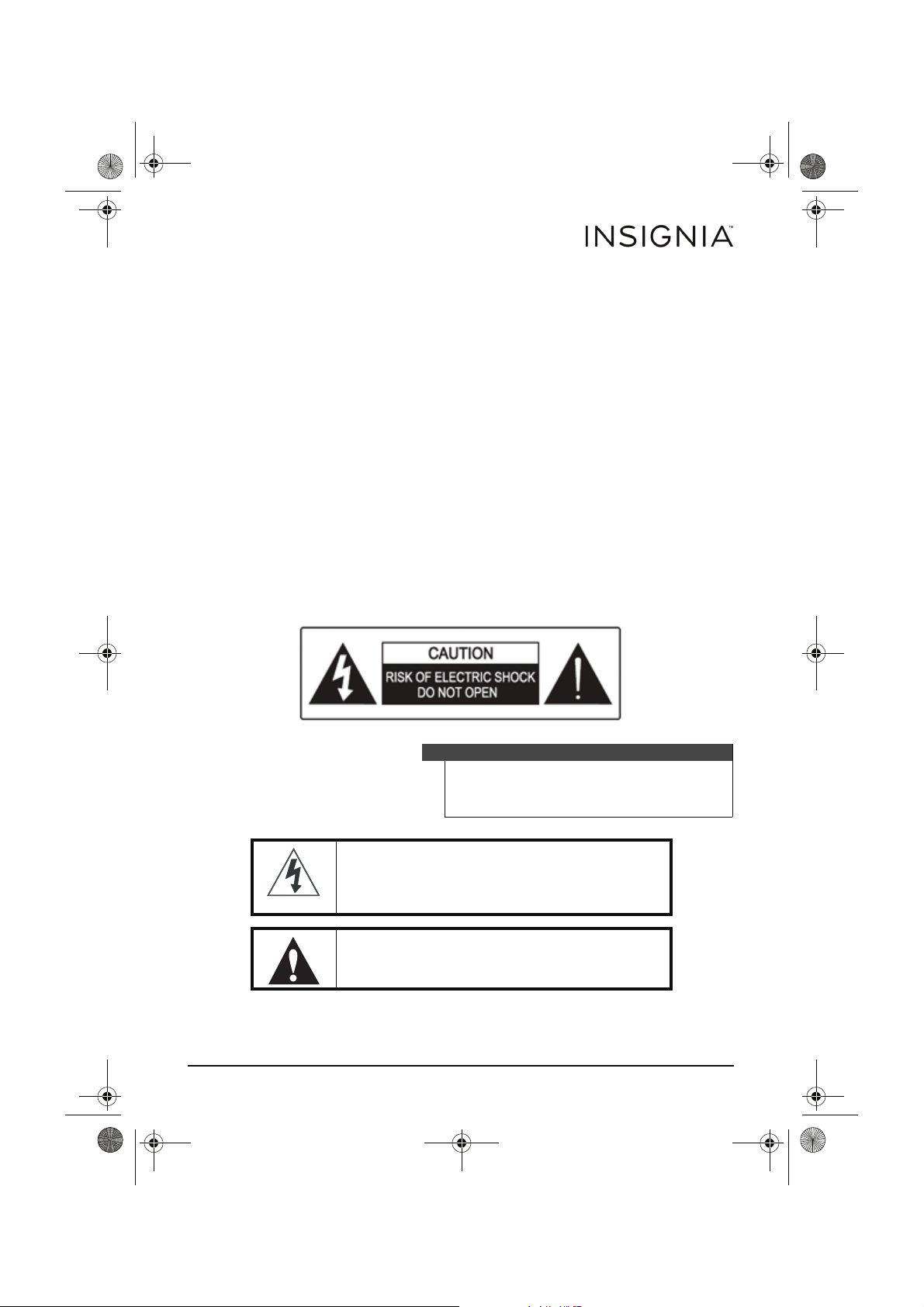
Warning
To reduce the risk of electric shock, do not
remove the cover or back. There are no
user-serviceable parts inside. Refer all servicing
to qualified service personnel.
The lightning flash with the arrowhead inside an
equilateral triangle is intended to alert you to the
presence of un-insulated, dangerous voltage within your
CD player’s enclosure. This voltage may be of sufficient
magnitude to constitute a risk of electrical shock.
The exclamation point within an equilateral triangle is
intended to alert you to the presence of important
operating and maintenance (servicing) instructions in
the literature accompanying your CD player.
www.insigniaproducts.com
2
Page 3
NS-P5113_14-0988_MAN_V3_ENG.fm Page 3 Friday, September 5, 2014 12:56 PM
Insignia NS-P5113 Portable CD Player with FM
This product utilizes a Class 1 laser to read CDs. Your CD
player is equipped with safety switches to avoid
exposure when the CD compartment door is open and
the safety interlocks are defeated. Invisible and
hazardous laser radiation exist when the door is open
and interlocks are failed or defeated. Avoid direct
exposure to the laser beam. Do not attempt to defeat or
bypass the safety switches.
Important safety information
• The apparatus and AC adapter shall not be exposed to dripping or
splashing and no objects filled with liquids, such as vases, shall be
placed on the apparatus.
• To completely disconnect the apparatus from the mains power, the
mains plug of theAC adapter shall be disconnected from the mains
outlet.
• The mains plug of the AC adapter should not be obstructed OR
should be easily accessed during intended use.
• Excessively high sound pressure could harm or damage hearing.
• Battery shall not be exposed to excessive heat such as sunshine,
fire or the like.
• Minimum distances of 4 inches (10 cm) around the apparatus and
AC adapter shall be available for sufficient ventilation.
• The ventilation should not be impeded by covering the ventilation
openings with items such as newspapers, tablecloths, curtains, etc.
• No naked flame sources such as lighted candles should be placed
on the apparatus and AC adapter.
• Attention should be drawn to the environmental aspects of battery
disposal.
• The apparatus and AC adapter should be used in moderate
climates.
Surge protectors:
We recommend that you use a surge protector when you connect your CD
player to AC power. A surge protector will help protect your CD player
from lightning and power surges, which are not covered by your warranty.
Follow these safety precautions:
• Read and retain all instructions.
• Do not open the CD door while the CD is spinning.
• Always keep the CD door closed when not in use.
• Keep all foreign objects out of the CD compartment.
• Place your CD player on a stable surface.
• Avoid installing your CD player in any of the following locations:
www.insigniaproducts.com
3
Page 4
NS-P5113_14-0988_MAN_V3_ENG.fm Page 4 Friday, September 5, 2014 12:56 PM
Insignia NS-P5113 Portable CD Player with FM
• Places exposed to direct sunlight or close to heat radiating
appliances, such as electric heaters.
• On top of other stereo equipment that radiates too much heat.
• Places that lack correct ventilation or dusty places.
• Places subject to constant vibration.
• Humid or moist places.
Caution
Do not expose your CD player to dripping or
splashing and do not set objects filled with
liquid, such as vases, on top of your CD player.
Package contents:
• Portable CD Player with FM
• 2 AA batteries
•User Guide
• Headphone
4
www.insigniaproducts.com
Page 5
NS-P5113_14-0988_MAN_V3_ENG.fm Page 5 Friday, September 5, 2014 12:56 PM
Insignia NS-P5113 Portable CD Player with FM
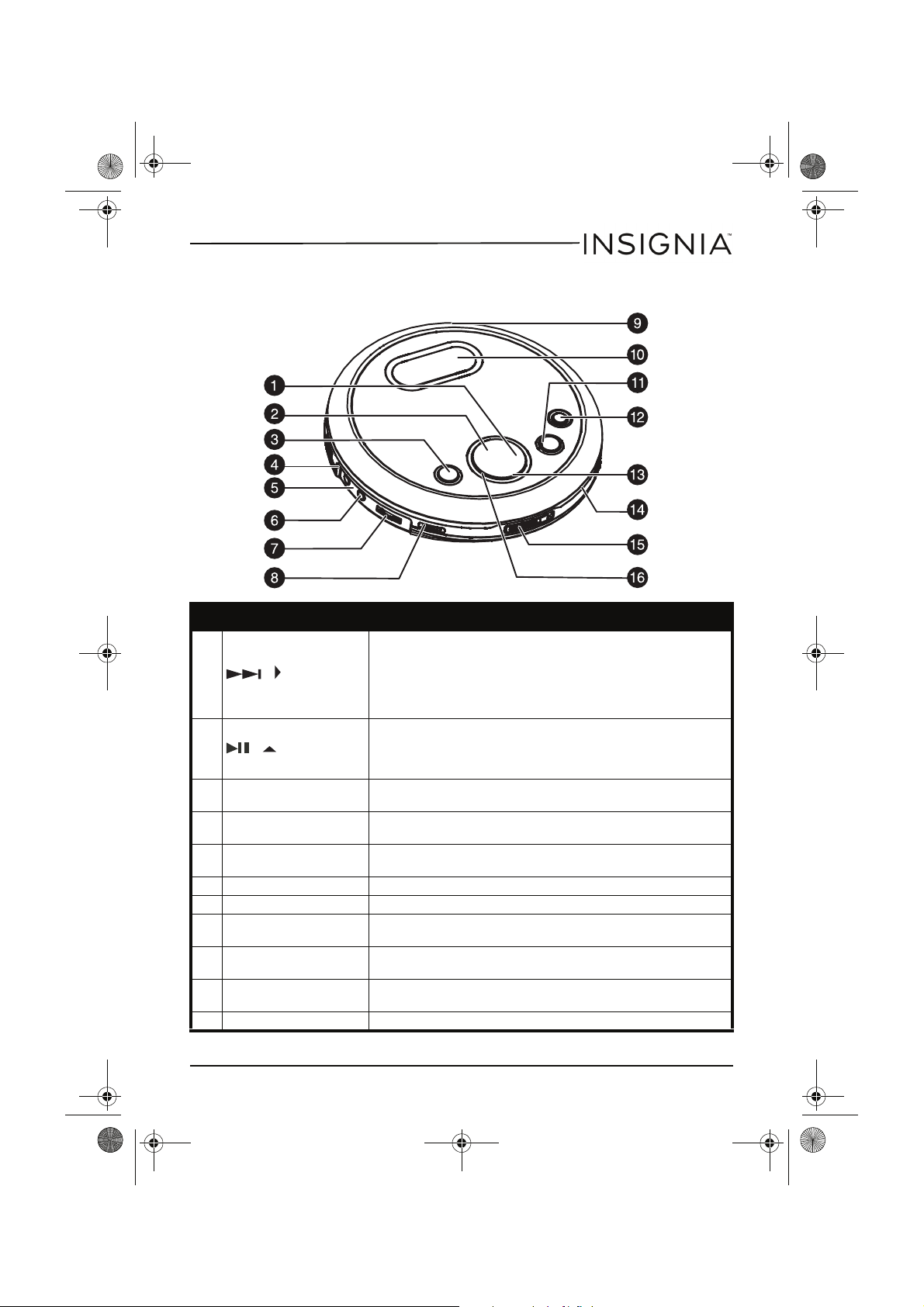
Features
# Item Description
• When playing an audio CD, press to skip or fast-search
forward.
1 /
2 / / POWER ON
3PLAY MODE
4Hold switch
5LINE OUT jack
6 PHONE jack Plug headphones into this jack.
7 Volume control switch Slide to adjust the volume.
8 DBBS switch
9DC INPUT jack
10 LCD display
11 MEMORY/ENTER When playing the radio, press to store the station in memory.
• When playing an MP3 CD (in menu mode), press to
search right.
• When playing the radio, press to tune to a higher
frequency station.
• When playing an audio CD or MP3 CD, press to start or
pause playback.
• When playing an MP3 CD (in menu mode), press to
search up.
Press to select the playback mode. You can select REPEAT1,
ALL, DIR., INTRO, or RANDOM.
Slide to lock button controls so you do not accidently press a
button.
Plug an audio cable into this jack and into the CD/AUX jack on
an external audio system.
Slide to the ON position to turn on bass boost. Slide to the
OFF position to turn off bass boost.
Plug the AC/DC power adapter (not supplied) into this jack
and into an AC outlet.
Displays information about the currently playing disc and
various functions of your CD player.
www.insigniaproducts.com
5
Page 6
NS-P5113_14-0988_MAN_V3_ENG.fm Page 6 Friday, September 5, 2014 12:56 PM
Insignia NS-P5113 Portable CD Player with FM
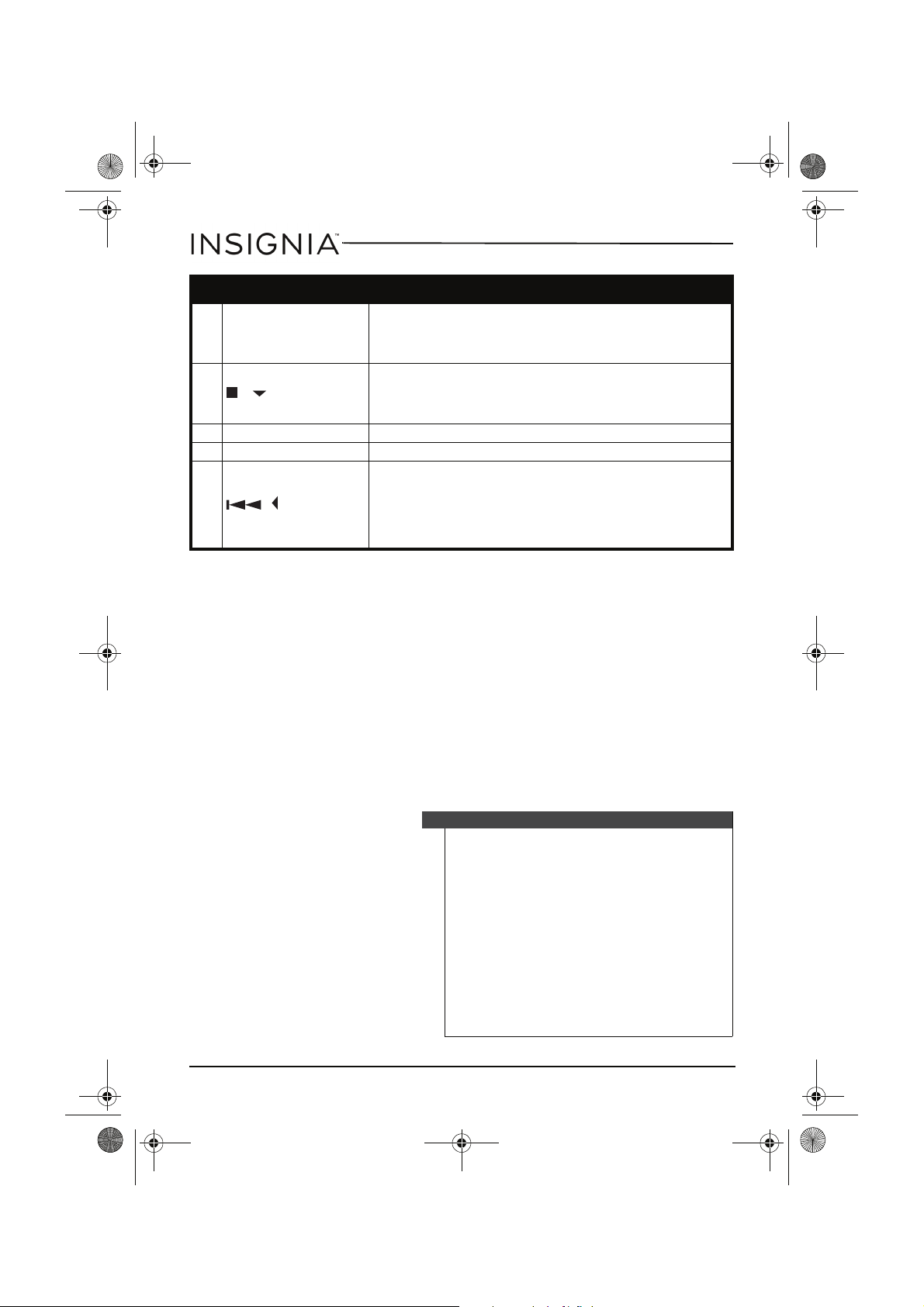
# Item Description
• When playing an audio CD, press to turn the anti-shock
12 MENU/ESP/PRESET
13 / / POWER OFF
14 FUNCTION Slide to select CD or radio mode.
15 OPEN switch Press to open the CD compartment door.
16 /
feature on or off.
• When playing an MP3 CD, press to start the search
function.
• Press to stop audio CD playback.
• When playing an MP3 CD (in menu mode), press to
search down.
• Press and hold to turn off your CD player.
• When playing an audio CD, press to skip or fast-search
backward.
• When playing an MP3 CD (in menu mode), press to
search left.
• When playing the radio, press to tune to a lower
frequency station.
Setting up your CD player
Installing batteries
To install batteries:
1 Lift the battery compartment door on the bottom of your CD player.
Do not remove the door.
2 Insert two AA alkaline batteries into the battery compartment. Make
sure that the + and – symbols on the batteries match the + and –
symbols inside the battery compartment.
3 Close the battery compartment door.
6
Caution
Use only the size and type of batteries specified.
Make sure that you match the + and – symbols
on the batteries with the + and – symbols inside
the battery compartment. If you insert the
batteries backwards, your CD player may be
damaged.
Do not mix different types of batteries together
(such as, alkaline, rechargeable, and carbon/zinc).
Do not mix old batteries and new batteries.
When you do not plan to use your CD player for a
long period of time, remove the batteries to
prevent damage or injury from possible battery
leakage.
Do not try to recharge batteries not intended to
be recharged. They can overheat and rupture.
www.insigniaproducts.com
Page 7
NS-P5113_14-0988_MAN_V3_ENG.fm Page 7 Friday, September 5, 2014 12:56 PM
Insignia NS-P5113 Portable CD Player with FM
Note
If the symbol “LOW BATTERY” appears on the
display, batteries are weak and should be
replaced.
Using the AC/DC power adapter (not supplied)
To use the AC/DC power adapter:
1 Plug one end of the AC/DC power adapter (not supplied) into the
DC INPUT jack on the back of your CD player.
2 Plug the other end of the AC/DC power adapter into a AC outlet.
Notes
The AC/DC power adapter (not supplied) is an
optional accessory.
If the AC adapter is connected when regular
batteries are installed, the power supply
automatically switches to the AC power source.
Use only the optional AC/DC power adapter.
Make sure that the AC/DC power adapter
matches with your household voltage before
connecting it into an outlet.
When you are not using AC power, unplug the
AC/DC power adapter.
Do not touch the AC/DC power adapter with wet
hands when it is connected to AC power.
Connecting to an external audio system
To connect your CD player to an external audio system:
1 Make sure that your CD player is turned off and unplugged (if you are
using the AC/DC power adapter).
2 Plug one end of an audio cable into the LINE OUT jack on your CD
player.
3 Plug the other end of the audio cable into the CD/AUX jack on the
external audio system. Do not plug the cable into an amplifier PHONE
jack.
Connecting the headphones
To connect the headphones directly to the CD player:
• Plug the headphone cable into the PHONE jack on your CD player.
www.insigniaproducts.com
7
Page 8
NS-P5113_14-0988_MAN_V3_ENG.fm Page 8 Friday, September 5, 2014 12:56 PM
Insignia NS-P5113 Portable CD Player with FM
Using your CD player
Playing a CD
Caution
Your CD player is designed to play audio CDs. Do
not try to play any other type of discs.
To play a CD:
1 Connect the headphones (included) or optional earphones into the
PHONE jack on your CD player.
2 Press the OPEN button to open the CD compartment door, insert a
disc with the label side facing up, then press down on the CD
compartment door until you hear a click.
3 Set the VOLUME control to minimum.
4 Press the
starts playing the disc. Now Reading and the elapsed time appear on
the display.
5 Adjust the volume to a comfortable level. Do not play a disc at a loud
volume level because you may damage your hearing.
6 To pause playback, press the
elapsed time and track number flash on the display. Press the button
again to resume playback.
7 To stop playback, press the
total number of audio CD tracks (or the total number of folders and
the total number of MP3 tracks) appears on the display.
8 To turn off your CD player, press and hold the
button.
/
/ POWER ON button. Your CD player turns on and
/
/ POWER ON button. The
/ /
POWER OFF button once. The
/ /
POWER OFF
Notes
If the CD compartment door opens accidentally
during playback, OPEN appears on the display.
Make sure that the CD has stopped spinning
before you open the CD compartment door. If
you open the door, playback stops.
Your CD player can play 3-inch (8 cm) single CDs
without an adapter.
If you try to play a CD-RW that has not been
recorded correctly, Disc Error appears on the
display.
When a disc is playing, press MENU/PRESET/ESP
to turn on the ESP feature. ESP flashes on the
display.
8
www.insigniaproducts.com
Page 9
NS-P5113_14-0988_MAN_V3_ENG.fm Page 9 Friday, September 5, 2014 12:56 PM
Insignia NS-P5113 Portable CD Player with FM
Automatic power off
If your CD player has been in stop (standby) mode for 60 seconds, or
paused for five minutes, it turns off automatically to save battery power.
When your CD player turns off, all settings, such as program and playing
modes, are erased.
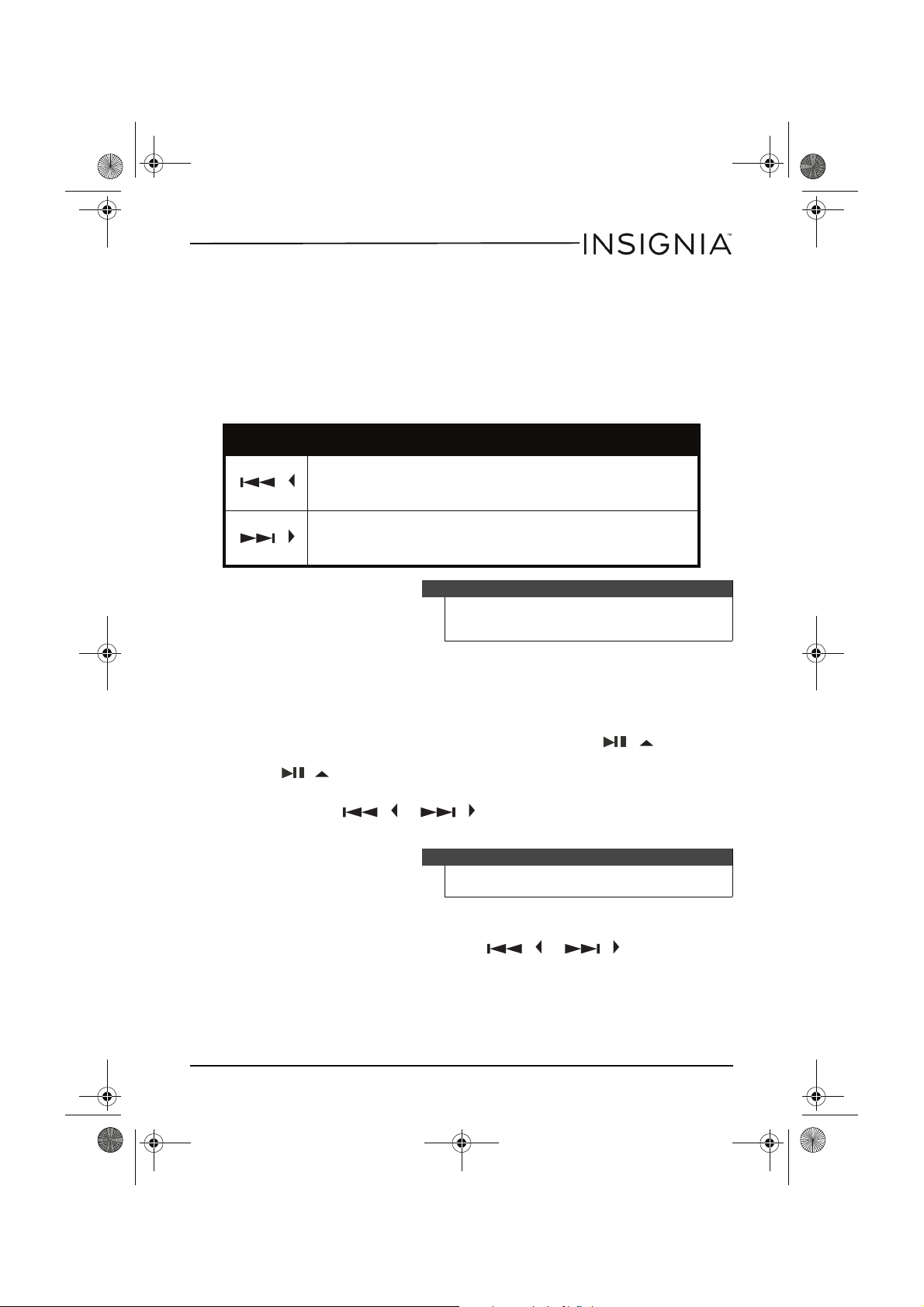
Searching for a track
Button Description
Press once to go to the beginning of the currently playing track.
/
Press
repeatedly to go to backwards through the tracks.
Press and hold to search backwards at high speed.
Press once to go to the next track.
/
Press repeatedly to go forward through the tracks.
Press and hold to search forward at high speed.
Note
Low level audio is played when you search on an
audio CD to help you locate the track or section
you want.
Searching for a track name on an MP3 CD
To search for a track name on an MP3 CD:
1 When playing an MP3 CD, press the MENU/ESP/PRESET button once.
ABCDEFGHIJKL appears on the display. Press the
ON button. MNOPQRSTUVWX appears on the screen. Press the
/
/ POWER ON button again. YZ0123456789 appears on the
screen.
2 Press the
flashes on the display.
3 Press the MEMORY/ENTER button. If your CD player finds more than
one track that starts with the letter you selected, the first track name
flashes on the display. Press the
a track, then press the MEMORY/ENTER button.
Playback begins after you select a track.
/
or
/
button to select a letter. The letter
Tip
If an MP3 file name has symbols (for example, *, /,
-, !, or =), select the symbol on the display.
/
www.insigniaproducts.com
or
//
POWER
/
button to select
9
Page 10
NS-P5113_14-0988_MAN_V3_ENG.fm Page 10 Friday, September 5, 2014 12:56 PM
Insignia NS-P5113 Portable CD Player with FM
Using repeat playback
To repeat a track, an entire CD, or an MP3 album (folder):
1 Press the
2 To repeat the same track, press the PLAY MODE button once. REP 1
appears on the display. Your CD player repeats the current track until
you press the
PLAY MODE button four times for an audio CD and 5 times for an
MP3 CD.
3 To repeat the entire CD, press the PLAY MODE button twice. REP A
appears on the display. Press the PLAY MODE button three times for
an audio CD or four for an MP3 CD to cancel repeat mode.
4 To repeat an MP3 album (folder), press the PLAY MODE button three
times. REP D appears on the display. Press the PLAY MODE button
three times to cancel repeat mode.
/ / POWER ON
/
/ POWER OFF button or press the
button.
Using INTRO play
You can play the first 10 seconds of each track on a CD to help you find the
track you want.
To use INTRO play:
1 Press the
2 Press the PLAY MODE button three times for an audio CD or four
times for an MP3 CD to start INTRO play. INTRO appears on the
display. Your CD player plays the first 10 seconds of each track.
3 Press the PLAY MODE button twice more to cancel INTRO play and
resume normal playback.
/
/ POWER ON button.
Playing tracks randomly
To randomly play tracks:
1 Press the PLAY MODE button four times for an audio CD or five times
for an MP3 CD to start random mode. RANDOM appears on the
display.
2 Press the
order.
3 Press the
random track.
4 Press the PLAY MODE button to return to the normal playback.
10
/ /
POWER ON button to start playback in random
/
or
www.insigniaproducts.com
Tip
After your CD player plays the first 10 seconds of
all the tracks on the CD, your player waits 60
seconds, then turns off.
/
button to go to the previous or next
Page 11
NS-P5113_14-0988_MAN_V3_ENG.fm Page 11 Friday, September 5, 2014 12:56 PM
Insignia NS-P5113 Portable CD Player with FM
Using the anti-shock feature
When your CD player moves during playback (for example, when you are
walking or in a moving vehicle), your player may be subject to bumps or
vibrations.
/
When you press the
buttons, the anti-shock feature turns on and ESP flashes on the display.
The CD spins faster and your CD player stores the audio in memory to
make sure that playback does not pause or skip.
If the memory buffer gets full, ESP stops flashing on the display. If your
player is bumped or vibrated too much or the memory buffer is empty,
the sound mutes for a short time. After the bumping or vibration stops,
your player resumes normal playback.
/ POWER ON and MENU/PRESET/ESP
Notes
You should use the anti-shock feature only when
necessary. Using the anti-shock feature while
your CD player is running on battery power uses
additional battery power.
To turn off the anti-shock feature when playing
an audio CD, press the MENU/ESP/PRESET
button. You cannot turn off the anti-shock
feature when playing an MP3 CD.
The anti-shock feature will not correct playback
errors if the CD is scratched or dirty.
The ESP default is off.
Playing the radio
To play the radio:
1 Set the FUNCTION switch to RADIO, then press the
POWER ON button.
2 Press the PLAY MODE button to select FM MONO or FM STEREO.
3 To turn off the radio, press and hold the
Note
The headphone cable is the FM antenna. For best
reception, make sure that the cable is fully
extended.
Note
If you select FM STEREO and the radio signal is
weak, STEREO appears on the display. Press the
PLAY MODE button to switch to FM MONO.
The audio plays in mono, but the background
static is reduced.
www.insigniaproducts.com
/ /
POWER OFF button.
/
/
11
Page 12
NS-P5113_14-0988_MAN_V3_ENG.fm Page 12 Friday, September 5, 2014 12:56 PM
Insignia NS-P5113 Portable CD Player with FM
Tuning to a radio station
To manually tune to a radio station:
• Quickly press and release the
/
more times until you find the station you want.
To automatically tune to a radio station:
• Press and hold the
or
/
/
automatically tunes to the first clear station.
Programming radio stations
You can program as many as 10 radio stations into memory.
To program a station:
1 Set the FUNCTION switch to RADIO.
2 Tune to the station you want to program.
3 Press the MEMORY/ENTER button. MEMORY:01 appears on the
display.
4 Press the MENU/ESP/PRESET button to select the storage location,
then press MEMORY/ENTER button to save. Repeat steps 3 and 4 to
program additional stations.
or
/
button one or
button. Your CD player
Note
Tuning to a programmed station
To tune to a programmed station:
1 Set the FUNCTION switch to RADIO.
2 Press the
3 Press the MENU/ESP/PRESET button one or more times until the
preset number you want appears on the display.
12
/ /
POWER ON button to turn on the radio.
www.insigniaproducts.com
If you program a station to a preset number that
already has been assigned to a station, the new
station replaces the old station.
Page 13
NS-P5113_14-0988_MAN_V3_ENG.fm Page 13 Friday, September 5, 2014 12:56 PM
Insignia NS-P5113 Portable CD Player with FM
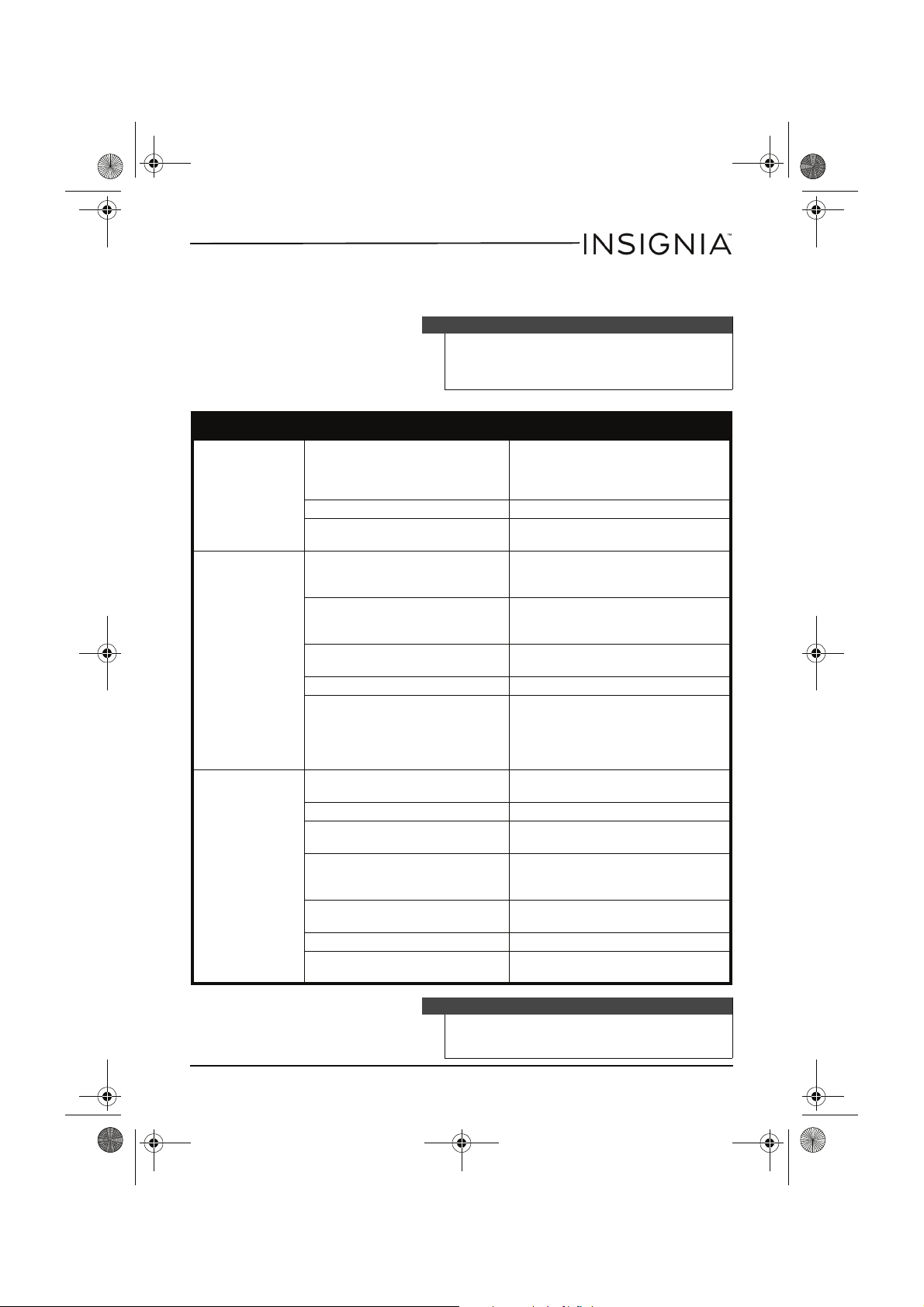
Troubleshooting
Warning
Do not try to repair your CD player. There are no
serviceable parts inside. Opening the case voids
your warranty. Refer all servicing to qualified
service personnel.
Problem Possible cause Possible solution
Make sure that the + and – symbols
on the batteries match the + and –
symbols inside the battery
compartment.
Make sure that the AC power adapter
is connected correctly.
Press down on the CD compartment
door to make sure that it is
completely closed.
Open the CD compartment door and
leave it open for about one hour to
let it dry out.
Make sure that the CD is inserted
with the label facing up.
Make sure that the MP3 files are not
corrupt. If necessary, burn the files to
a new CD.
Make sure that all the cables are
connected correctly and securely.
Clean the headphone connector.
Move your CD player away from
magnetic fields.
Adjust the car temperature.
Make sure that your CD player is not
in reverse mode.
CD player will not
turn on.
CD does not play
or stops playing
No sound or poor
sound quality.
Batteries are inserted incorrectly.
Batteries are dead. Replace the batteries.
AC power adapter is not
connected correctly.
CD compartment door is not
closed.
Water may have condensed on
the lens.
CD is inserted incorrectly.
CD is scratched or damaged. Try another CD.
MP3 files may have been
corrupted when they were
created or downloaded, or when
they were being recorded to the
CD.
Cables may not be connected
correctly and securely.
Volume is set too low. Increase the volume.
The headphone connector may
be dirty.
Your CD player may be too close
to magnetic interference, such as
unshielded speakers.
Temperature inside the car may
be too cold or too hot.
The cigarette socket may be dirty. Clean the cigarette socket.
Your CD player may be in reverse
mode.
Note
If the CD is still not playing correctly after you try
these troubleshooting solutions, turn off your CD
player, wait five seconds, then turn it on again.
www.insigniaproducts.com
13
Page 14
NS-P5113_14-0988_MAN_V3_ENG.fm Page 14 Friday, September 5, 2014 12:56 PM
Insignia NS-P5113 Portable CD Player with FM
Maintaining
Handling CDs
• To remove a CD from its case, hold it at the edges while you press
down gently on the center hole.
• Do not touch the shiny surface of the CD or bend the CD.
• Place the CD into the CD compartment with the label facing up.
• Store CDs in their cases when you are not using them.
• Do not store CDs in areas where they can get hot, such as an
automobile.
• Do not write on the label side of the CD with a ballpoint pen
because you may scratch the surface.
Cleaning CDs
A dirty CD may not play correctly.
To clean a CD:
• With a soft cloth, wipe the CD in a straight line from the center to
the edge.
Cleaning your CD player
To clean your CD player, follow these guidelines:
• Use a soft, clean cloth moistened with plain, luke-warm water to
clean the exterior of your CD player.
• Never use solvents such as benzene or other strong chemical
cleaners because these could damage your CD player’s finish.
• Do not let liquid drip into the inside of your CD player.
14
www.insigniaproducts.com
Caution
Do not use any solvent, such as record spray,
thinner, or benzene, to clean a CD.
Page 15
NS-P5113_14-0988_MAN_V3_ENG.fm Page 15 Friday, September 5, 2014 12:56 PM
Insignia NS-P5113 Portable CD Player with FM
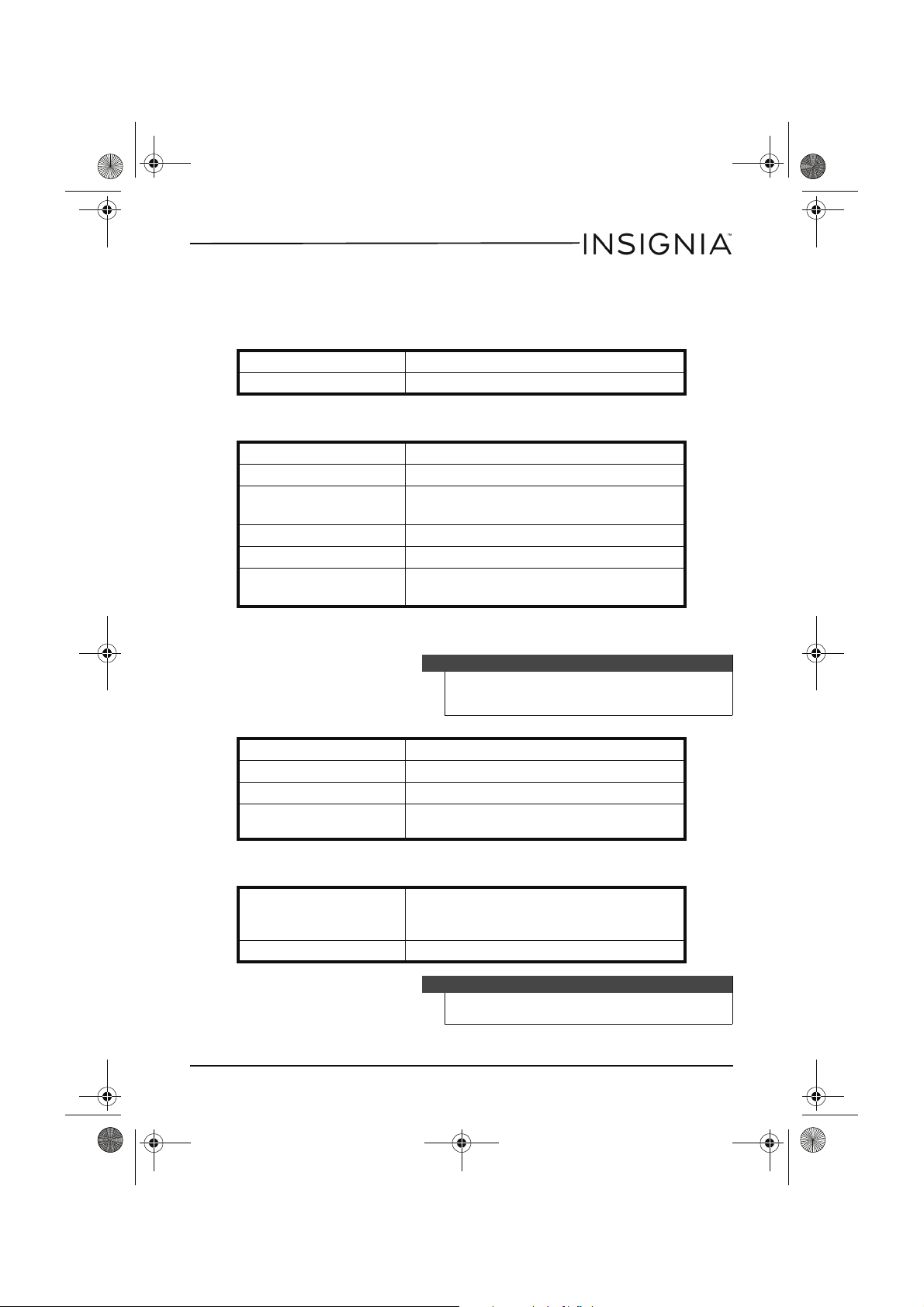
Specifications
Radio
Frequency 87.5MHz-107.9MHz
Step 200 KHz
Audio
D/A conversion 1-bit DAC, 8 times oversampling
Frequency response 20-20,000 Hz
Anti-shock
Wow and flutter Below measurable limits
Number of channels 2 channels (stereo)
Output level
CD: 45 seconds
MP3: 120 seconds
Line output: 0.6V rms (47K Ohm)
Headphone: 15mW (32 Ohm)
MP3
Power
Note
Make sure that your CD burner (recorder)
complies with these specifications. For more
information, see the CD burner documentation.
MPEG rate 32-384 Kbps
Sampling frequency 8/48 KHz
MP3 playback ISO9660-format compatible
MPEG rate supported
General power
requirements
Power consumption 0.8 W (DC 3V)
MP3 format: Supported 32~384kbps and VBR
compatible
2 LR6 / UM-3 / AA alkaline batteries
DC IN 4.5 V jack accepts AC power adapter
(center positive)
Note
Specifications and design are subject to change
without notice.
www.insigniaproducts.com
15
Page 16
NS-P5113_14-0988_MAN_V3_ENG.fm Page 16 Friday, September 5, 2014 12:56 PM
Insignia NS-P5113 Portable CD Player with FM
Legal notices
FCC Part 15
Warning
Modifications not authorized by the
manufacturer may void the user’s authority to
operate this device.
This device complies with Part 15 of the FCC Rules. Operation of this product is subject to the
following two conditions: (1) this device may not cause harmful interference, and (2) this
device must accept any interference received, including interference that may cause
undesired operation.
This equipment has been tested and found to comply within the limits for a class B digital
device, pursuant to Part 15 of the FCC Rules. These limits are designed to provide reasonable
protection against harmful interference in a residential installation. This equipment
generates, uses, and can radiate radio frequency energy and, if not installed and used in
accordance with the instructions, may cause harmful interference to radio communications.
However, there is no guarantee that interference will not occur in a particular installation. If
this equipment does cause harmful interference to radio or television reception, which can
be determined by turning the equipment off and on, the user is encouraged to try to correct
the interference by one or more of the following measures:
• Reorient or relocate the receiving antenna.
• Increase the separation between the equipment and receiver.
• Connect the equipment into an outlet on a circuit different from that to which the
receiver is connected.
• Consult the dealer or an experienced technician for help.
Canada ICES-003 statement
This Class B digital apparatus complies with Canadian ICES-003.
Copyright
INSIGNIA is a trademark of Best Buy and its affiliated companies.
Registered in some countries. Distributed by Best Buy Purchasing, LLC
7601 Penn Ave South, Richfield, MN 55423 U.S.A.
©2014 Best Buy. All rights reserved.
Made in China
16
www.insigniaproducts.com
Page 17
NS-P5113_14-0988_MAN_V3_ENG.fm Page 17 Friday, September 5, 2014 12:56 PM
Insignia NS-P5113 Portable CD Player with FM
ONE-YEAR LIMITED WARRANTY - INSIGNIA
Definitions:
The Distributor* of Insignia branded products warrants to you, the original purchaser of this
new Insignia-branded product (“Product”), that the Product shall be free of defects in the
original manufacturer of the material or workmanship for a period of one (1) year from the
date of your purchase of the Product (“Warranty Period”).
For this warranty to apply, your Product must be purchased in the United States or Canada
from a Best Buy branded or Future Shop branded retail store or online at www.bestbuy.com,
www.bestbuy.ca, or www.futureshop.ca and is packaged with this warranty statement.
How long does the coverage last?
The Warranty Period lasts for 1 year (365 days) from the date you purchased the Product.
Your purchase date is printed on the receipt you received with the Product.
What does this warranty cover?
During the Warranty Period, if the original manufacture of the material or workmanship of
the Product is determined to be defective by an authorized Insignia repair center or store
personnel, Insignia will (at its sole option): (1) repair the Product with new or rebuilt parts; or
(2) replace the Product at no charge with new or rebuilt comparable products or parts.
Products and parts replaced under this warranty become the property of Insignia and are
not returned to you. If service of Products or parts are required after the Warranty Period
expires, you must pay all labor and parts charges. This warranty lasts as long as you own your
Insignia Product during the Warranty Period. Warranty coverage terminates if you sell or
otherwise transfer the Product.
How to obtain warranty service?
If you purchased the Product at a Best Buy or Future Shop retail store location, please take
your original receipt and the Product to any Best Buy or Future Shop store. Make sure that
you place the Product in its original packaging or packaging that provides the same amount
of protection as the original packaging. If you purchased the Product from a Best Buy or
Future Shop online web site (www.bestbuy.com, www.bestbuy.ca, or www.futureshop.ca),
mail your original receipt and the Product to the address listed on the web site. Make sure
that you put the Product in its original packaging or packaging that provides the same
amount of protection as the original packaging.
To obtain warranty service, in the United States call 1-888-BESTBUY, Canada call
1-866-BESTBUY for Future Shop call 1-800-663-2275. Call agents may diagnose and correct
the issue over the phone.
Where is the warranty valid?
This warranty is valid only in the United States and Canada at Best Buy or Future Shop
branded retail stores or websites to the original purchaser of the product in the county
where the original purchase was made.
What does the warranty not cover?
This warranty does not cover:
• Customer instruction/education
•Installation
www.insigniaproducts.com
17
Page 18
NS-P5113_14-0988_MAN_V3_ENG.fm Page 18 Friday, September 5, 2014 12:56 PM
Insignia NS-P5113 Portable CD Player with FM
•Set up adjustments
•Cosmetic damage
• Damage due to weather, lightning, and other acts of God, such as power surges
•Accidental damage
•Misuse
•Abuse
•Negligence
• Commercial purposes/use, including but not limited to use in a place of business or in
communal areas of a multiple dwelling condominium or apartment complex, or
otherwise used in a place of other than a private home.
• Modification of any part of the Product, including the antenna
• Display panel damaged by static (non-moving) images applied for lengthy periods
(burn-in).
• Damage due to incorrect operation or maintenance
• Connection to an incorrect voltage or power supply
• Attempted repair by any person not authorized by Insignia to service the Product
• Products sold “as is” or “with all faults”
• Consumables, including but not limited to batteries (i.e. AA, AAA, C etc.)
• Products where the factory applied serial number has been altered or removed
• Loss or Theft of this product or any part of the product
• Display panels containing up to three (3) pixel failures (dots that are dark or incorrectly
illuminated) grouped in an area smaller than one tenth (1/10) of the display size or up
to five (5) pixel failures throughout the display. (Pixel based displays may contain a
limited number of pixels that may not function normally.)
• Failures or Damage caused by any contact including but not limited to liquids, gels or
pastes.
REPAIR REPLACEMENT AS PROVIDED UNDER THIS WARRANTY IS YOUR EXCLUSIVE REMEDY
FOR BREACH OF WARRANTY. INSIGNIA SHALL NOT BE LIABLE FOR ANY INCIDENTAL OR
CONSEQUENTIAL DAMAGES FOR THE BREACH OF ANY EXPRESS OR IMPLIED WARRANTY ON
THIS PRODUCT, INCLUDING, BUT NOT LIMITED TO, LOST DATA, LOSS OF USE OF YOUR
PRODUCT, LOST BUSINESS OR LOST PROFITS. INSIGNIA PRODUCTS MAKES NO OTHER
EXPRESS WARRANTIES WITH RESPECT TO THE PRODUCT, ALL EXPRESS AND IMPLIED
WARRANTIES FOR THE PRODUCT, INCLUDING, BUT NOT LIMITED TO, ANY IMPLIED
WARRANTIES OF AND CONDITIONS OF MERCHANTABILITY AND FITNESS FOR A PARTICULAR
PURPOSE, ARE LIMITED IN DURATION TO THE WARRANTY PERIOD SET FORTH ABOVE AND
NO WARRANTIES, WHETHER EXPRESS OR IMPLIED, WILL APPLY AFTER THE WARRANTY
PERIOD. SOME STATES, PROVINCES AND JURISDICTIONS DO NOT ALLOW LIMITATIONS ON
HOW LONG AN IMPLIED WARRANTY LASTS, SO THE ABOVE LIMITATION MAY NOT APPLY TO
YOU. THIS WARRANTY GIVES YOU SPECIFIC LEGAL RIGHTS, AND YOU MAY ALSO HAVE OTHER
RIGHTS, WHICH VARY FROM STATE TO STATE OR PROVINCE TO PROVINCE.
Contact Insignia:
For customer service please call 1-877-467-4289
www.insigniaproducts.com
INSIGNIA is a trademark of Best Buy and its affiliated companies.
Registered in some countries.
Distributed by Best Buy Purchasing, LLC
7601 Penn Ave South, Richfield, MN 55423 U.S.A.
©2014 Best Buy. All rights reserved.
Made in China
18
www.insigniaproducts.com
Page 19
NS-P5113_14-0988_MAN_V3_ENG.fm Page 19 Friday, September 5, 2014 12:56 PM
Insignia NS-P5113 Portable CD Player with FM
www.insigniaproducts.com
19
Page 20
NS-P5113_14-0988_MAN_V3_ENG.fm Page 20 Friday, September 5, 2014 12:56 PM
www.insigniaproducts.com
1-877-467-4289 (U.S. and Canada) or 01-800-926-3000 (Mexico)
INSIGNIA is a trademark of Best Buy and its affiliated companies.
Registered in some countries.
Distributed by Be st Buy Purchasing, LLC
7601 Penn Ave South, Richfield, MN 55423 U.S.A.
©2014 Best Buy. All rights reserved.
Made in China.
V3 ENGLISH
14-0988
 Loading...