

Page 1
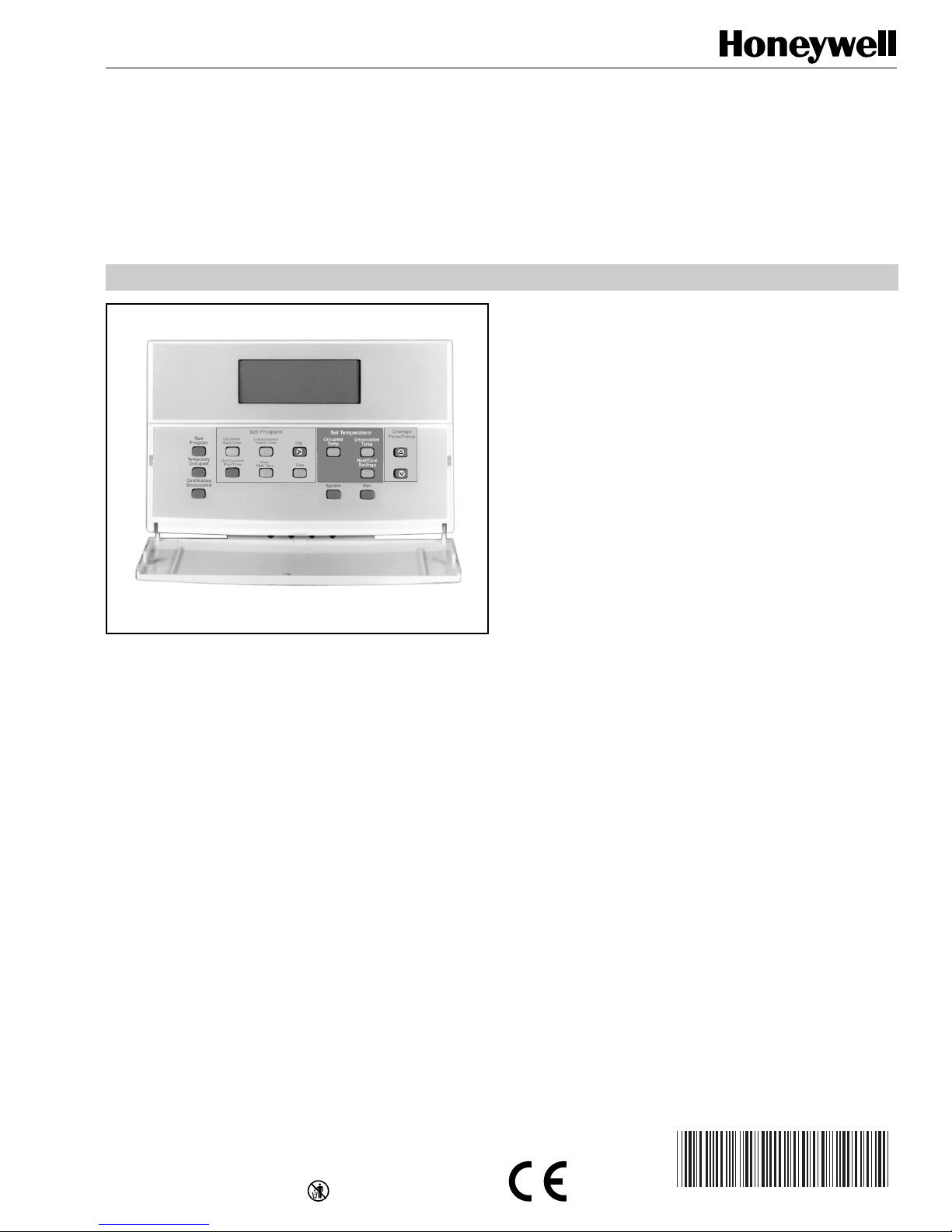
T7200D,E, T7300D,E,F and Q7300
63-4355-2
Series 2000 Programmable Commercial
Thermostats and Subbases
PRODUCT DATA
• Automatic or manual changeover models available.
• Universal Versaguard™ Thermostat guards available.
• Convenient overrides allow temporary setpoint changes.
• Keypad lockout available.
T7200D,E Thermostats
• Use on single-stage conventional (T7200D) or heat
pump (T7200E) applications.
T7300D,E Thermostats:
• Use on multistage conventional (T7300D) or heat
pump (T7300E) applications.
• Models available with remote sensor capability.
T7300F Thermostats:
• Use on single-stage or multistage system in
conventional or heat pump applications.
• Auxiliary contacts on Q7300 can be used to interface
with C7400/W7459 Economizer System for total
integration of rooftop control.
• Remote temperature sensors available f or use with
all models.
• Different levels of keypad lockout available.
APPLICATION
The T7200, T7300 Thermostats and Q7300 Subbases control
24 Vac commercial single zone heating, ventilating and air
conditioning (HVAC) equipment. In addition, the Q7300H
Communicating Subbase can communicate schedule
information and system instructions to other devices in a
LonWorks® network.
FEATURES
All Models:
• 7-day programming.
• Two Occupied and two Unoccupied periods per day.
• Individual heat and cool setpoints available for
Occupied and Unoccupied periods.
• Proportional plus Integral (P+I) control eliminates
temperature fluctuations.
• Intelligent Recovery® control automatically optimizes
equipment start times based on building load.
• Intelligent Fan™ feature energizes fan continuously in
the Occupied periods. Fan can also be configured for
conventional heat or electric heat fan operation.
Q7300 Subbase:
• Use with T7300D,E,F Thermostats.
• Auxiliary contacts can be used to interface with
C7400/W7459 Economizer System for total
integration of rooftop control.
• When used with the T7300F (revision 3 or later), the
Q7300H communicates with other network devices.
Contents
Application........................................................................... 1
Features .............................................................................. 1
Specifications ...................................................................... 2
Ordering Information ........................................................... 2
Installation ........................................................................... 5
Wiring Subbase or Wallplate............................................... 7
Settings ............................................................................... 9
Installer Setup ..................................................................... 10
Installer System Test ........................................................... 14
Programming....................................................................... 16
Operation ............................................................................ 20
General Operation Information............................................ 22
Troubleshooting Guide ........................................................ 23
Cross Reference ................................................................. 25
Wiring Diagrams.................................................................. 33
LonWorks® is a registered trademark of Echelon Corporation.
® U.S. Registered Trademark
Copyright © 1999 Honeywell Inc. • • All Rights Reserved
Page 2
T7200D ,E, T7300D,E,F AND Q7300 SERIES 2000 PROGRAMMABLE COMMERCIAL THERMOSTATS AND SUBBASES
SPECIFICATIONS
T7200/T7300 Thermostats:
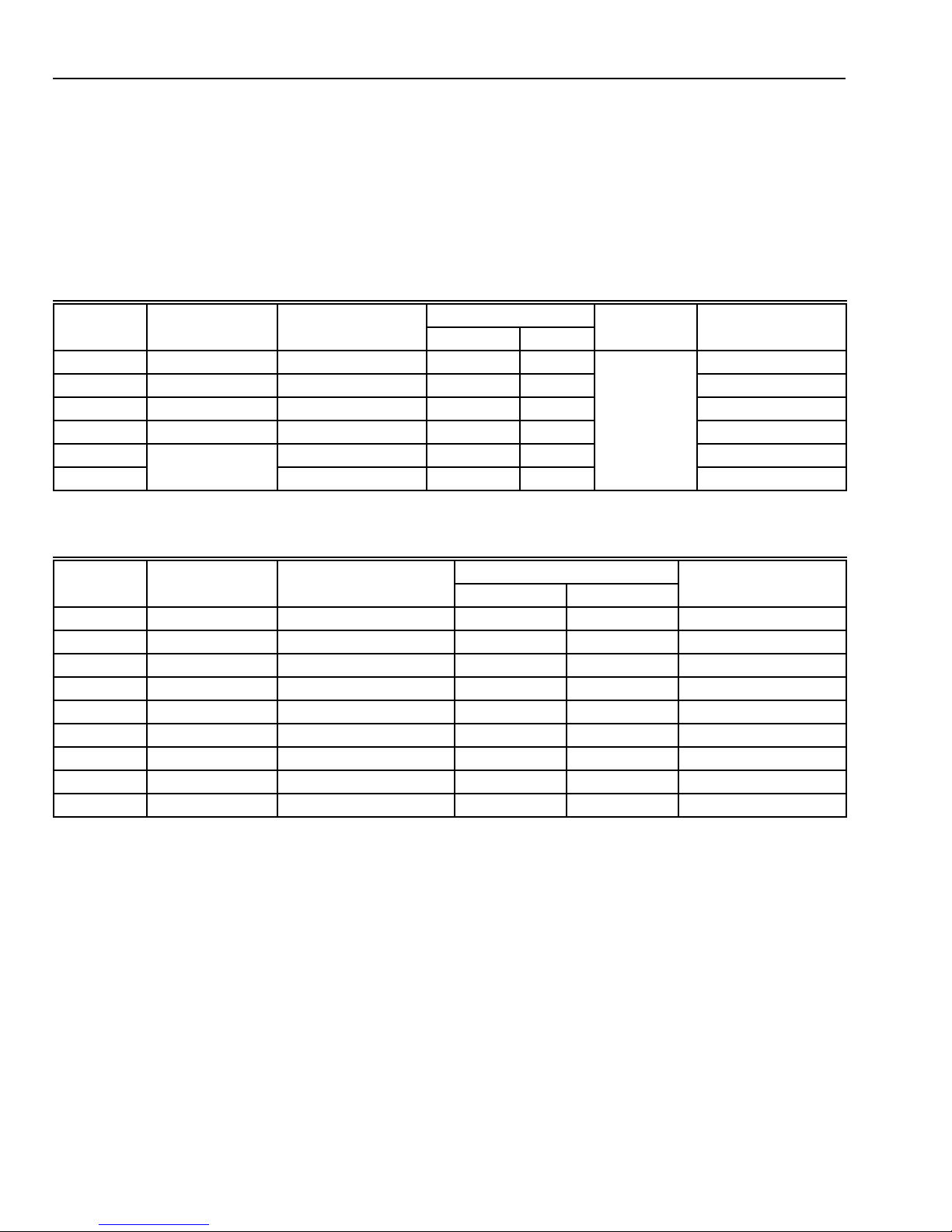
T7200 and T7300 Thermostats provide features listed in
Table 1.
IMPORTANT
The specifications given in this publication do not
include normal manufacturing tolerances. Therefore,
Q7300 Subbases:
Q7300 Subbases provide features listed in Table 2.
this unit might not exactly match the listed
specifications. This product is tested and calibrated
under closely controlled conditions, and some minor
differences in performance can be expected if those
conditions are changed.
Table 1. T7200 and T7300 Thermostat Features.
Maximum Stages
Model Applications Subbase Required Heat Cool ChangeoverbHookup Drawing No.
T7200D Conventional None
T7200E Heat Pump None
a
a
11
11
Automatic
or Manual
19
20
T7300D Conventional Q7300A, G, L 3 3 21-22, 27, 33-34
T7300E Heat Pump Q7300C, D 3 2 23–26
T7300F
T7300F
a
Wallplate provided.
b
Configured in Installer Setup.
Conventional or
Heat Pump
Q7300A, C, D, G, L 3 3 21-27, 33-34
Q7300H — — 28-31
Table 2. Q7300 Subbase Features.
a
Drawing No.
Model Applications Thermostat
Q7300A
Q7300C
Q7300D
Q7300G
Q7300H
Q7300H
b
b
c
d
Conventional T7300D, F 2 2 21-22
b
Heat Pump T7300E, F 3 2 23–25
Heat Pump T7300E, F 3 2 26
b
Conventional T7300D, F 3 3 27
Heat Pump T7300F 3 2 28
Heat Pump T7300F 3 2 29
Required
Maximum Stages
Heat Cool Hookup
Q7300H Conventional T7300F 3 3 30
Q7300H Conventional T7300F 2 1 31
Q7300L Conventional
a
Wallplate only.
b
All subbases are down selectable and can be configured to
control fewer stages than the maximum allowed.
e
T7300D, F 2 1 33-34
c
With O/B terminals.
d
Without O/B terminals.
e
Used with ML7984 Actuator and V5011 or V5013 Valve.
ORDERING INFORMATION
When purchasing replacement and modernization products from your TRADELINE® wholesaler or distributor, refer to the
TRADELINE® Catalog or price sheets for complete ordering number.
If you have additional questions, need further information, or would like to comment on our products or services, please write or
phone:
1. Your local Home and Building Control Sales Office (check white pages of your phone directory).
2. Home and Building Control Customer Logistics
Honeywell Inc., 1885 Douglas Drive North
Minneapolis, Minnesota 55422-4386 (612) 951-1000
In Canada—Honeywell Limited/Honeywell Limitée, 155 Gordon Baker Road, North York, Ontario M2H 3N7.
International Sales and Service Offices in all principal cities of the world. Manufacturing in Australia, Canada, Finland, France,
Germany, Japan, Mexico, Netherlands, Spain, Taiwan, United Kingdom, U.S.A.
63-4355—2 2
Page 3

T7200D ,E, T7300D,E,F AND Q7300 SERIES 2000 PROGRAMMABLE COMMERCIAL THERMOSTATS AND SUBBASES
Electrical Ratings:
24 Vac, 50/60 Hz.
20 to 30 Vac, 50/60 Hz.
Batteries:
No batteries required.
Auxiliary Heat and Emergency Heat Indication:
Thermostat display indicates when Auxiliary Heat or
Emergency Heat are activated.
Loss of Power:
The thermostat will maintain programmed times and
temperatures for the life of the product. The clock and day
information is retained for a minimum of two hours.
Light Emitting Diodes (LEDs):
Two user-defined LEDs (not available on Q7300H).
Two defined (CHECK and MAINTENANCE) LEDs on select
models.
Two additional LEDs available on select models.
System Current Draw:
6 VA maximum at 30 Vac, 50/60 Hz.
Output Relay Draw:
See T able 3.
Table 3. Maximum Amps at 30 Vac.
Relay Running (A) Inrush (A)
Fan 1.6 3.5
Heat (all stages) 1.6 3.5
Cool (all stages) 1.6 7.5
Auxiliary (Economizer) 1.6 3.5
Temperature:
Ratings:
Operating Ambient: 40°F to 110°F (4°C to 43°C).
Shipping: -30°F to +150°F (-34°C to +65°C).
Display Accuracy: ±1°F (±0.5°C).
Setpoint:
Range: 45°F to 95°F (7°C to 35°C).
Deadband: 2°F (1°C).
Default Settings: see Table 4.
Table 4. Default Setpoints.
Control Occupied Unoccupied
Heating 70°F (20°C) 55°F (13°C)
Cooling 78°F (25.5°C) 90°F (32°C)
Table 5. T emperature Offset.
Temperature Range 18 AWG 20 AWG 22 AWG
50-90°F -0.4°F -0.7°F -1.0°F
10-32°C -0.3°C -0.4°C -0.6°C
Minimum Stage Operation Time:
Minimum On (Heat and Cool): factory setting 2 minutes;
option 0 minutes.
Minimum Off (Cool and Heat Pump): factory setting
4 minutes; option 0, 1, 3, 5 minutes.
Humidity Ratings:
5% to 90% RH, noncondensing.
Clock Accuracy:
+1 minute per month.
Finish:
Taupe color.
Dimensions:
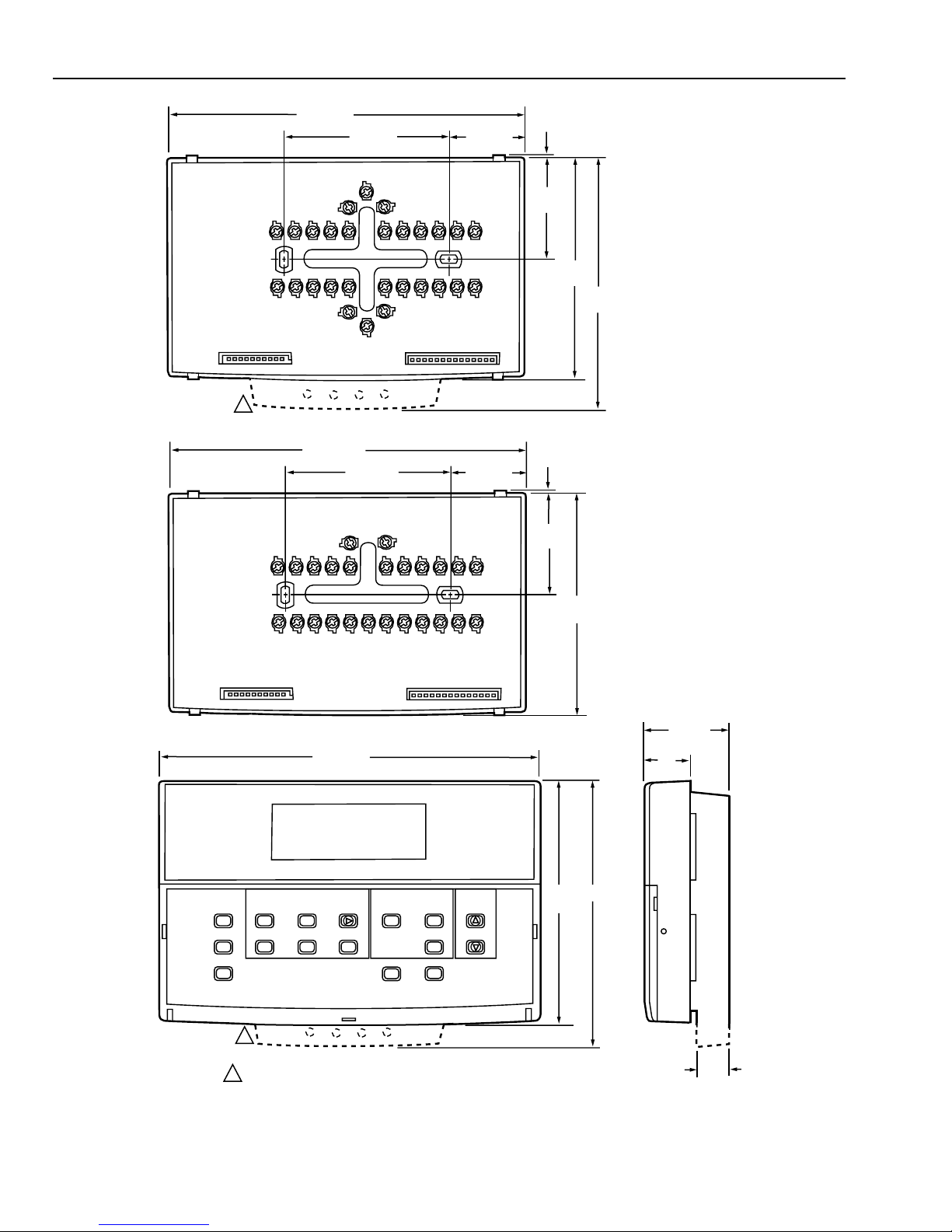
See Fig. 1.
Mounting Means:
T7200 Thermostat mounts on a wallplate. The T7300 Thermostat mounts on a Q7300 Subbase. The wallplate and
subbase mount horizontally on a wall or outlet box with two
no. 6 x 32 screws (included).
Accessories:
C7150B1004 Discharge Air Sensor (form 63-2072).
C7400 Enthalpy Sensor (form 63-2140).
M7415 Damper Actuator (form 63-2100).
ML7984 Valve Actuator (form 95C-10753).
Q7760A Serial LonTalk® Adapter
R8222 Switching Relay (form 60-2056).
T675A Temperature Control (form 60-2200).
T7022A1010 Remote Temperature Sensor (form 60-0247).
T7047C Remote Temperature Sensor (form 62-3050).
T7047G Remote Temperature Sensor (form 62-3050).
T7147A Remote Temperature Sensor and Override Module
(form 62-3049).
W859F Packaged Economizer (form 63-2476).
W950A System Supervisor (form 60-2351).
W7459 Economizer Logic Module (form 63-2141).
W6210/W7210 Economizer (form 63-2528).
Approvals:
European Community Mark (CE) Listed.
Q7300H only: LonMark® Functional Profile No. 8060,
Thermostat Object (type 09).
Remote Sensor Wiring Temperature Offset:
Temperature offset occurs with 500 ft (157m) to 1000 ft (305m)
of 2-wire cable. See T able 5.
RECYCLING NOTICE
If this control is replacing a control that contains
mercury in a sealed tube, do
control in the trash.
Contact your local waste management authority for
instructions regarding recycling and the proper
disposal of the old thermostat.
not
place your old
63-4355—23
Page 4
T7200D ,E, T7300D,E,F AND Q7300 SERIES 2000 PROGRAMMABLE COMMERCIAL THERMOSTATS AND SUBBASES
6-3/4 (172)
3-1/4 (82)
1-3/8 (35)
1/16 (2)
1-7/8
(47)
4-1/8
(105)
4-3/4
(121)
1
Q7300A,C,D,G,L
6-11/16 (170)
3-3/16 (77)
1-3/8 (35)
1/16 (2)
1-7/8
(47)
M16292
Q7300H
7-5/16 (186)
Run
Program
Temporary
Occupied
Continous
Unoccupied
Occupied
Start Time
Set Current
Day/Time
Set Program
Unoccupied
Start Time
Clear
Start Time
Day
Copy
Set Temperature
Occupied
Temp
System
Unoccupied
Temp
Heat/Cool
Settings
Fan
1
T7200D,E; T7300D,E,F
1 T7200 WALLPLATE DOES NOT HAVE THE LED EXTENSION
Fig. 1. Dimensions of T7200, T7300 and Q7300 in in. (mm).
Change
Time/Temp
4-5/8
(117)
4-1/8
(105)
5 (127)
7/8
(22)
1-11/16
(43)
9/16
(14)
63-4355—2 4
Page 5
T7200D ,E, T7300D,E,F AND Q7300 SERIES 2000 PROGRAMMABLE COMMERCIAL THERMOSTATS AND SUBBASES
INSTALLATION
Q7300 Subbase with Remote-Mounted
Temperature Sensor(s)
When Installing this Product…
1. Read these instructions carefully. Failure to follow the
instructions can damage the product or cause a
hazardous condition.
2. Check the ratings given in the instructions and on the
product to make sure the product is suitable for your
application.
3. Installer must be a trained, experienced service
technician.
4. After completing installation, use these instructions to
check out the product operation.
If only the remote-mounted temperature sensor(s) is used to
sense and control room temperature, then install the
thermostat in an area that is accessible for setting and
adjusting the temperature and settings.
If both the subbase and remote-mounted temperature
sensor(s) are used to sense and control room temperature,
then install the subbase about 5 ft above the floor in an area
with good air circulation.
Install the remote-mounted sensor(s) about 5 ft (1.5m) above
the floor in an area with good air circulation at average
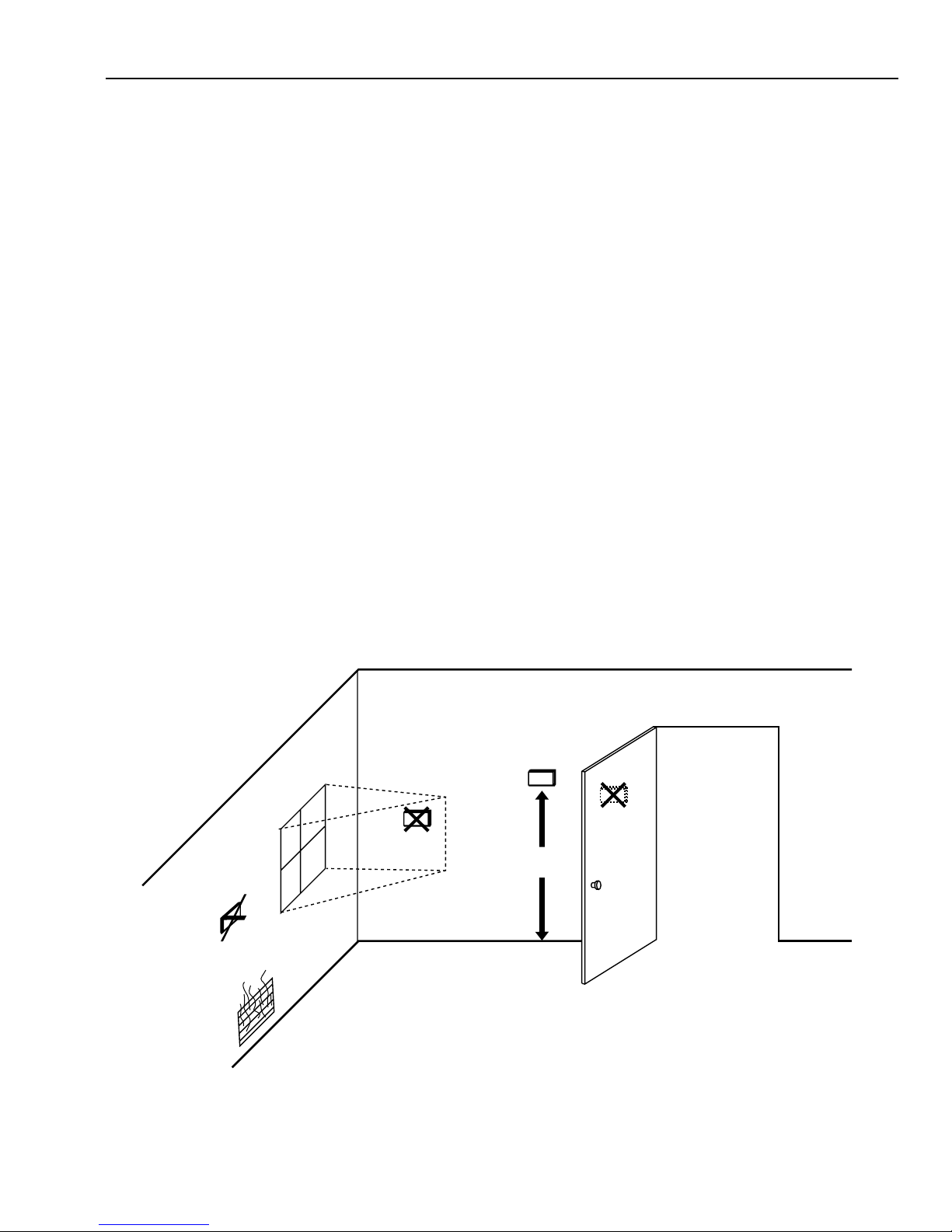
temperature. See Fig. 2.
Location
T7200 Wallplate or Q7300 Subbase without RemoteMounted Temperature Sensor
Install the thermostat about 5 ft (1.5m) above the floor in an
area with good air circulation at average temperature. See
Fig. 2.
Do not install the thermostat where it can be affected by:
— drafts, or dead spots behind doors and in corners.
— hot or cold air from ducts.
— radiant heat from sun or appliances.
— concealed pipes and chimneys.
— unheated (uncooled) areas such as an outside wall
behind the thermostat.
Do not mount the sensor(s) where it can be affected by:
— drafts, or dead spots behind doors and in corners.
— hot or cold air from ducts.
— radiant heat from sun or appliances.
— concealed pipes and chimneys.
— unheated (uncooled) areas such as an outside wall
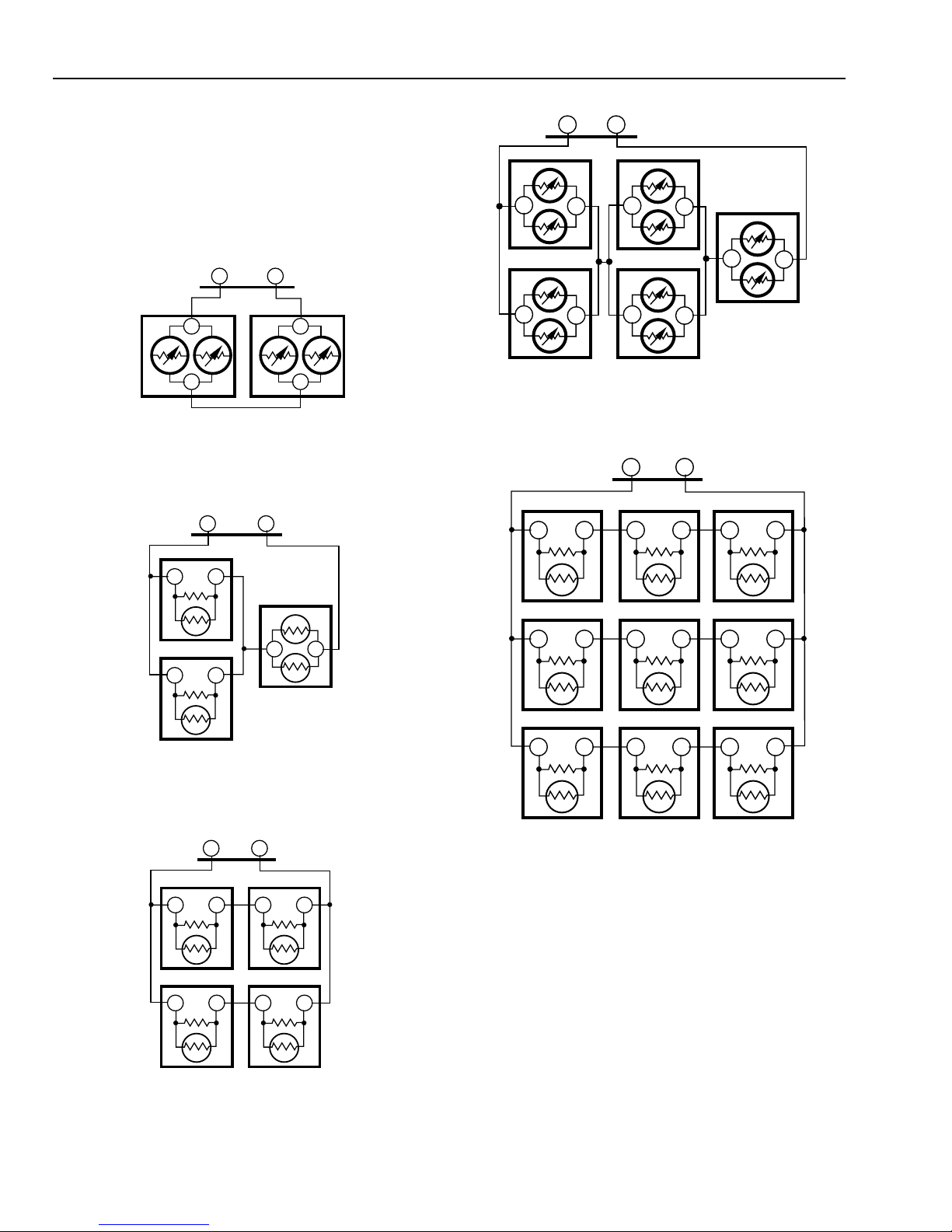
If more than one remote sensor are required, they must be
arranged in a temperature averaging network consisting of
two, three, four, five or nine sensors. See Fig. 3 through 7.
NOTES:
— When sensor averaging, the T7147A can be substituted
— Up to four T7147As can be used in parallel to place the
behind the thermostat.
for the T7047C. The T7147A includes OVERRIDE and
WARMER/COOLER keys.
thermostat in Temporary Occupied.
NO
Fig. 2. Typical location of thermostat or remote-mounted sensor.
NO
YES
5 FEET
(1.5 METERS)
NO
M4823A
63-4355—25
Page 6
T7200D ,E, T7300D,E,F AND Q7300 SERIES 2000 PROGRAMMABLE COMMERCIAL THERMOSTATS AND SUBBASES
IMPORT ANT
To avoid electrical interference, which can cause
erratic performances, keep wiring runs as short as
possible and do not run thermostat wires adjacent to
the line voltage electrical distribution systems. Use
shielded cable (Belden type 8762 or equivalent for
2-wire and Belden type 8772 or equivalent for 3-wire).
The cable shield must be grounded only at the
controlled equipment case.
Fig. 3. Two T7047G Sensors providing
SUBBASE
TT
T7047GT7047G
T
T
T
T
M4838
temperature averaging network for
T7300/Q7300 Thermostat/Subbase.
SUBBASE
TT
T7047C
TT
T7047G
SUBBASE
TT
T7047G
T
T7047G
T
T7047G
T
T
T
T7047G
T
T
T7047G
T
Fig. 6. Five T7047G Sensors providing
temperature averaging network for
T7300/Q7300 Thermostat/Subbase.
SUBBASE
TT
T7047C
TT
T7047C
T7047C
TT
T7047C
T7047C
T7047C
T
TT
T
M4841
T7047C
TT
TT
M4839
Fig. 4. Two T7047C Sensors and one T7047G Sensor
providing temperature averaging network for
T7300/Q7300 Thermostat/Subbase.
SUBBASE
TT
T7047C
TT
T7047C
TT
T7047C
TT
T7047C
TT
M4840
Fig. 5. Four T7047C Sensors providing
temperature averaging network for
T7300/Q7300 Thermostat/Subbase.
TT
T7047C
TT
TT
T7047C
TT
TT
T7047C
TT
M4842
Fig. 7. Nine T7047C Sensors providing temperature
averaging network for T7300/Q7300 Thermostat/Subbase.
NOTE: When thermostat is configured for temperature
averaging network (remote and internal sensing), the
internal sensor has 50% authority of the averaged
temperature.
Mounting Subbase or Wallplate
The subbase or wallplate mounts horizontally on the wall or a
2 in. x 4 in. wiring box. Position the subbase or wallplate
horizontally on the wall or on a 2 in. x 4 in. wiring box.
1. Position and level the subbase or wallplate (for
appearance only). The thermostat functions properly
even when not level.
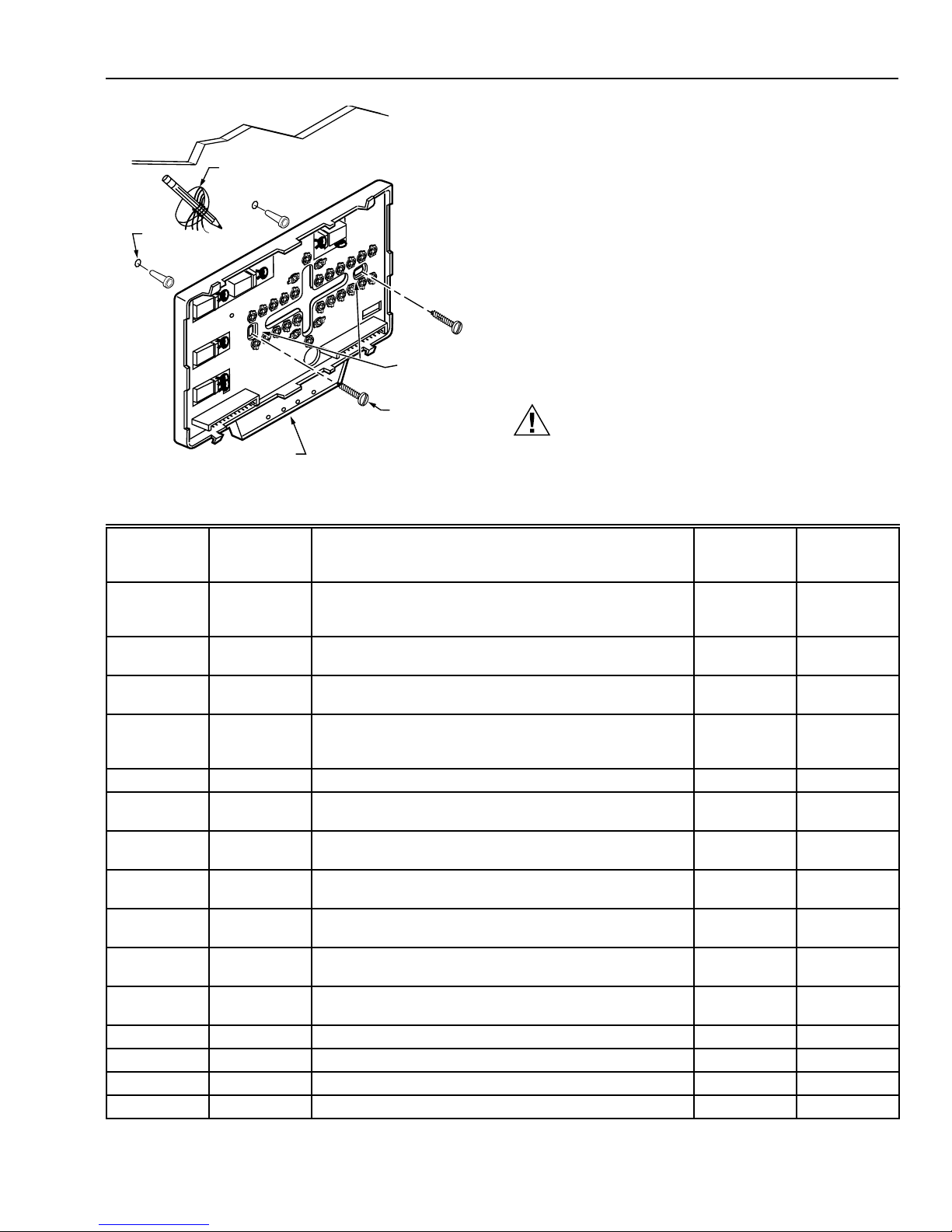
2. Use a pencil to mark the mounting holes. See Fig. 8.
63-4355—2 6
Page 7
T7200D ,E, T7300D,E,F AND Q7300 SERIES 2000 PROGRAMMABLE COMMERCIAL THERMOSTATS AND SUBBASES
3. Remove the subbase or wallplate from the wall and drill
two 3/16 inch holes in the wall (if drywall) as marked.
For firmer material such as plaster or wood, drill two
7/32 inch holes. Gently tap anchors (provided) into the
drilled holes until flush with the wall.
WIRES
THROUGH WALL
WALL
4. Position the subbase or wallplate over the holes, pulling
wires through the wiring opening.
5. Loosely insert the mounting screws into the holes.
WALL
ANCHORS
(2)
6. Tighten mounting screws.
WIRING SUBBASE OR WALLPLATE
All wiring must comply with local electrical codes and
ordinances. Follow equipment manufacturer wiring
MOUNTING
HOLES
MOUNTING
SCREWS
LEDS
Fig. 8. Mounting subbase or wallplate.
M10237
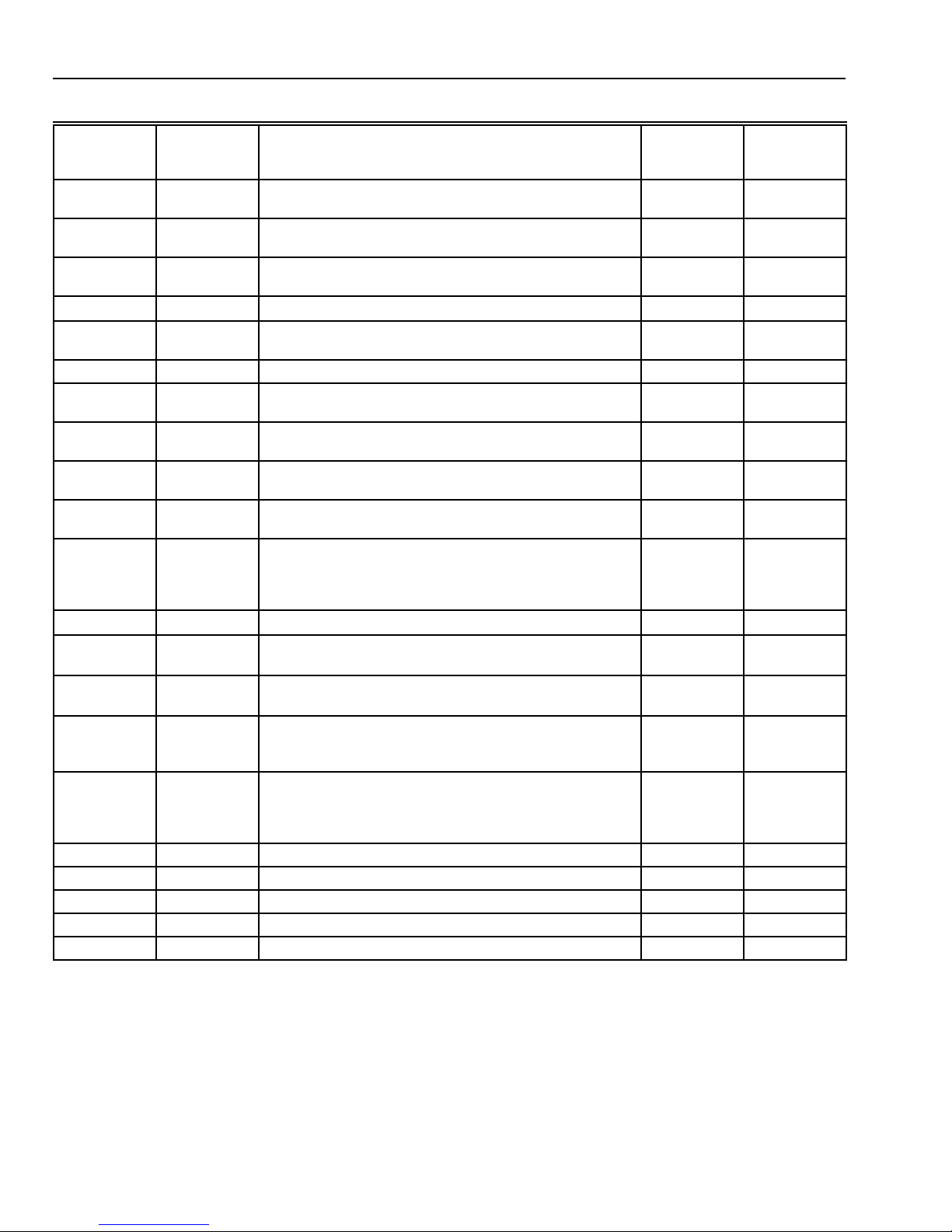
instructions when available. Refer to Fig. 19 through 32 for
typical hookups. A letter code is located near each terminal
for identification. Refer to Table 6 for terminal designations.
CAUTION
Electrical Shock Hazard.
Power supply can cause electrical shock.
Disconnect power before beginning installation.
Table 6. Terminal Designations and Descriptions.
Standard
Terminal
Designations
A1
Alternate
Terminal
Designations Typical Connection Function
A2
a
Dry auxiliary contacts for economizer control; A1 is
Output Dry contact
Terminal
Type
normally open during Unoccupied periods and closed
during Occupied periods.
A1, A2 — Damper control relay (Q7300L only). Input, Output 24V powered
contact
A2
A1
a
Dry auxiliary contacts for economizer control (A2 is
Input Dry contact
common).
A3 — Dry auxiliary contacts for economizer control; A3 is
Output Dry contact
normally open during Occupied periods and closed during
Unoccupied periods.
AS, AS — C7150B Discharge Air Sensor connection. Input —
B — Heating changeover valve. Output 24V powered
contact
C1, C2, C3,
— Communication input for T7147. Input Low power
C4, C5
E K Emergency heat relay. Output 24V powered
contact
EB, EB
—
Q7300H LonWorks® bus connection to LonWorks®
network.
Input, Output Communi -
cations
G F Fan relay. Output 24V powered
contact
O R Cooling changeover valve. Output 24V powered
contact
R V 24V system transformer. Input —
RC — 24V cooling transformer. Input —
RH — 24V heating transformer. Input —
T, T — Remote sensor input for T7047 or T7147. Input —
a
Some OEM models reverse the economizer terminal designations A1 and A2.
(continued)
63-4355—27
Page 8
T7200D ,E, T7300D,E,F AND Q7300 SERIES 2000 PROGRAMMABLE COMMERCIAL THERMOSTATS AND SUBBASES
Table 6. Terminal Designations (continued).
Standard
Terminal
Designations
W1 H1, R3 Stage 1 heating relay (Q7300A, G, H) or auxiliary heat
W2 H2, R4, W3, Y Stage 2 heating relay. Output 24V powered
W3 — Stage 3 heating relay. Output 24V powered
X
X1, X3 A, A1, A2, C,
X4 — LED common. Annunciation —
Y 1 C1, M, Y Stage 1 compressor contactor (Q7300C, D, H). Output 24V powered
Y1, Y RS, M
Y 2 C 2 Stage 2 cooling compressor (conventional).
Y 3 — Stage 3 cooling compressor. Output 24V powered
BM —
FC —
GH —
GL —
P1, P2 —
RM —
— C, H, L HSII Control Panel. — —
— O Momentary circuit changeover. — —
— P Defrost. — —
— R1, R2 Low- and high-speed fan relays. — —
— T External temperature readout, T-relay; outdoor thermistor. — —
a
Some OEM models reverse the economizer terminal designations A1 and A2.
b
Some OEM models label the terminal for transformer common B.
c
Only applies to Q7300H2037 model.
Alternate
Terminal
Designations Typical Connection Function
Output 24V powered
relay (Q7300C, D, H).
b
B
, C, X1, X2
Common. Input
User defined Light Emiting Diodes (LEDs). Annunciation —
L, X, Z
Stage 1 cooling compressor (Q7300A, G, H
c
, L).
Output 24V powered
Output 24V powered
Stage 2 compressor contactor (heat pump).
ML7984 Actuator connection (Q7300H
c
, L only); no call
Output —
for heat, valve closed; call for stage 1 heat, valve
approximately one-half open; call for stage 2 heat, valve
fully open.
Fan control transformer (Q7300H
High-speed fan output (Q7300H
c
, L only).
c
, L only); activate during
Input —
Output 24V powered
calls for cooling.
Low-speed fan output (Q7300H
c
, L only); activated on
Output 24V powered
calls for heat and fan On selection.
Pump interlock relay (Q7300H
c
, L only); operates
Input, Output 24V powered
circulator pump in hydronic heat or energizes
conventional heat system.
ML7984A Actuator connection (Q7300H
c
, L only); no call
Output —
for heat, valve closed; call for stage 1 heat, valve
approximately one-half open; call for stage 2 heat, valve
fully open.
Terminal
Type
contact
contact
contact
contact
contact
contact
contact
contact
contact
contact
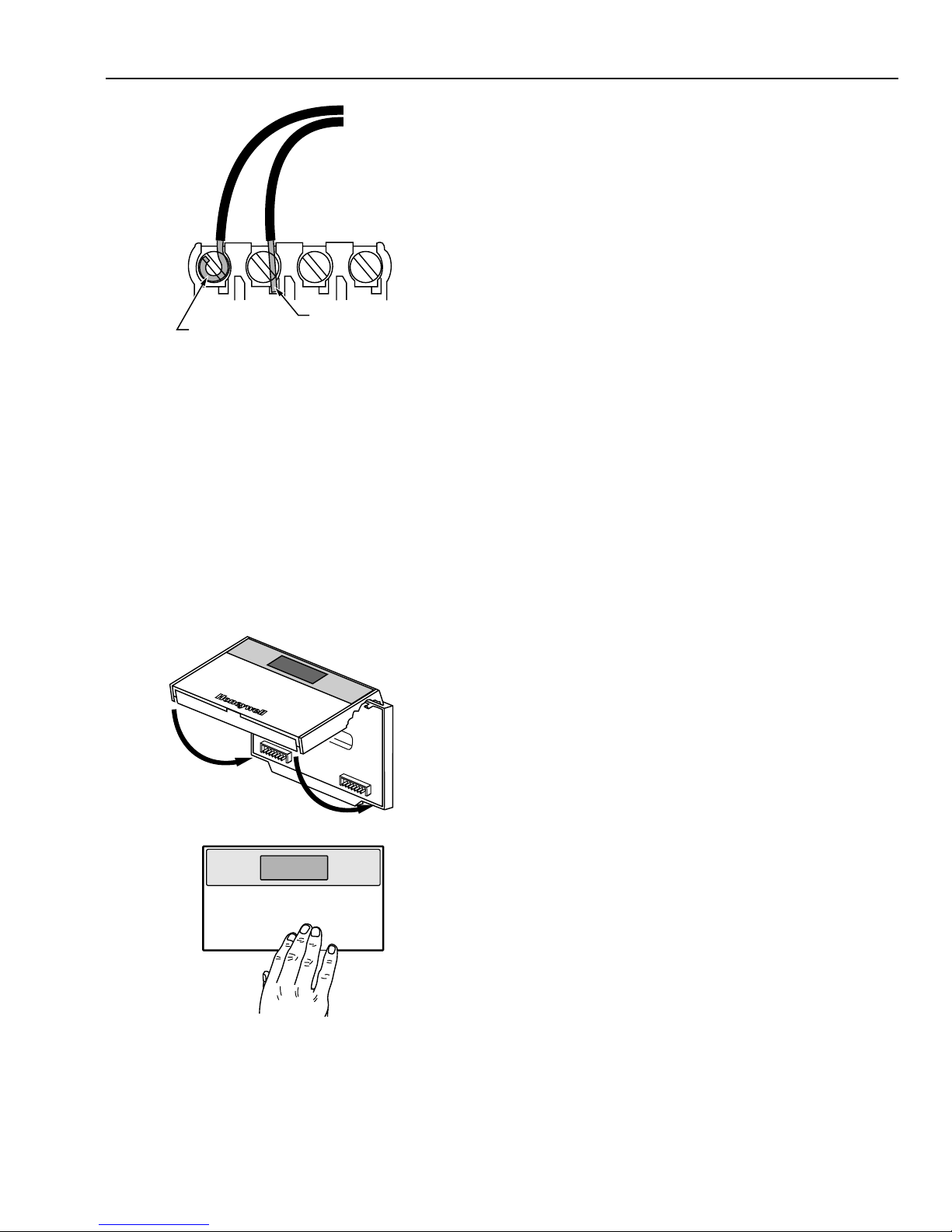
1. Loosen the terminal screws on the subbase or wallplate
and connect the system wires. See Fig. 9.
IMPORTANT
Use 18-gauge, solid-conductor color-coded
thermostat cable for proper wiring. If using
18- gauge stranded wire, no more than ten wires
can be used. Do not use larger than 18-gauge wire.
63-4355—2 8
2. Securely tighten each terminal screw.
3. Push excess wire back into the hole.
4. Plug the hole with nonflammable insulation to prevent
drafts from affecting the thermostat.
Page 9
T7200D ,E, T7300D,E,F AND Q7300 SERIES 2000 PROGRAMMABLE COMMERCIAL THERMOSTATS AND SUBBASES
SETTINGS
Using Thermostat Keys
The thermostat keys are used to:
• set current time and day,
• program times and setpoints for heating and cooling,
• override the program temperatures,
• display present setting,
• set system and fan operation,
• configure Installer Setup,
• check Installer System Test.
FOR STRAIGHT
FOR WRAPAROUND
INSERTION STRIP
7/16 IN. (11 MM).
Fig. 9. Proper wiring technique.
INSERTION STRIP
5/16 IN. (8 MM).
M4826
Mounting Thermostat on Subbase or
Wallplate
The thermostat mounts on the subbase or wallplate after they
are installed.
1. Engage the tabs at the top of the thermostat and
subbase or wallplate. See Fig. 10.
2. Press the lower edge of the case to latch.
NOTE: To remove the thermostat from the wall, first pull out
at the bottom of the thermostat; then remove the top.
A. ENGAGE TABS AT TOP OF THERMOSTAT AND SUBBASE OR WALLPLATE.
See Fig. 11 for key information.
Setting System and Fan (select models)
The system default setting is Heat. The fan default is set so
the fan operates continuously in Occupied periods,
Unoccupied period recovery times and with the heating and
cooling equipment in Unoccupied periods. Use the System
and Fan keys to change the settings. Fan and system
operation are configured in the Installer Setup options.
The system settings are:
Em Heat (T7200E, T7300/Q7300C,D,H): Emergency heat
relay is on continuously. Thermostat cycles highest stage
of heat. Cooling system is off. Compressor is de-energized.
Heat: Thermostat controls the heating.
Off: Both the heating and cooling are off.
Cool: Thermostat controls the cooling.
Auto: Thermostat automatically changes between heating
and cooling depending on the indoor temperature.
The fan settings are:
On: Fan operates continuously in occupied period.
Auto: Equipment controls the fan in the Unoccupied
periods. The Intelligent Fan™ operation (Installer Setup
number 17) offers three choices for the fan operation in
Occupied periods:
— fan turns on only when there is a call for heating or
cooling.
— fan operates continuously in Occupied periods.
— fan is on continuously in Occupied periods and
Unoccupied period recovery times.
B. PRESS LOWER EDGE OF CASE TO LATCH.
Fig. 10. Mounting thermostat on subbase or wallplate.
Setting Temperature
Refer to Table 7 for the default temperature setpoints. See
Programming section for complete instructions on changing
the setpoints.
M4824A
63-4355—29
Page 10

T7200D ,E, T7300D,E,F AND Q7300 SERIES 2000 PROGRAMMABLE COMMERCIAL THERMOSTATS AND SUBBASES
ENTER OCCUPIED
PROGRAM MODE
RETURNS TO
NORMAL
OPERATIONS
SET OVERRIDE
TEMPERATURE
OFFSET AND
ACTIVATE
TEMPORARY
OVERRIDE
ENTER HOLD MODE
Run
Program
Temporary
Occupied
Continuous
Unoccupied
SET CURRENT
DAY AND TIME
CLEAR PROGRAM PERIOD
Fig. 11. Thermostat key locations and descriptions.
ENTER UNOCCUPIED
PROGRAM MODE
SET CURRENT DAY OR
PROGRAM DAY
AM
Mon
Occupied
System Fan
Heat
Set Program Set Temperature Change
Occupied
Start Time
Set Current
Day/Time
Unoccupied
Start Time Day
Clear
Start Time
Copy
COPY ONE
PROGRAMMED DAY
TO ANOTHER DAY
SET OCCUPIED
TEMPERATURE
SETPOINTS
Room
Auto
Occupied
Temp
System Fan
SELECT
SYSTEM
OPERATION
Unoccupied
Temp
Heat/Cool
Settings
Time/Temp
SELECT FAN
OPERATION
SET UNOCCUPIED TEMPERATURE
SETPOINTS AND SCROLLS
THROUGH INSTALLER SETUP
AND SYSTEM TEST
INCREASE
TEMPERATURE
OR TIME SETTING
DECREASE
TEMPERATURE
OR TIME SETTING
CHANGE BETWEEN HEATING
AND COOLING SETPOINTS
AND SCROLLS BACKWARDS
THROUGH INSTALLER SETUP
NUMBERS AND SYSTEM TEST
M10233A
Table 7. Default Temperature Setpoints.
Control Occupied Unoccupied
Heating 70°F (20°C) 55°F (13°C)
Cooling 78°F (25.5°C) 90°F (32°C)
INSTALLER SETUP
NOTE: For most applications, the thermostat factory
settings do not need to be changed. Review the
factory settings in Table 8 and if no changes are
necessary, go to the Installer System Test section.
The Installer Setup is used by the installer to customize the
thermostat to specific systems. Installer Setups are listed in
Table 8. The table includes all the configuration options
available.
A combination of key presses are required to use the Installer
Setup feature.
— To enter the Installer Setup, press and hold the Heat/Cool
Settings key and both the increase ▲ ▲ and ▼ ▼ decrease
keys until the first number is displa yed. All display
segments appear for approximately three seconds before
the number is displayed. See Fig. 12 and 13.
Set Program
Start Time
Em Ht
Aux Ht
Comm
Mon
TueWedThuFriSatSun
Un
Occupied 12 Override
Set Day/Time
AM
PM
System Fan
Cool
Off Auto
Heat
Em
Temporary Setting Enrg
Heat
Recovery
In
Lo
Med
Hi
Wait
Cool
Auto
Room
%Humid
Remote
Only
On
Sav
Duct
Auto
M4916
Fig. 12. LED display of all segments.
MODE NUMBER
DISPLAY
(COLUMN 2
OF TABLE 8)
FACTORY SETTING
OR OTHER CHOICE
DISPLAY (COLUMN 3
OR 5 OF TABLE 8)
M10227
Fig. 13. Installer Setup number and setting display.
63-4355—2 10
Page 11
T7200D ,E, T7300D,E,F AND Q7300 SERIES 2000 PROGRAMMABLE COMMERCIAL THERMOSTATS AND SUBBASES
— To advance to the next Installer Setup number, press the
Unoccupied T emp ke y .
— To return to an Installer Setup number, press the Heat/
Cool Settings key.
— To change a setting, use the increase ▲ ▲ or ▼ ▼ decrease
key.
— To exit the Installer Setup, press the Run Program key.
The Installer Setup is automatically exited if no key
presses are made for four minutes.
CAUTION
Possible Equipment Damage.
Fan must be running when system is operating.
Heat pump and electric heat systems must be
configured correctly in Installer Setup 2 to prevent
equipment damage caused by the system running
without the fan.
NOTE: Be sure to set the thermostat time after exiting the
Installer Setup.
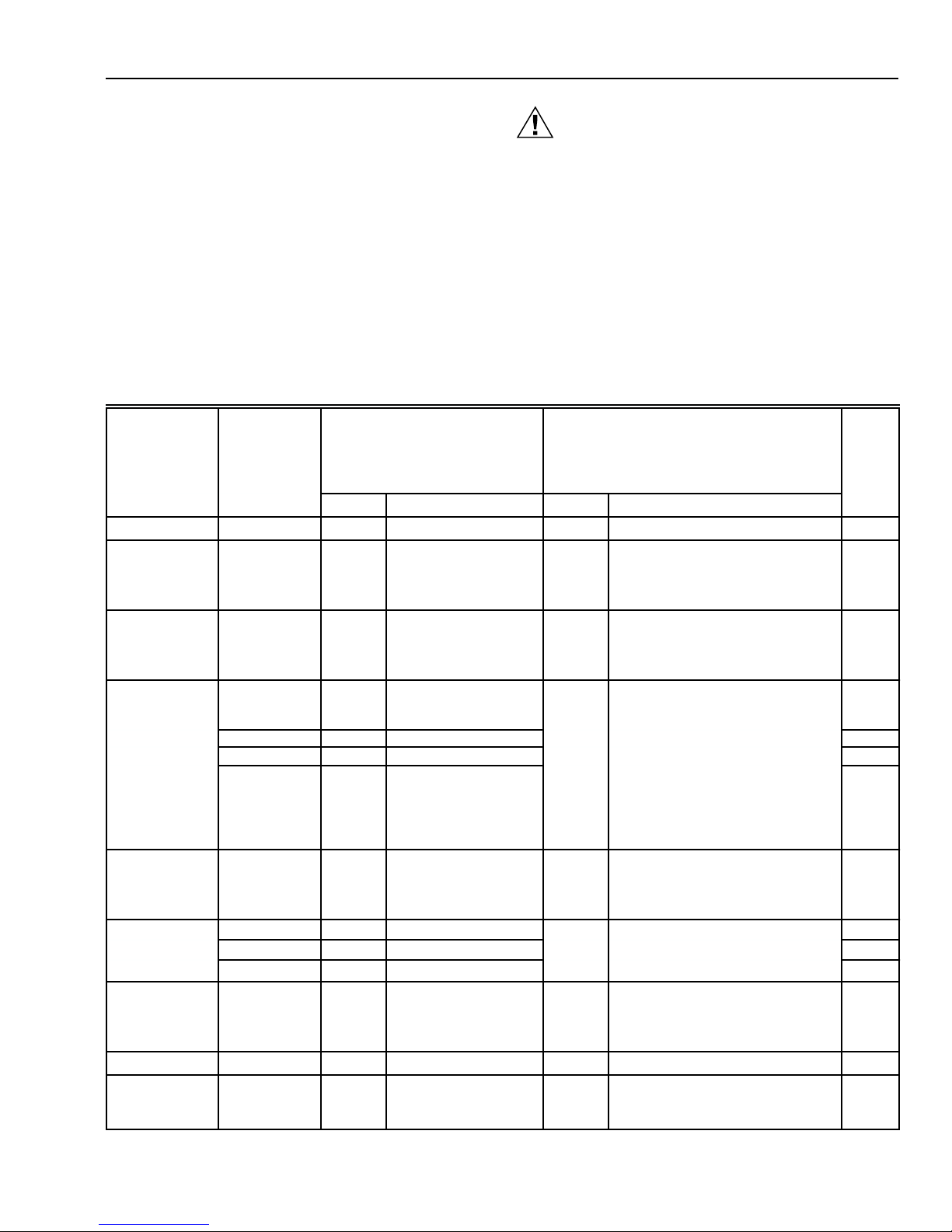
Installer Setup numbers are listed in Table 8.
IMPORTANT
Only configurable numbers are shown on the device.
Example: If the thermostat does not have a system
key, Installer Setup number 12 will not be displayed.
Review Table 8 factory settings and mark any
desired changes in the Actual Setting column. When
the Installer Setup is complete, review the settings to
confirm that they match the system.
Table 8. Thermostat Installer Setup Options.
Installer
Setup Number
(Press
Unoccupied
Temp key
a
to change)
2 0 Conventional
3 Depends
4 4 Stage 1—4 cph. 3, 6, 8 or
5 4 Stage 2—4 cph.
6 4 Stage 3—4 cph.
7 4 Emergency heat relay
8 Depends
9 4 Stage 1—4 cph. 3 3—3 cph.
10 4 Stage 2—4 cph.
11 4 Stage 3—4 cph.
12 Depends
14 0 Temperature is
Display Description Display Description
subbase
subbase
on model
Select
Not used 1 — — — — —
Fan operation
Output stages
of heating
Heating cycle
rate
Output stages
of cooling
Cooling cycle
rate
System setting
adjustment
(models with
System key)
Not used 13 — — — — —
Degree
temperature
display
a
Number 2 must be set to 1 to extend fan operation.
Factory Setting
applications where
equipment controls fan
operation in heat mode.
Stages of heat. 0, 1, 2,
on
is on continuously.
Highest stage of heat
cycles at 4 cph
(Q7300C or D only).
Stages of cooling. 0, 1, 2
on
System selection. 0, 1 or 2 0—System setting key is
displayed in °F.
(Press ▲ or ▼ key to change)
1 Electric heat applications where
or 3
9
or 3
1 Temperature is displayed in °C.
Other Choices
Actual
Setting
thermostat controls fan operation in
heat mode.
0—No heating.
1—One stage of heat.
2—Two stages of heat.
3—Three stages of heat.
3—3 cph used for hot water
systems or high efficiency
furnaces.
6—6 cph used for conventional
systems.
8—8 cph used for conventional
systems.
9—9 cph used for electric heat
systems.
0—No cooling.
1—One stage of cool.
2—Two stages of cool.
3—Three stages of cool.
operational.
1—Auto setting is disabled.
2—Auto only setting.
(continued)
63-4355—211
Page 12
T7200D ,E, T7300D,E,F AND Q7300 SERIES 2000 PROGRAMMABLE COMMERCIAL THERMOSTATS AND SUBBASES
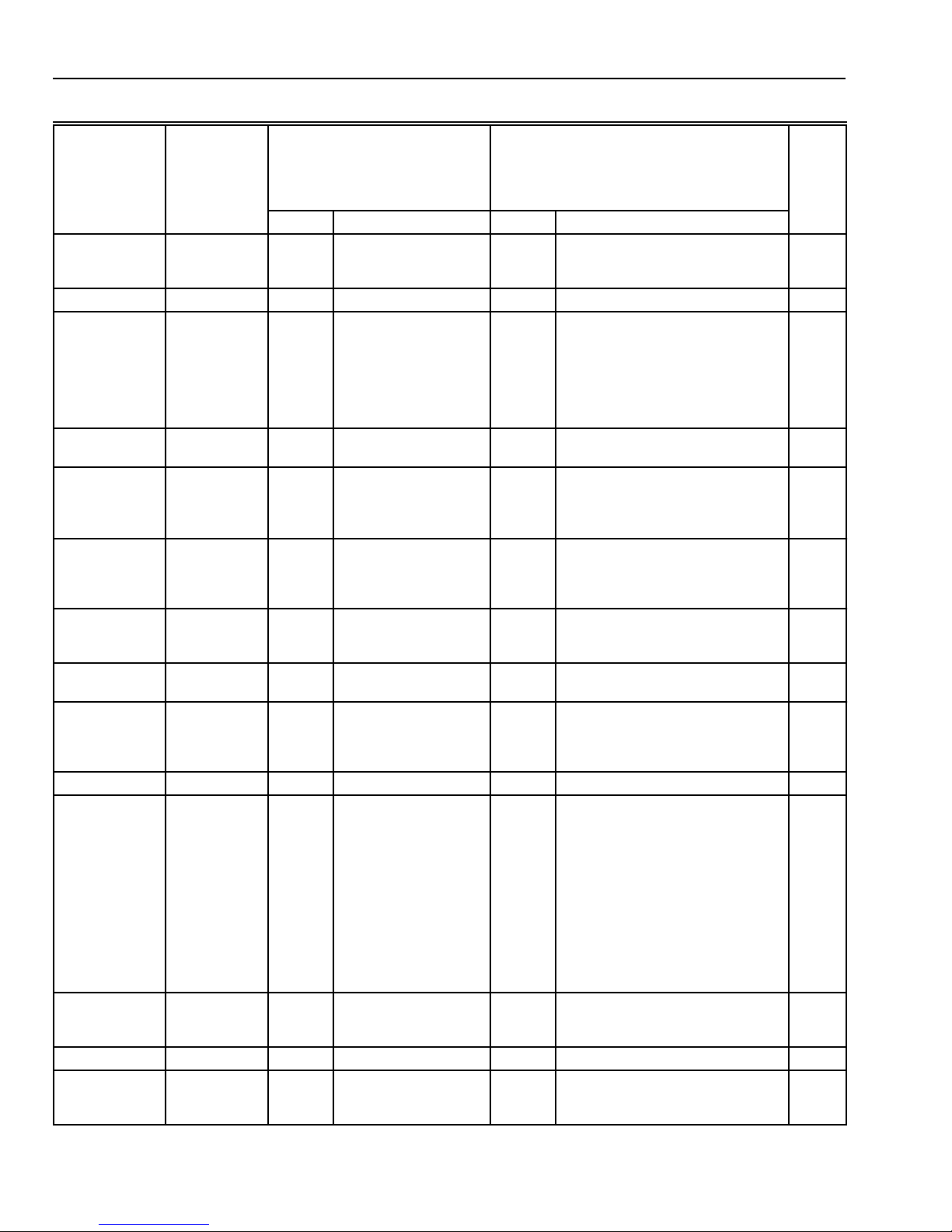
Table 8. Thermostat Installer Setup Options
(Continued).
Installer
Setup Number
Select
Displaying
temperature
(Press
Unoccupied
Temp key
to change)
Display Description Display Description
Factory Setting
15 0 Temperature is
displayed.
(Press ▲ or ▼ key to change)
1 Temperature is not displayed.
Other Choices
Actual
Setting
(T7300F only).
Clock format. 16 0 12-hour clock format. 1 24-hour clock format.
Intelligent Fan™
operation.
17 2 Fan operates con-
tinuously in Occupied
and recovery modes.
Fan operates with call
for heating or cooling in
Unoccupied mode.
0 or 1 0—Fan only operates with calls for
heating or cooling in Occupied
and Unoccupied modes.
1—Fan operates continuously in
Occupied mode. Fan operates
with calls for heating or cooling
in Unoccupied mode.
Auxiliary contact
operation.
Extended fan
operation in
a
heating
18 0 0—Time of day
contact.
19 0 No extended fan
operation after the call
for heat ends.
0 or 1 1—Economizer contacts. —
1 Fan operation is extended
90 seconds after the call for
heat ends.
(T7300F only).
Extended fan
operation in
cooling (T7300
20 0 No extended fan
operation after the call
for cool ends.
1 Fan operation is extended
90 seconds after the call for
cool ends.
only).
Fan key adjust-
ment (models
21 0 Fan setting key is
operational.
1 Fan setting key is Auto only.
with Fan key).
Remote sensing. 22 0 Remote sensing not
1 Remote sensing activated.
activated.
Temperature
averaging
network
b
(T7300
23 0 Temperature averaging
disabled.
1 Temperature averaging between
local sensor and remote sensor(s)
activated.
only).
Not used. 24 — — — — —
Keypad lockout
level (keypad
lockout is
enabled and
disabled by DIP
switch 1 on
back of
thermostat).
25 0 No lockout. 1 or 2 1—Lockout all keys on thermostat
except system and fan settings,
temporary setpoint, clock and
day adjustments, increase ▲ and
▼ decrease keys.
2— Lockout all keys except Set
Current Day/Time, increase ▲
and decrease ▼ keys.
3—Lockout all keys except
Temporary Occupied and Set
Current Day/Time (for clock, day
adjustment).
Duration of
temporary
override.
26 3 3—Three hour
override.
1, 8 or 12 1—One hour override.
8—Eight hour override.
12—Twelve hour override.
Not used. 27 thru 29 — — — — —
Deadband
(T7300F only).
b
Number 22 must be set to 1 and remote sensor(s) must be installed.
30 2 Heating and cooling
setpoints can be set no
closer than 2°F (1.1°C).
3 thru 10 Heating and cooling setpoints can
be set no closer than the chosen
value.
(continued)
63-4355—2 12
Page 13

T7200D ,E, T7300D,E,F AND Q7300 SERIES 2000 PROGRAMMABLE COMMERCIAL THERMOSTATS AND SUBBASES
Table 8. Thermostat Installer Setup Options
(Continued).
Installer
Setup Number
Select
Interstage
control point
(T7300F,
Q7300C,D
only).
(Press
Unoccupied
Temp key
to change)
Factory Setting
Display Description Display Description
(Press ▲ or ▼ key to change)
31 0 Disabled. 1 thru 12 Temperature has to change more
Other Choices
Actual
Setting
than the chosen value before the
system calls for the next stage.
(Example: 68°F (20°C) is the heat
setpoint, 2°F (1.1°C) is the
interstage setting, temperature is
65.5°F (18.5°C), the second stage
turns on, brings the temperature to
66°F (19°C) and turns off. The heat
pump continues to run until the
setpoint is met.
Minimum ontime (T7300F).
Minimum off time for the
compressor.
Temperature
range stops in
32 2 2-minute minimum on-
time for heating and
cooling.
33 4 4-minute minimum off-
time for the
compressor.
34 90 Highest heating
setpoint.
0 or 1 No minimum on-time or
1-minute minimum on-time for
heating and cooling.
0, 1, 2, 3
or 5
Minimum number of minutes
(0 thru 5) the compressor is off
between calls for the compressor.
40 to 89 Temperature range (1°F
increments) for heating setpoint.
heating
(T7300F).
Temperature
range stops in
35 45 Lowest cooling
setpoint.
46 to 99 Temperature range (1°F
increments) for cooling setpoint.
cooling
(T7300F).
Not used. 36 — — — — —
Temperature
display
adjustment.
37 0 No difference in
displayed temperature
and actual room
temperature.
1 thru 6 1—Display adjusts to 1°F (0.6°C)
higher than actual room
temperature.
2—Display adjusts to 2°F (1.1°C)
higher than actual room
temperature.
3—Display adjusts to 3°F (1.7°C)
higher than actual room
temperature.
4—Display adjusts to 1°F (0.6°C)
lower than actual room
temperature.
5—Display adjusts to 2°F (1.1°C)
lower than actual room
temperature.
6—Display adjusts to 3°F (1.7°C)
lower than actual room
temperature.
Minimum offtimes in heating.
38 4 4—4-minute minimum
off-time
0, 1, 2, 3,
or 5
Minimum number of minutes
(0 thru 5) the heating equipment is
off between calls for heat.
Not used. 39 — — — — —
Installer Setup
lockout (keypad
40 0 0—No Installer Setup
lockout.
1 1—Installer Setup lockout
activated.
lockout is
enabled and
disabled by DIP
switch 1 on
back of
thermostat).
63-4355—213
Page 14

T7200D ,E, T7300D,E,F AND Q7300 SERIES 2000 PROGRAMMABLE COMMERCIAL THERMOSTATS AND SUBBASES
IMPORTANT
Review the settings to confirm that they match the
system. Press Run Program to exit the Installer
Setup. The thermostat has saved the Installer Setup
changes and initiated reset in order to operate with
these new settings. Be sure to set the current day
and time immediately.
Setting Current Time/Day
1. Press Set Current Day/Time.
NOTE: On initial power up or after an extended
Set Current
Day/Time
2. Press Day until the current day is displayed.
NOTE: Sun = Sunday, Mon = Monday, Tue = Tuesday,
Day
power loss, 1:00 pm flashes on the display
until a key is pressed.
Set Day/Time
Set Program Set Temperature Change
Occupied
Run
Start Time
Program
Temporary
Set Current
Occupied
Day/Time
Continous
Unoccupied
Unoccupied
Start Time Day
Clear
Start Time
Time/Temp
Unoccupied
Occupied
Temp
Temp
Mon
Heat/Cool
Copy
Settings
System Fan
PM
Wed = Wednesday, Thu = Thursday, Fri =
Friday, Sat = Saturday.
Set Day/Time
Set Program Set Temperature Change
Occupied
Run
Unoccupied
Start Time
Program
Start Time Day
Temporary
Set Current
Occupied
Day/Time
Start Time
Continous
Unoccupied
Time/Temp
Unoccupied
Occupied
Temp
Temp
Clear
Copy
System Fan
Tue
Heat/Cool
Settings
PM
M4951B
M4952B
To start the system test:
CAUTION
Possible Equipment Damage.
Equipment damage can result if compressor is
cycled too quickly.
The minimum off time for compressors is bypassed
during the Installer System Test. Equipment damage
can occur if the compressor is cycled too quickly.
Press and hold the increase ▲ ▲ and ▼ ▼ decrease keys, at the
same time, until 10 appears. All segments of the LCD are
displayed for three seconds before 10 appears. See Fig. 14
and 15.
Set Program
Start Time
Em Ht
Aux Ht
Comm
Mon
TueWedThuFriSatSun
Un
Occupied 12 Override
Set Day/Time
AM
PM
System Fan
Cool
Off Auto
Heat
Em
Fig. 14. LCD display of all segments.
Temporary Setting Enrg
Heat
Recovery
In
Lo
Med
Hi
Wait
Cool
Auto
Room
%Humid
Remote
Only
On
Sav
Duct
Auto
M4916
3. Press increase ▲ ▲ or decrease ▼ ▼ key until the current
time is displayed.
NOTE: Tapping the Set Current Day/Time will change
the time in one hour increments.
Set Program Set Temperature Change
Unoccupied
Occupied
Run
Start Time
Program
Temporary
Set Current
Occupied
Day/Time
Continous
Unoccupied
Start Time Day
Clear
Start Time
Time/Temp
Occupied
Unoccupied
Temp
Temp
Heat/Cool
Copy
Settings
System Fan
Set Day/Time
Tue
PM
M4953B
4. Press Run Program.
Run
Program
Occupied
Run
Start Time
Program
Temporary
Set Current
Occupied
Day/Time
Continous
Unoccupied
Set Program Set Temperature Change
Occupied
Unoccupied
Unoccupied
Temp
Start Time Day
Temp
Clear
Heat/Cool
Copy
Start Time
Settings
System Fan
Time/Temp
Mon
Occupied 1
System Fan
Heat
AM
Room
Auto
M4954A
INSTALLER SYSTEM TEST
Use the Installer System Test to check the thermostat
configurations and operation. Refer to Table 9 for a list of the
available system tests.
TEST NUMBER
M10257A
Fig. 15. Test number display.
Table 9. Tests Available in Installer System Test.
Test
Number System Test Description
10 to 19 Heating equipment can be turned on and off.
20 to 29 Emergency heat (Q7300C,D, H only)
equipment can be turned on and off.
30 to 39 Cooling equipment can be turned on and off.
40 to 49 Fan equipment can be turned on and off.
60 0 to
Keyboard keys test.
60 19
70 to 79 Thermostat information including date code
and software versions are displayed.
NOTE: If a duct temperature sensor is installed (T7300F
only), the duct temperature is also displayed.
Refer to Table 10 and Thermostat Information section for
directions and results of the specific system tests.
63-4355—2 14
NOTE: Press Run Program to exit the system test. The
system test times out after four minutes without an y
key presses.
Page 15

T7200D ,E, T7300D,E,F AND Q7300 SERIES 2000 PROGRAMMABLE COMMERCIAL THERMOSTATS AND SUBBASES
Table 10. Installer System Test Options.
Key to
Press
Heating Equipment System Test
Heat/Cool Settings 10 Enter heating equipment system test.
▲ 11 Stage-one heat turns on. The system fan is also energized.
▲ 12 Stage-two heat turns on. Stage-one heat and system fan remain on.
▲ 13 Stage-three heat turns on. Stage-one and stage-two heat with the system fan are on.
▼ 12 Stage-three heat turns off.
▼ 11 Stage-two heat turns off.
▼ 10 Stage-one heat and system fan turn off.
Emergency Heating Equipment System Test (T7300E,F with Q7300C,D)
Heat/Cool Settings 20 Change from heating to emergency heating equipment system test (Em Heat on).
▲ 21 Fan turns on.
▼ 20 Fan and highest stage heat turns off.
Cooling Equipment System Test
Heat/Cool Settings 30 Change from heating or emergency heating to cooling equipment system test.
▲ 31 Stage-one cooling and system fan turn on.
▲ 32 Stage-two cool turn on. Stage-one cool and system fan remain on.
▲ 33 Stage-three cool turns on (Q7300G, H only). Stage-one and stage-two cool with
▼ 32 Stage-three cool turns off.
▼ 31 Stage-two cool turns off.
▼ 30 Stage-one cool and system fan turn off.
Fan Equipment System Test
Heat/Cool Settings 40 Change from cooling to fan equipment system test.
▲ 41 Fan turns on.
▲ 42 High speed fan turns on (Q7300Ha, L only).
▼ 41 High speed fan turns off.
▼ 40 Fan turns off.
Key Operation System Test
Heat/Cool Settings 60 2 Change from fan to key operation system test.
Unoccupied Temp 60 0 Unoccupied Temp test number is displayed.
Occupied Temp 60 1 Occupied Temp test number is displayed.
▲ 60 3 Increase test number is displayed.
▼ 60 5 Decrease test number is displayed.
Clear Start Time 60 7 Clear Start Time test number is displayed.
Day 60 8 Day test number is displayed.
Copy 60 9 Copy test number is displayed.
Unoccupied Start TIme 60 10 Unoccupied Start Time test number is displayed.
System (select
models)
Fan (select models) 60 12 Fan test number is displayed.
Set Current Day/Time 60 14 Set Current Day/Time test number is displayed.
Run Program 60 15 Run Program test number is displayed.
Temporary Occupied 60 16 Temporary Occupied test number is displayed .
Occupied Start Time 60 17 Occupied Start Time test number is displayed.
Continuous
Unoccupied
a
Only applies to Q7300H2037 model.
Test
Number Description
system fan remain on.
60 11 System test number is displayed.
60 19 Continuous Unoccupied test number is displayed.
63-4355—215
Page 16

T7200D ,E, T7300D,E,F AND Q7300 SERIES 2000 PROGRAMMABLE COMMERCIAL THERMOSTATS AND SUBBASES
Thermostat Information
1. Press the Heat/Cool Settings key to access the
thermostat information.
M4934
2. Press the increase ▲ ▲ key to display the production
date code. The first two large digits are the month and
the third digit is the last digit of the year. (Example:
036 = March 1996).
3. Press the increase ▲ ▲ key again to display the software
identification code. (Example: 02 = software ID code 2).
4. Press the increase ▲ ▲ key again to display the software
revision number. (Example: 001 = revision number 1).
M4931
M4932A
7. Press Run Program to exit the self-test. The self-test
times out after four minutes without any key presses.
Setting Keypad Lockout Switch
The DIP switch 1, on the back of the thermostat, activates the
lockout features. The switch must be set to the ON position
(up) to activate the lockout feature. See Fig. 16. The factory
setting is off (down). Remove the thermostat from the
subbase and set the switch to ON if keypad lockout is desired.
The level of lockout is determined by the Installer Setup
numbers 25 and 40.
ON
1
2
1
2
DIP 1 IS ON
1
DIP 2 IS NOT USED.
2
BACK OF THERMOSTAT
Fig. 16. Set the keypad lockout DIP switch 1 on back of
thermostat.
M10235
5. Press the increase ▲ ▲ key again to display the
M10229
EEPROM identification code. (Example: 314 =
EEPROM ID 313).
6. Press the increase ▲ ▲ key again to display the
M4933A
subbase identification code. (Example: HP = heat
pump subbases).
M10290
PROGRAMMING
The keyboard is located behind the thermostat cover. Up to
sixteen keys are used to set, review and modify programmed
times and temperature settings. The thermostat display shows
day, time, program period and temperature.
The thermostat can be set for two Occupied and two
Unoccupied times for each day of the week (28 independent
time settings). Temporary Occupied key provides quick
temporary temperature changes for increased occupant
comfort. The Continuous Unoccupied key provides energy
efficient operation for extended periods of time.
IMPORTANT
To program the thermostat, 24 Vac is required (turn
on system power). The keyboard lockout feature
must be disabled by setting the DIP switch 1 on the
back of the thermostat to the Off position.
Before starting the program procedure, use Table 11 to
organize the program schedule.
63-4355—2 16
Page 17

T7200D ,E, T7300D,E,F AND Q7300 SERIES 2000 PROGRAMMABLE COMMERCIAL THERMOSTATS AND SUBBASES
M4954A
Set Program Set Temperature Change
Time/Temp
Occupied
Temp
Unoccupied
Start Time Day
System Fan
Copy
Occupied
Start Time
Run
Program
Temporary
Occupied
Continous
Unoccupied
Set Current
Day/Time
Clear
Start Time
Unoccupied
Temp
Heat/Cool
Settings
Auto
System Fan
Mon
Room
AM
Occupied 1
Heat
Run
Program
AM
Mon
Occupied 1
Set Program
Start Time
M4955A
Set Program Set Temperature Change
Time/Temp
Occupied
Temp
Unoccupied
Start Time Day
System Fan
Copy
Occupied
Start Time
Run
Program
Temporary
Occupied
Continous
Unoccupied
Set Current
Day/Time
Clear
Start Time
Unoccupied
Temp
Heat/Cool
Settings
Occupied
Start Time
AM
Mon
Occupied 1
Set Program
Start Time
M4955A
Set Program Set Temperature Change
Time/Temp
Occupied
Temp
Unoccupied
Start Time Day
System Fan
Copy
Occupied
Start Time
Run
Program
Temporary
Occupied
Continous
Unoccupied
Set Current
Day/Time
Clear
Start Time
Unoccupied
Temp
Heat/Cool
Settings
Occupied
Start Time
Table 11. Occupied and Unoccupied Periods Start Times.
Day
Monday
Tuesday
Wednesday
Thursday
Friday
Saturday
Sunday
Occupied
Period 1
Unoccupied
Period 1
Occupied
Period 2
Unoccupied
Period 2
The program has four temperature settings, Occupied and
Unoccupied heat and cool. The thermostat operates at the
Unoccupied temperature setting unless the thermostat is
programmed. Table 12 shows the default temperature settings.
Table 12. Occupied and Unoccupied
Default Temperature Settings.
3. Press increase ▲ ▲ or decrease ▼ ▼ key until the current
time is displayed.
NOTE: Tapping the Set Current Day/Time changes
the time in one hour increments.
Set Program Set Temperature Change
Occupied
Run
Start Time
Program
Temporary
Set Current
Occupied
Day/Time
Continous
Unoccupied
Unoccupied
Start Time Day
Clear
Start Time
Time/Temp
Occupied
Unoccupied
Temp
Temp
Heat/Cool
Copy
Settings
System Fan
Set Day/Time
Tue
PM
M4953B
4. Press Run Program.
Setting Program Times
1. Press Occupied Start Time.
NOTE: Anytime a start time is not required, press the
Clear Start Time.
Control Occupied Unoccupied
Heating 70°F (20°C) 55°F (13°C)
Cooling 78°F (25.5°C) 90°F (32°C)
Setting Current Day/Time
1. Press Set Current Day/Time.
NOTE: On initial power up or after an extended
Set Current
Day/Time
2. Press Day until the current day is displayed.
NOTE: Sun = Sunday, Mon = Monday, Tue = Tuesday,
Day
power loss, 1:00 pm flashes on the display
until a key is pressed.
Set Day/Time
Set Program Set Temperature Change
Unoccupied
Occupied
Run
Start Time Day
Start Time
Program
Temporary
Set Current
Occupied
Day/Time
Start Time
Continous
Unoccupied
Time/Temp
Occupied
Unoccupied
Temp
Temp
System Fan
Mon
Heat/Cool
Settings
Clear
Copy
PM
Wed = Wednesday, Thu = Thursday, Fri =
Friday, Sat = Saturday.
Set Day/Time
Set Program Set Temperature Change
Occupied
Run
Unoccupied
Start Time
Program
Start Time Day
Temporary
Set Current
Occupied
Day/Time
Start Time
Continous
Unoccupied
Time/Temp
Unoccupied
Occupied
Temp
Temp
Clear
Copy
System Fan
Tue
Heat/Cool
Settings
PM
M4951B
M4952B
2. Press Day until the desired day is displayed.
3. Press increase ▲ ▲ or decrease ▼ ▼ key until the desired
start time is displayed.
NOTE: The program times are in fifteen minute
intervals. (Example: 8:00, 8:15, 8:30).
Set Program
Start Time
Set Program Set Temperature Change
Occupied
Run
Unoccupied
Start Time
Program
Start Time Day
Temporary
Set Current
Occupied
Day/Time
Start Time
Continous
Unoccupied
Time/Temp
Unoccupied
Occupied
Temp
Temp
Clear
Heat/Cool
Copy
Settings
System Fan
Occupied 1
AM
Wed
M4957A
4. Press Occupied Start Time a second time to set a
second Occupied Start Time.
Set Program
Occupied
Start Time
Set Program Set Temperature Change
Occupied
Run
Unoccupied
Start Time
Program
Start Time Day
Temporary
Set Current
Clear
Occupied
Day/Time
Start Time
Continous
Unoccupied
Time/Temp
Unoccupied
Occupied
Temp
Temp
Heat/Cool
Copy
Settings
System Fan
Wed
Occupied 2
Start Time
M4958B
63-4355—217
Page 18

T7200D ,E, T7300D,E,F AND Q7300 SERIES 2000 PROGRAMMABLE COMMERCIAL THERMOSTATS AND SUBBASES
5. Press increase ▲ ▲ or decrease ▼ ▼ key until the desired
start time is displayed.
Set Program
Start Time
Set Program Set Temperature Change
Occupied
Run
Start Time
Program
Temporary
Set Current
Occupied
Day/Time
Continous
Unoccupied
Unoccupied
Start Time Day
Clear
Start Time
Time/Temp
Unoccupied
Occupied
Temp
Temp
Heat/Cool
Copy
Settings
System Fan
Occupied 2
PM
Wed
M4959A
6. Press Unoccupied Start Time.
Set Program
Un
Occupied 1
Start Time
PM
Wed
Unoccupied
Start Time
Set Program Set Temperature Change
Occupied
Run
Start Time
Program
Temporary
Set Current
Occupied
Day/Time
Continous
Unoccupied
Unoccupied
Start Time Day
Clear
Start Time
Time/Temp
Unoccupied
Occupied
Temp
Temp
Heat/Cool
Settings
Copy
System Fan
M4960A
7. Press increase ▲ ▲ or decrease ▼ ▼ key until the desired
start time is displayed.
Set Program
Start Time
Set Program Set Temperature Change
Occupied
Run
Start Time
Program
Temporary
Set Current
Occupied
Day/Time
Continous
Unoccupied
Unoccupied
Start Time Day
Clear
Start Time
Time/Temp
Unoccupied
Occupied
Temp
Temp
Heat/Cool
Settings
Copy
System Fan
Un
Occupied 1
PM
Wed
M4961A
8. Press Unoccupied Start Time a second time to set a
second Unoccupied Start Time.
Set Program
Un
Occupied 2
Start Time
Wed
Unoccupied
Start Time
Set Program Set Temperature Change
Occupied
Run
Unoccupied
Start Time
Program
Start Time Day
Temporary
Set Current
Clear
Occupied
Day/Time
Start Time
Continous
Unoccupied
Time/Temp
Unoccupied
Occupied
Temp
Temp
Heat/Cool
Copy
Settings
System Fan
M4962B
9. Press increase ▲ ▲ or decrease ▼ ▼ key until the desired
start time is displayed.
Set Program
Start Time
Set Program Set Temperature Change
Occupied
Run
Unoccupied
Start Time
Program
Start Time Day
Temporary
Set Current
Clear
Occupied
Day/Time
Start Time
Continous
Unoccupied
Time/Temp
Unoccupied
Occupied
Temp
Temp
Heat/Cool
Settings
Copy
System Fan
Un
Occupied 2
PM
Wed
M4963A
Copying a Day
NOTE: The thermostat must be in program mode to use the
copy feature. Go to step 2. if the thermostat is
already in the program mode.
1. Press Occupied Start Time.
Set Program
Occupied
Start Time
Set Program Set Temperature Change
Occupied
Run
Unoccupied
Start Time
Program
Start Time Day
Temporary
Set Current
Clear
Occupied
Day/Time
Start Time
Continous
Unoccupied
Time/Temp
Unoccupied
Occupied
Temp
Temp
Heat/Cool
Copy
Settings
System Fan
Mon
Start Time
Occupied 1
AM
M4955A
4. Press Day until the day to be copied to is displayed.
Day
Set Program Set Temperature Change
Unoccupied
Occupied
Run
Start Time Day
Start Time
Program
Temporary
Set Current
Occupied
Day/Time
Start Time
Continous
Unoccupied
Time/Temp
Occupied
Unoccupied
Temp
Temp
Clear
Heat/Cool
Copy
Settings
System Fan
Wed Thu
M4968A
5. Press Copy.
NOTE: donE will be displayed for two seconds and
then the program display is shown.
Copy
Set Program Set Temperature Change
Unoccupied
Occupied
Run
Start Time Day
Start Time
Program
Temporary
Set Current
Clear
Occupied
Day/Time
Start Time
Continous
Unoccupied
Time/Temp
Occupied
Unoccupied
Temp
Temp
Heat/Cool
Copy
Settings
System Fan
M4969A
6. Repeat steps 3 through 5 for all the days desired.
7. Press Run Program.
Run
Program
Set Program Set Temperature Change
Unoccupied
Occupied
Run
Start Time Day
Start Time
Program
Temporary
Set Current
Occupied
Day/Time
Start Time
Continous
Unoccupied
Time/Temp
Occupied
Unoccupied
Temp
Temp
System Fan
Mon
Heat/Cool
Settings
Occupied 1
System Fan
Heat
Clear
Copy
AM
Room
Auto
M4954A
Setting Program Temperature Setpoints
NOTE: The setpoint temperature range is 40°F to 90°F
(7°C to 31°C) for heating and 45°F to 99°F (9°C to
37°C)
for cooling.
1. Press Occupied Temp.
Occupied
Temp
Set Program Set Temperature Change
Occupied
Run
Start Time
Program
Temporary
Set Current
Occupied
Day/Time
Continous
Unoccupied
Unoccupied
Start Time Day
Clear
Start Time
Set Program
Time/Temp
Occupied
Unoccupied
Temp
Temp
Heat/Cool
Copy
System Fan
Occupied
Settings
Setting
Heat
M4970B
2. Press increase ▲ ▲ or decrease ▼ ▼ key until the desired
temperature is displayed.
Set Program Set Temperature Change
Unoccupied
Occupied
Run
Start Time Day
Start Time
Program
Temporary
Set Current
Occupied
Day/Time
Start Time
Continous
Unoccupied
Set Program
Time/Temp
Occupied
Unoccupied
Temp
Temp
Clear
Heat/Cool
Copy
Settings
System Fan
Occupied
Setting
Heat
M4971B
3. Press Heat/Cool Settings to change between heat and
cool settings.
2. Press Day to select the day to be copied if different
from the day displayed.
Set Program
Start Time
Day
Set Program Set Temperature Change
Occupied
Run
Unoccupied
Start Time
Program
Temporary
Set Current
Occupied
Day/Time
Continous
Unoccupied
Start Time Day
Clear
Start Time
Time/Temp
Unoccupied
Occupied
Temp
Temp
Heat/Cool
Copy
Settings
System Fan
Occupied 1
AM
Wed
3. Press Copy.
Copy
63-4355—2 18
Set Program Set Temperature Change
Unoccupied
Occupied
Run
Start Time
Program
Temporary
Set Current
Occupied
Day/Time
Continous
Unoccupied
Start Time Day
Clear
Start Time
Time/Temp
Occupied
Unoccupied
Temp
Temp
Heat/Cool
Copy
Settings
System Fan
Wed
M4966A
M4967A
Heat/Cool
Settings
Set Program Set Temperature Change
Occupied
Run
Unoccupied
Start Time
Program
Start Time Day
Temporary
Set Current
Occupied
Day/Time
Start Time
Continous
Unoccupied
Set Program
Time/Temp
Unoccupied
Occupied
Temp
Temp
Clear
Heat/Cool
Copy
Settings
System Fan
Occupied
Setting
Cool
M4972A
4. Press increase ▲ ▲ or decrease ▼ ▼ key until the desired
temperature is displayed.
Set Program Set Temperature Change
Occupied
Run
Unoccupied
Start Time
Program
Start Time Day
Temporary
Set Current
Occupied
Day/Time
Start Time
Continous
Unoccupied
Set Program
Time/Temp
Unoccupied
Occupied
Temp
Temp
Clear
Heat/Cool
Copy
Settings
System Fan
Occupied
Setting
Cool
M4973B
Page 19

T7200D ,E, T7300D,E,F AND Q7300 SERIES 2000 PROGRAMMABLE COMMERCIAL THERMOSTATS AND SUBBASES
M4954A
Set Program Set Temperature Change
Time/Temp
Occupied
Temp
Unoccupied
Start Time Day
System Fan
Copy
Occupied
Start Time
Run
Program
Temporary
Occupied
Continous
Unoccupied
Set Current
Day/Time
Clear
Start Time
Unoccupied
Temp
Heat/Cool
Settings
Auto
System Fan
Mon
Room
AM
Occupied 1
Heat
Run
Program
M4954A
Set Program Set Temperature Change
Time/Temp
Occupied
Temp
Unoccupied
Start Time Day
System Fan
Copy
Occupied
Start Time
Run
Program
Temporary
Occupied
Continous
Unoccupied
Set Current
Day/Time
Clear
Start Time
Unoccupied
Temp
Heat/Cool
Settings
Auto
System Fan
Mon
Room
AM
Occupied 1
Heat
Run
Program
5. Press Unoccupied Temp.
Unoccupied
Temp
Set Program Set Temperature Change
Occupied
Run
Start Time
Program
Temporary
Set Current
Occupied
Day/Time
Continous
Unoccupied
Unoccupied
Start Time Day
Clear
Start Time
Set Program
Time/Temp
Unoccupied
Occupied
Temp
Temp
Heat/Cool
Copy
Settings
UnOccupied
System Fan
Setting
Heat
M4974B
6. Press increase ▲ ▲ or decrease ▼ ▼ key until the desired
temperature is displayed.
Setting
Heat
M4975B
Set Program Set Temperature Change
Unoccupied
Occupied
Run
Start Time Day
Start Time
Program
Temporary
Set Current
Clear
Occupied
Day/Time
Start Time
Continous
Unoccupied
Set Program
Time/Temp
Occupied
Unoccupied
Temp
Temp
Heat/Cool
Copy
Settings
UnOccupied
System Fan
7. Press Heat/Cool Settings to change between heat and
cool settings.
Heat/Cool
Settings
Set Program Set Temperature Change
Unoccupied
Occupied
Run
Start Time Day
Start Time
Program
Temporary
Set Current
Clear
Occupied
Day/Time
Start Time
Continous
Unoccupied
Set Program
Time/Temp
Occupied
Unoccupied
Temp
Temp
Heat/Cool
Copy
Settings
Un
System Fan
Occupied
Setting
Cool
M4976B
8. Press increase ▲ ▲ or decrease ▼ ▼ key until the desired
temperature is displayed.
Set Program Set Temperature Change
Occupied
Run
Start Time
Program
Temporary
Set Current
Occupied
Day/Time
Continous
Unoccupied
Unoccupied
Start Time Day
Clear
Start Time
Set Program
Time/Temp
Unoccupied
Occupied
Temp
Temp
Heat/Cool
Copy
Settings
Un
System Fan
Occupied
Setting
Cool
M4977B
9. Press Run Program.
Run
Program
Set Program Set Temperature Change
Unoccupied
Occupied
Run
Start Time
Program
Temporary
Set Current
Occupied
Day/Time
Start Time
Continous
Unoccupied
Start Time Day
Clear
Time/Temp
Occupied
Unoccupied
Temp
Temp
Mon
Heat/Cool
Copy
Settings
Occupied 1
System Fan
System Fan
Heat
AM
Room
Auto
M4954A
5. Press Run Program.
Temporary Occupied Override
Setting Temperature Offset for Temporary Override
1. Press Occupied Temp.
Occupied
Temp
Set Program Set Temperature Change
Occupied
Run
Start Time
Program
Temporary
Set Current
Occupied
Day/Time
Continous
Unoccupied
Unoccupied
Start Time Day
Clear
Start Time
Time/Temp
Occupied
Unoccupied
Temp
Temp
Heat/Cool
Copy
Settings
System Fan
Occupied
Wed
2. Press T empor ary Occupied.
Temporary
Occupied
Set Program Set Temperature Change
Occupied
Run
Unoccupied
Start Time
Program
Start Time Day
Temporary
Set Current
Occupied
Day/Time
Start Time
Continous
Unoccupied
Time/Temp
Occupied
Unoccupied
Temp
Temp
Clear
Heat/Cool
Copy
Settings
System Fan
3. Press increase ▲ ▲ or decrease ▼ ▼ key until the desired
temperature offset is displayed (range is 0°F to 5°F).
Set Program Set Temperature Change
Occupied
Run
Unoccupied
Start Time
Program
Start Time Day
Temporary
Set Current
Occupied
Day/Time
Start Time
Continous
Unoccupied
Clear
Time/Temp
Unoccupied
Occupied
Temp
Temp
Heat/Cool
Copy
Settings
System Fan
4. Press Run Program.
Setting
Heat
M10231
M4980A
M4981A
Clearing Program Start Times
1. Press Occupied Start Time or Unoccupied Start Time
until the start time to be cleared is displayed.
Occupied
Temp
Occupied
Temp
System Fan
System Fan
Unoccupied
Temp
Heat/Cool
Settings
Time/Temp
Unoccupied
Temp
Heat/Cool
Settings
Time/Temp
Set Program
Mon
Time/Temp
Set Program
Mon
Occupied 1
Set Program
Mon
Occupied 1
Occupied
Start Time
Set Program Set Temperature Change
Occupied
Run
Unoccupied
Start Time
Program
Start Time Day
Temporary
Set Current
Occupied
Day/Time
Start Time
Continous
Unoccupied
Clear
Copy
2. Press Day until the desired day is displayed.
Day
Set Program Set Temperature Change
Occupied
Run
Start Time
Program
Temporary
Set Current
Occupied
Day/Time
Continous
Unoccupied
Unoccupied
Start Time Day
Clear
Start Time
Occupied
Unoccupied
Temp
Temp
Heat/Cool
Copy
Settings
System Fan
3. Press Clear Start Time.
Clear
Start Time
Set Program Set Temperature Change
Occupied
Run
Unoccupied
Start Time
Program
Start Time Day
Temporary
Set Current
Clear
Occupied
Day/Time
Start Time
Continous
Unoccupied
Copy
4. Repeat steps 1 through 3 for all the start times to be
cleared.
Occupied 1
Start Time
Start Time
Start Time
Using Temporary Override
AM
M4955A
AM
M4978A
M4979B
NOTE: The temporary override temperature is held for one,
three, eight or twelve hours (depending on installer
setup number 26) and then the thermostat returns to
the program.
1. Press T empor ary Occupied.
NOTE: The default temperature setting is the
Occupied setpoint.
Setting
Temporary
Occupied
Set Program Set Temperature Change
Occupied
Run
Unoccupied
Start Time
Program
Start Time Day
Temporary
Set Current
Occupied
Day/Time
Start Time
Continous
Unoccupied
Time/Temp
Occupied
Unoccupied
Temp
Temp
Clear
Heat/Cool
Copy
System Fan
Settings
Override
Heat
M4982B
63-4355—219
Page 20

T7200D ,E, T7300D,E,F AND Q7300 SERIES 2000 PROGRAMMABLE COMMERCIAL THERMOSTATS AND SUBBASES
2. Press increase ▲ ▲ or decrease ▼ ▼ key to change the
default setting by the offset (range is 0°F to 5°F), if
desired.
NOTE: If the offset is zero, the default setting
changes in one degree increments. If the
offset is 1 through 5, the default setting
changes by ± the offset.
Temporary
Set Program Set Temperature Change
Occupied
Run
Start Time
Program
Temporary
Set Current
Occupied
Day/Time
Continous
Unoccupied
Unoccupied
Start Time Day
Clear
Start Time
Time/Temp
Occupied
Unoccupied
Temp
Temp
Heat/Cool
Copy
Settings
System Fan
System Fan
AM
Wed
Override
Auto
Room
Auto
M4983B
3. Press Run Program to cancel the override.
Run
Program
Set Program Set Temperature Change
Unoccupied
Occupied
Run
Start Time Day
Start Time
Program
Temporary
Set Current
Occupied
Day/Time
Start Time
Continous
Unoccupied
Time/Temp
Occupied
Unoccupied
Temp
Temp
System Fan
Mon
Heat/Cool
Settings
Occupied 1
System Fan
Heat
Clear
Copy
AM
M4954A
Using Continuous Unoccupied
1. Press Continuous Unoccupied.
NOTE: The default temperature setting is the
Continuous
Unoccupied
2. Press increase ▲ ▲ or decrease ▼ ▼ key to change the
default setting, if desired.
Unoccupied setpoint. The default appears for
approximately five seconds and then the
display shows the room temperature.
Run
Program
Temporary
Occupied
Continous
Unoccupied
Set Program Set Temperature Change
Occupied
Run
Start Time
Program
Temporary
Set Current
Occupied
Day/Time
Continous
Unoccupied
Set Program Set Temperature Change
Occupied
Unoccupied
Start Time
Start Time Day
Set Current
Clear
Day/Time
Start Time
Unoccupied
Start Time Day
Clear
Copy
Start Time
Occupied
Temp
System Fan
Time/Temp
Occupied
Unoccupied
Temp
Temp
Heat/Cool
Copy
Settings
System Fan
Time/Temp
Unoccupied
Temp
Heat/Cool
Settings
Heat
Setting
Heat
M10232A
Room
Auto
Setting
M4984B
Changing Temperature Setpoint Until Next
Program Period
1. Press increase ▲ ▲ or decrease ▼ ▼ key until the desired
temperature is displayed.
NOTE: If ▲ or ▼ appear under the temperature
display, it means that both the heating and
cooling setpoints are being adjusted. Tapping
the key changes both the heat and cool
setpoints by one degree. Press Heat/Cool
Settings after the desired setpoint is reached
to review the settings.
Temporary Setting
Set Program Set Temperature Change
Unoccupied
Occupied
Run
Start Time
Program
Temporary
Set Current
Occupied
Day/Time
Continous
Unoccupied
Start Time Day
Start Time
Time/Temp
Occupied
Unoccupied
Temp
Temp
Clear
Heat/Cool
Copy
System Fan
Occupied
Settings
Heat
M4987B
2. Press Run Program to cancel the Hold and to return to
the program.
Run
Program
Set Program Set Temperature Change
Occupied
Run
Start Time
Program
Temporary
Set Current
Occupied
Day/Time
Continous
Unoccupied
Unoccupied
Start Time Day
Clear
Start Time
Time/Temp
Occupied
Unoccupied
Temp
Temp
Mon
Heat/Cool
Copy
Settings
Occupied 1
System Fan
System Fan
Heat
AM
Room
Auto
M4954A
OPERATION
T7200/T7300 Relay Logic
The T7200/T7300 contains three switching relays. In
conventional applications, the relays control first stage cooling,
first stage heating, and fan. In heat pump applications, the
relays control the heat pump compressor, auxiliary heat, and
the fan. Because of this change in switching logic, it is
important to use Q7300C,D, H2003, H2011 Subbases when
the T7300 is set for heat pump applications and the Q7300A,G,
H2029 Subbases when the T7300 is set for conventional
applications.
3. Press Heat/Cool Settings to change between heat and
cool settings. Use increase ▲ ▲ or decrease ▼ ▼ key to
adjust the temperature settings.
4. Press Run Program to cancel the Hold and to return to
the program.
Run
Program
Set Program Set Temperature Change
Unoccupied
Occupied
Run
Start Time
Program
Temporary
Set Current
Occupied
Day/Time
Continous
Unoccupied
Start Time Day
Clear
Start Time
Time/Temp
Occupied
Unoccupied
Temp
Temp
Mon
Heat/Cool
Copy
Settings
Occupied 1
System Fan
System Fan
Heat
63-4355—2 20
AM
Room
Auto
M4954A
The T7200D Relay Logic is for conventional applications. The
T7200E Relay Logic is for heat pump applications.
T7200/T7300 and Conventional Thermostats
P+I Control
The T7200/T7300 microprocessor based control requires that
the user understands temperature control and thermostat
performance. A conventional electromechanical or electronic
thermostat does not control temperature precisely at setpoint.
Typically, there is an offset (droop) in the control point as the
system load changes. This is a phenomenon that most people
in the industry know and accept. Many factors contribute to
offset including switch differential, thermal lag, overshoot,
cycle rates and system load.
The thermostat microprocessor simultaneously gathers,
compares and computes data. Using this data, it controls a
wide variety of functions. The special proprietary algorithm
Page 21

T7200D ,E, T7300D,E,F AND Q7300 SERIES 2000 PROGRAMMABLE COMMERCIAL THERMOSTATS AND SUBBASES
(program) in the thermostat eliminates the factors causing
offset. This makes temperature control more accurate than
the conventional electromechanical or electronic thermostats.
The temperature control algorithm is called proportional plus
integral (P+I) control.
The thermostat sensor, located on the thermostat or remote,
senses the current space temperature. The proportional error
is calculated by comparing the sensed temperature to the
programmed setpoint. The deviation from the setpoint is the
proportional error.
The thermostat also determines integral error, which is a
deviation based on the length of error time. The sum of the
two errors is the (P+I) error. The cycle rate used to reach and
maintain the setpoint temperature is computed using the P+I.
The addition of the integral error is what differentiates the
thermostat from many other electronic and electromechanical
THERMOSTAT
COOL SETPOINT
PROPORTIONAL COOL
CONTROL POINT
P+I CONTROL
POINT
P+I CONTROL POINT
TEMPERATURE
PROPORTIONAL HEAT
CONTROL POINT
THERMOSTAT
HEAT SETPOINT
HEATING
COOLING
Occupied Operation
When the thermostat is operating in the Occupied period, the
temperature is controlled to the occupied heat or cool
setpoint. The normally open (A1 ) auxiliary relay contacts are
closed and the normally closed (A3) auxiliary relay contacts
are opened during the Occupied periods (if the subbase
being used has this option). The fan operates as follows: fan
selection can be set to On (always energized) or Auto (cycles
with Y1 or W1).
Unoccupied Operation
When the thermostat is operating in the Unoccupied period,
the temperature is controlled to the Unoccupied heat or cool
setpoint. The normally open (A1) relay contact is open and
the normally closed (A3) relay contact is closed. The fan
operates as follows: fan is always intermittent (cycles with Y1
or W1).
Intelligent Recovery® Feature
Intelligent Recovery® feature is a Honeywell trademark for
the way the thermostat controls the heating and cooling
equipment during recovery from Unoccupied to Occupied
setting. During recovery, the control point changes gradually
rather than jumping from the energy saving setting to the
comfort setting all at once.
When the Intelligent Recovery® feature is used in heating,
the control point raises gradually, maximizing the use of the
more economical first stage heat to bring the sensed
temperature to the desired comfort setpoint. This minimizes
using the typically more expensive second-stage heat.
100 50 0 50 100
PERCENT LOAD
M4414
thermostats. See Fig. 17.
Fig 17. Proportional temperature control
versus P+I temperature control.
Equipment Protection
As part of the operational sequence, the T7200/T7300
microprocessor also incorporates minimum on and off times
for all heating and cooling stages. Minimum on time is set in
the installer setup number 32. Using the minimum on and off
times assures that rapid cycling of equipment does not occur,
which extends equipment life. Minimum on and off times are
set in the Installer Setup.
T7200/T7300 Thermostat Operation
Startup
When power to the thermostat is turned on, a startup and
initialization program begins. The startup occurs only on initial
powerup. After total loss of power for an extended period, the
current time and day may need to be set, but the user
program is held. The initial default values are heating 68°F
(20°C) and cooling 78°F (26°C) for the Occupied periods.
Unoccupied default values are heating 55°F (13°C) and
cooling 90°F (32°C).
NOTE: The thermostat controls to the Unoccupied default
setpoints of 55°F (13°C) for heat and 90°F (32°C) for
cool when no program is set.
The advantages are:
• Comfort setting is achieved at the programmed time and
maintained regardless of weather conditions; occupants
are comfortable.
• Drafts from low temperature discharge air are minimized
during occupied periods.
• Thermostat automatically uses the more economical first
stage of heat as the primary heat source during recovery,
avoiding the use of the expensive second stage heating.
• Comfort and energy savings can be achieved in both
heating and cooling.
• The thermostat reduces heat cycling, extending
equipment life.
Recovery from Unoccupied
The heating heat pump recovery ramp is 3°F (1.6°C) per
hour, which differs from the 5°F (2.8°C) per hour for
conventional systems. The 3°F helps the system use the
economical heat pump more and the expensive auxiliary heat
less. The cooling ramp is 5°F, the same as for conventional
systems.
Conventional System
The T7200 and T7300D,F Thermostats with Q7300A,G,H
Subbases are designed for conv entional heat/cool applications.
Heat Pump Operation
The T7200E and T7300E,F Thermostats with Q7300C,D,H
Subbases are used for heat pump applications. Additional
information is required when configured for heat pump
applications.
63-4355—221
Page 22

T7200D ,E, T7300D,E,F AND Q7300 SERIES 2000 PROGRAMMABLE COMMERCIAL THERMOSTATS AND SUBBASES
O and B Terminals for Heating or Cooling Changeover
The Q7300C controls heat pump changeover. The Q7300D,H
is only used in a heat pump application when the heat pump
controls the reversing valve changeover. See Table 13 for the
operation of the O and B terminals on the Q7300C, H2003.
O and B Terminals on a Conventional Subbase
Conventional subbase O and B terminals can be used to
drive dampers and valves. The O terminal is energized on a
call for cooling and the B terminal is energized on a call for
heating.
Table 13. Operation of Q7300 O and B terminals.
System Selection O Terminal B Terminal
Heat Open Closed
Cool Closed Open
Auto (Heat)
Auto (Cool)
Emergency Heat Open Closed
Off
a
When the system is calling for heat or is de-energized, but
the last function was heat.
b
When the system is calling for cool or is de-energized, but
the last function was cool.
c
When the last function was heating, the operation is the
same as Auto (Heat). If the last function was cooling, the
operation is the same as Auto (Cool).
Fan Operation
When the fan is set to On, the fan is energized continuously in
the Occupied period. The Auto setting energizes the fan with
the heating or cooling system. If the subbase is Q7300D, the
fan cycles with Y1 and W1 during Unoccupied period.
Emergency Heat
When the system is set for Em Heat (on select T7300
Thermostats), the auxiliary heat is stage one and the
compressor stages are locked off. The fan cycles with the
auxiliary heat.
Communicating Subbase
Select T7300F Thermostats with the Q7300H Communicating
Subbase are designed for conventional or heat pump
applications in a LonWorks® network. The Q7300H Subbase
allows remote access and the sharing of clock, schedule,
setpoints, bypass and other system parameters in a
LonWorks® network. See fig. 32 for a T7300F/Q7300H wiring
layout in a LonWorks® network.
a
b
Open Closed
Closed Open
cc
Subbase Auxiliary Relay
The Q7300 Auxiliary Relay output acts as a time-of-day
switch to be used with an economizer minimum position
control. The normally open (A1) auxiliary relay contacts are
closed during the Occupied period and open during the
Unoccupied period. The normally closed (A3) auxiliary relay
contacts are open during the Occupied period and closed
during the Unoccupied period. The contacts are in the normal
state during recovery.
Interfacing with
Electromechanical Economizers
(Subbases with Auxiliary Relay)
Mechanical cooling is often used when outside
temperatures are in the 50°F (10°C) to 60°F (16°C) range
and humidity is below 50 percent. In central and northern
climates, hundreds of hours fall into this temperature
category. By permitting 80 to 100 percent outside air into the
system, mechanical cooling may not be needed at all,
particularly during Spring and Fall.
An economizer is used to take advantage of the outside air.
The typical economizer consists of an outside air damper,
motor, outdoor air changeover control and a minimum
position potentiometer. The motor controls the dampers.
Suitability of the outside air for cooling is determined by the
outdoor air changeover control. The potentiometer is used for
adjusting the minimum position of the economizer dampers,
which provide a minimum amount of fresh air for ventilation.
The economizer reduces compressor run time, thereby sa ving
energy and extending the compressor life. The drawback to
using the economizer is that during the Unoccupied period, if
there is no call for cooling or outdoor air is not suitable for free
cooling, the economizer is controlled to minimum position. This
position allows some percentage of outdoor air to enter the
building, regardless of air suitability. The situation can cause
the heating or cooling to run more often than if suitable outdoor
air is permitted to enter the building.
The thermostat can take advantage of an economizer by
connecting the auxiliary relay contacts (A1 and A2) of the
subbase to control the economizer minimum position
potentiometer. The contacts close during the Occupied
period, allowing the economizer to operate normally. The
contacts are open during the Unoccupied period, disabling
the minimum position feature of the economizer. The open
contacts cause the economizer to drive dampers fully closed
instead of staying at minimum open position. This reduces the
possibility of unsuitable outdoor air from entering the building,
which lowers the internal load on the HVAC system and saves
additional energy.
GENERAL OPERATION INFORMATION
Cycle Rates
The thermostat control algorithm maintains the temperature
by cycling stages of heating or cooling to meet setpoint.
63-4355—2 22
Other Uses for the Auxiliary Relay
Examples of other uses of the auxiliary relay are hot water
heaters, lighting or baseboard heat. The additional loads are
connected to the auxiliary relay contacts on the subbase. The
contacts are rated for 1.6A at 30 Vac, but can be adapted to
higher current applications with the use of an external relay
and transformer. See Fig. 18.
Page 23

T7200D ,E, T7300D,E,F AND Q7300 SERIES 2000 PROGRAMMABLE COMMERCIAL THERMOSTATS AND SUBBASES
L1
L2
(HOT)
Q7300 SUBBASE
1
A1
A2
AUXILIARY
RELAY
CONTACTS
POWER SUPPLY. PROVIDE DISCONNECT MEANS AND OVERLOAD
1
PROTECTION AS REQUIRED.
RELAY REQUIRED (R8222 OR SIMILAR).
2
A3
2
Fig. 18. Use of external relay and transformer for auxiliary loads greater than 1.6A.
TROUBLESHOOTING GUIDE
Refer to Table 14 for troubleshooting information.
Table 14. Troubleshooting Information.
Symptom Possible Cause Action
Display will not come
on.
Temperature display is
incorrect.
Temperature settings
will not change.
(Example: Cannot
set heating higher or
cooling lower.)
Unable to configure
Installer Setup
Thermostat is not being powered. • Check that X terminal is connected to the system
transformer.
• Check for 24 Vac between X and R or RH terminals.
— If missing 24 Vac:
— check if the circuit breaker is tripped; if so, reset the
circuit breaker.
— check if the system fuse is blown; if so, replace the
fuse.
— check if the power switch on the HVAC equipment is
in the Off position; if so, set to the On position.
— check wiring between thermostat and HVAC
equipment and replace any broken wires and tighten
any loose connections.
— If 24 Vac is present, proceed with troubleshooting.
Room temperature display has
Enter Installer Setup number 37 and reconfigure the display.
been reconfigured.
Thermostat is configured for °F or
Enter Installer Setup number 14 and reconfigure the display.
°C display.
Bad thermostat location. Relocate the thermostat.
Display shows two dashes and a
degree sign.
Upper or lower temperature limits
were reached.
Installer Setup 22 is set for remote sensing and the sensor is
missing or the circuit is open or shorted.
Check the temperature setpoints:
• Heating limits are 40 to 90°F (7 to 31°C)
• Cooling limits are 45 to 99°F (9 to 37°C)
The setpoint temperature range
stops were configured.
Keypad is locked. When a locked
key is pressed,
LOC
flashes on
the LCD.
Check Installer Setup number 34 and 35 and reconfigure the
setpoint stops.
• Reset DIP switch 1 on back of thermostat to enable keypad.
• Enter Installer Setup number 25 or 40 and reconfigure
keypad lockout level.
Installer Setup is locked out. Reset the DIP switch 1 on back of thermostat to enable
keypad.
TO
LOAD
M4944
(continued)
63-4355—223
Page 24

T7200D ,E, T7300D,E,F AND Q7300 SERIES 2000 PROGRAMMABLE COMMERCIAL THERMOSTATS AND SUBBASES
Table 14. Troubleshooting Information
(Continued).
Symptom Possible Cause Action
Temperature settings
change from original
setting.
Trying to set heating and cooling
setpoints too close together.
There is a deadband in automatic
changeover thermostat models.
Example: cool setpoint=72,
• Check that the heating setpoint is lower than the cooling
setpoint.
• Check Installer Setup number 30 to identify the deadband
between heating and cooling setpoints. Reconfigure if
desired.
deadband=3, heat setpoint=68,
changing heat setpoint to 70 will
automatically change the cool
setpoint to 73.
Room temperature is
out of control.
Heating will not come
on.
Remote temperature sensing is
Checkout all remote sensors.
not working.
No power to the thermostat. • Check that X terminal is connected to the system
transformer.
• Check for 24 Vac between X and R or RH terminals.
— If missing 24 Vac:
— check if the circuit breaker is tripped; if so, reset the
circuit breaker.
— check if the system fuse is blown; if so, replace the
fuse.
— check if the system switch at the equipment is in the
Off position; if so, set to On position.
— check wiring between thermostat and HVAC
equipment and replace any broken wires and tighten
any loose connections.
— If 24 Vac is present, proceed with troubleshooting.
Heating will not come
on
(Continued).
Thermostat minimum off time is
activated and wait indicator is
displayed.
System selection is not set to
• Wait up to five minutes for the system to respond.
• Enter Installer Setup number 38. Reconfigure minimum off
time (if required).
Set system selection to Heat.
Heat.
Cooling will not come
on.
No power to the thermostat. • Check that X terminal is connected to the system
transformer
• Check for 24 Vac between X and R or RC and Y terminals.
— If missing 24 Vac:
— check if the circuit breaker is tripped; if so, reset the
circuit breaker.
— check if the system fuse is blown; if so, replace the
fuse.
— check if the system switch at the equipment is in the
Off position; if so, set to the On position.
— check wiring between thermostat and HVAC
equipment and replace any broken wires and tighten
any loose connections.
— If 24 Vac is present, proceed with troubleshooting.
Thermostat minimum off time is
activated and wait indicator is
displayed.
System selection is not set to
• Wait up to five minutes for the system to respond.
• Enter Installer Setup number 33. Reconfigure minimum offtime (if required).
Set system selection to Cool.
Cool.
System on
indicator (flame=heat,
snowflake=cool) is
displayed, but no warm
or cool air is coming
Conventional heating equipment
turns on the fan when the furnace
has warmed up to a setpoint.
Heating or cooling equipment is
not operating.
Wait one minute after seeing the on indicator and then check
the registers.
Verify operation of heating or cooling equipment in self-test.
from the registers.
63-4355—2 24
Page 25

T7200D ,E, T7300D,E,F AND Q7300 SERIES 2000 PROGRAMMABLE COMMERCIAL THERMOSTATS AND SUBBASES
CROSS REFERENCE
All T7300/Q7300 Series 2000 models are different from the existing T7300/Q7300 T8611 and T8621 devices as summarized in
Table 15.
Fig. 15. Differences from existing T7300/Q7300 to new T7300/Q7300 Series 2000 devices.
Feature/Function Present T7300/Q7300, T8611, T8621 Families T7300/Q7300 Series 2000 Family
System switching Mechanical switch on Q7300 subbase. Keyboard entry on T7300 thermostat.
Fan switching Mechanical switch on Q7300 subbase. Keyboard entry on T7300 thermostat.
Installer configuration Field settings made via DIP switches on the back of
Device color Beige or Premier White® color. Taupe or Premier White® color.
Refer to Table 16 for thermostat and subbase cross referencing information.
Model
Number Description Trade Replacement Remarks
Q7300A Multistage conventional subbase; system switch: none; fan switch: none.
Q7300A1000 One-stage heat and one-stage cool. T7300F2002/Q7300A2008
Q7300A1018 Two-stage heat and two-stage cool. T7300F2002/Q7300A2016
Q7300A1034 One-stage heat and one-stage cool; Trane
part no. BAS-0444.
Q7300A1042 Two-stage heat and two-stage cool; Trane
part no. BAS-0445.
Q7300A1059 Two-stage heat and two-stage cool; Micrometl
part no. 901-3.
Q7300A1067 Two-stage heat and two-stage cool; Carrier
part no. HH93AX005.
Q7300A1075 One-stage heat and one-stage cool; gray color. T7300F2002/Q7300A2008
Q7300A1083 Two-stage heat and two-stage cool; gray color. T7300F2002/Q7300A2016
Q7300B Multistage conventional subbase; system switch: AUTO-COOL-OFF-HEAT; fan switch: AUTO-ON.
Q7300B1008 Two-stage heat and two-stage cool. T7300F2010/Q7300A2016
Q7300B1016 Two-stage heat and two-stage cool; Lennox
part no. 81G6001.
Q7300B1024 Two-stage heat and two-stage cool; York
part no. 025-27507.
Q7300B1032 Two-stage heat and two-stage cool; Trane
part no. BAS-0446.
Q7300B1040 Two-stage heat and two-stage cool; Carrier
part no. HH93AX004.
Q7300B1057 Two-stage heat and two-stage cool; Snyder
General part no. 1520510.
Q7300B1065 Two-stage heat and two-stage cool; Snyder
General part no. 490249B-04.
Q7300B1073 Two-stage heat and two-stage cool; Honeywell
TRADELINE® model.
Q7300B1081 Two-stage heat and two-stage cool; gray color. T7300F2010/Q7300A2016
the thermostat and subbase.
Table 16. Thermostat and Subbase Cross Reference.
T7300F2002/Q7300A2008
T7300F2002/Q7300A2016
T7300F2002/Q7300A2016
T7300F2002/ Q7300A2016 Wiring differences
T7300F2010/Q7300A2016
T7300F2010/Q7300A2016 Wiring differences
T7300F2010/Q7300A2016
T7300F2010/Q7300A2016 Wiring differences
T7300F2010/Q7300A2016
T7300F2010/Q7300A2016
T7300F2010/Q7300A2016 Wiring differences
Field settings made through the T7300
thermostat keyboard.
(old=new): C=X, A1=A2,
A2=A1.
(old=new): B=X.
(old=new): C=X, A1=A2,
A2=A1.
(old=new): B=X.
(continued)
63-4355—225
Page 26

T7200D ,E, T7300D,E,F AND Q7300 SERIES 2000 PROGRAMMABLE COMMERCIAL THERMOSTATS AND SUBBASES
Table 16. Thermostat and Subbase Cross Reference (Continued).
Model
Number Description Trade Replacement Remarks
Q7300C Multistage heat pump subbase; system switch: AUTO-COOL-OFF-HEAT-EM HEAT;
fan switch: AUTO-ON.
Q7300C1006 Single-stage heat pump with auxiliary heat
(2H/1C).
Q7300C1014 Two-stage heat pump with auxiliary heat
(3H/2C).
Q7300C1022 Two-stage heat pump with auxiliary heat
(3H/2C); Lennox part no. 81G6901.
Q7300C1030 Two-stage heat pump with auxiliary heat
(3H/2C); York part no. 025-27508.
Q7300C1048 Single-stage heat pump with auxiliary heat
(2H/1C); Trane part no. BAS-0447.
Q7300C1055 Two-stage heat pump with auxiliary heat
(3H/2C); Trane part no. BAS-0048.
Q7300C1063 Single-stage heat pump with auxiliary heat
(2H/1C); Micrometl part no. 901-24.
Q7300C1071 Two-stage heat pump with auxiliary heat
(3H/2C).
Q7300C1089 Two-stage heat pump with auxiliary heat
(3H/2C); Honeywell TRADELINE® model.
Q7300C1097 Single-stage heat pump with auxiliary heat
(2H/1C).
Q7300C1105 Two-stage heat pump with auxiliary heat
(3H/2C); gray color.
T7300F2010/ Q7300C2004 Wiring differences
(old=new): W1=W2, B=A3.
T7300F2010/Q7300C2012 Wiring differences
(old=new): B=A3.
T7300F2010/Q7300C2012 Wiring differences
(old=new): B=A3.
T7300F2010/Q7300C2012 Wiring differences
(old=new): B=X, X=E.
T7300F2010/Q7300C2004 Wiring differences
(old=new): W1=W2, B=A3.
T7300F2010/Q7300C2012 Wiring differences
(old=new): B=A3.
T7300F2010/Q7300C2004 Wiring differences
(old=new): W1=W2, B=A3.
T7300F2010/Q7300C2012 Wiring differences
(old=new): B=A3.
T7300F2010/Q7300C2012 Wiring differences
(old=new): B=X, X=E.
T7300F2010/Q7300C2004 Wiring differences
(old=new): W1=W2, B=A3.
T7300F2010/Q7300C2012 Wiring differences
(old=new): B=A3.
Q7300D Multistage heat pump subbase; does not include O or B terminals;
system switch: AUTO-COOL-OFF-HEAT-EM HEAT; fan switch: AUTO-ON.
Q7300D1004 Two-stage heat pump with auxiliary heat
(3H/2C); Carrier part no. HH93AX002.
T7300F2010/ Q7300D2002 Wiring differences
(old=new): C=X, A1=A2,
A2=A1.
Q7300D1012 Single-stage heat pump with auxiliary heat
(2H/1C); Carrier part no. HH93AX003.
T7300F2010/ Q7300D2002 Wiring differences
(old=new): C=X, A1=A2,
A2=A1.
Q7300D1020 Two-stage heat pump with auxiliary heat
(3H/2C); York part no. 025-27724-000.
Q7300D1038 Two-stage heat pump with auxiliary heat
T7300F2010/ Q7300D2002 Wiring differences
(old=new): B=X, X=X1.
T7300F2010/Q7300D2002
(3H/2C).
Q7300D1046 Two-stage heat pump with auxiliary heat
T7300F2010/Q7300D2002
(3H/2C); Lennox part no. 13H7601.
Q7300D1053 Single-stage heat pump with auxiliary heat
T7300F2010/Q7300D2010
(2H/1C).
Q7300D1061 Two-stage heat pump with auxiliary heat
(3H/2C); Honeywell TRADELINE® model.
Q7300D1079 Two-stage heat pump with auxiliary heat
T7300F2010/Q7300D2002 Wiring differences
(old=new): B=X, X=X1.
T7300F2010/Q7300D2002
(3H/2C); gray color.
Q7300D1087 Single-stage heat pump with auxiliary heat
T7300F2010/Q7300D2002
(2H/1C); gray color.
Q7300E Multistage conventional subbase; system switch: none; fan switch: AUTO-ON.
Q7300E1001 Two-stage heat and two-stage cool. T7300F2010/Q7300A2016
Q7300E1019 Two-stage heat and two-stage cool; gray color. T7300F2010/Q7300A2016
(continued)
63-4355—2 26
Page 27

T7200D ,E, T7300D,E,F AND Q7300 SERIES 2000 PROGRAMMABLE COMMERCIAL THERMOSTATS AND SUBBASES
Table 16. Thermostat and Subbase Cross Reference (Continued).
Model
Number Description Trade Replacement Remarks
Q7300F Multistage heat pump subbase; system switch: none; fan switch: none.
Q7300F1009 Single-stage heat pump with auxiliary heat
T7300F2002/Q7300C2004
(2H/1C).
Q7300F1017 Two-stage heat pump with auxiliary heat
T7300F2002/Q7300C2012
(3H/2C).
Q7300F1025 Single-stage heat pump with auxiliary heat
T7300F2002/Q7300C2004
(2H/1C); gray color.
Q7300F1033 Two-stage heat pump with auxiliary heat
T7300F2002/Q7300C2012
(3H/2C); gray color.
Q7300F1041 Single-stage heat pump with auxiliary heat
(2H/1C); Carrier part no. HH93AX006.
T7300F2002/Q7300C2004 Wiring differences
(old=new): C=X.
Q7300G Conventional heat pump subbase; system switch: AUTO-COOL-OFF-HEAT; fan switch: none.
Q7300G1007 One-stage heat and three-stage cool. T7300F2010/Q7300G2005
Q7300G1015 One-stage heat and three-stage cool; gray
T7300F2010/Q7300G2005
color.
Q7300L Multistage conventional subbase used with ML984A and V5013; system switch: none; fan switch:
AUTO-ON.
Q7300L1006 Two-stage heat and one-stage cool. T7300F2010/Q7300L2004
Q7300L1014 Two-stage heat and one-stage cool; gray color. T7300F2010/Q7300L2004
T7200A One-stage heat and one-stage cool conventional thermostat.
T7200A1006 Honeywell logo. T7200D2008
T7200A1022 Honeywell logo with international faceplate. T7200D2008
T7200B One-stage heat and one-stage cool heat pump thermostat.
T7200B1004 Honeywell logo. T7200E2005
T7200B1012 Mammoth logo; part no. 71116701. T7200E2005
T7200B1020 Carrier logo; part no. HH07AX010A. T7200E2005
T7300A Multistage conventional and heat pump thermostat.
T7300A1005 Honeywell logo. See subbase description
for replacement
information.
T7300A1013 York logo; part no. 025-27506. See subbase description
for replacement
information.
T7300A1021 Lennox logo; part no. 81G5901. See subbase description
for replacement
information.
T7300A1039 Trane logo; part no. THT-0608. See subbase description
for replacement
information.
T7300A1047 Micrometl logo; part no. 901-114. See subbase description
for replacement
information.
T7300A1054 Honeywell logo with international faceplate. See subbase description
for replacement
information.
T7300A1062 Carrier logo; part no. HH07AX005. See subbase description
for replacement
information.
(continued)
63-4355—227
Page 28

T7200D ,E, T7300D,E,F AND Q7300 SERIES 2000 PROGRAMMABLE COMMERCIAL THERMOSTATS AND SUBBASES
Table 16. Thermostat and Subbase Cross Reference (Continued).
Model
Number Description Trade Replacement Remarks
T7300A1070 Roca logo with international faceplate. See subbase description
for replacement
information.
T7300A1088 Honeywell logo with Spanish faceplate. See subbase description
for replacement
information.
T7300A1104 Honeywell logo; Premier White® color. See subbase description
for replacement
information.
T7300A1120 Luxaire logo; part no. 6ET04700224A. See subbase description
for replacement
information.
T7300B Multistage conventional and heat pump thermostat with 3-HOUR OVERRIDE key on cover.
T7300B1003 Honeywell logo. See subbase description
for replacement
information.
T7300B1011 Climate Control logo; part no. 490249B-05. See subbase description
for replacement
information.
T7300B1029 McQuay logo; part no. 490249B-06. See subbase description
for replacement
information.
T7300B1037 Arcoaire logo; part no. 1506746. See subbase description
for replacement
information.
T7300B1045 Comfortmaker logo; part no. 1505746. See subbase description
for replacement
information.
T7300B1052 Honeywell logo; Premier White® color. See subbase description
for replacement
information.
T7300C Multistage conventional and heat pump thermostat with limited access cover.
T7300C1001 Honeywell logo. See subbase description
for replacement
information.
T7300C1019 Honeywell logo; Premier White® color. See subbase description
for replacement
information.
T8611M Three-stage heat and two-stage cool heat pump thermostat;
System : EM HEAT-HEAT-OFF-AUTO-COOL; fan switch: ON-AUTO.
T8611M7008 Honeywell logo; TRADELINE® model. T7300E2004/Q7300C2020 Wiring differences
(old=new): C=X, X4 to X
field-installed jumper
required.
T8611M7040 Honeywell logo; TRADELINE® model; remote
sensor capability.
T7300E2020/Q7300C2020 Wiring differences
(old=new): C=X, X4 to X
field-installed jumper
required; purchase new
remote 2-wire sensors
separately.
(continued)
63-4355—2 28
Page 29

T7200D ,E, T7300D,E,F AND Q7300 SERIES 2000 PROGRAMMABLE COMMERCIAL THERMOSTATS AND SUBBASES
Table 16. Thermostat and Subbase Cross Reference (Continued).
Model
Number Description Trade Replacement Remarks
T8611M7057 Honeywell logo; TRADELINE® Premier White®
color model; remote sensor capability.
T7300E2020/Q7300C2020 Wiring differences
(old=new): C=X, X4 to X
field-installed jumper
required; purchase new
remote 2-wire sensors
separately.
T8611M7065 Trol-A-Temp® by Honeywell logo; Premier
White® color.
None See Trol-A-Temp® repre-
sentative for replacement.
T8611M7073 Trane logo; white styling; part no. TAYSTAT502. T7300E2004/Q7300C2020 Wiring differences
(old=new): B=X, F=X1,
X2=E, Y1=Y, X4 to X fieldinstalled jumper required.
T8621A One-stage heat and one-stage cool conventional thermostat; two transformer capability;
system switch: HEAT-AUTO-COOL-OFF; fan switch: ON-AUTO.
T8621A7002 Honeywell logo; TRADELINE® model. T7300D2007/Q7300A2008 Wiring differences
(old=new): C=X.
T8621A7010 Honeywell logo; Canadian TRADELINE®
model.
T7300D2007/Q7300A2008 Wiring differences
(old=new): C=X.
T8621A7028 Amana logo. T7300D2007/Q7300A2008 Wiring differences
(old=new): C=X.
T8621A7036 Trane logo; part no. THT-0605, order no.
13510323-15-7.
T8621A7044 Honeywell logo; TRADELINE® model; remote
sensor capability.
T7300D2007/Q7300A2008 Wiring differences
(old=new): C=X.
T7300D2049/Q7300A2008 Wiring differences
(old=new): C=X; purchase
new remote
2-wire sensors separately.
T8621A7051 McQuay logo; Premier White® color; part
no. 067114201.
T8621A7069 Honeywell logo; TRADELINE® Premier White®
color model; remote sensor capability.
T7300D2007/Q7300A2008 Wiring differences
(old=new): C=X.
T7300D2049/Q7300A2008 Wiring differences
(old=new): C=X; purchase
new remote
2-wire sensors separately.
T8621B One-stage heat and two-stage cool conventional thermostat; one transformer capability;
System : HEAT-AUTO-COOL-OFF; fan switch: ON-AUTO
T8621B7000 Carrier logo; LOW and HIGH SPEED LEDs;
used on multispeed equipment; part no.
HH07AX011.
T7300D2007/Q7300A2008 Wiring differences
(old=new): L=X1; X4 to X
and RC to RH fieldinstalled jumper required.
T8621B7018 BDP multi-logo; LOW and HIGH SPEED LEDs;
used on multispeed equipment; part no.
HH07AX012.
T7300D2007/Q7300A2008 Wiring differences
(old=new): L=X1; X4 to X
and RC to RH fieldinstalled jumper required.
T8621B7026 Honeywell logo; TRADELINE® model; Premier
White® color; direct replacement for
T8621B7000 and T8621B7018.
T7300D2007/Q7300A2008 Wiring differences
(old=new): L=X1; X4 to X
and RC to RH fieldinstalled jumper required.
T8621C Two-stage heat and one-stage cool conventional thermostat; two transformer capability;
system switch: HEAT-AUTO-COOL-OFF; fan switch: ON-AUTO.
T8621C7008 Honeywell logo; TRADELINE® model. T7300D2007/Q7300A2040 Wiring differences
(old=new): C=X.
T8621C7016 Honeywell logo; Canadian TRADELINE®
model.
T7300D2007/Q7300A2040 Wiring differences
(old=new): C=X.
(continued)
63-4355—229
Page 30

T7200D ,E, T7300D,E,F AND Q7300 SERIES 2000 PROGRAMMABLE COMMERCIAL THERMOSTATS AND SUBBASES
Table 16. Thermostat and Subbase Cross Reference (Continued).
Model
Number Description Trade Replacement Remarks
T8621C7032 Trane logo; system switch: HEAT-OFF-COOL;
one transformer; dual fuel switch; part no.
TAYSTAT302.
T7300D2007/Q7300A2040 Wiring differences
(old=new): B=X; RC to RH
field-installed jumper
required.
T8621D Two-stage heat and two-stage cool conventional thermostat; two transformer capability;
system switch: HEAT-AUTO-COOL-OFF; fan: ON-AUTO.
T8621D7006 Honeywell logo; TRADELINE® model. T7300D2007/Q7300A2008 Wiring differences
(old=new): C=X.
T8621D7014 Honeywell logo; Canadian TRADELINE®
model.
T8621D7022 Honeywell logo; TRADELINE® model; system
switch: HEAT-OFF-COOL; dual fuel switch; O
T7300D2007/Q7300A2008 Wiring differences
(old=new): C=X.
T7300D2007/Q7300A2057 Wiring differences
(old=new): C=X.
and B terminals.
T8621D7030 Trane logo; part no. THT-0607; order no.
13510323-17-7.
T7300D2007/ Q7300A2008 Wiring differences
(old=new): C=X.
T8621D7048 BDP multi-logo. T7300D2007/Q7300A2008 Wiring differences
(old=new): C=X.
T8621D7055 Lennox logo; one transformer capability;
part no. 27H2901.
T7300D2007/Q7300A2008 Wiring differences
(old=new): C=X. RC to RH
field-installed jumper
required.
T8621D7063 Trol-A-Temp® by Honeywell logo; system
switch: HEAT-OFF-COOL; O and B terminals.
None Wiring differences
(old=new): C=X; see Trol-ATemp® repre-sentative for
replacement.
T8621D7071 Trol-A-Temp® by Honeywell logo; no system or
fan switching.
None See Trol-A-Temp® repre-
sentative for replacement.
T8621D7089 Carrier logo; part no. HH641-103. T7300D2007/Q7300A2008 Wiring differences
(old=new): C=X.
T8621D7097 Honeywell logo; TRADELINE® model; remote
sensor capability.
T7300D2007/Q7300A2008 Wiring differences
(old=new): C=X; purchase
new remote
2-wire sensors separately.
T8621D7105 Friedrich logo; L terminal; extra switch for
louver control; part no. 616-789-01.
T8621D7113 Honeywell Logo; Canadian TRADELINE®
Premier White® color model.
T8621D7139 McQuay logo; Premier White® color;
part no. 067114301.
T8621D7147 Honeywell logo; TRADELINE® Premier White®
color model; remote sensor capability.
None See OEM for replacement
information.
T7300D2007/Q7300A2008 Wiring differences
(old=new): C=X.
T7300D2007/Q7300A2008 Wiring differences
(old=new): C=X.
T7300D2007/Q7300A2008 Wiring differences
(old=new): C=X.; purchase
new remote
2-wire sensors separately.
T8621D7154 Carrier Weathermaker logo; part no. H07AX014. T7300D2007/Q7300A2008 Wiring differences
(old=new): C=X.
T8621D7162 Carrier Zone Perfect logo; part no.
HH07AX015.
T8621D7170 Honeywell logo; TRADELINE® Premier White®
color model.
T8621D7188 Carrier logo; Premier White® color; part no.
HH07AT014W.
T7300D2007/Q7300A2008 Wiring differences
(old=new): C=X.
T7300D2007/Q7300A2008 Wiring differences
(old=new): C=X.
T7300D2007/Q7300A2008 Wiring differences
(old=new): C=X.
(continued)
63-4355—2 30
Page 31

T7200D ,E, T7300D,E,F AND Q7300 SERIES 2000 PROGRAMMABLE COMMERCIAL THERMOSTATS AND SUBBASES
Table 16. Thermostat and Subbase Cross Reference (Continued).
Model
Number Description Trade Replacement Remarks
T8621E Two-stage cool only model with louver control; system switch: COOL-OFF; fan switch: ON-AUTO.
T8621E7003 Friedrich logo; L terminal; extra switch for
louver control; part no. 616-789-00.
Y7200 One-stage heat and one-stage cool heat pump thermostat.
Y7200B1009 Contains six T7200B1020 Thermostats; Carrier
part no. 50QE90016101.
Y7300 Multistage T7300 thermostat and Q7300 subbase.
Y7300A1000 Contains one T7300A1047 Thermostat and one
Q7300A1059 Subbase; Micrometl part no.
1060A-100.
Y7300A1018 Contains one T7300A1062 Thermostat and one
Q7300F1041 Subbase; Carrier part no.
50QE90028101.
Y7300B1008 Contains one T7300A1013 Thermostat and one
Q7300B1024 Subbase; York part no. 02527504; York model no. 2ET04700224.
Y7300B1016 Contains one T7300B1045 Thermostat and one
Q7300B1057 Subbase; Comfortmaker part no.
1505748.
Y7300B1024 Contains one T7300B1037 Thermostat and one
Q7300B1057 Subbase; Arcoaire part no.
1506748.
Y7300C1006 Contains one T7300A1013 Thermostat and one
Q7300C1030 Subbase; York part no. 02527505; York model no. 2ET04700324.
Y7300C1014 Contains one T7300A1047 Thermostat and one
Q7300C1063 Subbase; Micrometl part no.
1060A-200.
Y7300D1004 Contains one T7300A1013 Thermostat and one
Q7300D1020 Subbase; York part no.
025-27724-000; York model no. 2ET04700424A.
None See OEM for replacement
information.
T7200E2005 Wiring differences
(old=new): C=X.
T7300F2002/Q7300A2016 Wiring differences
(old=new): B=X.
T7300F2002/Q7300C2004
T7300F2010/Q7300A2016
T7300F2010/Q7300A2016
T7300F2010/Q7300A2016
T7300F2010/Q7300C2012 Wiring differences
(old=new): B=X, X=E.
T7300F2010/Q7300C2004 Wiring differences
(old=new): W1=W2, B=A3.
T7300F2010/Q7300D2002 Wiring differences
(old=new): B=X, X=L1.
Model Number
Number Description
Q7300A Multistage conventional subbase used with T7300D or F Thermostat.
Q7300A2008 21 One-stage heat and one-stage cool;
Q7300A2016 24 Two-stage heat and two-stage cool;
Q7300A2040 22 Two-stage heat and one-stage cool;
Q7300A2057 23 Two-stage heat and two-stage cool;
Q7300C Multistage heat pump subbase used with T7300E or F Thermostat.
Q7300C2004 25 Single-stage heat pump with auxiliary heat
Figure
T7300/Q7300 Series 2000 Cross Reference.
TRADELINE® model; remote sensor
capability; taupe color.
TRADELINE® model; remote sensor and
discharge air sensor capability; taupe color.
TRADELINE® model; taupe color.
TRADELINE® model; O and B terminals;
taupe color.
(2H/1C); TRADELINE® model; remote
sensor and discharge air sensor capability;
taupe color
Trade
Replacement Remarks
Q7300A2008 Direct replacement for
T8621A Thermostats.
Q7300A2016
Q7300A2040 Direct replacement for
T8621C Thermostats.
Q7300A2057 Direct replacement for
T8621D7022
Thermostat.
Q7300C2004
(continued)
63-4355—231
Page 32

T7200D ,E, T7300D,E,F AND Q7300 SERIES 2000 PROGRAMMABLE COMMERCIAL THERMOSTATS AND SUBBASES
Table 16. Thermostat and Subbase Cross Reference (Continued).
Model
Number Description Trade Replacement Remarks
Y7300C1006 Contains one T7300A1013 Thermostat and one
Q7300C1030 Subbase; York part no. 025-
T7300F2010/Q7300C2012 Wiring differences
(old=new): B=X, X=E.
27505; York model no. 2ET04700324.
Y7300C1014 Contains one T7300A1047 Thermostat and one
Q7300C1063 Subbase; Micrometl part no.
T7300F2010/Q7300C2004 Wiring differences
(old=new): W1=W2, B=A3.
1060A-200.
Y7300D1004 Contains one T7300A1013 Thermostat and one
Q7300D1020 Subbase; York part no.
T7300F2010/Q7300D2002 Wiring differences
(old=new): B=X, X=L1.
025-27724-000; York model no. 2ET04700424A.
T7300/Q7300 Series 2000 Cross Reference.
Model Number
Figure
Number Description
Trade
Replacement Remarks
Q7300A Multistage conventional subbase used with T7300D or F Thermostat.
Q7300A2008 21 One-stage heat and one-stage cool;
TRADELINE® model; remote sensor
Q7300A2008 Direct replacement for
T8621A Thermostats.
capability; taupe color.
Q7300A2016 24 Two-stage heat and two-stage cool;
Q7300A2016
TRADELINE® model; remote sensor and
discharge air sensor capability; taupe color.
Q7300A2040 22 Two-stage heat and one-stage cool;
TRADELINE® model; taupe color.
Q7300A2057 23 Two-stage heat and two-stage cool;
TRADELINE® model; O and B terminals;
taupe color.
Q7300A2040 Direct replacement for
T8621C Thermostats.
Q7300A2057 Direct replacement for
T8621D7022
Thermostat.
Q7300C Multistage heat pump subbase used with T7300E or F Thermostat.
Q7300C2004 25 Single-stage heat pump with auxiliary heat
Q7300C2004
(2H/1C); TRADELINE® model; remote
sensor and discharge air sensor capability;
taupe color
Q7300C2012 26 Two-stage heat pump with auxiliary heat
Q7300C2012
(3H/2C); TRADELINE® model; remote
sensor and discharge air sensor capability;
taupe color.
Q7300C2053 27 Two-stage heat pump with auxiliary heat
(3H/2C); TRADELINE® model; CHECK
Q7300C2020 Direct replacement for
T8611M Thermostats.
and FAIL LEDs; taupe color.
Q7300D Multistage heat pump subbase used with T7300E or F Thermostat.
Q7300D2002 28 Two-stage heat pump with auxiliary heat
Q7300D2002
(3H/2C); TRADELINE® model; remote
sensor and discharge air sensor capability;
taupe color.
Q7300D2010 29 Single-stage heat pump with auxiliary heat
Q7300D2010
(2H/1C); TRADELINE® model; remote
sensor and discharge air sensor capability;
taupe color.
Q7300G Multistage conventional subbase used with T7300D or F Thermostat.
Q7300G2005 30 Three-stage heat and three-stage cool
Q7300G2005
(3H/3C); TRADELINE® model; remote
sensor and discharge air sensor capability;
taupe color.
(continued)
63-4355—2 32
Page 33

T7200D ,E, T7300D,E,F AND Q7300 SERIES 2000 PROGRAMMABLE COMMERCIAL THERMOSTATS AND SUBBASES
L1
(HOT)
L2
POWER SUPPLY. PROVIDE DISCONNECT MEANS AND
OVERLOAD PROTECTION AS REQUIRED.
1
COOL
CHANGEOVER
VALVE
M4943
RCYGO
THERMOSTAT
1
COMPRESSOR
CONTACTOR
FAN
RELAY
T7300/Q7300 Series 2000 Cross Reference (Continued).
Model Number
Number Description
Q7300L Multistage subbase used with ML7984A, V5011, V5013 and T7300D or F Thermostat.
Q7300L2004 31, 32 Two-stage heat and one-stage cool
(2H/1C); TRADELINE® model; multispeed
fan; contacts for damper control relay and
pump interlock relay; HEAT and COOL
LEDs; remote sensor and discharge air
sensor capability; taupe color.
T7200D One-stage heat and one-stage cool conventional thermostat.
T7200D2008 19 Honeywell logo; no system or fan settings. T7200D2008 Direct replacement for
T7200E One-stage heat and one-stage cool heat pump thermostat.
T7200E2005 20 Honeywell logo; no system or fan settings. T7200E2005 Direct replacement for
T7300D Multistage conventional thermostat used with Q7300A,G, or L Subbase.
Figure
T7300D2007 Refer to
subbase
Honeywell logo; TRADELINE® model;
remote sensor capability; system settings:
Heat-Off-Cool-Auto; taupe color.
T7300E Multistage heat pump thermostat used with Q7300C or D Subbase.
T7300E2020 Refer to
subbase
Honeywell logo; TRADELINE® model;
remote sensor capability; system settings:
Em Heat-Heat-Off-Cool-Auto; taupe color.
T7300F Multistage thermostat for heat pump (Q7300C or D Subbase) and conventional
(Q7300A,G or L Subbase) applications.
T7300F2002 Refer to
subbase
Honeywell logo; SUPER TRADELINE®
model; remote sensor and discharge air
sensor capability; no system or fan
settings; taupe color.
T7300F2010 Refer to
subbase
Honeywell logo; SUPER TRADELINE®
model; remote sensor and discharge air
sensor capability; system settings:
configurable; fan settings: Auto-On;
taupe color.
Trade
Replacement Remarks
Q7300L2004 Direct replacement for
Q7300L1006 and
Q7300L1014 Subbases.
T7200A Thermostats.
T7200B Thermostats.
T7300D2007 Direct replacement for
T8621 Thermostats.
T7300E2020 Direct replacement for
T8611M Thermostats.
T7300F2002
T7300F2010
WIRING DIAGRAMS (FIG. 19-33)
THERMOSTAT
COMPRESSOR
CONTACTOR
1
POWER SUPPLY. PROVIDE DISCONNECT MEANS AND
OVERLOAD PROTECTION AS REQUIRED.
Fig. 19. T7200D with wallplate.
FAN
RELAY
HEATING
RELAY OR
VALVE COIL
RCY1GW1
1
L1
(HOT)
L2
M4942
Fig. 20. T7200E with one-stage heat pump system.
63-4355—233
Page 34

T7200D ,E, T7300D,E,F AND Q7300 SERIES 2000 PROGRAMMABLE COMMERCIAL THERMOSTATS AND SUBBASES
SUBBASE
Y1 G X
RC
2
COMPRESSOR
CONTACTOR
FAN
RELAY
L1
(HOT)
L2
1
COOLING
TRANSFORMER
1
POWER SUPPLY. PROVIDE DISCONNECT MEANS AND OVERLOAD PROTECTION AS REQUIRED.
2
JUMPER RC TERMINAL TO RH TERMINAL WHEN INSTALLED ON A SYSTEM WITH ONE TRANSFORMER.
3
CONNECT GND TO EARTH GROUND.
4
INSTALL FIELD JUMPER BETWEEN X4 AND X TO POWER LEDS FROM SYSTEM TRANSFORMER.
W1
HEAT
RELAY
RH
X3 X1X4
4
EQUIPMENT
MONITOR 2
EQUIPMENT
MONITOR 1
C4 C3C5
CA4 CA3CA5
T7147 REMOTE COMFORT ADJUST MODULE
1
HEATING
TRANSFORMER
C2
CA2
L1
(HOT)
L2
C1 T
CA1
Fig. 21. Typical hookup of T7300D,F/Q7300A2008 in one-stage heat and
one-stage cool conventional system with two transformers.
T
T
T
GND
3
M4939B
2
AS AS
7
DISCHARGE
AIR
SENSOR
L1
(HOT)
L2
1
1
POWER SUPPLY. PROVIDE DISCONNECT MEANS AND OVERLOAD
PROTECTION AS REQUIRED.
2
JUMPER RC TERMINAL TO RH TERMINAL WHEN INSTALLED ON A
SYSTEM WITH ONE TRANSFORMER.
3
USE A1 AND A2 WHEN THE CONTACTS SHOULD BE NORMALLY
CLOSED IN OCCUPIED MODE. USE A2 AND A3 WHEN THE
CONTACTS SHOULD BE NORMALLY OPEN IN OCCUPIED MODE.
RC
FAN
RELAY
COOLING
TRANSFORMER
Y1GX
Y2
COMPRESSOR
CONTACTOR 1
COMPRESSOR
CONTACTOR 2
5
W2
HEAT
RELAY 2
Fig. 22. Typical hookup of T7300D,F/Q7300A2016 in two-stage heat and
two-stage cool conventional system with two transformers.
W1
HEAT
RELAY 1
SUBBASE
RH
EQUIPMENT
MONITOR 2
EQUIPMENT
MONITOR 1
3
A2 A3A1X3 X1X4
ECONOMIZER
6
CONNECT GND TO EARTH GROUND.
4
INSTALL FIELD JUMPER BETWEEN X4 AND X TO POWER LEDS
5
FROM SYSTEM TRANSFORMER.
USE ECONOMIZER INSTRUCTIONS FOR INSTALLATION DIRECTIONS.
6
DISCHARGE AIR SENSOR IS ONLY COMPATIBLE WITH T7300F
7
THERMOSTAT.
C4
C5
CA5
T7147 REMOTE COMFORT ADJUST MODULE
HEATING
TRANSFORMER
CA4
C3
CA3
1
CA2
L1
(HOT)
L2
C1 T
C2
CA1
T
T
T
GND
4
M4945B
63-4355—2 34
Page 35

T7200D ,E, T7300D,E,F AND Q7300 SERIES 2000 PROGRAMMABLE COMMERCIAL THERMOSTATS AND SUBBASES
SUBBASE
5
Y1 O G
AS AS
6
DISCHARGE
AIR
SENSOR
1
2
3
4
5
6
X
COMPRESSOR
CONTACTOR 1
COOL
CHANGEOVER
VALVE
POWER SUPPLY. PROVIDE DISCONNECT MEANS AND OVERLOAD PROTECTION AS REQUIRED.
USE ECONOMIZER INSTRUCTIONS FOR INSTALLATION DIRECTIONS.
USE A1 AND A2 WHEN THE CONTACT SHOULD BE NORMALLY CLOSED IN OCCUPIED MODE.
CONNECT GND TO EARTH GROUND.
INSTALL FIELD JUMPER BETWEEN X4 AND X TO POWER LEDS FROM SYSTEM TRANSFORMER.
DISCHARGE AIR SENSOR IS ONLY COMPATIBLE WITH T7300F THERMOSTAT.
E
EM. HT.
RELAY
FAN
RELAY
W2
HEAT
RELAY 2
HEAT
CHANGEOVER
VALVE
R
B
X3 X1X4
EQUIPMENT
MONITOR 2
EQUIPMENT
MONITOR 1
3
A2A1
T7147 REMOTE COMFORT ADJUST MODULE
ECONOMIZER
C4 C3C5
CA4 CA3CA5
2
TRANSFORMER
C2
CA2
M4946B
CA1
1
L1
(HOT)
L2
C1 T
T
T
T
GND
4
Fig. 23. Typical hookup of T7300E,F/Q7300C2004 in two-stage heat and one-stage cool heat pump system.
SUBBASE
5
Y2
AS AS
DISCHARGE
AIR
SENSOR
X
6
COMPRESSOR
CONTACTOR 2
1
POWER SUPPLY. PROVIDE DISCONNECT MEANS AND OVERLOAD PROTECTION AS REQUIRED.
2
USE ECONOMIZER INSTRUCTIONS FOR INSTALLATION INSTRUCTIONS.
USE A1 AND A2 WHEN THE CONTACTS ARE NORMALLY CLOSE IN OCCUPIED MODE.
3
CONNECT GND TO EARTH GROUND.
4
INSTALL FIELD JUMPER BETWEEN X4 AND X POWER LEDS FROM SYSTEM TRANSFORMER.
5
DISCHARGE AIR SENSOR IS ONLY COMPATIBLE WITH T7300F THERMOSTAT.
6
Y1 O G
COMPRESSOR
CONTACTOR 1
COOL
CHANGEOVER
VALVE
E
EM. HT.
RELAY
FAN
RELAY
W1
B
AUX.
HEAT
HEAT
CHANGEOVER
VALVE
R
EQUIPMENT
MONITOR 2
EQUIPMENT
MONITOR 1
X3 X1X4
3
A2A1
ECONOMIZER
C4 C3C5
CA4 CA3CA5
T7147 REMOTE COMFORT ADJUST MODULE
2
TRANSFORMER
C2
CA2
L1
(HOT)
L2
M4947B
C1 T
CA1
1
T
GND
4
T
T
Fig. 24. Typical hookup of T7300E,F/Q7300C2012 in three-stage heat and two-stage cool heat pump system.
63-4355—235
Page 36

T7200D ,E, T7300D,E,F AND Q7300 SERIES 2000 PROGRAMMABLE COMMERCIAL THERMOSTATS AND SUBBASES
SUBBASE
4
X
YO G
2
6
Y2
3
W2
W3E
RBX4
X1 X2L
C1 T
C2C4 C3C5
T
HEAT
RELAY 3
HEAT
RELAY 2
EQUIPMENT
MONITOR 2
EQUIPMENT
HEAT
CHANGEOVER
VALVE
INSTALL FIELD JUMPER BETWEEN X4 AND X POWER LEDS
4
FROM SYSTEM TRANSFORMER.
5
CONNECT GND TO EARTH GROUND.
6
JUMPER W2 TO Y2 FOR SECOND COMPRESSOR. W3 IS AUXILIARY HEAT.
MONITOR 1
1
TRANSFORMER
L1
(HOT)
L2
CA4 CA3CA5
T7147 REMOTE COMFORT
ADJUST MODULE
CA2
CA1
T
5
M4940B
EM.
MODE
COMPRESSOR
CONTACTOR 1
COOL
CHANGEOVER
VALVE
1
POWER SUPPLY. PROVIDE DISCONNECT MEANS AND OVERLOAD
PROTECTION AS REQUIRED.
2
EM. MODE IS ON CONTINUOUSLY IN EMERGENCY HEAT MODE.
24 VAC ARE PRESENT DURING EMERGENCY HEAT MODE.
3
EM. HT. RELAY CYCLES IN EMERGENCY HEAT MODE.
COMPRESSOR
CONTACTOR 2
EM. HT.
RELAY
FAN
RELAY
Fig. 25. Typical hookup of T7300E,F/Q7300C2053 in three-stage heat and two-stage cool heat pump system.
This thermostat and subbase can replace the T8611M.
SUBBASE
AS AS
6
4
Y1 G
X R
Y2
W2
W3E
W1
2
A2 A3A1X3 X1X4
C4 C3C5
C1 T
C2
T
T
GND
COMPRESSOR
DISCHARGE
AIR
SENSOR
1
POWER SUPPLY. PROVIDE DISCONNECT MEANS AND OVERLOAD PROTECTION AS REQUIRED.
2
USE A1 AND A2 WHEN THE CONTACTS SHOULD BE NORMALLY CLOSED IN OCCUPIED MODE. USE A2 AND A3 WHEN THE
CONTACTS SHOULD BE NORMALLY OPEN IN OCCUPIED MODE.
3
CONNECT GND TO EARTH GROUND.
4
INSTALL FIELD JUMPER BETWEEN X4 AND X TO POWER LEDS FROM SYSTEM TRANSFORMER.
5
USE ECONOMIZER INSTRUCTIONS FOR INSTALLATION DIRECTIONS.
DISCHARGE AIR SENSOR IS ONLY COMPATIBLE WITH T7300F THERMOSTAT.
6
CONTACTOR 1
FAN
RELAY
EM. HT.
RELAY
COMPRESSOR
CONTACTOR 2
HEAT
RELAY 2
HEAT
RELAY 3
HEAT
RELAY 1
EQUIPMENT
MONITOR 2
EQUIPMENT
MONITOR 1
ECONOMIZER
5
CA1
CA4 CA3CA5
T7147 REMOTE COMFORT ADJUST MODULE
CA2
1
TRANSFORMER
L1
(HOT)
L2
T
3
M4948B
T
GND
Fig. 26. Typical hookup of T7300E,F/Q7300D2002 in three-stage heat and two-stage cool heat pump system.
63-4355—2 36
Page 37

T7200D ,E, T7300D,E,F AND Q7300 SERIES 2000 PROGRAMMABLE COMMERCIAL THERMOSTATS AND SUBBASES
SUBBASE
AS AS
7
5
Y1 G X
RC RH
2
Y2
W2
W3Y3
W1
3
A2 A3A1X3 X1X4
C4 C3C5
C1 T
C2
T
COMPRESSOR
DISCHARGE
AIR
SENSOR
1
2
3
CONTACTOR 1
L1
(HOT)
L2
1
COOLING
TRANSFORMER
POWER SUPPLY. PROVIDE DISCONNECT MEANS AND OVERLOAD
PROTECTION AS REQUIRED.
JUMPER RC TERMINAL TO RH TERMINAL WHEN INSTALLED ON A
SYSTEM WITH ONE TRANSFORMER.
USE A1 AND A2 WHEN THE CONTACTS SHOULD BE NORMALLY CLOSED
IN OCCUPIED MODE. USE A2 AND A3 WHEN CONTACTS
SHOULD BE NORMALLY OPEN IN OCCUPIED MODE.
FAN
RELAY
COMPRESSOR
CONTACTOR 2
COMPRESSOR
CONTACTOR 3
HEAT
RELAY 2
HEAT
RELAY 3
HEAT
RELAY 1
EQUIPMENT
MONITOR 2
EQUIPMENT
MONITOR 1
ECONOMIZER
6
4
CONNECT GND TO EARTH GROUND.
INSTALL FIELD JUMPER BETWEEN X4 AND X TO POWER LEDS
5
FROM SYSTEM TRANSFORMER.
USE ECONOMIZER INSTRUCTIONS FOR INSTALLATION DIRECTIONS.
6
DISCHARGE AIR SENSOR IS ONLY COMPATIBLE WITH T7300F
7
THERMOSTAT.
CA4 CA3CA5
T7147 REMOTE COMFORT ADJUST MODULE
1
L1
(HOT)
L2
HEATING
TRANSFORMER
CA2
CA1
T
4
M4949B
T
GND
Fig. 27. Typical hookup of T7300D,F/Q7300G2005 in three-stage heat and three-stage cool conventional system.
SUBBASE
AS AS
Y1 G
X R
Y2
W2
W3E
W1
2
A2 A3A1
C4 C3C5
C1 T
C2
EB EB
T
COMPRESSOR
DISCHARGE
AIR
SENSOR
CONTACTOR 1
FAN
RELAY
POWER SUPPLY. PROVIDE DISCONNECT MEANS AND OVERLOAD
1
PROTECTION AS REQUIRED.
2
USE A1 AND A2 WHEN CONTACTS ARE NORMALLY CLOSED IN OCCUPIED MODE.
USE A2 AND A3 WHEN CONTACTS ARE NORMALLY OPEN IN OCCUPIED MODE.
3
CONNECT GND TO EARTH GROUND.
4
USE ECONOMIZER INSTRUCTIONS FOR INSTALLATION DIRECTIONS.
EM. HT.
RELAY
COMPRESSOR
CONTACTOR 2
HEAT
RELAY 3
HEAT
RELAY 2
HEAT
RELAY 1
ECONOMIZER
4
CA1
CA4 CA3CA5
T7147 REMOTE COMFORT ADJUST MODULE
CA2
TRANSFORMER
T
T
GND
L1
(HOT)
L2
3
1
LonWorks® BUS
LonWorks® BUS
M16057
Fig. 28. Typical hookup of T7300F/Q7300H2003 in three-stage heat and two-stage cool heat pump system (without O/B
terminals).
63-4355—237
Page 38

T7200D ,E, T7300D,E,F AND Q7300 SERIES 2000 PROGRAMMABLE COMMERCIAL THERMOSTATS AND SUBBASES
SUBBASE
3
Y2
AS AS
DISCHARGE
AIR
SENSOR
1
2
3
4
X
COMPRESSOR
CONTACTOR 2
POWER SUPPLY. PROVIDE DISCONNECT MEANS AND OVERLOAD PROTECTION AS REQUIRED.
USE ECONOMIZER INSTRUCTIONS FOR INSTALLATION INSTRUCTIONS.
USE A1 AND A2 WHEN CONTACTS ARE NORMALLY CLOSED IN OCCUPIED MODE.
CONNECT GND TO EARTH GROUND.
Y1 O G
COMPRESSOR
CONTACTOR 1
COOL
CHANGEOVER
VALVE
E
EM. HT.
RELAY
FAN
RELAY
W1
AUX.
HEAT
HEAT
CHANGEOVER
VALVE
R
B
A2A1
ECONOMIZER
Fig. 29. Typical hookup of T7300F/Q7300H2011 in three-stage heat and two-stage cool heat pump system (with O/B
terminals).
C4 C3C5
CA4 CA3CA5
T7147 REMOTE COMFORT ADJUST MODULE
2
TRANSFORMER
C2
CA2
L1
(HOT)
L2
C1 T
CA1
1
T
GND
4
TEBEB
LonWorks®
T
M16056
BUS
LonWorks®
BUS
SUBBASE
Y1 G X
AS AS
DISCHARGE
AIR
SENSOR
RC RH
2
COMPRESSOR
CONTACTOR 1
FAN
RELAY
L1
(HOT)
L2
1
COOLING
TRANSFORMER
1
POWER SUPPLY. PROVIDE DISCONNECT MEANS AND OVERLOAD
PROTECTION AS REQUIRED.
2
JUMPER RC TERMINAL TO RH TERMINAL WHEN INSTALLED ON A
SYSTEM WITH ONE TRANSFORMER.
3
USE A1 AND A2 WHEN CONTACTS ARE NORMALLY CLOSED
IN OCCUPIED MODE. USE A2 AND A3 WHEN CONTACTS
ARE NORMALLY OPEN IN OCCUPIED MODE.
Y2
COMPRESSOR
CONTACTOR 2
COMPRESSOR
CONTACTOR 3
HEAT
RELAY 3
W3Y3
W2
HEAT
RELAY 2
W1
HEAT
RELAY 1
3
A2 A3A1
ECONOMIZER
5
4
5
C4 C3C5
CA4 CA3CA5
T7147 REMOTE COMFORT ADJUST MODULE
1
L1
(HOT)
L2
HEATING
TRANSFORMER
CONNECT GND TO EARTH GROUND.
USE ECONOMIZER INSTRUCTIONS FOR INSTALLATION DIRECTIONS.
C2
CA2
C1 T
CA1
T
4
T
GND
EB EB
T
LonWorks®
BUS
LonWorks®
BUS
M16058
Fig. 30. Typical hookup of T7300F/Q7300H2029 in three-stage heat and three-stage cool conventional system.
63-4355—2 38
Page 39

T7200D ,E, T7300D,E,F AND Q7300 SERIES 2000 PROGRAMMABLE COMMERCIAL THERMOSTATS AND SUBBASES
SUBBASE
GND
EB EB
T
LonWorks® BUS
T
LonWorks® BUS
2
M16059
GL GH R
AS AS
DISCHARGE
AIR
SENSOR
FC Y
LOW
SPEED
FAN
RELAY
1
L1
(HOT)
L2
FAN TRANSFORMER
POWER SUPPLY. PROVIDE DISCONNECT MEANS AND OVERLOAD PROTECTION AS REQUIRED.
1
CONNECT GND TO EARTH GROUND.
2
SEE TABLE 2 FOR VALVE AND VALVE ACTUATOR MODELS.
3
HIGH
SPEED
FAN
RELAY
X
RM
ML7984
VALVE
ACTUATOR
COOLING
RELAY
3
PUMP
INTERLOCK
RELAY
A2A1P1 P2BM
DAMPER
CONTROL
RELAY
C4 C3C5
CA4 CA3CA5
T7147 REMOTE COMFORT
ADJUST MODULE
TRANSFORMER
C2
L1
(HOT)
L2
C1 T
CA1 TCA2
1
Fig. 31. Typical hookup of T7300F/Q7300H2037 in two-stage heat and one-stage cool conventional system.
NOTEBOOK PC
T7300 T7300 T7300
T7300
MODEM
RS-232
LonWorks® BUS
RS-232
SLTA
LonWorks® BUS
T7300
LonWorks® BUS
RS-232
SLTA
MODEM
SLTA
MODEM
T7300 T7300 T7300 T7300
Fig. 32. Typical hookup for T7300F/Q7300H devices in Lonworks® network.
M16063A
63-4355—239
Page 40

T7200D ,E, T7300D,E,F AND Q7300 SERIES 2000 PROGRAMMABLE COMMERCIAL THERMOSTATS AND SUBBASES
SUBBASE
A1 RM Y
AS AS
7
DISCHARGE
AIR
SENSOR
1
2
3
4
5
R FC
ML7984
9
VALVE
ACTUATOR
3
T5
R1
B3
T6
L1
(HOT)
L2
1
TRANSFORMER
POWER SUPPLY. PROVIDE DISCONNECT MEANS AND OVERLOAD
PROTECTION AS REQUIRED.
INDEPENDENT FAN TRANSFORMER IS OPTIONAL. JUMPER FC TO R
WHEN SINGLE TRANSFORMER IS USED.
REFER TO ML7984 INSTRUCTIONS FOR TERMINAL CONNECTIONS.
T7047 HAS T-T TERMINALS ONLY.
180 2W RESISTOR MUST BE INSTALLED AS SHOWN.
5
W
A2
DAMPER
CONTROL
RELAY
PUMP
INTERLOCK
RELAY
COOLING
RELAY
GH
XP2P1 BM
GL
8
2
HIGH
SPEED
FAN
RELAY
LOW
SPEED
FAN
RELAY
FAN
TRANSFORMER
6
CONNECT GND TO EARTH GROUND.
7
DISCHARGE AIR SENSOR IS ONLY COMPATIBLE WITH T7300F
THERMOSTAT.
8
JUMPER GH AND GL FOR SINGLE SPEED FAN.
9
SET THE DIP SWITCHES ON THE ML7984 TO MECHANICAL
SERIES 90 TO USE WITH Q7300L
C4 C3C5
CA4 CA3CA5
T7147 REMOTE COMFORT ADJUST MODULE
C2
1
L1
(HOT)
L2
Fig. 33. T7300D,F/Q7300L2004 for two-stage heating with three-position ML7984 Valve Actuator and
V5013B Valve and one-stage cooling.
C1 T
4
6
M4950B
T
TCA1 TCA2
GND
Home and Building Control
Honeywell Inc.
Honeywell Plaza
P.O. Box 524
Minneapolis MN 55408-0524
Honeywell Latin American Region
480 Sawgrass Corporate Parkway
Suite 200
Sunrise FL 33325
63-4355—2 40
63-4355—2 J.S. Rev. 2-99 www.honeywell.com
Home and Building Control
Honeywell Limited-Honeywell Limitée
155 Gordon Baker Road
North York, Ontario
M2H 3N7
Honeywell Europe S.A.
3 Avenue du Bourget
1140 Brussels
Belgium
Printed in U.S.A. on recycled
paper containing at least 10%
post-consumer paper fibers.
Honeywell Asia Pacific Inc.
Room 3213-3225
Sun Hung Kai Centre
No. 30 Harbour Road
Wanchai
Hong Kong
 Loading...