

Page 1
OWNER’S MANUAL
MANUAL DO PROPRIETÁRIO
MANUAL DEL PROPIETARIO
© HONDA ITALIA INDUSTRIALE S.p.A. 2007
FES125/A
Honda
FES150/A
Page 2
OWNER’S MANUAL
© HONDA ITALIA INDUSTRIALE S.p.A. 2007
FES125/A
Honda
FES150/A
Page 3

• OPERATOR AND PASSENGER
This scooter is designed to carry the operator and one passenger. Never exceed the
maximum weight capacity as shown on the accessories and loading label.
• ON-ROAD USE
This scooter is designed to be used only on the road.
• READ THIS OWNER’S MANUAL CAREFULLY
Pay special attention to the safety messages that appear throughout the manual. These
messages are fully explained in the “A Few Words About Safety” section which appears
before the Contents page.
This manual should be considered a permanent part of the scooter and should remain with
the scooter when resold.
IMPORTANT INFORMATION
Page 4
All information in this publication is based on the latest production information
available at the time of approval for printing. Honda Italia Industriale S.p.A. reserves the
right to make changes at any time without notice and without incurring any obligation.
No part of this publication may be reproduced without written permission.
Honda FES125/A - FES150/A
OWNER’S MANUAL
Page 5

WELCOME
The scooter presents you a challenge to master the machine, a challenge to adventure. You
ride through the wind, linked to the road by a vehicle that responds to your commands as no
other does. Unlike an automobile, there is no metal cage around you. Like an airplane, a preride inspection and regular maintenance are essential to your safety. Your reward is
freedom.
To meet the challenges safely, and to enjoy the adventure fully, you should become
thoroughly familiar with this owner’s manual BEFORE YOU RIDE THE SCOOTER.
As you read this manual, you will find information that is preceded by a symbol.
This information is intended to help you avoid damage to your scooter, other property, or the
environment.
When servicing is required, remember that your Honda dealer knows your scooter best. If
you have the required mechanical “know-how” and tools, your dealer can supply you with an
Official Honda Service Manual to help you perform many maintenance and repair tasks.
Pleasant riding, and thank you for choosing a Honda!
NOTICE
Page 6

• Following codes in this manual indicate each country.
• The specifications may vary with each location.
ED European direct sales
F France,Belgium
EUK
IIED European direct sales
IIF France,Belgium
IIIE UK
FES125/125A/150/150A
Page 7

Your safety, and the safety of others, is very important and operating this scooter safely is an
important responsibility.
To help you make informed decisions about safety, we have provided operating procedures
and other information on labels and in this manual. This information alerts you to potential
hazards that could hurt you or others.
Of course, it is not practical or possible to warn you about all hazards associated with
operating or maintaining a scooter. You must use your own good judgement.
You will find important safety information in a variety of forms, including:
• Safety Labels - on the scooter.
• Safety Messages - preceded by a safety alert symbol
n
and one of three signal words:
DANGER, WARNING, or CAUTION.
A FEW WORDS ABOUT SAFETY
Page 8

These signal words mean:
n
CAUTION
n
WARNING
n
DANGER
You WILL be KILLED or SERIOUSLY HURT if you don’t follow instructions.
You CAN be KILLED or SERIOUSLY HURT if you don’t follow instructions.
You CAN be HURT if you don’t follow instructions.
• Safety Headings - such as Important Safety Reminders or Important Safety Precautions.
• Safety Section - such as Scooter Safety.
• Instructions - how to use this scooter correctly and safely.
This entire manual is filled with important safety information – please read it carefully.
Page 9

OPERATION
Page
1 SCOOTER SAFETY
1 Important safety information
2 Protective apparel
5 Load limits and guidelines
10 PARTS LOCATION
13 Instruments and indicators
29 MAJOR COMPONENTS
(Information you need to operate this scooter)
29 Suspension
30 Brakes
35 Coolant
37 Fuel
41 Engine oil
42 Tubeless tyres
48 ESSENTIAL INDIVIDUAL COMPONENTS
48 Ignition switch
49 Right handlebar controls
51 Left handlebar controls
Page
52 FEATURES
(Not required for operation)
52 Steering lock
53 Seat lock
54 Helmet holder
55 Center compartment
57 Document compartment
57 Trunk light
58 Accessory socket
59 Left compartment
60 Shopping hook
61 Headlight aim vertical adjustment
62 OPERATION
62 Pre-ride inspection
64 Starting the engine
68 Running-in
69 Riding
76 Parking
77 Anti-theft tips
Page 10

Page
78 MAINTENANCE
78 The importance of Maintenance
79 Maintenance safety
80 Safety precautions
81 Maintenance schedule
84 Tool kit
85 Serial numbers
86 Colour label
87 Air cleaner
88 Belt case air cleaner
90 Crankcase breather
91 Engine oil
93 Engine oil / Oil strainer screen
96 Spark plug
99 Throttle operation
100 Coolant
101 Front and rear suspension inspection
102 Side stand
103 Brake pad wear
105 Battery
107 Fuse replacement
110 Bulb replacement
Page
118 CLEANING
122 STORAGE
122 Storage
124 Removal from storage
125 SPECIFICATIONS
129 CATALYTIC CONVERTER
MAINTENANCE
Page 11

Page 12

1
IMPORTANT SAFETY INFORMATION
Your scooter can provide many years of
service and pleasure – if you take
responsibility for your own safety and
understand the challenges that you can
meet on the road.
There is much that you can do to protect
yourself when you ride. You’ll find many
helpful recommendations throughout this
manual. The following are a few that we
consider most important.
Always Wear a Helmet
It’s a proven fact: Helmets significantly
reduce the number and severity of head
injuries. So always wear an approved
motorcycle helmet and make sure your
passenger does the same.
We also recommend that you wear eye
protection, sturdy boots, gloves and other
protective gear (page 2).
Make Yourself Easy to See
Some drivers do not see scooters because
they are not looking for them. To make
yourself more visible, wear bright reflective
clothing, position yourself so other drivers
can see you, signal before turning or
changing lanes, and use your horn when it
will help others notice you.
Ride Within Your Limits
Pushing the limits is another major cause of
scooter accidents. Never ride beyond your
personal abilities or faster than conditions
warrant. Remember that alcohol, drugs,
fatigue and inattention can significantly
reduce your ability to make good
judgements and ride safely.
SCOOTER SAFETY
Page 13

2
Don’t Drink and Ride
Alcohol and riding don’t mix. Even one drink
can reduce your ability to respond to
changing conditions, and your reaction time
gets worse with every additional drink. So
don’t drink and ride, and don’t let your
friends drink and ride either.
Keep Your Bike in Safe Conditions
For safe riding, it’s important to inspect your
scooter before every ride and perform all
recommended maintenance. Never exceed
load limits and only use accessories that
have been approved by Honda for this
scooter.
See page 5 for more details.
PROTECTIVE APPAREL
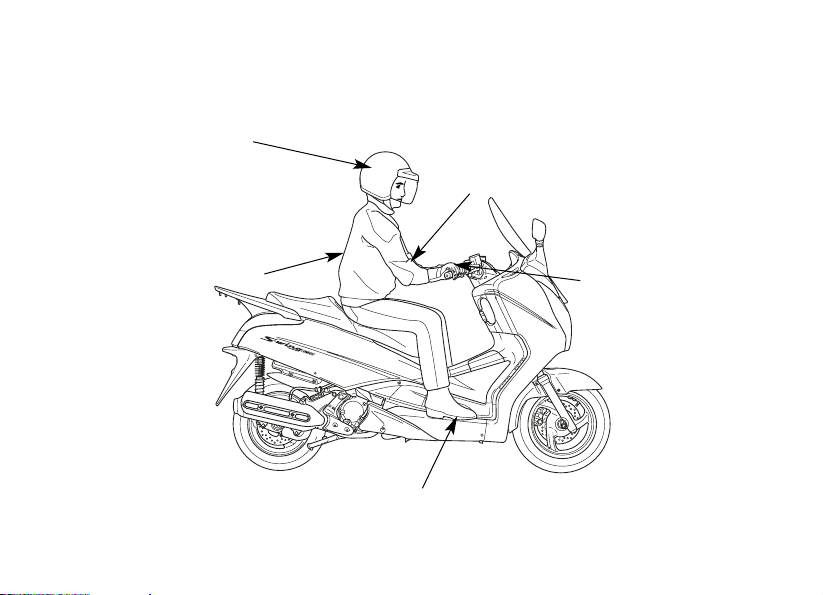
For your safety, we strongly recommend
that you always wear an approved
motorcycle helmet, eye protection, boots,
gloves, long pants and a long-sleeved shirt
or jacket whenever you ride. Although
complete protection is not possible, wearing
proper gear can reduce the chance of injury
when you ride.
Following are suggestions to help you
choose proper gear.
n
WARNING
Not wearing a helmet increases the
chance of serious injury or death in a
crash.
Be sure you and your passenger always
wear a helmet, eye protection and other
protective apparel when you ride.
Page 14

3
Helmets and Eye Protection
Your helmet is your most important piece of
riding gear because it offers the best
protection against head injuries. A helmet
should fit your head comfortably and
securely. A bright-coloured helmet can
make you more noticeable in traffic, as can
reflective strips.
An open-face helmet offers some
protection, but a full-face helmet offers
more. Always wear a face shield or goggles
to protect your eyes and help your vision.
Additional Riding Gear
In addition to a helmet and eye protection,
we also recommend:
• Sturdy boots with non-slip soles to help
protect your feet and ankles.
• Leather gloves to keep your hands warm
and help prevent blisters, cuts, burns and
bruises.
• A motorcycle riding suit or jacket for
comfort as well as protection. Brightcoloured and reflective clothing can help
make you more noticeable in traffic. Be
sure to avoid loose clothes that could get
caught on any part of your scooter.
Page 15
4
Shoes should be close-fitting,
have low heels and offer ankle protection.
ALWAYS wear a helmet.
You should also wear
a face shield or goggles.
Wear bright
or reflective clothing.
Clothes should be close-fitting.
Wear gloves.
Page 16

5
LOAD LIMITS AND GUIDELINES
Your scooter has been designed to carry
you, one passenger and a limited amount of
cargo. When you add cargo or carry a
passenger, you may feel some difference
during acceleration and braking. But so long
as you keep your scooter well-maintained,
with good tyres and brakes, you can safely
carry loads within the given limits and
guidelines.
However, exceeding the weight limit or
carrying an unbalanced load can seriously
affect your scooter’s handling, braking and
stability. Non-Honda accessories, improper
modifications, and poor maintenance can
also reduce your safety margin.
The following pages give more specific
information on loading, accessories and
modifications.
Loading
How much weight you put on your scooter
and how you load it, are important to your
safety. Anytime you ride with a passenger or
cargo you should be aware of the following
information.
n
WARNING
Overloading or improper loading can
cause a crash and you can be seriously
hurt or killed.
Follow all load limits and other loading
guidelines in this manual.
Page 17
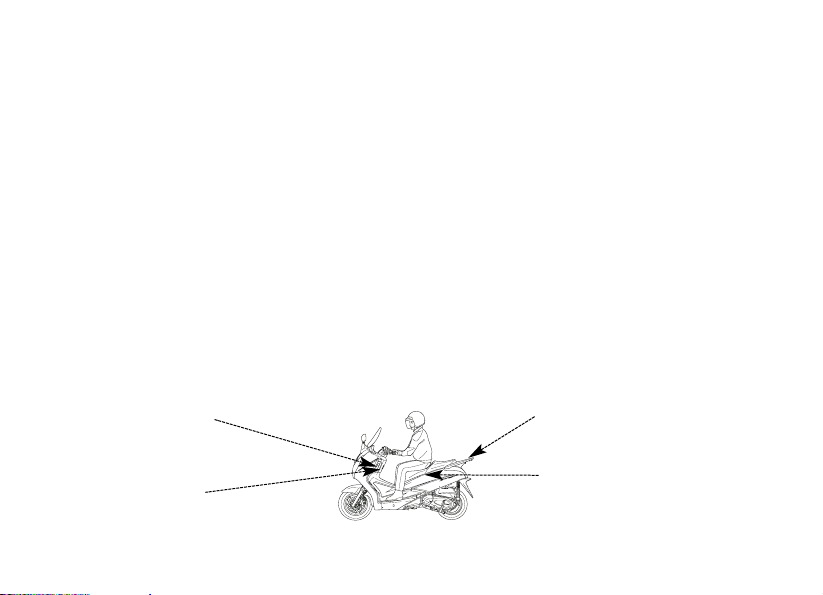
6
Load limits
Following are the load limits for your scooter:
Maximum weight capacity:
180 kg (397 lbs)
Includes the weight of the rider, passenger, all cargo and all accessories.
Maximum cargo weight:
19 kg (42 lbs)
The weight of added accessories will reduce the maximum cargo weight you can carry.
Putting too much weight in individual storage compartments can also affect stability and
handling. So be sure to stay within the limits given below:
Maximum weight:
in center compartment 10 kg (22 lbs)
in left compartment 0,5 kg (1.0 lbs)
shopping hook 1,5 kg (3.0 lbs)
rear carrier 3,0 kg (6.6 lbs)
Rear carrier:
weight limit:
3,0 kg (6.6 lbs)
Center compartment:
weight limit:
10 kg (22 lbs)
Left compartment:
weight limit:
0,5 kg (1.0 lbs)
Shopping hook:
weight limit:
1,5 kg (3.0 lbs)
Page 18

7
Loading Guidelines
Your scooter is primarily intended for
transporting you and a passenger.
If you wish to carry more cargo, check with
your Honda dealer for advice and be sure to
read the information regarding accessories
on page 8.
Improperly loading your scooter can affect
its stability and handling. Even if your
scooter is properly loaded, you should ride
at reduced speeds whenever carrying
cargo.
Follow these guidelines whenever you carry
a passenger or cargo:
• Check that both tyres are properly
inflated.
• If you change your normal load, you may
need to adjust the rear suspension (see
page 29).
• To prevent loose items from creating a
hazard, make sure the left compartment
and the center compartment are closed
and that any other cargo is securely tied
down before you ride away.
• Place cargo weight as close to the center
of the scooter as possible.
• Balance cargo weight evenly on both
sides.
Page 19

8
Accessories and modifications
Modifying your scooter or using non-Honda
accessories can make your scooter unsafe.
Before you consider making any
modifications or adding an accessory, be
sure to read the following information.
Accessories
We strongly recommend that you use only
genuine Honda accessories that have been
specifically designed and tested for your
scooter. Because Honda cannot test all other
accessories, you must be personally
responsible for proper selection, installation
and use of non-Honda accessories. Check
with your dealer for assistance and always
follow these guidelines:
• Make sure the accessory does not obscure
any lights, reduce ground clearance and
banking angle, limit suspension travel or
steering travel, alter your riding position or
interfere with operating any controls.
• Be sure electrical equipment does not
exceed the scooter’s electrical system
capacity (page 128). A blown fuse can
cause a loss of lights or engine power.
n
WARNING
Improper accessories or modifications can
cause a crash in which you can be
seriously hurt or killed.
Follow all instructions in this owner’s
manual regarding accessories and
modifications.
Page 20

9
• Do not pull a trailer or sidecar with your
scooter. This scooter was not designed
for these attachments, and their use can
seriously impair your scooter’s handling.
Modifications
We strongly advise you not to remove any
original equipment or modify your scooter in
any way that would change its design or
operation. Such changes could seriously
impair your scooter’s handling, stability and
braking, making it unsafe to ride.
Removing or modifying your lights, mufflers,
emission control system or other equipment
can also make your scooter illegal.
Page 21
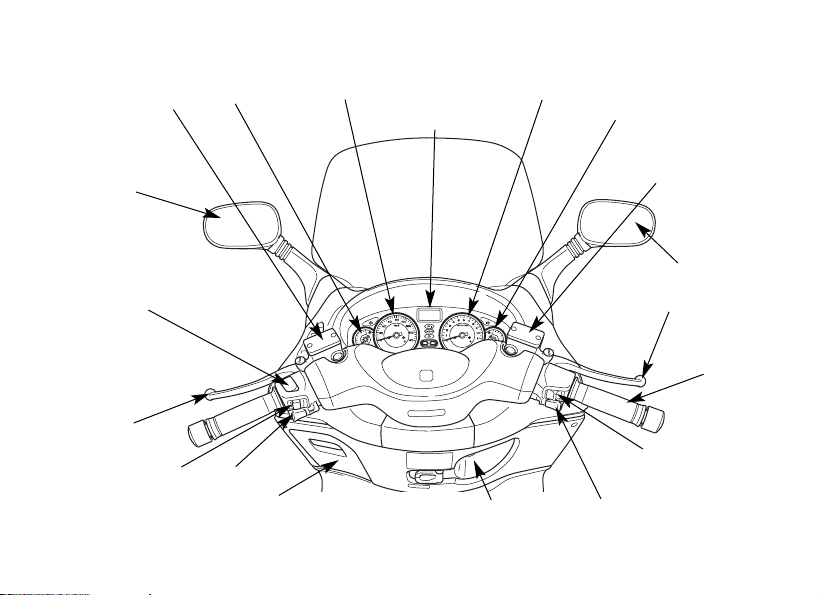
10
Rearview
mirror
Rear brake
lever
Headlight dimmer switch
Passing light control switch
Turn signal switch
PARTS LOCATION
Horn button
Ignition switch
Start button
Front brake lever
Rearview
mirror
Front brake fluid
reservoir
Multifunction display
Rear brake fluid
reservoir
Hazard switch
(FES125A/150A)
Throttle grip
Fuel gauge
Speedometer
Tachometer
Coolant temperature
gauge
Left compartment
Page 22
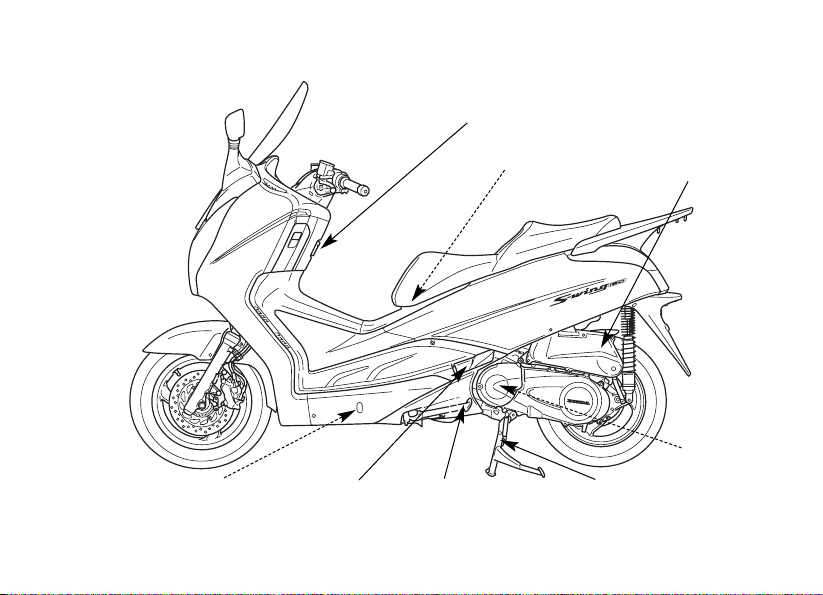
11
Coolant reserve tank
Center
stand
Passenger
footpeg
Belt case air
cleaner
Air cleaner housing
Helmet holder
Shopping
hook
Side stand
Page 23
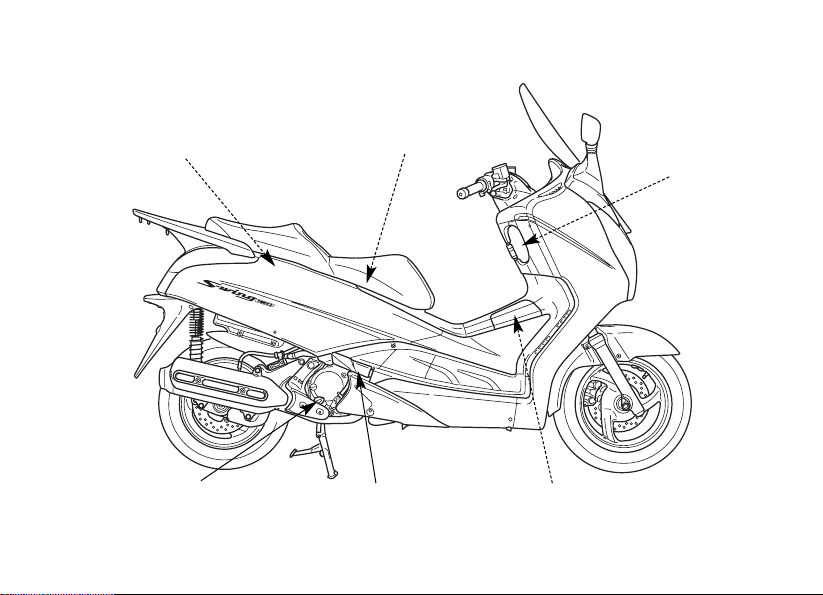
12
Oil filler cap / dipstick
Passenger footpeg
Fuel fill cap
Center compartment
Document compartment
Tool kit
Fuse Box
Main fuse
Battery
Ignition switch
Seat opener
Fuel lid opener
Page 24
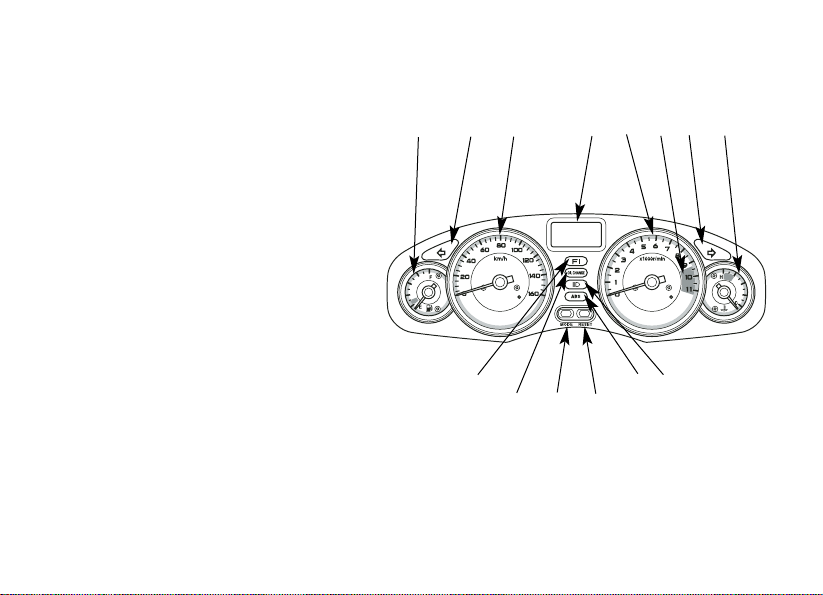
13
INSTRUMENTS AND INDICATORS
The indicators are contained in the
instrument panel. Their functions are
described in the tables on the following
pages.
(1) Fuel gauge
(2) Left turn signal indicator
(3) Speedometer
(4) Multi-function display
(5) Tachometer
(6) Tachometer red zone
(7) Right turn signal indicator
(8) Coolant temperature gauge
(9) High beam indicator
(10) Anti-lock brake system (ABS) indicator
(FES125A/FES150A)
(11) RESET button
(12) MODE button
(13) Oil change indicator
(14) PGM-FI malfunction indicator
(1) (2) (3) (4) (5) (7) (8)
(9)(10)
(12)
(11)
(14)
(13)
(6)
Page 25

14
(Ref. No.) Description Function
(2) Left turn signal indicator (green) Flashes when the left turn signal operates.
(3) Speedometer Shows riding speed. This shows your speed in
kilometers per hour (km/h) and/or miles per hour
(mph) depending on the type.
The speedometer needle will swing to the
maximum scale on the dial once when the
ignition switch is turned ON.
(1) Fuel gauge Shows approximate fuel supply available
(page 26).
The fuel gauge needle will swing to the
maximum scale on the dial once when the
ignition switch is turned ON.
Page 26

15
(Ref. No.) Description Function
(4) Multifunction display The display includes the following functions;
This display shows the initial display (page 19).
Shows accumulated mileage (page 21)
Shows trip mileage (page 21)
Shows hours and minutes (page 23)
Shows current fuel consumption
(page 25).
Odometer
Tripmeter A and B
Digital clock
(5) Tachometer Shows engine revolution per minute.
The tachometer needle will swing to the
maximum scale on the dial once when the
ignition switch is turned ON.
Fuel consumption meter
Page 27
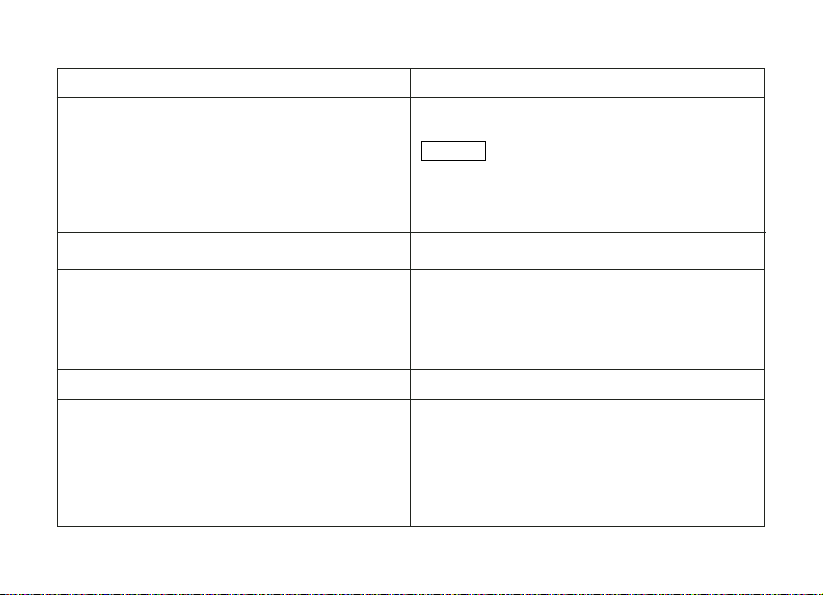
16
(Ref. No.) Description Function
(9) High beam indicator (blue) Lights when the headlight is on high beam.
(10) Anti-lock brake system (ABS) indicator (red)
(FES125A/FES150A)
This indicator light normally illuminates when the
ignition switch is turned ON and is extinguished
when the scooter is ridden at a speed of more
than 10 km/h (6 mph).
In the event of problems with the ABS system this
indicator flashes and remains on (page 31-32).
(8) Coolant temperature gauge Shows coolant temperature (page 27).
The coolant temperature gauge needle will
swing to the maximum scale on the dial once
when the ignition switch is turned ON.
(7) Right turn signal indicator (green) Flashes when the right turn signal operates.
(6) Tachometer red zone
Never allow the tachometer needle to enter the
red zone, even after the engine has broken in.
Running the engine beyond recommended
maximum engine speed (the beginning of the
tachometer red zone) can damage the engine.
NOTICE
Page 28

17
(Ref. No.) Description Function
(11) RESET button
This button is used to reset the tripmeter A or
B to zero (page 22).
This button is also used to reset the oil change
indicator (page 28) and adjust the time (page
23).
(12) MODE button
This button is used to select the odometer or
the tripmeter A or B (page 21).
This button is also used to select the current
fuel consumption meter (page 21-25) and to
adjust the time (page 23).
Page 29

18
(Ref. No.) Description Function
(13) Oil change indicator (yellow) Lights when specified maintenance interval for
engine oil change is reached (page 28).
(14) PGM-FI Malfunction Indicator Lamp (red)
Lights when there is any abnormality in the
PGM-FI (Programmed Fuel Injection) system.
It should also light for a few seconds and then go
off when the ignition switch is turned ON.
If it comes on at any other time, reduce speed
and take the motorcycle to your Honda dealer as
soon as possible.
Page 30
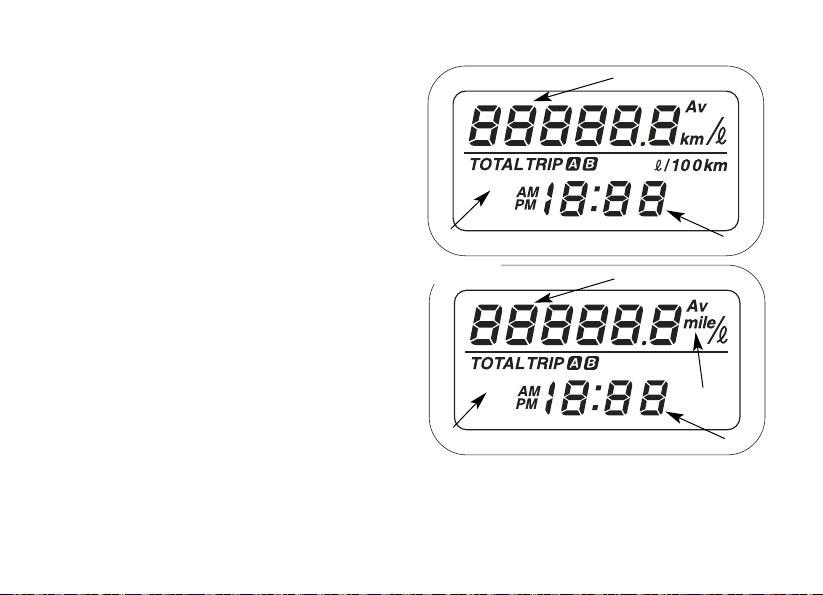
Initial display
When the ignition switch is turned ON, the
multi-function display (1) will temporarily
show all the modes and digital segments so
you can make sure the liquid crystal display
is fuctioning properly.
Digital clock (2) and tripmeter (3) will reset if
the battery is disconnected.
The unit “mile” (4) will be displayed only for
E and IIIE type.
19
(1)
(3)
(2)
(1) Multifunction display
(2) Digital clock
(3) Tripmeter
(4) “mile”
(4)
(1)
(3)
(2)
Type E, IIIE
Page 31

20
Multifunction Display
Multifunction display (1) includes the
following functions:
Odometer/Tripmeter (2)
Digital clock (3)
Fuel consumption meter (4) (page 25)
(2)
(4)
(1) Multifunction display
(2) Odometer/Tripmeter
(3) Digital clock
(4) Fuel consumption meter
(1)
(3)
Page 32

21
Odometer/Tripmeter
The odometer (1) shows accumulated
mileage.
Shows mileage per trip.
There are two tripmeters, tripmeter A (2) and
tripmeter B (3). Switch between the A and B
displays by pressing the Mode button (4)
repeatedly.
When you press the button MODE
repeatedly, the following functions appear
alternately on the display:
• Odometer
• Tripmeter A
• Tripmeter B
• Fuel consumption meter (5)
(page 25)
(1) Odometer
(2) Tripmeter A
(3) Tripmeter B
(4) Mode button
(5) Fuel consumption
meter
(1)
(2)
(3)
(4)
(5)
Page 33

22
Resetting the tripmeter
To reset the tripmeter, push and hold the
RESET button (1) when the display is in the
tripmeter A or tripmeter B (2) mode.
(1)
(2)
(1) RESET button (2) Tripmeter B
Page 34

23
Digital Clock (1)
Shows hour and minute. To adjust the time,
proceed as follows:
1. Turn the ignition switch ON.
2. Press and hold the MODE button (2) and
RESET button (3) for more than 2
seconds. The clock will be set in the
adjust mode with the hour display
flashing.
3. To set the hour, press the RESET button
until the desired hour and AM/PM are
displayed.
• The time is advanced by one hour,
each time the button is pushed.
• Quick setting - press and hold the
RESET button until the desired hour
appears.
(1) Digital clock
(2) MODE button
(3) RESET button
(1)
(3)
(2)
Page 35

24
4. Press the MODE button. The minute
display will start flashing.
5. To set the minute, press the RESET
button until the desired minute. The
minute display will return to “00”
when“60” is reached without affecting
the hour display.
• The time is advanced by one minute,
each time the button is pushed.
• Quick setting - press and hold the
RESET button until the desired minute
appears.
6. To end the adjustment, press the MODE
button or turn the ignition switch OFF.
Page 36

25
Fuel consumption meter (1)
Shows fuel consumption in the following way:
1. In increment of km/
l or mile/l (how many km
/miles are covered with a liter of fuel).
When the speed is 0 km/h or 0 mph, the
display shows “--.-”.
2. Push MODE (2) button two seconds, to
visualize the consumption in
l/100 km (how
many liters of fuel are necessary to cover
100 km). (Except type E, IIIE)
Push again MODE (2) button two seconds,
to select again the consumption in km/
l.
3. To reset the fuel consumption meter push
and hold RESET (3) button two seconds,
when this value is displayed.
• Displayed fuel consumption meter (1) is
an instant value, so it is different from a
value that is measured after filling up the
tank. It may give you an indication of your
eco drive.
(1) Fuel consumption meter
(2) MODE button
(3) RESET button
(1)
(2)
(1)
(3)
Page 37

26
Fuel gauge
The fuel gauge (1) shows the approximate
fuel supply available in a graduated display.
When the gauge needle enters the red band
(2), fuel will be low and you should refill the
tank as soon as possible. The amount of
fuel left in the tank,with the vehicle set
upright, when the needle enters the red
band is approximately:
2.0
l
(1) Fuel gauge needle
(2) Red band
(1)
(2)
Page 38

27
Coolant temperature gauge
The coolant temperature gauge (1) shows
coolant temperature.
When the needle begins to move above the
“C” (Cold) mark, the engine is warm enough
for the scooter to be ridden. The normal
operating temperature range is within the
section between the “H” and “C” marks. If
the needle reaches the red band (2), stop
the engine and check the reserve tank
coolant level.
Read pages 35-36 and do not ride the
scooter until the problem has been
corrected.
Exceeding maximum running temperature
may cause serious engine damage.
NOTICE
(1) Coolant temperature gauge
(2) Red band
(1)
(2)
Page 39

28
Oil change indicator
The oil change indicator (1) illuminates when
the distance covered by the scooter arrives
at the oil change interval specified in the user
and maintenance schedule (page 82).
Reset the indicator after every oil change, as
follows.
1. Press and hold the RESET button (2), then
turn ON the ignition switch. Keep the reset
button pressed for 3 seconds. The oil
change indicator wil go off.
If the oil is changed before the oil change
indicator illuminates, remember that the
indicator must anyway be reset. In this case,
follow the procedure described at point 1,
but when you continue to hold down the
reset button the oil change indicator will
illuminate for 2 seconds and then switch off.
This sequence of events means that the
indicator has been reset.
The first oil change is at 1000 km (600 miles),
but in this case the indicator should not be
reset. The indicator will appear after the
scooter has covered approximately 4,000 km
(2500 miles for the type E). Therefore, after
the second engine oil change as prescribed
by the maintenance schedule (page 82)
remember to reset the oil change indicator.
(1) Oil change indicator
(2) RESET button
(1)
(2)
Page 40

29
SUSPENSION
Each shock absorber (1) has 5 adjustment
positions for different load or riding
conditions.
Use a pin spanner (2) to adjust the rear
shock.
Always adjust the shock absorber position
in sequence (1-2-3-4-5 or 5-4-3-2-1).
Attempting to adjuste directly from 1 to 5 or
5 to 1 may damage the schock absorber.
Position: 1 to 2 is for light loads and smooth
road conditions. Standard position is 3.
Positions 4 to 5 increase spring preload for
a stiffer rear suspension, and can be used
when the scooter is heavily loaded.
Be certain to adjust both shock absorbers
to the same position.
MAJOR COMPONENTS
(Information you need to operate this scooter)
(1) Shock absorber
(2) Pin spanner
(1)
(2)
1 2 3 4 5
Page 41

30
BRAKES
Combined Brake System (CBS)
This scooter is equipped with a Combined
Brake System. Operating the rear brake
lever applies the rear brake and a portion of
the front brake. For full braking
effectiveness, use both the front and rear
brake lever simultaneously, as you would
with a conventional scooter braking system.
As with a conventional scooter braking
system, excessively hard application of the
brake controls may cause wheel lock,
reducing control of the scooter.
For normal braking, apply both the front and
rear brake lever to match your road speed.
For maximum braking, close the throttle and
firmly apply the front and rear brake lever.
Page 42

31
Anti-lock Brake System (ABS)
(FES125A/150A)
This model is also equipped with an Anti-lock
Brake System (ABS) designed to help prevent
wheel lock up during hard braking on uneven
or other poor surfaces while running straight.
Although the wheel may not lock up - if you
are braking too hard in a turn the scooter can
still lose traction, causing a loss of control.
In some situations, a scooter with ABS may
require a longer stopping distance to stop on
loose or uneven surfaces than an equivalent
scooter without ABS.
ABS cannot make up for road conditions,
bad judgement, or improper operation of the
brakes. It is still your responsibility to ride at
reasonable speeds for weather, road surface,
and traffic conditions, and to leave a margin
of safety.
ABS is self-checking and always on.
• ABS system may be activated by riding
over a sharp drop or rise in the road level.
It is important to follow the tyre
recommendations (page 42). The ABS
computer works by comparing wheel
speed. Non recommended tyres can affect
wheel speed and may confuse the ABS
computer.
• ABS does not function at low speeds
(approximately 10 km/h (6 mph) or below).
• ABS does not function if the battery is
discharged.
Page 43

32
ABS Indicator Light (ABS)
(FES125A/150A)
Normally, this light comes on when the ignition switch is turned ON and goes off after
you ride the scooter at speed above 10 km/h
(6 mph). If there is an ABS problem, the indicator light comes on and remains on. The
ABS system does not operate when the ABS
indicator light is on.
If the ABS indicator light comes on while
riding, stop the scooter in a safe place and
turn off the engine.
Turn the ignition switch ON again. The light
should come on, and go off after you ride
the scooter at speeds above 30 km/h (19
mph). If it does not go off, ABS is not
functioning, but the brakes still work the
Combined Brake System and provide
normal stopping ability. However, you
should have the system checked by your
Honda dealer as soon as possible.
The ABS indicator light may come on if you
turn the rear wheel while the scooter is
upright on the stand. This is normal. Turn
the ignition switch OFF, then turn it ON. The
indicator should come on and then go off
after you run the scooter above 30 km/h (19
mph).
Page 44

33
Inspection
Both the front and rear brakes are the
hydraulic disc types.
As the brake pads wear, the brake fluid level
drops.
There are no adjustments to perform, but
fluid level and pad wear must be inspected
periodically. The system must be inspected
frequently to ensure there are no fluid leaks.
If the control lever free travel becomes
excessive, and the brake pads are not worn
beyond the recommended limit (page 103-
104), there is probably air in the brake
system and it must be bled. See your
Honda dealer for this service.
Front Brake Fluid Level
With the scooter in an upright position,
check the fluid level. It should be above the
LOWER level mark (1). If the level is at or
below the LOWER level mark (1), check the
brake pads for wear (page 103-104).
Worn pads must be replaced.
If the pads are not worn, have your brake
system inspected for leaks.
The recommended brake fluid is Honda
DOT 4 brake fluid from a sealed container,
or an equivalent.
(1) LOWER level mark
Front brake
(1)
Page 45

34
Rear Brake Fluid Level
With the scooter in an upright position,
check the fluid level. It should be above the
LOWER level mark (1). If the level is at or
below the LOWER level mark (1), check the
brake pads for wear (page 103-104).
Worn pads must be replaced.
If the pads are not worn, have your brake
system inspected for leaks.
The recommended brake fluid is Honda
DOT 4 brake fluid from a sealed container,
or an equivalent.
Other checks:
Make sure there are no fluid leaks. Check
for deterioration or cracks in the hoses and
fittings.
(1) LOWER level mark
Rear brake
(1)
Page 46

35
COOLANT
Coolant recommendation
The owner must properly maintain the
coolant to prevent freezing, overheating and
corrosion. Use only high quality ethylene
glycol antifreeze containing corrosion
protection inhibitors specifically
recommended for use in aluminum engines.
(SEE ANTIFREEZE CONTAINER LABEL).
Use only low-mineral drinking water or
distilled water as a part of the antifreeze
solution. Water that is high in mineral
content or salt may be harmful to the
aluminum engine.
Using coolant with silicate inhibitors may
cause premature wear of water pump seals
or blockage of radiator passages.
Using tap water may cause engine damage.
The factory provides a 50/50 solution of
antifreeze and distilled water in this scooter.
This coolant solution is recommended for
most operating temperatures and provides
good corrosion protection. A higher
concentration of antifreeze decreases the
cooling system performance and is
recommended only when additional
protection against freezing is needed. A
concentration of less than 40/60 (40%
antifreeze) will not provide proper corrosion
protection. During freezing temperatures,
check the cooling system frequently and
add higher concentrations of antifreeze (up
to a maximum of 60% antifreeze) if
required.
Page 47

36
Inspection
The reserve tank is under the left side step
board.
Check the coolant level in the reserve tank
(1) while the engine is at the normal
operating temperature with the scooter in
an upright position. If the coolant level is
below the LOWER level mark (3), pull the
rubber floor mat (4) off, remove the coolant
box cover (5) and reserve tank (6) and add
coolant mixture until it reaches the UPPER
level mark (2).
Always add coolant to the reserve tank. Do
not attempt to add coolant by removing the
radiator cap.
If the reserve tank is empty, or if coolant
loss is excessive, check for leaks and see
your Honda dealer for repair.
(1) Reserve tank
(2) UPPER level mark
(3) LOWER level mark
(2)
(3)
(6)
(5)
(4)
(1)
(4) Rubber floor mat
(5) Coolant box cover
(6) Reserve tank cap
Page 48

37
FUEL
Fuel tank
The fuel tank is located above the step
board. The fuel tank capacity including the
reserve suplly is:
9.4 l
To open the fuel tank lid (1) insert the ignition
key, push in at the OFF position and turn it
clockwise.
(1) Fuel tank lid (A) Push in
(B) Turn to open
(A)
(1)
(B)
Page 49

38
To open the fuel fill cap (2), turn it
counterclockwise.
Do not overfill the tank. There should be no
fuel in the filler neck (3).
After refueling, be sure tighten the fuel fill
cap firmly by turning in clockwise.
Close the fuel tank lid.
n
WARNING
Petrol is highly fiammable and explosive.
You can be burned or seriously injured
when handling fuel.
• Stop the engine and keep heat, sparks,
and flame away.
• Refuel onmy outdoors.
• Wipe up spills immediately.
(2)
(3)
(2) Fuel fill cap
(3) Filler neck
Page 50

NOTICE
39
Use unleaded petrol with a research octane
number of 91 or higher.
The use of leaded petrol will cause
premature damage to the catalytic
converter.
If “spark knock” or “pinking” occurs at a
steady engine speed under normal load,
change brands of petrol. If spark knock or
pinking persists, consult your Honda dealer.
Failure to do so is considered misuse, and
damage caused by misuse is not covered
by Honda Limited’s Warranty.
Page 51

40
Petrol containing alcohol
If you decide to use a petrol containing
alcohol (gasohol), be sure it’s octane rating
is at least as high as that recommended by
Honda. There are two types of “gasohol”:
one containing ethanol, and the other
containing methanol. Do not use petrol that
contains more than 10% ethanol. Do not
use petrol containing methanol (methyl or
wood alcohol) that does not also contain
cosolvents and corrosion inhibitors for
methanol. Never use petrol containing more
than 5% methanol, even if it has cosolvents
and corrosion inhibitors.
Fuel system damage or engine performance
problems resulting from the use of fuels that
contain alcohol is not covered under the
warranty. Honda cannot endorse the use of
fuels containing methanol since evidence of
their suitability is as yet incomplete.
Before buying fuel from an unfamiliar
station, try to find out if the fuel contains
alcohol. If it does, confirm the type and
percentage of alcohol used. If you notice
any undesirable operating symptoms while
using a petrol that contains alcohol, or one
that you think contains alcohol, switch to a
petrol that you know does not contain
alcohol.
Page 52

41
ENGINE OIL
Engine oil level check
Check the engine oil level each day before
riding the scooter.
The level must be maintained between the
upper (1) and the lower (2) level marks on
the oil filler cap/dipstick (3).
1. Start the engine and let it idle for 3-5
minutes.
2. Stop the engine and put the scooter on
its center stand on level ground.
3. After 2-3 minutes, remove the oil filler
cap/dipstick (3), wipe it clean, and
reinsert the oil filler cap/dipstick without
screwing it in. Remove the oil filler
cap/dipstick. The oil level should be
between the upper (1) and lower (2) level
marks on the oil filler cap/dipstick.
4. If required, add the specified oil (page 91)
up to the upper level mark. Do not overfill.
5. Reinstall the oil filler cap/dipstick. Check
for oil leaks.
Running the engine with insufficient oil
pressure may cause serious engine damage.
NOTICE
(1) Upper level mark
(2) Lower level mark
(3) Oil filler cap/dipstick
(3)
(1)
(2)
Page 53

42
TUBELESS TYRES
To safely operate your scooter, your tyres
must be the proper type and size, in good
condition with adequate tread and correctly
inflated for the load you are carrying. The
following pages give more detailed
information on how and when to check your
air pressure, how to inspect your tyres for
damage and what to do when your tyres
need to be repaired or replaced.
Air pressure
Keeping your tyres properly inflated
provides the best combination of handling,
tread life and riding comfort. Generally,
underinflated tyres wear unevenly, adversely
affect handling and are more likely to fail
from being overheated.
Overinflated tyres make your scooter ride
more harshly, are more prone to damage
from road hazards and wear unevenly.
We recommend that you visually check your
tyres before every ride and use a gauge to
measure air pressure at least once a month
or any time you think the tyres might be low.
Tubeless tyres have some self-sealing
ability if they are punctured. However
because leakage is often very slow, you
should look closely for punctures whenever
a tyre is not fully inflated.
n
WARNING
Using tyres that are excessively worn or
improperly inflated can cause a crash in
which you can be seriously hurt or killed.
Follow all instructions in this owner’s
manual regarding tyre inflation and
maintenance.
Page 54

43
Always check air pressure when your tyres
are “cold” – when the scooter has been
parked for at least three hours. If you check
air pressure when your tyres are “warm” –
when the scooter has been ridden for even
a few miles – the readings will be higher
than if the tyres were “cold”. This is normal,
so do not let air out of the tyres to match
the recommended cold air pressures given
below. If you do, the tyres will be
underinflated.
The recommended “cold” tyre pressures
are:
Inspection
Whenever you check the tyre pressures,
you should also examine the tyre treads and
sidewalls for wear, damage, and foreign
objects:
Look for:
• Bumps or bulges in the side of the tyre or
the tread. Replace the tyre if you find any
bumps or bulges.
• Cuts, splits or cracks in the tyre. Replace
the tyre if you can see fabric or cord.
• Excessive tread wear.
Also, if you hit a pothole or hard object, pull
to the side of the road as soon as you safely
can and carefully inspect the tyres for
damage.
Driver
only
Driver and
one passenger
Front
Rear
175 (1.75 , 25)
200 (2.00 , 29)
175 (1.75 , 25)
250 (2.50 , 36)
Front
Rear
kPa (kgf/cm2,psi)
Page 55

44
Tread Wear
Replace tyres before tread depth at the
centre of the tyre reaches the following limit:
Minimum tread depth
Front: 1.5 mm (0.06 in)
Rear: 2.0 mm (0.08 in)
< For Germany >
German law prohibits use of tyres whose
tread depth is less than 1.6 mm.
(1) Wear indicator
(2) Wear indicator location mark
(2)
(1)
Page 56

45
Tyre repair
If a tyre is punctured or damaged, you
should replace it not repair it. As discussed
below, a tyre that is repaired, either
temporarily or permanently will have lower
speed and performance limits than a new
tyre.
A temporary repair, such as an external
tubeless tyre plug may not be safe for
normal speeds and riding conditions. If a
temporary or emergency repair is made to a
tyre, you should ride slowly and cautiously
to a dealer and have the tyre replaced. If
possible you should not carry a passenger
or cargo until a new tyre is installed.
Even if a tyre is professionally repaired with
a permanent internal patch plug, it will not
be as good as a new tyre.
You should not exceed 80 km/h (50 mph)
for the first 24 hours, or 130 km/h (80 mph)
at any time thereafter. In addition you may
not be able to safely carry as much weight
as with a new tyre. Therefore, we strongly
recommend that you replace a damaged
tyre. If you choose to have the tyre repaired,
be sure the wheel is balanced before you
ride.
Page 57

46
Tyre replacement
The tyres that came on your scooter were
designed to match the performance
capabilities of your scooter and provide the
best combination of handling, braking,
durability and comfort.
n
WARNING
Installing improper tyres on your scooter
can affect handling and stability. This can
cause a crash in which you can be
seriously hurt or killed.
Always use the size and type of tyres
recommended in this owner’s manual.
The recommended tyres for your scooter
are:
Whenever you replace a tyre, use one that
is equivalent to the original and be sure the
wheel is balanced after the new tyre is
installed.
Front
Rear
110/90-13 M/C 56L
BRIDGESTONE
HOOP B03 F
IRC
MB99
130/70-12 62L
BRIDGESTONE
HOOP B02 F
IRC
MB99
Type TUBELESS
Page 58

47
Important safety reminders
• Do not install a tube inside a tubeless tyre
on this scooter. Excessive heat build-up
can cause the tube to burst.
• Use only tubeless tyres on this scooter.
The rims are designed for tubeless tyres
and during hard acceleration or braking a
tube-type tyre could slip on the rim and
cause the tyre to rapidly deflate.
Page 59

48
IGNITION SWITCH
The ignition switch (1) is on the right side
below the steering stem.
The headlight and taillights will come on
whenever you turn the ignition switch ON. If
your scooter is stopped with the ignition
switch ON and the engine is not running,
the headlight and taillights will still be on,
resulting in battery discharge.
The original Honda rear top box is opened
with the ignition key (only type IIF, IIED, IIIE).
NOTICE
(1) Ignition switch
(1)
ESSENTIAL INDIVIDUAL COMPONENTS
Key Position Function Key Removal
LOCK Steering is locked. Engine and lights Key can be
(steering lock)
cannot be operated. removed.
OFF Engine and lights cannot be operated. Key can be
removed.
ON Engine and lights can be operated. Key cannot
be removed.
Page 60

49
RIGHT HANDLEBAR CONTROLS
Start button
The start button (1) is next to the throttle
grip.
When the starter button is pressed, the
starter motor cranks the engine.
See page 64 for the starting procedure.
(1) Start button
(1)
(1)
FES125/150
FES125A/150A
Page 61

50
(1)
Hazard switch (FES125A/150A)
Hazard switch is over to start button.This
system should be used only when your
scooter is stopped under emergency or
hazardous conditions. To turn it on, turn the
ignition key to the ON position, and then
slide the switch marked .The front and
rear turn signals will blink simultaneously.
All of the turn signals can blink without the
ignition key.
To operate this function, proceed as
follows:
1. Turn the ignition key to ON position and
then slide the hazard switch (1) to the
marked position.
2. All of the turn signals will keep blinking
even after you turn the ignition key to
OFF position.
3. You can turn off the turn blinking signals
by sliding the hazard switch back to the
off position.
If the switch is left in the off position for
more than two seconds and then moved
back to the position again, the turn
signals will not be on.
Be sure to turn the switch off when the
hazard warning is no longer required, or the
turn signals will not work properly, and may
confuse other drivers.
If all the turn signals are left blinking with the
engine stopped, the battery will be
discharged.
(1) Hazard switch
Page 62

51
LEFT HANDLEBAR CONTROLS
Headlight dimmer switch (1)
Push the dimmer switch to (HI) to select
high beam or to (LO) to select low beam.
Passing light control switch (2)
When this switch is pressed down, the
headlight flashes on to signal approaching
cars or when passing.
Turn signal switch (3)
Move to (L) to signal a left turn, (R)
to signal a right turn. Press to turn signal off.
Horn button (4)
Press the button to sound the horn.
➪
➪
(1) Headlight dimmer switch
(2) Passing light control switch
(3) Turn signal switch
(4) Horn button
(1)
(2)
(3)
(4)
Page 63

52
STEERING LOCK
To lock the steering, turn the handlebars all
the way to the left; turn the ignition key (1)
to LOCK.
Remove the ignition key.
To unlock the steering turn the ignition key
to OFF.
Do not turn the ignition key to LOCK while
riding the scooter; loss of vehicle control
will result.
(1) Ignition key
(A) Turn to “LOCK”
(B) Turn to “OFF”
To lock
To unlock
(A)
(B)
(1)
FEATURES
(Not required for operation)
Page 64

SEAT LOCK
The seat lock is on the ignition switch (1).
To open the seat, insert the ignition key (2),
push in the key and turn to the OFF position,
then push and turn it counterclockwise.
Lift the seat.
To lock the seat, lower and push down on
the reverse side of the hook (3) of the seat
until it locks. Ensure the seat is securely
locked before riding the scooter.
Do not place luggage or clothing near the
seat catch (4). It could make the seat
difficult to open if it gets caught between
the seat hook and catch while closing the
seat.
(1)
(3)
(2)
(A)
(B)
(4)
(1) Ignition switch
(2) Ignition key
(3) Hook
(4) Seat catch
(A) Push in
(B) Turn to open
53
Page 65

54
HELMET HOLDER
The helmet holder eliminates the need for
carrying your helmet after parking your
scooter. The helmet holder is located below
the seat.
Open the seat (page 53).
Route either end of the helmet holder cable
(1) through the helmet’s D-ring (2).
Hook the loops of the wire onto the helmet
holder (3) and lower the seat to lock.
The helmet holder wire is furnished in the
tool kit.Remove the helmet wire and store it
in the tool bag when it is not used.
n
WARNING
Riding with a helmet attached to the holder
can interfere with the rear wheel or the
suspension and could cause a crash in
which you can be seriously hurt or killed.
Use the helmet holder only while parked. Do
not ride with a helmet secured by the holder.
(1) Helmet holder cable
(2) D-ring
(3) Helmet holder
(1)
(2)
(3)
Page 66

55
CENTER COMPARTMENT
The center compartment (1) is below the
seat. Opening and closing:
See “SEAT LOCK” (page 53).
MAXIMUM WEIGHT LIMIT:
10 kg (22 lbs)
Never exceed the maximum weight limit;
handling and stability may be severely
affected.
The center compartment may become
heated by the engine. Do not store food and
other articles which are flammable or
susceptible to heat damage in this
compartment.
Do not direct water under pressure against
the center compartment as water will be
forced into the compartment.
A position of the partition board (2) can be
changed like the following figure.
(1) Center compartment
(2) Partition board
(1)
(2)
(2)
Page 67

56
Fold back the carpet (3) at the front notch
(4) and install the partition board in the
groove.
• Soiled things can be stored without
making the carpet dirty.
You can store helmet(5) in the center
compartment.
Store helmet as shown in the following picture.
If you store helmet wrongly, it will interfere with
the front seat.
Some helmets may not be stored in the
compartment due to their size or design.
(5) Helmet
(5)
(3)
(3) Carpet
(4) Front notch
(4)
Page 68

57
DOCUMENT COMPARTMENT
The document bag (1) is in the document
compartment (2) under the rear seat (3).
This owner’s manual and other documents
should be stored in the document bag.
When washing your scooter, be careful not to
flood this area with water.
TRUNK LIGHT
The trunk light (1) will be turned ON
automatically when the front seat is opened. It
is kept ON as long as the front seat is opened
regardless of the position of the ignition
switch.
The trunk light can be cancelled if the trunk
light switch is at OFF position, when the seat is
open.
(1) Document bag
(2) Document compartment
(3) Seat
(1) Trunk light
OFF
ON
(1)
(2)
(3)
Page 69

58
ACCESSORY SOCKET
The accessory socket (1) is in the center
compartment.
Open the cover (2) to gain access to the
accessory socket.
Rated capacity is:
12 watt (12 volt, 1amps).
To prevent battery run down or weak
battery, keep the engine running while
drawing current from the socket.
Set the headlight in the LO beam. Battery
run down or damage to the accessory
socket cause result.
To prevent entry foreign matter, be sure to
close the cover when the accessory socket is
not used.
(1)
(1) Accessory socket
(2) Cover accessory socket
(2)
Page 70

59
LEFT COMPARTMENT
There is left compartment (1) below the left
side of the handlebar.
The maximum allowable load in the left
compartment shall be no more than:
0.5 kg (1.0 lbs)
Do not open the left compartment while
riding the scooter.
To Open:
• Pull the knob (2), then open the left
compartment (3).
To Close:
1. Press forward until it is firmly closed.
Make sure the left compartment cover is
closed before riding.
When washing your scooter be careful not to
flood this area with water.
Do not store valuables or fragile articles in
the left compartment.
(1) Left compartment
(2) Knob
(3) Left compartment cover
(1)
(2)
(3)
Page 71

60
SHOPPING HOOK
The shopping hook (1) is provided below the
handlebar.
MAXIMUM WEIGHT LIMIT:
1.5 kg (3.0 lbs)
Do not attach large luggage to the hook that
would hang out from the scooter and/or
interfere with the movement of your feet.
(1) Shopping hook
(1)
Page 72

61
HEADLIGHT AIM VERTICAL
ADJUSTMENT
Vertical adjustment can be made by turning
the knob (1) in or out as necessary.
Obey local laws and regulations.
(1) Knob (A) Up
(B) Down
(A)
(1)
(B)
Page 73

62
PRE-RIDE INSPECTION
For your safety, it is very important to take a
few moments before each ride to walk
around your scooter and check its
condition. If you detect any problem, be
sure you take care of it or have it repaired
by your Honda dealer.
1. Engine oil level - add engine oil if require
(page 41). Check for leaks.
2. Fuel level - fill fuel tank when necessary
(page 37). Check for leaks.
3. Coolant level - add coolant if required.
Check for leaks (pages 35-36).
4. Front and rear brakes - check operation;
make sure there is no brake fluid leakage
(pages 30-32).
5. Tyres - check condition and pressure
(pages 42-47).
6. Throttle - check for smooth opening and
full closing in all steering positions.
OPERATION
n
WARNING
Improperly maintaining this scooter or
failing to correct a problem before riding
can cause a crash in which you can be
seriously hurt or killed.
Always perform a pre-ride inspection
before every ride and correct any
problems.
Page 74

63
7. Lights and horn - Check that the headlight,
brake/tail light, turn signals, indicator lights
and horn are all working properly.
8. Side stand ignition cut-off system - check for
proper function (page 102).
Page 75

64
STARTING THE ENGINE
Always follow the proper starting procedure
described below.
This scooter has a fuel-injected engine with
an automatic choke.
This scooter is equipped with a side stand
ignition cut-off system. The engine cannot
be started if the side stand is down.
A running engine will shut off if the side
stand is lowered.
To protect the catalytic converter in your
scooter’s exhaust system, avoid extending
idling and use of leaded petrol.
Your scooter’s exhaust contains poisonous
carbon monoxide gas. High levels of carbon
monoxide can collect rapidly in enclosed
areas such as a garage. Do not run the
engine with the garage door closed. Even
with the door open, run the engine only long
enough to move your scooter out of the
garage.
Do not use the electric starter for more than
5 seconds at a time. Release the starter
button for approximately 10 seconds before
pressing it again.
Page 76

65
Preparation
1.Place the scooter on its center stand.
2. Turn the ignition switch (1) to ON.
Confirm the following:
• The PGM-FI malfunction indicator lamp
is OFF.
• The ABS indicator is ON (page 16)
(FES125A/150A).
(1) Ignition switch
(1)
Page 77

66
3. Squeeze the rear brake lever (2).
The electrical starter will only work when
the rear brake lever is squeezed and the
side stand is up.
4. With the throttle completely closed, push
the start button (3). Release the starter
button as soon as the engine starts.
The engine will not start if the throttle is fully
open (because the electronic control
module cuts off the fuel supply).
(3) Starter button(2) Rear brake lever
n
CAUTION
Contact with the spinning rear wheel can
cause you to be hurt.
(2)
(3)
Page 78

67
5. Be sure to keep the throttle closed locked
while warming up the engine.
6. Allow the engine to warm up before riding
(see “RIDING” page 69).
Do not “BLIP” the throttle (open and close
rapidly) as the scooter will move forward
suddenly.
Do not leave the scooter unattended while
the engine is warming up.
Snapping the throttle or fast idling for more
than about 5 minutes at normal air
temperature may cause exhaust pipe
discolouration.
CLOSE
Page 79

68
Ignition cut-off
Your scooter is designed to automatically
stop the engine and fuel pump if the scooter
is over-turned (a banking sensor cuts off the
ignition system). Before restarting the
engine, you must turn the ignition switch to
the OFF position and then back to ON.
RUNNING-IN
Help assure your scooter’s future reliability
and performance by paying extra attention
to how you ride during the first 500 km (300
miles).
During this period avoid, full-throttle starts
and rapid acceleration.
Page 80

69
RIDING
Review scooter safety (pages 1-9) before
you ride.
Make sure flammable materials such as
dry grass or leaves do not come in
contact with the exhaust system when
riding, idling or parking your scooter.
1. Make sure the throttle (1) is closed
(page 67) before moving the scooter off
the center stand.
2. Stand on the left side of the scooter
and push it forward off the center stand.
Page 81

70
3. Mount the scooter from the left side
keeping at least one foot on the ground
to steady the scooter.
4. Before starting off, indicate your
direction with the turn signals, and check
for safe traffic conditions.
Grasp the handlebars firmly with both
hands.
Never attempt one-handed operation:
loss of vehicle control could result.
Page 82

71
5. To accelerate, open the throttle (1)
gradually; the scooter will move forward.
Do not “BLIP” the throttle (open and
close rapidly) as the scooter will move
forward suddenly, causing possible loss
of control.
6. To decelerate, close throttle.
(1) Throttle
CLOSE
OPEN
(1)
Page 83

72
7. When slowing down the scooter,
coordination of the throttle (1) and front
(2) and rear brakes (3), is most important.
Both front and rear brakes should be
applied together. Independent use of only
the front or rear brake reduces stopping
performance.
Excessive brake application may cause
either wheel to lock, reducing control of
the scooter.
(1) Throttle (2) Front brake
(3) Rear brake
(1)
(3)
(2)
Page 84

73
(1) Throttle (2) Front brake (3) Rear brake
(1)
8.When approaching a corner or turn,
close the throttle (1) fully, and slow the
scooter down by applying both front (2)
and rear (3) brakes at the same time.
9. After completing the turn, open the
throttle gradually to accelerate the
scooter.
(3)
(2)
Page 85

74
10. When descending a steep grade,
close the throttle (1) fully and apply both
brakes (2), (3) to slow the scooter.
Avoid continuous use of the brakes,
which may result in overheating and
reduction of braking efficiency.
(1) Throttle
(2) Rear brake
(3) Front brake
(1)
(3)
(2)
Page 86

75
11. When riding on wet or loose surfaces,
be especially cautious.
• When riding in wet or rainy conditions or
on loose surfaces, the ability to maneuver
and stop will be reduced.
For your safety:
• Exercise extreme caution when braking,
accelerating or turning.
• Ride at slower speeds and allow for extra
stopping distance.
• Keep the scooter as upright as possible.
• Use extreme caution when riding over
slippery surfaces such as railroad tracks,
iron plates, manhole covers, painted
lines, etc.
Page 87

76
PARKING
1. After stopping the scooter turn the
ignition switch to the OFF position and
remove the key.
2. Use the center stand to support the
scooter while parked.
3. Lock the steering to help prevent theft
(page 52).
Park the scooter on firm, level ground to
prevent it from falling over.
If you must park on a slight incline, aim the
front of the scooter uphill to reduce the
possibility of rolling off the center stand or
overturning.
The exhaust pipe and muffler become very
hot during operation and remain sufficiently
hot to inflict burns if touched even after
shutting off the engine.
Make sure flammable materials such as dry
grass or leaves do not come in contact with
the exhaust system when parking your
scooter.
HOW TO USE CENTER STAND
Page 88

77
ANTI-THEFT TIPS
1. Always lock the steering and never leave
the key in the ignition switch. This sounds
simple but people do forget (page 52).
2. Be sure the registration information for
your scooter is accurate and current.
3. Park your scooter in a locked garage
whenever possible.
4. Use an additional anti-theft device of
good quality.
5.Put your name, address, and phone
number in this owner's manual and keep
it on your scooter at all times.
Many times stolen scooters are identified
by information in the owner's manuals
that are still with them.
NAME: ____________________________________
ADDRESS: ________________________________
____________________________________________
____________________________________________
PHONE NO: _______________________________
LOCK STEERING
(1) Ignition key
(A) Turn to lock
(A)
(1)
Page 89

78
THE IMPORTANCE OF MAINTENANCE
A well maintained scooter is essential for
safe, economical and trouble-free riding. It
will also help reduce air pollution.
To help you properly care for your scooter,
the following pages include a Maintenance
Schedule and a Maintenance Record for
regularly scheduled maintenance.
These instructions are based on the
assumption that the scooter will be used
exclusively for its designed purpose.
Sustained high speed operation or
operation in unusually wet or dusty
conditions will require more frequent service
than specified in the Maintenance Schedule.
Consult your Honda Dealer for
recommendations applicable to your
individual needs and use.
If your scooter overturns or becomes
involved in a crash, be sure your Honda
dealer inspects all major parts, even if you
are able to make some repairs.
MAINTENANCE
n
WARNING
Improperly maintaining this scooter or
failing to correct a problem before you
ride can cause a crash in which you
can be seriously hurt or killed.
Always follow the inspection and
maintenance recommendations and
schedules in this owner’s manual.
Page 90

79
MAINTENANCE SAFETY
This section includes instructions on some
important maintenance tasks. You can
perform some of these tasks with the tools
provided – if you have basic mechanical
skills.
Other tasks that are more difficult and
require special tools are best performed by
professionals. Wheel removal should
normally be handled only by a Honda
technician or other qualified mechanic;
instructions are included in this manual only
to assist in emergency service.
Some of the most important safety
precautions follow. However, we cannot
warn you of every conceivable hazard that
can arise in performing maintenance. Only
you can decide whether or not you should
perform a given task.
n
WARNING
Failure to properly follow maintenance
instructions and precautions can cause
you to be seriously hurt or killed.
Always follow the procedures and
precautions in this owner’s manual.
Page 91

80
SAFETY PRECAUTIONS
• Make sure the engine is off before you
begin any maintenance or repairs. This
will help eliminate several potential
hazards;
• Carbon monoxide poisoning from
engine exhaust.
Be sure there is adequate ventilation
whenever you operate the engine.
• Burns from hot parts.
Let the engine and exhaust system
cool before touching.
• Injury from moving parts.
Do not run the engine unless
instructed to do so.
• Read the instructions before you begin
and make sure you have the tools and
skills required.
• To help prevent the scooter from falling
over, park it on a firm, level surface, using
the center stand to provide support.
• To reduce the possibility of a fire or
explosion, be careful when working
around petrol or batteries. Use only
nonflammable solvent, not petrol, to
clean parts. Keep cigarettes, sparks and
flames away from the battery and all fuelrelated parts.
Remember that your Honda dealer knows
your scooter best and is fully equipped to
maintain and repair it.
To ensure the best quality and reliability,
use only new genuine Honda parts or their
equivalents for repair and replacement.
Page 92

81
MAINTENANCE SCHEDULE
Perform the Pre-ride Inspection (page 62) at each scheduled maintenance period.
I: INSPECT AND CLEAN, ADJUST, LUBRICATE OR REPLACE IF NECESSARY
C: CLEAN R: REPLACE A: ADJUST L: LUBRICATE
The following Maintenance Schedule specifies all maintenance required to keep your scooter in
peak operating condition. Maintenance work should be performed in accordance with standards
and specifications of Honda by properly trained and equipped technicians. Your Honda dealer
meets all of these requirements.
* Should be serviced by your Honda dealer, unless the owner has the proper tools and service
data and is mechanically qualified. Refer to the Official Honda Shop Manual.
** In the interest of safety, we recommend these items be serviced only by your Honda dealer.
Honda recommends that your Honda dealer should road test your scooter after each periodic
maintenance is carried out.
NOTES: (1) At higher odometer readings, repeat at the frequency interval established here.
(2) Service more frequently if the scooter is ridden in unusually wet or dusty areas.
(3) Service more frequently when riding in rain or at full throttle.
(4) Replace every 2 years, or at the indicated odometer interval, whichever comes first.
Replacement requires mechanical skill.
Page 93

82
ODOMETER READING [NOTE (1)]
FREQUENCY
x 1000 km
14 812
x 1000 mi
MONTH
NOTE
NOTE (3)
NOTE (4)
ITEM
* FUEL LINE
* THROTTLE OPERATION
AIR CLEANER
CRANKCASE BREATHER
SPARK PLUG
* VALVE CLEARANCE
ENGINE OIL
* ENGINE OIL STRAINER SCREEN
RADIATOR COOLANT
* COOLING SYSTEM
* SECONDARY AIR SUPPLY SYSTEM
➞
➞
I
0.6 2.5 5 7.5
6
12
18
I
III
R
C
R
CCC
III
R
NOTE (2)
I
RR R
I
I
I
REFER
TO
PAGE
-
87
90
96
91
93
100
35
99
WHICHEVER
COMES
FIRST
I
-
Page 94

83
ODOMETER READING [NOTE (1)]
FREQUENCY
WHICHEVER
COMES
FIRST
x 1000 km 1 4 8 12
x 1000 mi
REFER
TO
PAGE
-
-
-
30
103,104
30,103
61
-
101
-
-
-
MONTH
NOTE
ITEM
* DRIVE BELT
BELT CASE AIR CLEANER
* FINAL DRIVE OIL
BRAKE FLUID
BRAKE PADS WEAR
BRAKE SYSTEM
* HEADLIGHT AIM
** CLUTCH SHOES WEAR
SIDE STAND
* SUSPENSION
* NUTS,BOLTS,FASTNERS
** WHEELS/TIRES
** STEERING HEAD BEARINGS
➞
➞
0.6 2.5 5 7.5
6
12
18
I
I
I
I
I
III
I
I
I
Every 8.000 km (5000 miles) I
Every 24.000 km (15.000 miles) R
II
IIII
CCC
III
NOTE (4)
NOTE (4)
I
-
I
II
I
I
I
Page 95

84
TOOL KIT
The tool kit (1) is in the center compartment
(page 55). Some roadside repairs, minor
adjustments and parts replacement can be
performed with the tools contained in the
kit.
• 8 x 10 mm open end wrench
• 12 x 14 mm open end wrench
• Suspension adjusting pin spanner
• No. 1 Screw driver
• No. 3 Screw driver
• Screw driver handle
• 5 mm Hex wrench
• Spark plug wrench
• Helmet holder cable
• Fuse puller
• Fuse 30A
• Tool bag
(1) Tool bag
(1)
Page 96

85
SERIAL NUMBERS
The frame and engine serial numbers are
required when registering your scooter.
They may also be required by your dealer
when ordering replacement parts.
Record the numbers here for your reference.
FRAME No. ________________________________
The frame number (1) is stamped on the
right side of the frame body.
The engine serial number (2) is stamped on
the left side of the crankcase.
ENGINE No. _______________________________
(1)
(2) Engine number(1) Frame number
(2)
Page 97

86
COLOUR LABEL
The colour label (1) is attached to the center
compartment (page 55).
It is helpful when ordering replacement
parts. Record the colour and code here for
your reference.
COLOUR __________________________________
CODE ___________________________________
(1) Colour label
(1)
Page 98

87
AIR CLEANER
Refer to the Safety Precautions on page 80.
The air cleaner should be serviced at regular
intervals (page 82). Service more frequently
when riding in unusually wet or dusty areas.
1.Remove the air cleaner cover (1) by
removing the screws A (2) and screws B (3).
2. Remove the screws C (4).
3. Remove the air cleaner (5).
4. Discard the air cleaner.
5. Install the new air cleaner.
Use the Honda genuine air cleaner or an
equuivalent air cleaner specified for your
model. Using the wrong Honda air cleaner
or a non-Honda air cleaner which is not of
equivalent quality may cause premature
engine wear or performance problems.
6.Install the removed parts in the reverse
order of removal.
(1) Air cleaner cover
(2) Screws A
(3) Screws B
(4) Screws C
(5) Air cleaner
(1)
(2)
(5)
(3)
(4)
(2)
Page 99

88
BELT CASE AIR CLEANER
Refer to the Safety Precautions on page 80.
1. Place the scooter on its center stand.
2. Remove the belt case cover two bolts (1) .
Remove the belt case cover (2) by
releasing the three couplings (3).
3. Remove the air cleaner (4).
(1) Bolts
(2)
Belt case cover
(3) Couplings
(4) Air cleaner
(4)
(1)
(2)
(3)
(3)
Page 100

89
4. Wash the element in clean, nonflammable
or high flash point solvent and let it dry
thoroughly.
Never use petrol or low flash point
solvents for cleaning the air cleaner. A fire
or explosion could result.
Allow the element to dry thoroughly
before installation.
Do not apply oil to the element;
damage to the drive belt will occur.
5.For installation, reverse the removal
procedure.
 Loading...