

Page 1
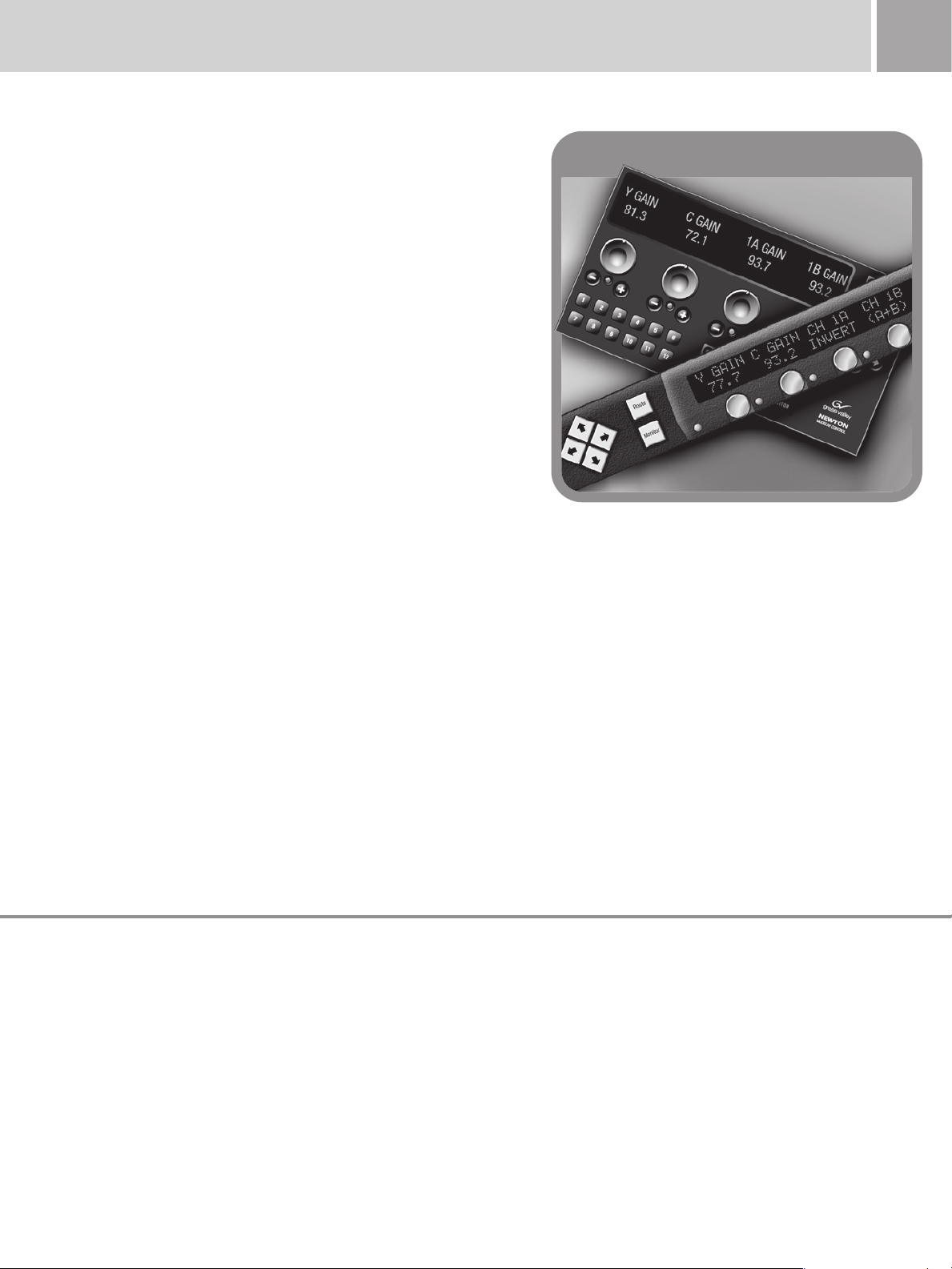
Newton Modular Control System
C o m p r e h e n s i v e, Co n s o l i d a t e d Co nt r o l fo r
Modular Products
The shift to digital infrastructures has brought with it increasingly complex
signal-processing paths. The Newton modular control system gives you fast,
multi-knob, Ethernet-based access to Grass Valley modular products in a
processing channel.
Two abilities distinguish the Newton system from other approaches
to modular control: the separation of system-level configuration tasks
fromoperationalones,thusminimizingthepotentialforon-airmistakes;
and the ability to group modular products—regardless of their physical
locations—into a logical signal path (or channel) that you can easily access
and manipulate.
Using the Newton system, you can instantly access the Grass Valley
Gecko, GeckoFlex, and Kameleon modular products in a particular signal
path—even if they’re in completely different racks or facilities. You can
adjust module parameters from a rack-mounted Newton control panel or a
software control panel running on a standard Windows PC. There’s even a
button for locking out the control panel to prevent accidental changes.
The Newton system also includes the Grass Valley NetConfig software.
Using it, you can assign IP addresses to Gecko, GeckoFlex, and Kameleon
frames for easy network identification and set initial operational parameters.
Additionally, the NetConfig application works with the Encore
system and Grass Valley routers.
By separating configuration and operational tasks, the Newton system can
simplify your workflows significantly. Instead of painstakingly attaching a serial
cable to the back of every modular product you need to initialize, you can use
NetConfig to set baseline functional operational parameters over a network.
Operators can make adjustments to those parameters using Newton control
panels, without having to wade through complex configuration menus.
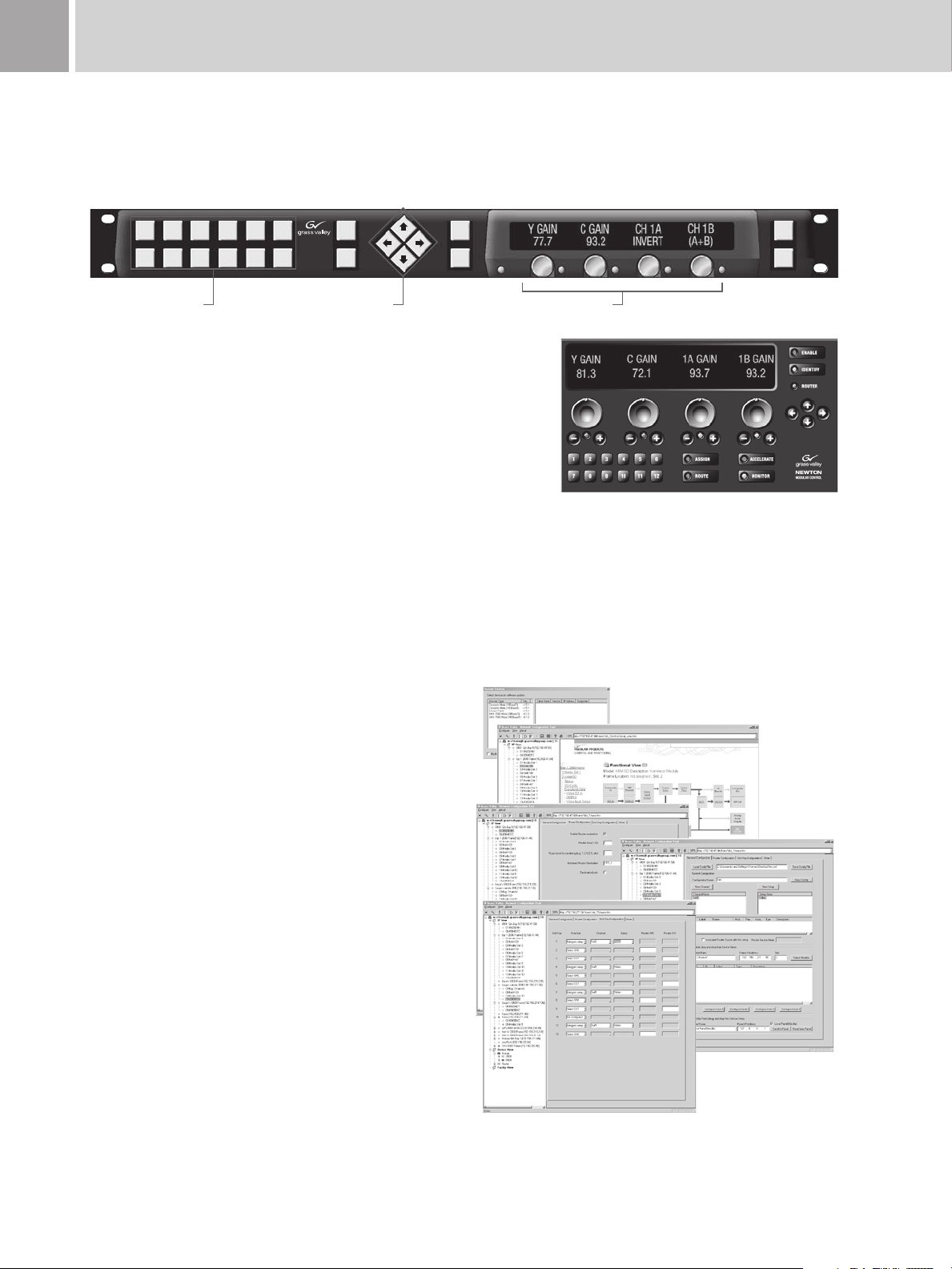
The Newton system features two control panels: a rack-mounted version
and a software-based version. You can have any combination of these
panels on your network in any number. You configure these panels using a
configurationplug-inapplicationtoolontheNetConfigapplication;youcan
also use this tool to restrict channel-path and device access on a panel-bypanel basis.
™
router control
81
module ordering guide
The Newton modular control system supports optional integration with
the Grass Valley Encore router control system. It’s a great way to quickly
switch sources and adjust signal parameters within configured processing
channels.
You can also use the Newton system to monitor destinations on the
routing system so that, when a source changes, the modules in the
appropriate input signal-processing channel automatically appear on the
Newton control panel.
To help maximize uptime, the Gecko, GeckoFlex, and Kameleon products
support the Grass Valley NetCentral application for Simple Network
Management Protocol (SNMP)-based monitoring.
Key Features
Ethernet-based control of Grass Valley •
Gecko, GeckoFlex, and Kameleon modular
products
Control panels:•
— Compact 1 RU rack mount panel
— PC soft-panel application with same
functionality
— No limit to the number of panels on a
network
— Operation independent of configuration
Includes NetConfig application and •
configuration plug-in tool for:
— Network-wide device configuration
— Control panel configuration
Control panel functions:•
— Four user-configurable control knobs to
update device parameters
— Twelve soft keys for quick recall of user-
configurable parameters
— Simple up/down, left/right navigation
— Each panel supports 128 channels with
12 setups each
— Clearly visible status of controlled devices
— Enable button locally disconnects knobs
and buttons from devices
— Identify button reveals identity of
controlled devices
Additional hardware panel features:•
— Easy-to-read green display w/adjustable
intensity
— Combination of soft buttons and
dedicated function buttons with
adjustable backlighting intensity
Requires only two simple connections: •
RJ-45 Ethernet and IEC AC mains
Optional Encore routing control system •
integration:
— Source selection with automatic source
delegation
— Destination status monitoring
Page 2
Newton Modular Control System82
Newton 1 RU Hardware Control Panel
Newton Software Control Panel with Router Control
Video
Proc
Sat
4
Video
Timin
Sat
5
Audio
Proc
Sat
6
Maste
r
Sat
7
Studi
Sat
8
Edit
Sat
9
Assig
Route
Monit
Enabl
Ident
NEWTON
MODULAR CONTROL
User-Defined Keys Navigation Keys Signal Adjustment Knobs
Route
Newton Control Panels
The ergonomic design of the Newton hardware control panel is emulated
in a software version, shown here with optional router control.
Comprehensive Control Architecture
Grass Valley modular products have long had a variety of control and
monitoring capabilities, from simple local card edge control to more
complex local control with on-screen parameter displays—as well as
network interface modules such as the 8900NET and 2000NET products
whose built-in Web servers relay module-related information to a
standard PC- or Macintosh-based Web browser.
Certainly you could use these products to configure, access, and even
adjust signal parameters. But more and more, the complexity of the
signal-processing path—and the sheer number of devices in it—calls for
easier access and real-time, comprehensive, on-air control.
The Newton control system lets you quickly access all of the Gecko,
GeckoFlex, and Kameleon modules in a signal-processing path to make
audio, video, and timing adjustments. You can make these adjustments
from a rack-mounted control panel, a software control panel running on a
standard PC, or a combination of both. There is no limit to the number of
control panels you can have on the network.
Yet your Gecko, GeckoFlex, and Kameleon modules do not need to be
located in the same frame for the Newton system to control them—or
even the same facility. Because the system runs on standard TCP/IP
networks, an Ethernet connection across a LAN or WAN gives you
complete signal-processing control.
NetConfig Tools
With a comprehensive set of powerful tools, hardware and software
control panel functionality can be precisely defined. Additional tools
for IP configuration and software updates makes NetConfig a valuable
engineering package.
Powerful Control Panel Provides Fast, Easy Adjustments
The hardware version of the Newton modular control panel was designed
with operator ergonomics in mind. It features four, simultaneously active,
user-configurable knobs that update modular product parameters in real
time. Each has a tri-color LED that indicates the health of a connection,
providing immediate feedback of module or signal condition.
The Newton system also features 12 configurable buttons. You can
configure them to do everything from recall a signal-processing path
setup to perform a source take or recall a router destination.
When you press one of these 12 buttons, the Newton system
automatically displays the current settings above four knobs. You can
then use these knobs to adjust specific signal parameters. Using the
intuitive interface, you can also scroll through additional setups and signal
processing channels.
Page 3
83Newton Modular Control System
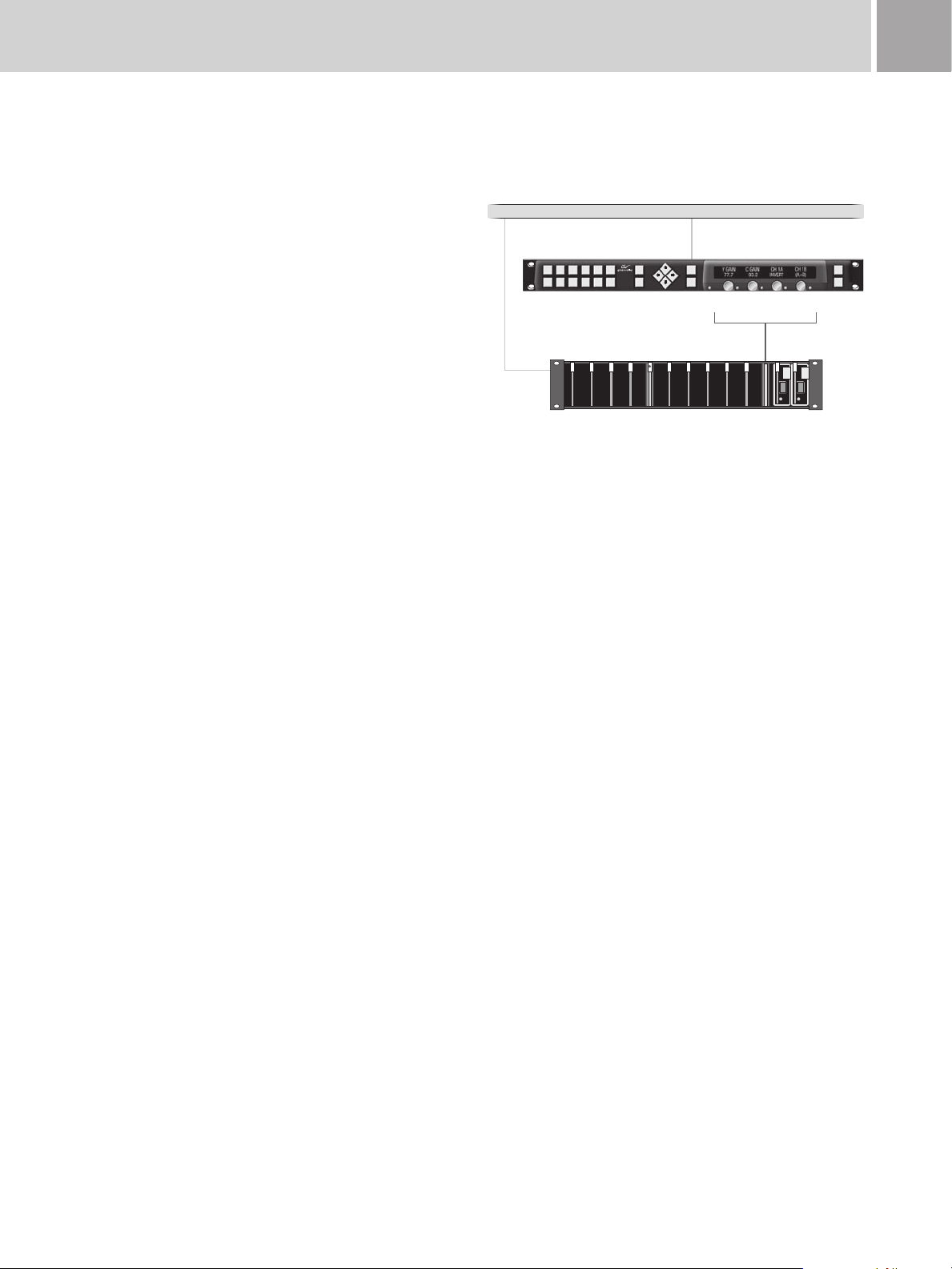
Newton Hardware Control Panel
Gecko
Module Control
Ethernet Facility LAN
Video
Proc
Sat
4
Video
Timing
Sat
5
Audio
Proc
Sat
6
Master
Control
Sat
7
Studio
Sat
8
Edit
Sat
9
Assign
Route
Monitor
Enable
Ident
NEWTON
MODULAR CONTROL
Gecko Frame
8900NET
Ethernet
Interface
The Newton control panel also features a local enable/disable button
that you can engage to prevent inadvertent changes, should someone
accidentally brush against a knob.
The software control panel of the Newton system offers the same,
powerful features as the hardware version.
The Newton system includes a configuration tool that is a plug-in to the
NetConfig application. Not only does this tool provide fast, network-based
control-panel configuration, it offers an additional degree of security, as
control access to your signal-channel paths on a panel-by-panel basis.
The Newton control panels support up to 128 configured channels each
with up to 12 setups—a setup is a subset of a channel that contains
knob assignments—within each configured channel. There is no limit,
however, to the number of control hardware or software panels that can
reside on a Newton system-controlled network.
Easy Setup, Customization
The Newton control system includes the NetConfig application for
configuring a module’s system and operational parameters. You can also
use it to download software updates into the modules.
Because the NetConfig application runs over your network, it centralizes
and accelerates your configuration tasks. You do not need to physically
visit every device in your racks, plug in a serial cable, and load its
parameters. You can do everything you need to do from your desktop.
More important, separating the configuration tasks you perform using the
NetConfig application from the everyday operational tasks you perform
with the Newton control panels simplifies your workflow and minimizes
potential on-air mistakes.
The NetConfig application simplifies Ethernet-based network configuration
and maintenance by providing a simple method to set IP addresses over
the network—eliminating the need for separate serial connections to
each frame during the system commissioning.
Complete Control of Modules
The Newton control panel provides immediate access to four control
parameters at once. Using the left and right arrow keys, you can quickly
step through additional adjustment parameters.
Page 4
84 Newton Modular Control System
Gecko Video Frame
Newton Hardware Control Panel
Gecko Audio Frame
8960DEC
Control
8960DEC
8921ADT
Control
8921ADT
8960DEC
Video A to D
8921ADT
4 Ch Audio A to D
IRD
Analog
Video
Digital
Video
4 Ch Analog Audio
AES 1
AES 2
AES 1
AES 2
Concerto
Multi-Format Router
8960DEC
Video A to D
8921ADT
4 Ch Audio A to D
IRD
4 Ch Analog Audio
Ethernet Facility LAN
8900NET
Ethernet
Interface
8900NET
Ethernet
Interface
Sat 5
Sat 6
Video
Proc
Sat
4
Video
Timing
Sat
5
Audio
Proc
Sat
6
Master
Control
Sat
7
Studio
Sat
8
Edit
Sat
9
Assign
Route
Monitor
Enable
Ident
NEWTON
MODULAR CONTROL
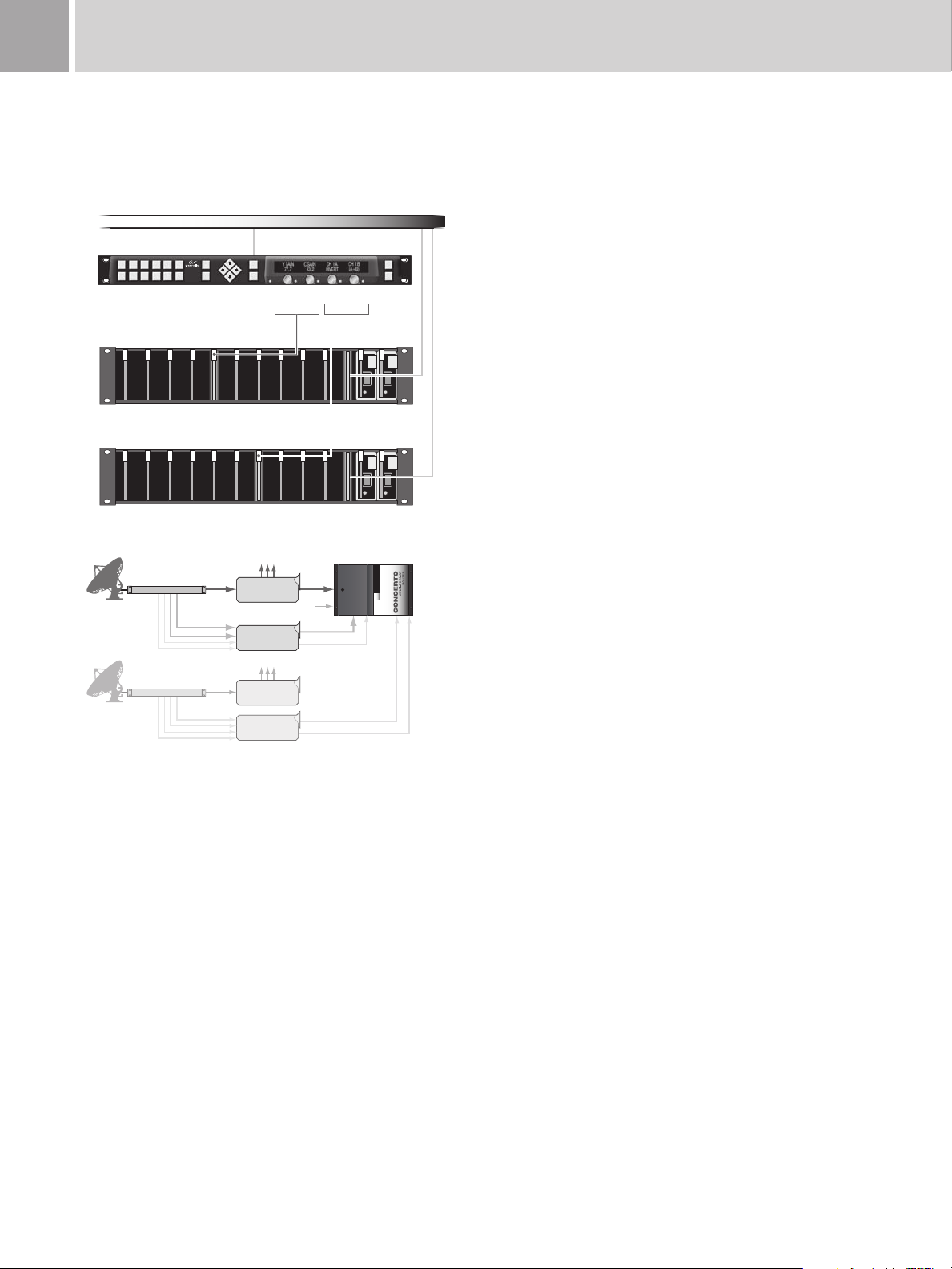
Instant Control of Multiple Modules
The Newton control panel provides simultaneous access and control to any
combination of modules in a signal-processing path. Additional processing
paths can be selected using the up and down arrow keys or by selecting a
user-configured soft key.
In addition to Gecko, GeckoFlex, and Kameleon products, the NetConfig
software can identify and configure routing control systems anywhere on
the Ethernet LAN or WAN to set IP address, subnet mask, and gateway
network configuration—all through an intuitive interface.
With your devices configured, you can use the NetConfig application to
view them all by IP address or configured device name. Additionally, it can
also generate a facility view with hyperlinks from a user-supplied diagram
or picture. This range of viewing options makes it easy to locate devices
on the network, update software as necessary, and pull up the Web pages
generated by Gecko and Kameleon modules to adjust individual module
parameters.
While control of individual module parameters is available within the
NetConfig application, the signal-processing complexities of most facilities
is such that you should consider using the NetConfig software to set up
basic parameters of the individual modules and then configure Newton
modular control panels for day-to-day operational requirements.
Using the plug-in configuration tool for the NetConfig system, you
can configure the Newton system’s control panels. Doing so is a
straightforward process of naming a new signal-processing path—a
channel—that includes an individual module or a string of modules. Next,
you define the adjustable parameters or setups
foreachchannel;setups
could include such things as audio modes, video processing, or timing.
Each setup contains the assignment for each of the four control knobs.
Consider the situation of a television station whose incoming satellite
feed requires video analog-to-digital conversion with processing and
timing adjustment, along with multichannel audio processing and delay.
Using the NetConfig application and configuration tool, you create an
easy-to-remember name for the processing channel which includes all
the modules in the path, such as SAT_5. Now, you only need to drag
and drop the selected modules into the configuration tool and select the
parameters you want an operator to be able to adjust.
In fact, the SAT_5 channel may have a number of adjustment parameters
that need to be controlled, such as video gain, black level, hue, horizontal
and vertical timing adjustments, audio levels, and audio processing
functions such as sum, swap, and phase invert. You can store these
parameters as nested setups then navigate through them using the
Newton system’s control panel. As you do, the Newton system recalls the
current module parameters and presents them in the display over each of
the four control knobs. Each knob takes on the functionality required for
the parameter recalled, be it continuously variable control (such as gain)
or enumerated steps (such as black clip on/off).
Once you complete the setup of your control panel, you can copy it to
an offline storage system, edit it if need be, and load the resulting file to
any other control panel on the network. For example, a studio can easily
define, store, and reload the appropriate control panel configuration
settings for a weekly game show production. Similarly, a mobile
production unit can load standard configuration files to switch from
outdoor baseball to indoor basketball.
For increased security, the configuration plug-in tool within the NetConfig
application lets you specify the control available to each panel on your
network. You can permit or deny access to any frame, module, or
adjustment parameter.
Page 5

85Newton Modular Control System
Optional Router Control
The Newton modular control system is designed to integrate with the
Grass Valley Encore routing control system. With this optional router
control interface, you can use the Newton system to make an all-level
source take and automatically connect to the modules in the signalprocessing channel.
While this approach is no substitute for the power of a dedicated router
control panel, it is an excellent way to quickly switch sources and adjust
signal parameters within configured input channels.
Using the optional router control interface, you can also monitor
destinations on a routing system so that when a source changes, the
modules in the input signal-processing channel for the selected source
are automatically activated on the Newton system’s control panel.
Proactive Monitoring of Modular Products
To help maximize uptime, the Newton modular products control system
supports the Grass Valley NetCentral software for Simple Network
Management Protocol (SNMP)-based remote monitoring.
The NetCentral application offers continuous monitoring and userprogrammable alerts in the event of equipment problems or device status
changes. More important, this highly configurable application lets you link
any electronic document—from engineering drawings and floor plans to
rack elevations and workflow diagrams—with device alerts, so you can
check the state of your facility at a glance and instantly assess the impact
of any system status changes.
Interface Protocols
The Newton control system uses a standard Ethernet TCP/IP
communications interface and a standard XML data format. An open
published protocol specification is available upon request for third-party
automation system developers.
Typical Applications
Quality analysis and control of satellite and microwave incoming feeds are
an ideal application for these real-time control panels.
Specifications
Newton Softwar e
Control Panel
Requires PC with Windows XP, 2000,
or NT 4.0 and Internet Explorer v.5.5
or greater
Newton Hardwar e
Control Panel
Power
90 to 265 VAC, 47 Hz to 63 Hz,
15W max.
Connectors
RJ-45 10/100Base-T Ethernet
connector
Dimensions cm in.
Height (1 RU) 4.4 1.7
Width 48.3 19.0
Depth 15.2 6.0
Weight 1.4 kg 3.0 lbs.
Ordering Information
Newt-P C
Soft-panel application CD-ROM
includes: NetConfig application,
Newton control panel configuration
plug-in application for the NetConfig
application, Newton Control Panel
application, and system documentation
in PDF format. Hard copy
documentation is also supplied
Newt-RM
1 RU hard panel includes:
CD-ROM with NetConfig application,
Newton control panel configuration
plug-in application for the NetConfig
application, and documentation in PDF
format. Hard copy documentation is
also supplied
Newt-Route
Router control option: Router
control interface for the Newt-PC and
Newt-RM (for field upgrade of hard
panels already installed). Allows all-level
source takes and automatic connection
to modules in the signal-processing
channel. Option is enabled with
Software Authorization key (requires
Newton software version 2.0.0)
Newt-RM-RTX
Includes the Newt-RM option with the
Newt-Route option already enabled
NetConfig
Includes: CD-ROM with standalone
NetConfig application, and
documentation in PDF format. No hard
copy documentation is supplied
NetCen tral
Includes: CD-ROM with standalone
copy of NetCentral Manager. Hard copy
documentation is provided
8900NET (Net Card)
Network Interface card for Gecko and
GeckoFlex frames
For detailed specifications, installation, and setup instructions see:
www.grassvalley.com/docs/modular
 Loading...