

Page 1
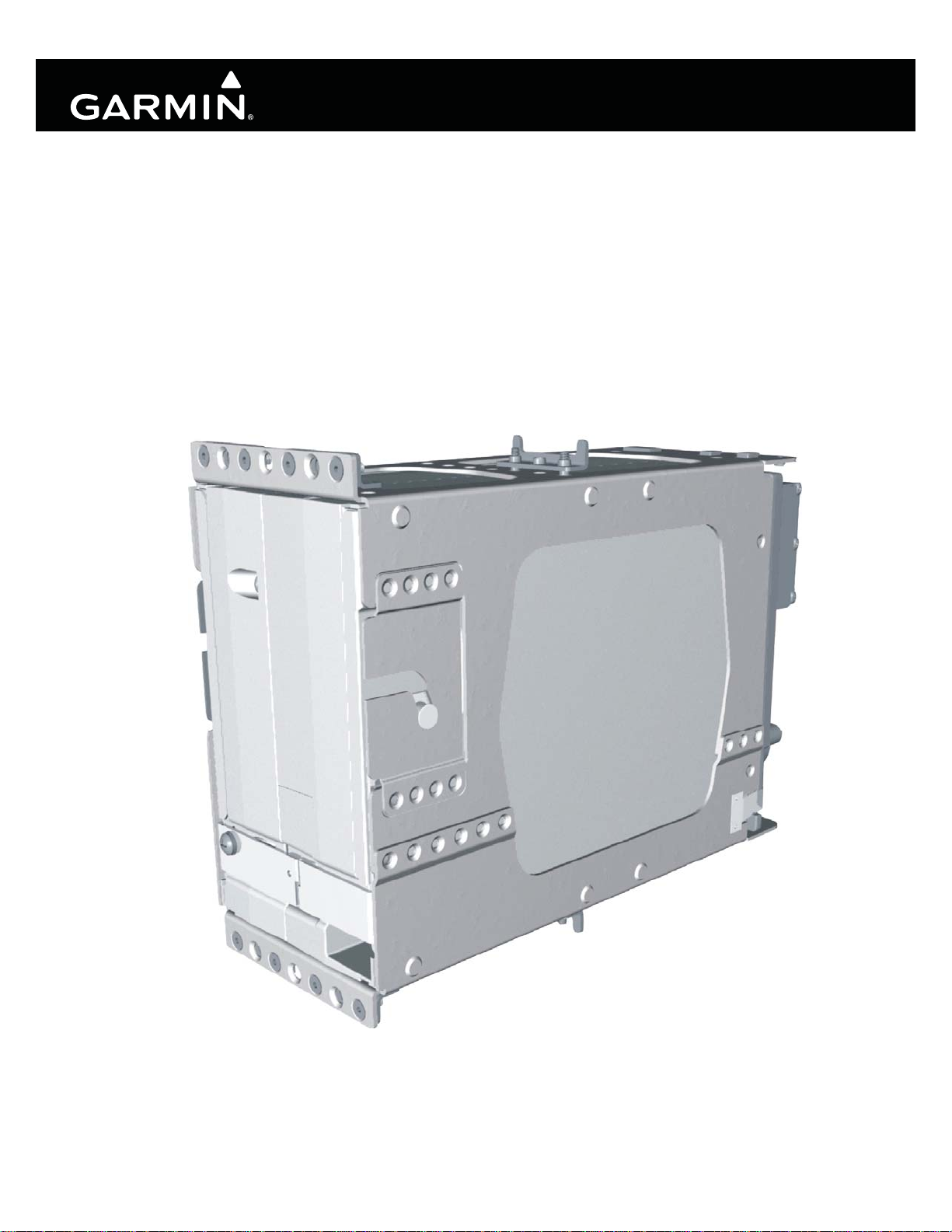
GIA 63/GIA 63W
Installation Manual
190-00303-05 March, 2010 Revision R
Page 2
© Copyright 2010
Garmin Ltd. or its subsidiaries
All Rights Reserved
Except as expressly provided herein, no part of this manual may be reproduced, copied, transmitted, disseminated, downloaded
or stored in any storage medium, for any purpose without the express prior written consent of Garmin. Garmin hereby grants
permission to download a single copy of this manual and of any revision to this manual onto a hard drive or other electronic
storage medium to be viewed and to print one copy of this manual or of any revision hereto, provided that such electronic or
printed copy of this manual or revision must contain the complete text of this copyright notice and provided further that any
unauthorized commercial distribution of this manual or any revision hereto is strictly prohibited.
Garmin International, Inc.
1200 E. 151
st
Street
Olathe, KS 66062 USA
Telephone: 913-397-8200
Aviation Dealer Technical Support Line (Toll Free): (888) 606-5482
www.garmin.com
Garmin (Europe) Ltd
Liberty House
Bulls Copse Road
Hounsdown Business Park
Southampton, SO40 9RB, UK
Telephone: 44/ (0) 870.8501241
RECORD OF REVISIONS
Revision
A 11/15/04 Production Release
B 3/16/05
C 6/23/05 Added additional interconnects, TSO-C9c, and TSO-C52b
D 10/26/05 Added TSO-C151b and boot block instructions
E 6/8/06 Edited document to include the GIA 63W
F 7/21/06 Corrected WAAS TSO
G 9/19/06 Added RTCA/DO-229C deviation
H 10/18/06 Added Comant antennas
J 4/10/07 Added Comant antenna and revised ICAW
K 6/6/07 Added the 011-01105-01 unit
L 8/23/07 Changed operational limitations and added antennas
M 2/29/08 Added ETSO information
N 5/27/09 Added TSO-C92c and other TSO info
P 09/09/09 Added Level A CLD information
Q 12/29/09 Added antenna note
R 03/23/10 Added standalone rack info
Revision
Date
Updated pinout list, removed EQF and ETSO 2C37e deviation
Description
Page A GIA 63/GIA 63W Installation Manual
Revision R 190-00303-05
Page 3
Revision
R
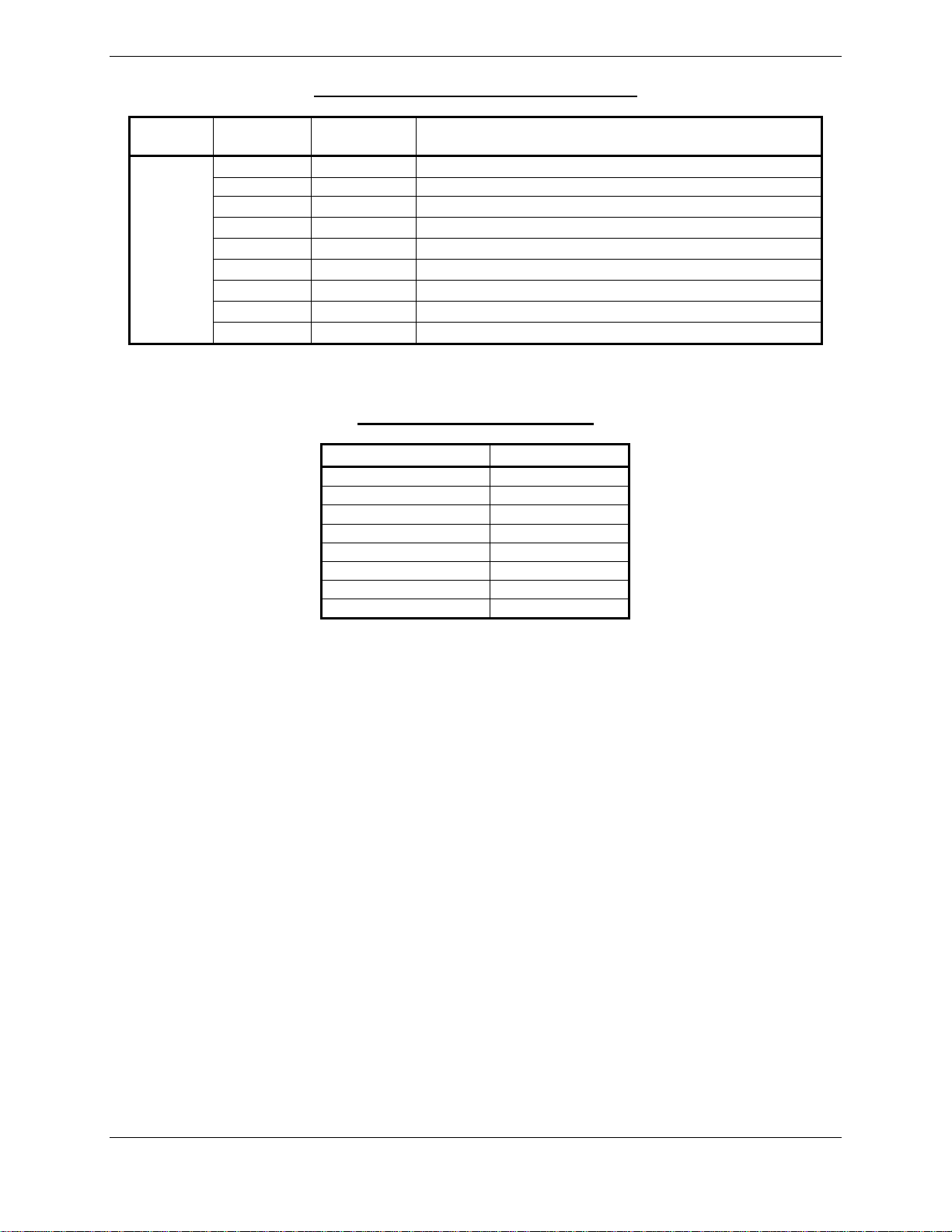
CURRENT REVISION DESCRIPTION
Page
Number(s)
1-3 1.4.2 Added standalone rack info
2-1 2.1, 2.1.2 Added standalone rack info
2-2 2.1.3 Added hardware items
2-13 2.8, 2.8.1 Updated for standalone rack
2-14, 2-15 2.8.2 Added standalone rack info and Figures 2-3 and 2-4
3-1 3.2 Updated items in Table 3-2
3-3 3.6 Updated for standalone rack
B-1, B-3 Appdx B Updated drawings for modular rack
B-5, B-7 Appdx B Added drawings for standalone rack
Section
Number
Description of Change
DOCUMENT PAGINATION
Section Page Range
Table of Contents i – vi
Section 1 1-1 – 1-24
Section 2 2-1 – 2-16
Section 3 3-1 – 3-6
Section 4 4-1 – 4-30
Appendix A A-1 – A-4
Appendix B B-1 – B-8
Appendix C C-1 – C-14
GIA 63/GIA 63W Installation Manual Page i
190-00303-05 Revision R
Page 4

This manual reflects the operation of main software version 5.31 for the GIA 63 and main software
version 6.00 for the GIA 63W. Some differences in operation may be observed when comparing the
information in this manual to earlier or later software versions.
INFORMATION SUBJECT TO EXPORT CONTROL LAWS
This document may contain information which is subject to the Export Administration Regulations
(“EAR”) issued by the United States Department of Commerce (15 CFR, Chapter VII Subchapter C) and
which may not be exported, released or disclosed to foreign nationals inside or outside the United States
without first obtaining an export license. The preceding statement is required to be included on any and
all reproductions in whole or in part of this manual.
WARNING
This product, its packaging, and its components contain chemicals known to the State of
California to cause cancer, birth defects, or reproductive harm. This Notice is being
provided in accordance with California's Proposition 65. If you have any questions or
would like additional information, please refer to our web site at
www.garmin.com/prop65
.
WARNING
Perchlorate Material – special handling may apply, See
www.dtsc.ca.gov./hazardouswaste/perchlorate.
Page ii GIA 63/GIA 63W Installation Manual
Revision R 190-00303-05
Page 5

TABLE OF CONTENTS
PARAGRAPH PAGE
1 GENERAL DESCRIPTION..............................................................................................................1-1
1.1 Introduction........................................................................................................................................1-1
1.2 Equipment Description......................................................................................................................1-1
1.3 Interface Summary.............................................................................................................................1-2
1.4 Technical Specifications....................................................................................................................1-3
1.5 License Requirements........................................................................................................................1-9
1.6 Certification....................................................................................................................................... 1-9
1.7 Referenced Documents....................................................................................................................1-22
1.8 Limited Warranty.............................................................................................................................1-23
2 INSTALLATION OVERVIEW........................................................................................................2-1
2.1 Introduction........................................................................................................................................2-1
2.2 Installation Considerations ................................................................................................................2-5
2.3 Rack Considerations..........................................................................................................................2-9
2.4 Cabling and Wiring..........................................................................................................................2-10
2.5 Cooling Air......................................................................................................................................2-10
2.6 GIA 63 Minimum Installation Requirements..................................................................................2-11
2.7 GIA 63W Minimum Installation Requirements ..............................................................................2-12
2.8 Mounting Requirements ..................................................................................................................2-13
3 INSTALLATION PROCEDURE......................................................................................................3-1
3.1 Unpacking Unit..................................................................................................................................3-1
3.2 Wiring Harness Installation...............................................................................................................3-1
3.3 Antenna Installation...........................................................................................................................3-2
3.4 Cable Installation ..............................................................................................................................3-2
3.5 Backshell Assembly...........................................................................................................................3-3
3.6 Unit Installation .................................................................................................................................3-3
3.7 Post Installation Configuration & Checkout......................................................................................3-4
3.8 Continued Airworthiness...................................................................................................................3-4
4 SYSTEM INTERCONNECTS..........................................................................................................4-1
4.1 Pin Function List................................................................................................................................4-1
4.2 Power and Antennas ........................................................................................................................4-13
4.3 GIA System ID Program..................................................................................................................4-14
4.4 Serial Data .......................................................................................................................................4-14
4.5 Discrete I/O......................................................................................................................................4-17
4.6 COM/VOR/ILS/Digital Audio ........................................................................................................4-18
4.7 VOR/ILS Indicator ..........................................................................................................................4-20
4.8 RMI/OBI..........................................................................................................................................4-22
4.9 DME Tuning and ADF....................................................................................................................4-23
4.10 Auto Pilot.........................................................................................................................................4-25
GIA 63/GIA 63W Installation Manual Page iii
190-00303-05 Revision R
Page 6

PARAGRAPH PAGE
APPENDIX A GIA 63 MAIN BOOT BLOCK UPLOADING INSTRUCTIONS.................................A-1
A.1 Introduction.......................................................................................................................................A-1
A.2 Determining Current Boot Block......................................................................................................A-1
A.3 Loading Boot Block Version 4.01....................................................................................................A-2
A.4 Loading GIA Main Software (only if GIA main software was cancelled in Section A.2)...............A-3
APPENDIX B OUTINE & INSTALLATION DRAWINGS .................................................................. B-1
APPENDIX C INTERCONNECT EXAMPLES.....................................................................................C-1
LIST OF FIGURES
FIGURE PAGE
2-1 GPS Antenna Considerations.............................................................................................................2-7
2-2 GIA 63(W) Modular Rack...............................................................................................................2-13
2-3 GIA 63(W) Standalone Rack...........................................................................................................2-14
2-4 GIA 63(W) Standalone Rack, Suggested Mounting Locations.......................................................2-15
3-1 Coaxial Cable Installation..................................................................................................................3-2
3-2 GIA STATUS Page ...........................................................................................................................3-5
B-1 GIA 63(W) Modular Installation Outline Drawing ..........................................................................B-1
B-2 GIA 63(W) Modular Installation Drawing ....................................................................................... B-3
B-3 GIA 63(W) Standalone Installation Outline Drawing ......................................................................B-5
B-4 GIA 63(W) Standalone Installation Drawing ...................................................................................B-7
C-1 GIA 63(W) Example Interconnect (Sheet 1 of 7).............................................................................C-1
C-1 GIA 63(W) Example Interconnect (Sheet 2 of 7).............................................................................C-3
C-1 GIA 63(W) Example Interconnect (Sheet 3 of 7).............................................................................C-5
C-1 GIA 63(W) Example Interconnect (Sheet 4 of 7).............................................................................C-7
C-1 GIA 63(W) Example Interconnect (Sheet 5 of 7).............................................................................C-9
C-1 GIA 63(W) Example Interconnect (Sheet 6 of 7)...........................................................................C-11
C-1 GIA 63(W) Example Interconnect (Sheet 7 of 7)...........................................................................C-13
LIST OF TABLES
TABLE PAGE
3-1 Pin Contact Part Numbers..................................................................................................................3-1
3-2 Recommended Crimp Tools..............................................................................................................3-1
3-3 Long Term Power Interrupt Category A (200 mS) Mod Status ........................................................3-4
Page iv GIA 63/GIA 63W Installation Manual
Revision R 190-00303-05
Page 7
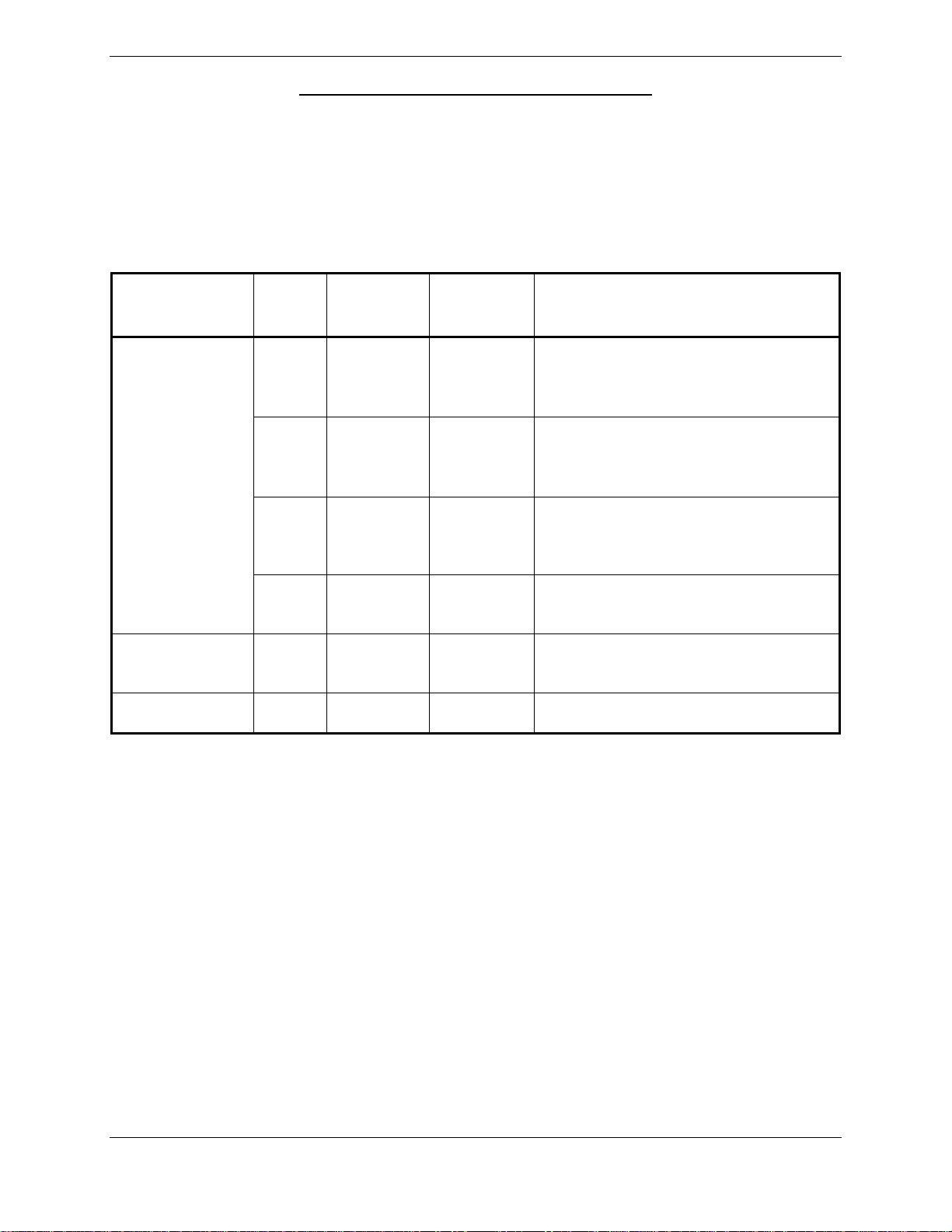
GIA 63 HARDWARE MOD LEVEL HISTORY
The following table identifies hardware modification (Mod) Levels for the GIA 63. Mod Levels are listed
with the associated service bulletin number, service bulletin date, and the purpose of the modification.
The table is current at the time of publication of this manual (see date on front cover) and is subject to
change without notice. Authorized Garmin Sales and Service Centers are encouraged to access the most
up-to-date bulletin and advisory information on the Garmin Dealer Resource web site at
www.garmin.com using their Garmin-provided user name and password.
APPLICABLE
LRU PART
NUMBER
MOD
LEVEL
SERVICE
BULLETIN
NUMBER
SERVICE
BULLETIN
DATE
PURPOSE OF MODIFICATION
This modification consists of
1 0416 9/13/2004
modifying the voice alert audio output
circuit, enabling it to power down
when not in use.
This Service Bulletin consists of
2 0418 9/8/2004
011-00781-00
visually inspecting the GIA 63 Main2
board for incorrectly installed
capacitors.
This modification addresses a
3 0505 1/19/2005
potential GIA 63 COM transceiver
interference condition.
4 N/A N/A
011-00781-01 1 N/A N/A
More robust capacitors installed in the
power supply backup circuit.
More robust capacitors installed in the
power supply backup circuit.
GIA 63/GIA 63W Installation Manual Page v
190-00303-05 Revision R
Page 8
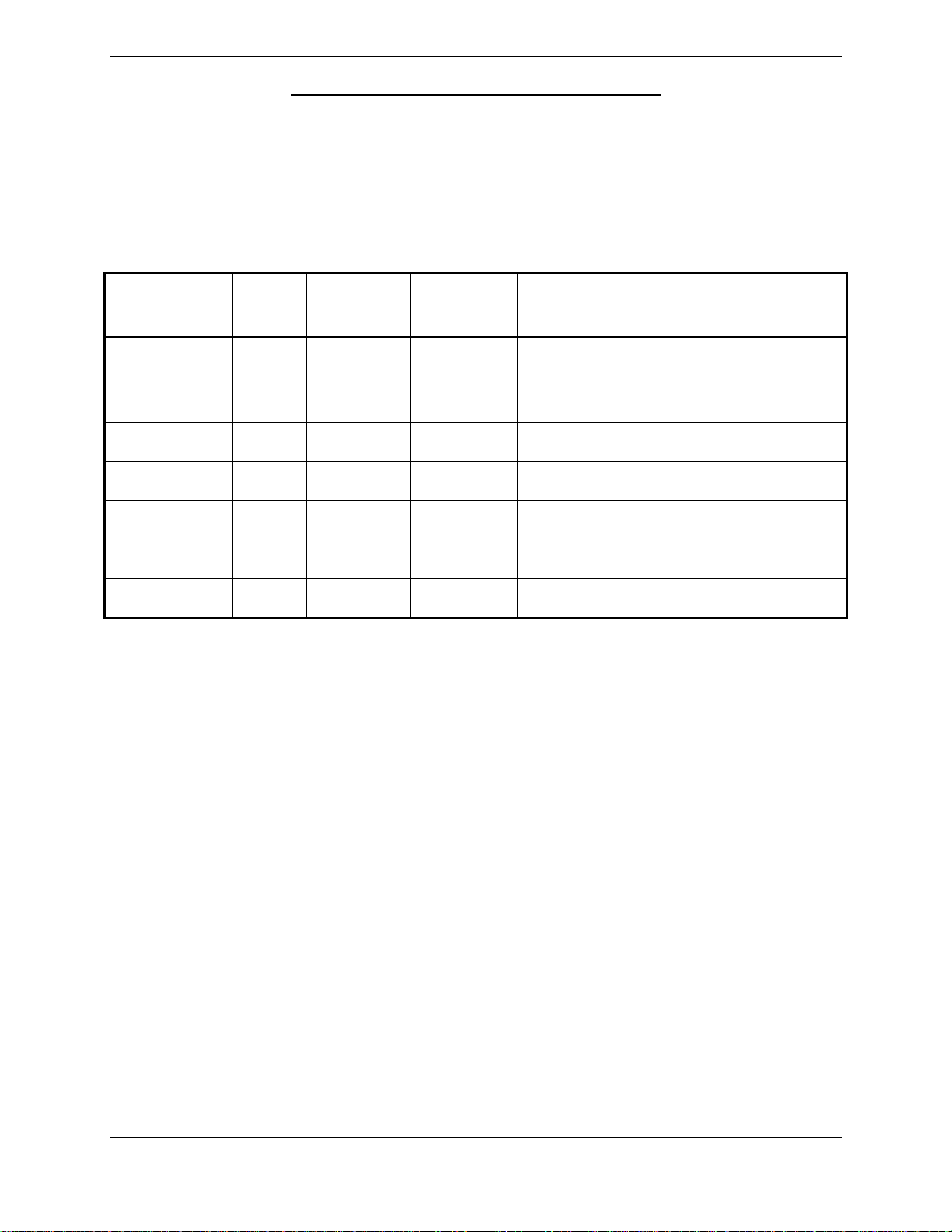
GIA 63W HARDWARE MOD LEVEL HISTORY
The following table identifies hardware modification (Mod) Levels for the GIA 63W. Mod Levels are
listed with the associated service bulletin number, service bulletin date, and the purpose of the
modification. The table is current at the time of publication of this manual (see date on front cover) and is
subject to change without notice. Authorized Garmin Sales and Service Centers are encouraged to access
the most up-to-date bulletin and advisory information on the Garmin Dealer Resource web site at
www.garmin.com using their Garmin-provided user name and password.
APPLICABLE
LRU PART
NUMBER
MOD
LEVEL
SERVICE
BULLETIN
NUMBER
SERVICE
BULLETIN
DATE
PURPOSE OF MODIFICATION
011-01105-00 1 N/A N/A
More robust capacitors installed in the
power supply backup circuit.
Page vi GIA 63/GIA 63W Installation Manual
Revision R 190-00303-05
Page 9

1 GENERAL DESCRIPTION
1.1 Introduction
This manual presents mechanical and electrical installation requirements for installing the GIA 63(W) as
part of a Garmin Integrated Flight Deck. The GIA 63(W) can be integrated into a variety of airframes
under an appropriate TC or STC. Each airframe installation may vary. Use only approved (type or
supplemental type) data for specific installation instructions in a particular aircraft.
1.2 Equipment Description
The GIA 63(W) is a microprocessor-based input/output Line Replaceable Unit (LRU) used in a Garmin
Integrated Flight Deck. The GIA 63(W) communicates with the GDU via Ethernet high-speed data bus
(HSDB), and with other LRUs using RS-232, RS-485/422, and ARINC 429. All configuration is done
through the GDU. The GIA 63(W) contains the following sub-assemblies:
• A main processor that interfaces with all LRUs in the G1000 sub-system and performs
calculations for the GFC 700 autopilot (if equipped).
• A twelve channel parallel GPS receiver that simultaneously tracks and uses up to 12 satellites.
The GIA 63W includes a 15 channel WAAS certified GPS receiver.
• A VHF COM transceiver that provides tuning from 118.00 to 136.992 MHz in 25 kHz or
8.33 kHz spacing for 760 or 2280 channel configuration respectively.
• A VOR/ILS localizer receiver that provides tuning from 108.00 to 117.95 MHz in 50 kHz
increments.
• An ILS glideslope receiver that provides tuning from 328.6 to 335.4 MHz as paired with the
frequency tuned on the VOR/ILS localizer receiver.
CAUTION
The operation of unapproved cellular telephones or other unapproved cellular devices
aboard aircraft while airborne is prohibited by FCC rules. Due to the potential for
interference with onboard systems, the operation of unapproved cellular communication
devices while onboard an aircraft that is on the ground is subject to FAA regulations
14 CFR 91.21.
FCC regulation 47 CFR 22.925 prohibits airborne operation of unapproved cellular
telephones installed in or carried aboard aircraft. Unapproved cellular telephones must
not be operated aboard any aircraft while the aircraft is off the ground. When any aircraft
leaves the ground, all unapproved cellular telephones on board that aircraft must be
turned off.
Unapproved cellular telephones that are on, even in a monitoring state, can disrupt GPS
performance.
GIA 63/GIA 63W Installation Manual Page 1-1
190-00303-05 Revision R
Page 10

1.3 Interface Summary
1.3.1 Primary Interfaces
The GIA 63(W) is designed as an open architecture system that provides the following interfaces:
• 1 dedicated Ethernet High-Speed Data Bus (HSDB) input/output channel
• 2 Controller Area Network (CAN) I/O channels
• 8 Main ARINC 429 inputs
• 3 Main ARINC 429 outputs
• 1 VOR/ILS ARINC 429 input
• 1 VOR/ILS ARINC 429 output
• 5 RS-485 input/output channels (2 channels are configurable to RS-422)
• 8 RS-232 input/output channels
• 41 Discrete inputs
• 14 Discrete outputs
1.3.2 Additional Interfaces
The GIA 63(W) can provide interfaces for the following additional equipment:
• Autopilot
• Altitude encoder/serializer
• Fuel management systems
• Lightning detection systems
• Traffic awareness systems
• Data link systems
• External annunciators
• DME (including King Serial)
• ADF
Page 1-2 GIA 63/GIA 63W Installation Ma nual
Revision R 190-00303-05
Page 11
1.4 Technical Specifications
1.4.1 Environmental Qualification Form
It is the responsibility of the installing agency to obtain the latest revision of the GIA 63(W)
Environmental Qualification Form. This form is available directly from Garmin under the following part
number:
GIA 63 Environmental Qualification Form, Garmin part number 005-00148-02
GIA 63W Environmental Qualification Form, Garmin part number 005-00235-00
To obtain a copy of this form, see the dealer/OEM portion of the Garmin web site (www.garmin.com)
.
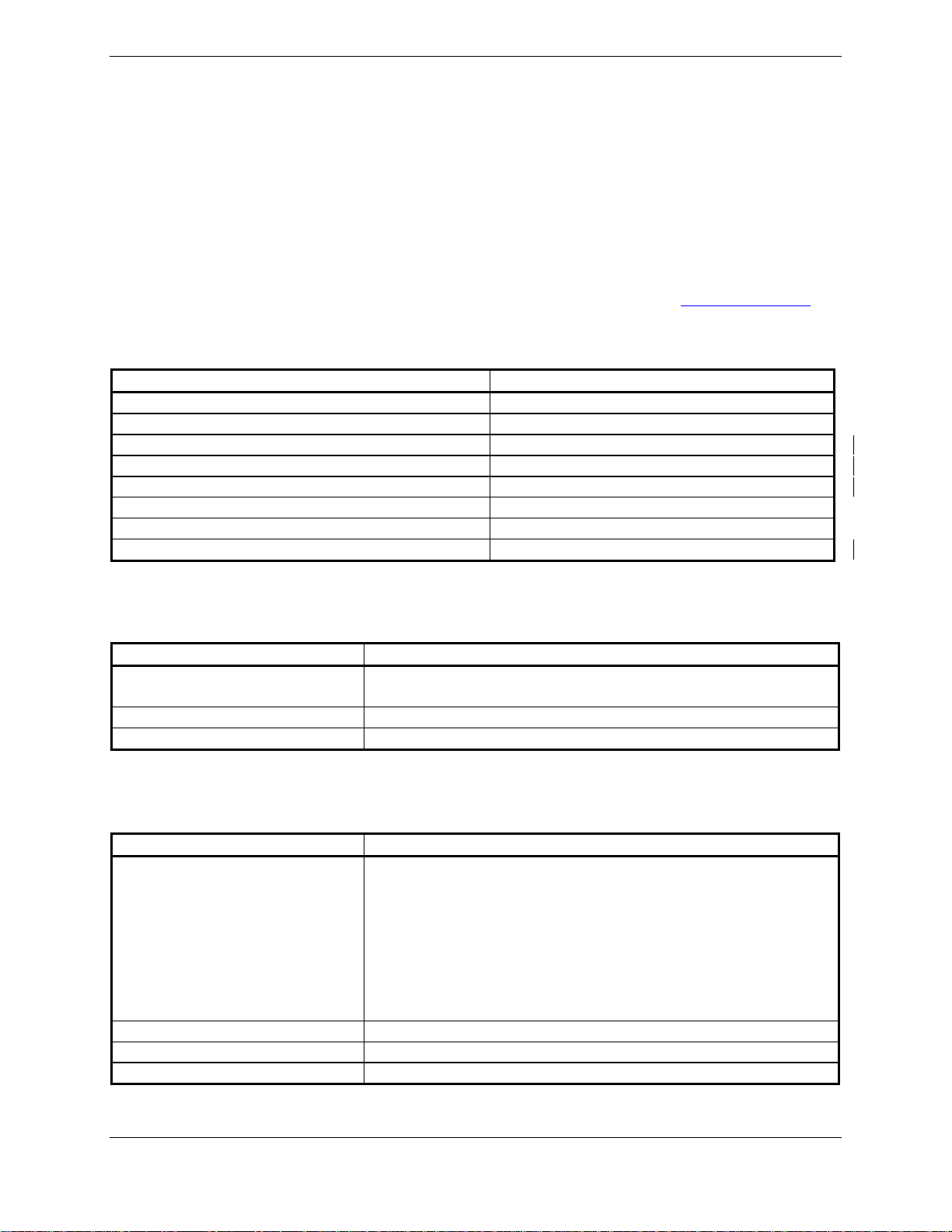
1.4.2 Physical Characteristics
Characteristics Specifications
Modular Rack Width 3.83 inches (9.73 cm)
Modular Rack Height 7.26 inches (18.44 cm)
Standalone Rack Width 3.88 inches (9.86 cm)
Standalone Rack Height 6.91 inches (17.55 cm)
Depth w/connectors (Modular and Standalone) 10.20 inches (25.91 cm)
Unit Weight 5.3 lbs. (2.40 kg)
Modular Rack & Connector Weight 1.9 lbs. (0.86 kg)
Standalone Rack & Connector Weight 2.2 lbs. (1.01 kg)
1.4.3 General Specifications
For detailed specifications, see the Environmental Qualification Form.
Characteristics Specifications
Operating Temperature Range -40°C to +65°C. For more details see Environmental
Qualification Form.
Humidity 95% non-condensing
Altitude Range -1,500 ft to 50,000 ft
1.4.4 GPS Specifications (GIA 63 only)
Characteristics Specifications
Acquisition Time a) Search-the-Sky (without almanac, without initial position
or time): 5 minutes
b) AutoLocate
time): 5 minutes
c) Cold Start (position known to 300 nm, time known to 10
minutes, with valid almanac): 45 seconds
d) Warm Start (position known to 10 nm, time known to 10
minutes, with valid almanac and ephemeris): 15 seconds
Max Velocity 1000 knots
Dynamics 6 g
Antenna power supply 20 mA typical, 40 mA max at 4.6 VDC
™
(with almanac, without initial position or
GIA 63/GIA 63W Installation Manual Page 1-3
190-00303-05 Revision R
Page 12
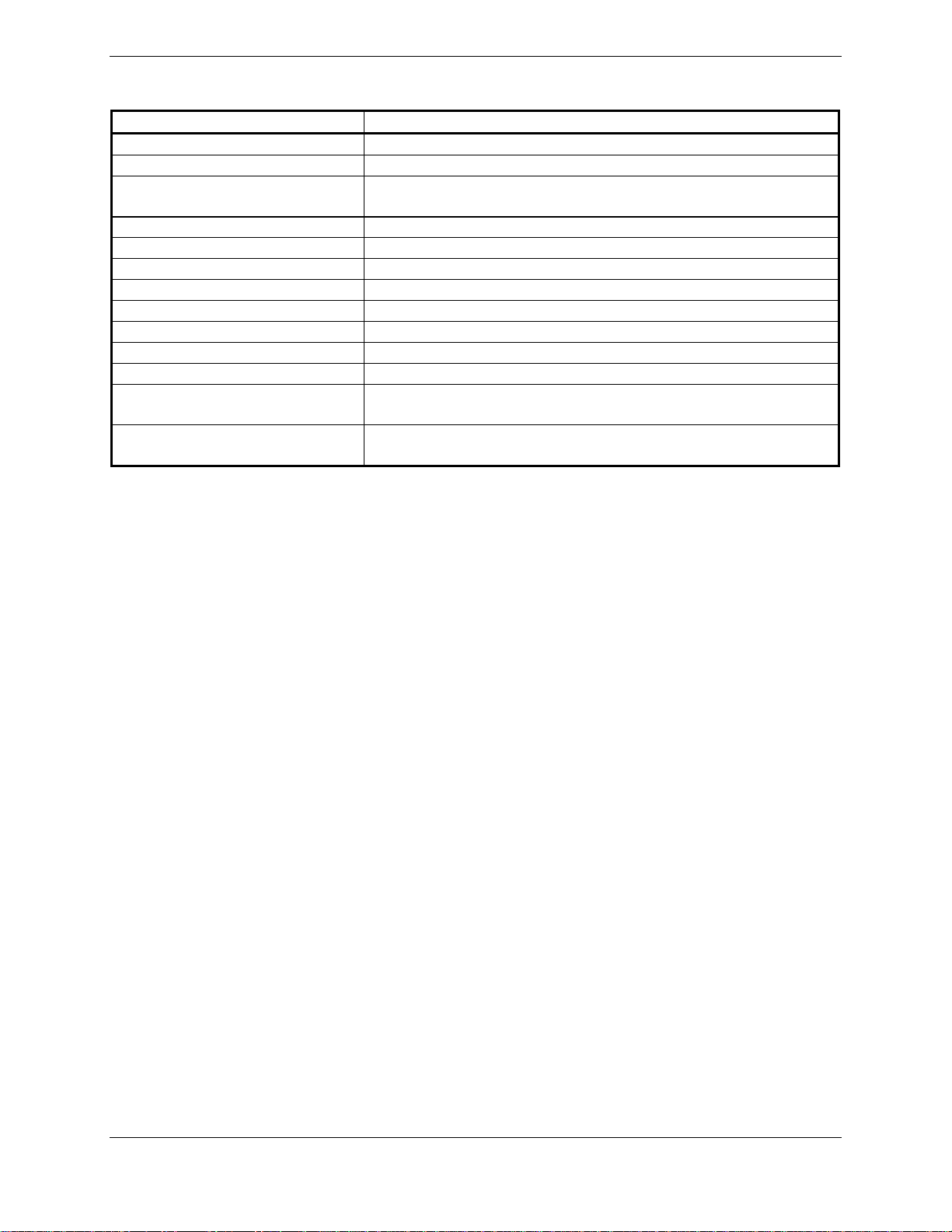
1.4.5 WAAS Specific GPS Specifications (GIA 63W only)
Characteristics Specifications
Number of channels 15 (12 GPS and 3 GPS/WAAS/SBAS)
Frequency 1575.42 MHz L1, C/A code
Sensitivity (acquisition) -116 dBm to -134.5 dBm GPS
-116 dBm to -134.5 dBm WAAS
Sensitivity (drop lock) -144 dBm
Lat/Long position accuracy <1.25 meter RMS horizontal, <2 meter vertical, with WAAS
Velocity 1000 knots maximum (above 60,000 ft)
TTFF (time to first fix) 1:45 min. typical with current almanac, position, and time
Reacquisition 10 seconds typical for signal outages of 30 seconds or less
Position update interval 0.2 sec (5 Hz)
1 pps (pulse per second)
Datum WGS-84
SATCOM compatibility Compatible on aircraft equipped with SATCOM (see Section
Antenna power supply at GPS
port
±275 nsec of UTC second during steady-state navigation
2.1.3.2 for SATCOM compatible antennas)
Vout = 4.6V+/- 0.3 VDC, min 4.3V at 60mA
Page 1-4 GIA 63/GIA 63W Installation Ma nual
Revision R 190-00303-05
Page 13
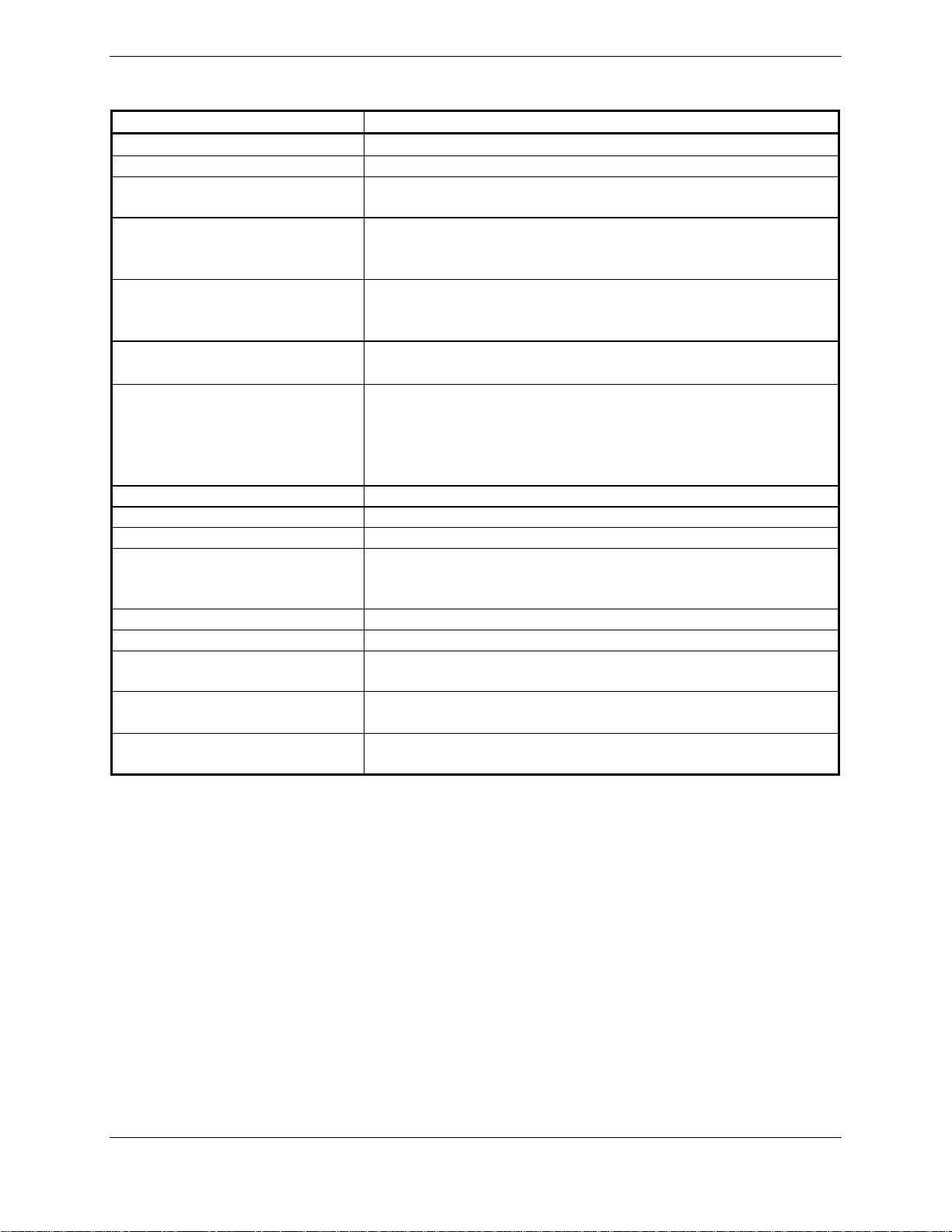
1.4.6 COM Transceiver Specifications
Characteristics Specifications
Audio Output
Audio Response Less than 6 dB of variation between 350 and 2500 Hz.
Audio Distortion The distortion in the receiver audio output shall not exceed
AGC Characteristics The audio output shall not vary by more than 6 dB when the
Sensitivity (S+N)/N on all channels shall be greater than 6 dB when the
Squelch
Selectivity
Spurious Response Greater than 80 dB.
Transmitter Power At Least 16 watts.
Transmitter Duty Cycle Recommended 10% maximum.
Modulation Capability The modulation shall not be less than 70% and not greater
Carrier Noise Level Shall be at least 45 dB (S+N)/N.
Frequency Stability 0.0005%
Demodulated Audio Distortion Less than 10% distortion when the transmitter is modulated
Sidetone
Demodulated Audio Response Shall be less than 6 dB when the audio input frequency is
100 mW minimum into a 500 Ω load.
25% at all levels up to 100 mW.
level of the RF input signal, modulated 30% at 1000 Hz, is
varied from 5 μV to 100,000 μV (hard).
RF level is 2 μV (hard) modulated 30% at 1000 Hz at rated
audio.
2 μv (hard) ±6 dB for 25 kHz channels.
3 μv (hard) ±6 dB for 8.33 kHz channels.
6 dB BW is greater than ±8 kHz for 25 kHz channeling.
60 dB BW is less than ±25 kHz for 25 kHz channeling.
6 dB BW is greater than ±2.778 kHz for 8.33 kHz
channeling.
60 dB BW is less than ±7.37 kHz for 8.33 kHz channeling.
than 98% with a standard modulator signal applied to the
transmitter.
at least 70%.
1.4 V
into a 500 Ω load when the transmitter is modulated
RMS
at least 70%.
varied from 350 to 2500 Hz.
GIA 63/GIA 63W Installation Manual Page 1-5
190-00303-05 Revision R
Page 14
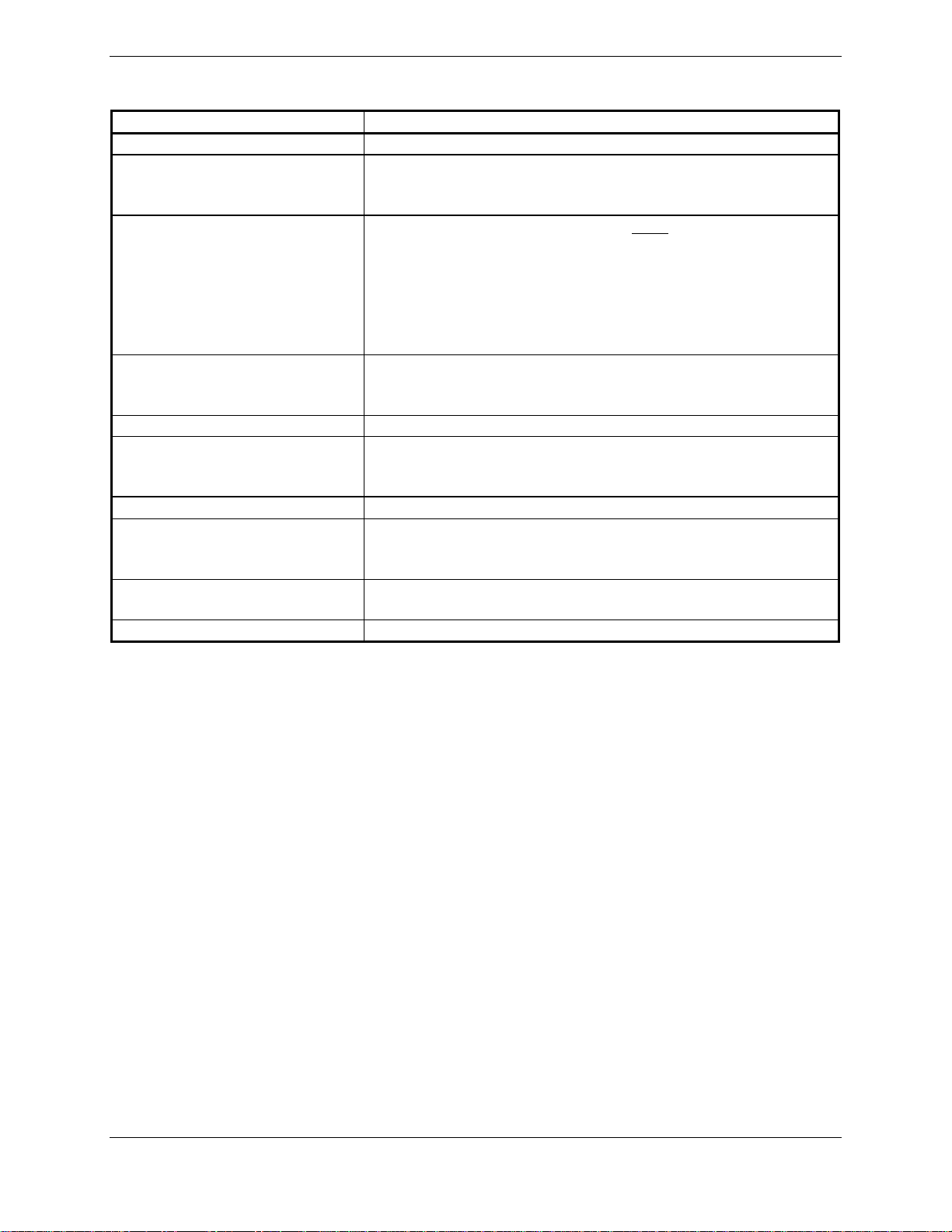
1.4.7 VOR Specifications
Characteristics Specifications
Receiver Audio Sensitivity At -103.5 dBm (S+N)/N shall not be less than 6 dB.
Course Deviation Sensitivity At –103.5 dBm deviation output shall not be less than 60%
of standard deflection (90 mV) when a VOR deviation test
signal is applied (10 degrees course difference).
Flag The VLOC Course Deviation Flag must be flagged:
a) in the absence of an RF signal.
b) in the absence of the 9960 Hz modulation.
c) in the absence of either one of the two 30 Hz
modulations.
d) When the level of a standard VOR deviation test signal
produces less than a 50% of standard deflection.
AGC Characteristics From -99 dBm to -13 dBm input of a Standard VOR Audio
Test Signal, audio output levels shall not vary more than
3 dB.
Spurious Response Greater than 60 dB.
VOR OBS Bearing Accuracy The bearing information as presented to the pilot shall not
have an error in excess of 2.7° as specified by
RTCA DO-196 and EuroCAE ED-22B.
Audio Output
Audio Response Less than 6 dB of variation between 350 and 2500 Hz. In
Audio Distortion The distortion in the receiver audio output shall not exceed
Selectivity 6 dB BW is greater than 16.5 kHz.
A minimum 100 mW into a 500 Ω load.
voice mode, an ident tone of 1020 Hz shall be attenuated at
least 20 dB.
10% at all levels up to 100 mW.
Page 1-6 GIA 63/GIA 63W Installation Ma nual
Revision R 190-00303-05
Page 15
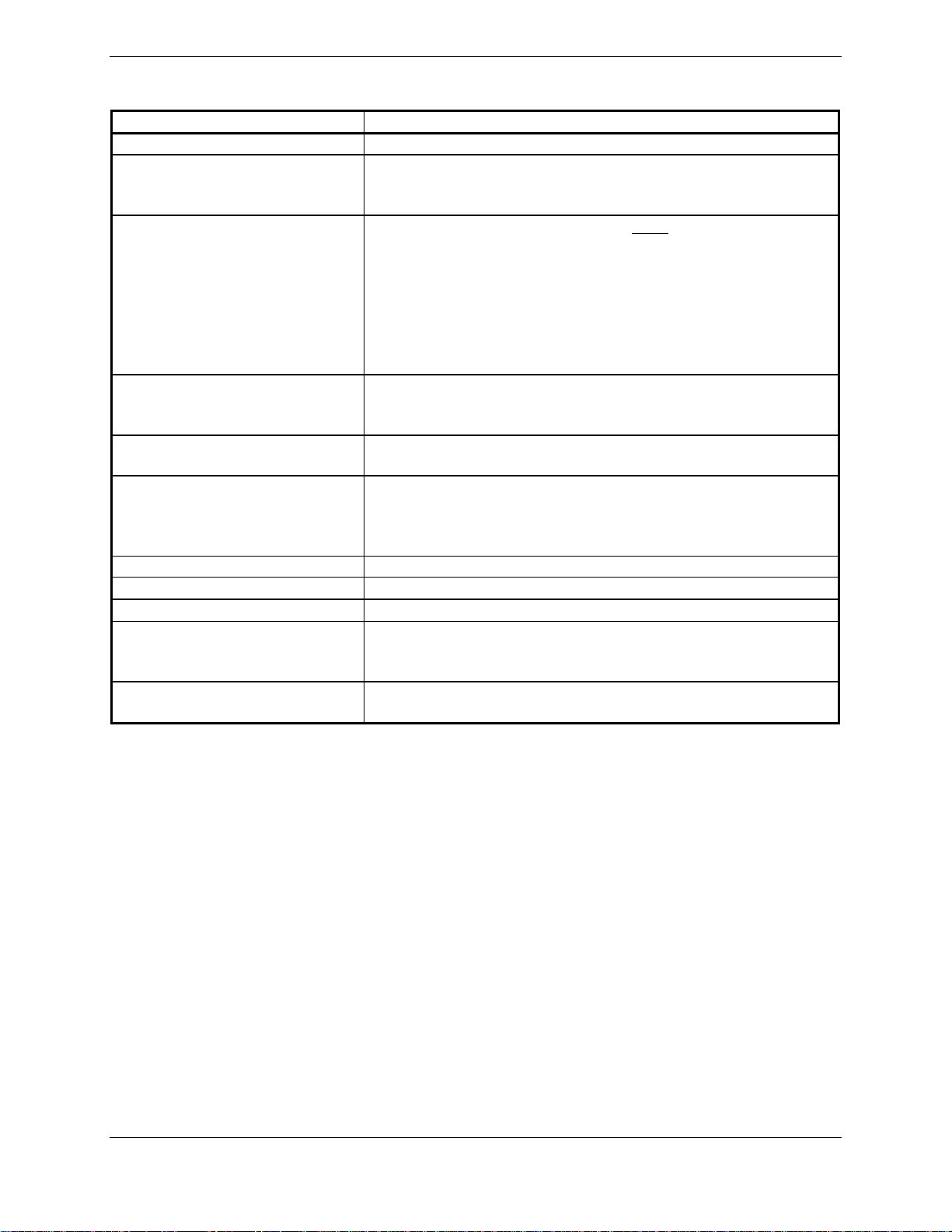
1.4.8 LOC Specifications
Characteristics Specifications
Receiver Audio Sensitivity At -103.5 dBm (S+N)/N shall not be less than 6 dB.
Course Deviation Sensitivity At –103.5 dBm, deviation output shall not be less than 60%
of standard deflection when a LOC deviation test signal is
applied.
Flag The VLOC Course Deviation Flag must be flagged:
a) When the level of a standard deviation test signal
produces 50% or less of standard deflection of the deviation
indicator.
b) In the absence of 150 Hz modulation.
c) In the absence of 90 Hz modulation.
d) In the absence of both 90 Hz and 150 Hz modulation.
e) In the absence of RF.
AGC Characteristics From –99 dBm and –13 dBm input of a Standard VOR
Audio Test Signal, audio output levels shall not vary more
than 3 dB.
Selectivity 6 dB BW is greater than 9 kHz.
69 dB BW is less than 36 kHz.
Standard Deflection a) With a standard deflection ‘FLY LEFT’ condition (90 Hz
dominant), the output shall be +90 mV ± 9 mV.
b) With a standard deflection ‘FLY RIGHT’ condition (150 Hz
dominant), the output shall be -90 mV ± 9 mV.
Spurious Response Greater than 60 dB.
Centering Accuracy
Audio Output
Audio Response Less than 6 dB of Variation between 350 and 2500 Hz. In
Audio Distortion The distortion in the receiver audio output shall not exceed
Typical 0 ± 3 mV (Max error 9.9 mV per RTCA DO-195).
A minimum 100 mW into a 500 Ω load.
voice mode, an ident tone of 1020 Hz shall be attenuated at
least 20 dB.
10% at all levels up to 100 mW.
GIA 63/GIA 63W Installation Manual Page 1-7
190-00303-05 Revision R
Page 16
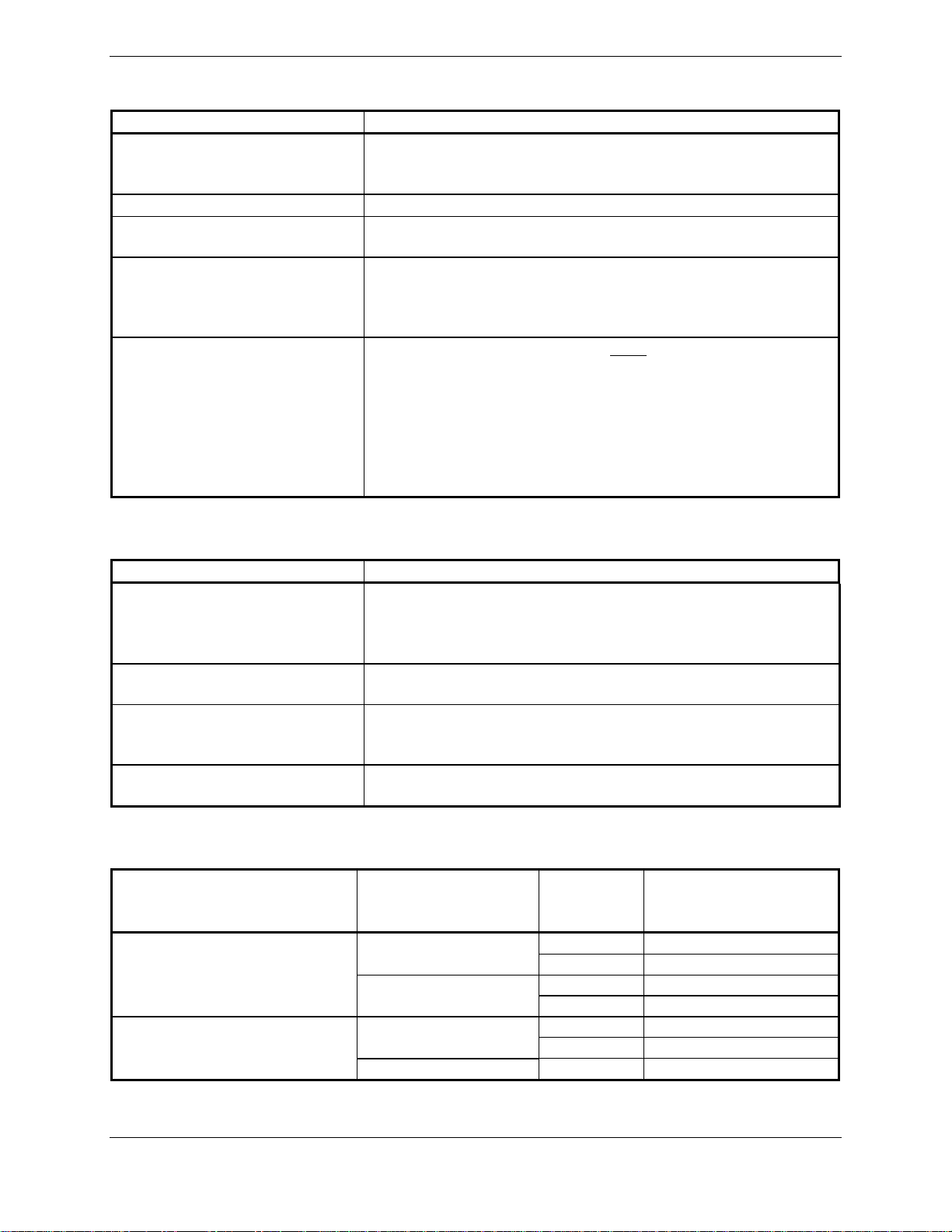
1.4.9 Glideslope Specifications
Characteristics Specifications
Sensitivity At –93 dBm, deviation output shall not be less than 60% of
standard deflection when glideslope deviation test signal is
applied.
Centering Accuracy
Selectivity 6 dB BW is greater than 17 kHz.
Standard deflection a) With a standard deflection ‘FLY DOWN’ condition (90 Hz
Flag The GS Course Deviation Flag must be flagged:
0 ± .0091 ddm or 0 ± 7.8 mV.
69 dB BW is less than 132 kHz.
dominant), the output shall be -78 mV ± 7.8 mV.
b) With a standard deflection ‘FLY UP’ condition (150 Hz
dominant), the output shall be +78 mV ± 7.8 mV.
a) When the level of a standard deviation test signal
produces 50% or less of standard deflection of the
deviation indicator.
b) In the absence of 150 Hz modulation.
c) In the absence of 90 Hz modulation.
d) In the absence of both 90 Hz and 150 Hz modulation.
e) In the absence of RF.
1.4.10 Power Requirements
Characteristics Specifications
Input Voltage Range 28 Vdc for J601
14/28 Vdc for J605
See the Environmental Qualification Form for details on
surge ratings and minimum/maximum operating voltages.
Power Requirements for P601
(COM Connector)
Superflag Power
Requirements for P605
(Main 2 Connector)
Power Requirements for P605
(Main 2 Connector)
0.3 A max @ 27.5 Vdc (not transmitting);
4.3 A max @ 27.5 Vdc (transmitting)
Power depends upon loads present on Superflag output pins
(see Sections 4.7.2.1 and 4.10.7)
1.0 A @ 27.5 Vdc (Without Superflags Active)
2.0 A @ 13.75 Vdc (Without Superflags Active)
1.4.11 Power Interrupt
Unit Name Unit Part Number
011-00781-00
GIA 63
011-00781-01
GIA 63W
* Refer to Mod Status Table in front of manual for applicable mod levels.
** Refer to the Section 3.8 for Continued Airworthiness.
011-01105-00
011-01105-01 0 A (200mS)
Mod
Status*
4 A (200mS)
0, 1, 2, 3 B (50mS)
1 A (200mS)
0 B (50mS)
1 A (200mS)
0 B (50mS)
Long Term Power
Interrupt Category
Per RTCA DO-160D**
Page 1-8 GIA 63/GIA 63W Installation Ma nual
Revision R 190-00303-05
Page 17

1.5 License Requirements
The Telecommunications Act of 1996, effective February 8, 1996, provides the FCC discretion to
eliminate radio station license requirements for aircraft and ships. The GIA 63(W) installation must
comply with current transmitter licensing requirements. To find out the specific details on whether a
particular installation is exempt from licensing, please visit the FCC web site
http://wireless.fcc.gov/aviation
Transmitter Description: Aviation-band VHF transceiver with 25 and 8.33 kHz channel spacing.
Antenna Characteristics: Broad band, 50 ohm, vertically polarized.
Rated Power: 16 Watts
Emission Type: 6K00A3E
Frequency of Operation: 118.00 – 136.992 MHz
If an aircraft license is required, make application for a license on FCC form 404, application for Aircraft
Radio Station License. The FCC also has a fax-on-demand service to provide forms by fax. The GIA
63(W) owner accepts all responsibility for obtaining the proper licensing before using the transmitter.
International transmitter license procedures vary by country. Contact the local spectrum agency for
license requirements.
.
CAUTION
The VHF transmitter in this equipment is guaranteed to meet federal communications
commission acceptance over the operating temperature range. Modifications not
expressly approved by Garmin could invalidate the license and make it unlawful to
operate the equipment.
1.6 Certification
The GIA 63 GPS receiver is certified for IFR enroute, terminal, and non-precision approaches. The GIA
63W GPS receiver is WAAS certified.
The GIA 63(W) has been qualified to RTCA/DO-160 Section 20 RF susceptibility and Section 22
lightning requirements. Special installation considerations are required, refer to the Environmental
Qualification Form.
The GIA 63(W) meets the requirements for GPS as a Primary Means of Navigation for Oceanic/Remote
Operations per FAA Notice N8110.60.
The GIA 63(W) is eligible for B-RNAV in accordance with AMC 20-4.
Eligible for PRNAV in accordance with PRNAV requirements: JAA Administrative & Guidance
Material Section One: General Part 3: Temporary Guidance Leaflets, Leaflet No 10: Airworthiness and
Operational Approval for Precession RNAV Operations in Designated European Airspace 7.1 Required
Functions.
The conditions and tests required for TSO approval of this article are minimum performance standards. It
is the responsibility of those installing this article either on or within a specific type or class of aircraft to
determine that the aircraft installation conditions are within the TSO standards. TSO articles must have
separate approval for installation in an aircraft. The article may be installed only if performed under 14
CFR part 43 or the applicable airworthiness requirements. At the time of publication, installations of this
TSO approved article are only approved when installed in an aircraft as part of a Garmin Integrated Flight
Deck.
GIA 63/GIA 63W Installation Manual Page 1-9
190-00303-05 Revision R
Page 18
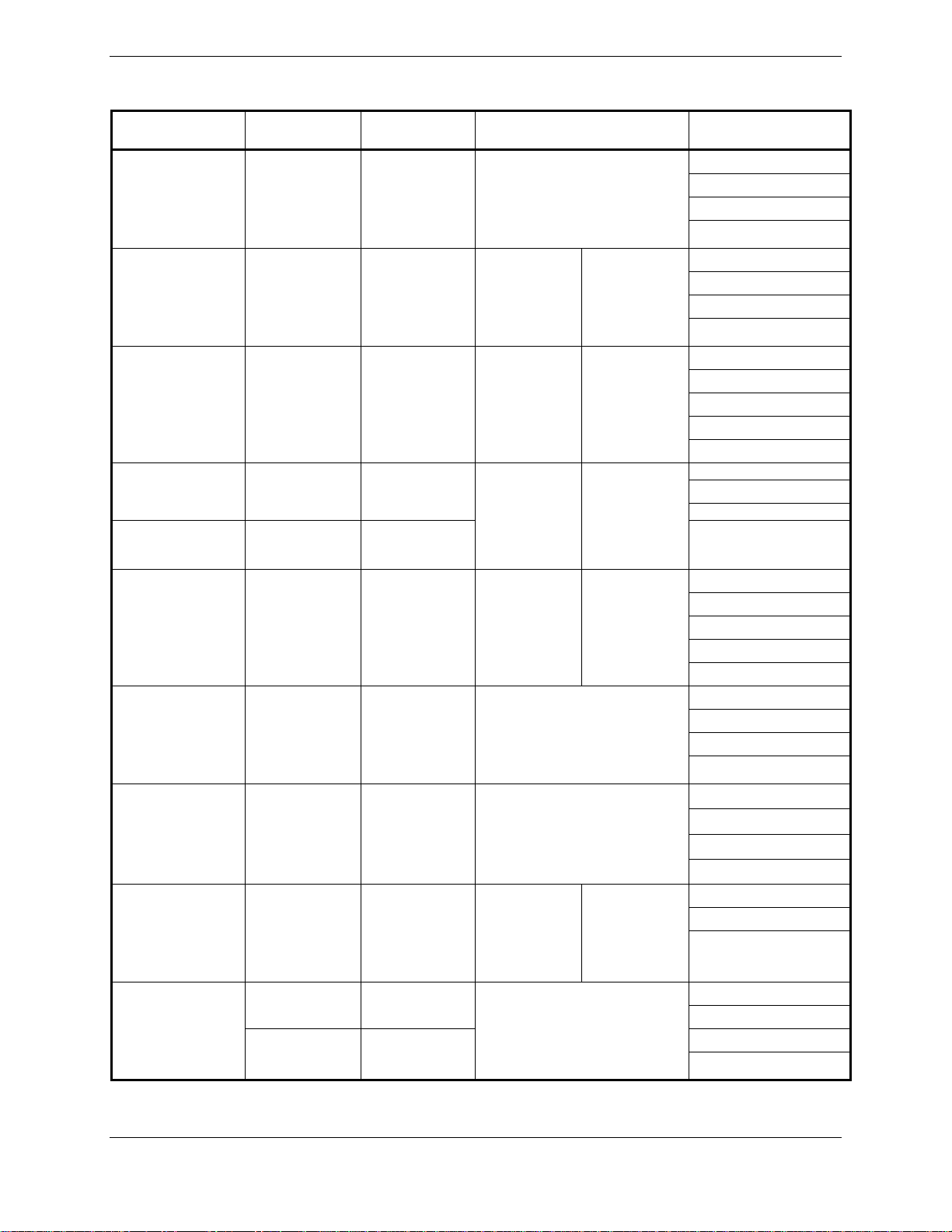
1.6.1 GIA 63 TSO/ETSO Compliance
Function TSO/ETSO Category
Automatic Pilots
Glideslope
Receiver
Localizer Receiver
VHF COM
Transmitter
VHF COM
Receiver
VOR Receiver
Flight Director
Equipment
Ground Proximity
Warning – Glide
Slope Deviation
Alerting
Equipment
GPS
TAWS
TSO-C9c
ETSO-C9c
TSO-C34e
ETSO-2C34f
TSO-C36e
ETSO-2C36f
TSO-C37d
ETSO-2C37e
TSO-C38d
ETSO-2C38e
TSO-C40c
ETSO-2C40c
TSO-C52b
ETSO-C52b
TSO-C92c
TSO-C129a
ETSO-C129a
TSO-C151b Class A and B
ETSO-C151a Class B
Class A
Class 3 and 5
Class C and E
Class A1
Applicable LRU SW Part
Numbers
All
006-B0190-()
except
006-B0190-00
through
006-B0190-19
All
006-B0190-()
except
006-B0190-00
through
006-B0190-04
All
006-B0190-()
except
006-B0190-00
through
006-B0190-04
All
006-B0190-()
except
006-B0190-00
through
006-B0190-04
All
006-B0190-()
except
006-B0190-00
through
006-B0190-04
006-B0190-()
006-B0190-00
006-B0190-19
006-B0190-()
006-B0190-00
006-B0190-29
All
006-B0190-()
except
006-B0190-00
through
006-B0190-04
006-B0190-()
006-B0190-00
006-B0190-29
006-B0083-01
006-B0082-02
All
006-B0081-()
except
006-B0081-00
through
006-B0081-04
006-B0082-02
All
except
through
All
except
through
006-B0093-00
006-B0093-01
All
except
through
Applicable CLD
Part Numbers
006-C0046-()
006-C0044-()
006-C0047-()
006-C0039-01
006-C0046-()
006-C0044-()
006-C0047-()
006-C0039-01
006-C0046-()
006-C0044-()
006-C0047-()
006-C0039-01
006-C0053-00
006-C0046-()
006-C0044-()
006-C0047-()
006-C0039-01
006-C0046-()
006-C0044-()
006-C0047-()
006-C0039-01
006-C0053-00
006-C0046-()
006-C0044-()
006-C0047-()
006-C0039-01
006-C0046-()
006-C0044-()
006-C0047-()
006-C0039-01
006-C0046-()
006-C0044-()
006-C0047-()
006-C0046-()
006-C0044-()
006-C0047-()
006-C0039-01
Page 1-10 GIA 63/GIA 63W Installation Manual
Revision R 190-00303-05
Page 19
1.6.2 GIA 63W TSO/ETSO Compliance
Function TSO/ETSO Category
Automatic Pilots
Glideslope
Receiver
Localizer Receiver
TSO-C9c
ETSO-C9c
TSO-C34e
ETSO-2C34f
TSO-C36e
ETSO-2C36f
Class A
Applicable LRU SW Part
Numbers
All
006-B0544-()
except
006-B0544-00
through
006-B0544-09
All
006-B0544-()
except
006-B0544-00
through
006-B0544-09
All
006-B0544-()
except
006-B0544-00
through
006-B0544-09
All
006-B0083-()
except
006-B0083-00
through
006-B0083-01
All
006-B0082-()
except
006-B0082-00
through
006-B0082-02
Applicable CLD Part
Numbers
All
006-C0084-()
except
006-C0084-00
006-C0072-()
006-C0085-()
All
006-C0039-()
except
006-C0039-00
through
006-C0039-02
All
006-C0084-()
except
006-C0084-00
006-C0072-()
006-C0085-()
All
006-C0039-()
except
006-C0039-00
through
006-C0039-02
All
006-C0084-()
except
006-C0084-00
006-C0072-()
006-C0085-()
All
006-C0039-()
except
006-C0039-00
through
006-C0039-02
All
006-C0053-()
except
006-C0053-00
GIA 63/GIA 63W Installation Manual Page 1-11
190-00303-05 Revision R
Page 20
GIA 63W TSO/ETSO Compliance, Continued
Function TSO/ETSO Category
VOR Receiver
Flight Director
Equipment
Ground Proximity
Warning – Glide
Slope Deviation
Alerting
Equipment
Airborne
Navigation
Sensors Using the
Global Positioning
System
Augmented by the
Wide Area
Augmentation
System*
TSO-C40c
ETSO-2C40c
TSO-C52b
ETSO-C52b
TSO-C92c
TSO-C145a
ETSO-C145
Class 3
Applicable LRU SW Part
006-B0544-()
006-B0544-00
006-B0544-09
006-B0544-()
006-B0544-00
006-B0544-09
All
except
through
006-B0544-()
006-B0544-00
006-B0544-09
006-B0544-()
006-B0544-00
006-B0544-09
All
except
through
Numbers
006-B0082-()
006-B0082-00
006-B0082-02
All
except
through
All
except
through
006-B0339-()
006-B0339-00
006-B0339-03
All
except
through
All
except
through
Applicable CLD Part
Numbers
All
006-C0084-()
except
006-C0084-00
006-C0072-()
006-C0085-()
All
006-C0039-()
except
006-C0039-00
through
006-C0039-02
All
006-C0053-()
except
006-C0053-00
All
006-C0084-()
except
006-C0084-00
006-C0072-()
006-C0085-()
All
006-C0039-()
except
006-C0039-00
through
006-C0039-02
All
006-C0084-()
except
006-C0084-00
006-C0072-()
006-C0085-()
All
006-C0039-()
except
006-C0039-00
through
006-C0039-02
All
006-C0084-()
except
006-C0084-00
006-C0072-()
006-C0085-()
Page 1-12 GIA 63/GIA 63W Installation Manual
Revision R 190-00303-05
Page 21
GIA 63W TSO/ETSO Compliance, Continued
Function TSO/ETSO Category
TAWS
VHF Radio
Communications –
Transceiver
Equipment
TSO-C151b
ETSO-C151a Class B
TSO-C169
Equivalent to
ETSO-2C37e
&
ETSO-2C38e
Class A
and B
Class 3 and
5
(transmitter)
Class C and
E
(receiver)
Applicable LRU SW Part
006-B0544-()
except
006-B0544-00
through
006-B0544-09
Numbers
All
006-B0544-()
except
006-B0544-00
through
006-B0544-09
All
All
006-B0081-()
except
006-B0081-00
through
006-B0081-04
Applicable CLD Part
* GIA63W ARINC output labels 310 and 311 are not to be used as navigation data per RTCA/DO-229c.
Numbers
All
006-C0084-()
except
006-C0084-00
006-C0072-()
006-C0085-()
All
006-C0039-()
except
006-C0039-00
through
006-C0039-02
All
006-C0084-()
except
006-C0084-00
006-C0072-()
006-C0085-()
All
006-C0039-()
except
006-C0039-00
through
006-C0039-02
GIA 63/GIA 63W Installation Manual Page 1-13
190-00303-05 Revision R
Page 22
1.6.3 GIA 63 TSO/ETSO Deviations
TSO/ETSO Deviation
TSO-C9c
ETSO-C9c
TSO-C34e 1. Garmin was granted a deviation from TSO-C34e to use DO-160D Change 3 instead of
TSO-C36e 1. Garmin was granted a deviation from TSO-C36e to use DO-160D Change 3 instead of
TSO-C37d
TSO-C38d
TSO-C40c 1. Garmin was granted a deviation from TSO-C40c to use DO-160D Change 3 instead of
TSO-C52b
ETSO-C52b 1. Garmin was granted a deviation from AS-8008 paragraph 3.6 to limit flight director
1. Garmin was granted a deviation from TSO-C9c to use SAE AS 402B instead of AS402A.
2. Garmin was granted a deviation from TSO-C9c to use DO-160D instead of specified
environmental tests.
3. Garmin was granted a deviation from TSO-C9c subpart A (c), which requires marking
the weight of the unit on the unit. Garmin will provide this information in the installation
manual in lieu of marking on the serial tag. Garmin does not currently list the weight on
other avionics units.
4. Garmin was granted a deviation from SAE AS 402B paragraph 4.4.1 to limit autopilot
engagement to attitudes considered safe for the certified aircraft.
5. Garmin was granted a deviation from SAE AS 402B paragraph 4.3.2 to not provide
servo effort indications when the automatic pilot is not engaged.
1. Garmin was granted a deviation from ETSO-C9c to use SAE AS-402B instead of AS402A.
2. Garmin was granted a deviation from ETSO-C9c to use DO-160D instead of the
specified environmental tests.
3. Garmin was granted a deviation from AS-402B paragraph 4.3.2 to not provide servo
effort indications when the automatic pilot is not engaged.
4. Garmin was granted a deviation from AS-402B paragraph 4.4.1 to limit autopilot
engagement to attitudes considered safe for the certified aircraft.
DO-160B, and DO-178B instead of DO-178A.
DO-160B, and DO-178B instead of DO-178A.
1. Garmin was granted a deviation from TSO-C37d to use DO-160D Change 3 instead of
DO-160B, and DO-178B instead of DO-178A.
2. Garmin was granted a deviation from TSO-C37d paragraph (a)(1) to allow using RTCA
document DO-186a Change 2 instead of RTCA document DO-186 to specify minimum
performance standards.
3. Garmin was granted a deviation from TSO-C37d by allowing a 6dB reduction of
transmitter power during the Normal Operating Conditions - Emergency Operation Voltage
as described in RTCA document DO-186a paragraph 2.5.13.1 and RTCA document DO160C paragraph 16.5.2.1.
4. Garmin was granted a deviation from TSO-C37d paragraph (a)(5) to allow 8.33 kHz
spacing in addition to the 25 kHz spacing.
5. Garmin was granted a deviation from TSO-C37d paragraph (b)(1) to allow the marking
to call out 8.33 kHz spacing in addition to the 25 kHz spacing.
1. Garmin was granted a deviation from TSO-C38d to use DO-160D Change 3 instead of
DO-160B, and DO-178B instead of DO-178A.
2. Garmin was granted a deviation from TSO-C38d paragraph (a)(1) to allow using RTCA
document DO-186a Change 2 instead of RTCA document DO-186 to specify minimum
performance standards.
3. Garmin was granted a deviation from TSO-C38d paragraph (a)(5) to allow 8.33 kHz
spacing in addition to the 25 kHz spacing.
DO-160B, and DO-178B instead of DO-178A.
1. Garmin was granted a deviation from SAE AS 8008 paragraph 3.6 to limit flight director
operation to attitudes considered safe for the certified aircraft.
2. Garmin was granted a deviation from TSO-C52b to use DO-160D instead of DO-160C.
operation to attitudes considered safe for the certified aircraft.
Page 1-14 GIA 63/GIA 63W Installation Manual
Revision R 190-00303-05
Page 23
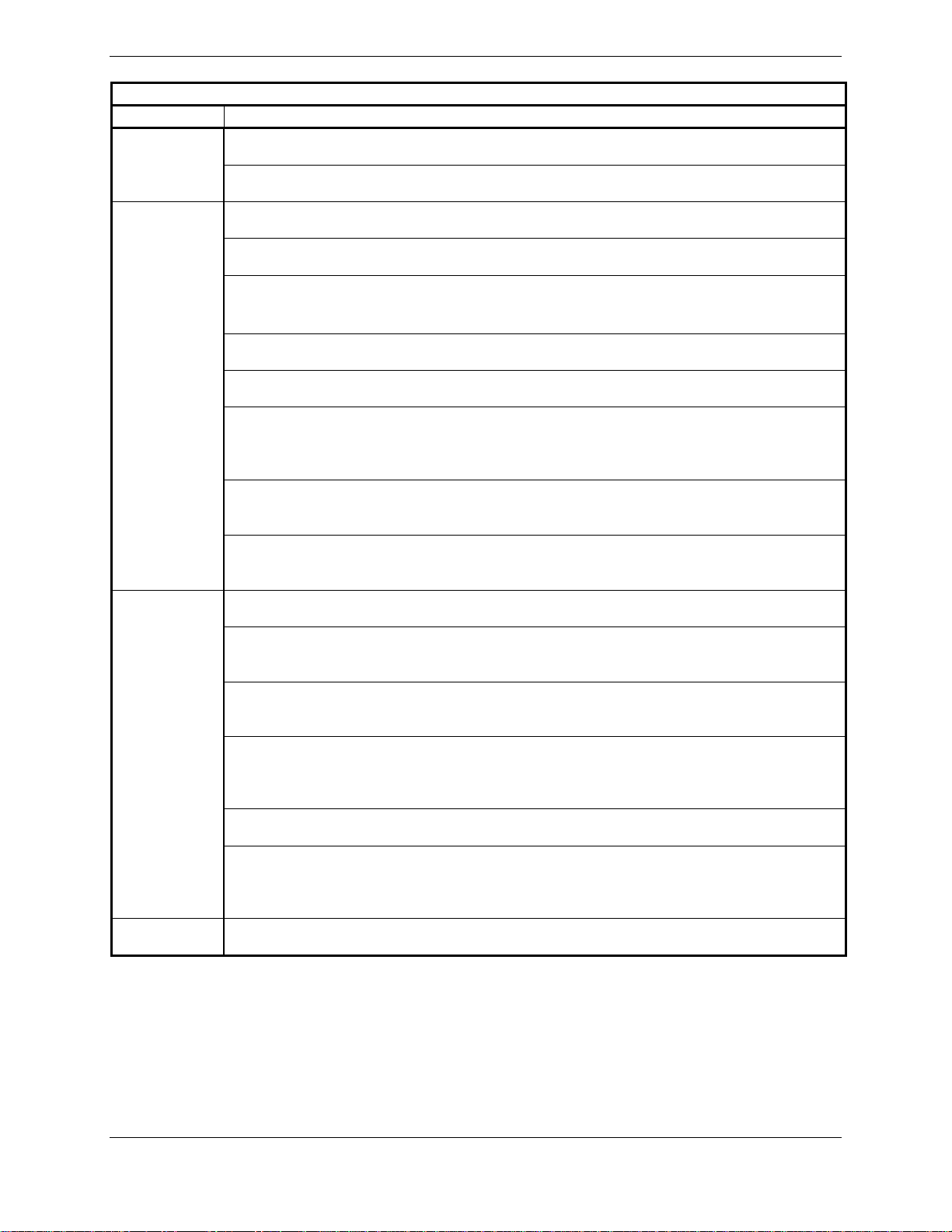
TSO/ETSO Deviations, continued
TSO/ETSO Deviation
TSO-C92c
TSO-C129a
ETSO-C129a
TSO-C151b 1. Garmin was granted a deviation from TSO-C151b 4.a. to mark the unit with the serial
1. Garmin was granted a deviation from TSO-C92c to use DO-160D Change 3 instead of
DO-160C.
2. Garmin was granted a deviation from TSO-C92c to not include the version and levels
of software or the modification status of hardware in the appliance number.
1. Garmin was granted a deviation from TSO-C129a to use DO-160D Change 3 instead
of DO-160C.
2. Garmin was granted a deviation from TSO-C129a to eliminate the annunciation for
pending CDI scale change 3.0 NM from the FAF.
3. Garmin was granted a deviation from TSO-C129a involving the use of GPS calibrated
altitude in approach mode based on the enclosed TSO deviation request dated August
24, 1994 and the approval letter dated November 29, 1994.
4. Garmin was granted a deviation from TSO-C129a to extend automatic CDI sensitivity
changes to non-approach mode navigation.
5. Garmin was granted a deviation from TSO-C129a to eliminate the requirement in
(a)(3)(xi)1.b.ii to “alert the pilot of the need to manually insert the barometric pressure”.
6. Garmin was granted a deviation from TSO-C129a to eliminate the requirement in
(a)(3)(xv)4.b to provide a “means to manually identify a satellite that is expected to be
unavailable at the destination (for scheduled maintenance as identified in FAA Notice to
Airmen) shall be provided” for the RAIM prediction process.
7. Garmin was granted a deviation from TSO-C129a to change the requirement in
(a)(6)(iii) from “The navigation data contains all 1’s or 0’s” to “All data bits in subframe 1,
2, or 3 are 0’s”.
8. Garmin was granted a deviation from TSO-C129a to change the requirement in
paragraph (a)(7)(ii) to match the WAAS TSO-C145a and DO-229 requirements for Power
input testing.
1. Garmin was granted a deviation from ED-72A 3.2.2.1.f (list item 3) and 3.2.2.4.j.4 to
eliminate the annunciation for pending CDI scale change 3.0 nm from the FAF.
2. Garmin was granted a deviation from ED-72A 3.2.2.4.j.3 to extend automatic CDI
sensitivity changes for approach mode navigation to non-approach mode navigation as
well.
3. Garmin was granted a deviation from ED-72A 3.2.2.1.f (list item 4) and 3.2.2.3.e.4 and
3.2.2.4.j.2 to eliminate the requirement to alert the pilot of the need to manually insert the
barometric pressure.
4. Garmin was granted a deviation from ED-72A 3.2.2.3.d.2 to eliminate the requirement
to provide a means to manually identify a satellite that is expected to be unavailable at the
destination (for scheduled maintenance as identified in FAA Notice to Airmen) for the
RAIM prediction process.
5. Garmin was granted a deviation from ED-72A 3.1.4.1.c to change the requirement from
“the navigation data contains all 1’s or 0’s” to “all data bits in subframe 1,2, or 3 are 0’s”.
6. Garmin was granted a deviation from ED-72A 4.16.2 to eliminate the requirement for
valid position within 10 seconds of power interrupt for abnormal operating conditions
power input tests. For abnormal operating conditions power input tests, satellite
acquisition time of 5 minutes applies.
number instead of the date of manufacture.
GIA 63/GIA 63W Installation Manual Page 1-15
190-00303-05 Revision R
Page 24
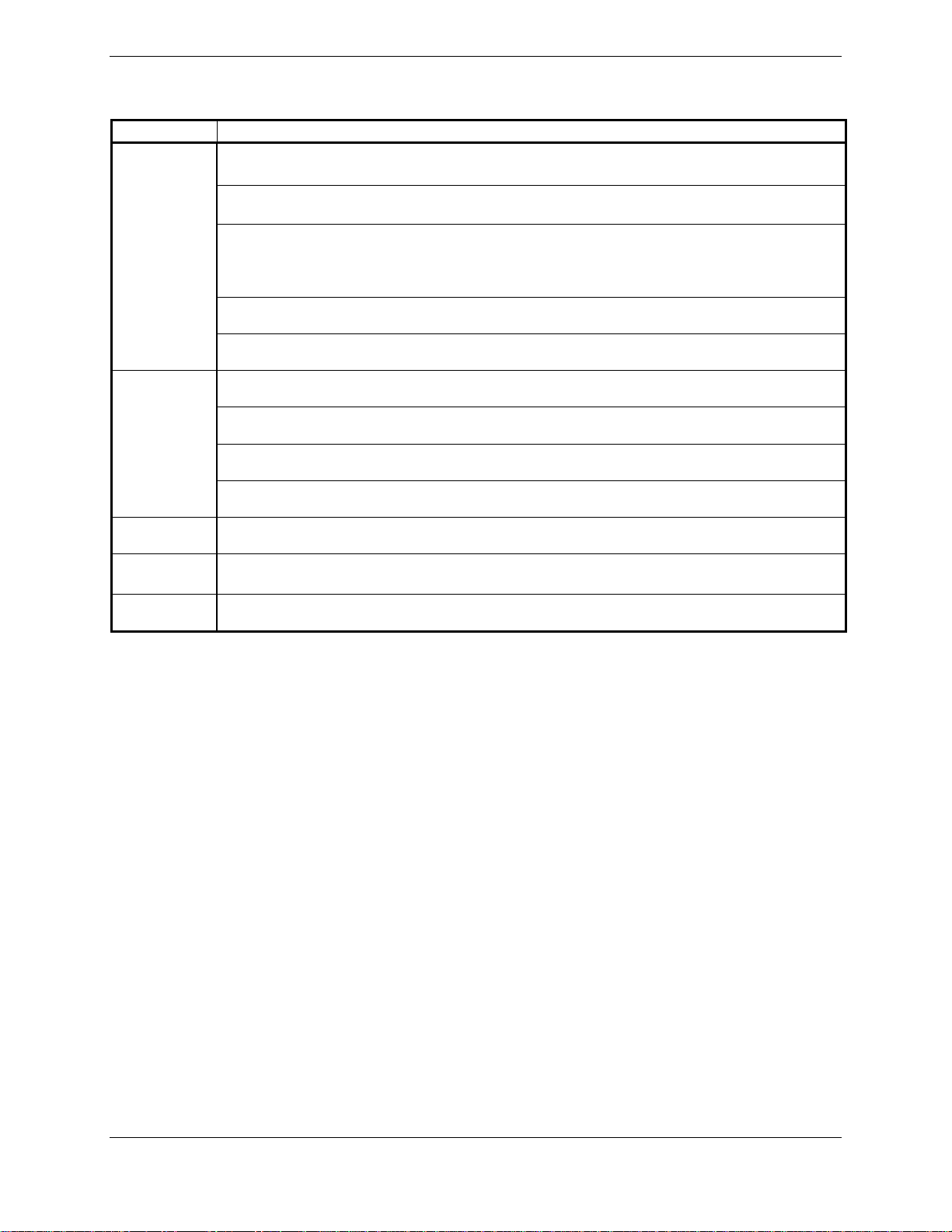
1.6.4 GIA 63W TSO/ETSO Deviations
TSO/ETSO Deviation
TSO-C9c
ETSO-C9c
TSO-C34e 1. Garmin was granted a deviation from TSO-C34e to use DO-160E instead of DO-160B,
ETSO-2C34f 1. Garmin was granted a deviation from ETSO-2C34f to use DO-160E instead of DO-
TSO-C36e 1. Garmin was granted a deviation from TSO-C36e to use DO-160E instead of DO-160B,
1. Garmin was granted a deviation from TSO-C9c to use SAE AS 402B instead of AS402A.
2. Garmin was granted a deviation from TSO-C9c to use DO-160E instead of specified
environmental tests.
3. Garmin was granted a deviation from TSO-C9c subpart A (c), which requires marking
the weight of the unit on the unit. Garmin will provide this information in the installation
manual in lieu of marking on the serial tag. Garmin does not currently list the weight on
other avionics units.
4. Garmin was granted a deviation from SAE AS 402B paragraph 4.4.1 to limit autopilot
engagement to attitudes considered safe for the certified aircraft.
5. Garmin was granted a deviation from SAE AS 402B paragraph 4.3.2 to not provide
servo effort indications when the automatic pilot is not engaged.
1. Garmin was granted a deviation from ETSO-C9c to use SAE AS-402B instead of AS402A.
2. Garmin was granted a deviation from ETSO-C9c to use DO-160E instead of the
specified environmental tests.
3. Garmin was granted a deviation from AS-402B paragraph 4.3.2 to not provide servo
effort indications when the automatic pilot is not engaged.
4. Garmin was granted a deviation from AS-402B paragraph 4.4.1 to limit autopilot
engagement to attitudes considered safe for the certified aircraft.
and DO-178B instead of DO-178A.
160D.
and DO-178B instead of DO-178A.
Page 1-16 GIA 63/GIA 63W Installation Manual
Revision R 190-00303-05
Page 25
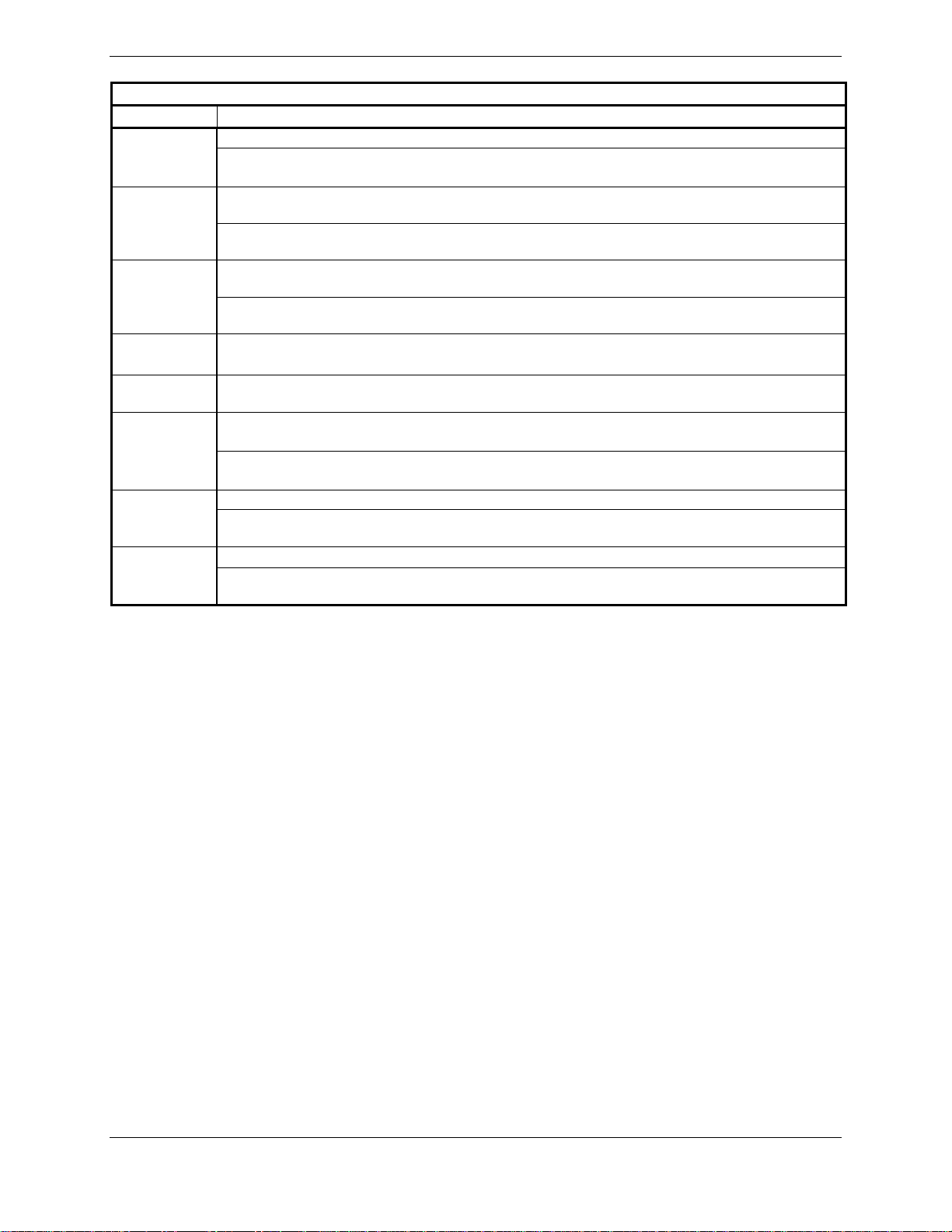
TSO/ETSO Deviations, continued
TSO/ETSO Deviation
1. Garmin was granted a deviation from ETSO-2C36f to use DO-160E instead of DO-160DETSO-2C36f
2. Garmin was granted a deviation from ETSO-2C36f to use ED-46B amendment 2 in
addition to ED 46B
ETSO-2C37e
1. Garmin was granted a deviation from ETSO-2C37e to use DO-160E instead of DO160D.
2. Garmin was granted a deviation from ETSO-2C37e to use ED-23B amendment 3 in
addition to ED-23B.
ETSO-2C38e
1. Garmin was granted a deviation from ETSO-2C38e to use DO-160E instead of DO160D.
2. Garmin was granted a deviation from ETSO-2C38e to use ED-23B amendment 3 in
addition to ED-23B.
TSO-C40c 1. Garmin was granted a deviation from TSO-C40c to use DO-160E instead of DO-160B,
and DO-178B instead of DO-178A.
ETSO-2C40c 1. Garmin was granted a deviation from ETSO-2C40c to use DO-160E instead of DO-
160D.
TSO-C52b
1. Garmin was granted a deviation from SAE AS 8008 paragraph 3.6 to limit flight director
operation to attitudes considered safe for the certified aircraft.
2. Garmin was granted a deviation from TSO-C52b to use DO-160E instead of DO-160C.
The justification for this deviation is to use the latest accepted environmental standards.
1. Garmin was granted a deviation from ETSO-C52b to use DO-160E instead of DO-160D.ETSO-C52b
2. Garmin was granted a deviation from AS-8008 paragraph 3.6 to limit flight director
operation to attitudes considered safe for the certified aircraft.
1. Garmin was granted a deviation from TSO-C92c to use DO-160E instead of DO-160C. TSO-C92c
2. Garmin was granted a deviation from TSO-C92c to not include the version and levels of
software or the modification status of hardware in the appliance number.
GIA 63/GIA 63W Installation Manual Page 1-17
190-00303-05 Revision R
Page 26
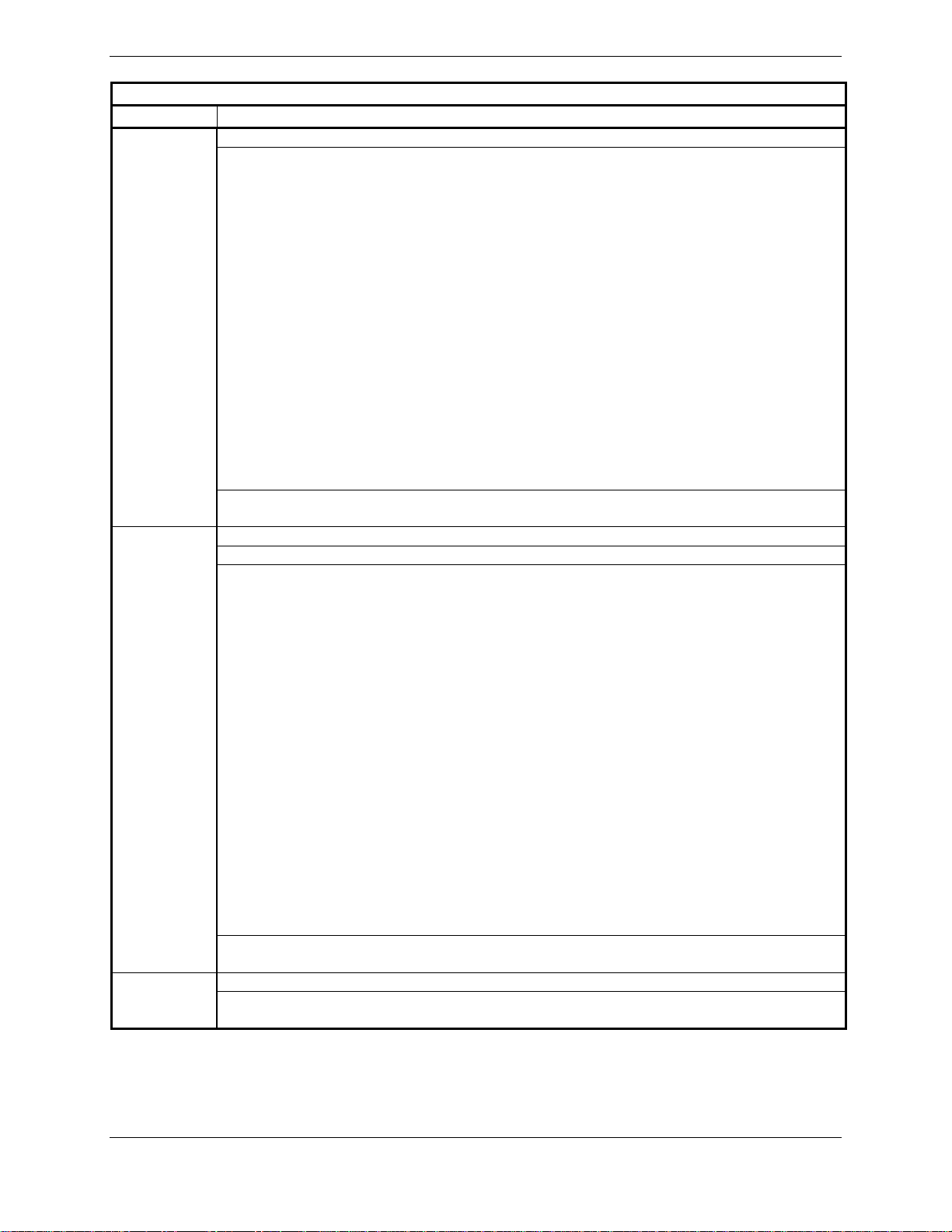
TSO/ETSO Deviations, continued
TSO/ETSO Deviation
TSO-C145a
ETSO-C145
1. Garmin was granted a deviation from TSO-C145a to use DO-160E instead of DO-160D.
2. Garmin was granted a deviation from RTCA/DO-229C paragraphs 2.1.1.10, 2.1.1.7,
2.1.1.8.1, 2.1.1.8.2, 2.1.1.9, 2.1.2.1, 2.1.3.1, 2.1.4.1.4, 2.1.4.1.5 and 2.1.5.1 in the form of
an operational limitation to achieve an equivalent level of safety. This operational limitation
applies to the GIA63W with GPS software version 2.40 or earlier, or GIA63W installations
with certain models of GPS/WAAS antennas identified in Section 2.1.3.2. The operational
limitation is based on:
1. The ability to use antennas that may not meet the minimum gain performance
requirements of DO-228.
2. The ability to mitigate the effects of the different gain characteristics of those
antennas by increasing the effective mask angle through operational limitations.
3. The ability to further increase the effective mask angle, through operational
limitations, to a level commensurate with test conditions used in the original TSO
qualification tests.
4. The ability to use -128 dBmic as the minimum GPS satellite signal-in-space for the
purpose of assessing the operational limitation.
5. The ability to use -128 dBmic as the minimum SBAS satellite signal-in-space for
the purpose of assessing the operational limitation.
3. Garmin was granted a deviation from RTCA/DO-229C paragraph 2.1.1.9 to use a 20
second satellite reacquisition time instead of a 10-second reacquisition time.
1. Garmin was granted a deviation from ETSO-C145 to use DO-160E instead of DO-160D
2. Garmin was granted a deviation from ETSO-C145 to use DO-229C instead of DO-229A
3. Garmin was granted a deviation from DO-229C paragraphs 2.1.1.10, 2.1.1.7, 2.1.1.8.1,
2.1.1.8.2, 2.1.1.9, 2.1.2.1, 2.1.3.1, 2.1.4.1.4, 2.1.4.1.5 and 2.1.5.1 in the form of an
operational limitation to achieve an equivalent level of safety. This operational limitation
applies to the GIA63W with GPS software version 2.40 or earlier, or GIA63W installations
with certain models of GPS/WAAS antennas identified in Section 2.1.3.2. The operational
limitation is based on:
1. The ability to use antennas that may not meet the minimum gain performance
requirements of DO-228.
2. The ability to mitigate the effects of the different gain characteristics of those
antennas by increasing the effective mask angle through operational limitations.
3. The ability to further increase the effective mask angle, through operational
limitations, to a level commensurate with test conditions used in the original TSO
qualification tests.
4. The ability to use -128 dBmic as the minimum GPS satellite signal-in-space for
the purpose of assessing the operational limitation.
5. The ability to use -128 dBmic as the minimum SBAS satellite signal-in-space for
the purpose of assessing the operational limitation.
4. Garmin was granted a deviation from RTCA/DO-229C paragraph 2.1.1.9 to use a 20
second satellite reacquisition time instead of a 10-second reacquisition time.
1. Garmin was granted a deviation from TSO-C151b to use DO-160E instead of DO-160D. TSO-C151b
2. Garmin was granted a deviation from TSO-C151b 4.a. to mark the unit with the serial
number instead of the date of manufacture.
Page 1-18 GIA 63/GIA 63W Installation Manual
Revision R 190-00303-05
Page 27
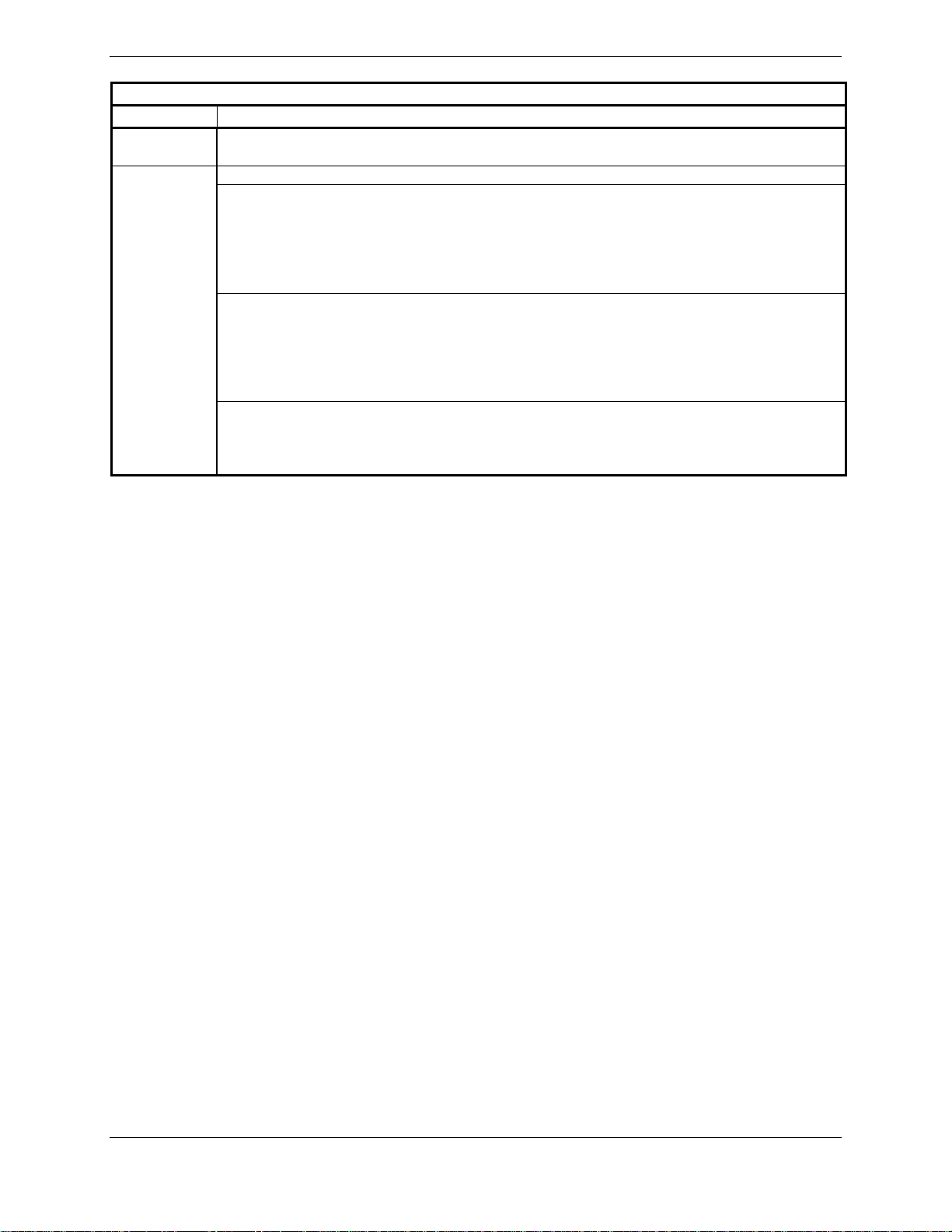
TSO/ETSO Deviations, continued
TSO/ETSO Deviation
ETSO-C151a 1. Garmin was granted a deviation from ETSO-C151a to use DO-160E instead of DO-
160D.
TSO-C169
1. Garmin was granted a deviation from TSO-C169 to use DO-160E instead of DO-160D.
2. Garmin was granted a deviation to TSO-C169, paragraph 4.d requirement to mark the
installation procedures drawing number on the equipment. Garmin will mark as follows,
which Garmin believes meets the intent of the requirement. The Install Manual is part of
the furnished data package.
TSO-C145a
See Install Manual for additional appliance approvals
3. Garmin was granted a deviation to TSO-C169, paragraph 4.e requirement to mark
(DEV) after the TSO number on the equipment. Garmin will mark as follows, as TSOC169 is not the primary TSO and the Install Manual contains all of the TSO-C169
information including deviations.
TSO-C145a
See Install Manual for additional appliance approvals
4. Garmin was granted to deviate from TSO-C169 by allowing a 6dB reduction of
transmitter power during the Normal Operating Conditions – Emergency Operation Voltage
as described in RTCA document DO-186a paragraph 2.5.13.1 and RTCA document DO160E paragraph 16.6.1.1.
GIA 63/GIA 63W Installation Manual Page 1-19
190-00303-05 Revision R
Page 28

1.6.5 AFM/AFMS/POH Considerations
Per TSO-C9c deviation, the applicable AFM, AFMS, and/or POH shall list autopilot engagement
envelope for the certified aircraft.
Per TSO-C52b deviation, the applicable AFM, AFMS, and/or POH shall state that the system is not
designed to perform unusual attitude recoveries from attitudes outside this range (as defined in the
TSO-C52b deviation above). Ensure pilot operating guidance also states the FD operating envelope.
Due to the equipment’s TSO qualified performance in tracking low-elevation-angle satellites, the
following limitations must be included in the Aircraft Flight Manual or Aircraft Flight Manual
Supplement for GIA63W installations with GPS software version 2.40 or earlier, or in GIA63W
installations with antennas that require operational limitations (identified in Section 2.1.3.2):
This equipment does not comply with US 14 CFR Part 91, SFAR 97 requirements for
TSO-C145a/TSO-146a equipment when installed with certain models of GPS/WAAS antennas
identified in Section 2.1.3.2. Until complete compliance is demonstrated and approved by the
FAA, authorization to conduct any GPS or WAAS operation under Instrument Flight Rules (IFR)
requires that:
1. Aircraft using the GPS or WAAS capability of the GIA 63W navigation equipment under
IFR must be equipped with an approved and operational alternate means of navigation
appropriate to the flight with the exception of oceanic and remote operations.
2. For flight planning purposes, if an alternate airport is required, it must have an approved
instrument approach procedure other than GPS or RNAV that is anticipated to be operational
and available at the estimated time of arrival. All equipment required for this procedure must
be installed and operational.
3. For flight planning purposes, Garmin Prediction Program 006-A0154-01 with the <insert
installed antenna part number> antenna selection should be used to confirm the availability
of RAIM for the intended flight in accordance with the local aviation authority guidelines for
TSO-C129a equipment. WAAS NOTAMs (or their absence) and generic prediction tools do
not provide an acceptable indication of the availability for the GIA 63W equipment.
4. When flight planning an LNAV/VNAV or LPV approach, operators should use the Garmin
Prediction Program 006-A0154-01 with the <insert installed antenna part number> antenna
selection in addition to any NOTAMs issued for the approach.
The applicable AFM, AFMS, and/or POH shall also state the following instructions regarding the use of
the G1000 WFDE prediction program, which is required to be used for flight planning purposes for
Oceanic/Remote operations and when operating under the operational limitations listed above:
The G1000 WFDE prediction program works in combination with the Route Planning Software
(version 1.2 or later approved version). The route planning and WFDE prediction programs can
be downloaded from www.garmin.com
refer to the WFDE Prediction Program Instructions Garmin part number 190-00643-01.
. For information on using the WFDE prediction program,
Page 1-20 GIA 63/GIA 63W Installation Manual
Revision R 190-00303-05
Page 29

1.6.6 Other Regulatory Criteria (GIA 63)
RTCA/DO-178B Level B, C, D (Software)
EUROCAE ED 12B (Software)
RTCA/DO-160D (Environmental Conditions)
EUROCAE ED 14D (Environmental Conditions)
RTCA/DO-161A (Airborne Ground Proximity Warning
Equipment)
RTCA/DO-208 Class A1 (GPS)
RTCA/DO-186a Class 3 and 5 (VHF Com Transmitter)
RTCA/DO-186a Class C and E (VHF Com Receiver)
RTCA/DO-196 (VOR Receiver)
RTCA/DO-195 Class A (Localizer Receiver)
RTCA/DO-192 (Glideslope Receiver)
ICAO Annex 10 Volume III, EUROCAE ED-23B (VHF Com Transceiver)
ICAO Annex 10 Volume I, EUROCAE ED-22B (VOR Receiver)
ICAO Annex 10 Volume I, EUROCAE ED-46B (Localizer Receiver)
EUROCAE ED-47B (Glideslope Receiver)
EUROCAE ED-72A (GPS)
SAE AS 402B (Automatic Pilots)
SAE AS 8008 (Flight Director Equipment)
1.6.7 Other Regulatory Criteria (GIA 63W)
RTCA/DO-254 Level A and C (CLD devices)
RTCA/DO-178B Level A*, B, C, D (Software)
EUROCAE ED 12B (Software)
RTCA/DO-160E (Environmental Conditions)
EUROCAE ED 14E (Environmental Conditions)
RTCA/DO-161A (Airborne Ground Proximity Warning
Equipment)
RTCA/DO-229c Class Beta 3 (GPS/WAAS)
RTCA/DO-186a Class 3 and 5 (VHF Com Transmitter)
RTCA/DO-186a Class C and E (VHF Com Receiver)
RTCA/DO-196 (VOR Receiver)
RTCA/DO-195 Class A (Localizer Receiver)
RTCA/DO-192 (Glideslope Receiver)
ICAO Annex 10 Volume III, EUROCAE ED-23B (VHF Com Transceiver)
ICAO Annex 10 Volume I, EUROCAE ED-22B (VOR Receiver)
ICAO Annex 10 Volume I, EUROCAE ED-46B (Localizer Receiver)
EUROCAE ED-47B (Glideslope Receiver)
SAE AS 402B (Automatic Pilots)
SAE AS 8008 (Flight Director Equipment)
*RTCA/DO-178B Level A is only supported through use of GIA software part numbers 006-B0544-3( )
and later. All other GIA software part numbers support RTCA/DO-178B Levels B, C and D only.
GIA 63/GIA 63W Installation Manual Page 1-21
190-00303-05 Revision R
Page 30
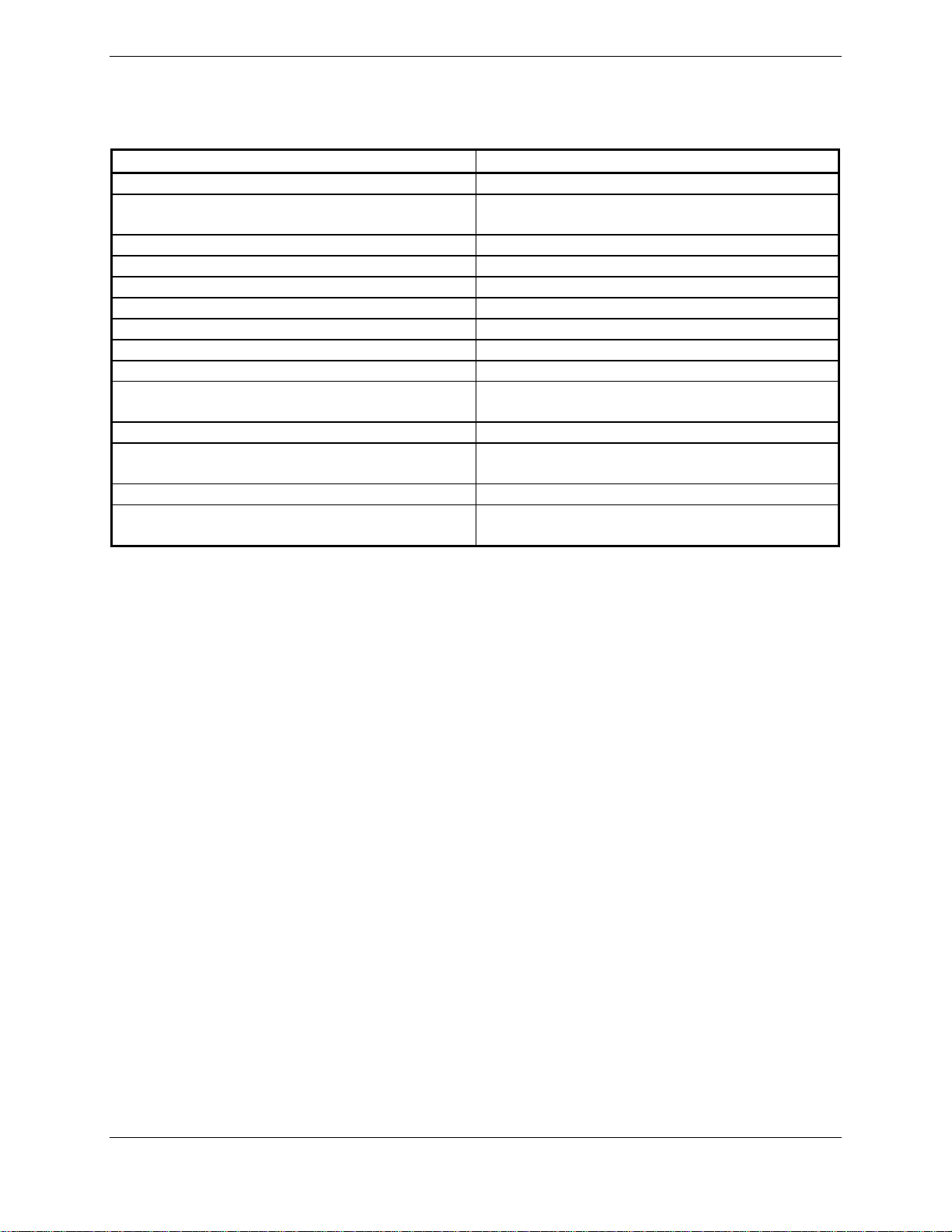
1.7 Referenced Documents
The following publications are sources of additional information for installing the GIA 63(W). Before
installing the GIA 63(W), the technician should read all referenced materials along with this manual.
Part Number Document
190-00303-00 G1000 System Installation Manual
190-00303-04
560-5047-00 Apollo A-34 GPS Antenna Installation Manual
II A258002 Comant CI 2580-410 Installation Instructions
II A258005 Comant CI 2580-200 Installation Instructions
II A42803 Comant CI 428-410 Installation Instructions
II A42809 Comant CI 428-200 Installation Instructions
II A272803 Comant CI 2728-410 Installation Instructions
II A272806 Comant CI 2728-200 Installation Instructions
190-00848-00
190-00355-02* GDL 69/69A Installation Manual
190-00522-01
190-00483-01 GA 56W Antenna Installation Instructions
004-00287-00
* GA 55 technical specifications and antenna performance is contained in the GDL 69/69A Installation
Manual.
G1000 Line Maintenance and Configuration
Manual
GA 35, GA 36, and GA 37 Antenna
Installation Instructions
GA 55A, GA 56A, GA 57 Installation
Instructions
Antenna Minimum Performance Specification
for Garmin’s GPS/WAAS Receiver System
Page 1-22 GIA 63/GIA 63W Installation Manual
Revision R 190-00303-05
Page 31

1.8 Limited Warranty
All Garmin avionics products are warranted to be free from defects in materials or workmanship for: two years from
the date of purchase for new Remote-Mount and Panel-Mount products; one year from the date of purchase for new
portable products and any purchased newly -overhauled products; six mont hs fo r newl y - o ver hauled products
exchanged through a Garmin Authorized Service Center; and 90 days for factory repaired or newly-overhauled
products exchanged at Garmin in lieu of repair. Within the applicable period, Garmin will, at its sole option, repair
or replace any components that fail in normal use. Such repairs or replacement will be made at no charge to the
customer for parts or labor, provided that the customer shall be responsible for any transportation cost. This
warranty does not
batteries, unless product damage has occurred due to a defect in materials or workmanship; (iii) damage caused by
accident, abuse, misuse, water, flood, fire, or other acts of nature or external causes; (iv) damage caused by service
performed by anyone who is not an authorized service provider of Garmin; or (v) damage to a product that has been
modified or altered without the written permission of Garmin. In addition, Garmin reserves the right to refuse
warranty claims against products or services that are obtained and/or used in contravention of the laws of any
country.
THE WARRANTIES AND REMEDIES CONTAINED HEREIN ARE E XCLUSIVE AND IN LIEU OF ALL
OTHER WARRANTIES, WHETHER EXPRESS, IMPLIED OR STATUTORY, INCLUDING ANY LIABILITY
ARISING UNDER ANY WARRANTY OF MERCHANTABILITY OR FITNESS FOR A PARTICULAR
PURPOSE, STATUTORY OR OTHERWISE. THIS WARRANTY GIVES YOU SPECIFIC LEGAL RIGHTS,
WHICH MAY VARY FROM STATE TO STATE.
apply to: (i) cosmetic damage, such as scratches, nicks and dents; (ii) consumable parts, such as
IN NO EVENT SHALL GARMIN BE LIABLE FOR ANY INCIDENTAL, SPECIAL, INDIRECT OR
CONSEQUENTIAL DAMAGES, WHETHER RESULTING FROM THE USE, MISUSE OR INABILITY TO
USE THE PRODUCT OR FROM DEFECTS IN THE PRODUCT. SOME STATES DO NOT ALLOW THE
EXCLUSION OF INCIDENTAL OR CONSEQUENTIAL DAMAGES, SO THE ABOVE LIMITATIONS MAY
NOT APPLY TO YOU.
Garmin retains the exclusive right to repair or replace (with a ne w or newly-overhauled replacement product) the
product or software or offer a full refund of the purchase price at its sole discretion. SUCH REMEDY SHALL BE
YOUR SOLE AND EXCLUSIVE REMEDY FOR ANY BREACH OF WARRANTY.
Online Auction Purchases: Products purchased throu g h o nli ne a ucti o ns are not eli gible for warranty coverage.
Online auction confirmations are not accepted for warranty verification. To obtain warranty service, an original or
copy of the sales receipt from the original retailer is required. Garmin will not replace missing components from any
package purchased through an online auction.
International Purchases: A separate warranty may be provided by international distributors for devices purchased
outside the United States depending on the country. If applicable, this warranty is provided by the local in-country
distributor and this distributor provides local service for your device. Distributor warranties are only valid in the area
of intended distribution. Devices purchased in the United States or Canada must be returned to the Garmin service
center in the United Kingdom, the United States, Canada, or Taiwan for service.
Garmin International, Inc. Garmin (Europe) Ltd.
1200 E. 151st Street Liberty House
Olathe, KS 66062, U.S.A. Bulls Copse Road
Phone: 800/800.1020 Hounsdown Business Park
FAX: 913/397.0836 Southampton, SO40 9RB, UK
Telephone: 44/ (0) 870.8501241
GIA 63/GIA 63W Installation Manual Page 1-23
190-00303-05 Revision R
Page 32

This page intentionally left blank
Page 1-24 GIA 63/GIA 63W Installation Manual
Revision R 190-00303-05
Page 33

2 INSTALLATION OVERVIEW
2.1 Introduction
This section provides hardware equipment information for installing the GIA 63(W), related hardware,
and antennas. Installation of the GIA 63(W) should follow the aircraft TC or STC requirements. Cabling
is fabricated by the installing agency to fit each particular aircraft. The guidance of FAA advisory
circulars AC 43.13-1B and AC 43.13-2B, where applicable, may be found useful for making retro-fit
installations that comply with FAA regulations. Refer to the G1000 System Installation Manual, Garmin
part number 190-00303-00 for further details on the mechanical aspects. For installation in an aircraft
using the remote mounted standalone rack, refer to Appendix B for rack drawings and dimensions.
2.1.1 Unit Configurations
The GIA 63(W) is only available as a single unit under the following part number:
Item Garmin P/N
GIA 63 Unit Only, (011-00781-00) 010-00335-00
GIA 63 ETSO Unit Only, (011-00781-01) 010-00335-10
GIA 63W Unit Only, (011-01105-00) 010-00386-00
GIA 63W A2/B2 Audio Lightning Unit Only (011-01105-01) 010-00386-10
2.1.2 Required Accessories
Each of the following accessories is provided separately from the GIA 63(W). Either rack (modular or
standalone) and remainder of the accessories are required for installation.
Item Garmin P/N
GIA 63 Modular Install Rack
or
GIA 63 Standalone Install Rack
G1000 Rack Nutplate Kit (Modular Rack Only)
GIA 63 Back Plate 011-00963-00
GIA 63 Connector Kit w/ Spider 011-01000-00
GIA 63 Connector Kit w/ Shield Block 011-01000-01
115-00426-00
115-01239-00
011-00915-01 (preferred)
or
011-01148-01
GIA 63/GIA 63W Installation Manual Page 2-1
190-00303-05 Revision R
Page 34

2.1.3 Additional Equipment Required
The following installation accessories are required but not provided:
COM Antenna: Shall meet TSO-C37(), C38(), and C-169()*. Broad band, 50 Ω, vertically
polarized with coaxial cable
GPS Antenna: GIA 63 (Non-WAAS) shall meet TSO-C129a. TSO-C144 antennas can also meet
TSO-C129a requirements for the GIA 63 (Refer to Section 2.1.3.1).
GIA 63W (WAAS) shall meet TSO-C144 and additional system requirements
specified by TSO-C145a. Refer to Section 2.1.3.2 for approved antennas
VOR/LOC Antenna: Shall meet TSO-C40() and C36(). Broad band, 50 Ω, horizontally polarized with
coaxial cable
Glideslope Antenna: Shall meet TSO-C34(). Broad band, 50 Ω, horizontally polarized with coaxial
cable or low-loss splitter used with the VOR/LOC antenna
Headphones: 500 Ω nominal impedance Microphone: Low impedance, carbon or dynamic, with
transistorized pre-amp
Hardware: #6-32 x 100°Flathead SS Screw [(MS24693, AN507R or other approved fastener)
(4 ea.)] for horizontal mounting of the standalone rack.
Hardware: #8-32 Panhead Machine Screw [(MS35206, AN526 or other approved fastener)
(4 ea.)] for vertical mounting of the standalone rack.
* GIA 63W only
2.1.3.1 Required Antennas for the GIA 63
Antennas used with the GIA 63 (non-WAAS) must meet the antenna specifications shown in Section 2.6.
In addition, TSO-C144 antennas can also meet TSO-C129a requirements for the GIA 63 (non-WAAS) if
their additional gain (which is about 16dB at 1.5 GHz for antennas produced by Garmin) is offset by
added attenuation in-line with the GIA 63 (non-WAAS). If an in-line attenuator is used, it must pass DC
current (40 mA max at 4.6 VDC) which is provided from the GPS receiver to the antenna pre-amplifier.
Page 2-2 GIA 63/GIA 63W Installation Ma nual
Revision R 190-00303-05
Page 35

2.1.3.2 Required WAAS Antennas for the GIA 63W
The following is a list of TSO-C144 antennas that allow the GIA 63W with GPS software version 3.00 or
later to meet TSO-C145a requirements without requiring the operational limitations specified in Section
1.6.5 of this manual:
Model
Mount
Style
Conn
Type
SATCOM
Compatible
[3]
Mfr
Antenna
Part
Number
Garmin
Order
Number
Additional
Requirements
GA 35 GPS
WAAS Antenna
[6]
GA 36 GPS
WAAS Antenna
[6]
GA 37
FIS/WAAS
Antenna [6]
Comant 2580200
WAAS and
COM Antenna
[6] [8]
Comant 2580410
FIS/WAAS
/COM Antenna
[6] [8]
Comant 428200
WAAS Antenna
[6] [8]
Comant 428410
FIS/WAAS
Antenna [6] [8]
Comant 2728200
WAAS and
COM Antenna
[6] [8]
Comant 2728410
FIS/WAAS
/COM Antenna
[6] [8]
Footprint [2]
Footprint [2]
Footprint [7]
Screw
Mount,
Teardrop
Screw
Mount,
ARINC 743
Footprint
Screw
Mount,
ARINC 743
Footprint
Screw
Mount,
Teardrop
Screw
Mount,
ARINC 743
Footprint
Screw
Mount,
Teardrop
Aero
Antenna
TNC Yes
Garmin 013-00235-00
Aero
TNC Yes
TNC Yes
BNC
TNC
[5]
TNC Yes Comant
BNC
TNC
[5]
Yes Comant
Yes Comant
Antenna
Garmin 013-00244-00
Aero
Antenna
Garmin 013-00245-00
AT575-93GW-
TNCF-000-
RG-27-NM
AT575-326GWTNCF-000-RG-
27-NM
AT2300126GW-TNCF000-RG-27-NM
CI 2580-200
CI 2580-410
CI 428-200
CI 428-410
CI 2728-200
CI 2728-410
013-00235-00
013-00244-00
013-00245-00
N/A
N/A
N/A
None
GIA 63/GIA 63W Installation Manual Page 2-3
190-00303-05 Revision R
Page 36

The following is a list of known TSO-C144 antennas that allow the GIA 63W with any version of GPS
software version to meet TSO-C145a requirements with the operational limitations specified in Section
1.6.5 of this manual:
Model
Mount
Style
Conn
Type
SATCOM
Compatible
[3]
Mfr
Antenna
Part
Number
Garmin
Order
Number
Additional
Requirements
AT575-93W-
TNCF-000-05-
26-NM
013-00113-00
The operational
limitation
described in
Section 1.6.5
requires use of
006-A0154-01
as the Prediction
Program in
conjunction with
these antennas.
A-34 GPS
WAAS Antenna
GA56A GPS
WAAS Antenna
GA56W GPS
WAAS Antenna
GA57 GPS
WAAS and FIS
Antenna
Screw
Mount,
Teardrop
Footprint [2]
Screw
Mount,
ARINC 743
Footprint
Stud Mount,
Teardrop
Footprint [1]
Screw
Mount,
ARINC 743
Footprint
Aero
TNC Yes
BNC No Garmin 011-01154-00 010-10599-00
BNC No Garmin 011-01111-00 010-10561-01
BNC
TNC
[4]
No Garmin 011-01032-00 010-10604-00
Antenna
Garmin AT 590-1112
[1] Same footprint and mounting hole pattern as GA 56.
[2] Same mounting hole pattern as the GA 56, but has a physically larger footprint.
[3] SATCOM compatibility requirements are as specified by RTCA/DO-229C Section 2.5.6.1, Section
2.5.8.2, Appendix C.2.1, and Appendix C.2.2.
[4] The WAAS GPS antenna connector is a BNC type. The XM antenna connector is a TNC type.
[5] The WAAS GPS antenna connector (and XM antenna connector where applicable) is TNC type. The
VHF COM antenna connector is BNC type.
[6] Not approved for use with the GIA 63 (non-WAAS) since max DC current specification exceeds
40 mA.
[7] Larger footprint and mounting hole pattern than GA 56, GA 35 or CI 2580.
[8] It is the installer’s responsibility to ensure the antenna complies with Antenna Minimum Performance
Specification for Garmin’s GPS/WAAS Receiver System Antenna (004-00287-00) by
communicating the requirement to the supplier and obtaining a certificate of compliance to
004-00287-00 from the supplier. An antenna that complies only with TSO-C144 requirements is not
adequate for this installation.
Other TSO-C144 antennas may meet the installation requirements of the GIA 63W. Contact Garmin to
ensure compatibility and applicable operation limitations before beginning the installation.
Page 2-4 GIA 63/GIA 63W Installation Ma nual
Revision R 190-00303-05
Page 37

2.2 Installation Considerations
The GIA 63(W) interfaces with the G1000 system and with various avionics equipment. Fabrication of a
wiring harness is required. Sound mechanical and electrical methods and practices are required for
installation of the GIA 63(W).
2.2.1 Antenna Considerations
Antenna installations on pressurized cabin aircraft require FAA approved installation design and
engineering substantiation data whenever such antenna installations incorporate alteration (penetration) of
the cabin pressure vessel by connector holes and/or mounting arrangements. For needed engineering
support pertaining to the design and approval of such pressurized aircraft antenna installations, it is
recommended that the installer proceed according to any of the following listed alternatives:
1. Obtain approved antenna installation design data from the aircraft manufacturer.
2. Obtain an FAA approved STC, pertaining to, and valid for the antenna installation.
3. Contact the FAA Aircraft Certification Office in the appropriate Region and request identification
of FAA Designated Engineering Representatives (DERs) who are authorized to prepare and
approve the required antenna installation engineering data.
4. Obtain FAA Advisory Circular AC-183C and identify a DER from the roster of individuals in it.
5. Contact an aviation industry organization such as the Aircraft Electronics Association for
assistance.
GIA 63/GIA 63W Installation Manual Page 2-5
190-00303-05 Revision R
Page 38

2.2.2 GPS Antenna Location
The GPS antenna is a key element in the overall system performance and integrity for a GPS/WAAS
navigation system. The mounting location, geometry, and surroundings of the antenna can affect the
system performance and/or availability. The following guidance provides information to aid the installer
in ensuring that the most optimum location is selected for the installation of the GPS antenna. The
installation guidelines presented here meet the intent of AC 20-138A section 16. The greater the variance
from these guidelines, the greater the chance of decreased availability. Approach procedures with vertical
guidance are the most sensitive to these effects. LNAV only approaches, terminal operations, and enroute
operations may also be affected. Because meeting all of these installations guidelines may not be possible
on all aircraft, these guidelines are listed in order of importance to achieve optimum performance. Items 4
below are of equal importance and their significance may depend on the aircraft installation. The installer
should use their best judgment to balance the installation guidelines.
For rotorcraft, locate the GPS antenna as far as possible from the main rotor hub. This reduces the
percentage of time the blade blocks the antenna. Also mount it as far below the blade surface as possible
if installing the antenna under the blade. This reduces signal distortion caused by the blades.
1. Mount the antenna as close to level as possible with respect to the normal cruise flight
attitude of the aircraft. If the normal flight attitude is not known, substitute the waterline,
which is typically referenced as level while performing a weight and balance check.
2. The GPS antenna should be mounted in a location to minimize the effects of airframe
shadowing during typical maneuvers. Typically mounting farther away from the tail
section reduces signal blockage seen by the GPS antenna.
3. The GPS antenna should ideally be located at the opposite end of the aircraft from the
COM unit in order to make the GPS less vulnerable to harmonics radiated from the COM
itself.
4a. The GPS antenna should be mounted no closer than two feet (edge to edge) and ideally
three feet from any VHF COM antenna or any other antenna which may emit harmonic (or
other) interference at the L1 frequency of 1575.42 MHz. An aircraft EMC check (reference
VHF COM interference check in Post Installation Checkout procedures) can verify the
degradation of GPS in the presence of interference signals. If an EMC check reveals
unacceptable interference, insert a GPS notch filter in line with the offending VHF COM or
the (re-radiating) ELT transmitter.
Note: The separation requirement does not apply to GPS and COM combination antennas,
provided the antenna model is TSO authorized and has been tested to meet Garmin’s
minimum performance standards. The separating requirement includes the combination
with an XM antenna element as well.
4b. The GPS antenna should be mounted no closer than two feet (edge to edge) and ideally
three feet from any antennas emitting more than 25 watts of power. An aircraft EMC check
can verify the degradation of GPS in the presence of interference signals.
4c. To minimize the effects of shadowing at 5° elevation angles, the GPS antenna should be
mounted no closer than 6 inches (edge to edge) from other antennas, including passive
antennas such as another GPS antenna or XM antenna.
5. To maintain a constant gain pattern and limit degradation by the windscreen, avoid
mounting the antenna closer than 3 inches from the windscreen.
6. For multiple GPS installations, the antennas should not be mounted in a straight line from
the front to the rear of the fuselage. Also varying the mounting location will help minimize
any aircraft shading by the wings or tail section (in a particular azimuth, when one antenna
is blocked the other antenna may have a clear view).
Page 2-6 GIA 63/GIA 63W Installation Ma nual
Revision R 190-00303-05
Page 39

Figure 2-1 shows the recommended placement of antennas.
Figure 2-1. GPS Antenna Considerations
GIA 63/GIA 63W Installation Manual Page 2-7
190-00303-05 Revision R
Page 40

2.2.3 Com Antenna Location
The GIA 63(W) COM antenna should be well removed from all projections, engines and propellers. The
ground plane surface directly below the antenna should be a flat plane over as large an area as possible
(18 inches square, minimum). The antenna should be mounted a minimum of six feet from any DME or
other COM antennas, four feet from any ADF sense antennas, and three feet from the GIA 63(W) and its
GPS antenna.
If simultaneous use of two COM transceivers is desired (split- COM or simulcomm), use of the TX
interlock function is mandatory. In addition, the COM antennas should be spaced for maximum isolation.
A configuration of one topside antenna and one bottom side antenna is recommended.
Split COM performance varies significantly across installations and is affected by both the distance
between the antennas and the separation of the tuned frequencies. In small aircraft particularly, receiver
sensitivity is typically reduced and squelch breaks are affected. Each installation should be individually
examined to determine the expected performance of split COM.
2.2.4 VOR/LOC Antenna Location
The GIA 63(W) VOR/LOC antenna should be well removed from all projections, engines and propellers.
It should have a clear line of sight if possible. The antenna must be mounted along the centerline of the
aircraft, minimizing the lateral offset.
2.2.5 Glideslope Antenna Location
The GIA 63(W) Glideslope antenna should be well removed from all projections, engines and propellers.
It should have a clear line of sight if possible.
2.2.6 Electrical Bonding
No special precautions need to be taken to provide a bonding path between the GPS antenna and the
aircraft structure. Follow the manufacturers’ instructions for the COM, VOR/LOC and Glideslope
antennas.
Page 2-8 GIA 63/GIA 63W Installation Ma nual
Revision R 190-00303-05
Page 41

2.2.7 VHF COM/GPS Interference
On some installation VHF COM transceivers, Emergency Locator Transmitter (ELT) antennas, and
Direction Finder (DF) receiver antennas can re-radiate through the GPS antenna. The GIA 63(W) COM
does not interfere with its own GPS section. However, placement of the GA 56 GPS antenna (or other
comparable antenna) relative to a COM transceiver and COM antenna (including the GIA 63(W) COM
antenna), ELT antenna, and DF receiver antenna is critical.
Use the following guidelines, in addition to others in this document, when locating the GIA 63(W) and its
antennas.
• GPS Antenna—Locate as far as possible from all COM antennas and all COM transceivers
(including the GIA 63(W) COM), ELT antennas, and DF antennas. The GPS antenna is less
susceptible to harmonic interference if a 1.57542 GHz notch filter is installed on the COM
transceiver antenna output.
• Locate the GIA 63(W) as far as possible from all COM antennas.
If a COM antenna is found to be the problem, a 1.57542 GHz notch filter (Garmin P/N 330-00067-00)
may be installed in the VHF COM coax, as close to the COM as possible. This filter is not required for
the GIA 63(W) transmitter.
If a COM is found to be radiating, the following can be done:
1. Replace or clean the VHF COM rack connector to ensure good coax ground.
2. Place grounding straps between the GIA 63(W) unit, VHF COM and a good ground.
3. Shield the VHF COM wiring harness.
2.3 Rack Considerations
A location away from heating vents or other sources of heat generation is optimal. The GIA 63(W) can
be mounted using the G1000 system rack. The unit may be mounted remotely if desired.
GIA 63/GIA 63W Installation Manual Page 2-9
190-00303-05 Revision R
Page 42

2.4 Cabling and Wiring
Use AWG #24 or larger wire for all connections unless otherwise specified by the aircraft manufacturer
or Garmin. The standard pin contacts supplied in the connector kit are compatible with up to AWG #22
wire. In cases where some installations have more than one unit sharing a common circuit breaker, sizing
and wire gauge is based on aircraft circuit breaker layout, length of wiring, current draw of units, and
internal unit protection characteristics. Do not attempt to combine more than one unit on the same circuit
breaker unless it is specified on aircraft manufacturer approved drawings.
In these cases, a larger gauge wire such as AWG #16, #18, or #20 may be needed for power connections.
Special thin-wall heat shrink tubing is also provided to insulate the extended barrels inside the backshell.
If using AWG #16 or #18 barrel contacts, ensure that no two contacts are mounted directly adjacent to
each other. This minimizes the risk of contacts touching and shorting to adjacent pins and to ground.
Ensure that routing of the wiring does not come in contact with sources of heat, RF or EMI
interference. Check that there is ample space for the cabling and mating connectors. Avoid sharp
bends in cabling and routing near aircraft control cables.
Coaxial cable with 50 Ω nominal impedance and meeting applicable aviation regulations should
be used for the installation. A typical maximum cable length for the GPS antenna is 40 feet. The
installer shall insure that the attenuation does not exceed 10 dB at 1.5 GHz for the GIA63, and
falls between 3 dB and 7 dB inclusive at 1.5 GHz for the GIA63W.
Check that there is ample space for the cabling and mating connectors. Avoid sharp bends in cabling,
particularly the COM antenna cable, and routing near aircraft control cables. Cabling for the GIA 63(W)
should not be routed near components or cabling which are sources of electrical noise. Do not route the
COM antenna coax near any ADF antenna cables. Route the GPS, VOR/LOC, and Glideslope antenna
cables as far as possible away from all COM transceivers and antenna cables.
2.5 Cooling Air
The GIA 63(W) meets all TSO requirements without external cooling. However, as with all electronic
equipment, lower operating temperatures extend equipment life. On the average, reducing the operating
temperature by 15-20 °C (25 to 35 °F) doubles the mean time between failure (MTBF). Recommended
airflow rating is 1 CFM (cubic foot per minute) at a pressure equivalent to 0.1 inches of water. Potential
damage to your GIA 63(W) may occur by using outside forced air to cool the equipment. Therefore, it is
recommended that an electric forced air fan be installed, of the indicated rating, to cool this equipment.
Units tightly packed in the avionics stack heat each other through radiation, convection, and sometimes
by direct conduction. Even a single unit operates at a much higher temperature in still air than in moving
air. Fans or some other means of moving the air around electronic equipment are usually a worthwhile
investment. A 5/8” diameter air fitting is provided on the rear of the mounting rack for the purpose of
admitting cooling air under such conditions. If a form of forced air cooling is installed, make certain that
rainwater cannot enter and be sprayed on the equipment. Refer to the G1000 System Installation manual,
Garmin part number 190-00303-00, for information on cooling requirements.
Page 2-10 GIA 63/GIA 63W Installation Manual
Revision R 190-00303-05
Page 43

2.6 GIA 63 Minimum Installation Requirements
Below is a list of required devices for TSO-C129a category A1 certification.
Pressure Altitude Device
This device delivers pressure altitude data to the GIA 63. This data comes from the Garmin GDC 74A
Air Data Computer.
Manual Course Device
This device delivers the manual course select to the GIA 63, which is required for the VOR receiver, and
optional for the GPS receiver. Course information can come from an analog resolver, or from the
GDU PFD/MFD via Ethernet HSDB.
HSI/CDI Indicator or GDU
This device displays Nav Flag, Left/Right, To/From, Glideslope Flag, and Up/Down.
Qualified GPS Antenna
This antenna must meet the following requirements:
1. DO-160C Environmental Conditions
The antenna shall meet the environmental conditions listed below and shall conform to the test
requirements of RTCA DO-160C.
Environmental Condition Category Description
Temperature (operating) F2 -55 to +70
(ground survival) F2 -55 to +85
Altitude F2 55,000 feet
Temperature Variation A 10
o
C per minute
Humidity C 95% at +55
Vibration CLMY Turbo/Reciprocating/Helicopter
Waterproofness S Continuous Stream
Fluids F Deicing Fluid
Lightning 2A Direct Effects
Icing C 0.15” thick
2. Electrical Characteristics
LNA Supply voltage 4.5 ± 0.5 V
DC
LNA Supply Current 20 mA Maximum
LNA Operating Frequency 1575.42 ± 2.00 MHz
LNA Gain 20 dB Maximum, 12dB Minimum
LNA Noise Figure 3.0 dB Maximum
LNA Output VSWR (50 Ω) 2:1 Maximum
LNA Input power at -1 dB Gain Compression -6 dB Minimum
LNA Bandwidth
(-3 dB) 40 MHz Maximum
(-20 dB) 100 MHz Maximum
(-40 dB) 250 MHz Maximum
o
C
o
C
o
C
GIA 63/GIA 63W Installation Manual Page 2-11
190-00303-05 Revision R
Page 44

3. Radiation Characteristics
Polarization RHCP
Operating Frequency 1575.42 ± 2.00 MHz
Gain (on axis) 2.0 dBic Minimum
(at 160
o
beam width) -6.0 dBic Minimum
Cross Pole Gain (LHCP)
(on axis) -8 dBic Maximum
(at 160
o
beam width) -9 dBic Maximum
4. Mounting Requirements
Cable connection BNC Female
Mounting studs Four 8-32 UNC-2A studs 0.50” long
2.7 GIA 63W Minimum Installation Requirements
Below is a list of required devices for TSO-C145a Class 3 certification.
Manual Course Device
This device delivers the manual course select to the GIA 63W, which is required for the VOR receiver,
and optional for the GPS receiver. Course information can come from an analog resolver, or from the
GDU PFD/MFD via Ethernet HSDB.
GDU PFD/MFD
This device displays Nav Flag, Left/Right, To/From, Glideslope Flag, and Up/Down as well as integrity
messages. In addition it provides manual course selection to the GIA, which is required for the VOR
receiver and optional for the GPS receiver.
Qualified GPS Antenna
Refer to Section 2.1.3.2 for a list of approved antennas.
Page 2-12 GIA 63/GIA 63W Installation Manual
Revision R 190-00303-05
Page 45

2.8 Mounting Requirements
The GIA 63(W) mounting surface must be capable of providing structural support and electrical bond to
the aircraft to minimize radiated EMI and provide protection from High-Intensity Radiation Fields
(HIRF). The GIA 63(W) can be mounted using the G1000 modular system rack, or may be mounted
remotely using the Standalone rack (refer to drawings in Appendix B).
2.8.1 Modular Rack Considerations
Figure 2-2 and Figure B-2 show the GIA 63(W) G1000 modular rack. The modular rack is fastened to
the main system rack using the nutplate kit listed in Section 2.1.2. Refer to Figure B-2 for nutplate
placement locations. Figure B-1 gives the GIA 63(W) modular rack dimensions.
The unit may also be mounted outside of the G1000 system rack. The number and positions of screws
noted in Figure B-2 are to be used when mounting the GIA 63(W) modular rack outside of the G1000
system rack. Aircraft manufacturer must fabricate any additional mounting equipment needed, use
outline and installation drawings in Appendix B for reference.
Figure 2-2 GIA 63(W) Modular Rack
GIA 63/GIA 63W Installation Manual Page 2-13
190-00303-05 Revision R
Page 46

2.8.2 Remote Mounted Stand-Alone Rack Considerations
Figure 2-3 and Figure B-4 show the GIA 63(W) remote mounted stand-alone rack. The remote rack can
be installed in a variety of locations, such as the electronics bay, under a seat, or on an avionics shelf
behind the rear baggage area. Refer to Figure 2-4 for suggested mounting locations. Leave sufficient
clearance between the GIA 63(W) and any obstruction. The rack should be mounted to a surface known
to have sufficient structural integrity to withstand additional inertia forces imposed by a 7.5-pound (3.4
kg) unit. Figure B-3 gives the GIA 63(W) stand-alone rack dimensions.
The rack can be mounted vertically using four #8-32 pan head screws (MS35206, AN526, or other
approved fastener). It can also be mounted horizontally using four #6-32 100° counter-sunk flathead
screws (MS24693, AN507R, or other approved fastener). Ensure that the GIA 63(W) chassis has a
ground path to the airframe by having at least one mounting screw in contact with the airframe.
After the cable assemblies are made and wiring installed to the rack back plate, route wiring bundle as
appropriate. Use cable ties to secure the cable assemblies and coax to provide strain relief for the cable
assemblies.
Figure 2-3 GIA 63(W) Standalone Rack
Page 2-14 GIA 63/GIA 63W Installation Manual
Revision R 190-00303-05
Page 47

Figure 2-4 GIA 63(W) Standalone Rack, Suggested Mounting Locations
GIA 63/GIA 63W Installation Manual Page 2-15
190-00303-05 Revision R
Page 48

This page intentionally left blank
Page 2-16 GIA 63/GIA 63W Installation Manual
Revision R 190-00303-05
Page 49

3 INSTALLATION PROCEDURE
3.1 Unpacking Unit
Carefully unpack the equipment and make a visual inspection of the unit for evidence of damage incurred
during shipment. If the unit is damaged, notify the carrier and file a claim. To justify a claim, save the
original shipping container and all packing materials. Do not return the unit to Garmin until the carrier
has authorized the claim.
Retain the original shipping containers for storage. If the original containers are not available, a separate
cardboard container should be prepared that is large enough to accommodate sufficient packing material
to prevent movement.
3.2 Wiring Harness Installation
Allow adequate space for installation of cables and connectors. The installer shall supply and fabricate all
of the cables. All electrical connections are made through 44, 62, and 78-pin D subminiature connectors.
Section 4 defines the electrical characteristics of all input and output signals. Required connectors and
associated hardware are supplied with the connector kit.
See Appendix C for examples of interconnect wiring diagrams. Construct the actual harnesses in
accordance with aircraft manufacturer authorized interconnect standards.
Table 3-1. Pin Contact Part Numbers
Manufacturer
Garmin P/N 336-00044-01 336-00044-00 336-00021-00
Military P/N N/A N/A M39029/58-360
AMP N/A N/A 204370-2
Positronic N/A N/A MC8522D
78 pin connectors (P603, 605, 606), 62 pin connectors (P602), 44 pin
connectors (P604 and P601)
16 AWG
(Power Only)
18-20 AWG
(Power Only)
22-28 AWG
ITT Cannon N/A N/A 030-2042-000
Table 3-2. Recommended Crimp Tools
Manufacturer Hand
Crimping Tool
Military P/N M22520/2-01 N/A M81969/1-04 M22520/2-09 M81969/1-04
Positronic 9507 9502-11 M81969/1-04 9502-4 M81969/1-04
ITT Cannon 995-0001-584 N/A N/A M22520/2-09 274-7048-000
AMP 601966-1 N/A 91067-1 601966-6 91067-1
Daniels AFM8 K774 M81969/1-04 K42 M81969/1-04
Astro 615717 N/A M81969/1-04 615725 M81969/1-04
Positioner Insertion/
18-20 AWG 22-28 AWG
Positioner Insertion/
Extraction Tool
(note 2)
Extraction
Tool
GIA 63/GIA 63W Installation Manual Page 3-1
190-00303-05 Revision R
Page 50

NOTES
1. Non-Garmin part numbers shown are not maintained by Garmin and consequently are subject
to change without notice.
2. Extraction of 16 and 18 AWG contacts requires cutting off the wire barrel from the contact. It
may also be necessary to push the pin out from the face of the connector when using an
extractor.
3. For applications using 16 AWG wire, contact Garmin for information regarding connector
crimp positioner tooling.
3.3 Antenna Installation
For the COM, VOR/LOC, and Glideslope antennas, follow the manufacturers’ instructions. Avoid
running other wires and coaxial cables near the VOR/LOC antenna cable.
CAUTION
Do not use construction grade RTV sealant or sealants containing acetic acid. These
sealants may damage the electrical connections to the antenna. Use of these type sealants
may void the antenna warranty.
3.4 Cable Installation
1. Route the coaxial cable to the rack location keeping in mind the recommendations of Section 2.
Secure the cable in accordance with good aviation practice.
2. Trim the coaxial cable to the desired length and install the BNC connector (330-00087-00) per
the cabling instructions on Figure 3-1. If the connector is provided by the installer, follow the
connector manufacturer’s instructions for cable preparation
.
Figure 3-1. Coaxial Cable Installation
3. Contacts for the 78, 62, and 44 pin connectors must be crimped onto the individual wires of
the aircraft wiring harness. Tables 3-1 and 3-2 list contact part numbers (for reference) and
recommended crimp tools.
Page 3-2 GIA 63/GIA 63W Installation Manual
Revision R 190-00303-05
Page 51

3.5 Backshell Assembly
The GIA 63(W) connector kit includes six Garmin backshell connectors. The backshell assemblies house
the configuration module/temperature sensor, if applicable. Garmin’s backshell also gives the installer the
ability to easily terminate shield grounds at the backshell housing using one of two methods available
(SPIDER or Shield Block). To assemble the backshell and configuration module refer to instructions
provided in the G1000 System Installation Manual (190-00303-00), as well as the SPIDER Installation
Instructions (190-00313-03) and Shield Block Installation Instructions (190-00313-09).
NOTE
Information about the SPIDER grounding system is provided in support of existing
installations. All new installations shall use the SHIELD BLOCK grounding system.
3.6 Unit Installation
For installation and assembly, refer to the outline and installation drawings shown in Appendix B of this
manual.
1. Assemble the backshell connectors, refer to Section 3.5.
2. Connect backshell connectors to the rear plate using the provided screws.
3. Mount the unit rack to the main system rack or other suitable mounting location, using the
nutplates provided for the modular rack or appropriate hardware from Section 2.1.3 for the
standalone rack.
4. Assemble the NAV and Main rear plates into the GIA 63(W) unit rack.
5. Carefully slide the GIA 63(W) into the rack. Ensure that the orientation of the unit allows for
the engagement of the locking stud in the channel on the rack. The unit can only be installed in
one direction.
6. Push the GIA 63(W) lever down towards the bottom of the unit. This engages the locking stud
with the dogleg slot and locks unit into the rack. If there is excessive resistance, do not force
the unit.
7. Lock the handle into the GIA 63(W) body and tighten the Phillips screw (or push in the D-Ring
and twist clockwise 90°, for units with a D-Ring).
CAUTION
Do not use excessive force when inserting the GIA 63(W) into the rack. This may cause
damage to the connectors, unit and/or unit rack. If excessive resistance is felt during
installation, stop! Remove the GIA 63(W) and identify the source of resistance. The rear
plates are designed to float in the unit rack. Check to ensure the rear plates are not bound
by the connectors or spring clip.
GIA 63/GIA 63W Installation Manual Page 3-3
190-00303-05 Revision R
Page 52

3.7 Post Installation Configuration & Checkout
All configuration and checkout procedures take place upon completion of the installation of the Garmin
Integrated Flight Deck. The GDU serves as the graphics user interface to the installer configuring the
system. For sample configuration and checkout procedures, refer to the G1000 Line Maintenance and
Configuration Manual, Garmin part number 190-00303-04. Always use aircraft manufacturer approved
checkout documents when performing actual checkout.
3.8 Continued Airworthiness
Maintenance of the GIA 63(W) is “on condition” for all units installed in airframes that require power
interrupt Category B (50mS). For airframes that require the GIA 63(W) to comply with RTCA/DO-160D
power interrupt Category A (200mS), one of the following two actions must be taken to ensure backup
time is adequate:
• Comply with the applicable GIA 63(W) Mod Status (refer to Table 3-3).
Table 3-3. Long Term Power Interrupt Category A (200 mS) Mod Status
Long Term
Unit Unit Part Number
GIA 63 011-00781-00 4
GIA 63 011-00781-01 1
GIA 63W 011-01105-00 1
GIA 63W 011-01105-01 0
Power Interrupt
Category A (200 mS)
Mod Status
Or
• Perform the power interrupt annual inspection as described in Section 3.8.1.
Page 3-4 GIA 63/GIA 63W Installation Manual
Revision R 190-00303-05
Page 53

3.8.1 Category A Long Term Power Interrupt Annual Inspection
NOTE
In order to comply with this procedure GIA 63 main software version must be 5.30 or
later, GIA 63W main software version must be 5.21 or later, and GDU main software
version must be 7.10 or later.
1. Verify the air temperature around both GIA’s is at least 70° Fahrenheit.
2. Apply power to both GIA’s.
3. Leave both GIA’s on for 10 minutes.
4. Remove power from both GIA’s.
5. Wait 30 seconds.
6. Apply power to both GIA’s.
7. Place the G1000 in Configuration mode by holding the ENT key on the GDU’s while applying
power.
8. Using the FMS knob go to the GIA STATUS page (Figure 3-2) on the PFD.
9. Verify the GIA #1 BKUP CAPS light is green. If the BKUP CAPS light is red, replace GIA #1
with a unit of mod status indicated in Table 3-3.
10. Using the FMS knob select GIA2 in the ‘SELECT GIA UNIT’ field.
11. Verify the GIA #2 BKUP CAPS light is green. If the BKUP CAPS light is red, replace GIA #2,
with a unit of mod status indicated in Table 3-3..
Figure 3-2. GIA STATUS Page
BKUP CAPS
GIA 63/GIA 63W Installation Manual Page 3-5
190-00303-05 Revision R
Page 54

This page intentionally left blank
Page 3-6 GIA 63/GIA 63W Installation Manual
Revision R 190-00303-05
Page 55

4 SYSTEM INTERCONNECTS
4.1 Pin Function List
4.1.1 P601 (COM)
View of J601 connector from back of unit
123456789101112131415
161718192021222324252627282930
43
44
404142
Pin Pin Name I/O
1 RESERVED (UNSQUELCHED AUDIO TEST) -2 RESERVED -3 RESERVED -4 COM MIC KEY* In
5 INTERCOM MIC IN HI In
6 INTERCOM MIC IN LO (GROUND) -7 COM MIC AUDIO IN HI In
8 COM MIC AUDIO IN LO (GROUND) -9
COM 500Ω AUDIO OUT HI
10
COM 500Ω AUDIO OUT LO (GROUND)
11 TRANSMIT INTERLOCK* In
12 COM REMOTE TRANSFER* In
13 COM DIGITAL AUDIO OUT Out
14 COM MIC DIGITAL AUDIO IN In
15 SIGNAL GROUND -16 COM REMOTE POWER OFF In
17 AIRCRAFT POWER 1 In
18 SPARE -19 AIRCRAFT POWER 1 In
20 SPARE -21 AIRCRAFT POWER 1 In
22 SPARE -23 AIRCRAFT POWER 2 In
24 SPARE -25 AIRCRAFT POWER 2 In
26 SPARE -27 AIRCRAFT POWER 2 In
28 RESERVED -29 RESERVED -30 POWER GROUND -31 POWER GROUND -32 RESERVED -33 RESERVED -34 RESERVED --
313233343536373839
Out
--
GIA 63/GIA 63W Installation Manual Page 4-1
190-00303-05 Revision R
Page 56

Connector P601, continued
Pin Pin Name I/O
35 RESERVED -36 RESERVED -37 RESERVED -38 RESERVED -39 RESERVED -40 RESERVED -41 RESERVED -42 RESERVED -43 POWER GROUND -44 POWER GROUND --
Page 4-2 GIA 63/GIA 63W Installation Manual
Revision R 190-00303-05
Page 57

4.1.2 P602 (VOR/ILS)
View of J602 connector from back of unit
161718192021
373839404142
5556
6061
62
57
5859
525354
Pin Pin Name I/O
1 VOR/LOC +TO Out
2 VOR/LOC +FROM (VOR/LOC COMMON) -3 VOR/LOC +FLAG Out
4 VOR/LOC -FLAG (VOR/LOC COMMON) -5 VOR/LOC +LEFT Out
6 VOR/LOC +RIGHT (VOR/LOC COMMON) -7 RESERVED -8 VOR/LOC COMPOSITE OUT Out
9 VOR OBS ROTOR C Out
10 VOR OBS ROTOR H (GROUND) -11 VOR OBS STATOR E (VOR/LOC COMMON) -12 VOR OBS STATOR F In
13 VOR OBS STATOR D In
14 VOR OBS STATOR G (VOR/LOC COMMON) -15 VOR/LOC SUPERFLAG Out
16
17
VOR/LOC 500Ω AUDIO OUT HI
VOR/LOC 500Ω AUDIO OUT LO
18 KING SERIAL DME CLOCK Out
19 KING SERIAL DME DATA Out
20 KING SERIAL RNAV REQUEST In
21 KING SERIAL RNAV* MODE In
22 SIGNAL GROUND -23 VOR/ILS ARINC 429 OUT B Out
24 VOR/ILS ARINC 429 OUT A Out
25 VOR OBI CLOCK Out
26 VOR OBI SYNC Out
27 VOR OBI DATA Out
28 VOR/ILS REMOTE TRANSFER* In
29 ILS ENERGIZE* Out
30 RESERVED -31 RESERVED -32 GLIDESLOPE +FLAG Out
33 PARALLEL DME 1 MHZ-D Out
34 GLIDESLOPE +UP Out
35 VOR/ILS ARINC 429 IN B In
36 VOR/ILS ARINC 429 IN A In
37 PARALLEL DME 100 KHZ-A Out
123456789101112131415
222324252627282930313233343536
44464748495051
Out
--
GIA 63/GIA 63W Installation Manual Page 4-3
190-00303-05 Revision R
Page 58

Connector P602, continued
Pin Pin Name I/O
38 GLIDESLOPE SUPERFLAG Out
39 PARALLEL DME 100 KHZ-B Out
40 PARALLEL DME 100 KHZ-C Out
41 DME COMMON In
42 PARALLEL DME 100 KHZ-D Out
43 PARALLEL DME 50 KHZ Out
44 SPARE -45 PARALLEL DME 1 MHZ-A Out
46 PARALLEL DME 1 MHZ-B Out
47 PARALLEL DME 1 MHZ-C Out
48 RESERVED -49 SIGNAL GROUND -50 RESERVED -51 SPARE -52 SPARE -53 GLIDESLOPE –FLAG (GLIDESLOPE COMMON) -54 PARALLEL DME 100KHZ-E Out
55 GLIDESLOPE +DOWN (GLIDESLOPE COMMON) -56 PARALLEL DME 1MHZ-E Out
57 RESERVED -58 SPARE -59 VOR/LOC DIGITAL AUDIO OUT Out
60 SIGNAL GROUND -61 POWER GROUND -62 POWER GROUND --
Page 4-4 GIA 63/GIA 63W Installation Manual
Revision R 190-00303-05
Page 59

4.1.3 P603 (Main Serial)
View of J603 connector from back of unit
60 61 62 63 64 65 66 67 68 69 70 71 72 73 74 75 76 77 78
40
21 22 23 24 25 26 27
1 2 3 4 5 6 7 8 9 10 11121314151617181920
43 44 45 46 47 48 49 50 51 52 53 54 55 565758 59
41 42
30 31 32 33 34 35 36 37 38 39
28 29
Pin Pin Name I/O
1 RESERVED -2 ETHERNET OUT A Out
3 ETHERNET OUT B Out
4 RS-485 4 A I/O
5 RS-485 4 A I/O
6 RS-485 4 B I/O
7 RS-485 4 B I/O
8 MAIN ARINC 429 IN 3 A In
9 MAIN ARINC 429 IN 3 B In
10 MAIN ARINC 429 IN 4 A In
11 MAIN ARINC 429 IN 4 B In
12 MAIN ARINC 429 IN 5 A In
13 MAIN ARINC 429 IN 5 B In
14 MAIN ARINC 429 IN 6 A In
15 MAIN ARINC 429 IN 6 B In
16 MAIN ARINC 429 IN 7 A In
17 MAIN ARINC 429 IN 7 B In
18 MAIN ARINC 429 IN 8 A In
19 MAIN ARINC 429 IN 8 B In
20 CAN BUS 1 HI I/O
21 RESERVED -22 CAN BUS 1 LO I/O
23 RS-485 1 A I/O
24 RS-485 1 B I/O
25 RS-485 2 A I/O
26 RS-485 2 B I/O
27 RS-485 3 A/RS-422 IN A I/O
28 RS-485 3 B/RS-422 IN B I/O
29 MAIN ARINC 429 IN 1 A In
30 CAN BUS 2 LO I/O
31 MAIN ARINC 429 IN 1 B In
32 CAN BUS 2 HI I/O
33 MAIN ARINC 429 IN 2 A In
34 CAN BUS 1 TERMINATION -35 MAIN ARINC 429 IN 2 B In
36 RS-485 5 A/RS-422 OUT A I/O
GIA 63/GIA 63W Installation Manual Page 4-5
190-00303-05 Revision R
Page 60

Connector P603, continued
Pin Pin Name I/O
37 RS-485 5 B/RS-422 OUT B I/O
38 RESERVED -39 CAN BUS 2 TERMINATION -40 RESERVED -41 MAIN RS-232 IN 1 In
42 SIGNAL GROUND -43 MAIN RS-232 OUT 1 Out
44 MAIN RS-232 IN 2 In
45 SIGNAL GROUND -46 MAIN RS-232 OUT 2 Out
47 MAIN RS-232 IN 3 In
48 SIGNAL GROUND -49 MAIN RS-232 OUT 3 Out
50 MAIN RS-232 IN 4 In
51 SIGNAL GROUND -52 MAIN RS-232 OUT 4 Out
53 MAIN RS-232 IN 5 In
54 SIGNAL GROUND -55 MAIN RS-232 OUT 5 Out
56 MAIN RS-232 IN 6 In
57 SIGNAL GROUND -58 MAIN RS-232 OUT 6 Out
59 MAIN RS-232 IN 7 In
60 RESERVED -61 SIGNAL GROUND -62 MAIN RS-232 OUT 7 Out
63 MAIN RS-232 IN 8 In
64 SIGNAL GROUND -65 MAIN RS-232 OUT 8 Out
66 RESERVED -67 GPS PPS OUT Out
68 RESERVED -69 VOICE ALERT DIGITAL AUDIO OUT Out
70 MAIN ARINC 429 OUT 1 B Out
71 MAIN ARINC 429 OUT 1 A Out
72 MAIN ARINC 429 OUT 2 B Out
73 MAIN ARINC 429 OUT 2 A Out
74 MAIN ARINC 429 OUT 3 B Out
75 MAIN ARINC 429 OUT 3 A Out
76 ETHERNET IN A In
77 ETHERNET IN B In
78 RESERVED --
Page 4-6 GIA 63/GIA 63W Installation Manual
Revision R 190-00303-05
Page 61

4.1.4 P604 (Main Discrete)
View of J604 connector from back of unit
123456789101112131415
161718192021222324252627282930
43
44
404142
Pin Pin Name I/O
1 ANNUNCIATE* 22 Out
2
VOICE ALERT 500Ω AUDIO OUT HI
3
VOICE ALERT 500Ω AUDIO OUT LO (GROUND)
4 DISCRETE IN 13 In
5 DISCRETE IN 14 In
6 ANNUNCIATE* 1 Out
7 DISCRETE IN* 1 In
8 DISCRETE IN* 2 In
9 DISCRETE IN* 3 In
10 DISCRETE IN 15 In
11 AUTOPILOT DISCONNECT IN In
12 DISCRETE IN* 4 In
13 DISCRETE IN* 5 In
14 DISCRETE IN* 6 In
15 DISCRETE IN 16 In
16 DISCRETE IN 17 In
17 DISCRETE IN* 7 In
18 DISCRETE IN* 8 In
19 DISCRETE IN* 9 In
20 DISCRETE IN* 10 In
21 DISCRETE IN* 11 In
22 GIA SYSTEM ID PROGRAM* 1 In
23 GIA SYSTEM ID PROGRAM* 2 In
24 DISCRETE IN* 12 In
25 ANNUNCIATE* 2 Out
26 ANNUNCIATE* 3 Out
27 ANNUNCIATE* 4 Out
28 ANNUNCIATE* 5 Out
29 ANNUNCIATE* 6 Out
30 ANNUNCIATE* 7 Out
31 ANNUNCIATE* 8 Out
32 ANNUNCIATE* 9 Out
33 ANNUNCIATE* 10 Out
34 ANNUNCIATE* 11 Out
35 ANNUNCIATE* 12 Out
36 ANNUNCIATE* 13 Out
37 ANNUNCIATE* 14 Out
38 ANNUNCIATE* 15 Out
39 ANNUNCIATE* 16 Out
313233343536373839
Out
--
GIA 63/GIA 63W Installation Manual Page 4-7
190-00303-05 Revision R
Page 62

Connector P604, continued
Pin Pin Name I/O
40 ANNUNCIATE* 17 Out
41 ANNUNCIATE* 18 Out
42 ANNUNCIATE* 19 Out
43 ANNUNCIATE* 20 Out
44 ANNUNCIATE* 21 Out
Page 4-8 GIA 63/GIA 63W Installation Manual
Revision R 190-00303-05
Page 63

4.1.5 P605 (I/O 1)
View of J605 connector from back of unit
60 61 62 63 64 65 66 67 68 69 70 71 72 73 74 75 76 77 78
40
21 22 23 24 25 26 27
1 2 3 4 5 6 7 8 9 10 11121314151617181920
Pin Pin Name I/O
1 RADAR ALTIMETER DC HI In
2 RADAR ALTIMETER DC LO In
3 DISCRETE IN 18A In
4 SPARE -5 SPARE -6 SPARE -7 SPARE -8 FLIGHT DIRECTOR PITCH +UP In
9 FLIGHT DIRECTOR PITCH +DOWN In
10 FLIGHT DIRECTOR ROLL +RIGHT In
11 FLIGHT DIRECTOR ROLL +LEFT In
12 DISCRETE IN 19A In
13 POTENTIOMETER SIGNAL IN In
14 POTENTIOMETER REF IN HI In
15 POTENTIOMETER REF IN LO In
16 DISCRETE IN 20A In
17 MAIN LATERAL DEVIATION +LEFT Out
18 MAIN LATERAL DEVIATION +RIGHT (MAIN COMMON) Out
19 MAIN LATERAL +FLAG Out
20 MAIN LATERAL –FLAG (MAIN COMMON) Out
21 SPARE -22 SPARE -23 MAIN VERTICAL DEVIATION +UP Out
24 MAIN VERTICAL DEVIATION +DOWN (MAIN COMMON) Out
25 MAIN VERTICAL +FLAG Out
26 MAIN VERTICAL –FLAG (MAIN COMMON) Out
27 SPARE -28 SPARE -29 AIRCRAFT POWER 1 In
30 POTENTIOMETER SIGNAL OUT Out
31 AIRCRAFT POWER 1 In
32 POTENTIOMETER REF OUT HI Out
33 AIRCRAFT POWER 2 In
34 POTENTIOMETER REF OUT LO (GROUND) Out
35 AIRCRAFT POWER 2 In
36 GIA REMOTE POWER OFF In
43 44 45 46 47 48 49 50 51 52 53 54 55 565758 59
41 42
30 31 32 33 34 35 36 37 38 39
28 29
GIA 63/GIA 63W Installation Manual Page 4-9
190-00303-05 Revision R
Page 64

Connector P605, continued
Pin Pin Name I/O
37 DISCRETE IN* 1A In
38 DISCRETE IN* 2A In
39 DISCRETE IN* 3A In
40 DISCRETE IN* 4A In
41 DISCRETE IN* 5A In
42 DISCRETE IN* 6A In
43 DISCRETE IN* 7A In
44 DISCRETE IN* 8A In
45 DISCRETE IN* 9A In
46 DISCRETE IN* 10A In
47 DISCRETE OUT* 1A Out
48 SIGNAL GROUND -49 DISCRETE IN* 11A In
50 DISCRETE IN 21A In
51 DISCRETE IN 22A In
52 DISCRETE IN* 12A In
53 DISCRETE IN* 13A In
54 DISCRETE IN* 14A In
55 DISCRETE IN* 15A In
56 OUTER MARKER LAMP IN In
57 MIDDLE MARKER LAMP IN In
58 AIRWAY/INNER MARKER LAMP IN In
59 DISCRETE IN* 16A In
60 DISCRETE IN 23A In
61 SIGNAL GROUND -62 MAIN LATERAL SUPERFLAG Out
63 MAIN VERTICAL SUPERFLAG Out
64 SUPERFLAG 4A Out
65 SPARE -66 SPARE -67 SUPERFLAG 1A Out
68 DISCRETE OUT* 2A Out
69 DISCRETE OUT* 3A Out
70 DISCRETE OUT* 4A Out
71 ANNUNCIATE* 1A Out
72 ANNUNCIATE* 2A Out
73 DISCRETE IN* 17A In
74 DISCRETE IN 24A In
75 SUPERFLAG 2A Out
76 POWER GROUND -77 SUPERFLAG 3A Out
78 POWER GROUND --
Page 4-10 GIA 63/GIA 63W Installation Manual
Revision R 190-00303-05
Page 65

4.1.6 P606 (I/O 2)
View of J606 connector from back of unit
60 61 62 63 64 65 66 67 68 69 70 71 72 73 74 75 76 77 78
40
21 22 23 24 25 26 27
1 2 3 4 5 6 7 8 9 10 11121314151617181920
Pin Pin Name I/O
1 26 VAC VERTICAL GYRO REF HI In
2 26 VAC VERTICAL GYRO REF LO In
3 26 VAC ADF REF HI In
4 26 VAC ADF REF LO In
5 26 VAC AFCS REF HI In
6 26 VAC AFCS REF LO In
7 DIRECTIONAL GYRO MOTOR A In
8 DIRECTIONAL GYRO MOTOR B In
9 SIGNAL GROUND --
10 ADF X/COS In
11 ADF Y/SIN In
12 ADF Z (GROUND) In
13 SIGNAL GROUND -14 HEADING X In
15 HEADING Y In
16 HEADING Z (GROUND) In
17 SIGNAL GROUND -18 PITCH ATTITUDE X In
19 PITCH ATTITUDE Y In
20 PITCH ATTITUDE Z (GROUND) In
21 ROLL ATTITUDE X In
22 ROLL ATTITUDE Y In
23 ROLL ATTITUDE Z (GROUND) In
24 SIGNAL GROUND -25 SPARE -26 SPARE -27 SPARE -28 SPARE -29 RESERVED -30 SIGNAL GROUND -31 RESERVED -32 ADF DC REF IN In
33 RESERVED -34 ANALOG ROLL STEERING HI Out
35 RESERVED -36 ANALOG ROLL STEERING LO (GROUND) Out
43 44 45 46 47 48 49 50 51 52 53 54 55 565758 59
41 42
30 31 32 33 34 35 36 37 38 39
28 29
GIA 63/GIA 63W Installation Manual Page 4-11
190-00303-05 Revision R
Page 66

Connector P606, continued
Pin Pin Name I/O
37 HEADING BOOTSTRAP OUT X Out
38 HEADING BOOTSTRAP OUT Y Out
39 HEADING BOOTSTRAP OUT Z (GROUND) Out
40 AC ROLL ATTITUDE OUT HI Out
41 AC ROLL ATTITUDE OUT LO (GROUND) Out
42 AC PITCH ATTITUDE OUT HI Out
43 AC PITCH ATTITUDE OUT LO (GROUND) Out
44 YAW RATE +RIGHT Out
45 YAW RATE +LEFT (GROUND) Out
46 HEADING DATUM HI Out
47 HEADING DATUM LO (GROUND) Out
48 COURSE DATUM HI Out
49 COURSE DATUM LO (GROUND) Out
50 SIGNAL GROUND -51 26 VAC DIRECTIONAL GYRO REF HI In
52 26 VAC DIRECTIONAL GYRO REF LO In
53 REMOTE ANNUNCIATE CLOCK In
54 REMOTE ANNUNCIATE DATA In
55 REMOTE ANNUNCIATE SYNC In
56 MAIN OBI CLOCK Out
57 MAIN OBI DATA Out
58 MAIN OBI SYNC Out
59 MAIN KING SERIAL DME DATA I/O
60 MAIN KING SERIAL DME CLOCK I/O
61 MAIN KING SERIAL DME HOLD* OUT Out
62 MAIN KING SERIAL DME REQUEST I/O
63 MAIN KING SERIAL DME ON* OUT Out
64 MAIN KING SERIAL RNAV REQUEST In
65 RESERVED -66 RESERVED -67 DISCRETE OUT* 1B Out
68 DISCRETE OUT* 2B Out
69 DISCRETE OUT* 3B Out
70 DISCRETE OUT* 4B Out
71 DISCRETE OUT* 5B Out
72 DISCRETE OUT* 6B Out
73 DISCRETE OUT* 7B Out
74 DISCRETE OUT* 8B Out
75 DISCRETE OUT* 9B Out
76 RESERVED -77 DISCRETE OUT* 10B Out
78 RESERVED --
Page 4-12 GIA 63/GIA 63W Installation Manual
Revision R 190-00303-05
Page 67

4.2 Power and Antennas
4.2.1 Power Functions
This section covers the power input requirements.
4.2.1.1 Aircraft Power
Pin Name Connector Pin I/O
AIRCRAFT POWER 1 P601 17 In
AIRCRAFT POWER 1 P601 19 In
AIRCRAFT POWER 1 P601 21 In
AIRCRAFT POWER 2 P601 23 In
AIRCRAFT POWER 2 P601 25 In
AIRCRAFT POWER 2 P601 27 In
AIRCRAFT POWER 1 P605 29 In
AIRCRAFT POWER 1 P605 31 In
AIRCRAFT POWER 2 P605 33 In
AIRCRAFT POWER 2 P605 35 In
POWER GROUND P601 30 -POWER GROUND P601 31 -POWER GROUND P601 43 -POWER GROUND P601 44 -POWER GROUND P602 61 -POWER GROUND P602 62 -POWER GROUND P605 76 -POWER GROUND P605 78 --
Pins 17, 19, and 21 of P601 are internally connected to form AIRCRAFT POWER 1. Pins 23, 25, and 27
of P601 are internally connected to form AIRCRAFT POWER 2. AIRCRAFT POWER 1 and
AIRCRAFT POWER 2 are “diode ORed” to provide power redundancy. The same applies to pins 29/31
and pins 33/35 of P605. Use of more than one AIRCRAFT POWER and POWER GROUND pins is
required for installations where current through a single connector pin will exceed 5A.
4.2.1.2 Remote On/Off
Pin Name Connector Pin I/O
GIA REMOTE POWER OFF P605 36 In
COM REMOTE POWER OFF P601 16 In
INACTIVE: Vin ≤ 3.5VDC
ACTIVE: 10 ≤ Vin ≤ 33VDC with ≥ 75 uA source current
Source current is internally limited to 1.5 mA max for a 10-33VDC input
4.2.1.3 Antennas
Pin Name Connector I/O
GPS ANTENNA P611 In
COM ANTENNA P612 I/O
VOR/LOC ANTENNA P613 In
GLIDESLOPE ANTENNA P614 In
GIA 63/GIA 63W Installation Manual Page 4-13
190-00303-05 Revision R
Page 68

4.3 GIA System ID Program
The GIA 63(W) utilizes a hard strapping method to assign a unit ID to a unit. Unit ID’s identify a unit as
a #1, #2, #3, or #4 GIA.
GIA SYSTEM ID PROGRAM
1 (P604, Pin 22)
Open Open #1
Ground Open #2
Open Ground #3
Ground Ground #4
GIA SYSTEM ID PROGRAM
2 (P604, Pin 23)
UNIT NUMBER
4.4 Serial Data
4.4.1 Serial Data Electrical Characteristics
4.4.1.1 RS-232
Pin Name Connector Pin I/O
MAIN RS-232 IN 1 P603 41 In
MAIN RS-232 OUT 1 P603 43 Out
MAIN RS-232 IN 2 P603 44 In
MAIN RS-232 OUT 2 P603 46 Out
MAIN RS-232 IN 3 P603 47 In
MAIN RS-232 OUT 3 P603 49 Out
MAIN RS-232 IN 4 P603 50 In
MAIN RS-232 OUT 4 P603 52 Out
MAIN RS-232 IN 5 P603 53 In
MAIN RS-232 OUT 5 P603 55 Out
MAIN RS-232 IN 6 P603 56 In
MAIN RS-232 OUT 6 P603 58 Out
MAIN RS-232 IN 7 P603 59 In
MAIN RS-232 OUT 7 P603 62 Out
MAIN RS-232 IN 8 P603 63 In
MAIN RS-232 OUT 8 P603 65 Out
The RS-232 outputs conform to EIA Standard RS-232C with an output voltage swing of at least ± 5V
when driving a standard RS-232 load.
Page 4-14 GIA 63/GIA 63W Installation Manual
Revision R 190-00303-05
Page 69

4.4.1.2 RS-485/422
Pin Name Connector Pin I/O
RS-485/422 IN A P603 27 In
RS-485/422 IN B P603 28 In
RS-485/422 OUT A P603 36 Out
RS-485/422 OUT B P603 37 Out
GEA RS-485 1 A P603 23 I/O
GEA RS-485 1 B P603 24 I/O
GEA RS-485 2 A P603 25 I/O
GEA RS-485 2 B P603 26 I/O
SERVO RS-485 A P603 4 I/O
SERVO RS-485 A P603 5 I/O
SERVO RS-485 B P603 6 I/O
SERVO RS-485 B P603 7 I/O
The GIA 63(W) contains a total of 5 channels of RS-485 serial data communications. Two of these
channels can also be configured as RS-422 mode channels to allow for system flexibility. These data
busses conform to EIA standard RS-485, or RS-422, depending on which mode they are currently
operating in.
4.4.1.3 ARINC 429
Pin Name Connector Pin I/O
MAIN ARINC 429 IN 1 A P603 29 In
MAIN ARINC 429 IN 1 B P603 31 In
MAIN ARINC 429 IN 2 A P603 33 In
MAIN ARINC 429 IN 2 B P603 35 In
MAIN ARINC 429 IN 3 A P603 8 In
MAIN ARINC 429 IN 3 B P603 9 In
MAIN ARINC 429 IN 4 A P603 10 In
MAIN ARINC 429 IN 4 B P603 11 In
MAIN ARINC 429 IN 5 A P603 12 In
MAIN ARINC 429 IN 5 B P603 13 In
MAIN ARINC 429 IN 6 A P603 14 In
MAIN ARINC 429 IN 6 B P603 15 In
MAIN ARINC 429 IN 7 A P603 16 In
MAIN ARINC 429 IN 7 B P603 17 In
MAIN ARINC 429 IN 8 A P603 18 In
MAIN ARINC 429 IN 8 B P603 19 In
MAIN ARINC 429 OUT 1 B P603 70 Out
MAIN ARINC 429 OUT 1 A P603 71 Out
MAIN ARINC 429 OUT 2 B P603 72 Out
MAIN ARINC 429 OUT 2 A P603 73 Out
MAIN ARINC 429 OUT 3 B P603 74 Out
MAIN ARINC 429 OUT 3 A P603 75 Out
VOR/ILS ARINC 429 OUT B P602 23 Out
VOR/ILS ARINC 429 OUT A P602 24 Out
VOR/ILS ARINC 429 IN B P602 35 In
VOR/ILS ARINC 429 IN A P602 36 In
The MAIN and VOR/ILS ARINC 429 outputs conform to ARINC 429 electrical specifications when
loaded with up to 5 standard ARINC 429 receivers.
GIA 63/GIA 63W Installation Manual Page 4-15
190-00303-05 Revision R
Page 70

4.4.1.4 Can Bus
Pin Name Connector Pin I/O
CAN BUS 1 HI P603 20 I/O
CAN BUS 1 LO P603 22 I/O
CAN BUS 1 TERMINATION P603 34 -CAN BUS 2 HI P603 32 I/O
CAN BUS 2 LO P603 30 I/O
CAN BUS 2 TERMINATION P603 39 --
This data bus conforms to the BOSCH standard for Controller Area Network 2.0-B. This bus complies
with ISO 11898. CAN BUS TERMINATION should be connected to CAN BUS LO if GIA is located at
the end of the bus.
4.4.1.5 Ethernet HSDB
Pin Name Connector Pin I/O
ETHERNET OUT A P603 2 Out
ETHERNET OUT B P603 3 Out
ETHERNET IN A P603 76 In
ETHERNET IN B P603 77 In
This Ethernet based high speed data bus (HSDB) provides communications capability with the GDU.
HSDB meets the hardware aspects of IEEE standard 802.3 for 10 base T Ethernet communications.
Page 4-16 GIA 63/GIA 63W Installation Manual
Revision R 190-00303-05
Page 71

4.5 Discrete I/O
Pin Name Connector Pin I/O
P604 4, 5, 10,
15, 16
P605 3, 12, 16,
50-51,
60, 74
DISCRETE IN*
P604 7-9, 12-
14, 17-
21, 24
P605 37-46,
49, 52-
55, 59,
73
P605 47, 68-70 Out DISCRETE OUT*
P606 67-75, 77 Out
ANNUNCIATE P605 71, 72 Out
ANNUNCIATE P604 6, 25-44 Out
DISCRETE IN* pins:
INACTIVE: 10 ≤ Vin ≤ 33VDC or Rin ≥ 100kΩ
ACTIVE: Vin ≤ 1.9VDC with ≥ 75 uA sink current, or Rin ≤ 375Ω
Sink current is internally limited to 200 uA max for a grounded input
DISCRETE IN pins:
INACTIVE: Vin ≤ 3.5VDC
ACTIVE: 10 ≤ Vin ≤ 33VDC with ≥ 75 uA source current
Source current is internally limited to 1.5 mA max for a 10-33VDC input
DISCRETE OUT pins:
INACTIVE: Floating (can be pulled up to externally sourced Vout in the range 0 ≤ Vout ≤ 33VDC)
Leakage current in the INACTIVE state is typically ≤ 10 uA to ground
ACTIVE: Vout ≤ 0.5VDC with ≤ 20 mA sink current
Sink current must be externally limited to 20 mA max
ANNUNCIATE pins:
INACTIVE: Floating (can be pulled up to externally sourced Vout in the range 0 ≤ Vout ≤ 33VDC)
Leakage current in the INACTIVE state is typically ≤ 250 uA to ground
ACTIVE: Vout ≤ 0.5VDC with ≤ 500 mA sink current
Sink current must be externally limited to 500 mA max
In DISCRETE IN
In
In
In
GIA 63/GIA 63W Installation Manual Page 4-17
190-00303-05 Revision R
Page 72

4.6 COM/VOR/ILS/Digital Audio
4.6.1 COM/VOR/ILS/Digital Audio Function and Emergency Mode
Activation of COM MIC KEY enables COM MIC AUDIO and causes the transceiver to transmit.
500Ω COM AUDIO and 500Ω VOR/ILS AUDIO are 100 mW audio outputs that are intended to drive a
headset or an audio panel. Digital audio outputs from the GMA 1347 are 3.87 Vrms into 150 ohms.
Momentarily depressing the COM REMOTE TRANSFER button toggles the active and standby COM
frequencies. Momentarily depressing the VLOC REMOTE TRANSFER button toggles the active and
standby VLOC frequencies.
The COM REMOTE TRANSFER input may be used for EMERGENCY operation of the COM
transmitter. If the remote transfer switch is depressed for two seconds, the active COM frequency
changes to 121.50 MHz. Once the emergency frequency is activated through COM REMOTE
TRANSFER, the GIA 63(W) ignores inputs from the front panel controls for COM selections only. The
pilot may exit this independent mode—restoring COM selection control to the front panel knobs and
buttons—by momentarily depressing the COM REMOTE TRANSFER switch.
When TRANSMIT INTERLOCK is active, the GIA 63(W) COM receiver sensitivity is decreased. This
input is intended to reduce interference from other transmitters in the aircraft. The TRANSMIT
INTERLOCK input should be connected to the PTT input of other transmitters in the aircraft. If
connected to multiple PTT inputs, these connections must include diode isolation or multiple radios
transmit simultaneously.
For digital audio installations, all of this information is transferred in the digital audio data stream.
4.6.2 Com/VOR/ILS/DIGITAL Audio Electrical Characteristics
4.6.2.1 Com Mic Key
Pin Name Connector Pin I/O
COM MIC KEY P601 4 In
INACTIVE: 10 ≤ Vin ≤ 33VDC or Rin ≥ 100kΩ
ACTIVE: Vin ≤ 1.9VDC with ≥ 75 uA sink current, or Rin ≤ 375Ω
Sink current is internally limited to 200 uA max for a grounded input
4.6.2.2 Com Mic Audio, Intercom Mic Audio
Pin Name Connector Pin I/O
INTERCOM MIC IN HI P601 5 In
INTERCOM MIC IN LO (GROUND) P601 6 -COM MIC AUDIO IN HI P601 7 In
COM MIC AUDIO IN LO (GROUND) P601 8 --
COM MIC AUDIO and INTERCOM MIC each have a 520 Ω AC input impedance and supply the
microphone with a 9 V bias through 620 Ω.
COM MIC AUDIO is set in the factory for 275 mV
The microphone gain adjustment is accessible through the top cover.
When a 125 mV
AUDIO output is not less than 7.07 V
Page 4-18 GIA 63/GIA 63W Installation Manual
Revision R 190-00303-05
signal at 1000 Hz is applied to the INTERCOM MIC input, the level on the COM
RMS
.
RMS
to modulate the transmitter at 80% nominally.
RMS
Page 73

4.6.2.3 Com/VOR/ILS Audio
Pin Name Connector Pin I/O
COM 500Ω AUDIO OUT HI
COM 500Ω AUDIO OUT LO (GROUND)
VOR/LOC 500Ω AUDIO OUT HI
VOR/LOC 500Ω AUDIO OUT LO (GROUND)
VOICE ALERT 500Ω AUDIO OUT HI
VOICE ALERT 500Ω AUDIO OUT LO (GROUND)
500Ω COM AUDIO and 500Ω VOR/ILS AUDIO each supply 100 Mw into a 500 Ω load. These are
balanced outputs and the LO output must be connected.
500Ω COM AUDIO is the summation of the COM receiver audio, COM sidetone audio, and
INTERCOM MIC audio.
P601 9 Out
P601 10 -P602 16 Out
P602 17 -P604 2 Out
P604 3 --
4.6.2.4 Digital Audio
Pin Name Connector Pin I/O
COM DIGITAL AUDIO OUT P601 13 Out
COM MIC DIGITAL AUDIO IN P601 14 In
VOICE ALERT DIGITAL AUDIO OUT P603 69 Out
VOR/LOC DIGITAL AUDIO OUT P602 59 Out
When interfaced to a GMA 1347 audio panel, these can be used in place of analog audio lines.
4.6.2.5 Discrete Inputs
Pin Name Connector Pin I/O
TRANSMIT INTERLOCK P601 11 In
COMM REMOTE TRANSFER P601 12 In
VLOC/ILS REMOTE TRANSFER P602 28 In
INACTIVE: 10 ≤ Vin ≤ 33VDC or Rin ≥ 100kΩ
ACTIVE: Vin ≤ 1.9VDC with ≥ 75 uA sink current, or Rin ≤ 375Ω
Sink current is internally limited to 200 uA max for a grounded input
COM REMOTE TRANSFER and VLOC REMOTE TRANSFER are momentary inputs.
4.6.2.6 Marker Beacon
Pin Name Connector Pin I/O
OUTER MARKER LAMP IN P605 56 In
MIDDLE MARKER LAMP IN P605 57 In
AIRWAY/INNER MARKER LAMP IN P605 58 In
Active high inputs used for outer/middle/inner marker lamp inputs.
GIA 63/GIA 63W Installation Manual Page 4-19
190-00303-05 Revision R
Page 74

4.7 VOR/ILS Indicator
4.7.1 VOR/ILS Indicator Function
The VOR/ILS indicator displays both lateral and vertical, To/From indications, lateral flags, vertical
flags, and superflags.
VOR/LOC COMPOSITE OUT is a standard VOR/Localizer Composite signal which may be used to
drive the Left/Right, TO/FROM, and Flag indications of certain navigational indicators that contain an
internal converter.
The ILS ENERGIZE output goes low when the VLOC frequency is channeled to a localizer channel.
4.7.2 VOR/ILS Indicator Electrical Characteristics
4.7.2.1 Superflags
Pin Name Connector Pin I/O
VOR/LOC SUPERFLAG P602 15 Out
GLIDESLOPE SUPERFLAG P602 38 Out
The output supplies not less than 500 mA on a 28 volt system with the output voltage not less than
(AIRCRAFT POWER – 1.5 V
to ground is less than 0.25 V
) when the flag is to be OUT OF VIEW. The output voltage with respect
DC
when the flag is to be IN VIEW.
DC
4.7.2.2 Deviation
Pin Name Connector Pin I/O
VOR/LOC +LEFT P602 5 Out
VOR/LOC +RIGHT (VOR/LOC COMMON) P602 6 -GLIDESLOPE +UP P602 34 Out
GLIDESLOPE +DOWN (GLIDESLOPE COMMON) P602 55 --
The deviation outputs are each capable of driving up to three 1000 Ω meter loads with ±150 mV
with respect to 2.5V Common for full-scale deflection. The drive circuit provides for more than full-scale
deflection with a maximum course deviation output voltage of ±300 mV
±10%.
DC
±10%
DC
Page 4-20 GIA 63/GIA 63W Installation Manual
Revision R 190-00303-05
Page 75

4.7.2.3 To/From
Pin Name Connector Pin I/O
VOR/LOC +TO P602 1 Out
VOR/LOC +FROM (VOR/LOC COMMON) P602 2 --
The output is capable of driving up to three 200 Ω meter loads. When indicating TO, the output is
+225 ±75 mV
(Flag IN VIEW) the TO/FROM output is 0 ±10 mV
When indicating FROM, output is -225 ±75 mV
DC.
DC.
When invalid information is present
DC.
4.7.2.4 Flag
Pin Name Connector Pin I/O
VOR/LOC +FLAG P602 3 Out
VOR/LOC -FLAG (VOR/LOC COMMON) P602 4 -GLIDESLOPE +FLAG P602 32 Out
GLIDESLOPE -FLAG (GLIDESLOPE COMMON) P602 53 --
The Flag output is capable of driving up to three 1000 Ω meter loads. When valid information is present
(Flag OUT OF VIEW) the Flag output is 375 ±80 mV
VIEW) the Flag output is 0 ±25 mV
DC.
When invalid information is present (Flag IN
DC.
4.7.2.5 OBS
Pin Name Connector Pin I/O
VOR OBS ROTOR C P602 9 Out
VOR OBS ROTOR H (GROUND) P602 10 -VOR OBS STATOR E (VOR/LOC COMMON) P602 11 -VOR OBS STATOR F P602 12 In
VOR OBS STATOR D P602 13 In
VOR OBS STATOR G (VOR/LOC COMMON) P602 14 --
VOR OBS ROTOR C and H are a buffered 500 Hz output that is intended to drive the OBS rotors. VOR
OBS STATOR D and VOR OBS STATOR F are each phase and amplitude shifted version of the VOR
ROTOR C output. Each pair is intended to read one of the two windings of the indicator’s OBS stator.
4.7.2.6 VOR/LOC Composite
Pin Name Connector Pin I/O
VOR/LOC COMPOSITE OUT P602 8 Out
With a Standard VOR Test Signal applied, VOR/LOC COMPOSITE OUT is 0.5 ±0.1 V
load. With a Standard Localizer Centering Test Signal applied, VOR/LOC COMPOSITE OUT is 0.350
±0.05 V
into a 10 kΩ load.
RMS
into a 10 kΩ
RMS
GIA 63/GIA 63W Installation Manual Page 4-21
190-00303-05 Revision R
Page 76

4.7.2.7 ILS Energize
Pin Name Connector Pin I/O
ILS ENERGIZE P602 29 Out
INACTIVE: Floating (can be pulled up to externally sourced Vout in the range 0 ≤ Vout ≤ 33VDC)
Leakage current in the INACTIVE state is typically ≤ 10 uA to ground
ACTIVE: Vout ≤ 0.5VDC with ≤ 20 mA sink current
Sink current must be externally limited to 20 mA max
4.8 RMI/OBI
4.8.1 RMI/OBI Function
The MAIN OBI output provides bearing information from the active waypoint based upon GPS
navigation information. The MAIN OBI output may be configured so that it sends VOR/ILS bearing
information when VLOC is selected.
The VOR OBI output provides bearing information from the active waypoint based upon the VOR
receiver.
When a localizer channel is tuned on the VLOC window, there is a bit in the data stream set to indicate
that a localizer frequency is tuned which stows the needle or drives it to the 3 o’clock position.
4.8.2 RMI/OBI Electrical Characteristics
Pin Name Connector Pin I/O
MAIN OBI CLOCK P606 56 Out
MAIN OBI SYNC P606 57 Out
MAIN OBI DATA P606 58 Out
Pin Name Connector Pin I/O
VOR OBI CLOCK P602 25 Out
VOR OBI SYNC P602 26 Out
VOR OBI DATA P602 27 Out
INACTIVE: Floating (can be pulled up to externally sourced Vout in the range 0 ≤ Vout ≤ 33VDC)
Leakage current in the INACTIVE state is typically ≤ 10 uA to ground
ACTIVE: Vout ≤ 0.5VDC with ≤ 20 mA sink current
Sink current must be externally limited to 20 mA max
Page 4-22 GIA 63/GIA 63W Installation Manual
Revision R 190-00303-05
Page 77

4.9 DME Tuning and ADF
4.9.1 DME Tuning Function
The GIA 63(W) can channel a DME based on the tuned VLOC frequency. The GIA 63(W) outputs 2 of
5, BCD or Slip parallel DME and King Serial DME channeling format. When DME COMMON is held
low, the GIA 63(W) actively tunes the DME.
4.9.2 DME Interface and ADF Electrical Characteristics
4.9.2.1 Parallel DME Tuning
Pin Name Connector Pin I/O
PARALLEL DME 1 MHZ-D P602 33 Out
PARALLEL DME 100 KHZ-A P602 37 Out
PARALLEL DME 100 KHZ-B P602 39 Out
PARALLEL DME 100 KHZ-C P602 40 Out
PARALLEL DME 100 KHZ-D P602 42 Out
PARALLEL DME 50 KHZ P602 43 Out
PARALLEL DME 1 MHZ-A P602 45 Out
PARALLEL DME 1 MHZ-B P602 46 Out
PARALLEL DME 1 MHZ-C P602 47 Out
PARALLEL DME 100KHZ-E P602 54 Out
PARALLEL DME 1MHZ-E P602 56 Out
NAV DME COMMON P602 41 In
For each of the parallel DME tuning discrete outputs:
INACTIVE: Floating (can be pulled up to externally sourced Vout in the range 0 ≤ Vout ≤ 33VDC)
Leakage current in the INACTIVE state is typically ≤ 10 uA to ground
ACTIVE: Vout ≤ 0.5VDC with ≤ 20 mA sink current
Sink current must be externally limited to 20 mA max
NAV DME COMMON must be pulled low to indicate to the NAV module that it is the device channeling
the DME.
INACTIVE: 10 ≤ Vin ≤ 33VDC or Rin ≥ 100kΩ
ACTIVE: Vin ≤ 1.9VDC with ≥ 75 uA sink current, or Rin ≤ 375Ω
Sink current is internally limited to 200 uA max for a grounded input
GIA 63/GIA 63W Installation Manual Page 4-23
190-00303-05 Revision R
Page 78

4.9.2.2 King Serial DME Interface
Pin Name Connector Pin I/O
KING SERIAL DME CLOCK P602 18 Out
KING SERIAL DME DATA P602 19 Out
KING SERIAL RNAV REQUEST P602 20 In
KING SERIAL RNAV MODE P602 21 In
MAIN KING SERIAL DME DATA P606 59 I/O
MAIN KING SERIAL DME CLOCK P606 60 I/O
MAIN KING SERIAL DME HOLD OUT P606 61 Out
MAIN KING SERIAL DME REQUEST P606 62 I/O
MAIN KING SERIAL DME ON OUT P606 63 Out
MAIN KING SERIAL RNAV REQUEST P606 64 In
These pins are used when the GIA 63(W) is configured for King Serial DME tuning.
Input logic levels are:
High 6.5 Vdc or greater
Low 3.5 Vdc or less
4.9.2.3 Automatic Direction Finder Inputs
Pin Name Connector Pin I/O
ADF X/COS P606 10 In
ADF Y/SIN P606 11 In
ADF Z (GROUND) P606 12 -ADF DC REF IN P606 32 In
ADF (Automatic Direction Finder) inputs which is configurable as either XYZ (AC) or SIN/COS (DC).
AC DC
Frequency: 400 Hz ±10% --
Amplitude: 0 to 11.8 Vrms max -8 V to +8 V
Input Impedance: > 80 kΩ > 80 kΩ
Range: 0 to 360 degrees 0 to 360 degrees
Resolution: ±0.1 degree or better ±0.1 degree or better
Accuracy: ±3.0 degrees ±3.0 degrees
DC Reference Input: -- 0 to 5 Vdc maximum (>40 kΩ)
Page 4-24 GIA 63/GIA 63W Installation Manual
Revision R 190-00303-05
Page 79

4.10 Auto Pilot
4.10.1 Radar Altimeter
Pin Name Connector Pin I/O
RADAR ALTIMETER DC HI P605 1 In
RADAR ALTIMETER DC LO P605 2 In
Provides altitude information during approach.
4.10.2 Flight Instruments
Pin Name Connector Pin I/O
FLIGHT DIRECTOR PITCH +UP P605 8 In
FLIGHT DIRECTOR PITCH +DOWN P605 9 In
FLIGHT DIRECTOR PITCH +RIGHT P605 10 In
FLIGHT DIRECTOR PITCH +LEFT P605 11 In
Inputs from AFCS that direct the pilot through the PFD.
Pin Name Connector Pin I/O
HEADING BOOTSTRAP OUT X P606 37 Out
HEADING BOOTSTRAP OUT Y P606 38 Out
HEADING BOOTSTRAP OUT Z (GROUND) P606 39 --
Outputs to backup VOR/ILS/GPS indicator.
Pin Name Connector Pin I/O
AC ROLL ATTITUDE OUT HI P606 40 Out
AC ROLL ATTITUDE OUT LO (GROUND) P606 41 -AC PITCH ATTITUDE OUT HI P606 42 Out
AC PITCH ATTITUDE OUT LO (GROUND) P606 43 --
Outputs roll and pitch attitude information to AFCS or weather radar.
4.10.3 Barometric Setting/Altitude
Pin Name Connector Pin I/O
POTENTIOMETER SIGNAL IN P605 13 In
POTENTIOMETER REF IN HI P605 14 In
POTENTIOMETER REF IN LO P605 15 In
POTENTIOMETER SIGNAL OUT P605 30 Out
POTENTIOMETER REF OUT HI P605 32 Out
POTENTIOMETER REF OUT LO (GROUND) P605 34 Out
Inputs and outputs for barometric pressure correction.
GIA 63/GIA 63W Installation Manual Page 4-25
190-00303-05 Revision R
Page 80

4.10.4 26 Volt AC References
Pin Name Connector Pin I/O
26 VAC VERTICAL GYRO REF HI P606 1 In
26 VAC VERTICAL GYRO REF LO P606 2 In
26 VAC ADF REF HI P606 3 In
26 VAC ADF REF LO P606 4 In
26 VAC AFCS REF HI P606 5 In
26 VAC AFCS REF LO P606 6 In
26VAC DIRECTIONAL GYRO REF HI P606 51 In
26VAC DIRECTIONAL GYRO REF LO P606 52 In
Used to sample AC inputs and provides reference for AC outputs. A vertical gyro gives pitch and roll
information and a directional gyro gives heading information.
This signal must be the same phase and frequency as the indicator being driven.
Frequency: 400 Hz ± 10%
Voltage: 22.6 Vrms to 28.6 Vrms
Input Impedance: 50 kΩ
Page 4-26 GIA 63/GIA 63W Installation Manual
Revision R 190-00303-05
Page 81

4.10.5 Inputs From Gyros
Pin Name Connector Pin I/O
HEADING X P606 14 In
HEADING Y P606 15 In
HEADING Z (GROUND) P606 16 --
Inputs heading information from a directional gyro.
3-wire synchro magnetic heading input, with HEADING Z grounded. Index reference is 0° as specified
by ARINC 407.
Frequency: 400Hz ± 10%
Voltage: 11.8 Vrms nominal, 13.0 Vrms maximum
Input Impedance: 80 kΩ
Resolution: ± 0.1° or better
Accuracy: ± 3°
Pin Name Connector Pin I/O
PITCH ATTITUDE X P606 18 In
PITCH ATTITUDE Y P606 19 In
PITCH ATTITUDE Z P606 20 --
Inputs pitch attitude information from a vertical gyro.
Pin Name Connector Pin I/O
ROLL ATTITUDE X P606 21 In
ROLL ATTITUDE Y P606 22 In
ROLL ATTITUDE Z P606 23 --
Inputs roll attitude information from a vertical gyro.
GIA 63/GIA 63W Installation Manual Page 4-27
190-00303-05 Revision R
Page 82

4.10.6 Automatic Flight Control System Outputs
Pin Name Connector Pin I/O
ANALOG ROLL STEERING HI P606 34 Out
ANALOG ROLL STEERING LO (GROUND) P606 36 --
Variable-amplitude output, which is proportional to the aircraft roll command from the GPS navigation
system.
AC DC
Frequency: 400 Hz ±10% --
Amplitude: 0 to 11.8 Vrms max -15 to +15 Vdc
Load Impedance: >
Scaling: 393 mVrms per degree of roll command 2.0 Vdc per degree of roll
Range: 0 ± 30 degrees of roll 0 ± 7.5 degrees of roll
Resolution: ± 0.05° or better ± 0.05° or better
Accuracy: ± 0.5° ± 0.3°
Pin Name Connector Pin I/O
YAW RATE +RIGHT P606 44 Out
YAW RATE +LEFT (GROUND) P606 45 --
Outputs yaw rate (DC) information to AFCS.
Pin Name Connector Pin I/O
HEADING DATUM HI P606 46 Out
HEADING DATUM LO (GROUND) P606 47 --
Outputs heading datum (AC or DC) information to AFCS.
AC DC
Frequency: 400 Hz ±10% --
Amplitude: 0 to 11.8 Vrms max -15 to +15 Vdc
Load Impedance: >
Scaling: TBD 0.55 Vdc per degree of heading error
Range: TBD 0 ± 27 degrees
Resolution: ± 0.02° ± 0.15° or better
Accuracy: ± 1° ± 1°
Pin Name Connector Pin I/O
COURSE DATUM HI P606 48 Out
COURSE DATUM LO (GROUND) P606 49 --
5 kΩ > 5 kΩ
command
5 kΩ > 5 kΩ
Page 4-28 GIA 63/GIA 63W Installation Manual
Revision R 190-00303-05
Page 83

Outputs course datum (AC or DC) information to AFCS.
AC DC
Frequency: 400 Hz ±10% --
Amplitude: 0 to 11.8 Vrms max -15 to +15 Vdc
Load Impedance: >
5 kΩ > 5 kΩ
Scaling: TBD 0.21 Vdc per degree of course error
Range: TBD 0 ± 71 degrees
Resolution: ± 0.02° ± 0.15° or better
Accuracy: ± 1° ± 1°
4.10.7 Main Deviation Outputs
Pin Name Connector Pin I/O
MAIN LATERAL DEVIATION +LEFT P605 17 Out
MAIN LATERAL DEVIATION +RIGHT (MAIN COMMON) P605 18 Out
MAIN VERTICAL DEVIATION +UP P605 23 Out
MAIN VERTICAL DEVIATION +DOWN (MAIN COMMON) P605 24 Out
The deviation output is capable of driving up to three 1000 Ω loads with ±150 mV
±5% for full-scale
DC
deflection. The drive circuit provides for more than full-scale deflection with a maximum course
deviation output voltage of ±300 mV
DC
±5%.
Pin Name Connector Pin I/O
MAIN LATERAL +FLAG P605 19 Out
MAIN LATERAL -FLAG (MAIN COMMON) P605 20 Out
MAIN VERTICAL +FLAG P605 25 Out
MAIN VERTICAL –FLAG (MAIN COMMON) P605 26 Out
The Flag output is capable of driving up to three 1000 Ω loads. When valid information is present (Flag
OUT OF VIEW) the Flag output is 375 ±80 mV
the Flag output is 0 ±25 mV
DC.
When invalid information is present (Flag IN VIEW)
DC.
Pin Name Connector Pin I/O
MAIN LATERAL SUPERFLAG P605 62 Out
MAIN VERTICAL SUPERFLAG P605 63 Out
SUPERFLAG 1A P605 67 Out
SUPERFLAG 2A P605 75 Out
SUPERFLAG 3A P605 77 Out
SUPERFLAG 4A P605 64 Out
The output supplies not less than 500 mA on a 28 volt system with the output voltage not less than
(AIRCRAFT POWER –2.0 V
to ground is less than 0.25 V
) when the flag is to be OUT OF VIEW. The output voltage with respect
DC
when the flag is to be IN VIEW.
DC
GIA 63/GIA 63W Installation Manual Page 4-29
190-00303-05 Revision R
Page 84

4.10.8 Digital Inputs
Pin Name Connector Pin I/O
DIRECTIONAL GYRO MOTOR A P606 7 In
DIRECTIONAL GYRO MOTOR B P606 8 In
Inputs from a pulsed directional gyro, which gives heading.
4.10.9 Remote Annunciate Data Bus
Pin Name Connector Pin I/O
REMOTE ANNUNCIATE CLOCK P606 53 In
REMOTE ANNUNCIATE DATA P606 54 In
REMOTE ANNUNCIATE SYNC P606 55 In
These inputs read the remote annunciate data bus that the autopilot uses to tell its remote annunciator
panel what mode it is operating in.
The GIA 63 requires 4.7 kΩ pull-up resistors to +28 V
No pull-up resistors are required for the GIA 63W.
NOTE
The GIA 63W will function properly if the pull-up resistors are installed in the aircraft
harness.
in the aircraft harness for each of these inputs.
DC
Page 4-30 GIA 63/GIA 63W Installation Manual
Revision R 190-00303-05
Page 85

APPENDIX A GIA 63 MAIN BOOT BLOCK UPLOADING INSTRUCTIONS
NOTE
This appendix applies to the GIA 63 only, and does not apply to the GIA 63W.
A.1 Introduction
This appendix contains instructions on how to upgrade main boot block software for the GIA 63. Boot
block version 4.01 is required for GIA Main Software Version 4.00 or later.
CAUTION
While performing this procedure ensure the aircraft is connected to and drawing power
from a power cart. A loss of power during this procedure may result in a defective
GIA 63.
A.2 Determining Current Boot Block
1. Ensure the G1000 is powered off.
2. Insert the airframe specific approved software loader card (containing GIA main software
version 4.00 or later) into the top slot of the PFD.
3. While holding the ENT key on the PFD, restore power to the PFD.
4. When the words
release the ENT key.
5. Press the CLR key at the “DO YOU WANT TO UPDATE SYSTEM FILES?” prompt.
6. Repeat step 3 and 4 for the MFD.
7. Restore power to all remaining G1000 LRUs.
8. On the MFD use the FMS knob to highlight ‘GIA 1’ on the System Status page.
appear in the upper left corner of the PFD,
9. On the PFD use the FMS knob to turn to the Software Upload page.
GIA 63/GIA 63W Installation Manual Page A-1
190-00303-05 Revision R
Page 86

10. Use the FMS knob to highlight GIA 6X software.
11. Press the LRU softkey and highlight ‘GIA 1’.
12. Press the ENT key to begin loading software.
13. The boot block version should now appear on the MFD.
14. If GIA main boot block version is 4.00 or earlier press the CANCEL softkey on the PFD and
select ‘YES’ at the prompt. Continue to Section A.3 for instructions on loading GIA main boot
block version 4.01.
NOTE
If GIA main boot block version is 4.01, do not cancel the software upload.
15. Repeat steps 7 through 13 for GIA 2.
A.3 Loading Boot Block Version 4.01
1. Remove power from the PFD only.
NOTE
If power is removed from the entire G1000 system GIA 2 may appear as GIA 1.
2. Insert the GIA 63 boot block version 4.01 loader card into the top slot of the PFD.
3. While holding the ENT key on the PFD, restore power to the PFD.
4. When the words
release the ENT key.
5. Use the FMS knob to turn to the Software Upload page on the PFD.
6. Verify ‘GIA 6X Boot Block 4.01’ appears in the File List.
7. Verify ‘GIA 1’ and ‘GIA 2’ appears in the LRU window.
8. Press the FMS knob to highlight ‘GIA 6X Boot Block 4.01’.
9. Press the LOAD softkey.
10. Press the ENT key at the “BEGIN FILE UPLOAD?” prompt.
CAUTION
Do not turn power off or cancel the software upload while the boot block is loading.
appear in the upper left corner of the PFD,
Page A-2 GIA 63/GIA 63W Installation Manual
Revision R 190-00303-05
Page 87

11. Confirm update completion and press the ENT key.
12. On the MFD use the FMS knob to turn to the System Status page.
13. Highlight ‘GIA 1’.
14. Verify ‘G1000 GIA 6X SYS’ is being reported in the description field.
15. Power down the G1000.
16. Remove the GIA 63 boot block version 4.01 loader card form the PFD.
17. Continue to Section A.4.
A.4 Loading GIA Main Software (only if GIA main software was cancelled in
Section A.2)
1. Insert the airframe specific approved software loader card (containing GIA main software
version 4.00 or later) into the top slot of the PFD.
2. While holding the ENT key on the PFD, restore power to the PFD.
3. When the words
release the ENT key.
4. Press the CLR key at the “DO YOU WANT TO UPDATE SYSTEM FILES?” prompt.
5. Repeat step 2 and 3 for the MFD.
6. Restore power to all remaining G1000 LRUs.
7. On the PFD use the FMS knob to turn to the Software Upload page.
8. Use the FMS knob to highlight GIA 6X software.
appear in the upper left corner of the PFD,
9. Press the LOAD softkey.
10. Press the ENT key at the “BEGIN FILE UPLOAD?” prompt.
11. Confirm update completion and press the ENT key.
GIA 63/GIA 63W Installation Manual Page A-3
190-00303-05 Revision R
Page 88

This page intentionally left blank
Page A-4 GIA 63/GIA 63W Installation Manual
Revision R 190-00303-05
Page 89

APPENDIX B OUTLINE & INSTALLATION DRAWINGS
MODULAR INSTALLATION
14X NOTE 3
6.900
175.26
TYP
.44
11.1
TYP
3.76 95.4
.480
12.19
TYP
14X NOTE 3
P604
P601
184.47.26
160.06.30
2.9 74
.20 5.0
4.7 120
210.58.29
10.00 253.9
6X
223.18.78
232.99.174X
P603
COM
AIR
GPS
P606
G/S
NAV
P602
P605
14X NOTE 3
NOTES: UNLESS OTHERWISE SPECIFIED
DIMENSIONS: INCHES[mm]1.
DIMENSIONS SHOWN ARE FOR REFERENCE ONLY.2.
1.8 46
.480 12.19
TYP
.44 11.1
TYP
.377
MOUNTING HOLE FOR #6 FLAT HEAD 100
9.58
TYP
94.673.727
TYP
CSK SCREW (42 PLCS).3.
Figure B-1. GIA 63(W) Modular Installation Outline Drawing
GIA 63/GIA 63W Installation Manual Page B-1 (Page B-2 blank)
190-00303-05 Revision R
Page 90

APPENDIX B OUTLINE & INSTALLATION DRAWINGS
GIA 63X RACK
115-00426-00
MODULAR INSTALLATION
GIA 63X CONNECTOR KIT
011-01000-01
GIA 63
011-00781-( )
OR
GIA 63X BACK PLATE KIT
011-00963-00
3-POSITION NUTPLATE KIT
011-00915-01 (PREFERRED WITH GARMIN SYSTEM RACK)
OR
011-01148-01 (NOT SHOWN)
QTY 2
NOTE:
MINIMUM OF FOUR SCREWS REQUIRED PER NUTPLATE
(TWO PER POSITION)
GIA 63W
011-01105-( )
Figure B-2. GIA 63(W) Modular Installation Drawing
GIA 63/GIA 63W Installation Manual Page B-3 (Page B-4 blank)
190-00303-05 Revision R
Page 91

APPENDIX B OUTLINE & INSTALLATION DRAWINGS
STANDALONE INSTALLATION
2X 3.88 98.5
1.98 50.3
2X 5.250 133.35
3X 6.42 163.1
2X 6.91 175.5
2X .56 14.2
.14 3.5
2X .56 14.3
2X 1.13 28.6
2X 4.500 114.30
2X 8.84 224.6
4X 9.23 234.3
6X 10.06 255.4
2X 1.60 40.6
2X 4.458 113.23
8.35 212.0
4X NOTE 3
P601
P603
COM
AIR
P604
GPS
P606
G/S
NAV
P602
P605
4X NOTE 3
NOTES: UNLESS OTHERWISE SPECIFIED
DIMENSIONS: INCHES[mm]1.
DIMENSIONS SHOWN ARE FOR REFERENCE ONLY.2.
MOUNTING HOLE FOR #6 FLAT HEAD 100 CSK SCREW (8 PLCS).3.
MOUNTING HOLE FOR #8 PAN HEAD SCREW (4 PLCS).4.
2X 1.625 41.28
2X 4.500 114.30
4.42 112.3
2X .56 14.2
2X 5.25 133.4
3.50 88.9
2X 2.75 69.85
4X NOTE 4
Figure B-3. GIA 63(W) Standalone Installation Outline Drawing
GIA 63/GIA 63W Installation Manual Page B-5 (Page B-6 blank)
190-00303-05 Revision R
Page 92

APPENDIX B OUTLINE & INSTALLATION DRAWINGS
STANDALONE RACK
115-01239-00
STANDALONE INSTALLATION
GIA 63
011-00781-( )
OR
GIA 63W
011-01105-( )
GIA 63X CONNECTOR KIT
011-01000-01
GIA 63X BACK PLATE KIT
011-00963-00
Figure B-4. GIA 63(W) Standalone Installation Drawing
GIA 63/GIA 63W Installation Manual Page B-7 (Page B-8 blank)
190-00303-05 Revision R
Page 93

APPENDIX C INTERCONNECT EXAMPLES
Figure C-1. GIA 63(W) Example Interconnect (Sheet 1 of 7)
GIA 63/GIA 63W Installation Manual Page C-1 (Page C-2 blank)
190-00303-05 Revision R
Page 94

APPENDIX C INTERCONNECT EXAMPLES
Figure C-1. GIA 63(W) Example Interconnect (Sheet 2 of 7)
GIA 63/GIA 63W Installation Manual Page C-3 (Page C-4 blank)
190-00303-05 Revision R
Page 95

APPENDIX C INTERCONNECT EXAMPLES
Figure C-1. GIA 63(W) Example Interconnect (Sheet 3 of 7)
GIA 63/GIA 63W Installation Manual Page C-5 (Page C-6 blank)
190-00303-05 Revision R
Page 96

APPENDIX C INTERCONNECT EXAMPLES
Figure C-1. GIA 63(W) Example Interconnect (Sheet 4 of 7)
GIA 63/GIA 63W Installation Manual Page C-7 (Page C-8 blank)
190-00303-05 Revision R
Page 97

APPENDIX C INTERCONNECT EXAMPLES
Figure C-1. GIA 63(W) Example Interconnect (Sheet 5 of 7)
GIA 63/GIA 63W Installation Manual Page C-9 (Page C-10 blank)
190-00303-05 Revision R
Page 98

APPENDIX C INTERCONNECT EXAMPLES
Figure C-1. GIA 63(W) Example Interconnect (Sheet 6 of 7)
GIA 63/GIA 63W Installation Manual Page C-11 (Page C-12 blank)
190-00303-05 Revision R
Page 99

APPENDIX C INTERCONNECT EXAMPLES
Figure C-1. GIA 63(W) Example Interconnect (Sheet 7 of 7)
GIA 63/GIA 63W Installation Manual Page C-13 (Page C-14 blank)
190-00303-05 Revision R
 Loading...