

Page 1
Page 2

DGS-1510/ME Series Metro Ethernet Switch CLI Reference Guide
Table of Contents
Chapter 1 Using Command Line Interface ................................................................................................................. 1
Chapter 2 Basic Command List ................................................................................................................................. 8
Chapter 3 802.1Q VLAN Command List .................................................................................................................. 22
Chapter 4 802.1X Command List ............................................................................................................................. 36
Chapter 5 Access Authentication Control Command List ........................................................................................ 51
Chapter 6 Access Control List (ACL) Command List ............................................................................................... 72
Chapter 7 Address Resolution Protocol (ARP) Command List ................................................................................ 91
Chapter 8 ARP Spoofing Prevention Command List ............................................................................................... 96
Chapter 9 Auto-Configuration Command List .......................................................................................................... 98
Chapter 10 Basic Commands Command List .......................................................................................................... 101
Chapter 11 BPDU Attack Protection Command List ................................................................................................ 118
Chapter 12 Cable Diagnostics Command List ......................................................................................................... 123
Chapter 13 Command Logging Command List ........................................................................................................ 125
Chapter 14 Compound Authentication Command List ............................................................................................ 127
Chapter 15 Configuration Command List ................................................................................................................. 131
Chapter 16 Connectivity Fault Management (CFM) Command List ........................................................................ 136
Chapter 17 CPU Interface Filtering Command List .................................................................................................. 163
Chapter 18 Debug Software Command List ............................................................................................................ 172
Chapter 19 DHCP Local Relay Command List ........................................................................................................ 179
Chapter 20 DHCP Relay Command List .................................................................................................................. 185
Chapter 21 DHCP Server Screening Command List ............................................................................................... 201
Chapter 22 Digital Diagnostic Monitoring (DDM) Command s ................................................................................. 204
Chapter 23 D-Link Unidirectional Link Detection (DULD) Command Li st................................................................ 210
Chapter 24 DoS Attack Prevention Command List .................................................................................................. 212
Chapter 25 Energy Efficient Ethernet (EEE) Command List ................................................................................... 216
Chapter 26 Ethernet Ring Protection Switching (ER P S) Command List ................................................................. 218
Chapter 27 Filter Command List .............................................................................................................................. 227
Chapter 28 Filter Database (FDB) Command List ................................................................................................... 230
Chapter 29 Flash File System (FFS) Command List ............................................................................................... 240
Chapter 30 Gratuitous ARP Command List ............................................................................................................. 249
Chapter 31 IGMP Snooping Command List ............................................................................................................. 254
Chapter 32 IP-MAC-Port Binding (IMPB) Command List ........................................................................................ 280
Chapter 33 IPv6 Neighbor Discover Command List ................................................................................................ 295
Chapter 34 IPv6 Route Command List .................................................................................................................... 299
Chapter 35 Jumbo Frame Command List ................................................................................................................ 302
Chapter 36 Layer 2 Protocol Tunneling (L2PT) Command Li st ............................................................................... 304
Chapter 37 Link Aggregation Command List ........................................................................................................... 308
Chapter 38 Link Layer Discovery Protocol (LLDP) Command Li st .......................................................................... 315
Chapter 39 LLDP-MED Command List .................................................................................................................... 333
I
Page 3

DGS-1510/ME Series Metro Ethernet Switch CLI Reference Guide
Chapter 40 Loop Back Detection (LBD) Command List .......................................................................................... 341
Chapter 41 MAC Notification Command List ........................................................................................................... 347
Chapter 42 MAC-based Access Control Command List .......................................................................................... 352
Chapter 43 MAC-based VLAN Command List ......................................................................................................... 367
Chapter 44 Mirror Command List ............................................................................................................................. 370
Chapter 45 MLD Snooping Command List .............................................................................................................. 373
Chapter 46 MSTP debug enhancement Command List .......................................................................................... 395
Chapter 47 Multicast Filter Command List ............................................................................................................... 401
Chapter 48 Multicast VLAN Command List ............................................................................................................. 412
Chapter 49 Multiple Spanning Tree Protocol (MSTP) Command List ..................................................................... 422
Chapter 50 Network Load Balancing (NLB) Command List .................................................................................... 434
Chapter 51 Network Monitoring Command List ....................................................................................................... 439
Chapter 52 OAM Commands ................................................................................................................................... 445
Chapter 53 Peripherals Command List .................................................................................................................... 452
Chapter 54 Ping Command List ............................................................................................................................... 455
Chapter 55 Port Security Command List ................................................................................................................. 457
Chapter 56 Power over Ethernet (PoE) Command List (D G S-1510-28LP/ME and DGS-1510-28XMP/ME Only) . 465
Chapter 57 PPPoE Circuit ID Insertions Command List .......................................................................................... 470
Chapter 58 Protocol VLAN Command List .............................................................................................................. 473
Chapter 59 QinQ Command List .............................................................................................................................. 479
Chapter 60 Quality of Service (QoS) Command List ............................................................................................... 487
Chapter 61 RADIUS Client Command List .............................................................................................................. 505
Chapter 62 Safeguard Engine Command List ......................................................................................................... 515
Chapter 63 Secure Shell (SSH) Command List ....................................................................................................... 517
Chapter 64 Secure Sockets Layer (SSL) Command List ........................................................................................ 525
Chapter 65 Show Technical Support Command List ............................................................................................... 531
Chapter 66 Simple Mail Transfer Protocol (SMTP) Command List ......................................................................... 534
Chapter 67 Simple Network Management Protocol (SNMP) Command List .......................................................... 539
Chapter 68 Single IP Management Command List .................................................................................................. 564
Chapter 69 Syslog and Trap Source-interface Command List ................................................................................ 574
Chapter 70 System Log Command List ................................................................................................................... 578
Chapter 71 System Severity Command List ............................................................................................................ 589
Chapter 72 Telnet Client Command List .................................................................................................................. 591
Chapter 73 TFTP/FTP Client Command List ........................................................................................................... 592
Chapter 74 Time and SNTP Command List ............................................................................................................ 601
Chapter 75 Trace Route Command List .................................................................................................................. 608
Chapter 76 Traffic Control Command List ............................................................................................................... 611
Chapter 77 Traffic Segmentation Command List ..................................................................................................... 616
Chapter 78 Trusted Host Command List ................................................................................................................. 618
Chapter 79 Unicast Routing Command List ............................................................................................................. 622
Chapter 80 VLAN Trunking Command List .............................................................................................................. 625
Chapter 81 Password Recovery Command List ...................................................................................................... 630
II
Page 4

DGS-1510/ME Series Metro Ethernet Switch CLI Reference Guide
Appendix A Password Recovery Procedure ............................................................................................................. 632
Appendix B System Log Entries ............................................................................................................................... 633
Appendix C Trap Log Entries .................................................................................................................................... 643
Appendix D RADIUS Attributes Assignment ............................................................................................................. 647
Appendix E IETF RADIUS Attributes Support .......................................................................................................... 649
III
Page 5

DGS-1510/ME Series Metro Ethernet Switch CLI Reference Guide
DGS-1510-28XMP/ME:admin#
Chapter 1
The Switch can be managed through the Switch’ s serial port, Telnet, SNMP or the Web-based manageme nt agent.
The Command Line Interface (CLI) can be used to configure and manage the Switch via the serial po rt or Telnet
interfaces.
This manual provides a reference for all of the comm ands contained in the CLI. Every command will be intr oduced
in terms of purpose, format, description, parameters, and examples. Configuration and ma nagement of the Switch
via the Web-based management agent are discusse d i n the Web UI Reference Guide. For detailed informat i on on
installing hardware please also refer to the Hard ware I nstallat ion Gui de.
Using Command Line Interface
1-1 Accessing the Switch via the Serial Port
The Switch’s serial port’s default setting s are as follows:
• 115200 baud
• no parity
• 8 data bits
• 1 stop bit
A computer running a terminal emulation program capable of emulating a VT-100 terminal and a serial port
configured as above are then connected to the Switch’s Console port via an included RS-232 to RJ-45 convertor
cable.
With the serial port properly connected to a management computer, the following screen should be visible. If this
screen does not appear, try pressing Ctrl+r t o ref resh the console screen.
DGS-1510-28XMP/ME Gigabit Ethernet Switch
Command Line Interface
Firmware: Build 1.00.018
Copyright(C) 2015 D-Link Corporation. All rights reserved.
UserName:
PassWord:
There is no initial username or password. Just p ress the Enter key twice to display the CLI input cursor − DGS1510-28XMP/ME:admin#. This is the command line where all commands are input.
1-2 Setting the Switch’s IP Address
Each Switch must be assigned its own IP Addres s, which is used for communication with an SNMP network
manager or other TCP/IP application (for example BOOTP, TFTP). The Switch’s default I P address is 10.90.90.90.
You can change the default Switch IP address to meet the specification of your networking addr ess scheme.
The Switch is also assigned a unique MAC address by the factory. This MAC address cannot be changed, and can
be found on the initial boot console screen – shown below.
1
Page 6

DGS-1510/ME Series Metro Ethernet Switch CLI Reference Guide
DGS-1510-28XMP/ME:admin#
Boot Procedure V1.00.001
-------------------------------------------------------------------------------
Power On Self Test ........................................ 100 %
MAC Address : 00-01-02-03-04-00
H/W Version : A1
Please Wait, Loading V1.00.018 Runtime Image .............. 100 %
UART init ................................................. 100 %
Starting runtime image
Device Discovery .......................................... 100 %
Configuration init ........................................ |
The Switch’s MAC address can also be found in the Web management program on the Switch Informati on (Basic
Settings) window on the Configuration menu.
The IP address for the Switch must be set before it can be mana ged with the Web-based manager. The Switch IP
address can be automatically set using BOOTP or DHCP protocols, in which case the actual addr ess assigned to
the Switch must be known.
Starting at the command line prompt, enter the c ommands config ipif System ipaddress
xxx.xxx.xxx.xxx/yyy.yyy.yyy.yyy. Where the x’s represent the IP address to be assigned to the IP interface
named System and the y’s represent the corresp onding subnet mask.
Alternatively, you can enter config ipif System ipaddress xxx.xxx.xxx.xxx/z. Where the x’s represent the IP
address to be assigned to the IP interface named System and the z represents the corresponding number of
subnets in CIDR notation.
The IP interface named System on the Switch can be assigned an IP address and subnet mask whi ch can then be
used to connect a management station to the Switch’s Telnet or Web-based management agent.
DGS-1510-28XMP/ME:admin# config ipif System ipaddress 10.24.22.100/255.0.0.0
Command: config ipif System ipaddress 10.24.22.100/8
Success.
In the above example, the Switch was assigned an IP address of 10.24.22.100 with a subnet mask of 255. 0.0.0.
The system message Success indicates that t he command was executed successfully. The Switch can now be
configured and managed via Telnet, SNMP MI B browser and the CLI or via the Web-based management agent
using the above IP address to connect to the Swit ch.
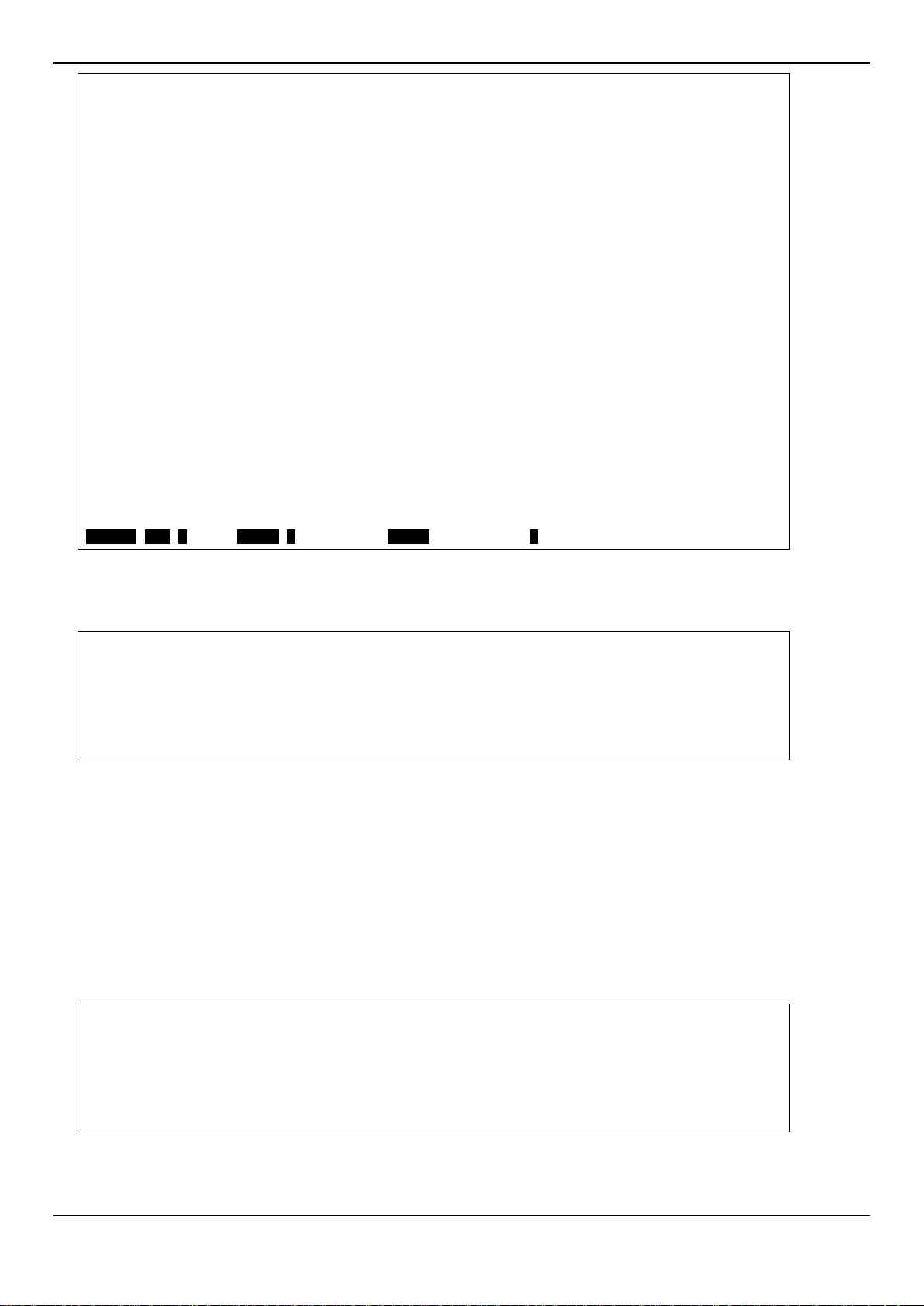
There are a number of helpful features included in t he CLI. Entering the ? command will display a list of all of t he
top-level commands.
2
Page 7
DGS-1510/ME Series Metro Ethernet Switch CLI Reference Guide
CTRL+C ESC q Quit SPACE n Next Page ENTER Next Entry a All
DGS-1510-28XMP/ME:admin#
DGS-1510-28XMP/ME:admin#config account
..
?
cable_diag ports
cd
cfm linktrace
cfm loopback
clear
clear address_binding dhcp_snoop binding_entry ports
clear arptable
clear attack_log
clear cfm pkt_cnt
clear counters
clear ethernet_oam ports
clear fdb
clear igmp_snooping data_driven_group
clear igmp_snooping statistics counter
clear log
clear mac_based_access_control auth_state
clear mld_snooping data_driven_group
clear mld_snooping statistics counter
clear port_security_entry
config 802.1p default_priority
When entering a command without its required parameters, the CLI will prompt you with a Next possi ble
completions: message.
DGS-1510-28XMP/ME:admin# config account
Command: config account
Next possible completions:
<username>
In this case, the command config account was entered with the parameter <username>. The CLI will then
prompt to enter the <username> with the message, Next possible completions:. Every command in the CLI has
this feature, and complex commands have sev eral l ayers of parameter prompting.
In addition, after typing any given command plus on e space, users can see all of the next possible sub-commands,
in sequential order, by repeatedly pressing the Tab key.
To re-enter the previous command at the command prompt, press the up arrow cursor key. The previ ous
command will appear at the command prompt.
DGS-1510-28XMP/ME:admin#config account
Command: config account
Next possible completions:
<username>
In the above example, the command config account was entered without the required parameter <username>,
the CLI returned the Next possible completi on s: <username> prompt. The up arrow cursor control key was
3
Page 8

DGS-1510/ME Series Metro Ethernet Switch CLI Reference Guide
DGS-1510-28XMP/ME:admin#
pressed to re-enter the previous command (config account) at the command prompt. Now the appropriate
username can be entered and the config account command re-executed.
All commands in the CLI function in this way. In addition, the syntax of the help prompts are the same as presented
in this manual − angle brackets < > indicate a numerical value or character string, braces { } indicate optional
parameters or a choice of parameters, and brackets [ ] indicate required parameters.
If a command is entered that is unrecognized by the CLI, t he top-level commands will be displayed under the
Available commands: prompt.
DGS-1510-28XMP/ME:admin#the
Available commands:
.. ? cable_diag cd
cfm clear config copy
create debug del delete
dir disable download enable
erase login logout md
move no ping ping6
rd reboot reconfig rename
reset save show smtp
telnet traceroute traceroute6 upload
The top-level commands consist of commands such as show or config. Most of these commands require one or
more parameters to narrow the top-level command. This is equivalent to show what? or config what? Where the
what? is the next parameter.
For example, entering the show command with no additional parameters, the CLI will then display all of the
possible next parameters.
4
Page 9

DGS-1510/ME Series Metro Ethernet Switch CLI Reference Guide
DGS-1510-28XMP/ME:admin#
Command: show
Next possible completions:
802.1p 802.1x access_profile account
accounting acct_client address_binding
arp_spoofing_prevention arpentry attack_log
auth_client auth_diagnostics auth_session_statistics
auth_statistics authen authen_enable authen_login
authen_policy authentication authorization autoconfig
bandwidth_control boot_file bpdu_protection cfm
command command_history config cpu
cpu_filter current_config ddm device_status
dhcp_local_relay dhcp_relay dos_prevention
dot1v_protocol_group dscp duld
eee environment erps error
ethernet_oam fdb filter flow_meter
gratuitous_arp greeting_message gvrp hol_prevention
igmp igmp_snooping ipif
ipif_ipv6_link_local_auto iproute ipv6
ipv6route jumbo_frame l2protocol_tunnel lacp_port
limited_multicast_addr link_aggregation lldp
log log_save_timing log_software_module
loopdetect mac_based_access_control
mac_based_access_control_local mac_based_vlan mac_notification
max_mcast_group mcast_filter_profile mirror
mld_snooping multicast multicast_fdb nlb
packet password_recovery per_queue poe
port port_security port_security_entry
port_vlan ports pppoe pvid
qinq radius rmon router_ports
safeguard_engine scheduling scheduling_mechanism
serial_port session sim smtp
snmp sntp ssh ssl
storage_media_info stp switch
syslog system_severity tech_support terminal
tftp time time_range traffic
traffic_segmentation trap trusted_host
utilization vlan vlan_translation vlan_trunk
In the above example, all of the possible next parameters for the show command are displayed. A t the next
command prompt, the up arrow was used to re-enter the show command, followed by the account parameter.
The CLI then displays the user accounts config ured on the Switch.
1-3 Command Syntax Symbols
Each CLI command, available on this switch, c ontains certain syntax symbols that might be unf am il i ar to the
inexperienced user. Each syntax symbol carri es a meaning and by knowing that meaning we can better
understand how the command is used. All commands are case-sensitive. Be sure to disable the Caps Lock or any
other unwanted function that changes text case.
5
Page 10

DGS-1510/ME Series Metro Ethernet Switch CLI Reference Guide
Syntax Description
angle brackets < > This syntax is used to enclose a variable or a val ue. Users must enter the variable or
value. For example, in the config command_prompt [<string 16> | username |
default] command, users must enter the command prompt string value and NOT the
parameter <string 16>.
square brackets [ ] This syntax is used to enclose a required value or li st of required arguments. Only one
value or argument must be specified. For example, in the config command_prompt
[<string 16> | username | default] command, users must enter either the command
prompt string, select the username, or select t he default option. Do not type the square
brackets.
vertical bar | This syntax is used to separate mutually ex clusive items in a list. For example, in the
reset {[config | system]} {force_agree} command, users may choose config or
system in the command. Do not type the vertical bar.
braces { } This syntax is used to enclose an optional value or a list of optional arguments. One or
more values or arguments can be specified. For example, in the reset {[config |
system]} {force_agree} command, users may choose conf ig or system in the
command. Do not type the braces.
parentheses ( ) This syntax is used to indicate that at least one or more of the values or arguments in
the preceding syntax enclosed by braces must be specified. For example, in the
config dhcp_relay {hops <int 1-16> | time <sec 0-65535>}(1) command, users have
the option to specify hops or time or both of them. The " (1)" following the set of braces
indicates at least one argument or value within the brace s must be specified. Do not
type the parentheses.
ipif <ipif_name 12> In this syntax example, the value 12 means that the IP interface name can be up to 12
characters long.
metric <value 1-31> In this syntax example, the values 1-31 means that the metric value must be between
1 and 32.
1-4 Line Editing Keys
Keys Description
Delete This key specifies to delete the character under the cursor and to shift the remainder
of the line to the left.
Backspace This key specifies to delete the character t o the left of cursor and shift the remainder of
the line to the left.
CTRL+R This key specifies to replace text characters with newly typed text or to insert newly
typed text within the existing sentence. This is simi l ar to the Insert key.
Up Arrow This key specifies to repeat the previously entered com m and. Each time the up arrow
is pressed, the command previous to that displayed appears. This way it is possible to
review the command history for the current session. Use the down arrow to progress
sequentially forward through the command hi st ory list.
Down Arrow This key specifies to display the next command in the command history entered in the
current session. This displays each command sequentially as it was entered. Use the
up arrow to review previous commands.
Left Arrow This key specifies to move the cursor to the left .
Right Arrow This key specifies to move the cursor to the right.
Tab This key specifies to help users to select the appropriate token.
6
Page 11
DGS-1510/ME Series Metro Ethernet Switch CLI Reference Guide
CTRL+C ESC q Quit SPACE n Next Page p Previous Page r Refresh
1-5 Multiple Page Display Control Keys
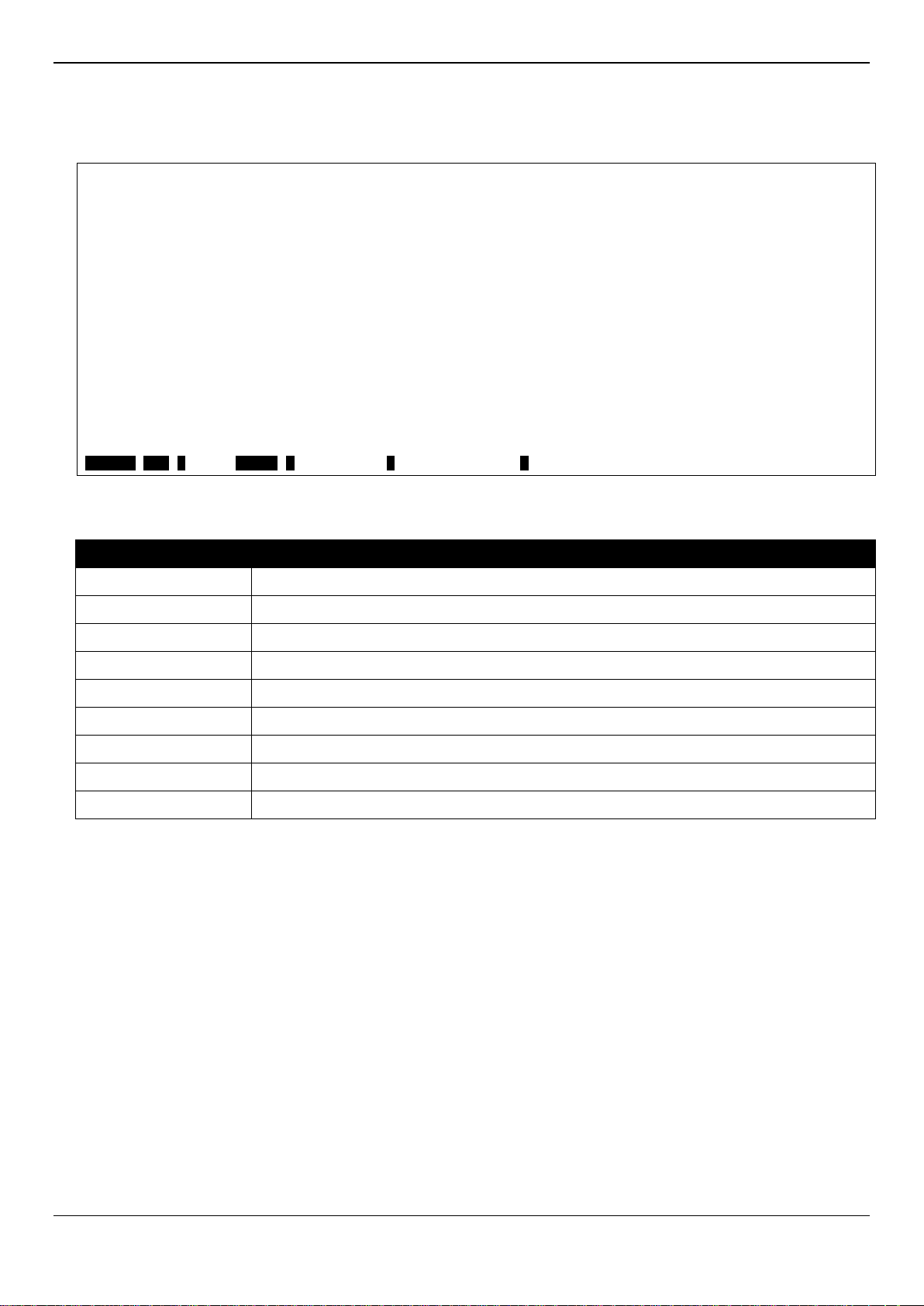
When CLI paging is enabled, the screen display will pause w hen the show command output reaches the end of t he
page, as shown below.
DGS-1510-28XMP/ME:admin#show stp ports
Command: show stp ports
MSTP Port Information
--------------------- Port Index : 1 , Hello Time: 2 /2 , Port STP : Enabled ,
External PathCost : Auto/200000 , Edge Port : True /No , P2P : Auto /Yes
Port RestrictedRole : False, Port RestrictedTCN : False
Port Forward BPDU : Disabled
MSTI Designated Bridge Internal PathCost Prio Status Role
----- ------------------ ----------------- ---- ---------- --------- 0 N/A 200000 128 Forwarding NonStp
The following control keys will then be available:
Keys Description
CTRL+C Stops the display of remaining pages when multiple pages are to be displayed.
ESC Stops the display of remaining pages when multiple pages are to be displayed.
q Stops the display of remaining pages when multiple pages are to be displayed.
SPACE Displays the next page.
n Displays the next page.
p Displays the previous page.
r Refreshes the pages currently displayed.
a Displays the remaining pages without pausing between pages.
Enter Display s the next line or table entry.
7
Page 12

DGS-1510/ME Series Metro Ethernet Switch CLI Reference Guide
Chapter 2
show session
show serial_port
config serial_port {baud_rate [9600 | 19200 | 38400 | 115200] | auto_logout [never | 2_minutes | 5_minutes |
10_minutes | 15_minutes]}
enable clipaging
disable clipaging
login
logout
?
clear
show command_history
config command_history <value 1-40>
config greeting_message {default}
show greeting_message
config command_prompt [<string 16> | username | def aul t]
Basic Command List
config terminal width [default | <value 80-200>]
show terminal width
config ports [<portlist> | all] {medium_type [fiber | copper]} {speed [auto | 10_half | 10_full | 100_half | 100_full |
1000_full {[master | slave]} | 10g_full] | flow_control [enable | disable] | learning [enable | disable] | state
[enable | disable] | mdix [auto | normal | cross] | [description <desc 1-32> | clear_description]}
show ports {<portlist>} {[description | err_disabled | details | media_type]}
2-1 show session
Description
This command is used to display a list of current l y users which are login to the Switch.
Format
show session
Parameters
None.
Restrictions
Only Administrators and Operators can issue this command.
Example
To display the session entries:
8
Page 13

DGS-1510/ME Series Metro Ethernet Switch CLI Reference Guide
CTRL+C ESC q Quit SPACE n Next Page p Previous Page r Refresh
DGS-1510-28XMP/ME:admin#
ID Live Time From Level Name
--- ------------ --------------------------------------- ----- -------------- 0 00:01:46.360 10.90.90.10 puser puser
8 00:05:49.340 Serial Port admin admin
Total Entries: 2
2-2 show serial_port
Description
This command is used to display the current serial port settings.
Format
show serial_port
Parameters
None.
Restrictions
None.
Example
To display the serial port setting:
DGS-1510-28XMP/ME:admin# show serial_port
Command: show serial_port
Baud Rate : 115200
Data Bits : 8
Parity Bits : None
Stop Bits : 1
Auto-Logout : 10 mins
2-3 config serial_port
Description
This command is used to configure the serial bit rate that will be used to communicate with the management host
and the auto logout time for idle connections.
9
Page 14

DGS-1510/ME Series Metro Ethernet Switch CLI Reference Guide
DGS-1510-28XMP/ME:admin#
Format
config serial_port {baud_rate [9600 | 19200 | 38400 | 115200] | auto_logout [never | 2_minutes | 5_minutes |
10_minutes | 15_minutes]}
Parameters
baud_rate - (Optional) Specifies the serial bit rate that will be used to communicate with the management host.
The default baud rate is 115200.
9600 - Specifies the serial bit rate to be 9600.
19200 - Specifies the serial bit rate to be 19200.
38400 - Specifies the serial bit rate to be 38400.
115200 - Specifies the serial bit rate to be 115200.
auto_logout - (Optional) Specifies the auto logout time out setting.
never - Never timeout.
2_minutes - Specifies that the device will auto logout when idle over 2 minutes.
5_minutes - Specifies that the device will auto logout 2hen idle over 5 minutes.
10_minutes - Specifies that the device will auto logout when idle over 10 min utes.
15_minutes - Specifies that the device will auto logout when idle over 15 min utes.
Restrictions
Only Administrators and Operators can issue thi s command.
Example
To configure baud rate:
DGS-1510-28XMP/ME:admin# config serial_port baud_rate 9600
Command: config serial_port baud_rate 9600
Success.
2-4 enable clipaging
Description
This command is used to enable the pausing of t he screen display when the show command output reaches the
end of the page. The default setting is enabled.
Format
enable clipaging
Parameters
None.
Restrictions
Only Administrators and Operators can issue thi s command.
10
Page 15
DGS-1510/ME Series Metro Ethernet Switch CLI Reference Guide
DGS-1510-28XMP/ME:admin#
DGS-1510-28XMP/ME:admin#
Example
To enable pausing of the screen display when sho w command output reaches the end of the page:
DGS-1510-28XMP/ME:admin# enable clipaging
Command: enable clipaging
Success.
2-5 disable clipaging
Description
This command is used to disable the pausing of t he screen display when the show command output reaches the
end of the page. The default setting is enabled.
Format
disable clipaging
Parameters
None.
Restrictions
Only Administrators and Operators can issue thi s command.
Example
To disable pausing of the screen display when sho w c om m and output reaches the end of the page:
DGS-1510-28XMP/ME:admin# disable clipaging
Command: disable clipaging
Success.
2-6 login
Description
This command is used to allow user login to the Switch.
Format
login
11
Page 16
DGS-1510/ME Series Metro Ethernet Switch CLI Reference Guide
DGS-1510-28XMP/ME:admin#
Parameters
None.
Restrictions
None.
Example
To login the Switch with a user name dlink:
DGS-1510-28XMP/ME:admin# login
Command: login
UserName:dlink
PassWord:****
2-7 logout
Description
This command is used to logout the facility.
Format
logout
Parameters
None.
Restrictions
None.
Example
To logout current user:
12
Page 17

DGS-1510/ME Series Metro Ethernet Switch CLI Reference Guide
UserName:
DGS-1510-28XMP/ME:admin#
DGS-1510-28XMP/ME:admin# logout
Command: logout
**********
* Logout *
**********
DGS-1510-28XMP/ME Gigabit Ethernet Switch
Command Line Interface
Firmware: Build 1.00.018
Copyright(C) 2015 D-Link Corporation. All rights reserved.
2-8 ?
Description
This command is used to display the usage desc ri ption for all commands or the specific one.
Format
?
Parameters
None.
Restrictions
None.
Example
To get “ping” command usage, descriptions:
DGS-1510-28XMP/ME:admin#? ping
Command: ? ping
Command: ping
Usage: <ipaddr> { times <value 1-255> | timeout <sec 1-99>}
Description: Used to test the connectivity between network devices.
2-9 clear
Description
The command is used to clear screen.
13
Page 18
DGS-1510/ME Series Metro Ethernet Switch CLI Reference Guide
DGS-1510-28XMP/ME:admin#
Format
clear
Parameters
None.
Restrictions
None.
Example
To clear screen:
DGS-1510-28XMP/ME:admin# clear
Command: clear
2-10 show command_history
Description
The command is used to display command history.
Format
show command_history
Parameters
None.
Restrictions
None.
Example
To display command history:
14
Page 19

DGS-1510/ME Series Metro Ethernet Switch CLI Reference Guide
DGS-1510-28XMP/ME:admin#
DGS-1510-28XMP/ME:admin#
DGS-1510-28XMP/ME:admin# show command_history
Command: show command_history
? ping
login
show serial_port
show session
? config bpdu_protection ports
? reset
? create account
? create ipif
show
the
?
2-11 config command_history
Description
This command is used to configure the numbe r of commands that the Switch can recall. The Switch “ remembers”
up to the last 40 commands you entered.
Format
config command_history <value 1-40>
Parameters
<value 1-40> - Enter the number of command s t hat the Switch can recall. This value must be betwe en 1 and 40.
Restrictions
Only Administrators and Operators can issue this command.
Example
To configure the number of command history:
DGS-1510-28XMP/ME:admin# config command_history 25
Command: config command_history 25
Success.
2-12 config greeting_message
Description
This command is used to configure the greeting message (or banner).
15
Page 20

DGS-1510/ME Series Metro Ethernet Switch CLI Reference Guide
-------------------------------------------------------------------------------
Format
config greeting_message {default}
Parameters
default - (Optional) Specifies to return the greeting message (banner) t o its original factory default entry.
Restrictions
Only Administrators and Operators can issue thi s command.
Example
To edit the banner:
DGS-1510-28XMP/ME:admin#config greeting_message
Command: config greeting_message
Greeting Messages Editor
================================================================================
DGS-1510-28XMP/ME Gigabit Ethernet Switch
Command Line Interface
Firmware: Build 1.00.018
Copyright(C) 2015 D-Link Corporation. All rights reserved.
================================================================================
<Function Key> <Control Key>
Ctrl+C Quit without save left/right/
Ctrl+W Save and quit up/down Move cursor
Ctrl+D Delete line
Ctrl+X Erase all setting
Ctrl+L Reload original setting
2-13 show greeting_message
Description
The command is used to display greeting message.
Format
show greeting_message
Parameters
None.
16
Page 21

DGS-1510/ME Series Metro Ethernet Switch CLI Reference Guide
DGS-1510-28XMP/ME:admin#
Restrictions
Only Administrators and Operators can issue thi s command.
Example
To display greeting message:
DGS-1510-28XMP/ME:admin#show greeting_message
Command: show greeting_message
================================================================================
DGS-1510-28XMP/ME Gigabit Ethernet Switch
Command Line Interface
Firmware: Build 1.00.018
Copyright(C) 2015 D-Link Corporation. All rights reserved.
================================================================================
2-14 config command_prompt
Description
This command is used to modify the command prompt.
The current command prompt consists of f our parts: “product name” + “:” + ”user level” + ”#” (e.g. “DGS-1510-
28XMP/ME:admin# ”). This command is used t o m odi fy the first part (1. “product name”) with a string consisting of
a maximum of 16 characters, or to be replaced with the users’ login user name.
When issuing the reset command, the current command prompt will remain the same. However, when issuing the
reset system command, the command prompt will return to its original factory default value.
Format
config command_prompt [<string 16> | username | default]
Parameters
<string 16> - Enter the new command prompt string of no more than 16 characters.
username - Specifies to set the login username as the command prom pt.
default - Specifies to return the command prompt to its original factory default value.
Restrictions
Only Administrators and Operators can issue thi s command.
Example
To edit the command prompt:
17
Page 22
DGS-1510/ME Series Metro Ethernet Switch CLI Reference Guide
Prompt#:admin#
DGS-1510-28XMP/ME:admin#
DGS-1510-28XMP/ME:admin# config command_prompt Prompt#
Command: config command_prompt Prompt#
Success.
2-15 config terminal width
Description
The command is used to set current terminal width.
The usage is described as below:
1. Users login and configure the terminal width to 120, this configuration take effect on this login section. If
users implement “save” command, the confi guration is saved. After users log out and log in again, the
terminal width is 120.
2. If user did not save the configuration, another user login, the terminal width is default value.
3. If at the same time, two CLI sessions are running, once section configure to 120 width and save it, the
other section will not be effected, unless it log out and then log in.
Format
config terminal width [default | <value 80-200>]
Parameters
default - Specifies the default setting of terminal width. The default value is 80.
<value 80-200> - Enter the terminal width to be configured. The width is between 80 and 200 characters.
Restrictions
None.
Example
To configure the current terminal width:
DGS-1510-28XMP/ME:admin# config terminal width 120
Command: config terminal width 120
Success.
2-16 show terminal width
Description
The command is used to display the configuration of current terminal width.
18
Page 23

DGS-1510/ME Series Metro Ethernet Switch CLI Reference Guide
DGS-1510-28XMP/ME:admin#
Format
show terminal width
Parameters
None.
Restrictions
None.
Example
To display the configuration of current terminal width:
DGS-1510-28XMP/ME:admin# show terminal width
Command: show terminal width
Global terminal width : 80
Current terminal width : 80
2-17 config ports
Description
This command is used to configure the Switch's port settings.
Format
config ports [<portlist> | all] {medium_type [fiber | copper]} {speed [auto | 10_hal f | 10_ ful l | 100_h al f |
100_full | 1000_full {[master | slave]} | 10g_full] | flow_control [enable | disable] | learning [enable | disable]
| state [enable | disable] | mdix [auto | normal | cross] | [description <d esc 1-32> | clear_description]}
Parameters
<portlist> - Enter a list of ports used here.
all - Specifies that all the ports will be used for this configuration.
medium_type - (Optional) Specifies the medium type while the configure ports are combo ports.
fiber - Specifies that the medium type will be set to fiber.
copper - Specifies that the medium type will be set to copper.
speed - (Optional) Specifies the port speed of the specified ports.
auto - Specifies the port speed to auto negotiation.
10_half - Specifies the port speed to 10_half.
10_full - Specifies the port speed to 10_full.
100_half - Specifies the port speed to 100_half.
100_full - Specifies the port speed to 100_full.
1000_full - Specifies the port speed to 1000_full. While set port speed to 1000_full,user should specify m aster
or slave mode for 1000 base TX interface, and leave the 1000_full without any master or slave set ting for
other interface.
master - Specifies that the port(s) will be set to master.
19
Page 24

DGS-1510/ME Series Metro Ethernet Switch CLI Reference Guide
slave - Specifies that the port(s) will be set to slave.
DGS-1510-28XMP/ME:admin#
10g_full - Specifies the port speed to 10g_full.
flow_control - (Optional) Specifies to turn on or turn off flow control on one or more ports.
enable - Specifies that the flow control option will be enabled.
disable - Specifies that the flow control option will be disabled.
learning - (Optional) Specifies to turn on or turn off MAC address learni ng on one or more ports.
enable - Specifies that the learning option will be enabled.
disable - Specifies that the learning option will be disabled.
state - (Optional) Specifies to enable or disable the specified port. If the specified ports are in error-disabled
status , configure their state to enable will recover these ports from disabled to enable state.
enable - Specifies that the port state will be enabled.
disable - Specifies that the port state will be disabled.
mdix - (Optional) Specifies the MDIX mode.
auto - Specifies the MDIX mode for the port to be auto.
normal - Specifies the MDIX mode for the port to be normal. If set to normal state, the port is in the MDIX
mode and can be connected to a PC’s NIC using a straight -th rough cable or a port (in the MDIX mode) on
another switch through a cross-over cable.
cross - Specifies the MDIX mode for the port to be cross. If set to cross state, the port is in the MDI mod e and
can be connected to a port (in the MDIX mode) on another switch through a straight cable.
description - (Optional) Specifies the description of the port interface.
<desc 1-32> - Enter the port interface description here . This value can be up to 32 characters long.
clear_description - (Optional) Specifies that the description field will be cleared.
Restrictions
Only Administrators and Operators can issue thi s command.
Example
To configure the ports:
DGS-1510-28XMP/ME:admin# config ports all medium_type copper speed auto
Command: config ports all medium_type copper speed auto
Success.
2-18 show ports
Description
This command is used to display the current configurations of a range of ports.
Format
show ports {<portlist>} {[description | err_disabled | details | media_type]}
20
Page 25

DGS-1510/ME Series Metro Ethernet Switch CLI Reference Guide
CTRL+C ESC q Quit SPACE n Next Page p Previous Page r Refresh
Parameters
ports - Specifies a range of ports to be displayed.
<portlist> - (Optional) Enter the list of ports to be configured here.
description - (Optional) Specifies to indicate if port description will be included in the display .
err_disabled - (Optional) Specifies to indicate if ports are disabled by some reasons will be displayed.
details - (Optional) Specifies to display the port details.
media_type - (Optional) Specifies to display port transceiver type.
Restrictions
None.
Example
To display the port details:
DGS-1510-28XMP/ME:admin#show ports details
Command: show ports details
Port : 1
-------------------Port Status : Link Up
Description :
HardWare Type : Gigabits Ethernet
MAC Address : 00-01-02-03-04-01
Bandwidth : 100000Kbit
Auto-Negotiation : Enabled
Duplex Mode : Full Duplex
Flow Control : Disabled
MDI : Normal
Address Learning : Enabled
Loopback Mode : Disabled
Last Clear of Counter : 6 hours 57 mins ago
BPDU Hardware Filtering Mode: Disabled
Queuing Strategy : FIFO
TX Load : 0/100, 0 bits/sec, 0 packets/sec
RX Load : 0/100, 0 bits/sec, 0 packets/sec
21
Page 26

DGS-1510/ME Series Metro Ethernet Switch CLI Reference Guide
Chapter 3
create vlan <vlan_name 32> tag <vlanid 2-4094> {type 1q_vlan advertisement}
create vlan vlanid <vidlist> {advertisement}
delete vlan <vlan_name 32>
delete vlan vlanid <vidlist>
config vlan <vlan_name 32> {[add [tagged | untagg ed | forbidden] | delete] <portlist> | advertisement [enable |
disable]}(1)
config vlan vlanid <vidlist> {[add [tagged | untagged | forbidden] | delete] <portlist> | advertisement [enable |
disable] | name <vlan_name 32>}(1)
config port_vlan [<portlist> | all] {gvrp_state [ enable | disable] | ingress_checking [enable | disable] |
acceptable_frame [tagged_only | admit_all ] | pvid <vlanid 1-4094>}(1)
show vlan {<vlan_name 32>}
show vlan ports {<portlist>}
show vlan vlanid <vidlist>
show port_vlan {<portlist>}
enable pvid auto_assign
disable pvid auto_assign
802.1Q VLAN Command List
show pvid auto_assign
config gvrp [timer {join < value 100-100000> | leave < value 100-100000> | leaveall <value 100-100000>} |
nni_bpdu_addr [dot1d | dot1ad]]
show gvrp
enable gvrp
disable gvrp
3-1 create vlan
Description
This command is used to create a VLAN on the Switch. The VLAN ID must be always specified for creating a
VLAN.
Format
create vlan <vlan_name 32> tag <vlanid 2-4094> {t ype 1q_vlan advertisement}
Parameters
vlan - Specifies the name of the VLAN to be created.
<vlan_name 32> - Enter the VLAN name here. T he VLAN name can be up to 32 characters long.
tag - Specifies the VLAN ID of the VLAN to be created.
<vlanid 2-4094> - Enter the VLAN ID here. The VLAN ID value must be between 2 and 4094.
type 1q_vlan advertisement - (Optional) Specifies that the VLAN type used is based on the 802.1Q standard
and being able to be advertised out.
22
Page 27
DGS-1510/ME Series Metro Ethernet Switch CLI Reference Guide
DGS-1510-28XMP/ME:admin#
DGS-1510-28XMP/ME:admin#
Restrictions
Only Administrators, Operators and Power-Users can issue this command.
Example
To create a VLAN with name “v2” and VLAN ID 2:
DGS-1510-28XMP/ME:admin# create vlan v2 tag 2 type 1q_vlan advertisement
Command: create vlan v2 tag 2 type 1q_vlan advertisement
Success.
3-2 create vlan vlanid
Description
This command is used to create more than one VLANs at a time. A unique VLAN name (e.g. VLAN10) will be
automatically assigned by the system. The aut om atic assignment of VLAN name is based on the following rule:
“VLAN”+ID. For example, for VLAN ID 100, t he VLAN name will be VLAN100. If this VLAN name is c onflict with the
name of an existing VLAN, then it will be renamed based on the following rule: “VLAN”+ID+”ALT”+ collision count.
For example, if this conflict is the second colli sion, then the name will be VLAN100ALT2.
Format
create vlan vlanid <vidlist> {advertisement}
Parameters
vlanid - Specifies the VLAN ID list to be created.
<vidlist> - Enter the VLAN ID list here.
advertisement - (Optional) Specifies the VLAN as being able to be advertised out.
Restrictions
Only Administrators, Operators and Power-Users can issue this command.
Example
To create some VLANs using VLAN ID:
DGS-1510-28XMP/ME:admin# create vlan vlanid 10-30
Command: create vlan vlanid 10-30
Success.
23
Page 28

DGS-1510/ME Series Metro Ethernet Switch CLI Reference Guide
DGS-1510-28XMP/ME:admin#
3-3 delete vlan
Description
This command is used to delete a previously co nfigured VLAN by the name on the Switch.
Format
delete vlan <vlan_name 32>
Parameters
vlan - Specifies the VLAN name of the VLAN to be deleted.
<vlan_name 32> - Enter the VLAN name here. T his name can be up to 32 characters long.
Restrictions
Only Administrators, Operators and Power-Users can issue this command.
Example
To remove a vlan v1:
DGS-1510-28XMP/ME:admin# delete vlan v1
Command: delete vlan v1
Success.
3-4 delete vlan vlanid
Description
This command is used to delete one or a numbe r of previously configured VLAN by VID list.
Format
delete vlan vlanid <vidlist>
Parameters
vlanid - Specifies the VLAN ID list to be deleted.
<vidlist> - Enter the VLAN ID list here.
Restrictions
Only Administrators, Operators and Power-Users can issue this command.
24
Page 29

DGS-1510/ME Series Metro Ethernet Switch CLI Reference Guide
DGS-1510-28XMP/ME:admin#
DGS-1510-28XMP/ME:admin#
Example
To remove VLANs from 10-30:
DGS-1510-28XMP/ME:admin# delete vlan vlanid 10-30
Command: delete vlan vlanid 10-30
Success.
3-5 config vlan
Description
This command is used to configure a VLAN based on the name.
Format
config vlan <vlan_name 32> {[add [tagged | untagged | forbidden] | delete] <portlist> | ad vertisement
[enable | disable]}(1)
Parameters
<vlan_name 32> - Enter the VLAN name you want to add ports to. This name can be up to 32 chara ct ers long.
add - Specifies to add tagged, untagged or forbidden ports to the VLA N.
tagged - Specifies the additional ports as tagged.
untagged - Specifies the additional ports as untagge d.
forbidden - Specifies the additional ports as forbidden.
delete - Specifies to delete ports from the V LA N.
<portlist> - Enter the list of ports used for the configuration here.
advertisement - Specifies the GVRP state of this VLAN.
enable - Specifies to enable advertisement for this VLAN.
disable - Specifies to disable advertisement for this VLAN.
Restrictions
Only Administrators, Operators and Power-Users can issue this command.
Example
To add 4 through 8 as tagged ports to the VLAN v2:
DGS-1510-28XMP/ME:admin# config vlan v2 add tagged 4-8
Command: config vlan v2 add tagged 4-8
Success.
25
Page 30

DGS-1510/ME Series Metro Ethernet Switch CLI Reference Guide
DGS-1510-28XMP/ME:admin#
3-6 config vlan vlanid
Description
This command allows you to configure multiple V LANs at one time. But conflicts will be generat ed i f you configure
the name of multiple VLANs at one time.
Format
config vlan vlanid <vidlist> {[add [tagged | untagged | forbidden] | delete] <po rtlist> | advertisement [enable
| disable] | name <vlan_name 32>}(1)
Parameters
<vidlist> - Enter a list of VLAN IDs to configure.
add - Specifies to add tagged, untagged or forbidden ports to the V LA N.
tagged - Specifies the additional ports as tagged.
untagged - Specifies the additional ports as untagge d.
forbidden - Specifies the additional ports as forbidden.
delete - Specifies to delete ports from the V LA N.
<portlist> - Enter the list of ports used for the configuration her e.
advertisement - Specifies the GVRP state of this VLAN.
enable - Specifies to enable advertisement for this VLAN.
disable - Specifies to disable advertisement for this VLAN.
name - Specifies the new name of the VLAN.
<vlan_name 32> - Enter the VLAN name here. T his name can be up to 32 characters long.
Restrictions
Only Administrators, Operators and Power-Users can issue this command.
Example
To add 4 through 8 as tagged ports to the VLAN ID f rom 10-20:
DGS-1510-28XMP/ME:admin# config vlan vlanid 10-20 add tagged 4-8
Command: config vlan vlanid 10-20 add tagged 4-8
Success.
3-7 config port_vlan
Description
This command is used to set the ingress checking status, the sending and receiving GVRP information.
Format
config port_vlan [<portlist> | all] {gvrp_state [enable | d isable] | ingress_checking [enable | disable] |
acceptable_frame [tagged_only | admit_al l] | pvid <vlanid 1-4094>}(1)
26
Page 31

DGS-1510/ME Series Metro Ethernet Switch CLI Reference Guide
DGS-1510-28XMP/ME:admin#
Parameters
<portlist> - Enter a range of ports for which you want ingress checking. The p ort list is specified by listing the
beginning port number on the Switch, separated by a colon. Then highest port number of the range ( al so
separated by a colon) are specified. The beginning and end of the port list range are separated by a dash.
all - Specifies all ports for ingress checking.
gvrp_state - Specifies to enable or disable GVRP for the ports specifi ed i n the port list.
enable - Specifies that GVRP for the specified ports will be enabled.
disable - Specifies that GVRP for the specified ports will be disabled.
ingress_checking - Specifies to enable or disable ingress checking for the specified port list.
enable - Specifies that ingress checking will be enabled for the specif i ed port list.
disable - Specifies that ingress checking will be disabled for the specified port list.
acceptable_frame - Specifies the type of frame will be accepted by the port. There are two types:
tagged_only - Specifies that only tagged packets can be accepted by this port.
admit_all - Specifies that all packets can be accepted.
pvid - Specifies the PVID of the ports.
<vlanid 1-4094> - Enter the VLAN ID here. The VLAN ID value must be between 1 and 4094.
Restrictions
Only Administrators and Operators can issue thi s command.
Example
To sets the ingress checking status, the sen di ng and receiving GVRP information:
DGS-1510-28XMP/ME:admin# config port_vlan 1-5 gvrp_state enable ingress_checking enable
acceptable_frame tagged_only pvid 2
Command: config port_vlan 1-5 gvrp_state enable ingress_checking enable acceptable_frame
tagged_only pvid 2
Success.
3-8 show vlan
Description
This command is used to display the vlan inf ormation including of parameters setting and oper ational value.
Format
show vlan {<vlan_name 32>}
Parameters
<vlan_name 32> - (Optional) Enter the V LA N nam e to be displayed. The VLAN name can be up to 32 ch aracters
long.
27
Page 32

DGS-1510/ME Series Metro Ethernet Switch CLI Reference Guide
CTRL+C ESC q Quit SPACE n Next Page ENTER Next Entry a All
Restrictions
None.
Example
To display VLAN settings:
DGS-1510-28XMP/ME:admin# show vlan
Command: show vlan
VLAN Trunk State : Enabled
VLAN Trunk Member Ports : 1-5
VID : 1 VLAN Name : default
VLAN Type : Static Advertisement : Enabled
Member Ports : 1-28
Static Ports : 1-28
Current Tagged Ports :
Current Untagged Ports: 1-28
Static Tagged Ports :
Static Untagged Ports : 1-28
Forbidden Ports :
VID : 2 VLAN Name : v2
VLAN Type : Static Advertisement : Enabled
Member Ports : 4-8
Static Ports : 4-8
Current Tagged Ports : 4-8
Current Untagged Ports:
Static Tagged Ports : 4-8
3-9 show vlan ports
Description
This command is used to display the vlan inf ormation per ports.
Format
show vlan ports {<portlist>}
Parameters
<portlist> - (Optional) Enter the list of ports for which the V LA N i nformation will be displayed.
Restrictions
None.
28
Page 33

DGS-1510/ME Series Metro Ethernet Switch CLI Reference Guide
DGS-1510-28XMP/ME:admin#
Example
To display the VLAN configuration for port 6:
DGS-1510-28XMP/ME:admin# show vlan ports 6
Command: show vlan ports 6
Port VID Untagged Tagged Dynamic Forbidden
----- ---- -------- ------ ------- -------- 6 1 X - - 6 2 - X - -
3-10 show vlan vlanid
Description
This command is used to display the VLAN informatio n using the VLAN ID.
Format
show vlan vlanid <vidlist>
Parameters
<vidlist> - Enter the VLAN ID to be displayed.
Restrictions
None.
Example
To display the VLAN configuration for VLAN ID 1:
29
Page 34

DGS-1510/ME Series Metro Ethernet Switch CLI Reference Guide
DGS-1510-28XMP/ME:admin#
DGS-1510-28XMP/ME:admin# show vlan vlanid 1
Command: show vlan vlanid 1
VID : 1 VLAN Name : default
VLAN Type : Static Advertisement : Enabled
Member Ports : 1-28
Static Ports : 1-28
Current Tagged Ports :
Current Untagged Ports: 1-28
Static Tagged Ports :
Static Untagged Ports : 1-28
Forbidden Ports :
Total Entries : 1
3-11 show port_vlan
Description
This command is used to display the ports’ V LAN attributes on the Switch. If no parameter specif ied, system will
display all ports GVRP information.
Format
show port_vlan {<portlist>}
Parameters
<portlist> - (Optional) Enter a range of ports to be displayed.
Restrictions
None.
Example
To display 802.1Q port setting:
30
Page 35

DGS-1510/ME Series Metro Ethernet Switch CLI Reference Guide
CTRL+C ESC q Quit SPACE n Next Page ENTER Next Entry a All
DGS-1510-28XMP/ME:admin# show port_vlan
Command: show port_vlan
Port PVID GVRP Ingress Checking Acceptable Frame Type
------- ---- -------- ---------------- -------------------------- 1 2 Enabled Enabled Only VLAN-tagged Frames
2 2 Enabled Enabled Only VLAN-tagged Frames
3 2 Enabled Enabled Only VLAN-tagged Frames
4 2 Enabled Enabled Only VLAN-tagged Frames
5 2 Enabled Enabled Only VLAN-tagged Frames
6 1 Disabled Enabled All Frames
7 1 Disabled Enabled All Frames
8 1 Disabled Enabled All Frames
9 1 Disabled Enabled All Frames
10 1 Disabled Enabled All Frames
11 1 Disabled Enabled All Frames
12 1 Disabled Enabled All Frames
13 1 Disabled Enabled All Frames
14 1 Disabled Enabled All Frames
15 1 Disabled Enabled All Frames
16 1 Disabled Enabled All Frames
17 1 Disabled Enabled All Frames
18 1 Disabled Enabled All Frames
19 1 Disabled Enabled All Frames
20 1 Disabled Enabled All Frames
3-12 enable pvid auto assign
Description
This command is used to enable the auto-assignment of PVID.
If “Auto-assign PVID” is enabled, PVID will be possibly changed by PVID or VLAN configuration. When user
configures a port to VLAN X’s untagged membership, this port’s PVID will be updated with VLAN X. In the form of
VLAN list command, PVID is updated with last it em of VLAN list. When user removes a port from the untagged
membership of the PVID’s VLAN, the port’s PVID will be assigned with “default VLAN”.
The default setting is enabled.
Format
enable pvid auto_assign
Parameters
None.
Restrictions
Only Administrators, Operators and Power-Users can issue this command.
Example
To enable the auto-assign PVID:
31
Page 36
DGS-1510/ME Series Metro Ethernet Switch CLI Reference Guide
DGS-1510-28XMP/ME:admin#
DGS-1510-28XMP/ME:admin#
DGS-1510-28XMP/ME:admin# enable pvid auto_assign
Command: enable pvid auto_assign
Success.
3-13 disable pvid auto assign
Description
This command is used to disable auto assignment of PVID.
Format
disable pvid auto_assign
Parameters
None.
Restrictions
Only Administrators, Operators and Power-Users can issue this command.
Example
To disable the auto-assign PVID:
DGS-1510-28XMP/ME:admin# disable pvid auto_assign
Command: disable pvid auto_assign
Success.
3-14 show pvid auto_assign
Description
This command is used to display the PVID auto-as signment state.
Format
show pvid auto_assign
Parameters
None.
Restrictions
None.
32
Page 37

DGS-1510/ME Series Metro Ethernet Switch CLI Reference Guide
DGS-1510-28XMP/ME:admin#
Example
To display PVID auto-assignment state:
DGS-1510-28XMP/ME:admin# show pvid auto_assign
Command: show pvid auto_assign
PVID Auto-assignment: Enabled
3-15 config gvrp
Description
This command is used to configure the GVRP timer’s value. The default value for Join time is 200 milliseconds; for
Leave time is 600 milliseconds; for Leave All time is 10000 milliseconds.
Format
config gvrp [timer {join < value 100-100000> | leave < value 100-100000> | leaveall <value 100-100000>} |
nni_bpdu_addr [dot1d | dot1ad]]
Parameters
timer - Specifies that the GVRP timer parameter will be configured.
join - (Optional) Specifies the Join time will be set.
<value 100-100000> - Enter the time used here. This value must be between 100 and 100000.
leave - (Optional) Specifies the Leave time will be set.
<value 100-100000> - Enter the time used here. This value must be between 100 and 100000.
leaveall - (Optional) Specifies the Leave All time will be set.
<value 100-100000> - Enter the time used here. This value must be between 100 and 100000.
nni_bpdu_addr - Specifies to determine the BPDU protocol address for GVRP in service provide site. It can use
802.1d GVRP address, 802.1ad service provider GVRP address or a user defined multicast address. The
range of the user defined address is 0180C2000000 - 0180C2FFFFFF.
dot1d - Specifies that the NNI BPDU protocol address value will be set to Dot1d.
dot1ad - Specifies that the NNI BPDU protocol address value will be set to Dot1ad.
Restrictions
Only Administrators, Operators and Power-Users can issue this command.
Example
To set the Join time to 200 milliseconds:
33
Page 38

DGS-1510/ME Series Metro Ethernet Switch CLI Reference Guide
DGS-1510-28XMP/ME:admin#
DGS-1510-28XMP/ME:admin#
DGS-1510-28XMP/ME:admin# config gvrp timer join 200
Command: config gvrp timer join 200
Success.
3-16 show gvrp
Description
This command is used to display the GVRP global setting.
Format
show gvrp
Parameters
None.
Restrictions
None.
Example
To display the global setting of GVRP:
DGS-1510-28XMP/ME:admin# show gvrp
Command: show gvrp
Global GVRP : Disabled
Join Time : 200 Milliseconds
Leave Time : 600 Milliseconds
LeaveAll Time : 10000 Milliseconds
NNI BPDU Address: dot1d
3-17 enable gvrp
Description
This command is used to enable the Generic VLAN Registration Protocol (GVRP).
Format
enable gvrp
Parameters
None.
34
Page 39
DGS-1510/ME Series Metro Ethernet Switch CLI Reference Guide
DGS-1510-28XMP/ME:admin#
DGS-1510-28XMP/ME:admin#
Restrictions
Only Administrators, Operators and Power-Users can issue this command.
Example
To enable the generic VLAN Registration Protocol (GVRP):
DGS-1510-28XMP/ME:admin# enable gvrp
Command: enable gvrp
Success.
3-18 disable gvrp
Description
This command is used to disable the Generic VLA N Registration Protocol (GVRP).
Format
disable gvrp
Parameters
None.
Restrictions
Only Administrators, Operators and Power-Users can issue this command.
Example
To disable the Generic VLAN Registration Protocol (GVRP):
DGS-1510-28XMP/ME:admin# disable gvrp
Command: disable gvrp
Success.
35
Page 40

DGS-1510/ME Series Metro Ethernet Switch CLI Reference Guide
Chapter 4
enable 802.1x
disable 802.1x
create 802.1x user <username 15>
delete 802.1x user <username 15>
show 802.1x user
config 802.1x auth_protocol [local | radius_eap]
config 802.1x fwd_pdu system [enable | disable]
config 802.1x fwd_pdu ports [<portlist> | all] [enable | disable]
config 802.1x authorization attributes radius [enable | disable]
show 802.1x {[auth_state | auth_configurati on] ports {<portlist>}}
config 802.1x capability ports [<portlist> | al l ] [authenticator | none]
config 802.1x max_users [<value 1–448> | no_limit]
config 802.1x auth_parameter ports [<portlist> | all] [ default | {direction [both | in] | port_control [force_unauth |
auto | force_auth] | quiet_period <sec 0-65535> | tx_period <sec 1-65535> | supp_timeout <sec 1-65535> |
server_timeout <sec 1-65535> | max_req <value 1-10> | reauth_period <sec 1-65535> | max_users [<value
1-448> | no_limit] | enable_reauth [enable | disable]}(1)]
802.1X Command List
config 802.1x auth_mode [port_based | mac_based]
config 802.1x init [port_based ports [<portlist> | all] | mac_based ports [<portlist> | all] {mac_address
<macaddr>}]
config 802.1x reauth [port_based ports [<portlist> | all] | mac_based ports [<portlist> | all] {m ac_address
<macaddr>}]
create 802.1x guest_vlan {<vlan_name 32>}
delete 802.1x guest_vlan {<vlan_name 32>}
config 802.1x guest_vlan ports [<portlist> | all] state [enable | disable]
show 802.1x guest_vlan
4-1 enable 802.1x
Description
This command is used to enable the 802.1X function.
Format
enable 802.1x
Parameters
None.
Restrictions
Only Administrators, Operators and Power-Users can issue this command.
36
Page 41
DGS-1510/ME Series Metro Ethernet Switch CLI Reference Guide
DGS-1510-28XMP/ME:admin#
DGS-1510-28XMP/ME:admin#
Example
To enable the 802.1X function:
DGS-1510-28XMP/ME:admin# enable 802.1x
Command: enable 802.1x
Success.
4-2 disable 802.1x
Description
This command is used to disable the 802.1X function.
Format
disable 802.1x
Parameters
None.
Restrictions
Only Administrators, Operators and Power-Users can issue this command.
Example
To disable the 802.1X function:
DGS-1510-28XMP/ME:admin# disable 802.1x
Command: disable 802.1x
Success.
4-3 create 802.1x user
Description
This command is used to create an 802.1X user.
Format
create 802.1x user <username 15>
37
Page 42

DGS-1510/ME Series Metro Ethernet Switch CLI Reference Guide
DGS-1510-28XMP/ME:admin#
DGS-1510-28XMP/ME:admin#
Parameters
<username 15> - Enter the username to be added. T his value can be up to 15 characters long.
Restrictions
Only Administrators, Operators and Power-Users can issue this command.
Example
To create a 802.1x user “test”:
DGS-1510-28XMP/ME:admin# create 802.1x user test
Command: create 802.1x user test
Enter a case-sensitive new password:****
Enter the new password again for confirmation:****
Success.
4-4 delete 802.1x user
Description
This command is used to delete an 802.1X user.
Format
delete 802.1x user <username 15>
Parameters
<username 15> - Enter the username to be delete d. This value can be up to 15 characters long.
Restrictions
Only Administrators, Operators and Power-Users can issue this command.
Example
To delete user “test”:
DGS-1510-28XMP/ME:admin# delete 802.1x user test
Command: delete 802.1x user test
Success.
38
Page 43

DGS-1510/ME Series Metro Ethernet Switch CLI Reference Guide
DGS-1510-28XMP/ME:admin#
4-5 show 802.1x user
Description
This command is used to display the 802.1X use r.
Format
show 802.1x user
Parameters
None.
Restrictions
None.
Example
To display the 802.1X user information:
DGS-1510-28XMP/ME:admin# show 802.1x user
Command: show 802.1x user
Current Accounts:
Username Password
--------------- -------------- test test
Total Entries:1
4-6 config 802.1x auth_protocol
Description
This command is used to configure the 802.1X authentication protocol.
Format
config 802.1x auth_protocol [local | radius_eap]
Parameters
local - Specifies the authentication protocol as local.
radius_eap - Specifies the authentication protocol as RADIUS EAP.
Restrictions
Only Administrators, Operators and Power-Users can issue this command.
39
Page 44

DGS-1510/ME Series Metro Ethernet Switch CLI Reference Guide
DGS-1510-28XMP/ME:admin#
Example
To configure the 802.1X authentication protocol to RADIUS EAP:
DGS-1510-28XMP/ME:admin# config 802.1x auth_protocol radius_eap
Command: config 802.1x auth_protocol radius_eap
Success.
4-7 config 802.1x fwd_pdu system
Description
This command is used to globally control t he forwarding of EAPOL PDU. When 802.1X functionali ty is disabled
globally or for a port, and if 802.1X fwd_pdu i s enabled both globally and for the port, a received EAPOL packet on
the port will be flooded in the same VLAN to those ports for which 802.1X fwd_pdu is enabled and 802.1X is
disabled (globally or just for the port). The default st ate is disabled.
Format
config 802.1x fwd_pdu system [enable | disable]
Parameters
enable - Specifies to enable the forwarding of EAPOL PDU.
disable - Specifies to disable the forwarding of EAPOL PDU.
Restrictions
Only Administrators, Operators and Power-Users can issue this command.
Example
To configure forwarding of EAPOL PDU system state enable:
DGS-1510-28XMP/ME:admin# config 802.1x fwd_pdu system enable
Command: config 802.1x fwd_pdu system enable
Success.
DGS-1510-28XMP/ME:admin#
4-8 config 802.1x fwd_pdu ports
Description
This command is used to control the forwarding of EAPOL PDU. When 802.1X functionality is dis abl ed globally or
for a port, and if 802.1X fwd_pdu is enabled both gl obally and for the port, a received EAPOL packet on the port
will be flooded in the same VLAN to those ports for which 802.1X fwd_pdu is enabled and 802.1X is disabled
(globally or just for the port). The default st ate is disabled.
40
Page 45
DGS-1510/ME Series Metro Ethernet Switch CLI Reference Guide
DGS-1510-28XMP/ME:admin#
Format
config 802.1x fwd_pdu ports [<portlist> | all] [enable | disable]
Parameters
<portlist> - Enter the list of ports used for the configuration.
all - Specifies that all the ports will be used.
enable - Specifies to enable forwarding EAPOL PDU receive on the ports.
disable - Specifies to disable forwarding EAPOL PDU receive on the ports.
Restrictions
Only Administrators, Operators and Power-Users can issue this command.
Example
To configure 802.1X fwd_pdu for ports:
DGS-1510-28XMP/ME:admin# config 802.1x fwd_pdu ports 1-2 enable
Command: config 802.1x fwd_pdu ports 1-2 enable
Success.
4-9 config 802.1x authorization attributes radius
Description
This command is used to enable or disable acceptance of authorized configuration.
When the authorization is enabled for 802.1X’s RADIUS authentication, the authorized attri butes (for example
VLAN, 802.1p default priority, and ACL) assigned by the RADUIS server will be accepted.
Format
config 802.1x authorization attributes radius [enable | disable]
Parameters
enable - Specifies to enable the authorization attributes. When enabled, the authorization attributes (for exa m ple
VLAN, 802.1p default priority, and ACL) assigned by the RADUIS server will be accepted. This is the default.
disable - Specifies to disable the authorization attributes.
Restrictions
Only Administrators, Operators and Power-Users can issue this command.
Example
To disable to accept the authorized data assigned from the RADIUS server:
41
Page 46

DGS-1510/ME Series Metro Ethernet Switch CLI Reference Guide
DGS-1510-28XMP/ME:admin#
DGS-1510-28XMP/ME:admin# config 802.1x authorization attributes radius disable
Command: config 802.1x authorization attributes radius disable
Success.
4-10 show 802.1x
Description
This command is used to display the 802.1X state or configurations. If no parameter is specified, the 802.1X
system configurations will be displayed.
Format
show 802.1x {[auth_state | auth_configuration] ports {<portlist>}}
Parameters
auth_state - (Optional) Specifies to display 802.1X authentication state m achine of some or all ports
auth_configuration - (Optional) Specifies to display 802.1X configurations of some or all ports.
port - (Optional) Specifies a range of ports to be displayed. If no port is specified, all ports will be displayed.
<portlist> - Enter the list of ports used for the configuration here.
Restrictions
None.
Example
To display the 802.1X port level configurations:
42
Page 47

DGS-1510/ME Series Metro Ethernet Switch CLI Reference Guide
CTRL+C ESC q Quit SPACE n Next Page p Previous Page r Refresh
DGS-1510-28XMP/ME:admin# show 802.1x auth_configuration ports 1
Command: show 802.1x auth_configuration ports 1
Port Number : 1
Capability : None
AdminCrlDir : Both
OpenCrlDir : Both
Port Control : Auto
QuietPeriod : 60 sec
TxPeriod : 30 sec
SuppTimeout : 30 sec
ServerTimeout : 30 sec
MaxReq : 2 times
ReAuthPeriod : 3600 sec
ReAuthenticate : Disabled
Forward EAPOL PDU On Port : Enabled
Max User On Port : 16
4-11 config 802.1x capability ports
Description
This command is used to configure the port cap abil i ty.
Format
config 802.1x capability ports [<portlist> | all] [authenticator | none]
Parameters
<portlist> - Enter the list of ports used for the configuration her e.
all - Specifies all ports to be configured.
authenticator - Specifies the port that wishes to enforce authentication before allowing access to services that
are accessible via that port adopts the authentic ator role.
none - Specifies to disable authentication on the specified ports.
Restrictions
Only Administrators, Operators and Power-Users can issue this command.
Example
To configure the port capability:
43
Page 48

DGS-1510/ME Series Metro Ethernet Switch CLI Reference Guide
DGS-1510-28XMP/ME:admin#
DGS-1510-28XMP/ME:admin#
DGS-1510-28XMP/ME:admin# config 802.1x capability ports 1-10 authenticator
Command: config 802.1x capability ports 1-10 authenticator
Success.
4-12 config 802.1x max_users
Description
This command is used to limit the maximum num ber of users that can be learned via 802.1X authentication. In
addition to the global limitation, maximum user for per port is also limited. It is specified by the config 802.1x
auth_parameter command.
Format
config 802.1x max_users [<value 1–448> | no_limit]
Parameters
<value 1-448> - Enter the maximum number of users. This value must be between 1 and 448.
no_limit – Specifies that the maximum user limit will be set to 448.
Restrictions
Only Administrators, Operators and Power-Users can issue this command.
Example
To configure 802.1X number of users to be limited to 200:
DGS-1510-28XMP/ME:admin# config 802.1x max_users 200
Command: config 802.1x max_users 200
Success.
4-13 config 802.1x auth_parameter ports
Description
This command is used to configure the parameters that control the operation of the authenticator associated with a
port.
Format
config 802.1x auth_parameter ports [<portlist> | all] [default | {direction [both | i n] | port_control
[force_unauth | auto | force_auth] | qu iet_period <sec 0-65535> | tx_period <sec 1-65535> | supp_timeout
<sec 1-65535> | server_timeout <sec 1-65535> | max_req <value 1-10> | reauth_period <sec 1-65535> |
max_users [<value 1-448> | no_limit] | enable_reauth [enable | disable]}(1)]
44
Page 49

DGS-1510/ME Series Metro Ethernet Switch CLI Reference Guide
Parameters
<portlist> - Enter the list of ports used for the configuration her e.
all - Specifies that all the ports will be used.
default - Specifies that all parameter to be default value.
direction - Specifies the direction of access control.
both - Specifies for bidirectional access control.
in - Specifies for unidirectional access control.
port_control - Specifies to force a specific port t o be unconditionally authorized or unauthorized by setting the
parameter of port_control to be force_authorized or force_unauthorized. Besides, the cont rolled port will reflect
the outcome of authentication if port_control i s aut o.
force_unauth - Specifies to force a specific port to be unconditionally unautho rized.
auto - Specifies that the controlled port will reflect the outcome of aut hentication.
force_auth - Specifies to force a specific port to be unconditionally authorized.
quiet_period - Specifies the initialization value of the quietWhile timer.
<sec 0-65535> - Enter the quiet period value here. This value must be between 0 and 65535 seconds. The
default value is 60 seconds.
tx_period - Specifies the initialization value of the transmit timer period.
<sec 1-65535> - Enter the TX period value here. This value must b e between 1 and 65535 seconds. The
default value is 30 seconds.
supp_timeout - Specifies the initialization value of the aWhile timer when t i m ing out the supplicant.
<sec 1-65535> - Enter the supplicant timeout value here. This value must be between 1 and 65535 seconds.
The default value is 30 seconds.
server_timeout - Specifies the initialization value of the aWhile timer when timing out the authentication server.
<sec 1-65535> - Enter the server timeout value here. This value must be between 1 and 65535 se conds. The
default value is 30.
max_req - Specifies the maximum number of times that the authentication PAE state machine will retransmit an
EAP Request packet to the supplicant.
<value 1-10> - Enter the maximum required value here. This value must be between 1 and 10. The defaul t
value is 2.
reauth_period - Specifies a nonzero number of seconds, which is used to be the re-authentication timer.
<sec 1-65535> - Enter the re-authentication period value here. This value must be between 1 and 65535
seconds. The default value is 3600.
max_users - Specifies per port maximum number of users. The default value is 16.
<value 1-448> - Enter the maximum users value here. This value must be between 1 and 448.
no_limit - Specifies that no limit is enforced on the maximum users used.
enable_reauth - Specifies to enable or disable the re-authenticatio n m echanism for a specific port.
enable - Specifies to enable the re-authentication mechanism for a specific port.
disable - Specifies to disable the re-authentication mechanism for a specific port.
Restrictions
Only Administrators, Operators and Power-Users can issue this command.
Example
To configure the parameters that control the operation of the authenticator associa ted with a port:
45
Page 50

DGS-1510/ME Series Metro Ethernet Switch CLI Reference Guide
DGS-1510-28XMP/ME:admin#
DGS-1510-28XMP/ME:admin#
DGS-1510-28XMP/ME:admin# config 802.1x auth_parameter ports 1-20 direction both
Command: config 802.1x auth_parameter ports 1-20 direction both
Success.
4-14 config 802.1x auth_mode
Description
This command is used to configure 802.1X authentication mode.
Format
config 802.1x auth_mode [port_based | m ac_based]
Parameters
port_based - Specifies to configure the authentication as port-based mode.
mac_based - Specifies to configure the authenticati on as MAC-based mode.
Restrictions
Only Administrators, Operators and Power-Users can issue this command.
Example
To configure the authentication mode:
DGS-1510-28XMP/ME:admin# config 802.1x auth_mode port_based
Command: config 802.1x auth_mode port_based
Success.
4-15 config 802.1x init
Description
This command is used to initialize the authentication state machine of some or all ports.
Format
config 802.1x init [port_based ports [<portlist> | all] | mac_based ports [<portli st> | all] {mac_address
<macaddr>}]
Parameters
port_based ports- Specifies to configure the authentication as port-based mode.
46
Page 51

DGS-1510/ME Series Metro Ethernet Switch CLI Reference Guide
<portlist> - Enter the list of ports used for the configuration here.
DGS-1510-28XMP/ME:admin#
all - Specifies that all ports will be used.
mac_based ports - Specifies to configure the authenticati on as MAC-based mode.
<portlist> - Enter the list of ports used for the configuration here.
all - Specifies that all ports will be used.
mac_address - (Optional) Specifies the MAC address of client.
<macaddr> - Enter the MAC address used here.
Restrictions
Only Administrators, Operators and Power-Users can issue this command.
Example
To initialize the authentication state mac hine of some or all:
DGS-1510-28XMP/ME:admin# config 802.1x init port_based ports all
Command: config 802.1x init port_based ports all
Success.
4-16 config 802.1x reauth
Description
This command is used to re-authenticate the dev i ce connected to the port. During the re-authenticati on period, the
port status remains authorized until failed re-authentication.
Format
config 802.1x reauth [port_based ports [<portlist> | all] | mac_based ports [<portlist> | all] {mac_address
<macaddr>}]
Parameters
port_based ports - Specifies to configure the authenti cat ion as port-based mode.
<portlist> - Enter the list of ports used for the configuration here.
all - Specifies that all ports will be used.
mac_based ports - Specifies to configure the authenticati on as MAC-based mode.
<portlist> - Enter the list of ports used for the configuration her e.
all - Specifies that all ports will be used.
mac_address - (Optional) Specifies the MAC address of client.
<macaddr> - Enter the MAC address used here.
Restrictions
Only Administrators, Operators and Power-Users can issue this command.
47
Page 52

DGS-1510/ME Series Metro Ethernet Switch CLI Reference Guide
DGS-1510-28XMP/ME:admin#
DGS-1510-28XMP/ME:admin#
Example
To re-authenticate the device connected to the port:
DGS-1510-28XMP/ME:admin# config 802.1x reauth port_based ports all
Command: config 802.1x reauth port_based ports all
Success.
4-17 create 802.1x guest_vlan
Description
This command is used to assign a static VLAN to be guest VLAN. The specific VLAN which assigned to gue st
VLAN must be existed. The specific VLAN which a ss i gned to guest VLAN can’t be deleting.
Format
create 802.1x guest_vlan {<vlan_name 32>}
Parameters
<vlan_name 32> - (Optional) Specifies the VLAN to be guest VLAN. The VLAN name can be up to 32 characters
long.
Restrictions
Only Administrators, Operators and Power-Users can issue this command.
Example
To create a VLAN named “guestVLAN” as 802.1X guest VLAN:
DGS-1510-28XMP/ME:admin# create 802.1x guest_vlan guestVLAN
Command: create 802.1x guest_vlan guestVLAN
Success.
4-18 delete 802.1x guest_vlan
Description
This command is used to delete guest VLAN setti ng, but not delete the static VLAN. All ports which enabled guest
VLAN will remove to original VLAN after deleted gu est VLAN.
Format
delete 802.1x guest_vlan {<vlan_name 32>}
48
Page 53

DGS-1510/ME Series Metro Ethernet Switch CLI Reference Guide
DGS-1510-28XMP/ME:admin#
Parameters
<vlan_name 32> - (Optional) Enter the V LAN name here. The VLAN name can be up to 32 characters lo ng.
Restrictions
Only Administrators, Operators and Power-Users can issue this command.
Example
To delete the guest VLAN named “guestVLAN”:
DGS-1510-28XMP/ME:admin# delete 802.1x guest_vlan guestVLAN
Command: delete 802.1x guest_vlan guestVLAN
Success.
4-19 config 802.1x guest_vlan
Description
This command is used to configure guest VLAN setting. If the specific port state is changed from enabled state to
disable state, this port will move to its ori ginal VLAN.
Format
config 802.1x guest_vlan ports [<portl ist> | all] state [enable | disable]
Parameters
ports - Specifies a range of ports enable or disable guest VLAN function.
<portlist> - Enter the list of ports used for the configuration her e.
all - Specifies that all the port will be included in this configuration.
state - Specifies the guest VLAN port state of the configured ports.
enable - Specifies to join the guest VLAN.
disable - Specifies to be removed from the guest VLAN.
Restrictions
Only Administrators, Operators and Power-Users can issue this command.
Example
To enable on port 2 to 8 to configure 802.1X guest VLAN:
49
Page 54

DGS-1510/ME Series Metro Ethernet Switch CLI Reference Guide
DGS-1510-28XMP/ME:admin#
DGS-1510-28XMP/ME:admin#
DGS-1510-28XMP/ME:admin# config 802.1x guest_vlan ports 2-8 state enable
Command: config 802.1x guest_vlan ports 2-8 state enable
Warning, The ports are moved to Guest VLAN.
Success.
4-20 show 802.1x guest_vlan
Description
This command is used to show the information of guest VLANs.
Format
show 802.1x guest_vlan
Parameters
None.
Restrictions
None.
Example
To show 802.1X guest VLAN on the Switch:
DGS-1510-28XMP/ME:admin# show 802.1x guest_vlan
Command: show 802.1x guest_vlan
Guest VLAN Setting
----------------------------------------------------------Guest VLAN : guestVLAN
Enabled Guest VLAN Ports : 2-8
50
Page 55

DGS-1510/ME Series Metro Ethernet Switch CLI Reference Guide
Chapter 5
Access Authentication Control
Command List
enable password encryption
disable password encryption
enable authen_policy
disable authen_policy
show authen_policy
create authen_login method_list_name <string 15>
config authen_login [default | method_list_name <st ring 15>] method {tacacs | xtacacs | tacacs+ | radius |
server_group <string 15> | local | none}
delete authen_login method_list_name <string 15>
show authen_login [default | method_list_name <stri ng 15> | all]
create authen_enable method_list_nam e <string 15>
config authen_enable [default | method_list_name < st ring 15>] method {tacacs | xtacacs | tacacs+ | radius |
server_group <string 15> | local _enable | none}
delete authen_enable method_list_name <string 1 5>
show authen_enable [default | method_list_name <string 15> | all]
config authen application [console | telnet | ssh | htt p | all] [login | enable] [default | method_list_name <string
15>]
show authen application
create authen server_group <string 15>
config authen server_group [tacacs | xtacacs | tacacs+ | radius | <string 15>] [add | delete] s erver_host
<ipaddr> protocol [tacacs | xtacacs | taca cs + | radius]
delete authen server_group <string 15>
show authen server_group {<string 15>}
create authen server_host <ipaddr> protoc ol [tacacs | xtacacs | tacacs+ | radius] {port <int 1-65535> | [ key
[<key_string 254> | none]] | timeout <int 1-255> | retransmit <int 1-20>}
config authen server_host <ipaddr> protocol [tacacs | xtacacs | tacacs+ | radius] {port <int 1-65535> | [key
[<key_string 254> | none]] | timeout <int 1-255> | retransmit <int 1-20>}
delete authen server_host <ipaddr> prot ocol [tacacs | xtacacs | tacacs+ | radius]
show authen server_host
config authen parameter response_timeout <int 0-255>
config authen parameter attempt <int 1-255>
show authen parameter
enable admin
config admin local_enable {encrypt [plain_text | sha_1] <password>}
51
Page 56
DGS-1510/ME Series Metro Ethernet Switch CLI Reference Guide
DGS-1510-28XMP/ME:admin#
5-1 enable password encryption
Description
This command is used to enable password encry ption. The user account configuration informat i on wil l be stored in
the configuration file, and can be applied to the system later.
If the password encryption is enabled, the pas sword will be in encrypted form.
Format
enable password encryption
Parameters
None.
Restrictions
Only Administrators can issue this command.
Example
To enable the password encryption:
DGS-1510-28XMP/ME:admin# enable password encryption
Command: enable password encryption
Success.
5-2 disable password encryption
Description
This command is used to disable password encryption. The user account configuration information will be stored in
the configuration file, and can be applied to the system later.
When password encryption is disabled, if the user specifies the password in the plain text form, the passw ord will
be in the plain text form. However, if the user specifies the password in the encrypted form, or if the passw ord has
been converted to the encrypted form by the last enable password encryption command, the password will stil l
be in the encrypted form. It can not be reverted to t he pl ai n text.
Format
disable password encryption
Parameters
None.
Restrictions
Only Administrators can issue this command.
52
Page 57

DGS-1510/ME Series Metro Ethernet Switch CLI Reference Guide
DGS-1510-28XMP/ME:admin#
DGS-1510-28XMP/ME:admin#
Example
To disable the password encryption:
DGS-1510-28XMP/ME:admin# disable password encryption
Command: disable password encryption
Success.
5-3 enable authen_policy
Description
This command is used to enable system access authentication policy.
Enable system access authentication policy. When authentication is enabled, the devi ce will adopt the login
authentication method list to authenticate the user for login, and adopt the enable authentication method list to
authenticate the enable password for promot ing the user‘s privilege to Admin level.
Format
enable authen_policy
Parameters
None.
Restrictions
Only Administrators can issue this command.
Example
To enable system access authentication pol i cy :
DGS-1510-28XMP/ME:admin# enable authen_policy
Command: enable authen_policy
Success.
5-4 disable authen_policy
Description
This command is used to disable system access aut hentication policy.
Disable system access authentication policy . When authentication is disabled, the devi ce will adopt the local user
account database to authenticate the user for login, and adopt the local enable password to authenticate the
enable password for promoting the user‘s privilege to Admin level.
53
Page 58
DGS-1510/ME Series Metro Ethernet Switch CLI Reference Guide
DGS-1510-28XMP/ME:admin#
DGS-1510-28XMP/ME:admin#
Format
disable authen_policy
Parameters
None.
Restrictions
Only Administrators can issue this command.
Example
To disable system access authentication policy:
DGS-1510-28XMP/ME:admin# disable authen_policy
Command: disable authen_policy
Success.
5-5 show authen_policy
Description
This command is used to display that system access authentication policy is enabled or disabled.
Format
show authen_policy
Parameters
None.
Restrictions
Only Administrators can issue this command.
Example
To display system access authentication policy :
DGS-1510-28XMP/ME:admin# show authen_policy
Command: show authen_policy
Authentication Policy : Enabled
54
Page 59

DGS-1510/ME Series Metro Ethernet Switch CLI Reference Guide
DGS-1510-28XMP/ME:admin#
5-6 create authen_login
Description
This command is used to create a user-defined method list of authentication methods for user l ogin. The maximum
supported number of the login method lists is 8.
Format
create authen_login method_list_name <string 15>
Parameters
<string 15> - Enter the user-defined method list name. This value can be up to 15 characters long.
Restrictions
Only Administrators can issue this command.
Example
To create a user-defined method list for user login:
DGS-1510-28XMP/ME:admin# create authen_login method_list_name login_list_1
Command: create authen_login method_list_name login_list_1
Success.
5-7 config authen_login
Description
This command is used to configure a user-defined or default method list of authentication methods for user login.
The sequence of methods will effect the altercati on result. For example, if the sequence is TACACS+ first, then
TACACS and local, when the user tries to login, the authentication request will be sent to the f i rst server host in
TACACS+ built-in server group. If the first server host in TACACS+ group is missing, the authentication request will
be sent to the second server host in TACACS+ group, and so on. If all server hosts in TACACS+ group are missing,
the authentication request will be sent to t he first server host in TACACS group and so on. If all server hosts in
TACACS group are missing, the local account database in the device is used to authenticate this user. When the
user logs in the device successfully while using methods like TACACS/XTACACS/TACACS+/RADIUS built-in or
user-defined server groups or none, the “user” privilege lev el i s as signed only. If the user wants to get admin
privilege level, user must use the enable admin command to promote his privilege level . But when local method is
used, the privilege level will depend on this acco unt privilege level stored in the local device.
Format
config authen_login [default | method_list_name <string 15>] method {tacacs | xtacacs | tacacs+ | radius |
server_group <string 15> | local | none}
Parameters
default - Specifies the default method list of authentication met hods.
55
Page 60

DGS-1510/ME Series Metro Ethernet Switch CLI Reference Guide
DGS-1510-28XMP/ME:admin#
method_list_name - Specifies the user-defined method list of authentication methods.
<string 15> - Enter the method list name here. Thi s v al ue can be up to 15 characters long.
method - Specifies the authentication method used.
tacacs - (Optional) Specifies authentication by the built-in server group TACACS.
xtacacs - (Optional) Specifies authentication by the built-in server grou p XTACACS.
tacacs+ - (Optional) Specifies authentication by the built-in server group TACACS+.
radius - (Optional) Specifies authentication by the built-in server group RADIUS.
server_group - (Optional) Specifies authentication by the user-defined server group.
<string 15> - Enter the server group value here. T his value can be up 15 characters long.
local - (Optional) Specifies authentication by local user account database in device.
none - (Optional) Specifies that there is no authentication.
Restrictions
Only Administrators can issue this command.
Example
To configure a user-defined method list for user login:
DGS-1510-28XMP/ME:admin# config authen_login method_list_name login_list_1 method tacacs+
tacacs local
Command: config authen_login method_list_name login_list_1 method tacacs+ tacacs local
Success.
5-8 delete authen_login
Description
This command is used to delete a user-defined met hod list of authentication methods for user login.
Format
delete authen_login method_list_name <string 15>
Parameters
<string 15> - Enter the user-defined method list name. This value can be up to 15 characters long.
Restrictions
Only Administrators can issue this command.
Example
To delete a user-defined method list for user login:
56
Page 61

DGS-1510/ME Series Metro Ethernet Switch CLI Reference Guide
DGS-1510-28XMP/ME:admin#
DGS-1510-28XMP/ME:admin#
DGS-1510-28XMP/ME:admin# delete authen_login method_list_name login_list_1
Command: delete authen_login method_list_name login_list_1
Success.
5-9 show authen_login
Description
This command is used to display the method list of authentication methods for user login.
Format
show authen_login [default | method_list_name <string 15> | all]
Parameters
default - Specifies to display default user-defined method list for user logi n.
method_list_name - Specifies to display the specific user-defined method list for user login.
<string 15> - Enter the method list name here. Thi s v al ue can be up to 15 characters long.
all - Specifies to display all method lists for user login.
Restrictions
Only Administrators can issue this command.
Example
To display a user-defined method list for user login:
DGS-1510-28XMP/ME:admin# show authen_login method_list_name login_list_1
Command: show authen_login method_list_name login_list_1
Method List Name Priority Method Name Comment
---------------- -------- --------------- -----------------login_list_1 1 tacacs+ Built-in Group
2 tacacs Built-in Group
3 mix_1 User-defined Group
4 local Keyword
5-10 create authen_enable
Description
This command is used to create a user-defined method list of authentication methods for promoting user's privilege
to Admin level.
57
Page 62
DGS-1510/ME Series Metro Ethernet Switch CLI Reference Guide
DGS-1510-28XMP/ME:admin#
Format
create authen_enable method_list_name <stri ng 15>
Parameters
<string 15> - Enter the user-defined method list name. This value can be up to 15 characters long.
Restrictions
Only Administrators can issue this command.
Example
To create a user-defined method list for promoting user's privilege to Admin level:
DGS-1510-28XMP/ME:admin# create authen_enable method_list_name enable_list_1
Command: create authen_enable method_list_name enable_list_1
Success.
5-11 config authen_enable
Description
This command is used to configure a user-defined or default method list of authentication met hods for promoting
user's privilege to Admin level. The sequence of methods will affect the altercation result. For example, if the
sequence is TACACS+ first, then TACACS and local_enable, when the user tries to promote user’s privilege of
Admin level, the authentication request will be sent to the first server host in TACACS+ built-in server gr oup. If the
first server host in TACACS+ group is missing, the authentication request will be sent to the second server host in
TACACS+ group, and so on. If all server hosts in TACACS+ group are missing, the authenticat ion request will be
sent to the first server host in TACACS group and so on. If all server hosts in TACACS group are missing, the local
enable password in the device is used to authenticate this user’s password.
Format
config authen_enable [default | method_l ist_name <string 15>] method {tacacs | xtacac s | tacacs+ | radius |
server_group <string 15> | local _enable | none}
Parameters
default - Specifies the default method list of authentication meth ods.
method_list_name - Specifies the user-defined method list of authentication methods.
<string 15> Enter the method list name here. Thi s v al ue can be up to 15 characters long.
method - Specifies the authentication method used.
tacacs - (Optional) Specifies authentic ation by the built-in server group TACACS.
xtacacs - (Optional) Specifies authentic ation by the built-in server group XTACACS.
tacacs+ - (Optional) Specifies authentication by the built-in serv er group TACACS+.
radius - (Optional) Specifies authenticati on by the built-in server group RADIUS.
server_group - (Optional) Specifies authenticat i on by the user-defined server group.
<string 15> - Enter the server group name here. This value can be up to 15 characters long.
58
Page 63

DGS-1510/ME Series Metro Ethernet Switch CLI Reference Guide
local_enable - (Optional) Specifies authentication by l ocal enable password in device.
DGS-1510-28XMP/ME:admin#
DGS-1510-28XMP/ME:admin#
none - (Optional) Specifies that there is no authentication.
Restrictions
Only Administrators can issue this command.
Example
To configure a user-defined method list for promoting user's privilege to Admin level:
DGS-1510-28XMP/ME:admin# config authen_enable method_list_name enable_list_1 method tacacs+
tacacs local_enable
Command: config authen_ enable method_list_name enable_list_1 method tacacs+ tacacs
local_enable
Success.
5-12 delete authen_enable
Description
This command is used to delete a user-defined met hod list of authentication methods for promoting user's privilege
to Admin level.
Format
delete authen_enable method_list_nam e <stri ng 15>
Parameters
<string 15> - Enter the user-defined method list name. This value can be up to 15 characters long.
Restrictions
Only Administrators can issue this command.
Example
To delete a user-defined method list for promot ing user's privilege to Admin level:
DGS-1510-28XMP/ME:admin# delete authen_enable method_list_name enable_list_1
Command: delete authen_enable method_list_name enable_list_1
Success.
59
Page 64

DGS-1510/ME Series Metro Ethernet Switch CLI Reference Guide
DGS-1510-28XMP/ME:admin#
5-13 show authen_enable
Description
This command is used to display the method list of authentication methods for promoting user's privilege to Admin
level.
Format
show authen_enable [default | method_li st_name <string 15> | all]
Parameters
default - Specifies to display default user-defined method list for promoting user's privilege to Admin level.
method_list_name - Specifies to display the specific user-defined method list for promoting user's privilege t o
Admin level.
<string 15> - Enter the method list name here. This v al ue can be up to 15 characters long.
all - Specifies to display all method lists for promoting user's privilege to Admin level.
Restrictions
Only Administrators can issue this command.
Example
To display all method lists for promoting user's privi l ege to Admin level:
DGS-1510-28XMP/ME:admin# show authen_enable method_list_name enable_list_1
Command: show authen_enable method_list_name enable_list_1
Method List Name Priority Method Name Comment
---------------- -------- --------------- -----------------enable_list_1 1 tacacs+ Built-in Group
2 tacacs Built-in Group
3 mix_1 User-defined Group
4 local Keyword
5-14 config authen application
Description
This command is used to configure login or enabl e m ethod list for all or the specified application.
Format
config authen application [console | telnet | ssh | http | all] [login | enable] [defaul t | method_list_name
<string 15>]
Parameters
console - Specifies the application as console.
60
Page 65

DGS-1510/ME Series Metro Ethernet Switch CLI Reference Guide
DGS-1510-28XMP/ME:admin#
telnet - Specifies the application as telnet.
ssh - Specifies the application as SSH.
http - Specifies the application as web.
all - Specifies the application as console, telnet, SSH, and web.
login - Specifies the method list of authentication methods for user login.
enable - Specifies the method list of authentication methods f or promoting user's privilege to Admin level.
default - Specifies the default method list.
method_list_name - Specifies the user-defined method list name.
<string> - Enter the method list name here. This value can be up to 15 characters long.
Restrictions
Only Administrators can issue this command.
Example
To configure the login method list for telnet:
DGS-1510-28XMP/ME:admin# config authen application telnet login method_list_name login_list_1
Command: config authen application telnet login method_list_name login_list_1
Success.
5-15 show authen application
Description
This command is used to display the login/enable method list for all applications.
Format
show authen application
Parameters
None.
Restrictions
Only Administrators can issue this command.
Example
To display the login/enable method list for all appl ications:
61
Page 66

DGS-1510/ME Series Metro Ethernet Switch CLI Reference Guide
DGS-1510-28XMP/ME:admin#
DGS-1510-28XMP/ME:admin#
DGS-1510-28XMP/ME:admin# show authen application
Command: show authen application
Application Login Method List Enable Method List
----------- ----------------- -----------------Console default default
Telnet login_list_1 default
SSH default default
HTTP default default
5-16 create authen server_group
Description
This command is used to create a user-defined aut hentication server group. The maximum supporte d number of
server groups including built-in server groups is 8. Each group consists of 8 server hosts as maxim um .
Format
create authen server_group <string 15>
Parameters
<string 15> - Enter the user-defined server group name. This value can be up to 15 characters long.
Restrictions
Only Administrators can issue this command.
Example
To create a user-defined authentication serve r group:
DGS-1510-28XMP/ME:admin# create authen server_group mix_1
Command: create authen server_group mix_1
Success.
5-17 config authen server_group
Description
This command is used to add or remove an authent ication server host to or from the specified server group. Builtin TACACS, XTACACS, TACACS+, or RADIUS server group accepts the server host with the same prot ocol only,
but user-defined server group can accept serv er hosts with different protocols.
62
Page 67

DGS-1510/ME Series Metro Ethernet Switch CLI Reference Guide
DGS-1510-28XMP/ME:admin#
Format
config authen server_group [tacacs | xtacacs | tacacs+ | radius | <string 1 5>] [add | delete] server_host
<ipaddr> protocol [tacacs | xtacacs | tacacs+ | radius]
Parameters
tacacs - Specifies to configure built-in server group TACACS.
xtacacs - Specifies to configure built-in server group XTACACS.
tacacs+ - Specifies to configure built-in server group TACACS+.
radius - Specifies to configure built-in server group RADIUS.
<string 15> - Enter the server group name here. Thi s value can be up to 15 characters long.
add - Specifies to add a server host to a server group.
delete - Specifies to remove a server host from a server group.
server_host - Specifies the server host’s IP address.
<ipaddr> - Enter the server host IP address her e.
protocol - Specifies the authentication protoc ol used.
tacacs - Specifies that the TACACS authentication protocol will be used.
xtacacs - Specifies that the XTACACS authent ication protocol will be used.
tacacs+ - Specifies that the TACACS+ authentication protocol will be used.
radius - Specifies that the radius authentication p rotocol will be used.
Restrictions
Only Administrators can issue this command.
Example
To add an authentication server host to an server group:
DGS-1510-28XMP/ME:admin# config authen server_group mix_1 add server_host 10.1.1.222 protocol
tacacs+
Command: config authen server_group mix_1 add server_host 10.1.1.222 protocol ta
cacs+
Success.
5-18 delete authen server_group
Description
This command is used to delete a user-defined authentication server group.
Format
delete authen server_group <string 15>
63
Page 68

DGS-1510/ME Series Metro Ethernet Switch CLI Reference Guide
DGS-1510-28XMP/ME:admin#
Parameters
<string 15> - Enter the user-defined server group name. This value can be up to 15 characters long.
Restrictions
Only Administrators can issue this command.
Example
To delete a user-defined authentication server group:
DGS-1510-28XMP/ME:admin# delete authen server_group mix_1
Command: delete authen server_group mix_1
Success.
5-19 show authen server_group
Description
This command is used to display the authentic ation server groups.
Format
show authen server_group {<string 15>}
Parameters
<string 15> - (Optional) Enter the built-in or user-defined server group name. This value can be up to 15
characters long.
Restrictions
Only Administrators can issue this command.
Example
To display all authentication server groups:
64
Page 69

DGS-1510/ME Series Metro Ethernet Switch CLI Reference Guide
DGS-1510-28XMP/ME:admin#
DGS-1510-28XMP/ME:admin# show authen server_group
Command: show authen server_group
Group Name IP Address Protocol
--------------- --------------- -------mix_1 10.1.1.222 TACACS+
10.1.1.223 TACACS
radius 10.1.1.224 RADIUS
tacacs 10.1.1.225 TACACS
tacacs+ 10.1.1.226 TACACS+
xtacacs 10.1.1.227 XTACACS
Total Entries : 5
5-20 create authen server_host
Description
This command is used to create an authenticati on server host. When an authentication serv er host is created, IP
address and protocol are the index. That means over 1 authentication protocol services can be run on t he same
physical host. The maximum supported number of server hosts is 16.
Format
create authen server_host <ipaddr> protocol [tacacs | xtacacs | tacacs+ | radius] {port <int 1-655 35> | [ key
[<key_string 254> | none]] | timeout <int 1-255> | retransmit <int 1-20>}
Parameters
<ipaddr> - Enter the server host IP address.
protocol - Specifies the host's authenticati on protocol.
tacacs - Specifies the protocol as TACACS.
xtacacs - Specifies the protocol as XTACACS.
tacacs+ - Specifies the protocol as TACACS+.
radius - Specifies the protocol as RADIUS.
port - (Optional) Specifies the port number of authentication protocol for server host. Default value for
TACACS/XTACACS/TACACS+ is 49. Default value for RADIUS is 1812.
<int 1-65535> - Enter the authentication protocol por t number here. This value must be between 1 and 65 535.
key - (Optional) Specifies the key for TACACS+ and RADIUS authentication. If the value is null, no encrypt ion wil l
apply. This value is meaningless for TACACS and XTA CA CS .
<key_string 254> - Enter the TACACS+ or the RA DIUS key here. This key can be up to 254 characters long.
none - Specifies that there is no encryption for TACACS+ and RADIUS authentication. This value is
meaningless for TACACS and XTACACS.
timeout - (Optional) Specifies the time in second for waiting server reply. The default value is 5 seconds.
<int 1-255> - Enter the timeout value here. This value m ust be between 1 and 255 seconds.
retransmit - (Optional) Specifies the count for re-transmit. This val ue i s meaningless for TACACS+. Default value
is 2.
<int 1-20> - Enter the re-transmit value here. This value must be between 1 and 20.
65
Page 70

DGS-1510/ME Series Metro Ethernet Switch CLI Reference Guide
DGS-1510-28XMP/ME:admin#
Restrictions
Only Administrators can issue this command.
Example
To create a TACACS+ authentication server host, i ts listening port number is 15555 and timeout value is 10
seconds:
DGS-1510-28XMP/ME:admin# create authen server_host 10.1.1.222 protocol tacacs+ port 15555
timeout 10
Command: create authen server_host 10.1.1.222 protocol tacacs+ port 15555 timeout 10
Key is empty for TACACS+ or RADIUS.
Success.
5-21 config authen server_host
Description
This command is used to configure an authentication server host.
Format
config authen server_host <ipaddr> protocol [tacacs | xtacacs | tacacs+ | radius] {port <int 1-655 35> | [key
[<key_string 254> | none]] | timeout <int 1-255> | retransmit <int 1-20>}
Parameters
<ipaddr> - Enter the server host IP address.
protocol - Specifies the host's authenticati on protocol.
tacacs - Specifies the protocol as TACACS.
xtacacs - Specifies the protocol as XTACACS.
tacacs+ - Specifies the protocol as TACACS+.
radius - Specifies the protocol as RADIUS.
port - (Optional) Specifies the port number of authentication p rotocol for server host. Default value for
TACACS/XTACACS/TACACS+ is 49. The default value for RADIUS is 1812.
<int 1-65535> - Enter the port number here. This value m ust be between 1 and 65535.
key - (Optional) Specifies the key for TACACS+ and RADIUS authentication. If the value is null, no encryp tion will
apply. This value is meaningless for TACACS and XTACACS.
<key_string 254> - Enter the TACACS+ key here. This value can be up to 254 characters long.
none - Specifies that there is no encryption for TACACS+ and RADIUS authentication. This value is
meaningless for TACACS and XTACACS.
timeout - (Optional) Specifies the time in second for waiting server repl y. Default value is 5 seconds.
<int 1-255> - Enter the timeout value here. This value m ust be between 1 and 255 seconds.
retransmit - (Optional) Specifies the count for re-transmit. This value is meaningl ess for TACACS+. Default value
is 2.
<int 1-20> - Enter the re-transmit value here. This value must be between 1 and 20.
66
Page 71

DGS-1510/ME Series Metro Ethernet Switch CLI Reference Guide
DGS-1510-28XMP/ME:admin#
DGS-1510-28XMP/ME:admin#
Restrictions
Only Administrators can issue this command.
Example
To configure a TACACS+ authentication server ho st ’s key value:
DGS-1510-28XMP/ME:admin# config authen server_host 10.1.1.222 protocol tacacs+ key "This is a
secret."
Command: config authen server_host 10.1.1.222 protocol tacacs+ key "This is a secret."
Success.
5-22 delete authen server_host
Description
This command is used to delete an authentication server host.
Format
delete authen server_host <ipaddr> proto co l [tacacs | xtacacs | tacacs+ | radius]
Parameters
<ipaddr> - Enter the server host's IP address.
protocol - Specifies the host's authenticati on protocol.
tacacs - Specifies the protocol as TACACS.
xtacacs - Specifies the protocol as XTACACS.
tacacs+ - Specifies the protocol as TACACS+.
radius - Specifies the protocol as RADIUS.
Restrictions
Only Administrators can issue this command.
Example
To delete an authentication server host:
DGS-1510-28XMP/ME:admin# delete authen server_host 10.1.1.222 protocol tacacs+
Command: delete authen server_host 10.1.1.222 protocol tacacs+
Success.
67
Page 72

DGS-1510/ME Series Metro Ethernet Switch CLI Reference Guide
DGS-1510-28XMP/ME:admin#
5-23 show authen server_host
Description
This command is used to display the authentic ation server hosts.
Format
show authen server_host
Parameters
None.
Restrictions
Only Administrators can issue this command.
Example
To display all authentication server hosts:
DGS-1510-28XMP/ME:admin# show authen server_host
Command: show authen server_host
IP Address Protocol Port Timeout Retransmit Key
--------------- -------- ----- ------- ---------- -------------------------
10.1.1.222 TACACS+ 15555 10 ------ This is a secret.
Total Entries : 1
5-24 config authen parameter response_timeout
Description
This command is used to configure the amount of time waiting or user input on console, telnet, SSH application.
Format
config authen parameter response_timeout <int 0-255>
Parameters
<int 0-255> - Enter the amount of time for user input on console or t el net or SSH. 0 means there is no time out.
This value must be between 0 and 255. Default v alue is 30 seconds.
Restrictions
Only Administrators can issue this command.
68
Page 73

DGS-1510/ME Series Metro Ethernet Switch CLI Reference Guide
DGS-1510-28XMP/ME:admin#
DGS-1510-28XMP/ME:admin#
Example
To configure the amount of time waiting or use r i nput to be 60 seconds:
DGS-1510-28XMP/ME:admin# config authen parameter response_timeout 60
Command: config authen parameter response_timeout 60
Success.
5-25 config authen parameter attempt
Description
This command is used to configure the maximum attempts for user's trying to login or promote the pri vilege on
console, telnet, SSH application.
Format
config authen parameter attempt <int 1-255>
Parameters
<int 1-255> - Enter the amount of attempts for user's trying to login or promote the privilege on console or telnet
or SSH. This value must be between 1 and 255. Default value is 3.
Restrictions
Only Administrators can issue this command.
Example
To configure the maximum attempts for user 's t rying to login or promote the privilege to be 9:
DGS-1510-28XMP/ME:admin# config authen parameter attempt 9
Command: config authen parameter attempt 9
Success.
5-26 show authen parameter
Description
This command is used to display the parameters of authentication.
Format
show authen parameter
69
Page 74
DGS-1510/ME Series Metro Ethernet Switch CLI Reference Guide
DGS-1510-28XMP/ME:admin#
Parameters
None.
Restrictions
Only Administrators can issue this command.
Example
To display the parameters of authentication:
DGS-1510-28XMP/ME:admin# show authen parameter
Command: show authen parameter
Response Timeout : 60 seconds
User Attempts : 9
5-27 enable admin
Description
This command is used to enter the administrator level privilege. Promote the "user" privilege le vel to "admin" level.
When the user enters this command, the authentication method tacacs, xtacacs, tacacs+, user-defined server
groups, local_enable or none will be used to aut henticate the user. Because TACACS, XTACACS and RADIUS
don't support "enable" function in itself, i f user wants to use either one of these 3 protocols to do enable
authentication, user must create a special account on the server host first, which has a usernam e " enable" and
then configure its password as the enable passwor d to support "enable" function.
This command cannot be used when authentication policy is disabled.
Format
enable admin
Parameters
None.
Restrictions
None.
Example
To enable administrator lever privilege:
70
Page 75

DGS-1510/ME Series Metro Ethernet Switch CLI Reference Guide
DGS-1510-28XMP/ME:admin#
DGS-1510-28XMP/ME:admin#
DGS-1510-28XMP/ME:puser# enable admin
Command: enable admin
PassWord:******
Success.
5-28 config admin local_enable
Description
This command is used to configure the local enable password of administrator level privilege. When the user
chooses the “local_enable” method to promote the privilege level, the enable password of loc al device is needed.
When the password information is not specified in the command, the system will prompt the user to input the
password interactively. For this case, the user ca n only input the plain text password. If the password is present in
the command, the user can select to input the pas sw ord i n the plain text form or in the encrypted form. The
encryption algorithm is based on SHA-I.
Format
config admin local_enable {encrypt [plain_text | sha_1 ] <password>}
Parameters
encrypt - (Optional) Specifies the password form.
plain_text - Specifies the password in plain text form.
sha_1 - Specifies the password in SHA-1 encrypted form.
<password> - (Optional) Enter the password for promoting the privilege level. The length for a password in plain-
text form and SHA-1 encrypted form are diff erent .
plain-text: Passwords can be from a minimum of 0 to a maximum of 15 characters.
SHA-1: The length of encrypted passwords is fixed to 35 bytes long and the password is case-sensitive.
Restrictions
Only Administrators can issue this command.
Example
To configure the administrator password:
DGS-1510-28XMP/ME:admin# config admin local_enable
Command: config admin local_ebable
Enter the old password:
Enter the case-sensitive new password:******
Enter the new password again for confirmation:******
Success.
71
Page 76

DGS-1510/ME Series Metro Ethernet Switch CLI Reference Guide
Chapter 6
Access Control List (ACL)
Command List
create access_profile profile_id <valu e 1-51 2> {pro fi le_name <n ame 32 >} [ethernet{vlan {<hex 0x0-0x0fff>} |
source_mac <macmask 000000000000-fffffff fffff> | destination_mac <macmask 000000000 000-ffffffffffff> |
802.1p | ethernet_type}|ip {vlan {<hex 0x0-0x0fff>} | source_ip_mask <netmask> | destination_ip_mask
<netmask> | dscp | [icmp {type | code} | igmp {type} | tcp {src_port_mask <hex0x0-0xffff> | dst_port_mask
<hex 0x0-0xffff> | flag_mask [all | {urg | ack | psh | rst | syn | fin}]} | udp {src_port_mask <hex 0x0-0xffff> |
dst_port_mask <hex 0x0-0xffff>} | protocol_id_mask <hex 0x0-0xff> {user_define_mask <hex 0x 0-0xffffffff>}]}
| packet_content_mask {offset_chunk_1 <value 0-31> <hex 0x0-0xffffffff> | offset_chunk_2 <value 0-31>
<hex 0x0-0xffffffff> | offset_chunk_3<value 0-31> <hex 0x0-0xffffffff> | offset_chunk_4 <value 0-31> <hex
0x0-0xffffffff>} | ipv6 {class |flowlabel | source_ipv6_mask <ipv6mask> | destination_ipv6_mask <ipv6mask> |
[tcp {src_port_mask <hex 0x0-0xffff> | dst_po rt_mask <hex 0x0-0xffff>} | udp {src_port_mask <hex 0x00xffff> | dst_port_mask <hex 0x0-0xffff>} | icmp {type | code}]}]
delete access_profile [profile_id <valu e 1-51 2> | profile_name <name 32> | all]
config access_profile [profile_id <value 1-512> | profile_name <name 32>] [add access_id [aut o_assign |
<value 1-128>] [ethernet {[vlan <vlan_name 32> | vlan_id <v lanid 1-4094>] {mask <hex 0x0-0x0fff>} |
source_mac <macaddr> {mask <macmas k> } | destination_mac <macaddr> {mask <macmask >} | 802.1p
<value 0-7> | ethernet_type <hex 0x0-0xff ff>} | ip {[vlan <vlan_name 32> | vlan_id <vlanid 1-4094>] {mask
<hex 0x0-0x0fff>} | source_ip <ipaddr> {mas k <netmask>} | destination_ip <ipaddr> {mask <netmask>} |
dscp <value 0-63> | [icmp {type <value 0-255> | code <value 0-255>} | igmp {type <value 0-255>} | tcp
{src_port <value 0-65535> {mask <hex 0x0-0xffff>} | dst_port <val ue 0-65535> {mask <hex 0x0-0xffff>} | flag
[all | {urg | ack | psh | rst | syn | fin}]} | udp {src _port <value 0-65535> {mask <hex 0x0-0xffff>} | dst_port
<value 0-65535> {mask <hex 0x0-0xffff >}} | prot ocol l_id <value 0-255> {user_define <hex 0x0-0xffffffff>
{mask <hex 0x0-0xffffffff>}}]} | packet_content {offset_chunk_1 <hex 0x0-0xffffffff> {mask <hex 0x0-0xffffffff>}
| offset_chunk_2 <hex 0x0-0xffffffff> {mask <hex 0x0-0xffffffff>} | offset_chunk_3 <hex 0x0-0xffffffff> {mask
<hex 0x0-0xffffffff>} | offset_chunk_4 <hex 0x0-0xffffffff> {mask <hex 0x0-0xffffffff>}} | ipv6 {class <value 0255> | flowlabel <hex 0x0-0xfffff> | source_ipv6 <ipv6addr> {mask<ipv6mask>} | destination_ipv6 <ipv6addr>
{mask <ipv6mask>} | [tcp {src_port <val ue 0-65535> {mask <hex 0x0-0xffff>} | dst_port <value 0-65535>
{mask <hex0x0-0xffff>}} | udp {src_port <value 0-65535> {mask <hex 0x0-0xffff>} | dst_port <value 0-65535>
{mask <hex 0x0-0xffff>}} | icmp {type<value 0-255> | code <value 0-255>}]}] [port [<portlist> | all] |
vlan_based [vlan <vlan_name 32> | vlan_id <vl anid 1-4094>]] [permit {priority <value 0-7> {replace_priority}
|[replace_dscp_with <value 0-63> | replace_tos_precedence_with <value 0-7>] | counter [enable | di sable]} |
mirror | deny] {time_range <range_name 32>} | delete access_id <value 1-128>]
show access_profile {[profile_id <value 1-512> | pr ofile_name <name 32>]}
config flow_meter [profile_id <value 1-512> | profile_name <name 32>] access_id <value 1-128> [rate [ <value
1-10485760>] {burst_size [<value 1-262144>]} rate_exceed [drop_packet | remark_dscp <val ue 0-63>] |
tr_tcm cir <value 1-10485760> {cbs <value 1-262144>} pir <value 1-10485760 > {pbs <value 1-262144>}
{[color_blind | color_aware]} {conform [permit | replace_dscp <value 0-63>] {counter [enable | disable]}}
exceed [permit {replace_dscp <value 0-63>} | dr op] {counter [enable | disable]} violate [permit {replace_dscp
<value 0-63>} | drop] {counter [enable | disa bl e]} | sr_tcm cir <value 1-10485760> cbs <value 1-262144>
ebs <value 1-262144> {[color_blind | color_aware]} {conform [permit | replace_dscp <value 0-63>] {cou nter
[enable | disable]}} exceed [permit {repla ce_dscp <value 0-63>} | drop] {counter [enable | disable]} violate
[permit {replace_dscp <value 0-63>} | drop] {counter [enable | disable]} | delete]
show flow_meter {[profile_id <value 1-512> | profile_name <name 32>] {access_id <value 1-128>}}
config time_range <range_name 32> [hours start_time <t i m e hh:mm:ss> end_time <time hh:mm:ss> weekdays
<daylist> | delete]
show time_range
show current_config access_profile
72
Page 77

DGS-1510/ME Series Metro Ethernet Switch CLI Reference Guide
6-1 create access_profile
Description
This command is used to create access control l i st profiles.
When creating ACL, each profile can have 128 rules/access IDs. However, when creating ACL type as Ethernet or
IPv4 at the first time, 62 rules are reserved for the sy stem. In this case, only 66 rules are available to configure.
You can use the show access_prfile command to see the available rules.
Profile ID 1 is reserved for Ethernet profile, and profile ID 2 is reserved for IPv4 profile. Both IDs cannot be deleted
from the Switch.
The Switch supports the following profile t ypes:
1. MAC DA, MAC SA, Ethernet Type, Outer VLAN Tag
2. Outer VLAN Tag, Source IPv4, Destination IPv4, DSCP, Protocol ID, TCP/UDP Source Port, TCP/UDP
Destination Port, ICMP type/code, IGMP type, TCP flags
3. Source IPv6 Address, Class, Flow Label, IPv6 Protocol (Next Header)
4. Destination IPv6 Address, Class, Flow Label, IPv6 Protocol (Next Header)
5. Class, Flow Label, IPv6 Protocol (Next Header ), TCP/UDP source port, TCP/UDP destination port, ICMP
type/code, Outer VLAN Tag
6. Packet Content, Outer VLAN Tag
7. MAC SA, Ethernet Type, Source IPv4/ARP sender IP, Outer VLAN Tag
8. LLC Header/SNAP Header, Outer VLAN Tag
9. Source IPv6 Address, Class, IPv6 Protocol (Nex t Header), Outer VLAN Tag
10. Destination IPv6 Address, Class, IPv6 Protocol (Next Header), Ou ter VLAN Tag
Format
create access_profile profile_id <v alue 1-512> {profile_name <name 32>} [ethernet{vlan {<hex 0x0-0x0fff>}
| source_mac <macmask 000000000000-ffffffffffff> | destination_mac <macmask 000000000000-ffffffffffff> |
802.1p | ethernet_type}|ip {vlan {<hex 0x0-0x0fff>} | source_ip_mask <netmask> | destin ati o n_ip_mask
<netmask> | dscp | [icmp {type | code} | igmp {type} | tcp {src_port_mask <hex0x0-0xffff> | dst_port_mask
<hex 0x0-0xffff> | flag_mask [all | {urg | ack | psh | rst | syn | fin}]} | udp {src_port_mask <he x 0x0-0xffff> |
dst_port_mask <hex 0x0-0xffff>} | protocol_id_mask <hex 0x0-0xff> {user_define_m ask <hex 0x00xffffffff>}]} | packet_content_mask {o ffset_chunk_1 <value 0-31> <hex 0x0-0xffffffff> | offset_chun k_2
<value 0-31> <hex 0x0-0xffffffff> | offset_chunk_3<value 0-31> <hex 0x0-0xffffffff> | offset_chunk_4 <value
0-31> <hex 0x0-0xffffffff>} | ipv6 {class | flowlabel | source_ipv6_mask <ipv6mask> |
destination_ipv6_mask <ipv6mask> | [tc p {sr c_port_mask <hex 0x0-0xffff> | dst_port_ mask <hex 0x00xffff>} | udp {src_port_mask <hex 0x0-0xffff > | dst_port_mask <hex 0x0-0xffff>} | icmp {type | code}]}]
Parameters
<value 1-512> - Enter the profile ID here. This value must be between 1 and512.
profile_name – (Optional) Specifies the name of the prof i l e. The maximum length is 32 characters.
<name 32> - Enter the profile name here.
ethernet - Specifies this is an Ethernet mask.
vlan - (Optional) Specifies a VLAN mask. Only the last 12 bits of the mask will be considered.
<hex 0x0-0x0fff> - Enter the VLAN mask value here .
source_mac - (Optional) Specifies the source MAC mas k.
<macmask> - Enter the source MAC address used here.
destination_mac - (Optional) Specifies the destination MAC mask.
<macmask> - Enter the destination MAC address used here.
802.1p - (Optional) Specifies the 802.1p priority tag m ask.
73
Page 78

DGS-1510/ME Series Metro Ethernet Switch CLI Reference Guide
ethernet_type - (Optional) Specifies the Ethernet type m ask.
ip - Specifies this is a IPv4 mask.
vlan - (Optional) Specifies a VLAN mask. Only the last 12 bits of the mask will be considered.
<hex 0x0-0x0fff> -Enter the VLAN mask value here.
source_ip_mask - (Optional) Specifies a source IP address mask.
<netmask> - Enter the source IP address mask here.
destination_ip_mask - (Optional) Specifies a destinat i on IP address mask.
<netmask> - Enter the destination IP address mask here.
dscp - (Optional) Specifies the DSCP mask.
icmp - (Optional) Specifies that the rule applies to ICMP traffic.
type - Specifies the type of ICMP traffic.
code - Specifies the code of ICMP traffic
igmp - (Optional) Specifies that the rule applies to IGMP traffic.
type - Specifies the type of IGMP traffic.
tcp - (Optional) Specifies that the rule applies to TCP traf fic.
src_port_mask - (Optional) Specifies the TCP source port m ask.
<hex 0x0-0xffff> - Enter the TCP source port mask here.
dst_port_mask - (Optional) Specifies the TCP destination port mask.
<hex 0x0-0xffff> - Enter the TCP destination port mask here.
flag_mask - (Optional) Specifies the TCP flag field mask.
all – Specifies that all the flags will be used for the TCP m ask.
urg – (Optional) Specifies that the TCP flag field will be set t o ‘ urg’.
ack - (Optional) Specifies that the TCP flag field will be set to ‘ack’.
psh - (Optional) Specifies that the TCP flag field will be set to ‘psh’.
rst - (Optional) Specifies that the TCP flag field will be set to ‘rst’.
syn - (Optional) Specifies that the TCP flag field will be set to ‘syn’.
fin - (Optional) Specifies that the TCP flag field will be set to ‘fin’.
udp - (Optional) Specifies that the rule applies to UDP traffic.
src_port_mask - (Optional) Specifies the UDP source port m ask.
<hex 0x0-0xffff> - Enter the UDP source port mask here.
dst_port_mask - (Optional) Specifies the UDP destination port mask.
<hex 0x0-0xffff> - Enter the UDP destination port mask here.
protocol_id_mask - (Optional) Specifies that the rule applies to IP protocol ID traffic.
<0x0-0xff> - Enter the protocol ID mask here.
user_define_mask - (Optional) Specifies that the rule applies to the IP protocol ID, and that the mask
option behind the IP header length is 4 bytes.
<hex 0x0-0xffffffff> - Enter a user-defined mask value here.
packet_content_mask - Specifies the packet content mask. Onl y one packet_content_mask profile can be
created.
offset_chunk_1 - (Optional) Specifies that the offset chunk 1 will be used.
<value 0-31> - Enter the offset chunk 1 value her e. This value must be between 0 and 31.
<hex 0x0-0xffffffff> - Enter the offset chunk 1 mask here.
offset_chunk_2 - (Optional) Specifies that the offset chunk 2 will be use d.
<value 0-31> - Enter the offset chunk 2 value her e. This value must be between 0 and 31.
<hex 0x0-0xffffffff> - Enter the offset chunk 2 mask here.
offset_chunk_3 - (Optional) Specifies that the offset chunk 3 will be used.
<value 0-31> - Enter the offset chunk 3 value her e. This value must be between 0 and 31.
<hex 0x0-0xffffffff> - Enter the offset chunk 3 mask here.
offset_chunk_4 - (Optional) Specifies that the offset chunk 4 will be used.
<value 0-31> - Enter the offset chunk 4 value her e. This value must be between 0 and 31.
74
Page 79

DGS-1510/ME Series Metro Ethernet Switch CLI Reference Guide
<hex 0x0-0xffffffff> - Enter the offset chunk 4 mask here.
DGS-1510-28XMP/ME:admin#
ipv6 - Specifies this is the IPv6 mask.
class - (Optional) Specifies the IPv6 class.
flowlabel - (Optional) Specifies the IPv6 flow label.
source_ipv6_mask - (Optional) Specifies an IPv6 source sub-mask.
<ipv6mask> - Enter the source IPv6 mask value here.
destination_ipv6_mask - (Optional) Specifies an IPv6 destination sub-mask.
<ipv6mask> -Enter the destination IPv6 mask val ue here.
tcp - (Optional) Specifies that the rule applies to TCP traf fic.
src_port_mask - (Optional) Specifies an IPv6 TCP source port mask.
<hex 0x0-0xffff> - Enter the TCP source port mask value here.
dst_port_mask - (Optional) Specifies an IPv6 TCP destination port mask.
<hex 0x0-0xffff> - Enter the TCP destination port mask value here.
udp - (Optional) Specifies that the rule applies to UDP traffic.
src_port_mask - Specifies the UDP source port mask.
<hex 0x0-0xffff> - Enter the UDP source port mask value here.
dst_port_mask - Specifies the UDP destination port mask.
<hex 0x0-0xffff> - Enter the UDP destination port mask value here.
icmp - (Optional) Specifies a mask for ICMP filtering.
type - (Optional) Specifies the inclusion of the ICMP type field in the mas k.
code - (Optional) Specifies the inclusion of the ICMP code field in the mask.
Restrictions
Only Administrators, Operators and Power-Users can issue this command.
Example
To create three access profiles:
DGS-1510-28XMP/ME:admin# create access_profile profile_id 1 profile_name t1 ethernet vlan
source_mac 00-00-00-00-00-01 destination_mac 00-00-00-00-00-02 802.1p ethernet_type
Command: create access_profile profile_id 1 profile_name 1 ethernet vlan source_mac 00-00-0000-00-01 destination_mac 00-00-00-00-00-02 802.1p ethernet_type
Success.
DGS-1510-28XMP/ME:admin# create access_profile profile_id 2 profile_name 2 ip vlan
source_ip_mask 20.0.0.0 destination_ip_mask 10.0.0.0 dscp icmp type code
Command: create access_profile profile_id 2 profile_name t2 ip vlan source_ip_mask 20.0.0.0
destination_ip_mask 10.0.0.0 dscp icmp type code
Success.
DGS-1510-28XMP/ME:admin# create access_profile profile_id 4 profile_name 4
packet_content_mask offset_chunk_1 3 0xFFFF offset_chunk_2 5 0xFF00 offset_chunk_3 14
0xFFFF0000 offset_chunk_4 16 0xFF000000
Command: create access_profile profile_id 4 profile_name 4 packet_content_mask offset_chunk_1
3 0xFFFF offset_chunk_2 5 0xFF00 offset_chunk_3 14 0xFFFF0000 offset_chunk_4 16 0xFF000000
Success.
75
Page 80
DGS-1510/ME Series Metro Ethernet Switch CLI Reference Guide
DGS-1510-28XMP/ME:admin#
6-2 delete access_profile
Description
This command is used to delete access list profi l es. ACL profile ID 1 and 2 cannot be deleted. When this com m and
is issued for profile ID 1 and 2, all the settings within these profiles will be removed. When this command is issued
for profile ID 3 and more, the complete profile wil l be deleted entirely.
Format
delete access_profile [profile_id <value 1-512> | profile_name <name 32> | all]
Parameters
profile_id - Specifies the index of the access list profile.
<value 1-512> - Enter the profile ID value here. This value must be between 1 and 512.
profile_name - Specifies the name of the profile.
<name 32> - Enter the profile name. The maxim um l ength is 32 characters.
all - Specifies that the whole access list profile will be deleted.
Restrictions
Only Administrators, Operators and Power-Users can issue this command.
Example
To delete the access list rule with a profile I D of 1:
DGS-1510-28XMP/ME:admin# delete access_profile profile_id 1
Command: delete access_profile profile_id 1
Success.
6-3 config access_profile
Description
This command is used to configure an access list entry. The ACL mirror function works after the mirror has been
enabled and the mirror port has been configure d using the mirror command.
When applying an access rule to a target, t he set ting specified in the VLAN field will not take effect i f the target is a
VLAN.
Format
config access_profile [profile_id <v alue 1-512> | profile_name <name 32>] [add access_ id [auto_assign |
<value 1-128>] [ethernet {[vlan <vlan_name 32> | vlan_id <vlanid 1-4094>] {mask <hex 0x0-0 x 0fff>} |
source_mac <macaddr> {mask <macmask>} | destination_mac <macaddr> {mask <macm ask>} | 802.1p
<value 0-7> | ethernet_type <hex 0x0-0xffff>} | ip {[vlan <vlan_name 32> | vlan_id <vlanid 1-4094>] {mask
<hex 0x0-0x0fff>} | source_ip <ipaddr> {mask <netmask>} | destination_ip <ipaddr > {mask <netmask>} |
dscp <value 0-63> | [icmp {type <value 0-255> | code <value 0-255>} | igmp {type <value 0-255>} | tcp
{src_port <value 0-65535> {mask <hex 0x0-0xffff>} | dst_port <v alue 0-6553 5> {mask <hex 0x0-0xffff>} | flag
[all | {urg | ack | psh | rst | syn | fin}]} | udp {src_port <value 0-65535> {mask <hex 0x0-0xffff>} | dst_port
76
Page 81

DGS-1510/ME Series Metro Ethernet Switch CLI Reference Guide
<value 0-65535> {mask <hex 0x0-0xffff>}} | protocol l_id <value 0-255> {user_define <hex 0x0-0xffffffff>
{mask <hex 0x0-0xffffffff>}}]} | packet_content { offset_chunk_1 <hex 0x0-0xffffffff> {mask <hex 0x00xffffffff>} | offset_chunk_2 <hex 0x0-0xffffffff> {mask <hex 0x0-0xffffffff>} | offset_chunk_3 <hex 0x00xffffffff> {mask <hex 0x0-0xffffffff>} | offset_chu nk_4 <hex 0x0-0xf ffff fff> {m ask <hex 0x0-0xffffffff>} } | ipv6
{class <value 0-255> | flowlabel <hex 0x0-0xff fff> | source_ipv6 <ipv6addr> {mask<ipv 6mask> } |
destination_ipv6 <ipv6addr> {mask <ipv6mask>} | [tcp {src_port <v al ue 0-65535> {mask <hex 0x0-0xffff>} |
dst_port <value 0-65535> {mask <hex0x0-0xffff>}} | udp {src_port <value 0-65535> {mask <hex 0x0-0xffff>}
| dst_port <value 0-65535> {mask <hex 0x0-0xffff>}} | icmp {type<value 0-255> | code <value 0-255>}]}] [port
[<portlist> | all] | vlan_based [vlan <v lan_name 32> | vlan_id <vlanid 1-4094>]] [permit {priority <value 0-7>
{replace_priority} | [replace_dscp_with <v alue 0-63> | replace_tos_precedence_with <value 0-7 > ] | counter
[enable | disable]} | mirror | deny] {time_range <range_name 32>} | delete access_id <value 1-128>]
Parameters
profile_id - Specifies the index of the access list profile.
<value 1-512> - Enter the profile ID value here. This value must be between 1 and 512.
profile_name - Specifies the name of the profile.
<name 32> - Enter the profile name here. This name can be up to 32 characters long.
add - Specifies that a profile or a rule will be added.
access_id - Specifies the index of the access list entry.
auto_assign - Specifies that the access ID will automatically be assigned.
<value 1- 128> - Enter the access ID used her e. This value must be between 1 and 128.
ethernet - Specifies to configure the Ethernet access profile.
vlan - (Optional) Specifies the VLAN name.
<vlan_name 32> - Enter the name of the VLAN here. This name can be up to 32 characters long.
vlan_id - (Optional) Specifies the VLAN ID used.
<vlanid 1-4094> - Enter the VLAN ID used here. This value must be between 1 and 4094.
mask - (Optional) Specifies an additional mask parameter that can be configured.
<hex 0x0-0x0fff> - Enter the mask value here.
source_mac - (Optional) Specifies the source MAC addre ss.
<macaddr> - Enter the source MAC address used for this configuration here.
mask - (Optional) Specifies an additional mask parameter that can be configured.
<macmask> - Enter the source MAC mask used here.
destination_mac - (Optional) Specifies the destination MAC address.
<macaddr> - Enter the destination MAC addre ss u sed for this configuration here.
mask - (Optional) Specifies an additional mask parameter that can be configured.
<macmask> - Enter the destination MAC mask here.
802.1p - (Optional) Specifies the value of the 802.1p priori ty tag.
<value 0-7> - Enter the 802.1p priority tag v al ue. The priority tag ranges from 1 to 7.
ethernet_type - (Optional) Specifies the Ethernet type.
<hex 0x0-0xffff> - Enter the Ethernet type mask here.
ip - Specifies to configure the IP access profile.
vlan - (Optional) Specifies a VLAN name.
<vlan_name 32> - Enter the name of the V LAN here. This name can be up to 32 characters long.
vlan_id - (Optional) Specifies that VLAN ID used.
<vlanid 1-4094> - Enter the VLAN ID used here. This value must be between 1 and 4094.
mask – (Optional) Specifies an additional mask parameter that can be configured.
<hex 0x0-0x0fff> - Enter the mask value here.
source_ip - (Optional) Specifies an IP source address.
<ipaddr> - Enter the source IP address used for t his configuration here.
mask - (Optional) Specifies an additional mask parameter that can be configured.
77
Page 82

DGS-1510/ME Series Metro Ethernet Switch CLI Reference Guide
<netmask> - Enter the source netmask used here.
packet_content - Specifies the offset. Each offset defines 4 bytes of data which is identified a s a single UDF
destination_ip - (Optional) Specifies an IP destination address.
<ipaddr> - Enter the destination IP address used for this configuration here.
mask - (Optional) Specifies an additional mask parameter that can be configured.
<netmask> - Enter the destination netmask used here.
dscp - (Optional) Specifies the value of DSCP. The DSCP value ranges from 0 t o 63.
<value 0-63> - Enter the DSCP value here.
icmp - (Optional) Specifies to configure the ICMP parameters.
type - (Optional) Specifies that the rule will apply to the ICMP Type traffic value.
<value 0-255> - Enter the ICMP type traff i c value here. This value must be between 0 and 255.
code - (Optional) Specifies that the rule will apply to the ICMP Code traffic value.
<value 0-255> - Enter the ICMP code traffic value here. This value must be between 0 and 255.
igmp - (Optional) Specifies to configure the IGMP parameters.
type - (Optional) Specifies that the rule will apply to the IGMP Type traf fic value.
<value 0-255> - Enter the IGMP type traf fic value here. This value must be between 0 and 255.
tcp - Specifies to configure the TCP parameters.
src_port - (Optional) Specifies that the rule will apply to a range of T CP source ports.
<value 0-65535> - Enter the TCP source port value here. This value must be between 0 and 65535.
mask - (Optional) Specifies an additional mask parameter that can be configured.
<hex 0x0-0xffff> - Enter the source port mask here.
dst_port - (Optional) Specifies that the rule will apply to a range of TCP destination ports.
<value 0-65535> - Enter the TCP destination port value here. This value must be between 0 and 65535.
mask - (Optional) Specifies an additional mask parameter that can be configured.
<hex 0x0-0xffff> - Enter the destination port mask here.
flag - (Optional) Specifies the TCP flag fields.
all - Specifies that all the TCP flags will be used in this configuration.
urg - (Optional) Specifies that the TCP flag field will be set to 'urg'.
ack - (Optional) Specifies that the TCP flag field will be set to 'ack'.
psh - (Optional) Specifies that the TCP flag field will be set to 'psh'.
rst - (Optional) Specifies that the TCP flag field will be set to 'rst'.
syn - (Optional) Specifies that the TCP flag field will be set to 'syn'.
fin - (Optional) Specifies that the TCP flag field will be set to 'fi n'.
udp - Specifies to configure the UDP parameters.
src_port - (Optional) Specifies the UDP source port range.
<value 0-65535> - Enter the UDP source port value here. Thi s value must be between 0 and 65535.
mask - (Optional) Specifies an additional mask parameter that can be configured.
<hex 0x0-0xffff> - Enter the source port mask here.
dst_port - (Optional) Specifies the UDP destination port range.
<value 0-65535> - Enter the UDP destinat i on port value here. This value must be between 0 and
65535.
mask - (Optional) Specifies an additional mask parameter that can be configured.
<hex 0x0-0xffff> - Enter the destination port mask here.
protocol_id - Specifies that the rule will apply to the val ue of IP protocol ID traffic.
<value 0-255> - Enter the protocol ID used here.
user_define - (Optional) Specifies that the rule will apply to the IP protocol ID and that the mask option s
behind the first 4 bytes of the IP payload.
<hex 0x0-0xffffffff> - Enter the user-defined mask value here.
mask - Specifies an additional mask parameter that can be conf i gured.
<hex 0x0-0xffffffff> - Enter the mask value here.
78
Page 83

field.
DGS-1510/ME Series Metro Ethernet Switch CLI Reference Guide
offset_chunk_1 – (Optional) Specifies the value of the pac ket bytes to be matched. Offset chunk 1 will be
used.
<hex 0x0-0xffffffff> - Enter the offset chunk 1 mask here.
offset_chunk_2 - (Optional) Specifies the value of the pac ket bytes to be matched. Offset chunk 2 will be
used.
<hex 0x0-0xffffffff> - Enter the offset chunk 2 mask here.
offset_chunk_3 - (Optional) Specifies the value of the pac ket bytes to be matched. Offset chunk 3 will be
used.
<hex 0x0-0xffffffff> - Enter the offset chunk 3 mask here.
offset_chunk_4 - (Optional) Specifies the value of the pac ket bytes to be matched. Offset chunk 4 will be
used.
<hex 0x0-0xffffffff> - Enter the offset chunk 4 mask here.
ipv6 - Specifies that the rule applies to IPv6 fields.
class - (Optional) Specifies the value of the IPv6 class.
<value 0-255> - Enter the IPv6 class value here. This value must be between 0 and 255.
flowlabel - (Optional) Specifies the value of the IPv6 flow label .
<hex 0x0-0xffff> - Enter the IPv6 flow label mask used here.
source_ipv6 - (Optional) Specifies the value of the IPv6 source address.
<ipv6addr> - Enter the source IPv6 address used for this configuration here.
mask - (Optional) Specifies an additional mask parameter that can be configured.
<ipv6mask> - Enter the source IPv6 mask here.
destination_ipv6 - (Optional) Specifies the value of the IPv6 destination address.
<ipv6addr> - Enter the destination IPv6 address used for this configuration here.
mask - (Optional) Specifies an additional mask parameter that can be configured.
<ipv6mask> - Enter the destination IPv6 mas k here.
tcp - (Optional) Specifies to configure the TCP parameters.
src_port - Specifies the value of the IPv6 Layer 4 TCP source port.
<value 0-65535> - Enter the TCP source port value here. This value must be between 0 and 65535.
mask - Specifies an additional mask parameter that can be conf i gured.
<hex 0x0-0xffff> - Enter the TCP source port mask value here.
dst_port - (Optional) Specifies the value of the IPv6 Layer 4 TCP desti nation port.
<value 0-65535> - Enter the TCP destination port value here. This value must be between 0 and 65535.
mask - Specifies an additional mask parameter that can be conf i gured.
<hex 0x0-0xffff> - Enter the TCP destination port mask value here.
udp - (Optional) Specifies to configure the UDP parameters.
src_port - Specifies the value of the IPv6 Layer 4 UDP source port.
<value 0-65535> - Enter the UDP source port value here. This value must be between 0 and 65535.
mask - Specifies an additional mask parameter that can be conf i gured.
<hex 0x0-0xffff> - Enter the UDP source port mask value here.
dst_port - Specifies the value of the IPv6 Layer 4 UDP destination port.
<value 0-65535> - Enter the UDP destinat i on port v alue here. This value must be between 0 and
65535.
mask - Specifies an additional mask parameter that can be conf i gured.
<hex 0x0-0xffff> - Enter the UDP destination port mask value here.
icmp - (Optional) Specifies to configure the ICMP parameters used.
type - (Optional) Specifies that the rule applies to the value of ICMP type traffic.
<value 0-255> - Enter the ICMP type traffic value here. This value must be between 0 and 255.
code - (Optional) Specifies that the rule applies to the value of ICMP code traffic.
<value 0-255> - Enter the ICMP code traf fic value here. This value must be between 0 and 255.
79
Page 84

DGS-1510/ME Series Metro Ethernet Switch CLI Reference Guide
DGS-1510-28XMP/ME:admin#
port - Specifies the port list used for this configuration.
<portlist> - Enter a list of ports used for the configuration here.
all - Specifies that all the ports will be used for this configuration.
vlan_based - Specifies that the rule will be VLAN based.
vlan - Specifies the VLAN name used for this configuration.
<vlan_name> - Enter the VLAN name used for this configuration here.
vlan_id - Specifies the VLAN ID used for this configurati on.
<vlanid 1-4094> - Enter the VLAN ID used here. This value must be between 1 and 4094.
permit - Specifies that packets matching the access rule are perm i tted by the Switch.
priority - (Optional) Specifies that the priority of the packet will change if the packet matches the access rule.
<value 0-7> - Enter the priority value here. T his value must be between 0 and 7.
replace_priority - (Optional) Specifies that the 802.1p priority of the outgoing packet will be replaced.
replace_dscp_with - (Optional) Specifies that the DSCP of the outgoing packet is changed with the new
value. If using this action without an action prio rity, the packet will be sent to the default TC.
<value 0-63> - Enter the replace DSCP with value here. This value must be between 0 and 63.
replace_tos_precedence_with - (Optional) Specifies that the IP precedence of the outgoing packet is
changed with the new value. If used without an a ct i on priority, the packet is sent to the default TC.
<value 0-7> - Enter the replace ToS precedence with value here. This value must be between 0 and 7.
counter - (Optional) Specifies whether the ACL counter feature is enabled or disabled. This parameter is
optional. The default option is disabled. If the rule is not bound with the flow_meter, all matching packets
are counted. If the rule is bound with the f l ow_meter, then the “counter” is overridden.
enable - Specifies that the ACL counter feature will be enabled.
disable - Specifies that the ACL counter feature will be disabled.
mirror - Specifies that packets matching the access rules are copied to the mirror port.
deny - Specifies that packets matching the access rule are filtered by the Switch.
time_range - (Optional) Specifies the name of the time range entry.
<range_name 32> - Enter the time range name here. This name can be up to 32 characters long.
delete - Specifies that a profile or a rule will be del eted.
access_id - Specifies the index of the access list entry.
<value 1- 128> - Enter the access ID used her e. This value must be between 1 and 128.
Restrictions
Only Administrators, Operators and Power-Users can issue this command.
Example
To configure a rule entry for a packet content m ask profile:
DGS-1510-28XMP/ME:admin#config access_profile profile_id 4 add access_id auto_assign
packet_content offset_chunk_3 0xF0 port all deny
Command: config access_profile profile_id 4 add access_id auto_assign packet_content
offset_chunk_3 0xF0 port all deny
Success.
80
Page 85

DGS-1510/ME Series Metro Ethernet Switch CLI Reference Guide
CTRL+C ESC q Quit SPACE n Next Page ENTER Next Entry a All
6-4 show access_profile
Description
This command is used to display the current access list table.
Format
show access_profile {[profile_id <value 1-512> | profile_name <name 32>]}
Parameters
profile_id - (Optional) Specifies the index of the access list profile.
<value 1-512> - Enter the profile ID used here. This value mu st be between 1 and 512.
profile_name - (Optional) Specifies the name of the profile.
<name 32> - Enter the profile name used here. This name can be up to 32 characters long.
Restrictions
None.
Example
To display the current access list table:
DGS-1510-28XMP/ME:admin#show access_profile
Command: show access_profile
Access Profile Table
Total User Set Rule Entries : 1
Total Used HW Entries : 125
Total Available HW Entries : 899
================================================================================
Profile ID: 1 Profile name: t1 Type: Ethernet
MASK on
VLAN : 0xFFF
Source MAC : 00-00-00-00-00-01
Destination MAC : 00-00-00-00-00-02
802.1p
Ethernet Type
Available HW Entries : 66
================================================================================
================================================================================
Profile ID: 2 Profile name: 2 Type: IPv4
The following example displays an access profile that supports an entry mask for each rule:
81
Page 86

DGS-1510/ME Series Metro Ethernet Switch CLI Reference Guide
DGS-1510-28XMP/ME:admin#
CTRL+C ESC q Quit SPACE n Next Page ENTER Next Entry a All
DGS-1510-28XMP/ME:admin#show access_profile profile_id 1
Command: show access_profile profile_id 1
Access Profile Table
================================================================================
Profile ID: 1 Profile name: t1 Type: Ethernet
MASK on
VLAN : 0xFFF
Source MAC : 00-00-00-00-00-01
Destination MAC : 00-00-00-00-00-02
802.1p
Ethernet Type
Available HW Entries : 66
================================================================================
The following example displays the packet content mask profile for the profile with an ID of 4:
DGS-1510-28XMP/ME:admin#show access_profile profile_id 4
Command: show access_profile profile_id 4
Access Profile Table
================================================================================
Profile ID: 4 Profile name: 4 Type: User Defined
MASK on
offset_chunk_1 : 3 value : 0x0000FFFF
offset_chunk_2 : 5 value : 0x0000FF00
offset_chunk_3 : 14 value : 0xFFFF0000
offset_chunk_4 : 16 value : 0xFF000000
Available HW Entries : 127
-------------------------------------------------------------------------------Rule ID : 1 (auto assign) Ports: 1-28
Match on
offset_chunk_3 : 14 value : 0x00000000
Action:
Deny
================================================================================
82
Page 87

DGS-1510/ME Series Metro Ethernet Switch CLI Reference Guide
6-5 config flow_meter
Description
This command is used to configure the flow-based metering function. The metering function supports three modes:
single rate two color, single rate three color, and t wo rate three color. The access rule must be created before t he
parameters of this function can be applied.
For the single rate two color mode, users may set the preferred bandwidth for this rule, in Kbps, and on ce the
bandwidth has been exceeded, overflow i ng packets will either be dropped or have a drop prec edence set,
depending on the user configuration.
For single rate three color mode, users need to specify the committed rate, in Kbps, the commi tted burst size, and
the excess burst size.
For the two rate three color mode, users need to specify the committed rate in Kbps, the committed burst size, the
peak rate and the peak burst size.
There are two cases for mapping the color of a packet: Color-blind mode and Color-aware mode. In the Color-blind
case, the determination for the packet’s colo r i s based on the metering result. In the Color-aware case, the
determination for the packet’s color is based on t he m etering result and the ingress DSCP.
When color-blind or color-aware is not specified, color-blind is the default mode.
The green color packet will be treated as the conforming action, the yellow color packet will be t reat ed as the
exceeding action, and the red color packet wil l be treated as the violating action.
The replace DSCP action can be performed on packets that conform (GREEN) and packets that do not conform
(YELLOW and RED). If drop YELLOW/RED is select ed, the action to replace the DSCP will not take eff ect .
Format
config flow_meter [profile_id <value 1-512> | profile_name <name 32>] access_id <value 1-128> [rate
[<value 1-10485760>] {burst_size [<value 1-2 62144>]} rate_exceed [drop_packet | remar k_dscp <value 063>] | tr_tcm cir <value 1-10485760> {cbs <v alue 1-262144>} pir <value 1-10485760> {pbs <v alue 1-262144>}
{[color_blind | color_aware]} {conform [permit | replace_dscp <value 0-63>] {counter [enable | disable]}}
exceed [permit {replace_dscp <value 0-63>} | drop] {counter [enable | disable]} violate [permit
{replace_dscp <value 0-63>} | drop] {counter [enable | disabl e]} | sr_ tcm cir <value 1-10485760> cbs <value
1-262144> ebs <value 1-262144> {[color_blind | color_aware]} {conform [permit | replace_dscp <value 063>] {counter [enable | disable]}} exceed [per mit {replace_dscp <value 0-63>} | drop] {counter [enable |
disable]} violate [permit {replace_dscp <value 0-63>} | drop] {counter [enable | disable]} | delete]
Parameters
profile_id - Specifies the profile ID.
<value 1-512> - Enter the profile ID here. T hi s v al ue must be between 1 and 512.
profile_name - Specifies the name of the profile. The maximum length is 32 characters.
<name 32> - Enter the profile name used here.
access_id - Specifies the access ID.
<value 1-128> - Enter the access ID used here. Thi s value must be between 1 and 128.
rate - Specifies the rate for single rate two color mode. Specifies the committed bandwidth in Kbps for the fl ow.
<value 1-10485760> - Enter the rate for singl e rate two color mode here. This value must be betwe en 1 and
10485760.
burst_size - (Optional) Specifies the burst si ze f or the single rate two color mode. The unit is Kbytes.
<value 1-262144> - Enter the burst size value here. This value must be between 1 and 262144.
rate_exceed - Specifies the action for pac ket s t hat exceeds the committed rate in single rate, two color mode.
drop_packet - Specifies to drop the packet immediately.
remark_dscp - Specifies mark the packet with a specified DSCP. The packet is set to have a hi gh drop
precedence.
<value 0-63> - Enter the remark DSCP value he re. This value must be between 0 and 63.
tr_tcm - Specifies the “two rate three color mode”.
83
Page 88

DGS-1510/ME Series Metro Ethernet Switch CLI Reference Guide
cir - Specifies the Committed Information Rate. The unit is in Kbps. CIR should always be equal or less than
PIR.
<value 1-10485760> - Enter the CIR value here. This value must b e between 1 and 10485760.
cbs - (Optional) Specifies the Committed Burst Size. The unit i s K bytes. That is to say, 1 means 1Kbytes. This
parameter is an optional parameter. The def ault value is 4*1024.
<value 1-262144> - Enter the CBS value here. This value must be between 1 and 262144.
pir - Specifies the “Peak Information Rate”. The unit is in Kbps. PI R should always be equal to or greater than
CIR.
<value 1-10485760> - Enter the peak informat ion rate value here. This value must be between 1 and
10485760.
pbs - (Optional) Specifies the “Peak Burst Size”. The unit is in Kbytes. This parameter is an optional
parameter. The default value is 4*1024.
<value 1-262144> - Enter the peak burst size v al ue here. This value must be between 1 and 26214 4.
color_blind - (Optional) Specifies the meter mode as color-blind. The default is color-blind mode.
color_aware - (Optional) Specifies the meter mode as color-a ware. The final color of the packet is determi ned
by the initial color of the packet and the metering result.
conform - (Optional) Specifies the action when a packet is mapped to the “green” color.
permit - Specifies to permit the packet.
replace_dscp - Specifies to change the DSCP of the packet.
<value 0-63> - Enter the replace DSCP value her e. This value must be between 0 and 63.
counter - (Optional) Specifies the ACL counter. This is optional. The default is “disable”. The resource may
be limited so that a counter cannot be turned on. Counters will be cleared when the function is disabled.
enable - Specifies that the ACL counter option will be enabled.
disable - Specifies that the ACL counter option will be disabled.
exceed - Specifies the action when a packet is mapped to the “yellow” color.
permit - Specifies to permit the packet.
replace_dscp - (Optional) Specifies to change the DSCP of the packet.
<value 0-63> - Enter the replace DSCP value her e. This value must be between 0 and 63.
drop - Specifies to drop the packet.
counter - (Optional) Specifies the ACL counter. This is optional. The default is “disable”. The resource may
be limited so that a counter cannot be turned on. C ounters will be cleared when the function is disabled.
enable - Specifies that the ACL counter option will be enabled.
disable - Specifies that the ACL counter option will be disabled.
violate - Specifies the action when a packet is mapped to the “red” color.
permit - Specifies to permit the packet.
replace_dscp - (Optional) Specifies to cha nge the DSCP of the packet.
<value 0-63> - Enter the replace DSCP value her e. This value must be between 0 and 63.
drop - Specifies to drop the packet.
counter - (Optional) Specifies the ACL counter. This is optional . The default is “disable”. The resource may
be limited so that a counter cannot be turned on. Counters will be cleared when the function is disabled.
enable - Specifies that the ACL counter option will be enabled.
disable - Specifies that the ACL counter option will be disabled.
sr_tcm - Specifies “single rate three color m ode”.
cir - Specifies the Committed Information Rate. The unit is Kbps.
<value 0- 10485760> - Enter the CIR value here. This value must be between 0 and 10485760.
cbs - Specifies the Committed Burst Size. The unit is Kbytes.
<value 1-262144> - Enter the CBS value here. This value must be between 1 and 262144.
ebs - Specifies the Excess Burst Size. The unit is Kbytes.
<value 1-262144> - Enter the EBS value here. This value must be between 1 and 262144.
color_blind - (Optional) Specifies the meter mod e as color-blind. The default is color-blind mode.
color_aware - (Optional) Specifies the meter mode as color-aware. The final color of the packet is determined
by the initial color of the packet and the metering result.
84
Page 89

DGS-1510/ME Series Metro Ethernet Switch CLI Reference Guide
conform - (Optional) Specifies the action when a pa cket is mapped to the “green” color.
DGS-1510-28XMP/ME:admin#
permit - Permits the packet.
replace_dscp - Specifies to change the DSCP of the packet.
<value 0-63> - Enter the replace DSCP value her e. This value must be between 0 and 63.
counter - (Optional) Specifies the ACL counter. This is optional. The default is “disable”. The resourc e m ay
be limited so that a counter cannot be turned on. Counters will be cleared when the function is disabled.
enable - Specifies that the ACL counter option will be enabled.
disable - Specifies that the ACL counter option will be disa bled.
exceed - Specifies the action when a packet is m apped to the “yellow” color.
permit - Specifies to permit the packet.
replace_dscp - (Optional) Specifies to change the DSCP of the packet.
<value 0-63> - Enter the replace DSCP value her e. This value must be between 0 and 63.
drop - Specifies to drop the packet.
counter - (Optional) Specifies the ACL counter. This is optional. The default is “disable”. The resource may
be limited so that a counter cannot be turned on. Counters will be cleared when the function is disabled.
enable - Specifies that the ACL counter option will be enabled.
disable - Specifies that the ACL counter option will be disa bled.
violate - Specifies the action when a packet is mapped to the “red” color.
permit - Specifies to permit the packet.
replace_dscp - (Optional) Specifies to change the DSCP of the packet.
<value 0-63> - Enter the replace DSCP value her e. This value must be between 0 and 63.
drop - Specifies to drop the packet.
counter - (Optional) Specifies the ACL counter. This is optional. The default is “disable”. The resourc e m ay
be limited so that a counter cannot be turned on. Counters will be cleared when the function is disabl ed.
enable - Specifies that the ACL counter option will be enabled.
disable - Specifies that the ACL counter option will be disabl ed.
delete - Specifies to delete the specified flow_meter.
Restrictions
Only Administrators, Operators and Power-Users can issue this command.
Example
To configure a “two rate, three color” flow meter:
DGS-1510-28XMP/ME:admin# config flow_meter profile_id 1 access_id 1 tr_tcm cir 1000 cbs 2000
pir 2000 pbs 2000 color_blind conform permit counter enable exceed permit replace_dscp 60
counter enable violate drop
Command: config flow_meter profile_id 1 access_id 1 tr_tcm cir 1000 cbs 2000 pir 2000 pbs
2000 color_blind conform permit counter enable exceed permit replace_dscp 60 counter enable
violate drop
Success.
6-6 show flow_meter
Description
This command is used to display the flow-based m etering (ACL Flow Metering) configuration.
85
Page 90

DGS-1510/ME Series Metro Ethernet Switch CLI Reference Guide
DGS-1510-28XMP/ME:admin#
Format
show flow_meter {[profile_id <value 1-512> | profile_name <name 32>] {access_id <value 1- 128>}}
Parameters
profile_id - (Optional) Specifies the profile ID.
<value 1-512> - Enter the profile ID used here. This value must be between 1 and 512.
profile_name - (Optional) Specifies the name of the profile.
<name 32> - Enter the profile name used here. Th e m aximum length is 32 characters.
access_id - (Optional) Specifies the access ID.
<value 1- 128> - Enter the access ID used her e. This value must be between 1 and 128.
Restrictions
None.
Example
To display the flow metering configuration:
DGS-1510-28XMP/ME:admin# show flow_meter
Command: show flow_meter
Flow Meter Information
-----------------------------------------------------------------------------Profile ID:1 Access ID:1 Mode : trTCM / ColorBlind
CIR(Kbps):1000 CBS(Kbyte):2000 PIR(Kbps):2000 PBS(Kbyte):2000
Action:
Conform : Permit Counter: Enabled
Exceed : Permit Replace DSCP: 60 Counter: Enabled
Violate : Drop Counter: Disabled
-----------------------------------------------------------------------------Total Entries: 1
6-7 config time_range
Description
This command is used to define a specific range of time to activate a function on the Switch by specifying which
time range in a day and which days in a week are covered in the time range. Note that the specified time range is
based on the SNTP time or the configured tim e. If this time is not available, the time range will not be met.
Format
config time_range <range_name 32> [hours start_time <time hh:mm:ss> end_time <time hh:mm:ss>
weekdays <daylist> | delete]
Parameters
<range_name 32> - Enter the time range name used here. This name can be up to 32 characters long.
86
Page 91
DGS-1510/ME Series Metro Ethernet Switch CLI Reference Guide
DGS-1510-28XMP/ME:admin#
hours - Specifies the time of a day.
start_time - Specifies the starting time of a day.
<time hh:mm:ss> - Enter the starting time here. (24-hr time). For example, 19: 00 m eans 7PM. 19 is also
acceptable. The time specified in the start_t im e parameter must be smaller than the time sp ecified in the
end_time parameter.
end_time - Specifies the ending time of a day. (24-hr time)
<time hh:mm:ss> - Enter the ending time here. (24-hr time). For example, 19:00 m eans 7PM. 19 is also
acceptable. The time specified in the start_t im e parameter must be smaller than the time specified in the
end_time parameter.
weekdays - Specifies the list of days contained in the time range. Use a dash to define a period of days. Use a
comma to separate specific days.
<daylist> - Enter the weekdays that will be included in thi s co nfiguration here. For example, mon-fri
(Monday to Friday). sun, mon, fri (Sunday, Monday and Friday)
delete - Deletes a time range profile. When a ti m e_range profile has been associated with ACL ent ries, deleting
the time_range profile will fail.
Restrictions
Only Administrators, Operators and Power-Users can issue this command.
Example
To configure a time range named “1” that starts every Monday at 01:01:01am and ends at 02:02:02am:
DGS-1510-28XMP/ME:admin# config time_range 1 hours start_time 1:1:1 end_time 2:2:2 weekdays
mon
Command: config time_range 1 hours start_time 1:1:1 end_time 2:2:2 weekdays mon
Success.
6-8 show time_range
Description
This command is used to display the current ti m e range settings.
Format
show time_range
Parameters
None.
Restrictions
None.
Example
To display the current time range settings:
87
Page 92

DGS-1510/ME Series Metro Ethernet Switch CLI Reference Guide
DGS-1510-28XMP/ME:admin#
DGS-1510-28XMP/ME:admin# show time_range
Command: show time_range
Time Range Information
----------------------------Range Name : 1
Weekdays : Mon
Start Time : 01:01:01
End Time : 02:01:01
Total Entries :1
6-9 show current_config access_profile
Description
This command is used to display the ACL part of the current configuration, when logged in with user level
privileges.
The overall current configuration can be displ ayed by using the show config current_config command, which is
accessible with administrator level privileges.
Format
show current_config access_profile
Parameters
None.
Restrictions
None.
Example
To display the ACL part of the current configurat i on:
88
Page 93

DGS-1510/ME Series Metro Ethernet Switch CLI Reference Guide
DGS-1510-28XMP/ME:admin#
DGS-1510-28XMP/ME:admin# show current_config access_profile
Command: show current_config access_profile
#-------------------------------------------------------------------
# ACL
create access_profile ethernet vlan profile_id 1
config access_profile profile_id 1 add access_id 1 ethernet vlan default port 1 permit
create access_profile ip source_ip_mask 255.255.255.255 profile_id 2
config access_profile profile_id 2 add access_id 1 ip source_ip 10.10.10.10 port 2 deny
#-------------------------------------------------------------------
6-10 show access_profile hw_info
Description
This command is used to the ACL hardware usage i nformation.
Format
show access_profile hw_info
Parameters
None.
Restrictions
None.
Example
To display the ACL hardware usage information:
89
Page 94

DGS-1510/ME Series Metro Ethernet Switch CLI Reference Guide
CTRL+C ESC q Quit SPACE n Next Page ENTER Next Entry a All
DGS-1510-28XMP/ME:admin#show access_profile hw_info
Command: show access_profile hw_info
Slice ID/
Priority Profile ID Owner Number of Rules
========== =========== ======================== ===================
1/4094 1 System 62
------------------------------------------------------- Used 62
Available 66
------------------------------------------------------------------ 2/4093 2 System 62
------------------------------------------------------- Used 62
Available 66
------------------------------------------------------------------ 3/0
------------------------------------------------------- Used 0
Available 128
------------------------------------------------------------------ 4/0
------------------------------------------------------- Used 0
Available 128
90
Page 95

DGS-1510/ME Series Metro Ethernet Switch CLI Reference Guide
DGS-1510-28XMP/ME:admin#
Chapter 7
Address Resolution Protocol (ARP)
Command List
create arpentry <ipaddr> <macaddr>
delete arpentry [<ipaddr> | all]
config arpentry <ipaddr> <macaddr>
config arp_aging time <value 0-65535>
clear arptable
show arpentry {ipif <ipif_name 12> | ipaddress <ipaddr> | static | mac_address <macaddr>}
7-1 create arpentry
Description
This command is used to enter a static ARP entry into the Switch’s ARP table.
Format
create arpentry <ipaddr> <macaddr>
Parameters
<ipaddr> - The IP address of the end node or station .
<macaddr> - The MAC address corresponding to t he IP address above.
Restrictions
Only Administrators, Operators and Power-Users can issue this command.
Example
To create a static ARP entry for the IP address 10.48.74.121 and MAC address 00-50-BA-00-07-36:
DGS-1510-28XMP/ME:admin# create arpentry 10.48.74.121 00-50-BA-00-07-36
Command: create arpentry 10.48.74.121 00-50-BA-00-07-36
Success.
7-2 delete arpentry
Description
This command is used to delete an ARP entry, by specifying either the IP address of the entry or all . Specifies ‘all’
clears the Switch’s ARP table.
91
Page 96

DGS-1510/ME Series Metro Ethernet Switch CLI Reference Guide
DGS-1510-28XMP/ME:admin#
Format
delete arpentry [<ipaddr> | all]
Parameters
<ipaddr> - The IP address of the end node or station .
all - Delete all ARP entries.
Restrictions
Only Administrators, Operators and Power-Users can issue this command.
Example
To delete an entry of IP address 10.48.74.121 f rom the ARP table:
DGS-1510-28XMP/ME:admin# delete arpentry 10.48.74.121
Command: delete arpentry 10.48.74.121
Success.
7-3 config arpentry
Description
This command is used to configure a static entry’s MAC address in the ARP table. Specifies the IP address and
MAC address of the entry.
Format
config arpentry <ipaddr> <macaddr>
Parameters
<ipaddr> - The IP address of the end node or station.
<macaddr> - The MAC address corresponding to t he IP address above.
Restrictions
Only Administrators, Operators and Power-Users can issue this command.
Example
To configure a static ARP entry, whose IP address is 10.48.74.121, set its MAC address to 00-50-BA-00-07-37:
92
Page 97

DGS-1510/ME Series Metro Ethernet Switch CLI Reference Guide
DGS-1510-28XMP/ME:admin#
DGS-1510-28XMP/ME:admin#
DGS-1510-28XMP/ME:admin# config arpentry 10.48.74.121 00-50-BA-00-07-37
Command: config arpentry 10.48.74.121 00-50-BA-00-07-37
Success.
7-4 config arp_aging time
Description
This command is used to set the maximum amou nt of time, in minutes, that a dynamic ARP entry can remain in the
Switch’s ARP table, without being accessed, before it is dropped from the table.
Format
config arp_aging time <value 0-65535>
Parameters
<value 0-65535>- Enter the ARP age-out time, in minutes. This value must be between 0 and 65535 minutes.
The default value is 20.
Restrictions
Only Administrators, Operators and Power-Users can issue this command.
Example
To configure ARP aging time to 30 minutes:
DGS-1510-28XMP/ME:admin# config arp_aging time 30
Command: config arp_aging time 30
Success.
7-5 clear arptable
Description
This command is used to clear all the dynamic entries from ARP table.
Format
clear arptable
Parameters
None.
93
Page 98

DGS-1510/ME Series Metro Ethernet Switch CLI Reference Guide
DGS-1510-28XMP/ME:admin#
Restrictions
Only Administrators, Operators and Power-Users can issue this command.
Example
To clear the ARP table:
DGS-1510-28XMP/ME:admin# clear arptable
Command: clear arptable
Success.
7-6 show arpentry
Description
This command is used to displays the ARP table. Y ou can f i l ter the display by IP address, MAC address, Interface
name, or static entries.
Format
show arpentry {ipif <ipif_name 12> | ipaddre ss <ipaddr> | static | mac_address <macaddr>}
Parameters
ipif - (Optional) Specifies the name of the IP interface the end node or station for which the ARP table entry was
made, resides on.
<ipif_name 12> - Enter the IP interface nam e here. This value can be up to 12 characters lon g.
ipaddress - (Optional) Specifies the IP address of the end node or station.
<ipaddr> - Enter the IP address here.
static - (Optional) Specifies to display the static entries in the A RP table.
mac_address - (Optional) Specifies to display the ARP entry by MAC address.
<macaddr> - Enter the MAC address here.
Restrictions
None.
Example
To display the ARP table:
94
Page 99

DGS-1510/ME Series Metro Ethernet Switch CLI Reference Guide
DGS-1510-28XMP/ME:admin#
DGS-1510-28XMP/ME:admin# show arpentry
Command: show arpentry
ARP Aging Time : 20
Interface IP Address MAC Address Type
------------- --------------- ----------------- --------------System 10.0.0.0 FF-FF-FF-FF-FF-FF Local/Broadcast
System 10.1.1.1 00-02-03-04-05-06 Static
System 10.1.1.2 00-02-03-04-05-06 Dynamic
System 10.1.1.3 00-02-03-04-05-06 Static
System 10.90.90.90 00-01-02-03-04-00 Local
System 10.255.255.255 FF-FF-FF-FF-FF-FF Local/Broadcast
Total Entries: 6
95
Page 100

DGS-1510/ME Series Metro Ethernet Switch CLI Reference Guide
Chapter 8
ARP Spoofing Prevention
Command List
config arp_spoofing_prevention [add gateway_ip <ipaddr> gat eway_mac <macaddr> ports [<portlist> | all] |
delete gateway_ip <ipaddr>]
show arp_spoofing_prevention
8-1 config arp_spoofing_prevention
Description
This command is used to configure the spoofing prevention entry to prevent spoofing of MAC for the prot ected
gateway. When an entry is created, those ARP packets whose sender IP matches the gateway IP of an entry, but
source MAC field does not match the gateway M A C of the entry will be dropped by the system.
Format
config arp_spoofing_prevention [add gateway_ip <ipaddr> gateway_mac <macaddr> ports [<portlist> | all]
| delete gateway_ip <ipaddr>]
Parameters
add - Specifies to add an ARP spoofing prevention entry.
gateway_ip - Specifies a gateway IP address to be conf igur ed.
<ipaddr> - Enter the IP address used for this configu ration here.
gateway_mac - Specifies a gateway MAC address to be conf i gured.
<macaddr> - Enter the MAC address used for this configuration here.
ports - Specifies a range of ports to be configured.
<portlist> - Enter a list of ports used for the configuration here.
all - Specifies all of ports to be configured.
delete - Specifies to delete an ARP spoofing prevention entry.
gateway_ip - Specifies a gateway IP to be conf i gured.
<ipaddr> - Enter the IP address used for this configu ration here.
Restrictions
Only Administrators and Operators can issue thi s command.
Example
To configure the ARP spoofing prevention entry :
96
 Loading...