

Page 1

DHT-S218
Dolby Atmos Sound Bar
Quick
Star t
Guide
Page 2
EN
Before you begin
1
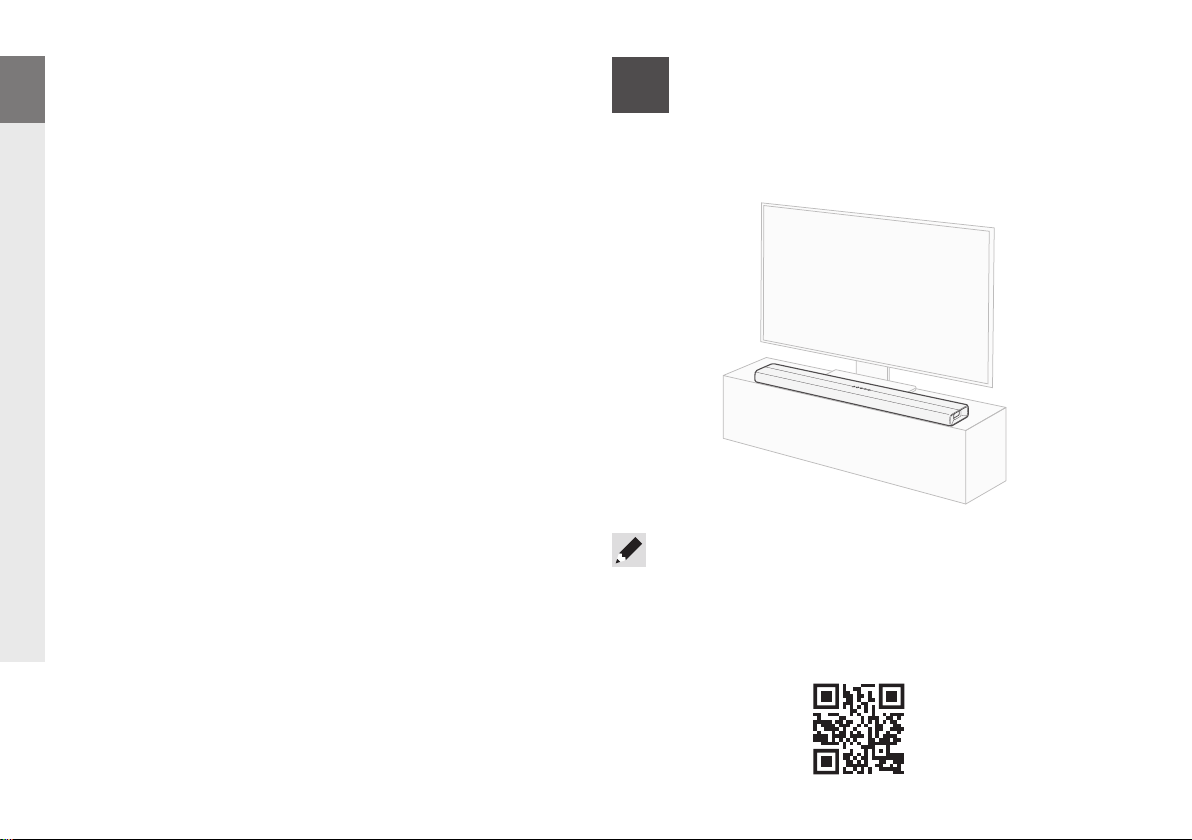
Place the sound bar
DE
FR
IT
ES
NL
SV
RU
PL
What’s in the box
• Sound bar
• Quick Start Guide
• Safety instructions
• Power cord
• HDMI cable (4K)
• Remote control (RC-1251)
• 2× R03/AAA batteries
For the best listening experience, place the sound bar centered
under your TV and flush with the front edge of your cabinet.
• The sound bar can also be wall-mounted using the mounting
template printed on the bottom of the box. Scan the QR code
for wall mounting instructions or consult with your local Denon
dealer or professional installer.
1
Page 3
Connect the sound bar to
2
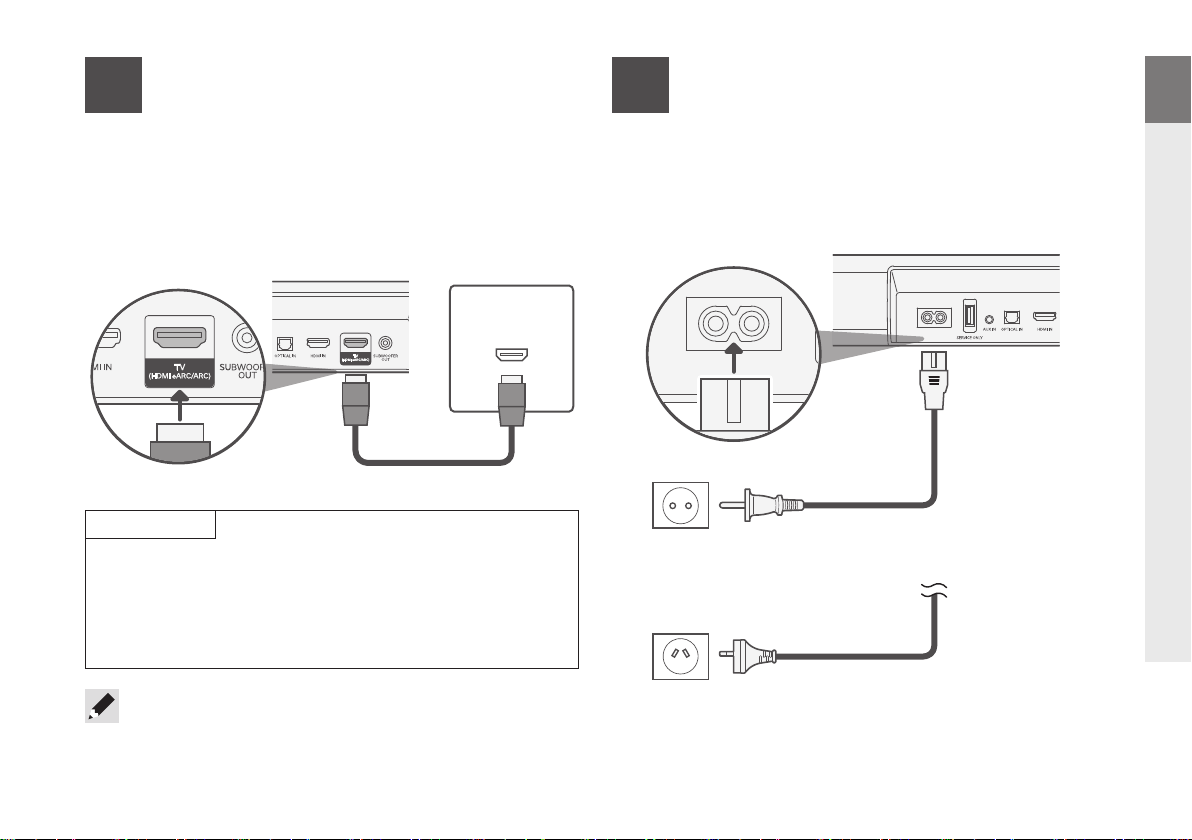
q Plug one end of the HDMI cable into the eARC/ARC port
w
Plug the other end of the HDMI cable into the eARC/ARC
your TV
on your TV.
port on the sound bar.
Sound bar (rear panel)
TV
HDMI INPUT
(eARC/ARC)
Connect the power cord to a
3
Connect the included power cord to the sound bar,
and insert the plug into an outlet.
wall outlet
Sound bar (rear panel)
EN
DE
FR
IT
ES
NL
HDMI cable (included)
IMPORTANT
• Look carefully for the HDMI port on your TV labeled “eARC”
or “ARC”.
• Most TVs have only one HDMI port labeled “ARC” or “eARC”.
You must connect to that specifi c port or else the sound bar
will not play TV audio.
• If the TV does not have an HDMI port labeled “eARC” or “ARC”,
connect the sound bar to the TV using the optical cable. Please
note that an optical connection does not support Dolby Atmos®.
Power cord
(European model only)
Power cord
(Australian model only)
SV
RU
PL
2
Page 4
EN
DE
FR
IT
ES
NL
SV
RU
PL
Install batteries
4
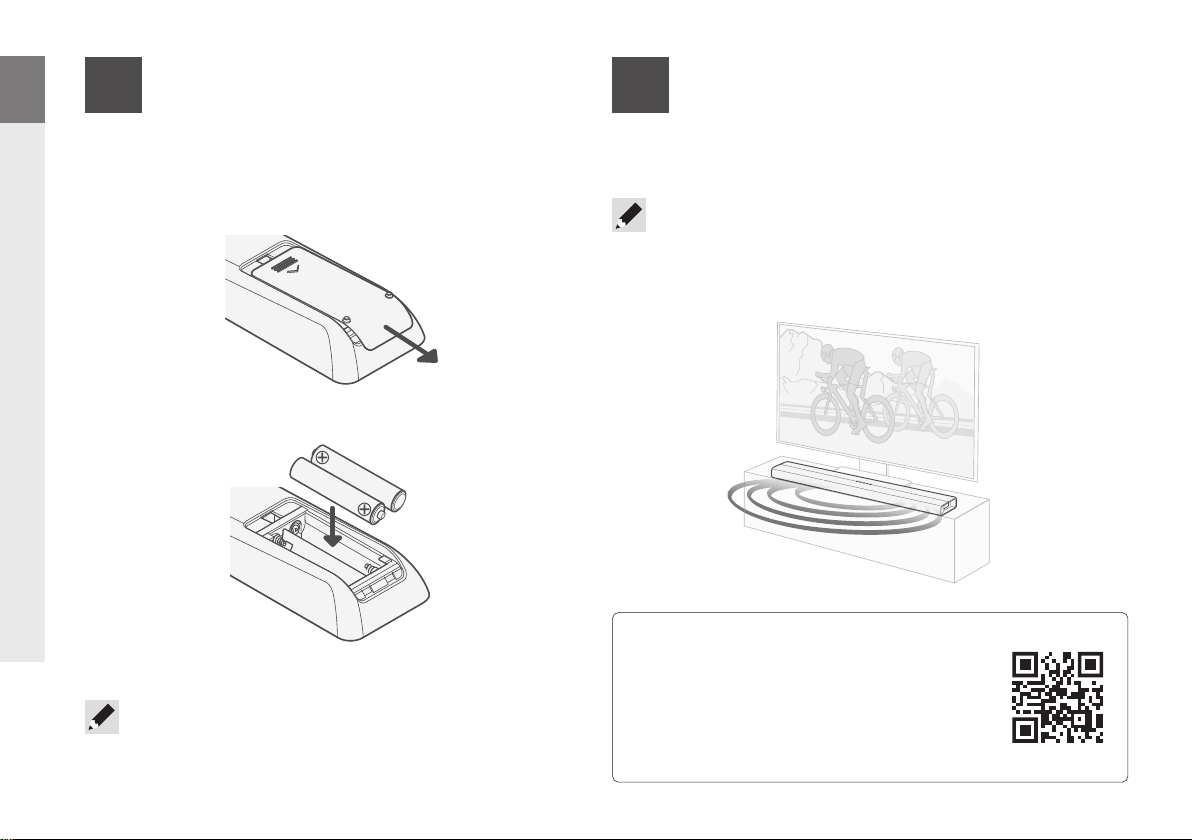
Slide off the cover on the back of the remote control and
insert the batteries in the proper orientation.
• Batteries can be taken out in reversed order.
in the remote control
5
Turn on your TV and verify that you hear sound playing from
the sound bar.
• If you don't hear sound from the sound bar or you hear an echo,
make sure to check the following in the TV settings menu:
1) CEC and/or ARC is enabled and 2) TV speakers are switched off
Setup is now complete!
Owner’s manual
• Refer to the online manual for other
functions, information and operation
procedure details.
manuals.denon.com/DHTS218/EU/EN/
• For more information, visit www.denon.com
3
Page 5
Streaming music via Bluetooth
®
EN
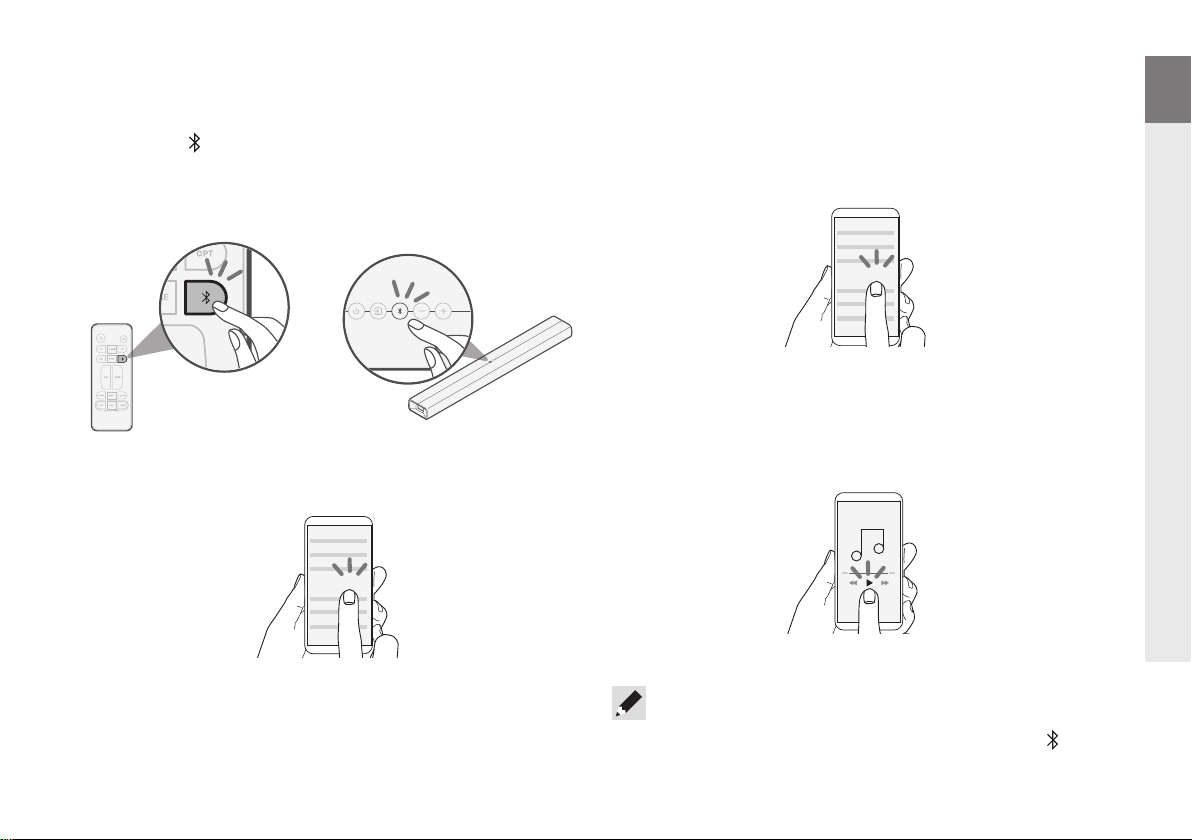
q Press the (Bluetooth) button on the sound bar (or remote
control) to switch the input source to “Bluetooth”.
When you use it for the fi rst time, the sound bar automatically
enters pairing mode and the Bluetooth light blinks blue.
or
w Go to the Bluetooth settings on your device, and make
sure Bluetooth is turned ON.
Bluetooth ON
e Select “Denon DHT-S218”.
The Bluetooth light on the sound bar turns solid blue when
pairing is complete.
Denon DHT-S218
• This unit supports Bluetooth LE Audio. To listen to Bluetooth
LE Audio, select “LE-Denon DHT-S218” while using a device
that supports Bluetooth LE Audio.
r Play music using any app on your Bluetooth device.
DE
FR
IT
ES
NL
SV
RU
PL
• To pair with other Bluetooth devices, press and hold the button until
the Bluetooth light blinks blue. The sound bar enters pairing mode.
4
Page 6
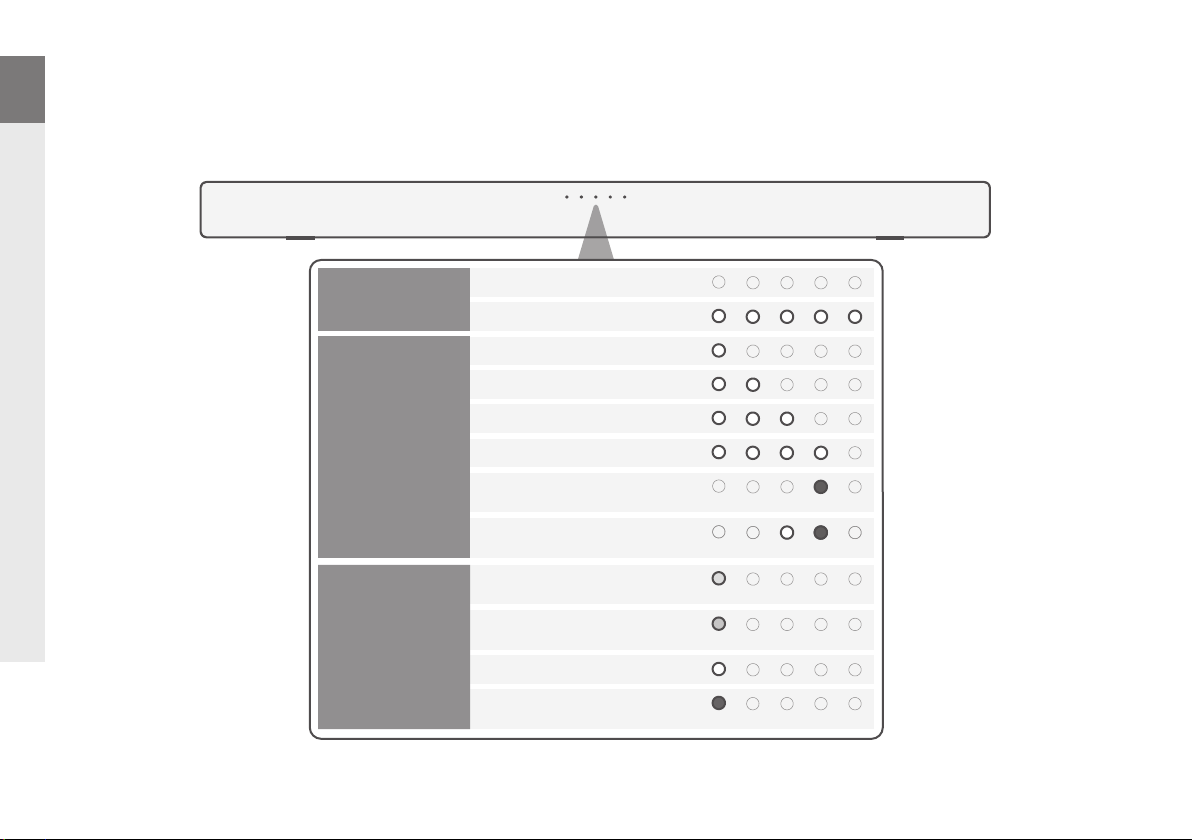
EN
About the status lights
DE
FR
IT
ES
NL
SV
RU
PL
The sound bar lights indicate the power state, input source, audio format and other status information.
Power
Input
source
Audio format
Off (Standby)
On
TV (HDMI eARC/ARC)
HDMI
TV (OPTICAL)
AUX
Bluetooth
Bluetooth LE Audio
Dolby Atmos
®
(other than Atmos)
Dolby
PCM (or No Signal)
Unsupported audio format
(Blue)
(Blue)
(Cyan)
(Green)
(Red)
5
Page 7

Trademark information
Dolby, Dolby Vision, Dolby Atmos, and the double-D symbol are registered trademarks
of Dolby Laboratories Licensing Corporation. Manufactured under license from Dolby
Laboratories. Confidential unpublished works. Copyright © 2012–2022 Dolby Laboratories.
All rights reserved.
The terms HDMI, HDMI High-Definition Multimedia Interface, HDMI trade dress and the
HDMI Logos are trademarks or registered trademarks of HDMI Licensing Administrator, Inc.
The Bluetooth® word mark and logos are registered trademarks owned by the Bluetooth
SIG, Inc. and any use of such marks by DEI Sales, Inc. is under license. Other trademarks
and trade names are those of their respective owners.
Page 8

www.denon.com
Printed in China 5411 12084 00AS
© 2024 Masimo. All Rights Reserved.
 Loading...