

Page 1
Owner's
Manual
Model No.
139.53962SRT
139.53975SRT
For Residential Use
Only
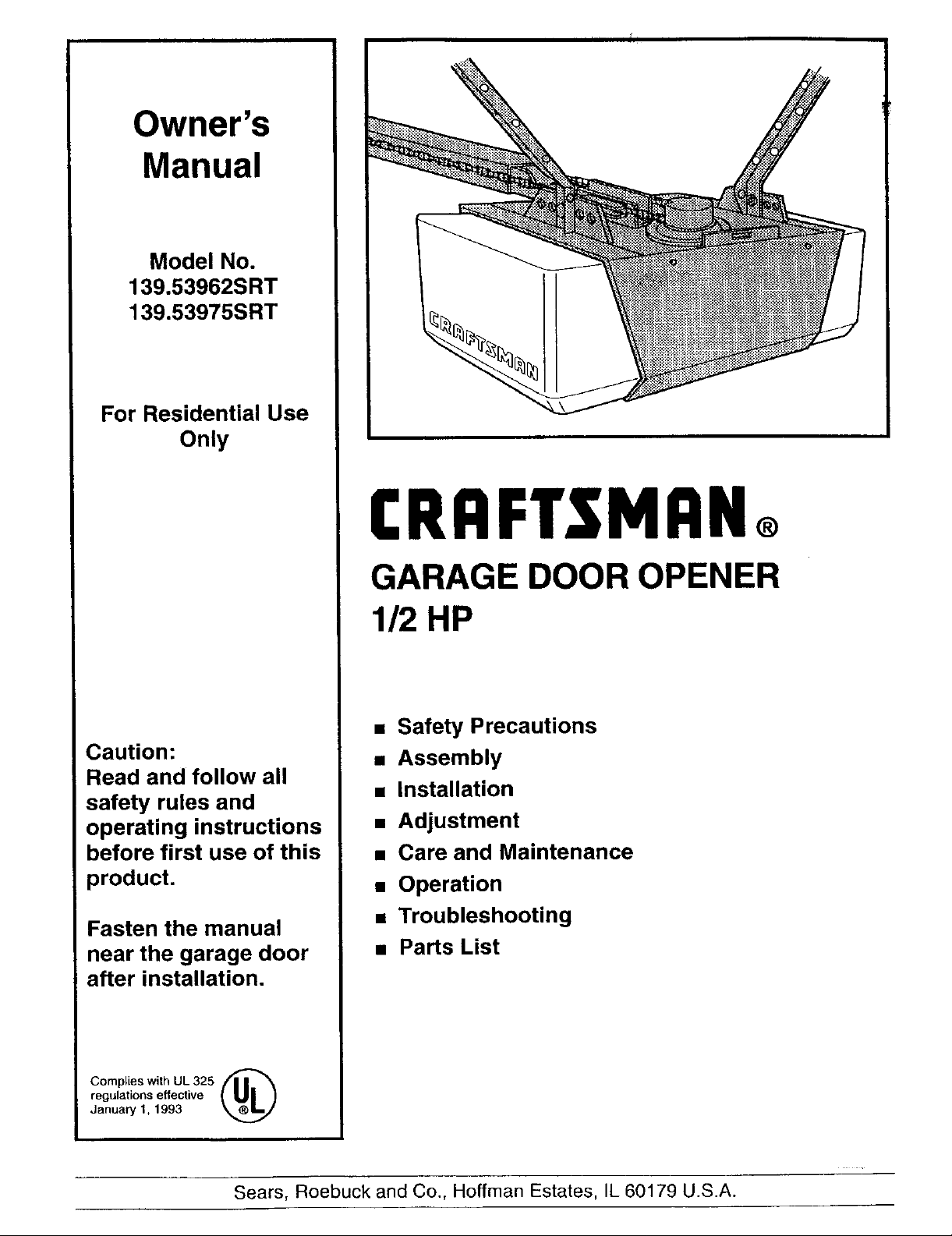
CRAFTSMAN®
GARAGE DOOR OPENER
Caution:
Read and follow all
safety rules and
operating instructions
before first use of this
product.
Fasten the manual
near the garage door
after installation.
112HP
• Safety Precautions
• Assembly
• Installation
• Adjustment
• Care and Maintenance
• Operation
• Troubleshooting
• Parts List
Complies with UL325 [11_ _
regulations effective
January 1, 1993
Sears, Roebuck and Co., Hoffman Estates, IL 60179 U.S.A.
Page 2
Contents Page
A review of safety alert symbols ................................. 2
You'll need tools.......................................................... 3
Safety information regarding garage door
locks and ropes ......................................................... 3
Testing your garage door for sticking,
binding and balance .................................................. 3
lUustration of sectional door installation .....................4
Illustration of one-piece door installation ....................5
Carton inventory .......................................................... 6
Hardware inventory ..................................................... 7
Assembly section - pages 8 - 11
Assemble the rail & install the trolley........................8
Fasten the railto the opener..................................... 9
Installthe idler pulley ................................................ 9
Installchain/cable & attach the sprocket cover......10
Tighten the chain .................................................... 11
Installation section - pages 11 - 27
Installationsafety instructions................................. t 1
Determine header bracket location
Sectional door...................................................... 12
One-piece door .................................................... 13
Installthe header bracket ....................................... 14
Attach the railto header bracket ............................ 15
Positionthe opener ................................................. 16
Hang the opener ..................................................... 17
Installthe door control ............................................ 18
Contents Page
install the lightsand lenses ...................................... 19
Attach emergency release rope and handle ...........19
Electrical requirements ............................................. 20
Safety reversing sensor information ........................ 21
install the safety reversing sensor ..................... 22, 23
Fasten door bracket (sectional door) ....................... 24
Fasten door bracket (one-piece door) ..................... 25
Connect door arm to trolley (sectional door) ...........26
Connect door arm to trolley (one-piece door) ..........27
Adjustment section - pages 28 - 30
Travel limit adjustments ........................................... 28
Force adjustments .................................................... 29
Test the safety reversing sensor .............................. 30
Test the safety reverse system ............................... 30
Operation safety instructions ..................................... 31
Care of your opener ................................................... 31
Maintenance schedule ............................................... 31
Operation of your opener ........................................... 32
Receiver and remote control programming ...............33
Having a problem? ............................................... 34, 35
Repair parts, rail assembly ......................................... 36
Repair parts, installation ............................................. 36
Repair parts, opener assembly .................................. 37
Accessories ................................................................ 38
Index ........................................................................... 39
How to order repair parts ........................................... 40
Warranty ..................................................................... 40
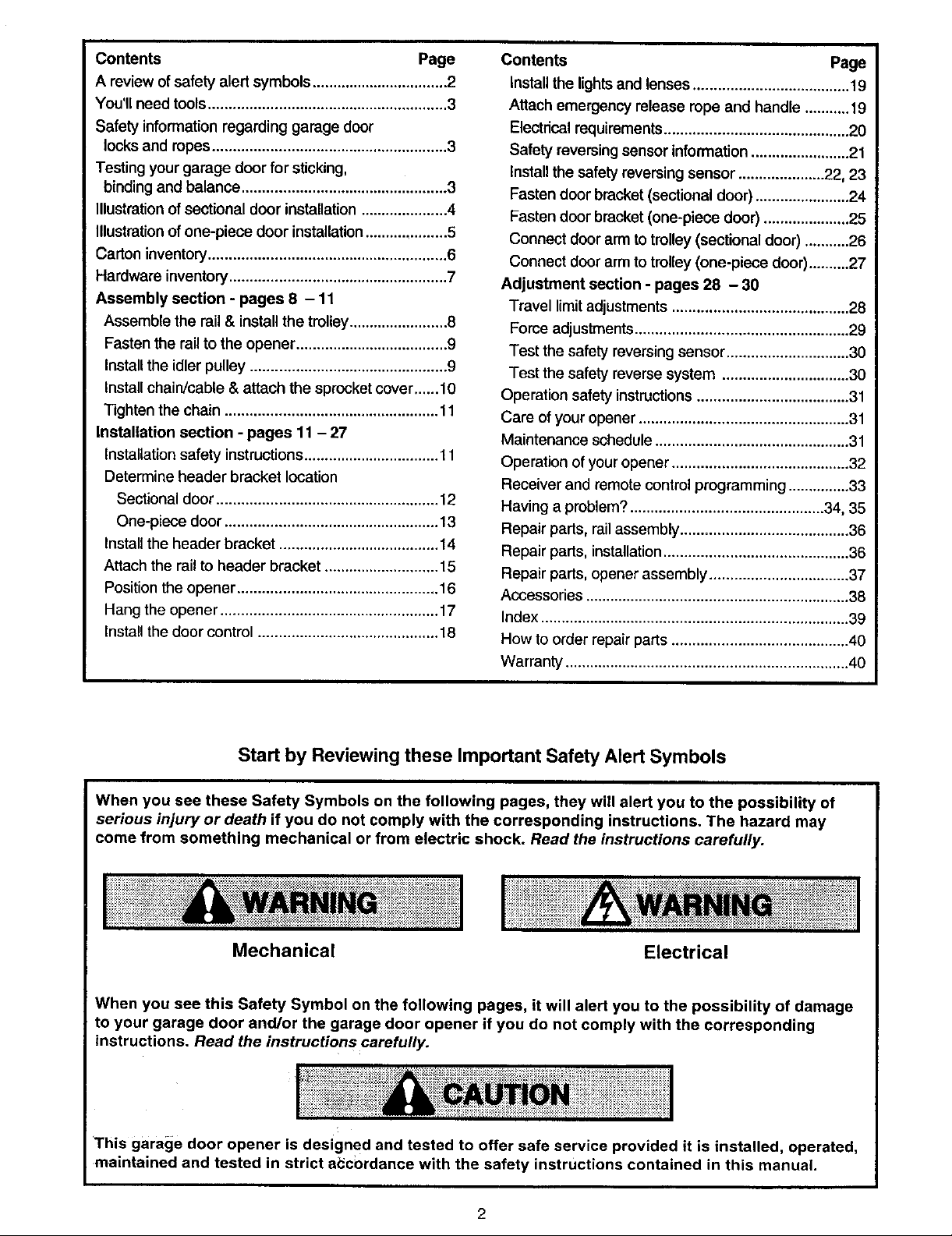
Start by Reviewing these Important Safety Alert Symbols
When you see these Safety Symbols on the following pages, they will alert you to the possibility of
serious injury or death if you do not comply with the corresponding instructions. The hazard may
come from something mechanical or from electric shock. Read the instructions carefully.
Mechanical Electrical
When you see this Safety Symbol on the following pages, it will alert you to the possibility of damage
to your garage door and/or the garage door opener if you do not comply with the corresponding
instructions. Read the instructions carefully.
This garage door opener is designed and tested to offer safe service provided it is installed, operated,
maintained and tested in strict a_cordance with the safety instructions contained in this manual.
Page 3
You'll Need Tools
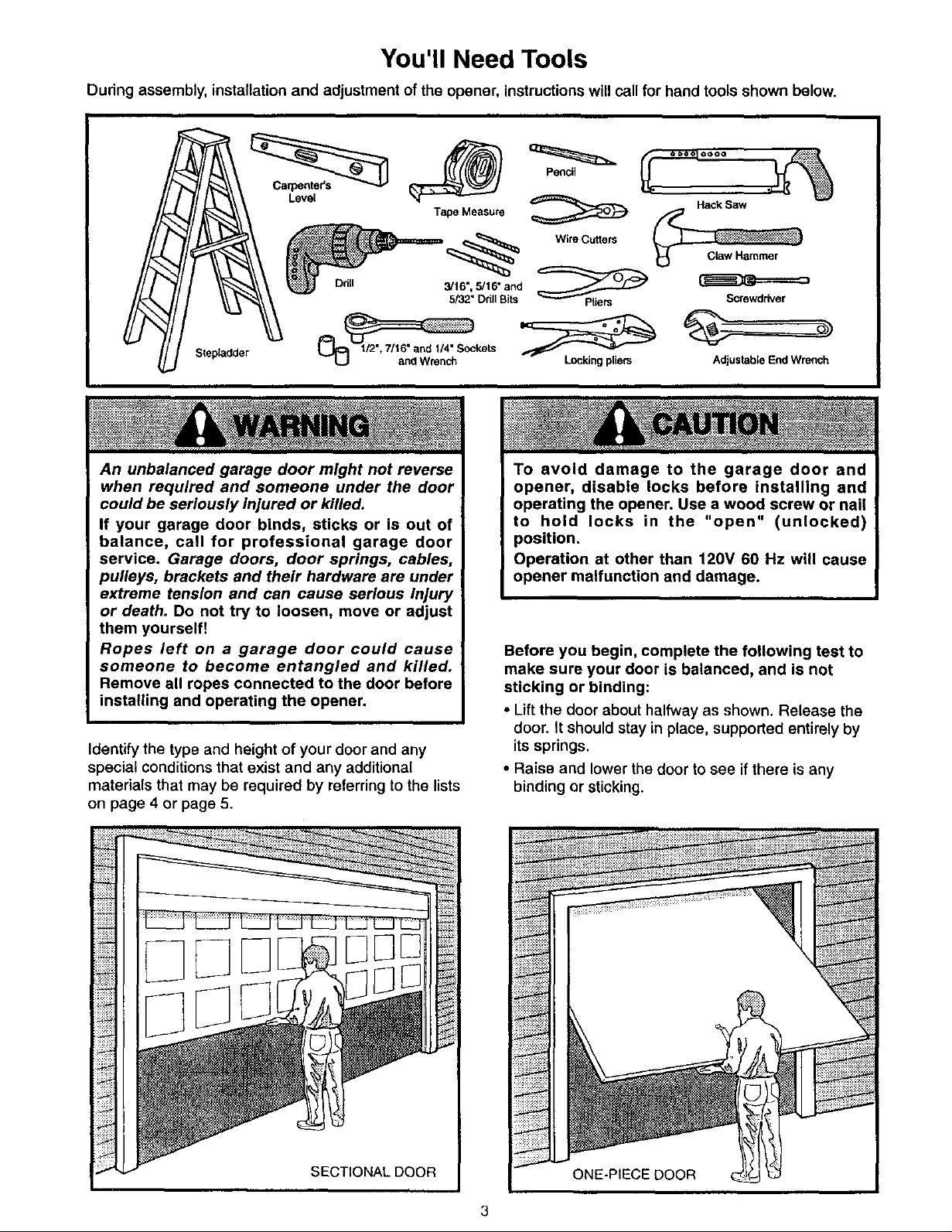
During assembly, installation and adjustment of the opener, instructions will call for hand tools shown below.
Level _ _ HackSaw "_"_
Tape Measure _
/_1 _5/32" Drill Bits I _ ___ _ _=_=_=_ __"_-""-'_Plie rs Screwdriver
Stepladder /2% / 6 and 1/4" Sockets _ - "_ .
L_ and Wrench Locking phem Adjustable End Wrench
An unbalanced garage door might not reverse
when required and someone under the door
could be seriously injured or killed.
If your garage door binds, sticks or is out of
balance, call for professional garage door
service. Garage doors, door springs, cables,
pulleys, brackets and their hardware are under
extreme tension and can cause serious Injury
or death. Do not try to loosen, move or adjust
them yourself!
Ropes left on a garage door could cause
someone to become entangled and killed.
Remove all ropes connected to the door before
installing and operating the opener.
Identify the type and height of your door and any
special conditions that exist and any additional
materials that may be required by referring to the lists
on page 4 or page 5.
iiii!i!i!ili!
V::::::::::
To avoid damage to the garage door and
opener, disable locks before installing and
operating the opener. Use a wood screw or nail
to hold locks in the "open" (unlocked)
position.
Operation at other than 120V 60 Hz will cause
opener malfunction and damage.
Before you begin, complete the following test to
make sure your door is balanced, and is not
sticking or binding:
• Liftthe door about halfway as shown. Release the
door. It should stay in place, supported entirely by
its springs.
• Raise and lower the door to see if there is any
binding or sticking.
!iii!_ii;
kv::::::::
rx:;:r_:::
<v_::::r::_
Page 4
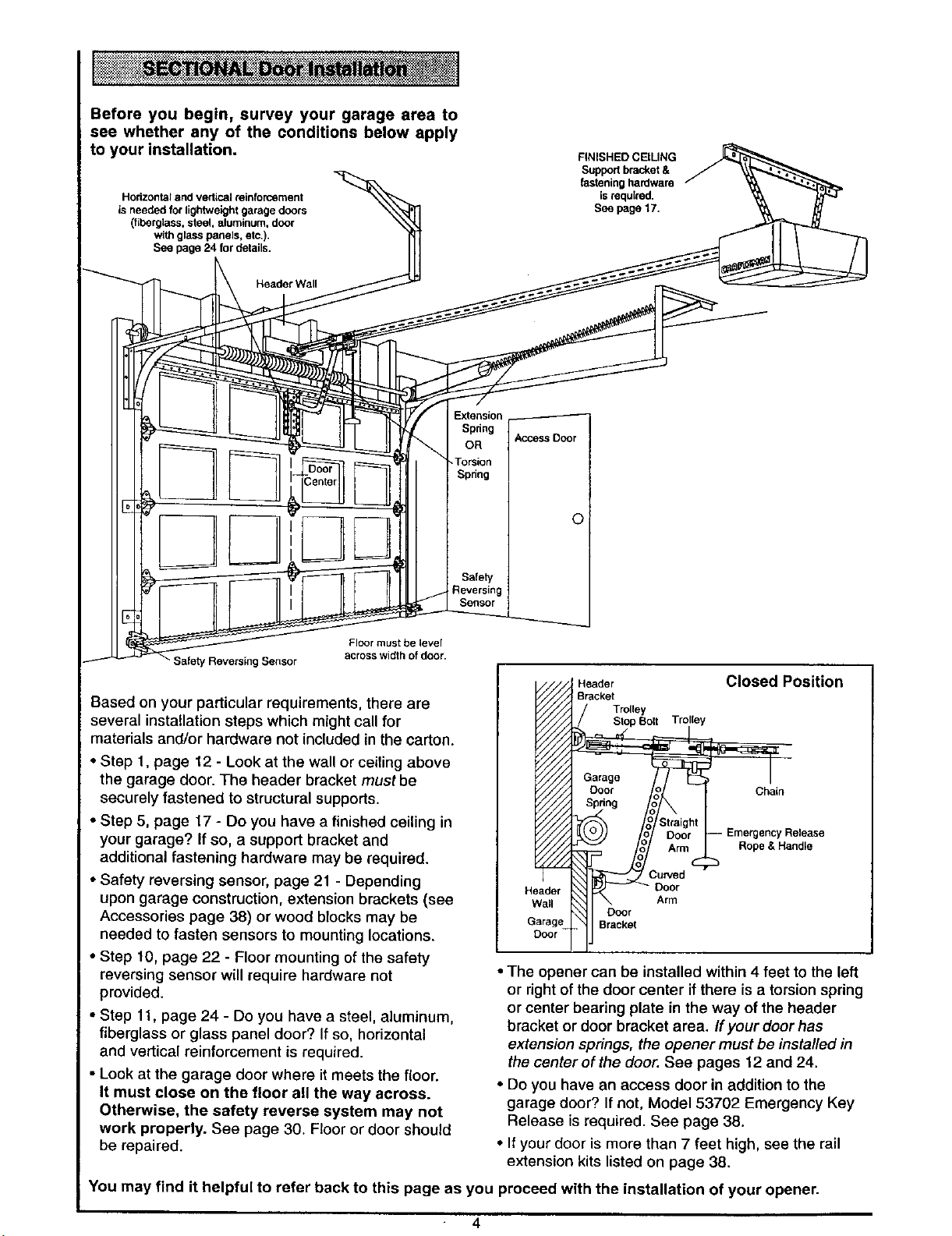
Before you begin, survey your garage area to
see whether any of the conditions below apply
to your installation.
Hodzontal and vedical reinforcement
is needed for lightweight garage doors
(fiberglaSS, steel, aluminum, door
with glass panels, etc.).
See page 24 for delails.
FINISHED CEILING
Support bracket &
fastening hardware
is required.
See page 17.
/
__HeaderWal/_l
Extension
Spring
OR
-Torsion
Spring
J
Access Deer
©
Safety
Reversing
aFIro°_r mludstthboefI_loelr.
Closed Position
Based on your particular requirements, there are
several installation steps which might call for
Header
Bracket
Trolley
Stop Bolt Trolley
materials and/or hardware not included in the carton.
• Step 1, page 12 - Look at the wall or ceiling above
the garage door. The header bracket must be
securely fastened to structural supports.
• Step 5, page 17 - Do you have a finished ceiling in
your garage? If so, a support bracket and
Chain
Release
Rope & Handle
additional fastening hardware may be required.
• Safety reversing sensor, page 21 - Depending
upon garage construction, extension brackets (see
Accessories page 38) or wood blocks may be
Header
Wall Arm
Garage Bracket
Door
needed to fasten sensors to mounting locations.
• Step 10, page 22 - Floor mounting of the safety
reversing sensor will require hardware not
)rovided.
• Step 11, page 24 - Do you have a steel, aluminum,
fiberglass or glass panel door? If so, horizontal
and vertical reinforcement is required.
• Look at the garage door where it meets the floor.
It must close on the floor all the way across.
Otherwise, the safety reverse system may not
work properly. See page 30. Floor or door should
be repaired.
• The opener can be installed within 4 feet to the left
or right of the door center if there is a torsion spring
or center bearing plate in the way of the header
bracket or door bracket area. If your door has
extension springs, the opener must be installed in
the center of the door. See pages 12 and 24.
• Do you have an access door in addition to the
garage door? If not, Model 53702 Emergency Key
Release is required. See page 38.
• If your door is more than 7 feet high, see the rail
extension kits listed on page 38.
You may find it helpful to refer back to this page as you proceed with the installation of your opener.
Page 5
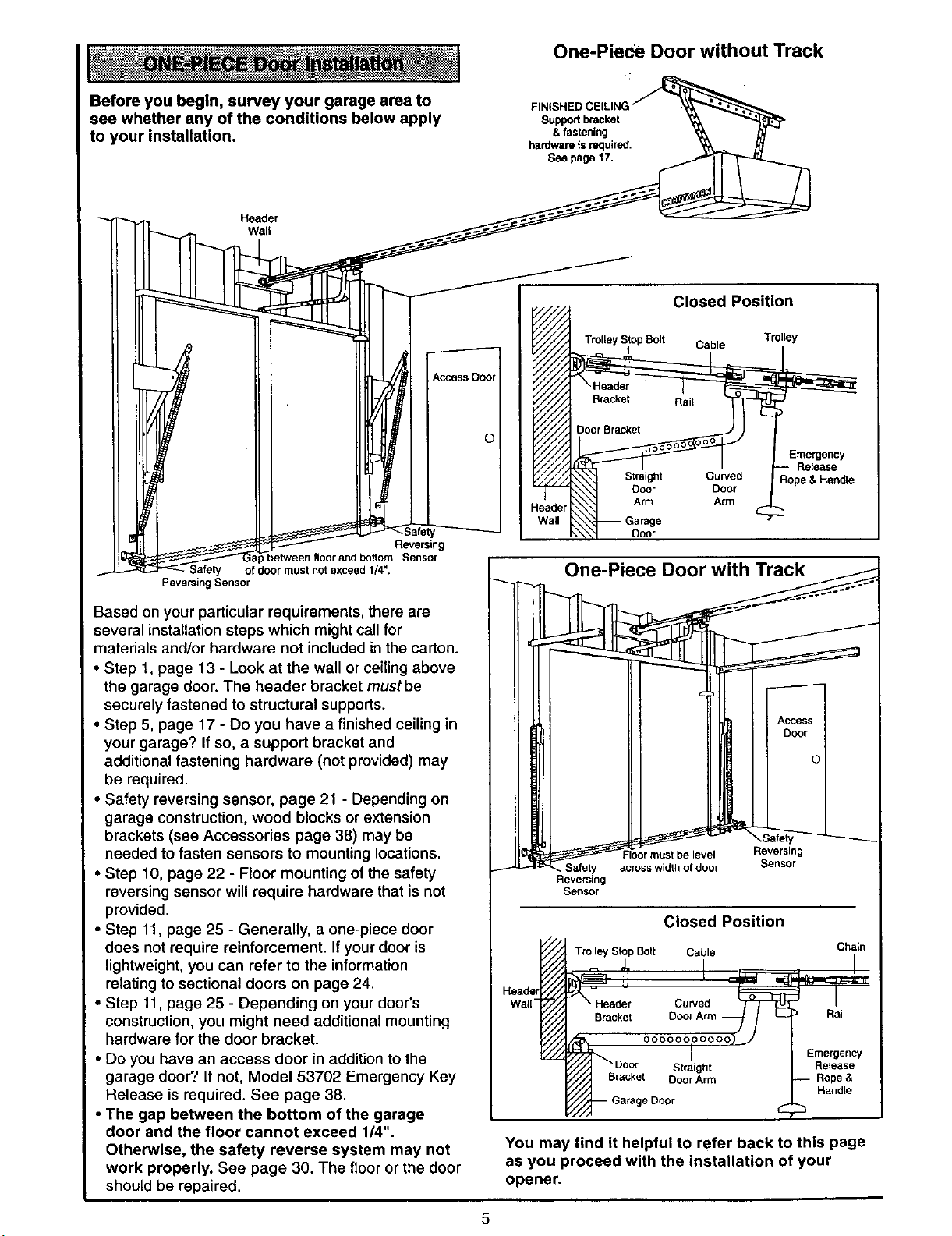
Before you begin, survey your garage area to
see whether any of the conditions below apply
to your installation.
Header
Wall
One-Piece Door without Track
Supportbracket
& fastening
hardwareis requirsd.
See page 17.
Closed Position
O Trolley Stop Bolt Cable Trolley
Rope &Handle
teader
Emergency
Release
etween floor and bottom Sensor
of door must not exceed 1/4".
Reversing Sensor
Reversing
Based on your particular requirements, there are
several installation steps which might call for
materials and/or hardware not included in the carton.
• Step 1, page 13 - Look at the wall or ceiling above
the garage door. The header bracket must be
securely fastened to structural supports.
• Step 5, page 17 - Do you have a finished ceiling in
your garage? If so, a support bracket and
additional fastening hardware (not provided) may
be required.
• Safety reversing sensor, page 21 - Depending on
garage construction, wood blocks or extension
brackets (see Accessories page 38) may be
needed to fasten sensors to mounting locations.
• Step 10, page 22 - Floor mounting of the safety
reversing sensor will require hardware that is not
provided.
• Step 11, page 25 - Generally, a one-piece door
does not require reinforcement. Ifyour door is
lightweight, you can refer to the information
relating to sectional doors on page 24.
• Step 11, page 25 - Depending on your door's
construction, you might need additional mounting
hardware for the door bracket.
• Do you have an access door in addition to the
garage door? If not, Model 53702 Emergency Key
Release is required. See page 38.
• The gap between the bottom of the garage
door and the floor cannot exceed 1/4".
Otherwise, the safety reverse system may not
work properly. See page 30. The floor or the door
should be repaired.
i
One-P_
Reversing
Sensor
Closed Position
Trolley Stop Bolt Cable Chain
Header
Walt-
Straight
Door Arm
e Door
You may find it helpful to refer back to this page
as you proceed with the installation of your
opener.
Rail
Emergency
Release
Handle
Page 6
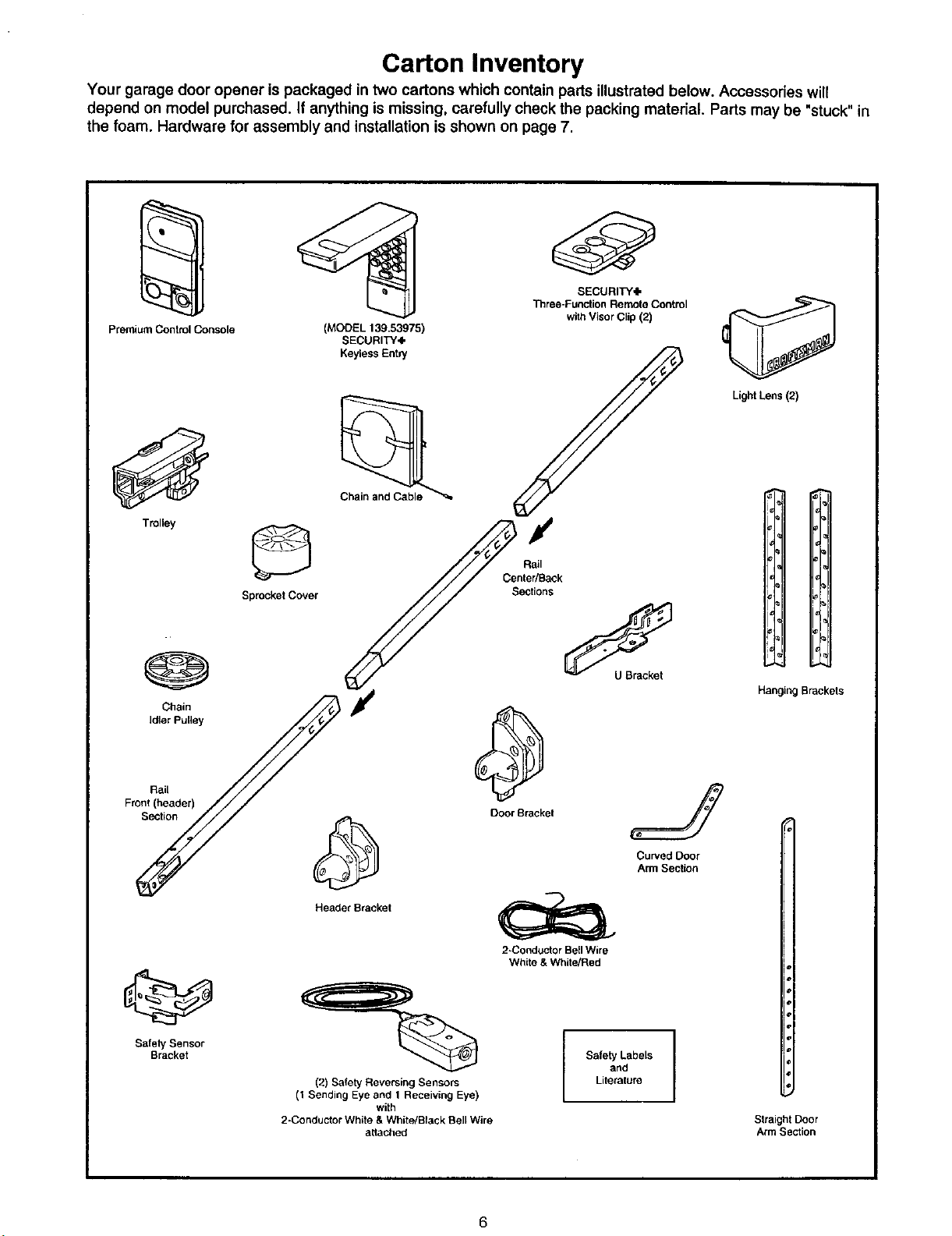
Carton Inventory
Your garage door opener is packaged in two cartons which contain parts illustrated below. Accessories will
depend on model purchased. If anything is missing, carefully check the packing material. Parts may be "stuck" in
the foam. Hardware for assembly and installation is shown on page 7.
SECURITY,I,
"l_ree-Function Remote Control
Premium Control Console
(MODEL 139.53975)
SECURITY4,
Keyless Ent_/
Chain and Cable
with Visor Clip (2)
Light Lens (2)
Trolley
@
Chain
Idler Pulley
Rail
Front (header)
Section
Sprocket Cover
Header Bracket
/
Rail
Center/Back
Sections
Door Bracket
2-Conductor Bell Wire
White & White/Red
H
Hanging Brackets
J
Curved Door
Arm Section
Safety Sensor
Bracket
(2) Safety Reversing Sensors
(1 Sending Eye and 1 Receiving Eye)
2-Conductor White & White/Black Bell Wire
with
attached
Literature
SafetyandLabels I
Straight Door
Arm Section
6
Page 7
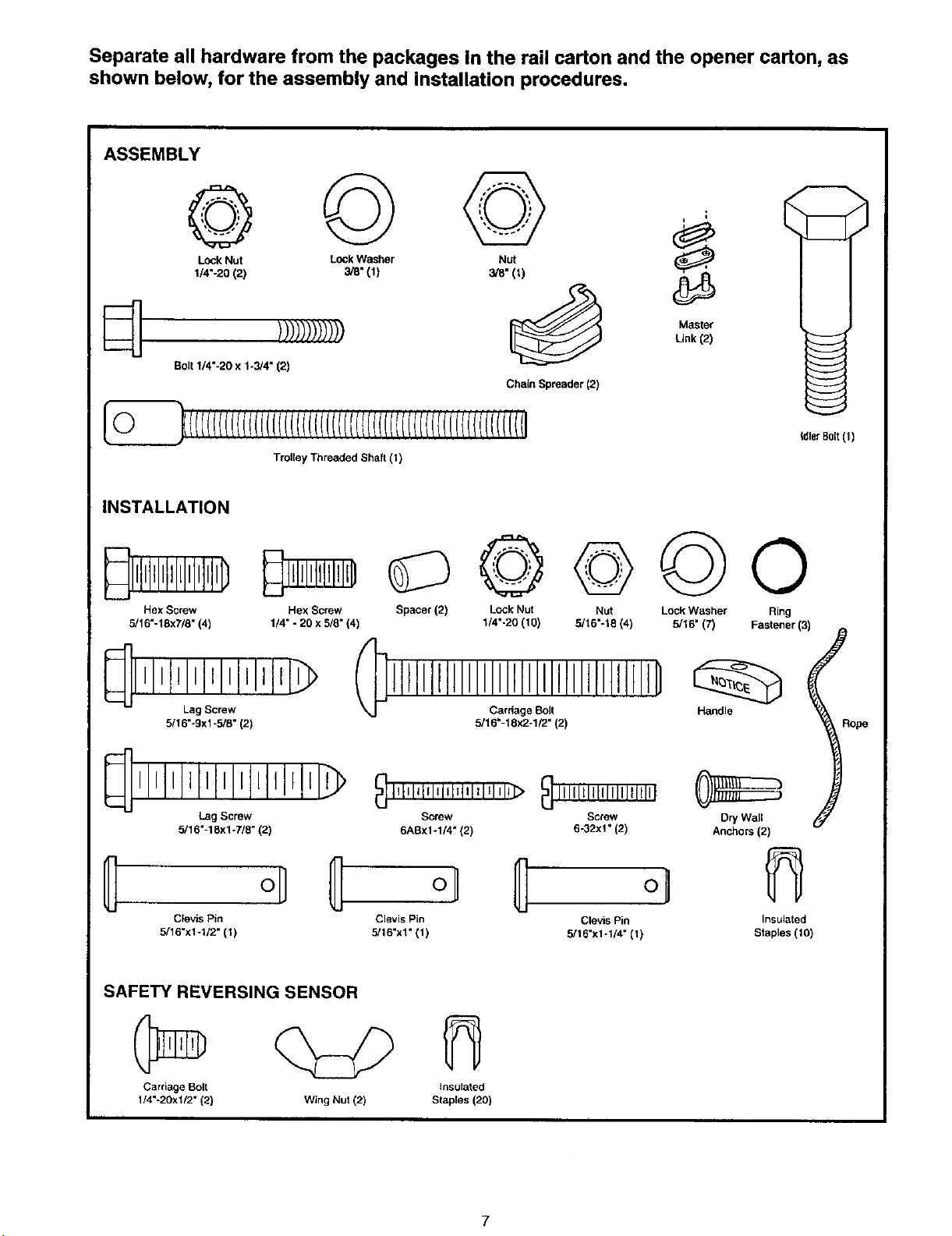
Separate all hardware from the packages In the rail carton and the opener carton, as
shown below, for the assembly and installation procedures.
ASSEMBLY
Lock Nut Lock Washer Nut _L_'_'-_
1/4"-BO (2) 3i8" (1) we" (_)
)))))))))))) _ LinkMaster(2)
Bolt 1/4"-20 x 1-3/4" (2)
Chain Spreader (2)
O_(i(((((((((((((((((((((((((((((((((((((((((((((((((((r((((i
Trolley Threaded Shaft (t)
INSTALLATION
_llLIt_llJllllllllllID
Hex Screw
5/16"-18x7/8" (4)
{_llllllllat_
Lag Screw
5/16"-9xl -5/8" (2)
Hex Screw Spacer (2) Lock Nut Nut Lock Washer Ring
1/4" - 20 x 5/8" (4) t/4"-20 (10) 5/16"-18 (4) 5/16" (7) Fastener (3)
IIIlillillllllllllD .and,°
Cardage Bolt [_
5/16"-18x2-1/2" (2)
_ll'lllllll'ltll Illt_ _,,,,,,,,,,,,,,,,,,,,,,,,__,,,,,,,,,,,,,,,,,,,,,
Lag Screw Screw Screw
5/16"-18x1-7/8" (2) 6ABxlo1/4" (2) 6-32xl" (2)
Dry Wall
Anchors (2)
tdlerB01t(1)
_ope
Clevis Pin Clevis Pin Clevis Pin
5/16"xl-U2" (1) 3/16"x1" (1) 5/16"x1-1/4" (1)
SAFETY REVERSING SENSOR
Carriage Bolt
1/4"-20xt/2" (2)
Wing Nut (2) Staples (20)
Insulated
Staples (10)
Insulated
Page 8
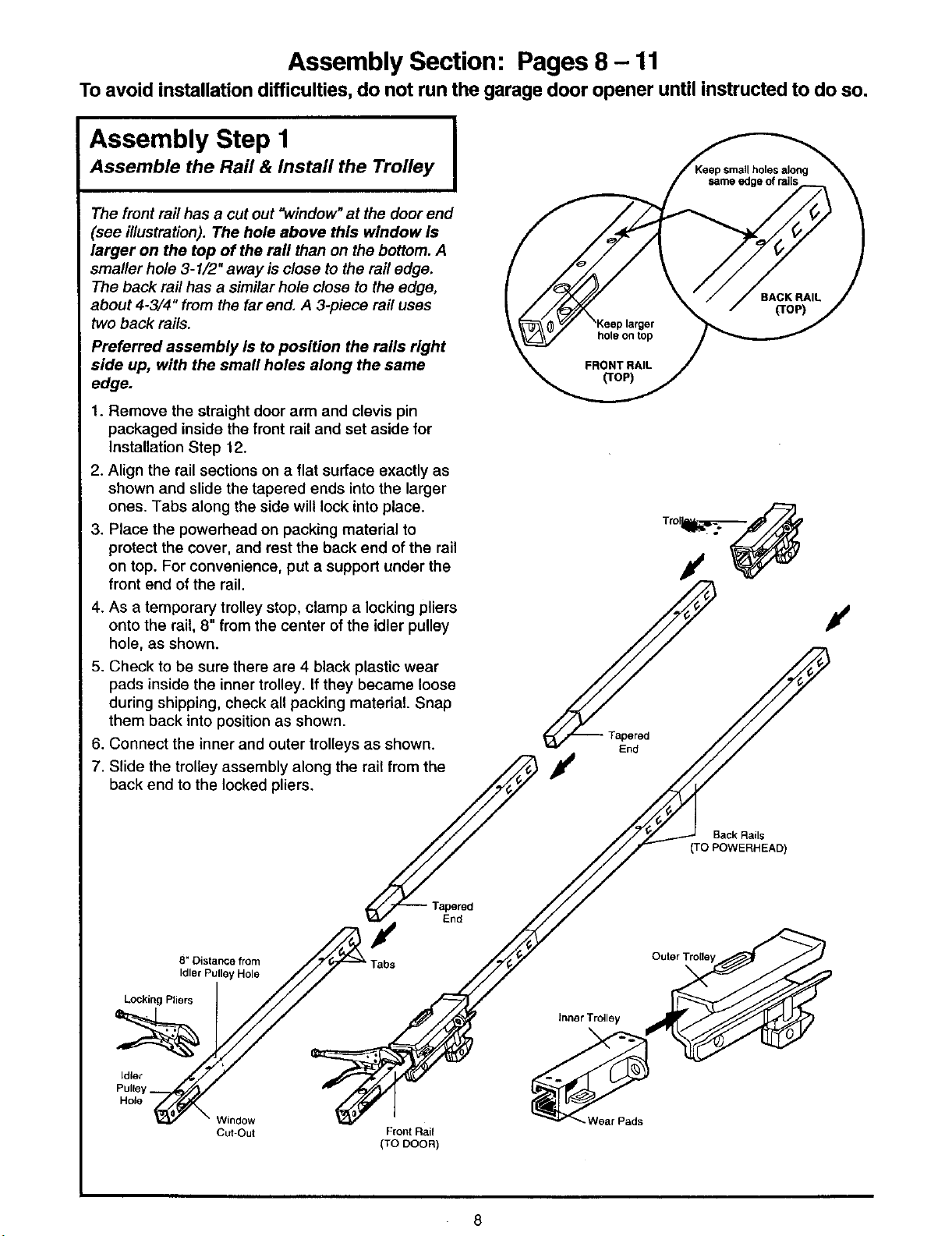
Assembly Section: Pages 8 - 11
To avoid installation difficulties, do not run the garage door opener until instructed to do so.
Assembly Step I I
Assemble the Rail & Install the Trolley
The front rail has a cut out "window"at the door end
(see illustration). The hole above this window Is
larger on the top of the rail than on the bottom. A
smaller hole 3- I/2" away is close to the rail edge.
The back rail has a similar hole close to the edge,
about 4.3/4" from the far end. A 3-piece rail uses
two back rails.
Preferred assembly is to position the rails right
side up, with the small holes along the same
edge.
1. Remove the straight door arm and clevis pin
packaged inside the front rail and set aside for
Installation Step 12.
2. Align the rail sections on a flat surface exactly as
shown and slide the tapered ends into the larger
ones. Tabs along the side will lock into place.
3. Place the powerhead on packing material to
protect the cover, and rest the back end of the rail
on top. For convenience, put a support under the
front end of the rail.
4. As a temporary trolley stop, clamp a locking pliers
onto the rail, 8" from the center of the idler pulley
hole, as shown.
5. Check to be sure there are 4 black plastic wear
pads inside the inner trolley. If they became loose
during shipping, check all packing material. Snap
them back into position as shown.
6. Connect the inner and outer trolleys as shown.
7. Slide the trolley assembly along the rail from the
back end to the locked pliers.
I
/
End
/
/
Cut-Out Front Rail
(TO DOOR)
Back Rails
(TO POWERHEAD)
Tapered
End
Inner Trolley
Wear Pads
8
Page 9
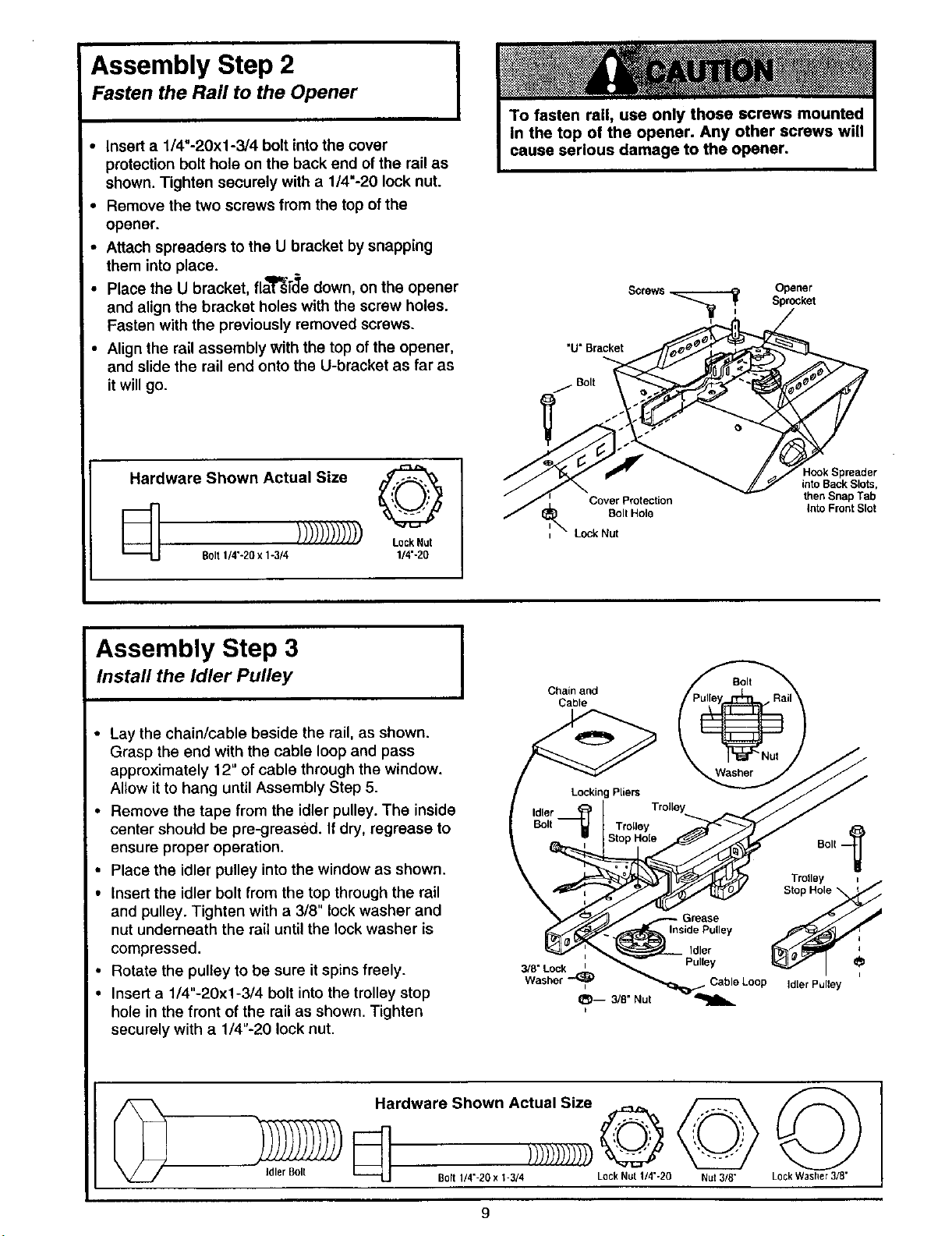
Assembly Step 2 I
Fasten the Rail to the Opener
• Insert a 1/4"-20xl-3/4 bolt into the cover
protection bolt hole on the back end of the rail as
shown. Tighten securely with a 1/4"-20 lock nut.
• Remove the two screws from the top of the
opener.
• Attach spreaders to the U bracket by snapping
them into place.
• Place the U bracket, fla_i_'e down, on the opener
and align the bracket holes with the screw holes.
Fasten with the previously removed screws.
• Align the rail assembly with the top of the opener,
and slide the rail end onto the U-bracket as far as
it will go.
I
Opener
Sprccket
"U" Bracket
/ Bolt
Hardware Shown Actual Size Oq.F_,,_
Eli ))))))))))))L00k.u,
Bolt 1/4"o20x 1-3/4 1/4'-20
Assembly Step 3
Install the Idler Pulley
• Lay the chain/cable beside the rail, as shown.
Grasp the end with the cable loop and pass
approximately 12" of cable through the window.
Allow it to hang until Assembly Step 5.
• Remove the tape from the idler pulley. The inside
center should be pre-greased. If dry, regrease to
ensure proper operation.
• Place the idler pulley into the window as shown.
• Insert the idler bolt from the top through the rail
and pulley. Tighten with a 3/8" lock washer and
nut underneath the rail until the lock washer is
compressed.
• Rotate the pulley to be sure it spins freely.
• Insert a 1/4"-20xl-3/4 bolt into the trolley stop
hole in the front of the rail as shown. Tighten
securely with a 1/4"-20 lock nut.
Lock Nut
I Chain and
Cable
Bolt
3/8" Lock _
Washer I
_-- 3/8" Nut
Cover Protection
Bolt Hole
t
Grease
InsidePulley
Idler
Pulley
Cable Loop
HookSpreader
intoBack Slots,
thenSnapTab
Into FrontSlot
Bolt
Idler Pulley
I
Hardware Shown Actual Size
Idler Bolt Bo_tt/4'-2B x t-3/4 LockNut 1/4"-20 Nut 3/8" LockWasher3/8"
Page 10
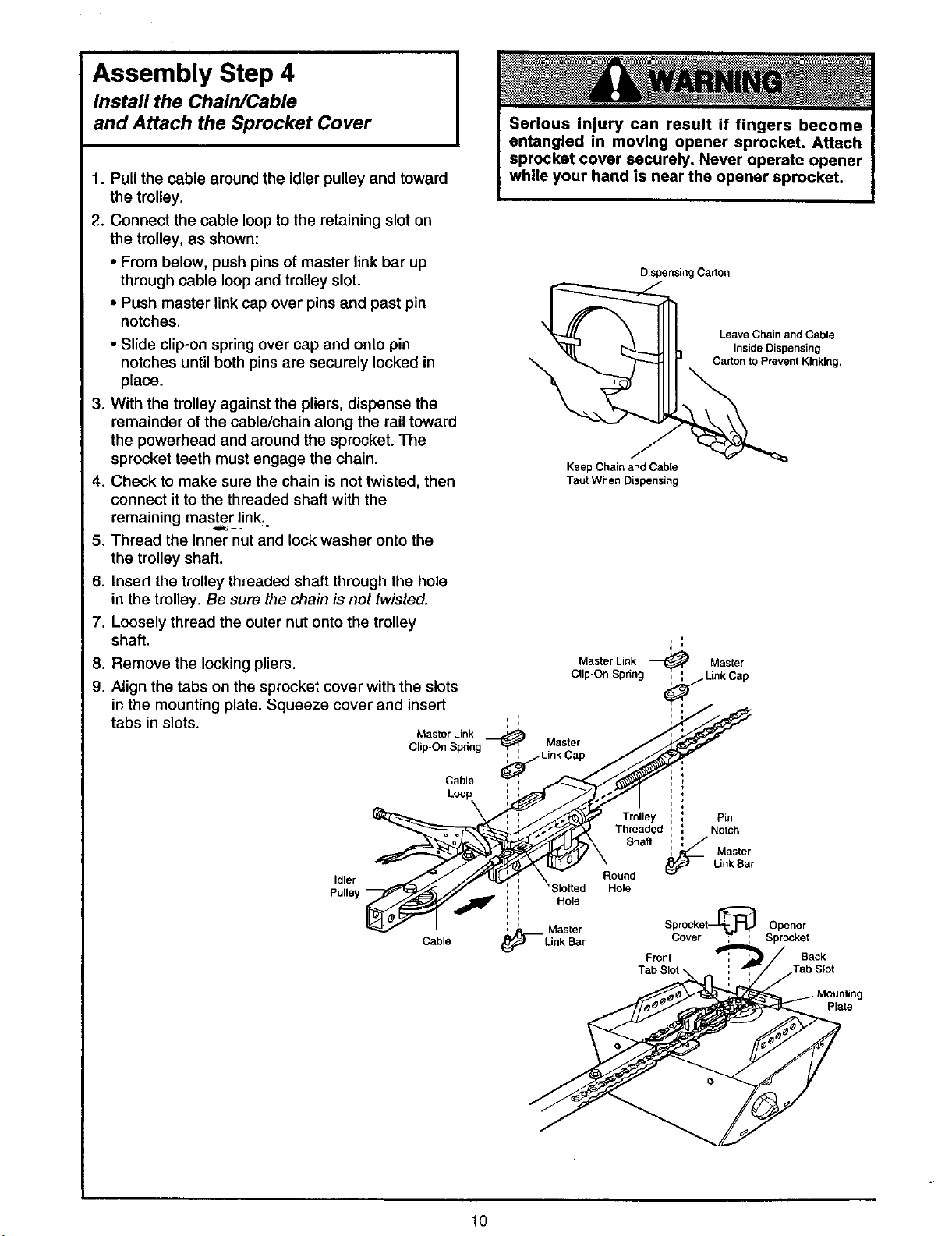
Assembly Step 4
Install the Chain/Cable
and Attach the Sprocket Cover
1. Pull the cable around the idler pulley and toward
the trolley.
2. Connect the cable loop to the retaining slot on
the trolley, as shown:
• From below, push pins of master link bar up
through cable loop and trolley slot.
• Push master link cap over pins and past pin
notches.
• Slide clip-on spring over cap and onto pin
notches until both pins are securely locked in
place.
3. With the trolley against the pliers, dispense the
remainder of the cable/chain along the rail toward
the powerhead and around the sprocket. The
sprocket teeth must engage the chain.
4. Check to make sure the chain is not twisted, then
connect it to the threaded shaft with the
remaining master!ink..
5. Thread the inner nut and lock washer onto the
the trolley shaft.
6. Insert the trolley threaded shaft through the hole
in the trolley. Be sure the chain is not twisted.
7. Loosely thread the outer nut onto the trolley
shaft.
8. Remove the locking pliers.
9. Align the tabs on the sprocket cover with the slots
in the mounting plate. Squeeze cover and insert
tabs in slots.
Master Link
Clip-On Spring _ _ Link Cap
Idler
Pulley
Cable Cover ; ' Sprocket
Cable
Loop
DispensingCarton
Keep Chain and Cable
Taut When Dispensing
i
I i
i
Master Link _ Master
Clip-On Spr_ng _ Link Cap
I q
i
Master
\
Threaded Notch
Round
' ' Hole
i i
;lotted Hole
' Sprocket Opener
i
Trolley Pin
Shaft
Front Back
Leave Chain and Cable
inside Dispensing
Carton to Prevent Kinking.
Master
Link Bar
10
Mounting
Plate
Page 11
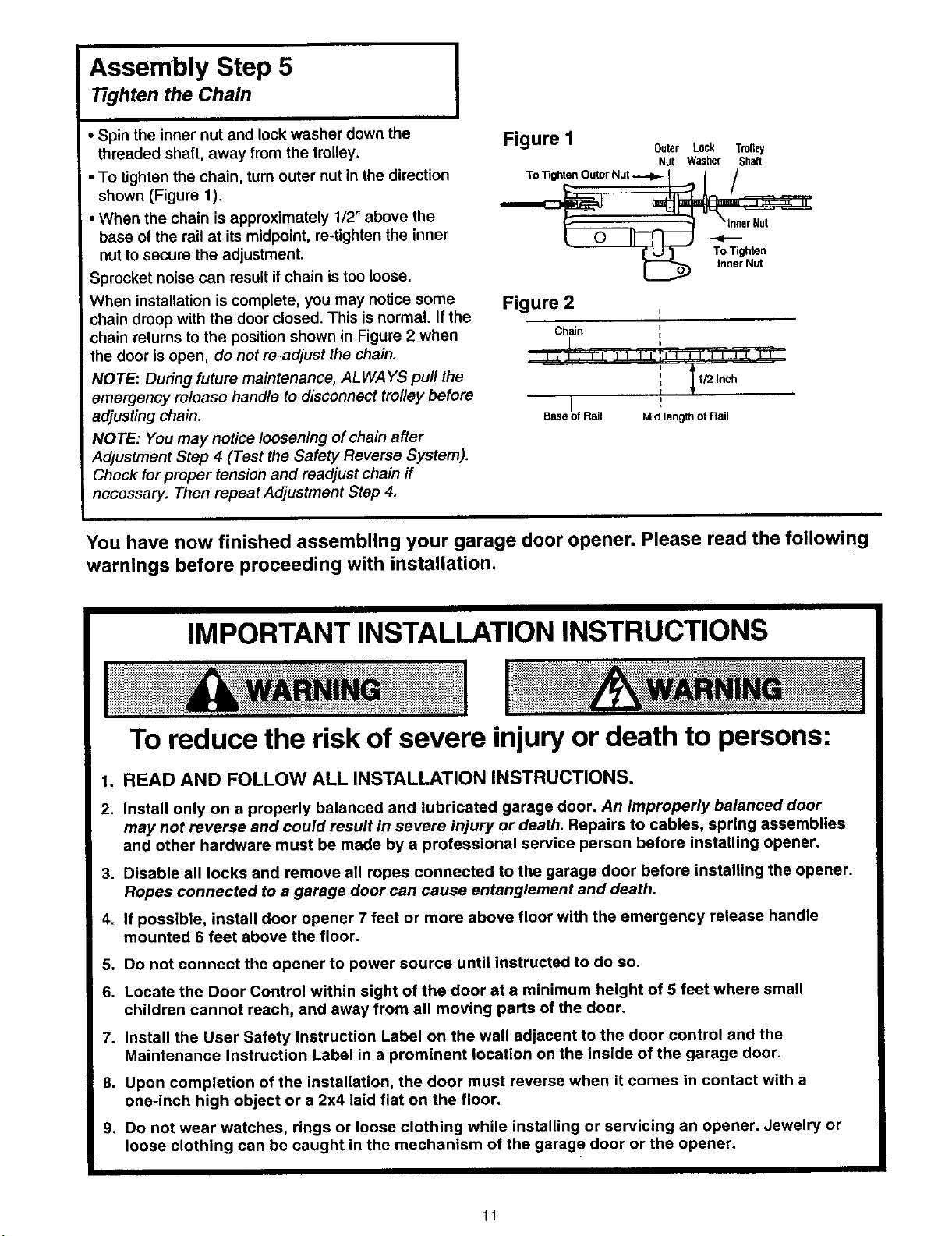
Assembly Step 5
Tighten the Chain
I
• Spin the inner nut and lock washer down the
threaded shaft, away from the trolley.
• To tighten the chain, turn outer nut in the direction
shown (Figure 1).
When the chain is approximately 1/2" above the
base of the rail at its midpoint, re-tighten the inner
nut to secure the adjustment.
_rocket noise can result if chain istoo loose.
When installation is complete, you may notice some
chain droop with the door closed. This is normal. If the
chain returns to the position shown in Figure 2 when
the door is open, do not re-adjust the chain.
NOTE: During future maintenance, ALWAYS pull the
emergency release handle to disconnect trolley before
adjusting chain.
NOTE: You may notice loosening of chain after
Adjustment Step 4 (Test the Safety Reverse System).
Check for proper tension and readjust chain if
necessary. Then repeat Adjustment Step 4.
Figure I Outer Lock Trolley
Nut Washer Shaft
To ]3ghtenOuterNut _ I I /
_er Nut
Inner Nut
Figure 2
Chain i=
!
I
Base of Rail Mid length of Rail
You have now finished assembling your garage door opener. Please read the following
warnings before proceeding with installation.
IMPORTANT INSTALLATION INSTRUCTIONS
To reduce the risk of severe injury or death to persons:
1. READ AND FOLLOW ALL INSTALLATION INSTRUCTIONS.
2. Install only on a properly balanced and lubricated garage door. An improperly balanced door
may not reverse and could result in severe injury or death. Repairs to cables, spring assemblies
and other hardware must be made by a professional service person before installing opener.
3. Disable all locks and remove all ropes connected to the garage door before installing the opener.
Ropes connected to a garage door can cause entanglement and death.
4. If possible, install door opener 7 feet or more above floor with the emergency release handle
mounted 6 feet above the floor.
5. Do not connect the opener to power source until instructed to do so.
6. Locate the Door Control within sight of the door at a minimum height of 5 feet where small
children cannot reach, and away from all moving parts of the door.
7. Install the User Safety Instruction Label on the wall adjacent to the door control and the
Maintenance Instruction Label in a prominent location on the inside of the garage door.
8. Upon completion of the installation, the door must reverse when it comes in contact with a
one-inch high object or a 2x4 laid flat on the floor.
9. Do not wear watches, rings or loose clothing while installing or servicing an opener. Jewelry or
loose clothing can be caught in the mechanism of the garage door or the opener.
11
Page 12
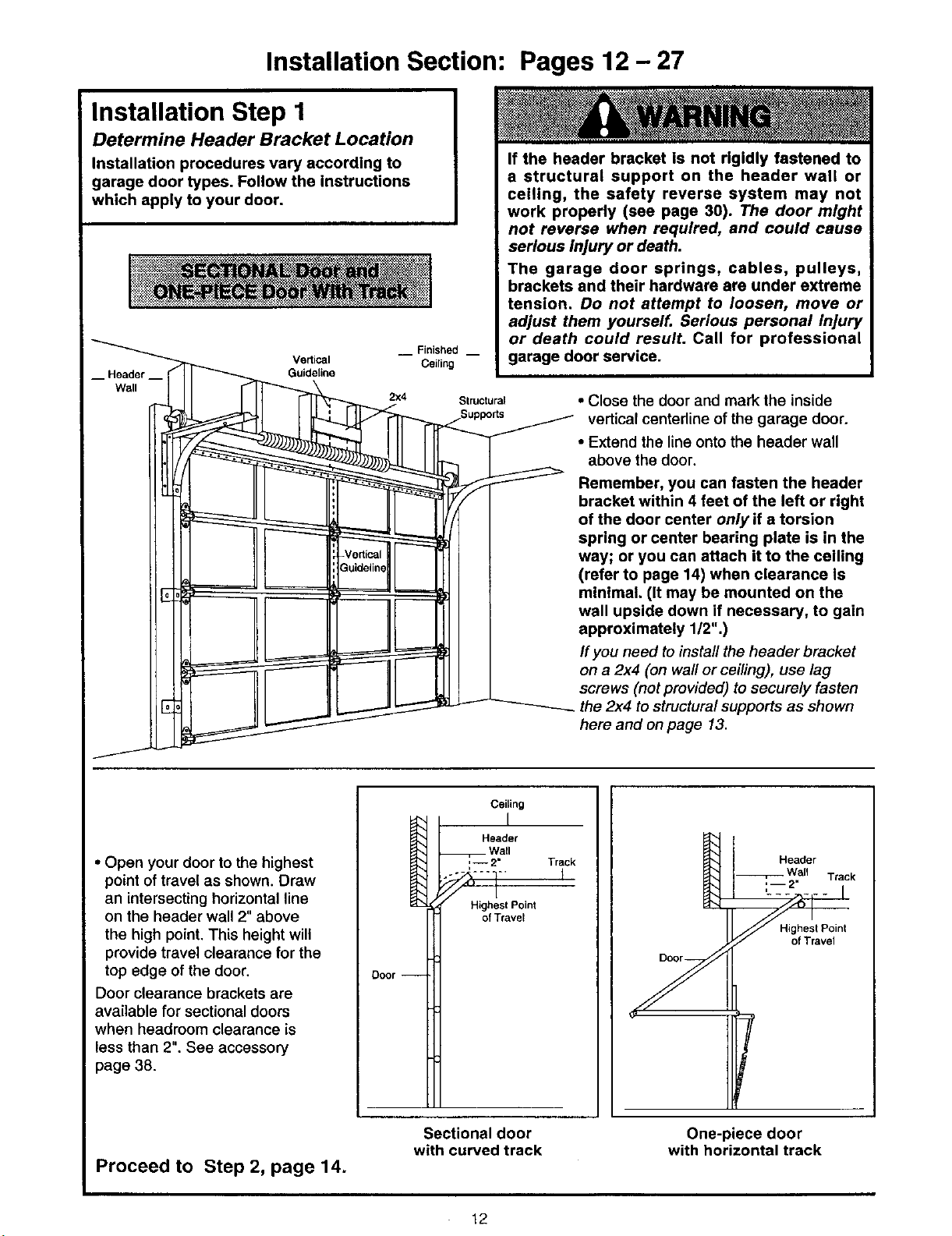
Installation Section: Pages 12- 27
Installation Step 1
Determine Header Bracket Location
Installation procedures vary according to
garage door types. Follow the Instructions
which apply to your door.
Vertical
Header
-ve_icat way; or you can attach it to the ceiling
If the header bracket is not rigidly fastened to
a structural support on the header wall or
ceiling, the safety reverse system may not
work properly (see page 30). The door might
not reverse when required, and could cause
serious injury or death.
The garage door springs, cables, pulleys,
brackets and their hardware are under extreme
tension. Do not attempt to loosen, move or
adjust them yourself. Serious personal injury
Finished __
Ceiling
2x4 Structural • Close the door and mark the inside
Suppo_s vertical centerline of the garage door.
or death could resulL Call for professional
garage door service.
• Extend the line onto the header wall
above the door.
Remember, you can fasten the header
bracket within 4 feet of the left or right
of the door center only if a torsion
spring or center bearing plate is in the
(refer to page 14) when clearance Is
minimal. (It may be mounted on the
wall upside down if necessary, to gain
approximately 1/2".)
If you need to install the header bracket
on a 2x4 (on wall or ceiling), use lag
screws (not provided) to securely fasten
the 2x4 to structural supports as shown
here and on page 13.
• Open your door to the highest
point of travel as shown. Draw
an intersecting horizontal line
on the header wall 2" above
the high point. This height will
provide travel clearance for the
top edge of the door.
Door clearance brackets are
available for sectional doors
when headroom clearance is
less than 2". See accessory
page 38.
Proceed to Step 2, page 14.
H'
Door --
Sectional door
with curved track
Ceiling
Header
Wall
,,-- 2" Track
Highest Point
of Travet
12
Highest Point
of Travel
One-piece door
with horizontal track
Page 13

Read the Safety instructions on page 12. They also apply to doors without tracks.
• Close the door and mark the
inside vertical centerline of
your garage door. Extend the
line onto the header wall
above door,
If headroom clearance is
minimal, you can install the
header bracket on the ceiling.
See page 14.
• If you need to install the
header bracket on a 2x4 (on
wall or ceiling), use lag screws
(not provided) to securely
fasten the 2x4 to structural
supports as shown.
Header Wall
/
Highest Point
of Travel
/
Header Wall
Vertical
Centedine
Unfinished --
2x4
OPTIONAL CEILING MOUNT
FORHEADER BRACKET
I_ Wall of Travel
Header Highest Point
-1
Jamb
Hardware
One-piece door without track
jamb hardware
• Open your door to the highest point of travel as
shown. Measure the distance from the top of the
door to the floor. Subtract the actual height of the
door. Add 8" to the remainder. (See Example).
• Close the door and draw an intersecting horizontal
line on the header wall at the determined height.
If the total number of inches exceeds the height
available in your garage, use the maximum
height possible, or refer to page 14 for ceiling
installation.
Q
JS
One-piece door without track
pivot hardware
EXAMPLE
Distance from top of door
(at highest point of travel) to floor........................... 92"
Actual height of door ............................................. -88"
Remainder ................................................................ 4"
Add ......................................................................... +8"
Bracket height on header wall ............................... 12"
(Measure UP from top of CLOSED door.)
Proceed to Step 2, page 14.
13
Page 14

Install the Header Bracket
Installation Step 2 I
Wall Header Bracket Installation
You can attach the header bracket either to the
wall above the garage door, or to the ceiling.
Follow the instructions which will work best for
your particular requirements.
• Center the bracket on the vertical guideline with
the bottom edge of the bracket on the horizontal
line as shown (with the arrow pointing toward the
ceiling).
2X4
Structural
Header Suppoff
Bracket Vedical
\ Center
Highest Point of
Garage DoorTravel
Vertical
Center
Line
Line
Spring
• Mark the vertical set of bracket holes. Drill 3/16"
pilot holes and fasten the bracket securely to a
structural support with the hardware provided.
Waft Mount
Optional
Mounting Holes
Hardware Shown Actual Size
Ceiling Header Bracket Installation
• Extend the vertical guideline onto the ceiling as
shown.
• Center the bracket on the vertical mark, no more
than 6" from the wall. Make sure the arrow is
pointing toward the wall. The bracket can be
mounted flush against the ceiling when clearance
is minimal.
• Mark the side holes. Drill 3/16" pilot holes and
fasten bracket securely to a structural support with
the hardware provided,
Ceiling
Mounting Holes
5/16"-9xl-5/8"
Door Spring
Vertical
Center Line
14
Page 15

Installation Step 3
Attach the Rail to the Header Bracket
HeaderBracket
NOTE: (Optional) With an existing Craftsman
installation, you may to-use the old header bracket
with the two plastic spacers included in the hardware
bag. Place the spacers inside the bracket on each
side of the rail, as illustrated.
• Position the opener on the garage floor below the
header bracket. Use packing material as a
protective base.
If the door spring is in the way you'll need help.
Have someone hold the opener securely on a
temporary support to allow the rail to clear the
spring.
• Position the front rail end within the header bracket
and join with a 5/16"x1-1/2" clevis pin as shown.
• Insert a ring fastener to secure.
Mounting
Hole
Clevis Pin
Spacer
Existing
Header Bracket
0
Mounting
Hole
OPTION WITH
-ZXISTING CRAFTSMAN
INSTALLATION
Hardware Shown Actual Size
Clevis Pin 5/16"xiol/2" Ring fastener
©
15
Page 16

Installation Step 4
Position the Opener
Follow instructions which apply to your door
type as illustrated.
A 2x4 laid flat is convenient for setting an ideal
door-to-T-rail distance.
• Raise the opener onto a stepladder as shown. You
will need help at this point if the ladder is not tall
enough.
• Open the door all the way and place a 2x4 laid flat
on the top section beneath the rail.
ff the top panel hits the trolley when you raise
the door, pull down on the trolley release arm to
disconnect the inner and outer sections. The
trolley can remain disconnected until Step 12 is
completed.
_ Outer_Trolley InnerlTrolley ,
• ] '
Trolley
Release arm
I ONE'PIECE Door without Track I
• With the door fully open and parallel to the floor,
measure the distance from the floor to the top of
the door.
• Using a stepladder as a support, raise the opener
to this height (it will be at a slight angle as shown).
• The top of the door should be level with the top of
the opener. Do not position the opener more than
2" above this point.
I
16
Page 17

Installation Step 5
Hang the Opener
Two representative installations are shown. Yours
may be different. Hanging brackets should be
angled, Figure 1, to provide rigid support. On
finished ceilings, Figure 2, attach a sturdy metal
bracket to structural supports before installing the
opener. The bracket and fastening hardware are not
)rovided. See accessory page 38.
1. Measure the distance from each side of the
opener to the structural support.
2. Cut both pieces of the hanging bracket to
required lengths.
3. Ddll 3/16" pilot holes in the structural supports.
4. Attach one end of each bracket to a support with
5/16"-18xl -7/8" lag screws.
5. Fasten the opener to the hanging brackets with
5/16"-18x7/8" screws, lock washers and nuts.
6. Check to make sure the rail is centered over the
door (or in line with the header bracket if the
bracket is not centered above the door).
7. Remove the 2x4. Operate the door manually. If
the door hits the rail, raise the header bracket.
NOTE: Do NOT connect power to opener at this
time.
Figure I
Screws
Distance 5/16"-18xl-7/8"
5/
5/
Figure 2
Hidden .. -" ""
Hardware Shown Actual Size
lllll ILILIlllllll
Lag Screw
5/16'-18xl-7/8"
.. -" .-. --_ .---" -- Finished Ceiling --
_2" 5/16"-18xl -7/8" .---
5/16"-18x7/8" Screw
5/16" Lock Washer
5/16 18N_
Screws
Lag
" 5/16"-18x7/8" Screw
--_" 5/16"-18 Nut
5/16" Lock Washer
5/16 % 18x7/8" Nut 5/16"o18 Lock Washer 5/16"
17
Page 18

Install the Premium Control Console
Installation Step 6 I
Locate the door control within sight of the door at a
minimum height of 5 feet where small children
cannot reach, and away from all moving parts of the
door and door hardware.
The door control is typically attached directly to the
wall. If installing into drywall, drill 5/32" holes and
use the anchors provided. For pre-wired installations
(as in new home construction), Console models
may be mounted to a standard single gang box
(Figure 2).
1. Strip 1/4" of insulation from one end of the bell
wire and connect it to the two screw terminals on
the back of the door control: white to 2, and
white/red to 1.
2. Pry off cover along one side with a screwdriver
blade (see Figure 1). Fasten with 6ABxl-1/4" self-
tapping screws (standard installation) or 6-32xl"
machine screws (pre-wired installation) as follows:
• Install bottom screw, allowing 1/8" to protrude
above wall surface.
• Position bottom of door control on screw head and
slide down to secure. Adjust screw for snug fit.
• Ddll and install top screw with care to avoid
cracking plastic housing. Do not overtighten.
• insert top tabs and snap on cover.
3. (For standard installation) Run the bell wire up the
wall and across the ceiling to the opener. Use
insulated staples to secure the wire in several
places. Be careful not to pierce the wire with a
staple, creating a short.
4. Connect the bell wire to the terminal screws on
the opener panel: white to 2; white/red to 1.
5. Position the antenna wire as shown.
Do not connect to live electrical wiring. Connect
only to 24 Volt low voltage wires, Connection to
live wires or higher voltage may cause serious
injury from shock, burn or electrocution.
Children operating or playing with a garage
door opener can injure themselves or others.
The garage door could close and cause
serious injury or death.
Install the door control (or any additional push
buttons) out of the reach of children and away
from all moving parts of the door and door
hardware, but where the garage door is visible.
Do not allow children to operate the push
button(s) or the remote control(s).
A moving garage door could injure someone
under iL Activate the opener only when the
door is properly adjusted, you can see it
clearly, and there are no obstructions to door
travel.
Hardware Shown Actual Size
6AB x 1-1/4" Screw Insulated
_ ItlIl,l,lil_l,IIl,l,l,l,,_
Control Console (std installation) Staples
Control Console (pre-wired) Dry Wall Anchors
Figure 1
REMOVE & REPLACE COVER
To Replace, To Remove,
Insert Twist
Top Tabs _ _ Here
First ._ J
Figure 2
PRE+WIRED
INSTALLATION
24 Volt
2-Conductor
Bell Wire
PREMIUM CONTROL CONSOLE
Bell Wire
BACK VIEW
Lock
18
Page 19

6. Attach the User Safety Instruction label to the wall
near the door control, and the Maintenance
Instruction label in a prominent location on the
inside of the garage door.
Page 32 explains how to use the door control.
Installation Step 7
Install the Lights and the Lenses
Install the lights:
• Install a 75 watt maximum light bulb in each
socket. The lights will turn ON and remain lit for
approximately 4-1/2 minutes when power is
connected. Then the lights will turn OFF.
• Use standard neck Garage Door Opener bulbs for
replacement.
Install the lenses:
• Apply slight pressure on the sides of each lens
and slide the tabs into the slots in the side panels.
• For convenience, the lenses may be installed
after Adjustment Step 4 on page 30.
• Reverse the procedure to remove the lenses.
I
Do NOT connect the power and operate the
opener at this time. The trolley will travel to the
full open position but will not return to the
close position until the sensor beam is
connected and properly aligned.
See Safety Reversing Sensor instructions
beginning on page 21,
75Watt Max,
Lens Ught Bulb
_t Lens
_ _ _ Slot
Lens"
Tab
Installation Step 8
Attach the Emergency
Release Rope and Handle
• Thread one end of the rope through the hole in
the top of the red handle so "NOTICE" reads right
side up as shown. Secure with an overhand knot,
at least 1" from the end of the rope to prevent
slipping.
• Thread the other end of the rope through the hole
in the release arm of the outer trolley.
• Adjust rope length so the handle is 6 feet above
the floor. Secure with an overhand knot.
If it is necessary to cut the rope, heat seal the
cut end with a match or lighter to prevent
unraveling.
Do not use the red handle to pull the door
open or closed. The rope knot could become
untied and you could fall. Use the emergency
release only to disengage the trolley and, if
possible, only when the door is closed.
Garage doors are heavy. If the door is open
when the handle is pulled, the door could
close inadvertently if it is not properly
balanced. Serious injury may result to persons
under the door. Make sure the doorway is clear
of persons and obstructions before pulling
handle when door is open.
Release arm
Release Handle
19
Page 20

Installation Step 9
Electrical Requirements
To reduce the risk of electric shock, your garage
door opener has a grounding type plug with a third
grounding pin. This plug will onlyfit into a grounding
type outlet.
Ifthe plug doesn't fit intothe outlet you have,
contact a qualified electrician to install the proper
outlet.
I
To prevent electrocution or fire, Installation
and wiring must be in compliance with local
electrical and building codes.
Do NOTuse an extension cord, 2-wire adapter,
or change the plug in any way to make it fit
your outlet.
To avoid installation difficulties, I
do not run the opener at this time.
If permanent wiring is required by your local code, refer to the following procedure:
To make a permanent connection through the
7/8" diameter hole in the top of the opener
(according to local code):
• Remove the opener cover screws and set the
cover aside,
• Remove the attached 3-prong cord.
• Connect the black (line) wire to the screw on the
brass terminal; the white (neutral) wire to the
screw on the silver terminal; and the ground wire
to the green ground screw. The opener must be
grounded.
• Reinstall the cover.
I
I
QQ
Right Wrong
Ground Tab
Green
Scr6w
Wire
Permanent
Wiring
Connections
Black
Wire
I Toavoid installation difficulties,do not run the opener at this time,
White Wire
Wire
2O
Page 21

The Safety Reversing System
IMPORTANT INFORMATION ABOUT THE
;AFETY REVERSING SENSOR
The safety reversing sensor must be connected
and aligned correctly before the garage door
opener will move in the down direction. This Is a
required safety device and cannot be disabled.
When properly connected and aligned, the safety
reversing sensor will detect an obstacle in the path
of its electronic beam. The sending eye (with an
orange indicator light) transmits an invisible light
beam to the receiving eye (with a green indicator
light). If an obstruction breaks the light beam while
the door is closing, the door will stop and reverse to
full open position, and the opener light will flash
10 times.
The units must be installed inside the garage so
that the sending and receiving eyes face each other
across the door, between 4 - 6" above the floor.
Either can be installed on the left or right of the door
as long as the sun never shines directly into the
receiving eye lens.
The mounting brackets are designed to clip onto the
track of sectional garage doors without additional
hardware.
Without a properly working safety reversing
sensor, persons (particularly children) could
be injured or killed by a closing garage door.
Read and follow all Instructions.
To protect small children, install the safety
reversing sensor so that the beam will be
between 4 - 6" above the garage floor.
Disconnect power to the garage door opener
before installing the safety reversing sensor.
If it is necessary to mount the units on the wall, the
brackets must be securely fastened to a solid surface
such as the wall framing. Extension brackets (see
accessories) are available if needed. If installing in
masonry construction, add a piece of wood at each
location to avoid drilling extra holes in masonry if
repositioning is necessary.
The invisible light beam path must be unobstructed.
No part of the garage door (or door tracks, springs,
hinges, rollers or other hardware) may interrupt the
beam while the door is closing.
Protection Area
Figure 1: Facing the door from inside the garage
21
Page 22

Installation Step 10 I
Install the Safety Reversing Sensor
Be sure power to the opener is disconnected.
install and align the brackets so the sensors will
face each other across the garage door, with the
beam from4 - 6" above the floor.
Figure 2 DOOR TRACK MOUNT (Right Side)
I
Door
Indicator
] light
They may be installed in one of three ways,
depending on your requirements, as follows.
1. (Preferred) Clipped onto the left and right garage
door tracks. See Figure 2.
2. Fastened to the wall on each side of the garage.
See Figure 3.
3. Fastened to the floor (see Figure 4). Concrete
anchors and wood blocks or extension brackets
will be needed.
Garage door track Installation:
• Slip the curved arms over the rounded edge of the
door track. Snap into place against the side of the
track. It should lie flush, with the liphugging the
back edge of the track, as shown.
If your door track will not support the bracket
securely, wall installation is recommended.
Wall installation:
• Place the bracket against the wall and make sure
there is enough clearance for the sensor beam to
be unobstructed.
• If additional depth is needed, an extension bracket
(see Accessories) or wood blocks can be used.
• Use bracket mounting holes as a template to
locate and drill (2) 3/16" diameter pilot holes on
the wall at each side of the door, from 4-6" above
the floor. (See warning at beginning of Installation
Step 10.)
• Attach brackets to wall with lag screws (not
provided).
• If using extension brackets or wood blocks, adjust
right and left assemblies to the same distance out
from the mounting surface. Make sure all door
hardware obstructions are cleared.
Floor installation:
• Use wood blocks or extension brackets (see
Accessories) to elevate sensor brackets so the
lenses will be 4-6" above the floor.
• Carefully measure and place right and left
assemblies at the same distance out from the wall.
Be sure all door hardware obstructions are
cleared.
• Fasten to the floor with concrete anchors as
shown.
Sensor
Bracket
Figure 3 WALL MOUNT (Right Side)
Extension
Bracket
(Provided with
Extension
Bracket)
/ _ Indicator
(Provided with Lens light
Extension Bracket)
Bracket
Figure 4 FLOOR MOUNT (Right Side)
Lens Indicator
Sensor light
Bracket
Extension
Hardware Shown Actual Size
(Provided with
Extension Bracket)
Attach with
(not provided)
Extension
Bracket
(See Accessories)
anchors
22
1/4"-20x1/2" (2) Wing Nut (2) Insu{ated Staples (20)
Page 23

Mounting and Wiring the Safety Sensors
• Slide a 1/4"-20xl/2" carriage bolt head intothe slot
on bothsensors.Use wing nuts to fasten sensors to
brackets, with lensespointingtoward each other
across the door. Be sure the lens is not obstructedby
a bracket extension. See Figure 5.
• Finger tightenthe sensor wing nuts.
• Run the wires from both sensors to the opener. Use
insulatedstaplesto secure wire to wall and ceiling.
• Strip 1/4" of insulationfrom each setofwires.
Separate white and white/black wires sufficientlyto
connectto the opener terminal screws: white to 2
and white/black to 3.
Aligning the Safety Sensors
• Plug inthe opener. The indicator lightsin boththe
sending and receivingeyes will glow steadilyif wiring
connectionsand alignment are correct.
The sendingeye orange indicator lightwill glow
regardlessof alignment or obstruction. Ifthe green
indicatorlight inthe receiving eye is off, dim,or
flickering(and the invisiblelight beam path is not
obstructed), alignmentis required.
• Loosenthe sending eye wing nut and readjust,
aiming directlyat the receiving eye. Lock inplace.
• Loosen the receivingeye wing nut and adjustsensor
vertically and/or horizontallyuntil it receives the
sender's beam. When the green indicatorlightglows
steadily, tightenthe wing nut.
Figure 5
%/
1/4" 20xl/2" _'_P
CarriageIx)It
Trouble Shooting the Safety Sensors
1. [fthe sending eye indicatorlightdoes not glow
steadilyafter installation,check for:
• Electdc power tothe opener.
• A short inthe white or white/black wires. These can
occurat staples, or at screw terminal connections.
• Incorrectwiringbetween sensorsand opener.
• A brokenwire.
2. Ifthe sending eye indicatorlight glows steadilybut the
receivingeye indicatorlightdoesn't:
• Check alignment.
• Check for a brokenwireto the receivingeye,
3. If the receivingeye indicatorlightis dim, realign either
sensor.
NOTE: When the invisiblebeam path is obstructedor
misaligned whilethe dooris closing, the door will
reverse, ff the door is already open, it willnot close. The
opener lights willflash10 times. (if bulbs are not
installed, 10 clickscan be heard.) See page 21.
Wing nut
Bell Wire
Bell Wire
Figure 6
Connect Wire to
Opener Terminals
Door Control Sensor
Connections_ Connections
(dotted line) -'_ /
[]
OPENER TERMINAL SCREWS
SeRsor
Invisible Light Beam
Sensor
23
Page 24

Installation Step 11
Fasten Door Bracket
Follow instructions which apply to your door
type as illustrated below or on page 25.
A horizontal brace should be long enough to be secured to 2 vertical supports. A vertical brace should
cover the height of the top panel.
The illustration shows one piece of angle iron as the horizontal brace. For the vertical brace, 2 pieces of
angle iron are used to create a "U"-shaped support. The best solution Is to check with your garage door
manufacturer for an opener installation door reinforcement kit.
! _ Vertical
0 Guideline
Lc..o. \ _ i _ I "t_,IPP ,,.
_ _ Carriage Bolt _ UP
- Vertical Door _J
Guideline Bracket --
• Center the door bracket on the previously marked
vertical guideline used for the header bracket
installation. Note correct UP placement, as
stamped inside the bracket.
• Position the bracket on the face of the door within
the following limits:
A) The top edge of the bracket 2"-4" below the top
edge of the door.
B) The top edge of the bracket directly below any
structural support across the top of the door.
• Mark and drill 5/16" left and right fastening holes.
Secure the bracket as shown in Figure 1 if there is
vertical reinforcement.
Ifyour installation doesn't require vertical reinforce-
ment but does need top and bottom fastening holes
for the door bracket, fasten as shown in Figure 2.
Inside Edge
of Door or
Figure 2
@-_.
Door Bracket
Hardware Shown Actual Size
©
Nut 5/16-18 Lock Washer 5/16"
lililllllllilllIttlIIIIIILBBIBIBID
Carriage Bolt
5/16"-1gx2-1/2"
24
Page 25

Please read and comply with the warnings and reinforcement Instructions on page 24.
They apply to one-piece doors also.
Header WaU
2x4 Supped Header
-- Finished Ceiling --
Door
Bracket
Placement
of Door
Bracket
Vertical
;entedine of
Garage Door
Horizontal and vertical reinforcement is
. needed for lightweight garage doors
(fiberglass,aluminum, steel, door with
glass panel, etc.). (Not Provided)
Door _ Placement
• " Cardage Bolt
exposed framing or for 5/16 -18x2.-1/2
For a door w_th no _ _ . !_
the optional installation,
use 5/16"xl-1/2" lag
screws (not provided) ._- v _-
to fasten door bracket.
• Center the bracket on the top of the door, in line
with the header bracket as shown. Mark holes.
• Drill 5/16" pilot holes and fasten the door bracket
with hardware supplied.
If the door has no exposed framing, drill 3/16" pilot
holes and fasten the bracket with 5/16"x1-1/2" lag
screws (not provided) to the top of the door.
The door bracket may be installed on the top
edge of the door if required for your installation,
(Refer to the dotted line optional placement
drawing.) Drill 3/16" pilot holes and substitute
5/16"x1-1/2" lag screws (not provided) to fasten
the bracket to the door.
25
Hardware Shown Actual Size
©
IItIItIIIIIIIIIIIIIIIIIIIID
ut/01CarrageBollkwaser
5/16"-18x2-1/2"
Page 26

Installation Step 12
Connect Door Arm to Trolley
Follow instructions which apply to your door
type as illustrated below and on page 27.
Make sure garage door is fully closed. Pull the emergency release handle to disconnect the outer trolley
from the inner trolley, Slide the outer trolley back (away from the pulley) for 8" minimum as shown below.
Figure 1:
• Fasten straight door arm section to outer trolley
with the the 5/16"xt" clevis pin. Secure the
connection with a ring fastener.
• Fasten curved door arm to the door bracket in the
same way, using the 5/16"x1-1/4" clevis pin.
i i
i i
Clevis Pin Door Arm
5/16"x1-1/4"
i
Outer Trolley
5/16"x1"
Door Arm
Figure 1
Figure 2:
• Bringarm sections together. Find two pairs of holes
that line up and join sections. Select holes as far
apart as possible to increase door arm rigidity.
_ Screws
_) 5/16%18x7/8"
Door Bracket Figure 2
Hole Alignment Alternative
Figure 3:
• If holes in curved arm are above holes in straight
arm, disconnect straight arm. Cut about 6" from
the solid end. Reconnect to trolley with cut end
down as shown.
• Bring arm sections together.
• Find two pairs of holes that line up and join with
screws, lock washers and nuts.
Hardware Shown Actual Size
t ,, i
_
• _ i _ _'ll, ll,,imqll, I
Trol!ey _
Washers
5/16"
Nuts _L
_ _Rcre5/16"-18 _'- ws_
©©o
Nut 5/15"-1B Lock Washer 5/16" Ring Fastener
G ol
5/16"x1" (Trolley)
Proceed to Adjustment Step 1, page 28. Trolley will re-engage automatically when the opener is operated.
Clevis Pin Hex Screw
5/16"x1-1/4" (Door Bracket) 5/16"-18x7/8'
[ _ _ 5/16_"18x-718"
u_J " Cut This End
Figure 3
26
Page 27

Assemble the Door Arm:
• Fasten the straight and curved door arm sections
Door Ring
together to the longest possible length, with a 2 or
3 hole overlap.
• With the door closed, connect the straight door arm
section to the door bracket with the 5-16" x 1-1/4"
clevis pin.
• Secure with a ring fastener.
Clevis Pin
5/16"x1.1/4"
Straight
Arm
Screws
5/16"-18x718
Lock
Washers
5/16"
Door Arm
On one-piece doors, before connecting the door arm to the trolley the travel limits must be adjusted. Limit
adjustment screws are located on the left side panel as shown on page 28. Follow adjustment procedures below.
FULLY CLOSED POSITION
t
I
s Closed
_ Door
!
Inner Trolley Outer Trolley
Open Door Door with
Backward Slant
FULLY OPEN POSITION
Outer Trolley
DoorArm
Adjustment Procedures for One-Piece Doors
Open Door Adjustment:
Decrease UP limit
• Turn the UP limit adjustment screw counter-
clockwise 5-1/2 turns.
• Press the Door Control push button. The trolley will
travel to the fully open position.
• Manually raise the door to the open position
(parallel to the floor), and lift the door arm to the
trolley. The arm should touch the trolley just in
back of the door arm connector hole. Refer to the
fully open trolley/door arm positions in the
illustration. If the arm does not extend far enough,
Turn the DOWN limit adjustment screw clockwise
5 complete turns.
Press the Door Control push button. The trolley will
travel to the fully closed position.
Manually close the door and lift the door arm to the
trolley. The arm should touch the trolley just ahead
of the door arm connector hole. Refer to the fully
closed trolley/door arm positions in the illustration. If
the arm is behind the connector hole, adjust the limit
further. One full turn equals 2!' of trolley travel.
adjust the limit further. One full turn equals 2" of
trolley travel.
Connect the door arm to the trolley.
• Close the door and join the curved arm to the connector hole in the trolley with the remaining clevis pin. It may
be necessary to lift the door slightly to make the connection.
• Secure with a ring fastener.
• Run the opener through a complete travel cycle. If the door has a slight "backward" slant in full open position
as shown in the illustration, decrease the UP limit until the door is parallel to the floor.
Closed Door Adjustment:
Decrease DOWN limit
27
Page 28

Adjustment Section: Pages 28 - 30
Adjustment Step 1
Adjust the UP and DOWN Limits
Do not make any limit adjustments until the
safety reversing sensors ere completely
installed.
Limit adjustment settings regulate the points at
which the door will stop when moving up or down.
If anything interferes with the door's upward travel, it
will stop. If anything interferes with the door's
downward travel (including binding or unbalanced
doors), itwill reverse.
To operate the opener, press the Door Control push
button. Run the opener through a complete travel
cycle.
• Does the door open and close completely?
• Does the door stay closed and not reverse
unintentionally when fully closed?
If your door passes both of these tests, no limit
adjustments are necessary unless the reversing test
fails (See page 30).
Adjustment procedures are outlined below.
Read the procedures carefully before
proceeding to Adjustment Step 2. Use a
screwdriver to make limit adjustments. Run the
opener through a complete travel cycle after
each adjustment.
NOTE: Repeated operation of the opener during
adjustment procedures may cause the motor to
overheat and shut off. Simply wait 15 minutes and
try again.
Improper adjustment of the travel limits will
Interfere with the proper operation of the
safety reverse system. The door might not
reverse properly when required and could
seriously Injure or kill someone under It. Test
the safety reverse system after making all
travel and force adjustments. See page 30.
Cover
Protection
Bolt
Limit Adjustment
Scows
How and When to Adjust the Limits
• If the door does not open completely, but
opens at least five feet:
increase up travel. Turn the UP limit adjustment
screw clockwise. One turn equals 2" of travel.
NOTE: Toprevent the trolley from hitting the cover
protection bolt, keep a minimum distance 0f2-4"
between the trolley and the bolt.
• If door does not open at least 5 feet:
Adjust the UP (open) force as explained in
Adjustment Step 2.
• If the door does not close completely:
Increase down travel. Turn the DOWN limit
adjustment screw counterclockwise. One turn
equals 2" of travel.
If the door still won't close completely and the trolley
bumps into the trolley stop bolt (see page 4 or 5), try
lengthening the door arm (see page 26) and
decreasing the down limit.
• If the opener reverses in fully closed position:
Decrease down travel. Turn the DOWN limit
adjustment screw clockwise. One turn equals 2" of
travel.
• If the door reverses when closing and there is
no visible interference to travel cycle:
If the opener lights are flashing, the Safety Reversing
Sensors are either not installed, misaligned, or
obstructed. See Troubleshooting, page 23.
Test the door for binding: Pull the emergency release
handle. Manually open and close the door. If the door
is binding, call for garage door service. If the door is
not binding or unbalanced, adjust the DOWN (close)
force. See Adjustment Step 2.
28
Page 29

Adjustment Step 2
Adjust the Force
Force adjustment controls are located on the right
side panel of the opener. Force adjustment settings
regulate the amount of power required to open and
close the door.
The door will stop in the up direction if anything
interferes with its travel. The door will reverse in the
down direction ifanything interferes with its travel
including binding or unbalanced doors).
If the forces are set too light, door travel may be
interrupted by nuisance reversals in the down
direction and stops in the up direction.
Weather conditions can affect the door
movement, so occasional adjustment may be
needed.
The maximum fome adjustment range is 260 degrees,
about 3/4 of a complete turn. Do not force controls
beyond that point. Turn force adjustment controls
with a screwdriver.
Too much force on the door will Interfere with
the proper operation of the safety reverse
system. The door might not reverse properly
when required and could seriously injure or
kill someone under it. Do not increase the
force beyond the minimum amount required
to close the door. Do not use the force
adjustments to compensate for a binding or
sticking garage door. Test the safety reverse
system following all adjustments to force
levels. See page 30.
Force Adjustment
Controls
Adjustment Label
How and When to Adjust the Forces
Test the DOWN (close) force
Grasp the door bottom when the door is about
halfway through DOWN (close) travel. The door
should reverse. Reversal halfway through down
travel does not guarantee reversal on a one-Inch
obstruction. See page 30. If the door is hard to
hold or doesn't reverse, decrease the DOWN (close)
force by turning the control counterclockwise.
Make 10 degree turn adjustments until the door
reverses normally. After each adjustment, run the
opener through a complete cycle.
Test the UP (open) force
Grasp the door bottom when the door is about
halfway through UP (open) travel. The door should
stop. If the door is hard to hold or doesn't stop,
decrease UP (open) force by turning the control
counterclockwise.
Right Side Panel
Make 10 degree turn adjustments until the door stops
easily. After each adjustment, run the opener through
a complete travel cycle.
If the door doesn't open at least5 feet
Increase UP (Open) force by turning the control
clockwise. Make 10 degree turn adjustments until
door opens completely. Re-adjust the UP limit if
necessary. After each adjustment, run the opener
through a complete travel cycle.
If the door reverses during the down (close) cycle
and the opener lights aren't flashing
Increase DOWN (close) force by turning the control
clockwise. Make 10 degree turn adjustments until the
door completes a close cycle. After each adjustment,
run the opener through a complete travel cycle. Do
not increase the force beyond the minimum
amount required to close the door.
29
Page 30

Adjustment Step 3
Test The Safety Reversing Sensor
• Press the remote control push button to open the
door.
• Place the opener carton in the path of the door.
• Press the remote control push button to close the
door. The door will not move more than an inch,
and the opener light(s) will flash.
Professional service Is required If the opener
closes the door when the safety reversing
sensor Is obstructed.
The garage door opener will not close from a
remote control if the indicator light in either
sensor is off(alerting you to the fact that the
sensor is misaligned or obstructed).
The garage door can be closed by pressing and
holding the Door Control push button untildown
travel is completed.
Adjustment Step 4
Test the Safety Reverse System
Test:
• Place a one-inch board (or a 2x4 laid flat) on the
floor, centered under the garage door.
• Operate the door in the down direction. The door
must reverse on striking the obstruction.
I
I
Failure to test and adjust the safety reverse
system may result in serious injury or death to
persons trapped by a closing garage door.
Repeat this test once a month and adjust as
needed.
GARAGE DOOR
Adjustment:
If the door stops on the obstruction, it is not traveling
far enough in the down direction.
• Increase the DOWN limit by turning the DOWN
limit adjustment screw counterclockwise 1/4 turn.
• Repeat the test.
On a sectional door, make sure limit
adjustments do not cause the trolley to move
within 2-1/2" of the trolley stop bolt. If
necessary, lengthen straight door arm to
maintain this minimum distance.
• When the door reverses on the one-inch board,
remove the obstruction and run the opener through
3 or 4 complete travel cycles to test adjustment.
If the door will not reverse after repeated
adjustment attempts, call for professional
garage door service.
f
Important safety check
Repeat Adjustment Steps 1, 2 and 4 after:
• Each adjustment of door arm length, force controls
or limitcontrols.
• Any repair to or adjustment of the garage door
(including springs and hardware).
• Any repair to or buckling of the garage floor.
• Any repair to or adjustment of the opener.
3O
Page 31

IMPORTANT SAFETY INSTRUCTIONS
To reduce the risk of severe injury or death to persons:
1. READ AND FOLLOW ALL INSTRUCTIONS.
2. Do not permit children either to operate or to
play with the opener. Keep remote control in a
location inaccessible to children.
3. Operate opener only when the door is in full
view and free from any obstruction. Keep the
door in sight until it is completely closed. NO
ONE SHOULD CROSS THE PATH OFTHE
MOVING DOOR.
4. Check safety reversal system monthly. See
page 30. The garage door MUST reverse on
contact with a one-inch (or a 2x4 board laid
flat) object placed on the floor. If an adjustment
is made to either the force or the limit of travel,
both adjustments may be needed and the
safety reversal system must be checked.
Failure to properly adjust the opener may
result in severe injury or death.
Care of Your Opener
Limit and force adjustment controls
Limit Controls Force Controls
Adjustment Label
(Located on the left side panel)
Weather conditions may cause some minor
changes in door operation requiring some re-
adjustments, particularly during the first year of
operation.
Pages 28 and 29 refer to the limit and force
adjustments. Only a screwdriver is required. Follow
the instructions carefully.
Repeat the safety reverse test (page 30) after any
adjustment of limits or force.
Adjustment Label
(Located on the dght side panel)
5. If possible, use the emergency release only
when the door is in e closed position. Caution
should be taken whenever the disconnect cord
is actuated with the door open. Weak or broken
springs may cause the door to fall rapidly,
causing injury or death to persons.
6. KEEP GARAGE DOORS PROPERLY
BALANCED. See page 3. An improperly
balanced door may not reverse when required
and could result in severe injury or death.
Repairs to cables, spring assemblies and other
hardware must be made by a professional
garage door person.
7. Disconnect the electric power to the garage
door opener before making any repairs or
removing the covers.
8SAVE THESE INSTRUCTIONS.
The remote control
The lithium battery should
produce power for up to
5 years. To replace battery,
use the visor clip or screwdriver
blade to pry open the case as
shown. ("Open" location is
stamped on back of remote
control case.) Insert battery
positive side down.
Replace cover as follows. 3-Function remote: Insert
the 3 tabs at the opposite end and snap shut.
Compact 3-Function remote: Snap shut along both
sides.
3-FUNCTION
Open this end
first to avoid
cracking
Twist here
COMPAC'_
to open
Maintenance Schedule
Once a Month Twice a Year
Manually operate door. If it is unbalanced or
binding, call for professional garage door service.
Check to be sure door opens and closes fully.
Adjust limits and/or force if necessary.
(See pages 28 and 29.)
Repeat the safety reverse test. Make any
necessary adjustments (See page 30).
Check chain tension. Disconnect trolley first.
Adjust if necessary (See page 11),
Once a Year
Oil door rollers, bearings and hinges. The opener
does not require additional lubrication. Do not
grease the door tracks.
31
Page 32

Operation of Your Opener
Activate the opener with any of the following:
• The Remote Control: Hold push button down until
the door starts to move.
• The Door Control: Hold push button down until the
door starts to move.
• The Outdoor Key Switch or Keyless Entry:
(See Accessories)
When the opener is activated with the safety
reversing sensor installed and correctly aligned:
1. If open, the door will close. Ifclosed, it will open.
2. If closing, the door will reverse.
3. If opening, the door will stop (allowing space for
entry and exit of pets and for fresh air).
4. If the door has been stopped in a partially open
position, it willclose.
5. If obstructed while closing, the door will reverse.
6. If obstructed while opening, the door will stop.
7. The garage door will reverse in the closingcycle,
and the opener lights will blink for 5 seconds, when
the invisible beam is broken. If fully open, the door
will not close when the beam is broken. The sensor
has no effect in the opening cycle.
Ifthe sensor is not installed, or is not aligned correctly,
the door won't close from any remote transmitter. You
can close the doorwith the Door Control, the Outdoor
Key Switch, or Keyless Entry, however, if you activate
them unti/down trave/is complete. Ifyou release them
too soon, the door will reverse.
The Opener Lights willturn on under the following
conditions: When the opener is initially plugged in; when
the power is interrupted; when the opener is activated.
They will turn off automatically after 4-1/2 minutes or
provide constant light when the Light feature on the
Premium Control Console is activated. Bulb size is 75
watts maximum.
SECURITY+ models: Lights will also turn on when
someone walks through the open garage door. With a
Premium Control Console, this feature may be turned
off as follows: With the opener lights off, press and
hold the light button for 10 seconds, until the light goes
on and off again. To restore this feature, start with the
opener lights on, then press and hold the light button
for 10 seconds.
Weak or broken springs could allow an open
door to fall (either rapidly or unexpectedly),
resulting in serious injury, death or property
damage. If possible, use the emergency
release rope and handle only when the door is
fully closed.
To open the door
manually: The door
should be fully closed if
possible. Pull down on
the emergency release
Trolley I ..°"
Re,ease 8 ITI'I
handle (so that the
trolley release arm
snaps into a vertical
Emergency
Release Handl_
(Pull Down)
position) and liftthe door
manually. The lockout
feature prevents the
trolley from reconnecting
Manual Disconnect
Position
automatically, and the
door can be raised and
lowered manually as
oftenas neccessary.
To re-engage the
trolley: Pull the
emergency release
handle toward the
opener at a 45" degree
angle so that the trolley
Release Handle
(Pu, Back
Towards Opener)
release arm is
horizontal. The trolley
will reconnect on the
next UP or DOWN
operation, either
To Reconnect
manually or by pressing
the Door Control push
button or the remote.
Operation of the Door Controls
(SECURITY+ models: See additional programming features, next page.)
Press the lighted push button to open or close the door.
Press again to reverse the door during the closing
cycle or to stop the door while it's opening.
Premium Console:
Light Feature - Press the large round Light button. If
the opener lights are off, they will turn on. If the
opener lights are on, (even in the 4-1/2 minute
automatic cycle) they will turn off.
But if you use the Light button to turn the lights on
and then activate the opener, the lights will turn off
after 4-1/2 minutes.
The Light button will not control the opener lights
when the door is in motion.
Premium Console (cont.):
Lock Feature - The Lock feature is designed to
prevent operation ofthe door from remote controls.
However, the door will open and close from the Door
Control, the Outdoor Key Switch and the Keyless Entry
Accessories.
To Activate: Press and hold the small round Lock
button for 2 seconds. The push button light will flash
as long as the Lock feature is on.
To turn off: Press and hold the Lock button again for
2 seconds.The push button light will stop flashing.
The Lock feature will also turn off whenever the
"SRT" button on the opener panel is activated.
32
Page 33

Receiver and Remote Control Programming
SE( URI'I '
Your garage door opener receiver and remote control
have been pre-set at the factory. The door will open
when you press the LARGE remote control push
button. The code between the remote control and the
receiver changes with each use, randomly accessing
over 100 billion new codes.
The 3-function remote control can also activate
additional SECURITY+ garage door openers and/or
light controls.
Your SECURITY+ opener will operate with:
• several SECURITY+ remote controls (with blue
push buttons) utilizing up to 8 functions.
• one SECURITY,I, Keyless Entry System (Model
139.53684).
Follow the instructions below to program your opener
to match any additional remotes you may purchase.
See Accessories on page 38.
To Add A Remote Control
If you have a Premium Control Console:
1. With the door closed, press and hold a remote
control push button. See Figure 1.
2. Press and hold the Light button on the door
control.
3. Press and hold the door control push button.
4. After the opener light flashes, release all buttons.
Test by pressing the remote push button.
If you do not have a Premium Control Console:
1. Press and holdthe selected remote control push
button. See Figure 1.
2.Then press and release the SRT (learn) button on
the right panel of the opener, Figure 2. The
indicator light on the panel will begin to blink and
the opener light will flash once.
3. Release the remote push button.
Test by pressing the remote push button.
To Erase All Remote Control Codes
Press and hold the SRT button on the opener panel
until the indicator light turns off (about 6 seconds). All
remote control codes are now erased. Then follow
the steps above to re-program each remote control.
To complywith FCC ru_es,adjustmentor modificationsof this receiver
and/ortransmitter are prohibited,exceptfor changingthe code settingor |
replacingthe battery. THERE ARE NO OTHER USER SERVICEABLE |
IP'n*s I
door opener can Injure themselves or others.
The garage door could close and cause serious
injury or death. Do not allow children to operate
the door push button(s) or remote control(s).
A moving garage door could injure or kill
someone under it. Activate the opener only
when you can see the door clearly, it is free of
obstructions, and Is properly adjusted.
Figure 1
Select a remote control push
button to operate opener
SECURITY'I"
3-Function
Remote Control
SECURITY+
Garage Door Opener
"SRT" (learn) Indicator RIGHT
Button Light PANEL
To Control the Opener Light (Premium Consoles)
With SECURITY+ remote controls, a push button can
be programmed to operate the opener light without
opening the door.
1. With the door closed, press and hold the remote
button that you want to control the light.
2. Press and hold the Light button on the door
control.
3. Press and hold the Lock button on the door control.
4. After the opener light flashes, release all buttons.
Test by pressing the remote push button. The opener
light should turn on or off but the door should ROtmove.
Figure 2
33
Page 34

Having a Problem?
Situation
The opener doesn't
operate from either
the Door Control or
the remote control."
Opener operates
from the remote
control, but not from
the Door Control:
The door operates
from the Door
Control, but not from
the remote control'.
Probable Cause and Solution
1. Does the opener have electric power?.Plug a lamp intothe outlet. If it doesn't light,
check the fuse box or the circuitbreaker, (Some outlets are controlledby a door switch.)
2. Have you disabled all door looks? Review installationinstructionwarnings on Page 11.
3. Is there a build-up of ice or snow under the door? The door may be frozen to the
ground. Remove any restriction.
4. The garage door spring may be broken. Have it replaced.
5. Repeated operation may have tripped the overload protector in the motor. Wait
15 minutes. Try again.
1. Is the Door Control lit? If not, remove the bell wire from the opener terminal screws.
Short the red and white terminals by touching both terminals at the same time with a
piece of wire. If the opener runs, check for a faulty wire connection at the Door
Control, a short under the staples, or a broken wire.
2. Are the wiring connections correct? Review Step 6, page 18.
1.
Is any door push button flashing? If your model has the Lock feature, make sure the
lock is Off.
2.
Your opener needs to re-learn a remote control code, Refer to Instructions on the
opener panel.
3.
Program the receiver to match the remote control code.
4.
Repeat the receiver programming procedure with all remote controls.
The remote control
has short range:
Opener noise is
disturbing in living
quarters of home:
The garage door
opens and closes
by itself:
The door doesn't
open completely:
1. Change the location of the remote control in your car.
2. Check to be sure the antenna on the side or back panel of opener extends fully
downward.
3.
Some installations may have shorter range due to a metal door, foil backed
insulation, or metal garage siding. (Antenna Extender Kit 41A3504)
If operational noise is a problem because of proximity of the opener to the living
quarters, the Vibration Isolator Kit 41A3263 can be installed. This kit was designed to
minimize vibration to the house and is easy to install.
1. Be sure that all remote control push buttons are off.
2. Remove the bell wire from the Door Control terminals and operate from the remote
control only. If this solves the problem, the Door Control is faulty (replace), or there is
an intermittent short on the wire between the Door Control and the opener.
3. Clear memory and reprogram all remote controls.
1. Is something obstructing the door? Remove the obstructionor repair the door.
2. If the door has been working properly but now doesn't open all the way, increase the
up force. See page 29.
3. If door opens at least 5 feet, the travel limits may need to be increased. One turn
equals 2 inches of travel. See page 28.
Repeat the safety reverse test after the adjustment is complete.
The door stops but
doesn't close
completely:
Review the travel limits adjustment procedures on page 28.
Repeat the safety reverse test after any adjustment of door arm length, close
force or down limit.
34
Page 35

Having a Problem? (continued)
Situation
The door opens but
won't close:
The door reverses for
no apparent reason
and opener lights
don't blink:
The door reverses for
no apparent reason
and opener lights
blink for 5 seconds
after reversing:
Probable Cause & Solution
1. If the opener lights blink, check the safety reversing sensor. See page 23.
2. If the opener lights do not blink and it is a new installation, check the down force.
See Adjustment Step 2, page 29. For an existing installation, see below.
Repeat the safety reverse test after the adjustment is complete.
1. Is something obstructing the door?. Pull the red emergency release handle. Operate
the door manually. If it is unbalanced or binding, call for professional garage door
service.
2. Clear any ice or snow from the garage floor area where the door closes.
3. Review the force adjustment procedures on page 29.
4. If door reverses in the fully closed position, decrease the travel limits (page 28).
Repeat safety reverse test after adjustments to force or travel limits. The need
for occasional adjustment of the force and limit settings is normal Weather
conditions in particular can affect door travel
Check the safety reversing sensor. Remove any obstruction or align the receiving eye.
See page 23.
The opener lights:
The opener strains or
maximum force is
needed to operate
door:
The opener motor
hums briefly, then
won't work:
The opener won't
operate due to
power failure:
... don't turn on:
Replace the light bulbs (75 watts maximum). Use a standard neck garage door opener
bulb if regular bulb burns out.
•.. don't turn off:
Is the Light feature on? Turn it off.
The door may be out of balance orthe springsare broken. Close the door and use the
emergency release to disconnectthe trolley.Open and closethe door manually.A propedy
balanced door willstayinany point of travel while beingsupported entirelyby itssprings. If it
does not, disconnectthe opener and call a professionalgarage door serviceman. Do not
increase the force to operate the opener.
1. The garage door springs are broken. See above.
2. If the problem occurs on the first operation of the opener, door may be locked. Disable
the doorlock. If the chain was removed and reinstalled, the motor may be out of phase.
Remove the chain; cycle the motor to the down position. Observe the drive sprocket.
When it turns in a clockwise direction and stops in the down position, reinstall the chain.
Repeat the safety reverse test after the adjustment is complete.
1. Use the emergency releaseto disconnect thetrolley.The door can be opened and closed
manually.When the powerisrestored,pressthe Door Controlpushbutton and trolleywill
automaticallyreconnect(unlesstrolleyis in lockoutposition.)See page 32.
2. The Emergency Key Release accessory (for use on garages with no service door)
disconnects the trolley from outside the garage in case of power failure.
The cham droops
or sags:
it is normal for the chain to droop slightly in the closed door position. Use the
emergency release to disconnect the trolley. If the chain returns to normal height when
the trolley is disengaged and the door reverses on a one-inch board, no adjustments
are needed (see page 11).
35
Page 36

Rail Assembly Parts
Repair Parts
4
3
Installation Parts
, 4
1
KEY PART
NO. NO. DESCRIPTION
41A4884
41A5076
3 10A20
4 29B137
5 3tD431
6 31B430
7 10A20
8 41A2828
9 12B590
10 217A238
11 178B35
12 41A5047
13 41A5034
14 12D584-1
15 12B350
16 178B34
41A5258
114A2363
Premium control console
3-function remote control housing
(no circuit board)
3V 2032 Lithium battery (1 required)
Visor clip
Keyiess entry keypad cover
Keyiess entry battery cover
3Volt lithium battery
Emergency rope & handle assembly
Header bracket w/clevis pin & fastener
2-conductor bell wire - white & white/red
Curved door arm section
Door bracket w/clevis pin & fastener
Safety sensor kit (receiving and sending
eyes) with 3' 2-conductor bell wire attached
Safety Sensor Brackets (2)
Hanging brackets
Straight door arm section
NOT SHOWN
Assy & Installation hardware bag (see page 7).
Owner's manua[
KEY
NO.
1
2
3
7
4
5
6
7
8
PART
NO.
1A995
41C5141-1
183C158-3
183C157-3
144C56
144C62
12D598
DESCRIPTION
Master link kit
Complete trolley assembly
Rail - front (header) section
Rail - center/back section (2)
Chain Idler pulley
Chain and cable -_-J A 3"_-_
Spreader (2)
U bracket
6d
I1
14
16--
36
Page 37

Opener Assembly Parts
Repair Parts
I
7
KEY PART
NO. NO.
1
31D380
2
41C4220A
41A2817
4
41B4245
41C4253
5
6
41A5021-2E
41A4351
175B88
5
17 14
(Down) LIMIT SWITCH
CenterLimit (Up) _'_ Yellow
Contact Contact Wire
DESCRIPTION
Lens
Capacitor - 1/2HP
Capacitor bracket
Terminal block w/screws
Universal replacement motor &
bracket assembly
Complete with: Motor, worm,
bracket, bearing assembly,
RPM sensor
Cover
Helical gear & retainer w/grease
Limit switch assembly
RPM sensor assembly
Shaft bearing kit
Interrupter cup assembly
End panel
NOT SHOWN
Opener assembly hardware kit
(includes screws not designated
a number in illustration).
by
DESCRIPTION
Sprocket cover
Gear and sprocket assembly
Complete with:
Spring washer
Thrust washer
Retaining ring
Bearing plate
Roll pins (2)
Drive gear and worm gear
Helical gear w/retainer and grease
Drive/worm gear kit w/grease
Roll pins (2)
Line cord
Wire harness assembly w/plug
Receiver logic board assembly
Complete with:
Logic board
End panel w/all labels
End panel w/all labels
Light socket
Brown Contact ASSEMBLY
Drive dn I
KEY PART
NO. NO.
9 108D48-2
10 30B363
11 12A373
12 41A3150
13 4tD3058
14 41D328-7
15 41A2818
16 41D3452
17 41C4398A
18 41A2826
19 41A2822A
20 4tA4352
41A2825
37
Page 38

Accessories
Sears offers many useful accessories for your garage door 6pener. They are illustrated below with
Sears model numbers and descriptions.
139,53702
f
139.53703
53724
Emergency Key Release
Required for a garage with NO
access door. Enables homeowner
to open garage door manually from
outside by disengaging trolley.
Outdoor Key Switch
Operates the garage door
automatically from outside when
remote control is not handy.
8 Foot Rail Extension
To allow an 8 footdoorto open fully.
10 Foot Rail Extension
Toallow a 10foot door toopen fully.
139.53681
139.53680
139.53684
139.53687
SECURITY.I. 3-Function Remote
Control
Includes visor clip.
SECURITY.l, Compact
3-Function Remote Control:
With loop for attaching key ring.
SECURITY+ Keyless Entry
Enables homeownerto operate garage
dooropener from outsideby enteringa
password.Also can add a temporary
i
passwordfor visitorsorservice
persons.Thistemporary passwordcan
be limitedto a programmablenumber
of hoursorentries.
Premium Control Console
Provides a lock feature to prevent
operation of garage door from
portable remotes. A light feature
controls the opener lights. Can be
used to program the opener to
accept additional remotes.
53589
41A5281
We recommend that you program your password
before you install the Keyiess Entry. You will not
need assistance, and you can test the reception at
the mounting location before installation.
ff you have a Premium Control Console:
1. With the doorc/osed, press the four digit password
desired, then press and hold Enter.
2. Press and hold the light button on the door controt.
3. Press and hold the door control push bar.
4. After the opener light flashes, release all buttons.
Support Brackets
For finished ceilings or where
additional support is required,
based on garage construction.
Includes brackets and fastening
hardware.
Extension Brackets
(AvailableonlythroughSears Parts &
Service)
(Optional) For safety sensor
installation onto the wall or floor.
To Add the Keyless Entry
139,53686
139.53709
If you do not have a Premium Control Console:
1. Choose a 4-digit password using numbers from
0 to 9 (a number can be used more than once, for
example, 4, 0, 4, 1).
2. Press the four buttons for the password, then
press and ho/dthe Enter button. The indicator light
on the door opener panel will blink.
3. Press and release the SRT (learn) button on the
opener panel. After the opener light flashes,
release the Enter button.
Test by pressing the password, then press Enter. The
door should begin to move.
38
Plug-in Light Control
Enables homeowner to turn on a
lamp, television or other appliance
from car, bedside, or anywhere in
the home with a remote.
Door Clearance Brackets
(For Sectional Doors Only)
Replaces top brackets and rollers on
door to reduce height of door travel.
For use when installingopener in
garage with low headroom clearance.
Page 39

Index
Access Door/Outside Key Release Accessory ............................................................................................... 4, 5
Chain Tension .............................................................................................................................................. 4, 5, 11
Electrical Safety Warnings ........................................................................................................................ 2, 20, 31
Garage Door
Testing for balance, binding and sticking................................................................................................... 3, 28, 31
Determining high point of travel:
Sectional door ................................................................................................................................................... 12
One-piece door ................................................................................................................................................. 13
Disabling existing locks.................................................................................................................................... 3, 11
Door clearance brackets (for garages with low headroom) ........................................................................... 12, 38
Force controls
Adjustment procedures ................................................................................................................................. 4, 29
Problems that might require force adjustments .......................................................................................... 34, 35
Safety warnings .......................................................................................................................................... 29, 31
Door hardware ..................................................................................................................... 3, 9, 11, 12, 18, 31,32
Maintenance instruction label ........................................................................................................................ 11,28
Reinforcement requirements ........................................................................................................................... 4, 24
Removing of all ropes ....................................................................................................................................... 3, 11
Possible door damage ................................................................................................................................... 16, 24
Travel limits
Adjustment procedures ..................................................................................................................................... 28
Problems that might require limit adjustments ............................................................................................ 34, 35
Safety warnings .......................................................................................................................................... 28, 31
Manual (Emergency) Release Rope & Handle
Lockout feature .................................................................................................................................................... 32
Manual disconnect ............................................................................................................................................... 32
Safety warnings ................................................................................................................................. 11, 19, 31,32
Opener Terminals
Door control connections ..................................................................................................................................... 18
Safety reversing sensor connections ................................................................................................................... 23
Operational Noise
Sprocket noise ..................................................................................................................................................... 11
Vibration noise (isolator kit) ................................................................................................................................. 34
Receiver and Remote Control
Programming the receiver ................................................................................................................................... 33
Erasing all codes ................................................................................................................................................. 33
Activating other openers ...................................................................................................................................... 33
Safety warning ..................................................................................................................................................... 33
Problems with remote control operation .............................................................................................................. 34
Safety Reverse Test Procedure .......................................................................................................................... 30
Testing required ................................................................................................................................. 11,30, 34, 35
Safety reverse system problems
Securing header bracket to wall ....................................................................................................................... 12
Adjusting travel limits ........................................................................................................................................ 28
Applying excessive force on the door ............................................................................................................... 29
Buckling or uneven floor ................................................................................................................................. 4, 5
Safety Warnings ......................................................... 2, 3, 9, 11, 12, 16, 18, 19, 20, 21,24, 28, 29, 30, 31, 32, 33
User Instruction Label for garage wall ........................................................................................................ 11, 18
39
Page 40

For in-home major brand repair service:
Call 24 hours a day, 7 days a week
t-800-4-MY-HOME _ (1-800-469-4663)
For the repair or replacement parts you need:
Call 7 am - 7 pro, 7 days a week
1.800.366.PART (1-800-366-7278)
For the location of a Sears Parts and Repair Center in your area:
Call 24 hours a day, 7 days a week
1-800-488-1222
For information on purchasing a Sears Maintenance Agreement
or to inquire about an existing Agreement:
Call9 am- 5 pm,Monday- Saturday
1-800-827-6655
w_
SEARS
Homeeentrar
TheServiceSideofSears"
SEARS WARRANTY
FULL 9g-DAY WARRANTY ON GARAGE DOOR OPENER
For 90 days from the date of purchase, Sears will repair this Garage Door Opener, free of charge, if defective in material or
workmanship.
From the 91st day until one year from the date of purchase, Sears wiUfurnish replacement parts for any detective parts, free of charge.
You pay for labor.
I/2HP MOTOR: After 1 year and through 5 years, if the motor on this Garage Door Opener is defective, Sears will furnish a replacement
motor, free of charge. You pay for labor.
SEARS WILL NOT BE LIABLE FOR LOSS OR DAMAGE TO PROPERTY OR ANY INCIDENTAL OR CONSEQUENTIAL LOSS OR
EXPENSE FROM PROPERTY DAMAGE DUE DIRECTLY OR INDIRECTLY FROM THE USE OF THIS PRODUCT. Some states do
not allow the exclusion or limitation of incidental or consequential damages, so the above limitation or exclusion may not apply to you.
This warranty does not cover light bulbs or repair parts necessary because of operator abuse or negligence, including the failure to
install, adjust and operate this garage door opener according to instructions contained in the owner's manual.
WARRANTY SERVICE IS AVAILABLE BY SIMPLY CONTACTING THE NEAREST SEARS CENTER/DEPARTMENT IN THE UNITED
STATES.
This warranty applies only while this product is in use in the United States.
This warranty gives you specific legal rights, and you may also have other rights which vary from state to state.
Sears, Roebuck and Co., Dept. 617WA, Hoffman Estates, IL 60179
LIMITED WARRANTY
LIMITED WARRANTY ON MOTOR
LIMITATION ON LIABILITY
114A2363 ©1999, Ai_Rights Reserved Printed in Mexico
 Loading...