

Page 1

MAX218M
Support Note
Version V1.0
Last Modified 2011/9/29
Page 2

1. Firmware naming rule ............................................................................................ 4
2. Hardware specification of WiMAX Indoor CPEs .................................................... 4
3. What is the MTK chipset version of MAX218M? ................................................... 5
4. What is the flash capacity of MAX218M? .............................................................. 5
5. What are the possible device status values we can find on Web GUI? ................. 5
6. What is the maximum length of the username? ................................................... 5
7. What do I do if I forget the password? .................................................................. 5
8. How do we verify if the Firmware has been upgraded successfully? .................... 5
9. Does MAX218M support mass firmware update and what’s the procedure? ...... 5
10. Which bandwidths does MAX218M support? ....................................................... 6
11. What is the antenna type? ..................................................................................... 6
12. How many ROM files do we have? ........................................................................ 6
13. How to enable/disable ARQ/H-ARQ/PHS? ............................................................ 6
14. How to disable PKMv2 key authentication? .......................................................... 6
15. How to enable/disable RootCA verification? ......................................................... 7
16. How to change the IDLE mode time interval? ....................................................... 7
17. What is the HANDOVER criterion? ......................................................................... 7
18. How to check the Connection ID and QoS information? ....................................... 7
19. How to check the current service flow? ................................................................ 8
20. How can we determine if the CPE is running in SISO or Matrix A/B mode? ......... 8
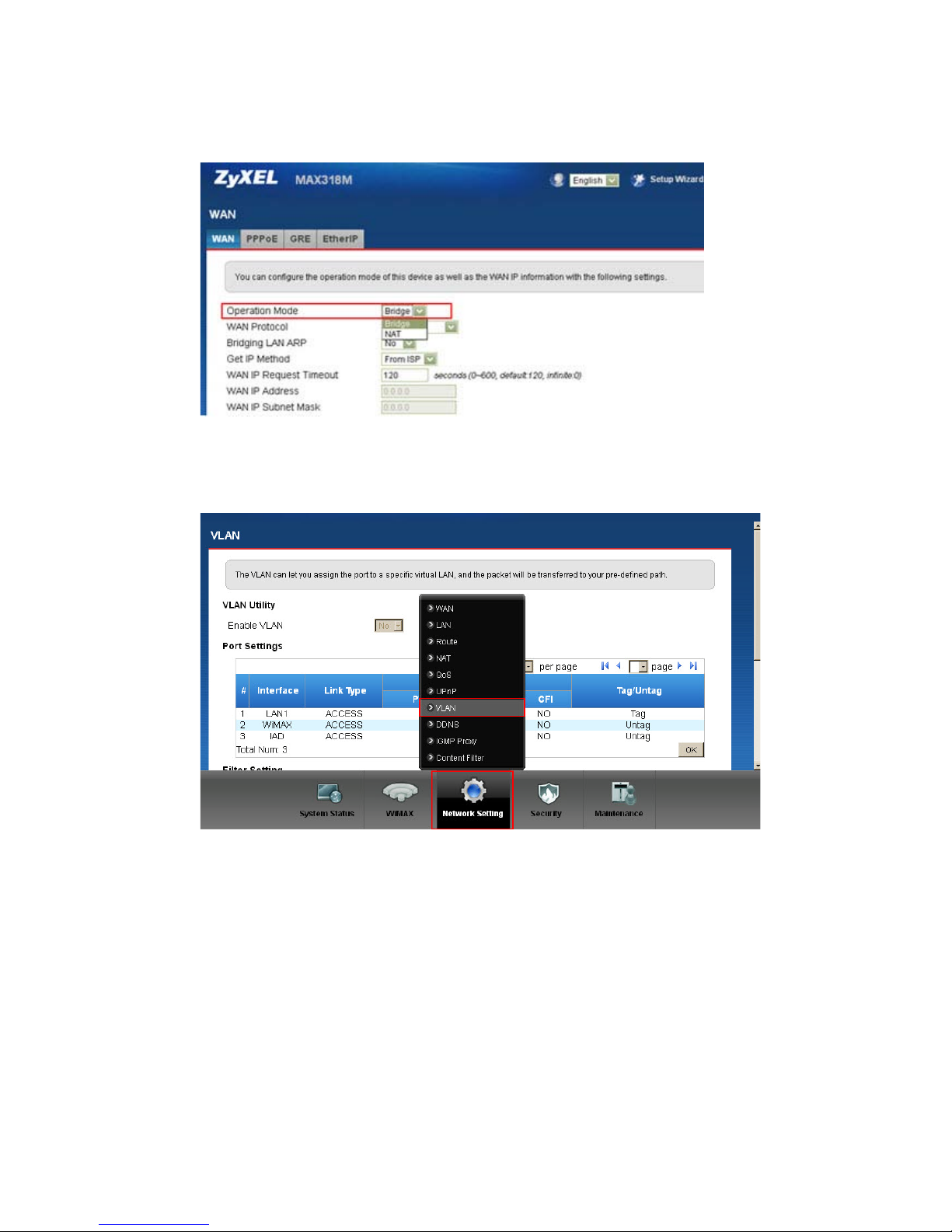
21. Does MAX218M support SNMPv2 or SNMPv3 MIB table? ................................... 9
22. Does MAX218M support syslog facility? ................................................................ 9
23. Does MAX218M support bridge mode? .............................................................. 10
24. Does MAX218M support VLAN tagging? ............................................................. 10
25. Does MAX218M Support VPN? ............................................................................ 10
26. Does MAX218M support IP-CS with bridge? (Huawei’s property) ...................... 10
27. How many preset frequencies does MAX218M support? ................................... 10
28. Does MAX218M support TR-069? How to debug TR-069 issues? ....................... 11
29. Does TR-069 support HTTP authentication modes: none, basic, digest? ............ 11
30. Does MAX218M support OMA-DM? ................................................................... 11
31. How to backup CPE configuration? ...................................................................... 11
32. How to restore CPE configuration? ...................................................................... 12
33. What are the Common error messages? ............................................................. 12
34. What to check if we are facing a Ranging error? ................................................. 15
35. How to check SBC-REQ/REG-REQ /DSA-REQ message from trace log? ............... 15
36. How to change the connecting criteria to “by RSSI” or “by CINR”? .................... 16
37. How to display the current connecting frequency? ............................................. 16
38. How to check the real time RSSI and CINR? ........................................................ 16
Page 3

39. Why is the modulation being fixed at QPSK1/2, even at very good RSSI/CINR? .. 17
40. How do we check whether the CPE sends out an EAP request? ......................... 17
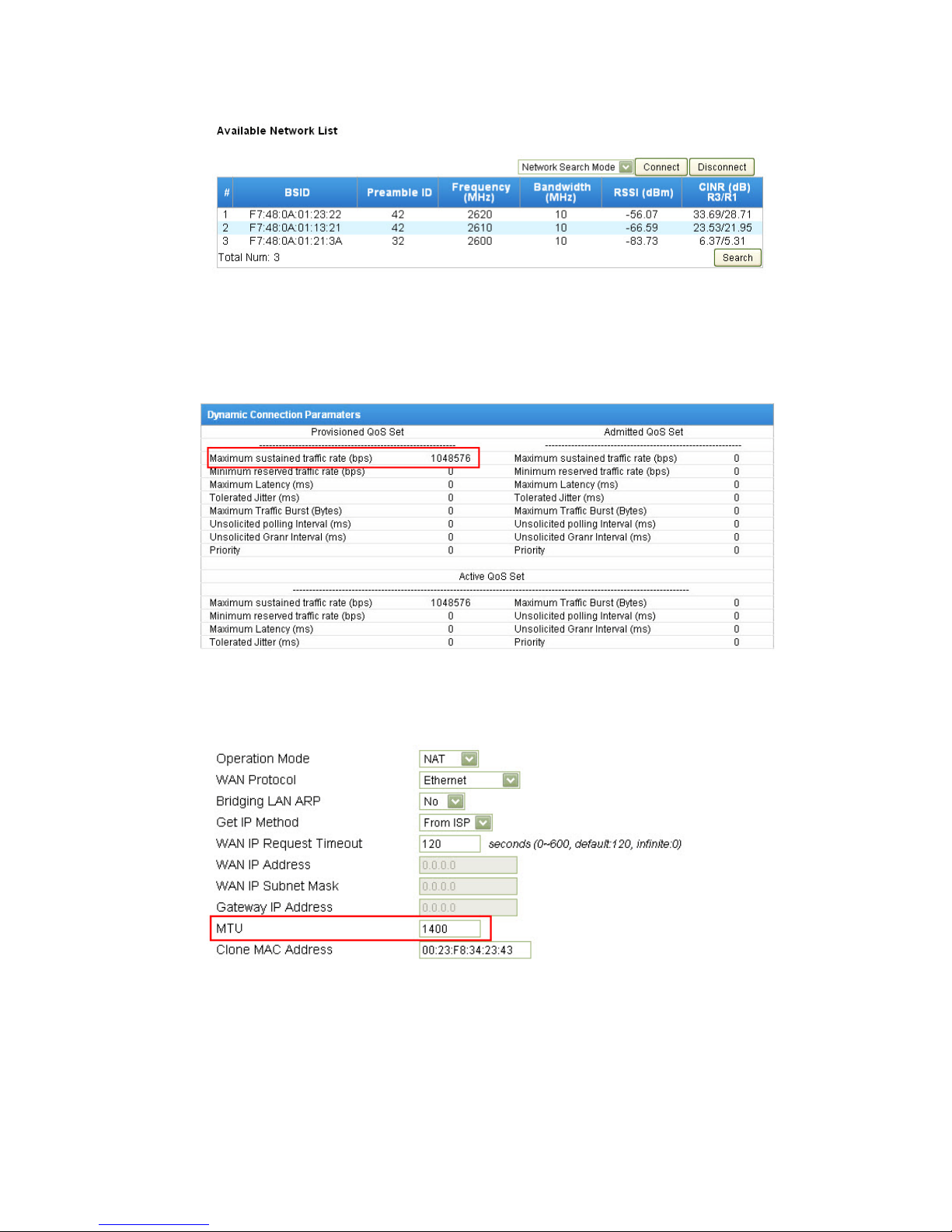
41. How do we know if the CPE uses EAP-TTLS or EAP-TLS? ..................................... 17
42. How to check current connected BS ID? .............................................................. 17
43. How to check the current downlink and uplink modulation? ............................. 18
44. Does MAX218M fully support MIMO mode? ...................................................... 18
45. Can we use static modulation for IOT test? ......................................................... 18
46. What is the Modulation CINR threshold criterion? ............................................. 18
47. How do we check neighbor BS? ........................................................................... 18
48. How to check maximum DL/UL traffic rate profile that ISPs assign to user? ...... 19
49. How to change WiMAX WAN MTU size? ............................................................. 19
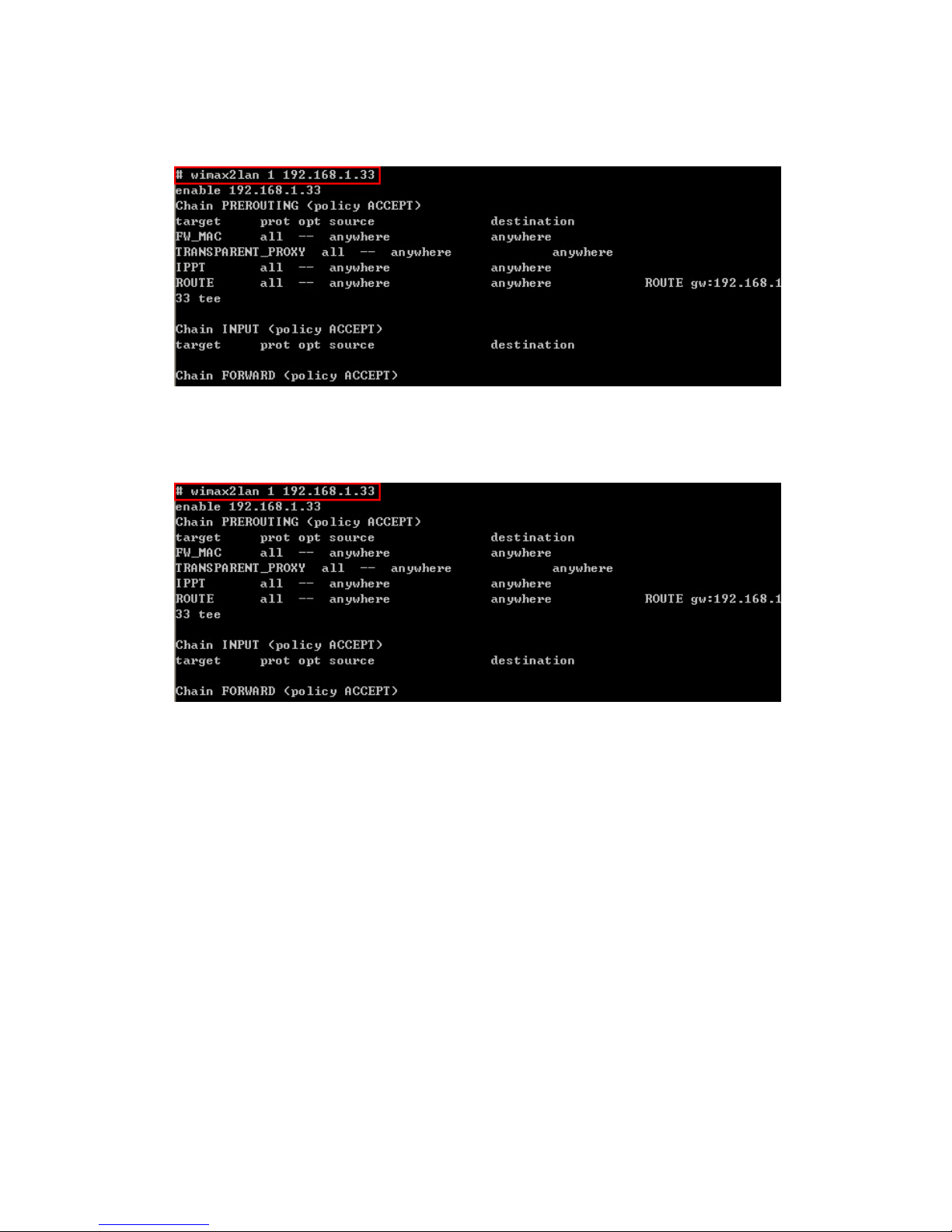
50. How can we debug DHCP issues? (Discover/offer/request/ACK message.) ........ 20
51. How to debug VoIP issues? .................................................................................. 20
52. Does MAX218M support multicast? .................................................................... 20
53. How to lock NAP ID? ............................................................................................ 20
54. How to import a device certificate? ..................................................................... 20
55. How to export the device certificate? ................................................................. 20
56. What is the operating design of NAT: NAT/Bridge + Ethernet/PPPoE/GRE
tunnel/EtherIP tunnel? ................................................................................................ 21
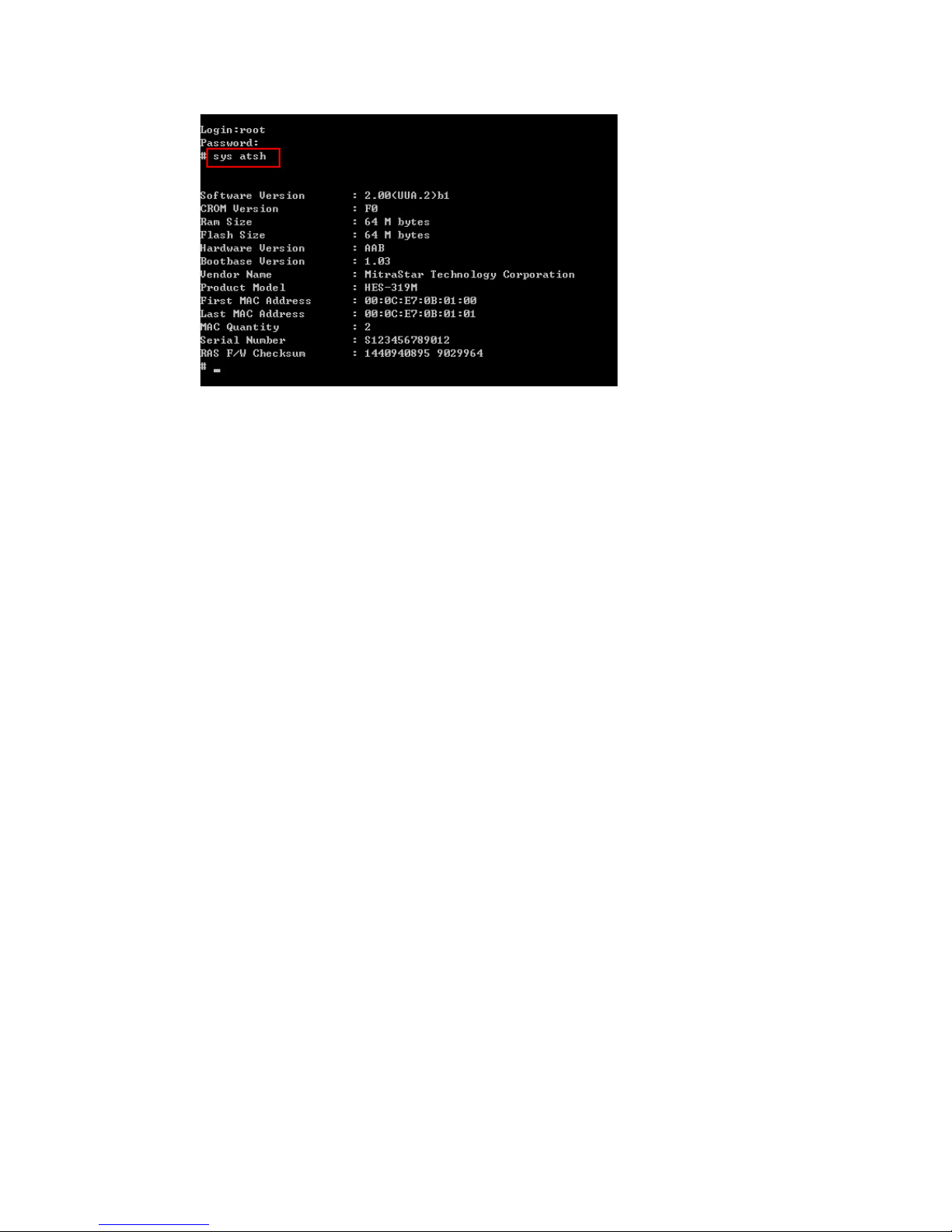
57. How to check firmware version by command? ................................................... 21
Page 4

1. Firmware naming rule
Firmware Naming rule:
2.00(XXX.Y)ZZ For Example: 2.00(TPD.0)b1
2.00 Current trunk source code version
XXX: TPD Specific customer FW ID for customization
Y: .0, .1 , .2 , .3 ... Initial specific customer FW ID version. Increases by 1 for
next FW ID version (.1, .2, .3 …); issued when the
customer requests new or enhanced features, and for bugs
fixed for next official FW.
ZZ: b1, b2, b3, …
D0
Beta X FW version for customer or PQA verification.
Changes to D0 after obtaining customer approval. (When
applying to official FW).
2. Hardware specification of WiMAX Indoor CPEs
Indoor WiMAX CPE
WiMAX Chipset
Version
TX Power Antenna Gain Interface Wi-Fi Chipset
MAX208M MT7117 26dBm 6dBi 1D N/A
MAX208M2W MT7119 26dBm 6dBi 2D+2VoIP+WiFi(11n)
Ralink 802.11
b/g/n
MAX218M MT7117 26dBm 6dBi 1D N/A
MAX218MW MT7117 26dBm 6dBi 2D+WiFi(11n)
Ralink 802.11
b/g/n
MAX218M1W MT7119 26dBm 6dBi 2D+1VoIP+WiFi(11n)
Ralink 802.11
b/g/n
MAX218M2W MT7119 26dBm 6dBi 2D+2VoIP+WiFi(11n)
Ralink 802.11
b/g/n
Page 5
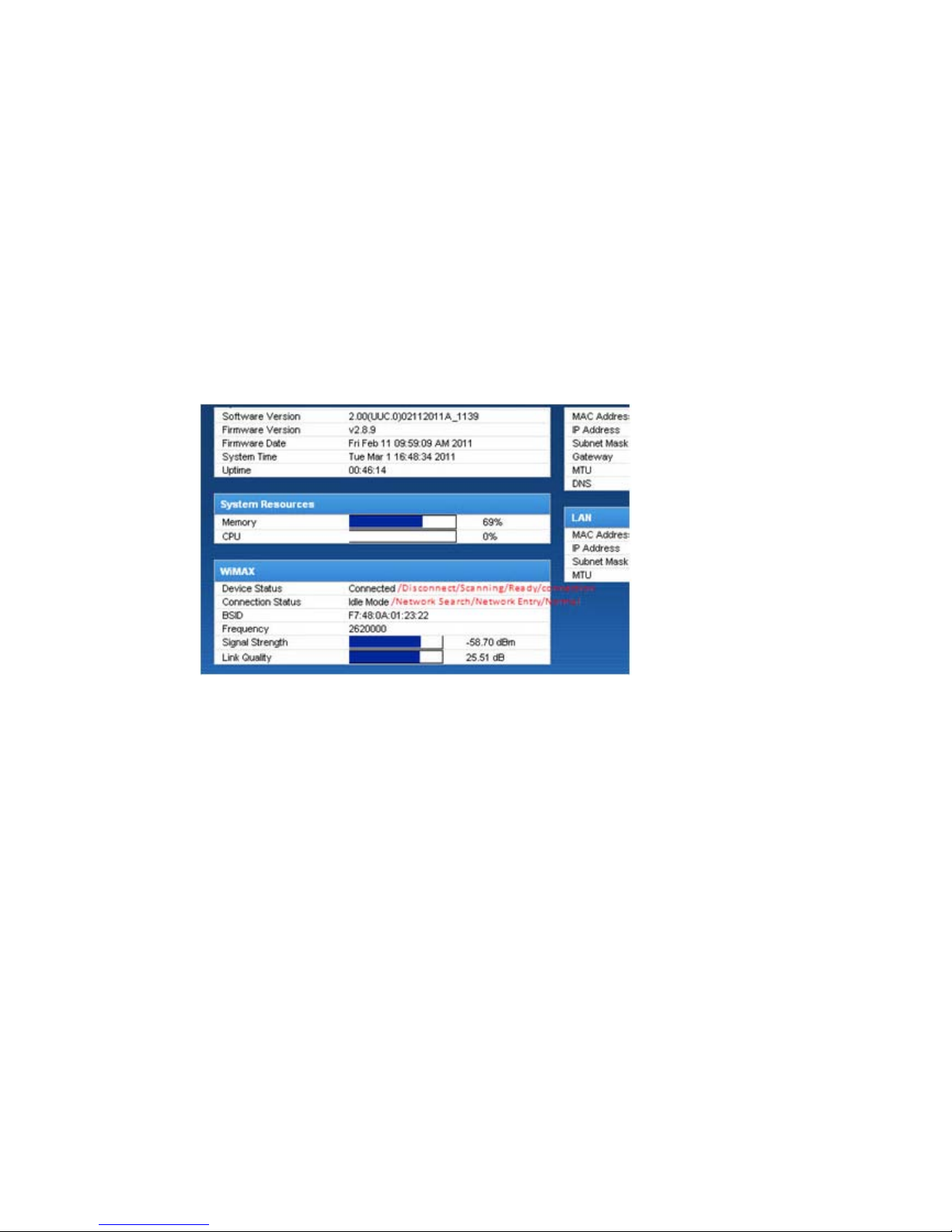
3. What is the MTK chipset version of MAX218M?
MT7117
4. What is the flash capacity of MAX218M?
64M NAND flash.
5. What are the possible device status values we can find on Web GUI?
Web GUISystem Status WiMAX
Device Status: Disconnected, Scanning, Ready, Connecting, Connected
Connection Status: Network Search, Network Entry, Normal
6. What is the maximum length of the username?
GUI Login Username: The maximum length of Login username is 16 bytes
EAP Username: Maximum length of EAP anonymous ID and username is 50 bytes
7. What do I do if I forget the password?
The default password is 1234.
If it does not work, you will have to reset to factory default by pressing the reset
button for 5 to 10 seconds.
You will lose your entire configurations when resetting to factory defaults.
8. How do we verify if the Firmware has been upgraded successfully?
All LEDs turn off and the device reboots automatically.
9. Does MAX218M support mass firmware update and what’s the procedure?
Yes , MAX218M supports Multiboot using the regular Multiboot upgrade
Page 6
procedure.
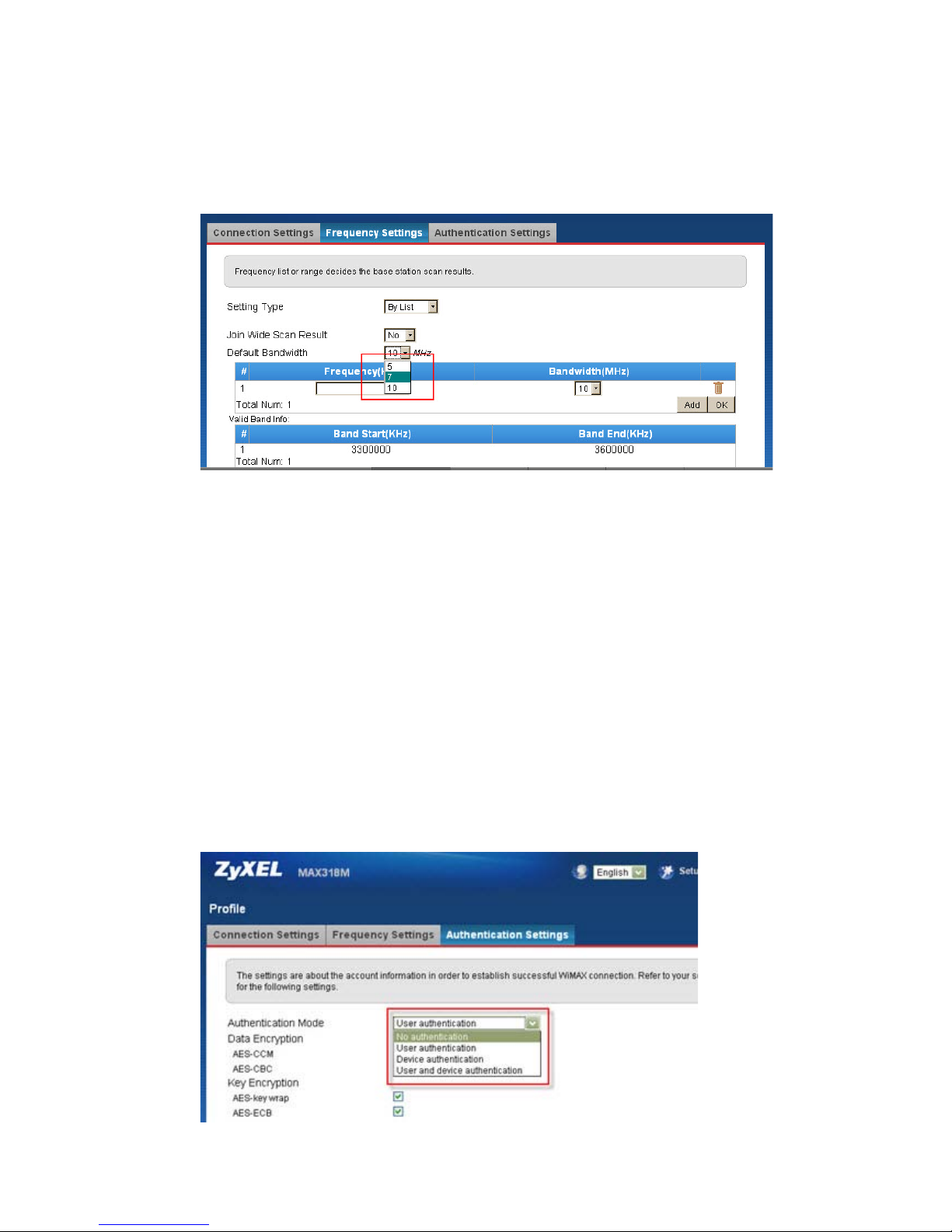
10. Which bandwidths does MAX218M support?
5, 7, 10 MHz
11. What is the antenna type?
Indoor MAX218M (3.5 GHz) is equipped with an internal Omni directional
antenna.
12. How many ROM files do we have?
We will release a default ROM based on key account’s setting.
13. How to enable/disable ARQ/H-ARQ/PHS?
The chipset vendor, MTK, didn’t release the command to us.
14. How to disable PKMv2 key authentication?
PKMv2 authentication can be disabled at GUIWiMAXProfileAuthentication
Settings.
Page 7
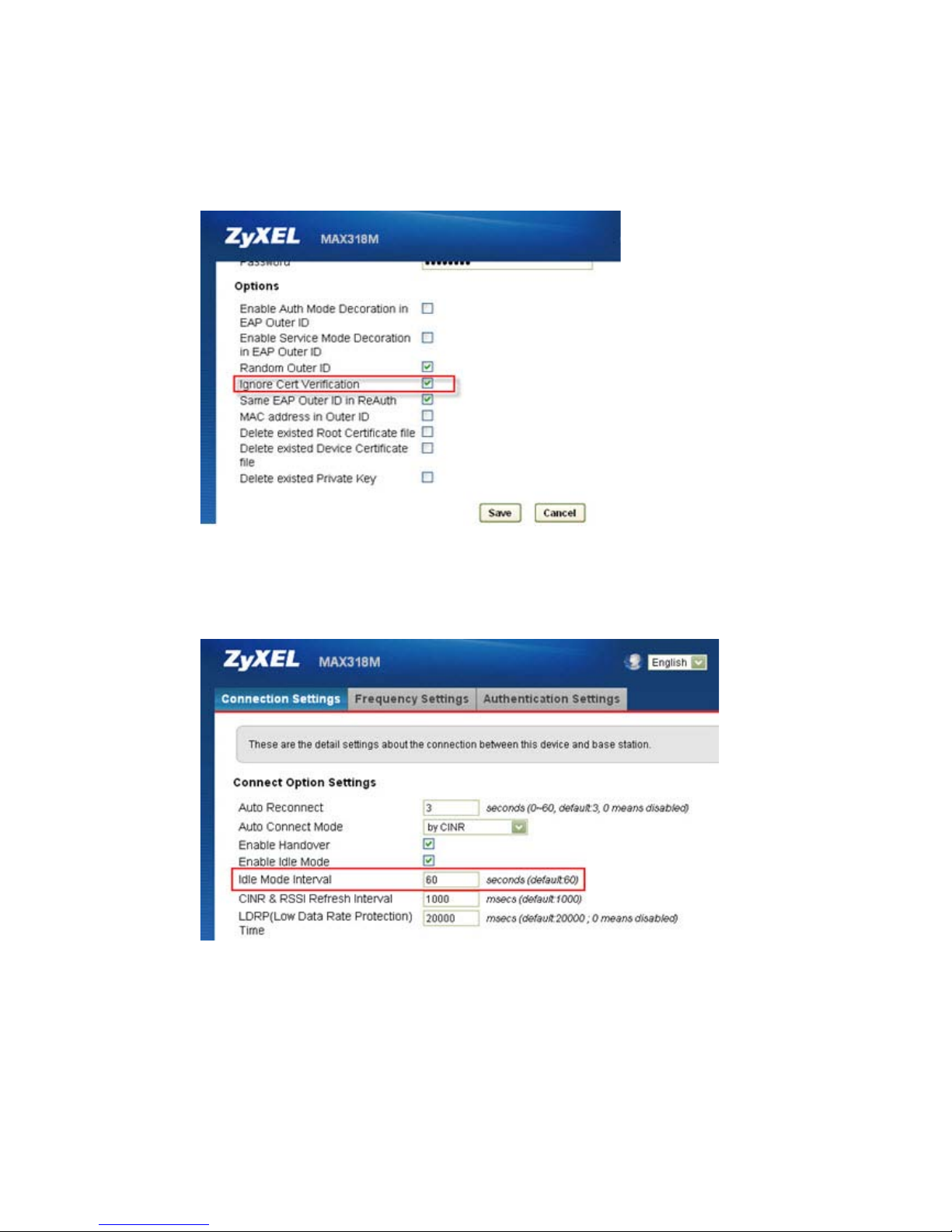
15. How to enable/disable RootCA verification?
To disable the Root CA verification in EAP procedure, go to
WiMAX Profile Authentication setting Options Ignore Cert
Verification.
16. How to change the IDLE mode time interval?
You can change the IDLE mode interval at WiMAX Profile Connection
Settings Idle Mode Interval.
17. What is the HANDOVER criterion?
BS will decide the HANDOVER by CINR level.
18. How to check the Connection ID and QoS information?
Web GUIWiMAXService Flowclick the service flow and it will show the
Page 8
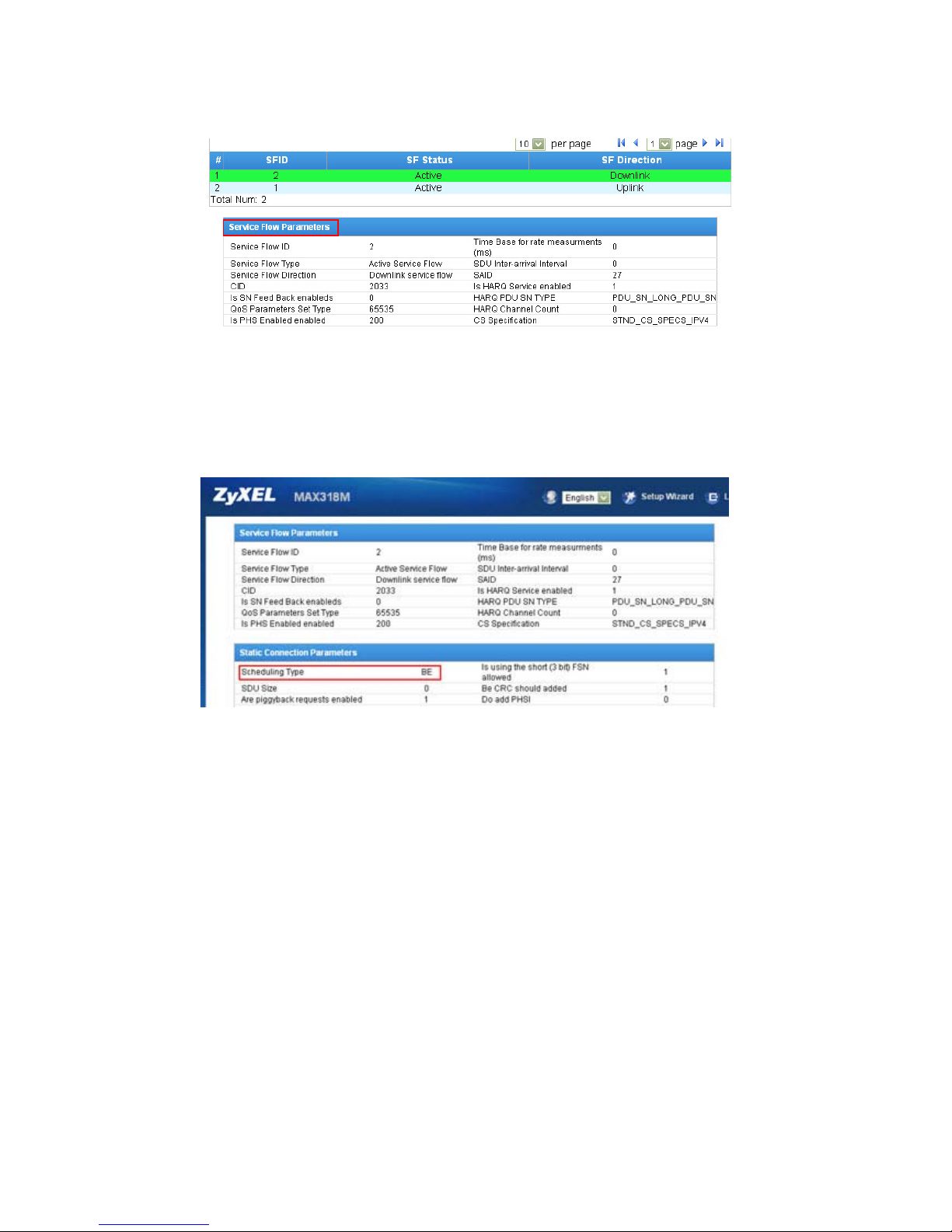
detailStatic Connection ParametersScheduling Type.
19. How to check the current service flow?
Web GUIWiMAXService Flowclick the Downlink or Uplink service flow
Static Connection ParametersScheduling Type.
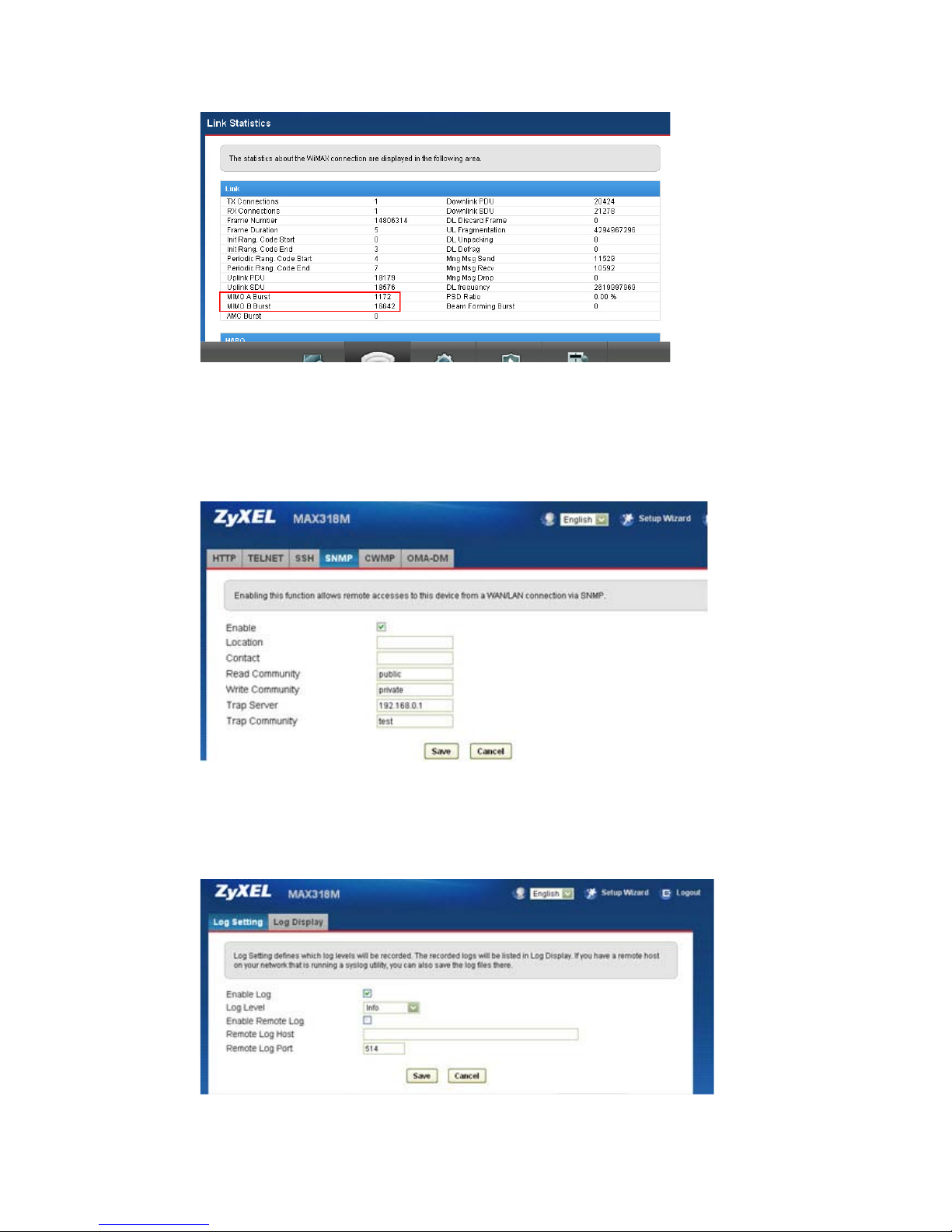
20. How can we determine if the CPE is running in SISO or Matrix A/B mode?
Web GUIWiMAXLink Statistics check LinkMIMO A Burst or MIMO B
Burst
Ex. When the value of MIMO A Burst is increasing, it indicates CPE is running in
MIMO A mode. If neither of MIMO A and MIMO B is increasing, then CPE is
running in SISO mode.
Page 9
21. Does MAX218M support SNMPv2 or SNMPv3 MIB table?
MAX218M supports both SNMPv2 and SNMPv3 standard MIBs.
Private MIBs are not supported.
22. Does MAX218M support syslog facility?
Yes , access it at Maintenance LOG Log Setting.
Page 10
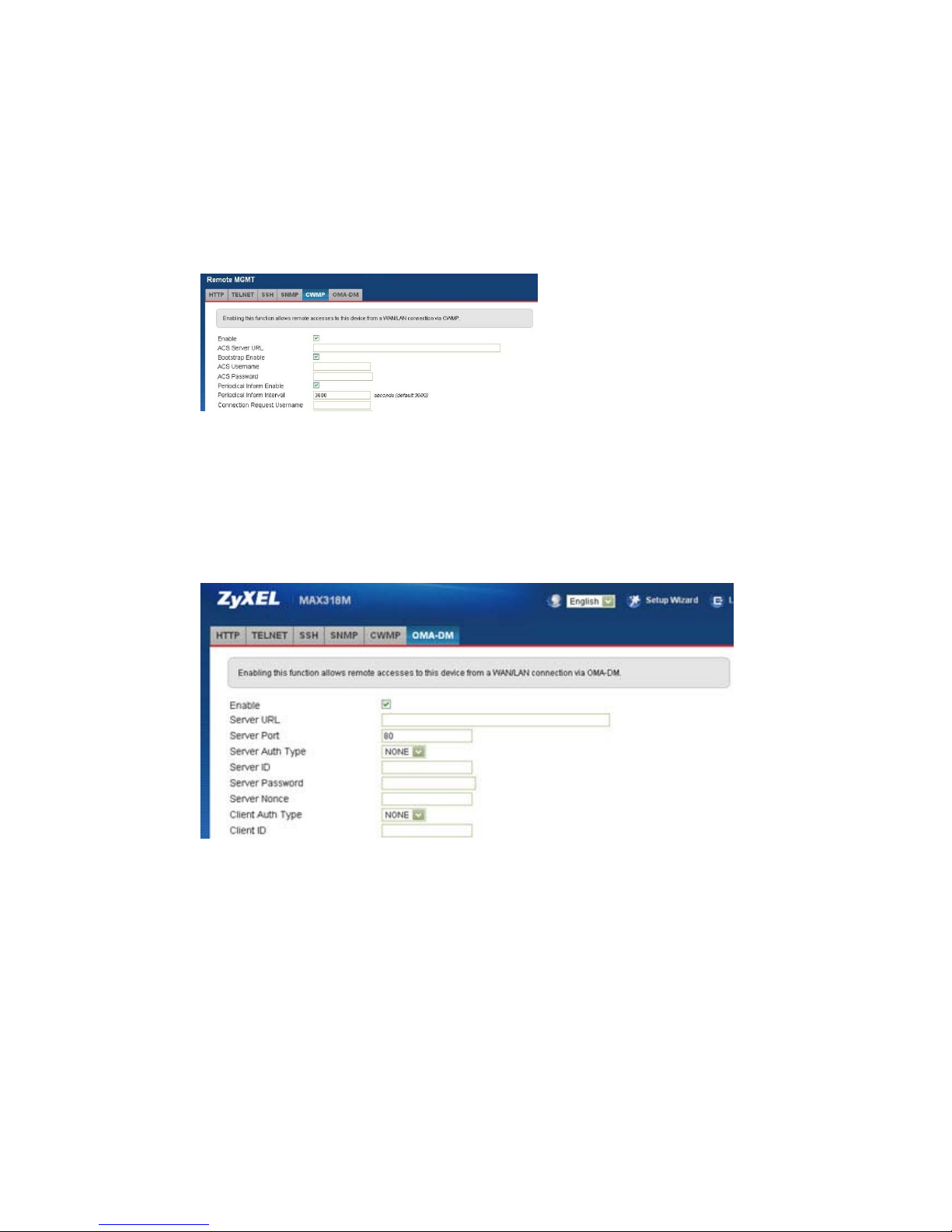
23. Does MAX218M support bridge mode?
Yes , at Network setting WAN Operation Mode. It must run in ETH-CS mode.
24. Does MAX218M support VLAN tagging?
Yes. MAX218M supports port-based VLAN.
25. Does MAX218M Support VPN?
MAX218M supports PPTP, L2TP, and IPsec.
In Web GUI navigate to Security PPTP, L2TP, IPsec.
26. Does MAX218M support IP-CS with bridge? (Huawei’s property)
MAX208M supports IP-CS with NAT and ETH-CS with bridge which are included in
WiMAX forum definition. The device does not support IP-CS with bridge mode.
27. How many preset frequencies does MAX218M support?
Page 11
There are 20 presets in MTK chipset SDK 2.8.9, these will be extended to 40 after
SDK 2.10.10
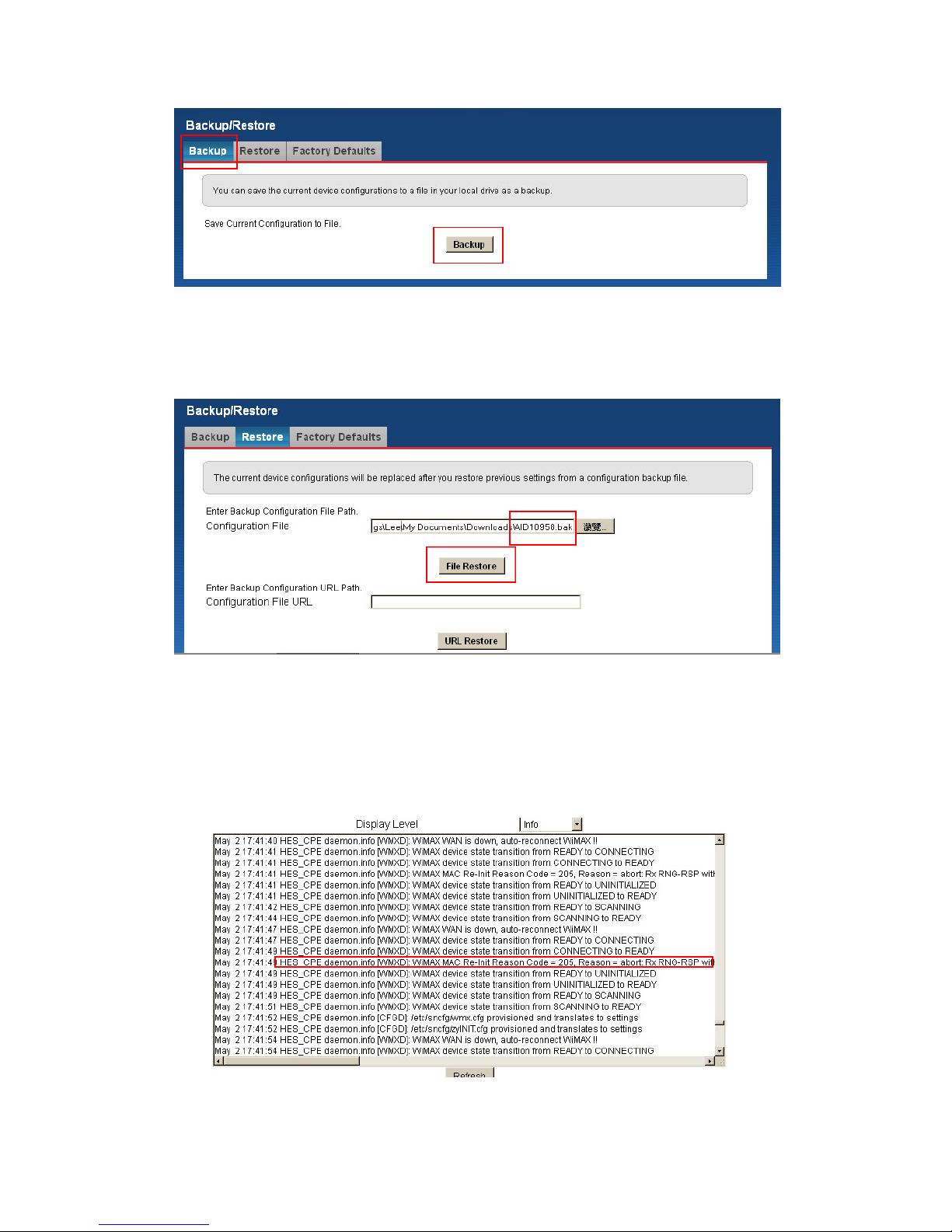
28. Does MAX218M support TR-069? How to debug TR-069 issues?
Navigate GUI to MaintenanceRemote MGMT CW M P. Please check the
documentation in the TR-069 directory.
29. Does TR-069 support HTTP authentication modes: none, basic, digest?
Yes , MAX218M supports None, Basic, and Digest for TR-069 authentication.
30. Does MAX218M support OMA-DM?
Yes , at Web GUIMaintenanceRemote MGMT OMA-DM.
31. How to backup CPE configuration?
It is a good habit to backup your CPE configuration, in case you mis-configure or lose
the configuration.
Go to Web GUIMaintenanceBackup/RestoreBackup.
Page 12
32. How to restore CPE configuration?
You can either restore CPE configuration from a local PC or over the network.
33. What are the Common error messages?
Please check Maintenance Log Log Display for details.
For example:
1. 2xx MAC message error.
2. 6xx authentication failure.
100 "IdleMode Deregistration (Power Down)"
Page 13

101 "Transmit DREG_REQ Fail "
102 "Transmit DREG_REQ Success"
200 "Bs Restarted"
201 "RES_CMD air message"
202 "DREG_CMD air message"
203 "frame duration changed"
204 "Unsolicited RNG_RSP with DL_FREQ_OVERRIDE TLV"
205 "Ranging abort: Rx RNG-RSP with abort status"
300 "Synchronization lost due to lost DL-MAP timeout"
301 "Synchronization lost due to lost UL-MAP timeout"
302 "Synchronization lost due to T1 timeout"
303 "Synchronization lost due to T12 timeout"
304 "Synchronization lost due to any other reason"
400 "no channel available"
500 "No Ranging Tx Opportunity"
501 "Ranging retries exhausted"
502 "Reach Max. number of continue RNG-RSP"
503 "Ranging with the serving BS was aborted"
504 "Rng failed as result of T2 timer expiry."
505 "Rng failed due to BS inconsistency"
506 "Retries of the DREG_REQ message have exhausted"
507 "Retries of the SBC_REQ message have exhausted"
508 "Retries of the REG_REQ message have exhausted"
509 "Network Entry Timeout: Wait for searching channel."
510 "Network Entry Timeout: Wait for RNG-RSP."
511 "Network Entry Timeout: Wait for Send-IND of SBC-REQ."
512 "Network Entry Timeout: Wait for SBC-RSP."
513 "Network Entry Timeout: Wait for Send-IND of REG-REQ."
514 "Network Entry Timeout: Wait for REG-RSP."
515 "Network Entry Timeout: Unexpected Condition."
516 "SBC negotiation error"
517 "Registeration error"
518 "Network entry duration timer timeout"
519 "Initial ranging CINR check failed: poor channel condition"
520 "Initial ranging DCD NOT usable (e.g. FDD)"
521 "Initial ranging UCD NOT usable (e.g. FDD)"
522 "Initial ranging T20 timeout: No preamble detected within T20"
523 "Initial ranging T20a timeout: No DL-MAP after AFC within T20a"
Page 14

524 "Initial ranging T21 timeout: No valid DCD to decode DL-MAP within
T21"
525 "T2 timeout: No ranging opportunity in UL-MAP within T2"
526 "Weak signal, ranging code retries exhausted"
527 "RNG-REQ retries exhausted (No RNG-RSP from BS, check MAC addr)
or RNG-REQ CANNOT be sent"
528 "MAP FEC is NOT supported"
529 "Weak signal, PHY error reported"
530 "RNG-REQ retries exhausted due to no CDMA_Alloc_IE"
531 "No preferred Channel in CDB."
532 "Ranging Error"
600 "Authorization failed"
601 "Auth Fails: BS does not activate EAP. (Suggestion: Check MAC
Address or SBC TLVs)"
602 "Auth Fails: BS does not send SA-TEK-Challenge. (Suggestion: EAP
Outer ID format is accepted, but collided)"
603 "Auth Fails: BS sends SA-TEK-Challenge with invalid AKID."
604 "Auth Fails: BS does not send SA-TEK-Response."
605 "Auth Fails: EAP is not negotiated in SBC."
606 "Auth Fails: EAP Fails (Suggestion: 1.Check Auth Configuration.
2. EAP Outer ID format is not accepted)."
607 "Auth Fails: Auth Request at unexpected state."
608 "Network Entry Timeout: Wait for Auth."
700 "Host Disconnect during NwEntry"
800 "Weak signal, no target BS to handover"
801 "Cannot return SBS, resource retain timer expired"
802 "the return to serving BS failed"
900 "UMAC assert"
901 "PHY error"
902 "PHY is reset during initial RNG/search NET/assocn"
903 "PHY is reset during HO RNG/Fast RNG/return SBS/idle HO"
904 "PHY is reset during location updt/idle reentry"
905 "PHY is reset during PRNG/unsolicited PRNG/keep alive/PHY
initiated PRNG"
906 "BS doesn't allocate BW for a long time after BR is sent"
907 "Idle Mode Timer timeout"
908 "PS request to change BS and starts NWentry"
909 "Keep alive check failed"
Page 15
910 "ARQTX reset retries exhausted"
911 "ARQRX reset retries exhausted"
912 "Retries of the TFTP_CPLT message have exhausted"
913 "TFTP_RSP error"
914 "Secondary management complete message response is fail"
915 "UL sleep control subheader retries exhausted"
916 "Scanning failure"
917 "MOB_SLP-REQ retries exhausted"
918 "Invalid MTK-Authorized Device Certificate"
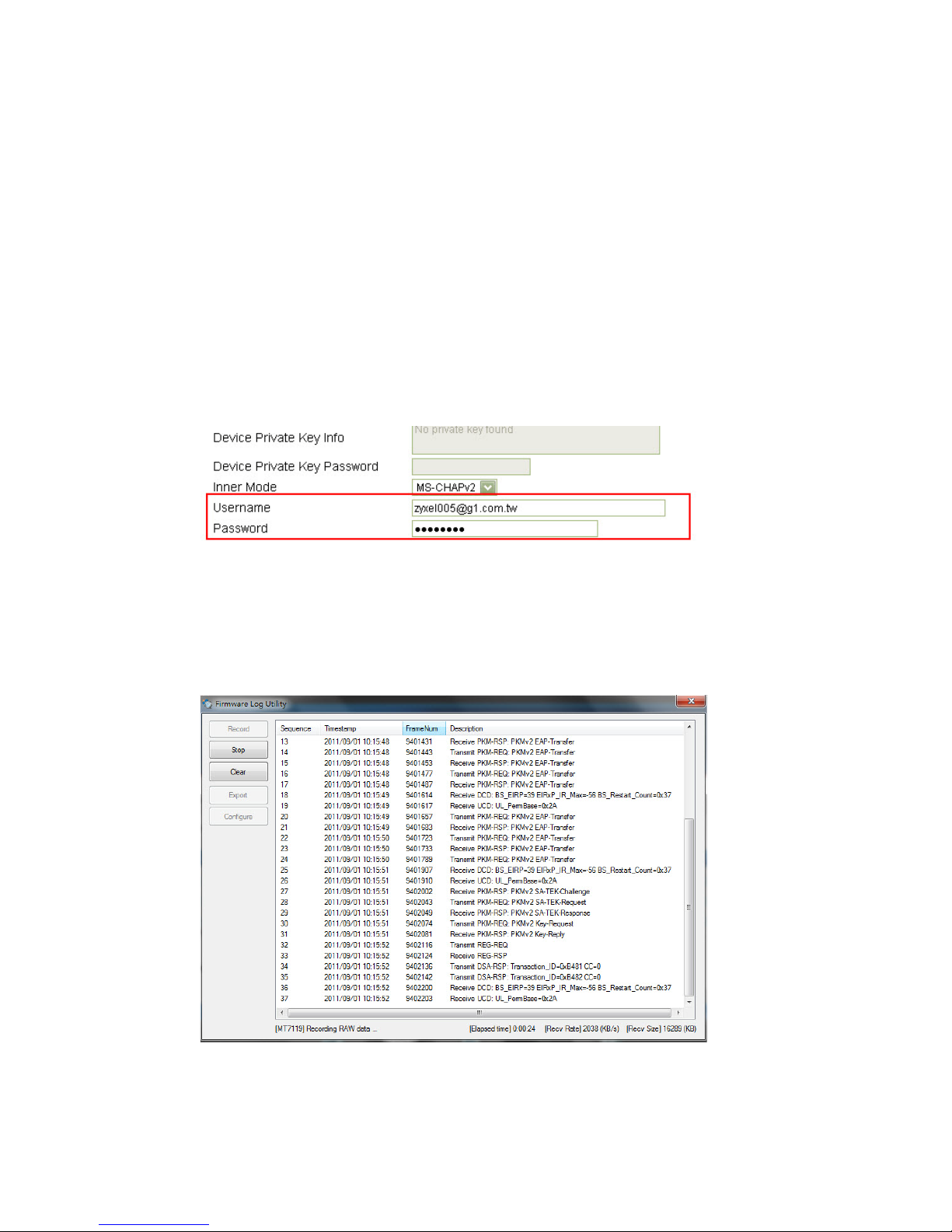
34. What to check if we are facing a Ranging error?
Make sure your username and password or the certificates are all correct.
Also make sure the RSSI and CINR are not too low, weak signal is another cause of
ranging errors.
35. How to check SBC-REQ/REG-REQ/DSA-REQ message from trace log?
You can get the PHY log using the UDT tool.
Page 16
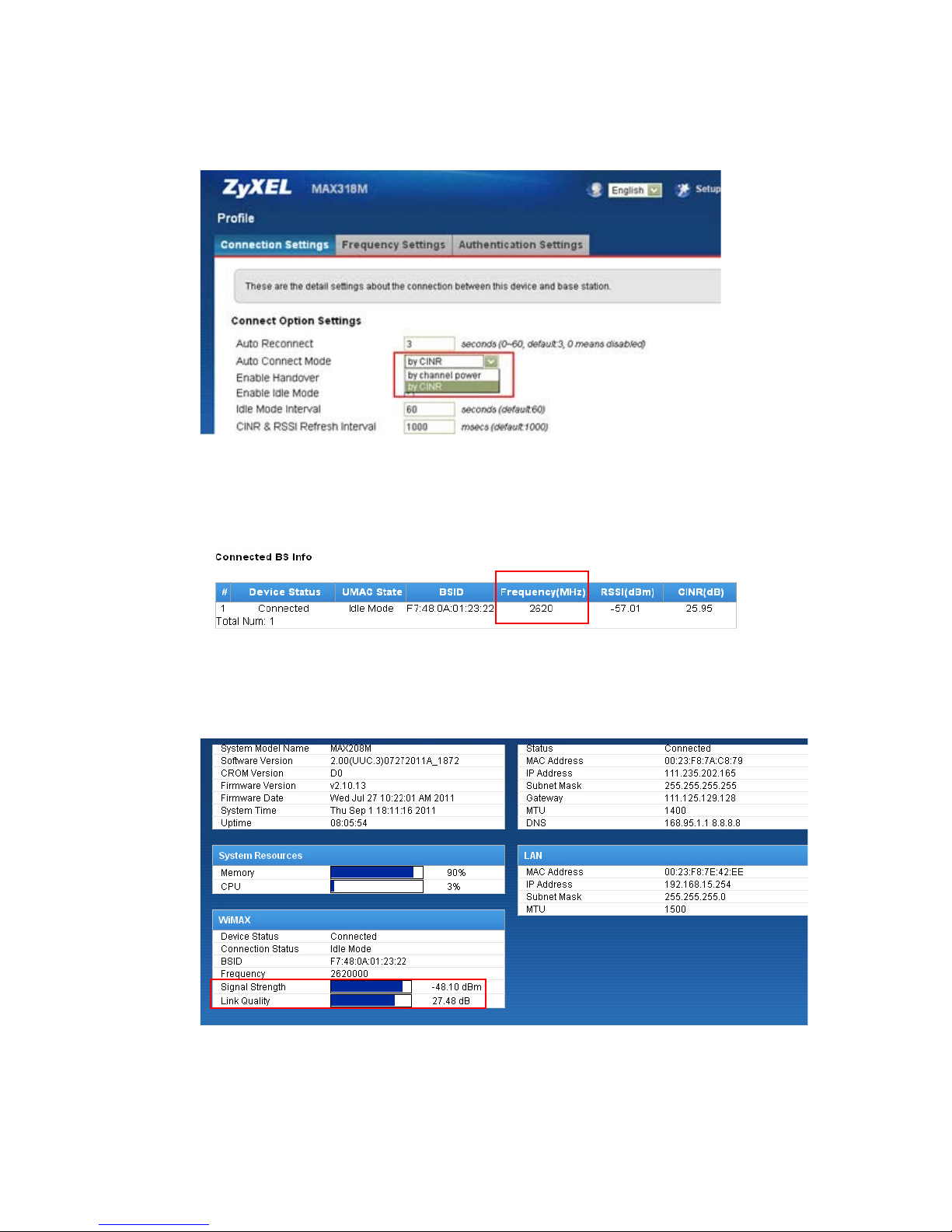
36. How to change the connecting criteria to “by RSSI” or “by CINR”?
Select the criteria at Web GUIWiMAXProfileAuto Connect Mode.
37. How to display the current connecting frequency?
Navigate to Web GUIWiMAXConnectConnected BS info.
38. How to check the real time RSSI and CINR?
They are available at Status page.
Page 17
39. Why is the modulation being fixed at QPSK1/2, even at very good RSSI/CINR?
The causes might be the BS has been locked only for certain brand of CPEs, please
check BS settings to see whether our CPE is registered on the BS.
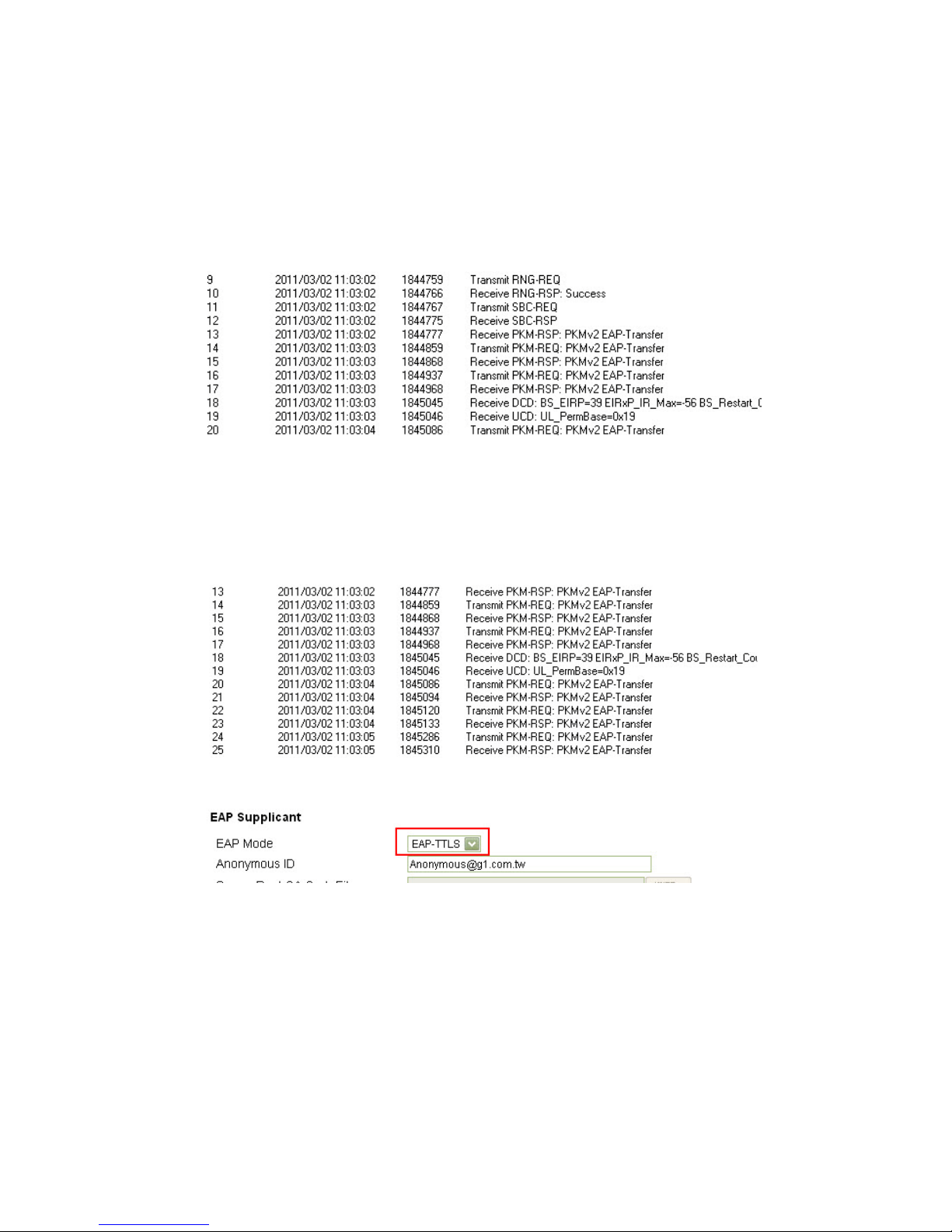
40. How do we check whether the CPE sends out an EAP request?
You can get the message using the UDT tool.
41. How do we know if the CPE uses EAP-TTLS or EAP-TLS?
1. You can get the message from the UDT tool.
2. You can check it via GUI’s EAP configuration page.
42. How to check current connected BS ID?
Check the BSID at Web GUIWiMAXLink Status.
Page 18
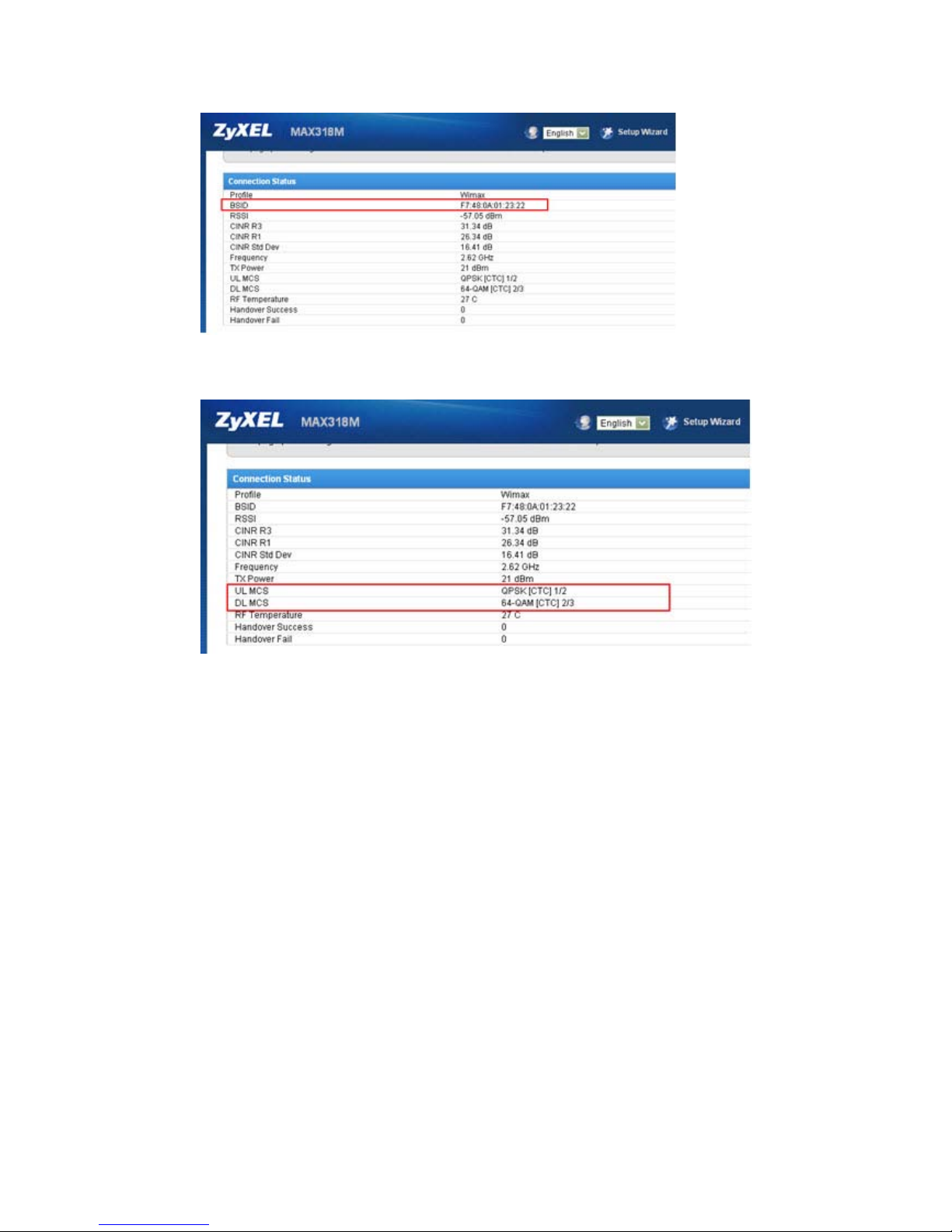
43. How to check the current downlink and uplink modulation?
Navigate to Web GUIWiMAXLink Status.
44. Does MAX218M fully support MIMO mode?
Yes , MAX218M supports both MIMO A/MIMO B modes.
45. Can we use static modulation for IOT test?
No, the MTK chipset does not support fixed modulation for IOT.
You should ask ISP to have their BS assign the specific modulation to your CPE.
46. What is the Modulation CINR threshold criterion?
This setting is determined by BS configuration, not based on MS.
47. How do we check neighbor BS?
BS list is available at Web GUIWiMAXConnectAvailable Network List.
Page 19
48. How to check maximum DL/UL traffic rate profile that ISPs assign to user?
Go to Web GUIWiMAXService Flowclick DL or ULDynamic Connection
ParametersMaximum sustained traffic rate.
49. How to change WiMAX WAN MTU size?
This can be changed at Network settingWANMTU.
Page 20
50. How can we debug DHCP issues? (Discover/offer/request/ACK message.)
Dump WiMAX packets to LAN by using the “wimax2lan” command.
51. How to debug VoIP issues?
Dump WiMAX packets to LAN using the “wimax2lan” command.
52. Does MAX218M support multicast?
No, MAX218M doesn’t support multicast, only unicast or broadcast.
53. How to lock NAP ID?
Currently, MAX218M does not support locking of NAP ID, it’s under development.
54. How to import a device certificate?
By default, MTK does not allow importing unsigned certificates, but we will have
a special tool that can skip MTK’s restriction to import the certificates into CPE.
55. How to export the device certificate?
There is no way to export the certificates.
Page 21
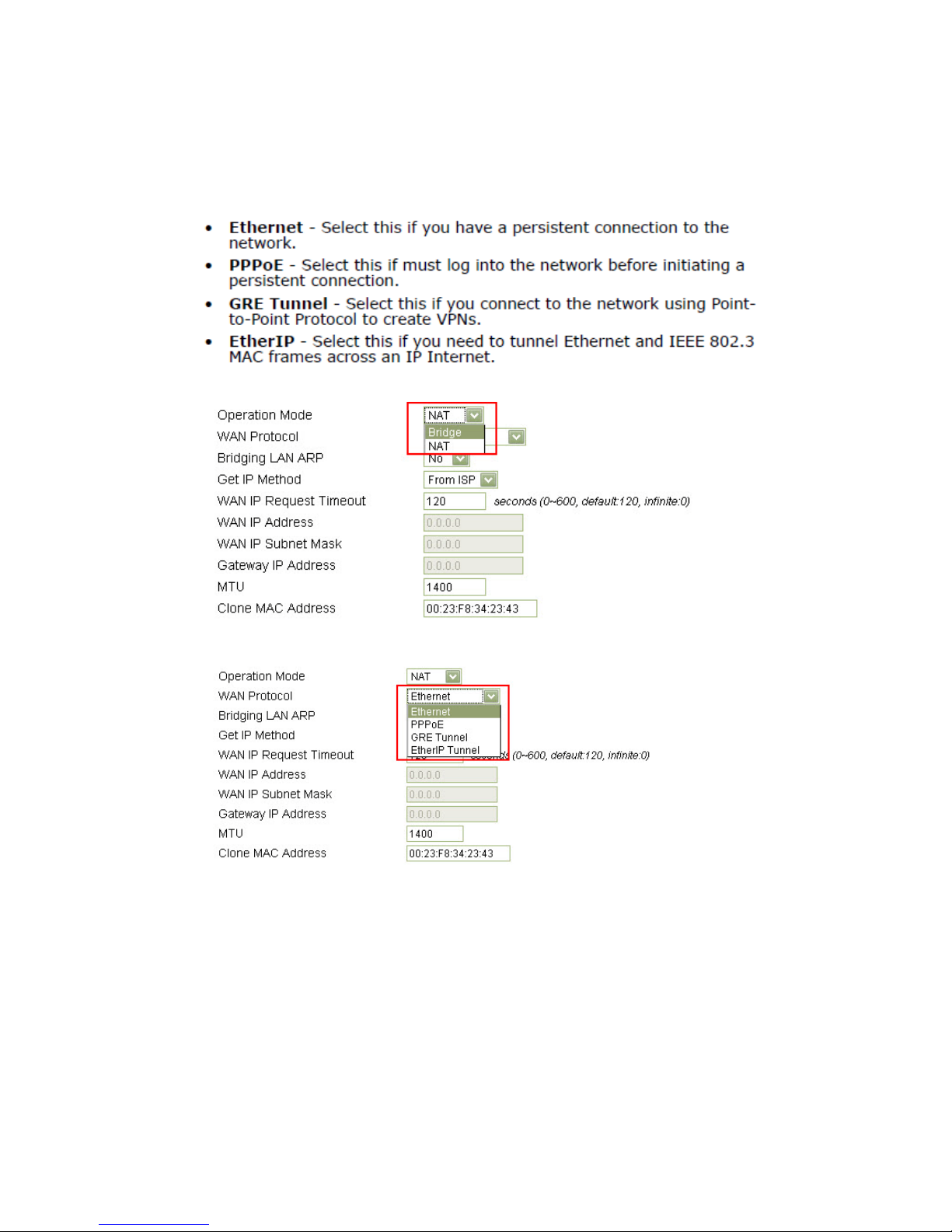
56. What is the operating design of NAT: NAT/Bridge + Ethernet/PPPoE/GRE
tunnel/EtherIP tunnel?
There are just NAT or bridge modes, and with bridge mode, you can select the
Ethernet or PPP or GRE.
57. How to check firmware version by command?
You can use the command: sys atsh
Page 22
 Loading...