

Page 1
ESERIES B UILT-I N O VENS
USE &CARE INFORMATION
Page 2

CONTENTS
Wolf E Series Built-In Ovens 3
Safety Instructions & Precautions 4
Wolf E Series Built-In Oven Features 6
Wolf E Series Built-In Oven Operation 10
Wolf E Series Built-In Oven Care 31
Wolf Cooking Guide 33
Wolf Troubleshooting Guide 37
Wolf Service Information 38
Wolf Warranty 39
WOLF®is a registered trademark of Wolf Appliance, Inc.
As you read this Use & Care Information,
take particular note of the CAUTION and
ARNING symbols when they appear.
W
This information is important for safe and
ficient use of the Wolf equipment.
ef
signals a situation where minor injury or
oduct damage may occur if you do not
pr
follow instructions.
states a hazard that may cause serious
injury or death if precautions are not
followed.
mation may
In addition, this Use & Car
ANT NOTE which highlights
signal an IMPOR
mation that is especially important.
infor
T
e Infor
Page 3

WOLF E SERIES BUILT-IN OVENS
THANK YOU
Your purchase of a Wolf E Series built-in oven
attests to the importance you place upon the
uality and performance of your cooking
q
equipment. We understand this importance
and have designed and built your oven with
uality materials and workmanship to give
q
you years of dependable service.
We know you are eager to start cooking, but
before you do, please take some time to read
this Use & Care Information. Whether you are
a beginning cook or an expert chef, it will be
to your benefit to familiarize yourself with the
safety practices, features, operation and care
recommendations of the Wolf oven.
We appreciate your choice of a Wolf
Appliance product and welcome any
suggestions or comments you may have.
To share your opinions with us, please call
800-332-9513.
DO NOT place any cookware on oven
floor or use aluminum foil or other
material to line the oven floor or side
walls. Failure to adhere to this notice will
damage the porcelain and will void your
warranty.
CONTACT
INFORMATION
Wolf Customer
Service:
800-332-9513
Website:
wolfappliance.com
Your Wolf E Series built-in oven is protected
by a warranty that is one of the finest in the
industry. Take a moment to read the warranty
statement on page 39 and refer to it should
service become necessary.
3
Page 4

SAFETY INSTRUCTIONS AND PRECAUTIONS
WHAT TO DO
IMPORTANT NOTE: Read all
instructions before using this
appliance.
Read this Use & Care Information
carefully before using your new
built-in oven
fire, electric shock or injury to
persons.
Ensure proper installation and
servicing.
properly installed and grounded by
a qualified technician.
Have installer show you where the
fuse or electrical box is located in
your home.
turn off the electricity to the oven.
Use oven only for cooking tasks
expected of a home oven as outlined
in this book.
Always properly clean and maintain
the oven
book.
Always use dry pot holders when
removing pans from the oven. Wet
or damp pot holders can cause
steam burns. Do not let pot holders
touch hot heating elements. Do not
use a towel or other bulky cloth.
to reduce the risk of
This appliance must be
Learn how and where to
as recommended in this
Exercise caution when opening the
oven door.
escape before looking or reaching
into the oven.
Be sure that the oven cool air intake
(located above the door) and oven
exhaust vent (located below the
door) are unobstructed at all times.
Position oven racks in desired locations
must be repositioned after the oven
is already hot, be certain oven mitt
does not contact a hot heating
element in the oven.
Before using Self-Clean mode,
remove broiler grill and pan, oven
racks, oven rack guides and any
other utensils.
Clean only those parts listed in
this book.
Cooling fan should be operating
during the Self-Clean mode. If you
notice that the cooling fan is not
operating, contact a Wolf authorized
service center before using SelfClean mode again.
Let hot air or steam
when oven is cool. If a rack
4
Page 5

WHAT NOT TO DO
DO NOT place any cookware on
oven floor or use aluminum foil
or other material to line the oven
floor or side walls. Failure to
adhere to this notice will damage
the porcelain and will void your
warranty.
Do not place cookware on the floor
of the oven.
Do not repair or replace any part
of the oven unless specifically
recommended in literature accompanying this appliance. All service
should be referred to a Wolf authorized service center.
Do not use oven for warming or
heating a room.
Do not leave children alone or unattended in the area where the oven is
in use. Never allow children to sit or
stand on any part of the oven. Do
not let children play with the oven.
Do not use water on gr
ease fir
Smother any flames with a lid,
baking sheet or flat tray. Flaming
grease can be extinguished with
baking soda or a multipurpose
chemical or foam extinguisher.
Do not heat unopened food containers
as they could burst and cause
injury.
es.
Do not use commercial oven
cleaners
or oven liner protective
coatings, such as aluminum foil, on
any part of the oven.
Do not use abrasive or caustic
cleaners
or detergents on this appliance as these may cause permanent
damage. Do not use aerosol
cleaners as these may be flammable
or cause corrosion of metal parts.
Do not clean the oven gasket,
because rubbing or moving the
gasket may eliminate the required
tight door seal.
Do not wear loose or hanging
apparel
while using the oven.
Do not touch heating elements or
interior surfaces of oven.
Heating
elements may be hot even though
they are dark in color. Interiors of
the oven become hot enough to
cause burns. During and after use,
do not touch, or let clothing or other
flammable materials contact heating
elements or interior surfaces of oven
until they have had sufficient time to
cool. Other surfaces of the appliance
may become hot enough to cause
burns. These surfaces include the
oven vent and the surface near the
oven vent. The oven door and
window could also become hot
enough to cause burns.
Do not stor
e combustible,
flamma
ble or explosive materials in the
oven or adjacent cabinets.
-
Do not store items of interest to
children above the oven, as they
could climb on the appliance to
reach items and be injured.
5
Page 6
WOLF E SERIES BUILT-IN OVEN FEATURES
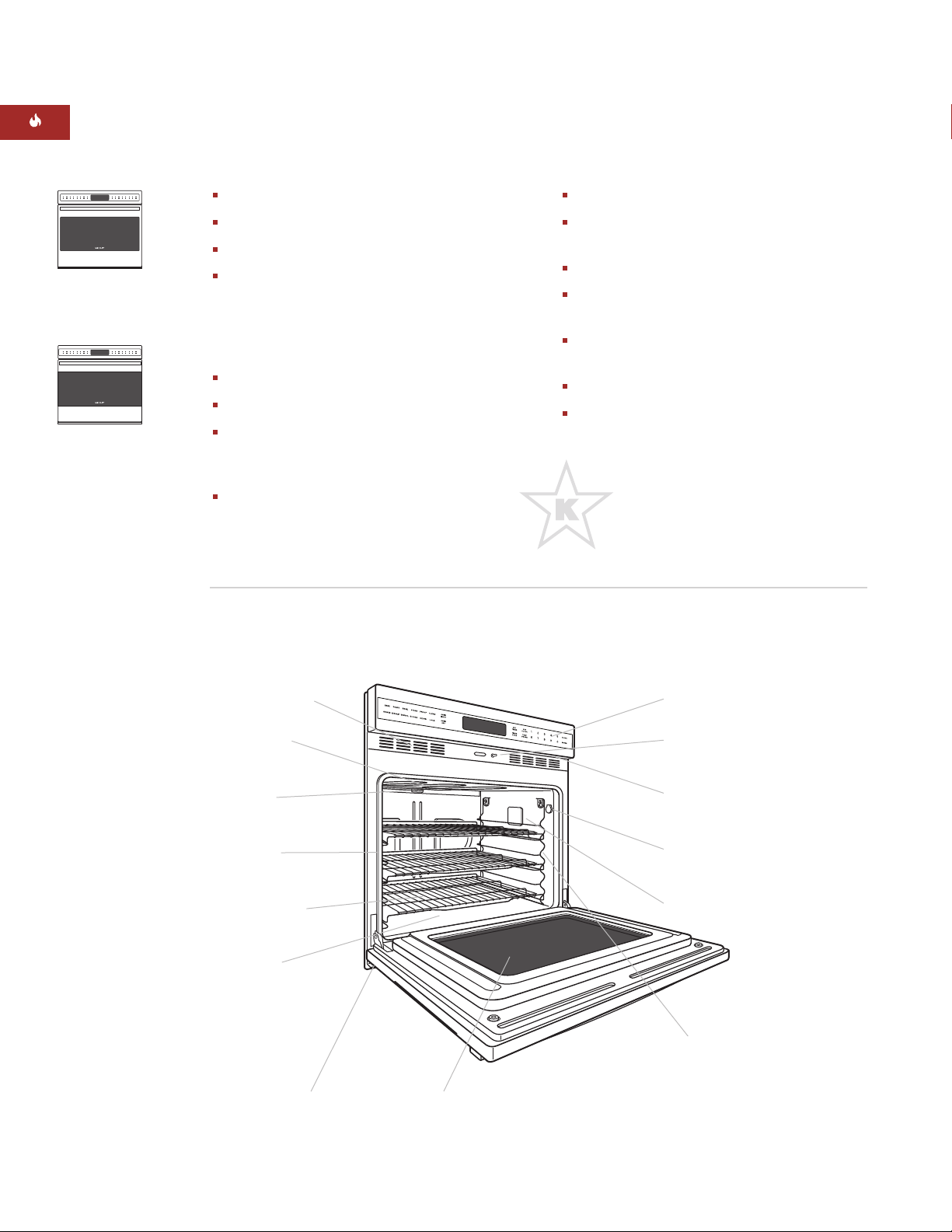
E SERIES SINGLE OVEN FEATURES
Model SO30-2F/S
Framed
Model SO30-2U/S
Unframed
WOLF
WARRANTY
Framed and unframed door styles available
Available in classic stainless steel finish only
Dual convection logic control system
Ten cooking modes—bake, roast, broil,
onvection bake, convection roast,
c
convection broil, convection, bake stone
(accessory required), dehydrate (accessory
required) and proof
Touch control panel with LCD readout
Cobalt blue porcelain oven interior
Three removable racks with full-extension
bottom rack and two removable six-level
rack guides
Large viewing double pane window
E SERIES BUILT-IN SINGLE OVEN
Models SO30-2F/S and SO30-2U/S (shown)
Dual interior halogen lighting
Hidden dual bake element and recessed
broil element
Temperature probe and receptacle
elayed start, self-clean and Sabbath
D
features (certified by Star-K)
Balanced door hinge assures smooth
opening and closing of the door
CSA certified for US and Canada
Two and five year residential warranty—
exclusions apply, see warranty at the end
of this guide
This appliance is certified by Star-K
to meet strict religious regulations in
conjunction with specific instructions
found on www.star-k.org.
Wolf products are
covered by a two
and five year
residential warranty
(exclusions apply).
See warranty
details at the end
of this guide.
Electronics and
door cooling vents
Recessed broil
element
mostat
Ther
Oven gasket
emovable
ee r
Thr
racks
Hidden bake
element
Exhaust vent
Double pane
window
Electronic
control panel
Oven door light
switch
Rating plate
location
eceptacle
obe r
Pr
Halogen light
Removable, six-level
rack guides
Dimensions in parentheses are in
6
millimeters unless otherwise specified.
Page 7
WOLF E SERIES BUILT-IN OVEN FEATURES
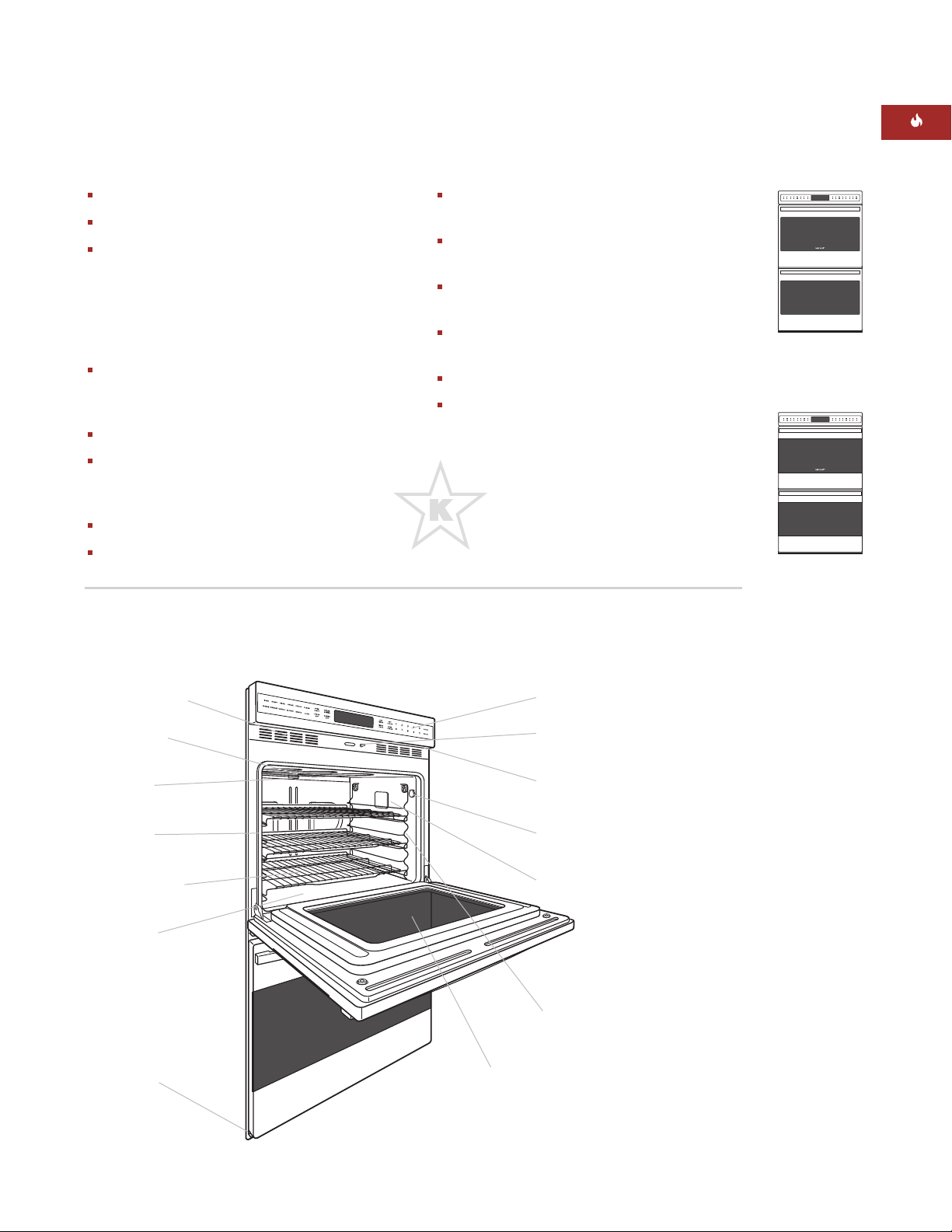
E SERIES DOUBLE OVEN FEATURES
Framed and unframed door styles available
Available in classic stainless steel finish only
ual convection logic control system in
D
upper oven with ten cooking modes—bake,
roast, broil, convection bake, convection
oast, convection broil, convection, bake
r
stone (accessory required), dehydrate
(accessory required) and proof
Non-convection lower oven has four
standard cooking modes—bake, roast, broil
and proof
Cobalt blue porcelain oven interiors
Three removable racks with full-extension
bottom rack and two removable six-level
rack guides (per oven)
Large viewing double pane windows
Dual interior halogen lighting in each oven
E SERIES BUILT-IN DOUBLE OVEN
Models DO30-2F/S and DO30-2U/S (shown)
Hidden dual bake element and recessed
roil element in each oven
b
emperature probe and receptacle in upper
T
oven
Delayed start, self-clean and Sabbath
eatures (certified by Star-K)
f
Balanced door hinges assure smooth
opening and closing of the doors
CSA certified for US and Canada
Two and five year residential warranty—
exclusions apply, see warranty at the end
of this guide
This appliance is certified by Star-K
to meet strict religious regulations in
conjunction with specific instructions
found on www.star-k.org.
Model DO30-2F/S
Framed
Model DO30-2U/S
Unframed
Electronics and
door cooling vents
Recessed broil
element
Thermostat
Oven gasket
Thr
ee r
emovable
racks per oven
Hidden bake
element
Exhaust vent
Electronic
control panel
Oven door light
switch
Rating plate
location
Probe receptacle
Halogen light
Removable, six-level
rack guides per oven
Double pane window
7
Page 8

WOLF E SERIES BUILT-IN OVEN FEATURES
OVEN FEATURES
COOKING MODES AND FEATURES
DO NOT place any cookware on oven
floor or use aluminum foil or other
material to line the oven floor or side
walls. Failure to adhere to this notice will
damage the porcelain and will void your
warranty.
Multiple cooking modes,
each dedicated
to giving the best results for a specific kind
of cooking. This is the ultimate in oven
performance, fine-tuned for your individual
cooking preferences.
Large, easy-to-see
and read graphics on
control panel.
Electronic responses and directions on
the control panel
are displayed using
clear, concise words.
Large cooking cavity
increases usable
oven capacity for extra-large baking pans
and oversized turkeys.
Bake element located beneath the oven
floor
makes it easy to access any spillover.
Bottom rack can be fully extended
,
making it easier and safer to reach food in a
hot oven.
Timed Cook Feature – page 10
Bake Mode – page 13
Bake Stone Mode – page 14
(bake stone accessory required)
Broil Mode – page 16
Roast Mode – page 17
Convection Mode – page 18
Convection Bake Mode – page 19
Convection Broil Mode – page 20
Convection Roast Mode – page 21
Proof Mode – page 22
Delayed Start Feature – page 23
Dehydration Mode – page 24
(dehydration accessory required)
Temperature Probe Feature – page 26
Sabbath Feature – page 28
Self-Clean Mode – page 29
IMPORTANT NOTE:
The cooking modes and
features on the following pages outline the
operation for a single oven. For a double oven,
follow the same steps as for a single oven,
with the exception of cooking modes that can
only be used in the upper oven.
IMPORTANT NOTE:
For double ovens, to
switch from the upper oven to the lower and
vice versa, simply touch the
UPPER/LOWER
touch pad on the control panel. The icon of the
selected oven will be highlighted in the LCD
display.
8
Page 9
WOLF E SERIES BUILT-IN OVEN FEATURES
OVEN OPERATION
BEFORE USING FOR THE FIRST TIME
efore using your built-in oven for the first
B
time, clean thoroughly with hot water and a
mild detergent. Rinse and dry with a soft cloth.
efer to Care Recommendations on page 32.
R
Turn on the oven when prompted, set the
language by touching
German,
3 for French, 4 for Spanish, or 5 for
1 for English, 2 for
Italian.
Next, set the single oven or the upper cavity of
the double oven to
ROAST (Convection
Roast) at 550°F (260°C) for one hour. For a
double oven, wait until the upper oven has
finished Convection Roasting for 1 hour, and
then set the bottom oven to
ROAST at 550°F
(260°C) for one hour. Refer to page 21 for
Convection Roast mode instructions and page
17 for Roast instructions. Allow the oven(s) to
cool gradually with the door(s) closed.
This process will burn off any residual oil and
grease used during the manufacturing process.
A small amount of smoke and odor may be
noticed during the initial break-in period. The
oven door(s) can be opened after the oven(s)
have cooled significantly.
The first time the oven is self-cleaned, there will
be further burn off that will create smoke and
odor.
OVEN SELECTION
or the single oven, you can begin a cooking
F
mode by simply touching the desired mode on
the control panel. For double ovens, touching
he desired mode will automatically turn on
t
the upper oven. To turn on the lower oven,
first touch the
UPPER/LOWER
touch pad so
that the lower oven icon is selected in the LCD
display. Then touch the desired mode to turn
on the lower oven.
CHANGING OVEN TEMPERATURE
The oven temperature can be changed at any
time once a cooking mode has been selected.
1)
Touch the number pads to enter in the new
temperature.
2)
Touch
ENTER
.
This will change the oven temperature
immediately. If
ENTER
is not touched, the
oven will automatically switch to the new oven
temperature within five seconds.
RAPID MODE CHANGE
The oven has the ability to quickly change
cooking modes. This is a method of switching
cooking modes without turning the oven on
and off. If one mode is already started, instead
ning the oven of
of tur
f to change cooking
modes, simply touch the desired cooking
mode touch pad.
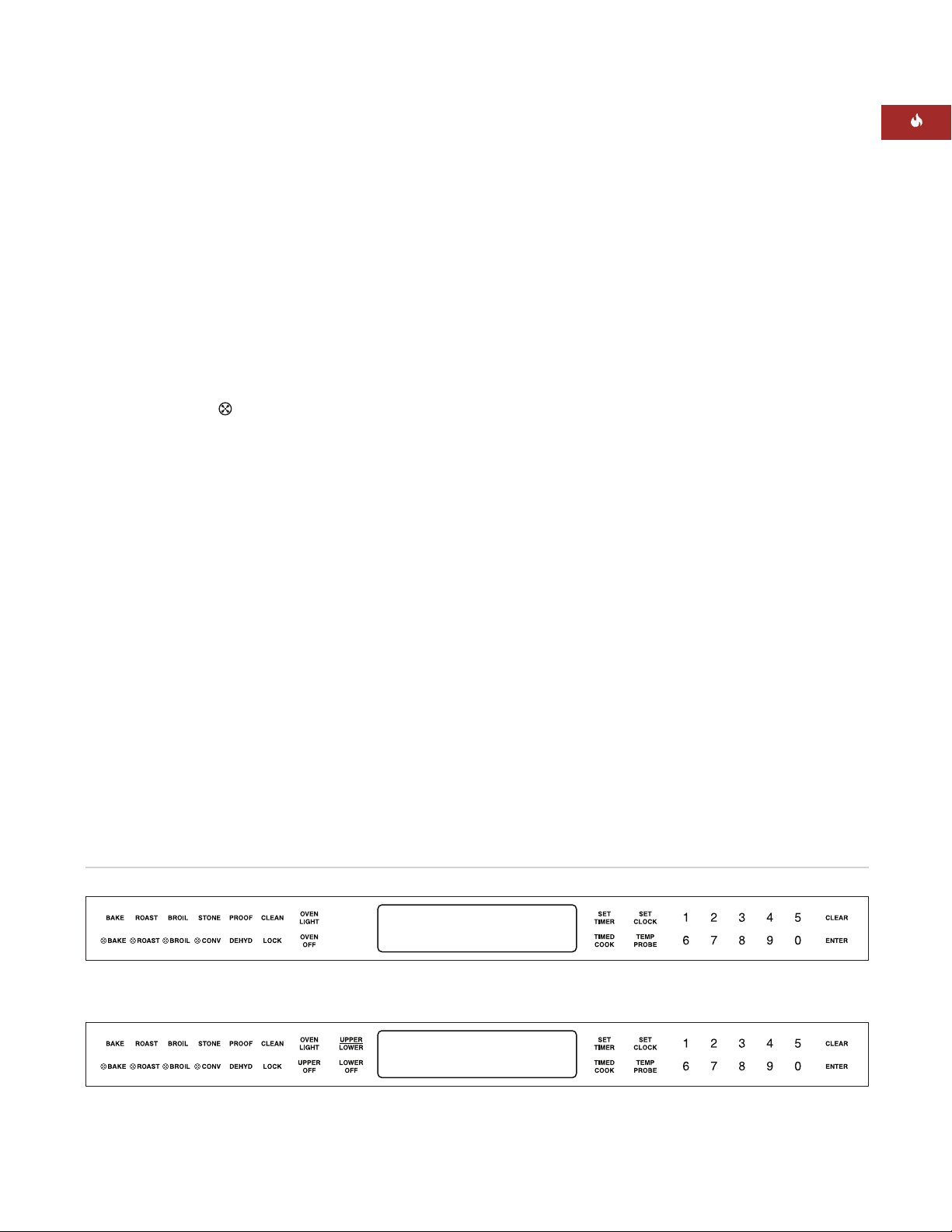
Single oven control panel
Double oven control panel
Dimensions in parentheses are in
millimeters unless otherwise specified.
9
Page 10

WOLF E SERIES BUILT-IN OVEN OPERATION
OVEN OPERATION
OVEN PREHEAT
MPORTANT NOTE:During preheat, the oven
I
is heated in a manner unsuitable for cooking.
The oven preheat feature is used for all cooking
modes except broil and convection broil. In
order not to damage food, preheating will not
occur once the oven reaches its set temperature. Increasing oven temperature during
cooking will result in the oven taking a very
long time to reach the new temperature. To
reach a new temperature quickly, touch
ON
exit the current mode. Touch
, then the
OFF
to
desired cooking mode and enter a new temperature of at least 50˚ (10˚C) higher than the
previous operating temperature.
IMPORTANT NOTE:
Preheat times will be
greater when the electrical supply is less than
240 volts.
TIME-OF-DAY CLOCK
Immediately after the oven is installed, set the
12-hour clock to the current time of day. It may
need to be reset after a prolonged power
failure. The clock is visible on the panel during
all modes. If the upper oven timer is set, the
clock will not be visible in the upper oven
display window.
OVEN TIMER
Each oven has a timer which operates independently from the controls and from each
ther. Once a time is set in hours and minutes,
o
the countdown is seen in the display window.
Only the last minute counts down in seconds.
An audio signal acts as a reminder when the
amount of time runs out. To stop the signal,
touch
CLEAR
. The maximum time that can be
set is 9 hours and 59 minutes.
SETTING TIMER
1)
Touch
SET TIMER
2)
Touch number pads to set the hours and
.
minutes.
3)
Touch
(Touch
ENTER
CLEAR
or
SET TIMER
to start.
at any time to stop the timer
and exit.)
4)
Touch
SET TIMER
while the current timer is
still active to restart and set a new time.
5)
To clear the timer: If oven is off, touch
CLEAR
then
. If oven is on, touch
CLEAR
.
SET TIMER
,
TIMED COOK FEATURE
SETTING CONTROLS
10
SETTING CLOCK
1)
Touch
SET CLOCK
2)
Touch number pads to set current time of
.
day. A 10-second period of inactivity will
esult in the oven r
r
eturning to the original
time.
3)
ouch
T
ENTER
and when pr
ompted, touch
1 for AM or 2 for PM.
4)
Touch
ENTER
again to start clock.
1)
Touch cooking mode, such as
BAKE
Change preset temperature if needed.
For double ovens, this will turn on upper
oven. To turn on lower oven, first touch the
UPPE
touch pad so that the
/LOWER
R
lower oven icon is selected in the LCD
display. Then touch desired mode.
2)
ouch
T
TIMED COOK
Use the number pads
.
to set the number of hours/minutes the
oven is to stay on.
3)
Touch
ENTER
. Oven begins to heat after
five seconds. Stop time will automatically
be added to the display. At the end of cook
time, oven turns off.
4)
Touch oven
OFF
or
CLEAR
to clear the
display.
.
Page 11

WOLF E SERIES BUILT-IN OVEN OPERATION
EXTENDED OPTIONS
The screen scrolls in the order of Language,
Temperature Scale, Temperature Offset, 12/24
our Clock, Backlight Brightness, Chime Tone
H
and Cooking Assistant.
1)
Touch and hold
SET CLOCK
on the control
panel for 5 seconds to enter the extended
ptions screens.
o
2)
Touch
ENTER
to scroll through the different
option screens.
3)
When finished selecting all options touch
CLEAR
to return to the main display.
SETTING LANGUAGE
1)
When prompted, touch 1 for English, 2 for
German,
3 for French, 4 for Spanish, or 5
for Italian.
SETTING TEMPERATURE SCALE
The oven can be changed from Fahrenheit (˚F)
temperature to Celsius (˚C) or vice versa.
1)
When prompted, touch 1 for Fahrenheit (°F)
2 for Celsius (˚C).
or
12/24 HOUR CLOCK
1)
When prompted, touch 1 for 12 hour clock
r
or 24 hour clock.
o
2 f
BACKLIGHT OPTIONS
1)
When prompted, touch 1 for low brightness,
2 for medium brightness, or 3 for high
brightness.
CHIME OPTIONS
There are three different frequency tones for
the oven chime.
1)
When prompted, touch 1 for the low
frequency tone,
tone, or
3 for the high frequency tone.
2 for the medium frequency
CONTRAST ADJUSTMENT
The contrast can be adjusted to ensure a crisp
readout on the LCD display.
1)
When prompted, touch 1through 9on the
number pad to adjust the contrast setting to
your personal preference.
TEMPERATURE OFFSET
The temperature offset is used to keep the
center of the oven cavity at the set point.
Negative values will result in cooler cavity
temperatur
es, while positive offsets r
esult in
hotter cavity temperatures.
1)
When pr
ompted, enter the temperature
offset.
2)
Select negative or positive offset by
touching the
SET TIMER
touch pad. The
maximum oven offsets are +/- 35°F (19°C).
11
Page 12
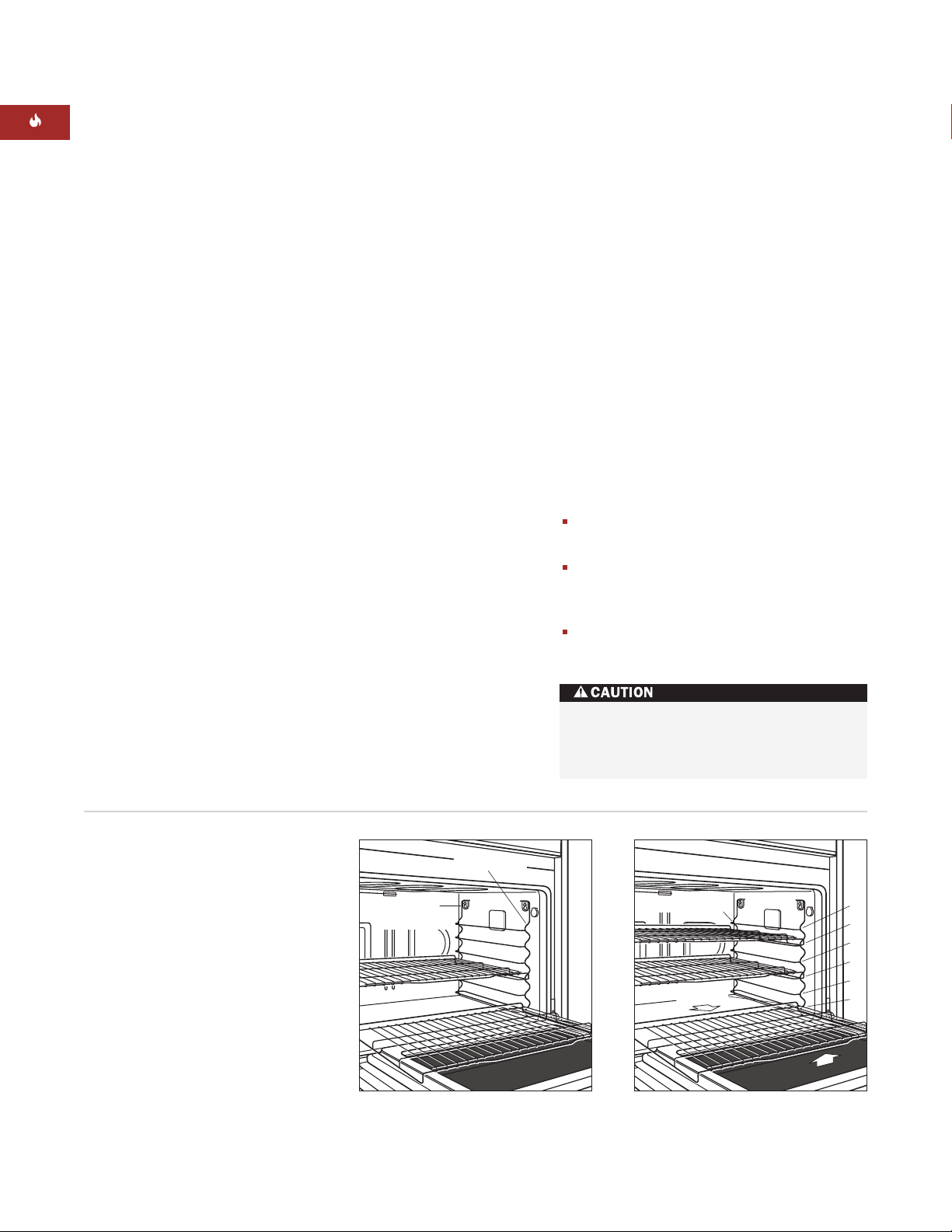
WOLF E SERIES BUILT-IN OVEN OPERATION
Rack Guide
Mounting Tabs
Rack Guide
6
5
4
3
2
1
Rack Guide
Anti-Tip Lock
OVEN RACKS AND RACK GUIDES
OVEN RACK GUIDES
o insert the rack guides in the oven,locate
T
the screws in the oven side walls. Place the
rack guide mounting tabs over the screw
eads and slide down until the screws are fully
h
seated in the tabs. Refer to the illustration
below.
To remove the rack guides,
pull the rack
guide straight up and then out so that the
mounting tabs clear the screw heads. Remove
the rack guide from the oven.
IMPORTANT NOTE:
and rack guides before using
. They will discolor if left in the oven
mode
Remove all oven racks
Self-Clean
during this mode.
OVEN RACKS
To insert a rack in the oven,
place the rack
anti-tip lock under the side rack guide rails.
Push the rack toward the back of the oven and
lift up to clear the rack stops. Continue sliding
the rack until it is completely inside the oven.
To remove a rack from the oven,
pull the
rack forward and lift up and out, clearing the
rack stops from the side rack guide rails. Refer
to the illustration below.
The bottom oven rack has a full-extension
capability. With the rack in rack guide position
, slide it onto the stainless steel door guides.
1
Refer to the illustration for rack guide positions. This adds stability to the rack when
sing a heavy pan for large meat and poultry.
u
With the rack fully extended, it is easier to
safely reach the hot food.
OVEN RACK ARRANGEMENT
One of the factors affecting optimum cooking
results is the level of rack placement in the
oven. Rack position 1 is closest to the bottom
and position 6 is closest to the top. The Wolf
Cooking Guide on pages 33–36 reference the
rack positions for optimum results.
When using only one rack, place rack in the
center of the oven.
When using only one rack for roasting
meats, place rack on rack guide position
1, 2 or 3.
When using two or three racks, place at
least one rack position between them.
Use dry pot holders when handling oven
racks. Racks become hot when the oven
is on and hold heat after it is turned off.
12
Oven rack guide removal
Oven rack guide positions and full
extension bottom rack
Page 13

WOLF E SERIES BUILT-IN OVEN OPERATION
BAKE MODE
How Bake mode works:
Both the hidden bake
element and the broil element are used to heat
he air, and they cycle on and off to maintain
t
temperature. This mode is best for single-rack
cooking, primarily baked foods. Always use
ake modefor your standard recipes. The
B
temperature probe may be used in this mode.
Refer to the Wolf Cooking Guide on pages
33–36. Use cooking times as a guide for other
similar foods.
WOLF TIPS FOR SUCCESS
For Bake mode:
Always preheat for
Bake mode
.
During preheat, convection fans (if applicable) and elements are used to quickly and
uniformly heat the oven.
Use only one rack.
Allow at least 1" (25) between edge of pan
and walls of oven.
Size, shape and finish of cookware affects
baking time.
Food cooked in dark metal pans cook
somewhat faster than food cooked in shiny
pans.
Dark, nonstick pan coatings brown more
than light, nonstick coatings.
Use interior oven light and oversize window
to check browning. Limit frequent door
openings to pr
event losing heat and length-
ening total cooking time.
SETTING CONTROLS
For Bake mode:
1)
Touch
BAKE
. For double ovens, this will
turn on upper oven. To turn on lower oven,
first touch the
UPPER/LOWER
touch pad
so that the lower oven icon is selected in
the LCD display. Then touch
2)
Oven temperature is preset at 350˚F (175˚C).
BAKE
.
Oven begins to heat after 10 seconds. To
change oven temperature from the default
temperature of 350˚F (175˚C), immediately
enter another temperature using the
number pads.
3)
Touch
CLEAR
temperature setting; touch
once to clear the oven
CLEAR
twice to
return the oven to the time-of-day display.
4)
Touch
ENTER
to start the cooking mode
immediately, otherwise the oven will automatically start the mode in 10 seconds if
there is no action.
5)
Add food when the chime signals that the
oven has reached preheat temperature.
6)
If the temperature probe is used (upper
oven only), follow
feature
7)
If the timer is set, the oven will chime when
directions on pages 26–27.
Temperature Probe
the cooking time is finished. If the timer is
not cleared, it will continue to chime ever
10 seconds.
8)
Remove food. Always use dr
when removing hot pans fr
9)
Touch oven
OFF
to end this mode.
y pot holders
om the oven.
y
DO NOT place any cookware on oven
floor or use aluminum foil or other
material to line the oven floor or side
walls. Failure to adhere to this notice will
damage the por
warranty.
Dimensions in parentheses are in
millimeters unless otherwise specified.
celain and will void your
13
Page 14

WOLF E SERIES BUILT-IN OVEN OPERATION
Bake Stone
Rack Guide
Position 1
BAKE STONE MODE
IMPORTANT
NOTE
The Wolf bake
stone accessory is
required when
using Bake Stone
mode.
How Bake Stone mode works:
A specially
designed rack and bake stone are used for this
ode to assure the food quality expected from
m
this specific form of cooking. To produce a hot
oven environment necessary for baking on a
eramic stone, the heat from all elements
c
creates the perfect “brick oven” effect. Both
convection fans help circulate the air throughout the oven cavity, so even temperatures are
achieved. The temperature probe may be used
in this mode.
Oven preparation:
Remove all racks from the
oven. Slide the bake stone rack onto rack guide
position 1 and place the bake stone on the rack
with the lip hanging over fr
ont edge of rack.
Refer to the illustration below. Preheat the
oven for approximately 35 minutes when using
Bake Stone mode
IMPORTANT NOTE:
.
Use care in handling the
bake stone. It will chip or break if dropped.
Refer to the Wolf Cooking Guide on pages
33–36. Use cooking times as a guide for other
similar foods.
Avoid cooking foods with a high fat
content on the bake stone. The porous
ceramic material will absorb grease and
discolor the stone. Flare-ups can occur.
WOLF TIPS FOR SUCCESS
For Bake Stone mode:
Always preheat for
Bake Stone mode
positioning the oven rack and ceramic
stone. Allow approximately 35 minutes for
this function to reach the set oven temperature. For best results, preheat oven for one
hour before adding food.
During preheat, convection fans and all
elements are used to quickly and uniformly
heat the oven.
Use only the Wolf bake stone in the
Stone mode
.
Use only one bake stone rack per oven.
Food is usually cooked directly on the
stone. To prevent sticking, apply plenty of
cornmeal or flour to the bottom of the food.
When baking a series of breads or pizzas in
a row, allow 5 minutes between foods for
the bake stone to return to the proper
temperature.
Bake stone and rack should be removed
after baking and not left in oven during any
of the other cooking modes.
after
Bake
14
Bake stone accessory installation
Page 15

WOLF E SERIES BUILT-IN OVEN OPERATION
BAKE STONE MODE
SETTING CONTROLS
or Bake Stone mode:
F
1)
Touch
STONE
2)
Oven temperature is preset at 400˚F (205˚C).
.
Oven begins to heat after five seconds. To
hange oven temperature from 400˚F
c
(205˚C), immediately enter another temperature using the number pads.
3)
Touch
ENTER
to start the cooking mode
immediately, otherwise the oven will automatically start the mode in 10 seconds if
there is no action.
4)
Add food when the chime signals that the
oven has reached preheat temperature.
5)
If the temperature probe is used, follow
Temperature Probe feature
directions on
pages 26–27.
6)
If the timer is set, the oven will chime when
the cooking time is finished. If the timer is
not cleared, it will continue to chime every
10 seconds.
7)
Remove food. Always use dry pot holders
when removing hot pans from the oven.
8)
Touch oven
OFF
to end this mode.
BAKE STONE ACCESSORY
he bake stone accessory is available from
T
your Wolf dealer. To obtain local dealer
information, visit the Showroom Locator
ection of our website, wolfappliance.com.
s
Additional Use & Care Information is provided
with the bake stone accessory.
BAKESTONE30
(807143)
BAKE STONE CARE
Remove excessive food using a scraper. Brush
off any crumbs. Allow the stone to cool
completely before wiping with a wet cloth. Wet
cloths on a hot surface can cause steam burns.
Do not soak or immerse the bake stone in
water and do not use soap or detergent. The
ceramic stone could absorb the taste and
transmit those flavors to the food.
Stubborn stains may occur on the bake stone.
These will not impair the flavor of the food
being baked.
Allow the bake stone to cool completely before
removing from oven.
IMPORTANT NOTE:
Use care in handling the
bake stone. It will chip or break if dropped.
ACCESSORIES
Optional accessories are available
through your
Wolf dealer. To
obtain local dealer
information, visit
the Showroom
Locator section of
our website,
wolfappliance.com.
Dimensions in parentheses are in
millimeters unless otherwise specified.
Allow bake stone to cool completely
before wiping with a wet cloth. Wet
cloths on a hot surface can cause steam
ns.
bur
15
Page 16

WOLF E SERIES BUILT-IN OVEN OPERATION
BROIL MODE
How Broil mode works:
The top element is
used to produce an intense, radiant heat that
rowns one side of the food at a time.
b
roiled foods usually must be turned over to
B
brown the other side and finish cooking. The
high heat cooks quickly and gives a rich,
rown outer appearance. This mode is best for
b
meats, fish and poultry pieces up to 1" (25)
thick. The temperature probe cannot be used
with this mode.
Refer to the Wolf Cooking Guide on pages
33–36. Use cooking times as a guide for other
similar foods.
WOLF TIPS FOR SUCCESS
For Broil mode:
Do not preheat for
Broil mode
.
Broil with oven door closed.
Preferred for meat, fish and poultry pieces
equal to or less than 1" (25) thick.
Always use the two-piece broiler pan
packaged with your oven. Always use
slotted top grid of broiler pan. It allows fat
to drip away from food and from intense
radiant heat. This reduces spattering,
smoking and risk of fire.
Turn food halfway through cooking time.
SETTING CONTROLS
For Broil mode:
1)
Place food in oven at the desired rack
position. Close oven door.
2)
Touch
BROIL
. For double ovens, this will
urn on upper oven. To turn on lower oven,
t
first touch the
UPPER/LOWER
touch pad
so that the lower oven icon is selected in
BROIL
the LCD display. Then touch
3)
Oven temperature is preset at 1for 550˚F
.
(290˚C) (High Broil). Oven begins to broil
after five seconds. To change setting, immediately touch 2number pad for 450˚F
(230˚C) (Medium Broil) or
3
for 350˚F (175˚C)
(Low Broil).
4)
Touch
ENTER
to start the cooking mode
immediately, otherwise the oven will automatically start the mode in 10 seconds if
there is no action.
5)
If the timer is set, the oven will chime when
the cooking time is finished. If the timer is
not cleared, it will continue to chime every
10 seconds.
6)
Remove food. Always use dry pot holders
when removing hot pans from the oven.
7)
Touch oven
OFF
to end this mode.
16
ush lean meat and fish with peanut oil
Br
before cooking to prevent sticking.
t cooking poultry with skin side down.
Star
Begin with cold food directly from the
refrigerator.
When turning food or checking doneness,
. Smoke and
open the door car
steam may have accumulated. Never use
heatproof glass (e.g. Pyrex) or pottery.
They can shatter
efully
.
Page 17

WOLF E SERIES BUILT-IN OVEN OPERATION
ROAST MODE
How Roast mode works:
Both bake and broil
elements are used to heat the air, and they
ycle on and off to maintain temperature. This
c
is designed especially for roasting less tender
cuts of meat that should be covered, such as
huck roasts, lamb shanks, pot roasts and stew
c
meat. The temperature probe may be used in
this mode.
Refer to the Wolf Cooking Guide on pages
33–36. Use cooking times as a guide for other
similar foods.
WOLF TIPS FOR SUCCESS
For Roast mode:
Always preheat for
Roast mode
.
During preheat, convection fans and
elements are used to quickly and uniformly
heat the oven.
Roasting bags may be used.
When roasting a large item, such as a
turkey, the pan should not cover the entire
rack and block heat from circulating
naturally.
Cook stuffed turkeys weighing over 15 lbs
(6.8 kg) in
Roast mode
. Always cook
stuffing to an internal temperature of 165˚F
(75˚C).
SETTING CONTROLS
or Roast mode:
F
1)
Touch
ROAST
. For double ovens, this will
turn on upper oven. To turn on lower oven,
first touch the
UPPER/LOWER
touch pad
so that the lower oven icon is selected in
the LCD display. Then touch
2)
Oven temperature is preset at 350˚F (175˚C).
ROAST
Oven begins to heat after ten seconds. To
change oven temperature from 350˚F
(175˚C), immediately enter another temperature using the number pads.
3)
Touch
ENTER
to start the cooking mode
immediately, otherwise the oven will automatically start the mode in 10 seconds if
there is no action.
4)
Add food when the chime signals that the
oven has reached preheat temperature.
5)
If the temperature probe is used, follow
Temperature Probe feature
directions and
USDA temperature recommendations on
pages 26–27.
6)
If the timer is set, the oven will chime when
the cooking time is finished. If the timer is
not cleared, it will continue to chime every
10 seconds.
7)
Remove food. Always use dry pot holders
when removing hot pans fr
om the oven.
.
Dimensions in parentheses are in
millimeters unless otherwise specified.
8)
Touch oven
OFF
to end this mode.
17
Page 18

WOLF E SERIES BUILT-IN OVEN OPERATION
CONVECTION MODE
IMPORTANT NOTE:
For double ovens,
Convection mode can only be used in the
pper oven.
u
ow Convection mode works:Dual convec-
H
tion fans, each with a heating element, operate
from the back of the oven to move the heated
ir throughout the entire oven cavity. Uniform
a
air movement makes it possible to multi-level
rack cook in this mode. The heat is cycled on
and off to maintain the temperature, resulting
in evenly browned food. The temperature
probe may be used in this mode.
Refer to the Wolf Cooking Guide on pages
33–36. Use cooking times as a guide for other
similar foods.
WOLF TIPS FOR SUCCESS
For Convection mode:
Always preheat for
Convection mode
.
Use low-sided, uncovered pans to cook
foods.
A 14" x 16" (356 x 406) baking sheet is an
optimum size. Allow at least 1" (25)
between edge of pan and walls of oven.
Reduce standard recipe temperatures by
25˚F in this mode.
SETTING CONTROLS
For Convection mode:
1)
Touch
2)
Oven temperature is preset at 325˚F (165˚C).
CONV
.
Oven begins to heat after five seconds. To
hange oven temperature from 325˚F
c
(165˚C), immediately enter another temperature using the number pads.
3)
Touch
ENTER
to start the cooking mode
immediately, otherwise the oven will automatically start the mode in 10 seconds if
there is no action.
4)
Add food when the chime signals that the
oven has reached preheat temperature.
5)
If the temperature probe is used, follow
Temperature Probe feature
directions on
pages 26–27.
6)
If the timer is set, the oven will chime when
the cooking time is finished. If the timer is
not cleared, it will continue to chime every
10 seconds.
7)
Remove food. Always use dry pot holders
when removing hot pans from the oven.
8)
Touch oven
OFF
to end this mode.
18
Pans do not need to be staggered when
cooking on mor
e than one rack.
Baking time may be less than expected;
check doneness 5 to 10 minutes early.
Page 19

WOLF E SERIES BUILT-IN OVEN OPERATION
CONVECTION BAKE MODE
IMPORTANT NOTE:
For double ovens,
Convection Bake mode can only be used in the
pper oven.
u
ow Convection Bake mode works:This
H
mode combines heat from two convection
elements with some heat from the bake
lement that is located beneath the oven floor.
e
Two convection fans circulate this heat within
the oven cavity. The added heat source from
the bottom of the oven makes this mode ideal
for pie baking. The temperature probe may be
used in this mode.
Refer to the Wolf Cooking Guide on pages
33–36. Use cooking times as a guide for other
similar foods.
WOLF TIPS FOR SUCCESS
For Convection Bake mode:
Always preheat for
mode
.
Convection Bake
Reduce standard recipe temperatures by
25˚F in this mode.
Bake multiple pies on the same rack, rather
than on different racks.
This mode is ideal for single rack baking.
SETTING CONTROLS
or Convection Bake mode:
F
1)
Touch
2)
Oven temperature is preset at 375˚F (190˚C).
BAKE
.
Oven begins to heat after five seconds. To
hange oven temperature from 375˚F
c
(190˚C), immediately enter another temperature using the number pads.
3)
Touch
ENTER
to start the cooking mode
immediately, otherwise the oven will automatically start the mode in 10 seconds if
there is no action.
4)
Add food when the chime signals that the
oven has reached preheat temperature.
5)
If the temperature probe is used, follow
Temperature Probe feature
directions on
pages 26–27.
6)
If the timer is set, the oven will chime when
the cooking time is finished. If the timer is
not cleared, it will continue to chime every
10 seconds.
7)
Remove food. Always use dry pot holders
when removing hot pans from the oven.
8)
Touch oven
OFF
to end this mode.
Dimensions in parentheses are in
millimeters unless otherwise specified.
19
Page 20

WOLF E SERIES BUILT-IN OVEN OPERATION
CONVECTION BROIL MODE
IMPORTANT NOTE:
For double ovens,
Convection Broil mode can only be used in the
pper oven.
u
ow Convection Broil mode works:Intense
H
radiant heat from the top element browns and
sears the surface of the food while both
onvection fans circulate hot air around the
c
food. This mode shortens broiling times for
thicker cuts of meat, fish and poultry. The heat
of the broiler browns the exterior, while the
convection fans keep the interior moist and
juicy. The temperature probe cannot be used
with this mode.
Refer to the Wolf Cooking Guide on pages
33–36. Use cooking times as a guide for other
similar foods.
WOLF TIPS FOR SUCCESS
For Convection Broil mode:
Do not preheat for
Convection Broil mode
Convection Broil with oven door closed.
Preferred for meat, fish and poultry pieces
thicker than 1" (25).
SETTING CONTROLS
or Convection Broil mode:
F
1)
Place food in oven at the desired rack
position. Close oven door.
2)
Touch
reset at
p
BROIL
1
Oven begins to broil after five seconds. To
change setting, immediately touch the
number 2for Medium Broil, 450˚F (230˚C)
for Low Broil, 350˚F (175˚C).
3)
Touch
ENTER
immediately, otherwise the oven will automatically start the mode in 10 seconds if
there is no action.
4)
If the timer is set, the oven will chime when
the cooking time is finished. If the timer is
not cleared, it will continue to chime every
10 seconds.
5)
.
Remove food. Always use dry pot holders
when removing hot pans from the oven.
6)
Touch oven
. Oven temperature is
or 550˚F (290˚C) (High Broil).
f
to start the cooking mode
OFF
to end this mode.
3
Always use the two-piece broiler pan
packaged with your oven. Always use
slotted top grid of broiler pan. It allows fat
to drip away from food and from intense
radiant heat. This r
educes spattering,
smoking and risk of fire.
Turn food halfway through cooking time.
ush lean meat and fish with peanut oil
Br
before cooking to prevent sticking.
t cooking poultry with skin side down.
Star
Begin with cold food directly from the
refrigerator.
When turning food or checking doneness,
open the door carefully. Smoke and
steam may have accumulated. Never use
heatproof glass (e.g. Pyr
They can shatter.
ex) or pottery.
20
Page 21

WOLF E SERIES BUILT-IN OVEN OPERATION
CONVECTION ROAST MODE
IMPORTANT NOTE:
For double ovens,
Convection Roast mode can only be used in
he upper oven.
t
ow Convection Roast mode works:Heat
H
from both convection fans, with additional
heat from the broil element, intensifies the
onvective and radiant heating in this mode.
c
This combination gently browns the exterior
and seals in juices, making it perfect for
roasting tender cuts of beef, lamb, pork and
poultry. The temperature probe may be used in
this mode.
Refer to the Wolf Cooking Guide on pages
33–36. Use cooking times as a guide for other
similar foods.
WOLF TIPS FOR SUCCESS
For Convection Roast mode:
Always preheat oven for
.
mode
Convection Roast
Use low-sided, uncovered pans on a roast
rack to cook food.
Reduce standard recipe temperatures by
25˚F in this mode.
The lower part of the broiler pan with a
meat rack makes an excellent roasting pan.
SETTING CONTROLS
or Convection Roast mode:
F
1)
Touch
ROAST
. Oven temperature is
preset at 325˚F (165˚C). Oven begins to heat
after five seconds. To change oven temperature from 325˚F (165˚C), immediately enter
another temperature using the number
pads.
2)
Touch
ENTER
to start the cooking mode
immediately, otherwise the oven will automatically start the mode in 10 seconds if
there is no action.
3)
Add food when the chime signals that the
oven has reached preheat temperature.
4)
If the temperature probe is used, follow
Temperature Probe feature
directions and
USDA temperature recommendations on
pages 26–27.
5)
If the timer is set, the oven will chime when
the cooking time is finished. If the timer is
not cleared, it will continue to chime every
10 seconds.
6)
Remove food. Always use dry pot holders
when removing hot pans from the oven.
7)
Touch oven
OFF
to end this mode.
Roasting time may be less than expected;
check doneness earlier than usual.
Select foods that are to be roasted
uncovered.
Begin with cold food directly fr
om the
refrigerator.
Cook stuffed turkeys weighing over 15 lbs
(6.8 kg) in
Roast mode
. Always cook
stuffing to an internal temperature of 165˚F
(75˚C).
Dimensions in parentheses are in
millimeters unless otherwise specified.
21
Page 22

WOLF E SERIES BUILT-IN OVEN OPERATION
PROOF MODE
IMPORTANT NOTE:
For double ovens, Proof
mode can only be used in the upper oven.
How Proof mode works:
roil and bake elements are used to heat and
b
A combination of
balance the air to maintain temperature. This
feature is ideal for proofing, or rising bread
ough.
d
WOLF TIPS FOR SUCCESS
For Proof mode:
No need to preheat for this mode.
Proof bread until dough has doubled in
bulk.
For best results, place a shallow pan with 1
to 3 cups (.2–.7 L) boiling hot water on rack
position 1 to keep the air moist inside the
oven cavity.
The oven does not allow the temperature to
be set above 110˚F (45˚C) in
Proof feature
If the oven is too hot, the oven door should
be opened to allow the oven to cool down
below 120˚F (50˚C) to prevent destroying
the yeast.
SETTING CONTROLS
or Proof feature:
F
1)
Place dough in oven-safe dish in oven.
2)
Touch
PROOF
3)
Oven temperature is preset to 85˚F (30˚C).
Touch
ENTER
change the temperature from 85˚F (30˚C),
immediately touch another temperature
using the number pads. The maximum
temperature in
4)
If the timer is set, the oven will chime when
the cooking time is finished. If the timer is
not cleared, it will continue to chime every
10 seconds.
5)
Remove food. Always use dry pot holders
when removing hot pans from the oven.
6)
Touch oven
.
.
on the control panel. To
Proof mode
OFF
to end this mode.
is 110°F (45°C).
Allow at least 1" (25) between edge of pan
and walls of oven.
Limit frequent door openings to prevent
losing heat and lengthening proofing time.
DO NOT place any cookware on oven
floor or use aluminum foil or other
material to line the oven floor or side
walls. Failure to adhere to this notice will
damage the porcelain and will void your
warranty.
22
Page 23

WOLF E SERIES BUILT-IN OVEN OPERATION
DELAYED START FEATURE
How Delayed Start feature works:
This
feature controls the automatic timing of the
ven’s
o
nd OFFfunction. Set a mode to
ONa
start later in the day and turn off when the
cooking is complete or set it to turn off at a
reset time. Use in combination with any
p
cooking mode except
and
Bake Stone
Broil,Convection Broil
.
WOLF TIPS FOR SUCCESS
For Delayed Start feature:
Ovens can be set independently.
Do not delay the start when preheating is
critical to the cooking results.
When using the
Delayed Start feature
place food directly from the refrigerator into
the oven.
The time-of-day clock must display the
correct time prior to programming a timed
activity.
FOOD SAFETY GUIDELINES
Food safety is important. Adhere to the
following guidelines to avoid potential
illness or spoilage of food:
SETTING CONTROLS
or Delayed Start feature – to start cooking
F
later and automatically turn off heat when
finished:
1)
Touch cooking mode, except
CONVECTION BROIL
BROIL
and
BAKE STONE
,
.
For double ovens, this will turn on upper
oven. To turn on lower oven, first touch the
UPPER/LOWER
touch pad so that the
lower oven icon is selected in the LCD
display. Then touch desired mode. Note
that some cooking modes are not available
for lower oven. Change preset temperature
if needed.
2)
Touch
,
to set the number of hours/minutes the
oven will stay on (
TIMED COOK
. Use the number pads
COOK DURATION).
Example: Set 3:30 for the oven to remain on
1
/2 hours.
for 3
3)
When prompted, use the number pads to
set the time of day the oven will turn off
STOP TIME). Example: Set 6:00 for the time
(
of day the oven turns off.
4)
Touch
ENTER
. The display appears as if the
oven is on. Using the example above,
heating will start at 3
1
/2 hours prior to six
o’clock which will be 2:30 on the time-ofday clock.
Perishable food should not be left out more
than 2 hours at room temperature; 1 hour
when the temperature is above 90˚F (30˚C).
For more information, see www.usda.com.
Avoid using foods that will spoil before the
cooking cycle begins. These include eggs,
dair
oducts, cr
y pr
eam soups, cooked and
uncooked meats, poultry and fish.
If cooking will not begin immediately, place
only very cold or frozen food into the oven.
Dimensions in parentheses are in
millimeters unless otherwise specified.
5)
One chime will ring when the cooking time
is complete. If the timer is not cleared, it
will continue to chime every 10 seconds.
6)
The oven will turn off after the STOP TIME
has been reached.
7)
Remove food. Always use dr
y pot holders
when removing hot pans from the oven.
ouch oven
8)
T
OFF
to clear the display and
stop the signal.
23
Page 24

WOLF E SERIES BUILT-IN OVEN OPERATION
DEHYDRATION MODE
IMPORTANT
NOTE
The Wolf accessory
dehydration racks
are required when
using Dehydration
mode.
IMPORTANT NOTE:
For double ovens,
Dehydration mode can only be used in the
pper oven.
u
ow Dehydration mode works:This feature
H
allows for slowly drying out food for preservation and other cooking uses.
The Wolf accessory dehydration racks (not
included with the oven) are required for this
mode. This mode is suitable for drying a
variety of fruits, vegetables, herbs and meat
strips.
Refer to the Dehydration Guide on page 25.
Use cooking times as a guide for other similar
foods.
W OLF TIPS FOR SUCCESS
For Dehydration mode:
Do not preheat when using
.
mode
Dehydration
Multiple racks can be used simultaneously.
Some foods require as many as 14 to 15
hours to fully dehydrate.
SETTING CONTROLS
or Dehydration mode:
F
1)
Place food in oven on dehydration racks.
2)
Place door stop supplied with accessory
package in proper position to keep oven
oor open. Refer to instructions provided
d
with the accessory kit.
3)
Touch
DEHYD
4)
Oven preset temperature is 135˚F (55˚C).
To change the temperature setting, immediately touch another temperature (110˚F to
160˚F (45˚C to 70˚C)) using the number
pads.
5)
Leave food in the oven until completely dry
to the touch.
6)
Remove food from racks before completely
cool for easy removal. If excessive sticking
occurs, place dehydration trays back in the
oven to warm slightly for easier removal.
7)
Touch oven
OFF
to end this mode.
Consult a food preservation book for
specific times and handling of various
foods.
Foods must be dried to below .60 water
activity or dry to the touch to be safely
stored with no danger of mold, yeasts or
bacteria gr
drate for the maximum time specified.
owing. When in doubt, dehy-
24
Page 25

WOLF E SERIES BUILT-IN OVEN OPERATION
DEHYDRATION MODE
DEHYDRATION ACCESSORY
ehydration racks are available from your
D
Wolf dealer. To obtain local dealer information,
visit the Showroom Locator section of our
ebsite, wolfappliance.com. Additional
w
instructions are provided with the dehydration
rack accessory.
DEHY/OVEN-30
(804683)
DEHYDRATION GUIDE
FOOD / PREPARATION TIME / TEMP
pples
A
Slice 1/4" (6) thick. Remove seeds 6–7 hours at 135˚F (60˚C)
and stems. Place on dehydration
racks with no overlapping.
Bananas
1
S
lice
(6) thick. Place on 12–13 hours at 135˚F (60˚C)
/4"
dehydration racks with no
overlapping.
Green Bell Peppers
Wash, seed and stem peppers. 14–16 hours at 135˚F (60˚C)
1
/4" (6) thick or into 1" x 2"
Slice
(25 x 51) chunks. Place on
dehydration racks with no
overlapping.
Tomato Slices
Wash, seed and stem tomatoes. 6–7 hours at 135˚F (60˚C)
1
/4" (6) thick. Place on
Slice
dehydration racks with no
overlapping.
Tomato Chunks
Wash, seed and stem tomatoes. 12–13 hours at 135˚F (60˚C)
Cut each tomato into 16 equal
pieces. Place on dehydration
racks with no overlapping.
Dimensions in parentheses are in
millimeters unless otherwise specified.
25
Page 26

WOLF E SERIES BUILT-IN OVEN OPERATION
TEMPERATURE PROBE FEATURE
IMPORTANT NOTE:
For double ovens, the
Temperature Probe feature can only be used in
he upper oven.
t
ow Temperature Probe feature works:The
H
probe measures doneness by measuring the
internal temperature of food without opening
he oven door. It is a convenient and accurate
t
way to achieve the perfect doneness regardless of the type, cut or weight of the food.
Calculating a total cooking time by weight is
no longer necessary using this feature. Use
with all modes except
Broil modes
.
Broil
and
Convection
WOLF TIPS FOR SUCCESS
For Temperature Probe feature
Insert sensor into the thickest part of meat
before placing in oven.
To determine the center, hold sensor
outside of the meat with point at center of
cut. Mark length of insertion by placing
your fingers on sensor at top of meat. Move
sensor to thickest part of meat and insert
up to your fingers.
Standing time refers to the 10- to 15-minute
time period the meat rests before being
carved. This helps more juices to be
retained in the meat.
USDA RECOMMENDATIONS
he internal temperatures shown in the chart
T
are recommended carving temperatures.
IMPORTANT NOTE:
The accuracy of the probe
is decreased for all temperatures below 100˚F
(40˚C). Food taken directly from the refrigerator
could display the incorrect temperature until it
has reached 100˚F (40˚C).
USDA RECOMMENDATIONS
DONENESS INTERNAL TEMP
Beef, Lamb and Veal
Rare 140˚F (60˚C)
Medium Rare 145˚F (65˚C)
Medium 160˚F (70˚C)
Well Done 170˚F (75˚C)
Pork
Well Done 170˚F (75˚C)
Poultry
Breast, Well Done 170˚F (75˚C)
Thigh, Well Done 180˚F (80˚C)
Stuffing, Well Done 165˚F (75˚C)
26
For poultry, insert probe into the thickest
part of the thigh.
Use aluminum foil to cover meat during the
standing time to help keep it hot before
ving.
car
Wash probe by hand; do not soak or clean
in the dishwasher.
Page 27

WOLF E SERIES BUILT-IN OVEN OPERATION
TEMPERATURE PROBE FEATURE
SETTING CONTROLS
or Temperature Probe feature with meats:
F
1)
Preheat oven to desired oven temperature
in desired mode.
2)
Place meat on a rack in the roasting pan.
nsert the probe sensor into the thickest
I
part of the meat as described in Tips For
Success on page 26.
3)
When the oven signals that preheat is
completed, use a dry potholder to lift the
probe sensor cover. Slide the probe connector into the receptacle on the wall of the
oven until it snaps into place. Close the
oven door.
4)
Touch
TEMP PROBE
. Touch number pads
for the carving temperature of the meat. It
is recommended to allow meat to rest
before carving.
5)
Touch
ENTER
. If
ENTER
is not touched,
the oven will automatically start the
Temperature feature in 8 seconds. The
display shows the oven temperature and
the rising probe temperature counting up
to the doneness setting.
6)
When the carving temperature is reached,
two chimes will signal. Remove probe from
the oven receptacle. The chime continues
y 10 seconds until the probe is
ever
unplugged or until you touch
7)
To end this feature and turn the oven off,
OFF
touch oven
.
CLEAR
.
SETTING CONTROLS
or Temperature Probe feature with breads:
F
1)
Preheat oven to desired oven temperature
in
Bake
or
Bake Stone mode
2)
Place bread on bake stone or in oven in
read pans.
b
3)
Bake 10 minutes at the desired oven
.
temperature.
4)
Insert probe sensor into the thickest part of
the bread.
5)
Using a dry potholder, lift the probe sensor
cover. Slide the probe connector into the
receptacle on the wall of the oven until it
snaps into place. Close the oven door.
6)
Touch
TEMP PROBE
. Touch number pads
for the end internal baking temperature
195˚F (90˚C) to 210˚F (100˚C).
7)
Touch
ENTER
. The display shows the oven
temperature and the rising probe temperature counting up to the doneness setting.
8)
When the carving temperature is reached,
two chimes will signal. Remove probe from
the oven receptacle. The chime continues
every 10 seconds until the probe is
unplugged or until you touch
9)
To end this feature and turn the oven off,
touch oven
on even when pr
OFF
. Oven temperature stays
obe is unplugged.
CLEAR
.
IMPORTANT NOTE:
not fully seated into the pr
If the probe connector is
obe receptacle, then
you will hear an audio signal, and
SHORTED
oubleshooting Guide on page 37.
r
T
will show in display. Refer to the
PROBE
obe and pr
Pr
very hot. Handle with a dry potholder.
obe sensor cover become
27
Page 28

WOLF E SERIES BUILT-IN OVEN OPERATION
SABBATH FEATURE
This appliance
is certified by
Star-K to meet
strict religious
regulations in
conjunction with
specific instructions found on
www.star-k.org.
Star-K Certified
How the Sabbath feature works:
This mode
allows for baking or keeping food warm while
dhering to the ”no work” requirements on
a
religious Sabbath days. It provides an unchanging heat source for an uninterrupted extended
eriod of time. Once the oven reaches its
p
desired temperature, it does not change. Use
this feature only in the
Bake
and
Roast modes
WOLF TIPS FOR SUCCESS
Ovens can be set independently, though
both ovens will be set in
Sabbath feature
.
Sabbath feature may be used simultaneously in both ovens of a double oven.
Each oven can have options individually set
such as temperature and lights.
Lights stay either on or off.
All tones are turned off during operation.
Heating cycles are not interrupted by the
opening of doors.
Ovens will stay on indefinitely until
manually turned off.
On Holidays, oven temperature may be
adjusted, but display will remain
unchanged. The oven temperature will not
change immediately
.
SETTING CONTROLS
For Sabbath featur
Touch
1)
OVEN LIGHT
e:
, turning on the lights in
one or both ovens (optional).
2)
Touch
BAKE
or
350˚F (175˚C). T
ROAST
o change oven temperature,
. Oven is preset at
immediately enter another temperature
using number pads.
ed, repeat the above
3)
ouch
T
ENTER
. If pr
efer
r
steps with other oven.
4)
Touch and hold
set to Sabbath.
ENTER
for five seconds to
SABBATH
appears in the
display window.
5)
Touch oven
emain on until this featur
r
OFF
to end this feature. Oven(s)
e is cancelled.
Example:
oven with upper oven in
40˚F (115˚C) and lower oven in
2
To set Sabbath feature in a double
Roast mode
B
at 200˚F (95˚C).
To set upper oven:
4-0
using the number pads. Touch
To set lower oven:
.
UPPER/LOWER
lower oven. Touch
the number pads. Touch
Touch and hold
Touch
ROAST
Touch the
touch pad to select the
BAKE
. Enter
ENTER
ENTER
for five seconds to
enter Sabbath feature.
Touch single or double oven
OFF
feature. Oven(s) remain on until the feature
is cancelled.
SETTING CONTROLS
For Timed Cook in Sabbath mode:
Add food to the oven.
1)
2)
Touch oven ON.
3)
Touch either
BAKE
or
ROAST
preset at 350°F (175°C).
4)
Change preset temperature if desired. To
change oven temperature, immediately enter
another temperature using number pads.
5)
Touch
TIMED COOK
to set the number of hour
. Use the number pads
s/minutes the
oven will stay on.
6)
Touch
STOP TIME
. Use the number pads to
set the time of day the oven will turn off.
ouch
7)
T
OVEN LIGHT
8)
Touch and hold
SABBA
9)
When the food is finished, remove the food.
TH
will show in the display window
on or of
ENTER
f as desired.
for five seconds.
(Oven remains unable to be reset until the
Sabbath feature is ended.)
10)After the Sabbath or Holiday is finished,
touch oven
IMPORTANT NOTE:
oven will not return to the
OFF
to end this feature.
After a power outage, the
Sabbath feature
settings.
set at
ake modeset
. Enter
ENTER
2-0-0
2-
.
using
.
to end this
(temperature
.
28
Page 29

WOLF E SERIES BUILT-IN OVEN OPERATION
SELF-CLEAN MODE
How Self-Clean mode works:
The oven is
heated in graduated steps to a preset high
emperature. During this process, food soil is
t
burned off, leaving some white ash residue.
Set in combination with
eature
f
cleaning the oven can be
,
Delayed Start
programmed to start and stop while you sleep.
Refer to
Delayed Start feature
on page 23.
For safety purposes, the door automatically
locks during cleaning and unlocks when the
cavity has cooled completely. Should you stop
this mode after beginning
Self-Clean mode
,
the door will still remain locked until the
temperature inside the oven has cooled to
below 300˚F (150˚C). The oven lights are
always deactivated in this mode.
IMPORTANT NOTE:
one oven may be in
For a double oven, only
Self-Clean mode
at a
time and the other oven cannot be used for
cooking.
IMPORTANT NOTE:
and rack guides before using the
mode
. They will discolor if left in the oven
Remove all oven racks
Self-Clean
during this feature. Refer to Oven Racks on
page 12.
IMPORTANT NOTE:
It is possible to hear a
popping or crackling noise during the opera-
ion of the oven(s). These normal sounds are
t
caused by the expansion and contraction of
the metal surfaces during the heating and
ooling of the oven(s). Running the oven(s)
c
through a self-clean cycle will help with the
level of these noises.
Do not use any commercial oven cleaners
or oven liner protective coatings on or
around any part of the oven.
The oven gasket is important for a good
seal. Do not hand clean, rub, puncture or
remove this gasket.
During Self-Clean mode, exterior surfaces
may get hotter than usual, therefore,
children should be kept away.
When hand cleaning a spot, use only mild
abrasive cleaners or plastic scrubbers.
IMPORTANT NOTE:
Do not allow food with
high sugar or acid content, such as fruit juice,
milk and tomatoes, to r
enamel sur
face. W
emain on the porcelain
ipe up immediately with a
dry towel. Failure to do so may cause a permanent dull spot.
IMPORT
They are not necessary with
IMPORTANT NOTE:
ANT NOTE:
Never use oven cleaners.
Self-Clean mode
During the first self-clean
cycle, some smoke and odor is normal as
remaining oils left over from the initial break-in
period will finish burning off.
.
29
Page 30

WOLF E SERIES BUILT-IN OVEN OPERATION
SELF-CLEAN MODE
WOLF TIPS FOR SUCCESS
or Self-Clean mode:
F
Before using
Self-Clean mode
, remove the
oven racks and oven rack guides. They will
discolor if left in the oven during this mode.
emove broiler pan and any other utensil
R
stored inside the oven.
Remove any moist food or grease from
spillovers before starting this mode.
It is normal to see a brief flame-up, depending on the amount and content of the soil.
Use this mode as often as necessary. Do
not wait until heavy soil accumulates.
After the mode is finished and the oven
cavity cools, use a damp sponge or paper
towel to wipe up any ash.
You may hear a popping or ”oil canning”
sound during the operation of the oven.
These sounds are normal and are caused
by the expansion and contraction of the
metal surfaces as they heat up and cool
down.
SETTING CONTROLS
or Self-Clean mode:
F
1)
Remove all oven racks and rack guides
before self-cleaning.
2)
Touch
SELF CLEAN
his will start self-clean for upper oven.
t
. For double ovens,
To self-clean lower oven, first touch the
UPPER/LOWER
touch pad so that the
lower oven icon is selected in the LCD
display. Then touch
SELF CLEAN
. The
control panel will automatically scroll the
following message:
REMOVE ALL RACKS AND RACK GUIDES.
PRESS ENTER.
3)
Touch
ENTER
to start the default clean
for a total time of 4 hours — self-clean for
3 hours and cool down for 1 hour.
4)
The cleaning time can be adjusted to any
amount of time between 2
Touch
TIMED COOK, then enter the clean
1
/2 and 4 hours.
time. For best results, the cleaning time
should be set at 4 hours.
5)
Enter the desired stop time and touch
ENTER
. The oven will automatically start
and stop based on the desired cleaning
time and stop time.
30
6)
Touch desired oven
OFF
to clear the display
when oven is finished cleaning.
Never wipe a warm or hot porcelain
surface with a damp sponge. It may
cause chipping or crazing (tiny hairlike
lines).
Page 31

WOLF E SERIES BUILT-IN OVEN CARE
Light Bulb
Light Cover
OVEN LIGHT BULB REPLACEMENT
Turn off electrical power to the oven
before replacing light bulb.
IMPORTANT NOTE:
ufficiently before replacing the light bulb.
s
Allow the oven to cool
The oven uses a 20-watt halogen light bulb;
replacement part #803816.
To remove the oven light bulb,
remove the
oven rack guides as described on page 12.
Place a hot pad against the oven wall. Using a
flat-head screwdriver, press the screwdriver
against the hot pad and under the edge of the
light cover. Be careful not to scratch the porcelain oven interior. Twisting the screwdriver,
gently pry the edge of the light cover up away
from the wall and remove. Use a paper towel
to handle the light bulb and remove it from the
socket.
To replace the oven light bulb,
avoid direct
contact with the replacement bulb. Use a paper
towel to handle the new light bulb to keep oil
on fingers from touching the bulb. Failure to
do this will cause the bulb to burn out at first
use. Insert the light bulb prongs into the socket
until it snaps into place. Replace the light cover
and oven rack guides. Turn on electrical power
and reset the time-of-day clock.
Use caution when handling light bulbs.
Halogen bulbs get hot instantly and
adjacent parts may retain heat.
BAKEWARE SELECTION
For best results, we recommend medium- to
heavy-weight bakeware. Use the following
guidelines when selecting bakeware for your
oven(s):
A 14" x 16" (356 x 406) baking sheet is an
optimum size for the ovens. Allow at least
1" (25) between edge of pan and walls of
oven.
Size, shape and finish of bakeware affects
the baking time. Food on insulated
bakeware cooks more slowly. Food cooked
in dark metal pans may cook faster than
food cooked in shiny pans.
Dark, nonstick pan coatings brown more
than light, nonstick coatings.
Light bulb replacement
Dimensions in parentheses are in
millimeters unless otherwise specified.
31
Page 32

WOLF E SERIES BUILT-IN OVEN CARE
CARE RECOMMENDATIONS
COMPONENT CARE RECOMMENDATION
SIGNATURE
POLISH
Signature Polish
is available from
Signature Limited
Laboratory,
P. O. Box 13436,
Dayton, Ohio
45413-0436, or
call 877-376-5474
(toll free).
Oven Exterior,
andle and Trim
H
Classic stainless
steel
Oven Cavity and
Interior Door
Porcelain enamel
Oven Door Window
Heat-tempered glass
Oven Light Cover
Heat-tempered glass
Do not use abrasive cleaners; they will permanently scratch the surface.
xterior cleaning:
E
se a soft, nonabrasive stainless steel cleaner like
U
Signature Polish (see side note) and apply with a soft, lint-free cloth. To
bring out the natural luster, lightly wipe the surface with a water-dampened
microfiber cloth, followed with a dry microfiber cloth. All work should follow
the grain direction of the finish. Best results are obtained by keeping the
loth in continuous contact with the metal.
c
Never wipe a warm or hot porcelain surface with a damp sponge; it
may cause chipping or crazing (tiny hairlike cracks).
General care:
When cool, clean splatters and spills immediately. Do not
allow food with a high sugar or acid content, such as milk, tomatoes, sauerkraut, fruit juices or pie filling, to remain on any porcelain enamel surface.
Failure to remove these foods may cause a permanent dull spot. When hand
cleaning a spot, use only non-abrasive cleaners or scrubbers.
Self-Clean mode
can be used.
When the window is cool, use a razor blade to gently lift baked-on foods
with a multi-surface spray cleaner.
When the oven is cool, follow instructions on page 31 to remove oven light
cover. Wash with mild abrasive cleaner. Rinse and dry thoroughly. Replace
oven light cover. A 20-watt halogen oven light bulb replaces the existing
bulb (part #803816).
32
Rack and
Rack Guides
Nickel-plated steel
Oven Gasket
glass netting
Fiber
stainless steel wire
oiler Pan
Br
Glossy-finish
porcelain enamel
Bake Stone
Ceramic
Control Panel
Classic stainless
/polycarbonate
steel
plastic
Before using the
Self-Clean mode
They will discolor if left in the oven during this featur
, remove oven racks and rack guides.
e. Clean with steel wool
soap pad and hot water. Rinse and dry.
Do not hand clean, r
/
compromise the tight door seal.
Top:
While slightly warm, place in sink and lay dish towels on top. Pour very
ub, punctur
e or remove the oven gasket; this may
hot water on towels and allow steam to soften cooked-on residue. Clean
.
with hot water and a mild deter
Bottom:
Pour grease into disposable can. When cool, wash in hot water and
gent. Rinse and dr
y
a mild detergent. Rinse and dry.
Use care in handling the bake stone. It will chip or break if dropped.
Do not soak or immerse the bake stone in water and do not use soap or
uctions on page 15.
gent. Refer to Bake Stone Car
deter
e instr
Do not use abrasive cleaners, steel-wool pads, gritty washcloths or some
paper towels. Damage may occur
.
Use glass cleaners or all-purpose cleaners (without oil) with soft cloth or
sponge. Apply cleaner to soft cloth or sponge, not directly to the panel.
Page 33

WOLF COOKING GUIDE
WOLF COOKING GUIDE
Cooking Cooking Rack Total
Food Mode Temperature Position Time
BAKED GOODS
Baked Alaska
Bread
Biscuits* Bake 450˚F (230˚C) 4 8–10 min
Cinnamon Rolls Bake 350˚F (175˚C) 4 20–25 min
Rolls Bake 350˚F (175˚C) 4 20–25 min
Yeast Bread** Convection 325˚F (165˚C) 4 25–30 min
Yeast Loaf** Bake Stone 400˚F (205˚C) 1 10–15 min
Broil Low (3) 4 5–7 min
Convection 425˚F (220˚C) 2 and 5 8–10 min
Convection 425˚F (220˚C) 2, 4 and 6 8–10 min
Convection 325˚F (165˚C) 2 and 5 20–25 min
Convection 325˚F (165˚C) 2 and 5 15–20 min
Cakes
Angel Food Bake 350˚F (175˚C) 2 37–45 min
Bundt Convection 325˚F (165˚C) 4 40–45 min
Mixes Bake 350˚F (175˚C) 4 30–40 min
Convection 325˚F (165˚C) 2 and 5 25–30 min
Cupcakes Bake 350˚F (175˚C) 4 20–25 min
Convection 325˚F (165˚C) 2 and 5 18–23 min
Cookies
Brownies Bake 350˚F (175˚C) 4 20–25 min
Convection 325˚F (165˚C) 2 and 5 15–20 min
Sugar Bake 350˚F (175˚C) 4 8–12 min
Convection 325˚F (165˚C) 2 and 5 8–12 min
Convection 325˚F (165˚C) 2, 4 and 6 8–12 min
Chocolate Chip Bake 375˚F (190˚C) 4 8–12 min
Convection 350˚F (175˚C) 2 and 5 8–9 min
Convection 350˚F (175˚C) 2, 4 and 6 8–9 min
nbread
Cor
eam Puf
Cr
Convection
fs
Convection
Convection
375˚F (190˚C) 4 20–25 min
400˚F (205˚C)
4 30–35 min
400˚F (205˚C) 2 and 5 30–35 min
Custards/Puddings
*For refrigerated biscuits, follow package directions. **Internal temperature of 195–200˚F (90–95˚C).
This char
t is a guide; recipe or
package dir
Bake 350˚F (175˚C) 4 35–40 min
ections should take pr
ecedence.
33
Page 34

WOLF COOKING GUIDE
WOLF COOKING GUIDE
Cooking Cooking Rack Total
Food Mode Temperature Position Time
BAKED GOODS
Muffins
Bake 400˚F (205˚C) 4 15–20 min
Convection 375˚F (190˚C) 4 10–15 min
Convection 375˚F (190˚C) 2 and 5 10–15 min
Pastry Crust
ies
P
illed Conv Bake 375˚F (190˚C) 4 40–45 min
F
Conv Bake 425˚F (220˚C) 4 10–12 min
Frozen Conv Bake 375˚F (190˚C) 4 50–55 min
Lemon Meringue Broil Low (3) 4 2
1
/2 min
Pumpkin Conv Bake 425˚F (220˚C)/ 325˚F (165˚C) 4 15 min / 1 hr
Popovers
(single) Bake 450˚F (230˚C)/ 350˚F (175˚C) 4 15 min / 20 min
(multiple) Convection 450˚F (230˚C) / 350˚F (175˚C) 2 and 5 15 min / 20 min
Puff Pastry
Bake 400˚F (205˚C) 4 10–12 min
(single) Convection 375˚F (190˚C) 4 10–12 min
(multiple) Convection 375˚F (190˚C) 2, 4 and 6 10–12 min
Quick Breads
(single) Convection 325˚F (165˚C) 3 40–45 min
(multiple) Convection 325˚F (165˚C) 2 and 5 40–45 min
ENTREES
Calzone
Bake Stone 400˚F (205˚C) 1 9–10 min
Pizza
Frozen Bake Stone 400˚F (205˚C) 1 8–14 min
Homemade Bake Stone 450˚F (230˚C) 1 10–13 min
Quiche
Bake 375˚F (190˚C) 4 40–50 min
(Convection not advised)
Soufflé
This chart is a guide; recipe or package directions should take precedence.
34
Bake 375˚F (190˚C) 4 35–40 min
Page 35

WOLF COOKING GUIDE
WOLF COOKING GUIDE
Cooking Cooking Rack Total Internal
Food Mode Temperature Position Time* Temperature
MEATS
Beef
Chuck Roast, 2–4 lbs (.9–1.8 kg) Conv Roast 325˚F (165˚C) 3 20–25 min/lb Med, 160˚F (70˚C)
Ground, Patties Broil** High (1) 6 10–12 min Med, 150˚F (65˚C)
Rib Roast, 4–6 lbs (1.8–2.7 kg) Conv Roast 325˚F (165˚C) 3 25–30 min/lb Rare, 140˚F (60˚C)
Sirloin Rump Roast,
4–6 lbs (1.8–2.7 kg) Conv Roast 325˚F (165˚C) 3 30–35 min/lb Rare, 140˚F (60˚C)
Sirloin Tip Roast,
3–5 lbs (1.3–2.3 kg) Conv Roast 325˚F (165˚C) 3 30–35 min/lb Rare, 140˚F (60˚C)
1
Steaks, 1
Steaks, 1" (25) thick Broil** High (1) 5 12–15 min Rare, 140˚F (60˚C)
Tenderloin, 2–3 lbs (.9–1.3 kg) Conv Roast 325˚F (165˚C) 3 20–25 min/lb Rare, 140˚F (60˚C)
Chicken
Bone-in breasts Conv Broil** Med (2) 5 20–25 min Well, 170˚F (75˚C)
Boneless breasts Broil** Med (2) 6 10–15 min Well, 170˚F (75˚C)
Quarters Conv Broil** Med (2) 5 30–35 min 180˚F (80˚C) in thigh
Thighs Conv Broil** Med (2) 5 20–25 min Well,180˚F (80˚C)
Whole
/2" (38) thick Conv Broil** High (1) 5 20–25 min Rare,140˚F (60˚C)
Conv Roast 325˚F (165˚C) 3 18–20 min/lb 180˚F (80˚C) in thigh
Cornish Game Hens
Conv Roast 325˚F (165˚C) 3 28–33 min/lb 180˚F (80˚C) in thigh
Roast 350˚F (175˚C) 3 28–33 min/lb 180˚F (80˚C) in thigh
Duck
, 5–7 lbs (2.3–3.2 kg) Conv Roast 325˚F (165˚C) 3 18–20 min/lb 180˚F (80˚C) in thigh
Goose
, 8–10 lbs (3.6–4.5 kg) Conv Roast 325˚F (165˚C) 2 18–20 min/lb 180˚F (80˚C) in thigh
Ham
1
/2" (13) thick Broil** High (1) 6 6–8 min 140˚F (60˚C)
1" (25) thick Broil** High (1) 6 10–12 min 140˚F (60˚C)
Lamb
Chops, 3/4" (19) thick
Broil** High (1) 5 8–10 min Med Rare,145˚F (65˚C)
Broil** High (1) 5 11–12 min Med, 160˚F (70˚C)
Leg, 4–6 lbs (1.8–2.7 kg) Conv Roast 325˚F (165˚C) 3 20–25 min/lb Med Rare,145˚F (65˚C)
Crown Rack Conv Roast 325˚F (165˚C) 1 15–18 min/lb Med Rare,145˚F (65˚C)
*Min/lb indicates specified cook time per pound or .45 kg. **Probe cannot be used in this cooking mode, use a meat thermometer to
check internal temperature. This chart is a guide; recipe or package directions should take precedence.
Dimensions in parentheses are in
millimeters unless otherwise specified.
35
Page 36

WOLF COOKING GUIDE
WOLF COOKING GUIDE
Cooking Cooking Rack Total Internal
Food Mode Temperature Position Time* Temperature
MEATS
Meat Loaf
Pork
Chops, 1" (25) thick Broil** Med (2) 6 10–15 min Med, 160˚F (70˚C)
Loin, 3–4 lbs (1.3–1.8 kg) Conv Roast 325˚F (165˚C) 3 18–22 min/lb Med, 160˚F (70˚C)
Steak, 1" (25) thick Broil** Med (2) 5 25–30 min Med, 160˚F (70˚C)
Conv Roast 325˚F (165˚C) 3 50–60 min 160˚F (70˚C)
ausage
S
roil** Med (2) 5 8–10 min Med, 160˚F (70˚C)
B
Turkey
Breast, whole Conv Roast 300˚F (150˚C) 2 12–15 min/lb 170˚F (75˚C) in breast
Pieces Conv Broil** Med (2) 4 40–45 min 180˚F (80˚C) in thigh
Whole Conv Roast 325˚F (165˚C) 1 11–14 min/lb 180˚F (80˚C) in thigh
Veal Roast
SEAFOOD
1
, 2–3 lbs (.9–1.4 kg) Conv Roast 300˚F (150˚C) 3 30–35 min/lb Med Rare, 140˚F (60˚C)
/2" (13) thick Broil** Med (2) 6 5–7 min
1" (25) thick Conv Broil** Med (2) 6 12–17 min
Red Snapper Broil** Med (2) 6 5–7 min
1
Salmon,
Swordfish, 1
VEGETABLES
/2" (13) thick Broil** Med (2) 6 12–15 min
1
/2" (38) thick Broil** Med (2) 6 10–12 min
Potatoes Bake 400˚F (205˚C) 3 45–60 min
Sweet Potatoes Bake 400˚F (205˚C) 3 40–50 min
Winter Squash Convection 350˚F (175˚C) 3 40–45 min
Bake 375˚F (190˚C) 3 50–55 min
OTHER
oil**
ench Br
Fr
ead Pizza
Br
Garlic Bread, 1" (25) thick Broil** Med (2) 5 3–3
oil**
Broil** Med (2) 6 2 min
oast,
T
1
/2" (13) thick
Conv Br
Med (2) 5 2–3 min
1
/2 min
Med (2) 5 3–3
1
/2 min
This chart is a guide; recipe or package directions should take precedence. *Min/lb indicates specified cook time per pound or .45 kg.
**Probe cannot be used in this cooking mode, use a meat thermometer to check internal temperature.
36
Page 37

WOLF TROUBLESHOOTING GUIDE
TROUBLESHOOTING GUIDE
ROBLEM POSSIBLE SOLUTION
P
Exterior browning
s uneven.
i
Oven temperature
is too hot.
PROBE SHORTED
flashes when using
probe feature.
Excessive smoke when
broiling.
Pan too large for good heat circulation.
Rack covered with aluminum foil trapping heat below.
Too many pans on a rack.
Food cooked in glass, glass ceramic, or dark metal holds more heat
than shiny pans.
Baking pan is too large for the recipe.
Change rack level or cooking mode.
Oven temperature setting is too high for recipe.
Follow this procedure:
Touch oven off.
Push probe into probe receptacle completely until it snaps into place.
Reset oven temperature and probe temperature.
Using pan other than two-piece broiler pan.
Failure to trim off extra fat.
Lower rack level or shorten time.
Oven temperature is not
hot enough.
Oven not fully preheated.
Door opened too often or left open too long.
Food wrapped in foil; check mode for tips that give best results.
Pan is too small for the amount of food in it.
m air exhaust is a normal oven function, needed to maintain and
ar
Warm air venting into
kitchen after oven has
f.
been tur
Dimensions in parentheses are in
millimeters unless otherwise specified.
ned of
W
cool down oven temperatures. It turns off automatically when the heat
cools to a safe temperatur
e.
37
Page 38

WOLF SERVICE INFORMATION
SERVICE INFORMATION
CONTACT
INFORMATION
Wolf Customer
Service:
800-332-9513
Website:
wolfappliance.com
When requesting information, literature,
replacement parts or service, always refer to
he model and serial number of your built-in
t
oven. This information is found on the product
rating plate located below the control panel.
or location of the rating plate, refer to the
F
illustration for your specific model on pages
6–7. Record the rating plate information below
for future reference.
Model Number
Serial Number
Installation Date
Wolf Authorized Service Center and Phone
Wolf Dealer and Phone
BEFORE CALLING FOR SERVICE
PRODUCT REGISTRATION
egister your new Wolf product today so that
R
we may ensure your satisfaction. You may
register by one of the following options:
1)
Mail in the completed Wolf Product
Registration Card.
2)
Register online at
3)
Register by phone by calling the Wolf
wolfappliance.com
.
Customer Service Department at
800-332-9513
.
The model and serial numbers of your appliance are printed on the enclosed Wolf Product
Registration Card. If you provide us with your
e-mail address, we will send you exciting new
product updates and recipes as they become
available, along with information on special
events.
Before calling your Wolf authorized service
center, refer to the Troubleshooting Guide on
page 37. Check the household fuse or circuit
breaker to see if it has been blown or tripped
and that the electrical connection to the appliance has not been disconnected. A power
outage may also have caused a disr
uption
in service.
The information and images in this book are the
copyright property of Wolf Appliance, Inc., an
affiliate of Sub-Zero, Inc. Neither this book nor
any information or images contained herein may
be copied or used in whole or in part without the
express written permission of Wolf Appliance,
Inc., an affiliate of Sub-Zero, Inc.
ved.
olf Appliance, Inc. all rights r
W
©
eser
38
Page 39

W OLF A PPLIANCE P RODUCTS
L IMITED W ARRANTY
R
ESIDENTIAL USE ONLY
FULL TWO YEAR WARRANTY*
or two years from the date of original installation, your Wolf Appliance product warranty covers all
F
parts and labor to repair or replace any part of the product that proves to be defective in materials
or workmanship. All service provided by Wolf Appliance under the above warranty must be
performed by a Wolf Appliance authorized service center, unless otherwise specified by Wolf
ppliance. Service will be provided in the home during normal business hours.
A
LIMITED THIRD THROUGH FIFTH YEAR WARRANTY
From the third through fifth year from the date of original installation, Wolf Appliance will repair or
replace the following parts that prove to be defective in materials or workmanship. Labor to remove
nd replace defective parts is not covered. Wolf Appliance recommends that you use a Wolf
a
Appliance authorized service center to perform such service.
Gas Burners (excluding appearance), Electric Heating Elements, Blower Motors (vent hoods),
Electronic Control Boards, Magnetron Tubes and Induction Generators
LIMITED LIFETIME WARRANTY
For the life of the product, Wolf Appliance will repair or replace any outdoor gas grill body or hood
that rusts through due to defective material or workmanship. Labor to remove and replace defective
parts is not covered. Wolf Appliance recommends that you use a Wolf Appliance authorized service
center to perform such service.
TERMS APPLICABLE TO EACH WARRANTY
The warranty applies only to products installed for normal residential use. The warranty applies only
to products installed in any one of the fifty states of the United States, the District of Columbia or
the ten provinces of Canada. This warranty does not cover any parts or labor to correct any defect
caused by negligence, accident or improper use, maintenance, installation, service or repair.
THE REMEDIES DESCRIBED ABOVE FOR EACH WARRANTY ARE THE ONLY ONES THAT WOLF
WARRANTY OR UNDER ANY WARRANTY
APPLIANCE, INC.
ARISING BY OPERATION OF LAW. WOLF APPLIANCE, INC. WILL NOT BE RESPONSIBLE FOR ANY
CONSEQUENTIAL OR INCIDENTAL DAMAGES ARISING FROM THE BREACH OF THIS WARRANTY
OR ANY OTHER WARRANTY, WHETHER EXPRESS, IMPLIED OR STATUTORY.
Some states do not allow the exclusion or limitation of incidental or consequential damages, so the
bove limitation or exclusion ma
a
you may also have other legal rights that vary from state to state.
To receive parts and/or service and the name of the Wolf Appliance authorized service center
nearest y
Constant Care section of our website, wolfappliance.com, or call 800-332-9513.
* Stainless Steel (classic, platinum and carbon) doors, panels and product frames are covered by a
limited 60 da
ou, contact
WILL PRO
y parts and la
VIDE, EITHER UNDER
pply to y
y not a
olf Appliance, Inc., P. O. Box 44848, Madison, Wisconsin 53744; check the
W
bor warranty for cosmetic defects.
THIS
ou. This w
arranty gives you specific legal rights and
39
Page 40

OLF APPLIANCE, INC. P. O. BOX 44848MADISON, WI 53744 800-332-9513
W
OLFAPPLIANCE.COM
W
811583
7/2007
 Loading...