

Page 1

W E B E D I T I O N
V O L V O O N C A L L W I T H S E N S U S C O N N E C T
Page 2

Page 3

WELCOME TO THE WORLD-WIDE FAMILY OF VOLVO OWNERS.
We trust that you will enjoy many years of safe
driving in your Volvo, an automobile designed
with your safety and comfort in mind. We encourage you to familiarize yourself with the equipment
descriptions and operating instructions in this
manual.
We also urge you and your passengers to wear
seat belts at all times in this (or any other) vehicle.
And, of course, please do not operate a vehicle if
you may be affected by alcohol, medication or
any impairment that could hinder your ability to
drive.
Your Volvo is designed to meet all applicable federal safety and emission standards. If you have
any questions regarding your vehicle, please contact your Volvo retailer or see the section "Contacting Volvo" in this manual's "Introduction"
chapter for information on getting in touch with
Volvo in the United States and Canada.
Page 4

Contents
2
* Option/accessory, for more information, see Introduction.
01
01 Volvo On Call with Sensus
Connect
Volvo On Call (VOC)*................................... 5
Volvo On Call overview............................... 6
Using Volvo On Call.................................... 6
Volvo On Call (VOC)* functions................... 7
Convenience services for VOC .................. 8
Volvo On Call mobile app........................... 8
Volvo On Call security services ................ 10
Contacting the VOC customer service
center manually......................................... 10
Using roadside assistance........................ 11
Volvo On Call safety services................... 11
Remote door unlock................................. 12
Menu options for Volvo On Call *.............. 12
Volvo On Call display messages............... 13
Volvo On Call geographic coverage......... 13
Volvo On Call customer service center
phone number........................................... 14
Volvo On Call PIN code............................ 15
Changing ownership of a vehicle with
Volvo On Call............................................ 15
Personal information................................. 15
Page 5

Contents
3
Page 6
V O L V O O N C A L L W I TH SENSUS C O N N E C T
Page 7
01 Volvo On Call with Sensus Connect
01
}}
* Option/accessory, for more information, see Introduction.
5
Volvo On Call (VOC)*
VOC is an integrated, subscription-based
system that provides emergency, roadside
assistance and security services.
VOC is connected to the vehicle's airbag and
alarm systems. The vehicle has an integrated
Global System for Mobile Communications
(GSM) module that handles communication
between the vehicle and the VOC customer
service center.
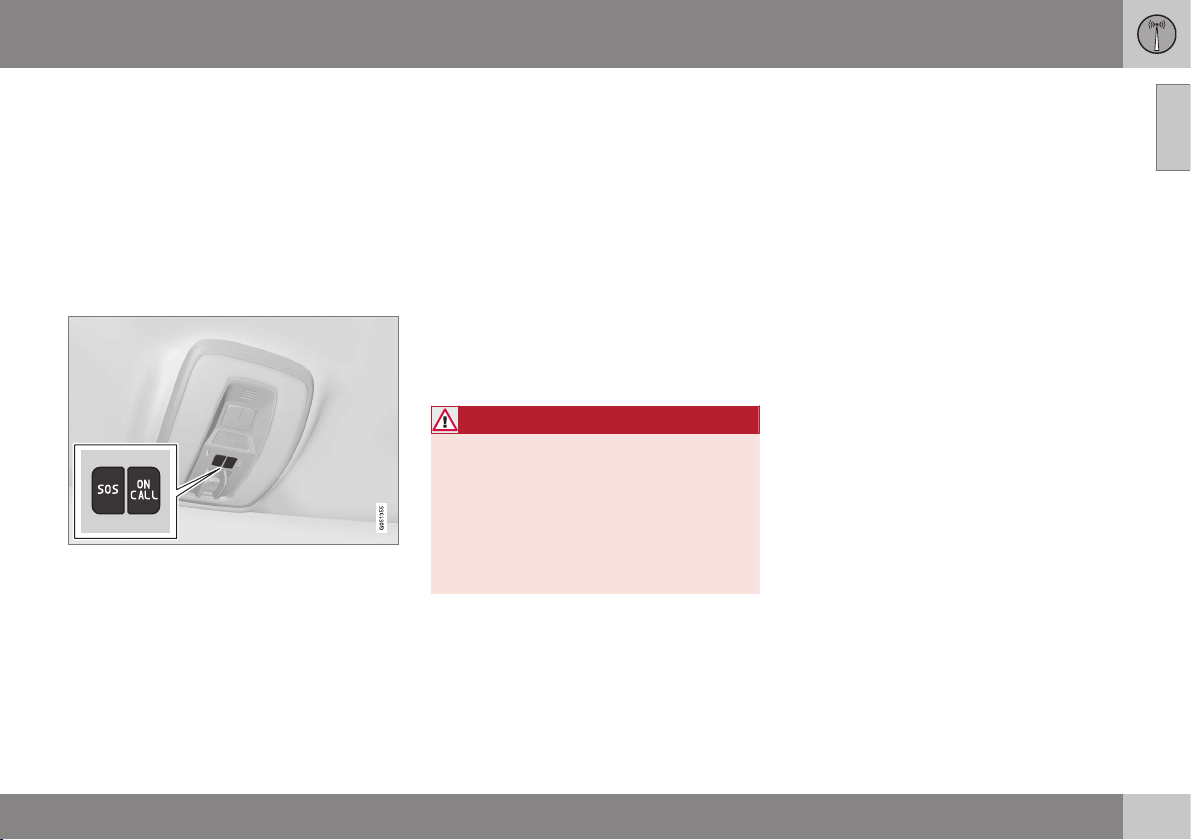
The Volvo On Call buttons
The SOS and ON CALL buttons form the
basis for communication between the vehicle
and the VOC customer service center.
•
SOS button: press in emergency situations.
•
ON CALL button: press to contact the
customer service center when roadside
assistance is required.
See also Using Volvo On Call (p. 6) for
additional information.
Availability
From the time that the remote key has been
removed from the vehicle, VOC's functions
remain available for 5 full days and subsequently once an hour for the following
22 days. After 22 days have elapsed, the system will remain switched off until the engine
is started.
VOC uses GPS (Global Positioning System) to
locate the vehicle and its integrated GSM
module to enable communication with the
VOC customer service center.
WARNING
The system can only function in areas
where there is adequate cellular network
coverage.
Just as in the case of cell phones, atmospheric disturbances or areas with relatively
few GSM transmitters can make it impossible for VOC to make a connection, for
example, in rural areas.
Subscriptions
A free trial subscription is initiated when the
vehicle is purchased and VOC is activated.
The subscription has a time limit but can be
extended by contacting your Volvo retailer.
Convenience services
•
The VOC mobile app.
Safety services
•
Automatic alarm.
•
Manual alarm.
•
Roadside assistance.
Security services
•
Theft notification.
•
Remote door unlock.
•
Remote vehicle immobilizer.
Change of owners
When the vehicle changes owners, it is
essential to transfer the VOC subscription to
the new owner, see Changing ownership of a
vehicle with Volvo On Call (p. 15).
Information on the Internet
Go to www.volvocars.com/us/voc or
www.volvocars.com/ca for additional information about Volvo On Call.
Volvo ID
A personal Volvo ID makes it possible to e.g.,
log onto the VOC mobile app. Your Sensus
Infotainment supplement contains information
about creating a Volvo ID and the features it
offers.
Geographic coverage
Volvo On Call is available in the United States
and Canada.
Page 8
||
01 Volvo On Call with Sensus Connect
01
6
* Option/accessory, for more information, see Introduction.
Related information
•
Volvo On Call overview (p. 6)
•
Using Volvo On Call (p. 6)
•
Volvo On Call (VOC)* functions (p. 7)
•
Volvo On Call geographic coverage
(p. 13)
•
Volvo On Call customer service center
phone number (p. 14)
•
Volvo On Call PIN code (p. 15)
•
Personal information (p. 15)
Volvo On Call overview
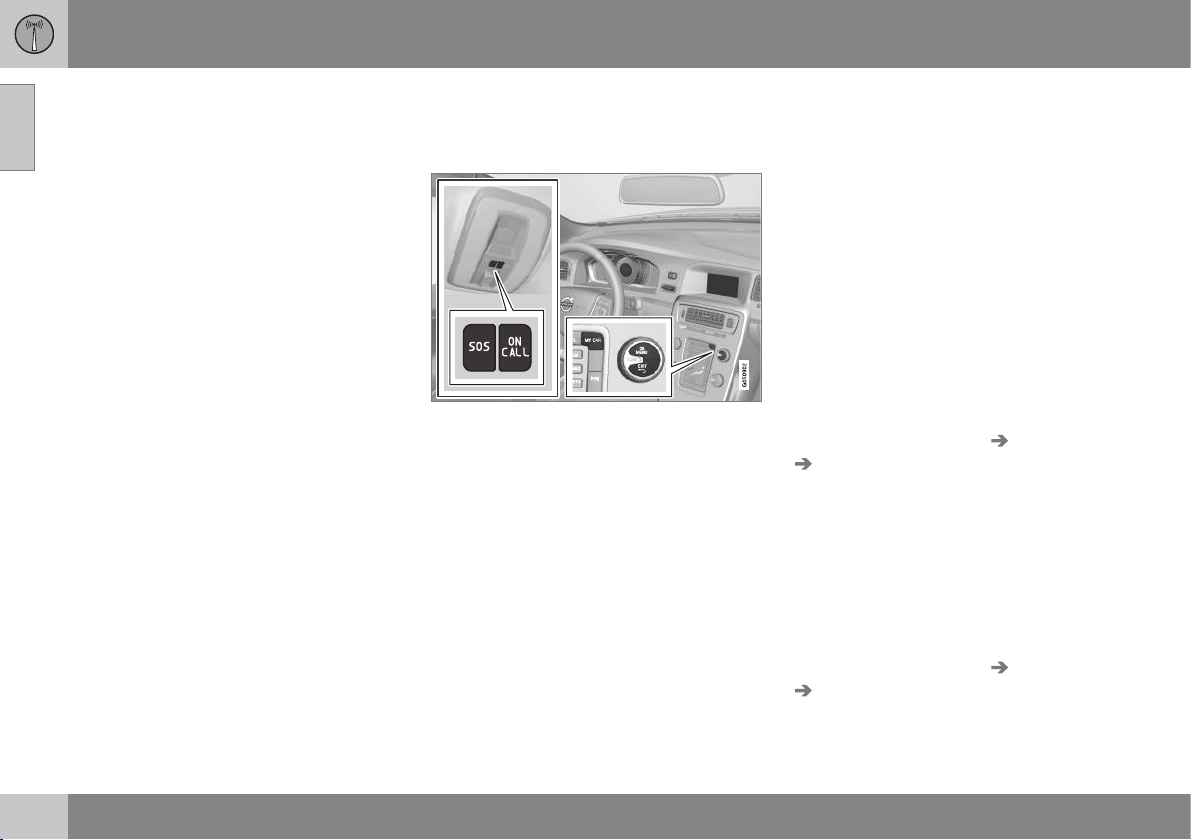
The following is an overview of the Volvo On
Call controls.
SOS/ON CALL buttons in the ceiling console
above the rear-view mirror, and center console
controls
Related information
•
Volvo On Call (VOC)* (p. 5)
•
Using Volvo On Call (p. 6)
•
Menu options for Volvo On Call * (p. 12)
•
Volvo On Call display messages (p. 13)
Using Volvo On Call
Automatic alarm
In the event of an accident in which the seat
belt pretensioners, airbags or the inflatable
curtains have been triggered, a signal is
transmitted automatically to the VOC customer service center, who send the appropriate type of assistance (ambulance, police,
etc.) to the site.
The SOS button: emergency situations
Press and hold the SOS button for approx.
2 seconds to activate the manual alarm function.
Alternative to the SOS button
In the MY CAR normal view, press OK/
MENU and select
Settings Volvo On Call
SOS.
The ON CALL button: roadside assistance
Press the ON CALL button for approx.
2 seconds to activate the roadside assistance
functions, see Volvo On Call (VOC)* functions
(p. 7).
Alternative to the ON CALL button
In the MY CAR normal view, press OK/
MENU and select Settings Volvo On Call
On Call.
Page 9
01 Volvo On Call with Sensus Connect
01
}}
* Option/accessory, for more information, see Introduction.
7
NOTE
The SOS button should only be used in an
emergency situation such as an accident,
illness or in the event of a threat to the
occupants of the vehicle. Misusing this
button could result in extra charges.
The ON CALL button can be used for all of
the other VOC services, including roadside
assistance.
Canceling a call
A service call that has been initiated can be
cancelled within 10 seconds by pressing the
EXIT button on the steering wheel keypad or
the center console.
Settings
Possible settings in the menu system include:
•
Key lock: choose when the SOS and ON
CALL buttons are to be activated. This
function only allows the buttons to be
activated when the ignition is in I, II or if
the engine is running.
•
Activate subscription
•
Deactivate subscription
•
Activate service: use to activate supple-
mentary services such as roadside assistance.
Related information
•
Menu options for Volvo On Call * (p. 12)
•
Volvo On Call display messages (p. 13)
•
Volvo On Call overview (p. 6)
•
Contacting the VOC customer service
center manually (p. 10)
•
Using roadside assistance (p. 11)
•
Remote door unlock (p. 12)
Volvo On Call (VOC)* functions
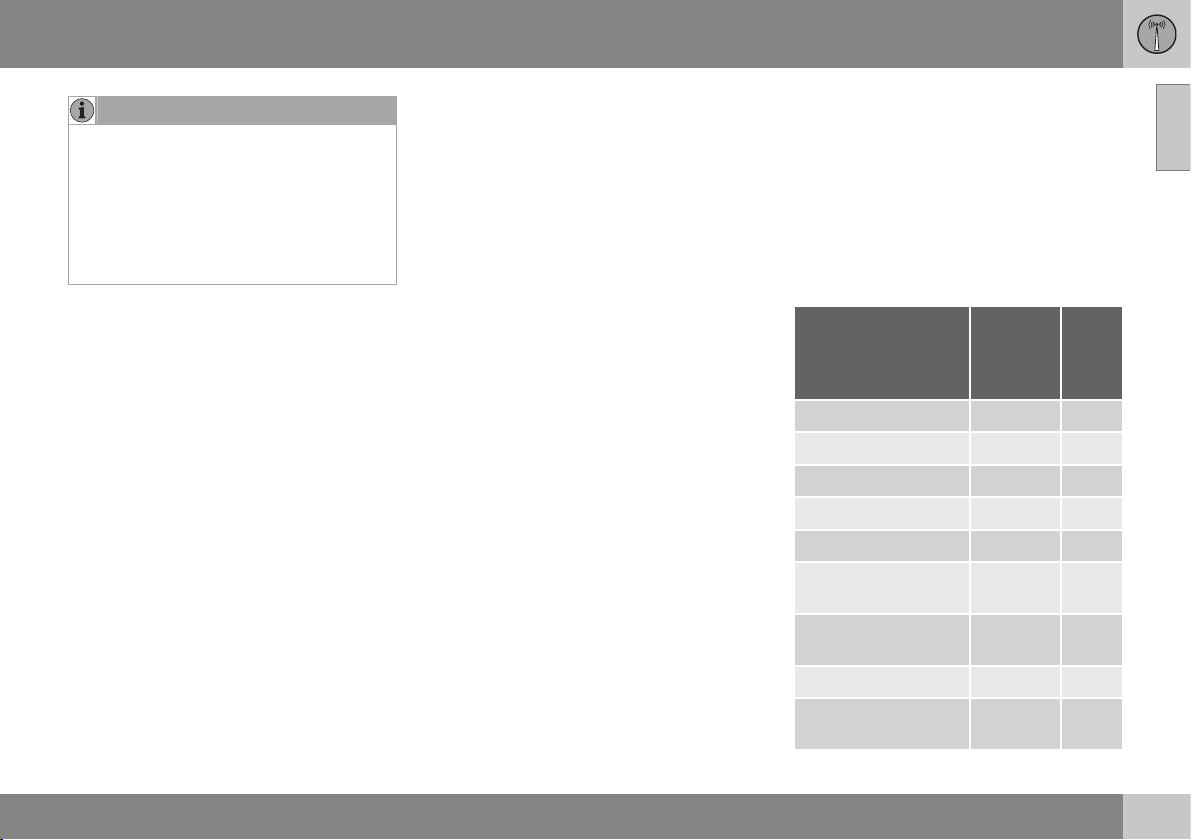
The following table provides an overview of
the functions that are available from the VOC
customer service center and the mobile app.
Please note that these functions are subject
to change. Contact your Volvo retailer or go
to www.volvocars.com/us/voc or
www.volvocars.com/ca for up-to-date information about the range of Volvo On Call functions and services.
Function Cus-
tomer
service
center
App
A
Automatic alarm X
Manual alarm X
Roadside assistance X X
Theft notification X X
Remote Door Unlock X X
Remote Vehicle
Immobilizer
X
Engine remote start
(ERS)
X
Locating the vehicle X X
Instrument panel
information
X
Page 10

||
01 Volvo On Call with Sensus Connect
01
8
* Option/accessory, for more information, see Introduction.
Function Cus-
tomer
service
center
App
A
Vehicle "checkup" X
Driving logbook X
Vehicle information X
A
Some of these functions may not be available for all models.
Related information
•
Convenience services for VOC (p. 8)
•
Volvo On Call safety services (p. 11)
•
Volvo On Call security services (p. 10)
•
Volvo On Call mobile app (p. 8)
Convenience services for VOC
Convenience services are available by using
the mobile app to e.g., remote-start the
engine*, etc.
As a VOC user, a mobile app is available that
enables you to have telephone contact from
an iPhone or from Windows/Android phones
with your vehicle when it is parked. With it,
you can locate the vehicle, lock it from
another location, check the fuel level and
much more. Read more about this app in the
following section.
Related information
•
Volvo On Call (VOC)* functions (p. 7)
Volvo On Call mobile app
As a VOC user, you can download a mobile
app that enables you to have telephone contact with your vehicle when it is parked.
Certain functions may not be available in all
models.
The mobile app is updated regularly, which
may result in this information not being completely up-to-date with respect to the functionality available. Go to
www.volvocars.com/us/voc or
www.volvocars.com/ca for additional information about the app.
The Volvo On Call mobile app is available for
the iPhone and for Windows/Android phones
and can be downloaded from Apple's AppStore, Windows Phone Store or Google Play.
A personal Volvo ID is required in order to use
the mobile app.
For additional information about the Volvo ID,
the features it offers and how to create it, see
owner's information.
Locating the vehicle
The vehicle's location is shown on a map and
directions to the vehicle can be provided.
There is also a digital compass to help show
the owner the right direction. When you are
within approx. 100 yards/meters of the vehicle, you can activate its horn and turn signals
to help locate it.
Page 11
01 Volvo On Call with Sensus Connect
01
* Option/accessory, for more information, see Introduction.
9
The vehicle's instrument panel
This function provides information such as:
the fuel level, range on the remaining fuel,
average fuel consumption, average speed
and odometer/trip odometer readings.
Vehicle "checkup"
The mobile app monitors the vehicle's condition and provides information about bulbs
and the levels of brake fluid, coolant and
engine oil.
Driving logbook
Detailed information about each trip made
during the past 40 days can be saved and
downloaded. All or part of this information
can be exported from the mobile app to a
spreadsheet format and sent to an email
address. This is very useful for e.g., keeping
track of business-related driving.
This function can be deactivated, in which
case the vehicle will not transmit logbook
information at the end of each trip.
Vehicle information
Basic information such as model, license
plate number and VIN number are readily
accessible.
Theft notification
If the vehicle's alarm is triggered, the owner
will be informed via his/her cell phone.
Remote door unlock
The status of all doors and windows is provided. The owner can lock/unlock the vehicle
from another location but for security reasons, the app's password is always required
before the vehicle can be unlocked.
Engine remote start (ERS)*
1
ERS makes it possible to remotely start the
engine using the remote key to enable the climate system to cool or heat the passenger
compartment before driving.
When the engine starts, the climate and infotainment systems will restart using the same
settings as when the engine was switched
off.
You can choose to let the engine run for
between 1 and 15 minutes before it automatically switches off again. After 2 ERS starts,
the engine must be started in the normal way
before ERS can be used again.
WARNING
Keep the following in mind before using
ERS:
•
The vehicle should be in view.
•
The vehicle should be unoccupied.
•
The vehicle must not be parked
indoors or in an enclosed area.
Exhaust fumes are harmful to the
health.
NOTE
Always observe applicable state, province
and/or local laws regarding engine idling
when using ERS.
Related information
•
Volvo On Call (VOC)* functions (p. 7)
•
Volvo On Call PIN code (p. 15)
1
Certain models only.
Page 12
01 Volvo On Call with Sensus Connect
01
10
Volvo On Call security services
The Volvo On Call (VOC) security services are
intended to provide assistance in threatening
situations, if you are locked out of your vehicle, etc.
If the vehicle's normal electrical system is not
functioning properly, VOC's reserve battery
provides the system with current.
Theft notification
A signal will be sent automatically to the
Volvo On Call customer service center in the
event of a break-in or theft (if the vehicle's
alarm has been triggered).
This service will be interrupted if the alarm is
turned off using one of the vehicle's remote
keys.
Remote door unlock
If the vehicle's remote key has been lost or
locked in the car, the doors can be unlocked
remotely within the following 22 days with
assistance from the VOC customer service
center, see Remote door unlock (p. 12).
Remote vehicle immobilizer
If the vehicle has been stolen, the owner or
police can contact the VOC customer service
center to have the vehicle's remote keys
immobilized (deactivated).
NOTE
This applies even if the vehicle has been
unlocked and started with one of its
remote keys.
After contacting the owner/police, the VOC
customer service center then deactivates the
remote keys. Once the engine has been
switched off, it can only be restarted if the
owner/police has given the VOC customer
service center authorization to reactivate the
remote keys. Once this authorization has
been verified (using your PIN code), the VOC
customer service center will reactivate the
remote keys.
Reserve battery
The reserve battery's service life is at least
1 year. If the battery's charge level goes
below a certain level, the message
On Call
Service required will be displayed.
If the message remains on the screen, the
battery's capacity should be checked by a
trained and qualified Volvo service technician.
Related information
•
Volvo On Call customer service center
phone number (p. 14)
•
Volvo On Call PIN code (p. 15)
Contacting the VOC customer service center manually
Contact the VOC customer service center to
request assistance in emergency situations.
1. Press the SOS button for at least
2 seconds to request help in the event of
illness, a threat to the occupants of the
vehicle, etc.
2. The customer service center receives a
signal for help and information about the
vehicle's location.
3. The customer service center attempts to
establish voice contact with the driver to
determine the type of help required.
If voice contact is not possible, the VOC customer service then contacts the emergency
services for appropriate action.
Related information
•
Volvo On Call safety services (p. 11)
•
Volvo On Call customer service center
phone number (p. 14)
Page 13

01 Volvo On Call with Sensus Connect
01
11
Using roadside assistance
You can request help in the event of a flat tire,
if the battery is discharged, etc.
1. Press the ON CALL button for at least
2 seconds.
2. The VOC customer service center will
establish voice contact with the driver to
determine the type of assistance that is
required.
Volvo On Call safety services
The Volvo On Call (VOC) safety services can
be used in emergency situations.
Automatic alarm
In the event of certain types of accidents, a
signal is transmitted automatically to the VOC
customer service center, who take appropriate action according to the information that
they receive.
The following occurs if the seat belt pretensioners, airbags or the inflatable curtains have
been triggered:
1. A signal is transmitted automatically to
the VOC customer service center with
information about the vehicle's location
and that an airbag, etc., has been triggered.
2. The VOC customer service center
attempts to establish voice contact with
the driver to determine the extent of the
accident and the need for assistance.
3. The VOC customer service center then
contacts the appropriate emergency
service (police, ambulance, towing, etc.).
If voice contact is not possible, the VOC customer service then contacts the emergency
services for appropriate action.
Manual alarm
Press SOS to contact the customer service
center for help in emergency situations, see
Contacting the customer service center manually.
Roadside assistance
Request help for e.g., flat tires, a discharged
battery, if you have run out of fuel, etc., see
Summoning roadside assistance.
Emergency number
When an emergency call has been initiated,
VOC attempts to contact the customer service center. If this is not possible, the call will
be transferred to the emergency 911 number
instead.
Related information
•
Using Volvo On Call (p. 6)
Page 14
01 Volvo On Call with Sensus Connect
01
12
* Option/accessory, for more information, see Introduction.
Remote door unlock
If necessary, your vehicle can be unlocked
from the customer service center.
1. Contact the VOC customer service center
at 855-399-4691 (this number applies in
both the United States and Canada).
2. After confirming that the caller is the vehicle's owner or other authorized person
(using your PIN code), the VOC customer
service center sends a signal to the vehicle to unlock it.
3. The trunk/tailgate has to be opened to
unlock the other doors. Press the rubber
touch pad twice (V60/XC60/XC70) or pull
the handle (S60/S80).
NOTE
If the trunk/tailgate is not opened within
the time period set by the VOC customer
service center, it will relock.
4. Opening the doors will trigger the alarm.
Turn off the alarm by pressing the unlock
button on the remote key or insert the
remote key into the ignition slot.
NOTE
If the vehicle is parked in a garage or other
covered area, remote unlocking may not
be possible due to poor signal reception.
Related information
•
Volvo On Call security services (p. 10)
•
Volvo On Call PIN code (p. 15)
•
Volvo On Call mobile app (p. 8)
Menu options for Volvo On Call *
The following is an overview of the selections
and settings available in the VOC system's
menu.
To display the menu, press the MY CAR button on the center console. Press this button
again to open a shortcut menu providing
access to the VOC menu.
Retailer information
SOS
On Call
Key lock
Lock/Unlock SOS and
On Call buttons
Activate subscription
Activate service
Related information
•
Using Volvo On Call (p. 6)
•
Volvo On Call display messages (p. 13)
•
Volvo On Call overview (p. 6)
Page 15
01 Volvo On Call with Sensus Connect
01
* Option/accessory, for more information, see Introduction.
13
Volvo On Call display messages
VOC automatically displays information messages when necessary.
The following two messages will be displayed
on the center console screen:
•
Could not find vehicle position: see
Availability.
•
Service temporarily unavailable: see
Availability.
The following two messages will appear in the
instrument panel:
•
Volvo On Call Service required: the
system is not functioning properly. Contact a trained and qualified Volvo service
technician for assistance.
•
Volvo On Call subscription will soon
expire: the VOC subscription needs to be
renewed. Contact the VOC customer
service center for assistance.
Related information
•
Volvo On Call overview (p. 6)
•
Volvo On Call (VOC)* (p. 5)
•
Menu options for Volvo On Call * (p. 12)
Volvo On Call geographic coverage
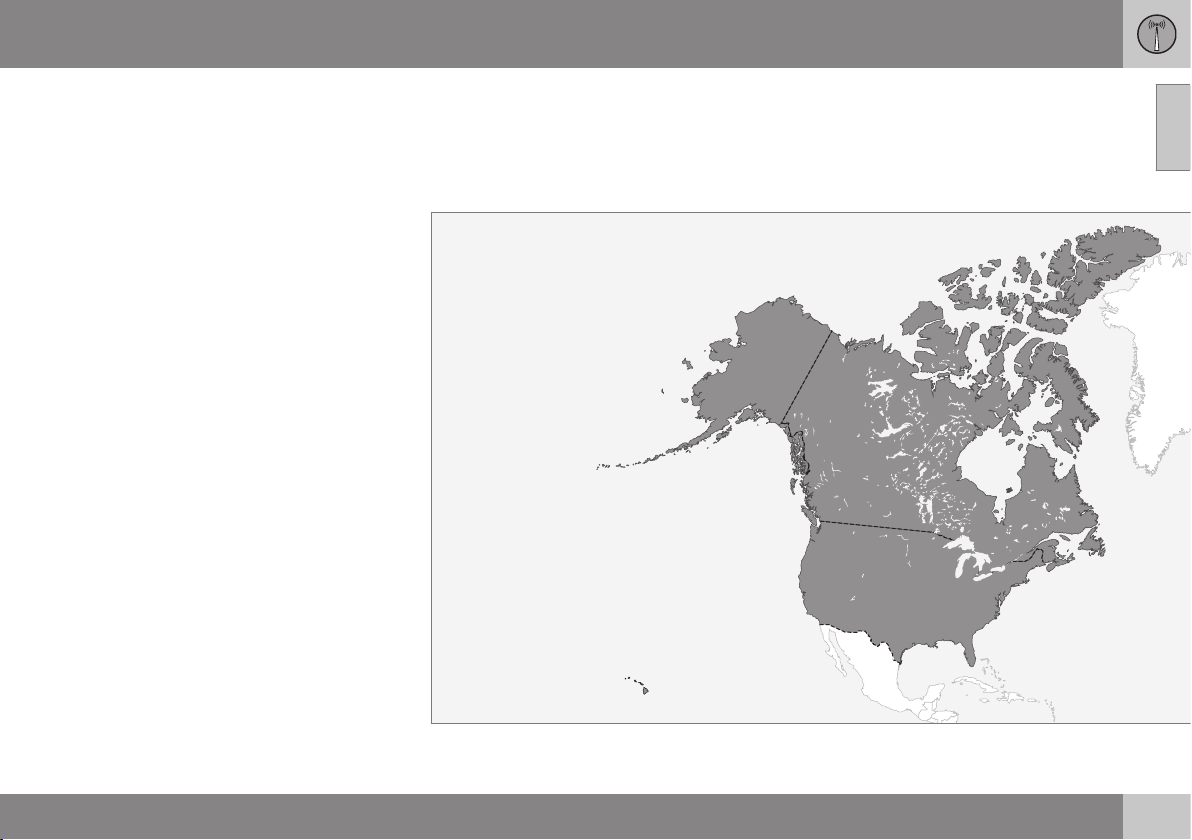
The map shows the areas in which VOC is
available. The service is constantly being
expanded; contact your Volvo retailer for upto-date information.
However, the system can only function in
areas where there is adequate cellular network coverage.
Related information
•
Volvo On Call customer service center
phone number (p. 14)
Page 16

01 Volvo On Call with Sensus Connect
01
14
Volvo On Call customer service center phone number
Country Customer service center number
United States and Canada 855-399-4691
Page 17

01 Volvo On Call with Sensus Connect
01
}}
15
Volvo On Call PIN code
The PIN code is used for security purposes to
help identify those persons who are authorized to use VOC services in a specific vehicle.
The 4-digit PIN code, which was sent to you
when your Volvo retailer activated your subscription, is used for security reasons to help
identify those persons who are authorized to
use certain VOC services such as Remote
door unlock or to create an account in the
mobile app.
If you have forgotten or would like to change your PIN code
If you have forgotten your PIN code or would
like to change it (e.g., if you have purchased a
previously owned Volvo with VOC), contact
your Volvo retailer or press the On Call button in your vehicle. The new code will be sent
to you via email.
If an incorrect PIN code has been entered in the app multiple times
If a PIN code has been entered incorrectly
10 times in a row, the account will be frozen.
In order to use the app again, a new PIN code
must be selected and a new app account will
have to be created.
Related information
•
Volvo On Call security services (p. 10)
•
Volvo On Call mobile app (p. 8)
•
Changing ownership of a vehicle with
Volvo On Call (p. 15)
Changing ownership of a vehicle with Volvo On Call
If the vehicle changes owners, the Volvo On
Call (VOC) service should be cancelled.
Cancelling the VOC service
If your vehicle changes owners, contact your
Volvo retailer to cancel the VOC service. The
subscription will be terminated and the service history will be erased.
When the vehicle changes owners, all personal settings should be reset to the factory
defaults, see the owner's manual supplement.
Starting the VOC service
If you purchase a previously owned Volvo
with VOC:
The new owner should contact his/her Volvo
retailer to transfer the remaining period of the
VOC subscription. All contact information
must be updated in order for VOC to function
and to ensure that the previous owner is no
longer authorized to use VOC services in the
vehicle. The new owner will be given a 4-digit
personal code, which is used to identify
him/her as being authorized to approve certain VOC services.
Personal information
Personal information is gathered for use with
the Volvo On Call service.
Volvo's sales companies (see the following
table) and Volvo Car Corporation are responsible for the personal details used in VOCrelated services.
Country Sales company
United States Volvo Cars of North Amer-
ica, LLC
Canada Volvo Cars of Canada
Why information is gathered
Personal information is used by Volvo and its
partners to provide and develop the VOC
service.
Types of personal information gathered
The primary types of personal information
gathered for VOC-related purposes are:
•
Personal information that the customer
provides in connection with the activation
of the VOC service and during other contact with Volvo, including name, address,
telephone number, type of service and
the duration of the service.
•
When information about a specific VOCrelated event is automatically transmitted
from the vehicle. A message of this type
contains: the vehicle identification num-
Page 18

||
01 Volvo On Call with Sensus Connect
01
16
ber (VIN), time when the service is used,
type of service, if airbags have been triggered, if the seat belt tensioners have
been triggered, current fuel level, current
temperature inside and outside the vehicle, whether the doors are locked and
windows are closed and the vehicle's last
six locations, including speed and direction.
•
Other information associated with the
owner/driver, such as telephone calls with
people in the vehicle, the customer service center that provided the service and
notes made by the customer service
operator.
Access to my personal information
Volvo uses sub-contractors to provide the
service. These sub-contractors work on
behalf of Volvo and may only process personal information to the extent necessary to
provide service. All sub-contractors are
bound by agreements requiring them to
observe strict confidentiality and to treat personal details in accordance with applicable
legislation.
Deleting personal information
The personal details required to provide the
VOC service are stored during the subscription period and thereafter for as long as necessary in order for Volvo to fulfil its obligations according to legislation and other regulations. Information generated during events
covered by the VOC service is deleted three
months after an event has occurred.
Corrections and register extracts
Private persons have the right to request corrections of incorrect information and to obtain
an extract showing the personal information
that has been processed. Requests for
extracts from the register must be submitted
in writing and signed by the applicant and
include name, address and customer number. The request should be posted to:
Volvo Cars of North America, LLC
Customer Care Center
1 Volvo Drive,
P.O. Box 914
Rockleigh, New Jersey 07647
Phone: 1-800-458-1552
Volvo Cars of Canada
National Customer Service
9130 Leslie Street, Suite 101
Richmond Hill, Ontario L4B 0B9
Phone: 1-800-663-8255
Consent to gather VOC-related personal information
By activating a VOC subscription in accordance with the instructions in this document,
the user agrees to the collection of VOC-related personal information.
Page 19

Page 20

TP 17964 (USA & Canada), AT 1420, MY15, Printed in Sweden, Göteborg 2014, Copyright © 2000-2014 Volvo Car Corporation
 Loading...