

Page 1
DESIGN GUIDE: airFiber AF‑5/AF‑5U
Best Practices for Installation of the airFiber AF‑5/AF‑5U
Ideal Mounting Location: High in Elevation with
ClearLine of Sight
Custom Frequency and Transmit Power
Conguration to Fit Your Application
Selection of Installation Site
The airFiber® AF‑5/AF‑5U, referred to as the AF‑5 in this Design
Guide, features unique functionality that requires you to be
cognizant of the installation environment.
For best performance, you must install the AF‑5 as high up
as possible, with a line of sight free from obstructions. This is
especially true in FDD (Frequency Division Duplexing) mode,
as there is a requirement to maximize channel/spectrum reuse.
Any objects in front of or near the front of the AF‑5 can have a
signicant impact on overall performance. The AF‑5 should be
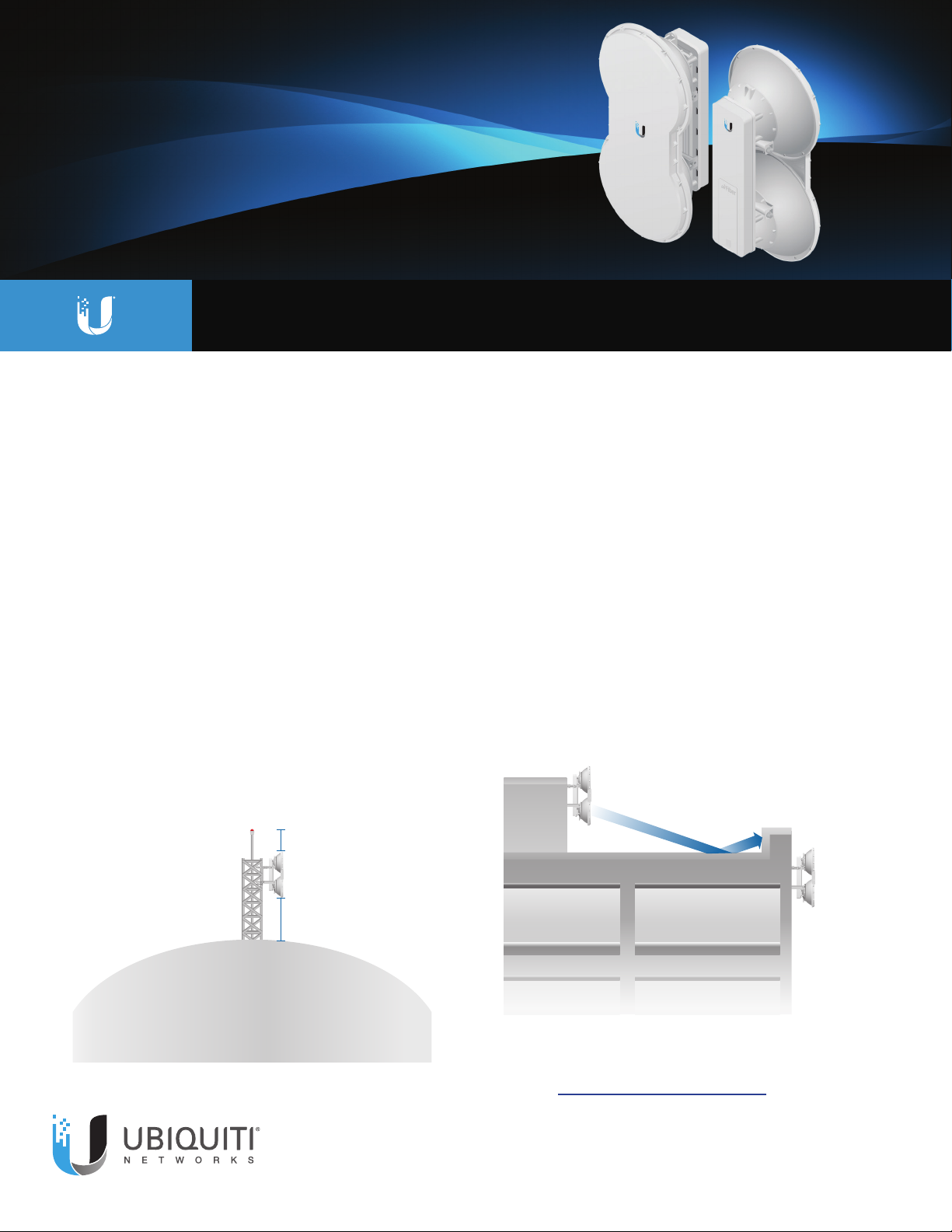
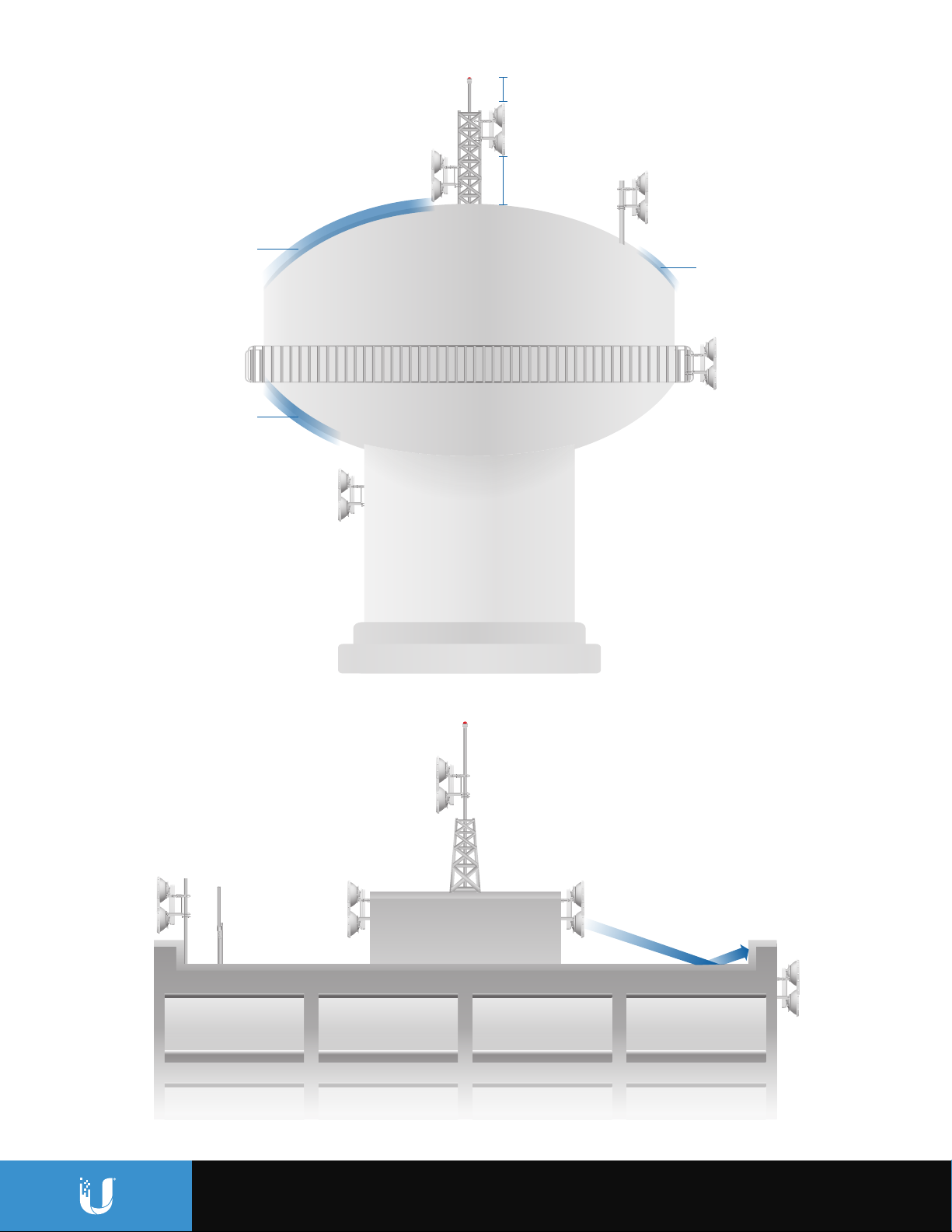
installed 1 m (3.3 ft) below the highest point of the structure
to reduce the risk of a lightning strike. When the AF‑5 must be
installed above a metallic surface like a corrugated at roof or
water tower, you should ensure that the AF‑5 is located more
than 3 m (10 feet) above the metal/reective surface.
1 m (3.3 ft)
Good Location
Throughout Optimization with Maximum
Frequency Reuse and Link Symmetry
What is generally true for cellular installations is true for
the AF‑5. You should mount the AF‑5 where it can see no
reections in the near eld, so we recommend the following
types of mountingsites:
§ Perimeter mounting on a water tower/structure (best)
§ Mounting near the edge of the top of a structure
§ Mounting on an elevated mast or tower
Radios that are mounted anywhere near the surface of a
roof or the top of a water tower can be signicantly aected
by reections. FDD is more susceptible to the elements
of a deployment environment than TDD (Time Division
Duplexing)is.
Bad Location:
Reection o Rooftop
and Lip of Building
Best Location
3 m (10 ft)
Close-up of Installation on Top of Water Tower
Close-up of Installation on Rooftop of Building
Good and bad examples of deployments are depicted in this
section, “Typical Deployment Scenarios” on page 2.
Page 2
Typical Deployment Scenarios
1 m (3.3 ft)
Good Location
Reective Surface
Reective Surface
Bad Location
Bad Location
3 m (10 ft)
Good Location
Minimal Reective
Surface
Best Location:
No Reective
Surface
Best Location
Deployment on Water Tower
Good Location
Bad Location:
Too close to rooftop and
obstruction in line of sight
Deployment on Rooftop of Building
Bad Location:
Too close to rooftop
and lip of building
Best Location
Page 3

Frequency Conguration
FDD will be most useful in situations that have plenty of
spectrum available and will show the greatest benet on
shorter‑range links. For optimal performance, you should plan
out channel pairs that have maximum frequency separation.
Since the AF‑5 uses sophisticated data processing algorithms
and a special antenna structure to eliminate the need for a
pre‑congured duplexing lter, you should space the two
duplex channels at either end of the spectrum near the band
edges for maximum‑range applications.
Generally speaking, you can congure shorter‑range links
for less channel separation between uplink and downlink.
You should also use the narrowest channel bandwidth that
supports the intended link capacity. This conserves valuable
frequency resources and also maximizes link budgets.
The airFiber5Conguration Interface includes the Link
Calculator* conguration tool that will guide you on how to
best minimize bandwidth and power/interference based on
the specic requirements of your installation.
Examples of airFiber5 Link Calculator
* If you do not see the airFiber5 Link Calculator, download the latest airFiber5 rmware at: downloads.ubnt.com/airber
Page 4

Transmit Power Conguration
Power Balance Optimization for FDD
The AF‑5 allows for a very high degree of exibility in
conguring transmit power, supported constellations, channel
bandwidths, and duplexing modes. Because of the number of
conguration options, refer to this guideline as you customize
your AF‑5 conguration:
Depending on the country or region, the AF‑5 may be
congured to support maximum transmit power as high
as +50 dBm EIRP. Power levels in excess of approximately
+43dBm will start to aect the maximum supported
constellation.
TX Power (dBm EIRP) Supported Constellation
43 256QAM
45 64QAM
47 16QAM
50 QPSK
For example, if you have a relatively short‑range link and you
need to support a maximum constellation of 256QAM, then
congure the AF‑5 for less than +43 dBm EIRP.
To minimize interference, you should use the lowest practical
power setting that supports the intended target constellation
for a given distance. Looking at the sensitivity values for the
given channel bandwidth, you should target a receive signal
value approximately 3 to 6 dB higher than the sensitivity
threshold.
10 MHz 20 MHz 30 MHz 40 MHz 50 MHz
10x ‑63 dBm ‑60 dBm ‑59 dBm ‑58 dBm ‑57 dBm
8x ‑70 dBm ‑67 dBm ‑66 dBm ‑65 dBm ‑64 dBm
6x ‑77 dBm ‑74 dBm ‑73 dBm ‑72 dBm ‑71 dBm
4x ‑84 dBm ‑81 dBm ‑80 dBm ‑79 dBm ‑78 dBm
2x ‑90 dBm ‑87 dBm ‑86 dBm ‑85 dBm ‑84 dBm
1x ‑93 dBm ‑90 dBm ‑89 dBm ‑88 dBm ‑87 dBm
In the default state, the AF‑5 has this conguration:
§ TX power: +40 dBm (EIRP)
§ Channel bandwidth: 10MHz
§ Duplexing mode: TDD
To optimize throughput with maximum frequency reuse:
1. Aim the AF‑5 using the factory default settings andTDD.
2. Allow the AF‑5 to automatically rate‑adapt.
3. Congure the AF‑5 for FDD operation.
4. Check the modulation rate and capacity indicators for
asymmetry.
5. You may notice signicant asymmetry. If you do, then this
could be due to a poorly aimed AF‑5 or an AF‑5 that is
operating in some sort of reective Fresnel environment.
Ensure that the AF‑5 is correctly aimed and free of any
potential reections before proceeding to the next
procedure.
To optimize both ends of the link for the best symmetry:
1. Test for a local desense condition (possibly due to a
reection or other disturbance). Begin with the AF‑5 that is
receiving the lowest RX capacity reading, and decrease the
TX power on that AF‑5 by 1 dB.
a. Check if there is any increase in the RX capacity at the AF‑5.
b. Watch for decreases in the TX capacity of the AF‑5.
2. Perform step 1 iteratively to nd out if there is any RX
capacity sensitivity to the local TX power level.
3. If this condition persists, try the following:
a. Run the lowest transmit power that still allows for the best
balance of performance on both ends of the link.
b. Increase the FDD frequency separation and repeat the
optimization process. (In general you should run the
lowest power possible to meet the data rate requirements
for the link.)
This link symmetry procedure should be repeated on the
opposite end of the link to test for desense on the other side.
Ultimate ‑95 dBm ‑93 dBm ‑93 dBm ‑92 dBm ‑91 dBm
To obtain the greatest range performance, you may
want to explore power settings above +43 dBm since
the longest‑range links will be limited to the lower‑order
constellations. The best possible range will be achieved with
a combination of maximum power level, narrowest channel
bandwidth, lowest‑order constellation, and TDD.
UBIQUITI NETWORKS, INC. • 2580 ORCHARD PARKWAY, SAN JOSE, CA 95131 USA • WWW.UBNT.COM
© 2014‑2015 Ubiquiti Networks, Inc. All rights reserved. Ubiquiti, Ubiquiti Networks, the Ubiquiti U logo, the Ubiquiti beam logo, and airFiber are trademarks or registered trademarks of
UbiquitiNetworks,Inc. in the United States and in other countries. All other trademarks are the property of their respective owners.
If desense is not an issue, then try this method to mitigate
the asymmetry: Slightly increase the transmit power on the
opposite end of the link. (Note: This should be tried only after
you rule out local desenserst.)
For the best possible FDD performance, use as much
frequency separation as possible to minimize external
coupling of energy.
Online Resources
Support: support.ubnt.com
Community: community.ubnt.com/airber
Downloads: downloads.ubnt.com/airber
 Loading...