

Page 1
CUSTOMER EXPERIENCE CENTER
1- 80 0 - 331-4 3 31
00505-QRG11-YARLB
Printed in U.S.A. 8/10
10-TCS-04005
QUICK REFERENCE
GUIDE
YARIS LB
2011
Page 2
OVE
FEAT
SAFE
EME
IND
* Vis
2011
Yaris Liftback
!
A word about safe vehicle operations
This Quick Reference Guide is a summary of basic vehicle
operations. It contains brief descriptions of fundamental
operations so you can locate and use the vehicle’s main
equipment quickly and easily.
The Quick Reference Guide is not intended as a substitute for the
Owner’s Manual located in your vehicle’s glove box. We strongly
encourage you to review the Owner’s Manual and supplementary
manuals so you will have a better understanding of your vehicle’s
capabilities and limitations.
Your dealership and the entire staff of Toyota Motor Sales, U.S.A.,
Inc. wish you many years of satisfied driving in your new Yaris.
This Quick Reference Guide is not a full description of Yaris
operations. Every Yaris owner should review the Owner’s
Manual that accompanies this vehicle.
Pay special attention to the boxed information highlighted in
color throughout the Owner’s Manual. Each box contains safe
operating instructions to help you avoid injury or equipment
malfunction.
All information in this Quick Reference Guide is current at
the time of printing. Toyota reserves the right to make
changes at any time without notice.
17
OVERVIEW FEATURES/OPERATIONS
SAFETY AND EMERGENCY FEATURES
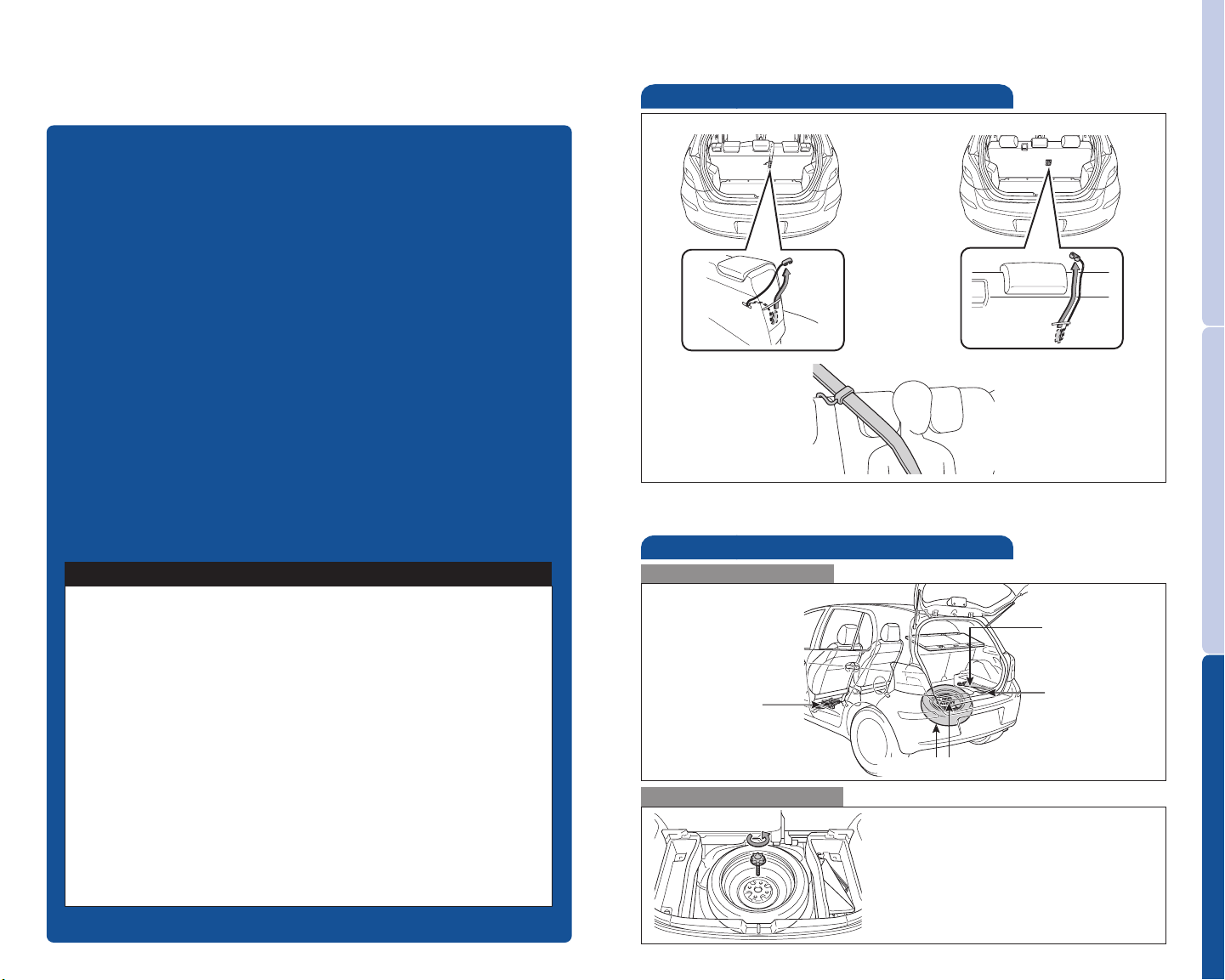
Spare tire & tools
Tool location
Removing the spare tire
Loosen and remove the bolt.
Refer to the Owner’s Manual for tire
changing and jack positioning
procedures.
Tool bag
Tie-down belt
Jack handle
Spare tire
Jack
Child comfort guide
Rear seat center position guides provide added comfort for children who
have outgrown child restraints.
Split seat Non-split seat
Page 3

INDEX
OVERVIEW
FEATURES/OPERATIONS
SAFETY AND
EMERGENCY FEATURES
Engine maintenance 7
Fuel tank door release and cap 6
Hood release 7
Indicator symbols 4-5
Instrument cluster 4
Instrument panel 2-3
Keyless entry* 6
Air Conditioning/Heating 13
Audio 14
Automatic Transmission 8
Clock 14
Cruise control 13
Door-Back 15
Light control-Instrument panel 9
Lights & turn signals 9
Luggage storage box 15
Parking brake 8
Power outlet 15
Seat adjustments-Front 10
Seat adjustments-Rear 10
Seat-Folding rear seat 11
Seats-Head restraints 10
Tilt steering wheel 8
Windows-Power 12
Windshield wipers & washers 12
Child comfort guide 17
Door locks-Power 16
Seat belts 16
Spare tire & tools 17
Tire Pressure Monitoring (warning) System 16
OVERVIEW FEATURES/OPERATIONS
* Visit your Toyota dealer for information on customizing this feature.
1
SAFETY AND EMERGENCY FEATURES
Page 4
OVERVIEW
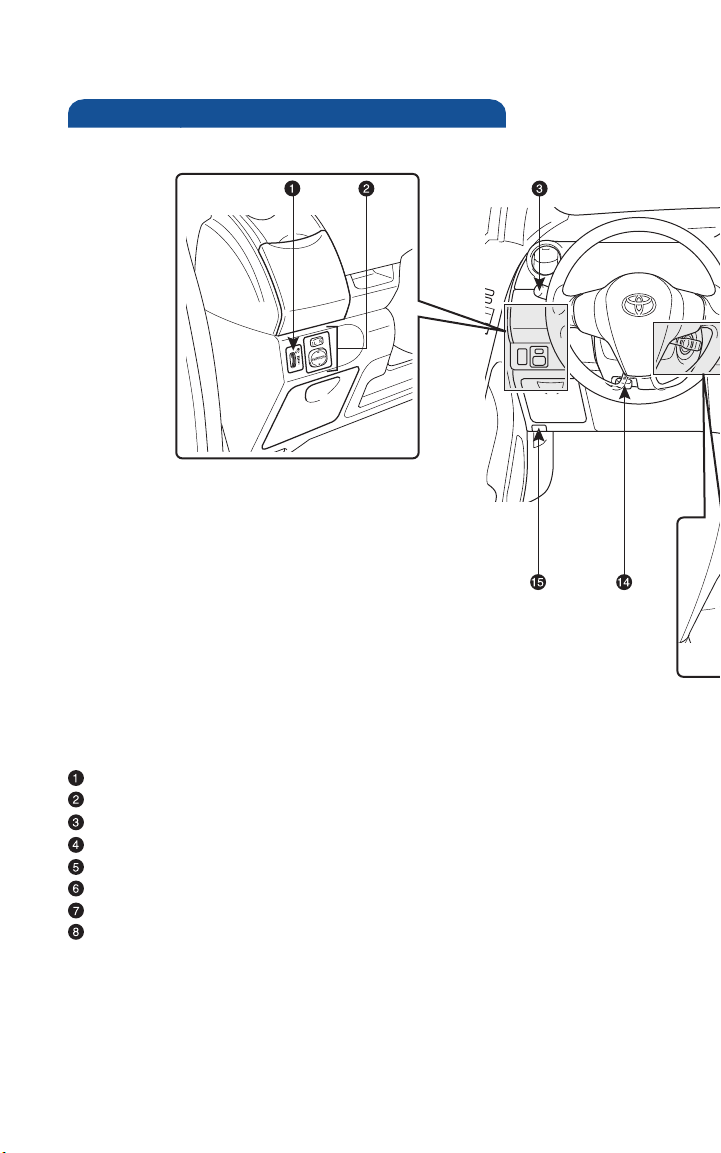
Instrument panel
Instrument panel light control
Power outside rearview mirror control switches*
Headlight, turn signal and front fog light* controls
Wiper and washer controls
Emergency flasher switch
“AIR BAG ON” and “AIR BAG OFF” indicator
Front passenger seat belt reminder light
Audio system*
2
Page 5
OVERVIEW FEATURES/OPERATIONS
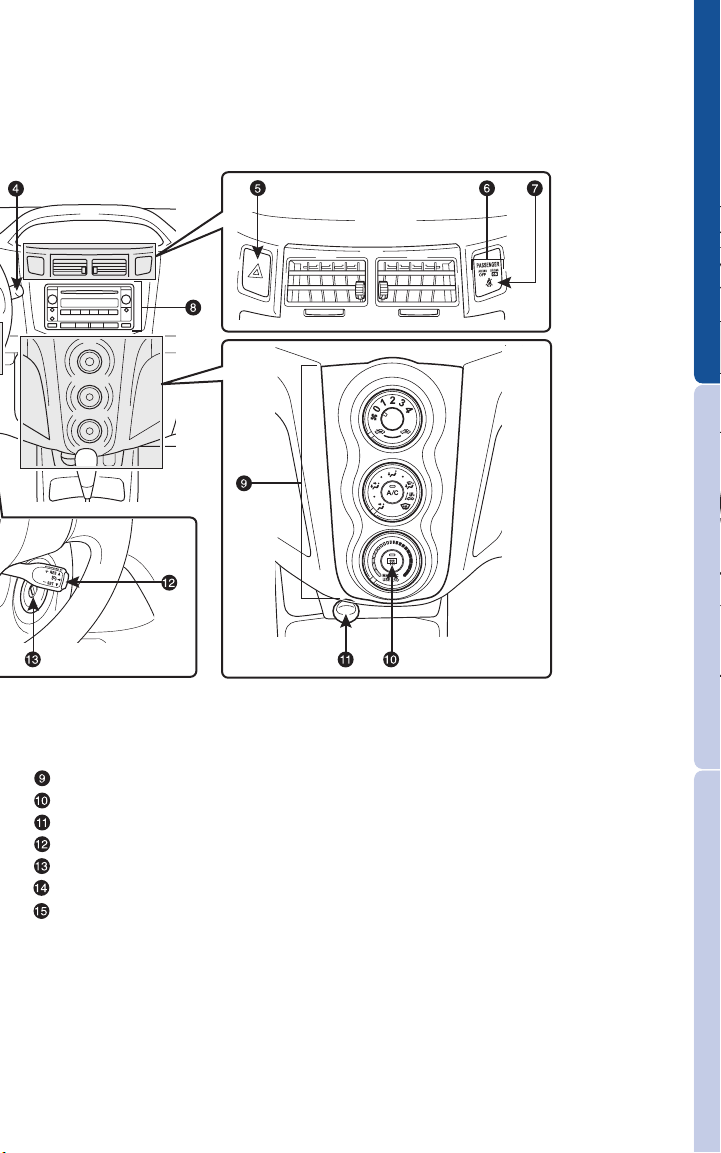
Air Conditioning controls
Rear window defogger switch*
12V DC Power outlet
Cruise control*
Ignition switch
Tilt steering lock release lever
Hood release
* If equipped
SAFETY AND EMERGENCY FEATURES
3
Page 6
OVERVIEW
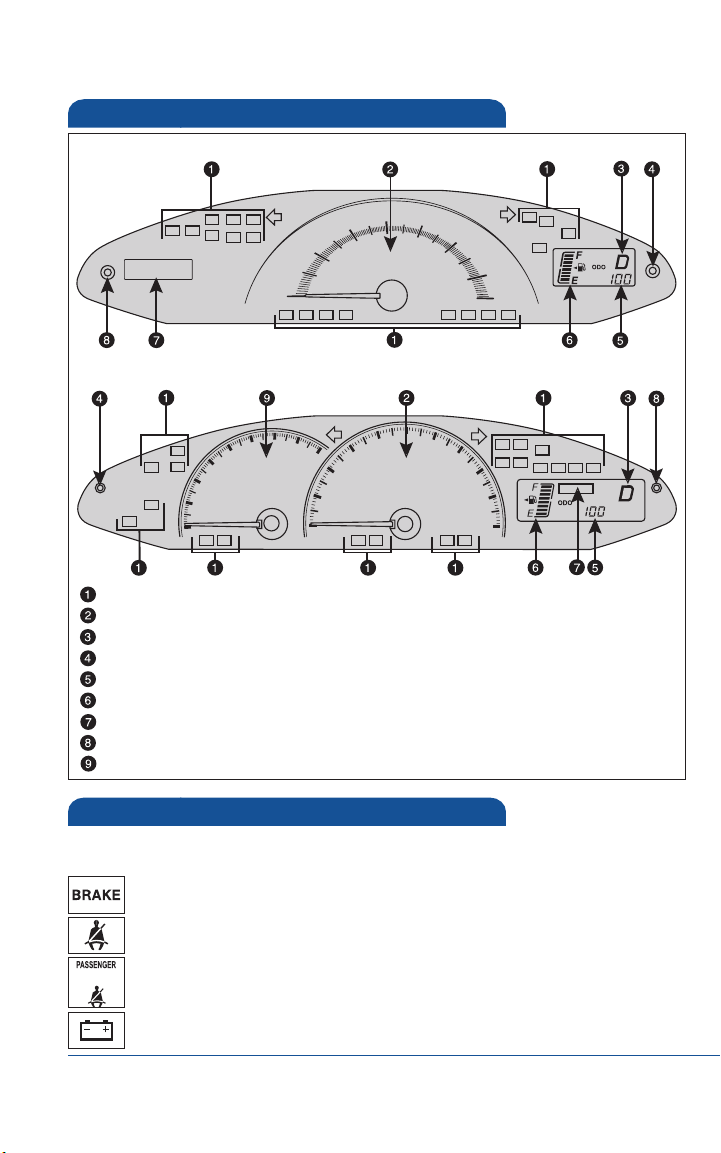
Instrument cluster
Without tachometer
With tachometer
Service indicator and reminder
Speedometer
Automatic Transmission shift position indicator (if equipped)
Odometer/Trip meter switch and trip meter reset button
Odometer and two trip meters
Fuel gauge
Clock
Clock reset button
Tachometer
Indicator symbols
For details, refer to “Indicators and warning lights,” Section 2-2, 2011
Owner’s Manual.
Brake system warning
Driver seat belt reminder
(alarm will sound if speed is over 12 mph)
Front passenger seat belt reminder
(alarm will sound if speed is over 12 mph)
Charging system warning
1
If indicator does not turn off within a few seconds of starting engine, there may
be a malfunction. Have vehicle inspected by your Toyota dealer.
1,2
2
2
1,2
4
Page 7
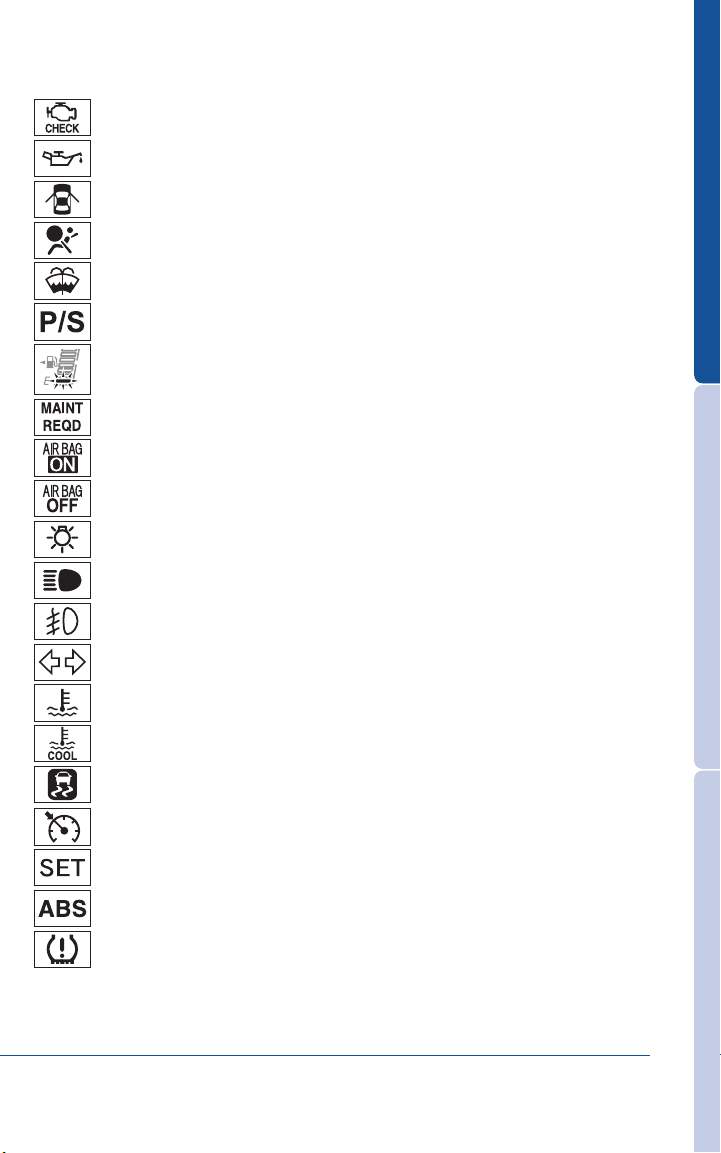
Malfunction/Check Engine indicator
1,2
Low engine oil pressure warning
Open door warning
Airbag SRS warning
2
1,2
1,2
Low windshield washer fluid level warning
Electric power steering system warning
1,2
Low fuel level warning
Engine oil replacement reminder
1,2
AIR BAG ON indicator
AIR BAG OFF indicator
Headlight low beam indicator
Headlight high beam indicator
Front fog light indicator
Turn signal indicator
High engine coolant temperature warning
OVERVIEW FEATURES/OPERATIONS
2
1,2
Low engine coolant temperature indicator
Slip indicator
1,2
3
Cruise control indicator
Cruise control SET indicator
Anti-lock Brake System warning
Low Tire Pressure Warning
2
For details, refer to “If a warning light turns on or a warning buzzer sounds...” Section
5-2, 2011 Owner’s Manual.
3
For details, refer to “If your vehicle overheats,” Section 5-2, 2011 Owner’s Manual.
1,2
1,2
5
SAFETY AND EMERGENCY FEATURES
Page 8
OVERVIEW
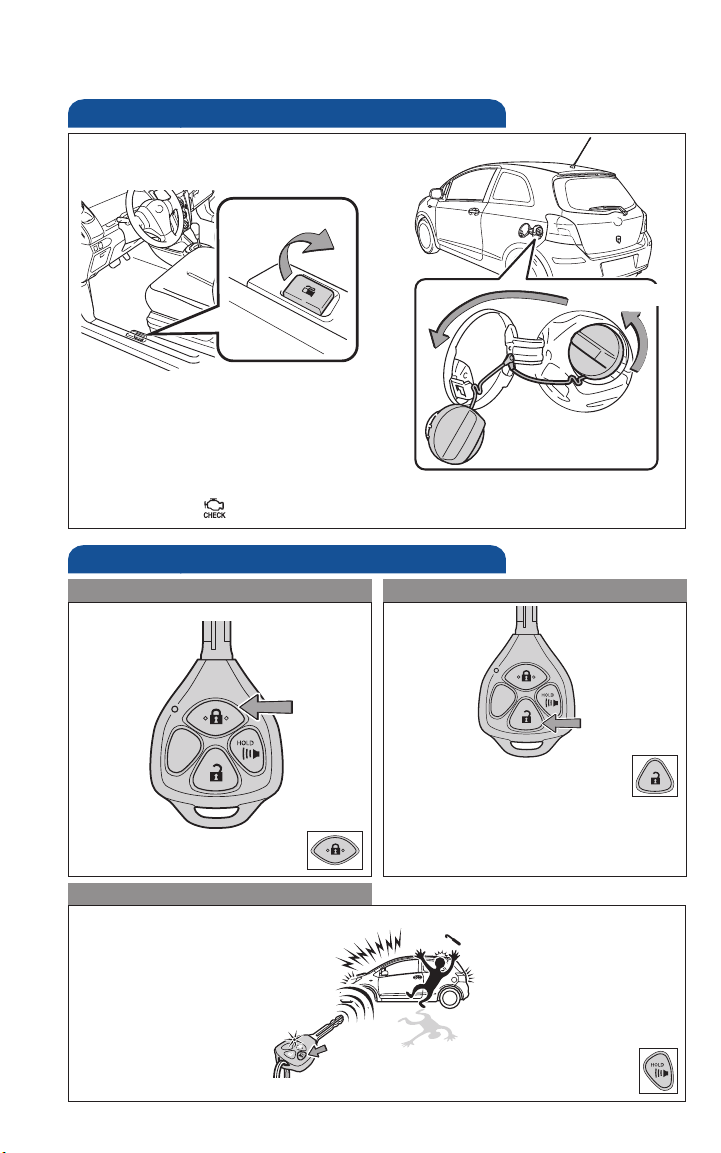
Fuel tank door release and cap
Pull up
Hang
NOTE: Tighten until one click is heard. If the cap is not tightened enough,
Check Engine “ ” indicator may illuminate.
Turn to open
Keyless entry (if equipped)
Locking operation
Push
Unlocking operation
Push ONCE: Driver door
TWICE: All doors
NOTE: If a door is not opened
within 30 seconds of unlocking, all
doors will relock for safety.
Panic button
Push and hold
6
Page 9
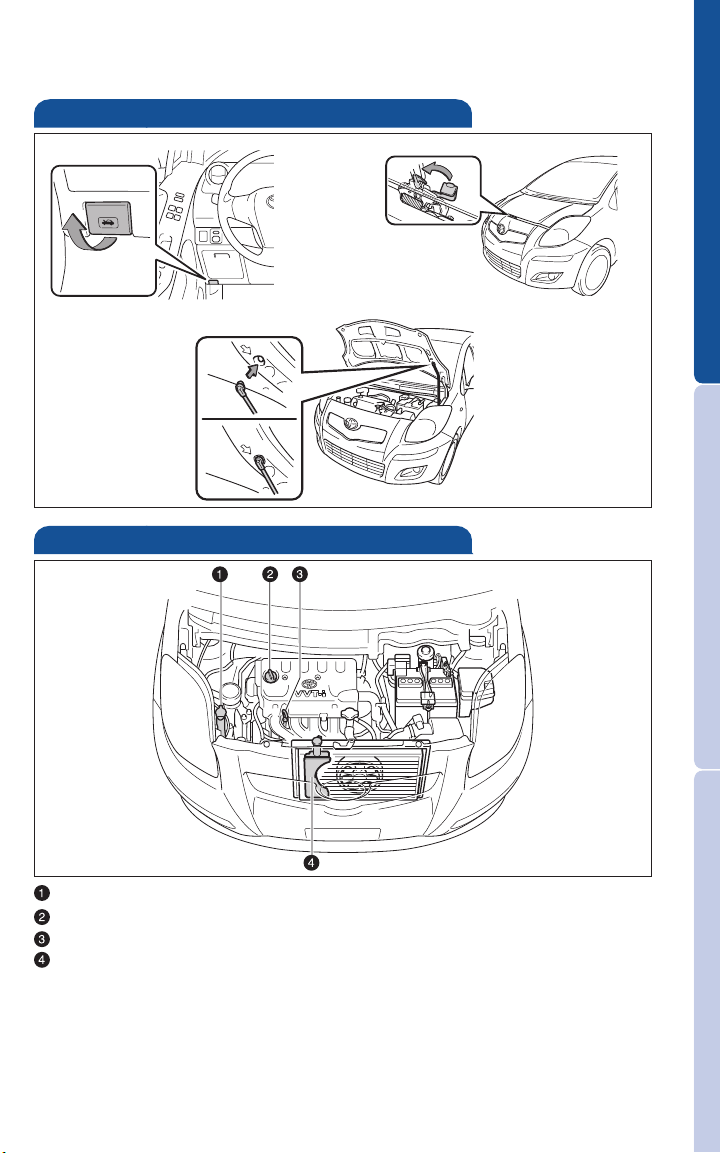
Hood release
Pull
Engage
support rod
Engine maintenance
OVERVIEW FEATURES/OPERATIONS
Pull up latch
and raise hood
Windshield washer and rear window washer fluid tank
Engine oil filler cap
Engine oil level dipstick
Engine coolant reservoir
NOTE: Regularly scheduled maintenance, including oil changes, will
help extend the life of your vehicle and maintain performance.
Please refer to the “Warranty Maintenance Guide.”
7
SAFETY AND EMERGENCY FEATURES
Page 10
FEATURES/OPERATIONS
P
RND
32L
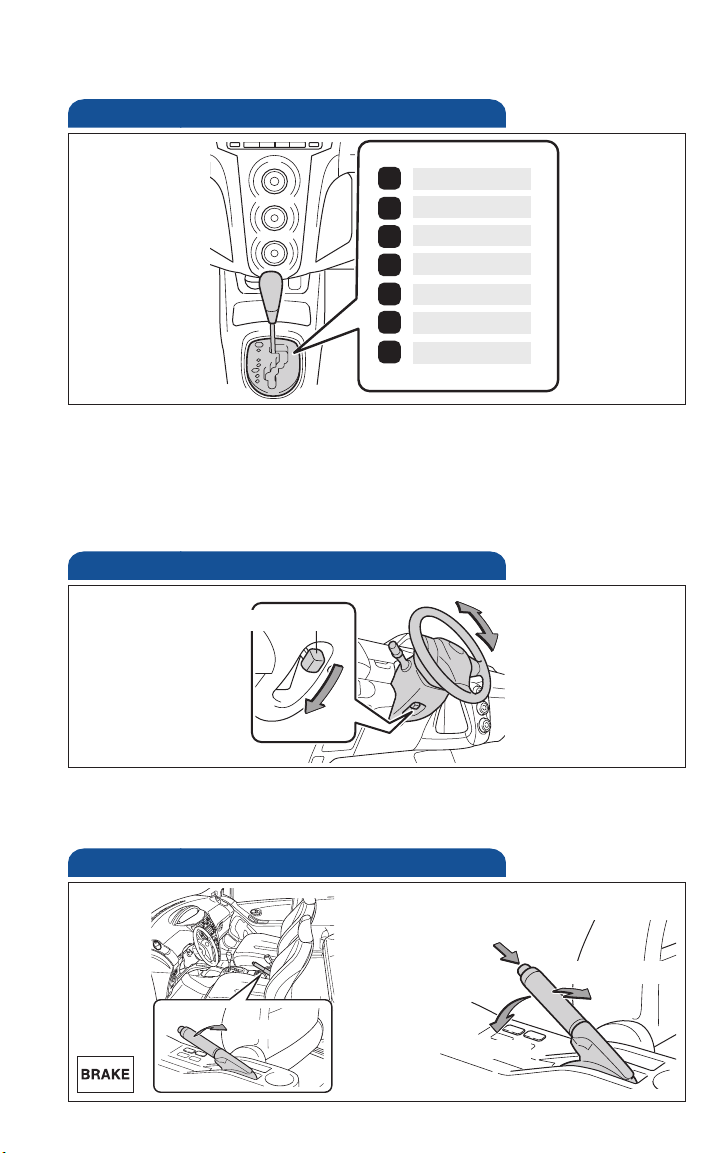
Automatic Transmission (if equipped)
Park*
Reverse
Neutral
Drive
Third gear
Second gear
First gear
* The ignition switch must be “ON” and the brake pedal depressed to shift
from Park.
Downshifting increases power going uphill, or provides engine braking
downhill. For best fuel economy during normal driving conditions, always
drive with the shift lever in the “D” position.
Tilt steering wheel
Lock release lever
Hold wheel, push lever down, set angle and return lever.
NOTE: Do not attempt to adjust while the vehicle is in motion.
Angle
Parking brake
Set
Pull
8
Release
(2) Push
(1) Pull slightly
(3) Lower
Page 11
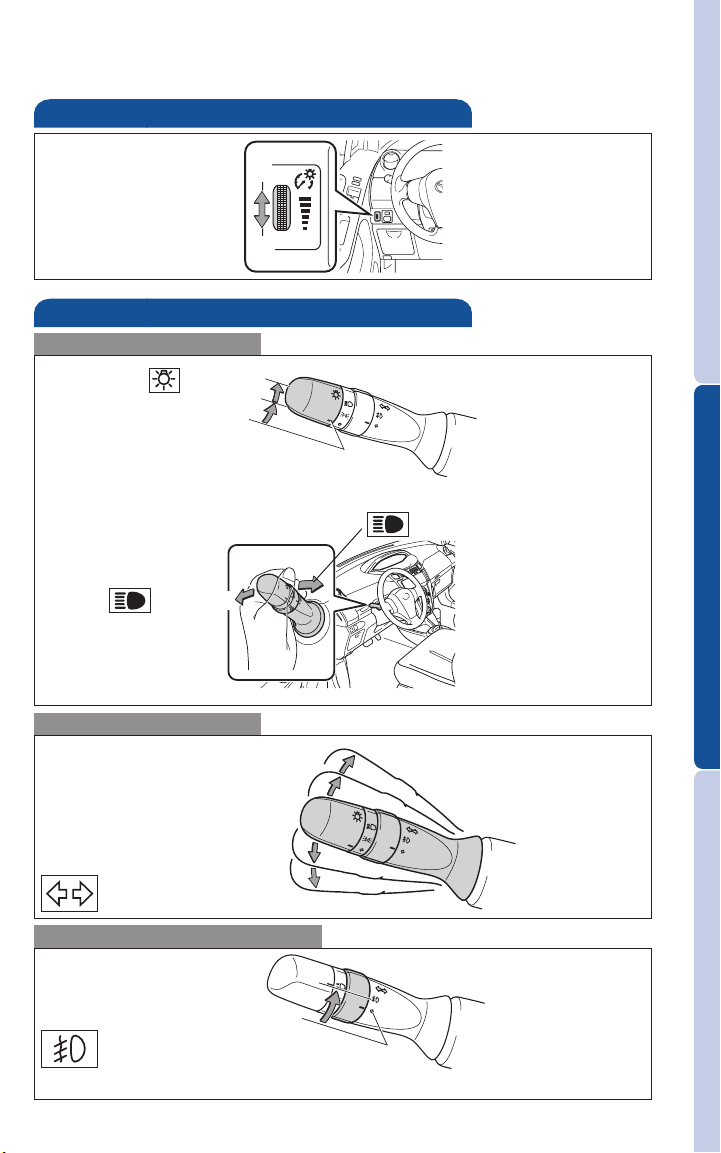
Light control-Instrument panel
Brightness
control
Lights & turn signals
Headlights
Headlights
Parking lights
Low beam
High beam
Turn signals
Lane change
+
-
Right turn
OVERVIEW FEATURES/OPERATIONS
High beam flasher
Lane change
Left turn
Front fog lights (if equipped)
Turn
Front fog lights turn on only when the headlights are on low beam.
9
SAFETY AND EMERGENCY FEATURES
Page 12
FEATURES/OPERATIONS
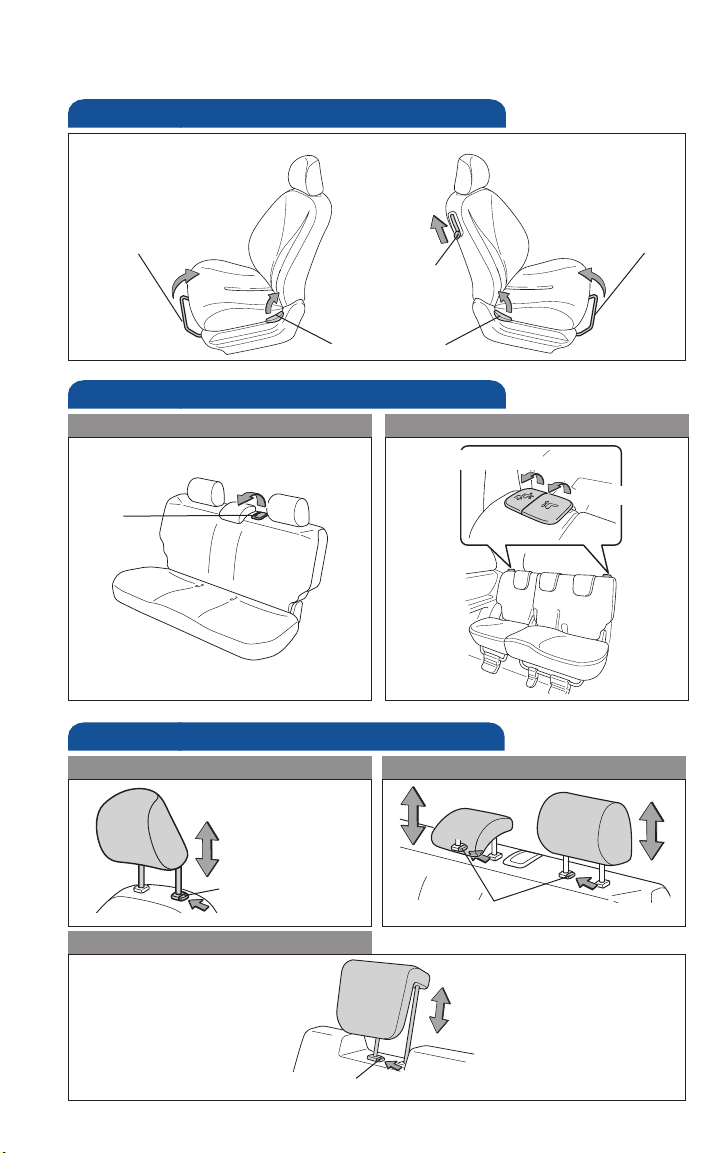
Seat adjustments-Front
Driver’s seat
Passenger’s seat
Seat position
(forward/backward)
Seat adjustments-Rear
Non-split seat
Angle
Seats-Head restraints
Front seats
Seat position
(forward/backward)
Seatback lock
release
(3-door models)
Seatback angle
Split seat
Seatback angle/Fold
Position
Rear seats (non-split seat)
Height
Lock release button
Rear seat (split seat)
Lock release button
Lock release button
10
Page 13
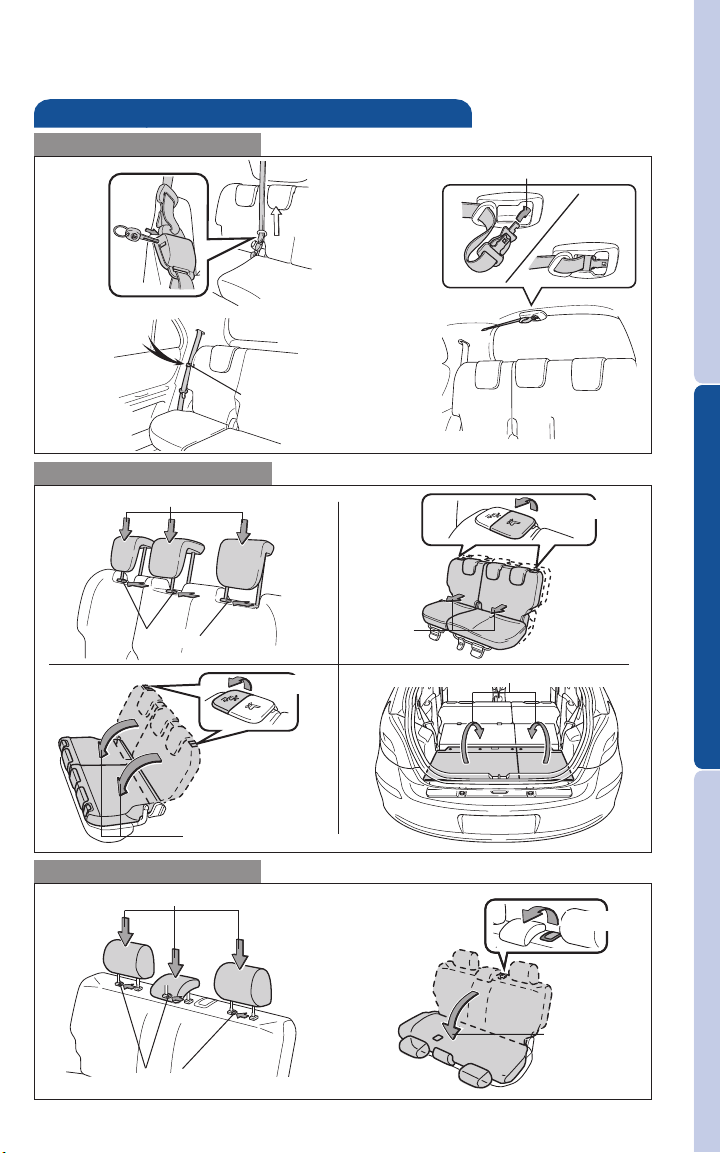
Seat-Folding rear seat
Before folding
(1) Push
(3) Hook
Fold (split seat)
(2) Lower
(2) Store
OVERVIEW FEATURES/OPERATIONS
(3) Pull up
(1) Push
(6) Fold down
Fold (non-split seat)
(2) Lower
(1) Push
(5) Pull up
(4) Slide
(7) Flip over deck board
SAFETY AND EMERGENCY FEATURES
(3) Pull up
(4) Fold down
11
Page 14
FEATURES/OPERATIONS
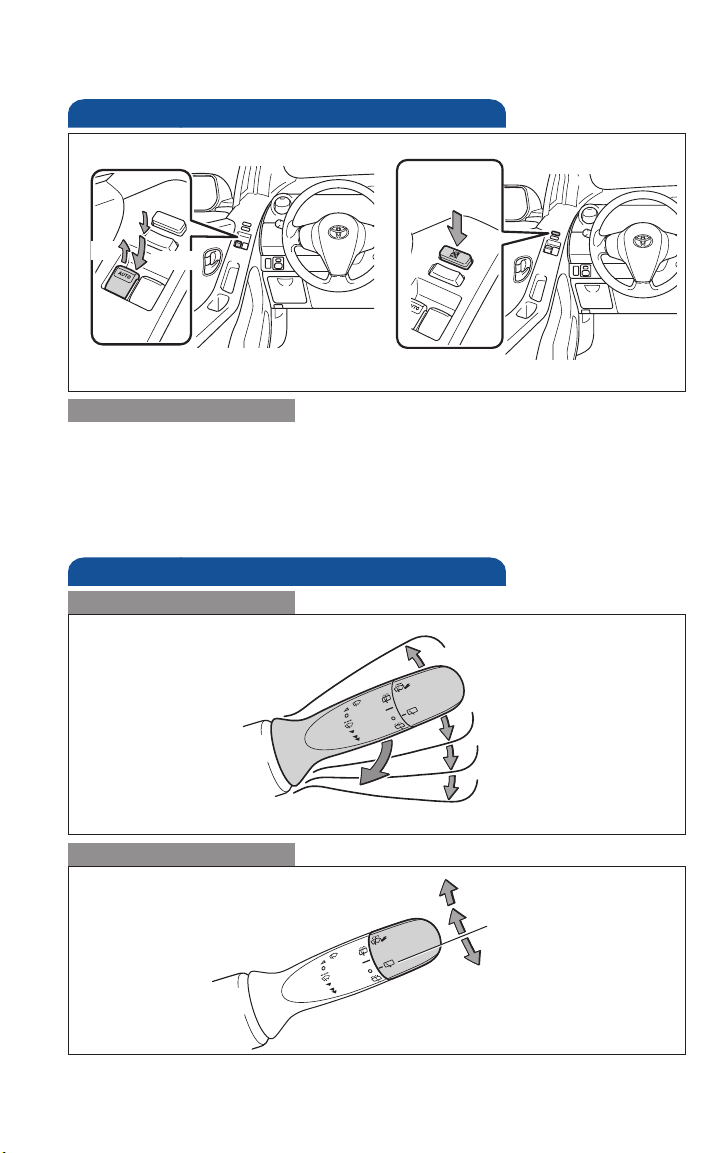
Windows-Power (if equipped)
Driver side
Window
lock switch
Up
Down
Window operation
Automatic operation (driver’s window only) Push the switch completely
down and release to fully open. To stop window midway, lightly pull the
switch up.
Window lock switch Deactivates all passenger windows. Driver’s window
remains operable.
Windshield wipers & washers
Front
Single wipe
Rear (if equipped)
Pull to wash and wipe
12
Interval wipe
Slow
Fast
Wash and wipe
Wipe
Wash
Page 15
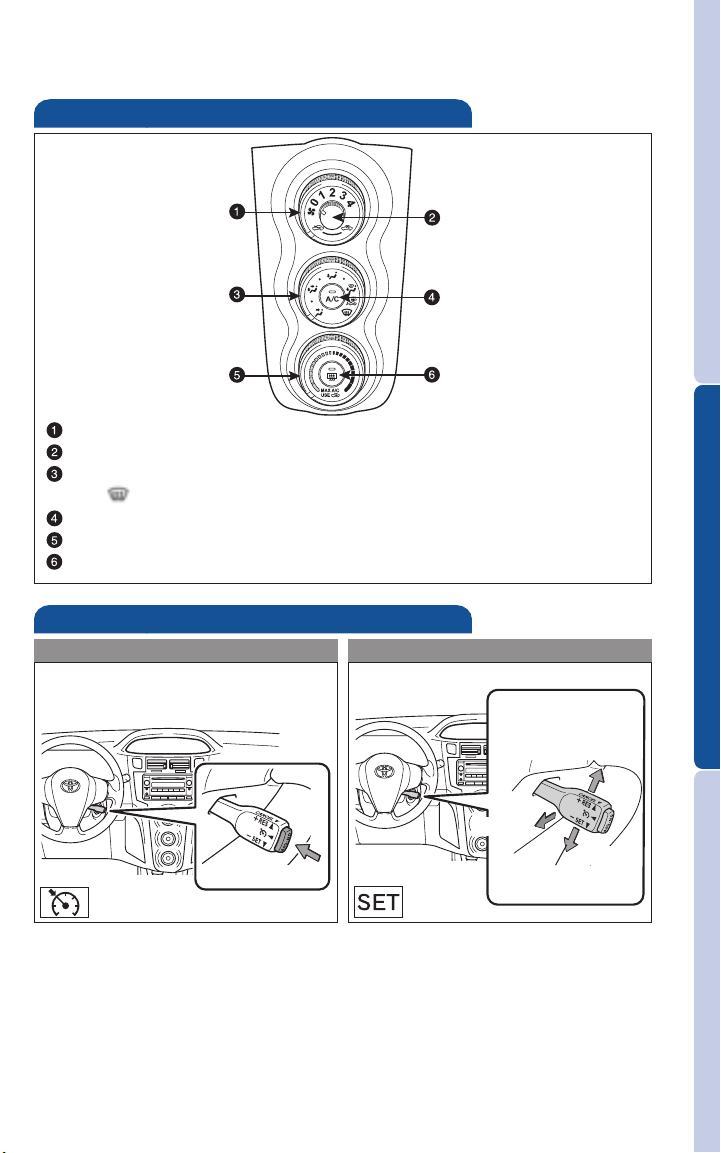
Air Conditioning/Heating
Recirculate cabin air (fresh air when OFF)
Fan speed
Airflow vent
In “ ” mode, use fresh air to reduce window fogging.
Air Conditioning ON/OFF
Temperature selector
Rear window defogger
Cruise control (if equipped)
Turning system ON/OFF Functions
OVERVIEW FEATURES/OPERATIONS
Resume2/
Increase speed
1
Cancel
System ON/OFF
1
The set speed may also be cancelled by depressing the brake pedal or
Set/Decrease speed
the clutch pedal (Manual Transmission).
2
Unless vehicle speed drops below 10 mph, the set speed may be resumed
once vehicle exceeds 25 mph.
Refer to the Owner’s Manual for more details.
13
SAFETY AND EMERGENCY FEATURES
Page 16
FEATURES/OPERATIONS
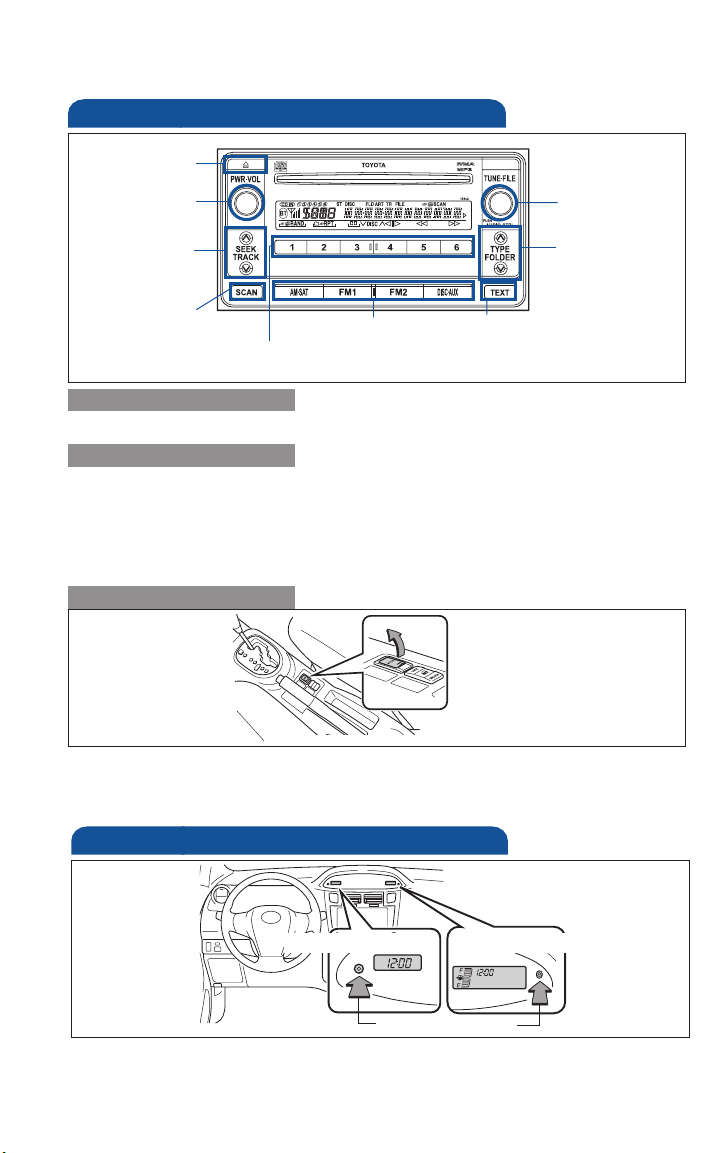
Audio (if equipped)
Eject CD
Push to turn
ON/OFF
Seek station/
CD track select
Station/CD
track scan
Mode
Preset buttons - functions in other
modes indicated above number.
View CD text
Push to adjust
tone & balance
Push to skip up
/down folder
CD player
To scan tracks on a disc Push “SCAN.” Push again to hold selection.
Radio
To preset stations Tune in the desired station and hold down a preset
button (1-6) until you hear a beep. Push desired preset button (1-6) to
select.
To scan stations Push “SCAN.” Push and hold to scan preset stations. Push
again to hold selection.
AUX port (if equipped)
By inserting a mini plug of a commercially available component into the
AUX port, you can listen to music from a portable audio device through
the vehicle’s speaker system while in AUX mode.
Clock
Without tachometer
Clock reset button
Press and hold clock reset button for adjustment mode. Press again to
adjust minutes and hours, waiting 5 seconds after each.
Refer to the Owner’s Manual for adjustment instructions.
14
With tachometer
Page 17
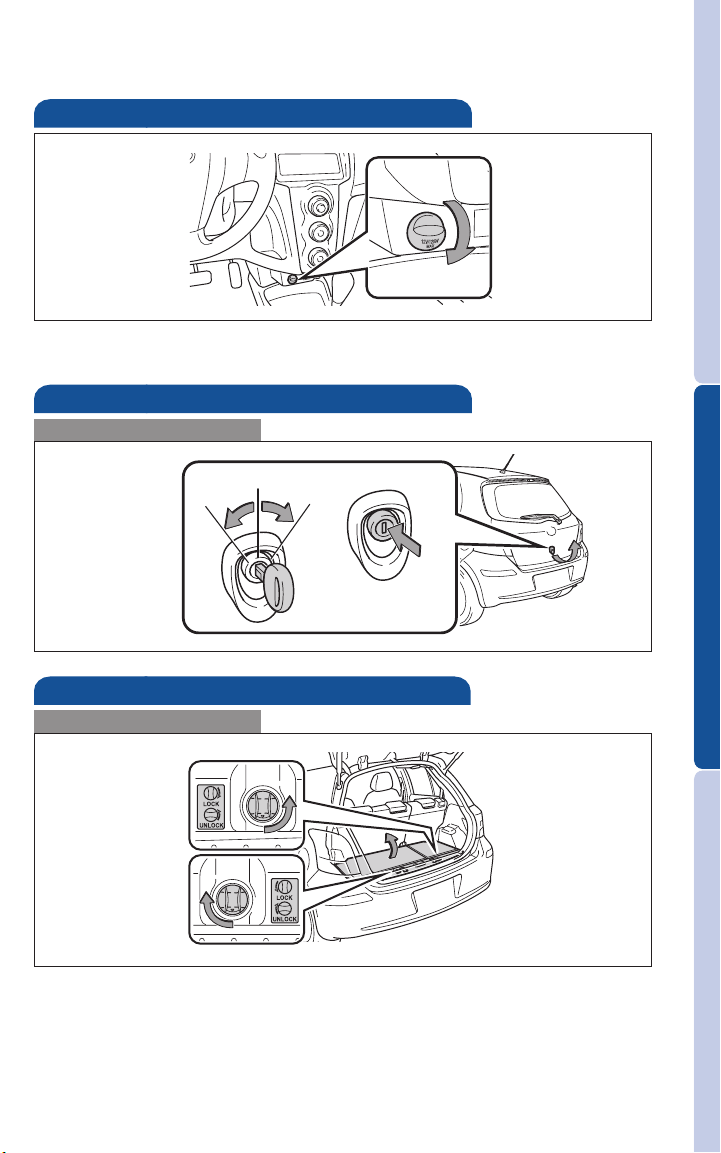
Power outlet
Designed for 12V car accessories. Key must be in the “ACC” or “ON”
position to be used.
Door-Back
Open/Close
Unlock Lock
Push to open
Luggage storage box
Open
OVERVIEW FEATURES/OPERATIONS
Right side:
Turn to unlock
Left side:
Turn to unlock
SAFETY AND EMERGENCY FEATURES
15
Page 18
SAFETY AND EMERGENCY FEATURES
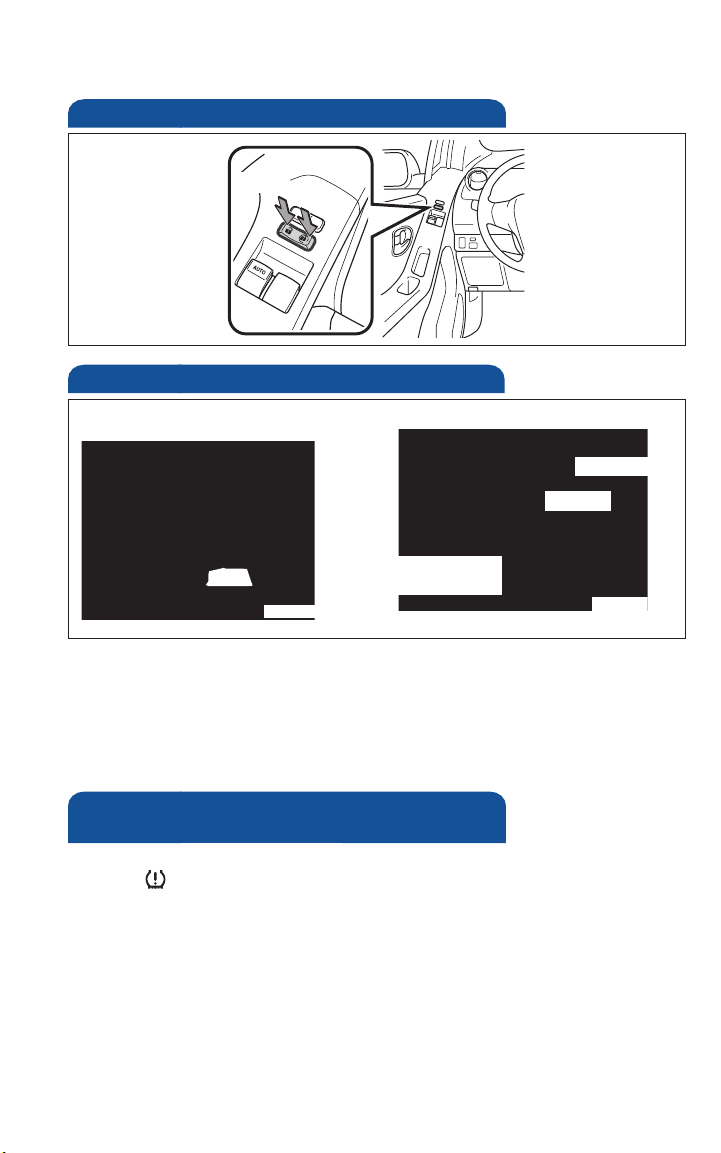
Door locks-Power (if equipped)
Unlock
Lock
Seat belts
Take up slack
Too high
Keep as low on
hips as possible
If belt is fully extended, then retracted even slightly, it cannot be
re-extended beyond that point, unless fully retracted again. This feature
is used to help hold child restraint systems securely.
To find more information about seat belts, and how to install a child
restraint system, refer to the Owner’s Manual.
Tire Pressure Monitoring (warning)
System
If tire pressure becomes critically low on any of the tires (excluding the
spare), “ ” indicator will illuminate. Correctly adjusting tire inflation
will turn off the light after a few minutes. If the light does not turn off,
have the system checked by your Toyota dealer.
Refer to the Owner’s Manual for more details.
16
 Loading...