

Page 1
Page 2
Home menu
Home menu
displayed.
displayed.
[I]
<
an
[I]
<
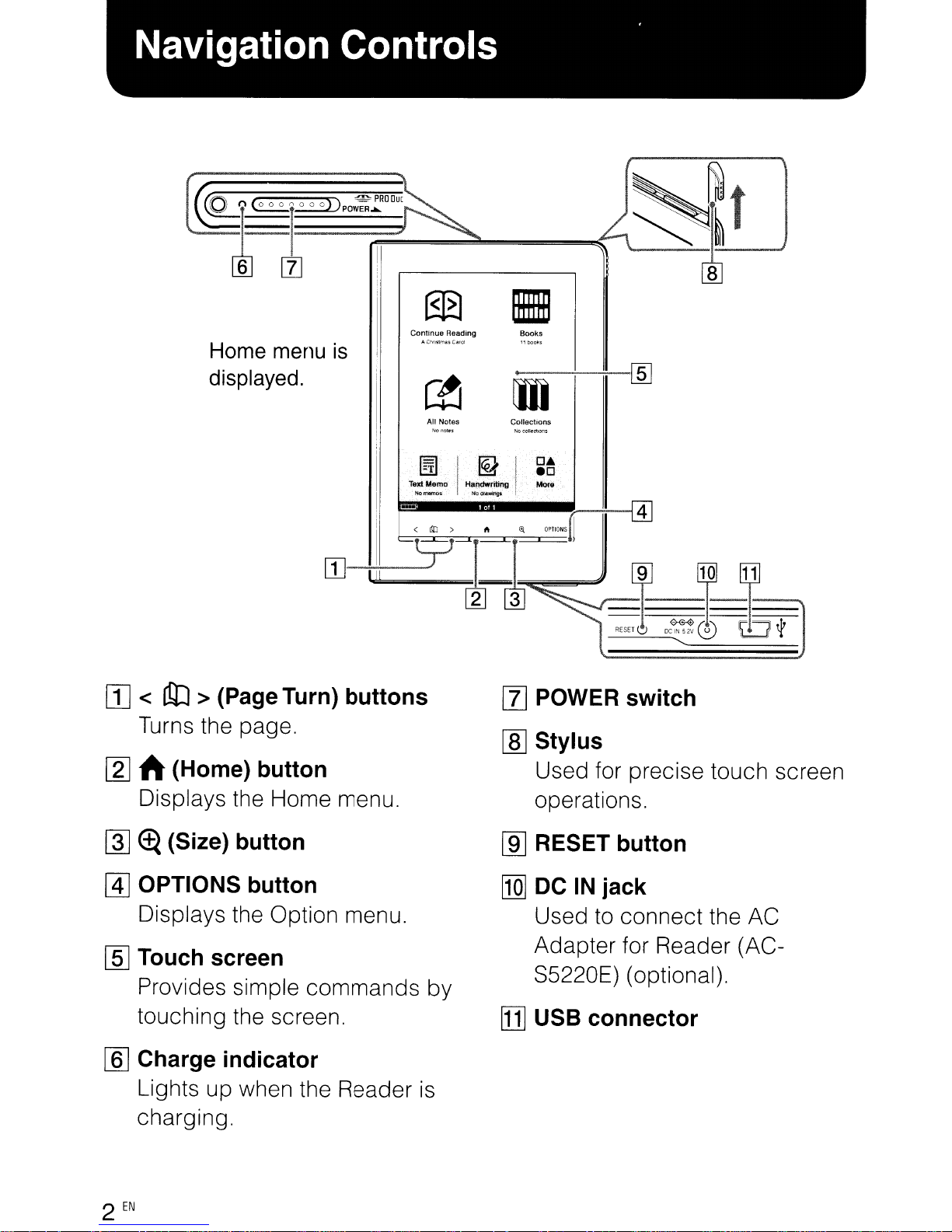
Turns the page.
Turns the page.
> (PageTurn) buttons
an
> (Page Turn) buttons
is
is
@B
@B
Continue
Reading
Continue
Reading
"C~nslmUC:"IOI
"C~nslmUC:"IOI
~
~
All Notes
All Notes
~I@JI~·~
~I@JI~·~
lext
Memo
lext
Memo
No rrlIImO'O
No rrlIImO'O
Handwriting
Handwriting
No
Of..mgs
No
Of..mgs
1m
1m
Books
Books
•
•
m
m
Collections
Collections
Mont
Mont
[Z]
POWER switch
[Z]
POWER switch
[ID
Stylus
[ID
Stylus
[ID
[ID
~
ft(Home) button
~
ft(Home) button
Displays the Home menu.
Displays the Home menu.
~
~
~
@]
@]
[§]
[§]
[[]
[[]
2
2
(Size) button
~
(Size) button
OPTIONS button
OPTIONS button
Displays the Option menu.
Displays the Option menu.
Touch screen
Touch screen
Provides simple commands by
Provides simple commands by
touching the screen.
touching the screen.
Charge indicator
Charge indicator
Lights up when the Reader
Lights up when the Reader
charging.
charging.
EN
EN
is
is
Used for precise touch screen
Used for precise touch screen
operations.
operations.
[ill
RESET button
[ill
RESET button
[Q]
DC
IN
[Q]
DC
Used
Used
Adapter for Reader (AC-
Adapter for Reader (AC-
S5220E) (optional).
S5220E) (optional).
[1]
USB connector
[1]
USB connector
jack
IN
jack
to
connect the AC
to
connect the AC
Page 3
It--::--
It--::--
"USB
"USB
connected"
connected"
screen
screen
To
To
J"
J"
AC
AC
outlet
outlet
USB
USB
Connect
Connect
USB
USB
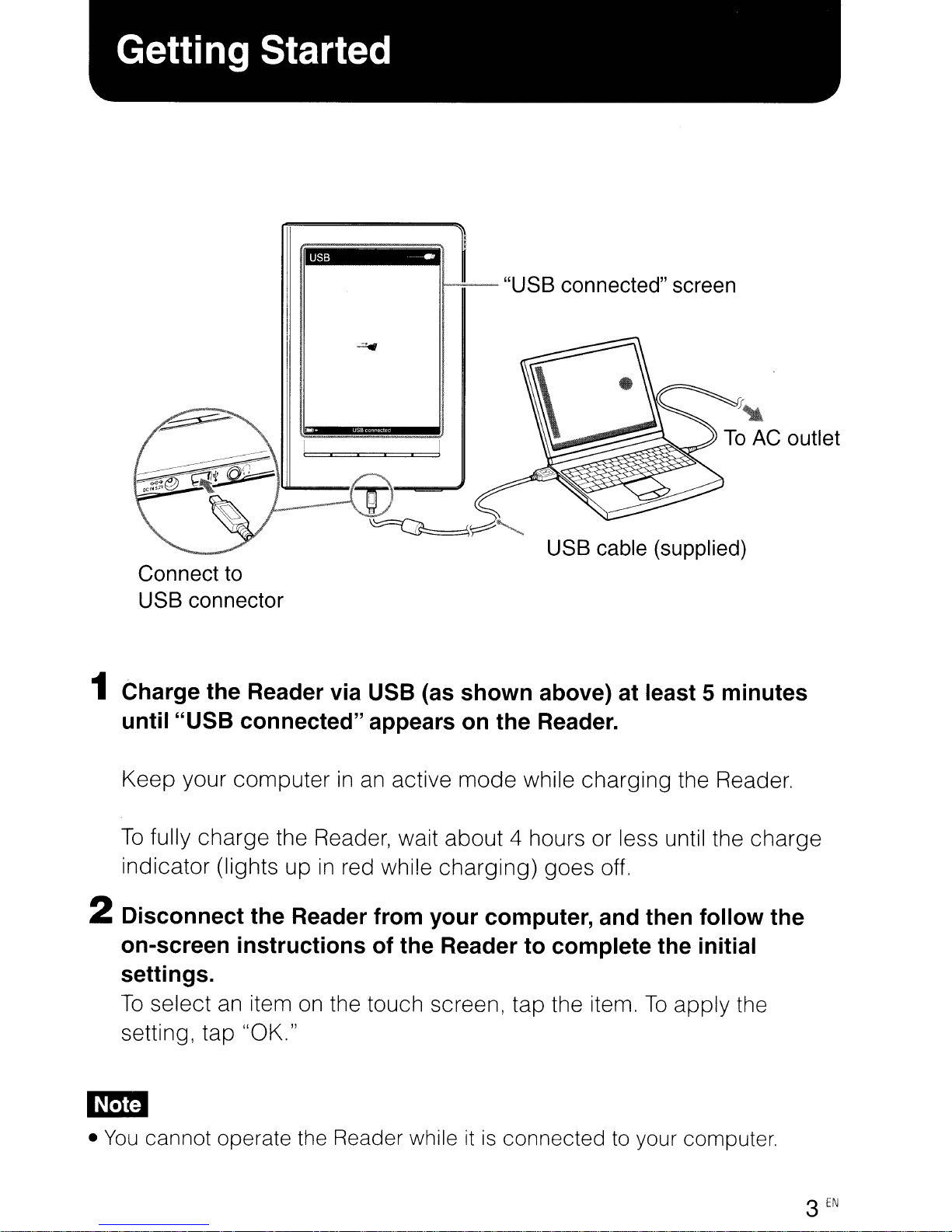
1 Charge the Reader via USB (as shown above) at least 5 minutes
1 Charge the Reader via USB (as shown above) at least 5 minutes
until "USB connected" appears on the Reader.
until "USB connected" appears on the Reader.
Keep your computer
Keep your computer
To
fully charge the Reader, wait about 4 hours or less until the charge
To
fully charge the Reader, wait about 4 hours or less until the charge
indicator (lights up
indicator (lights up
2 Disconnect the Reader from your computer, and then follow the
2 Disconnect the Reader from your computer, and then follow the
on-screen instructions of the Reader to complete the initial
on-screen instructions of the Reader to complete the initial
settings.
settings.
to
to
connector
connector
in
an
in
in
red while charging) goes off.
in
red while charging) goes off.
active mode while charging the Reader.
an
active mode while charging the Reader.
cable
cable
(supplied)
(supplied)
To
select
To
select
setting, tap "OK."
setting, tap "OK."
em
em
•
You
•
cannot operate the Reader whileitis
You
cannot operate the Reader whileitis
an
an
item
item
on
on
the touch screen, tap the item.
the touch screen, tap the item.
connected to your computer.
connected to your computer.
To
apply the
To
apply the
3
EN
3
EN
Page 4
1
1
~
~
Continue Reading Books
Continue Reading Books
}. Ctwrstmas
}. Ctwrstmas
~
~
All Notes Collections
All Notes Collections
No
notes No oolledlons
No
notes No oolledlons
~'
~'
Ell
,',
Ell
,',
Text
!;lerno
Text
!;lerno
No memos ',
No memos ',
Home menu "Books" list
Home menu "Books" list
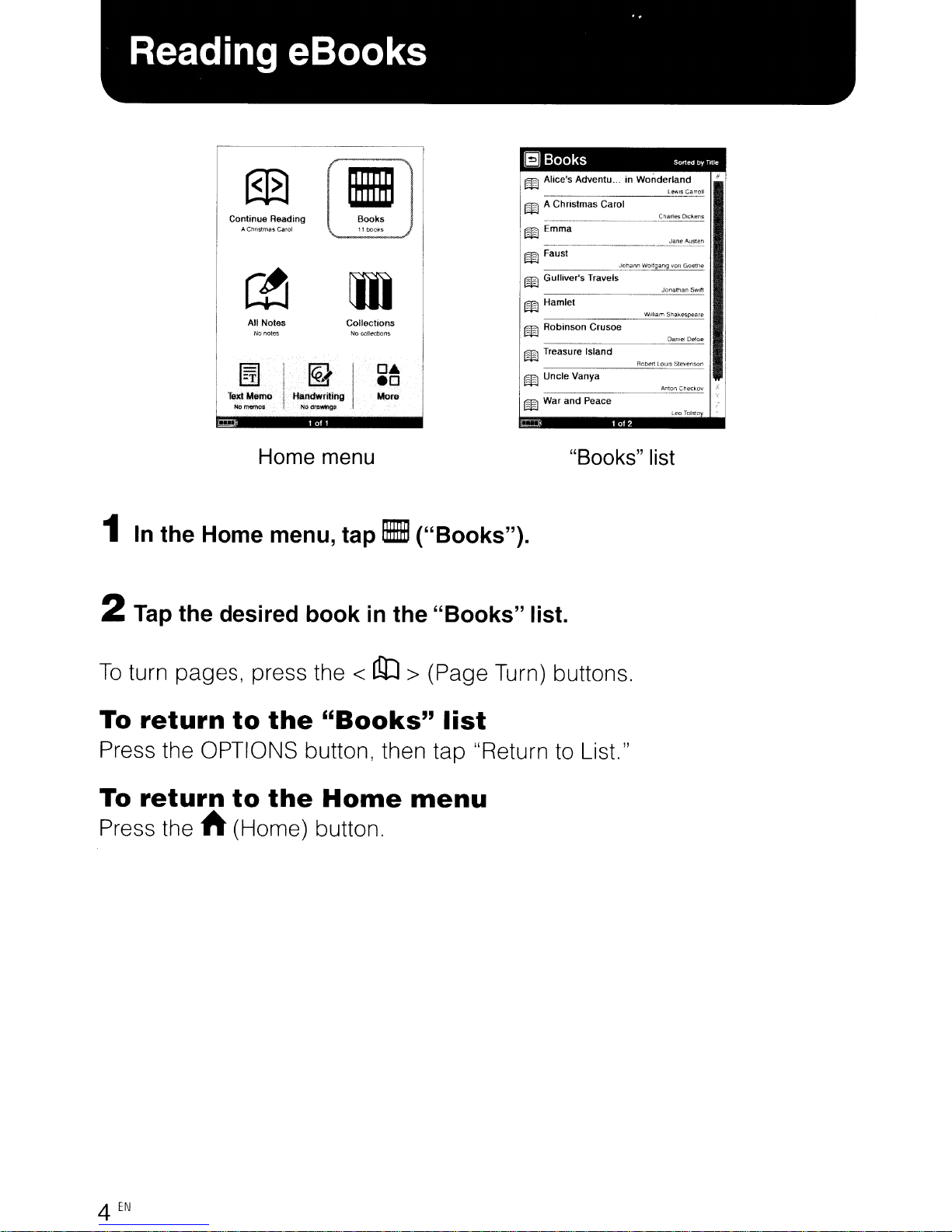
In
the Home menu,
In
the Home menu,
carol
carol
',I,
',I,
••••
!cl!lrldwritinll I More
••••
!cl!lrldwritinll I More
IZ'l
IZ'l
,rY
,rY
No
dl1!lllfllll'lgs:
No
dl1!lllfllll'lgs:
•
•
[j])
[j])
'I'
'I'
·
·
tap.
tap.
lEI
Books
lEI
Books
mAlice's
mAlice's
m A Christmas Carol
m A Christmas Carol
11
becks
11
becks
OA
OA
,.0
,.0
'
'
("Books").
("Books").
m Emma
m Emma
m Faust
m Faust
m Gulliver'sTravels
m Gulliver's Travels
m Hamlet
m Hamlet
m
m
m Treasure Island
m Treasure Island
mUncie
mUncie
m War
m War
Adventu... in Wonderland
Adventu... in Wonderland
___
___
_____
_____
Robinson
Crusoe
Robinson
Crusoe
___
___
____
____
and
and
----'R=O~_':Euls5Ievenson
----'R=O~_':Euls5Ievenson
Vanya
Vanya
Peace
Peace
Jchann
Jchann
Son
Son
l""lsCarrolI
l""lsCarrolI
-"-C·'="'rles=·""=lc.ens
-"-C·'="'rles=·""=lc.ens
~
Jan._AuSl.~
~
Jan._AuSl.~
W:lrgang
"oIl
Goethe
W:lrgang
"oIl
Goethe
Jonatn;:JnSWltl
Jonatn;:JnSWltl
Willia,TI
Snakespeare
Willia,TI
Snakespeare
D<llllcl[)efoe
D<llllcl[)efoe
----'M=lonCheckov
----'M=lonCheckov
Leo'roiSlO
Leo'roiSlO
..
Oy TOle
..
Oy TOle
2 Tap the desired
2 Tap the desired
To
turn pages, press the <
To
turn pages, press the <
To
return
To
return
Press the OPTIONS button, then tap "Return to List."
Press the OPTIONS button, then tap "Return to List."
To
return
To
return
Press the
Press the
to
to
to
to
ft
(Home) button.
ft
(Home) button.
the
the
the
the
book
book
in
in
liD
liD
"Books"
"Books"
Home
Home
the
"Books"
the
"Books"
> (Page Turn) buttons.
> (Page Turn) buttons.
list
list
menu
menu
list.
list.
4
EN
4
EN
Page 5

To
purchase or download eBooks, install eBook Library software
To
purchase or download eBooks, install eBook Library software
computer and register to the eBook store.
computer and register to the eBook store.
is
When the Reader
When the Reader
on the screen.
on the screen.
connected to your
is
connected to your
PC,
the AutoPlay window appears
PC,
the AutoPlay window appears
on
on
your
your
1 Click "Install eBook Library"
1 Click "Install eBook Library"
and then follow the on-screen instructions.
and then follow the on-screen instructions.
Q Installer for Reader
Q Installer for Reader
~
~
C
Alway..;,dothis for
C
Alway..;,dothis for
in'.tall or n.ln pfQgram
in'.tall or n.ln pfQgram
W~::~~:~
W~::~~:~
Generaloptlcn;;
Generaloptlcn;;
~
OpMfoIderto\.'le.wfies
~
OpMfoIderto\.'le.wfies
~"'··'c.c
~"'··'c.c
If
the AutoPlay featureisdisabled, start the installation launcher manually.
If
the AutoPlay featureisdisabled, start the installation launcher manually.
From the Start menu, click the following: "My Computer"("Computer"
From the Start menu, click the following: "My Computer"("Computer"
the case of Vista) - "Installer for Reader" - "Windows" - "Setup eBook
the case of Vista) - "Installer for Reader" - "Windows" - "Setup eBook
Library"
Library"
To
install
To
install
When the Readerisconnected to your Mac, "LAUNCHER" and
When the Readerisconnected to your Mac, "LAUNCHER" and
softwar~
softwar~
.•.".•,·.,·.
.•.".•,·.,·.
(f;)
(f;)
and
game\:
and
game\:
eBook
eBook
. AutoPlay window
. AutoPlay window
(in
case of Windows Vista)
(in
case of Windows Vista)
Library
Library
in
the "Installer for Reader" window,
in
the "Installer for Reader" window,
on
a
on
Macintosh
a
Macintosh
in
in
on
the desktop. Click the following, and then follow
on
"READER" appear
"READER" appear
the on-screen instructions: "LAUNCHER" - "Mac" - "Setup eBook
the on-screen instructions: "LAUNCHER" - "Mac" - "Setup eBook
Library"
Library"
2 Start eBook Library, and then click "eBook Store."
2 Start eBook Library, and then click "eBook Store."
"eBook
"eBook
Store"--(
Store"--(
-iii
-iii
I
I
the desktop. Click the following, and then follow
" Alice's
A(Jv~ntvre:-;
II'
WO!'ldel1cwc
II'
WO!'ldel1cwc
C,:lwl
C,:lwl
T
ra"el~
T
ra"el~
Cr~JSO~
Cr~JSO~
j~ldnd
j~ldnd
Pi::'ac~
Pi::'ac~
..
Purchased
..
Purchased
Status
Status
~
eBoeHm)
~
eBoeHm)
I1
..
oe,
I1
..
oe,
L-"
L-"
" Alice's
A(Jv~ntvre:-;
Iii
A,
Clln~!~!las
Iii
A,
Clln~!~!las
14M
EmnJd
14M
EmnJd
..
Faus,
..
Faus,
..
G\)ll;vt"'~
..
G\)ll;vt"'~
Iii Hct'llft=t
Iii Hct'llft=t
Ii.
ROOltlscn
Ii.
ROOltlscn
Ii.
Tre(;l~ur€
Ii.
Tre(;l~ur€
L
llnct'
....
·d·\yv
L
llnct'
....
·d·\yv
..
'l"(il
31'"
..
'l"(il
31'"
5
5
EN
EN
Page 6

3 Create your account by following the store instructions.
3 Create your account by following the store instructions.
Purchased eBooks will be
Purchased eBooks will be
Transferring
Transferring
"Library" ---{-l3!I
"Library" ---{-l3!I
"Purchased"
"Purchased"
"Reader"
"Reader"
1 Click "Purchased" under "Library" to locate purchased eBooks.
1 Click "Purchased" under "Library" to locate purchased eBooks.
2 Click an eBook to select, and then drag and drop it to "Reader."
2 Click an eBook to select, and then drag and drop it to "Reader."
eBooks
eBooks
;~,FIle
;~,FIle
-+I-;(~~~:a~r=~Sed~)J
-+I-;(~~~:a~r=~Sed~)J
(§)
(§)
--{-I
--{-I
I Iii
I Iii
downloaded
downloaded
Edit
View
Edit
View
L
L
'br.c, )
'br.c, )
Iii 000"
Iii 000"
}'~
Audio
}'~
Audio
.,j
PI(:~Ules
.,j
PI(:~Ules
-f,'
Notepaa
-f,'
Notepaa
_5,,,,,
_5,,,,,
Reade'
)
Reade'
)
Bnok.
Bnok.
to
the
to
the
Help
Help
Ii
Ahoo's Advenlures in WOflderland
Ii
Ahoo's Advenlures in WOflderland
Ii
A C!lrist!'nas Cafol
Ii
A C!lrist!'nas Cafol
-::'
Emma
-::'
Emma
..
GullIver's Tra
..
GullIver's Tra
• Hamiel
• Hamiel
II
Rotllnson Crusoe
II
Rotllnson Crusoe
Ii
Treasun- lsli::lnd
Ii
Treasun- lsli::lnd
it
Undt!
Vallya
it
Undt!
Vallya
Jii
'N,M i:lnd
Jii
'N,M i:lnd
to eBook Library.
to eBook Library.
Reader
Reader
....
els
....
els
Peac.:~
Peac.:~
The transferred eBook can be read on the Reader after disconnecting
The transferred eBook can be read on the Reader after disconnecting
from your computer.
from your computer.
Please refer to the eBook Library Help for further information.
Please refer to the eBook Library Help for further information.
it
it
6
EN
6
EN
Page 7

Support
Support
If
you encounter
If
you encounter
1 Refer to the User's Guide or the eBook Library Help.
1 Refer to the User's Guide or the eBook Library Help.
You
can obtain the User's Guide
You
can obtain the User's Guide
• Connect the Reader via USB, then access the zipped file (PRS600_
• Connect the Reader via USB, then access the zipped file (PRS600_
UG) stored on the Reader.
UG) stored on the Reader.
Windows; fr9m the Start menu, click the following: "My Computer"
Windows; fr9m the Start menu, click the following: "My Computer"
("Computer"
("Computer"
"PRS600_UG"
"PRS600_UG"
Drag and drop to your computer and unzip
Drag and drop to your computer and unzip
Macintosh; click the following: "READER" - "Documents" -
Macintosh; click the following: "READER" - "Documents" -
"PRS600_UG"
"PRS600_UG"
• Download the User's Guide from the support web site to your
• Download the User's Guide from the support web site to your
computer.
computer.
an
issue, resolve the issue
an
issue, resolve the issue
in
one of the following ways:
in
one of the following ways:
in
the case of Vista) - "READER" - "Documents" -
in
the case of Vista) - "READER" - "Documents" -
in
the following order.
in
the following order.
it.
it.
2 Visit the support site.
2 Visit the support site.
For customersinthe USA: http://www.sony.com/readersupport
For customersinthe USA: http://www.sony.com/readersupport
For customers
For customers
For customers
For customers
3 Contact (call) Sony Support. (USA/Canada only)
3 Contact (call) Sony Support. (USA/Canada only)
For customersinthe USA: 1-866-962-7669
For customersinthe USA: 1-866-962-7669
For customers
For customers
About
About
The serial number provided for this unitisrequired for customer registration. The
The serial number provided for this unitisrequired for customer registration. The
number
number
Owner's
Owner's
The model and serial numbers are located
The model and serial numbers are located
space provided below. Refer to these numbers
space provided below. Refer to these numbers
your Sony dealer regarding this product.
your Sony dealer regarding this product.
Model No. _
Model No. _
Serial No. _
Serial No. _
the
the
is
on
a labelonthe back of the unit. Do not remove the label.
is
on
a labelonthe back of the unit. Do not remove the label.
Record
Record
in
Canada: http://www.sony.ca/ElectronicsSupport/
in
Canada: http://www.sony.ca/ElectronicsSupport/
in
in
in
Canada: 1-877-899-7669
in
Canada: 1-877-899-7669
serial
serial
Europe: http://support.sony-europe.com/eBook/PRS
Europe: http://support.sony-europe.com/eBook/PRS
number
number
on
the back of the unit. Record theminthe
on
the back of the unit. Record theminthe
in
the spaces whenever you call upon
in
the spaces whenever you call upon
7
EN
7
EN
Page 8

Precautions
Precautions
Notice
Notice
following
following
applicable
applicable
sold
sold
EU
directives
EU
directives
The manufacturer of this productisSony
The manufacturer of this productisSony
Corporation, 1-7-1 Konan, Minato-ku, Tokyo,
Corporation, 1-7-1 Konan, Minato-ku, Tokyo,
Japan. The Authorized Representative for
Japan. The Authorized Representative for
EMC and product safety
EMC and product safety
Deutschland GmbH, Hedelfinger Strasse 61,
Deutschland GmbH, Hedelfinger Strasse 61,
70327 Stuttgart, Germany.
70327 Stuttgart, Germany.
For any service
For any service
refer to the addresses given
refer to the addresses given
service or guarantee documents.
service or guarantee documents.
for
for
information
information
in
countries
in
countries
or
or
customers:
customers:
to
equipment
to
equipment
applying
applying
is
Sony
is
Sony
guarantee matters please
guarantee matters please
in
in
the
the
is
only
is
only
separate
separate
trademarks, of Bitstream Inc.
trademarks, of Bitstream Inc.
• Microsoft, Windows, Windows Vista and
• Microsoft, Windows, Windows Vista and
Windows Media are trademarks or
Windows Media are trademarks or
registered trademarks of Microsoft
registered trademarks of Microsoft
Corporation
Corporation
other countries.
other countries.
• Macintosh and Mac
• Macintosh and Mac
Apple Inc., registered
Apple Inc., registered
countries.
countries.
• Adobe, the Adobe logo, Reader and PDF
• Adobe, the Adobe logo, Reader and PDF
are either registered trademarks or
are either registered trademarks or
trademarks of
trademarks of
Incorporated
Incorporated
other countries.
other countries.
• MPEG Layer-3 audio
• MPEG Layer-3 audio
and patents licensed from Fraunhofer liS
and patents licensed from Fraunhofer liS
and Thomson.
and Thomson.
in
the United States and / or
in
the United States and / or
OS
are trademarks of
OS
are trademarks of
in
the U.S. and other
in
the U.S. and other
Adobe
Adobe
in
the United States and/or
in
the United States and/or
Systems
Systems
coding
coding
technology
technology
Note
Note
Please use the Reader and the supplied
Please use the Reader and the supplied
stylus with only the originally intended
stylus with only the originally intended
purpose and care.
purpose and care.
On
On
The contents of each book pre-installed on
The contents of each book pre-installed on
this product are copyrighted works, edited
this product are copyrighted works, edited
with the cooperation of the publisher and
with the cooperation of the publisher and
editor hereto mentioned.
editor hereto mentioned.
Copyright laws prohibit copying the data of
Copyright laws prohibit copying the data of
this product or the contents of this manual
this product or the contents of this manual
(illustrations, related documents, etc.)
(illustrations, related documents, etc.)
whole orinpart without the permission of the
whole orinpart without the permission of the
copyright holder. Additionally, use of the
copyright holder. Additionally, use of the
data of this product or the contents of this
data of this product or the contents of this
manual
manual
permission except for personal use.
permission except for personal use.
• SONY and the SONY logo are registered
• SONY and the SONY logo are registered
trademarks of Sony Corporation.
trademarks of Sony Corporation.
• BBeB, BBeB Book, and their logos are
• BBeB, BBeB Book, and their logos are
trademarks of Sony Corporation.
trademarks of Sony Corporation.
• "Memory Stick", "Memory Stick Duo",
• "Memory Stick", "Memory Stick Duo",
"Memory Stick PRO", and their logos are
"Memory Stick PRO", and their logos are
trademarks of Sony Corporation.
trademarks of Sony Corporation.
• Bitstream
• Bitstream
Dutch, Font Fusion, and Swiss are
Dutch, Font Fusion, and Swiss are
on
use
on
use
Copyrights
Copyrights
is
not allowed without Sony's
is
not allowed without Sony's
is
a registered trademark, and
is
a registered trademark, and
in
in
All other system names and product names
All other system names and product names
in
this document are generally the
in
appearing
appearing
registered trademarks or trademarks of their
registered trademarks or trademarks of their
respective manufacturers. Further, the
respective manufacturers. Further, the
trademark
trademark
symbols are not indicated throughout this
symbols are not indicated throughout this
document.
document.
Notice
Notice
Before use, please read through the End
Before use, please read through the End
User License Agreement (EULA) that
User License Agreement (EULA) that
stored
stored
To
To
your computer via USB, then follow the
your computer via USB, then follow the
instructions below.
instructions below.
Windows; from the Start menu, click the
Windows; from the Start menu, click the
following: "My Computer"("Computer"inthe
following: "My Computer"("Computer"inthe
case of Vista) - "READER" - "Documents"-
case of Vista) - "READER" - "Documents"-
"L1CENSE"
"L1CENSE"
Macintosh; click the following: "READER"
Macintosh; click the following: "READER"
the desktop - "Documents" - "LICENSE"
the desktop - "Documents" - "LICENSE"
Program ©2009 Sony Corporation
Program ©2009 Sony Corporation
Documentation ©2009 Sony Corporation
Documentation ©2009 Sony Corporation
on
on
access the EULA, connect the Reader to
access the EULA, connect the Reader to
this document are generally the
™ and registered trademark ®
™ and registered trademark ®
for
for
the Reader.
the Reader.
users
users
is
is
on
on
8
EN
8
EN
Page 9

Page 10

1mB
Note
on
browsing
PDF
documents
using
the
Reader
Your Reader provides the ability to display most text
based PDF documents
in
five font sizes: Small (S),
Medium (M), Large (L), Extra Large (XL) and Double
Extra Large (XXL). By default, documents are
displayed in their original layout when viewed
in
the
Small (S) size.
By tapping a size icon
in
the size menu panel (that can
be displayed by pressing the
~
(Size) button), the text
size of the viewed document can be increased and
reflowed to improve readability.
Due to the complex nature of PDF documents,
in
certain situations when viewinginthese increased
sizes, only text will appear as some tables and graphics
may be reformatted and altered during the reflow
process.
Also,
in
cases where PDF documents are created
using image files, there
isinfact, no text to reflow or
magnify.
SONY:
©2009
Sony
Corporation PrintedinChina
PRS-600
111111111111111111111111111111111111111111111111111111I
* 4 1 5 3 6 2 3 1 1 * (1)
4-153-623-11 (1)
In
these cases, if retaining the original layout of your
PDF document
is
required, it is recommended to view
in
Small (S) size.
While viewing
in
Small (S) size, one option to improve
readability is to switch the screen orientation from
vertical to horizontal.
To
switch the screen orientation,
press the OPTIONS button, then tap
...
to display the
second page of the Option menu, and tap "Orientation."
Another option
is
to view the page while zoomed in.
To
zoomina page, tap
"~
Zoom In"inthe size menu
panel.
Note
on
viewing
PDF
files
in
M,
L,
XL
or
XXL
size
When you view PDF filesinM,L,XL, or XXL size,
some functions such as highlighting, searching, or a
temporary word selection, may not work correctly.
1mB
Note
on
browsing
PDF
documents
using
the
Reader
Your Reader provides the ability to display most text
based PDF documents
in
five font sizes: Small (S),
Medium (M), Large (L), Extra Large (XL) and Double
Extra Large (XXL). By default, documents are
displayed in their original layout when viewed
in
the
Small (S) size.
By tapping a size icon
in
the size menu panel (that can
be displayed by pressing the
~
(Size) button), the text
size of the viewed document can be increased and
reflowed to improve readability.
Due to the complex nature of PDF documents,
in
certain situations when viewinginthese increased
sizes, only text will appear as some tables and graphics
may be reformatted and altered during the reflow
process.
Also,
in
cases where PDF documents are created
using image files, there
isinfact, no text to reflow or
magnify.
SONY:
©2009 Sony Corporation Printed in China
PRS-600
1111111111111111111111111111111111111111111111111111111
* 4 1 5 3 6 2 3 1 1 * (1)
4-153-623-11
(l)
In
these cases, if retaining the original layout of your
PDF document is required, it is recommended to view
in
Small (S) size.
While viewing
in
Small (S) size, one option to improve
readability is to switch the screen orientation from
vertical to horizontal.
To
switch the screen orientation,
press the OPTIONS button, then tap
...
to display the
second page of the Option menu, and tap "Orientation."
Another option
is
to view the page while zoomed in.
To
zoomina page, tap
"~
Zoom In"inthe size menu
panel.
Note
on
viewing
PDF
files
in
M,
L,
XL
or
XXL
size
When you view PDF filesinM,L,XL, or XXL size,
some functions such as highlighting, searching, or a
temporary word selection, may not work correctly.
Page 11

Read this
important
information before
using your audio product.
Used
wisely, your new sound equipmentwill provide alifetime
of
fun and enjoyment.
Since
hearing damage from loud noiseisoften
undetectable until
itistoo late, this manufacturerand
CEA
recommend you avoid prolonged exposuretoexcessive noise.
The following list
of
sound levelsisincluded for your protection.
DECIBEL
LEVEL
EXAMPLES:
30
Quiet library, soft whispers
40 Living room, refrigerator, bedroom away from traffic
50
Light traffic, normal conversation, quietoffice
60 Airconditionerat
20
feet, sewing machine
70
Vacuum cleaner, hair dryer, noisy restaurant
80
Average city traffic, garbage disposals, alarm clock at
two
feet
THE
FOLLOWING
NOISES
CANBEDANGEROUS
UNDER
CONSTANT
EXPOSURE:
1111111111111111111111111111111111111111111111111111111
* 3 2 7 3 1 4 5 2 1 * (1)
3-273-145-21
(1)
/
We Want
You
LlSTENIN~
1"
TM
For
ALIFETIME
www.CE.org
A safety
tip
from the
Consumer Electronics
Association@
2500 Wilson Boulevard
Arlington,
VA
22201
90 Subway, motorcycle, truck traffic, lawn mower
100 Garbage truck, chain
saw,
pneumatic drill
120
Rock
band concert in
frontofspeakers, thunderclap
140 Gunshot blast,
jet
plane
180 Rocket launching pad
C£§:\.
Information courtesyofthe Deafness
Research
Foundation.
For information on protection against noise-induced hearing
loss,
call
DRF
at 1
(202)
289-5850 orgoto
www.drf.org.
Printed in China
Read this
important
information before
using your audio product.
Used
wisely, your new sound equipmentwill provide alifetime
of
fun and enjoyment.
Since
hearing damage from loud noiseisoften
undetectable until
itistoo late, this manufacturerand
CEA
recommend you avoid prolonged exposuretoexcessive noise.
The following list
of
sound levelsisincluded for your protection.
DECIBEL
LEVEL
EXAMPLES:
30
Quiet library, soft whispers
40 Living room, refrigerator, bedroom away from traffic
50
Light traffic, normal conversation, quietoffice
60 Airconditionerat
20
feet, sewing machine
70
Vacuum cleaner, hair dryer, noisy restaurant
80
Average city traffic, garbage disposals, alarm clock at
two
feet
THE
FOLLOWING
NOISES
CANBEDANGEROUS
UNDER
CONSTANT
EXPOSURE:
1111111111111111111111111111111111111111111111111111111
* 3 2 7 3 1 4 5 2 1 * (1)
3-273-145-21
(1)
/
_W_8_W_8_n_t
_Yo_u_L_I_S_T_E_N_IN-.~_.-J."
_TM
For
ALIFETIME r l
A safety
tip
from the
Consumer Electronics
Association@
2500 Wilson Boulevard
Arlington,
VA
22201
90 Subway, motorcycle, truck traffic, lawn mower
100 Garbage truck, chain
saw,
pneumatic drill
120
Rock
band concert in
frontofspeakers, thunderclap
140 Gunshot blast,
jet
plane
180 Rocket launching pad
www.CE.org
Information courtesyofthe Deafness
Research
Foundation.
For information on protection against noise-induced hearing
loss,
call
DRF
at 1
(202)
289-5850 orgoto
www.drf.org.
Printed in China
Page 12

DEAR
CUSTOMER:
TO
ESTABLISHASAFE
LEVEL:
•
Set
your volume controlata
low
setting.
BE
SURETOOBSERVE
THE
FOLLOWING
GUIDELINES.
Once you haveestablished a comfortable
sound level:
USE
YOUR
HEAD
WHEN
YOU
USE
YOUR
HEADSET
• Do
not
turn up the volumesohigh
that
you can't hear what's around you.
•
You
should
use
cautionortemporarily
discontinue
useinpotentially
hazardous situations.
• Do
not
use headphones while
operating a motorized vehicle;
it
may create a traffic hazard and
is
illegal in many
areas.
Set
the
dial and leaveitthere.
Taking a
minutetodo this
now
will help
preserve hearing.
• Slowly increase the sound until you can hearitcomfortably and
clearly,
without
distortion.
We
Want
You
LISTENING
•
~
™
pza
..~:;
For
A LIFETIME
Remember ....
Selecting fine audio equipmentsuchasthe
unit
you've justpurchased
is
only
the
startofyour musical enjoyment. Nowit's
timetoconsider
how
you can maximize the fun and excitement
your
equipment
offers. This
manufacturer and the Consumer Electronics
Association@
(CEA)
want
youtoget
the most
out
of
your
equipment
by playing
it
at a
safe
level; a level
that
lets
the
sound come
through
clearly
without
annoying
blaring or distortion - and,
most
importantly,without
affecting
your
sensitive
hearing.
Sound can be deceiving.
Over
time
your hearing
"comfort
level" adapts
to
highervolumesofsound.
So
what
sounds "normal" can
actually be loud and harmful
to
your hearing. Guard
against thisbysetting your
equipment
at a
safe
level
BEFORE
your
hearing adapts.
DEAR CUSTOMER:
TO
ESTABLISHASAFE
LEVEL:
•
Set
your volume controlata
low
setting.
BE
SURETOOBSERVE
THE
FOLLOWING
GUIDELINES.
Once you have established a comfortable
sound level:
USE
YOUR
HEAD
WHEN
YOU
USE
YOUR
HEADSET
• Do
not
use
headphones while
operating a motorized vehicle;
it
may create a traffic hazard and
is
illegal in many
areas.
•
You
should
use
caution or temporarily
discontinue
useinpotentially
hazardous situations.
• Do
not
turn up the volumesohigh
that
you can't hearwhat's around you.
Set
the
dial and leaveitthere.
Taking a
minutetodo this
now
will help
preserve hearing.
• Slowly increase the sound untilyou can hearitcomfortably and
clearly,
without
distortion.
We Want
You
LISTENINGpza",J.:;
_TM
ForALIFETIME
l
Remember ....
Selecting fine audio equipmentsuchasthe
unit
you've justpurchased
is
only
the
startofyour musical enjoyment. Nowit's
timetoconsider
how
you can maximize the fun and excitement
your
equipment
offers. This
manufacturer and the Consumer Electronics
Association@
(CEA)
want
youtoget
the most
out
of
your
equipment
by playing
it
at asafe level; a level
that
lets
the
sound come
through
clearly
without
annoying
blaring or distortion - and,
most
importantly,without
affecting
your
sensitive
hearing.
Sound can be deceiving.
Over
time
your hearing
"comfort
level" adapts
to
highervolumesofsound.
So
what
sounds "normal" can
actually be loud and harmful
to
your
hearing. Guard
against thisbysetting your
equipment
at a
safe
level
BEFORE
your
hearing adapts.
Page 13

SON"YZID
SON"YZID
IDigital Book Readerl
IDigital Book Readerl
,
,
GARANTIE
GARANTIE
Sony Electronics Inc. (ventes aux Etats-Unis) ou SonyDUCanada Ltee (ventes au Canada) (Sony) garantitIepresent
Sony Electronics Inc. (ventes aux Etats-Unis) ou SonyDUCanada Ltee (ventes au Canada) (Sony) garantitIepresent
produit contre des vices de materiau ou de fabrication selon
produit contre des vices de materiau ou de fabrication selon
dessous.
dessous.
utilisant des pieces neuves ou remises a neufou (ii) au remplacementdu produit avec unproduit neufou remis a neuf.
utilisant des pieces neuves ou remises a neufou (ii) au remplacementdu produit avec unproduit neufou remis a neuf.
Auxfins de
Auxfins de
originales.
originales.
Main-d'omvre:
Main-d'omvre:
main-d'ceuvre), Sony procedera, a
main-d'ceuvre), Sony procedera, a
neufou avec des pieces neuves ou remises a neuf, lorsque
neufou avec des pieces neuves ou remises a neuf, lorsque
Ie
Ie
est encore
est encore
Pieces: Pendant une periode de
Pieces: Pendant une periode de
des pieces de remplacement neuves ou remises a neuf
des pieces de remplacement neuves ou remises a neuf
La
La
subsequent pendant
subsequent pendant
de garantie au-dela de
de garantie au-dela de
La
La
couvre pas I'assistancetechnique
couvre pas I'assistancetechnique
ceux-ci soient ou non contenus dans
ceux-ci soient ou non contenus dans
expresse dans une garantie Iimitee visant
expresse dans une garantie Iimitee visant
veuillez consulter
veuillez consulter
Instructions:
Instructions:
Pour obtenir
Pour obtenir
Sony prevu, fret paye d'avance, dans son emballage original ou dans un emballage offrant un degre de protection
Sony prevu, fret paye d'avance, dans son emballage original ou dans un emballage oftrant un degre de protection
identique.
identique.
Pour obtenir
Pour obtenir
de centres de reparation autorises est publiee
de centres de reparation autorises est publiee
II
vous revient faire des copiesdesauvegarde des donnees, logiciels, contenus ou autres renseignements stockes ou
II
vous revient faire des copiesdesauvegarde des donnees, logiciels, contenus ou autres renseignements stockes ou
conserves dans
conserves dans
reformates pendant la reparation
reformates pendant la reparation
resulter. Un
resulter. Un
garantie de votre produit, I'assistance technique quant
garantie de votre produit, I'assistance technique quant
questions frequemment posees et des mises a niveau gratuitesvia l'lnternet:
questions frequemment posees et des mises a niveau gratuitesvia l'lnternet:
Reparation
Reparation
produitde remplacement pendant
produitde remplacement pendant
dix
dix
deviendra
deviendra
La
La
se
se
incluant mais sans s'y limiter, des problemes de
incluant mais sans s'y limiter, des problemes de
accidentel, a I'abus, aux limites technologiques, ou alamodification d'une pieceduproduit
accidentel, a I'abus, aux limites technologiques, ou alamodification d'une pieceduproduit
limitee
limitee
TELS
TELS
':usine a ete altereou enleve
':usine a ete altereou enleve
Etats-Unis d'Amerique ou
Etats-Unis d'Amerique ou
LIMITATION
LIMITATION
CONSECUTIFSENCAS D'INEXECUTION D'UNE CONDITION
CONSECUTIFSENCAS D'INEXECUTION D'UNE CONDITION
PRODUIT.DEPLUSLERECOURS
PRODUIT.DEPLUSLERECOURS
PRIX
PRIX
DUREE
DUREE
TION OU GARANTIE IMPLICITE
TION OU GARANTIE IMPLICITE
EST
EST
Certains Etats ou juridictions ne permettent pas I'exclusion ou
Certains Etats ou juridictions ne permettent pas I'exclusion ou
ou permettent des limitations sur
ou permettent des limitations sur
susmentionnees peuventne pas s'appliquera votre
susmentionnees peuventne pas s'appliquera votre
et vous pouvez aussi beneficier d'autres droits qui peuvent varier d'un Etat a I'autre ou d'une juridiction
et vous pouvez aussi beneficier d'autres droits qui peuvent varier d'un Etat a I'autre ou d'une juridiction
En
vertu delapresente garantie limitee, Sony procedera, asaseule option,
En
vertu delapresente garantie limitee, Sony procedera, asaseule option,
la
presentegarantielimitee, « remis a neuf » signifieun produit ou unepiece qui aete dotede
la
presentegarantielimitee, « remis a neuf » signifieun produit ou unepiece qui aete dotede
Un
casdedetaut, vousn'avez
Un
casdedetaut, vousn'avez
Pendant une peri ode de
Pendant une peri ode de
produit apres I'expiration delapresente garantie de main-d'ceuvre mais pendantquelagarantie de pieces ci-dessous
produit apres I'expiration delapresente garantie de main-d'ceuvre mais pendantquelagarantie de pieces ci-dessous
presente garantie limiteecouvre aussi I'acquereuroriginal.Lapresente garantie peutetre transferee a un acquereur
presente garantie limiteecouvre aussi I'acquereuroriginal.Lapresente garantie peutetre transferee a un acquereur
presente garantie limitee ne couvre que les composantsdumateriel inclus dans I'emballageduproduit. Elle ne
presente garantie limitee ne couvre que les composantsdumateriel inclus dans I'emballageduproduit. Elle ne
presente garantielimitee necouvreque des problemesdeproduits causes pardes vices de materiau ou de fabrication
presente garantielimitee necouvreque des problemesdeproduits causes pardes vices de materiau ou de fabrication
produisant pendant "utilisation norma
produisant pendant "utilisation norma
en
vigueur, elleIeferaenimposant les frais de main-d'ceuvre applicables.
en
vigueur, elleIeferaenimposant les frais de main-d'ceuvre applicables.
unana partir deladate d'achat initiale du produit (Garantie des pieces), Sonyfournira
unana partir deladate d'achat initiale du produit (Garantie des pieces), Sonyfournira
la
periode de garantie. Cependant, un tel transfert ne peut avoir
la
periode de garantie. Cependant, un tel transfert ne peut avoir
la
periode de garantie originale deunan
la
periode de garantie originale deunan
pour
pour
Ie
contrat de licence d'utilisation inclus dans I'emballage du produit.
Ie
contrat de licence d'utilisation inclus dans I'emballage du produit.
la
reparation sous garantie auxEtats-Unis,vousdevrez livrerIeproduit,aucentre de reparation autorise de
la
reparation sous garantie auxEtats-Unis,vousdevrez livrerIeproduit,aucentre de reparation autorise de
la
reparation sousgarantie au Canada, apportezIeproduit dans un centre de reparation autorise. Uneliste
la
reparation sousgarantie au Canada, apportezIeproduit dans un centre de reparation autorise. Uneliste
votre
appareil.1I estprobable
votre
appareil.1I estprobable
rec;:u
d'achatdate est requis. Pourconnaitre les directivesprecisessurlamaniered'obtenirlareparation sous
rec;:u
d'achatdate est requis. Pourconnaitre les directivesprecisessurlamaniered'obtenirlareparation sous
Ou appelezlaligne d'assistal')ce technique surIesysteme de lecture portable
Ou appelezlaligne d'assistal')ce technique surIesysteme de lecture portable
Pour avoir un accessoire ou une piece qui n'est pas mis
Pour avoir un accessoire ou une piece qui n'est pas mis
I Remplacement sousgarantie:
I Remplacement sousgarantie:
(90)
jours selonladureelaplus longue. Toute piece ou
(90)
jours selonladureelaplus longue. Toute piece ou
la
propriete de Sony.
la
propriete de Sony.
ne
couvre pasdesarticles conspmptibles (commeles
ne
couvre pasdesarticles conspmptibles (commeles
QUELS ou
QUELS ou
D'ACHATDUPRODUIT.
D'ACHATDUPRODUIT.
DES
DES
L1MITEE
L1MITEE
AVEC
TOUS
TOUS
Ie
Ie
LES
LES
du
produit.Lapresente garantie limiteeest valide dansIepays d'achat seulement (soit les
du
produit.Lapresente garantie limiteeest valide dansIepays d'achat seulement (soit les
Canada).
Canada).
DE
DE
PRESENTE
PRESENTE
AVEC
DES
DOMMGES : SONYNEPEUT
DES
DOMMGES : SONYNEPEUT
GARANTIES IMPLlCITES : SAUF INTERDICTION
GARANTIES IMPLlCITES : SAUF INTERDICTION
ALA
DUREEDELA
ALA
DUREEDELA
droit
qu'auxrecours iciprevus.
droit
qu'auxrecours iciprevus.
quafre-vingt·dixjours
quafre-vingt·dixjours
sa
seule option, alareparation ouauremplacement avec un produit neufou remis a
sa
seule option, alareparation ouauremplacement avec un produit neufou remis a
en
en
('utilisationdumateriel ou du logiciel et elle ne couvre non plus des logiciels que
('utilisationdumateriel ou du logiciel et elle ne couvre non plus des logiciels que
Ie
produit;
Ie
produit;
et
Sony ne
et
Sony ne
http:Uwww.sony.com/readersupport
http:Uwww.sony.com/readersupport
Au Canada, visitez :
Au Canada, visitez :
Etats-Unis: 1-800-488-S0NY(7669)
Etats-Unis: 1-800-488-S0NY(7669)
la
periode restante deladuree de garantie limitee originale ou pendant quatre-vingt-
la
periode restante deladuree de garantie limitee originale ou pendant quatre-vingt-
Ie;
Ie;
DEFAUTS.Lapresente garantie limitee est nullesiIe
DEFAUTS.Lapresente garantie limitee est nullesiIe
CONTRE
CONTRE
QUALITE MARCHANDEOUDE
QUALITE MARCHANDEOUDE
la
duree d'une garantie implicite.Enconsequence, les limitations ou exclusions
la
duree d'une garantie implicite.Enconsequence, les limitations ou exclusions
tout
logiciel de cette qualite est fourni « TEL QUEL » sauf indication
tout
Ie
logiciel ci-inclus. Pour connaitre vos droits et obligations relatifsaulogiciel,
Ie
logiciel ci-inclus. Pour connaitre vos droits et obligations relatifsaulogiciel,
au
au
peut
peut
Etats-Unis: 1-866-962-7669
Etats-Unis: 1-866-962-7669
la
presentegarantielimitee visetoute reparation, piece de remplacement ou
la
presentegarantielimitee visetoute reparation, piece de remplacement ou
elle ne couvre pas des problemes de produit decoulantd'une autrecause,
elle ne couvre pas des problemes de produit decoulantd'une autrecause,
SONY, QUELQUE'EN SOIT LA NATURE,NEPEUT
SONY, QUELQUE'EN SOIT LA NATURE,NEPEUT
GARANTIE.
GARANTIE.
logiciel de cette qualite est fourni « TEL QUEL » sauf indication
site www.sony.ca/support.
site www.sony.ca/support.
que
ces donnees, logicielsouautres
que
ces donnees, logicielsouautres
etre
tenue responsable des dommages ou des pertes
etre
tenue responsable des dommages ou des pertes
au
au
Aux
Etats-Unis, visitez:
Aux
Etats-Unis, visitez:
Canada: 1-877-899·7669
Canada: 1-877-899·7669
Canada: 1-877-779-9929
Canada: 1-877-779-9929
produit
produit
~TRE
TENUE RESPOSABLE
~TRE
TENUE RESPOSABLE
cas.Lapresente
cas.Lapresente
LIMITEE
LIMITEE
la
duree prevue et conformement acequi est expose ci-
la
duree prevue et conformement acequi est expose ci-
a partir deladate d'achat initiale du produit (garantie de
a partir deladate d'achat initiale du produit (garantie de
Ie
produitest juge defectueux. Si Sony choisit de remplacer
Ie
produitest juge defectueux. Si Sony choisit de remplacer
echange des pieces jugees defectueuses.
echange des pieces jugees defectueuses.
a compterdeladate d'achat initiale.
a compterdeladate d'achat initiale.
produit,labase de donnees de connaissances en ligne, les
produit,labase de donnees de connaissances en ligne, les
www.sony.ca/support
www.sony.ca/support
en
vente chez votre detaillant autorise, telephonez:
en
vente chez votre detaillant autorise, telephonez:
produit
produit
dus aux cas fortuits, alamauvaise utilisation, au
dus aux cas fortuits, alamauvaise utilisation, au
fusibles ou des piles jetables) ou des produitsSony vendus
fusibles ou des piles jetables) ou des produitsSony vendus
remplaceenvertu delapresente garantie limitee
remplaceenvertu delapresente garantie limitee
OU
GARANTIE
OU
GARANTIE
PARLALOI
PARLALOI
CONVENANCE PARTICULIERE VISANTCEPRODUIT
CONVENANCE PARTICULIERE VISANTCEPRODUIT
la
limitation des dommagesaccessoires ou consecutifs,
la
limitation des dommagesaccessoires ou consecutifs,
APPLICABLE, LA
APPLICABLE, LA
gar~lntie
gar~lntie
limiteevous accordedes droitsparticuliers
limiteevous accordedes droitsparticuliers
(i)ala
reparation du produit en
(i)ala
reparation du produit en
ses
specifications
ses
specifications
pour
effet de pro longerlaperiode
pour
eftet de pro longer
renseignements seront perdus ou
renseignements seront perdus ou
Sony:
Sony:
Sony.Lapresente garantie
Sony.Lapresente garantie
numero
numero
DES
DOMMAGES ACCESSOIRES
DES
DOMMAGES ACCESSOIRES
EXPRESSE
EXPRESSE
OU
OU
DUREEDETOUTE CONDI-
DUREEDETOUTE CONDI-
de serie applique a
de serie applique a
IMPLICITE VISANT
IMPLICITE VISANT
~TRE
SUPERIEUR
~TRE
SUPERIEUR
aI'autre.
aI'autre.
la
periode
pouvant
pouvant
dommage
dommage
OU
OU
CE
CE
AU
AU
en
en
Printed in China
Printed in China
Page 14

111111111111111
111111111111111
111111111111111111111111111111111111111111111
111111111111111111111111111111111111111111111
4-155-076-01
4-155-076-01
IDigital
SONY®
SONY®
LIMITED
LIMITED
Sony Electronics Inc. (for U.S. sales)orSonyofCanada Ltd. (forCanadian sales)
Sony Electronics Inc. (for U.S. sales)orSonyofCanada Ltd. (forCanadian sales)
defects in material
defects in material
will, at its option,
will, at its option,
product. For purposes
product. For purposes
original specifications. In
original specifications. In
Labor: For a period
Labor: For a period
option, repair
option, repair
replace the product afterthis Labor Warranty has expired but whilethePartsWarranty
replace the product afterthis Labor Warranty has expired but whilethePartsWarranty
for
the applicable laborcharge.
for
the applicable laborcharge.
Parts: For a period
Parts: For a period
refurbished replacement parts in exchange
refurbished replacement parts in exchange
This limited warranty is extended
This limited warranty is extended
during the warranty period. However, such atransfershall notextendthe warrantyperiod beyond the original warranty
during the warranty period. However, such atransfershall notextendthe warrantyperiod beyond the original warranty
period
period
of
one year
of
one year
This Limited Warranty covers only the hardware components packaged
This Limited Warranty covers only the hardware components packaged
assistance
assistance
Product; any such software
Product; any such software
ranty. Please refer
ranty. Please refer
respecttothe software.
respecttothe software.
Instructions:
Instructions:
To
To
packaging affording an equal degreeofprotection to the Sonyauthorized service facility specified.
packaging affording an equal degreeofprotection to the Sonyauthorized service facility specified.
To
To
centres
centres
Itis
Itis
your
your
not
not
obtain warranty service
obtain warranty service
free updates via the Internet:
free updates via the Internet:
Repair
Repair
uct
uct
product replaced under this Limited Warranty will become the propertyofSONY.
product replaced under this Limited Warranty will become the propertyofSONY.
This Limited Warranty onlycovers product issues caused bydefects in materialorworkmanship during
This Limited Warranty onlycovers product issues caused bydefects in materialorworkmanship during
does notcover product issuescaused
does notcover product issuescaused
misuse, accidental damage,abuse, limitations
misuse, accidental damage,abuse, limitations
Limited Warranty does not cover consumables (such
Limited Warranty does not cover consumables (such
WITH ALL
WITH ALL
from the product. This Limited Warranty
from the product. This Limited Warranty
Canada).
Canada).
LIMITATION ON DAMAGES: SONY SHALL NOT
LIMITATION ON DAMAGES: SONY SHALL NOT
FOR
FOR
OF
OF
DURATIONOFIMPLIED WARRANTIES:
DURATIONOFIMPLIED WARRANTIES:
WARRANTY
WARRANTY
IS
LIMITED IN DURATIONTOTHE
IS
LIMITED IN DURATIONTOTHE
Some statesorjurisdictions do not allow the exclusionorlimitationofincidentalorconsequential damages,orallow
Some statesorjurisdictions do not allow the exclusionorlimitationofincidentalorconsequential damages,orallow
limitations on
limitations on
Limited Warranty gives you specific legal rights and you may also have other rights which
Limited Warranty gives you specific legal rights and you may also have other rights which
jurisdiction to jurisdiction.
jurisdiction to jurisdiction.
for
for
obtain warranty service in the U.S., you
obtain warranty service in the U.S., you
obtain warranty service in Canada, bring the product to an authorized service centre. A listofauthorized service
obtain warranty service in Canada, bring the product to an authorized service centre. A listofauthorized service
is
available at www.sony.ca/support.
is
available at www.sony.ca/support.
your
responsibilitytobackup any data,
your
responsibilitytobackup any data,
unit.Itislikely
unit.Itislikely
be responsible
be responsible
I ReplacementWarranty: This Limited Warranty shall applyto any repair, replacement part
I ReplacementWarranty: This Limited Warranty shall applyto any repair, replacement part
for
the remainderofthe original Limited Warranty periodorfor
for
the remainderofthe original Limited Warranty periodorfor
FAULTS.
FAULTS.
BREACHOFANY
BREACHOFANY
ANY KIND AGAINST SONYBEGREATER
ANY KIND AGAINST SONYBEGREATER
or
workmanship
or
workmanship
(i) repair the productusing
(i) repair the productusing
of
this Limited Warranty, "refurbished" means a productorpart that has been returnedtoits
of
this Limited Warranty, "refurbished" means a productorpart that has been returnedtoits
the
the
of
ninety
of
or
or
hardwareorsoftware usage and itdoes notcover any software products whetherornot
hardwareorsoftware usage and itdoes notcover any software products whetherornot
OR
OR
ninety
replace
replace
CONDITIONOFMERCHANTABILITYORFITNESS
CONDITIONOFMERCHANTABILITYORFITNESS
how
how
with
with
of
one
yearfrom the original date
of
one
yearfrom the original date
from
the original dateofpurchase.
from
the original dateofpurchase.
to
the End User License Agreements included
to
the End User License Agreements included
that
such data, software,orother
that
such data, software,orother
for
anysuchdamageorloss. A dated purchase receipt is required. For specific instructions on
for
anysuchdamageorloss. A dated purchase receipt is required. For specific instructions on
for
your
for
your
For an accessory
For an accessory
This Limited Warrantyisinvalidifthe factory-applied serial
This Limited Warrantyisinvalidifthe factory-applied serial
EXPRESSORIMPLIEDWARRANTYORCONDITION ON THIS PRODUCT
EXPRESSORIMPLIEDWARRANTYORCONDITION ON THIS PRODUCT
longanimplied warranty lasts, so the above limitationsorexclusions
longanimplied warranty lasts, so the above limitationsorexclusions
for
the
time
for
the
time
neworrefurbished partsor(ii) replacethe product
neworrefurbished partsor(ii) replacethe product
eventofa defect, these are your exclusive remedies.
eventofa defect, these are your exclusive remedies.
days
from
days
neworrefurbished productorparts, productdeterminedtobe
neworrefurbished productorparts, productdeterminedtobe
is
provided
is
provided
the original dateofpurchaseofthe product("Labor Warranty"), Sony will,atits
from
the original dateofpurchaseofthe product("Labor Warranty"), Sony will,atits
for
parts determinedtobe defective.
for
parts determinedtobe defective.
to
the original purchaser. This warranty
to
the original purchaser. This warranty
"AS
IS" unless expressly provided
"AS
IS" unless expressly provided
must
must
software,
software,
product, product support, online knowledge database,frequently asked questions and
product, product support, online knowledge database,frequently asked questions and
In the United States visit:
In the United States visit:
http://www.sony.comlreadersupport
http://www.sony.com!readersupport
In
Canada visit:
In
Canada visit:
Or call the
Or call the
DURATIONOFTHIS WARRANTY.
DURATIONOFTHIS WARRANTY.
Sony
Sony
United States: 1-866-962-7669
United States: 1-866-962-7669
or
part notavailable
or
part notavailable
United States: 1-800-488-S0NY
United States: 1-800-488-S0NY
by
anyother reason, including but
by
anyother reason, including but
of
of
is
valid
is
valid
THAN
THAN
EXCEPTTOTHE
EXCEPTTOTHE
WARRANTY
WARRANTY
periods andasset
periods andasset
of
purchaseofproduct("Parts Warranty"), Sony will supply
of
purchaseofproduct("Parts Warranty"), Sony will supply
deliver the product, freight prepaid, in either its original packaging
deliver the product, freight prepaid, in either its original packaging
contentorother materials you
contentorother materials you
materials
materials
www.sony.calsupport
www.sony.ca!support
Digital
BookReader
Digital
BookReader
Canada: 1-877-899-7669
Canada: 1-877-899-7669
Canada: 1-877-779-9929
Canada: 1-877-779-9929
technology,ormodificationofor
technology,ormodificationofor
as
fusesordisposable batteries)orSONY
as
fusesordisposable batteries)orSONY
only
in the countryofpurchase (either the United StatesofAmerica
only
in the countryofpurchase (either the United StatesofAmerica
BE
LIABLE
BE
LIABLE
THE
PURCHASE
THE
PURCHASE
EXTENT PROHIBITED BY APPLICABLE LAW,
EXTENT PROHIBITED BY APPLICABLE LAW,
forth
below. Pursuanttothis Limited Warranty, Sony
forth
below. Pursuanttothis Limited Warranty, Sony
maybetransferred to a subsequent
maybetransferred to a subsequent
with
the Product. It does
with
the Product. It does
for
with
with
will
be
will
be
from
your
from
your
ninety
ninety
FOR
ANY INCIDENTALORCONSEQUENTIAL DAMAGES
FOR
ANY INCIDENTALORCONSEQUENTIAL DAMAGES
FOR
FOR
for
the Product
the Product
lostorreformattedduringservice and
lostorreformattedduringservice and
Support
Support
authorized dealer, call:
authorized dealer, call:
(7669)
(7669)
(90)
(90)
not
limitedtoproductissuesduetoactsofGod,
not
limitedtoproductissuesduetoactsofGod,
PRICEOFTHE
PRICEOFTHE
A PARTICULAR
A PARTICULAR
IDigital
("Sony")
("Sony")
in any enclosed software Limited War-
in any enclosed software Limited War-
Line:
Line:
days, whichever is longer.
days, whichever is longer.
number
number
warrants this product against
warrants this product against
belowisstill in effect, itwilldoso
belowisstill in effect, itwilldoso
for
your
for
to any partofthe SONY product. This
to any partofthe SONY product. This
rights and obligations
your
rights and obligations
may
have storedorpreserved
may
have storedorpreserved
has been alteredorremoved
has been alteredorremoved
PRODUCT.
PRODUCT.
PURPOSEONTHIS PRODUCT
PURPOSEONTHIS PRODUCT
may
may
Book
Book
withaneworrefurbished
withaneworrefurbished
defective. If
defective. If
not
not
or
or
products
products
NOR
SHALL
NOR
SHALL
not
not
vary
from
vary
from
Readerl
Readerl
Sony
elects to
Sony
elects to
new
new
owner
owner
cover technical
cover technical
contained in the
contained in the
with
with
Sony
Sony
how
how
replacement prod-
replacement prod-
Any
parts
Any
parts
ordinary
ordinary
ANY
ANY
applytoyou. This
applytoyou. This
statetostate
statetostate
use; it
use; it
sold ASISor
sold ASISor
RECOVERY
RECOVERY
IMPLIED
IMPLIED
or
or
or
or
on
on
will
will
to
to
or
or
or
or
or
or
Printed in China
Printed in China
 Loading...