

Page 1
3-810-605-31 (1)
FM/AM
Compact Disc
Player
Operating Instructions
Manual de instrucciones
###
For installation and connections, see the supplied installation/connections
manual.
Con respecto a la instalación y las conexiones, consulte el manual de Instalación/
conexiones suministrado.
###
EN
ES
C
CDX-3100
1996 by Sony Corporation
Actual total number: SONY CDX-3100 (E, S, C) 3-810-605-31(1)
Page 2

EN
Features
General
• Detachable-front panel enables you to take
the front panel away with you when you
leave your car (page 4).
• Caution alarm will be activated if you turn
off the ignition key without removing the
front panel from the unit.
• 12-hour digital clock provided (page 5).
• Built-in power amplifier (max. output:
30 W × 4 ch.) enables you to enjoy 4-speaker
systems.
• Line outputs for connecting an optional
power amplifier.
CD player section
• 1 bit DAC (Digital-to-Analog Converter) for
clear sound reproduction.
• Quick recovery mechanism for preventing
sound skipping.
• Convenient functions such as the Intro Scan
Function for locating a desired track, the
Repeat Play Function for playing a track
repeatedly, and the Shuffle Play Function
for playing tracks in random order.
Tuner section
• Up to 24 stations can be preset: 18 FM
stations and 6 AM stations .
• Automatic Memory function stores a total
of 24 stations in memory quickly and easily
(page 8).
2
Actual total number: SONY CDX-3100 (E,S,C) 3-810-605-31(1)
Page 3

Table of Contents
Precautions ............................................................... 4
Detaching and Attaching the Front Panel ............ 4
Setting the Clock ...................................................... 5
CD Player Operation
Playing a CD ............................................................. 6
Ejecting the CD ........................................................ 6
Locating the Beginnings of Tracks
— AMS (Automatic Music Sensor)
Function .......................................................... 6
Locating the Desired Part of a Track
— Manual Search Function ............................... 6
Searching for the Desired Track
— Intro Scan Function ........................................ 6
Playing Tracks Repeatedly
— Repeat Play Function..................................... 6
Playing Tracks in Random Order
— Shuffle Play Function .................................... 7
Radio Reception
Searching for Stations Automatically
— Automatic Tuning .......................................... 7
If FM Stereo Reception is Poor
— Monaural Mode .............................................. 7
Tuning in by Adjusting the Frequency
— Manual Tuning ............................................... 8
Memorising Stations Automatically
— Automatic Memory Function ....................... 8
Memorising Only the Desired Stations ................ 8
Receiving the Memorised Stations ........................ 8
Other Functions
Adjusting the Sound Characteristics .................... 9
Enjoying Bass and Treble at Low Volume
— Loudness Function ......................................... 9
Muting the Sound Quickly
— Mute Function ................................................ 9
Muting the Beep Tone ............................................. 9
Turning on the Clock Display
— Power Select Function ................................... 9
Maintenance ........................................................... 10
Dismounting the Unit ........................................... 10
Location of Controls .............................................. 11
Specifications .......................................................... 12
Troubleshooting Guide ......................................... 13
EN
Actual total number: SONY CDX-3100 (E,S,C) 3-810-605-31(1)
3
Page 4
Precautions
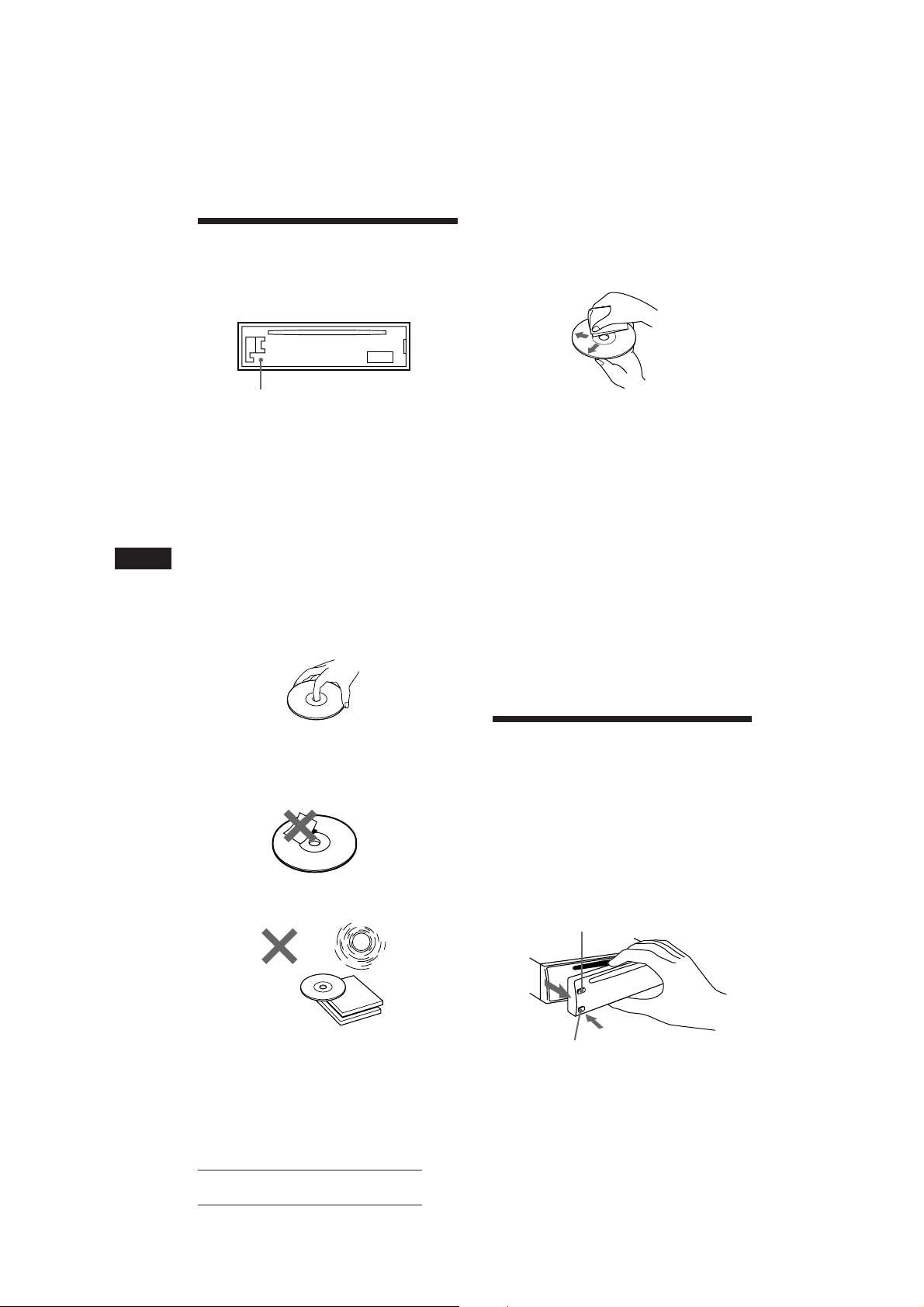
• Before operating the unit for the first time or
after replacing the car battery, press the reset
button with a ballpoint pen etc., then operate
the unit.
Do not expose the discs to direct sunlight or
heat sources such as hot air-ducts. Do not leave
them in a car parked in direct sunlight where
there can be a considerable rise in the
temperature inside the car.
EN
Reset button
• If your car was parked in direct sunlight
resulting in a considerable rise in
temperature inside the car, allow the unit to
cool off before operating it.
• If no power is being supplied to the unit,
check the connections first. If everything is in
order, check the fuse.
• If no sound comes from the speakers in
2-speaker systems, set the fader control to the
centre position.
If you have any questions or problems
concerning your unit that are not covered in
this manual, please consult your nearest Sony
dealer.
Notes on CDs
A dirty or defective disc may cause sound
dropouts during playback. To enjoy optimum
sound, handle the disc as follows.
Handle the disc by its edge to keep the disc
clean. Do not touch the surface.
Do not stick paper or tape on the labelled
surface.
Before playing, clean the discs with an optional
cleaning cloth. Wipe each disc from the centre
of the disc outward.
Do not use solvents such as benzine, thinner,
commercially available cleaners or antistatic
spray intended for analog discs.
Notes on Moisture condensation
On a rainy day or in a very damp area,
moisture may condense on the lenses inside
the CD player. Should this occur, the unit will
not operate properly. In this case, remove the
disc and wait for about an hour until the
moisture has evaporated.
When you play 8 cm CDs
To use the optional Sony compact disc single
adapter (CSA-8) to protect the CD player from
damage.
Detaching and Attaching
the Front Panel
The front panel of this unit can be detached in
order to prevent the unit from being stolen.
Detaching the Front Panel
Before detaching the front panel, be sure to
press the OFF button first. Then press the
RELEASE button to open up the front panel
and detach the panel by pulling it towards you
as illustrated.
OFF button
RELEASE button
Be sure not to drop the panel after detaching it
4
Actual total number: SONY CDX-3100 (E,S,C) 3-810-605-31(1)
from the unit.
Page 5
Attaching the Front Panel
DSPL
DSPL
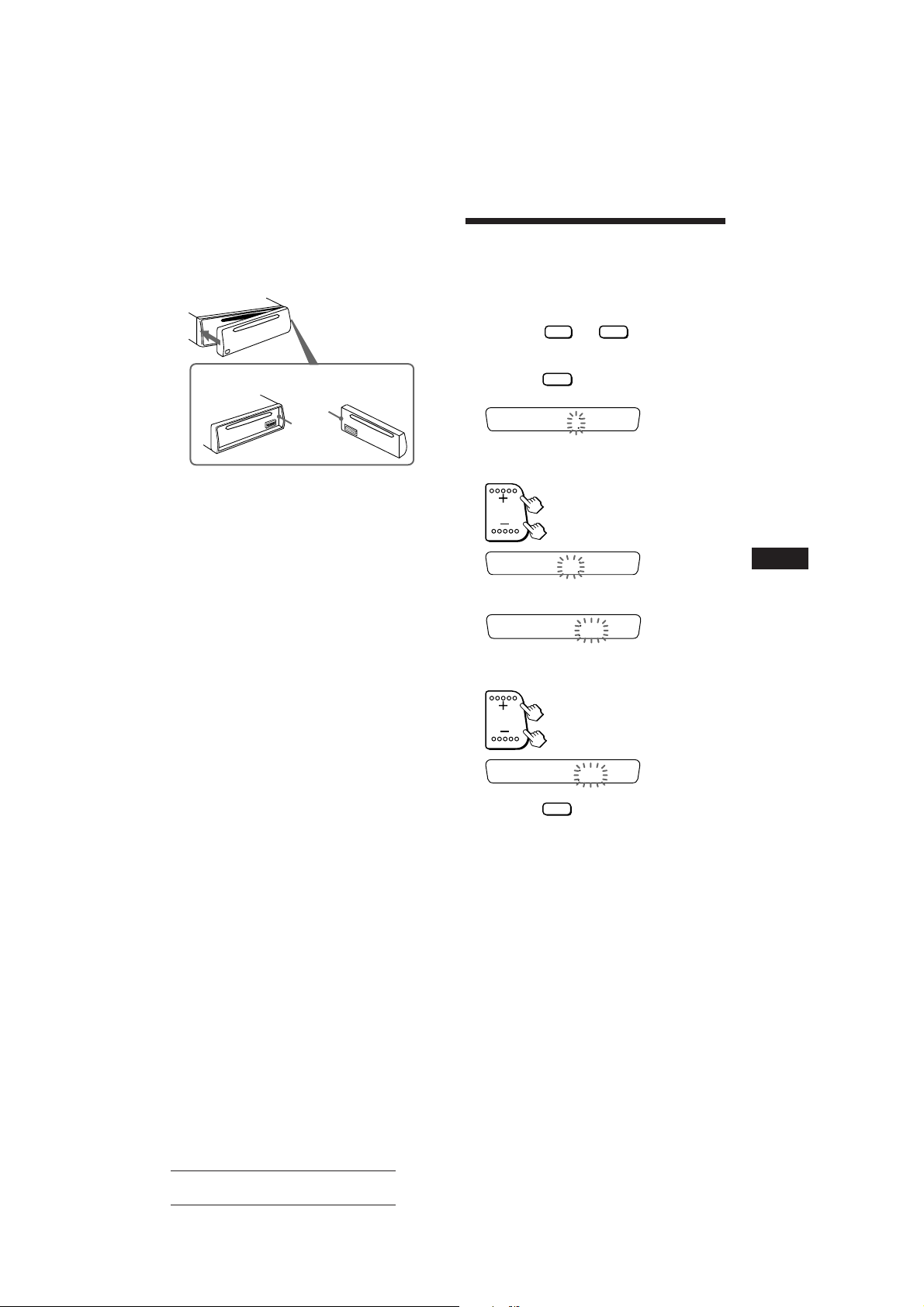
Apply the right side of the front panel to the
unit by attaching part A of the front panel to
part B of the unit as illustrated, then swing
the left side into the unit until it clicks.
Setting the Clock
The clock has a 12-hour digital indication.
For example, setting it to 10:08
1 Display the time.
(Press the
unit operation.)
OFF
or
DSPL
button during
A
B
Notes
• Make sure that the front panel is the right way up when
attaching it to the unit as it cannot be attached upside
down.
• Do not press the front panel hard against the unit when
attaching it to the unit. It can easily be attached by
pressing it lightly against the unit.
• When you carry the front panel with you, put it in the
supplied front panel case.
• Do not press hard or give excessive pressure to the
display window of the front panel.
• Before removing the front panel, be sure to turn the
power off. However, if you press the RELEASE button to
detach the panel while the unit is still turned on, the
power will automatically turn off in order to protect the
speakers from being damaged.
• Do not expose the front panel to direct sunlight, heat
sources such as hot air ducts or leave it in a humid place.
Never leave it on the dashboard etc. of a car parked in
direct sunlight where there may be a considerable rise in
temperature inside the car.
Caution Alarm
If you turn the ignition key switch to the OFF
position without removing the front panel, the
caution alarm will be activated, and a beep
tone will be heard for a few seconds (only for
cars with an accessory position on the ignition
key switch).
2 Press the
button for more than
two seconds.
100
The hour digit(s) blinks.
Set the hour digits.
to go forward
to go back
1000
3 Press the SEL button momentarily.
The minute digits blink.
Set the minute digits.
4 Press the
The clock activates.
Note
If the car has no accessory position on the ignition key
switch, the clock cannot be set unless the power is turned
on. Set the clock after you have turned on the radio, or
started CD playback.
1000
to go forward
to go back
1008
button momentarily.
EN
5
Actual total number: SONY CDX-3100 (E,S,C) 3-810-605-31(1)
Page 6
EN
2
REPEAT
CD Player Operation
Playing a CD
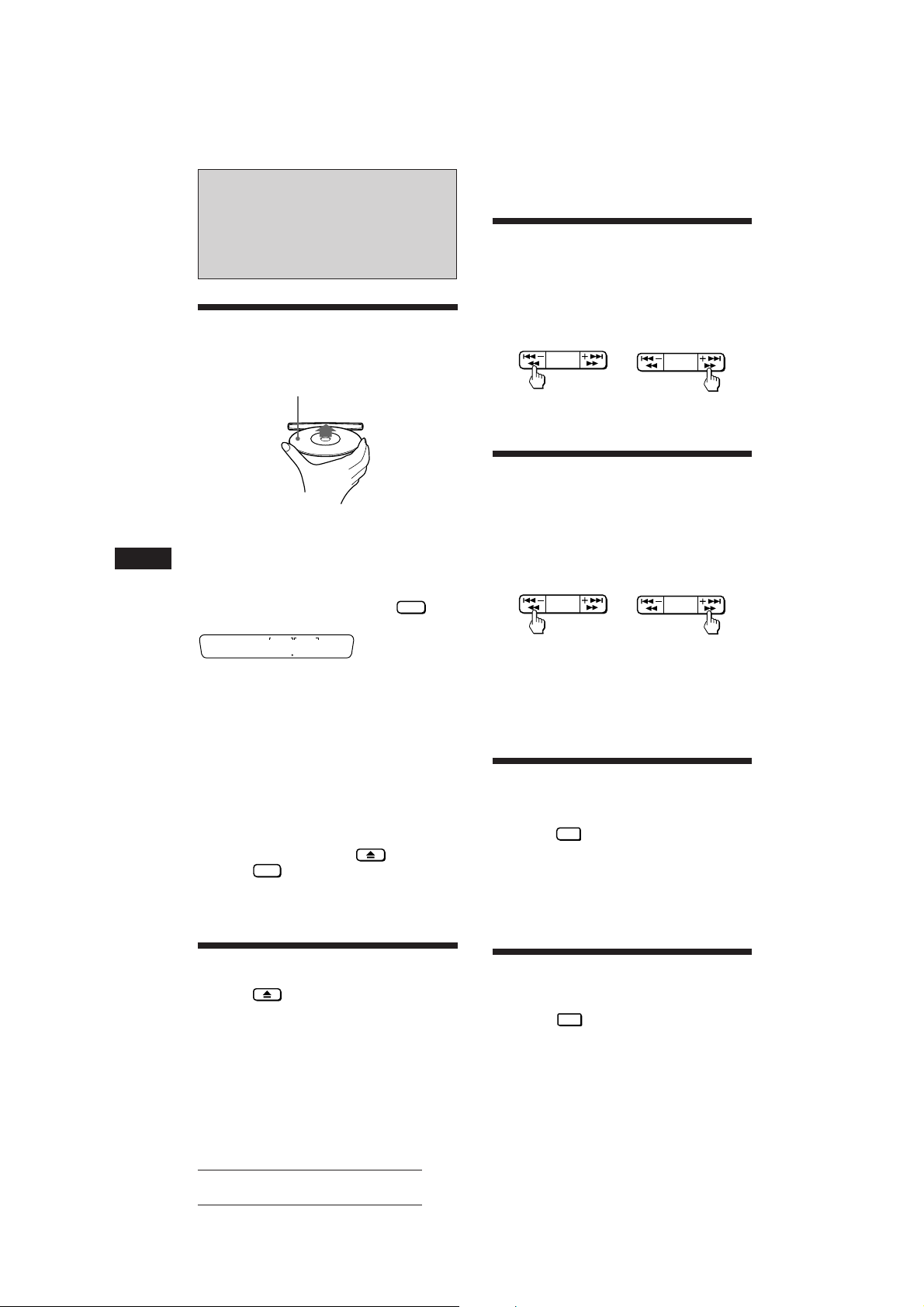
After inserting the CD, playback will
start from the first track automatically.
Label side up
If an CD is already inserted, press the
CD button to start playback.
When the unit stars CD playback, the
elapsed playing time will be displayed.
To display the elapsed playing time and the
track number alternately, press the
button.
MIN SEC
215
Elapsed playing time
When the last track on the CD is
over,
the track number indication will return to “1”,
and playback will continue from the first track
of the CD.
DSPL
Locating the Beginnings
of Tracks
— AMS (Automatic Music Sensor) Function
During playback, press either side of
the SEEK/AMS/MANU button once for
each track you wish to skip.
SEEK/AMS
MANU
To locate
previous tracks
SEEK/AMS
MANU
To locate
succeeding tracks
Locating the Desired Part
of a Track
During playback, press and hold either
side of the SEEK/AMS/MANU button for
more than two seconds. Release the
button when you have found the
desired part.
To reverse To forward
If you reverse to the beginning of the disc, “_ _ ” appears
on the display. Forwarding to the end of the disc causes
“ _ _” to be displayed.
In either case, you can neither proceed to the previous nor
the following track.
— Manual Search Function
SEEK/AMS
MANU
SEEK/AMS
MANU
Note
To play a 8 cm CD, use the optional Sony compact disc
single adapter (CSA-8).
To stop playback,
eject the CD by pressing the button or
press the
Playback stops also when you select another
source (radio) by pressing the FM/AM button.
OFF
button.
Ejecting the CD
Press the button.
Note
If you leave the ejected disc in the disc insertion slot after
you have pressed the 6 button, the disc will automatically
retract into the unit after about 15 seconds in order to
protect it.
6
Actual total number: SONY CDX-3100 (E,S,C) 3-810-605-31(1)
Searching for the Desired
Track
Press the
n “INTRO” appears on the display.
The first 10 seconds of all the tracks are played.
When you find the desired track, press the
button once more. The unit returns to normal
playback mode.
— Intro Scan Function
INTRO
1
button during playback.
Playing Tracks Repeatedly
— Repeat Play Function
Press the
n “REPEAT” appears on the display.
When the currently played track is over, it will
be played again from the beginning.
To cancel this mode, press the button again.
button during playback.
Page 7
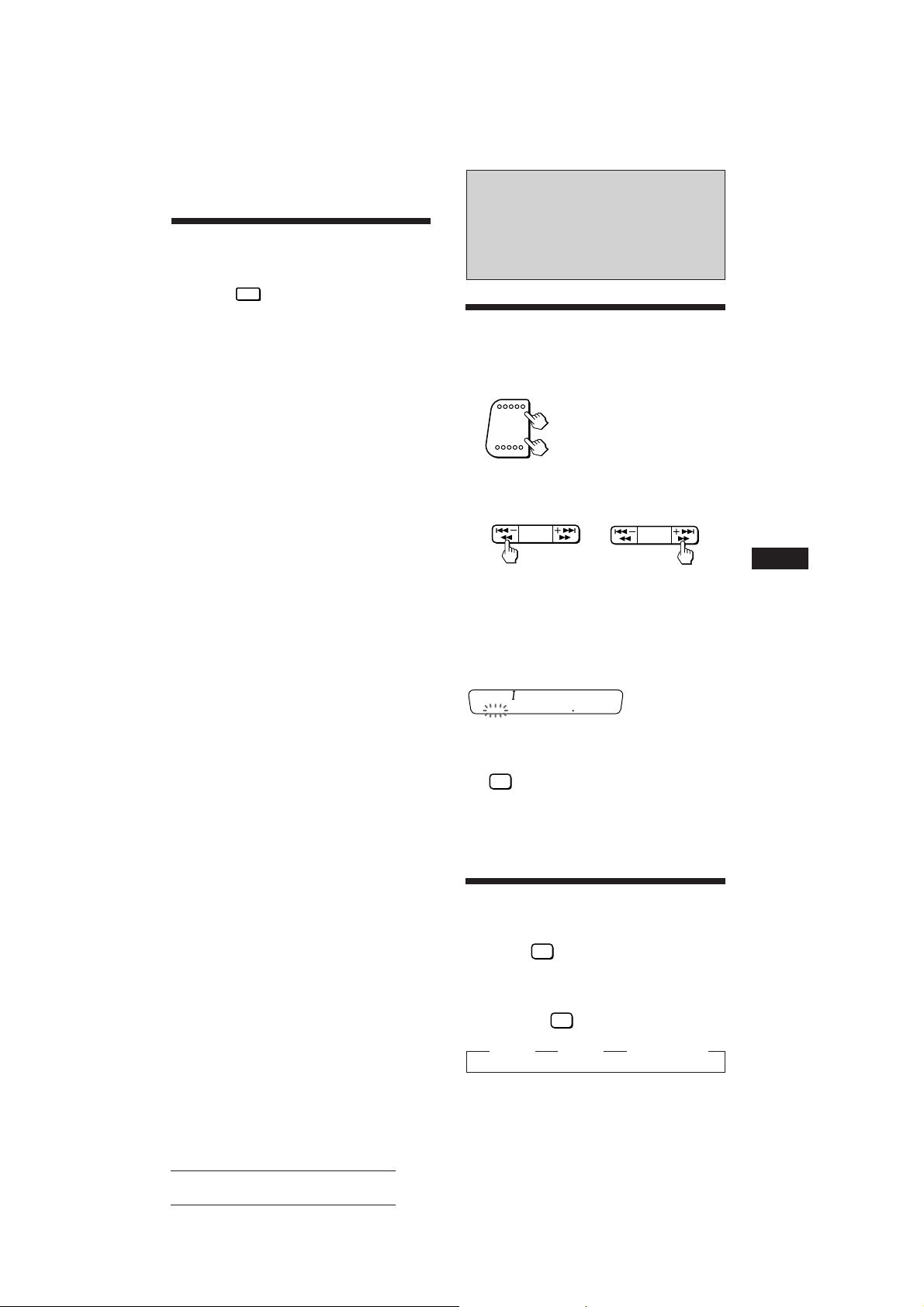
Playing Tracks in Random
Order
Press the
n “SHUF” appears on the display.
All tracks on the currently selected disc are
played in random order.
—Shuffle Play Function
SHUF
3
button during playback.
Radio Reception
Searching for Stations
Automatically
1 Select the desired band.
— Automatic Tuning
FM
AM
FMI n FMII n FMIII n
FMI n ···
AM
2 Press either side of the SEEK/AMS/MANU
button once to search for the next station
(automatic tuning).
SEEK/AMS
MANU
For lower frequencies
The scanning stops when a station is received.
Press either side of the SEEK/AMS/MANU
button repeatedly until the desired station is
received.
When an FM stereo programme with sufficient
signal strength is tuned in,
FM
STEREO
the “STEREO" indication appears.
To keep the automatic tuning from stopping on
stations too frequently (local seek mode), press
SENS
the
indication.
Only the stations with relatively strong signals will be
tuned in. The local seek mode functions only when
automatic tuning is in operation.
879
button momentarily to get the “LOCAL”
SEEK/AMS
MANU
For higher frequencies
EN
CD Player Operation/Radio Reception
If FM Stereo Reception is
— Monaural Mode
Poor
Press the
n “MONO” appears on the display.
The sound will improve, but it will be
monaural.
By pressing the
displayed items as follows:
z LOCAL z MONO z Normal mode
Actual total number: SONY CDX-3100 (E,S,C) 3-810-605-31(1)
SENS
button momentarily.
SENS
button, you can change the
7
Page 8
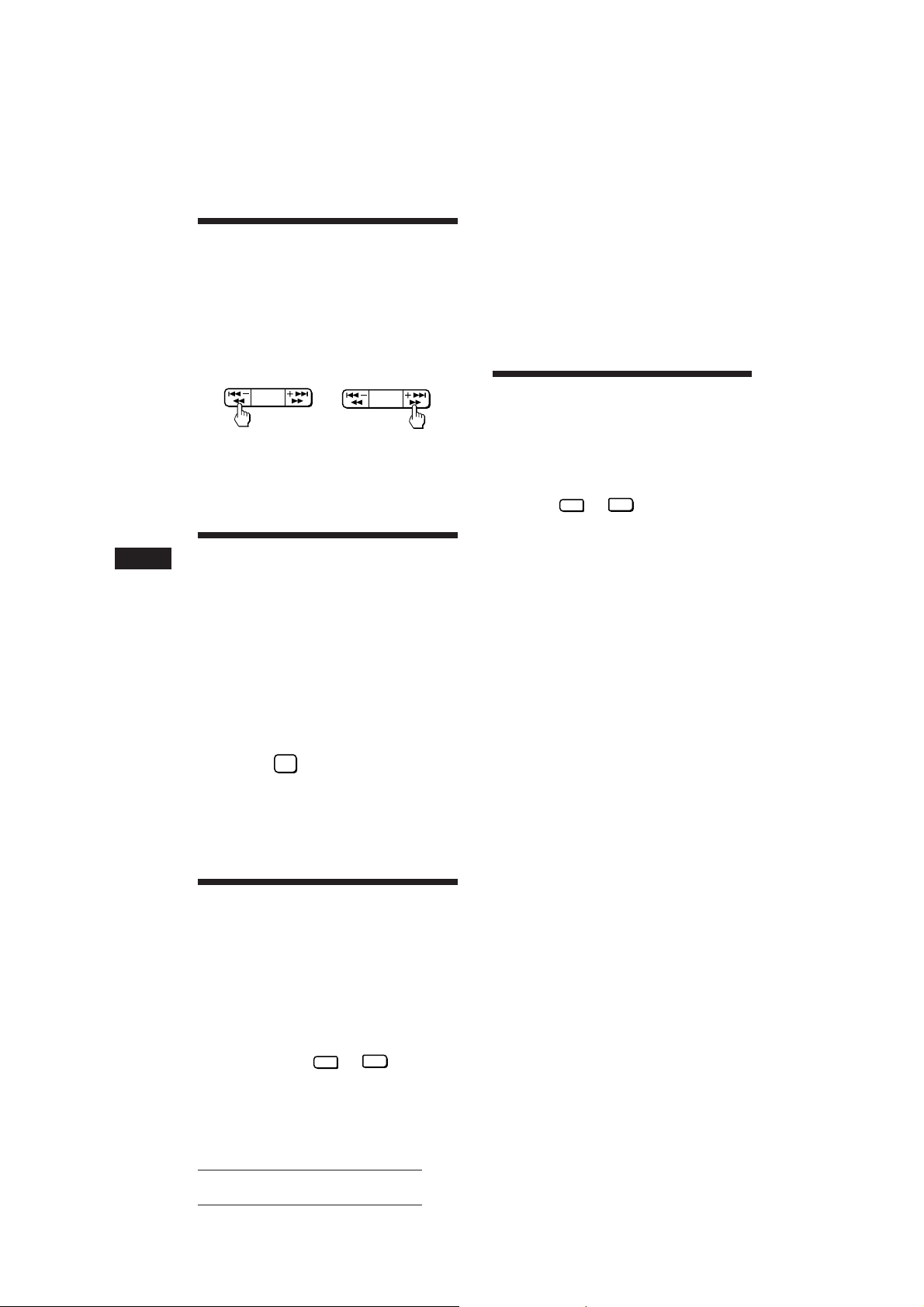
Tuning in by Adjusting the
Frequency
1 Select the desired band (page 7).
2 Press and hold either side of the SEEK/
AMS/MANU button.
Release the button when the desired station
is received.
For lower frequencies For higher frequencies
PREVENT ACCIDENTS!
When tuning in during driving, use automatic
tuning.
— Manual Tuning
SEEK/AMS
MANU
SEEK/AMS
MANU
The number of the pressed preset number
button appears in the display window.
Up to 6 stations on each band (FMI, FMII, FMIII and
AM) can be stored on the preset number buttons in the
order of your choice. Therefore, 18 stations can be
memorised on FM.
If you try to store another station on the same preset
number button, the previously stored station will be erased.
Receiving the Memorised
Stations
1 Select the desired band (page 7).
2 Press momentarily the preset number
button (
desired station is stored.
INTRO
to 6) on which the
1
EN
Memorising Stations
Automatically
— Automatic Memory Function
Stations with the clearest reception are
automatically searched and memorised on
each band (FMI, FMII, FMIII and AM). Up to 6
stations on each band can be stored on the
preset number buttons 1 to 6 in the order of
band frequency.
1 Select the desired band (page 7).
2 Press the
seconds.
The unit will be start scanning the selected
band and memorise the tuned stations on
the preset number buttons 1 through 6
automatically.
A.MEM
button for more than two
Memorising Only the
Desired Stations
1 Select the desired band (page 7).
2 Tune in the station which you wish to
store on a preset number button.
Note
If you press the preset number button for more than two
seconds, the currently received station will be memorised.
To receive the previously memorised station, make sure
that the preset number button is pressed only momentarily.
3 Press and hold the desired preset
number button (
8
two seconds until you hear a beep tone.
Actual total number: SONY CDX-3100 (E,S,C) 3-810-605-31(1)
INTRO
to 6) for about
1
Page 9
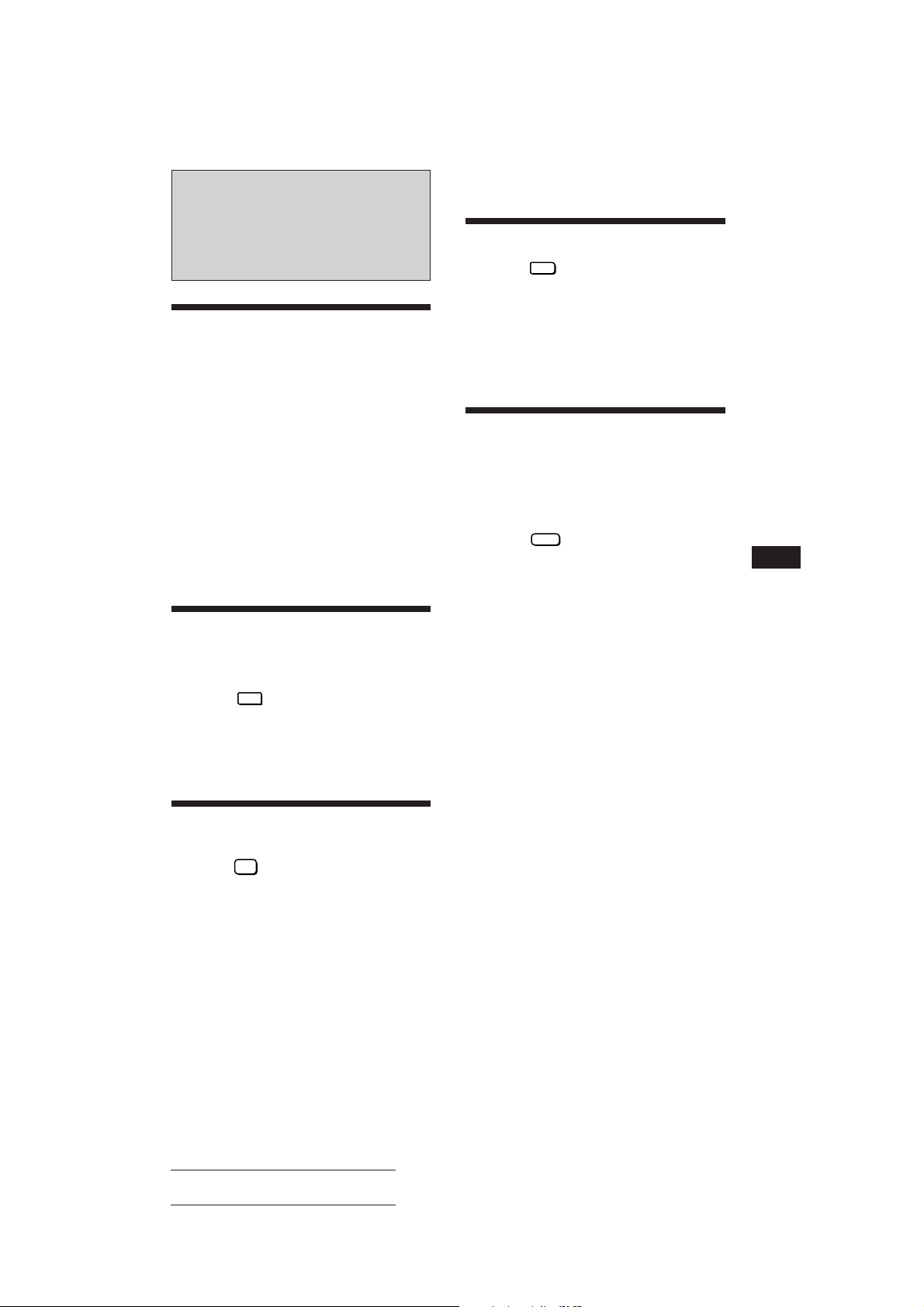
Other Functions
Adjusting the Sound
Characteristics
1 Select the item you want to adjust by
pressing the SEL button repeatedly.
Muting the Beep Tone
Press the
the SEL button.
To reactivate the beep tone again, press these
buttons once more.
Note
When connecting an optional power amplifier to the LINE
OUT, the beep tone is disabled.
6
button while pressing
VOL (volume) n BAS (bass) n TRE
(treble) n BALANCE (balance) n FADER
(fader) n VOL (volume) n ···
2 Adjust the selected item by pressing
either side of the +/– button.
Adjust within three seconds after selecting.
(After three seconds the buttons will again
serve as volume control buttons.)
Enjoying Bass and Treble
at Low Volume
— Loudness Function
Press the
SEL button. n “LOUD” will appear on
the display.
The bass and treble will be boosted.
To cancel, press again.
REPEAT
2
button while pressing
Muting the Sound Quickly
— Mute Function
Press the
indication flashes.
The sound is muted at once.
To restore the previous volume level, press
again.
MUTE
button. n The “MUTE”
Turning on the Clock
Display
Only for cars with accessory position on the
ignition key switch.
To turn the Power Select Function ON
Press the
the SEL button.
The Power Select Function ties the clock
display power to the accessory position on the
ignition key switch.
To avoid battery wear, the clock is not
displayed while the unit is initializing.
— Power Select Function
OFF
button while pressing
EN
Radio Reseption/Other Functions
This function will be also cancelled when:
— + side of the +/– or OFF button is pressed.
— ejecting a CD by pressing the 6 button during CD
playback.
Actual total number: SONY CDX-3100 (E,S,C) 3-810-605-31(1)
9
Page 10

Maintenance
Dismounting the Unit
EN
Fuse Replacement
When replacing the fuse, be sure to use one
matching the amperage rating stated on the
fuse. If the fuse blows, check the power
connection and replace the fuse. If the fuse
blows again after replacement, there may be
an internal malfunction. In such a case, consult
your nearest Sony dealer.
Fuse (15 A)
Warning
Never use a fuse with an amperage rating
exceeding the one supplied with the unit as
this could damage the unit.
Cleaning the Connectors
The unit may not function properly if the
connectors between the unit and the front
panel are not clean. In order to prevent this,
open the front panel by pressing the RELEASE
button, then detach it and clean the connectors
with a cotton swab dipped in alcohol. Do not
apply too much force. Otherwise, the
connectors may be damaged.
1
Release key
(supplied)
2
3
4
10
Main unit
Back of the front panel
Actual total number: SONY CDX-3100 (E,S,C) 3-810-605-31(1)
Page 11

Location of Controls
OFF
DSPL
MUTE
SEL
RELEASE
INTRO2REPEAT3SHUF
1
Refer to the pages in r for details.
1 MUTE button 9
2 OFF button 4569
3 DSPL (display mode change/time set)
button 56
4 +/– (volume/bass/treble/balance/fader
control) button 59
5 Display window
6 SEEK/AMS/MANU (automatic music
sensor/automatic tuning/manual search)
button 678
7 6 (eject) button 69
8 SENS (sensitivity adjust) button 7
9 RELEASE (front panel release) button
40
!º SEL (control mode select) button 59
!¡ Reset button (located on the front side
of the unit hidden by the front panel) 4
SEEK/AMS
MANU
SENS
CD
A.MEM
456
FM
AM
!™ During radio reception:
Preset number buttons 8
During CD playback:
INTRO
1
INTRO (intro scan) button 6
REPEAT
REPEAT (repeat play) button 6
2
SHUF
3
SHUF (shuffle play) button 7
!£ Frequency Select switch (located on the
bottom of the unit)
See “Frequency Select switch” in the
Installation/Connections manual.
!¢ FM/AM (radio on/band select) button
67
!∞ CD (CD play) button 6
!§ A.MEM (Automatic Memory function)
button 8
When the position of switch !£ have been
changed, be sure to press the reset button after
connecting power.
EN
Actual total number: SONY CDX-3100 (E,S,C) 3-810-605-31(1)
11
Page 12

Specifications
EN
CD player section
System Compact disc digital audio
system
Signal-to- noise ratio 90 dB
Frequency response 10 – 20,000 Hz
Wow and flutter Below measurable limit
Tuner section
FM
Tuning range FM tuning interval:
50 kHz/200 kHz
switchable
87.5 – 108.0 MHz (at
50␣ kHz step)
87.5 – 107.9 MHz (at
200␣ kHz step)
Antenna terminal External antenna connector
Intermediate frequency 10.7 MHz
Usable sensitivity 8 dBf
Selectivity 75 dB at 400 kHz
Signal-to-noise ratio 65 dB (stereo),
68 dB (mono)
Harmonic distortion at 1 kHz
0.5 % (stereo),
0.3 % (mono)
Separation 35 dB at 1 kHz
Frequency response 30 – 15,000 Hz
Capture ratio 2 dB
AM
Tuning range AM tuning interval:
9 kHz/10 kHz switchable
531 – 1,602 kHz (at 9␣ kHz
step)
530 – 1,710 kHz (at 10␣ kHz
step)
Antenna terminal External antenna connector
Intermediate frequency 10.71 MHz/450 kHz
Sensitivity 30 µV
General
Output lead Power antenna control
lead/Power amplifier
control lead
Tone controls Bass ±10 dB at 100 Hz
Treble ±10 dB at 10 kHz
Power requirements 12 V DC car battery
(negative ground)
Dimensions Approx. 188 × 58 × 180 mm
(w/h/d)
Mounting dimension Approx. 183 × 53 × 158 mm
(w/h/d)
Mass Approx. 1.3 kg
Supplied accessories Parts for installation and
connections (1 set)
Optional accessories RCA pin cord
RC-63 (1 m), RC-64 (2 m),
RC-65 (5 m)
Cleaning cloth XP-CD1
Compact disc single
adapter CSA-8
Design and specifications are subject to change without
notice.
Power amplifier section
Outputs Speaker outputs
Speaker impedance 4 – 8 ohms
Maximum power output 30 W × 4 (at 4 ohms)
(sure seal connectors)
12
Actual total number: SONY CDX-3100 (E,S,C) 3-810-605-31(1)
Page 13

Troubleshooting Guide
The following checklist will assist in the correction of most problems which you may encounter with
your unit.
Before going through the checklist below, refer to the connection and operating procedures.
General
Problem
No sound.
The contents of the memory
have been erased.
Indications do not appear on
the display.
No beep tone.
Cause/Solution
• Adjust the volume with + side of the +/– button.
• Set the fader control to the centre position for 2-speaker
systems.
• The power cord or battery has been disconnected.
• The reset button has been pressed.
n Store stations into the memory again.
Remove the front panel and clean the connectors. See “Cleaning
the Connectors” of “Maintenance” for details.
• An optional power amplifier is connected to the LINE OUT.
• The beep tone is muted (page 9).
CD playback
Problem
CD cannot be loaded.
Play does not begin.
CD is automatically ejected.
CD will not eject.
The operation buttons do not
function.
The sound skips due to
vibration.
Radio reception
Problem
Preset tuning is not possible.
Automatic tuning is not possible.
The “STEREO” indication
flashes.
Cause/Solution
• Another CD is already loaded.
• The CD is forcibly inserted upside down.
Dusty disc.
The ambient temperature is more than 50°C.
Press the 6 button for more than two seconds.
Press the reset button.
• The unit is installed at an angle of more than 20°.
• The unit is not installed in a sturdy part of the car.
Cause/Solution
• Memorise the correct frequency.
• The broadcast is too weak.
The broadcast is too weak. n Use manual tuning.
• Tune in precisely.
• The broadcast is too weak.
n Press the
SENS
button to enter the MONO mode.
EN
Actual total number: SONY CDX-3100 (E,S,C) 3-810-605-31(1)
13
Page 14

Error displays
The following indications will flash for about five seconds.
Display
Cause
CD is dirty or inserted upside down.
Solution
Clean or insert the CD correctly.
EN
The CD player cannot be operated
because of some problem.
If the above-mentioned solutions do not help to improve the situation, consult your nearest Sony
dealer.
Press the reset or 6 button.
14
Actual total number: SONY CDX-3100 (E,S,C) 3-810-605-31(1)
Page 15

ES
Particularidades
Generales
• Panel frontal desmontable para poder
llevarlo consigo cuando abandone el
automóvil (página 4).
• Alarma de precaución, que se activará
cuando apague la llave de encendido sin
extraer el panel frontal de la unidad.
• Reloj digital de 12 horas suministrado
(página 5).
• Amplificador de potencia incorporado
(salida máx.: 30 W × 4 canales) que le
permitirá disfrutar de un sistema de 4.
• Salidas de línea para conectar un
amplificador de potencia opcional.
Sección del reproductor de CD
• Convertidor analógico-digital (DAC) de
1 bit para ofrecer una reproducción clara del
sonido.
• Mecanismo de recuperación rápida para
evitar la omisión de sonido.
• Funciones útiles, como la función de
exploración de introducciones para buscar
una canción determinada, la función de
reproducción repetida para escuchar
repetidamente una canción y la función de
reproducción aleatoria para reproducir
canciones en orden arbitrario.
Sección del sintonizador
• Posibilidad de memorización de hasta 24
emisoras: 18 para FM y 6 para AM
respectivamente.
• Función de memoria automática, que
puede almacenar rápida y fácilmente un total
de 24 emisoras en memoria (página 8).
2
Actual total number: Sony CDX-3100 (ESC) 3-810-605-31(1)
Page 16

Indice
Precauciones ............................................................. 4
Extracción e inserción del panel frontal ............... 4
Puesta en hora del reloj ........................................... 5
Operación del reproductor de
CD
Reproducción de un CD ......................................... 6
Extracción del CD .................................................... 6
Localización del comienzo de las canciones
— Función del sensor de música
automático (AMS) .......................................... 6
Localización de la parte que desee de una
canción
— Función de búsqueda manual ...................... 6
Búsqueda de una canción determinada
— Función de exploración de
introducciones ................................................ 7
Reproducción repetida de canciones
— Función de reproducción repetida .............. 7
Reproducción de canciones en orden aleatorio
— Función de reproducción aleatoria ............. 7
Radiorecepción
Búsqueda automática de emisoras
— Sintonización automática ............................. 7
Si un programa de FM estéreo es difícil de recibir
— Modo monoaural ........................................... 7
Sintonización mediante el ajuste de la frecuencia
— Sintonización manual .................................... 8
Memorización automática de emisoras
— Función de memoria automática ................. 8
Memorización de las emisoras deseadas ............. 8
Recepción de emisoras memorizadas ................... 8
Otras funciones
Ajuste de las características del sonido ................ 9
Buena calidad de sonido incluso a bajo volumen
— Función de sonoridad ................................... 9
Silenciamiento rápido del sonido
— Función de silenciamiento ............................ 9
Silenciamiento de los pitidos ................................. 9
Activación de la indicación del reloj
— Función de selección de alimentación ........ 9
Mantenimiento ....................................................... 10
Desmontaje de la unidad ...................................... 10
Ubicación de los controles .................................... 11
Especificaciones ..................................................... 12
Guía para la solución de problemas ................... 13
ES
Actual total number: Sony CDX-3100 (ESC) 3-810-605-31(1)
3
Page 17

ES
Precauciones
• Antes de utilizar la unidad por primera vez,
o después de haber reemplazado la batería
del automóvil, presione el botón de
reposición con un bolígrafo, etc y, a
continuación, inicie el funcionamiento de la
unidad.
Botón de reposición
• Si dejó el automóvil aparcado bajo el sol y
aumentó considerablemente la temperatura
interior del mismo, deje que se enfríe la
unidad antes de emplearla de nuevo.
• Si la unidad no recibe alimentación,
compruebe en primer lugar las conexiones. Si
todo está en orden, compruebe el fusible.
• Si no se obtiene sonido a través de un sistema
de 2 altavoces, sitúe el control de equilibrio
entre los altavoces delanteros y traseros en la
posición central.
Si tiene alguna pregunta o problema en
relación con la unidad que este manual no
pueda resolver, consulte a su proveedor Sony.
Notas sobre los CD
Un disco sucio o defectuoso puede causar la
pérdida de sonido durante la reproducción.
Para obtener un nivel de sonido óptimo,
emplee los discos como se indica a
continuación.
Tome los discos por sus bordes para
mantenerlos limpios. No toque la superficie.
No exponga los discos a la luz solar directa ni
a fuentes térmicas tales como conductos de
aire cálido, ni los deje en un automóvil
aparcado al sol donde la temperatura de su
interior puede aumentar considerablemente.
Antes de reproducir un disco, límpielo con un
paño limpiador opcional. Hágalo del centro
hacia la periferia.
No utilice disolventes tales como bencina,
diluidor de pintura, ni limpiadores o aerosoles
para discos analógicos.
Notas sobre la condensación de
humedad
En un día lluvioso, o en un lugar muy
húmedo, es posible que se condense humedad
en la lente interior del reproductor de CD.
Cuando suceda esto, la unidad no funcionará
adecuadamente. En tal caso, extraiga el disco y
espere aproximadamente una hora hasta que
la humedad se haya evaporado.
Si reproduce discos compactos de
8 cm
Emplee el adaptador sencillo para discos
compactos opcional de Sony (CSA-8) con el fin
de proteger el reproductor de discos
compactos contra posibles daños.
No pegue papel ni cinta adhesiva sobre la
superficie de la etiqueta.
4
Actual total number: Sony CDX-3100 (ESC) 3-810-605-31(1)
Extracción e inserción del
panel frontal
El panel frontal de esta unidad puede extraerse
con el fin de evitar que se lo roben.
Extracción del panel frontal
Antes de extraer el panel frontal, pulse
primero la tecla OFF. A continuación, pulse la
tecla RELEASE para abrir el panel frontal, y
extráigalo tirando del mismo hacia delante
como se indica en la figura.
Page 18

Tecla OFF
Tecla RELEASE
Tenga cuidado de no dejar caer el panel
cuando lo retire de la unidad.
Inserción del panel frontal
Aplique la parte derecha del panel frontal a la
unidad fijando la parte A del panel frontal a la
parte B de la unidad como se muestra en la
ilustración, e inserte la parte izquierda en la
unidad hasta que chasquee.
Puesta en hora del reloj
El reloj posee una indicación digital de 12
horas.
Por ejemplo, para ajustarlo a las 10:08
1 Muestre la hora.
(Presione la tecla
funcionamiento de la unidad.)
2 Presione la tecla
dos segundos.
El dígito de la hora parpadean.
Ajuste los dígitos de la hora.
OFF
o
DSPL
durante más de
100
para avanzar
para retroceder
DSPL
durante el
A
B
Notas
• Cerciórese de colocar correctamente el panel frontal en la
unidad, ya que no podrá fijarse al revés.
• No presione el panel frontal a la fuerza contra la unidad
cuando lo inserte en la misma. El panel podrá insertarse
con facilidad presionándolo ligeramente contra la unidad.
• Para transportar el panel frontal, introdúzcalo en el
estuche suministrado.
• No aplique demasiada fuerza sobre el visualizador del
panel frontal.
• Antes de extraer el panel frontal, cerciórese de
desconectar la alimentación. Sin embargo, si presiona la
tecla RELEASE para extraer el panel frontal con la
alimentación de la unidad conectada, ésta se desconectará
automáticamente a fin de evitar gue se dañen los
altavoces.
• No exponga el panel frontal a la luz solar directa, fuentes
térmicas tales como conductos de aire cálido, ni lo deje en
lugares húmedos. No lo deje nunca en el panel de
instrumentos, etc. con el automóvil aparcado al sol,
porque la temperatura del interior del mismo podría
aumentar considerablemente.
Alarma de precaución
Si sitúa el interruptor de la llave de encendido
en la posición OFF sin haber extraído el panel
frontal, se activará la alarma de precaución y
se oirá un pitido durante unos segundos (sólo
para automóviles con posición accesoria en el
interruptor de la llave de encendido).
1000
3 Presione ligeramente la tecla SEL.
Los dígitos de los minutos parpadean.
Ajuste los dígitos de los minutos.
4 Presione ligeramente la tecla
El reloj comienza a funcionar.
Nota
Si el automóvil no dispone de posición accesoria en el
interruptor de la llave de encendido, el reloj no podrá
ajustarse a menos que se active la alimentación. Ajústelo
una vez encendida la radio, o bien durante la reproducción
del CD.
1000
para avanzar
para retroceder
1008
DSPL
.
ES
5
Actual total number: Sony CDX-3100 (ESC) 3-810-605-31(1)
Page 19

ES
Operación del
reproductor de CD
Reproducción de un CD
Después de insertar un CD, la
reproducción se iniciará
automáticamente desde la primera
canción.
Cara de la etiqueta hacia arriba
Si ya hay un CD insertado, presione la
tecla CD para iniciar la reproducción.
Cuando la unidad inicie la reproducción
del CD, aparecerá el tiempo de
reproducción transcurrido.
Para mostrar el tiempo de reproducción
transcurrido y el número de canción
alternativamente, presione la tecla
MIN SEC
215
Tiempo de reproducción transcurrido
Cuando finalice la última canción
del CD
La indicación del número de canción volverá a
mostrar el valor “1” y la reproducción volverá
a iniciarse desde la primera canción del CD.
Nota
Para reproducir un CD de 8 cm, utilice el adaptador
sencillo de discos compactos opcional Sony CSA-8.
Para detener la reproducción
Extraiga el CD presionando la tecla , o
presione la tecla
La reproducción también se detiene al
seleccionar otra fuente (radio) presionando la
tecla FM/AM.
OFF
.
DSPL
.
Extracción del CD
Presione la tecla .
Nota
Si deja el disco extraído en la ranura de inserción del
mismo después de haber presionado la tecla 6, el disco se
insertará automáticamente en la unidad después de unos
15 segundos a fin de protegerlo.
Localización del comienzo
de las canciones
— Función del sensor de música automático
(AMS)
Durante la reproducción, presione
cualquier lado de la tecla SEEK/AMS/
MANU tantas veces como canciones
desee omitir.
SEEK/AMS
MANU
Para localizar las
canciones anteriores
SEEK/AMS
MANU
Para localizar las
canciones posteriores
Localización de la parte
que desee de una canción
— Función de búsqueda manual
Durante la reproducción, mantenga
presionado cualquier lado de la tecla
SEEK/AMS/MANU por más de dos
sequndos. Suelte la tecla cuando haya
encontrado la parte que desee.
SEEK/AMS
MANU
Hacia atrás Hacia delante
Si rebobina hasta el principio del disco, aparecerá
“_ _ ” en el visor. Si avanza hasta el final del mismo,
aparecerá “ _ _”.
En cualquier caso, no es posible ir a la canción siguiente ni
a la anterior.
SEEK/AMS
MANU
6
Actual total number: Sony CDX-3100 (ESC) 3-810-605-31(1)
Page 20

Búsqueda de una canción
determinada
— Función de exploración de
introducciones
Presione la tecla
reproducción. n “INTRO” aparece en el
visualizador principal.
Se reproducen los 10 primeros segundos de
todas las canciones. Cuando encuentre la
canción que desee, presione la tecla una vez
más. La unidad vuelve al modo de
reproducción normal.
INTRO
1
durante la
Radiorecepción
Búsqueda automática de
emisoras
1 Seleccione la banda que desee.
FM
AM
— Sintonización automática
FMI n FMII n FMIII n
FMI n ...
AM
Reproducción repetida de
canciones
— Función de reproducción repetida
Presione la tecla
reproducción. n “REPEAT” aparece en
el visualizador principal.
Cuando termina la reproducción de la canción
actual, ésta vuelve a reproducirse desde el
principio.
Para cancelar este modo, vuelva a pulsar la
tecla.
Reproducción de canciones
en orden aleatorio
— Función de reproducción aleatoria
Presione la tecla
reproducción. n “SHUF” aparece en el
visualizador principal.
Todas las canciones del disco actualmente
seleccionado se reproducen en orden aleatorio.
REPEAT
2
durante la
SHUF
3
durante la
2 Presione cualquier lado de la tecla SEEK/
AMS/MANU una vez para buscar la
emisora siguiente (sintonización
automática).
SEEK/AMS
MANU
Para frecuencias
inferiores
La exploración se detendrá cuando se reciba
una emisora. Presione repetidamente cualquier
lado de la tecla SEEK/AMS/MANU hasta
recibir la emisora deseada.
Cuando se sintonice un programa estéreo de FM
de señal suficientemente intensa,
FM
STEREO
aparecerá la indicación “STEREO”.
Para evitar que la sintonización automática se
detenga en emisoras con demasiada frecuencia
(modo de búsqueda local), presione ligeramente la
tecla
“LOCAL”.
De esta forma sólo se sintonizará las emisoras de señal
relativamente intensa. Las funciones del modo de búsqueda
local solamente funcionará cuando esté activada la sintonía
automática.
879
SENS
a fin de que aparezca la indicación
SEEK/AMS
MANU
Para frecuencias
superiores
ES
Operación del reproductor de CD/Radioreceptión
Si un programa de FM
estéreo es difícil de recibir
— Modo monoaural
Presione ligeramente la tecla
n “MONO” aparece en visualizador
principal.
El sonido mejorará, pero será monoaural.
contiúa en la página siguiente n
Actual total number: Sony CDX-3100 (ESC) 3-810-605-31(1)
SENS
.
7
Page 21

Si presiona la tecla
elementos mostrados como se indica a
continuación:
z LOCAL z MONO z Modo normal
SENS
, es posible cambiar los
Memorización de las
emisoras deseadas
1 Seleccione la banda que desee (página 7).
ES
Sintonización mediante el
ajuste de la frecuencia
— Sintonización manual
1 Seleccione la banda que desee (página 7).
2 Mantenga presionado cualquier lado de
la tecla SEEK/AMS/MANU tantas veces
como canciones desee omitir.
Suelte la tecla cuando se reciba la emisora
deseada.
SEEK/AMS
MANU
Para frecuencias
inferiores
PREVENCIÓN DE ACCIDENTES
Durante la conducción, utilice la sintonización
automática.
SEEK/AMS
MANU
Para frecuencias
superiores
Memorización automática
de emisoras
— Función de memoria automática
Las emisoras de cada banda que se reciben con
mayor claridad se localizan y se almacenan en
la memoria de forma automática (FMI, FMII,
FMIII y AM). Es posible almacenar un máximo
de 6 emisoras de cada banda en las teclas
numéricas de memorización de 1 a 6 por orden
de frecuencia.
1 Seleccione la banda que desee (página 7).
2 Sintonice la emisora que desee
almacenar en la tecla numérica de
memorización.
3 Mantenga presionada la tecla numérica
de memorización que desee (
6
) durante unos dos segundos hasta
que oiga un pitido.
El número de la tecla numérica de
memorización presionada aparecerá en el
visualizador principal.
Podrá almacenar hasta 6 emisoras de cada banda (FMI,
FMII, FMIII y AM) en las teclas numéricas de
memorización en el orden que desee. De esta forma, pueden
memorizarse 18 emisoras de FM.
Si intenta almacenar otra emisora en una tecla numérica de
memorización ya programada, la previamente almacenada
se borrará.
INTRO
1
a
Recepción de emisoras
memorizadas
1 Seleccione la banda deseada (página 7).
2 Presione ligeramente la tecla numérica
INTRO
1
(
a 6) en la que esté almacenada
la emisora que desee recibir.
Nota
Si mantiene presionada la tecla numérica de memorización
durante más de dos segundos, se memorizará la emisora
actual. Para recibir la emisora previamente memorizada,
cerciórese de presionar ligeramente la tecla numérica de
memorización.
2 Mantenga presionada la tecla
durante más de dos segundos.
La unidad iniciará la exploración de la
banda seleccionada y memorizará las
emisoras sintonizadas en las teclas
numéricas de memorización de 1 a 6
automáticamente.
8
Actual total number: Sony CDX-3100 (ESC) 3-810-605-31(1)
A.MEM
Page 22

Otras funciones
Ajuste de las
características del sonido
1 Seleccione el elemento que desee ajustar
presionando repetidamente la tecla SEL.
VOL (volumen) n BAS (graves) n TRE
(agudos) n BALANCE (equilibrio) n
FADER (equilibrio entre los altavoces
delanteros y traseros) n VOL (volumen)
n ···
2
Ajuste el elemento seleccionado
presionando cualquier lado de la tecla +/–.
Realice el ajuste antes de que transcurran tres
segundos desde la selección (después de tres
segundos, las teclas volverán a funcionar como
teclas de control de volumen).
Buena calidad de sonido
incluso a bajo volumen
— Función de sonoridad
Presione la tecla
pulsada la tecla SEL. n “LOUD”
aparecerá en el visualizador principal.
Se reforzarán los graves y los agudos.
Para cancelar la función de esta tecla, vuelva a
presionarla.
REPEAT
2
manteniendo
Silenciamiento de los
pitidos
Presione la tecla 6 manteniendo
pulsada la tecla SEL.
Para volver a activar los pitidos, presione de
nuevo estas teclas.
Nota
Si conecta un amplificador de potencia opcional a la toma
LINE OUT. el pitido se desactivará.
Activación de la indicación
del reloj
— Función de selección de alimentación
Sólo para automóviles provistos de posición
para accesorios en el interruptor de la llave de
encendido.
Para activar la función de selección de
alimentación
Presione la tecla
presiona la tecla SEL.
La función de selección de alimentación
conecta la alimentación de la indicación del
reloj con la posición para accesorios en el
interruptor de la llave de encendido.
Para evitar el desgaste de la batería, el reloj no
aparece durante la inicialización de la unidad.
OFF
mientras
ES
Radiorecepción/Otras funciones
Silenciamiento rápido del
sonido
Presione la tecla
“MUTE” parpadea.
El sonido se eliminará al momento.
Para restaurar el nivel de volumen previo,
vuelva a presionarla.
Esta función también se cancelará cuando:
— se presione el lado + de la tecla +/– u OFF.
— se extraiga un CD presionando la tecla 6 durante la
reproducción.
Actual total number: Sony CDX-3100 (ESC) 3-810-605-31(1)
— Función de silenciamiento
MUTE
. n La indicación
9
Page 23

Mantenimiento
0
Desmontaje de la unidad
ES
Sustitución del fusible
Para reemplazar el fusible, cerciórese de
utilizar otro del amperaje correcto indicado en
el portafusible. Si el fusible salta, compruebe la
conexión de alimentación y sustitúyalo. Si
después de sustituirlo vuelve a saltar, es
posible que exista un funcionamiento interno
defectuoso. En tal caso, póngase en contacto
con el proveedor Sony más próximo.
Fusible (15 A)
Advertencia
No utilice nunca un fusible con un amperaje
superior al del suministrado con la unidad, ya
que ésta podría dañarse.
Limpieza de los conectores
Es posible que la unidad no funcione
correctamente si los conectores entre la unidad
y el panel frontal no están limpios. Para evitar
que ocurra esto, abra el panel frontal pulsando
la tecla RELEASE a continuación, extráigalo y
limpie los conectones con un bastoncillo de
algodón humedecido en alcohol. No aplique
demasiada fuerza. De otro modo podrían
dañarse los conectores.
1
Llave de extracción
(suministrada)
2
3
4
Unidad principal
Parte posterior del panel frontal
10
Actual total number: Sony CDX-3100 (ESC) 3-810-605-31(1)
Page 24

Ubicación de los controles
OFF
DSPL
MUTE
SEL
RELEASE
INTRO2REPEAT3SHUF
1
456
Para obtener información detallada, consulte las páginas incluidas en r.
1 Tecla MUTE (silenciamiento) 9
2 Tecla de desconexión (OFF) 4569
3 Tecla DSPL (cambio del modo de
visualización/puesta en hora) 56
4 Tecla +/– (volumen/graves/agudos/
izquierdos/equilibrio entre los altavoces
delanteros y traseros) 59
5 Visuliazador
6 Tecla SEEK/AMS/MANU (Sensor de
música/automático sintonización
automática/búsqueda de emisoras
memorizadas) 678
7 Tecla 6 (eject) 69
8 Tecla SENS (ajuste de sensibilidad) 78
9 Tecla RELEASE (extracción del panel
frontal) 4!º
!º Tecla SEL (selección del modo de
control) 59
!¡ Botón de reposición (situado en la parte
frontal de la unidad oculto por el panel
frontal) 4
!™ Durante la radiorecepción:
Teclas numéricas de memorización 8
Durante la reproducción de CD:
INTRO
1
Tecla INTRO (exploración de
introducciones) 7
REPEAT
2
Tecla REPEAT (reproducción
repetida) 7
SHUF
3
Tecla SHUF (reproducción
aleatoria) 7
!£ Selector de frecuencia (situado en la
base de la unidad)
Consulte “Selector de frecuencia” del
manual de Instanción/conexiones.
!¢ Tecla FM/AM (frecuencia alternativa/
anuncio del tráfico) 67
!∞ Tecla CD (reproducción de CD) 6
!§ Tecla A.MEM (functión de memoria
automática 8
Cuando haya cambiado la posición de el
selector !£, cerciórese de presionar el botón de
reposición desqués de conectar la
alimentación.
SEEK/AMS
MANU
FM
AM
SENS
CD
A.MEM
ES
Actual total number: Sony CDX-3100 (ESC) 3-810-605-31(1)
11
Page 25

Especificaciones
ES
Sección del reproductor de discos
compactos
Sistema Sistema audiodigital de
disco compactos
Relación señal-rudio 90 dB
Respuesta de frecuencia 10 – 20.000 Hz
Fluctuación y trémolo Inmensurables
Sección del sintonizador
FM
Gama de sintonía intervalo de sintonía de
FM: 50 kHz/200 kHz,
conmutable
87,5 – 108,0 MHz (intervalo
de 50 kHz)
87,5 – 107,9 MHz (intervalo
de 200 kHz)
Terminal de antena Conector para antena
exterior
Frecuencia intermedia 10,7 MHz
Sensibilidad útil 8 dBf
Selectividad 75 dB a 400 kHz
Relación señal-ruido 65 dB (estéreo),
68 dB (monoaural)
Distorsión armónica a 1 kHz
0,5 % (estéreo),
0,3 % (monoaural)
Separación entre canales 35 dB a 1 kHz
Respuesta de frecuencia 30 – 15.000 Hz
Relación de captura 2 dB
AM
Gama de sintonía Intervalo de sintonía de
AM: 9 kHz/10 kHz,
conmutable
531 – 1.602 kHz (intervalo
de 9 kHz)
530 – 1.710 kHz (intervalo
de 10 kHz)
Terminal de antena Conector para antena
exterior
Frecuencia intermedia 10,71 MHz/450 kHz
Sensibilidad 30 µV
Generales
Conductor de salida Cable de control para
antena motorizada/Cable
de control de amplificador
de potencia
Controles de tono Graves ±10 dB a 100 Hz
Agudos ±10 dB a 10 kHz
Alimentación Batería de automóvil de
12␣ V CC (negativo a masa)
Dimensiones Aprox. 188 × 58 × 180 mm
(an/al/prf)
Dimensiones de montaje Aprox. 183 × 53 × 158 mm
(al/an/prf)
Masa Aprox. 1,3 kg
Accesorios suministrados
Componentes de
instalación y conexiones
(1␣ juego)
Accesorios opcionales Cable con clavija RCA
RC-63 (1 m), RC-64 (2 m),
RC-65 (5 m)
Paño de limpieza XP-CD1
Adaptador sencillo de
discos compactos CSA-8
Diseño y especificaciones sujetos a cambio sin previo aviso.
Sección del amplificador de
potencia
Salidas Salidas para altavoces
Impedancia de los altavoces
Salida máxima de potencia
(conectores herméticos de
seguridad)
4 – 8 ohmios
30 W × 4 (a 4 ohmios)
12
Actual total number: Sony CDX-3100 (ESC) 3-810-605-31(1)
Page 26

Guía para la solución de problemas
La lista de comprobaciones siguiente le ayudará a solucionar la mayoría de los problemas más
comunes.
Antes de pasar a la lista de comprobaciones siguiente, repase los procedimientos de conexión y
operación.
Generales
Problema
Ausencia de sonido.
El contenido de la memoria se
han borrado.
Ausencia de indicaciones en el
visualizador principal.
Ausencia de pitidos.
Reproducción de CD
Problema
No es posible cargar un CD.
No se inicia la reproducción.
El CD extrae automáticamente.
El CD no se expulsa.
Las teclas de operación no
funcionan.
Se omiten partes de sonido
debido a las vibraciones.
Causa/Solución
• Ajuste el volumen con el lado + de la tecla +/–.
• Con un sistema de dos altavoces, ponga el control de
atenuación en la posición central.
• El cable de alimentación o la batería se ha desconectado.
• Ha presionado el botón de reposición.
n Vuelva a almacenar las emisoras en memoria.
Extraiga el panel frontal y limpie los conectores. Para obtener
información detallada, consulte “Limpieza de los conectores” de
en el apartado “Mantenimiento”.
• Ha conectado un amplificador de potencia opcional a la toma
LINE OUT.
• Ha silenciado los pitidos (página 9).
Causa/solución
• Ya hay otro CD cargado.
• Ha forzado la inserción del CD en la posición incorrecta.
Disco sucio.
La temperatura ambiente es superior a 50°C.
Presion la tecla 6 durante más de dos segundos.
Presione el botón de reposición.
• La unidad está instalada en un ángulo superior a 20°.
• La unidad no está instalada en una parte rígida del automóvil.
ES
Radiorecepción
Problema
No es posible sintonizar la
frecuencia memorizada.
No es posible realizar la
sintonización automática.
El indicador “STEREO”
parpadea.
Causa/Solución
• Memorice la frecuencia correcta.
• La señal de radiodifusión es demasiado débil.
La señal de radiodifusión es demasiado débil.
n Emplee la sintonización manual.
• Sintonice con precisión.
• La señal de radiodifusión es débil. n Presione la tecla
para activar el modo de recepción monoaural (MONO).
Actual total number: Sony CDX-3100 (ESC) 3-810-605-31(1)
SENS
13
Page 27

ES
Indicaciones de error
Las indicaciones siguientes parpadearán durante unos cinco segundos.
Indicación Causa
El CD está sucio o se ha insertado al
revés.
El reproductor de CD no funciona
debido a algún problema.
Si las soluciones mencionadas no ayudan a resolver la situación, consulte a su proveedor Sony más
cercano.
Solución
Limpie el CD o insértelo correctamente.
Presione el botón de reposición o la
tecla 6.
14
Actual total number: Sony CDX-3100 (ESC) 3-810-605-31(1)
Page 28

ES
Actual total number: Sony CDX-3100 (ESC) 3-810-605-31(1)
15
Page 29

Sony Corporation Printed in Japan
Actual total number: SONY CDX-3100 (E, S, C) 3-810-605-31(1)
 Loading...