

Page 1
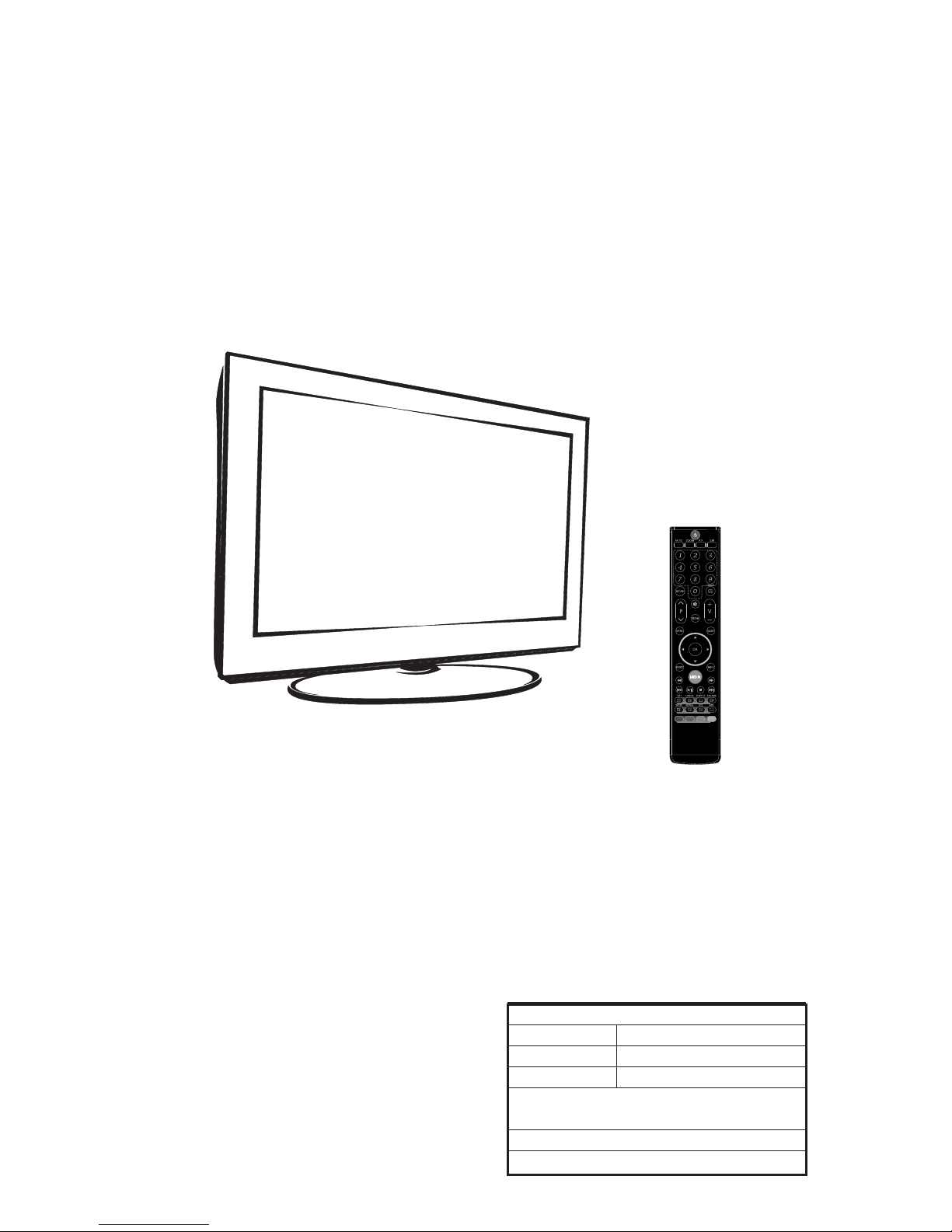
SERVICE MANUAL
Description:
MODEL.
Engineering Dept:
Artwork By:
Checked By:
Approved By:
Brand Name:
JOB NO.
Date:
Date:
Date:
SERVICE MANUAL 8M48A
2012-02-28
SKYWORTH
SIZE:A5
Design and specifications are subject to change without prior notice.
(Only Referrence)
5M92A CHASSIS
Page 2
Content--------------------------------------------------------------2
11-
41
42
43-44
45-53
54-80
81-84
85-94
Page 3
LED 8M26A
Page 4
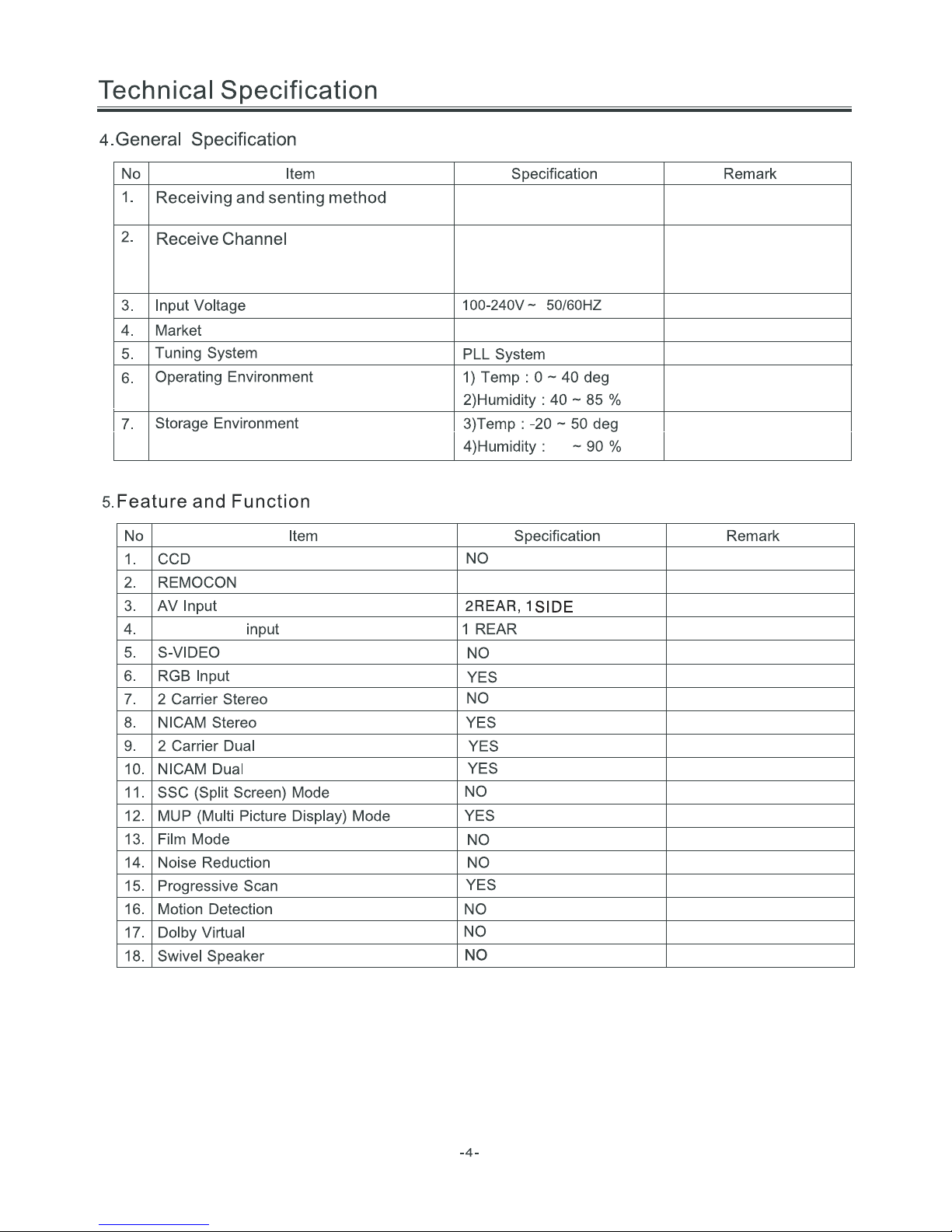
TOSHIBA CODE
Component
PAL SECAM / BG DK PAL / I
NTSC / M
VHF LOW K1~S6
VHF HIGH S7~S36
VHF S37~DS57
44.25MHz ~ 140.25MHz
147.25MHz ~ 423.25MHz
431.25MHz ~ 863.25MHz
Asia\Europe
Page 5
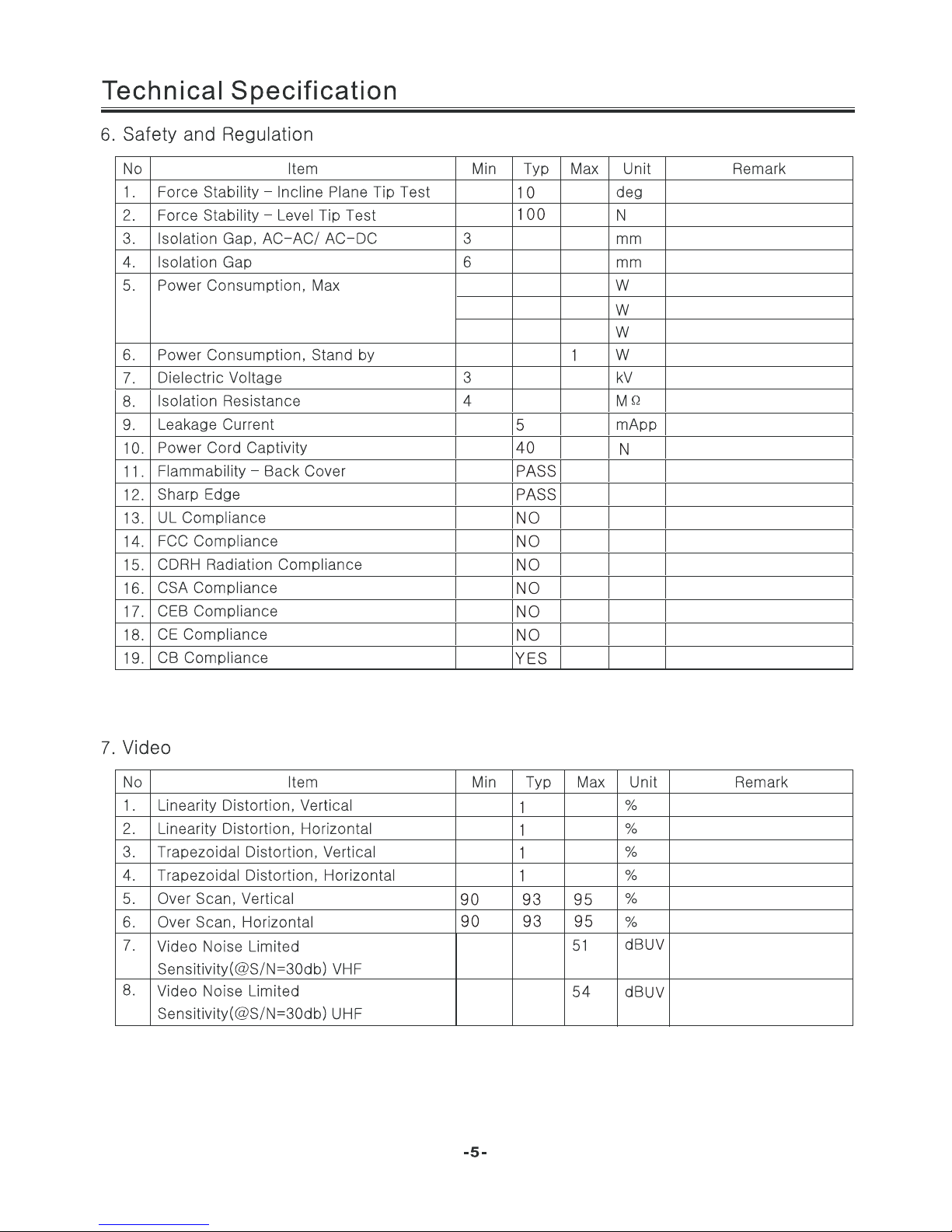
40
55
80
For 22” LED
For 24” LED
For 32” LED
Page 6
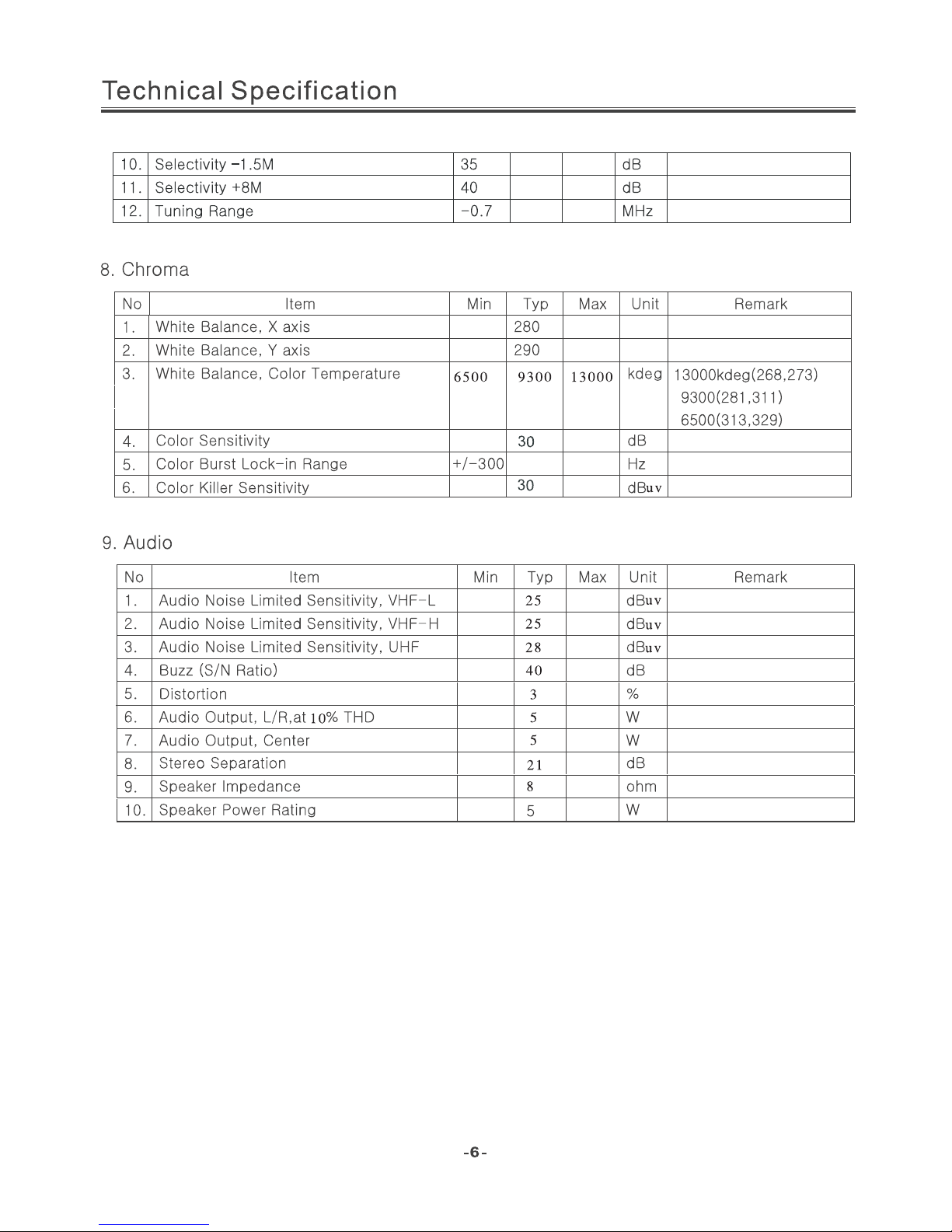
(24 inches is 3W)
(24 inches is 4 ohm)
Page 7
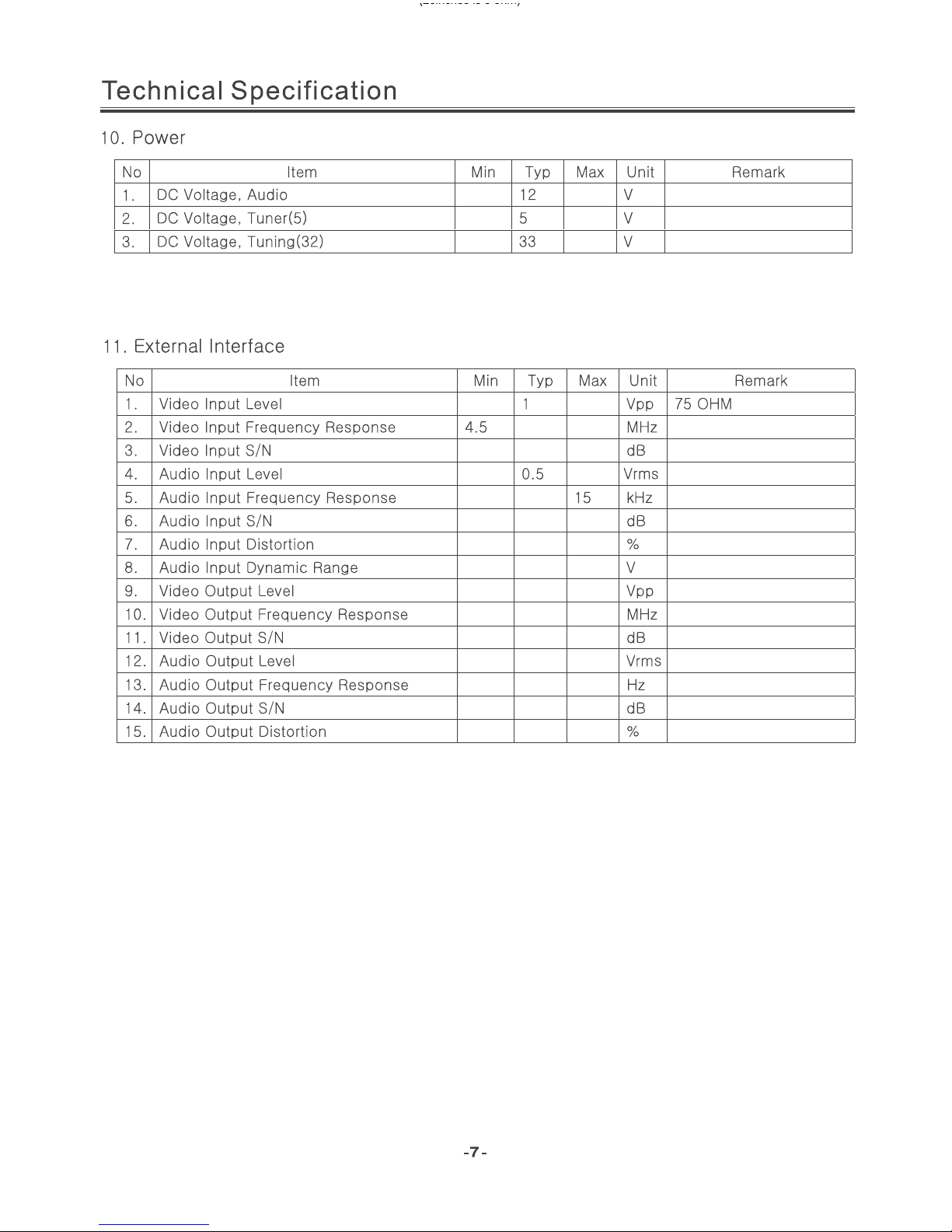
40
40
3
2
1
4.2
50
0.5
80
40
3
12000
(26inches is 8 ohm)
Page 8
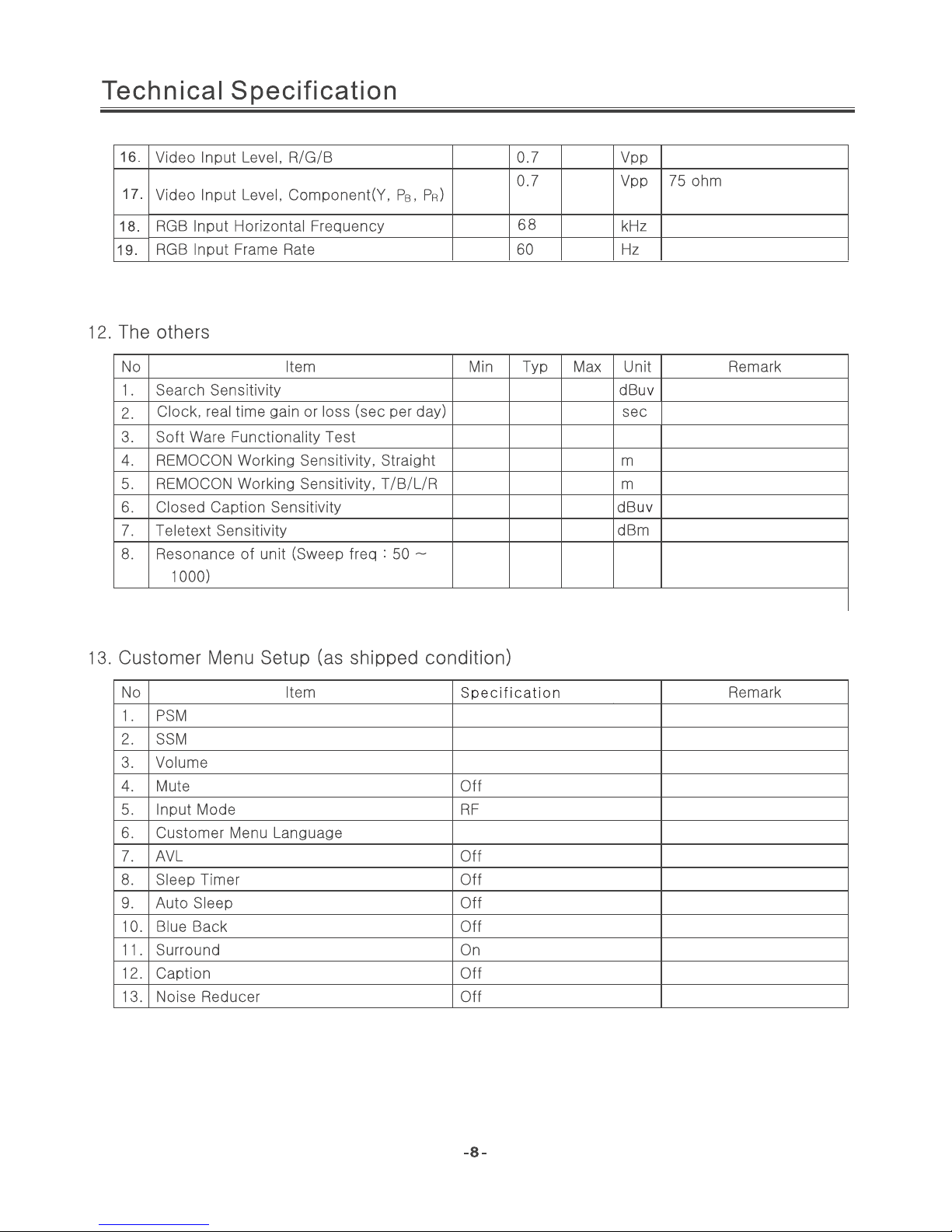
40
YES
8
6
46
46
NO
NO
Standard
Spanish
Standard
20
Page 9
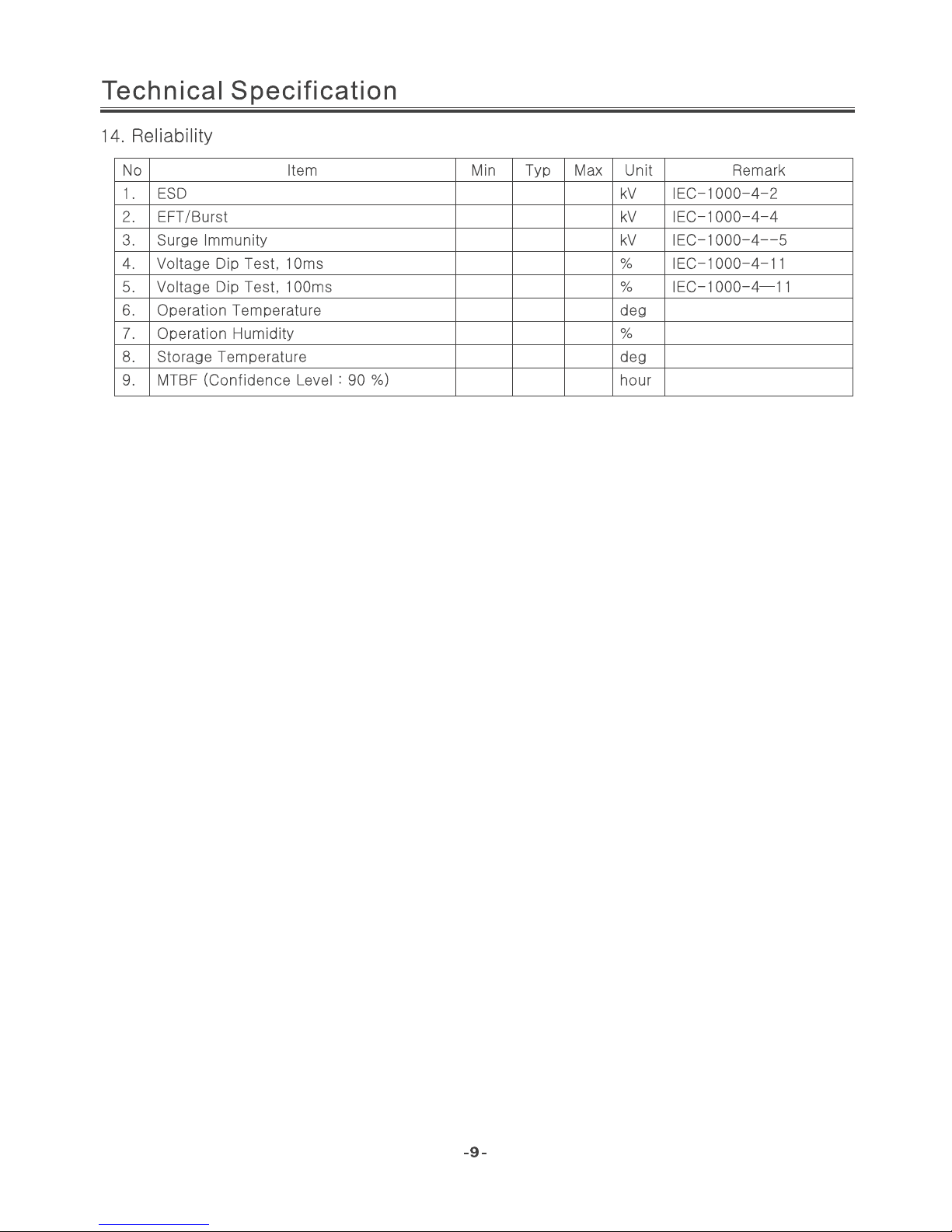
4
2
4
0 40 7 0
0 40 7 0
0 40
40 85
-Y 0 50
30000
Page 10
Page 11
AP1117
1A LOW DROPOUT POSITIVE ADJUSTABLE OR
FIXED-MODE REGULATOR
ʳ
ʳ
AP1117 Rev. 3 2 of 11 SEPTEMBER 2006
www.diodes.com © Diodes Incorporated
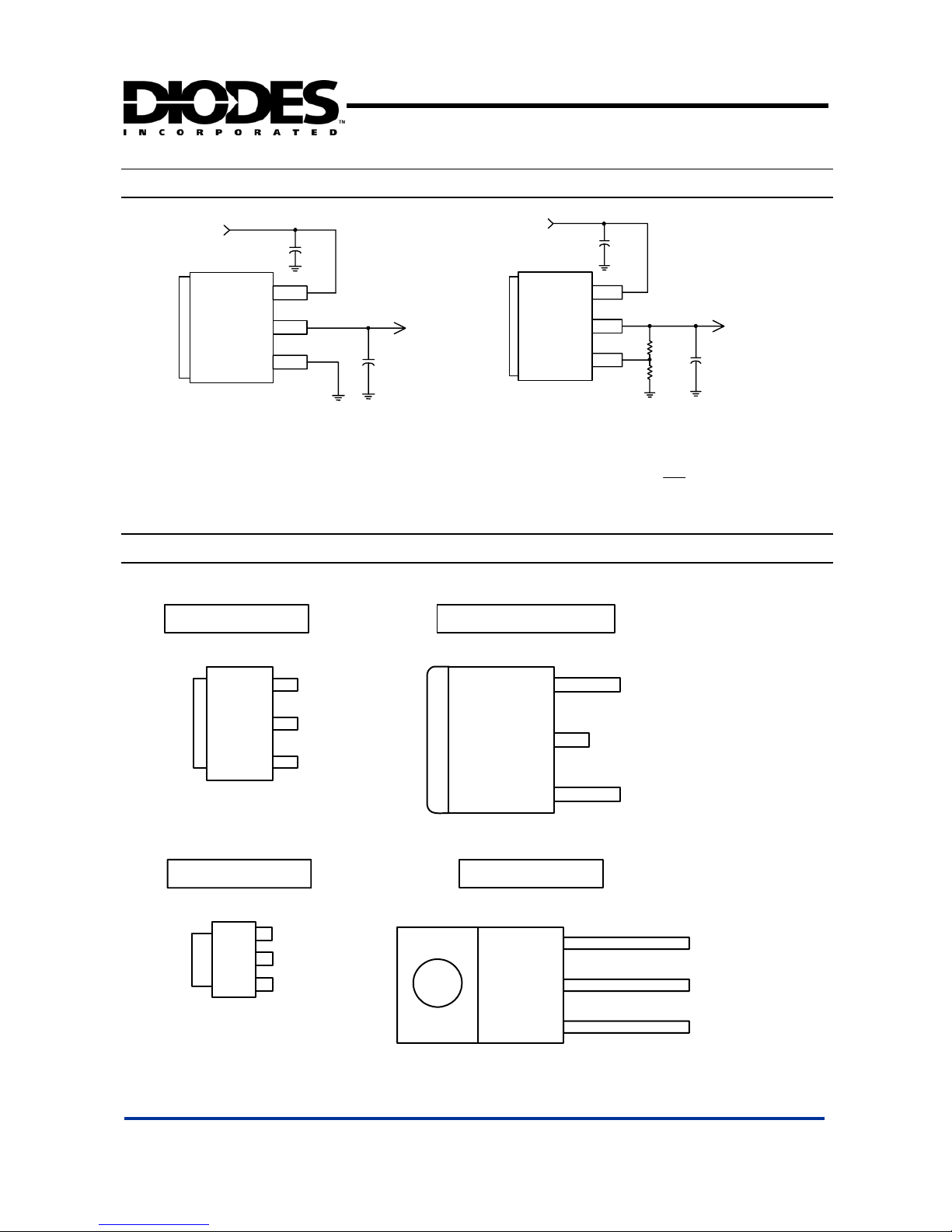
Typical Application Circuit ʳ
C2
22uF
5V
3.3V/1A
Tab is V
out
V
in
V
out
GND
C1
10uF
( 5V/3.3V fixed output ) ʳ
R1
121
R2
121
C2
22uF
5V
2.5V/1A
Tab is V
out
V
in
V
out
Adj
C1
10uF
o
V
( 5V/2.5V ADJ output ) ʳ
)
1
2
REFo
R
R
(1VV
Note:
ȍ
ȍ
ʳ
ʳ
ʳ
3 PIN SOT223 3 PIN TO252 / TO263
3 PIN TO220
(
Top View )
3
2
1
V
in
V
out
Adj ( GND)
Tab is V
out
Tab is V
out
V
in
V
out
Adj ( GND)
(
Top View )
3
2
1
3 PIN SOT89
V
in
V
out
Adj ( GND)
Tab is V
out
3
2
1
Adj ( GND)
V
in
V
out
Tab is V
out
3
2
1
ʳ
Connection Diagramʳ
Page 12
AP1117
1A LOW DROPOUT POSITIVE ADJUSTABLE OR
FIXED-MODE REGULATOR
ʳ
ʳ
AP1117 Rev. 3 3 of 11 SEPTEMBER 2006
www.diodes.com © Diodes Incorporated
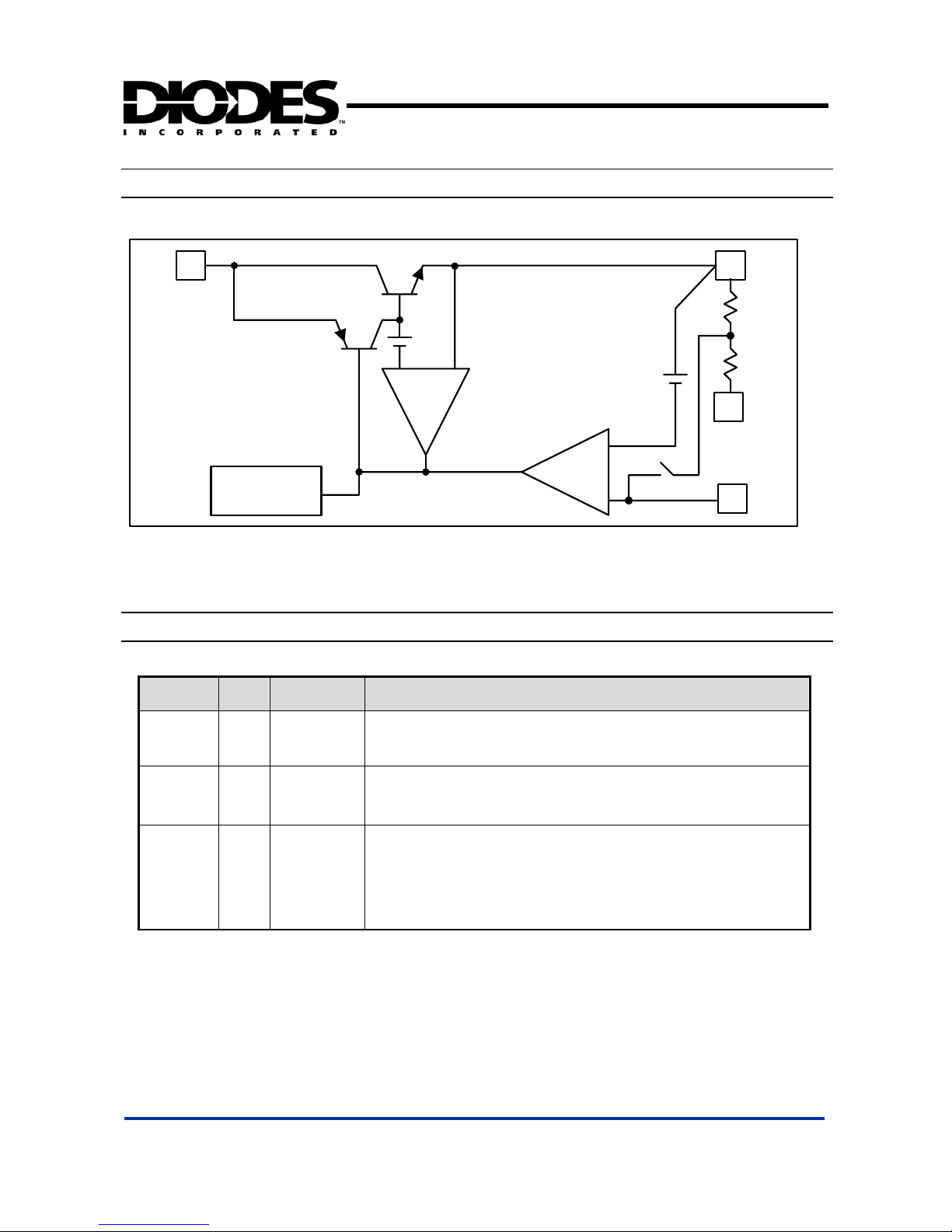
Block Diagramʳ
NAME I/O PIN # FUNCTION
Adj (GND) I 1
A resistor divider from this pin to the V
out
pin and ground sets the output voltage
(Ground only for Fixed-Mode).
V
out
O 2
The output of the regulator. A minimum of 10uF capacitor (0.15ȍ ESR 20ȍ)
must be connected from this pin to ground to insure stability.
V
in
I 3
The input pin of regulator. Typically a large storage capacitor (0.15ȍ ESR 20ȍ)
is connected from this pin to ground to insure that the input voltage does not sag
below the minimum dropout voltage during the load transient response. This pin
must always be 1.3V higher than V
out
in order for the device to regulate properly.
Pin Descriptionsʳ
3
Thermal
Shutdown
1
2
V
out
Adj
1.25V
+
+
CURRENT
LIMIT
V
in
-
+
+
1
GND
(FIXED)
-
Page 13
AI SEMI ELECTRONICS LTD. 2
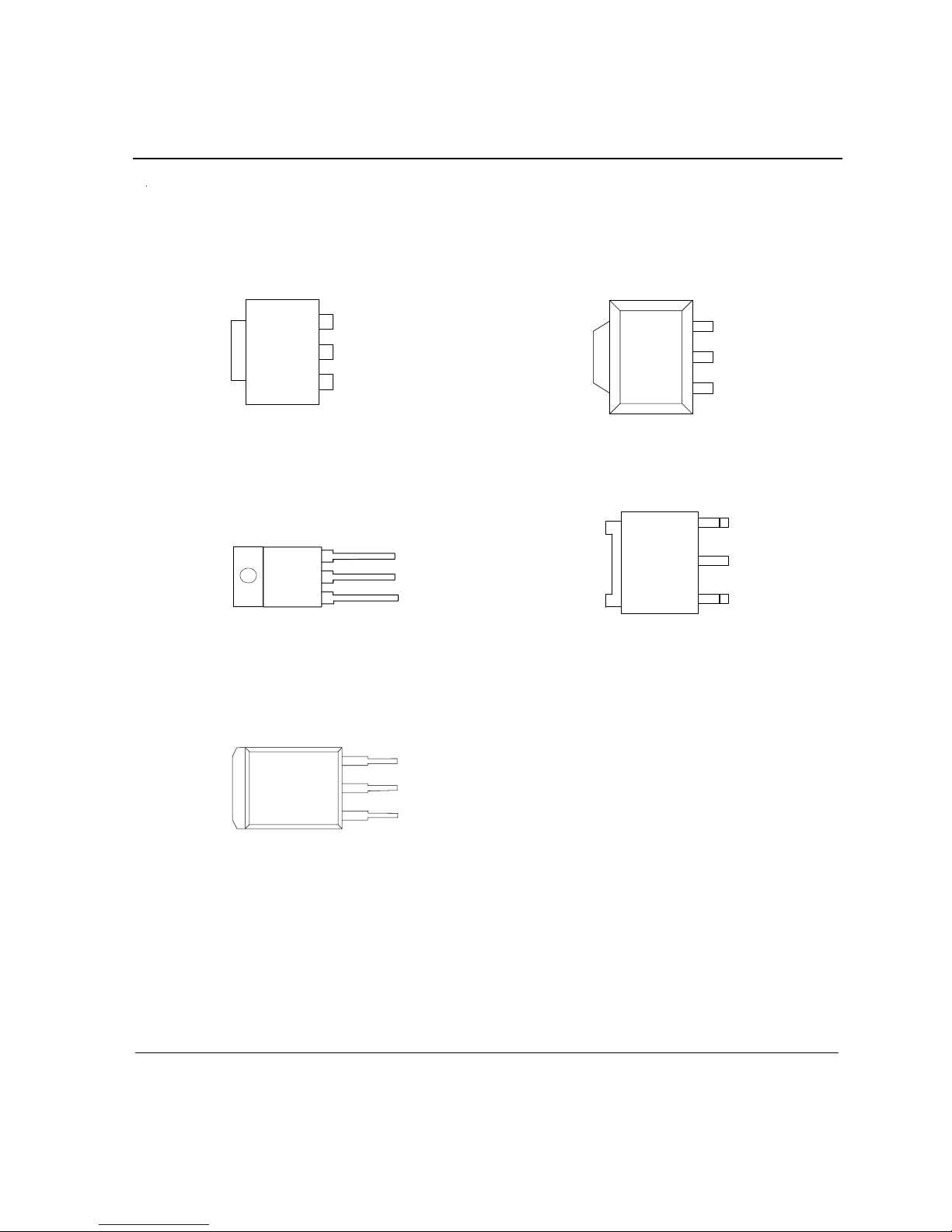
L Package
(SOT-223)
T Package
(TO-220) (TO-252)
Pin Configurations
INPUT
OUTPUT
ADJ/GND
V
OUT
INPUT
OUTPUT
ADJ/GND
V
OUT
INPUT
OUTPUT
ADJ/GND
V
OUT
Figure 2. Pin Configurations of AS111 7
1
2
3
1
2
3
1
2
3
U Package
ADJ/GND
OUTPUT
INPUT
V
OUT
S Package
(TO-263)
R Package
INPUT
OUTPUT
ADJ/GND
(SOT-89)
1
2
3
1
2
3
V
OUT
http://www.a1semi.com
AS1117
A1semi 1A Fixed and Adjustable Low
Electronics Ltd Dropout Linear Regulator(LDO)
A1
A1
A1
Page 14
A1 SEMI ELECTRONICS LTD. 3
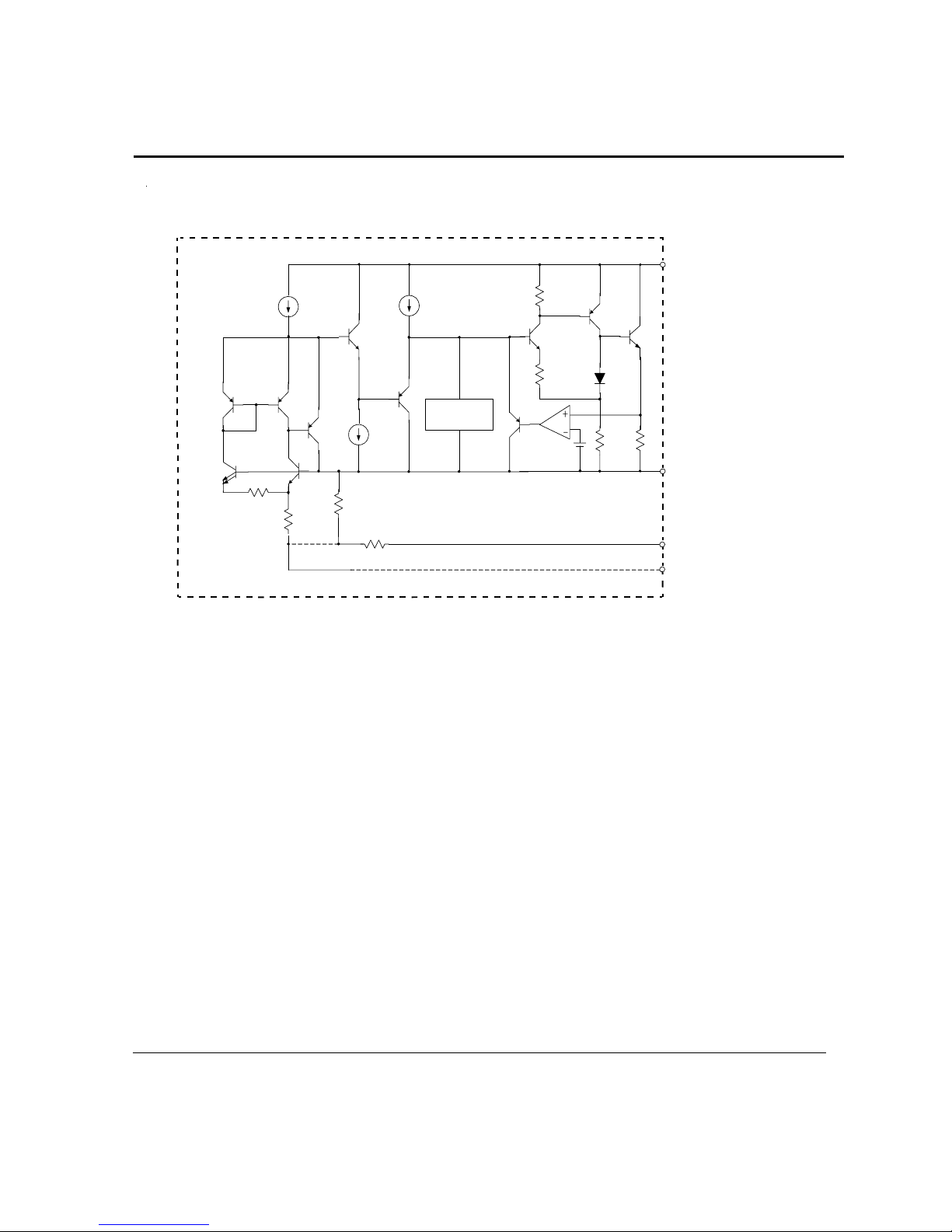
Functional Block Diagram
GND (Fixed Output)
ADJ (Adjustable Output)
Thermal
Shutdown
Out
+
-
INPUT
OUTPUT
Figure 3. Functional Block Diagram of AS1117
http://www.a1semi.com
AS1117
A1semi 1A Fixed and Adjustable Low
Electronics Ltd Dropout Linear Regulator(LDO)
A1
A1
A1
Page 15
Rev. 1.0 June 2011 www.aosmd.com Page 1 of 14
AOZ1051PI
EZBuck™ 3 A Synchronous Buck Regulator
General Description
The AOZ1051PI is a high efficiency, easy to use, 3 A
synchronous buck regulator. The AOZ1051PI works from
4.5 V to 18 V input voltage range, and provides up to 3 A
of continuous output current with an output voltage
adjustable down to 0.8 V.
The AOZ1051PI comes in an exposed pad SO-8
package and is rated over a -40 °C to +85 °C operating
ambient temperature range.
Features
z 4.5 V to 18 V operating input voltage range
z Synchronous Buck: 70 m internal high-side switch
and 40 m internal low-side switch (at 12 V)
z Up to 95 % efficiency
z External soft start
z Output voltage adjustable to 0.8 V
z 3 A continuous output current
z 500 kHz PWM operation
z Cycle-by-cycle current limit
z Pre-bias start-up
z Short-circuit protection
z Thermal shutdown
z Exposed pad SO-8 package
Applications
z Point of load DC/DC converters
z LCD TV
z Set top boxes
z DVD and Blu-ray players/recorders
z Cable modems
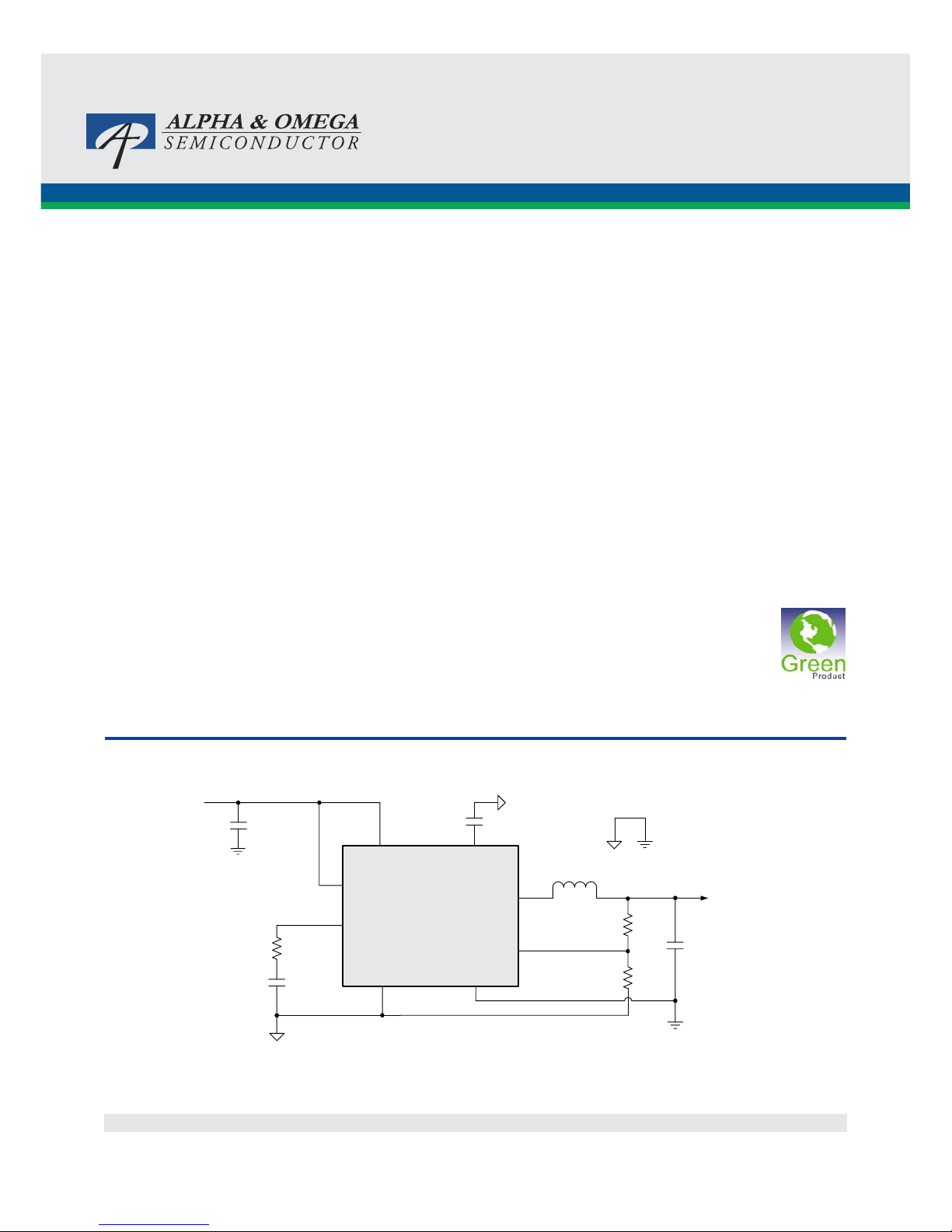
Typical Application
Figure 1. 3.3 V 3 A Synchronous Buck Regulator, Fs = 500 kHz
LX
VIN
VIN
VOUT
FB
PGND
EN
COMP
AGND
C2, C3
22μF
R1
R2
C
C
C
SS
R
C
C1
10μF
L1 4.7μH
AOZ1051PI
SS
Page 16
AOZ1051PI
Rev. 1.0 June 2011 www.aosmd.com Page 2 of 14
Ordering Information
AOS Green Products use reduced levels of Halogens, and are also RoHS compliant.
Please visit www.aosmd.com/web/quality/rohs_compliant.jsp for additional information.
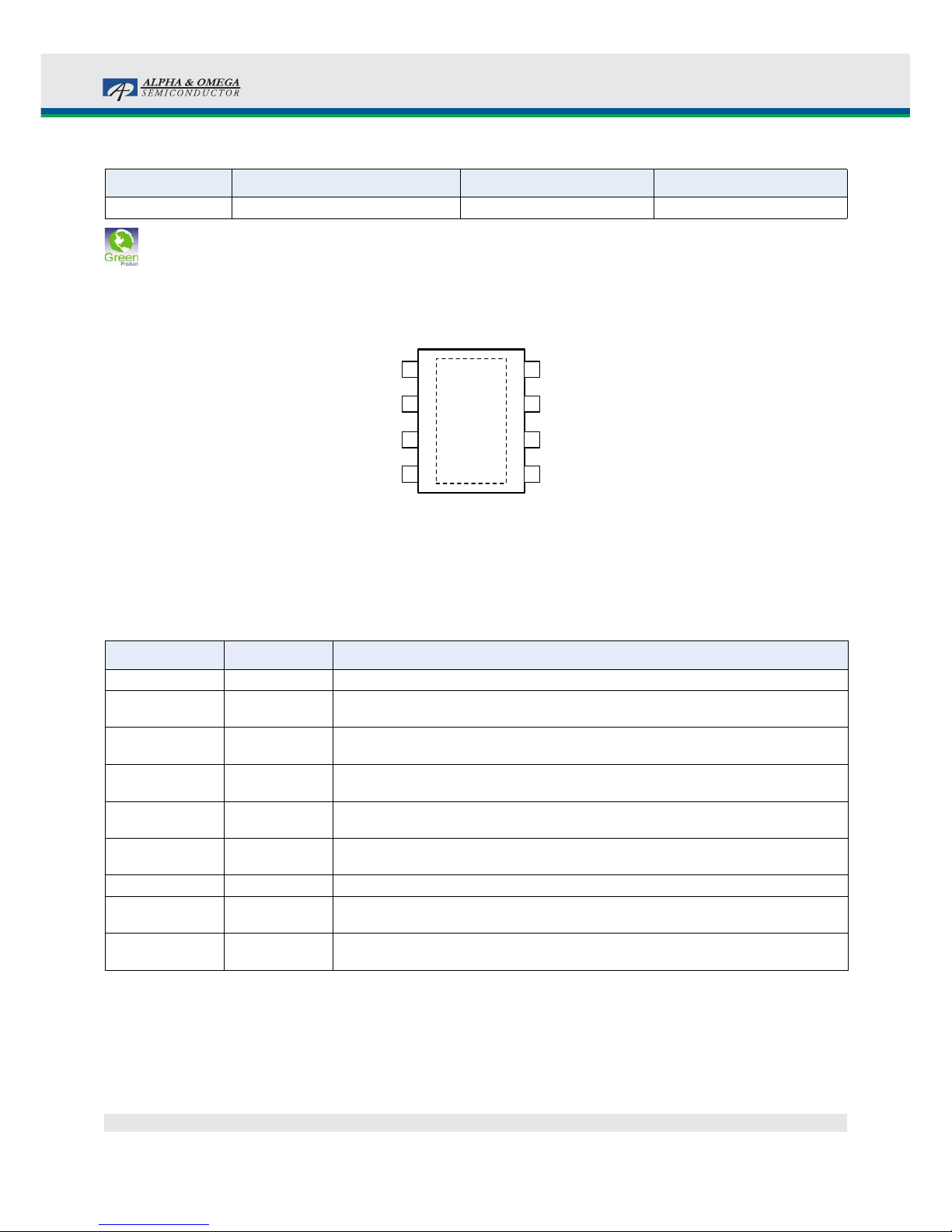
Pin Configuration
Pin Description
Part Number Ambient Temperature Range Package Environmental
AOZ1051PI -40 °C to +85 °C EPAD SO-8 Green Product
1
2
3
4
PGND
VIN
A
GND
FB
Exposed Pad SO-8
(Top View)
PAD
(LX)
NC
SS
EN
COMP
8
7
6
5
Pin Number Pin Name Pin Function
1 PGND Power ground. PGND needs to be electrically connected to AGND.
2 VIN Supply voltage input. When VIN rises above the UVLO threshold and EN is logic high,
the device starts up.
3 AGND Analog ground. AGND is the reference point for controller section. AGND needs to be
electrically connected to PGND.
4 FB Feedback input. The FB pin is used to set the output voltage via a resistive voltage divider
between the output and AGND.
5 COMP External loop compensation pin. Connect a RC network between COMP and AGND to
compensate the control loop.
6 EN Enable pin. Pull EN to logic high to enable the device. Pull EN to logic low to disable the
device. If on/off control in not needed, connect EN to VIN and do not leave it open.
7 SS Soft-start pin. 5 μA current charging current.
8 NC No Connect Pin. Pin 8 is not internally connected. Connect this pin externally to LX and
use it for better thermal performance.
Exposed pad LX Switching node. LX is the drain of the internal PFET. LX is used as the thermal pad of the
power stage.
Page 17
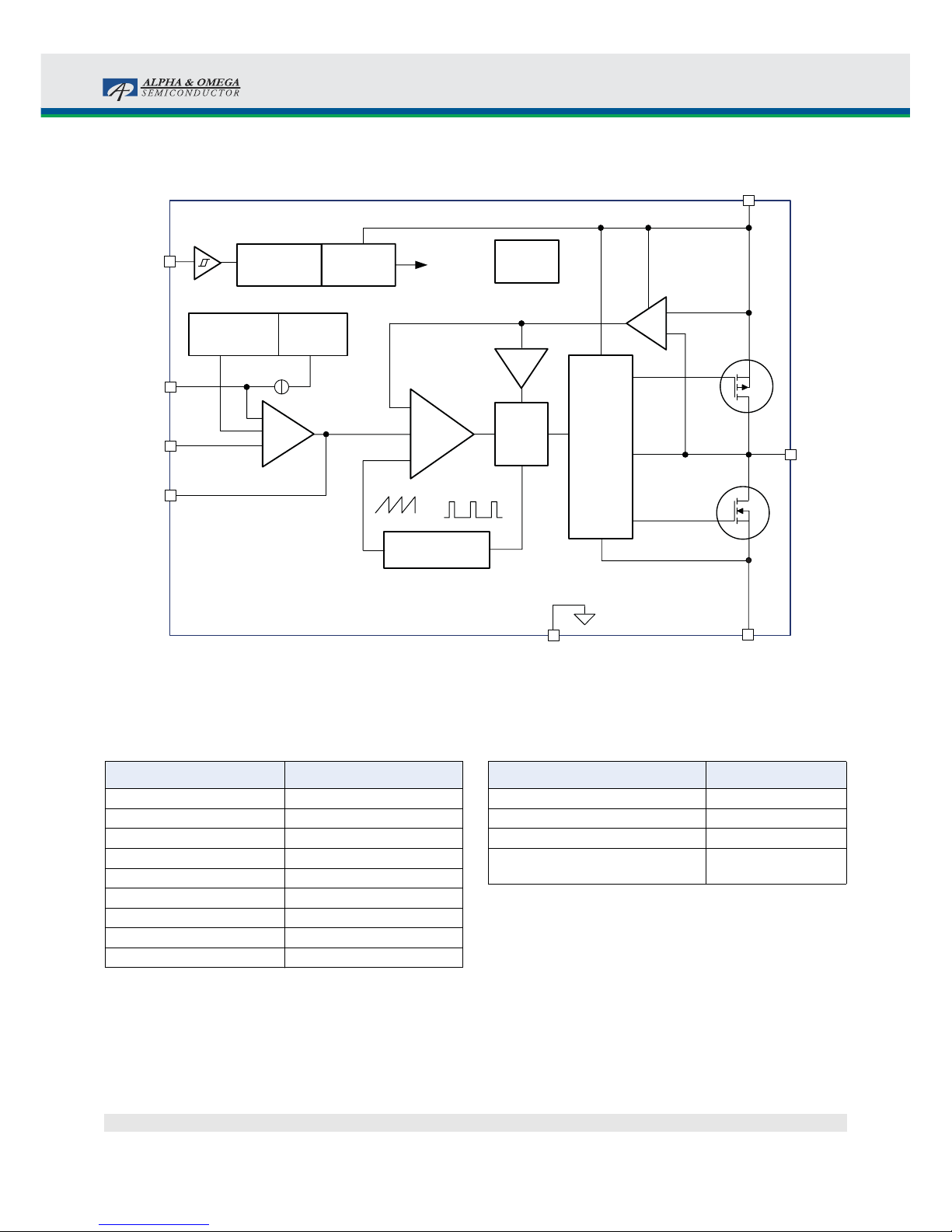
AOZ1051PI
Rev. 1.0 June 2011 www.aosmd.com Page 3 of 14
Block Diagram
Absolute Maximum Ratings
Exceeding the Absolute Maximum Ratings may damage the
device.
Note:
1. Devices are inherently ESD sensitive, handling precautions are
required. Human body model rating: 1.5 k
in series with 100 pF.
Recommended Operating Conditions
The device is not guaranteed to operate beyond the Maximum
Recommended Operating Conditions.
Note:
2. The value of
4
JA
is measured with the device mounted on a 1-in
2
FR-4 board with 2 oz. Copper, in a still air environment with
T
A
= 25 °C. The value in any given application depends on the
user’s specific board design.
500kHz
Oscillator
AGND
PGND
VIN
EN
FB
SS
COMP
LX
OTP
Internal
+5V
ILimit
PWM
Control
Logic
5V LDO
Regulator
UVLO
& POR
Softstart
Reference
& Bias
0.8V
SS
5μA
Q1
Q2
PWM
Comp
Level
Shifter
+
FET
Driver
ISen
EAmp
+
–
+
–
+
–
+
Parameter Rating
Supply Voltage (VIN) 20 V
LX to AGND -0.7 V to V
IN
+0.3 V
LX to AGND (20 ns) -5 V to 22 V
EN to AGND -0.3 V to V
IN
+0.3 V
FB, SS, COMP to AGND -0.3 V to 6.0 V
PGND to AGND -0.3 V to +0.3 V
Junction Temperature (T
J
) +150 °C
Storage Temperature (T
S
) -65 °C to +150 °C
ESD Rating
(1)
2.0 kV
Parameter Rating
Supply Voltage (VIN) 4.5 V to 18 V
Output Voltage Range 0.8 V to 0.85 • V
IN
Ambient Temperature (TA) -40 °C to +85 °C
Package Thermal Resistance
Exposed Pad SO-8 (4
JA
)
(2)
50 °C/W
Page 18
SY8086
High Efficiency 1.4MHz, 1A
Synchronous Step Down Regulator
Preliminary Specification
SY8086 Rev. 0.11 Silergy Corp. Confidential- Prepared for Customer Use Only 1
General Description
The SY8086 is a high-efficiency 1.4MHz synchronous
step-down DC-DC regulator ICs capable of delivering
up to 1A output current. The SY8086 operates over a
wide input voltage range from 2.5V to 5.5V and
integrate main switch and synchronous switch with
very low R
DS(ON)
to minimize the conduction loss.
Low output vol tage ripple and sm all external induct or
and capacitor sizes are achieved with 1.4MHz
switching frequency. This along with small SOT-23
footprint provides small PCB area application.
Ordering Information
Temperature Code
Package Code
Optional Spec Code
SY8086
ƶƶƶƶ(ƶƶ
ƶƶƶƶ
ƶƶ)ƶƶƶƶ
Temperature Code
Package Code
Optional Spec Code
SY8086
ƶƶƶƶ(ƶƶ
ƶƶƶƶ
ƶƶ)ƶƶƶƶ
Temperature Range: -40
e
C to 85eC
Features
•
Low R
DS(ON)
for inter n al sw itches (top/bottom):
250m
Ω
/200m
Ω
•
2.5-5.5V input voltage range
•
1.4MHz switching frequency minimizes the
external components
•
Internal softstart limits the inrush current
•
RoHS Compli an t a nd Hal oge n Fr ee
•
Compact package: SOT23 5 pin
Applications
•
Portable Navigation Device
•
Smart phone
•
USB Dongle
•
Set Top Box
•
Media Player
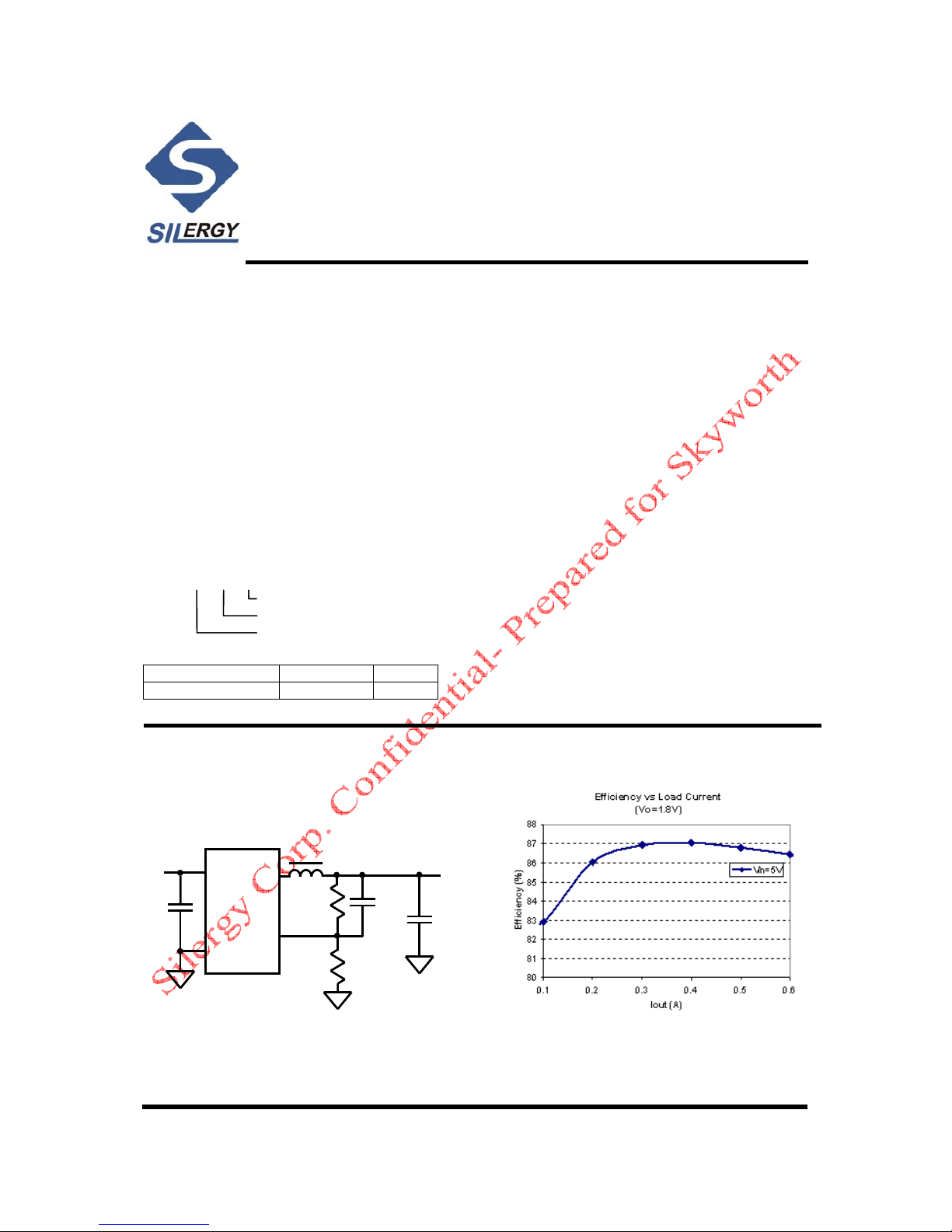
Typical Applications
LX
IN
GND
FB
EN
V
IN
C
IN
L
R
1
R
2
V
OUT
C
OUT
C1(opt.)
Figure 1. Schematic Diagram Figure2 Efficiency vs Load Current
Ordering Number Package type Note
SY8086AAC SOT23-5 1A
Page 19
SY8086
SY8086 Rev. 0.11 Silergy Corp. Confidential- Prepared for Customer Use Only 2
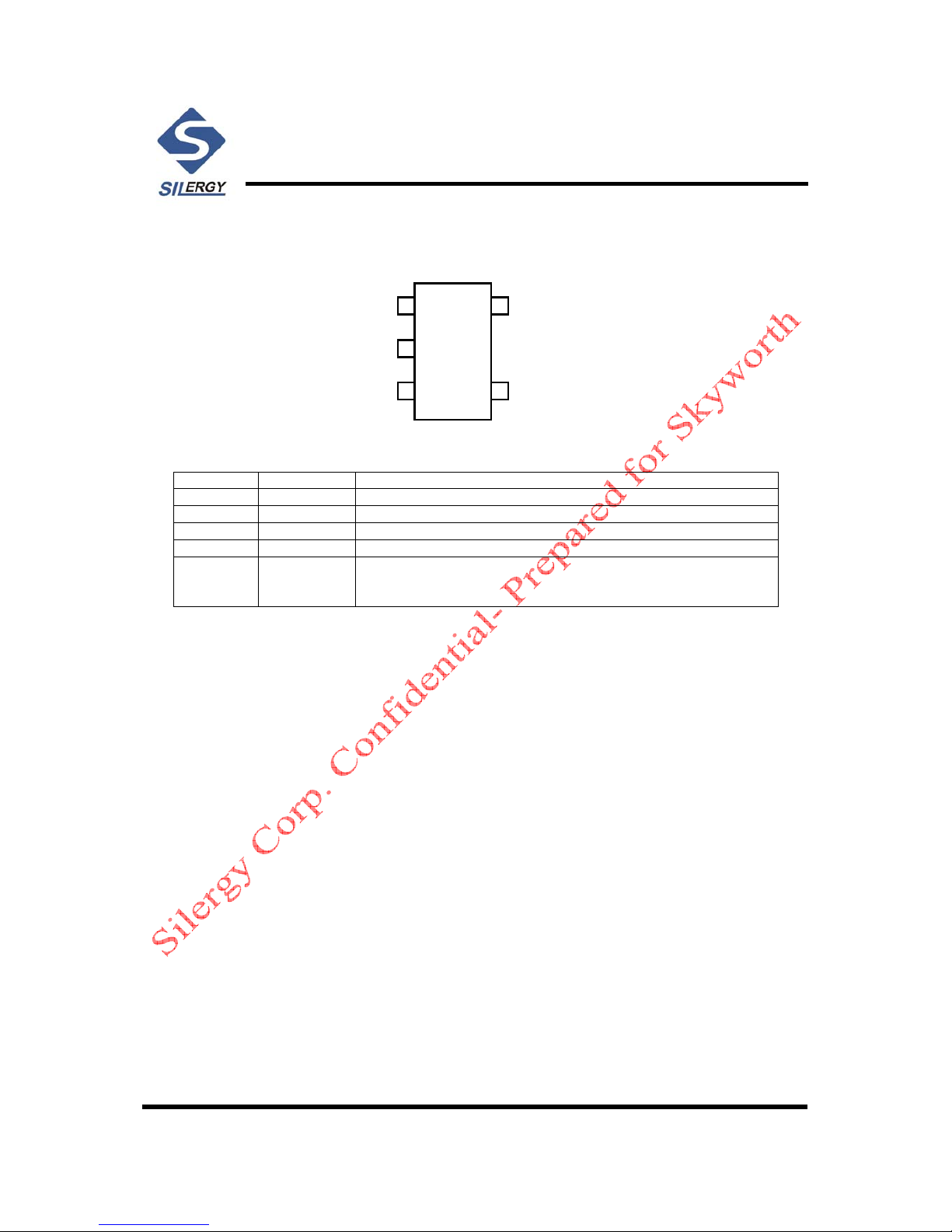
Pinout (top view)
EN
GND
LX
IN
FB
1
2
3
5
4
EN
GND
LX
IN
FB
1
2
3
5
4
SOT23-5
Top mark:
BE
xyz
(Device code: BE, x=year code, y=week code, z= lot number code)
Pin Name Pin Number Pin Description
EN 1 Enable control. Pull high to turn on. Do not float.
GND 2 Ground pin
LX 3 Inductor pin. Connect this pin to the switching node of inductor
IN 4 Input pin. Decouple this pin to GND pin with at least 1uF ceramic cap
FB 5 Output Feedback Pin. Connect this pin to the center point of the output
resistor divid e r ( as sh ow n in Fi gu r e 1) to pr o gra m th e out p ut voltage:
Vout=0.6*(1+R
1/R2
)
Absolute Maximum Ratings
(Note 1)
Supply Input Voltage --------------------------------------------------------------------------------------------- 6.0V
Enable, FB Voltage------------------------------------------------------------------------------------------------ V
IN
+ 0.6V
Power Dissipation, P
D
@ TA = 25°C SOT-23-5 -------------------------------------------------------------- 0.4W
Package Thermal Resistance (Note 2)
SOT23-5,
θ
JA
------------------------------------------------------------------------------------------ 250°C/W
SOT23-5,
θ
JC
-------------------------------------------------------------------------------------------130°C/W
Junction Temperature Range ------------------------------------------------------------------------------------ 150°C
Lead Temperature (Soldering, 10 sec.) ------------------------------------------------------------------------- 260°C
Storage Temperature Range -------------------------------------------------------------------------------------
-
65°C to 150°C
ESD Susceptibility (Note 2)
HBM (Human Body Mode) -------------------------------------------------------------------------------------- 2kV
MM (Machine Mode) ----------------------------------------------------------------------------------------------200V
Recommended Operating Conditions
(Note 3)
Supply Input Voltage --------------------------------------------------- ---- ------------------------------------- 2.5V to 5.5V
Junction Temperature Range ---------------------------------------------------------------------------------- -40°C to 125°C
Ambient Temperature Range ----------------------------------------------------------------------------------
-
40°C to 85°C
Page 20

IC Block Diagram
-13-
U10(LCDTV CONTROLLER WITH VIDEO ECODE)MST6E181VS
PIN DIAGRAM (MST6E181VS)
MST6E181VS
198
199
217
2
1
216
215
214
213
212
211
210
209
208
207
206
205
204
203
202
201
200
197
196
195
194
193
192
191
190
189
188
187
186
185
184
183
182
181
180
179
178
177
176
175
174
173
172
171
170
169
168
167
166
165
164
163
162
161
160
159
158
157
156
155
154
153
152
151
150
149
148
147
146
145
144
143
142
141
140
139
138
137
136
135
134
133
132
131
130
129
128
127
126
125
124
123
122
121
120
119
118
117
116
115
114
113
112
111
110
109
108
107
106
105
104
103
102
101
100
99
98
97
96
95
94
93
92
91
90
89
88
87
86
85
84
83
82
81
80
79
78
77
76
75
74
73
72
71
70
69
68
67
66
65
64
63
62
61
60
59
58
57
56
55
545352515049484746
45
4443424140393837363534333231302928
2726252423222120191817161514131211
10
9876543
DM_P1
DP_P1
E-pad
CEC
IRIN
GPIO9/PM6/CS1
GPIO8/PM5/RX
GPIO7/PM4/POWER_ON
GPIO6/PM1/TX
DDCA_DA
DDCA_CK
GPIO10/PMGPIO
GPIO13/SAR2
GPIO12/SAR1
GPIO11/SAR0
SPI_CZ
SPI_DO
SPI_DI
SPI_CK
GND_EFUSE
DVDD_NODIE
AVDD_NODIE
DP_P0
DM_P0
TESTPIN
DDCR_CK
VDDP_3
DDCR_DA
VDDC
A_DDR1_A4
A_DDR1_A5
A_DDR1_A6
A_DDR1_A7
A_DDR1_A8
AVDDIO_2.5V
A_DDR1_A9
A_DDR1_A11
A_DDR1_A12
A_DDR1_CKE
NC
A_DDR1_MCLK
AVDDIO_2.5V
A_DDR1_MCLKZ
A_DDR1_DQ15
AVDDIO_2.5V
A_DDR1_DQ14
A_MVREF
A_DDR1_DQ13
A_DDR1_DQ12
A_DDR1_DQ11
A_DDR1_DQ10
AVDDIO_2.5V
A_DDR1_DQ9
A_DDR1_DQ8
UDQS0
UDQM0
AVDD_PLL
DVDD_DDR_1.2V
LDQM0
LDQS0
AVDDIO_2.5V
NC
NC
A_DDR1_DQ7
A_DDR1_DQ6
A_DDR1_DQ5
AVDDIO_2.5V
A_DDR1_DQ4
A_DDR1_DQ3
A_DDR1_DQ2
A_DDR1_DQ1
AVDDIO_2.5V
A_DDR1_DQ0
A_DDR1_WEZ
A_DDR1_CAS
A_DDR1_RAS
A_DDR1_BA0
AVDDIO_2.5V
A_DDR1_BA1
A_DDR1_A10
A_DDR1_A0
A_DDR1_A1
A_DDR1_A2
A_DDR1_A3
NC
NC
VDDC
GPIO21/PWM1
GPIO20/PWM0
VDDP_2
GPIO77/I2S_OUT_MUTE/PWM3/LVSYNC
GPIO76/I2S_IN_BCK/PWM2/LHSYNC
GPIO75/I2S_IN_SD/PWM5/TX3/LDE
GPIO74/I2S_IN_WS/PWM4/RX3/LCK
AVDD_LPLL
AVDD2P5_MOD
VDDC
R_ODD7/RXO0-
R_ODD6/RXO0+
R_ODD5/RXO1-
R_ODD4/RXO1+
R_ODD3/RXO2-
R_ODD2/RXO2+
R_ODD1/RXOC-
R_ODD0/RXOC+
G_ODD7/RXO3-
G_ODD6/RXO3+
G_ODD5/RXO4-
G_ODD4/RXO4+
G_ODD3/RXE0-
G_ODD2/RXE0+
AVDD2P5_MOD
G_ODD1/RXE1G_ODD0/RXE1+
B_ODD7/RXE2B_ODD6/RXE2+
B_ODD5/RXECB_ODD4/RXEC+
B_ODD3/RXE3B_ODD2/RXE3+
B_ODD1/RXE4B_ODD0/RXE4+
NC
GPIO49
GPIO47
GPIO45
GPIO38
GPIO37
GPIO36
GPIO32/I2S_OUT_BCK
GPIO30/I2S_OUT_MCK
GPIO28
VDDP_1
VDDC
GPIO27/SPDIF_OUT
GPIO26/SPDIF_IN/RX1/PWM3
GPIO25/TUNER_SDA
GPIO24/TUNER_SCL
GPIO23/I2S_OUT_SD/TX2
GPIO22/I2S_OUT_WS/RX2
TAGC
SIFM
SIFP
AVDD25_PGA
VIFP
VIFM
AVSS_PGA
AVDD25_REF
AVDD_DMPLL
XTAL_OUT
XTAL_IN
NC
NC
NC
LINEOUT_R0
LINEOUT_L0
LINEOUT_R3
LINEOUT_L3
AVDD_AU33
LINEIN_R5
LINEIN_L5
LINEIN_R4
LINEIN_L4
LINEIN_R3
LINEIN_L3
AVDD_AU25
VAG
VRP
VRM
LINEIN_R1
LINEIN_L1
LINEIN_R0
LINEIN_L0
CVBS_OUT1
VCOM
CVBS0
CVBS1
CVBS2
CVBS3
CVBS4
AVDD3P3_ADC
RIN1P
GIN1M
GIN1P
SOGIN1
BIN1P
AVDD2P5_ADC
AVDD1P2
VSYNC0
RIN0P
GIN0M
GIN0P
SOGIN0
BIN0P
HSYNC0
VDDC
NC
NC
NCNCNCNCNC
ARC
DDCDA_CK
RX2P
RX2N
DDCDA_DA
RX1P
RX1N
AVDD_DVI_3.3V
RX0P
RX0N
RXCP
RXCN
HOTPLUGA
RESET
U?
Page 21
PDF "pdfFactory Pro" www.fineprint.cn
Page 22
PDF "pdfFactory Pro" www.fineprint.cn
Page 23
PDF "pdfFactory Pro" www.fineprint.cn
Page 24
PDF "pdfFactory Pro" www.fineprint.cn
Page 25
PDF "pdfFactory Pro" www.fineprint.cn
Page 26
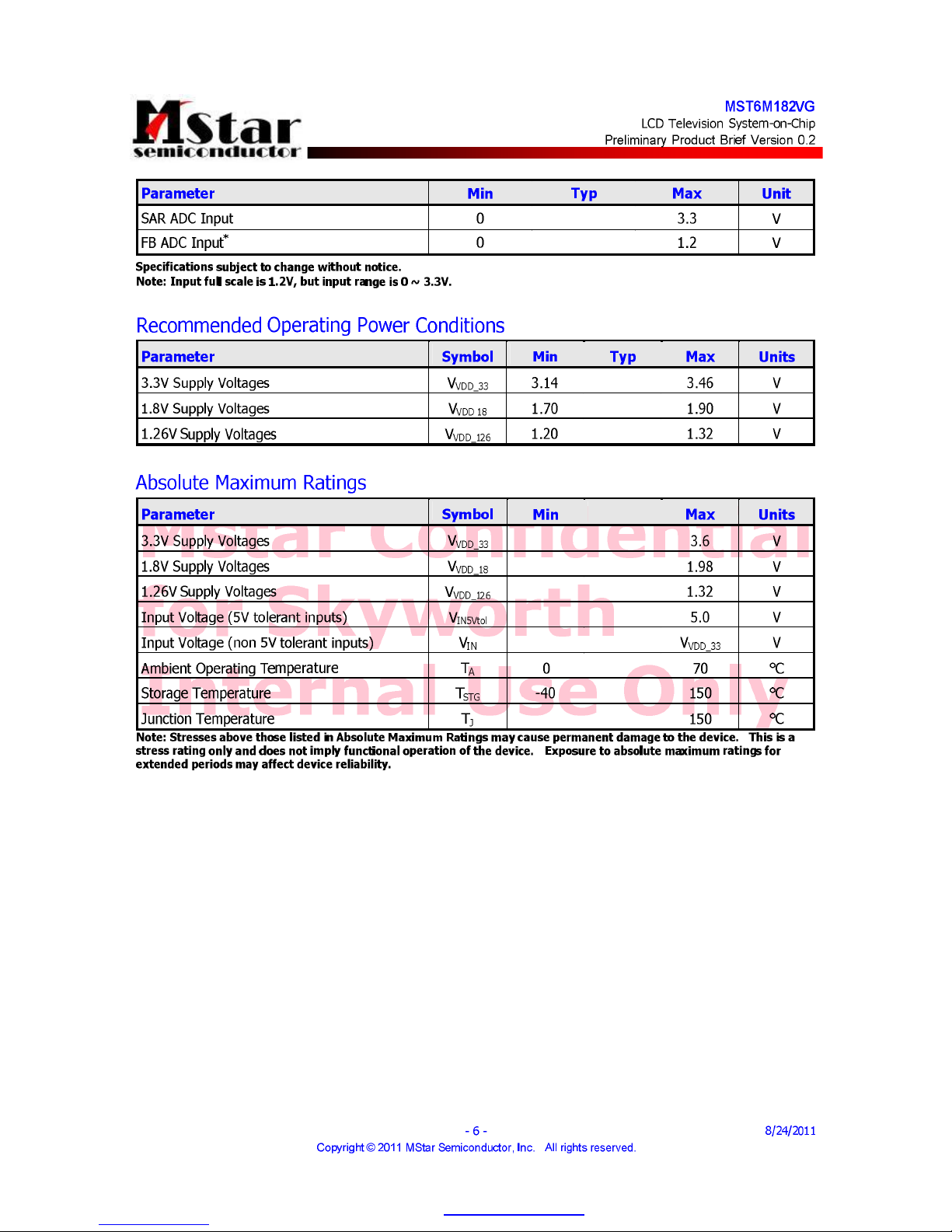
PDF "pdfFactory Pro" www.fineprint.cn
Page 27
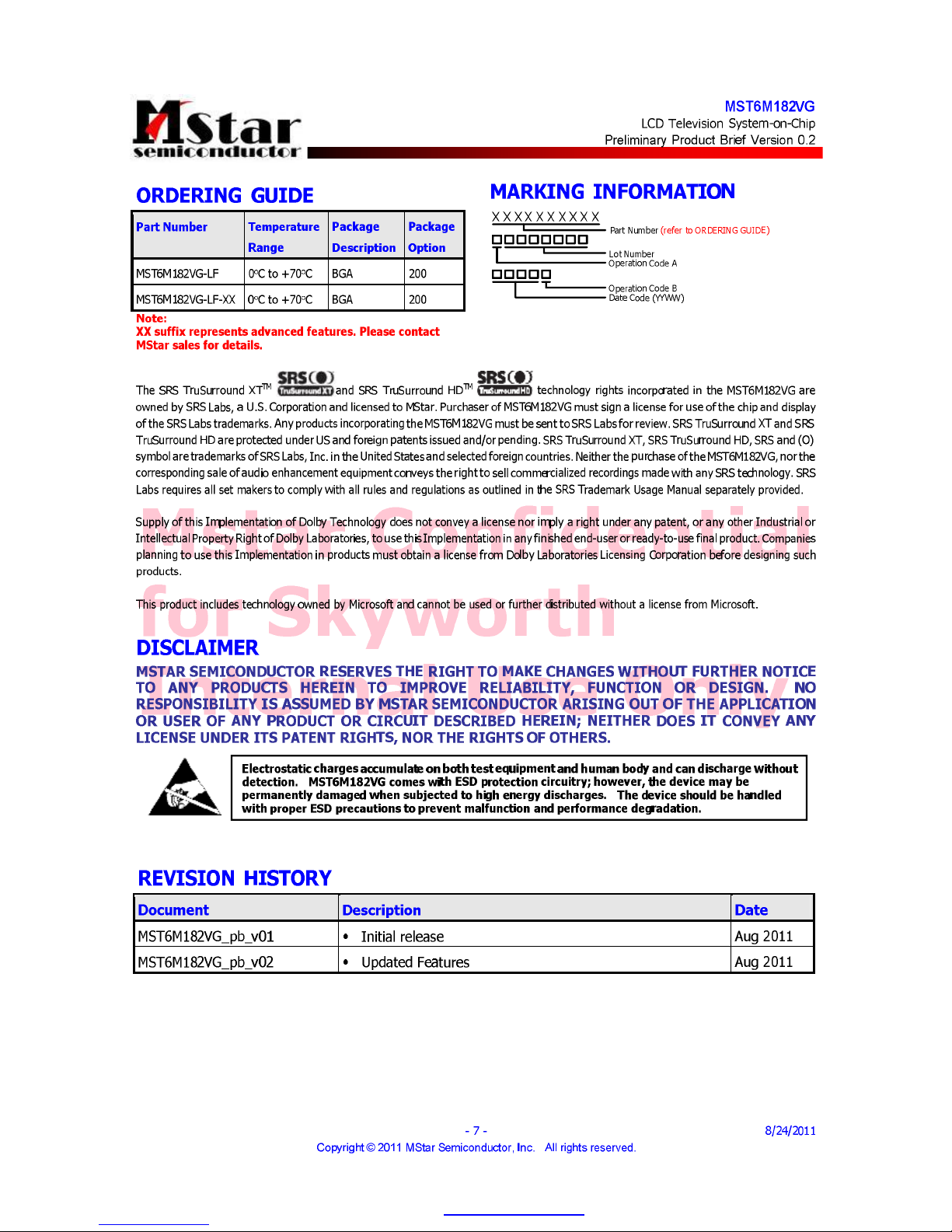
PDF "pdfFactory Pro" www.fineprint.cn
Page 28
MStar Confidential
for Skyworth
Internal Use Only
MST6M181VG/MST6M182VG
LCD Television System-on-Chip
Preliminary Pin Diagram/Description and Mechanical Dimensions Version 0.2
- 1 - 8/29/2011
Copyright
2011 MStar Semiconductor, Inc. All rights reserved.
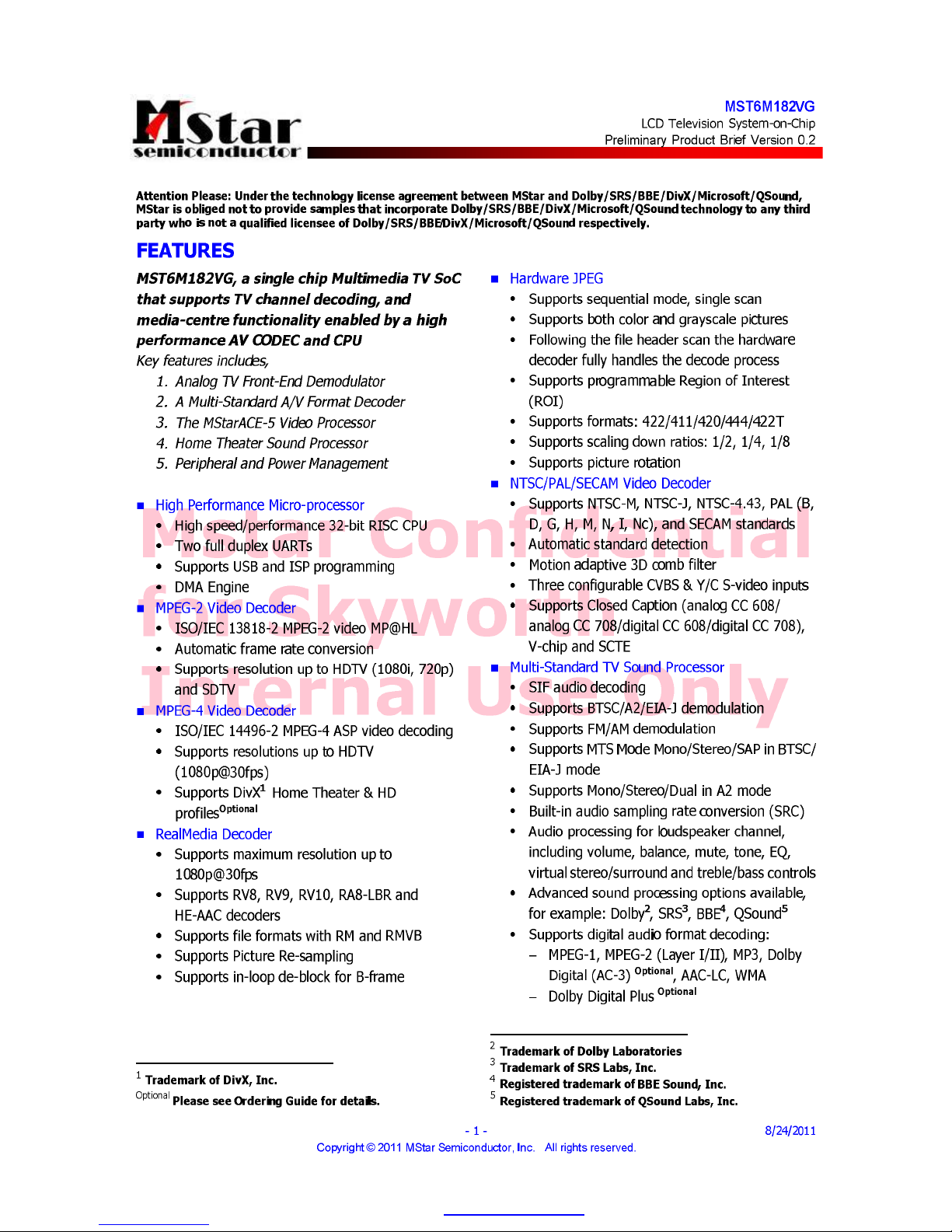
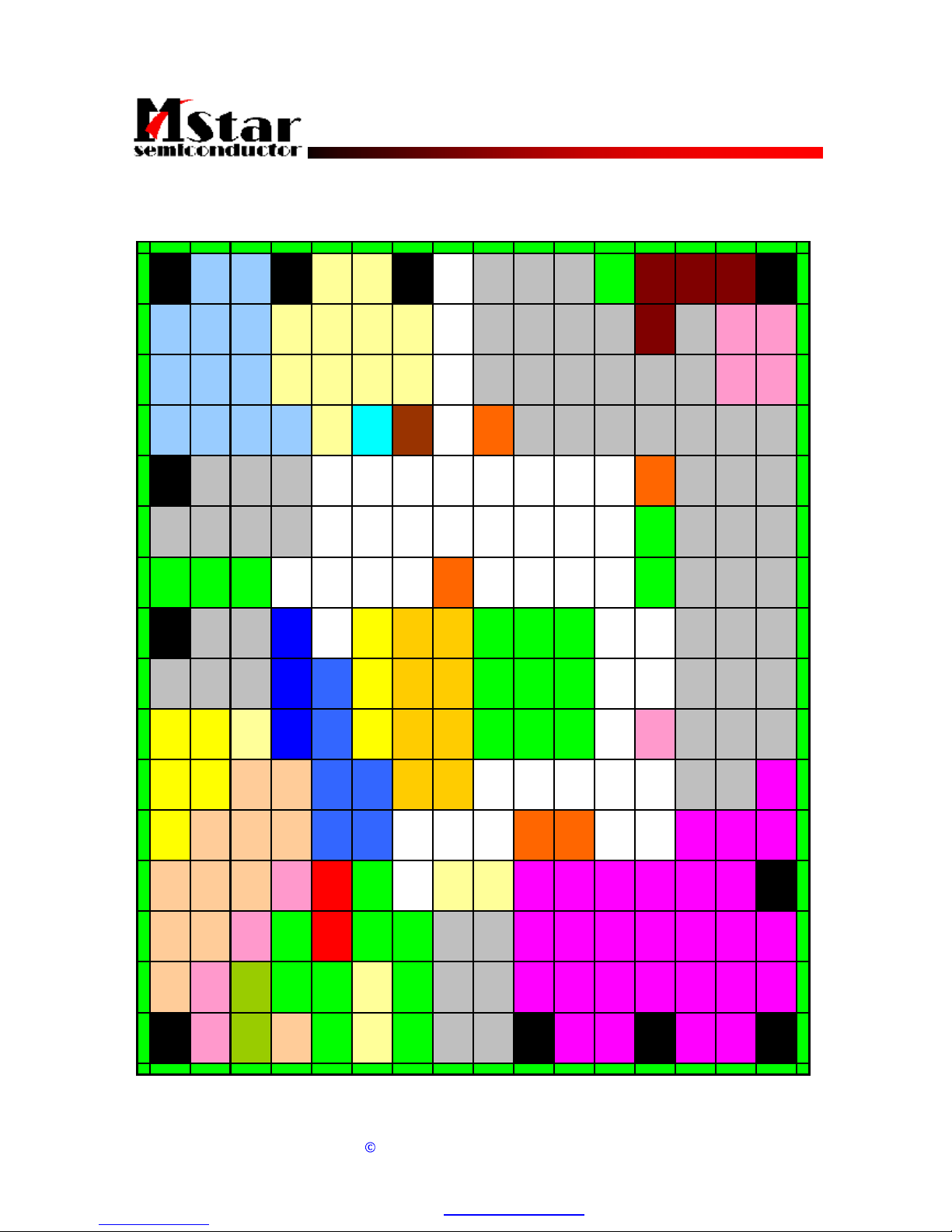
PIN DIAGRAM (MST6M181VG/MST6M182VG)
1 2 3 4 5 6 7 8 9 10111213141516
A RXCKP RXCKN NC NC HWRESET GPIO7 GPIO6 GND USB1_DM USB0_DP USB0_DM A
B RX1N RX 0P RX0N NC NC NC NC IRIN GPIO8 SAR0 PWM0 USB1_DP DDCR_CK SCZ SDO B
C RX2N RX2 P RX1 P NC NC NC NC GPIO9 SAR2 SAR 1 P WM1 GND DDCR_D A SC K S DI C
D DDCD_CK ARC
DDCD_DAHOTPLUG
A
NC CEC BYPA SS
AVDD_D
DR
DDCA_CK DDC A_DA GPIO10 GND LEDON HCON DP M D
ESOGIN0BIN0PHSYNC0
AVDD_DDRSCAN_BL
K
POL
GOE/
GCLK2
E
F RIN0P GIN0M GIN0P VSYNC0 GND
SCAN_BL
K1
WPWM OPT_ P F
G GND GND GND
AVDD_D
DR
GND SAR3 OPT_N GCLK4 G
H SOGIN1 BIN1P
AVDD_AL
IVE
AVDD_25
AVDD_126DVDD_D
DR
GND GND GND
GSP/
VST
SOE FLK3 H
J RIN1P GIN1M GIN1P AVDD_33
AVDD_ME
MPLL
AVDD_AU
25
VDDC VDDC GND GND GND
GSP_R/
GCLK1
GSC/
GCLK 3
FLK J
K CV BS2 CVB S1 NC
AVDD_D
MPLL
AVDD_MODAVDD_ RE
F
VDDC VDDC GND GND GND MVREF
VGH_OD
D
GCLK 5
VGH_EVE
N
K
L CVBS0 VCOM AUVA G AUVRP
AVDD_M
OD
VDDP VDDC V DDC FLK2 GCLK6 R LV2P L
M CVBSOUT AUL0 AUL3 GND
AVDD_AU
33
VDDP
AVDD_ DDRAVDD_D
DR
RLVCKM RLVCKP RLV2M M
N AUR0 AUL1 AUR3 AUOUTL1
AVDD_PG
A
GND N C NC RLV1 M RLV1P RLV0M RLV0P RLV3M RLV3 P N
PAUR1 AUL2AUOUTR1 GND PGA_COM GND GND
I2S_OUT
_SD
SPDIFI LLV5M LLV4M LLV3P LLV2M LLV1M RLV4M RLV4P P
RAUR2AUOUTL0 XOUT GND GND VIFM GND
I2S_OUT
_MCK
I2S_OUT
_BCK
LLV5P LLV4P LLV CKP LLV2P LLV1P RLV5M RLV5P R
T AUOUTR0 XIN TAGC GND VIFP GND
I2S_OUT
_WS
SPDIFO LLV3M LLVCKM LLV0M LLV0P T
1 2 3 4 5 6 7 8 9 10111213141516
Doc. No.:
2012010018
Doc. No.:
2012010018
PDF "pdfFactory Pro" www.fineprint.cn
Page 29

MStar Confidential
for Skyworth
Internal Use Only
MST6M181VG/MST6M182VG
LCD Television System-on-Chip
Preliminary Pin Diagram/Description and Mechanical Dimensions Version 0.2
- 2 - 8/29/2011
Copyright
2011 MStar Semiconductor, Inc. All rights reserved.
PIN DESCRIPTION
Analog Interface
Pin Name Pin Type Function Pin
HSYNC0 Schmitt Trigger Input
w/ 5V-tolerant
HSYNC / Composite Sync for VGA Input from channel 0 E4
VSYNC0 Schmitt Trigger Input
w/ 5V-tolerant
VSYNC for VGA Input from channel 0 F4
BIN0P Analog Input Analog Blue Input from Channel 0 E3
SOGIN0 Analog Input Sync On Green Input from Channel 0 E2
GIN0P Analog Input Analog Green Input from Channel 0 F3
GIN0M Analog Input Reference Ground for Analog Green Input from Channel 0 F2
RIN0P Analog Input Analog Red Input from Channel 0 F1
BIN1P Analog Input Analog Blue Input from Channel 1 H3
SOGIN1 Analog Input Sync On Green Input from Channel 1 H2
GIN1P Analog Input Analog Green Input from Channel 1 J3
GIN1M Analog Input Reference Ground for Analog Green Input from Channel 1 J2
RIN1P Analog Input Analog Red Input from Channel 1 J1
Analog Video Input/Output Interface
Pin Name Pin Type Function Pin
CVBS2 Analog Input CVBS (Composite) Video Input Channel 2 K1
CVBS1 Analog Input CVBS (Composite) Video Input Channel 1 K2
CVBS0 Analog Input CVBS (Composite) Video Input Channel 0 L1
VCOM Analog Input CVBS Input Reference Ground L2
CVBSOUT Analog Output CVBS (Composite) Video Output Channel M1
Analog Audio Input/Output Interface
Pin Name Pin Type Function Pin
I2S_OUT_WS I/O w/ 5V-tolerant Word Select Output; 4mA driving strength /
Universal Asynchronous Receiver 2 (UART2_RX)
T8
I2S_OUT_SD I/O w/ 5V-tolerant Audio Serial Data Output; 4mA driving strength /
Universal Asynchronous Transmitter 2 (UART2_TX)
P8
SPDIFI Input w/ 5V-tolerant S/PDIF Audio Input /
Pulse Width Modulation Output; 4mA driving strength
(PWM3)
P9
SPDIFO Output S/PDIF Audio Output; 4mA driving strength T9
Doc. No.:
2012010018
Doc. No.:
2012010018
PDF "pdfFactory Pro" www.fineprint.cn
Page 30

MStar Confidential
for Skyworth
Internal Use Only
MST6M181VG/MST6M182VG
LCD Television System-on-Chip
Preliminary Pin Diagram/Description and Mechanical Dimensions Version 0.2
- 3 - 8/29/2011
Copyright
2011 MStar Semiconductor, Inc. All rights reserved.
Pin Name Pin Type Function Pin
I2S_OUT_MCK Output w/ 5V-tolerant Audio Master Clock Output R8
I2S_OUT_BCK Output w/ 5V-tolerant Audio Bit Clock Output R9
AUL0 Analog Input Audio Line Input Left Channel 0 M2
AUR0 Analog Input Audio Line Input Right Channel 0 N1
AUL1 Analog Input Audio Line Input Left Channel 1 N2
AUR1 Analog Input Audio Line Input Right Channel 1 P1
AUL2 Analog Input Audio Line Input Left Channel 2 P2
AUR2 Analog Input Audio Line Input Right Channel 2 R1
AUL3 Analog Input Audio Line Input Left Channel 3 M3
AUR3 Analog Input Audio Line Input Right Channel 3 N3
AUVRP Analog Output Positive Reference Voltage for Audio ADC L4
AUVAG Analog Output Reference Voltage for Audio Common Mode L3
AUOUTL1 Analog Output Main Audio Output Left Channel 1 N4
AUOUTR1 Analog Output Main Audio Output Right Channel 1 P3
AUOUTL0 Analog Output Main Audio Output Left Channel 0 R2
AUOUTR0 Analog Output Main Audio Output Right Channel 0 T2
Mini-LVDS Interface
Pin Name Pin Type Function Pin
LLV5M Output Mini-LVDS L-Link Channel 5 Negative Data Output P10
LLV5P Output Mini-LVDS L-Link Channel 5 Positive Data Output R10
LLV4M Output Mini-LVDS L-Link Channel 4 Negative Data Output P11
LLV4P Output Mini-LVDS L-Link Channel 4 Positive Data Output R11
LLV3M Output Mini-LVDS L-Link Channel 3 Negative Data Output T11
LLV3P Output Mini-LVDS L-Link Channel 3 Positive Data Output P12
LLV2M Output Mini-LVDS L-Link Channel 2 Negative Data Output P13
LLV2P Output Mini-LVDS L-Link Channel 2 Positive Data Output R13
LLV1M Output Mini-LVDS L-Link Channel 1 Negative Data Output P14
LLV1P Output Mini-LVDS L-Link Channel 1 Positive Data Output R14
LLV0M Output Mini-LVDS L-Link Channel 0 Negative Data Output T14
LLV0P Output Mini-LVDS L-Link Channel 0 Positive Data Output T15
LLVCKM Output Mini-LVDS L-Link Negative Clock Output T12
LLVCKP Output Mini-LVDS L-Link Positive Clock Output R12
RLV5M Output Mini-LVDS R-Link Channel 5 Negative Data Output R15
RLV5P Output Mini-LVDS R-Link Channel 5 Positive Data Output R16
Doc. No.:
2012010018
Doc. No.:
2012010018
PDF "pdfFactory Pro" www.fineprint.cn
Page 31

MStar Confidential
for Skyworth
Internal Use Only
MST6M181VG/MST6M182VG
LCD Television System-on-Chip
Preliminary Pin Diagram/Description and Mechanical Dimensions Version 0.2
- 4 - 8/29/2011
Copyright
2011 MStar Semiconductor, Inc. All rights reserved.
Pin Name Pin Type Function Pin
RLV4M Output Mini-LVDS R-Link Channel 4 Negative Data Output P15
RLV4P Output Mini-LVDS R-Link Channel 4 Positive Data Output P16
RLV3M Output Mini-LVDS R-Link Channel 3 Negative Data Output N14
RLV3P Output Mini-LVDS R-Link Channel 3 Positive Data Output N15
RLV2M Output Mini-LVDS R-Link Channel 2 Negative Data Output M16
RLV2P Output Mini-LVDS R-Link Channel 2 Positive Data Output L16
RLV1M Output Mini-LVDS R-Link Channel 1 Negative Data Output N10
RLV1P Output Mini-LVDS R-Link Channel 1 Positive Data Output N11
RLV0M Output Mini-LVDS R-Link Channel 0 Negative Data Output N12
RLV0P Output Mini-LVDS R-Link Channel 0 Positive Data Output N13
RLVCKM Output Mini-LVDS R-Link Negative Clock Output M14
RLVCKP Output Mini-LVDS R-Link Positive Clock Output M15
TCON Interface
Pin Name Pin Type Function Pin
POL Output Polarity Control Single E15
SOE Output Source Output Enable H15
GSP/
VST
Output Gate Start Pulse for LTD Panel /
Vertical start pulse for GIP Panel
H14
GCLK6 Output Gate Clock for GIP Panel L15
GCLK5 Output Gate Clock for GIP Panel K15
GCLK4 Output Gate Clock for GIP Panel G16
GSC/
GCLK3
Output Gate Shift Clock for LTD Panel /
Gate Clock for GIP Panel
J15
GOE/
GCLK2
Output Gate Clock for GIP Panel /
Gate Output Enable for LTD Panel
E16
GSP_R/
GCLK1
Output Right Gate Start Pulse for LTD Panel /
Gate Clock for GIP Panel
J14
SCAN_BLK1 Output Scan Backlight Control Signal 1 F14
SCAN_BLK Output Scan Backlight Control Signal E14
OPT_N Output The Output Pin to Indicate Reverse State G15
OPT_P Output The Output Pin to Indicate Reverse State F16
FLK3 Output Gate Modulation Signal H16
FLK2 Output Gate Modulation Signal L14
FLK Output Gate Modulation Signal J16
Doc. No.:
2012010018
Doc. No.:
2012010018
PDF "pdfFactory Pro" www.fineprint.cn
Page 32

MStar Confidential
for Skyworth
Internal Use Only
MST6M181VG/MST6M182VG
LCD Television System-on-Chip
Preliminary Pin Diagram/Description and Mechanical Dimensions Version 0.2
- 5 - 8/29/2011
Copyright
2011 MStar Semiconductor, Inc. All rights reserved.
Pin Name Pin Type Function Pin
WPWM Output PWM Output for Wavy Noise F15
HCON Output H Inversion Control Signal on DPC D15
DPM Output Power Sequence Control Signal D16
LEDON Output LED On D14
VGH_ODD Output VGH Odd for GIP Panel K14
VGH_EVEN Output VGH Even for GIP Pane K16
DVI/HDMI Interface
Pin Name Pin Type Function Pin
RXCKN DVI/HDMI Input Negative DVI/HDMI Input for A Link Clock Channel A3
RXCKP DVI/HDMI Input Positive DVI/HDMI Input for A Link Clock Channel A2
RX0N DVI/HDMI Input Negative DVI/HDMI Input for A Link Data Channel 0 B3
RX0P DVI/HDMI Input Positive DVI/HDMI Input for A Link Data Channel 0 B2
RX1N DVI/HDMI Input Negative DVI/HDMI Input for A Link Data Channel 1 B1
RX1P DVI/HDMI Input Positive DVI/HDMI Input for A Link Data Channel 1 C3
RX2N DVI/HDMI Input Negative DVI/HDMI Input for A Link Data Channel 2 C1
RX2P DVI/HDMI Input Positive DVI/HDMI Input for A Link Data Channel 2 C2
ARC DVI/HDMI Output Audio Return Channel D2
Serial Flash Interface
Pin Name Pin Type Function Pin
SCK
Output
SPI Flash Serial Clock C15
SDI
Output
SPI Flash Serial Data Input C16
SDO Input w/ 5V-tolerant SPI Flash Serial Data Output B16
SCZ
Output
SPI Flash Chip Select B15
IRIN Input w/ 5V-tolerant IR Receiver Input B9
GPIO Interface
Pin Name Pin Type Function Pin
GPIO10 I/O w/ 5V-tolerant
General Purpose Input/Output; 4mA driving strength
D12
GPIO9 I/O w/ 5V-tolerant General Purpose Input/Output; 4mA driving strength C9
GPIO8 I/O w/ 5V-tolerant General Purpose Input/Output /
Universal Asynchronous Receiver 0 (UART0_RX)
B10
GPIO7 I/O w/ 5V-tolerant General Purpose Input/Output; 4mA driving strength
For Power Management Only
A10
Doc. No.:
2012010018
Doc. No.:
2012010018
PDF "pdfFactory Pro" www.fineprint.cn
Page 33

MStar Confidential
for Skyworth
Internal Use Only
MST6M181VG/MST6M182VG
LCD Television System-on-Chip
Preliminary Pin Diagram/Description and Mechanical Dimensions Version 0.2
- 6 - 8/29/2011
Copyright
2011 MStar Semiconductor, Inc. All rights reserved.
Pin Name Pin Type Function Pin
GPIO6 I/O w/ 5V-tolerant General Purpose Input/Output /
Word Select Output; 4mA driving strength (I2S_OUT_WS) /
Universal Asynchronous Transmitter 0 (UART0_TX)
A11
PWM1 Output w/ 5V-tolerant Pulse Width Modulation Output; 4mA driving strength C12
PWM0 Output w/ 5V-tolerant Pulse Width Modulation Output; 4mA driving strength B12
SAR3 Analog Input SAR Low Speed ADC Input 3 G14
SAR2 Analog Input SAR Low Speed ADC Input 2 C10
SAR1 Analog Input SAR Low Speed ADC Input 1 C11
SAR0 Analog Input SAR Low Speed ADC Input 0 B11
USB Interface
Pin Name Pin Type Function Pin
USB0_DP Analog I/O USB Non Inverting Data Input/Output for Port 0 A14
USB0_DM Analog I/O USB Inverting Data Input/Output for Port 0 A15
USB1_DP Analog I/O USB Non Inverting Data Input/Output for Port 1 B13
USB1_DM Analog I/O USB Inverting Data Input/Output for Port 1 A13
VIF Interface
Pin Name Pin Type Function Pin
VIFM Analog Input Negative Video IF Input R6
VIFP Analog Input Positive Video IF Input T6
TAGC Analog Output Tuner Automatic Gain Control Output T4
PGA_COM Analog Input VIF PGA Negative Source P5
Misc. Interface
Pin Name Pin Type Function Pin
HWRESET Schmitt Trigger Input
w/ 5V-tolerant
Hardware Reset; active high A9
DDCD_DA I/O w/ 5V-tolerant HDCP Serial Bus Data / DDC Data of DVI/HDMI D3
DDCD_CK Input w/ 5V-tolerant HDCP Serial Bus Clock / DDC Clock of DVI/HDMI D1
DDCR_DA I/O w/ 5V-tolerant DDC Data for ROM C14
DDCR_CK Input w/ 5V-tolerant DDC Clock for ROM B14
HOTPLUGA I/O w/ 5V-tolerant Hot-plug control for DVI/HDMI D4
DDCA_DA I/O w/ 5V-tolerant DDC Data for Analog port D11
DDCA_CK I/O w/ 5V-tolerant DDC Clock for Analog port D10
Doc. No.:
2012010018
Doc. No.:
2012010018
PDF "pdfFactory Pro" www.fineprint.cn
Page 34

MStar Confidential
for Skyworth
Internal Use Only
MST6M181VG/MST6M182VG
LCD Television System-on-Chip
Preliminary Pin Diagram/Description and Mechanical Dimensions Version 0.2
- 7 - 8/29/2011
Copyright
2011 MStar Semiconductor, Inc. All rights reserved.
Pin Name Pin Type Function Pin
XIN Crystal Oscillator Input Crystal Oscillator Input T3
XOUT Crystal Oscillator
Output
Crystal Oscillator Output R3
BYPASS For External Bypass Capacitor D7
CEC I/O Consumer Electronics Control D6
MVREF Input Reference Voltage for DDR SDRAM Interface K13
Power Pins
Pin Name Pin Type Function Pin
AVDD_33 3.3V Power Analog 3.3V Power J4
AVDD_25 2.5V Power Analog 2.5V Power H6
AVDD_126 1.26V Power Analog 1.26V Power H7
AVDD_AU25 2.5V Power Audio 2.5V Power J6
AVDD_AU33 3.3V Power Audio 3.3V Power M5
AVDD_DMPLL 3.3V Power Crystal Power K4
AVDD_REF 2.5V Power Demod ADC Power K6
AVDD_PGA 2.5V Power Demod PGA Power N5
AVDD_MOD 3.3V Power MOD Power K5, L5
AVDD_MEMPLL 3.3V Power PLL Power J5
AVDD_DDR 1.8V Power DDR Power D9, E13, G8, M10, M11
DVDD_DDR 1.26V Power DDR 1.26V Power H8
AVDD_ALIVE 3.3V Power Alive Domain IO Power H4
VDDC 1.26V Power Digital Core Power J7, J8, K7, K8, L7, L8
VDDP 3.3V Power Digital Input/Output Power L6, M6
GND Ground Ground A12, C13, D13, F13, G1-G3, G13,
H9-H11, J9-J11, K9-K11, M4, N6, P4,
P6, P7, R4, R5, R7, T5, T7
No Connects
Pin Name Pin Type Function Pin
NC No connect A5, A6, B4-B7, C4-C7, D5, K3, N8, N9
Doc. No.:
2012010018
Doc. No.:
2012010018
PDF "pdfFactory Pro" www.fineprint.cn
Page 35

MStar Confidential
for Skyworth
Internal Use Only
MST6M181VG/MST6M182VG
LCD Television System-on-Chip
Preliminary Pin Diagram/Description and Mechanical Dimensions Version 0.2
- 8 - 8/29/2011
Copyright
2011 MStar Semiconductor, Inc. All rights reserved.
DISCLAIMER
MSTAR SEMICONDUCTOR RESERVES THE RIGHT TO MAKE CHANGES WITHOUT FURTHER NOTICE
TO ANY PRODUCTS HEREIN TO IMPROVE RELIABILITY, FUNCTION OR DESIGN. NO
RESPONSIBILITY IS ASSUMED BY MSTAR SEMICONDUCTOR ARISING OUT OF THE APPLICATION
OR USER OF ANY PRODUCT OR CIRCUIT DESCRIBED HEREIN; NEITHER DOES IT CONVEY ANY
LICENSE UNDER ITS PATENT RIGHTS, NOR THE RIGHTS OF OTHERS.
REVISION HISTORY
Document Description Date
MST6M181VG/MST6M182VG_pin_v01 Initial release Aug 2011
MST6M181VG/MST6M182VG_pin_v02 Added Ball Diameter to Mechanical Dimensions Aug 2011
Electrostatic charges accumulate on both test equipment and human bodyand can dischargewithout
detection. MST6M181VG/MST6M182VG comes with ESD protection circuitry; however, the device
may be permanently damaged when subjected to high energy discharges. The device should be
handled with
prop
er ESDprecautions toprevent
malfunctio
nand
performance degradation.
Doc. No.:
2012010018
Doc. No.:
2012010018
PDF "pdfFactory Pro" www.fineprint.cn
Page 36

MStar Confidential
for Skyworth
Internal Use Only
MST6M181VG/MST6M182VG
LCD Television System-on-Chip
Preliminary Pin Diagram/Description and Mechanical Dimensions Version 0.2
- 9 - 8/29/2011
Copyright
2011 MStar Semiconductor, Inc. All rights reserved.
MECHANICAL DIMENSIONS
E1
D1
e
e
E
D
A
A1
10
11
12
13
14
15
16
3
4
5
6
7
82
19
Millimeter Inch
Symbol
Min. Nom. Max. Min. Nom. Max.
A - - 1.40 - - 0.055
A1 0.27 - 0.37 0.011 - 0.015
M 0.70 REF 0.028 REF
S 0.22 0.26 0.30 0.009 0.010 0.012
D - 13.50 - - 0.531 -
E - 13.50 - - 0.531 -
D1 - 12.00 - - 0.472 -
E1 - 12.00 - - 0.472 -
e - 0.80 - - 0.031 -
Ball
Diameter
- 0.40 - - 0.016 -
B
D
F
H
K
M
P
A
C
E
G
J
L
N
R
T
b (200x)
S
M
Doc. No.:
2012010018
Doc. No.:
2012010018
PDF "pdfFactory Pro" www.fineprint.cn
Page 37

IC Block Diagram
-15-
8᧤0%,7&0266(5,$/)/$6+᧥623
Address
Generator
MemoryArray
P ag e B uffer
Y-D ecoder
Data
Register
SRAM
B u ffer
SI/SIO0
S CLK Clock G enerator
S tate
Machine
M ode
Logic
Sense
Am plifier
HV
Generator
Output
B u ffer
SO /SIO1
CS#,
WP#,
HOLD#
Page 38

IC Block Diagram
-16-
U19(HDMI SWITCH) PS331TQFP64G
SiI9185 Pin Mapping
POW2
HPD2
SDA2
SCL2
GND
B21
A21
VCC
B22
A22
GND
B23
A23
VCC
B24
A24
POW1
HPD1
HPD_SINK
SDA_SINK
SCL_SINK
NC
Z1
Y1
Z2
Y2
Z3
Y3
VCC
Z4
Y4
GND
I2C_ADDR
SCL_CTL
SDA_CTL
A34
B34
VCC
A33
B33
A32
B32
A31
B31
GND
SCL3
SDA3
HPD3
POW3
CEXT
I2C_RST
SDA1
SCL1
B11
A11
B12
A12
B13
A13
B14
A14
REXT
POWDN
1
2 3 4 5 6 7 8 9 10 11 12 13 14 15 16
17
18
19
20
50
49
48 47
46
45 44 43 42 41
60
59
58
57
56
55
54
53
52
51
21
22
23
24
25
26
27
28
29
30
31
32
3334353637383940
64
63
62
61
POW_SINK
PS331
Page 39

)RU6N\ZRUWK(YDOXDWLRQ2QO\
PS331 HDMI/DVI SWITCH
For Customer Internal Use Only 7
TEL: 408-329-5540
FAX: 408-329-5541
Email: Sales@paradetech.com
Parade Technologies Inc.
Table1. Pin Descriptions
Name I/O Description
Axy I x = 1, 2, 3 for TMDS input channel number
y = 1, 2, 3, 4 for TMDS positive differential data or clock inputs
Bxy I x = 1, 2, 3 for TMDS input channel number
y = 1, 2, 3, 4 for TMDS negative differential data or clock inputs
Yx O x = 1, 2, 3, 4 for TMDS positive differential outputs
Zx O x = 1, 2, 3, 4 for TMDS negative differential outputs
HPDx O x = 1, 2, 3 for Hot Plug Detection output to source devices
HPD_SINK I Hot Plug Detection input from sink device; internal pull-down at ~80K ohm
Each port’s HPD can be set independently by I2C registers. See the Register Definition Table for
details
SCLx, SDAx I/O SCLx: I2C bus clock lines, SDAx: I2C bus data lines; x = 1, 2, 3; 5 V tolerant; internal pull-down
at ~1.1M ohm
SCL_SINK I/O Sink side I2C clock line
SDA_SINK I/O Sink side I2C data line
SDA_CTL
SCL_CTL
I2C_ADDR
I
I2C_ADDR: I2C control bus address LSB
SDA_CTL: I2C control data; SCL_CTL: I2C control clock
SCL_CTL / SDA_CTL control is described in the Register Definition Table
REXT I Bias Current setting by External resistor, 500 ohm 1% to GND
POW_SINK O A 3.3 V CMOS output which indicates the selected port being connected to the corresponding
Source port
POW_SINK is the status for the selected Port Source Connection Detection. When the selected
port 5 V Source Supply is detected, POW_SINK will output HIGH to indicate the Source is
connected
For each port, the Port Source Connection status can also be accessed by I2C registers
I2C_RST
POWDN
I/O I2C_RST assertion will reset the I2C control logic; POWDN assertion will power down the chip.
PS331 power-on reset and subsequent operation are controlled automatically by on-chip
configuration logic. There is usually no need to reset the I2C control logic unless for the system
debugging and development purpose. The power down control provides a tool for system to
manage the PS331 power for power sensitive applications
POW1
POW2
POW3
I Source Connection Detection Inputs
These pins shall be connected to HDMI connector Source DC 5 V supply pins through a 37K
ohm resistor respectively. If the Source Connection Detection is not used, these pins shall be
connected to local VCC (3.3 V)
The Source Connection Detection status for each port is accessible through I2C registers
CEXT I/O An external capacitor is connected for supply regulation.
The capacitor should be 2.2 uF or larger for power noise filtering
GND Ground connection
VCC Power supply at 3.3 V
Page 40

48-TERMINAL, HTQFP PACKAGE (TOP VIEW)
SSTIMER
OC_ADJ
PLL_FLTP
VR_ANA
NC
AVSS
PLL_FLTM
BST_A
GVDD_OUT
PVDD_A
OUT_A
RESET
PVDD_A
STEST
PDN
VR_DIG
OSC_RES
DVSSO
DVDD
MCLK
FAULT
SCLK
SDIN
LRCLK
AVDD
SDA
SCL
DVSS
GND
VREG
BST_B
PVDD_B
PVDD_C
OUT_C
PVDD_D
BST_D
PGND_AB
OUT_B
PGND_CD
OUT_D
AGND
PGND_AB
PVDD_B
PGND_CD
PVDD_D
BST_C
PVDD_C
GVDD_OUT
P0075-01
PHP Package
(Top View)
TAS5707
1
2
3
4
5
6
7
8
9
10
11
12
13
14
15 161718 19 20
21 222324
25
26
27
28
29
30
31
32
484746
45 44
43 42 41 40 39 38 37
36
35
34
33
TAS5707
SLOS556A– NOVEMBER 2008– REVISED APRIL 2009 .................................................................................................................................................
www.ti.com
PIN FUNCTIONS
PIN
TYPE 5-V TERMINATION
DESCRIPTION
(1)
TOLERANT
(2)
NAME NO.
AGND 30 P Analog ground for power stage
AVDD 13 P 3.3-V analog power supply
AVSS 9 P Analog 3.3-V supply ground
BST_A 4 P High-side bootstrap supply for half-bridge A
BST_B 43 P High-side bootstrap supply for half-bridge B
BST_C 42 P High-side bootstrap supply for half-bridge C
BST_D 33 P High-side bootstrap supply for half-bridge D
DVDD 27 P 3.3-V digital power supply
DVSSO 17 P Oscillator ground
DVSS 28 P Digital ground
GND 29 P Analog ground for power stage
GVDD_OUT 5, 32 P Gate drive internal regulator output
LRCLK 20 DI 5-V Pulldown Input serial audio data left/right clock (sample rate clock)
MCLK 15 DI 5-V Pulldown Master clock input
(1) TYPE: A = analog; D = 3.3-V digital; P = power/ground/decoupling; I = input; O = output
(2) All pullups are weak pullups and all pulldowns are weak pulldowns. The pullups and pulldowns are included to assure proper input logic
levels if the pins are left unconnected (pullups ĺ logic 1 input; pulldowns ĺ logic 0 input).
6 Submit Documentation Feedback
Copyright © 2008–2009, Texas Instruments Incorporated
Product Folder Link(s): TAS5707
Page 41

TAS5707
www.ti.com
................................................................................................................................................. SLOS556A – NOVEMBER 2008 – REVISED APRIL 2009
PIN FUNCTIONS (continued)
PIN
TYPE 5-V TERMINATION
DESCRIPTION
(1)
TOLERANT
(2)
NAME NO.
NC 8 – No connection
OC_ADJ 7 AO Analog overcurrent programming. Requires resistor to ground.
OSC_RES 16 AO Oscillator trim resistor. Connect an 18.2-k 1% resistor to DVSSO.
OUT_A 1 O Output, half-bridge A
OUT_B 46 O Output, half-bridge B
OUT_C 39 O Output, half-bridge C
OUT_D 36 O Output, half-bridge D
PDN
19 DI 5-V Pullup Power down, active-low. PDN prepares the device for loss of power
supplies by shutting down the noise shaper and initiating PWM stop
sequence.
PGND_AB 47, 48 P Power ground for half-bridges A and B
PGND_CD 37, 38 P Power ground for half-bridges C and D
PLL_FLTM 10 AO PLL negative loop filter terminal
PLL_FLTP 11 AO PLL positive loop filter terminal
PVDD_A 2, 3 P Power supply input for half-bridge output A
PVDD_B 44, 45 P Power supply input for half-bridge output B
PVDD_C 40, 41 P Power supply input for half-bridge output C
PVDD_D 34, 35 P Power supply input for half-bridge output D
RESET
25 DI 5-V Pullup Reset, active-low. A system reset is generated by applying a logic low
to this pin. RESET is an asynchronous control signal that restores the
DAP to its default conditions, and places the PWM in the hard mute
state (tristated).
SCL 24 DI 5-V I
2
C serial control clock input
SCLK 21 DI 5-V Pulldown Serial audio data clock (shift clock). SCLK is the serial audio port input
data bit clock.
SDA 23 DIO 5-V I
2
C serial control data interface input/output
SDIN 22 DI 5-V Pulldown Serial audio data input. SDIN supports three discrete (stereo) data
formats.
SSTIMER 6 AI Controls ramp time of OUT_X to minimize pop. Leave this pin floating
for BD mode. Requires capacitor of 2.2 nF to GND in AD mode. The
capacitor determines the ramp time.
STEST 26 DI Factory test pin. Connect directly to DVSS.
FAULT
14 DO Backend error indicator. Asserted LOW for over temperature, over
current, over voltage, and under voltage error conditions. De-asserted
upon recovery from error condition.
VR_ANA 12 P Internally regulated 1.8-V analog supply voltage. This pin must not be
used to power external devices.
VR_DIG 18 P Internally regulated 1.8-V digital supply voltage. This pin must not be
used to power external devices.
VREG 31 P Digital regulator output. Not to be used for powering external circuitry.
Copyright © 2008–2009, Texas Instruments Incorporated Submit Documentation Feedback 7
Product Folder Link(s): TAS5707
Page 42

-18-
Page 43

Page 44

Page 45

8M48A/S Factory Adjust Menu
(V0.0)
1. Description
Enter factory mode:
Open source menu,and then press digital button “3”, “1”, “9” , “5” in
turns to enter the factory menu. Press ↑ and ↓ button to choose the
item, press OK button enter the submenu, press MENU to ruturn to
upper menu , press ← and → button to adjust the value,
Leave factory mode:
Press menu button to back to upper menu until leave factory mode。
Software information:
Enter factory mode, you can get the software information from the
bottom of the menu.
Panel information:
Enter factory mode, enter “Panel SETTING” item, you can get the
panel information from the bottom of this menu.
Aging mode:
You can press the shortcut key in the factory remote control to open
or close the aging mode.
ADC adjusts:
YPBPR source ADC:
Switch to YPBPR source, input 100% color bar pattern, enter
Page 46

factory, select “AUTO ADC” item in the “ADC CALIBRATION”
menu, press → button to begin auto adjust. When it is finish, it will
show “OK” or “FAILE”. If “FAILE” is showed, you need to try
again.
NOTE: YPBPR ADC need to do twice by use 576P and 720P
signal separate.
VGA source ADC:
Switch to PC source, input tessellated white and black signal,
enter factory, select “AUTO ADC” item in the “ADC CALIBRATION”
menu, press → button to begin auto adjust. When it is finish, it will
show “OK” or “FAILE”. If “FAILE” is showed, you need to try again.
Page 47

White balance:
Enter factory mode, enter “W/B ADJUST” item, you can adjust white
balance in this menu.
Over scanning:
Enter factory mode, enter “Panel SETTING” submenu, enter
“OVERSCAN” submenu, you can adjust the over scan in these menu.
OutFactory reset:
Enter factory mode, enter “SYSTEM SETTING” item, select “OUT
FACTORY SET” item and press OK button to reset the flash memory.
TV set will restart when it is finish.
INIT EEPROM:
Enter factory mode, enter “SYSTEM SETTING” item, select “FAC
RESET DEFAULT” item and press OK button to reset the EEPROM.
TV set will restart when it is finish.
Page 48

Update software (by USB):
Copy the new software (name by “MERGE.bin”) to the root directory
of USB drive. Plug the drive to the USB2 socket (if there are two USB
socket, make sure you use the socket 2). Enter factory, select “Software
Update (USB)” item and press OK button to begin update. TV set will
restart when finish. Note, you need to restart the TV set again by AC
power.
We suggest you need to do “INIT EEPROM” and “Factory reset”
after software updat
Page 49

2. More information
FACTORY MENU Default Value Remark
ADC ADJUST
MODE Select source
R-GAIN Red gain
G-GAIN Green gain
B-GAIN Blue gain
R-OFFSET Red offset
G-OFFSET Green offset
B-OFFSET Blue offset
AUTO ADC Auto ADC calibration
W/B ADJUST
MODE Select source
TEMPERATURE Select Neutral/Warm/Cool/Personal
R-GAIN Red gain
G-GAIN Green gain
B-GAIN Blue gain
R-OFFSET Red offset
G-OFFSET Green offset
B-OFFSET Blue offset
COPY ALL Copy there values to all source!
PANEL SETTING
TI MODE 1 LVDS data format
LVDS PORT 0 LVDS data interface
Page 50

POWER CONDITION Off Power state remember
LVDS BIT 8BitPanel
PWMFREQUENCY 0
PWM DUTY
OVERSCAN
OVERSCAN_RESLUTION
HPOSITION Horizontal position
VPOSITION Vertical position
HSIZE Horizontal size
VSIZE Vertical size
SYSTEM SETTING
FACHOTKEY OFF Factory hot key enable
TTX BRI 170 Logo enable
WHILE PATTERN Off NO USED
POWER REMIND 10 Pr eset the no signal standby time
BULE SCREEN ON Blue or Black screen when no signal
VIDEO AGC ON
DLC ON DLC enable
WHILE BLACK STRENCH Off White/black strength enable
FAC RESET DEFAULT Reset the EEPROM
OUT FACTORY RESET Reset the flash memory
AGING MODE off
If you set this item on, put the “stop”
key on the
remote control can exit aging mode .
CHANNEL PRESET Reset channel to default
Page 51

Channel Preset Reset channel to default
NO SIGNAL MUTE AMP
OUT FAC SOUND SYS BG
AGC GAIN 19
LANGUAGE SETTING
S-CHINESE
繁体中文
SPANISH
西班牙语
FRENCH
法语
PORTUGUESE
葡萄牙语
RUSSIAN
俄罗斯语
BIG CHINESE
繁体中文
BULGARIAN
保加利亚语
SLOVAK
斯洛伐克语
FINNISH
芬兰语
INDONESIA
印度尼西亚
ARABIC
阿拉伯语
Arabic
阿拉伯语
FARSI
波斯语
HEBREW
希伯来语
THAI
泰语
VIETNAM
越南文
TURKISH
土耳其文
SOURCE SETTING
TV On
Page 52

AV1 Off
SCART Off
HDMI1 On
HDMI2 On
HDMI3 On
YPbPr1 On
USB1 On
USB2 On
AGALOG CURVE
MODE
PICTURE MODE
BRIGHTNESS CURVE
CONTRAST CURVE
SATURATION CURVE
HUE CURVE
SHARPNESS CURVE
VOLUME CURVE
BACKLIGHT 100
HOTEL FUNCTION
HOTEL MODE off Hotel mode enable
IR LOCK off
LOCAL KEY LOCK off
USER SETTING SAVE On
VOLUME FIXED off
POWER ON VOL VALUE 10
Page 53

MAX VOLUME 30
POWER ON SOURCE TV
SCALE LOCK off
CHANNEL SEARCH LOCK off
OTHER OPTION
SSC LVDS and DDR frequency setting
UART DEBUG HK NO USED
SPECIAL NO USED
VIF1 VIF1 VIF setting
VIF2 VIF-AGC-VGA-BASE item is used for adjust the
TUNER AGC
VIF3
POWER ON LOGO NONE
WDT On
Teletext On NO USED
Nicam On
LOGO SET IN USB
USB SRC NAME USB
Backlight display control
3D Key control On
Equalizer off
Software Update(USB)
Page 54

Size:A5
Description:
Job No.
MODEL:
REV:
Engineering Dept:
Artwork By:
Checked By:
Approved By:
Brand Name:
P/No.
Scale:
Date:
Date:
Date:
MANUAL(5M92A+3D)
2013-4-28
SKYWORTH
42E68
42E68
Instruction Manual
To obtain the best performance and safety, please read this manual carefully.
Please keep this manual for future reference.
Page 55

-1-
WARNING AND PRECAUTION ......................................................................... 2-6
SPECIFICATIONS .............................................................................................. 23
CONTENT ............................................................................................................. 1
Front Panel .................................................................................................... 8
Front Remote Control ............................................................................. 10-12
Basic Operation ........................................................................................... 14
Picture Settings ........................................................................................... 14
Sound Settings ............................................................................................ 15
Installation Settings ..................................................................................... 16
Advanced Settings ....................................................................................... 17
Setup Settings ............................................................................................. 17
TROUBLESHOOTING ........................................................................................ 22
Back Panel .................................................................................................... 9
INTRODUCTION, FUNCTIONS AND FEATURES ............................................... 7
EXTERNAL SCHEMATIC AND INSTALLATION .............................................. 8-14
MENU CONTROL .......................................................................................... 14-18
HOME CONTROL .......................................................................................... 19-21
3D Settings .................................................................................................. 18
PC Settings ................................................................................................. 18
CONTENT
Back Remote Control .................................................................................. 13
Page 56

-2-
WARNING AND PRECAUTION
Read all of the instructions before operating the set. Keep these instructions well for later use.
Warning
The apparatus shall not be exposed to dripping or splashing and that no objects filled with
liquids, such as vases, shall be placed on the apparatus.
The ventilation should not be impeded by covering the ventilation openings with items, such
as newspaper, table-cloths, curtains, etc.
Only use attachments/accessories specified or provided by the manufacturer (such as the
exclusive supply adapter, battery etc).
Please refer the information on exterior back enclosure for electrical and safety information
before installing or operating the apparatus.
To reduce the risk of fire or electric shock, do not expose this apparatus to rain or moisture.
To prevent injury, this apparatus must be securely attached to the floor/wall in accordance with
the installation instructions.
Danger of explosion if battery is incorrectly replaced. Replace only with the same or
equivalent type.
The mains plug or appliance coupler is used as disconnect device, it shall remain readily
operable.
Listening to music at high volume levels and for extended durations can damage one’s hearing.
In order to reduce the risk of damage to hearing, one should lower the volume to a safe,
comfortable level, and reduce the amount of time listening at high levels.
The battery (battery or batteries or battery pack) shall not be exposed to excessive heat such
as sunshine, fire or the like.
Excessive sound pressure from earphones and headphones can cause hearing loss.
When not in use and during movement, please take care of the power cordset, e.g. tie up the
power cordset with cable tie or something like that. It shall be free from sharp edges and the
like that can cause abrasion of the power cordset. When put into use again, please make sure
the power cordset being not damaged, If any damages found, please look for the service
person to replace the power cordset specified by the manufacturer or have the same
characteristics as the original one.
Explanation of symbol, marking, signal lamp or similar means indicate that apparatus is
completely disconnected from the mains.
Attention should be drawn to environmental aspects of battery disposal.
For the terminals marked with symbol of may be of sufficient magnitude to constitute a
risk of electric shock. The external wiring connected to the terminals requires installation by
an instructed person or the used of ready-made leads or cords.
“”
Each USB terminal shall be loaded with 500mA under normal operation.
No naked flame sources, such as lighted candles, should be placed on the apparatus.
To prevent the spread of fire, keep candles or other open flames away from this
product at all times.
Page 57

-3-
WARNING AND PRECAUTION
Important Information For Australia
Using cabinets or stands recommended by the manufacture of the television.
Only using furniture that can safety support the television.
Ensuring the television is not overhanging the edge of the supporting furniture.
Not placing the television on tall furniture(for example, cupboards or bookcases) without
anchoring both the furniture and the television to a suitable support.
Educating children about the dangers of climbing on furniture to reach the television or its
controls.
The apparatus should be provided with a restraining device such as a fixing point to facilitate
restraining the apparatus from toppling forward.
Not standing the television on cloth or other materials placed between the television and
supporting furniture.
WEEE Directive
Correct Disposal of this product. This marking indicates that this product should not be
disposed with other household wastes throughout the EU. To prevent possible harm to the
environment or human health from uncontrolled waste disposal, recycle it responsibly to
promote the sustainable reuse of material resources. To return your used device, please use the
return and collection systems or contact the retailer where the product was purchased. They
can take this product for environmental safe recycling.
Install Display on solid horizontal surface such as a table or desk. For ventilation, leave a
space of at least 10cm free all around the set. To prevent any fault and unsafe situations,
please do not place any objects on top of the set. This apparatus can be used in tropical
and/or moderate climates.
Positioning The TV Set
10CM
10CM
10CM
Page 58

-4-
WARNING AND PRECAUTION
Installation Of Remote Control Battery
Place two AA size batteries in the remote controls battery compartment, making sure to
match the polar-ity markings inside the compartment.
Open.
1
Make sure the
polarity is correct.
2
Close.
3
Precautions For Using Remote Control
Use the remote control by pointing it towards the remote sensor. The items between the
remote control and the remote sensor will interfere the normal operation.
Do not make remote control vibrate violently. Also, do not splash liquid on the
remote control, also do not put the remote control in high humidity place.
Do not place remote control under direct sunlight which will cause deformation
of the unit by heat.
When the remote sensor is under direct sunlight or strong lighting, the remote
control will do not work. If so please change the lighting or TV's position, or
operate the remote control closer to the remote sensor.
Precautions For Using Battery
Improper using of the battery will cause leakage. So please do as the following methods
and use carefully.
1. Please note the batteries polarity, to avoid short circuit.
2. When the battery s voltage is insufficient which affect the use range, you should replace
new battery. Remove the batteries from the remote control unit if you do not intend to use it for a
long time.
3. Do not use different types of batteries( for example, Manganese and Alkaline batteries)
together.
4. Do not put the battery into fire, and charge or decompose the battery.
5 .Please dispose batteries abide by relevant environmental protection regulation.
'
'
Use Environment
Do not install this equipment in a confined space such as a bookcase or similar unit.
Do not use the set near damp, and cold areas, protect the set from overheating.
Keep away from direct sunlight.
Do not use the set near dust place.
Do not attach candle to accessible opening area, to avoid flammable foreign material from
entering the TV.
Page 59

WARNING AND PRECAUTION
-5-
3D Visual Function Proper Operation Guide
Guide 1: Confirm whether the product presents three-dimensional effect
If there is ghosting, or obvious discomfort when you're viewing stereoscopic
video, please stop your watching and confirm if the settings of 3D products are
correct (such as glasses / 3D TV switch / 3D format switch, etc.). Please reset
the TV, and if the defective phenomenon still appears, please stop using.
Please ask for consulting from the professionals through the customer helpline.
Note: If the 3D TV to be adjusted improperly (for example, when the picture sizes,
color or brightness are different from right to left; the video deviations from up to
bottom; picture crosstalk is too large from left to right), will form three-dimensional
video ghosting, and then caused eyestrain and eye irritation.
Guide 2: Prevent reverse the left and right eye
Which means to prevent the left eye video came into the right eye, right eye video
came into the left eye. Reverse the left and right eye can cause eyestrain and eye
irritation.
Note: The left and right eye reversed direction may be related to 3D glasses
wearing orientation and three-dimensional video transmission format, and other
factors.
Guide 3: Viewing position
We'd better keep our eyes level is parallel to the display pixels ligature,
preferably in the same horizontal plane. The heights differ more, more eyes
fatigue we feel.
We should keep the display center stay at eyes level. PR 3D TV has stricter
requirement for the way of viewing position.
Guide 4: Viewing distance and location
Generally speaking, the three-dimensional video is produced with the imaginary
audiences are in front of the display. For high-definition three-dimensional video,
the recommended front viewing distance is 3 times of the picture height, which is
known as 3H principles. We can not enjoy a comfortable 3D experience with too
far or too near from the display.
Note: When the viewing oblique angle become larger, trapezoidal video
distortion of the picture become more obvious and it will be more difficult to
obtain a valid three-dimensional effect, which will easy to cause eyestrain and
even have drunk experience.
Guide 5: Viewing time
Please interrupt your viewing when you feel uncomfortable. The recommended
continuous viewing time should be less then 1 hour. When you need for
continuous viewing, please have a break of 10 ~15 minutes every hour.
Note: The parallax angle becomes larger with a close view distance, when the
parallax angle becomes smaller with a close view distance
Page 60

-6-
Guide 6: Remind of low age audience
Children under the age of 4 ~ 5 their eyes physiogeny are incomplete
development, should be careful when they are watching the 3D products.
Children should be observed and supervised by grownups when they watch
three-dimensional video, and also their viewing time should be limited.
Guide 7: Matters need attention
In order to help the audiences get comfortable three-dimensional viewing
experience, the measures of how to deal with the eyestrain and uncomfortable is
detailed listed in Guide 1. We should pay more attention to those
three-dimensional video which are probably caused audiences uncomfortable
with the parallax abrupt change or over intense moveable pictures such as live
concert, or the live broadcast of sports event.
Note:
(1) You have to take off your 3D glasses when you feel eyestrain during the
viewing of three-dimensional video, and take your eyes away from the
three-dimensional video. You should pay more attention when you watching the
scene with big parallax, jumpy parallax scenes, fast movement scene.
(2) Audience will have self movement and dizzy drunk feeling when watch the
video with rotation, stretching, shaking image.
(3) To maintain a bright viewing room will reduce the dizzy drunk feeling.
(4) When the fatigue and discomfort feeling can not be eliminated after rest,
you should stop watching.
WARNING AND PRECAUTION
Page 61

Brief Introduction
Basic Function
PC Monitor Functions
1. Auto resizing & centering, perfect geometric graphic.
2. Supports PC sound source input.
3. Supports 640x480,800x600,1024x768,1280x1024, PC formats, refresh rate is 60Hz.
1. Embedded digital color gain control circuit, provides better brightness and reality.
2. Embedded 5-line comb filter.
3. Black/white Level Stretch Circuit.
4. High class LCD screen features, high brightness, high contrast and wide viewing angle,
responding fast.
5.
6
7. This TV can be used as a high-performance PC monitor for it has a VGA interface.
Computer sound source can also be supported to realize the multimedia function.
8. Low power consumption in standby mode to save energy.
9. Latest high integrated digital processor chip.
Component input supports 1080P high definition signal formats.
. Support HDMI input.
Features
Thanks for your purchase of our digital high-definition LED television! This product with
diverse functions is designed to fulfill the optimum requirements from commercial, industrial
and household uses. LED television possesses the display function of both TV and PC. It
features advanced picture performance, smaller in size and lighter in weight, meanwhile,
consumes less power and makes no radiation. The new generation LED provides you with
comfortable, safe and environmental protection feeling. Some description could be little
different base on different model.
1. Auto and manual tuning.
2. AV and YPbPr inputs are available.
3. Full-function infrared remote control.
4. Sleep timer and program recall shortcut.
5. Narrow design of ultra-thin ultra-light.
6. A wealth of reception(HOME / TV / AV / YPbPr / PC / HDMI).
7. Digital Still Function.
8. 3D Function
-7-
INTRODUCTION, FUNCTIONS AND FEATURES
Page 62

EXTERNAL SCHEMATIC AND INSTALLATION
Front Panel
Note: The graphics are for representation only.
-8-
2.Power Indicator / Remote Sensor
1.Power Button
3.Speakers
4.Program Up/Down Button
5.Volume Up/Down Button
6.Menu Button
7.Source Button
8.Standby Button
3
2 3 1
8 7 6 5 4
PROG PROG
Page 63

EXTERNAL SCHEMATIC AND INSTALLATION
Back Panel
Note: The graphics are for representation only.
-9-
1
2
3
4 5
PC IN
PC
AUDIO IN
HDMI2 HDMI1
HDMI IN
USB1
USB3
service only
12
10
9
7
8
6
SD CARD
USB1
USB1
5V 500mA
USB1
USB2
5V 500mA
LAN IN
AV/AUDIO
IN
S/PDIF
7
11
1. USB3:
2. HDMI1\HDMI2: Connect HDMI input signal from signal source such as DVD.
3. PC IN: Connect a PC via a VGA cable.
4. PC AUDIO IN: Audio input for PC and Audio input for HDMI when the signal is DVI timing.
5. RF IN: Connect a coaxial cable to receive signal from the antenna or cable.
6. SD CARD:
. USB1\USB2: USB port.
android
8. LAN IN:
9. YPbPr IN: Connect YPbPr signal from signal source such as DVD.
Share the same AUDIO input with AV IN.
10. AV/AUDIO IN: Connect AUDIO and VIDEO input signal from signal source such as DVD.
11. EARPHONE: Audio output, speakers will be muted when earphone plugged.
12. S/PDIF: Use a digital optical cable to connect your TV to a compatible audio receiver.
only for service to update software.
This a SD card sink for SD card or stick memory to insert.
7 When you insert your USB storage device, you will see it in the File
manager application in system, or directly turn on the Video/musie player
application to play the video/music in your USB storage.
Connect to the network through a LAN cable.
RF IN
YPbPr IN
Page 64

-10-
Front Remote Control
2. MUTE( )
Press to mute or restore the volume.
14. Program Select (0-9)
Press to select the TV channel directly.
1. POWER( )
Press to turn the TV on or off(standby).
15. RETURN
Press to return to the previously viewed.
12.
Press to select previous/next channel.
Program Up/Down (PR+/PR-)
11. Volume Up/Down (VOL+/VOL-)
Press to adjust the volume.
EXTERNAL SCHEMATIC AND INSTALLATION
13. MENU
Press to enter or exit from the TV menu.
16. SOURCE
Press to select the input source mode.
9. Up/Down/Left/Right Cursor
( / / / )
Press to select or adjust the desired item
on the menu.
8. OK
Press to confirm and execute the selection.
5. 3D(option)
Press to enter or exit the 3D menu.
7. COLOUR
(Red/Green/Yellow/Blue)
Press these buttons that corresponds to
the desired menu or page number.
Note: Use in teletext mode.
3. Picture Mode( P.M. )
Press to select the desired picture
mode.
4. Sound Mode( S.M. )
Press to select the desired sound mode.
6. ZOOM
Press to select the desired picture aspect ratio.
10. HOME
Enter to the android system.
1
2
15
5
6
3
8
4
7
9
11
12
14
10
13
16
Page 65

EXTERNAL SCHEMATIC AND INSTALLATION
-11-
Front Remote Control
17. Android System Video/Music Player
Control Buttons
Play & Pause ( )
Press to pause playback,
press again to continue playback.
Fast Backward Button( )
Press to fast reverse.
Fast Forward ( )
Press to fast forward.
Previous ( )
Press to play the previous file.
Next ( )
Press to play the next file.
Stop ( )
Press the stop button to stop and go to the begin
block of the video music.
21.NICAM
Press to select a different sound when the
source is different.
22.INFO
Press to display relevant information such as
screen format, source, etc.
18.TEXT
Press to enter or exit the teletext menu.
19.HOLD
Press to hold the teletext page on screen
without update and changes. Press again to
release the hold state.
17
19
18
26
20
21
24
20.FREEZE
Press to freeze or unfreeze the picture.
23. EXIT
Press to exit from any menu.
FILE
Home button for directly go into File Manager
application in android system.
BROWSER
Home button for directly go into Browser
application in android system.
22
23
SETUP
Home button for directly push out setting menu
in android system.
Wire mouse on/off Button in android system.
24. Android System Special Button
Page 66

EXTERNAL SCHEMATIC AND INSTALLATION
-12-
Front Remote Control
INDEX
Press this button to display index page.
REVEAL
Press this button to display concealed
information, such as solutions to riddles
or puzzles. Press again to remove the
information from the display.
MIX
Press this button to superimpose the
teletext over the TV program.
Press again to return to normal teletext
mode.
26. SIZE/ REVEAL/ MIX/SUB-PAGE/INDEX/
CANEL Teletext Control Button
26
SUB-PAGE
Press this button to enter or exit
subpage mode (if subpage is available).
Press Red / Green buttons to select the
desired subpage.
CANCEL
Press this button to return to TV
program temporarily while searching for
a Teletext page. When the search is
done, the page number will be displayed
on the upper left of the screen.
Press again to return to the Teletext page.
25. Power Indicate
When this LED turn on, it mean by the battery
is short of power, you may change battery.
25
SIZE
Enlarge the teletext display: Press this
button once to enlarge upper half of the
screen. Press this button again to
enlarge lower half of the screen. Press
this button again to resume to normal
screen size.
Page 67

EXTERNAL SCHEMATIC AND INSTALLATION
-13-
Back Remote Control
28
28. Keyboard
Android System input keyboard.
27.
Keyboard on/off button.
27
Note: The keyboard and Mouse button must with a usb dongle insert a side USB port.
Page 68

Picture Mode
Adjusts the picture mode: Personal, Bright, Normal,
Soft four kinds of image mode.
Sharpness
Adjusts the sharpness of the picture. This function is not
available in PC mode.
Brightness
Adjusts the brightness of the picture, and usually is
adjusted together with Contrast.
Contrast
Adjusts the difference between the light and dark areas
of the picture. To get better picture value, Contrast should
be adjusted to the proper value.
Color
Adjusts the richness of colour. This function is not available
in PC mode.
Basic Operation
Picture Settings
This section explains the menus of your TV. Each menu is outlined and detailed to help you
get the most from your TV.
1. Press MENU on the remote control or on the TV key
panel to display the main menu.
2. Press / and / to highlight the desired menu/item.
3. Press / to change the setting.
4. Press MENU to save setting and go back to last menu.
Note: Button on the key panel have the same functions
as the corresponding buttons on the remote control.
The scheme and description are in TV mode as below, there will be a note if there is exception.
MENU CONTROL
Tint
A
Only can be done under the NTSC system.
djust the tint of the picture.
Color temperature
Color Temperature Adjusts the colour temperature of the
picture, to select the option:
as you desired.
Press OK button to enter the color temperature sub menu.
Cool, Neutral, Warm, Personal
PICTURE
Personal
Color Temperature
Red
Green
Blue
55
50
20
-14-
PICTURE
Picture Mode
Brightness
Contrast
Color
Sharpness
Color temperature
Tint
50
Personal
50
50
50
50
Page 69

Neutral: Keep the original white.
Warm: Red.
Personal: The user may customize the color temperature.(Red/Green/Blue).
Cool: Blue.
Display Mode
Press " " or " " to select display mode including:
Panorama, Movie, Caption, 16:9, 4:3, Just Scan and
Auto.
Note:
DNR
To select four modes of digital noise reduction are
available including Off, Low, Middle and High.
Backlight (Option)
Adjust peak brightness of the backlight (Low / Middle / High).
According to different channel, Some Display
mode may not be adjust.
Sound Settings
Bass
Control the level of low-pitched sound.
Treble
Control the level of high-pitched sound.
Sound Mode
Select the most suitable sound mode according to
your watching contents(Personal, Standard, Music,
Film, News).
Balance
Control the audio balance between the right and left
TV speakers.
Surround
Press this option to enter to set On or Off.
AVL
This function may be set as On or Off. Auto Volume Level
can set the volume automatically adjust corresponding to
the input audio.
-15-
SOUND
Sound Mode
Bass
Treble
Balance
AVL
Surround
50
Personal
50
0
Off
Off
MENU CONTROL
PICTURE
LOW
16:9
High
Display Mode
DNR
Backlight
Page 70

Installation Settings
Note: These settings are only available in TV mode.
-16-
Color system
Selects color system.
Sound system
Selects sound system. If there is no sound or the sound
is weak, you should change the sound system accordingly.
Channel No.
Sets the received TV channel No.
Manual Search
Searches the channel manually.
Press to search upwards (higher frequency),
press MENU to stop the searching process.
Press to search downwards (lower frequency),
press MENU to stop the searching process.
Fine Tuning
Effect on the current TV signal images
are not satisfied, you can use this function to adjust.
Auto Search
Searches and saves channels automatically.
MENU
Auto Search
TV : 0 Programme(s)
15 % 184.25 MHz (TV)
INSTALLATION
Channel No.
Color System
Sound System
Auto Search
Manual Search
Fine Tuning
Channel Skip
1
PAL
BG
183.5MHz
Off
Channel Skip
" "
" " b
You can skip unnecessary program channels of your
choice not to be displayed during viewing and scanning
when pressing the buttons. Select "OFF" by
pressing uttons to select the channel that would
not like to skip from the channel scan operation.
P /
MENU CONTROL
Page 71

OSD Language
Select you desired OSD language.
Setup Settings
-17-
TTX Language
Select the desired Teletext language: West Europe /
East Europe / Russian / Arabic.
User Reset
Restore the menu setting back to default, do not include the Set Password item.""
Set Password
To set your own password, first enter the old password, and then enter your new password twice,
following the prompts as illustrated below.
Advanced Settings
Free Record Limit 6Hr.
Please enter password
Clear Cancel
Free Record Limit 6Hr.
Enter Old Password
Clear Cancel
Enter New Password
Confirm Password
Press / button to select Advanced menu, then press [OK]
button to enter. Input password to enter, default password is
0000 . ""
ADVANCED
Set Password
Lock Panel Keys
Off
Note:
- Default password is [0000].
- The Super password is [8899].
In the event whereby new password is forgotten, you can use Super Password as the old password to
reset a new password. Or directly using the super password to enter.
Nicam (Option)
Press " " button to select other sound
when the signal has more than one.
MENU CONTROL
Lock Panel Keys
Set On/Off to Lock or unlock the control on the panel.
SETUP
OSD Language
TTX Language
Nicam
User Reset
Sleep Timer
English
Russian
Mono
Off
Sleep Timer
Set the sleep timer. The TV will automatically enter standby mode after times up.
Page 72

-18-
MENU CONTROL
3D Settings
when you connect VGA cable to the jacks of PC and
select the signal source as "PC" the screen menu will
be activated. You can use the function to adjust the
display setting automatically or manual.
Auto Adjust
Press " " button to auto adjust PC size and position.
H. Position
Press " " button to adjust the H-Position of the
television.
V. Position
Press " " button to adjust the V-Position of the
television.
Phase
Press " " button to adjust the phase of the picture.
Frequency
Press " " button to adjust the updating frequency
of the picture.
PC
Auto Adjust
H. Position
V. Position
Phase
Frequency
50
50
50
50
PC Settings
Note: These settings are only available in PC mode.
3D FORMAT LEFT/RIGHT
3D TO 2D
DEPTH
Top bottom
Frame sequence
Middle
Weak
Strong
3D
2D
Off
On
Left
Off
Right
Left right
Off
2D TO 3D
3D FORMAT 5 Modes: 2D TO 3D, Off, Left right, Top bottom, Frame sequence.
LEFT/RIGHT Select "On" to swap Left & Right if the source video.
3D TO 2D In 3D mode, select the "Left" or "Right", the system automatically switches to 2D
mode image, select the "Off", switches to 3D mode image
DEPTH In 3D mode, choose "2D TO 3D", this option can only be used.
Note:
1.When you play video in , advice you to use the video player which
is an Built-in android system.
2.There are only functions of "2D TO 3D" and "DEPTH" in
3.When you change the source
it will close the 3D function by itself.
4.It will automatically identify the 3D information and open the 3D function in HDMI mode.
There will be only functions of "2D TO 3D" and "DEPTH" ,if it can't identify some 3D information in HDMI.
5.Sources for doing non-3D 3D processing, image may appear abnormal, by setting the 3D mode to "Off ",
you can return to normal.
android system
application
TV mode and AV mode..
or push out the control menu in video player applicaiton built-in android system
when you play video
Page 73

-19-
HOME CONTROL
Basic Operations
After connect to the USB mouse/keyboard, Smart system can operate. The basic operation
is similar to Android tablet computer windows. The Android desktop has a total of
five, the middle one as the default main desktop, both sides there are two. You can hold
down the mouse move for switching different desktop. Press the mouse and move to right
or left, Also you can press the mouse and move the apps.
Button
Change Wallpaper
Return , return to main desktop , historical records , Volume Up , Volume
Down
Wallpaper Mouse pressed about one second, will pop up with wallpaper changer option.
You can choose a picture as the desktop wallpaper. This operation can also be in the
settings menu operation.
Setting
The user can enter settings from the desktop set icon. Also you can double-click
the bottom right corner of the clock, click settings to enter.
Settings
Wi-Fi Setting
Turn on Wi-Fi, automatically scans the network Choose a good network signal, according
to the router to network configuration, save settings.
Volumes
Set Volumes
Follow this path you can volumes: Settings Sound Volumes.
Settings
WIRELESS & NETWORKS
DEVICE
Sound
Display
Storage
Settings
SCAN
WIRELESS&NETWORKS
WAP500g
Wi-Fi
ON
Ethernet settings
More...
DEVICE
Sound
Display
Storage
Apps
PERSONAL
Accounts & sync
A
Language&input
Backup&reset
SYSTEM
Sky_5M67B
Connected
25C930
Secured with WPA(protected network available)
ChinaNet-cUTu
Secured with WPA
TP-LINK_67376A
Secured with WPA/WPA2(protected network available)
Jackal.Liu
Secured with WPA/WPA2
SRT
Secured with WPA
WEB
Secured with WPA/WPA2
Page 74

-20-
Note:
1.The system default display advanced options closed, if IP is set as a static IP
address, gateway, network prefix length, DNS1,DNS2, need to fill in one by one.
2.Some model(32 inch for example) there is without a wifi Module built-in inside the
TV set, so you must insert a wifi dongle to the side USB port.
3.You use of such third party content, products, applications and services at the discretion
of such third party and expressly governed by such third party's terms of use, including
such third party's privacy policies, for such content, products, applications and services.
Electronics corporations is not responsible for and expressly disclaims all warranties of
any kind with respect to all such third party content, products, applications and services.
Electronics Corporations will not be responsible for any loss, costs, or damages incurred
due to your access to or use of third party content, products, applications and services.
4.Some working conditions, CPU speed will drop.
5.When said storage capacity,1 GB is equivalent to 1.073.741.824 bytes, and 1 TB (too
bytes) equivalent to 1.099.511.627.776 bytes. System configuration and content are
different the available memory is also different.
6.When you look on text file through the text browser, it only support English language.
7.Communication speed will be according to the distance between the communication
equipment, whether there are obstacles between devices, equipment configuration,
waves state and used software changed. And communication may be interrupted
because of wave state.
8.In some working conditions, the current will be greater than or equal to 750mA, the
normal use is 300~450mA.
9.Please use the rated current is greater than 1A micro USB cable.
Change Display Resize
Follow this path you can change display resize: Settings Display Output
settings Change display resize.
Font Size
Follow this path you can change font size: Settings Display Font Size.
Apps
You can see from the Apps setting Item,
also can Force stop, Disable/enable from the App control Item.
a list of all applications installed on the device
HOME CONTROL
Force stop
Disable
STORAGE
Total
App
USB Storage app
Data
SD card
CACHE
Cache
0.00B
0.00B
0.00B
0.00B
0.00B
Browser
version 4.0.3-eng yonghengw 20120410 152748
Browser
version 4.0.4-eng.wubingliang.20130423.171204
Force stop
Disable
STORAGE
Total .................................................................................................... 2.58MB
App ..................................................................................................... 1.81MB
USB storage app ................................................................................... 0.00B
Data ...................................................................................................... 784KB
SD card .................................................................................................. 0.00B
Clear data
Move to SD card
CACHE
LAUHCHBYDEFAULT
Cache ...................................................................................................... 592KB
Clear cache
Clear defaults
No defaults set
Page 75

Android System Specifications
-21-
HOME CONTROL
512MB
720P 50Hz/60Hz
Wi-Fi(802.11 b/g/n)
Video Output
Ethernet
Operating System
Storage
Networking
Processor
RAM
Display
1080P/720P 50Hz/60Hz
Cortex -A5 (1GHZ)
TM
10M/100M
Design, specifications, and manual are subject to change without notice.
1GB=1 Billion bytes. Available storage capacity will be less due to
operating system and pre-installed software applications. Actual
formatted capacity will vary.
Android 4.0 (Ice Cream Sandwich)
TM
Built-in-Storage is model dependant and indicated
on product packaging. (E.g.-4=4GB) microSDHC card
slot (max. 32GB sup-ported)
1
Page 76

NO PICTURE, NO SOUND
1. Check if the fuse or circuit breaker is working.
2. Plug another electrical device into the outlet to
make sure it is working or turned on.
3. Power plug is bad contact with the outlet.
4. Check the signal source.
NO COLOR
1. Change the color system.
2. Adjust the saturation.
3. Try another channel. Black-white program may
be received.
REMOTE CONTROL DOES NOT WORK
1. Change the batteries.
2. Batteries are not installed correctly.
3. Main power is not connected.
NO PICTURE, NORMAL SOUND
1. Adjust the brightness and contrast.
2. Broadcasting failure may happen.
NORMAL PICTURE, NO SOUND
1. Press the volume up button to increase volume.
2. Volume is set to mute, press MUTE to restore
sound.
3. Change the sound system.
4. Broadcasting failure may happen.
UNORDERLY RIPPLES ON THE PICTURE
It is usually caused by local interference, such as
cars, daylight lamps and hair driers. Adjust the
antenna to minimize the interference.
BLANK SCREEN IN PC MODE
Perhaps the TV can not recognize the resolution set
by the PC. Suggest to change to the best resolution
or other standard resolutions of Windows system.
Set refresh rate to be 60Hz.
SNOWY DOTS AND INTERFERENCE
If the antenna is located in the fringe area of a
television signal where the signal is weak, the
picture may be marred by dots. When the signal
is extremely weak, it may be necessary to install
a special antenna to improve the reception.
1. Adjust the position and orientation of the
indoor/outdoor antenna.
2. Check the connection of antenna.
3. Fine tune the channel.
4. Try another channel. Broadcasting failure may
happen.
IGNITION
Black spots or horizontal streaks appear, or the
picture flutters or drifts. This is usually caused by
interference from car ignition system, neon lamps,
electric drills, or other electrical appliance.
GHOST
Ghosts are caused by the television signal
following two paths. One is the direct path, the
other is reflected from tall buildings, hills, or other
objects. Changing the direction or position of the
antenna may improve the reception.
RADIO FREQUENCY INTERFERENCE
This interference produces moving ripples or
diagonal streaks, and in some case, loss of
contrast in the picture. Find out and remove the
radio interference source.
-22-
TROUBLESHOOTING
Page 77

-23-
Audio output power (L+R):
Working voltage:
Rated power consumption:
Screen size - diagonal:
Dimensions (W x D x H):
Net weight:
Screen resolution:
System:
Status displaying method: On screen display
Function adjustment indicator: Menu display
RF aerial input: 75 ohm unbalanced
AV video input: 75 ohm, 1.0Vp-p, RCA
AV audio input: 10k ohm, 0.5Vrms
Channel coverage: 470MHz Full-Channel Cable TV
Preset programs: 200 (1~200)
TV: PAL, SECAM, NTSC, BG/DK/I/M
AV: PAL, SECAM, NTSC PLAYBACK
Language of OSD: Multiple options
SPECIFICATIONS
8W + 8W
100-240V~ 50/60Hz
120W
14.8Kg
107cm
1920X1080
965 X 258 X 641mm
oo
Working temperature: 5 C~45 C
Working humidity: 20%~80%
oo
Storage temperature: -15C~50 C
Storage humidity: 10%~90%
Environment : (only for Tropical climates zone)
oo
Working temperature: 5 C~35 C
Working humidity: 20%~80%
oo
Storage temperature: -15C~45 C
Storage humidity: 10%~90%
Environment : (only for Moderate climates zone)
Page 78

Y
Y
Y
Y
Y
Y
Y
Y
N
N
N
N
N
N
N
N
Y
Y
Y
N
N
N
N
Y
N
No audio & No backli
g
ht
Led indicator “red” on
Check the 5VSTB on “CN2”
Press the “ON/OFF” on keyboard &
remote control
,
led turns
g
reen
Check the AC input on
p
ower su
pp
l
y
board
Upgrade the software
Change the
AC line
Check the
fuse on power
supply board
Done
Change
the fuse
Change the
power supply
b
oard
Done Done
Upgrade the
software
Check the 5V, 12V
on power supply board
Change the
power supply
b
oard
Check the
“ON/OFF” voltage
on “CN2”, should
be greater than 2.7V
Change
the panel.
Done
Done
Done
Change the FLASH U100
Done
Done
Check all DC power
supply on U10110
Chang the power
supply IC for U101
Change the
Main IC “U101
”
Change the
Main
b
oard
Done
Done
Done
Service Flow Chart
-48-
Y
Y
Y
N
N
N
Check “Q28” &
“U101” Pin B10&B12
if
it works well.
Upgrade the
software
Change the
“
Q
3” or “U11”
Change the“U101”
Done
Done
Done
Upgrade the
software
Done
Page 79

N
N
N
OK
OK
Y
Y
N
N
= 0V
> 0V
OK
Has video but no audio
Check if the Volume has set to “0”
or if the it is mute
Done
Check the voltage of “Mute” pin beside
the am
p
lifier IC. It should not be 0V.
Check the mute circuit
if it is OK.
Done
Fix the mute circuit
Upgrade the software
Change the main
IC “U101”
Done
Change the mainboard
Done
Done
Check the audio input line
& the audio in
p
ut circuit.
Done
Service Flow Chart
-49-
Page 80

N
N
N
N
N
N
OK
OK
OK
OK
Y
N
N
Y
Y
N
N
OK
OK
Has video but no colo
r
Check the Color / Saturation
in picture menu if it has
decreased to “0”
Increase the item
to default “50”
Check the cable input if
it has exactl
y
connected
Well connect the cable
Check the current input
source if it is TV
Done
Change the main
IC “U101”
Adjust AGC
follow the workin
g g
uide.
Change the
mainboard
Done
Done
Done
Check the DC power
su
pp
ly of the tuner.
Done
Check the L116
Change the L116
Done
Done
Change the
mainboard
Service Flow Chart
-50-
Page 81

Y
Y
Y
Y
Y
OK
OK
OK
OK
OK
OK
N
N
N
N
N
N
N
N
N
N
N
Has audio but no video
Check if the backlight is on
Done
Check the connector of
b
ackli
g
ht inve
r
ter connected
Check the LVDS line
if it is connected
Safely connect the
inverter line
Check the voltage of
inverter line is 24V
Done
Y
Y
Y
N
N
N
Check the
“ON/OFF” voltage
on “CN2 ”, should
be greater than 2.7V
Check “Q28” &
“U101” PinB10
&B12
if it works well.
Change
the panel.
Done
Upgrade the
software
Change the
“
Q
3” or “U11”
Change the“U101”
Done
Done
Done
Upgrade the
software
Done
Safely connect the
LVDS line
Make sure the LVDS power is correct
(5V for 24”, 12V for 32)
Done
Change the Flash U100
Done
Correct the
p
owe
r
Chane the
main IC U101
Done
Change the
main
b
oard
Done
Done
Service Flow Chart
-51 -
Page 82

5
5
4
4
3
3
2
2
1
1
D D
C C
B B
A A
BCK_AMP_I2S
WS_AMP_I2S
MCK_AMP_I2S
AE_SDA
XTALO/
AE_SDA
AMP-RST
SDO0_AMP_I2S
GPO07/SDO1/REF
AE_SCL
AUBCK_I2S_OUT/
AUWS_I2S_OUT/
AUSD_I2S_OUT/
CLKIN/XTALI/
AE_SCL
TUNER_SDA
TUNER_SCL
AUMCK_I2S_OUT/
AUWS_I2S_OUT/
AUSD_I2S_OUT/
AUBCK_I2S_OUT/
SDO0_AMP_I2SAUSD_I2S_OUT/
VDD_3.3V
VDD_3.3V
VDD_3.3V
VDD_3.3V
VDD_3.3V
VDD_3.3V
+3.3V_Normal
VDD_3.3V
AMP-RST
2
AUBCK_I2S_OUT/2
AUWS_I2S_OUT/2
AUMCK_I2S_OUT/2
TUNER_SDA
TUNER_SCL
AUWS_I2S_OUT
AUBCK_I2S_OUT
AUSD_I2S_OUT
AUMCK_I2S_OUT AUBCK_I2S_OUT/
AUWS_I2S_OUT/
AUSD_I2S_OUT/
AUMCK_I2S_OUT/
WS_AMP_I2S
MCK_AMP_I2S
SDO0_AMP_I2S
BCK_AMP_I2S
Title
Size Document Number Rev
Date: Sheet
of
<Doc> <RevCode>
<Title>
B
11Tuesday, November 29, 2011
Title
Size Document Number Rev
Date: Sheet of
<Doc> <RevCode>
<Title>
B
11Tuesday, November 29, 2011
Title
Size Document Number Rev
Date: Sheet of
<Doc> <RevCode>
<Title>
B
11Tuesday, November 29, 2011
OPTION
OPTION
LRCLK
当使用主控IC的
MCLK
时可以取消外部晶振电路
当使用主控
IC的RESET
时可以取消
RESET
电路
靠近主控
AMP IC
输出端放置
C787
NC/4.7u
C787
NC/4.7u
R1
0R/NCR10R/NC
R582 33RR582 33R
R98
10K
R98
10K
R86
22R
R86
22R
R94 10KR94 10K
R100
NC/10K
R100
NC/10K
D31
1N4148
D31
1N4148
C110 20pFC110 20pF
R75 33RR75 33R
C12080.1u C12080.1u
U8
NPCA110TU8NPCA110T
GPIO02/SDI0
1
GPIO03/SDI1
2
GPIO04/SDI2
3
GPIO14
4
GPO18/I2CMS
5
VDD33_1
6
GND-1
7
DAC_LOUT2
8
DAC_REF9VCM10AGND11AVDD12DAC_LOUT113DAC_ROUT114GND_215VDD33_2
16
GPIO20
17
CLKIN/XTALI
18
XTALO
19
VPLL18
20
GND-PLL
21
VDD18
22
VDD33_3
23
nRESET
24
SDA
25
SCL
26
GPIO17
27
GPIO00/DCLK
28
VDD33_4
29
GPIO01/SYNC
30
GP06/SDO0/nTEST
31
GPO0/SDO1/CLKOUT/REF
32
PAD
33
C1227NC/2.2uF C1227NC/2.2uF
R560 33RR560 33R
+
CA12
22uF/16V
+
CA12
22uF/16V
C12060.1u C12060.1u
R83 33RR83 33R
C12090.1u C12090.1u
R84 33RR84 33R
Y5
12.288MHz_20pf
Y5
12.288MHz_20pf
1 2
3
C12070.1u C12070.1u
R558 33RR558 33R
R85 33RR85 33R
R531 2KR531 2K
C788
NC/4.7u
C788
NC/4.7u
R5302MR530
2M
R121
8.2K
R121
8.2K
R96 33RR96 33R
R69 33RR69 33R
L34 FBL34 FB
R561 33RR561 33R
C12050.1u C12050.1u
R532
0R/NC
R532
0R/NC
C121
20pF
C121
20pF
CON27
DIP1X6
CON27
DIP1X6
1
2
3
4
5
6
Page 83

5
5
4
4
3
3
2
2
1
1
D D
C C
B B
A A
EARPHONE_JACK_R OP_VCC1
AO_MUTE
EP_AMP_MUTE
OP_VCC1
EP_AMP_MUTE
EARPHONE_JACK_L
AMP_AUOUTL0
INR
INL
INL
EARPHONE_JACK_L
INR
MI2C-SCL
MI2C-SDA
AMP_AUOUTR0
SUB-
AMP-RST
LOUT+
ROUT+
SUB+
EARPHONE_JACK_R
+24V_Normal
+12V_Normal
VCC_5711
+5V_Normal
+3.3V_NormalDVDD
OP_VCC1
+3.3V_Normal
VCC_5711
DVDD
DVDD
VCC_5711
VCC_5711
VCC_5711
DVDD
DVDD
DVDD
+12V_NORMAL
VCC_5711
GPIO53
AO_MUTE
AMP_AUOUTL0
AMP_AUOUTR0
WS_AMP_I2S
BCK_AMP_I2S
SDO0_AMP_I2S
AMP-MUTE
MCK_AMP_I2S
AMP-RST
TUNER_SCL
TUNER_SDA
Title
Size Document Number Rev
Date: Sheet
of
MST6M161LG&181VG&182VG V1.0
MST6M161LG&181VG&182VG
<OrgName>
Custom
210Friday, February 03, 2012
Title
Size Document Number Rev
Date: Sheet of
MST6M161LG&181VG&182VG V1.0
MST6M161LG&181VG&182VG
<OrgName>
Custom
210Friday, February 03, 2012
Title
Size Document Number Rev
Date: Sheet of
MST6M161LG&181VG&182VG V1.0
MST6M161LG&181VG&182VG
<OrgName>
Custom
210Friday, February 03, 2012
Set IIC address:
1 ->0X36,0->0X34
MUTE CONTROL
SMC 0755-26037700
L RESET
CA32
10uF/16V
CA32
10uF/16V
L43 22uH/2A7L43 22uH/2A7
R450
10K
R450
10K
C141
4.7uF/6.3V
C141
4.7uF/6.3V
C517
0.1uF
C517
0.1uF
R659
10K
R659
10K
C44
2.2uF
C44
2.2uF
C514
0.1uF
C514
0.1uF
C508
0.047uF
C508
0.047uF
C513
1uF
C513
1uF
C246
220/35V
C246
220/35V
R5260RR526
0R
R660
0R/NC
R660
0R/NC
L41 22uH/2A7L41 22uH/2A7
R500 NCR500 NC
R6580RR658
0R
CON11
2X2.0MM
CON11
2X2.0MM
1
2
CA34
470uF/35V
CA34
470uF/35V
C254
10uF/16V
C254
10uF/16V
C43
1nF
C43
1nF
E
B
C
SOT
23
Q11
3906
E
B
C
SOT
23
Q11
3906
1
3
2
C429
0.47U/50V
C429
0.47U/50V
R443 10KR443 10K
R377 1KR377 1K
R358
0/NC
R358
0/NC
C518
0.1U/50V
C518
0.1U/50V
C510
0.1U
C510
0.1U
C488
1nF/50V
C488
1nF/50V
C39
1nF
C39
1nF
C527
1nF
C527
1nF
C525 2.2nFC525 2.2nF
R669
470
R669
470
C486
0.47U/50V
C486
0.47U/50V
R219 100KR219 100K
R5280RR528
0R
R225 4.7KR225 4.7K
R355
100K
R355
100K
R341
10K
R341
10K
R23522R235
22
U13
BH3544F
U13
BH3544F
RO
1
MUTE
2
RIN
3
LIN
5
BIAS
6
LO
7
VCC
8
GND
4
CA35
10uF/16V
CA35
10uF/16V
R441 2.2KR441 2.2K
R529NCR529
NC
E
B
C
SOT
23
Q48
3904
E
B
C
SOT
23
Q48
3904
1
3
2
C503
0.047uF
C503
0.047uF
L46
22uH/2A7
L46
22uH/2A7
R335 1KR335 1K
TP2TP2
1
C507
0.1uF
C507
0.1uF
C423
0.47U/50V
C423
0.47U/50V
C523
330nF
C523
330nF
C505
330nF
C505
330nF
R584 22RR584 22R
L45FBL45
FB
P10
PHONEJACK/STEREO/SW/180d
P10
PHONEJACK/STEREO/SW/180d
4
3
2
1
CON9
2X2.5MM
CON9
2X2.5MM
1
2
L47
FB/100
L47
FB/100
R446NCR446
NC
+
CA119
47uF/16V
+
CA119
47uF/16V
R4881KR488
1K
C493
0.0047U
C493
0.0047U
R332 4.7KR332 4.7K
R547NCR547
NC
C499 1uFC499 1uF
R356
470K
R356
470K
C526
0.0047U
C526
0.0047U
L11
NC/0ohm
L11
NC/0ohm
C497
0.1uF
C497
0.1uF
C230
100nF
C230
100nF
L42
22uH/2A7
L42
22uH/2A7
R525NCR525
NC
R449 100R449 100
C498
1nF
C498
1nF
D85 1N4148D85 1N4148
+
CA24
2.2uF/50V
+
CA24
2.2uF/50V
R445 10KR445 10K
U42 TAS5707U42 TAS5707
OUT_A
1
PVDD_A2PVDD_A
3
BST_A
4
GVDD_OUT
5
SSTIMER
6
AC_ADJ
7
PBTL
8
AVSS
9
PLL_FLTM
10
PLL_FLTP
11
VR_ANA
12
AVDD
13
A_SEL
14
MCLK
15
OSC_RES
16
DVSS
17
VR_DIG
18
PDN
19
LRCLK
20
SCLK
21
SDIN
22
SDA
23
SCL
24
RESET25STEST26DVDD27DVSS28GND29AGND30VREG31GVDD_OUT32BST_D33PVDD_D34PVDD_D35OUT_D
36
PGND_CD
37
PGND_CD
38
OUT_C
39
PVDD_C
40
PVDD_C
41
BST_C
42
BST_B
43
PVDD_B
44
PVDD_B
45
OUT_B
46
PGND_AB
47
PGND_AB
48
49
49
D63
1N4148
D63
1N4148
R5271KR527
1K
C511
0.1U
C511
0.1U
C40
2.2uF
C40
2.2uF
C428
0.47U/50V
C428
0.47U/50V
E
B
C
SOT
23
Q10
3904
E
B
C
SOT
23
Q10
3904
1
3
2
CA31
220uF/35V
CA31
220uF/35V
R3800RR380
0R
R668 22.1K%1R668 22.1K%1
R664
470
R664
470
L160RL16
0R
CON14
CN-WOOFER-LS
CON14
CN-WOOFER-LS
1
2
3
4
R228 4.7KR228 4.7K
C45
2.2uF
C45
2.2uF
C253
10uF/16V
C253
10uF/16V
+
CA120
47uF/16V
+
CA120
47uF/16V
R350
10K
R350
10K
R670
10K
R670
10K
C512
0.47U/50V
C512
0.47U/50V
D55
1N4148
D55
1N4148
R696
10K/NC
R696
10K/NC
P11
PHONEJACK/STEREO/SW/180d
P11
PHONEJACK/STEREO/SW/180d
4
3
2
1
CON16
CON396W-J396-2
CON16
CON396W-J396-2
1
2
R378
22K
R378
22K
R516NCR516
NC
R678 18.2K_1%R678 18.2K_1% C504
1nF
C504
1nF
+
CA22
47uF/50V
+
CA22
47uF/50V
CA33
470uF/35V
CA33
470uF/35V
C506
330nF
C506
330nF
R585
22R
R585
22R
CON15
CN-WOOFER-WO
CON15
CN-WOOFER-WO
1
2
3
4
C500
0.1uF
C500
0.1uF
C516
0.1U/16V
C516
0.1U/16V
R234 22R234 22
C522 330nFC522 330nF
Page 84

5
5
4
4
3
3
2
2
1
1
D D
C C
B B
A A
TUAGC
TU_SDA
TU_SCL
IF-IN+
IF-IN-
IF-IN+ VIFP
VIFM
TUAGC TAGC
TU_SDA
TU_SCL
TUNER_SDA
TUNER_SCL
IF-IN-
+5V_Tuner
+5V_Tuner
+5V_Normal
TAGC
TUNER_SDA
TUNER_SCL
VIFM
VIFP
Title
Size Document Number Rev
Date: Sheet
of
MST6M161LG&181VG&182VG V1.0
MST6M161LG&181VG&182VG
<OrgName>
A4
210Tuesday, November 29, 2011
Title
Size Document Number Rev
Date: Sheet of
MST6M161LG&181VG&182VG V1.0
MST6M161LG&181VG&182VG
<OrgName>
A4
210Tuesday, November 29, 2011
Title
Size Document Number Rev
Date: Sheet of
MST6M161LG&181VG&182VG V1.0
MST6M161LG&181VG&182VG
<OrgName>
A4
210Tuesday, November 29, 2011
SMC 0755-26037700
Q值:15(MIN)
BPF_IN
BPF FOR 38.9MHz OR 38MHZ
TUNER AGC,Close TUNER
L35
100nH_10%
L35
100nH_10%
C375 51RC375 51R
C374NCC374
NC
C373
0.1u
C373
0.1u
C356 33RC356 33R
L290RL29
0R
U3 HFT2-8F/115CWU3 HFT2-8F/115CW
AGC1NC2SDA3SCL4BM5NC6IF17IF28NC
9
GND
10
GND
11
GND
12
GND
13
L36NCL36
NC
L27 NCL27 NC
C237
20p
C237
20p
C362NCC362
NC
C3680.1u C3680.1u
R299 68RR299 68R
R307 68RR307 68R
C239
20p
C239
20p
L330RL33
0R
L30 NCL30 NC
+
CA18
470uF/16V
+
CA18
470uF/16V
C240
0.1u
C240
0.1u
C243
0.1u
C243
0.1u
C371
220p
C371
220p
C3800.1u C3800.1u
C379NCC379
NC
C370
0.1u
C370
0.1u
C377 33RC377 33R
L116
10uH
L116
10uH
R291 100RR291 100R
C376 51RC376 51R
Page 85

5
5
4
4
3
3
2
2
1
1
D D
C C
B B
A A
RGB2-HDTV_SOGIN
RGB2-HDTV_GIN
RGB2-HDTV_RIN
RGB2-HDTV_BIN
AV2_L
AV2-R
AV2-L
AV2_R
AV_L
AV_AURin0
AV-CVBS0P
AV_AULin0
AV_R
HD_Y
HD_Pb
HD_Pr
AV_V
AV_L
AV_R
HD_Pr
AV2_R
AV2_L
AV_V
HD_PbHD_Y
+5V_Normal
RGB2-HDTV_BIN
RGB2-HDTV_SOGIN
RGB2-HDTV_GIN
RGB2-HDTV_RIN
AV2_AULin2
AV2_AURin2
AV_AULin0
AV_AURin0
AV-CVBS0P
SPDIF_OUT
3DSYNC
2
AV-OUT
Title
Size Document Number Rev
Date: Sheet
of
MST6M161LG&181VG&182VG V1.0
MST6M161LG&181VG&182VG
<OrgName>
B
210Tuesday, November 29, 2011
Title
Size Document Number Rev
Date: Sheet
of
MST6M161LG&181VG&182VG V1.0
MST6M161LG&181VG&182VG
<OrgName>
B
210Tuesday, November 29, 2011
Title
Size Document Number Rev
Date: Sheet
of
MST6M161LG&181VG&182VG V1.0
MST6M161LG&181VG&182VG
<OrgName>
B
210Tuesday, November 29, 2011
YPbPr
AV输入1
SMC 0755-26037700
CLOSED TO MST6M181CS
Coaxial Output
R519
12K
R519
12K
CON39
CON4_2.0/NC
CON39
CON4_2.0/NC
1
2
3
R517
12K
R517
12K
P20 RCA1P20 RCA1
21
3
R505 33RR505 33R
R50133RR50133R
CON7DIP2x7PINCON7 DIP2x7PIN
SG1GND
2
5VA3GND
4
PR5GND
6
PB7AV1L
8
AV1R
10
R11AV1
12
L13GND
14
Y
9
D502NCD502
NC
1 2
R502 33RR502 33R
R507 10KR507 10K
R158
100R
R158
100R
R515 10KR515 10K
D501NCD501
NC
1 2
D504NCD504
NC
1 2
R50875R R50875R
T3NCT3
NC
1
R506 33RR506 33R
R503 33RR503 33R
R50975R R50975R
R513
12K
R513
12K
R82
330R
R82
330R
R518 10KR518 10K
R504
75R
R504
75R
R512 10KR512 10K
P16
RCA1
P16
RCA1
2
1
3
R51075R R51075R
DD31NCDD31
NC
R511
12K
R511
12K
C384 10uC384 10u
D503NCD503
NC
1 2
Page 86

5
5
4
4
3
3
2
2
1
1
D D
C C
B B
A A
UART-RX0
UART-TX
UART-RX
VGA-HS
VGA-VS
UART-TXVGA-SDA
N21348072
VGA-Rin
VGA-Bin
VGA_VS
VGA_HS
VGA-Gin
RGB0_Pr+
RGB0_Y+
RGB0_Y-SOG
RGB0_Pb+
UART-RXVGA-SCL
VGA-Rin1
VGA-Lin1
VGA_HS
VGA_VS
UART-TX
UART-RX
RGB0_Pb+
RGB0_Y-SOG
RGB0_Y+
RGB0_Pr+
VGA-AULin0 2
VGA-AURin0 2
Title
Size Document Number Rev
Date: Sheet
of
MST6M161LG&181VG&182VG V1.0
MST6M161LG&181VG&182VG
<OrgName>
A4
210Thursday, January 12, 2012
Title
Size Document Number Rev
Date: Sheet of
MST6M161LG&181VG&182VG V1.0
MST6M161LG&181VG&182VG
<OrgName>
A4
210Thursday, January 12, 2012
Title
Size Document Number Rev
Date: Sheet of
MST6M161LG&181VG&182VG V1.0
MST6M161LG&181VG&182VG
<OrgName>
A4
210Thursday, January 12, 2012
SMC 0755-26037700
6100-020100-0410
6100-020000-0410
P5
PHONEJACK STEREO SW 180d
P5
PHONEJACK STEREO SW 180d
4
3
2
1
R154 10KR154 10K
R153
12K
R153
12K
D45NCD45
NC
1 2
R283 100R283 100
P7
PHONEJACK
P7
PHONEJACK
3
4
2
1
R150 NCR150 NC
R13875R138
75
R203 0R203 0
DD20
ESD-0402
DD20
ESD-0402
R149 NCR149 NC
R14775R14775R28575R285
75
D105NCD105
NC
1 2
P3
VGAP3VGA
5
10
4
9
3
8
2
7
1
15
14
13
12
11
6
16
17
R148 100R148 100
C68
200p
C68
200p
R155 10KR155 10K
DD19
ESD-0402
DD19
ESD-0402
C66
200p
C66
200p
R217
10K
R217
10K
R151 33R151 33
D42NCD42
NC
1 2
R97 33R97 33
R95 33R95 33
D41NCD41
NC
1 2
R229
10K
R229
10K
D104NCD104
NC
1 2
D95NCD95
NC
1 2
R156
12K
R156
12K
D44NCD44
NC
1 2
Page 87

5
5
4
4
3
3
2
2
1
1
D D
C C
B B
A A
USB1_DUSB1_D+
USB2_D1-_in
USB2_D1+_in
ON_USB2_MOS
USB2_DUSB2_D+
USB1_D1-_in
USB1_D1+_in
ON_USB1_MOSUSB_ON1
USB_ON2
USB2_D1-_in
USB2_D1+_in
+5V_USB1
+5V_Normal
+5V_USB2
+5V_Normal
+5V_USB2
+5V_USB2
+5V_USB1
+5V_USB1
+3.3V_Normal
+3.3V_Normal
+5V_USB2
USB2_DUSB2_D+
USB1_DUSB1_D+
USB_ON1
USB_ON2
Title
Size Document Number Rev
Date: Sheet
of
MST6M161LG&181VG&182VG V1.0
MST6M161LG&181VG&182VG
<OrgName>
A4
210Tuesday, November 29, 2011
Title
Size Document Number Rev
Date: Sheet of
MST6M161LG&181VG&182VG V1.0
MST6M161LG&181VG&182VG
<OrgName>
A4
210Tuesday, November 29, 2011
Title
Size Document Number Rev
Date: Sheet of
MST6M161LG&181VG&182VG V1.0
MST6M161LG&181VG&182VG
<OrgName>
A4
210Tuesday, November 29, 2011
SMC 0755-26037700
P21 USB_AP21 USB_A
1
1
2
2
3
3
4
4
5
5
6
6
D62NCD62
NC
1 2
R35 100KR35 100K
R33 100KR33 100K
L21
FB/NC
L21
FB/NC
U29
NC/G5250F2
U29
NC/G5250F2
VIN
3
4
EN
GND
2
VOUT
1
FLG#
5
C81
0.1uF
C81
0.1uF
R145
10K
R145
10K
R36 5.1R36 5.1
+
CA110
100uF/16V
+
CA110
100uF/16V
U30
NC/G5250F2
U30
NC/G5250F2
VIN
3
4
EN
GND
2
VOUT
1
FLG#
5
R38 5.1R38 5.1
+
CA111
100uF/16V
+
CA111
100uF/16V
P18USB_A P18USB_A
1
1
2
2
3
3
4
4
5
5
6
6
R44
4.7K
R44
4.7K
R146
10K
R146
10K
D61NCD61
NC
1 2
D60NCD60
NC
1 2
R37 5.1R37 5.1
C92
0.1uF
C92
0.1uF
D59NCD59
NC
1 2
R43 4.7KR43 4.7K
R39 5.1R39 5.1
L22 FB/NCL22 FB/NC
P19USB_A P19USB_A
1
1
2
2
3
3
4
4
5
5
6
6
Page 88

5
5
4
4
3
3
2
2
1
1
D D
C C
B B
A A
IN2CLK+
IN2CLK-
IN2D1+
IN2D2+
IN2D1-
IN2D2-
IN2D0-
IN2D0+
HDMI2-CLKP
HDMI2-CLKN
HDMI2-RX1P
HDMI2-RX2P
HDMI2-RX1N
HDMI2-RX2N
HDMI2-RX0N
HDMI2-RX0P
HPD2
SCL2
SDA2
HPD_SINK
SCL_HD
SDA_HD
TXCLK+
TXCLK-
G_TX1+
R_TX2+
G_TX1-
R_TX2-
B_TX0-
B_TX0+
SCL_HD
SDA_HD
CEC
HOT
HDMI-CECCEC
scl-3
SDA2
SCL2
RX3_1+
RX3_2-
sda-3
RX3_2+
R_TX2+
CEC
SDA1
RX3_C-
RX3_0+
RX3_2-
sda-3
RX3_1+
scl-3
RX3_1-
IN1CLK+
IN1CLK-
IN1D1+
IN1D2+
IN1D1-
IN1D2-
IN1D0-
IN1D0+
RX3_C+
R_TX2-
SDA-2
GND
RX3_0+
RX1_0+
RX1_0RX1_1+
RX1_1RX1_2+
RX1_2RX1_C+
RX3_0-
HPD_SINK
SCL1
RX3_C+
HOT
G_TX1-
IN2D1-
IN2D1+
VCC_HDMI_SW
RX3_C-
IN2D2-
IN2D2+
POW1
HPD1
HPD3
SDA1
SCL1
VCC_HDMI_SW
IN1D0-
VCC_HDMI_SW
IN1CLK+
IN1CLK-
POW2
POW3
POW1
IN1D1-
GND
IN1D0+
GND
IN1D1+
SDA_CTL
SCL_CTL
SDA_HD
IN1D2-
IN1D2+
SCL_HD
RX3_0-
HPD2
TUNER_SDA
TUNER_SCL
HPD1
VCC_HDMI_SW
G_TX1+
SCL_CTL
SDA_CTL
SDA_HD
SCL_HD
TXCLK-
TXCLK+
B_TX0-
HPD_SINK
GND
B_TX0+
HPD3
SDA2
SDA3
HPD2
SCL3
IN3CLKIN3CLK+
POW3
IN3D0-
SCL2
IN3D0+
GND
IN3D1IN3D1+
VCC_HDMI_SW
IN3D2IN3D2+
IN2CLK-
IN2CLK+
POW2
IN2D0-
IN2D0+
GND
GND
RX1_C-
IN2CLK+
IN2CLK-
IN2D1+
IN2D2+
IN2D1-
IN2D2-
IN2D0-
IN2D0+
GND
RX3_2+
IN3CLK+
IN3CLK-
IN3D1+
RX3_0-
IN3D2+
IN3D1-
IN3D2-
IN3D0-
IN3D0+
RX3_C-
RX3_0+
RX3_1+
RX3_1RX3_2+
RX3_2RX3_C+
CEC
CEC
SCL-2
HDMI_HP1
SDA3
SCL3
hot2
RX3_1-
HDMI1_5V
HDMI1_5V
VCC_HDMI_SW
VCC_HDMI_SW
VCC_HDMI_SW
VCC_HDMI_SW
HDMI1_5V
HDMI2_5V
HDMI3_5V
HDMI3_5V
HDMI2_5V
HDMI2_5V
HDMI2_5V
HDMI3_5V
HDMI3_5V
+3.3V_Normal
HDMI2-RX0P
HDMI2-RX0N
HDMI2-RX1P
HDMI2-RX2P
HDMI2-RX1N
HDMI2-CLKP
HDMI2-RX2N
HDMI2-CLKN
SCL_HD
SDA_HD
HDMI-CEC
HDMI_HP1
TUNER_SDA
TUNER_SCL
ARC
Title
Size Document Number Rev
Date: Sheet
of
MST6M161LG&181VG&182VG V1.0
MST6M161LG&181VG&182VG
<OrgName>
Custom
210Tuesday, November 29, 2011
Title
Size Document Number Rev
Date: Sheet of
MST6M161LG&181VG&182VG V1.0
MST6M161LG&181VG&182VG
<OrgName>
Custom
210Tuesday, November 29, 2011
Title
Size Document Number Rev
Date: Sheet of
MST6M161LG&181VG&182VG V1.0
MST6M161LG&181VG&182VG
<OrgName>
Custom
210Tuesday, November 29, 2011
HDMI BYPASS OPTION
HOTPLUG
HDMI2
HDMI3
HDMI1
SMC 0755-26037700
D22NC D22NC
R168
1K/NC
R168
1K/NC
D116NCD116
NC
R251 0R/NCR251 0R/NC
R210 5.1RR210 5.1R
R266 3.6KR266 3.6K
P9
HDMIP9HDMI
DATA2+
1
DATA2 SHIELD
2
DATA2-
3
DATA1+
4
DATA1 SHIELD
5
DAT1A-
6
DATA0+
7
DATA0 SHIELD
8
DATA0-
9
CLK+
10
CLK SHIELD
11
CLK-
12
CEC
13
NC
14
SCL
15
SDA
16
DDC/CEC GND
17
+5V POWER
18
HOT PLUG1920
20
21
21
23
23
22
22
R79
47K
R79
47K
C73
0.1uF
C73
0.1uF
R262 37KR262 37K
R230 100R230 100
R280 500_1%R280 500_1%
R232 100R232 100
R207 5.1RR207 5.1R
R80
47K
R80
47K
R711KR71
1K
R215 1KR215 1K
R116 100R116 100
C184
0.1uF
C184
0.1uF
R216 5.1RR216 5.1R
R279 100R279 100
P6
HDMIP6HDMI
DATA2+
1
DATA2 SHIELD
2
DATA2-
3
DATA1+
4
DATA1 SHIELD
5
DAT1A-
6
DATA0+
7
DATA0 SHIELD
8
DATA0-
9
CLK+
10
CLK SHIELD
11
CLK-
12
CEC
13
NC
14
SCL
15
SDA
16
DDC/CEC GND
17
+5V POWER
18
HOT PLUG1920
20
21
21
22
22
R278 100R278 100
R263 3.6KR263 3.6K
C172
0.1uF
C172
0.1uF
L18
FB/NC
L18
FB/NC
C183
0.1uF
C183
0.1uF
C93
0.1uF
C93
0.1uF
D127NCD127
NC
R218 5.1RR218 5.1R
C185
4.7uF
C185
4.7uF
R348
47K
R348
47K
D121NCD121
NC
R231 5.1RR231 5.1R
D23NC D23NC
R129 5.1RR129 5.1R
R128 5.1RR128 5.1R
U19
PS331
U19
PS331
HPD21SDA22SCL23B214A215POW26B227A228GND9B2310A2311VCC12B2413A2414POW115HPD1
16
I2C_RST
17
SDA1
18
SCL1
19
B11
20
A11
21
VCC
22
B12
23
A12
24
GND
25
B13
26
A13
27
NC
28
B14
29
A14
30
REXT
31
POWDN
32
SDA_CTL
33
SCL_CTL
34
I2C_ADDR
35
Y4
36
Z4
37
VCC
38
Y3
39
Z3
40
GND
41
Y2
42
Z2
43
HPD_SINK
44
Y1
45
Z1
46
SCL_SINK
47
SDA_SINK
48
POW_SINK
49
HPD3
50
SDA3
51
SCL3
52
B31
53
A31
54
POW3
55
B32
56
A32
57
GND
58
B33
59
A33
60
VCC
61
B34
62
A34
63
CEXT
64
R338 5.1RR338 5.1R
R305 5.1RR305 5.1R
R261 37KR261 37K
C165
0.1uF
C165
0.1uF
R167 5.1RR167 5.1R
P1
HDMIP1HDMI
DAT2-
3
DAT2+
1
Dat1 shield
5
DDC SCL
15
DDC SDA
16
DAT1-
6
DAT1+
4
Dat2 shield
2
+5V
18
CEC/DDC GND
17
HPD
19
DAT0-
9
DAT0+
7
Dat0 shield
8
clk shield
11
clk+
10
clk-
12
CEC
13
GND
20
GND
21
GND
22
GND
23
R196 5.1RR196 5.1R
R258 4.7KR258 4.7K
R296 4.7KR296 4.7K
R252 0R/NCR252 0R/NC
R259 3.6KR259 3.6K
C120
0.1uF
C120
0.1uF
R99 5.1RR99 5.1R
R139 5.1RR139 5.1R
R257NCR257
NC
+
CA85
22uF/16V
+
CA85
22uF/16V
R249 0R/NCR249 0R/NC
R222 5.1RR222 5.1R
R170 100R170 100
R666 200R666 200
R277 5.1RR277 5.1R
C69
0.1uF
C69
0.1uF
P23
HDMI
P23
HDMI
DAT2-
3
DAT2+
1
Dat1 shield
5
DDC SCL
15
DDC SDA
16
DAT1-
6
DAT1+
4
Dat2 shield
2
+5V
18
CEC/DDC GND
17
HPD
19
DAT0-
9
DAT0+
7
Dat0 shield
8
clk shield
11
clk+
10
clk-
12
CEC
13
GND
20
GND
21
GND
22
ARC1
14
GND
23
R223 5.1RR223 5.1R
D122NCD122
NC
R171
47K
R171
47K
D112
NC
D0402
D112
NC
D0402
R172 100R172 100
R169
47K
R169
47K
D101NCD101
NC
12
R255 1KR255 1K
C88
0.1uF
C88
0.1uF
Q14
MMBT3904
Q14
MMBT3904
1
32
R337 5.1RR337 5.1R
R227 100R227 100
R304 5.1RR304 5.1R
7531
8642
RP7 0ohmX4/NC
7531
8642
RP7 0ohmX4/NC
R74
10K
R74
10K
R302 4.7KR302 4.7K
R345 5.1RR345 5.1R
D135NC
D0402
D135NC
D0402
C75
0.1uF
C75
0.1uF
R349 5.1RR349 5.1R
C173
0.1uF
C173
0.1uF
R76 4.7KR76 4.7K
R344 5.1RR344 5.1R
R339
47K
R339
47K
P22
HDMI
P22
HDMI
DAT2-
3
DAT2+
1
Dat1 shield
5
DDC SCL
15
DDC SDA
16
DAT1-
6
DAT1+
4
Dat2 shield
2
+5V
18
CEC/DDC GND
17
HPD
19
DAT0-
9
DAT0+
7
Dat0 shield
8
clk shield
11
clk+
10
clk-
12
CEC
13
GND
20
GND
21
GND
22
ARC1
14
D133NCD133
NC
R314 5.1RR314 5.1R
7531
8642
RP6 0ohmX4/NC
7531
8642
RP6 0ohmX4/NC
R119 5.1RR119 5.1R
R152 1KR152 1K
R260 37KR260 37K
C161
0.1uF
C161
0.1uF
R166 5.1RR166 5.1R
Page 89

5
5
4
4
3
3
2
2
1
1
D D
C C
B B
A A
AMP_AUOUTR0
AMP_AUOUTL0
AMP-AUOUTR0
AMP-AUOUTL0
DVDD_NODIE_1.2V
SPDIF_OUT
AMP-MUTE
VBL_CTRL
HDMI-CEC
DDCDA_CK
HDMI1-ARC
DDCDA_DA
HDMI2-RX0N
HDMI2-CLKP
HDMI2-CLKN
HDMI2-RX1N
HDMI_HP1
BIN0
HDMI2-RX0P
HDMI2-RX1P
HDMI2-RX2P
HDMI2-RX2N
VGA_VS
VGA_HS
SOGIN0
GIN0P
GIN0M
RIN0
RIN2
BIN2
GIN2M
GIN2P
SOGIN2
BRI_ADJ-PWM0
RXE4-
RXE3+
RXE4+
XTALI
AGC
VIFM
VIFP
RXE3-
RXE0+
XTALO
RXO3+
RXOC+
RXO3-
RXO4-
RXO2+
RXOC-
RXO1+
RXO0-
RXO0+
RXO2-
RXE0-
RXE2-
RXE1-
RXEC-
RXO4+
RXO1-
RXE2+
RXE1+
RXEC+
USB2_DM
USB2_DP
System-RST
LED_G
IRIN
SPI_CS0N
USB0_DP
USB0_DM
KEY0-SAR1
KEY0-SAR0
AMP-RST
AVSS_PGA
PWR-ON/OFF
PANEL_ON/OFF
SPI_WP0N
CFG-PWM1
AUVRP
MDDR_VREF
AMP-AUOUTR0
CVBS2P
AMP-AUOUTL0
AUVAG
AUL2
AUR2
CVBS0P
VCOM0
AUVRM
AUR0
AUL0
RGB0_Pb+
RGB0_Y+
RGB0_Y-SOG
RGB0_Pr+
BIN0
GIN0M
GIN0P
SOGIN0
VGA_HS
VGA_VS
RIN0
RGB2-HDTV_SOGIN
RGB2-HDTV_GIN
RGB2-HDTV_RIN
RGB2-HDTV_BIN
RIN2
SOGIN2
GIN2P
GIN2M
BIN2
UART-RX
UART-TX
SPI-SDO SPI_Flash-SDO
SPI-SDI SPI_Flash-SDI
SPI-SCK SPI_Flash-SCK
FLASH_CS0N
FLASH_WP0N
SPI_Flash-SDI
SPI_Flash-SDO
SPI_Flash-SCKSPI_WP0N
SPI_CS0N
UART-TX
UART-RX
MDDR_VREF
G2_RXE0+RXE0+
G1_RXE1-RXE1-
G3_RXE0-RXE0-
G0_RXE1+RXE1+
B6_RXE2+RXE2+
B4_RXEC+RXEC+
B7_RXE2-RXE2-
B5_RXEC-RXEC-
B2_RXE3+RXE3+
B3_RXE3-RXE3-
B1_RXE4-RXE4B0_RXE4+RXE4+
G4_RXO4+RXO4+
G7_RXO3-RXO3G6_RXO3+RXO3+
G5_RXO4-RXO4-
R4_RXO1+RXO1+
R5_RXO1-RXO1-
R7_RXO0-RXO0R6_RXO0+RXO0+
R2_RXO2+RXO2+
R3_RXO2-RXO2-
R1_RXOC-RXOCR0_RXOC+RXOC+
AV-CVBS0P CVBS0P
CVBS2P
VCOM0
AV_AULin0
AV_AURin0
HDMI2-CLKN
HDMI2-CLKP
HDMI2-SCL DDCDA_CK
HDMI2-RX1N
HDMI2-RX1P
HDMI2-RX2N
HDMI2-RX2P
HDMI2-RX0N
HDMI2-RX0P
HDMI2-SDA DDCDA_DA
HDMI1-ARC
HDMI_HP1
AUBCK_OUT
AUMCK_OUT
CFG-PWM1
BRI_ADJ-PWM0
DVDD_NODIE_1.2V
AUWS_I2S_OUT
AUBCK_OUT AUBCK_I2S_OUT
AVSS_PGA
System-RST
TUNER_SCL
TAGC
XTALO
XTALI
AUVRP
AUVAG
AUVRM
AUSD_I2S_OUT
AUMCK_OUT AUMCK_I2S_OUT
LED_R
AV2_AURin2 AUR2
AV2_AULin2 AUL2
AUL1
AUR1
AGC
TUNER_SDA
GPIO53
USB_ON1
USB_ON2
light_s
LED_R
light_s
IR-in
KEY1-in
KEY0-in
IRIN
IR-in
KEY0-in
KEY1-in
KEY0-SAR0
KEY0-SAR1
KEY0-in
IR-in
KEY1-in
OPC_PWM_IN
R1_RXOCG7_RXO3-
R5_RXO1R3_RXO2-
R7_RXO0-
G5_RXO4-
3DSYNC
B0_RXE4+
G0_RXE1+
B4_RXEC+
B6_RXE2+
B2_RXE3+
G2_RXE0+
B1_RXE4-
G1_RXE1-
B5_RXEC-
B7_RXE2-
B3_RXE3-
G3_RXE0-
AUSCK_IN
R0_RXOC+
G6_RXO3+
R4_RXO1+
R2_RXO2+
R6_RXO0+
G4_RXO4+
CFG-PWM1
PANEL_I/O
AUWS_IN
AUWS_IN
AUSCK_IN
STANDBY
PANEL_I/O
TUNER_SCL
TUNER_SDA
OPC_PWM_OUT
2D/3D
2D/3D
2D/3D
LED_G
+3.3V_Normal
AVDD_33
+3.3V_Standby
VDDC
+1.2V_VDDC
+2.5V_PGA
VDDC AVDD_DDR AVDD_33
ADC2P5 AVDD_33_PM
+5V_Standby
+3.3V_Standby
+3.3V_Standby
AVDD_DDR
AVDD_33_PM
+2.5V_Normal +2.5V_PGA
+2.5V_Normal
ADC2P5
AVDD_DDR
+5V_Standby
+5V_Tuner
+3.3V_Standby
+5V_Tuner
+3.3V_Normal
+3.3V_Standby
+3.3V_Normal
+5V_Standby
+3.3V_Standby
+5V_Standby
VCC-Panel
+3.3V_Normal
+3.3V_Normal
VCC-Panel
+5V_Standby
+12V_NORMAL
+3.3V_Normal
+5V_Normal
+5V_Normal
AMP_AUOUTL0
AMP_AUOUTR0
VGA_HS
VGA_VS
RGB0_Pb+
RGB0_Y-SOG
RGB0_Y+
RGB0_Pr+
RGB2-HDTV_BIN
RGB2-HDTV_SOGIN
RGB2-HDTV_GIN
RGB2-HDTV_RIN
USB1_D-
USB1_D+
USB2_D-
USB2_D+
UART-RX
UART-TX
BRI_ADJ-PWM0
PANEL_ON/OFF
PWR-ON/OFF
VBL_CTRL
AMP-MUTE
AV_AULin0
AV_AURin0
HDMI-CEC
HDMI2-RX2P
HDMI2-RX2N
HDMI2-RX1P
HDMI2-RX1N
HDMI2-RX0P
HDMI2-RX0N
HDMI2-CLKP
HDMI2-CLKN
SCL_HD
SDA_HD
HDMI_HP1
AV-CVBS0P
TUNER_SCL
TUNER_SDA
TAGC
VIFM
VIFP
AV2_AULin2
AV2_AURin2
VGA-AURin0
VGA-AULin0
SPDIF_OUT
USB_ON1
AMP-RST
USB_ON2
AUWS_I2S_OUT
AUMCK_I2S_OUT
AUBCK_I2S_OUT
AUSD_I2S_OUT
3DSYNC
BRI_ADJ-PWM0
CFG-PWM1
AUWS_IN
BRI_ADJ-PWM1
TUNER_SCL
TUNER_SDA
AUWS_IN
STANDBY
ARC
GPIO53
2D/3D
AV-OUT
Title
Size Document Number Rev
Date: Sheet
of
MST6M161LG&181VG&182VG V1.0
MST6M161LG&181VG&182VG
<OrgName>
Custom
210Friday, February 10, 2012
Title
Size Document Number Rev
Date: Sheet of
MST6M161LG&181VG&182VG V1.0
MST6M161LG&181VG&182VG
<OrgName>
Custom
210Friday, February 10, 2012
Title
Size Document Number Rev
Date: Sheet of
MST6M161LG&181VG&182VG V1.0
MST6M161LG&181VG&182VG
<OrgName>
Custom
210Friday, February 10, 2012
Standby Power 3.3V
Normal Power 3.3V
Normal Power 1.2V
DDR2 VREF
4'h0
4'h3
4'h7
{I2S_OUT_BCK,I2S_OUT_MCK,PWM1,PWM0}
B51_no_EJ
B51_Secure_no_scramble
B51_Secure_scramble
Normal Power 2.5V
250mA
增加
RESET
时间
Close IC
Close to IC
with width trace
SERIAL FLASH
RESET CIRCUIT
Debug port
System XTAL
Audio
Connector
Chip Config
DDR power
主IC为MST6M181VG、MST6M182VG时,
R104、R106、C114要焊接;
主IC为MST6M161LG时,
R104、R106、C114不焊接。
主IC为
MST6M181VG、MST6M182VG
时,
BALL N8和BALL N9为NC PIN。
R104
R106 C113 C114
主IC为MST6M181VG、MST6M182VG时,
BALL D5到BALL B4为NC PIN;
只有MST6M161LG这些PIN 才为HDMI INPUT
SMC 0755-26037700
LVDS OUT
Power off detection
C903
0.1uF
C903
0.1uF
C127 47nFC127 47nF
R590
0/NC
R590
0/NC
R103 1KR103 1K
R117
4.7K
R117
4.7K
C393
2.2uF
C393
2.2uF
C157 33pFC157 33pF
D100
BAV99
D100
BAV99
3
2
1
R737 100R737 100
R173 10KR173 10K
R424
NC/0
R424
NC/0
C169
22nF
C169
22nF
C159
0.1uF
C159
0.1uF
C101
2.2uF
C101
2.2uF
C124
10uF
C124
10uF
C103
0.1uF
C103
0.1uF
L101FBL101
FB
R122
4.7K
R122
4.7K
Q101
3906
Q101
3906
1
3 2
R202 4.7KR202 4.7K
MST6M181VG
MST6M182VG
MST6M161LG
1.26V
DDR1 2.5V
DDR2 1.8V
2.5V 3.3V
GPIO define
MST6M161LG/MST6M181VG
MST6M182VG
MST6M161LG
U101
MST6M181VG
MST6M182VG
MST6M161LG
1.26V
DDR1 2.5V
DDR2 1.8V
2.5V 3.3V
GPIO define
MST6M161LG/MST6M181VG
MST6M182VG
MST6M161LG
U101
B_ODD7/LVA2M
R12
NC/GPIO62
N9
SOGIN1
H2
BIN1P
H3
GIN1M
J2
GIN1P
J3
CVBS2
K1
AVDD_DVI
H4
AUL0
M2
AUREFM
M4
GIN0P
F3
RFAGCT4B_ODD2/LVA3P
P11
VIFMR6VIFP
T6
AVDD_PGA
N5
AVDD_33
J4
RIN1P
J1
R_ODD2/LVB2P
N14
B_ODD5/LVACKM
P12
G_ODD0/LVA1P
P13
SAR2_GPIO13/GPIO73
C10
SAR1_GPIO12/GPIO74
C11
GPIO11/TCON11/HCON_39
D15
GPIO10/TCON10/OPT_N_38
G15
GPIO9/TCON9/OPT_P_37
F16
GPIO8/TCON8/FLK3_36
H16
GPIO3/TCON3/GCLK2_31
E16
GPIO2/TCON2/GCLK1_30
J14
GIN0M
F2
GPIO21/TCON21/VGH_ODD_49
K14
GPIO20/TCON20/VGH_EVEN_48
K16
GPIO19/TCON19/GCLK6_47
L15
GPIO18/TCON18/GCLK5_46
K15
GPIO17/TCON17/GCLK4_45
G16
GPIO16/TCON16/WPWM_44
F15
GPIO13/TCON13/LEDON_41
D14
B_ODD0/LVA4P
P10
B_ODD1/LVA4M
R10
B_ODD3/LVA3M
R11
B_ODD4/LVACLP
T11
SCZ
B15
G_ODD3/LVA0M
R14
G_ODD4/LVB4P
T14
G_ODD5/LVB4M
T15
G_ODD6/LVB3P
R15
G_ODD7/LVB3M
R16
R_ODD4/LVB1P
M14
G_ODD2/LVA0P
P14
SDO
B16
IRIN
B9
CEC
D6
HWRESET
A9
HOTPLUGA
D4
SOGIN0
E2
AUOUTL1
N4
AUOUTR1
P3
AUOUTL0
R2
AUOUTR0
T2
XINT3XOUT
R3
AVDD_DMPLL
K4
RXCKN_A
A3
RXCKP_A
A2
RX0N_A
B3
RX0P_A
B2
RX1N_A
B1
RX1P_A
C3
DDCDA_DA
D3
RX2N_A
C1
RX2P_A
C2
DDCDA_CK
D1
ARC
D2
VDDC
L8
HSYNC0
E4
BIN0P
E3
RIN0P
F1
VSYNC0
F4
AVDD_PLL
J5
AVDD_25
H6
CVBS1
K2
CVBS0
L1
VCOM
L2
CVBSOUT
M1
AUR0
N1
AUL1
N2
AUR1
P1
AUVAG
L3
AUL2
P2
AUR2
R1
AUL3
M3
AUR3
N3
AVDD_AU33
M5
AVDD_REF
K6
PGA-COM
P5
GPIO24/GPIO56
R8
GPIO25/GPIO57
R9
GPIO23/GPIO58
P8
NC/GPIO59
N8
GPIO27/GPIO60
T9
GPIO26/GPIO61
P9
GPIO22/GPIO55
T8
B_ODD6/LVA2P
T12
G_ODD1/LVA1M
R13
R_ODD0/LVBCKP
P15
R_ODD1/LVBCKM
P16
R_ODD3/LVB2M
N15
R_ODD5/LVB1M
M15
R_ODD6/LVB0P
M16
R_ODD7/LVB0M
L16
AVDD_MOD
L5
SAR3_GPIO14/INT_GPIO65
G14
DDCR_CK/GPIO63
B14
GPIO15/TCON15/SCAN_BLK1_43
F14
DDCR_DA/GPIO64
C14
GPIO14/TCON14/SCAN_BLK_42
E14
GPIO12/TCON12/DPM_40
D16
GPIO6/TCON6/FLK_34
J16
GPIO7/TCON7/FLK2_35
L14
GPIO5/TCON5/SOE_33
H15
GPIO4/TCON4/GCLK3_32
J15
GPIO1/TCON1/VST_29
H14
GPIO0/TCON0/POL_28
E15
USB0_DM
A15
TESTPIN
C13
USB0_DP
A14
USB1_DM
A13
USB1_DP
B13
SCK
C15
GND_EFUSE
D13
SDI
C16
SAR0_GPIO11/GPIO75
B11
DDCA_CK
D10
DDCA_DA
D11
PWM0_GPIO20/GPIO26
B12
PWM1_GPIO21/GPIO25
C12
PMGPIO_GPIO10/GPIO66
D12
PM1_GPIO6/GPIO67
A11
PM4_GPIO7/GPIO68
A10
PM5_GPIO8/GPIO69
B10
PM6_GPIO9/GPIO70
C9
HOTPLUGD
D5
RXCKN_D
C7
RXCKP_D
B7
RX0N_D
C6
RX0P_D
B6
RX1N_D
A6
RX1P_D
C5
DDCDD_DA
C4
RX2N_D
A5
RX2P_D
B5
DDCDD_CK
B4
GNDR7GNDT7GNDH9GND
H11
GNDJ9GND
J10
GND
J11
GNDK9GND
K10
GND
K11
GND
A12
GND
F13
GND
G13
GNDG1GNDG2GNDG3GNDP4GNDR4GNDR5GNDT5GNDP6GND
P7
VDDCL7VDDCK8VDDCK7VDDCJ8VDDCJ7VDDC
H8
AVDD_1P2
H7
AVDD_DDRD9AVDD_DDR
E13
AVDD_DDR
M11
AVDD_DDR
M10
AVDD_MODK5AVDD_MODM6AVDD_MOD
L6
DVDD_NODIE
D7
MVREF
K13
GPIO30/LCK_74
N10
GPIO29/LDE_75
N11
GPIO28/LHSYNC
N12
GPIO27/LVSYNC
N13
VSYNC1
K3
VRP
L4
GND
H10
AVDD_AU25
J6
AVDD_DDR
G8
GND
N6
C147 2.2uFC147 2.2uF
C48 100nFC48 100nF
R11
10K
R11
10K
CON38
CON4_2.0
CON38
CON4_2.0
1
2
3
4
R15 10KR15 10K
R106
1K_1%
R106
1K_1%
R102 4.7KR102 4.7K
R162 22RR162 22R
R1634.7K/NC R1634.7K/NC
R107 51RR107 51R
C167
180pF
C167
180pF
C47
4.7uF
C47
4.7uF
C152 2.2uFC152 2.2uF
C129 47nFC129 47nF
R589 0/NCR589 0/NC
R1201MR120
1M
R109 68RR109 68R
R423 4.7K/NCR423 4.7K/NC
C123
0.1uF
C123
0.1uF
C125 47nFC125 47nF
D82
10V
D82
10V
C115
0.1uF
C115
0.1uF
R1324.7K R1324.7K
C146
0.1uF
C146
0.1uF
R663 100/NCR663 100/NC
C126 1nFC126 1nF
CON1
LVDS
CON1
LVDS
VCC
1
VCC
3
VCC
2
VCC
4
GND5GND
6
GND7GND
8
RXE4+9RXE4-
10
RXE3+11RXE3-
12
RXEC+13RXEC-
14
RXE2+15RXE2-
16
RXE1+17RXE1-
18
RXE0+19RXE0-
20
GND21GND
22
I/Osda
23
DCRscl
26
MODE
24
PWM
25
GND27GND
28
RXO4+29RXO4-
30
RXO3+31RXO3-
32
RXOC+33RXOC-
34
RXO2+35RXO2-
36
RXO1+37RXO1-
38
RXO0+39RXO0-
40
GND41GND
42
SDA43SCL
44
GND45GND
46
C904
0.1uF
C904
0.1uF
R161 100/NCR161 100/NC
R115
10K
R115
10K
C114
1nF
C114
1nF
C46
100nF
C46
100nF
R425
4.7K/NC
R425
4.7K/NC
R124
4.7K
R124
4.7K
C105
0.1uF
C105
0.1uF
C116
0.1uF
C116
0.1uF
C150 47nFC150 47nF
C118
0.1uF
C118
0.1uF
C135
0.1uF
C135
0.1uF
C130 47nFC130 47nF
R104
1K_1%
R104
1K_1%
C102
2.2uF
C102
2.2uF
R137 4.7KR137 4.7K
R731 4.7KR731 4.7K
R1155 100R1155 100
R160 22RR160 22R
R214
NC/4.7K
R214
NC/4.7K
R127
100K
R127
100K
R105
22K
R105
22K
R134
10K
R134
10K
VD98NCVD98
NC
1 2
C111
2.2uF
C111
2.2uF
C8
0.1uFC80.1uF
L102FBL102
FB
Q100
3904
Q100
3904
1
2 3
R220
39K
R220
39K
C136
2.2uF
C136
2.2uF
C143 47nFC143 47nF
R211
10K
R211
10K
C106
0.1uF
C106
0.1uF
R111
4.7K
R111
4.7K
C155
2.2uF
C155
2.2uF
C158
10uF
C158
10uF
C133 47nFC133 47nF
C160
0.1uF
C160
0.1uF
C131 1nFC131 1nF
C104
0.1uF
C104
0.1uF
D6
1N4148D61N4148
R11662KR1166
2K
C154
0.1uF
C154
0.1uF
R135
10K
R135
10K
R577 100/NCR577 100/NC
R114 68RR114 68R
C162
10uF
C162
10uF
C170 2.2uFC170 2.2uF
R125
4.7K
R125
4.7K
Q46
3904
Q46
3904
1
2 3
C145 2.2uFC145 2.2uF
D5 1N4148D5 1N4148
R1131K R1131K
C156 2.2uFC156 2.2uF
C112
1nF
C112
1nF
R7392KR739
2K
C117
0.1uF
C117
0.1uF
R734 4.7K/NCR734 4.7K/NC
R21
10K
R21
10K
L103FBL103
FB
R112 68RR112 68R
R123
4.7K
R123
4.7K
R1162
4.7K
R1162
4.7K
R108 68RR108 68R
C138
0.1uF
C138
0.1uF
C122
0.1uF
C122
0.1uF
C134 47nFC134 47nF
R118
4.7K
R118
4.7K
C137
0.1uF
C137
0.1uF
R579 100RR579 100R
R198 4.7KR198 4.7K
CN6
SIP12/2.0
CN6
SIP12/2.0
1
2
3
4
5
6
7
8
9
10
11
12
R1362KR136
2K
R133
100K
R133
100K
R732100R/NCR732100R/NC
C144 47nFC144 47nF
C132 47nFC132 47nF
R1304.7K R1304.7K
C163 33pFC163 33pF
R733 4.7K/NCR733 4.7K/NC
L100FBL100
FB
U100
EN25Q32
U100
EN25Q32
CE#
1
SO
2
WP#
3
VSS4SI
5
SCK
6
HOLD#
7
VDD
8
Y100
24MHZ_20pf
Y100
24MHZ_20pf
1 2
3
R110 68RR110 68R
C171 2.2uFC171 2.2uF
C128 47nFC128 47nF
VD100NCVD100
NC
1 2
R1159 100R1159 100
C153
0.1uF
C153
0.1uF
C107
0.1uF
C107
0.1uF
R1011MR101
1M
R1444.7K/NC R1444.7K/NC
VD99NCVD99
NC
1 2
R131 0RR131 0R
C168
180pF
C168
180pF
C905
22pF
C905
22pF
R5784.7K R5784.7K
C113
0.1uF
C113
0.1uF
Page 90

5
5
4
4
3
3
2
2
1
1
D D
C C
B B
A A
BRI_ADJ-PWM0
STANDBY
VBL_CTRL
BL-ON/OFF
BL-ON/OFF
BL-ADJUST
BL-ADJUST
PANEL_ON/OFF
12VST_ON/OFF
12VST_ON/OFF
STANDBY
+5V_Normal
+5V_Standby
+12V_NORMAL
+24V_Normal
+5V_Normal
AVDD_DDR
+5V_Normal
+2.5V_Normal
+5V_Standby
+5V_Standby
+3.3V_Standby
+5V_Normal
+3.3V_Normal
+5V_Normal
+12V_NORMAL
VPANEL_IN
+5V_Standby
VCC-Panel
+5V_Standby
+3.3V_Standby
AGND
+12V_NORMAL
+5V_Normal
+5V_Normal/
+5V_Standby
+5V_Normal/
+1.2V_VDDC
+5V_Normal
+5V_Standby
+3.3V_Standby
+5V_Normal
+12V_NORMAL
+5V_Normal/
+5V_Normal
+3.3V_Normal
VBL_CTRL
BRI_ADJ-PWM0
PANEL_ON/OFF
2
PWR-ON/OFF
BRI_ADJ-PWM1
STANDBY
Title
Size Document Number Rev
Date: Sheet
of
MST6M161LG&181VG&182VG V1.0
MST6M161LG&181VG&182VG
<OrgName>
Custom
210Friday, February 03, 2012
Title
Size Document Number Rev
Date: Sheet of
MST6M161LG&181VG&182VG V1.0
MST6M161LG&181VG&182VG
<OrgName>
Custom
210Friday, February 03, 2012
Title
Size Document Number Rev
Date: Sheet of
MST6M161LG&181VG&182VG V1.0
MST6M161LG&181VG&182VG
<OrgName>
Custom
210Friday, February 03, 2012
PM GPIO
1:U5是为DDR
提供电源
,MST6M182VG内包DDR2,
输出为
1.8V
。
300mA
U4 U5
定位孔
LDO
VOUT = Vref*(1 + R25/R23 ) + Iadj*R25
SMC 0755-26037700
U6U7
备注:
IO
用下拉电阻,保证时序
600mA
2010-3-14
M6NCM6
NC
1
Q3
3904Q33904
1
2 3
L5 FBL5 FB
Q21
3904
Q21
3904
1
2 3
ADJ
OUT
IN
U6
AMS1117-adj
ADJ
OUT
IN
U6
AMS1117-adj
321
4
U12
AOZ1051PI
U12
AOZ1051PI
IN
2
PGND
1
COMP
5
FB
4
EN
6
NC
8
SS
7
AGND
3
EXPAD/LX
9
R24
560R
R24
560R
M5NCM5
NC
1
C16
0.1uF
C16
0.1uF
C140
10pF
C140
10pF
CN102
DC-005/NC
CN102
DC-005/NC
1
2
3
M3NCM3
NC
1
C7
1uFC71uF
H4NCH4
NC
1
2
3
4
5
6
7
8
9
C6
0.1uFC60.1uF
R23 220RR23 220R
L48 FBL48 FB
C19
0.1uF
C19
0.1uF
+
CA5
100uF/16V
+
CA5
100uF/16V
R20
4.7K
R20
4.7K
C61
10NF
C61
10NF
C177
0.1u
C177
0.1u
C27
2.2uF
C27
2.2uF
L49 FBL49 FB
R40
100K
R40
100K
C26
2.2uF
C26
2.2uF
C67
0.1uF
C67
0.1uF
H1NCH1
NC
1
2
3
4
5
6
7
8
9
L44 3.3uHL44 3.3uH
CN2
NC/CON14
CN2
NC/CON14
1
2
3
4
5
6
7
8
9
10
11
12
13
14
R340 100R340 100
R343
2.2K
R343
2.2K
L39
NC/FB
L39
NC/FB
C11
NC/0.1UF
C11
NC/0.1UF
C14
0.1uF
C14
0.1uF
R22 560RR22 560R
C17
2.2uF
C17
2.2uF
Q20
3904
Q20
3904
1
2 3
L25 22uHL25 22uH
R14
10K/NC
R14
10K/NC
C18
0.1uF
C18
0.1uF
R50
75K
R50
75K
+
CA21
220uF/16V
+
CA21
220uF/16V
L38 FBL38 FB
R46
4.7K
R46
4.7K
C13
1uF
C13
1uF
FB2 NCFB2 NC
U53
SY8086
U53
SY8086
EN
1
FB
5
VCC4OUT
3
GND
2
R18
NC/100K
R18
NC/100K
D56 SS14D56 SS14
R17
NC/10K
R17
NC/10K
R25
100R
R25
100R
ADJ
OUT
IN
U4
AMS1117-adj
ADJ
OUT
IN
U4
AMS1117-adj
321
4
R342
4.7K
R342
4.7K
R27 1.2KR27 1.2K
R93
10k
R93
10k
FB1 0RFB1 0R
R53
10K
R53
10K
L105FBL105 FB
R19 NC/10KR19 NC/10K
L104FBL104 FB
T1NCT1
NC
1
R157
12K
R157
12K
R29 1.2KR29 1.2K
Q18
3904
Q18
3904
1
2 3
R61 56KR61 56K
C20
0.1uF
C20
0.1uF
U11 9435/NCU11 9435/NC
S
1
S
2
S
3
G
4
D
5
D
6
D
7
D
8
R13 1KR13 1K
R16 4.7KR16 4.7K
R10
200R
R10
200R
H3NCH3
NC
1
2
3
4
5
6
7
8
9
H6NCH6
NC
1
2
3
4
5
6
7
8
9
R347 NC/0R347 NC/0
+
CA29
100uF/16V
+
CA29
100uF/16V
C24
0.1uF
C24
0.1uF
R282KR28
2K
T2NCT2
NC
1
M1NCM1
NC
1
L40
NC/FB
L40
NC/FB
R41
NC/10K
R41
NC/10K
U10
9435
U10
9435
S
1
S
2
S
3
G
4
D
5
D
6
D
7
D
8
+
CA11
22uF/16V
+
CA11
22uF/16V
R159
15K
R159
15K
C148
0.1uF
C148
0.1uF
Q28
3904
Q28
3904
1
2 3
+
CA9
22uF/16V
+
CA9
22uF/16V
C60
0.1uF
C60
0.1uF
C32
0.1uF
C32
0.1uF
R302KR30
2K
R346 4.7KR346 4.7K
R31
4.7K/NC
R31
4.7K/NC
ADJ
OUT
IN
U5
AMS1117-adj
ADJ
OUT
IN
U5
AMS1117-adj
321
4
R421KR42
1K
C12
NC/0.1uF
C12
NC/0.1uF
R65
20K
R65
20K
+
CA53
10uF/16V
+
CA53
10uF/16V
C119
1uF
C119
1uF
+
CA19
10uF/16V
+
CA19
10uF/16V
+
CA10
22uF/16V
+
CA10
22uF/16V
C2
0.1uFC20.1uF
M4NCM4
NC
1
C25
2.2uF
C25
2.2uF
R48
4.7K
R48
4.7K
D80
6V8
D80
6V8
M2NCM2
NC
1
R32 4.7KR32 4.7K
C31
0.1uF
C31
0.1uF
C33
2.2uF
C33
2.2uF
H2NCH2
NC
1
2
3
4
5
6
7
8
9
C142
0.1uF
C142
0.1uF
C34
0.1uF
C34
0.1uF
R5 100KR5 100K
C9
2.2uFC92.2uF
ADJ
OUT
IN
U7
AMS1117-adj
ADJ
OUT
IN
U7
AMS1117-adj
321
4
R12 1KR12 1K
Page 91

5
5
4
4
3
3
2
2
1
1
D D
C C
B B
A A
Title
Size Document Number Rev
Date: Sheet
of
MST6M161LG&181VG&182VG V1.0
MST6M161LG&181VG&182VG
<OrgName>
Custom
210Tuesday, November 29, 2011
Title
Size Document Number Rev
Date: Sheet of
MST6M161LG&181VG&182VG V1.0
MST6M161LG&181VG&182VG
<OrgName>
Custom
210Tuesday, November 29, 2011
Title
Size Document Number Rev
Date: Sheet of
MST6M161LG&181VG&182VG V1.0
MST6M161LG&181VG&182VG
<OrgName>
Custom
210Tuesday, November 29, 2011
20110826
更改的部分:
1.PAGE 08_AUDIO AMP
更改部分,增加R926(470R)、R927(470R)。
目的为了解决开战频底噪问题。
20110901
1.PAGE 02_MST6M161LG
AMS1117_adj 的1脚反馈电压 是 相对2脚OUT的,即2脚
和1脚的相对电压为1.25V,所以将R23改为220R,将R25改为100R
SMC 0755-26037700
 Loading...