

Silvercrest IAN 91621, SBTF 10 C2, SBTF 10 B2 Operating Instructions Manual [en, fr, de, it, nl]
Page 1
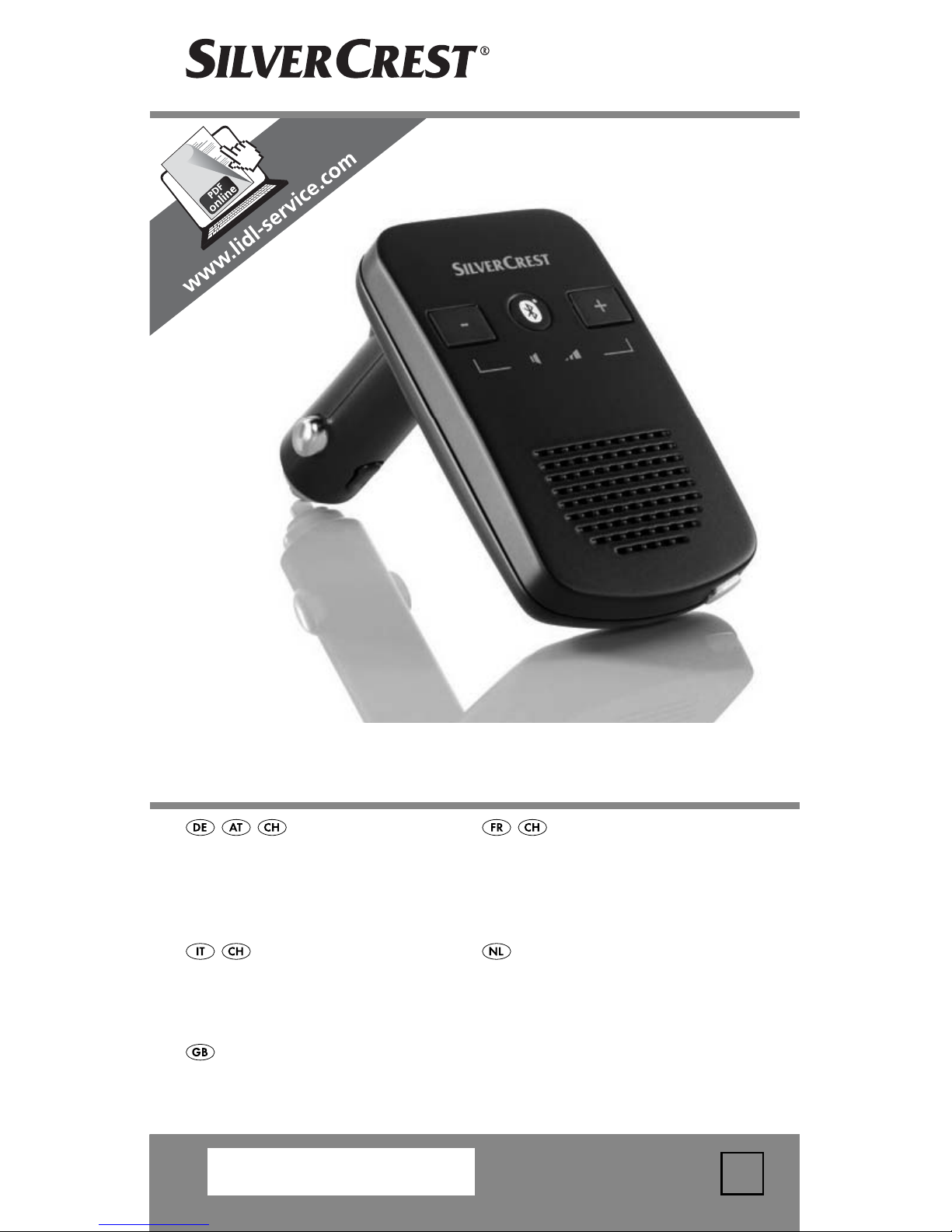
IAN 91621
BLUETOOTH®FREISPRECHEINRICHTUNG SBTF 10 C2
BLUETOOTH®FREISPRECHEINRICHTUNG
Bedienungsanleitung
BLUETOOTH®HANDSFREE
Gebruiksaanwijzing
DISPOSITIVO VIVAVOCE
BLUETOOTH
®
Istruzioni per l’uso
DISPOSITIF MAINSLIBRES BLUETOOTH
®
Mode d’emploi
BLUETOOTH
®
HANDS-FREE KIT
Operating instructions
1
Page 2
DE / AT / CH Bedienungsanleitung Seite 1
FR / CH Mode d’emploi Page 17
IT / CH Istruzioni per l’uso Pagina 35
NL Gebruiksaanwijzing Pagina 51
GB Operating instructions Page 67
Klappen Sie vor dem Lesen die Seite mit den Abbildungen
aus und machen Sie sich anschließend mit allen Funktionen des
Gerätes vertraut.
Avant de lire le mode d‘emploi, ouvrez la page contenant les
illustrations et familiarisez-vous ensuite avec toutes les fonctions
de l‘appareil.
Prima di leggere aprire la pagina con le immagini e prendere
confi denza con le diverse funzioni dell’apparecchio.
Vouw vóór het lezen de pagina met de afbeeldingen open en
maak u vertrouwd met alle functies van het apparaat.
Before reading, unfold the page containing the illustrations and
familiarise yourself with all functions of the device.
Page 3
Page 4

Inhaltsverzeichnis
Bestimmungsgemäßer Gebrauch . . . . . . . . . . . . . . . . . . 2
Sicherheitshinweise . . . . . . . . . . . . . . . . . . . . . . . . . . . . . 3
Einführung . . . . . . . . . . . . . . . . . . . . . . . . . . . . . . . . . . . . 4
Lieferumfang (siehe Ausklappseite) . . . . . . . . . . . . . . . . . 5
Technische Daten . . . . . . . . . . . . . . . . . . . . . . . . . . . . . . 5
Bedienelemente (siehe Ausklappseite) . . . . . . . . . . . . . . 6
Anbringen der Freisprecheinrichtung im Fahrzeug . . . . . 6
Ein- und Ausschalten der Freisprecheinrichtung. . . . . . . . 7
Freisprecheinrichtung mit einem Mobiltelefon koppeln . . 7
Freisprecheinrichtung mit mehreren Mobiltelefonen
koppeln . . . . . . . . . . . . . . . . . . . . . . . . . . . . . . . . . . . . . . 9
Verbindung trennen . . . . . . . . . . . . . . . . . . . . . . . . . . . . . 9
Wiederherstellen der Verbindung . . . . . . . . . . . . . . . . . . 9
DE
AT
CH
Freisprecheinrichtung verwenden . . . . . . . . . . . . . . . . . 10
Laden von 5 V-Geräten . . . . . . . . . . . . . . . . . . . . . . . . . 11
Fehlerbehebung . . . . . . . . . . . . . . . . . . . . . . . . . . . . . . 12
Reinigen und Pfl egen . . . . . . . . . . . . . . . . . . . . . . . . . . 13
Entsorgen . . . . . . . . . . . . . . . . . . . . . . . . . . . . . . . . . . . 14
Garantie und Service . . . . . . . . . . . . . . . . . . . . . . . . . . 14
Importeur . . . . . . . . . . . . . . . . . . . . . . . . . . . . . . . . . . . . 15
EU-Konformitätserklärung . . . . . . . . . . . . . . . . . . . . . . . 16
SBTF 10 C2
1
Page 5

DE
AT
CH
Herzlichen Glückwunsch zum Kauf Ihres neuen Gerätes.
Sie haben sich damit für ein hochwertiges Produkt ent-
schieden. Die Bedienungsanleitung ist Bestandteil dieses
Produkts. Sie enthält wichtige Hinweise für Sicherheit, Gebrauch und Entsorgung. Machen Sie sich vor der Benutzung
des Produkts mit allen Bedien- und Sicherheitshinweisen
vertraut. Benutzen Sie das Produkt nur wie beschrieben
und für die angegebenen Einsatzbereiche. Bewahren Sie
diese Anleitung gut auf. Händigen Sie alle Unterlagen bei
Weitergabe des Produkts an Dritte mit aus.
Bestimmungsgemäßer Gebrauch
Die Bluetooth®-Freisprecheinrichtung SBTF 10 C2 ist für die
Verwendung in Fahrzeugen mit einer Bordspannung von
12-24 V vorgesehen. Das Gerät ist dafür vorgesehen, eine
Freisprechverbindung mit einem Mobiltelefon über eine
Bluetooth
®
-Verbindung herzustellen, um auch während der
Autofahrt telefonieren zu können, ohne sich das Mobiltelefon ans Ohr halten zu müssen. Die Freisprecheinrichtung
verwendet Bluetooth® Funktechnik sowie einen digitalen
Signalprozessor (DSP), um Anruff unktionen auszuführen.
Zusätzlich können über den USB-Anschluss mobile Geräte
mit einer Betriebsspannung von 5V
(MP3-Player,
Mobiltelefone, etc.) geladen werden.
Dieses Gerät darf nur zu privaten, und nicht zu industriellen
und kommerziellen Zwecken verwendet werden. Das vorliegende Produkt ist nicht für die Verwendung in medizinischen, lebensrettenden oder lebenserhaltenden Anwendungen vorgesehen. Es dürfen nur Anschlusskabel und
externe Geräte verwendet werden, die sicherheitstechnisch
und hinsichtlich elektromagnetischer Verträglichkeit und
Abschirmqualität dem vorliegenden Gerät entsprechen.
Eine andere oder darüber hinausgehende Benutzung gilt
als nicht bestimmungsgemäß. Ansprüche jeglicher Art wegen Schäden aus nicht bestimmungsgemäßer Verwendung
sind ausgeschlossen. Das Risiko trägt allein der Benutzer.
2
SBTF 10 C2
Page 6
Sicherheitshinweise
Symbol-Erklärung:
Dieses Symbol weist auf besondere Gefahren bei
Handhabung, Betrieb oder Bedienung hin.
Dieses Symbol steht für spezielle Tipps und Bedienhinweise.
Verkehrssicherheit geht vor!
● Befolgen Sie alle örtlichen Gesetze. Die Hände müssen
beim Fahren immer für die Bedienung des Fahrzeugs
frei sein. Die Verkehrssicherheit muss beim Fahren
immer Vorrang haben.
● Bedienen Sie die Freisprecheinrichtung nur in Situationen,
in denen es Ihnen die Verkehrslage erlaubt und Sie
dabei andere Verkehrsteilnehmer nicht gefährden, schä-
DE
AT
CH
digen, behindern oder belästigen.
● Lassen Sie sich durch die Bedienung und Anzeigen der
Freisprecheinrichtung nicht in Ihrer Aufmerksamkeit für
den Straßenverkehr ablenken!
● Machen Sie sich vor Fahrtantritt mit der Bedienung
vertraut und üben Sie den sicheren Gebrauch der
Freisprecheinrichtung!
● Installieren Sie die Freisprecheinrichtung so im Fahr-
zeug, dass Ihre Sicht nicht beeinträchtigt wird und
das Gerät nicht in einer Personenaufprallzone der
Fahrgastzelle oder im Entfaltungsbereich von Airbags
montiert ist.
Allgemeine Sicherheitshinweise
● Versuchen Sie nicht, das Gerät zu öff nen oder zu repa-
rieren. In diesem Falle ist die Sicherheit nicht gegeben
und die Gewährleistung erlischt.
● Lassen Sie das defekte Gerät nur vom Kundenservice oder
von autorisiertem Fachpersonal reparieren. Für Schäden
die von missbräuchlicher oder unsachgemäßer Behandlung, von Gewaltanwendung oder von unautorisierter
Modifi kation herrühren, wird keine Haftung übernommen.
SBTF 10 C2
3
Page 7
DE
AT
CH
● Setzen Sie das Gerät weder Nässe, extremen Tempe-
raturen (> +70°C) oder starken Erschütterungen aus.
● Dieses Gerät ist nicht dafür bestimmt, durch Personen
(einschließlich Kinder) mit eingeschränkten physischen,
sensorischen oder geistigen Fähigkeiten oder mangels
Erfahrung und / oder mangels Wissen benutzt zu
werden, es sei denn, sie werden durch eine für ihre
Sicherheit zuständige Person beaufsichtigt oder erhielten
von ihr Anweisungen, wie das Gerät zu benutzen ist.
Erstickungsgefahr
● Verpackungsmaterialien sind kein Spielzeug. Halten
Sie Folien, Tüten und alle weiteren Verpackungsmaterialien von Kindern fern. Es besteht Erstickungsgefahr.
Anschluss an andere Mobiltelefone
● Wenn Sie das Gerät an ein anderes Gerät anschließen,
lesen Sie dessen Bedienungsanleitung, um detaillierte
Sicherheitshinweise zu erhalten. Schließen Sie keine
nicht kompatiblen Produkte an.
Hochfrequenzsignale in Fahrzeugen
HF-Signale können unter Umständen die Funktion nicht
ordnungsgemäß installierter oder nicht ausreichend abgeschirmter elektronischer Systeme in Kraftfahrzeugen, z.B.
elektronisches ABS, elektronischer Geschwindigkeitsregler
und Airbagsysteme, beeinträchtigen. Für weitere Informationen über Ihr Fahrzeug oder etwaiges Zubehör setzen
Sie sich mit dem betreff enden Hersteller oder seiner Vertretung in Verbindung.
Einführung
Bluetooth® ist eine kabellose Kommunikationstechnologie
mit kurzer Reichweite. Sie ermöglicht kabellose Verbindungen zwischen Bluetooth
®
-Geräten, wie z.B. Mobiltelefone, PDAs und PCs. Bluetooth® bezieht sich auf eine
weltweite Norm für den Betrieb auf dem international anerkannten ISM-Frequenzband (Industrial, Scientifi c and
Medical). Innerhalb des ISM-Frequenzbandes
4
SBTF 10 C2
Page 8

(2,402 - 2,480 GHz) wird ein Datenübertragungsbereich
von ca. 10 Metern (Klasse II) erreicht. Die Störungsanfälligkeit durch andere Nutzer des ISM-Frequenzbandes,
wie z.B. Mikrowellen, WLAN (802.116) oder Garagentoröff ner, wird durch sogenanntes „Frequenz-Hopping“
minimiert. Beim Frequenz-Hopping erfolgt bis zu 1600
mal pro Sekunde ein Wechsel der Frequenzstufe, dadurch
gilt Bluetooth® auch als relativ abhörsicher.
®
Bluetooth
ist ein eingetragenes Warenzeichen der Bluetooth SIG, Inc. Alle weiteren Namen und Warenzeichen
sind Eigentum ihrer jeweiligen Besitzer.
HSP (Headset-Profi l) ermöglicht die Standardfunktionen
wie Sprachübertragung sowie das Annehmen und Ablehnen von Anrufen.
HFP (Handsfree-Profi l) ermöglicht die Freisprechfunktionen
eines Mobiltelefons, z.B. mit Hilfe von Sprachbefehlen.
DE
AT
CH
Lieferumfang (siehe Ausklappseite)
Bluetooth®-Freisprecheinrichtung
Bedienungsanleitung
Technische Daten
/ 1 A
/ 1000 mA
Betriebsspannung: 12-24 V
®
Bluetooth
-Spezifi kation: Version 3.0 + EDR,
bis zu 10 m Reichweite
Unterstützte
®
Bluetooth
-Profi le: HSP und HFP
Ausgangsspannung
USB-Anschluss: 5 V
Sicherung: F2AL / 250 V
Maße (L x B x H): ca. 16,2 x 5,5 x 2,1 cm
Gewicht: ca. 70 g
Betriebstemperatur: +15° bis +40°C
Lagertemperatur: 0° bis +70°C
Feuchtigkeit: 5 bis 75%
SBTF 10 C2
(keine Kondensation)
5
Page 9

DE
AT
CH
Bedienelemente (siehe Ausklappseite)
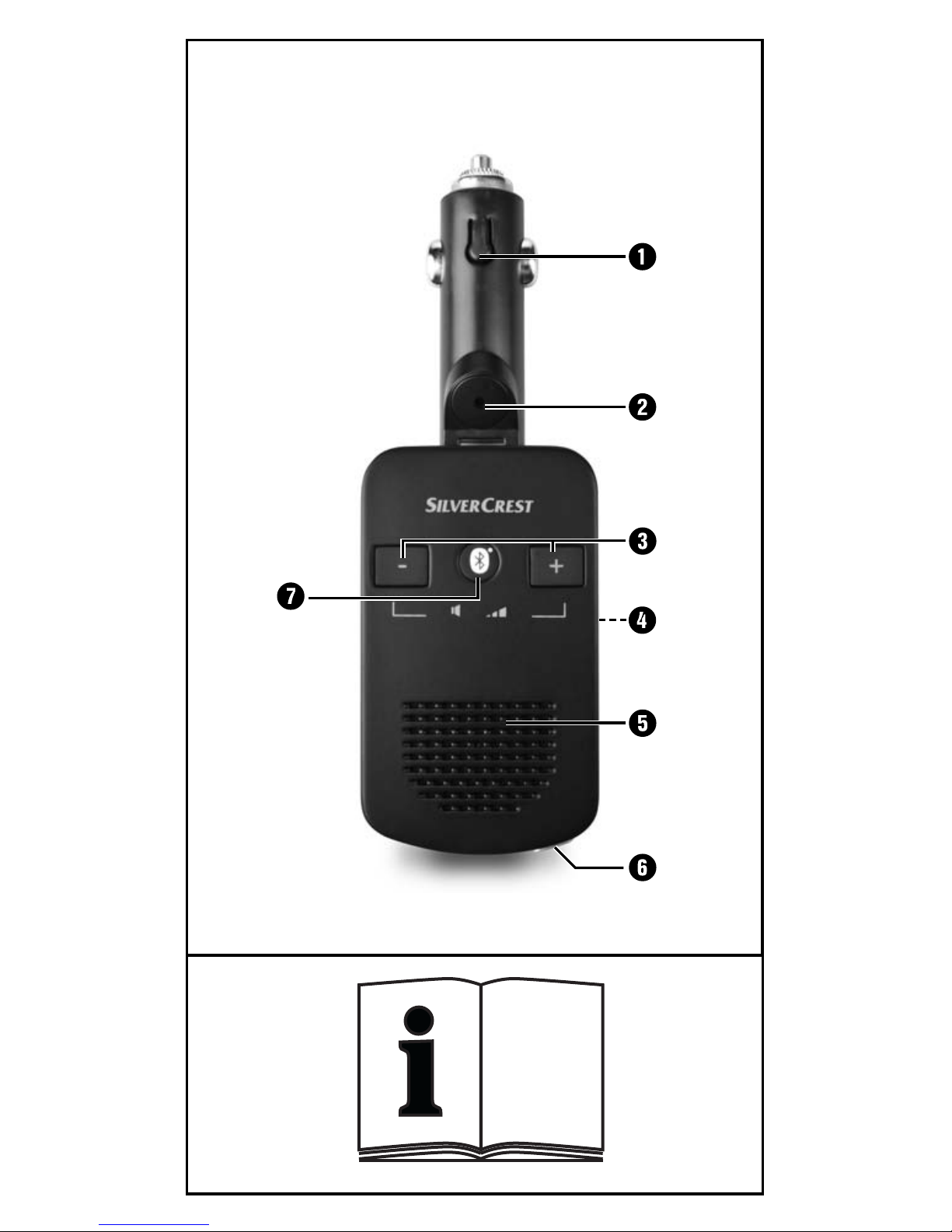
1 Kfz-Anschlussstecker
2 Mikrofon
3 +/- Tasten
4 USB-Anschluss
5 Lautsprecher
6 Multifunktionstaste
7 LED-Zustandsanzeige
Anbringen der Freisprecheinrichtung im Fahrzeug
Damit die Freisprecheinrichtung einwandfrei funktioniert,
wird sie in die Zigarettenanzünderbuchse oder Bordnetzsteckdose des Fahrzeugs eingesteckt und über diese mit
Strom versorgt.
● Stellen Sie sicher, dass die Freisprecheinrichtung vollstän-
dig eingerastet ist und die Bedienung des Fahrzeugs
nicht beeinträchtigt. Es ertönt einmal ein kurzer hoher
Signalton und die LED-Zustandsanzeige 7 blinkt alle
3 Sekunden zweimal auf. Das Gerät befi ndet sich im
Standby-Modus.
Hinweis:
Möglicherweise funktioniert der Zigarettenanzünder nur
bei eingeschalteter Zündung des Fahrzeugs. Ziehen Sie
im Zweifelsfalle die Bedienungsanleitung des jeweiligen
Fahrzeugs zurate.
Vorsicht!
Bei Fahrzeugen, bei denen der Zigarettenanzünder bzw.
die Bordnetz-Steckdosen auch bei ausgeschalteter Zündung funktionieren:
● Benutzen Sie die Freisprecheinrichtung nur bei einge-
schaltetem Motor. Anderenfalls kann die Fahrzeugbatterie über einen längeren Zeitraum entladen werden.
6
SBTF 10 C2
Page 10

Hinweis:
Wenn Sie die Freisprecheinrichtung nicht verwenden, entfernen Sie sie aus der Zigarettenanzünderbuchse des Fahrzeugs. Bewahren Sie sie an einem trockenen, staubfreien
und vor direkter Sonneneinstrahlung geschützten Ort auf.
Ein- und Ausschalten der
Freisprecheinrichtung
Einschalten: Das Gerät ist ausgeschaltet.
● Drücken und halten Sie die Multifunktionstaste 6 für
3 Sekunden, bis ein kurzer, hoher Signalton zu hören
ist. Die LED-Zustandsanzeige 7 blinkt alle 3 Sekunden
zweimal auf.
Ausschalten: Das Gerät befi ndet sich im Standby-Modus.
● Drücken und halten Sie die Multifunktionstaste 6 für
DE
AT
CH
5 Sekunden, bis ein langer, tiefer Signalton zu hören
ist. Die LED-Zustandsanzeige 7 erlischt.
Freisprecheinrichtung mit einem
Mobiltelefon koppeln
Die Freisprecheinrichtung wurde speziell für Mobiltelefone
entwickelt, die die Bluetooth®-Profi le „Handsfree (HFP)
und Headset (HSP)“ unterstützen. Weitere Informationen
zu Bluetooth®-Funktechnik fi nden Sie in der Bedienungsanleitung Ihres Mobiltelefons.
Bevor Sie die Freisprecheinrichtung verwenden können,
müssen Sie sie mit einem kompatiblen Mobiltelefon
koppeln (pairing).
● Stellen Sie sicher, dass das Mobiltelefon eingeschaltet ist.
● Stellen Sie das Mobiltelefon so ein, dass es nach
Bluetooth®-Geräten sucht. Eine detaillierte Beschreibung dazu fi nden Sie in der Bedienungsanleitung
Ihres Mobiltelefons.
● Stellen Sie sicher, dass die Freisprecheinrichtung
korrekt angebracht und ausgeschaltet ist.
SBTF 10 C2
7
Page 11

DE
AT
CH
● Um das Gerät auszuschalten, halten Sie die Multi-
funktionstaste 6 für etwa 3 Sekunden lang gedrückt.
Ein langer, tiefer Signalton ist zu hören und die LEDZustandsanzeige 7 erlischt.
● Platzieren Sie die Freisprecheinrichtung und das Mobil-
telefon so, dass sie nicht mehr als 1 Meter voneinander entfernt sind.
● Drücken und halten Sie die Multifunktionstaste 6
für 6 Sekunden, bis nach 3 Sekunden ein kurzer,
hoher Signalton und nach weiteren 3 Sekunden eine
Tonfolge, tiefer und hoher Signalton, zu hören ist. Die
LED-Zustandsanzeige 7 leuchtet dauerhaft auf. Die
Freisprecheinrichtung ist nun im Kopplungs-Modus.
● Wählen Sie die Freisprecheinrichtung „Car Kit“ aus
der Liste der verfügbaren Geräte im Mobiltelefon aus.
● Geben Sie den vorprogrammierten Passcode „9999“
ein und bestätigen Sie ihn, um die Geräte miteinander
zu koppeln. Sie hören einen langen, hohen Signalton
und die LED-Zustandsanzeige 7 blinkt alle 3 Sekunden.
● Sie können die Freisprecheinrichtung jetzt verwenden.
Hinweis:
Bei Verwendung von neueren Mobiltelefonen (Smartphones),
die mit Bluetooth 2.0 oder einer höheren Version ausgestattet sind, kann es sein, dass der Passcode „9999” nicht
eingeben werden muss. Wenn die Kopplung nicht innerhalb von 2 Minuten abgeschlossen ist, schaltet sich die
Freisprecheinrichtung aus. Die LED-Zustandsanzeige 7 er-
lischt und Sie hören einen langen, tiefen Signalton. Bei
einigen Mobiltelefonen kann es sein, dass die Kopplung
nicht automatisch durchgeführt wird. In diesem Fall muss
die Kopplung zusätzlich am Mobiltelefon durchgeführt
werden. Solange dies nicht erfolgt ist, blinkt die LED-Zustandsanzeige 7 alle 3 Sekunden zweimal. Weitere Informationen
fi nden Sie in der Bedienungsanleitung Ihres Mobiltelefons.
8
SBTF 10 C2
Page 12

Freisprecheinrichtung mit
mehreren Mobiltelefonen koppeln
Sie können die Freisprecheinrichtung mit bis zu acht
kompatiblen Mobiltelefonen koppeln. Wird ein weiteres
Mobiltelefon mit der Freisprecheinrichtung gekoppelt, werden die Kopplungsinformationen des zuerst gekoppelten
Mobiltelefons gelöscht. Es kann jeweils nur ein Mobiltelefon verbunden werden. Wird die Freisprecheinrichtung
eingeschaltet, versucht sie innerhalb weniger Sekunden,
eine Verbindung mit dem zuletzt verwendeten Mobiltelefon herzustellen. Kann keine Verbindung hergestellt werden, bleibt die Freisprecheinrichtung trotzdem für andere
Mobiltelefone erkennbar. Um die Freisprecheinrichtung
mit einem gekoppelten Mobiltelefon zu verwenden, welches nicht das zuletzt verwendete Mobiltelefon ist, muss
die Verbindung über das Bluetooth®-Menü des Mobiltele-
DE
AT
CH
fons hergestellt werden.
Verbindung trennen
Wenn Sie das Mobiltelefon von der Freisprecheinrichtung
®-
®
-
trennen möchten, um es z.B. mit einem anderen Bluetooth
Gerät zu verbinden:
● Schalten Sie die Freisprecheinrichtung aus
oder
● Trennen Sie die Verbindung über das Bluetooth
Menü im Mobiltelefon.
Sie müssen die Kopplung mit der Freisprecheinrichtung
®
nicht im Bluetooth
trennen.
-Menü löschen, um die Verbindung zu
Wiederherstellen der Verbindung
Wenn Sie die Freisprecheinrichtung erneut mit dem zuletzt
verwendeten Mobiltelefon verbinden möchten:
● Stellen Sie sicher, dass Bluetooth® im Mobiltelefon ak-
tiviert ist und schalten Sie die Freisprecheinrichtung ein.
SBTF 10 C2
9
Page 13

DE
AT
CH
Bei der Verbindung mit einem zuvor gekoppelten Mobiltelefon, muss kein Passcode eingegeben werden. Sie können Ihr Mobiltelefon so einstellen, dass beim Einschalten
der Freisprecheinrichtung automatisch eine Verbindung
mit dem Mobiltelefon hergestellt wird. Sobald sich die
Freisprecheinrichtung mit dem zuvor gekoppelten Mobiltelefon verbunden hat, ertönt ein kurzer hoher Signalton zur
Bestätigung der Verbindung. Weitere Informationen zur
automatischen Kopplung fi nden Sie in der Bedienungsanleitung Ihres Mobiltelefons.
Freisprecheinrichtung verwenden
Nachdem die Kopplung erfolgreich war, stehen Ihnen
nachfolgende Funktionen zur Verfügung. Manche der
beschriebenen Funktionen sind nur mit einem Mobiltelefon
möglich, welches das Handsfree Profi l (HFP) unterstützt.
Hinweis:
Die Sprachqualität ist stark abhängig von der Einbaulage
der Freisprecheinrichtung. Richten Sie die Freisprecheinrichtung nach Möglichkeit so aus, dass das Mikrofon 2
in Ihre Richtung zeigt.
Anruff unktionen
● Verwenden Sie Ihr Mobiltelefon auf die gewohnte
Weise, um einen Anruf zu tätigen.
● Zur Wahlwiederholung der zuletzt gewählten Rufnum-
mer, drücken Sie die Multifunktionstaste 6 zweimal kurz.
● Zur Aktivierung der Sprachanwahl drücken Sie die
Multifunktionstaste 6 einmal kurz.
Hinweis:
Die Sprachanwahl ist nur bei Mobiltelefonen verfügbar,
die diese Funktion unterstützen. Weitere Informationen
zur Sprachanwahl fi nden Sie in der Bedienungsanleitung
Ihres Mobiltelefons.
10
SBTF 10 C2
Page 14

Annehmen und Beenden eines Anrufs
Wenn Sie einen Anruf erhalten, blinkt die LED-Zustandsanzeige 7 und Sie hören über die Freisprecheinrichtung
einen Rufton. Wenn das Anrufsignal in Ihrem Mobiltelefon ausgeschaltet ist, wird dennoch der Rufton über die
Freisprecheinrichtung ausgegeben.
● Drücken Sie die Multifunktionstaste 6 einmal kurz,
um den Anruf anzunehmen.
● Drücken Sie die Multifunktionstaste 6 einmal kurz,
um den angenommenen Anruf zu beenden.
Sie können den Anruf auch über das Mobiltelefon annehmen bzw. beenden.
Automatische Rufannahme
Wenn die automatische Rufannahme im Mobiltelefon
aktiviert ist, nimmt es den eingehenden Anruf nach einer
DE
AT
CH
festgelegten Zeitspanne automatisch entgegen und leitet
ihn an die Freisprecheinrichtung weiter. Weitere Informationen zur automatischen Rufannahme fi nden Sie in der
Bedienungsanleitung Ihres Mobiltelefons.
Zurückweisen eines Anrufs
● Drücken Sie die Multifunktionstaste 6 für 3 Sekunden,
um den eingehenden Anruf zurückzuweisen.
Lautstärke der Freisprecheinrichtung einstellen
Sie können die Lautstärke der Freisprecheinrichtung mit
Hilfe der +/- Tasten 3 einstellen.
● Drücken Sie während eines Anrufs wiederholt die
+ bzw. - Taste 3 bis die gewünschte Lautstärke eingestellt ist. Das Erreichen der maximalen Lautstärke wird
durch einen kurzen Signalton signalisiert.
Laden von 5 V-Geräten
● Überprüfen Sie die max. Eingangsspannung (5V) und
die max. Stromaufnahme (1000 mA) des Gerätes, welches Sie laden möchten. Schauen Sie hierzu in der
Bedienungsanleitung des Gerätes nach.
SBTF 10 C2
11
Page 15
DE
AT
CH
● Verbinden Sie das zu ladene Gerät mit dem USB-An-
schluss 4 der Freisprecheinrichtung. Das Gerät erhält
seine Stromversorgung nun von der Freisprecheinrichtung. Wenn das Gerät über eine Ladekontrollanzeige
verfügt, zeigt diese an, dass das Gerät geladen wird.
Fehlerbehebung
Wenn Sie die Freisprecheinrichtung nicht mit dem kompatiblen
Mobiltelefon verbinden können, gehen Sie folgendermaßen vor:
● Stellen Sie sicher, dass im Mobiltelefon die Bluetooth®
Funktion aktiviert ist.
● Stellen Sie sicher, dass die Freisprecheinrichtung korrekt
eingesteckt, eingeschaltet und mit Strom versorgt ist.
● Wenn Sie mehrere Bluetooth®-Geräte verwenden, stel-
len Sie sicher, dass eine zuvor hergestellte Bluetooth
®
-
Verbindung des Mobiltelefons getrennt wurde.
● Stellen Sie sicher, dass die Freisprecheinrichtung maxi-
mal 10 Meter vom Mobiltelefon entfernt ist und sich
keine Hindernisse oder elektronische Geräte dazwischen
befi nden.
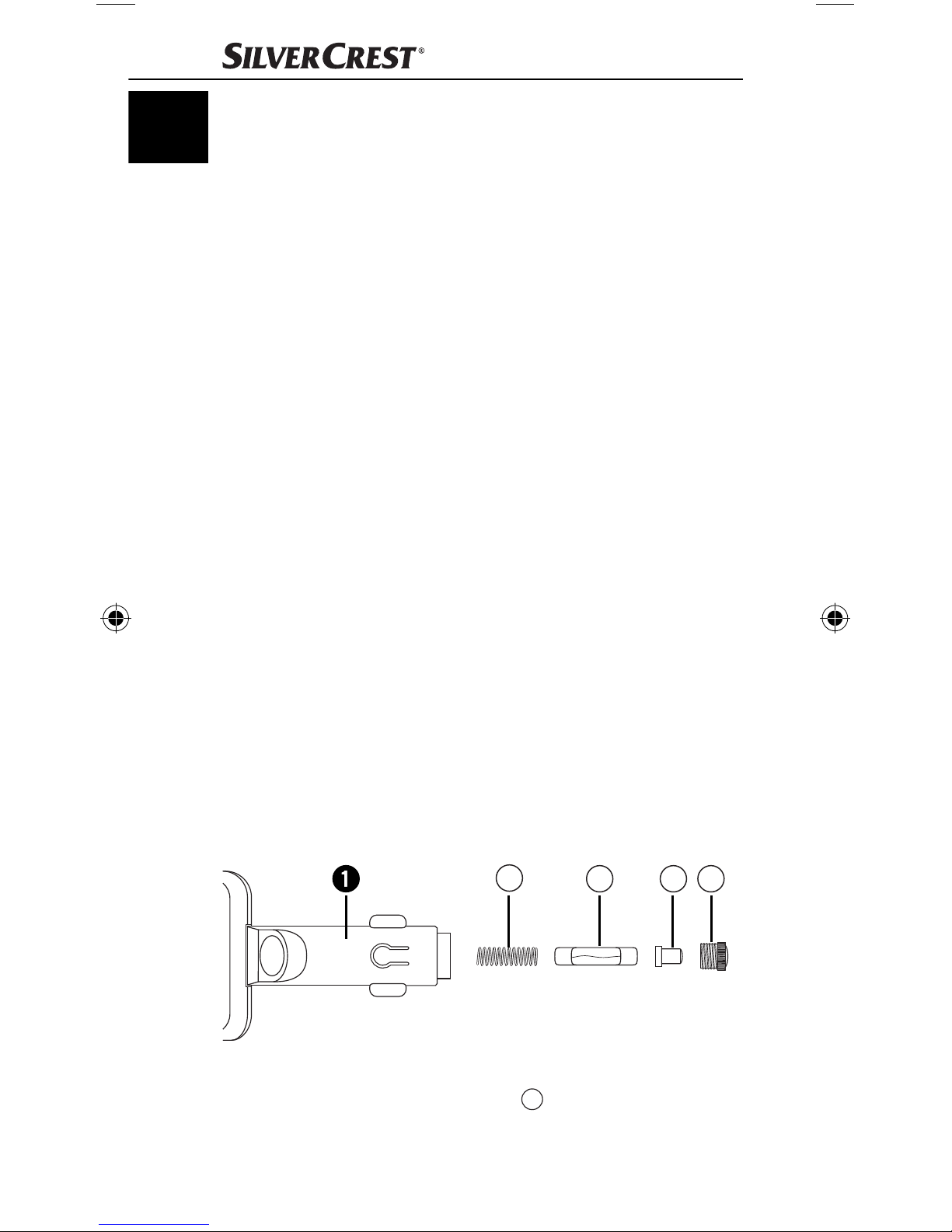
Sicherung wechseln
In der Freisprecheinrichtung befi ndet sich eine Sicherung.
Sollte das Gerät nicht mehr funktionieren, überprüfen
bzw. wechseln Sie die Sicherung.
D
C B A
● Öff nen Sie den Kfz-Anschlussstecker 1, indem Sie
den geriff elten Schraubeinsatz A ggf. mit einer Zange
vorsichtig gegen den Uhrzeigersinn aufdrehen und
abnehmen.
12
SBTF 10 C2
Page 16
● Nehmen Sie die Steckerspitze B von der Sicherung
ab und nehmen Sie die Sicherung heraus. Achten
C
Sie darauf, dass die Feder D im Kfz-Anschlussstecker
1 nicht unkontrolliert herausspringt und verloren geht.
● Setzen Sie eine neue Sicherung vom Typ F2AL/250V
in den Kfz-Anschlussstecker 1 ein, setzen die Steckerspitze B auf das leicht herausragende Ende der
Sicherung C auf und drehen den zuvor abgenommenen Schraubeinsatz A wieder ein.
Brandgefahr!
● Tauschen Sie die Sicherung nur gegen den auf dem
Typenschild angegebenen Wert aus. Sicherungen mit
anderen Werten können einen Brand verursachen.
Brandrauch ist giftig.
Hinweis:
DE
AT
CH
Sollten diese Maßnahmen nicht zur Fehlerbehebung
beitragen, wenden Sie sich bitte an den entsprechenden
Service-Partner Ihres Landes.
Reinigen und Pfl egen
Gefahr der Gerätebeschädigung!
● Trennen Sie vor jeder Reinigung die Stromversorgung
des Gerätes!
● Tauchen Sie das Gerät niemals in Wasser oder andere
Flüssigkeiten!
● Lassen Sie keine Flüssigkeiten in das Gehäuse eindringen!
● Öff nen Sie niemals das Gehäuse des Gerätes! Es befi nden
sich keinerlei Bedienelemente darin.
● Verwenden Sie keine scharfen Chemikalien, Reinigungs-
lösungen oder starke Reinigungsmittel zur Reinigung
des Gerätes. Dies könnte die Gehäuseoberfl äche beschädigen.
● Reinigen Sie die Gehäuseoberfl äche mit einem leicht
angefeuchteten Tuch.
SBTF 10 C2
13
Page 17

DE
AT
CH
Entsorgen
Werfen Sie das Gerät keinesfalls in den
normalen Hausmüll. Dieses Produkt
unterliegt der europäischen Richtlinie
2012/19/EU.
Entsorgen Sie das Gerät über einen zugelassenen Entsorgungsbetrieb oder über Ihre kommunale Entsorgungseinrichtung. Beachten Sie die aktuell geltenden Vorschriften.
Setzen Sie sich im Zweifelsfall mit Ihrer Entsorgungseinrichtung in Verbindung.
Führen Sie alle Verpackungsmaterialien einer
umweltgerechten Entsorgung zu.
Garantie und Service
Sie erhalten auf dieses Gerät 3 Jahre Garantie ab Kaufdatum. Das Gerät wurde sorgfältig produziert und vor
Anlieferung gewissenhaft geprüft. Bitte bewahren Sie den
Kassenbon als Nachweis für den Kauf auf. Bitte setzen
Sie sich im Garantiefall mit Ihrer Servicestelle telefonisch
in Verbindung. Nur so kann eine kostenlose Einsendung
Ihrer Ware gewährleistet werden.
Die Garantieleistung gilt nur für Material- oder Fabrikationsfehler, nicht aber für Transportschäden, Verschleißteile
oder für Beschädigungen an zerbrechlichen Teilen, z. B.
Schalter oder Akkus. Das Produkt ist lediglich für den privaten und nicht für den gewerblichen Gebrauch bestimmt.
Bei missbräuchlicher und unsachgemäßer Behandlung,
Gewaltanwendung und bei Eingriff en, die nicht von unserer autorisierten Service-Niederlassung vorgenommen
wurden, erlischt die Garantie. Ihre gesetzlichen Rechte
werden durch diese Garantie nicht eingeschränkt.
Die Garantiezeit wird durch die Gewährleistung nicht
verlängert. Dies gilt auch für ersetzte und reparierte Teile.
Eventuell schon beim Kauf vorhandene Schäden und
Mängel müssen sofort nach dem Auspacken gemeldet
werden, spätestens aber zwei Tage nach Kaufdatum.
Nach Ablauf der Garantiezeit anfallende Reparaturen
sind kostenpfl ichtig.
14
SBTF 10 C2
Page 18
Service Deutschland
Tel.: 0800 5435 111
E-Mail: [email protected]
IAN 91621
Service Österreich
Tel.: 0820 201 222 (0,15 EUR/Min.)
E-Mail: [email protected]
IAN 91621
Service Schweiz
Tel.: 0842 665566
(0,08 CHF/Min., Mobilfunk max. 0,40 CHF/Min.)
E-Mail: [email protected]
IAN 91621
Erreichbarkeit Hotline:
DE
AT
CH
Montag bis Freitag von 8:00 Uhr – 20:00 Uhr (MEZ)
Importeur
KOMPERNASS HANDELS GMBH
BURGSTRASSE 21
44867 BOCHUM
DEUTSCHLAND/GERMANY
www.kompernass.com
SBTF 10 C2
15
Page 19

DE
AT
CH
EU-Konformitätserklärung
Wir, Kompernaß Handels GmbH, Burgstraße 21, 44867
Bochum, Deutschland, erklären, dass das Produkt
SBTF 10 C2 Bluetooth
grundlegenden Anforderungen und den anderen
relevanten Vorschriften der Kfz-Richtlinie 2004/104/EC,
der R&TTE-Richtlinie 1999/5/EC, der Niederspannungsrichtlinie 2006/95/EC und der RoHS-Richtlinie
2011/65/EU entspricht.
Identifi kationsnummer: IAN 91621
Angewandte harmonisierte Normen:
EN 60950-1:2006 + A11:2009 + A1: 2010 + A12: 2011
ETSI EN 300 328 V1.7.1
ETSI EN 301 489-1 V1.9.2
®
-Freisprecheinrichtung den
ETSI EN 301 489-17 V2.2.1
EN 62479: 2010
EN 50581: 2012
ISO 7637-2: 2004
Bochum, 03.08.2013
Semi Uguzlu
Quality Manager
16
SBTF 10 C2
Page 20

Sommaire
Usage conforme . . . . . . . . . . . . . . . . . . . . . . . . . . . . . . 18
Consignes de sécurité . . . . . . . . . . . . . . . . . . . . . . . . . . 19
Introduction . . . . . . . . . . . . . . . . . . . . . . . . . . . . . . . . . . 21
Accessoires fournis (voir page dépliante) . . . . . . . . . . . 21
Caractéristiques techniques . . . . . . . . . . . . . . . . . . . . . 22
Eléments de commande (voir page dépliante) . . . . . . . 22
Montage du kit mains libres dans le véhicule . . . . . . . . 22
Connexion et déconnexion du kit mains libres . . . . . . . 23
Pairage du kit mains libres à un téléphone portable . . . 24
Pairage du kit mains libres à plusieurs téléphones
portables . . . . . . . . . . . . . . . . . . . . . . . . . . . . . . . . . . . . 25
Déconnexion . . . . . . . . . . . . . . . . . . . . . . . . . . . . . . . . . 26
Rétablissement de la connexion . . . . . . . . . . . . . . . . . . 26
FR
CH
Utilisation du kit mains libres . . . . . . . . . . . . . . . . . . . . . 26
Chargement des appareils 5 V . . . . . . . . . . . . . . . . . . . 28
Elimination de pannes . . . . . . . . . . . . . . . . . . . . . . . . . . 28
Nettoyage et entretien . . . . . . . . . . . . . . . . . . . . . . . . . 30
Mise au rebut . . . . . . . . . . . . . . . . . . . . . . . . . . . . . . . . 30
Garantie und Service . . . . . . . . . . . . . . . . . . . . . . . . . . 31
Importeur . . . . . . . . . . . . . . . . . . . . . . . . . . . . . . . . . . . . 32
Déclaration de conformité EU . . . . . . . . . . . . . . . . . . . . 33
SBTF 10 C2
17
Page 21

FR
CH
Toutes nos félicitations pour l‘achat de votre nouvel appareil.
Vous avez choisi un produit de grande qualité. Le mode
d‘emploi fait partie de ce produit. Il contient des remarques
importantes concernant la sécurité, l‘utilisation et la mise
au rebut. Veuillez vous familiariser avec l‘ensemble des
consignes d‘opération et de sécurité avant l‘usage du
produit. N‘utilisez le produit que conformément aux consignes et pour les domaines d‘utilisation prévus. En cas de
transfert du produit à un tiers, remettez-lui également tous
les documents.
Usage conforme
Le dispositif mains-libres Bluetooth® SBTF 10 C2 est prévu
pour l‘utilisation dans des véhicules avec une tension de
bord de 12-24 V. L’appareil est conçu pour créer une
connexion mains-libres à un téléphone mobile via une
connexion Bluetooth® afi n de pouvoir également téléphoner tout en conduisant sans avoir à tenir le téléphone
mobile à l’oreille. Le kit mains libres utilise la technologie
Bluetooth® ainsi qu‘un processeur de signaux numérique
(DSP), pour exécuter des fonctions d‘appel. Par ailleurs,
le port USB permet de recharger des appareils portables
d’une tension de fonctionnement de 5V
(lecteur
MP3, téléphones portables, etc.).
Cet appareil doit uniquement être utilisé à des fi ns privées,
et non pas dans le cadre de destinations industrielles et
commerciales. Le présent produit n’est pas destiné à être
utilisé dans des applications médicales, de sauvetage ou
des applications de maintien des fonctions vitales. Il faut
exclusivement utiliser des câbles de raccordement et des
appareils externes, qui sur le plan des règles de sécurité
et de la compatibilité électromagnétique et de la qualité
de blindage sont conformes au présent appareil.
Tout usage divergent ou toute utilisation allant au-delà
seront considérés comme non conformes. Les prétentions
de toutes sortes pour dommages résultant d’un usage non
conforme sont exclues. La personne opérant l’appareil est
seule à assumer le risque.
18
SBTF 10 C2
Page 22
Consignes de sécurité
Explication du symbole :
Ce symbole attire l’attention sur des dangers particuliers lors de la manipulation, du fonctionnement ou
de l’utilisation.
Ce symbole signale des informations utiles et
conseils d’utilisation spéciaux.
Priorité à la sécurité routière !
● Respectez l‘ensemble des règlements locaux. Lorsque
le véhicule est en marche, les mains doivent toujours
être libres pour l‘opération du véhicule. La sécurité routière doit toujours être prioritaire lorsque le véhicule est
en marche.
● Opérez exclusivement le kit mains libres dans les situa-
tions où la circulation routière le permet et que vous
ne représentez pas un danger pour les autres usagers
de la route et qu‘il n‘y a pas de risque que vous les
FR
CH
blessiez, les gêniez ou les importuniez.
● Ne vous laissez pas distraire par l‘opération et l‘affi -
chage du kit mains libres et surtout, ne relâchez pas
votre vigilance face à la circulation routière !
● Avant de mettre le véhicule en marche, familiarisez-
vous avec l‘opération et l‘usage en toute sécurité du
kit mains libres !
● Installez le kit mains libres dans le véhicule de telle
manière qu‘il n‘obstrue pas votre vue et que l‘appareil
ne soit pas installé dans une zone d‘impact des passagers de l‘habitacle ou dans la zone de déploiement
de l‘airbag.
Consignes de sécurité générales
● N‘essayez pas d‘ouvrir ou de réparer l‘appareil. Dans
ce cas, la sécurité n‘est plus assurée et vous perdez le
bénéfi ce de la garantie.
● Confi ez la réparation de l‘appareil défectueux exclu-
sivement au service après-vente ou à des techniciens
SBTF 10 C2
19
Page 23

spécialisés agréés. Nous n‘assumons aucune responsabilité pour tous les dommages résultant d‘un traitement
abusif ou non conforme, du recours à la force ou d‘une
FR
CH
modifi cation non autorisée.
● N‘exposez pas l‘appareil à l‘humidité, à des tempéra-
tures extrêmes (> +70°C) ou à de fortes vibrations.
● Cet appareil ne doit pas être utilisé par des personnes
(enfants compris) ayant des capacités physiques,
mentales et sensorielles réduites ou qui n‘ont pas
l‘expérience et les connaissances nécessaires, à moins
qu‘elles ne soient sous la surveillance d‘une personne
responsable de leur sécurité ou qu‘elles aient reçu de
cette personne des directives concernant l‘utilisation de
l‘appareil.
Risque de suff ocation
● Les matériaux d‘emballage ne sont pas des jouets.
Tenez les fi lms, les sacs et tous les autres matériaux
d‘emballage hors de portée des enfants. Il y a risque
d‘étouff ement.
Raccordement à d‘autres
téléphones portables
● Si vous raccordez l‘appareil à un autre appareil, lisez
son mode d‘emploi pour obtenir des consignes de sécurité détaillées. Ne connectez pas d‘appareils non
compatibles.
Signaux à haute fréquence
dans les véhicules
Les signaux à haute fréquence peuvent dans certaines
circonstances porter préjudice au fonctionnement de systèmes électroniques qui n‘ont pas été installés en bonne et
due forme ou qui ne sont pas suffi samment blindés dans
des véhicules, par ex. l‘ ABS électronique, régulateur de
vitesse électronique et systèmes airbags. Pour de plus amples
informations sur votre véhicule ou d‘éventuels accessoires,
veuillez contacter le fabricant concerné ou ses représentants.
20
SBTF 10 C2
Page 24

Introduction
Bluetooth® est une technologie de communication sans
fi l à courte portée. Elle permet des connexions sans fi l
entre les périphériques Bluetooth
téléphones mobiles, PDAs et PCs. Bluetooth® se réfère à
une norme internationale pour l’exploitation sur la bande
de fréquences internationale et reconnue : ISM (industriel,
scientifi que et médical). La plage de transfert des données
au sein de la bande de fréquence ISM (2,402 - 2,480
GHz) est approximativement de 10 mètres (Classe II). Sa
susceptibilité aux parasites provoqués par d’autres usagers
de la bande de fréquences ISM, comme par ex. les fours
à micro-ondes, les WLAN (802.116) ou les systèmes
d’ouverture de portes de garage est réduite à un minimum
grâce au saut de fréquence (frequency-hopping). Ce saut
de fréquence permet de changer le canal de fréquence
jusqu’à 1600 fois par seconde, ce qui met Bluetooth
®
, tels que par ex. les
®
re-
FR
CH
lativement à l’abri des écoutes téléphoniques.
®
Bluetooth
Bluetooth SIG, Inc. Tous les autres noms et marques sont la
propriété de leurs propriétaires respectifs.
HSP (Headset-Profi l) permet les fonctions standard tels que
la transmission de la voix ainsi que l‘acceptation et le rejet
des appels.
HFP (Handsfree-Profi l) permet les fonctions en kit mains
libres d‘un téléphone portable, par ex. à l‘aide de commandes vocales.
est une marque enregistrée de la société
Accessoires fournis (voir page
dépliante)
Dispositif mains-libres Bluetooth
Mode d‘emploi
®
SBTF 10 C2
21
Page 25

Caractéristiques techniques
Tension de fonctionnement : 12-24 V
/ 1000 mA
FR
CH
Spécifi cation Bluetooth® Version 3.0 + EDR,
jusqu’à 10 m de portée
®
Profi ls Bluetooth
pris en charge : HSP et HFP
Tension de sortie port USB : 5 V
Fusible : F2AL / 250 V
Dimensions (L x l x H) : env. 16,2 x 5,5 x 2,1 cm
Poids : env. 70 g
Température de service : +15° à +40°C
Température de stockage : 0° à +70°C
Humidité : 5 à 75%
/ 1 A
(aucune condensation)
Eléments de commande (voir page
dépliante)
1 Prise de raccordement de 12 V
(pour branchement sur allumecigares)
2 Microphone
3 Bouton de réglage du volume +/-
4 Port USB
5 Haut-parleurs
6 Touche multifonctions
7 Témoin lumineux LED
Montage du kit mains libres
dans le véhicule
Pour pouvoir fonctionner sans problèmes, le kit mains
libres est raccordé à la prise de l’allume-cigares ou du
réseau de bord du véhicule et, de ce fait, alimenté en
énergie électrique.
● Assurez-vous que le kit mains libres soit enclenché dans
son intégralité et que l‘opération du véhicule ne soit pas
22
SBTF 10 C2
Page 26
gênée. Le témoin LED 7 clignote à deux reprises toutes
les 3 secondes et un signal sonore aigu et bref retentit une
fois. L’appareil se trouve en mode „Veille“.
Remarque :
Il est possible que l’allume-cigares ne fonctionne que lorsque
le moteur du véhicule tourne. En cas de doute, se reporter
au mode d’emploi du véhicule en question.
Attention !
Pour les véhicules sur lesquels la prise de l’allume-cigares,
voire les prises du tableau de bord fonctionnent également
lorsque le moteur est à l’arrêt :
● Utilisez le kit mains libres uniquement lorsque le
moteur tourne. Sinon la batterie du véhicule risque de
se décharger au bout d’un certain temps.
Remarque :
Si vous n‘utilisez pas le kit mains libres, retirez-le de la prise
allume-cigares du véhicule. Rangez-le à un endroit sec, sans
FR
CH
poussière et non exposé directement aux rayons du soleil.
Connexion et déconnexion du kit
mains libres
Connexion : l’appareil est déconnecté.
● Appuyez et maintenez la touche multifonctions 6 enfon-
cée pendant 3 secondes jusqu’à ce que vous perceviez
un signal sonore aigu et bref. Le témoin lumineux 7
clignote à deux reprises toutes les 3 secondes.
Déconnexion : L’appareil se trouve en mode „Veille“.
● Maintenez la touche multifonctions 6 enfoncée
pendant 5 secondes, jusqu’à entendre un long signal
sonore grave. Le témoin lumineux 7 s’éteint.
SBTF 10 C2
23
Page 27

Pairage du kit mains libres à un
téléphone portable
FR
CH
Le kit mains libres a été conçu spécialement pour les téléphones portables qui supportent le profi l mains libres (HFP)
et le profi l oreillette (HSP) Bluetooth®. Pour toute autre information sur la technologie radio Bluetooth®, reportez-vous à
la notice d‘emploi de votre téléphone portable.
Avant de pouvoir utiliser le kit mains libres, il faut le raccorder
à un téléphone portable compatible (pairage).
● Assurez-vous que le téléphone portable est bien allumé.
● Réglez le téléphone portable de telle manière qu‘il parte
à la recherche des appareils Bluetooth®. Vous en trouverez une description détaillée dans la notice d’emploi
du téléphone portable.
● Vérifi ez que le kit mains libres est correctement installé
et n’est pas allumé.
● Pour éteindre l‘appareil, maintenez la touche multifonc-
tions 6 enfoncée pendant env. 3 secondes. Un signal
sonore long et grave est alors perceptible et le témoin
lumineux 7 s‘éteint.
● Placez le kit mains libres et le téléphone portable de façon
à ce qu’il n’y ait pas plus d’un mètre de distance entre eux.
● Appuyez sur la touche multifonctions 6 et maintenez-
la enfoncée pendant 6 secondes, jusqu‘à entendre
après 3 secondes, un signal sonore bref et aigu et
après trois autres secondes, une séquence de signaux
sonores aigus. Le témoin lumineux 7 s‘allume en
continu. Le kit mains libres est désormais en mode
pairage.
● Sélectionnez le kit mains libres « Car Kit » dans la liste
des appareils disponibles dans le téléphone portable.
● Saisissez le mot de passe préprogrammé „9999“ et
confi rmez-le afi n de procéder au pairage des appareils
entre eux. Vous entendez un long signal sonore et le
témoin lumineux 7 clignote toutes les 3 secondes.
● Vous pouvez maintenant utiliser le kit mains libres.
24
SBTF 10 C2
Page 28

Remarque :
En cas d’usage de téléphones portables dernière génération (smartphones), qui sont équipés de Bluetooth 2.0 ou
d‘une version supérieure, il peut arriver qu’il n’y ait pas besoin
de saisir le code „9999“. Si le pairage n’est pas terminé
au bout de 2 minutes, le kit mains libres se déconnecte
automatiquement. Le témoin lumineux 7 s‘éteint et vous
entendez un long signal sonore grave. Sur certains téléphones portables, il peut arriver que le pairage ne soit
pas automatiquement eff ectué. Dans ce cas, il faut égale
ment procéder au pairage au niveau du téléphone portable. Aussi longtemps que vous n‘y avez pas procédé, le
témoin lumineux 7 clignote deux fois toutes les 3 secondes.
Pour toute autre information, reportez-vous à la notice
d‘emploi de votre téléphone portable.
Pairage du kit mains libres à
plusieurs téléphones portables
FR
CH
Vous pouvez raccorder le kit mains libres avec un nombre
de téléphones portables compatibles allant jusqu’à huit.
Si un autre téléphone portable est raccordé au kit mains
libres, les paramètres de pairage du téléphone portable
qui a été couplé en premier sont eff acés. Il ne peut toutefois être relié qu’à un seul téléphone portable à la fois.
Lorsque le kit mains libres est mis en route, il essaie de se
connecter en quelques secondes au téléphone portable qui
a été utilisé en dernier. Si aucune liaison ne peut être établie,
le kit mains libres reste reconnaissable malgré tout pour
d’autres téléphones portables. Pour pouvoir utiliser le kit
mains libres avec un téléphone portable pairé autre que
le dernier téléphone portable utilisé, la connexion doit se
®
faire via le menu Bluetooth
du téléphone portable.
SBTF 10 C2
25
Page 29

FR
CH
Déconnexion
Si vous voulez déconnecter votre téléphone portable du
kit mains libres pour, par exemple, le connecter à un autre
appareil Bluetooth
● il vous faut débrancher le kit mains libres
ou
● déconnectez la connexion par le menu Bluetooth® du
téléphone portable.
Vous n’avez pas besoin de supprimer le pairage avec le
kit mains libres dans le menu Bluetooth
déconnexion.
®
:
®
pour eff ectuer la
Rétablissement de la connexion
Si vous souhaitez à nouveau connecter le kit mains libres
avec le téléphone portable utilisé en dernier :
● vérifi ez que Bluetooth® est activé sur votre téléphone
portable et branchez le kit mains libres.
En cas de connexion avec un téléphone portable qui avait
été raccordé au kit auparavant, il est inutile de saisir le
mot de passe. Vous pouvez paramétrer votre téléphone
portable pour que, dès la mise en route du kit mains libres,
la connexion avec le téléphone portable soit automatiquement établie. Dès que le kit mains libres s‘est connecté au
téléphone portable pairé auparavant, il retentit un signal
sonore bref et aigu pour confi rmer l‘établissement de la
connexion. Pour toute autre information sur le pairage automatique, reportez-vous à la notice d‘emploi de votre
téléphone portable.
Utilisation du kit mains libres
Après avoir réussi le pairage, les fonctions suivantes sont disponibles. Certaines des fonctions décrites sont possibles
uniquement avec un téléphone portable qui supporte le
profi l mains libres (HFP).
26
SBTF 10 C2
Page 30

Remarque :
La qualité de la voix est fortement dépendante de la
position de montage du kit mains libres. Dans la mesure
du possible, ajustez le kit mains libres de sorte que le
microphone 2 soit positionné face à vous.
Fonctions d’appel
● Utilisez le téléphone portable comme à l’habitude pour
eff ectuer un appel.
● Pour composer à nouveau le dernier numéro appelé, appu-
yez deux fois brièvement sur la touche multifonctions 6.
● Pour activer la langue de votre choix, appuyez une
fois brièvement sur la touche multifonctions 6.
Remarque :
La sélection de la langue n’est disponible que sur les téléphones portables qui supportent cette fonction. Pour toute
autre information sur le choix de la langue, reportez-vous
à la notice d’emploi de votre téléphone portable.
FR
CH
Acceptation d’un appel entrant et arrêt
Lorsque vous recevez un appel, le témoin lumineux 7
clignote et vous entendez une sonnerie d’appel via votre
kit mains libres. Lorsque le signal d’appel dans votre téléphone portable est éteint, le signal d’appel est quand
même émis par le kit mains-libres.
● Appuyez une fois brièvement sur la touche multifonc-
tions 6 pour accepter l’appel.
● Appuyez une fois brièvement sur la touche multifonc-
tions 6 pour mettre fi n à l’appel accepté.
Vous pouvez également accepter l’appel ou y mettre fi n
sur le téléphone portable.
Acceptation automatique des appels
Si l’acceptation automatique des appels est activée sur
votre téléphone portable, l’appel est automatiquement
accepté après un certain laps de temps déterminé et transmis au kit mains libres. Pour toute autre information sur
SBTF 10 C2
27
Page 31

l’acceptation automatique des appels, reportez-vous à la
notice d’emploi du téléphone portable.
FR
CH
Rejet d’un appel entrant
● Appuyez pendant 3 secondes sur la touche multifonc-
tions 6 pour rejeter l’appel entrant.
Réglage de la tonalité du kit mains libres
Vous pouvez régler le volume du kit mains libres à l’aide
des boutons de réglage du volume +/- 3.
● Au cours d’un appel, appuyez plusieurs fois sur le bou-
ton de réglage du volume + ou - 3 jusqu’à obtention
du volume souhaité. Un bref signal sonore indique que
vous avez atteint le volume maximal.
Chargement des appareils 5 V
● Vérifi ez la tension d’entrée maxi (5V) et la consomma-
tion de courant maxi (1000 mA) de l’appareil que vous
désirez charger. Pour ce faire, consultez le mode
d’empli de l’appareil concerné.
● Branchez l’appareil à charger sur le port USB 4 du kit
mains libres. L’appareil est alors alimenté en courant
électrique par le kit mains libres. S’il dispose d’un témoin
de contrôle de charge, celui-ci indique que l’appareil
est en cours de chargement.
Elimination de pannes
Si vous ne pouvez pas relier le kit mains libres au
téléphone portable compatible, procédez de la façon
suivante :
● Assurez-vous que la fonction Bluetooth® soit activée
dans le téléphone portable.
● Assurez-vous que le kit mains libres est correctement in-
stallé, connecté et alimenté en énergie électrique.
● Si vous utilisez plusieurs appareils Bluetooth®, assurez-
vous que la connexion Bluetooth® établie auparavant
a bien été dissociée.
28
SBTF 10 C2
Page 32
● Assurez-vous que la distance entre le kit mains libres
et le téléphone portable est bien de 10 mètres au
maximum et qu’il n’y a aucun obstacle ou appareil
électronique entre les deux.
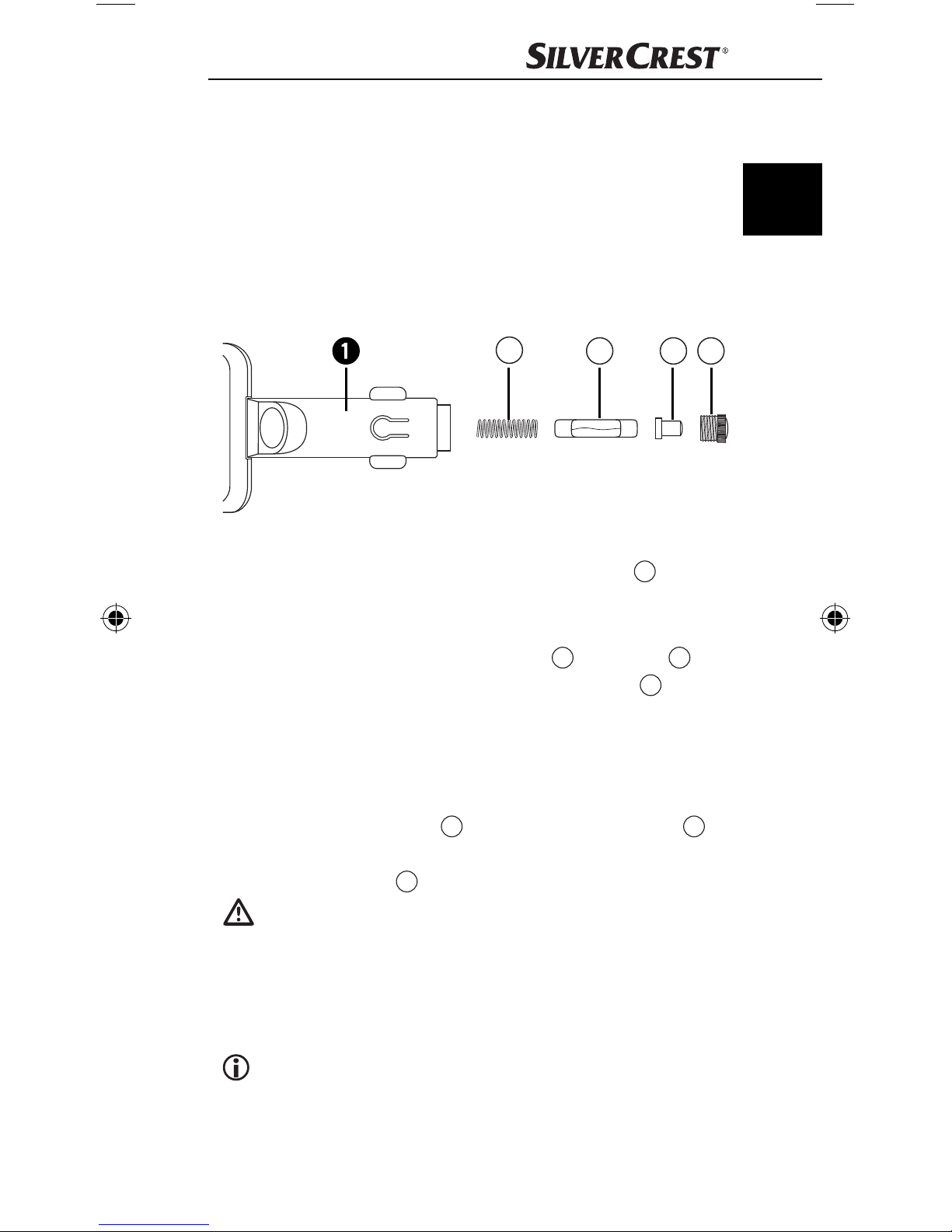
Changer les fusibles
Dans le kit mains libres se trouve un fusible. Si l‘appareil
ne fonctionne plus, veuillez vérifi er ou remplacer ce
fusible.
D
C B A
● Ouvrez la prise de raccordement de 12 V 1 en dévis-
sant et retirant l‘embout de vissage cannelé A avec
précaution dans le sens anti-horaire, éventuellement à
l‘aide d‘une pince.
FR
CH
● Détachez la pointe du connecteur B du fusible C et
enlevez le fusible. Veillez à ce que le ressort D dans
la prise de raccordement de 12 V 1 ne saute pas de
manière incontrôlée et se perde.
● Insérez un nouveau fusible de type F2AL/250V
dans la prise de raccordement de 12 V 1, posez la
pointe du connecteur B sur l‘extrémité du fusible C
légèrement en saillie et posez à nouveau l‘embout de
vissage cannelé A préalablement retiré.
Risque d‘incendie !
● Remplacez le fusible uniquement avec la valeur
indiquée sur la plaque signalétique. Les fusibles avec
d’autres valeurs peuvent provoquer un incendie. La
fumée d’un incendie est toxique.
Remarque :
Si ces opérations ne suffi sent pas, veuillez contacter votre
partenaire service après-vente dans votre pays.
SBTF 10 C2
29
Page 33
Nettoyage et entretien
Risque de dommages sur l’appareil !
FR
CH
● Avant tout nettoyage, déconnectez l’appareil de l’alimen-
tation électrique !
● N’immergez jamais l’appareil dans de l’eau ou d’autres
liquides !
● Ne laissez pas pénétrer de liquides dans le boîtier !
● N’ouvrez jamais le boîtier de l’appareil ! La machine
ne contient aucun élément de commande dans ces
pièces.
● N’utilisez pas de produits chimiques aggressifs, de
solutions de nettoyage ou de produits de nettoyage
aggressifs pour nettoyer l’appareil. Ceci pourrait en
eff et endommager la surface du boîtier.
● Nettoyez la surface du boîtier avec un chiff on légère-
ment humidifi é.
Mise au rebut
L’appareil ne doit jamais être jeté dans
la poubelle domestique normale. Cet
appareil est soumis aux impératifs de la
Remettez l’appareil destiné au recyclage à une entreprise
spécialisée ou au centre de recyclage de votre commune. Veuillez respecter les règlements actuellement en
vigueur. En cas de doutes, contactez votre organisation
de recyclage.
directive européenne 2012/19/EU.
Eliminer l’ensemble des matériaux d’emballage
d’une manière respectueuse de l’environnement.
30
SBTF 10 C2
Page 34
Garantie und Service
Cet appareil bénéfi cie de 3 ans de garantie à compter
de la date d’achat. L’appareil a été fabriqué avec soin
et consciencieusement contrôlé avant sa distribution.
Veuillez conserver le ticket de caisse en guise de preuve
d’achat. Si la garantie devait s’appliquer, contactez par
téléphone votre interlocuteur du service après-vente. Cette
condition doit être respectée pour assurer l’expédition
gratuite de votre marchandise. La prestation de garantie
s’applique uniquement pour les erreurs de matériaux et
de fabrication, pas pour les dommages de transport, les
pièces d’usure ou les dommages subis par les pièces
fragiles, comme par ex. les interrupteurs ou les batteries.
Le produit est exclusivement destiné à un usage privé et
non commercial. La garantie est annulée en cas de manipulation incorrecte et inappropriée, d’utilisation brutale
et en cas d’intervention qui n’aurait pas été réalisée par
FR
CH
notre centre de service après-vente agréé. Cette garantie
ne constitue pas une restriction de vos droits légaux. La
durée de la garantie n’est pas prolongée par la garantie
du fabricant. Ceci vaut également pour les pièces remplacées et réparées. Tous dommages et défauts présents dès
l’achat doivent être notifi és dès que le produit est déballé,
et au plus tard deux jours après la date d’achat. Toutes
réparations survenant après la période sous garantie ne
seront pas prises en charge.
Service France
Tel.: 0800 919270
E-Mail: [email protected]
IAN 91621
Service Suisse
Tel.: 0842 665566 (0,08 CHF/Min.,
mobile max. 0,40 CHF/Min.)
E-Mail: [email protected]
IAN 91621
Heures de service de notre hotline :
du lundi au vendredi de 8 h à 20 h (HEC)
SBTF 10 C2
31
Page 35

Importeur
KOMPERNASS HANDELS GMBH
FR
CH
BURGSTRASSE 21
44867 BOCHUM
GERMANY
www.kompernass.com
32
SBTF 10 C2
Page 36

Déclaration de conformité EU
Nous, la société Kompernaß Handels GmbH, Burgstraße
21, 44867 Bochum, Germany, déclarons que le produit
SBTF 10 C2 Dispositif mains-libres Bluetooth® est en
conformité avec les exigences de base et les prescriptions
des directives 2004/104/EC sur les véhicules, 1999/5/EC
sur les R&TTE, de la directive „basse tension“ 2006/95/EC
et de la directive RoHS 2011/65/EU.
Numéro d’identifi cation : IAN 91621
Normes harmonisées appliquées:
EN 60950-1:2006 + A11:2009 + A1: 2010 + A12: 2011
ETSI EN 300 328 V1.7.1
ETSI EN 301 489-1 V1.9.2
ETSI EN 301 489-17 V2.2.1
FR
CH
EN 62479: 2010
EN 50581: 2012
ISO 7637-2: 2004
Bochum, 3.08.2013
Semi Uguzlu
Quality Manager
SBTF 10 C2
33
Page 37

34
SBTF 10 C2
Page 38

Indice
Uso conforme . . . . . . . . . . . . . . . . . . . . . . . . . . . . . . . . 36
Avvertenze di sicurezza . . . . . . . . . . . . . . . . . . . . . . . . 37
Introduzione . . . . . . . . . . . . . . . . . . . . . . . . . . . . . . . . . 38
Volume della fornitura (vedere pagina apribile) . . . . . . 39
Dati tecnici . . . . . . . . . . . . . . . . . . . . . . . . . . . . . . . . . . 39
Elementi di comando (vedere pagina apribile) . . . . . . . 40
Installazione del dispositivo vivavoce nel veicolo . . . . . 40
Accensione e spegnimento del dispositivo vivavoce . . . 41
Accoppiamento del dispositivo vivavoce con telefono
cellulare . . . . . . . . . . . . . . . . . . . . . . . . . . . . . . . . . . . . 41
Accoppiamento del dispositivo vivavoce con vari
cellulari . . . . . . . . . . . . . . . . . . . . . . . . . . . . . . . . . . . . . 43
Disconnessione . . . . . . . . . . . . . . . . . . . . . . . . . . . . . . . 43
Ripristino della connessione . . . . . . . . . . . . . . . . . . . . . 43
Uso del dispositivo vivavoce . . . . . . . . . . . . . . . . . . . . . 44
Carica degli apparecchi da 5 V . . . . . . . . . . . . . . . . . . 45
Guasti e possibili rimedi . . . . . . . . . . . . . . . . . . . . . . . . 46
Pulizia e cura. . . . . . . . . . . . . . . . . . . . . . . . . . . . . . . . . 47
IT
CH
Smaltimento . . . . . . . . . . . . . . . . . . . . . . . . . . . . . . . . . 47
Garanzia & assistenza . . . . . . . . . . . . . . . . . . . . . . . . . 48
Importatore . . . . . . . . . . . . . . . . . . . . . . . . . . . . . . . . . . 49
Declaración de conformidad EU . . . . . . . . . . . . . . . . . 49
SBTF 10 C2
35
Page 39

IT
CH
Congratulazioni per l‘acquisto del nuovo apparecchio.
Lei ha scelto un prodotto di alta qualità. Il manuale di
istruzioni è parte integrante del presente prodotto. Esso
contiene importanti indicazioni per la sicurezza, l‘uso e lo
smaltimento. Prima di utilizzare il prodotto, si familiarizzi
con tutte le indicazioni relative ai comandi e alla sicurezza. Utilizzi il prodotto solo come descritto e per i campi di
impiego indicati. In caso di cessione del prodotto a terzi,
consegni anche tutta la documentazione relativa.
Uso conforme
Il Vivavoce Bluetooth® SBTF 10 C2 è stato previsto per l’uso
in veicoli con tensione di bordo da 12-24 V. L’apparecchio
è predisposto per creare una connessione vivavoce con un
telefono cellulare attraverso un collegamento Bluetooth®
che consenta di telefonare anche quando si è alla guida
di un veicolo senza dover tenere il cellulare all’orecchio. Il
dispositivo vivavoce utilizza la tecnologia Bluetooth® nonché un processore di segnali digitale (DSP), per eseguire
le funzioni di chiamata. Inoltre, tramite la connessione USB
è possibile caricare dispositivi mobili con tensione d’esercizio di 5 V
Questo apparecchio dev’essere utilizzato solo per fi ni
privati, non per scopi industriali e commerciali. Il presente
prodotto non è previsto per l’impiego in applicazioni medicali, di emergenza o di mantenimento in vita. Devono
essere utilizzati solo cavi di connessione e apparecchi
esterni conformi al presente apparecchio in relazione
alla sicurezza e alla compatibilità elettromagnetica e alla
qualità di schermatura.
Un uso diverso o esulante da quanto sopra è considerato
non conforme. Sono escluse le rivendicazioni di qualsiasi
(lettore MP3, telefoni cellulari, ecc.).
genere in caso di danni derivanti da uso non conforme.
Il rischio è esclusivamente a carico dell’utente.
36
SBTF 10 C2
Page 40
Avvertenze di sicurezza
Spiegazione dei simboli:
Questo simbolo indica i particolari pericoli collegati
alla manipolazione, uso o impiego.
Questo simbolo indica speciali consigli e istruzioni
per l‘uso.
La sicurezza nel traffi co ha la priorità!
● Seguire tutte le leggi locali. Durante la guida, le mani
devono essere sempre libere per svolgere le operazioni
di guida. La sicurezza nel traffi co durante la guida ha
sempre la priorità.
● Utilizzare il dispositivo vivavoce solo in situazioni dove
le condizioni di traffi co lo consentono e sempre senza
danneggiare, mettere in pericolo, creare impedimenti
o infastidire gli altri guidatori.
● Mentre si è nel traffi co, non farsi distrarre dall‘uso e dalla
visualizzazione del dispositivo vivavoce!
● Prima di mettersi alla guida, familiarizzarsi con l‘appa-
recchio e con l‘uso sicuro delle sue componenti!
IT
CH
● Installare il dispositivo vivavoce nel veicolo in modo
da non compromettere la visuale e non installare
l‘apparecchio in una zona di possibile impatto della
cellula passeggero o nell‘area di azione dell‘airbag.
Avvertenze di sicurezza generali
● Non tentare di aprire o riparare l’apparecchio. Apren-
dolo ci si espone a pericoli e la garanzia decade
● Fare riparare l’apparecchio difettoso solo dal servizio
clienti o dal personale autorizzato specializzato. Non
si assumono responsabilità per i danni derivanti dall’uso
non conforme o dall’abuso, dall’uso della forza o da
modifi che non autorizzate.
● Non esporre l’apparecchio all’umidità, a temperature
estreme (> +70°C) o a forti scosse.
SBTF 10 C2
37
Page 41
IT
CH
● Questo apparecchio non è indicato per l‘uso da parte
di persone (inclusi bambini) con limitate capacità
fi siche, sensoriali o mentali o prive dell‘esperienza e/o
della conoscenza necessaria, a meno che tali persone
non vengano sorvegliate da un responsabile per la
sicurezza o abbiano ricevuto indicazioni sull‘impiego
dell‘apparecchio.
Pericolo di soff ocamento
● I materiali d’imballo non sono un giocattolo. Tenere
pellicole, sacchetti e tutti gli altri materiali d’imballo
lontani dalla portata dei bambini. Pericolo di soff ocamento.
Collegamento ad altri cellulari
● Se si collega l’apparecchio a un altro apparecchio,
leggere prima le istruzioni per l’uso per ottenere indicazioni di sicurezza dettagliate. Non collegare prodotti
non compatibili.
Segnali ad alta frequenza
negli autoveicoli
I segnali ad alta frequenza, in determinate circostanze,
potrebbero infl uenzare la funzionalità di sistemi elettronici
non installati a norma o non suffi cientemente schermati in
autoveicoli, ad es. ABS elettronico, regolatore elettronico
di velocità e sistemi airbag. Per altre informazioni sul proprio autoveicolo o ulteriori accessori mettersi in contatto
con il relativo produttore o rappresentante.
Introduzione
Bluetooth® è una tecnologia di comunicazione senza fi li
a breve portata. Essa permette connessioni senza fi li fra
apparecchi Bluetooth®, come ad es. telefoni cellulari, PDA
e PC. Bluetooth® indica una norma mondiale per l’uso di
apparecchi su banda di frequenza ISM riconosciuta a livello
internazionale (Industrial, Scientifi c and Medical). Nell’ambito della banda di frequenza ISM (2,402 - 2,480 GHz)
si ottiene un campo di trasferimento dei dati di circa 10
38
SBTF 10 C2
Page 42

metri (classe II). L’espo-sizione alle interferenze dovute
ad altri apparecchi che utilizzano la banda di frequenza
ISM, come ad esempio microonde, WLAN (802.116) o
dispositivi per l’apertura dei garage, viene minimizzata
grazie al cosiddetto “salto di frequenza”. Con il salto di
frequenza avviene un cambio del livello di frequenza fi no a
1600 volte al secondo, pertanto la tecnologia Bluetooth®
è anche relativa-mente sicura in relazione alle intercettazioni.
Bluetooth® è un marchio commerciale registrato di proprietà Bluetooth SIG, Inc. Tutti gli altri nomi e marchi sono
proprietà del relativo titolare.
HSP (Headset-Profi le) consente le funzioni standard come la
trasmissione della voce, la ricezione e il rifi uto delle chiamate.
HFP (Handsfree-Profi le) consente le funzioni vivavoce di un
telefono cellulare, ad es. con l’aiuto di comandi vocali.
IT
CH
Volume della fornitura
(vedere pagina apribile)
Vivavoce Bluetooth
Istruzioni per l’uso
®
Dati tecnici
/ 1 A
/ 1000 mA
Tensione di esercizio: 12-24 V
Specifi che tecniche
®
del Bluetooth
Profi li Bluetooth
Tensione di uscita
connessione USB: 5 V
Fusibile: F2AL / 250 V
Dimensioni (L x P x A): ca. 16,2 x 5,5 x 2,1 cm
: versione 3.0 + EDR,
portata massima 10 metri
®
supportati: HSP e HFP
Peso: ca. 70 g
Temperatura di esercizio: +15° a +40°C
Temperatura di conservazione: tra 0° e +70°C
Umidità: da 5 a 75% (nessuna
SBTF 10 C2
condensa)
39
Page 43

Elementi di comando
(vedere pagina apribile)
1 Connettore da 12 V per auto
2 Microfono
IT
CH
3 +/- Tasti
4 Connessione USB
5 Altoparlante
6 Tasto multifunzione
7 Spia di stato LED
Installazione del dispositivo
vivavoce nel veicolo
Per consentire il funzionamento perfetto del dispositivo
vivavoce, inserirlo nell’ingresso dell’accendisigari o nella
presa di bordo del veicolo, per ottenere l’alimentazione
elettrica dell’apparecchio.
● Assicurarsi che il dispositivo vivavoce sia completa-
mente inserito e che non venga ostacolato il normale
funzionamento dell’apparecchio. La spia di stato LED 7
lampeggia due volte ogni 3 secondi e un breve segnale acustico acuto risuona una volta. L’apparecchio si
trova in modalità stand-by.
Avvertenza:
a volte la presa dell’accendisigari funziona solo con il
quadro del veicolo acceso. In caso di dubbi, consultare
il manuale di istruzioni del veicolo.
Attenzione!
per i veicoli con presa dell’accendisigari ovvero di bordo
funzionante anche con il quadro del veicolo spento:
● utilizzare il dispositivo vivavoce solo con il motore ac-
ceso. In caso contrario, la batteria del veicolo si può
scaricare dopo un periodo di tempo prolungato.
40
SBTF 10 C2
Page 44

Avvertenza:
se non si utilizza il dispositivo vivavoce, rimuoverlo dalla
presa dell’accendisigari del veicolo. Conservare l’apparecchio in un luogo asciutto, esente da polvere e protetto
dall’irradiazione solare diretta.
Accensione e spegnimento del
dispositivo vivavoce
Accensione: L’apparecchio è spento.
● Premere e mantenere premuto il tasto multifunzione 6
per 3 secondi, fi no a percepire un segnale acustico
breve e acuto. La spia di stato LED 7 lampeggia due
volte ogni 3 secondi.
Spegnimento: L’apparecchio si trova in modalità
stand-by.
IT
CH
● Premere e mantenere premuto il tasto multifunzione 6
per 5 secondi, fi no a percepire un segnale acustico
lungo e basso. La spia di indicazione LED 7 si spegne.
Accoppiamento del dispositivo
vivavoce con telefono cellulare
Il dispositivo vivavoce è stato sviluppato appositamente
per telefoni cellulari che supportano i profi li Bluetooth®
“Handsfree (HFP)” e “Headset (HSP)”. Ulteriori informa-
®
zioni sulla tecnologia radio Bluetooth
manuale di istruzioni del cellulare.
Prima di utilizzare il dispositivo vivavoce, è necessario
accoppiarlo a un cellulare compatibile (pairing).
● Assicurarsi che il cellulare sia acceso.
● Impostare il cellulare in modo tale che eff ettui la ricer-
ca di apparecchi con funzionalità Bluetooth®. Una
sono riportate nel
descrizione dettagliata è presente nel manuale di
istruzioni del proprio telefono cellulare.
● Assicurarsi che il dispositivo vivavoce sia stato applica-
to correttamente e sia spento.
SBTF 10 C2
41
Page 45

IT
CH
● Per spegnere l’apparecchio, tenere premuto il tasto
multifunzione 6 per circa 3 secondi. Si udrà un segnale acustico prolungato e basso, e la spia di stato
LED 7 si spegnerà.
● Collocare il dispositivo vivavoce e il cellulare a distan-
za non superiore a 1 metro.
● Premere e mantenere premuto il tasto multifunzione 6
per 6 secondi, fi no a percepire dopo 3 secondi un
segnale acustico breve e acuto, e dopo altri 3 secondi
una sequenza di toni bassi e acuti. La spia di stato LED 7
è accesa senza lampeggiare. Il dispositivo vivavoce si
trova ora in modalità di accoppiamento.
● Selezionare il dispositivo vivavoce “Car it” dall’elenco
degli apparecchi disponibili nel cellulare.
● Inserire la password preimpostata “9999” e confer-
marla per ottenere l’accoppiamento degli apparecchi.
Si udrà un segnale acustico prolungato e acuto e la
spia di stato LED 7 lampeggerà ogni 3 secondi.
● Ora si può utilizzare il dispositivo vivavoce.
Avvertenza:
Con l’impiego di cellulari più recenti (Smartphone) provvisti
di funzionalità Bluetooth versione 2.0 o superiore, potrebbe non essere necessario inserire il codice “9999”.
se l’accoppiamento non viene eseguito entro 2 minuti, il
dispositivo vivavoce si spegne automaticamente. La spia
di stato LED 7 si spegne e si ode un segnale acustico
prolungato e basso. Per alcuni modelli di cellulari potrebbe succedere che l’accoppiamento non venga eseguito
automaticamente. In questo caso l’accoppiamento deve
essere eseguito anche sul cellulare. Fino a quando non
verrà eseguita tale operazione, la spia di stato LED 7
lampeggia per due volte ogni 3 secondi. Per ulteriori informazioni, consultare il manuale di istruzioni del proprio
cellulare.
42
SBTF 10 C2
Page 46

Accoppiamento del dispositivo
vivavoce con vari cellulari
Il dispositivo vivavoce può essere accoppiato con un massimo di otto telefoni cellulari compatibili. Se si accoppia
un altro cellulare al dispositivo vivavoce, le informazioni
di accoppiamento del cellulare accoppiato per primo
verranno cancellate. Esso può tuttavia collegarsi solo a un
cellulare per volta. Non appena si accende il dispositivo
vivavoce, dopo pochi secondi esso tenta di stabilire una
connessione con l’ultimo cellulare utilizzato. Se non si
riesce a stabilire una connessione, il dispositivo vivavoce
resterà tuttavia riconoscibile per altri cellulari. Per utilizzare il dispositivo vivavoce con un cellulare accoppiato
che non è stato l’ultimo utilizzato, è necessario creare la
connessione tramite il menu Bluetooth® del cellulare.
Disconnessione
Se si desidera disconnettere il cellulare dal dispositivo
vivavoce, ad esempio per utilizzarlo con un altro apparecchio Bluetooth®:
● spegnere il dispositivo vivavoce
IT
CH
o
● eseguire la disconnessione tramite il menu Bluetooth®
del telefono cellulare.
Non è necessario eliminare l’accoppiamento con il dis-
®
positivo vivavoce nel menu Bluetooth
disconnessione.
, per eseguire la
Ripristino della connessione
Se si desidera riconnettere il dispositivo vivavoce con il
telefono cellulare utilizzato per ultimo:
● Assicurarsi che Bluetooth® sia stato attivato nel cellula-
re e attivare il dispositivo vivavoce.
Nel collegamento con un cellulare precedentemente
accoppiato non è necessario inserire alcun codice. È
possibile impostare il cellulare in modo tale che all’accen-
SBTF 10 C2
43
Page 47

IT
CH
sione del dispositivo vivavoce venga creata automaticamente una connessione con il cellulare. Non appena si è
connesso il dispositivo vivavoce con il cellulare precedentemente accoppiato, risuonerà un breve segnale acustico
acuto a conferma dell’avvenuta connessione. Per ulteriori
informazioni sull’accoppiamento automatico, consultare il
manuale di istruzioni del proprio cellulare.
Uso del dispositivo vivavoce
Una volta eseguito con successo l’accoppiamento, sono
disponibili le seguenti funzioni. Alcune delle funzioni descritte sono possibili solo con un cellulare che supporta il
profi lo Handsfree (HFP).
Avvertenza:
la qualità della resa audio dipende fortemente dala posizione d’installazione del vivavoce. Per quanto possibile
orientare il vivavoce in modo tale che il microfono 2 sia
rivolto verso di voi.
Funzioni di chiamata
● Utilizzare il cellulare come di consueto per eff ettuare
una chiamata.
● Per ripetere la selezione del numero chiamato per ultimo,
premere due volte brevemente il tasto multifunzione 6.
● Per l’attivazione della selezione vocale, premere una
volta brevemente il tasto multifunzione 6.
Avvertenza:
la chiamata a comando vocale è disponibile solo nei
cellulari che supportano tale funzione. Per ulteriori informazioni sulla chiamata a comando vocale, consultare il
manuale di istruzioni del proprio cellulare.
Ricezione e conclusione di una chiamata
Se si riceve una telefonata, la spia di stato LED 7 lampeggia e si sente un segnale di chiamata tramite il dispositivo
vivavoce. Se il segnale di chiamata del telefono cellulare
è disattivato, il suono di chiamata viene comunque emesso
tramite il dispositivo vivavoce.
44
SBTF 10 C2
Page 48

● Premere una volta brevemente il tasto multifunzione 6,
per accettare la chiamata.
● Premere una volta brevemente il tasto multifunzione 6,
per terminare la chiamata.
La chiamata può essere accettata o terminata anche
tramite il cellulare.
Ricezione automatica delle chiamate
Se è stata attivata la ricezione automatica delle chiamate
sul cellulare, la chiamata in arrivo viene accettata automaticamente dopo un periodo di tempo fi ssato in precedenza, e viene inoltrata al dispositivo vivavoce. Per ulteriori
informazioni sulla ricezione automatica delle chiamate,
consultare il manuale di istruzioni del proprio cellulare.
Rifi uto di una chiamata
● Premere il tasto multifunzione 6 per 3 secondi, per
rifi utare una chiamata in arrivo.
Impostazione del volume del dispositivo vivavoc
Il volume del dispositivo vivavoce può essere impostato
con l’ausilio dei tasti +/- 3.
IT
CH
● Durante una chiamata premere ripetutamente il tasto +
o - 3 fi no all’impostazione del volume desiderato.
Il raggiungimento del volume massimo viene segnalato
da un breve segnale acustico.
Carica degli apparecchi da 5 V
● Controllare la tensione di ingresso max. (5 V) e l’assor-
bimento di corrente max. (1000 mA) dell’apparecchio
che si desidera caricare. In tal caso consultare il manuale di istruzioni dell’apparecchio.
● Connettere l’apparecchio da caricare alla connessione
USB 4 del dispositivo vivavoce. L’apparecchio riceve
ora l’alimentazione di corrente dal dispositivo vivavoce.
Se l’apparecchio dispone di un indicatore di carica,
esso indicherà il caricamento dell’apparecchio stesso.
SBTF 10 C2
45
Page 49
Guasti e possibili rimedi
Se non si riesce a collegare il dispositivo vivavoce al
cellulare compatibile, procedere come segue:
● Assicurarsi che nel telefono cellulare sia attivata la
funzione Bluetooth®.
IT
CH
● Assicurarsi che il dispositivo vivavoce sia stato connes-
so, acceso e alimentato correttamente.
● Se si utilizzano più apparecchi Bluetooth®, assicurarsi che
la connessione Bluetooth® del cellulare sia stata interrotta.
● Assicurarsi che il dispositivo vivavoce sia distante non
oltre 10 metri dal cellulare e che non si trovino ostacoli o apparecchi elettronici in mezzo.
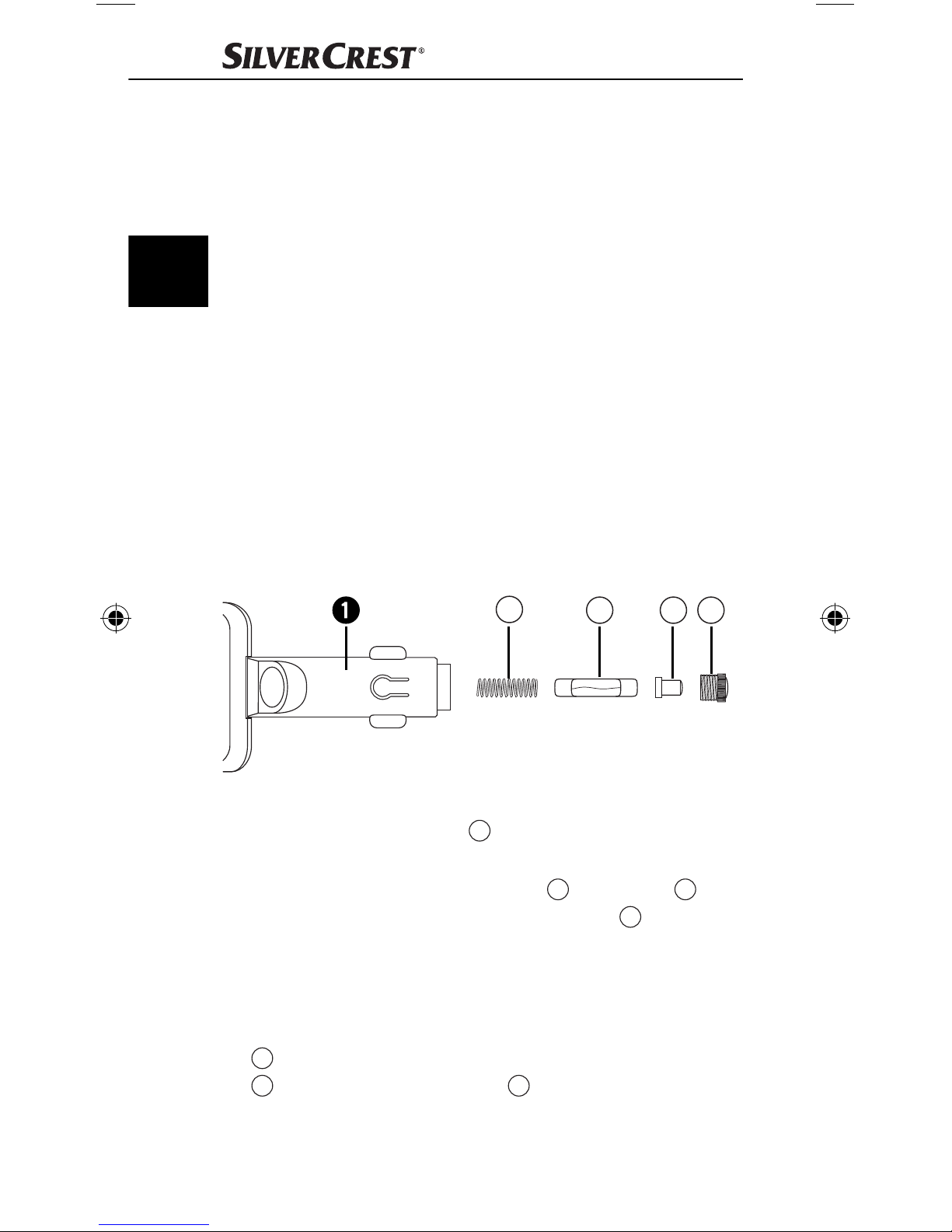
Sostituzione del fusibile
Nel vivavoce si trova un fusibile. Se l‘apparecchio non
funziona più, controllare o sostituire il fusibile.
D
C B A
● Aprire il connettore per auto 1 svitando cautamente
l‘inserto a vite scanalato A, se necessario con una
pinza, ruotando in senso antiorario.
● Rimuovere la punta dello spinotto B dal fusibile C ed
estrarre quest‘ultimo. Badare che la molla
nel connettore per auto 1 non salti in modo incontrol-
lato e vada persa.
● Inserire il nuovo fusibile del tipo F2AL/250V nel con-
nettore per auto 1, collocare la punta dello spinotto
sull‘estremità leggermente sporgente del fusibile
B
e riavvitare l‘inserto a vite A precedentemente
C
rimosso.
46
presente
D
SBTF 10 C2
Page 50
Pericolo d‘incendio!
● Sostituire il fusibile solo con uno che abbia lo stesso
valore di quello indicato sulla targhetta di modello.
Fusibili con altri valori potrebbero provocare un incendio. Il fumo generato dal fuoco è tossico.
Avvertenza:
Se tali misure non servissero a eliminare il guasto, rivolgersi al partner di assistenza della propria nazione.
Pulizia e cura
Pericolo di danneggiamento degli
apparecchi!
● Prima della pulizia staccare sempre l’apparecchio
dall’alimentazione elettrica!
● Non immergere mai l’apparecchio in acqua o altri liquidi!
● Impedire la penetrazione di liquidi nell’alloggiamento.
● Non aprire mai l’alloggiamento dell’apparecchio! In
esso non sono presenti elementi di comando.
● Non utilizzare agenti chimici, soluzioni detergenti o
detersivi aggressivi per la pulizia dell’apparecchio.
IT
CH
Ciò potrebbe danneggiare la superfi cie dell’alloggiamento.
● Ripulire la superfi cie dell’alloggiamento con un panno
leggermente inumidito.
Smaltimento
Non gettare per alcun motivo l’apparecchio insieme ai normali rifi uti domestici.
Questo prodotto è soggetto alla Direttiva
europea 2012/19/EU.
Smaltire l’apparecchio attraverso un’azienda di smaltimento autorizzata o attraverso l’ente di smaltimento
comunale. Rispettare le prescrizioni attualmente in vigore.
In caso di dubbi mettersi in contatto con l’ente di smaltimento competente.
SBTF 10 C2
47
Page 51
Smaltire tutti i materiali dell’imballaggio in modo
ecologicamente conforme.
Garanzia & assistenza
Questo apparecchio è garantito per tre anni a partire dalla
IT
CH
data di acquisto. L’apparecchio è stato prodotto con cura e
debitamente collaudato prima della consegna. Conservare lo scontrino come prova d’acquisto. In caso di interventi in garanzia, contattare telefonicamente il proprio centro
di assistenza. Solo in questo modo è possibile garantire
una spedizione gratuita della merce. La garanzia vale
solo per i difetti di materiale o fabbricazione, non per i
danni da trasporto, parti soggette a usura o danni a parti
fragili come ad es. interruttori o accumula-tori. Il prodotto
è destinato esclusivamente all’uso domestico e non a quello
commerciale. La garanzia decade in caso di impiego improprio o ma-nomissione, uso della forza e interventi non
eseguiti dalla nostra fi liale di assistenza autorizzata. Questa garanzia non costituisce alcun limite ai diritti legali del
consumatore. Il periodo di garanzia non viene prolungato
in caso di un intervento in garanzia. Ciò vale anche per
le componenti sostituite e riparate. I danni e difetti presenti
già all’acquisto devono essere comunicati immediatamente
dopo il disimbal-laggio, e non oltre due giorni dalla data
di acquisto. Le riparazioni eff ettuate dopo la scadenza
del periodo di garanzia sono a pagamento.
Assistenza Italia
Tel.: 02 36003201
E-Mail: [email protected]
IAN 91621
Assistenza Svizzera
Tel.: 0842 665566 (0,08 CHF/Min., telefonia
mobile max. 0,40 CHF/Min.)
E-Mail: [email protected]
IAN 91621
Raggiungibilità della hotline:
dal lunedì al venerdì, dalle 8.00 alle 20.00 (CET)
48
SBTF 10 C2
Page 52

Importatore
KOMPERNASS HANDELS GMBH
BURGSTRASSE 21
44867 BOCHUM, GERMANY
www.kompernass.com
Declaración de conformidad EU
Kompernaß Handels GmbH, Burgstraße 21, 44867
Bochum, Germany dichiara che il prodotto SBTF 10 C2
Dispositivo vivavoce Bluetooth® è conforme ai requisiti
fondamentali e alle altre norme rilevanti della Direttiva
2004/104/EC, della Direttiva R&TTE 1999/5/EC, della
Direttiva bassa tensione 2006/95/EC e della Direttiva
RoHS 2011/65/EU.
Codice d‘identifi cazione: IAN 91621
Norme armonizzate utilizzate:
EN 60950-1:2006 + A11:2009 + A1: 2010 + A12: 2011
ETSI EN 300 328 V1.7.1
ETSI EN 301 489-1 V1.9.2
IT
CH
ETSI EN 301 489-17 V2.2.1
EN 62479: 2010
EN 50581: 2012
ISO 7637-2: 2004
Bochum, 3.08.2013
Semi Uguzlu
Quality Manager
SBTF 10 C2
49
Page 53

50
SBTF 10 C2
Page 54

Inhoudsopgave
Gebruik in overeenstemming met gebruiksdoel . . . . . . 52
Veiligheidsvoorschriften . . . . . . . . . . . . . . . . . . . . . . . . . 53
Inleiding . . . . . . . . . . . . . . . . . . . . . . . . . . . . . . . . . . . . 54
Inhoud van het pakket (zie uitvouwpagina) . . . . . . . . . 55
Technische gegevens. . . . . . . . . . . . . . . . . . . . . . . . . . . 55
Bedieningselementen (zie uitvouwpagina) . . . . . . . . . . 56
Het handenvrij toestel in de auto aanbrengen . . . . . . . 56
Het handenvrij toestel aan- en uitzetten . . . . . . . . . . . . 57
Het handenvrij toestel aan een mobiele telefoon
koppelen . . . . . . . . . . . . . . . . . . . . . . . . . . . . . . . . . . . . 57
Het handenvrij toestel aan meerdere mobiele
telefoons koppelen . . . . . . . . . . . . . . . . . . . . . . . . . . . . 59
Verbinding verbreken . . . . . . . . . . . . . . . . . . . . . . . . . . 59
NL
De verbinding herstellen . . . . . . . . . . . . . . . . . . . . . . . . 59
Het handenvrij toestel gebruiken . . . . . . . . . . . . . . . . . . 60
Opladen van 5 V-apparaten. . . . . . . . . . . . . . . . . . . . . 61
Problemen Oplossen . . . . . . . . . . . . . . . . . . . . . . . . . . . 62
Reiniging en onderhoud . . . . . . . . . . . . . . . . . . . . . . . . 63
Milieurichtlijnen . . . . . . . . . . . . . . . . . . . . . . . . . . . . . . . 64
Garantie en service . . . . . . . . . . . . . . . . . . . . . . . . . . . . 64
Importeur . . . . . . . . . . . . . . . . . . . . . . . . . . . . . . . . . . . . 65
EU-conformiteitsverklaring . . . . . . . . . . . . . . . . . . . . . . . 66
SBTF 10 C2
51
Page 55

NL
Gefeliciteerd met de aankoop van uw nieuwe apparaat.
U hebt hiermee gekozen voor een hoogwaardig product.
De bedieningshandleiding maakt deel uit van dit product.
Deze bevat belangrijke aanwijzingen voor veiligheid, gebruik
en afvoeren. Maak uzelf voorafgaand aan het gebruik
van het product vertrouwd met alle bedienings- en veiligheidsvoorschriften. Gebruik het product uitsluitend op de
voorgeschreven wijze en voor de aangegeven doeleinden.
Geef alle documenten mee als u het product doorgeeft
aan een derde.
Gebruik in overeenstemming met
gebruiksdoel
De Bluetooth®handsfree SBTF 10 C2 is voor aanwending in voertuigen met een boordspanning van 12-24 V
bedoeld. Het apparaat is bestemd voor het maken van een
handsfree-verbinding met een mobiele telefoon via een
Bluetooth®-verbinding, om ook tijdens het autorijden te
kunnen bellen zonder de mobiele telefoon tegen het oor te
hoeven houden. Het handenvrij toestel maakt gebruik van
Bluetooth®-zendtechniek en van een digitale signaalprocessor (DSP), om opbelfuncties uit te voeren. Bovendien
kunnen mobiele apparaten met een bedrijfsspanning van
5 V
worden via de USB-aansluiting.
Dit apparaat mag alleen worden gebruikt voor privé
doeleinden en niet voor industriële en commerciële
gebruiksdoelen. Het onderhavige product is niet bedoeld
voor gebruik in medische, levensreddende en levensinstandhoudende situaties. Er mogen alleen aansluitkabels
en externe apparaten worden gebruikt, die overeenkomen met het onderhavige apparaat in veiligheidstechnisch opzicht en met betrekking tot elektromagnetische
(MP3-player, mobiele telefoons, etc.) opgeladen
verdraagzaamheid en beveiligingskwaliteit. Een ander of
verdergaand gebruik geldt als niet in overeenstemming
met de bestemming. Alle vormen van claims wegens
schade door gebruik dat niet volgens de bestemming is
zijn uitgesloten. Het risico is uitsluitend voor de gebruiker.
52
SBTF 10 C2
Page 56
Veiligheidsvoorschriften
Symbool-toelichting:
Dit symbool wijst op bijzondere gevaren bij hantering, gebruik of bediening.
Dit symbool staat voor speciale tips en aanwijzingen
voor het gebruik.
Verkeersveiligheid gaat voor!
● Neem alle plaatselijke regelgeving in acht. De handen
moeten onder het autorijden altijd voor de bediening
van de auto beschikbaar zijn. De verkeersveiligheid
heeft onder het rijden altijd voorrang.
● Bedien het handenvrij toestel alleen in situaties waarin
de verkeerssituatie u dit toelaat en u daarbij andere
verkeersdeelnemers niet in gevaar brengt, schade berokkent, hindert of tot last bent.
● Laat u uw aandacht niet van het verkeer afl eiden
door de bediening en de displaymeldingen van het
handenvrij toestel!
● Maak u voor u met rijden begint vertrouwd met de
bediening en oefen u in het veilige gebruik van het
handenvrij toestel!
● Installeer het handenvrij toestel zo in de auto dat u niet
NL
gehinderd wordt en het apparaat niet in een personenimpactzone of in de ontplooiingszone van de
airbag gemonteerd is.
Algemene veiligheidsvoorschriften
● Probeer het apparaat niet te openen of te repareren.
In dat geval is de veiligheid niet gegarandeerd en vervalt de garantie.
● Laat het defecte apparaat alleen door de klanten-
service of door geautoriseerd vakkundig personeel
repareren. Voor schade die resulteert uit onjuiste of
verkeerde behandeling, gebruik van geweld en ongeautoriseerde modifi catie, zijn wij niet aansprakelijk.
SBTF 10 C2
53
Page 57
NL
● Stel het apparaat niet bloot aan vocht, extreme tempe-
raturen (> +70°C) of hevige schokken.
● Dit apparaat is niet bedoeld voor gebruik door perso-
nen (met inbegrip van kinderen) met beperkte fysieke,
zintuiglijke of geestelijke vermogens of met gebrek
aan ervaring en/of gebrek aan kennis, tenzij ze onder
toezicht staan van een voor hun veiligheid verantwoordelijke persoon of van die persoon aanwijzingen
krijgen voor het gebruik van het apparaat.
Verstikkingsgevaar
● Verpakkingsmateriaal is geen speelgoed. Houd folies,
zakken en alle andere verpakkingsmaterialen uit de
buurt van kinderen. Er bestaat verstikkingsgevaar.
Op andere mobiele telefoons
aansluiten
● Lees als u het apparaat op een ander apparaat wilt
aansluiten de bijbehorende bedieningshandleiding door
voor gedetailleerde veiligheidsvoorschriften. Sluit geen
niet compatibele producten aan.
Hoge-frequentiesignalen in voertuigen
HF-signalen kunnen onder bepaalde omstandigheden de
werking van niet correct geïnstalleerde of niet toereikend
afgeschermde elektronische systemen in motorvoertuigen,
bijv. elektronische ABS, elektronische snelheidsregelaars
en airbagsystemen, nadelig beïnvloeden. Voor nadere inlichtingen over uw voertuig of eventuele accessoires, neem
contact op met de desbetreff ende fabrikant of zijn dealer.
Inleiding
Bluetooth® is een draadloze communicatietechnologie
met korte reikwijdte. Deze maakt een draadloze verbinding tussen Bluetooth®- apparatuur, zoals bijv. mobiele
telefoons, PDA’s en PC’s mogelijk. Bluetooth® berust op
een wereldwijde norm voor het gebruik op de internationaal erkende ISM-frequentieband (Industrial, Scientifi c
and Medical). Binnen deze ISM-frequentieband (2,402 2,480 GHz) wordt een data-overdrachtsbereik van ca.
54
SBTF 10 C2
Page 58

10 meters (Klasse II) gehaald. De storingsgevoeligheid
door andere gebruikers van de ISM-frequentieband, zoals
bijv. magnetrons, WLAN (802.116) of garagedeuropeners, wordt door het zogeheten „frequentiehopping“
tot een minimum beperkt. Bij frequentiehopping vindt tot
1600 keer per seconden een wissel van het frequentieniveau plaats. Daardoor geldt Bluetooth® ook als betrekkelijk afl uisterveilig.
Bluetooth® is een geregistreerd handelsmerk van de
Bluetooth SIG, Inc. Alle overige namen en handelsmerken
zijn eigendom van hun respectieve eigenaren.
HSP (headset-profi el) maakt standaardfuncties mogelijk,
zoals gesproken woord communicatie, evenals het beantwoorden en weigeren van gesprekken.
HFP (handsfree-profi el) maakt de handsfree functies van
een mobiele telefoon mogelijk, bijv. met hulp van voice
NL
dialing.
Inhoud van het pakket
(zie uitvouwpagina)
Bluetooth®- handsfree
Gebruiksaanwijzing
Technische gegevens
/ 1 A
/ 1000 mA
Bedrijfsspanning: 12-24 V
®
Bluetooth
Ondersteunde
Bluetooth
Ausgangsspannung
Uitgangsspanning
USB-aansluiting: 5 V
-specifi catie: versie 3.0 + EDR,
tot aan 10 m reikwijdte
®
-profi elen: HSP en HFP
Zekering: F2AL / 250 V
Maten (L x B x H): ca. 16,2 x 5,5 x 2,1 cm
Gewicht: ca. 70 g
Bedrijfstemperatuur: +15° tot +40°C
SBTF 10 C2
55
Page 59

NL
Opslagtemperatuur: 0° tot +70°C
Vochtigheid: 5 tot 75%
(geen condensatie)
Bedieningselementen
(zie uitvouwpagina)
1 Auto-aansluitstekker
2 Microfoon
3 +/- toetsen
4 USB-aansluiting
5 Luidsprekers
6 Meerfunctietoets
7 LED-toestandsaanduiding
Het handenvrij toestel in de auto
aanbrengen
Om het handsfree-toestel vlekkeloos te laten werken, wordt
het in de sigarettenaansteker of in het boordstopcontact
van het voertuig gestoken en daarmee van stroom voorzien.
● Let erop, dat het handsfree-toestel helemaal goed zit
en de bediening van het voertuig niet hindert. De LEDtoestandsaanduiding 7 knippert om de 3 seconden
en er klinkt één keer een kort hoog geluidssignaal. Het
apparaat staat in de standby-modus.
Opmerking:
Mogelijk werkt de sigarettenaansteker alleen als het
voertuig op contact staat. Raadpleeg in geval van twijfel
de handleiding van het desbetreff ende voertuig.
Vorsicht!
Bij voertuigen waarvan de sigarettenaansteker of het
boordnetstopcontact ook werkt als de auto niet op
contact staat:
● Gebruik het handenvrij toestel alleen bij een gestarte
motor. Anders kan de accu over een langere periode
leeg raken.
56
SBTF 10 C2
Page 60

Opmerking:
Als u de handsfree set niet gebruikt, haal deze dan uit het
sigarettenaansteker-contact van het voertuig. Bewaar de
set op een droge, stofvrije plaats en beschermd tegen
directe straling van de zon.
Het handenvrij toestel aan- en uitzetten
Aanzetten: het apparaat staat uit.
● Druk op de meerfunctietoets 6 en houdt deze 3
seconden lang ingedrukt, totdat er een kort, hoog geluidssignaal te horen is. De LED-toestandsaanduiding 7
gaat om de 3 seconden twee keer knipperen.
Uitzetten: het apparaat staat in de standby-modus.
● Druk op de meerfunctietoets 6 en houd deze ge-
NL
durende 5 seconden vast tot een kort geluidssignaal
hoorbaar is. De LED-toestandsaanduiding 7 dooft.
Het handenvrij toestel aan een
mobiele telefoon koppelen
Het handenvrij toestel werd speciaal voor mobiele
telefoons ontwikkeld die het Bluetooth® Profi le „Handsfree (HFP) en Headset (HSP)“ ondersteunen. Nadere
inlichtingen over Bluetooth® zendtechniek vindt u in de
bedieningshandleiding van uw mobiele telefoon.
Voordat u het handenvrij toestel kunt gaan gebruiken,
moet u deze eerst aan een compatibele mobiele telefoon
koppelen (pairing).
● Verzeker u ervan dat de mobiele telefoon aan staat.
● Stel de mobiele telefoon zo in dat het naar Bluetooth®
apparaten zoekt. Een gedetailleerde beschrijving
daarover vindt u in de bedieningshandleiding van uw
mobiele telefoon.
● Verzeker u ervan dat het handenvrij toestel correct
aangebracht en uitgeschakeld is.
SBTF 10 C2
57
Page 61

NL
● Om het apparaat uit te schakelen, houdt u de meer-
functietoets 6 ongeveer 3 secondes lang ingedrukt.
Er is een lang en diep geluidsignaal te horen en de
LED-toestandsmelding 7 gaat uit.
● Plaats het handenvrij toestel en de mobiele telefoon
zo dat de onderlinge afstand niet meer dan 1 meter
bedraagt.
● Druk op de meerfunctietoets 6 en houd deze tot 6
seconden ingedrukt, totdat na 3 seconden een kort,
hoog geluidssignaal te horen is en na nog eens 3 seconden een opeenvolging van tonen, diep en hoog
geluidssignaal. Het LED-indicatielampje 7 gaat
voortdurend branden. De handsfree set staat nu in de
koppelingsmodus.
● Kies het handenvrij toestel „Car Kit“ uit de lijst van
beschikbare apparaten in de mobiele telefoon.
● Voer het voorgeprogrammeerde wachtwoord „9999“
in en bevestig om de apparaten aan elkaar te koppelen. U hoort een lang, hoog geluidssignaal en de LEDtoestandsaanduiding 7 knippert om de 3 seconden.
● U kunt het handenvrij toestel nu gebruiken.
Opmerking:
Bij gebruik van nieuwere mobiele telefoons (smartphones), die zijn uitgerust met Bluetooth 2.0 of een hogere
versie, kan het zijn, dat de toegangscode „9999“ niet
ingevoerd moet worden. Als de koppeling niet binnen
2 minuten voltooid is, schakelt het handenvrij toestel uit
zichzelf uit. De LED-toestandsaanduiding 7 dooft en
u hoort een lang geluidssignaal. Bij sommige mobiele
telefoons kan het voorkomen, dat de koppeling niet
automatisch wordt uitgevoerd. In dit geval moet de koppeling bovendien worden uitgevoerd aan de mobiele
telefoon. Zo lang dit niet is gebeurd, knippert het LEDtoestandsaanduiding 7 iedere 3 seconden twee keer.
Meer informatie vindt u in de gebruiksaanwijzing van uw
mobiele telefoon.
58
SBTF 10 C2
Page 62

Het handenvrij toestel aan meerdere mobiele telefoons koppelen
U kunt het handenvrij toestel aan maximaal acht compatibele mobiele telefoons koppelen. Als een andere mobieletelefoon met het handenvrij toestel gekoppeld wordt,
worden de koppelingsgegevens van de eerst gekoppelde
mobiele telefoon gewist. Er kan echter telkens maar een
mobiele telefoon verbonden worden. Wordt het handsfree toestel ingeschakeld, probeert het binnen een paar
seconden een verbinding met de laatst gebruikte mobiele
telefoon te maken. Als er geen verbinding tot stand gebracht
kan worden, dan blijft het handsfree toestel desondanks
voor andere mobiele telefoons herkenbaar. Om het handsfree toestel met een gekoppelde mobiele telefoon te
gebruiken, die niet de laatst gebruikte mobiele telefoon
is, moet de verbinding via het Bluetooth®-menu van de
mobiele telefoon tot stand gebracht worden.
Verbinding verbreken
Als u het contact van de mobiele telefoon met het handenvrij toestel wilt verbreken, bijv. om het met een ander
Bluetooth® apparaat te verbinden:
● Zet het handenvrij toestel uit
of
NL
● Verbreek de verbinding met behulp van het
Bluetooth®-menu in de mobiele telefoon.
U hoeft de koppeling met het handenvrij toestel niet in het
®
Bluetooth
-menu te wissen om de verbinding te verbreken.
De verbinding herstellen
Als u het handsfree toestel opnieuw met de laatst gebruikte
mobiele telefoon wilt verbinden:
● Verzeker u ervan dat Bluetooth® in de mobiele tele-
foon geactiveerd is en zet het handenvrij toestel aan.
SBTF 10 C2
59
Page 63

NL
Bij de verbinding met een eerder gekoppelde mobiele
telefoon, moet geen pascode worden ingevoerd. U kunt
uw mobiele telefoon zo instellen, dat er automatisch een
verbinding met de mobiele telefoon wordt gemaakt bij
het inschakelen van de handsfree set. Zodra de handsfree set in verbinding staat met een eerder gekoppelde
mobiele telefoon, klinkt een hoog kort geluidssignaal als
bevestiging van de verbinding. Meer informatie over de
automatische koppeling vindt u in de gebruiksaanwijzing
van uw mobiele telefoon.
Het handenvrij toestel gebruiken
Na de geslaagde koppeling staan u de onderstaande
functies ter beschikking. Vele van de beschreven functies
zijn alleen mogelijk met een mobiele telefoon die het
Handsfree Profi le (HFP) ondersteunt.
Tip:
De spraakkwaliteit is sterk afhankelijk van de inbouwpositie
van het handsfree-toestel. Plaats het handsfree-toestel indien
mogelijk zodanig dat de microfoon 2 in uw richting wijst.
Anruff unktionen
● Gebruik uw mobiele telefoon op de gebruikelijke
manier om iemand op te bellen.
● Druk om het laatst gebelde telefoonnummer te herha-
len, tweemaal kort op de meerfunctietoets 6.
● Druk om de taalkeuze te activeren, eenmaal kort op
de meerfunctietoets 6.
Opmerking:
De taalkeuze is alleen bij mobiele telefoons beschikbaar
die deze functie ondersteunen. Nadere inlichtingen over
taalkeuze vindt u in de bedieningshandleiding van uw
mobiele telefoon.
60
SBTF 10 C2
Page 64

Een telefoontje aannemen en beëindigen
Als u opgebeld wordt, knippert de LED-toestandsaanduiding 7 en hoort u over het handenvrij toestel een
belsignaal. Als het oproepsignaal in uw mobiele telefoon
uitgeschakeld is, wordt het belsignaal desondanks via het
handsfree toestel afgegeven.
● Druk eenmaal kort op de meerfunctietoets 6 om het
telefoontje op te nemen.
● Druk eenmaal kort op de meerfunctietoets 6 om het
opgenomen telefoontje te beëindigen.
U kunt het telefoontje ook via de mobiele telefoon opnemen of beëindigen.
Automatische telefoonopname
Als de automatische telefoonopname in de mobiele telefoon geactiveerd is, neemt deze het inkomende gesprek
na een vastgelegde tijdsduur automatisch aan en verbindt
deze door naar het handenvrij toestel. Nadere inlichtingen over de automatische telefoonopname vindt u in de
bedieningshandleiding van uw mobiele telefoon.
Een telefoongesprek weigeren
● Druk gedurende 3 seconden op de meerfunctietoets 6
om het inkomende gesprek te weigeren.
NL
Volume van het handenvrij toestel instellen
U kunt het volume van het handsfree-toestel instellen met
behulp van de +/- toetsen 3.
● Druk tijdens een telefoongesprek meermaals op de
+, resp. - toets 3 totdat het gewenste volume is ingesteld. Het bereiken van het maximale volume wordt
gesignaleerd door een kort geluidssignaal.
Opladen van 5 V-apparaten
● Controleer de max. ingangsspanning (5V) en de max.
stroomopname (1000 mA) van het apparaat, dat
opgeladen moet worden. Kijk dit na in de gebruiksaanwijzing van het apparaat.
SBTF 10 C2
61
Page 65
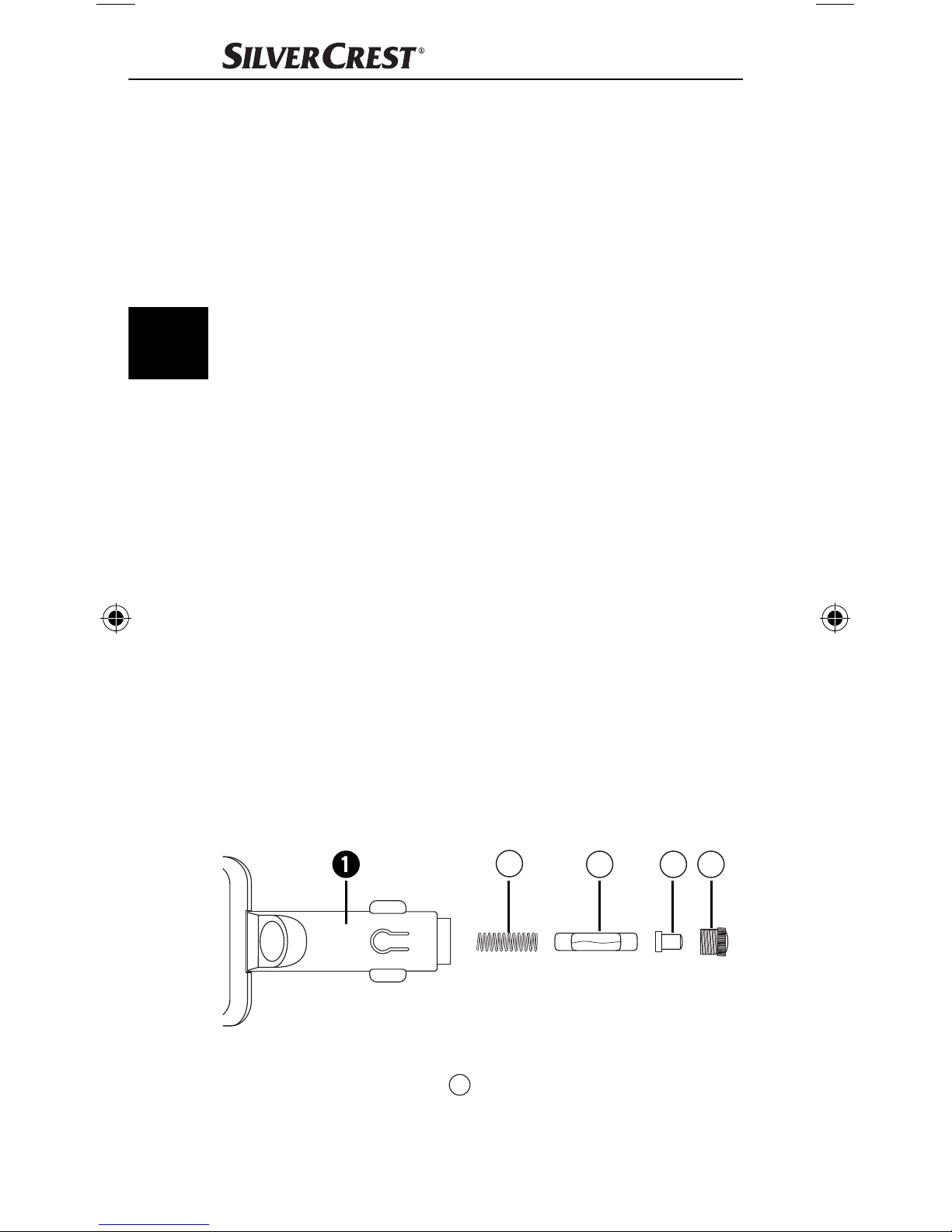
NL
● Verbind het apparaat, dat opgeladen moet worden
met de USB-aansluiting 4 van het handsfree-toestel.
Het apparaat ontvangt zijn stroomvoorziening nu van
het handsfree-toestel. Beschikt het apparaat over een
oplaad-indicatie-display, dan geeft deze aan, dat het
apparaat wordt opgeladen.
Problemen Oplossen
Als u het handenvrij toestel niet met de compatibele mobiele telefoon kunt verbinden, ga dan als volgt te werk:
● Verzeker u ervan dat in de mobiele telefoon de
®
Bluetooth
● Verzeker u ervan dat het handenvrij toestel correct
ingebouwd, aangezet en van voeding voorzien is.
● Indien u meerdere Bluetooth®-apparaten gebruikt,
verzeker u er dan van dan dat een eerder tot stand
functie geactiveerd is.
gebrachte Bluetooth®-verbinding van de mobiele
telefoon verbroken wordt.
● Verzeker u ervan dat het handenvrij toestel maximaal
10 meter van de mobiele telefoon verwijderd is en er
zich daartussen geen obstakels of elektronische apparaten bevinden.
Zekering vervangen
Het handsfree-toestel bevat een zekering. Controleer,
als het apparaat niet meer functioneert, de zekering en
vervang deze zo nodig.
D
C B A
● Open de auto-aansluitstekker 1 doordat u het gerib-
belde schroefi nzetstuk A, desnoods met een tang,
voorzichtig tegen de wijzers van de klok in opendraait
en eruit haalt.
62
SBTF 10 C2
Page 66
● Haal de stekkerpunt B van de zekering C af en
neem de zekering uit. Let erop dat de veer D in de
auto-aansluitstekker 1 niet ongecontroleerd weg-
springt en kwijtraakt.
● Plaats een nieuwe zekering van het type F5AL/250V
in de auto-aansluit-stekker 1, zet de stekkerpunt B
op het licht uitstekende uiteinde van de zekering C en
draai het tevoren uitgenomen schroefi nzetstuk A weer
in de stekker.
Brandgevaar!
● Vervang de zekering uitsluitend door een zekering met
de op het typeplaatje aangegeven waarde. Zekeringen met andere waarden kunnen brand veroorzaken.
Brandrook is giftig.
Opmerking:
Als deze maatregelen het probleem niet helpen oplossen,
NL
richt u dan tot het desbetreff ende servicecentrum in uw
land.
Reiniging en onderhoud
Gevaar voor stroomschokken!
● Sluit het apparaat telkens vóór het schoonmaken af!
● Dompel het apparaat nooit in water of in andere
vloeistoff en onder!
● Zorg ervoor dat er geen vloeistoff en in de behuizing
kunnen binnendringen.
● Open nooit de behuizing van het apparaat. Hierin
bevinden zich geen bedieningselementen.
● Gebruik geen bijtende chemicaliën, schoonmaak-
oplossingen of sterke schoonmaakmiddelen om het
apparaat schoon te maken. Dit zou de oppervlakken
van de behuizing kunnen beschadigen.
● Maak de oppervlakken van de behuizing schoon met
een licht bevochtigde doek.
SBTF 10 C2
63
Page 67
Milieurichtlijnen
Deponeer het apparaat in geen geval
bij het normale huisvuil. Dit product is
onderhevig aan de Europese richtlijn
2012/19/EU.
Voer het apparaat af via een erkend afvalverwerkingsbedrijf of via uw gemeentereiniging. Neem de bestaande
voorschriften in acht. Neem in geval van twijfel contact op
NL
met de gemeentelijke reinigingsdienst.
Voer alle verpakkingsmaterialen op een
milieuvriendelijke manier af.
Garantie en service
U heeft op dit apparaat 3 jaar garantie vanaf de aankoopdatum. Het apparaat is met de grootst mogelijke
zorg vervaardigd en voorafgaand aan de levering nauwkeurig gecontroleerd. Bewaar a.u.b. de kassabon als
aankoopbewijs. Als u aanspraak wilt maken op garantie,
neem dan a.u.b. telefonisch contact op met uw servicefi liaal. Alleen op die manier is een kostenloze verzending
van uw product gegarandeerd.
De garantie geldt alleen voor materiaal- of fabricagefouten, echter niet voor transportschade, of voor onderdelen
die aan slijtage onderhevig zijn, of voor beschadigingen
aan breekbare delen, bijv. schakelaars of accu’s. Het
product is uitsluitend bestemd voor privé-gebruik en niet
voor bedrijfsmatige doeleinden.
Bij verkeerd gebruik en ondeskundige behandeling, bij gebruik van geweld en bij reparaties die niet door ons geautoriseerd servicefi liaal zijn uitgevoerd, vervalt de garantie. Uw
wettelijke rechten worden door deze garantie niet beperkt.
De garantieperiode wordt niet verlengd door de aansprakelijkheid. Dit geldt eveneens voor vervangen en gerepareerde onderdelen. Schade en gebreken die mogelijk
reeds bij de aankoop aanwezig zijn, moeten direct na het
uitpakken worden gemeld, uiterlijk echter twee dagen na
de dag van aankoop. Na verstrijken van de garantieperiode moeten alle voorkomende reparaties vergoed worden.
64
SBTF 10 C2
Page 68

Service Nederland
Tel.: 0900 0400223 (0,10 EUR/Min.)
E-Mail: [email protected]
IAN 91621
Bereikbaarheid hotline:
Maandag t/m vrijdag van 8:00 tot 20:00 uur (CET)
Importeur
KOMPERNASS HANDELS GMBH
BURGSTRASSE 21
44867 BOCHUM
GERMANY
www.kompernass.com
NL
SBTF 10 C2
65
Page 69

EU-conformiteitsverklaring
Wij, Kompernaß Handels GmbH, Burgstraße 21, 44867
Bochum, Germany, verklaren geheel op eigen verantwoording, dat het product SBTF 10 C2 Bluetooth®-handsfree
set voldoet aan de fundamentele eisen en de andere
relevante voorschriften van de Automotive richtlijn
2004/104/EC, de R&TTE-richtlijn 1999/5/EC, de
Laagspanningsrichtlijn 2006/95/EC en de de RoHS
NL
richtlijn 2011/65/EU.
Identifi catienummer: IAN 91621
Toegepast geharmoniseerde normen:
EN 60950-1:2006 + A11:2009 + A1: 2010 + A12: 2011
ETSI EN 300 328 V1.7.1
ETSI EN 301 489-1 V1.9.2
ETSI EN 301 489-17 V2.2.1
EN 62479: 2010
EN 50581: 2012
ISO 7637-2: 2004
Bochum, 3.08.2013
Semi Uguzlu
Quality Manager
66
SBTF 10 C2
Page 70

Content
Correct Usage . . . . . . . . . . . . . . . . . . . . . . . . . . . . . . . . 68
Safety instructions . . . . . . . . . . . . . . . . . . . . . . . . . . . . . 69
Introduction . . . . . . . . . . . . . . . . . . . . . . . . . . . . . . . . . . 70
Package contents (see fold-out page) . . . . . . . . . . . . . . 71
Technical data . . . . . . . . . . . . . . . . . . . . . . . . . . . . . . . . 71
Controls (see fold-out page) . . . . . . . . . . . . . . . . . . . . . 72
Installing the hands-free appliance in a vehicle . . . . . . 72
Switching the hands-free appliance on and off . . . . . . 73
Coupling the hands-free appliance with a mobile
telephone . . . . . . . . . . . . . . . . . . . . . . . . . . . . . . . . . . . 73
Coupling the hands-free appliance with several
mobile telephones . . . . . . . . . . . . . . . . . . . . . . . . . . . . . 74
Separating the connection . . . . . . . . . . . . . . . . . . . . . . 75
Re-establishing the connection . . . . . . . . . . . . . . . . . . . 75
Using the hands-free appliance . . . . . . . . . . . . . . . . . . 75
Charging 5 V Devices . . . . . . . . . . . . . . . . . . . . . . . . . . 77
Troubleshooting . . . . . . . . . . . . . . . . . . . . . . . . . . . . . . . 77
Cleaning and Care . . . . . . . . . . . . . . . . . . . . . . . . . . . 79
Disposal . . . . . . . . . . . . . . . . . . . . . . . . . . . . . . . . . . . . 79
Warranty & Service . . . . . . . . . . . . . . . . . . . . . . . . . . . 79
Importer . . . . . . . . . . . . . . . . . . . . . . . . . . . . . . . . . . . . 80
Declaration of EU Conformity . . . . . . . . . . . . . . . . . . . . 81
GB
SBTF 10 C2
67
Page 71

Congratulations on the purchase of your new appliance.
You have clearly decided in favour of a quality product.
These operating instructions are a part of this product.
They contain important information in regard to safety, use
and disposal. Before using the product, familiarise yourself with all of these operating and safety instructions. Use
the product only as described and only for the specifi ed
areas of application. In addition, pass these documents
on, together with the product, to any future owner.
Correct Usage
GB
The Bluetooth® Hands-Free Kit SBTF 10 C2 is designed
for use in vehicles with a voltage of 12-24 V. The device is
designed to create an open voice connection with a mobile
phone via a Bluetooth® connection, in order to allow
the user to make telephone calls while travelling by car,
without having to hold the mobile phone to his or her ear.
The handsfree phone system uses both Bluetooth® radio
technology aswell as a digital signal processor (DSP) to
carry out telephone functions. In addition, mobile devices
with an operating voltage of 5V
phones, etc.) can be charged via the USB port.
This device may be used ONLY for private domestic purposes, not for industrial or commercial applications. This
product is not intended for use in activities concerned with
medicinal, lifesaving or life sustaining applications. All of
the additional connecting cables and external devices used
(MP3 players, cell
MUST match the safety-related, electromagnetic compatability and shielding quality standards of the device at hand.
This appliance is not intended for any other use or for uses
beyond those mentioned. Claims of any kind for damage
resulting from unintended use will not be excepted. The
operator alone bears liability.
68
SBTF 10 C2
Page 72
Safety instructions
Symbol defi nitions:
This symbol points out the particular risks associated
with handling, operation or manipulation.
This symbol stands for special tips and operating
instructions.
T r a ffi c safety has priority!
● Comply with all local laws. When driving, your hands
must ALWAYS be free to operate the vehicle safely.
Traffi c safety must ALWAYS take priority whilst driving.
● Only manipulate the hands-free appliance on those
occasions in which the traffi c situation permits it and in
which you will not endanger, injure, obstruct or cause
annoyance to other road users.
● Do not permit your concentration on the road traffi c to
be compromised by the manipulation and displays of
the handsfree appliance!
● Become familiar with the operation of it before driving
off and practice the safe operation of the facility!
● Install the hands-free appliance in the vehicle such that
your view is not obstructed and that the appliance is
not located in an impact zone in the passenger compartment or in the infl ation area of airbags.
General safety instructions
GB
● Do not attempt to open or repair the appliance. Should
you do so, appliance safety can no longer be assured
and the warranty becomes void.
● Have the defective device repaired by customer ser-
vice or an authorised specialist only. No liability will
be accepted for damage caused by misuse, improper
handling, use of force or unauthorized modifi cation.
● Never subject the device to moisture, extreme tempera-
tures (greater than +70°C) or extreme vibrations.
SBTF 10 C2
69
Page 73
● This device is not intended for use by persons (including
children) with restricted physical, sensory or mental abilities or lack of experience and/or knowledge unless, of
course, they are supervised by a person responsible for
their safety or obtain from that person instructions on
how the device should be used.
Risk of suff ocation
● The packaging material is not a toy. Keep plastic
sheeting, bags and all other packaging material away
from children. There is a risk of suff ocation.
GB
Connection to other mobile telephones
● If you wish to connect the appliance to another appli-
ance, read the operating instructions to obtain detailed
safety instructions. Do not connect it to a product that
is not compatible.
High frequency signals in vehicles
HF signals can, under circumstances, negatively infl uence the
function of not properly installed or not suffi ciently shielded
electronic systems in vehicles, e.g. electronic ABS, electronic
tempo controllers and airbag systems. For further informa
tion about your vehicle or its possible ancillaries make
contact with the respective manufacturer or their representative.
Introduction
Bluetooth® is a wireless communication system with a
short range. It makes possible wireless connections between Bluetooth® appliances, such as for example mobile
telephones, PDA and PCs. Bluetooth
worldwide standard for operation in the internationally
recognised ISM Frequency Range (Industrial, Scientifi c
and Medical). Within the ISM Frequency Range (2.402 -
2.480 GHz), a data transfer range of ca. 10 meters (class II)
is achieved. The disturbance susceptibility through other
users of the ISM Frequency Range, such as for example
microwaves, WLAN (802.116) or garage door openers,
is minimised by so-called “Frequency-Hopping“. With
70
®
relates itself to a
SBTF 10 C2
Page 74

Frequency-Hopping, a change of frequency levels takes
place at up to 1600 times per second, thereby Bluetooth®
is also reckoned to be relatively tap-proof.
Bluetooth® is a registered trademark of Bluetooth SIG, Inc.
All other names and brands are the property of their owner.
The HSP (Headset-Profi l) makes possible standard functions such as voice transference, as well as the acceptance and rejection of calls.
The HFP (Handsfree-Profi l) makes possible the hands-free
call functions of a mobile telephone, for example with the
help of voice commands.
Package contents (see fold-out page)
Bluetooth® Hands-Free Kit
Operating instructions
GB
Technical data
/ 1 A
/ 1000 mA
Operational voltage: 12-24 V
Bluetooth® Specifi cation: Version 3.0 + EDR,
up to a range of 10 meters
®
Supported Bluetooth
Output Voltage USB port: 5 V
Fuse: F2AL / 250 V
Dimensions (L x W x H): approx. 16,2 x 5,5 x 2,1 cm
Weight: approx. 70 g
Operational temperature: +15° to +40°C
Storage temperature: 0° to +70°C
Humidity: 5 to 75%
profi les: HSP and HFP
(no condensation)
SBTF 10 C2
71
Page 75

Controls (see fold-out page)
1 Vehicle connector plug
2 Microphone
3 +/- Buttons
4 USB port
5 Loudspeakers
6 Multi-function button
7 LED status indicator
GB
Installing the hands-free appliance
in a vehicle
So that the hands-free appliance can function correctly, it
is connected to the vehicle cigar lighter socket or on-board
power socket and provided with electricity from there.
● Ensure that the hands-free appliance engages completely
and that the operation of the vehicle is not negatively
infl uenced. The LED status indicator 7 blinks twice every
3 seconds and a short high signal tone sounds once. The
appliance is in standby mode.
Note:
It is possible that the cigar lighter only functions when the
vehicle ignition is switched on. In cases of doubt, consult
the operating instructions for the particular vehicle.
Caution:
For vehicles in which the cigar lighter, resp. the vehicle circuit plug, also functions when the ignition is switched off :
● Use the hands-free appliance only when the motor is
running. Otherwise, the vehicle batteries could become
discharged over an extended period of time.
Note:
When you are not using the hands-free equipment remove
it from the vehicles cigarette lighter socket. Store it in a dry,
dust free location protected from direct sunlight.
72
SBTF 10 C2
Page 76

Switching the hands-free
appliance on and off
Switching on: The appliance is switched off .
● Press and hold the multi-function button 6 for 3 seconds,
until a short and high signal tone is heard. The LED
status indicator 7 blinks twice every 3 seconds.
Switching off : The appliance is in standby mode.
● Press and hold the multi-function button 6 for 5 seconds,
until a long and deep signal tone is heard. The LED
status indicator 7 extinguishes.
Coupling the hands-free appliance
with a mobile telephone
The hands-free appliance has been especially developed
for mobile telephones that support the Bluetooth® Profi le
GB
“Handsfree (HFP) and Headset (HSP)“. Further information about Bluetooth® radio technology is to be found in
the operating instructions for your mobile telephone.
Before you can use the hands-free appliance, you must
connect it with a compatible mobile telephone (pairing).
● Check to make sure the mobile telephone is switched on.
● Programme the mobile telephone so that it searches
for Bluetooth® appliances. A detailed description of
how to do this is to be found in the operating instructions for your mobile telephone.
● Ensure that the hands-free appliance is correctly set up
and switched off .
● To switch the device off , press and hold the multi-function
button 6 for about 3 seconds. A long, low signal
tone will be heard and the LED status indicator 7
extinguishes.
● Position the hands-free appliance and the mobile tele-
phone so that they are not more than 1 metre away
from each other.
● Press and hold down the multi-function button 6 for 6
seconds until, after 3 seconds a short, high signal tone
SBTF 10 C2
73
Page 77

and after a further 3 seconds a succession of low and
high signal tones are heard. The LED status indicator
7 lights up constantly and the hands-free equipment is
now in the coupling mode.
● Select the hands-free provision “Car Kit“ from the list of
available appliances for the mobile telephone.
● Enter in the pre-programmed passcode “9999“ and
then confi rm it, which couples the appliances with each
other. You will hear a long high signal tone and the
LED status indicator 7 blinks every 3 seconds.
● You can now use the hands-free appliance.
GB
Note:
When using the latest mobile phones, (Smartphones) those
that are equipped with Bluetooth 2.0 or a more modern
version, it is possible that the pass code “9999“ need not
be entered. If the coupling is not completed within 2 minutes, the hands-free appliance switches itself off . The LED
status indicator 7 extinguishes and you will hear a long
and deep signal tone. With some mobile telephones it is
possible that coupling does not automatically take place.
In this case coupling must be carried out additionally on
the mobile telephone. The LED status indicator 7 blinks
twice every 3 seconds until this has been carried out. Further information can be found in your mobile telephone’s
operating instructions.
Coupling the hands-free appliance
with several mobile telephones
You can couple the hands-free appliance with up to eight
mobile telephones. If a further mobile telephone is coupled with the hands-free appliance, the coupling information of the fi rst coupled mobile telephone is erased. However, it can only be connected with one mobile telephone.
When the hands-free appliance is switched on, within a
few seconds it attempts to make a connection to the last
used mobile phone. Should a connection not be possible,
the hands-free appliance nonetheless remains recognis-
74
SBTF 10 C2
Page 78

able for other mobile telephones. To use the hands-free
appliance with a linked mobile phone that is not the last
used mobile phone, the connection must be made via the
Bluetooth® menu of the mobile phone.
Separating the connection
If you wish separate the mobile telephone from the handsfree appliance, for example, to connect it to another
Bluetooth
● Switch the hands-free appliance off
or
®
appliance:
● separate the connection over the Bluetooth® menu in
the mobile telephone.
You need not erase the coupling with the hands-free appliance in the Bluetooth
®
menu to separate the connection.
Re-establishing the connection
If you want to reconnect the hands-free appliance with the
last used mobile phone:
● Check to see that Bluetooth® is activated in the mobile
telephone, then switch the hands-free appliance on.
When connecting to a previously coupled mobile telephone
it is not necessary to enter a pass-code. You can set your
mobile telephone so that when the hands-free equipment is
switched on a connection with the mobile telephone is automatically established. As soon as the hands-free equipment
is connected to the previously coupled mobile telephone a
GB
short, high signal tone is emitted confi rming the connection.
Further information regarding automatic coupling can be
found in your mobile telephone’s operating instructions.
Using the hands-free appliance
After successful coupling, the following functions are
available to you. Some of the described functions are
only possible with a mobile telephone that supports the
Handsfree Profi le (HFP).
SBTF 10 C2
75
Page 79

GB
Note:
The sound quality of the hands-free set is heavily dependent on where it is installed. Where possible, set up your
hands-free set so that the microphone 2 is pointing in
your direction.
Call function
● Use your mobile telephone in the usual way to make a call.
● For redialing of the last number called, shortly press
the multi-function button 6 twice.
● For activation of voice dialling, shortly press the multi-
function button 6 once.
Note:
Voice dialing is only available with mobile telephones that
support this function. Further information regarding voice
dialing is to be found in the operating instructions for your
mobile telephone.
Accepting and ending a call
When you receive a call the LED status indicator 7 blinks
and you hear a call tone from the hands-free appliance.
If the call signal in your mobile phone is switched off , the
ringing tone is nonetheless sounded via the hands-free
appliance.
● Press the multi-function button 6 shortly once,
to accept the call.
● Press the multi-function button 6 shortly once,
to terminate the accepted call.
You can also accept and terminate the call over the
mobile telephone.
Automatic call acceptance
If automatic call acceptance is activated in the mobile telephone, it accepts the incoming call after a determined time
period and then passes it on to the hands-free appliance. Further information regarding automatic call acceptance is to be
found in the operating instructions for your mobile telephone.
76
SBTF 10 C2
Page 80

Rejection of a call
● Press the multi-function button 6 for 3 seconds to
reject an incoming telephone call.
Adjusting the volume of the hands-free appliance
You can adjust the sound volume level of the hands free
device with the +/- buttons 3.
● During a call, repeatedly press the + resp. - buttons 3
until the desired sound volume level is obtained. The
attainment of the maximum sound volume level is indicated by a short signal tone.
Charging 5 V Devices
● Check the max. input voltage (5V) and the max. power
input (1000 mA) of the device which you want to charge.
For this, consult the operating manual of the device.
GB
● Connect the device to be charged with the USB port 4
on the hands free device. The device now receives its
power supply from the hands free device. If the device
is equipped with a charging indicator light, this will indicate that the device is being charged.
Troubleshooting
If you cannot connect the hands-free appliance with a
compatible mobile telephone, proceed as follows:
● Ensure that the Bluetooth® function in the mobile
telephone is activated.
● Ensure that the hands-free appliance is correctly
installed, switched on and supplied with electricity.
● If you use several Bluetooth® appliances, ensure that
a previously created Bluetooth® connection of the
mobile telephone is separated.
● Ensure that the hands-free appliance is distanced a ma-
ximum of 10 metres from the mobile telephone and that
there are no barriers or electronic devices between them.
SBTF 10 C2
77
Page 81
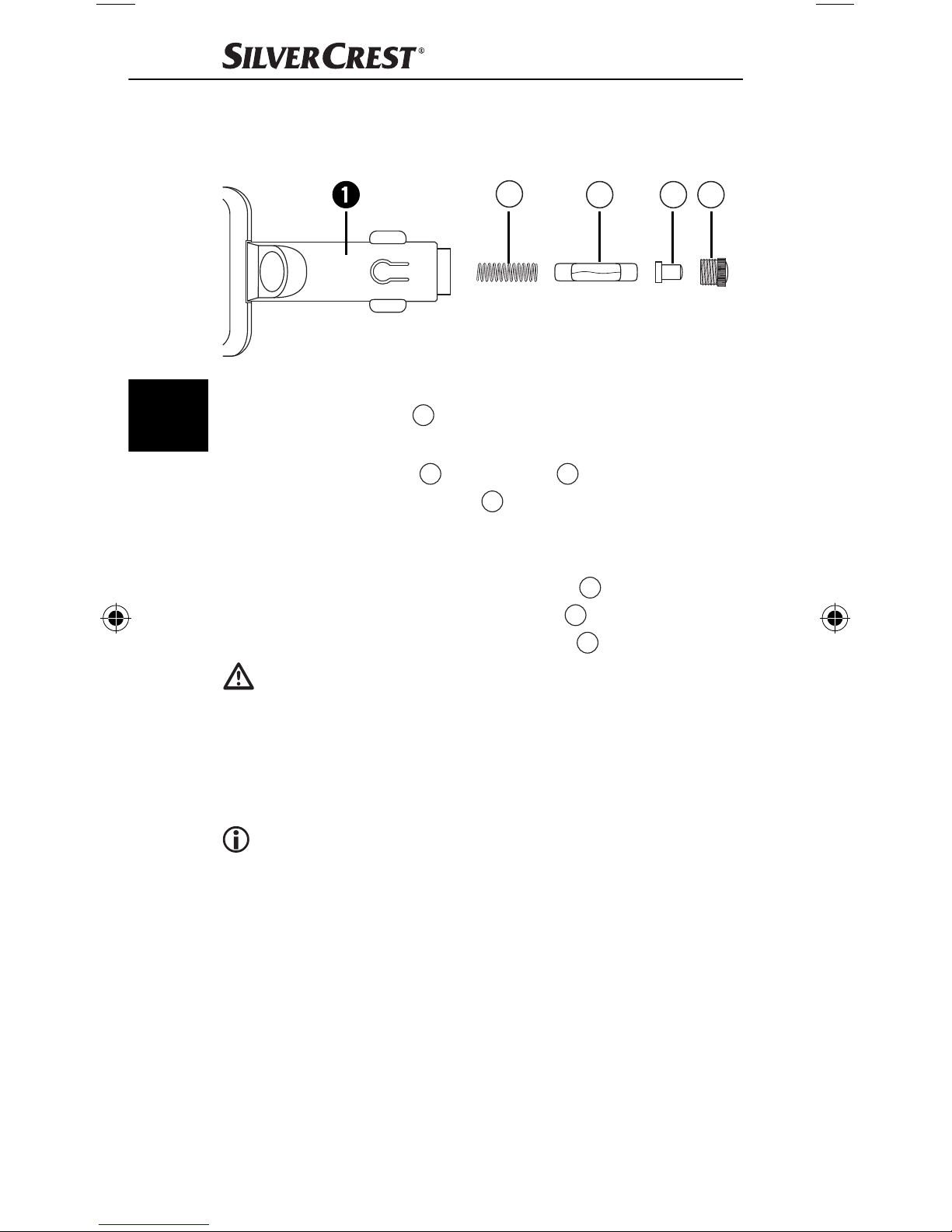
Replacing the fuse
The hands-free set is equipped with a fuse. If the device
no longer works, check the fuse and replace if necessary.
GB
D
● Open the vehicle connector plug 1 by turning the
fl uted screw insert A gently anticlockwise – with pliers
if necessary – and remove it.
● Remove the plug tip B from the fuse C and pull the fuse
out. Ensure that the spring D in the vehicle connector
plug 1 does not accidentally jump out and become lost.
● Place a new fuse of type F2AL/250V into the vehicle
connector plug 1, place the plug tip B onto the end
of the fuse that is slightly protruding C and screw the
screw insert that you removed earlier A back in.
C B A
Risk of fi re!
● Replace the fuse only with another of the same rating
as that given on the ratings plate. Fuses with a diff erent
rating may cause fi re. Smoke resulting from such a fi re
is poisonous.
Note:
If these measures do not correct the problem, please contact the appropriate service partner for your country.
78
SBTF 10 C2
Page 82
Cleaning and Care
Danger of electrocution!
● Before cleaning, always separate the electricity supply
from the appliance!
● NEVER submerse the appliance in water or other liquids!
● Do not permit liquids to permeate into the housing!
● Never open the housing of the appliance! There are
no user-serviceable elements inside.
● Do not use strong detergents, solvents or abrasive
cleaning agents to clean the appliance. These could
damage the housing surfaces.
● Clean the housing surfaces with a slightly moist soft cloth.
Disposal
Do not dispose of the appliance in your
GB
normal domestic waste. This product is
subject to the European guideline
2012/19/EU.
Dispose of the appliance through an approved disposal
centre or at your community waste facility. Observe the
currently applicable regulations. In case of doubt, please
contact your waste disposal centre.
Dispose of all packaging materials in an
environmentally responsible manner.
Warranty & Service
The warranty for this appliance is for 3 years from the
date of purchase. The appliance has been manufactured
with care and meticulously examined before delivery.
Please retain your receipt as proof of purchase. In the
event of a warranty claim, please make contact by
telephone with our Service Department. Only in this way
can a post-free despatch for your goods be assured.
The warranty covers only claims for material and
manufacturing defects, but not for transport damage, for
wearing parts or for damage to fragile components, e.g.
SBTF 10 C2
79
Page 83
buttons or batteries. This product is for private use only
and is not intended for commercial use.
The warranty is void in the case of abusive and improper
handling, use of force and internal tampering not carried
out by our authorized service branch. Your statutory rights
are not restricted in any way by this warranty.
The warranty period will not be extended by repairs
made under warranty. This applies also to replaced and
repaired parts. Any damage and defects extant on purchase must be reported immediately after unpacking the
appliance, at the latest, two days after the purchase date.
GB
Repairs made after the expiration of the warranty period
are subject to payment.
Service Great Britain
Tel.: 0871 5000 720 (£ 0.10/Min.)
E-Mail: [email protected]
IAN 91621
Hotline availability:
Monday to Friday 08:00 - 20:00 (CET)
Importer
KOMPERNASS HANDELS GMBH
BURGSTRASSE 21
44867 BOCHUM
GERMANY
www.kompernass.com
80
SBTF 10 C2
Page 84

Declaration of EU Conformity
We, Kompernaß Handels GmbH, Burgstraße 21, 44867
Bochum, Germany, hereby declare that the product
SBTF 10 C2 Bluetooth
essential requirements and other relevant provisions of the
Motor Vehicle Directive 2004/104/EC, the R&TTE Directive
1999/5/EC, the Low Voltage Directive 2006/95/EC and
the RoHS Directive 2011/65/EU.
ID number: IAN 91621
Related harmonised standards:
®
hands-free Kit complies with the
EN 60950-1:2006 + A11:2009 + A1: 2010 + A12: 2011
ETSI EN 300 328 V1.7.1
ETSI EN 301 489-1 V1.9.2
ETSI EN 301 489-17 V2.2.1
EN 62479: 2010
EN 50581: 2012
ISO 7637-2: 2004
Bochum, 3.08.2013
GB
Semi Uguzlu
Quality Manager
SBTF 10 C2
81
Page 85

82
SBTF 10 C2
Page 86

KOMPERNASS HANDELS GMBH
BURGSTRASSE 21
44867 BOCHUM
DEUTSCHLAND / GERMANY
www.kompernass.com
Stand der Informationen · Version des informations
Versione delle informazioni · Stand van de informatie
Last Information Update: 08 / 2013
Ident.-No.: SBTF10C2-062013-3
IAN 91621
1
 Loading...