

Page 1
www.rothaudio.co.uk
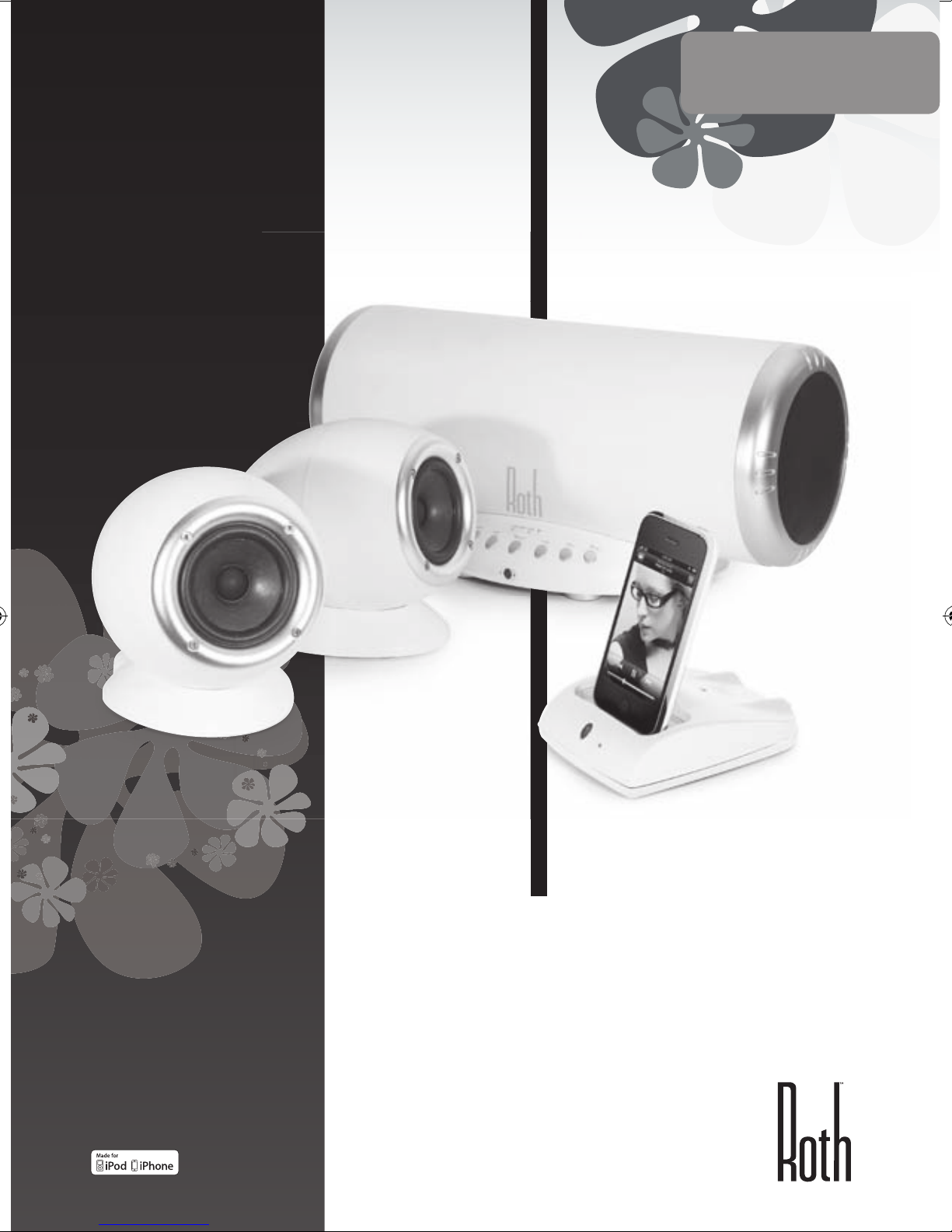
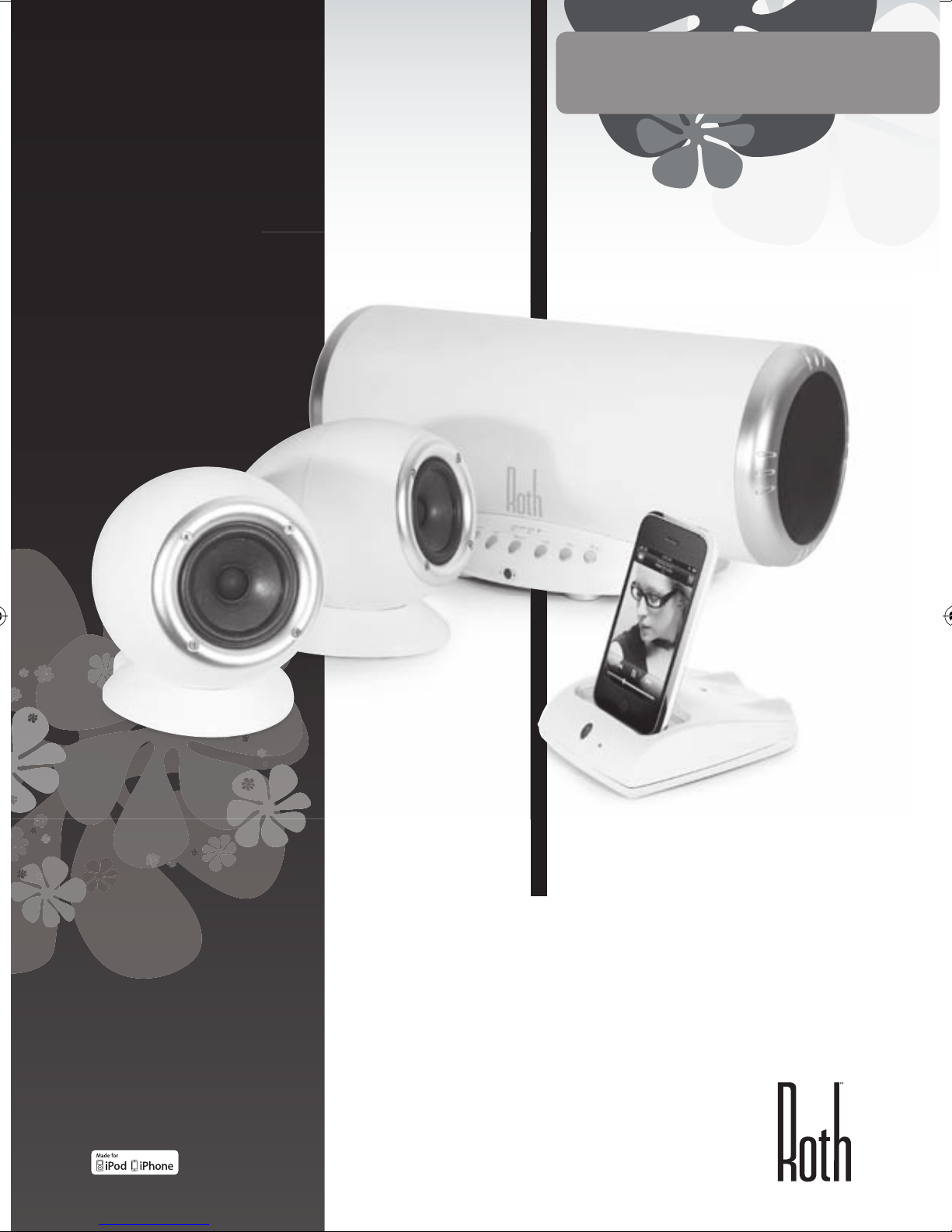
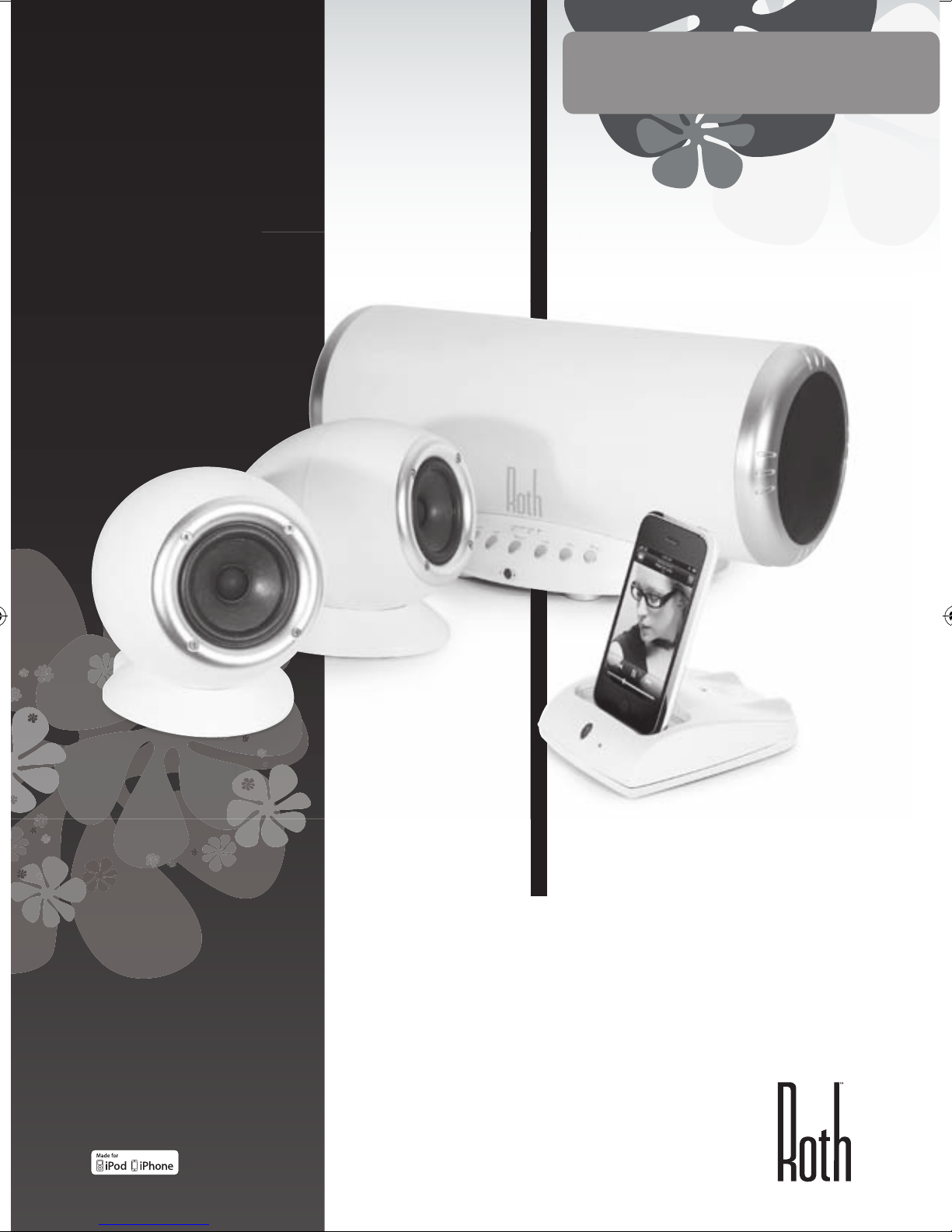
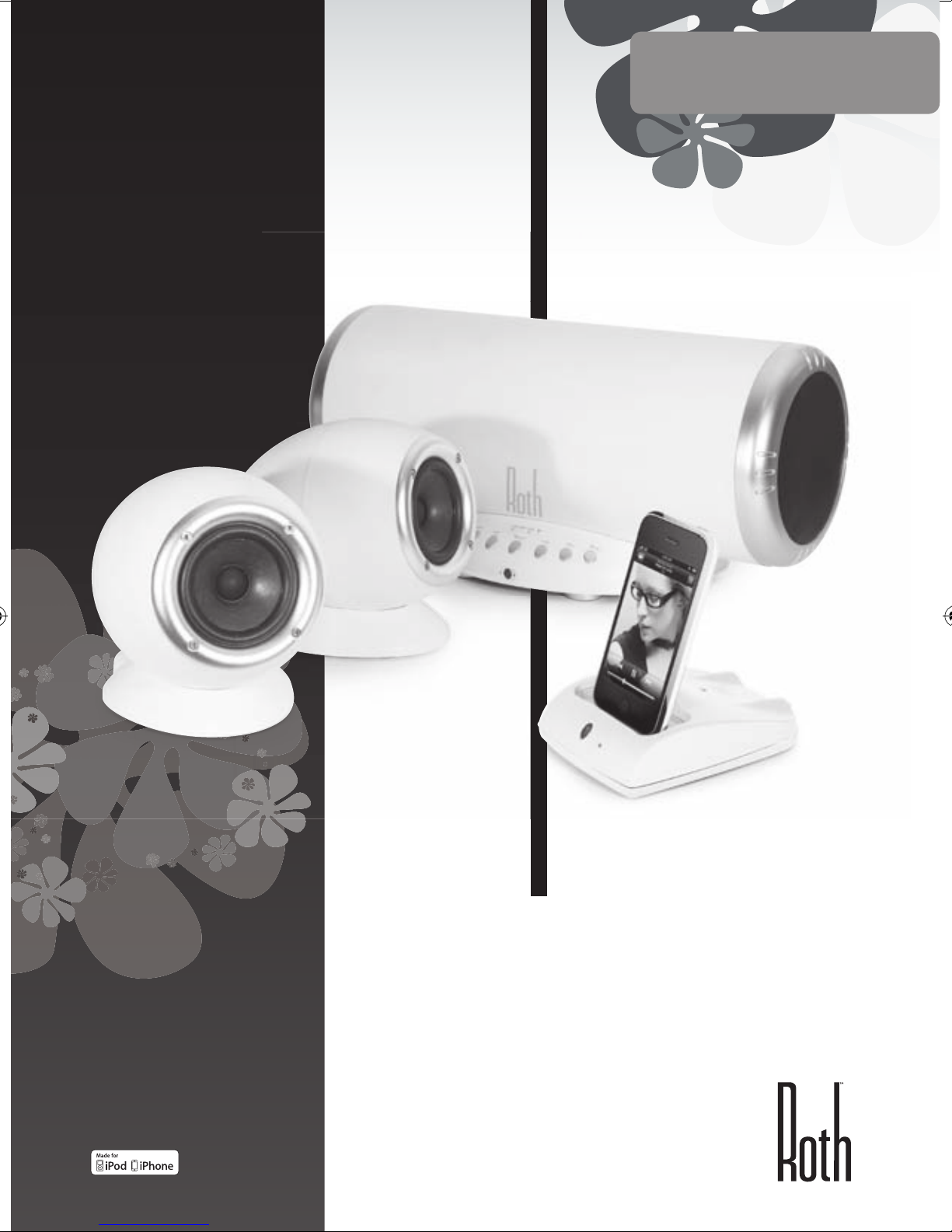
CHARLiE 2.1
Desktop Music System
Powered by RothDock
Designed to be used with:
iPhone/iPod, Any music-enabled
’phone, Desktop PC, Laptop, CD
Player, TV
USER MANUAL
ENGLISH
iPhone not included
Page 2
2
Thank you...
For taking the Roth Audio CHARLiE home
We have designed CHARLiE to look beautiful and, with today’s
advanced technologies, to sound as good as he looks. We’re
pleased – actually we’re delighted - with the results and we hope
you will be too.
CHARLiE is no ordinary little fella, and we’re sure he’ll deliver for you
every bit as well as he has for us since we created him. He can party
hard, or he can play soft and gentle when you want him to – just
let him know, and he’ll fit right in with your moods. He’ll be happy
when you’re happy, but he’s happiest when he’s playing great
music – that’s what he does best.
Turn him on.
In the Box ......................................... 3
Safety instructions
............................. 3
Connecting
....................................... 4
Front and back controls
...................... 5
Remote Control
................................. 6
Dr Feelgood - symptoms & cures
.......... 7
Specifications
.................................... 8
Service
............................................. 8
Contents
In the Box
RothDock for iPod
CHARLiE stereo speakers –
sonically matched to give you
the best sound
CHARLiE subwoofer / amplifier
Remote control
Cables: Speaker, USB, power
Page 3
| 3
CHARLiE 2.1
USER MANUAL
ENGLISH
Please DO...
• Keep these instructions in a safe place for future
reference – can we politely recommend that
overflowing drawer where you keep all your other
manuals?
• Make sure that CHARLiE’s new home has adequate
ventilation. So don’t leave him on beds, sofas, rugs,
enclosed bookcases / cabinets and any other area
which might restrict his breathing and cause him
to overheat – a hot and bothered CHARLiE is a sorry
sight.
• Be sure to put CHARLiE on a clean, dry and flat
surface before operation. Nice wooden table =
good. Damp sandpit = bad.
• Please ensure CHARLiE is connected to the correct
power supply as indicated, and please unplug him
if you’re not using him for a while – this saves not
only CHARLiE’s insides, but also the world outside.
Always ensure power cables are placed safely and
are not obstructing a walkway.
• You really should get your CHARLiE serviced by an
authorised service engineer if:
1. The power supply or cord is damaged
2. It drops or is struck by a falling object
3. It’s exposed to rain or moisture
4. It’s not operating normally or shows a sudden
change in performance
Please DON’T...
• Put CHARLiE near water – he can’t swim, and he
hates damp. So avoid placing little CHARLiE near
bathtubs, sinks, washing machines, swimming pool,
sauna etc – he’s usually polite, but he won’t thank
you for it.
• Expose him to direct sunlight or to extremes of
temperature or humidity – best not leave CHARLiE
under a tanning lamp, then.
• Place CHARLiE near direct heat sources such as
radiators, stoves, gas fires, naked flames or candles
• Drop CHARLiE – he may break and he will definitely
get a fright – or apply excessive force to the
controls, or place heavy objects on top of him.
• Allow excessive levels of dust to gather on CHARLiE.
To clean him, use a soft dry cloth. If necessary, use
a damp cloth without any solvents – CHARLiE is no
fan of solvents.
• Try to remove CHARLiE’s back cover – there are no
user serviceable parts anyway, and you don’t want
an electric shock, so get out of there now!
NOTE: Any unauthorized changes or modifications to
CHARLiE render the manufacturer’s warranty null and
void.
Safety Instructions
CHARLiE is really easy to use, but please, before you
start him up, read the safety and operating instructions
Page 4
4
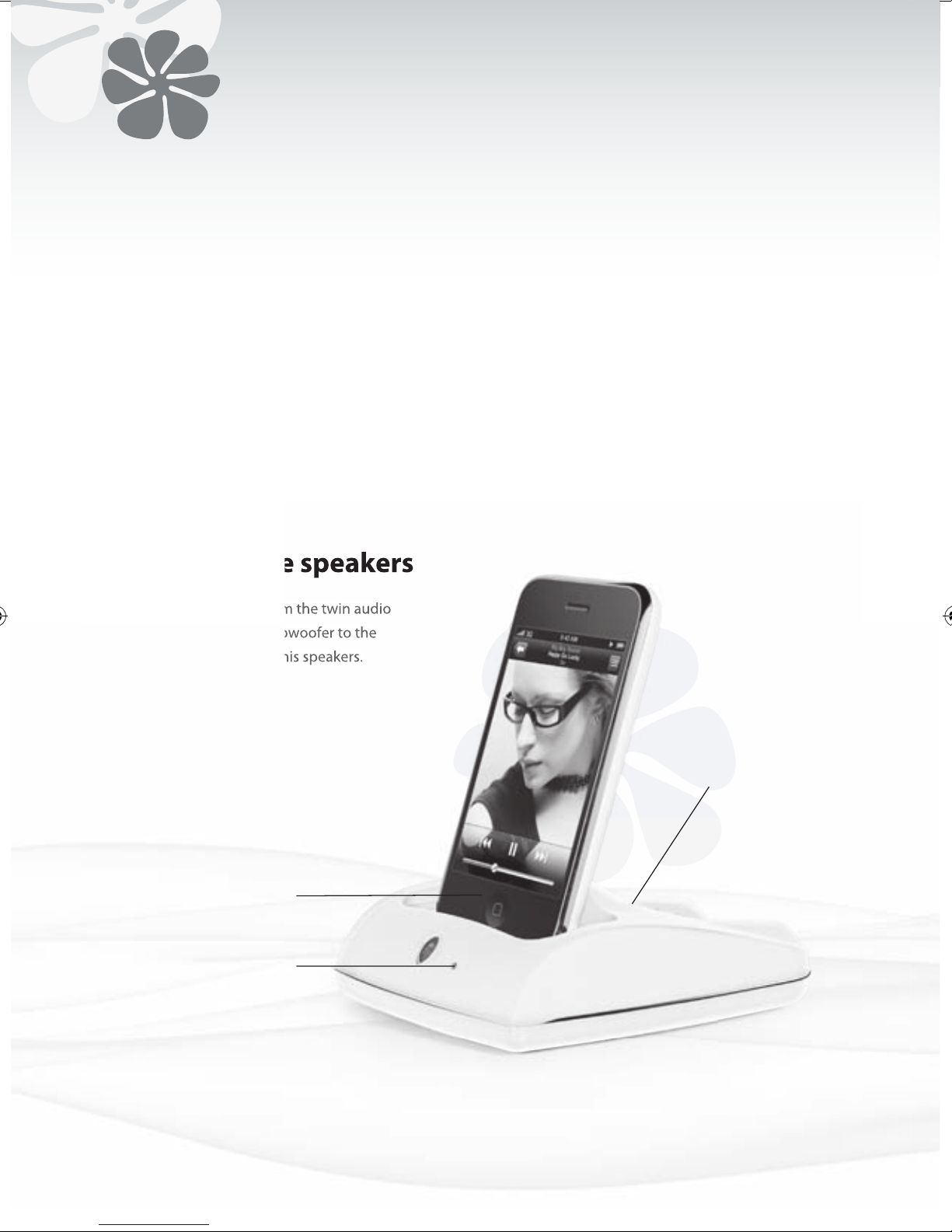
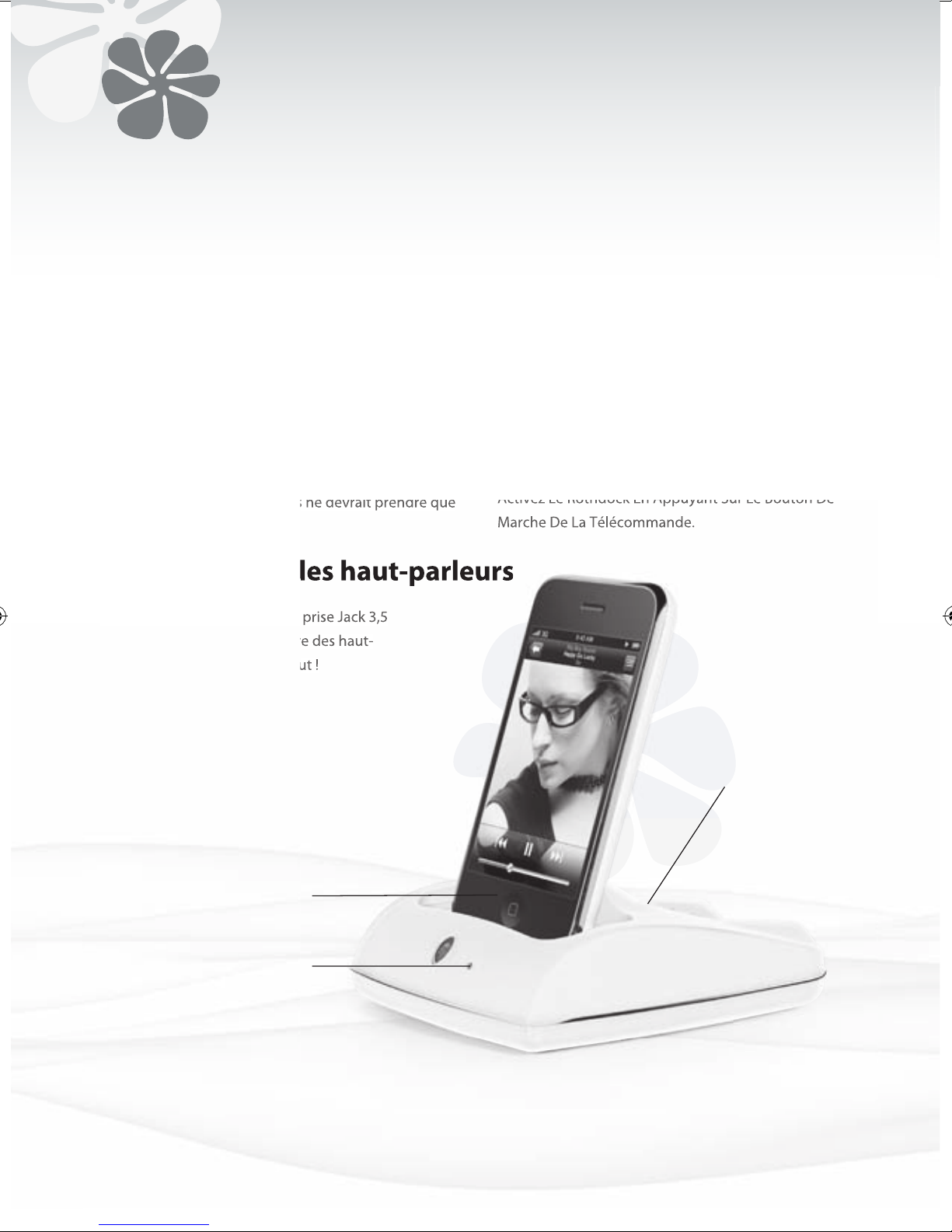
1. Press the ID button on the top surface of RothDock
for 5 seconds until the led flashes on and off.
2. Then press the ID button on the back of the speaker
until the led flashes.
3. When both units are paired, the lights will remain
on, and you should hear a steady tone through
your speakers. The process should only take a few
seconds.
Connecting the RothDock
Connect the audio cable from the twin audio
outputs of the CHARLiE’s subwoofer to the
audio inputs on the back of his speakers.
Erm, that’s it.
Connecting the speakers
You can correct other devices by using the auxiliary
input on the back of the dock and also directly into the
speaker by using the auxiliary input or USB inputs.
• Music player (MP3, MP4 or mobile phone)
• CD Player
• Computer
Connecting other devices
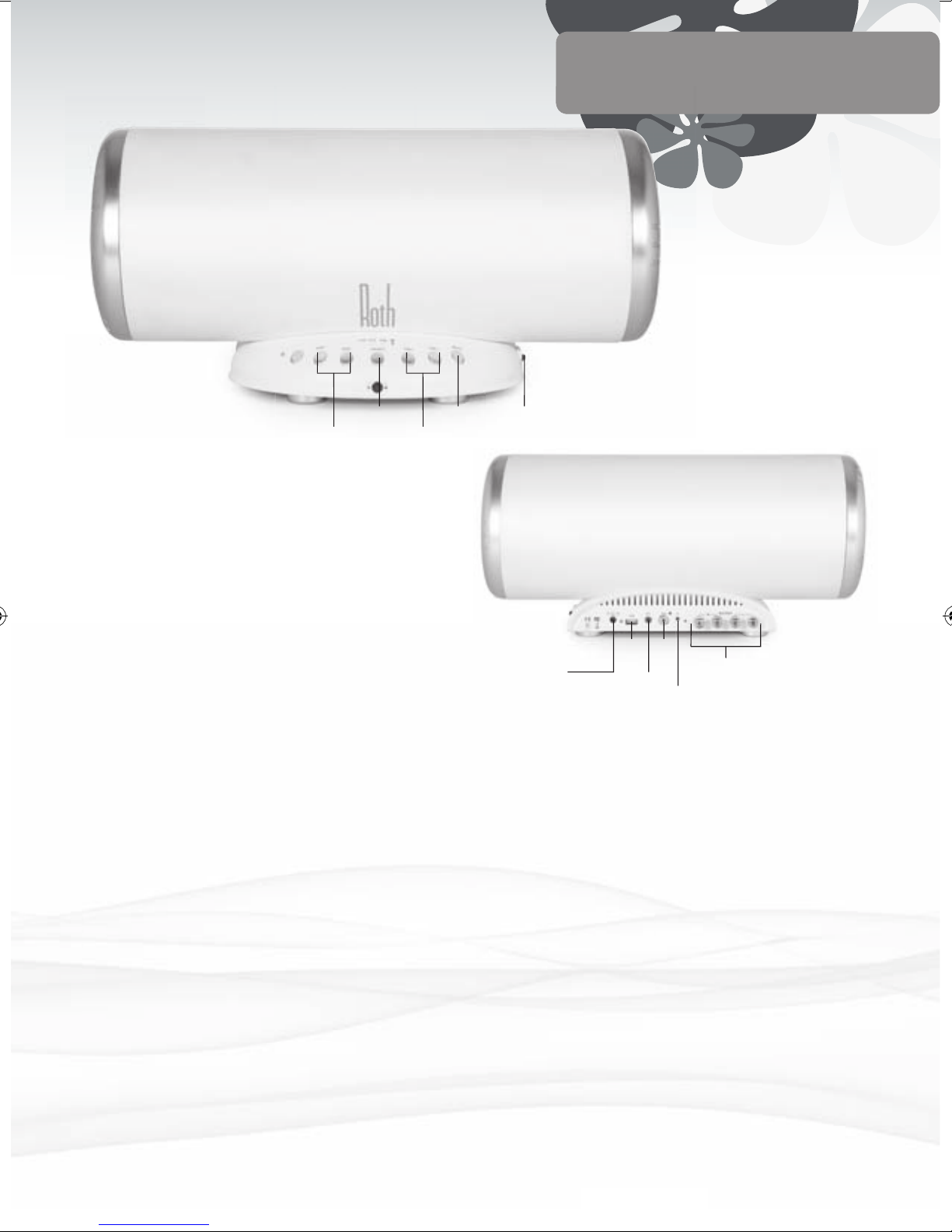
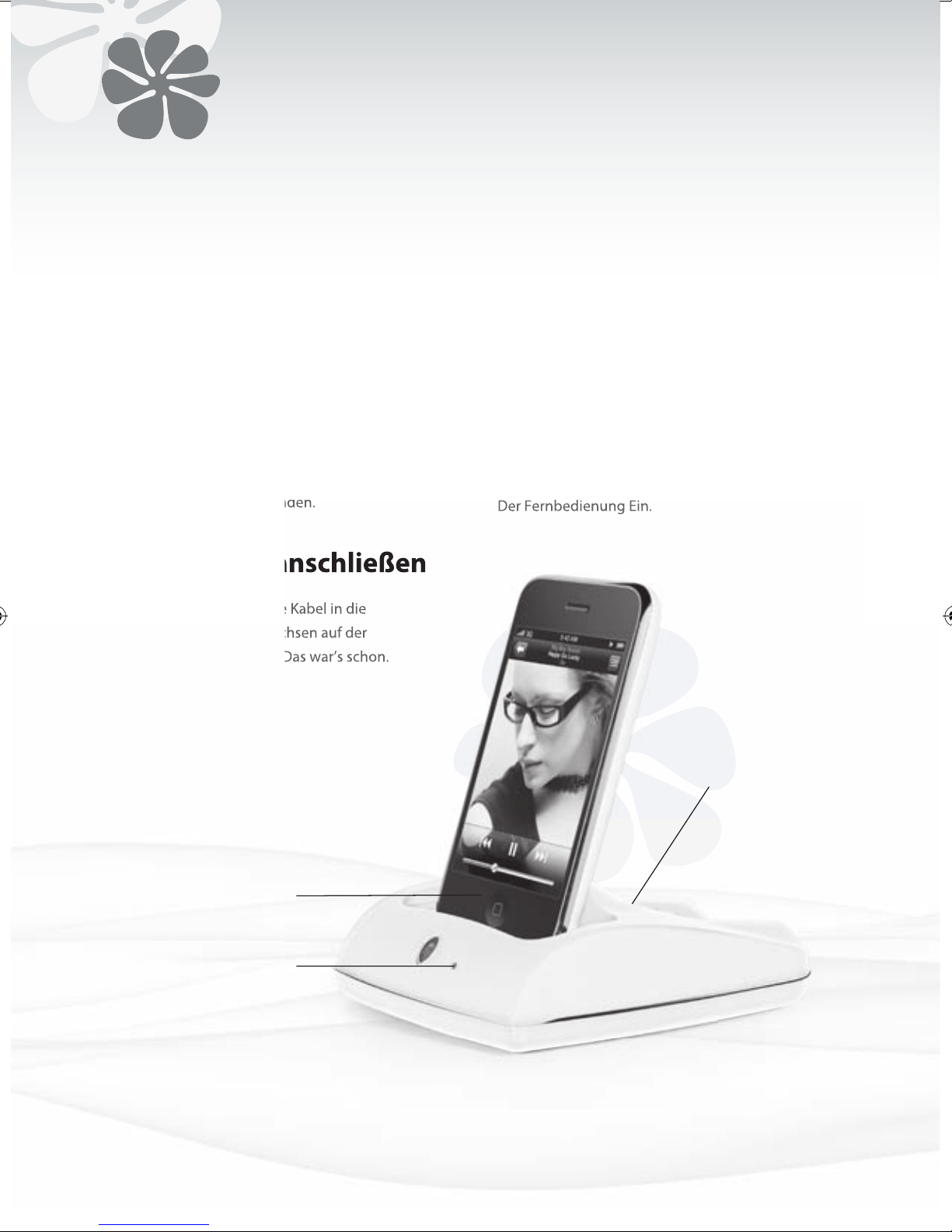
ID Button
iPod/iPhone Connector
LED
Shows when
RothDock input’s
connected
Page 5
| 5
CHARLiE 2.1
USER MANUAL
ENGLISH
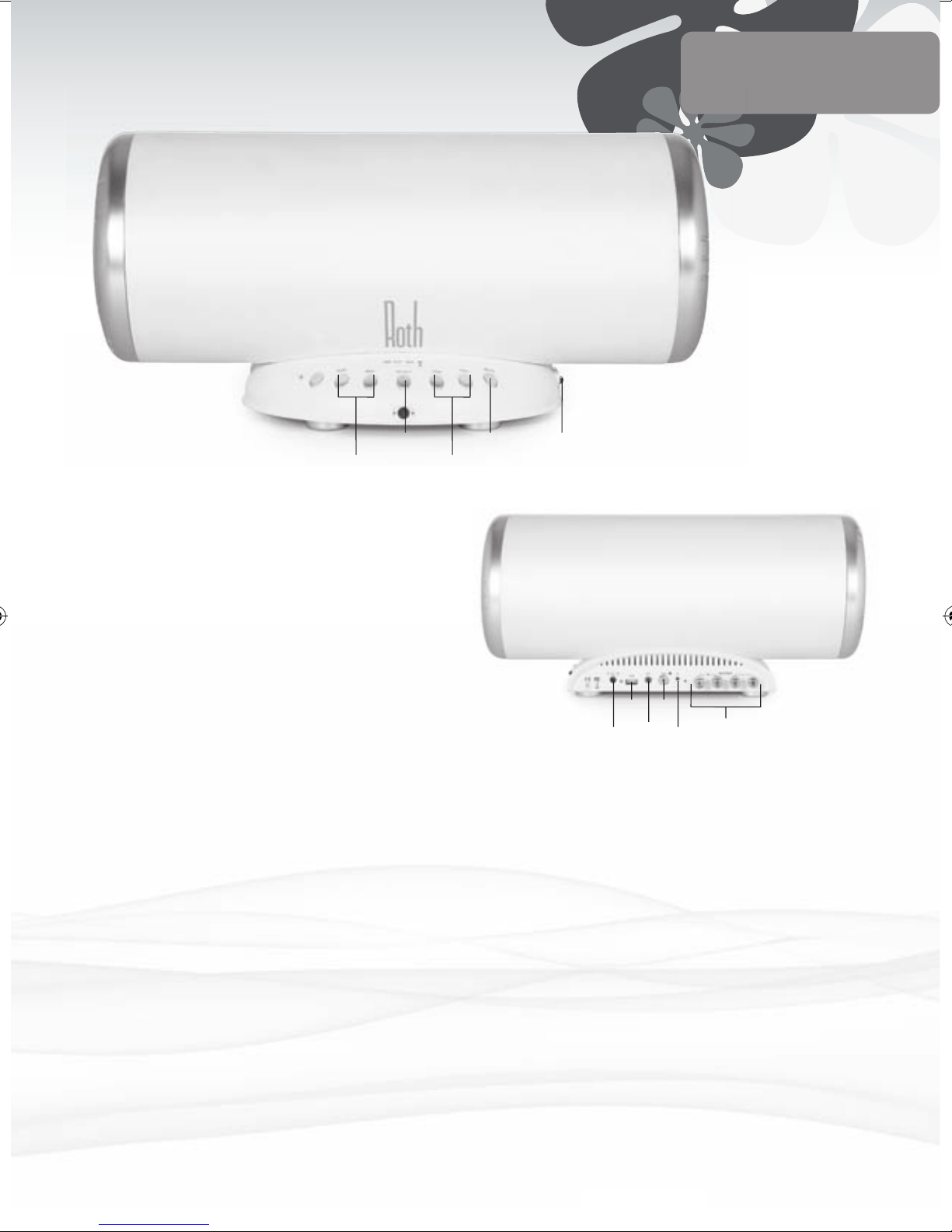
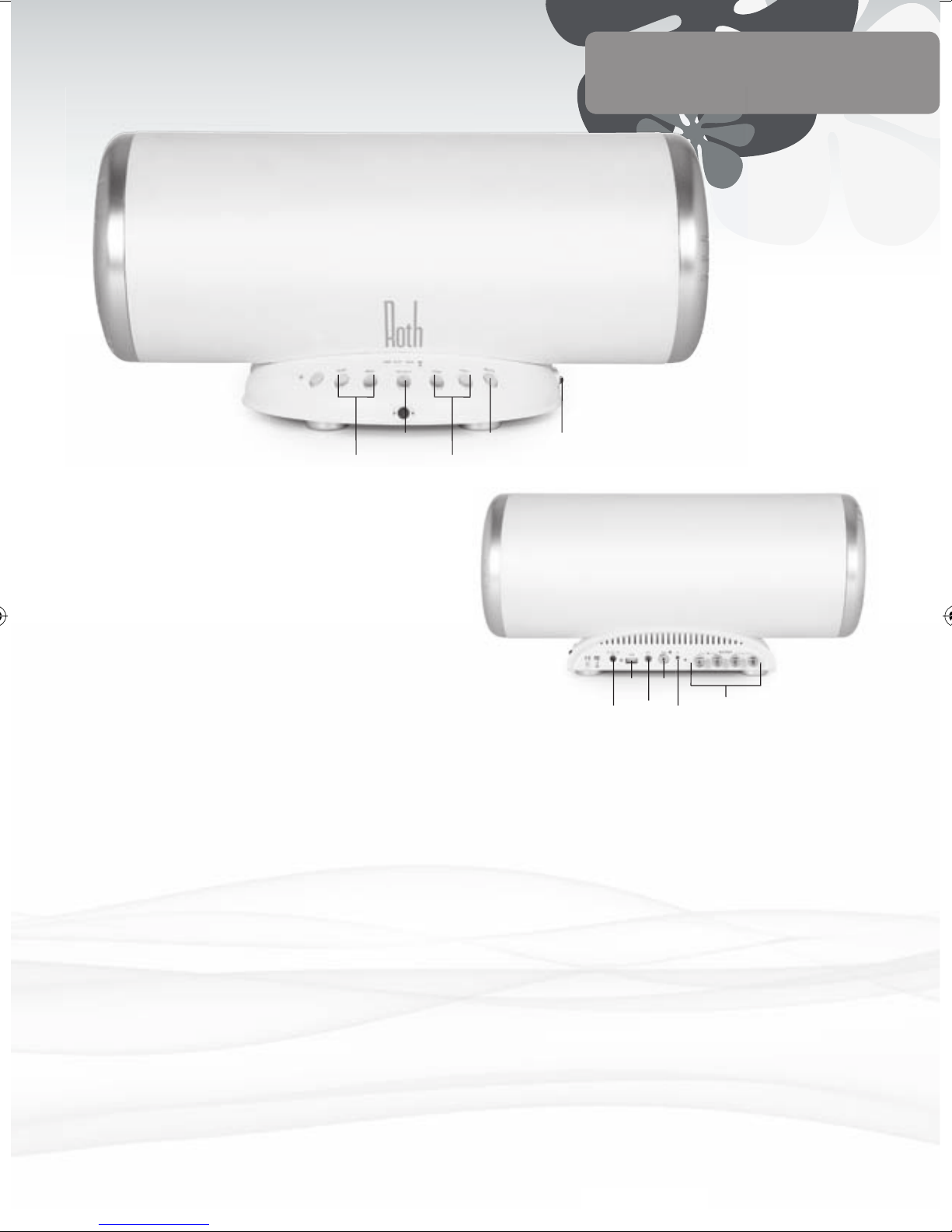
Power Button Press to ON for power – the indicator
will light up while the power is ON.
Later on, try pressing it OFF to give it
a rest.
Select Button For switching between different
sound sources – RothDock, aux or
USB inputs.
ID Indicator Lights up when RothDock is
connected by wireless link
Volume Up You can turn it up… ‘ray!
Volume Down Or you can turn it down… boo!
Mute
You can cut the music quickly if you
need to, y’know, for phone calls ‘n’ stuff
Subwoofer
Volume Up Mo’ bass dude
Subwoofer
Volume Down Bass denied
The Front
Power Input With mains cable supplied, nice!
USB Input For connecting to your computer
for direct digital streaming.
Aux input 3.5mm for connecting MP3 player, CD
player, computer, whatever.
Sub input
For using as a stand-alone subwoofer in
another audio system.
ID Button For setting up the wireless link to
CHARLiE’s RothDock.
Speaker Out For connecting to the other speaker.
The Back
NOTE: Before you switch ON, set the volume control to the
lowest setting to avoid damage to the speakers. Just in case you
don’t, the speaker-protection circuit will mute the volume for a
few seconds after the power is switched ON.
Select Mute Power On/Off
SW -/+ Volume -/+
Power
In
Aux
ID
Button
Sub
Speaker
Out
USB
Page 6
6
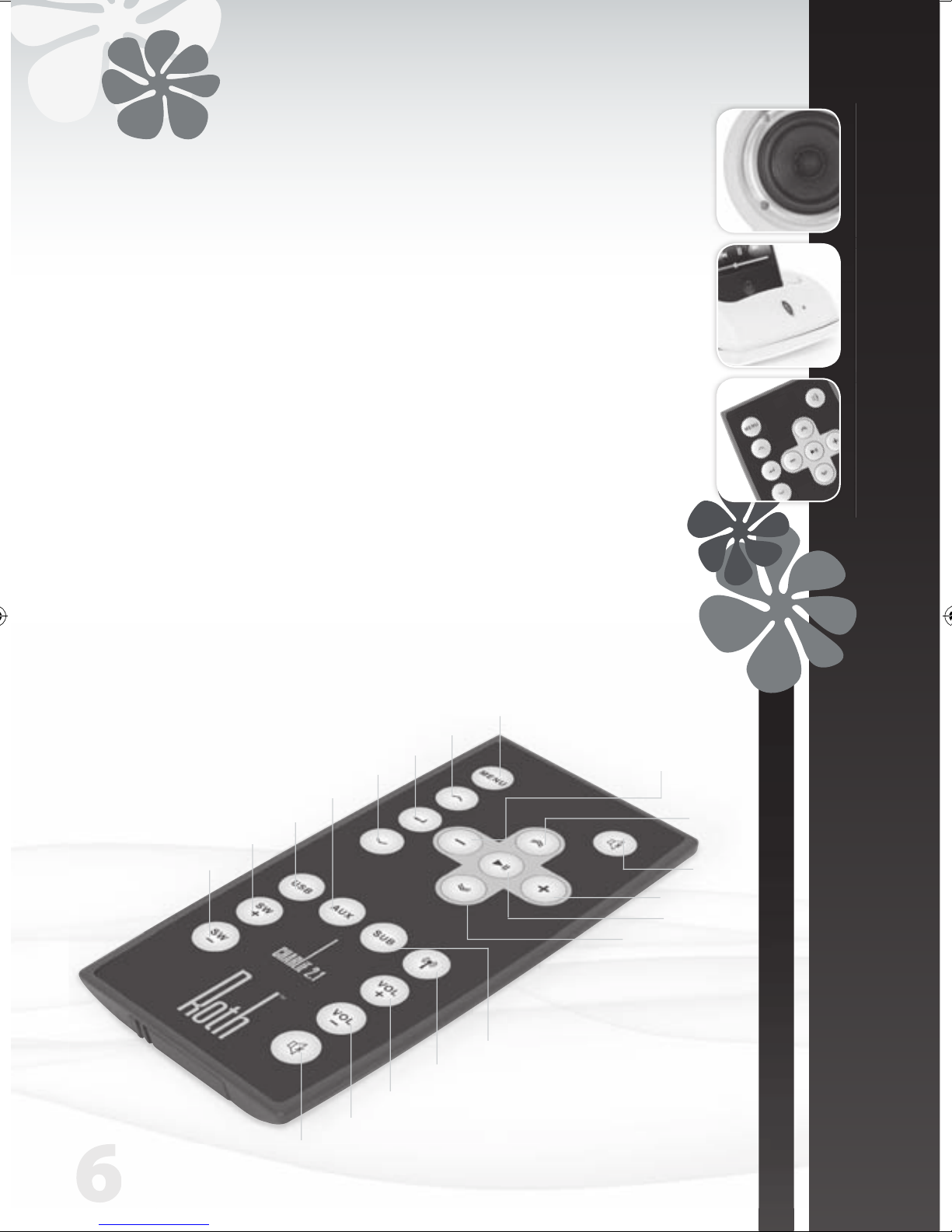
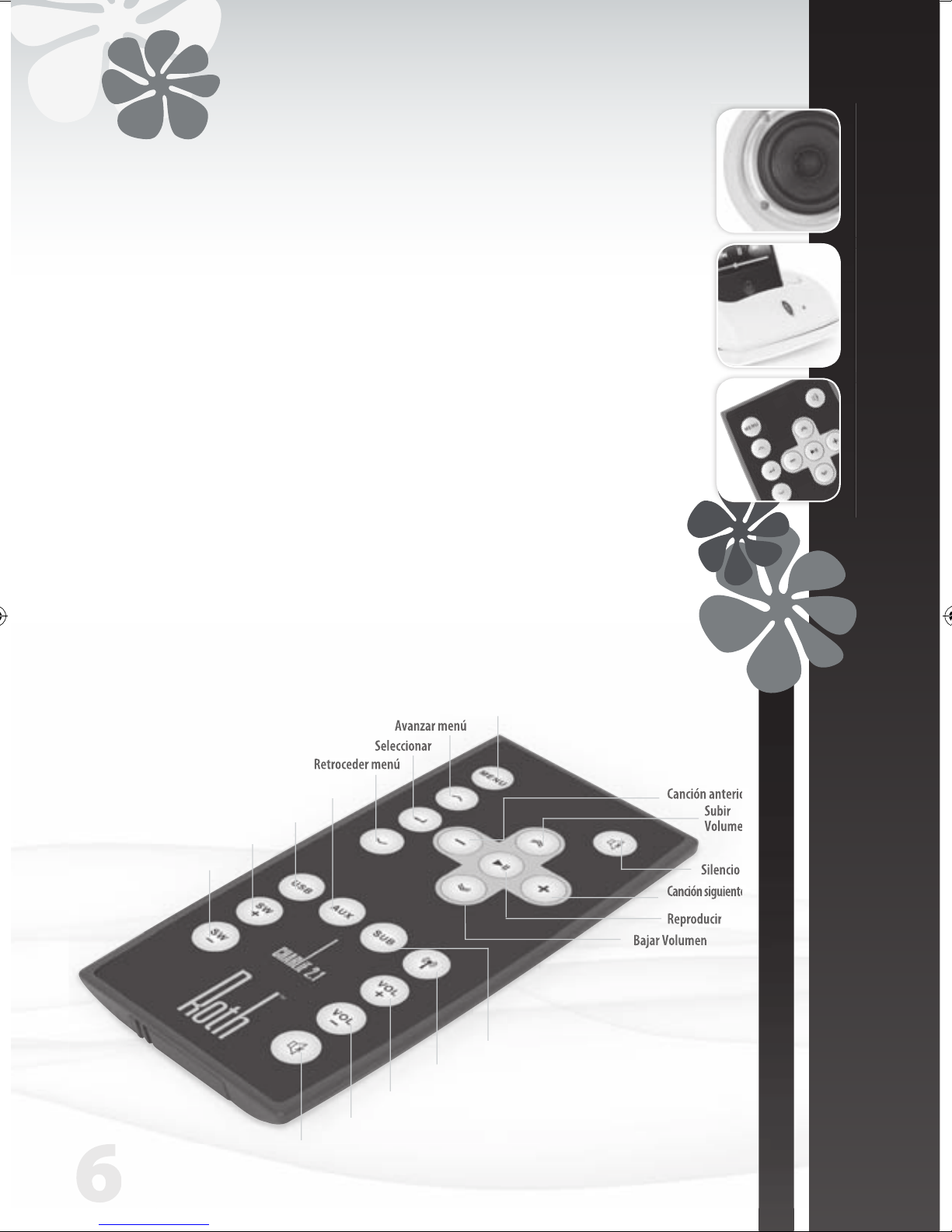
The Remote Control
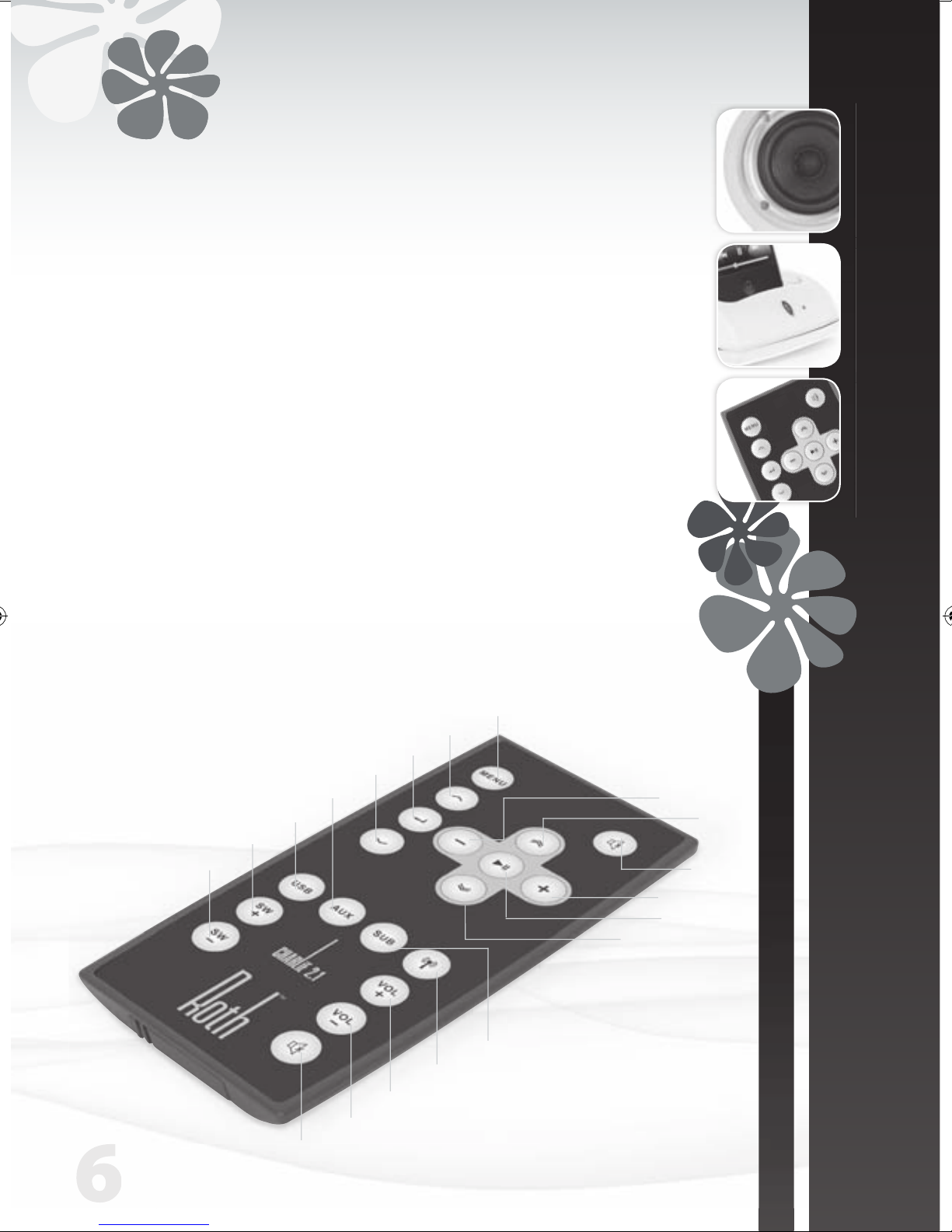
• Speaker control
Volume Press “+” to bring the noise
Press “-” to take it down
SW Press “+” to boost the bass
Press “-” to lighten up
• iPod control
Some iPod functions can be controlled using the CHARLiE’s remote.
Play/pause song Press play/pause
Turn off iPod Press and hold ‘Play’
Skip to next song Press ‘Next/fast forward’
Start a song again Press ‘Previous/rewind’ once
Play previous song Press ‘Previous/rewind’ twice
Fast forward song Press and hold ‘Next/fast forward’
Rewind a song Press and hold ‘Previous/rewind’
Mute
Previous
Track
Volume
Up
Volume Down
Play/Pause
Next Track
Mute
Volume Down
Volume Up
Wireless On/Off
Subwoofer Select
Menu
Up Menu
Select
Down Menu
USB
Aux
SW up
SW Down
Page 7
USER MANUAL
ENGLISH
| 7
CHARLiE 2.1
USER MANUAL
ENGLISH
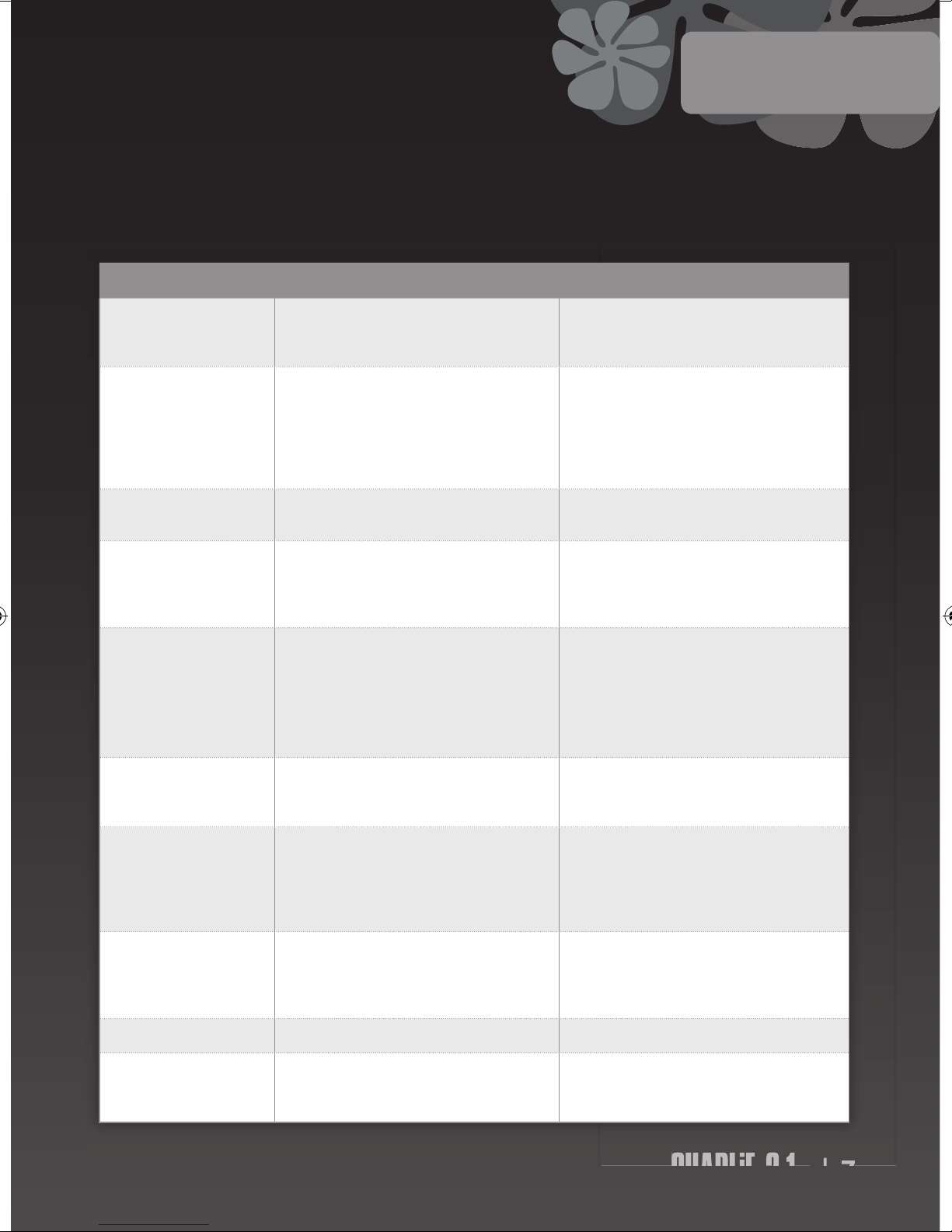
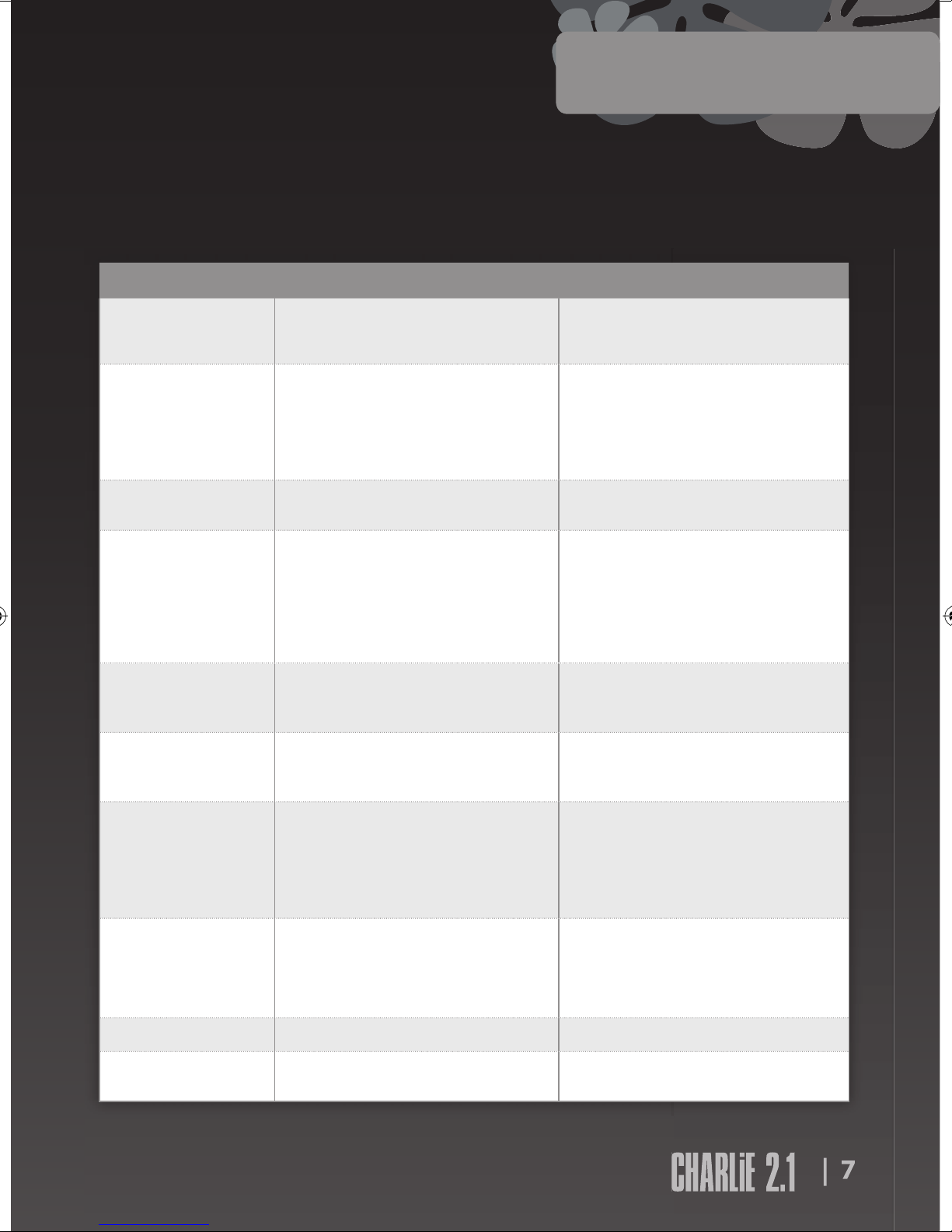
Your CHARLiE should give you years of trouble-free audio fitness, but if it isn’t performing as it should, it could be due
to one of these simple problems. If you’re still having trouble, please contact your authorised dealer or service centre.
SYMPTOM DIAGNOSIS CURE
Won’t turn on when the
POWER switch is pressed
Power adaptor isn’t connected properly Mains supply is off Make sure the power cable is firmly plugged in and mains
is switched on
Test the mans with another appliance or different socket
No sound The volume is turned down
Wireless connection not working properly
Speaker cable not connected correctly
Input selector set to wrong source
Press the volume up button to bring the noise
Check that ID light is on. If not, repeat wireless connection
process
Check that the speaker cable is connected correctly
Check the input selector is set to the source you want –
iPod dock or Aux
No sound from left or right
speaker
One or both speakers are not properly connected Check speaker cable and ensure it’s connected securely to
both speakers
The acoustic image is
unstable (sounds unnatural
or weirdly bass light)
The positive and negative polarities of the unit and
speakers aren’t matched
Remove the speaker cables and re-connect them correctly
(red to red, white to white)
RothDock and speakers
won’t pair
Interference from nearby wireless systems
RothDock too far from the speaker with wireless connection
Press both ID buttons in sequence again (the wireless system has 12 different channels to work through and you may
need to try a few to find the ideal one for your location)
Set both devices side by side while you establish the
connection, then move them to their desired positions
(absolute max 15m)
iPod/iPhone volume doesn’t
affect audio volume
iPod volume control only controls volume to the headphone jack
Use your CHARliE’s volume control when your iPod/iPhone
is docked
Crackling sound from
speakers
Bad connection
A problem with your audio source
Check docking station connection (or the 3.5mm cable connection if using). Make sure it’s using ‘line out’ ‘audio out’ or
‘headphone out’ from your source, NOT ‘speaker out’
Test the 3.5mm cable with another audio source eg CD
player, MP3 player
Sound is distorted Volume level on iTube is too high
Sound source is distorted
Turn it down a bit (well, if it makes it sound better…)
WAV and MIDI files are often poor quality and distortion
sounds worse through a quality system – try a different
audio source eg CD
Radio interference You may be too close to a radio tower Try moving the speakers to different positions
Remote control doesn’t
work
Low battery
Remote’s not in range or pointing the wrong way
Replace battery
Point the remote at the dock from no more than 20ft
distance
Dr Feelgood
Page 8
8
Specification
www.rothaudio.co.uk
Please contact your local
authorised dealer or reseller.
Email: [email protected]
Service
CHARLiE 2.1 Desktop Speaker System
Max Output Power: Sub: 25W, Speaker: 20Wx2
Frequency Response: 40hz-20khz(±2db)
Distortion: ≤1%
Signal To Noise Ratio: ≥80db
Input Impedance: 10KΩ
Output Impedance Sub: 4Ω, Speakers: 8Ω
Transmitter Distance: 10m
Sub Size (WxHxD):
420mm x 190mm x 180mm
Speaker Size (WxHxD):
120mm x 140mm x 130mm
Weight: Sub: 3kg, Single Speaker 0.8kg
Inputs 3.5 Aux x 1, USB x 1, Sub x 1
In accordance with our policy of continuous development, we reserve the right to
change specifications without notice. Photographs are for illustration only and actual
product may vary. E&OE. iPod / iPhone not included. iPod is a trademark of Apple Inc.,
registered in the U.S. and other countries. iPhone is a trademark of Apple Inc.
Compatible with:
iPhone (2G, 3G, 3GS), iPod Nano (3rd, 4th,
5th Gen), iPod Touch, iPod Classic
iPhone not included
Page 9
www.rothaudio.co.uk
CHARLiE 2.1
Desktop Music System
Powered by RothDock
Conçu pour être utilisé avec:
iPhone/iPod, Any music-enabled
’phone, Desktop PC, Laptop, CD
Player, TV
MANUEL DE L’UTILISATEUR
FRANÇAIS
iPhone not included
Page 10
2
Merci...
Roth Audio vous remercie d’avoir accueilli CHARLiE chez vous
Résultat d’une recherche d’esthétique intégrant les technologies de pointe
actuelles, CHARLiE est aussi beau que performant du point de vue acoustique.
Nous sommes contents – fiers même – du produit fini et nous espérons que
vous partagerez notre enthousiasme.
CHARLiE n’est pas un type ordinaire et nous sommes convaincus que son
comportement vous donnera autant de satisfaction qu’à nous depuis sa
création. Certes, il aime les grosses fêtes hurlantes, mais il sait aussi faire
preuve de sensibilité – faites-lui part de votre souhait et il saura infailliblement
s’adapter à votre humeur du moment. Soyez heureux et il le sera aussi. Surtout
si vous lui demandez de jouer de la bonne zic – ça, c’est son vrai bonheur !
À consommer sans modération!
Contenu de l’emballage ..................... 3
Consignes de sécurité
......................... 3
Raccordement
................................... 4
Commandes avant et arrière
............... 5
Télécommande
................................. 6
Dr. Feelgood – symptômes et remèdes
....... 7
Spécifications
.................................... 8
S.A.V
................................................ 8
Sommaire
Contenu de
l’emballage
RothDock pour iPod
Haut-parleurs stéréo CHARLiE –
issus d’une recherche d’équilibre
sonique pour un son optimal
CHARLiE caisson de grave /
amplificateur
Télécommande
Câbles : haut-parleur, USB,
alimentation
Page 11
| 3
CHARLiE 2.1
MANUEL DE L’UTILISATEUR
FRANÇAIS
À FAIRE
• Conservez ce mode d’emploi en lieu sûr, pour pouvoir y
revenir ultérieurement en cas de besoin – vous avez bien
encore une petite place dans le tiroir presque plein où vous
rangez déjà tous vos modes d’emploi, non?
• CHARLiE aussi à besoin de respirer. Trouvez-lui un petit
coin bien aéré. Ne le laissez pas sur un lit, un sofa, un tapis,
dans une bibliothèque / armoire de rangement fermées
où n’importe quel autre endroit où il pourrait s’étouffer et
souffrir de bouffées de chaleur – croyez-nous sur parole, un
CHARLiE suintant n’est pas beau à voir.
• Veillez à poser CHARLiE sur une surface propre, sèche et
plate avant de l’allumer. Belle table en bois = très bien. Bac à
sable humide de la dernière pluie = pas bien du tout.
• Veillez aussi à raccorder CHARLiE à la source d’alimentation
qui convient, conformément à nos instructions. Et
n’oubliez pas de le débrancher si vous ne l’utilisez pas
pendant quelque temps – vous lui éviterez les maux de
ventre et soulagerez la planète. Acheminez les cordons
d’alimentation comme il faut, en veillant à ne pas
encombrer les passages.
• N’hésitez pas à faire examiner CHARLiE par un dépanneur
agréé si :
1. L’alimentation ou le cordon de CHARLiE sont
endommagés.
2. A fait une chute ou un objet quelconque lui est tombé
sur la tête.
3. A pris la pluie ou l’humidité.
4. N’a pas l’air de vouloir fonctionner normalement ou
manque de tonus.
À NE PAS FAIRE
• Ne posez pas CHARLiE près d’un point d’eau – nous ne
lui avons pas appris à nager et il déteste l’humidité. Alors
évitez de poser votre petit CHARLiE près d’une baignoire,
d’une vasque, d’une machine à laver, au bord de la piscine,
dans un sauna, etc. – il est du genre poli, mais là, la panique
risque de l’énerver.
• N’exposez pas CHARLiE aux rayons directs du soleil, valeurs
extrêmes de la température ou milieux humides – les
lampes bronzantes ne sont pas recommandées alors diteslui non et soyez ferme.
• Ne posez pas CHARLiE près de sources de chaleur directe –
radiateurs, gazinières, chauffages au gaz, flammes nues ou
bougies, par exemple.
• Ne faites pas tomber CHARLiE – il pourrait se casser et
de toute manière, il aurait très peur – ne forcez pas les
commandes et ne posez pas d’objets lourds sur sa tête.
• Ne laissez pas CHARLiE disparaître sous d’énormes couches
de poussière. Dépoussiérez-le avec un chiffon sec et doux.
En cas de besoin, utilisez un chiffon humide mais pas de
solvants – CHARLiE est fragile des bronches.
• N’essayez pas de lui retirer son capot arrière – il ne contient
aucune pièce remplaçable par l’utilisateur et vous risqueriez
de vous électrocuter, alors PAS TOUCHE !
REMARQUE: un changement ou une modification
quelconques invalideraient la garantie accordée par le
fabricant de votre CHARLiE.
Consignes de sécurité
CHARLiE n’attend plus que vous. Mais avant de le laisser
s’exprimer, lisez les consignes de sécurité et son mode d’emploi.
Page 12
4
1. Appuyez sur le bouton d’identification du
RothDock pendant cinq secondes, jusqu’à ce que la
diode bleue clignote.
2. Appuyez sur le bouton d’identification de hautparleurs, jusqu’à ce que la diode rouge clignote.
3. Après l’appairage des deux appareils, les lumières
restent allumées et un son continu devrait sortir des
haut-parleurs. Ce processus ne devrait prendre que
quelques secondes.
Raccordement du RothDock
Enfichez le câble fourni dans la prise Jack 3,5
mm prévue à cet effet, à l’arrière des haut-
parleurs. Ensuite.... Ben c’est tout !
Raccordement des haut-parleurs
• Lecteur de musique
(MP3, MP4 ou téléphone portable)
• Lecteur de CD
• Ordinateur
Activez Le Rothdock En Appuyant Sur Le Bouton De
Marche De La Télécommande.
Raccorder un autre appareil
Télécommande
Témoin
de marche
Connecteur RothDock
LED
La diode s’affiche dès
le raccordement de
l’entrée RothDock
Page 13
| 5
CHARLiE 2.1
MANUEL DE L’UTILISATEUR
FRANÇAIS
Bouton D’alimentation
Appuyez pour réveiller CHARLiE – le
témoin de mise sous tension s’allume.
Plus tard, vous l’éteindrez avec le même
bouton – ça repose !
Sélection For switching between different
sound sources - RothDock, Aux,
USB Inputs.
Bouton D’identification
Pour établir la connexion sans fil avec le
RothDock de CHARLiE.
Volume + Commande totale – Du miel pour les
cages… youpi !
Volume - Du calme pour grand-mère... Ouin!
Sourdine Au cas où vous auriez besoin de faire
taire CHARLiE et vite, si le téléphone
sonne par exemple.
Subwoofer Volume +
Met en place le volume du subwoofer
Subwoofer Volume -
Met le volume du subwoofer à
À l’avant
Branchement Électrique
Pour le cordon d’alimentation fourni. Très utile.
Entrée USB Pour raccorder votre ordinateur et profiter
directement de flux numériques.
Entrée Aux 3,5 mm pour raccorder un lecteur MP3, un
lecteur de CD, un ordinateur bref, plein de trucs.
Entrée Sub Pour utiliser un caisson de basses autonome
dans un autre système audio.
Bouton D’identification
Pour établir la connexion sans fil avec le
RothDock de CHARLiE.
Câble De Haut-Parleur
Pour relier l’autre haut-parleur.autonome dans
un autre système audio.
À l’arrière
Remarque : avant de l’allumer, réglez le bouton de volume sonore au
minimum pour éviter d’endommager les haut-parleurs. Et si vous oubliez, le
circuit de protection des haut-parleurs met le volume en sourdine pendant
quelques secondes après la mise en marche de l’appareil.
Sélection Sourdine Bouton
D’alimentation
Subwoofer -/+ Volume -/+
Branchement
Électrique
EntréeAux
Bouton
D’indentification
Entrée
Sub
Sortie
haut-parleur
Entrée
USB
Page 14
6
Télécommande
• Commande iPod
La télécommande de CHARLiE permet aussi de contrôler certaines fonctions des iPod.
Lecture / pause Appuyer sur lecture / pause
Éteindre l’iPod Appuyer et maintenir enfoncé. Lecture
Passer au titre suivant Appuyer sur. Suivant / avance rapide
Revenir au début d’un titre Appuyer une fois sur. Précédent / retour arrière
Lecture du titre précédent Appuyer deux fois sur. Précédent / retour arrière
Avance rapide du titre Appuyer et maintenir enfoncé. Suivant / avance rapide
Retour arrière Appuyer et maintenir enfoncé. Précédent / retour arrière
Sourdine
Piste
précédente
Volume +
Volume -
Lecteur
Piste suivante
Menu
Menu Ascendant
Sélection
Menu Descendant
Sourdine
Volume -
Volume +
Sans fil activé / désactivé
Sélection caisson de graves
Sélection d’entrée USB
Sélection d’entrée Aux.
Volume + caisson de graves
Volume - caisson de graves
Page 15
MANUEL DE L’UTILISATEUR
FRANÇAIS
| 7
CHARLiE 2.1
CHARLiE devrait vous donner des années de plaisir auditif sans souci. Mais si vous le sentez un peu patraque, il souffre peutêtre d’un des problèmes suivants. Et surtout si le problème persiste, demandez conseil à votre revendeur agréé ou au S.A.V.
| 7
SYMPTÔME DIAGNOSTIC REMÈDE
Le bouton d’ALIMENTATION n’a
aucun effet.
Adaptateur secteur mal branché.
Alimentation secteur coupée.
Vérifiez que le cordon d’alimentation est bien branché et que la
prise fonctionne. Branchez un autre appareil électrique dans la
prise ou essayez une autre prise.
Mutisme Le volume est à zéro.
La connexion sans fil fonctionne mal.
Le câble de haut-parleur est mal branché.
Le sélecteur d’entrée est sur la mauvaise source.
Appuyez sur le bouton volume + pour réveiller CHARLiE.
Vérifiez que la diode d’identification est allumée. Dans le cas
contraire, répétez le processus de connexion sans fil.
Vérifiez que le câble du haut-parleur est bien raccordé.
Vérifiez que le sélecteur d’entrée est réglé sur la source voulue
– iPod dock ou Aux.
L’un des haut-parleurs reste
muet.
Un des haut-parleurs ou les deux sont mal branchés. Vérifiez que le câble des haut-parleurs est bien relié aux deux
haut-parleurs.
Impossible d’appairer le
RothDock et les haut-parleurs.
Brouillage causé par des systèmes sans fil à proximité.
Le RothDock est trop éloigné du haut-parleur pour la connexion sans fil.
Appuyez de nouveau sur les deux boutons d’identification l’un
après l’autre (le système sans fil doit analyser 12 canaux et vous
pourriez devoir en essayer quelques-uns pour trouver celui qui
convient le mieux à votre emplacement).
Placez les deux appareils l’un à côté de l’autre pendant
l’établissement de la connexion, puis placez-les à l’endroit qui
vous convient (mais pas à plus de 15 m l’un de l’autre).
Image acoustique instable (son
anormal ou graves bizarrement
insignifiantes).
Mauvaise synchronisation des polarités positive et négative de
l’appareil et des haut-parleurs.
Retirez les câbles des haut-parleurs et rebranchez-les correctement (rouge sur rouge, blanc sur blanc).
Le volume de l’iPod n’a aucune
incidence sur le volume audio.
La commande de volume de l’iPod ne commande que le volume du Jack de casque.
Utilisez la commande de volume de l’amplificateur CHARLiE
quand votre iPod est relié.
Les haut-parleurs crépitent. Mauvaise connexion.
Problème de source audio.
Vérifiez la connexion de votre station d’accueil (ou la connexion
du câble 3,5 mm si utilisé). Veillez à ce que la sor tie source
utilisée soit bien « line out », « audio out » ou « headphone out »
et NON PAS « speaker out » (Haut-parleur).
Testez le câble de 3,5 mm sur une autre source audio, comme un
lecteur de CD, MP3.
Son distordu. Le volume de CHARLiE est trop fort.
Distorsion de la source sonore.
Baissez un peu le son (pourquoi pas, si ça peu améliorer la
qualité…)
La qualité des fichiers WAV et MIDI laisse souvent à désirer et les
systèmes audio de qualité ont tendance à amplifier la distorsion
– essayez une autre source audio ex. CD.
Brouillage. Vous êtes peut-être trop près d’une antenne. Essayez de placer les haut-parleurs ailleurs.
La télécommande ne fonctionne pas.
Pile épuisée.
La télécommande est hors de por tée ou mal orientée.
Changez la pile. Visez la station d’accueil avec la télécommande,
à une distance de moins de six mètres.
Dr Feelgood
MANUEL DE L’UTILISATEUR
FRANÇAIS
Page 16
8
Spécifications
www.rothaudio.co.uk
S.A.V.
CHARLiE 2.1 Desktop Speaker System
Puissance de sortie maximale:
sub 25W, haut-parleur 20W x 2
Réponse en fréquence: 40Hz-20KHz (±2dB)
Distorsion: ≤1%
Rapport signal / bruit: ≥80db
Impédance d’entrée: 10KΩ
Impédance de sortie:
sub 4Ω, haut-parleur 8Ω
Portée d’émetteur: 10m
Dimensions (L x H x P)
sub 420mm x 190mm x 180mm
haut-parleur 120mm x 140mm x 130mm
Poids: sub 3 kg, haut-parleur unique 0.8kg
Entrées: 3.5 Aux x 1, USB x 1, Sub x 1
Spécifications sujettes à modifications sans préavis.
Compatible with:
iPhone (2G, 3G, 3GS), iPod Nano (3rd, 4th,
5th Gen), iPod Touch, iPod Classic
Veuillez contacter votre détaillant
ou votre revendeur agréé le
plus proche.
Email: [email protected]
www.rothaudio.co.uk
iPhone not included
Page 17
www.rothaudio.co.uk
CHARLiE 2.1
Desktop Music System
Powered by RothDock
Designed zur Verwendung mit:
iPhone/iPod, Any music-enabled
’phone, Desktop PC, Laptop, CD
Player, TV
BEDIENUNGSANLEITUNG
DEUTSCHE
iPhone not included
Page 18
2
Danke...
Schön, dass Sie den Roth Audio CHARLiE gekauft haben!
CHARLiE sieht spitzenmäßig aus und hört sich dank modernster
Technologie auch genauso gut an. Wir sind zufrieden – nein:
glücklich! – über die Ergebnisse und hoffen, dass auch Sie es sein
werden.
CHARLiE ist kein normales Kerlchen. Wir sind uns sicher, dass er Ihnen
ebenso gut dienen wird wie uns, seit wir ihn erschaffen haben. Er
feiert gerne mit voller Power und spielt auch sanfte Töne, wenn Sie
es wollen. Sie müssen es ihm nur sagen, er passt sich sofort Ihrer
Stimmung an. Er ist fröhlich, wenn Sie es sind, richtig glücklich ist er
aber, wenn er gute Musik spielt – das kann er nämlich am allerbesten!
Turn him on.
Das steckt drin ................................... 3
Sicherheitshinweise
........................... 3
Anschließen
...................................... 4
Bedienelemente vorne und hinten
...... 5
Fernbedienung
.................................. 6
Dr. Feelgood – Symptome und Abhilfe
...... 7
Spezifikationen
................................. 8
Kundendienst
................................... 8
Inhalt
Das steckt drin
RothDock für iPod
CHARLiE Stereolautsprecher
– der passende Ton für einen
optimalen Sound
CHARLiE subwoofer / amplifier
Fernbedienung
Kabel: Lautsprecher, USB,
Netzkabel
Page 19
| 3
CHARLiE 2.1
BEDIENUNGSANLEITUNG
DEUTSCHE
Das sollten sie TUN...
• Bewahren Sie diese Anleitung gut für später auf –
wir würden Ihnen die überquellende Schublade
empfehlen, in der Sie auch all Ihre anderen
Handbücher und Anleitungen aufbewahren …
• Geben Sie CHARLiE ein Heim, das ausreichend belüftet
ist. Lassen Sie ihn also nicht auf dem Bett, Sofa, Teppich,
in einem geschlossenen Bücherregal, Schrank oder
sonst irgendwo liegen, wo er nicht richtig atmen kann
und sich überhitzt – ein heißer, gequälter CHARLiE ist
ein trauriger Anblick.
• Stellen Sie CHARLiE vor dem Einschalten auf eine
saubere, trockene und flache Oberfläche. Gepflegter
Holztisch = gut. Feuchter Sandkasten = schlecht.
• Bitte achten Sie darauf, dass CHARLiE korrekt und wie
dargestellt an den Strom angeschlossen ist. Wenn Sie
ihn längere Zeit lang nicht benutzen, ziehen Sie bitte
den Netzstecker – das kommt nicht nur CHARLiEs
Innenleben sondern auch unserer Umwelt zugute.
Achten Sie immer darauf, dass die Stromkabel sicher
verlegt sind und keine Gänge behindern.
• Lassen Sie CHARLiE von einem zugelassenen
Servicetechniker untersuchen, wenn:
1. Netzstecker oder -kabel defekt ist
2. Fallen gelassen oder von einem herabfallenden
Objekt getroffen wurde
3. Regen oder Feuchtigkeit ausgesetzt war
4. Nicht normal zu funktionieren scheint oder
plötzliche Leistungsschwankungen zeigt
Das sollten sie NICHT TUN...
• Stellen Sie CHARLiE nicht in die Nähe von Wasser –
er kann nicht schwimmen und hasst Feuchtigkeit.
Stellen Sie CHARLiE daher lieber nicht in der Nähe
von Badewannen, Waschbecken, Waschmaschinen,
Swimmingpool, Sauna oder ähnlichem auf.
• Setzen Sie ihn nicht direkter Sonneneinstrahlung oder
extremen Temperaturen oder Feuchtigkeit aus – eine
Höhensonne ist für CHARLiE nicht zu empfehlen.
• Platzieren Sie CHARLiE nicht in der Nähe direkter
Wärmequellen wie Heizkörper, Herd, Gasfeuer, offene
Flammen oder Kerzen.
• Lassen Sie CHARLiE nicht fallen – er könnte kaputt
gehen und in jedem Fall erschreckt er sich. Bedienen
Sie ihn auch nicht mit Gewalt und belasten Sie ihn nicht
durch schwere Objekte.
• Lassen Sie nicht zu viel Staub auf CHARLiE ansammeln.
Reinigen Sie ihn mit einem weichen, trockenen Tuch.
Wenn es sein muss, kann das Tuch auch feucht sein –
aber bitte: keine Reinigungsmittel verwenden, die mag
CHARLiE nämlich gar nicht.
• Versuchen Sie nicht, CHARLiEs rückwärtige Abdeckung
zu entfernen – dahinter verbergen sich ohnehin keine
Teile, die vom Benutzer gewartet werden können, und
schließlich wollen Sie sich doch auch keinen Schlag
holen. Also Hände weg!
HINWEIS: Wenn unbefugte Änderungen an CHARLiE
vorgenommen werden, erlischt die Herstellergarantie.
Sicherheitshinweise
CHARLiE ist wirklich einfach zu bedienen, aber bitte lesen Sie trotzdem die Sicherheitshinweise und
Bedienungsanleitung, bevor Sie ihn aufbauen
Page 20
4
1. Drücken Sie 5 Sekunden lang die ID-Taste am
RothDock, bis die blaue Lampe blinkt.
2. Drücken Sie dann die ID-Taste am Lautsprecher, bis
die rote Lampe blinkt.
3. Wenn beide Geräte gekoppelt sind, leuchten die
Lampen weiter. Sie müssten auch einen konstanten
Ton über die Lautsprecher hören. Dieser Vorgang
dauert nur wenige Sekunden.
RothDock anschließen
Stecken Sie das mitgelieferte Kabel in die
entsprechenden 3,5 mm Buchsen auf der
Rückseite der Lautsprecher. Das war’s schon.
Lautsprecher anschließen
• Music player (MP3, MP4 oder Handy)
• CD-Player
• Computer
Fernbedienung
Schalten Sie Den Rothdock Mit Der Ein-/Austaste An
Der Fernbedienung Ein.
Weitere Geräte anschließen
Stromanzeige
RothDock-Anschluss
LED
Zeigt an, wenn der
RothDock-Eingang
angeschlossen ist
Page 21
| 5
CHARLiE 2.1
BEDIENUNGSANLEITUNG
DEUTSCHE
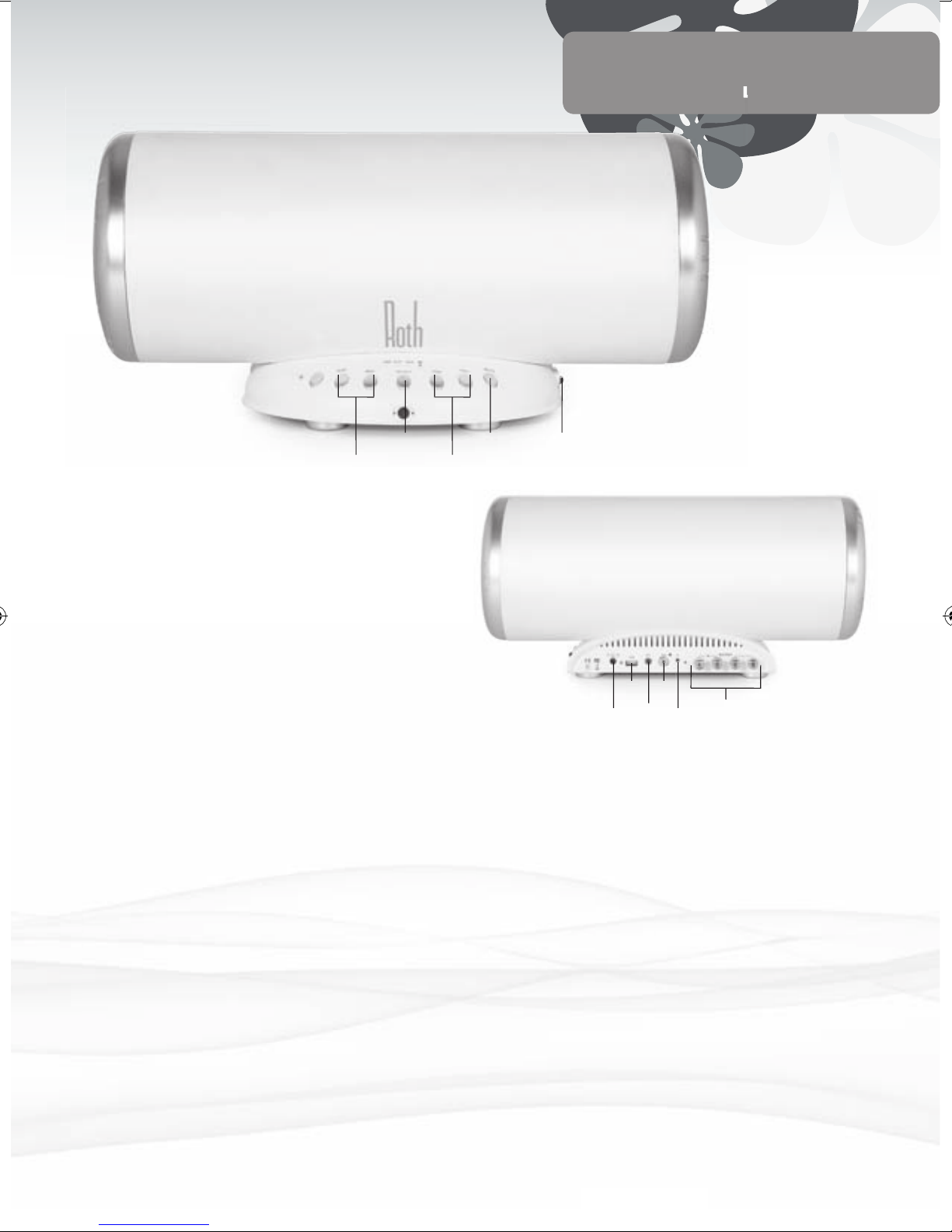
Power Button (Ein-/Austaste) Zum Einschalten drücken
Sie ON – die Anzeige leuchtet auf, solange
Strom fließt. Versuchen Sie später, OFF zu
drücken, um CHARLiE etwas zu schonen.
Select Button (Auswahl) Wechsel zwischen
verschiedenen Sound-Quellen - RothDock,
Aux-Anschluss oder USB-Eingänge.
Volume Up (Lauter) Drehen Sie ruhig auf … Jippieh!
Volume Down (Leiser) Oder mögen Sie lieber sanfte
Klänge ....?
Mute (Stumm) Wenn es sein muss, können Sie
die Musik auch schnell zum Schweigen
bringen – falls das Telefon klingelt oder so
Subwoofer Volume Up Mo’ bass dude
Subwoofer Volume Down Bass denied
Vorderseite
Power Input (Stromanschluss) mit Netzkabel im
Lieferumfang, dann kann’s ja losgehen.
USB Input Zum Anschließen Ihres Rechners für direktes
digitales Streaming.
Aux input (Aux-Anschluss) 3,5 mm zum Anschließen
eines MP3-Players, CD-Players, Computers
oder anderer Geräte
Sub Anschluss Für den Einsatz als Stand-alone-Subwoofer in
einem anderen Audio-System.
ID Taste Stellt die drahtlose Verbindung zu CHARLiEs
RothDock her.
Lautsprecherkabel
Zum Anschluss an den anderen Lautsprecher
Rückseite
Hinweis: Bevor Sie das Gerät einschalten, sollten Sie die Lautstärke auf die
kleinste Einstellung stellen, um eine Beschädigung der Lautsprecher zu
vermeiden. Falls Sie es vergessen, wird die Lautstärke nach Einschalten
(ON) durch den Lautsprecherschutz einige Sekunden lang stumm gestellt.
Select Mute Power On/Off
SW -/+ Volume -/+
Power
In
Aux
ID
Button
Sub
Speaker
Out
USB
Page 22
6
Fernbedienung
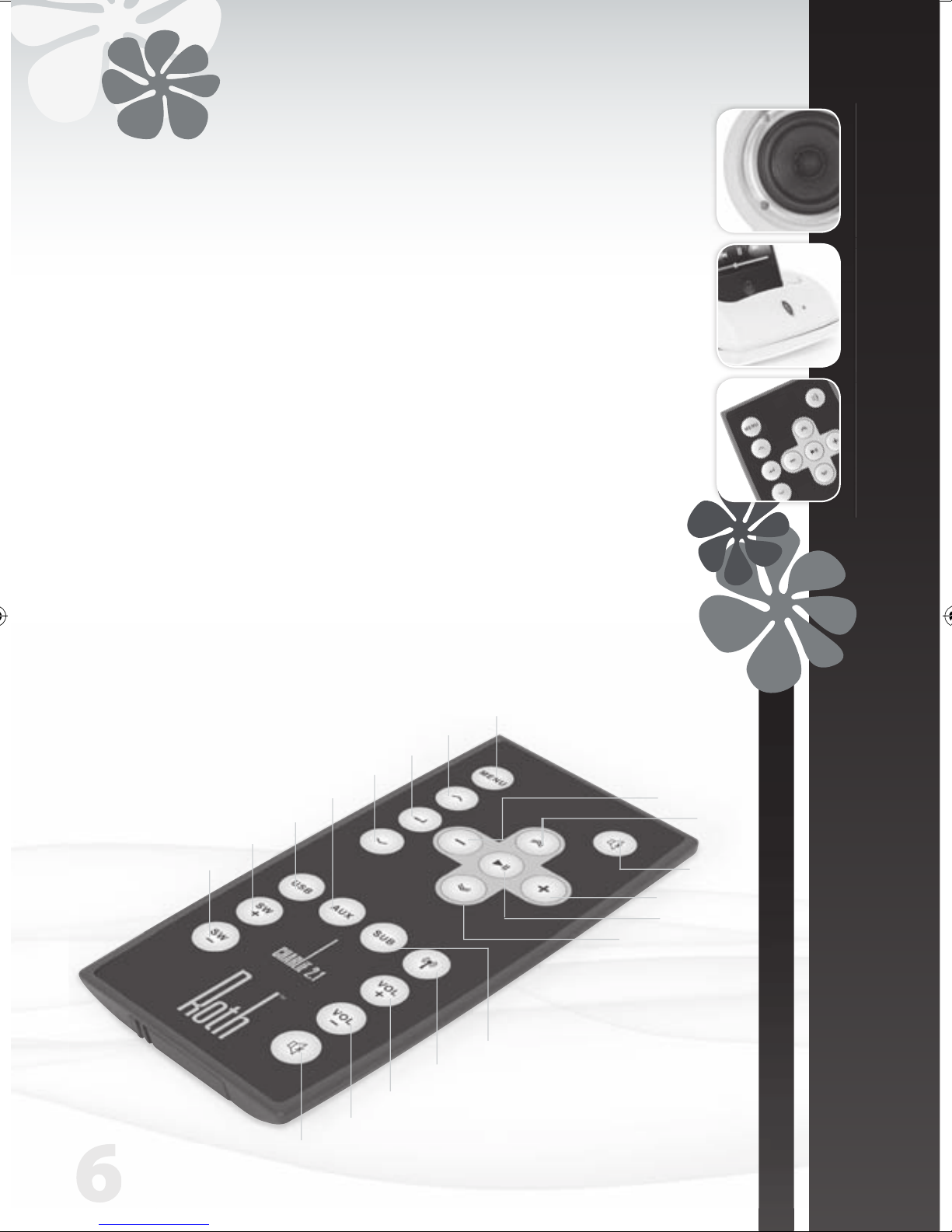
• iPod Steuerung
Einige iPod-Funktionen können über CHARLiEs Fernbedienung gesteuert werden.
Song abspielen / Wiedergabe unterbrechen Wiedergabe/Pause drücken
iPod ausschalten Wiedergabe’ gedrückt halten
Zum nächsten Song Nächster/Vorspulen’ drücken
Song erneut starten Vorheriger/Zurückspulen’ einmal drücken
Vorherigen Song abspielen Vorheriger/Zurückspulen’ zweimal drücken
Song vorspulen Nächster/Vorspulen’ gedrückt halten
Song zurückspulen Vorheriger/Zurückspulen’ gedrückt halten
Stumm
Volumen leiser
Volumen laute
Wireless ein/aus
Subwoofer wählen
USB-Eingang wählen
Aux-Anschluss wählen
Subwoofer-Lautstärke laute
Subwoofer-Lautstärke leiser
Stumm
Vorheriger
Titel
Lauter
Leiser
Wiedergabe
Nächster Titel
Menü
Menü hoch
Auswahl
Menü runter
Page 23
| 7
CHARLiE 2.1
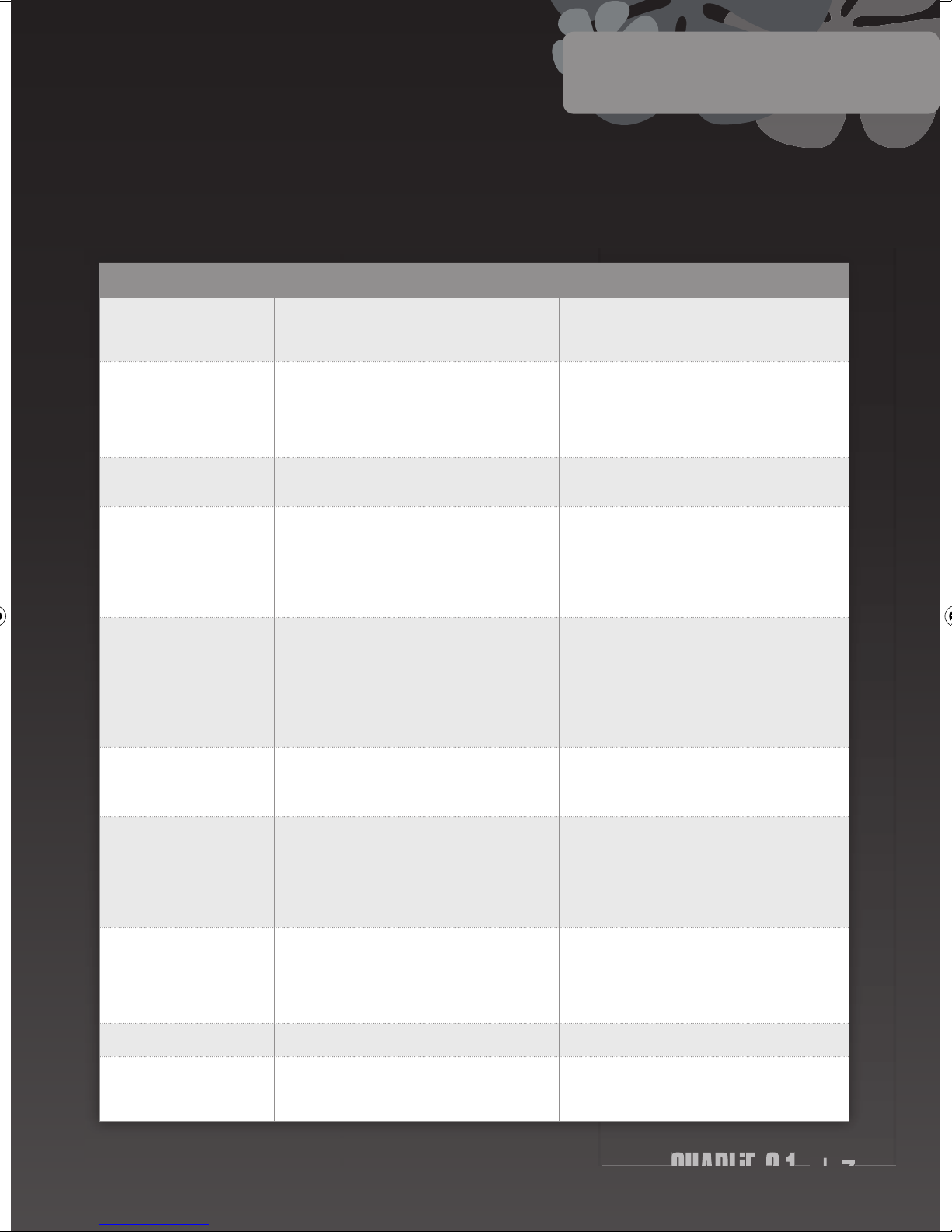
CHARLiE soll Ihnen viele Jahre lang ein einwandfreies Sound-Erlebnis liefern. Falls er aber einmal etwas unpässlich ist, könnte es an einem der
folgenden Probleme liegen. Wenn Sie trotzdem noch Probleme haben, wenden Sie sich bitte an Ihren Fachhändler oder Ihren Service-Center.
SYMPTOM DIAGNOSE ABHILFE
Schaltet sich auch bei Drücken
der Ein-/Austaste nicht ein
Stromadapter ist nicht richtig angeschlossen
Es fließt kein Netzstrom
Darauf achten, dass das Netzkabel fest eingesteckt und die Ein-/
Austaste eingeschaltet ist. Netzkabel an einem anderen Gerät
oder einer anderen Steckdose ausprobieren
Kein Sound Lautstärke ist leise oder aus
Drahtlose Verbindung funktioniert nicht richtig
Lautsprecherkabel nicht korrekt angeschlossen
Falsche Eingangsquelle gewählt
‘Lauter’-Taste drücken, um den Sound aufzudrehen
Prüfen, ob die LED-Lampe an ist. Wenn nicht, die drahtlose
Verbindung erneut herstellen. Prüfen, ob das Lautsprecherkabel
korrekt angeschlossen ist. Prüfen, ob der Eingangswählschalter
auf die gewünschte Quelle gestellt ist – iPod, Dock oder Aux
Kein Sound von rechtem oder
linkem Lautsprecher
Einer oder beide Lautsprecher sind nicht korrekt angeschlossen Lautsprecherkabel prüfen und darauf achten, dass es sicher an
beide Lautsprecher angeschlossen ist
RothDock und Lautsprecher sind
nicht gekoppelt
Störung von nahen drahtlosen Anlagen
RothDock zu weit vom Lautsprecher entfernt für drahtlose
Verbindung
Wieder beide ID-Tasten nacheinander drücken (die drahtlose
Anlage muss 12 verschiedene Kanäle durchgehen; möglicherweise müssen Sie einige ausprobieren, um den idealen Kanal für
Ihren Standort zu finden). Beide Geräte nebeneinander stellen,
während Sie die Geräte koppeln; dann die Geräte an die gewünschte Position stellen (nicht weiter als 15 m)
Das Akustikbild ist instabil (hör t
sich unnatürlich an oder Bässe
sind zu sanft)
Die positiven und negativen Polaritäten von Gerät und
Lautsprechern stimmen nicht überein
Lautsprecherkabel abziehen und korrekt neu anschließen (rot zu
rot, weiß zu weiß)
Die iPod-Lautstärke ändert
die Audio-Lautstärke in keiner
Weise
Die iPod-Lautstärkeregelung reguliert nur die Lautstärke zur
Kopfhörerbuchse
Nach Andocken Ihres iPods die Lautstärkeregelung Ihres CHARLiE
Verstärkers benutzen
Knacken in den Lautsprechern Schlechte Verbindung
Problem mit der Audio-Quelle
Anschluss der Docking-Station benutzen (oder die 3,5mmKabelbuchse, sofern benutzt). Darauf achten, dass der ,Ausgang‘,
,Audio-Ausgang‘ oder ,Kopfhörer-Ausgang‘ Ihrer Audioquelle
verwendet wird, NICHT ,Lautsprecher-Ausgang’.
Das 3,5mm-Kabel an einer anderen Audio- Quelle testen (z. B.
CD-Player, MP3-Player)
Sound ist verzerrt CHARLiEs Lautstärke ist zu hoch
Sound ist verzerrt
Lautstärke etwas herunterdrehen (na ja, wenn es der Tonqualität
hilft …). WAV- und MIDI-Dateien sind häufig von minder wertiger Qualität und die Verzerrung klingt in einer hochwertigen
Anlage noch schlimmer – probieren Sie eine andere AudioQuelle wie eine CD.
Funkstörungen Vielleicht befinden Sie sich zu nah an einem Funkturm Lautsprecher an einer anderen Stelle aufstellen
Fernbedienung funktioniert
nicht
Batterie leer
Fernbedienung außerhalb der Reichweite oder weist in die
falsche Richtung
Batterie auswechseln
Die Fernbedienung aus einer Entfernung von nicht mehr als 6 m
auf den Dock richten
Dr Feelgood
BEDIENUNGSANLEITUNG
DEUTSCHE
Page 24
8
Spezifikationen
www.rothaudio.co.uk
Kundendienst
CHARLiE 2.1 Desktop Speaker System
Max. Ausgangsleistung:
Sub: 25W, Sprecher: 20Wx2
Frequenzbereich: 40hz-20khz(±2db)
Verzerrung: ≤1%
Rauschabstand: ≥80db
Eingangswiderstand: 10KΩ
Ausgangswiderstand: Sub: 4Ω, Speakers: 8Ω
Senderentfernung: 10m
Sub Größe (BxHxT)):
420mm x 190mm x 180mm
Lautsprecher Größe (BxHxT):
120mm x 140mm x 130mm
Gewich: Sub: 3kg, Single Speaker 0.8kg
Eingänge 3.5 Aux x 1, USB x 1, Sub x 1
Die Spezifikationen können ohne Vorankündigung geändert werden.
Compatible with:
iPhone (2G, 3G, 3GS), iPod Nano (3rd, 4th,
5th Gen), iPod Touch, iPod Classic
Bitte kontaktieren Sie Ihren
zugelassenen Händler oder
Wiederverkäufer.
Email: [email protected]
www.rothaudio.co.uk
iPhone not included
Page 25
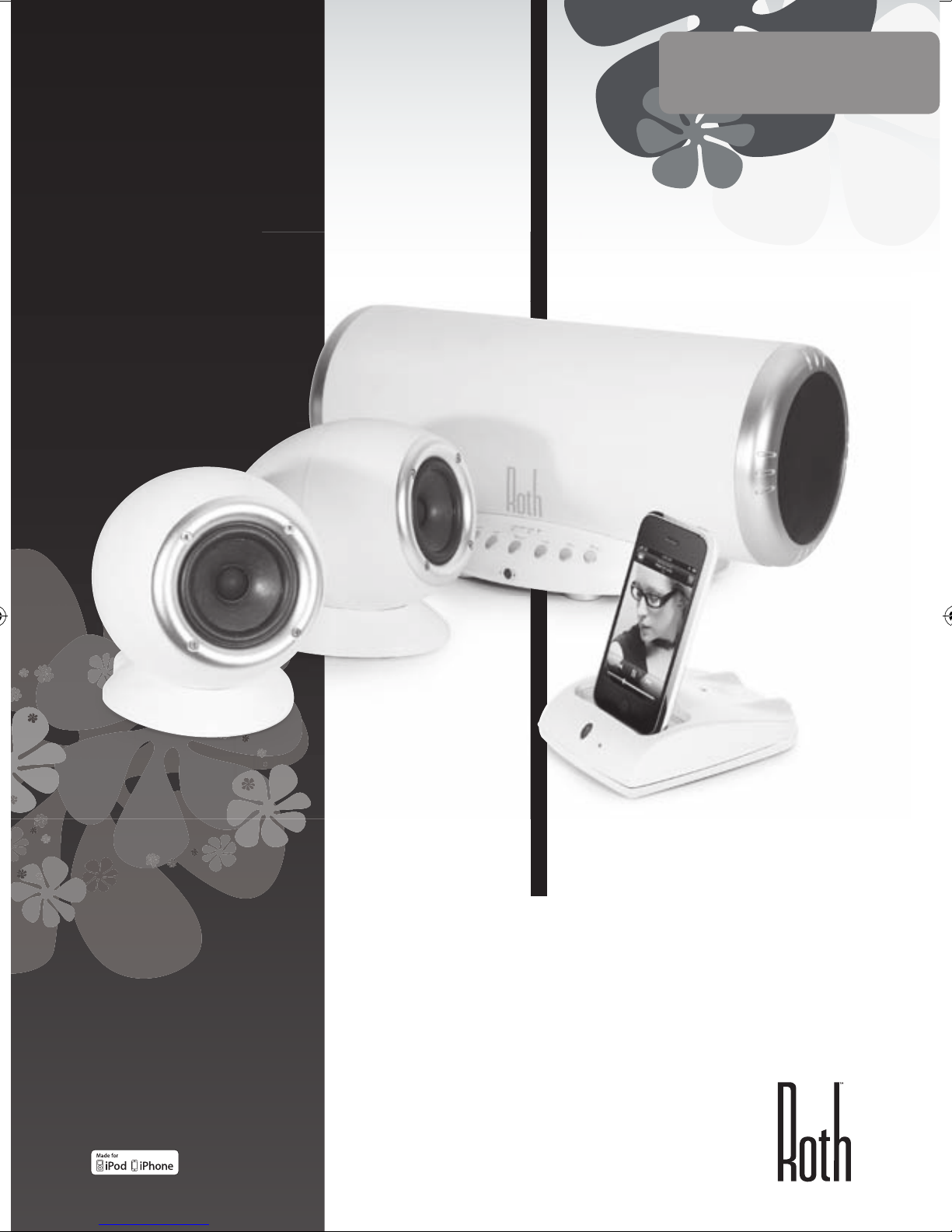
www.rothaudio.co.uk
CHARLiE 2.1
Desktop Music System
Powered by RothDock
MANUALE D’USO
ITALIANO
Progettato per essere utilizzato con:
iPhone/iPod, Any music-enabled
’phone, Desktop PC, Laptop,
CD Player, TV
iPhone not included
Page 26
2
Vi ringraziamo...
Per portarvi a casa il Roth Audio CHARLiE
Abbiamo progettato CHARLiE in modo che fosse bello e, con l’ausilio
delle tecnologie avanzate oggi disponibili, avesse un suono altrettanto
bello. Siamo lieti, in realtà siamo estasiati, dei risultati ottenuti e speriamo
che lo sarete anche voi.
CHARLiE non è un amico qualunque e siamo certi che vi regalerà ogni
bit così come ha fatto con noi da quando lo abbiamo realizzato. Può
divertirsi alla grande, oppure, quando lo volete, eseguire brani dolci e
delicati, fateglielo solo sapere e lui si adatterà al vostro umore. Sarà felice
quando voi sarete felici, ma lui è al settimo cielo quando esegue della
grande musica, ecco quello che sa fare meglio.
Accendetelo.
Dentro la scatola ............................... 3
Istruzioni relative alla sicurezza
.......... 3
Connessione
...................................... 4
Comandi frontali e posteriori
.............. 5
Telecomando
.................................... 6
Dr Feelgood : sintomi e rimedi
............. 7
Specifiche
......................................... 8
Assistenza
......................................... 8
Indice
Dentro la scatola
RothDock per iPod
Altoparlanti stereo di CHARLiE:
adattati dal punto di vista acustico
per offrirvi il suono migliore
CHARLiE Subwoofer / amplificatore
Telecomando
Cavi: altoparlante, USB,
alimentazione
Page 27
| 3
CHARLiE 2.1
MANUALE D’USO
ITALIANO
COSE DA FARE...
• Conservate queste istruzioni in un posto sicuro per
consultarle successivamente. Possiamo educatamente
suggerirvi quel cassetto straripante dove radunate tutti
gli altri manuali?
• Assicuratevi che la nuova casa di CHARLiE sia dotata di
un’idonea ventilazione. Pertanto non lasciatelo su letti,
sofà, pavimenti, librerie o armadietti chiusi o in qualsiasi
altra area che potrebbe impedire la sua respirazione e
farlo surriscaldare: un CHARLiE surriscaldato e infastidito
è una vista spiacevole.
• Prima del funzionamento assicuratevi di riporre
CHARLiE su una superficie pulita, asciutta e piana. Bel
tavolo in legno = buono. Cava di sabbia umida = cattivo.
• i prega di assicurarsi che CHARLiE sia collegato alla
corretta alimentazione come indicato, e si prega di
scollegarlo se non lo usate per un certo periodo: ciò
non solo protegge la parte interna di CHARLiE ma
anche il mondo esterno. Assicurarsi sempre che i cavi di
alimentazione siano posizionati in modo sicuro e non
ostruiscano un passaggio.
• Dovreste davvero far sì che CHARLiE venga visitato da
un tecnico autorizzato di manutenzione nel caso in cui:
1. L’alimentazione o il cavo di alimentazione di
CHARLiE siano danneggiati
2. CHARLiE vi sia caduto o sia stato colpito da un
oggetto in caduta
3. CHARLiE sia stato esposto alla pioggia o all’umidità
4. CHARLiE non sembri funzionare normalmente o
evidenzi un improvviso cambiamento di prestazioni
COSE DA NON FARE...
• Posizionare CHARLiE vicino all’acqua: lui non sa nuotare
e detesta l’umidità. Pertanto, evitate di mettere il
piccolo CHARLiE in vicinanza di vasche da bagno,
lavandini, lavatrici, in piscina, nella sauna, ecc; di solito è
educato ma non vi ringrazierà per questo.
• Esporlo alla luce solare diretta o in condizioni estreme
di temperatura o umidità: quindi è meglio non lasciare
CHARLiE sotto una lampada abbronzante.
• Mettere CHARLiE in prossimità di fonti dirette di calore
come termosifoni, stufe, cucine a gas, fiamme libere o
candele.
• Far cadere CHARLiE: potrebbe rompersi e si
spaventerebbe certamente; oppure esercitare una forza
eccessiva sui comandi, o posizionare su di esso oggetti
pesanti.
• Permettere la formazione di uno strato eccessivo
di polvere su CHARLiE. Per pulirlo, usare un panno
morbido. Se necessario, usare un panno umido che non
contenga solventi: CHARLiE non è un patito dei solventi.
• Cercare di rimuovere il coperchio posteriore di CHARLiE:
non contiene pezzi che possano essere sostituiti
dall’utente e comunque, e voi non volete prendere la
scossa elettrica, e allora tenetevene lontano da subito!
NOTA: Qualsiasi cambiamento o modifica non autorizzata a
CHARLiE ne rende nulla e inefficace la garanzia.
Istruzioni di sicurezza
CHARLiE è davvero facile da usare, ma vi prego, prima di
cominciare, leggete le istruzioni di funzionamento e di sicurezza
Page 28
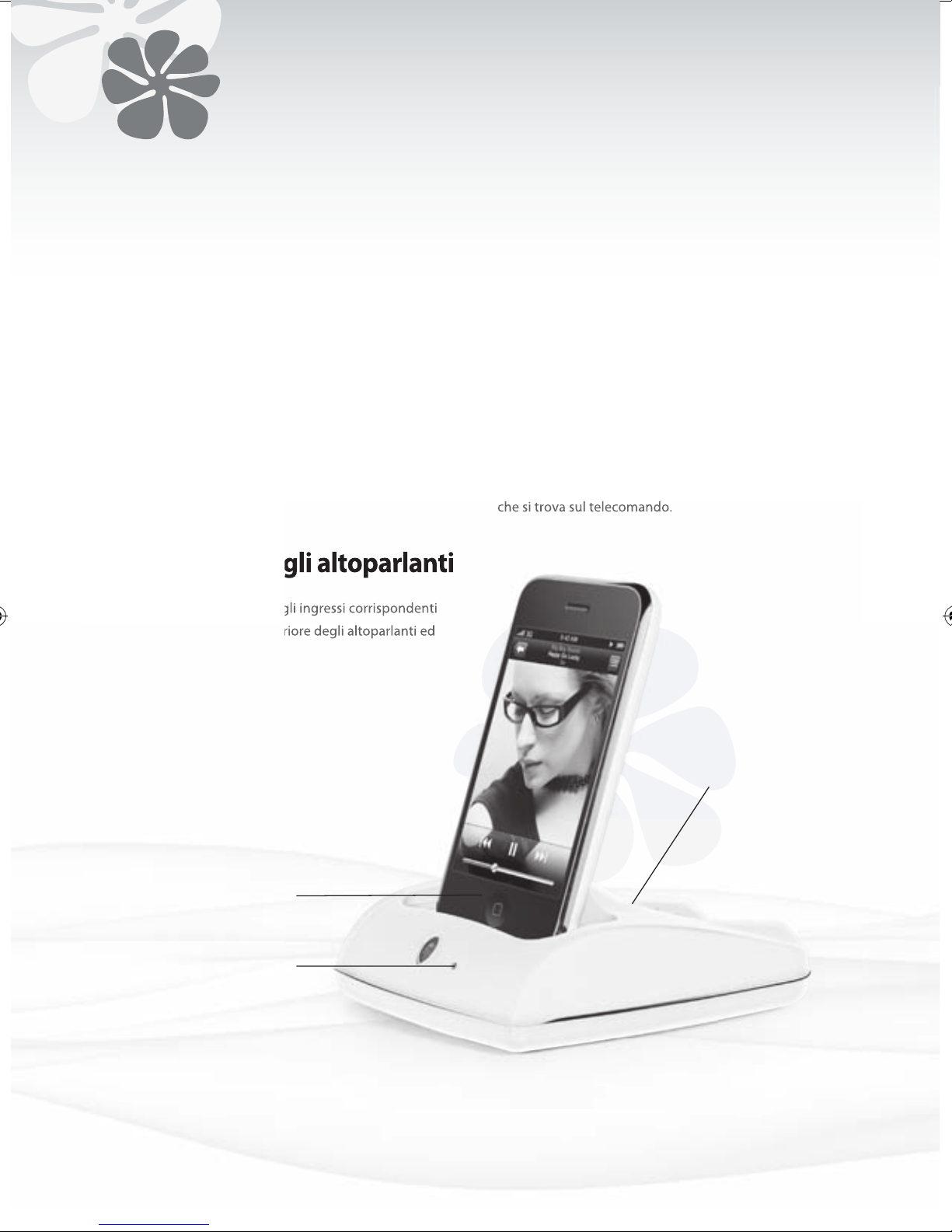
4
1. Premere il pulsante ID che si trova sul RothDock per 5
secondi, fino a far lampeggiare la luce azzurra.
2. Quindi premere il pulsante ID posizionato
sull’altoparlante fino a far lampeggiare la luce rossa.
3. Quando vengono accoppiate le due unità, le luci
restano accese e dovreste udire dagli altoparlanti una
tonalità continua. L’operazione dovrebbe richiedere
pochi secondi.
Connessione del RothDock
Inserire il cavo in dotazione negli ingressi corrispondenti
al jack da 3,5mm sul lato posteriore degli altoparlanti ed
ecco fatto.
Per accendere il rothdock azionare l’interruttore on
che si trova sul telecomando.
Connessione degli altoparlanti
Alimentazione A Distanza
• Lettore musicale (MP3, MP4 o telefono cellulare)
• Lettore CD
• Computer
Connessione di altri dispositivi
Indicatore di
alimentazione
Connettore del RothDock
LED
Il LED indica quando
l’ingresso RothDock
è connesso.
Page 29
| 5
CHARLiE 2.1
MANUALE D’USO
ITALIANO
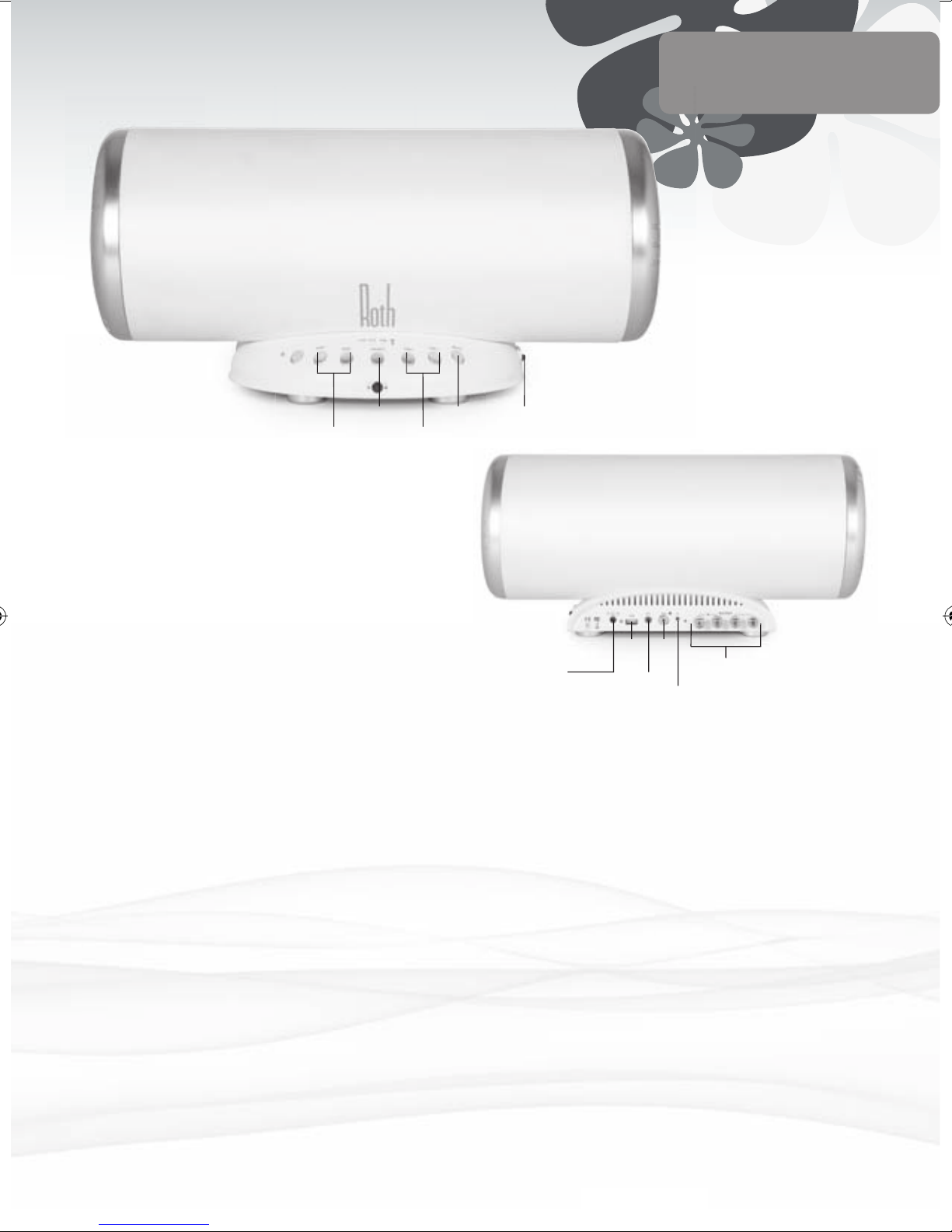
Pulsante di alimentazione
Premere ON per dare alimentazione.
Quando l’alimentazione è in posizione
ON, l’indicatore si accende. In seguito,
provare a premere OFF per consentirgli
di riposare.
Selezione Per passare da una sorgente sonora
all’altra: RothDock, aux o ingressi USB.
Indicatore ID Si accende quando il RothDock è
connesso tramite il link wireless.
Aumento volume
Pieno controllo: potete alzarlo… ‘ray!
Diminuzione volume
Oppure potete abbassarlo… boo!
Muto Potete rapidamente escludere la musica,
se lo volete, in caso di una telefonata o
altro
Aumento volume del subwoofer
Bassi esaltati
Diminuzione volume del subwoofer
Bassi esclusi
La parte frontale
Ingresso alimentazione
Con i cavi di alimentazione in dotazione, bello
Ingresso USB
Per il collegamento al vostro computer per lo
streaming digitale diretto.
Ingresso ausiliario
3,5mm per collegare un lettore MP3, un lettore CD,
un computer o altro.
Ingresso subwoofer Per collegare un subwoofer aggiuntivo.
Pulsante ID
Per inserire il collegamento wireless al RothDock di
CHARLiE.
Uscite altoparlante
Per il collegamento dei vostri altoparlanti.
La parte posteriore
Nota: Prima di premere il pulsante ON, porre il comando di volume nella
posizione più bassa per evitare danni agli altoparlanti. Se non lo fate, il circuito
di protezione degli altoparlanti escluderà il volume per alcuni secondi dopo
che è stata inserita l’alimentazione.
Selezione Muto Pulsante di
alimentazione
Subwoofer -/+ Volume -/+
Ingresso
alimentazione
Ingresso
Aux
Pulsante ID
Ingresso
Sub
Uscite altoparlante
Ingresso
USB
Page 30
6
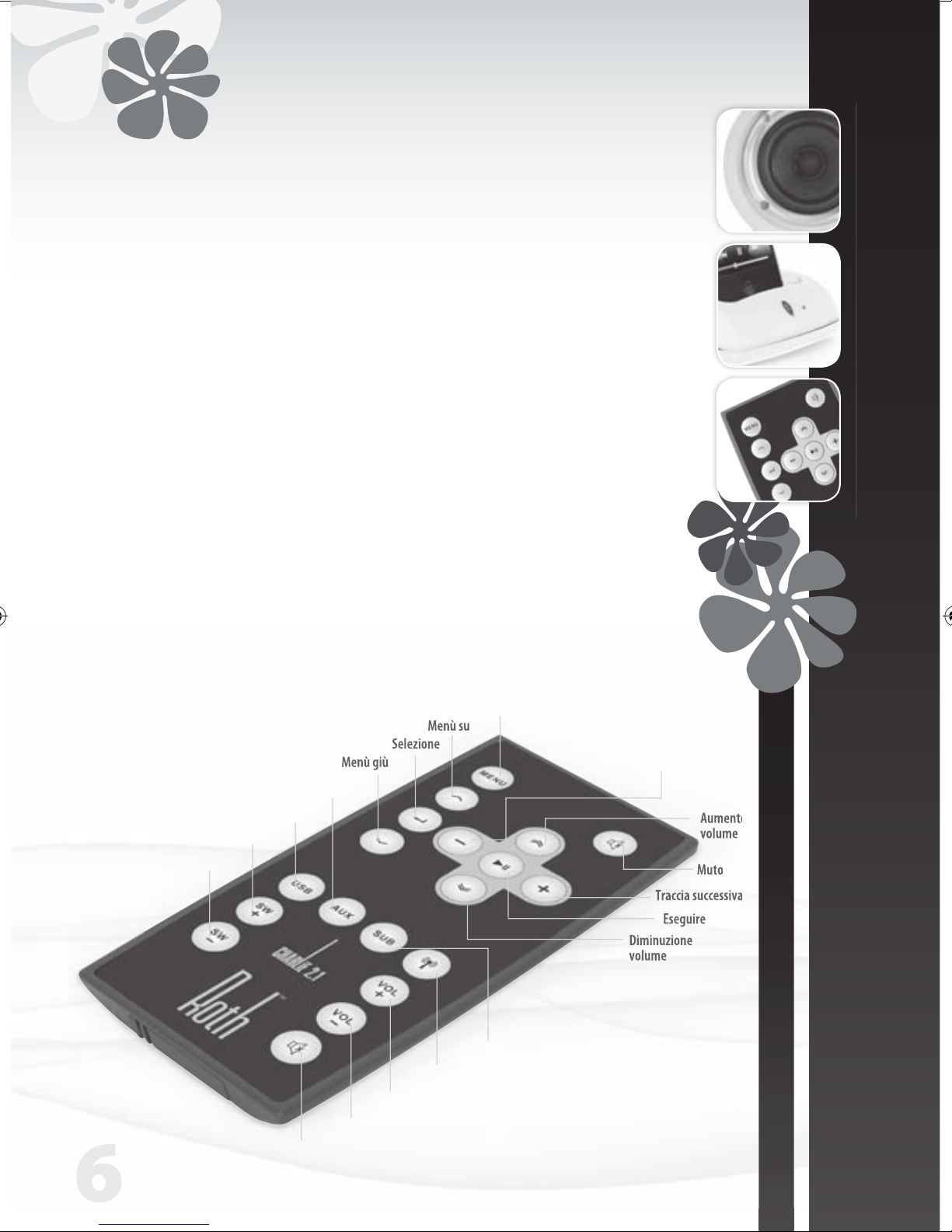
Telecomando
• Controllo iPod
Tramite il telecomando di CHARLiE è possibile controllare alcune funzioni dell’iPod.
Brano in esecuzione/pausa Premere esegui/pausa
Spegnere l’ iPod Premere e tenere premuto ‘Esegui’
Passare al brano successivo Premere ‘Prossimo/Avanti veloce’
Ricominciare un brano Premere una volta ‘Precedente/indietro’
Eseguire il brano precedente Premere due volte ‘Precedente/riavvolgere’
Brano avanti veloce Premere e tenere premuto ‘Successivo/avanti veloce’
Far tornare indietro un brano Premere e tenere premuto ‘Precedente/indietro’
Muto
Aumento
volume
Diminuzione
volume
Eseguire
Traccia successiva
Menù
Menù su
Selezione
Menù giù
Aumento
volume
volume
Traccia successiva
Muto
Diminuzione volume
Aumento volume
Wireless acceso/spento
Selezione subwoofer
Selezione ingresso USB
Selezione ingresso ausiliario
Aumento volume subwoofer
Diminuzione volume subwoofer
Traccia
precedente
Page 31
MANUALE D’USO
ITALIANO
| 7
CHARLiE 2.1
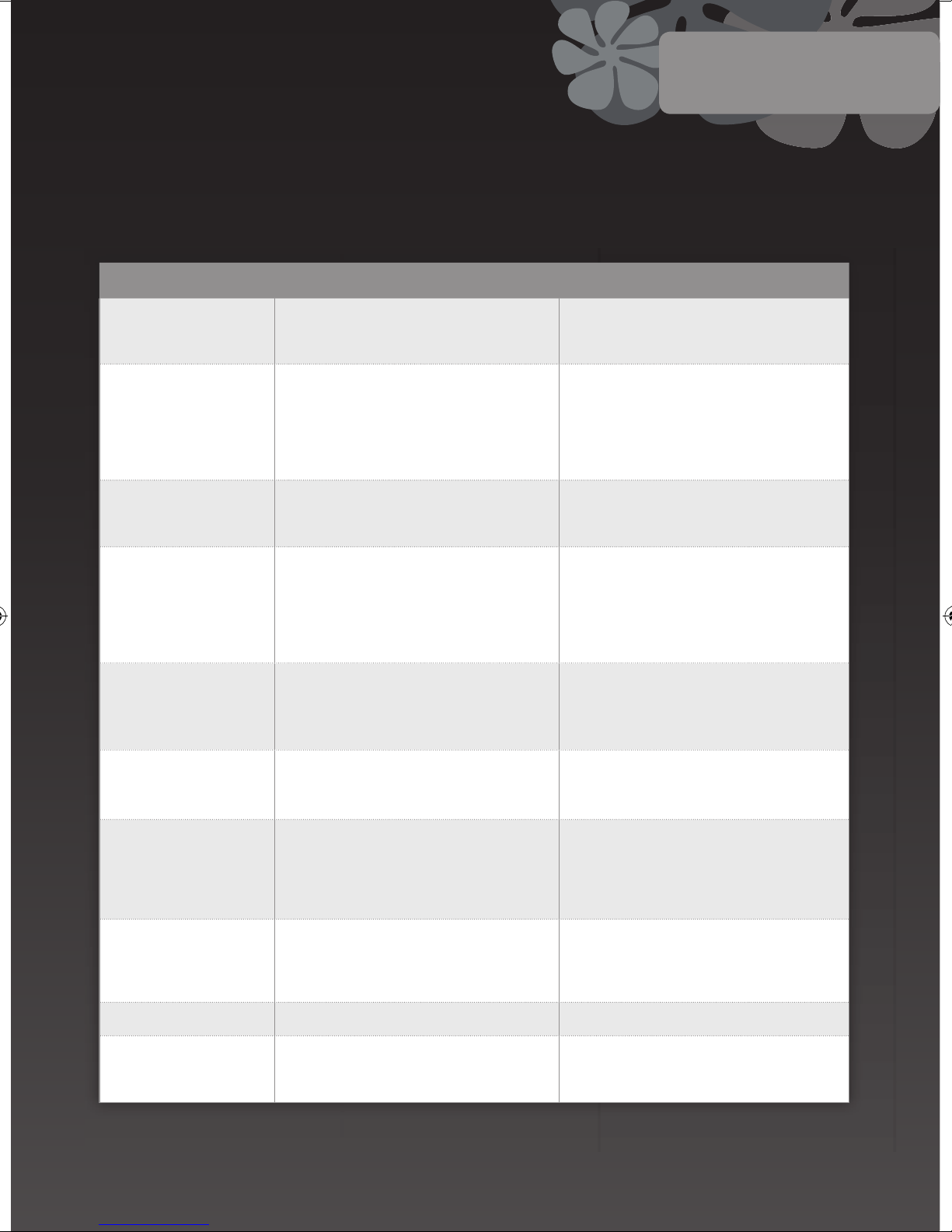
CHARLiE dovrebbe regalarvi anni e anni di buona forma audio senza intoppi, ma se dovesse essere un pò malaticcio, ciò potrebbe essere
causato da uno di questi semplici cause. Se il guasto persiste, si prega di contattare il vostro rivenditore autorizzato oppure il centro assistenza.
SINTOMI DIAGNOSI RIMEDIO
Quando si preme il pulsante
POWER non si accende
L’adattatore di alimentazione non è collegato correttamente
alla rete
Assicurarsi che il cavo di alimentazione sia saldamente inserito
e che la rete sia attivata. Testare la rete con un altro apparecchio
o una presa differente
Non si ode alcun suono Il volume è posizionato basso
La connessione wireless non funziona correttamente
Il cavo dell’altoparlante non è collegato correttamente
Il selettore d’ingresso è abbinato alla sorgente sbagliata
Premere il pulsante di Aumento di Volume per ascoltare il
rumore. Verificare che la spia ID sia accesa. In caso negativo, ripetere la connessione wireless. Verificare che il cavo
dell’altoparlante sia collegato correttamente . Verificare che il
selettore d’ingresso sia connesso alla sorgente desiderata: base
dell’iPod oppure Aux
Non si ode alcun suono
dall’altoparlante sinistro o
destro
Uno o entrambi gli altoparlanti non sono correttamente
collegati
Verificare il cavo dell’altoparlante e ed assicurarsi che sia collegato saldamente a entrambi gli altoparlanti
Il RothDock e gli altoparlanti
non si accoppiano
Vi è un’interferenza dovuta a sistemi wireless posti nelle
vicinanze
Il RothDock è troppo lontano dall’altoparlante con connessione wireless
Premere ancora entrambi i pulsanti ID in sequenza (il sistema
wireless ha 12 canali differenti per collegarsi e potreste avere
la necessità di provarne alcuni per trovare quello ideale per
la vostra zona). Mettete entrambi i dispositivi l’uno di fianco
all’altro mentre stabilite la connessione, poi spostateli nella loro
posizione desiderata (massimo assoluto 15m)
L’immagine acustica è instabile
(il suono non è naturale oppure
si ode uno strano suono basso
e flebile)
I poli positivo e negativo di unità e altoparlanti non corrispondono tra loro
Rimuovere i cavi dell’altoparlante e ricollegateli in modo corretto
(rosso con rosso e bianco con bianco)
Il volume dell’iPod non influenza il volume audio
Il controllo di volume dell’iPod controlla soltanto il volume al
jack della cuffia
Usate il vostro controllo di volume dell’amplificatore CHARLiE
quando l’ iPod è sulla sua base
Gli altoparlanti emettono dei
crepitii
Connessione non corretta
Problema con la sorgente audio
Verificare la connessione della stazione d’aggancio (o della connessione con cavo da 3,5mm, se lo usate). Assicurarsi di usare
‘line out’ ‘audio out’ o ‘headphone out’ dalla vostra sorgente, e
NON ‘speaker out’. Testare il cavo da 3,5mm con un’altra sorgente
audio, ad es. un lettore CD o un lettore MP3
Il suono è distorto Il livello di volume di CHARLiE è troppo alto
La sorgente sonora è distorta
Abbassarlo leggermente (bene, se ciò migliora il suono…)
Spesso i file WAV e MIDI sono di bassa qualità e la distorsione
sembra peggiore su un sistema di qualità; provare con un’altra
sorgente, ad es. una sorgente CD
Si sente un’interferenza radio Potreste essere troppo vicini a un’emittente radio Provare a muovere gli altoparlanti in differenti posizioni
Il telecomando non funziona Bassa tensione di batteria
Il telecomando è fuori portata o è orientato nella direzione
sbagliata
Sostituire la batteria. Puntare il telecomando verso la base da
non più di 6 metri di distanza
Dr Feelgood
MANUALE D’USO
ITALIANO
Page 32
8
Specifiche
www.rothaudio.co.uk
Assistenza
CHARLiE 2.1 Desktop Speaker System
Massima Potenza in uscita:
Sub 25W, Altoparlanti 20W x 2
Risposta in frequenza: 40Hz-20KHz (±2dB
Distorsione: ≤1%
Rapporto segnale-disturbo: ≥80db
Impedenza d’ingresso: 10KΩ
Impedenza d’uscita: Sub 4Ω, Altoparlanti 8Ω
Distanza dal trasmettitore: 10m
Dimensioni (LxAxP):
Altoparlante: 120mm x 140mm x 130mm
Sub: 420mm x 190mm x 180mm
Peso: Sub 3kg, Altoparlante singolo 0.8kg
Ingressi: 3.5 Aux x 1, USB x 1, Sub x 1
Le specifiche sono soggette a modifiche senza preavviso.
Compatible with:
iPhone (2G, 3G, 3GS), iPod Nano (3rd, 4th,
5th Gen), iPod Touch, iPod Classic
Si prega di contattare il vostro
concessionario o rivenditore
autorizzato su base locale.
Email: [email protected]
www.rothaudio.co.uk
iPhone not included
Page 33
www.rothaudio.co.uk
Desktop Music System
Powered by RothDock
Designet for å brukes med:
iPhone/iPod, Any music-enabled
’phone, Desktop PC, Laptop, CD
Player, TV
BRUKERVEILEDNING
NORSK
CHARLiE 2.1
iPhone not included
Page 34
2
Takk...
For at du har tatt Roth Audio CHARLiE med deg hjem
Vi har designet CHARLiE så han har et vakkert utseende, og med
den avanserte teknologien vi har i dag, låter han sannelig like bra
som han ser ut. Vi er fornøyd med – nei, vi er faktisk henrykt over
resultatene, og det håper vi du blir også.
CHARLiE er ikke noen vanlig liten fyr, og vi er sikre på at han
kommer til å gjøre det like bra for deg som han har gjort det for oss
siden vi skapte ham. Han kan feste noe voldsomt, eller spille mykt
og varsomt når du vil det – det er bare å si ifra, så kommer han til
å passe helt til humøret ditt. Han er glad når du er glad, men aller
gladest når han spiller flott musikk – det er noe han kan…
Slå’n på.
I esken ............................................. 3
Sikkerhetsanvisning
.......................... 3
Tilkopling
......................................... 4
Kontrollknapper foran og bak
............. 5
Fjernkontroll
..................................... 6
Dr Feelgood - symptomer og kurer
....... 7
Spesifikasjoner
.................................. 8
Service
............................................. 8
Innhold
I esken
RothDock for iPod
CHARLiE stereo høyttalere –
sonisk tilpasset for å gi deg
den beste lyden
CHARLiE Subwoofer
Fjernkontroll
Kabler: høyttaler, USB, strøm
Page 35
| 3
CHARLiE 2.1
BRUKERVEILEDNING
NORSK
DU SKAL...
• Ta vare på denne anvisningen til senere bruk – vi kan
kanskje anbefale den fulle skuffen der du oppbevarer
alle de andre manualene dine?
• Passe på at det er tilstrekkelig ventilasjon i det nye
hjemmet til CHARLiE. Du skal altså ikke la ham bli
liggende på senga, sofaen, tepper, i innebygde
bokhyller / skap eller andre steder der han kan få
åndenød og bli altfor varm – en utmattet CHARLiE er
triste greier.
• Sørge for at du setter CHARLiE på en ren, tørr og
jevn overflate før bruk. Pent trebord = bra. Fuktig
sandkasse = ikke bra.
• Forsikre deg om at CHARLiE er koplet til korrekt
strømforsyning som anvist, men vær så snill å trekke
ut kontakten hvis du ikke skal bruke ham på en
stund – da redder du ikke bare CHARLiE innvendig,
men verden utenfor også. Du skal alltid passe på at
strømkabler plasseres forsvarlig og ikke er i veien.
• Du bør la en autorisert serviceingeniør ta en titt på
CHARLiE hvis:
1. CHARLiEs strømforsyning eller ledning er skadd
2. CHARLiE datt ned eller ble truffet av en gjenstand
som falt ned
3. CHARLiE er utsatt for regn eller fuktighet
4. CHARLiE ikke later til å fungere normalt, eller
ytelsen plutselig forandrer seg
DU SKAL IKKE...
• La CHARLiE komme nær vann – han kan ikke svømme,
og han kan ikke fordra fuktighet. Du skal altså unngå
å sette lille CHARLiE i nærheten av badekar, vask,
vaskemaskin, svømmebasseng, sauna osv. – han er
vanligvis høflig, men han kommer ikke til å takke deg
for det.
• Utsette ham for direkte sol eller ekstreme
temperaturer eller fuktighet – kanskje best å la
CHARLiE unngå solarium, da.
• Plassere CHARLiE nær direkte varmekilder, som
radiatorer, komfyrer, varmeovner, bare flammer eller
lys.
• Slippe CHARLiE – han kan gå i stykker og han kommer
til å bli veldig redd – eller være for hardhendt med
kontrollene, eller legge tunge gjenstander oppå ham.
• La CHARLiE bli altfor støvete. Du kan tørke av ham
med en myk, tørr klut. Du kan, om nødvendig, bruke
en fuktig klut uten løsningsmiddel – CHARLiE bryr seg
ikke om løsningsmidler.
• Prøve å åpne CHARLiEs deksel bak – det er ingen
deler der som brukeren kan fikse, uansett, og du har
trolig ikke lyst på elektrisk sjokk, så bare kom deg ut
derfra med en gang!
NOTE: Uautoriserte endringer eller modifikasjoner på
CHARLiE vil ugyldiggjøre produsentens garanti.
Sikkerhetsanvisning
Det er virkelig lett å bruke CHARLiE, men det er best å lese
bruks- og sikkerhetsanvisningen før du starter ham.
Page 36
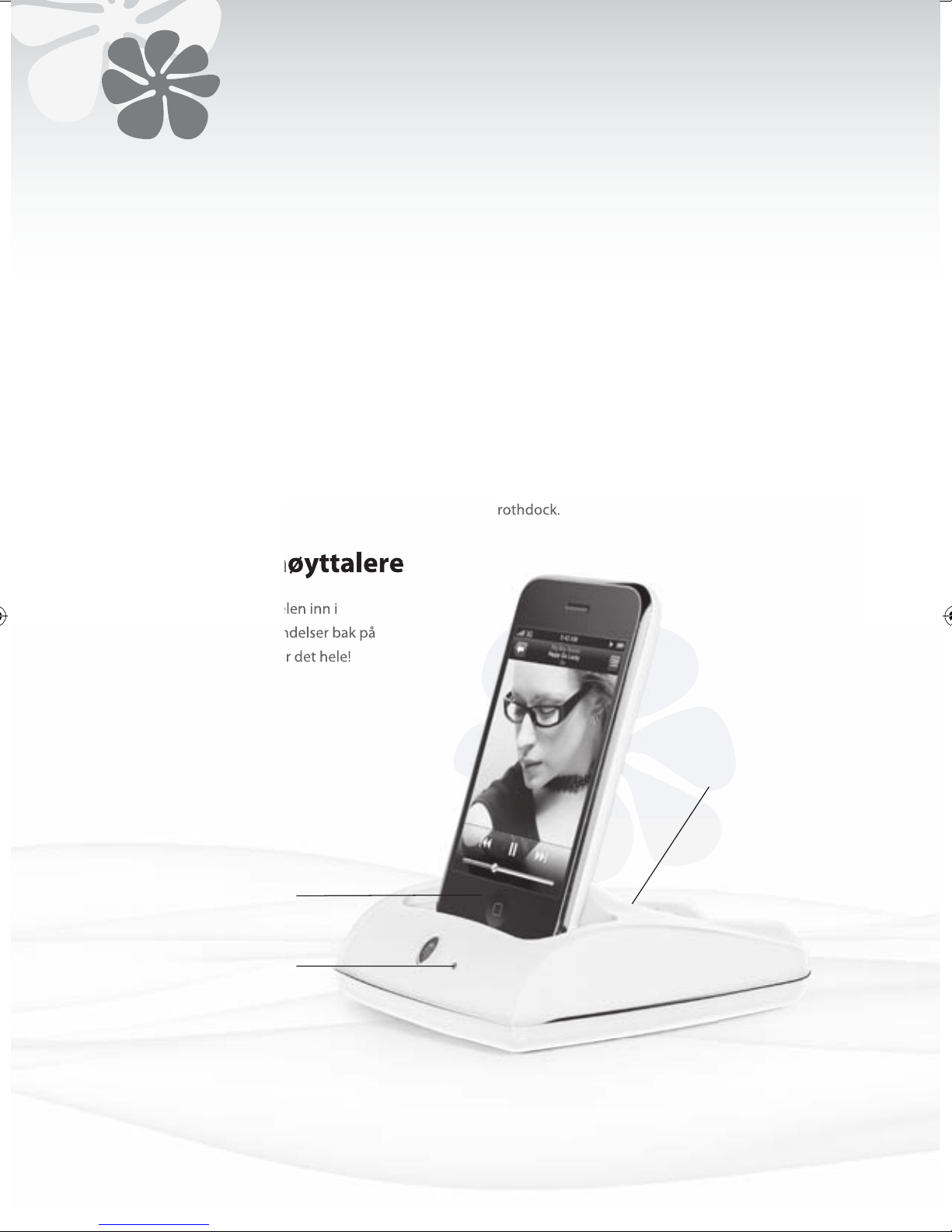
4
1. Trykk på ID-knappen på RothDock i 5 sekunder, til
det blå lyset blinker av og på.
2. Så trykker du på ID-knappen på høyttaleren, til det
røde lyset blinker av og på.
3. Når begge enhetene er sammenkoplet, vil lysene
være på, og du skal høre en jevn tone gjennom
høyttalerne. Prosessen skal bare ta noen få
sekunder.
Tilkopling av RothDock
Stikk den medfølgende kabelen inn i
tilsvarende 3,5mm jakkforbindelser bak på
høyttalerne. Hmmm – det var det hele!
Bruk på-bryteren på fjernkontrollen for å slå på
rothdock.
Tilkopling av høyttalere
Fjernkontroll
• Musikkspiller (MP3, MP4 eller mobiltelefon)
• CD-spiller
• Datamaskin
Tilkopling av annet utstyr
Strømindikator
RothDock kopling
LED
blir synlig
når RothDock
inngangen er
tilkoplet
Page 37
| 5
CHARLiE 2.1
BRUKERVEILEDNING
NORSK
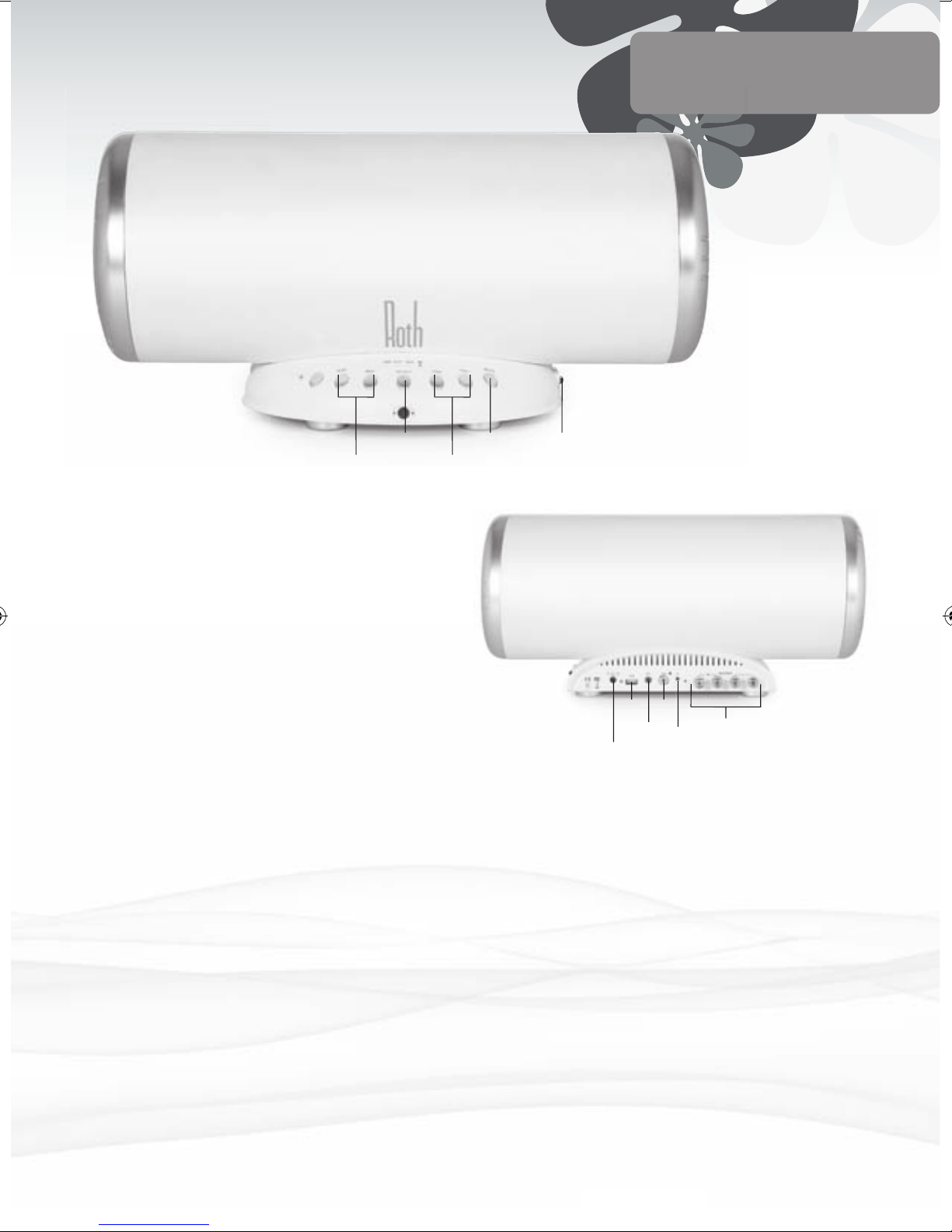
Strømknapp
Trykk på ON for strøm – indikatoren vil
lyse når strømmen er PÅ. Etterpå kan
du prøve å trykke på OFF for å slå av en
stund.
Velg For å skifte mellom forskjellige
lydkilder – RothDock, aux eller USB
innganger.
ID-indikator Lyser når RothDock er tilkoplet med
trådløs forbindelse
Lydstyrke opp Full kontroll – du kan skru den opp…
hurra!
Lydstyrke ned Eller du kan skru den ned… å, så trist!
Lyden av (Mute)
Du kan kutte musikken raskt hvis du
må, for telefoner og greier, ikke sant?
SW lydstyrke opp
Mer bass, da, vet du
SW lydstyrke ned
Bass nektes
Foran
Strøminngang Med medfølgende nettkabel, bra.
USB-inngang For å kople til datamaskinen din for
direkte digitaloverføring.
Aux-inngang 3,5mm for tilkopling av MP3 spiller, CD
spiller, datamaskin, hva det nå er.
Sub-Inngang
For tilkopling av en ekstra subwoofer
ID-knapp For å sette opp den trådløse
forbindelsen til CHARLiEs RothDock.
Høyttalerkabel For å kople til den andre høyttaleren.
Bak
Note: Før du slår PÅ, skal du stille lydstyrken så lav som mulig for
å unngå skade på høyttalerne. I tilfelle du ikke gjør det likevel, vil
vernekretsen på høyttalerne slå av lydstyrken i noen sekunder
etter at strømmen er slått PÅ.
Velg Mute Strømknapp
SW -/+ Lydstyrke -/+
Strøminngang
Aux
ID
Knapp
Sub
Høyttalerutganger
USB
Page 38
6
Fjernkontroll
• iPod regulering
Noen iPod-funksjoner kan reguleres ved bruk av CHARLiEs fjernkontroll.
Spille/stanse en sang Trykk på “Play/pause”
Slå av iPod Trykk og hold “Play”
Hoppe over til neste sang Trykk på ”Next/fast forward”
Starte en sang igjen Trykk på “Previous/rewind” ėn gang
Spille forrige sang Trykk “Previous/rewind” to ganger
Spole sang hurtig forover Trykk og hold ”Next/fast forward”
Spole en sang tilbake Trykk og hold ‘Previous/rewind’
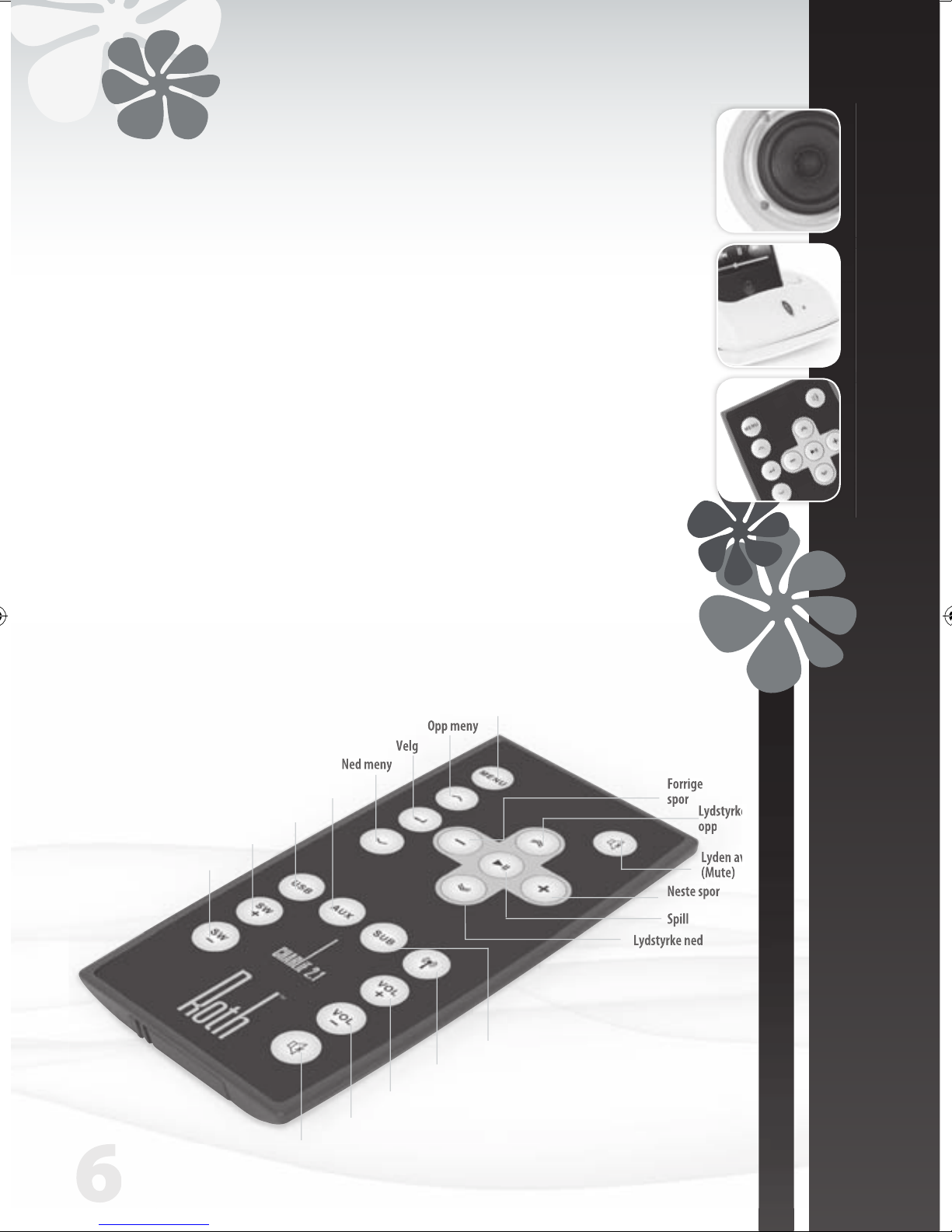
Lyden av
(Mute)
Forrige
spor
Lydstyrke
opp
Lydstyrke ned
Spill
Neste spor
Meny
Opp meny
Velg
Ned meny
spor
Velg
Lyden av (Mute)
Lydstyrke ned
Lydstyrke opp
Trådløs av/på
Subwoofer Velg
USB Velg
Aux Velg
SW opp
SW ned
Page 39
BRUKERVEILEDNING
NORSK
| 7
CHARLiE 2.1
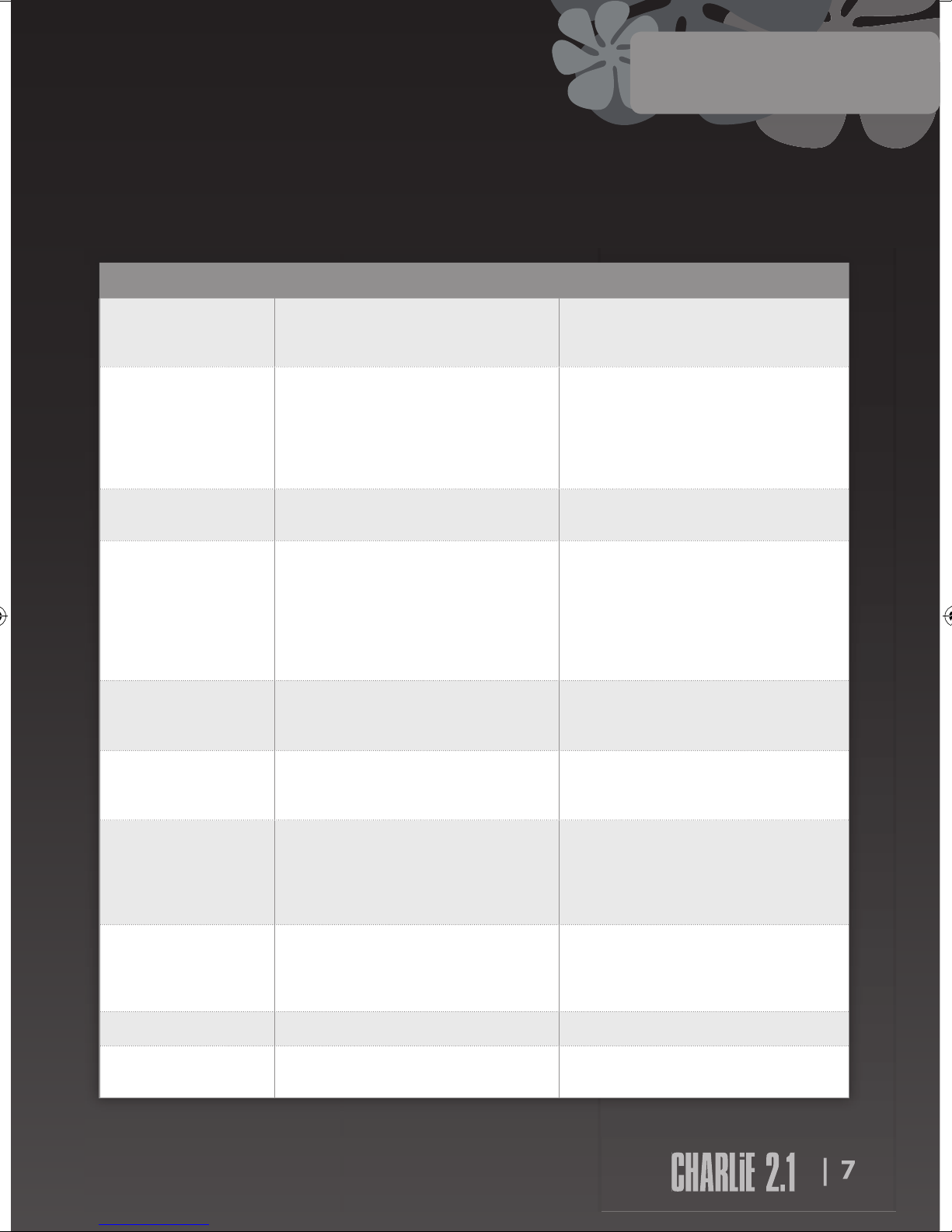
Lydmessig sett skulle CHARLiE holde seg i fin form i årevis uten noe trøbbel, men begynner han å virke litt uopplagt, kan
det skyldes et av disse småproblemene. Har du fortsatt trøbbel, må du kontakte autorisert forhandler eller servicesenter.
| 7
SYMPTOM DIAGNOSE KUR
Blir ikke slått på når det
trykkes på POWER-knappen
Strømadapteren er ikke ordentlig tilkoplet
Nettforsyningen er av
Forsikre deg om at strømkabelen er satt godt inn og at nettforsyningen er slått på
Test nettet med et annet apparat eller en annen kontakt
Ingen lyd Lydstyrken er skrudd ned
Den trådløse forbindelsen virker ikke ordentlig
Høyttalerkabel ikke korrekt tilkoplet
Inngangsvelger stilt på feil kilde
Trykk på lydstyrke opp knappen for å få lyd
Sjekk at ID-lyset er på. Hvis ikke, gjentas prosessen med
trådløs forbindelse
Sjekk at høyttalerkabelen er korrekt tilkoplet
Sjekk at inngangsvelgeren er innstilt på den kilden du vil
ha – iPod-dock eller Aux
Ingen lyd fra venstre eller
høyre høyttaler
Den ene eller begge høyttalerne er ikke ordentlig tilkoplet Sjekk høyttalerkabelen og sørg for at den er forsvarlig
koplet til begge høyttalere
RothDock og høyttalere vil
ikke gå sammen
Interferens fra trådløse systemer i nærheten
RothDock for langt unna høyttaleren med trådløs
forbindelse
Trykk på begge ID-knappene etter hverandre igjen (det
trådløse systemet har 12 forskjellige kanaler å gå igjennom,
og du må kanskje prøve noen av dem for å finne den som
passer best der du er).
Sett begge apparatene ved siden av hverandre mens du
setter opp forbindelsen, deretter flytter du dem dit du vil ha
dem (15 m er absolutt maks)
Akustikkbildet er ustabilt
(høres unaturlig ut eller merkelig basslyd)
Enhetens og høyttalernes positive og negative polaritet
passer ikke sammen
Ta ut høyttalerkablene og kople dem til igjen på korrekt
måte (rød til rød, hvit til hvit)
iPod lydstyrke har ingen
virkning på lydstyrken
iPods lydstyrkekontroll kontrollerer bare lydstyrken til
hodetelefonjakken
Bruk CHARLiE forsterkerens lydstyrkekontroll når iPoden
din er i dokk
Knitrelyd fra høyttalerne Dårlig forbindelse
Problem med lydkilden
Sjekk forbindelsen på dokkstasjonen (eller 3,5mm kabelforbindelsen hvis du bruker det). Forsikre deg om at den
bruker “linje ut”, “lyd ut” eller “hodetelefon ut” fra kilden
din, IKKE ”høyttaler ut”. Test 3,5mm kabelen med en annen
lydkilde, f.eks. CD-spiller, MP3- spiller
Lyden er forvrengt CHARLiEs lydstyrke er for høy
Lydkilden er forvrengt
Skru den litt ned (det høres jo litt bedre ut, da…)
WAV og MIDI filer er ofte av dårlig kvalitet, og forvrengning
høres verre ut gjennom et kvalitetssystem – prøv en annen
lydkilde, f.eks. en CD
Radiostøy Du kan være for nær et radiotårn Prøv å flytte høyttalerne til forskjellige steder
Fjernkontrollen virker ikke Lavt batteri
Fjernkontrollen er utenfor rekkevidde eller peker feil vei
Skift batteri. Pek fjernkontrollen mot dokken, ikke mer enn
6 meters avstand
Dr Feelgood
BRUKERVEILEDNING
NORSK
Page 40
8
Spesifikasjon
www.rothaudio.co.uk
Ta kontakt med din lokale
autoriserte forhandler eller
videreselger.
Email: [email protected]
www.rothaudio.co.uk
Service
CHARLiE 2.1 Desktop Speaker System
Maks utgangseffekt:
Sub 25W, En høyttaler 20W x 2
Frekvensrespons: 40Hz-20KHz (±2dB)
Forvrengning: ≤1%
Signal til støy forhold: ≥80db
Inngangsimpedans: 10KΩ
Utgangsimpedans: Sub 4Ω, En høyttaler 8Ω
Senderavstand: 10m
Mål (B x H x D):
Sub: 420mm x 190mm x 180mm
En høyttaler: 120mm x 140mm x 130mm
Vekt: Sub: 3kg, En høyttaler: 0.8kg
Innganger: 3.5 Aux x 1, USB x 1, Sub x 1
Spesifikasjoner kan endres uten videre.
Compatible with:
iPhone (2G, 3G, 3GS), iPod Nano (3rd, 4th,
5th Gen), iPod Touch, iPod Classic
iPhone not included
Page 41
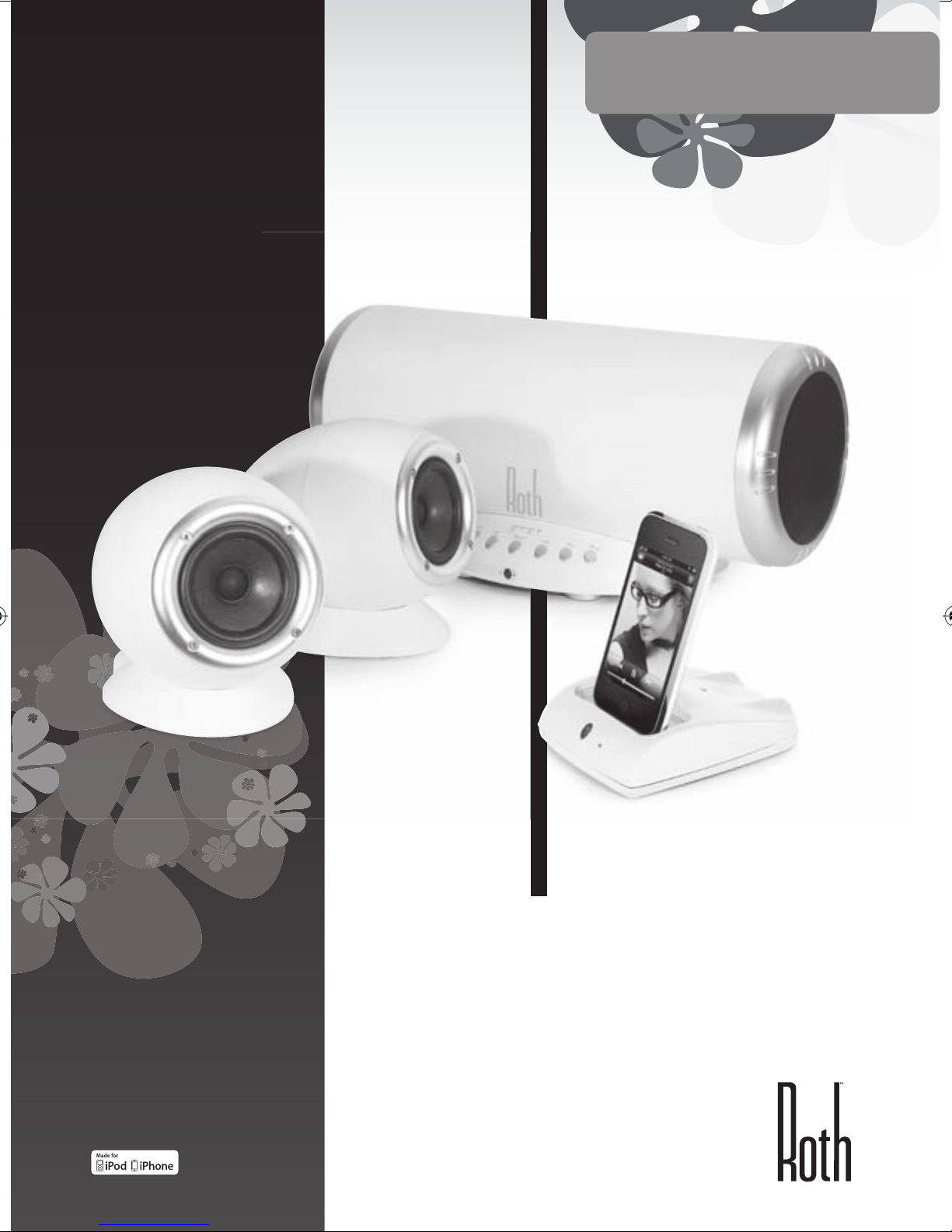
www.rothaudio.co.uk
CHARLiE 2.1
Desktop Music System
Powered by RothDock
MANUAL DEL USUARIO
ESPAÑOL
Diseñado para ser usado con:
iPhone/iPod, Any music-enabled
’phone, Desktop PC, Laptop, CD
Player, TV
iPhone not included
Page 42
2
Gracias...
Por llevar a casa el CHARLiE de Roth Audio
Hemos diseñado a CHARLiE pensando en una bonita estética y, con la
tecnología avanzada de hoy en día, pensando en que suene tan bien
como el aspecto que presenta. Estamos satisfechos –en realidad estamos
encantados– con los resultados, y confiamos en que usted también lo estará.
CHARLiE es especial, y estamos seguros de que va a dar todo por usted igual
que lo ha dado todo por nosotros desde que lo creamos. Puede mantener
la marcha a tope, o por el contrario tocar ritmos suaves y delicados cuando
se lo pida – basta con que se lo indique, y se adaptará a su estado de ánimo.
CHARLiE será feliz cuando usted esté contento, pero será más feliz cuando
reproduzca buena música – es lo que sabe hacer mejor.
Póngalo en marcha.
Contenido ......................................... 3
Instrucciones de seguridad
................. 3
Conexión
.......................................... 4
Paneles de control frontal y posterior
. . 5
Mando a distancia
............................. 6
Dr Feelgood – síntomas y soluciones
.... 7
Especificaciones
................................. 8
Servicio
............................................ 8
Índice
Contenido
Base RothDock para iPod
Altavoces estéreo CHARLiE –
adaptados acústicamente para
proporcionarle el mejor sonido
CHARLiE Altavoz de subgraves
Mando a distancia
Cables: altavoz, USB, alimentación
Page 43
| 3
CHARLiE 2.1
MANUAL DEL USUARIO
ESPAÑOL
SÍ...
• Mantenga estas instrucciones en lugar seguro para futuras
consultas – ¿le podemos amablemente recomendar
ese cajón a rebosar, en el que guarda todos los demás
manuales?
• Asegúrese de que la nueva casa de CHARLiE esté
adecuadamente ventilada. Así que evite ponerlo
encima de camas, sofás, alfombras, estanterías / vitrinas
cerradas así como en cualquier sitio donde se pueda
obstruir la ventilación del aparato, lo que provocaría el
sobrecalentamiento de CHARLiE – y cuando CHARLiE se
sulfura tiene un aspecto lamentable.
• Asegúrese de poner a CHARLiE sobre una superficie limpia,
seca y lisa antes de encenderlo. Bonita mesa de madera =
bien. Parque infantil de arena húmeda = mal.
• Asegúrese de conectar a CHARLiE a la fuente de
alimentación correcta tal y como se indica en el aparato, y
no se olvide de desenchufarlo cuando no lo vaya a utilizar
durante un período prolongado – de esta manera no sólo
protege las tripas de CHARLiE, sino también las del planeta.
Asegúrese siempre de pasar los cables de alimentación por
sitios seguros, sin obstruir las zonas de paso.
• CHARLiE debe ser atendido por técnicos de servicio
autorizados siempre que:
1. Se hayan dañado el cable o la fuente de alimentación
de CHARLiE
2. CHARLiE se haya caído al suelo o haya sido golpeado
por la caída de un objeto
3. E haya expuesto a CHARLiE a la lluvia o a la humedad
4. CHARLiE no parezca funcionar con normalidad o
muestre síntomas repentinos de cambios en su
funcionalidad
NO...
• Coloque a CHARLiE cerca del agua – no sabe nadar, y odia
la humedad. Evite por lo tanto colocar al pequeño CHARLiE
cerca de bañeras, fregaderos, lavadoras, piscinas, saunas,
etc. – por lo general es amable, pero tenga por seguro que
esto no se lo va a agradecer.
• Lo exponga a la luz solar directa o a temperaturas o
humedades extremas – por lo tanto, mejor que no deje a
CHARLiE bajo el aparato bronceador de rayos UVA.
• Coloque a CHARLiE cerca de fuentes directas de calor como
radiadores, estufas, cocinas, llamas desnudas o velas
• Deje caer a CHARLiE – puede romperse y con toda
seguridad se llevará un susto – ni apriete los controles con
fuerza excesiva, ni le ponga objetos pesados encima.
• Permita que se acumulen excesivos niveles de polvo encima
de CHARLiE. Para limpiarlo, utilice un paño seco suave. Si
fuera necesario, utilice un paño humedecido sin ningún tipo
de disolvente – CHARLiE no es aficionado a los disolventes.
• Intente retirar la cubierta posterior de CHARLiE – en
cualquier caso no hay ahí componentes que puedan ser
reparables por el usuario, y seguro que no desea usted
recibir una descarga eléctrica, así que, ¡las manos fuera de
ahí!
NOTA: Todo cambio o modificación no autorizados que se
realicen en CHARLiE anularán la garantía del fabricante.
Instrucciones de seguridad
CHARLiE es realmente fácil de manejar, pero, por favor, lea las
instrucciones de seguridad y de uso antes de encenderlo.
Page 44
4
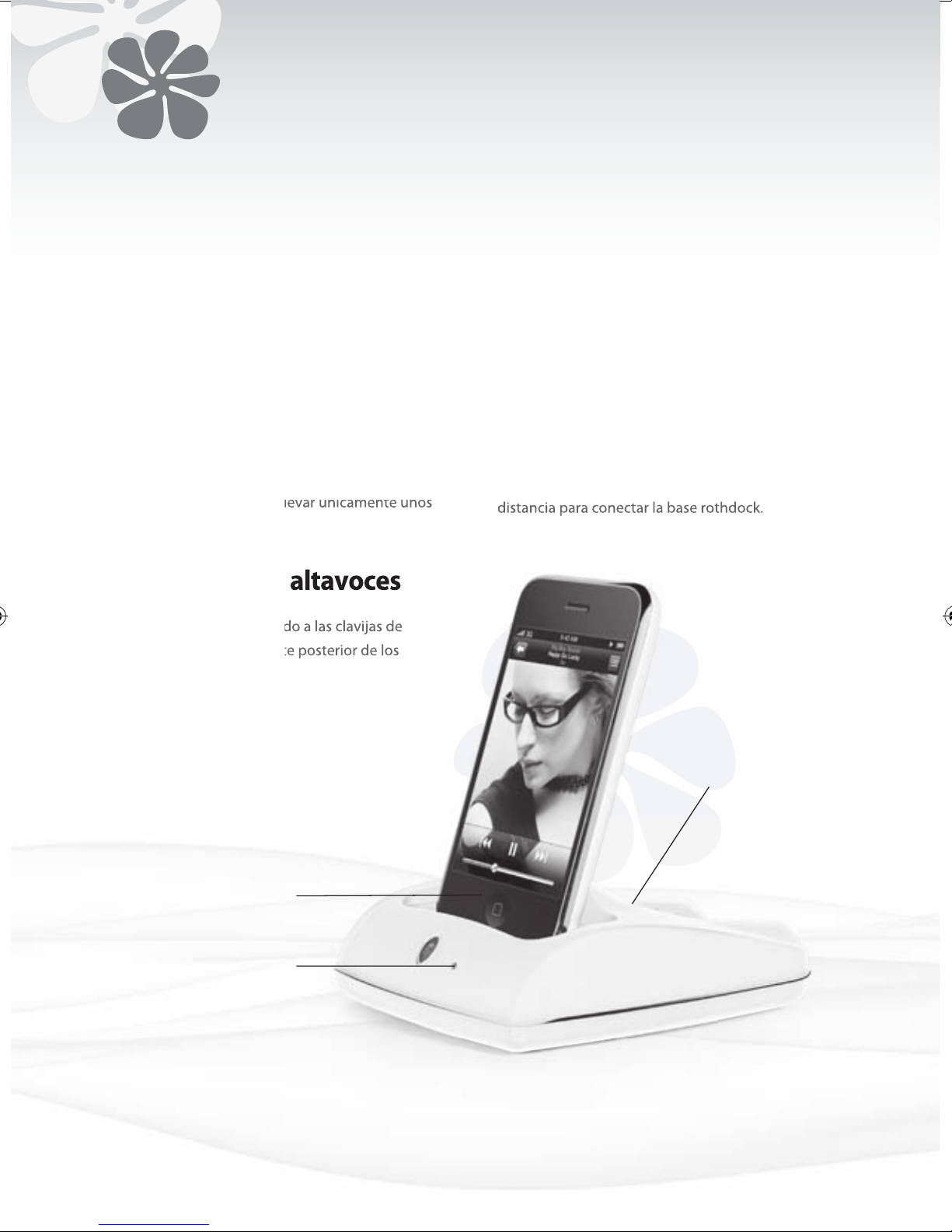
1. Pulsar el botón ID de la base RothDock durante 5
segundos, hasta que la luz azul parpadee.
2. Pulsar entonces el botón ID del altavoz hasta que la
luz roja parpadee a su vez.
3. Cuando ambas unidades estén sincronizadas, las
luces quedarán permanentemente encendidas, y
podrá usted oír un tono constante por los altavoces.
Todo el proceso deberá llevar únicamente unos
segundos.
Conexión de la base RothDock
Conectar el cable suministrado a las clavijas de
entrada de 3,5 mm de la parte posterior de los
altavoces. Esto…ya está.
Utilice el botón on (encendido) del mando a
distancia para conectar la base rothdock.
Conexión de los altavoces
Encendido a Distancia
• Reproductor de música (MP3, MP4 o teléfono móvil)
• Reproductor de CD
• Ordenador
Conexión de otros dispositivos
Indicador de
alimentación
Conector RothDock
LED
El LED indica cuándo
la entrada de la
base RothDock está
conectada
Page 45
| 5
CHARLiE 2.1
MANUAL DEL USUARIO
ESPAÑOL
Botón de encendido
Pulsar la posición ON para el encendido – el
indicador se iluminará mientras la alimentación
esté encendida (ON). Un poco más tarde, intenta
pulsar la posición OFF de desconexión para darle
un respiro.
Selector Para conmutar entre diferentes fuentes de sonido
– entradas RothDock, auxiliar (AUX) o USB.
Indicador ID Se ilumina cuando la base RothDock está
conectada mediante enlace inalámbrico
Subir volumen Control total – Puedes subirlo…disfrútalo,
Hombre!
Bajar volumen O puedes bajarlo… uh!
Silencio Puedes cortar rápidamente la música si lo
necesitas, ya sabes, para llamadas telefónicas y
ese tipo de cosas.
Subir Volumen De Subwoofer
Un momento de bajos, tío
Bajar Volumen De Subwoofer
Te privamos de los bajos
Panel frontal
Entrada de alimentació
Con cable de red incluido, guay.
Entrada USB Para la conexión a tu ordenador para lectura
digital directa.
Entrada Aux 3,5 mm para conexión de reproductor MP3,
reproductor de CD, ordenador, lo que quieras.
Entrada Sub Para la conexión de un subwoofer adicional
Botón ID Para configurar el enlace inalámbrico a la
RothDock de CHARLiE.
Salidas de Altavoz
Para la conexión de tus altavoces.
Panel posterior
Nota: Antes del encendido (tecla ON), ajustar el control de volumen al valor
más bajo para evitar daños a los altavoces. Caso de que no se proceda así, el
circuito de protección de los altavoces silenciará el volumen durante unos
segundos tras el encendido de la alimentación.
Selector Silencio Botón de
encendido
Subir/Bajar
volumen de
SubWoofer
Subir/Bajar
volumen
Power
In
Aux
ID
Button
Sub
Speaker
Out
USB
Page 46
6
Mando a distancia
• Control iPod
Algunas funciones del iPod pueden controlarse utilizando el mando a distancia de CHARLiE.
Reproducir/pausar canción Pulsar play/pause (reproducción/pausa)
Desconectar iPod Mantener pulsado ‘Play’ (reproducción)
Saltar a siguiente canción Pulsar ‘Next/fast forward’ (siguiente/avance rápido)
Iniciar de nuevo una canción Pulsar una vez ‘Previous/rewind’ (anterior/rebobinar)
Tocar canción anterior Pulsar dos veces ‘Previous/rewind’ (anterior/rebobinar)
Avance rápido de canción Mantener pulsado ‘Next/fast forward’ (siguiente/avance rápido)
Rebobinar una canción Mantener pulsado ‘Previous/rewind’ (anterior/rebobinar)
Silencio
Canción anterior
Subir
Volumen
Bajar Volumen
Reproducir
Canción siguiente
Menú
Avanzar menú
Seleccionar
Retroceder menú
Volumen
Avanzar menú
Silencio
Bajar Volumen
Subir Volumen
Función inalámbrica on/off
Selección de Subwoofer
Selección de entrada USB
Selección de entrada Aux
Subir Volumen Subwoofer
Bajar Volumen Subwoofer
Page 47
MANUAL DEL USUARIO
ESPAÑOL
| 7
CHARLiE 2.1
CHARLiE le deberá proporcionar años de capacidad de audio sin problema alguno, pero si observa que se encuentra
indispuesto, puede ser debido a alguno de los simples problemas que se enumeran a continuación. Si los problemas
continúan, sírvanse contactar con su centro de servicio o distribuidor autorizados.
SÍNTOMA DIAGNOSIS REMEDIO
No se pone en marcha c uando se
pulsa el botón POWER (ENCENDIDO)
El adaptador de alimentación no está conectado correctamente. Sin
suministro de red
Asegurarse de la conexión correcta del c able de alimentación y de que
hay suministro de red. Confirmar la alimentación con otro equipo u
otra toma de corriente
No hay sonido Se había bajado el volumen
La conexión inalámbrica no funciona correctamente
El cable de altavoz no se ha conec tado correctamente
Selección de fuente incorrecta del selector de entrada
Pulsar el botón de subir volumen para conseguir nivel de sonido.
Verificar que la luz ID está encendida. Si no es así, repetir el proceso de
inicio de conexión inalámbrica
Verificar que el cable de altavoz está conectado correctamente. Verificar
que el selector de entrada está fijado en la fuente que desee – base
de iPod o Aux.
No hay sonido en el altavoz
izquierdo o en el derecho
Uno, o los dos altavoces no están conectados
correctamente
Verificar el cable de altavoz y asegurarse de que está conectado correctamente a ambos altavoces
RothDock y los altavoces no se
sincronizan
Interferencia de sistemas inalámbricos cercanos
Base RothDock demasiado lejos del altavoz con conexión inalámbrica
Pulsar de nuevo ambos botones ID en secuencia (el sistema inalámbrico posee 12 canales diferentes de trabajo, y puede que tenga que
intentar varios de ellos hasta encontrar el ideal para su ubicación).
Colocar ambos dispositivos juntos mientras se establece la conexión,
luego desplazarlos hasta sus emplazamientos respectivos deseados
(distancia máxima 15 m)
La imagen acústica es inestable
(no se muestra natural o muestra
imagen de bajos extraña)
Las polaridades positiva y negativa de la unidad y los altavoces no
concuerdan
Desmontar los cables de altavoz y volver a conec tarlos correctamente
(rojo con rojo, blanco con blanco)
El volumen del iPod no afecta al
volumen de audio
El control de volumen del iPod únicamente controla el volumen de la
conexión de auriculares
Utilice el control de volumen del amplificador de volumen de su
Electrodo de CHARLiE cuando su iPod se encuentre en la base
Sonido de chisporroteo en los
altavoces
Conexión deficiente
Problema con la fuente de audio
Verificar la conexión de la base (o el cable de conexión de 3,5 mm si
está en uso). Asegurarse de que emplea las salidas ‘line out’ (salida de
línea), ‘audio out ’ (salida de audio), o ‘headphone out’ (salida de auriculares) de la fuente, NO ‘speaker out’ (salida de altavoces).
Verificar el cable de 3,5 mm con otra fuente de audio, por ejemplo
reproductor de CD, reproductor MP3
El sonido queda distorsionado El nivel de volumen de CHARLiE es demasiado fuerte
Fuente de sonido distorsionada
Bajar un poco el volumen (hombre, si hace que suene mejor…) Los
ficheros WAV y MIDI a menudo son de calidad pobre, y la distorsión
empeora en un sistema de calidad – probar con una fuente de sonido
diferente, por ejemplo CD
Interferencias de radio Ubicación demasiado cercana a una fuente de radio Intente mover los altavoces a una posición diferente.
El mando a distancia no funciona B atería baja. El mando a distancia no se encuentra dentro del rango
de alcance o se apunta en dirección incorrecta
Sustituir batería. Apuntar el mando a distancia a la base desde una
distancia no superior a 6 m
Dr Feelgood
MANUAL DEL USUARIO
ESPAÑOL
Page 48
8
Especificaciones
www.rothaudio.co.uk
Servicio
CHARLiE 2.1 Desktop Speaker System
Máx potencia de salida:
Sub 25W, Altavoz 20W x 2
Respuesta en frecuencia: 40Hz-20KHz (±2dB)
Distorsión: ≤1%
Relación señal-ruido: ≥80db
Impedancia de entrada: 10KΩ
Impedancia de salida:
Sub 4Ω, Altavoz 8Ω
Distancia al transmisor: 10m
Tamaño (Ancho x Alto x Hondo):
Sub: 420mm x 190mm x 180mm
Altavoz: 120mm x 140mm x 130mm
Peso: Sub: 3kg, Altavoz individual: 0.8kg
Entradas 3.5 Aux x 1, USB x 1, Sub x 1
Las especificaciones pueden quedar sujetas a cambios sin previo aviso.
Compatible with:
iPhone (2G, 3G, 3GS), iPod Nano (3rd, 4th,
5th Gen), iPod Touch, iPod Classic
Sírvanse contactar con su
distribuidor o comercial
autorizado local.
Email: [email protected]
www.rothaudio.co.uk
iPhone not included
 Loading...