

Page 1
1
Remeha Selecta
• High-efficiency condensing
boilers for wall mounted
installation
• Output: 16 kW (CH)
24 kW (DHW)
Technical information
Remeha Selecta combi and
Selecta system boiler
Page 2

Remeha Selecta
2
TABLE OF CONTENTS
Preface 5
1 General requirements 6
2 Appliance introduction 7
2.1 Central Heating Control 7
2.2 Working principle 9
2.3 Combi boiler operation 9
2.4 Advanced boiler control (‘abc’- control) 9
3 Dimensions and technical data 10
3.1 Dimensions 10
3.2 Technical details 12
3.3 General Specifications 13
3.4 Optional Accessoiries 14
4 Installation instructions 15
4.3 Boiler mounting 15
4.3.1 Clearance requirements 15
4.1 General 15
4.2 Boiler positioning 15
4.3.2 Mounting frame 16
4.3.3 Wall bracket 17
4.4 Flue gas discharge and air supply 17
4.4.1 Flue terminal positions 18
4.5 Type of arrangement in connection with flue gas discharge 19
4.5.1 Single boiler, concentric room sealed flue 19
4.6 Installation data 21
4.6.1 Condensate drain 21
4.6.2 Water treatment 21
4.6.3 Safety valve discharge 22
4.6.4 Expansion vessel 22
4.6.5 Circulation pump 23
4.6.6 Heating Water flow 24
4.6.7 Water connections 24
4.6.8 Filling the system/ make up water 26
5 Gas connection 26
5.1 Gas connection 26
5.2 Gas pressures 26
5.3 Gas/air ratio regulation 26
Page 3

3
6 Electrical connection 27
6.1 General 27
6.1.1 Mains voltage 27
6.1.2 Control connections 27
7 Controls 31
7.1 Control box 31
7.2 Boiler control 32
7.2.1 Introduction 32
7.2.2 Simple time clock and on/off room thermostat (control based on
time and room temperature) 32
7.2.3 Modulating OpenTherm® room controller (control based on time
and room temperature) 32
7.2.4 Outside-temperature sensor (control based on outside temperature
and settings as in Fig. 20) 32
7.2.5 Frost protection 34
7.2.6 Boiler temperature control 34
7.2.7 Low water level protection 34
7.2.8 Maximum protection (over heat thermostat) 34
8 Commissioning 36
8.1 Putting into operation 36
8.2 Gas rate measuring 37
8.3 Handing over 38
9 Control 39
9.1 The instrument panel 39
9.1.1 General 39
9.1.2 Instrument panel structure 39
9.2 Meaning of the various modes 40
9.2.1 General 40
9.2.2 Temperature mode 40
9.2.3 Programming mode 40
9.2.4 Service mode 43
9.2.5 ‘Forced High’ mode 43
9.2.6 ‘Forced Low’ mode 44
9.3 Adjusting parameters for the installer 44
9.3.1 DHW three-way valve (J) 46
9.3.2 Pump speed - central heating operation (L) 46
9.4 Putting the boiler out of operation 46
Page 4

Remeha Selecta
4
For user instructions: See inside boiler control cover.
10 Fault finding 47
10.1 Fault finding table 47
10.2 Fault codes 47
11 Service & maintenance 50
11.1 General. 50
11.2 Inspection 50
11.2.1 Checking the boiler combustion 50
11.2.2 CO2/O2 adjustment 51
11.2.3 Cleaning the siphon 53
11.2.4 Checking the ignition electrode, cable and gasket 54
11.2.5 Checking and cleaning the inspection glass 55
11.2.6 Checking for leakage (water, gas and flue gas side) 56
11.2.7 Checking the expansion vessel 57
11.3 Maintenance 58
11.4 Part list Selecta system boiler 62
11.5 Part list Selecta combi boiler 66
Page 5

5
PREFACE
These technical instructions contain useful and important information for the correct installation, operation and maintenance of the Remeha Selecta combi and system boilers.
Read these instructions carefully before putting the boiler into operation, familiarise
yourself with their control functions and operation, strictly observing the instructions
given. Failure to do so may invalidate warranty or prevent the boiler from operating
correctly.
Installation must be in accordance with current gas safety (installation and use) regulations, the building regulations and relevant codes of practice.
The installation, commissioning and servicing of the boiler must be carried out by a
competent person who holds valid ACS certification and to be a member of CORGI.
All electrical work must be carried out by a competent person and to be installed in
accordance with the current IEE regulations.
Note: On completion a copy of the commissioning certificate should be completed and
left with the customer.
If you have any questions, require an engineer to call on site, or if you need more
information about specific subjects relating to this boiler, or it’s installation please do
not hesitate to contact our technical help line 0118 978 3434.
The data published in these technical instructions is based on the latest information (at
date of publication) and may be subject to revisions.
We reserve the right to continuous development in both design and manufacture,
therefore any changes to the technology employed may not be retrospective nor may
we be obliged to adjust earlier supplies accordingly.
Page 6

Remeha Selecta
6
1 GENERAL REQUIREMENTS
Under the Gas Safety (Installation & Use) Regulations 1998, the Remeha Selecta, in
common with all gas appliances, must be installed by a competent person in accordance
with that regulation. Statutory regulations in any country, cannot be overridden by any
of the notes or instructions from the manufacturer. Compliance with National Standards
does not provide any degree of immunity from legal obligations. In the UK, the installation must be in accordance with the national and local norms and requirements. In
normal operation, the boiler will produce a visible white “plume” of condensation. In
addition, the condensate produced by this type of condensing boiler is drained from the
appropriate point indicated within the instructions. For any issues or circumstances not
addressed within these instructions, please call our Customer Care Department.
The boiler meets the requirements of the EC regulations at the folowing directives:
- 90/396EEC Gas appliances directive
- 92/42/EEC Efficiency directive
- 73/23/EEC Electrical low voltage directive
- 89/336/EEC EMC directive
- 97/23/EEC Pressure equipment directive (art. 3, sub. 3)
The Remeha Selecta (Combi and System) is a Kiwa (Water regulations) approved
product. Certificate number: A030497
Fig. 01 Kiwa logo
pdf
Remeha Selecta (Combi and System) - PIN: 0063BL3537
Gas Council numbers: Remeha Selecta combi: 47-673-01
Remeha Selecta system: 41-288-01
Classification type for evacuation of the combustion products; according EN 483: see
Par. 4.4 and Par. 4.5.
Health and safety information
- The weight of the Selecta system and combi boilers exceed the maximum lift weight
for one person.
- All sealants and gaskets are free from harmfull products. On first firing the boiler, a
smell of these products may be present and should cease after a short period.
Page 7

7
2 APPLIANCE INTRODUCTION
The Remeha Selecta is a wall mounted, fully modulating, condensing boiler, which is
available in two versions:
- Remeha Selecta combi - boiler for central heating and the production of instantaneous domestic hot water.
- Remeha Selecta system - boiler for central heating and hot water production via a
calorifier.
The Remeha Selecta series incorporates a pre-mix burner, frost protection, self diagnostic servicing LED, and lap-top/PDA connection forsetting and or interrogating the
controller. The boiler can be installed with either a vertical or horizontal concentric (fan
assisted) flue.
The boiler is designed for sealed systems only and is not intended for use with open
vented systems.
The Remeha Selecta combi is equipped with a plate heat exchanger for a rapid hot
water supply. The specially constructed cast aluminium heat exchanger is suitable
for recovery of both tangible and latent heat from the flue gas. The Remeha Selecta
combi can be used as a post-heater for solar heating panels. A continuously monitored
fully pre-mixed burner ensures low NOx and CO emissions. The closed air box means
it can be positioned in almost any space. The appliance is suitable for natural gas or
LPG (only with optional kit, available from Broag).
2.1 Central Heating Control
The central heating output can be controlled by either a standard room thermostat or
alternatively, for higher system efficiency, via the integrated OpenTherm interface. This
option offers full-modulation (100 - 25% of operating load) by using a suitable universal
controller such as the Honeywell Chronotherm Modulating programmable room controller available from Broag. 230 Volt switching controls can also be used in conjunction with the optional relay kit from Broag.
Page 8
Remeha Selecta
8
1
2
3
4
5
6
7
8
9
19
18
17
16
15
14
13
12
11
10
20
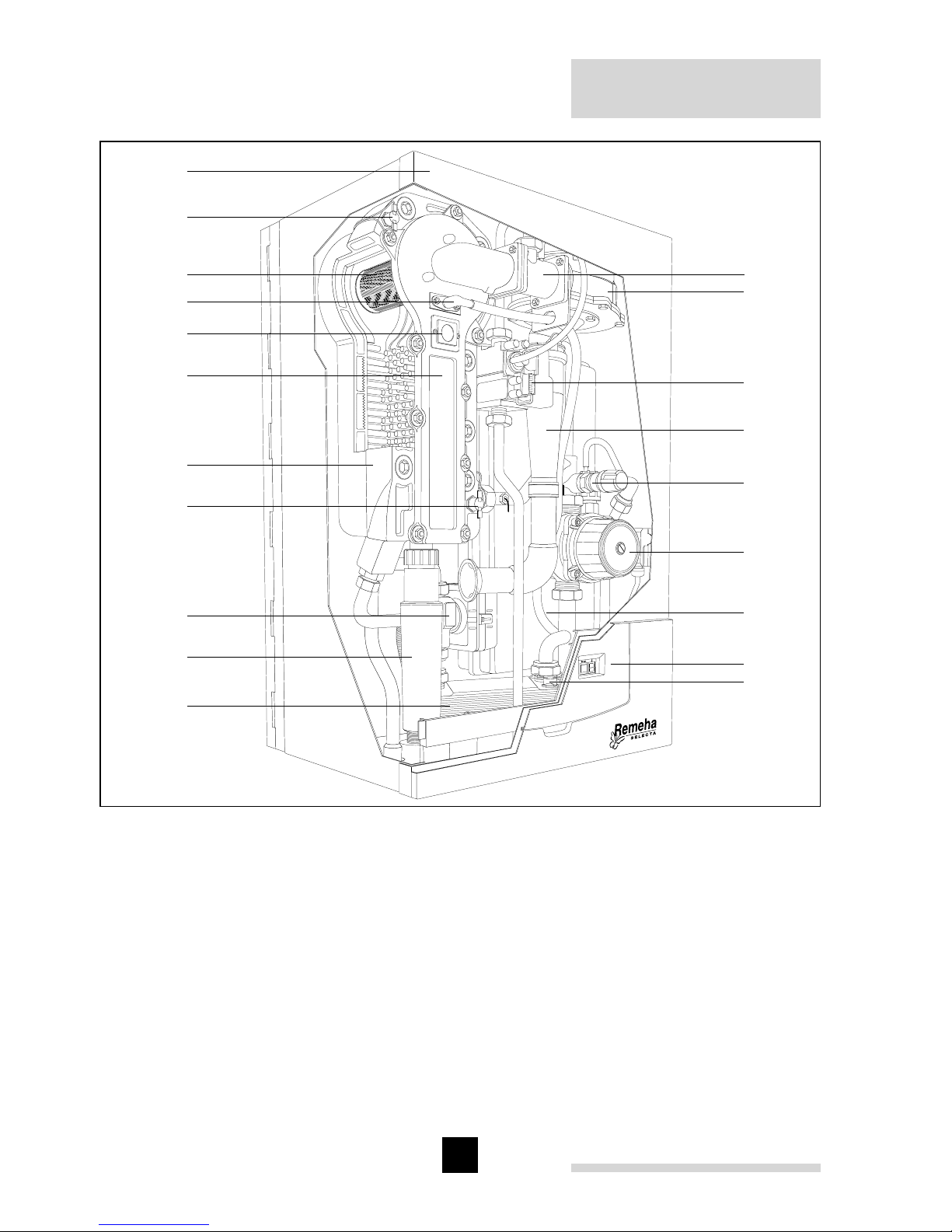
Fig. 02 Boiler layout Selecta (combi illustrated)
pdf
1. Venturi
2. Fan
3. Gas combi block
4. Air inlet tube
5. Safety valve
6. Pump
7. Expansion vessel
8. Instrument panel
9. Flow temperature sensor
(DHW; combi boiler only)
10. Plate heat exchanger
(combi boileronly)
11. Siphon / condensate outlet
12. 3-Way valve (combi boiler only)
13. Temperature sensor return
14. Heat exchanger
15. Heat exchanger inspection cover
16. Inspection glass
17. Combined ignition/ ionisation probe
18. Burner
19. Temperature sensor flow
20. Flue outlet / air inlet (60/100 mm; on
top, not visable in this picture)
Page 9

9
2.2 Working principle
The Remeha Selecta’s casing serves as a sealed air box, with air drawn in by the
fan. On the outlet side of the fan is a venturi, into which a measured quantity of gas is
injected based on the volume of air available. The fan speed control is dependent on
the settings of the heat requirement and the prevailing temperatures (measured by the
temperature sensors).
The method of gas/air combination ensures that the gas quantity is precisely adjusted
to the air quantity. This creates optimum combustion over the whole heat input range.
The gas/air mixture is mixed in the venturi and then flows to the burner. After combustion, the hot flue gas is directed through a specially designed, high efficiency cast
aluminium heat exchanger with a large surface area, and transferring its heat to the
heating water. The water vapour in the flue gas condenses against the “pins” within the
heat exchanger, and the heat released during this process (the so-called latent or condensation heat) is also transferred to the heating water. The condensate water formed
is discharged via a siphon on the bottom of the heat exchanger.
NOTE: In normal operation, the boiler’s flue gas discharge will produce a visible white
condensing “plume” and care should be taken when choosing a location.
2.3 Combi boiler operation
The Remeha Selecta combi contains a facility for providing domestic hot water in addition to central heating. The opening of a hot water tap is detected by a temperature
sensor, which is located on the cold water inlet side of the heat exchanger. This sensor
then activates the motorised three-way valve to provide domestic hot water. Once the
demand for hot water stops the motorised valve automatically returns to the central
heating position. This three-way valve is electrically controlled by the control box and
only consumes power when it is changing to a different position.
2.4 Advanced boiler control (‘abc’- control)
An intelligent advanced boiler control (‘abc’) continuously monitors the boiler conditions and ensures a very reliable supply of heat. This control system is adept at dealing with negative influences from the system such as flow reduction, airflow problems
and alike. In the event of such influences, the boiler will not go into “lock-out” failure
mode, but will in the first instance modulate back. If necessary, depending on the
nature of the circumstances, it will temporarily switch off (shutdown or control stop),
and then after a short while simply try again.
NOTE: Provided that the situation is not actually hazardous, the Remeha Selecta will
always try to supply heat. The ‘abc’- control prevents unnecessary additional call outs.
Page 10
Remeha Selecta
10
3 DIMENSIONS AND TECHNICAL DATA
3.1 Dimensions
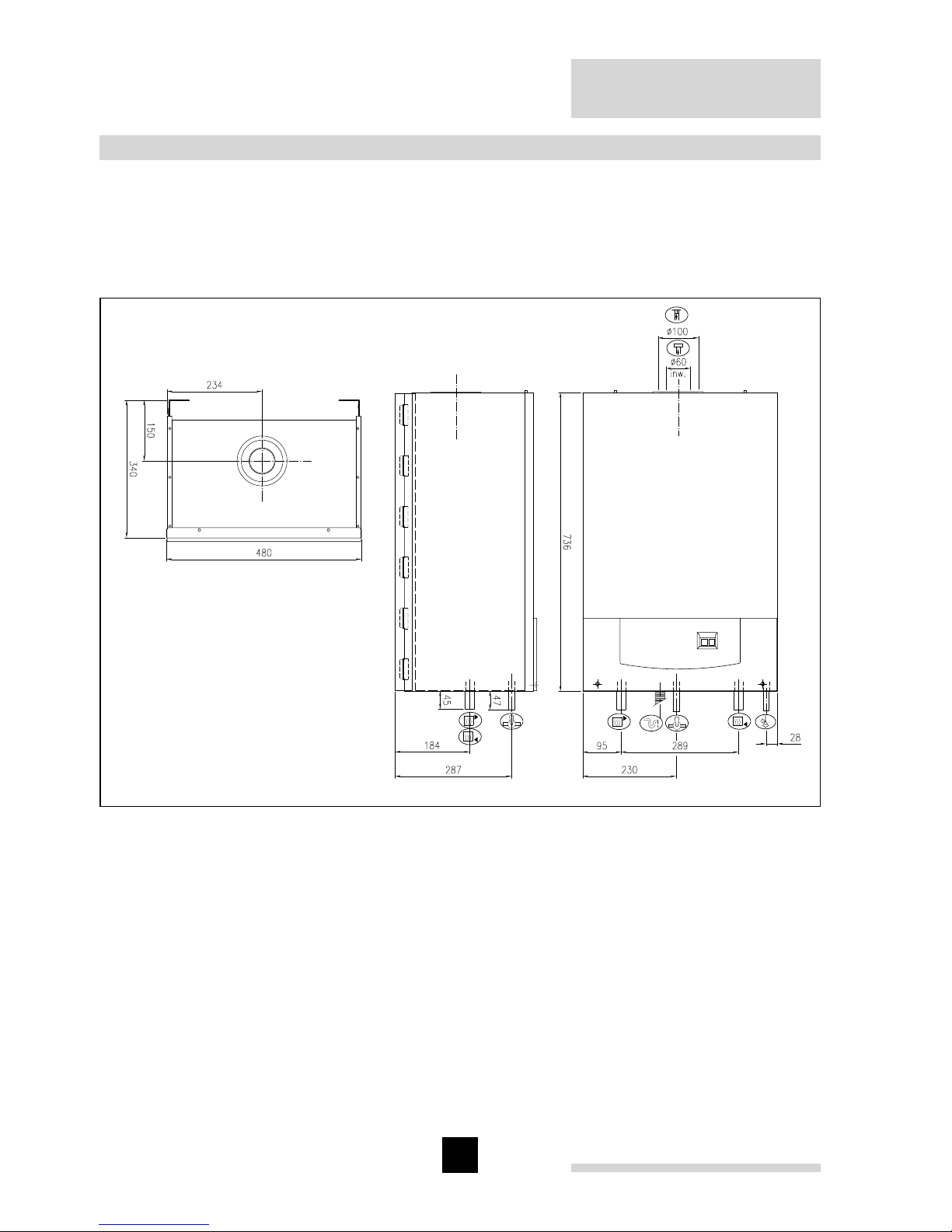
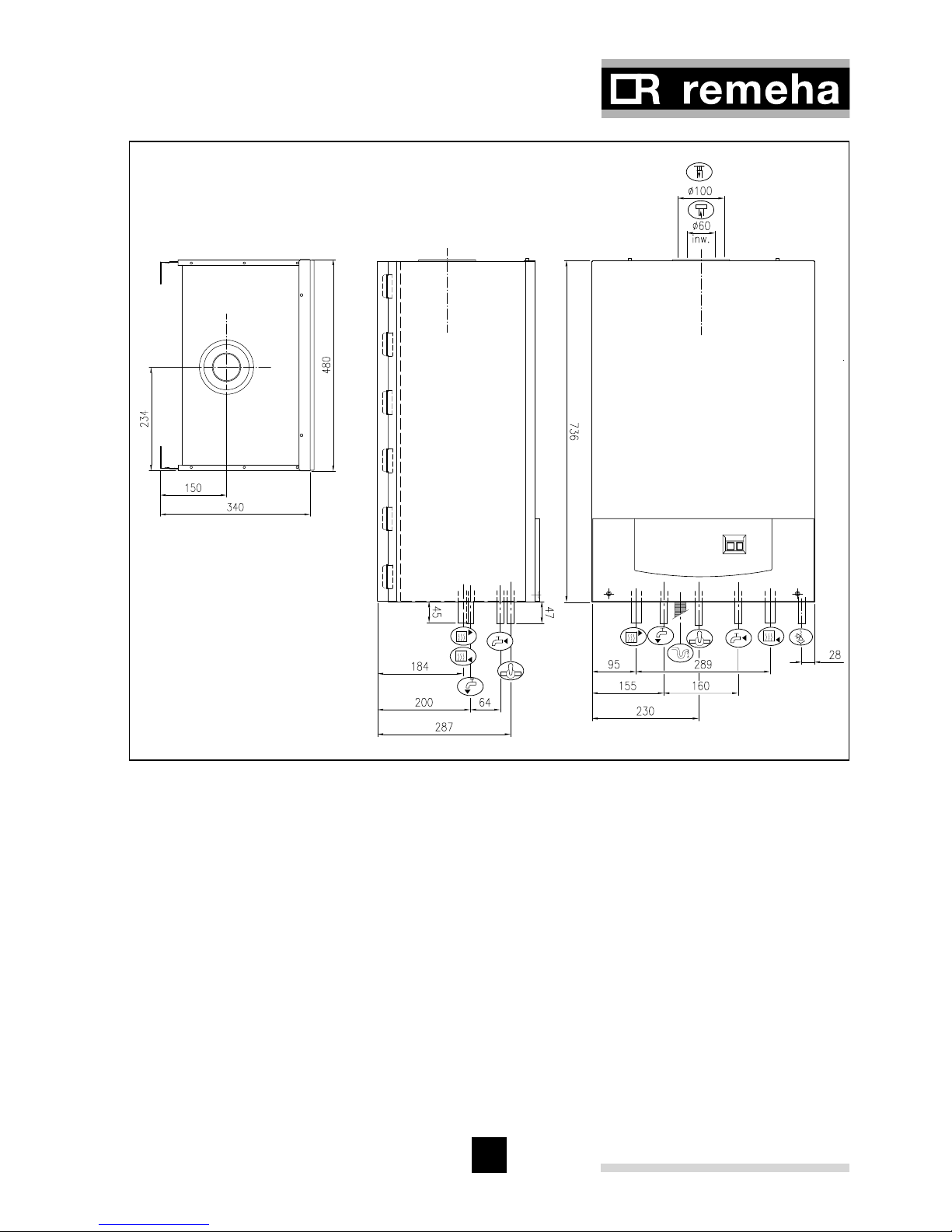
All dimensions of relevance to the installation of the appliance are shown in Fig. 03
and Fig. 04. For clearance details, see Fig. 05.
Fig. 03 Dimensions Selecta system
04.W5H.79.00002
Ê Return connection 22 mm Ø o/d
É Flow connection 22 mm Ø o/d
Ï Gas connection 15 mm Ø o/d
Ð Combustion air supply connection 100 mm Ø i/d
Ñ Flue gas discharge connection 60 mm Ø i/d
Ò Condensate connection 25 mm Ø
Ù Safety valve discharge 15 mm Ø
Page 11
11
Fig. 04 Dimensions Selecta combi
04.W5H.79.00001
Ê Return connection 22 mm Ø o/d
É Flow connection 22 mm Ø o/d
Ï Gas connection 15 mm Ø o/d
Ð Combustion air supply connection 100 mm Ø i/d
Ñ Flue gas discharge connection 60 mm Ø i/d
Ó DHW inlet connection 15 mm Ø o/d
Ô DHW outlet connection 15 mm Ø o/d
Ò Condensate connection 25 mm Ø
Ù Safety valve discharge 15 mm Ø
Page 12
Remeha Selecta
12
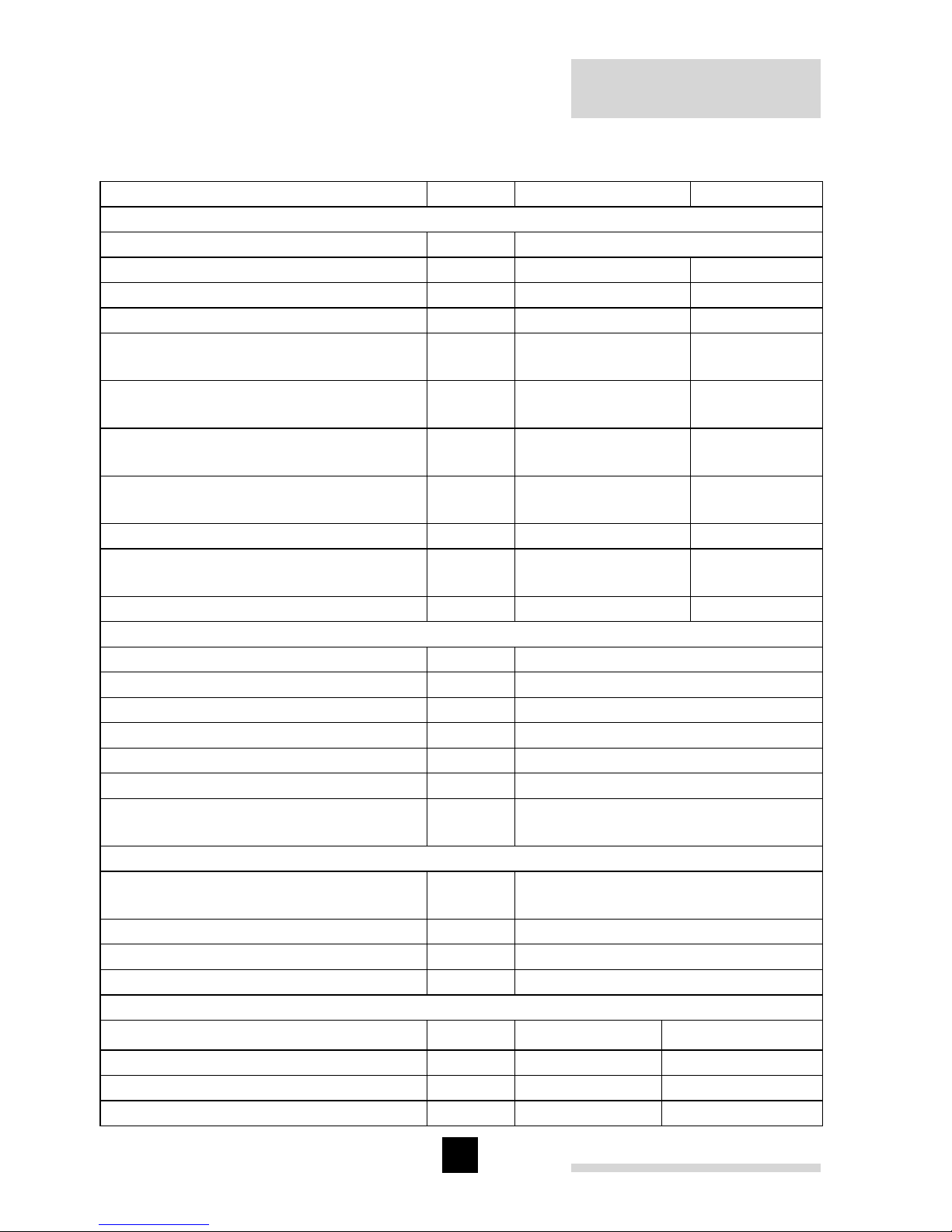
3.2 Technical details
Boiler type Selecta combi system
General
Boiler control Modulating
Nominal output (80/70°C) kW 5.1 - 16.0 5.1 - 16.0
Nominal output (50/30°C) kW 5.6 - 16.8 5.6 - 16.8
Maximum output DHW kW 23.89 Nominal input (CH) Hs
(GCV)
kW 5.8 - 18.3 5.8 - 18.3
Nominal input (CH) Hi
(NCV)
kW 5.2 - 16.5 5.2 - 16.5
Nominal input (DHW) Hs
(GCV)
kW 5.8 - 26.7 5.8 - 26.7*
Nominal input (DHW) Hi
(NCV)
kW 5.2 - 24.0 5.2 - 24.0*
Weight dry kg 45 42
Maximum Noise level at 1 m distance
from the boiler dB(A) <44 <44
SEDBUK rating A A
Gas- and flue details
Category II
2H3P
Min/Max Inlet pressure natural gas mbar 17 - 30
Gas consumption (CH/DHW) m
n
3
/h 0.6 - 1.7 / 2.5
NOx -emission (n = 1) ppm < 25
Residual fan duty (full load) Pa 95
Mass flue rate (CH/DHW) kg/h 26 / 39
Classification due to discharging flue
gases
C13, C33
CH- side
Water capacity
heat exchanger + piping l 2.6
High limit temperature °C 110
Operating flow temperature °C 20 - 90
Operating range bar 0.8 - 3.0
DHW - side
Maximum flow rate at 35°C dt
l/min 10 -
Minimum flow l/min < 1 Water capacity l 0.2 Inlet water pressure bar 0.16 - 8.0 -
Page 13
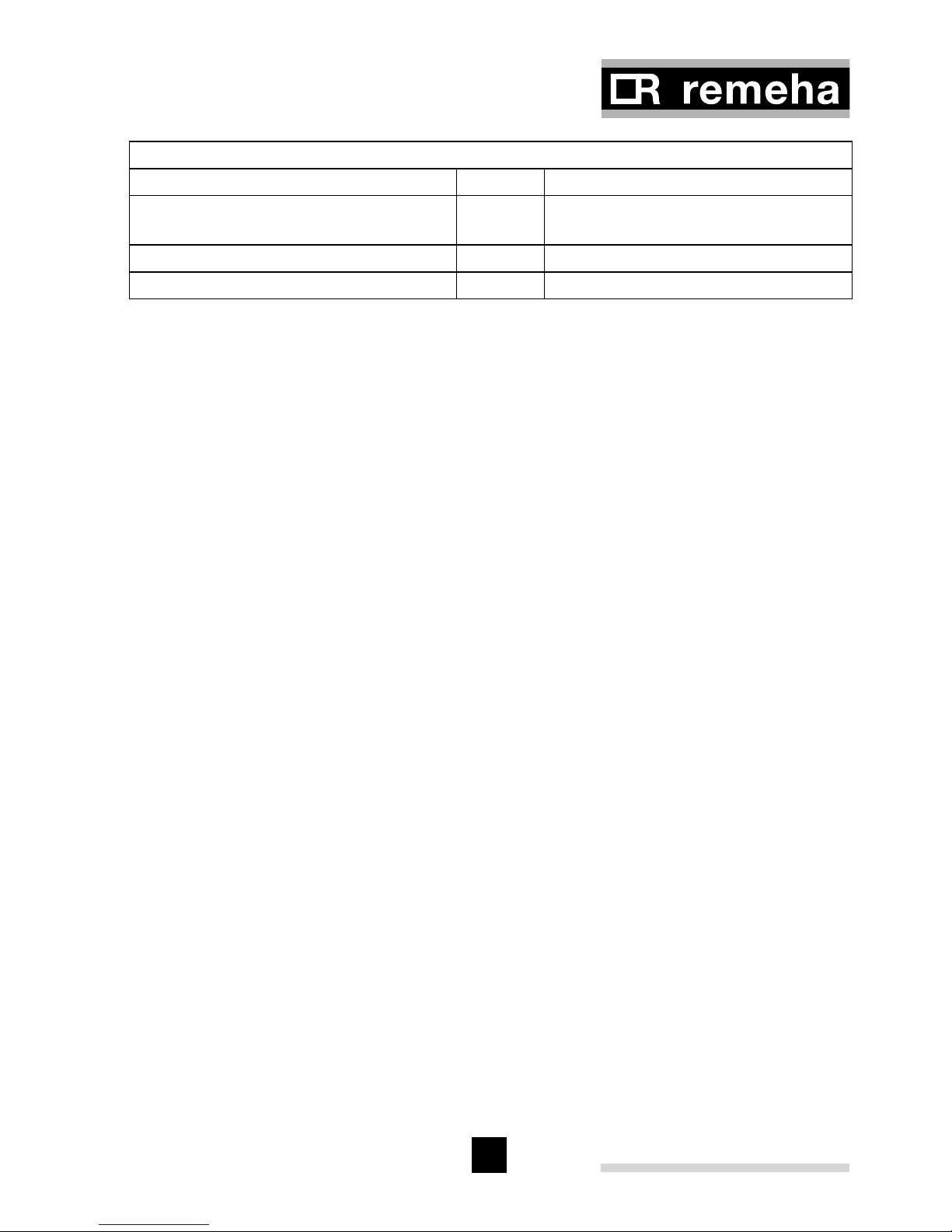
13
Electrical
Main supply V/Hz 230 / 50
Power consumption
max.
W 130
Insulation class IP 20
Fuse rating A 3
Table 01 Technical details
* with Broag Kit No.1 and calorifier
3.3 General Specifications
(to be read with above table)
- One piece cast aluminium heat exchanger
- 22 mm Ø (m) flow and return connections
- 15 mm Ø (m) gas connection
- Maximum operating pressure of 3.0 bar
- Maximum operating temperature of 95°C
- Low NOx, < 25 ppm (O
2
= 0%)
- Pre-mix, fully modulating (25 -100%) gas burner with gas/air ratio control for maximum efficiency
- Intelligent advanced boiler control ‘abc’ c/w a comprehensive operating, service
and fault diagnostic facility
- Available for room sealed operation
- Supplied fully factory assembled
- Powder coated enamel steel casing and plastic front panel with cover
- Suitable for use with a Natural gas (standard) or propane (with optional kit)
- Efficiency of 98% at 80/60 °C (Hi)
- Max. efficiency of 109.2% (Hi) in fully condensing mode
- Manufactured to ISO 9001
- CE approved
- British Gas Approval Service listed
- Kiwa (Water regulations) approved product
- Flow temperature sensor DHW (for combi boiler only)
- 3-Way valve (for combi boiler only)
- Plate heat exchanger (for combi boiler only)
Page 14

Remeha Selecta
14
3.4 Optional Accessoiries
- Kit No. 1 = 3-Way DHW diverting valve c/w wiring loom, immersion sensor and ½ “
BSP pocket (for system boiler only)
- Kit No. 2 = volt free relay for use with external mains voltage switching time clocks
(for system and combi boilers)
- Kit No. 3 = digital 7-day volt free switching time clock and harness for mounting in
the boiler (for combi boiler only)
- OpenTherm
®
fully modulating room controller = for room compensation based on
inside temperature (for combi boiler only)
- Outside sensor = for fully modulating weather compensation based on outside tem-
perature (for combi and system boilers with Kit No.1 fitted)
- Propane kit = conversion from natural gas to propane (for system and combi boil-
ers)
- Pipework cover plate = metal casing cover panel to hide bottom pipe connections
(for system and combi boilers)
- Mounting frame = allows first fixing of pipework without mounting the boiler (for sys-
tem and combi boilers)
- Cleaning tool = tool to clean the boiler heat exchanger (for system and combi
boilers)
- McAlpine condensate connector = allows connection from flexible condense pipe to
std overflow pipe (for system and combi boilers)
NOTE: Room controller and outside sensor cannot be used together.
Page 15
15
4 INSTALLATION INSTRUCTIONS
The installation, commissioning and servicing of the boiler must be carried out by a
competent person who holds valid ACS certification and to be a member of CORGI.
All electrical work must be carried out by a competent person and to be installed in
accordance with the current IEE regulations.
4.1 General
Care should be taken when unpacking the boiler.
4.2 Boiler positioning
The boiler should be mounted in a room which, even during severe cold weather,
remains frost-free (see Par. 7.2.5 for more information). The boiler should be mounted
on a suitable vertical wall which is able to support the weight of the boiler.
If the boiler is to be installed in a timber framed building, please refer to British Gas
publication: ‘Guide for Gas Installations in Timber frame Housing’, reference DM2.
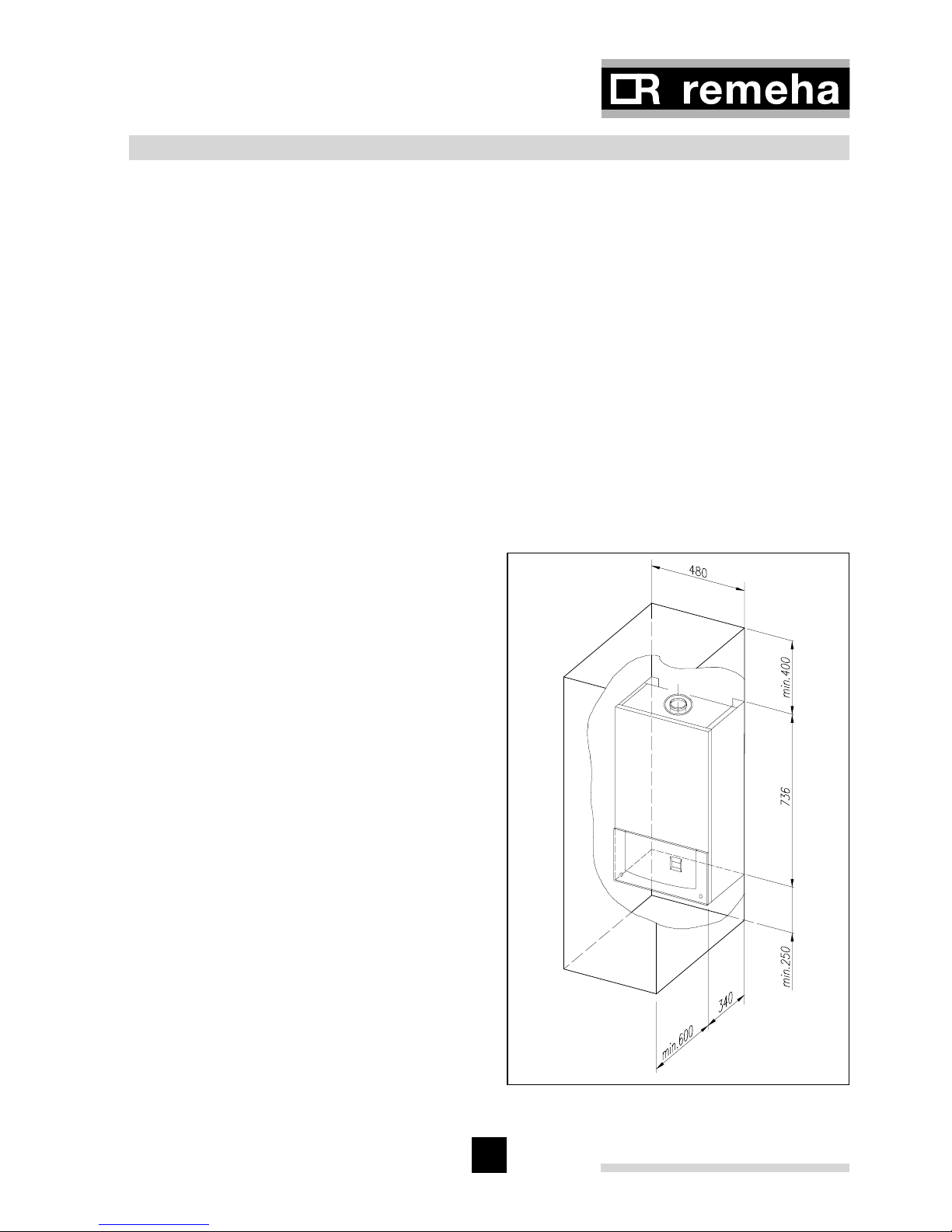
Fig. 05 Clearance requirements
04.W5H.79.00004
4.3 Boiler mounting
The boiler can be mounted in two ways:
1. using the wall bracket supplied with
the boiler,
2. using the mounting frame (optional)
supplied in a seperate box.
4.3.1 Clearance requirements
The gas and water connections are
located on the bottom of the boiler.
Whether the standard wall bracket or
the mounting frame is used, there is
adequate space to run the pipes behind
the boiler if required. All components are
accessible from the front of the boiler.
However, we do recommend a minimum
side clearance of 2.5 cm so that the unit
is easy to open. A free space of 25 cm
under the appliance and 40 cm above
the appliance, see Fig. 05, should be
regarded as the minimum requirement.
Page 16
Remeha Selecta
16
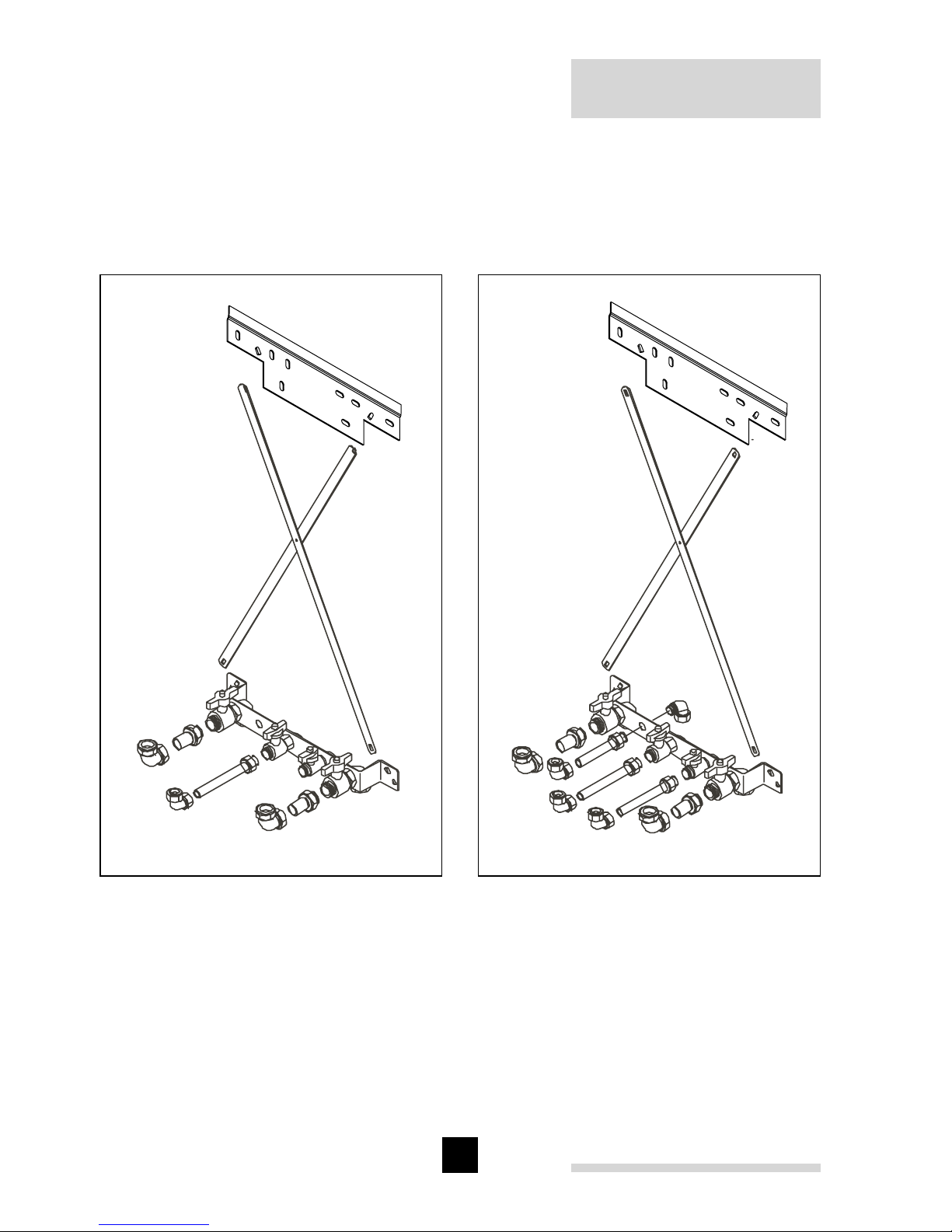
4.3.2 Mounting frame
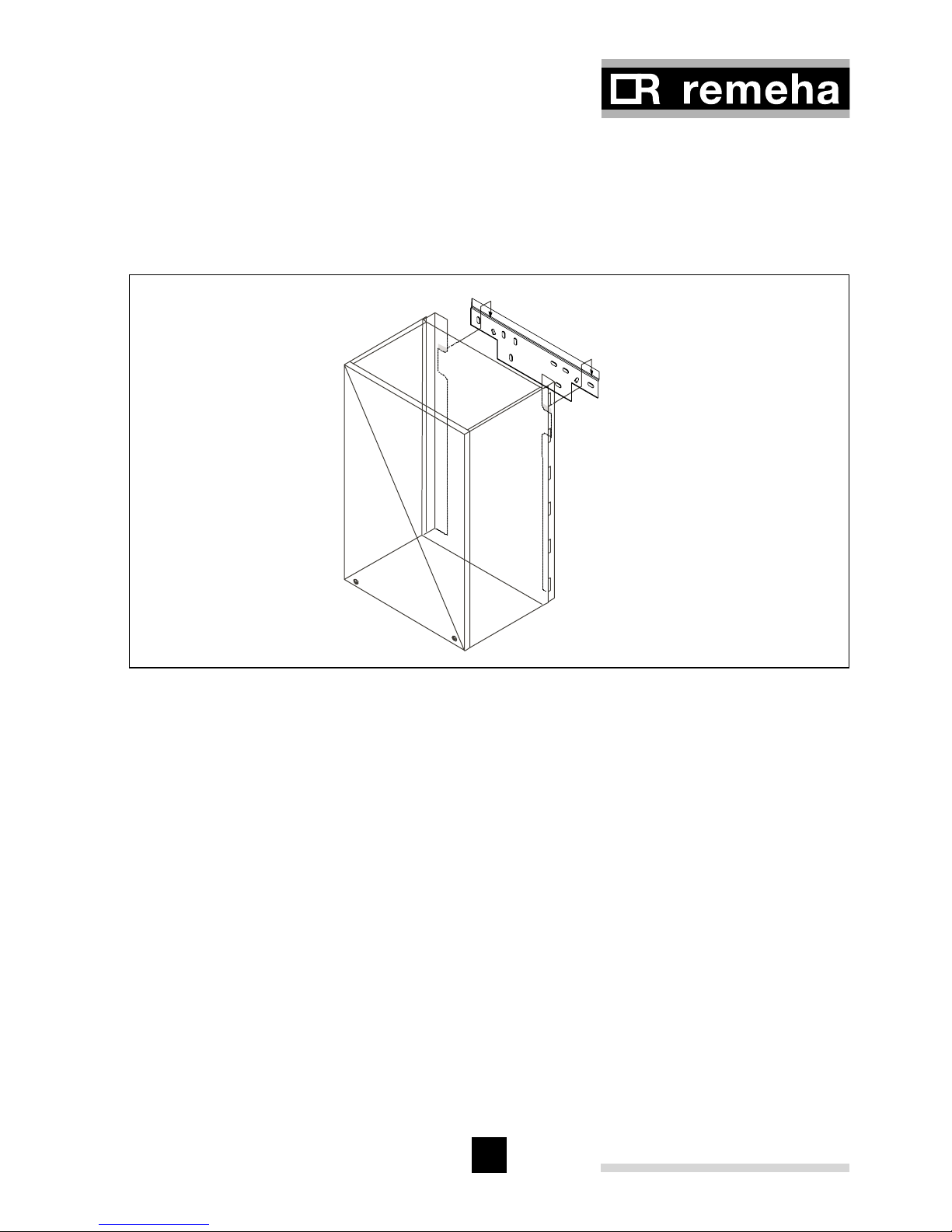
Suitable for most applications as a two-stage installation. The frame, see Fig. 06 and
Fig. 07 can be installed complete with all supply pipework to allow the system to be
filled and tested. The boiler can then be fitted at a later date. Instructions for installing
the mounting frame are supplied with it.
Fig. 06 Mounting frame system boiler
eps
Fig. 07 Mounting frame combi boiler
eps
Page 17
17
4.3.3 Wall bracket
Using the template provided mark fixing holes and flue outlet centre on the wall. Drill
the wall, using the plugs and screws provided and secure the mounting bracket to the
wall. Carefully lift boiler and locate the cut out in the back onto the wall bracket, see
Fig. 08.
Fig. 08 Wall bracket
eps wall bracket
Note: It is possible to route pipework behind the boiler using this option.
Fixings supplied are suitable for brick/block wall only and alternative fixings
should be used on different wall types.
4.4 Flue gas discharge and air supply
The Remeha Selecta is only suitable for room sealed operation with a concentric horizontal or vertical flue. After mounting boiler and before connecting the flue assembly,
remove the dust cap from flue/air inlet connection.
Compartment ventilation is not required with this boiler with the concentric flue system.
Attention: plastic flues should not be used!
Page 18
Remeha Selecta
18
4.4.1 Flue terminal positions
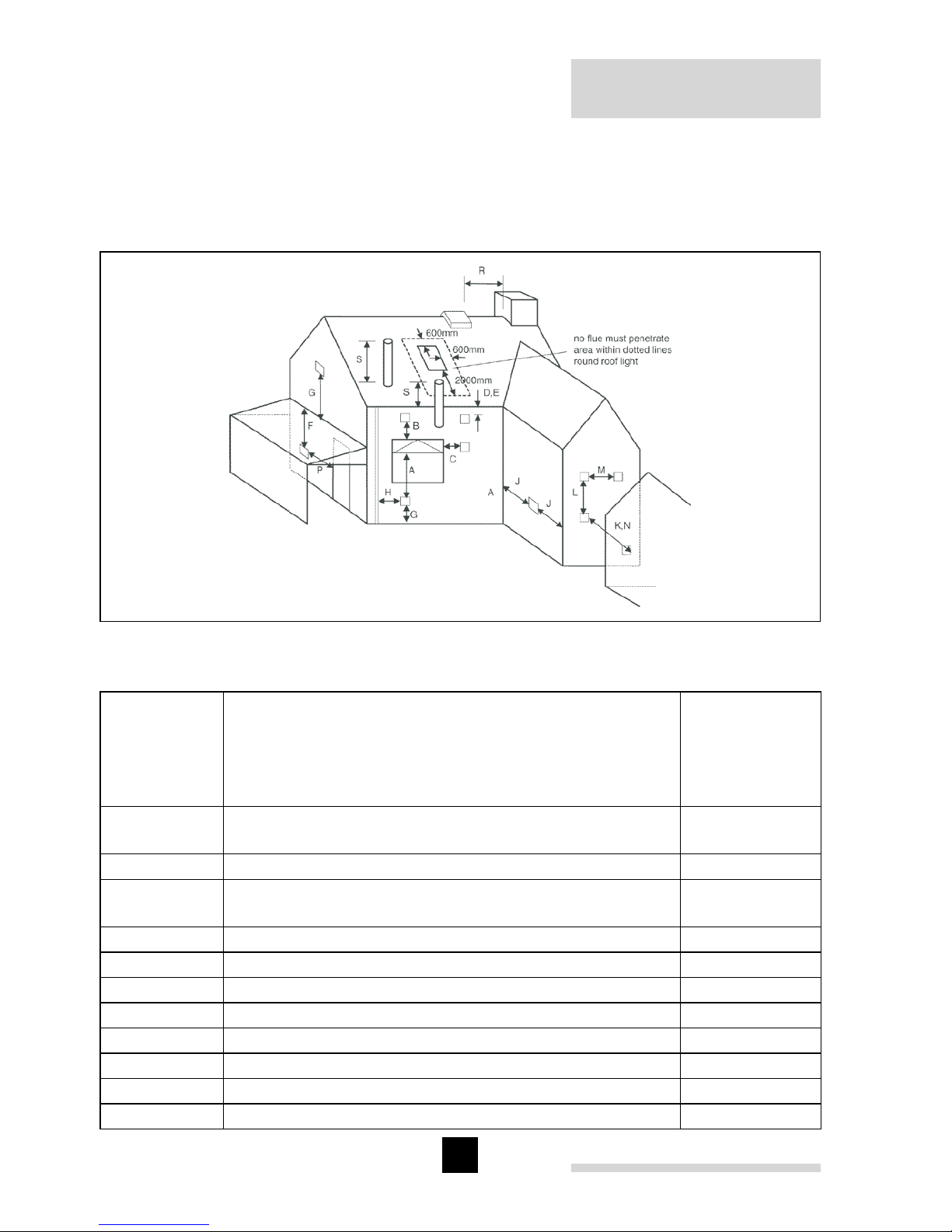
The flue terminal positions for the Remeha Selecta are shown in Fig. 09. The minimum
distances to the terminal can be found
in Table 02.
Fig. 09 Flue terminal positions
pdf
Dimensions Terminal location
Minimum
distance
(in mm) to
terminal
(room sealed)
A
Directly below an opening, air brick,
opening window, etc.
300
B Above an opening, air brick, opening window, etc. 300
C
Horizontally to an opening, air brick,
opening window, etc.
300
D Below a gutter or sanitary pipe work 75
1)
E Below the eaves 200
F Below a balcony or carport roof 600
G Above ground, roof or balcony level 300
H From vertical drain/soil pipe work 75
1)
J From an internal or extarnal corner 30
K From a surface or boundary facing the terminal 600
2)
L Vertically from a terminal on same wall 1500
Page 19
19
M Horizontally from a terminal on same wall 300
N From a terminal facing the terminal 1200
P
From an opening in a carport (e.g. door, window) into
the building
1200
R From a vertical structure on the roof n/app
S Above an intersection with the roof n/app
Table 02 Minimum distances to terminal
1)
= Notwithstanding the dimensions above, a terminal serving a natural draught and
fanned draught appliance more than 5kW heat input should be at least 300 mm
and 150 mm respectively from combustible material.
2)
= The distance from a fanned draught appliance terminal installed at right angles to
a boundary may be reduced to 300 mm in accordance with Fig. 09.
n/app = not applicable.
4.5 Type of arrangement in connection with flue gas discharge
Arrangement according to CE: type C13, C33.
4.5.1 Single boiler, concentric room sealed flue
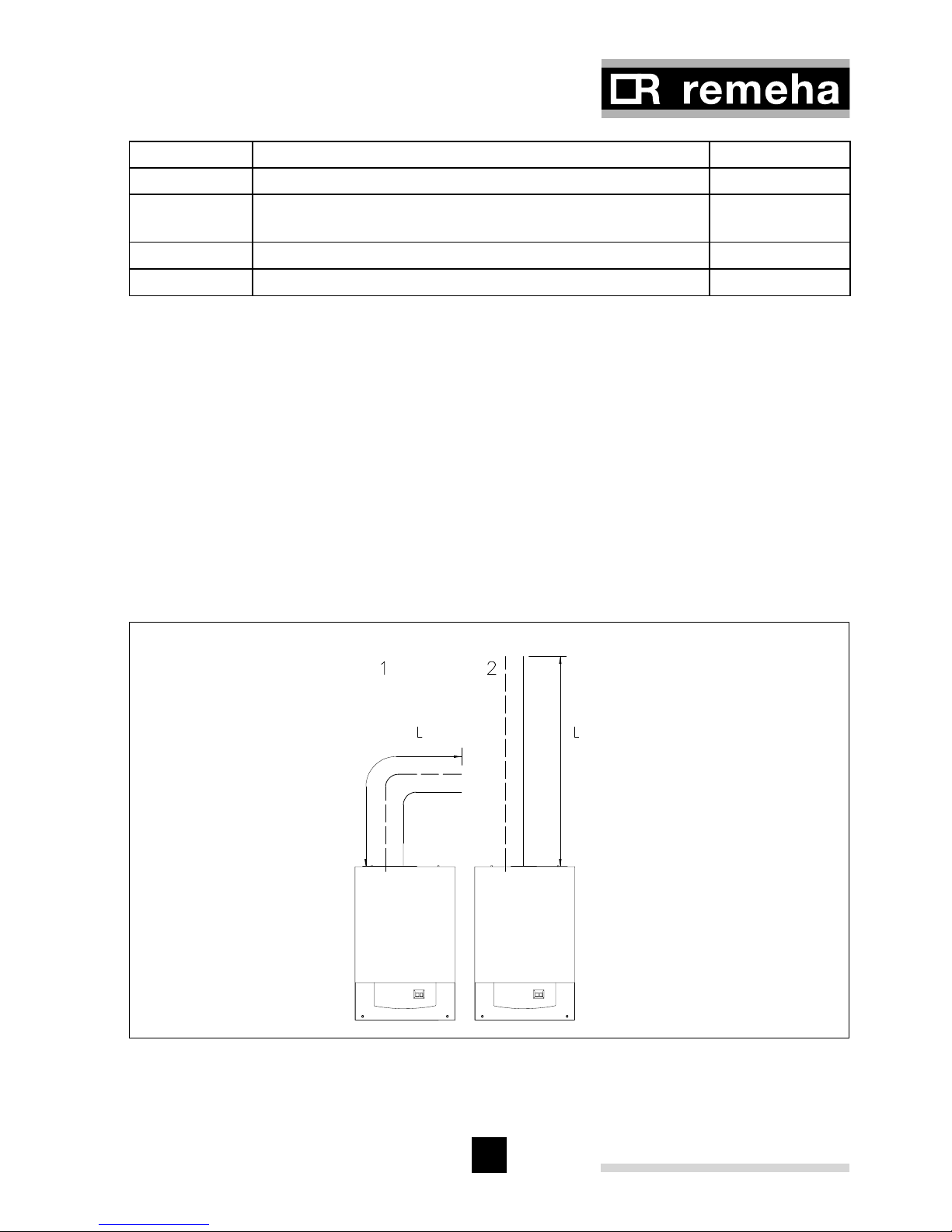
Fig. 10 Flue gas discharge duct, single boiler, room sealed application
04.W5H.79.00005
Page 20
Remeha Selecta
20
Ø D (mm)
Ø 60/100
Max. length horizontal including bend ‘L’
Max. length vertical with no bends ‘L’
m
m
7*
9*
Deduct per extra bend 90° m 2
Deduct per extra bend 45° m 1
Table 03 Permissible flue gas discharge lengths with closed systems
* Note: For lengths in excess of this, the 80/125 system can be used with a suitable
adaptor. Please contact Broag for the required details.
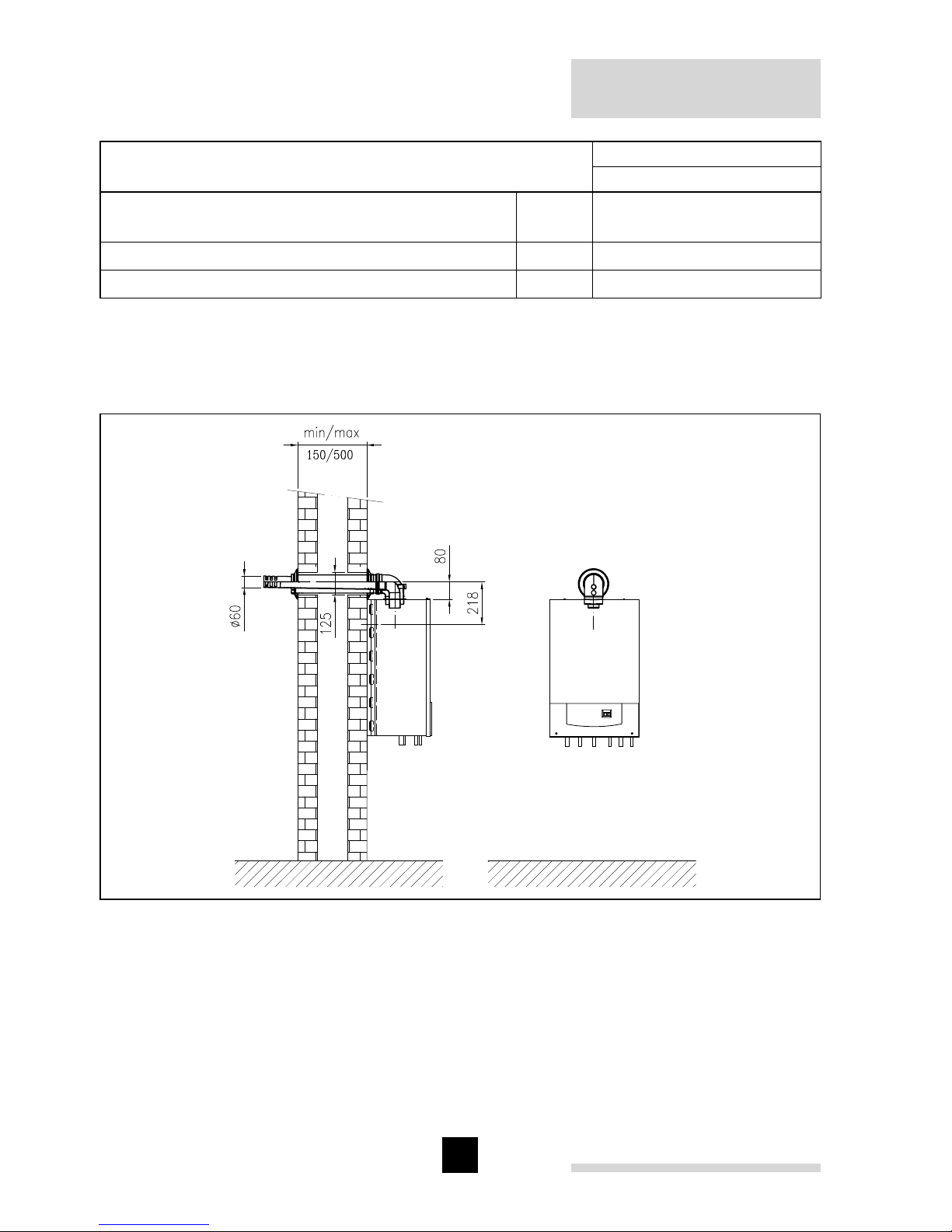
Fig. 11 Remeha Selecta with concentric horizontal flue
04.W5H.79.00011
Page 21
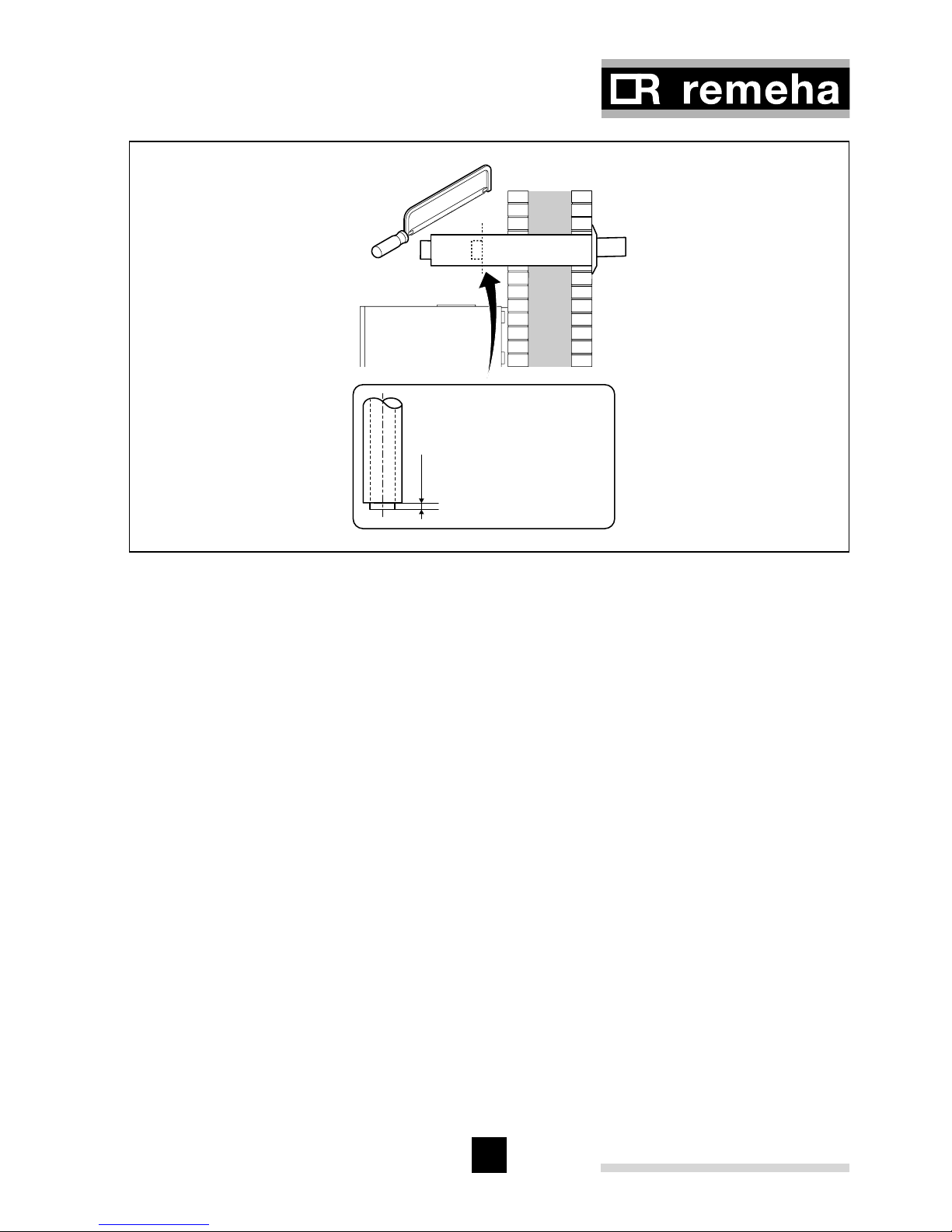
21
20 mm
When shortening, pay attention
to the 20 mm difference.
Fig. 12 Flue cutting instruction
pdf
* Detailed instructions for measuring and cutting flue are included with our horizontal
flue kit.
4.6 Installation data
4.6.1 Condensate drain
The condensate drain from the boiler must be connected to a suitable wastewater
drainage point, preferably within the building. The connecting pipe and fittings must
be made of plastic material only. After assembly, fill the siphon with water. The slope
of the drain pipe should be at least 30 mm/m. If pipe runs are made external to the
building they should always be insulated.
Page 22

Remeha Selecta
22
4.6.2 Water treatment
Where system water treatment is required or specified (eg inhibitors), it must be compatible for use with an aluminium heat exchanger.
If water treatment is used we recommend only the following products which must be
used in accordance with the manufacturers instructions:
‘Copal
’ manufactured by: or: Sentinal ‘X100’ manufactured by:
Fernox, Cookson Electronics BetzDearborn Ltd
Forsyth Road Sentinal
Sheerwater Foundry Lane
Woking Widnes
Surrey GU21 5RZ Cheshire WA8 8UD
Tel No: 01483 793200 Tel No: 0151 424 5351
Fax No: 01483 793201 Fax No: 0151 420 5447
Email: sales@fernox.com
Web site: www.fernox.com
For the correct dosage and for further information on water treatment or system cleaning we advise direct contact with either of the above companies.
Note: Scale deposits in excess of 5 mm will reduce boiler efficiency and increase the
risk of premature casting failure.
4.6.3 Safety valve discharge
A safety valve is fitted in the boiler and is set as standard to 3 bar.
If the pressure in the boiler becomes too high the pressure is relived by releasing
water outside via the safety valve discharge pipe. The safety valve discharge pipe
must be at least 15 mm Ø. The discharge should be terminated facing downwards
exterior to the building in a position where discharging water will not create danger or
nuisance but remains in a visible position.
4.6.4 Expansion vessel
An 8 ltre expansion vessel (with the vessel charge set to 0.5 bar) is fitted as standard
within the boiler case and is suitable for use in a heating system with a water content
up to 100 litres, operating at a flow temperature of 80°C, a maximum pressure of 3 bar
and a maximum system static head of 5M above the boiler. If the system water content
is greater than 100 litres, or the system static head above the boiler is greater than
5M, an additional vessel must be installed in the system to allow for the increase in
expansion, see Table 04.
Page 23

23
Boiler Safety Valve Setting (Bar) 3
Vessel Charge (Bar) 0.5 1 1.5
Heating System Water Content (Litres) Expansion Vessel Size (Litres)
100 8
125 10.4 13.6 19.5
150 12.5 16.4 23.4
175 14.6 19.1 27.3
200 16.7 21.8 31.2
225 18.7 24.5 35.1
250 20.8 27.3 39
275 22.9 30 42.9
300 25 32.7 46.8
Table 04 Expansion Vessel Size
4.6.5 Circulation pump
The Remeha Selecta is equipped with a Grundfos UPR 15-50 A0S1 circulation pump.
This pump has a manual switch to select one of the three speed positions (see Fig. 13).
If boiler parameter L/18 is set to 0 (see Table 09, service level), but will be overrid-
den by the boiler control to III when in DHW mode and in the HTG mode if the boiler
parameter L/18 is set to 1 (see Table 09, service level):
- highest setting during DHW operation
- during CH operation in its manual adjustable setting (to be set in the control unit by
the installer, see Par. 9.2.3)
- if the middle position is required during CH operation, change the position switch on
the pump and
change parameter L/18 (see Table 09) to; manual adjustable = 0.
The residual head, is the head available for the installation, after deducting the boiler
resistance, see Fig. 13.
Note: The standard pump overrun time is 3 minutes. If so desired, this can be adjusted to a different value (see Par. 9.2.3)
Fig. 13 Residual head Grundfos
pdf
Page 24

Remeha Selecta
24
4.6.6 Heating Water flow
The modulating controller of the appliance limits the maximum temperature difference
between flow and return. As a result, the appliance should not be effected by low
water flow. Therefore a system by-pass is not neccesary, however building regulations
should be complied with.
4.6.7 Water connections
The water connections are located on the bottom of the boiler (see Fig. 03 and Fig.
04). The CH connections are 22 mm Ø o/d. The DHW connection and cold water inlet
are both 15 mm Ø o/d. When using the mounting frame connect to the isolation valves
supplied. A 10 ltr. flow restrictor is supplied with the boiler and should be installed into
a compression fitting directly onto the cold water inlet connection to the boiler.
Fig. 14 Hydraulical example Selecta combi boiler (use in conjunction with electrical
drawing Fig. 17)
pdf
Cable legend
1 = 3 amp fused supply (not supplied)
2 = external volt free switching time
clock (not supplied)
3 = room thermostat (not supplied)
4 = outside sensor (not supplied)
Legend
OS = outside sensor (optional)
FS = 3 amp permanent fused supply (not supplied)
TC = external time clock with volt free switching
(not supplied)
RT = room thermostat (not supplied)
WB = wash hand basin
SC = stop cock
Ho = hot water outlet
Page 25

25
Fig. 15 Hydraulical example Selecta system boiler (use in conjunction with electrical
drawing Fig. 18)
pdf
4.6.8 Filling the system/ make up water
For initial filling and topping up, the system must be connected to the mains cold water
using a standard mains fill kit (which complies with local water byelaws) and pressurised to 1 bar.
Cable legend
1 = 3 amp fused supply (not supplied)
2 = external volt free switching time clock
(not supplied)
3 = room thermostat (not supplied)
4 = diverting valve cable (
supplied with optional kit No. 1)
5 = HWS sensor cable
(supplied with optional kit No. 1)
6 = outside sensor (optional)
Legend
OS = outside sensor (optional)
FS = 3 amp permanent fused supply
(not supplied)
TC = external time clock with volt free
switching (not supplied)
RT = room thermostat (not supplied)
WB = wash hand basin
SC = stop cock
Ho = hot water outlet
Ci = cold water inlet
Hf = heating circuit flow
Bf = boiler flow
Wf = hot water primary flow
Wr = hot water primary return
K = kit No. 1 - 3 port diverting valve (optional)
V = 2 port valve
HS = sensor to be immesed inside
thermostat pocket
SV = temperature and pressure safety valve
EV = expansion vessel
H = immersion heater
RC = optional secondery return connection
ERV = expansion relief valve
PV = pressure reducing valve
RV = non return valve
CA = stainless steel calorifier
Page 26

Remeha Selecta
26
5 GAS CONNECTION
5.1 Gas connection
The appliance is suitable for burning natural gas or LPG (with optional LPG set). The
appliance must be connected in accordance with the current regulations. The gas
connection is 15 mm Ø o/d. Supply pipeworks to be sized in accordance with relevant
regulations to ensure that 2.5 CuM/hr of gas is available at the boiler.
We advise a gas filter be fitted in the gas supply line in order to prevent contamination
of the gas valve.
5.2 Gas pressures
The gas valve is designed to accept an inlet pressure range of between 17 and 30
mbar. With the boiler running at full output there must be a minimum of 20 mbar (for
NG) and 37 mbar (for LG) pressure available at the boiler to ensure correct operation.
All combustion adjustments are made on the gas valve to CO
2
levels.
5.3 Gas/air ratio regulation
The Remeha Selecta is equipped with a factory pre-set gas/air ratio regulator (can be
adjusted by an approved Engineer).
The purpose of this regulator is to keep the gas/air ratio in the burner as optimal as
possible at all times within the modulating range.
This ensures clean and reliable combustion across the entire load range. In addition, it
achieves high part-load efficiency.
Page 27

27
6 ELECTRICAL CONNECTION
6.1 General
The Remeha Selecta is equipped with an electronic control and safety unit incorporating ionisation-flame protection. The heart of the boiler control is a microprocessor, the
‘abc’-control, which both protects and controls the appliance.
6.1.1 Mains voltage
The connection to the electricity main has to be made in accordance with the appropriate regulations. The appliance is suitable for a 230V/50 Hz power supply, and is supplied with a flying lead. This appliance should be fused at 3 A.
Note: The boiler must have a permanent 230 volt power supply, which must not be
used to operate the boiler
6.1.2 Control connections
All external control connections are made on the standard boiler connector (X4, see
Fig. 16). To gain access to this connector, remove the front of the boiler casing (see
Par. 8.1, section 2), lift and tilt the instrument panel down, making sure you engage
the 3 hooks on its base on the bottom of the case. Fig. 19 shows the location of the
connector on the main pc board. The external connecting options are explained in the
following paragraphs.
Warning: Under no circumstances should 230 volt connections be made directly on
to connector X4 as this will cause irreverseble damage to the electronic board. If 230
volts controls are required a simple relay kit is available from Broag, see Par.3.4.
Page 28

Remeha Selecta
28
Fig. 16 External connections to terminal connector X4
pdf
Note: All electrical connections made to the X4 connector plug must be volt free
Explanation of diagrams:
1. Time only –on/off using a simple time clock or temperature only – on/off using
a simple room stat.
2. Time and temperature – compensated using programmable modulating control.
3. Temperature only – weather compensated using an outside sensor.
4. Temperature and frost protection – on/off using a simple room and frost stat.
1. + 3. Time and temperature – simple time clock and weather compensated using
an outside sensor.
OpenTherm modulating room thermostat2 wired on/off thermostat
Tr
Tr
mod.
outdoor sensor
To
extra frost thermostat
Tf
Tr
Page 29

29
Fig. 17 Electrical drawing Selecta combi boiler (use in conjunction with hydraulical
drawing Fig. 14)
pdf
Legend
OS = outside sensor (optional)
FS = 3 amp permanent fused supply via boiler 3 core cable fly lead (not supplied)
FL = to boiler fly lead
TC = external time clock with volt free switching (not supplied)
RT = room thermostat (not supplied)
ER = boiler earth terminal
SC = stop cock
IP = rear view of boiler instrument panel
Page 30

Remeha Selecta
30
12
X1
1C
2
Hot Water
Heating
L N E
623
5
22
X9
4
1
K
HS
FS
TC
X9 plug supplied with kit No. 1
X4
FS
RT
OS
ERER
ET
PI
*
FL
and the socket found within boiler casing
Plug and socket
Fig. 18 Electrical drawing Selecta system boiler (use in conjunction with hydraulical
drawing Fig. 15)
pdf
Legend
OS = outside sensor (optional)
FS = 3 amp permanent fused supply via boiler 3 core cable fly lead (not supplied)
HS = hot water sensor
FL = to boiler fly lead
TC = external time clock with volt free switching (not supplied)
RT = room thermostat (not supplied)
ER = boiler earth terminal
ET = kit No. 1 electrical terminals
IP = rear view of boiler instrument panel
* = connect to same coloured cables located within boiler casing
Note: The heating and hot water switching must be volt free
Page 31

31
7 CONTROLS
7.1 Control box
Fig. 19 shows the layout of the control box. This sketch shows where the connectors
and fuses are positioned. Table 05 sums up the main characteristics of the control box.
Fig. 19 Control box
04.W5H.79.00008
Make GasModul Type MCBA 1459D
Mains voltage 230 VAC/50Hz
Pre-purge time 3 s
Post-purge time 3 minutes
Ignition time 2.4 s
Gas valve opening time 2.7 s
Anti-cycling time 150 s
Pump overrun C.H. position Adjustable (see Par. 4.6.5)
Fuse value F1 (230V) 2 amp fast blow 20 mm glass fuse*
Fuse value F2 (24V) 4 amp slow blow 20 mm glass fuse*
DC-fan 24 VDC
Table 05 Characteristics control unit
* According to BS EN 60 127-2:1991
Page 32

Remeha Selecta
32
7.2 Boiler control
7.2.1 Introduction
The Remeha Selecta can be controlled in three ways:
1. Simple time clock and on / off room thermostat, whereby the boiler output varies
between the minimum and the maximum to maintain the flow temperature set point
on the boiler. If an outdoor sensor is also connected the flow temperature is determined by the outside temperature and the compensation graph detailed in Fig. 20.
2. Modulating OpenTherm
®
room controller, whereby the boiler output varies between
the minimum and the maximum to maintain the temperature determined by the
modulating controller.
3. Outside sensor and simple time clock, whereby the boiler output varies between
the minimum and the maximum to maintain the flow in accordance with the compensation graph shown in Fig. 20.
7.2.2 Simple time clock and on/off room thermostat (control based on time and
room temperature)
The Remeha Selecta is suitable for connecting a 2-wire 24V (or volt free) on/off room
thermostat, which should be connected to terminals 2 and 3 on the terminal connector X4.
7.2.3 Modulating OpenTherm
®
room controller (control based on time and
room temperature)
Using a modulating room controller takes full advantage of the modulating
characteristics of the boiler. The modulating room controller communicates with the
boiler and based on the room temperature, the modulating room controller constantly
modifies the boiler flow temperature, based on system demand. This ensures that
the boiler’s output closely follows the property demand and prevents on/off cycling
resulting in higher efficiencies.
The Remeha Selecta is prepared for communication via the “OpenTherm
®
” protocol.
An suitable “OpenTherm
®
” modulating room controller is available from Broag.
The controller should be mounted in a suitable reference room. Connection is made
with a twin cable (0.75 mm) to terminals 5 and 6 of the terminal connector, see Fig. 16.
Attention: For DHW production the boiler and controller must be set to the same
temperature demand otherwise the controller setting will take priority.
7.2.4 Outside-temperature sensor (control based on outside temperature and
settings as in Fig. 20)
When an outside-temperature sensor is connected to terminals 7 and 8 of connector
X4 (see Fig. 16), the weather dependant heating control will be active if the following
requirements have been met:
Page 33

33
- There is no “OpenTherm®” thermostat connected (to terminals 5 and 6 of X4).
- There is heat demand from simple time clock or room thermostat (terminals 2 and
3 of connector X4).
- Parameter u (Base point according to Recom) is set between 1 - 60°C (factory
setting = 20°C).
Note: The outdoor sensor (max. cable length 50 m) should be located on a north facing wall out of direct sunlight.
Parameter u (Base point) can be found in the user menu of Recom, see Par. 9.3.
During a heat demand (HTG), the boiler contol unit will follow a heat slope. The outside temperature (è), the (HTG) Flow temperature setpoint (é) and parameter 52
(Recom) are used as input parameters for calculating the angle of the heating slope.
Weather compensation slope setting:
- Outside temperature min. set point = 0°C (parameter 52, variable between 1 and -15°C)
- Outside temperature max. set point = 20°C
- Flow temperature set point at max. outside temperature = 20°C (parameter u,
variable between 1 and 60°C)
- Flow temperature set point at min. outside temperature = 80°C (parameter 1,
variable between 20 and 90°C)
This means that at 0°C outside temperature the boiler will go to a flow temperature
of 80
o
C, at 20 oC outside temperature the boiler will go to a flow temperature of 20 oC
(parameter u), see Fig. 20.
80
0
Fig. 20 Weather compensation slope
pdf
ë = variable
é = flow temperature setpoint
è = outside temperature
Page 34

Remeha Selecta
34
7.2.5 Frost protection
The boiler needs to be positioned in a frost-free room to prevent the condensate drain
pipe freezing.
This boilers frost protection automatically turns the boiler on if the temperature drops
below a certain level. (explained in more detail below).
If the temperature of the water in the boiler drops too low, the built-in boiler protection
becomes active. It works as follows; if the water temperature:
- is lower than 7°C, the circulation pump is activated
- is below 3°C, the boiler is activated
- higher than 10°C, the boiler is switched off and the circulation pump post-circulates
for 15 min.
Attention: This is a protection facility for the boiler and pipework only and not for the
installation.
In rooms subject to frost hazard (eg conservatories) it is advisable to install a frost
thermostat and connect it in parallel with the room thermostat to terminals 2 and 3 of
the terminal connector X 4, see Fig. 16. When the frost thermostat becomes active,
the boiler goes into operation with the programmed maximum flow temperature as its
limit.
7.2.6 Boiler temperature control
The Remeha Selecta is equipped with an electronic temperature control which operates on the basis of flow and return temperature sensors. The flow temperature is
factory set to 80°C and should not be changed without reference to the system design
Engineer, see Par. 9.3 (works setting 80°C).
7.2.7 Low water level protection
The Remeha Selecta is equipped with low water level and flow protection based on
temperature difference between flow and return.
By modulating back the moment the water flow threatens to become too low, the
appliance remains in operation for as long as possible. In case of too low a flow the
appliance goes into temporary shutdown mode rather than failure or “lock-out”.
7.2.8 Maximum protection (over heat thermostat)
The over heat thermostat locks out the appliance in case of a excessive water temperature (110°C). After rectifying the cause of the failure, the appliance can be reset by
using the ‘reset’ -key.
Page 35

35
X1
LN
BL
12
4
5
X21
1 2
GN
6
X5
7 8 9
BR
GN
BR
4
5
1
X11
4
Rs
1 32
BL BL
X3
4
5
M
3
BR
OR
1 2
X9
2
6
3
DV
N
230V,50Hz
L
BR
11
BR
BL
M
1 3
5
BR
7
BL
9
X2
BR
BL
**
*
*
4231
X4
6
5
Tmod.
T
Tk
OR
BR
T
MODULATING ROOM CONTROLER
ROOM THERMOSTAT
RETURN TEMPERATURE SENSOR
DHW SENSOR
RESISTANCE
GRB
DVAsCP
3-WAY VALVE
WILL NOT BE SUPPLIED OR WIRED.
GAS COMBI BLOCK
CIRCULATION PUMP
FLOW TEMPERATURE SENSOR
Tk
TWs
Tmod
R
Rs
- MIDDLE POSITION
- LOW POSITION
RD
WH
Burner
Power supply
PRINT BOARD CIRCUIT CONTROL BOX
GREEN
ORANGEOR
YW/GN
YW
YELLOW/GREEN
YELLOW
RD/WHWHVT/WH
RD
RED/WHITE
WHITE
VIOLET/WHITE
RED
GN
GY
BR
BR/WH
GRAY
BROWN
BROWN/WHITE
CORD COLORS
BK
BL
BLACK
BLUE
Flue fan
YW/GN
WH
BK
YW/GN
YW/GN
VT/WH
RD/WH
WH
YW/GN
YW/GN
VT/WH
RD/WH
YW YW
BR/WH BR/WH
BR/WHBR/WH
GY
WH
GY
WH
YW/GN
04.W5H.SC.00001
RDRD
As TWs
RD RD
BK
WH
GRBCP
(18)*
(6)*
(19)*
(13)* (9)*
(12)* (3)* (2)*
()*
These numbers refer to the position of the components in the boiler as shown in fig.01
Fig. 21 Detailed internal wiring diagram
pdf
Page 36

Remeha Selecta
36
8 COMMISSIONING
8.1 Putting into operation
The system should be thoroughly flushed prior to connecting the boiler and in accordance with BS 7593 (1992).
Note: The boiler is suitable for both natural gas and propane. It is supplied as standard
set for natural gas, therfore the following procedure must be carried out before the
boiler is fired and commissioned on propane. Fit the propane restrictor (Broag option)
and adjust the boiler parameters in accordance with the instructions supplied with the
propane conversion kit (also use Table 12 checking boiler combustion for propane)
Attention: if the boiler is to be used on LPG, an LPG conversion kit is required
to be fitted before firing (Broag option)
1. Isolate the power supply to the boiler,
2. Remove the front panel (remove two screws at the bottom of the panel, pull the
bottom of the panel forward and lift off the top),
3. Check the gas connection for soundness, purge and leave the isolation valve in
the open position,
4. Check the electrical connections including earth,
5. Check the automatic vent is functioning and has vented the boiler,
6. Ensure that all boiler isolation valves are open,
7. Ensure that the boiler and system is full of water and pressurised to 1 bar,
8. Check the built-in circulation pump. Ensure that the impellor is free (remove the
large headed screw in the pump head end and using a screwdriver spin the impel lorshaft) this will vent the pump at the same time.
Attention: pump is mounted above the controls electrics- avoid getting water
into the electronics during the venting process.
9. Vent the installation,
10. Remove the siphon assembly, fill with clean water and replace siphon,
Attention: this is vital as the boiler must not be operated with an empty siphon.
11. Check the flue connection,
12. Turn on the power supply to the boiler,
13. Set all controls to heat demand,
14. The boiler will now go into operation. The operational progress is shown via the
‘code’ window, see Par. 9.2.4,
15. The combi boiler will fire in the domestic hot water mode first to satisfy the plate
heat exchanger temperature and then it will change over to heating.
If a system boiler is used in conjunction with our kit No1 then the boiler will oper ate in the domestic hot water priority mode and will have to satisfy this before
changing over to heating. If other controls have been used then please refer to the
manufactures user instructions.
Page 37

37
16. Once the domestic hot water has been satisfied heat the installation to about
80°C. Turn off the boiler using the controls (not the power supply),
17. Once the pump has stopped vent the boiler / system again if necessary,
18. The boiler is now ready for normal operation,
19. Set the time clock, room thermostat, modulating control and the boiler controls to
the values of your choice.
20. The system and combi boiler will operate in the heating mode only, unless there is
a hot water demand (combi). Check hot water operation by turning on a hot tap,
the boiler should fire and produce hot water or (system) create a demand on the
cylinder (open a tap or raise the DHW set point).
21. Check combustion for correct operation - adjust if found necessary.
22. Re-fit front panel.
23. Complete boiler log book.
Notes:
- The Rehema Selecta is supplied with a number of factory settings. If other settings
are required, see Par 9.2.3.
- If CO
2
and CO adjustments are required, see Par. 11.2.1 and Par. 11.2.2.
8.2 Gas rate measuring
Both the system and combi boilers have pre-mixed combustion and therefore the com-
bustion levels must be firstly set according to the Table 12 in Par. 11.2.1 and only
when these levels are within tolerances should the gas rates be checked.
Please be aware that when you use the forced high service mode that the boiler is
designed to give the maximum heat input of 24 kW (NCV) and when you used the
forced low mode service mode it will give 5.2 kW (NCV) on both the system and
combi boilers.
Procedure:
1. Ensure all other gas appliances are turned off;
2. Operate the Selecta boiler in the ‘Forced High’ service mode for at least 2
minutes prior to taking a meter reading;
3. Record the meter reading;
4. After 2 minutes of uninterrupted boiler operation on high fire take another
meter reading and record;
5. Now operate the Selecta boiler in the ‘Forced Low’ service mode and wait
for at least 2 minutes prior to taking a meter reading;
6. Record the meter reading;
7. After 2 minutes of uninterrupted boiler operation on low fire take another
meter reading and record;
8. Press the rest button on the boiler to remove the boiler from the ‘service’ mode;
9. Calculate the gas consumption and refer to the figures in the technical details
(see Par. 3.1).
Page 38

Remeha Selecta
38
Calculation;
kW =
3600 x m
3
x 9.69
(NCV)
Time in seconds
8.3 Handing over
The installer should instruct the householder fully in the operation of the boiler and any
controls fitted and ensure all instructions are left with the house holder.
User Information
This boiler has inbuilt safety functions- Frost protection which automatically turns the
boiler on if the temperature drops below a certain level. Therefore the boiler may come
on during the night in extremely cold conditions.
Pressure relief valve, if the pressure in the boiler becomes to high the pressure is
relived by releasing water outside via a pipe. If you notice water coming from this pipe
please contact your heating engineer immediately.
User Maintenance
To clean the boiler casing use a damp cloth only, do not use any abrasive cleaner.
WARNING: any servicing, maintenance or adjustments to this boiler must be carried
out by a competent Engineer, with the relevant certification i.e.: CORGI, ACOPS, IEE
regs. etc..
Page 39

39
9 CONTROL
WARNING- Any servicing, maintenance or adjustments to this boiler must be carried
out by a competent Engineer, with the relevant certification ie: CORGI, ACsS IEE regs.
etc..
9.1 The instrument panel
9.1.1 General
The Remeha Selecta is equipped with an advanced appliance control consisting of,
among others:
- Control unit with microprocessor,
- Communication facilities with various controllers,
- Simple instrument panel, including connection for PC/PDA.
The setting and read-out options on the instrument panel are divided into three levels:
1 User level (relatively accessible)
2 Installer level (accessible with PC/PDA or service tool only)
3 Works level (accessible via PC/PDA or service tool with works code only, exclusively
for Broag personnel)
9.1.2 Instrument panel structure
The programming and reading of various control parameters is achieved using the
user friendly control panel, equipped with a ‘reset’- key, a display and a ‘prog.’-key,
see Fig. 22.
Fig. 22 Instrument panel (with optional clock = dotted line)
04.W5H.79.00007
Page 40

Remeha Selecta
40
9.2 Meaning of the various modes
9.2.1 General
After turning on the electric power to the boiler, or after pressing the ‘reset’-key, the
display defaults to the temperature mode. By pressing the ‘prog.’-key it is possible to
scroll through the display options, each key press moves to the next mode.
5 modes are available:
1. Temperature mode - Display shows number only no red dot (Default)
2. Programming mode - Display shows a number with a red dot illuminated
3. Service mode - Display shows a number with a red dot flashing
4. ‘forced High’ mode - Display shows h
5. ‘forced Low’ mode - Display shows l
Changes to the programming mode can be carried out via the boiler control panel, see
Par. 9.2.3.
Changes to the settings at service level should only be carried out by a qualified Engineer using a PC or service tool, see Par. 9.3.
Note: The settings at works level are intended exclusively for Broag personnel and will
therefore not be described.
9.2.2 Temperature mode
The temperature mode shows 1 digit per 10°C of boiler water temperature. For example, a 6 on the display indicates a temperature of 60°C ± 5°C. In temperature mode
the red dot does not illuminate or flash.
9.2.3 Programming mode
The programming mode is separated in six groups (I till VI), with settings for pre-heat
levels, DHW, CH and pump. In each group only one option can be active. A dot is
flashing with the activated setting.
Note: Changes to the factory default settings effect the boiler operation and should
only be carried out after reading and understanding the following instructions.
To activate an option within a group:
In the temperature mode briefly press the ‘prog’-key once, the letter P appears on
the display. Press the ‘prog’-key for more than 1 sec and the letter ‘P’ will flash twice
confirming entry into the programming mode. Press the key again and 1 will appear
in the display with a static red dot, to activate this option press and hold the ‘prog’-
key. Each subsequent press of this key will display the numbers and letters of the relevant parameters displayed in sequence (options 1 to F), see Table 06.
Page 41

41
The number will remain but the red dot will flash indicating that this option (“Pre-heat
level 1: heat maintenance temp 0
0
C”) within group I, is active and the other three
options 2,3 and 4 are inactive.
To change an option within a group:
To change the active option (if there are more than one in the group), select the new
option required and activate as previously described, this will automatically de-activate
the previous selected option.
The group VI, with only one option when (F) appears in the display the red dot is preset to flashing (high speed on CH operation) to select low speed option press and hold
the ‘prog’-key for more than 1 sec the red dot will become static. The ‘prog’-key toggles between the two options. Returning to the main display will store the new selection automatically.
Notes:
- If no key is pressed for 60 secs whilst in programming mode, the display will auto-
matically return to the ‘temp’- mode.
- If electrical failure should occur, the programme settings will be retained.
Group Option Description Explanation
I
Combi
boiler
only
1
Pre-heat level 1: heat maintenance
temp. 0 °C
With each pre-heat level the
hot water system is at least
kept at the corresponding
temperature. The higher the
level, the sooner you have hot
water. The lower the level, the
more economical the appliance is.
2
Pre-heat level 2: heat maintenance
temp. 40 °C.
3
Pre-heat level 3: heat maintenance
temp. 50 °C.
4*
Pre-heat level 4: heat maintenance
temp. according to parameter r/4
Factory setting r/4 = 45°C
II
5*
CH ‘ON’ and DHW ‘ON’
In a holiday period you can
use the 6 setting to prevent
the DHW system from being
kept warm. With your room
thermostat you can determine
whether your house is kept
warm.
6
CH ‘ON’ and DHW ‘OFF’
Page 42

Remeha Selecta
42
III
7
DHW temperature 45 °C
With this option you can
set the maximum DHW
temperature.
8
DHW temperature 55 °C
9*
DHW temperature according to
parameter 3/3
Work setting 3/3 = 50 °C
1
)
IV
A
CH flow temperature 60 °C
In the less cold periods of the
year the radiators need not
be heated to the same extent.
With these parameters you
can lower the flow temperature. This is not necessary if
you have a modulating controller or outside sensor connected.
B
CH flow temperature 75 °C
C*
CH flow temperature according to
parameter 1/1
Factory setting 1/1 = 80 °C
V
D*
Pump overrun according to parameter 2/2
Factory setting 2/2 = 3 minutes
If there is danger of your heating system freezing, continuous water circulation is advisable. Setting ‘E’ recognises
this.
E
Pump continuous circulation
VI
F*
Pump position during CHoperation. Parameter F selected
(red dot is flashing) means: pump
is circulating at high speed
With this parameter you can
choose whether the pump
circulates at high speed or
at low (manual adjustable)
speed during CH operation.
To change this parameter,
keep the ‘prog’- key pressed
in for more than 1 sec.
Table 06 Overview and meaning of parameters
* These values have factory default settings which can only be changed using a PC/
PDA and the Recom software with the
interface kit.
1
) When a calorfier sensor or thermostat is installed, this temperature setting must be
used.
Page 43

43
9.2.4 Service mode
Service mode displays the boiler operation sequence and mode.
To enter the service mode:
In the temperature mode briefly press the ‘prog’ -key twice. Each subsequent press of
this key will display the numbers and letters of the relevant operating codes displayed
in sequence () – () with a flashing red dot.
A description of the meaning of each code is given in Table 07.
Step Description
0
Idle, no heat demand
1
Pre-purge / post-purge
2
Ignition
3
CH - On
4
DHW - On
5
Waiting for fan to reach high speed
6
Flow temperature more than 5°C above set point
7
Pump over run CH-mode
8
Pump over run DHW mode
9
Burner off because one of the following has been exceeded:
- Flow temperature set point
- Flow temperature rise to fast
- Difference between flow and return temperature exceeding 45°C
H
On ‘forced High’ mode*
L
On ‘forced Low’ mode*
Table 07 Description of Service mode read-out
* See Par. 9.2.5 and 9.2.6 for access.
Note: If no key is pressed for 1 min whilst in service mode, it automatically returns to
temperature mode.
9.2.5 ‘Forced High’ mode
In ‘forced High’ mode the appliance will operate at its maximum output for 15 minutes
(flow temperature dependant). This is the output setting for DHW operation. To enter
this mode, press the ‘prog’-key briefly three times whilst in temperature mode. The
letter H then appears on the display. By pressing the ‘prog’-key for more than 1 sec,
the ‘forced High’ mode becomes active. The letter H flashes twice to confirm this. To
terminate this mode prematurely press the ‘prog’-key again for more than 1 sec..
Page 44

Remeha Selecta
44
9.2.6 ‘Forced Low’ mode
In ‘forced Low’ mode the appliance will burn at its minimum output for 15 minutes (flow
temperature dependant). To enter this mode, press the ‘prog’-key briefly four times
whilst in temperature mode. The letter L then appears on the display. By pressing the
‘prog’- key for more than 1 sec, the ‘forced Low’ mode becomes active. The letter L
flashes twice to confirm this. To terminate this mode prematurely press the ‘prog’-key
again for more than 1 sec..
9.3 Adjusting parameters for the installer
Warning: D.N.C. means DO NOT CHANGE the factory default setting.
Adjustment of the installer parameters cannot be made through the boiler keys. To
change settings in the MCBA control unit, a PC/PDA and the Recom software with the
interface kit must be used (Broag options). This should only be carried out by a product trained Engineer.
User parameters:
(according
to Recom)
Description Adjustment
range
Factory
setting
System
boiler
Factory
setting
Combi
boiler
1/1
Flow temperature
set point
20 - 90 °C
80 80
2/2 Pump run on time HTG* 0 -10 minutes 3 3
3/3
DHW temperature
set point
20 - 75 °C
50 50
r/4
Detection temperature
DHW
25 - 65 °C
45 45
43/39
DHW Set temp / DHW
on
0 - 50 °C, par. r /
DHW On / Off
41: par. r /
DHW on
41: par. r /
DHW on
44/40
DHW temperature set
point (3/3) / Detection
temperature DHW (r/4)
DHW 45 - 55 °C,
par. 3 /
Flow 60 - 75 °C,
par. 1
33: par. 3
/ par. 1
33: par. 3 /
par. 1
45/41
Continuous pump operation
Yes / No No No
50/42 D.N.C. 1 / 0 0 0
u/44
Compensation slope
base point
1 - 60 °C
20 20
Table 08 User level
* Values below 1 minute cannot be displayed
Page 45

45
Service
parameters:
(according
to Recom)
Description
Adjustment range
Factory
setting
System
boiler
Factory
setting
Combi
boiler
4/5
Flow temperature
set point during
forced part load
20 - 90 °C
60 60
6/6-7
Fan speed at full load
(HTG) D.N.C.
1000 - 6000 rpm
3900 3900
7/10-11
Fan speed at part load
(HTG and DHW) D.N.C.
1000 - 6000 rpm
2300 2300
8/12
Modulation start point
F/R, dt °C D.N.C.
5 - 30 °C
25 25
b/13
Switch on differential
(DHW) D.N.C.
1 - 20 °C
5 1
c/8-9
Fan speed at full load
(DHW) D.N.C.
1000 - 6000 rpm
5450 5450
G/14
Forced part load time
after start (HTG)
3 - 10 minutes 3 3
H/15
Fan speed at start
D.N.C.
1000 - 6000 rpm 2500 2500
J/17 DHW control mode 0 / 1 0 0
L/18
Pump setting in
heating mode
0 / 1
1 = high
0 = low
(manual adjustable)
11
L/18
Pump setting during circulation
0 / 1 0 0
n/19
HTG cut in Dt (based on
return) D.N.C.
0 - 20 3 3
o/20 Pre heat period 0 -10 hours 0 0
P/21 Boiler type
0: not used
1: Combi
2: System
21
U/38
Max. shut down time
during continuous
heat demand
0 -30: minutes 15 15
51/32
Hysteresis before ending
DHW D.N.C.
1 - 30 °C
88
11/16
Differention end
DHW-demand D.N.C.
-5 - 15 °C
00
Page 46

Remeha Selecta
46
I/45
Over temperature at
DHW-production D.N.C.
0 - 30 °C
20 20
52/46
Minimal outside temperature for heatslope
D.N.C.
-15 - 1 °C
00
53/47
Over-temperature primary circuit D.N.C.
0 - 60 °C
15 15
Table 09 Setting mode - service level
9.3.1 DHW three-way valve (J)
Factory set to ). AB port Common flow, port A to central heating and port B to DHW
primary flow. If the valve has been installed the wrong way round it is possible by
selecting parameter ! to electronically reverse the operation of the three way valve.
AB common flow port B to central heating and port A to DHW primary.
9.3.2 Pump speed - central heating operation (L)
Also software adjustable to high or low, factory setting: high 1.
If, in this position the system noises are to loud, you may adjust to a lower pump
speed; change this parameter to: low (manual adjustable) = 0, see Par. 4.6.5
9.4 Putting the boiler out of operation
Temporarily out of operation with frost protection:
- Go - from temperature mode - into programming mode P.
- Go to parameter option 6.
- Keep the programming key pressed in until the 6 is flashing. If you now set the
room thermostat low, too, the appliance will be out of operation, while the frost protection remains active.
- Do not close the gas valve.
- Do not turn off the power supply.
Completely out of operation without frost protection:
- If the boiler is operating turn off the controls and allow to cool.
- Isolate the power supply to the boiler (the controller, if supplied, from the boiler will
also be isolated).
- Close the gas valve.
Page 47

47
10 FAULT FINDING
10.1 Fault finding table
Follow the procedure below in the given order:
1
No number appears on the boiler
display
Check:
- the supply voltage 230 V
- the fuses in the control unit
2
If a failure code is shown on the
boiler display
- Yes, go to Par. 10.2
- No, go to 3
3
Check the operating mode of the
boiler (see Par. 9.2.4)
- ‘0’ (no heat demand): go to 4
- 1-9, H or L: locate the fault with the
aid of the given operating mode
4
Boiler will not start (without failure
signal)
Check the room thermostat. It may be
defective or not properly connected or set.
The boiler also does not go into operation if
the flow- or return temperature is too high,
otherwise go to 7.
5
Boiler will operate for CH but not
for DHW
Check temperature sensor on plate heat
exchanger (combi boiler only).
6
Boiler will only operate for DHW
but not for CH
Check temperature sensor on plate heat
exchanger (combi boiler only).
7
Remove the front casing and
check the operation of the boiler
by connecting a bridging wire to
the 6 way connector X4 (see Fig.
16) between terminals 2 and 3
(Tk).
Is the boiler going into operation?
- Yes, check the controller settings.
- No, verify whether the flow- or return temperature is too high.
- Check the wiring and connections.
- Check the control unit settings. If the
boiler is still not working, check the control unit (you can do this by temporarily
installing a replacement control unit).
Table 10 Fault finding table in case of modulating room thermostat and on/off room
thermostat
10.2 Fault codes
In the event of a fault, two numbers will flash alternately in the window, and the latter number
will be accompanied by an illuminated red dot. For an explanation of the various failure
codes and their possible causes, please refer to the following failure table, see Table 11.
Important:
Before resetting the boiler, make a precise note of the failure code (numbers, including flashing/illuminating red dot) and always quote the relevant code when asking for
support. The failure code is important for finding out the nature of the fault. The failure
code can be read with the aid of the service tool.
Page 48

Remeha Selecta
48
Description Cause / checkpoints
00
Flame simulation
(flame detected when
control is in the off-
position)
Gas valve is leaking or sticks in the open position.
Check and replace valve.
01
Short circuit 24V Check: the wiring.
02
No flame formation
or no ionisation
(after 5 starting
attempts)
Note:
Measure ionisation in
Volts between terminal 5 on the terminal
strip and earth
(1V = 1 µA)
a. No ignition spark, check:
- the connection of ignition cable and spark plug
cover
- the ignition cable and the electrode for ‘burn out’
- the electrode distance; this has to be 3 to 4 mm
- the earth connection
b. Ignition spark present, but no flame, check
whether:
- the gas valve is open
- the gas supply pressure is sufficient
- the gas pipe has been purged
- the gas valve is being actuated during ignition and
opens
- the electrode has been mounted correctly, and is
clean
- there is a blockage / assembly error in the gas
pipe
- the gas / air ratio has been adjusted correctly (see
Par. 11.2.1)
- re-circulation of flue gas is occurring (internally/
externally)
- there is a blockage in the air supply or flue gas
discharge (eg blocked siphon)
c. flame present, but no or insufficient (< 4 µA)
ionisation, check:
- the earth connection of the ignition electrode
- the flame should be stable
- gas/air setup in full load and part load
- the ignition electrode visually for white oxide (clean
with sand paper or screwdriver) and electrode
pins shape (do they have their original shape?)
and distance between the pins (the gap should be
between 3 and 4 mm)
- whether one of the temperature sensors is defective (leakage current)
04
Power failure during failure shutdown.
05
External influences Check for external EMC influences
Page 49

49
11
Failure internal communication bus
Check:
- cable connections on MCBA board
- if there is moisture on the display
- for external EMC influences
18
Flow temperature
too high
Check:
- pump operation
- the water flow, see Par. 4.6.6
- whether the installation has been properly vented
- the flow and return sensors for defects
- the water pressure (min 0.8 bar)
19
Return temperature
too high
24
Return temperature
higher than flow
Check:
- flow and return temperature sensor wiring
- flow and return connections
- direction of flow - pump is the right way round
- flow and return crossed
31
Flow temperature
sensor error
Flow temperature sensor short-circuited.
32
Return temperature
sensor error
Return temperature sensor short-circuited.
36
Flow temperature
sensor error
Flow temperature sensor not connected or defective.
37
Return temperature
sensor error
Return temperature sensor not connected or defective.
77
Ionisation signal loss
during operation (
after 4 restarts during
1 heat demand)
Check:
- re-circulation of flue gas (internal leakage or outlet
construction/position incorrect).
- insufficient air transport due to blockage.
- adjustment of the boiler is incorrect.
- low fire percentage set point and increase.
43
Parameters out of
range
Check: the parameters in the memory.
Other
codes
Control unit failure
After recording the ‘flashing’fault code numbers:
- First press reset
- If the fault returns, record the code again, check
the wiring for possible short-circuit or wrong connections
- If the fault continues to occur, exchange the control unit
Table 11 Failure codes
Page 50

Remeha Selecta
50
11 SERVICE & MAINTENANCE
11.1 General.
The Remeha Selecta has been designed to need minimum maintenance, but to
ensure optimum efficiency we advise that once a year the boiler should be checked
and if necessary cleaned and reset.
All service and maintenance must be carried out by a qualified Engineer with the relevant training and certification (ie CORGI - ACS -IEE registrations etc.).
11.2 Inspection
The annual inspection of the Remeha Selecta can be limited to:
- Checking the boiler combustion
Note: Check the boiler for correct gas/air setup in full load by measuring the O
2
levels
in the flue gas (direct measurement of CO
2
can lead to inaccuracies due to varying
levels of CO
2
in the natural gas)
- Check/clean the condensate siphon (refill with clean water).
- Checking/clean the ignition electrode; gap adjustment (3 - 4 mm) replacing the gasket if necessary
- Check ignition probe earthing.
- Check the ionisation current with a DC voltmeter between terminal 4 on the green
X4 plug and a suitable earth connection.
Note: The maximum ionisation current is 9µA and any reading lower than 4µA will indicate that the electrode will require replacement
- Check for leaks (water side and gas soundness).
- Checking the water pressure
- Check flue and air inlet system is clear and gas/water tight.
- Check safety controls
- Check control settings.
- Check boiler parameters
- Is flame shape stable and colour as described in Par. 11.2.2
- Check temperature sensors for resistance values against Fig. 30 (humidty on sensors).
11.2.1 Checking the boiler combustion
This can be done by measuring the CO
2/O2
percentage via the flue gas measuring
point in the flue of the boiler.
To do this, fire up the boiler to a water temperature of approximately 70°C. If this check
shows that the combustion of the boiler is outside of the tolerances indicated in Table
12, clean it according to the instructions in Par 11.3. If, after cleaning, the combustion
of the boiler is still outside of the tolerances, then adjust CO
2/O2
percentage according
to the instructions in Par. 11.2.2.
Page 51

51
Note: When checking combustion the C0
2
levels should be in accordance with the
Table 12 (+/- 0.3%). If the levels are outside these tolerances clean heat exchanger
in accordance with the instructions in Par 11. 3. If, after cleaning, the combustion figures are still outside these tolerances, then adjustments must be made to achieve the
levels in accordance with the tolerance in Table 13 (+/- 0.1%)
Fan
Speed
approx.
Natural gas Propane
CO
2
O
2
CO
2
O
2
rpm % % % %
Front panel not mounted
Part load
Full load
2300
5450
9.3 (+/- 0.3)
9.3 (+/- 0.3)
4.3 (+/- 0.4)
4.3 (+/- 0.4)
10.5 (+/- 0.3)
10.5 (+/- 0.3)
5.1 (+/- 0.4)
5.1 (+/- 0.4)
Front panel mounted
Part load
Full load
2300
5450
9.5 (+/- 0.3)
9.5 (+/- 0.3)
3.9 (+/- 0.4)
3.9 (+/- 0.4)
10.7(+/- 0.3)
10.7(+/- 0.3)
4.8 (+/- 0.4)
4.8 (+/- 0.4)
Table 12 CO
2
and O2 percentage (checking values)
Fan
Speed
approx.
Natural gas Propane
CO
2
O
2
CO
2
O
2
rpm % % % %
Front panel not mounted
Part load
Full load
2300
5450
9.3 (+/- 0.1)
9.3 (+/- 0.1)
4.3 (+/- 0.2)
4.3 (+/- 0.2)
10.5 (+/- 0.1)
10.5 (+/- 0.1)
5.1 (+/- 0.1)
5.1 (+/- 0.1)
Front panel mounted
Part load
Full load
2300
5450
9.5 (+/- 0.1)
9.5 (+/- 0.1)
3.9 (+/- 0.2)
3.9 (+/- 0.2)
10.7(+/- 0.1)
10.7(+/- 0.1)
4.8 (+/- 0.1)
4.8 (+/- 0.1)
Table 13 CO
2
and O2 percentage (setting values)
Attention: Make sure the opening around the probe is properly sealed off when
measuring!
The CO/CO
2
ratio should not exceed 0.02% at any time.
Maximum CO levels permitted = 100 ppm.
11.2.2 CO
2/O2
adjustment
The CO
2
and O2 levels can be adjusted by following the procedure below. Any adjust-
ment required can be done via the setting screws on the gas block, see Fig. 23.
Page 52

Remeha Selecta
52
Fig. 23 Setting screws
00.W5H.79.00005
Procedure:
- Remove the boiler front panel (see Par. 8.1).
- Set the boiler to 'Forced High' mode, (see Par. 9.2.5).
- Remove the measuring point sealing cap (in the boiler flue) and insert the combus tion equipment probe.
- After reaching the full load speed, allow the boiler temperature to rise and settle to
about 70
o
C, measure the O2/CO2 percentage and compare it with the value in the
table. Correct, if necessary, the gas/air ratio with the aid of set screw A on the gas
block (see Fig. 23).
- Check the flame via the inspection glass, the flame must be stable with no lifting off
and the burner surface shows glowing (orange) dots.
- Set the boiler to 'Forced Low' mode, (see Par. 9.2.6).
- After reaching the part load speed, allow the boiler temperature to settle, measure
the O
2
/CO2 percentage and compare it with the value in the table.
- Correct, if necessary, the gas/air ratio with the aid of set screw B on the gas block
(see Fig. 23).
- Check the flame via the inspection glass, the flame must be stable with no lifting off
and the burner surface showing an even, orange glow.
- After adjusting the part load settings, a check must be carried out on full load setting as this can be effected by the part load adjustment. If necessary, correct the full
load setting.
Page 53

53
Note: The full load adjustment changes the gas/air graph slope angle, whilst the part
load adjustment shifts the base point on a parallel axis; each adjustment therefore
alters the previous setting slightly. Repeat this procedure as often as needed until
the desired result has been achieved at both part and full loads.
- Remove the combustion equipment probe and replace measuring point sealing cap.
- Refit the front panel and return the boiler to 'temperature mode’ by pressing the
'prog.' -key and holding for more than 1 second.
- The boiler is now ready for normal operation.
11.2.3 Cleaning the siphon
Fig. 24 Siphon cleaning
pdf
- Isolate the electrical supply to the boiler.
- Remove the boiler front casing cover.
- Lift and drop down the boiler instrument panel to completely reveal the siphon.
- Pull off the plastic flexible hose from the siphon.
- Loosen the sealing nut from top of the siphon.
- Release the complete siphon from the heat exchanger and remove from the boiler.
- Unscrew the siphon bowl and clean removing all debris
- Refill the siphon with fresh clean water and remount on the boiler.
- Re-assemble boiler replacing any damaged gaskets.
Page 54

Remeha Selecta
54
11.2.4 Checking the ignition electrode, cable and gasket
Fig. 25 Electrode checking
pdf
- Isolate the electrical supply to the boiler.
- Remove the boiler front casing cover.
- Pull off the spark plug cap from the electrode.
- Remove the two screws which secure the electrode, examine the earth lead which
is held by one of the screws.
- Remove the electrode and examine the porcelain for cracks and clean the spark
gap area with fine emery cloth to remove any unwanted debris.
- Check and replace the electrode gasket if it was damaged during removal.
- Check and adjust the spark gap to maintain a 3 to 4 mm dimension.
- Re-fit the electrode assemble and plug cap.
- Check the ionisation current with a DC voltmeter between terminal 4 on the green
X4 plug and a suitable earth connection.
- The maximum ionisation current is 9µA and any reading lower than 4µA will indicate
that the electrode will require replacement.
- Re-fit front casing cover replacing the gasket if it was damaged during removal.
Note: It is advisable to replace the electrode at least every two years to ensure reliable
operation.
Page 55

55
11.2.5 Checking and cleaning the inspection glass
Fig. 26 Checking and cleaning the inspection glass
pdf
- Isolate the electrical supply to the boiler.
- Remove the boiler front casing cover.
- Remove the two screws holding the inspection glass plate.
- Replace inspection glass assembly, replacing the gasket if it was damaged during
removal.
- Re-fit front casing cover replacing the gasket if it was damaged during removal.
Page 56

Remeha Selecta
56
11.2.6 Checking for leakage (water, gas and flue gas side)
Fig. 27 Checking pipework connections
pdf
- Isolate the electrical supply to the boiler.
- Remove the boiler front casing cover.
- Drop down the boiler instrument panel to completely reveal all the pipework connections.
- Visually examine the flue/water and combustion joints and repair as necessary.
- Examine all electrical connections and tighten or replace if necessary.
- Re-fit front casing cover replacing the gasket if it was damaged during removal.
Page 57

57
11.2.7 Checking the expansion vessel
Fig. 28 Checking expansion vessel
pdf
- Isolate the electrical supply.
- Isolate the boilers heating flow and return.
- Remove the boiler front casing cover.
- Drain the boiler until there is no pressure within the boiler.
- Remove the dust cover on the schreder valve located at the top of the expansion
vessel.
- Check the pressure within the vessel and if it requires increasing then connect a
suitable pump to the schreder valve and increase to a suitable pressure as indicated in Table 04.
- Refit the dust cover and recharge the boiler with cold water to a minimum of 0.8 bar
pressure.
- Open any isolating valves to the heating flow and return.
- Switch on the electrical supply to the boiler and test fire visually examining for
leaks.
- Re-fit front casing cover replacing the gasket if it was damaged during removal.
Note: If the pressure gauge located in the boiler increases sharply when firing and
drops when not firing then the expansion vessel could be too small for the volume of
water in the heating system and an additional vessel will have to be installed.
Page 58

Remeha Selecta
58
11.3 Maintenance
If during the annual inspection combustion results indicate that the boiler is no longer
operating at the optimum level, additional maintenance should be carried out as follows:
NOTE:
- Please ensure that the gas supply and mains power supply is isolated before any
maintenance work is carried out on the boiler
- Care should be taken when stripping the boiler for maintenance making sure that all
parts nuts, washers and gaskets etc. are kept safe, clean and dry for re-assembly
- A service gasket set is availlable please contact Broag for details
- Following maintenance/cleaning, the boiler should be re-assembled in the reverse
order re-placing gaskets and joints where found necessary.
- All general cleaning should be carried out with a soft brush or damp cloth to avoid
damaging components. (Solvents must not be used).
1. Isolate the electrical power supply to the boiler.
2. Close the boiler gas isolation valve.
3. Remove the front casing cover by unscrewing the 2 screws and lifting the panel
off the top plate.
4. Remove M5 nuts and bolts securing fan and air inlet assembly to venturi, discon-
necting electrical leads where necessary.
5. Remove M5 retaining nuts securing venturi to front plate.
6. Remove ignition cap/lead and earth lead from Ignition/ionisation electrode.
7. Cleaning the heatexchanger
- Release the retaining nuts from heat exchanger front plate, remove plate, be careful
not to damage the insulation plate or the burner connected to front plate, store
safely.
Attention: Check the cord gasket and the insulating plate between the front plate and
the heat exchanger. If damaged or hardened they must be replaced.
- Heat exchanger can be washed with clean water, if badly contaminated, clean with
a small stiff bristle “bottle type” brush or use the special cleaning tool (supplied
optional). Care should be taken when using water in the confined space of the boiler casing to avoid contaminating the electrical controls. Compressed air can also
be used but care should be taken to ensure disturbed dust etc does not contaminate the rest of boiler and controls.
- When replacing the heat exchanger front plate – tighten the retaining nuts to a torque of 8,5 Nm.
Page 59

59
8. Cleaning the burner assembly
- Clean the burner assembly by using compressed air only - between 2 and 5 bar
with the nozzle positioned a min of 10mm away and towards the face of the burner. Check that the retaining M4 screws are tight
- If the burner is removed from the front plate ensure burner retaining screws are
tight on re-assembly to a torque of 2 Nm.
9. Cleaning the inspection glass
- Remove the two retaining screws on the inspection glass holder, clean and replace.
10. Cleaning the siphon
- Remove the complete siphon (located underneath heat exchanger)
- Remove siphon bowl clean and refill with clean water and re-fit
- Re-fit siphon to heat exchanger
11. Cleaning the fan
- Use a synthetic brush to clean fan.
Attention: be careful not to disturb the balance clips on the vanes.
12. Cleaning the venturi
- Use a synthetic brush to clean venturi – make sure that the silicon hose between
gas valve and venturi is clear and in good condition – replace if necessary.
13. Refit all removed parts in reverse order replacing gaskets where found necessary.
14. Check for gas leakage.
15. Put the boiler back in service.
16. Fire up boiler and check the combustion. Adjust as found necessary (see Par.
11.2.1 and 11.2.2)
17. Complete commissioning/site report and boiler log book.
Heat exchanger cleaning and burner removal
Fig. 29 Heat exchanger cleaning
pdf
Page 60

Remeha Selecta
60
Procedure:
1. Isolate the electrical power supply to the boiler.
2. Close the boiler gas isolation valve.
3. Remove the front casing cover by unscrewing the 2 screws and lifting the panel off
the top plate.
4. Remove the HT cable/cap from the ignition electrode (check and replace if necesary).
5. Disconnect the earth wire from the ignition electrode.
6. Remove, clean and re-set or replace if necessary the ignition electrode and gasket.
7. Disconnect the electrical connection from the fan.
8. Loosen the union nut from the gas pipe on the bottom of the gas block.
9. Release and remove the 9 nuts on the front of the heat exchanger.
10. Remove the front plate from the heat exchanger complete with fan, venturi and
burner taking care not to damage the burner face.
Attention: Check the cord gasket between the front plate and the insulating plate
between the front plate and the heat exchanger. If either is damaged or hardened they
must be replaced.
11. Clean the heat exchanger with the cleaning tool (option - available fron Broag).
12. Clean burner assembly with small paint brush or low pressure compressed air.
13. Clean inspection glass.
14. Remove siphon, clean, refill with clean water and re-fit.
To inspect/clean the venturi, disconnect the venturi from the fan:
15. Remove the screws on the inlet side of the fan.
16. Using a soft brush, remove loose dust particles from the venturi and fan before
reassembling it.
17. Refit all removed parts in reverse order replacing gaskets where found necessary.
18. Check for gas soundness.
19. Put the appliance back in service.
20. Fire up boiler and re-check the combustion and adjust as necessary (see Par.
11.2.1 and 11.2.2)
21. Complete commissioning report.
Page 61

61
Fig. 30 Sensor resistance graph
pdf
Page 62

Remeha Selecta
62
11.4 Part list Selecta system boiler
Fig. 31 Selecta system boiler
sytem boiler pdf
73
89
59
58
52
56
57
56
53
33
54
30
51
11
10
5
7
6
8
9
4
4
1
86
13
12
14
17
3
2
3
18
19
20
21
15
88
22
15
23
25
80
35
34
30
36
38
42
41
40
39
43
3x
36
37
33
27
26
29 29
30
31
72
28
32
16
12
46
68
30
84
44
83
24
15
45
47
55
60
70
69
81
79
78
73
71
82
74
75
EVGBW5H000S06a/06-04
3x
3x
87
Page 63

63
Pos.
nr.
Part description Additional detail
1 Casing front panel
2 Cover grey plastic c/w logo and retaining star washers
3
Screw self tapper Phillips
4,2 mm x 19 mm
for front casing x 2
4 Casing side panel left or right hand/ universal
5 Casing rear and top panel assembly
6 Flue connection pipe 70/60 mm Ø
7 Sealing ring Flue connection 60 mm Ø
8 Grommet 100 mm i/d flue pipe to top casing
9 Expansion vessel 8,0 Litre
10 Heat exchanger
11 Sealing ring 70 mm Ø flue to heat exchanger
12
Sensor temperature Elmwood
NTC 12K/007
flow and return
13 Burner
14 Gasket for burner to front plate
15 Screw M4 x 10 for burner to front plate x 3
16 Insulation for front plate
17 Sealing profile for front plate to heat exchanger
18 Front plate for heat exchanger
19 Gasket for electrode
20 Electrode ignition/ionisation MX REBA incl. gasket and 2 screws
21 Grommet for electrode cap
22
Cable ignition/ionisation c/w cap and
grommet
23 Mounting frame for Inspection glass
24 Glass inspection 32 x 32 x 3 mm c/w gasket and 2 screws
25 Gasket for inspection glass
26 Nut M5 for venturi to fan and front plate x 4
27 Gasket venturi to front plate
28 Gasket fan to venturi
29
Restriction cone Natural Gas
Restriction cone kit for LPG
30
Gasket
23.8 mm o/d x 17.2 mm I/d x 2 mm
for gas valve x 2
31 Pipe assembly gas for gas valve to venturi
32
Fan assembly
EBM G1G 126 AC 13-13
33
Hose silicone
4 mm i/d-8 mm (per M)
for gas valve to venturi and air vent
discharge
34 Valve gas multi block SIT 848 24V ¾"
35 Cover MCBA control board
36
Screws self tapper phillips
35 mm x 7 mm
for MCBA cover x 2
37 Control board MCBA1495D S
Page 64

Remeha Selecta
64
73
89
59
58
52
56
57
56
53
33
54
30
51
11
10
5
7
6
8
9
4
4
1
86
13
12
14
17
3
2
3
18
19
20
21
15
88
22
15
23
25
80
35
34
30
36
38
42
41
40
39
43
3x
36
37
33
27
26
29 29
30
31
72
28
32
16
12
46
68
30
84
44
83
24
15
45
47
55
60
70
69
81
79
78
73
71
82
74
75
EVGBW5H000S06a/06-04
3x
3x
87
Page 65

65
38 Sealing profile MCBA to instrument panel
39 Pressure gauge c/w capilliary
40 Dust cap for PC/PDA connection
41 Instrument panel only (no fittings)
42 Pipe gas connection 15 mm o/d for supply to gas valve
43
Air inlet assembly c/w damper, valve
and seal ring
44 Screw pan head phillips M4 x 12 mm for air inlet assy to fan x 3
45 Syphon reservoir cup only
46 Siphon assembly complete
47 Pipe assembly flow heat X to system 22mm o/d
51 Pipe assembly return pump to heat X to expansion vessel
52 Valve safety pressure relief ½" set to 3 bar
53 Pocket assembly for pressure gauge connection
54 Vent auto air bleed device 3/8"
55 Valve Non Return 3/8" for auto air vent
56 Gasket 30 mm o/d x 12 i/d x 3 mm pump union x 2
57 Pump Grundfos UPR15/50 1"
58 Elbow ½" / 15 mm safety valve to discharge pipe
59 Pipe s/v discharge 15 mm safety valve to discharge outlet
60 Pipe return 22 mm system to pump
68 Cable set fan to wiring harness
69 Casing bottom plate (System)
70 Grommet 46 mm o/d x 22 mm I/d black condensate pipe to bottom casing
71 Grommet 22 mm Ø red flow pipe to bottom casing
72 Venturi assembly
73 Clip raymond 12267 for 4,2 mm Ø front cover screw x 2
74 Transformer CKZ050122517 (24 v)
75 Grommet 15 mm Ø yellow gas pipe to bottom casing
78 Grommet 15 mm Ø black
s/v discharge pipe
to bottom casing
79 Grommet 22 mm Ø blue return pipe to bottom casing
80 Nut M6 for front plate to heat exchanger x 9
81 Cable gland APG 11x 6 - 9 FS mains cable entry
82 Grommet Ø 20 mm black cable entry
83 O ring 65 mm Ø x 3 mm air inlet to fan
84 Bolt M5 x 16 mm fan to venturi x 2
86
Star washers
(for retaining grey plastic cover)
for retaining grey plastic cover x 3
87 Bolt M6x16mm for inspection glass mounting frame
88
Washer spring ring
4mm o/d x 3mm I/d
for Ign electrode
mtg screws x 2
89 Grommet 30 mm Ø black blind
- Cover plate - not illustrated for pipework connections
-
Cable complete wiring harness - not
illustrated
not illustrated
Cable mains supply - not illustrated
230v - 3core flex
c/w cable gland
Table 14 Part list Selecta system boiler
Page 66

Remeha Selecta
66
Fig. 32 Selecta combi boler
Selecta combi boiler pdf
73
67
59
65
30
58
56
57
30
30
56
53
50
33
54
30
51
48
11
10
5
7
6
8
9
4
4
1
86
13
12
14
17
3
2
3
18
19
20
21
15
88
22
15
23
25
80
35
34
30
36
38
42
41
40
39
43
36
37
33
27
26
29 29
30
31
72
28
32
16
12
46
68
30
84
44
24
15
30
30
49
45
47
87
55
60
70
78
79
69
73
66
71
67
64
63
62
61
66
74
75
76
76
77
EVGBW5H000C06a/06-04
81
3x
83
3x
3x
82
52
11.5 Part list Selecta combi boiler
Page 67

67
Pos.
nr.
Part description Additional detail
1 Casing front panel
2 Cover grey plastic c/w logo and retaining star washers
3 Screw self tapper Phillips
4,2 mm x 19 mm
for front casing x 2
4 Casing side panel left or right hand universal
5 Casing rear and top panel assembly
6 Flue connection pipe 70/60 mm Ø
7 Sealing ring Flue connection 60 mm Ø
8 Grommet 100 mm i/d flue pipe to top casing
9 Expansion vessel 8,0 Litre
10 Heat exchanger
11 Sealing ring 70 mm Ø flue to heat exchanger
12 Sensor temperature Elmwood
NTC 12K/007
flow and return
13 Burner
14 Gasket for burner to front plate
15 Screw M4 x 10 for burner to front plate x 3
16 Insulation for front plate
17 Sealing profile for front plate to heat exchanger
18 Front plate for heat exchanger
19 Gasket for electrode
20 Electrode ignition/ionisation MX REBA incl. gasket and 2 screws
21 Grommet for electrode cap
22 Cable ignition/ionisation c/w cap and
grommet
23 Mounting frame for Inspection glass
24 Glass inspection 32 x 32 x 3 mm c/w gasket and 2 screws
25 Gasket for inspection glass
26 Nut M5 for venturi to fan and front plate x 4
27 Gasket venturi to front plate
28 Gasket fan to venturi
29 Restriction cone (natural gas)
Restriction cone (propane)
S56227
S57183
30 Gasket
23.8 mm o/d x 17.2 mm I/d x 2 mm
for various joints x 6
31 Pipe assembly for gas valve to venturi
32 Fan assembly
EBM G1G 126 AC 13-13
33 Hose silicone
4 mm i/d-8 mm (per M )
for gas valve to venturi and air vent
discharge
34 Valve gas multi block SIT 848 24V ¾"
Page 68

Remeha Selecta
68
73
67
59
65
30
58
56
57
30
30
56
53
50
33
54
30
51
48
11
10
5
7
6
8
9
4
4
1
86
13
12
14
17
3
2
3
18
19
20
21
15
88
22
15
23
25
80
35
34
30
36
38
42
41
40
39
43
36
37
33
27
26
29 29
30
31
72
28
32
16
12
46
68
30
84
44
24
15
30
30
49
45
47
87
55
60
70
78
79
69
73
66
71
67
64
63
62
61
66
74
75
76
76
77
EVGBW5H000C06a/06-04
81
3x
83
3x
3x
82
52
Page 69

69
35 Cover MCBA control board
36 Screws self tapper
phillips 35 mm x 7mm
for MCBA cover x 2
37 Control board MCBA1495D C
38 Sealing profile MCBA to instrument panel
39 Pressure gauge c/w capilliary
40 Dust cap for PC/PDA connection
41 Instrument panel only (no fittings)
42 Gas connection pipe 15 mm o/d for supply to gas valve
43 Air inlet assembly c/w damper, valve
and seal ring
44 Screw pan head phillips M4 x 12 mm for air inlet assy to fan x 3
45 Syphon reservoir cup only
46 Siphon assembly complete
47 Pipe assembly flow heat X to three way valve
48 Pipe flow 22 mm o/d three way valve to HTG system
49 Body three way valve VCZM6000E
50 Motor three way valve VC2012ZZ00E
51 Pipe assembly return pump to heat X to expansion vessel
52 Safety pressure relief valve ½" set to 3 bar
53 Pocket assembly for pressure gauge connection
54 Vent auto air bleed device 3/8"
55 Valve Non Return for auto air vent
56 Gasket 30 mm o/d x 12 i/d X 3 mm pump union x 2
57 Pump Grundfos UPR15/50 1"
58 Elbow ½" / 15 mm safety valve to discharge pipe
59 Pipe s/v discharge 15 mm o/d safety valve to discharge outlet
60 Pipe return 22 mm o/d system or plate heat X to pump
61 Pipe assembly flow three way valve to plate heat X
62 Plate heat X for DHW water
63 Sensor DHW temperature 12k/25gr.
64 Bracket for DHW temperature sensor
65 Nut M3 for sensor bracket x 1
66 Gasket
18.3 mm o/d X 12.7mm I/d x 2 mm.
plate heat X secondary unions x 2
67 Union connections 15 mm o/d DHW flow and return
68 Cable assembly fan to wiring harness
69 Casing bottom plate (Combi)
70 Grommet 46mm o/d x 22mm I/d black condensate pipe to bottom casing
Page 70

Remeha Selecta
70
73
67
59
65
30
58
56
57
30
30
56
53
50
33
54
30
51
48
11
10
5
7
6
8
9
4
4
1
86
13
12
14
17
3
2
3
18
19
20
21
15
88
22
15
23
25
80
35
34
30
36
38
42
41
40
39
43
36
37
33
27
26
29 29
30
31
72
28
32
16
12
46
68
30
84
44
24
15
30
30
49
45
47
87
55
60
70
78
79
69
73
66
71
67
64
63
62
61
66
74
75
76
76
77
EVGBW5H000C06a/06-04
81
3x
83
3x
3x
82
52
Page 71

71
71 Grommet 22 mm Ø red flow pipe to bottom casing
72 Venturi assembly
73 Clip raymond 12267 for 4,2 mm Ø front cover screw x 2
74 Transformer CKZ050122517 24v
75 Grommet 15 mm Ø yellow gas pipe to bottom casing
76 Nut brass 1/2"x 7mm for plate heat X unions
77 Flow DHW limit device 10,0 ltr/min. for plate X DHW flow
78 Grommet 15 mm Ø black s/v discharge pipe to bottom casing
79 Grommet 22 mm Ø blue return pipe to bottom casing
80 Nut M 06 for front plate to heat exchanger x 9
81 Cable gland APG 11x 6 - 9 FS mains cable entry
82 Grommet Ø20 mm black cable entry
83 O ring 65 mm Ø x 3mm air inlet to fan
84 Bolt hex head M5 x 16 mm fan to venturi x 2
85 Gasket
25 mm o/d x 21mm I/d x 1,0 mm.
for plate heat X cold inlet union
86 Star washers for retaining grey plastic cover x 3
87 Bolt M6x16mm for inspection glass mounting frame
88 Washer spring ring 4mm o/d x 3mm I/d for Ign electrode mtg screws
Cover plate - not illustrated for pipework connections
Cable complete wiring harness
- not illustrated
Cable mains supply - not illustrated 230v - 3core flex c/w cable gland
Wall bracket for selecta - not illustrated
Table 15 Part list Selecta combi boiler
Page 72

72
Remeha Selecta
Broag Ltd.
Remeha House
Molly Millars Lane
RG41 2QP WOKINGHAM, Berks.
Tel: +44 118 9783434
Fax: +44 118 9786977
Internet: uk.remeha.com
E-mail: boilers@broag-remeha.com
59079-0704
®
Copyright
All technical information and drawings contained within this document are the
property of Broag-Remeha and shall not be copied without our prior consent
in writing.
Page 73

User Instructions
Instrument panel
Normally the display shows the actual boiler water temperature per 10 ºC (temperature mode). For example, a 6 on the display means that the temperature is 60ºC ± 5ºC. By keep pressing
de ‘prog’ key briefl y, you will be able to choose from the following 5 modes:Temperature mode (no red dot), Programming mode (red dot is illuminated), Service mode (red dot is fl ashing),
‘forced High’ mode (h) and ‘forced Low’ mode (l).
Programming
The programming options are divided into six groups (I to VI). In programming mode a number of important settings can be changed, for example, the desired hot water temperature and fl ow.
By briefl y pressing the ‘prog’ key once while in temperature mode, the letter P appears on the display. If you then press the ‘prog’ key for more than1 sec, the letter ‘P’ fl ashes twice and you
will go into programming mode. If you now keep pressing on the ‘prog’ key, the numbers and letters of the relevant parameter will appear on the display and will return to the ‘temp’-display
automatically. They are indicated by symbols ranging from 1 to F and have the following meaning:
In each group only one setting can be active. After activating the setting, the red dot will fl ash. If you want to select a different setting, keep the ‘prog’ key pressed in for more than 1 sec on the
selected setting. This choice will then become active. The displayed number or the displayed letter will fl ash twice to confi rm this. If you press the ‘prog’ key again after reaching the end of the
list (option F), the letter P will reappear on the display. If you now keep the ‘prog’ key pressed in for more than 1 sec, you will exit programming mode and go into service mode. Any setting
which has been changed, will be saved automatically.
Group Option Description Explanation
I
(Combi
only)
1
Pre-heat level 1: heat maintenance temp. 0 °C
With each pre-heat level the hot water system is at least kept at the corresponding
temperature. The higher the level, the sooner you have hot water. The lower the level,
the more economical the appliance is.
2
Pre-heat level 2: heat maintenance temp. 40 °C
3
Pre-heat level 3: heat maintenance temp. 50 °C
4*
Pre-heat level 4: heat maintenance temp. According to parameter r/4
Work setting r/4 = 37 °C
II
5
CH ‘ON’ and DHW ‘ON’
In a holiday period you can use the 6 setting to prevent the DHW system from being
kept warm. With your room thermostat you can determine whether your house is kept
warm.
6
CH ‘ON’ and DHW ‘OFF
III
7
DHW temperature 45 °C
With this option you can set the maximum DHW temperature.
8
DHW temperature 55 °C
9*
Hot water temperature according to parameter 3/3
Work setting 3/3 = 50 °C
IV
A
CH fl ow temperature 60 °C
In the less cold periods of the year the radiators need not be heated to the same extent.
With these parameters you can lower the fl ow temperature. This is not necessary if you
have a modulating controller or outside sensor connected.
B
CH fl ow temperature 75 °C
C*
CH fl ow temperature according to parameter 1/1
Work setting 1/1 = 80 °C
V
D*
Pump overrun according to parameter 2/2
Work setting 2/2 = 3 minutes
If there is danger of your heating system freezing, continuous water circulation is
advisable. Setting ‘E’ recognises this.
E
Pump continuous circulation
VI
F
Pump position during CH-operation. Parameter F selected (red dot is
fl ashing) means: pump is circulating at high speed
With this parameter you can choose whether the pump circulates at high speed or at low
speed during CH operation. To change this parameter, keep the ‘prog’ Key pressed in
for more than 1 sec.
57525-0604
Before starting your central heating boiler:
1. Check system is full of water and at correct
pressure
(should be confi rmed by your installer)
2. Check power supply to boiler and controls
3. Check gas supply is on
4. Check controls are calling for heat (time
clock etc.)
IF IN DOUBT CONTACT YOUR INSTALLER
In the event of a failure, please check the
following:
1. The gas supply is on
2. Power supply to boiler and controls are on
3. The room thermostat and/or controller is
calling for heat
4. Is the boiler display showing a fl ashing
failure code?
This means the boiler is ‘locked out’
If at ‘lock out’ record the fl ashing failure code and
press the reset button. The boiler may start, if it
fails and goes to lockout again record the failure
code again and call your Installer for assistance
quoting these codes.
 Loading...