

Page 1
AlphaSeriesPerformanceDisplay
MastBracketInstallationSummary
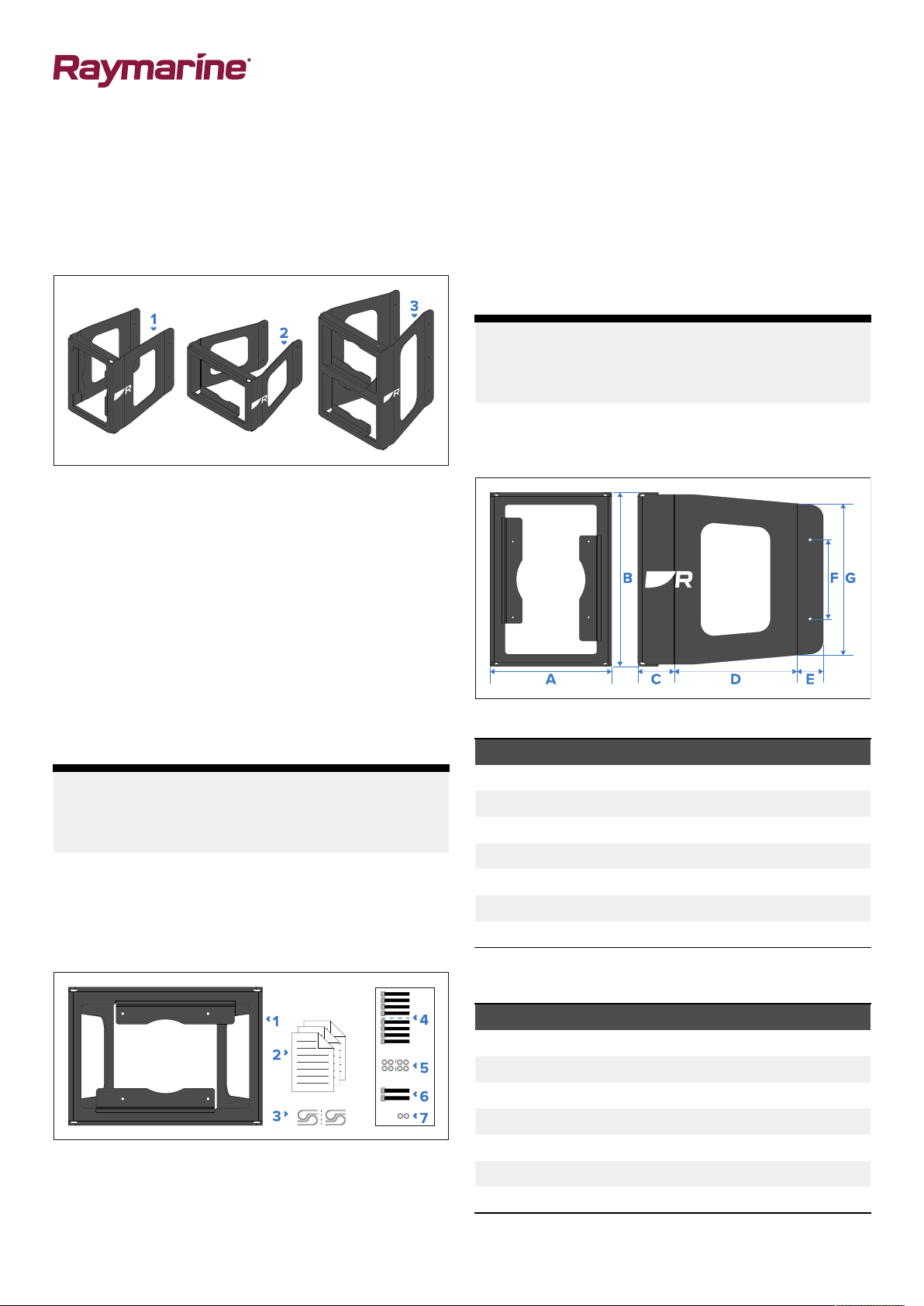
Mastbracketoverview
InconjunctionwithanAlphaSeriesperformancedisplay,
thefollowingaccessoriescanbeusedtomountyour
performancedisplaytoamast:
1.Singleportraitmastbracket(Alpha7/Alpha9—
A80713/A80716).
2.Singlelandscapemastbracket(Alpha7/Alpha9—
A80711/A80714).
3.Duallandscapemastbracket(Alpha7/Alpha9—
A80712/A80715).
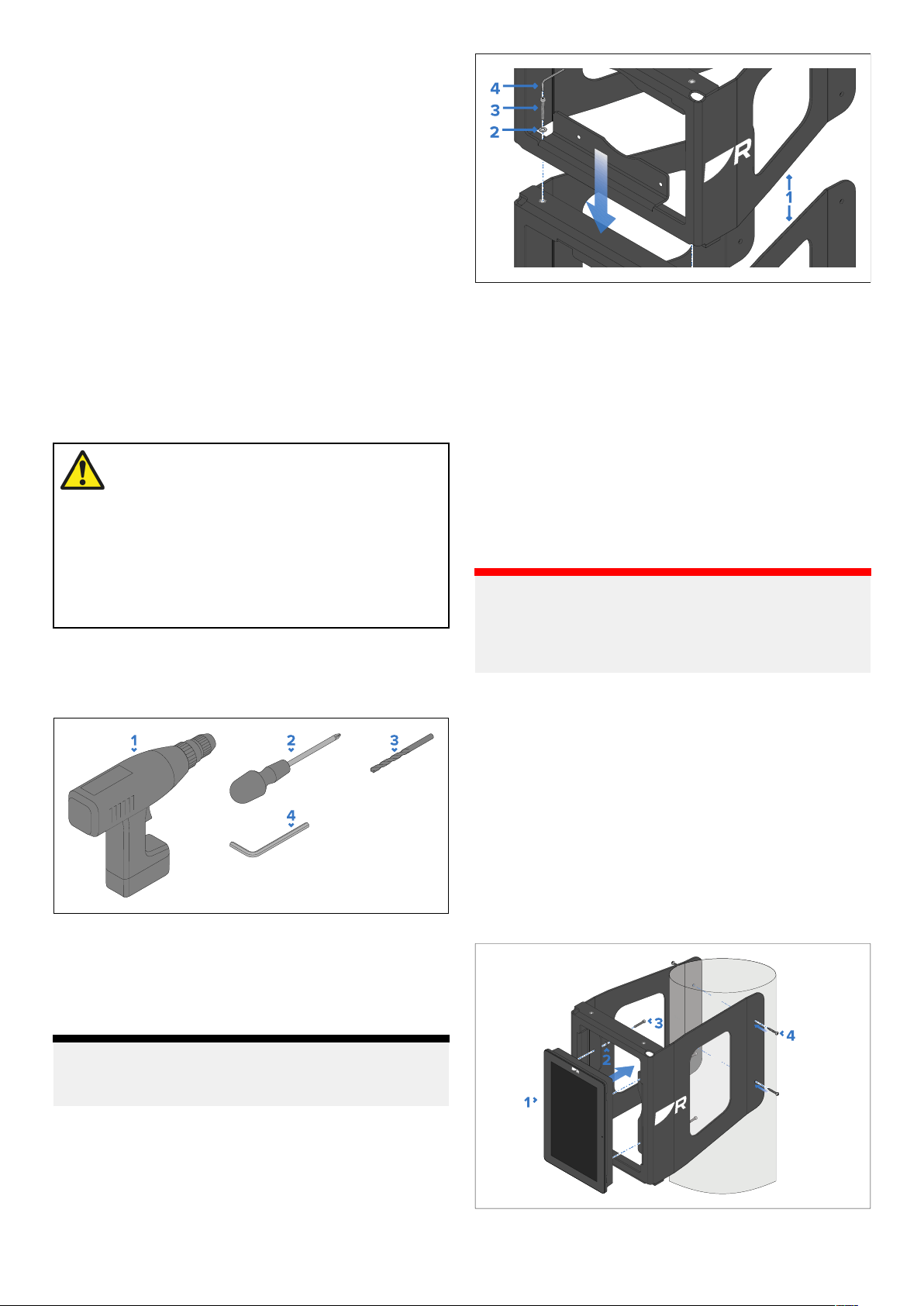
4.(4xwithsinglemastbracket/8xwithdualmast
bracket)M4x14Hexsocketdrivescrews—usedto
securetheAlphaSeriesdisplaytoanAlphaSeries
mastbracket.
5.(4xwithsinglemastbracket/8xwithdualmast
bracket)M4x9Flatwashers—usedtosecurethe
AlphaSeriesdisplaytoanAlphaSeriesmastbracket.
6.(2x)M5x16Hexsocketdrivescrews—usedtosecure
theAlphaSeriesmastbrackettoanotherAlphaSeries
mastbracket.
7.(2x)M5x10Flatwashers—usedtosecuretheAlpha
SeriesdisplaymastbrackettoanotherAlphaSeries
displaymastbracket.
Note:
Formoreinformationonhowtoconnecttogether
2Alphadisplaymastbracketsinanarray,referto:
Assemblingmastbracketarrays(p.3)
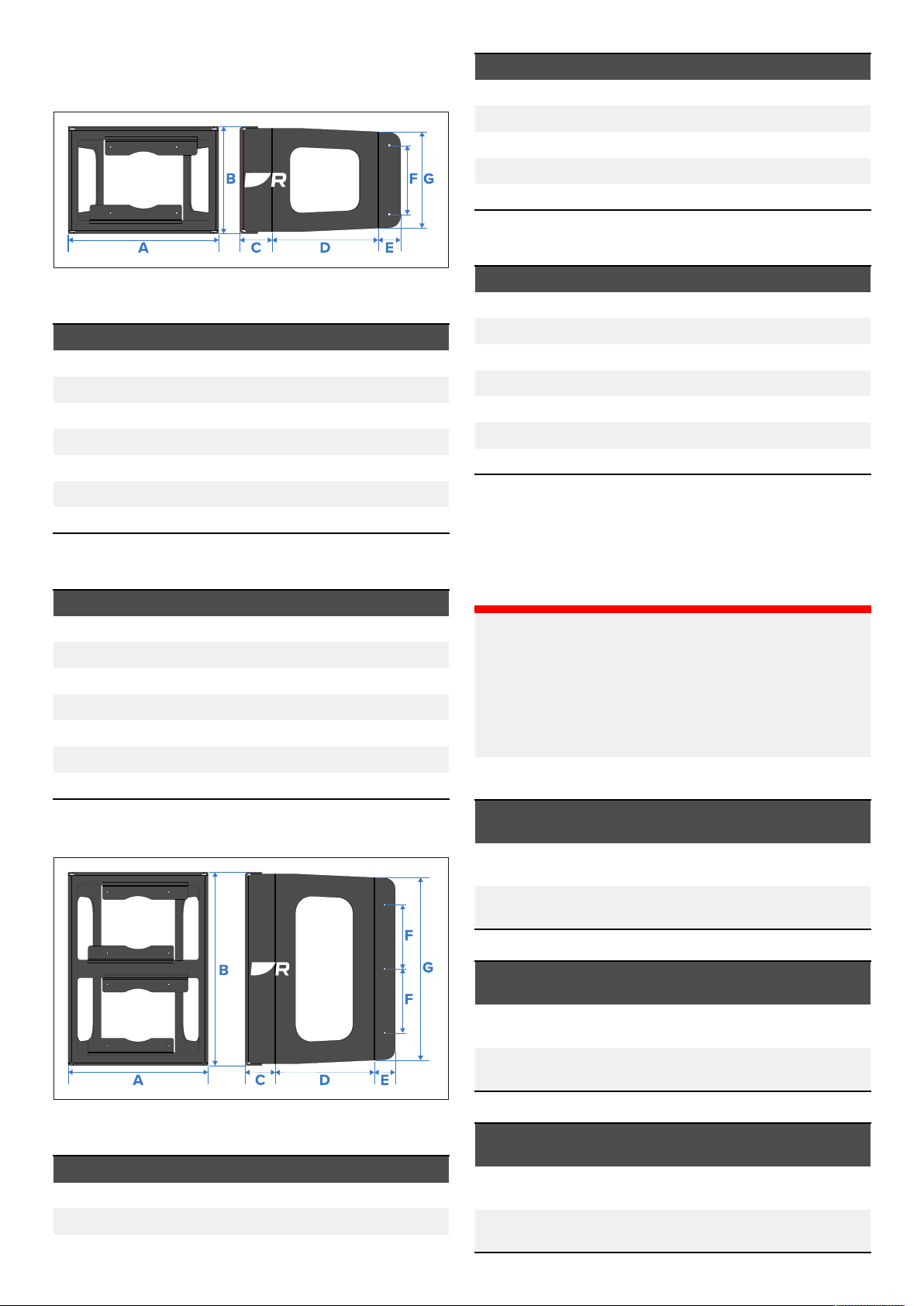
Singlemastbracketdimensions(portrait)
Arraysofmultiplemastbrackets
AlphaSeriesmastbracketswhichareappropriatefor
thesamedisplaysizeandorientation(e.g.a9”single
landscapebracketanda9”duallandscapebracket)
canbeconnectedtogethertoformanexpandedarray
ofmast-mountedperformancedisplays,usinghexnuts
locatedatthetopofeachbracket.
Note:
Formoreinformationonassemblinganarrayof
multiplemastbrackets,refertothefollowingsection:
Assemblingmastbracketarrays(p.3)
Partssupplied
ThefollowingpartsaresuppliedwithyourAlphadisplay
mastbracket:
1.AlphaSeriesdisplaymastbracket(9”landscape
bracketillustrated).
2.Documentationpack.
3.(2xwithsinglemastbracket/4xwithdualmast
bracket)P-clips—usedtoafixcablestothemast.
Documentnumber:88130(Rev2)AB;49352;2023-09-19T15:34:37
Alpha7performancedisplaysingleportraitmastbracket:
Item
A
B
C
D
E
F
G
Alpha9performancedisplaysingleportraitmast
bracket:
Item
A
B
C
D
E
F
G
Dimension
156.00mm(6. 14in).
217.00mm(8.54in).
55.55mm(2. 19in).
144.10mm(5.67in).
39.63mm(1.56in).
120.00mm(4.72in).
181.34mm(7 . 14in).
Dimension
185.00mm(7 .28in).
265.50mm(10.45in).
55.47mm(2. 18in).
186.13mm(7 .33in).
39.69mm(1.56in).
120.00mm(4.72in).
229.79mm(9.05in).
Date:09-2023
Page 2
Singlemastbracketdimensions (landscape)
Item
C
D
E
F
G
Alpha9performancedisplayduallandscapemast
bracket:
Dimension
56.31mm(2.22in).
153.46mm(6.04in).
39.10mm(1.54in).
120.00mm(4.72in).
284.53mm(11.20in).
Alpha7performancedisplaysinglelandscapemast
bracket:
Item
A
B
C
D
E
F
G
Alpha9performancedisplaysinglelandscapemast
bracket:
Item
A
B
C
D
E
F
G
Dimension
217.00mm(8.54in).
156.00mm(6. 14in).
56.31mm(2.22in).
153.46mm(6.04in).
39.1mm(1.54in).
110.00mm(4.33in).
137.97mm(5.43in).
Dimension
265.50mm(10.31in).
185.00mm(7 .28in).
56.34mm(2.22in).
184.53mm(7 .26in).
39.08mm(1.54in).
120.00mm(4.72in).
167.59mm(6.60in).
Item
A
B
C
D
E
F
G
Dimension
265.50mm(10.45in).
362.00mm(14.25in).
56.34mm(2.22in).
185.48mm(7 .30in).
39.08mm(1.54in).
120.00mm(4.72in).
341.87mm(13.46in).
Bracketmastsizecompatibility
BeforeobtainingandattemptingtoinstallanAlphadisplay
mastbracket,ensurethatthediameterofyourmastdoes
notexceedtheminimumandmaximummastbracket
tolerancesspecifiedbelow.
Important:
•Dependingonthediameterofyourmast,oneormore
ofthefollowingaccessorymastbracketsmaynotbe
appropriateforthesizeofyourmast.
•Exceedingthespecifiedmastbrackettolerances
maycausedamagetothebracketandanyattached
products.
Singlemastbrackettolerances(portrait):
Dualmastbracketdimensions(landscape)
Alpha7performancedisplayduallandscapemast
bracket:
Item
A
B
2
Dimension
217.00mm(8.54in).
303.00mm(11.93in).
Display
variant
Alpha7:
Alpha9:
Singlemastbrackettolerances(landscape):
Display
variant
Alpha7:
Alpha9:
Dualmastbrackettolerances(landscape):
Display
variant
Alpha7:
Alpha9:
Minimumandmaximummasttolerances
90mm(3.54in)min—150mm(5.91in)
max
120mm(4.72in)min—210mm(8.27in)
max
Minimumandmaximummasttolerances
90mm(3.54in)min—150mm(5.91in)
max
120mm(4.72in)min—210mm(8.27in)
max
Minimumandmaximummasttolerances
90mm(3.54in)min—150mm(5.91in)
max
120mm(4.72in)min—210mm(8.27in)
max
AlphaSeriesPerformanceDisplayMastBracketInstallationSummary
Page 3
Locationrequirements
Beforeproceeding,ensurethatyouhavereadand
understoodthelocationrequirementslistedbelow
andthroughouttheAlphaSeriesPerformanceDisplay
InstallationInstructionsdocument(87457).
Hollowmastcablerouting
CablesconnectedtoanAlphaperformancedisplaymay
beroutedinsideahollowmast.
Ifyourunanycablinginsideamast,taketheappropriate
measuresto:
•Preventthecablesfromchafingwheretheyenterand
exitthemast.
•Minimizeelectricalinterferenceby:
–Notrunningthecablesnearotherelectrical
equipment.
–Notrunningthecablesalongsideotherpoweror
antennaequipmentcabling.
Warning:2personinstallation
required
Topreventpotentialproductdamage,vessel
damageandpersonalinjury,a2-person
installationisrecommended.
Itisrecommendedthatonepersonholdsthe
displayandmastbracketinthemounting
position,whileanotherpersonsecuresthe
brackettothemast.
Toolsrequired
Thefollowingtoolsarerequiredforinstallation:
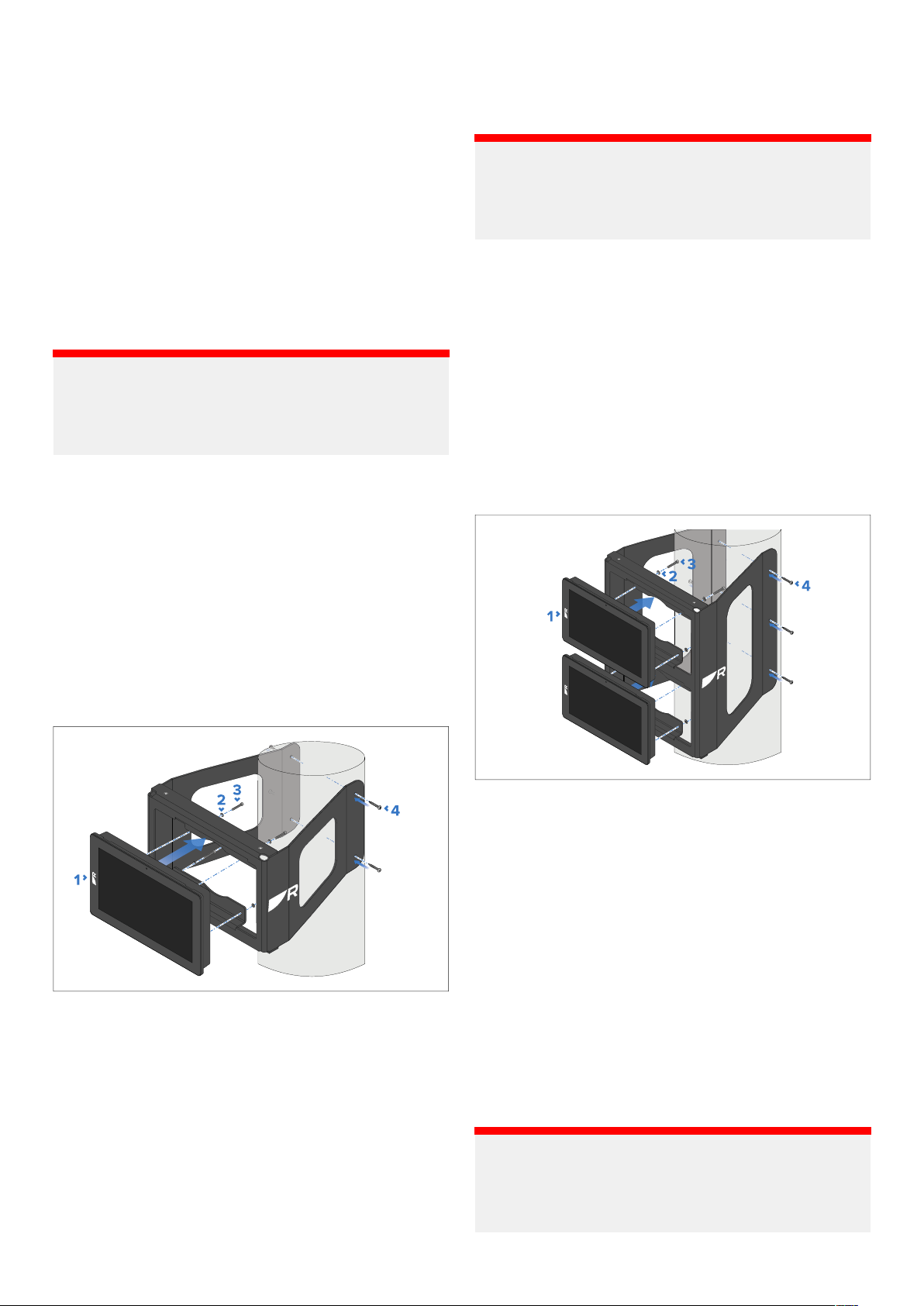
1.Place2AlphaSeriesmastbracketsappropriatefor
thesamedisplaysizeandorientation(e.g.a9”single
landscapebracketanda9”duallandscapebracket)
ontopofoneanother ,sothatthehexagonrivetnuts
onthebottombracketalignwiththefixingholeson
thetopbracket.
2.FeedthesuppliedM5flatwashersoverthesupplied
M5hexsocketdrivescrews.
3.InserttheM5hexsocketdrivescrews(withM5flat
washersattached)throughthefixingholesonthetop
bracketandintothehexagonrivetnutsonthebottom
bracket.
4.TightentheM5hexsocketdrivescrewsusingaHex
wrench(Allenkey),untilthe2bracketsarefirmly
securedtooneanother.
Important:
Checkthesecurityandintegrityofthemountedarray
beforefinalizingyourinstallation.Ifnecessary,obtain
replacementoradditionalmountingscrewstoensure
asecureinstallation.
Singlemastbracketmounting(portrait)
1.Powerdrill.
2.Pozidrivescrewdriver .
3.Drillbit.
4.3mm&4mmHexwrench(Allenkey)set.
Note:
Theappropriatedrillbitsizeisdependentonthe
thicknessandmaterialofthemountingsurface.
Assemblingmastbracketarrays
Inordertoconnecttogether2AlphaSeriesmastbrackets
(whichareappropriateforthesamedisplaysizeand
orientation):
AlphaSeriesPerformanceDisplayMastBracketInstallationSummary
FollowtheseinstructionstomastmountyourAlphaSeries
performancedisplayusingthesingleportraitmastbracket
(Alpha7/Alpha9—A80713/A80716).
Beforemountingtheproduct,ensurethatyouhave:
•Selectedasuitablelocation,basedonthesuggested
locationrequirements.
•Identifiedtherelevantcableconnectionsandtheroute
thatthecableswilltake.
•Routedthecablesthroughthemast,ifrequired.
1.Routethedisplay’scables(notshownintheabove
drawing)andthenfitthedisplay,asfollows:
3
Page 4
i.Routethecablesbehindthemastbracket,andthen
feedthroughthemastbrackettothedisplay,from
therearofthemastbracket.
ii.Connecttheroutedcablestothedisplay.
iii.Placethedisplayintothemastbracket.
2.FeedthesuppliedM4flatwashersoverthesupplied
M4hexsocketdrivescrews.
3.InserttheM4hexsocketdrivescrews(withM4flat
washersattached)throughthemastbracketfixing
holes,andintotherearofthedisplay.TightentheM4
hexsocketdrivescrewsusingaHexwrench(Allenkey)
untilthedisplayisfirmlysecuredtothebracket.
4.Holdthebracketinplaceatyourchosenlocation,then
securethebracketonbothsidesofthemastusing
fixingsthatareappropriateforthemast’sthicknessand
material.
Important:
Checkthesecurityandintegrityofthemountedproduct
beforefinalizingyourinstallation.Ifnecessary,obtain
replacementoradditionalmountingscrewstoensure
asecureinstallation.
Singlemastbracketmounting(landscape)
4.Holdthebracketinplaceatyourchosenlocation,then
securethebracketonbothsidesofthemastusing
fixingsthatareappropriateforthemast’sthicknessand
material.
Important:
Checkthesecurityandintegrityofthemountedproduct
beforefinalizingyourinstallation.Ifnecessary,obtain
replacementoradditionalmountingscrewstoensure
asecureinstallation.
Dualmastbracketmounting(landscape)
Followtheseinstructionstomastmount2Alphadisplays,
usingtheduallandscapemastbracket(Alpha7/Alpha9
—A80713/A80716).
Beforemountingtheproduct,ensurethatyouhave:
•Selectedasuitablelocation,basedonthesuggested
locationrequirements.
•Identifiedtherelevantcableconnectionsandtheroute
thatthecableswilltake.
•Routedthecablesthroughthemast,ifrequired.
FollowtheseinstructionstomastmountyourAlphaSeries
displayusingthesinglelandscapemastbracket(Alpha7/
Alpha9—A80713/A80716).
Beforemountingtheproduct,ensurethatyouhave:
•Selectedasuitablelocation,basedonthesuggested
locationrequirements.
•Identifiedtherelevantcableconnectionsandtheroute
thatthecableswilltake.
•Routedthecablesthroughthemast,ifrequired.
1.Routethedisplay’scables(notshownintheabove
drawing)andthenfitthedisplay,asfollows:
i.Routethecablesbehindthemastbracket,andthen
feedthroughthemastbrackettothedisplay,from
therearofthemastbracket.
ii.Connecttheroutedcablestothedisplay.
iii.Placethedisplayintothemastbracket.
2.FeedthesuppliedM4flatwashersoverthesupplied
M4hexsocketdrivescrews.
3.InserttheM4hexsocketdrivescrews(withM4flat
washersattached)throughthemastbracketfixing
holes,andintotherearofthedisplay.TightentheM4
hexsocketdrivescrewsusingaHexwrench(Allenkey)
untilthedisplayisfirmlysecuredtothebracket.
4
1.Routeeachdisplay’scables(notshownintheabove
drawing)andthenfitthedisplays,asfollows:
i.Routethecablesbehindthemastbracket,andthen
feedthroughthemastbrackettothedisplays,from
therearofthemastbracket.
ii.Connecttheroutedcablestothedisplays.
iii.Placethedisplaysintothemastbracket.
2.FeedthesuppliedM4flatwashersoverthesupplied
M4hexsocketdrivescrews.
3.InserttheM4hexsocketdrivescrews(withM4flat
washersattached)throughthemastbracketfixing
holes,andintotherearofthedisplays.TightentheM4
hexsocketdrivescrewsusingaHexwrench(Allenkey)
untilthedisplaysarefirmlysecuredtothebracket.
4.Holdthebracketinplaceatyourchosenlocation,then
securethebracketonbothsidesofthemastusing
fixingsthatareappropriateforthemast’sthicknessand
material.
Important:
Checkthesecurityandintegrityofthemountedproducts
beforefinalizingyourinstallation.Ifnecessary,obtain
replacementoradditionalmountingscrewstoensure
asecureinstallation.
AlphaSeriesPerformanceDisplayMastBracketInstallationSummary
 Loading...