

Page 1
21-184 0.fm Page 1 Thurs day, August 5, 1999 3:15 P M
Cat. No. 21-1840
OWNER’S MANUAL
Please read before using this equipment.
Personal FM
n
n
Automatic Squelch
n
Headset Jack for Handsf ree Com-
n
Transmit/Battery In d icator
n
Radio
14 Ch an n els
Call Button
Monitor
n
munication
Page 2
21-184 0.fm Page 2 Thurs day, August 5, 1999 3:15 P M
INTRODUCTION
Your RadioShack Personal FM Radio is a lightweight, palm- si zed radio that you can clip to your belt
and carry almost anywhere. You can use it to talk
with another person who has an FRS radio set to the
same
frequency
dio.
(14-channel selectable) as your ra-
Your radio has
auto-squelch
, which means you won’t
hear anything on the channel unless someone is
transmitting nearby on the same channel. But, you
can turn off auto-squelch to hear weaker, distant
transmissi ons (see Page 11).
Also, if you do not transmit for over 30 seconds, the
radio automatically switches to a power save mode
and returns to full power when it receives a transmission or you press any key.
We recommend you record your radio’s serial
number here. The number is on the radio’s back
panel.
Serial Number:
1998 Tandy Corporation.
©
RadioShack is a registered trademark used by Tandy Corporation.
All Rights Reserved.
2
Page 3
21-184 0.fm Page 3 Thurs day, August 5, 1999 3:15 P M
PREPARATION
INSTALLING BATTERIES
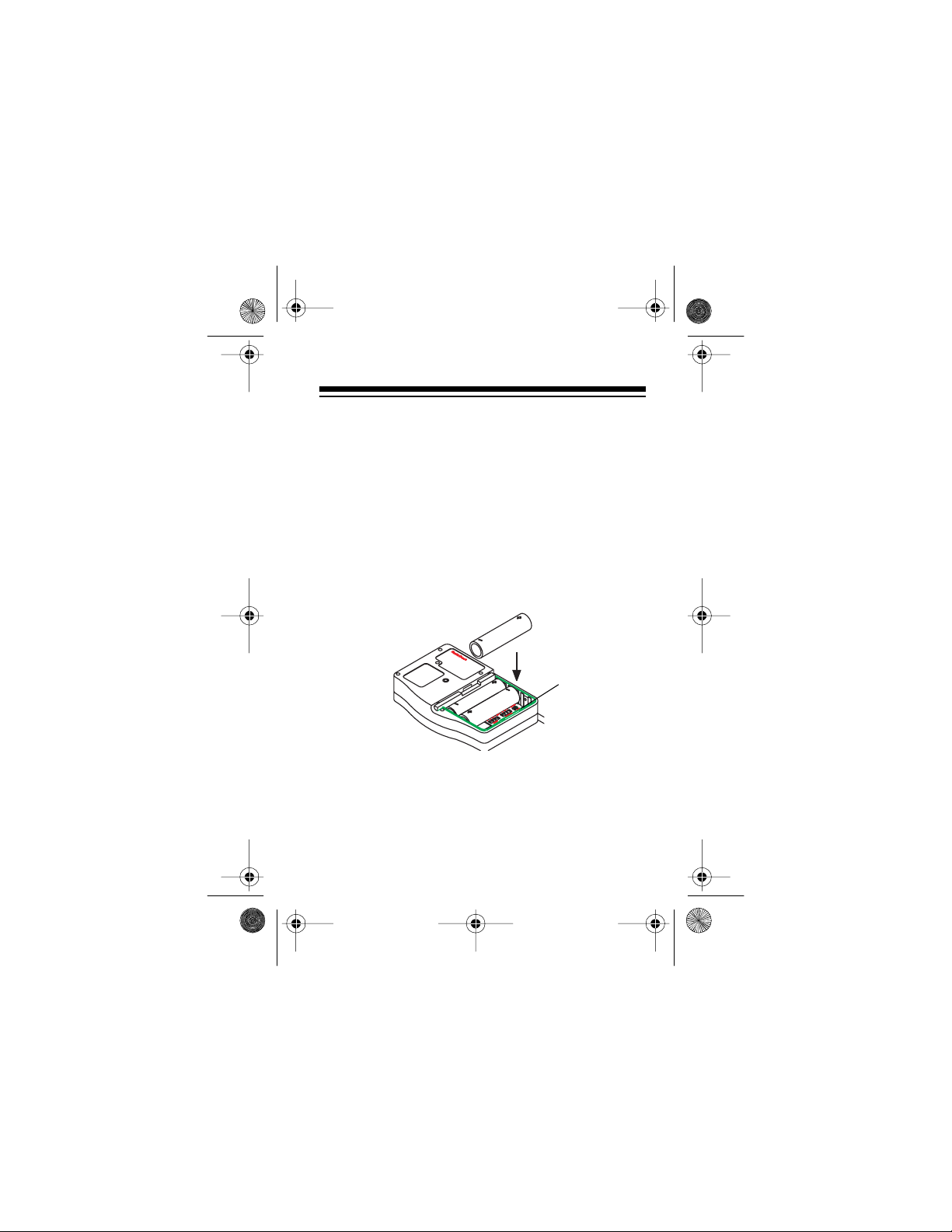
Your radio uses th ree AA batteries for power. For the
longest life, we recommend alkaline batteries (available from your local RadioSha ck store) . You can also
use rechargeable nickel-cadmium batteries (such as
Cat. No. 23-325) and recharge them in the radio using an optional AC adapter (such as Cat. No. 273-
1663).
Follow these steps to inst all batteries.
ALKALINE/
Ni-Cd
1. Turn the radio off, remove the screw from the
belt clip, then slide off the battery compartment
cove r.
3
Page 4
21-184 0.fm Page 4 Thurs day, August 5, 1999 3:15 P M
Ni-Cd
ALKA-
(for
2. Set the switch inside the compartment to
LINE
(for alkaline batteries) or
rechargeable nickel-cadmium batteries).
Caution:
switch set to
Do not use alkaline batteries with the
Ni-Cd
.
3. Install the batteries, matching the polarity symbols (+ and –) inside the compartment.
4. Replace the cover.
Caution:
Do not mix old and new batteries, different
types of batteries (standard, alkaline, or rechargeable), or rechargeable batteries of different capacities.
The radio’s range decreases as the battery power
decreases. To ensure maximum range, keep fresh
batteries in the radio.
When the TX/LO BATT (Transmit/Low Battery) indicator flashes when you are not holding down
pressing
CALL
, replace the batteries.
PTT
or
4
Page 5
21-184 0.fm Page 5 Thurs day, August 5, 1999 3:15 P M
Recharging Nickel-Cadmium Batteries
If you use rechargeable nickel-cadmium batteries,
you can recharge them in the radio using an optional AC adapter (such as Cat. No. 273-1663). Be sure
the switch inside the battery compartment is set to
Ni-Cd
.
Caution:
You must use an AC adapter that supplies
6 volts DC and delivers at least 700 mA. Its center
tip must be set to positi ve and its pl ug must f it the ra-
CHRG
dio’s
jack. The recommended adapter meets
these specifications. Using an adapter that does not
meet these specifications could damage the radio or
the adapter.
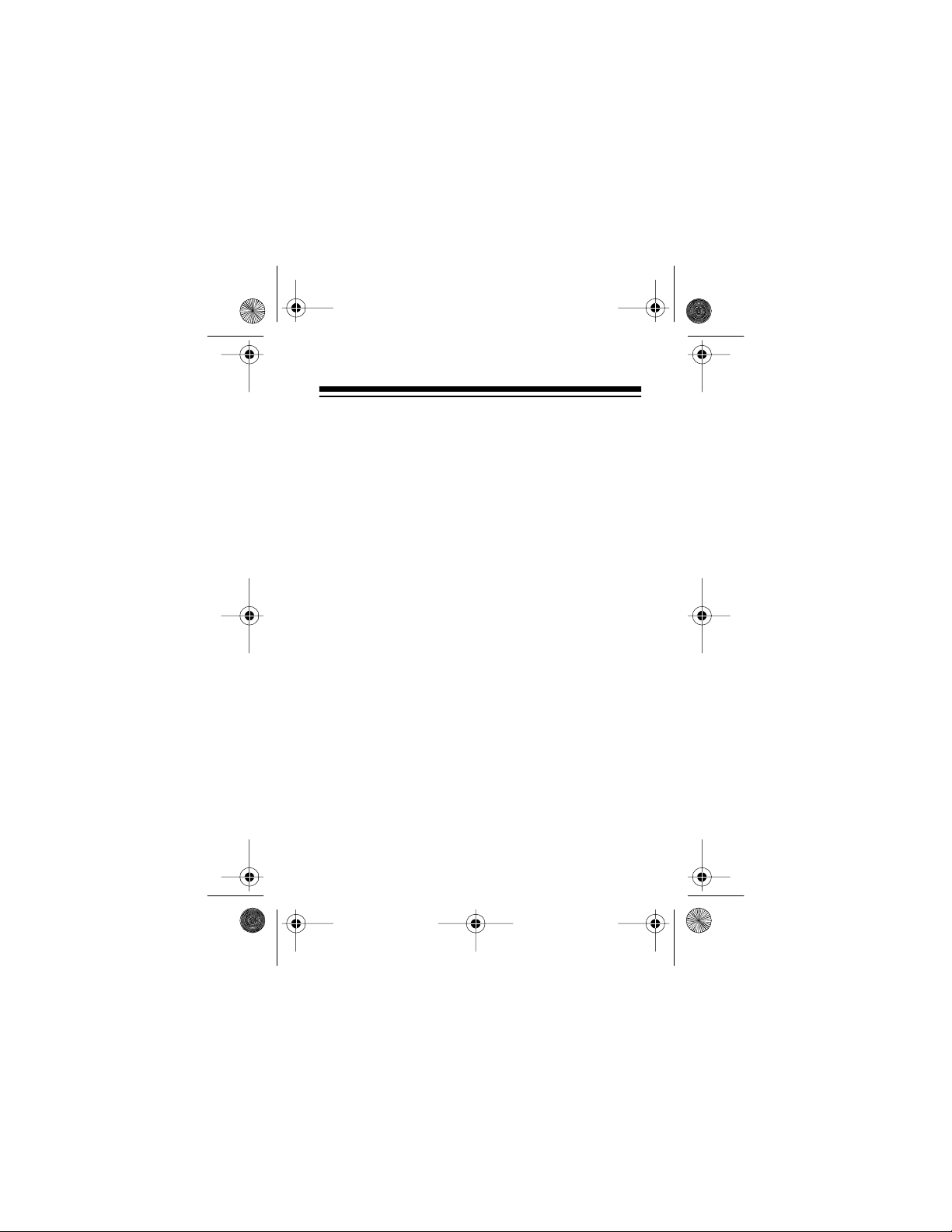
1. Attach the adapter’s 3.4 mm outer diameter/1.3
mm inner diameter barrel plug to the adapter
and set TIP to positive (+) .
5
Page 6
21-184 0.fm Page 6 Thurs day, August 5, 1999 3:15 P M
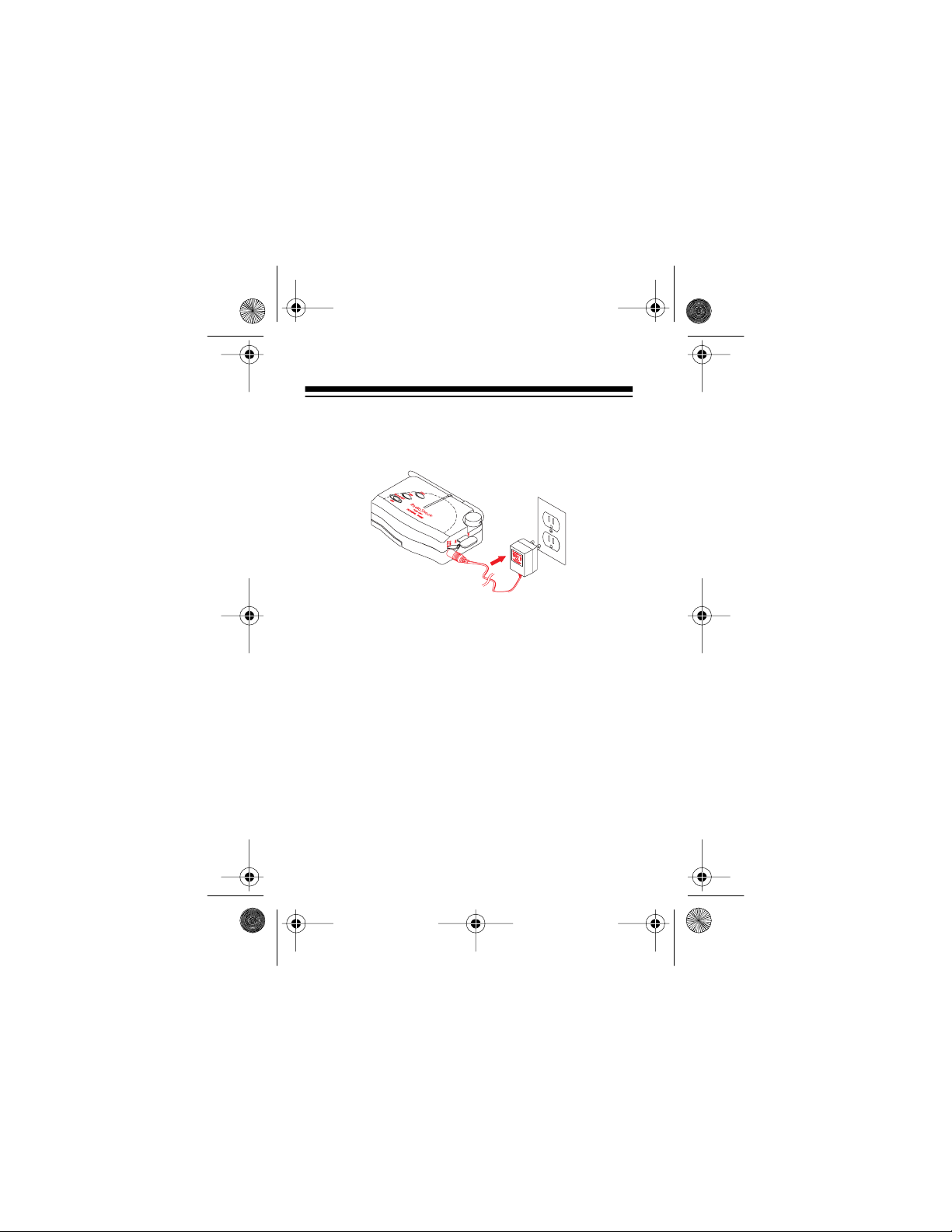
2. Connect the charger’s barrel plug to the radio’s
CHRG
jack and plug its other end into a standard
AC outlet
3. Complete charging takes about 15 hours. When
charging is complete, unplug the AC adapter
from the AC outlet and disconnect it from the
jack
.
CHRG
SETTING THE QUIET CODE AND
CHANNEL
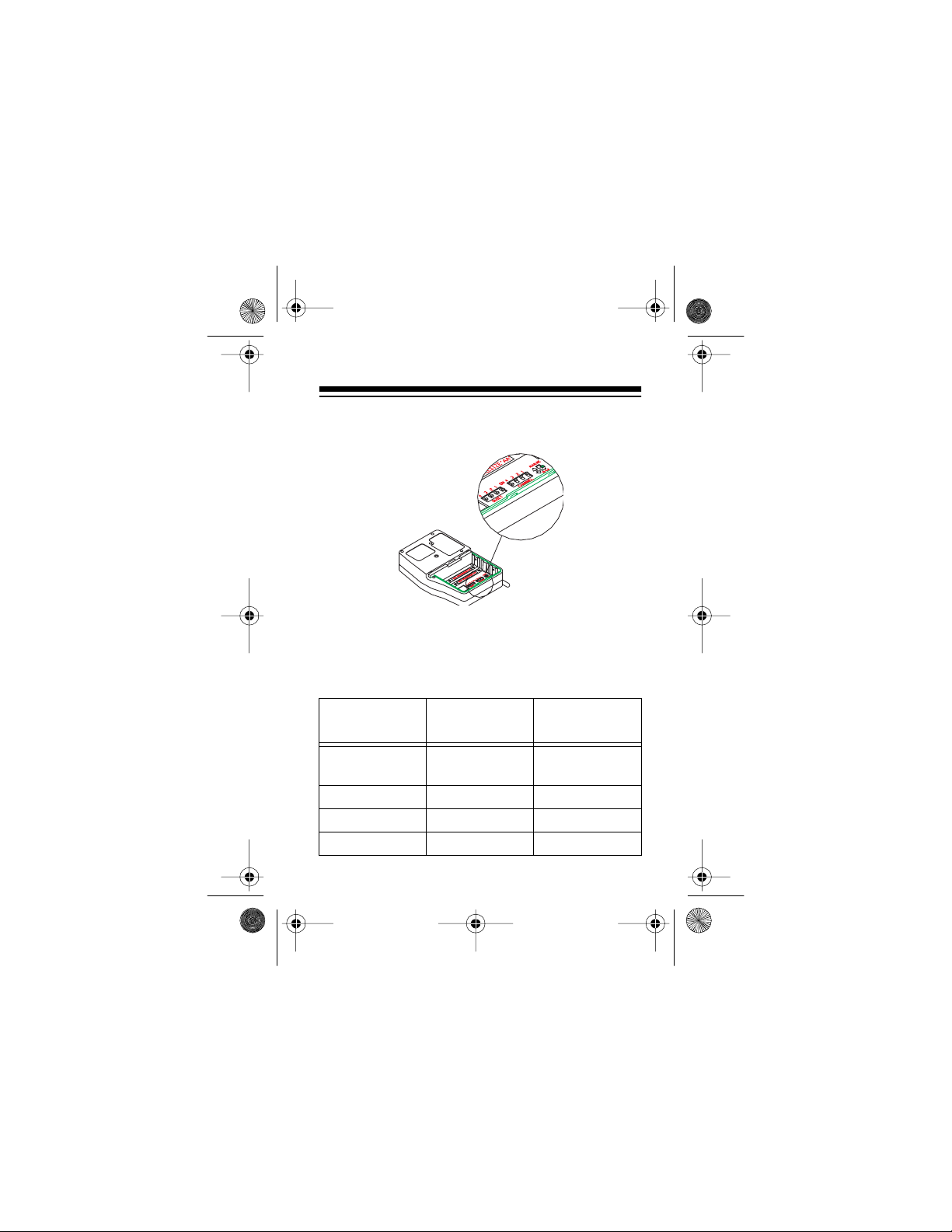
Use the 4-digit DIP switches inside the battery compartment to set the quiet code and channel. The left
6
Page 7
21-184 0.fm Page 7 Thurs day, August 5, 1999 3:15 P M
array of switches controls the quiet code, while the
right array controls the channel.
Note: You can only communicate with another radi o
which uses the same channel and Quiet code as
your radio.
QUIET Code
Frequency
(Hz)
without
QUIET
12 100.0 0001
13 103.5 0010
14 107.2 0011
Dip Switch
Setting
0000
7
Page 8
21-184 0.fm Page 8 Thurs day, August 5, 1999 3:15 P M
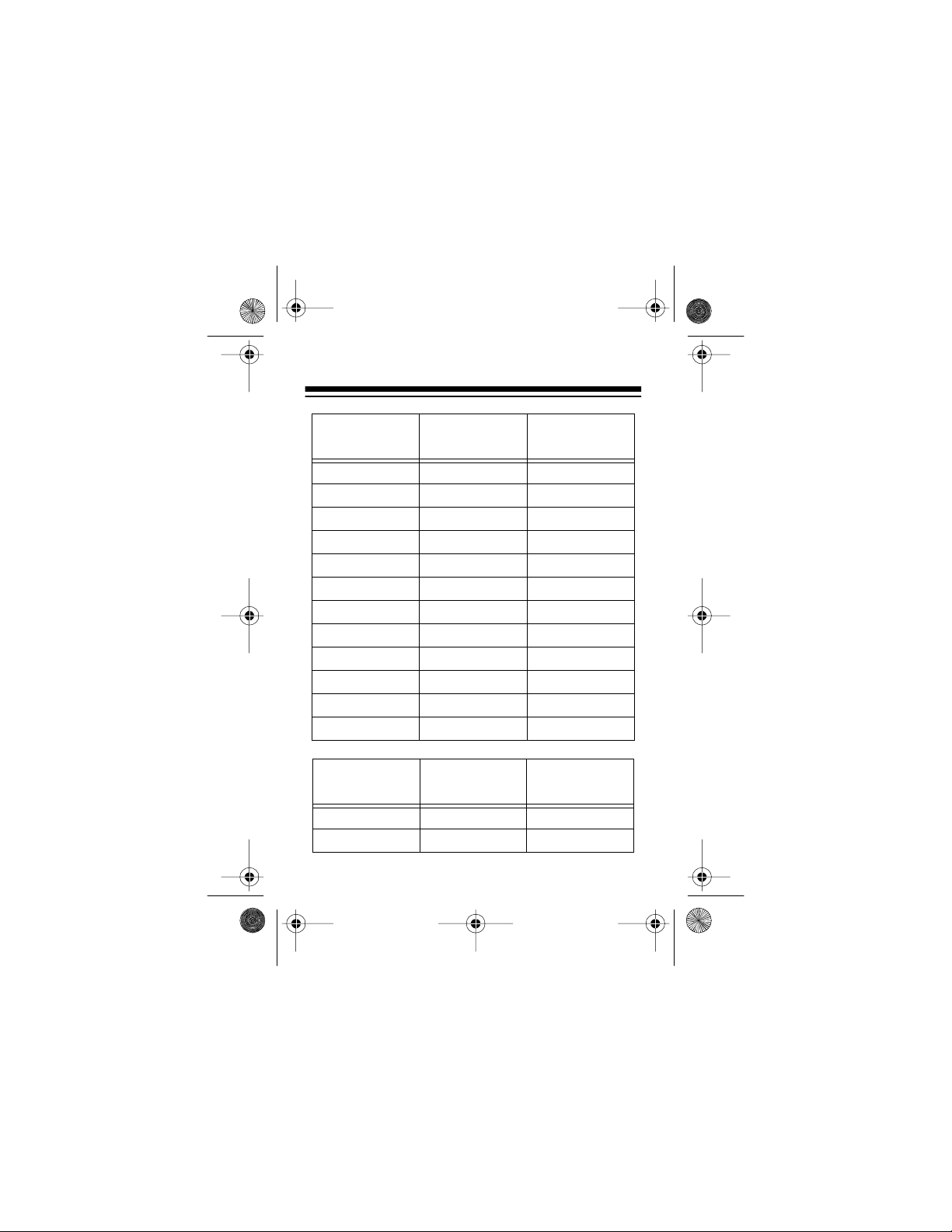
QUIET Code
Channel
8
Frequency
(Hz)
Dip Switch
Setting
15 110/9 0100
16 114.8 0101
17 118.8 0110
18 123.0 0001
19 127.3 0010
20 131.8 0011
21 136.5 0100
22 141.3 0101
23 146.2 0110
24 151.4 0111
25 156.7 1000
26 162.2 1001
Frequency
(MHz)
Dip Switch
Setting
1 462.5625 0000
1 462.5625 0001
Page 9
21-184 0.fm Page 9 Thurs day, August 5, 1999 3:15 P M
Channel
Frequency
(MHz)
2 462.5875 0010
3 462.6125 0011
4 462.6375 0100
5 462.6625 0101
6 462.6875 0110
7 462.7125 0111
8 467.5625 1000
9 467.5875 1001
10 467.6125 1010
11 467.6375 1011
12 467.6625 1100
13 467.6875 1101
14 467.7125 1110
14 467.7125 1111
Dip Switch
Setting
9
Page 10
21-1840.fm Page 10 Thursday, August 5, 1999 3:15 PM
USING THE RADIO
VOLUME
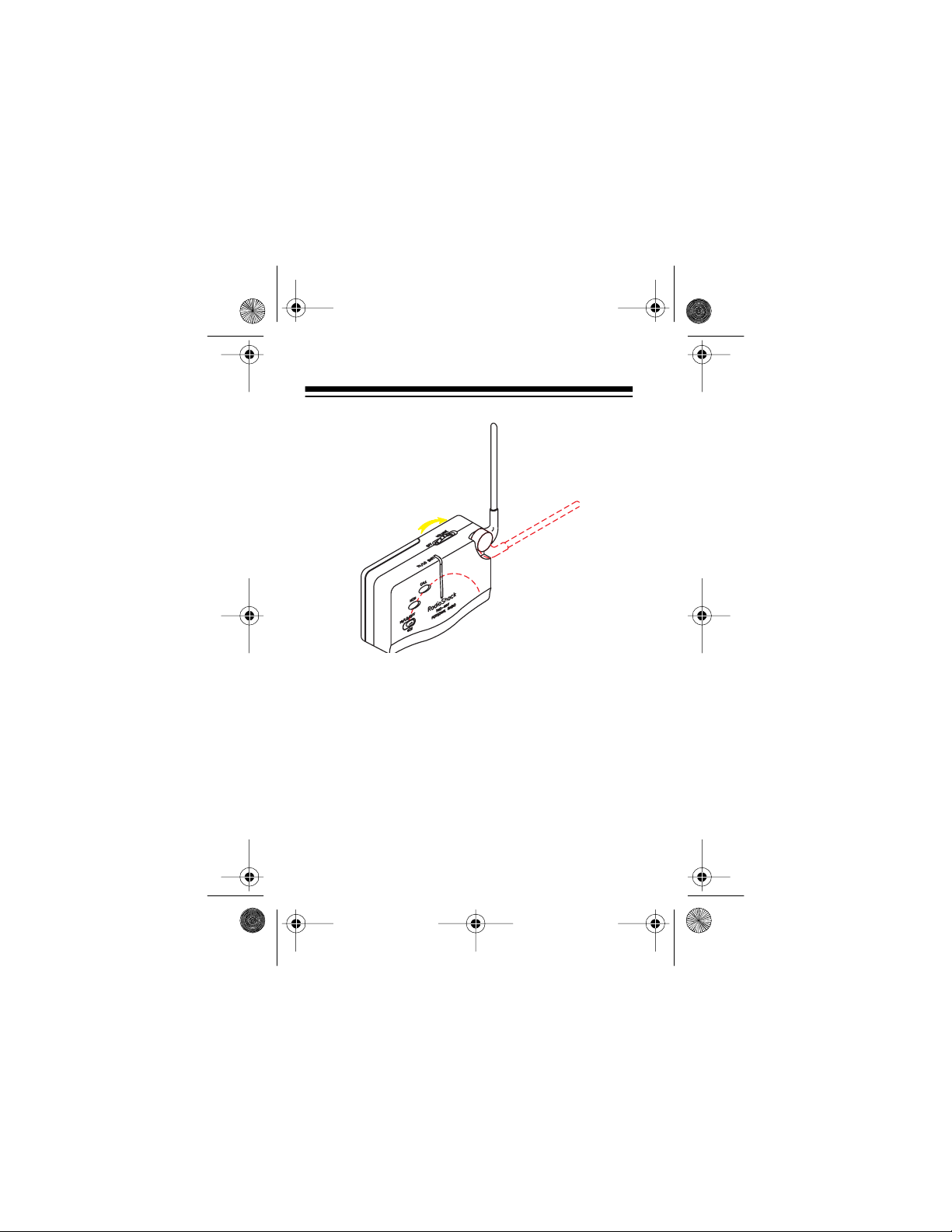
Rotate
just the volume. A tone sounds when you turn it on.
to turn the radio on and off and ad-
To talk, hold down the headset’s
button. Speak into the microphone when the TX/LO
BATT indicator lights. When you finish speaking, release
The TX/LO BATT indicator lights when you transmit
and flashes when the battery is low.
10
PTT
.
(push to talk)
PTT
Page 11
21-1840.fm Page 11 Thursday, August 5, 1999 3:15 PM
To hear everything happening on a channel (including weak transmissions), hold down
MON
to turn auto-squelch back on.
MON
. Release
To send a page, press
. The TX/LO BATT indi-
CALL
cator lights and a tone sounds on all radios within
range that are tuned to the same frequency as your
radio.
Important:
The FCC does not allow you to send a
continuous tone for more than 15 seconds at a time
on FRS frequencies. Do not hold down
CALL
for
longer than 15 seconds.
For hands-free operation, connect the supplied
headset’s
receiver’s
conditions) or
3
/32-inch mini plug and 1/8-inch plug to the
MIC/SPK
jacks. Set
LO
(if you are in a noisy environment.
VOX
to HI (for normal
The radio automatically transmits when you speak
and is set to receive when you are not speaking.
11
Page 12
21-1840.fm Page 12 Thursday, August 5, 1999 3:15 PM
CARE AND MAINTENANCE
To enjoy your Personal FM Radio for a long time:
• Keep the radio dry. If it gets wet, wipe it dry
immediately.
• Use and store the radio only in normal tempera-
ture environments.
• Handle the radio gently and carefully. Don’t drop
it.
• Keep the radio away from dus t and di rt.
• Wipe the radio with a damp cloth occasionally to
keep it looking new.
Modifying or tampering with the radio’s internal
components can cause a malfunction and invalidate its warranty. If your radio is not performing
as it should, take it to your local RadioShack
store for assistance.
12
Page 13
21-1840.fm Page 13 Thursday, August 5, 1999 3:15 PM
FCC INFORMATION
Important:
ternal adjustments. Your radio is set up to transmit a
regulated signal on an assigned frequency. It is
against the law to alter or adjust the settings inside
the radio to exceed those limitations. Any adjustments made to your radio must be made by a qualified technician using the proper test equipment. To
be safe and sure:
• Never open your radio’s case.
• Never change or replace anything in your radio
Your radio might cause TV or radio interference even
when it is operating properly. To determine whether
your radio i s causing the interference, turn it off. If the
interference goes away, your radio is causing it. Try
to eliminate the int erference by:
• Moving your radio away from the receiver
• Calling your local RadioShack store for help
Using your radio as described in this manual exposes you to RF energy well below the FCC’ s recommended limits.
Do not open your radio to make any in-
except the batteries.
13
Page 14
21-1840.fm Page 14 Thursday, August 5, 1999 3:15 PM
This device complies with Part 15 of the
FCC Rules
Operation is subject to the following two conditions:
(1) This device may not cause harmful interference,
and (2) this device must accept any interference received, including interference that may cause undesired operation.
Modifying or tampering with the radio’s internal components can cause a malfunction and might invalidate the radio’s warranty and void your FCC
authorization to operate it. If your radio is not performing as it should, take it to your local RadioShack
store for assistance.
.
14
Page 15
21-1840.fm Page 15 Thursday, August 5, 1999 3:15 PM
SPECIFICATIONS
Transmitter
RF Outp u t P ower ......... .. .. ............... .. . 200 mW ER P
General
Number of Channels ............................................ 14
Operating Temperature Range ........................× C/F
Weight w ith Batter i e s ... ..................... ... .. ........ . lb s /k g
Dime n si o ns (H WD ) ...... .. .. ........ .
Number, Size, and Type of Batteries ............... 3 AA
Battery Life:
Alkaline .................................. 24 Hours (2500 mAh)
Ni-Cd ............. .. ........................ 11 Hours (600 mAh)
External Jack
Microphone Impedance ............................................
13
/16 ¥ 23/8 ¥ 315/16 in
(100 ¥ 65 ¥ 30 mm)
Speaker Impedance ......... ...................... ..................
15
Page 16
g
g
21-1840.fm Page 16 Thursday, August 5, 1999 3:15 PM
Specifications are typical; individual units might vary.
Specifications are subject to chan
ment without notice.
This p roduct is w arranted by RadioS hack ag ainst manu facturin g defects in mater ial and
workma nship under n ormal u se for ninety (9 0) days from t he date of pur chase f rom RadioShack company-owned stores and authorized RadioShack franchisees and dealers. EXCEPT AS PROVIDED HEREIN, RadioShack MAKES NO EXPRESS WARRANTIES AND
ANY IMPLIED WARRANTIES, INCLUDING THOSE OF MERCHANTABILITY AND FITNESS
FOR A PARTICULAR PURPOSE, ARE LIMITED IN DURATION TO THE DURATION OF
THE WRITTEN LIMITED WARRANTIES CONTAINED HEREIN. EXCEPT AS PROVIDED
HEREIN, RadioShack SHALL HAVE NO LIABILITY OR RESPONSIBILITY TO CUSTOMER
OR ANY OTHER PERSON OR ENTITY WITH RESPECT TO ANY LIABILITY, LOSS OR
DAMAGE CAUSED DIRECTLY OR INDIRECTLY BY USE OR PERFORMANCE OF THE
PRODUCT OR ARISING OUT OF ANY BREACH OF THIS WARRANTY, INCLUDING, BUT
NOT LIMITED TO, ANY DAMAGES RESULTING FROM INCONVENIENCE, LOSS OF
TIME, DATA, PROPERTY, REVENUE, OR PROFIT OR ANY INDIRECT, SPECIAL, INCIDENTAL, OR CONSEQUENTIAL DAMAGES, EVEN IF RadioShack HAS BEEN ADVISED
OF THE POSSIBILITY OF SUCH DAMAGES.
Some states do not allow the limitations on how long an implied warranty lasts or the exclusion of in cid en tal or co nseq ue nti al da ma ges , so the ab ove l imit ati ons o r exc lu sio ns m ay not
apply to you.
In the event of a product defect during the warranty period, take the product and the RadioShack sales receipt as proof of purchase date to any RadioShack store. RadioShack will,
at its option, un l ess other wi s e pr ovided by law: (a)corre ct the defe ct by pr oduct re pair with out
charge for parts and labor; (b) replace the product with one of the same or similar design; or
(c) refund the purchase price. All replaced parts and products, and products on which a refund is made, become the property of RadioShack. New or reconditioned parts and products
may be used in the performance of warranty service. Repaired or replaced parts and products are warranted for the remainder of the original warranty period. You will be charged for
repair or r eplacem ent of the prod uct made af ter the expirati on of the warrant y period .
This warranty does not cover: (a) damage or failure caused by or attributable to acts of God,
abuse, accident, mis use, improper or abno r m al usage, fail ur e to follow ins t r uctions, improper
installation or maintenance, alteration, lightning or other incidence of excess voltage or current; ( b) any repa irs other than thos e provi ded by a RadioSh ack Authorized Ser vice Facility;
(c) consumables such as fuses or batteries; (d) cosmetic damage; (e) transportation, shipping
or insurance costs; or (f) costs of product removal, installation, set-up service adjustment or
reinstallation.
This warranty gives you specific legal rights, and you may also have other rights which vary
from state to state.
RadioShack Customer Relations, Dept. W, 100 Throckmorton St., Suite 600, Fort Worth, TX
Limited Ninety-Day Warranty
76102
We Service What We Sell
e and im-prove-
3/97
RadioShack
A Division of Tandy Corporation
Fort Worth, Texas 76102
12A98 Printed in Hong Kon
 Loading...