

Page 1
INSTALLATION AND SE R V I C E M A N U A L
PROHEAT X45
Rev. H
Page 2

CONTENTS
A. SAFETY .
B. INTRODUCTION .
..................................................................................... A-1
........................................................................ B-1
C. MODEL DESCRIPTIONS............................................................ C-1
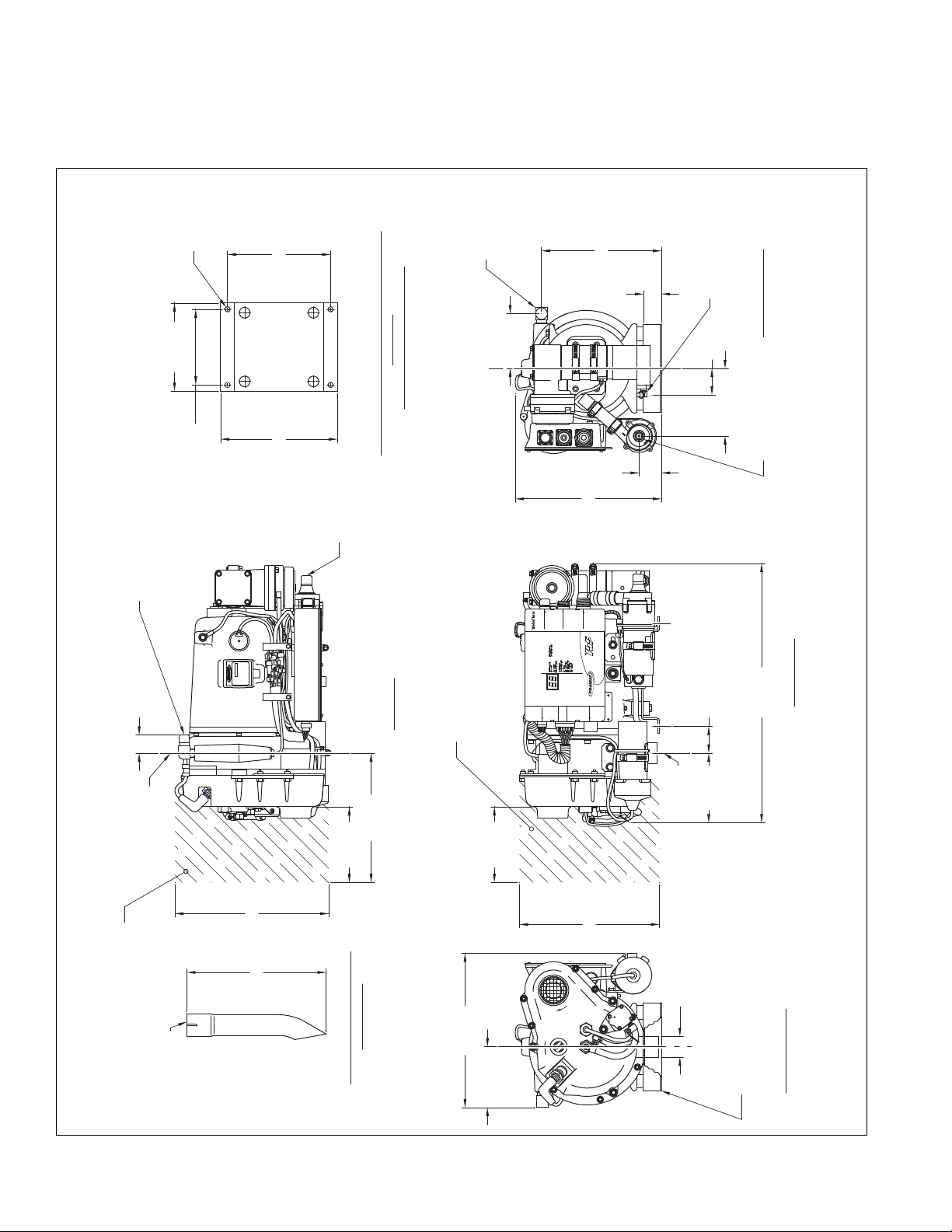
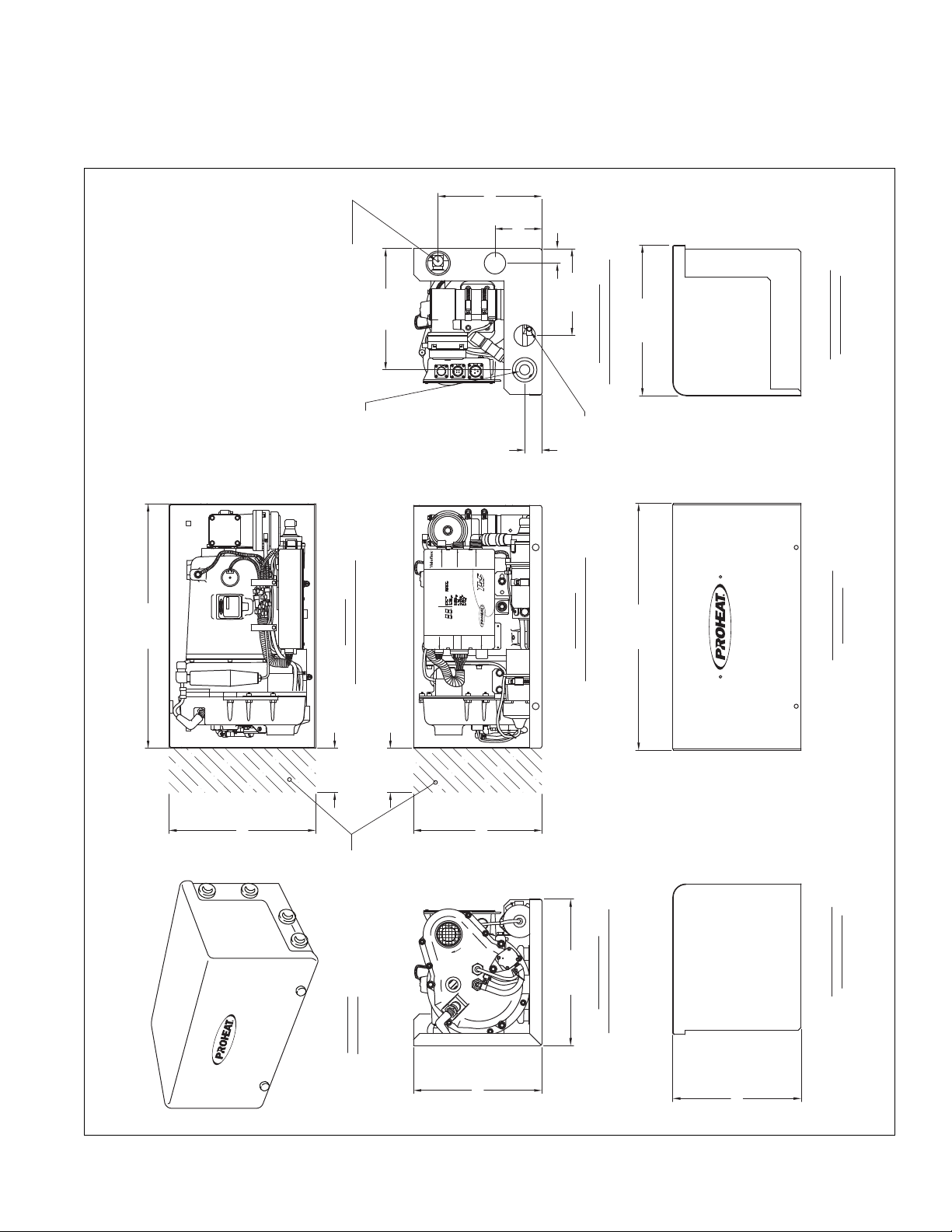
1.0 TECHNICAL SPECIFICATIONS ................................................. 1-1
1.1 PHYSICAL – X45 ..................................................................... 1-2
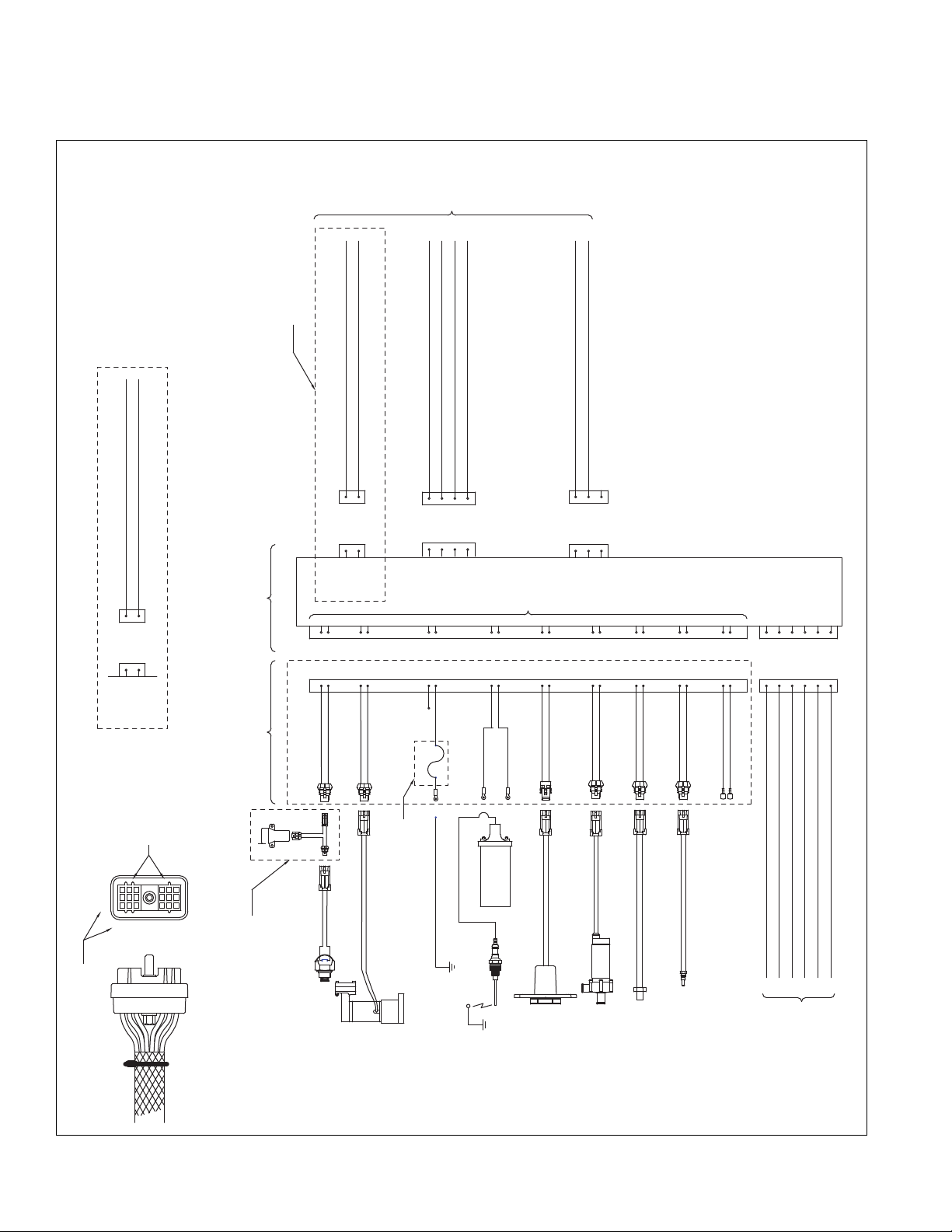
1.2 ELECTRICAL – X45 .................................................................. 1-4
1.3 TORQUE SPECIFICATIONS ........................................................ 1-6
2.0 OPERATING YOUR PROHEAT HEATER..................................... 2-1
3.0 INSTALLATION .......................................................................... 3-1
3.1 LOCATING THE HEATER ........................................................... 3-2
3.1.1 Select Your Location ...................................................... 3-2
3.1.2 General considerations................................................... 3-2
3.1.3 Mounting the Proheat Heater in an Enclosure................... 3-3
3.2 MOUNTING THE HEATER .......................................................... 3-4
3.2.1 Option A – Heater With Enclosure .................................... 3-4
3.2.1 Option B – Heater Without Enclosure ............................... 3-5
3.3 EXHAUST PIPE CONNECTION.................................................... 3-6
3.4 PLUMBING THE SYSTEM.......................................................... 3-7
3.4.1 General Considerations .................................................. 3-7
3.4.2 Option A – Engine Heat or Supplemental Heat .................. 3-8
3.4.3 Option B – Engine and Sleeper Heat ................................ 3-9
3.5 WIRING & ELECTRICAL CONNECTIONS.................................... 3-10
3.5.1 General Considerations ................................................ 3-10
3.5.2 Power Connection to Batteries ...................................... 3-11
3.5.3 Timer Connections (Optional) ........................................ 3-12
3.5.4 On/Off Switch Connections ........................................... 3-13
3.5.5 Sleeper Fan Model Heater Wiring Details ....................... 3-14
3.5.6 Option A – OEM Heater & Proheat Thermostat ................ 3-14
3.5.7 Option B – OEM Heater & Thermostat............................ 3-15
3.5.8 Option C – Auxiliary Sleeper Heater................................ 3-16
3.5.9 Option D – Auxiliary Sleeper Heater Current Limited ........ 3-17
3.5.10 Auxiliary Input Model Heater Wiring Details................... 3-18
3.5.11 Option A –
3.5.12 Option B –
3.5.13 Option C – Standard Mode & Supplemental Mode .........3-20
3.6 FUEL SYSTEM ....................................................................... 3-22
3.6.1 General Considerations ................................................ 3-22
3.6.2 Option A – 1/4" or 1/2" NPT Port ................................. 3-23
3.6.3 Option B – Existing Blank Fuel Sender Cover Plate .......... 3-24
3.6.4 Option C – Hole Drilled into Fuel Tank ............................ 3-24
3.6.5 Installation .................................................................. 3-25
3.7 FIRST TIME STARTUP............................................................. 3-26
Preheat Mode Supplemental Mode Operation
Preheat and Supplemental Mode
................... 3-20
... 3-19
4.0 PRINCIPLES OF OPERATION ................................................... 4-1
4-1 GENERAL DESCRIPTION ........................................................... 4-1
4-2 MODES OF OPERATION ............................................................ 4-5
4.2.1 Standard Mode – All Models ........................................... 4-5
4.2.2 Preheat Mode – Aux Input Models Only ............................ 4-6
4.2.3 Supplemental Mode – Aux Input Models Only ................... 4-7
i
Page 3

5.0 TROUBLESHOOTING & REPAIR .
5.0.1 Troubleshooting a Problem........................................ 5-1
.0.2 Example Proheat Behavior Error – Code 01................. 5-2
5
5-1 OPERATION INDICATORS, FUNCTION & COMPONENT
IAGNOSTICS ................................................................... 5-3
D
5.1.1 Operation Indicators ................................................. 5-4
5.1.2 Function Diagnostics ................................................ 5-5
1 Start ................................................................... 5-5
0
02 Flame Out ......................................................... 5-15
03 Coolant Flow ..................................................... 5-16
04 Overheat ........................................................... 5-17
05 Voltage ............................................................. 5-18
5.1.3 Component Diagnostics................................................ 5-19
06 Flame Sensor.................................................... 5-19
07 Temp Sensor .................................................... 5-21
08 Fuel Pump......................................................... 5-23
09 Compressor ...................................................... 5-23
10 Ignition Coil....................................................... 5-25
11 Coolant Pump ................................................... 5-27
12 Blower .............................................................. 5-30
13 Sleeper Fan ...................................................... 5-32
14 Hour Meter (Auxiliary Output).............................. 5-33
5-2 COMPONENT MECHANICAL OR ELECTRICAL PROBLEMS ........... 5-34
5.2.1 Fuel Nozzle .................................................................. 5-34
5.2.2 Fuel Regulator.............................................................. 5-34
5.2.3 Air Compressor ............................................................ 5-34
5.2.4 Fuel Pump ................................................................... 5-34
5.2.5 Ignition Electrode ......................................................... 5-34
5.2.6 Coolant Pump .............................................................. 5-34
5.2.7 Blower ......................................................................... 5-34
5.2.8 Fuse ........................................................................... 5-35
5-3 OPERATIONAL PROBLEMS ...................................................... 5-37
5.3.1 Smoking exhaust ......................................................... 5-37
5.3.2 Low heat output ........................................................... 5-37
5.3.3 Engine temperature gauge reads low ............................. 5-37
5.3.4 Backfiring .................................................................... 5-37
.............................................. 5-1
6.0 MAINTENANCE.......................................................................... 6-1
6-1 WEEKLY MAINTENANCE ........................................................... 6-1
6-2 ANNUAL MAINTENANCE ........................................................... 6-1
6.2.1 Clean Heater Enclosure and Air Intake ............................. 6-2
6.2.2 Check Exhaust System ................................................... 6-3
6.2.3 Check Heat Exchanger.................................................... 6-3
6.2.4 Clean Flame Sensor ....................................................... 6-4
6.2.5 Check Cooling System .................................................... 6-4
6.2.6 Check Batteries ............................................................. 6-4
6.2.7 Check Fuel System......................................................... 6-5
6.2.8 Check Fuel Filter ............................................................ 6-5
6.2.9 Clean Nozzle.................................................................. 6-6
6.2.10 Replace Compressor Air Filter ....................................... 6-6
6.2.11 Check Electrical System ............................................... 6-7
6.2.12 Check Air Pressure ....................................................... 6-8
6.2.13 Check
Modes of Operation – Switch, Timer or OEM Signals
.. 6-8
7.0 APPENDICES ............................................................................ 7-1
Bulletins 951528, 967329, SB0003, PB0034, SB0062
8.0 WARRANTY ............................................................................... 8-1
ii
PROHEAT INSTALLATION & SERVICE
Page 4

A.
SAFETY
Throughout this manual, you will see notes labeled DANGER, WARNING,
CAUTION and NOTICE to alert you to special instructions or precautions
concerning a particular procedure that would be hazardous if performed
incorrectly or carelessly.
Observe them carefully!
These safety alerts alone cannot eliminate all hazards. Strict compliance
with these special instructions and common sense are major accident
prevention measures.
DANGER
Immediate hazards that will result
in severe injury or death.
WARNING
Hazards or unsafe practices that
could result in severe personal
injury or death.
CAUTION
Hazards or unsafe practices that
could result in minor injury or
product or property damage.
NOTICE
Information that is important to
proper installation or maintenance,
but is not hazard-related.
SECTION A. SAFETY
A-1
Page 5

SAFETY CONSIDERATIONS
WARNING
WARNING
WARNING
WARNING
WARNING
WARNING
Exhaust
Inhalation of exhaust gas (containing carbon monoxide) may cause severe personal
injury and/or death. Anyone suspected of suffering from CO inhalation should be
removed from the hazardous area and given medical assistance immediately.
Explosion Hazard
Do not operate heater where combustible fumes or airborne particles, such as sawdust, are present.
Fuel
Exercise extreme caution when working near fuel or fuel-filled equipment. Do not
operate heater during fueling operations. In addition, do not smoke or handle open
flame equipment, such as a blowtorch, around fuel.
Fire Hazard
Do not place any flammable items around the heater and exhaust pipe.
Batteries
Wear hand and eye protection when working near batteries. Do not smoke or use open
flames near batteries.
Electrical
Electric shock can cause severe personal injury, burns, and death. Before working on
any unit, disconnect the batteries. Use only approved materials and methods when
working on the electrical system and follow local electrical codes. Never work with
electricity in wet conditions or when you are feeling fatigued.
WARNING
WARNING
WARNING
DANGER
Poisons/Toxins
Fuel and coolant are toxic and in some cases, carcinogenic. Wear eye and hand
protection at all times. Remove contaminated clothing immediately and wash
contaminated skin. Do not breathe in vapors.
Moving/Hot Parts
Moving/hot parts can cause severe injury and or death. Before working on any unit,
shut it off. Do not operate any unit until protective covers have been replaced. Always
ensure bolts and clamps are correctly torqued and secured. Inspect mechanical components periodically for damage and corrosion.
Coolant
Never remove the filler cap when the engine is hot – escaping steam or scalding water
could cause serious personal injury. The coolant level in the expansion tank should be
checked at least weekly (more frequently in high mileage or arduous conditions). Always
check the level when the system is cold. Unscrew the filler cap slowly, allowing the
pressure to escape before removing completely. Never run the engine without coolant.
Prevent anti-freeze coming in contact with the skin or eyes. If this occurs, rinse
immediately with plenty of water. Anti-freeze will damage painted surfaces.
Never top-up with salt water. Even when travelling in territories where the water supply
contains salt, always ensure you carry a supply of fresh (rain or distilled) water.
California Proposition 65 Warning
Do not operate heater in garages or in other closed or unventilated areas.
Diesel exhaust and some of its constituents are known to the State of California to
cause cancer, birth defects, and other reproductive harm.
Electrical components in this product may contain lead, a chemical known to the
State of California to cause cancer and birth defects and other reproductive harm.
A-2
PROHEAT INSTALLATION & SERVICE
Page 6
INTRODUCTIONB.
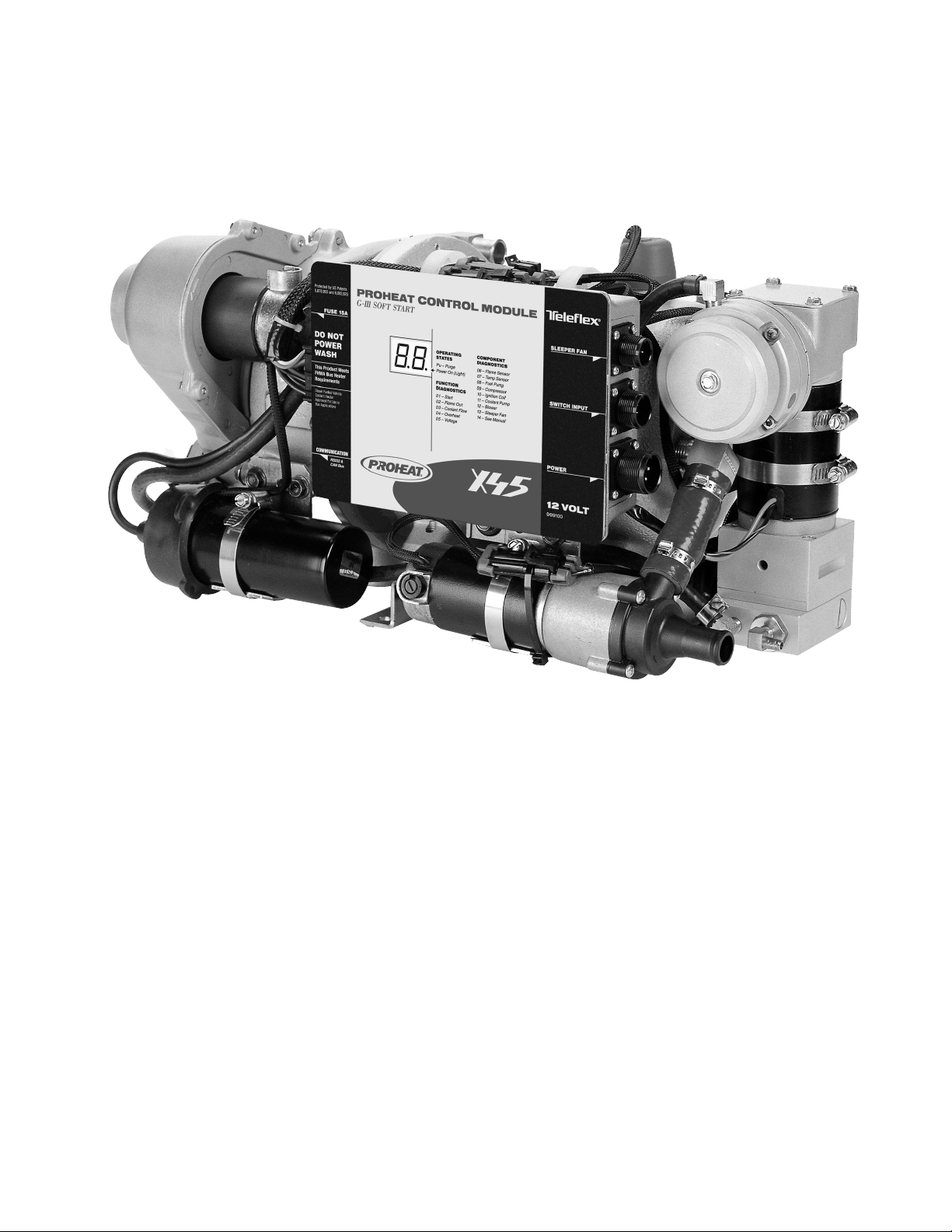
PROHEAT Model X45
This manual is provided to assist an authorized PROHEAT
dealer to install and service a PROHEAT heater. Although
trucks have been used in the examples, applications for
PROHEAT are by no means limited to trucks. PROHEAT
heaters are designed to be used on any diesel equipped
vehicle including: trucks, buses (school, transit and coach),
construction equipment, off road equipment, military
equipment and cargo.
PROHEAT heaters are used in the following applications:
(1) Engine Block Heat – PROHEAT will preheat an engine
block to ensure reliable starting in cold weather. At
the same time it may be used throughout the year to
reduce the wear associated with cold starts.
(2)
Cab or Sleeper Heat (engine off) – PROHEAT will supply
heat to the cab or sleeper. Drivers can sleep in comfort
not only in the cold of winter but also in the spring
and fall when the weather is miserable. Substantial
savings through reduced fuel consumption and engine
wear can be obtained by not idling the engine.
(3)
Supplemental Heat (engine running) – as the efficiency
of modern diesel engines are improved there is no
longer adequate reject heat available to heat the
vehicle’s interior. This is particularly true for buses.
PROHEAT can be used while the vehicle is operating
to provide supplemental heat for the interior.
(4) Cargo Heat – PROHEAT can be used to provide heat to
protect valuable cargo such as produce or beverages
from damage due to freezing.
(5) Marine – Marine applications typically involve the
engineering and installation of a complete hot-water
heating system of which PROHEAT is only one
component. Proheat recommends that only an
expert in marine hot-water heating systems install a
PROHEAT on a boat. It is the installer’s responsibility
to ensure that the installation complies with all
applicable regulations.
SECTION B. INTRODUCTION
B-1
Page 7

B-2
PROHEAT INSTALLATION & SERVICE
Page 8
C.
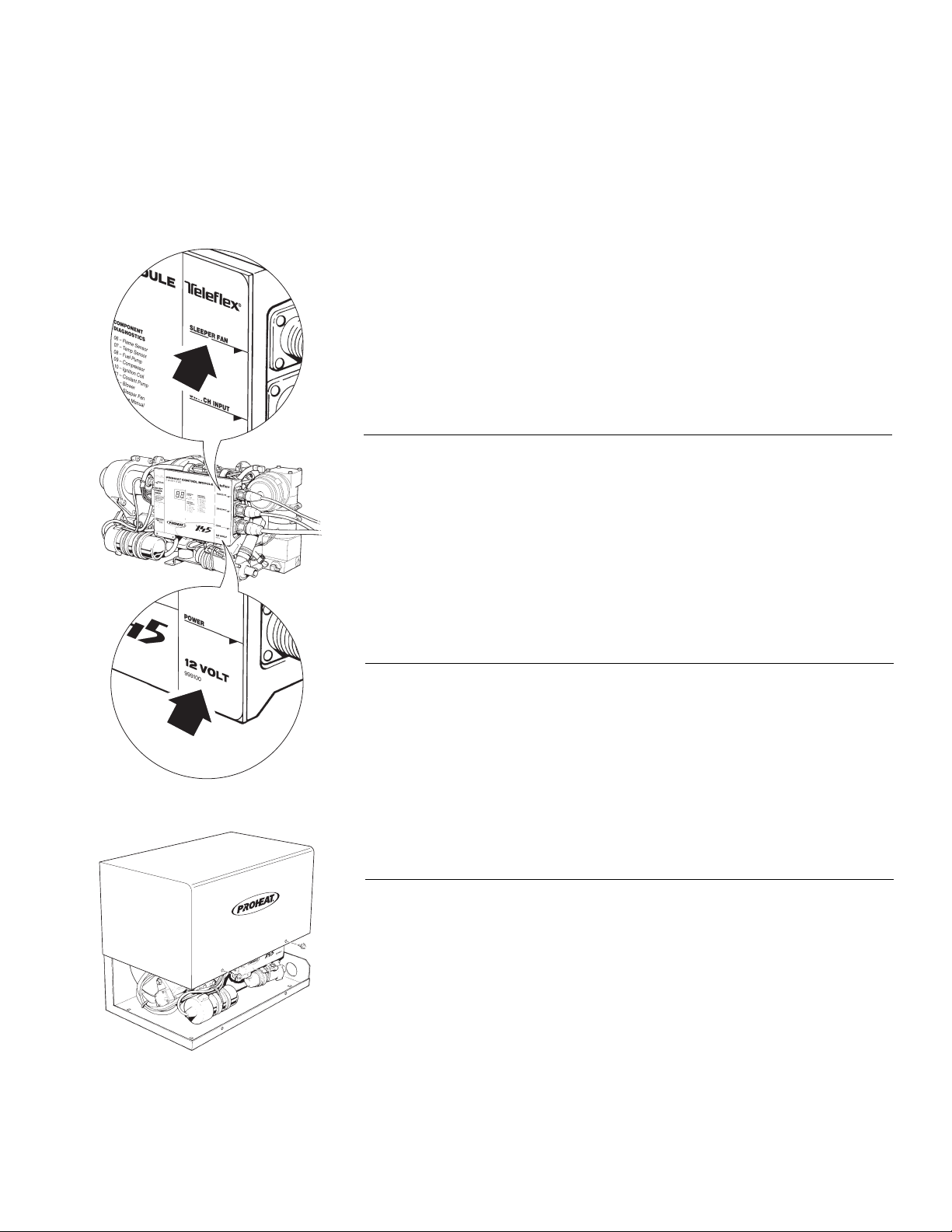
Sleeper Fan Output or Auxiliary Input
Identification.
MODEL DESCRIPTIONS
This manual covers all models of PROHEAT X45. Please refer to the X45 Parts
Book at www.proheat.com for detailed part descriptions and part numbers.
Included in the parts book are optional features such as a timer, sleeper fan
ontrol kit, impact switch (for school bus applications) and associated
c
installation and maintenance tools.
The following information describes the three general characteristics of X45
models covered in this manual: voltage, enclosure and Proheat Control Module
(PCM) options.
PROHEAT CONTROL MODULE (PCM): SLEEPER FAN
OUTPUT OR AUXILIARY INPUT
The PCM comes in either a sleeper fan output or auxiliary input model. The
sleeper fan model is limited to a 3 amp output and is generally installed on
trucks that require sleeper fan power (it is only available on 12 V models).
The
Auxiliary
Mode and Supplemental Mode. This operation is typically used for transit and
coach installation. Refer to page 4-2 for more information.
Input model uses two special input pins that allow for a Preheat
Voltage Identification.
VOLTAGE CONFIGURATION: 12 V OR 24 V
The X45 is available in either a 12 V or 24 V models.
ENCLOSURE
An optional enclosure provides environmental protection.
SECTION C. MODEL DESCRIPTIONS
C-1
Page 9

C-2
PROHEAT INSTALLATION & SERVICE
Page 10
1.0
TECHNICAL
SPECIFICATIONS
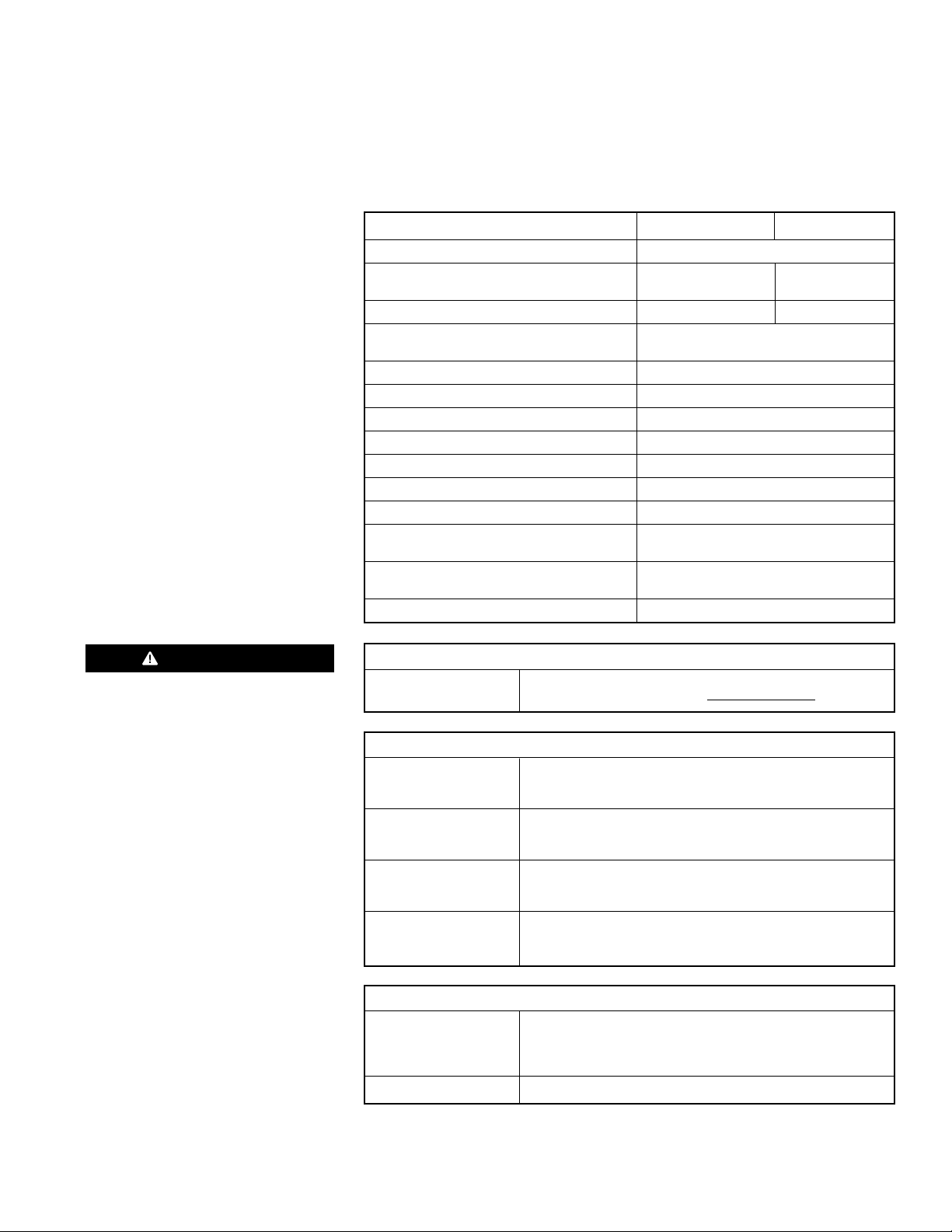
X45 12V X45 24V
RATING 45,000 BTU (13 kW)
YSTEM VOLTAGE 10 –15 VDC 20 – 30 VDC
S
ominal Voltage Range
N
CURRENT DRAW 7.5 Amps 3.75 Amps
FUEL CONSUMPTION
(Average to Maximum) 0.1 – 0.45 gal/hr. (0.4 – 1.7 L/hr.)
COOLANT FLOW 8.0 gal/min. (30 L/min.)
COOLANT TEMPERATURE (at Heater) 150°F to 185°F (65°C to 85°C)
OPERATING TEMPERATURE RANGE -40°F to +122°F (-40°C to +50°C)
IGNITION TYPE Electronic Spark Ignition
HEAT EXCHANGER CAPACITY 1 quart (0.95 L)
WEIGHT Heater ONLY 40 lbs (18 Kg)
WEIGHT Heater with Enclosure 55 lbs (25 Kg)
DIMENSIONS – HEATER (L x W x H) 18.9 x 11.2 x 10.6 inches
DIMENSIONS – ENCLOSURE (L x W x H) 20.2 x 12.3 x 10.5 inches
WARRANTY Two years parts and labor
(520 x 320 x 280 mm)
(513 x 313 x 267 mm)
DANGER
DO NOT use gasoline.
FUEL TYPES
COMPATIBLE Diesel (ULSD, #1, #2, Arctic), JP8, Jet A1
Bio Fuels – Contact Proheat www.proheat.com
SYSTEM OUTPUTS
HOUR METER Same as System Voltage
(AUXILIARY OUTPUT) Maximum 1 Amp draw (over-load shut-off protection)
High-side switched
SWITCH/TIMER Same as System Voltage
POWER Maximum 1 Amp draw (over-load shut-off protection)
High-side switched
SLEEPER FAN Same as System Voltage
(Certain Models Only) Maximum 3 Amp draw (over-load shut-off protection)
High-side switched
INDICATOR LIGHT Same as System Voltage
Maximum 1 Amp draw (over-load shut-off protection)
High-side switched
SYSTEM INPUTS
SWITCH 10 – 15 VDC (12V X45) | 20 – 30 VDC (24V X45)
Standard Run Mode
Preheat Run Mode (Certain Models Only)
Supplemental (Certain Models Only)
POWER 12 VDC or 24 VDC
SECTION 1. TECHNICAL SPECIFICATIONS
1-1
Page 11
O
A
L
I
T
T
R
L
L
D
N
A
L
E
I
,
E
R
E
S
O
T
N
R
HEATERMODELNo:..........
SERIALNo:
MadeinCanadabyTeleexCanada Ltd Richmond B.C.
OPERATINGVOLTAGE:...10-16VOLTS
HEATOUTPUT:.............
PRESSURE:..............
MAX.OPERATING
FUELTYPE:...................
******
915822
9.0kW(KBTU)
2BAR(29PSI)
DIESELFUEL
X-4512V
POWER
G-IIISOFT START
PROHEATCONTROL MODULE
FUSE15A
SWITCHINPUT
SLEEPERFAN
ThisProductMeets
FHWABusHeater
Requirements
DieselFueledVechicle
CoolentHeater
ApprovedforUsein
BusApplications
12VOLT
999100
COMMINICATION
RS232&
CANBus
DONOT
POWER
WASH
ProtectedbyUSPatents
5,878,950and6,082,625
1.5 I.D.
C EXHAUST
PORT
L
Ø1.5" [38]
4.9" [125]
1.9" [49]
8.7" [222]
1.3" [33]
1.6" [41]
10.6" [270]
4.0" [101]
1.3" [34]
10.1" [258]
11.2" [285]
4.4" [112]
4X 0.38" [10]
MOUNTING HOLES
STANDARD EXHAUST PIPE
SEE NOTE 1
5.5" [140]
9.4" [239]
COOLANT OUTLET
TOP VIEW
COOLANT INLET
C EXHAUST
PORT
L
NOTES:
1/ REFER TO X45 PARTS BOOK SL9070 FOR PART
NUMBER IDENTIFICATION
2/ DIMENSIONS ARE FOR REFERENCE PURPOSES ONLY
AND SUBJECT TO CHANGE WITHOUT NOTICE
AUXILIARY MOUNTING PLATE
SEE NOTE 1
18.9" [479]
C EXHAUST
PORT
L
5.1" [129]
C EXHAUST
PORT
L
COOLANT OUTLET
CONNECTION3/4" [19]
ID HOSE1/2" NPT
HOSE FITTINGSEE
NOTE 1
FUEL SUPPLY
CONNECTION
3/16" [48] ID HOSE
SEE NOTE 1
COOLANT INLET
CONNECTION
3/4" [19] ID HOSE
LEFT SIDE VIEW
FRONT VIEW
RIGHT SIDE VIEW
AUXILIARY MOUNTING PLATE - SEE NOTE 1
TOP VIEW
MOUNT HOLE DIMENSIONS
2X 5.5" [140]
2X 7.5" [191]8.50" [216]
6.40" [163]
THIS SPACE
IS REQUIRED FOR
COMBUSTION TUBE REMOVAL
11.2" [284]
10.2" [259]
5.5" [140]
THIS SPACE
IS REQUIRED FOR
COMBUSTION TUBE REMOVAL
2.0" [50]
1.1
PHYSICAL – X45
X45 HEATER1.1.1
Figure 1-1 Heater Dimensions – X45
1-2
PROHEAT INSTALLATION & SERVICE
Page 12
POWER
G-IIISOFT START
PROHEATCONTROL MODULE
FUSE15A
SWITCHINPUT
SLEEPERFAN
ThisProductMeets
FHWABusHeater
Requirements
DieselFueledVechicle
CoolentHeater
ApprovedforUsein
BusApplications
12VOLT
999100
COMMINICATION
RS232&
CANBus
DONOT
POWER
WASH
ProtectedbyUSPatents
5,878,950and6,082,625
O
A
L
I
T
T
R
L
L
D
N
A
L
E
I
E
R
E
S
O
T
N
R
HEATERMODELNo:..........
SERIALNo:
MadeinCanadabyTeleexCanadaLtd Richmond B.C.
OPERATINGVOLTAGE:...XX-XXVOLTS
HEATOUTPUT:.............
PRESSURE:..............
MAX.OPERATING
FUELTYPE:...................
******
XXXXXX
9.0kW(KBTU)
2BAR(29PSI)
DIESELFUEL
X-45XXV
COOLANT INLET
CONNECTION
3/4" [19] ID HOSE
COOLANT OUTLET CONNECTION
3/4" [19] ID HOSE
1/2" NPT HOSE FITTING
SEE NOTE 1
TOP VIEW
ENCLOSURE LID REMOVED
FUEL SUPPLY
CONNECTION
1/4" [48] ID HOSE
SEE NOTE 1
9.9" [252]
2X 1.4" [36]
FRONT VIEW
ENCLOSURE LID REMOVED
LEFT SIDE VIEW
ENCLOSURE LID REMOVED
RIGHT SIDE VIEW
ENCLOSURE LID REMOVED
ENCLOSURE COVER
FRONT VIEW
ENCLOSURE COVER
LEFT SIDE VIEW
20.2" [513]
10.5" [267]
20.0" [508]
10.5" [267]
12.0" [305]
8.5" [216]
ENCLOSURE COVER
RIGHT SIDE VIEW
12.3" [313]
3.8" [97]
2X 1.20" [30]
7.1" [181]
12.0" [305]
10.5" [267]
3.6" [92]
3.6" [92]
THIS SPACE
IS REQUIRED FOR
COMBUSTION
TUBE REMOVAL
ASSEMBLED
ENCLOSURE
NOTES:
1/ REFER TO X45 PARTS BOOK SL9070 FOR PART
NUMBER IDENTIFICATION
2/ DIMENSIONS ARE FOR REFERENCE PURPOSES ONLY
AND SUBJECT TO CHANGE WITHOUT NOTICE
X45 WITH ENCLOSURE1.1.2
Figure 1-2 Heater Dimensions including Enclosure – X45
SECTION 1. TECHNICAL SPECIFICATIONS
1-3
Page 13
FUEL PUMP
COMPRESSOR
ELECTRODE
IGNITION
BLOWER
PUMP
FLAME
TEMPERATURE
SENSOR
SENSOR
COOLANT
B (-)BLACK/BLUE
HOUR METER (AUXILIARY OUTPUT)
12V/24V 1A MAX.
P5
COMMUNICATION
CANBUS AND
RS232
E
F
E
F
(+)RED/WHITE
(-)GREEN/WHITE
A
B
BCA
D
BCA
D
E1
F1
(-)BROWN
(-)BLACK/WHITE
(+)GRAYA
A
B
B
(+)WHITE
B
A
B
A
F3
E3
F2
E2
P1
POWER
C
C
A
B
B
A
HEATER CHASIS GROUND LUG
(GROUND VIA
COMBUSTION TUBE)
IGNITION
COIL
OVERHEAT SENSOR
D1
(-)BLACK
(+)PURPLE
(-)BLACK/PURPLE
B
(+)BLUE
B
A
A
A
B
A
B2
A2
B3
A3
(+)RED
D2
C3
P5
HEATER
INTERNAL
HARNESS
P2
SWITCH
C
C
D
D
B
A
A
B
(-)BLACK/ORANGE
(+)ORANGE
A
B
B
A
(-)PINK
(+)PINK
B
A
A
B
PLUGGED
C1
A1
B1
C2
D3
P3
SLEEPER
FAN
A
A
B
B
CONNECTOR TERMINAL
DESIGNATORS
NOTE ORIENTATION
OF CONNECTOR LUGS
(+) RED - BATTERY POSITIVE 12V/24V
(-) BLACK - BATTERY NEGATIVE
PLUGGED - NOT USED
(+) RED - POWER 12V/24V OUTPUT
(-) BLACK - GROUND
GREEN - ON SIGNAL STANDARD MODE 12V/24V INPUT
(+) WHITE - INDICATOR LAMP 12V/24V OUTPUT
(+) RED - POWER 12V/24V (3 AMP LIMIT) OUTPUT
(-) BLACK - GROUND
CAN - H
RS232 - GROUND
CAN - SHIELD
RS232 - TRANSMIT
CAN - L
RS232 - RECEIVE
E1
F1
F3
E3
F2
E2
A2
B3
D1
B2
A3
D2
C2
D3
A1
B1
C1
C3
NOTES:
1/ REFER TO X45 PART BOOK SL9070 FOR PART
NUMBER IDENTIFICATION
(+)PINK
A
B
(-)PINK
(+)ORANGE
A
(-)BLACK/ORANGE
B
(+)
(-)
(+)PURPLEA
(-)BLACK/PURPLE
B
(+)BLUEA
(-)BLACK/BLUEB
(+)BROWNA
(-)BROWNB
(+)WHITEA
(-)BLACK/WHITEB
P3
AUXILIARY
INPUT
A
B
ON SIGNAL PREHEAT MODE 12V/24V INPUT
ON SIGNAL SUPPLEMENTAL MODE 12V/24V INPUT
A
B
SEE DETAIL A FOR
AUXILIARY INPUT OPTION
DETAIL A
AUXILIARY INPUT OPTION
SEE NOTE 1
OPTIONAL IMPACT SWITCH
SEE NOTE 1
A
B
A
B
C
SEE NOTE 1
FOR HARNESS
PART NUMBERS
SEE NOTE 1
FOR HARNESS
PART NUMBERS
OPTIONAL GROUND FUSE
SEE NOTE 1
(-)BLACK/GREEN
SLEEPER FAN PCM SHOWN
SEE NOTE 1
HEATER INTERNAL HARNESS
SEE NOTE 1
10 A
1 2 3
A
BCD
E
F
A
B
C
D
E
F
HEATER INTERNAL HARNESS
18 PIN CONNECTOR PIN OUT DETAIL
1.2
ELECTRICAL – X45
Figure 1-3 Wiring Diagram – X45
1-4
PROHEAT INSTALLATION & SERVICE
Page 14
PROHEAT CONTROL MODULE
G-III SOFT START
5,878,950and 6,082,625
Protectedby US Patents
WASH
POWER
DO NOT
COMMINICATION
BusApplications
ApprovedforUse in
CoolentHeater
DieselFueledVechicle
Requirements
FHWABus Heater
ThisProduct Meets
CANBus
RS232&
FUSE 15A
999100
SLEEPER FAN
12 VOLT
SWITCHINPUT
POWER
P1 - POWER
3 PIN
P2 - SWITCH
4 PIN
P3 - SLEEPER FAN OUTPUT
OR AUXILIARY INPUT
2 PIN
SEE NOTE 1
P4 - COMMUNICATION
CANBUS AND
RS232 6 PIN
FUSE 15 A
SEE NOTE 1
P5 - HEATER
INTERNAL
HARNESS
18 PIN
PROHEAT CONTROL MODULE (PCM)
SEE NOTE 1 FOR PART NUMBER OPTIONS
1A
1B
1C
2A
2B2C
2D
3A3B
DETAIL B
DETAIL B
P1 - P3 CONNECTOR PIN OUT DETAIL
DETAIL C
2
3
1
CONNECTOR TERMINAL
DESIGNATORS
NOTE ORIENTATION
OF CONNECTOR LUGS
DETAIL C
P5 CONNECTOR PIN OUT DETAIL
ABC
DFE
CONTROLLER VOLTAGE AND
PART NUMBER IDENTIFICATION
SEE NOTE 1
SLEEPER FAN OR AUX INPUT MODEL
IDENTIFICATION - SEE NOTE 1
4A
4B
4C
4D
4E
4F
DETAIL D
DETAIL D
P4 CONNECTOR PIN OUT DETAIL
NOTES:
1/ REFER TO X45 PART BOOK SL9070 FOR PART
NUMBER IDENTIFICATION
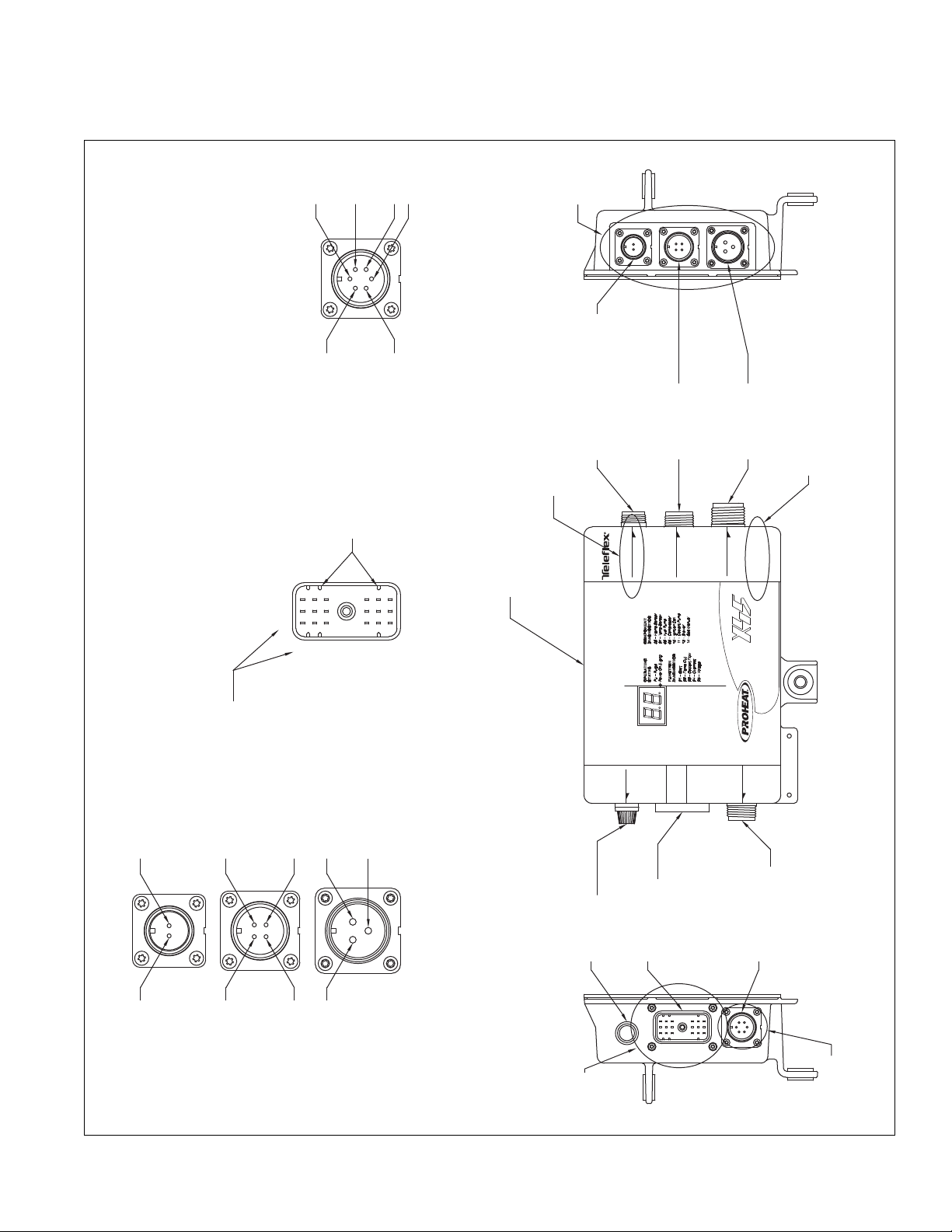
Figure 1-4 PCM Electrical Connections – X45
SECTION 1. TECHNICAL SPECIFICATIONS
1-5
Page 15
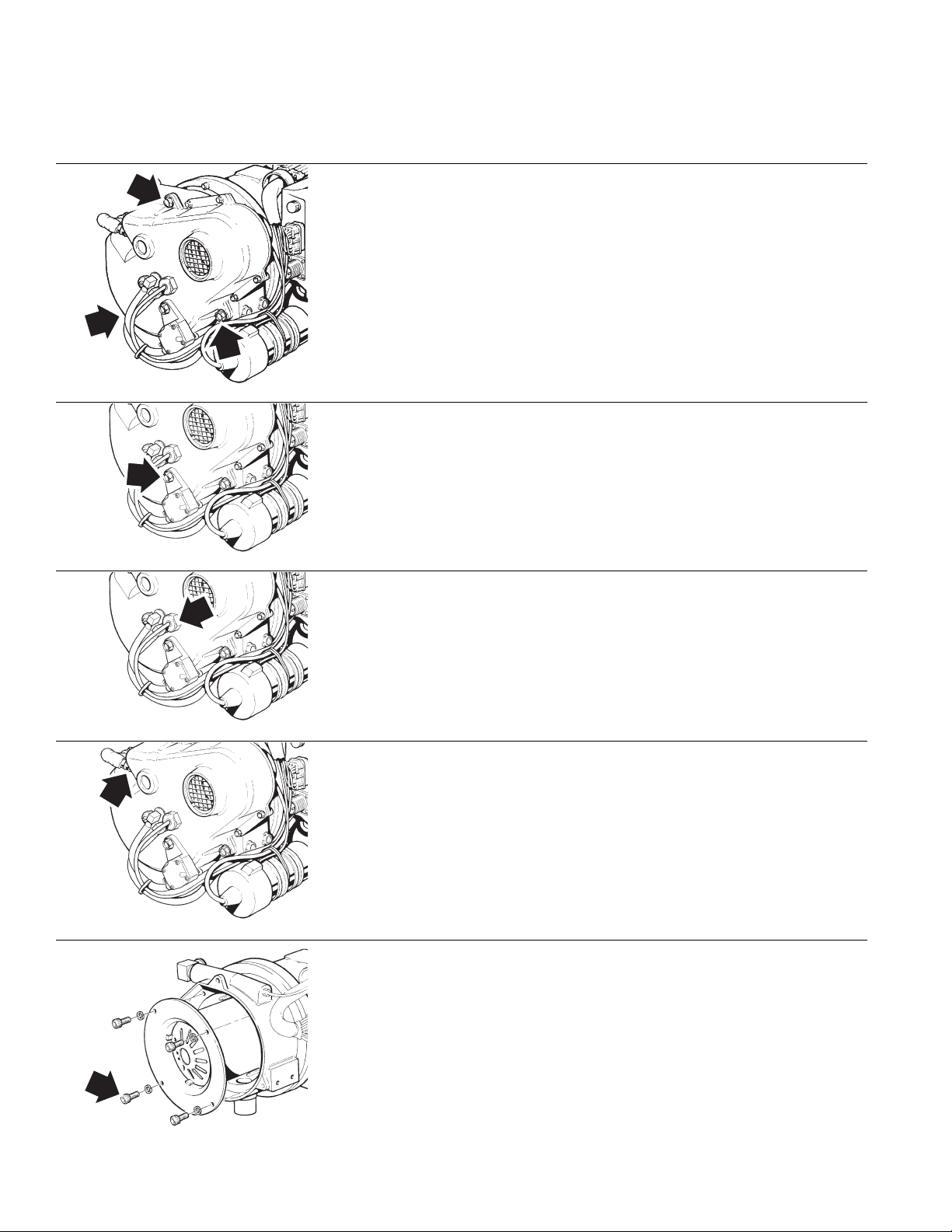
TORQUE SPECIFICATIONS1.3
FAN END CASTING
Apply anti-seize to bolts (3)
•
• Torque bolts (3) to 75±5 in/lbs (8.5±0.5 Nm)
REGULATOR
• Apply anti-seize to cap screw
• Torque cap screw to 94±6 in/lbs (10.6±0.7 Nm)
FLAME SENSOR
• Torque sensor to 25±3 in/lbs (2.8±0.3 Nm)
IGNITER
• Apply anti-seize to igniter threads
• Ensure gasket is present before installing
• Torque igniter to 50±5 in/lbs (5.6±0.6 Nm)
COMBUSTION TUBE
• Apply anti-seize to cap screws
• Torque cap screws (4) to 25±3 in/lbs (2.8±0.3 Nm)
1-6
PROHEAT INSTALLATION & SERVICE
Page 16
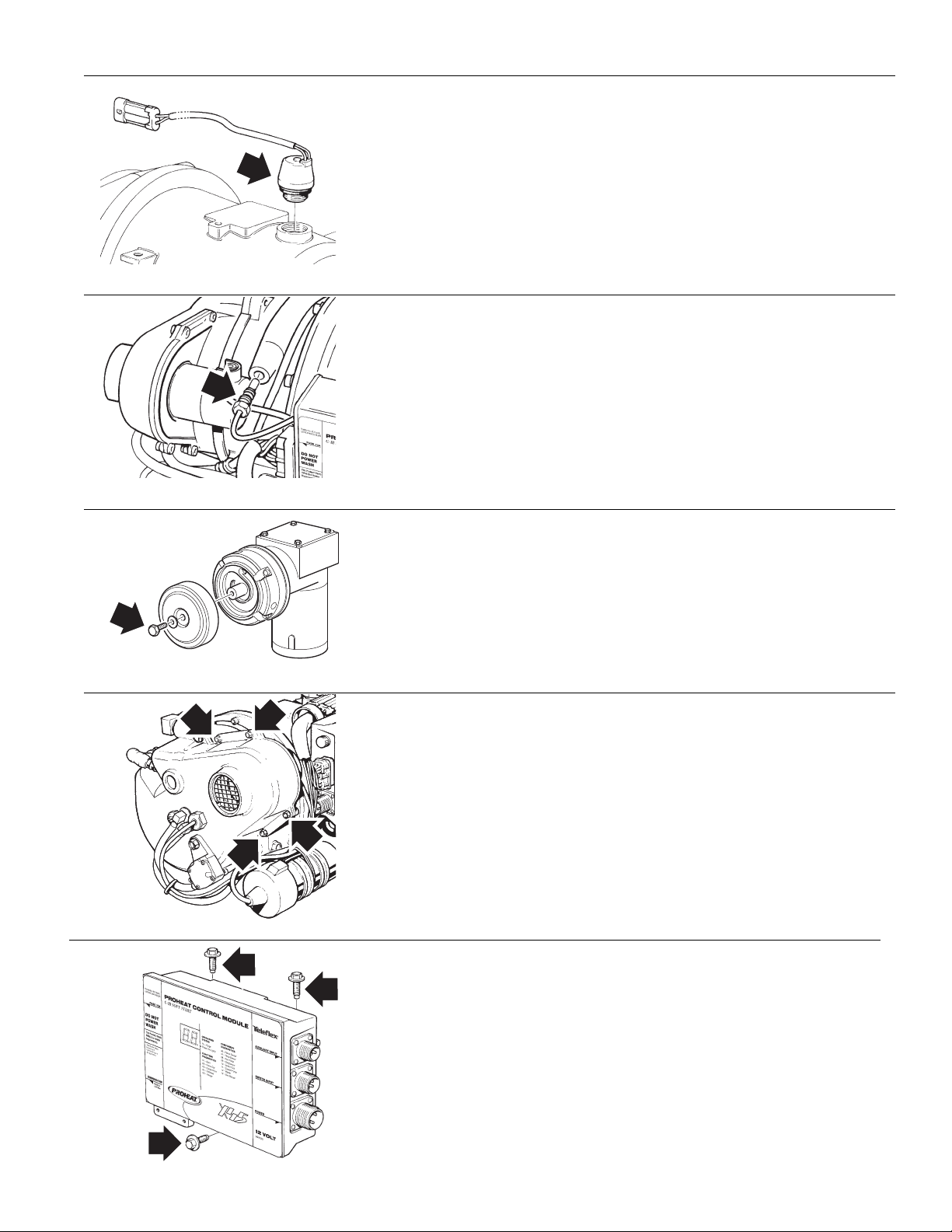
OVERHEAT SENSOR
• Lubricate o-ring with o-ring lubricant
• Torque senor to 500±50 in/lbs (56±5.6 Nm)
TEMPERATURE SENSOR
• Lubricate o-ring with o-ring lubricant
• Torque senor to 25±3 in/lbs (2.8±0.3 Nm)
AIR FILTER
• Torque cap screw to 50±5 in/lbs (5.6±0.6 Nm)
SECTION 1. TECHNICAL SPECIFICATIONS
BLOWER ASSEMBLY
• Apply anti-seize to bolts (4)
• Torque bolts (4) to 25±3 in/lbs (2.8±0.3 Nm)
PROHEAT CONTROL MODULE (PCM)
• Apply anti-seize to bolts (3)
• Torque bolts (3) to 75±7 in/lbs (8.5±0.8 Nm)
1-7
Page 17
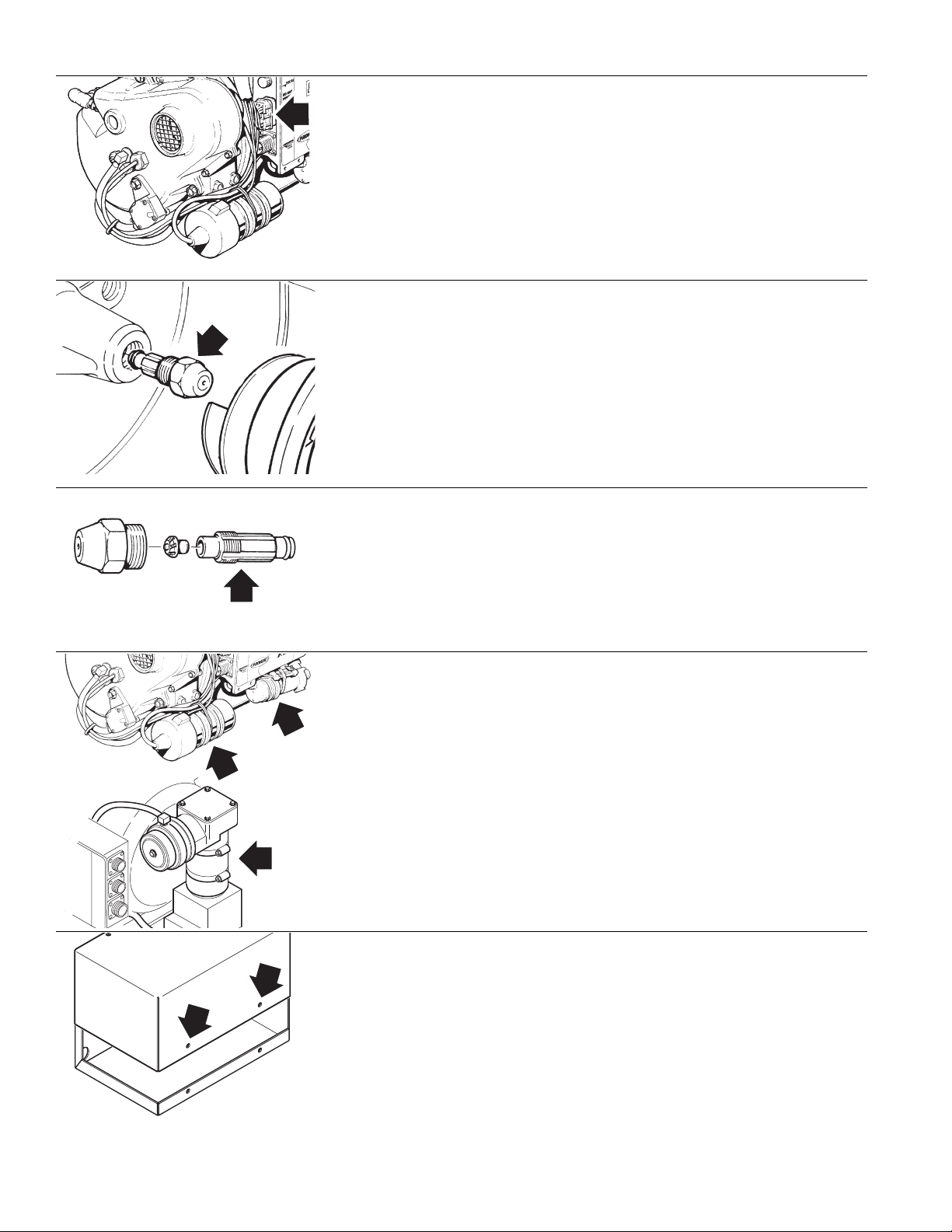
MAIN INTERNAL HARNESS
• Torque bolt (1) to 10±2 in/lbs (1.1 +/- 0.2)
NOZZLE TO FAN END
• Lubricate o-ring on nozzle with diesel
• Torque nozzle to 150±10 in/lbs (17±1.1 Nm)
NOZZLE REASSEMBLY
• Torque nozzle (1) to 30±3 in/lbs (3.4±0.3 Nm)
BAND CLAMPS
• Torque clamps (4) to 25±3 in/lbs (2.8±0.3 Nm)
ENCLOSURE LID (Optional)
• Anti-seize recommended on bolts
• Torque clamps (2) to 30±3 in/lbs (3.4±3.4 Nm)
1-8
PROHEAT INSTALLATION & SERVICE
Page 18
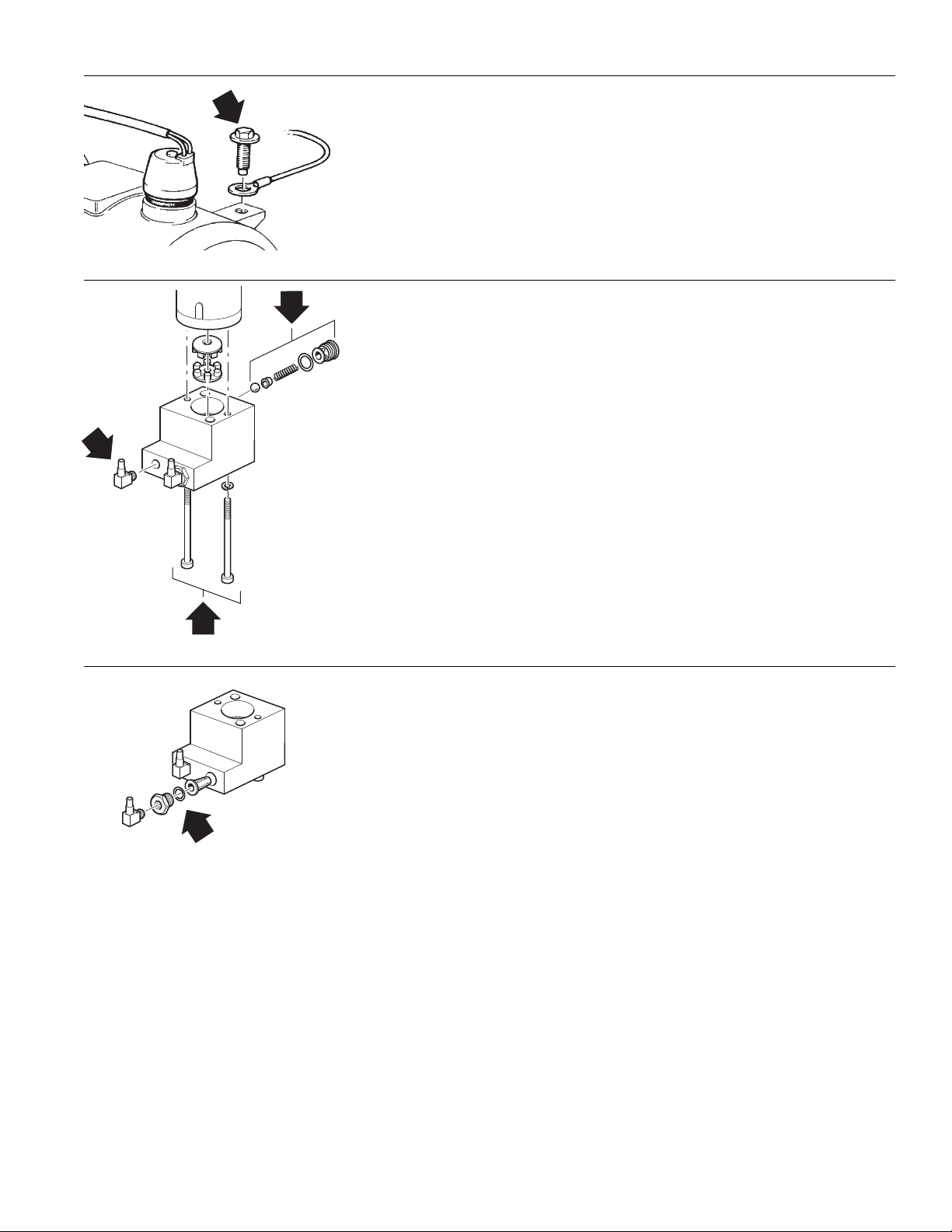
HARNESS GROUND LUG
A
B
C
• Apply anti-seize to bolt
• Torque bolt (1) to 75±5 in/lbs (8.5±0.5 Nm)
FUEL PUMP ASSEMBLY
A
• Apply Loctite 242 to threads
• Torque bolts (2) to 25±3 in/lbs (2.8±0.3 Nm).
B
• Lubricate o-ring with diesel fuel
• Torque relief valve to 22±2 in/lbs (2.5±0.2 Nm).
C
• Apply Loctite 59241 sealant to threads
• Torque elbow (1) to 55±5 in/lbs (6.2±0.5 Nm) minimum or until
elbow is at correct orientation
FUEL FILTER
• Lubricate o-ring with diesel fuel
• Torque nut (1) to 150±10 in/lbs (17±1.1 Nm)
SECTION 1. TECHNICAL SPECIFICATIONS
1-9
Page 19

1-10
PROHEAT INSTALLATION & SERVICE
Page 20

2.0
OPERATING YOUR
PROHEAT HEATER
NOTICE
These instructions cover Standard
Mode operation that are normally
installed on trucks. To operate your
heater in Preheat or Supplemental,
refer to page 3-18 to page 3-20 and
page 4-6 to page 4-7.
NOTICE
Regular use of your PROHEAT
throughout the year will improve
its reliability. Weekly operation is
recommended.
NOTICE
The PROHEAT heater can be
operated by either using a toggle
switch or a 7 day timer.
Refer to page 3-10 for WIRING &
ELECTRICAL CONNECTIONS.
ENGINE HEAT ONLY
1. Switch the ON/OFF switch located in the vehicle dash to “ON.”
The switch will light and the heater will cycle on. It will continue to operate until
the coolant reaches 185˚F (85˚C) at the heater outlet and then cycle “OFF.”
When the coolant temperature falls below 150˚F (65˚C) at the heater
outlet, it will refire and repeat the cycle.
It will continue to cycle until:
a) the heater is switched “OFF,”
b) the heater runs out of fuel,
c) the vehicle battery voltage drops below 10.0 Volts, or
d) an error occurs and the switch light flashes
(See Troubleshooting & Repair, Section 5)
NOTE: The PROHEAT may be operated if the engine is running or not running.
2. When engine preheat is no longer required, switch the PROHEAT heater
“OFF.”
ENGINE AND SLEEPER HEAT
1. Switch the ON/OFF switch located in the vehicle dash to “ON.”
The switch will light and the heater will cycle on. It will continue to operate until
the coolant reaches 185˚F (85˚C) at the heater outlet and then cycle “OFF.”
When the coolant temperature falls below 150˚F (65˚C) at the heater
outlet, it will refire and repeat the cycle.
It will continue to cycle until:
a) the heater is switched “OFF,”
b) the heater runs out of fuel,
c) the vehicle battery voltage drops below 10.0 Volts, or
d) an error occurs and the switch light flashes
(See Troubleshooting & Repair, Section 5)
SECTION 2. OPERATING YOUR PROHEAT HEATER
NOTE: The PROHEAT may be operated if the engine is running or not running.
2. For sleeper heat – set the thermostat in the sleeper to the desired
temperature. If the set temperature is higher than the temperature in the
sleeper the fan will cycle “ON.” When the air reaches the set temperature
the fan will cycle “OFF.” The fan will cycle “ON” and “OFF” to maintain the
set temperature.
3. When engine and/or sleeper preheat is no longer required, switch the
PROHEAT heater “OFF.”
2-1
Page 21

2-2
PROHEAT INSTALLATION & SERVICE
Page 22
3.0
®
®
INSTALLATION
NOTICE
If additional installation information is
required
Dealer regarding your specific
application.
For more technical information,
please contact PROHEAT Product
Support at www.proheat.com
please contact your PROHEAT
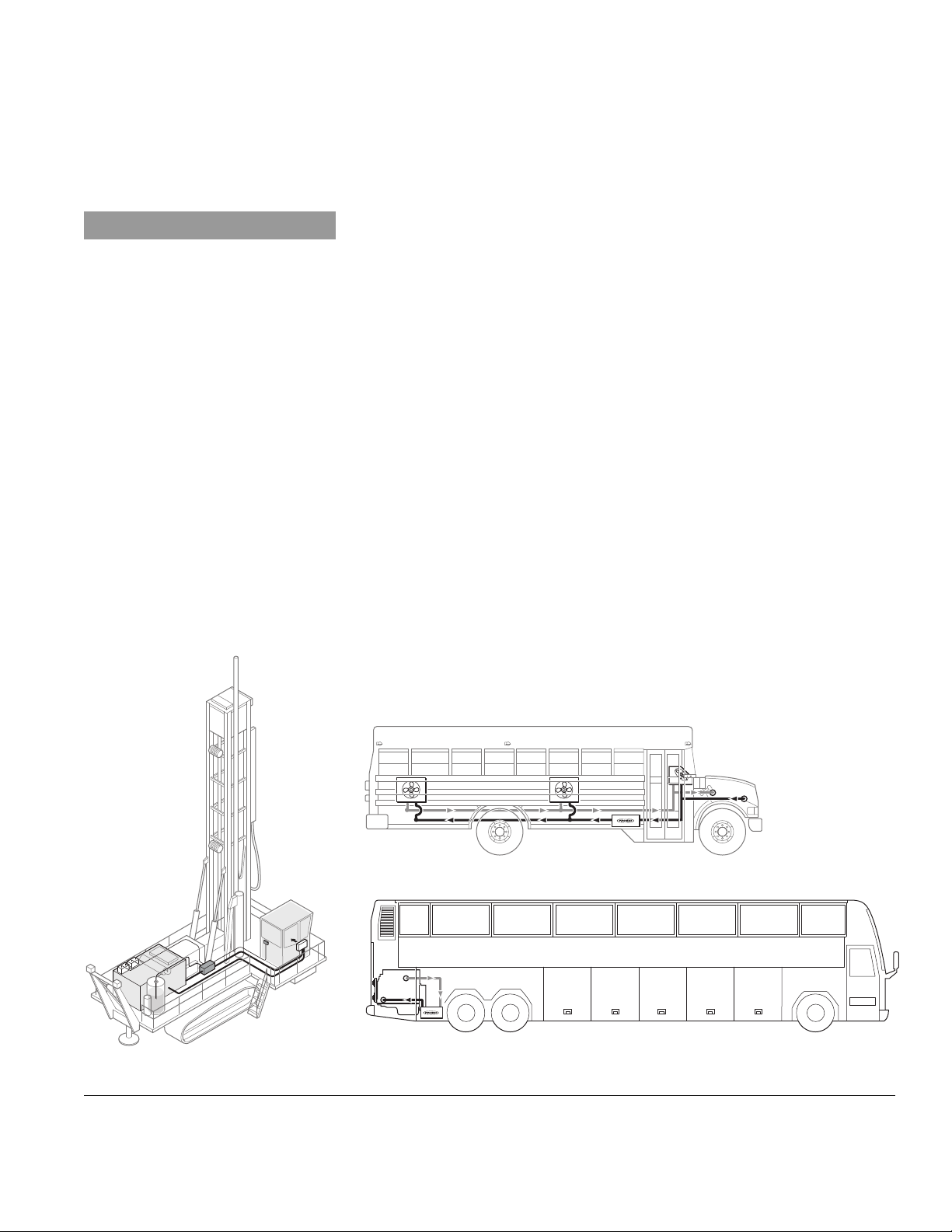
The installation details described in this manual focuses on truck applications
and does not cover all of the possible installations. As seen in the figures
below, the PROHEAT X45 is installed on a variety of equipment including
trucks, school buses, coaches, drill rigs, mine dump trucks and excavators.
In these cases the manual should be used as a guideline only.
There are seven major steps that must be completed to successfully install
the PROHEAT heater.
3.1 LOCATING THE HEATER......................................................... page 3-2
3.2 MOUNTING THE HEATER ....................................................... page 3-4
3.3 EXHAUST PIPE CONNECTION ................................................. page 3-6
3.4 PLUMBING THE SYSTEM....................................................... page 3-7
3.5 WIRING & ELECTRICAL CONNECTIONS ................................. page 3-10
3.6 FUEL SYSTEM .................................................................... page 3-22
3.7 FIRST TIME STARTUP.......................................................... page 3-26
Prior to the installation of your PROHEAT, consult your engine owner’s manual
or engine manufacturer for any restrictions or changes that may apply to
plumbing into the engine coolant system.
Figure 3-1 Other Applications.
SECTION 3. INSTALLATION
3-1
Page 23
3.1
LOCATING THE HEATER
3.1.1
You Choose
CAUTION
Do not weld PROHEAT heater
mounting brackets to the
vehicle frame.
If repairs to the vehicle require
welding, disconnect the PROHEAT
power cable at the PCM. This will
prevent damage to the PROHEAT
electronics.
SELECT YOUR LOCATION
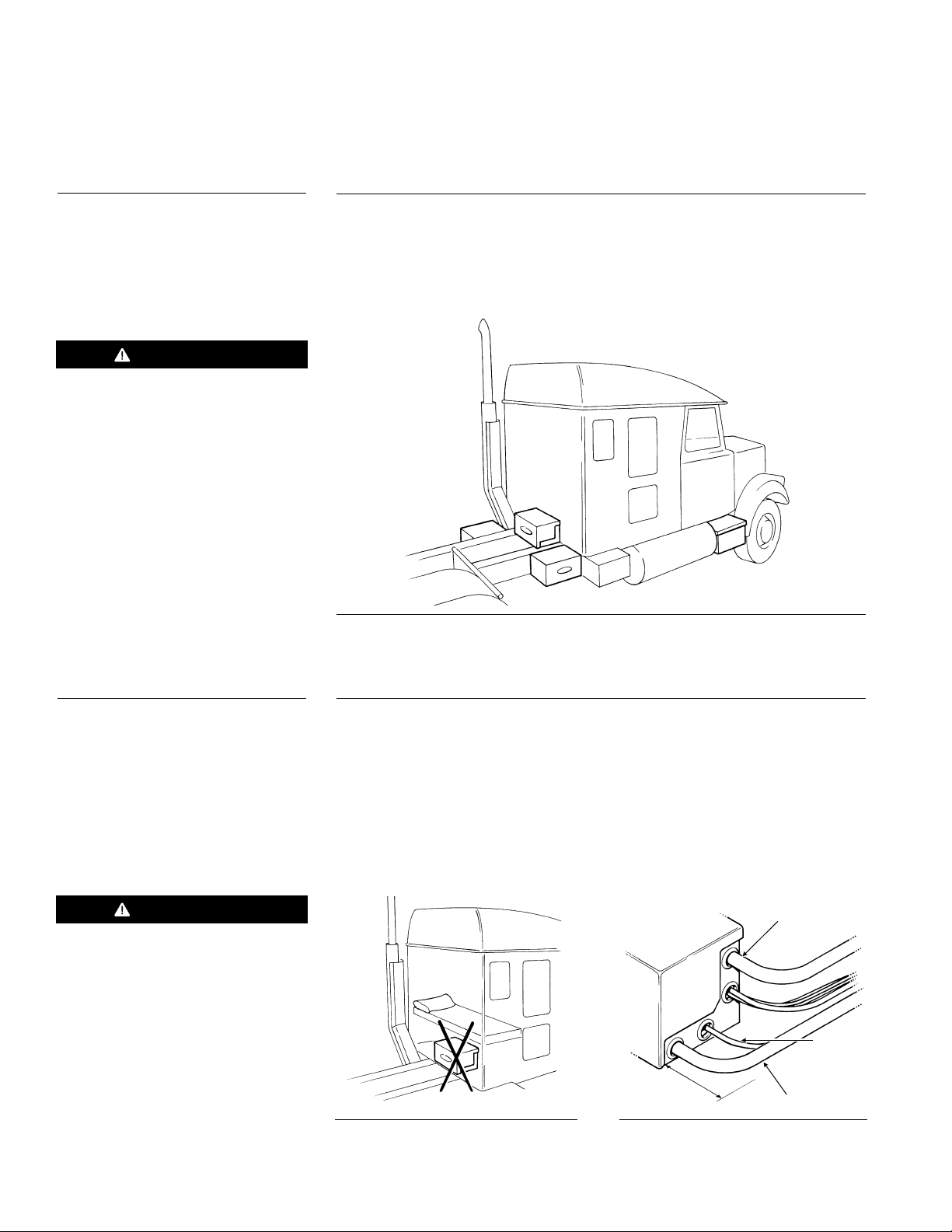
The most suitable location for mounting the heater will vary depending
on the type of vehicle. Recommended mounting locations are:
• Behind the cab across the frame rails (1).
• On either side of the frame rails (2).
• In an existing enclosure on the vehicle (step or toolbox) (3).
1
2
3
2
Figure 3-2 Recommended Mounting Positions
3.1.2
WARNING
Never locate the heater inside
the vehicle cab. (See Figure 3-3)
GENERAL CONSIDERATIONS
• Never mount the heater to two separate parts of the vehicle.
• Avoid mounting the heater in areas of excessive vibration.
• Do not mount the heater directly to the engine.
• Do not mount the heater beneath a wood floor without a proper fire wall
above the heater.
• Avoid mounting the heater in areas of excessive dust, dirt and moisture
accumulation.
• The heater must be easily accessed for service.
COOLANT OUT
FUEL IN
Figure 3-3
MINIMUM
CLEARANCE 6"
Figure 3-4 Allow minimum 6" clearance
for hose connections.
COOLANT IN
3-2
PROHEAT INSTALLATION & SERVICE
Page 24
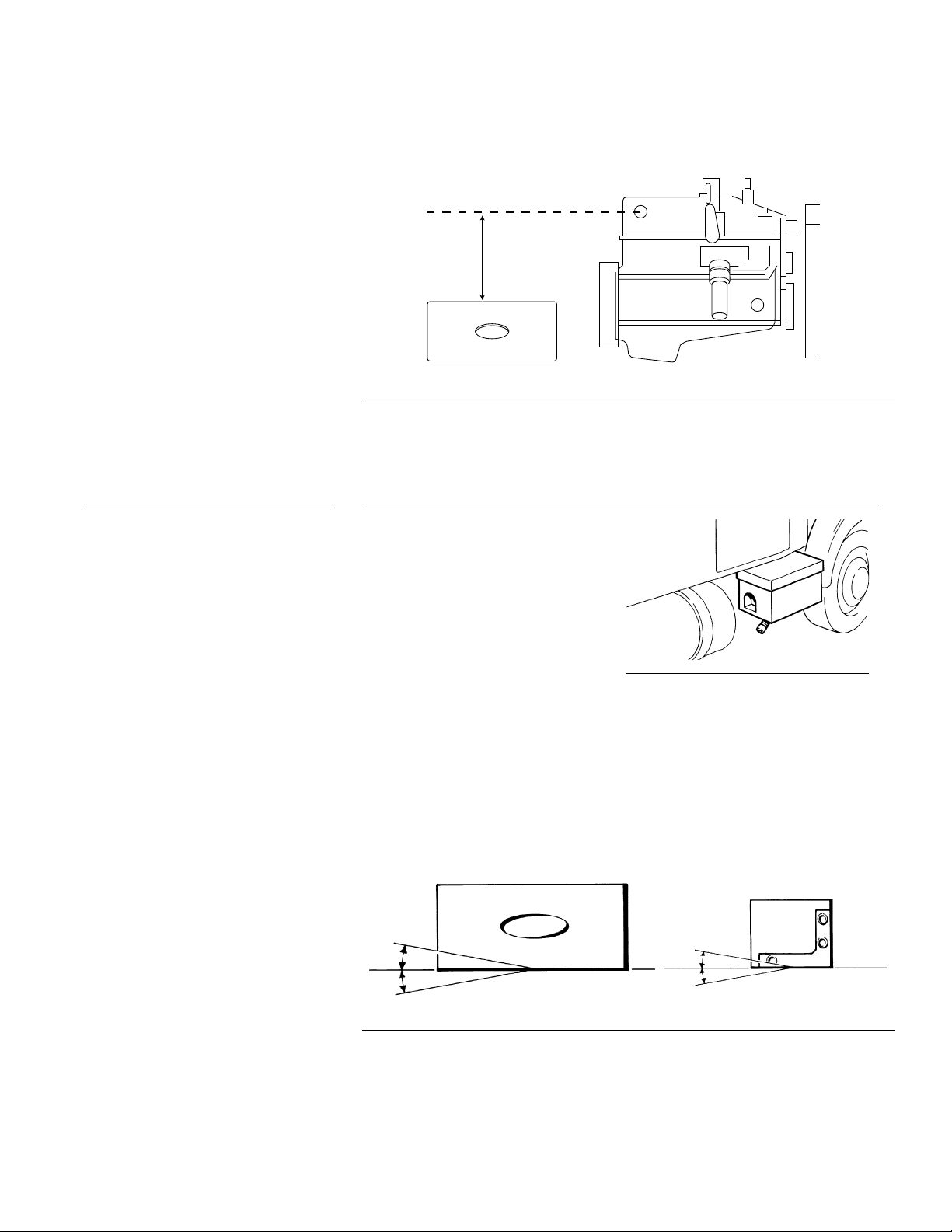
Heater must be mounted below the highest point in the cooling system. An
expansion tank may be added to the coolant system above the heater if this
is not possible.
HIGHEST POINT IN
COOLING SYSTEM
HEATER MUST
BE MOUNTED
BELOW
HIGHEST POINT
PROHEAT ENGINE OR RADIATOR
Figure 3-5 Height Requirement
3.1.3
MOUNTING THE PROHEAT HEATER IN AN ENCLOSURE
Do not locate the heater in an
airtight enclosure. If the heater is to
be mounted in an enclosure other
than the PROHEAT enclosure,
adequate air flow must be provided
to ensure proper combustion. The
enclosure must also be adequately
ventilated so that the ambient
temperature inside the enclosure
does not exceed 185 °F (85 °C).
The openings must be positioned to prevent moisture dirt and snow from
accumulating in the enclosure. The heater enclosure must be easily
accessed for servicing of the heater.
Heater must be mounted within 5˚ of horizontal, as shown.
Figure 3-6 Adequate Air Flow
SECTION 3. INSTALLATION
5˚
5˚
Figure 3-7 Mounting Angle
5˚
5˚
3-3
Page 25
3.2
MOUNTING THE HEATER
Select Your Mounting Option
Figure 3-8 Mounting Tray
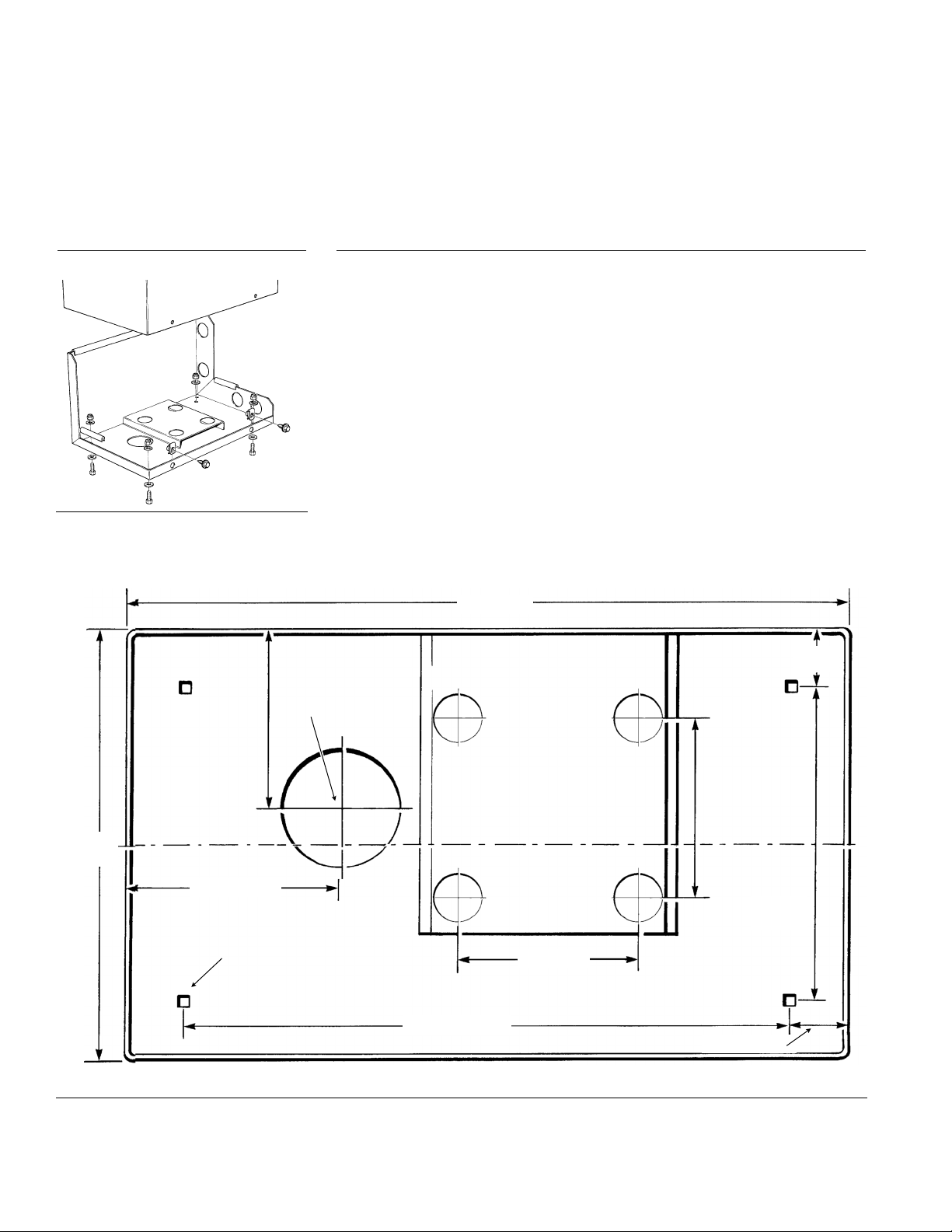
3.2.1
OPTION A
1. Remove the enclosure cover.
2. Drill the (4) mounting holes and exhaust pipe clearance hole.
3. Using the bolts supplied, fasten the enclosure to the mounting
tray or brackets.
4. Ensure that the combustion tube can be removed for service.
See Figure 1-2 on page 1-3 for service space requirements.
– Heater With Enclosure
20" (508 mm)
1 5/8"
(45 mm)
3" (76 mm) Dia.
5" (127 mm)
12"
(306 mm)
5 3/4" (146 mm)
3/4" (20 mm) MOUNTING HOLES
(4 REQUIRED)
Figure 3-9 X45 Enclosure Base Dimensions
5" (127 mm)
CENTERLINE OF ENCLOSURE
8 13/16"
(223 mm)
5" (127 mm)
16 11/16" (427 mm)
1 5/8" (45 mm)
3-4
PROHEAT INSTALLATION & SERVICE
Page 26
NOTICE
3.2.2
OPTION B
– Heater Without Enclosure
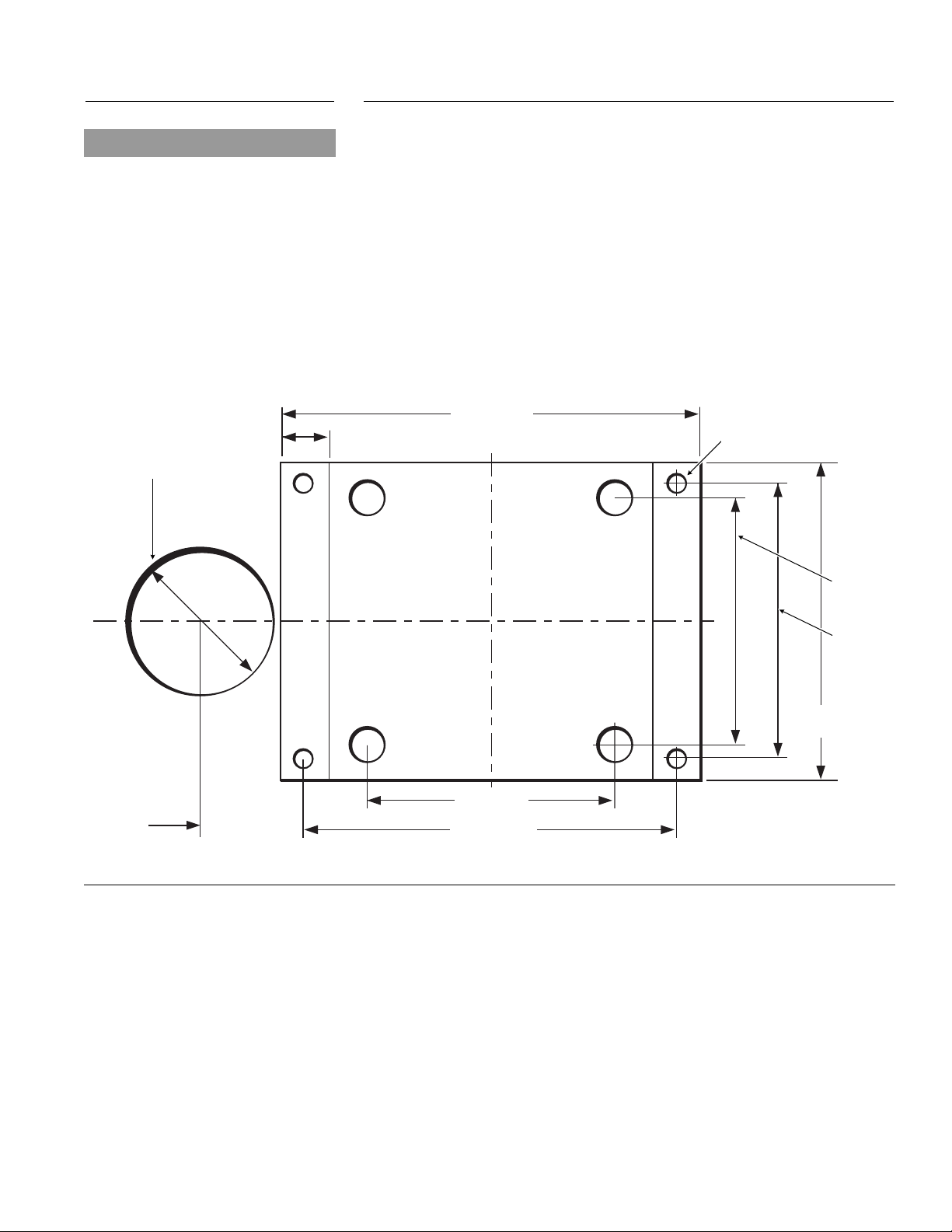
Heater supplied without an enclosure (mount in an existing enclosure on the
vehicle ie. tool box). Heater supplied with an auxiliary mounting plate.
Use anti-seize compound on fasteners
to prevent galling and corrosion.
3" (76 mm) Dia.
. Ensure that the proposed enclosure is big enough for the heater.
1
2
1
⁄2W x 11H x 201⁄2L inches (318 x 280 x 521 mm)
12
. Using the indicated dimensions, drill the (4) mounting holes
and exhaust pipe clearance hole.
3. Ensure that the combustion tube can be removed for service.
See Figure 1-2 on page 1-3 for service space requirements.
8.5" (216 mm)
1.0" (25 mm)
4 X .38" (10MM)
MOUNTING HOLES
5"
(127 mm)
2.02"
(51 mm)
Figure 3-10 X45 Mounting Plate Dimensions & Exhaust Hole
5.5"
(140 mm)
6.4"
(163mm)
5" (127 mm)
7.5" (191 mm)
SECTION 3. INSTALLATION
3-5
Page 27
3.3
NOTICE
If additional information is required,
please contact your PROHEAT Dealer
regarding your specific application.
Alternatively, please contact PROHEAT
Product Support at www.proheat.com.
EXHAUST PIPE CONNECTION
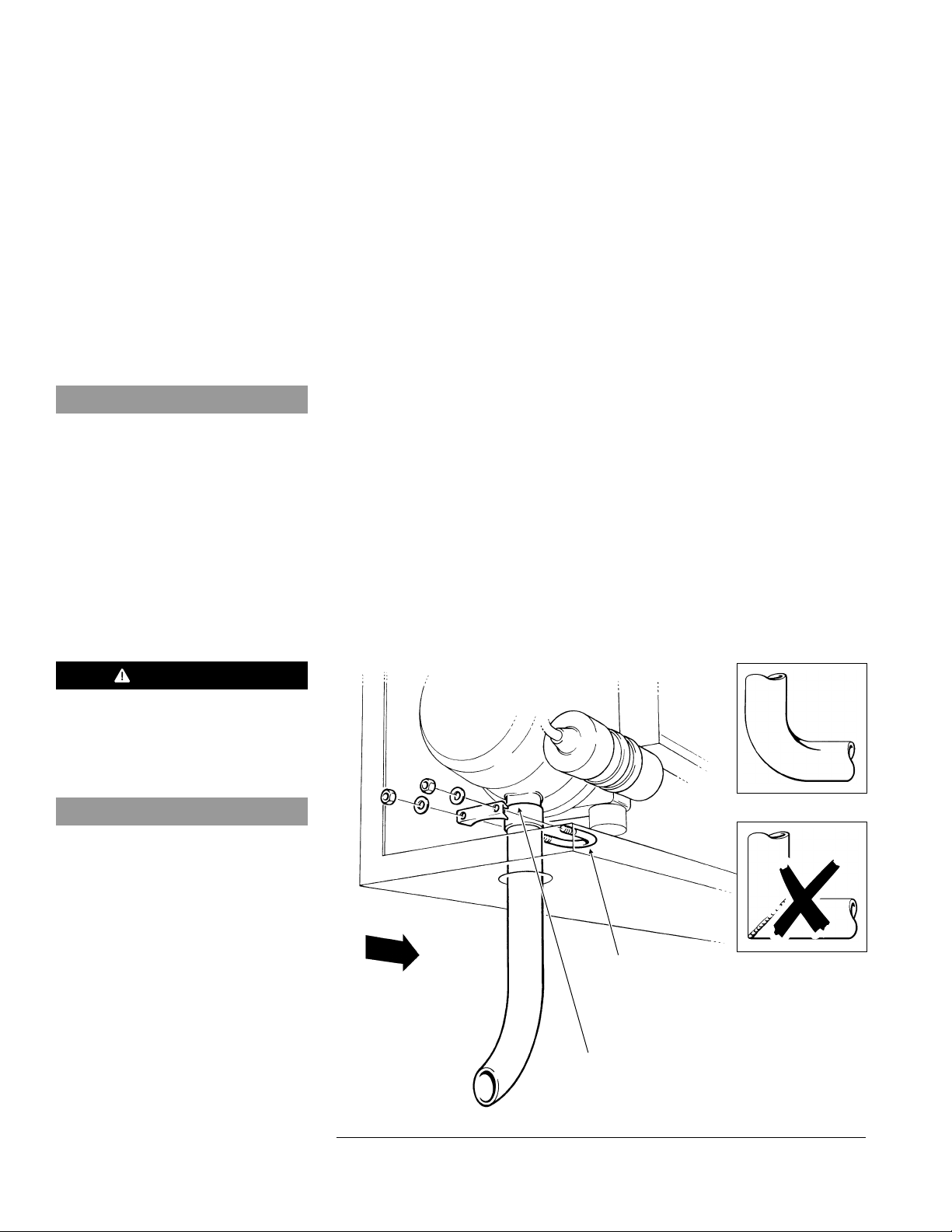
1. Push the exhaust pipe through the hole in the enclosure and onto the
exhaust outlet port of the heater. Ensure that the pipe is pushed onto
the spigot at least 11⁄2" (38 mm).
2. Route the exhaust pipe such that:
• exhaust gasses do not enter the passenger compartment.
• exhaust gasses do not enter the heater's combustion air inlet
• exhaust system does not rest against or be directed toward any parts
of the vehicle that may be damaged by heat (i.e. brake lines, seals, wires
rubber hoses or bumpers). The exhaust pipe may be have to be insulated
if it's within 6" of combustible materials or composite body parts
• the exhaust outlet does not face the same direction as vehicle travel
• debris and snow will not plug the outlet
• the exhaust pipe is protected from curb damage
• the exhaust system should have a downwards slope for condensation
to drain. If needed a 3/8" hole should be drilled into the exhaust pipe
at the lowest point so that the condensation will drain.
3. Disassemble the exhaust pipe clamp and apply anti-seize compound to
the threads.
4. Assemble the exhaust clamp over the exhaust pipe (clamp goes inside
the enclosure) and tighten the nuts.
,
WARNING
Exhaust gases must not enter
the vehicle interior. Direct
exhaust pipe away from vehicle.
NOTICE
Use of muffler or other restrictions in the
exhaust system is not recommended.
NOTE: 11⁄2" exhaust pipe should not exceed 5 ft and have no more than
180 degrees of bends. The bends must be formed for best results.
Do not use 90 degree welded pipe to turn corners.
Use formed elbows.
Do not use welded
90˚ elbows.
DIRECTION
OF VEHICLE
TRAVEL
EXHAUST CLAMP
U BOLT (APPLY
ANTI-SEIZE
COMPOUND
TO THREADS)
3-6
ENSURE THERE ARE
NO AIR LEAKS AROUND
THE CONNECTION
Figure 3-11 Exhaust Pipe
PROHEAT INSTALLATION & SERVICE
Page 28
3.4
PLUMBING THE SYSTEM
MA
X
I
MUM
C
ROS
S
-
F
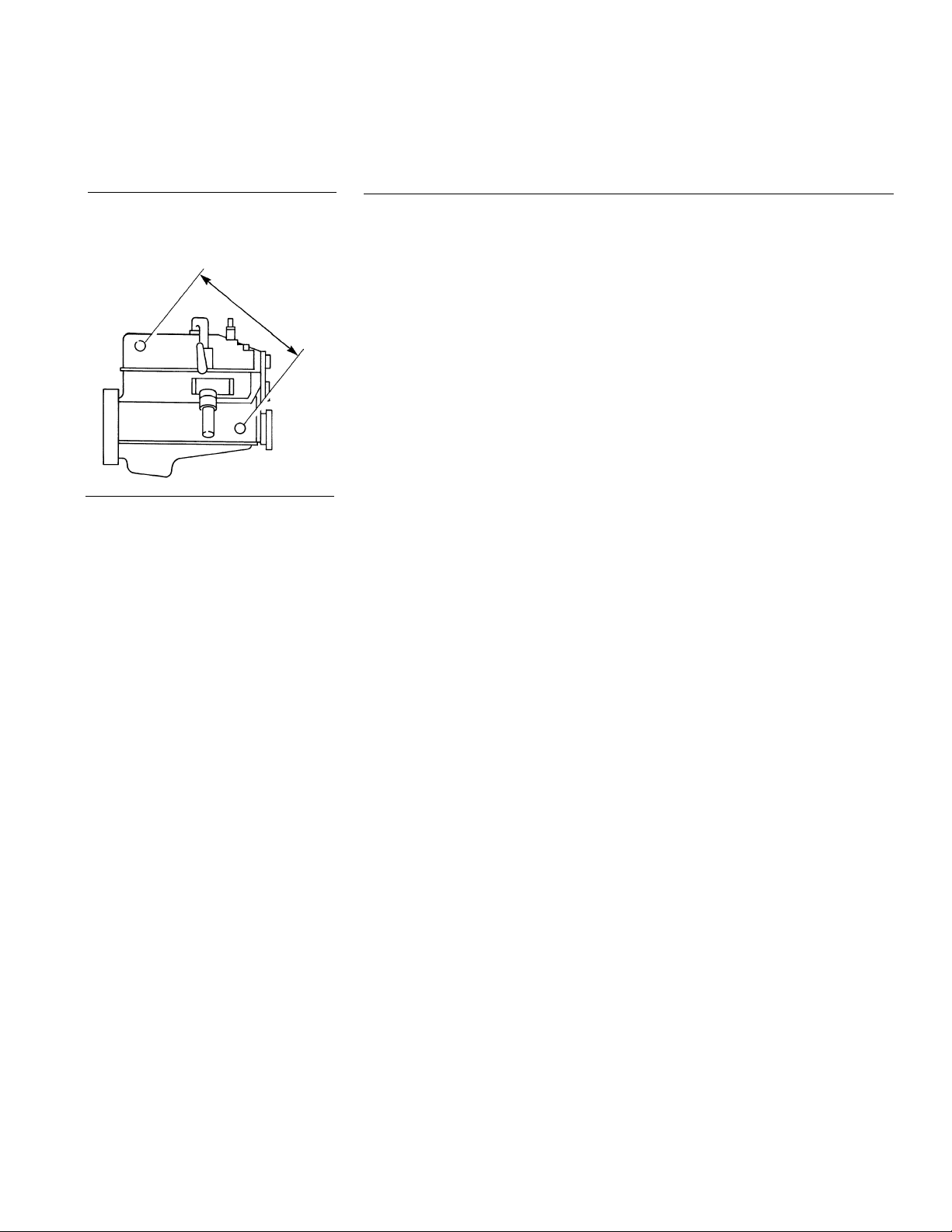
Figure 3-12 Maximum cross-flow
3.4.1
L
OW
GENERAL CONSIDERATIONS
Coolant flow must be maintained throughout the coolant system
nder all conditions.
u
• Keep the engine inlet and outlet ports as far apart as possible to maximize
cross-flow through engine.
• Coolant pump and engine water pump must flow in the same direction.
• Ensure that no sharp kinks or bends exist in the hoses which may restrict
coolant flow.
• Avoid high points in the hose routing to prevent air traps.
• For systems requiring more than 50 feet of coolant line, contact Proheat
Product Support at www.proheat.com for coolant pump recommendations.
For plumbing the system use:
1
⁄2" NPT pipe fittings or bigger.
3
⁄4" ID heater hose.
NOTE: Use of silicone hose requires special hose clamps.
Shut-off valves are not required at the engine inlet and outlet connections but
may be used if desired. They should be left open at all times so that the heater
can be operated throughout the year.
You Choose
Select Your Plumbing Option
Option A:
Engine heat or supplemental heat.
The PROHEAT heats the engine block only.
NOTE: When the engine block is preheated you will have nearly
instant heat from the dash heat exchanger.
Option B: Engine and sleeper heat.
The PROHEAT heats the engine block and the sleeper.
NOTE: Plumbing the PROHEAT through the dash fan is not
recommended.
SECTION 3. INSTALLATION
3-7
Page 29
Instructions for Options A and B
®®
WARNING
Opening the radiator cap when
the engine is hot may cause
serious injury.
3.4.2
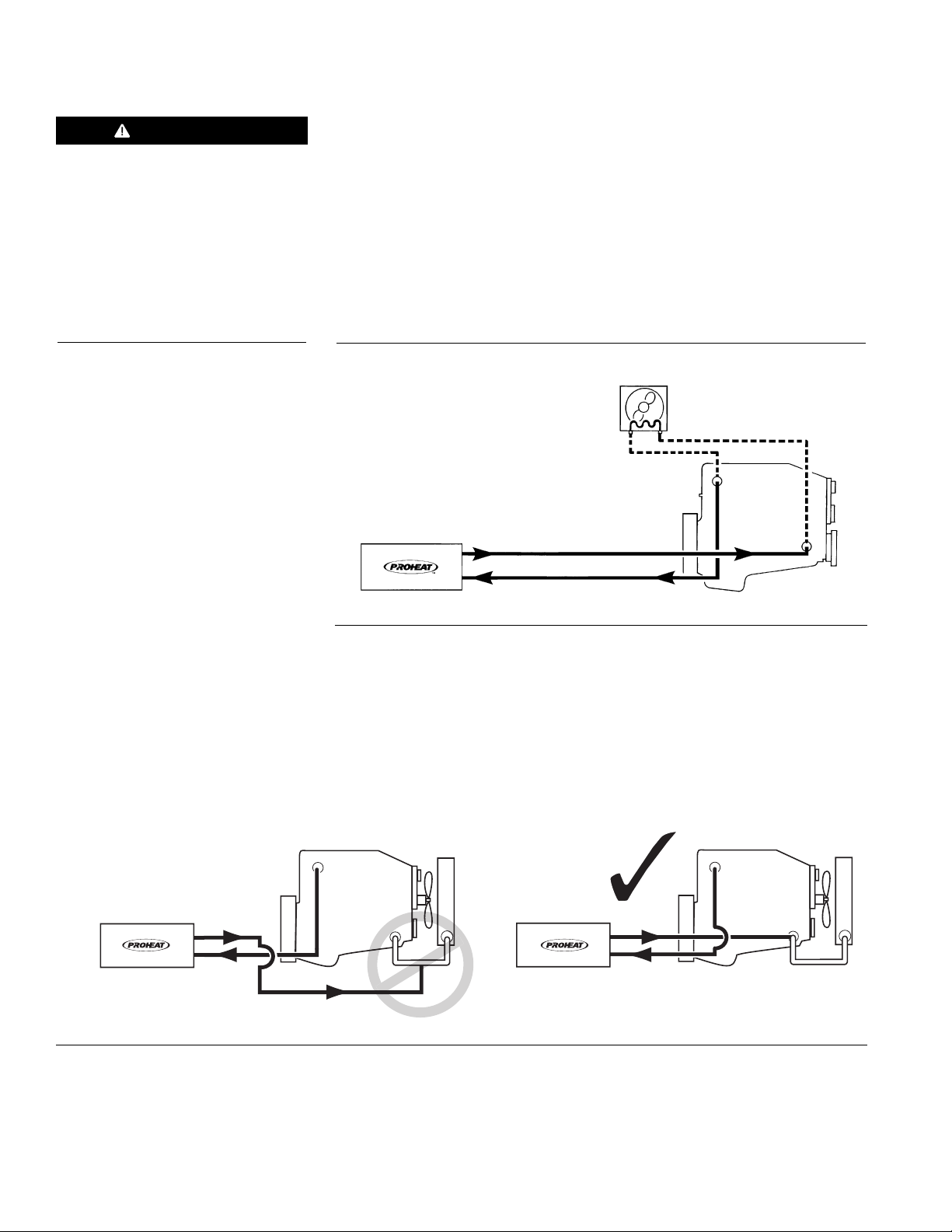
1. Remove the radiator cap to release the system pressure.
2. Drain the coolant system.
3. Plumb the system as per Figure 3-13 or Figure 3-15
. Add engine coolant to the system as per the specific engine
4
manufacturer’s recommendations and re-install the radiator cap.
NOTE: Plumbing the PROHEAT through the dash fan is not recommended.
OPTION A – Engine Heat or Supplemental Heat
DASH HEATER
RETURN TO ENGINE
RETURN TO ENGINE
SUPPLY TO PROHEAT
SUPPLY TO PROHEAT
Figure 3-13 Engine Heat or Supplemental Heat
ENGINE
NOTE: On coolant systems where the return from the PROHEAT is plumbed to
the bottom of the main coolant supply line from the radiator to engine
pump, the return line must be moved to avoid loss of heat through the
radiator.
ENGINE
RETURN TO ENGINE
SUPPLY TO PROHEAT
ENGINE
Figure 3-14 Correct Return Line Plumbing
3-8
PROHEAT INSTALLATION & SERVICE
Page 30
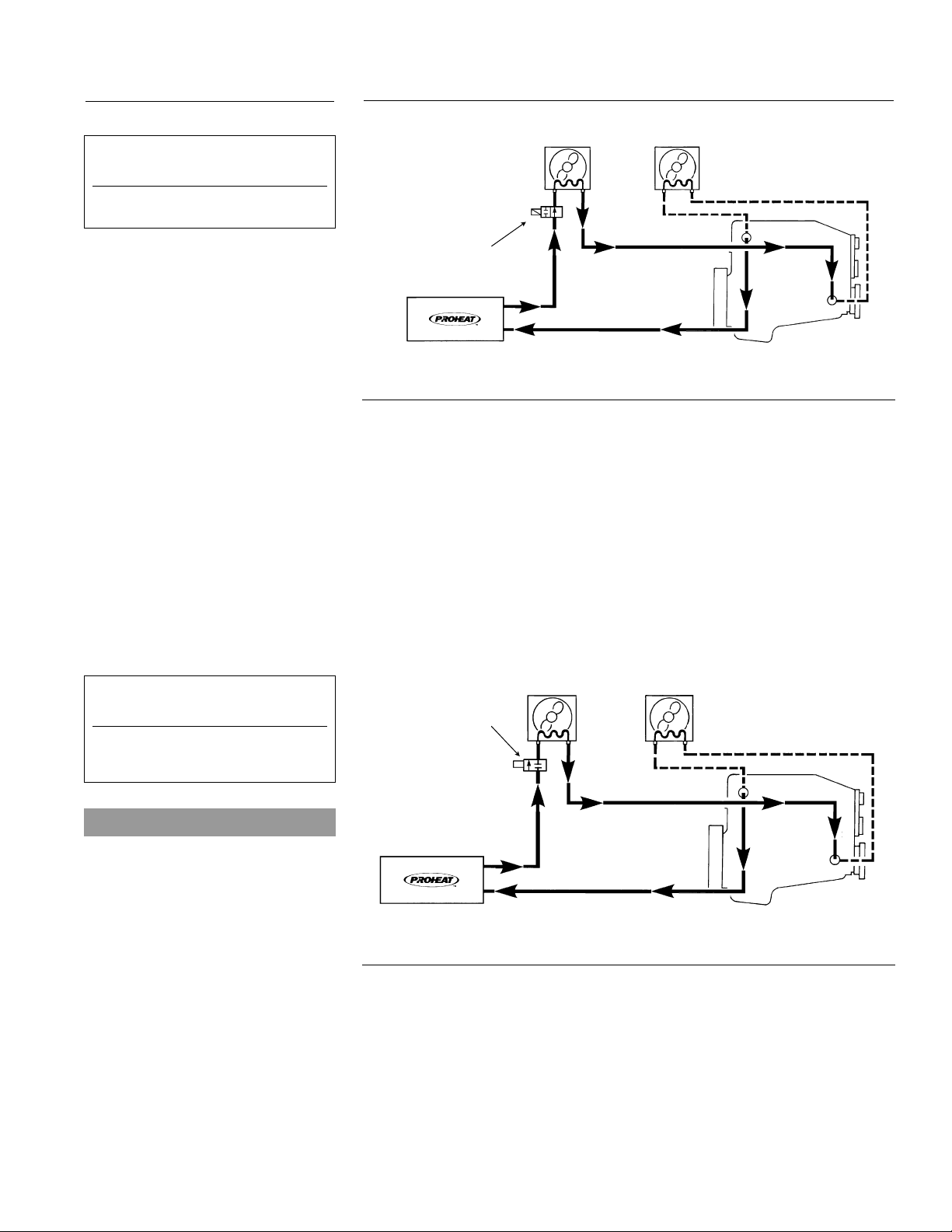
3.4.3
or best results these vehicles
F
should use an auxiliary heater.
International with single heater
OPTION B – Engine and Sleeper Heat
OEM OR AUXILIARY
SLEEPER HEATER
DASH HEATER
For vehicles with solenoid valves
in the normally closed position.
Western Star
SOLENOID VALVE
OEM COMBO HEATERS
ONLY (NORMALLY OPEN)
SUPPLY TO PROHEAT
Figure 3-15 Engine and Sleeper Heat
RETURN TO ENGINE
ENGINE
NOTE: Vehicles equipped with a combination heater/air-conditioner will have
a solenoid operated shut-off valve in the heater unit. Typically this valve
is normally open with the truck engine turned off and the key removed.
(See Figure 3-16 for plumbing)
Due to the many options available in vehicle heating and air
conditioning systems, the installer should be looking for any
restrictions that may affect coolant flow, with vehicle ignition in the
“OFF” position.
SLEEPER HEATER
SOLENOID VALVE
(NORMALLY CLOSED)
DASH HEATER
NOTICE
The PROHEAT PCM sleeper fan circuit
has a one minute delay during ignition.
Power to open a sleeper fan coolant
valve must be taken from another
source such as the wire for the hour
meter (auxiliary output). (See PROHEAT
Wiring Diagram on page 1-4.)
SECTION 3. INSTALLATION
SUPPLY TO PROHEAT
Figure 3-16 Engine and Sleeper Heat
RETURN TO ENGINE
ENGINE
3-9
Page 31
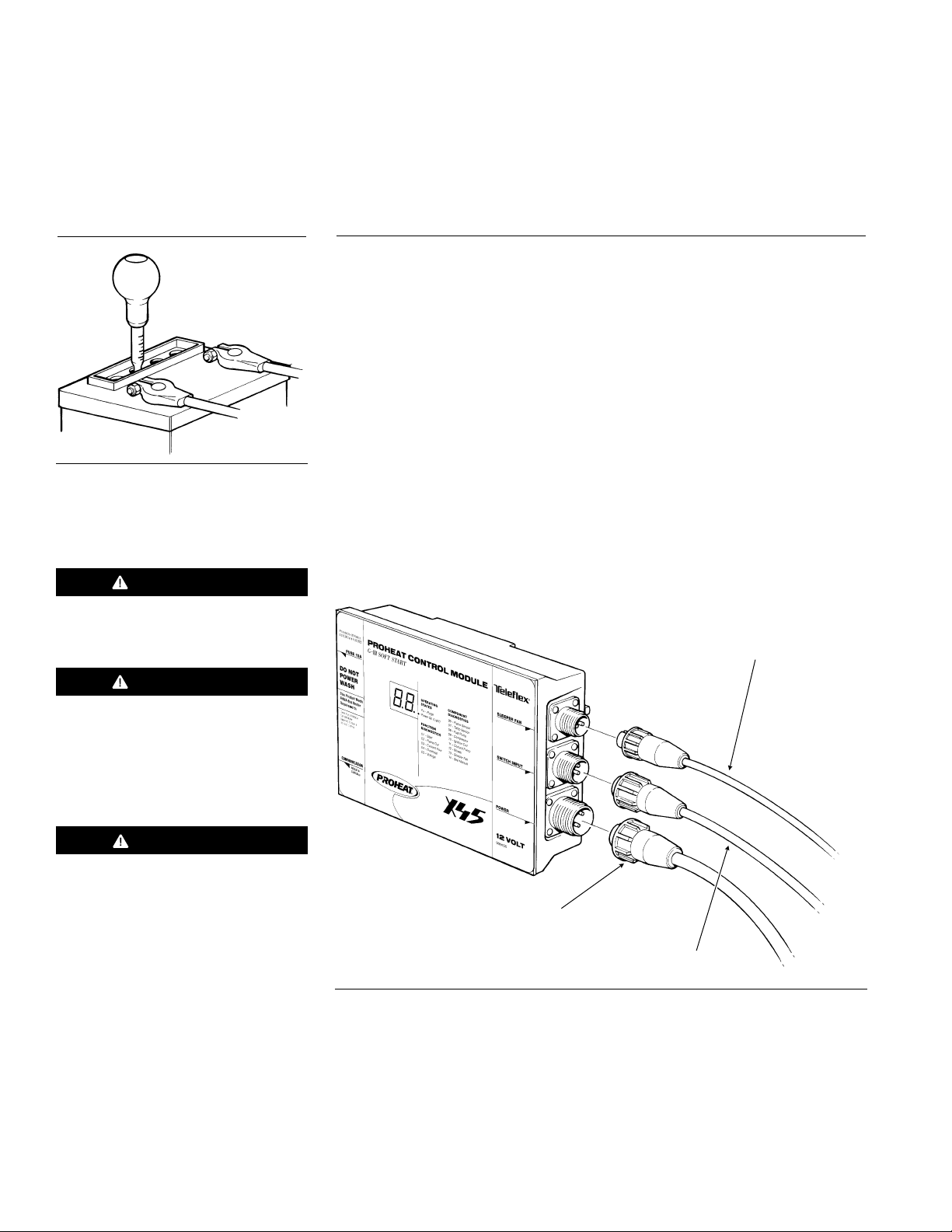
3.5
WIRING & ELECTRICAL
CONNECTIONS
3.5.1
Figure 3-17 Test Battery
WARNING
Do not use on positive ground
vehicles.
GENERAL CONSIDERATIONS
• Prior to installation of the PROHEAT Heater system, ensure that the
vehicle batteries are in good condition.
• Do not kink or abrade wires when routing them through the vehicle during
installation.
• Ensure wires are well supported and secured with tie-wraps.
• Do not use acid core solder when making solder connections.
Major Electrical Connections Required
a) Power connection to batteries ................................................. page 3-11
b) Timer or ON/OFF switch connections........................................ page 3-12
c) Sleeper fan model heater connections (optional)....................... page 3-14
d) Auxiliary Input model heater connections (optional).................... page 3-18
TO SLEEPER FAN OR AUX INPUT
DEPENDING ON MODEL
CAUTION
If repairs to the vehicle require
welding, disconnect the PROHEAT
power cable at the PCM. This will
prevent damage to the PROHEAT
electronics.
CAUTION
Vehicles using ground side battery
disconnect switches must install an
in-line 10 Amp fuse on the internal
harness (Proheat part # PK0310).
This will prevent damage to the
harness and PCM, (refer to Service
Bulletin SB0003 in Appendix).
TO BATTERIES
TO ON/OFF SWITCH
AND/OR TIMER
Figure 3-18 Major Electrical Connections
3-10
PROHEAT INSTALLATION & SERVICE
Page 32
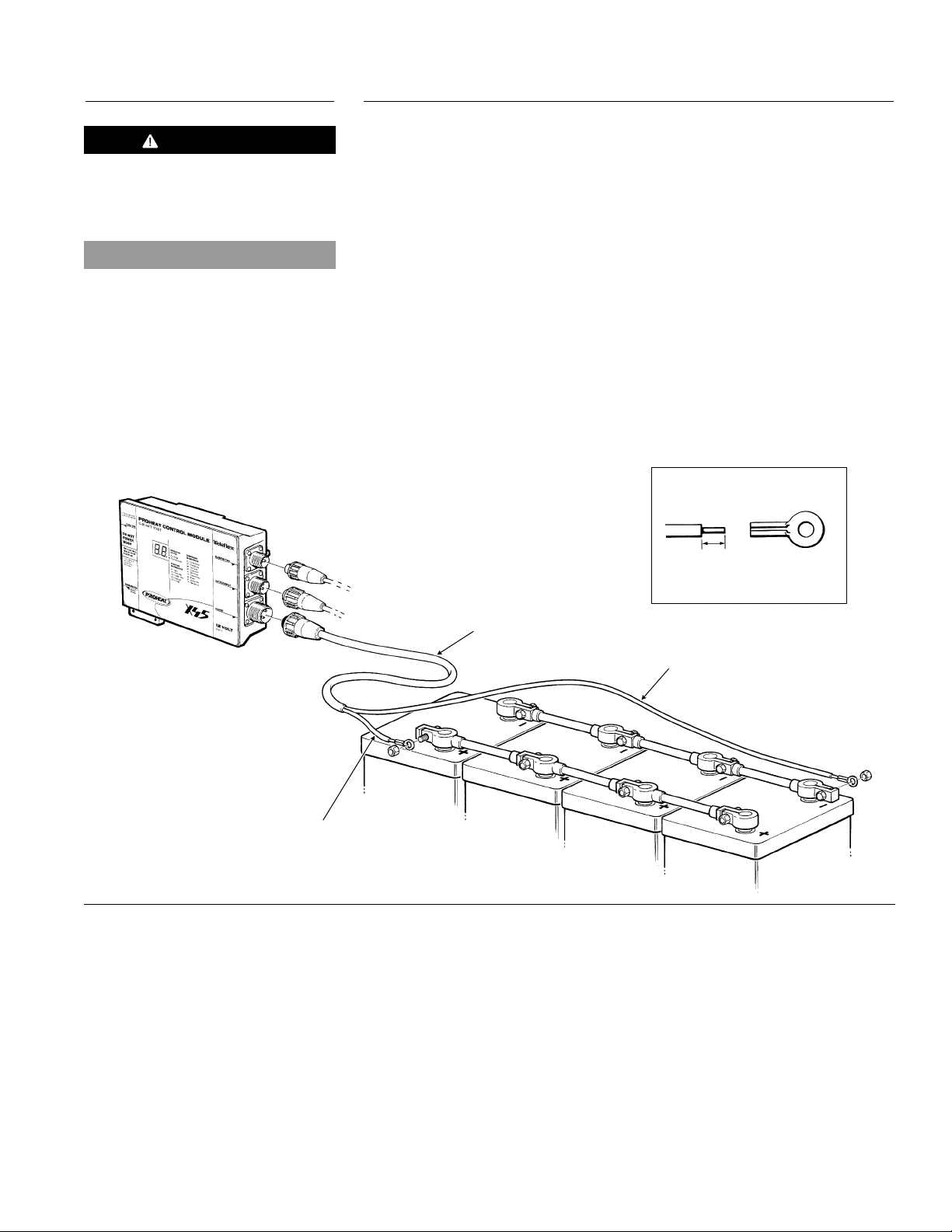
3.5.2
CAUTION
2 Volt products should not use
1
power split from a 24 Volt system.
This will cause uneven charging of
the batteries.
POWER CONNECTION TO BATTERIES
1. Route wire harness from PCM to the battery. Cut the harness to length
as required.
2. Strip outer wire jacket of harness back to expose the positive (red) and
negative (black) leads. Strip the leads as shown and crimp the ring
tongue terminals supplied to the wires. Connect the leads to the battery
erminals. (See Figure 3-19.)
t
NOTICE
Systems providing heat to both engine
and sleeper require four (4) batteries.
3. Leave power harness disconnected. (See Figure 3-19.) Do not install until
PROHEAT coolant pump system has been purged of air. (See First Time
Startup, page 3-26)
NOTE:
When power is connected to the PCM, all segments of the LED will flash
on the PCM. This indicates that power has been supplied. See page 5-4
for more information.
NOTE: Ensure the battery terminals are clean and free of corrosion. Remove
and clean. Prior to re-connecting grease terminals with electrically
conductive grease.
STRIP WIRE AS SHOWN AND
CRIMP TO TERMINAL
3/16"
POWER SUPPLY
HARNESS
BLACK (-) NEGATIVE
RED (+) POSITIVE
Figure 3-19 Power Connection to Battery
SECTION 3. INSTALLATION
3-11
Page 33
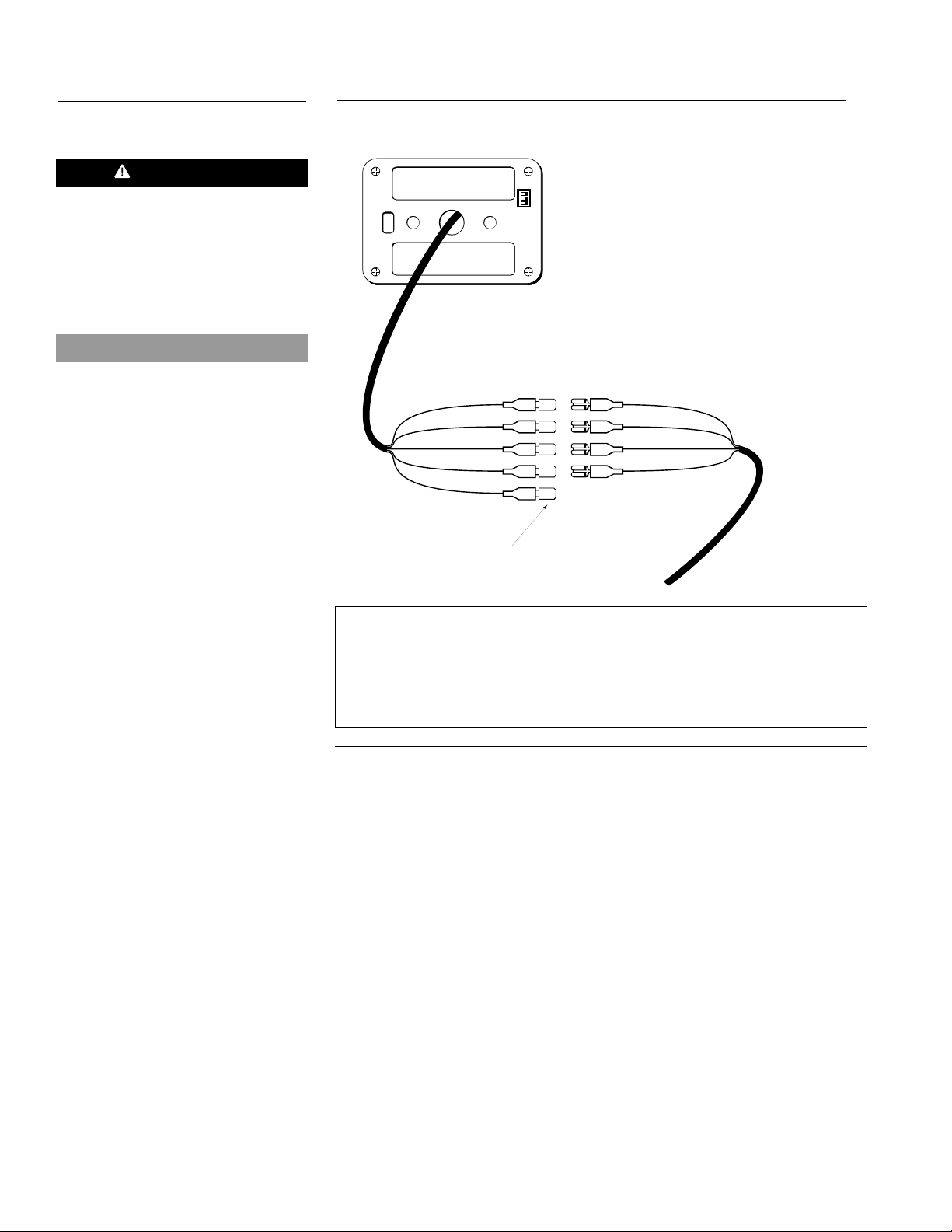
TIM ER
1
ON
2 3
BLACK
RED
W
HITE
G
REEN
BLACK
TIMER
SWITCH INPUT
HARNESS
RED
W
HITE
G
REEN
GREY
TO KEYSWITCH (OPTIONAL)
3.5.3
CAUTION
The switch input circuit should only
be used to supply power to the
ON/OFF Switch, the Timer, or as a
signal to trip a relay. Failure to
follow this installation practice will
result in damage to the PCM.
NOTICE
The PCM must be reset (power
disconnected and reconnected)
when changing from a Timer to an
ON/OFF Switch or from an ON/OFF
Switch to a Timer.
Do not connect an ON/OFF Switch
and a Timer in the same circuit.
TIMER CONNECTIONS (OPTIONAL)
Black wire Ground
Red wire Power
White wire Operational signal from heater
Green wire “ON” Signal to heater
Grey wire Keyswitch backlighting (optional)
Figure 3-20 Timer Connections
3-12
PROHEAT INSTALLATION & SERVICE
Page 34
BLACK
RED
WHITE
GREEN
GROUND
ON SIGNAL
ON
OFF
POWER
INDICATOR
2" (51 mm)
3/16"
(5 mm)
3.5.4
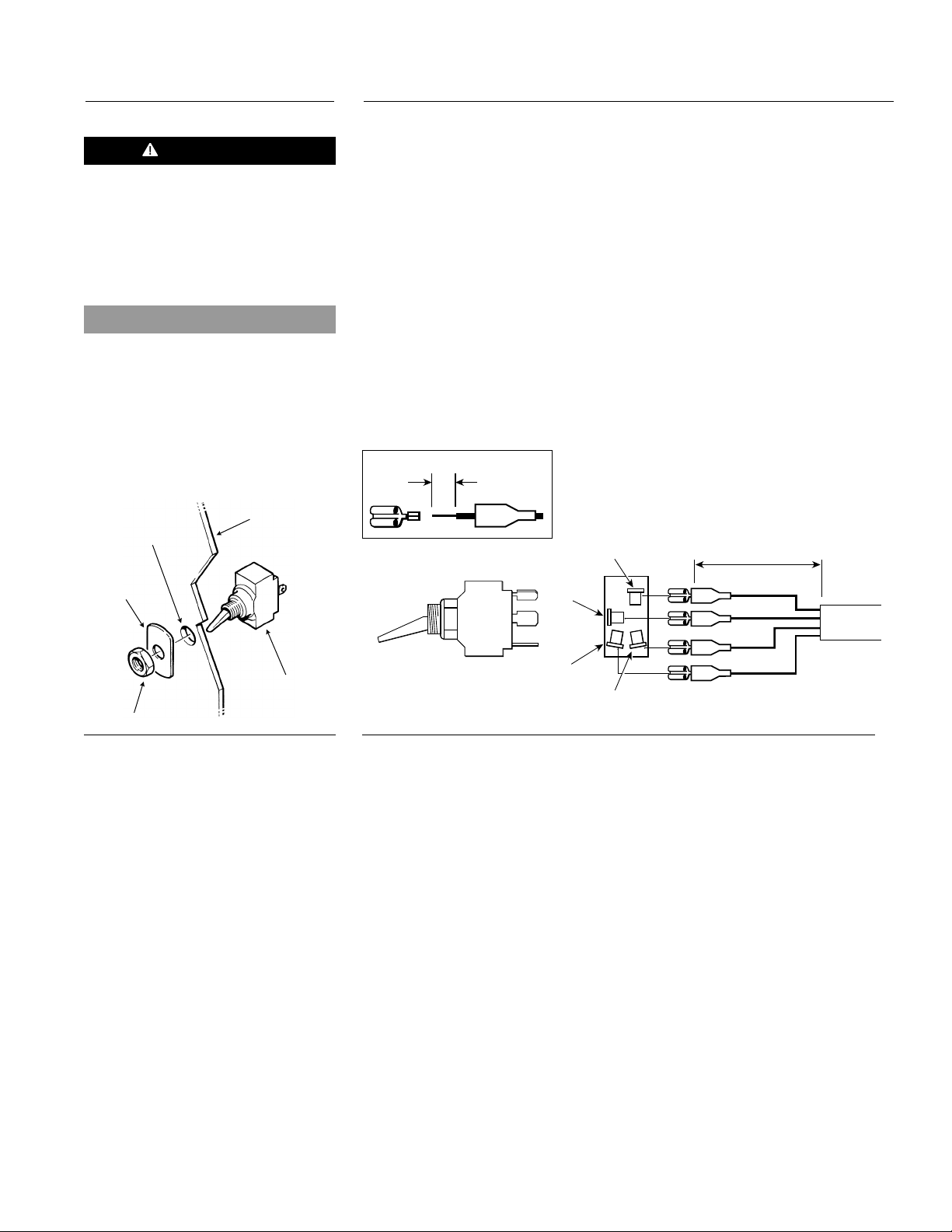
ON/OFF SWITCH CONNECTIONS
1. Select a suitable location in the vehicle dash for the ON/OFF Switch.
CAUTION
The switch input circuit should only
be used to supply power to the
ON/OFF Switch, the Timer, or as a
signal to trip a relay. Failure to
follow this installation practice will
result in damage to the PCM.
NOTICE
The PCM must be reset (power
disconnected and reconnected)
when changing from a Timer to an
ON/OFF Switch or from an ON/OFF
Switch to a Timer.
Do not connect an ON/OFF Switch
and a Timer in the same circuit.
DASH
1/2" DIA.
HOLE
SWITCH
LABEL
NOTE: Many dash panels have switches which are not utilized. It may be
convenient to remove one and replace it with the PROHEAT switch.
2. Drill a1⁄2" diameter hole through the dash for the switch. Make sure you
have clearance behind the dash for the switch wires and connections.
Install the switch as per the diagram. (Figure 3-21)
3. Route the switch wire harness from the PCM to the dash panel. You will
have to pass the wire harness through the vehicle firewall. If possible use
an existing hole. Use a grommet to prevent the wire from being damaged
when it is passed through the hole.
4. Cut the harness to length.
5. Strip outer wire jacket of harness back to expose the 4 wires. Strip the
wires as shown and crimp the supplied1⁄4" spade terminals.
NOTE: Use fully insulated disconnects when connecting Switch.
ON/OFF
SWITCH
NUT
Figure 3-21 ON/OFF Switch Assembly
Figure 3-22 ON/OFF Switch Connections
6. Connect the terminals to the switch as shown. (Figure 3-22)
NOTE: The PCM must be reset (power disconnected and reconnected) when
changing from a Timer to an ON/OFF Switch or from an ON/OFF Switch
to a Timer. Connecting an ON/OFF Switch and a Timer in the same
circuit will cause the indicator light to flash incorrectly.
SECTION 3. INSTALLATION
3-13
Page 35

3.5.5
SLEEPER FAN MODEL HEATER WIRING DETAILS
NOTICE
These instructions require a Sleeper
Fan model. For more information see
age 4-2.
p
You Choose
NOTICE
Sleeper Fan output does not supply
power during ignition (1 minute after
switch ON). DO NOT use for controlling
coolant valves. See page 4-5 for
operational sequence information.
The Hour Meter (Auxiliary) Output may
be used to control supplemental relays
to turn on coolant valves.
If additional installation information is
required, please contact your PROHEAT
Dealer or Product Support at
www.proheat.com
These installation options allow the operator to:
1. Run the PROHEAT with the ignition key in the “OFF” position.
2. Return full control to the OEM system in normal operation mode.
Select one of the following wiring options
NOTE: PROHEAT IS NOT RESPONSIBLE FOR CHANGES IN SLEEPER
FAN SYSTEMS BY ORIGINAL EQUIPMENT MANUFACTURING
COMPANIES.
Due to the wide variety of wiring schematics that exist, we emphasize that
if you are in any doubt you should contact your dealer or PROHEAT Product
Support at www.proheat.com
Option A: Used when climate control systems in sleepers require one or
more of the following features to be controlled.
1. Normal OEM fan speed selection.
2. A separate thermostat is required to turn the sleeper fan
motor “ON” and “OFF” because the OEM system uses a
constant running fan.
3.
A valve in the sleeper heater coolant line regulates the flow
must be fully opened when the PROHEAT is running.
4. Prevent possible back-feeding on ground side switched
systems.
and
3.5.6
Option B: Used in larger sleepers requiring greater fan speed to provide
sufficient air movement to the sleeper. This allows the driver to
select the fan speed.
Option C: Used when a dedicated auxiliary heater is required.
Option D: Limits the power provided to the sleeper fan motor to
3 Amps. With this system the total electrical draw is controlled
by PROHEAT.
NOTE: For larger systems in the latest model trucks this may not provide
enough fan speed and therefore Option A, B or C should be used.
OPTION A – OEM Heater & Proheat Thermostat
Please go to www.proheat.com for equipment specific installation instructions.
3-14
PROHEAT INSTALLATION & SERVICE
Page 36
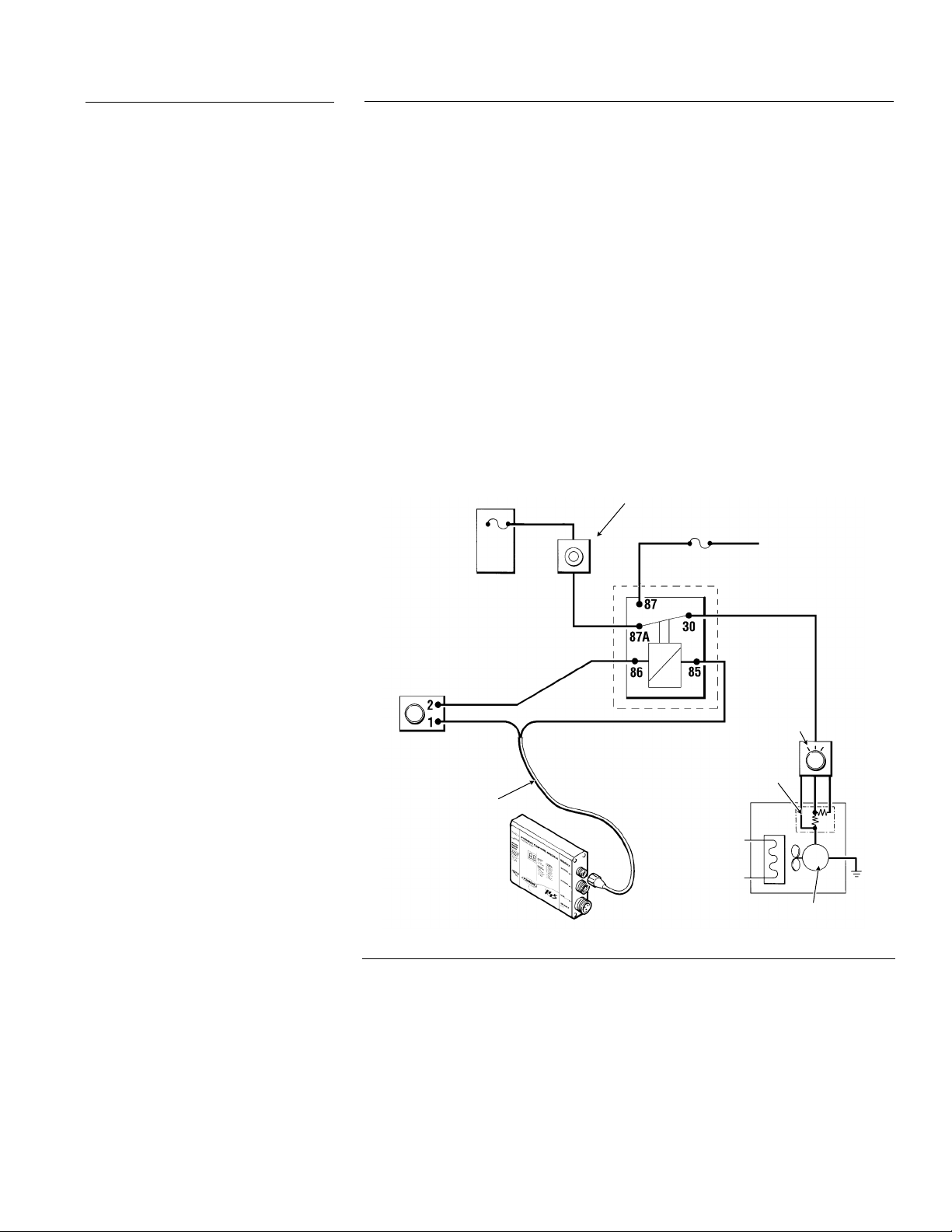
3.5.7
OPTION B – OEM Heater & Thermostat
1. Make sure the vehicle ignition is switched “OFF.”
2. Locate the PROHEAT thermostat in a central area of the sleeper,
approximately 12" above the bunk. Avoid direct air flow from sleeper fan
ducts. (Figure 3-25)
3. Remove the adjusting knob and face cover. Mark and drill mounting
holes. Mount thermostat using the screws provided. (Figure 3-27)
4. Install relay 1, always between OEM sleeper fan control and OEM
thermostat.
NOTE: The constant power supply wire must be of sufficient size to handle
sleeper fan motor electrical current draw.
5. Route sleeper fan harness from PCM to PROHEAT thermostat. Cut to length.
Connect white wire to terminal 1 of the thermostat.
6. Route a wire from terminal 2 of the thermostat to relay 1 (can be cut from left
over wire harness). Ground the relay using PROHEAT sleeper fan ground
wire (black).
VEHICLE
FUSE
PANEL
PROHEAT
THERMOSTAT
WHITE
SLEEPER FAN
HARNESS
PCM
WHITE
BLACK
OEM THERMOSTAT
15 AMP
RELAY 1 STANDARD
12 OR 24/30 AMP
RESISTOR ASSEMBLY
NOTE: MAY OR MAY NOT BE LOCATED
INSIDE SLEEPER HEATER ASSEMBLY
OEM
SLEEPER
HEATER
ASSEMBLY
(SINGLE WINDING TYPE)
CONSTANT POWER
SOURCE
(i.e. CIGARETTE LIGHTER)
OEM FAN
MOTOR
CONTROL
(2 OR 3 SPEED)
FAN MOTOR
SECTION 3. INSTALLATION
Figure 3-23 Option B
3-15
Page 37
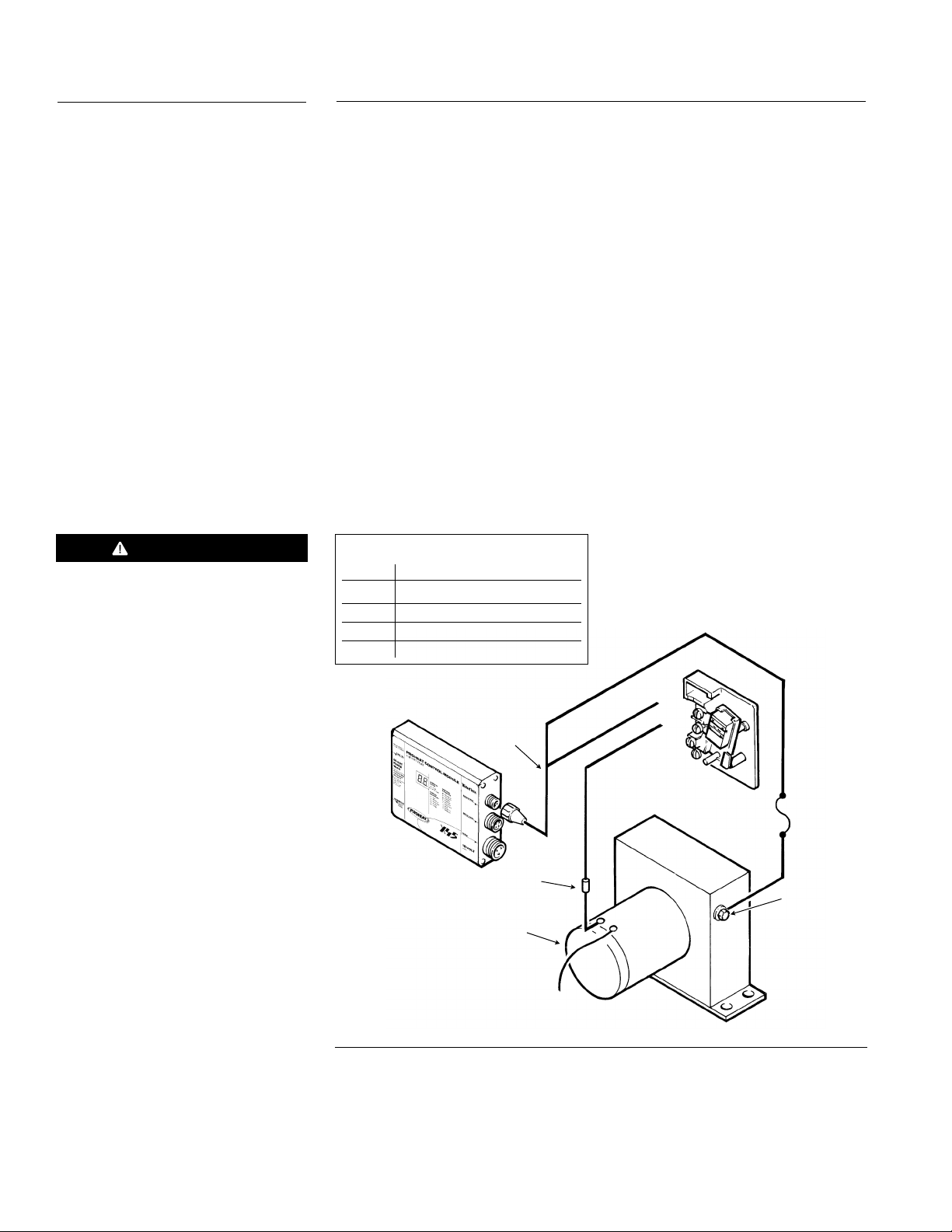
3.5.8
OPTION C – Auxiliary Sleeper Heater
1. Make sure the vehicle ignition is switched “OFF.”
2. Locate the auxiliary heater in a suitable area of the vehicle. Install plumbing
and air duct connections as per the manufacturer’s recommendations.
3. Locate the PROHEAT thermostat in a central area of the sleeper,
approximately 12" above the bunk. Avoid direct air flow from sleeper fan
ducts. (Figure 3-25)
4. Remove the adjusting knob and face cover. Mark and drill mounting
holes. Mount thermostat using the screws provided. (Figure 3-27)
5. Route sleeper fan harness from PCM to PROHEAT thermostat. Cut to
length. Connect white wire to terminal 1 of the thermostat using the fork
terminal provided. Black wire is not used.
6. Route a wire from terminal 2 of the thermostat to an appropriate wire on
the sleeper fan motor. Make a splice connection and seal the splice with
tape or heat shrink.
NOTE: The electrical power and operation in this option is controlled by the
PROHEAT. See Option B should a relay be required to provide more
electrical power.
WARNING
Systems using a ground side
battery disconnect must install
a 10 Amp fuse to protect the
sleeper fan harness.
Thermostat Wire Connection Detail
Screw # Wire Colour
1 White (from PCM)
2 White (to sleeper heater)
3 Not used
4 Not used
PCM
SLEEPER FAN
HARNESS
SPLICE WIRES
FAN MOTOR
(MULTIPLE WINDING TYPE)
ORANGE
RED
(NOT USED)
B
H
W
K
C
A
L
TE
HI
W
ITE
THERMOSTAT
1
1
2
2
3
4
AUXILIARY
SLEEPER HEATER
10 AMP
FUSE
GROUND
3-16
Figure 3-24 Option C
PROHEAT INSTALLATION & SERVICE
Page 38

3.5.9
OPTION D – Auxiliary Sleeper Heater Current Limited
NOTICE
Sleeper Fan output does not supply
power during ignition (1 minutes after
witch ON). DO NOT use for controlling
s
coolant valves. DO NOT use for
controlling coolant valves. See page
4-5 for operational sequence
information.
Figure 3-25 Thermostat Location
1. Make sure the vehicle ignition is switched “OFF.”
2. Mount the isolator in the sleeper fan motor area to a solid metal surface
with the screw provided. Cut OEM wire to sleeper fan motor and connect
isolator in series. Connect using1⁄4" spade connectors provided. (Figure
-26) Wire end from resistor pack connected to isolator terminal marked
3
“IGNITION.” Wire end from sleeper fan motor connected to isolator
terminal marked “FAN.”
3. Locate PROHEAT thermostat in central area of sleeper, approximately 12"
above the bunk. Avoid direct air flow from sleeper fan ducts. (See Figure 3-25.)
4. Remove the adjusting knob and face cover. Mark and drill mounting
holes. Mount thermostat using the screws provided. (Figure 3-27)
5. Route sleeper fan harness from PCM to PROHEAT thermostat. Cut to length.
Connect white wire to terminal 1 of the thermostat. Use fork terminal provided.
Black wire not used.
6. Route a wire from terminal 2 of the thermostat to the isolator terminal marked
“HEATER.” Connect using fork and spade terminal provided. (Can be cut from
left over wire harness.)
NOTE: For large sleepers this MAY NOT provide enough fan speed and
therefore option A, B or C should be considered.
MUST BE BOLTED TO A
METAL SURFACE FOR
HEAT SINKING
3/16"
(5 mm)
Figure 3-26 Isolator Detail
MOUNTING SCREW
FACE
BASE
VEHICLE
FUSE PANEL
OEM THERMOSTAT
OEM FAN
MOTOR CONTROL
(2 OR 3 SPEED)
OEM SLEEPER
HEATER ASSEMBLY
FAN MOTOR
(SINGLE WINDING TYPE)
Thermostat Wire Connection Detail
Screw # Wire Colour
1 White (from PCM)
2 White (to isolator)
3 Not used
4 Not used
RESISTOR ASSEMBLY
NOTE: MAY OR MAY NOT
BE LOCATED INSIDE
SLEEPER HEATER
ASSEMBLY
M
BLACK WIRE
(NOT USED)
PCM
WHIT
ISOLATOR
E
1
2
1
2
3
4
WHITE
IGNITION
FAN
HEATER
(PROHEAT)
PROHEAT
THERMOSTAT
(SEE WIRE
CONNECTION
DETAIL)
SLEEPER FAN
HARNESS
Figure 3-27 Thermostat Detail
SECTION 3. INSTALLATION
Figure 3-28 Option D
3-17
Page 39

3.5.10
AUXILIARY INPUT MODEL HEATER WIRING DETAILS
NOTICE
These instructions require a Auxiliary
Input model. For more information see
page 4-2.
NOTICE
The Preheat and Supplemental modes
are generally used by transit and
coach applications.
These installation options allow the operator to:
1. Run the PROHEAT in Preheat Mode or Supplemental Mode alone.
. Run the PROHEAT in the Preheat and Supplemental Mode.
2
3. Run the PROHEAT in Standard Mode (Proheat Timer option) and using the
Supplemental Mode.
In addition to the Standard Operating Mode, there are two other operating modes:
Preheat and Supplemental. One operating mode is for one button preheating
the engine and the second is for supplemental heat while the vehicle is being
operated. The benefits include easier operation for the driver; simplified
installation; eliminates need for extra control relays; and increases reliability
by reducing unnecessary heater operation.
The feature that makes this Auxiliary Input Model unique is that the PCM
(Proheat Control Module) has three inputs to turn the heater on; one for each
operating mode. The following is a description of the three operating modes.
Standard Heat Mode
Coolant temperature is monitored via a built in sensor. When the temperature at
the Proheat is below 150° F (65° C)*the Proheat operates, heating the coolant
185° F (85° C) at which point it stops burning fuel and goes into Standby with
only the coolant pump running. Standard Heat Mode is typically activated by
use of a toggle switch which must be manually switched off. If the switch is not
turned off the heater will continue to run overnight. Since the coolant pump
runs continuously in this mode, It is possible to accumulate a high number of
coolant pump operating hours vs heater run hours. Use of supplemental mode
is recommended in conjuction with standard mode in many cases.
to
NOTICE
Supplemental operation will not override
the Standard Mode operation (Proheat
Timer runs in Standard Mode).
NOTICE
The PROHEAT must have coolant
flowing
monitoring temperature.
through it when it is
Supplemental Heat Mode
The amount of heat required varies depending on engine load, outside temperature,
frequency of door opening, etc. Recognizing this varying demand for heat, the
Proheat monitors the conditions and supplies heat only when required. When
heat is not required, the Proheat puts itself into supplemental standby, shutting
off the coolant pump, thereby avoiding additional run hours on the pump. This
is ideal for transit and coach applications.
In order to simplify operation, this function is fully automatic and invisible to
the operator. The Proheat picks up a signal that the engine is running, and then
monitors the coolant temperature via a built-in sensor. If the coolant temperature
at the Proheat is below 150° F (65° C)*the coolant pump is activated for three
minutes*. This causes coolant in the engine to be circulated through the Proheat.
If after three minutes*the coolant temperature is above 150° F (65° C)*, the
Proheat will turn off the coolant pump and return to supplemental standby. If
the coolant temperature remains below 150° F (65°C)*, the Proheat will operate
and continue to supply heat to the system until the coolant temperature reaches
185° F (85° C). The Proheat then shuts itself off, returns to supplemental
standby, deactivates the coolant pump and waits for the coolant temperature
to fall below 150° F (65° C)*, and the cycle is repeated.
The Proheat switches off when the engine stops, thus avoiding the problem
of the driver forgetting to switch the unit off and leaving it running overnight.
3-18
PROHEAT INSTALLATION & SERVICE
Page 40

Note also that the Supplemental Heat Mode has priority over the Preheat
Mode and will cause the Preheat Mode to drop out.
NOTE: There is a thirty second delay in response to both an “ON” and “OFF”
signal*. This is to allow time for the vehicle to start before the heater
is activated in Supplemental Heat Mode.
There are special OEM versions for Supplemental Mode. For example, temperature thresholds may have a low
*
hreshold of 160ºF (71ºC) rather than 150ºF (65ºC) and a reduced coolant pump Pre-run time of 30 seconds
t
rather than three minutes. Please contact Proheat Technical Support for more information.
Preheat Mode
For those fleets with outdoor parking, preheating is often essential in order to
start the engine in cold weather. Since much of an engine’s wear occurs during
start-up, preheating. Preheating reduces this wear and contributes to longer
engine life and reduced operating costs.
The Preheat Mode is activated by use of a momentary contact switch. This will
typically be activated each morning by the maintenance personnel an hour or
so prior to pull out. The Proheat then runs in a mode similar to Standard Heat
Mode, heating the coolant which is circulated through the engine block. The
advantage of this system is the manner in which it is switched off. No operator
input is required. The Proheat has a built in time-out feature to prevent the heater
from running indefinitely. If the bus is not needed for pull-out, the Proheat will
switch itself off after 90 minutes of operation. Starting the engine will also
cause the preheat mode to end (if Supplemental mode is wired). To manually
end preheat mode simply depress the momentary contact switch.
You Choose
3.5.11
WARNING
When wiring for Supplemental
Mode, ensure to install Mechanic’s
Disable Switch in order to
disable Supplement Mode for
safety requirements.
Please refer to the wiring diagrams on page 1-4 and page 3-21.
Select one of the following wiring options
NOTE: PROHEAT IS NOT RESPONSIBLE FOR CHANGES IN ELECTRICAL
SYSTEMS BY ORIGINAL EQUIPMENT MANUFACTURING COMPANIES.
Option A: Run the PROHEAT in Preheat Mode or Supplemental Mode alone.
Option B: Run the PROHEAT in the Preheat and Supplemental Mode.
Option C: Run the PROHEAT in Standard Mode (Proheat Timer optional)
and using the Supplemental Mode.
OPTION A – Preheat Mode or Supplemental Mode Operation
The instructions below are general in nature. It is up to the installer to select
appropriate switches and use proper electrical connection methods. If more
information is required, contact your Authorized Proheat Dealer or Proheat
Product Support at www.proheat.com
1. Select the operation mode of choice. Note that Preheat may be wired as
Preheat Option 1 or Preheat Option 2 as shown in Figure 3-29. In
addition, note to that the engine run signal may be off the alternator,
multiplex or others.
2. Wire the Preheat Mode or Supplemental Mode as shown in Figure 3-29.
Install hardware as required on the vehicle.
3. Install an Indicator Light near the vehicle operator.
SECTION 3. INSTALLATION
3-19
Page 41

3.5.12
WARNING
When wiring for Supplemental
Mode, ensure to install Mechanic’s
Disable Switch in order to
disable Supplement Mode for
safety requirements.
3.5.13
NOTICE
Supplemental operation will not
override the Standard Mode operation
(Proheat Timer runs in Standard Mode).
WARNING
DO NOT connect an ON/OFF Switch
and a Timer in the same circuit.
OPTION B – Preheat and Supplemental Mode
The instructions below are general in nature. It is up to the installer to select
ppropriate switches and use proper electrical connection methods. If more
a
information is required, contact your Authorized Proheat Dealer or Proheat
Product Support at www.proheat.com
1.
Identify engine run signal. This may be off the alternator, multiplex or others.
2. Install hardware as required on the vehicle as shown in Figure 3-29.
3. Choose either Preheat Option 1 or Preheat Option 2. Install hardware as
required on the vehicle as shown in Figure 3-29.
4. Install an Indicator Light near the vehicle operator.
OPTION C – Standard Mode (Proheat Timer Optional)
and Supplemental Mode
The instructions below are general in nature. It is up to the installer to select
appropriate switches and use proper electrical connection methods. If more
information is required, contact your Authorized Proheat Dealer or Proheat
Product Support at www.proheat.com
1. Install the timer as per Section 3.5.3 or the switch as per Section 3.5.4.
See Figure 3-29.
2.
Identify engine run signal. This may be off the alternator, multiplex or others.
3. Route and connect engine run signal to wire A on the auxiliary input
connector. Install hardware as required on the vehicle.
3-20
PROHEAT INSTALLATION & SERVICE
Page 42

PROHEAT
PREHEAT
ON
GREEN - ON SIGNAL STANDARD MODE 12V/24V
PCM MUST HAVE THE
AUXILIARY INPUT FEATURE
B
ON SIGNAL PREHEAT MODE 12V/24V INPUT
SWITCH INPUT
A
(+) RED POWER 12V/24V OUTPUT
(-) BLACK - GROUND
(+) WHITE - INDICATOR LAMP 12V/24V OUTPUT
C
D
B
AUXILIARY INPUT
ON SIGNAL SUPPLEMENTAL MODE 12V/24V INPUT
A
MECHANIC'S DISABLE
SWITCH
PROHEAT
PREHEAT
OFF
B
SPRING CENTERED
DOUBLE THROW
MOMENTARY SWITCH.
C
A
12/24V
ENGINE SIGNAL
START SWITCH
(MOMENTARY CONTACT,
NORMALLY OPEN)
F
A
C
STOP SWITCH
(MOMENTARY CONTACT,
NORMALLY OPEN)
PREHEAT MODE OPTION 1
PUSH BUTTON
START/STOP SWITCH
(+) WHITE - INDICATOR LAMP 12V/24V OUTPUT
GREEN - ON SIGNAL STANDARD MODE 12V/24V
(+) RED POWER 12V/24V OUTPUT
SWITCH INPUT
C
D
(-) BLACK - GROUND
A
B
PROHEAT TIMER
OPTIONAL
BACKLIGHT TO KEYSWITCH
GREY
WHITE
GREEN
BLACK
RED
PREHEAT MODE OPTION 2
SUPPLEMENTAL MODE
STANDARD MODE OPTION 1
INDICATOR LIGHT
(+)
(-)
STANDARD MODE OPTION 2
PROHEAT SWITCH AND
INTERNAL INDICATOR
LIGHT
DEALER/OEM. TO SUPPLY
DEALER/OEM. TO SUPPLY
24 VOLT
COMMINICATION
CANBus
RS232&
999400
POWER
AUXILIARYINPUT
SWITCHINPUT
G-III SOFT START
PROHEATCONTROL MODULE
POWER
CoolentHeater
BusApplications
ApprovedforUse in
Requirements
DieselFueledVechicle
ThisProduct Meets
FHWABus Heater
WASH
FUSE15A
DO NOT
ProtectedbyUS Patents
5,878,950and 6,082,625
TIME
CLOCK
MANUAL
DAY
TIMER
See page 3-13 for wiring
Figure 3-29 Preheat and Supplemental Wiring Diagram.
SECTION 3. INSTALLATION
3-21
Page 43

3.6
FUEL SYSTEM
3.6.1
CAUTION
DO NOT use fuel lines and pick-up
tubes less than 1/4" ID or greater
than 3/8" ID. Failure to use the
correct line size may result in
heater malfunction.
Figure 3-30 Do not kink or pinch fuel
line when routing lines.
GENERAL CONSIDERATIONS
• Use a dedicated 1/4" ID fuel line between the fuel tank and heater meeting
AE 30R9. (Fuel line length not to exceed 50' with a maximum rise of 10'.)
S
Ensure fuel lines are routed away from all heat sources, well secured and will
not abrade.
• Ensure clamps are secure at fuel pump and fuel pick-up.
• Ensure the proper fuel line clamps with uniform 360° compression are used.
• Use of a fuel filter is not recommended. All models have a built in fuel filter
at the fuel inlet fitting on the heater.
50' MAXIMUM LENGTH OF FUEL LINE
You Choose
10' MAXIMUM RISE
Figure 3-31 Fuel Supply Height Requirement
Select Your Fuel Pick-up Installation Option
Option A:
Option B: Fuel pick-up to be installed in an existing blank fuel sender
Option C: Fuel pick-up to be installed in a hole drilled into the
Fuel pick-up to be installed in an existing1⁄4”or1⁄2” NPT port
in fuel tank.
cover plate.
fuel tank.
3-22
PROHEAT INSTALLATION & SERVICE
Page 44

3.6.2
CAUTION
Do not use teflon tape as this will
contaminate the heater and engine
fuel system.
OPTION A – 1/4" or 1/2" NPT Port
Locate an existing pipe thread port in the vehicle fuel tank and select the1⁄4"
or1⁄2" NPT portion of the fuel pick-up that fits into that port. Apply a pipe
ealant paste to the fuel pick-up pipe threads prior to installation.
s
FUEL PICK-UP
EXISTING PORT
IN FUEL TANK
FUEL TANK
Figure 3-321⁄4" NPT Port
1/4" NPT
EXISTING PORT
IN FUEL TANK
Figure 3-331⁄2" NPT Port
FUEL PICK-UP
1/2" NPT
FUEL TANK
SECTION 3. INSTALLATION
3-23
Page 45

3.6.3
OPTION B – Existing Blank Fuel Sender Cover Plate
Locate an existing, blank fuel sender port in the vehicle fuel tank. Remove the
cover plate, drill a 1" diameter hole and install the fuel pick-up as shown.
NUT
WASHER
GASKET
COVER PLATE SUPPLIED
WITH FUEL TANK
(REQUIRES MODIFICATION)
GASKET
WASHER
FUEL SENDER PORT IN TANK
Figure 3-34 Blank Fuel Sender Port
3.6.4
CAUTION
To prevent fuel system
contamination do not allow drill
chips to fall into the fuel tank
when drilling the hole.
WARNING
Drilling the fuel tank may not be
acceptable in some jurisdictions.
Do not drill the fuel tank on
passenger carrying vehicles such
as school buses.
OPTION C – Hole Drilled into Fuel Tank
This option requires a permanent modification to the fuel tank.
Select the location for the fuel pick-up in the vehicle fuel tank. Ensure sufficient
clearance above the tank to get the fuel pick-up into the tank. Drill a 1" diameter
hole in the tank.
NUT
WASHER
GASKET
GASKET
WASHER
DRILL 1" DIA. HOLE
IN FUEL TANK
3-24
Figure 3-35 Drill Hole in Tank
PROHEAT INSTALLATION & SERVICE
Page 46

3"-4" CLEAR
3.6.5
INSTALLATION
45˚±15˚
CUT BOTTOM
OF FUEL PICK-UP
AT AN ANGLE
3-4" CLEAR OF BOTTOM OF TANK
Figure 3-36 For some situations where
the fuel pick-up is too far
from the bottom of the tank,
an extension from left over
fuel line can be added.
Figure 3-37 Fuel Pick-up Depth
1. Determine the depth of the fuel tank at the desired fuel pick-up location.
Cut the fuel pick-up 3 to 4” shorter as shown in Figure 3-37.
2. Install the pick-up into the fuel tank as per selected option.
3. Route the fuel line from the heater to the fuel pick-up. Ensure the fuel line
is well secured and will not abrade.
4. Attach the fuel line to the heater fuel pump fitting and the fuel pick-up
with hose clamps. Lubricating the fittings with fuel may ease the
installation effort.
GROMMET
HOSE CLAMP
FUEL LINE
FUEL TANK
SECTION 3. INSTALLATION
FUEL HOSE CLAMP
FUEL LINE
Figure 3-38 Fuel Line Connection Detail
FUEL PICK-UP
3-25
Page 47

3.7
FIRST TIME STARTUP
1. Inspect the entire installation for:
a) loose bolts,
b) loose hoses and hose clamps,
c) loose wires and wire connections,
d) kinked or pinched hoses or wires,
e) battery connection for correct polarity, and
f) coolant supply and return location on the engine.
2. Fill the vehicle cooling system with coolant as per owner’s manual or
engine manufacturer’s recommendations.
3. Place dash heater control in the full “HOT” position. Turn air conditioning
“OFF.”
NOTE: If shut-off valves are installed make sure they are fully “OPEN.”
4.
Start the vehicle engine and run it at a fast idle for 5 to 10 minutes to purge
air from the heater and coolant system. While the engine is running:
a) make sure the coolant is flowing freely,
b) inspect hoses and fittings for leaks,
c) check the coolant level in the radiator and add coolant as necessary.
5. Shut the engine “OFF.”
6. Connect the power harness. All segments of the LED will flash on the
PCM. This indicates that power has been supplied. See page 5-4 for
more information.
7. Start the PROHEAT heater using the ON/OFF switch. The indicator lamp
should be lit with a solid red light. Go to the heater and observe its operation.
Test Preheat and Supplemental Mode operation if equipped. Refer to page 318 and page 4-5 for proper information.
Sequence of Events:
a) Coolant temperature must be less than 150˚ (65˚C).
b) “ON” light on PCM should be lit.
c) You should hear the coolant pump, blower and compressor start.
Looking through the inspection port you should see a spark and
a flame.
d) The spark will stop after 60 seconds and the heater will continue
to run.
NOTE: If the indicator lamp in the ON/OFF Switch flashes upon initial
startup – WAIT. The heater will attempt a restart in 3 minutes.
In some cases it takes longer for the fuel pump to prime the empty
fuel lines during the initial start. This is usually the case if the fuel
lines are long (it may take a few restarts). If the light continues to
flash after the restart, then there is a problem.
The Troubleshooting & Repair section of this manual will assist
you in correcting the problem.
3-26
PROHEAT INSTALLATION & SERVICE
Page 48

8. Once the heater is started it will continue to run until the coolant
temperature reaches 185˚F (85˚C) at heater outlet, then it will shut off.
NOTE: The vehicle dash temperature gauge may read significantly less
depending on the location of the sender unit on the engine.
Sequence of Events for Shutdown
a) Fuel pump and compressor shut off.
b) The blower will run for 3 minutes on Cool Down (Purge) cycle then
shut “OFF.”
c) The water pump will continue to run.
9. The heater will restart when the coolant temperature falls below 150˚F
(65˚C) at heater outlet, as long as the ON/OFF switch is left “ON.”
10. If the vehicle has been equipped with the sleeper heat option then:
a) Adjust the PROHEAT sleeper thermostat to highest heat position.
b) The sleeper heat exchanger fan will start blowing warm air.
11. Switch the ON/OFF switch to “OFF.” The red light will go out and the
heater will Cool Down (Purge) for three minutes.
12. Inspect the installation again for leaks.
13. Install the enclosure cover.
14.
TO ENSURE FULL WARRANTY COVERAGE COMPLETE
THE WARRANTY CARD AND MAIL TO PROHEAT.
SECTION 3. INSTALLATION
3-27
Page 49

3-28
PROHEAT INSTALLATION & SERVICE
Page 50

4.0
PRINCIPLE
OF OPERATION
4.1
2
4
GENERAL DESCRIPTION
17
3
1
Figure 4-1. Sleeper Fan model shown.
1. Fuel Pump
2. Fuel Regulator
3. Air Compressor
4. Ignition Coil
5. Coolant Pump
6
5
A gear pump driven from the same motor as the compressor pulls fuel from
the tank. The fuel is filtered at the fuel pump inlet.
Reduces fuel to atmospheric pressure. Siphoning action from the nozzle
draws fuel from the regulator. Without this siphoning there is no fuel flow.
A diaphragm type compressor supplies air to the fuel nozzle.
An automotive type ignition coil supplies high voltage to the ignition electrode,
sparking to the combustion tube.
Circulates the engine coolant. An impeller style pump is used because of its
low current draw and free flow during engine operation. IT IS NOT SELF-
PRIMING. The pump must be flooded and the system must be purged of all
air for it to operate. (DO NOT run dry.)
Utilizes a microprocessor to monitor operating conditions and control outputs
SECTION 4. PRINCIPLE OF OPERATION
4-1
Page 51

6. PROHEAT Control
Module (PCM)
to the motors and sensors. It has powerful diagnostics to assist in
troubleshooting. One of the key features is the diagnostic display on the
front of the PCM which has a display LED to indicate function or
omponent problems. The PCM comes in a "Sleeper Fan 12V" or "Aux
c
Input 12V or 24V" model. The PCM model can be identified by looking at
the lexan decal as shown in Figure 4-2.
• The "Sleeper Fan" model has an output with a special current limiting
feature which, if used, limits the current draw of the sleeper heater fan
to 3 Amps. This is done to control the total current draw on the vehicles
batteries. This operation is typically used for truck installations.
• The "Aux Input" model uses two special input pins (see Electrical
Drawing on page 1-4) that allow for a Preheat Mode and Supplemental
Mode operation. This operation is typically used for transit and coach
installation.
NOTE: See "Modes of Operation Section" for a description of the operating
modes used for both the "Sleeper Fan" and "Aux Input" Models
NOTE: The PROHEAT PCM “Sleeper Fan” circuit has a one minute delay
during ignition.
NOTE: The PROHEAT PCM is unique in that it uses “ground-side” switching
for the blower, compressor, coolant pump and ignition coil. The
positive wire to the motors and ignition coil will show voltage even
when the heater is switched “OFF.”
PCM MODEL IDENTIFICATION.
SLEEPER FAN MODEL SHOWN.
4-2
Figure 4-2 LED will light to indicate a problem. Switch or Timer indicator light will
flash to indicate the diagnostic code (page 5-3).
PROHEAT INSTALLATION & SERVICE
Page 52

10
12
11
9
8
7
14
13
Figure 4-3
2
7. Nozzle
8. Blower
9. Inspection Port
10. Heat Exchanger
An air/fuel aspirating type spray nozzle (located inside housing). The
compressed air flows through the nozzle at high speed creating a venturi
effect. This siphons fuel from the regulator and combines it with the air,
creating an extremely fine mist which is sprayed out of the nozzle into the
combustion chamber.
Uses an impeller-type fan to supply the combustion air at low pressure. It
is also used to cool and Cool Down (Purge) the combustion chamber
during the 3 minute shut-down sequence.
Allows visual inspection of the combustion process and is invaluable for
reducing time spent on troubleshooting and servicing the heater.
A two-part cast aluminum housing. Coolant will typically rise 10˚ to 15˚F
(6˚ to 8˚C) in temperature as it passes through the heat exchanger,
depending on the flow rate.
SECTION 4. PRINCIPLE OF OPERATION
4-3
Page 53

11. Ignition Electrode
T-II
CLOCK
TIMER ID LIGHT
(GREEN)
INDICATOR LIGHT
(RED)
TIMER SET
BUTTON
MANUAL
BUTTON
The electrode is located near the nozzle just out of the air/fuel mixture path.
During the ignition sequence the spark jumps the gap between the electrode and
the combustion tube, igniting the air/fuel mixture. Spark duration is 60 seconds.
12. Coolant Temperature
Sensor
13. Overheat Breaker
Sensor
14. Flame Sensor
15. On/Off Switch
16. 7 Day Timer
17. Sleeper Fan
(only output connector
shown)
Measures coolant temperature at the outlet port of the heat exchanger.
Protects the heater from damage should it be operated without coolant. The
verheat breaker monitors the surface temperature of the heat exchanger casting.
o
When the temperature reaches 286˚F (141˚C) the breaker “trips out.” This shuts
off the power to the air compressor—extinguishing the flame. The breaker can
be reset by pushing down on the red button (located under the rubber cap).
Photo-electrically measures the intensity of the flame. It is the flame sensor
that signals to the PCM that the air/fuel mixture is burning properly.
Is used to switch the heater “ON” and “OFF.” It has an indicator lamp that
displays a red light when switched “ON.” A flashing red light indicates a heater
diagnostic code and one of the LEDs on the PCM diagnostic display will be lit.
(See page 5-3 for details.)
Is used to switch the heater “ON” and “OFF.” This can be done manually or by
a preset time and day. It has an indicator lamp that displays a red light when
switched or timed “ON.” A flashing red light indicates a heater diagnostic code
and one of the LEDs on the PCM diagnostic display will be lit. (See page 5-3
for details.)
On Sleeper Fan 12 V models (see page 4-2), the Proheat Control Module is
equipped with a 3 A limited output. It is used to drive fans or other equipment
as determined by the installation (see page 3-1). The output is ON 60 seconds
after switch ON. In addition, it is also ON when there is a functional error (see
page 5-1 for details).
4-4
Indicator Light
Located in the Toggle
Figure 4-4 ON/OFF Switch
Figure 4-5 7 Day Timer
PROHEAT INSTALLATION & SERVICE
Page 54

4.2
MODES OF OPERATION
The PCM comes in a "Sleeper Fan" or "Aux Input" model. The PCM model can
be identified by looking at the decal as shown on page 4-2. Depending on the
model and installation (refer to electrical drawing), the X45 has only the Standard
ode of Operation or combination of Standard, Preheat and Supplemental
M
Modes of operation. The following table defines the applicability:
perational Mode Sleeper Fan Model Aux Input Model
O
Standard Yes Yes
Preheat no Yes
Supplemental no Yes
Aux Input Operation Mode Summary
See page 3-18 for background information.
4.2.1
1. Switch “ON”
Standard
Mode Signal
2. Precheck
3. Ignition
Standard Heat Mode
• normal operation of the
Proheat
• over-rides and drops out
preheat mode
• overrides supplemental
mode
Supplemental Heat Mode
• similar to standard mode
except: coolant pump
does not run when
Proheat is not firing
• overrides and drops out
preheat mode
•
30 second signal required
before mode enabled
•
30 second signal removal
before mode shut off
Preheat Mode
• similar to standard
mode Except: 90 minute
time out
• activated via momentary
contact push button
switch with latching
internal to the PCM
STANDARD MODE – All Models
The ON/OFF switch (or Timer) lamp and the PCM “ON” LED will light. In addition,
the Hour Meter (Auxiliary Output) will be powered. The PROHEAT goes to
“Precheck”.
The PCM performs a short diagnostic cycle. This takes a few seconds to check
components for proper ranges, checking for the presence of a flame, shortcircuits and open circuits. If there are no errors indicated, the PROHEAT goes
to “Ignition”.
The blower starts first, followed by the coolant pump, ignition spark, air compressor
and fuel pump. The ignition electrode sparks for 60 seconds. Once the flame
sensor detects a good flame, the PROHEAT goes to “Full Output". At 60 seconds,
the sleeper fan output turns on (if equipped. See page 4-2 for more information).
4. Full Output
5. Purge
SECTION 4. PRINCIPLE OF OPERATION
The PROHEAT runs at Full Output until the coolant temperature reaches
185°F (85°C) at the heater outlet. The PROHEAT shuts the flame off and goes
to “Cool Down (Purge)”. Pu is displayed on the Proheat Control Module (PCM).
The air compressor and fuel pump shut off immediately. The blower and coolant
pump continue to run. After 3 minutes, the blower stops and the PROHEAT
goes to “Standby.”
4-5
Page 55

6. Standby
The coolant pump circulates the coolant through the system until the temperature
drops to 150˚F (65˚C) at the heater outlet; then it will enter Precheck and
repeat steps 2 to 6. The PROHEAT will continue to repeat steps 2 to 5 until it
s switched “OFF.”
i
7. Switch “OFF”
4.2.2
1. Activate
Preheat Signal
2. Precheck
If PROHEAT is in Full Output, it will Cool Down (Purge) first, then shut “OFF”.
If PROHEAT is in Standby, it will shut “OFF” immediately.
When switched OFF, the sleeper fan output turns off (if equipped, see page 4-2).
hen switched OFF, the Hour Meter (Auxiliary Output) will shut off.
W
NOTE: The PROHEAT will Cool Down (Purge) for 3 reasons:
•the coolant reaches 185˚F (85˚C)
•there is a function or component problem
(See Troubleshooting & Repair on page 5-1)
•the PROHEAT is operating at Full Output when it is shut “OFF”
PREHEAT MODE – Aux Input Models Only
Push the Preheat button and the PCM “ON” LED will light will turn on. In addition,
the Hour Meter (Auxiliary Output) will be powered. The PROHEAT goes to
“Pre-check.”
The PCM performs a short diagnostic cycle. This takes a few seconds to check
components for proper ranges, checking for the presence of a flame, shortcircuits and open circuits. If there are no errors indicated, the PROHEAT goes
to “Ignition.”
3. Ignition
4. Full Output
5. Purge
6. Standby
7. After 90
minutes or
Switched off
The blower starts first, followed by the coolant pump, ignition spark, air compressor
and fuel pump. The ignition electrode sparks for 60 seconds. Once the flame
sensor detects a good flame, the PROHEAT goes to “Full Output".
The PROHEAT runs at Full Output until the coolant temperature reaches
185˚F (85˚C) at the heater outlet. The PROHEAT shuts the flame off and goes
to “Cool Down (Purge).”
The air compressor and fuel pump shut off immediately. The blower and
coolant pump continue to run. After 3 minutes, the blower stops and the
PROHEAT goes to “Standby.”
The coolant pump circulates the coolant through the system until the temperature
drops to 150˚F (65˚C) at the heater outlet. The Proheat returns to Precheck
and repeats steps 2 to 6. The PROHEAT will continue to repeat this cycle
until it is switched off, or will switch OFF automatically after 90 minutes.
If PROHEAT is in “Full Output”, it will Cool Down (Purge) first, then shuts off.
If PROHEAT is in “Standby”, it shuts off immediately.
When switched OFF, the Hour Meter (Auxiliary Output) will shut off.
NOTE: The PROHEAT will Cool Down (Purge) for 3 reasons:
• the coolant reaches 185˚F (85˚C)
• there is a function or component problem
(See Troubleshooting & Repair on page 5-1)
• the PROHEAT is operating at Full Output when it is shut "OFF".
4-6
PROHEAT INSTALLATION & SERVICE
Page 56

4.2.3
1. Activate
Supplemental
Signal for
30 Seconds
2. Supplemental
Standby
SUPPLEMENTAL MODE
he ‘ON” light and heater indicator will turn ON after 30 seconds of receiving
T
the signal. In addition, the Hour Meter (Auxiliary Output) will be powered.
he PROHEAT monitors coolant temperature until it drops below 150˚F
T
(65°C). Once coolant temperature drops below 150˚F (65°C) the PROHEAT
goes to “Pre-run”.
– Aux Input Models Only
3. Pre-run
4. Pre-check
5. Ignition
6. Full Output
7. Purge
8. Remove
Supplemental
Signal for
30 Seconds
The coolant pump operates for 3 minutes to circulate coolant through the
system. If the coolant temperature rises above 150˚F (65°C), the pump shuts
off and the PROHEAT returns to “Supplemental Standby”. If the coolant
temperature remains below 150˚F (65°C), the PROHEAT goes to Pre-check.
The PCM performs a short diagnostic cycle. This takes a few seconds to check
components for proper ranges, checking for the presence of a flame, shortcircuits, and open circuits. If there are no errors indicated, the PROHEAT goes
to “Ignition”.
The blower starts first, followed by the coolant pump, ignition spark, air compressor
and fuel pump. The ignition electrode sparks for 60 seconds. Once the flame
sensor detects a good flame, the PROHEAT goes to “Full Output".
The PROHEAT runs at Full Output until the coolant temperature reaches 185˚F
(85°C) at the heater outlet. The PROHEAT shuts the flame off and goes to
“Cool Down (Purge)”. Pu is displayed on the Proheat Control Module (PCM).
The Air Compressor and Fuel Pump shut off immediately. The Blower and Coolant
Pump continue to run. After 3 minutes the Blower and Coolant Pump stop and
the PROHEAT goes to “Supplemental Standby” and repeats steps 2 to 7.
The “ON” light and the Heater Indicator turn off after 30 seconds of the signal
being removed. If the PROHEAT is in the “Supplemental Standby” or “Pre-run”
sequence the PROHEAT will turn off immediately. If the PROHEAT is in any other
function it will complete a “Cool Down (Purge)” function before turning off.
When switched OFF, the Hour Meter (Auxiliary Output) will shut off.
NOTICE
There are special OEM versions for
Supplemental Mode. For example,
temperature thresholds may have a
low threshold of 160°F (71°C) rather
than 150°F (65°C) and a reduced
coolant pump Pre-run time of 30
seconds rather than three minutes.
SECTION 4. PRINCIPLE OF OPERATION
NOTE: The PROHEAT will Cool Down (Purge) for 3 reasons:
• the coolant reaches 185˚F (85˚C)
• there is a function or component problem
(See Troubleshooting & Repair on page 5-1)
• the PROHEAT is operating at Full Output when it is shut off.
4-7
Page 57

4-8
PROHEAT INSTALLATION & SERVICE
Page 58

5.0
TROUBLESHOOTING
AND REPAIR
NOTICE
Troubleshooting and repair is to be
performed by Authorized Proheat
Dealers.
5.0.1
STEP 1
STEP 2
STEP 3
STEP 4
Problems with the PROHEAT and its operation will be indicated in two ways:
1.
PROHEAT Diagnostic Faults indicated by means of a flashing diagnostic code
on an indicator light on the switch, Timer red manual light or OEM indicator
light (installation options). See Example Proheat Behavior Error on page 5-2.
2.
Operational problems may not be identified with a flashing diagnostic code
(e.g. blown fuse, smoking exhaust, backfiring or low heat output. Go to
page 5-34 to page 5-37.)
TROUBLESHOOTING A PROBLEM
Locate the PROHEAT, remove the enclosure lid if equipped and visually check
for any problems with wiring harnesses, fuel leaks, coolant leaks, exhaust
pipe damage and environmental conditions.
Inspect Proheat Control Module (PCM) display for error code. If PCM display is
difficult to view, determine the blink code on the switch, Timer red manual
light or OEM indicator light (installation options).
If no code is indicated, turn the PROHEAT off and then on again using the
existing operational switches, timer or a PROHEAT remote start switch
(PROHEAT P/N 952925K).
Let the PROHEAT attempt to start and/or operate. Observe the operation.
NOTE: The PROHEAT will always attempt to start twice, as long as the coolant
temperature is below 150°F (65°C). If a fault is detected it will shut down, go
through a Cool Down (Purge) and attempt a second start. After both attempts
to start or operate, the PCM will display a code and the switch, Timer red
manual light or OEM indicator (installation options) will blink the same code.
• After two consecutive start attempts, the PROHEAT will not attempt to
start again and goes into a hold state. In the hold state the switch, Timer
red manual light or OEM indicator light (installation options) will blink the
error code(s) continuously. The PROHEAT will try again once the switch is
turned "OFF" and then "ON" again.
• If the indicator light flashes, count the number of flashes and refer to
the troubleshooting diagnostic code description for that number on the
following pages.
• If the PROHEAT runs but is not performing or operating correctly, consult
the Operational Problems, Section 5.3 on page 5-37.
Figure 5-1 Troubleshooting Tools.
SECTION 5. TROUBLESHOOTING & REPAIR
Troubleshooting and Repair Tools Required
• Remote Start Switch (PROHEAT P/N 952925K)
Allows the service technician to work at the PROHEAT. Isolates the PROHEAT
from the existing vehicle system controls and comes with a built-in indicator light.
• Digital Air Compressor Test Gauge (PROHEAT P/N PK0037)
Allows the service technician to check compressor pressure in order to
ensure for correct fuel delivery. (Note The analog Air pressure gauge
PK0060 can also be used.)
5-1
Page 59

EXAMPLE PROHEAT BEHAVIOR ERROR – CODE 015.0.2
The following is an example of an X45 PROHEAT behavior during an error.
The following example shows the sequence of events when the PROHEAT is
witch “ON” in the Standard Mode (similar for Preheat and Supplemental
s
Modes). This sequence of events occurs for Codes 01 through 12. Codes 13
and 14 do not put the heater into Cool Down (Purge) mode or shut down the
PROHEAT; rather, the PROHEAT reports the error and continues to run.
1. Switch “ON”
Standard
Mode Signal
2. Pre-check
3. Ignition
4. Error
Detection –
Purge
The ON/OFF switch (or Timer) lamp and the PCM “ON” LED will light. In addition,
the Hour Meter (Auxiliary Output) will be powered. The PROHEAT goes to
“Precheck”.
The PCM performs a short diagnostic cycle. This takes several seconds
checking components for proper ranges, checking for the presence of a
flame, short-circuits and open circuits. If there are no errors indicated, the
PROHEAT goes to “Ignition”.
The blower starts first, followed by the coolant pump, ignition spark, air
compressor and fuel pump. The ignition electrode sparks for 60 seconds.
If the flame sensor did not “see” a flame in 60 seconds after entering
ignition, the air compressor and fuel pump shut off immediately. The blower
and coolant pump continue to run.
Code 01 will be displayed alternating with Pu. There will be one flash, pause
and then one flash repeating on the switch, timer red manual light or OEM
indicator light. After 3 minutes, the blower stops and the PROHEAT attempts
to start again.
5-2
5. Steps 1 to 4
are Repeated
6. Hold State
NOTE: Codes 13 and 14 will not cause the heater to shut down. The PROHEAT
reports the error and continues to run.
The PROHEAT always restarts after one error detection (except for Codes 13
and 14). After the 3 minute Cool Down (Purge), the PROHEAT will go through
Precheck, Ignition and the Error Detection – Cool Down (Purge) cycle one
more time.
After two consecutive Code 01 errors, the PROHEAT goes into a hold state.
No further start attempts will be made. Code 01 will be displayed
continuously and the PCM LED “ON” light will turn “OFF.” In addition, the
Hour Meter (Auxiliary Output) will shut off.
The switch, timer red manual light or OEM indicator light will continue to flash
once, pause, flash and repeat.
NOTE: In order to restart the heater turn the switch “OFF” and back “ON”.
PROHEAT INSTALLATION & SERVICE
Page 60

5.1
Figure 5-2 Remote On/Off Switch.
OPERATION INDICATORS,
FUNCTION AND COMPONENT
DIAGNOSTICS
The microprocessor in the PCM continually monitors all the PROHEAT
systems. If the internal diagnostics discover a problem, a diagnostic code will
be displayed on the PCM function display. The remote ON/OFF Switch, Timer
red manual light or OEM indicator light (installation options) will also flash the
diagnostic code followed by a pause and then repeat. The number of flashes
correspond to the numbered diagnostic code. For example, 5 flashes
indicates a VOLTAGE ERROR. (See diagram below for a complete list of
operation states and error flash codes.)
If multiple errors occur, multiple codes will be displayed. For example, if a 5
and 9 error occurs together, the PCM LED will flash 5 and then 9. Similarly,
the remote ON/OFF Switch, Timer red manual light or OEM indicator light
(installation options) will flash 5 times, pause and then 9 times.
NOTICE
The X45 fuel pump is a gear pump
driven directly by the compressor
motor. The fuel pump is NOT being
monitored electrically. Should this
component diagnostic code appear
there will be a fault in the main wire
harness connector (See page 5-35,
Figure 5-27) or in the PCM. All
mechanical problems with the fuel
pump will be indicated as either a
START (1) or a FLAME OUT (2)
diagnostic code.
NOTICE
Code 13, Sleeper Fan, is only
applicable to "Sleeper Fan" models.
Should this diagnostic code appear
on "Aux Input" models there will be
a fault with the PCM.
CODE No. Description of Operating State No. of
and Diagnostic Codes Flashes
Operation Indicators
8.8. Power Up No Indicator
• Switch On (Standard, Preheat Solid Indicator
or Supplemental Mode)
Pu Cool Down (Purge) Solid Indicator
Function Diagnostics
01 Start 1
02 Flame Out 2
03 Coolant Flow 3
04 Overheat 4
05 Voltage 5
Component Diagnostics
06 Flame Sensor 6
07 Temp Sensor 7
08 Fuel Pump (See Note) 8
09 Compressor 9
10 Ignition Coil 10
11 Coolant Pump 11
12 Blower 12
13 Sleeper Fan 13
14 Hour Meter (Auxiliary Output) 14
SECTION 5. TROUBLESHOOTING & REPAIR
Figure 5-3 Function Display Panel Detail & Error Flash Codes
5-3
Page 61

5.1.1
OPERATION INDICATORS
Operation States:
8.8. – Power Up
• – On
Pu – Cool Down (Purge)
The operation indicators signal normal functioning of the PROHEAT. These two
states do not indicate a fault.
Power Up
On
Purge
The Power Up indicator communicates that the PROHEAT power has been
supplied. All segments of the LED momentarily flash and then turn off.
The ON indicator code communicates that the PROHEAT is operationally “ON”
whenever the On LED is solid. This indicates a Mode of Operation (see page
4-5) is active.
WARNING
The "ON" LED indicates that the heater can start at any time. Refer to
page 4-5 to page 4-7.
The PROHEAT will be in the Cool Down (Purge) state as defined in the Modes
of Operation (see page 4-5) when “Pu” is displayed.
5-4
PROHEAT INSTALLATION & SERVICE
Page 62

5.1.2
FUNCTION DIAGNOSTICS
Function Errors:
– Start 4 – Overheat
1
2 – Flame Out 5 – Voltage
3 – Coolant Flow
Errors displayed on the PCM diagnostic panel will cause the heater to shut
down. These diagnostic codes are usually the result of a system problem.
It is possible to have two or more diagnostic codes displayed at the same
time. A function diagnostic code may be displayed in conjunction with a
component diagnostic code.
1 Start
A START diagnostic code. Indicates that the flame sensor did not see a flame
during the FULL 60 second ignition period.
If the START diagnostic code is displayed, switch the heater “OFF” and then
“ON” to restart. Observe the exhaust and the heater operation through the
inspection window.
Troubleshoot the Flame Out diagnostic code based on:
1 Fuel System.
Go to page 5-6 to page 5-12, Steps 1 to 5.
• There is no fuel, fuel odor or atomized fuel coming from the exhaust pipe.
• There is no hot exhaust coming from the exhaust pipe.
• There is no flame visible through the inspection window.
2 Ignition System.
• There is raw fuel and/or atomized fuel and a raw fuel odor coming from
the exhaust pipe. Go to page 5-13.
• There is no hot exhaust coming from the exhaust pipe.
• There is no flame visible through the inspection window.
3 Flame Sensor.
Go to page 5-14.
• There is a flame and the combustion sounds good, the PROHEAT
appears to be operating normally.
• No smoke, raw fuel odor or atomized fuel is coming from the exhaust pipe.
SECTION 5. TROUBLESHOOTING & REPAIR
Fuel System Schematic
The PROHEAT X45 fuel system operates on a venturi-style atomizing nozzle
technology. It operates similarly to a compressed air paint sprayer.
As shown in Figure 5-3, when the compressor/fuel pump motor is on, fuel is
drawn from the tank through the fuel pump and pressurizes the high pressure
side of the fuel regulator. The fuel regulator reduces the fuel pressure supplied
by the fuel pump to atmospheric pressure. Compressed air flowing through the
nozzle creates a venturi or suction effect which siphons fuel from the regulator. If
the compressed air flow through the nozzle stops, the regulator closes, shutting
off the fuel flow.
Also shown in Figure 5-3 is the electrode and the flame sensor. The electrode
provides the spark to ignite the fuel and the flame sensor is an optical device
which “sees” the flame.
5-5
Page 63

FLAME SENSOR
COMPRESSED AIR
ELECTRODE
AIR FILTER
AIR
COMPRESSOR
FUEL INLET
FUEL SUCTION
FUEL REGULATOR
Figure 5-3 Fuel System Schematic
NOZZLE
FUEL PRESSURE
Fuel System – Step 1
Check: Fuel and fuel supply
a) The PROHEAT operation when supplying fuel from a direct
source.
FUEL PUMP
FUEL SUCTION
FUEL PICK-UP
FUEL TANK
5-6
Test Procedure — Supplying fuel from a remote source:
a) Remove the fuel supply line from the outlet of the fuel
regulator.
b) Put this end of fuel into a small container of CLEAN fuel that is
about the same level as the regulator centre similarly to Figure
5-4. This will remove the vehicle fuel supply, fuel pump and
regulator from the fuel delivery.
b) Switch the PROHEAT on and operate for at least 90 seconds.
Observe the operation.
If the PROHEAT functions correctly, the fault is with the regulator,
fuel supply or fuel pump. Check fuel lines, connections and
routing back to fuel tank. Proceed to Step 2.
If a Start diagnostic code is indicated, the problem is with the
nozzle or compressor fuel system. Proceed to Step 4.
PROHEAT INSTALLATION & SERVICE
Page 64

PLACE THIS LINE IN A
CONTAINER OF FUEL
MAINTAIN FUEL LEVEL
AT CENTRE OF THE
REGULATOR
REMOVE FUEL LINE
FROM REGULATOR
Figure 5-4 Eliminating Fuel Pump and Regulator from system.
Fuel System – Step 2
Check: Regulator
a) For damage, contamination and mechanical operation.
Test Procedure — Vent Hole Regulator Style:
a) Disconnect the fuel line at the nozzle fuel inlet fitting and place
in a container.
b) Inspect vent hole to ensure that it is not plugged.
c) Start the heater. No fuel should be exiting the outlet of the
regulator.
If fuel is leaking from the outlet, replace fuel regulator.
Test Procedure — Capped Style:
a) Remove fuel line that goes from the outlet of the regulator to
the nozzle.
b) Start the heater. No fuel should be exiting the outlet of the
regulator.
If fuel is leaking from the outlet, replace the fuel regulator.
c) Install clear plastic hose that replaces the hose removed.
d) Start the heater. Fuel should start to flow out of the regulator
and up to the nozzle.
If the regulator does not operate as described in d), replace the
regulator.
SECTION 5. TROUBLESHOOTING & REPAIR
5-7
Page 65

Fuel System – Step 3
A
B
C
Check: Vehicle Fuel Supply, Fuel Pump
a) Vehicle fuel level and/or for fuel gelling during cold weather.
b) Air leaks and/or restrictions in the fuel supply lines to the
ROHEAT.
P
) The PROHEAT operation when supplying fuel from a direct
c
source.
Test Procedure — Fuel Supply Inspection:
a) Is there fuel in the tank?
b) Check fuel lines, connections and routing back to the fuel tank
for kinks, loose fittings, stiff lines or cuts.
Replace any fuel lines that are cut, brittle or chaffed.
Test Procedure — Fuel Pump Inspection:
a) Disconnect the fuel line at the inlet to the regulator and place
into a cup.
b) Start PROHEAT. Ensure that fuel flows out of the fuel line in a
steady, uninterrupted and clear stream of fuel.
c)
If fuel does not flow, check filter and relief valve for contamination
as per Service Bulletin SB0062. (See appendices page 7-1.)
NOTICE
A
• Apply Loctite 242 to threads
• Torque bolts (2) to 25±3 in/lbs
(2.8±0.3 Nm).
B
• Lubricate o-ring with diesel fuel
• Torque relief valve to 22±2 in/lbs
(2.5±0.2 Nm).
C
• Apply Loctite 59241 sealant to
threads.
• Torque elbow (1) to 55±5 in/lbs
(6.2±0.5 Nm) minimum or until
elbow is at correct orientation.
OUTLET
FITTING
INLET
FITTING
ADAPTER
COMPRESSOR
RELIEF VALVE
PRESSURE
ADJUSTING SCREW
DRIVE COUPLING X 2
“O” RING
FUEL PUMP
FILTER
BOLTS X 2
5-8
Figure 5-5 Compressor / Fuel Pump Assembly
PROHEAT INSTALLATION & SERVICE
Page 66

Fuel System – Step 4
HOSE TO
NOZZLE AIR
INLET
DIGITAL
MANOMETER
PK0037
HOSE FROM COMPRESSOR
Check: Air Compressor
a) Air compressor pressure and operation
WARNING
Shock hazard due to high secondary
coil voltage.
Test Procedure — Air Compressor pressure:
) Run heater until warm to the touch. This ensures the heater
a
components are up to normal operating temperature.
b) Switch heater off.
c) Install PK0037 Digital Manometer (or a calibrated PK0060
Analog Air pressure gauge) in-line as shown in Figure 5-6.
NOTICE
If using PK0060, Analog Air pressure
gauge, calibrate gauge before each
use refer to:
www.proheat.com/PDFs/990614.pdf
Remove Pressure Gauge when finished
NOTICE
with measuring & setting procedure.
NOTICE
Altitude Correction is needed above
3000 Feet (see inset on charts).
DO NOT adjust air pressure when
above 6000 Feet.
SECTION 5. TROUBLESHOOTING & REPAIR
Figure 5-6
d) Locate the rubber boot on the positive end of the ignition coil
and peel it back to expose the positive terminal.
e) Select the DC Volts range of a multimeter and connect as per
Figure B. The positive lead of the multimeter should be
attached to the positive coil lead. The negative lead of the
multimeter should be attached to the heater chassis at the
PROHEAT ground boss.
f) With the heater running in full output (flame on and ignition is
off) read the voltage and refer to the 12 or 24 volt chart (Figure
5-8 and Figure 5-9) for the correct Air Pressure Reading.
g) The reading must be within the range of the shaded area as
shown in Figure 5-8 and Figure 5-9.
5-9
Page 67

10.5 11 11.5 12 12.5 13 13.5 14
5.8
6
6.2
6.4
6.6
6.8
7
7.2
7.4
7.6
Air Pressure (PSI)
Operational Coil Voltage (V)
12V Proheat X45
Air Pressure Range vs. in Operation Coil Voltage for a Warm Compressor
A
C
C
E
P
T
A
B
L
E
R
A
N
G
E
ACCEPTABLE RANGEA
C
C
E
P
T
A
B
L
E
R
A
N
G
E
21.521 22 22.5 23 23.5 24 24.5 25 25.5 26 26.5 27
5.8
6
6.2
6.4
6.6
6.8
7
7.2
7.4
7.6
Air Pressure (PSI)
Operational Coil Voltage (V)
24V Proheat X45
Air Pressure Range vs. in Operation Coil Voltage for a Warm Compressor
AC
C
E
PT
AB
L
E
R
A
N
G
E
ACCEPTABLE RANGEAC
C
E
PT
AB
L
E
R
A
N
G
E
Figure 5-7
Figure 5-8 12V System Air Pressure Chart
5-10
Figure 5-9 24V System Air Pressure Chart
PROHEAT INSTALLATION & SERVICE
Page 68

Air Pressure Checks
If Air Pressure is outside the range for the measured voltage please perform
the following checks before adjusting the compressor:
Low Pressure Reading – Check:
i) Inspect air line from compressor outlet to fan end inlet for leaks, kinks or
other restrictions.
ii) Check condition of air compressor filter. Retest with the filter removed.
High Pressure Reading – Check:
i) Nozzle and cavity for blockage. Refer to Step 5 on page 5-12.
ii) Compressor is out of adjustment.
Compressor Adjustment
After performing the above checks and the Air Pressure is still outside the
range for the measured voltage Adjust the air pressure by turning the screw
as shown in Figure 5-10. Altitude Correction is needed above 3000 Feet (see
inset on charts).
DO NOT adjust air pressure when above 6000 Feet.
COMPRESSOR
ELECTRICAL
MOTOR
FUEL PUMP
Figure 5-10 Compressor / Fuel Pump Assembly
END VIEW OF
ADJUSTMENT SCREW:
DECREASE
PRESSURE
INCREASE
PRESSURE
ADJUSTMENT
SCREW
SECTION 5. TROUBLESHOOTING & REPAIR
If the air compressor pressure cannot be adjusted back into normal range,
replace air compressor.
5-11
Page 69

NOTICE
Fuel Nozzle parts are a matched set
and not interchangeable.
Fuel System – Step 5
Check: Nozzle
a) For fuel nozzle and o-ring damage and/or contamination.
Test Procedure — Fuel Nozzle Removal, Inspection & cleaning or replacement:
a) Remove three (3) bolts from the fan end and open up heater.
b) Remove nozzle from fan end.
c) Disassemble, inspect, clean and reassemble Fuel Nozzle
(Figure 5-12).
Fuel Nozzle disassembly, inspection, cleaning & reassembly:
• Hold the Fuel Nozzle stem lightly but firmly in a vise using
soft jaws, take care not to cause damage. Disassembles
in three pieces.
•
Inspect Fuel Nozzle stem and O-ring for contamination and/or
damage. Inspect and clean distributor fuel orifice (a soft
bristled brush may be used), air passages, head and stem
with electrical contact cleaner or warm soapy water.
• Re-clamp the Fuel Nozzle stem lightly but firmly in a vise
using soft jaws, take care not to cause damage. Reinstall
the distributor and Fuel Nozzle head. Ensure that the
distributor is seated correctly. The Fuel Nozzle assembly is
self-aligning. Torque to 30±3 in/lbs (3.4±0.3 Nm).
d) Inspect the Fuel Nozzle cavity and clean as necessary using
electrical contact cleaner or warm soapy water
e) Reinstall Fuel Nozzle into the fan end using diesel fuel to
lubricate the o-ring. Torque to 150±10 in/lbs (17±1.1 Nm).
f) Reinstall fan end and torque three (3) bolts to 75±5 in/lbs
(8.5±0.5 Nm)
Figure 5-11. Nozzle Number Location
NOTICE
DO NOT use a tip cleaner in the fuel
orifice
HOLD UPRIGHT
TO ASSEMBLE
TORQUE = SEE
SECTION 1.3
LUBRICATE
O-RING WITH
DIESEL FUEL
ARROWS
SHOW HOW TO
LOOSEN THE
NOZZLE
FUEL AND AIR OUTLET ORIFICE
HEAD
FUEL NOZZLE
ORIFICE
AIR PASSAGES
AIR PASSAGES
NOZZLE
NUMBER
DISTRIBUTOR
STEM
O-RING
5-12
Figure 5-12 Fuel Nozzle Assembly
PROHEAT INSTALLATION & SERVICE
Page 70

Ignition System
Check: Ignition Coil and Electrode Gap
a) Electrode cleanliness.
b) Electrode positioning for proper gap.
WARNING
The PROHEAT chassis is grounded to
the PCM as shown in Figure 5-14.
Ensure that the ground is securely
connected. Failure to ensure a
proper ground may result in
electrical shock.
Test Procedure — Ignition System and Electrode Spark Inspection:
a) Inspect high tension lead between the coil and the electrode.
Ensure that there is a proper connection at both the coil
(positive and negative terminals) and at the electrode.
If the high tension lead is cut or damaged, replace.
b) Remove three (3) bolts from the fan end and open up heater.
c) Check the electrode for carbon buildup and clean as required.
d) Check electrode gap as per Figure 5-13.
e) Reinstall fan end and torque three (3) bolts to 75±5 in/lbs
(8.5±0.5 Nm).
ELECTRODE
Figure 5-13 Electrode Gap Detail
Figure 5-14 PROHEAT Ground Boss
COMBUSTOR
TUBE
1/4" - 9/32"
GROUND WIRE
FROM PCM
CHASSIS GROUND BOSS
SECTION 5. TROUBLESHOOTING & REPAIR
5-13
Page 71

Flame Sensor
Check: Flame Sensor
a) Flame sensor operation.
NOTICE
If the lens is dirty, the sensor does
not properly “see” the flame.
NOTICE
DO NOT use an LED flashlight. Only
an incandescent flashlight will check
the sensor operation.
Test Procedure — Flame Sensor Circuit:
a) Check cleanliness of the flame sensor.
b) To test flame sensor for operation:
Spare Flame Sensor Available – Check:
i) Ensure unit is powered off. Disconnect flame sensor.
ii) Connect known good Flame Sensor to harness.
iii) Hold up known good Flame Sensor to Inspection Port.
iv) Start heater with the known good flame sensor held to
Inspection Port.
If heater runs for at least 90 seconds with the known good flame
sensor, replace flame sensor as it is faulty.
Spare Flame Sensor Not Available – Check:
i) Ensure unit is powered off. Disconnect flame sensor.
ii) Shine incandescent flashlight directly at sensor.
iii) Start heater with a flashlight shined directly at the sensor.
iv) Code 6 should be displayed immediately on start up.
If Code 6 does not display immediately on start up, replace flame
sensor as it is faulty.
5-14
PROHEAT INSTALLATION & SERVICE
Page 72

2 Flame Out
Indicates that a flame was detected (started successfully for at least 60 seconds)
but is unable to maintain a steady flame before reaching the cycle off
temperature of 185°F (85°C).
Flame Out sequence:
a) A flame is detected during the Ignition period and during Full Output.
b) The flame goes out or fails to be detected.
) The ignition is switched on for a maximum of 10 seconds to try and
c
reestablish the flame.
d) If the flame is not detected within 10 seconds, the Flame Out diagnostic
code is displayed.
e) The PROHEAT goes into Cool Down (Purge) mode and attempts to restart
after Cool Down (Purge) is complete.
A Flame Out diagnostic code distinguishes that:
a) A flame was detected therefore there was a spark and the Ignition
system works.
b) The flame was detected therefore the Flame Sensor works.
c) The fault is in the fuel supply system.
d) The Flame Sensor could be dirty.
Troubleshoot the Flame Out diagnostic code based on:
1 Fuel supply to the PROHEAT.
Go to page 5-6 and perform Fuel Systems Steps 1 to 5.
• Fuel tank pick-up.
• Fuel fittings.
• Fuel lines.
• OEM supplied filters and check valves.
2 PROHEAT fuel and flame detection system.
Go to page 5-7 through page 5-14 and perform Fuel Systems Steps 2 to
5, Ignition System and Flame Sensor checks.
• Fuel Supply Pump
• Air Compressor – pressure
• Fuel Regulator – dirty or clogged
• Nozzle – dirty or clogged
• Flame Sensor – dirty
3
Operational symptoms that may occur in conjunction with a Flame Out code.
Go to page 5-37.
• Combustion hesitation or coughing.
• Backfiring.
• Smoke.
• Strong diesel fuel odor.
SECTION 5. TROUBLESHOOTING & REPAIR
5-15
Page 73

3 Coolant
Flow
A COOLANT FLOW diagnostic code is displayed when the coolant temperature
reaches 185˚F (85˚C) in less than one minute after ignition. This indicates
that the coolant flow is severely restricted or blocked. This feature aids in
detecting coolant flow problems that can degrade the PROHEAT performance.
An in-line flow indicator is a valuable troubleshooting tool used to: (Figure 5-15)
a) Check the coolant flow and direction.
b) Check for air in the system.
c) Check for restrictions caused by the truck systems
ie. Shuttle valves, manual valves, air operated valves.
Check: Coolant Flow
a) Coolant Lines: For restrictions and blockages
Are clamps tight?
b) Shut-off Valves: Ensure that shut-off valves are open and
functioning properly.
c) Fittings: Fittings must be at least1⁄2" NPT or larger.
Avoid using 90˚ fittings where possible.
d) Coolant Flow Direction: The PROHEAT must be plumbed so
that the coolant pump is pumping the coolant in the same
direction as the engine coolant pump. The PROHEAT can be
used when the engine is running.
e) Coolant Pump: Does the pump function properly? (page 5-27)
f) Coolant System Capacity: The coolant system must contain
at least 3 gallons (11 litres) of coolant. If the system
contains less the coolant may reach 185°F in less than 1
minute causing a COOLANT FLOW diagnostic code.
g) Sleeper Heater: Many OEM sleeper heaters are combined
with an air conditioning system. The solenoid shut-off valve
used to cut off coolant flow during the air conditioning mode,
must be open when using the PROHEAT. (Refer to page 3-9.)
NOTICE
If
the coolant system is contaminated
with magnetic material, it may cause
the impeller to stop turning.
5-16
SLEEPER FAN
OTHER POSSIBLE
LOCATIONS
FLOW
INDICATOR
Figure 5-15 Flow Indicator – TK9002
PROHEAT INSTALLATION & SERVICE
Page 74

4 Overheat
An OVERHEAT diagnostic code is displayed when the overheat breaker has
tripped, shutting the heater down. This occurs if the heater has been started
with little or no coolant in the heat exchanger.
Check: Coolant Flow
a) Is there coolant in the system?
b) Determine if there is a blockage or air in the plumbing.
The compressor motor is wired in series with the overheat breaker. The breaker
contains a normally closed thermo switch. When the thermostat reaches the
preset temperature of 286°F (141°C), the contacts OPEN shutting the
compressor and fuel pump OFF, instantly shutting the heater down. It cannot
be restarted until the breaker is manually reset.
To reset the breaker, remove the rubber cap covering the top of the overheat
breaker and press the red reset button on top. If the breaker will not reset, allow
the heater to cool.
Test Procedure:
a) Connect a multimeter (adjusted to measure resistance) to the
overheat breaker connector. (Figure 5-16.)
The sensor should be normally closed. If the sensor has
tripped the circuit should be open.
CAUTION
Do not reset the Overheat breaker
until the cause of the overheat
condition has been determined.
RED RESET BUTTON
Figure 5-16 Overheat Sensor Test
PLUNGER
SPRING
POLARITY
NOT IMPORTANT
SECTION 5. TROUBLESHOOTING & REPAIR
5-17
Page 75

5 Voltage
A VOLTAGE diagnostic code indicates that the supply voltage to the heater is
out of the normal operating range.
Voltage ranges:
12 Volt heater – 10.0 to 15.0 Volts
24 Volt heater – 20.0 to 30.0 Volts
Check: Vehicle Voltage
a) Heater voltage must be within the specified range. See
following page for procedure to measure heater voltage.
NOTE: Bad connections may show good voltage under no load conditions
but not under full load. With the heater “OFF,” measure the voltage.
Then switch the heater “ON” and measure the voltage again. If
the voltage drop is more than one Volt, check the vehicle battery
connections, harness and the power connection at the PCM.
b) If the measured voltage is higher than the specified range
then check the voltage regulator on the vehicle.
NOTE: If the vehicle batteries are marginal, starting the vehicle while the
heater is running may:
a) Drop the voltage enough to cause a voltage error.
b) Cause random component errors (brown out).
To reset the PCM, switch the heater “OFF” and then back “ON” at the dash
ON/OFF Switch. If the problem continues, load test the batteries to confirm their
condition. Each battery should be independently tested.
Current: Checking current draw is done at the power harness connections
on the batteries.
1) Check current draw on the red POSITIVE wire with the heater
NOT running. Should read 50 to 100 mA.
2) Check current draw on the red POSITIVE wire with the heater
running in full output, ignition “OFF.” For 12 V models, the
current should be 6.5 to 9.0 A (varies with input voltage). For
24 V models, the current should be 2.0 to 6.0 A (varies with
input voltage).
3) Check current draw on the black NEGATIVE wire with the
heater NOT running and the red POSITIVE wire disconnected.
Should read 0 mA. This test is to confirm whether or not
there is a power leakage from the vehicle through the heater.
Heater Voltage Measurement
The positive terminal of the ignition coil is always hot relative to the heater
chassis ground as long as power is connected to the heater. This is the
supply voltage to the heater.
Test Procedure:
a) Locate the rubber boot on the end of the ignition coil and
peel it back to expose the positive and negative terminals.
b) Select the DC Volts range of a multimeter and connect as
per Figure 5-17. The positive lead of the multimeter should
be attached to the positive coil lead. The negative lead of the
multimeter should be attached to the heater chassis at the
PROHEAT ground boss. (Figure 5-17)
c) Read the voltage with the heater running or trying to run.
5-18
Normal Voltage Ranges
12 Volt heater – 10.0 to 15.0 Volts
24 Volt heater – 20.0 to 30.0 Volts
PROHEAT INSTALLATION & SERVICE
Page 76

Figure 5-17 Heater Voltage Measurement
5.1.3
NOTICE
A SLEEPER FAN error (13) and HOUR
METER error (14) will not shut the
PROHEAT down and heat to the engine
will be maintained.
6 Flame
Sensor
COMPONENT DIAGNOSTICS
Component Faults:
6 – Flame Sensor 9–Compressor 12 – Blower
7 – Temp Sensor 10 – Ignition Coil 13 – Sleeper Fan
8 – Fuel Pump 11 – Coolant Pump 14 – Hour Meter
This section covers the individual heater components. In many cases
there is a corresponding indicator light on the PCM function display. The
indicator light only indicates an electrical problem, NOT a mechanical failure.
Component problems can also cause Function diagnostic codes.
A FLAME SENSOR diagnostic code indicates an electrical short circuit in the
flame sensor wiring or a flame sensor failure. In addition, it can also indicate
in rare cases the flame sensor detected a flame during pre-check (see Modes
of Operation Section). It will not indicate an open circuit. The flame sensor is
an optical device which “sees” the flame. If the sensor lens is dirty or has an
open circuit, it can not “see” the flame and results in either a START or a
FLAME OUT diagnostic code to display.
SECTION 5. TROUBLESHOOTING & REPAIR
Check: Flame Sensor
a) Inspect the flame sensor wiring for a short circuit.
b) Inspect the flame sensor lens for cleanliness.
c) Test the flame sensor. (See following page for flowchart,
Figure 5-18.)
5-19
Page 77

Flame Sensor Test Procedure
top Unit
S
Stop Unit
Disconnect
Disconnect
Sensor/Start Unit
Sensor/Start Unit
Yes
Start Unit
Start Unit
s there
I
a Flame
Sensor Code?
Check Flame Quality
Check Flame Quality
Yes
No
Is there
a Flame?
Is there
a Flame
Sensor Code?
Yes
1
Check Main Harness
Check Main Harness
for a Short Circuit/
for a Short Circuit/
Replace if necessary
Replace if necessary
2
Try with New PCM/
Try with New PCM/
Replace if necessary
Replace if necessary
No
Replace
Replace
Sensor
Sensor
After 60
Yes
Seconds is there
a Start Code?
1
2
Clean Sensor if
Clean Sensor if necessary
necessary and Restart
and Restart
Disconnect Old
Disconnect Old
Sensor/Connect Test
Sensor/Connect Test
Sensor/Hold up to
Sensor/Hold up to
Inspection Port/Restart
Inspection Port/Restart
Sensor
Sensor
OK
OK
No
No
Is there
a Spark?
No
Check Ignition
Check Ignition
System
System
page 5-13
Page 5-15
Yes
Check Fuel
Check Fuel
System
System
page 5-6
Page 5-27
Replace
Replace
Sensor
Sensor
Figure 5-18 Flame Sensor Test Procedure Flow Chart
5-20
No
Seconds is there
After 60
a Start Code?
Yes
1
Check main Harness
Check main Harness
for Open Circuit/
for Open Circuit/
Replace if necessary
Replace if necessary
2
Try with New PCM/
Try with New PCM/
Replace if necessary/
Replace if necessary/
After 60 Seconds if
After 60 Seconds if
there is a Start Error
there is a Start Error
go to Fuel System
go to Fuel System
PROHEAT INSTALLATION & SERVICE
Page 78

7 Temp
Sensor
A TEMP SENSOR diagnostic code indicates a short or open circuit in the
temperature sensor wiring or the coolant temperature is out of range—below
58˚F (-50˚C) or above 266˚F (130˚C). The resistance of the temperature
sensor is proportional to temperature.
Check: Temperature Sensor (CODE indicated)
a) Inspect wiring for short or open circuits.
b) Check resistance of sensor. Is it within range as shown in
Figure 5-20. If it is within valid range and the PCM still
displays code on start up, replace PCM.
C) Test the sensor. (See test procedure below.)
Test Procedure:
a) Connect a multimeter (adjusted to measure resistance) to the
temperature sensor as per Figure 5-19. The polarity of the
sensor connections to the multimeter is not important.
b) Measure the sensor resistance versus temperature under
the following conditions:
• at room temperature
• in a freezer
• in boiling water.
c) Compare the measured values against the graph (Figure 5-20).
If values do not approximately match, then the sensor is
defective and must be replaced.
SECTION 5. TROUBLESHOOTING & REPAIR
Figure 5-19 Temperature Sensor Test
5-21
Page 79

Figure 5-20 Coolant Temperature Sensor Graph
400 600 800 1000 1200 1400 1600 1800 2000 2200
-60˚
-50˚
-40˚
-30˚
-20˚
-10˚
0˚
10˚
20˚
30˚
40˚
50˚
60˚
70˚
80˚
90˚
1
00˚
110˚
120˚
1
30˚
140˚
150˚
Temperature Centigrade (°C)
Temperature Farenheit (°F)
Code
07
Code
07
-70˚
-40˚
-10˚
20˚
50˚
80˚
1
10˚
140˚
1
70˚
200˚
230˚
260˚
290˚
Resistance Ohms ( )
1354 65˚ C (150˚ F) LOWER SET POINT
VALID TEMPERATURE SENSOR RANGE
1541 85˚ C (185˚ F) UPPER SET POINT
2
023 130˚ C (266˚ F) OUT OF RANGE (UPPER LIMIT)
515 -50˚ C (-58˚ F) OUT OF RANGE (LOWER LIMIT)
NOTE: Room temperature 70˚F (20˚C) Resistance 950Ω
Boiling water 212˚F (100˚C) Resistance 1700Ω
5-22
PROHEAT INSTALLATION & SERVICE
Page 80

8 Fuel Pump
The X45 fuel gear pump is driven by the same motor as the compressor.
Therefore, there is NO fuel pump electrical diagnostic code. A FUEL PUMP
diagnostic code would indicate a fault in the PCM only.
short or open circuit fault in the motor that drives the fuel pump will be
A
indicated by a COMPRESSOR diagnostic code.
9 Compressor
A COMPRESSOR diagnostic code indicates an open circuit in the wire harness, a
short in the wire harness between the positive and negative leads or an internal
short in the motor. This component is ground side switched in the PCM.
Symptom: Air Compressor not running (code indicated)
Check: Air Compressor wiring & function
a) That compressor is connected to harness correctly.
(See PROHEAT Wiring Diagram page 1-4)
b) The connector pins for damage or corrosion.
c) Harness for pinched or abraded wires.
d) Test compressor. If it tests OK replace PCM.
(See Figures 5-7 & 5-8 and Test Procedure)
Test Procedure:
a) Connect air compressor directly to a power source
of the rated voltage (12/24 Volts) and see if the motor runs.
If not, replace the compressor.
b) Measure air compressor motor resistance. Use a multimeter
to measure the resistance across the compressor connector
pins. If resistance shows an open or short circuit, replace the
compressor assembly.
c)
Measure air compressor current. Use test lead part #967921K,
as described on Service Bulletin #967329 in the Appendix.
SECTION 5. TROUBLESHOOTING & REPAIR
PRESSURE
ADJUSTING
SCREW
Figure 5-21 Compressor Test
MODEL CURRENT DRAW (Amps)
X45-12 3.50 - 5.00 @ 12 Volts
X45-24 1.50 - 3.00 @ 24 Volts
5-23
Page 81

Compressor Mechanical And Electrical Troubleshooting (No code Indicated)
The following material covers the air compressor mechanical or electrical problems
that DO NOT indicate a Code 9. The compressor/fuel pump motor is ground
side switched- there is always voltage at the positive terminal to the motor.
ymptom:Air Compressor runs as soon as power is applied (No code
S
indicated)
Check: Internal Short in Motor
a)
Disconnect compressor/fuel pump motor from internal harness.
b) To check motor condition:
Spare Compressor Motor is Available – Check:
i) Connect spare motor to internal harness and apply power
to heater.
If spare motor does not run, replace the compressor/fuel
pump motor. If the spare motor still runs:
ii) Inspect internal harness wires going to compressor.
Ensure that there is no chaffing or cuts that would provide
a compressor motor ground short.
If internal harness is in good condition, replace PCM.
Spare Compressor Motor is not Available – Check:
i) Plug connector that normally goes to compressor motor
into the blower.
If the blower does not spin when power is applied, this
indicates that there is a short in the compressor motor or
short in the internal harness. Verify root cause by checking
Steps (ii) and (iii).
If the blower spins, this indicates that there is a fault with
the PCM or there is a short in the internal harness. Verify
root cause by checking Step (iii).
ii) Measure resistance between either pin on the connector
going to the motor and the body of the heater
If the resistance is not in the mega-ohm range, replace the
compressor/fuel pump motor.
If the resistance is in the mega-ohm range, go to Step (iii).
iii) Inspect internal harness wires going to compressor.
Ensure that there is no chaffing or cuts that would provide
a motor ground short.
If internal harness is good condition, replace PCM.
5-24
PROHEAT INSTALLATION & SERVICE
Page 82

WARNING
Disconnect the PCM electrical
power prior to trying to turn the
compressor counterweight by
hand.
Symptom: Air Compressor running (No code indicated)
Fuse blown in PCM
Check: Air Compressor operation
a) Harness for pinched or abraded wires. The positive wire must
not short to ground.
b) Motor for internal short. (See Figure 5-21 and Test Procedure)
c) Check for seized motor or fuel pump. (See Figure 5-5 and
Figure 5-22)
REMOVE FOUR BOLTS AND
COVER FOR ACCESS TO THE
COMPRESSOR COUNTER
WEIGHT BY HAND TO
CHECK FOR SEIZED MOTOR
OR FUEL PUMP.
10 Ignition
Coil
WARNING
The PROHEAT chassis is grounded
from the PCM as shown in Figure
5-14
. Ensure the ground is securely
connected. Failure to ensure a
proper ground may result in
electrical shock.
Figure 5-22 Compressor Access Cover
An IGNITION COIL diagnostic code indicates an open circuit in the wire
harness, a short in the wire harness between the positive and negative leads
or an internal short in the coil. The fuse will blow if there is a short to ground
in the positive lead or the coil. The ignition coil is the easiest place to
measure the voltage on the heater. This component is ground side switched
in the PCM.
Symptom: No spark at the electrode (code indicated)
Check: Coil wiring
a) Inspect the wiring harness to ensure the ring terminals are
secured to the coil. Make sure the polarity is correct.
b) Inspect for broken or abraded wires in the wire harness.
b) Test coil. (Figure 5-23.)
c) If an IGNITION COIL diagnostic code occurs and no fault is
found in the coil and wiring, then the PCM must be checked.
SECTION 5. TROUBLESHOOTING & REPAIR
5-25
Page 83

Ignition Coil Electrical Troubleshooting (No code Indicated)
The following material covers the ignition coil mechanical or electrical problems
that do not indicate a Code 10. The ignition coil is ground side switched —
there is always voltage at the positive terminal to the ignition coil.
ymptom: No spark at the electrode (No code indicated)
S
Check: High tension wires and electrode
a) Inspect the high tension lead between the coil and the
electrode.
b) Inspect the ground lead between the second electrode and
the heater chassis.
c) Is the electrode gap adjusted correctly? (See page 5-13 for
Electrode Gap Detail)
Test Procedure:
a) Measure ignition coil resistance. Use a multimeter to measure
the resistance across the positive and negative terminals.
The resistance should be less than 1 ohm. If resistance is
“open circuit” or 0 ohms (short circuit) then replace the
ignition coil.
NOTE: Remove positive and negative wires from the coil when testing.
5-26
Figure 5-23 Ignition Coil Test
PROHEAT INSTALLATION & SERVICE
Page 84

11 Coolant
Pump
A COOLANT PUMP diagnostic code indicates an open circuit in the wire
harness, a short in the wire harness between the positive and negative leads
or an internal short in the motor. This component is ground side switched in
the PCM.
The coolant pump is not self-priming. Ensure that the coolant system has
been purged of air by running the vehicle engine for at least ten minutes
following installation or service. (DO NOT run dry.)
Symptom: Pump not running (code indicated)
Check: Pump Motor
a) Connect coolant pump directly to the rated voltage
(12/24 Volts) and see if it runs. If not, replace the pump.
b) Measure coolant pump motor resistance. Using a
multimeter, measure the resistance across the coolant pump
connector pins. If resistance shows an open circuit or an
internal short circuit, replace the coolant pump.
c)
Measure coolant pump current. Use test lead part #967921K
as described on Service Bulletin #967329 in Appendix.
SECTION 5. TROUBLESHOOTING & REPAIR
Figure 5-24 Coolant Pump Test
MODEL CURRENT DRAW (Amps)
X45-12 1.50 - 4.00 @ 12 Volts
X45-24 0.75 - 2.00 @ 24 Volts
5-27
Page 85

Symptom: Coolant pump not running (code indicated)
heck: Coolant Pump wiring & function
C
) That coolant pump is connected to harness correctly.
a
(See PROHEAT Wiring Diagram page 1-4)
b) The connector pins for damage or corrosion.
c) Harness for pinched or abraded wires.
d) Test pump. If it tests OK replace PCM.
(See Figure 5-24 and Test Procedure.)
Coolant Pump Mechanical & Electrical Troubleshooting (No code Indicated)
The following material covers the coolant pump mechanical or electrical problems
that do not indicate a Code 11. The coolant pump motor is ground side switched
— there is always voltage at the positive terminal to the motor.
Symptom: C
oolant pump runs as soon as power is applied (No code indicated)
Check: Internal Short in Motor
a) Disconnect coolant pump motor from internal harness.
b) To check motor condition:
Spare Coolant Pump is Available – Check:
i) Connect spare coolant pump motor to internal harness
and apply power to heater.
If spare coolant pump does not run, replace the coolant
pump. If the spare coolant pump still runs:
ii) Inspect internal harness wires going to coolant pump.
Ensure that there is no chaffing or cuts that would provide
a coolant pump motor ground short.
If internal harness is in good condition, replace PCM.
Spare Coolant Pump is not Available – Check:
i) Plug connector that normally goes to coolant pump motor
into the blower.
If the blower does not spin when power is applied, this
indicates that there is a short in the coolant pump motor or
short in the internal harness. Verify root cause by checking
Steps (ii) and (iii).
If the blower spins, this indicates that there is a fault with
the PCM or there is a short in the internal harness. Verify
root cause by checking Step (iii).
ii) Measure resistance between either pin on the connector
going to the coolant pump motor and the body of the heater.
If the resistance is not in the mega-ohm range, replace the
coolant pump.
If the resistance is in the mega-ohm range, go to Step (iii).
iii) Inspect internal harness wires going to coolant pump.
Ensure that there is no chaffing or cuts that would provide
a motor ground short.
If internal harness is good condition, replace PCM.
5-28
PROHEAT INSTALLATION & SERVICE
Page 86

Symptom: Coolant pump not running (no code indicated)
Fuse blown in PCM
Check: Coolant Pump function
a) Harness for pinched or abraded wires. Positive lead
must not short to ground.
b) Check motor for internal short.
(See Figure 5-24 and Test Procedure.)
Symptom: Coolant pump not pumping (no code indicated)
Check: Coolant Pump function
a) If the impeller is turning freely. If not, replace pump.
Symptom: Coolant pump leaking
Check: Leak location
a) Hose clamps. Tighten if necessary.
b) Pump housing seal. Replace pump if required.
SECTION 5. TROUBLESHOOTING & REPAIR
5-29
Page 87

12 Blower
A BLOWER diagnostic code indicates an open circuit in the wire harness, a short
in the wire harness between the positive and negative leads or an internal
short in the motor. This component is ground side switched in the PCM.
he PCM measures the RPM of the blower. This feature will give an error should
T
it fall below the necessary RPM to maintain sufficient combustion air.
CAUTION
When a blower fails, the combustion
chamber must be checked for carbon
build up and cleaned as necessary.
Symptom: Blower not running (code indicated)
Check: Blower wiring & function
a) That blower is connected to harness correctly.
(See PROHEAT Wiring Diagram page 1-4)
b) The connector pins for damage or corrosion.
c) Harness for pinched or abraded wires.
d) Test blower. If it tests OK replace PCM.
(See Figure 5-25 and Test Procedure)
Blower Mechanical and Electrical Troubleshooting (No code Indicated)
This section covers the blower mechanical or electrical problems that do not
indicate a Code 12. The blower motor is ground side switched — there is
always voltage at the positive terminal to the motor.
Symptom: Blower runs as soon as power is applied (No code indicated)
Check: Internal Short in Motor
a) Disconnect blower motor from internal harness.
b) To check motor condition:
Spare Blower is Available – Check:
i) Connect spare blower to internal harness and apply power
to heater.
If spare blower does not run, replace the blower pump. If the
spare blower still runs:
ii) Inspect internal harness wires. Ensure that there is no
chaffing or cuts that would provide a blower motor ground
short.
If internal harness is in good condition, replace PCM.
5-30
Spare Blower is not Available – Check:
i) Plug connector that normally goes to blower motor into
the coolant pump.
If the coolant pump does not spin when power is applied,
this indicates that there is a short in the blower motor or
short in the internal harness. Verify root cause by checking
Steps (ii) and (iii).
If the coolant pump spins, this indicates that there is a fault
with the PCM or there is a short in the internal harness.
Verify root cause by checking Step (iii).
ii) Measure resistance between either pin on the connector
going to the blower motor and the body of the heater
If the resistance is not in the mega-ohm range, replace the
blower.
If the resistance is in the mega-ohm range, go to Step (iii).
PROHEAT INSTALLATION & SERVICE
Page 88

iii) Inspect internal harness wires going to blower. Ensure
hat there is no chaffing or cuts that would provide a
t
blower motor ground short.
If internal harness is good condition, replace PCM
Symptom: Blower not running (no code indicated)
Fuse blown in PCM
Check: Blower function
a) Harness for pinched or abraded wires.
Positive lead must not short to ground.
b) Check motor for internal short.
(See Figure 5-25 and Test Procedure)
Symptom: Blower turning slowly (no code indicated)
Check: Blower function
a) For fan blade rubbing on housing.
b) For fan blade slipping on motor shaft.
Test Procedure:
a) Connect the blower to a power supply of the rated voltage.
Does it turn? If not, replace the blower.
b) Measure the blower motor resistance. Using a multimeter,
measure the resistance across the blower connector pins. If
resistance shows an open circuit or an internal short circuit,
then replace the blower assembly.
c) Measure blower current. Use test lead part #967921K as
described on Service Bulletin #967329 in Appendix.
SECTION 5. TROUBLESHOOTING & REPAIR
Figure 5-25 Blower Test
MODEL CURRENT DRAW (Amps)
X45-12 .75 - 1.5 @ 12 Volts
X45-24 .5 - 1.0 @ 24 Volts
5-31
Page 89

13 Sleeper
Fan
A SLEEPER FAN diagnostic code indicates an electrical short in the sleeper
fan wiring harness, electrical connections or fan motor. This error will not
shut the heater down and heat to the engine will be maintained. An open
circuit will not display a diagnostic code.
OTE: This error is only applicable to "Sleeper Fan" models. See page 4-2 for
N
model identification. If the PCM model is an "Aux Input" model and
this error is displayed, there is a fault with the PCM. Replace the PCM.
Symptom: Sleeper Heater fan not turning (code indicated)
Check: Sleeper Heater system
a) The wiring connections and polarity.
b) For an electrical short from the positive wire to the negative
wire. For an electrical short from the positive wire to the
chassis. Test sleeper heater fan. (See Test Procedure)
Sleeper Fan Troubleshooting (No code Indicated)
The following material covers the sleeper fan mechanical or electrical
problems that do not indicate a Code 13. Note that the sleeper fan is high
side switched.
Symptom: Sleeper Heater fan not turning (no code indicated)
NOTICE
The PROHEAT PCM sleeper fan
circuit has a one minute delay
during ignition. Power to open a
sleeper fan coolant valve must be
taken from another source such as
the wire for the Hour Meter (Auxiliary
Output). (See PROHEAT Wiring
Diagram page 1-4.)
Check: Sleeper Heater system
a) The wiring connections and polarity.
b) Test sleeper heater fan. (See Test Procedure)
Symptom: Sleeper Heater system has low air flow (no code indicated)
Check: Sleeper Heater system
a) Air ducting.
b) Use Test Procedure items (e) and (f) to determine if PROHEAT
is supplying enough power to drive the sleeper fan.
Test Procedure:
a) Disconnect sleeper fan harness.
b)
Restart the PROHEAT, If there is still an error, replace the PCM.
c) Check for correct voltage at the sleeper fan output on the
PCM. (See wiring diagram on page 1-4 and page 1-5.)
d) Reconnect sleeper fan harness. Start the PROHEAT.
e) Check for voltage at the thermostat, isolator (if used) and the
sleeper fan motor. The power to the sleeper heater fan is
regulated by voltage in the PCM. It will read low when trying
to drive the sleeper fan.
f) Connect sleeper heater fan motor directly to a remote power
source of the rated voltage (12/24 Volts). Does the motor run?
5-32
SECTION 5. TROUBLESHOOTING & REPAIR
PROHEAT INSTALLATION & SERVICE
Page 90

14 Hour
Meter
(Auxiliary
Output)
An HOUR METER (AUXILIARY OUTPUT) diagnostic code indicates an electrical
short in the hour meter (auxiliary output) wiring harness, electrical connections
or connected electrical load. The electrical load could be an hour meter, relay
or any other low load (< 1 A) connection that depends on the installation. This
error will not shut the heater down and heat to the engine will be maintained.
An open circuit will not display a diagnostic code.
Symptom: Hour Meter (Auxiliary Output) Electrical Load not Operating
(code indicated)
Check: Hour Meter (Auxiliary Output) Electrical Load
a) The wiring connections and polarity.
b) For an electrical short from the positive wire to the negative
wire. For an electrical short from the positive wire to the
chassis. Test electrical load. (See Test Procedure)
Hour Meter Troubleshooting (No code Indicated)
The following material covers the Hour Meter (Auxiliary Output) electrical problems
that do not indicate a Code 14. Note that the Hour Meter (Auxiliary Output) is
high side switched.
Symptom: Hour Meter (Auxiliary Output) Electrical Load not Operating (no
code indicated)
Check: Hour Meter (Auxiliary Output) Electrical Load
a) The wiring connections and polarity.
b) Test electrical load. (See Test Procedure)
Test Procedure:
a)
b) Restart the PROHEAT. If there is still an error, disconnect
c) Check for correct voltage (12 V: 9 – 14 V, 24 V: 19– 30 V) at
d) Reconnect hour meter (auxiliary output) harness. Start the
e) Connect electrical load directly to a remote power source of
Disconnect load/circuit to hour meter (auxiliary output) harness
and start heater. If error goes away, check for short circuits
in the load/circuit.
the 18-pin internal harness and restart the PROHEAT again.
If code 14 is still present, replace PCM.
the hour meter (auxiliary output) harness.
PROHEAT.
the rated voltage (12/24 Volts). Does the electrical load run?
SECTION 5. TROUBLESHOOTING & REPAIR
Figure 5-26 Hour Meter (Auxiliary Output) Test
5-33
Page 91

5.2
COMPONENT MECHANICAL OR
ELECTRICAL PROBLEMS
5.2.1
5.2.2
5.2.3
5.2.4
5.2.5
5.2.6
FUEL NOZZLE
Go to page 5-12.
FUEL REGULATOR
Go to page 5-7.
AIR COMPRESSOR
Go to page 5-9 and page 5-23.
FUEL PUMP
Go to page 5-8.
IGNITION ELECTRODE
Go to page 5-13.
COOLANT PUMP
Go to page 5-27.
5.2.7
BLOWER
Go to page 5-30.
5-34
PROHEAT INSTALLATION & SERVICE
Page 92

F
E
D
C
B
A
321
321
HARNESS TO
COMPONENTS
PIN LOCATIONS MOLDED
INTO CONNECTOR
COIL
COOLANT PUMP
COMPRESSORBLOWER
5.2.8
FUSE
If, when the heater is switched “ON,” the heater does not run and the “ON”
light does not light, check the fuse in the PCM. The fuse will blow if there is a
short to ground in a positive lead or internally for the following components:
• ON/OFF Switch • Coolant Pump
• Air Compressor/Fuel Pump • Blower
• Ignition Coil • Internal Wire Harness
Reversing polarity at the battery will also cause the fuse to blow. This will not
harm the PCM.
Check: Heater wiring. See flow chart Figure 5-28 on next page.
CAUTION
Repeated replacement of the fuse
or using incorrectly rated fuses
without correcting the problem,
can damage the PCM.
GROUND ON
HEAT EXCHANGER
FUSE
SECTION 5. TROUBLESHOOTING & REPAIR
Figure 5-27 Internal Wire Harness Test
5-35
Page 93

Check for correct battery polarity
Remove Fuse
Fuse Blown Test Procedure
with Power Connected and
PROHEAT Switched “OFF”
Disconnect from PCM:
• Internal Wire Harness
(18 Pin Connector)
Switch Harness
•
Replace Fuse
(15 amp only)
Yes No
Replace PCM
Yes No
Disconnect all components from
Internal Wire Harness
(10 Connections) (See NOTE)
Does
Fuse
Blow?
Reconnect Internal Wire Harness
(18 Pin Connector)
Does
Fuse
Blow?
Reconnect Switch Harness
NOTE: Ensure positive wire from
the PCM to the ignition coil
does not ground.
NOTE:
A short circuit in the sleeper
fan outlet and hour meter
(auxiliary output) harness
will not blow the fuse. An
error will be indicated on
the PCM. This will not shut
the heater down.
Does
Yes No
Replace
Internal
Wire Harness
Check Component as per
Troubleshooting Guide
Figure 5-28 Blown Fuse Test Procedure Flow Chart
Fuse
Blow?
Reconnect Components
One at a time
Does
Yes No
Fuse
Blow?
Check Switch Harness
and Connections
for Short Circuit
Component OK
Does
Yes No
Fuse
Blow?
Harness OK
5-36
PROHEAT INSTALLATION & SERVICE
Page 94

5.3
OPERATIONAL PROBLEMS
Heater Operational Problems that are not specifically described in the
function or component diagnostic section.
5.3.1
Check
5.3.2
5.3.3
COMPLAINT: Smoking exhaust/Smelly exhaust fumes
These symptoms are usually an indication of an extremely rich air/fuel mixture.
a) Is the PROHEAT connected to the correct voltage? (page 5-18)
b) Is the blower functioning? Is the air inlet restricted?
c) Is the compressor functioning? (page 5-23)
d) Is the exhaust restricted?
e) Is it a new heater? New heaters may smoke for 15 minutes as oil is
burned off the exhaust pipe.
This is normal.
COMPLAINT: Low heat output
If the heater appears to be functioning properly but the driver complains of
low heat this is often indicative of a coolant flow restriction. (See section on
Coolant Flow page 5-16).
COMPLAINT: Engine temperature gauge reads low
Depending on its location, the engine temperature sensor may not be directly
in the path of coolant flow from the heater. In these cases the gauge may
read significantly lower than actual coolant temperature.
5.3.4
SECTION 5. TROUBLESHOOTING & REPAIR
Check
COMPLAINT: Backfiring
Backfiring occurs when there is air in the fuel supply lines.
a) Fuel level in tank – is the pick-up submerged?
b) Air leaks – are all the fuel line clamps tight?
c) For severely restricted combustion air blockage at the blower inlet, in the
combustion chamber, or in the exhaust system.
5-37
Page 95

5-38
PROHEAT INSTALLATION & SERVICE
Page 96

MAINTENANCE6.0
6.1
6.2
NOTICE
A higher duty cycle may require a
more frequent maintenance schedule.
i.e. 2 or 3 times per year.
WEEKLY MAINTENANCE
Run the heater a minimum once a week to keep new fuel in the heater’s
critical components.
ANNUAL MAINTENANCE
Your PROHEAT has been designed to operate with a minimum of maintenance.To
ensure the efficient operation of your heater an ANNUAL MAINTENANCE
UP is strongly recommended to be performed each year.
Proper maintenance will result in the following benefits:
• Maximum heat transfer to the coolant
• Minimum battery power draw
• Long term cost savings
• Increased reliability
Check the system annually before each heating season. There are several
maintenance procedures you can perform to keep your heater in service.
Read this section of the manual carefully.
Always return to your Authorized PROHEAT Dealer for major maintenance.
Your PROHEAT Dealer has the specialized equipment necessary to keep your
PROHEAT in new condition.
TUNE-
SECTION 6. MAINTENANCE
Figure 6-1 PROHEAT X45 Heater
6-1
Page 97

6.2.1
WARNING
DO NOT pressure wash or steam
lean.
c
CLEAN HEATER, ENCLOSURE AND AIR INTAKE
•
Remove the heater enclosure cover.
Clean any accumulated debris or dust from the components.
•
• Blow out the
•
Check the combustion air inlet screen for restrictions. Clean as required.
• Make sure the opening around the exhaust pipe is clear.
•
Visually inspect all the components
• Clean the X45 Heater using the following procedure.
1 Protect yourself from burns and only touch a heater after it has cooled
to room temperature.
2 Clean the X45 Heater by hand with dry or damp cloth, or with
compressed air. DO NOT use chemical agents as this may damage
surfaces, gaskets, boots, cabling and/or hoses.
3 DO NOT use a pressure washer or hose down the heater. This may
result in damage to the PCM or damage to the electrical system.
4 Water should not come into contact with any part of the heater when it is
hot. Water can cause rapid cooling which may damage components.
5 Ensure that the rubber boots on the ignition lead are clean and free
from debris. Remove debris with compressed air or by wiping with a
clean towel. DO NOT use chemical agents on the rubber boots.
compartment with compressed air.
for wear or damage.
AIR INLET SCREEN
Figure 6-2 X45 Heater and Enclosure
X45 HEATER
ENCLOSURE
6-2
PROHEAT INSTALLATION & SERVICE
Page 98

6.2.2
CHECK EXHAUST SYSTEM
• Make sure the exhaust pipe
is vented safely away from
the vehicle cab.
• Check the pipe for dents,
restrictions or severely
corroded areas.
• Replace the exhaust pipe
and clamps if necessary.
• Ensure the exhaust pipe
clamp is tight.
•
Clean exhaust pipe if there is
a significant accumulation
of carbon build up.
Figure 6-3 Exhaust Pipe
6.2.3
CHECK HEAT EXCHANGER
• To maintain optimum heat output, clean any combustion deposits that may
have accumulated on the heat exchanger fins.
• Remove the fan end assembly and combustion tube to access the inside of
the heat exchanger.
• Ensure exhaust pipe is clean and free from restriction.
• Use a wire brush to loosen the deposits and a vacuum to suck them out.
• Torque securing screws to 25±3 in/lbs (2.8±0.3 Nm).
COMBUSTION TUBE
SECURING
SCREWS
SECTION 6. MAINTENANCE
HEAT EXCHANGER FINS
EXHAUST PIPE
Figure 6-4 Heat Exchanger
6-3
Page 99

6.2.4
CLEAN FLAME SENSOR
• To maintain proper sensor readings, the flame sensor glass should be
iped clean.
w
• With the fan end removed, clean the sensor glass with water and a rag.
lass should be clear.
G
FLAME SENSOR
6.2.5
6.2.6
Figure 6-5 Flame sensor
CHECK COOLING SYSTEM
• Check all heater hoses and connections for signs of leakage or damage.
• Repair or replace as required.
• NOTE: The coolant mix must be 50% Ethylene Glycol.
CHECK BATTERIES
• Check the condition of batteries and
the power connections.
The heater will not function properly
with weak batteries or corroded
connections.
6-4
Figure 6-6 Test Battery
PROHEAT INSTALLATION & SERVICE
Page 100

6.2.7
CHECK FUEL SYSTEM
• Check the fuel system for damaged fuel lines or leakage.
Make sure the clamps on the fuel lines are secure.
•
• Ensure fuel lines are flexible.
FUEL FILTER
AIR FILTER
FUEL PICK UP
6.2.8
GROMMET
FUEL LINE
Figure 6-7 Fuel Line Clamp
CHECK FUEL FILTER
• Remove and inspect
filter. Clean or replace
as necessary.
HOSE CLAMP
FUEL TANK
FUEL LINE
HOSE CLAMP
TORQUE TO
150±10 IN/LBS
(17±1.1 Nm)
SECTION 6. MAINTENANCE
FILTER
O-RING
O-RING
Figure 6-8 Fuel Filter Components
6-5
 Loading...