

Page 1

G-I PCM SERVICE MANUAL
M50/M80
SE R I AL NUMBER S
VANE CO M P RESSOR : 50 0 000 - 69 9 9 99
DI A P HRAGM C O MPRESS O R : 700000 - 70 4999
Rev. H
Page 2

CONTENTS
A. SAFETY .
SAFETY CONSIDERATIONS ..............................................................A-2
..................................................................................... A-1
B. INTRODUCTION ......................................................................... B-1
C. MODEL DESCRIPTIONS............................................................ C-1
D. COMPRESSOR TYPE ................................................................ D-1
1.0 TECHNICAL SPECIFICATIONS .................................................. 1-1
1.1 PHYSICAL .............................................................................. 1-2
1.2 ELECTRICAL........................................................................... 1-4
1.3 TORQUE SPECIFICATIONS ....................................................... 1-5
2.0 PRINCIPLES OF OPERATION ................................................... 2-1
2.1 COMPONENT DESCRIPTION .................................................... 2-1
2.2 MODES OF OPERATION .......................................................... 2-4
2.2.1 Standard Mode............................................................2-4
2.2.2 Preheat Mode............................................................. 2-5
2.2.3 Supplemental Mode.................................................... 2-6
3.0 MAINTENANCE TOOLS ............................................................. 3-1
4.0 TROUBLESHOOTING AND REPAIR........................................... 4-1
4.1 SYSTEM AND COMPONENT DIAGNOSTICS................................ 4-2
4.1.1 EXAMPLE PROHEAT BEHAVIOR ERROR – Code 1 ........... 4-2
4.1.2 START Diagnostic Code ............................................... 4-3
4.1.3 FLAME OUT Diagnostic Code ..................................... 4-26
4.1.4 COOLANT FLOW Diagnostic Code ............................... 4-27
4.1.5 OVERHEAT Diagnostic Code....................................... 4-29
4.1.6 VOLTAGE Diagnostic Code ......................................... 4-29
4.1.7 FLAME FAULT Diagnostic Code .................................. 4-31
4.1.8 TEMPERATURE SENSOR T1 Diagnostic Code .............. 4-31
4.1.9 FUEL SHUT-OFF VALVE Diagnostic Code...................... 4-34
4.1.10 TEMPERATURE SENSOR T2 Diagnostic Code .............. 4-35
4.1.11 IGNITION MODULE Diagnostic Code ........................... 4-35
4.1.12 COOLANT PUMP Diagnostic Code............................... 4-36
4.1.13 MOTOR Diagnostic Code ........................................... 4-37
4.1.14 AUXILIARY OUTPUT Diagnostic Code .......................... 4-38
4.1.15 SWITCH/TIMER POWER Diagnostic Code .................... 4-38
4.2 COMPONENT MECHANICAL OR ELECTRICAL PROBLEMS.......... 4-39
4.2.1 Fuel Nozzle .............................................................. 4-39
4.2.2 Fuel Shut-off Valve .................................................... 4-39
4.2.3 Fuel Regulator .......................................................... 4-39
4.2.4 Air Compressor......................................................... 4-39
4.2.5 Fuel Supply Pump ..................................................... 4-39
4.2.6 Ignition Electrodes .................................................... 4-39
4.2.7 G-I PCM Fuse ........................................................... 4-39
4.3 OPERATIONAL PROBLEMS..................................................... 4-42
PROHEAT G-I PCM SERVICE MANUAL
i
Page 3

5.0 MAINTENANCE .
......................................................................... 5-1
5.1 WEEKLY MAINTENANCE .......................................................... 5-1
5.2 ANNUAL MAINTENANCE .......................................................... 5-2
5.3
ROTARY VANE COMPRESSOR SERVICE & VANES INSTALLATION
.... 5-6
6.0 PROHEAT WARRANTY .............................................................. 6-1
ii
PROHEAT G-I PCM SERVICE MANUAL
Page 4

SAFETYA.
Throughout this manual, you will see notes labeled DANGER, WARNING,
CAUTION, and NOTICE to alert you to special instructions or precautions
concerning a particular procedure that would be hazardous if performed
incorrectly or carelessly.
Observe them carefully!
These safety alerts alone cannot eliminate all hazards. Strict compliance
with these special instructions and common sense are major accident
prevention measures.
DANGER
Immediate hazards that will result
in severe injury or death.
WARNING
Hazards or unsafe practices that
could result in severe personal
injury or death.
CAUTION
Hazards or unsafe practices that
could result in minor injury or
product or property damage.
NOTICE
Information that is important to
proper installation or maintenance,
but is not hazard-related.
PROHEAT G-I PCM SERVICE MANUAL
A-1
Page 5

SAFETY CONSIDERATIONS
WARNING
WARNING
WARNING
WARNING
WARNING
WARNING
Exhaust
Inhalation of exhaust gas (containing carbon monoxide) may cause severe personal
injury and/or death. Anyone suspected of suffering from CO inhalation should be
removed from the hazardous area and given medical assistance immediately.
Explosion Hazard
Do not operate heater where combustible fumes or airborne particles, such as sawdust, are present.
Fuel
Exercise extreme caution when working near fuel or fuel-filled equipment. Do not
operate heater during fueling operations. In addition, do not smoke or handle open
flame equipment, such as a blowtorch, around fuel.
Fire Hazard
Do not place any flammable items around the heater and exhaust pipe.
Batteries
Wear hand and eye protection when working near batteries. Do not smoke or use open
flames near batteries.
Electrical
Electric shock can cause severe personal injury, burns, and death. Before working on
any unit, disconnect the batteries. Use only approved materials and methods when
working on the electrical system and follow local electrical codes. Never work with
electricity in wet conditions or when you are feeling fatigued.
WARNING
WARNING
WARNING
DANGER
Poisons/Toxins
Fuel and coolant are toxic and in some cases, carcinogenic. Wear eye and hand
protection at all times. Remove contaminated clothing immediately and wash
contaminated skin. Do not breathe in vapors.
Moving/Hot Parts
Moving parts can cause severe injury and or death. Before working on any unit, shut it
off. Do not operate any unit until protective covers have been replaced. Always ensure
bolts and clamps are correctly torqued and secured. Inspect mechanical components
periodically for damage and corrosion.
Coolant
Never remove the filler cap when the engine is hot – escaping steam or scalding water
could cause serious personal injury. The coolant level in the expansion tank should be
checked at least weekly (more frequently in high mileage or arduous conditions). Always
check the level when the system is cold. Unscrew the filler cap slowly, allowing the
pressure to escape before removing completely. Never run the engine without coolant.
Prevent anti-freeze coming in contact with the skin or eyes. If this occurs, rinse
immediately with plenty of water. Anti-freeze will damage painted surfaces.
Never top-up with salt water. Even when travelling in territories where the water supply
contains salt, always ensure you carry a supply of fresh (rain or distilled) water.
California Proposition 65 Warning
Do not operate heater in garages or in other closed or unventilated areas.
Diesel exhaust and some of its constituents are known to the State of California to
cause cancer, birth defects, and other reproductive harm.
Electrical components in this product may contain lead, a chemical known to the
State of California to cause cancer and birth defects and other reproductive harm.
A-2
PROHEAT G-I PCM SERVICE MANUAL
Page 6
B.
INTRODUCTION
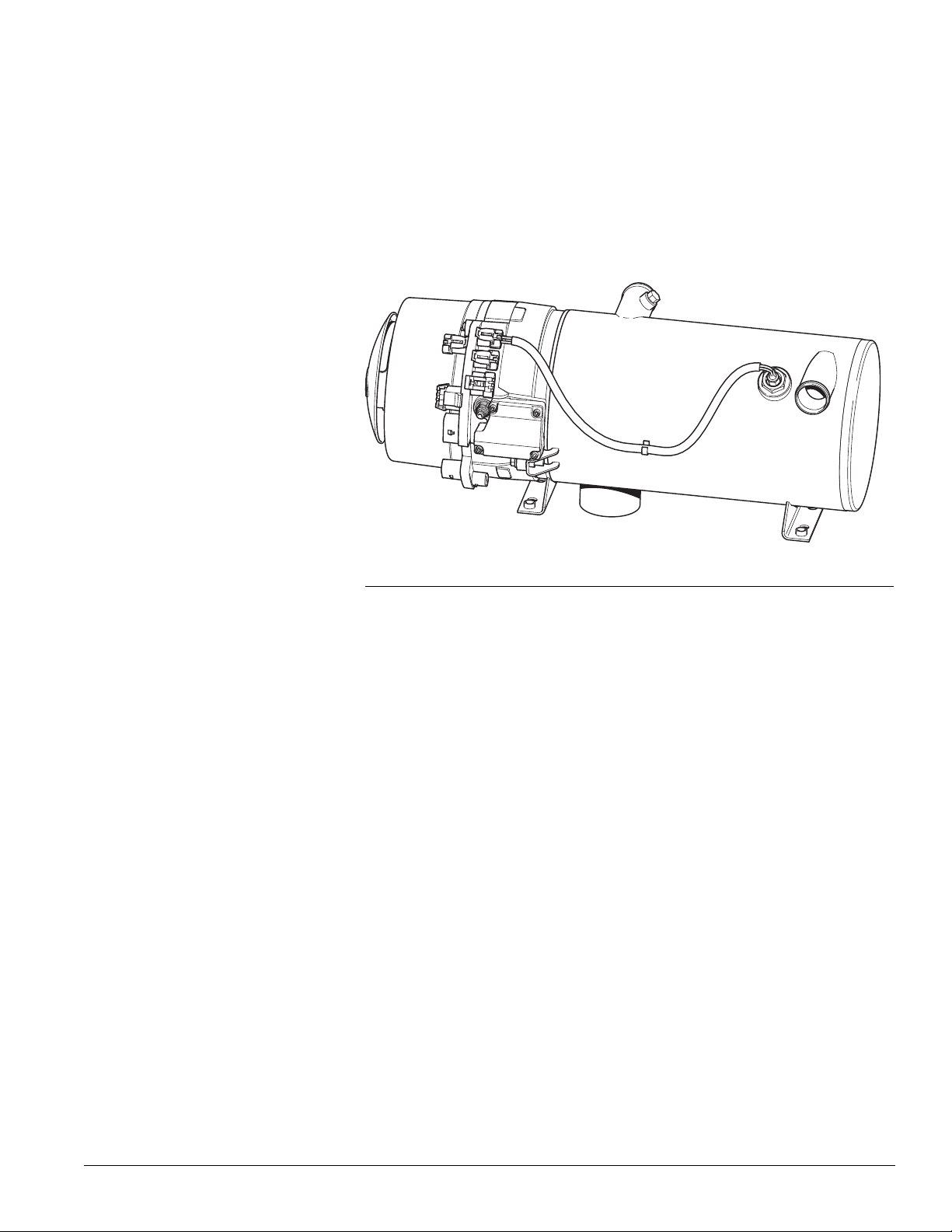
MODEL: M50/M80 G-I PCM
Figure B-1.
This manual is provided to assist in troubleshooting and maintaining the
PROHEAT M-Series heater. They are designed for use on any diesel-equipped
vehicle including trucks, buses (school, transit and coach), construction
equipment, off road equipment, military equipment and cargo.
PROHEAT heaters are used for the following applications:
(1) Engine Block Heat – The PROHEAT will preheat an engine block to ensure
reliable starting in cold weather. Its’ use throughout the year will reduce
engine wear caused by cold starts.
(2) Supplemental Heat (engine running) – The PROHEAT can be used while
the vehicle is operating to provide supplemental heat for the engine
and/or passenger compartment.
(3) Cargo Heat – The PROHEAT can supply heat to individual compartments
as a stand-alone heating system, or it can provide supplemental heat to
an existing heating system.
(4) Marine – Marine applications typically involve the
installation of a complete hot-water
is only one component. SeaStar Solutions recommends that only an
expert in marine hot-water heating systems install a PROHEAT for
marine applications. NOTE: It is the
that an installation
complies with all applicable codes and regulations.
heating system of which PROHEAT
installer’s responsibility to ensure
engineering and
PROHEAT G-I PCM SERVICE MANUAL
B-1
Page 7

B-2
PROHEAT G-I PCM SERVICE MANUAL
Page 8
C.
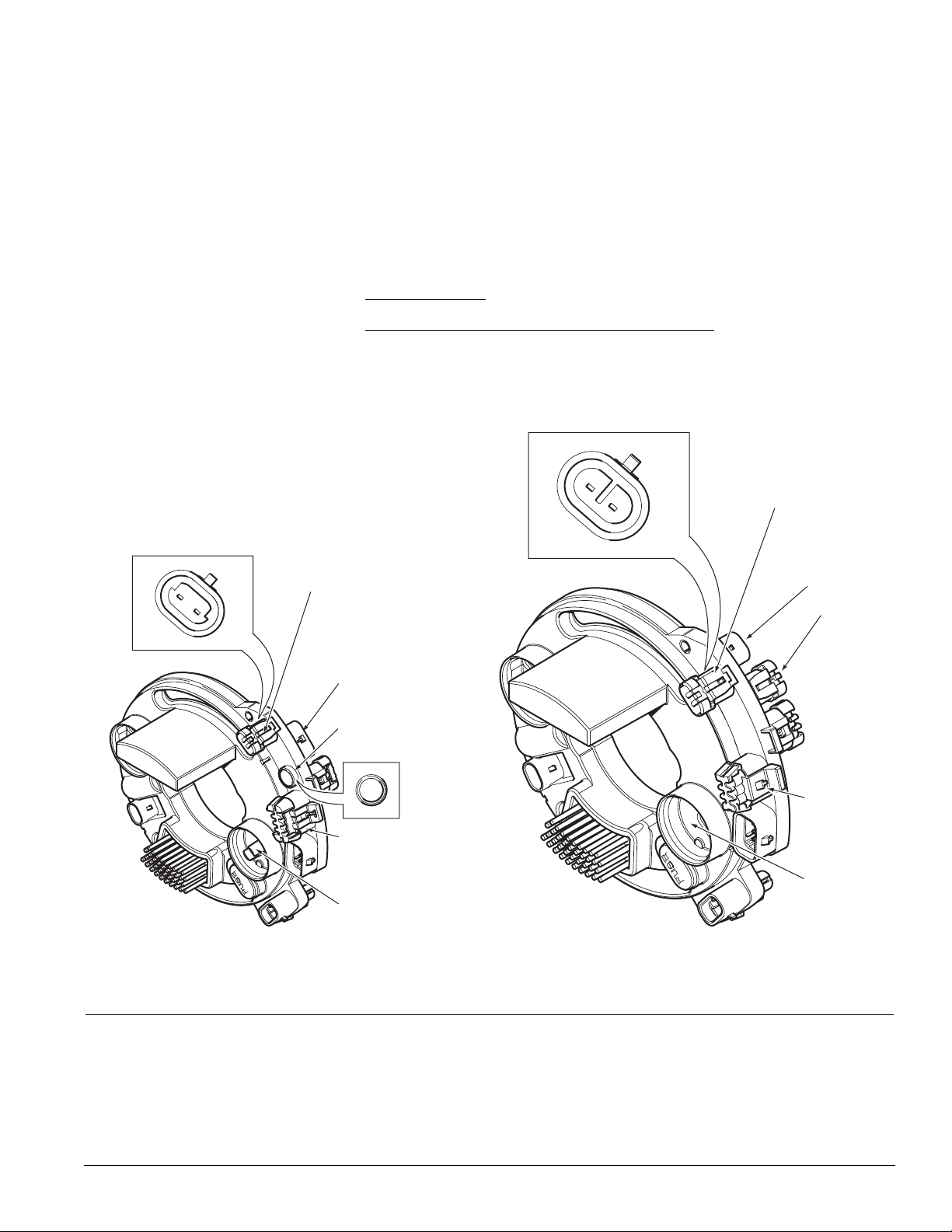
G-II PCM G-I PCM
MET RI-PACK
1205264 4 AUX
CONNECTOR
KEYING
7 PIN
DATA LINK
CONNECTOR
FOUR PIN
DUAL MODE
TEMPERATURE
SENSOR
CONNECTOR
MET RI-PACK
12052641 A UX
CONNECTOR
KEYING
2 X TWO P IN
ANA LOG
TEMPERATURE
SENSOR
CONNECTORS
6 PIN
DATA LINK
CONNECTOR
NO AIR F ILTER
RET ENT ION
TANGS
AIR FILTER
RET ENT ION
TANGS
STATUS
INDICATOR
LIGHT
PROHEAT CONTROL
MODULE (PCM) TYPE
The G-I Proheat Control Module (G-I PCM) is no longer available has been replaced
with the G-II PCM. The new G-II PCM incorporates a new dual mode analog/digital
temperature
identified in the figures below. Please refer to the M-Series Parts Book at
www.proheat.com for part numbers.
THIS MANUAL COVERS ONLY THE G-I PCM.
Please see SL9157 for Service information on the G-II PCM.
sensor and advanced Data Link software. Both styles can be
Figure C-1. G-I PCM and G-II PCM.
PROHEAT G-I PCM SERVICE MANUAL
C-1
Page 9

C-2
PROHEAT G-I PCM SERVICE MANUAL
Page 10
COMPRESSOR TYPED.
NOTICE
For continuity, all figures shown in this
manual will use a diaphragm compressor
unless
where special instructions or
illustrations
are required
.
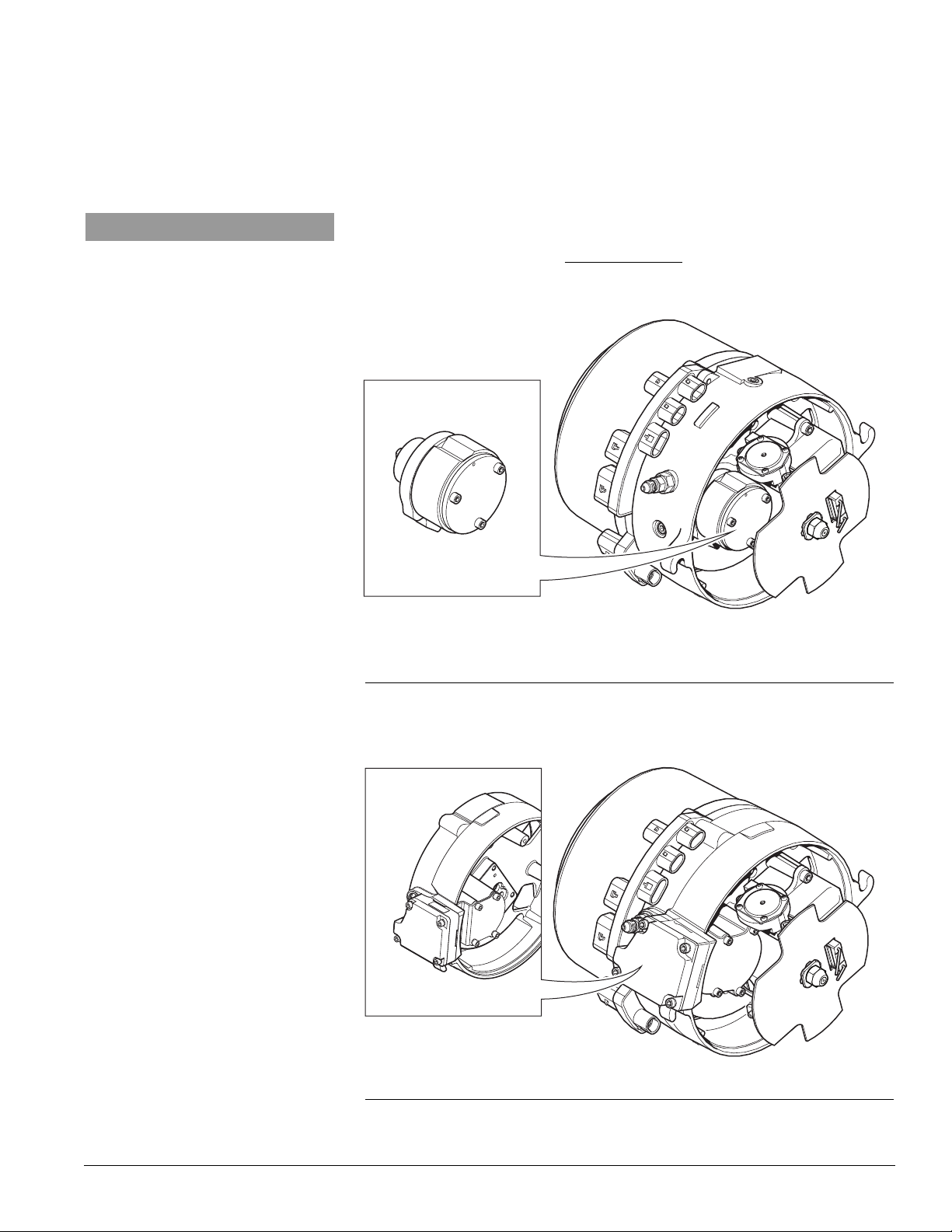
The rotary vane compressor is no longer available has been replaced with the
diaphragm type. Both styles can be identified in the Figures below. Please refer
to the M-Series Parts Book at www.proheat.com for part numbers. This manual
covers both styles of compressors and clearly identifies the differences
where applicable.
ROTARY VANE COMPRESSOR
Serial Numbers:
500000 – 699999
Figure D-1. Rotary Vane Compressor Type.
DIAPHRAGM COMPRESSOR
Serial Numbers:
700000 – To Date
Figure D-2. Diaphragm Compressor Type.
PROHEAT G-I PCM SERVICE MANUAL
D-1
Page 11

D-2
PROHEAT G-I PCM SERVICE MANUAL
Page 12
MODEL DESCRIPTIONSE.
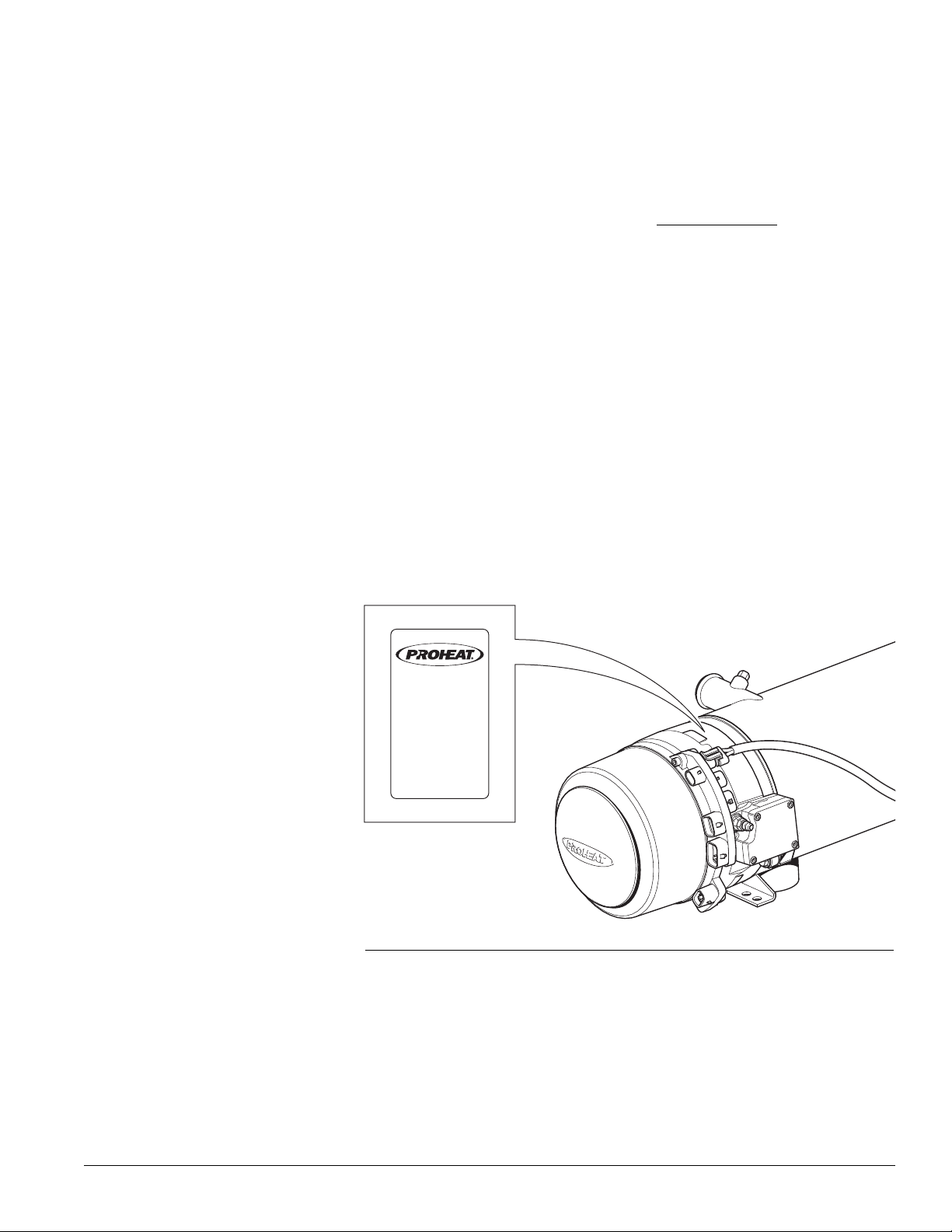
MODEL : M80- 24V
S
/N : XXX XXX
POWER : 95 WATTS
FUEL TY PE: DIE SEL
MAX PRE SS: 2 BAR
OPER. VOLT:
20-30 VDC
HEAT OUTPUT: 24.0 KW
I
NSTALLATION DATE :
07 08 09 10 11 12
M
ade bt Teleflex Canad a
Richmond B C Canada
PID 200101
Please refer to the M-Series Parts Book at www.proheat.com for detailed part
descriptions and part numbers. Included in the parts book are optional features
such as a timer, coolant pump and associated installation equipment and
maintenance tools. The following information describes the general characteristics
of M-Series models covered in this manual: Heat Output, G-I PCM CANbus,
Voltage, Fuel Fitting optional configurations, and Air Intake optional configurations.
Heat Output:
G-I PCM:
Voltage:
50,000 BTU/hr or 80,000 BTU/hr (15 kW or 23 kW).
The M-Series is available in either a 50,000 BTU/hr or 80,000 BTU/hr (15
kW or 23 kW) model.
CANbus SAE J1939.
The M-Series Proheat Control Module (G-I PCM) is available with CANbus
SAE J1939.
12 V or 24 V.
The M-Series is available in either a 12 V (10 – 15 VDC) or 24 V (20 – 30
VDC) model.
PROHEAT G-I PCM SERVICE MANUAL
Figure E-1.
E-1
Page 13
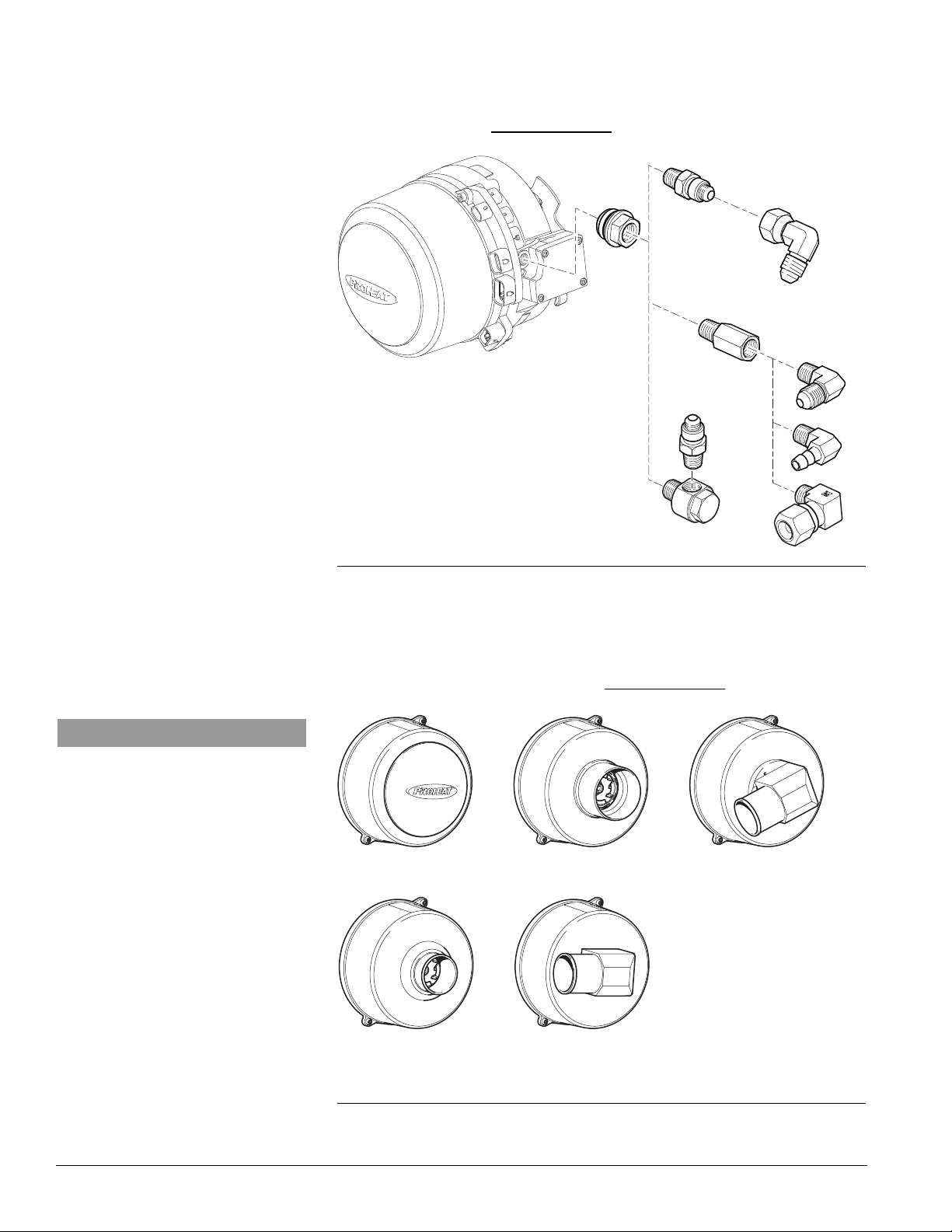
SPLASH GUARD STR AIGHT 3" OD
STR AIGHT SNORKEL
2.25" (55 mm) OD
SNORKEL ELBOW
26° SNORKEL ELBOW
Fuel Fitting – Optional
Configurations
-4 JIC, NPT 1/8” and -4 Hose Barb.
There are fuel fitting options including JIC, NPT, hose barb and tight access.
Refer to parts book at www.proheat.com.
Air Intake – Optional
Configurations
NOTICE
For continuity, all figures shown in this
manual
will use a splash guard intake.
Figure E-2.
Splash Guard, Straight and Right Angle Snorkel Attachments.
The M-Series can be equipped with a splash guard, straight and right angle
intake snorkels. Refer to parts book at www.proheat.com
E-2
Figure E-3. Air Intake Options.
PROHEAT G-I PCM SERVICE MANUAL
Page 14
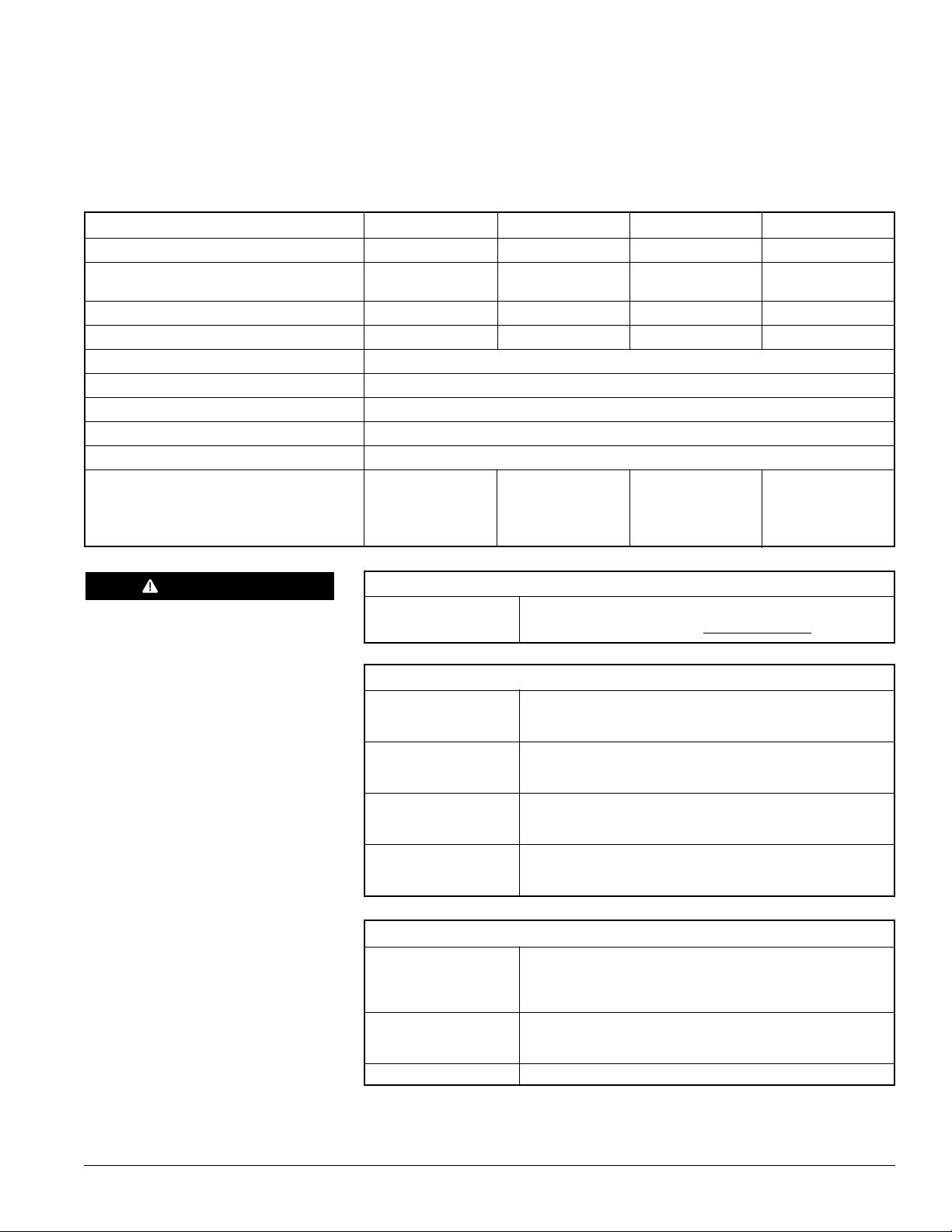
1.0
TECHNICAL
SPECIFICATIONS
M50 12V M50 24V M80 12V M80 24V
RATING BTU/hr (kW) 50,000 (15) 50,000 (15) 80,000 (23) 80,000 (23)
SYSTEM VOLTAGE
Nominal DC Voltage (Range) 12 (10 – 15) 24 (20 – 30) 12 (10 – 15) 24 (20 – 30)
CURRENT DRAW (MAX) Amps 9.5 5.2 8.5 5.2
FUEL CONSUMPTION US gal/hr (L/hr) 0.48 (1.8) 0.48 (1.8) 0.78 (2.95) 0.78 (2.95)
IGNITION TYPE Electronic Spark Ignition
COOLANT OUTPUT TEMPERATURE MAX. 185°F (85°C)
AMBIENT OPERATING TEMPERATURE -40°F to +122°F (-40°C to +50°C)
WEIGHT lbs (kg) 53 (24)
HEAT EXCHANGER CAPACITY US gal (l) 0.5 (2)
COOLANT SYSTEM
Minimum Capacity US gal (l) 2.64 (10) 2.64 (10) 2.64 (10) 2.64 (10)
Recommended Flow Rate Through
Heater US gpm (lpm) 5 (19) 5 (19) 7 (26.5) 7 (26.5)
DANGER
Do not use gasoline.
FUEL TYPES
COMPATIBLE Diesel (ULSD, #1, #2, Arctic), JP8, Jet A1
Bio Fuels - Contact Proheat www.proheat.com
SYSTEM OUTPUTS
AUXILIARY OUTPUT Same as System Voltage
Maximum 1 Amp draw (over-load shut-off protection)
High-side switched
SWITCH/TIMER Same as System Voltage
POWER Maximum 1 Amp draw (over-load shut-off protection)
High-side switched
COOLANT PUMP Same as System Voltage
Maximum 10 Amp draw (over-load shut-off protection)
High-side switched
INDICATOR LIGHT Same as System Voltage
Maximum 1 Amp draw (over-load shut-off protection)
High-side switched
SYSTEM INPUTS
SWITCH 10 – 30V
Standard Run Mode
Preheat Run Mode
Supplemental Run Mode
COOLANT PUMP 10 – 30V
AUXILIARY Allows independent operation of Coolant Pump through
the Proheat Control Module
POWER 12 Volt or 24 Volt
PROHEAT G-I PCM SERVICE MANUAL
1-1
Page 15
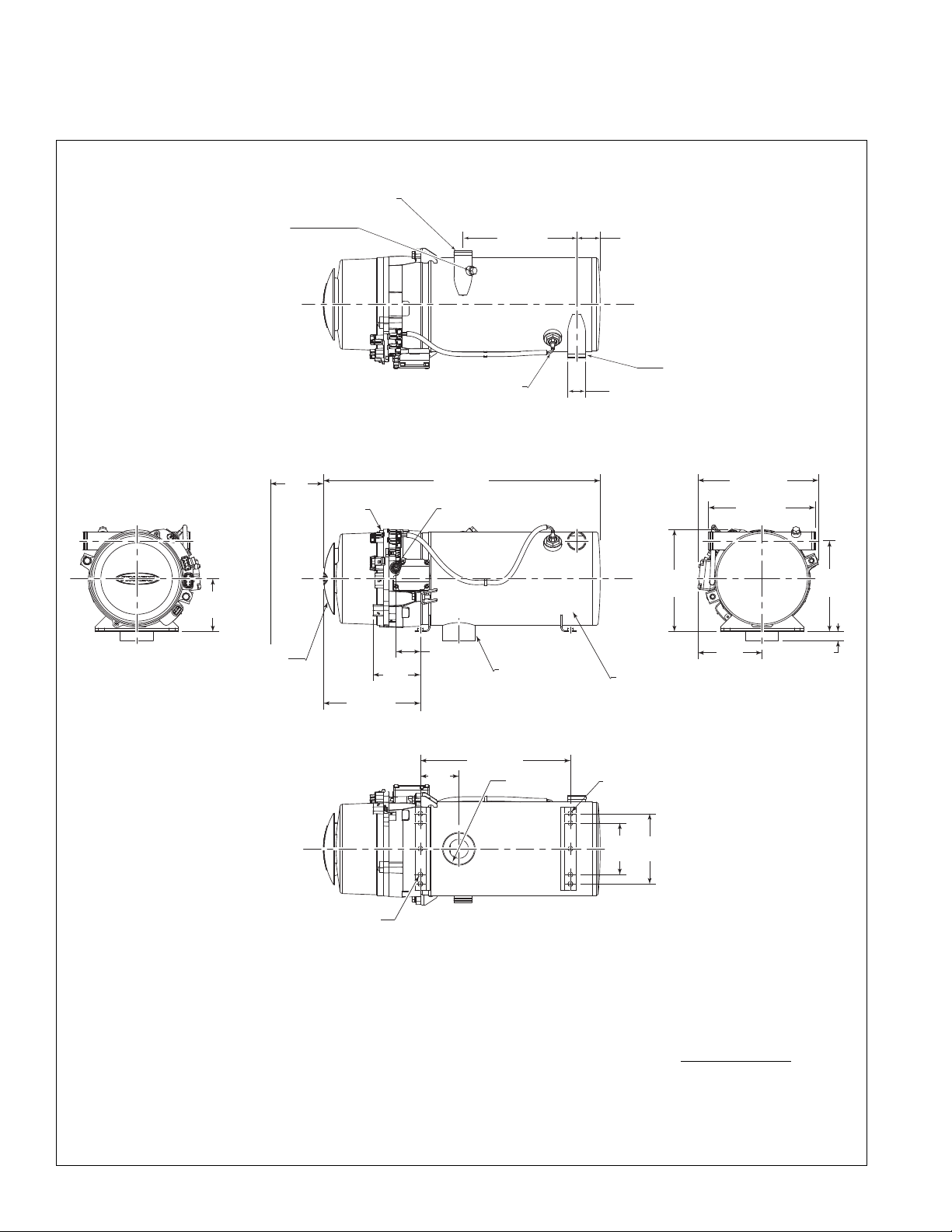
EXHAUST
(SEE NOTE 2 AND 4)
-4 JIC MALE FUEL INLET (INTERNAL
FUEL FILTER) (SEE NOTE 5)
2.75 (70)
12.60 (320)
23.24 (590)
4.45
(113)
8.14 (207)
2.03 (52)
FRONT VIEW
6 x .41 (10)
BOTTOM VIEW
AIR INTAKE
ALTERNATE
SNORKELS
AVAILABLE
(SEE PAGE 1-3 )
3.23 (82)
3.98
(101)
SIDE VIEW
SERVICE SPACE REQUIREMENT
(
MAY VARY SEE NOTE 3 & PAGE 1-3)
G-I PCM
5.39
(137)
8.58
(218)
7.63
(194)
REAR VIEW
4.33
(110)
5.90
(150)
4 x M8 x 1.25 MOUNTING PEM NUTS
HEAT EXCHANGER
(SEE NOTE 6)
.75 (19)
10.13 (257)
9.00 (229)
5.77
(147)
T1 PRIMA RY TEMPERATURE
SENSOR SEE NOTE 8
9
.55 (243)
TOP VIEW
T
2 SECONDARY TEMPERATURE
SENSOR LOCATION (SENSOR
NOT SHOWN) SEE NOTE 8
INLE T SEE NOTE 8
OUTLET SEE NOTE 8
2 x 1.50 (38)
1
.97 (50)
PHYSICAL1.1
NOTES:
1. DIMENSIONS ARE IN INCHES (MILLIMETERS IN BRACKETS).
2. TYPICAL EXHAUST CUTOUT 3.25" CENTERED ON EXHAUST.
3. SERVICE SPACE REQUIRED TO REMOVE BURNER HEAD AND
COMBUSTION TUBE FOR PERIODIC INSPECTION AND CLEANING.
4. THE EXHAUST PIPE SHOULD HAVE A MINIMUM DIAMETER OF
2.75", A MAXIMUM LENGTH OF 5' AND HAVE NO MORE THAN
180° OF BENDS.
5. ALTERNATE FUEL INLET CONFIGURATIONS AVAILABLE, SEE
PARTS BOOK FOR FURTHER INFORMATION.
6. ALTERNATE HEAT EXCHANGERS AVAILABLE, SEE PARTS BOOK
FOR FURTHER INFORMATION.
7. SNORKEL HOSE REQUIRED FOR THIS AIR INTAKE OPTION.
CONTACT TECH SUPPORT AT WWW.PROHEAT.COM
LENGTH AND BEND RESTRICTIONS
8.
THE INLET AND OUTLET CAN BE REVERSED WITH THE ADDITION
OF A T2 SECONDARY TEMPERATURE SENSOR.
FOR
1-2
PROHEAT G-I PCM SERVICE MANUAL
Page 16
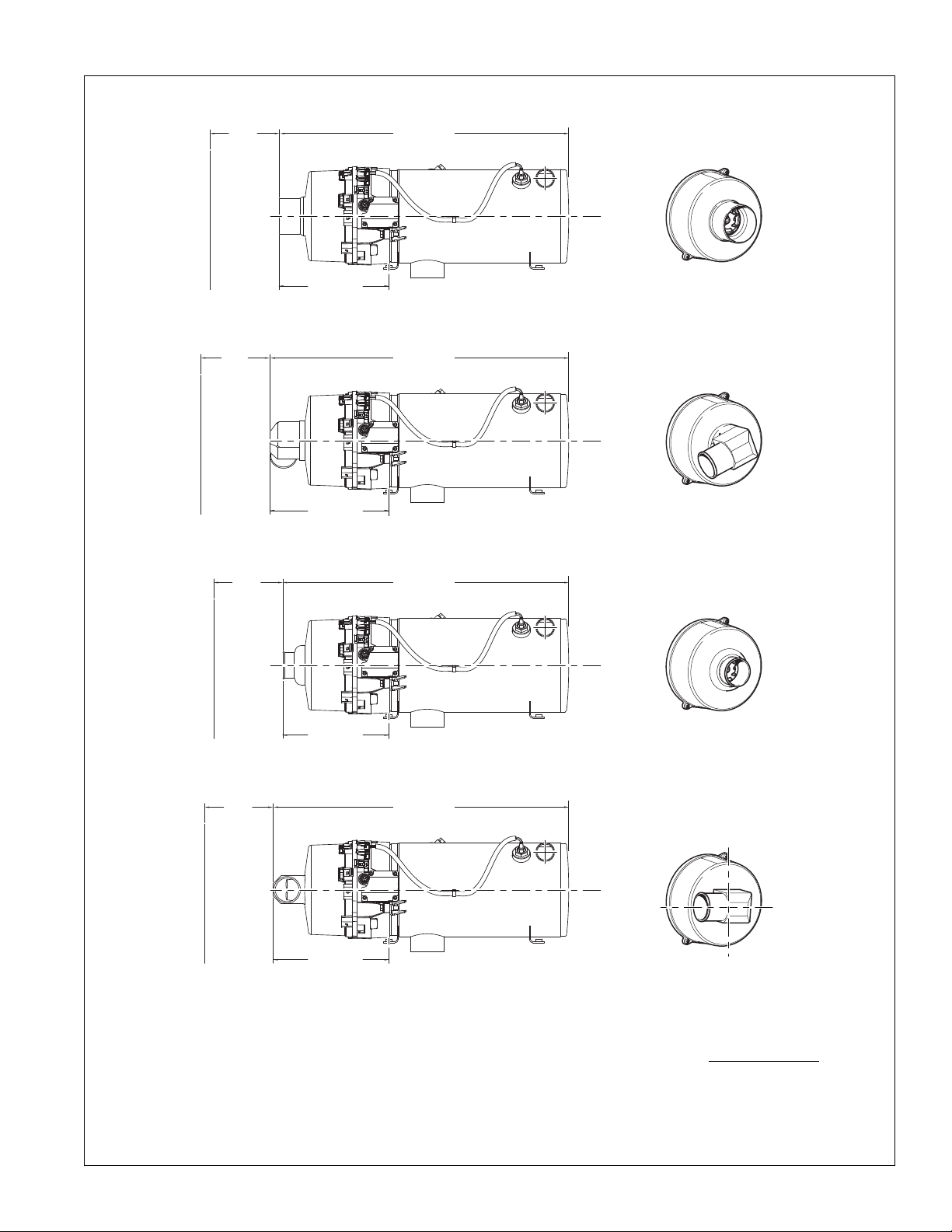
A
IR INTAKE OPTION:
3" OD SNORKEL SEE NOTE 7
AIR INTAKE OPTION:
2.25" OD ELBOW WITH
2
7° ADAPTER PLATE SEE NOTE 7
AIR INTAKE OPTION:
2.25" OD SNORKEL SEE NOTE 7
AIR INTAKE OPTION: 2.25" OD ELBOW SEE NOTE 7
CAN BE INSTALLED AT 0°, 90°, 180°, 270°
2
4.31 (617
)
5
.77
(
147
)
SERVICE
SPACE
REQUIREMENT
(SEE NOTE 3)
9.21 (234)
2
9.09 (637
)
5
.77
(
147
)
SERVICE
SPACE
REQUIREMENT
(SEE NOTE 3)
9.99 (254)
24.00 (610)
5.77
(147
)
SERVICE
SPACE
REQUIREMENT
(SEE NOTE 3)
8.90 (226)
24.80 (630)
5.77
(147)
SERVICE
SPACE
REQUIREMENT
(SEE NOTE 3)
9.70 (246)
90°
0°
270°
180°
NOTES:
1. DIMENSIONS ARE IN INCHES (MILLIMETERS IN BRACKETS).
2. TYPICAL EXHAUST CUTOUT 3.25" CENTERED ON EXHAUST.
3. SERVICE SPACE REQUIRED TO REMOVE BURNER HEAD AND
COMBUSTION TUBE FOR PERIODIC INSPECTION AND CLEANING.
4. THE EXHAUST PIPE SHOULD HAVE A MINIMUM DIAMETER OF
2.75", A MAXIMUM LENGTH OF 5' AND HAVE NO MORE THAN
180° OF BENDS.
5. ALTERNATE FUEL INLET CONFIGURATIONS AVAILABLE, SEE
PARTS BOOK FOR FURTHER INFORMATION.
PROHEAT G-I PCM SERVICE MANUAL
6. ALTERNATE HEAT EXCHANGERS AVAILABLE, SEE PARTS BOOK
FOR FURTHER INFORMATION.
7. SNORKEL HOSE REQUIRED FOR THIS AIR INTAKE OPTION.
CONTACT TECH SUPPORT AT WWW.PROHEAT.COM FOR
LENGTH AND BEND RESTRICTIONS
8.
THE INLET AND OUTLET CAN BE REVERSED WITH THE ADDITION
OF A T2 SECONDARY TEMPERATURE SENSOR.
1-3
Page 17
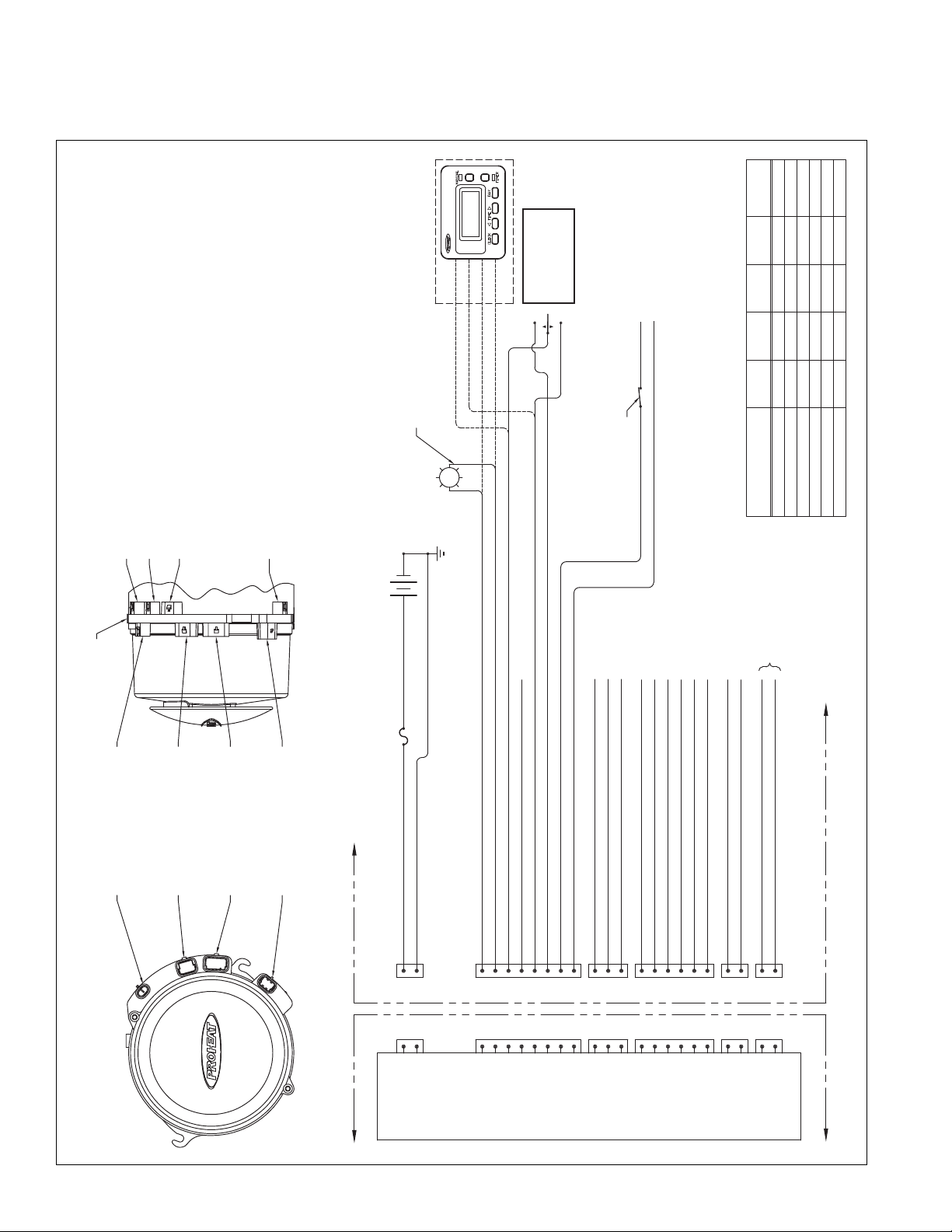
ELECTRICAL1.2
B
GHF
ECD
A
INDICATOR OUTPUT (HIGH SIDE SWITCHED. DASH OR PROHEAT TOGGLE SWITCH LIGHT) (1 AMP MAX)
ENGINE RUN (ALTERNATOR SIGNAL)
SPRING CENTRED
DOUBLE THROW
MOMENTARY SWITCH.
LOCATED ON THE
DRIVERS CONSOLE.
ON
RED
TIMER OPTION
GREEN
WHITE
BLACK
MECHANICS DISABLE
SWITCH MOUNTED IN A
PROTECTED LOCATION
LOCATED AS PER CUSTOMER
REQUEST OR OEM REQUIREMENT
OFF
SIGNAL FROM OEM HEATING SYSTEM TO
TURN ON COOLANT PUMP WHEN REQUIRED
FOR A REASON OTHER THAN WHEN THE
HEATER REQUIRES THE PUMP
POWER OUTPUT (CONSTANT POWER. TIMER/SWITCH REMOTE PANEL) (1 AMP MAX SHARED WITH P3-D)
MAIN SWITCH INPUT (STANDARD "ON" SIGNAL OR PREHEAT UNLATCH) (ACTIVE HIGH)
GROUND (INDICATOR GROUND) (1 AMP MAX)
GROUND (ACCESSORY OUTPUT GROUND) (1 AMP MAX)
PREHEAT SWITCH INPUT (ACTIVE HIGH)
SUPPLEMENTAL SWITCH INPUT (ACTIVE HIGH)
PUMP (COOLANT) SWITCH INPUT (ACTIVE HIGH)
O.E.M. SUPPLIED
BATTERY POSITIVE (FUSE/BREAKER 30 AMP)
BATTERY NEGATIVE (GROUND)
B
A
B
A
PROHEAT G-I PCM
30 AMP
FUSE
(-)
POWER
SUPPLY
(+)
VEHICLE
GROUND
INDICATOR
LIGHT
F
CDE
B
A
C
B
A
RS232 Rx
RS232 Tx
FACTORY USE (N/A)
GROUND (1 AMP MAX)
INDICATOR OUTPUT (1 AMP MAX)
CAN-H
CAN-L
SHIELD
ACCESSORY POWER OUTPUT (1 AMP MAX SHARED WITH P2-C)
COOLANT PUMP GROUND
COOLANT PUMP OUTPUT
B
A
GROUND (AUXILIARY OUTPUT) (1 AMP MAX)
AUXILIARY OUTPUT (HIGH SIDE SWITCHED) (1 AMP MAX)
B
A
B
GHF
ECD
A
F
CDE
B
A
C
B
A
B
A
B
A
PROHEAT G-I PCM
O.E.M. SUPPLIED
MAXIMUM
10 AMPS
P4
COOLANT PUMP
OUTPUT
P5
AUXILIARY
OUTPUT
P3
DATALINK
P6
CAN BUS
P2
CONTROL
P1
POWER
P2 - CONTROL (SWITCH)
METRI-PACK 150 SERIES, 8 PIN
NOTE 1
P1 - POWER
METRI-PACK 280 SERIES, 2 PIN
NOTE 2
P3 - DATALINK (DOWNLOAD)
METRI-PACK 150 SERIES, 6 PIN
NOTE 1
NOTE 3
P5 - AUX (OUTPUT)
METRI-PACK 150 SERIES, 2 PIN
NOTE 1
NOTE 3
PROHEAT G-I PCM
P4 - PUMP (COOLANT)
METRI-PACK 150 SERIES, 2 PIN
NOTE 1
NOTE 3
P8 - T1: TEMP SENSOR
P7 - T2: TEMP SENSOR
NOTE 3
P6 - CANBUS (OPTIONAL)
METRI-PACK 150 SERIES, 3 PIN
NOTE 1
NOTE 3
NOTES:
1/ 150 SERIES CONNECTOR ASSEMBLIES TO BE
USED WITH 18AWG WIRE WITH MAXIMUM
.1" INSULATION DIAMETER. WIRE MUST MEET
OR EXCEED SAE J1128 GPT SPECIFICATIONS.
2/ 280 SERIES CONNECTOR ASSEMBLIES TO BE
USED WITH 10AWG WIRE WITH MAXIMUM
.161" INSULATION DIAMETER. WIRE MUST
MEET OR EXCEED SAE J1128 GPT OR GXL.
3/ ALL UNUSED CONNECTIONS ON THE PCM ARE
SUPPLIED WITH SEAL PLUGS ON STANDARD
HEATERS.
LOCK
PART#
G-I PCM CONNECTOR WIRE SEAL
PART#
TERMINAL
PART#
CAVITY SEAL
PART#
----
----
----
----
12052850
P3-DATALINK (DOWNLOAD)
1204808612048074
12059168
12052848
12052634P4-PUMP (COOLANT) 120480861204807412052641
12052634P5-AUXILIARY 120480861204807412052641
12052845P6-CAN BUS 120480861204807412110293
15300014P1-POWER 120151931207741315300027
12066304
P2-CONTROL (SWITCH)
1204808612048074
12059168
12047937
CONNECTOR
PART#
1-4
PROHEAT G-I PCM SERVICE MANUAL
Page 18
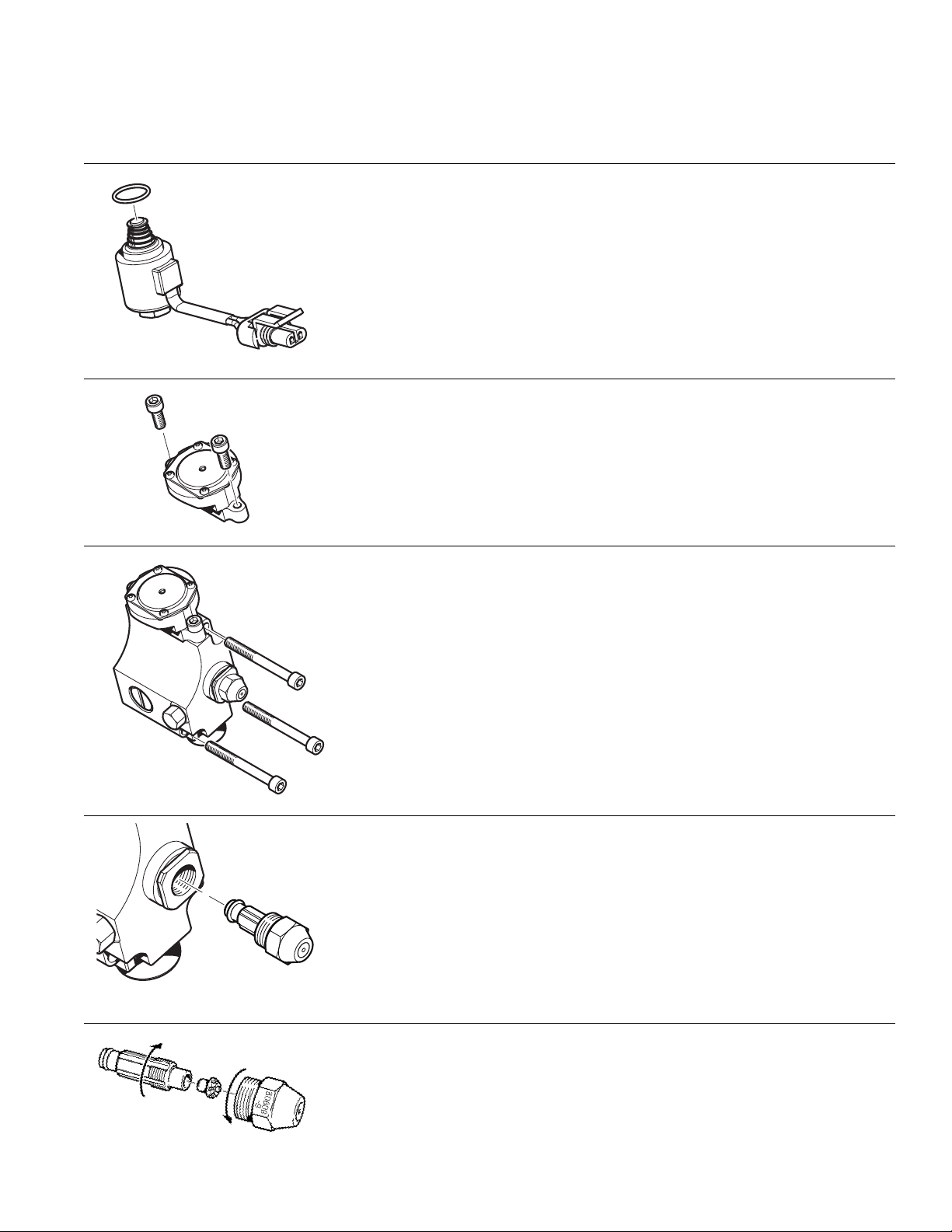
TORQUE SPECIFICATIONS1.3
Solenoid Valve
• Lubricate O-ring with diesel fuel.
• Install solenoid valve by hand.
• Ensure poppet and spring remain in place during assembly.
• Torque solenoid valve to fuel block to 25 in. lbs. ± 3 in. lbs.
(2.8 Nm ± 0.3 Nm).
Regulator
• Install 2 o-rings on back side of regulator (not shown).
• Torque screws (2) to 75 in. lbs. ± 3 in. lbs. (8.5 Nm ± 0.3 Nm).
Fuel Delivery Block
• Ensure all three O-rings are in place.
• Torque screws (3) to 75 in. lbs. ± 7 in. lbs. (8.5 Nm ± 0.8 Nm).
Nozzle
• Lubricate O-ring on nozzle with diesel fuel.
• Torque nozzle to fuel block to 150 in. lbs. ± 10 in. lbs.
(16.9 Nm ± 1.1 Nm).
PROHEAT G-I PCM SERVICE MANUAL
Nozzle Assembly
• Torque nozzle to nozzle stem to 30 in. lbs. ± 3 in. lbs. (3.4Nm ± .3 Nm).
1-5
Page 19
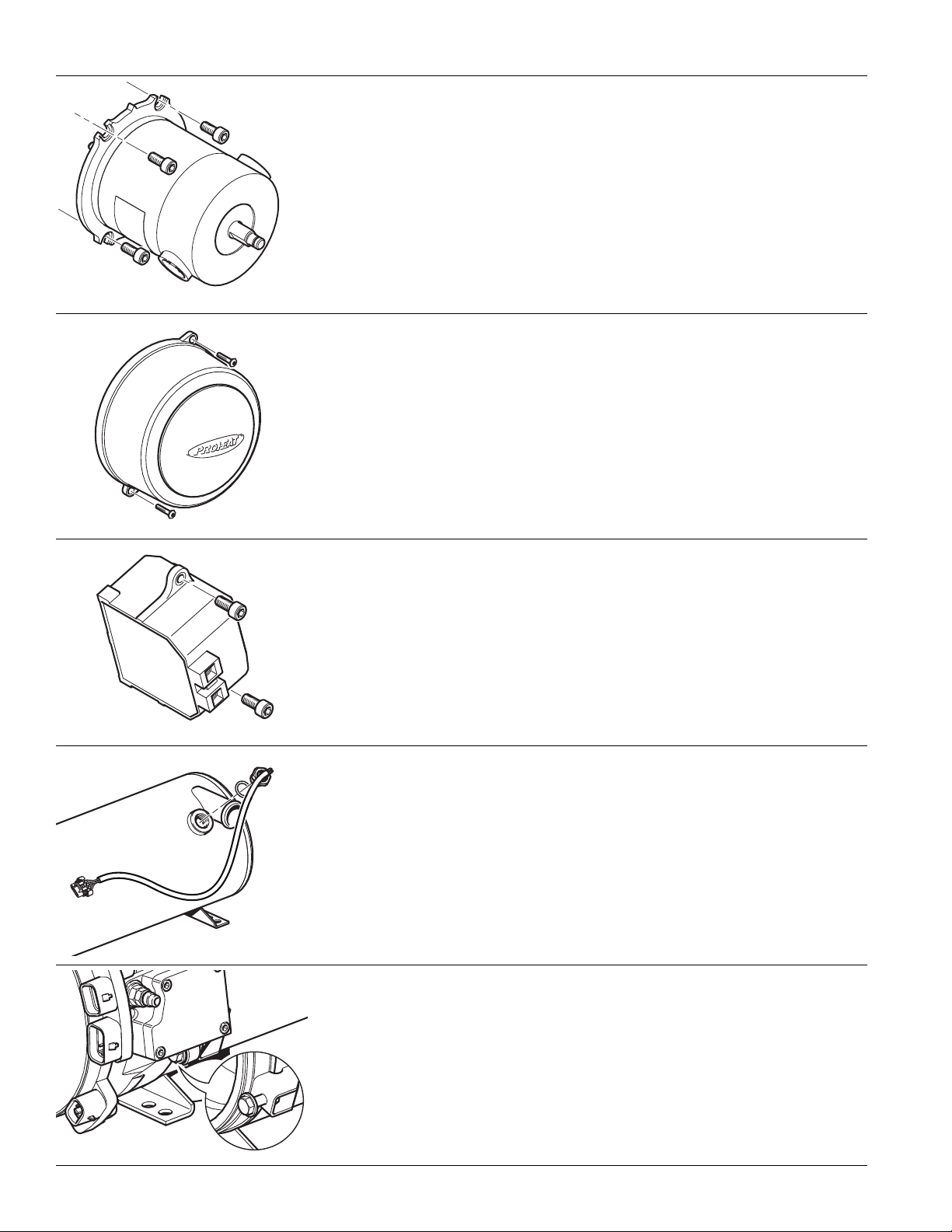
Motor
• Rotate motor shaft until motor drops into fuel pump gear..
• Ensure correct alignment (refer to ‘Motor Replacement’ on page 4-25)
Torque bolts (4) to 75 in. lbs. ± 7 in. lbs. (8.5 Nm ± 0.8 Nm).
•
Blower Housing
• Torque bolts (2) to 75 in. lbs. ± 7 in. lbs. (8.5 Nm ± 0.8 Nm).
Ignition Module
• Torque screws (2) to 75 in. lbs. ± 7 in. lbs. (8.5 Nm ± 0.8 Nm).
Temperature Sensor
• Install O-ring onto sensor.
• Torque sensor to 100 in. lbs. ± 10 in. lbs. (11.6 Nm ± 1.1 Nm).
Burner Head/Heat Exchanger
• Torque bolts (2) to 100 in. lbs. ± 10 in. lbs. (11.6 Nm ± 1.1 Nm).
1-6
PROHEAT G-I PCM SERVICE MANUAL
Page 20
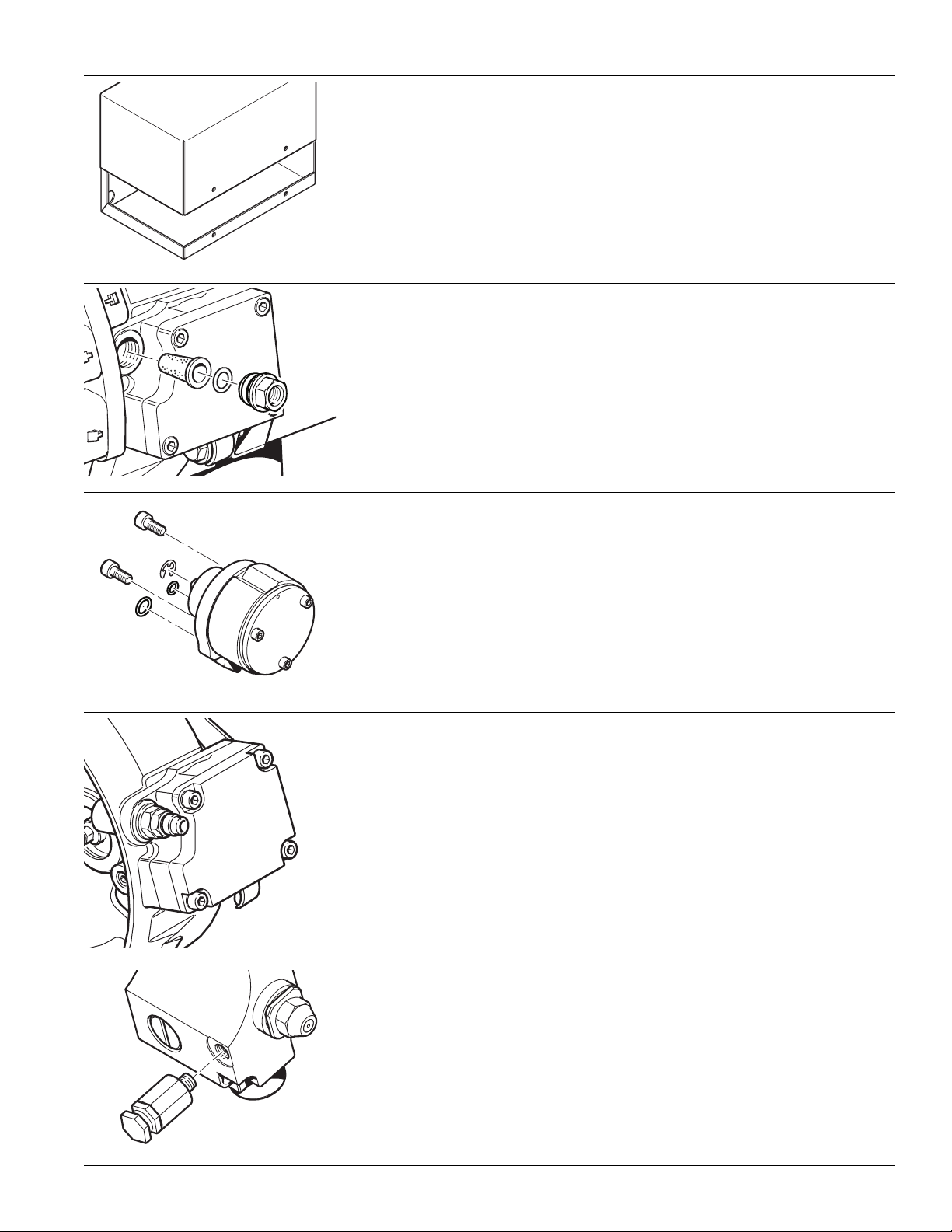
Enclosure Lid (Optional)
• Torque screws (4) to 100 in. lbs. ± 10 in. lbs. (11.6 Nm ± 1.1 Nm).
Fuel Filter Fitting
• Install O-ring onto fitting.
• Torque fitting to 100 ± 10 in. lbs. (11.3 ± 1.1 Nm).
Rotary Vane Compressor ONLY
Serial Numbers 500000 – 699999
• Install O-rings into burner flange.
• Install compressor into burner flange. (Ensure correct alignment—refer to
‘Compressor Replacement’ on page 4-15)
• Torque screws (2) to 75 in. lbs. ± 3 in. lbs. (8.5 Nm ± 0.3 Nm).
Diaphragm Compressor ONLY
Serial Numbers 70000 and above
• Install O-rings in to cylinder head and valve cover (not shown).
• Ensure connecting rod is at BDC and ensure the diaphragm is concentric
to the diaphragm opening (not shown).
• Torque to 27 in. lbs +/- 3 in. lbs using a crisscross pattern.
Relief Valve
Serial Numbers 600000 – 699999
– for Use with Rotary Vane Compressor ONLY
PROHEAT G-I PCM SERVICE MANUAL
• Torque to 25 in. lbs. ± 3 in. lbs. (2.8 Nm ± 0.3 Nm).
1-7
Page 21

1-8
PROHEAT G-I PCM SERVICE MANUAL
Page 22

2.0
PRINCIPLE OF
OPERATION
2.1
Combustion Air Blower:
Motor:
Fuel Supply Pump:
Fuel Regulator:
Fuel Nozzle:
COMPONENT DESCRIPTIONS
Impeller-style blower driven by the Motor provides the principle combustion air.
Drives the Combustion Air Blower, Air Compressor and Fuel Supply Pump.
A positive displacement, gear-type pump that draws fuel from the vehicle fuel
tank and supplies it to the Fuel Regulator. Pressure is regulated between
7 – 10 PSI by means of an internal relief valve. Fuel is re-circulated within the
pump, therefore a fuel return line to the tank is not required.
Diaphragm-type pressure reducing valve. The Fuel Regulator drops the fuel
supply pressure to atmospheric pressure (0 PSI).
Air-aspirating type burner nozzle. Compressed air flows through the air
passages, exiting the nozzle in front of the fuel orifice creating a vacuum in
the fuel supply. This draws fuel from the Fuel Regulator and the combined
fuel/air mixture is atomized into the combustion chamber.
Fuel Shut-off Valve:
Air Compressor:
Air Relief:
Ignition Module:
G-I PCM:
(PROHEAT Control Module)
Combustion Tube:
Electrically operated solenoid valve which controls fuel flow to the Fuel Nozzle.
Diaphragm compressor that supplies air pressure to the Fuel Nozzle. Note that
older versions of M-Series use a rotary vane compressor. Refer to page D-1 for
more information.
Regulates air pressure to the fuel nozzle.
For use with Rotary Vane Compressor ONLY Serial Numbers 600000 – 699999.
Electronic Ignition Module with plug-in electrode.
Electronic control module monitors the PROHEAT sensors, operating conditions,
and controls the Motor and other devices. Diagnostics are utilized for both
safety in operations and detection of component faults to aid in service and
troubleshooting. The G-I PCM contains the flame sensor which senses the flame
intensity. This information can be retrieved by a personal computer using
PROHEAT Datalink software.
Directs the air supplied by the blower through a swirler into the combustion
zone, mixing it with the atomized fuel/air mixture from the Fuel Nozzle.
PROHEAT G-I PCM SERVICE MANUAL
2-1
Page 23

Heat Exchanger:
Coolant is circulated through the heat exchanger via the inlet and outlet
orts. Heat is transferred from the heat exchanger through the inner wall of
p
the exchanger into the coolant. The exhaust gases are directed out through
the exhaust port.
Temperature Sensor 1:
Temperature Sensor 2:
Coolant Pump:
Measures the coolant temperature near the outlet port of the heat exchanger
and sends this information to the G-I PCM. This sensor also measures the
inner heat exchanger surface temperature for an overheat condition. It must
be connected at all times for overheat protection.
For installations where the coolant flow through the heat exchanger is
opposite of what is specified on page 1-2 and page 2-3.
Circulates coolant through the PROHEAT and vehicle heating system.
Depending on the PROHEAT installation, it may be operated by the G-I PCM.
2-2
PROHEAT G-I PCM SERVICE MANUAL
Page 24
OUTLET
600000 – 699999
SERIAL NUMBERS
SENSOR 1
TEMPERATURE
ROTARY VANE COMPRESSOR
AIR RELIEF
HEAT EXCHANGER
AIR COMPRESSOR
INLET
TUBE
COMBUSTION
COMPRESSOR
BUILT IN AIR
FLANGE WITH
BURNER HEAD
REQUIRED
FOR REVERSE
COOLANT FLOW
(IF EQUIPPED)
SENSOR 2
TEMPERATURE
MOTOR
FUEL
NOZZLE
IGNITION
ELECTRODES
AIR FILTER
IGNITION MODULE
FUEL
VALVE
SHUT-OFF
FUEL REGULATOR
FUEL
PUMP
SUPPLY
COMBUSTION AIR BLOWER
G-I PCM (PROHEAT CONTROL MODULE)
PROHEAT G-I PCM SERVICE MANUAL
IN AIR COMPRESSOR
FLANGE WITH BUILT
BURNER HEAD
BLOWER HOUSING
2-3
Page 25

MODES OF OPERATION2.2
The Proheat Control Module (G-I PCM) has three modes of operation: Standard,
Preheat and Supplemental. Depending on the installation, more than one mode
may be wired for operation. The wired modes may be identified by referring to
the installation wiring diagram to determine the G-I PCM pins on P2 Control that
have been connected. This wiring diagram may be compared with the drawing
in Section 1.2 Electrical. The following is a summary of the operation modes:
2.2.1
1. Switch “ON”
Standard
Mode Signal
2. Precheck
Standard Heat Mode
• normal operation of the
Proheat
• over-rides and drops out
preheat mode
• overrides supplemental
mode
Preheat Mode
• similar to standard
mode
Except: 90 minute
time out.
• activated via momentary
contact push button
switch with latching
internal to the G-I PCM
Supplemental Heat Mode
• similar to standard mode
except: coolant pump
does not run when
Proheat is not firing
• overrides and drops out
preheat mode
• 30 second signal
required before mode
enabled
• No delay required for
mode switch off
STANDARD MODE
The ON/OFF switch lamp, timer lamp or OEM indicator (installation options)
will light. If the coolant temperature is below 160°F (71°C) the PROHEAT
enters Pre-check. If the coolant temperature is above 160°F (71°C) the
PROHEAT enters Standby.
The G-I PCM performs self diagnosis checking sensors for correct range,
electrical components for over-load and for a flame presence. Also during the
first Pre-check, the Ignition Module sparks for five seconds to allow a service
technician to visually check for a spark. If there are no errors indicated, the
PROHEAT goes to Ignition.
2-4
3. Ignition
4. Full Output
5. Cool Down (Purge)
The Motor and Coolant Pump start first, followed by the ignition spark, and
then Fuel Shut-off Valve opens. The Ignition Module sparks for 30 seconds
during which time the flame sensor must detect a correct flame. At the end
of the Ignition cycle the Flame Sensor checks the flame:
•
If the PROHEAT
•
If the PROHEAT does not detect proper flame, the PROHEAT enters Cool Down
(Purge). The PROHEAT will attempt to start again moving into Pre-check after
Cool Down (Purge)
Fault Shut Down.
The PROHEAT will continue in Full Output until the coolant temperature reaches
185°F (85°C) at the PROHEAT outlet Temperature Sensor. The PROHEAT closes
the Fuel Shut-off Valve and goes into Cool Down (Purge).
The Motor and Coolant Pump continue to operate for three minutes. After three
minutes, the Motor stops and the PROHEAT enters Standby. The PROHEAT
will Cool Down (Purge) for three reasons:
• Coolant reaches 185°F (85°C).
• A fault is detected. Go to Section 4.0 Troubleshooting and Repair, page 4-1.
• The PROHEAT is operating in Ignition or Full Output when it is switched off.
detects proper flame, it enters Full Output.
. If the second start cycle fails, the PROHEAT will enter
PROHEAT G-I PCM SERVICE MANUAL
Page 26

CAUTION
Always ensure that the PROHEAT is allowed to Cool Down (Purge) for a full 3
minutes.
Full Output, DAMAGE TO THE HEATER MAY OCCUR.
If the power is shut off without a proper Cool Down (Purge) during
6. Standby
7. Switch “OFF”
8. Fault Shut
Down
2.2.2
1. Momentary Switch
“ON” Preheat
Mode Signal
The Coolant Pump continues to circulate coolant throughout the system.
When the coolant temperature drops below 160°F (71°C), the G-I PCM will
enter the cycle starting at Pre-check. The PROHEAT will continue to repeat
Steps 2 to 6 until it is switched “OFF.”
The ON/OFF switch lamp, timer lamp or OEM indicator (installation options)
will turn off.
If the PROHEAT is in Full Output, it will Purge first and then shut “OFF”.
If the PROHEAT is in Standby, it will shut “OFF” immediately.
If the PROHEAT diagnostics sense a system or component fault, the
PROHEAT will shut down all components and flash a fault code(s) which best
represents the conditions. To reset the PROHEAT, it must be switched off
and then on again.
NOTE: Damage may occur it the fault codes are ignored and the PROHEAT is
repeatedly switched off and on without addressing the problem.
PREHEAT MODE (ENGINE OFF)
The ON/OFF switch lamp, timer lamp or OEM indicator (installation options)
will light. If the coolant temperature is below 160°F (71°C) the PROHEAT
enters Pre-check. If the coolant temperature is above 160°F (71°C) the
PROHEAT enters Standby.
2. Precheck
3. Ignition
4. Full Output
5. Cool Down (Purge)
The G-I PCM performs self diagnosis checking sensors for correct range,
electrical components for over-load and for a flame presence. Also during the
first Pre-check, the Ignition Module sparks for five seconds to allow a service
technician to visually check for a spark. If there are no errors indicated, the
PROHEAT goes to Ignition.
The Motor and Coolant Pump start first, followed by the ignition spark, and
then Fuel Shut-off Valve opens. The Ignition Module sparks for 30 seconds
during which time the flame sensor must detect a correct flame. At the end
of the Ignition cycle the Flame Sensor checks the flame:
•
If the PROHEAT
•
If the PROHEAT does not detect proper flame, the PROHEAT enters Cool Down
(Purge).
after Cool Down (Purge)
enter Fault Shut Down.
The PROHEAT will continue in Full Output until the coolant temperature reaches
185°F (85°C) at the PROHEAT outlet Temperature Sensor. The PROHEAT closes
the Fuel Shut-off Valve and goes into Cool Down (Purge).
The Motor and Coolant Pump continue to operate for three minutes. After three
minutes, the Motor stops and the PROHEAT enters Standby. The PROHEAT
will Cool Down (Purge) for three reasons:
• Coolant reaches 185°F (85°C).
• A fault is detected. Go to Section 4.0 Troubleshooting and Repair, page 4-1.
• The PROHEAT is operating in Ignition or Full Output when it is switched off.
detects proper flame, it enters Full Output.
The PROHEAT will attempt to start again moving into Pre-check
. If the second start cycle fails, the PROHEAT will
PROHEAT G-I PCM SERVICE MANUAL
2-5
Page 27

CAUTION
Always ensure that the PROHEAT is allowed to Cool Down (Purge) for a full 3
minutes.
Full Output, DAMAGE TO THE HEATER MAY OCCUR.
If the power is shut off without a proper Cool Down (Purge) during
6. Standby
7. After 90 mins. or
a Momentary
Switch “OFF"
Signal
8. Fault Shut
Down
2.2.3
1. Supplemental Mode
Signal "ON"
(Engine Running)
The Coolant Pump continues to circulate coolant throughout the system.
When the coolant temperature drops below 160°F (71°C), the G-I PCM will
enter the cycle starting at Pre-check. The PROHEAT will continue to repeat
Steps 2 to 6 until it is switched “OFF.”
The ON/OFF switch lamp, timer lamp or OEM indicator (installation options)
will turn off.
If the PROHEAT is in Full Output, it will Purge first and then shut “OFF”.
If the PROHEAT is in Standby, it will shut “OFF” immediately.
If the PROHEAT diagnostics sense a system or component fault, the
PROHEAT will shut down all components and flash a fault code(s) which best
represents the conditions. To reset the PROHEAT, it must be switched off
and then on again.
NOTE: Damage may occur it the fault codes are ignored and the PROHEAT is
repeatedly switched off and on without addressing the problem.
SUPPLEMENTAL MODE (ENGINE RUNNING)
The ON/OFF switch lamp, timer lamp or OEM indicator (installation options)
will light after 30 seconds of contentiously receiving the signal. If the coolant
temperature is below 160°F (71°C) the PROHEAT enters Pre-run. If the coolant
temperature is above 160°F (71°C) the PROHEAT enters Supplemental
Standby (coolant pump off). If the coolant pump is requested on via the
coolant pump input (analog or CAN) the PROHEAT enters Standby (coolant
pump on) and will move directly to Pre-check.
2-6
2. Pre-Run
3. Pre-check
4. Ignition
The coolant pump operates for 30 seconds to circulate coolant through the
system. If the coolant temperature is above 160°F (71°C) at the end of 30
seconds, the pump shuts off and the PROHEAT returns to Supplemental
Standby (coolant pump off). If the coolant temperature remains below 160°F
(71°C) after 30 seconds, the PROHEAT goes to Pre-check (with the coolant
pump on).
The G-I PCM performs self diagnosis checking sensors for correct range,
electrical components for over-load and for a flame presence. Also during the
first Pre-check, the Ignition Module sparks for five seconds to allow a service
technician to visually check for a spark. If there are no errors indicated, the
PROHEAT goes to Ignition.
The Motor starts first, followed by the ignition spark, and then Fuel Shut-off
Valve opens. The Ignition Module sparks for 30 seconds during which time
the flame sensor must detect a correct flame. At the end of the Ignition cycle
the Flame Sensor checks the flame:
• If the PROHEAT detects proper flame, it enters Full Output.
• If the PROHEAT does not detect proper flame, the PROHEAT enters Cool
Down (Purge). The PROHEAT will attempt to start again moving into Precheck after Cool Down (Purge). If the second start cycle fails, the
PROHEAT will enter Fault Shut Down.
PROHEAT G-I PCM SERVICE MANUAL
Page 28

5. Full Output
The PROHEAT will continue in Full Output until the coolant temperature reaches
185°F (85°C) at the PROHEAT outlet Temperature Sensor. The PROHEAT closes
the Fuel Shut-off Valve and goes into Cool Down (Purge).
6. Cool Down (Purge)
7. Supplemental
Standby
(Coolant pump off)
7A. Standby
(Coolant pump on)
The Motor and Coolant Pump continue to operate for three minutes. After three
minutes, the Motor and Coolant Pump stop and the PROHEAT enters
Supplemental Standby (coolant pump off). The PROHEAT will Cool Down
(Purge) for three reasons:
• Coolant reaches 185°F (85°C).
• A fault is detected. Go to Section 4.0 Troubleshooting and Repair, page 4-1.
• The PROHEAT is operating in Ignition or Full Output when it is switched off.
CAUTION
Always ensure that the PROHEAT is allowed to Cool Down (Purge) for a full 3
minutes.
Full Output, DAMAGE TO THE HEATER MAY OCCUR.
The Coolant Pump is “OFF” but the G-I PCM continuously monitors the coolant
temperature. If the coolant temperature drops below 160°F (71°C), the G-I PCM
will enter the cycle starting at Pre-run. The PROHEAT will continue to repeat
Steps 2 to 6 until it is switched “OFF.”
If the coolant pump is requested on via the coolant pump input (analog or
CAN) the PROHEAT enters Standby (coolant pump on). If the coolant
temperature drops below 160°F (71°C) the PROHEAT will move directly to
Pre-check (step 3).
If the coolant pump is no longer requested on via the coolant pump input (analog
or CAN) the PROHEAT enters Supplemental Standby (coolant pump off).
If the power is shut off without a proper Cool Down (Purge) during
8. Supplemental
Mode Signal
Removed
(Engine off)
9. Fault Shut
Down
The ON/OFF switch lamp, timer lamp or OEM indicator (installation options)
will turn off.
If the PROHEAT is in Full Output, it will Purge first and then shut “OFF”.
If the PROHEAT is in Standby, it will shut “OFF” immediately.
NOTICE
There is no time delay to shut off the PROHEAT in Supplemental Mode.
If the PROHEAT diagnostics sense a system or component fault, the
PROHEAT will shut down all components and flash a fault code(s) which best
represents the conditions. To reset the PROHEAT, it must be switched off
and then on again.
NOTE: Damage may occur it the fault codes are ignored and the PROHEAT is
repeatedly switched off and on without addressing the problem.
PROHEAT G-I PCM SERVICE MANUAL
2-7
Page 29

2-8
PROHEAT G-I PCM SERVICE MANUAL
Page 30

MAINTENANCE TOOLS3.0
The following list is the minimum recommended tools to properly service the
M-Series. Please refer to the M-Series parts book at www.proheat.com for
additional PROHEAT service tools and computer software.
Minimum Proheat Service Tools
1. Remote Start Switch (P/N PK0091)
2. Temperature Sensor (P/N 200302K for G-I PCM)
3. Test Gauge, Air Pressure Digital Manometer (P/N PK0036)
4. Test Gauge, Air/Fuel Pressure (P/N PK0067)
5. Test Gauge Adaptor (P/N PK0091)
Rotary Vane Compressor Models ONLY (SN 600000 to 699999)
NOTICE
Additional standard hand tools may
be required. This list is not intended
to be exhaustive.
Minimum Standard Hand Tools
• Digital Multimeter
• Ratchet – 3/8" drive
• Extension, 12" – 3/8" drive
• Socket, 13 mm – 3/8" drive
• Screw Driver, Flat Blade 1/4" blade
• Allen Key, 4 mm – 3/8" drive or extension T-handle
• Allen Key, 5 mm – 3/8" drive or extension T-handle
• Allen Key, 9/64"
• 2x Combination Wrench, 3/4"
• Combination Wrench, 5/8"
• Combination Wrench, 9/16”
• Combination Wrench, 7/16”
• Wire Brush
• Adjustable Wrench
• Vise Grip
• Torque Wrench 25 – 150 in. lbs. [2.8 – 17 Nm]
PROHEAT G-I PCM SERVICE MANUAL
3-1
Page 31

3-2
PROHEAT G-I PCM SERVICE MANUAL
Page 32

4.0
STEP 1
TROUBLESHOOTING
AND REPAIR
Problems with the PROHEAT and its operation will be indicated in two ways:
1.
PROHEAT Diagnostic Faults indicated by means of a flashing diagnostic code
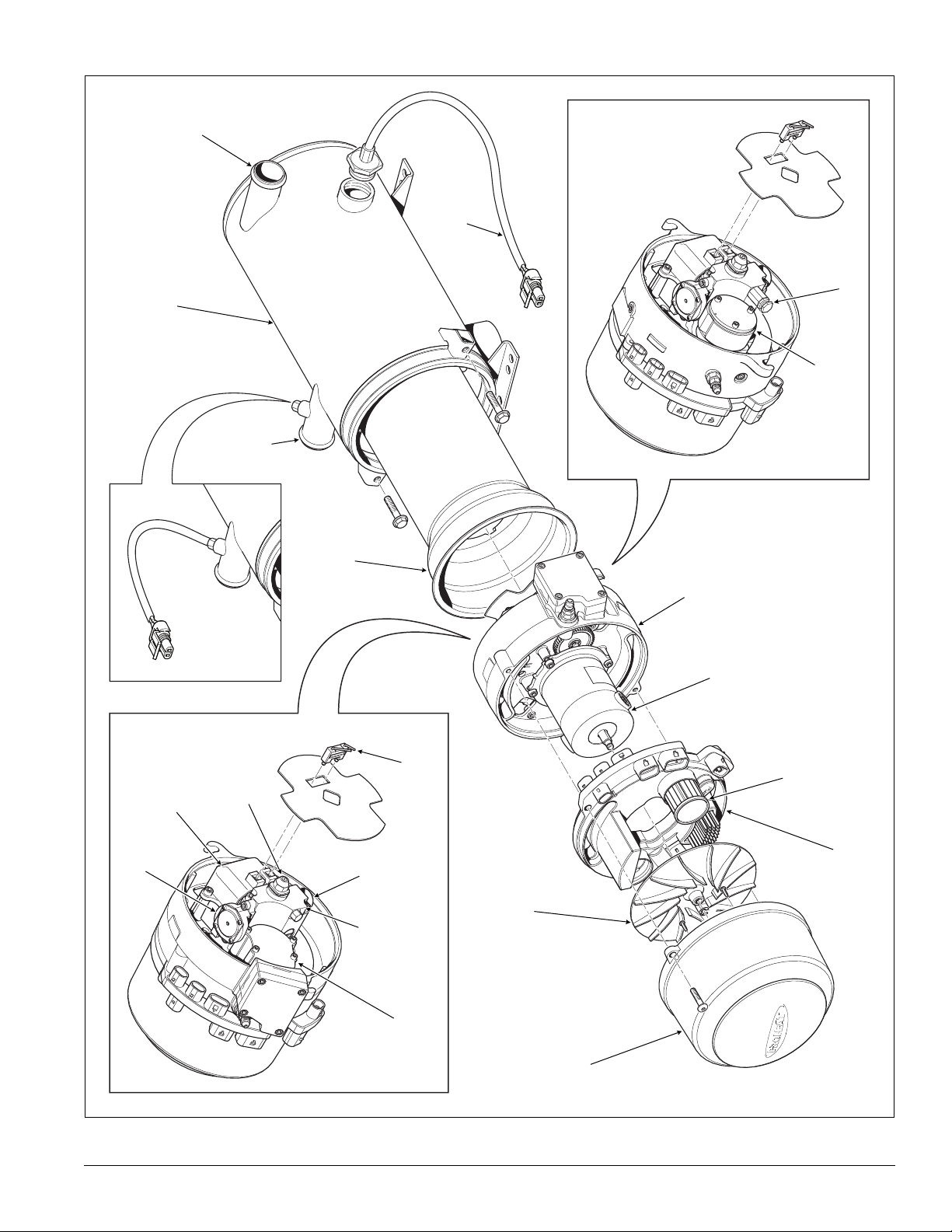
on a OEM indicator light (if equipped). Go to page 4-2.
2.
Operational problems may not be identified with a flashing diagnostic code
(e.g., blown fuse, obstructed coolant flow, air leaks in fuel supply line)
Go to page 4-42
Troubleshooting a Problem
Locate the PROHEAT, remove the enclosure lid if used and visually check for
any problems with wiring harnesses, fuel leaks, coolant leaks, exhaust pipe
damage and environmental condition.
.
.
STEP 2
STEP 3
STEP 4
Figure 4-1: Air Pressure — Digital
Manometer, Remote Start Switch,
Temperature Sensor, Fuel Pressure
Test Gauge and Test Gauge Adaptor.
Check the diagnostic indicator light, and if it's flashing, determine the code
based on page 4-2.
If no code is indicated, turn the PROHEAT off and then on again using the
existing operational switches, timer or a PROHEAT remote start switch
(PROHEAT P/N PK0091).
Let the PROHEAT attempt to start and/or operate. Observe the operation.
NOTE: The PROHEAT will always attempt to start twice, as long as the coolant
temperature is below 160°F (71°C). If a fault is detected it will shut down, go
through a Cool Down (Purge) and attempt a second start. After both attempts
to start or operate, an indicator light will flash a diagnostic code.
Go to page 4-2.
• If the indicator light flashes, count the number of flashes and refer to
the troubleshooting diagnostic code description for that number on the
following pages.
• If the PROHEAT runs but is not performing or operating correctly, consult
the Operational Problems section,page 4-42.
Troubleshooting and Repair Tools Required
• Test Gauge, Air Pressure Digital Manometer (PROHEAT P/N PK0036)
Allows the service technician to check the air compressor pressure to
ensure correct fuel delivery.
• Remote Start Switch (PROHEAT P/N PK0091)
Allows the service technician to work at the PROHEAT. Isolates the
PROHEAT from the existing vehicle system controls and comes with a
built-in indicator light.
• Temperature Sensor (PROHEAT P/N P/N 200302K G-I PCM)
Allows the service technician to start a PROHEAT when the coolant
temperature is greater than 160°F (71°C). To be used only for
troubleshooting.
• Test Gauge, Air/Fuel Pressure (PROHEAT P/N PK0067)
Allows the service technician to check the fuel pressure to ensure correct
fuel delivery (can also be used for air pressure measurements).
• Test Gauge Adaptor (PROHEAT P/N PK0091)
Rotary Vane Compressor Models ONLY (SN 600000 to 699999)
Allows the service technician to measure the air compressor pressure and
adjust the air relief at the same time.
PROHEAT G-I PCM SERVICE MANUAL
4-1
Page 33

4.1 SYSTEM AND COMPONENT
DIAGNOSTICS
The G-I PCM continually monitors the PROHEAT operating conditions. If the G-I
PCM detects a problem, the indicator light flashes a diagnostic code(s).
The diagnostic indicator light may be located:
• In the toggle of the ON/OFF Switch provided by PROHEAT (standard
installation kit).
• In the PROHEAT Timer manual ON light (red).
• In an OEM indicator light package.
• In the remote switch (PROHEAT P/N PK0091) used for troubleshooting.
NO. OF DIAGNOSTIC CODE CODE PAGE
FLASHES DESCRIPTION NO.
1 Start 1 4-3
SYSTEM
DIAGNOSTICS
COMPONENT
DIAGNOSTICS
2 Flame Out 2 4-26
3 Coolant Flow 3 4-27
4 Overheat 4 4-29
5 Voltage 5 4-29
6 Flame Fault 6 4-31
7 Temperature Sensor T1 7 4-31
8 Fuel Shut-off Valve 8 4-34
9 Temperature Sensor T2 9 4-35
10 Ignition Module 10 4-35
11 Coolant Pump 11 4-36
12 Motor 12 4-37
13 Auxiliary Output 13 4-38
14 Switch Output 14 4-38
4-2
4.1.1
1. Switch “ON”
Standard
Mode Signal
2. Precheck
EXAMPLE PROHEAT BEHAVIOR ERROR – CODE 1
The following is an example of M-Series PROHEAT behavior during an error.
The following example shows the sequence of events when the PROHEAT is
switched “ON” in the Standard Mode (a similar sequence of events occurs
for Preheat and Supplemental Modes).
The ON/OFF switch lamp, timer lamp or OEM indicator (installation options)
will light. If the coolant temperature is below 160°F (71°C) the PROHEAT
enters Pre-check. If the coolant temperature is above 160°F (71°C) the
PROHEAT enters Standby.
The G-I PCM performs self diagnosis checking sensors for correct range,
electrical components for over-load and for a flame presence. Also during the
first Precheck, the Ignition Module sparks for five seconds to allow a service
technician to visually check for a spark. If there are no errors indicated, the
PROHEAT goes to Ignition.
PROHEAT G-I PCM SERVICE MANUAL
Page 34

3. Ignition
he Motor and Coolant Pump start first, followed by the ignition spark, and
T
then Fuel Shut-off Valve opens. The Ignition Module sparks for 30 seconds
during which time the flame sensor must detect a proper flame. At the end of
the Ignition cycle the Flame Sensor checks the flame:
• In this error example, the PROHEAT does not detect proper flame and the
PROHEAT enters Error Detection – Cool Down (Purge).
4. Error
Detection –
Cool Down
(Purge)
5. Steps 2 to 4
are Repeated
6. Fault Shut
Down
The flame sensor did not “see” a flame by 30 seconds after entering ignition:
the fuel solenoid closes and the Motor and Coolant Pump continue to
operate for three minutes.
Code 01 will flash on the ON/OFF switch lamp, timer lamp or OEM indicator
(installation options). There will be one flash, pause and then one flash
repeating on the ON/OFF switch lamp, timer lamp or OEM indicator. After 3
minutes, the Motor and Coolant Pump stops and the PROHEAT attempts to
start again.
The PROHEAT always restarts after one error detection. After the 3 minute
Cool Down (Purge), the PROHEAT will go through Precheck, Ignition and the
Error Detection – Cool Down (Purge) cycle one more time.
After two consecutive Code 1 errors, the PROHEAT goes into a Fault Shut
Down state. No further start attempts will be made.
The ON/OFF switch lamp, timer lamp or OEM indicator light will continue to
flash once, pause and repeat.
NOTE: In order to restart the heater, turn the switch “OFF” and back “ON”.
4.1.2
(1 Flash)
START Diagnostic Code 1
Indicates that the G-I PCM Flame Sensor did not detect a flame or the flame
was too weak to be detected during the FULL 30 second ignition period.
Troubleshoot the Start diagnostic code based on the following symptoms:
1. Fuel System. Go to page 4-4 to page 4-17, Steps 1 through 7.
a) There is no fuel, fuel odor or atomized fuel coming from the exhaust pipe.
b) There is no hot exhaust coming from the exhaust pipe.
2. Ignition System. Go to page 4-20.
a) There is raw fuel and/or atomized fuel and a raw fuel odor coming
from the exhaust pipe.
b) There is no hot exhaust coming from the exhaust pipe.
3.
G-I PCM (PROHEAT Control Module) Flame Sensor circuit. Go to page 4-22.
a) There is a flame and the combustion sounds good, the PROHEAT
appears to be operating normally.
b)
No smoke, raw fuel odor or atomized fuel is coming from the exhaust pipe.
4. Motor and/or G-I PCM fault. Go to page 4-24.
a) The Motor is NOT running. Ignition and Coolant Pump are operating.
b) No smoke, raw fuel odor or atomized fuel coming from the exhaust pipe.
PROHEAT G-I PCM SERVICE MANUAL
4-3
Page 35

START: Fuel System Step 1
Fuel and fuel supply – Check:
(1 Flash)
NOTICE
When fuel system is open, the
PROHEAT will smoke and stumble
until the air is purged from the
system. It may be required to cycle
more than one time.
NOTICE
All plugs/harnesses must be reinstalled into the Proheat Control
Module (G-I PCM) before heater goes
back into service.
a) Vehicle fuel level and/or for fuel gelling during cold weather.
b) Air leaks and/or restrictions in the fuel supply lines to the PROHEAT.
c) The PROHEAT operation when supplying fuel from a direct source.
Test Procedure – Supplying fuel from a remote source:
a) Remove the fuel supply line from the PROHEAT fuel inlet.
b) Using a length of fuel line connected from the PROHEAT fuel inlet to a
direct source of CLEAN fuel. Switch the PROHEAT on and operate for at
least one complete cycle. Observe the operation.
If the PROHEAT functions correctly, the fault is in the vehicle fuel system.
Check fuel lines, connections and routing back to fuel tank. Consult OEM
for service requirements.
If a Start diagnostic code is indicated, the problem is in the PROHEAT
fuel system. Proceed to Step 2.
FUEL INLET
WARNING
Flammable liquid and vapours.
FUEL
CONTAINER
Figure 4-2: Remote Fuel Supply
4-4
PROHEAT G-I PCM SERVICE MANUAL
Page 36

START: Fuel System Step 2
PROHEAT fuel filter – Check:
(1 Flash)
WARNING
Flammable.
NOTICE
All plugs/harnesses must be reinstalled into the Proheat Control
Module (G-I PCM) before heater goes
back into service.
a) For filter contamination and restrictions.
b) For damaged inlet fitting.
Test Procedure – Fuel filter inspection, cleaning and/or replacement:
a) Disconnect the fuel supply line at the PROHEAT.
b) Remove the fuel filter adapter and fuel inlet fitting located in the
burner head.
c) Remove O-ring and filter. Inspect for contamination and/or restrictions.
Clean filter using electrical contact cleaner or warm soapy water.
Replace if necessary.
d) Inspect the O-rings for contamination and/or damage. Clean O-rings
with a cloth or replace as necessary.
e) Inspect and clean the filter cavity and O-ring seat as necessary using
contact cleaner.
f) Reinstall filter, O-rings and inlet adapter. Tighten the adapter until it
bottoms out against the face.
g) Reconnect the fuel supply line.
h) Switch the PROHEAT on and operate for at least one complete cycle.
Observe the operation.
If a Start diagnostic code is indicated, proceed to Step 3.
Figure 4-3: Fuel Filter Assembly and Location
FILTER
O-RING
O-RING
INLET FITTING
TORQUE = 100 ± 10 in. lbs
(11.3 ± 1.1 Nm)
ADAPTER
TORQUE = SEE
SECTION 1.3
THREAD
SEALANT
REQUIRED
PROHEAT G-I PCM SERVICE MANUAL
4-5
Page 37

START: Fuel System Step 3
Fuel Nozzle and Fuel Nozzle cavity – Check:
(1 Flash)
Figure 4-4: Nozzle Number Location.
M80 nozzle shown.
MOUNTING BOLTS (2)
TORQUE = SEE SECTION 1.3
TEMP SENSOR 1
a) For Fuel Nozzle and O-ring damage and/or contamination.
b) For correct Fuel Nozzle for the PROHEAT BTU rating.
Test Procedure – Fuel Nozzle removal, inspection and cleaning or replacement:
a) Disconnect all harnesses at the G-I PCM.
b) Disconnect the fuel supply line.
c) Loosen and back out the burner head mounting (2) bolts five to six turns
allowing enough room to rotate the burner head 15° counter-clockwise
and remove.
d) Remove Fuel Nozzle. Verify the Fuel Nozzle number ensuring it is the
correct Fuel Nozzle for your PROHEAT model. See table below.
MODEL NUMBER
M50 30609-50
M80 30609-9
FUEL INLET
SWITCH INPUT
POWER
Figure 4-5: Burner Head Removal and Fuel Nozzle Removal
COOLANT PUMP
e) Disassemble, inspect, clean, and reassemble Fuel Nozzle.
NOTICE
Fuel Nozzle parts are a matched set
and not interchangeable.
Fuel Nozzle disassembly, inspection, cleaning and reassembly:
• Hold the Fuel Nozzle stem lightly but firmly in a vise using soft jaws,
take care not to cause damage. Disassembles in three pieces.
• Inspect Fuel Nozzle stem and O-ring for contamination and/or damage.
Inspect and clean distributor fuel orifice (a soft bristled brush may be
used) , air passages, head and stem with electrical contact cleaner or
warm soapy water.
FUEL NOZZLE
TORQUE = SEE
SECTION 1.3
FUEL NOZZLE CAVITY
4-6
PROHEAT G-I PCM SERVICE MANUAL
Page 38

HOLD UPRIGHT
TO ASSEMBLE
TORQUE = SEE
SECTION 1.3
ARROWS
SHOW HOW TO
LOOSEN THE
NOZZLE
• Re-clamp the Fuel Nozzle stem lightly but firmly in a vise using soft
jaws, take care not to cause damage. Reinstall the distributor and
Fuel Nozzle head. Ensure that the distributor is seated correctly.
he Fuel Nozzle assembly is self-aligning.
T
FUEL AND AIR OUTLET ORIFICE
HEAD
FUEL NOZZLE ORIFICE
AIR PASSAGES
NOZZLE NUMBER
M80 NOZZLE SHOWN
DISTRIBUTOR
LUBRICATE
O-RING WITH
DIESEL FUEL
Figure 4-6: Fuel Nozzle Assembly
NOTICE
All plugs/harnesses must be reinstalled into the Proheat Control
Module (G-I PCM) before heater goes
back into service.
AIR PASSAGES
STEM
O-RING
f) Inspect the Fuel Nozzle cavity and clean as necessary using electrical
contact cleaner cleaner or warm soapy water.
g) Reinstall the Fuel Nozzle using diesel fuel to lubricate O-ring.
h) Reinstall the burner head by mounting it against the heat exchanger face,
turning clockwise to engage the mounting ears on the bolts.
i) Tighten mounting bolts. See Section 1.3 for torque.
j) Reconnect the electrical harnesses and fuel supply line.
k) Switch the PROHEAT on and operate for at least one complete cycle.
Observe the operation.
If a Start diagnostic code is indicated, proceed to Step 4.
PROHEAT G-I PCM SERVICE MANUAL
4-7
Page 39

START: Fuel System Step 4
Fuel Shut-off Valve – Check:
(1 Flash)
NOTICE
It is recommended that the Fuel
Regulator be serviced at the same
time as the Fuel Shut-off Valve. Go
to page 4-11, Step 5.
a) Fuel Shut-off Valve and G-I PCM - electrical open circuit fault.
b) Valve plunger – mechanical fault. Test the PROHEAT operation; Fuel
Shut-off Valve plunger removed.
Procedure – Coil and G-I PCM – electrical fault:
a) Disconnect all harnesses at the G-I PCM.
b) Disconnect the fuel supply line.
c) Loosen and back out the burner head mounting (2) bolts five to six turns
allowing enough room to rotate the burner head 15° counter-clockwise
and remove.
MOUNTING BOLTS (2)
TORQUE = SEE SECTION 1.3
TEMP SENSOR 1
LOCK
FUEL INLET
MOUNTING EARS (2)
SWITCH INPUT
POWER
Figure 4-7: Burner Head Removal
COOLANT PUMP
d) Remove the Fuel Shut-off Valve connector. Use a small flat head
screwdriver to lift the connector locking tab, pulling up on the
connector to remove.
G-I PCM FUEL SHUT-OFF
VALVE CONNECTION
Figure 4-8: Connector Removal
4-8
Figure 4-9: G-I PCM Fuel Shut-off Valve Connection
PROHEAT G-I PCM SERVICE MANUAL
Page 40

WARNING
Shock hazard due to high voltage.
e) Measure the Fuel Shut-off Valve coil using a multimeter set to read Ohms.
If the coil measures between 35 and 45 Ohms, coil is OK. Go to:
• Fuel Shut-off Valve output voltage measurement.
• Procedure – Fuel Shut-off Valve – Mechanical function.
If the coil measures open circuit, coil is faulty. Replace the Fuel Shut-off
Valve. Go to Fuel Shut-off Valve replacement, page 4-10.
Figure 4-10: Coil Electrical Resistance Measurement
Fuel Shut-off Valve output voltage measurement:
WARNING
To avoid the risk of shock and to
ensure that the PROHEAT does not
fire, disconnect the Ignition Module
connector at the G-I PCM.
NOTICE
All PROHEAT external harnesses
must be connected to ensure that
the PROHEAT attempts to start
after Pre-check.
NOTICE
All plugs/harnesses must be reinstalled into the Proheat Control
Module (G-I PCM) before heater goes
back into service.
a) Reconnect the power, Temperature Sensor(s) and switch harnesses at
the G-I PCM.
b) Disconnect Ignition Module connector at the G-I PCM.
c) Switch the PROHEAT on and measure across pins A and B of the G-I PCM
Fuel Shut-off Valve connection.
If no voltage is measured, the G-I PCM is faulty. Go to G-I PCM replacement,
page 4-41.
If the correct voltage (9 – 15 V) is measured, the G-I PCM is OK. Go to
Procedure – Fuel Shut-off Valve – Mechanical function.
B
A
G-I PCM IGNITION
MODULE CONNECTION
PROHEAT G-I PCM SERVICE MANUAL
Figure 4-11: G-I PCM Fuel Shut-off Valve Output Voltage Measurement
Procedure – Fuel Shut-off Valve – Mechanical function:
a) Using a flat head screwdriver hold the valve stem while loosening the coil
nut. Remove the coil.
4-9
Page 41

b) Loosen and remove the valve stem. Remove the O-ring, plunger and
spring. Save the parts.
c) Inspect the O-ring and plunger seat for contamination. Clean as
necessary using electrical contact cleaner cleaner. Reinstall the valve
tem and seal. DO NOT INSTALL THE PLUNGER AND SPRING.
s
) Reinstall the coil, coil nut and reconnect the Fuel Shut-off Valve to the G-I PCM.
d
) Reinstall the burner head by mounting it against the heat exchanger face,
e
turning clockwise to engage the mounting ears on the bolts.
f) Reconnect electrical harnesses and fuel supply line.
g) Switch the PROHEAT on and operate for at least one complete cycle.
Observe the operation.
If the PROHEAT runs OK, the Fuel Shut-off Valve is faulty. Go to Fuel
Shut-off Valve replacement.
If a Start diagnostic code is indicated, proceed to Step 5.
Flammable.
WARNING
Fuel Shut-off Valve replacement:
a) Using a flat head screwdriver, hold the stem in place while loosening the
coil nut. Remove the coil.
COIL NUT
TORQUE = 25 in-lbs
± 3 in-lbs (3.4 Nm
± 0.3 Nm)
COIL
SCREWDRIVER SLOT
TORQUE = 25 in-lbs
± 3 in-lbs (3.4 Nm ±
0.3 Nm)
STEM
TORQUE = 25 in-lbs
± 3 in-lbs (3.4 Nm ±
0.3 Nm)
PLUNGER
O-RING
Figure 4-12: Fuel Shut-Off Valve Assembly
NOTICE
All plugs/harnesses must be reinstalled into the Proheat Control
Module (G-I PCM) before heater goes
back into service.
4-10
b) Loosen and remove the valve stem. Remove the O-ring, plunger and spring.
c) Inspect the O-ring and plunger seat in the fuel block for contamination.
Clean as necessary using plastic safe electrical contact cleaner cleaner.
d) Install the new valve stem and seal using a slot screwdriver.
e) Reinstall the coil, coil nut and reconnect the Fuel Shut-off Valve connector
at the G-I PCM.
f) Reinstall the burner head by mounting it against the heat exchanger face,
turning clockwise to engage the mounting ears on the bolts.
g) Reinstall electrical harnesses and fuel supply line.
h) Switch the PROHEAT on and operate for at least one complete cycle.
Observe the operation.
PROHEAT G-I PCM SERVICE MANUAL
Page 42

START: Fuel System Step 5
Fuel Regulator – Check:
(1 Flash)
WARNING
DO NOT disassemble the regulator.
o user serviceable parts. Attempts
N
to open or repair may lead to unsafe
operation.
WARNING
Flammable.
MOUNTING BOLTS (2)
TORQUE = SEE SECTION 1.3
TEMP SENSOR 1
a) For damage and/or contamination and mechanical operation.
Procedure – Fuel Regulator removal, inspection and reinstallation:
a) Disconnect all harnesses at the G-I PCM.
b) Disconnect the fuel supply line.
c) Loosen and back out the burner head mounting (2) bolts five to six turns
allowing enough room to rotate the burner head 15° counter-clockwise
and remove.
d) Remove ignition electrode assembly. Use a flat head screwdriver to pry
the electrode assembly out.
e) Remove the flame shield. Rotate to match the mounting square.
f) Remove the Fuel Regulator (2) screws, Fuel Regulator and O-rings.
MOUNTING SCREWS (2)
TORQUE = SEE SECTION 1.3
FLAME SHIELD
IGNITION
ELECTRODE
ASSEMBLY
FUEL INLET
MOUNTING EARS (2)
SWITCH INPUT
POWER
Figure 4-13: Burner Head Removal and Fuel Regulator Removal
COOLANT PUMP
g) Inspect O-rings and O-ring seats for contamination and/or damage.
Replace if necessary.
h) Reinstall regulator ensuring that the O-rings are seated properly.
i) Reinstall the burner head by mounting it against the heat exchanger face,
turning clockwise to engage the mounting ears on the bolts.
j) Reconnect the electrical harnesses and fuel supply line.
NOTICE
k) Switch the PROHEAT on and operate for at least one complete cycle.
Observe the operation.
All plugs/harnesses must be reinstalled into the Proheat Control
If a Start diagnostic code is indicated, proceed to Step 6.
Module (G-I PCM) before heater goes
back into service.
FUEL REGULATOR
PROHEAT G-I PCM SERVICE MANUAL
4-11
Page 43

START: Fuel System Step 6
(1 Flash)
Air Compressor – Check:
a) Air Compressor pressure and operation.
efore checking air pressure, remove, disassemble and clean Fuel
B
Nozzle. Go to Fuel Nozzle disassembly, inspection, cleaning and
reassembly, page 4-6.
Air Compressor filter check:
a) Remove blower housing (2) screws and blower housing.
b) Remove the Air Compressor filter. Inspect for contamination and replace
if necessary. Ensure filter is installed and seated properly.
MOUNTING BOLTS (2)
TORQUE = SEE SECTION 1.3
TEMP SENSOR 1
HOUSING SCREWS
TORQUE = SEE SECTION 1.3
WARNING
To avoid the risk of shock and to
ensure that the PROHEAT does not
fire, disconnect the Ignition Module
& Fuel Solenoid connector at the
G-I PCM.
NOTICE
Leaving the Temperature Sensor(s)
disconnected ensures that the burner
head will only run in purge for a
maximum of three minutes.
FUEL INLET
SWITCH INPUT
AIR FILTER
Figure 4-14: Burner Head and Blower Housing Removal
COOLANT PUMP
POWER
Test Procedure – Air Compressor pressure (all models):
a) Disconnect all harnesses at the G-I PCM.
b) Disconnect the fuel supply line.
c) Loosen and back out the burner head mounting (2) bolts five to six turns
allowing enough room to rotate the burner head 15° counter-clockwise
and remove.
d) Remove Ignition Electrode Assembly. Use a flat head screwdriver to pry
the electrode assembly out.
e) Remove the Flame Shield. Rotate to match the mounting square.
f) Disconnect the Fuel Shut-off Valve and Ignition Module connectors at the
G-I PCM. This ensures that fuel will not spray and/or light during testing.
g) For Diaphragm Compressor pressure check and setting, please continue
below. For Rotary Vane Compressor pressure check and setting, please
go to page 4-14.
4-12
PROHEAT G-I PCM SERVICE MANUAL
Page 44

WARNING
Connect power and switch only. DO
NOT connect the temperature sensor.
DIGITAL
MANOMETER
(P/N PK0036)
Test Procedure – Air Compressor pressure (Diaphragm Compressor models):
h) Remove the plug to the air pressure measurement port.
i) Thread in the Pressure Gauge and torque to 25 in-lbs ±3 in-lbs (2.8 Nm
0.3 Nm) as shown in Figure 4-15.
±
) Connect Power Harness and Remote Switch to the G-I PCM.
j
k) Switch the PROHEAT on and observe the air pressure:
If the Air Compressor reading is out of range, ensure the air compressor
filter is clean. See page 4-12.
MODEL AIR PRESSURE (DIAPHRAGM COMPRESSOR)
M50 6.0 ± 0.1 PSI (41.4 ± 0.7 kPa)
M80 2.9 ± 0.1 PSI (20.0 ± 0.7 kPa)
l) Adjust the air pressure if necessary by turning the screw as shown in
Figure 4-15.
If the pressure cannot be set to the correct setting, rebuild kits are available.
See www.proheat.com for the latest parts manual SL9151 for more information.
m)
Turn heater off. Wait until purge mode is complete (approximately 3 minutes).
PRESSURE ADJUSTMENT SCREW
DECREASE
PRESSURE
INCREASE
PRESSURE
FLAME
SHIELD
IGNITION
ELECTRODE
ASSEMBLY
DIAPHRAGM
COMPRESSOR
Figure 4-15: Air Pressure Test. Diaphragm Compressor Model.
n) Remove Pressure Gauge. Lubricate air measurement port plug o-ring with
diesel fuel and reinstall plug into fuel block. Torque to 25 in-lbs ±3 in-lbs
(2.8 Nm ±0.3 Nm). Re-install the Flame Shield, the Ignition Ignition
Electrode Assembly and Burner Head onto the Heat Exchanger.
PROHEAT G-I PCM SERVICE MANUAL
4-13
Page 45

NOTICE
All plugs/harnesses must be reinstalled into the Proheat Control
Module (G-I PCM) before heater goes
back into service.
o) Connect the Power, Overheat/Temperature Sensor and Coolant Pump
electrical connections to the heater Burner Had and reconnect the fuel line.
) Activate the heater with the remote switch and observe operation. The
p
heater should run smoothly with no smoke although there may be some
hesitation initially due to air in the fuel line.
q) Remove the remote switch and re-connect the control connection.
If a Start diagnostic code is indicated, proceed to Step 7.
NOTICE
Ensure to orient burner head as shown
in Figure 4-16 or an incorrect pressure
measurement may be made.
WARNING
Connect power and switch only. DO
NOT connect the temperature sensor.
NOTICE
All plugs/harnesses must be reinstalled into the Proheat Control
Module (G-I PCM) before heater goes
back into service.
Test Procedure – Air Compressor pressure (Rotary Vane Compressor models):
h) Thread in Pressure Gauge Adapter hand tight as shown in Figure 4-16.
i) I
nstall pressure Relief Valve & Pressure Gauge on to Pressure Gauge Adapter.
j) Orient Burner Head similar to assembled on heater.
k) Connect Power Harness and Remote Switch to the G-I PCM.
l) Switch the PROHEAT on and observe the air pressure:
MODEL AIR PRESSURE (ROTARY VANE COMPRESSOR)
M50 6.2 ± 0.1 PSI (42.7 ± 0.7 kPa)
M80 3.2 ± 0.1 PSI (22.1 ± 0.7 kPa)
m) Adjust the air pressure if necessary by releasing the lock nut and turning
the pressure relief cap as shown in Figure 4-17.
If the pressure cannot be set to the correct setting, read Section 5.2.
Rotary Vane Compressor Service and Vanes Installation to check
operation. If required, replace rotary vane compressor as shown on
page 4-15.
n) Tighten the lock nut to 50 in-lbs ±5 in-lbs (5.6 Nm ±0.6) and ensure the
air pressure did not change after tightening the lock nut.
o) Turn the heater off. Wait until purge mode is complete (approx. 3 minutes).
p) Remove the Pressure Gauge Adapter and Harness. Lubricate Air Pressure
Relief Valve O-ring with diesel fuel and re-install the Air Pressure Relief
Valve in it’s original location. Torque to 25 in-lbs ±3 in-lbs (2.8 Nm ±0.3
Nm). Reconnect the Ignition Module and Fuel Solenoid connector to the
G-I PCM. Re-install the Flame Shield, the Ignition Electrode Assembly and
Burner Head onto the Heat Exchanger.
Connect the Power, Overheat/Temperature Sensor & Coolant Pump
q)
electrical
line.
r) Activate the heater with the remote switch and observe operation. The
heater should run smoothly with no smoke although there may be some
hesitation initially due to air in the fuel line.
s) Remove the remote switch and re-connect the control connection.
connections to the heater Burner Head and reconnect the fuel
4-14
If a Start diagnostic code is indicated, proceed to Step 7.
PROHEAT G-I PCM SERVICE MANUAL
Page 46

DIGITAL
MANOMETER
(P/N PK0036)
FLAME
SHIELD
IGNITION
ELECTRODE
ASSEMBLY
PRESSURE
RELIEF VALVE
ROTARY VANE
COMPRESSOR
PRESSURE
GAUGE
ADAPTER
Figure 4-16: Air Pressure Test. Rotary Vane Compressor Model.
PRESSURE RELIEF
VALVE BODY
LOCK NUT
PRESSURE RELIEF CAP
Figure 4-17: Pressure Relief Valve adjustment.
Rotary Vane Air Compressor Removal and Reassembly:
a) Disconnect Motor, Fuel Shut-off Valve and Ignition Module connectors at
the G-I PCM.
b) Remove blower housing (2) screws and blower housing.
c)
Remove blower retaining snap ring and slide the blower off the Motor shaft.
d) Remove the G-I PCM.
e) Remove Motor (4) screws and slide the Motor shaft out of the Fuel
Supply Pump taking care not to damage the Fuel Supply Pump seal.
Note the Motor drive gear size and location for reassembly.
f) Remove the Air Compressor gear retaining snap ring and gear. Inspect
gears and replace if necessary. If gears are worn out it is not necessary
to replace compressor (spin and check for mechanical interference).
g) Remove Air Compressor (2) screws, Air Compressor, (2) O-rings and the
gear locating snap ring from the Air Compressor shaft.
h) Install new Air Compressor; ensure that the O-ring and seats are clean
and dry. Assembly lubricant not required.
PROHEAT G-I PCM SERVICE MANUAL
4-15
Page 47

i) Reinstall gear locating snap ring, gear and gear retaining ring.
j) Reinstall the Motor, with drive gear, take care to ensure that the Fuel
Pump seal is not damaged.
k) Reinstall the G-I PCM, blower, blower retaining snap ring, Air Compressor
ilter and blower housing.
f
l) Reconnect the Motor, Fuel Shut-off Valve and Ignition Module connectors
at the G-I PCM.
m) Check air pressure. Adjust if necessary to correct pressure setting.
o to page 4-12.
G
GEAR LOCATING
SNAP RING
AIR COMPRESSOR
SCREWS
TORQUE = SEE
SECTION 1.3
HOUSING SCREWS
TORQUE = SEE
SECTION 1.3
BLOWER
HOUSING
BLOWER
RETAINING
SNAP RING
O-RING
G-I PCM
AIR
COMPRESSOR
MOTOR
O-RING
DRIVE GEAR
AIR COMPRESSOR GEAR
AIR COMPRESSOR GEAR
RETAINING RING
MOTOR SCREWS
TORQUE = SEE SECTION 1.3
NOTICE
All plugs/harnesses must be reinstalled into the Proheat Control
Module (G-I PCM) before heater goes
back into service.
4-16
AIR COMPRESSOR FILTER
BLOWER
Figure 4-18: Air Compressor Replacement
n) Reinstall the flame shield and ignition electrode assembly to the G-I PCM.
o) Reinstall the burner head by mounting it against the heat exchanger face,
turning clockwise to engage the mounting ears on the bolts.
p) Reinstall electrical harnesses and fuel supply line.
q) Switch the PROHEAT on and operate for at least one complete cycle.
Observe the operation.
If a Start diagnostic code is indicated, proceed to Step 7.
PROHEAT G-I PCM SERVICE MANUAL
Page 48

START: Fuel System Step 7
Fuel Supply Pump – Check:
TEMP SENSOR 1
(1 Flash)
a) Fuel Supply Pump pressure and operation.
Test Procedure – Fuel Supply Pump pressure:
a) Disconnect all harnesses at the G-I PCM.
b) Disconnect the fuel supply line.
c) Loosen and back out the burner head mounting (2) bolts five to six turns
d) Remove ignition electrode assembly. Use a flat head screwdriver to pry
e) Remove the flame shield. Rotate to match the mounting square.
MOUNTING BOLTS (2)
TORQUE = SEE SECTION 1.3
allowing enough room to rotate the burner head 15° counter-clockwise
and remove.
the electrode assembly out.
FLAME SHIELD
IGNITION
ELECTRODE
ASSEMBLY
FUEL INLET
MOUNTING EARS (2)
SWITCH INPUT
POWER
Figure 4-19: Burner Head Removal and Fuel Pressure Test
WARNING
Flammable.
COOLANT PUMP
f) Disconnect the Fuel Shut-off Valve and Ignition Module connectors at the
G-I PCM. Ensures that fuel will not spray and/or light during testing.
g) Remove the Fuel Supply Pump test port plug and install test gauge.
h) Reconnect the power and switch harnesses at the G-I PCM.
WARNING
To avoid the risk of shock and to
ensure that the PROHEAT does not
fire, disconnect the Ignition Module
connector at the G-I PCM.
i) Reconnect the fuel supply line.
j) Switch the PROHEAT on and read the fuel pressure (should be 5 – 10 PSI):
If the pressure is out of range, Go to Fuel Supply Pump cleaning, page 4-18.
If the pressure reads OK, review Fuel System troubleshooting, page 4-3.
NOTICE
All plugs/harnesses must be reinstalled into the Proheat Control
Module (G-I PCM) before heater goes
back into service.
Leaving the Temperature Sensor(s)
disconnected ensures that the burner
head will enter purge mode and run
for a maximum of three minutes.
NOTICE
GAUGE (P/N PK0067)
FUEL SUPPLY PUMP TEST PORT
FUEL
SHUT-OFF
SOLENOID
PROHEAT G-I PCM SERVICE MANUAL
4-17
Page 49

PRESSURE RELIEF VALVE CAP
TORQUE = 22 in-lbs ±2 in-ibs
(2.5 Nm±0.2 Nm)
BALL BEARING
SPRING
BALL GUIDE
Figure 4-20: Pressure Relief Valve Cap
NOTICE
All plugs/harnesses must be reinstalled into the Proheat Control
Module (G-I PCM) before heater goes
back into service.
Fuel Supply Pump cleaning:
a) Disconnect all harnesses at the G-I PCM.
b) Disconnect the fuel supply line.
c) Loosen and back out the burner head mounting (2) bolts five to six turns
allowing enough room to rotate the burner head 15° counter-clockwise
and remove.
d) Locate the pressure relief valve cap and remove with a slot screwdriver.
Careful not to lose any of the internal components that may fall out.
e) Remove the spring from the cavity.
f) Remove the ball bearing from the cavity.
g) Inspect and clean all components.
h) Inspect and clean the cavity. Pay close attention to the center hole in the
cavity for any debris or a damaged edge. The edge of the hole should be
smooth with no nicks, do not use any tool that may damage this edge as
this will cause loss of fuel pressure.
i) Place ball bearing back in cavity on the center hole.
j) Place spring back in hole with brass ball guide on top of ball bearing.
k) Install pressure relief valve cap.
l) Re-test the Fuel Supply Pump. Start from item 'e' in Test procedure –
Fuel Supply Pump pressure, page 4-17.
If the Fuel Supply Pump pressure tests OK, go to item 'm'.
If the Fuel Supply Pump pressure is still incorrect, go to Fuel Supply
Pump replacement
m) Reassemble the burner head.
n) Reinstall electrical harnesses and fuel supply line.
o) Switch the PROHEAT on and operate for at least one complete cycle.
Observe the operation.
NOTICE
All plugs/harnesses must be reinstalled into the Proheat Control
Module (G-I PCM) before heater goes
back into service.
Fuel Supply Pump replacement:
a) Disconnect and remove the Ignition Module. Go to page 4-20.
b) Remove Fuel Nozzle. Go to page 4-6.
c) Remove Fuel Regulator. Go to page 4-11.
d) Disconnect and remove Fuel Shut-off Valve. Go to page 4-10.
e) Remove blower housing (2) screws and blower housing.
f)
Remove blower retaining snap ring and slide the blower off the Motor shaft.
g) Disconnect the Motor connector at the G-I PCM. Remove the G-I PCM.
h) Remove Motor (4) mounting screws using a 4 mm Allen wrench.
i) Remove the Motor.
j) Rotary Vane Air Compressor Only — remove the Air Compressor gear
retaining snap ring and gear.
k) Rotary Vane Air Compressor Only — remove Air Compressor (2) screws,
Air Compressor, (2) O-rings from the Fuel Supply Pump.
l) Reinstall all components in reverse order to new Fuel Supply Pump.
m) Reinstall the burner head by mounting it against the heat exchanger face,
turning clockwise to engage the mounting ears on the bolts.
n) Reinstall electrical harnesses and fuel supply line.
o) Switch the PROHEAT on and operate for at least one complete cycle.
Observe the operation.
4-18
PROHEAT G-I PCM SERVICE MANUAL
Page 50

FUEL REGULATOR
IGNITION MODULE
SCREWS (2)
NOZZLE
FUEL SHUT-OFF VALVE
BLOWER
HOUSING
FUEL PUMP
HOUSING SCREWS
TORQUE = SEE
SECTION 1.3
G-I PCM
MOTOR SCREWS
TORQUE = SEE
SECTION 1.3
FLAME SHIELD
DRIVE GEAR
O-RING
IGNITION
ELECTRODE
ASSEMBLY
AIR COMPRESSOR GEAR
AIR COMPRESSOR GEAR
RETAINING RING
MOTOR
BLOWER RETAINING SNAP RING
Figure 4-21: Fuel Supply Pump Removal
PROHEAT G-I PCM SERVICE MANUAL
AIR COMPRESSOR FILTER
BLOWER
4-19
Page 51

START: Ignition System
5/32" [4 mm]
3/4"
[19 mm]
17/32 "
[13.5 mm]
.173" [4.4 mm]
.935"
[23.5 mm]
1.055 "
[26.8 mm]
5/32" [4 mm]
5/8"
[15.9 mm]
13/32" [10.7 mm]
Ignition Module – Check:
(1 Flash)
WARNING
o not connect Temperature
D
Sensor to avoid flame.
WARNING
Shock hazard due to high voltage.
a) Ignition Operation using Ignition mode.
b) Ignition Module and G-I PCM – electrical open circuit fault.
Test Procedure – Ignition service diagnostic:
a) Disconnect all harnesses at the G-I PCM.
b) Disconnect the fuel supply line.
c) Loosen and back out the burner head mounting (2) bolts five to six turns
allowing enough room to rotate the burner head 15° counter-clockwise
and remove.
d) Check Electrodes for carbon bridging and/or damage. Replace if necessary.
MOUNTING BOLTS (2)
TORQUE = SEE SECTION 1.3
TEMP SENSOR 1
IGNITION ELECTRODE PID# 200801
ROTARY VANE COMPRESSOR:
500000 – 699999
IGNITION ELECTRODE PID# 200801-1
DIAPHRAGM OR ROTARY VANE COMPRESSOR:
500000 – TO DATE
Figure 4-22: Burner Head Removal and Ignition Electrode Removal
4-20
POWER
DIAPHRAGM OR ROTARY VANE COMPRESSOR:
FUEL INLET
MOUNTING EARS (2)
SWITCH INPUT
COOLANT PUMP
IGNITION ELECTRODE PID# 200802
700000 – TO DATE
PROHEAT G-I PCM SERVICE MANUAL
Page 52

WARNING
Keep blower housing on to avoid
injury when Motor starts up.
NOTICE
ll plugs/harnesses must be rein-
A
stalled into the Proheat Control
Module (G-I PCM) before heater goes
back into service.
NOTICE
All plugs/harnesses must be reinstalled into the Proheat Control
Module (G-I PCM) before heater goes
back into service.
e) Reconnect the power and switch harnesses.
f) Switch the PROHEAT on and observe for a spark. Spark will continue for
five seconds.
If the spark is OK, reinstall the burner head and review Fuel System
troubleshooting, page 4-3.
If there is no spark check G-I PCM ignition output voltage.
Test Procedure – G-I PCM ignition output voltage:
a) Disconnect the Ignition Module and the Fuel Shut-off Valve connectors
(ensure no flow) at the G-I PCM.
b) Reconnect all external harnesses at the G-I PCM.
c) Switch the PROHEAT on and measure across pins A and C of the G-I PCM
Ignition Module connection.
If the correct system voltage (12 or 24) is measured, then measure
across pins A and B (should read system voltage during ignition).
If both of the measurements are correct, then replace Ignition Module.
Go to Ignition Module replacement.
If either of these measurements are incorrect, the G-I PCM is faulty. Go
to G-I PCM replacement, page 4-41.
LOCK
Figure 4-23: Connector Removal
A
BC
(+) (-)
Figure 4-24: G-I PCM Ignition Module Connection Measurement
Ignition Module replacement:
a) Remove ignition electrode assembly. Use a flat head screwdriver to pry
the electrode assembly out.
b) Remove the flame shield. Rotate to match the mounting square.
c) Remove Ignition Module (2) mounting screws and Module.
PROHEAT G-I PCM SERVICE MANUAL
d) Reinstall the new Ignition Module.
e) Reinstall flame shield and electrode assembly.
4-21
Page 53

f) Reconnect Ignition Module connector at the G-I PCM.
IGNITION MODULE
SCREWS (2)
TORQUE = SEE SECTION 1.3
FLAME SHIELD
Figure 4-25: Ignition Module Replacement
IGNITION ELECTRODE
ASSEMBLY
START: G-I PCM Flame
Sensor Circuit
TEMP SENSOR 1
(1 Flash)
MOUNTING BOLTS (2)
TORQUE = SEE SECTION 1.3
Flame Sensor – Check:
a) Flame Sensor operation.
b) Combustion tube orientation.
Test Procedure – Flame Sensor circuit:
a) Disconnect all harnesses at the G-I PCM.
b) Disconnect the fuel supply line.
c) Loosen and back off the burner head mounting (2) bolts five to six turns
allowing enough room to rotate the burner head 15° counter-clockwise
and remove.
FLAME SENSOR PORT
FUEL INLET
MOUNTING EARS (2)
SWITCH INPUT
POWER
Figure 4-26: Burner Head Removal and Flame Sensor Location
4-22
COOLANT PUMP
PROHEAT G-I PCM SERVICE MANUAL
Page 54

WARNING
To avoid the risk of shock and to
ensure that the PROHEAT does not
fire, disconnect the Ignition Module
connector at the G-I PCM.
d) Disconnect the Ignition Module connector at the G-I PCM.
e) Check for contamination on the Flame Sensor. Clean if necessary using
electrical contact cleaner or warm soapy water.
f) Reconnect the power harness and the remote test switch with the switch
in the off position.
REMOTE TEST SWITCH IN
OFF POSITION (P/N PK0091)
Figure 4-27: Remote Test Switch Connection
g) Place a finger over the sensor port located on the burner head flange.
The indicator light should go out. Remove your finger and shine a flashlight
into the sensor, the remote switch indicator light should come on.
If the indicator light reacts correctly, the Flame Sensor is OK. Go to Test
Procedure – Combustion Tube orientation.
If the indicator light does not react, the Flame Sensor is faulty. Go to G-I
PCM replacement, page 4-41.
Test Procedure – Combustion Tube orientation:
a) Ensure that the combustion tube orientation boss is aligned with the
heat exchanger flange notch.
b) Ensure that the combustion tube 'slits' are clean.
HEAT EXCHANGER FLANGE NOTCH
ORIENTATION BOSS
PROHEAT G-I PCM SERVICE MANUAL
MOUNTING BOLTS
TORQUE = SEE SECTION 1.3
Figure 4-28: Combustion Tube Orientation
4-23
Page 55

START: Motor and/or
G-I PCM fault
(1 Flash)
Motor or G-I PCM – Check:
a) Electrical function – Open circuit motor.
b) Electrical function – Open circuit G-I PCM.
CAUTION
O NOT connect Motor directly to
D
batteries or another power source
as it will damage the Motor.
LOCK
Figure 4-29: Connector Removal
Test Procedure – Open circuit Motor:
a) Disconnect the Motor connector at the G-I PCM.
b) Using a multimeter set for resistance (Ohms) measure across pins A and B.
c) Check for an open circuit.
If an open circuit is detected, go to Motor replacement, page 4-25.
If an open circuit is not detected, go to Test Procedure – Open circuit G-I PCM.
MOTOR
Figure 4-30: Motor Electrical Resistance Measurement
NOTICE
All plugs/harnesses must be reinstalled into the Proheat Control
Module (G-I PCM) before heater goes
back into service.
LOCK
Test Procedure – Open circuit G-I PCM:
a) Disconnect the Motor connector and Temperature Sensor 1 at the G-I PCM.
b) Reconnect the power and switch harnesses at the G-I PCM.
c) Switch the PROHEAT on and measure voltage across pins A and B of the G-
I PCM Motor connection.
If the correct nominal system voltage (12 or 24) is measured, the G-I PCM
is OK. Go to Test Procedure – Open circuit Motor.
If no voltage is measured, the G-I PCM is faulty. Go to G-I PCM replacement,
page 4-41.
MOTOR
G-I PCM MOTOR CONNECTION
Figure 4-31: Connector Removal
4-24
Figure 4-32: G-I PCM Motor Output Voltage Measurement
PROHEAT G-I PCM SERVICE MANUAL
Page 56

Motor replacement:
) Disconnect all harnesses at the G-I PCM.
a
) Disconnect the fuel supply line.
b
) Loosen and back out the burner head mounting (2) bolts five to six turns
c
allowing enough room to rotate the burner head 15° counter-clockwise
and remove.
d) Remove blower housing (2) screws and blower housing.
e) Remove blower retaining snap ring and slide the blower off the
Motor shaft.
f) Disconnect the Motor connector at the G-I PCM.
g) Remove Motor (4) mounting screws using a 4 mm Allen wrench.
h) Remove the Motor. Take care when removing that the Fuel Supply Pump
seal is not damaged.
i) Remove the gear retaining snap ring and gear from the old Motor and
install on the new Motor.
j) Install the new Motor. Take care when installing the Motor shaft in the
Fuel Supply Pump seal. Lubricate with clean diesel fuel.
NOTICE
All plugs/harnesses must be reinstalled into the Proheat Control
Module (G-I PCM) before heater goes
back into service.
SCREWS (2)
TORQUE = SEE
SECTION 1.3
k) Reinstall (4) screws.
l) Reconnect the Motor connector at the G-I PCM.
m) Reinstall the blower, blower retaining snap ring, Air Compressor filter and
blower housing.
'L'
BLOWER
ENSURE MOTOR IS ALIGNED IN
THE CORRECT POSITION.
POINTER OVER 'R' ON BURNER
HEAD WHEN G-I PCM
CONNECTORS ON RIGHT SIDE
MOTOR
G-I PCM
O-RING
GEAR
RETAINING
SNAP RING
MOTOR SCREWS
TORQUE = SEE SECTION 1.3
'R'
DRIVE GEAR
PROHEAT G-I PCM SERVICE MANUAL
AIR COMPRESSOR FILTER
G-I PCM MOTOR CONNECTION
BLOWER RETAINING SNAP RING
Figure 4-33: Motor Replacement
4-25
Page 57

4.1.3
FLAME OUT Diagnostic Code 2
(2 Flashes)
Indicates that a flame was detected but it could not be maintained or after
eing established the flame went out before reaching the cycle off
b
temperature of 185°F (85°C).
lame Out sequence:
F
a) A flame is detected during the Ignition period or during Full Output.
b) The flame goes out.
c) The ignition is switched on for a maximum of 10 seconds to try and
reestablish the flame (Ignition periods will be 10 seconds longer in
cases where the Flame Out occurred during the Ignition period).
d) If the flame is not established the Flame Out diagnostic code is displayed.
A Flame Out diagnostic code distinguishes that:
a) A flame was detected therefore there was a spark and the Ignition
system works.
b) The flame was detected therefore the Flame Sensor works.
c) The fault is in the fuel supply system.
Troubleshoot the Flame Out diagnostic code based on:
1. Fuel supply to the PROHEAT. Go to page 4-4 & page 4-5, Step 1 & 2.
• Fuel tank pick-up.
• Fuel fittings.
• Fuel lines.
• OEM supplied filters and check valves.
2. PROHEAT fuel system.
• Fuel Supply Pump
• Air Compressor
• Fuel Regulator
• Fuel Shut-off Valve
3. Operational symptoms that may occur in conjunction with a Flame Out
code. Go to page 4-4 to page 4-17, Steps 1 to 7.
• Combustion hesitation or coughing.
• Backfiring.
• Smoke.
• Strong diesel fuel odor.
Go to page 4-6 to page 4-17, Steps 3 to 7.
4-26
PROHEAT G-I PCM SERVICE MANUAL
Page 58

4.1.4
COOLANT FLOW Diagnostic Code 3
(3 flashes)
COOLANT FLOW: Step 1
(3 Flashes)
WARNING
NEVER remove coolant lines when
the engine is hot – escaping steam
or scalding water could cause
serious personal injury. Loosen the
coolant line clamps slowly,
allowing the pressure to escape
before removing completely.
Indicates that the coolant temperature in the PROHEAT reached 185°F (85°C)
within 90 seconds from the beginning of Ignition. There is coolant in the
system but its flow rate is too low.
Troubleshoot the Coolant Flow diagnostic code based on:
1. Vehicle coolant system. Go to Step 1.
• The PROHEAT starts and runs for 90 seconds or less and shuts down
with a Coolant Flow diagnostic code indicated.
2. Coolant Pump system electrical or mechanical fault. Go to Step 2.
• The PROHEAT starts and runs for 90 seconds or less and shuts down
with a Coolant Flow diagnostic code indicated.
Vehicle coolant system – Check:
a) For restrictions and blockages in the coolant lines.
b) OEM system shut-off valves for correct operation.
c) For loose hose clamps – air introduced into the system.
d) Coolant line size, fittings. Are they too restrictive?
e) Direction of flow. Are the PROHEAT Coolant Pump and the engine Coolant
Pump pumping in the same direction when they are operating at the
same time?
f) Coolant capacity. Is there enough coolant in the system? Go to Technical
Specifications, page 1-1.
g) PROHEAT location. Is the PROHEAT or Coolant Pump the high point in the
system? Coolant Pumps are not self-priming and a surge tank may
be required.
COOLANT FLOW: Step 2
PROHEAT G-I PCM SERVICE MANUAL
(3 Flashes)
Coolant Pump and G-I PCM – Check:
a) G-I PCM electrical function.
b) Coolant Pump electrical function.
c) Coolant Pump mechanical function.
Test Procedure – Electrical:
a) Disconnect the Coolant Pump connector at the G-I PCM.
b) Using a multimeter set for voltage, switch the PROHEAT on and measure
across pins A and B on the G-I PCM Coolant Pump connection.
If the correct nominal system voltage (12 or 24) is measured, the G-I PCM
is OK. Go to Procedure – Mechanical inspection and testing, page 4-28.
If no voltage is measured, the G-I PCM is faulty. Go to G-I PCM replacement,
page 4-41.
4-27
Page 59

B
A
RED (+) BLACK (-)
Figure 4-34: G-I PCM Coolant Pump Output Voltage Measurement
WARNING
NEVER remove coolant lines when
the engine is hot – escaping steam
or scalding water could cause
serious personal injury. Loosen the
coolant line clamps slowly,
allowing the pressure to escape
before removing completely.
Procedure – Mechanical inspection and testing:
a) Connect the power directly to the Coolant Pump. Observe the operation.
If the Motor does not operate, replace the Coolant Pump.
4-28
PROHEAT G-I PCM SERVICE MANUAL
Page 60

4.1.5
OVERHEAT Diagnostic Code 4
(4 Flashes)
CAUTION
Repeatedly resetting the PROHEAT
without resolving the Overheat
diagnostic code will damage the
heat exchanger.
4.1.6
(5 Flashes)
Indicates that the Temperature Sensor detected an inner heat exchanger
surface temperature of 230°F (110°C) within 60 seconds after entering
Cool Down (Purge).
Troubleshoot the Overheat diagnostic code based on:
1. Lack of coolant, air or flow problems in the coolant system.
Go to page 4-27, Steps 1 and 2.
2. Faulty Temperature Sensor. Go to page 4-31.
3. Faulty G-I PCM Temperature Sensor circuit. Go to page 4-31.
To reset the PROHEAT, switch it off and then on again.
VOLTAGE Diagnostic Code 5
Indicates that the supply voltage to the G-I PCM is outside the operating range.
Operating Range:
• 12 volt PROHEAT – 10 to 15 volts.
• 24 volt PROHEAT – 20 to 30 volts.
VOLTAGE: Step 1
(5 Flashes)
VOLTAGE: Step 2
(5 Flashes)
Troubleshoot the Voltage diagnostic code based on:
1. Low voltage.
• Voltage supply is below the rated requirement.
• Poor or faulty electrical connections.
• Voltage supply source is OK. Voltage drop due to high amperage load
while the PROHEAT is operating or trying to operate.
2. High voltage.
• Voltage supply is above the rated requirement while the vehicle
engine is running.
High Voltage – Check:
The vehicle charging system. Consult the OEM for service requirements.
Low Voltage – Check:
a) System voltage supply source.
b) Wiring harnesses and connection points.
PROHEAT G-I PCM SERVICE MANUAL
4-29
Page 61

Procedure – Low voltage testing:
) Inspect the wiring harnesses and connections for corrosion and proper
a
fit. Clean if necessary.
b) Using a multimeter set for voltage, measure across the positive and
negative battery terminals or at the supply source.
If the voltage is below the required voltage, service the batteries and/or
charging system as per OEM supplier recommendations.
If the voltage level is within the operating range, go to item 'c'.
TO PROHEAT
Figure 4-35: Voltage Measurement
c) Locate and measure across pins D and B in the G-I PCM Data Link
connection. Perform this with the PROHEAT off and then switched on.
If the voltage is within the operating range and a Voltage diagnostic code
is indicated, the G-I PCM is faulty. Go to G-I PCM replacement, page 4-41
If the voltage falls below the required voltage when the Motor starts,
check the wiring from the supply source to the PROHEAT G-I PCM.
G-I PCM DATALINK
CONNECTION
RED (+)
F
A
DE
CB
4-30
BLACK (-)
Figure 4-36: G-I PCM Datalink Connection
PROHEAT G-I PCM SERVICE MANUAL
Page 62

4.1.7
FLAME FAULT Diagnostic Code 6
(6 Flashes)
4.1.8
(7 or 9 Flashes)
Indicates that:
1. The PROHEAT reached 185°F (85°C) cycled off and entered Cool Down
(Purge). After 20 seconds a flame was still detected.
2. The PROHEAT was switched on and a flame (signal) was detected in
Pre-check.
Troubleshoot the Flame Fault diagnostic code based on:
1. Fuel System fault. Go to page 4-6 to page 4-17, Steps 3 to 7.
2. G-I PCM Flame Sensor circuit. Go to page 4-22.
TEMPERATURE SENSOR T1 Diagnostic Code 7 and/or 9
Indicates an electrical fault in the Temperature Sensor.
Troubleshoot the Temperature Sensor diagnostic code based on:
Whether the PROHEAT is equipped with a single Temperature Sensor or dual
Temperature Sensors.
TEMP SENSOR T1: Step 1
(7 or 9 Flashes)
NOTICE
The temperature sensor may be
plugged into T2. The M-Series will
operate if the temperature sensor is
plugged into T1 or T2. If the sensor
if plugged into T2, reverse the
instructions as found in step a), b)
and c). ie: T1 will become T2, etc.
Temperature Sensor and G-I PCM (single sensor) – Check:
a) Temperature Sensor and G-I PCM electrical function.
Test Procedure – Sensor and G-I PCM:
a) Remove Temperature Sensor connector from G-I PCM connection T1.
b) Remove the G-I PCM sealing plug from G-I PCM connection T2. Put
sealing plug into G-I PCM connection T1.
c) Reconnect the Temperature Sensor connector to G-I PCM connection T2.
d) Switch the PROHEAT on:
If a diagnostic code is indicated, the sensor is faulty. Go to Temperature
Sensor replacement.
T1
PROHEAT G-I PCM SERVICE MANUAL
T2
Figure 4-37: Temperature Sensors
4-31
Page 63

Figure 4-38: Temperature Sensor Test
If after changing the Temperature Sensor a diagnostic code is still
indicated, the G-I PCM is faulty. Go to G-I PCM replacement, page 4-41.
est Procedure – Temperature Sensor measurement:
T
a) Using a multimeter set for resistance, measure across pins A and B of
the sensor.
If the sensor measures out of range (see chart below), the sensor is
faulty. Go to Temperature Sensor replacement.
NOTICE
If the resistance is below 1.363 k-Ohm
or above 10706 k-Ohm then there
will be a Code 7 and/or 9
RESISTANCE TEMP TEMP
(k-Ohms) (°C) (°F)
8574.14 -50 -58
5932.78 -45 -49
4155.34 -40 -40
2943.30 -35 -31
2108.75 -30 -22
1527.54 -25 -13
1117.67 -20 -4
826.12 -15 5
616.27 -10 14
463.88 -5 23
352.16 0 32
269.70 5 41
208.14 10 50
161.82 15 59
126.80 20 68
99.99 25 77
79.42 30 86
63.49 35 95
51.07 40 104
RESISTANCE TEMP TEMP
(k-Ohms) (°C) (°F)
41.31 45 113
33.62 50 122
27.52 55 131
22.63 60 140
18.71 65 149
15.55 70 158
12.98 75 167
10.89 80 176
9.17 85 185
7.75 90 194
6.59 95 203
5.62 100 212
4.81 105 221
4.13 110 230
3.56 115 239
3.08 120 248
2.68 125 257
4-32
PROHEAT G-I PCM SERVICE MANUAL
Page 64

TEMP SENSOR T1: Step 2
(7 or 9 Flashes)
NOTICE
All plugs/harnesses must be reinstalled into the Proheat Control
Module (G-I PCM) before heater goes
back into service.
Temperature Sensor and G-I PCM electrical (dual sensors) – Check:
a) Temperature Sensor and G-I PCM electrical function.
Test Procedure – Sensor and G-I PCM:
a) Remove Temperature Sensor connector from G-I PCM connection T1.
b) Remove Temperature Sensor connector from G-I PCM connection T2.
c) Swap the connectors. T1 to T2 and T2 to T1.
d) Switch the PROHEAT on:
If a Temperature Sensor T1 diagnostic code is now indicated, the sensor
is faulty. Go to Temperature Sensor replacement.
If a Temperature Sensor T2 diagnostic code is still indicated, the G-I PCM
is faulty. Go to G-I PCM replacement, page 4-41.
SECONDARY SENSOR
(IF EQUIPED) TORQUE TO
50 in-lbs ±5 in-lbs
(5.6 Nm±0.5 Nm)
T1
WARNING
NEVER remove coolant lines when
the engine is hot – escaping steam
or scalding water could cause
serious personal injury. Loosen the
coolant line clamps slowly,
allowing the pressure to escape
before removing completely.
NOTICE
All plugs/harnesses must be reinstalled into the Proheat Control
Module (G-I PCM) before heater goes
back into service.
T2
Figure 4-39: Temperature Sensors
MAIN SENSOR
TORQUE = SEE
SECTION 1.3
Temperature Sensor replacement:
a) Isolate the coolant system at the PROHEAT inlet and outlet ports for
minimal coolant loss using valves in the system or hose clamps.
b) Remove main sensor mount using a 1" wrench and/or secondary sensor
using a 13 mm wrench.
c) Reinstall the new sensor. Ensure that the O-ring and O-ring seat are
clean. Install the sensor until it bottoms out on the mounting boss.
PROHEAT G-I PCM SERVICE MANUAL
4-33
Page 65

4.1.9
FUEL SHUT-OFF VALVE Diagnostic Code 8
(8 Flashes)
WARNING
To avoid the risk of shock and to
ensure that the PROHEAT does not
fire, disconnect the Ignition Module
connector at the G-I PCM.
NOTICE
All plugs/harnesses must be reinstalled into the Proheat Control
Module (G-I PCM) before heater goes
back into service.
Indicates an electrical fault in the Fuel Shut-off Valve coil or in the G-I PCM
Fuel Shut-off Valve circuit.
roubleshoot the Fuel Shut-off Valve diagnostic code based on:
T
Fuel Shut-off Valve Coil or PROHEAT G-I PCM electrical.
Test Procedure – Fuel Shut-off Valve and G-I PCM test:
a) Disconnect all harnesses at the G-I PCM.
b) Disconnect the fuel supply line.
c) Loosen and back out the burner head mounting (2) bolts five to six turns
allowing enough room to rotate the burner head 15° counter-clockwise
and remove.
d) Disconnect the Fuel Shut-off Valve connector at the G-I PCM.
e) Disconnect the Ignition Module connector at the G-I PCM
f) Reconnect the power, Temperature Sensor(s) and switch harnesses at
the G-I PCM.
g) Switch the PROHEAT on:
If a Fuel Shut-off Valve diagnostic code is NOT indicated and the
PROHEAT attempts to operate, the Fuel Shut-off Valve is faulty.
Go to Fuel Shut-off Valve replacement, page 4-10.
If the Fuel Shut-off Valve diagnostic code is still indicated, the G-I PCM is
faulty. Go to G-I PCM replacement, page 4-41.
MOUNTING BOLTS (2)
TORQUE = SEE SECTION 1.3
TEMP SENSOR 1
FUEL INLET
MOUNTING EARS (2)
SWITCH INPUT
POWER
Figure 4-40: Burner Head Removal and Fuel Shut-off Valve Connection
COOLANT PUMP
FUEL SHUT-OFF VALVE
CONNECTION
LOCK
4-34
PROHEAT G-I PCM SERVICE MANUAL
Page 66

4.1.10
TEMPERATURE SENSOR T2 Diagnostic Code 7 and/or 9
(7 or 9 Flashes)
4.1.11
(10 Flashes)
Go to Temperature Sensor T1 Diagnostic Code, page 4-31.
IGNITION MODULE Diagnostic Code 10
Indicates an over-load fault is detected.
Troubleshoot the Ignition Module diagnostic code based on:
Ignition Module and G-I PCM – electrical.
Test procedure – Ignition Module and G-I PCM:
a) Disconnect all harnesses at the G-I PCM.
b) Disconnect the fuel supply line.
c) Loosen and back out the burner head mounting (2) bolts five to six turns
allowing enough room to rotate the burner head 15° counter-clockwise
and remove.
d) Disconnect the Ignition Module connector at the G-I PCM.
e) Reconnect the power and switch harnesses at the G-I PCM.
NOTICE
All plugs/harnesses must be reinstalled into the Proheat Control
Module (G-I PCM) before heater goes
back into service.
f) Switch the PROHEAT on and operate for at least one complete cycle.
Observe the operation.
If an Ignition Module diagnostic code is NOT indicated and the PROHEAT
attempts to operate, the Ignition Module is faulty. Go to Ignition Module
replacement, page 4-21.
If the Ignition diagnostic code is indicated, the G-I PCM is faulty. Go to G-I
PCM replacement, page 4-41.
MOUNTING BOLTS (2)
TORQUE = SEE SECTION 1.3
TEMP SENSOR 1
FUEL INLET
MOUNTING EARS (2)
PROHEAT G-I PCM SERVICE MANUAL
POWER
Figure 4-41: Burner Head Removal
SWITCH INPUT
COOLANT PUMP
4-35
Page 67

4.1.12
COOLANT PUMP Diagnostic Code 11
(11 Flashes)
NOTICE
All plugs/harnesses must be reinstalled into the Proheat Control
Module (G-I PCM) before heater goes
back into service.
Indicates an over-load fault is detected.
Troubleshoot the Coolant Pump diagnostic code based on:
oolant Pump and G-I PCM – electrical.
C
Test Procedure – Coolant Pump and G-I PCM test:
a) Disconnect the Coolant Pump at the G-I PCM.
b) Switch the PROHEAT on and observe for a diagnostic code.
If a Coolant Pump diagnostic code is NOT indicated and the PROHEAT
operates, the Coolant Pump is faulty. Go to Coolant Pump replacement.
If the Coolant Pump diagnostic code is still indicated, the G-I PCM is faulty.
Go to G-I PCM replacement, page 4-41.
WARNING
NEVER remove coolant lines when
the engine is hot – escaping steam
or scalding water could cause
serious personal injury. Loosen the
coolant line clamps slowly,
allowing the pressure to escape
before removing completely.
CAUTION
DO NOT run a coolant pump dry.
Before starting the PROHEAT ensure
that the Coolant Pump is flooded with
coolant by opening all valves and
running the engine until the air has
been purged from the system (approximately 15 – 20 minutes). This will
prevent Coolant Pump damage.
G-I PCM COOLANT PUMP
CONNECTION
Figure 4-42: G-I PCM Coolant Pump Connection
Coolant Pump replacement:
a) Isolate the Coolant Pump using shut-off valves provided in the coolant
system or hose to minimize coolant loss.
b) Remove Coolant Pump.
c) Install new Coolant Pump.
4-36
PROHEAT G-I PCM SERVICE MANUAL
Page 68

4.1.13
MOTOR Diagnostic Code 12
(12 Flashes)
Indicates that an over-load fault is detected in precheck or during operation.
Troubleshoot the Motor diagnostic code based on:
1. Motor – mechanical.
2. Motor or G-I PCM – electrical.
Test Procedure – Motor mechanical function:
a) Disconnect all harnesses at the G-I PCM.
b) Disconnect the fuel supply line.
c) Remove blower housing (2) screws and blower housing. Look at blower
housing and blower for any rubbing marks.
If blower housing/blower rubbing is observed. Replace blower as it may
have warped.
d) By hand, rotate the blower and feel for mechanical binding.
If mechanical interference is felt, isolate the Motor from the Fuel Supply
Pump and Air Compressor by removing the Motor. Go to Motor
replacement, page 4-25.
If the Motor spins freely and there are no obvious mechanical problems,
check the Motor/G-I PCM electrical operation. Go to Test Procedure – G-I
PCM Motor output voltage.
TEMP SENSOR 1
NOTICE
All plugs/harnesses must be reinstalled into the Proheat Control
Module (G-I PCM) before heater goes
back into service.
BLOWER
FUEL INLET
SWITCH INPUT
POWER
Figure 4-43: Motor Mechanical Check
COOLANT PUMP
Test Procedure – G-I PCM Motor output voltage:
a) Disconnect the Motor connector at the G-I PCM.
b) Reconnect the power and switch harnesses at the G-I PCM.
c) Switch the PROHEAT on.
If Motor diagnostic code is still indicated, G-I PCM is faulty. Go to G-I PCM
replacement, page 4-41.
If Motor diagnostic code is no longer indicated, Motor is faulty. Go to
Motor replacement, page 4-25.
PROHEAT G-I PCM SERVICE MANUAL
4-37
Page 69

4.1.14
AUXILIARY OUTPUT Diagnostic Code 13
(13 Flashes)
NOTICE
All plugs/harnesses must be reinstalled into the Proheat Control
Module (G-I PCM) before heater goes
back into service.
Indicates a short circuit fault in the harness or the device being operated by
the Auxiliary Output.
roubleshoot the Auxiliary Output diagnostic code based on:
T
G-I PCM – electrical
Test procedure – G-I PCM Output Signal:
a) Disconnect the Auxiliary Output harness at the G-I PCM.
b) Switch the PROHEAT on and operate for at least one complete cycle.
Observe the operation.
If the diagnostic code is not indicated the fault is in the harness or the
driven device. Go to OEM for service requirements.
If the diagnostic code is still indicated, the G-I PCM is faulty. Go to G-I
PCM replacement, page 4-41.
G-I PCM AUXILIARY OUTPUT
CONNECTION
4.1.15
(14 Flashes)
NOTICE
All plugs/harnesses must be reinstalled into the Proheat Control
Module (G-I PCM) before heater goes
back into service.
4-38
Figure 4-44: Auxiliary Output Connector
SWITCH/TIMER POWER Diagnostic Code 14
Indicates a short circuit fault in harness or the device being operated by the
Switch Output.
Troubleshoot the Switch/Timer Power diagnostic code based on:
Electrical switch circuit in the switch wiring.
Test procedure electrical, short circuit:
a) Remove the Switch Output harness at the G-I PCM.
b) Remote start the PROHEAT using the PROHEAT remote start switch
(PROHEAT P/N PK0091).
If the PROHEAT functions correctly, the fault is in the wiring from the
PROHEAT back to the switch. See OEM recommended service requirements.
If the PROHEAT does not function, the G-I PCM is faulty. Go to G-I PCM
replacement, page 4-41.
PROHEAT G-I PCM SERVICE MANUAL
Page 70

4.2
COMPONENT MECHANICAL
OR ELECTRICAL PROBLEMS
4.2.1
4.2.2
4.2.3
4.2.4
4.2.5
4.2.6
4.2.7
Fuel Nozzle Go to page 4-6, Step 3.
Fuel Shut-off Valve Go to page 4-8, Step 4.
Fuel Regulator Go to page 4-11, Step 5.
Air Compressor Go to page 4-12, Step 6.
Fuel Supply Pump Go to page 4-17, Step 7.
Ignition Electrodes Go to page page 4-20.
G-I PCM Fuse
Protects the G-I PCM against high current. When switched on, the PROHEAT
will NOT start, attempt to start, or indicate a diagnostic code.
Troubleshoot a Blown Fuse based on:
1. Voltage supply to the PROHEAT.
2. Voltage at the output connections of the G-I PCM.
Test Procedure – Voltage supply:
a) Disconnect the power harness at the G-I PCM.
b) Using a multimeter set for voltage, measure across pins A and B of the
harness connector for system voltage.
If there is no voltage, check the OEM voltage supply. Consult OEM for
service requirements.
If the correct voltage (system voltage 12 – 24) is measured, go to item 'c'.
PIN B – BLACK (-)
PIN A – RED (+)
Figure 4-45: Power Harness
PROHEAT G-I PCM SERVICE MANUAL
4-39
Page 71

c) Disconnect the Datalink harness at the G-I PCM. Using a multimeter set
for voltage, measure across pins D and B in the PCM Datalink connection.
If voltage is read and it is of the correct value, the fuse is OK.
If voltage is not present, check the G-I PCM fuse.
G-I PCM DATALINK
CONNECTION
RED (+)
F
A
BLACK (-)
DE
CB
Figure 4-46: G-I PCM Datalink Connection
Procedure – G-I PCM fuse replacement:
a) Disconnect all harnesses at the G-I PCM.
b) Disconnect the fuel supply line.
c) Loosen and back out the burner head mounting (2) bolts five to six turns
allowing enough room to rotate the burner head 15° counter-clockwise
and remove.
d) Remove blower housing (2) screws and blower housing.
MOUNTING BOLTS (2) TORQUE = SEE SECTION 1.3
TEMP SENSOR 1
4-40
FUSE COVER AND FUSE
FUEL INLET
SWITCH INPUT
COOLANT PUMP
POWER
Figure 4-47: Burner Head Removal and Motor Mechanical Check
PROHEAT G-I PCM SERVICE MANUAL
Page 72

e) Remove the fuse cover and using needle nose pliers or a fuse removal
tool remove the fuse.
If the fuse is blown, replace the fuse and check the PROHEAT current
draw. Go to page 4-29.
If the fuse is OK, the G-I PCM is faulty. Go to G-I PCM replacement below.
G-I PCM replacement:
a) Disconnect the Fuel Shut-off Valve and Ignition Module connectors at
the G-I PCM.
b) Remove the blower housing (2) screws and blower housing.
c) Remove the blower retaining snap ring and slide the blower off the
Motor shaft.
d) Remove the Air Compressor filter.
e) Disconnect the Motor connector at the G-I PCM. Remove the G-I PCM.
f) Reinstall the new PCM following items 'e' back to 'a'.
NOTICE
All plugs/harnesses must be reinstalled into the Proheat Control
Module (G-I PCM) before heater goes
back into service.
LOCK
g) Reconnect the burner head by mounting it against the heat exchanger
face, turning it clockwise to engage the mounting ears on the bolts.
h) Reconnect electrical harnesses and fuel supply line.
i) Switch the PROHEAT on and operate for at least one complete cycle.
Observe the operation.
BLOWER
SCREWS (2)
TORQUE = SEE
SECTION 1.3
G-I PCM
AIR COMPRESSOR FILTER
G-I PCM MOTOR CONNECTION
BLOWER RETAINING SNAP RING
Figure 4-48: Connector Removal
PROHEAT G-I PCM SERVICE MANUAL
Figure 4-49: G-I PCM Replacement
4-41
Page 73

OPERATIONAL PROBLEMS4.3
Problems with the PROHEAT and/or vehicle application that are not
specifically defined but are observed during the operation of the PROHEAT
and or vehicle coolant system. These fall into three categories:
1. Fuel Supply/Combustion. Go to page 4-3 to page 4-25, Steps 1 to 7.
• Smoke from the exhaust
• Excessive raw diesel odor.
• Backfiring and coughing during the combustion process.
• Low heat output.
2. Coolant system. Go to page 4-27, Steps 1 and 2.
• Short combustion cycles. The PROHEAT is turning on and off at very
short intervals.
• Low heat output in the vehicle system. Go to page 4-3 to page 4-25,
Steps 1 to 7.
4-42
PROHEAT G-I PCM SERVICE MANUAL
Page 74

MAINTENANCE5.0
NOTICE
The flame hours can be determined
from the G-I PCM data download.
PK0056 is required to download the
G-I PCM data. See the parts book at
www.proheat.com
Your PROHEAT has been designed to operate with a minimum of maintenance.
To ensure the efficient operation of your heater an ANNUAL MAINTENANCE
TUNE-UP is recommended to be performed each year or every 1000 flame
hours. In addition, weekly operation is recommended.
Proper maintenance will result in the following benefits:
• Maximum heat transfer to the coolant
• Minimum battery power draw
• Long term cost savings
• Increased reliability
Check the system annually before each heating season. There are several
maintenance procedures you can perform to keep your heater in service.
Read this section of the manual carefully.
PROHEAT G-I PCM SERVICE MANUAL
Figure 5-1.
WEEKLY MAINTENANCE5.1
Run the heater a minimum of once a week to keep new fuel in the heater’s
critical components.
5-1
Page 75

ANNUAL MAINTENANCE5.2
1. Clean Heater Enclosure
• Clean any accumulated debris or dust from the components.
• Make sure the opening around the exhaust pipe is clear.
• Visually inspect all the components for wear or damage.
• Ensure that the burner air intake is clear.
• Do not pressure wash.
2. Check Exhaust System
• Check the exhaust system carefully. Clean as necessary.
• Make sure the exhaust pipe is vented safely away from the vehicle.
• Check the pipe for dents, restrictions or severely corroded areas.
• Replace the exhaust pipe and clamps if necessary.
• Ensure the exhaust pipe clamp is tight and the exhaust pipe
is secure.
HEAT EXCHANGER
FLANGE NOTCH
ORIENTATION
BOSS
Figure 5-2: Heat Exchanger
WARNING
Shock hazard due to voltage.
3. Check Heat Exchanger
• Remove the burner head assembly and combustion tube to access
the inside of the heat exchanger.
• To maintain optimum heat output, clean any combustion deposits
that may have accumulated on the heat exchanger fins.
• Use a wire brush to loosen the deposits and a vacuum to suck
them out.
• Ensure exhaust pipe is clean and free from restriction.
4. Check Cooling System
• Check all heater hoses and connections for signs of leakage
or damage.
• Repair or replace as required.
5. Check Power Source
• Check the condition of the power source and connections.
The heater will not function properly with a faulty power source or
corroded connections.
6. Check Fuel System
• Check the fuel system for damaged fuel lines or leakage.
• Make sure the clamps on the fuel lines are secure.
5-2
PROHEAT G-I PCM SERVICE MANUAL
Page 76

. Check Fuel Filter
7
• Remove and inspect filter. Clean or replace as necessary.
Clean O-ring and seat. Avoid cutting or scratching.
•
• Refer to page 4-5, Step 2.
FUEL FILTER
O-RING
O-RING
Figure 5-3: Fuel Filter
HOLD UPRIGHT
TO ASSEMBLE
TORQUE = SEE
SECTION 1.3
LUBRICATE
O-RING WITH
DIESEL FUEL
8. Clean Nozzle
• Inspect Fuel Nozzle stem and O-ring for contamination and/or damage.
Inspect and clean distributor (a soft bristled brush may be used), fuel
orifice, air passages, head and stem with electrical contact cleaner
or warm soapy water.
• DO NOT use a welding torch tip cleaner.
• Refer to page 4-6.
BLOW THIS DIRECTION
WHEN USING
COMPRESSED AIR.
Figure 5-4: Fuel Nozzle
PROHEAT G-I PCM SERVICE MANUAL
5-3
Page 77

9. Compressor Air Filter
• Replace inlet air filter annually or more often if dusty conditions
are encountered.
Ensure the air filter is seated correctly.
•
• Refer to page 4-12, Step 6.
AIR FILTER
Figure 5-5: Air Filter
NOTICE
Inspect Proheat Control Module (G-I
PCM)
to ensure that all connectors
have
plugs or have an electrical
connection.
10. Compressor
•
Important: Complete steps 8 and 9 prior to step 10 compressor check.
• Check the air pressure setting as described on page 4-12.
11. Electrical System
• Check the internal and the external wire harnesses for damage or
corrosion. Replace if required.
12. Timer/Toggle Switch Supplemental/Preheat
• Check heater operation under specified heater on signals.
13. Operation Test
• Run the system for at least 15 minutes or until the heater cycles
“OFF” and then “ON” again. Inspect the following during operation:
a) Combustion process.
• For smoke and raw fuel odor from the exhaust pipe.
• Fuel system leaks and corrosion.
• If there is a problem go to page 4-3 to page 4-31, Steps 1 to 7.
b) Coolant system:
• For leaks
• For correct system heating process. Go to page 4-27, Steps 1 and 2.
5-4
PROHEAT G-I PCM SERVICE MANUAL
Page 78

REPLACEMENT PARTS AND
TEST EQUIPMENT
PART # QTY DESCRIPTION
200610K 1 Filter, Air, Element
880035K 1 Fuel Filter
PK0067 1 Test Gauge, Air/Fuel Pressure
PK0091 1 Remote On/Off Switch
PK0071 1 Test Gauge Adapter. Rotary Vane
Compressor Models ONLY
SN 600000 to 699999.
PK0036 1 Digital Manometer
PROHEAT G-I PCM SERVICE MANUAL
5-5
Page 79

5.3
ROTARY VANE COMPRESSOR
SERVICE & VANES INSTALLATION
The rotary vane compressor may need service to clean and/or to replace the
vanes. This can be indicated by a lack of compressor pressure (page 4-14) or
noise. It is recommended to perform the following steps:
Step 1. Access the compressor and clean the air filter.
Step 2. Clean the rotary vane compressor.
Step 3. Test air compressor for proper pressure and operation. If pressure
and operation is not achieved, then proceed to Step 4.
Step 4. Replace vanes and test air compressor for proper pressure and
operation.
NOTICE
Prevent dirt and/or other contaminants
from entering into the compressor
intake port when cleaning.
1. Access the Compressor & Clean Air Filter
a) Disconnect all harnesses at the G-I PCM.
b) Disconnect the fuel supply line.
c) Disconnect the air intake hose (if required).
d) Loosen and back out the burner head mounting (2) bolts five to six
turns allowing enough room to rotate the burner head 15° counterclockwise and remove the Burner Head to a workbench.
e) Remove blower housing (2) screws and blower housing.
f)
Remove the Air Compressor filter. Inspect for contamination and replace if
necessary. Clean the filter cavity and the air passages using a dry cloth.
g) Remove ignition electrode assembly. Use a flat head screwdriver to
pry the electrode assembly out.
h) Remove the flame shield. Rotate to match the mounting square.
FLAME SHIELD
G-I PCM
HOUSING
SCREWS (2)
5-6
AIR RELIEF
IGNITION
ELECTRODE
ASSEMBLY
MOUNTING BOLTS (2)
AIR FILTER
Figure 5-6: Access the Compressor and Air Filter
PROHEAT G-I PCM SERVICE MANUAL
Page 80

WARNING
Failure to disconnect the ignition
module will cause a spark that may
ause a fire. Ensure to disconnect
c
ignition module.
NOTICE
Use only non-petroleum based flushing
solvents such as GAST AH255B,
I-chem electronics cleaner AF ICA363
or non-flammable electrical contact
cleaner available
from any automotive
supplies store.
CAUTION
Wear eye protection during the
cleaning process.
2. Clean the Rotary Vane Compressor
a) Remove the nozzle and air relief (see figure 5-6). If the nozzle stem
looks black, clean as shown on page 4-6 or replace the nozzle.
) Disconnect the ignition module connector. Ensure that the
b
temperature sensor is disconnected as well.
) Remove the air filter and blower (see figure 5-6).
c
d) Connect the power cable and remote on/off switch.
e) Turn on the switch. After 5 seconds, the motor should start to spin
and the switch should start to blink (The blink is due to the
temperature sensor disconnections. See page 4-31 for more
information.)
f) Using a non-flammable electrical contact cleaner or non-petroleum
based flushing solvent (DO NOT USE BRAKE CLEAN as it will damage
the compressor)), spray directly into intake of compressor. Spray the
cleaner and run the motor for at least 30 seconds to remove all of the
vane dust and cleaner.
REMOVE AIR FILTER
REMOVE
BLOWER
DISCONNECT TEMPERATURE SENSOR
DISCONNECT
FUEL LINE
SPRAY CLEANER
DIRECTLY INTO AIR
COMPRESSOR INTAKE
REMOVE NOZZLE
DISCONNECT
IGNITION MODULE
REMOVE AIR
RELIEF
PROHEAT G-I PCM SERVICE MANUAL
Figure 5-7: Compressor Cleaning
5-7
Page 81

g) Disconnect the power cable to remove power and stop motor.
h) Disconnect the remote on/off switch.
i) Reconnect ignition module connector.
) Reinstall the clean Fuel Nozzle using diesel fuel to lubricate o-ring.
j
k) Reinstall air relief (see Section 1.3 for torque).
) Reinstall flame shield and electrode.
l
m) Reinstall the air filter and blower.
n) Reinstall the blower housing.
3. Test Air Compressor
a) Test the air pressure setting as shown on page 4-14.
b) If pressure cannot be set correctly, proceed to step 4.
SCREW (3) DO NOT
LOOSEN – SEE NOTICE
VANES (4)
BODY BORE & ROTOR
WEAR PLATE
9/64" HEX. HEAD
SCREW (3)
END PLATE
5-8
Figure 5-8: Compressor Components
PROHEAT G-I PCM SERVICE MANUAL
Page 82

NOTICE
Use only non-petroleum based flushing
solvents such as GAST AH255B
Electrosolve Contact Cleaner or
similar products available from any
utomotive supplies store.
a
NOTICE
DO NOT loosen the three screws
holding the compressor body (figure
5-8), as it requires special tools to
install the compressor body back in
proper position.
NOTICE
The three holes in the plates are not
equally spaced. Ensure their correct
alignment to the compressor body
(figure 5-8).
NOTICE
Never add oil to the compressor.
4. Replace the Vanes
) Remove three screws holding the compressor End Plate using a 9/64
a
hexagon key (refer to figure 5-8).
b) Remove the End Plate and the graphite Wear Plate (located behind the
luminum End plate) - refer to figure 5-8. Avoid damage to the end plate.
a
c) Before removing the old vanes from the rotor slots, check the direction
f the bevel edge so the new vanes are installed in the same manner.
o
d) Remove four old vanes from the slots in the compressor rotor. Turn
the compressor rotor by rotating the blower blade to enable better
access to the vanes.
e) Spray body bore and rotor with non-petroleum based flushing solvent
(refer to figure 5-8). NO NOT USE BRAKE CLEAN.
f) Use a clean dry cloth to remove flushing solvent from parts.
g) Place new vanes in rotor slots in the proper beveled edge direction.
h) Place a sheet of emery cloth on a smooth flat surface and rub both
sides of the Wear Plate located behind the End Plate to remove any
burrs. Use a clean dry cloth to remove any dust from the Wear Plate.
i) Remove old paint and clean the top surface of the compressor body
with a clean dry cloth. Do not leave scratches and scores.
j) Install the Wear Plate onto the compressor body and rotate to align all
three holes with the holes in the compressor body.
k) Repeat step (h) with the face of the metal End Plate. Use a clean dry
cloth to remove any dust from the metal plate and reinstall.
l) Replace the End Plate screws and tighten to 28–36 in-lbs (3.2–4.0 Nm).
m) Check that the unit rotates smooth turning the blower blade 2-3 times
n) Clean or replace the nozzle and the relief valve.
o) Replace the air filter.
p) Re-assemble heater burner head and check the air pressure (refer to
page 4-12).
q) Install Burner Head onto the Heat Exchanger and re-connect wires and
fuel line.
r) Switch the PROHEAT on and operate for at least one complete cycle.
Observe the operation.
s) There is a break-in period for the new vanes. After 100 hours of motor
operation or one month, repeat Steps 2 and 3.
PROHEAT G-I PCM SERVICE MANUAL
5-9
Page 83

5-10
PROHEAT G-I PCM SERVICE MANUAL
Page 84

PROHEAT WARRANTY6.0
NOTICE
This is a warranty summary. For the
complete warranty manual, please
go to www.proheat.com
Throughout this document references are made to SeaStar Solutions and Proheat which are operating
names of Marine Canada Acquisition Inc. DBA SEASTAR SOLUTIONS and as such should be treated
the same.
SeaStar Solutions warrants the PROHEAT Heater to be free of defects in material and workmanship
under design usage and service conditions for two (2) years on parts and labour from the date of
first installation. Replacement parts are covered for the remainder of the heater’s warranty or
ninety (90) days, which ever is greater.
This warranty does not apply to damage or failure of the PROHEAT Heater or the vehicle into
which it was installed due to improper installation, assembly, maintenance, abuse, neglect,
accident, or the use of parts not supplied by SeaStar Solutions. Accessories supplied, but not
manufactured by SeaStar Solutions, shall be covered by the manufacturer’s warranty only and not
subject to this warranty.
Non-standard installations, that is, those requiring a departure from published installation instructions,
should not be undertaken without first having consulted SeaStar Solutions.
Coverage for warrantable parts, at the discretion of SeaStar Solutions will be made to the
claimant in the form of repair, replacement or credit. Warranty labour payments will be made only
to Registered PROHEAT Service Centres in accordance with the Standard Repair Times (SRT’s) as
published by SeaStar Solutions.
Marine Installations
The purchaser and installer are advised that specific rules and regulations are in effect with respect
to the installation of heaters in marine applications. These rules and regulations are enforced by
regional and federal agencies and/or other agencies having jurisdiction. It is the installer’s
responsibility to review and comply with all such rules and regulations.
In addition each marine installation must be inspected and approved by an Authorized PROHEAT
Dealer. Only those installations which are approved, and so registered, will be eligible for warranty
coverage of one (1) year on parts and labour.
THE WARRANTIES SET FORTH HEREIN ARE THE SOLE WARRANTIES MADE BY SEASTAR
SOLUTIONS IN REGARD TO THE PROHEAT HEATER SYSTEM. SEASTAR SOLUTIONS MAKES NO
OTHER WARRANTIES, EXPRESSED OR IMPLIED, OF MERCHANTABILITY OR FITNESS FOR A
PARTICULAR PURPOSE.
OWNER RESPONSIBILITIES
Before the expiration of the warranty, Owner must give notice to a Registered PROHEAT Dealer of
failures, if any, considered to be warrantable and deliver the defective heater system to such dealer.
Owner is responsible for the cost of all repairs made to the engine or equipment in which it is
installed, other than the PROHEAT Heater system. Owner is responsible for lodging, meals and
incidental costs incurred by the Owner as a result of a warrantable failure. Owner is responsible
for “down-time” expenses, and all business costs and losses resulting from a warrantable failure.
SeaStar Solutions is not responsible for incidental or consequential damages.
Items Covered Under This Warranty
1. Basic Heater including combustion chamber components, fuel system components, air
compressor, ignition components, coolant pump, air blower.
2. Electrical controls provided by PROHEAT including cab mounted controls and PCM.
3. PROHEAT supplied accessories and mounting hardware.
Items Not Covered Under This Warranty
1. PROHEAT's no longer within the warranty period.
2. Normal wear and maintenance parts, including fuel filter, air filter, nozzle, and clamps.
3. Parts which malfunction due to improper installation, causing inadequacies in: air, fuel or
coolant flow; voltage due to wiring; shock or vibration protection.
4. Any progressive damage to the engine or vehicle arising out of failure of the PROHEAT.
5. PROHEATs which have been modified or use of non-standard parts not approved by SeaStar
Solutions.
6. PROHEATs that have been abused or damaged.
7. Travel time by a PROHEAT Dealer.
8. Diagnosis or repairs when caused by problems not directly related to the heater or due to
empty fuel tanks or poor fuel quality.
If you have any questions or concerns about the PROHEAT Warranty, contact your nearest
PROHEAT Distributor or Proheat at (604) 270-6899.
PROHEAT G-I PCM SERVICE MANUAL
6-1
Page 85

6-2
PROHEAT G-I PCM SERVICE MANUAL
Page 86

Proheat Serial Number:
Installation Date:
Dealer:
Designed and Manufactured
in North America
SeaStar Solutions
3831 No.6 Road
Richmond, B.C.
Canada V6V 1P6
Tel: 604-270-6899
Fax: 604-270-7172
www.proheat.com
© 2009 Marine Canada Acquisition Inc. DBA SEASTAR SOLUTIONS
Proheat is a registered trademark of Marine Canada Acquisition Inc.
and its subsidiary companies.
Printed in Canada 09/14 PID# SL9150H
 Loading...