

Page 1

IP-based 16-port Metered
Power Distribution Unit
Page 2

IP-based 16-port Metered Power Distribution Unit
IPM-16120
Copyright
Copyright 2016 by PLAN ET Technology Corp. All rights res erved. No part of this publicati on m ay be
reproduced, transm itted, transcribed, stored in a retrieval s ystem, or translated into any language or
computer language, in an y f orm or by any means, electr onic, m echanic al, m agnet ic, optic al, ch em ical,
manual or otherwise, without the prior written permission of PLANET.
PLANET makes no representations or warranties, either expressed or implied, with respect to the
contents hereof and spec ifically discla ims any warrant ies, merchantabilit y or fitness for any particular
purpose. Any software des cribed in t his m anua l is so ld or l icensed "as is". S houl d the program s prove
defective following their purchase, the buyer (and not PLANET, its distributor, or its dealer) assumes the
entire cost of all nec essary servicing, repair, and any incidental or cons equential damages resulting
from any defect in the s oftware. Further, PLANET reserves the right to revise t his publication and to
make changes from t ime to time in the contents her eof without obligat ion to notif y any person of such
revision or changes.
All brand and product names mentioned in this manual are trademarks and/or registered trademarks of
their respective holders.
Federal Communication Commission Interference Statement
This equipment has been tested and found to comply with the limits for a Class B digital device,
pursuant to Part 15 of FCC Rules. T hese lim its are designe d to provi de reason able prot ection ag ainst
harmful interference in a residential installation. This equipment generates, uses, and can radiate radio
frequency energy and, if not installed and used in accordance with the instructions, may cause harmful
interference to radio communications. However, there is no guarantee that interference will not occur in
a particular installation. If this equipment does cause harmful interference to radio or television
reception, which can be det erm ined b y turning the equi pm ent off and on, the user is enc ouraged to t r y
to correct the interference by one or more of the following measures:
1. Reorient or relocate the receiving antenna.
2. Increase the separation between the equipment and receiver.
3. Connect the equipment into an outlet on a circuit different from that to which the receiver is
connected.
4. Consult the dealer or an experienced radio technician for help.
FCC Caution
To assure continued compl iance, use onl y shielded interfac e cables when conne cting to comput er or
peripheral devices. Any changes or modificat ions not ex pressly approv ed by the party responsibl e for
compliance could void the user’s authority to operate the equipment.
- 2 -
Page 3

IP-based 16-port Metered Power Distribution Unit
IPM-16120
This device complies with Part 15 of the FCC Rules. Operation is subject to the following two conditions:
(1) This device ma y not cause harmful interference, a nd (2) this device must ac cept any interference
received, including interference that may cause undesired operation.
Federal Communication Commission (FCC) Radiation Exposure Statement
This equipment com plies with FCC radiation expos ure set forth for an uncontr olled environm ent. In
order to avoid the possibility of exceeding the FCC radio frequency exposure limits, human proximity to
the antenna shall not be less than 20 cm (8 inches) during normal operation.
Safety
This equipment is designed with the utmost care for the safety of those who install and use it. However,
special attention m ust be paid to t he dangers of electri c shock and static electr icity when work ing with
electrical equipm ent. All guidel ines of this and of the com puter manuf acture m ust theref ore be allo wed
at all times to ensure the safe use of the equipment
.
CE Mark Warning
This is a Class B pr oduct. In a domestic envir onment, this product may cause radio interference, in
which case the user may be required to take adequate measures.
WEEE Regulation
To avoid the potential effects on the environment and human health as a result of the
presence of hazardo us substances in electrical and electronic equipment, end users of
electrical and electronic equipment should understand the meaning of the crossed-out
wheeled bin symbol. Do not dispose of W EEE as unsorted municipal waste and have to collect such
WEEE separately.
Revision
User’s Manual of PLANET IP-based 16-port Metered Power Distribution Unit
Model: IPM-16120
Rev: 1.00 (June, 2016)
Part No. EM-IPM-16120_v1.0
- 3 -
Page 4

IP-based 16-port Metered Power Distribution Unit
IPM-16120
Table of Contents
Chapter 1. Product Introduction ............................................................................................. 6
1.1 Package Contents ......................................................................................................... 6
1.2 Overview ....................................................................................................................... 6
1.3 Features ........................................................................................................................ 9
1.4 Specifications .............................................................................................................. 10
Chapter 2. Hardware Interface ............................................................................................ 12
2.1 Physical Descriptions .................................................................................................. 12
2.2 Installation Precautions ............................................................................................... 14
2.3 Hardware Installation................................................................................................... 14
2.4 Initial Utility Installation ................................................................................................ 15
Chapter 3. Quick Setup ....................................................................................................... 17
3.1 Network connection ..................................................................................................... 17
3.2 Setup Wizard ............................................................................................................... 17
Chapter 4. Web-based Management .................................................................................. 21
4.1 Monitor ........................................................................................................................ 21
4.2 System ........................................................................................................................ 22
4.2.1 Network setting ................................................................................................. 22
4.2.2 Email Server...................................................................................................... 24
4.2.3 SMS Server ....................................................................................................... 25
4.2.4 SNMP ................................................................................................................ 26
4.2.5 Syslog ............................................................................................................... 28
4.2.6 Peripheral Parameters ...................................................................................... 29
4.2.7 Other ................................................................................................................. 30
4.3 Firewall ........................................................................................................................ 31
4.3.1 IP Filter .............................................................................................................. 31
4.3.2 MAC filter .......................................................................................................... 32
4.4 Account ........................................................................................................................ 32
4.4.1 Basic Info .......................................................................................................... 33
4.4.2 Email ................................................................................................................. 34
4.4.3 SMS .................................................................................................................. 34
4.5 Time ............................................................................................................................. 36
4.6 Chart ............................................................................................................................ 37
4.7 Event ........................................................................................................................... 38
4.8 Upgrade ....................................................................................................................... 38
- 4 -
Page 5

IP-based 16-port Metered Power Distribution Unit
IPM-16120
Appendix A: Reset to Default via Navigation Button .............................................................. 40
Appendix B: HTTP Message API Example ............................................................................ 41
- 5 -
Page 6
IP-based 16-port Metered Power Distribution Unit
Chapter 1 Product Introduction
1.1 Package Contents
The package should contain the following:
Quick Installation Guide x 1
If any of the above items are missing, please contact your seller immediately.
1.2 Overview
IPM-16120
High Voltage Power Distribution Unit with Digital Load Meter
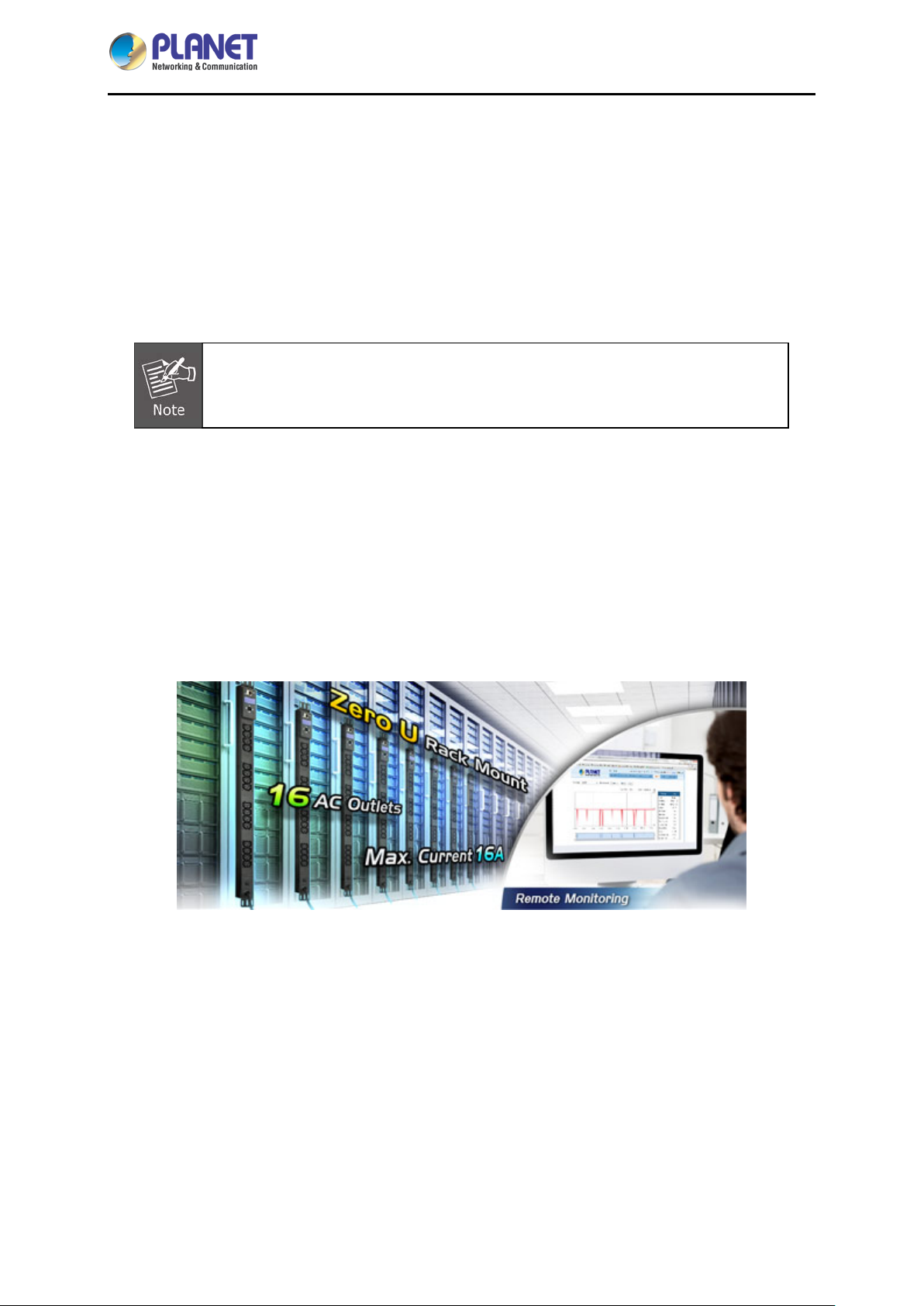
PLANET IPM-16120 is a 16-port IP Power Management device that provides premium power
protection for your professional workstations and connected devices. With the innovative IP-based
technology, PLANET has made the traditional power management equipment into true networking
devices. The unit comes with a digital load meter to enable the PDU's load to be monitored on-site.
- 6 -
Page 7
IP-based 16-port Metered Power Distribution Unit
IPM-16120
Vertical Mounting
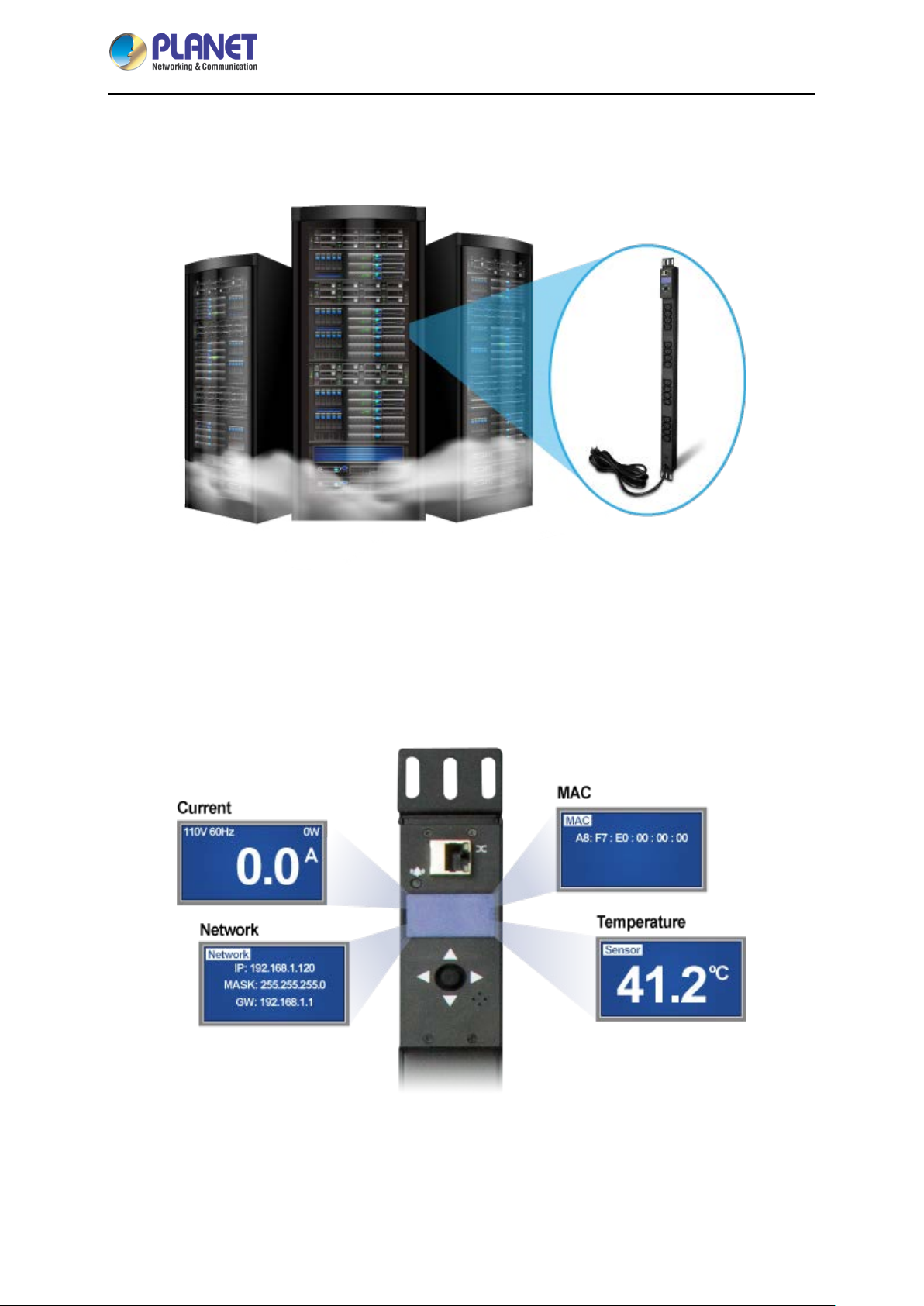
Any devices can be easily mounted vertically in racks or enclosures and occupy zero U of valuable rack
space, which allows more equipment in the rack.
Electric Current Monitored on Display
The aggregate curren t dra w per r ack PDU is displayed on t he un it v ia a d ig ital di s pla y. The local digital
display helps installers avoid overloaded circuits by providing a visible warning when the current draw is
close to the maximum amperage draw of the strip.
Remote Management Capabilities
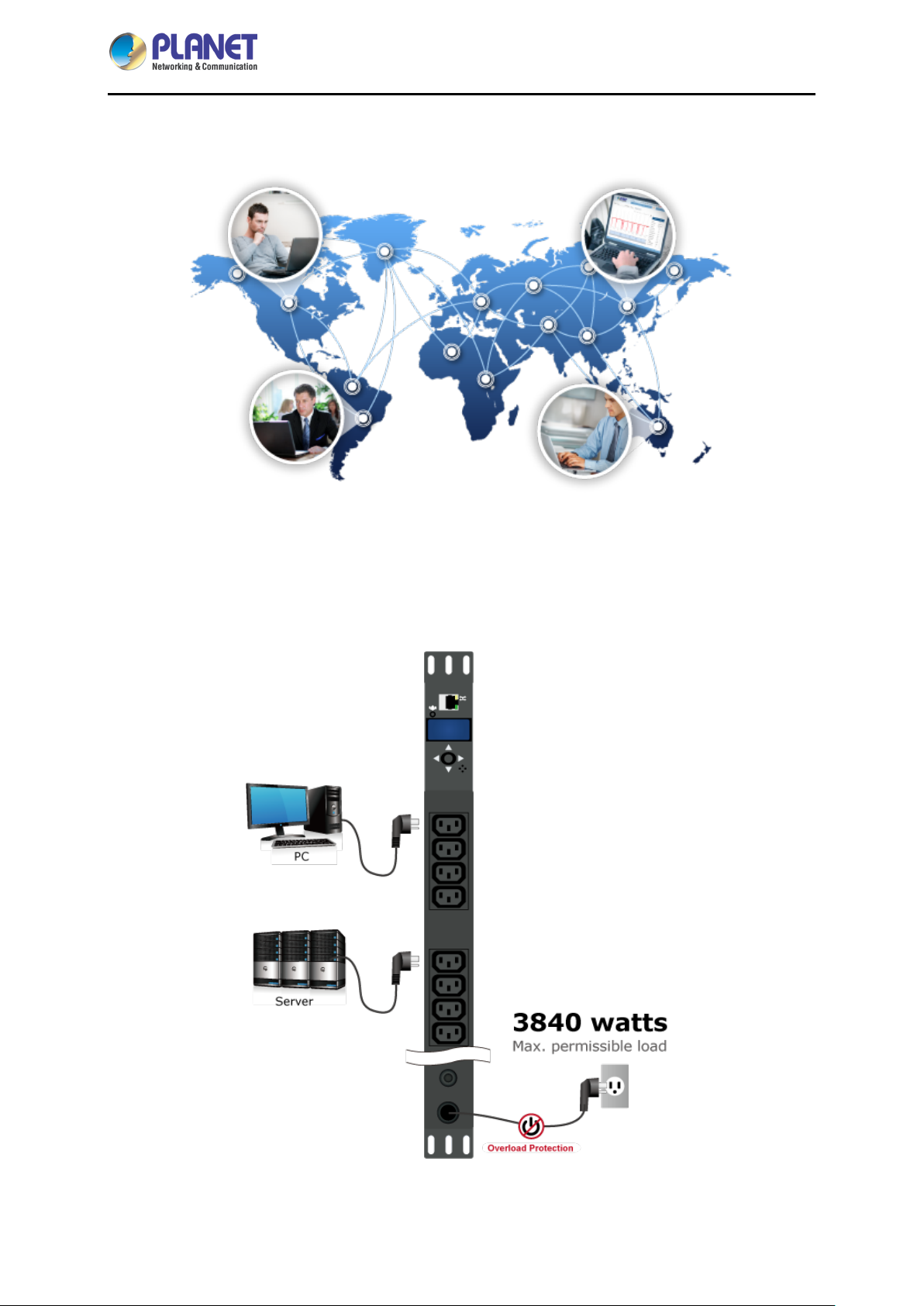
Full-featured net work management in terfaces provide standards-based m anagement via W eb, SNMP
- 7 -
Page 8
IP-based 16-port Metered Power Distribution Unit
IPM-16120
and Telnet. They allow user s to access, configure, and m anage units from remote locations to sa ve
valuable time.
Overload Protection
16-amp circuit break er prevents dangerous circ uit overloads that cou ld damage equipm ent. The PDU
features a built-in circuit breaker and reset switch, ensuring dependable performance of vital
equipment.
- 8 -
Page 9

IP-based 16-port Metered Power Distribution Unit
1.3 Features
Hardware
■ Zero U rack-mount size design
■ IEC outlet models
■ 16 power outlets that support real-time current image monitoring
■ 10ft (3m) power cord
■ Hot-swap IP-module without power shutdown
■ LCD panel displays current, max. alarm, device temperature and network information
Power Distribution
■ Maximum A mps/Inlet: IEC 16A/1 inlet
■ Maximum A mps for 16 Outlets: IEC 16A for 16 outlets
■ Full Frequency Range: 50~60Hz
IPM-16120
Remote Access
■ Remote power control via TCP/IP and a built-in 10/100Mbps Ethernet port
■ Multi browsers support (IE, Google, Firefox, Safari, Opera, Netscape)
Management
■ Provides Install Wizard to ease users' setting of parameters
■ Events notification by sending pop-up message, trap or e-mail
■ Supports Management Information Base (MIB) files for SNMP
■ 24-hour power consumption and device temperature monitoring
■ Sets over-current watchdog for power outlet
Security
■ Web page supports 1024-bit SSL security encryption transmission
■ Supports Secure Socket Layer V3 and Secure Shell V1 protocols
■ Administrator and multiple users with password protection for double-layer security
■ IP Filtering -- Address-specific IP security masks to prevent unauthorized access
- 9 -
Page 10
IP-based 16-port Metered Power Distribution Unit
1.4 Specifications
IPM-16120
Product
Hardware Specifications
Output Power Port
Input Power Port
Buzzer
Breaker
Network Connector
Button
LED
Power Distribution
Voltage
IPM-16120
16
1
1
1 x 16A
1 RJ45 port for 10/100BASE-TX
Five-sided button
Alarm
Lights remaining lit: Alarm has occurred
Slow flashing: There was current overloading
Input Power Output Power
100~240V
Frequency
Connection
Maximum Current
Maximum Line Current
Cord Length
Management
User Account
Management Utility
Security
Standards Conformance
Computer Interface
Regulatory Compliance
50~60Hz
1 x IEC320 C20 16 x IEC320 C13
16A
- 10A
3 meters -
General/Manage/Administrator
Web browser, SNMP software, Windows base utility, Telnet
IP filter/MAC filter/Secure 128-bit SSL encryption
IEEE 802.3 10BASE-T
IEEE 802.3u 10/100BASE-TX
CE, FCC
- 10 -
Page 11
System Unit
IP-based 16-port Metered Power Distribution Unit
IPM-16120
Operating Temperature
Operating Humidity
Operating Altitude
Dimensions (W x D x H)
Weight
Installation
-5 ~ 45 degrees C
5 ~ 95%
0 ~ 4500 meters
748 x 43 x 43 mm
1.7kg
Zero U
- 11 -
Page 12
IP-based 16-port Metered Power Distribution Unit
Chapter 2 Hardware Interface
2.1 Physical Descriptions
IPM-16120
Dimensions (W x D x H)
Weight
748 x 43 x 43 mm
1.7kg (gross weight)
Front Panel
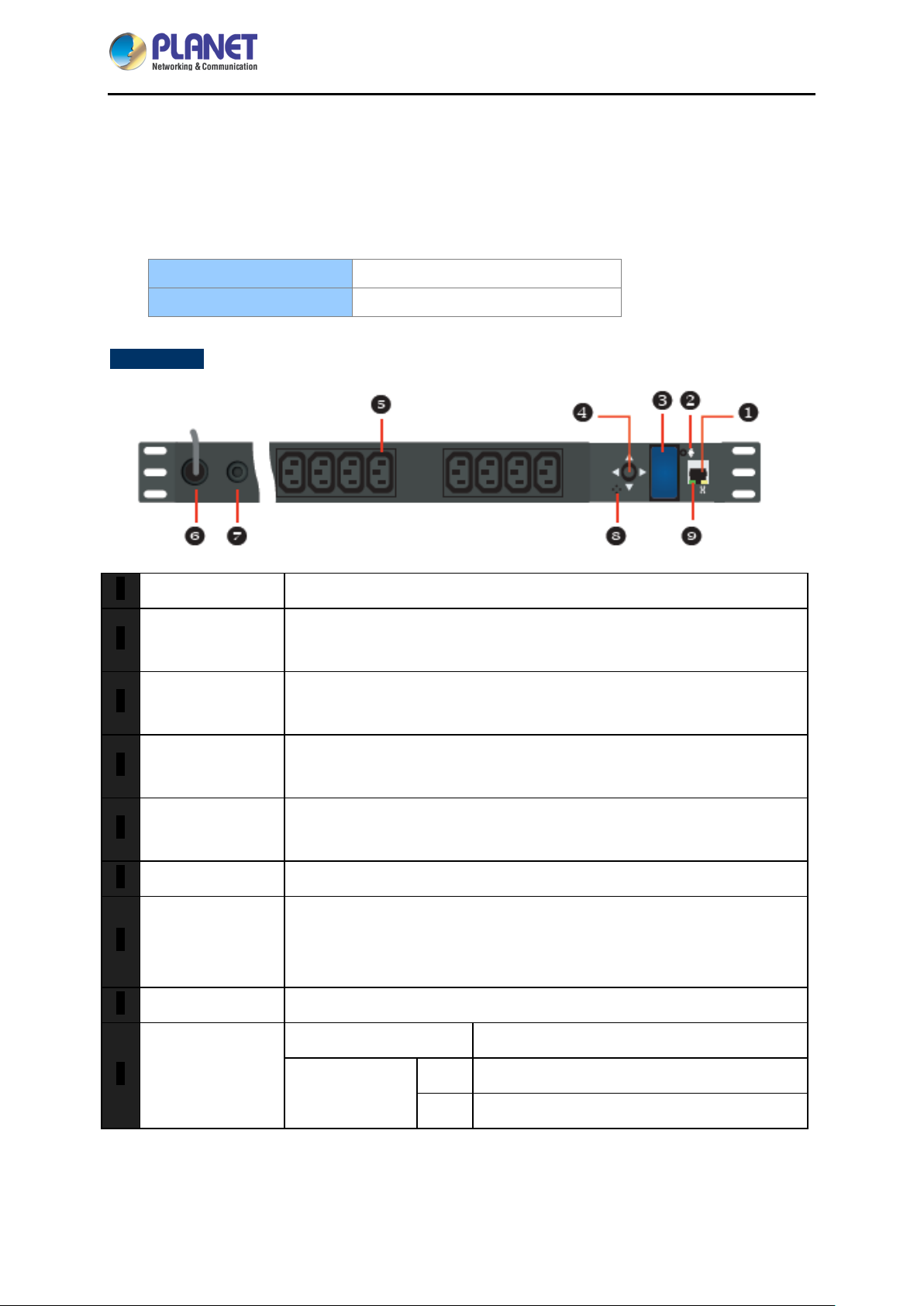
RJ45 Port Enable user to configure the IP Metered PDU through a LAN or WAN.
1
Alarm
2
LCD Panel
3
Lights remaining lit: Alarm has occurred.
Slow flashing: There was current overloading.
Display current inf ormation, max. alarm current, device temperatur e and
network information.
Five-sided Button
4
Power Outlet
5
Power Inlet Device power lead.
6
Circuit Breaker
7
Protection
Buzzer Buzzer will make a beep sound when alarm happens.
8
RJ45 LED
9
Provides LCD switching panel info and setting parameters.
Please see below the Panel Operation for more understanding.
Connect a device to each power outlet to supply power to it.
Note: The max. output current is 16 amps.
Prevents power overload and damage to devices when circuit breaker
protection trips. Press the button on the breaker protection to return to
normal operation after eliminating abnormal device power supply.
Link (Green):
Network Speed
(Yellow):
Blink: The port is running at a speed of 100Mbps.
Off: The port is running at a speed of 10Mbps.
The port is successfully established.
- 12 -
Page 13
IP-based 16-port Metered Power Distribution Unit
IPM-16120
Panel Operation
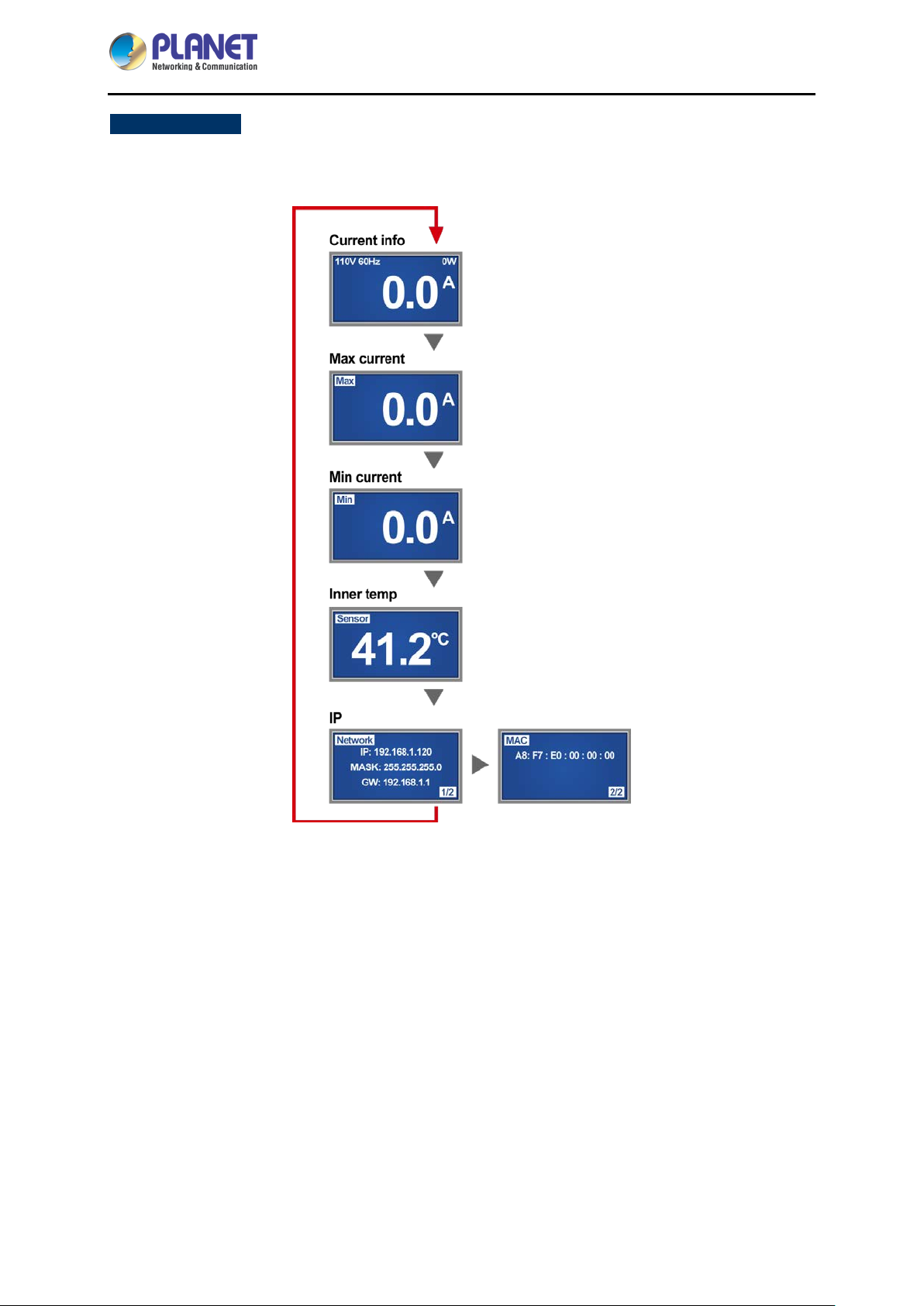
The first mode of LCD is total current, s witching with the five-sided button down to show the regular
sequence of current info, max. current, inner temp. and network info as shown below:
When the LCD menu shows current info, hold the five-sided button in the middle for 3 seconds until
a long beep sounds to enter alarm current setting.
1. For modification of alarm current, press to increase the alarm current by 0.5A in
each press.
2. After increasing to the maximal alarm current, the value will return back to 0.5A
again, and this will cycle.
3. Once the alarm current reaches the wanted value, hold the five-sided button in
the middle for 3 seconds until a "beep" sounds to end the setting.
When the LCD shows the m aximum total current rec ord, hold the five-sided button in the middle
for 3 seconds until a long beep sounds to adjust it to a zero point.
- 13 -
Page 14
IP-based 16-port Metered Power Distribution Unit
IPM-16120
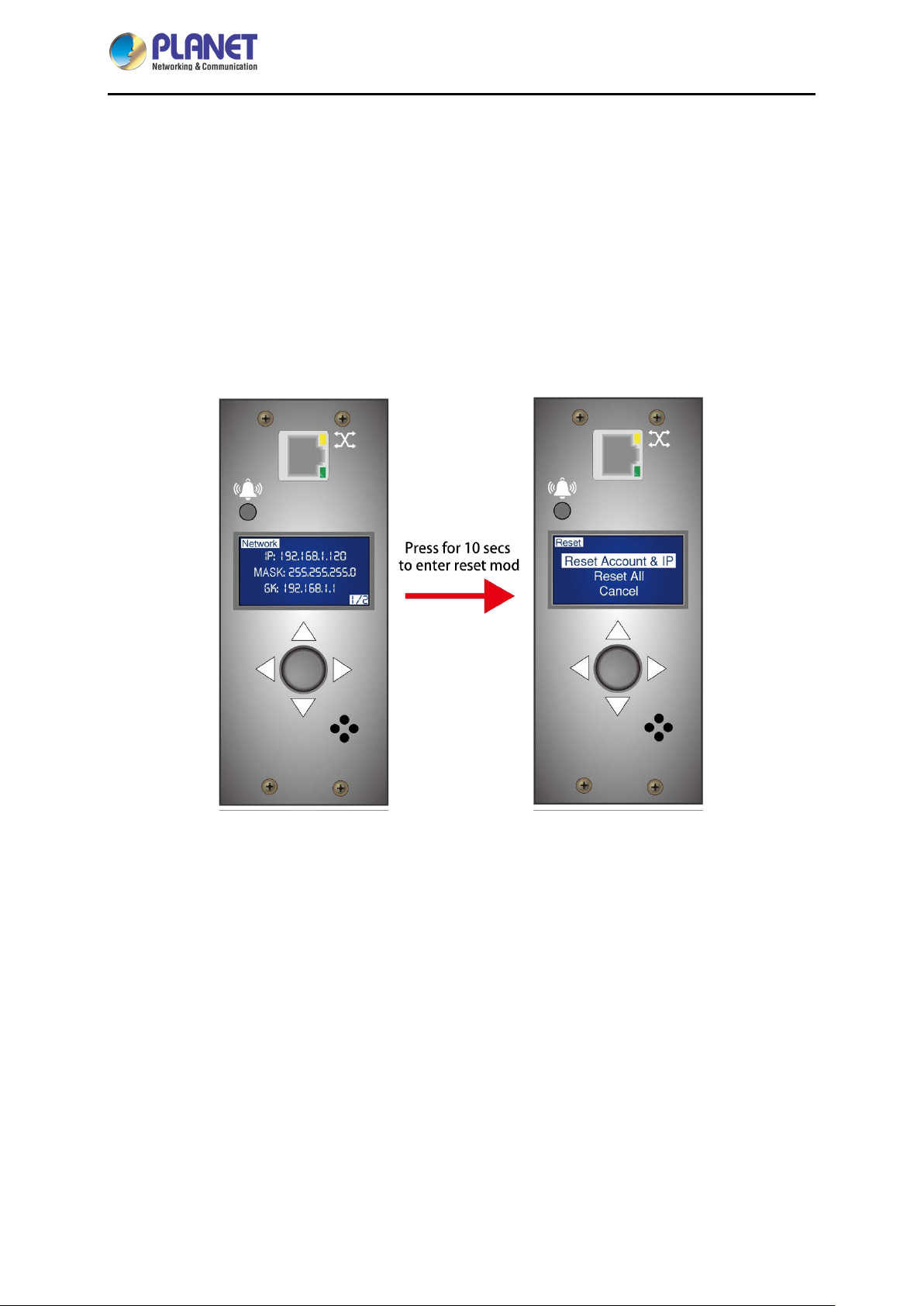
When the LCD menu s hows network info, hold the five-sided button for 10 seconds until two
beeps sound to enter reset mode.
2.2 Installation Precautions
Please set the maximum power-off protection allowed by power circuit as per the rated current
information indicated on the device with ref erence to the local state rules, safety procedur es and
disconnector deviation.
The unit can only be connected to a grounded power outlet or system.
Make sure the total current output of all the connected systems is within the rated current indicated
on the device.
The test results of this device may be inaccurate giving unstable power supply.
Avoid using this device in places near water or moisture environments.
In order to avoid a fire hazard or risk of electric shock, do not expose the product to
rain or moisture.
Use the attachments/accessories specified by the manufacturer only.
Please avoid any items or liquids entering the device because their contact with dangerous voltage
points or short-circuit parts may cause a fire or electric shock.
2.3 Hardware Installation
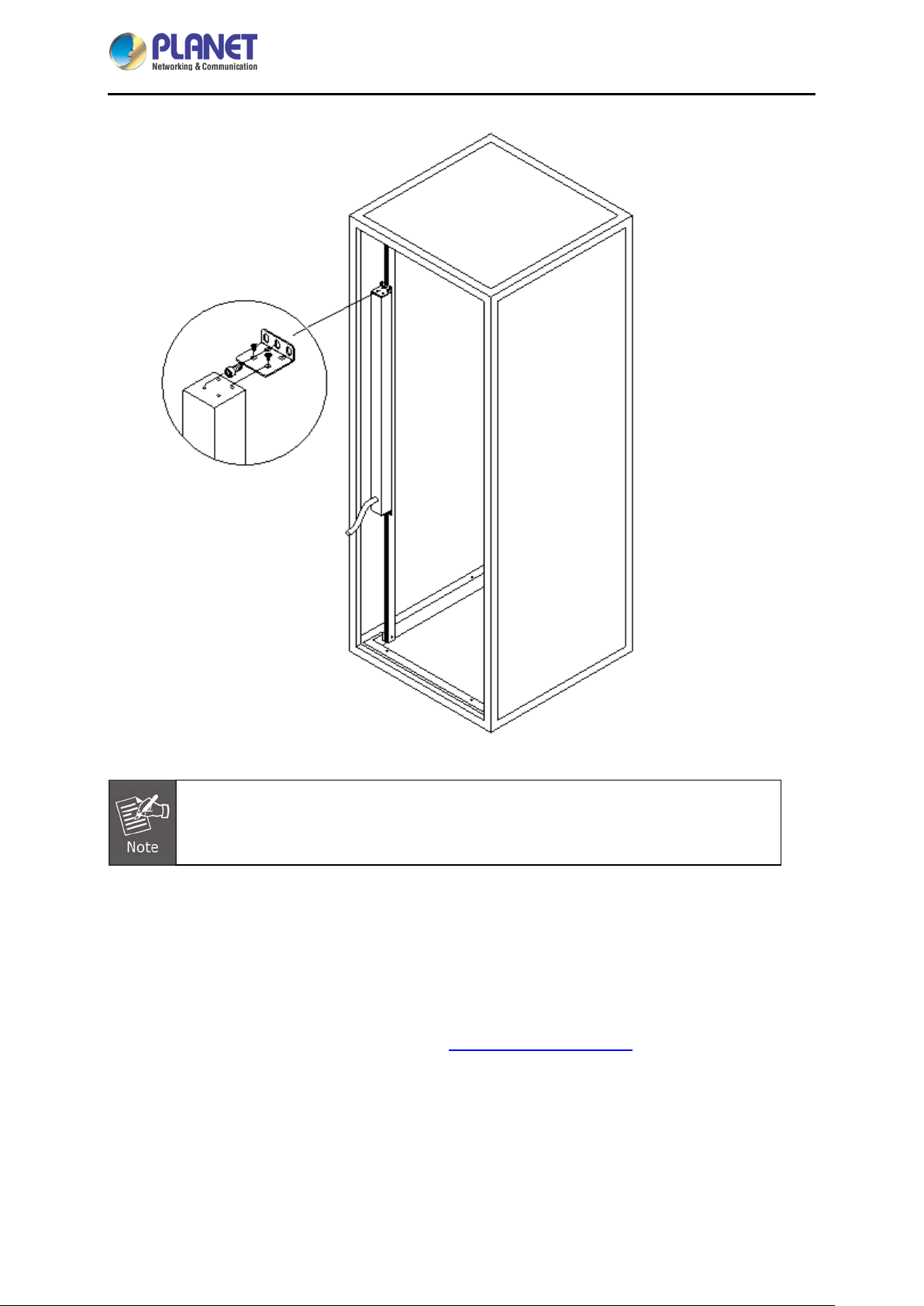
IP Metered PDU provides standard 0U rack for the installation of devices; for the installation of the
device on the rack, you can install it on the top or bottom of the rack.
- 14 -
Page 15
IP-based 16-port Metered Power Distribution Unit
IPM-16120
Please make sure all the units connected are powered off before the installation of the
device and take other necessary precautions during the installation.
2.4 Initial Utility Installation
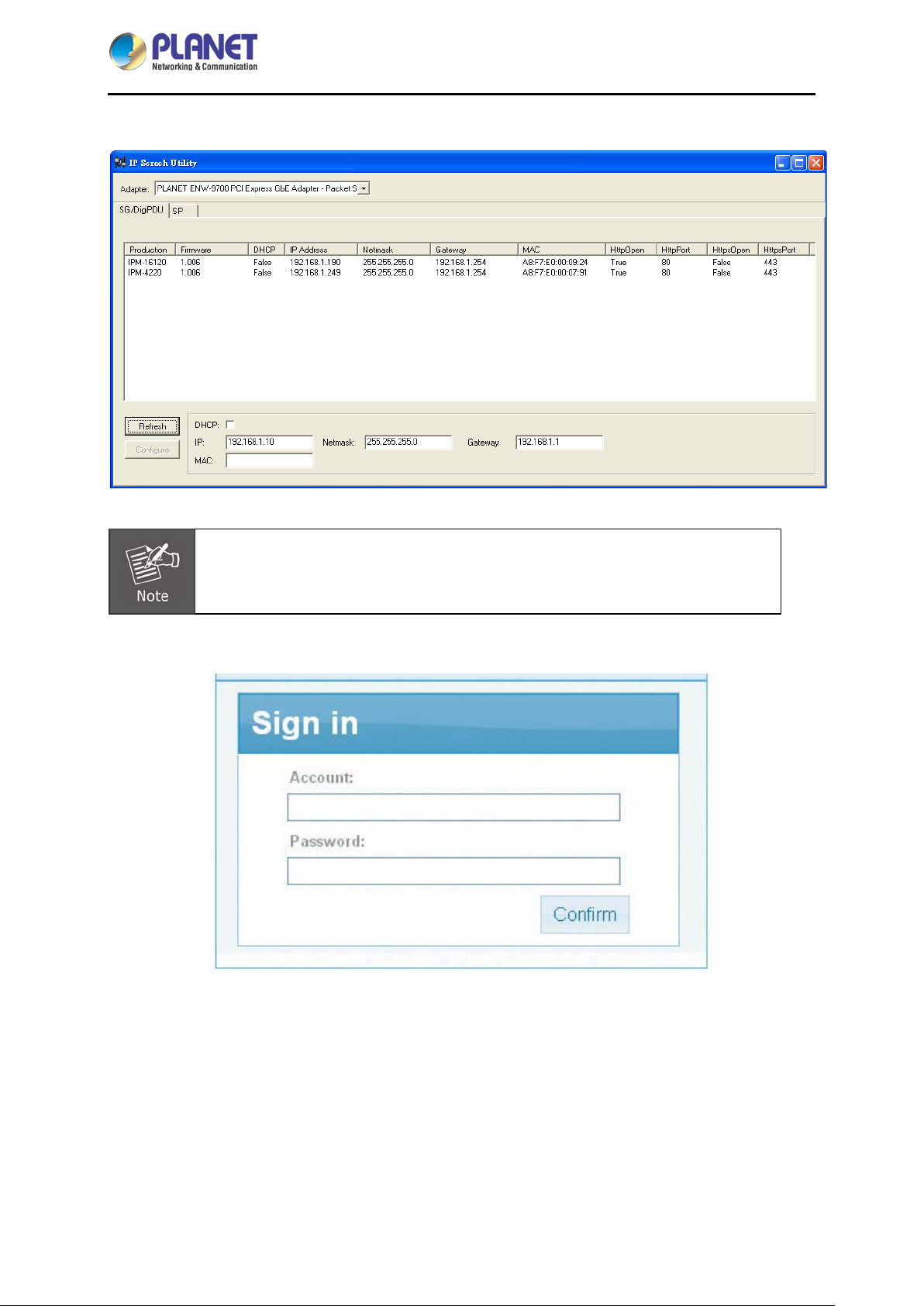
PLANET “IP S earch” is a software uti lity used to search the IP Metered PDU product on a networ k
quickly and with ease.
Step 1: Please download the IP Search tool from PLANET Download Center:
- 15 -
Page 16
IP-based 16-port Metered Power Distribution Unit
IPM-16120
Step 2: Please press the “Refresh” button to find out your IP Metered PDU.
1. Before searching the IP, please make sure your PC is in the same IP segment
as control gateway.
2. Do not set double IP addresses on the same LAN card.
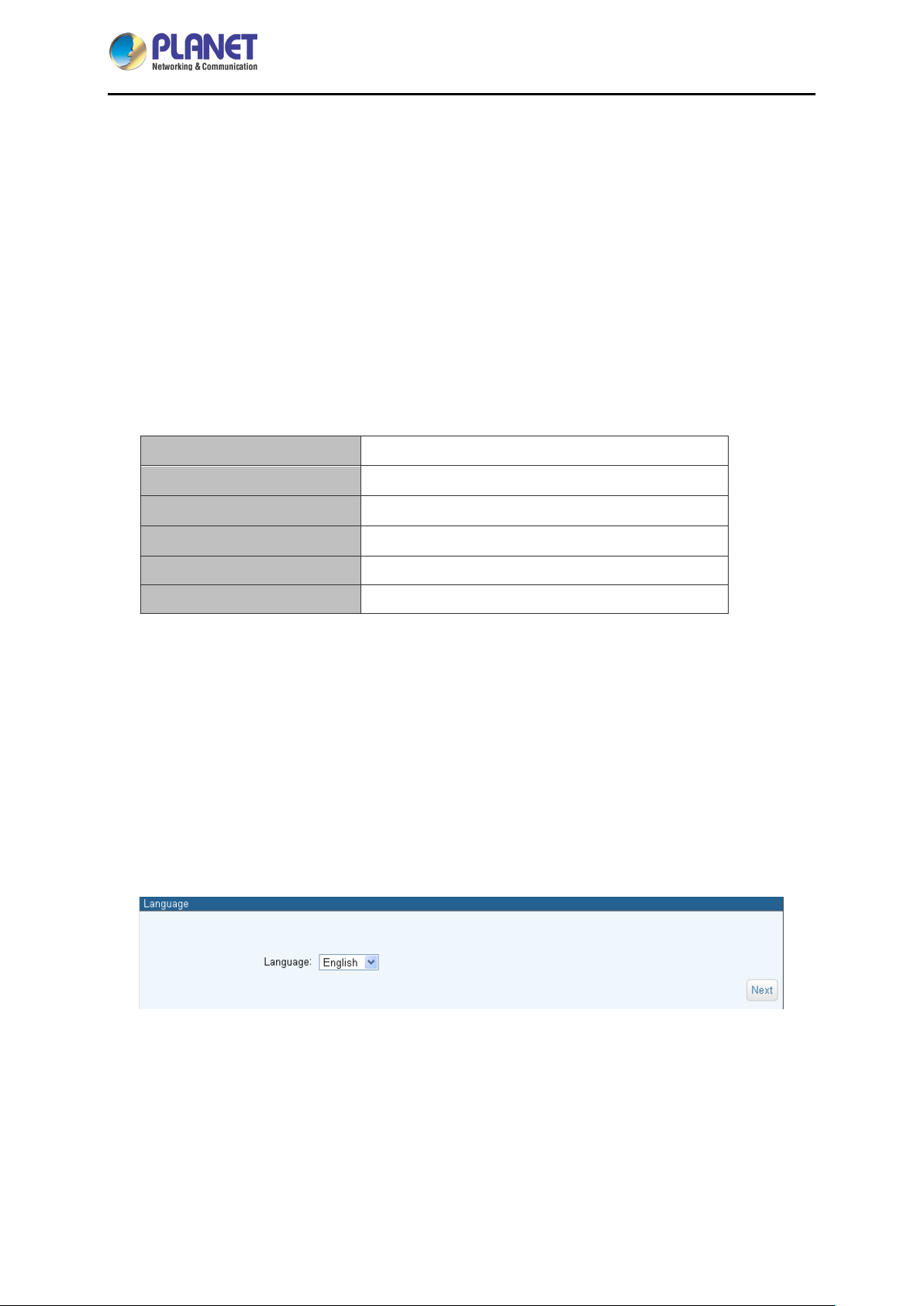
Step 3: Enter the IP address and login to the homepage of IP M etered PDU.
- 16 -
Page 17
IP-based 16-port Metered Power Distribution Unit
IPM-16120
Chapter 3 Quick Setup
In this section users can learn how to query device IP and how to set language, account password,
network and time zone through daemon.
3.1 Network Connection
After the device connects to the network, IP can be acquired automatically through DHCP server (The
device IP will be preset to 192.168.0.10 if there is no DHCP server.). The acquired IP can be displayed
on the LCD panel or device IP can be searched by IP Search Utility.
Default DHCP Client
Default IP Address
Default Port
Default Login User Name
Default Login Password
Search Tools
On
192.168.0.10 – if no DHCP existed in the network
80
Set itself
Set itself
ip_search
3.2 Setup Wizard
When you use the IPM-16120 for the first time, after it is connected to the Internet, browser would pop
up Setup Wizard asking you to provide language, account, password, network and time zone.
Step 1: Language Selection
Select your language currently available in English, Traditional Chinese and Simplified Chinese, and
press Next to continue.
- 17 -
Page 18
IP-based 16-port Metered Power Distribution Unit
IPM-16120
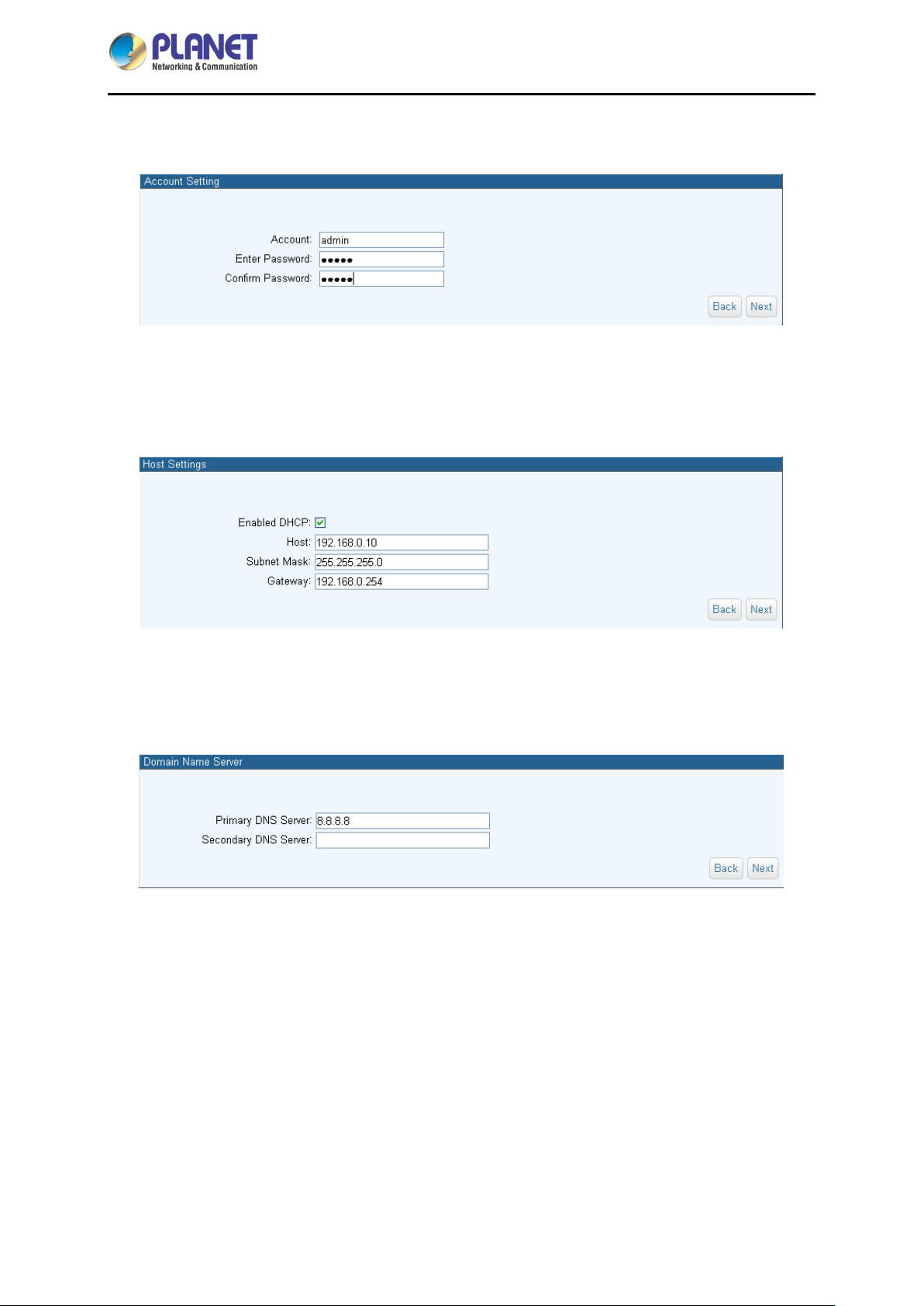
Step 2: Account Setting
This menu is for setting the admin account and password of the device. Press Next to continue.
Step 3: Host Setting
The product is assigned dynamically (DHCP). To specify a fixed IP address, please fill in IP Address,
Subnet Mask and Gateway. Press Next to continue.
Step 4: DNS Setting
Key in the DNS server, provided by ISP providers, and then you can set up two DNS servers. Press
Next to continue.
- 18 -
Page 19
IP-based 16-port Metered Power Distribution Unit
IPM-16120
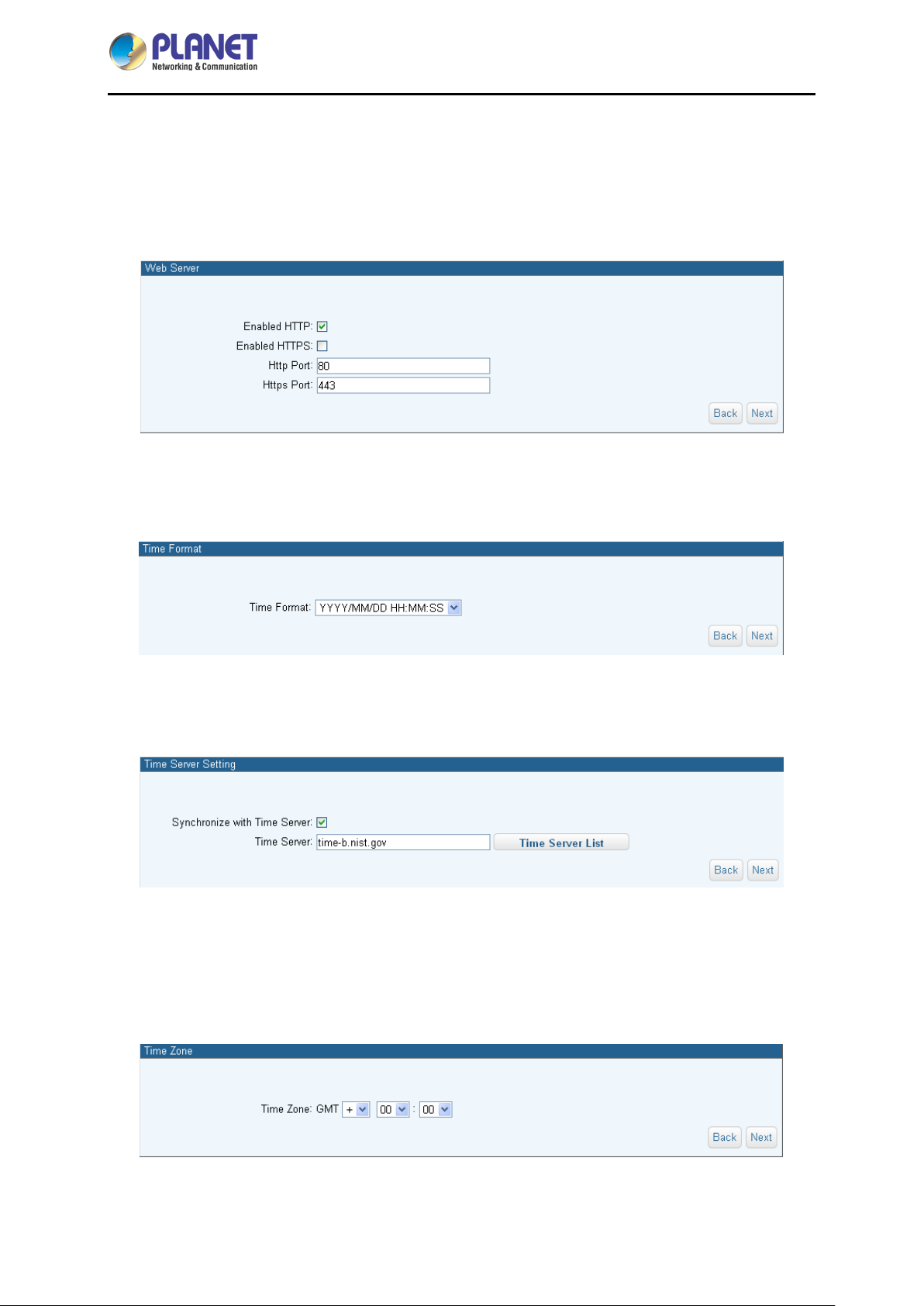
Step 5: Web Server
Https can help protect streaming data transmission over the internal on the higher secur it y level. You
can select the connection type. "Https" means user cannot connect the camera via Http protocol. The
Https path will be: "https://(IP address)/". If you select "Http & Https", both the Http and Https path can
be used to access the device. Press Next to continue.
Step 6: Time Format
Select the time format to show in the system. Press Next to continue.
Step 7: Time Server Setting
User can set up device time synchronized with Time Server. Press Next to continue.
Step 8: Time Zone
Please fill in the time zone where the device is. The system is based on Greenwich Mean Time, and
thus, an accuracy setting to time zone may affect the time record of events and chart. Press Next to
continue.
- 19 -
Page 20
IP-based 16-port Metered Power Distribution Unit
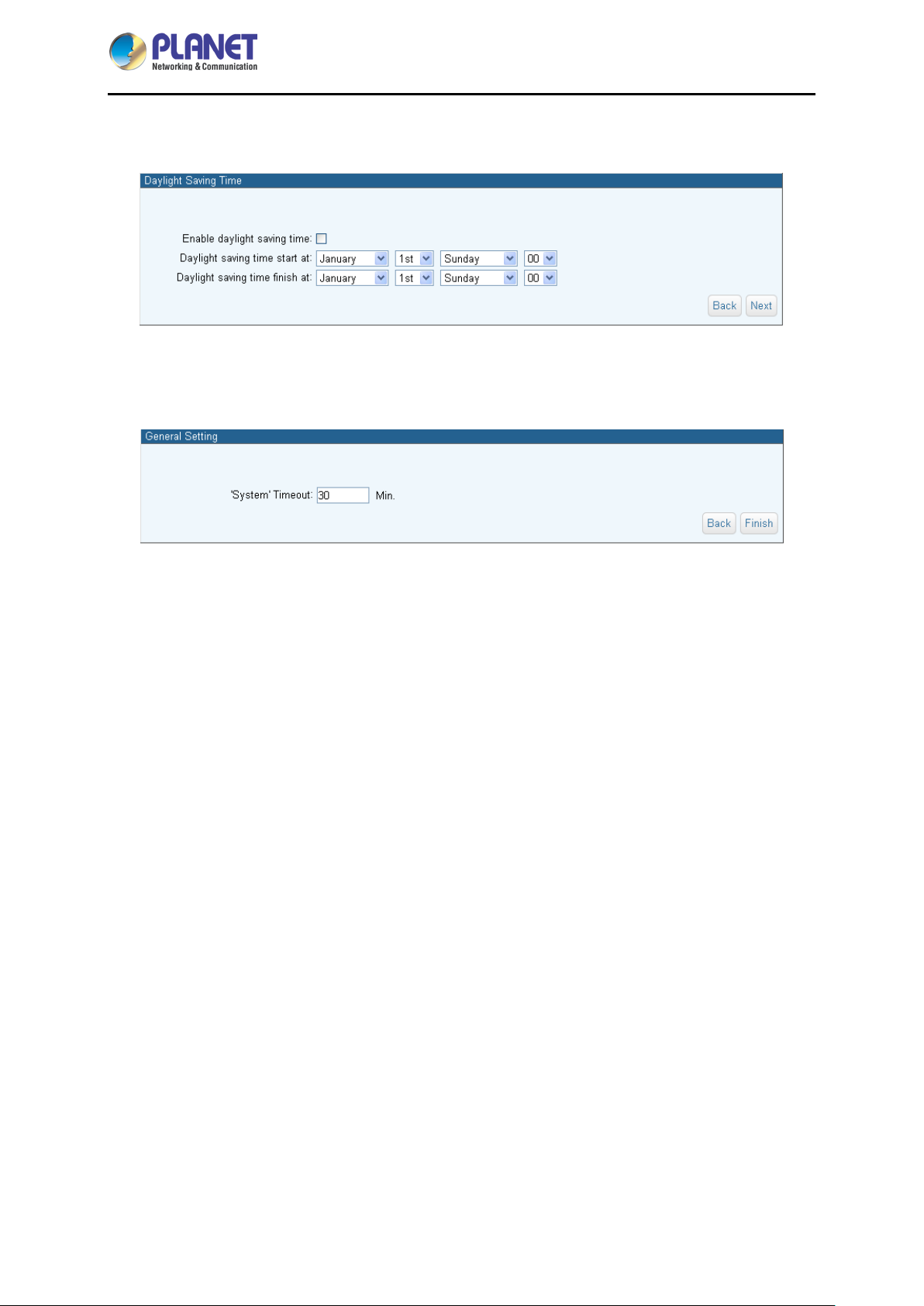
Step 9: Daylight Saving Time
Set the Daylight saving time from Sunday to Saturday. Press Next to continue.
Step 10: General Setting
You may set up operational overtime in this section. Press Finish to save all settings.
IPM-16120
- 20 -
Page 21
IP-based 16-port Metered Power Distribution Unit
IPM-16120
Chapter 4 Web-based Management
This section provides instructions about how to use the web interface to configure and control the IP
Power Manager remotely.
4.1 Monitor
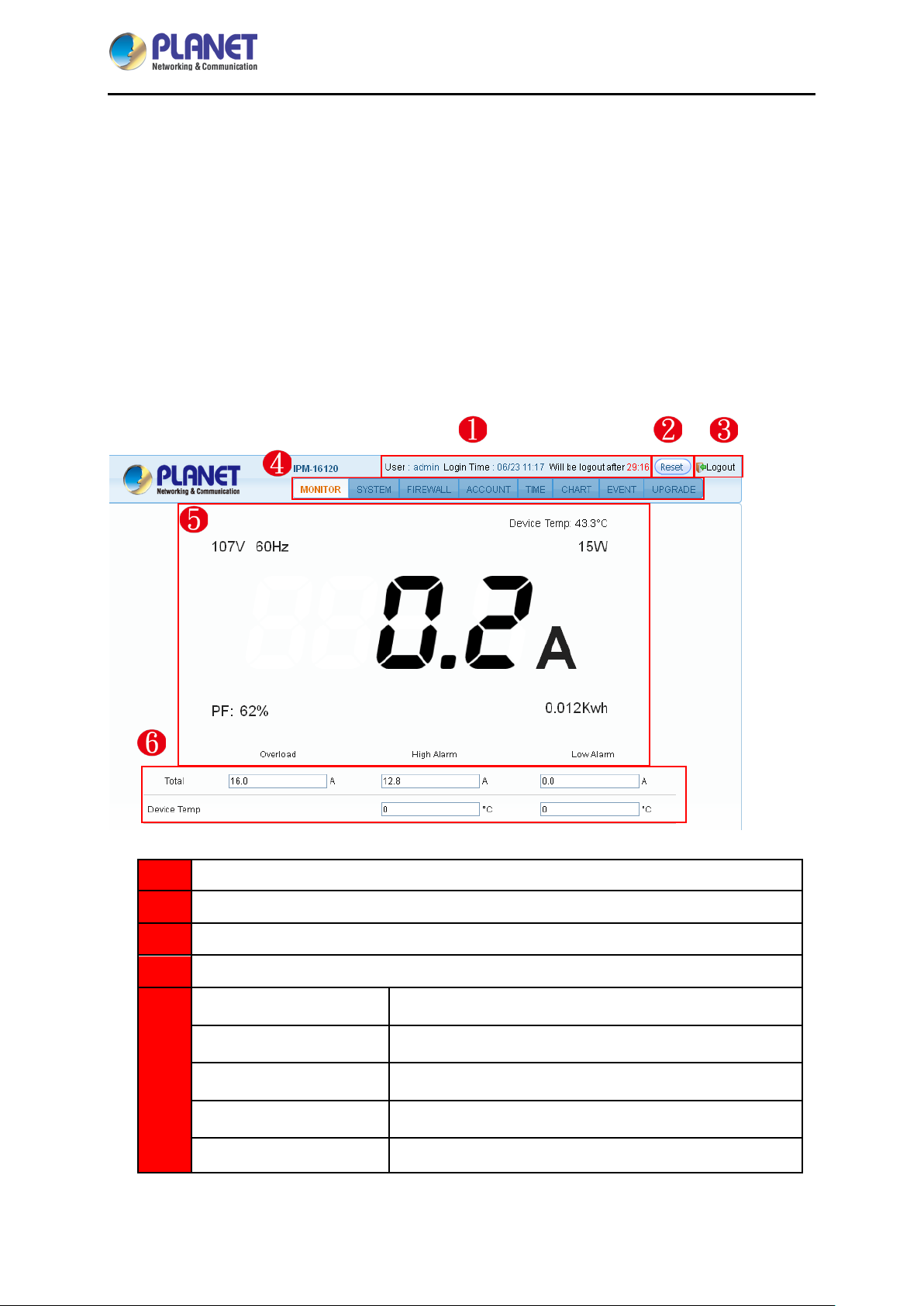
After a successful login, the web page will display the following operation menu where each part is
illustrated below:
User login information
1
Reset the logout Time
2
System logout
3
Function bar
4
Voltage (V)
Frequency (Hz)
5
Total Current (A)
Device Temperature (˚C)
Power Factor (%)
Displays the voltage of the current inlet power.
Displays the voltage frequency of the cur rent inlet power.
Displays the currently total power consumption.
Displays the current temperature of the device.
Displays the power factor of the current input power.
- 21 -
Page 22
IP-based 16-port Metered Power Distribution Unit
IPM-16120
Power (watt)
Kilowatt Hour (kWh)
Overload Current
High Alarm (Current)
6
Low Alarm (Current)
High Alarm (Device
Temperature)
Low Alarm (Device
Temperature)
Displays the consumption power value of the current input
power.
Displays the consumption watt-hour of the device since
the last zeroing.
Inputs the current value of the o verl oad p o wer, alarms will
be given when the input power current exceeds this alarm
value.
Sets up the values of high i nf eed al arm. When the current
is higher than you set, the alarm will occur.
Sets up the values of low inf eed alarm . When the current
is lower than you set, the alarm will occur.
Sets up the values of high i nf eed al arm. When the current
device temperature is higher than you set, the alarm will
occur.
Sets up the values of low infeed al arm. When the device
temperature is lower than you set, the alarm will occur.
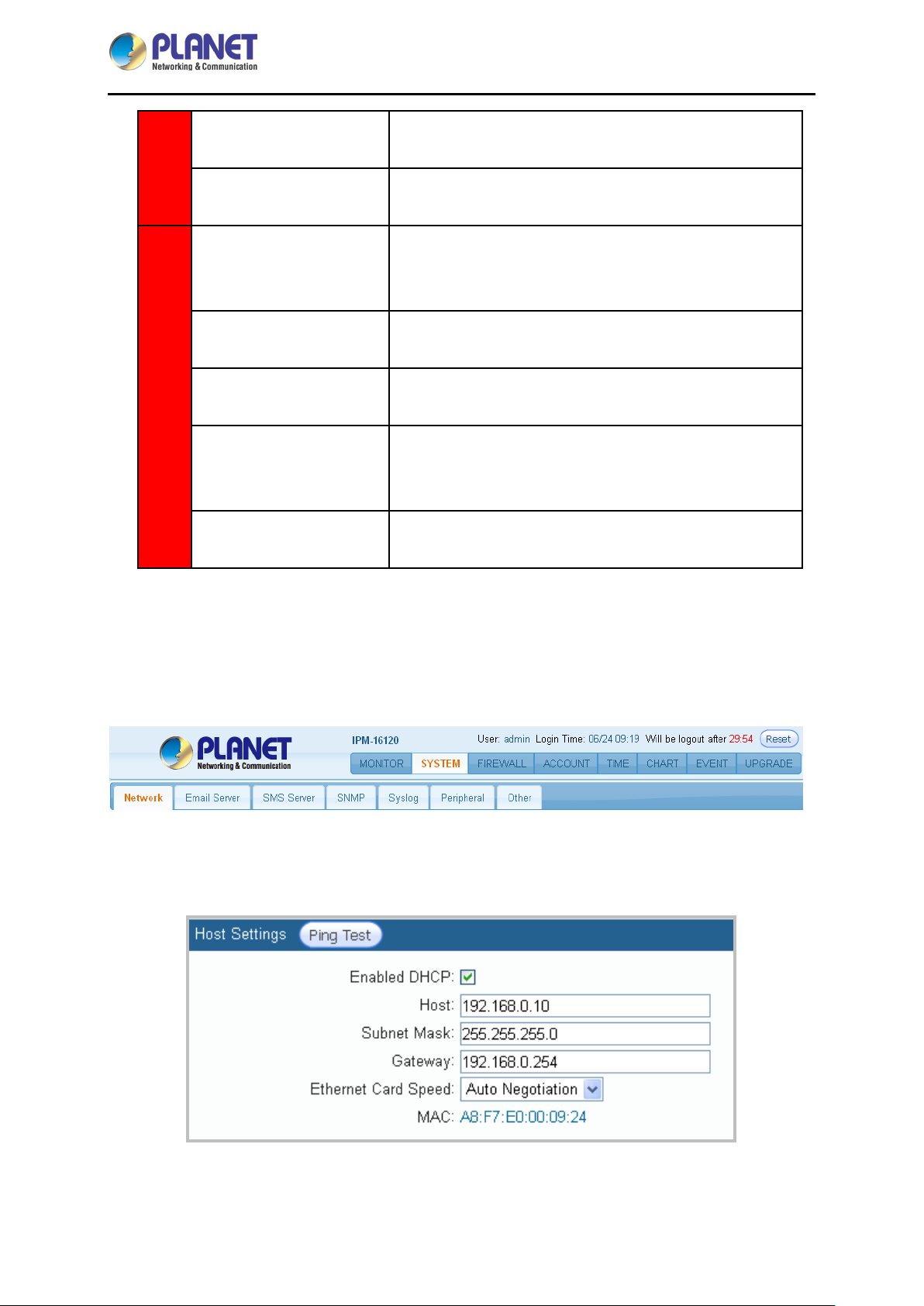
4.2 System
On this web page, users can set Network, Email server, Message server, SNMP, SysLog, Peripheral
parameters, and other relevant data.
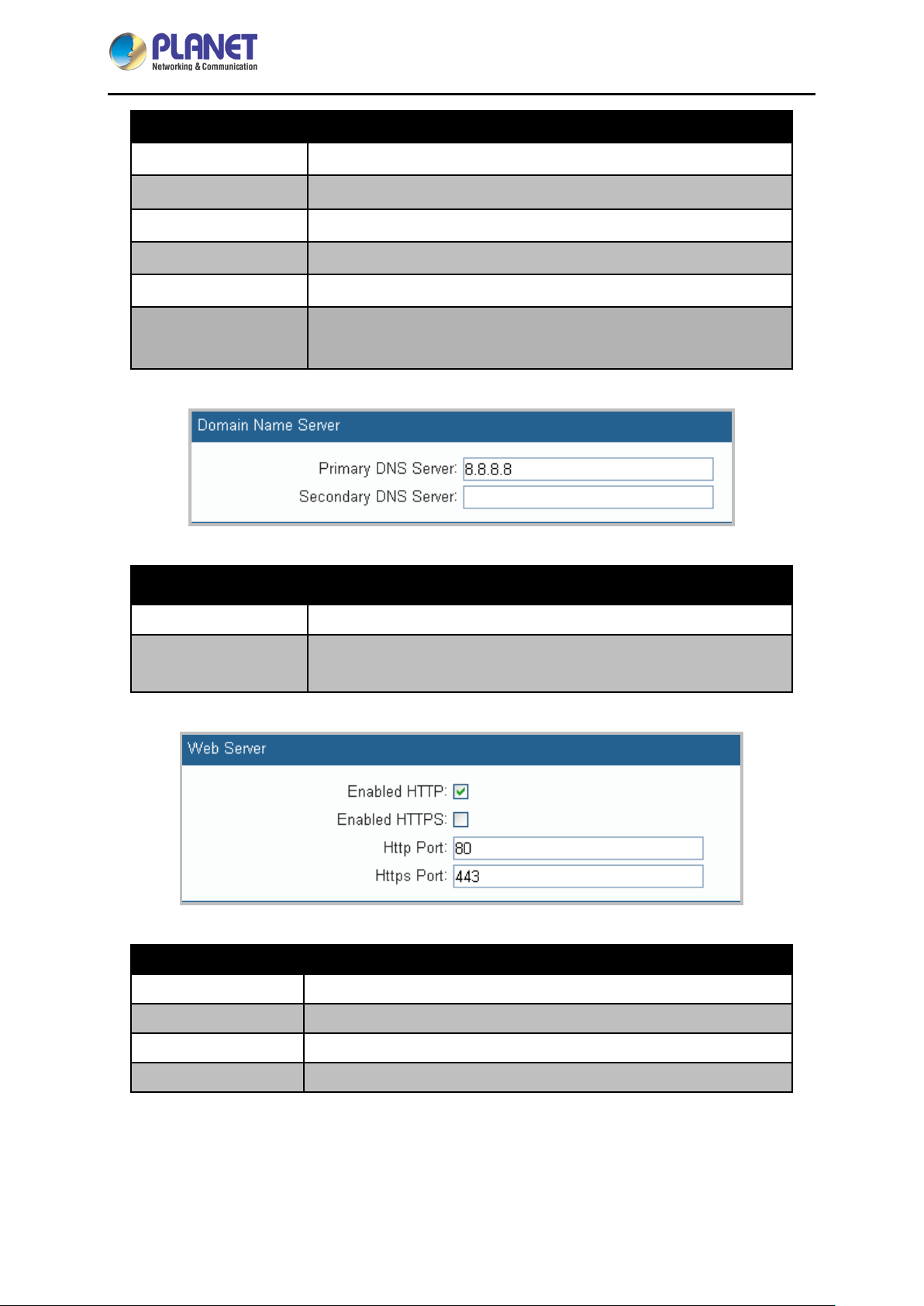
4.2.1 Network setting
This menu is mainly for setting the basic data of network.
- 22 -
Page 23
IP-based 16-port Metered Power Distribution Unit
Parameters Description
IPM-16120
Enabled DHCP
Host
Subnet Mask
Gateway
MAC
Use checkbox to enable DHCP. It will assign IP address.
Assign the Network IP address for the power switch.
Set up the subnet mask info of this equipment.
Set up the gateway port of this equipment.
Display MAC address.
Confirm whether the device with the IP address or DNS name is
Ping Test
connected to the network.
Parameters Description
Primary DNS Server
Secondary DNS
Server
Parameters Description
Enabled Http
Enabled Https
Http Port
Configure the IP and DNS server addresses for Network Adapter 1.
Configure the IP and DNS server addresses for Network Adapter 2.
Allows browser to connect with smart monitor by HTTP.
Allows browser to connect with smart monitor by HTTP SSL.
Provides browser to communicate by HTTP with smart monitor.
Https Port
Provides browser to communicate by HTTP SSL with smart monitor.
- 23 -
Page 24
IP-based 16-port Metered Power Distribution Unit
IPM-16120
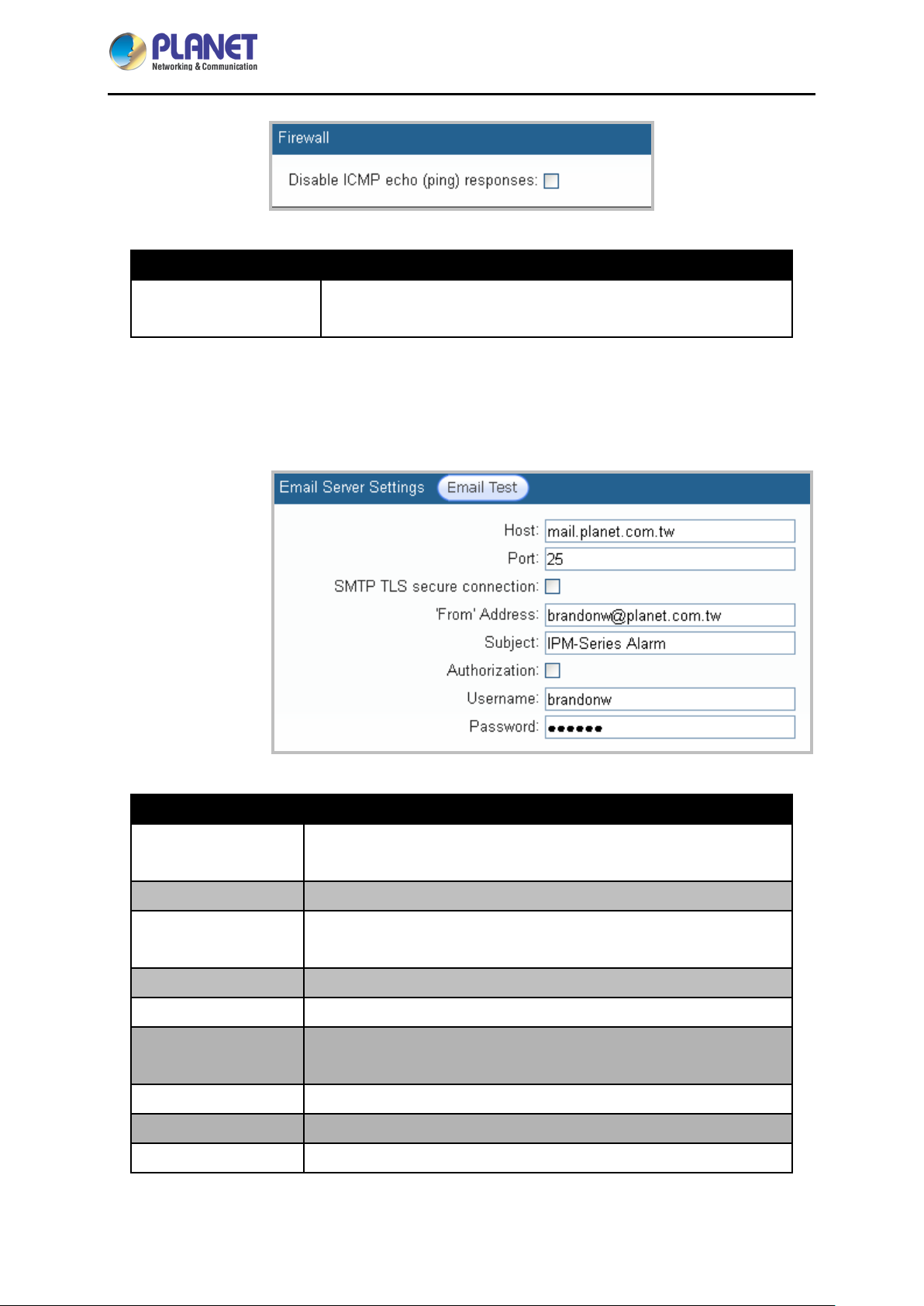
Parameters Description
Disable ICMP
Response
When Disable ICMP Response check box is selected, the
examination will not be responded.
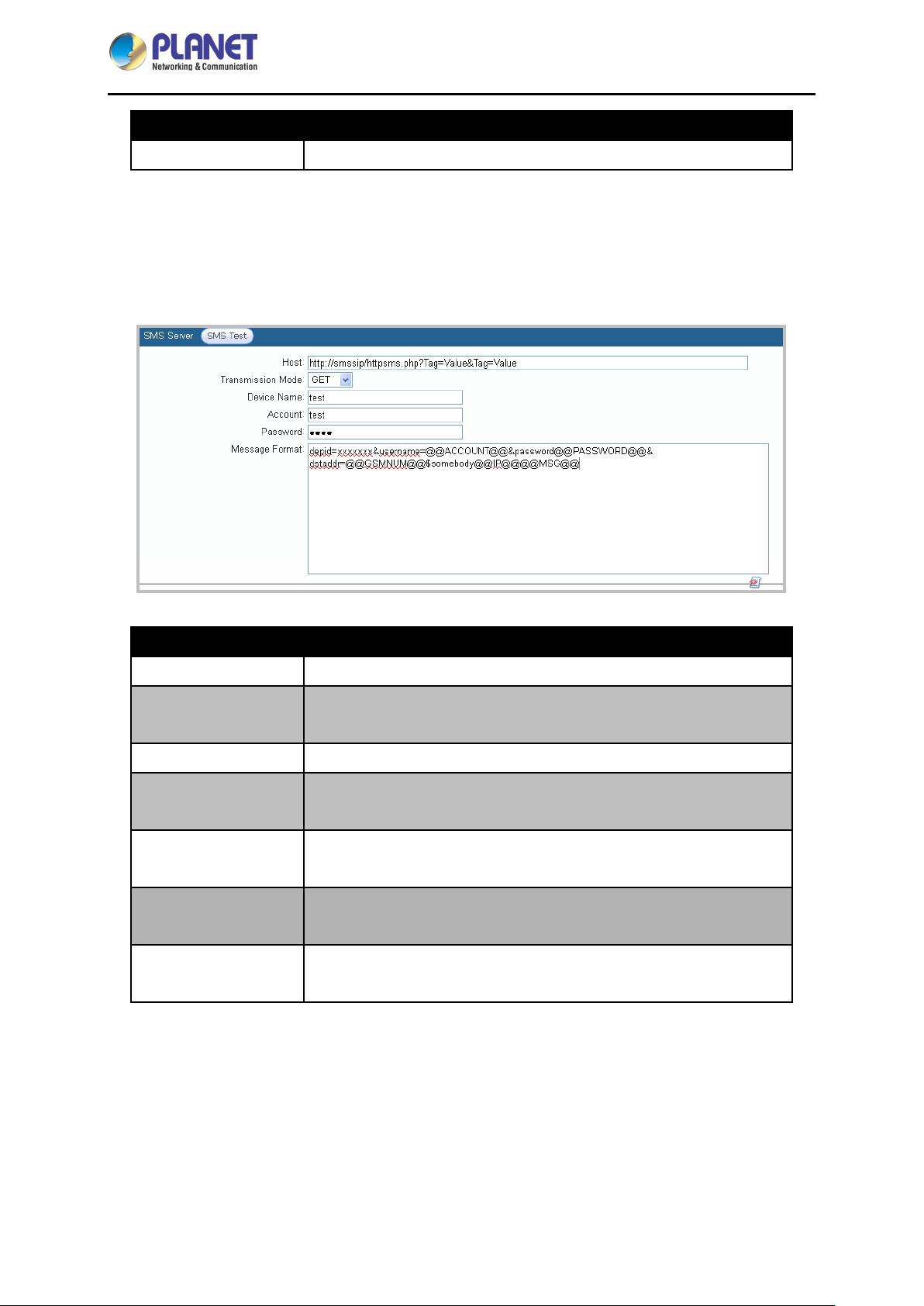
4.2.2 Email Server
When there is a triggered warning from the setup of this PDU, this device will send out alert message to
the preset email accounts.
Parameters Description
SMTP TLS secure
connection
From Address
Subject
Authorization
Username
Password
Email Test
Host
Port
It is the Host IP address of the e-mail sending an alarm e-mail when
an event occurs.
It is the port of SMTP mail server. Default is 25.
Check to enable e-mail encryption.
It shows the sender’s email address.
It shows the subject of the email.
If the mail server needs to identify the user, please ena ble the
checkbox and set up the account and password.
The account to log in mail server.
The password to log in mail server.
After setting up the above info, you can send a test mail to make sure
- 24 -
Page 25
IP-based 16-port Metered Power Distribution Unit
IPM-16120
Parameters Description
this function is normal.
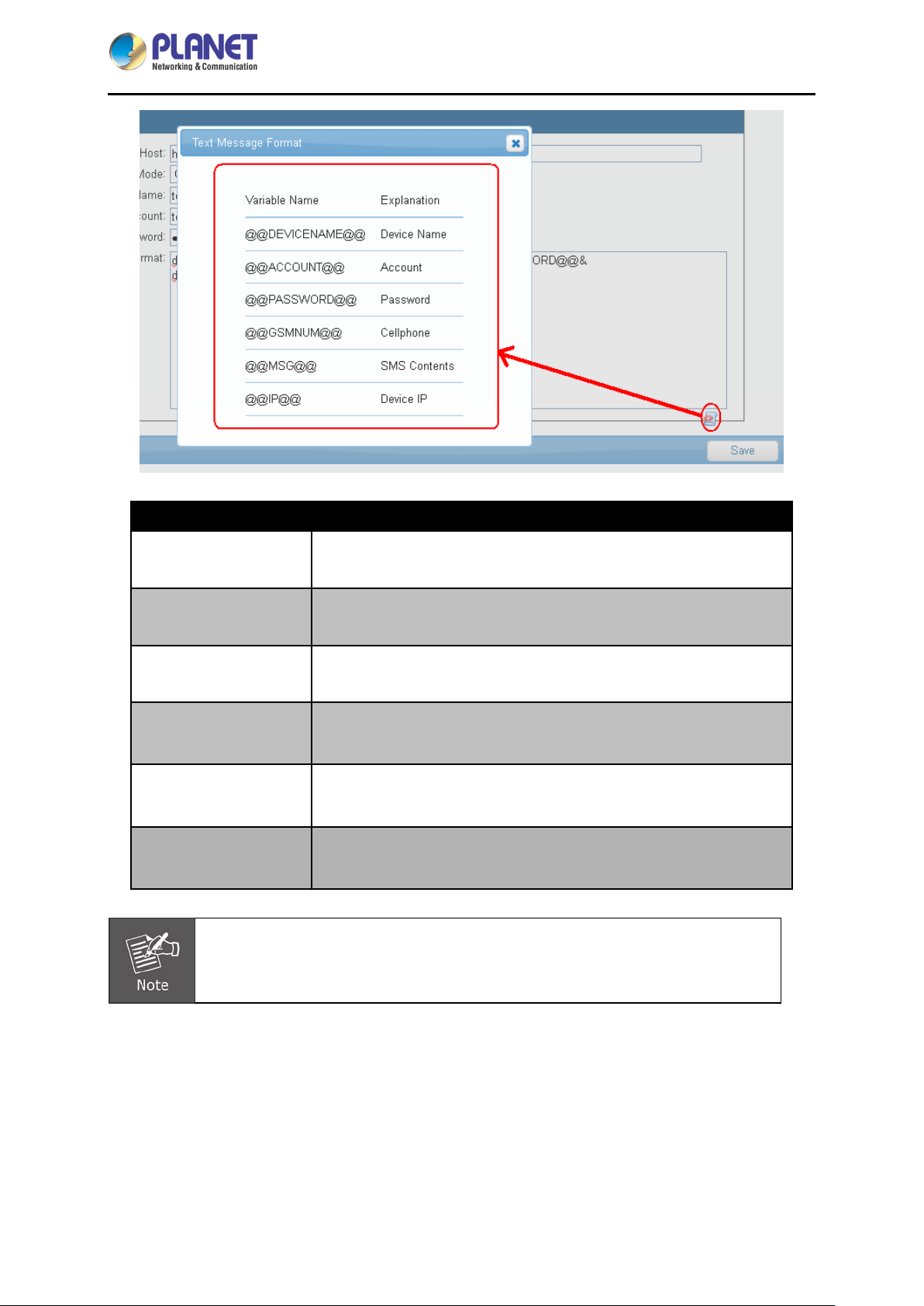
4.2.3 SMS Server
In this section, user can set up the warning message and info to the SMS server. The protocol here is
supported by many SMS suppliers’ (ISP) API. System will send out account, password, time, and
related info via HTTP to the SMS server of ISP supplier or preset SMS server.
Parameters Description
Host
Transmission Mode
Device Name
Account
Password
Message Format
SMS Test
Host IP address of SMS Server.
Follow ISP suppliers’ rules to send out short message via GET or
POST protocol to sender’s server.
The name user wants to reveal.
The account to fill in when sending SMS. The same as
@@ACCOUNT@@.
The password to fill in when sending SMS. The same as
@@PASSWORD@@.
We provide “auto bring-in” system with username, password,
number, main host and message content.
After setting up the above info, you can send a test mail to make sure
this function is normal.
- 25 -
Page 26
IP-based 16-port Metered Power Distribution Unit
IPM-16120
Parameters Description
@@DEVICENAME@@
@@ACCOUNT@@
@@PASSWORD@@
@@GSMNUM@@
@@MSG@@
@@IP@@
Message Format is related to your message content, a content may not stay the
The device name to show as sending a message.
The account to send the message.
The password to send the message.
The number to send the message.
Message content to show as sending a message.
Device IP to show as sending a message.
same as well.
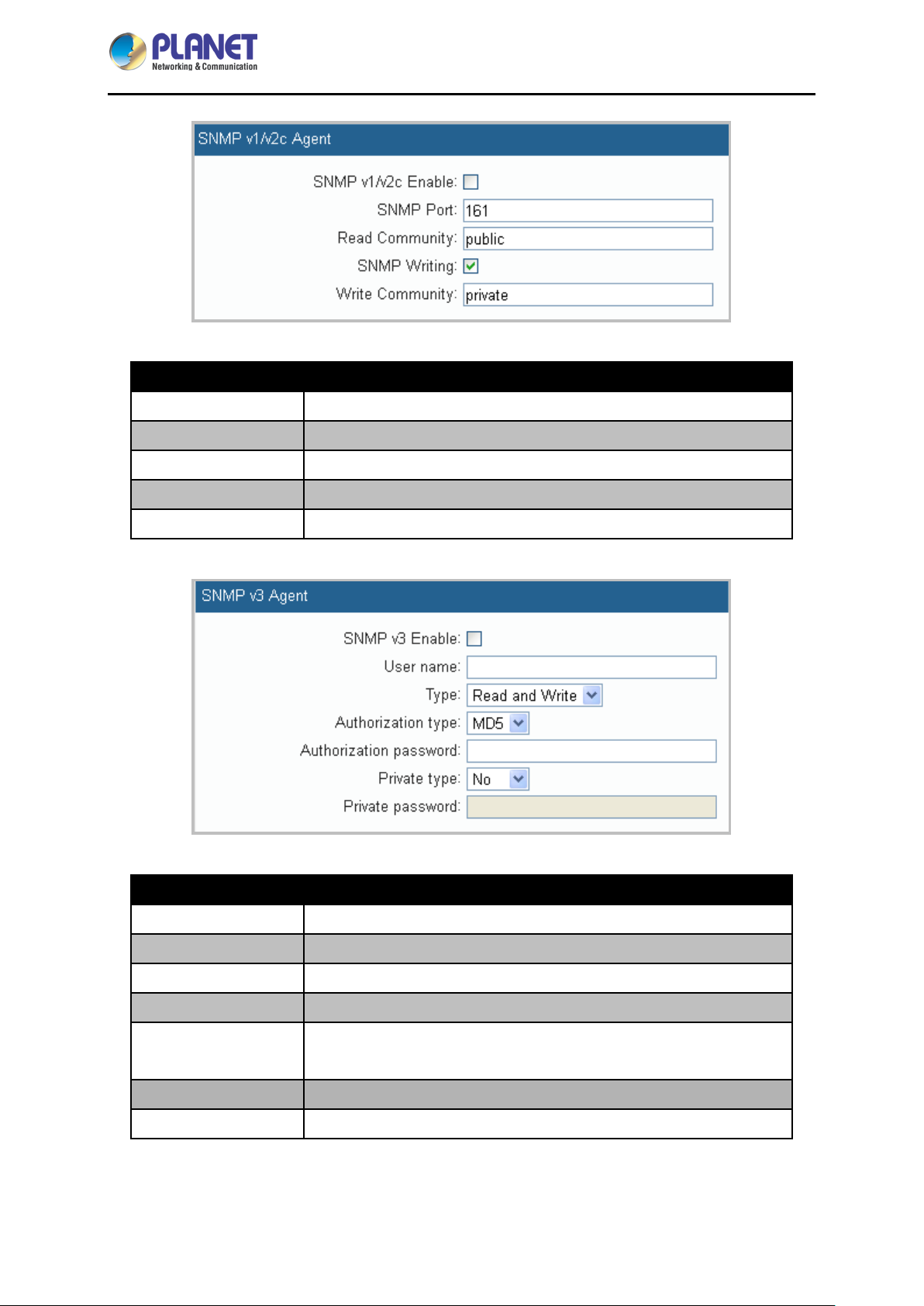
4.2.4 SNMP
You can set up SNMP Agent and SNMP Trap on this page.
- 26 -
Page 27
IP-based 16-port Metered Power Distribution Unit
IPM-16120
Parameters Description
SNMP v1/v2 Enable
Enable SNMP v1/v2.
SNMP Port Set the destination port. Default is 161.
Read Community Key-in passwords for the Community Name field. Default is public.
SNMP Writing
Select the checkbox to enable SNMP Write-in.
Write Community Key-in passwords for the Community Name field. Default is private.
Parameters Description
SNMP v3 Enable
User Name
Enable SN MP v3 .
The name is SNMP v3 command.
Type There are two types: Read Only, Read and Write.
Authorization Type There are two types: MD5 or SHA.
Authorization
The password of authorization type. Use MD5 or SHA.
Password
Private Type There are two types: No or DES.
Private Password
For private password, use DES. Select DES type to key-in password.
- 27 -
Page 28
IP-based 16-port Metered Power Distribution Unit
IPM-16120
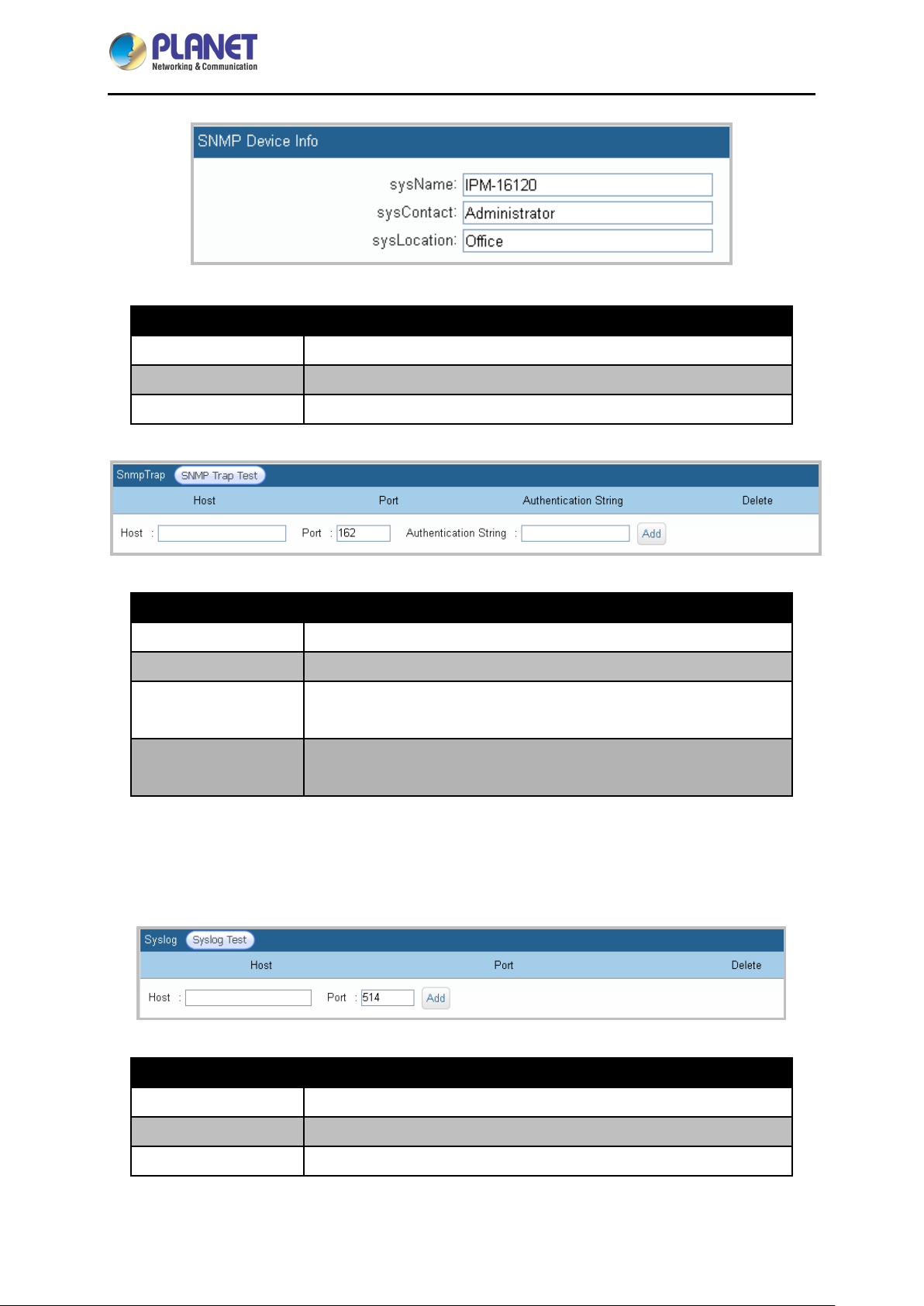
Parameters Description
sysName
sysContact
sysLocation
Parameters Description
Host
SNMP Trap Port The phase connects to SNMP Trap. Default is 162.
Authentication
String
SNMP Test
The name displayed on SNMPAgent.
The contact displayed on SNMPAgent.
The location displayed on SNMPAgen t.
The Host IP address of SNMP Trap.
The authentication string to access SNMP Trap.
After setting up the above info, you can send a test mail to make sure
this function is normal.
4.2.5 Syslog
Remote Power Manager will send out text message to syslog receiver (syslog server). Please do as
follows:
Parameters Description
Host
Port Enter Connect Port for Syslog Server. Default is 514.
Syslog Test
Enter Syslog Server Host IP.
After setting up the above info, test it to make sure this function is
- 28 -
Page 29
IP-based 16-port Metered Power Distribution Unit
IPM-16120
Parameters Description
normal.
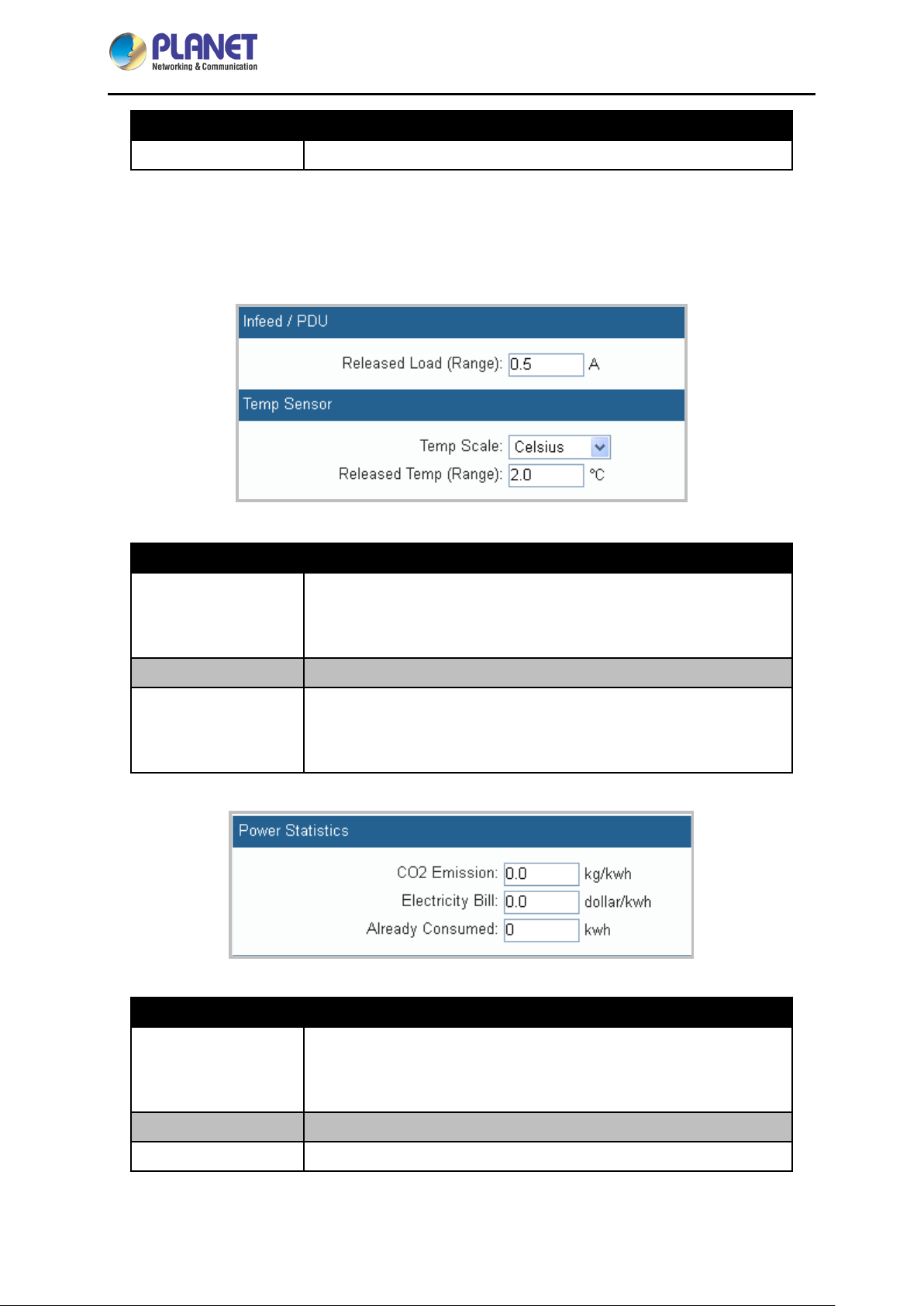
4.2.6 Peripheral Parameters
This menu is mainly for setting current, tolerance ranges of temperature and humidity, power statistics
and probe as well as the panel operating, etc.
Parameters Description
Released Load
(Range)
Temp Scale
Released Temp.
(Range)
You may set up threshold current to avoid floating power triggered
warning reaction. The warning will be dismissed by system when
power current is lower than threshold current.
You can choose either Celsius or Fahrenheit.
You may set up threshold temp.to avoid floating power triggered
warning reaction. The warning will be dismissed by system when
temp. is lower than threshold temp.
Parameters Description
You may set up threshold current to avoid floating power triggered
CO2 Emissions
Temp Scale
Released Temp
warning reaction. The warning will be dismissed by system when
power current is lower than threshold current.
You can choose either Celsius or Fahrenheit.
You may set up threshold temp.to avoid floating power triggered
- 29 -
Page 30
IP-based 16-port Metered Power Distribution Unit
Parameters Description
IPM-16120
(Range)
Parameters Description
Direction
"SET Button"
Timeout
warning reaction. The warning will be dismissed by system when
temp is lower than threshold temp.
You may set up threshold current to avoid floating power triggered
warning reaction. The warning will be dismissed by system when
power current is lower than threshold current.
Use Navigation button to view LCD panel: LCD panel will show the
initial picture of the first phase automatically as no operation is
processing.
Timeout
In alarm setting status: LCD panel will show the initial picture of the
first phase automatically as no operation is processing.
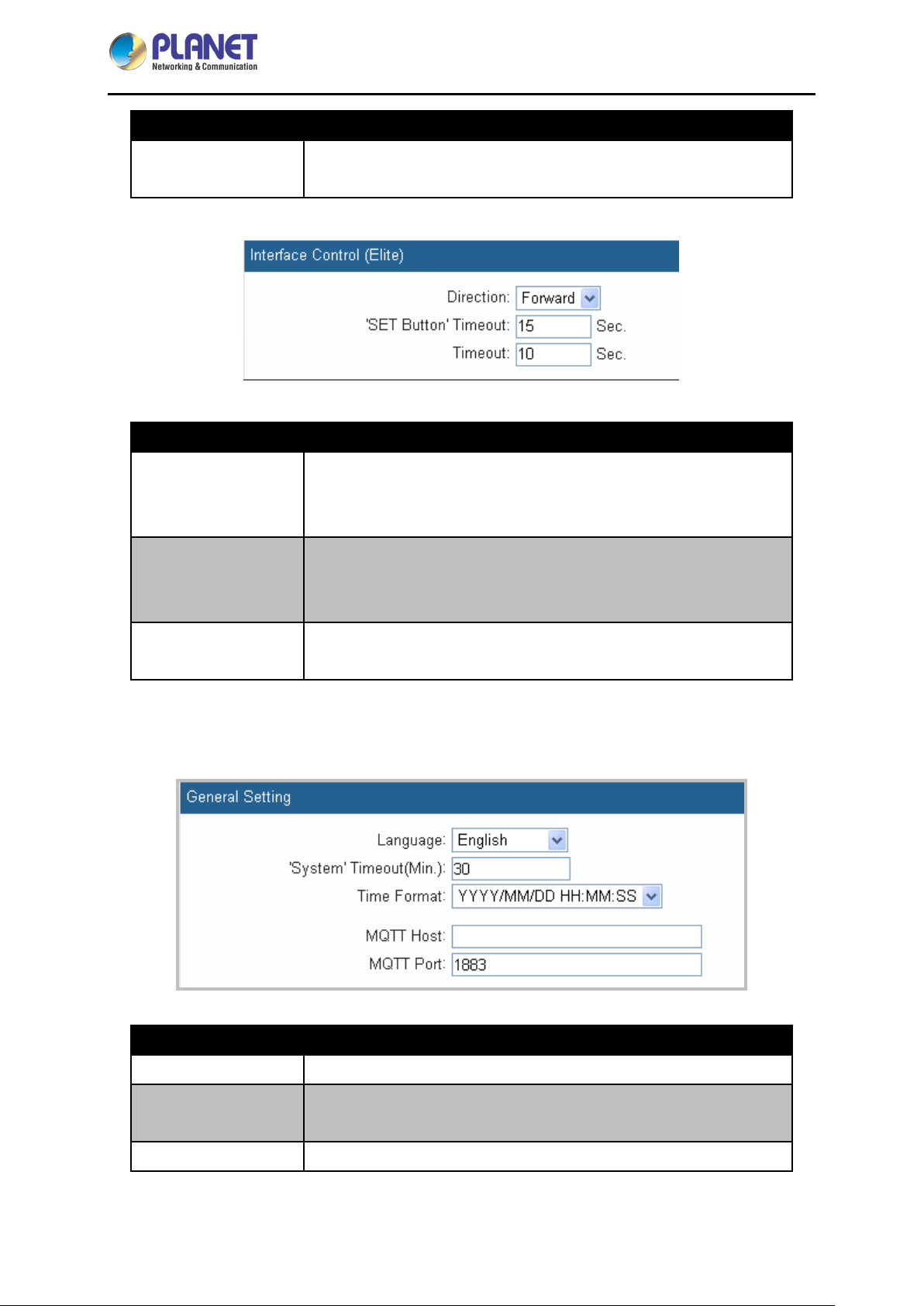
4.2.7 Other
This menu is mainly for setting device web page language, operation timeout and device date format.
Parameters Description
Language
Traditional Chinese, Simplified Chinese and Engl is h.
"System" Timeout
(Min)
Time Format
This is the last time that the device will logout automatically with no
operation in process.
Choose equipment time format. There’re three formats from the drag
- 30 -
Page 31
IP-based 16-port Metered Power Distribution Unit
Parameters Description
down list:
YYYY/MM/DD/HH/MM/SS
MM/DD/YYYY/HH/MM/SS
DD/MM/YYYY/HH/MM/SS
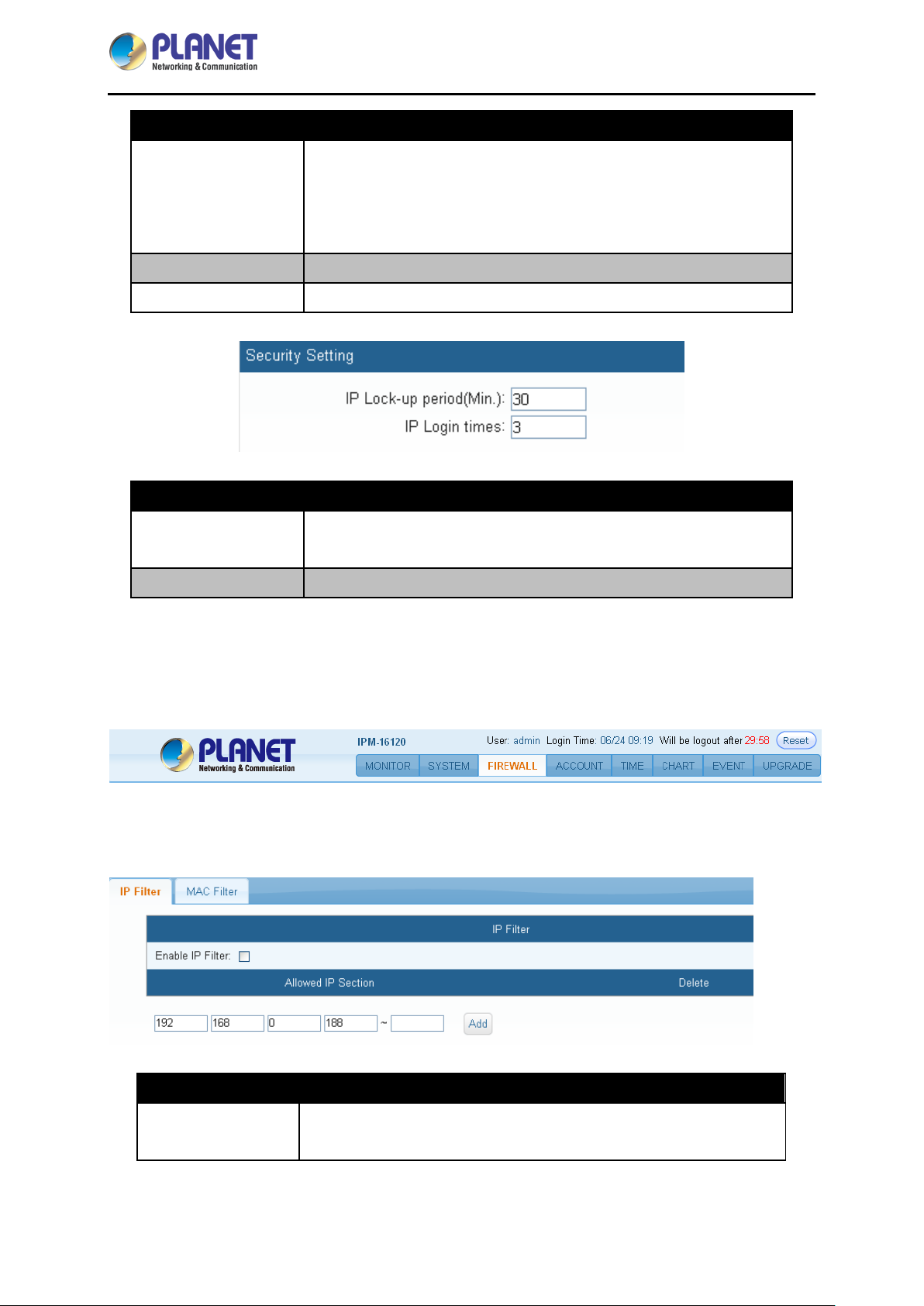
IPM-16120
MQTT Host
MQTT Port Enter Connect Port for MQTT. Default is 1883.
Parameters Description
IP Lock-up Period
(Min.)
IP Login Times
Enter MQTT Host IP.
The period of such IP has been locked up.
The number of times that user logs in.
4.3 Firewall
In this tab, you may set up permitted IP or Mac address to access this remote power manager.
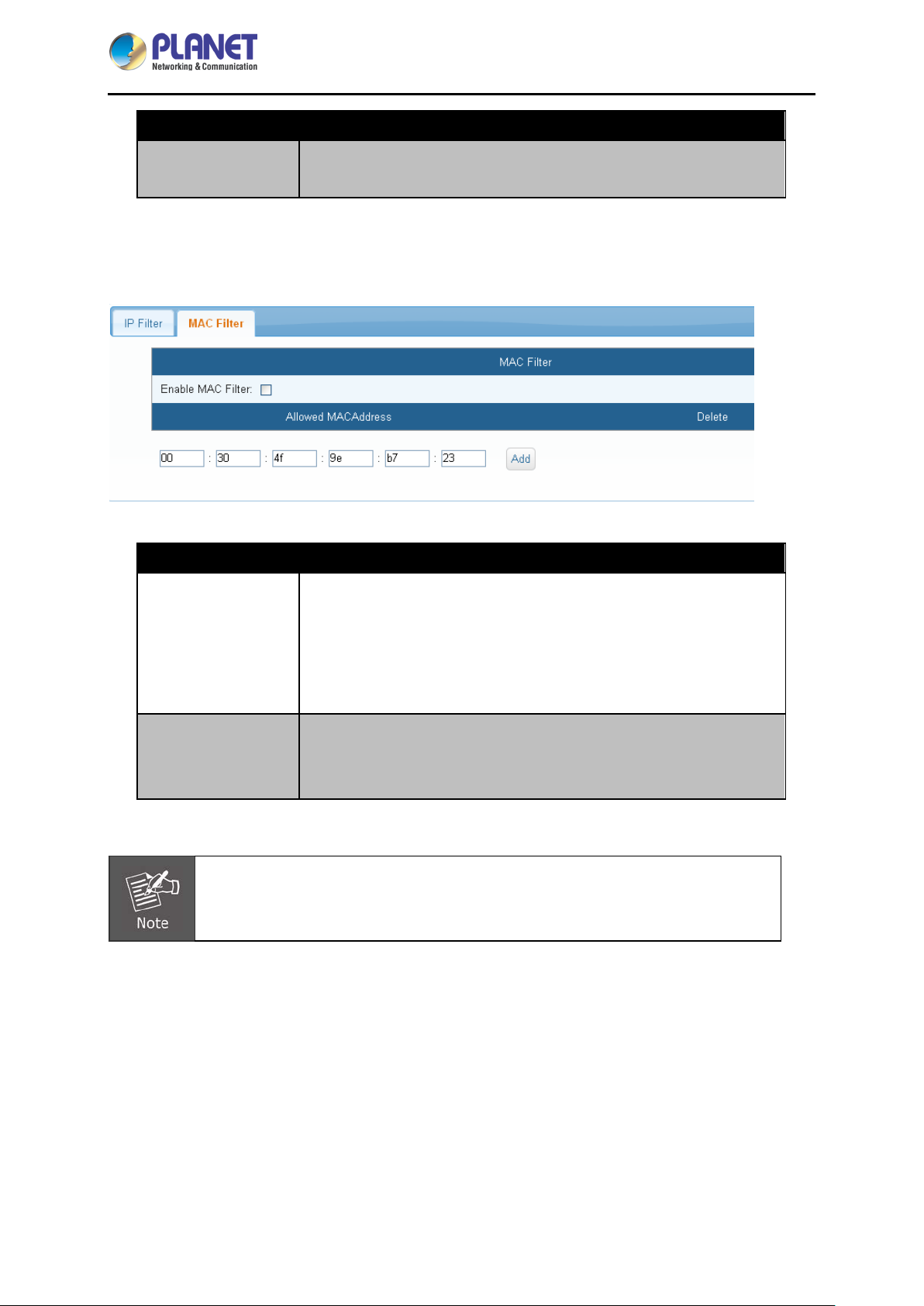
4.3.1 IP Filter
User can set up permitted IP section on this page.
Parameters Description
Enable IP Filter
Allow authorized IP address to access this device.
- 31 -
Page 32
IP-based 16-port Metered Power Distribution Unit
Parameters Description
IPM-16120
Allowed IP Section
After keying in permitted IP section, please click ADD to implement
this action. To delete a specific IP address, please click “X”.
4.3.2 MAC filter
This menu is mainly for setting of Network MAC Address having access to this device.
Parameters Description
Mark this square to enable Mac filter and press the Save button to
store the setting after permitted Mac address is built. System will
Enable MAC Filter
Allowed MAC
Address
MAC blocking feature is only available for local area network; if a router is used, the
original adapter MAC address may be changed.
reject people who try to access this remote power manager from
other Mac addresses. Unmark the square and press the Save button
if you expect to cancel this function.
Enter permitted MAC number. Please click ADD to implement this
action. To delete a specific IP address, please click “X”.
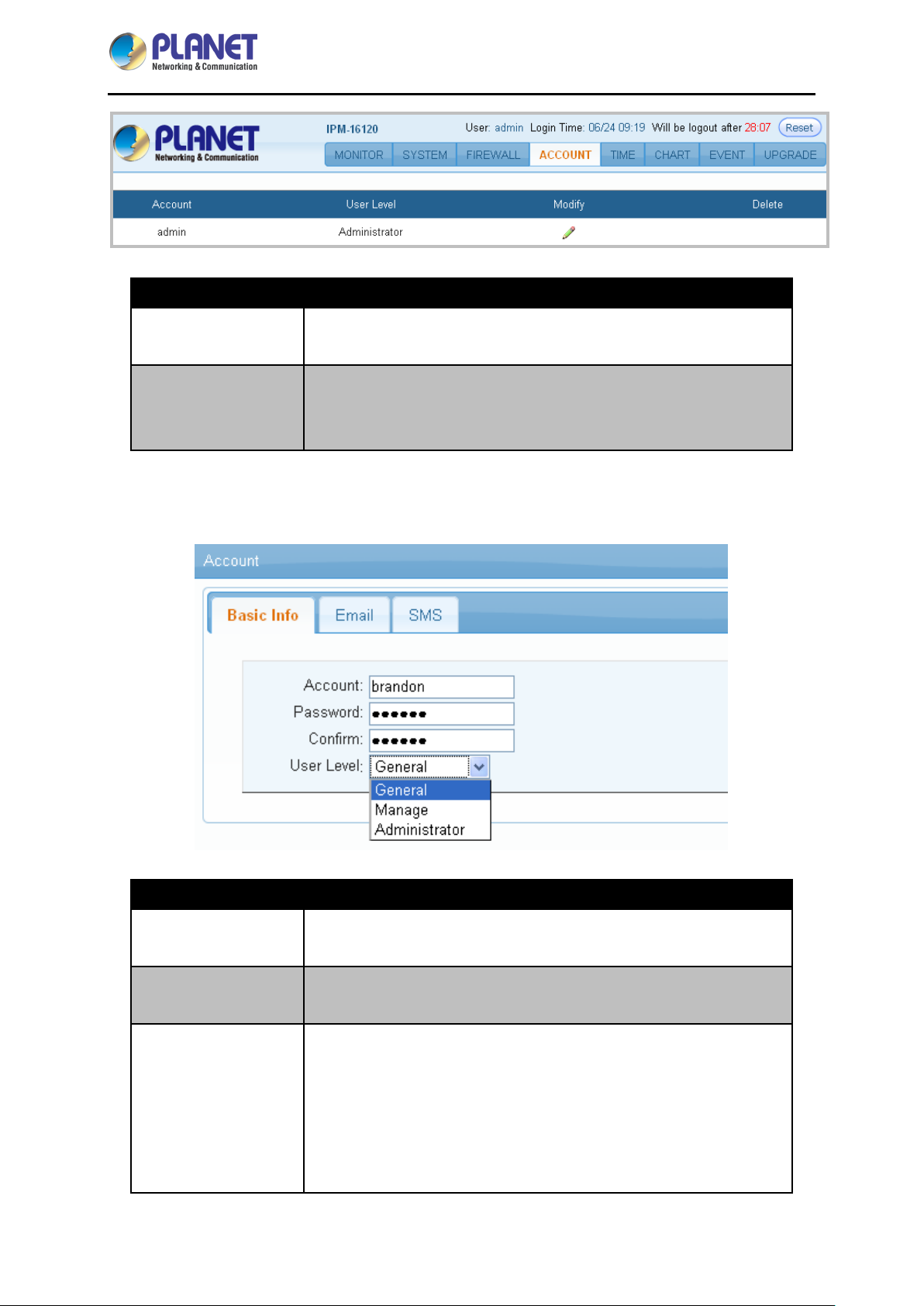
4.4 Account
This menu allows the administrator to set up 20 sets (max) of authorized user accounts. You can Add,
Modify and Delete the User account.
- 32 -
Page 33
IP-based 16-port Metered Power Distribution Unit
IPM-16120
Parameters Description
Modify
Delete
Modify the previous setting. Operation of Alarm.
Click Delete icon: browser will pop up a Confirmation of delete
window.
Click Confirm: this Account cannot be utilized any longer.
4.4.1 Basic Info
To set up account, password and user type.
Parameters Description
Account
Password
User Level
The account to log-in this device.
The password to log-in this device.
User authority operation can be grouped into General, Manage and
Administrator as shown below:
General: Only Switch control is permitted, but not authorized to
change system settings.
Manage: Parameter setting is permitted, and controllable
switch can be changed.
- 33 -
Page 34
IP-based 16-port Metered Power Distribution Unit
Parameters Description
Administrator: Administrator can manage the whole network.
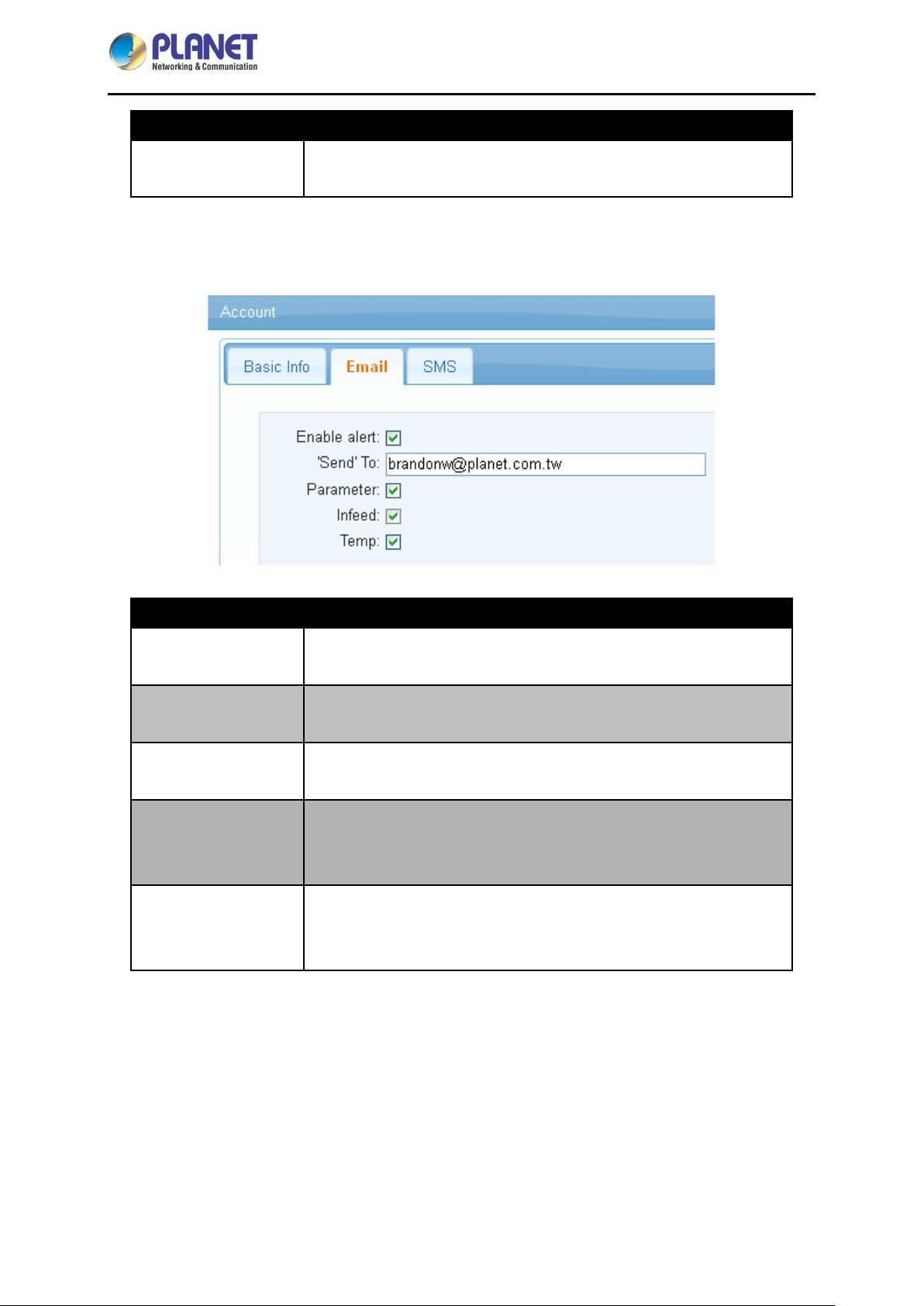
4.4.2 Email
System would send email when alarm occurs.
IPM-16120
Parameters Description
Enable Alert
‘Send’ To
Parameter
Infeed
Temp
Check to open email alarm system informed by email.
Enter the mail address of Receiver.
Use the checkbox to enable the setting. The system will follow the
warning method you choose.
Use the checkbox to enable the setting. When abnormal condition of
infeed happens, system will send a warning message by the way you
command.
Use the checkbox to enable the setting. When abnormal device
temperature occurs, system will send a warning message to
manager.
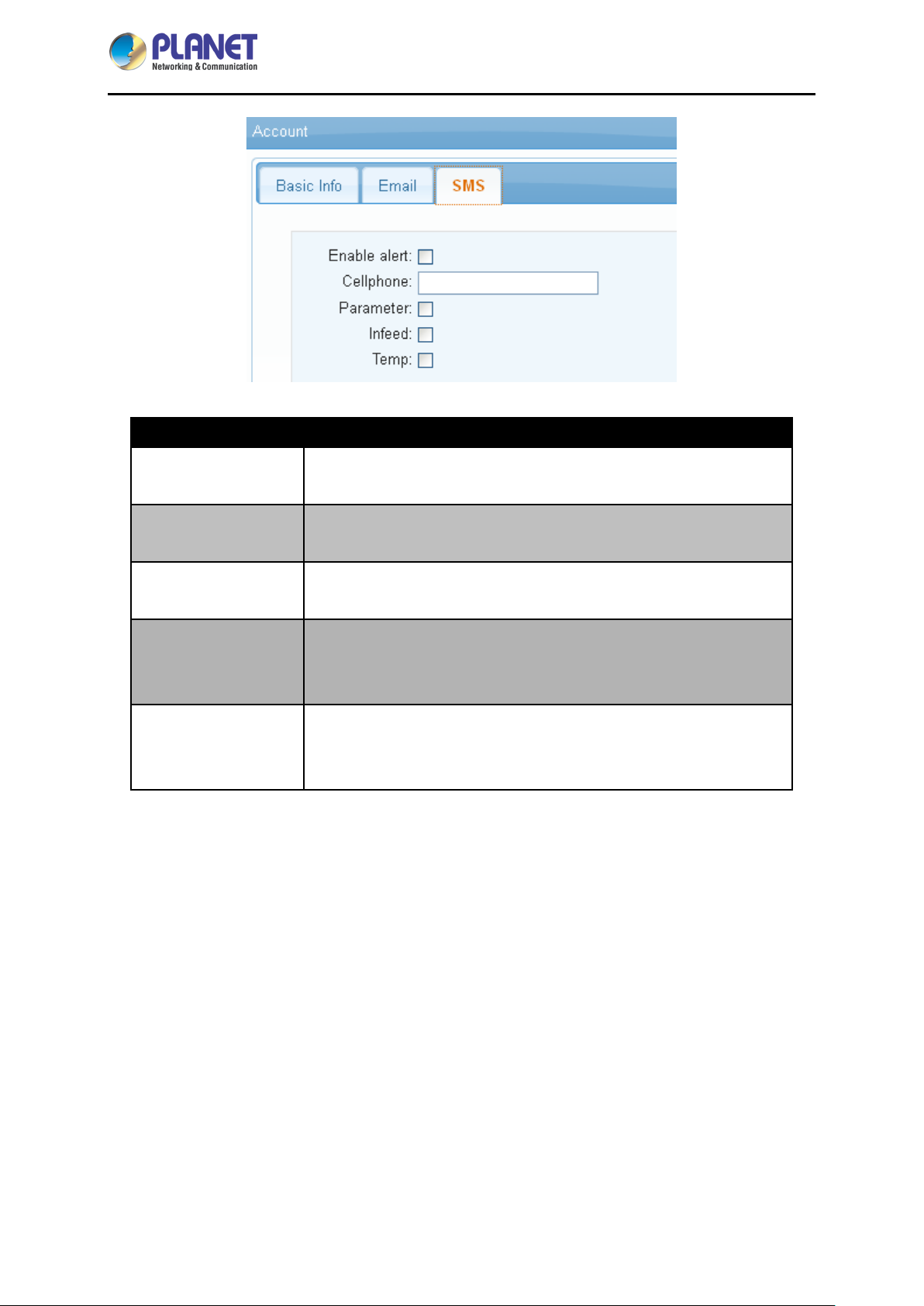
4.4.3 SMS
System would send SMS when alarm occurs.
- 34 -
Page 35
IP-based 16-port Metered Power Distribution Unit
IPM-16120
Parameters Description
Enable Alert
Check to open email alarm system informed by SMS.
Informed by short message, please fill out the right cellphone
Cellphone
number.
Use the checkbox to enable the setting. The system will follow the
Parameter
warning method you choose.
Use the checkbox to enable the setting. When abnormal condition of
Infeed
infeed happens, system will send a warning message by the way you
command.
Use the checkbox to enable the setting. When abnormal device
Temp
temperature occurs, system will send a warning message to
manager.
- 35 -
Page 36
IP-based 16-port Metered Power Distribution Unit
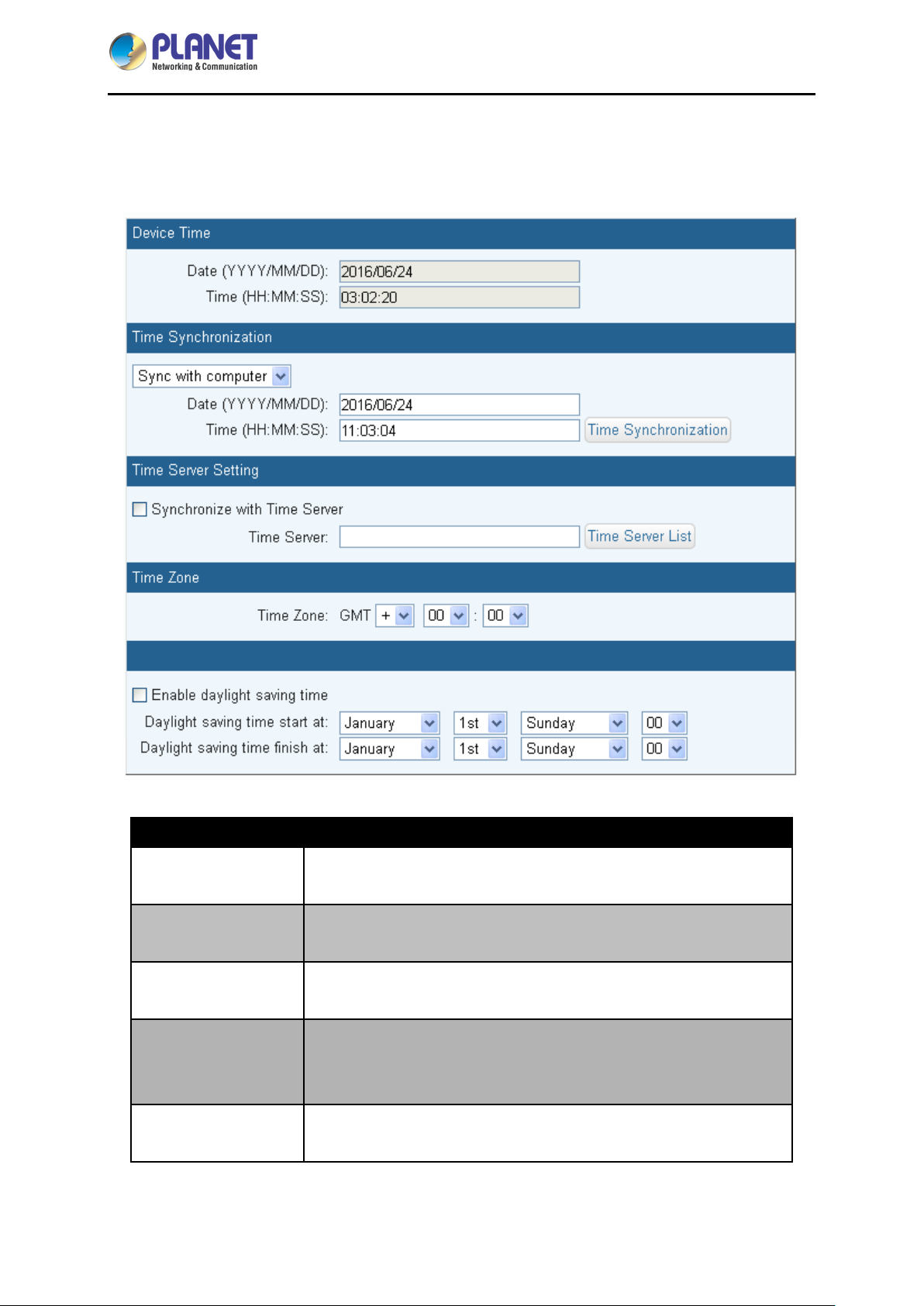
4.5 Time
You can set up the time server on this page.
IPM-16120
Parameters Description
Device Time
Time
Synchronization
Synchronization with
Time Server
Time Server
Time Zone
Date and time of the system.
You may ei t he r scroll down to select Sync with computer or Manual
Setting.
Select this time method if you want the system time of this power
switch to be the same as Greenwich Mean Time (GMT).
You can build a new NTP server and then sync with it to be the same
date and time. If not, click Time Server List, and choose one from the
drop-down list.
The time here is following Greenwich Mean Time as most NTP
servers do. User must adjust the time to be the same with local time.
- 36 -
Page 37
IP-based 16-port Metered Power Distribution Unit
Parameters Description
IPM-16120
Enable daylight
saving time
Set the Daylight saving time from Sunday to Saturday
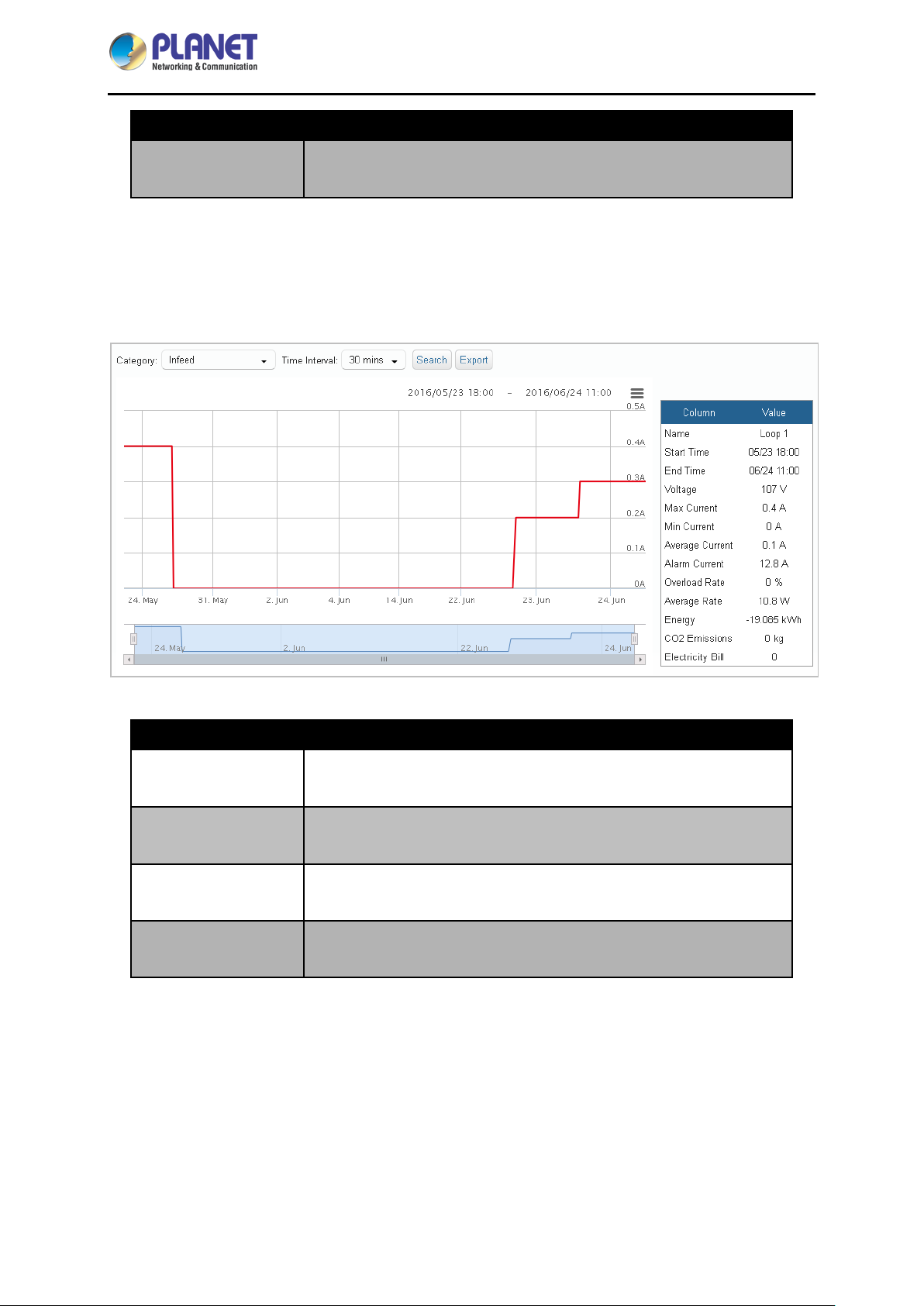
4.6 4.6 Chart
This menu is mainly for query infeed, device temperature and statistic data.
Parameters Description
Category You may either scroll down to select infeed or device temperature.
Time Interval You may either scroll down to select 1 min. or 30 mins.
Search
Export
See the reference date chart as shown in the table.
Download this data chart.
- 37 -
Page 38
IP-based 16-port Metered Power Distribution Unit
IPM-16120
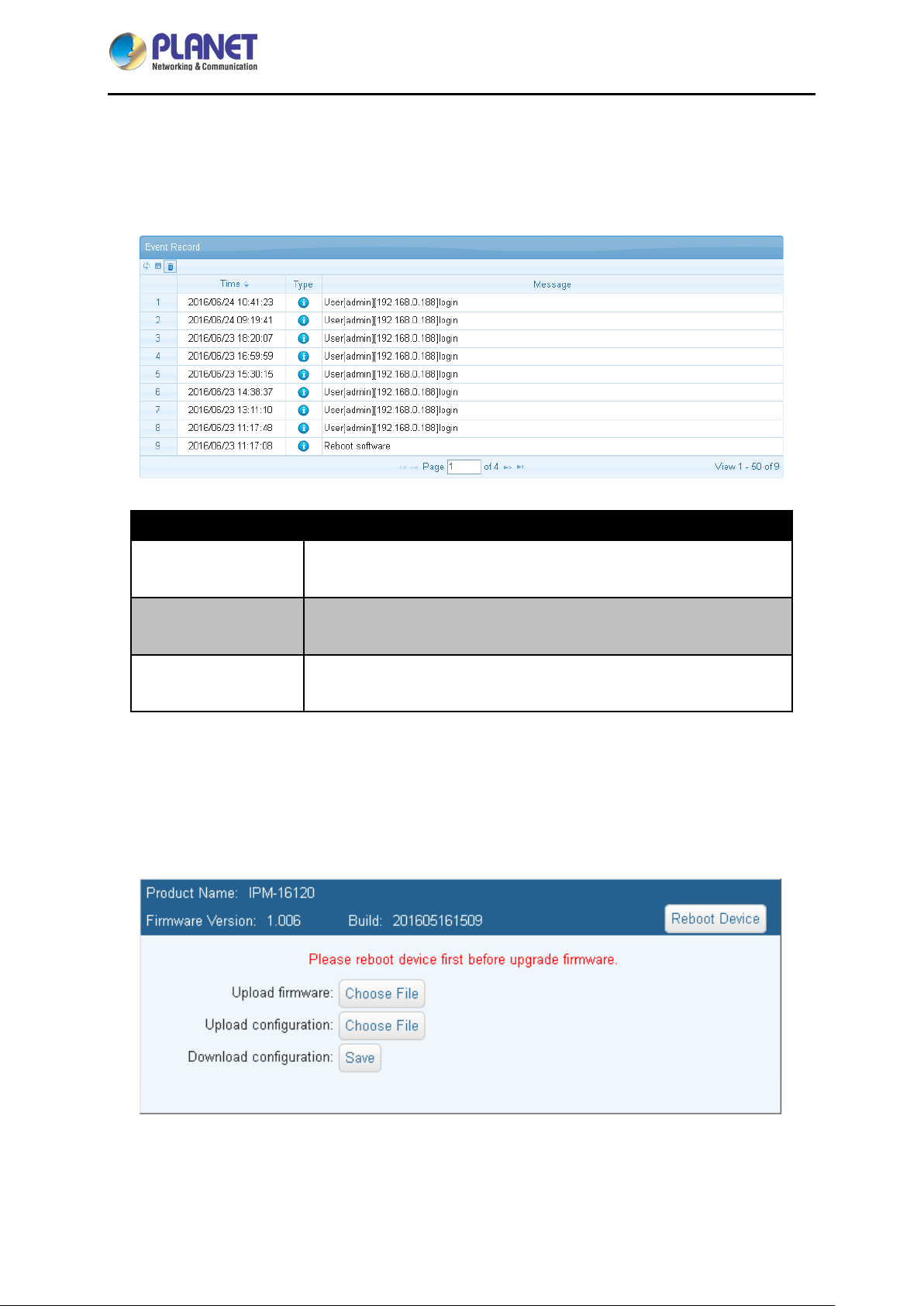
4.7 Event
The web page supports to query the recent 200 logs, including the time, types and reasons of such
logs.
Parameters Description
Refresh
Download
Delete
Click the Refresh button to refresh the screen.
Click teh Download button to save the event log information. The
event log is saved in .txt format.
Click the Delete button to delete the Event logs.
4.8 Upgrade
This web page is for upgrading the device firmware and the configuration files. You can download the
latest firmware from the suppliers' web page to upgrade the firmware of IPM series.
- 38 -
Page 39

IP-based 16-port Metered Power Distribution Unit
Parameters Description
IPM-16120
Upload firmware
Upload configuration
Download
configuration
To update the firmware online, click “Browse…” to select the
firmware. Then click “Upgrade” to proceed.
Upgrade from previous saved setting.
Download the current setting to PC.
- 39 -
Page 40
IP-based 16-port Metered Power Distribution Unit
IPM-16120
Appendix A: Resetting to Default via
Navigation Button
Users who forget the network account and password of the product can press "Reset" to recover to the
factory default values, and the device will be rebooted at the same time.
Step 1. In Network info press the Navigation button for 10 seconds until two beeps sound to enter
“Set back to factory default values”.
Step 2. Select Reset Account & IP, admin account and password will be set as admin (add a new
account if there’s no admin account). Device IP will be automatically acquired through DHCP (if
there’s no DHCP server, the device IP should be preset to 192.168.0.10). The acquired IP is
then displayed on the LCD panel.
Step 3. Select Reset All to clear all the data of the device.
- 40 -
Page 41
IP-based 16-port Metered Power Distribution Unit
IPM-16120
Appendix B: HTTP Message API Example
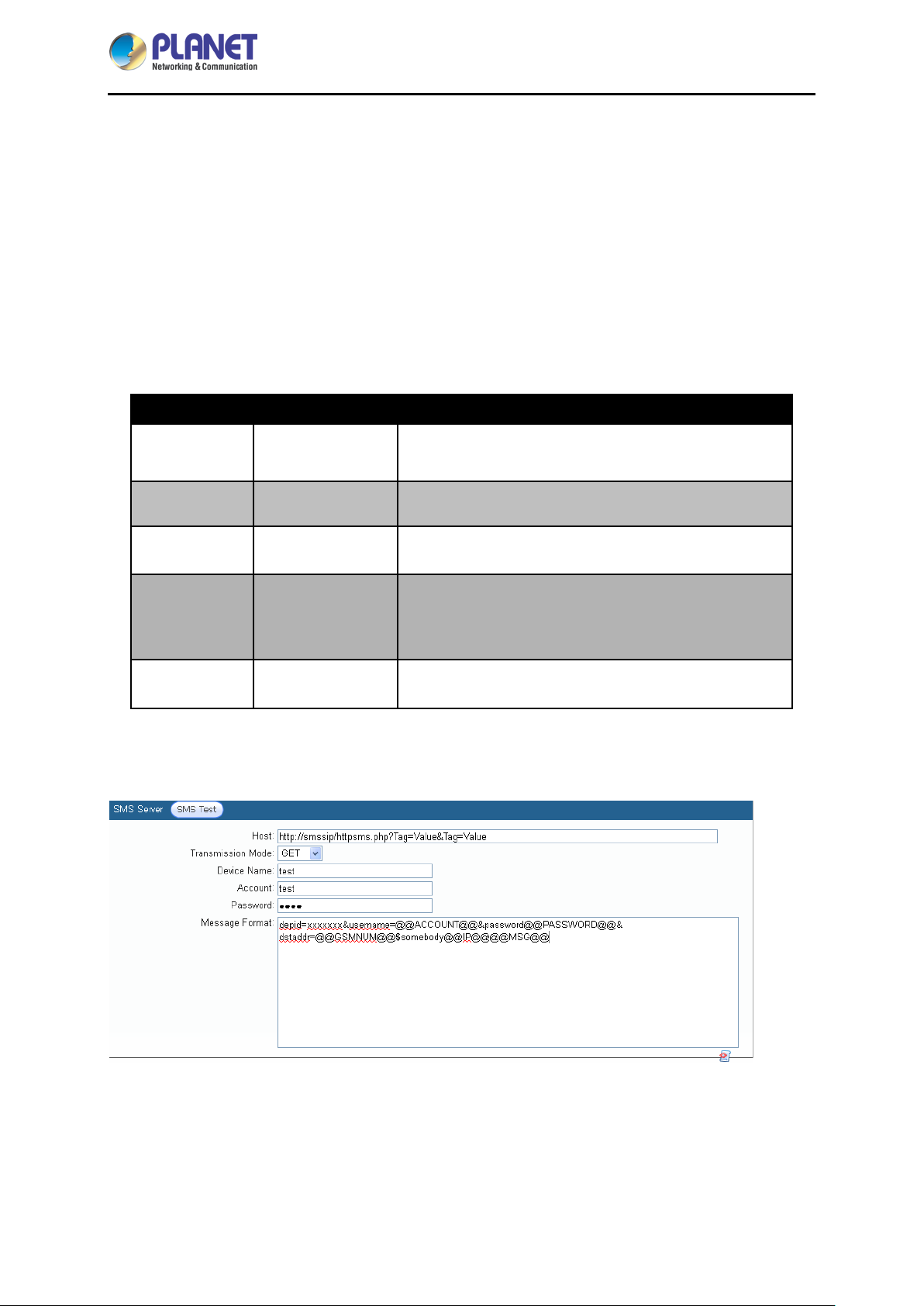
A Message API example of a message service provider is given below. The transmission mode is Get
in TTP protocol, and the URL format is as follows:
http://SMLWsip/httpSMLWs.php?Tag=Value&Tag=Value&Tag=Value…
Tag variable list:
Required Optional Tag Description
Required depid Company Code
Required username User's Account
Required password User's password
Objective gate number (Separated by commas for
Required dstaddr
Required IPMbody Message content, using standard URL encoding
Transform the above format into message server parameters, and the menu is shown as follows:
delivery to multiple gate numbers, repeated gate
number is not accepted during each delivery.)
After message server setup is completed, press "Message Test" first to check if message can be sent
normally.
- 41 -
Page 42
IP-based 16-port Metered Power Distribution Unit
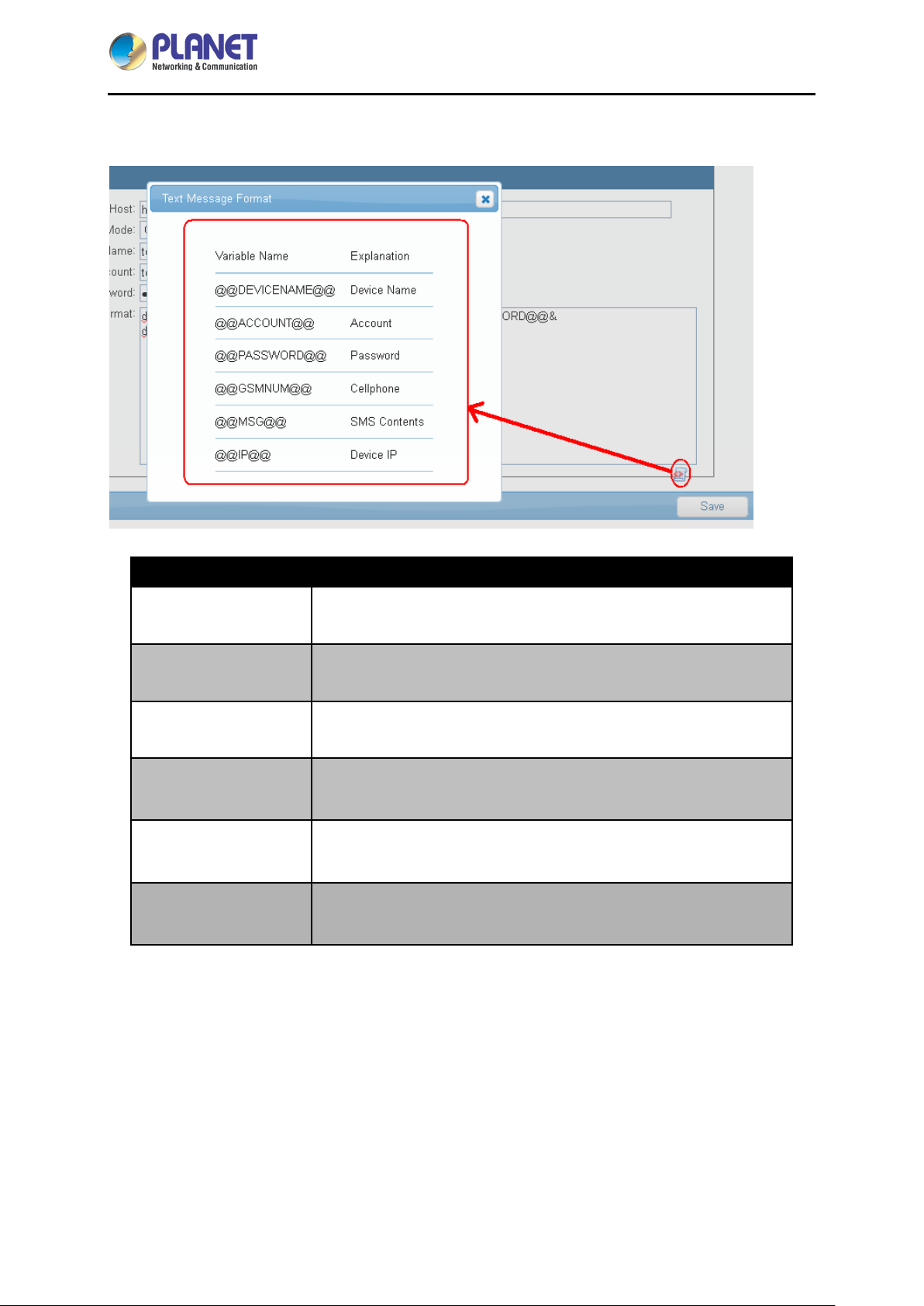
Press the icon on the left side of the blank to see message format for reference.
IPM-16120
Parameters Description
@@DEVICENAME@@
@@ACCOUNT@@
@@PASSWORD@@
@@GSMNUM@@
@@MSG@@
@@IP@@
The device name to show as sending a message.
The account to send the message.
The password to send the message.
The number to send the message.
Message content to show as sending a message.
Device IP to show as sending a message.
Message Format Explanation:
depid=xxxxxx&username=@@ACCOUNT@@&password=@@PASSWORD@@&dstaddr=@@G
SMLWNUM@@&IPMbody=@@IP@@,@@MSG@@
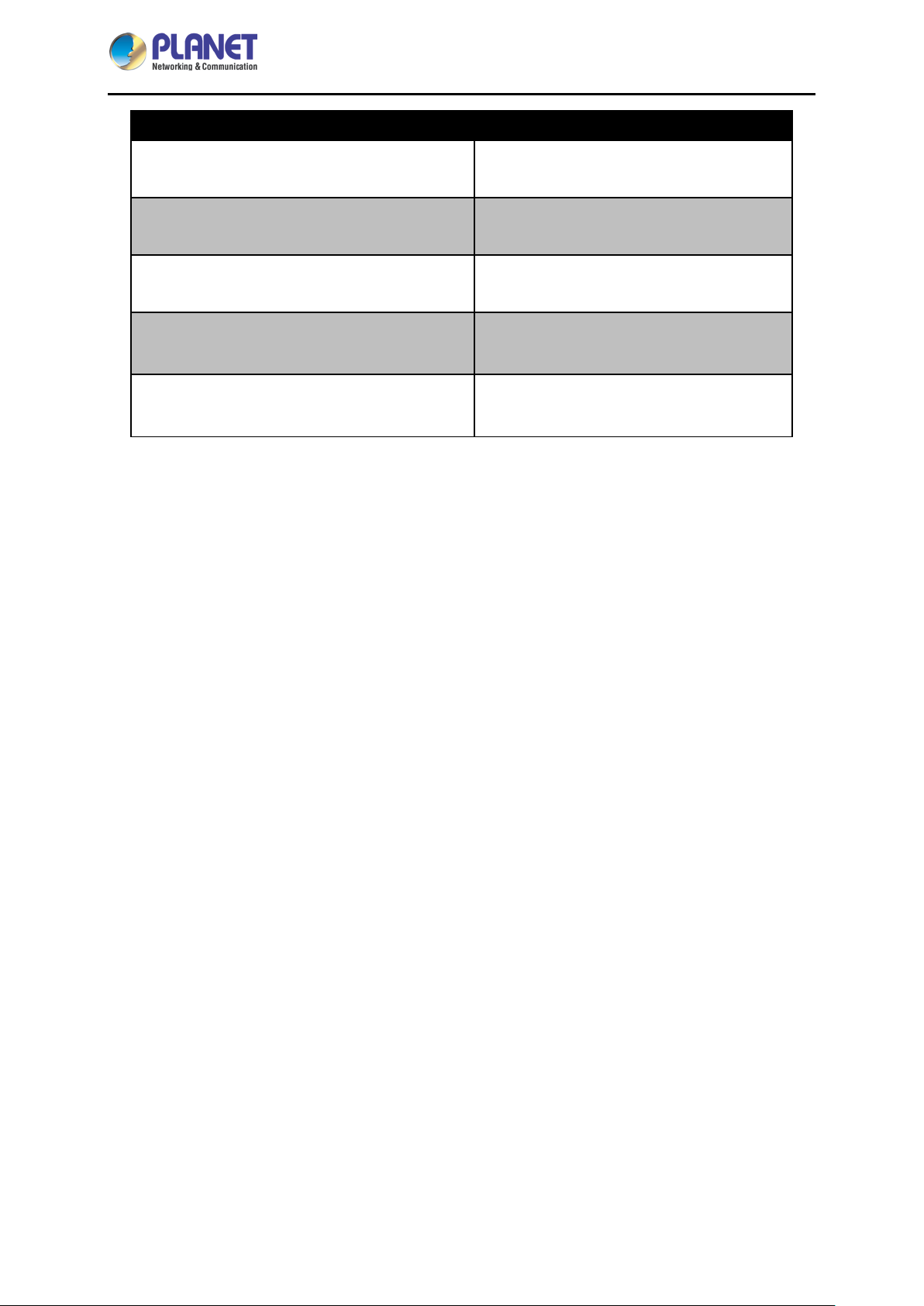
If you fill the above info in the Message Format, the system would automatically show the following info:
- 42 -
Page 43
IP-based 16-port Metered Power Distribution Unit
IPM-16120
Message format Description
Company code (depid=xxxxxx) &
Required
User's Account
Required
(account=@@ACCOUNT@@)&
User's password
Required
(password=@@PASSWORD@@)&
Cellphone number
Required
(dstaddr=@@GSMLWNUM@@)&
Device IP & Message content
This format is changeable with the content.
(IPMbody=@@IP@@,@@MSG@@)
- 43 -
 Loading...