

Page 1
FILE–TYPE
COMPACT DISC PLAYER
◊Û¿X/.˘
STANDBY / ON
SINGLE LOADER
ACSESS
@
°
@
°
@
°
@
°
@
'
°
@
°
@
FILE –TYME CD MECHANISM
°
@
°
@
°
@
PLAY
°
@
°
@
°
@
°
@
°
MODE HI-LITE
CLEAR PROGRAM
OPEN/
CLOSE
Î
UNLOAD
TRACK MIN SECDISC
CUSTOM
RDM
ALL BEST CD TEXT
REPEAT
PGM 1
PREVIOUSSINGLE
SCANDISC
DISPLAY BEST PREVIOUS
DISCTITLE
INPUT
4 1
6
7
REMAIN
¡ ¢
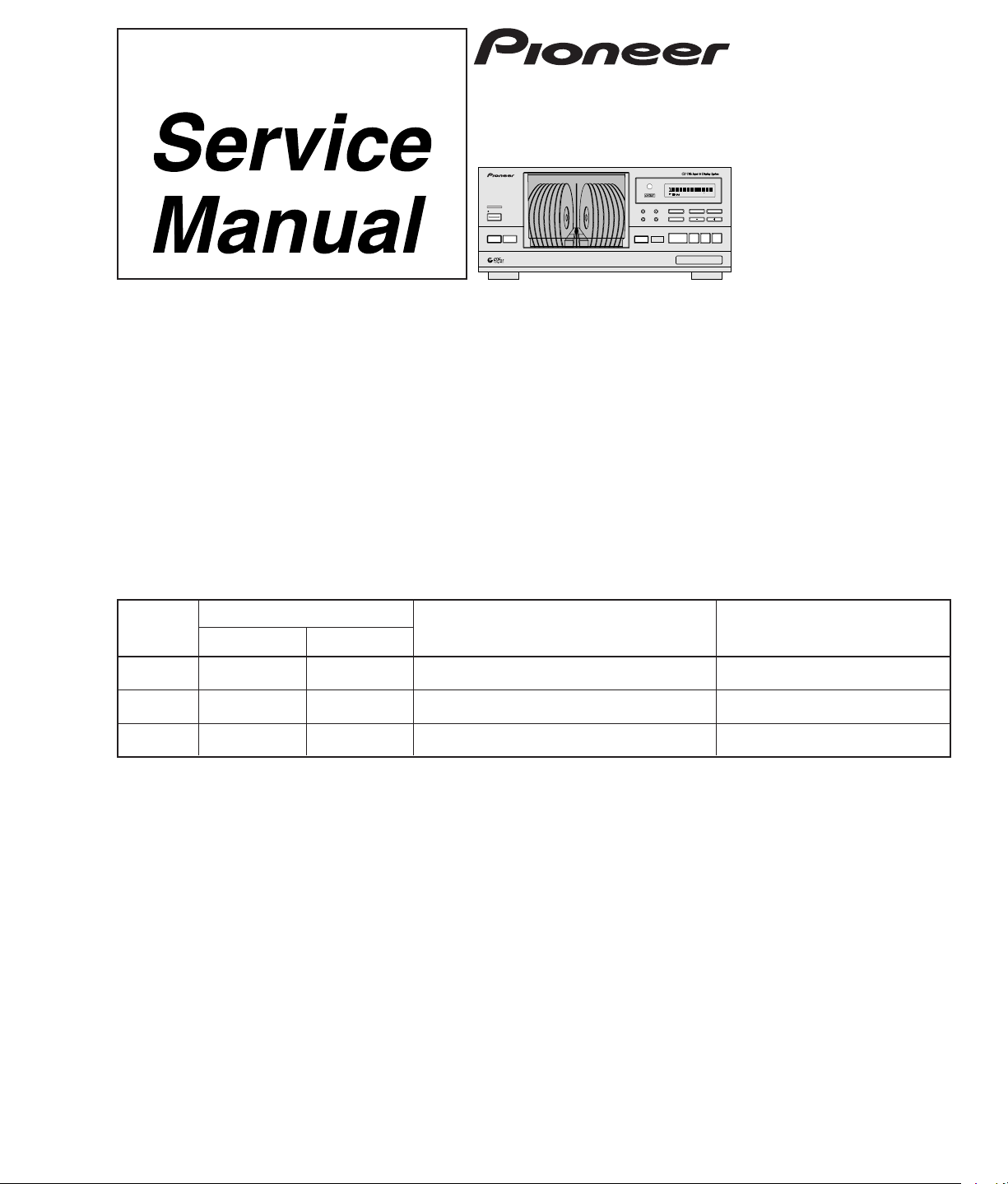
FILE-TYPE COMPACT DISC PLAYER
PD-F958
PD-F908
THIS MANUAL IS APPLICABLE TO THE FOLLOWING MODEL(S) AND TYPE(S).
ORDER NO.
RRV2085
Type
PD-F958
Model
Power Requirement
PD-F908
KUXQ – O AC120V
KCXQ – O AC120V
KUXQ/CA O – AC120V
CONTENTS
1. SAFETY INFORMATION....................................2
2. EXPLODED VIEWS AND PARTS LIST .............3
3. SCHEMATIC DIAGRAM................................... 11
4. PCB CONNECTION DIAGRAM .......................19
5. PCB PARTS LIST.............................................24
6. ADJUSTMENT.................................................. 28
7.GENERAL INFORMATION ............................... 36
7.1 PARTS........................................................36
7.1.1 IC ..........................................................36
7.1.2 DISPLAY...............................................37
Remarks
7.2 DIAGNOSIS................................................39
7.2.1 ERROR CORD DISPLAY .................39
7.2.2 ERROR HISTORY AND DISPLAY ... 39
7.2.3 ERROR HISTORY DISPLAY............ 40
7.2.4 DISASSEMBLY................................. 41
7.3 BLOCK DIAGRAM...................................... 49
8. PANEL FACILITIES AND SPECIFICATIONS
...................................................................50
Page 2
PD-F958, PD-F908
1. SAFETY INFORMATION
This service manual is intended for qualified service technicians; it is not meant for the casual
do-it-yourselfer. Qualified technicians have the necessary test equipment and tools, and have been
trained to properly and safely repair complex products such as those covered by this manual.
Improperly performed repairs can adversely affect the safety and reliability of the product and may
void the warranty. If you are not qualified to perform the repair of this product properly and safely, you
should not risk trying to do so and refer the repair to a qualified service technician.
WARNING
This product contains lead in solder and certain electrical parts contain chemicals which are known to the state of California to
cause cancer, birth defects or other reproductive harm.
Health & Safety Code Section 25249.6 – Proposition 65
NOTICE
(FOR CANADIAN MODEL ONLY)
Fuse symbols (fast operating fuse) and/or (slow operating fuse) on PCB indicate that replacement parts
must be of identical designation.
REMARQUE
(POUR MODÈLE CANADIEN SEULEMENT)
Les symboles de fusible (fusible de type rapide) et/ou (fusible de type lent) sur CCI indiquent que les
pièces de remplacement doivent avoir la même désignation.
(FOR USA MODEL ONLY)
1. SAFETY PRECAUTIONS
The following check should be performed for the
continued protection of the customer and service
technician.
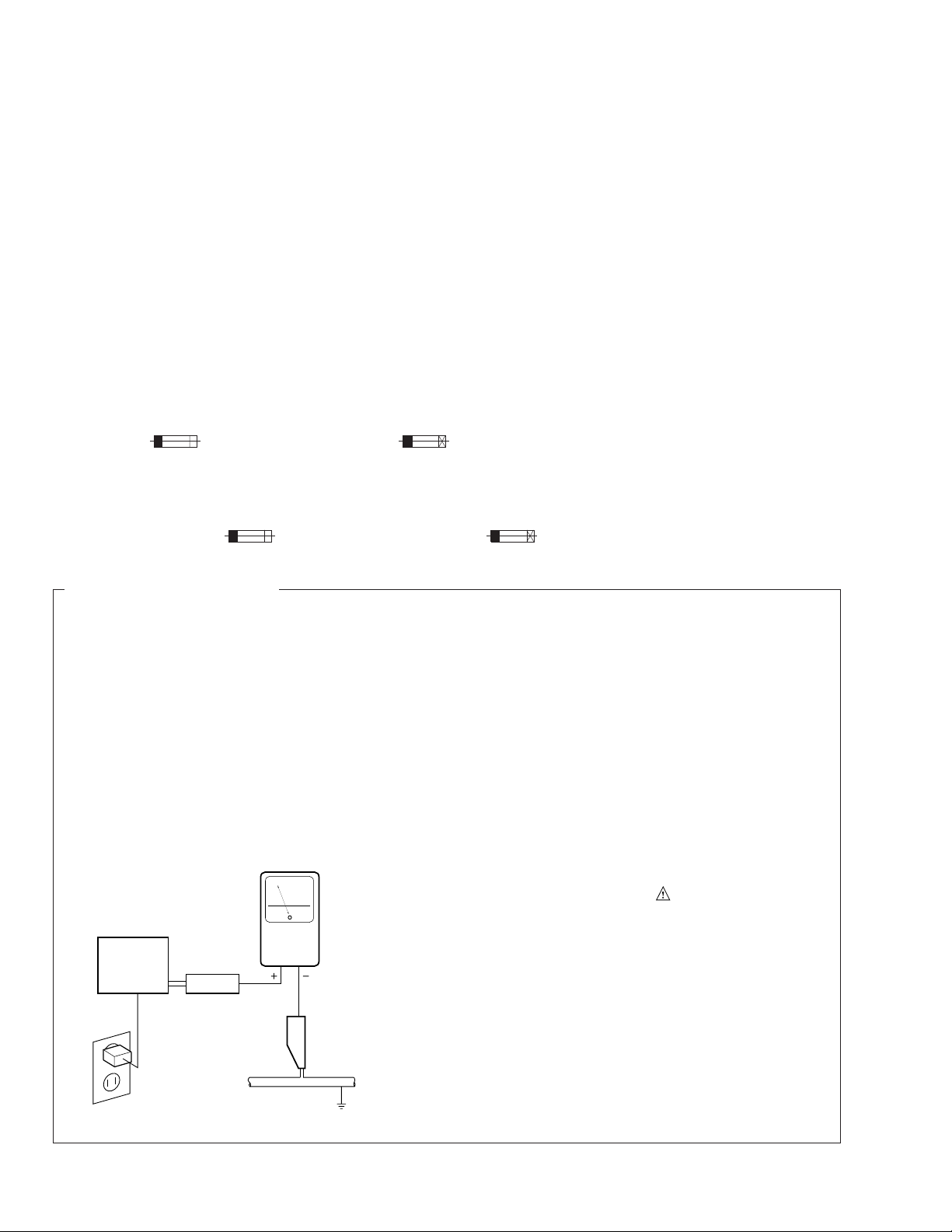
LEAKAGE CURRENT CHECK
Measure leakage current to a known earth ground
(water pipe, conduit, etc.) by connecting a leakage
current tester such as Simpson Model 229-2 or
equivalent between the earth ground and all exposed
metal parts of the appliance (input/output terminals,
screwheads, metal overlays, control shaft, etc.). Plug
the AC line cord of the appliance directly into a 120V
AC 60 Hz outlet and turn the AC power switch on. Any
current measured must not exceed 0.5 mA.
Reading should
not be above
0.5 mA
Earth ground
Device
under
test
Also test with plug
reversed
(Using AC adapter
plug as required)
Leakage
current
tester
Test all exposed
metal surfaces
AC Leakage Test
ANY MEASUREMENTS NOT WITHIN THE LIMITS
OUTLINED ABOVE ARE INDICATIVE OF A POTENTIAL SHOCK HAZARD AND MUST BE CORRECTED BEFORE RETURNING THE APPLIANCE
TO THE CUSTOMER.
2. PRODUCT SAFETY NOTICE
Many electrical and mechanical parts in the appliance have special safety related characteristics. These
are often not evident from visual inspection nor the
protection afforded by them necessarily can be obtained by using replacement components rated for
voltage, wattage , etc. Replacement parts which have
these special safety characteristics are identified in
this Service Manual.
Electrical components having such features are
identified by marking with a
on the parts list in this Service Manual.
The use of a substitute replacement component which
does not have the same safety characteristics as the
PIONEER recommended replacement one, shown in
the parts list in this Service Manual, may create shock,
fire, or other hazards.
Product Safety is continuously under review and
new instructions are issued from time to time. For
the latest information, always consult the current
PIONEER Service Manual. A subscription to, or additional copies of, PIONEER Service Manual may be
obtained at a nominal charge from PIONEER.
on the schematics and
2
Page 3
PD-F958, PD-F908
2. EXPLODED VIEWS AND PARTS LIST
NOTES : ÷ Parts marked by “ NSP ” are generally unavailable because they are not in our Master Spare Parts List.
÷ The mark found on some component parts indicates the importance of the safety factor of the part.
Therefore, when replacing, be sure to use parts of identical designation.
÷ Screw adjacent to
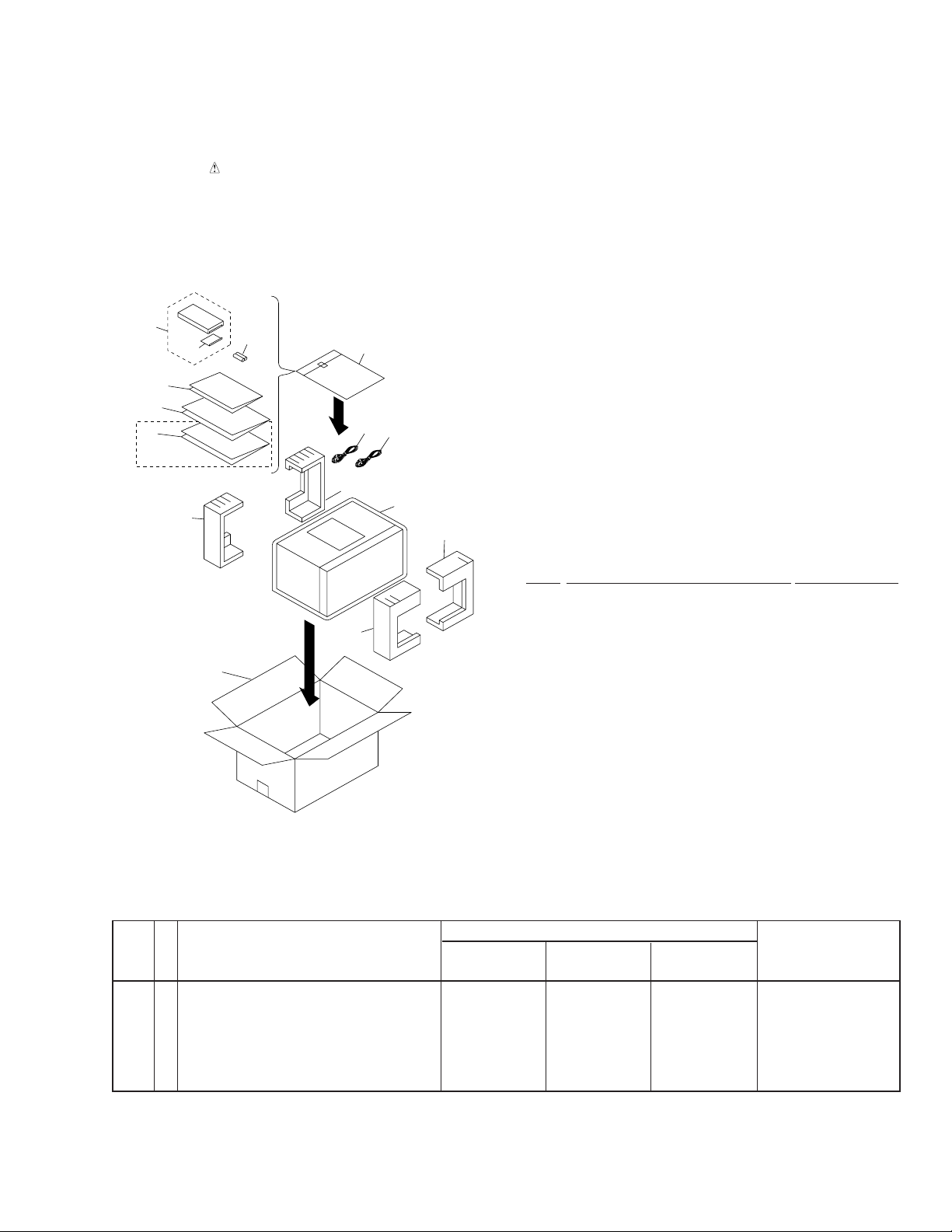
2.1 PACKING
mark on the product are used for disassembly.
∞
3
4
5
6
7
PD-F908/KCXQ only
10(1/2)
13
11
10(2/2)
Front
9(1/2)
8
2
1
12
9(2/2)
(1) PARTS LIST
Mark No. Description Part No.
1 Control Cable (L=1.0m) PDE1247
2 Output Cable (L=1.0m) PDE1248
3 Remote Control Unit See Contrast table (2)
4 Battery Cover PZN1105
NSP 5 Warranty Card See Contrast table (2)
6 Operating Instructions (English) See Contrast table (2)
7 Operating Instructions (French)) See Contrast table (2)
8 Polyethlene Bag Z21 - 038
9 Styrol Protector F PHA1333
10 Styrol Protector R PHA1334
11 Packing Case See Contrast table (2)
12 Mirror Mat PHF1001
NSP 13 Battery (R6P, AA) VEM 1010
(2) CONTRAST TABLE
PD-F908/KUXQ,KCXQ and PD-F958/KUXQ/CA have the same construction except for the following:
Part No.
Mark No. Symbol & Description Remarks
3 Remote Control Unit PWW1148 PWW1147 PWW1147
NSP 5 Warranty Card ARY7023 ARY7023 ARY7024
6 Operating Instructions (English) PRB1278 PRB1277 PRB1277
7 Operating Instructions (French) Not used Not used PRD1034
11 Packing Case PHG2337 PHG2334 PHG2335
PD-F958/ PD-F908/ PD-F908/
KUXQ/CA KUXQ KCXQ
(CU-PD101) (CU-PD100) (CU-PD100)
3
Page 4
PD-F958, PD-F908
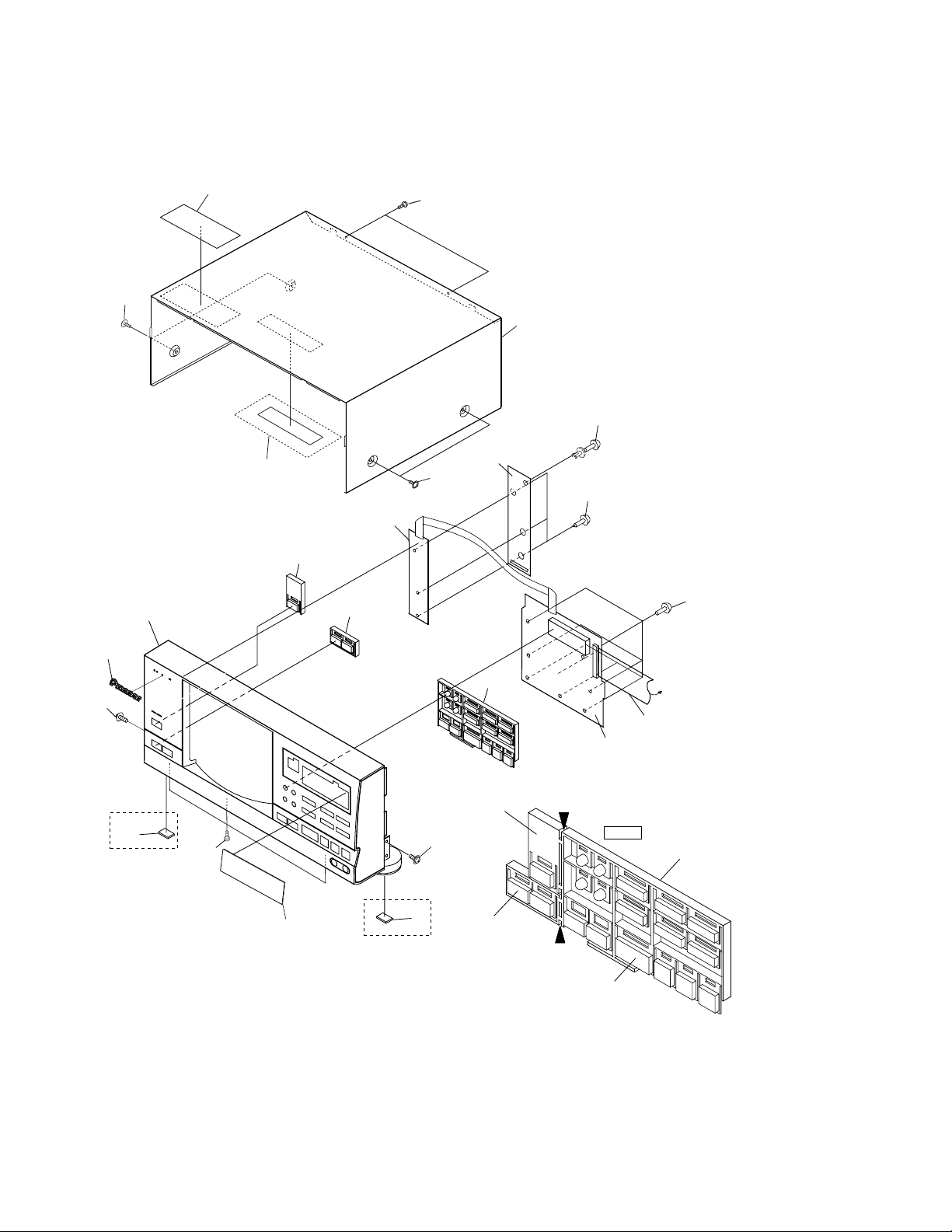
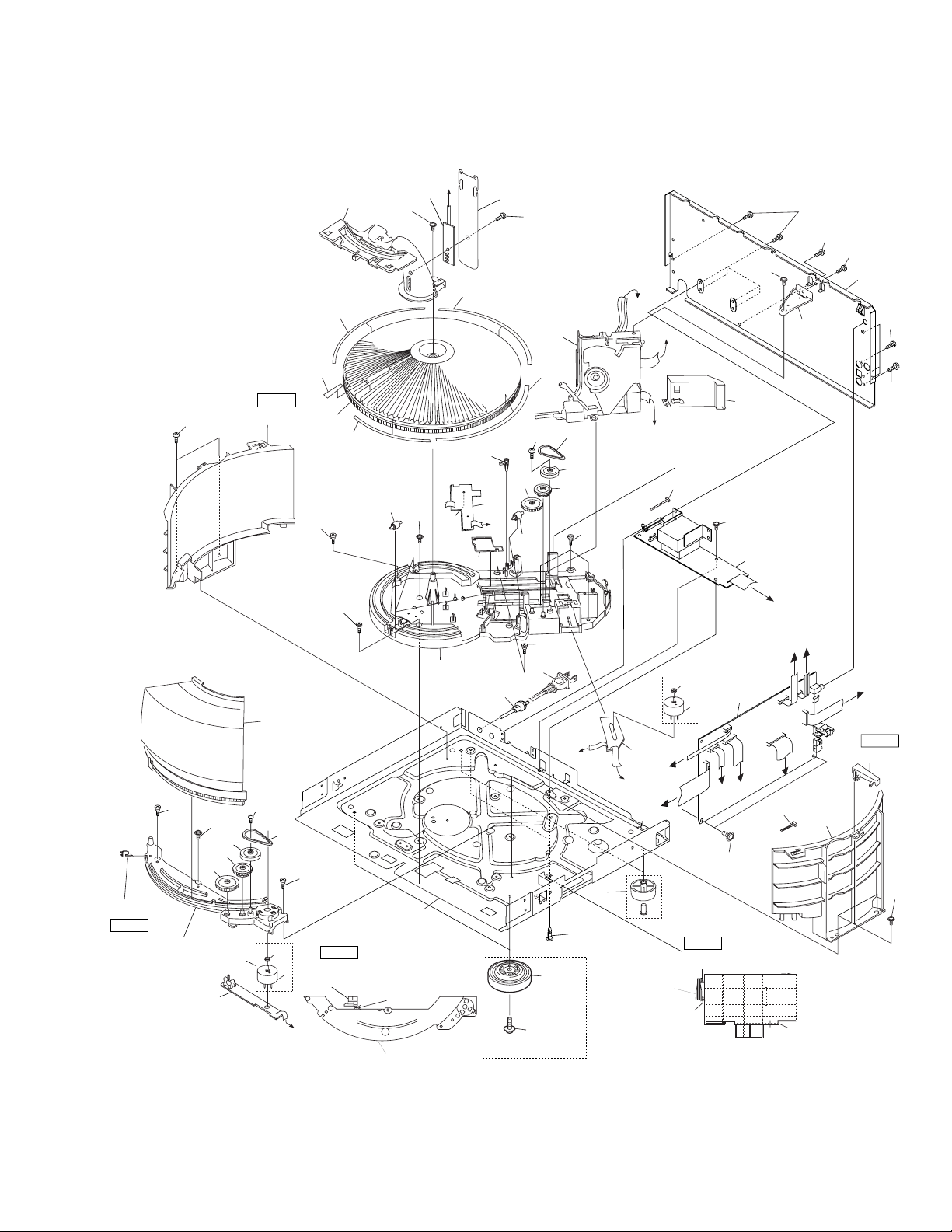
2.2 EXTERIOR
57
62
KUXQ/CA,KUXQ type only
50
54
55
61
51
58
53
62
68
4
44 (A)
68
44 (B)
46
63
13
PD-F908 only
60
47
13
PD-F908 only
No.44(A)
Power button
63
No.44(B)
Single loader
button
44 (C)
Cutting
Cutting
No.44(C)
Function button
A
11
3
Cutting position
Note
No.44(Function button)
4
Page 5
27
32(4/4)
65
6
D
32(3/4)
24
67
Refer to
''2.3 LOADING
MECHANISM
ASSY''
31
PD-F958, PD-F908
61
61
61
16
J
F
19
18
61
26(2/2)
Note2
63
15
26(1/2)
63
29
56
Note1
21(1/2)
52
64
30
28
25
5
23
34
59
15
26(2/2)
B
15
Note2
35
32(1/4)
42
15
cutting position
No.26(Hood Base)
cutting
26(1/2)
40
63
39
36
17
32(2/4)
64
38
8
H
42
15
12
10
20
60
PD-F958 Only
33
37
43
H
22
15
14
25
7
C
21(2/2)
E
D
A
69
34
59
cutting
cutting
41
63
2
G
J
E
1
G
C
B
69
21(1/2)
63
cutting positionNote1
No.21(Back Fence)
21(1/2)
66
F
Note1
21 (2/2)
63
5
Page 6

PD-F958, PD-F908
(1) EXTERIOR PARTS LIST
Mark No. Description Part No. Mark No. Description Part No.
1 Main Board Assy See Contrast table(2)
2 Power Board Assy See Contrast table(2)
NSP 4 Switch Board Assy See Contrast table(2)
NSP 5 Door Board Assy See Contrast table(2)
NSP 6 Center LED Board Assy See Contrast table(2)
NSP 7 Select Motor Board Assy PWZ3324
NSP 8 Sensor Board Assy PWZ3327
10 Cord Stopper CM - 22C
12 AC Power Cord PDG1064
NSP 17 Under Base PNA2255
3 Display Board Assy See Contrast table(2)
.............
9
11 F.F.C/30V See Contrast table(2)
13 Rubber Sheet See Contrast table(2)
14 Foot Assy REC1263
15 Screw C PBA1106
16 Screw PBA1108
18 Rear Base See Contrast table(2)
19 Stopper Angle PNB1559
Insulator See Contrast table(2)
20
21 Back Fence PNW2671
22 Locking Card Spacer VEC1596
23 Belt PEB1288
24 Cover PNM1294
25 Motor Assy PEA1333
26 Hood Base PNW2633
27 Center Pole PNW2634
28 Gear (Middle) PNW2906
29 Gear (Twin) PNW2642
30 Gear Pulley VNL1662
31 Loading Mechanism Assy PXA1589
32 Rack Label PAM1783
33 Belt PEB1288
34 Motor Pulley PNW1634
35 Disc Rack PNW2845
36 Mecha Base PNW2639
37 Gear PNW2906
38 Gear PNW2642
39 Slider PNW2643
40 Lock Lever PNW2644
41 Mecha Stopper PNW2646
42 Roller PNW2647
43 Gear Pulley VNL1662
44 Function Button See Contrast table(2)
.............
45
46 Name Plate PAM1776
47 Display Window See Contrast table(2)
.............
48
.............
49
50 Operation Panel See Contrast table(2)
51 Bonnet Case PYY1191
52 Hood PNW2865
53 Side Cover PNM1322
.............
54
55 65 Label See Contrast table (2)
56 Label PRW1520
57 Label PRW1523
58 Rivet RBM-003
59 Slider Motor VXM1033
Screw IBZ30P080FZK
60
61 Screw BBZ30P080FZK
62 Screw FBT40P080FZK
63 Screw IBZ30P060FMC
64 Screw IPZ20P080FMC
65 Screw IPZ30P080FCU
66 Screw PMZ30P060FZK
67 Screw PPZ30P050FMC
68 Screw PPZ30P100FMC
69 Binder ZCA-SKB90BK
6
Page 7
PD-F958, PD-F908
(2) CONTRAST TABLE
PD-F908/KUXQ,KCXQ and PD-F958/KUXQ/CA have the same construction except for the following:
Part No.
Mark No. Symbol & Description Remarks
1 Main Board Assy PWZ3895 PWZ3876 PWZ3876
2 Power Board Assy PWZ3900 PWZ3879 PWZ3879
3 Display Board Assy PWZ3904 PWZ3882 PWZ3882
NSP 4 Switch Board Assy PWZ3907 PWZ3885 PWZ3885
NSP 5 Door Board Assy PWZ3913 PWZ3890 PWZ3890
NSP 6 Center LED Board Assy PWZ3915 PWZ3892 PWZ3892
11 F.F.C/30V PDD1186 PDD1167 PDD1167
13 Rubber Sheet Not Used AEB1111 AEB1111
18 Rear Base PNA2452 PNA2450 PNA2450
20 Insulator PNW2766 Not Used Not Used
44 Function Button PAC1908 PAC1905 PAC1905
47 Display Window PAM1772 PAM1774 PAM1774
50 Operation panel PNW2869 PNW2867 PNW2867
55 65 Label ORW1069 ORW1069 Not used
PD-F958/ PD-F908/ PD-F908/
KUXQ/CA KUXQ KCXQ
(40P F.F.C) (32P F.F.C) (32P F.F.C)
7
Page 8
PD-F958, PD-F908
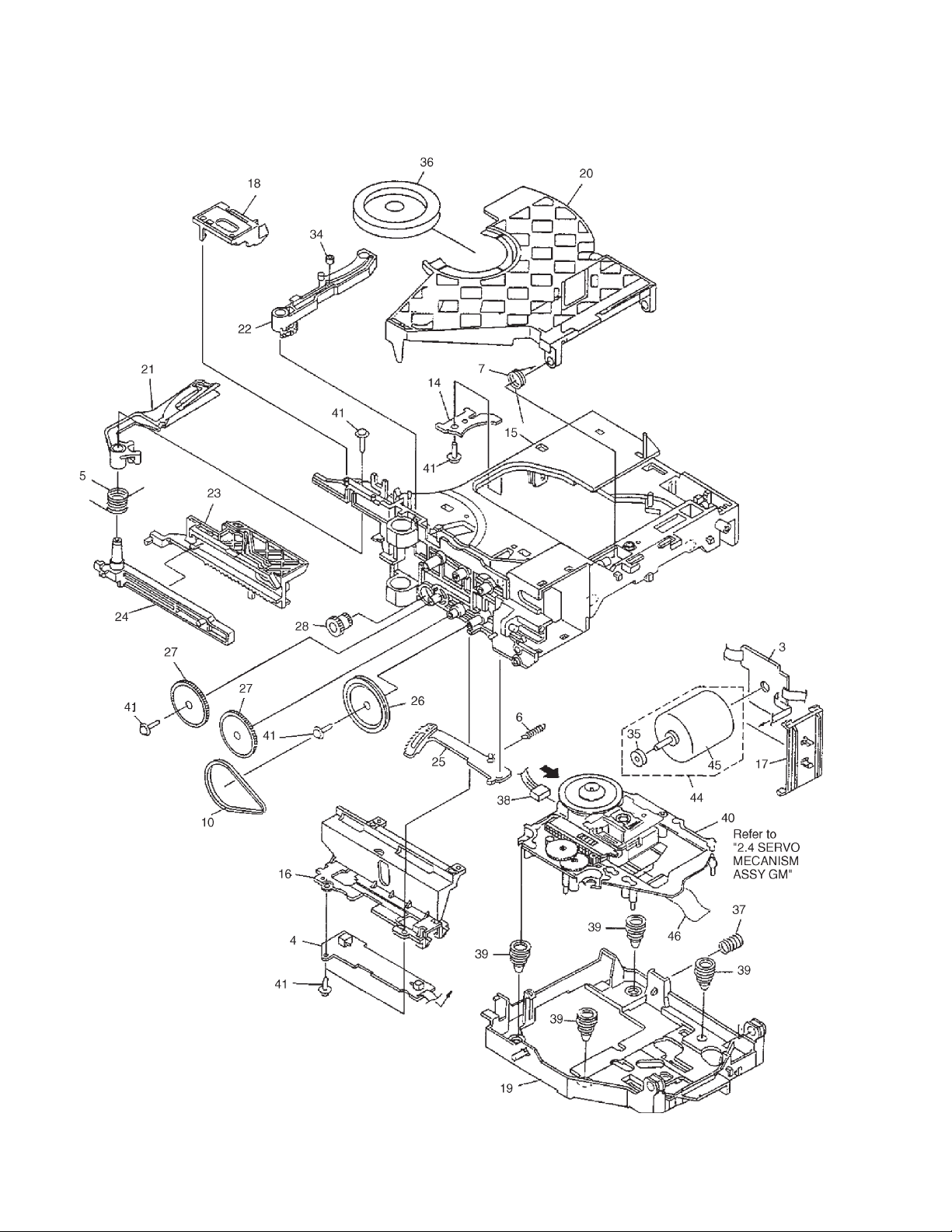
2.3 LOADING MECHANISM ASSY
8
Page 9

LOADING MECHANISM ASSY PARTS LIST
Mark No. Description Part No.
…………
1
…………
NSP 3 Loading Motor Board Assy PWZ3337
NSP 4 Load SW Board Assy PWZ3334
NSP 14 Servo Stopper S ANB7047
2
5 Arm A Spring2 ABH7124
6 Gear Plate Spring ABH7051
7 Clamp Spring ABH7107
…………
8
…………
9
10 Loading Belt AEB7029
…………
11
…………
12
…………
13
15 Loading Base ANW7086
16 Cam Cover ANW7052
17 Motor Holder ANW7053
18 Sensor Holder ANW7119
19 Float Base 96 PNW2700
20 Clamper Holder ANW7117
PD-F958, PD-F908
21 Arm A2 ANW7128
22 Arm (B) ANW7058
23 Drive Plate ANW7059
24 Arm Plate ANW7060
25 Gear Plate ANW7111
26 Gear Pulley (B) ANW7062
27 Gear A ANW7063
28 Drive Gear ANW7064
…………
29
…………
30
…………
31
…………
32
…………
33
34 Roller B ANW7075
35 Motor Pulley PNW1634
36 Clamper PNW2743
37 Float Spring ABH7049
38 Connector Assy (4P) RDE1043
39 Float Rubber AEB7028
NSP 40 Servo Mechanism Assy GM PXA1591
41 Screw IPZ20P080FMC
…………
42
…………
43
44 Motor Assy AEA7006
45 Loading Motor VXM1034
46 16P FFC/30V PDD1180
Froil (for Service) GYA1001
Ha Narl (for Service) GEM1016
9
Page 10
PD-F958, PD-F908
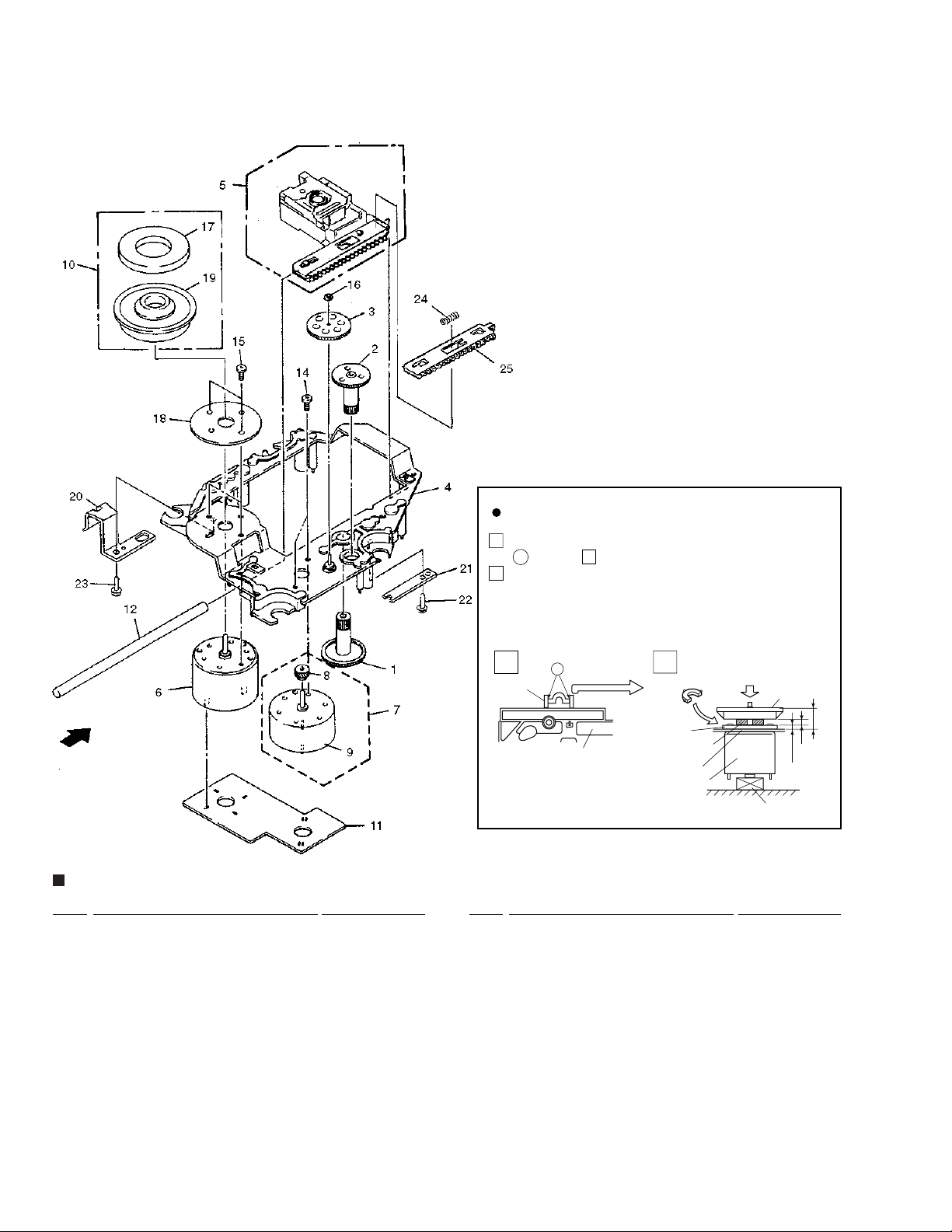
2.4 SERVO MECHANISM ASSY GM
Use nipper or other tool to cut the three sections marked
SERVO MECHANISM ASSY GM PARTS LIST
Mark No. Description Part No.
1 Gear 1 PNW2052
2 Gear 2 PNW2053
3 Gear 3 PNW2054
4 Carriage Base PNW2699
5 Pickup Assy - S PEA1335
6 D.C. Motor Assy (SPINDLE) PEA1235
7 Carriage DC Motor Assy PEA1246
8 Pinion Gear PNW2055
9 Carriage DC Motor/0.3W PXM1027
10 Disc Table Assy PEA1314
11 Mechanism Board Assy PWX1192
12 Guide Bar PLA1094
Mark No. Description Part No.
NSP 19 Disc Table PNW2410
NSP 20 Float Angle ANB7020
How to Install the Disc Table
1
A
in figure . Then remove the spacer
While supporting the spindle motor shaft with the
2
stopper, put spacer on top of the yoke M, and stick the
disc table on top (takes about 9kg pressure). Detach the
spacer.
1
Spacer
13
14 Screw JFZ17P025FZK
15 Screw JFZ20P040FMC
16 Washer WT12D032D025
17 Clamp Magnet PMF1014
18 Yoke M PNB1312
21 Gear Stopper PNB1303
22 Screw BPZ20P060FMC
23 Screw BPZ26P100FMC
24 PU Rack Spring ABH7077
25 Rack Holder PNW2056
A
Float Base
…………
1
2
Spacer
Yoke M
Spacer Setting
Position
Carriage Base
Spindle Motor
(Pressure of about 9 kg)
Disc Table
1.2mm
Stopper
0.9mm
±0.05mm
6.9mm
10
Page 11
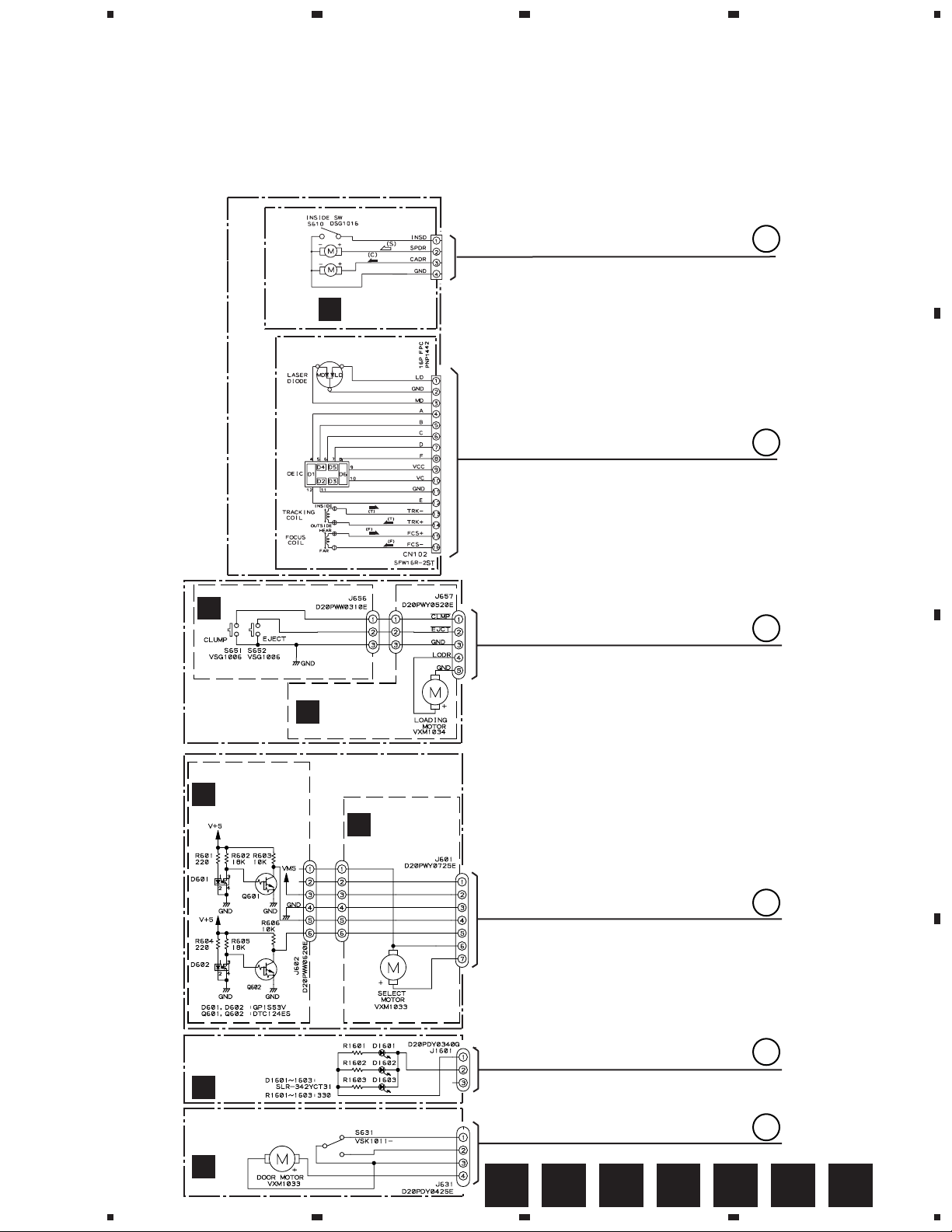
1
23
4
PD-F958, PD-F908
3. SCHEMATIC DIAGRAM
Note: When ordering service parts, be sure to refer to "EXPLODED VIEW AND PARTS LIST" or "PCB PARTS LIST".
3.1 MECHANISM BOARD ASSY,SENSOR BOARD ASSY,LOAD SW BOARD ASSY,SELECT
MOTOR BOARD ASSY,LOADING MOTOR BOARD ASSY,CENTER LED BOARD ASSY,
DOOR BOARD ASSY and PICKUP ASSY
A
SPINDLE
MOTOR
ASSY
PEA1235
CARRIAGE
MOTOR
ASSY
PEA1246
PICK UP ASSY
(PEA1335)
(PXA1591)
SERVO MECHANISM ASSY GM
LOAD SW BOARD
ASSY (PWZ3334 )
B
A
MECHANISM
BOARD ASSY
(PWX1192)
A
CN610
173979-4
B
B
C
LOADING MECHA
BOARD ASSY
(PWX1474)
SENSOR BOARD
ASSY
(PWZ3327)
D
CENTER LED BOARD ASSY
PD-F958/KU/CA:(PWZ3915)
PD-F908/KU,KC:(PWZ3892)
C
F
DOOR BOARD ASSY
PD-F958/KU/CA:(PWZ3913)
PD-F908/KU,KC:(PWZ3890)
LOADING MOTOR
BOARD ASSY
(PWZ3337)
SELECT MECHA
BOARD ASSY
(PWX1465)
SELECT MOTOR
BOARD ASSY
(PWZ3324)
E
C
D
E
D
F
G
E F GA B C D
1
2
3
4
11
Page 12
1
234
PD-F958, PD-F908
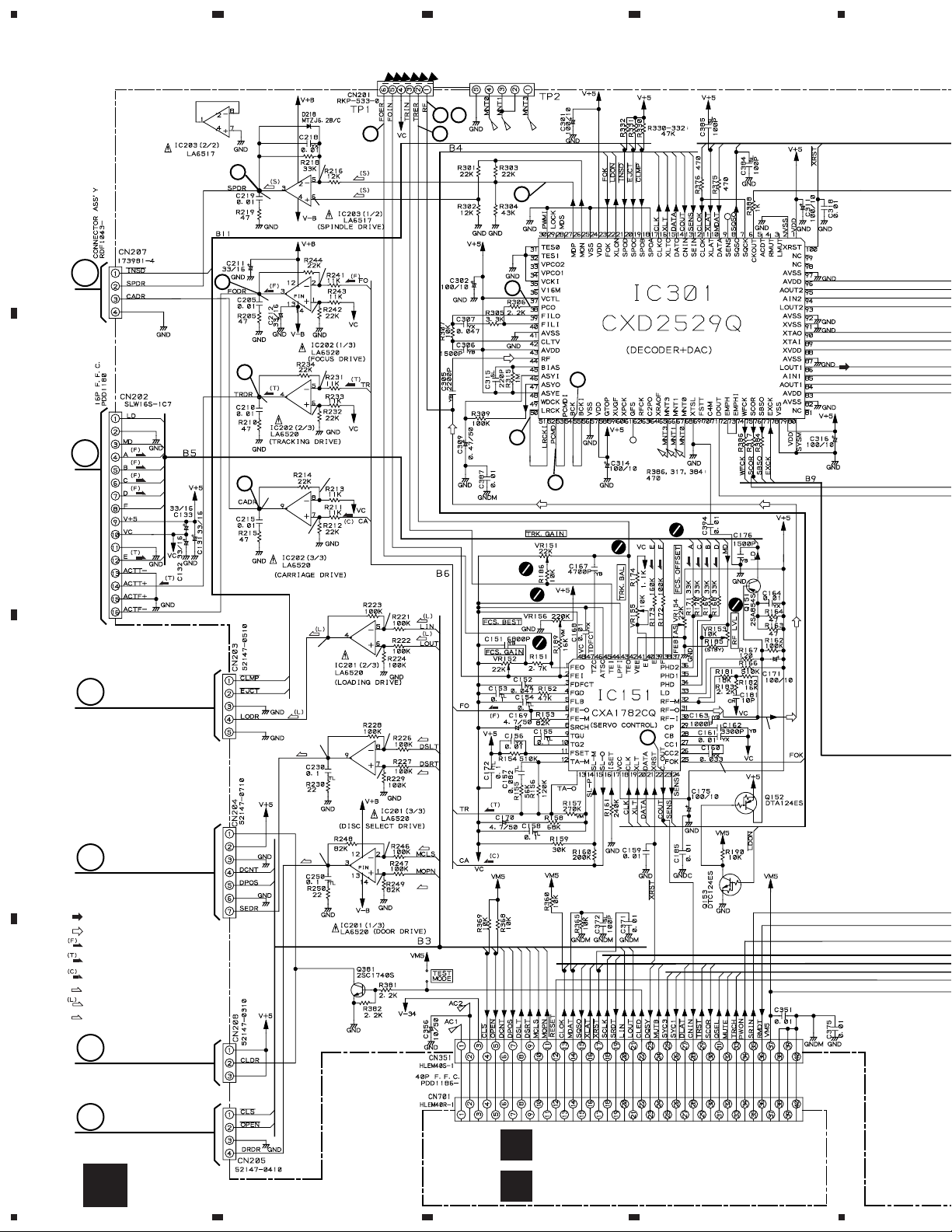
3.2 MAIN BOARD ASSY and POWER BOARD ASSY (FOR PD-F958)
2
23
43
1.6V
1.6V
1.7V
1.8V
1.8V
1.6V
1.6V
1.7V
33
53
16
18
19
(F)
(F)
(F)
(F)
(T)
(T)
0V
A
A
B
B
7
-O.7V
5
OV
6
OV
8
0.2V
0V
0V
C
0V
0V
(SEL)
C
0V
0V
D
SIGNAL ROUTE
: AUDIO SIGNAL
: EFM SIGNAL
: FOCUS SERVO LOOP
: TRACKING SERVO LOOP
: CARRIAGE SERVO LOOP
(S)
: SPINDLE DRIVE
: LOADING DRIVE
(D)
: DOOR DRIVE
(D)
0V
(SEL)
(SEL)
0V
(D)
(D)
23
B12
3.4V
5.0V
E
D
12
F
DISPLAY BOARD ASSY
L
H
1234
M
(PWZ3904)
SWITCH BOARD ASSY
(PWZ3907)
Page 13
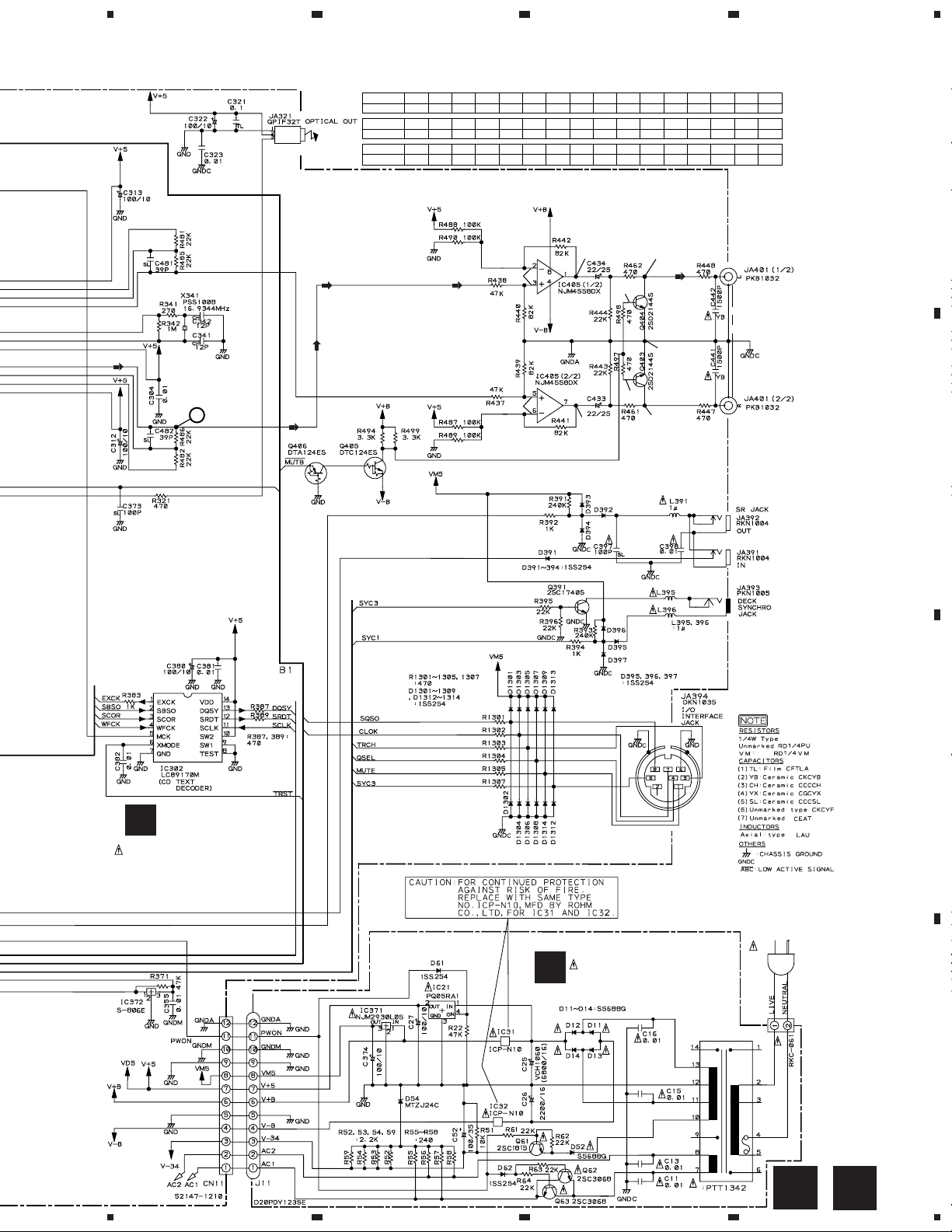
5
67
8
PD-F958, PD-F908
IC301(CXD2529Q) :PLAY MODE
PIN No.
Voltage(V)
PIN No.
Voltage(V)
PIN No.
Voltage(V)
10
1 2 3 - 4 7 8 9 10 11 12 13 14 16 17 23 24 25
5
26 27 38 39 40 41 42 43 44 45 46 47 48 50-55 56 57
5
2.6-2.7
61 71 75 78 79 82 83 87 88 89-9084-86 91-92 93-95 9796 100
5
2.5 2.5 2.5 2.5
4.7
2.5
3.1 3.12.5 2.5 0.9 2.5 2.5 2.5
00 505 0 5 0 50 5
0 50
1.6V
1.6V
55550 00
4.4 4.7 4.7 4.71.2-1.41.2-1.3
55
0V
0V
0.05
0V
-9.2
0V
-9.2
0V
LINE OUT
JACK
A
B
H
MAIN BOARD ASSY
(PWZ3895)
B12
(UNIT : Ω )
(UNIT : µF)
(UNIT : µH)
B1
AC120V
60Hz
AC POWER CORD
:PDG1064
POWER BOARD ASSY
I
(PWZ3900)
C
D
P0WER TRANSFORMER
5
6
7
H
8
I
13
Page 14
1
234
PD-F958, PD-F908
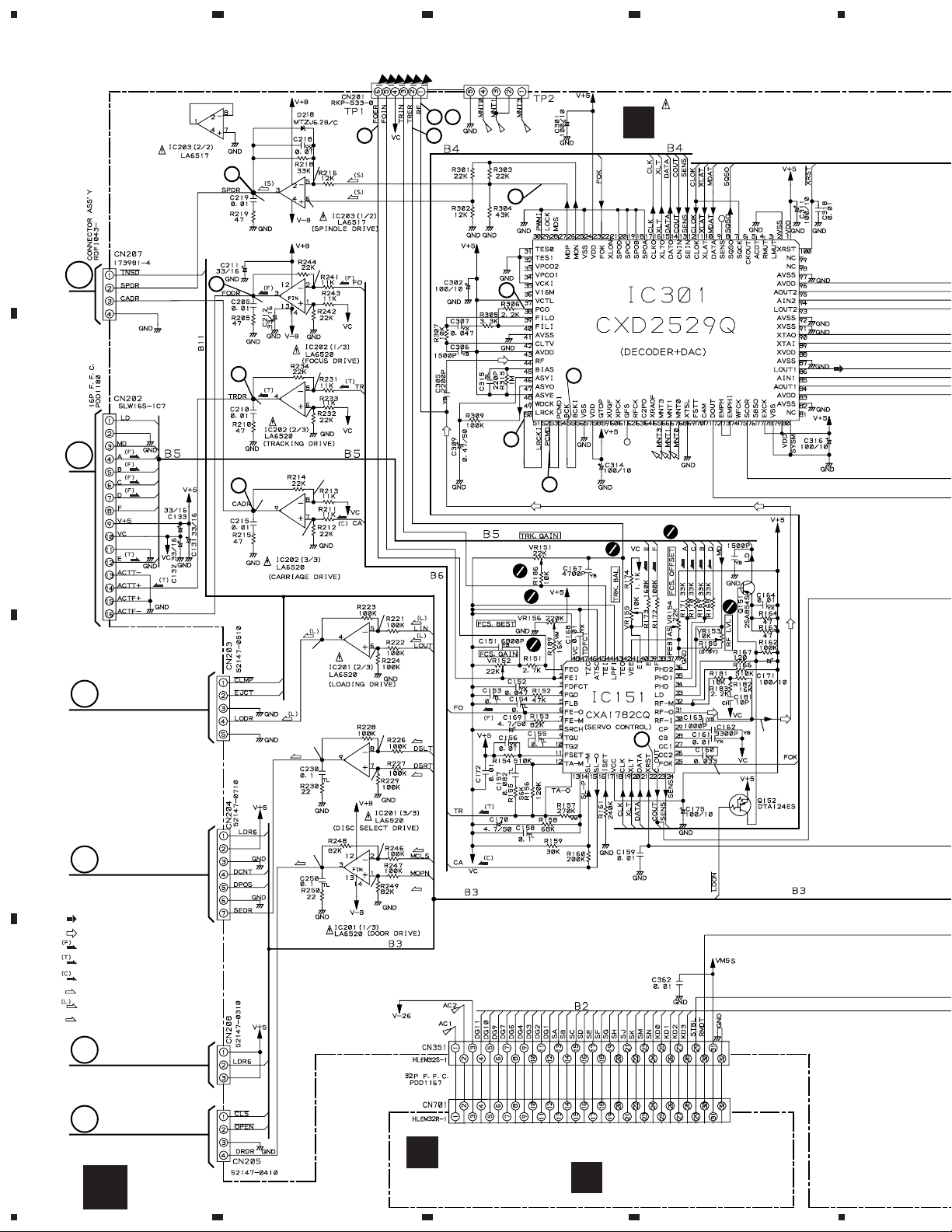
3.3 MAIN BOARD ASSY and POWER BOARD ASSY (FOR PD-F908)
2
23
43
J
MAIN BOARD ASSY
(PWZ3876)
1.6V
1.6V
1.7V
1.8V
1.8V
1.6V
1.6V
1.7V
33
53
16
18
19
(F)
(F)
(F)
(F)
(T)
(T)
0V
A
A
B
B
7
-O.7V
5
OV
6
OV
8
0.2V
B3
0V
0V
C
0V
(SEL)
0V
(SEL)
23
C
(SEL)
0V
(D)
(D)
D
SIGNAL ROUTE
: AUDIO SIGNAL
: EFM SIGNAL
: FOCUS SERVO LOOP
: TRACKING SERVO LOOP
: CARRIAGE SERVO LOOP
(S)
: SPINDLE DRIVE
: LOADING DRIVE
(D)
: DOOR DRIVE
0V
0V
(D)
0V
3.4V
5.0V
E
D
14
F
DISPLAY BOARD ASSY
N
(PWZ3882)
J
1234
SWITCH BOARD ASSY
O
(PWZ3885)
Page 15
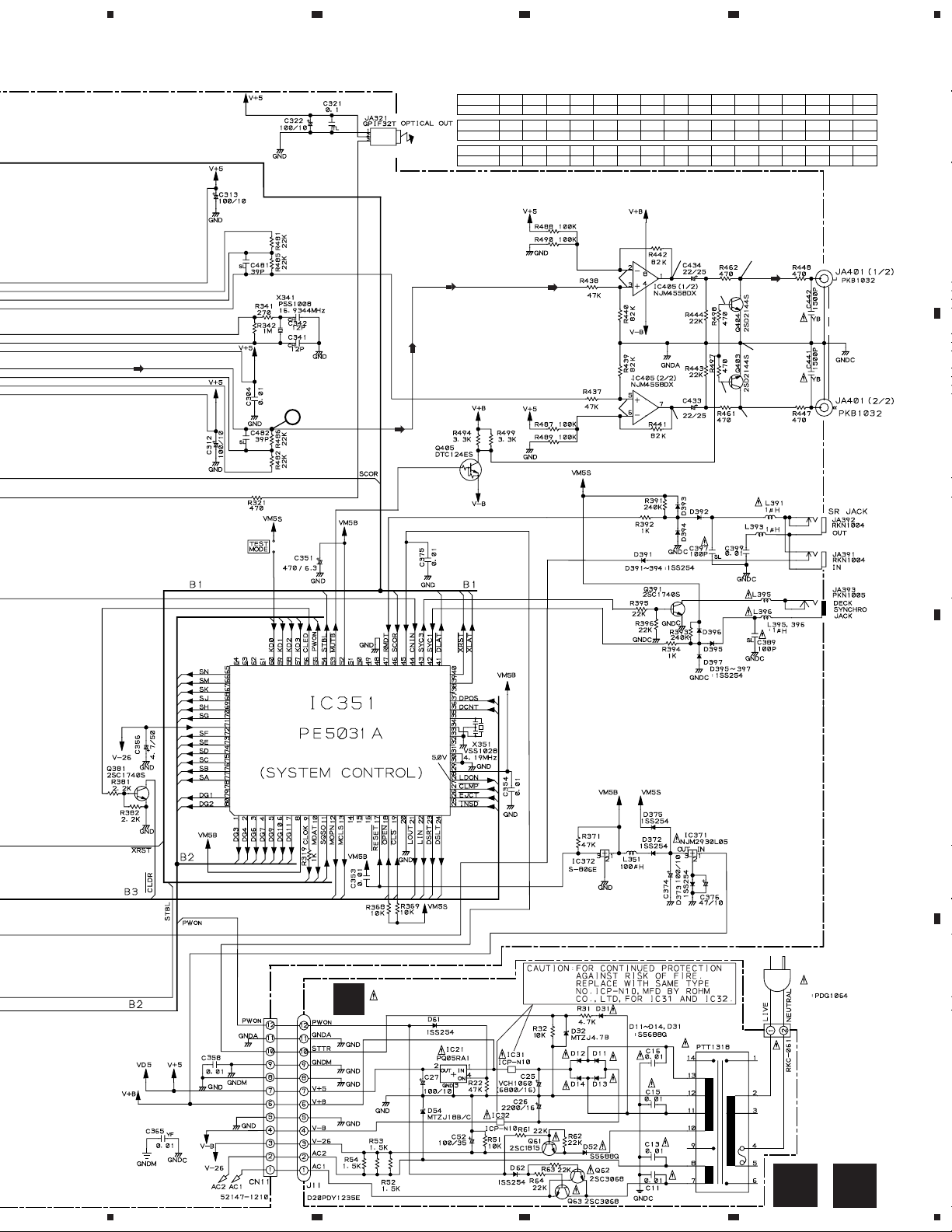
5
67
8
PD-F958, PD-F908
IC301(CXD2529Q) :PLAY MODE
PIN No.
Voltage(V)
PIN No.
Voltage(V)
PIN No.
Voltage(V)
10
1 2 3 - 4 7 8 9 10 11 12 13 14 16 17 23 24 25
5
26 27 38 39 40 41 42 43 44 45 46 47 48 50-55 56 57
5
2.6-2.7
61 71 75 78 79 82 83 87 88 89-9084-86 91-92 93-95 9796 100
5
2.5 2.5 2.5 2.5
4.7
2.5
3.1 3.12.5 2.5 0.9 2.5 2.5 2.5
00 505 0 5 0 50 5
0 50
1.6V
1.6V
55550 00
4.4 4.7 4.7 4.71.2-1.41.2-1.3
55
0V
0V
0.05
0V
-9.2
0V
-9.2
0V
LINE OUT
JACK
A
B
C
AC 120V
60 Hz
AC POWER CORD
K
POWER BOARD ASSY
(PWZ3879)
POWER TRANSFORMER
D
J
5
6
7
8
K
15
Page 16
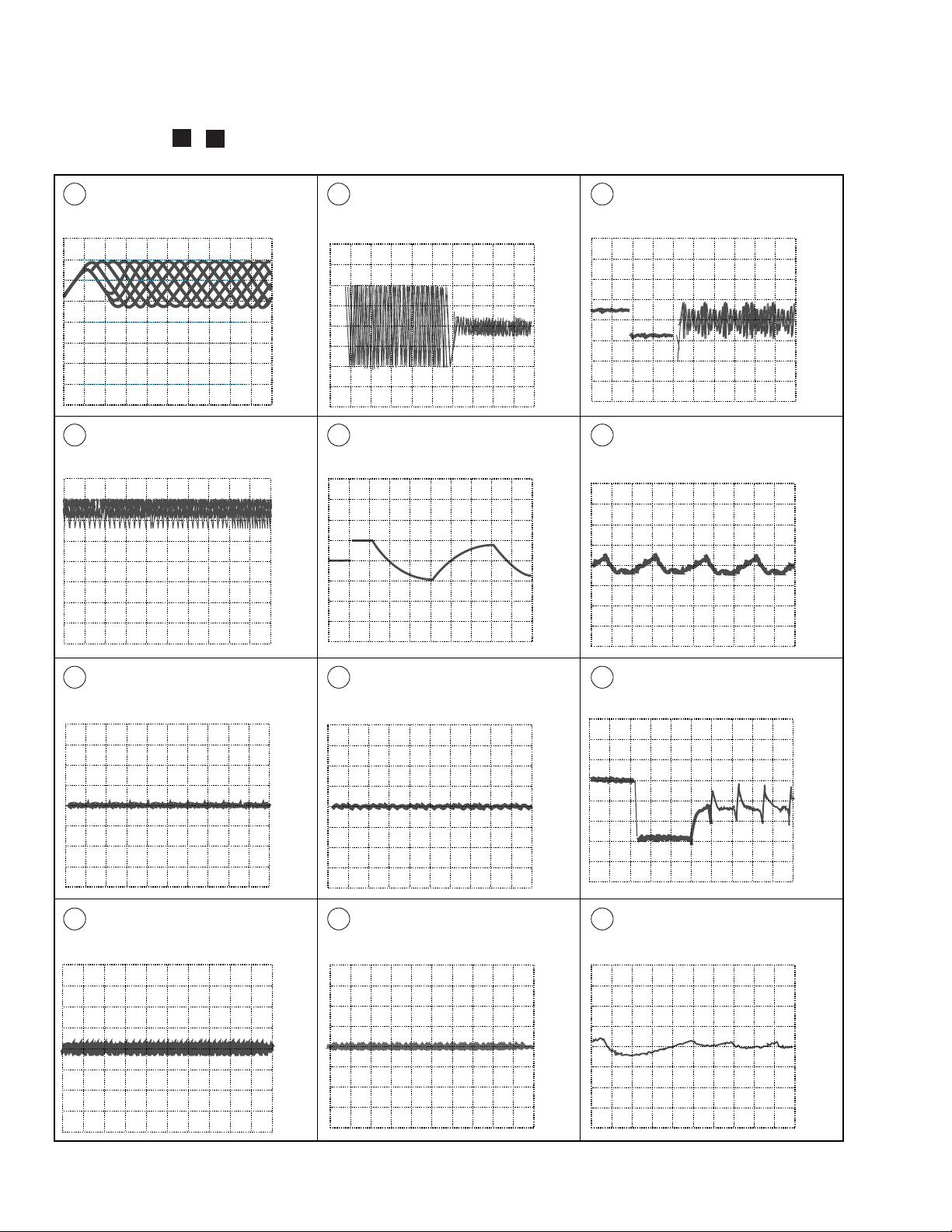
PD-F958, PD-F908
Waveforms (
Note: The encircled numbers denote measuring point in the schematic diagram.
TP1-Pin 1: PLAY MODE (RF)
2
500mV/div 500nsec/div
TP1-Pin 1: TRACK SEARCH MODE
25
(RF)
500 mV/div 200 µsec/div
H,H )
H
)
J
,
TP1-Pin 2: 50T - JUMP (*1) MODE
(TRER)
200mV/div 1msec/div
– VC
IC202-Pin 3: FOCUS-IN (*2) MODE
(FODR)
1V/div 200msec/div
– VC
– VC
– GND
∗1 50T-JUMP: After switching to the pause mode, press
the manual search key.
∗2 FOCUS-IN: Press the play key without loading a disc.
IC202-Pin 4: 50T - JUMP (*1) MODE
6'4'
(TRDR)
500mV/div 1msec/div
– GND
IC203-Pin 3: PLAY MODE (SPDR)
7
1V/div 50msec/div
– GND
TP1-Pin 6: PLAY MODE (FOER)
3
100mV/div 10msec/div
TP1-Pin 2: PLAY MODE (TRER)
4
200mV/div 1msec/div
– VC
– VC
IC202-Pin 3: PLAY MODE (FODR)
5
1V/div 1msec/div
IC202-Pin 4: PLAY MODE (TRDR)
6
500mV/div 1msec/div
– GND
– GND
IC203-Pin 3: TRACK SEARCH MODE
7
(SPDR)
2V/div 50msec/div
IC202-Pin 9: PLAY MODE (CADR)
8
0.2V/div 2sec/div
– GND
– GND
16
Page 17
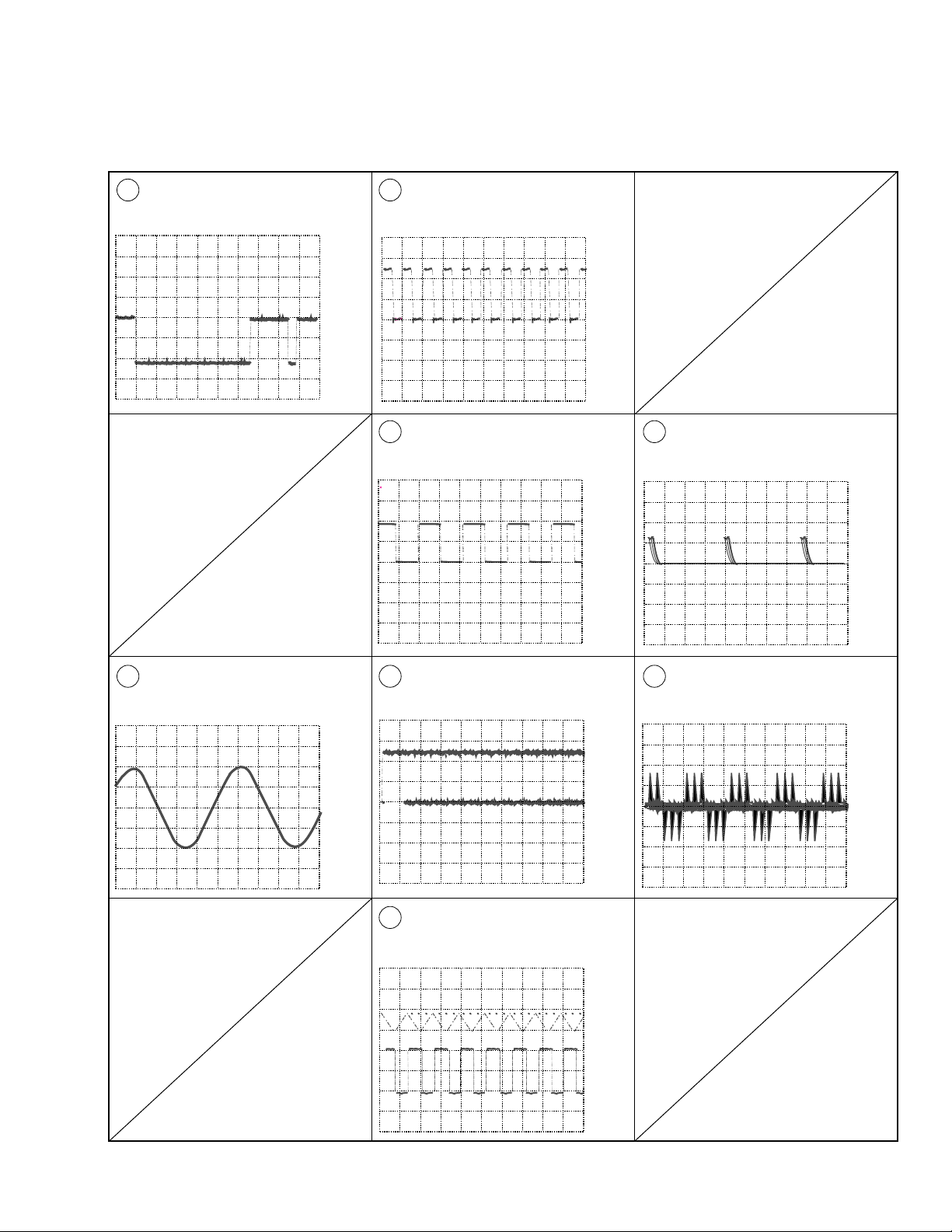
Waveforms
PD-F958, PD-F908
IC202-Pin 9: TRACK SEARCH MODE
8
(CADR)
2V/div 200msec/div
IC301-Pin 54 : PLAY MODE (1kHz)
16
(BCK)
2V/div 500nsec/div
IC301-Pin 50 : PLAY MODE (1kHz)
18
(LRCK)
2V/div 10 µsec/div
– GND– GND
– GND
IC301-Pin 27 : PLAY MODE (MDP)
33
2V/div 2 µsec/div
– GND
IC301-Pin 86 : PLAY MODE (1kHz)
10
(LOUT 1)
1V/div 200msec/div
– GND
IC301-Pin 52 : PLAY MODE (1kHz)
19
(PCMD)
2V/div 500nsec/div
TRACK SEARCH MODE
23
Upper : TP1-Pin 1 (RF) 1V/div
Lower : IC151-Pin 23 (C.OUT)
2V/div 50 µsec/div
– GND
– GND
– GND
IC301-Pin 38 : PLAY MODE
53
(PCO)
2V/div 10 µsec/div
– GND
17
Page 18
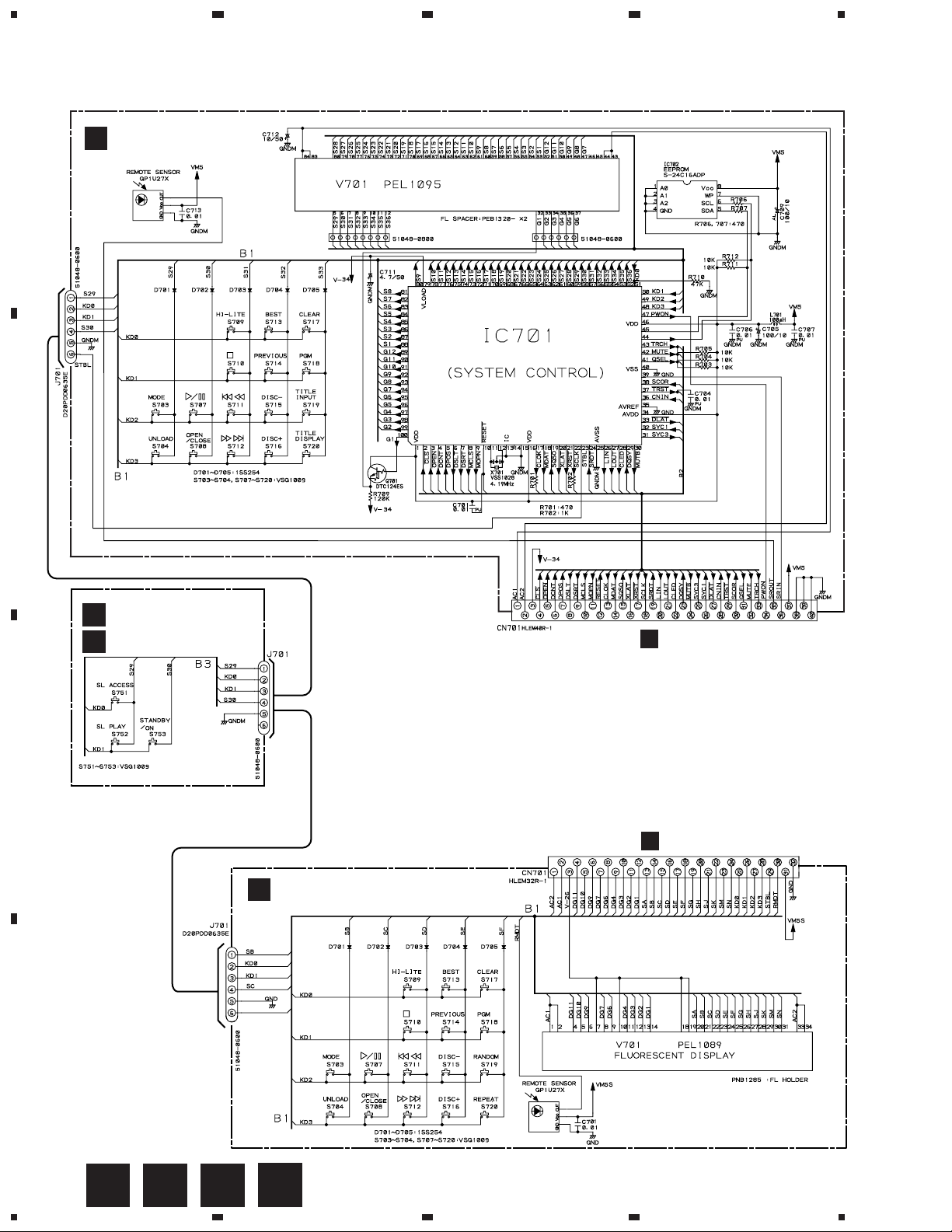
1
234
PD-F958, PD-F908
3.4 DISPLAY BOARD ASSY and SWITCH BOARD ASSY
DISPLAY BOARD ASSY
L
PD-F958/KU/CA:(PWZ3904)
A
B
PE5032A
SWITCH BOARD ASSY
PD-F958/KU/CA: (PWZ3907)
M
H
PD-F908/KU,KC: (PWZ3885)
O
SWITCHES
SWITCH BOARD ASSY
S751 : SL ACCESS
S752 : SL PLAY
S753 : POWER STANDBY/ON
C
DISPLAY BOARD ASSY
N
PD-F908/KU,KC:(PWZ3882)
DISPLAY BOARD ASSY
S703 : MODE
S704 : UNLOAD
S707 : 6
S708 : OPEN/CLOSE
S709 : HI-LITE
S710 : 7
S711 : 4 1
S712 : ¡ ¢
S713 : BEST
S714 : PREVIOUS
CN351
S715 : DISC –
S716 : DISC +
S717 : CLEAR
S718 : PGM
S719 : TITLE INPUT (PD-F958)
: RANDOM (PD-F908)
S720 : TITLE DISPLAY (PD-F958)
: REPEAT (PD-F908)
J
CN351
D
18
L
M N
1234
O
Page 19
1
23
PD-F958, PD-F908
4. PCB CONNECTION DIAGRAM
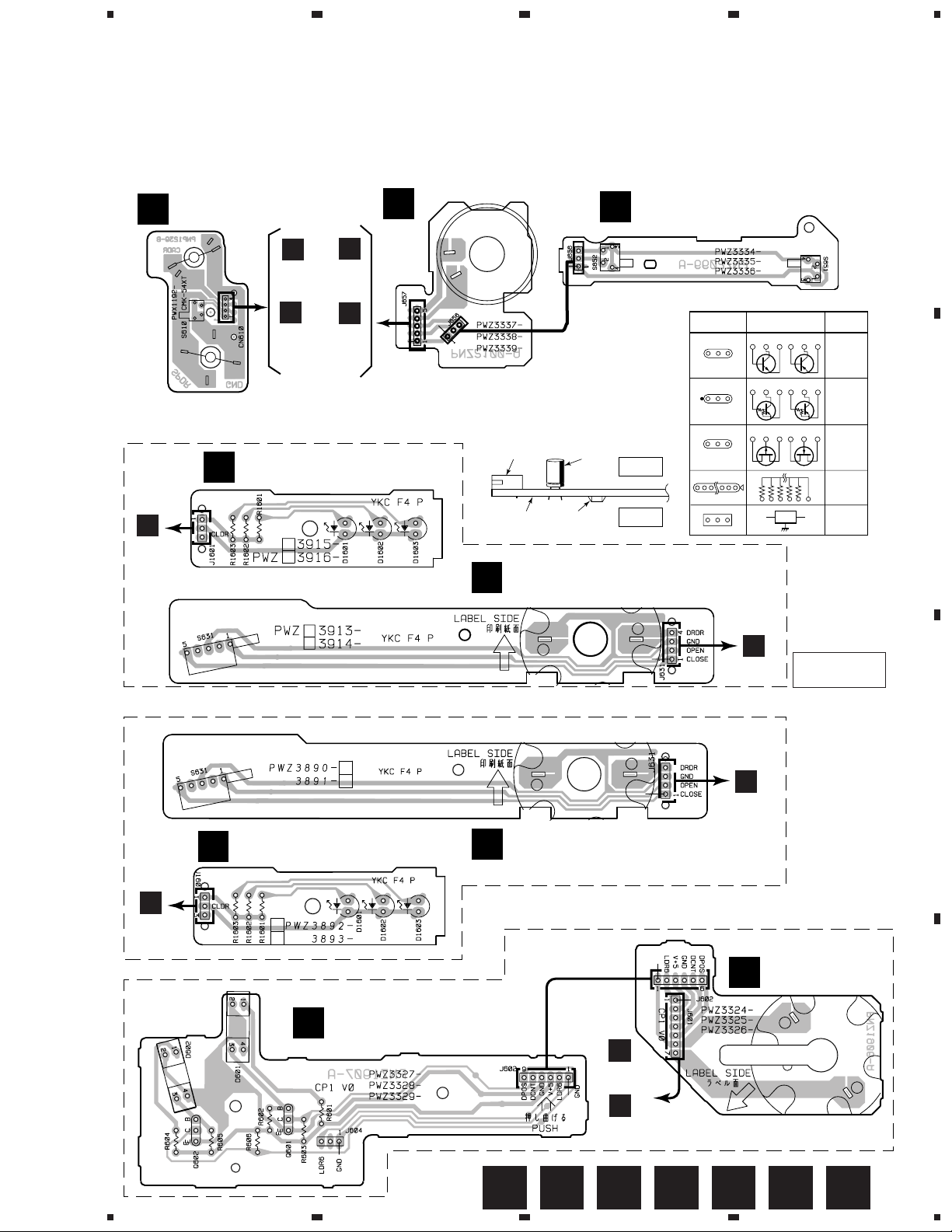
4.1 MECHANISM BOARD ASSY, SENSOR BOARD ASSY, LOAD SW BOARD ASSY,
SELECT MOTOR BOARD ASSY, LOADING MOTOR BOARD ASSY,
CENTER LED BOARD ASSY and DOOR BOARD ASSY
LOADING MOTOR BOARD ASSY
MECHANISM BOARD ASSY
A
C
LOAD SW BOARD ASSY
B
4
A
M
CARRIAGE
MOTOR
INSIDE
SPINDLE
MOTOR
PNP1239-B
For PD-F958
H
CN208
H
CN207 CN203
(PD-F958)
J
CN207 CN203
M
F
(PD-F908)
NOTE FOR PCB DIAGRAMS:
1. Part numbers in PCB diagrams match those in the
schematic diagrams.
2. A comparison between the main parts of PCB and
schematic diagrams is shown below.
CENTER LED BOARD ASSY
H
J
3. The parts mounted on this PCB include all necessary
parts for several destination.
For further information for respective destinations,
be sure to check with the schematic diagram.
4. Viewpoint of PCB diagrams
P. C. Board Chip Part
DOOR BOARD ASSY
G
CapacitorConnector
SIDE A
SIDE B
PNP1458-A
Symbol in PCB
Diagrams
BCE
BCE
DGS
PNP1455-B
H
CN205
Symbol in Schematic
Diagrams
BCE
BCE
BCEBCE
DGSDGS
SIDE A
Part Name
Transistor
Transistor
with resistor
Field effect
transistor
Resistor
array
3-terminal
regulator
B
For PD-F908
F
J
CN208
CENTER LED BOARD ASSY
SENSOR BOARD ASSY
D
DOOR BOARD ASSY
G
H
CN204
(PD-F958)
J
CN204
(PD-F908)
J
CN205
PNP1454-A
SELECT MECHA BOARD ASSY
SELECT MOTOR
E
BOARD ASSY
PNP1457–A
C
D
1
2
3
4
GD E FA B C
19
Page 20

1
PD-F958, PD-F908
234
4.2 MAIN BOARD ASSY (FOR PD-F958)
MAIN BOARD ASSY
H
A
A
CN610
I
J11
B
C
J657
To PICKUP ASSY
SIDE A
VR156
VR155 VR154 VR153
VR152
VR151
Q151 Q391IC203Q153IC201
Q405Q452Q321
IC401 IC405 IC406Q451 Q454 Q403Q453
C
D
E
J601
F
J1601
G
J631
L
CN701
IC202 IC151 Q152
IC301 Q406 Q404
IC372
Q381
20
PNP1455-B
H
1234
Page 21

1
23
PD-F958, PD-F908
4.3 DISPLAY BOARD ASSY, SWITCH BOARD ASSY and POWER BOARD ASSY
(FOR PD-F958)
SWITCH BOARD
M
ASSY
L
DISPLAY BOARD ASSY
H
CN351
4
SIDE A
A
B
I
POWER BOARD ASSY
AC IN
1
Q701IC701Q702 IC702
H
CN11
Q61
Q62 Q63
I
2
3
IC21 IC371
IC31 IC32
L
PNP1455-B
M
4
21
C
D
Page 22

1
PD-F958, PD-F908
234
4.4 MAIN BOARD ASSY(FOR PD-F908)
MAIN BOARD ASSY
J
A
A
CN610
K
J11
B
C
J657
To PICKUP ASSY
SIDE A
Q151 Q391IC203IC201IC351IC372 Q381
VR156
VR155 VR154 VR153
Q403 Q453
Q454
Q405
Q452IC371
C
E
J601
F
J1601
VR152
VR151
IC202 IC151 Q152
IC301Q372 Q404
Q322 Q341 IC401 IC405 IC406Q451
D
G
J631
N
CN701
22
PNP1454–A
J
1234
Page 23

1
23
PD-F958, PD-F908
4.5 DISPLAY BOARD ASSY, SWITCH BOARD ASSY and POWER BOARD ASSY
(FOR PD-F908)
SWITCH BOARD
O
ASSY
N
DISPLAY BOARD ASSY
J
CN351
4
SIDE A
A
B
K
POWER BOARD ASSY
AC IN
1
Q711
C
J
CN11
D
IC32 IC31 Q62
K
2
3
Q63
IC21Q61
PNP1454-A
ON
4
23
Page 24

PD-F958, PD-F908
5. PCB PARTS LIST
NOTES : ÷ Parts marked by “ NSP ” are generally unavailable because they are not in our Master Spare Parts List.
÷ The
÷ When ordering resistors, first convert resistance values into code form as shown in the following examples.
LIST OF WHOLE PCB ASSEMBLIES
Mark Symbol and Description Remarks
NSP MOTHER BOARD ASSY PWM2269 PWM2266 PWM2266
NSP SWITCH BOARD ASSY PWZ3907 PWZ3885 PWZ3885
NSP DOOR BOARD ASSY PWZ3913 PWZ3890 PWZ3890
NSP CENTER LED ASSY PWZ3915 PWZ3892 PWZ3892
mark found on some component parts indicates the importance of the safety factor of the part.
Therefore, when replacing, be sure to use parts of identical designation.
Ex. 1 When there are 2 effective digits (any digit apart from 0), such as 560 ohm and 47k ohm (tolerance is shown by
J = 5%, and K = 10%).
560 Ω = 56 × 10
47k Ω = 47 × 10
0.5 Ω = R50 ...................................................................... RN2H Â 5 0 K
1 Ω = 1R0 ......................................................................... RS1P 1 Â 0 K
Ex. 2 When there are 3 effective digits (such as in high precision metal film resistors).
5.62k Ω = 562 × 10
MAIN BOARD ASSY PWZ3895 PWZ3876 PWZ3876
POWER BOARD ASSY PWZ3900 PWZ3879 PWZ3879
DISPLAY BOARD ASSY PWZ3904 PWZ3882 PWZ3882
1
= 561................................................... RD1/4PU 5 6 1 J
3
= 473 .................................................. RD1/4PU 4 7 3 J
1
= 5621 ........................................... RN1/4PC 5 6 2 1 F
Part No.
PD-F958/ PD-F908/ PD-F908/
KU/CA KU KC
NSP SELECT MECHA BOARD ASSY PWX1465 PWX1465 PWX1465
NSP SELECT MOTOR BOARD ASSY PWZ3324 PWZ3324 PWZ3324
NSP SENSOR BOARD ASSY PWZ3327 PWZ3327 PWZ3327
NSP LOADING MECHA BOARD ASSY PWX1474 PWX1474 PWX1474
NSP LOAD SW BOARD ASSY PWZ3334 PWZ3334 PWZ3334
NSP LOADING MOTOR BOARD ASSY PWZ3337 PWZ3337 PWZ3337
NSP SERVO MECHANISM ASSY GM PXA1591 PXA1591 PXA1591
LOADING MECHANISM ASSY PXA1589 PXA1589 PXA1589
MECHANISM BOARD ASSY PWX1192 PWX1192 PWX1192
CONTRAST OF PCB ASSEMBLIES
SWITCH BOARD Assy
Although PWZ3907 and PWZ3885 are different in part number, they consist of the same components.
DOOR BOARD Assy
Although PWZ3913 and PWZ3890 are different in part number, they consist of the same components.
CENTER LED BOARD Assy
Although PWZ3915 and PWZ3892 are different in part number, they consist of the same components.
24
Page 25

PARTS LIST FOR PD-F958/KU/CA
PD-F958, PD-F908
Mark No. Description Part No.
MAIN BOARD ASSY (PWZ3895)
H
SEMICONDUCTORS
IC151 CXA1782CQ
IC301 CXD2529Q
IC203 LA6517
IC201, IC202 LA6520
IC302 LC89170M
IC372 S-806E
IC405 NJM4558DX
Q151 2SA854S
Q381, Q391 2SC1740S
Q403, Q404 2SD2144S
Q152, Q406 DTA124ES
Q153, Q321, Q405 DTC124ES
D1301– D1309, D1312– D1314, D321 1SS254
D341, D391– D397 1SS254
D218 MTZJ6.2B
COILS AND FILTERS
L391, L395, L396 LAU1R0J
CAPACITORS
C181 CCCCH100D50
C341, C342 CCCCH120J50
C372, C373, C384, C385, C397 CCCSL101J50
C315 CCCSL221J50
C481, C482 CCCSL390J50
C356 CEAT100M50
C171, C175, C301, C302 CEAT101M10
C311– C314, C316, C322, C380 CEAT101M10
C433, C434 CEAT220M25
C131– C133, C211, C212 CEAT330M16
C169, C170 CEAT4R7M50
C309 CEATR47M50
C153– C155, C158, C172, C230 CFTLA104J50
C250, C321 CFTLA104J50
C157 CFTLA823J50
C156, C161, C164, C168, C218 CGCYX103K25
C160 CGCYX333K25
C152, C307 CGCYX473K25
C163 CKCYB102K50
C176, C306, C441, C442 CKCYB152K50
C305 CKCYB222K50
C162 CKCYB332K50
C167 CKCYB472K50
C151 CKCYB682K50
C159, C185, C205, C210, C215 CKCYF103Z50
C219, C304, C318, C323, C351 CKCYF103Z50
C355, C371, C375 CKCYF103Z50
C381, C382, C387, C394, C398 CKCYF103Z50
RESISTORS
R189 RD1/4VM163J
R157 RD1/4VM274J
VR153, VR155 (10k Ω) VCP1156
VR151, VR152, VR154 (22k Ω) VCP1158
VR156 (220k Ω) VCP1164
Mark No. Description Part No.
Other Resistors RD1/4PU&&&J
OTHERS
CN207 MT 4P CONNECTOR 173981-4
CN208 3P JUMPER CONNECTOR 52147-0310
CN205 4P JUMPER CONNECTOR 52147-0410
CN203 5P JUMPER CONNECTOR 52147-0510
CN204 7P JUMPER CONNECTOR 52147-0710
CN11 12P JUMPER CONNECTOR 52147-1210
JA394 I/O INTERFACE JACK DKN1035
JA321 OPTICAL LINK OUT GP1F32T
CN351 FFC CONNECTOR 40P HLEM40S-1
JA401 2P JACK PKB1032
JA393 JACK PKN1005
X341 X TAL.RES.(16.9344MHz) PSS1008
JA391, JA392 JACK RKN1004
CN201 CONNECTOR 6P RKP-533
CN202 FFC CONNECTOR SLW16S-1C7
SCREW PLATE VNE1948
POWER BOARD ASSY (PWZ3900)
I
SEMICONDUCTORS
IC31, IC32 ICP-N10
IC37 NJM2930L05
IC21 PQ05RA1
Q61 2SC1815
Q62, Q63 2SC3068
D54 MTZJ24B
D11– D14, D52 S5688G
D61, D62 1SS254
CAPACITORS
C27, C374 CEAT101M10
C52 CEAT101M35
C26 CEAT222M16
C11, C13, C15, C16 CKCYF103Z50
C25 (6800 µF/16V) VCH1060
RESISTORS
All Resistors RD1/4PU&&&J
OTHERS
12P CABLE HOLDER 51048-1200
J11 JUMPER WIRE D20PDY1235E
POWER TRANSFORMER PTT1342
TERMINAL RKC-061
DISPLAY BOARD ASSY (PWZ3904)
L
SEMICONDUCTORS
IC701 PE5032A
IC702 S-24C16ADP
Q701 DTC124ES
D701– D705 1SS254
COILS AND FILTERS
L701 AXIAL INDUCTOR LAU101J
25
Page 26

PD-F958, PD-F908
Mark No. Description Part No.
SWITCHES
S703, S704, S707– S720 VSG1009
CAPACITORS
C712 CEAT100M50
C705, C709 CEAT101M6R3
C711 CEAT4R7M50
C708, C713 CKCYF103Z50
C701, C704, C706, C707 CKPUYY103M16
RESISTORS
All Resistors RD1/4PU&&&J
OTHERS
6P CABLE HOLDER 51048-0600
8P CABLE HOLDER 51048-0800
CN701 FFC CONNECTOR 40P HLEM40R-1
V701 FL INDICATOR TUBE PEL1095
X701 CERAMIC RES.(4.19MHz) VSS1028
J701 JUMPER WIRE 6P D20PDD0635E
REMOTE RECEIVER UNIT GP1U27X
SWITCH BOARD ASSY
M
SWITCHES AND RELAYS
S751– S753 VSG1009
OTHER
6P CABLE HOLDER 51048-0600
Mark No. Description Part No.
OTHER
J602 JUMPER WIRE D20PWW0620E
LOAD SW BOARD ASSY
B
SWITCHES AND RELAYS
S651, S652 VSG1006
OTHER
J656 3P JUMPER WIRE D20PWW0310E
LOADING MOTOR BOARD ASSY
C
OTHER
J657 5P JUMPER WIRE D20PWY0520E
MECHANISM BOARD ASSY
A
SWITCHE
S610 DSG1016
OTHER
CN610 MT 4P CONNECTOR 173979-4
DOOR BOARD ASSY
G
OTHERS
4P CABLE HOLDER 51048-0400
REAF SWITCH VSK1011
JUMPER WIRE D20PDY0425E
CENTER LED BOARD ASSY
F
SEMICONDUCTORS
D1601– D1603 SLR-342YCT31
RESISTORS
All Resistors RD1/4PU&&&J
OTHERS
3P CABLE HOLDER 51048-0300
J1601 JUMPER WIRE D20PDY0340G
SELECT MOTOR BOARD ASSY
E
OTHER
J601 JUMPER WIRE D20PWY0725E
D
SENSOR BOARD ASSY
SEMICONDUCTORS
Q601, Q602 DTC124ES
D601, D602 GP1S53V
RESISTORS
All Resistors RD1/4PU&&&J
26
Page 27

PD-F958, PD-F908
PARTS LIST FOR PD-F908/KU/KC
Mark No. Description Part No. Mark No. Description Part No.
MAIN BOARD ASSY(PWZ3876)
J
SEMICONDUCTORS
IC151 CXA1782CQ
IC301 CXD2529Q
IC203 LA6517
IC201, IC202 LA6520
IC371 NJM2930L05
IC405 NJM4558DX
IC372 S-806E
IC351 PE5031A
Q151 2SA854S
Q381, Q391 2SC1740S
Q403, Q404 2SD2144S
Q152, DTA124ES
Q405 DTC124ES
D372, D373, D375, D391– D397 1SS254
D218 MTZJ6.2B
COILS AND FILTERS
L391, L395, L396, L393 LAU1R0J
L351 AXIAL INDUCTOR LAU101J
CAPACITORS
C181 CCCCH100D50
C341, C342 CCCCH120J50
C389, C397 CCCSL101J50
C315 CCCSL221J50
C481, C482 CCCSL390J50
C171, C175, C301, C302 CEAS101M10
C311– C314, C316, C322, C374 CEAS101M10
C73 CEAS101M10
C371 CEAS1R0M50
C433, C434 CEAS220M25
C131– C133, C211, C212 CEAS330M16
C376 CEAS470M10
C351 CEAS471M6R3
C169, C170, C356 CEAS4R7M50
C309 CEASR47M50
C153 – C155, C158, C230 CFTXA104J50
C250, C321 CFTXA104J50
C157 CFTXA823J50
C156, C161, C164, C168, C218 CGCYX103K25
C160 CGCYX333K25
C152, C307 CGCYX473K25
C163 CKCYB102K50
C176, C306, C441, C442 CKCYB152K50
C305 CKCYB222K50
C162 CKCYB332K50
C167 CKCYB472K50
C151 CKCYB682K50
C159, C172, C205, C210, C215 CKCYF103Z50
C219, C304, C318, C353 CKCYF103Z50
C354, C358, C362, C365, C366 CKCYF103Z50
C375, C399 CKCYF103Z50
RESISTORS
R189 RD1/4VM163J
R157 RD1/4VM274J
VR153, VR155 (10k Ω) VCP1156
VR151, VR152, VR154 (22k Ω) VCP1158
VR156 (220k Ω) VCP1164
Other Resistors RD1/4PU&&&J
OTHERS
CN207 MT 4P CONNECTOR 173981-4
CN208 3P JUMPER CONNECTOR 52147-0310
CN205 4P JUMPER CONNECTOR 52147-0410
CN203 5P JUMPER CONNECTOR 52147-0510
CN204 7P JUMPER CONNECTOR 52147-0710
CN11 12P JUMPER CONNECTOR 52147-1210
JA321 OPTICAL LINK OUT GP1F32T
CN351 FFC CONNECTOR 32P HLEM32S-1
JA401 2P JACK PKB1032
JA393 JACK PKN1005
X341 X TAL.RES.(16.9344MHz) PSS1008
JA391, JA392 JACK RKN1004
CN201 CONNECTOR 6P RKP-533
CN202 FFC CONNECTOR SLW16S-1C7
SCREW PLATE VNE1948
X351 CERAMIC RES.(4.19MHz) VSS1028
POWER BOARD ASSY (PWZ3879)
K
SEMICONDUCTORS
IC31, IC32 ICP-N10T
IC21 PQ05RA1
Q61 2SC1815
Q62, Q63 2SC3068
D54 MTZJ18B/C
D11– D14, D31, D52 S5688G
D61, D62 1SS254
D32 MTZJ4.7B
CAPACITORS
C27 CEAS101M10
C52 CEAS101M35
C26 CEAS222M16
C11, C13, C15, C16 CKCYF103Z50
C25 (6800 µF/16V) VCH1060
RESISTORS
All Resistors RD1/4PU&&&J
OTHERS
J11 JUMPER WIRE D20PDY1235E
POWER TRANSFORMER PTT1318
TERMINAL RKC-061
DISPLAY BOARD ASSY (PWZ3882)
N
SEMICONDUCTORS
D701– D705 1SS254
CAPACITOR
C701 CKCYF103Z50
SWITCHES
S703, S704, S707– S720 VSG1009
OTHERS
CN701 FFC CONNECTOR 32P HLEM32R-1
V701 FL INDICATOR TUBE PEL1089
J701 JUMPER WIRE D20PDD0635E
REMOTE RECEIVER UNIT GP1U27X
6P CABLE HOLDER 51048-0600
27
Page 28

PD-F958, PD-F908
6. ADJUSTMENT
6.1 PREPARATIONS
6.1.1 Jigs and Measuring Instruments
39 kΩ
0.001µF
CD TEST DISC
(YEDS-7)
Precise
screwdriver
screwdriver
(small)
Ball point hexagon wrench
(size: 1.5mm)
GGK1002
6.1.2 Necessary Adjustment Points
When Adjustment points
Exchange
PICKUP
screwdriver
(medium)
Low-frequency
oscillator
1.2.3.4.5.6.7.
8.9.10.11.12
screwdriver
(large)
Dual-trace
oscilloscope
(10 : 1 probe)
= Page 30 - 35
Low pass filter 1
(39 kΩ + 0.001µF)
56 kΩ
0.001µF
Low pass filter 2
(56 kΩ + 0.001µF)
Exchange
MAIN BOARD ASSY
Exchange
SERVO MECH ASSY
Exchange
SPINDLE MOTOR
28
1.3.5.6.7.8.
9.10.11.12
1.2.3.4.5.6.7.
8.9.10.11.12
= Page 30 - 35
= Page 30 - 35
ADJ = Page 10
Page 29

6.2 ADJUSTMENT
6.2.1 How to Start/Cancel Test Mode
TEST MODE : ON
PD-F958 MODEL PD-F958 MODEL
W103
W102
PD-F958, PD-F908
W103
W102
Short Point
MAIN BOARD ASSY
PD-F908 MODEL
W161
W165
Short Point
MAIN BOARD ASSY
TEST MODE : PLAY
TEST DISC : YEDS-7
No.1 SLOT
4 / 1 ¡ / ¢
inwards outwards
Pickup Move
TEST MODE : STOP = CANCEL
7
STOP all operations.
MODE
Focus servo : CLOSE
6
Spindle motor : START
Spindle servo : CLOSE
PD-F958 MODEL
Short Point
MAIN BOARD ASSY
PD-F908 MODEL
W161
W165
Short Point
MAIN BOARD ASSY
6 6
CLOSE OPEN
Tracking servo :
6.2.2 Adjustment Location
Upper
Adjustment screw
(Tangential tilt direction)
Grating adjustment
FRONT
PICKUP ASSY
Adjustment screw
(Radial tilt direction)
CN201
6
5
4
3
2
1
TP1
6.FCER
5.FC IN
4.VC
3.TR IN
2.TRER
1.RF
CN201
VR153
RF LEVEL
VR154
VR156
FO.BEST
VR151
TR. GAIN
FO. OFS
VR155
TR. BAL
W103
6
......
1
VR152
FO. GAIN
W102
MAIN BOARD ASSY
PD-F908 MODEL
CN201
VR153
RF LEVEL
VR154
VR156
FO.BEST
VR151
TR. GAIN
FO. OFS
VR155
TR. BAL
W165
6
......
1
VR152
FO. GAIN
W161
MAIN BOARD ASSY
29
Page 30

PD-F958, PD-F908
6.2.3 Check and Adjustment
1. Focus Offset Adjustment
Test mode
None disc
START
(CN201)
FE
VC
MAIN BOARD ASSY
TP1
6
4
Player
2. Grating Adjustment
Test mode
SPDL servo
FOCUS servo
TRKG servo
TEST DISC
PLAY
CLOSE
=
CLOSE
=
OPEN
=
Innermost
circumference
(1 TRK)
VR154
MAIN BOARD ASSY
Prove (10:1)
GND
Turn counterclockwise
from null.
PICKUP
DC voltage
0±50mV
Oscilloscope
DC Mode
V: 5mV/div
H: 10mSec/div
Locate null.
Counterclockwise, Maximum amplitude.
30
START
TE
VC
MAIN BOARD ASSY
TP1
(CN201)
2
4
Player
Low pass filter 1
Oscilloscope
DC Mode
V: 10mV/div
H: 5mSec/div
Prove (10:1)
39kΩ
0.001µF
GND
Page 31

3. Tracking Error Balance Adjustment
PD-F958, PD-F908
Test mode
SPDL servo
FOCUS servo
TRKG servo
TEST DISC
PLAY
START
(CN201)
TE
VC
MAIN BOARD ASSY
CLOSE
=
CLOSE
=
OPEN
=
Innermost
circumference
(1 TRK)
TP1
2
4
Player
VR155
MAIN BOARD ASSY
Low pass filter 1
39kΩ
0.001µF
A=B
A
VC
B
Oscilloscope
DC Mode
V: 10mV/div
H: 5mSec/div
Probe (10:1)
GND
4. Pickup 1Radial/ 2Tangential Direction Tilt Adjustment
Test mode
SPDL servo
FOCUS servo
TRKG servo
TEST DISC
PLAY
Position where the screw is
visible through the adjustment
hole of the float base after
moving toward the outer
peripheral.
=
=
=
CLOSE
CLOSE
CLOSE
START
TP1
(CN201)
RF
1
VC
4
MAIN BOARD ASSY
1
TEST DISC
Remove lock tight.
Player
2
2
Probe (10:1)
GND
1
Eye pattern
OK (Smooth)
Oscilloscope
AC Mode
V: 20mV/div
H: 200nSec/div
NG
31
Page 32

PD-F958, PD-F908
5. RF Level Adjustment
Test mode
SPDL servo
FOCUS servo
TRKG servo
TEST DISC
START
MAIN BOARD ASSY
PLAY
=
=
=
Innermost
circumference
(1 TRK)
TP1
(CN201)
RF
VC
CLOSE
CLOSE
CLOSE
1
1
4
VR153
MAIN BOARD ASSY
Player
GND
Prove (10:1)
1.2VP-P
±0.1V
Oscilloscope
AC Mode
V: 50mV/div
H: 10mSec/div
6. Focus Best Adjustment
Test mode
SPDL servo
FOCUS servo
TRKG servo
TEST DISC
START
MAIN BOARD ASSY
PLAY
(CN201)
FE
RF
VC
TP1
=
CLOSE
=
CLOSE
=
CLOSE
Innermost
circumference
(1 TRK)
6
1
4
MAIN BOARD ASSY
Player
VR156
GND
MAX
Adjust the RF level to maximum, with the
focus error voltage within ±150mV.
Oscilloscope
DC Mode
CH1: 5mV/div
CH2: 20mV/div
H: 200ns/div
Prove(10:1)
Prove(10:1)
GND
32
Page 33

1
1
4
7. RF Level Adjustment
1.2VP-P
±0.1V
Oscilloscope
AC Mode
V: 50mV/div
H: 10mSec/div
START
TP1
(CN201)
Player
RF
VC
GND
Prove (10:1)
8. Focus Servo Loop Gain Adjustment
UNDER
Oscilloscope
X-Y Mode
X: 20mV/div
Y: 5mV/div
GND
Prove (10:1)
Player
START
TP1
(CN201)
FI
VC
UPPER
JUST
Low-frequency
oscillator
1.2kHz
1Vp-p
GND
GND
Prove (10:1)
56kΩ
0.001µF
Low pass filter 2
100kΩ
FE
Make adjustment if
the value exceeds
the specified range.
Check
6
5
4
Lissajous Waveform
MAIN BOARD ASSY
MAIN BOARD ASSY
VR153
MAIN BOARD ASSY
Test mode
SPDL servo
FOCUS servo
TRKG servo
=
=
=
CLOSE
CLOSE
CLOSE
TEST DISC
PLAY
Innermost
circumference
(1 TRK)
Test mode
SPDL servo
FOCUS servo
TRKG servo
=
=
=
CLOSE
CLOSE
CLOSE
TEST DISC
PLAY
Innermost
circumference
(1 TRK)
VR152
MAIN BOARD ASSY
PD-F958, PD-F908
33
Page 34

PD-F958, PD-F908
9. Focus Best Adjustment
Test mode
SPDL servo
FOCUS servo
TRKG servo
TEST DISC
START
=
CLOSE
CLOSE
=
CLOSE
=
Innermost
circumference
(1 TRK)
PLAY
TP1
(CN201)
FE
6
RF
1
VC
4
MAIN BOARD ASSY
VR156
MAIN BOARD ASSY
Player
GND
MAX
Adjust the RF level to maximum, with
the focus error voltage within ±150mV.
Oscilloscope
DC Mode
CH1: 5mV/div
CH2: 20mV/div
H: 200ns/div
Prove (10:1)
Prove (10:1)
GND
10. Focus Servo Loop Gain Adjustment
Test mode
SPDL servo
FOCUS servo
TRKG servo
TEST DISC
START
VC
PLAY
TP1
(CN201)
FE
FI
=
CLOSE
CLOSE
=
CLOSE
=
Innermost
circumference
(1 TRK)
6
5
4
VR152
MAIN BOARD ASSY
Readjust if
adjustment
is incorrect.
Player
56kΩ
100kΩ
0.001µF
UNDER
Prove (10:1)
Prove (10:1)
GND
GND
Check
UPPER
JUST
Lissajous Waveform
Oscilloscope
X-Y Mode
X: 20mV/div
Y: 5mV/div
Low-frequency
oscillator
1.2kHz
1Vp-p
34
MAIN BOARD ASSY
GND
Low pass filter 2
Page 35

11. Focus Best Adjustment
Oscilloscope
DC Mode
CH1: 5mV/div
CH2: 20mV/div
H: 200ns/div
Prove (10:1)
Player
START
TP1
(CN201)
RF
VC
MAX
GND
Prove (10:1)
FE
6
1
4
GND
Adjust the RF level to maximum, with
the focus error voltage within ±150mV.
Adjust this point only if adjustment was made in item 10.
MAIN BOARD ASSY
VR156
MAIN BOARD ASSY
Test mode
SPDL servo
FOCUS servo
TRKG servo
=
=
=
CLOSE
CLOSE
CLOSE
TEST DISC
PLAY
Innermost
circumference
(1 TRK)
12. Tracking Servo Loop Gain Adjustment
UNDER
Oscilloscope
X-Y Mode
X: 20mV/div
Y: 10mV/div
GND
Prove (10:1)
Player
START
TP1
(CN201)
TI
VC
UPPER
JUST
Low-frequency
oscillator
1.2kHz
1Vp-p
GND
GND
Prove (10:1)
100kΩ
TE
2
3
4
Lissajous Waveform
MAIN BOARD ASSY
Test mode
SPDL servo
FOCUS servo
TRKG servo
=
=
=
CLOSE
CLOSE
CLOSE
TEST DISC
PLAY
Innermost
circumference
(1 TRK)
VR151
MAIN BOARD ASSY
PD-F958, PD-F908
35
Page 36

PD-F958, PD-F908
7. GENERAL INFORMATION
7.1 PARTS
7.1.1 IC
PE5032A (IC701:DISPLAY BOARD ASSY)
SYSTEM CONTROL MICRO COMPUTER
Pin Function
No. Pin Name I/O Function
1 VDD +5V +5V
2 CLS I Hood open/close SW input.
3 OPEN I Open (CLS:H ,OPEN:L),Close (CLS :L,OPEN:H)
4 DCNT I Disc count pulse input.
5 DPOS I Disc position detection pulse input.
6 DSLT O Selecter output.
7 DSRT O
8 MCLS O Hood motor output.
9 MOPN O
10 RESET I CPU Reset.(L: RESET )
11 X2 – Crystal connection for system clock oscillation
12 X1 – :4.19MHz.
13 IC GND GND
14 XT2 – NC (OPEN)
15 GND I GND
16 VDD +5V +5V
17
CLOK
18
MDAT
19
SQSO
20 XLAT O LSI control data latch pulse output.
21 XRST O Reset input fof each LSI.
22 SCLK O CD TEXT timing data clock output.
23 STBL O L: output.
24 SRDT I CD TEXT data input.
25 AVSS – GND
26
LIN
LOUT
27
28 CLED I/O Center LED control (ON:H , OFF:input)
29 DQSY I CD TEXT data input.
30 MUTB O Muting output (L:MUTE)
31 SYC3 O Synchronous output.
32 SYC1 I Synchronous input.
33 DLAT O DAC control data latch pulse output.
34 AVDD +5V +5V
35 AVREF GND GND
36 CNIN I C.OUT input.
37 TRST O CD TEXT decooder reset output. (L: reset)
38 SCOR I Subcode sync SO+S1 input.
39 SR IN I Remote control data input.
40
VSS
41 QSEL O Signal output for Q DATA expansion
42 MUTE O Muting output for expansion. (MUTE:H)
43 TRCH O Data serial output for expansion.
44 SCL O EEPROM clock output
45 SDA I/O EEPROM data IN/OUTPUT
46 VDD +5V +5V
O Serial clock.
O LSI control data.
I Serial input.(
O Lauding motor output.
O
GND GND
Count up(DSRT:L,DSLT:H)
Count down(DSRT:H,DSLT:L)
Stop(DSRT:L,DSLT:L)
Open(MOPN:H,MCLS:L)
Close(MOPN:L,MCLS:H)
Stop(MOPN:L,MCLS:L)
Q data/fcok/gfs/sens/clmp/eject/insd
IN(LIN:H,LOUT:L)
OUT(LIN:L,LOUT:H)
Stop(LIN:L,LOUT:L)
The information shown in the list is basic information and may
not correspond exactly to that shown in the schematic diagrams.
No. Pin Name I/O Function
47 PW ON O Standby - led /osce.
48 KD3 I
49 KD2 I Key data input.
50 KD1 I
51 KD0 I
52 S36 O
53 S35 O
54 S34 O
55 S33 O
56 S32 O
57 S31 O
58 S30 O
59 S29 O
60 S28 O
61 S27 O
62 S26 O
63 S25 O
64 S24 O FL driving segment output.
65 S23 O
66 S22 O
67 S21 O
68 S20 O
69 S19 O
70 S18 O
71 S17 O
72 S16 O
73 S15 O
)
74 S14 O
75 S13 O
76 S12 O
77 S11 O
78 S10 O
79 VLOAD -34V -34V
80 S9 O
81 S8 O
82 S7 O
83 S6 O
84 S5 O
85 S4 O
86 S3 O
87 S2 O
88 S1 O
89 G12 O
90 G11 O FL driving segment output.
91 G10 O
92 G9 O
93 G8 O
94 G7 O
95 G6 O
96 G5 O
97 G4 O
98 G3 O
99 G2 O
100 G1 O
36
Page 37

7.1.2 DISPLAY
42
43
1
84
CUSTOM
ALL
SINGLE PREVIOUS DISC SCAN ADLC REMAIN
RDM PGM BEST REPEAT 1 CDTEXT
PEL1095 (V701: DISPLAY BOARD ASSY) : FOR PD-F958
¶ Pin Assignment
PD-F958, PD-F908
¶ Anode Grid Assignment
¶ Pin Connection
37
Page 38

PD-F958, PD-F908
PEL1089 (V701: DISPLAY BOARD ASSY) : FOR PD-F908
¶ Pin Assignment
¶ Anode Grid Assignment
¶ Pin Connection
38
Page 39

PD-F958, PD-F908
7.2 DIAGNOSIS
7.2.1 ERROR CODE DISPLAY
If a failure occurs in the Loading mechanism, the error symbol is automatically displayed on the fluorescent display screen of the front panel.
7.2.2 ERROR HISTORY and DISPLAY
Error history display in test mode
The previously generated errors (NG processing) can be confirmed in the test mode. Since the has a backup function, the error history is
memorized even if the power is turned off. (Memory holding time : About two days)
TEST MODE: ON
PD-F958 MODEL
W103
W102
Short Point
MAIN BOARD ASSY
PD-F908 MODEL PD-F908 MODEL
W161
W165
Short Point
MAIN BOARD ASSY
TEST MODE: STOP CANCEL
7
STOP all operations.
Press the "BEST" button of the keys on the main body.
MODE
PD-F958 MODEL
W103
W102
Short Point
MAIN BOARD ASSY
W161
W165
Short Point
MAIN BOARD ASSY
Focus servo : CLOSE
An error appears on the fluorescent indicator display by the above operation.
AB C
A0 01 36 : 15
The previously generated 16 error codes (maximum) can be memorized. These error codes are displayed one at a time in the ascending order
by pressing the "BEST" button again.
Note : A product performs fail safe operation when an error occurs. At that time, an error code is memorized by the fail safe operation
after the error is eliminated.
A: Disc No. : Error code
B: Track No. : Error sequence
C: Minute:second No. : Error generation mode
(Only 10’s digit is valid.)
39
Page 40

PD-F958, PD-F908
7.2.3 ERROR HISTORY DISPLAY
(1) Disc No. A : Detail of error code at portion
<Note> The user display appears only when the normal operation cannot be returned even if the fail safe operation is executed after each
error occurs.
User display Description
None A0 • A disc couldn’t be detected for playback after loading because;
No disc existed.
A disc was turned upside down.
A disc was dirty.
A disc was loaded incompletely.
• The focus got out of place during playback due to the crack
and stain on the disc.
None A1 • The servo mechanism couldn’t move to the desired tune
position within a fixed time during selection of a tune from
playback or during playback.
A3 • A disc couldn’t be loaded within a fixed time.
(A disc couldn’t be carried from the rack block.)
U1
A4 • A disc couldn’t be unloaded within a fixed time. (A disc couldn’t
be returned to the rack block.)
A2 • The LOADING mechanism couldn’t move to the desired disc
position within a fixed time during selection of a disc from
playback or during playback start from stop.
U2
A5 • The LOADING mechanism couldn’t be forcibly returned to
the home position (left position when viewed from the front)
within a fixed time after it is initialized or becomes NG.
None A6 • A disc couldn’t be normally rotated for playback after loading
because;
A disc was turned upside down.
A disc was dirty
A disc was loaded incompletely.
• A disc couldn’t be normally rotated during playback due to the
crack and stain on the disc.
User display Description
None A7 • Mechanism position just before the LOADING mechanism
None A8 • Discrepancy has occurred between the detected disc position
None A9 • Mechanism position during disc loading when the DCNT pin
None AA • The pickup block cannot return to the innermost circumference
shifts to the disc selection operation when the DCNT pin is
low. (The DCNT pin is usually high when the LOADING
mechanism is in the stop state. The mechanism position is
thus judged to have been shifted for some reason. The shifted
mechanism position may cause a failure.)
and the current disc position during movement of the loading
mechanism. (The system may incorrectly counted the
waveforms of the DCNT and DPOS terminals. If counting is
incorrect, the position of the disc No. displayed does not match
the disc position counted.)
is low. (The DCNT pin is usually high when the LOADING
mechanism is in the stop state. The mechanism position is
thus judged to have been shifted for some reason. The shifted
mechanism position may cause a failure.)
when the playback is
completed or another disc is shifted.
Hood section
User display Description
U3 P0 The hood did not open within the specified time. The switch of
the hood was malfunctioning.
P1 The hood did not close within the specified time. The switch of
the hood was malfunctioning.
P2 The hood was attempted to be opened with force when it was
completely closed. The switch of the hood was malfunctioning.
(2) Track No. B : Error sequence in portion
The display of 1 to 16 appears. The low number indicates the recently generated error. The error whose number is “1” was generated most
recently.
(3) Minute : Second No. C : Detail of error generation mode in portion
Indicates the internal mode in which the displayed error is generated. The upper digit in “minute : second” has the meaning.
Digit of minute Digit of second
Display Contents Display Contents
0 * Spindle stop operation 0 *
1 * Disc return operation
2 * Disc selection operation
3 * Setup operation 1 *
4 * CD-R setup operation
5 * TOC read
6 * Track search operation
7 * Play
8 * Pause
9 * Manual search
During closing of the hood
and when the hood is completely close
During opening of the hood
and when the hood is completely open
40
Page 41

7.2.4 DISASSEMBLY
Push
Push
Mecha Base
Loading Mechanism ASSY
11
11
11
12
14
13
REMOVING THE LOADING MECHANISM ASSY
PD-F958, PD-F908
Remove the Bonnet.
1
2
45
6 7
8 10
Remove the Screws and Stopper Angle.
3
Remove the Screws and Rear Base.
Remove the Screws and Back Fence.
Stopper AngleStopper Angle
While holding down the hook of the Mecha
Base, slide the Mechanism Stopper toward the
right to pull up and remove the Mecha Stopper.
22
Back Fence
33
44
44
44
Remove the each wire.
11
12
6
7
Rear BaseRear Base
55
22
44
4
44
44
While holding down the hook of the Mecha
14
Base, slide the Loading Mechanism Assy to
pull up and remove the Loading Mechanism
Assy.
10
9
Mecha Stopper Mecha Base
Loading Mechanism ASSY
Push
8
Push
Hook
41
Page 42

PD-F958, PD-F908
REMOVING THE OPERATION PANEL
Remove the Bonnet.
1
Remove the Screws.
2
Cut the Binder securing the wire material.
3
Remove the Center Pole. (Refer to the “REMOVING THE DISC RACK”)
4
Shift the Front Panel slightly toward you while paying attention to the back side hooks on the Chassis.
5
2
5
5
Hook Hook
sectionsection
REMOVING THE DISC RACK
Open the Hood.
1
Remove the Screws.
2
34
Press the 2 hooks to remove the Center Pole from the Operation Panel.
2
Center PoleCenter Pole
3
2
2
4
3 3
42
OPENOPEN
1
HoodHood
Disc RackDisc Rack
Operation PanelOperation Panel
Page 43

REMOVE THE HOOD and HOOD BASE
Remove the Bonnet.
1
Remove the Operation Panel. (Refer to the “REMOVING THE OPERATION PANEL”)
2
Remove the Screws.
3
Remove the Back Fence.
4
Press the hook of the Stopper of the Hood Base to remove the Stopper. Slide the Hood toward the left to remove the Hood.
7
5
Remove the Screws.
8
Remove the Hood Base.
9
PD-F958, PD-F908
Back Fence
Hook
section
Push
5
6
Stopper
8
7
Turning
8
Hood
3
4
8
9
Hood Base
43
Page 44

PD-F958, PD-F908
INSTALLING THE LOADING MECHANISM ASSY
1
Loading Mechanism Assy
Slider
The projection of the Drive Plate
should be engaged with the
corresponding part of the slider
INSTALLING THE DISC RACK
1
The hook of the Mecha Base should
should be on the top of the Disc Rack
Disc Rack
Loading Mechanism Assy
Gear
Place the Disc Rack below
the hook of the Mecha Base,
then let the center hole of the Disc
Rack pass through the Center Boss.
44
The Gear should be
engaged with Disc Rack
Mecha Base
Center Boss of the
Mecha Base
Page 45

REMOVING THE SERVO MECHANISM ASSY GM
Arm A2
Turn
Gear Pulley(B)
45
Servo Stopper S
Float Base
Connector Assy(4P)
Float Angle
Float Spring
Remove
Flloat Base
Hook
Loading Base
Move
Remove
Float Base
Float Rubber
Servo Mechanism Assy Gm
2
2
3
4
5
6
1
7
Push
PD-F958, PD-F908
Turn gear pulley (B) and position Arm A2 as shown
1
below.
2
Remove the connector ASSY (4P) from the float base.
6
Remove the float spring. (To install this part, line up
7
the float angle side of the Servo Mechanism ASSY
GM first, and press down on the float base side.)
3 5
Slide the float base in the direction of the arrow
while pressing down on the loading base
4
hook, and, lifting it gently, pull it out in the
direction of the arrow .
5
Remove the float rubber from the Servo Mechanism
8
ASSY GM. At this time the float rubber should remain on the float base side. (To install it on the float
base when it has been removed, push it into place with
a thin cylindrical object.
45
Page 46

PD-F958, PD-F908
g
REMOVING THE ARM A2
Remove the float base together with the Servo
1
Mechanism ASSY GM. (Refer to Steps for
“ Removing the Servo Mechanism ASSY GM” .)
1 5
2
Remove the clamp spring and remove the clamper holder.
Clamp Spring
4
5
7
3
Clamper Holder
3
Remove
2
Turn gear pulley (B) and position Arm A2 as shown
below.
Remove Arm (B) while pressing the hook in
6
the direction of the arrow.
Remove screw 7.
Turn gear pulley (B) and position Arm A2 as shown
8
below.
Remove the Arm A spring2 from its hook.
9
Note: Do not hold the tip (blade) of arm (A) during
operation.
Gear Pulley(B)
8
9
Hook
Arm A Sprin
2
10 12
Cam Cover
10
Arm A2
46
Arm(B)
Arm A2
Screw
Remove
Gear Pulley(B)
7
10
4
5
Push
Arm(B)
Hook
6
10
12
Lift
11
Remove drive plate, Arm plate, Arm A spring2 and Arm
13
(A). (Refer to Steps 3-4 on page 47.)
Page 47

PD-F958, PD-F908
5
6
7
7
FOR REASSEMBLY , REVERSE THE DISASSEMBLY PROCEDURE, and IN ADDITION CARRY OUT
THE FOLLOWING ITEMS.
Assemble the arm plate as shown below, watching out
1
for the drive plate hook.
Drive Plate
Hook
Arm Plate
Place Arm A2 and the Arm A spring2 on the loading
2
base, being careful to keep them in the position shown
below.
Loading Base
Set Position
Arm A2
5
8
7
Turn gear pulley (B) and position Arm A2 as shown
below.
9
Arm Spring2
Arm A2
Set the drive plate and arm plate, which were assem-
3
bled in Step , on the Arm A2 side as shown below.
At this time be careful to keep Arm A2 in the position
described in Step .
Insert the gear plate boss into the drive plate groove
4
and pull it toward you.
Drive Plate
4
Arm Plate
1
2
Gear Plate Boss
ArmA2
3
Note : Do not hold the tip (blade) of arm A2 during
operation.
Gear Pulley(B)
8
Tun
9
Hook
ArmA Spring
Arm A2
47
Page 48

PD-F958, PD-F908
10
Arm(B)
Arm A2
12
Arm(B)
12
Gear Plate
Arm(B)
Gear Pulley(B)
10
Turn
11
Install
13
Gear Pulley(B)
15
Clamp Spring
15
13
Clamper Holder
45°
14
48
Page 49

7.3 BLOCK DIAGRAM
AUDIO
OUTPUT
OPTICAL
OUT
AUDIO
MUTE
DECK
SYNCHRO
PD-F958, PD-F908
SR
X341
89 90
71
44
RF31
86,93
(IC301)
CXD2529Q
DECODER+DAC
26,27
DATA
FOK25 23
(IC151)
SERVO
34
CXA1782CQ
CONTROLLER
COUT
23 14
33
53
75
11
10
12,
100
8
SQSO
SENS
RESET
22
MOTOR DRIVE
6,
13,
16
FCOK
SCOR
LATCH
CLOCK, DATA
RESET
X351
AMP
39 46
9,
10
40
11
34 35
44
IC202)
(IC201,
LA6520
21,22,
23,24,
(IC203)
LA6517
12,13
25
DRIVE
MOTOR
IN-SIDE SW
42,43
CPU
28
LD-ON
47
PD-F958:PE5031A (IC351)
PD-F908:PE5032A (IC701)
56
18,19
26,27,37,36
DOOR SW
A-F
MD
PICK-UP
ASSEMBLY
LD
TRACKING DRIVE
FOCUS DRIVE
M
CARRIAGE DRIVE
SPINDLE DRIVE
DISC SELECT DRIVE
LOADING DRIVE
DOOR DRIVE
IN-SIDE SW
EJECT SW
CLAMP SW
DISC-COUNT
DISC-POSITION
FLOURESCENT
DISPLAY
FUNCTION KEY
LED
49
Page 50

PD-F958, PD-F908
8. PANEL FACILITIES AND SPECIFICATIONS
FRONT PANEL
STANDBY/ON
switch
SINGLE LOADER
ACCESS button
SINGLE LOADER
PLAY button
FILE–TYPE
COMPACT DISC PLAYER
◊Û¿X/.˘
STANDBY / ON
SINGLE LOADER
ACSESS
PLAY
MODE button
Hood
CLEAR button
@
°
@
°
@
°
@
°
'
@
°
@
°
FILE –TYME CD MECHANISM
@
°
@
°
@
°
@
°
@
°
@
°
@
°
@
°
OPEN/CLOSE button
UNLOAD button
Remote sensor
HI-LITE button
PROGRAM button
TITLE DISPLAY button
Î
MODE HI-LITE
CLEAR PROGRAM
OPEN/
CLOSE
UNLOAD
TRACK MIN SECDISC
CUSTOM
RDM
ALL BEST CD TEXT
PGM 1
PREVIOUSSINGLE
DISPLAY BEST PREVIOUS
INPUT
6
7
PULSEFLOW
D/A CONVERTER
Stop button (7)
Play/Pause button (6)
REPEAT
REMAIN
SCANDISC
DISCTITLE
4 1
PHONES LEVEL
BEST button
PREVIOUS button
DISC (–/+) buttons
¡ ¢
TITLE INPUT button
Track/Manual search
buttons (41/¡¢)
DISPLAY
Lights when the PROGRAM (PGM)
button is pressed.
Lights during random play.
Lights when you choose the play mode.
Lights when a CD is being played.
Lights during pause mode.
Lights during custom programming and
play.
CUSTOM
Lights when the BEST button is pressed.
Lights during repeat play.
Lights during CD TEXT disc
playback.
TRACK MIN SECDISC
RDM
ALL BEST
SINGLE
PGM 1
PREVIOUS
REPEAT
SCANDISC
CD TEXT
REMAIN
Lights when the remaining time is
displayed.
Blinks during TRACK SCAN.
Blinks during DISC SCAN.
Blinks when the PREVIOUS button is pressed.
50
Page 51

SPECIFICATION
PD-F958, PD-F908
1. General
Type ........................................... Compact disc digital audio system
Power requirements
U.S. and Canadian models ............................... AC 120V, 60 Hz
U.K. and European models................... AC 220-230V, 50/60 Hz
Power consumption
U.S. and Canadian models ..................................................12W
U.K. and European models.................................................. 14W
Power consumption in standby mode ......................................... 3W
Operating temperature ................................................+5°C - +35°C
(+41°F - +95°F)
Weight ( without package ) ................................ 6.5 kg (14 lb 3 oz.)
External dimensions........................420(W) X 402(D) X 193(H) mm
16-9/16(W) X 15-13/16(D) X 7-10/16(H) in.
2. Audio section
Frequency response .................................................. 2 Hz - 20 kHz
S/N ratio ......................................................... 98 dB or more (EIAJ)
Dynamic range ............................................... 96 dB or more (EIAJ)
Channel separation ........................................ 96 dB or more (EIAJ)
Harmonic distortion ...................................... 0.003 % or less (EIAJ)
Level difference between channels................. 1.0 dB or less (EIAJ)
Output voltage............................................................ 2 Vrms (EIAJ)
Wow and flutter ................................ less than ±0.001 % (W.PEAK)
( below measurable level ) (EIAJ)
Channels ........................................................... 2-channel ( stereo )
3. Output terminal
Audio line output
Control input jack (Except for U.K. model)
Control output jack (Except for European and U.K. models)
CD-DECK SYNCHRO jack
Optical digital output jack
I/O interface (Except for U.K. and F908 models)
Head phone jack with volume control
(Except for U.S. and Canadian models)
4. Accessories
÷ Remote control unit................................................................... 1
÷ Size AA/R6P dry cell batteries.................................................. 2
÷ Output cable.............................................................................. 1
÷ Control cable (Except for European and U.K. models) ............. 1
÷ CD liner notes file (Except for U.S. and Canadian models) ...... 1
÷ Index label sheet (Except for U.S. and Canadian models) ....... 1
÷ Operating instructions ............................................................... 1
Note.
Specifications and design subject to possible modification without notice,
due to improvements.
ACCESSORIES
Remote control unit
(PWW1148 : CU-PD101)
HI-LITE BEST
PREVIOUS
MODE CLEARPGMREPEAT
ABC2DEF
1
GHI4JKL
PQRS7TUV
DISC
SET
CURSOR
<>
1¡4¢
783
FILE-TYPE CD PLAYER
REMOTE CONTROL UNIT
TIME/
3
CHARA
MNO
TITLE
5
6
DISPLAY
TITLE
WXYZ
INPUT
8
9
TRACK
MARK
SET
0
DISC
–
+
RANDOM
Î
Size AA/R6P dry cell
batteries ( VEM1010 )
Output cable
( PDE1248 : L=1.0m )
Control cable
( PDE1247 : L=1.0m )
51
Page 52

ORDER NO.
RRV2106
FILE-TYPE COMPACT DISC PLAYER
PD-F958
¶ Refer to the service manual RRV2085 for PD-F958/KUXQ/CA.
THIS MANUAL IS APPLICABLE TO THE FOLLOWING MODEL(S) AND TYPE(S).
Type
MYXQ O AC220-230V
MVXQ O AC220-230V
Model
PD-F958
Power Requirement
Remarks
CONTENTS
1. SAFETY INFORMATION....................................2
2. CONTRAST OF MISCELLANEOUS PARTS .....3
3. SCHEMATIC DIAGRAM.................................... 8
4. PCB CONNECTION DIAGRAM .......................11
PIONEER ELECTRONIC CORPORATION 4-1, Meguro 1-Chome, Meguro-ku, Tokyo 153-8654, Japan
PIONEER ELECTRONICS SERVICE, INC. P.O. Box 1760, Long Beach, CA 90801-1760, U.S.A.
PIONEER ELECTRONIC (EUROPE) N.V. Haven 1087, Keetberglaan 1, 9120 Melsele, Belgium
PIONEER ELECTRONICS ASIACENTRE PTE. LTD. 253 Alexandra Road, #04-01, Singapore 159936
PIONEER ELECTRONIC CORPORATION 1999
T–ZZR FEB. 1999 Printed in Japan
Page 53

PD-F958
1. SAFETY INFORMATION
This service manual is intended for qualified service technicians; it is not meant for the casual
do-it-yourselfer. Qualified technicians have the necessary test equipment and tools, and have been
trained to properly and safely repair complex products such as those covered by this manual.
Improperly performed repairs can adversely affect the safety and reliability of the product and may
void the warranty . If you are not qualified to perform the repair of this product properly and safely, you
should not risk trying to do so and refer the repair to a qualified service technician.
THIS PIONEER APPARATUS CONTAINS
IMPORTANT
LASER OF CLASS 1.
SERVICING OPERATION OF THE APPARATUS
SHOULD BE DONE BY A SPECIALLY
INSTRUCTED PERSON.
LASER DIODE CHARACTERISTICS
MAXIMUM OUTPUT POWER: 7 mw
WAVELENGTH: 780 – 785 nm
LABEL CHECK for (PD-F958/MYXQ and PD-F958/MVXQ types)
PD-F958/MYXQ only
Additional Laser Caution
1.Laser Interlock Mechanism
The position of the switch (S651) for detecting loading
state is detected by the system microprocessor, and
the design prevents laser diode oscillation when the
switch (S651) is not on CLMP terminal side (CLMP
REAR
signal is OFF or high level).
Thus, the interlock will no longer function if the switch (S651)
is deliberatery set to CLMP terminal side. (low level)
The interlock also does not function in the test mode *.
Laser diode oscillation will continue, if pin 33 of
CXA1782CQ (IC151) on the MOTHER BOARD ASSY
is connected to GND, or pin 22 of IC301 (LDON) is
connected to low level (ON), or else the terminals of
Q151 are shorted to each other (fault condition).
2.When the cover is opened, close viewing of the
objective lens with the naked eye will cause exposure
to a Class 1 laser beam.
*
: Refer to page 29. on the service manual RRV2085.
PD-F958/MVXQ only
2
Page 54

2. CONTRAST OF MISCELLANEOUS PARTS
NOTES : ÷ Parts marked by “ NSP ” are generally unavailable because they are not in our Master Spare Parts List.
÷ The
÷ Reference Nos. indicate the pages and Nos. in the service manual for the base model.
÷ When ordering resistors, first convert resistance values into code form as shown in the following examples.
7 CONTRAST OF PD-F958/KUXQ/CA, MYXQ and MVXQ
PD-F958/ MYXQ, MVXQ and KUXQ/CA are constructed the same except for the following:
Ref.
Mark
No.
mark found on some component parts indicates the importance of the safety factor of the part.
Therefore, when replacing, be sure to use parts of identical designation.
Ex. 1 When there are 2 effective digits (any digit apart from 0), such as 560 ohm and 47k ohm (tolerance is shown by
J = 5%, and K = 10%).
1
560 Ω = 56 × 10
47k Ω = 47 × 10
= 561................................................... RD1/4PU 5 6 1 J
3
= 473 .................................................. RD1/4PU 4 7 3 J
0.5 Ω = R50 ...................................................................... RN2H Â 5 0 K
1 Ω = 1R0 ......................................................................... RS1P 1 Â 0 K
Ex. 2 When there are 3 effective digits (such as in high precision metal film resistors).
1
5.62k Ω = 562 × 10
Symbol and Description
= 5621 ........................................... RN1/4PC 5 6 2 1 F
Part No.
KUXQ/CA type MYXQ type MVXQ type
PD-F958
Remarks
EXTERIOR
P6-1 MAIN BOARD ASSY PWZ3895 PWZ3896 PWZ3897
P6-2 POWER BOARD ASSY PWZ3900 PWZ3901 PWZ3901
P6-3 DISPLAY BOARD ASSY PWZ3904 PWZ3905 PWZ3905
P6-4 NSP SWITCH BOARD ASSY PWZ3907 PWZ3908 PWZ3908
NSP HEADPHONE BOARD ASSY Not used PWZ3910 PWZ3910 No.1
P6-10 Cord Stopper CM-22C CM-22B CM-22B
P6-12 AC Power Cord PDG1064 PDG1003 PDG1055
Fuse(T5A) (For AC power cord) Not used Not used PEK1003 No.2
P6-14 Foot Assy REC1263 Not used Not used
P6-18 Rear Base PNA2452 PNA2453 PNA2454
P6-47 Display Window PAM1772 PAM1773 PAM1773
P6-50 Operation Panel PNW2869 PNW2870 PNW2870
Headphone Knob Not used PAC1707 PAC1707 No.3
LED Lens Not used PNW2019 PNW2019 No.4
P6-55 65 Label ORW1069 Not used Not used
Caution Label (HE) Not used PRW1233 Not used No.5
Caution Label Not used VRW1094 Not used No.6
Caution Label Not used Not used PRW1018 No.7
NSP Sheet Not used PEC1038 PEC1038 No.8
PACKING
P3-5 NSP Warranty Card ARY7023 ARY7022 ARY7022
P3-7 Operating Instructions Not used PRD1036 Not used
(French/German/Italian/
Dutch/Swedish/Spanish/Portuguese)
P3-11 Packing Case PHG2337 PHG2338 PHG2339
Rear Spacer Not used Not used PHC1090 No.9
Index Label 100 Not used PRW1406 PRW1406 No.10
Jacket File Not used PHN1049 PHN1049 No.11
Polyethlene Bag (115X270X0.03) Not used Not used Z21-013 No.12
Note : ÷ The numbers in the remarks column correspond to the numbers on the exploded diagram, Refer to "EXPLODED VIEWS".
3
Page 55

PD-F958
EXPLODED VIEWS
PACKING SECTION
Operating lnstructions
No.10
Protecter (FL)
No.11
Front
Control Cable
Protecter (FR)
Protecter (RR)
Packing Case
EXTERIOR and FRONT PANEL SECTION
Protecter (RL)
PD-F958/MVXQ only
No.9
No.12
AC Power Cord
No.2
Operation Panel
Under Base
No.4
Screw (IBZ30P080FZK)
PD-F958/MYXQ only
No.6
No.5
No.1
Cord Stopper
lnsulator
Screw (IBZ30P080FZK)
Fuse Holder
PD-F958/MVXQ only
PD-F958/MVXQ only
No.7
Rear Base
No.8
No.3
4
Page 56

CONTRAST OF PCB ASSEMBLIES
MAIN BOARD ASSY
H
PWZ3896, PWZ3897 and PWZ3895 are constructed the same except for the following:
PD-F958
Mark
Symbol and Description
Part No.
PWZ3895 PWZ3896 PWZ3897
C81, C367, C461, C475, C477 Not used CKCYF103Z50 CKCYF103Z50
C4276, C4287 Not used CKCYF103Z50 CKCYF103Z50
C175 CEAT101M10 CEAT471M6R3 CEAT471M6R3
C185, C323 CKCYF103Z50 Not used Not used
C341, C342 CCCCH120J50 Not used Not used
C365, C395, C413– C416, C4277 Not used CFTLA104J50 CFTLA104J50
C388, C389 Not used CCCSL101J50 CCCSL101J50
C397 CCCSL101J50 CCCSL101J50 Not used
C401 Not used CEAT471M6R3 CEAT471M6R3
C403 Not used CCCCH120J50 CCCCH120J50
C404 Not used CCCCH220J50 CCCCH220J50
C429, C430, C435– C438 Not used CCCSL390J50 CCCSL390J50
C431, C432 Not used CEAT330M16 CEAT330M16
C481, C482 CCCSL390J50 Not used Not used
CN401 Not used 52147-0310 52147-0310
D391– D394 1SS254 1SS254 Not used
D1301– D1309, D1312– D1314 1SS254 1SS254 Not used
IC401 Not used PD2026B PD2026B
IC406 Not used BA15218 BA15218
JA391 RKN1004 RKN1004 Not used
Remarks
JA392 RKN1004 Not used Not used
JA394 DKN1035 DKN1035 Not used
L151, L152, L307, L351 Not used RTF1167 RTF1167
L309 Not used RTF1167 Not used
L391 LAU1R0J LAUR22J Not used
L395, L396 LAU1R0J LAUR22J LAUR22J
R310– R312, R411– R413 Not used RD1/4PU241J RD1/4PU241J
R341 RD1/4PU271J Not used Not used
R342 RD1/4PU105J Not used Not used
R375 RD1/4PU471J RD1/4PU241J RD1/4PU241J
R391 RD1/4PU244J RD1/4PU244J Not used
R392 RD1/4PU102J RD1/4PU102J Not used
R401, R472, R473 Not used RD1/4PU102J RD1/4PU102J
R405– R410 Not used RD1/4PU471J RD1/4PU471J
R427– R430 Not used RD1/4PU223J RD1/4PU223J
R435, R436 Not used RD1/4PU163J RD1/4PU163J
R437, R438 RD1/4PU473J RD1/4PU163J RD1/4PU163J
R439– R442 RD1/4PU823J RD1/4PU433J RD1/4PU433J
R470, R471 Not used RD1/4PU470J RD1/4PU470J
R481, R482, R485, R486 RD1/4PU223J Not used Not used
R487– R490 RD1/4PU104J Not used Not used
R1301– R1305, R1307 RD1/4PU471J RD1/4PU471J Not used
X341 PSS1008 Not used Not used
X401 Not used PSS1008 PSS1008
Note : Refer to "3.SCHEMATIC DIAGRAM".
5
Page 57

PD-F958
POWER BOARD ASSY
I
PWZ3901 and PWZ3900 are constructed the same except for the following:
Mark Symbol and Description
C17 Not used CKCYF103Z50
Power Transformer(AC120V) PTT1342 Not used
Power Transformer(AC220-230V) Not used PTT1343
Note : Refer to "3.SCHEMATIC DIAGRAM".
M
DISPLAY BOARD ASSY
PWZ3900 PWZ3901
Part No.
PWZ3905 and PWZ3904 are constructed the same except for the following:
Mark Symbol and Description
C714 Not used CKCYF103Z50
NSP J703 Not used DE010WE0
Note : Refer to "3.SCHEMATIC DIAGRAM".
SWITCH BOARD ASSY
L
PWZ3904 PWZ3905
Part No.
PWZ3908 and PWZ3907 are constructed the same except for the following:
Remarks
Remarks
Mark Symbol and Description
D751 Not used PCX1019
R751 Not used RD1/4PU471J
Note : Refer to "3.SCHEMATIC DIAGRAM".
Part No.
Remarks
PWZ3907 PWZ3908
6
Page 58

¶ PCB PARTS LIST
Mark No. Description Part No.
P
HADPHONE BOARD ASSY (PWZ3910)
COILS AND FILTERS
L501, L504, L505 (AXIAL INDUCTOR) LAUR22J
CAPACITORS
C503, C504 CKCYF473Z50
RESISTORS
VR501 (0.5kΩΒ) PCS1003
OTHERS
JA501 HADPHONE JACK RKN1002
J501 2mm JUMPER WIRE D20PDY0315E
3P Cable Holder 51048-0300
PD-F958
7
Page 59

1
234
PD-F958
3. SCHEMATIC DIAGRAM
3.1 MAIN BOARD ASSY and HEADPHONE ASSY
A
7
-O.7V
1.8V
1.8V
2
23
43
33
B
SIGNAL ROUTE
C
(S)
(D)
A
B
C
: AUDIO SIGNAL
: EFM SIGNAL
: FOCUS SERVO LOOP
: TRACKING SERVO LOOP
: CARRIAGE SERVO LOOP
: SPINDLE DRIVE
: LOADING DRIVE
: DOOR DRIVE
D
1.6V
5
OV
1.6V
1.6V
1.7V
(SEL)
1.6V
1.7V
0V
0V
0V
0V
(D)
0V
0V
(SEL)
0V
0V
(SEL)
0V
(D)
(D)
6
OV
8
0.2V
53
16
18
19
(F)
(F)
(F)
(F)
(T)
(T)
23
3.4V
5.0V
E
D
F
DISPLAY BOARD ASSY
L
F
SWITCH BOARD ASSY
8
H F
1234
M
F
Page 60

5
67
8
PD-F958
A
PD-F958/MVXQ Only
0V
1.6V
10
1.6V
0V
-9.2
-9.2
0V
LINE OUT
JACK
0V
0V
B
P
PD-F958/MYXQ Only
H
MAIN BOARD ASSY
(PWZ3896:PD-F958/MYXQ)
F
(PWZ3897:PD-F958/MVXQ)
5
PD-F958/MYXQ Only
Note:
The numbers marked with a circle show the number of each
measuring point, which correspond to the number in the service
J11
manual PD-F958 (ORDER NO. RRV2085) on page12 .
F
I
TO POWER BOARD ASSY
6
7
H F
8
C
D
9
Page 61

1
234
PD-F958
3.2 DISPLAY BOARD ASSY, POWER BOARD ASSY and SWITCH BOARD ASSY
DISPLAY BOARD ASSY
PD-F958/MYXQ, MVXQ
L
F
A
B
:(PWZ3905)
PE5032A
SWITCH BOARD ASSY
M
C
PD-F958/MYXQ,MVXQ
F
:(PWZ3908)
J703
DE010WE0
H
CN351
F
TO MAIN BOARD ASSY
PD-F958/MYXQ,MVXQ Types
AC220-230V
AC POWER CORD
POWER BOARD ASSY
I
(PWZ3901:PD-F958/MYXQ
F
PD-F958/MVXQ)
50Hz
MYXQ: PDG1003
MVXQ: PDG1055
D
(TO MAIN BOARD ASSY) CN11
F
P0WER TRANSFORMER
10
H
L F M FI F
M
1234
N
Page 62

1
23
4. PCB CONNECTION DIAGRAM
4
PD-F958
NOTE FOR PCB DIAGRAMS:
1. Part numbers in PCB diagrams match those in the schematic
diagrams.
2. A comparison between the main parts of PCB and schematic
diagrams is shown below.
Symbol in PCB
Diagrams
BCE
BCE
DGS
3. The parts mounted on this PCB include all necessary parts
for several destination.
For further information for respective destinations, be sure
to check with the schematic diagram.
4. Viewpoint of PCB diagrams
Symbol in Schematic
Diagrams
BCE
BCEBCE
DGSDGS
BCE
CapacitorConnector
Part Name
Transistor
Transistor
with resistor
Field effect
transistor
Resistor array
3-terminal
regulator
SIDE A
A
B
H
F
CN401
P. C. Board Chip Part
HEAD PHONE BOARD ASSY
P
SIDE B
C
SIDE A
PNP1455-B
D
1
2
3
4
PDEABC
11
 Loading...