

Page 1
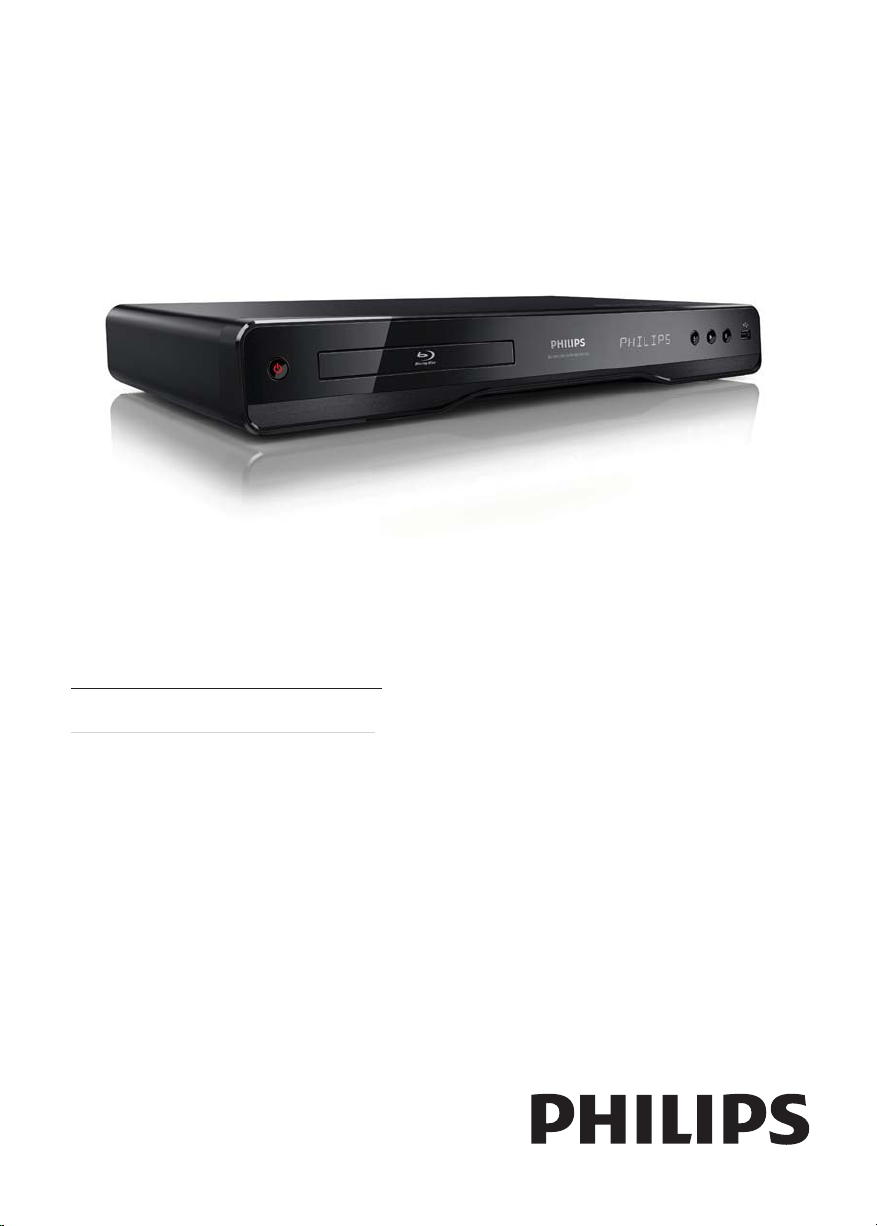
Register your product and get support at
www.philips.com/welcome
BDP3100
TR Kullanım kılavuzu
Page 2

LASER
CAUTION:
USE OF CONTROLS OR ADJUSTMENTS OR
PERFORMANCE OF PROCEDURES OTHER
THAN THOSE SPECIFIED HEREIN MAY RESULT
IN HAZARDOUS RADIATION EXPOSURE.
CAUTION:
VISIBLE AND INVISIBLE LASER R ADIATION
WHEN OPEN AND INTERLOCK DEFEATED.
DO NOT STARE INTO BEAM.
LOCATION:
INSIDE, NEAR THE DECK MECHANISM.
Italia
DICHIARAZIONE DI CONFORMITA’
Si dichiara che l’apparecchio BDP3100, Philips
risponde alle prescrizioni dell’art. 2 comma 1 del
D.M. 28 Agosto 1995 n.548.
Fatto a Eindhoven
Philips Consumer Lifestyles
Philips, Glaslaan 25616 JB Eindhoven,
The Netherlands
Norge
Typeskilt fi nnes på apparatens underside.
Observer: Nettbryteren er sekundert innkoplet.
Den innebygde netdelen er derfor ikke
frakoplet nettet så lenge apparatet er tilsluttet
nettkontakten.
For å redusere faren for brann eller elek trisk
støt, skal apparatet ikke utsettes for regn eller
fuktighet.
DK
Advarsel: Usynlig laserstråling ved åbning når
sikkerhedsafbrydere er ude af funktion. Undgå
utsættelse for stråling.
Bemærk: Netafbryderen er sekundært indkoblet
og ofbryder ikke strømmen fra nettet. Den
indbyggede netdel er der for tilsluttet til lysnettet
så længe netstikket sidder i stikkontakten.
S
Klass 1 laseraparat
Varning! Om apparaten används på annat sätt
än i denna bruksanvisning specifi cerats, kan
användaren utsättas för osynlig laserstrålning, som
överskrider gränsen för laserklass 1.
Observera! Stömbrytaren är sekundärt kopplad
och bryter inte strömmen från nätet. Den
inbyggda nätdelen är därför ansluten till elnätet så
länge stickproppen sitter i vägguttaget.
SF
Luokan 1 laserlaite
Varoitus! Laitteen käyttäminen muulla kuin
tässä käyttöohjeessa mainitulla tavalla saattaa
altistaa käy ttäjän turvallisuusluokan 1 ylittävälle
näkymättömälle lasersäteilylle.
Oikeus muutoksiin varataan. Laite ei saa
olla alttiina tippu-ja roiskevedelle. Huom.
Toiminnanvalitsin on kytketty toisiopuolelle,
eikä se kytke laitetta irti sähköverkosta.
Sisäänrakennettu verkko-osa on
kytkettynä sähköverkkoon aina silloin, kun pistoke
on pistorasiassa.
Producent zastrzega możliwość wprowadzania
zmian technicznych.
2
Page 3

ČESKA REPUBLIKA
Výstraha! Tento přístroj pracuje s laserovým
paprskem. Při nesprávné manipulaci s přístrojem
(v rozporu s tímto návodem) můże dojít k
nebezpečnému ozáření. Proto přístroj za chodu
neotevírejte ani nesnímejte jeho kryty. Jakoukoli
opravu vždy svěřte specializovanému servisu.
Nebezpečí! Při sejmutí krytů a odjištění
bezpečnostních spínačů hrozí nebezpečí
neviditelného laserového záření!
Chraňte se před přímým zásahem laserového
paprsku.
Pokud byste z jakéhokoli důvodu přístroj
demontovali, vždy nejdříve vytáhněte síťovou
zástrčku.
Přístroj chraňte před jakoukoli vlhkostí i před
kapkami vody.
Technické údaje laseru:
Typ laseru: •
Laserová dioda disku BD: AlGaInN•
Laserová dioda disku DVD: AlGaInP•
Laserová dioda disku CD: AlGaInP•
Vlnová délka: •
BD: 405 +5 nm/-5 nm•
DVD: 655 +10 nm/-10 nm•
CD: 790 +10 nm/-20 nm•
Výstupní výkon: •
BD: Max. jmenovitý: 20 mW•
DVD: Max. jmenovitý: 6m W•
CD: Max. jmenovitý: 7 mW•
This product is in compliance with the EEE
directive.
EEE yönergesine uygundur.
İçindekiler
1 Önemli 4
Güvenlik ve önemli uyarı 4
Tescilli marka uyarısı 4
2 Ürününüz 5
Önemli özellikler 5
Çalınabilen/oynatılabilen ortamlar 6
Ürün hakkında genel bilgiler 6
3 Bağlama 7
Video/ses kabloları bağlantısı 7
Sesi diğer cihazlara yönlendirme 8
USB cihazının bağlanması 9
Ağa bağlama 9
Gücü bağlayın 9
4 Başlarken 9
Uzaktan kumandanın hazırlanması 9
TV girişinin bulunması 10
Ana menünün kullanılması 10
Menüde gezinme 10
Menü ekran dilini seçme 10
Ağ ayarlama 10
Philips Easylink kullanımı 11
5 Oynat 11
Disk oynatma 11
USB cihazından oynatma 12
Video oynatma 12
Fotoğraf oynatma 14
Müzik çalma 15
6 Ayarları yapma 16
Video ayarları 16
Ses ayarları 17
Ağ kurulumu 18
EasyLink kurulumu 18
Tercih ayarları 18
Gelişmiş kurulum 19
Türkçe
7 Ek Bilgiler 20
Yazılım güncelleme 20
Bakım 21
Özellikler 21
8 Sorun Giderme 22
9 Sözlük 23
TR
3
Page 4
1 Önemli
Güvenlik ve önemli uyarı
Uyarı
Aşırı ısınma r iski! Ür ünü kesinlikle çevresi kapalı bir yere •
monte etmeyin. Havalandırma için ürünün çevresinde
her zaman en az 10 cm boş alan bırakın. Perdeler in
veya başka eşyaların ürünün havalandırma deliklerini
kapatmasına engel olun.
•
Ürünü, uzaktan kumandayı veya pilleri kesinlikle çıplak
alev veya güneş ışığı gibi doğrudan ısı k aynaklarının
yakınına koymayın.
•
Bu ürünü sadece iç mekanlar da kullanın. Ür ünü su, nem
ve sıvı dolu nesnelerden uzak tutun.
•
Bu ürünü hiçbir zaman diğer elek trikli e kipmanların
üzerine koymayın.
•
Şimşekli fırtınalarda bu üründen uzak durun.
Ana şebeke fişinin veya cihaz bağlantısının bağlantı kesme •
cihazı olarak kullanıldığı yerlerde, bağlantı kesme cihazı
kullanıma hazır bir durumda kalmalıdır.
•
Açık kaldığında görülebilen ve görülemeyen lazer yayılır.
Işına maruz kalmak tan kaçının.
CLASS 1
LASER PRODUCT
Bu ürün, Avrupa Birliği radyo paraziti
gereksinimlerine uygundur.
Eski ürününüzün ve pillerin atılması
Ürününüz, geri dönüşüme tabi tutulabilen ve
yeniden kullanılabilen, yüksek kalitede
malzeme ve parçalardan tasarlanmış ve
üretilmiştir.
Bir ürüne, çarpı işaretli tekerlekli çöp arabası
işaretli etiket yapıştırılması, söz konusu
ürünün 2002/96/EC sayılı Avrupa Yönergesi
kapsamında olduğu anlamına gelir. Lütfen,
elektrikli ve elektronik ürünlerin toplanması ile ilgili
bulunduğunuz yerdeki sistem hakkında bilgi edinin.
Lütfen, yerel kurallara uygun hareket edin ve
eskiyen ürünlerinizi, normal evsel atıklarınızla birlikte
atmayın.
Eskiyen ürününüzün atık işlemlerinin doğru biçimde
gerçekleştirilmesi, çevre ve insan sağlığı üzerinde
olumsuz etki oluşturulmasını önlemeye yardımcı olur.
Ürününüzde 2006/66/EC sayılı Avrupa
Direktifi kapsamında düzenlenen ve normal
evsel atıklarla atılmaması gereken piller
kullanılmaktadır.
Atık işleminin düzgün biçimde gerçekleştirilmesi,
çevre ve insan sağlığı üzerinde olumsuz etki
oluşturulmasını önlemeye yardımcı olduğundan,
lütfen pillerin ayrıca toplanması hakkındaki yerel
kurallar hakkında bilgi edinin.
Telif hakkı uyarısı
Bu ürün, Rovi Corporation’a ait ABD patentleri
ve diğer fikri mülkiyet haklarıyla korunan kopya
koruması teknolojisi içermek tedir. Tersine
mühendislik veya parçalara ayırma yasaktır.
Açık kaynak yazılımı
Philips Electronics Hong Kong Ltd., ilgili lisanslar
uyarınca bu tür bir teklifin yapılması gereken bu
üründe kullanılan telif hakkı korumalı açık kaynak
yazılım paketlerinin tam bir kopyasını talep üzerine
sunmayı teklif etmektedir.
Bu teklif, bu bilgiyi alan herkes için ürünün satın
alınmasından sonra üç yıla kadar geçerlidir. Kaynak
kodu edinmek için lütfen open.source@philips.com
adresine e-posta gönderin. E-posta kullanmayı
tercih etmiyorsanız ya da bu adrese e-posta
gönderdik ten sonra bir hafta içinde alındı onayı size
ulaşmadıysa, lütfen “Open Source Team, Philips
Intellectual Property & Standards, P.O. Box 220,
5600 AE Eindhoven, The Netherlands” adresine
yazın. Mektubunuzun alındı onayı size zamanında
ulaşmazsa, lütfen yukarıda belirtilen e-posta
adresine bir e-posta gönderin.
Tescilli marka uyarısı
‘Blu-ray Disc’ ve ‘Blu-ray Disc’
logosu ticari markalardır.
HDMI ve HDMI logosu ve
High-Definition Multimedia Interface (Yüksek
Çözünürlüklü Multimedya Arabirimi) HDMI
lisanslama LLC’nin ticari markaları veya tescilli ticari
markalarıdır.
Dolby Laboratories lisansıyla
üretilmiştir. Dolby ve çift D simgesi, Dolby
Laboratories’in ticari markalarıdır.
4
TR
Page 5
5,978,762; 6,226,616; 6,487,535; 7,392,195;
5,451,942; 5,956,674; 5,974,380;
7,272,567; 7,333,929; 7,212,872 numaralı ABD
patentleri ile ABD ve dünya çapında alınan ve
beklemede olan diğer patentler uyarınca, lisanslı
olarak üretilmiştir. DTS, DTS, Inc.’in tescilli ticari
markası, DTS logoları, Simgesi, DTS-HD ve
HTS-HD Master Audio ticari markalarıdır
© 1996-2008 DTS, Inc. Tüm Hakları Saklıdır.
Licensing Corporation’ın ticari markasıdır.
‘DVD Video’, DVD Format/Logo
Java ve tüm diğer Java ticari marka ve
logoları, Amerika Birleşik Devletleri’nde ve/veya
diğer ülkelerde Sun Microsystems, Inc.’in ticari
markaları ya da tescilli ticari markalarıdır.
Türkçe
DivX, Inc tarafından oluşturulan bir dijital video
formatıdır. Bu, DivX video oynatan resmi DivX
Certified cihazdır. Daha fazla bilgi ve dosyalarınızı
DivX videoya dönüştürmekte kullanacağınız yazılım
araçları için www.divx.com adresini ziyaret edin.
DIVX VIDEO-ON-DEMAND HAKKINDA: Bu
DivX Certified
(VOD) (İstek üzerine video) içeriği oynatabilmesi
için kaydedilmesi gerekir. Kayıt kodu üretmek için,
cihaz ayar menüsündeki DivX VOD bölümüne gidin.
Kayıt işlemini tamamlamak ve DivX VOD hakkında
daha fazla bilgi almak için bu kodla vod.divx.com
adresine gidin.
®
DivX
ve DivX Ultra®, DivX, Inc’in tescilli
markalarıdır ve lisans alınarak kullanılmaktadırlar.
‘BD LIVE’ ve ‘BONUSVIEW’, Blu-ray Disc
Association’ın ticari markalarıdır.
Matsushita Electric Industrial Co., Ltd ve Sony
Corporation’ın ticari markalarıdır.
ticari markasıdır.
Implementers Forum, Inc.’in ticari markalarıdır.
DIVX VİDEO HAKKINDA: DivX®,
®
cihazın DivX Video-on-Demand
BONUSVIEW™
‘AVCHD’ ve ‘AVCHD’ logosu
‘x.v.Colour’, Sony Corporation’ın
USB-IF logoları Universal Serial Bus
logosu, Microsoft Corporation’ın Amerika Birleşik
Windows Media ve Windows
Devletleri ve/veya diğer ülkelerdeki ticari markaları
ya da tescilli ticari markalarıdır.
2 Ürününüz
Bu ürünü satın aldığınız için tebrikler, Philips’e hoş
geldiniz! Philips’in sunduğu destekten (örneğin ürün
yazılım yükseltmeleri gibi) tam olarak yararlanmak
için, ürününüzü www.philips.com/welcome adresinde
kaydettirin.
Philips ile iletişim kurduğunuzda, ürününüzün seri ve
model numaraları istenecektir. Model numarası ve seri
numarası ürününüzün arkasındadır. Numaraları buraya
yazın:
Model No. __________________________
Seri No. ___________________________
Önemli özellikler
Bu üründen en iyi performansı elde etmek için
ürün yazılımını düzenli olarak güncellemenizi tavsiye
ediyoruz.
Yüksek çözünürlüklü eğlence
HDTV ( Yüksek Çözünürlüklü Televizyon) ile yüksek
çözünürlüklü içeriğe sahip diskleri izleyin. Yüksek
hızlı HDMI kablosu (1.3 veya kategori 2) ile bağlayın.
Sürekli taramalı çıkışla sağlanan saniyede 24 karelik
görüntü hızı ve 1080p’ye kadar çözünürlük ile
mükemmel görüntü kalitesinin keyfini çıkarın.
BD-Live
Bir dizi güncel içeriğe erişim sağlamak için disk
oynatıcıyı LAN por tu üzerinden film stüdyoları
web sitesine bağlayın (örn. yenilenmiş ön izleme ve
seçkin özellikler).
TR
5
Page 6
Çalınabilen/oynatılabilen ortamlar
Bu ürün aşağıdaki aşağıdaki ortamları çalabilir/
oynatabilir:
BD-Video, BD-R/RE2.0•
DVD, DVD-Video, DVD+R /+RW, DVD-R/-•
RW, DVD+R/-R DL (Çift Katmanlı)
Video CD’si/SVCD•
Ses CD’si, CD-R /CD-RW, MP3 dosyaları, •
WMA dosyaları, JPEG dosyaları
DivX (Ultra) dosyaları•
USB flash sürücü•
Bölge kodları
Aşağıdaki bölge kodlarına sahip diskleri
oynatabilirsiniz.
Bölge kodu Ülkeler
DVD Blu-ray
Avrupa,
İngiltere
B
Ürün hakkında genel bilgiler
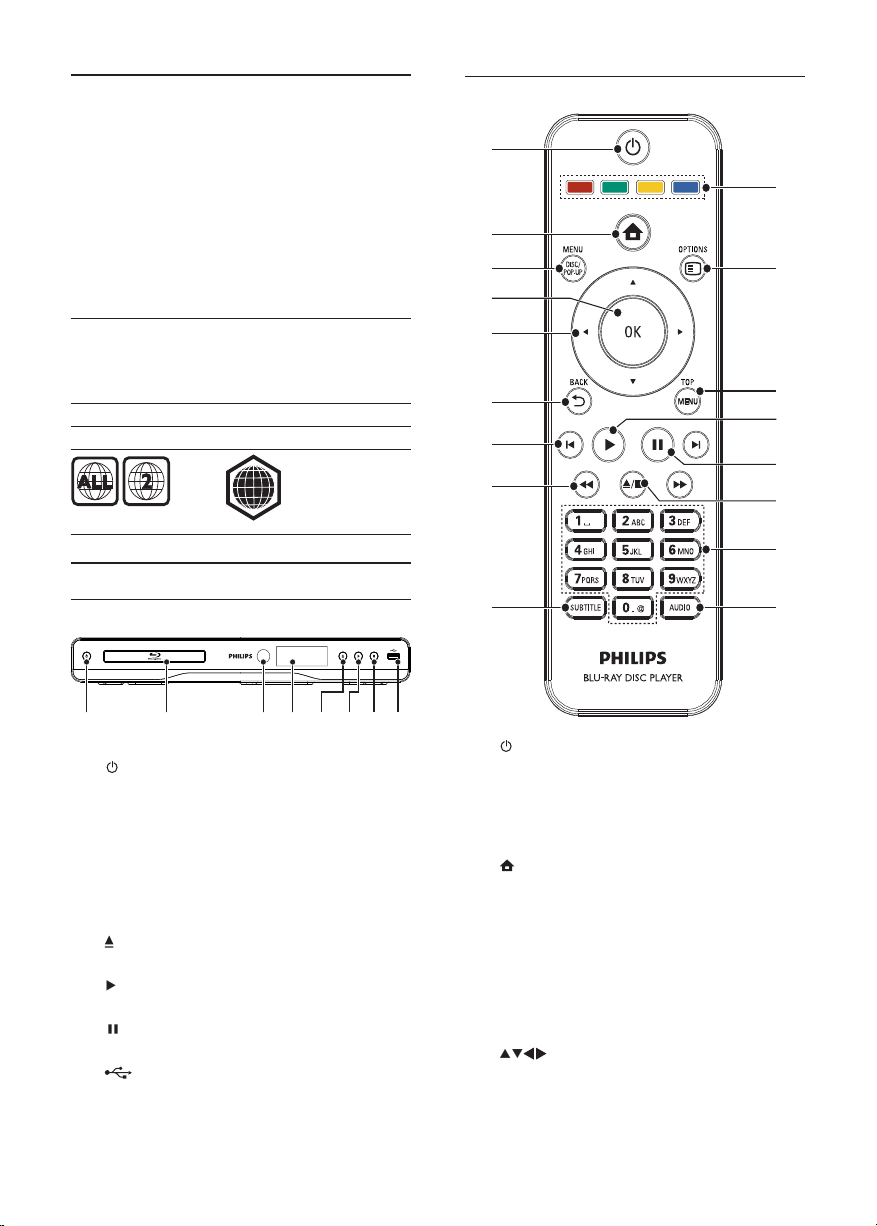
Ana ünite
Uzaktan kumanda
a
b
c
d
e
f
g
h
i
q
p
o
n
m
l
k
j
ab cefghd
a
b Disk bölmesi
c IR sensörü
d Gösterge paneli
e
f
g
h
6
Bu ürünü açar veya bekleme moduna alır.•
Uzaktan kumandadan gelen sinyalleri •
algılar. Uzaktan kumandayı her zaman IR
algılayıcısına yöneltin.
Disk bölmesini açar veya kapatır. •
Oynatmayı başlatır veya devam ettirir.•
Oynatmayı duraklatır.•
jakı
Bir USB flash sürücü bağlayın. •
TR
a
Bu ürünü açar veya bekleme moduna alır.•
EasyLink özelliği etkinleştirildiğinde, tüm •
HDMI CEC uyumlu cihazların bekleme
moduna geçmesi için basın ve en az üç
saniye basılı tutun.
b
Bu ürünün ana menüsüne erişir.•
c DISC MENU / POP-UP MENU
• BD: Açılır menüye erişim sağlar ve
menüden çıkar.
• DVD: Disk menüsüne erişim sağlar ve
menüden çıkar.
d OK
Bir giriş veya seçimi onaylar.•
e
Menüler arasında dolaşır.•
Page 7

f BACK
g
h
i SUBTITLE
j AUDIO
k Alfanümerik tuşlar
l
m
n
o TOP MENU
p
q Renkli tuşlar
Önceki ekran menüsüne döner.•
/
Önceki veya sonraki başlığa, bölüme ya •
da parçaya atlar.
/
Geri veya ileri arama yapar.•
Diskten uygun altyazı dilini seçer.•
Diskten konuşma dilini veya kanalı seçer. •
Oynatmak için bir öğe seçer.•
Değerleri girin.•
/
Oynatmayı durdurur.•
Disk bölmesini açmak/kapatmak için basılı •
tutun.
Oynatmayı duraklatır.•
Duraklatılmış görüntüyü bir adım ilerletir.•
Oynatmayı başlatır veya devam ettirir.•
• BD: Üst menüyü görüntüler.
• DVD: Başlık menüsünü görüntüler.
OPTIONS
Geçerli faaliyet veya seçim için •
seçeneklere erişim sağlar.
• BD: Görevleri ve seçenekleri seçer.
3 Bağlama
Bu ürünü kullanmak için aşağıdaki bağlantıları yapın.
Temel bağlantılar:
Video•
Ses•
Güç•
İsteğe bağlı bağlantılar:
Sesi diğer cihazlara yönlendirme•
HDMI uyumlu AV alıcısı/amplifikatörü•
Dijital AV amplifikatörü/alıcısı•
Analog stereo sistemi•
USB flash sürücü•
LAN (ağ)•
Not
Tanımlama ve nominal şebeke değerleri için ürünün •
arkasındaki veya altındaki tip plakasına bakın.
•
Herhangi bir bağlantıyı kurmadan veya değiştirmeden
önce tüm cihazlar ın elektrik priziyle bağlantılarının
kesilmiş olduğundan emin olun.
Video/ses kabloları bağlantısı
TV’nin destekleyebileceği en iyi video bağlantısını seçin.
• Seçenek 1: HDMI jakına bağlantı (HDMI, DVI
veya HDCP uyumlu TV için).
• Seçenek 2: Komponent video jaklarına bağlantı
(standart TV veya Aşamalı Taramalı TV için).
• Seçenek 3: Kompozit video jakına bağlantı
(standart TV için).
Seçenek 1: HDMI jakına bağlantı
HDMI IN
1 HDMI kablosunu (birlik te verilmez):
bu üründeki • HDMI jakına bağlayın.
TV’deki HDMI giriş jakına bağlayın. •
İpucu
Televizyonun yalnızca bir DVI konektörü varsa, bir •
HDMI/DVI adaptörü aracılığıyla bağlayın. Ses çık ışı için
ses kablosunu bağlayın.
•
HDMI bağlantısında ekr ana görüntü gelmiyor sa, uzaktan
kumandada ve ardından “731” (sayı tuşları) tuşlarına
basın.
•
Bu ürün, 1080p veya 1080p/24Hz uyumlu bir T V’ye
bağlanacaksa Philips, en iyi video ve ses çıkışı elde etmek
için Yük sek H ızlı HDMI kablosu olarak da bilinen HDMI
kategori 2 kablosu kullanmanızı önerir.
•
Bir BD-video veya DVD videodaki dijital video
görüntülerini HDMI bağlantısı aracılığıyla oynatmak için,
hem bu ürünün hem de ekr an cihazının (veya bir AV
alıcının / amplifikatörünün) HDCP (yüksek bant genişlikli
dijital içerik koruma sistemi) olarak bilinen bir telif hakkı
koruma sistemini des tek liyor olması gerekir.
•
Bu bağlantı, en iyi gör üntü kalitesini sağlar.
Türkçe
TR
7
Page 8
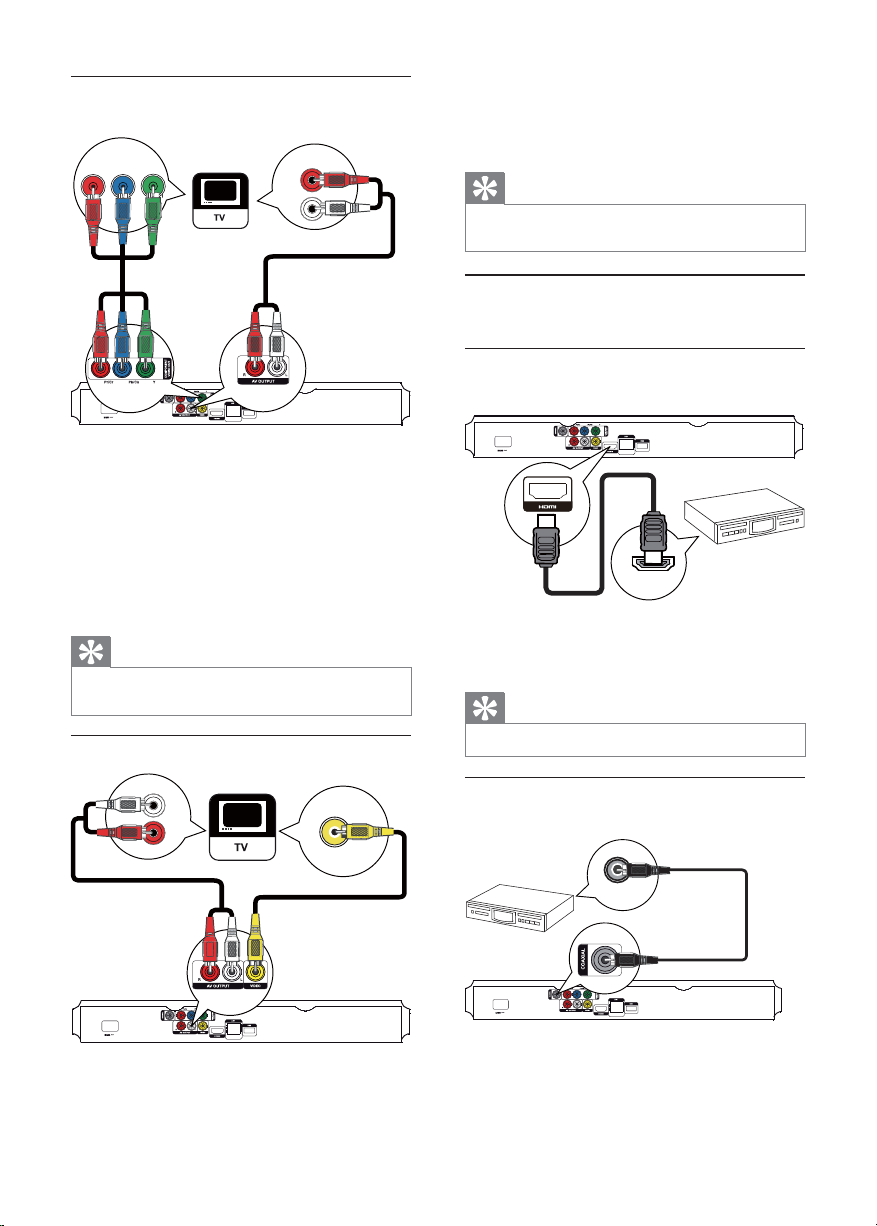
Seçenek 2: Komponent video jakına
bağlantı
Pb Y
Pr
AUDIO IN
1 Komponent video kablolarını (birlikte
verilmez):
bu üründeki • Y Pb/Cb Pr/Cr jaklarına bağlayın.
TV’deki COMPONENT VIDEO giriş •
jaklarına bağlayın.
2 Ses kablolarını:
Seçenek 3: Kompozit video jakına bağlantı
bu üründeki • AV OUTPUT-L/R jaklarına
bağlayın.
TV’deki AUDIO giriş jaklarına bağlayın.•
İpucu
TV’deki komponent video giriş jakı, Y Pb Pr veya YUV •
olarak etiketlenmiş olabilir.
VIDEO IN
2 Ses kablolarını:
Sesi diğer cihazlara yönlendirme
Bu üründen gelen sesi diğer cihazlara yönlendirebilirsiniz.
HDMI uyumlu AV alıcısına/amplifikatörüne
bağlayın
bu üründeki • AV OUTPUT- L /R jaklarına
bağlayın.
TV’deki AUDIO giriş jaklarına bağlayın.•
İpucu
TV’deki video giriş jakı A /V IN, VIDEO IN, COMPOSITE •
veya BASEBAND olarak etiketlenmiş olabilir.
HDMI IN
1 HDMI kablosunu (birlik te verilmez):
Dijital AV amplifikatör/alıcı bağlantısı
Koaksiyel jak bağlantısı
bu üründeki • HDMI jakına bağlayın.
cihazdaki HDMI giriş jakına bağlayın.•
İpucu
HDMI bağlantısı en iyi ses kalitesini sağlar. •
1 Kompozit video kablosunu:
8
bu üründeki • VIDEO jakına bağlayın.
TV’deki VIDEO giriş jakına bağlayın.•
TR
AUDIO IN
COAXIAL
1 Bir koaksiyel kabloyu (birlikte verilmez):
bu üründeki • COAXIAL jakına bağlayın.
cihazdaki COAXIAL/DIGITAL giriş jakına •
bağlayın.
Page 9
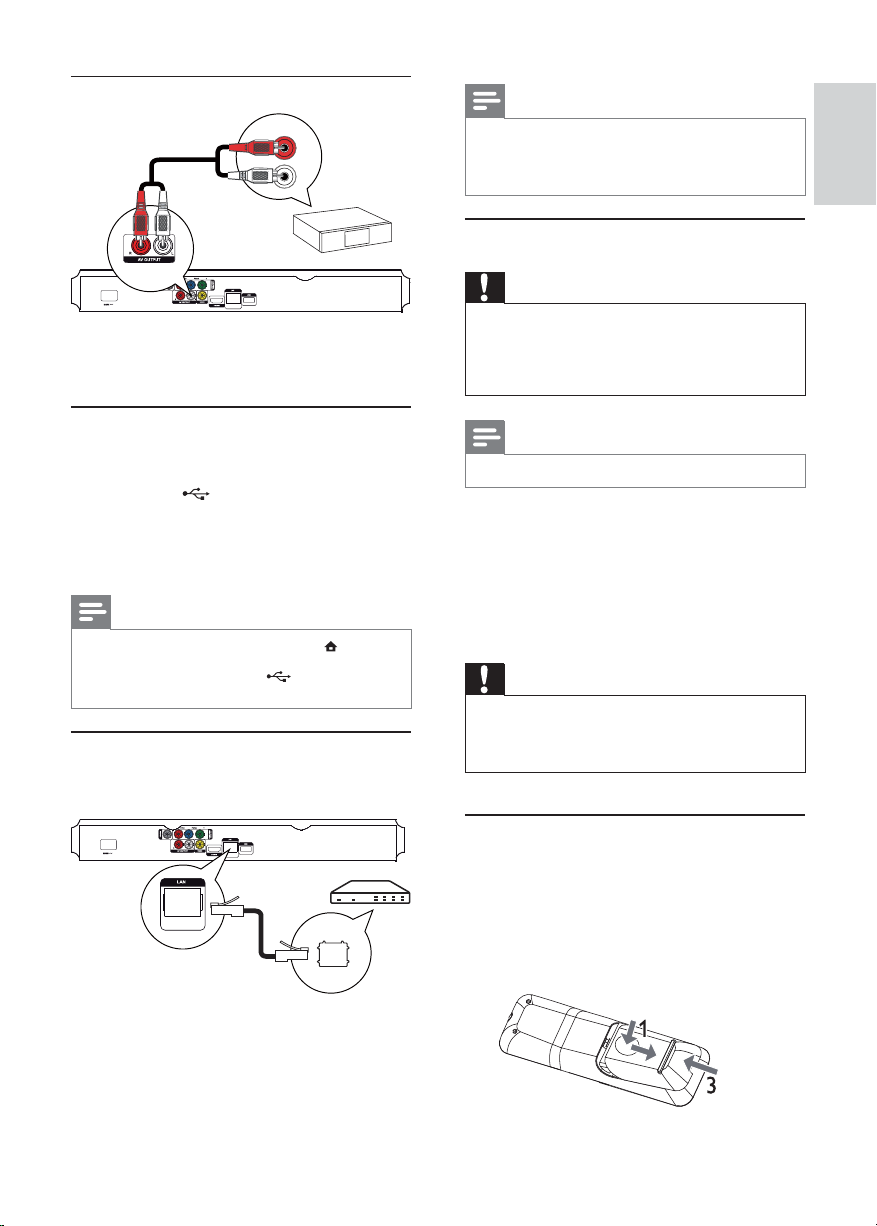
Analog stereo sistem bağlantısı
AUDIO IN
1 Ses kablolarını:
bu üründeki • AV OUTPUT- L /Rbağlayın.
cihazdaki AUDIO giriş jaklarına bağlayın.•
Not
Kullandığınız yönelticiye veya İnternet Servis Sağlayıcı’nın •
politika sına bağlı olar ak, yazılım güncellemesi için Philips
İnternet sitesine erişmenize izin verilmeyebilir. Daha fazla
bilgi almak için İnternet Servis Sağlayıcı’nızla iletişim kurun.
Gücü bağlayın
Dikkat
Ürüne hasar ver me riski! Güç k aynağı geriliminin bu •
ünitenin arkasında belirtilen gerilimle aynı olduğundan
emin olun.
•
AC güç kablosunu bağlamadan önce diğer tüm
bağlantıların yapıldığından emin olun.
Türkçe
USB cihazının bağlanması
USB cihazı, yazılım güncellemeleri ve BD-Live için ek
hafıza sağlar.
1 Bu üründeki (USB) jakına USB cihazı bağlayın.
Ağa bağlama
Yazılım güncellemelerinin ve BD-Live’ın keyfini
çıkarmak için bu ürünü ağa bağlayın.
Arka paneldeki USB jakı ortam dosyalarını •
aktarmak için değil, sadece bir USB cihazı
üzerinden yazılım yükseltme/BD Live
içeriğine erişme amacıyla kullanılır.
Not
İçeriğe er işmek ve dosyaları oy natmak için • tuşuna
basın ve menüde [USB’ye gözat] öğesini seçin.
• jakına bağlayın.
USB cihazını, bu üründe sadece
•
Philips, tüm USB cihazlarıyla uyumluluk garantisi vermez.
1 Ağ kablosunu (birlikte verilmez):
bu üründeki • LAN jakına bağlayın.
genişbant modem veya yönelticideki LAN •
jakına bağlayın.
Not
Tip plakası, ür ünün ark a kısmında bulunur. •
1 AC güç kablosunu:
bu ürüne bağlayın.•
prize bağlayın.•
Ürün kullanım için ayarlanmaya hazırdır. »
4 Başlarken
Dikkat
Burada belir tilenler haricinde kontrol veya ayar lar •
kullanılması ya da prosedürler uygulanması, tehlikeli
radyasyona maruz kalmaya veya başka tehlikeli işlemlere
neden olabilir.
Bu bölümdeki talimatları her zaman sırasıyla takip edin.
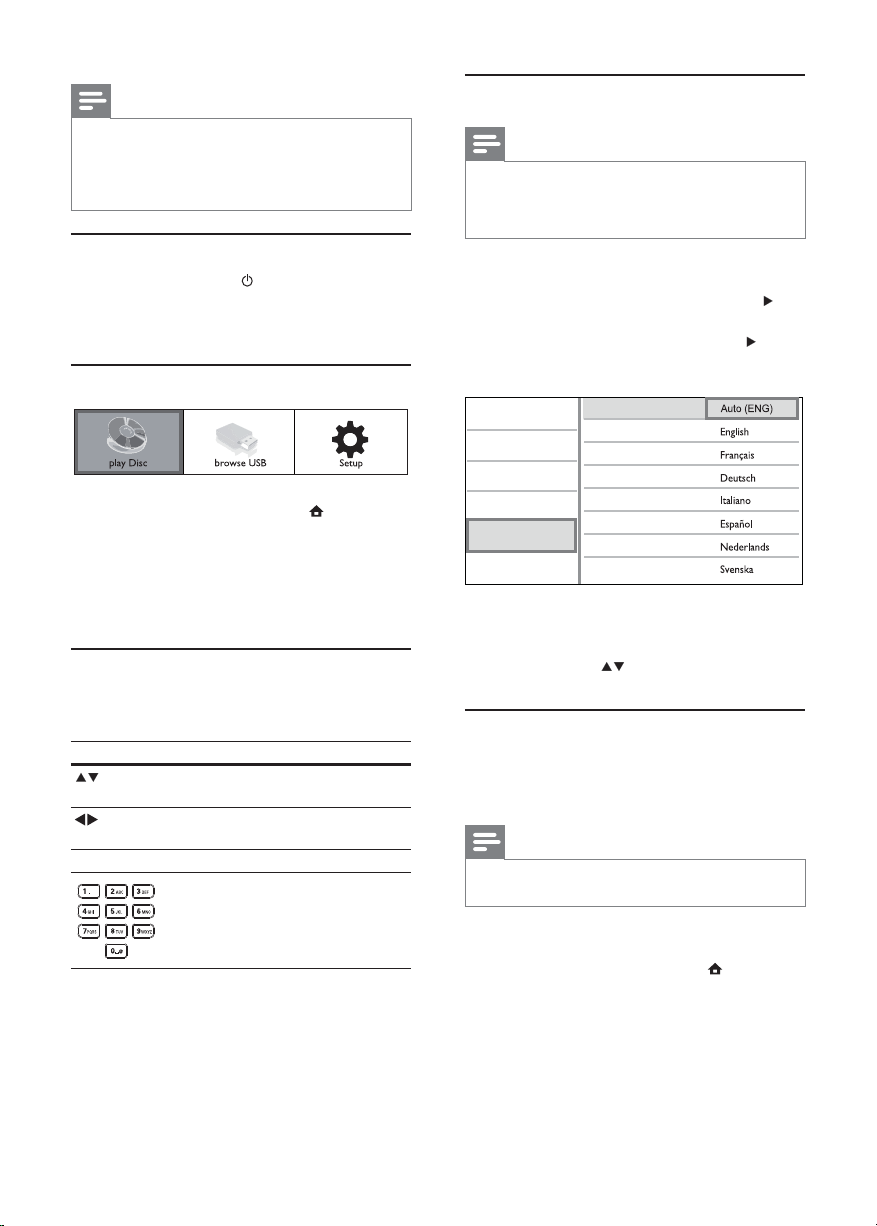
Uzaktan kumandanın hazırlanması
1 Pil bölmesine bastırın ve kaydırarak açın
(bkz. resimde “1”).
2 İki adet AAA pili, gösterilen şekilde kutupları
doğru olarak (+/-) takın.
3 Pil bölmesini bastırıp kaydırarak kapatın
(bkz. resimde “3”).
TR
9
Page 10
Not
Uzak tan kumandayı uzun bir süre boyunca •
kullanmayacaksanız, pilleri çıkarın.
•
Pilleri karıştırmayın (eski ve yeni veya karbon ve alkalin vs.).
Pillerde kimyevi maddeler bulunur, bu yüzden doğru •
biçimde atılmalıdır.
TV girişinin bulunması
1 Bu ürünü açmak için tuşuna basın.
2 TV’yi açın ve video girişini geçin (A/V girişini
nasıl seçeceğinizle ilgili bilgi için TV kullanım
kılavuzuna bakın).
Ana menünün kullanılması
1 Ana menüyü görüntülemek için tuşuna basın.
Menüde gezinme
1 Bir menü görüntülendiğinde gezinmek için
Düğme: İşlem
OK Seçimi onaylamak.
Disk oynatımını başlatmak için • [diski
oynat] seçeneğini seçin.
USB içeriklerini görüntülemek için •
[USB’ye gözat] seçeneğini seçin.
Ayarlar menülerine erişmek için • [Ayar]
seçeneğini seçin.
uzak tan kumanda üzerindeki düğmelere basın.
Yukarı veya aşağı hareket
etmek.
Sola veya sağa hareket
etmek.
Numara girmek.
Menü ekran dilini seçme
Not
Bu ürün HDMI CEC uyumlu bir T V’ye bağlıysa bu ayar ı •
atlayın. T V ayarına göre otomatik olarak aynı ek ran
menü diline geçer ( TV’nin dil seti bu ür ün tarafından
destekleniyorsa).
1 Ana menüde [Ayar] seçeneğini seçin ve OK
tuşuna basın.
2 [Tercih Ayarı] öğesini seçin ve ardından
tuşuna basın.
3 [Menü Dili] öğesini seçin ve ardından tuşuna
basın.
Video Setup
Audio Setup
Network Setup
EasyLink Setup
Preference Setup
Advanced Setup
4 Dil seçmek için tuşuna ve ardından OK
tuşuna basın.
Menu Language
Audio
Subtitle
Disc Menu
Parental Control
Screen Saver
Auto Subtitle Shift
Change Password
Dil seçenekleri bölgelere göre farklı •
olabilir.
Ağ ayarlama
Bu ürünün yazılım güncellemelerinin ve belirli Blu-ray
disklerin BD-Live’ın keyfini çıkarmak için, ağ bağlantısı
kurun.
Not
Ağ kablosunun doğru şekilde bağlandığından ve •
yönelticinin açık olduğundan emin olun.
10
1 Bu ürünü bir genişbant modeme veya
yönlendiriciye bağlayın.
2 Ana menüyü görüntülemek için tuşuna
basın.
3 [Ayar] seçeneğini seçin ve OK tuşuna basın.
TR
Page 11

Video Setup
Audio Setup
Network Setup
EasyLink Setup
Preference Setup
Advanced Setup
Network Installation
View Network Settings
4 [Ağ Kurulumu] öğesini seçin ve ardından
tuşuna basın.
5 [Ağ Kurulumu] öğesini seçin ve ardından OK
tuşuna basın.
6 Ağ kurulumunu tamamlamak için ekrandaki
talimatları uygulayın.
Tek dokunuşta bekleme moduna alma
1
3 saniyeden daha uzun süreyle (bekleme)
tuşunu basılı tutun.
Tüm bağlı cihazlar (tek dokunuşta bekletme »
moduna almayı destekliyorsa) otomatik
olarak bekleme moduna geçer.
Not
Philips, diğer HDMI CEC ciha zlarıyla bir lik te çalışabilme •
garantisi vermez.
5 Oynat
Disk oynatma
Türkçe
İpucu
Bu ürünün kablolu bağlantısının durumunu kontrol •
edebilirsiniz (bk z. “Ayarlar ın yapılması” > “Ağ Ayarları” >
[Ağ Ayarlarını Görüntüle]).
Not
BD- Live içeriğini İnternet’ten yüklemek dosya boyutuna •
ve İnternet bağlantısının hızına bağlı olarak biraz zaman
alabilir.
Philips Easylink kullanımı
Bu ürün, HDMI CEC (Tüketici Elektroniği Kontrolü)
kullanan Philips EasyLink’i destekler. HDMI
konektörleri ile bağlanmış EasyLink uyumlu cihazları
tek bir uzaktan kumanda ile kontrol edebilirsiniz.
Not
EasyLink özelliğini devreye almak için, TV ’de ve TV ’ye •
bağlı diğer cihazlarda HDMI CEC işlemler i açılmalıdır.
Ayrıntılı bilgi almak için TV’nin/cihazın kılavuzuna bakın.
Tek dokunuşta oynatma
1
Bu ürünü açmak için (bekleme) tuşuna
basın.
TV (tek dokunuşta oynatmayı destekliyorsa) »
otomatik olarak açılır ve doğru video giriş
kanalına geçer.
Bu ürüne bir disk takılırsa, disk oynatımı »
otomatik olarak başlar.
Dikkat
Disk bölmesine diskten başka bir şey koymayın. •
1 Disk bölmesini açmak için ön panelde tuşuna
basın.
Ayrıca, disk bölmesini açmak/kapatmak •
için uzaktan kumandada
basabilirsiniz.
tuşuna da
2 Diski, etiketi üste gelecek şekilde yerleştirin.
3 Disk bölmesini kapatmak ve disk oynatımını
başlatmak için
Disk oynatımını izlemek amacıyla, TV’yi •
video girişinde açın.
Disk oynatımını durdurmak için •
basın.
Not
Desteklenen disk/dosya formatlarını inceleyin (bkz. •
“Ürününüz” > “Çalınabilen/oynatılabilen ortamlar”).
•
Şifre giriş ekranı görüntülenirse, kilitlenen veya kısıtlanan
diski oynatabilmek için önce şifr eyi girin (bkz. “Ayarların
yapılması” > “ Tercih Ayarları” > [Ebeveyn Kontrolü]
bölümü).
•
Bir diski duraklatır veya durdurursanız , 10 dakika hiç bir
tuşa basmadığınız takdirde ekran koruyucu devreye girer.
Ekran kor uyucuyu devre dışı bırakmak için herhangi bir
tuşa basın.
•
Bir diski duraklattıktan veya durdurduktan sonra
30 dak ika boyunca hiçbir tuşa basılma zsa, bu ürün
otomatik olarak beklemeye geçer.
tuşuna basın.
tuşuna
TR
11
Page 12

USB cihazından oynatma
Aşağıdaki USB cihazlarında bulunan ortam dosyaları
oynatılabilir veya görüntülenebilir:
flash sürücü•
hafıza kartı okuyucusu•
HDD (bu ürün yalnızca USB gücü tepe akımı •
en fazla 500mA olan taşınabilir bir sabit disk
sürücüyü algılayabilir.)
1 Bu üründeki (USB) jakına bir USB cihazı
bağlayın.
2 tuşuna basın, [USB’ye gözat] öğesini seçin
ve OK tuşuna basın.
Bir içerik menüsü görüntülenir. »
3 Oynatılacak dosyayı seçin ve OK tuşuna basın.
Video oynatma
Video oynatma kontrolü
1
2 Oynatmayı kontrol etmek için uzaktan
Oynatım başlar (Ayrıntılı bilgi için bkz. »
“Video oynatma”, “Fotoğraf görüntüleme”,
Müzik çalma”).
Oynatmayı durdurmak için •
basın veya USB cihazını çıkarın.
Not
Philips, tüm USB cihazlarıyla uyumluluk garantisi vermez. •
Tüm dijital fotoğraf makineler i des teklenmez. PC’de •
program kurulumu gerektiren dijital fotoğraf makineleri
desteklenmez.
•
NTFS ( Yeni Teknoloji Dosya Sistemi) veri formatı
desteklenmez.
Başlık oynatın.
kumandayı kullanın.
tuşuna
Tuş İşlem
Oynatmayı duraklatır.
Oynatımı kare kare yavaş •
ileri almak için
arka arkaya basın.
Oynatmayı başlatır veya devam
ettirir.
Oynatmayı durdurur.
/
/
Not
Java uygulaması içeren BD diskler için oynatmaya devam •
etme fonksiyonu diskin özelliklerine bağlıdır.
Önceki/sonraki başlığa veya
bölüme atlar.
Hızlı geri veya hızlı ileri arama
yapar. Arama hızını değiştirmek
için arka arkaya basın.
İleri veya geri yavaş •
oynatım için
kez ve ardından
tuşuna arka arkaya basın.
tuşuna
tuşuna bir
/
Video oynatımını değiştirme
1
Başlık oynatın.
2 Oynatmayı değiştirmek için uzaktan kumandayı
kullanın.
Tuş İşlem
AUDIO Doğrudan diskteki konuşma
SUBTITLE Doğrudan diskteki altyazı dillerinden
OPTIONS
Bazı işlemler bazı disklerde çalışmayabilir. Ayrıntılar için •
diskle bir lik te verilen bilgiler e bakın.
dillerinden veya kanallardan birini
seçer.
birini seçer.
Yukarıda açıklanan işlemlere veya
daha fazla seçeneğe erişim (örneğin
tekrarlama veya rasgele çalma modu).
Not
12
TR
Page 13
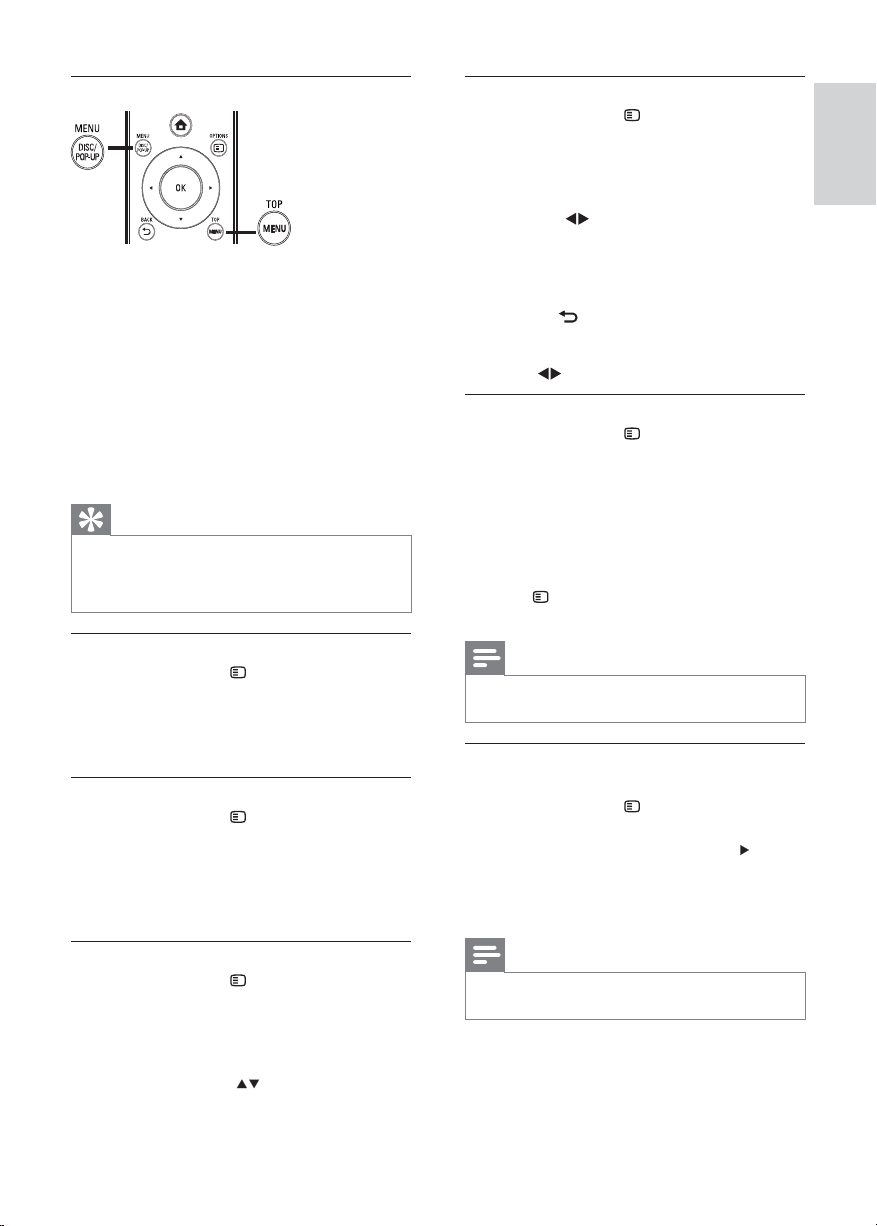
Ekran menüsü
BD-video disk
• TOP MENU video oynatımını durdurur ve disk
menüsünü görüntüler. Bu özellik diske bağlıdır.
• POP-UP MENU disk oynatımını durdurmadan
BD-video disk menüsüne erişim sağlar.
DVD-video disk
• TOP MENU düğmesi diskin kök menüsünü
gösterir.
• DISC MENU disk bilgilerini görüntüler ve
diskteki işlevlerin kullanımında rehberlik eder.
VCD/SVCD/DivX disk:
• DISC MENU disk içeriğine erişim sağlar.
İpucu
PBC ayarı kapalıysa , VCD/SVCD menüyü atlar ve ilk •
başlıktan oynatmaya başlar. Menüyü oynatmadan önce
görüntülemek için, PBC ayarını açın (bkz. ‘Ayarların
yapılması’ - [Tercih Ayarı] > [VCD PBC] bölümü).
Display play information
1
Oynatma sırasında OPTIONS tuşuna basın.
Oynatma seçenekleri menüsü görüntülenir. »
2 Menüden [Bilgi] öğesini seçin ve OK tuşuna
basın.
Diskin geçerli durumu gösterilir. »
Başlık/ bölüm seçimi
1
Oynatma sırasında OPTIONS tuşuna basın.
Oynatma seçenekleri menüsü görüntülenir. »
2 Menüden [Bşlklr] veya [Bölümler] öğesini
seçin ve OK tuşuna basın.
3 Başlık veya bölüm numarasını seçin ve OK
tuşuna basın.
Yakınlaştırma/uzaklaştırma
1
Oynatma sırasında OPTIONS tuşuna basın.
Oynatma seçenekleri menüsü görüntülenir. »
2 Menüden [Byt] öğesini seçin ve OK tuşuna
basın.
3 Bir zoom fak törü seçmek için Gezinme
tuşlarına (
)ve OK tuşuna basın.
4 Zoom yapılmış görüntüde gezinmek için
Gezinme tuşlarına basın.
Zoom modunu iptal etmek amacıyla, •
zoom fak törü çubuğunu görüntülemek
için
BACK veya OK tuşuna
basın, ardından zoom faktörü [x1]
görüntülenene kadar Gezinme tuşlarına
(
) basın.
Belirli bölümleri tekrar oynatma
1
Oynatma sırasında OPTIONS tuşuna basın.
Oynatma seçenekleri menüsü görüntülenir. »
2 Menüde [A-B tkr.] öğesini seçin ve başlangıç
noktasını belirlemek için OK tuşuna basın.
3 Video oynatımını ileri alın ve bitiş noktasını
belirlemek için OK tuşuna basın.
Tekrarlı oynatma başlar. »
Tekrar oynatma modunu iptal etmek için, •
OPTIONS tuşuna basın, [A-B tkr.]
öğesini seçin ve OK tuşuna basın.
Not
Tekrar oynatım için bölüm işar etleme, sadece aynı parça / •
başlık içinde mümkündür.
Video oynatımını farklı kamera açılarından
görüntüleme
1
Oynatma sırasında OPTIONS tuşuna basın.
Oynatma seçenekleri menüsü görüntülenir. »
2 Menüden [Açı List.] öğesini seçin ve tuşuna
basın.
3 Bir açı seçeneği seçin ve OK tuşuna basın.
Oynatım, seçilen açıya göre değişir. »
Türkçe
Belirli bir zamana atlayarak oynatma
1
Oynatma sırasında OPTIONS tuşuna basın.
Oynatma seçenekleri menüsü görüntülenir. »
2 Menüden [Zaman Arama] öğesini seçin ve OK
tuşuna basın.
3 Atlamak istediğiniz zamanı değiştirmek için
Gezinme tuşlarına (
basın.
) basın ve OK tuşuna
Not
Sadece birden fazla açıyla çekilmiş sahneler içeren •
disklerde kullanılabilir.
TR
13
Page 14
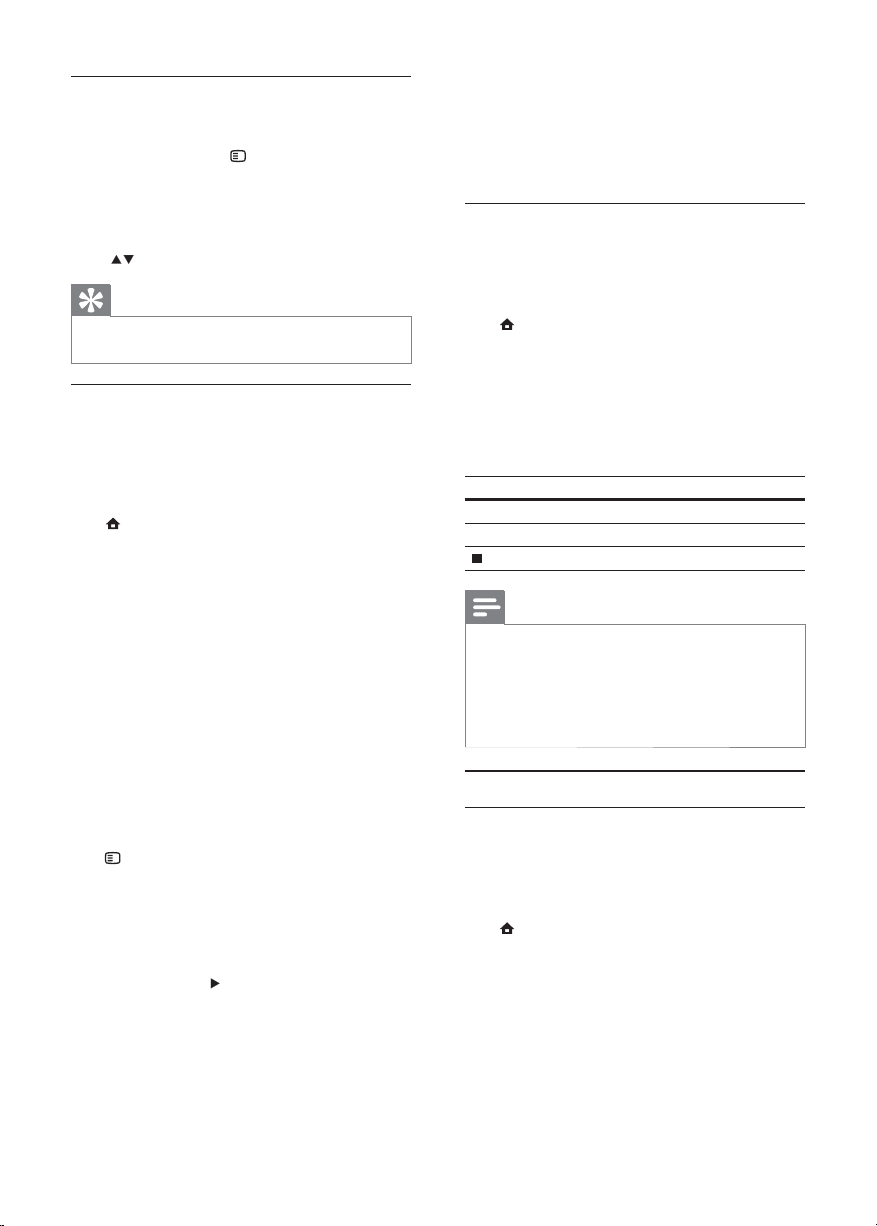
Altyazı ekranını manuel olarak kaydırma
Altyazının TV ekranındaki konumunu manuel olarak
ayarlayabilirsiniz.
1 Oynatma sırasında OPTIONS tuşuna basın.
Oynatma seçenekleri menüsü görüntülenir. »
2 Menüden [Altyazı Kaydırma] öğesini seçin ve
OK tuşuna basın.
3 Altyazıyı kaydırmak için Gezinme tuşlarına
(
) ve OK tuşuna basın.
İpucu
Altyazı kaydırma, harici altyazıları bulunan DivX video •
için desteklenmez.
BD-video oynatma
Blu-ray video diski daha yüksek kapasiteye sahiptir
ve yüksek çözünürlüklü video, çok kanallı surround
ses, etkileşimli menüler ve bir dizi başka özelliği
destekler.
1 Bir BD-video disk takın.
2 tuşuna basın, [diski oynat] seçeneğini seçin
ve OK tuşuna basın.
3 Oynatma otomatik olarak başlayacaktır veya
menüden bir oynatma seçeneği seçin ve OK
tuşuna basın.
Oynatma sırasında ek bilgileri, özellikleri •
ve diskteki içeriği görüntülemek için TOP
MENU tuşuna basabilirsiniz.
Oynatma sırasında, disk oynatımını •
durdurmadan disk menüsünü
görüntülemek için POP-UP MENU
tuşuna basabilirsiniz.
BONUSVIEW özelliğinden faydalanma
(Yalnızca BONUSVIEW veya Resim İçinde Resim
özelliği ile uyumlu disk için geçerlidir)
Ek içeriği (yorumlar gibi) ekranda açılan küçük bir
pencerede anında görüntüleyebilirsiniz.
1 OPTIONS tuşuna basın.
Oynatma seçenekleri menüsü görüntülenir. »
2 Menüden [PIP Seçimi] seçimini yapın; ardından
[PIP] öğesini seçin ve OK tuşuna basın.
İkinci video penceresi açılır. »
3 Menüden [2. Ses Dili] veya [2. Altyazı Dili]
öğesini seçin ve
tuşuna basın.
4 Oynatma dilini seçin ve OK tuşuna basın.
BD-Live özelliğinden faydalanma
(Sadece BD Live bonus içeriğine izin veren diskler
için geçerlidir.)
Ek içerik (film fragmanları, altyazılar, vb.) bu ürünün
yerel depolama birimine veya bağlanan USB
depolama aygıtına yüklenebilir. Özel video bilgileri
yüklenirken oynatılabilir.
BD-Live özelliğini destekleyen bir disk oynatılırken,
bu ürün veya diskin kimliği Internet üzerinden
içerik sağlayıcıya gönderilebilir. Sağlanan servis ve
fonksiyonlar diske göre değişir.
DivX® video oynatma
DivX video, yüksek oranda sıkıştırmaya rağmen
yüksek kaliteyi koruyan dijital bir ortam formatıdır.
1 DivX video içeren bir disk veya USB cihazı
takın.
2 tuşuna basın, [diski oynat] veya [USB’ye
gözat] öğesini seçin ve OK tuşuna basın.
Bir içerik menüsü görüntülenir. »
3 Bir video klasörü seçin ve OK tuşuna basın.
4 Oynatılacak başlığı seçin ve OK tuşuna basın.
5 Oynatmayı kontrol etmek için uzaktan
kumandayı kullanın.
Tuş İşlem
AUDIO Ses dili veya kanal seçer.
SUBTITLE Altyazı dili seçer.
Oynatmayı durdurur.
Not
Yalnızca bu ürünün DivX kayıt koduyla kiralanmış •
veya satın alınmış DivX videoları oynatabilirsiniz (bkz.
‘Ayarların Yapılması’ - [Gelişmiş Krlm] > [DivX
Kodu] bölümü).
•
4GB boyutuna kadar olan DivX video dosyalarını
oynatabilirsiniz.
•
Bu ürün alt yazıda en fazla 45 kar ak ter görüntüleyebilir.
®
VOD
Fotoğraf oynatma
Slayt gösterisi olarak fotoğraf oynatma
JPEG fotoğrafları (.jpeg veya .jpg uzantılı dosyalar)
oynatabilirsiniz.
1 JPEG fotoğraflar içeren bir disk veya USB cihazı
takın.
2 tuşuna basın, [diski oynat]veya [USB’ye
gözat] öğesini seçin ve OK tuşuna basın.
Bir içerik menüsü görüntülenir. »
3 Bir fotoğraf klasörü seçin ve erişim için OK
tuşuna basın.
Bir fotoğraf seçmek için • Gezinme
tuşlarına basın.
Seçilen fotoğrafı büyütmek ve slayt •
gösterisini başlatmak için OK tuşuna
basın.
14
TR
Page 15
4 Slay t gösterisi oynatmaya başlamak için
tuşuna basın.
Not
Bir diskte çok sayıda parça /fotoğraf varsa, disk içeriğinin •
TV’de görüntülenmesi daha uzun sürebilir.
•
Bu ürün sadece, birçok dijital fotoğraf makinesi tar afından
kullanılan JPEG-EXI F formatına uygun gör üntüleri
görüntüleyebilir. Motion JPEG veya JPEG’den farklı
formatlardak i fotoğrafları veya fotoğraflar la ilgili ses
kliplerini görüntüleyemez.
•
Bu üründe desteklenen sınırı aşan klasörler/dosyalar
görüntülenemez veya oynatılamaz.
Fotoğraf oynatımı kontrolü
1
Fotoğraf slayt gösterisi oynatın.
2 Oynatmayı kontrol etmek için uzaktan
kumandayı kullanın.
Oynatma seçeneklerine erişmek için •
OPTIONS tuşuna basın, bir seçim
yapın ve OK tuşuna basın.
Slayt gösterisi sırasında bir fotoğrafı •
yatay/dikey döndürmek için
basabilirsiniz.
Slayt gösterisi durursa, devam etmek için •
tuşuna basın.
tuşuna
Slayt gösterisi aralığını ve animasyonu
ayarlayın
1
Oynatma sırasında OPTIONS tuşuna basın.
Oynatma seçenekleri menüsü görüntülenir. »
2 Menüden [Slayt süresi] öğesini seçin ve OK
tuşuna basın.
3 Bir süre seçin ve OK tuşuna basın.
4 Menüden [Slayt Animasyon] öğesini seçin ve
OK tuşuna basın.
5 Bir animasyon efekti tipi seçin ve OK tuşuna
basın.
Müzikli slayt gösterisi oynatma
Müzikli slayt gösterisi oluşturarak MP3/WMA müzik
dosyalarını ve JPEG fotoğraf dosyalarını aynı anda
oynatın.
Not
Müzikli slayt gösterisi oluş tur mak için, MP3/WMA •
ve JPEG dosyalar ını aynı diskte veya USB ciha zında
saklamanız gerekmektedir.
1 MP3/ WMA müzik çalın.
2 Ana menüye dönmek için BACK tuşuna
basın.
3 Slay t gösterisini başlatmak için gezinme
tuşlarıyla fotoğraf klasörüne girin ve OK tuşuna
basın.
Slayt gösterisi başlar ve fotoğraf klasörünün »
sonuna kadar devam eder.
Ses, diskin sonuna kadar çalmaya devam »
eder.
Slayt gösterisi oynatımını durdurmak için •
tuşuna basın.
Müzik oynatımını durdurmak için •
tuşuna tekrar basın.
Müzik çalma
Parça kontrol etme
1
Bir parça oynatın.
2 Oynatmayı kontrol etmek için uzaktan
kumandayı kullanın.
Tuş İşlem
Oynatmayı duraklatır.
Oynatmayı başlatır veya devam
ettirir.
Oynatmayı durdurur.
/
Önceki/sonraki parçaya atlar.
Oynatmak için bir öğe seçer.
/
OPTIONS
MP3/ WMA müzik çalma
MP3/WMA , yüksek oranda sıkıştırılmış ses dosyası
türüdür (.mp3 veya .wma uzantılı dosyalar).
1 MP3/WMA müzik içeren bir disk veya USB
cihazı takın.
2 tuşuna basın, [diski oynat] veya [USB’ye
gözat] öğesini seçin ve OK tuşuna basın.
3 Bir müzik klasörü seçin ve OK tuşuna basın.
4 Oynatılacak dosyayı seçin ve OK tuşuna basın.
Hızlı geri veya hızlı ileri arama
yapar. Arama hızını değiştirmek
için arka arkaya basın.
Tekrarlama veya rasgele oynatma
moduna erişim.
Bir içerik menüsü görüntülenir. »
Ana menüye dönmek için •
tuşuna basın.
BACK
Türkçe
TR
15
Page 16

Not
Çoklu otur umlarda k aydedilmiş disk ler için sadece ilk •
oturum oynatılır.
•
Dijital Haklar Yönetimi (DRM) ile korunan WMA
dosyaları bu üründe oynatılamaz.
•
Bu ürün MP3PRO ses formatını desteklemez.
MP3 parça adında (ID3) veya albüm adında özel •
karakterler bulunuyorsa, bunlar karakterlerin
desteklememesi nedeniyle ekranda doğru
görüntülenemeyebilir.
•
Bu üründe desteklenen sınırı aşan klasörler/dosyalar
görüntülenemez veya oynatılamaz.
6 Ayarları yapma
Not
Ayar seçeneğinin soluk görünmesi, bu ayarın geçerli •
durumda değiştirilemeyeceği anlamına gelir.
[TV Ekranı]
Bir ekran formatı seçer:
• [4:3 Letterbox] – 4:3 ekran TV için: üstte ve
altta siyah boşluklar bulunan geniş ekran.
• [4:3 Panscan] – 4:3 ekran TV için: her iki
yanından kırpılmış tam yükseklikte ekran.
• [16:9 Genişekran] - Geniş ekran TV için:
çerçeve oranı 16:9.
• [16:9] – 16:9 ekran TV için: 4:3 oranlı diskler
için çerçeve oranı 4:3 olup, ekranın sol ve sağ
tarafında siyah çubuklar gösterilir.
Video ayarları
1 tuşuna basın.
2 [Ayar] öğesini seçin ve ardından OK tuşuna
basın.
3 [Video Ayrl] öğesini seçin ve ardından
tuşuna basın.
Video Setup
Audio Setup
Network Setup
EasyLink Setup
Preference Setup
Advanced Setup
Standard
4 Bir seçim yapın ve OK tuşuna basın.
5 Bir ayar seçin ve OK tuşuna basın.
Önceki menüye dönmek için •
tuşuna basın.
Menüden çıkmak için •
BACK
tuşuna basın.
Not
Seçtiğiniz • [4:3 Panscan] disk tarafından desteklenmiyorsa,
ekran [4:3 Letterbox] formatında görüntülenir.
[HDMI Video]
TV’nizin görüntüleme özelliğiyle uyumlu bir HDMI
video çıkış çözünürlüğü seçin.
• [Oto.] - Desteklenen en iyi video
çözünürlüğünü otomatik olarak algılar ve seçer.
• [Yerel] - Orijinal video çözünürlüğüne ayarlar.
• [480i/576i], [480p/576p], [720p], [1080i],
[1080p], [1080p/24Hz] - TV’nin desteklediği
en iyi video çözünürlüğünü seçer. Daha fazla
bilgi için bkz. TV’nin kullanım kılavuzu.
Not
TV’niz seçilen video çözünürlüğünü desteklemiyor ve •
ekrana görüntü gelmiyor sa, görüntü çıkışını sağlamak için
10 saniye bekleyin ya da uzak tan kumandada önce
ardından “731” (sayı tuşları) tuşlar ına basın.
•
Bir kompozit (CVBS) veya komponent ( YPbPr)
bağlantıda, [HDMI Video] veya [Komponent Video]
değerinden düşük bir video çözünürlüğü bir HD
çözünürlüğüne (1080p/24Hz, 1080p, 1080i, 720p)
ayarlandığında video çıkışı olmuyorsa, HD videoları
oynatmak için bu oynatıcıyı TV’ye bir HDMI bağlantıyla
bağlayın (bir HDMI bağlantı için bkz. “Bağlantı” >
“Seçenek 1: HDMI jakına bağlantı”).
[HDMI Deep Color]
Bu özellik yalnızca ekran cihazı bir HDMI
kablosuyla bağlandığında ve derin renkler özelliğini
desteklediğinde kullanılabilir.
ve
16
TR
Page 17

• [Oto.] - Derin Renk özellikli TV’de milyarlarca
renk ve canlı görüntülerin keyfini çıkarın.
• [Aç] - Derin Renk özellikli TV’de milyarlarca renk
ve canlı görüntülerin keyfini çıkarın. Tonlandırma
etkisini azaltan 12 bit renk çıkışı alın.
• [Kpl] - Standard 8 bit renk çıkışı alın.
[Komponent Video]
TV’nizin görüntüleme özelliğiyle uyumlu bir
komponent video çıkış çözünürlüğü seçin.
• [480i/576i], [480p/576p], [720p], [1080i] -
TV’nin desteklediği en iyi video çözünürlüğünü
seçer. Daha fazla bilgi için bkz. TV’nin kullanım
kılavuzu.
Not
Bu ayar TV ile uyumlu değilse, boş bir ekran gösterilir. •
Otomatik düzeltme için 10 saniye bekleyin.
•
Kopya korumalı DVD’ler sadece 480p/576p veya
480i/576i çözünürlükte sağlarlar.
[Görüntü ayarları]
Önceden tanımlı bir görüntü rengi ayar seti seçin.
• [Standart] – Orijinal renk ayarı.
• [Canlı] – Canlı renk ayarı.
• [Sade] - Yumuşak renk ayarı.
• [Eylem] – Keskin renk ayarı. Karanlık
bölgelerdeki ayrıntıları zenginleştirir. Aksiyon
filmleri için idealdir.
• [Animasyon] – Kontrast renk ayarı. Animasyon
görüntüler için idealdir.
Ses ayarları
1 tuşuna basın.
2 [Ayar] öğesini seçin ve ardından OK tuşuna
basın.
3 [Ses Ayrlrı] öğesini seçin ve ardından tuşuna
basın.
Video Setup
Audio Setup
Network Setup
EasyLink Setup
Preference Setup
Advanced Setup
4 Bir seçim yapın ve OK tuşuna basın.
5 Bir ayar seçin ve OK tuşuna basın.
Önceki menüye dönmek için •
tuşuna basın.
Menüden çıkmak için •
Off
Off
Auto
Auto
On
BACK
tuşuna basın.
[Gece modu]
Yüksek bir ses seviyesini azaltırken, aynı anda düşük
ses düzeyinde duyabilecek şekilde diyalog gibi
öğelerin ses seviyesini yumuşak bir şekilde artırın.
• [Oto.] - Düşük ses düzeyinde en iyi ses
düzeyini belirler ve seçer. Sadece Dolby True
HD ses özellikli parçalar için kullanılır.
• [Aç] – Gece sessiz izlemek için.
• [Kpl] – Surround sesin tam dinamik aralığını için.
Not
Sadece Dolby kodlu DVD-video veya BD-video için •
geçerlidir.
[Neo 6]
2 kanal ses çıkışından surround ses etkisi almak için
DTS tarafından yapılan sonradan ses işlemedir.
• [Cinema] – Sinema modu için Neo 6 sonradan
ses işlemeyi etkinleştirir.
• [Müzik] – Müzik modu için Neo 6 sonradan
ses işlemeyi etkinleştirir.
• [Kpl] – Neo 6 sonradan ses işlemeyi devre dışı
bırakır.
[HDMI Ses]
Bu ürünü ve TV/ses cihazını bir HDMI kablosu ile
bağladığınızda HDMI ses çıkışını seçin.
• [Bit akışı] – En iyi orijinal HD ses deneyimi için
bu ayar seçilir (sadece HD ses uyumlu bir alıcı
üzerinden).
• [Oto.] - Desteklenen en iyi ses formatını
otomatik olarak algılar ve seçer.
[Dijital ses]
DIGITAL OUT jakından (koaksiyel/pptik) gelen ses
çıkışı için ses biçimi seçin.
• [Oto.] - Desteklenen en iyi ses formatını
otomatik olarak algılar ve seçer.
• [PCM] - Ses cihazı çok kanallı biçimi
desteklememektedir. Ses, iki kanallı sese
dönüştürülür.
• [Bit akışı] - Dolby veya DTS ses deneyimi için
orijinal sesi seçer (BD-video özel ses efekti
devre dışı bırakılmıştır).
Not
Ses formatının disk ve bağlı ses cihazı (amplifikatör/alıcı) •
tarafından desteklendiğinden emin olun.
• [Bit akışı] seçildiğinde , tuş sesi gibi etkileşimli sesler
kapatılır.
[PCM kçlt. örnklm]
DIGITAL OUT jakından (koaksiyel/optik) gelen PCM
ses çıkışı için örnekleme hızını ayarlayın.
Türkçe
TR
17
Page 18

• [Aç] - PCM ses 48kHz’e küçültülür.
• [Kpl] - LPCM ile kaydedilmiş, telif hakkı
koruması olmayan BD veya DVD için, 96
kHZ’e kadar olan iki kanallı ses sinyalleri
dönüşümsüz LPCM sinyalleri olarak verilir.
Ağ kurulumu
1 tuşuna basın.
2 [Ayar] öğesini seçin ve ardından OK tuşuna
basın.
3 [Ağ Kurulumu] öğesini seçin ve ardından
tuşuna basın.
Video Setup
Audio Setup
Network Setup
EasyLink Setup
Preference Setup
Advanced Setup
4 Bir seçim yapın ve OK tuşuna basın.
5 Bir ayar seçin ve OK tuşuna basın.
[Ağ Kurulumu]
Ağ bağlantısını kurun.
[Ağ Ayarlarını Görüntüle]
Ağın durumu hakkındaki bilgileri görüntüleyin.
Network Installation
View Network Settings
Önceki menüye dönmek için •
tuşuna basın.
Menüden çıkmak için •
BACK
tuşuna basın.
EasyLink kurulumu
1 tuşuna basın.
2 [Ayar] öğesini seçin ve ardından OK tuşuna
basın.
3 [EasyLink Krlm] öğesini seçin ve ardından
tuşuna basın.
Video Setup
Audio Setup
Network Setup
EasyLink Setup
Preference Setup
Advanced Setup
18
TR
EasyLink
One Touch Play
One Touch Standby
On
On
On
4 Bir seçim yapın ve OK tuşuna basın.
5 Bir ayar seçin ve ardından OK tuşuna basın.
[EasyLink]
Bu ürün, HDMI CEC (Tüketici Elektroniği Kontrolü)
kullanan Philips Easylink’i destekler. HDMI konektörleri
ile bağlanmış tüm EasyLink uyumlu cihazları tek bir
uzak tan kumanda ile kontrol edebilirsiniz.
• [Aç] - EasyLink özelliklerini açar.
• [Kpl] - EasyLink özelliklerini devre dışı bırakır.
[Tek Dknş Oyntm]
Bu ürünün
(tek dokunuşta oynatmayı destekliyorsa) otomatik
olarak açılır ve video giriş kanalına geçer. Bu üründe
disk varsa, disk oynatımı başlar.
• [Aç] - Tek dokunuşla oynatma özelliğini açar.
• [Kpl] - Tek dokunuşla oynatma özelliğini devre
[Tek Dknş Bkltm]
HDMI CEC cihazları (cihaz tek tuşla beklemeye almayı
destekliyorsa) aynı anda bekleme moduna geçer.
• [Aç] - Tek dokunuşla bekleme özelliğini açar.
• [Kpl] - Tek dokunuşla bekleme özelliğini devre
Önceki menüye dönmek için •
tuşuna basın.
Menüden çıkmak için •
(bekleme) tuşuna bastığınızda, TV
dışı bırakır.
(bekleme) tuşunu basılı tuttuğunuzda, bağlı olan tüm
dışı bırakır.
Not
EasyLink kontrollerini kullanmaya başlamadan önce •
TV’nizdeki/cihazlarındaki HDMI CEC işlemlerini
açmanız gerekir. Daha fa zla bilgi almak için bk z. T V’nizin/
cihazlarınızın kullanım kılavuzu.
•
Philips, tüm HDMI CEC uyumlu cihazlar la %100 uyumlu
çalışabileceğine dair garanti vermez.
BACK
tuşuna basın.
Tercih ayarları
1 tuşuna basın.
2 [Ayar] öğesini seçin ve ardından OK tuşuna basın.
3 [Tercih Ayarı] öğesini seçin ve ardından
tuşuna basın.
Video Setup
Audio Setup
Network Setup
EasyLink Setup
Preference Setup
Advanced Setup
Menu Language
Audio
Subtitle
Disc Menu
Parental Control
Screen Saver
Auto Subtitle Shift
Change Password
English
English
Off
English
Off
On
On
Page 19

4 Bir seçim yapın ve OK tuşuna basın.
5 Bir ayar seçin ve OK tuşuna basın.
Önceki menüye dönmek için •
tuşuna basın.
Menüden çıkmak için •
[Menü Dili]
Ekran menü dilini seçin.
Not
Bu ürün HDMI CEC uyumlu TV ’ye bir HDMI kablosu •
kullanılarak bağlandıysa, TV ayarına göre otomatik olarak
aynı menü diline geçer (TV ’nin dil seti bu ürün tar afından
destekleniyorsa).
[Ses]
Disk oynatma için ses dili seçer.
[Altyazı]
Disk oynatma için altyazı dili seçer.
[Disk Menü]
Disk menüsü için dil seçer.
Not
Ayarladığınız dil diskte yoksa, disk kendi var sayılan dilini •
kullanır.
•
Bazı disk lerde altyazı/konuşma dili sadece disk menüsü
kullanılarak değiştirilebilir.
[Ebeveyn Kontrolü]
Çocuklar için uygun olmayan disklere erişimi kısıtlar.
Bu tür diskler derecelendirme ile kaydedilmelidir.
Erişim için, son ayarladığınız şifreyi veya ‘0000’ girin.
Not
•
[Ebeveyn Kontrolü] seçeneğinde ayarlanan seviyenin
üzerinde derecelendirilmiş disklerin oynatımı için şifre
gerekir.
•
Derecelendir meler ülkeye bağlıdır. Tüm disk ler in
oynatılmasına izin vermek amacıyla DVD-video ve BDVideo için ‘8’ seçeneğini seçin.
•
Bazı disk ler, üzerlerinde der eceler belirtiliyor olsa bile
derecelendirme ile kaydedilmemiş olabilir. Bu fonksiyon,
bu tür diskler için etkili değildir.
[Ekran Kryc]
Ekran koruyucu modunu açar veya kapatır. TV
ekranını, uzun süre hareketsiz bir görüntüye maruz
kalması nedeniyle oluşabilecek hasardan korumaya
yardımcı olur.
• [Aç] - Ekran koruyucuyu, 10 dakika boyunca
herhangi bir işlem yapılmadığında devreye
girmek üzere ayarlar (örneğin duraklatma veya
durma modunda)
• [Kpl] - Ekran koruyucu modunu devre dışı bırakır.
BACK
tuşuna basın.
[Otomatik Altyazı Kaydırma]
Otomatik altyazı kaydırma özelliğini açar veya kapatır.
• [Aç] - TV ekranındaki altyazı konumu otomatik
olarak değişir.
• [Kpl] - Otomatik altyazı kaydırma özelliğini
devre dışı bırakır.
[Şifre Değiştir]
Şifreyi ayarlayın veya değiştirin.
1) Şifreyi veya son ayarladığınız şifreyi girmek için
Sayı tuşlarına basın. Şifreyi unuttuysanız ‘0000’
girin, ardından OK tuşuna basın.
2) Yeni şifreyi girin.
3) Yeni şifreyi tekrar girin.
4) Menüde [Onayla] seçeneğine gelin ve OK
tuşuna basın.
[Gösterge Pnl]
Ön panel ekranının parlaklık seviyesini seçin.
• [Normal] - Normal parlaklık.
• [Kısma] - Ekranı kısmak için.
[Auto Standby]
Otomatik bekleme modunu açar veya kapatır. Bu bir
enerji tasarrufu özelliğidir.
• [Aç] - 30 dakika boyunca herhangi bir işlem
yapılmadığında bekleme moduna geçecek
şekilde ayarlar (örneğin, duraklatma veya
durdurma modunda).
• [Kpl] - Otomatik bekleme modunu devre dışı
bırakır.
[VCD PBC]
PBC (oynatım kontrolü) özelliğine sahip VCD/
SVCD’lerin içerik menüsünü açın veya kapatın.
• [Aç] - Oynatma için bir disk yüklediğinizde
dizin menüsünü görüntüler.
• [Kpl] - Menüyü atlar ve ilk başlıktan oynatmaya
başlar.
Gelişmiş kurulum
1 tuşuna basın.
2 [Ayar] öğesini seçin ve ardından OK tuşuna
basın.
3 [Gelişmiş Krlm] öğesini seçin ve ardından
tuşuna basın.
Türkçe
TR
19
Page 20

Video Setup
Audio Setup
Network Setup
EasyLink Setup
Preference Setup
Advanced Setup
Software Update
Clear Memory
4 Bir seçim yapın ve OK tuşuna basın.
5 Bir ayar seçin ve ardından OK tuşuna basın.
[BD-Live güvenlik]
Belirli Blu-ray diskleri için bulunan BD-Live bonus
içerikleri için Internet erişimini kısıtlayabilirsiniz.
• [Aç] - Tüm BD-Live içerikleri için İnternet
• [Kpl] - Tüm BD-Live içerikleri için İnternet
[Yazılım Güncelleme]
Bu ürünün performansını güçlendirmek için yazılımı
güncelleyin (Philips Internet sitesinde daha yeni bir
sürüm varsa).
• [USB] - Yazılımı bu cihaza bağlı bir USB
• [Ağ] - Yazılımı Internet’ten güncelleyin.
[Belleği Temizle]
Bağlanan USB cihazına otomatik olarak yüklenen
BD-Live verilerini silin.
[DivX® VOD Kodu]
DivX
Önceki menüye dönmek için •
tuşuna basın.
Menüden çıkmak için •
erişimi kısıtlanır.
erişimine izin verilir.
cihazından güncelleyin.
Not
Yazılım güncelleme hakkında daha fazla bilgi için, bkz. “Ek •
bilgiler” > “Yazılım güncelleme” bölümü.
İpucu
Bağlanan USB cihazında, yüklenen BD-Live verilerini •
saklamak için “BUDA” adında bir klasör otomatik olarak
oluşturulur.
®
kayıt kodu veya kayıt kaldırma kodu alın.
BACK
tuşuna basın.
İpucu
www.div x.com/vod adresinden video kiralar veya satın •
alırken bu ürünün DivX kayıt kodunu kullanın. DivX®
VOD (Video On Demand) servisi ile kir alanan veya satın
alınan DivX videolar, sadece kayıtlı olduk lar ı ciha zda
oynatılabilir.
[Sürüm Bilgisi]
Bu ürünün yazılım sürümünü ve MAC adresini
görüntüleyin.
İpucu
Bu bilgi, Philips web sitesinde indirebileceğiniz ve bu •
üründe kurabileceğiniz daha yeni bir yazılım sürümü olup
olmadığını kontrol etmek istediğinizde gereklidir.
[Varsayılan Ayarları Yükle]
[Ebeveyn Kontrolü] ayarı hariç, bu ürünün tüm
ayarlarını fabrika ayarlarına sıfırlayın.
7 Ek Bilgiler
Yazılım güncelleme
Performansı artıracak yazılım güncellemeleri için,
Philips Internet sitesindeki daha yeni bir yazılımla
(varsa) karşılaştırmak amacıyla bu ürünün geçerli
yazlım sürümünü kontrol edin.
1 tuşuna basın.
2 [Ayar] öğesini seçin ve ardından OK tuşuna
basın.
3 [Gelişmiş Krlm] > [Sürüm Bilgisi] öğesini
seçin ve OK tuşuna basın.
Yazılımı ağ üzerinden güncelleme
1
Internet bağlantısının kurulması (bkz.
“Başlangıç’ > “Ağ kurulumu” bölümü).
2 Ana menüde [Ayar] > [Gelişmiş Krlm] >
[Yazılım Güncelleme] > [Ağ] seçimlerini yapın.
Yükseltme ortamı algılanırsa, yükseltme »
işlemini başlatmanız istenir.
3 Güncelleme işlemini onaylamak için TV ’de
gösterilen talimatları uygulayın.
Yazılım güncellemesi tamamlandığında bu »
ürün otomatik olarak bekleme moduna
geçer.
20
TR
Page 21

Yazılımı USB üzerinden güncelleme
1
Bu üründe kullanılabilen en yeni yazılım
sürümünü kontrol etmek için www.philips.
com/support adresine gidin.
2 Yazılımı USB flash sürücüye yükleyin:
a Yüklediğiniz sıkıştırılmış dosyayı açın ve
klasör adının “UPG” olduğundan emin
olun.
b “UPG” klasörünü kök dizine koyun.
3 USB flash sürücüyü, bu üründeki (USB)
jakına takın.
4 Ana menüde [Ayar] > [Gelişmiş Krlm] >
[Yazılım Güncelleme] > [USB] seçimlerini
yapın.
5 Güncelleme işlemini onaylamak için TV ’de
gösterilen talimatları uygulayın.
Yazılım güncellemesi tamamlandığında bu »
ürün otomatik olarak bekleme moduna
geçer.
Not
Ürünün zarar görmesi riskini engellemek için güncelleme •
sırasında gücü kapatmayın veya USB flash sürücüyü
çıkarmayın.
Bakım
Dikkat
Benzin, tiner gibi solventler, ticari temizlik maddeleri veya •
diskler için kullanılan antistatik spreyler kullanmayın.
Disklerin temizlenmesi
Diski temizlemek için mikro fiber temizlik bezi
kullanın ve diski ortadan kenarlara doğru doğrusal bir
hareketle silin.
Özellikler
Not
Teknik özellikler bildirimde bulunmaksızın değiştirilebilir •
Video
Sinyal sistemi: PAL / NTSC•
Kompozit video çıkışı: 1 Vp-p (75 ohm)•
Komponent video çıkışı: 480/576i, 480/576p, •
720p, 1080i
Y: 1 Vp-p (75 ohm)•
Pb: 0.7 V-pp (75 ohm)•
Pr: 0.7 V-pp (75 ohm)•
HDMI çıkışı 480p, 576p, 720p, 1080i, 1080p, •
1080p24
Ses
2 Kanallı analog çıkış•
Ses Ön Sol ve Sağ : 2 Vrms (> 1 kohm)•
Dijital çıkış: 0,5 Vp-p (75 ohm)•
Koaksiyel•
HDMI çıkışı•
Örnekleme frekansı:•
MP3: 32 kHz, 44.1 kHz, 48 kHz•
WMA: 44.1 kHz, 48 kHz•
Sabit bit hızı:•
MP3: 112 kbps - 320 kpbs•
WMA: 48 kpbs - 192 kpbs•
USB
Uyumluluk: Hi-Speed USB (2.0)•
Destek sınıfı: UMS (USB Yığın Depolama Sınıfı)•
Ana ünite
Güç kaynağı değeri•
Avrupa: 220~240V ~AC, ~50 Hz•
Güç Tüketimi: 25 W•
Bekleme modunda güç tüketimi: < 0,5 W•
Boyutlar (g x y x d): 435 x 60 x 227 (mm)•
Net Ağırlık: 2,35 kg•
Birlikte verilen aksesuarlar
Uzak tan kumanda ve piller•
Ses/Video kabloları•
Güç kablosu•
Hızlı başlangıç kılavuzu•
Kullanım kılavuzu•
CD-ROM üzerinde çok dilli kullanım kılavuzu •
Lazer Özellikleri
Lazer Tipi: •
BD Lazer Diyotu: AlGaInN•
DVD Lazer Diyotu: AlGaInP•
CD Lazer Diyotu: AlGaInP•
Dalga boyu: •
BD: 405 +5nm/-5nm•
DVD: 655 +10nm/-10nm•
CD: 790 +10nm/-20nm•
Çıkış gücü: •
BD: Maks. güç değeri: 20mW•
DVD: Maks. güç değeri: 6mW•
CD: Maks. güç değeri: 7mW•
Türkçe
TR
21
Page 22

8 Sorun Giderme
Uyarı
Elektrik çarpması riski. Bu ürünün muhafazasını kesinlikle •
çıkarmayın.
Garantinin geçerliliğini korumak için ürünü kendi
olanaklarınızla onarmaya çalışmayın.
Bu ürünü kullanırken sorunla karşılaşırsanız, servis
talep etmeden önce aşağıdaki noktaları kontrol edin.
Sorun çözülemiyorsa, www.philips.com/welcome
adresinden ürününüzü kaydedin ve destek alın.
Ana ünite
Uzaktan kumandaya yanıt vermiyor.
Bu ürünü elektrik prizine bağlayın.•
Uzak tan kumandayı doğrudan bu ürünün ön •
panelindeki IR sensörüne yöneltin.
Pilleri doğru şekilde takın.•
Uzak tan kumandaya yeni pil takın.•
Resim
Görüntü yok.
Doğru video girişini seçmek için TV kullanım •
kılavuzuna bakın. Philips ekranını görene kadar
TV kanalını değiştirin.
HDMI bağlantısında görüntü yok.
Bu ürün, HDMI kablosuyla onaylanmamış bir •
ekran cihazına bağlanırsa ses/video sinyal çıkışı
olmayabilir.
HDMI kablosunun arızalı olup olmadığını •
kontrol edin. Yeni bir HDMI kablosu takın.
görüntü çıkışını sağlamak için 10 saniye •
bekleyin ya da uzaktan kumandada önce
ardından “731” (sayı tuşları) tuşlarına basın.
Televizyonda yüksek çözünürlüklü sinyal yok.
Diskin yüksek çözünürlüklü video içerdiğinden •
emin olun.
TV’nin yüksek çözünürlüklü video •
desteklediğinden emin olun.
Ses
Televizyondan ses çıkışı yok.
Ses kablolarının TV’nin ses girişine •
bağlandığından emin olun.
Televizyonun ses girişini ilgili video girişine •
atayın. Daha ayrıntılı bilgi için TV kullanım
kılavuzuna bakın.
ve
Ses cihazının (ev sineme sistemi/amplifikatör/alıcı)
hoparlörlerinden ses çıkışı yok.
Ses kablolarının ses cihazının ses girişine •
bağlandığından emin olun.
Ses cihazını doğru ses giriş kaynağını seçerek •
açın.
HDMI bağlantısında ses yok.
Bağlı cihaz HDCP uyumlu değilse veya •
sadece DVI uyumluysa, HDMI çıkışından ses
alamayabilirsiniz.
Resim içinde Resim özelliğinde ikincil ses çıkışı
yok.
• [HDMI Ses] veya [Dijital ses] menüsü altındaki
[Bit akışı] seçeneği seçildiğinde, Resim içinde
Resim özelliğinin ikincil sesi gibi etkileşimli
sesler kapatılır. [Bit akışı] seçimini kaldırın.
Oynat
Disk oynatılamıyor.
Diskin uygun şekilde takılmış olduğundan emin •
olun.
Bu ürünün diski desteklediğinden emin olun. •
Bkz. “Ürününüz” > “Çalınabilen/oynatılabilen
ortamlar”.
Bu ürünün DVD veya BD’nin bölge kodunu •
desteklediğinden emin olun.
DVD±RW veya DVD±R için diskin •
sonlandırılmış olduğundan emin olun.
Diski temizleyin. •
Veri dosyaları (JPEG, MP3, WMA)
oynatılamayabilir veya okunamayabilir.
Veri dosyasının UDF, ISO9660 veya JOLIET •
biçiminde kaydedildiğinden emin olun.
Diskte DVD için 9.999 ve CD için 999’dan •
fazla dosya bulunmadığından emin olun.
JPEG dosya uzantısının .jpg, .JPG, .jpeg veya •
.JPEG olduğundan emin olun.
Windows Media™ Ses için MP3/WMA dosya •
uzantısının .mp3 veya .MP3 ve .wma veya
.WMA olduğundan emin olun.
DivX video dosyaları oynatılamıyor.
DivX video dosyasının tam olduğundan emin •
olun.
Dosya adı uzantısının doğru olduğundan emin •
olun.
USB flash sürücünün içeriği okunamıyor.
USB flash sürücü formatı bu ürünle uyumlu •
değil.
Desteklenen maksimum bellek boyutu •
160GB’tır.
TV’de ‘Giriş yok’ veya ‘x’ işareti görüntüleniyor.
İşlem yapılamıyor. •
22
TR
Page 23

EasyLink özelliği çalışmıyor.
Bu ürünün Philips marka EasyLink TV’ye bağlı •
olduğundan ve menüde [EasyLink] özelliğinin
[Aç] olarak ayarlandığından emin olun.
BD-Live özelliğine erişemiyorum.
Ağ bağlantısını kontrol edin veya ağın kurulmuş •
olduğundan emin olun.
Yerel depolama alanını, dahili belleği (varsa) •
veya USB’yi temizleyin.
BD diskin BD Live özelliğini desteklediğinden •
emin olun.
9 Sözlük
A
AVCHD
AVCHD, yüksek çözünürlüklü HD görüntüleri
kaydetmek ve oynatmak için kullanılan yüksek
çözünürlüklü kameralar için geliştirilmiş bir biçimdir
(standarttır).
B
Bölge kodu
Disklerin, yalnızca tanımlı oldukları bölgede
oynatılmalarına izin veren bir sistemdir. Bu ünite,
yalnızca uyumlu bölge kodlarına sahip olan diskleri
oynatabilir. Ünitenizin bölge kodunu ürün etiketinde
bulabilirsiniz. Bazı diskler, birden çok bölge (veya
TÜM bölgeler) ile uyumludur.
Blu-ray Disk (BD)
Blu-ray Disk, standart DVD disklerden beş kat daha
fazla veri depolayabilen, yeni nesil bir optik video
diskidir. Yüksek kapasite, yüksek tanımlı videolar, çok
kanallı surround sesler ve etkileşimli menüler gibi
özelliklerden faydalanmayı mümkün kılar.
BONUSVIEW
BonusView, , “Profile 1.1” olarak da bilinir. Temel
oynatma ve etkileşimli özelliklerinin yanı sıra, 31
Ekim 2007 tarihinden sonra piyasaya sürülen
BonusView oynatıcılarda, kullanıcılar için uyumlu
BonusView disklerinde ‘Resim içinde Resim’ (PiP)
ve ikinci ses özellikleri (özellikle film oynarken ek ses
akışı kullanılan oyunlar için kullanışlıdır) sunulmuştur.
D
Dijital Ses
Dijital Ses, sayısal değerlere dönüştürülmüş olan bir
ses sinyalidir. Dijital ses, birden çok kanal aracılığıyla
iletilebilir. Analog ses sadece, iki kanal üzerinden
aktarılabilir.
DivX Video-On-Demand (İstek Üzerine Video)
Bu DivX Certified
(VOD) (İstek üzerine video) içeriği oynatabilmesi
için kaydedilmesi gerekir. Kayıt kodu üretmek için,
cihaz ayar menüsündeki DivX VOD bölümüne gidin.
Kayıt işlemini tamamlamak ve DivX video hakkında
daha fazla bilgi almak için bu kodla vod.divx.com
adresine gidin.
Dolby Digital
Dolby Laboratories tarafından geliştirilen ve altı
adede (ön sol ve sağ, surround sol ve sağ, or ta ve
subwoofer) kadar dijital ses kanalı bulunduran bir
surround ses sistemidir.
DTS
Dijital Sinema Sistemleri. Tüketici elek troniği
ürünlerinde ve yazılımlarının içeriğinde 5,1 kanallı
özel dijital ses sağlamak için kullanılan surround ses
sistemidir. Dolby Digital tarafından geliştirilmemiştir.
®
cihazın DivX Video-on-demand
G
Görüntü oranı
Görüntü oranı, TV ekranının en değerinin yükseklik
değerine oranını ifade eder. Standart bir T V’nin en/
boy oranı 4:3, yüksek çözünürlüklü veya geniş ekran
TV’nin en/boy oranı 16:9’dur. Letter box özelliği,
standar t 4:3 bir ekranda daha geniş bir perspektifle
görüntülerin keyfini çıkarmanızı sağlar.
H
HDCP
Yüksek Bant Genişliğine Sahip Dijital İçerik
Koruması. Dijital içeriğin farklı aygıtlar arasında
güvenli iletimini sağlayan bir özellik tir (yetkisiz
kopyalamayı önlemek amacıyla kullanılır).
HDMI
High-Definition Multimedia Interface (HDMI
- Yüksek Çözünürlüklü Multimedya Arabirimi),
sıkıştırılmamış yüksek çözünürlüklü video ve dijital
çoklu kanallı sesi aktarabilen yüksek hızlı bir dijital
arabirimdir. Tamamen gürültüsüz biçimde, yüksek
kalitede resim ve ses kalitesi sağlar. HDMI, DVI ile
geriye dönük olarak uyumludur.
HDMI standar tlarının da gerektirdiği gibi; HCDP
(Yüksek Bant Genişliğinde Dijital İçerik Koruma)
olmadan HDMI veya DVI ürünleriyle bağlantı, Video
veya Ses çıkışının sağlanamamasıyla sonuçlanır.
Türkçe
TR
23
Page 24

J
JPEG
Çok bilinen bir dijital hareketsiz resim biçimidir. Joint
Photographic Expert Group (Birleşik Fotoğrafçılık
Uzmanları Grubu) tarafından önerilen ve yüksek
sıkıştırma oranına karşın görüntü kalitesinde çok
küçük azalma olmasını sağlayan bir hareketsiz resim
veri sıkıştırma sistemidir. Dosyalar, ‘.jpg’ veya ‘.jpeg’
dosya uzantısıyla tanınır.
L
LAN (Yerel Alan Ağ)
Bir şirket, okul veya evde birbirine bağlı cihazlardan
oluşan ağ. Belirli bir ağın sınırlarını gösterir.
M
MP3
Ses verisi sıkıştırma sistemi olan bir dosya formatıdır.
MP3, Motion Picture Experts Group (Sinema
Görüntüsü Uzmanları Grubu) 1 (veya MPEG-1)
Audio Layer (Ses Katmanı) 3’ün kısaltmasıdır. MP3
formatı kullanıldığında; bir CD-R veya CD-RW
diski, normal bir CD’ye göre 10 kat daha fazla veri
depolayabilir.
P
PBC
Oynatma Kontrolü. Diske kaydedilmiş ekran
üstü menüleri olan bir Video CD/Super VCD’de
gezinmenize olanak tanıyan sistemdir. Etkileşimli
oynatma ve arama özelliklerinin keyfine
varabilirsiniz.
PCM
Puls Kodlu Modülasyon. Bir dijital ses kodlama
sistemi.
Y
Yer e l depo l a ma
Bu depolama alanı BD-Live özellikli BD-Video ek
içeriğinin depolanması için hedef olarak kullanılır.
W
WMA
Windows Media™ Audio. Microsoft Corporation
tarafından geliştirilmiş bir ses sıkıştırma teknolojisini
belir tir. WMA verileri Windows Media Player sürüm
9 veya Windows XP için Windows Media Player ile
kodlanabilir. Dosyalar, ‘.wma’ uzantısıyla tanınır.
TR
24
Page 25

Türkçe
UYARI
SON KULLANICI YAZILIM LİSANS ANLAŞMASI
İŞBU SON KULLANICI YAZILIM LİSANS ANLAŞMASI (“İŞBU ANL AŞMA”), SİZ (KİŞİ VEYA VARLIK) VE MERKEZİ
HIGH TECH CAMPUS 37, 5656 AE EINDHOVEN, HOLLANDA ADRESİNDE MUKİM, LIMITED LIABILITY COMPANy
OLAN HOLLANDA ŞİRKETİ PhIlIps CONSUMER Lifestyle B.V. VE YAN KURULUŞLARI ARASINDA (TEKLİ VE
TOPLU OLARAK “PHILIPS”) AKTEDİLMİŞ OLAN HUKUKİ VE BAĞLAYICI BİR ANLAŞMADIR. İŞBU ANLAŞMA,
BİR PHILIPS ÜRÜNÜ (“CİHAZ”) VEYA PC İLE BİRLİKTE VEYA AYRI OLARAK VERİLMİŞ OLABİLECEK ELEKTRONİK
FORMATTAKİ KULLANICI BELGELERİ DAHİL OLMAK ÜZERE, SİZE BELİRLİ BİR YAZILIMI (“YAZILIM”) KULL ANMA
HAKKI TANIR.. YAZILIMI YÜKLEYEREK, KURARAK VEYA BAŞKA ŞEKİLDE KULLANARAK, İŞBU ANLAŞMANIN
TÜM ŞART VE KOŞULLARININ BAĞLAYICILIĞINI KABUL ETMİŞ OLURSUNUZ. BU ŞART VE KOŞULLARI KABUL
ETMİYORSANIZ, YAZILIMI KARŞIDAN YÜKLEMEYİN, KURMAYIN VEYA BAŞKA ŞEKİLDE KULLANMAYIN.
YAZILIMI LİSANSI GÖZDEN GEÇİRME ŞANSI BULUNMAYAN SOMUT BİR ORTAM (ÖRNEĞİN CD) ÜZERİNDE
EDİNDİYSENİZ VE BU KOŞULLARI KABUL ETMİYORSANIZ, YAZILIMI KULL ANMADAN ÖDEMEYE DAİR KANIT
İLE BİRLİKTE SATIN ALMA TARİHİNİ TAKİP EDEN 30 GÜN İÇİNDE İADE ETTİĞİNİZ TAKDİRDE, EĞER BİR BEDEL
ÖDEMİŞSENİZ BU BEDELİN EKSİKSİZ OLARAK SİZE GERİ ÖDENMESİNİ SAĞLAYABİLİRSİNİZ.
1. Lisans Verilmesi. İşbu Anlaşma, Yazılımı Cihaz veya PC’ye yüklemek ve kurmak için size münhasır olmayan,
aktarılamayan, başkalarının lisanslı kullanıcı olmasını sağlamayan, kullanıcı belgelerinde belirtildiği şekilde nesne
kodundaki Yazılımın belirtilen sürümünün bir (1) kopyasının sadece sizin tarafınızda kullanımına izin veren bir lisans
sunmaktadır. Yazılım PC veya Cihazın geçici veya kalıcı belleğine (RAM, sabit disk, vs.) yüklendiğinde “kullanımda”
olacaktır.
2. Mülkiyet. Yazılım lisanslıdır ve size satılmamıştır. İşbu Anlaşma size sadece Yazılımı kullanma hakkı tanır ve işbu
Anlaşmada belirtilenlerin dışında Yazılım üzerinde doğrudan veya dolaylı olarak hiçbir hak sağlamaz. Philips ve lisans
sağlayıcıları tüm patent, telif hakkı, ticaret sırları ve diğer fikri mülkiyet hakları dahil olmak üzere, Yazılıma dair tüm
haklara, tasarruf haklarına ve kazanç haklarına sahiptir. Yazılım telif hakları, uluslararası anlaşma hükümleri ve diğer
fikri mülkiyet yasaları tarafından korunmaktadır. Bundan dolayı, burada açıkça belirtilen durumların dışında, sadece
kendi kullanımınız için yedekleme amaçları dışında bir (1) kopya almak haricinde Yazılımı Philips’ten önceden yazılı izin
alınmaksızın kopyalayamazsınız. Basılı materyalden yedekleme amacıyla bir (1) kopya almak dışında, Yazılım ile gelen
basılı belgelerin kopyasını alamaz veya elektronik formatta sunulan kullanıcı belgelerinin birden (1) fazla kopyasını
yazdıramazsınız. .
3. Lisans Kısıtlamaları. Aksi belirtilmedikçe, Yazılımı kiralayamazsınız, lisansı başkasına aktaramazsınız, atayamazsınız,
satamazsınız veya başka şekillerde devredemezsiniz. Yürürlükteki kanunun izin verdiği işlemler dışında, Yazılımı
üzerinde ters mühendislik işlemi gerçekleştiremez, Yazılımı kodlarına ayıramaz ve üçüncü şahısların bu işlemleri
gerçekleştirmesine izin veremezsiniz. Ürün tanımlayıcılarını, telif hakkı uyarılarını veya diğer mülkiyet işaretlerini
Yazılımdan kaldıramaz veya tahrif edemezsiniz. Tüm isimler, ticari markalar, telif hakları ve sınırlı haklar ile ilgili uyarılar
Yazılımın yedek kopyasında mevcut olacaktır. Yazılımı değiştiremez veya uyarlayamazsınız, Yazılımı başka bir programla
birleştiremezsiniz veya Yazılımı temel alarak başka bir ürün oluşturamazsınız.
4. Belirli özelliklerin sonlandırılması. Yazılım, Microsoft Corporation (“Microsoft”) adına lisanslı ve Windows Media
için Microsoft’un dijital hak yönetimi teknolojisini uygulayan yazılımlar dahil olmak üzere, birtakım lisanslı yazılımın
parçalarını içerebilir. İçerik sağlayıcılar, içerik üzerindeki telif hakları dahil olmak üzere, fikri mülkiyetlerin başkaları
tarafından izinsiz kullanılmasını engellemek amacıyla, içeriklerinin (“Güvenli İçerik”) bütünlüğünü korumak için
Windows Media (“WM-DRM”) için dijital hak yönetimi teknolojisini kullanmaktadır. Ayrıca, Cihazınız Güvenli İçeriği
(“WM-DRM Yazılımı”) aktarmak veya yürütmek için WM-DRM yazılımı kullanabilir. Bu tür WM-DRM Yazılımının
güvenliği ihlal edilmişse, Microsoft (kendi adına veya Güvenli içerik sahiplerinin (“Güvenli İçerik Sahipleri”) talebi
üzerine) WM-DRM Yazılımının Güvenli İçeriği kopyalamak, kaydetmek, aktarmak, görüntülemek ve/veya yürütmek
için yeni lisanlar alma hakkını yürürlüğe sokabilir. İptal durumunda, WM-DRM Yazılımının korumasız içeriği çalma
özelliğini değiştirmez. Güvenli İçerik lisansı yüklediğinizde, iptal edilmiş WM-DRM Yazılımlarının listesi PC ve/
veya Cihazınıza gönderilir. Microsoft bu lisansla bağlantılı olarak Güvenli İçerik Sahipleri adına Cihazınıza Güvenli
İçeriğin kopyalanması, kaydedilmesi, görüntülenmesi, ak tarılması ve/veya yürütülmesini engelleyecek iptal listeleri
yükleyebilir. Güvenli İçerik Sahipleri, içeriklerine erişilmeden önce Yazılımla birlik te dağıtılan WM-DRM bileşenlerinin
bir bölümünü güncellemenizi (“WM-DRM Güncellemeleri”) gerektirebilir. Güvenli İçerik yürütmek istediğinizde,
Microsoft tarafından geliştirilmiş olan WM-DRM Yazılımı bir WM-DRM Güncellemesinin gerek tiğini bildirir ve WMDRM Güncellemesi yüklenmeden önce bu işleme onay verip vermediğinizi sorar. Philips tarafından geliştirilmiş WM-
Page 26

DRM Yazılımı da aynı işlemi gerçekleştirebilir. Güncellemeyi reddederseniz, WM-DRM Güncellemesini gerektiren
Güvenli İçeriğe erişemezsiniz; ancak korumasız içeriğe ve güncelleme gerektirmeyen Güvenli İçeriğe erişmeye devam
edebilirsiniz. Yeni lisansların edinilmesi ve/veya gerekli WM-DRM Güncellemelerinin gerçekleştirilmesi için Internet’e
erişen WM-DRM özellikleri kapatılabilir. Bu özellikler kapatıldığında, Cihazınızda geçerli lisansı bulunan Güvenli İçeriği
yürütebilirsiniz. Ancak, bu durumda WM-DRM Yazılımının WM-DRM Güncellemesini gerektiren içeriği karşıdan
yüklemek gibi Internet erişimi gerektiren bazı özelliklerini kullanamazsınız. Güveli İçeriğe dair tüm tasarruf hakları ve
fikri mülkiyet hakları ilgili Güvenli İçerik sahiplerine aittir ve yürürlükteki telif hakları ve diğer fikri mülkiyet yasaları ve
anlaşmalarla korunuyor olabilir. İşbu anlaşma size bu tür Güvenli İçerikleri kullanma hakkı sunmaz. Özetle, Yazılım
Microsoft WM-DRM bileşenlerine sahipse; karşıdan yüklemek, kopyalamak, kaydetmek, görüntülemek, aktarım
ve/veya yürütmek istediğiniz Güvenli İçerik Yazılımın Microsoft WM-DRM bileşenleri tarafından korunmaktadır.
Microsoft, Güvenli İçerik Sahipleri, veya Güvenli İçerik dağıtımcıları bedelini ödemiş ve/veya edinmiş olsanız
dahi Güvenli Erişime erişmenizi engelleyebilir veya kısıtlayabilir. Güvenli İçeriğe erişiminizin engellenmesi veya
kısıtlanması için izin vermeniz veya Philips’in izin veya onay vermesi gerekli değildir. Philips, Güvenli İçeriği karşıdan
yükleyebileceğinize, kopyalayabileceğinize, kaydedebileceğinize, görüntüleyebileceğinize, aktarabileceğinize ve/veya
yürütebileceğinize dair garanti vermez.
5. Açık Kaynak Yazılımı. (a) Bu yazılımda, Cihaz ile birlikte gelen belgelerde de belir tildiği şekilde, açık kaynak koşullarına
tabi bileşenler bulunabilir. Bu Anlaşma, bu tür yazılımları kapsamaz. (b) Bu Anlaşma ile size verilen lisans hakları, Açık
Kaynak Koşullarına tabi Yazılımların kullanılması, dağıtılması veya çalışma türetilmesi ile ilgili haklar veya lisans içermez.
“Açık Kaynak Koşulları”, doğrudan ya da dolaylı olarak (1) Yazılım ve/veya bundan türetilen çalışmalar ile ilgili olarak
Philips için yükümlülükler doğuran ya da bunlara sebep olan; veya (2) Yazılım ve/veya bundan türetilen çalışmalar ile
ilgili fikri mülkiyet hakları altında üçüncü taraflara haklar ya da muafiyetler sağlayan ya da buna sebep olan lisansların
koşullarıdır.
6. Fesih. İşbu Anlaşma yükleme işleminden sonra veya Yazılımın ilk kullanımından sonra yürürlüğe girer ve (i)
Anlaşmanın koşullarına uymamanızdan dolayı Philips tarafından; veya (ii) Yazılımın tüm kopyalarını ve Philips tarafından
ilgili mater yallerin or tadan kaldırılmasından itibaren feshedilir. Anlaşmanın feshinden sonra Philips’in hakları ve
yükümlülükleriniz geçerliliklerini korur.
7. Güncellemeler. Philips bir web sitesinde genel duyuru yaparak veya başka yöntemlerle Yazılım güncellemelerini
sunma inisiyatifine sahiptir. Bu güncellemeler bu Anlaşmanın koşullarına veya kabul edeceğiniz başka bir anlaşmanın
koşullarına tabi olacak şekilde sunulabilir.
8. Destek Hizmetleri. Philips, Yazılım için teknik destek veya başka türde destek (“Destek Hizmetleri”) vermekle
yükümlü değildir. Philips, Destek Hizmetleri sunarsa, bu Hizmetler Philips ile anlaşmaya varacağınız farklı koşullara tabi
olacaktır.
9. Sınırlı Yazılım Garantisi. Philips Yazılımın ilk yüklenmesini, kurulmasını veya kullanılmasını (hangisi daha önce ise)
takiben bir yıl boyunca Yazılımla birlikte gelen belgelere uygun olarak çalışması dışında garanti sağlamaz ve Yazılımı
‘olduğu gibi’ olarak sunar. Philips’in tüm yükümlülüğü ve bu garantinin ihlalinden dolayı size sağlanacak tazminat
hakkı, Philips tarafından seçilmek üzere, (i) Yazılım için ödediğiniz bedelin (uygulanabiliyorsa) iade edilmesi; veya (b)
burada belirtilen garanti koşullarına uymayan ve makbuzunuzun kopyasıyla birlikte Philips’e iade edilmiş olan Yazılımın
onarılması veya değiştirilmesi şeklindedir. Yazılım hatası kaza, kötü kullanım veya hatalı kullanımdan kaynaklanıyorsa,
bu sınırlı garanti geçersiz kılınacaktır. Değiştirilen Yazılımı daha uzun olan süre geçerli olmak üzere, orijinal garanti
süresinin kalan bölümü veya otuz (30) olacaktır. Bu sınırlı garanti, Yazılım sadece deneme amaçlı olarak ücretsiz olarak
sağlandıysa geçerli değildir.
10. BAŞKA GARANTİ BULUNMAMASI. YUKARIDA BELİRTİLENLERİN DIŞINDA, PHILIPS VE LİSANS
SAĞLAYICILARI YAZILIMIN HATASIZ VEYA KESİNTİSİZ OLARAK ÇALIŞACAĞINI YA DA GEREKSİNİMLERİNİZİ
KARŞILAYACAĞINI GARANTİ ETMEZ. İSTEDİĞİNİZ SONUÇLARI ELDE ETMEK İÇİN BU YAZILIMI SEÇMİŞ
OLMANIZA VE YAZILIMIN KURULUMUNA, KULLANIMINA VE YAZILIMDAN ELDE EDİLECEK SONUÇLARA
DAİR TÜM SORUMLULUK SİZE AİTTİR. YÜRÜRLÜKTEKİ YASALARIN İZİN VERDİĞİ ÖLÇÜDE, , PHILIPS VE
LİSANS SAĞLAYICILARI DOĞRUDAN VEYA DOLAYLI OLARAK, DOLAYLI TİCARET GARANTİLERİ, BELİRLİ
BİR AMACA UYGUNLUK VE YAZILIMIN SUNDUĞU SONUÇLARIN VE BİRLİKTE GELEN MATERYALİN
DOĞRULUĞU VEYA EKSİKSİZLİĞİ DAHİL OLMAK, ANCAK BUNLARLA SINIRLI OLMAMAK ÜZERE
TÜM GARANTİ VE KOŞULLARDAN FERAGAT EDER. İHLALLERE KARŞI GARANTİ VERİLMEMEKTEDİR.
PHILIPS GÜVENLİ İÇERİĞİ YÜKLEYEBİLECEĞİNİZE, KOPYALAYABİLECEĞİNİZE, KAYDEDEBİLECEĞİNİZE,
AKTARABİLECEĞİNİZE VE/VEYA YÜRÜTEBİLECEĞİNİZE DAİR GARANTİ VERMEMEKTEDİR.
Page 27

11. SINIRLI YÜKÜMLÜLÜK. PHILIPS VEYA LİSANS SAĞLAYICILARI HİÇBİR KOŞULDA SONUÇ OLAR AK DOĞAN,
ÖZEL, DOLAYLI VEYA CEZAİ MÜEY YİDEYE YOL AÇAN, KAZANÇ VEYA GELİR KAYBINA YOL AÇAN
ZAR ARLAR, İŞİN YARIDA KALMASI, İŞ BİLGİSİ K AYBI, VERİ KAYBI, İŞLEVSELLİK KAYBI VEYA DİĞER MADDİ
ZARARLAR DAHİL OLMAK, ANCAK BUNLARLA SINIRLI OLMAMAK ÜZERE ZARARLAR İÇİN PHILIPS VEYA
LİSANS SAĞLAYICILARI BU TÜR ZAR ARLARA KARŞI UYARILMIŞ OLSA DAHİ YÜKÜMLÜLÜK TAŞIMAZ.
PHILIPS VEYA LİSANS SAĞLAYICILARININ TOPLAM YÜKÜMLÜLÜĞÜ HİÇBİR KOŞULDA YAZILIM İÇİN
ÖDEDİĞİNİZ BEDELİ VEYA TOPLAM BEŞ STERLİNİ (5,00) AŞAMAZ.
12. Ticari markalar. İşbu Anlaşmada, Yazılımda ve basılı kullanıcı belgelerinde kullanılan bazı ürünlerin isimleri ve Philips
ismi, Philips’in, lisans sağlayıcılarının ve başka üçüncü şahısların ticari markaları olabilir. Bu ticari markaları kullanma
izniniz bulunmamaktadır.
13. İhracat Yönetimi. Uygun ihracat ruhsatı veya onayı önceden alınmadıysa, Yazılımı Amerika Birleşik Devletleri İhracat
Yönetimi Yasası veya benzer başka bir Amerika Birleşik Devletleri yasa ya da yönetmeliği uyarınca ihracat ruhsatı
veya başka bir A.B.D. Hükümet onayının gerekli olacağı hiçbir ülkeye doğrudan veya dolaylı olarak ihraç edemez veya
tekrar ihraç edemezsiniz. Yazılımı karşıdan yükleyerek veya kurarak bu İhracat hükmünü kabul etmiş olursunuz.
14. Yürürlükteki Kanun. Bu Anlaşma, kanunların çakışması ilkesine atıfta bulunmaksızın, ikamet ettiğiniz ülkenin
kanunlarına tabidir. Siz ve Philips arasında bu Anlaşma ile ilgili olarak çıkabilecek ihtilaflar, ikamet ettiğiniz ülkenin
mahkemeleri tarafından alınacak münhasır olmayan kararlara tabi olacak tır.
15. Genel. İşbu Anlaşma siz ve Philips arasındaki tüm anlaşmayı içerir ve Yazılım ve kullanıcı belgeleriyle ilgili daha önceki
tüm hükümlerin ve yükümlülüklerin, iletişim ve sunum düzenlemelerinin yerine geçer. İşbu Anlaşmanın bir kısmı
geçersiz kılınırsa, Anlaşmanın geriye kalan bölümü yürürlük te kalacaktır. İşbu Anlaşma tüketici konumundaki şahısların
yasal hakları etkilenmez.
EULA-Turkish
September 2009
Page 28

License Texts and Acknowledgements for any open source software used in
this Philips product
Instructions to obtain source code for this software can be found in the user manual.
1. U-boot
#
# (C) Copyright 2000 - 2008
# Wolfgang Denk, DENX Software Engineering, wd@denx.de.
#
# See file CREDITS for list of people who contributed to this
# project.
#
# This program is free software; you can redistribute it and/or
# modify it under the terms of the GNU General Public License as
# published by the Free Software Foundation; either version 2 of
# the License, or (at your option) any later version.
#
# This program is distributed in the hope that it will be useful,
# but WITHOUT ANY WARRANT Y; without even the implied warranty of
# MERCHANTABILITY or FITNESS FOR A PARTICULAR PURPOSE. See the
# GNU General Public License for more details.
#
# You should have received a copy of the GNU General Public License
# along with this program; if not, write to the Free Software
# Foundation, Inc., 59 Temple Place, Suite 330, Boston,
# MA 02111-1307 USA
#
A copy of the GPL is included below at item 2.
2. Linux kernel
NOTE! This copyright does *not* cover user programs that use kernel ser vices by normal system calls - this is
merely considered normal use of the kernel, and does *not* fall under the heading of “derived work”.
Also note that the GPL below is copyrighted by the Free Software Foundation, but the instance of code that it
refers to (the linux kernel) is copyrighted by me and others who actually wrote it.
Also note that the only valid version of the GPL as far as the kernel is concerned is _this_ particular version of
the license (ie v2, not v2.2 or v3.x or whatever), unless explicitly otherwise stated.
----------------------------------------
GNU GENER AL PUBLIC LICENSE
Copyright (C) 1989, 1991 Free Software Foundation, Inc.
675 Mass Ave, Cambridge, MA 02139, USA
Everyone is permitted to copy and distribute verbatim copies of this license document, but changing it is not
allowed.
The licenses for most software are designed to take away your freedom to share and change it. By contrast,
the GNU General Public License is intended to guarantee your freedom to share and change free software--to
make sure the software is free for all its users. This General Public License applies to most of the Free Sof tware
Foundation’s software and to any other program whose authors commit to using it. (Some other Free Software
Foundation software is covered by the GNU Library General Public License instead.) You can apply it to your
programs, too.
When we speak of free software, we are referring to freedom, not price. Our General Public Licenses are
designed to make sure that you have the freedom to distribute copies of free software (and charge for this
service if you wish), that you receive source code or can get it if you want it, that you can change the software or
use pieces of it in new free programs; and that you know you can do these things.
Linus Torvalds
Version 2, June 1991
Preamble
1
Page 29

To protect your rights, we need to make restrictions that forbid anyone to deny you these rights or to ask you
to surrender the rights. These restrictions translate to cer tain responsibilities for you if you distribute copies of
the software, or if you modify it.
For example, if you distribute copies of such a program, whether gratis or for a fee, you must give the recipients
all the rights that you have. You must make sure that they, too, receive or can get the source code. And you
must show them these terms so they know their rights.
We protect your rights with two steps: (1) copyright the software, and (2) offer you this license which gives you
legal permission to copy, distribute and/or modify the software.
Also, for each author’s protection and ours, we want to make certain that everyone understands that there
is no warranty for this free software. If the software is modified by someone else and passed on, we want its
recipients to know that what they have is not the original, so that any problems introduced by others will not
reflect on the original authors’ reputations.
Finally, any free program is threatened constantly by software patents. We wish to avoid the danger that
redistributors of a free program will individually obtain patent licenses, in effect making the program proprietary.
To prevent this, we have made it clear that any patent must be licensed for everyone’s free use or not licensed at
all.
The precise terms and conditions for copying, distribution and modification follow.
TERMS AND CONDITIONS FOR COPYING, DISTRIBUTION AND MODIFICATION
0. This License applies to any program or other work which contains a notice placed by the copyright holder
saying it may be distributed under the terms of this General Public License. The “Program”, below, refers to
any such program or work, and a “work based on the Program” means either the Program or any derivative
work under copyright law: that is to say, a work containing the Program or a portion of it, either verbatim
or with modifications and/or translated into another language. (Hereinafter, translation is included without
limitation in the term “modification”.) Each licensee is addressed as “you”.
Activities other than copying, distribution and modification are not covered by this License; they are outside
its scope. The act of running the Program is not restricted, and the output from the Program is covered only
if its contents constitute a work based on the Program (independent of having been made by running the
Program). Whether that is true depends on what the Program does.
1. You may copy and distribute verbatim copies of the Program’s source code as you receive it, in any medium,
provided that you conspicuously and appropriately publish on each copy an appropriate copyright notice
and disclaimer of warranty; keep intact all the notices that refer to this License and to the absence of any
warranty; and give any other recipients of the Program a copy of this License along with the Program.
You may charge a fee for the physical act of transferring a copy, and you may at your option offer warranty
protection in exchange for a fee.
2. You may modify your copy or copies of the Program or any portion of it, thus forming a work based on the
Program, and copy and distribute such modifications or work under the terms of Section 1 above, provided
that you also meet all of these conditions:
a) You must cause the modified files to carry prominent notices stating that you changed the files and the
date of any change.
b) You must cause any work that you distribute or publish, that in whole or in part contains or is derived
from the Program or any part thereof, to be licensed as a whole at no charge to all third parties under
the terms of this License.
c) If the modified program normally reads commands interactively when run, you must cause it, when
started running for such interactive use in the most ordinary way, to print or display an announcement
including an appropriate copyright notice and a notice that there is no warranty (or else, saying that you
provide a warranty) and that users may redistribute the program under these conditions, and telling
the user how to view a copy of this License. (Exception: if the Program itself is interactive but does not
normally print such an announcement, your work based on the Program is not required to print an
announcement.)
These requirements apply to the modified work as a whole. If identifiable sections of that work are
not derived from the Program, and can be reasonably considered independent and separate works in
themselves, then this License, and its terms, do not apply to those sections when you distribute them as
separate works. But when you distribute the same sections as part of a whole which is a work based on the
Program, the distribution of the whole must be on the terms of this License, whose permissions for other
licensees extend to the entire whole, and thus to each and every part regardless of who wrote it.
GNU GENER AL PUBLIC LICENSE
2
Page 30

Thus, it is not the intent of this section to claim rights or contest your rights to work written entirely by you;
rather, the intent is to exercise the right to control the distribution of derivative or collective works based
on the Program.
In addition, mere aggregation of another work not based on the Program with the Program (or with a work
based on the Program) on a volume of a storage or distribution medium does not bring the other work
under the scope of this License.
3. You may copy and distribute the Program (or a work based on it, under Section 2) in object code or
executable form under the terms of Sections 1 and 2 above provided that you also do one of the following:
a) Accompany it with the complete corresponding machine-readable source code, which must be
distributed under the terms of Sections 1 and 2 above on a medium customarily used for software
interchange; or,
b) Accompany it with a written offer, valid for at least three years, to give any third party, for a charge no
more than your cost of physically performing source distribution, a complete machine-readable copy
of the corresponding source code, to be distributed under the terms of Sections 1 and 2 above on a
medium customarily used for sof tware interchange; or,
c) Accompany it with the information you received as to the offer to distribute corresponding source
code. (This alternative is allowed only for noncommercial distribution and only if you received the
program in object code or executable form with such an offer, in accord with Subsection b above.)
The source code for a work means the preferred form of the work for making modifications to it. For an
executable work, complete source code means all the source code for all modules it contains, plus any
associated interface definition files, plus the scripts used to control compilation and installation of the
executable. However, as a special exception, the source code distributed need not include anything that is
normally distributed (in either source or binary form) with the major components (compiler, kernel, and so
on) of the operating system on which the executable runs, unless that component itself accompanies the
executable.
If distribution of executable or object code is made by offering access to copy from a designated place, then
offering equivalent access to copy the source code from the same place counts as distribution of the source
code, even though third par ties are not compelled to copy the source along with the object code.
4. You may not copy, modify, sublicense, or distribute the Program except as expressly provided under this
License. Any attempt otherwise to copy, modify, sublicense or distribute the Program is void, and will
automatically terminate your rights under this License. However, par ties who have received copies, or rights,
from you under this License will not have their licenses terminated so long as such parties remain in full
compliance.
5. You are not required to accept this License, since you have not signed it. However, nothing else grants you
permission to modify or distribute the Program or its derivative works. These actions are prohibited by law if
you do not accept this License. Therefore, by modifying or distributing the Program (or any work based on the
Program), you indicate your acceptance of this License to do so, and all its terms and conditions for copying,
distributing or modifying the Program or works based on it.
6. Each time you redistribute the Program (or any work based on the Program), the recipient automatically
receives a license from the original licensor to copy, distribute or modify the Program subject to these terms
and conditions. You may not impose any further restrictions on the recipients’ exercise of the rights granted
herein. You are not responsible for enforcing compliance by third parties to this License.
7. If, as a consequence of a court judgment or allegation of patent infringement or for any other reason (not
limited to patent issues), conditions are imposed on you (whether by court order, agreement or other wise)
that contradict the conditions of this License, they do not excuse you from the conditions of this License.
If you cannot distribute so as to satisfy simultaneously your obligations under this License and any other
pertinent obligations, then as a consequence you may not distribute the Program at all. For example, if a
patent license would not permit royalty-free redistribution of the Program by all those who receive copies
directly or indirectly through you, then the only way you could satisfy both it and this License would be to
refrain entirely from distribution of the Program.
If any por tion of this section is held invalid or unenforceable under any particular circumstance, the balance
of the section is intended to apply and the section as a whole is intended to apply in other circumstances.
It is not the purpose of this section to induce you to infringe any patents or other property right claims or
to contest validity of any such claims; this section has the sole purpose of protecting the integrity of the
free software distribution system, which is implemented by public license practices. Many people have
made generous contributions to the wide range of software distributed through that system in reliance on
consistent application of that system; it is up to the author/donor to decide if he or she is willing to distribute
software through any other system and a licensee cannot impose that choice.
3
Page 31

This section is intended to make thoroughly clear what is believed to be a consequence of the rest of this
License.
8. If the distribution and/or use of the Program is restricted in certain countries either by patents or by
copyrighted inter faces, the original copyright holder who places the Program under this License may add an
explicit geographical distribution limitation excluding those countries, so that distribution is permitted only
in or among countries not thus excluded. In such case, this License incorporates the limitation as if written in
the body of this License.
9. The Free Software Foundation may publish revised and/or new versions of the General Public License from
time to time. Such new versions will be similar in spirit to the present version, but may differ in detail to
address new problems or concerns.
Each version is given a distinguishing version number. If the Program specifies a version number of this
License which applies to it and “any later version”, you have the option of following the terms and conditions
either of that version or of any later version published by the Free Software Foundation. If the Program
does not specify a version number of this License, you may choose any version ever published by the Free
Software Foundation.
10. If you wish to incorporate par ts of the Program into other free programs whose distribution conditions are
different, write to the author to ask for permission. For software which is copyrighted by the Free Software
Foundation, write to the Free Software Foundation; we sometimes make exceptions for this. Our decision
will be guided by the two goals of preser ving the free status of all derivatives of our free software and of
promoting the sharing and reuse of software generally.
NO WARRANTY
11. BECAUSE THE PROGR AM IS LICENSED FREE OF CHARGE, THERE IS NO WARRANTY FOR THE
PROGRAM, TO THE EXTENT PERMITTED BY APPLICABLE LAW. EXCEPT WHEN OTHERWISE
STATED IN WRITING THE COPYRIGHT HOLDERS AND/OR OTHER PARTIES PROVIDE THE
PROGR AM “AS IS” WITHOUT WARRANTY OF ANY KIND, EITHER EXPRESSED OR IMPLIED,
INCLUDING, BUT NOT LIMITED TO, THE IMPLIED WARRANTIES OF MERCHANTABILITY
AND FITNESS FOR A PARTICULAR PURPOSE. THE ENTIRE RISK AS TO THE QUALITY AND
PERFORMANCE OF THE PROGR AM IS WITH YOU. SHOULD THE PROGRAM PROVE DEFECTIVE,
YOU ASSUME THE COST OF ALL NECESSARY SERVICING, REPAIR OR CORRECTION.
12. IN NO EVENT UNLESS REQUIRED BY APPLICABLE LAW OR AGREED TO IN WRITING WILL ANY
COPYRIGHT HOLDER, OR ANY OTHER PARTY WHO MAY MODIFY AND/OR REDISTRIBUTE THE
PROGR AM AS PERMIT TED ABOVE, BE LIABLE TO YOU FOR DAMAGES, INCLUDING ANY GENERAL,
SPECIAL, INCIDENTAL OR CONSEQUENTIAL DAMAGES ARISING OUT OF THE USE OR INABILITY
TO USE THE PROGR AM (INCLUDING BUT NOT LIMITED TO LOSS OF DATA OR DATA BEING
RENDERED INACCURATE OR LOSSES SUSTAINED BY YOU OR THIRD PARTIES OR A FAILURE OF
THE PROGRAM TO OPERATE WITH ANY OTHER PROGRAMS), EVEN IF SUCH HOLDER OR OTHER
PARTY HAS BEEN ADVISED OF THE POSSIBILITY OF SUCH DAMAGES.
END OF TERMS AND CONDITIONS
Appendix: How to Apply These Terms to Your New Programs
If you develop a new program, and you want it to be of the greatest possible use to the public, the best way to
achieve this is to make it free software which everyone can redistribute and change under these terms.
To do so, attach the following notices to the program. It is safest to attach them to the star t of each source file
to most effectively convey the exclusion of warranty; and each file should have at least the “copyright” line and a
pointer to where the full notice is found.
<one line to give the program’s name and a brief idea of what it does.>
Copyright (C) 19yy <name of author>
This program is free software; you can redistribute it and/or modify it under the terms of the GNU General
Public License as published by the Free Software Foundation; either version 2 of the License, or (at your option)
any later version.
This program is distributed in the hope that it will be useful, but WITHOUT ANY WARR ANTY; without even
the implied warranty of MERCHANTABILITY or FITNESS FOR A PARTICULAR PURPOSE. See the GNU
General Public License for more details.
You should have received a copy of the GNU General Public License along with this program; if not, write to the
Free Software Foundation, Inc., 675 Mass Ave, Cambridge, MA 02139, USA.
Also add information on how to contact you by electronic and paper mail.
4
Page 32

If the program is interactive, make it output a shor t notice like this when it starts in an interactive mode:
Gnomovision version 69, Copyright (C) 19yy name of author
Gnomovision comes with ABSOLUTELY NO WARRANTY; for details type `show w’.
This is free software, and you are welcome to redistribute it under cer tain conditions; type `show c’ for
details.
The hypothetical commands `show w’ and `show c’ should show the appropriate par ts of the General Public
License. Of course, the commands you use may be called something other than `show w’ and `show c’; they
could even be mouse-clicks or menu items--whatever suits your program.
You should also get your employer (if you work as a programmer) or your school, if any, to sign a “copyright
disclaimer” for the program, if necessar y. Here is a sample; alter the names:
Yoyodyne, Inc., hereby disclaims all copyright interest in the program `Gnomovision’ (which makes passes at
compilers) written by James Hacker.
<signature of Ty Coon>, 1 April 1989
Ty Coon, President of Vice
This General Public License does not permit incorporating your program into proprietary programs. If your
program is a subroutine library, you may consider it more useful to permit linking proprietary applications with
the librar y. If this is what you want to do, use the GNU Librar y General Public License instead of this License.
3. Busybox, the Linux IR control package and SquashFS
Busybox, the Linux IR control package and SquashFS are subject to the GPL, a copy of which is included at item 2.
4. DirectFB, glibc, libusb-compat,libusb and mtd-utils
DirectFB glibc, libmtp and libusb are subject to the following license:
GNU LESSER GENERAL PUBLIC LICENSE
Version 2.1, February 1999
Copyright (C) 1991, 1999 Free Software Foundation, Inc.
59 Temple Place, Suite 330, Boston, MA 02111-1307 USA
Everyone is permitted to copy and distribute verbatim copies of this license document, but changing it is not
allowed.
[This is the first released version of the Lesser GPL. It also counts as the successor of the GNU Library Public
License, version 2, hence the version number 2.1.]
Preamble
The licenses for most software are designed to take away your freedom to share and change it. By contrast, the
GNU General Public Licenses are intended to guarantee your freedom to share and change free software--to
make sure the software is free for all its users.
This license, the Lesser General Public License, applies to some specially designated software packages--typically
libraries--of the Free Software Foundation and other authors who decide to use it. You can use it too, but we
suggest you first think carefully about whether this license or the ordinary General Public License is the better
strategy to use in any particular case, based on the explanations below.
When we speak of free software, we are referring to freedom of use, not price. Our General Public Licenses
are designed to make sure that you have the freedom to distribute copies of free software (and charge for this
service if you wish); that you receive source code or can get it if you want it; that you can change the software
and use pieces of it in new free programs; and that you are informed that you can do these things.
To protect your rights, we need to make restrictions that forbid distributors to deny you these rights or to ask
you to surrender these rights. These restrictions translate to certain responsibilities for you if you distribute
copies of the library or if you modify it.
For example, if you distribute copies of the library, whether gratis or for a fee, you must give the recipients all the
rights that we gave you. You must make sure that they, too, receive or can get the source code. If you link other
code with the library, you must provide complete object files to the recipients, so that they can relink them with
the library after making changes to the library and recompiling it. And you must show them these terms so they
know their rights.
We protect your rights with a two-step method: (1) we copyright the library, and (2) we offer you this license,
which gives you legal permission to copy, distribute and/or modify the library.
5
Page 33

To protect each distributor, we want to make it very clear that there is no warranty for the free library. Also,
if the library is modified by someone else and passed on, the recipients should know that what they have is
not the original version, so that the original author’s reputation will not be affected by problems that might be
introduced by others.
Finally, software patents pose a constant threat to the existence of any free program. We wish to make sure that
a company cannot effectively restrict the users of a free program by obtaining a restrictive license from a patent
holder. Therefore, we insist that any patent license obtained for a version of the librar y must be consistent with
the full freedom of use specified in this license.
Most GNU software, including some libraries, is covered by the ordinary GNU General Public License. This
license, the GNU Lesser General Public License, applies to cer tain designated libraries, and is quite different
from the ordinary General Public License. We use this license for certain libraries in order to permit linking
those libraries into non-free programs.
When a program is linked with a library, whether statically or using a shared library, the combination of the two
is legally speaking a combined work, a derivative of the original library. The ordinary General Public License
therefore permits such linking only if the entire combination fits its criteria of freedom. The Lesser General
Public License permits more lax criteria for linking other code with the library.
We call this license the “Lesser” General Public License because it does Less to protect the user’s freedom than
the ordinary General Public License. It also provides other free software developers Less of an advantage over
competing non-free programs. These disadvantages are the reason we use the ordinary General Public License
for many libraries. However, the Lesser license provides advantages in certain special circumstances.
For example, on rare occasions, there may be a special need to encourage the widest possible use of a certain
library, so that it becomes a de-facto standard. To achieve this, non-free programs must be allowed to use the
library. A more frequent case is that a free library does the same job as widely used non-free libraries. In this
case, there is little to gain by limiting the free library to free software only, so we use the Lesser General Public
License.
In other cases, permission to use a particular library in non-free programs enables a greater number of people
to use a large body of free software. For example, permission to use the GNU C Library in non-free programs
enables many more people to use the whole GNU operating system, as well as its variant, the GNU/Linux
operating system.
Although the Lesser General Public License is Less protective of the users’ freedom, it does ensure that the user
of a program that is linked with the Library has the freedom and the wherewithal to run that program using a
modified version of the Library.
The precise terms and conditions for copying, distribution and modification follow. Pay close attention to the
difference between a “work based on the library” and a “work that uses the library”. The former contains code
derived from the library, whereas the latter must be combined with the library in order to run.
GNU LESSER GENERAL PUBLIC LICENSE
TERMS AND CONDITIONS FOR COPYING, DISTRIBUTION AND MODIFICATION
0. This License Agreement applies to any sof tware library or other program which contains a notice placed by
the copyright holder or other authorized party saying it may be distributed under the terms of this Lesser
General Public License (also called “this License”).
Each licensee is addressed as “you”.
A “library” means a collection of software functions and/or data prepared so as to be conveniently linked
with application programs (which use some of those functions and data) to form executables.
The “Library”, below, refers to any such software library or work which has been distributed under these
terms. A “work based on the Library” means either the Library or any derivative work under copyright law:
that is to say, a work containing the Library or a portion of it, either verbatim or with modifications and/or
translated straightforwardly into another language. (Hereinafter, translation is included without limitation in
the term “modification”.)
“Source code” for a work means the preferred form of the work for making modifications to it. For a library,
complete source code means all the source code for all modules it contains, plus any associated interface
definition files, plus the scripts used to control compilation and installation of the librar y.
Activities other than copying, distribution and modification are not covered by this License; they are outside
its scope. The act of running a program using the Library is not restricted, and output from such a program
is covered only if its contents constitute a work based on the Library (independent of the use of the Library
in a tool for writing it). Whether that is true depends on what the Library does and what the program that
uses the Library does.
6
Page 34

1. You may copy and distribute verbatim copies of the Library’s complete source code as you receive it, in any
medium, provided that you conspicuously and appropriately publish on each copy an appropriate copyright
notice and disclaimer of warranty; keep intact all the notices that refer to this License and to the absence of
any warranty; and distribute a copy of this License along with the Library.
You may charge a fee for the physical act of transferring a copy, and you may at your option offer warranty
protection in exchange for a fee.
2. You may modify your copy or copies of the Library or any por tion of it, thus forming a work based on the
Library, and copy and distribute such modifications or work under the terms of Section 1 above, provided
that you also meet all of these conditions:
a) The modified work must itself be a software library.
b) You must cause the files modified to carry prominent notices stating that you changed the files and the
date of any change.
c) You must cause the whole of the work to be licensed at no charge to all third parties under the terms
of this License.
d) If a facility in the modified Library refers to a function or a table of data to be supplied by an application
program that uses the facility, other than as an argument passed when the facility is invoked, then you
must make a good faith effort to ensure that, in the event an application does not supply such function
or table, the facility still operates, and performs whatever part of its purpose remains meaningful.
(For example, a function in a library to compute square roots has a purpose that is entirely well-defined
independent of the application. Therefore, Subsection 2d requires that any application-supplied function
or table used by this function must be optional: if the application does not supply it, the square root
function must still compute square roots.)
These requirements apply to the modified work as a whole. If identifiable sections of that work are not
derived from the Library, and can be reasonably considered independent and separate works in themselves,
then this License, and its terms, do not apply to those sections when you distribute them as separate
works. But when you distribute the same sections as part of a whole which is a work based on the Library,
the distribution of the whole must be on the terms of this License, whose permissions for other licensees
extend to the entire whole, and thus to each and ever y part regardless of who wrote it.
Thus, it is not the intent of this section to claim rights or contest your rights to work written entirely by you;
rather, the intent is to exercise the right to control the distribution of derivative or collective works based
on the Library.
In addition, mere aggregation of another work not based on the Library with the Library (or with a work
based on the Library) on a volume of a storage or distribution medium does not bring the other work under
the scope of this License.
3. You may opt to apply the terms of the ordinary GNU General Public License instead of this License to a
given copy of the Library. To do this, you must alter all the notices that refer to this License, so that they
refer to the ordinar y GNU General Public License, version 2, instead of to this License. (If a newer version
than version 2 of the ordinary GNU General Public License has appeared, then you can specify that version
instead if you wish.) Do not make any other change in these notices.
Once this change is made in a given copy, it is irreversible for that copy, so the ordinary GNU General Public
License applies to all subsequent copies and derivative works made from that copy.
This option is useful when you wish to copy part of the code of the Library into a program that is not a
library.
4. You may copy and distribute the Library (or a portion or derivative of it, under Section 2) in object code
or executable form under the terms of Sections 1 and 2 above provided that you accompany it with the
complete corresponding machine-readable source code, which must be distributed under the terms of
Sections 1 and 2 above on a medium customarily used for sof tware interchange.
If distribution of object code is made by offering access to copy from a designated place, then offering
equivalent access to copy the source code from the same place satisfies the requirement to distribute the
source code, even though third par ties are not compelled to copy the source along with the object code.
5. A program that contains no derivative of any portion of the Library, but is designed to work with the Library
by being compiled or linked with it, is called a “work that uses the Librar y”. Such a work, in isolation, is not a
derivative work of the Library, and therefore falls outside the scope of this License.
However, linking a “work that uses the Library” with the Library creates an executable that is a derivative
of the Library (because it contains por tions of the Library), rather than a “work that uses the library”. The
executable is therefore covered by this License.
7
Page 35

Section 6 states terms for distribution of such executables.
When a “work that uses the Library” uses material from a header file that is part of the Library, the object
code for the work may be a derivative work of the Library even though the source code is not.
Whether this is true is especially significant if the work can be linked without the Librar y, or if the work is
itself a librar y. The threshold for this to be true is not precisely defined by law.
If such an object file uses only numerical parameters, data structure layouts and accessors, and small
macros and small inline functions (ten lines or less in length), then the use of the object file is unrestricted,
regardless of whether it is legally a derivative work. (Executables containing this object code plus por tions of
the Library will still fall under Section 6.)
Otherwise, if the work is a derivative of the Library, you may distribute the object code for the work under
the terms of Section 6.
Any executables containing that work also fall under Section 6, whether or not they are linked directly with
the Library itself.
6. As an exception to the Sections above, you may also combine or link a “work that uses the Library” with the
Library to produce a work containing por tions of the Library, and distribute that work under terms of your
choice, provided that the terms permit modification of the work for the customer’s own use and reverse
engineering for debugging such modifications.
You must give prominent notice with each copy of the work that the Library is used in it and that the Librar y
and its use are covered by this License. You must supply a copy of this License. If the work during execution
displays copyright notices, you must include the copyright notice for the Library among them, as well as a
reference directing the user to the copy of this License. Also, you must do one of these things:
a) Accompany the work with the complete corresponding machine-readable source code for the Library
including whatever changes were used in the work (which must be distributed under Sections 1 and 2
above); and, if the work is an executable linked with the Library, with the complete machine-readable
“work that uses the Library”, as object code and/or source code, so that the user can modify the Library
and then relink to produce a modified executable containing the modified Library. (It is understood
that the user who changes the contents of definitions files in the Library will not necessarily be able to
recompile the application to use the modified definitions.)
b) Use a suitable shared librar y mechanism for linking with the Library. A suitable mechanism is one that
(1) uses at run time a copy of the library already present on the user’s computer system, rather than
copying library functions into the executable, and (2) will operate properly with a modified version
of the library, if the user installs one, as long as the modified version is interface-compatible with the
version that the work was made with.
c) Accompany the work with a written offer, valid for at least three years, to give the same user the
materials specif ied in Subsection 6a, above, for a charge no more than the cost of performing this
distribution.
d) If distribution of the work is made by offering access to copy from a designated place, offer equivalent
access to copy the above specified materials from the same place.
e) Verify that the user has already received a copy of these materials or that you have already sent this user
a copy.
For an executable, the required form of the “work that uses the library” must include any data and utility
programs needed for reproducing the executable from it. However, as a special exception, the materials to
be distributed need not include anything that is normally distributed (in either source or binary form) with
the major components (compiler, kernel, and so on) of the operating system on which the executable runs,
unless that component itself accompanies the executable.
It may happen that this requirement contradicts the license restrictions of other proprietar y libraries that do
not normally accompany the operating system. Such a contradiction means you cannot use both them and
the Library together in an executable that you distribute.
7. You may place library facilities that are a work based on the Library side-by-side in a single library together
with other library facilities not covered by this License, and distribute such a combined library, provided that
the separate distribution of the work based on the Library and of the other library facilities is otherwise
permitted, and provided that you do these two things:
a) Accompany the combined library with a copy of the same work based on the Librar y, uncombined with
any other library facilities. This must be distributed under the terms of the Sections above.
b) Give prominent notice with the combined library of the fact that part of it is a work based on the
Library, and explaining where to find the accompanying uncombined form of the same work.
8
Page 36

8. You may not copy, modify, sublicense, link with, or distribute the Library except as expressly provided under
this License. Any attempt otherwise to copy, modify, sublicense, link with, or distribute the Library is void,
and will automatically terminate your rights under this License. However, par ties who have received copies,
or rights, from you under this License will not have their licenses terminated so long as such parties remain
in full compliance.
9. You are not required to accept this License, since you have not signed it. However, nothing else grants you
permission to modify or distribute the Library or its derivative works. These actions are prohibited by law
if you do not accept this License. Therefore, by modifying or distributing the Library (or any work based
on the Library), you indicate your acceptance of this License to do so, and all its terms and conditions for
copying, distributing or modifying the Library or works based on it.
10. Each time you redistribute the Library (or any work based on the Library), the recipient automatically
receives a license from the original licensor to copy, distribute, link with or modify the Library subject to
these terms and conditions. You may not impose any further restrictions on the recipients’ exercise of the
rights granted herein.
You are not responsible for enforcing compliance by third parties with this License.
11. If, as a consequence of a cour t judgment or allegation of patent infringement or for any other reason (not
limited to patent issues), conditions are imposed on you (whether by court order, agreement or other wise)
that contradict the conditions of this License, they do not excuse you from the conditions of this License.
If you cannot distribute so as to satisfy simultaneously your obligations under this License and any other
pertinent obligations, then as a consequence you may not distribute the Library at all. For example, if a
patent license would not permit royalty-free redistribution of the Library by all those who receive copies
directly or indirectly through you, then the only way you could satisfy both it and this License would be to
refrain entirely from distribution of the Library.
If any por tion of this section is held invalid or unenforceable under any particular circumstance, the balance
of the section is intended to apply, and the section as a whole is intended to apply in other circumstances.
It is not the purpose of this section to induce you to infringe any patents or other property right claims
or to contest validity of any such claims; this section has the sole purpose of protecting the integrity of
the free software distribution system which is implemented by public license practices. Many people have
made generous contributions to the wide range of software distributed through that system in reliance on
consistent application of that system; it is up to the author/donor to decide if he or she is willing to distribute
software through any other system and a licensee cannot impose that choice.
This section is intended to make thoroughly clear what is believed to be a consequence of the rest of this
License.
12. If the distribution and/or use of the Library is restricted in certain countries either by patents or by
copyrighted inter faces, the original copyright holder who places the Library under this License may add an
explicit geographical distribution limitation excluding those countries, so that distribution is permitted only
in or among countries not thus excluded. In such case, this License incorporates the limitation as if written in
the body of this License.
13. The Free Software Foundation may publish revised and/or new versions of the Lesser General Public
License from time to time. Such new versions will be similar in spirit to the present version, but may differ in
detail to address new problems or concerns.
Each version is given a distinguishing version number. If the Library specifies a version number of this License
which applies to it and “any later version”, you have the option of following the terms and conditions either
of that version or of any later version published by the Free Software Foundation. If the Library does
not specify a license version number, you may choose any version ever published by the Free Software
Foundation.
14. If you wish to incorporate parts of the Librar y into other free programs whose distribution conditions are
incompatible with these, write to the author to ask for permission. For software which is copyrighted by
the Free Software Foundation, write to the Free Software Foundation; we sometimes make exceptions for
this. Our decision will be guided by the two goals of preser ving the free status of all derivatives of our free
software and of promoting the sharing and reuse of software generally.
NO WARRANTY
15. BECAUSE THE LIBR ARY IS LICENSED FREE OF CHARGE, THERE IS NO WARRANT Y FOR THE
LIBRARY, TO THE EXTENT PERMITTED BY APPLICABLE LAW. EXCEPT WHEN OTHERWISE STATED
IN WRITING THE COPYRIGHT HOLDERS AND/OR OTHER PARTIES PROVIDE THE LIBRARY “AS IS”
WITHOUT WARRANTY OF ANY KIND, EITHER EXPRESSED OR IMPLIED, INCLUDING, BUT NOT
LIMITED TO, THE IMPLIED WARRANTIES OF MERCHANTABILITY AND FITNESS FOR A PARTICULAR
PURPOSE. THE ENTIRE RISK AS TO THE QUALITY AND PERFORMANCE OF THE LIBRARY IS WITH
9
Page 37

YOU. SHOULD THE LIBRARY PROVE DEFECTIVE, YOU ASSUME THE COST OF ALL NECESSARY
SERVICING, REPAIR OR CORRECTION.
16. IN NO EVENT UNLESS REQUIRED BY APPLICABLE LAW OR AGREED TO IN WRITING WILL ANY
COPYRIGHT HOLDER, OR ANY OTHER PARTY WHO MAY MODIFY AND/OR REDISTRIBUTE THE
LIBRARY AS PERMIT TED ABOVE, BE LIABLE TO YOU FOR DAMAGES, INCLUDING ANY GENERAL,
SPECIAL, INCIDENTAL OR CONSEQUENTIAL DAMAGES ARISING OUT OF THE USE OR INABILITY
TO USE THE LIBRARY (INCLUDING BUT NOT LIMITED TO LOSS OF DATA OR DATA BEING
RENDERED INACCURATE OR LOSSES SUSTAINED BY YOU OR THIRD PARTIES OR A FAILURE OF
THE LIBR ARY TO OPERATE WITH ANY OTHER SOFTWARE), EVEN IF SUCH HOLDER OR OTHER
PARTY HAS BEEN ADVISED OF THE POSSIBILITY OF SUCH DAMAGES.
END OF TERMS AND CONDITIONS
How to Apply These Terms to Your New Libraries
If you develop a new library, and you want it to be of the greatest possible use to the public, we recommend
making it free software that everyone can redistribute and change. You can do so by permitting redistribution
under these terms (or, alternatively, under the terms of the ordinary General Public License).
To apply these terms, attach the following notices to the library. It is safest to attach them to the start of each
source file to most effectively convey the exclusion of warranty; and each file should have at least the “copyright”
line and a pointer to where the full notice is found.
<one line to give the librar y’s name and a brief idea of what it does.>
Copyright (C) <year> <name of author>
This library is free software; you can redistribute it and/or modify it under the terms of the GNU Lesser General
Public License as published by the Free Software Foundation; either version 2.1 of the License, or (at your
option) any later version.
This library is distributed in the hope that it will be useful, but WITHOUT ANY WARRANTY; without even the
implied warranty of MERCHANTABILITY or FITNESS FOR A PARTICULAR PURPOSE. See the GNU Lesser
General Public License for more details.
You should have received a copy of the GNU Lesser General Public License along with this library; if not, write
to the Free Software Foundation, Inc., 59 Temple Place, Suite 330, Boston, MA 02111-1307 USA
Also add information on how to contact you by electronic and paper mail.
You should also get your employer (if you work as a programmer) or your school, if any, to sign a “copyright
disclaimer” for the library, if necessary. Here is a sample; alter the names:
Yoyodyne, Inc., hereby disclaims all copyright interest in the library `Frob’ (a librar y for tweaking knobs) written
by James Random Hacker.
<signature of Ty Coon>, 1 April 1990
Ty Coon, President of Vice
That’s all there is to it!
5. IJG: JPEG software decoder
The authors make NO WARRANTY or representation, either express or implied, with respect to this software,
its quality, accuracy, merchantability, or fitness for a particular purpose. This software is provided “AS IS”, and
you, its user, assume the entire risk as to its quality and accuracy.
This software is copyright (C) 1991-1998, Thomas G. Lane.
All Rights Reserved except as specified below.
Permission is hereby granted to use, copy, modify, and distribute this software (or portions thereof ) for any
purpose, without fee, subject to these conditions:
(1) If any part of the source code for this software is distributed, then this README file must be included, with
this copyright and no-warranty notice unaltered; and any additions, deletions, or changes to the original files
must be clearly indicated in accompanying documentation.
(2) If only executable code is distributed, then the accompanying documentation must state that “this software
is based in par t on the work of the Independent JPEG Group”.
(3) Permission for use of this software is granted only if the user accepts full responsibility for any undesirable
consequences; the authors accept NO LIABILITY for damages of any kind.
10
Page 38

6. WPA Supplicant
Copyright (c) 2003-2009, Jouni Malinen <j@w1.fi> and contributors
All Rights Reser ved.
Redistribution and use in source and binary forms, with or without modification, are permitted provided that
the following conditions are met:
1. Redistributions of source code must retain the above copyright notice, this list of conditions and the
following disclaimer.
2. Redistributions in binar y form must reproduce the above copyright notice, this list of conditions and the
following disclaimer in the documentation and/or other materials provided with the distribution.
3. Neither the name(s) of the above-listed copyright holder(s) nor the names of its contributors may be used
to endorse or promote products derived from this sof tware without specific prior written permission.
THIS SOFTWARE IS PROVIDED BY THE COPYRIGHT HOLDERS AND CONTRIBUTORS “AS IS”
AND ANY EXPRESS OR IMPLIED WARR ANTIES, INCLUDING, BUT NOT LIMITED TO, THE IMPLIED
WARRANTIES OF MERCHANTABILITY AND FITNESS FOR A PARTICULAR PURPOSE ARE DISCLAIMED.
IN NO EVENT SHALL THE COPYRIGHT OWNER OR CONTRIBUTORS BE LIABLE FOR ANY DIRECT,
INDIRECT, INCIDENTAL, SPECIAL, EXEMPLARY, OR CONSEQUENTIAL DAMAGES (INCLUDING, BUT
NOT LIMITED TO, PROCUREMENT OF SUBSTITUTE GOODS OR SERVICES; LOSS OF USE, DATA, OR
PROFITS; OR BUSINESS INTERRUPTION) HOWEVER CAUSED AND ON ANY THEORY OF LIABILITY,
WHETHER IN CONTRACT, STRICT LIABILITY, OR TORT (INCLUDING NEGLIGENCE OR OTHERWISE)
ARISING IN ANY WAY OUT OF THE USE OF THIS SOFTWARE, EVEN IF ADVISED OF THE POSSIBILITY
OF SUCH DAMAGE.
7. Unicode Bidirectional Algorithm
For the general privacy policy governing access to this site, see the Unicode Privacy Policy. For trademark usage,
see the Unicode Consortium® Trademarks and Logo Policy.
Notice to End User: Terms of Use
Carefully read the following legal agreement (“Agreement”). Use or copying of the software and/or codes
provided with this agreement ( The “Sof tware”) constitutes your acceptance of these terms
Unicode Copyright.
Copyright © 1991-2009 Unicode, Inc. All rights reserved.
Certain documents and files on this website contain a legend indicating that “Modification is permitted.” Any
person is hereby authorized, without fee, to modify such documents and files to create derivative works
conforming to the Unicode® Standard, subject to Terms and Conditions herein.
Any person is hereby authorized, without fee, to view, use, reproduce, and distribute all documents and files
solely for informational purposes in the creation of products supporting the Unicode Standard, subject to the
Terms and Conditions herein.
Further specifications of rights and restrictions pertaining to the use of the par ticular set of data files known as
the “Unicode Character Database” can be found in Exhibit 1.
Each version of the Unicode Standard has further specifications of rights and restrictions of use. For the book
editions, these are found on the back of the title page. For the online edition, certain files (such as the PDF files
for book chapters and code charts) carry specific restrictions. All other files are covered under these general
Terms of Use. To request a permission to reproduce any part of the Unicode Standard, please contact the
Unicode Consortium.
No license is granted to “mirror” the Unicode website where a fee is charged for access to the “mirror” site.
Modification is not permitted with respect to this document. All copies of this document must be verbatim.
Restricted Rights Legend. Any technical data or software which is licensed to the United States of America, its
agencies and/or instrumentalities under this Agreement is commercial technical data or commercial computer
software developed exclusively at private expense as defined in FAR 2.101, or DFARS 252.227-7014 (June 1995),
as applicable. For technical data, use, duplication, or disclosure by the Government is subject to restrictions as
set for th in DFARS 202.227-7015 Technical Data, Commercial and Items (Nov 1995) and this Agreement. For
Software, in accordance with FAR 12-212 or DFARS 227-7202, as applicable, use, duplication or disclosure by the
Government is subject to the restrictions set forth in this Agreement.
Warranties and Disclaimers.
This publication and/or website may include technical or typographical errors or other inaccuracies . Changes
are periodically added to the information herein; these changes will be incorporated in new editions of
11
Page 39

the publication and/or website. Unicode may make improvements and/or changes in the product(s) and/or
program(s) described in this publication and/or website at any time.
If this file has been purchased on magnetic or optical media from Unicode, Inc. the sole and exclusive remedy for
any claim will be exchange of the defective media within ninety (90) days of original purchase.
EXCEPT AS PROVIDED IN SECTION C.2, THIS PUBLICATION AND/OR SOFTWARE IS PROVIDED “AS IS”
WITHOUT WARRANTY OF ANY KIND EITHER EXPRESS, IMPLIED, OR STATUTORY, INCLUDING, BUT
NOT LIMITED TO, ANY WARRANTIES OF MERCHANTABILITY, FITNESS FOR A PARTICULAR PURPOSE,
OR NON-INFRINGEMENT. UNICODE AND ITS LICENSORS ASSUME NO RESPONSIBILITY FOR ERRORS
OR OMISSIONS IN THIS PUBLICATION AND/OR SOFTWARE OR OTHER DOCUMENTS WHICH ARE
REFERENCED BY OR LINKED TO THIS PUBLICATION OR THE UNICODE WEBSITE.
Waiver of Damages. In no event shall Unicode or its licensors be liable for any special, incidental, indirect or
consequential damages of any kind, or any damages whatsoever, whether or not Unicode was advised of the
possibility of the damage, including, without limitation, those resulting from the following: loss of use, data or
profits, in connection with the use, modification or distribution of this information or its derivatives.
Trad emar ks .
Unicode and the Unicode logo are registered trademarks of Unicode, Inc.
This site contains product names and corporate names of other companies. All product names and company
names and logos mentioned herein are the trademarks or registered trademarks of their respective owners.
Other products and corporate names mentioned herein which are trademarks of a third party are used only for
explanation and for the owners’ benefit and with no intent to infringe.
Use of third par ty products or information referred to herein is at the user’s risk.
Miscellaneous.
Jurisdiction and Venue. This server is operated from a location in the State of California, United States of
America. Unicode makes no representation that the materials are appropriate for use in other locations. If you
access this server from other locations, you are responsible for compliance with local laws. This Agreement,
all use of this site and any claims and damages resulting from use of this site are governed solely by the laws of
the State of California without regard to any principles which would apply the laws of a different jurisdiction.
The user agrees that any disputes regarding this site shall be resolved solely in the cour ts located in Santa Clara
County, California. The user agrees said courts have personal jurisdiction and agree to waive any right to transfer
the dispute to any other forum.
Modification by Unicode Unicode shall have the right to modify this Agreement at any time by posting it to this
site. The user may not assign any par t of this Agreement without Unicode’s prior written consent.
Taxes. The user agrees to pay any taxes arising from access to this website or use of the information herein,
except for those based on Unicode’s net income.
Severability. If any provision of this Agreement is declared invalid or unenforceable, the remaining provisions of
this Agreement shall remain in effect.
Entire Agreement. This Agreement constitutes the entire agreement between the par ties.
-------------------------------------------------------------------------------EXHIBIT 1
UNICODE, INC. LICENSE AGREEMENT - DATA FILES AND SOFTWARE
Unicode Data Files include all data files under the directories http://www.unicode.org/Public/, http://www.
unicode.org/repor ts/, and http://www.unicode.org/cldr/data/ . Unicode Software includes any source code
published in the Unicode Standard or under the directories http://www.unicode.org/Public/, http://w ww.unicode.
org/reports/, and http://www.unicode.org/cldr/data/.
NOTICE TO USER: Carefully read the following legal agreement. BY DOWNLOADING, INSTALLING,
COPYING OR OTHERWISE USING UNICODE INC.’S DATA FILES (“DATA FILES”), AND/OR SOFTWARE
(“SOFT WARE”), YOU UNEQUIVOCALLY ACCEPT, AND AGREE TO BE BOUND BY, ALL OF THE TERMS
AND CONDITIONS OF THIS AGREEMENT. IF YOU DO NOT AGREE, DO NOT DOWNLOAD, INSTALL,
COPY, DISTRIBUTE OR USE THE DATA FILES OR SOFTWARE.
COPYRIGHT AND PERMISSION NOTICE
Copyright © 1991-2009 Unicode, Inc. All rights reserved. Distributed under the Terms of Use in http://www.
unicode.org/copyright.html.
Permission is hereby granted, free of charge, to any person obtaining a copy of the Unicode data files and any
associated documentation (the “Data Files”) or Unicode sof tware and any associated documentation (the
“Software”) to deal in the Data Files or Software without restriction, including without limitation the rights
to use, copy, modify, merge, publish, distribute, and/or sell copies of the Data Files or Software, and to permit
persons to whom the Data Files or Software are furnished to do so, provided that (a) the above copyright
notice(s) and this permission notice appear with all copies of the Data Files or Software, (b) both the above
12
Page 40

copyright notice(s) and this permission notice appear in associated documentation, and (c) there is clear notice
in each modified Data File or in the Software as well as in the documentation associated with the Data File(s) or
Software that the data or software has been modified.
THE DATA FILES AND SOFTWARE ARE PROVIDED “AS IS”, WITHOUT WARRANTY OF ANY KIND,
EXPRESS OR IMPLIED, INCLUDING BUT NOT LIMITED TO THE WARRANTIES OF MERCHANTABILITY,
FITNESS FOR A PARTICULAR PURPOSE AND NONINFRINGEMENT OF THIRD PARTY RIGHTS. IN
NO EVENT SHALL THE COPYRIGHT HOLDER OR HOLDERS INCLUDED IN THIS NOTICE BE LIABLE
FOR ANY CLAIM, OR ANY SPECIAL INDIRECT OR CONSEQUENTIAL DAMAGES, OR ANY DAMAGES
WHATSOEVER RESULTING FROM LOSS OF USE, DATA OR PROFITS, WHETHER IN AN ACTION OF
CONTR ACT, NEGLIGENCE OR OTHER TORTIOUS ACTION, ARISING OUT OF OR IN CONNECTION
WITH THE USE OR PERFORMANCE OF THE DATA FILES OR SOFTWARE.
Except as contained in this notice, the name of a copyright holder shall not be used in adver tising or other wise
to promote the sale, use or other dealings in these Data Files or Software without prior written authorization of
the copyright holder.
-------------------------------------------------------------------------------Unicode and the Unicode logo are trademarks of Unicode, Inc., and may be registered in some jurisdictions. All
other trademarks and registered trademarks mentioned herein are the proper ty of their respective owners.
--------------------------------------------------------------------------------
8. OpenSSL.
Open SSL is an Open Source toolkit implementing the Secure Sockets Layer (SSL v2/v3) and Transpor t Layer
Security (TLS v1) protocols as well as a full-strength general purpose cryptography library.
See http://www.openssl.org/, and in particular http://www.openssl.org/source/license.html.
The license conditions are copied below.
The OpenSSL toolkit stays under a dual license, i.e. both the conditions of the OpenSSL License and the original
SSLeay license apply to the toolkit.
See below for the actual license tex ts. Actually both licenses are BSD-style
Open Source licenses. In case of any license issues related to OpenSSL, please contact openssl-core@openssl.
org.
OpenSSL License
---------------
/* =====================================================
* Copyright (c) 1998-2008 The OpenSSL Project. All rights reser ved.
*
* Redistribution and use in source and binary forms, with or without
* modification, are permitted provided that the following conditions
* are met:
*
* 1. Redistributions of source code must retain the above copyright
* notice, this list of conditions and the following disclaimer.
*
* 2. Redistributions in binary form must reproduce the above copyright
* notice, this list of conditions and the following disclaimer in
* the documentation and/or other materials provided with the
* distribution.
*
* 3. All advertising materials mentioning features or use of this
* software must display the following acknowledgment:
* “This product includes software developed by the OpenSSL Project
* for use in the OpenSSL Toolkit. (http://www.openssl.org/)”
*
* 4. The names “OpenSSL Toolkit” and “OpenSSL Project” must not be used to
* endorse or promote products derived from this software without
* prior written permission. For written permission, please contact
* openssl-core@openssl.org.
*
* 5. Products derived from this sof tware may not be called “OpenSSL”
13
Page 41

* nor may “OpenSSL” appear in their names without prior written
* permission of the OpenSSL Project.
*
* 6. Redistributions of any form whatsoever must retain the following
* acknowledgment:
* “This product includes software developed by the OpenSSL Project
* for use in the OpenSSL Toolkit (http://www.openssl.org/)”
*
* THIS SOFTWARE IS PROVIDED BY THE OpenSSL PROJECT ``AS IS’’ AND ANY
* EXPRESSED OR IMPLIED WARRANTIES, INCLUDING, BUT NOT LIMITED TO, THE
* IMPLIED WARRANTIES OF MERCHANTABILITY AND FITNESS FOR A PARTICULAR
* PURPOSE ARE DISCLAIMED. IN NO EVENT SHALL THE OpenSSL PROJECT OR
* ITS CONTRIBUTORS BE LIABLE FOR ANY DIRECT, INDIRECT, INCIDENTAL,
* SPECIAL, EXEMPLARY, OR CONSEQUENTIAL DAMAGES (INCLUDING, BUT
* NOT LIMITED TO, PROCUREMENT OF SUBSTITUTE GOODS OR SERVICES;
* LOSS OF USE, DATA, OR PROFITS; OR BUSINESS INTERRUPTION)
* HOWEVER CAUSED AND ON ANY THEORY OF LIABILITY, WHETHER IN
* CONTR ACT, STRICT LIABILIT Y, OR TORT (INCLUDING NEGLIGENCE OR
* OTHERWISE) ARISING IN ANY WAY OUT OF THE USE OF THIS SOFTWARE,
* EVEN IF ADVISED OF THE POSSIBILITY OF SUCH DAMAGE.
* ======================================================
*
* This product includes cryptographic software written by Eric Young
* (eay@cryptsoft.com). This product includes software written by Tim
* Hudson (tjh@cryptsoft.com).
*
*/
Original SSLeay License
-----------------------
/* Copyright (C) 1995-1998 Eric Young (eay@cryptsoft.com)
* All rights reserved.
*
* This package is an SSL implementation written
* by Eric Young (eay@cryptsoft.com).
* The implementation was written so as to conform with Netscapes SSL.
*
* This library is free for commercial and non-commercial use as long as
* the following conditions are aheared to. The following conditions
* apply to all code found in this distribution, be it the RC4, RSA,
* lhash, DES, etc., code; not just the SSL code. The SSL documentation
* included with this distribution is covered by the same copyright terms
* except that the holder is Tim Hudson (tjh@cryptsoft.com).
*
* Copyright remains Eric Young’s, and as such any Copyright notices in
* the code are not to be removed.
* If this package is used in a product, Eric Young should be given attribution
* as the author of the parts of the library used.
* This can be in the form of a textual message at program startup or
* in documentation (online or textual) provided with the package.
*
* Redistribution and use in source and binary forms, with or without
* modification, are permitted provided that the following conditions
* are met:
* 1. Redistributions of source code must retain the copyright
* notice, this list of conditions and the following disclaimer.
* 2. Redistributions in binary form must reproduce the above copyright
* notice, this list of conditions and the following disclaimer in the
* documentation and/or other materials provided with the distribution.
* 3. All advertising materials mentioning features or use of this software
* must display the following acknowledgement:
14
Page 42

* “This product includes cryptographic software written by
* Eric Young (eay@cryptsoft.com)”
* The word ‘cryptographic’ can be left out if the rouines from the library
* being used are not cryptographic related :-).
* 4. If you include any Windows specific code (or a derivative thereof ) from
* the apps directory (application code) you must include an acknowledgement:
* “This product includes software written by Tim Hudson (tjh@cryptsoft.com)”
*
* THIS SOFTWARE IS PROVIDED BY ERIC YOUNG ``AS IS’’ AND ANY EXPRESS OR
* IMPLIED WARRANTIES, INCLUDING, BUT NOT LIMITED TO, THE IMPLIED
* WARRANTIES OF MERCHANTABILITY AND FITNESS FOR A PARTICULAR
* PURPOSE ARE DISCLAIMED. IN NO EVENT SHALL THE AUTHOR OR
* CONTRIBUTORS BE LIABLE FOR ANY DIRECT, INDIRECT, INCIDENTAL,
* SPECIAL, EXEMPLARY, OR CONSEQUENTIAL DAMAGES (INCLUDING, BUT
* NOT LIMITED TO, PROCUREMENT OF SUBSTITUTE GOODS OR SERVICES; LOSS
* OF USE, DATA, OR PROFITS; OR BUSINESS INTERRUPTION) HOWEVER
* CAUSED AND ON ANY THEORY OF LIABILITY, WHETHER IN CONTR ACT,
* STRICT LIABILITY, OR TORT (INCLUDING NEGLIGENCE OR OTHERWISE)
* ARISING IN ANY WAY OUT OF THE USE OF THIS SOFT WARE, EVEN IF ADVISED
* OF THE POSSIBILITY OF SUCH DAMAGE.
*
* The licence and distribution terms for any publically available version or
* derivative of this code cannot be changed. i.e. this code cannot simply be
* copied and put under another distribution licence
* [including the GNU Public Licence.]
*/
9. Zlib general purpose compression library
See http://www.zlib.net/, and in particular http://www.zlib.net/zlib_license.html.
/* zlib.h -- interface of the ‘zlib’ general purpose compression library version 1.2.3, July 18th, 2005
Copyright (C) 1995-2005 Jean-loup Gailly and Mark Adler
This software is provided ‘as-is’, without any express or implied warranty. In no event will the authors be held
liable for any damages arising from the use of this software.
Permission is granted to anyone to use this software for any purpose, including commercial applications, and to
alter it and redistribute it freely, subject to the following restrictions:
1. The origin of this software must not be misrepresented; you must not claim that you wrote the original
software. If you use this software in a product, an acknowledgment in the product documentation would be
appreciated but is not required.
2. Altered source versions must be plainly marked as such, and must not be misrepresented as being the
original software.
3. This notice may not be removed or altered from any source distribution.
Jean-loup Gailly jloup@gzip.org
Mark Adler madler@alumni.caltech.edu
*/
10. cURL
COPYRIGHT AND PERMISSION NOTICE
Copyright (c) 1996 - 2009, Daniel Stenberg, <daniel@haxx.se>.
All rights reserved.
Permission to use, copy, modify, and distribute this software for any purpose with or without fee is hereby
granted, provided that the above copyright notice and this permission notice appear in all copies.
THE SOFTWARE IS PROVIDED “AS IS”, WITHOUT WARR ANTY OF ANY KIND, EXPRESS OR IMPLIED,
INCLUDING BUT NOT LIMITED TO THE WARRANTIES OF MERCHANTABILITY, FITNESS FOR A
PARTICULAR PURPOSE AND NONINFRINGEMENT OF THIRD PARTY RIGHTS. IN NO EVENT SHALL
THE AUTHORS OR COPYRIGHT HOLDERS BE LIABLE FOR ANY CLAIM, DAMAGES OR OTHER
15
Page 43

LIABILITY, WHETHER IN AN ACTION OF CONTRACT, TORT OR OTHERWISE, ARISING FROM, OUT OF
OR IN CONNECTION WITH THE SOFT WARE OR THE USE OR OTHER DEALINGS IN THE SOFTWARE.
Except as contained in this notice, the name of a copyright holder shall not be used in adver tising or other wise
to promote the sale, use or other dealings in this Software without prior written authorization of the copyright
holder.
11. Freetype, a Free, High-Quality, and Portable Font Engine
The software is based in par t of the work of the FreeType Team.
See http://freetype.sourceforge.net/, and in particular http://freetype.sourceforge.net/FTL.TXT.
Portions of the relevant license conditions are copied below.
The FreeType Project LICENSE 2006-Jan-27
Copyright 1996-2002, 2006 by David Turner, Robert Wilhelm, and Werner Lemberg
…
1. No Warranty
------------------
THE FREETYPE PROJECT IS PROVIDED `AS IS’ WITHOUT WARRANTY OF ANY KIND, EITHER
EXPRESS OR IMPLIED, INCLUDING, BUT NOT LIMITED TO, WARRANTIES OF MERCHANTABILITY
AND FITNESS FOR A PARTICULAR PURPOSE. IN NO EVENT WILL ANY OF THE AUTHORS OR
COPYRIGHT HOLDERS BE LIABLE FOR ANY DAMAGES CAUSED BY THE USE OR THE INABILITY TO
USE, OF THE FREETYPE PROJECT.
2. Redistribution
-------------------
This license grants a worldwide, royalty-free, perpetual and irrevocable right and license to use, execute,
perform, compile, display, copy, create derivative works of, distribute and sublicense the FreeType Project (in
both source and object code forms) and derivative works thereof for any purpose; and to authorize others to
exercise some or all of the rights granted herein, subject to the following conditions:
…
o Redistribution in binary form must provide a disclaimer that states that the software is based in part of
the work of the FreeType Team, in the distribution documentation. We also encourage you to put an
URL to the FreeType web page in your documentation, though this isn’t mandatory.
…
12. International Components for Unicode
COPYRIGHT AND PERMISSION NOTICE
Copyright (c) 1995-2009 International Business Machines Corporation and others
All rights reserved.
Permission is hereby granted, free of charge, to any person obtaining a copy of this software and associated
documentation files (the “Software”), to deal in the Software without restriction, including without limitation the
rights to use, copy, modify, merge, publish, distribute, and/or sell copies of the Software, and to permit persons
to whom the Software is furnished to do so, provided that the above copyright notice(s) and this permission
notice appear in all copies of the Software and that both the above copyright notice(s) and this permission notice
appear in supporting documentation.
THE SOFTWARE IS PROVIDED “AS IS”, WITHOUT WARR ANTY OF ANY KIND, EXPRESS OR IMPLIED,
INCLUDING BUT NOT LIMITED TO THE WARRANTIES OF MERCHANTABILITY, FITNESS FOR A
PARTICULAR PURPOSE AND NONINFRINGEMENT OF THIRD PARTY RIGHTS. IN NO EVENT SHALL
THE COPYRIGHT HOLDER OR HOLDERS INCLUDED IN THIS NOTICE BE LIABLE FOR ANY CLAIM,
OR ANY SPECIAL INDIRECT OR CONSEQUENTIAL DAMAGES, OR ANY DAMAGES WHATSOEVER
RESULTING FROM LOSS OF USE, DATA OR PROFITS, WHETHER IN AN ACTION OF CONTRACT,
NEGLIGENCE OR OTHER TORTIOUS ACTION, ARISING OUT OF OR IN CONNECTION WITH THE USE
OR PERFORMANCE OF THIS SOFTWARE.
Except as contained in this notice, the name of a copyright holder shall not be used in adver tising or other wise
to promote the sale, use or other dealings in this Software without prior written authorization of the copyright
holder.
16
Page 44

13. Expat
Copyright (c) 1998, 1999, 2000 Thai Open Source Software Center Ltd and Clark Cooper
Copyright (c) 2001, 2002, 2003, 2004, 2005, 2006 Expat maintainers.
Permission is hereby granted, free of charge, to any person obtaining a copy of this software and associated
documentation files (the “Software”), to deal in the Software without restriction, including without limitation
the rights to use, copy, modify, merge, publish, distribute, sublicense, and/or sell copies of the Software, and to
permit persons to whom the Software is furnished to do so, subject to the following conditions:
The above copyright notice and this permission notice shall be included in all copies or substantial por tions of
the Software.
THE SOFTWARE IS PROVIDED “AS IS”, WITHOUT WARR ANTY OF ANY KIND, EXPRESS OR IMPLIED,
INCLUDING BUT NOT LIMITED TO THE WARRANTIES OF MERCHANTABILITY, FITNESS FOR A
PARTICULAR PURPOSE AND NONINFRINGEMENT.
IN NO EVENT SHALL THE AUTHORS OR COPYRIGHT HOLDERS BE LIABLE FOR ANY CLAIM,
DAMAGES OR OTHER LIABILITY, WHETHER IN AN ACTION OF CONTRACT, TORT OR OTHERWISE,
ARISING FROM, OUT OF OR IN CONNECTION WITH THE SOFT WARE OR THE USE OR OTHER
DEALINGS IN THE SOFTWARE.
14. DNS Resolver
The DNS resolver code, taken from BIND 4.9.5, is copyrighted both by UC Berkeley and by Digital Equipment
Corporation. The DEC portions are under the following license:
Portions Copyright (C) 1993 by Digital Equipment Corporation.
Permission to use, copy, modify, and distribute this software for any purpose with or without fee is hereby
granted, provided that the above copyright notice and this permission notice appear in all copies, and that the
name of Digital Equipment Corporation not be used in advertising or publicity pertaining to distribution of the
document or software without specific, written prior permission.
THE SOFTWARE IS PROVIDED ``AS IS’’ AND DIGITAL EQUIPMENT CORP. DISCLAIMS ALL WARRANTIES
WITH REGARD TO THIS SOFTWARE, INCLUDING ALL IMPLIED WARRANTIES OF MERCHANTABILITY
AND FITNESS. IN NO EVENT SHALL DIGITAL EQUIPMENT CORPORATION BE LIABLE FOR ANY
SPECIAL, DIRECT, INDIRECT, OR CONSEQUENTIAL DAMAGES OR ANY DAMAGES WHATSOEVER
RESULTING FROM LOSS OF USE, DATA OR PROFITS, WHETHER IN AN ACTION OF CONTRACT,
NEGLIGENCE OR OTHER TORTIOUS ACTION, ARISING OUT OF OR IN CONNECTION WITH THE USE
OR PERFORMANCE OF THIS SOFTWARE.
15. getnameinfo, getaddrinfo
The files inet /getnameinfo.c and sysdeps/posix/getaddrinfo.c are copyright (C) by Craig Metz and are distributed
under the following license:
/* The Inner Net License, Version 2.00
The author(s) grant permission for redistribution and use in source and binary forms, with or without
modification, of the software and documentation provided that the following conditions are met:
0. If you receive a version of the software that is specifically labelled as not being for redistribution (check the
version message and/or README), you are not permitted to redistribute that version of the software in any
way or form.
1. All terms of the all other applicable copyrights and licenses must be followed.
2. Redistributions of source code must retain the authors’ copyright notice(s), this list of conditions, and the
following disclaimer.
3. Redistributions in binary form must reproduce the authors’ copyright notice(s), this list of conditions, and
the following disclaimer in the documentation and/or other materials provided with the distribution.
4. [The copyright holder has authorized the removal of this clause.]
5. Neither the name(s) of the author(s) nor the names of its contributors may be used to endorse or promote
products derived from this software without specific prior written permission.
THIS SOFTWARE IS PROVIDED BY ITS AUTHORS AND CONTRIBUTORS ``AS IS’’ AND ANY EXPRESS
OR IMPLIED WARRANTIES, INCLUDING, BUT NOT LIMITED TO, THE IMPLIED WARRANTIES OF
MERCHANTABILITY AND FITNESS FOR A PARTICULAR PURPOSE ARE DISCLAIMED. IN NO EVENT
SHALL THE AUTHORS OR CONTRIBUTORS BE LIABLE FOR ANY DIRECT, INDIRECT, INCIDENTAL,
17
Page 45

SPECIAL, EXEMPLARY, OR CONSEQUENTIAL DAMAGES (INCLUDING, BUT NOT LIMITED TO,
PROCUREMENT OF SUBSTITUTE GOODS OR SERVICES; LOSS OF USE, DATA, OR PROFITS; OR
BUSINESS INTERRUPTION) HOWEVER CAUSED AND ON ANY THEORY OF LIABILITY, WHETHER IN
CONTRACT, STRICT LIABILITY, OR TORT (INCLUDING NEGLIGENCE OR OTHERWISE) ARISING IN
ANY WAY OUT OF THE USE OF THIS SOFTWARE, EVEN IF ADVISED OF THE POSSIBILITY OF SUCH
DAMAGE.
If these license terms cause you a real problem, contact the author. */
16. libpng
This copy of the libpng notices is provided for your convenience. In case of any discrepancy between this copy
and the notices in the file png.h that is included in the libpng distribution, the latter shall prevail.
COPYRIGHT NOTICE, DISCLAIMER, and LICENSE:
If you modify libpng you may insert additional notices immediately following this sentence.
This code is released under the libpng license.
libpng versions 1.2.6, August 15, 2004, through 1.2.41, December 3, 2009, are Copyright (c) 2004, 2006-2009
Glenn Randers-Pehrson, and are distributed according to the same disclaimer and license as libpng-1.2.5 with
the following individual added to the list of Contributing Authors
Cosmin Truta
libpng versions 1.0.7, July 1, 2000, through 1.2.5 - October 3, 2002, are
Copyright (c) 2000-2002 Glenn Randers-Pehrson, and are distributed according to the same disclaimer and
license as libpng-1.0.6 with the following individuals added to the list of Contributing Authors
Simon-Pierre Cadieux
Eric S. Raymond
Gilles Vollant
and with the following additions to the disclaimer:
There is no warranty against interference with your enjoyment of the library or against infringement. There
is no warranty that our efforts or the library will fulfill any of your particular purposes or needs. This library is
provided with all faults, and the entire risk of satisfactory quality, per formance, accuracy, and effort is with the
user.
libpng versions 0.97, Januar y 1998, through 1.0.6, March 20, 2000, are Copyright (c) 1998, 1999 Glenn RandersPehrson, and are distributed according to the same disclaimer and license as libpng-0.96, with the following
individuals added to the list of Contributing Authors:
Tom L a n e
Glenn Randers-Pehrson
Willem van Schaik
libpng versions 0.89, June 1996, through 0.96, May 1997, are Copyright (c) 1996, 1997 Andreas Dilger
Distributed according to the same disclaimer and license as libpng-0.88, with the following individuals added to
the list of Contributing Authors:
John Bowler
Kevin Bracey
Sam Bushell
Magnus Holmgren
Greg Roelofs
Tom Tanner
libpng versions 0.5, May 1995, through 0.88, January 1996, are Copyright (c) 1995, 1996 Guy Eric Schalnat,
Group 42, Inc.
For the purposes of this copyright and license, “Contributing Authors” is defined as the following set of
individuals:
Andreas Dilger
Dave Martindale
18
Page 46

Guy Eric Schalnat
Paul Schmidt
Tim Wegner
The PNG Reference Library is supplied “AS IS”. The Contributing Authors and Group 42, Inc. disclaim all
warranties, expressed or implied, including, without limitation, the warranties of merchantability and of fitness
for any purpose. The Contributing Authors and Group 42, Inc. assume no liability for direct, indirect, incidental,
special, exemplary, or consequential damages, which may result from the use of the PNG Reference Library,
even if advised of the possibility of such damage.
Permission is hereby granted to use, copy, modify, and distribute this source code, or portions hereof, for any
purpose, without fee, subject to the following restrictions:
1. The origin of this source code must not be misrepresented.
2. Altered versions must be plainly marked as such and must not be misrepresented as being the original source.
3. This Copyright notice may not be removed or altered from any source or altered source distribution.
The Contributing Authors and Group 42, Inc. specifically permit, without fee, and encourage the use of this
source code as a component to suppor ting the PNG file format in commercial products. If you use this source
code in a product, acknowledgment is not required but would be appreciated.
A “png_get_copyright” function is available, for convenient use in “about” boxes and the like:
printf(“%s”,png_get_copyright(NULL));
Also, the PNG logo (in PNG format, of course) is supplied in the files “pngbar.png” and “pngbar.jpg (88x31) and
“pngnow.png” (98x31).
Libpng is OSI Certified Open Source Software. OSI Certified Open Source is a certification mark of the Open
Source Initiative.
Glenn Randers-Pehrson
glennrp at users.sourceforge.net
December 3, 2009
17. SQLite
All of the deliverable code in SQLite has been dedicated to the HYPERLINK “http://en.wikipedia.org/wiki/
Public_Domain”public domain by the authors. All code authors, and representatives of the companies they
work for, have signed affidavits dedicating their contributions to the public domain and originals of those signed
affidavits are stored in a firesafe at the main offices of HYPERLINK “http://ww w.hwaci.com”Hwaci. Anyone is
free to copy, modify, publish, use, compile, sell, or distribute the original SQLite code, either in source code form
or as a compiled binary, for any purpose, commercial or non-commercial, and by any means.
The previous paragraph applies to the deliverable code in SQLite - those parts of the SQLite library that you
actually bundle and ship with a larger application. Portions of the documentation and some code used as part
of the build process might fall under other licenses. The details here are unclear. We do not worry about the
licensing of the documentation and build code so much because none of these things are part of the core
deliverable SQLite library.
All of the deliverable code in SQLite has been written from scratch. No code has been taken from other projects
or from the open internet. Every line of code can be traced back to its original author, and all of those authors have
public domain dedications on file. So the SQLite code base is clean and is uncontaminated with licensed code from
other projects.
2010_BDP_V4.0
19
Page 47

© 2010 Koninklijke Philips Electronics N.V.
All rights reserved.
BDP3100_12_UM_V4.0_1038
 Loading...