

Page 1
Industry-leading
Flat Panel Displays
Have assembly and installation done by a qualified electrician.
Specifications are subject to change without notice. Printed in Japan
Simulated pictures on screen.
ASIA05S-01
Page 2
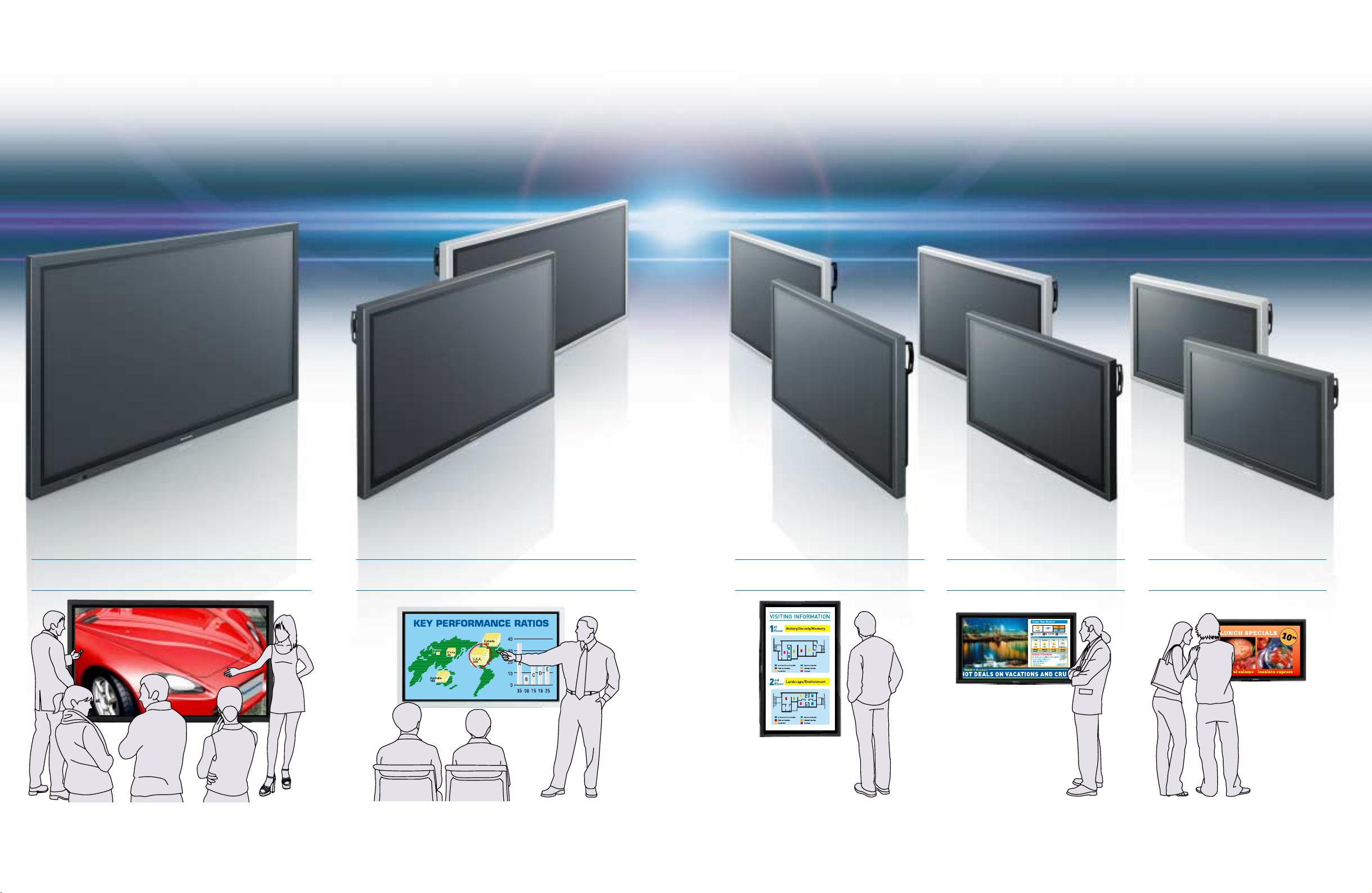
Image Quality and Versatility
that Lead the Industry
Panasonic's business-use flat panel displays lead the industry in image quality and
functions and are available in screen sizes from 32 to 65 inches.
Because flat panel displays are used in a variety of applications, they must meet a range of requirements. They must offer clear, faithful
images. And they must provide advanced functions, screen sizes large enough for the installation location, and selectable cabinet
colours (in this case, black or silver) to match their surroundings.
Panasonic flat panel displays provide all that and more. Our quest to lead the industry in image quality and innovative functions has led
to a new lineup of eleven models in five sizes and two cabinet colours.
Throughout this new lineup you'll see Panasonic's commitment to providing high-performance flat panel displays that meet the widest
range of professional applications.
65
HD
TH-65PHD8WK TH-50PHD8WK
50
HD
TH-50PHD8WS
TH-42PHD8WS
TH-42PWD8WS
42
TH-42PHD8WK
TH-42PWD8WK
HD/SD
TH-37PWD8WS
37
SD
TH-37PWD8WK
TH-32LHD7WS
32
TH-32LHD7WK
HD
The 65-inch plasma display has the powerful presence needed to draw
attention in even a large event area. With its large screen and high
resolution, this unit displays images that look clear and crisp even from a
distance. It's also suitable for lecture halls and amusement facilities.
2 3
At business meetings, presentations and other situations calling for powerful
visual impact, you can count on this 50-inch high-definition plasma display.
An optional touch panel adds sophistication and ease. The system can be
upgraded to display handwritten notes for even greater persuasive power.
When set up for portrait display, this 42-inch
plasma display is similar in size and aspect ratio to
a movie-size poster. Use it as a moving image
poster. Or upgrade the system with a scheduling
function that displays content according to the
correct time zone, and use it as a digital signboard.
The 37-inch plasma display fits well in stores. It
can display images from two video sources at the
same time, making it ideal for information display
in stores, show windows and other uses.
The 32-inch LCD display is perfect when space is
at a premium. Function slots let you customise
the unit for a specific application. This panel is
suitable for displaying both text and still images.
Page 3
Unmatched Expandability
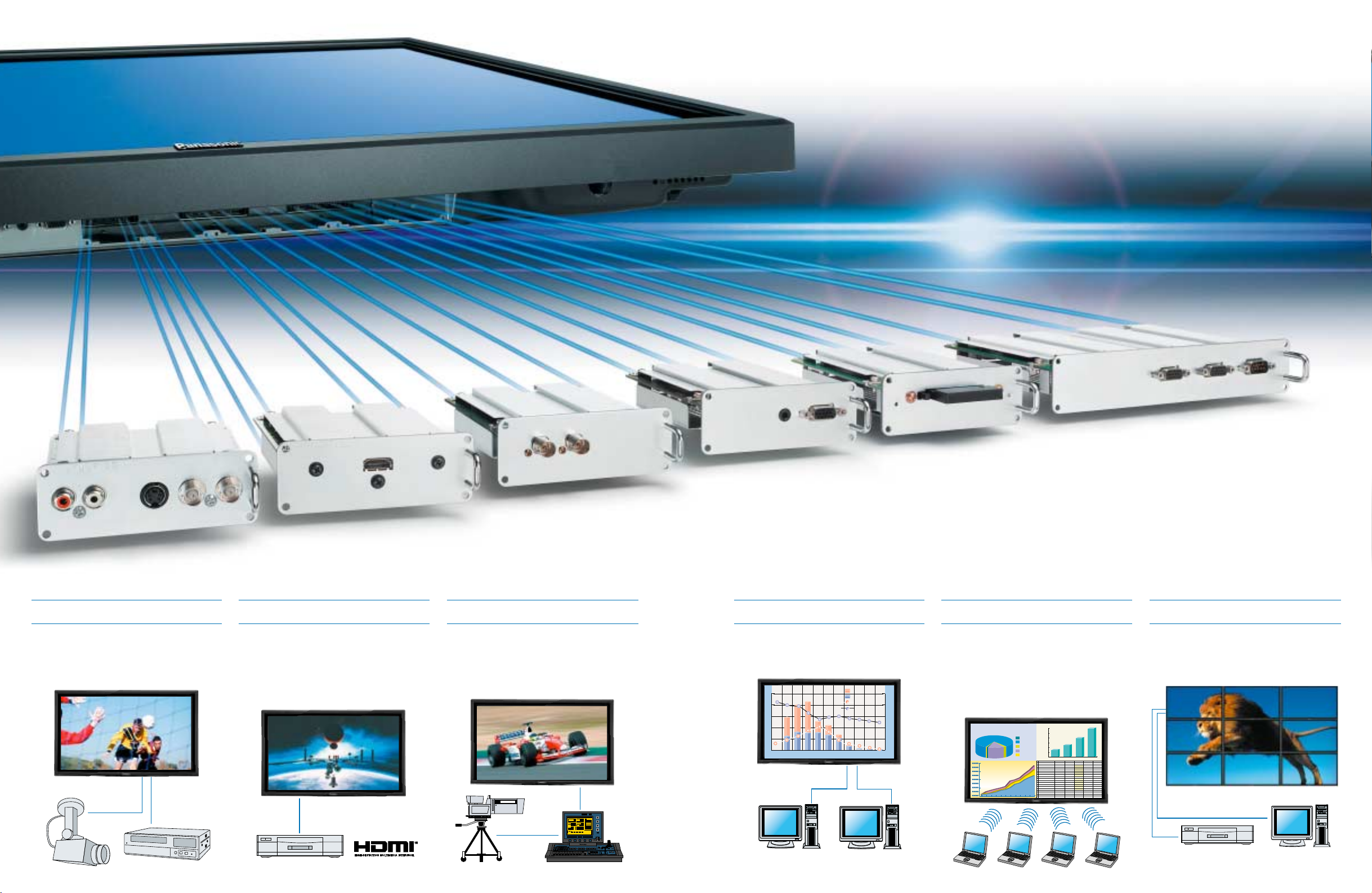
The triple function slots* and a host of optional function boards offer
outstanding flexibility and adaptability.
BNC Composite Video Terminal Board
TY-42TM6B
With Analogue Equipment
Video terminal boards let you connect an SVHS VCR or video camera. The TY-42TM6B
has a video output terminal too, so you can
also connect a sub-monitor device for
monitoring images.
HDMI Terminal Board
TY-FB8HM
With Digital Equipment
The next-generation standard digital interface,
HDMI terminal board digitally transfers video
and audio signals over a single cable. Connect
a compatible DVD player via an HDMI
terminal, and the plasma display can
reproduce images with the equivalent of 4,096
gradation levels.
SDI Terminal Board TY-FB7SD
HD-SDI Terminal Board TY-FB7HD
With Broadcast Equipment
SDI/HD-SDI terminal boards are compatible
with the SDI or HD-SDI (for HDTV) systems
used in broadcasting studios. Panasonic
displays are compatible with HD-SDI signals.
With these boards, the display can reproduce
crisp, clear images in a studio or control room.
PC Input Terminal Board
TY-42TM6P
With triple function slots* and a variety of terminal boards, you have the flexibility to configure a system that's ideally suited to
the content to be displayed. Create a customised system that meets your exact needs. Combined with the superb image
quality, this level of flexibility makes Panasonic flat panel displays a high-performance solution to a range of applications.
* TH-37PWD8 series and 32LHD7 series are equipped with dual function slots.
With Multiple PCs
A PC input terminal board lets you connect
multiple PCs. This can be ideal in conference
rooms, classrooms, lecture halls and other
sites where PCs are often used.
50
40
30
20
10
0
Female
Male
More than 2 Units
1 Unit
100
80
60
40
20
0
Over 6156 - 6051 - 5546 - 5041 - 4536 - 4031 - 3526 - 3021- 2516 - 200 - 15
Wireless Presentation Board
TY-FB7WPE
Note: This board cannot be used in some countries
due to their laws and regulations.
Wireless PC Connection
A wireless presentation board lets you display
signals from up to four notebook PCs at the
same time. This makes it easy to get a
presentation or meeting underway quickly,
without the time and trouble of connecting a
number of cables.
Note: The wireless presentation board cannot be used in some
countries due to their laws and regulations.
ANNUAL ACOUNTS
2004
1,200,000
1,000,000
Prepayments
800,000
Current Assets
600,000
Finantial Assets
400,000
Fixed Assets
200,000
Formation Expenses
1
ANNUAL ACOUNTS
2 2002 2003 2004 2005
3 Prepayments
4 Current Assets
5 Finantial Assets
6 Fixed Assets
7 Formation Expenses
8
9 2002 2003 2004 2005
10Prepayments
11Current Assets
12Finantial Assets
13Fixed Assets
14Formation Expenses
15
16
17
18
Operating Profits
1990 1995 2000 2005
ABCDEF
$1,023,000.00 $1,352,000.00 $1,450,000.00 $1,650,000.00
$254,000.00 $284,000.00 $234,000.00 $275,000.00
$456,000.00 $478,000.00 $568,000.00 $523,000.00
$65,500.00 $87,500.00 $68,500.00 $76,500.00
$125,000.00 $155,000.00 $164,000.00 $195,000.00
42% 48% 36% 32%
15% 16% 21% 14%
25% 20% 19% 16%
6% 4% 5% 3%
8% 6% 6% 7%
RGB Active Through Terminal Board
TY-42TM6G
Multi-Screen System
The RGB active-through terminal board lets
you daisy-chain a number of panels to create a
multi-screen plasma display system.
Note: TH-32LHD7 series cannot be used in multi-screen
applications.
4
5
Page 4
Industry’s Best Picture Quality Advanced Usability
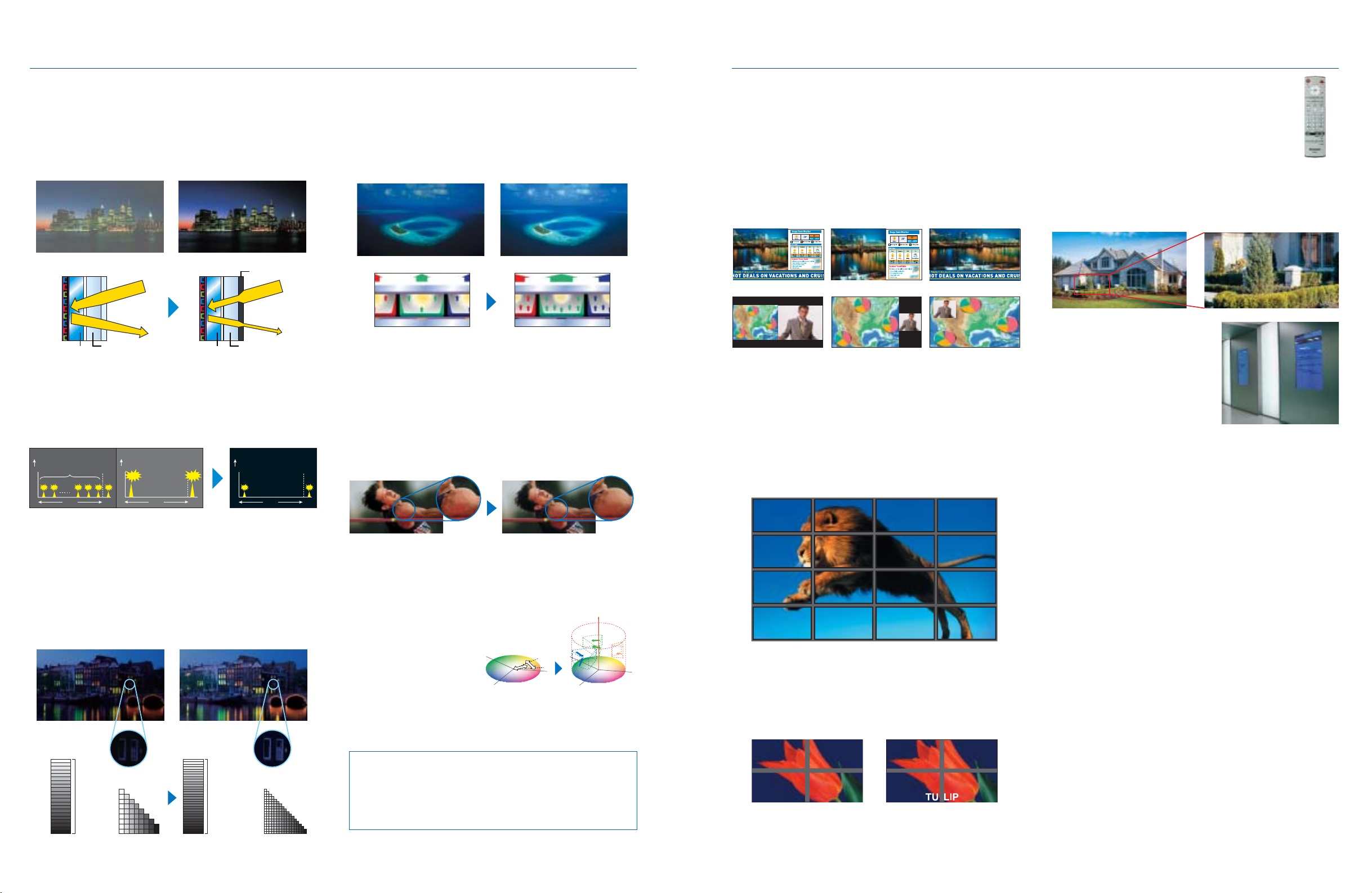
Industry’s Best*1 Bright-Area Contrast of 340:1
Deep Black Filter
*3
*2
—
The front protective glass of the plasma display panel incorporates a
Deep Black Filter that suppresses light transmittance and slashes the
amount of external light reflected. This technology helps these displays
achieve the industry's highest contrast ratio of 340:1*2 when viewed in
bright surroundings.
*1: As of July 1, 2005.
*2: For 42˝ SD model. Measured at 100 lux.
Conventional
Ambient light
Front protection glassFront glass
Panasonic plasma panel
Deep Black
Filter
Ambient light
Front protection glassFront glass
Industry’s Highest Level of Dark-Area Contrast —
New Real Black Drive System
By reducing the pre-discharge emission when reproducing black, the
New Real Black Drive System provides deeper, richer blacks and a
stunning 4000:1 contrast*4. The result is dramatically enhanced image
clarity and realism.
*4: For SD models.
Weak pre-discharge emissions × 12
(Contrast: 550 : 1)
Emission intensity
1 field
Weak pre-discharge
drive system
Strong pre-discharge emission × 1
(Contrast: 400 :1)
Emission intensity
1 field
Single pre-discharge
drive system
*3
Weak pre-discharge emission × 1
(Contrast: 4000 :1)
Emission intensity
1 field
New Real Black Drive
System
Industry’s Highest Level of Gradation Steps —
Advanced Real Gamma System
Panasonic plasma display series uses ultra-precise, maximum 14-bit
signal processing to produce vividly rich details. The Advanced Real
Gamma System then takes it another step further with full-time, full-pixel
1,536-step gradation and 2,048-step dark-area gradation. This level of
gradation brings intricate details and more faithful colour reproduction to
all scenes, dark and bright.
* The equivalent of 4,096 steps of gradation can be displayed with DVI or HDMI connection.
Dark areas are not shown
clearly.
*3
Dark scenes have finer detail.
Industry’s Highest Level of Brightness —
Advanced Plasma Panel
Panasonic plasma display panels feature a bounded cell structure in
which wall-like ribs are used to wrap each individual cell. By increasing
the area in which the phosphor can be applied, this dramatically
improves both light-emitting efficiency and intensity. Furthermore, by
optimizing the gas composition ratio, lighting efficiency has been
increased by about 15%. The result is the industry’s highest le vel of
brightness. You see crisp and clear images even in bright rooms.
Conventional
Long Service Life of 60,000 Hours
A new drive circuit and inner panel improvements give Panasonic plasma panels a
long service life of approximately 60,000 hours*
brightness. A newly developed phosphor also raises the plasma displays’
resistance to static-image screen burning to the same level as CRT displays.
*5: The time until panel brightness is reduced to half its initial level, when displaying moving
images at standard mode. Excludes afterimages and malfunctions.
High-Precision MPD Noise Reduction
This technology dramatically reduces MPD (Motion Picture Disturbance) noise to
deliver crisp, clean moving images. Using a Panasonic original algorithm, it detects
motion patterns that tend to generate noise and makes the necessary adjustments
to maximise image quality.
Conventional
Active I/P Conversion
The Active I/P (Interlace/Progressive) Conversion system detects slow movements
more precisely by increasing the range for detecting moving-picture and stillpicture pixels. This reduces I/P conversion noise that often occurs when
reproducing tiny movements, thereby producing crisper images while raising the
vertical resolution in interlaced images.
3D Colour Management System
The 3D Colour Management System
achieves precise control based on
3D management in the colour
difference plane and brightness
directions. This finer level of control
produces more expressive images.
Note:The default setting for the 3D Colour
Management System is OFF.
Adaptive AGC
Adaptive AGC raises contrast while suppressing noise by detecting and boosting
only the image edges.
Note: The default setting for the Adaptive AGC is OFF.
*3
G
B
Panasonic plasma panel
Images are crisp and clear even
in bright rooms.
*3
5
even with their increased
*3
MPD Noise Reduction
R
Conventional
Brightnes
sBrightness
G
R
3D Colour Management
Advanced Dual Picture Mode
Panasonic plasma displays feature a new Advanced Dual Picture Mode
in addition to the conventional Dual Picture Mode. This new mode lets
you overlay a video image onto a full-screen PC image. For example,
User-Friendly Remote Control
Redesigned for easier operation, the remote control unit now
features a Power Off button and Direct input select buttons. It
also allows ID control in a multi-screen system.
you can superimpose text information from a PC over a video clip,
giving you a more effective way to present information. When displaying
two separate images, you can select the audio output from either
source (previous models reproduced audio from the main source only).
Playing back the audio from the sub-source can be useful in
teleconferencing, for example.
Note: Plasma models cannot display two images when both are from component video
or RGB (PC) signal sources. The Advanced Dual Picture Mode may not work properly
with some video signals and is not available on the TH-32LHD7 series.
Advanced Dual Picture Mode
Dual Picture Mode
4x Digital Zoom
This function lets you enlarge a portion of an image by up to four times
normal size and display it on the full screen. Use this function to give
your presentations greater impact.
Note: Digital Zoom does not work in Dual Picture mode. Images of SXGA resolution or higher
from a PC or RGB source may not enlarge correctly. Some degradation occurs when
images are enlarged.
Vertical Mounting
*3
The 65-inch, 50-inch and 42-inch
Picture-And-Picture Picture-Out-Picture Picture-In-Picture
Remote System Monitoring
In addition to the conventional display control command and power
supply/input selection check command, Panasonic flat panel displays
feature a new monitor command that lets you check the signal from a
distant location. In conventional systems, you had to install a monitoring
camera to check the images displayed on an advertising display panel
or digital signage system. This new monitor command, on the other
hand, lets you monitor images by simply connecting a PC via a serial
cable.
models can be positioned vertically to
display portrait images, allowing them to
serve as effective storefront signboards.
There's no need to install an optional
fan kit.
Note: When using the display vertically, set it so the
power button is on top. The 37-inch & 32-inch
models cannot be positioned vertically.
New Cabinet Design
*3
Panasonic plasma displays (other than 65-inch model) introduce
simple, slim front bezel design. Control buttons and the Power button
are set on the bottom surface. This gives the panels a smooth, clean
Multi-Screen Applications
*3
look while also helping prevent accidental operation and tampering.
Enhanced Screen Saver Functions
A variety of screen saver functions help minimise the risk of uneven phosphor
aging. You can also use the timer to set the screen saver operating cycles,
operating time, and start and stop times. This lets you make settings that match
your application.
• White Bar Scroll: White bars move across the screen from left to right at
regular intervals. Good for ordinary still-image displays.
• Screen Reversal: Displays images with the black and white reversed. Good for
text displays.
• Side Panel Adjustment: Brightens the black bands on the sides of the screen
when displaying images in the 4:3 format.
•Wobbling: Shifts the image's position by several pixels at fixed time intervals.
•Peak Limit Mode: Lowers the peak brightness level (image contrast) by 30%.
Energy-Saving Functions
A broad range of environment-friendly functions help minimise energy
The built-in image-enlarging function makes it easier to set up a multi-
B
screen display system with four (2 x 2), nine (3 x 3), or 16 (4 x 4) units.
Thanks to the ID control function, you can use the standard remote
control unit to control multiple panels individually. There is also a mode
that displays a full-screen image, including the edges (the width of the
frame) of the display panel — something not possible with previous
systems. This is especially suitable for displaying text information, since
no words are hidden by the frame.
consumption.
• DPMS (Display Power Management Signaling)
Power is automatically turned on or off in response to a sync signal from the PC
connected to the built-in PC input terminal.
• Auto Power Off
When you're using a device connected to the multi-function slots, the display
panel goes into standby mode after about 10 minutes if no sync signal is received.
• Power Save Mode
Reduces the display's brightness.
• Standby Power Save Mode
*3
*3
Reduces power consumption when on standby. (Start-up may take a few moments
BrightDark
1,024-shades
Conventional Advanced Real Gamma
BrightDark
A maximum of
2,048 equivalent
shades of gradation
Image definition in low brightness areas
is greatly improved.
Boasting an HD panel with 1,366 x 768 pixels, the TH-32LHD7 series LCD
model relays all the detailed beauty of high-definition images. It achieves
excellent brightness of 500 cd/m
2
with high contrast of 800:1. The result is
vibrant, finely nuanced images even in brightly lit rooms. The viewing angle of
170° in both horizontal and vertical directions ensures superior legibility over a
wide area.
*3: These features found on only plasma models.
TULIP
Note: The ambient temperature varies depending on the installation location.
Provide sufficient air conditioning for surrounding conditions.
Advanced LCD Panel (TH-32LHD7 series)
once the display is in this mode.)
Sound Menu
*3
The Sound Menu gives you a choice of three sound settings
(Standard/Dynamic/Clear) to best match the kind of input source.
Fan-Less Quiet Operation
*3
Our "silence engineering" has eliminated the need for a fan — and fan noise —
giving you the kind of quiet operation that makes for a more pleasant viewing
experience.
(TH-65PHD8, 50PHD8 and 42PHD8 series feature a noise-suppressing silence design.)
*3: These features found on only plasma models.
6 7
Page 5
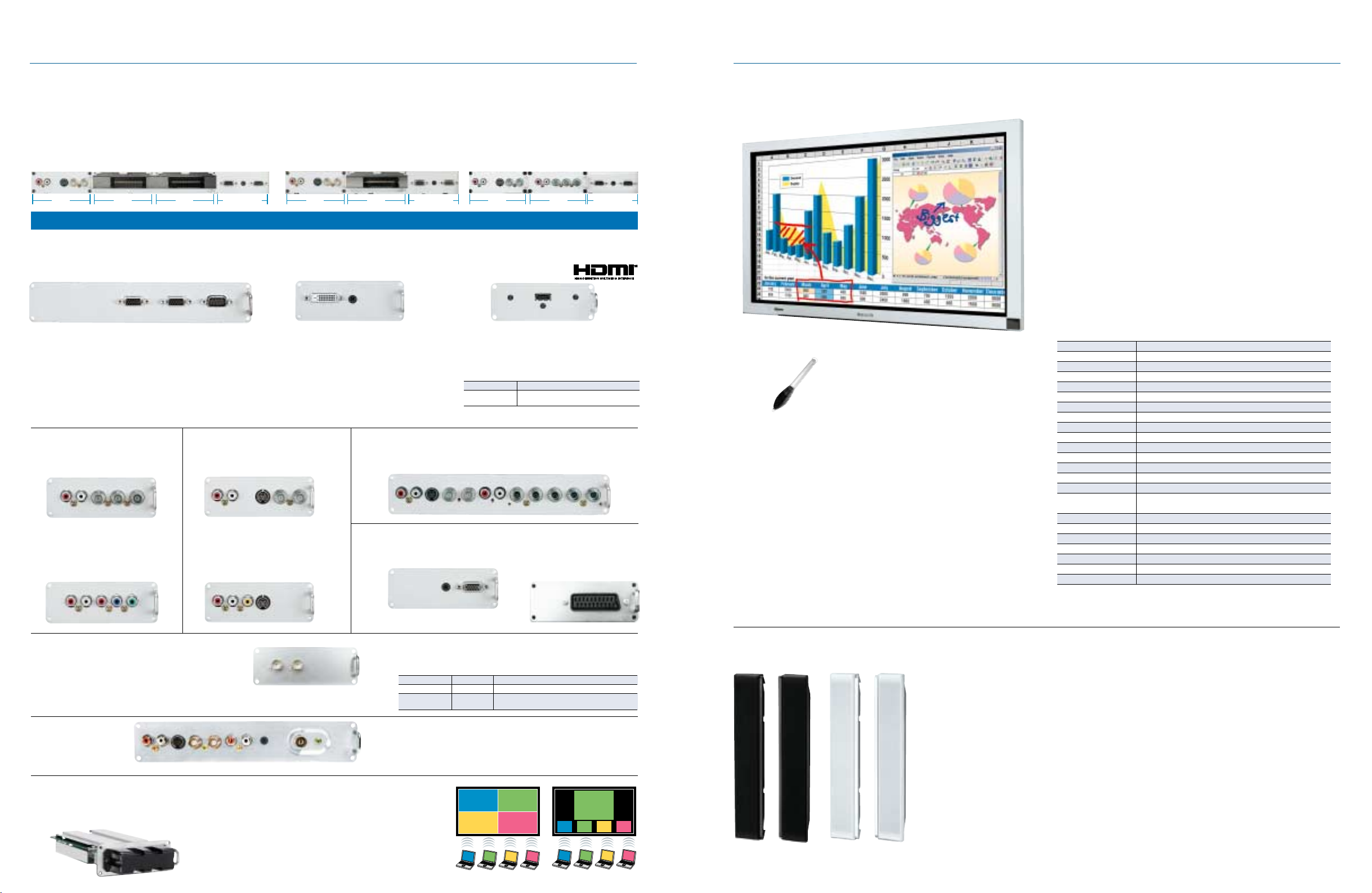
Industry’s Best Expandability Options
Multi-Function Slots
In addition to the fixed input interface, the Panasonic flat panel display has three (or two) interchangeable slots that let you add different combinations of
optional terminal boards. This gives you the flexibility to add digital or analogue capabilities, as necessary, and to customise your system for specific needs.
Multi-Function Slots on 65˝, 50˝ and 42˝ Models
These models come equipped with the standard terminal board
mounted in slot 1. You can mount optional terminal boards in slots 2
and 3. Or, you can remove the standard terminal board and mount
up to three optional boards.
TH-65PHD8/50PHD8/42PHD8/42PWD8 series TH-37PWD8 series TH-32LHD7 series
S-VIDEO
CVBS
IN
LR
OUTIN
Slot 1 Slot 2 Slot 1 Slot 2Slot 3
AUDIO
INPC IN
Fixed terminals Fixed terminals
Multi-Function Slots on 37˝ and 32˝ Models
37˝ models come equipped with the standard terminal board mounted in slot 1, and you can mount
optional terminal board in slot 2. 32˝ models come with the standard terminal boards mounted in
slots 1 and 2. You can remove the standard boards and mount one or two optional boards.
SERIAL
S-VIDEO
CVBS
IN
LR
OUTIN
AUDIO
SERIAL
INPC IN
S-VIDEO
CVBS
IN
LR
Slot 1 Slot 2
RL
OUTIN
COMPONENT IN
AUDIO
INPC IN
Fixed terminals
SERIAL
Optional Terminal Boards
RGB Active Through Terminal Board
(mounts in slots 1 & 2)
TY-42TM6G
PC IN PC OUT SERIAL
• Sends the signal that's input via the PC IN terminal to a
second display connected to the PC OUT terminal.
This connectability adds convenience when configuring a
multi-screen system.
The characters in red are added for explanation.
BNC Component Video
Terminal Board
(mounts in any slot)
TY-42TM6A
COMPONENT IN
RL
RCA Component Video
Terminal Board
(mounts in any slot)
TY-42TM6Z
COMPONENT IN
RL
SDI/HD-SDI Terminal Board (mounts in slot 1 or 2)
SDI Terminal Board TY-FB7SD
HD-SDI Terminal Board TY-FB7HD
Tuner Board
(mounts in slot 1 or 2)
RL RL
S-VIDEO
TY-FB7TA
Note: This board is available in limited countries only.
AUDIO IN AUDIO OUT
Wireless Presentation Board (mounts in slot 1)
TY-FB7WPE
Note: This board cannot be used in some countries
due to their laws and regulations.
(RS232C)
BNC Composite Video
Terminal Board
TY-42TM6B
RL
RCA Composite Video
Terminal Board
TY-42TM6V
RL
IN RF INOUT
CVBS
• Allows wireless connection (IEEE 802.11b compliant) of the
flat panel display and a PC.
• The Multi Live Mode displays up to four PC screens
simultaneously.
• The Live Mode projects the screen from one PC onto the entire
flat panel display.
• Lets you control flat panel displays with a Web browser.
RGB (Digital) Terminal Board
(DVI-D w/HDCP)
(mounts in slot 1 or 2)
TY-42TM6D
AUDIO IN
RGB (DIGITAL) IN
• Lets you connect a PC or other compatible
digital equipment that outputs digital RGB
signals (DVI-D compliant).
• Adding this board permits you to display
images with the equivalent of 4,096 gradation
1
.
levels*
*1: For plasma display models only.
Composite/Component Video Terminal Board
(mounts in slot 1 or 2)
(mounts in slots 1 & 2, or slots 2 & 3)
TY-42TM6Y
IN OUT
S-VIDEO
CVBS
PC Input Terminal Board
(mounts in any slot)
(mounts in slot 1 or 2)
CVBS
S-VIDEO
OUT IN
IR OUT
TY-42TM6P
• Lets you display images from two or more PCs.
* Does not support the DPMS function.
HDMI Terminal Board
(mounts in slot 1 or 2; for plasma models only)
TY-FB8HM
HDMI
• Enables fully digital connection of signals from HDMIcompatible DVD players and other digital equipment
for blur-free images with no colour bleeding.
• Adding this board permits you to display images
with the equivalent of 4,096 gradation levels*
Specifications
Standards compliance HDMI ver.1.1
Compatible video 525/60p, 625/50p, 750/60p, 750/50p, 1125/60i,
format 1125/50i, VGA60
* High-Definition Multimedia Interface and HDMI are trademarks of
HDMI Licensing, LLC.
RL
IN OUT
S-VIDEO CVBS
RL
RGB/COMPONENT IN
SCART Terminal Board
(mounts in slot 1 or 2;
for plasma models only)
AUDIO IN
RGB/COMPONENT IN
• Supports the serial digital interface (SDI) used in broadcasting.
• Provides fully digital transmission for clear, clean image displays.
• The TY-FB7HD supports HDTV.
Specifications
Standards compliance SMPTE259M-C SMPTE292M, SMPTE259M-C
Compatible video 525/59.94i 525/59.94i, 625/50i, 750/60p: 59.94p, 1125/30p, 1125/24p,
format 625/50i 1125/60i: 59.94i, 1125/50i, 1125/24sF: 23.98sF
TY-FB7SD TY-FB7HD
• Lets you receive analogue TV broadcasting.
• Video input/output terminals allow you to connect various kind of video
equipment such as a VCR or DVD.
• Supplied remote control offers fingertip command over virtually all major
functions. There is even an IR OUT (remote control signal output) terminal.
4-Screen Style Index Style
PC1
PC3
PC2
PC1
TY-FB8SC
PC2
PC4
PC4
PC3
PC1 PC2 PC3 PC4
PC1
PC2
PC2
1
.
PC3
PC4
8 9
Touch Panel
* The photo above shows the TY-TP65P8-S and may differ slightly from the
actual final product appearance of TY-TP50P8-S and TY-TP42P8-S.
TY-TPEN6 Touch Pen
also available.
Detachable Stereo Speakers
TY-SP65P7W-K (for TH-65PHD8WK)
Configuration: 2-way, 3-speaker
Dimensions (W x H x D): 100 x 925 x 90 mm
Weight: 2.2 kg/each
TY-SP50P8W-K (for TH-50PHD8WK)
TY-SP50P8W-S (for TH-50PHD8WS)
Configuration: 2-way, 3-speaker
Dimensions (W x H x D): 107 x 724 x 88 mm
Weight: 2.0 kg/each
TY-SP42P8W-K
(for TH-42PHD8WK, 42PWD8WK)
TY-SP42P8W-S
(for TH-42PHD8WS, 42PWD8WS)
Configuration: 2-way, 3-speaker
Photo shows
TY-SP42P8W-K.
Photo shows
TY-SP42P8W-S.
Dimensions (W x H x D): 107 x 610 x 88 mm
Weight: 2.0 kg/each
TY-TP65P8-S (for TH-65PHD8 series)
TY-TP50P8-S (for TH-50PHD8 series)
TY-TP42P8-S (for TH-42PHD8/42PWD8 series)
This add-on touch panel lets you write directly onto
the screen with a light touch. Ideal for adding written
comments during a presentation or meeting.
• Highly reliable optical sensor system
• Outstanding resolution, easy operation
• Thin design makes a precise fit with display screen
• Lets you use display as a "whiteboard"
TY-TP65P8-S
Applicable display devices Panasonic 65˝ plasma display
Power supply (voltage) DC + 5V ±10% (Through USB)
Electric current DC + 5V, Max 400mA
Detection system Infrared ray interruption
Panel aperture (W x H) 1455 x 826 mm
Detection range (W x H) 1440 x 812 mm
Effective detection range Above detection range + 1.0 mm top, bottom, right, and left
Operating modes Input point, Continuous, Moving end point detection*
Resolution (W x H) 2881 x 1625*
Detection pitch 2.0 x 2.0 mm
Output system Coordinate output
Optical elements 361 (H) x 204 (V)
Optical element pitch 4.0 x 4.0 mm
Minimum stylus 6.0 x 6.0 mm
Scan speed First touch: 45 msec/frame max.
Moving: 10 msec/frame max.
Interface USB1.1 compliant; Signal: +DATA, -DATA, VCC, GND; I/F connector: TYPE B
Panel shape Integrated flat panel controller
Dimensions (W x H x D) 1598 x 951 x 72 mm
Depth when mounted 170 mm
Weight (excluding brackets) 5.0 kg
Escutcheon (frame) Aluminum
USB driver/Applicable OS Microsoft Windows® 98SE/2000/ME/XP
* When using the specific driver software.
TY-SP37P8W-K (for TH-37PWD8WK)
TY-SP37P8W-S (for TH-37PWD8WS)
Configuration: 2-way, 3-speaker
Dimensions (W x H x D): 107 x 550 x 88 mm
Weight: 2.0 kg/each
TY-SP32L7W-K (for TH-32LHD7WK)
TY-SP32L7W-S (for TH-32LHD7WS)
Configuration: 2-way, 3-speaker
Dimensions (W x H x D): 102 x 500 x 102 mm
Weight: 1.9 kg/each
Page 6
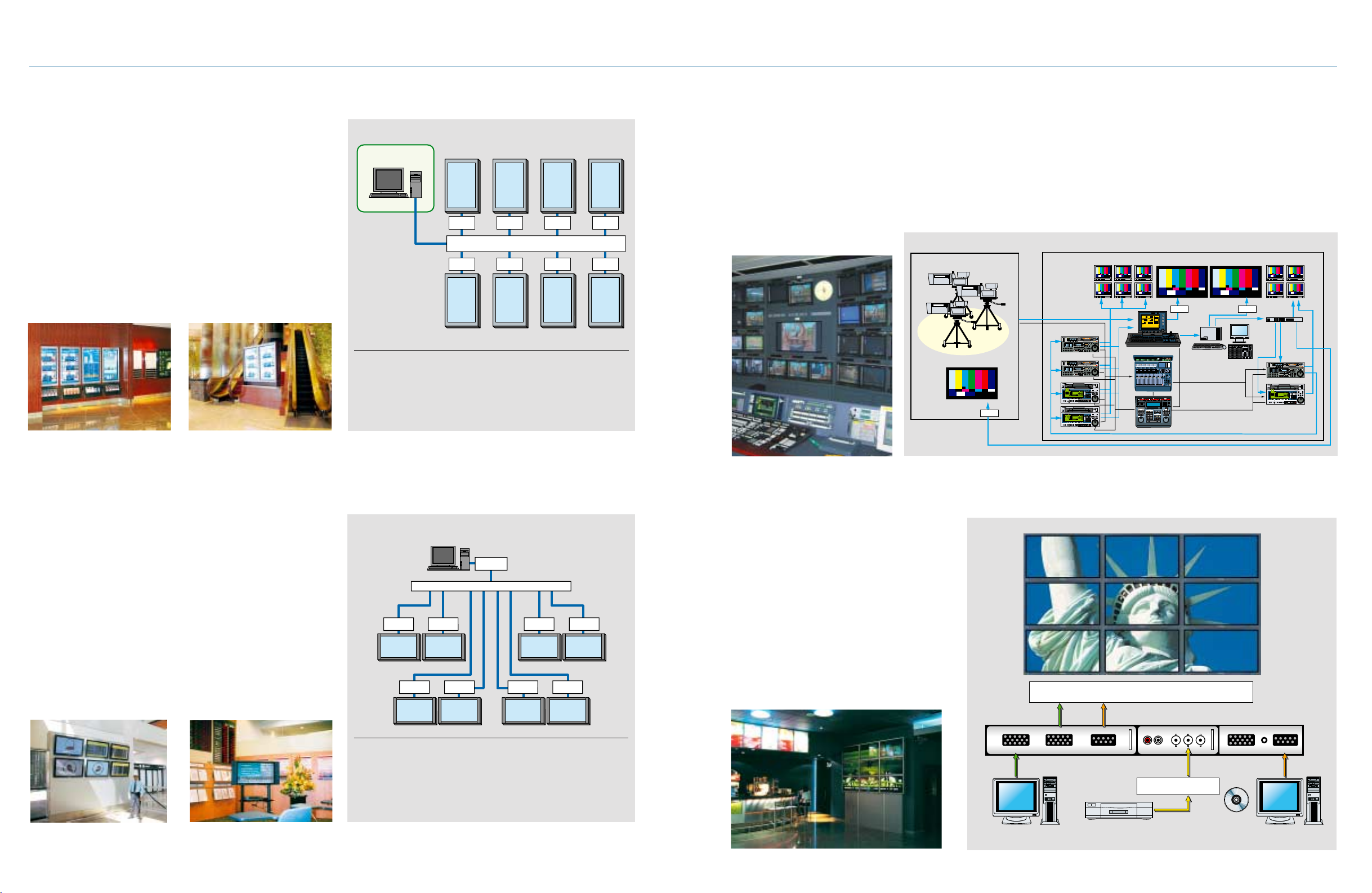
Plasma System Solutions
Digital Signage/Narrowcasting System Complete with Touch Panel
Easy, interactive content distribution system for retail chains and public
spaces such as shopping malls, office buildings and hotels
• Constructing a Multi-Language Environment
In contrast with conventional methods, in which several information
panels are prepared in different languages, this digital system allows
visitors to simply touch the panel itself to switch to the language they
want. It is a highly effective and efficient way to offer people the content
that they want to see.
• Flexible Content Control
Each PC connected to the Plasma has a unique IP address, allowing
content to be streamed to the Plasma on any LAN, modem, Internet or
Satellite network. It speeds up the process of updating information, and
any combination of Plasmas can be controlled locally or from a central
location.
• Universal System Design
Since the entire system can be configured in a Windows environment, it
requires no special software for content production or operation.
System Configuration
Content production and
delivery, System control
Control PC
2F 3F 4F 5F
PDP with
touch panel
PC PC
PC PC PC PC
PDP with
touch panel
* You can configure a 50-inch display and control system by simply
combining the TH-50PHD8 series Plasma Display and TY-TP50P8-S
Touch Panel, then connecting the PC to the plasma display.
* Content is distributed by a centralized control PC in an office and stored
in the hard disk of each PC, ready to be displayed by touch panel
operation.
PDP with
touch panel
LAN/Internet/Satellite Network
PDP with
touch panel
Near the 1st floor entrance
PDP with
touch panel
PC PC
PDP with
touch panel
PDP with
touch panel
PDP with
touch panel
HD-SDI/SD-SDI System for Broadcast Use
Displays crisp, clear images in a studio or control room.
• Adapts Easily to HD-SDI/SD-SDI Systems
The PDP adapts easily to HD-SDI and SD-SDI, the digital interfaces
used in broadcasting and video production. Simply plug the SDI or HDSDI terminal board into the function slot.
• Larger Screen with Wider Viewing Angle
Large PDP screens range from 42 to 50 inches — a big advantage
over the maximum 32-inch screen available with conventional HD-CRT
monitor displays for broadcast use. PDP screens also offer a wider
viewing angle and easier, more comfortable monitoring.
System Configuration
Studio Studio control room
PDP for studio monitor
SDI or HD-SDI
terminal board
• Saves Rack Space
With its thin profile, a PDP takes up less rack space than a CRT
monitor.
• Ideal as a Studio Monitor
When the PDP is used as a studio monitor display, its large screen and
wide viewing angle provide superior viewing for performers and
production crew. The PDP also requires little installation space and is
easy to move. When a 65-inch PDP is used for recording a programme
with a live audience, it helps create a livelier, upbeat atmosphere.
PDP for master monitor
LCD monitor
Broadcast VTR
Digital video switcher
SDI or HD-SDI
terminal board
CG system
Digital mixer
Editing controller
Signal
distributor
Broadcast VTR
Information System Using Twisted-Pair-Cable Receivers
Displaying up-to-date information such as transportation schedule
changes, stock market conditions, and countless other possible
subjects.
• Real-Time Information Bulletins
The use of the CAT5e twisted-pair cable allows content to be sent from
the server in real-time, for instant response to events such as sudden
changes in transportation schedules or accident information as it
becomes available.
• Long-Distance Transmission of High-Quality Video Signals
High-resolution XGA images, sound and RS232C control signal are
transmitted approximately 150 m over a single cable. PDP control
signals can also be sent over the same cable to allow remote operation
of power ON/OFF and other functions.
• Higher Signal Quality, Lower Costs, and Easier Installation
Thin, lightweight CAT5e twisted-pair cables do a better job of
preventing signal degradation than coaxial cables. They also reduce
costs and shorten the time needed for installation.
System Configuration
Twisted-pair-
cable receiver
Twisted-pair-
cable receiver
*The use of twisted-pair-cable receiver allows images to be sent to the
plasma display from an office up to 150 meters away.
* Using the twisted-pair-cable splitter, several plasma displays can be
connected in a cascade configuration.
Control server
Twisted-pair-cable splitter
Twisted-pair-
cable receiver
Twisted-pair-
cable receiver
Twisted-pair-
cable transmitter
Office
Content production,
distribution
System control
Twisted-pair-
cable receiver
Near the ticket vending machineNear the ticket gate
Twisted-pair-
cable receiver
In a corridorNear the waiting area
Twisted-pair-
cable receiver
Twisted-pair-
cable receiver
Multi-Screen System Using RGB Active Through Terminal Board
Eye-catching huge display system at shopping malls
and event sites
• Easy-to-Configure Multi-Screen System at a
Low Cost
This system shows DVD video and PC data on a giant
9-screen (3 x 3) display. This system, which requires
no image enlargement device, makes it possible to
have a multi-screen system at a low cost.
• Easy-to-See Information
The system displays enlarged XGA images with
excellent quality.
• Various Display Patterns and Powerful Impact
A "control PC" connected through a serial interface
lets you switch the input sources and control various
display patterns.
Next Plasma Display
IN
D-sub15P
XGA
PC
OUT SERIAL
D-sub15P D-sub9P
DVD
RL PBPR Y
To each PDP unit of the
multi-screen system
Signal Distributor
RGB/COMPONENT SERIAL
D-sub15P D-sub9P
Control
Software
Control PC
10 11
Page 7
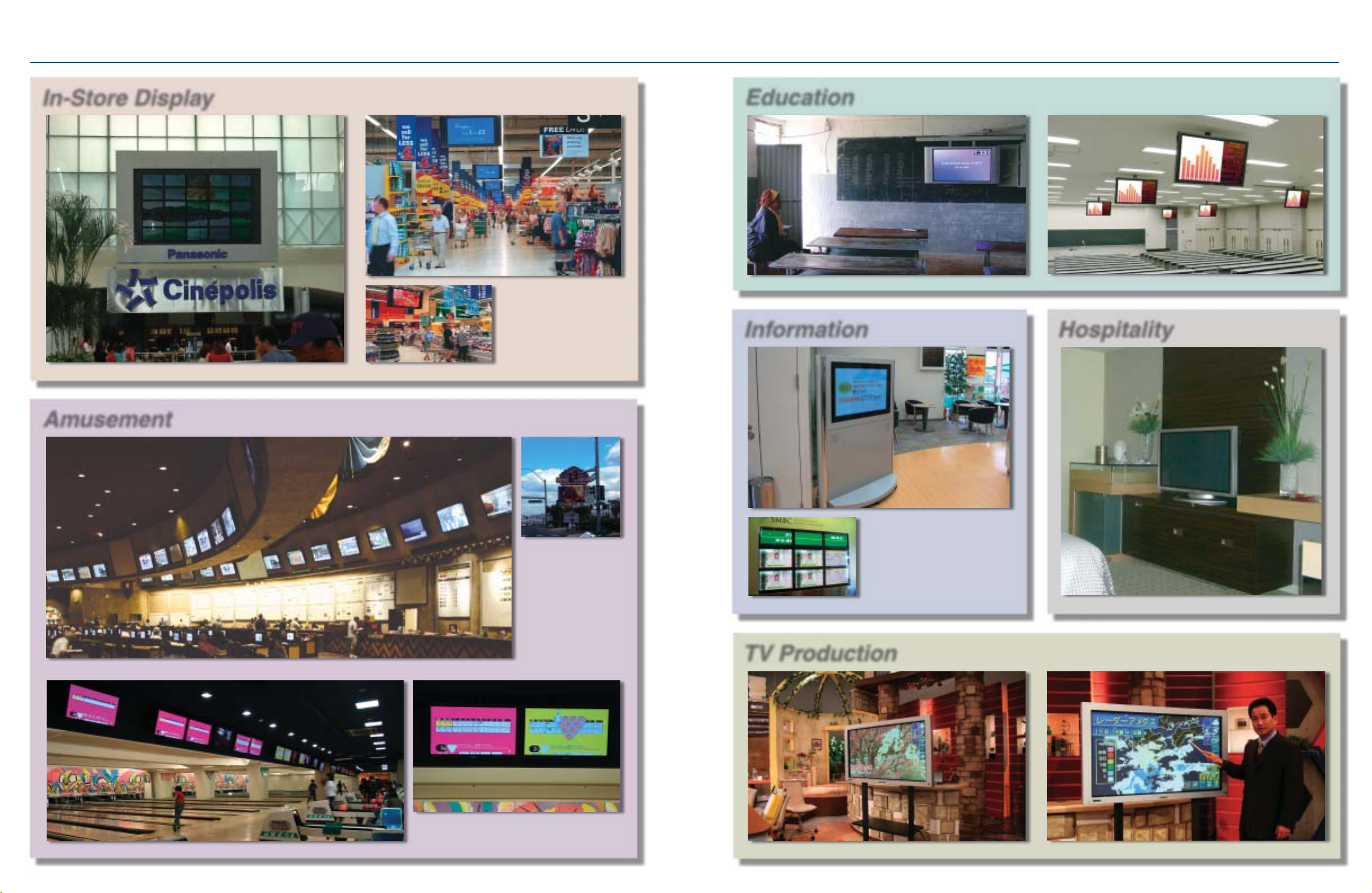
An Endless Array of Applications
In-Store Display
Shopping Mall, Panama
Amusement
TESCO, London, UK
Education
School, Addis Ababa, Ethiopia
Information
Ritsumeikan University, Kusatsu, Japan
Hospitality
Sunset Stations Casino,
Las Vegas, USA
(30 units of 65˝ displays)
Bowling Alley, Tokyo, Japan
Sumitomo Mitsui Bank,
Kobe, Japan
Marina Mandarin Hotel, Singapore
TV Production
Asahi Broadcasting Corporation, Osaka, Japan
12 13
Page 8
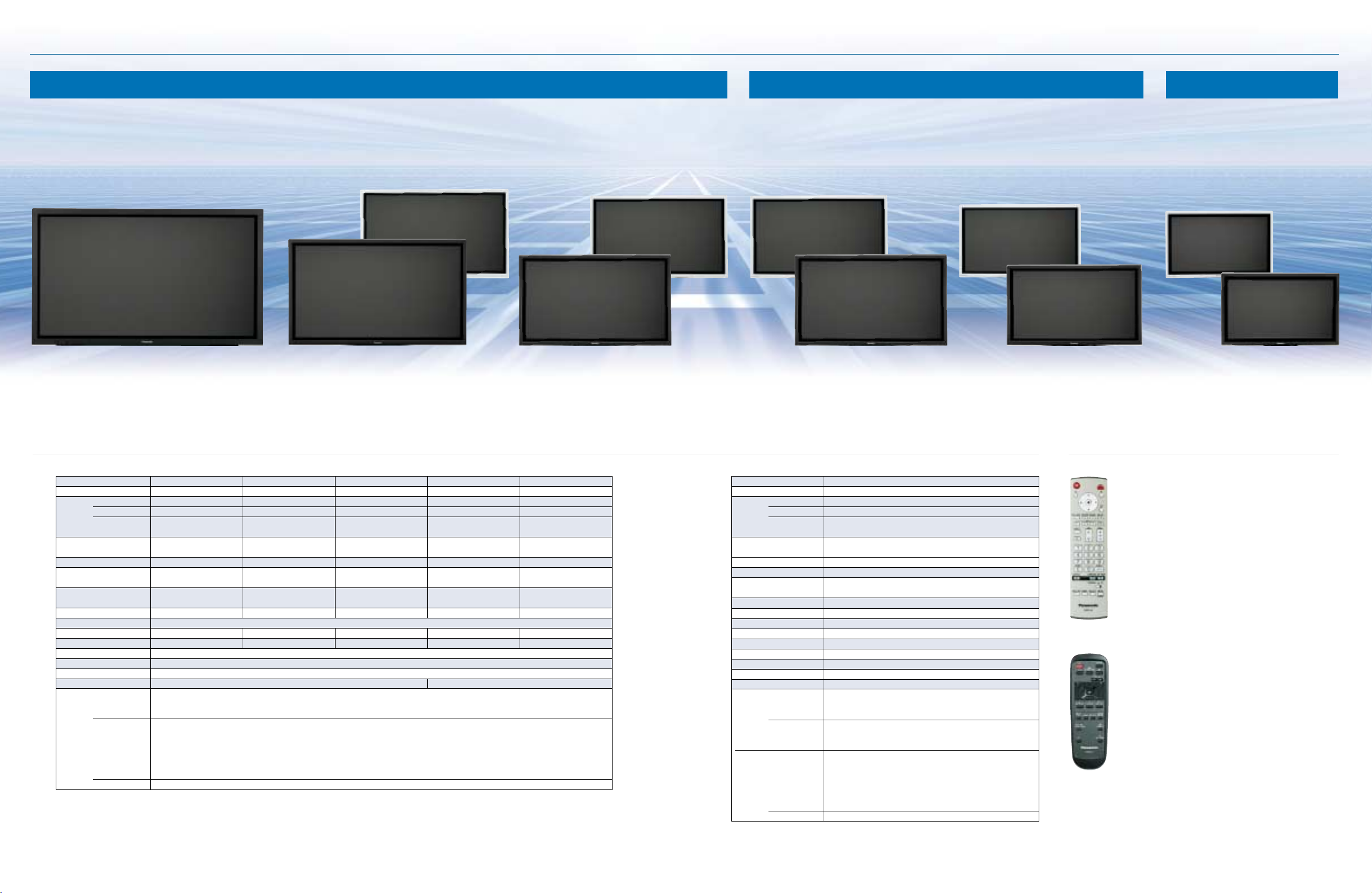
Line Up
Plasma HD Models LCD HD ModelsPlasma SD Models
TH-50PHD8WS TH-42PHD8WS TH-42PWD8WS TH-37PWD8WS TH-32LHD7WS
TH-50PHD8WK TH-42PHD8WK TH-42PWD8WK TH-37PWD8WK TH-32LHD7WK
TH-65PHD8WK
65-inch (165 cm) diagonal
High Definition Plasma Display
TH-50PHD8WK/WS
50-inch (127 cm) diagonal
High Definition Plasma Display
TH-42PHD8WK/WS
High Definition Plasma Display
Specifications
Model Number TH-65PHD8WK TH-50PHD8WK/WS TH-42PHD8WK/WS TH-42PWD8WK/WS TH-37PWD8WK/WS
Power Source 220 - 240 V AC, 50/60 Hz 220 - 240 V AC, 50/60 Hz 220 - 240 V AC, 50/60 Hz 220 - 240 V AC, 50/60 Hz 220 - 240 V AC, 50/60 Hz
Power Consumption 615 W 395 W 295 W 240 W 215 W
Plasma Display Panel Drive method: AC type Drive method: AC type Drive method: AC type Drive method: AC type Drive method: AC type
Contrast Ratio 3000:1 3000:1 3000:1 4000:1 4000:1
Screen Size W x H 1,434 x 806 mm 1,106 x 622 mm 920 x 518 mm 920 x 518 mm 818 x 461 mm
Number of Pixels 1,049,088 1,049,088 786,432 408,960 408,960
Audio Output (10% THD) 20 W (10 W + 10 W) 16 W (8 W + 8 W) 16 W (8 W + 8 W) 16 W (8 W + 8 W) 16 W (8 W + 8 W)
Operating Conditions Temperature: 0°C — 40°C; Humidity: 20 % — 80 % (Non condensation)
Dimensions (W x H x D) 1,554 x 925 x 99 mm 1,210 x 724 x 95 mm 1,020 x 610 x 89 mm 1,020 x 610 x 89 mm 920 x 550 x 89 mm
Weight 43.0 kg78.0 kg 31.5 kg 29.5 kg 25.0 kg
EMC CISPR22 Class-B
Safety Standards AS/NZS60065, GOST12.2.006-87, SASO, IEC60065
Colour System NTSC, PAL, PAL 60, SECAM, Modified NTSC
Applicable PC Signals XGA (Signals exceeding XGA are compressed and displayed.) VGA (Signals exceeding VGA are compressed and displayed.)
Terminals AV VIDEO IN/OUT (BNC): 1.0 Vp-p (75-ohms or high-impedance)
(Slot-type) S-VIDEO (Mini DIN 4-pin): Y: 1.0 Vp-p (75-ohms), C: 0.286 Vp-p (75 ohms)
(Fixed) PC (Mini D-sub 15-pin)
Power off condition 0.35 W 0.3 W 0.3 W 0.1 W 0.1 W
Stand-by condition Save On: 0.7 W Save On: 0.6 W Save On: 0.6 W Save On: 0.9 W Save On: 0.9 W
Diagonal 65˝ (1,645 mm) 50˝ (1,269 mm) 42˝ (1,056 mm) 42˝ (1,056 mm) 37˝ (939 mm)
SERIAL External control terminal (D-sub 9-pin), RS-232C compatible
Save Off: 0.9 W Save Off: 0.8 W Save Off: 0.8 W Save Off: 1.2 W Save Off: 1.2 W
65-inch, 16:9 aspect ratio 50-inch, 16:9 aspect ratio 42-inch, 16:9 aspect ratio 42-inch, 16:9 aspect ratio 37-inch, 16:9 aspect ratio
(1,366 [W] x 768 [H]) (1,366 [W] x 768 [H]) (1,024 [W] x 768 [H]) (852 [W] x 480 [H]) (852 [W] x 480 [H])
AUDIO IN L/R (RCA pin jack x 2): 0.5 Vrms (high impedance)
fH: 15 — 110 kHz; fV: 48 — 120 Hz
R,G,B: 0.7 Vp-p (75-ohms)
P
B, PR/CB, CR: ± 0.7 Vp-p (75-ohms); HD, VD/1.0 — 5.0 Vp-p (high impedance)
Y: 1.0 Vp-p (75-ohms; including sync)
Audio In (M3 jack): 0.5 Vrms (high impedance)
42-inch (106 cm) diagonal
TH-42PWD8WK/WS
TH-37PWD8WK/WS
42-inch (106 cm) diagonal
Wide Plasma Display
Model Number TH-32LHD7WK/WS
Power Source 220 - 240 V AC, 50/60 Hz
Power Consumption 165 W
LCD Display Panel
Viewing Angle Horizontal: 170°, Vertical: 170°
Contrast Ratio 800:1
Screen Size W x H 697.7 x 392.3 mm
Number of Pixels 1,049,088 (1,366 [W] x 768 [H])
Audio Output (10% THD) 16 W (8 W + 8 W)
Operating Conditions Temperature: 0°C — 40°C; Humidity: 20 % — 80 % (Non condensation)
Dimensions (W x H x D) 805.0 x 499.6 x 102.0 mm
Weight 17.0 kg
EMC CISPR22 Class-B
Safety Standards AS/NZS60065, GOST12.2.006-87, SASO, IEC60065
Colour System
Applicable PC Signals
Terminals AV VIDEO IN/OUT (BNC): 1.0 Vp-p (75-ohms or high-impedance)
(Slot-type)
(Fixed) PC (Mini D-sub 15-pin)
Power off condition 0.4 W
Stand-by condition Save On: 0.8 W
Diagonal 32˝ (800.4 mm)
NTSC, PAL, PAL 60, SECAM, Modified NTSC
XGA (Signals exceeding XGA are compressed and displayed.)
S-VIDEO (Mini DIN 4-pin): Y: 1.0 Vp-p (75-ohms), C: 0.286 Vp-p (75 ohms)
COMPONENT/RGB Y/G (BNC): 1.0 Vp-p/composite (75-ohms); 0.7 Vp-p/non-composite (75 ohms)
SERIAL External control terminal (D-sub 9-pin), RS-232C compatible
AUDIO IN L/R (RCA pin jack x 2): 0.5 Vrms (high impedance)
B, PR/CB, CR (BNC): 0.7 Vp-p (75 ohms); R/B (BNC): 0.7 Vp-p (75 ohms)
P
AUDIO IN L/R (RCA pin jack x 2): 0.5 Vrms (high impedance)
PB, PR/CB, CR: ± 0.7 Vp-p (75-ohms); HD, VD/1.0 - 5.0 Vp-p (high impedance)
Audio In (M3 jack): 0.5 Vrms (high impedance)
Save Off: 1.0 W
a-Si TFT active matrix
32-inch, 16:9 aspect ratio
fH: 15 — 110 kHz; fV: 48 — 120 Hz
R,G,B: 0.7 Vp-p (75-ohms)
Y: 1.0 Vp-p (75-ohms; including sync)
37-inch (94 cm) diagonal
Wide Plasma Display
Remote Control
TH-32LHD7WK/WS
32-inch (80 cm) diagonal
High Definition LCD Display
Supplied Remote Control for PHD8/PWD8 series
(Comes with every Panasonic Plasma Display model.)
Remote Control Functions
Power On
Power Off
Direct Input Selection
(1/2/3/PC)
Input Selection
Status
Surround On/Off
Sound Mute On/Off
Volume Up/Down
Normalization (N)
Exit (R)
Position/Action
Digital Zoom
Supplied Remote Control for TH-32LHD7WK/WS
Remote Control Functions
Stand-by (On/Off)
Input Selection
Status
Surround On/Off
Sound Mute On/Off
Volume Up/Down
Normalization (N)
Exit (R)
Position/Action
Digital Zoom
Dual Picture
(MULTI PIP/SWAP/SELECT/MOVE)
Picture
Sound
Set Up
Picture Position/Size
Aspect
PC Mode Selection
Off Timer
Normal/ID Remote Selection
ID Number Set
ID All
Dual Picture
(MULTI PIP/SWAP/SELECT/MOVE)
Picture
Sound
Set Up
Picture Position/Size
Aspect
PC Mode Selection
Off Timer
14 15
Page 9
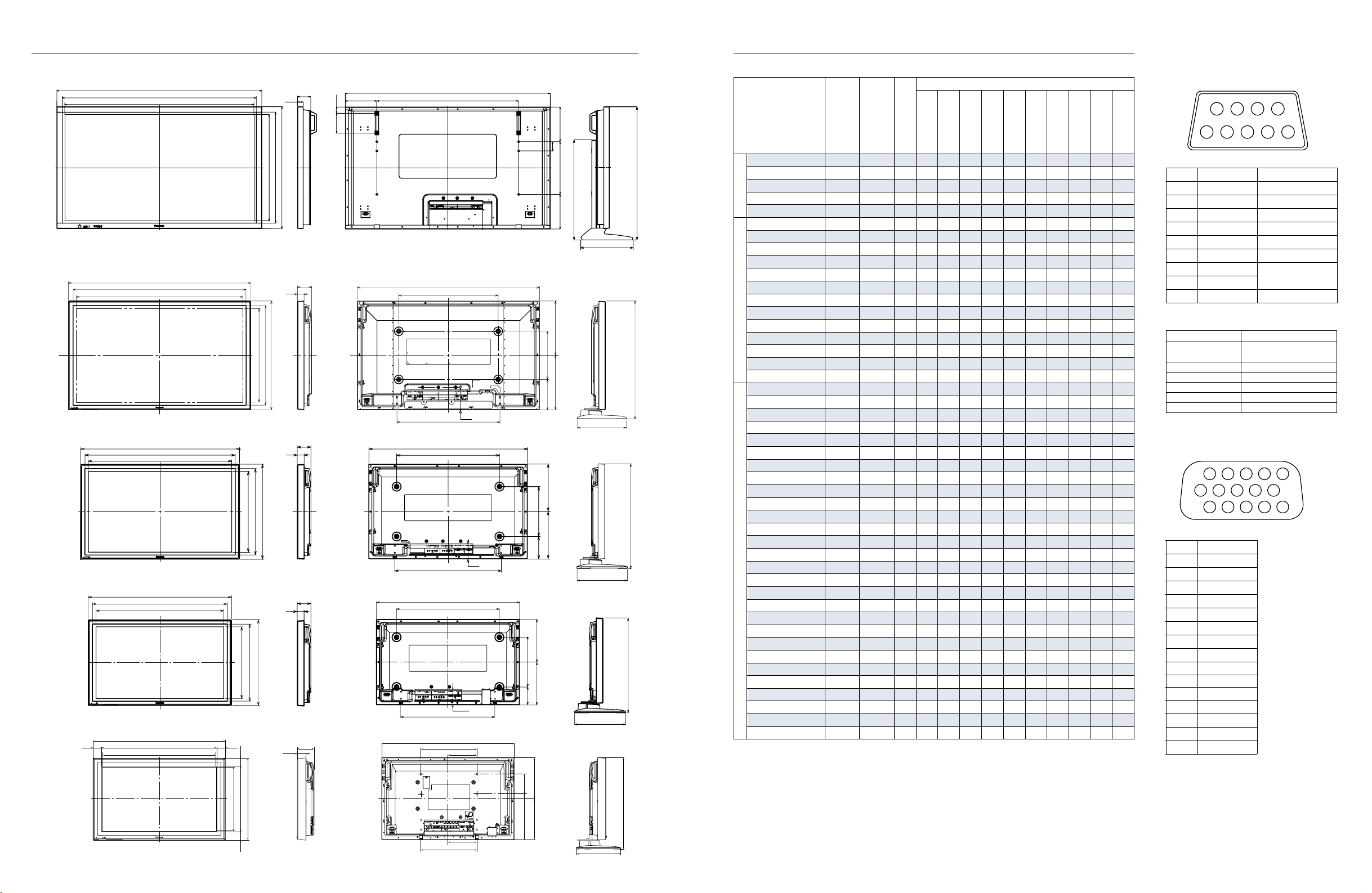
Dimensions Preset Input Signals
(Unit: mm)
TH-65PHD8WK
1554
1471
1434
806
841
925
42.5
262.5400
70
With the optional
pedestal attached.
Signal name
Horizontal
Frequency (kHz)
Vertical
Standard-Equipped
Terminals
Frequency (Hz)
TY-42TM6Y
TY-42TM6B/V
99
47.5
150
239.4
1554
1075.2
NTSC 15.73 59.94 Y Y Y
1012
459.4
CompositeComponentRGB
262.5
PAL 15.63 50.00 Y Y Y
PAL60 15.73 59.94 Y Y Y
SECAM 15.63 50.00 Y Y Y
Modified NTSC 15.73 59.94 Y Y Y
525 (480)/60i 15.73 59.94 Y Y Y Y Y Y Y
Optional Board
TY-42TM6P
TY-42TM6A/Z
TY-42TM6D
TY-42TM6G
TY-FB7SD
TY-FB7HD
TY-FB8HM
Y
Y
Y
Y
Y
525 (480)/60p 31.47 59.94 Y Y Y Y Y Y Y
625 (575)/50i 15.63 50.00 Y Y Y Y Y Y Y
625 (575)/50p 31.25 50.00 Y Y Y Y Y Y Y
750 (720)/60p 45.00 60.00 Y Y Y Y Y Y Y Y
750 (720)/50p 37.50 50.00 Y Y Y Y Y Y
1125 (1080)/60i 33.75 60.00 Y Y Y Y Y Y Y Y
1125 (1080)/50i 28.13 50.00 Y Y Y Y Y
Y*
Y*
1
1
1125 (1080)/24p 27.00 24.00 Y Y Y Y Y Y
1125 (1080)/24sf 27.00 48.00 Y Y Y Y Y Y
1125 (1080)/25p 28.13 25.00 Y Y Y Y Y Y
1125 (1080)/30p 33.75 30.00 Y Y Y Y Y Y
YY
TH-50PHD8WK/WS
1210
1148
1106
622
662
724
395
362362
With the optional
pedestal attached.
783.3
95
44
1210
660
1250 (1080)/50i 31.25 50.00 Y Y Y Y Y
640 x 400 @70Hz 31.46 70.07 Y Y Y Y Y
640 x 480 @60Hz 31.47 59.94 Y Y Y Y Y Y Y
640 x 480 @72Hz 37.86 72.81 Y Y Y Y Y
640 x 480 @75Hz 37.50 75.00 Y Y Y Y Y
640 x 480 @85Hz 43.27 85.01 Y Y Y Y Y
852 x 480 @60Hz 31.47 59.94 Y Y Y Y Y Y
800 x 600 @56Hz 35.16 56.25 Y Y Y Y Y
TH-42PHD8WK/WS
TH-42PWD8WK/WS
684
1020 1020
964
920
89
44
660
124
202 320
327
With the optional
pedestal attached.
800 x 600 @60Hz 37.88 60.32 Y Y Y Y Y Y
800 x 600 @72Hz 48.08 72.19 Y Y Y Y Y
800 x 600 @75Hz 46.88 75.00 Y Y Y Y Y
800 x 600 @85Hz 53.67 85.06 Y Y Y Y Y
518
554
610
305305
320
669.3
1024 x 768 @60Hz 48.36 60.00 Y Y Y Y Y Y
1024 x 768 @70Hz 56.48 70.07 Y Y Y Y Y
1024 x 768 @75Hz 60.02 75.03 Y Y Y Y Y
1024 x 768 @85Hz 68.68 85.00 Y Y Y Y Y
1152 x 864 @75Hz 67.50 75.00 Y Y Y Y Y
1280 x 960 @60Hz 60.00 60.00 Y Y Y Y Y
1280 x 960 @85Hz 85.94 85.00 Y Y Y Y Y
TH-37PWD8WK/WS
920
864
819
145
89
684
89
44
920
660
327
With the optional
pedestal attached.
1280 x 1024 @60Hz 63.98 60.02 Y Y Y Y Y
1280 x 1024 @75Hz 79.98 75.03 Y Y Y Y Y
1280 x 1024 @85Hz 91.15 85.02 Y Y Y Y Y
1600 x 1200 @60Hz 75.00 60.00 Y Y Y Y Y
1600 x 1200 @65Hz 81.25 65.00 Y Y Y Y Y
1066 x 600 @60Hz 37.88 60.32 Y Y Y Y Y Y
1366 x 768 @60Hz 48.36 60.00 Y Y Y Y Y Y
Mac 13˝ (640 x 480) 35.00 66.67 Y Y Y Y Y
Mac 16˝ (832 x 624) 49.72 74.54 Y Y Y Y Y
Mac 21˝ (1152 x 870) 68.68 75.06 Y Y Y Y Y
*1: The TH-32LHD7WK/WS does not accept these signal formats.
TH-32LHD7WK/WS
53.2
805
698.6
697.7
53.2
461
494
52.9
550
51.9
102
602
805
339
90.5
176
320
115
275 275
327
With the optional
pedestal attached.
609.3
Note: When a signal having a resolution that exceeds the panel resolution is input,
a simplified display will be produced.
392.3
393.8
52.9
499.6
339
176
120
279.8
249.8
556.7
249.8
271.5
16 17
Serial RS232C: D-Sub 9-Pin (Female)
6789
2
1
TY-FB8SC
Pin Assignment and Signal Name
Pin No. Signal name Descriptions
1CD NC
2 RXD Receive Data
3 TXD Transmit Data
4 DTR Not used
5 GND Ground
6 DSR Not used
7RTS
8 CTS
9RI NC
Transmitting Conditions
Signal Level Complied with RS232C
Synchronous System Start/Stop Synchronous
Baud Rate 9600 bps
Parity Nil
Character Length 8 bits
Stop Bit 1 bit
X Parameter Nil
345
PC Input: D-Sub 15-Pin (Female)
12
11
6
1
Signal Name
Pin No. Signal name
1 R (P
2 G (Y)
3 B (P
4 GND (Ground)
5 GND (Ground)
6 GND (Ground)
7 GND (Ground)
8 GND (Ground)
9 NC (Not connected)
10 GND (Ground)
11 GND (Ground)
12 SDA
13 HD/SYNC
14 VD
15 SCL
13 14 15
78910
2345
R/CR)
B/CB)
Short Circuit
Communication
Page 10
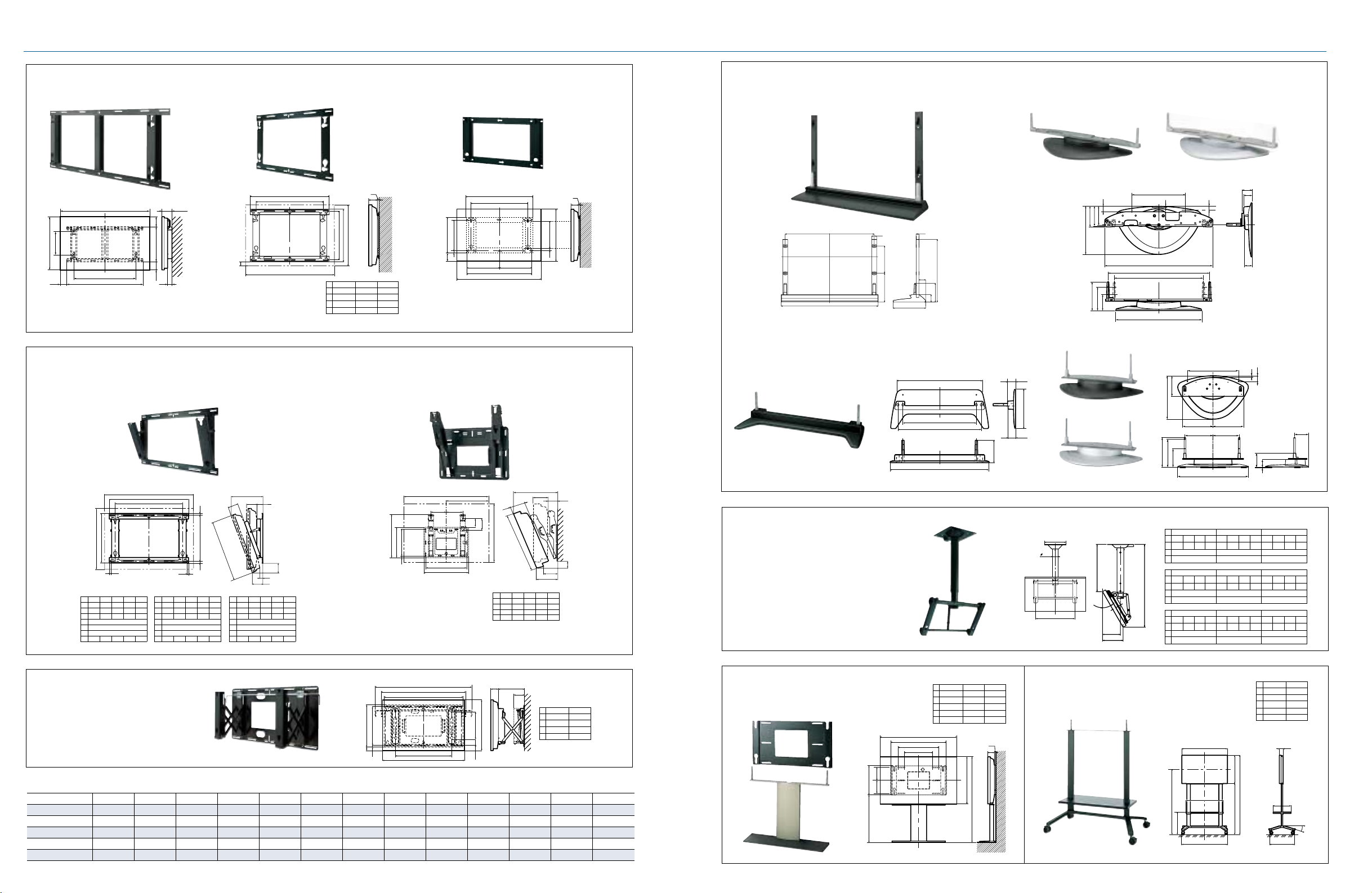
Mounting Options
Wall-hanging bracket
Unit: mm
925
330
117
1554
1075.2
1320
177.5
604 178143
75
Wall-hanging bracket (angled)
TY-WK42PR7 TY-WK32LR1S
TY-WK42PV7
Unit: mm
C
Pedestal
TY-WK37PV3TY-WK65PV7
775
660
A
A 1210 1020 920
B 724 610 550
C 91.5 34.5 29.5
D95 89 89
20
D
B
480
516
50˝ model 42˝ model 37˝ model
Unit: inch
16.3
2.5
14.2
1.1
30.7
26.0
14.8 14.8
29.5
36.2
0.8
3.5
12.6
21.7
1.0
TY-ST65-K
Unit: mm
1075.2
1171.2
60
330
349.5
35.5
759.4
82.2
227.8
90
393
TY-ST07-K
Unit: mm
688
601
684
TY-ST08-K/TY-ST08-S
TY-ST08-K TY-ST08-S
Unit: mm
46
131
141
136
327
179
145
100
TY-ST32L7-K/TY-ST32L7-S
67.5
320.3
62.5
TY-ST32L7-K
360
8
704
684 (for 50˝ & 42˝)
602 (for 37˝)
578
Unit: mm
271.5
128
40
320
176 163
72
63
55
8235
191191
89
Unit: mm
Unit: mm
443.5
325
280
23
490
450
C
20
1189
999
930
660
A
805
163 176
440
480
415.6
73
120
B
320
69.5
499.6
A 6.5 8.1 9.5 11.0 12.3
B 6.5 6.4 6.3 6.1 5.8
C 0.1 0.4 1.0 1.4 1.9
D
A
102
102
499.6
0° 5° 10° 15° 20°
4.5 4.3 4.2 4.0 3.8
320D
120
63.2
C
D
B
50˝ model 42˝ model
A 1210 1020
B 724 610
C 112.5 55.5
D95 89
●: Compatible; —: Not compatible
Unit: mm
D
486
15
50˝ model
R
0° 5° 10° 15° 20°
A 155 200 243 285 325
B 155 137 119 99 80
C 130 137 145 152 156
D724
E 1210
F95
G6057422611
Wall-hanging bracket
(drawer type)
TY-WK42DR1
Compatible Models at a Glance
E
775
660
15
42˝ model
R
0° 5° 10° 15° 20°
A 149 188 226 264 299
B 149 135 121 107 92
C 73 80 88 95 101
D610
E1020
F89
G6050402919
450 18 18
D
A
F
60
F
C
G
B
37˝ model
R
0° 5° 10° 15° 20°
A 149 185 221 256 289
B 149 138 127 115 102
C4350535760
D550
E920
F89
G6053453729
TY-ST65-K TY-ST08-K/S TY-ST07-K TY-ST32L7-K/S TY-WK42DR1 TY-WK65PV7 TY-WK42PV7 TY-WK37PV3 TY-WK42PR7 TY-WK32LR1S TY-ST42PW1 TY-ST42PF3 TY-C E42PS7
TH-65PHD8 series ● ————● ———————
TH-50PHD8 series — ●● (WK) — ● — ● — ● — ●●●
TH-42PHD/42PWD8 series — ●● (WK) — ● — ● — ● — ●●●
TH-37PWD8 series — ●● (WK) ——— ●●●— ● — ●
Ceiling-hanging bracket
TY-CE42PS7
Wall stand
TY-ST42PW1
Unit: mm
180180
400
D
806
50˝ model 42˝ model 37˝ model
A 1210 1020 920
B 724 610 550
C 1230.5 1116.5 1056.5
D 668.5 611.5 581.5
E95 89 89
A
744
560
390
184.5
TY-ST32L7-S
Unit: mm
350
89.1
B
660
R
C
D
Mobile stand
TY-ST42PF3
19
E
B
C
189
177
118
443
50˝ model
R0° 15° 30°
A 1187 1287 1387 1487 1201 1301 1401 1501 1181 1281 1381 1481
B 466 566 666 766 506 606 706 806 558 658 758 858
C 199 249 286
D 0 186 360
42˝ model
R0° 15° 30°
A 1130 1230 1330 1430 1144 1244 1344 1444 1129 1229 1329 1429
A
B 523 623 723 823 561 661 761 861 604 704 804 904
C 193 228 252
D 0 157 303
37˝ model
R0° 15° 30°
A 1100 1200 1300 1400 1115 1215 1315 1415 1103 1203 1303 1403
B 553 571 671 771 589 689 789 889 630 730 830 930
C 193 220 236
D 0 141 273
Unit: mm
D
350/500
1030
A
B
820
C
1027
90
50
50˝ model 42˝ model
A 1210 1020
B 724 610
C 1751 1637
D 1389 1332
E95 89
E
400
650
15°
TH-32LHD7 series ——— ● —————● ———
18 19
 Loading...