

Page 1
www.omega.com
e-mail: info@omega.com
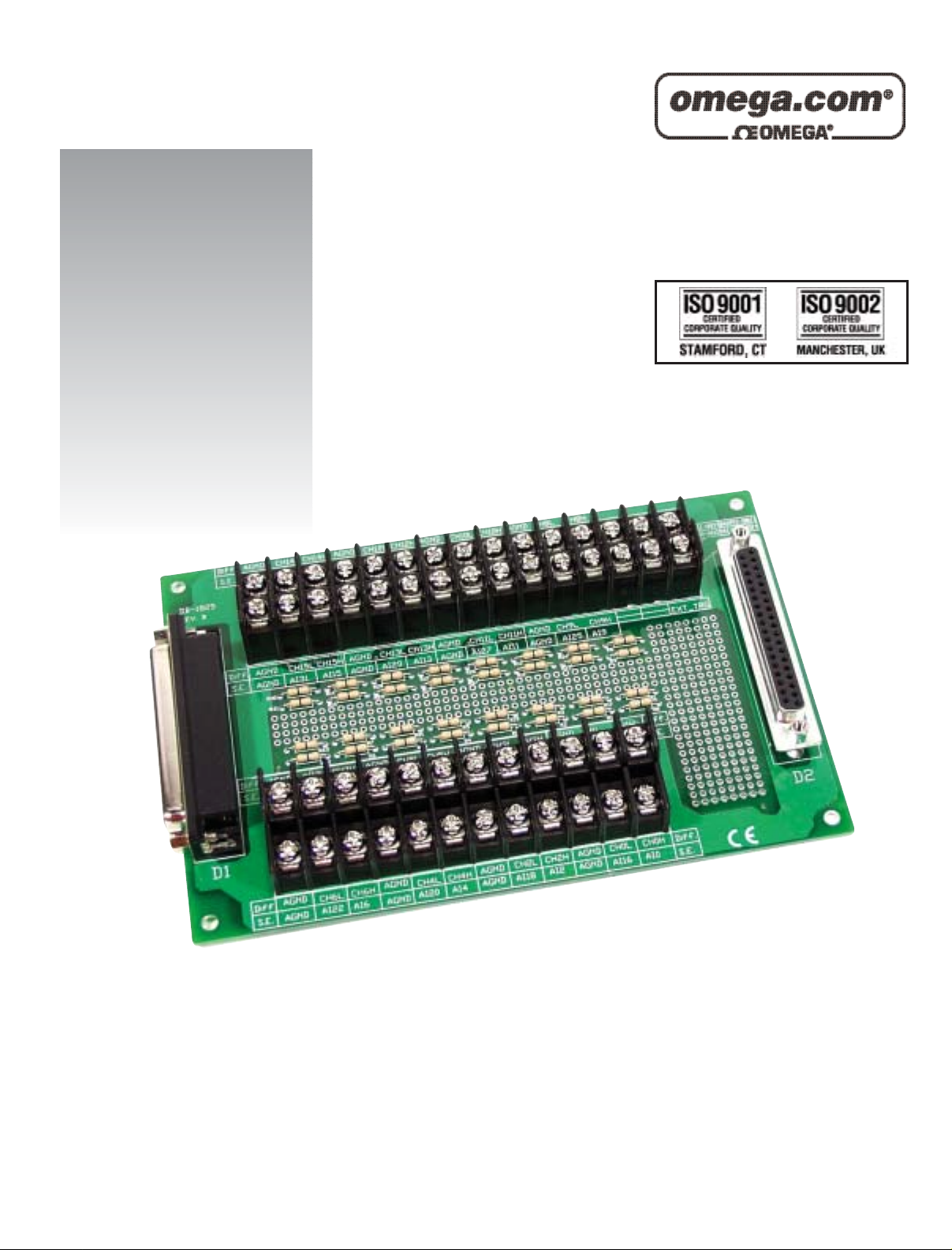
User’s Guide
OME-DB-8025/8125/8225/8325/1825
Terminal Boards
Shop online at
Page 2

Servicing North America:
USA: One Omega Drive, P.O. Box 4047
ISO 9001 Certified Stamford CT 06907-0047
TEL: (203) 359-1660 FAX: (203) 359-7700
e-mail: info@omega.com
Canada: 976 Bergar
Laval (Quebec) H7L 5A1, Canada
TEL: (514) 856-6928 FAX: (514) 856-6886
e-mail: info@omega.ca
For immediate technical or application assistance:
USA and Canada: Sales Service: 1-800-826-6342 / 1-800-TC-OMEGA
®
Customer Service: 1-800-622-2378 / 1-800-622-BEST
®
Engineering Service: 1-800-872-9436 / 1-800-USA-WHEN
®
TELEX: 996404 EASYLINK: 62968934 CABLE: OMEGA
Mexico: En Espan˜ol: (001) 203-359-7803 e-mail: espanol@omega.com
FAX: (001) 203-359-7807 info@omega.com.mx
Servicing Europe:
Benelux: Postbus 8034, 1180 LA Amstelveen, The Netherlands
TEL: +31 (0)20 3472121 FAX: +31 (0)20 6434643
Toll Free in Benelux: 0800 0993344
e-mail: sales@omegaeng.nl
Czech Republic: Frystatska 184, 733 01 Karviná, Czech Republic
TEL: +420 (0)59 6311899 FAX: +420 (0)59 6311114
Toll Free: 0800-1-66342 e-mail: info@omegashop.cz
France: 11, rue Jacques Cartier, 78280 Guyancourt, France
TEL: +33 (0)1 61 37 29 00 FAX: +33 (0)1 30 57 54 27
Toll Free in France: 0800 466 342
e-mail: sales@omega.fr
Germany/Austria: Daimlerstrasse 26, D-75392 Deckenpfronn, Germany
TEL: +49 (0)7056 9398-0 FAX: +49 (0)7056 9398-29
Toll Free in Germany: 0800 639 7678
e-mail: info@omega.de
United Kingdom: One Omega Drive, River Bend Technology Centre
ISO 9002 Certified Northbank, Irlam, Manchester
M44 5BD United Kingdom
TEL: +44 (0)161 777 6611 FAX: +44 (0)161 777 6622
Toll Free in United Kingdom: 0800-488-488
e-mail: sales@omega.co.uk
OMEGAnet®Online Service Internet e-mail
www.omega.com info@omega.com
It is the policy of OMEGA to comply with all worldwide safety and EMC/EMI regulations that
apply. OMEGA is constantly pursuing certification of its products to the European New Approach
Directives. OMEGA will add the CE mark to every appropriate device upon certification.
The information contained in this document is believed to be correct, but OMEGA Engineering, Inc. accepts
no liability for any errors it contains, and reserves the right to alter specifications without notice.
WARNING: These products are not designed for use in, and should not be used for, patient-connected applications.
Page 3

TABLE OF CONTENTS
OME-DB-8025
1. ACCESSORIES .....................................................................................................................4
2. OME-DB-8025 LAYOUT........................................................................................................4
3. PIN ASSIGNMENT.................................................................................................................5
4. WIRING DIAGRAM ................................................................................................................6
5. CAPACITOR FILTER & VOLTAGE DIVIDER & CURRENT INPUT ....................................6
5.1. INPUT R/C FILTERING ........................................................................................................6
5.2. VOLTAGE DIVIDER ..............................................................................................................7
5.3. CURRENT INPUT.................................................................................................................7
OME-DB-8125
1. ACCESSORIES ........................................................ERROR! BOOKMARK NOT DEFINED.
2. OME-DB-8125 LAYOUT........................................................................................................8
3. PIN ASSIGNMENT.................................................................................................................9
4. WIRING DIAGRAM ..............................................................................................................10
5. CAPACITOR FILTER & VOLTAGE DIVIDER & CURRENT INPUT ..................................10
5.1. INPUT R/C FILTERING ......................................................................................................10
5.2. VOLTAGE DIVIDER ............................................................................................................11
5.3. CURRENT INPUT...............................................................................................................11
OME-DB-8225
1. ACCESSORIES ...................................................................................................................12
2. OME-DB-8225 LAYOUT......................................................................................................12
3. CJC JUMPER SETTING......................................................................................................13
3.1. SINGLE-ENDED MODE......................................................................................................13
3.2. DIFFERENTIAL MODE........................................................................................................13
4. WIRING DIAGRAM ..............................................................................................................14
4.1. SINGLE - ENDED CONNECTION .........................................................................................14
4.2. DIFFERENTIAL CONNECTION.............................................................................................14
OME-DB-8025/8125/8225/8325/1825 Terminal Board User’s Manual ----
2
Page 4

5. CJC OUTPUT.......................................................................................................................15
6. OPEN DETECT AND INPUT FILTERING ...........................................................................16
7. VOLTAGE DIVIDER & CURRENT INPUT ..........................................................................17
7.1. VOLTAGE DIVIDER ...........................................................................................................17
7.2. CURRENT INPUT...............................................................................................................17
8. CN3 COUNTER TIMER & D/A OUTPUT CONNECTOR ....................................................18
OME-DB-8325
1. ACCESSORIES ........................................................ERROR! BOOKMARK NOT DEFINED.
2. OME-DB-8325 LAYOUT......................................................................................................19
3. WIRING DIAGRAM ..............................................................................................................20
4. CAPACITOR FILTER & VOLTAGE DIVIDER & CURRENT INPUT ..................................20
4.1. INPUT R/C FILTERING ......................................................................................................20
4.2. VOLTAGE DIVIDER ............................................................................................................21
4.3. CURRENT INPUT...............................................................................................................21
OME-DB-1825
1. PCB LAYOUT FOR CONNECTING TO OME-ISO-AD32:..................................................22
2. PCB LAYOUT FOR CONNECTING TO OME-PCI-1802: ...................................................24
OME-DB-8025/8125/8225/8325/1825 Terminal Board User’s Manual ----
3
Page 5
OME-DB-8025 TERMINAL
BOARD
1. Accessories
The OME-DB-8025 is the cost-effective universal screw terminal
board for A/D cards with 20-pin connectors.
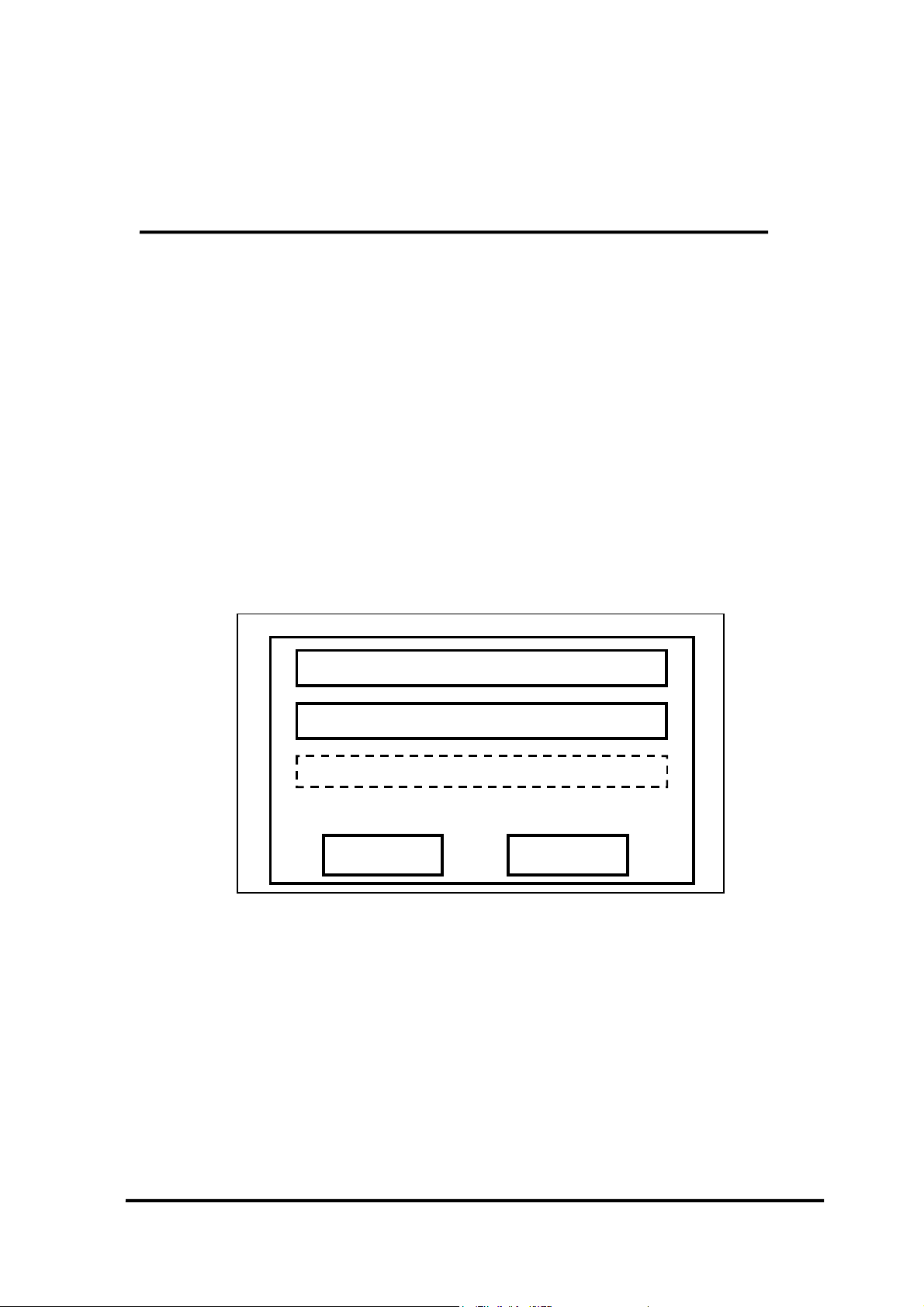
2. OME-DB-8025 Layout
NOTE:
(1) CNA 20 pin connector for A1 to A20
(2) CNB 20 pin connector for B1 to B20
Resistor & Capacitor reserved for user
CNB CNA
CND
CNC
OME-DB-8025
OME-DB-8025/8125/8225/8325/1825 Terminal Board User’s Manual ----
4
Page 6
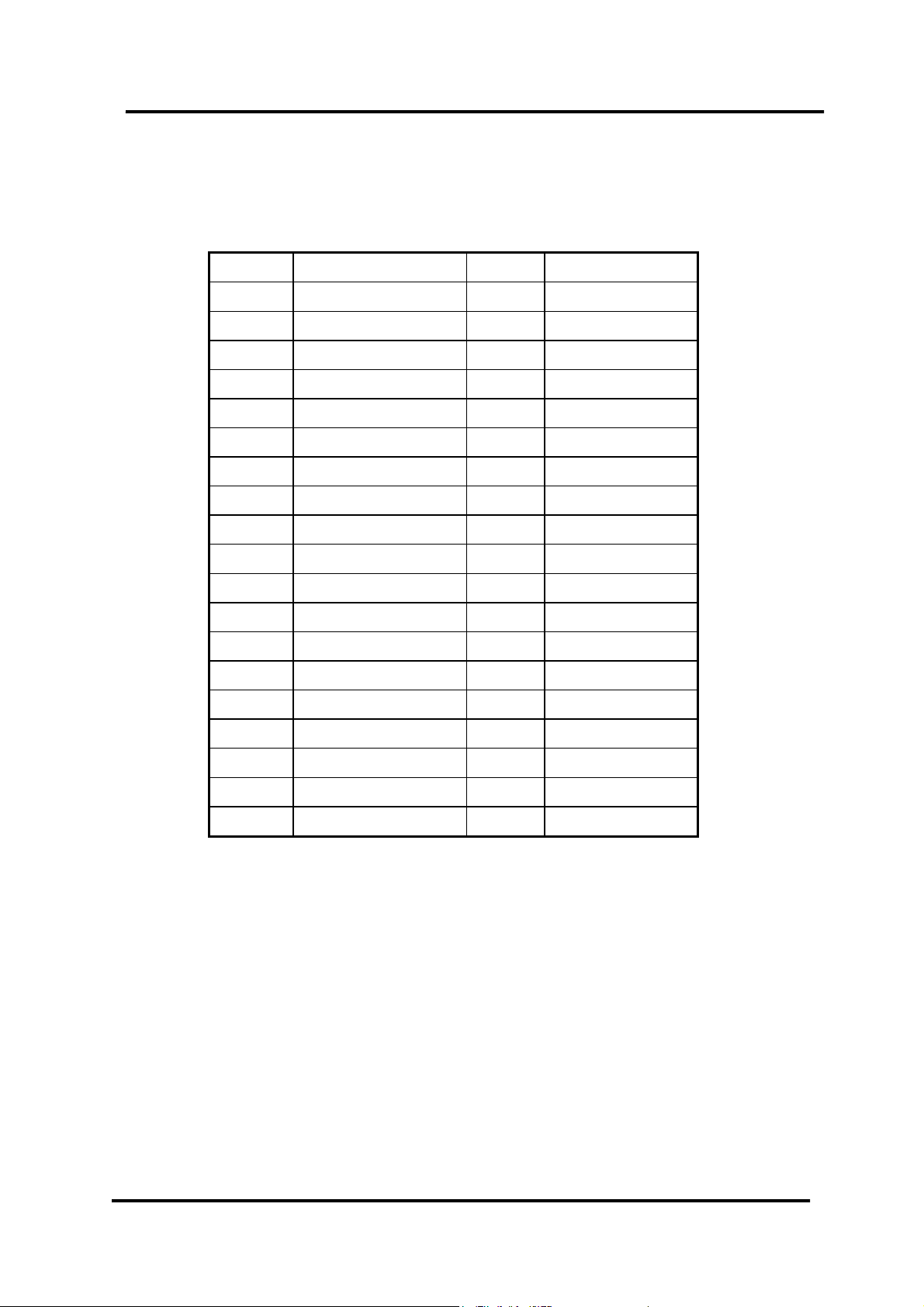
3. Pin Assignment
1 A1 1 B1
2 A2 2 B2
3 A3 3 B3
4 A4 4 B4
5 A5 5 B5
6 A6 6 B6
7 A7 7 B7
8 A8 8 B8
9 A9 9 B9
10 A10 10 B10
11 A11 11 B11
12 A12 12 B12
13 A13 13 B13
14 A14 14 B14
15 A15 15 B15
16 A16 16 B16
17 A17 17 B17
18 A18 18 B18
19 A19 19 B19
20 A20 20 B20
OME-DB-8025/8125/8225/8325/1825 Terminal Board User’s Manual ----
5
Page 7
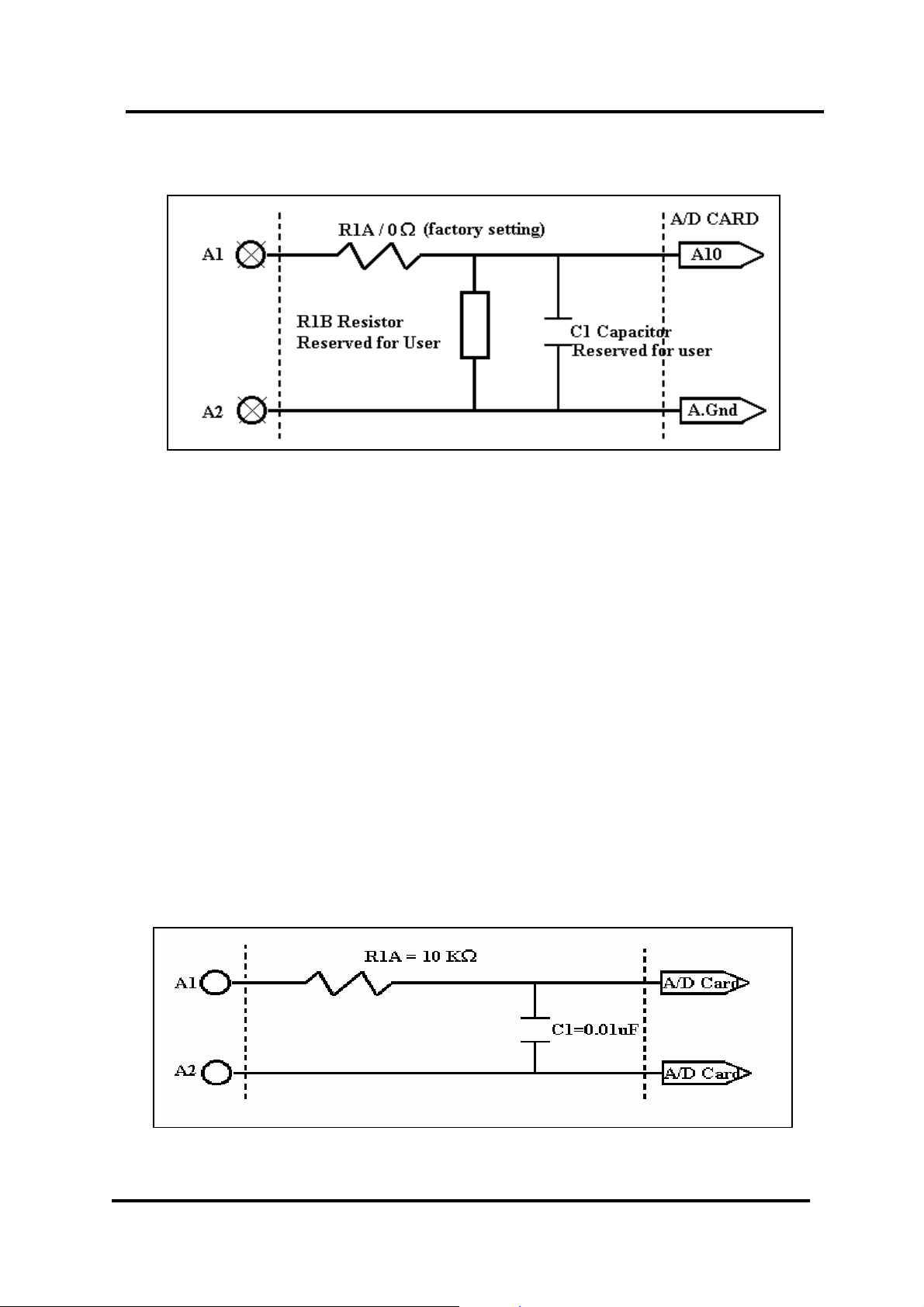
4. Wiring Diagram
5. Capacitor Filter, Voltage Divider & Current input
5.1. Input R/C Filtering
Input filtering is provided on the OME-DB-8025 by installing a
resistor and a capacitor on the desired input channel.
For example:
1.6 KHz Low pass filter
Equation: f3db = 1/(2 * Pi * R * C)
The steps are shown below
Step1. Change R1A (0Ω) resistor to 10 KΩ.
Step2. Install 0.01 uF Capacitor on C1.
OME-DB-8025/8125/8225/8325/1825 Terminal Board User’s Manual ----
6
Page 8
5.2. Voltage Divider
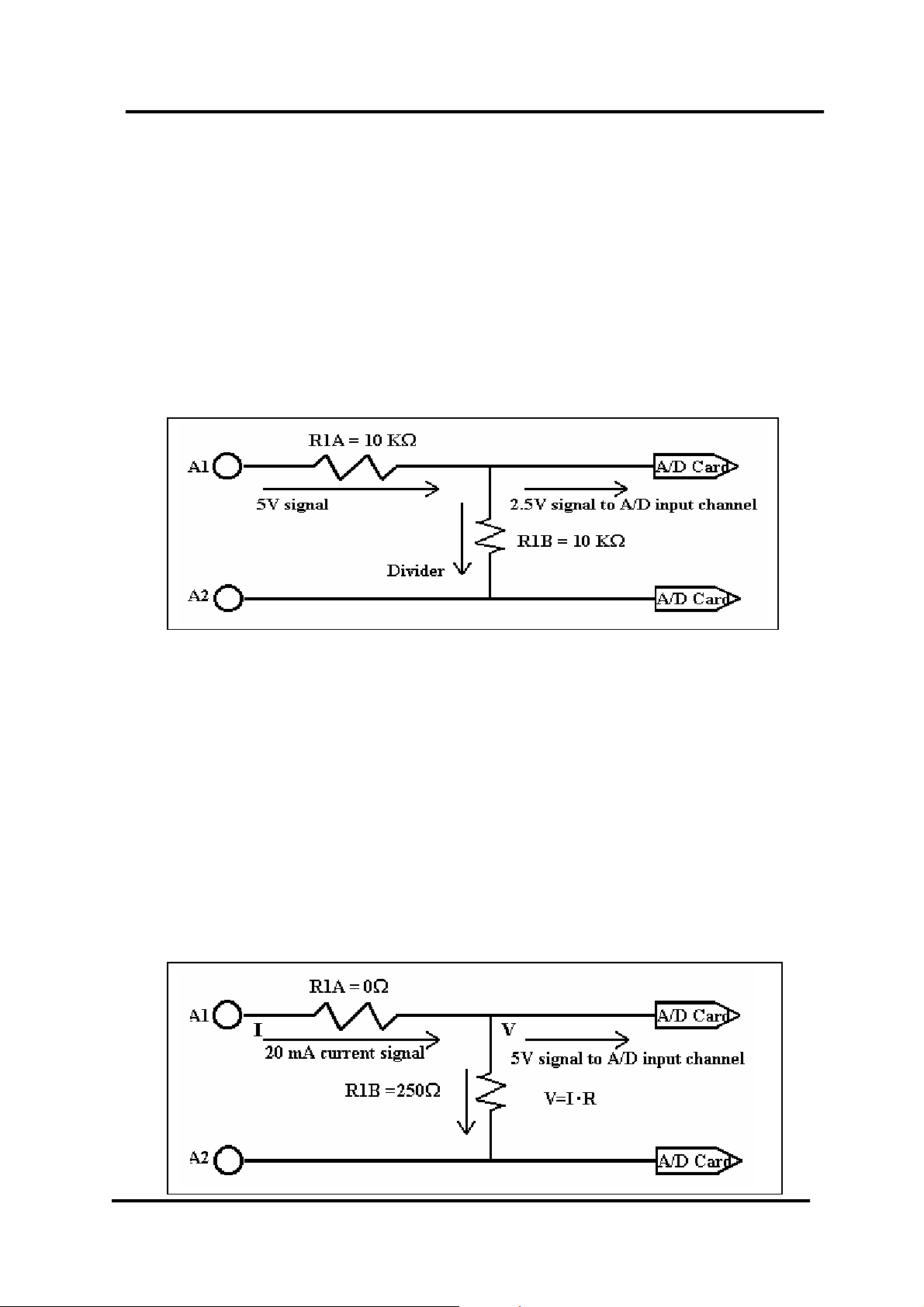
If the input signal voltage is greater than the A/D card input range a
voltage divider may be used. The OME-DB-8025 provides 2
resistors on each input channel to divide the input voltage signal.
The steps are shown below
Step1. Change R1A (0Ω) resistor to 10 KΩ (0.1%).
Step2. Install 10 KΩ(0.1%) on R1B. (Voltage Signal /2)
V/n : n = R1A/(R1A+R1B)
5.3. Current input
If you want to measure a current signal, you have to install a 250Ω
resistor in
Current signal range: 0 to 20 mA
R1B changed to 250
Voltage = 20 mA x 250Ω = 5V ; Range = 0 to 5V
Formula:
input voltage signal = input current signal x 250Ω
R1B. The steps are shown as below
Ω
OME-DB-8025/8125/8225/8325/1825 Terminal Board User’s Manual ----
7
Page 9
OME-DB-8125 TERMINAL
BOARD
1. Accessories
The OME-DB-8125 is the cost-effective universal screw terminal
board for A/D cards with a 20-pin connector or 37-pin D-Sub
connectors.
2. OME-DB-8125 Layout
NOTE:
(3) CN5 37-pin D-Sub connector for A1 to A20 & B1 to B20
(4) CN1 20-pin connector for A1 to A20
(5) CN2 20-pin connector for B1 to B20
37-pin D-Sub connector
CN2(B1-B20)
CN1(A1-A20)
CN5
CN4
Input Filter Capacitor
OME-DB-8125
Input Filter Capacitor
CN3
OME-DB-8025/8125/8225/8325/1825 Terminal Board User’s Manual ----
8
Page 10

3. Pin Assignment
37-pin D-Sub connector pin assignment
20-pin connector pin assignment
OME-DB-8025/8125/8225/8325/1825 Terminal Board User’s Manual ----
9
Page 11

4. Wiring Diagram
5. Capacitor Filter & Voltage Divider & Current input
5.1. Input R/C Filtering
Input Filtering is provided on the OME-DB-8125 by installing a
resistor and a capacitor on the desired input channel.
For example:
1.6 KHz Low pass filter
Equation: f3db = 1/(2 * Pi * R *C)
The steps are shown below
Step1. Change R1A (0Ω) resistor to 10 KΩ.
Step2. Install 0.01 uF Capacitor on C1.
OME-DB-8025/8125/8225/8325/1825 Terminal Board User’s Manual ----
10
Page 12

5.2. Voltage Divider
If the input signal voltage is greater than the A/D card input range a
voltage divider may be used. The OME-DB-8125 provides 2
resistors on each input channel to divide the input voltage signal.
The steps are shown below
Step1. Change R1A (0Ω) resistor to 10 KΩ. (0.1%)
Step2. Install 10 KΩ (0.1%) on R1B. (Voltage Signal /2)
V/n : n = R1A/(R1A+R1B)
5.3. Current Input
If you want to measure a current signal, you must change resistor R1B
(0Ω) to 250Ω. The steps are shown as below
Current signal range: 0 to 20 mA
R1B change to 250
Voltage = 20 mA x 250Ω = 5V ; Range = 0 to 5V
Formula:
input voltage signal = input current signal x 250Ω
Ω
OME-DB-8025/8125/8225/8325/1825 Terminal Board User’s Manual ----
11
Page 13

p
OME-DB-8225 TERMINAL
BOARD
The OME-DB-8225 Terminal Board provides convenient wiring for OME-A-82X
Series cards
.
A/D Card Type Input Mode
OME-A-822HG Single – Ended or Differential
OME-A-822DG Single - Ended or Differential
OME-A-821PG Single - Ended or Differential
OME-A-826PG Single - Ended or Differential
2. OME-DB-8225 Layout
37 Pin
Connector
Timer Counter & D/A Out put
Input Filter Capacitor
Open Detect Resistors
OME-DB-8225
A/D Single-Ended input
Or Differential in
ut
D1
D2
JP1/JP2
CJC Selection
CJC Calibration
V.R.
OME-DB-8025/8125/8225/8325/1825 Terminal Board User’s Manual ----
12
Page 14

(
3. CJC Jumper Setting
The CJC is only for A/D channel 0
3.1. Single-Ended Mode
JP2
JP1
JP2
JP1
NO CJC Connection
(Default)
Single-Ended CJC Connection
To single-ended mode
A/D channel 0
3.2. Differential Mode
JP2
JP1
NO CJC Connection
Default)
JP2
JP1
Differential CJC Connection
OME-DB-8025/8125/8225/8325/1825 Terminal Board User’s Manual ----
To differential mode
A/D channel 0
13
Page 15

Ω
Ω
Ω
4. Wiring Diagram
The OME-A-82X series provides Single - Ended & Differential
connections.
4.1. Single - Ended Connection
AI0
A.GND
RA0 0
+
RB0 Resistor
Open detection
8225 Single Ended input
4.2. Differential Connection
CH0 HI
RA0 0
37Pin Connector
To A/D card
AI0
C0 Capacitor
Input filtering
A.Gnd
AI0HI
CH0 LO
OME-DB-8025/8125/8225/8325/1825 Terminal Board User’s Manual ----
RD0 Resistor
Open detection
RA8 0
8225 Differential input
+
CD0 Capacitor
Input filtering
AI0LO
14
Page 16

5. CJC Output
The built -in CJC Circuitry produces a 10mV per Deg C output with
0.0 Volts @ -273 Deg C. The
OME-A-822 should be protected from
drafts and direct sunlight in order to accurately reflect room
temperature.
CJC Calibration:
1. Connect the OME-A-82X series to the OME-DB-8225 CN1
2.Set OME-A-822HG/DG to Single-Ended Mode
3.set JP1 to 1-2and JP2to 2-3 ( Single-Ended mode)
4.Read the temperature from a Digital thermometer placed near
D1/D2 (See OME-DB-8225 Layout).
5.Read OME-A-82X AI0 (Single-Ended Channel 0)
6.Adjust VR1 until a stable reading of 10mV per deg C is attained.
For example, when the environment temperature is 24 deg C. the
reading value of CJC will be 2.97V
(273 deg c +24 deg c ) X 10 mV/deg c = 2.97V
You will need an A/D channel for CJC calibration. AI0 is reserved for
CJC calibration in single ended mode and CH0-HI & CH0-LO is
reserved for differential mode.
OME-DB-8025/8125/8225/8325/1825 Terminal Board User’s Manual ----
15
Page 17

6. Open Detect and Input Filtering
Open thermocouple detection and input filtering are provided on the
OME-DB-8225 by installing 3 resistors and a capacitor on the desired
input channel. For example, if channel 0 is the desired channel,
RA0and RA8 must be removed and RD1 must be installed. These
biasing resistors will slowly pull an open input channel to 0 Vdc. This 0
Vdc condition can be sensed and flagged in software.
Replaced RA0
CH0 HI
Install RD0
CH0 LO
Replaced RA8
Channel 0Ω replaced by
10KΩ
AI0HI
+
CD0 Capacitor
Installed
AI0LO
Differential input
Install 100MΩ Install 1uF
0 RA0 , RA8 RD0 CD0
1 RA1 , RA9 RD1 CD1
2 RA2 , RA10 RD2 CD2
3 RA3 , RA11 RD3 CD3
4 RA4 , RA12 RD4 CD4
5 RA5 , RA13 RD5 CD5
6 RA6 , RA14 RD6 CD6
7 RA7 , RA15 RD7 CD7
In single-ended mode, a 10KΩ resistor should replace RA_n. Install a
100M
resistor in RB_n and install a
1uF.capactor in C_n.
Ω
Note: n: Channel 0 to15
OME-DB-8025/8125/8225/8325/1825 Terminal Board User’s Manual ----
16
Page 18

7. Voltage Divider & Current input
7.1. Voltage Divider
If the input voltage signal is greater than the input range of the
OME-A-82X, a voltage divider can be used. The OME-DB-8225
provides 2 resistor locations on each input channel that can be used
to reduce the input voltage signal.
Follow the steps shown below
Step 1. Change RA0 (0 Ω) resistor to 10KΩ (0.1%)
Step 2. Install 10 KΩ (0.1%) on RB0 (Voltage Signal / 2)
V/n : n = RB0 / (RA0+RB0)
7.2. Current input
If you want to measure current input signal, you should change
resistor RA0 (0Ω) to 250Ω . Follow the steps show below
Current Signal range: 0 to 20mA
RA0 change to 250Ω
Voltage =20 ma X 250Ω = 5V ; Range 0 to 5V
Formula:
input voltage signal = input current signal x 250Ω
OME-DB-8025/8125/8225/8325/1825 Terminal Board User’s Manual ----
17
Page 19

8. CN3 Timer Counter & D/A Output Connector
Pin name Connector
+5V From PC +5V
D.GND Digital Ground
EXTCLK External Clock for OME-A-822HG/DG
INTCLK No Function
DRDY No Function
EXTTRG External Trigger of A/D converter
COUT1 8254 Counter 1 output (Internal trigger used)
GATE 8254 Counter 1 Gate (Internal trigger used)
COUT0 8254 Counter 0 output ( Reserved for user)
GATE0 8254 Counter 0 Gate ( Reserved for user)
AGND Analog Ground
EXTVREF2 External reference voltage input of D/A
Channel 2
DAOUT2 Output of D/A Channel 2
EXTVREF1 External reference Voltage input of D/A
Channel 1
DAOUT1 Output of D/A Channel 1
VREF Output of D/A Internal reference Voltage
OME-DB-8025/8125/8225/8325/1825 Terminal Board User’s Manual ----
18
Page 20

OME-DB-8325 TERMINAL
BOARD
1. Accessories
The OME-DB-8325 is screw terminal board for OME-A-832 isolated A/D
card.
2. OME-DB-8325 Layout
37-pin D-Sub connector
Input Filter Capacitor
CN3
CN1
OME-DB-8325
NOTE:
(1) A0 to A31 for OME-A-832 analog input channel 0 to channel 31.
(2) A.GND for OME-A-832 analog ground.
OME-DB-8025/8125/8225/8325/1825 Terminal Board User’s Manual ----
Input Filter Capacitor
CN2
19
Page 21

3. Wiring Diagram
4. Capacitor Filter & Voltage Divider &Current input
4.1. Input R/C Filtering
Input filtering is provided on the OME-DB-8325 by installing a
resistor and a capacitor on the desired input channel.
For example:
1.6 KHz Low pass filter
Equation: f3db = 1/(2 * Pi * R * C)
Follow the steps shown below
Step1. Change RD1 (0Ω) resistor to 10 KΩ.
Step2. Install 0.01 uF Capacitor on CD1.
OME-DB-8025/8125/8225/8325/1825 Terminal Board User’s Manual ----
20
Page 22

4.2. Voltage Divider
If the input voltage signal is greater than the A/D cards input
range, a voltage divider can be used. The OME-DB-8325 provides 2
resistor locations for adding a voltage divider for each input channel.
Follow the steps shown below
Step1. Change RD1 (0Ω) resistor to 10 KΩ (0.1%).
Step2. Install 10 KΩ (0.1%) on RD2. (Voltage Signal /2)
V/n : n = RD1/(RD1+RD2)
4.3. Current input
If you want to measure current input signal, you should change resistor
RD2 (0Ω) resistor to 250Ω. Follow the steps shown below
Current signal range: 0 to 20 mA
RD2 change to 250
Voltage = 20 mA x 250Ω = 5V ; Range = 0 to 5V
Formula:
input voltage signal = input current signal x 250Ω
Ω
OME-DB-8025/8125/8225/8325/1825 Terminal Board User’s Manual ----
21
Page 23

R
R
OME-DB-1825 TERMINAL
BOARD
1. PCB layout for connecting to OME-ISO-AD32:
For differential inputs (R=0 ohm)
OME-DB-1825
D1: for connecting to OME-ISO-AD32
Acom 14- 14+ Acom 12- 12+
Acom 15- 15+ Acom 13- 13+
R
R
R
A
co
m
A
co
m
10- 10+
11- 11+
A
co
m
A
co
m
R
Acom 7- 7+
Acom 6- 6+
A
co
m
A
co
m
5- 5+
4- 4+
A
co
m
A
co
m
3- 3+
2- 2+
A
co
m
A
co
m
R
8- 8+
9- 9+ + 5
A
m
V
R
R
1- 1+
0- 0+
co
A
co
m
Agn
d
Dgn
d
Etrg
D2: for connecting to OME-DB-889D
OME-DB-8025/8125/8225/8325/1825 Terminal Board User’s Manual ----
22
Page 24

R
R
For single-ended inputs (R=0 ohm)
OME-DB-1825
D1: for connecting to OME-ISO-AD32
R
R
A
A
m
com
co
30 14
31 15
A
co
m
A
co
m
28 12
29 13
A
co
m
A
co
m
26 10
27 11
R
24 8
A
co
m
25 9 +5V Agnd Etrg
A
co
m
A
com
A
com
D2: for connecting to OME-DB-889D
Dgnd
R
R
A
com
23 7
22 6
A
co
m
A
co
m
A
co
m
21 5
20 4
A
co
m
A
co
m
19 3
18 2
A
co
m
A
co
m
Pin assignment of D1 same as CN1 of OME-ISO-AD32
Pin assignment of D2 same as CN1 of OME-DB-889D
R
R
17 1
16 0
OME-DB-8025/8125/8225/8325/1825 Terminal Board User’s Manual ----
23
Page 25

R R
R R
2. PCB layout for connecting to OME-PCI-1802:
For differential input (R=0 ohm)
OME-DB-1825
R
R
Agnd 14- 14+ Agnd 12- 12+ Agnd 10- 10+ Agnd 8- 8+ Agnd Agnd Dgnd
Agnd 15- 15+ Agnd 13- 13+ Agnd 11- 11+ Agnd 9- 9+ DA1 DA2 Etrg
R
R
Agnd 7- 7+ Agnd 5- 5+ Agnd 3- 3+ Agnd 1- 1+
Agnd 6- 6+ Agnd 4- 4+ Agnd 2- 2+ Agnd 0- 0+
For single-ended input (R=0 ohm)
OME-DB-1825
D1: for connecting to OME-PCI-1802 D1: for connecting to OME-PCI-1802
R
R
D2: for connecting to OME-DB-889D D2: for connecting to OME-DB-889D
R
R
R
R
Agnd 30 14 Agnd 28 12 Agnd 26 10 Agnd 24 8 Agnd Agnd Dgnd
Agnd 31 15 Agnd 29 13 Agnd 27 11 Agnd 25 9 DA1 DA2 Etrg
R
R
Agnd 23 7 Agnd 21 5 Agnd 19 3 Agnd 17 1
Agnd 22 6 Agnd 20 4 Agnd 18 2 Agnd 16 0
Pin assignment of D1 same as CON3 of OME-PCI-1802.
Pin assignment of D2 same as CN1 of OME-DB-889D.
OME-DB-8025/8125/8225/8325/1825 Terminal Board User’s Manual ----
R
R
24
Page 26

3. Connection to OME-ISO-AD32
37pin cable
4. Connection to OME-PCI-1802
5. Connection to OME-PCI-1802 and multiple OME-DB-889D (16
channels differential)
37pin cable
37pin cable
37pin cable
20 pins flat cable
OME-DB-8025/8125/8225/8325/1825 Terminal Board User’s Manual ----
25
Page 27

WARRANTY/DISCLAIMER
OMEGA ENGINEERING, INC. warrants this unit to be free of defects in materials and workmanship for a
period of 13 months from date of purchase. OMEGA’s WARRANTY adds an additional one (1) month
grace period to the normal one (1) year product warranty to cover handling and shipping time. This
ensures that OMEGA’s customers receive maximum coverage on each product.
If the unit malfunctions, it must be returned to the factory for evaluation. OMEGA’s Customer Service
Department will issue an Authorized Return (AR) number immediately upon phone or written request.
Upon examination by OMEGA, if the unit is found to be defective, it will be repaired or replaced at no
charge. OMEGA’sWARRANTY does not apply to defects resulting from any action of the purchaser, including but not limited to mishandling, improper interfacing, operation outside of design limits,
improper repair, or unauthorized modification. This WARRANTY is VOID if the unit shows evidence of
having been tampered with or shows evidence of having been damaged as a result of excessive corrosion;
or current, heat, moisture or vibration; improper specification; misapplication; misuse or other operating
conditions outside of OMEGA’s control. Components which wear are not warranted, including but not
limited to contact points, fuses, and triacs.
OMEGA is pleased to offer suggestions on the use of its various products. However,
OMEGA neither assumes responsibility for any omissions or errors nor assumes liability for any
damages that result from the use of its products in accordance with information provided by
OMEGA, either verbal or written. OMEGA warrants only that the parts manufactured by it will be
as specified and free of defects. OMEGA MAKES NO OTHER WARRANTIES OR
REPRESENTATIONS OF ANY KIND WHATSOEVER, EXPRESS OR IMPLIED, EXCEPT THAT OF TITLE,
AND ALL IMPLIED WARRANTIES INCLUDING ANY WARRANTY OF MERCHANTABILITY AND
FITNESS FOR A PARTICULAR PURPOSE ARE HEREBY DISCLAIMED. LIMITATION OF
LIABILITY: The remedies of purchaser set forth herein are exclusive, and the total liability of
OMEGA with respect to this order, whether based on contract, warranty, negligence,
indemnification, strict liability or otherwise, shall not exceed the purchase price of the
component upon which liability is based. In no event shall OMEGA be liable for
consequential, incidental or special damages.
CONDITIONS: Equipment sold by OMEGA is not intended to be used, nor shall it be used: (1) as a “Basic
Component” under 10 CFR 21 (NRC), used in or with any nuclear installation or activity; or (2) in medical
applications or used on humans. Should any Product(s) be used in or with any nuclear installation or
activity, medical application, used on humans, or misused in any way, OMEGA assumes no responsibility
as set forth in our basic WARRANTY/DISCLAIMER language, and, additionally, purchaser will indemnify
OMEGA and hold OMEGA harmless from any liability or damage whatsoever arising out of the use of the
Product(s) in suc h a manner.
RETURN REQUESTS/INQUIRIES
Direct all warranty and repair requests/inquiries to the OMEGA Customer Service Department. BEFORE
RETURNING ANY PRODUCT(S) TO OMEGA, PURCHASER MUST OBTAIN AN AUTHORIZED RETURN
(AR) NUMBER FROM OMEGA’S CUSTOMER SERVICE DEPARTMENT (IN ORDER TO AVOID
PROCESSING DELAYS). The assigned AR number should then be marked on the outside of the return
package and on any correspondence.
The purchaser is responsible for shipping charges, freight, insurance and proper packaging to prevent
breakage in transit.
FOR W
ARRANTY RETURNS, please have the
following information available BEFORE
contacting OMEGA:
1. Purchase Order number under which the product
was PURCHASED,
2. Model and serial number of the product under
warranty, and
3. Repair instructions and/or specific problems
relative to the product.
FOR NON-WARRANTY REPAIRS,
consult OMEGA
for current repair charges. Have the following
information available BEFORE contacting OMEGA:
1. Purchase Order number to cover the COST
of the repair,
2. Model and serial number of the product, and
3. Repair instructions and/or specific problems
relative to the product.
OMEGA’s policy is to make running changes, not model changes, whenever an improvement is possible. This affords
our customers the latest in technology and engineering.
OMEGA is a registered trademark of OMEGA ENGINEERING, INC.
© Copyright 2002 OMEGA ENGINEERING, INC. All rights reserved. This document may not be copied, photocopied,
reproduced, translated, or reduced to any electronic medium or machine-readable form, in whole or in part, without the
prior written consent of OMEGA ENGINEERING, INC.
Page 28

M3926/0203
Where Do I Find Everything I Need for
Process Measurement and Contr ol?
OMEGA…Of Course!
Shop online at www.omega.com
TEMPERA TURE
Thermocouple, RTD & Thermistor Probes, Connectors, Panels & Assemblies
Wire: Thermocouple, RTD & Thermistor
Calibrators & Ice Point References
Recorders, Controllers & Process Monitors
Infrared Pyrometers
PRESSURE, STRAIN AND FORCE
Transducers & Strain Gages
Load Cells & Pressure Gages
Displacement Transducers
Instrumentation & Accessories
FLOW/LEVEL
Rotameters, Gas Mass Flowmeters & Flow Computers
Air Velocity Indicators
Turbine/Paddlewheel Systems
Totalizers & Batch Controllers
pH/CONDUCTIVITY
pH Electrodes, Testers & Accessories
Benchtop/Laboratory Meters
Controllers, Calibrators, Simulators & Pumps
Industrial pH & Conductivity Equipment
DA TA ACQUISITION
Data Acquisition & Engineering Software
Communications-Based Acquisition Systems
Plug-in Cards for Apple, IBM & Compatibles
Datalogging Systems
Recorders, Printers & Plotters
HEA TERS
Heating Cable
Cartridge & Strip Heaters
Immersion & Band Heaters
Flexible Heaters
Laboratory Heaters
ENVIRONMENT AL
MONITORING AND CONTROL
Metering & Control Instrumentation
Refractometers
Pumps & Tubing
Air, Soil & Water Monitors
Industrial Water & Wastewater Treatment
pH, Conductivity & Dissolved Oxygen Instruments
 Loading...