

Page 1

Page 2

INSTRUCTIONS
Read this manual carefully before using your
camera.
Page 3
WARNING
Indicates circumstances
under which mishandling
resulting from ignoring this
symbol could result in
personal injury or property
damage.
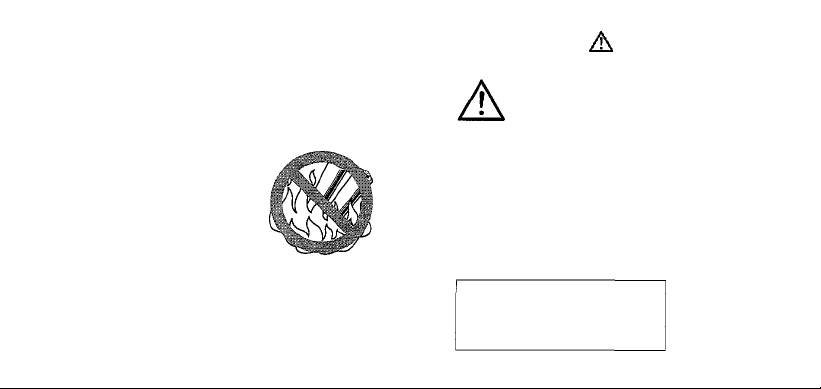
KEEP THE BATTERIES AWAY FROM
FIRE. NEVER TRY TO
DISASSEMBLE, RECHARGE, OR
SHORT-CIRCUIT BATTERIES.
KEEP THE BATTERY OUT OF THE
REACH OF CHILDREN. IF A CHILD
SWALLOWS A BATTERY, CONTACT
2
A DOCTOR IMMEDIATELY.
Page 4
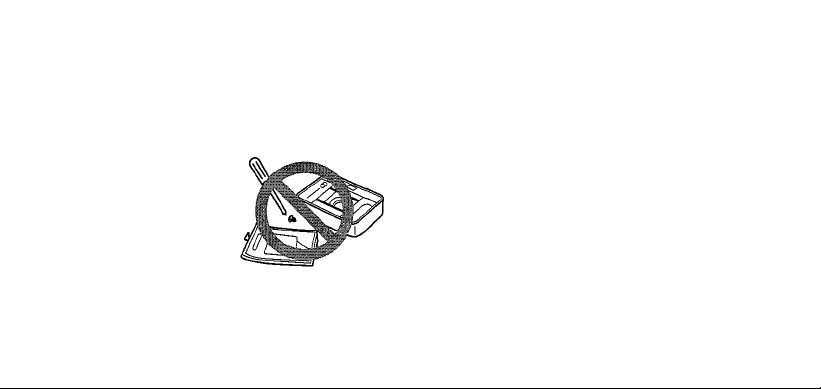
NEVER ATTEMPT TO DISASSEMBLE
THE CAMERA; IT CONTAINS A HIGHVOLTAGE CIRCUIT. IF THE INTERNAL
PARTS OF THE CAMERA ARE
EXPOSED DUE TO DROPPING OR
DAMAGE, REMOVE THE BATTERIES
IMMEDIATELY TO PREVENT
FURTHER USAGE.
IN CASE OF MALFUNCTION,
CONSULT YOUR NEAREST
OLYMPUS DEALER OR OLYMPUS
SERVICE CENTER.
3
Page 5

Names
of
parts
Cartridge .......................................... 7
Loading the battery .......................... 8
Loading the cartridge film ................ 10
Taking pictures ................................. 11
Flash photography ........................... 12
Unloading
Care and storage ............................. 14
Specifications................................... 18
..................................
the
cartridge
film
.............
5
13
4
Page 6
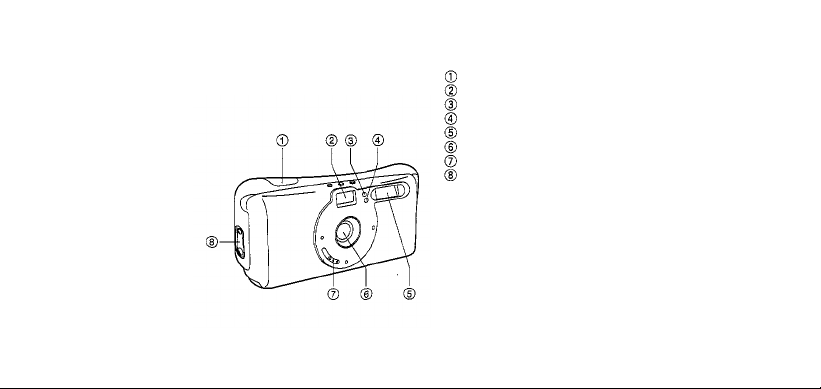
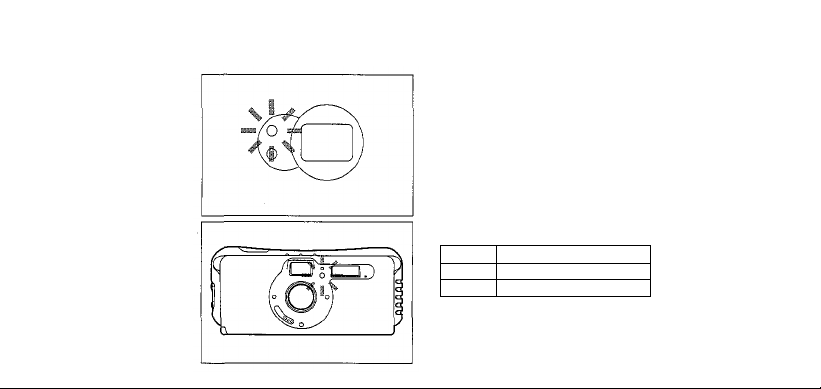
NAMES OF PARTS
Shutter release button
Viewfinder
AE light sensor*
Red-eye reduction lamp
Flash*
Lens*
Lens barrier switch
Cartridge cover release
*Do not soil as this can cause blurred
pictures. Wipe clean with a soft cloth.
5
Page 7
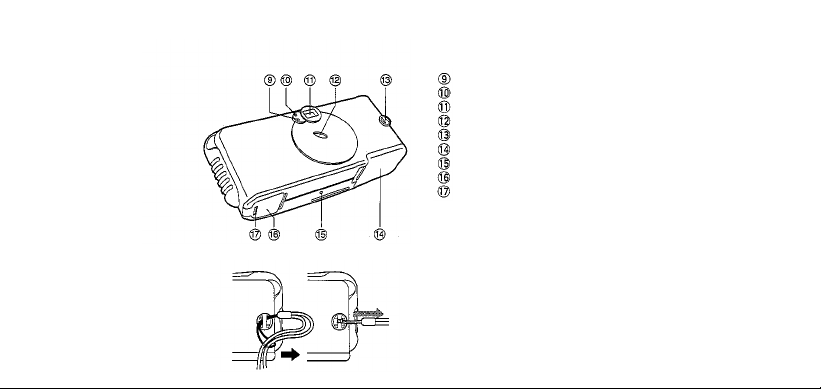
Battery check lamp
Flash ready lamp
Viewfinder
Exposure counter
Strap eyelet
Cartridge cover
Mid-roll rewind button
Battery compartment cover
Battery compartment cover release
Attach the strap as shown.
6
Page 8
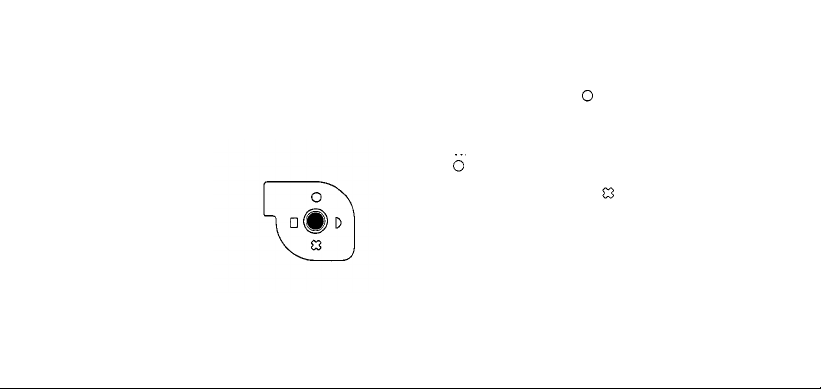
CARTRIDGE
IX240 Cartridge Fi l m
Visual Exposure Indicator
• Only cartridges with the
(unexposed) visual exposure
indicator can be used with this
camera.
• When a cartridge with other than the
visual exposure indicator is
loaded, the camera will rewind the
film and set the cartridge to
(exposed).
• Take along plenty of film cartridges
when traveling to foreign countries
and other areas where cartridge
purchasing may be difficult.
• Do not forcibly move the visual
exposure indicator because this may
damage the cartridge. Usin g a
damaged cartridge can result in
camera trouble.
7
Page 9
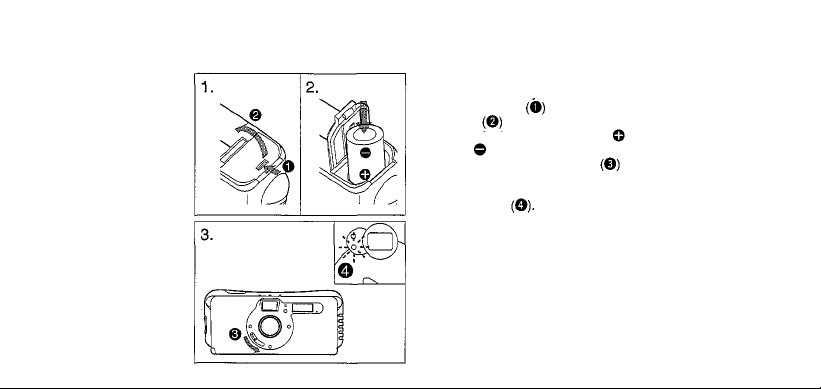
LOADING THE BATTERY
Use one 3V lithium battery (CR2).
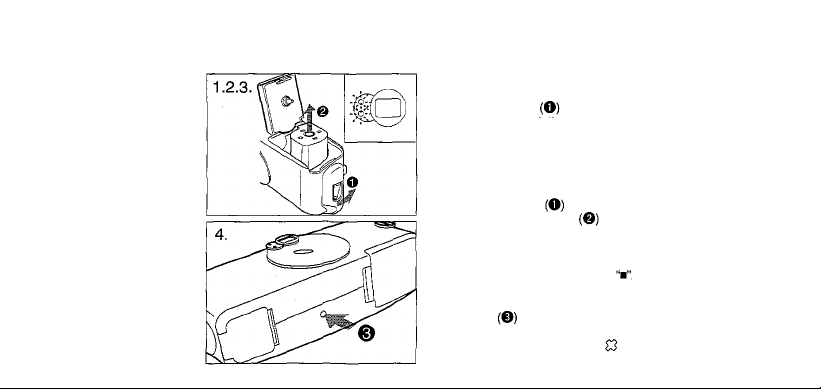
1. Slide the battery compartment
cover release and open the
cover
2. Load the battery and align th e
and ends correctly.
3. Slide the lens barrier switch to
turn the camera on. If the battery
check lamp starts blinking replace
the battery About 15 rolls of
film can be used with one new 3V
lithium battery (when the flash is
used on half of pictures).
Notes:
• Dispose of used batteries in the battery
recycling boxes at stores selling batteries.
• If lithium batteries are not fully discharged,
protect them against short-circuiting (e.g., by
8
taping the contacts) before disposal.
Page 10

Battery Handling
• Observe the precautionary remarks
written on the batteries.
• When the camera is not used for an
extended period of time, remove the
battery.
• Keep spare batteries on hand when
going on a long trip or to a cold area.
• Sweat, oi l, a nd so on can prevent a
battery's terminals from making
electrical contact. To avoid this, wipe
both terminals before loading the
battery.
9
Page 11
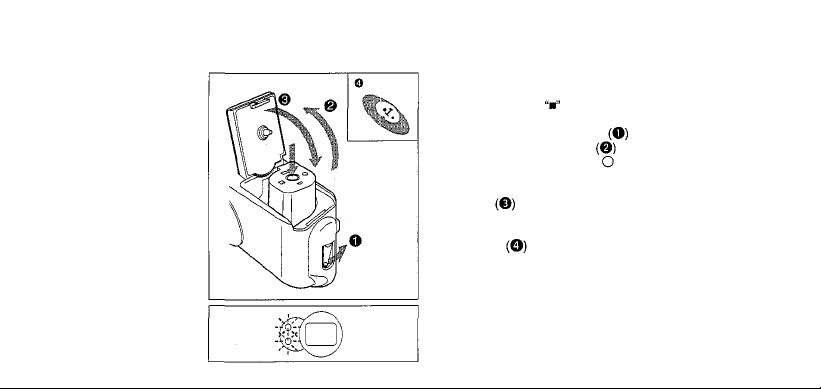
LOADING THE CARTRIDGE
FILM
Use unexposed negative-color IX240
cartridge film (ISO 100~400).
1. Make sure that is displayed on
the camera's exposure counter. Turn
the cartridge cover release to
open the cartridge cover
2. Insert a cartridge with the
(unexposed) visual exposure
indicator and close the cartridge
cover .The film will automatically advance to the fi rs t frame and
"1" will appear in the exposure
counter
• If the cartridge film is not loaded
.
correctl y, the two lamps beside the
viewfinder will blink. Reload
unexposed film.
10
.
Page 12
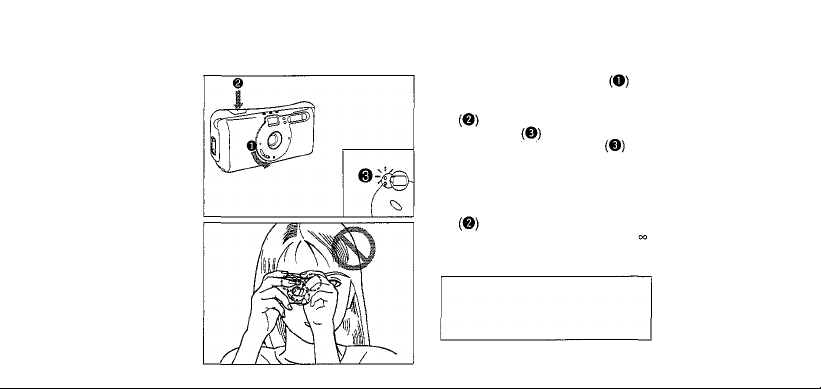
TAKING PICTURES
1. Slide the lens barrier switch to
turn the camera on.
2. Press the shutter release button
halfway to make sure the flash
ready lamp lights.
•When the flash ready lamp is
blinking, the flash is being
recharged and the shutter cannot
be released.
3. Compose the shot in the viewfinder.
Press the shutter release button
to take the picture.
•Working distance: 1.0 m (3.3 ft)~ .
•Always turn off the cam er a wh en
you finish taking pictures.
WARNING: SERIOUS EYE
DAMAGE MAY RESULT FROM
LOOKING DIRECTLY AT THE SUN
THROUGH THE VIEWFINDER.
11
Page 13
FLASH PHOTOGRAPHY
Check the flash ready lamp.
Blinking: The flash is recharging, and the
shutter cannot be released.
Lit: The flash is charged. Shooting
is possible.
Red-eye reduction lamp
This lam p helps to reduce the red-eye effect
with flash pictures. The red-eye reduction
lamp light s when the shutter release butto n
is pressed lightly. Press the shutter release
button after the red-eye reduction lamp h as
been lit for about 1 second.
ISO
200
400
Using of negative color film
12
Flash Range
1.0 ~ 2.3 m
1.0 3.2 m (3.3 10.4 ft)
(3.3
~
~ 7.5 ft)
~
Page 14
UNLOADING THE
CARTRIDGE FILM
1. The film will be rewound
automatically when the end of the
roll is reached . Even when the
film is rewound, the number in the
exposure counter remains the
same.
2. Wait until the motor stops. Ensure
that the two lamps beside the
viewfinder are blinking. Open the
cartridge cover
3. Remove the cartridge
•The camera will not operate until
the rewound cartridge is removed.
•When the cartridge is removed, the
exposure counter returns t o
4. To rewind the film before the end of
the roll, press the mid-roll rewind
burton using a pointed
instrument such as a ballpoint pen.
The cartridge will be set to
(exposed).
13
Page 15
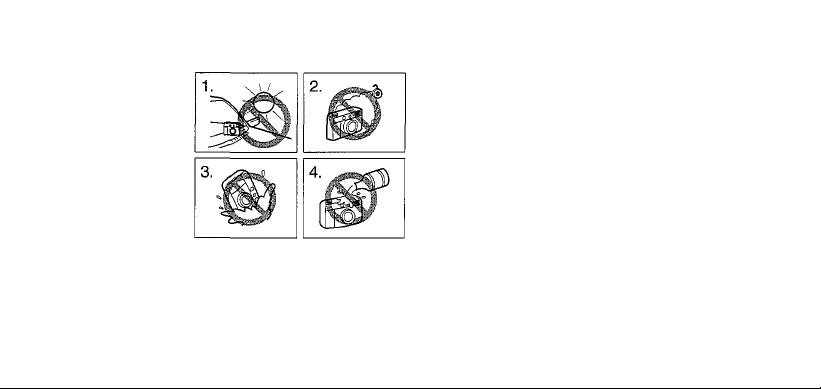
CARE AND STORAGE
1. Do not leave the camera in any
place exposed to excessive heat,
humidity, or direct sunlight — for
example, in a car or on the beach.
2. Do not expose the camera to
formalin or naphthalene.
3. If the camera gets wet, wipe it with
a dry towel. The salt in seawater
can be especially damaging.
4. Do not use organic solvents, such
as alcohol or paint thinner when
cleaning the camera.
14
Page 16
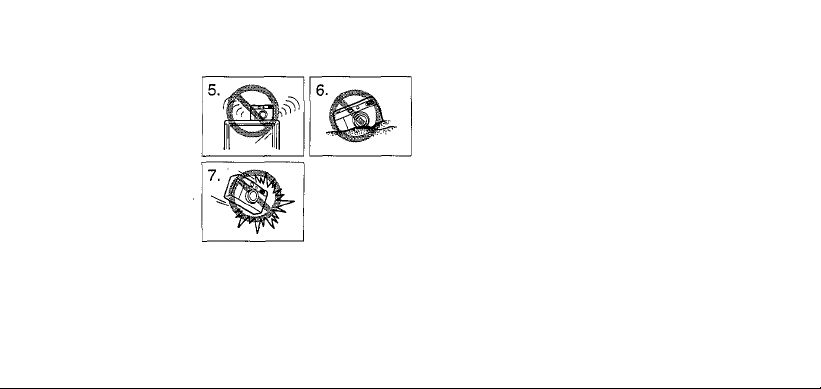
5. Do not leave the camera on or near
a television, refrigerator, or other
appliance with a magnetic field.
6. Do not expose the camera to dust
or sand as this could cause serious
damage.
7. Do not shake o r shock the camera.
• Keep the camera in a well-ventilated
place.
• Do not expose the camera to
extreme heat (over 40°C/104°F) or to
extreme cold (below -5°C/23°F). Low
temperatures, even within this range,
may sometimes cause deterioration
in battery performance, temporarily
dis abling the camera.
15
Page 17

• When transporting t he camera from
a cold place to a warm place o r in
the event of a sudden temperature
change, put the camera into a plastic
bag. This allows the camera's
temperature to change slowly. Once
the camera has adjusted to the new
temperature, you can remove it from
the bag and use it.
16
Page 18

• Avoid leaving the camera unused for
long periods of time. Thi s can cause
mold to grow on the camera as well
as other problems. Try to press the
shutter release button and check the
operation of the camera before use.
• Some airport X-ray machines can
damage the film in your camera. Try
to avoid passing your camera
through these machines. Give it to
the security officer for manual
inspection.
• This camera is not suitable for
professional use or for use under
extreme conditions.
17
Page 19

SPECIFICATIONS
Type: Fixed-focus lens-shutter camera.
Film format: IX240 ca rtridge film,
Image size: 16.7 x 30.2 mm.
Print type: C type only.
Lens: Oly mp us lens, 24 mm F7, 3 elements in
3 groups.
Shutter: Programmed electronic shutter (1/200
~1/50 sec).
Viewfinder: Albada viewfinder 0.33X
magnification. Flash ready lamp. Battery
check lamp.
Focusing: Fixed-focus. Focus range — 1.0 m
(3.3
ft) ~ ,
Exposure counter: Progressive type.
Film speed: Automatic setting (ISO 100, 200
and
400).
18
Page 20

Film loading: One-touch insertion, automatic
loading (automatically advanced to first
frame when cartridge cover is closed).
Film advance: Automatic film winding.
Film re w ind: Automatic rewind at end of roll.
Mid-roll rewind also possible.
Flash: Built-in flash with red-eye reduction lamp.
Flash is automatically activated in low-
light conditions.
Data recording: Optical recording system (print
type information only).
Power source: One 3V lithium batt ery (CR2).
Dimensions: 127 (W) x 56 (H) x 37 (D) mm (5 x
2.2
x1.5 in).
Weight: 135 g (4.8 02) (without battery).
Design and specifications are subject to
change without notice.
19
Page 21
OLYMPUS
OLYMPUS
OLYMPUS
OLYMPUS
OLYMPUS
This device complies with part 15 of the FCC Rules. Operation is subject
to the conditions that this device does not cause harmful interference.
This Class B digital apparatus meets all requirements of the Canadian Interference-Causing Equipment Regulations.
Cet appareil numérique de la classe B respecte toutes les exigences du Règlement sur le matériel brouilleur du Canada.
OPTICAL
AMERICA
OPTICAL
SINGAPORE
KOREA
This camera complies with EU directive 89/336/EEC for CE marking.
Die CE-Marke zeigt an, dass diese Kamera di e EG-Richtlinie 89/336EWG erfüllt.
Cet appareil photo est conforme a la directive UE89/336/CEE pour le marquage CE.
Esta cámara cumple con la directiva de la Union Europea 89/336/EEC para la marca de CE.
CO.,LTD.
INC.
CO.
CO,
Two
(EUROPA)
PTE.
LTD.
8F
San-Ei
Building,
22-2,
Corporate
GMBH.
LTD. 491B
Tel. 7387838/1 -800-OLYMPUS(6596787)
Central
Banking
Nishi
Center
Drive,
Melville,
(Premises/Goods delivery)
(Letters) Postfach 10 49 08, 20034 Hamburg, Germany.
River
Valley
Road,
Corporation
Bldg.,
Shinjuku 1 -chome,
NY
11747-3157,
Wendenstrasse
#13-04
Valley
826-20
Yoksam-dong,Kangnam-gu,
Shinjuku-ku,
Point
U.S.A.
Office
Tokyo,
Tel. 1 -800
"O"
14-18,20097
Tower,
Singapore
Seoul
Japan.
CAMERA(622-6372)
Hamburg,
135-081
Tel.
03-3340-2211
Germany.
248373
Korea.Tel.
Tel.
040-237730
02-3466-2910
Page 22
CS0443-
63239-400-OLY
www.isnap.com
A
0201
 Loading...