

Page 1
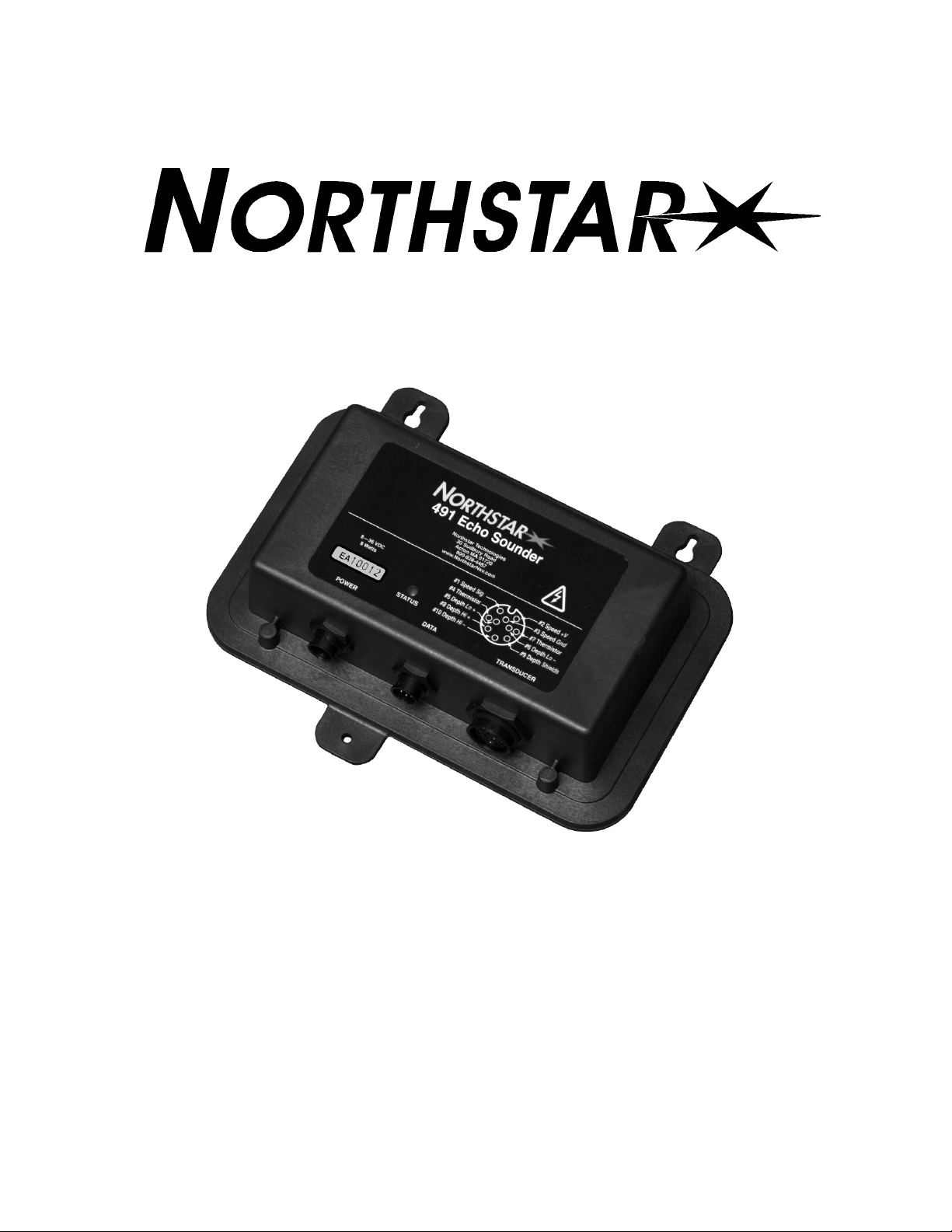
491 E
CHO
S
OUNDER
I
NSTALLATION
Part Number GM495
Northstar
a unit of Brunswick New Technologies Marine Electronics
30 Sudbury Road
Acton, Massachusetts 01720
Rev A
M
ANUAL
www.NorthstarNav.com
Service: 978/897-6600
Sales: 800/628-4487
Page 2

Page 3

Table of Contents
SECTION ONE — Introduction
Welcome to the Northstar 491
Who should read this manual
Scope of this manual
Installation considerations
- - - - - - - - - - - - - - - - - - - - 1
- - - - - - - - - - - - - - - - - 1
- - - - - - - - - - - - - - - - - 1
- - - - - - - - - - - - - - - - - - - - - 1
- - - - - - - - - - - - - - - - - - - 2
SECTION TWO — Installing the transducer
Safety considerations
Selecting a transducer
Installation considerations
Choosing a mounting location
Installing the transducer
Maintaining the transducer
SECTION THREE — Installing the 491
Safety considerations
System components
Choosing a mounting location
Mounting the 491
Wiring the 491
Initial checkout
Installation test checklist
- - - - - - - - - - - - - - - - - - - - - 3
- - - - - - - - - - - - - - - - - - - - - 4
- - - - - - - - - - - - - - - - - - - 5
- - - - - - - - - - - - - - - - - 5
- - - - - - - - - - - - - - - - - - - - 7
- - - - - - - - - - - - - - - - - - 8
- - - - - - - - - - - - - - - 11
- - - - - - - - - - - - - - - - - - - - 11
- - - - - - - - - - - - - - - - - - - - - 13
- - - - - - - - - - - - - - - - 14
- - - - - - - - - - - - - - - - - - - - - - 14
- - - - - - - - - - - - - - - - - - - - - - - 15
- - - - - - - - - - - - - - - - - - - - - - - 19
- - - - - - - - - - - - - - - - - - 20
- - - - - - - - - - - - - - 3
SECTION FOUR — Troubleshooting and servicing the 491
Common 491 installation problems
The status LED
Getting technical support
Ordering replacement parts
Servicing the 491
Returning a 491 for service
- - - - - - - - - - - - - - - - - - - - - - - 21
- - - - - - - - - - - - - - - - - - 24
- - - - - - - - - - - - - - - - - 25
- - - - - - - - - - - - - - - - - - - - - - 25
- - - - - - - - - - - - - - - - - 26
APPENDIX A — Technical specifications
Glossary
Index
- - - - - - - - - - - - - - - - - - - - - - - - - - - - - 29
- - - - - - - - - - - - - - - - - - - - - - - - - - - - - - - 31
- - - - - - - - - - - - - - 21
- - - - - - - - - - - - - - 27
- - - - - - 21
Page 4

Page 5

SECTION ONE — Introduction
Welcome to the Northstar 491
An echo sounder is a device that provides information about the water
directly beneath a vessel. The Northstar echo sounder system consists of:
•
the Northstar 491 echo sounder sensor
•
a Northstar navigation system such as the 962, 958 or 6000i
•
a transducer
The 491 can be used with either a single-element transducer or a
dual-element transducer. The 491 automatically pings both transmitters
at power-up to determine the number of transducer elements connected.
If a single element is detected, the 491 operates in single-frequency or
dual-frequency interleaved mode (as determined by the operator) at 600
Watts. If two elements are detected, the 491 uses both elements at 1000
Watts.
Installation and setup procedures are different for the two basic types of
Northstar navigators. The following terminology should be carefully followed:
•
the term 961/962 indicates instructions that apply to the Northstar
961 and the 962 navigators
•
the term 957/958/6000i is used for these units
•
the term navigator by itself identifies information that applies to all
units
Who should
read this
This manual is for marine technicians who are installing the Northstar
491 and connecting it to a Northstar navigator and a transducer.
manual
Scope of this manual
491 INSTALLATION MANUAL Revision A PAGE 1
In this manual, you’ll find information about the following:
•
mounting and wiring the 491
•
connecting the 491 to the Northstar navigator
•
installing a transducer (an overview is provided, but for such details
as wiring, see the documentation provided by the transducer’s manufacturer)
Page 6
SECTION ONE — Introduction
Installation
•
connecting the 491 to a transducer (see also the Transducer Connec-
tor Instructions —GM492)
•
troubleshooting and testing the system
•
technical specifications for the 491
For information about obtaining technical support and returning the 491
for factory service, “SECTION FOUR — Troubleshooting and servicing the
491” beginning on page 21.
For details about operating the 491, see the Northstar 491 Echo Sounder
Operations Manual (GM494) or Northstar 6000i’s Reference Manual, for
that product.
considerations
CAUTION!
1. Check the shipping carton for any damage, and immediately report
any damage to the carrier. Save all packing material in case you have
to return the 491 to the factory for repair or evaluation.
2. Unpack the carton, and check its contents. You should have
received:
•
the Northstar 491 Echo Sounder
•
10-foot (3-meter) data cable to connect the 491 to the navigator
•
10-foot (3-meter) power cable for the 491
•
491 parts kit (containing transducer cable end connector, backshell, heatshrink tubing, and the Transducer Connector Instruc-
tions —GM492)
•
Northstar 491 Echo Sounder Installation Manual (GM495)
•
Northstar 491 Echo Sounder Operations Manual (GM494)
•
owner registration card
3. Fill out the owner registration card and mail it to Northstar.
4. Review all of the installation requirements as outlined in Sections
Two and Three.
5. Install the transducer, then terminate the cable (see ”Connecting the
491 to a transducer” starting on page 18).
6. Mount the 491. For instructions, see ”Mounting the 491” beginning
on page 14.
7. Connect the 491 to ship’s power and to the navigator. Connection
information begins on page 15.
With the vessel in the water, turn on the system and verify proper operation.
The following list of installation considerations isn’t
a substitute for all the details in Section Three. To
ensure that you meet all critical installation parameters, be sure to read that entire section and follow
all of its recommendations.
PAGE 2 491 INSTALLATION MANUAL Revision A
Page 7
SECTION TWO — Installing the transducer
Safety considerations
WARNING!
Be sure to turn the power off before starting the
installation. Further, it is highly recommended that
you keep power off while you’re performing the
installation. If power is left on or turned on during
the installation, fire, electrical shock, or other serious injury may occur.
Be sure to ground the equipment to prevent electrical shock and mutual interference.
WARNING!
CAUTION!
Be sure the transducer outputs are tied together
before handling to avoid electrical charge build-up.
Be sure to use a 3-amp fuse. Using the incorrect
fuse can result in fire or damage to the 491.
Mounting the transducer requires drilling holes
through the hull; make sure the installation does
not cause the vessel to leak. A thru-hull installation
should be performed by a professional installer. Do
not attempt this unless you are fully qualified.
Do not perform a thru-hull installation of the transducer when the vessel is actually in the water.
Immediately after installing the transducer, be sure
to check for leaks, and don’t leave the vessel in the
water for more than three hours before checking it
again.
Northstar assumes no responsibility for improper
installation of a transducer.
NOTE:
491 INSTALLATION MANUAL Revision A PAGE 3
Be sure that the transducer doesn’t interfere with
any of the on-board systems. Check all other systems to ensure that their performance doesn’t
degrade when the transducer is connected.
Page 8
SECTION TWO — Installing the transducer
Selecting a transducer
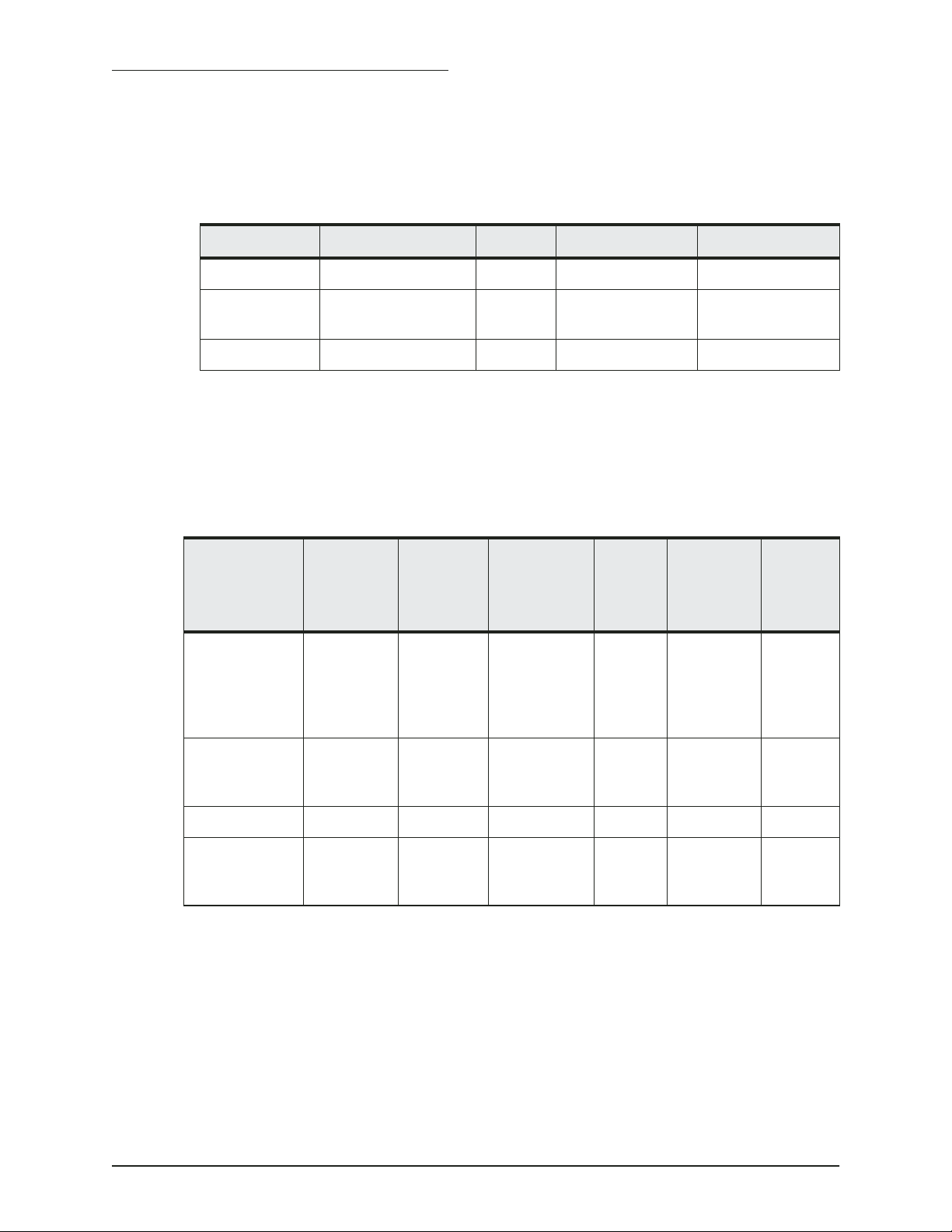
Manufacturer Housing Power Frequency Northstar P/N
Airmar B260 1 kW 50/200 kHz TD1004
Airmar B744V/B44V (with
Airmar P66 600 W 50/200 kHz TD1006
Transducer
element
Northstar recommends using an Airmar transducer with the Northstar
491 echo sounder. The Airmar B260, B744 and P66 can be obtained from
Northstar as an installation kit with connectors installed.
Table 1: Northstar-recommended transducers
600 W 50/200 kHz TD1005
3-wire speed)
A table of Airmar transducer elements is given below to assist in evaluating characteristics of other Airmar transducers.
Table 2: Airmar transducer elements
Single
or Dual
element
Used in
Airmar
P/N
Acoustic
material
Beam
Width
(50
kHz)
Beam
Width
(200 kHz)
Rated
Power
50/200A Single B744V
B744VL
P319
B117
SS555
50/200A Single P66
P79
P74
50/200B Single B256 Urethane 23° 5° 1200W
50AE/200Riq Dual B45
B250-B
B260
Dealers can also purchase quantities of transducers directly from Airmar
Technology Corporation at:
Milford, New Hampshire 03055-4613
Urethane 45° 12° 600W
LPU 45° 11° 600W
Urethane 19° 6° 1000W
Airmar Technology Corporation
35 Meadowbrook Drive
Phone 603/673-9570
Fax 603/673-4624
(www.airmar.com)
PAGE 4 491 INSTALLATION MANUAL Revision A
Page 9
SECTION TWO — Installing the transducer
Installation considerations
Choosing a mounting location
The following basic setup information isn’t a substitute for the installation instructions provided by the transducer’s manufacturer. To ensure
that you meet all critical installation parameters, be sure to read and follow all of the requirements in their instructions. Northstar assumes no
responsibility for improper installation.
CAUTION!
The two most common problems with echo sounder installations stem
from electrical noise and cavitation . Either of these situations can produce
poor performance.
Do not mount the transducer:
behind strakes, fittings, or hull irregularities (mounting in those locations may increase turbulence, aeration, and cavitation) or near the keel
near openings for water intake or discharge
where it might be loosened by the vessel’s vibration
less than four feet away from the Northstar 961/962
processor or other similar equipment to minimize
interference
Choose the mounting
location to obtain the best
possible performance from
the transducer and the 491.
Take into account the
vessel’s maximum speed
when selecting a mounting
location, as turbulence can
affect echo sounding
capabilities.
Electrical noise occurs when the transducer cable is routed too closely to
noise-producing electronics, such as alternators, AC generators, radars,
etc. To avoid problems with noise, route the transducer cable by itself
(not in a bundle) and away from other wires or cables and the engine.
Cavitation can occur at high speeds. During cavitation, bubbles form
between the transducer and the water. When this happens, the transducer can’t get its energy into the water properly and won’t be able to
detect any echoes. To avoid cavitation, choose a mounting location with
good water flow all around it at all speeds.
Before any drilling or cutting takes place, carefully choose a mounting
location for the transducer that meets the following criteria (also see
Figure 1 on page 7), depending on the type of vessel:
•
the transducer is more than four feet away from the Northstar navigator and other similar equipment, to prevent mutual electrical and
magnetic interference
• the transducer and its cable are as far as possible from other electri-
cal cables
• there is space above the transducer for the transducer’s stem, hous-
ing, and cable
491 INSTALLATION MANUAL Revision A PAGE 5
Page 10

SECTION TWO — Installing the transducer
• the path for running the transducer’s cable is reasonably direct—keep
in mind that the transducer cable is 33 feet long (10 meters). To prevent damage, coil any excess cable and secure it
• water turbulence and noise are minimal, decreasing the amount of
bubbles passing over the transducer face
• the transducer isn’t behind hull irregularities or near eroding paint;
both indicate areas subject to turbulence
• the transducer is as far as possible from the engine or propellers, and
inboard of the lifting strakes
• the transducer always remains submerged and parallel to the water
surface
• the transducer is easily accessible from inside the vessel for adjust-
ments and maintenance
• the transducer’s ultrasonic beams aren’t obstructed by the keel, pro-
peller shafts, or any other part of the vessel
• the hull thickness falls within the limits in Table 3 below (all dimen-
sions are perpendicular to the waterline):
Table 3: Hull thickness limits
Model Minimum Maximum
AirMar B44V/B744V with fairing 6 mm (1/4 inch) 19 mm (3/4 inch)
AirMar B44V/B744V without fairing 6 mm (1/4 inch) 65 mm (2 1/2 inches)
AirMar B260 with fairing —— 45 mm (1 3/4 inches)
AirMar B260 without fairing 19 mm (3/4 inch) 114 mm (4 1/2 inches)
PAGE 6 491 INSTALLATION MANUAL Revision A
Page 11
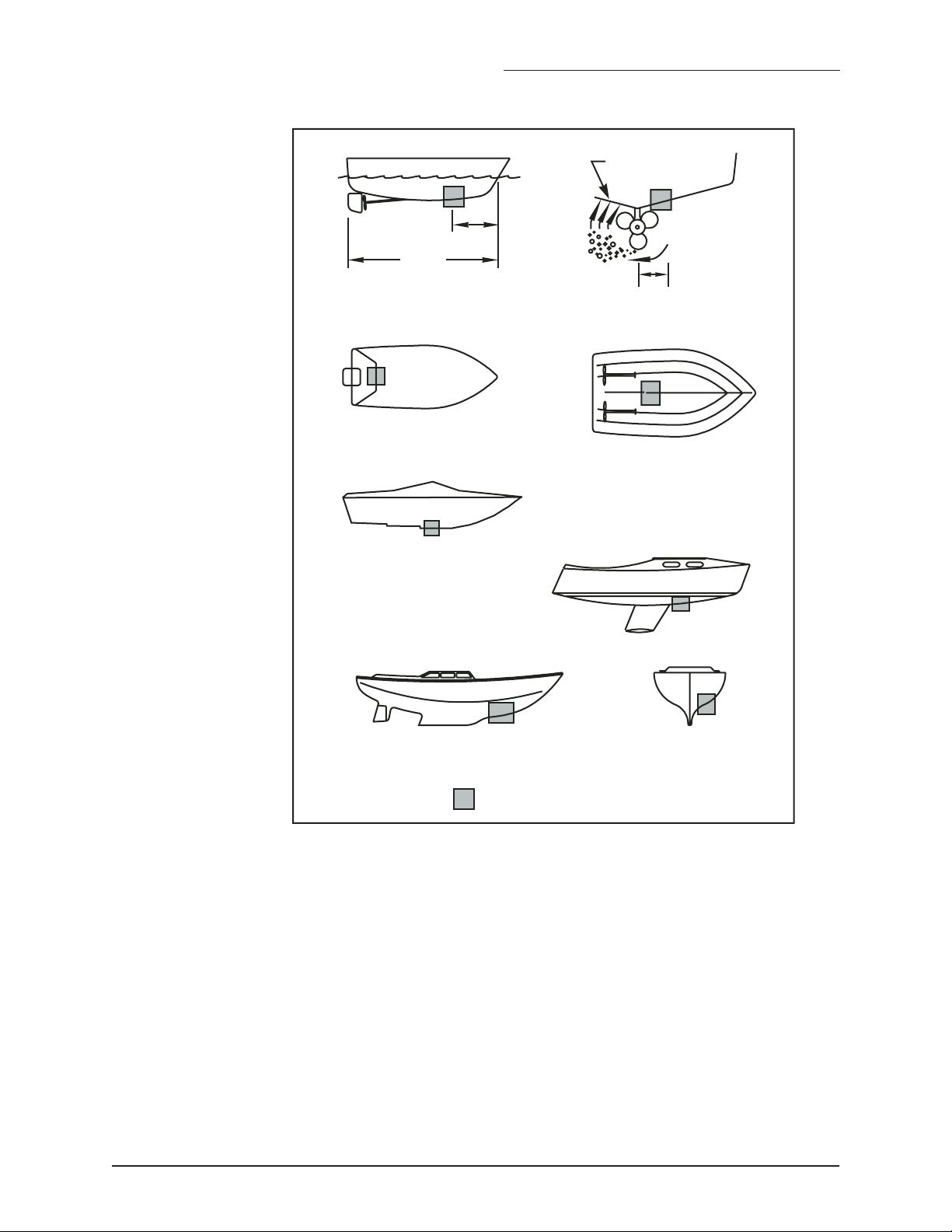
1/3 aft
LWL
(Load Waterline Length)
outboard and I/O
SECTION TWO — Installing the transducer
displacement hull
planning hulls
pressure waves
150-300mm
(6-12")
inboard
Installing the transducer
step-hull
fin keel sailboat
full keel sailboat
Best location for the transducer
FIGURE 1: Recommended installation locations for a transducer
A flat-bottom hull provides the best environment for mounting the transducer: It provides a horizontal surface and a constant water flow over the
transducer, with little turbulence (see Figure 2 for the recommended
transducer incline angle). If the vessel has a deadrise angle greater than 5
degrees, mount the transducer on a fairing block to create a horizontal
surface and keep the transducer perpendicular to the waterline (see
Figure 3). You must order the fairing block, if needed, from the transducer’s manufacturer.
491 INSTALLATION MANUAL Revision A PAGE 7
Page 12

SECTION TWO — Installing the transducer
3˚ incline
angle
1/3 aft
LWL
(Load Waterline Length)
FIGURE 2: Recommended transducer incline angle
backing
block
hull
fairing thickness
at narrowest point
6– 12 mm (1/4–1/2")
slope of hull
parallel to
waterline
fairing
multisensor
deadrise
angle
Maintaining the transducer
Using anti-fouling
paint
Deadrise angle and fairing thickness (B44V shown)
FIGURE 3: Typical finished thru-hull installation with a fairing
block (Airmar B744V)
Do not expose the transducer’s face or plastic housing to gasoline or
strong solvents, such as acetone. These solvents can penetrate and
degrade many plastics and reduce their strength.
The transducer should be coated with water-based anti-fouling paint to
prevent aquatic growth.
PAGE 8 491 INSTALLATION MANUAL Revision A
Page 13
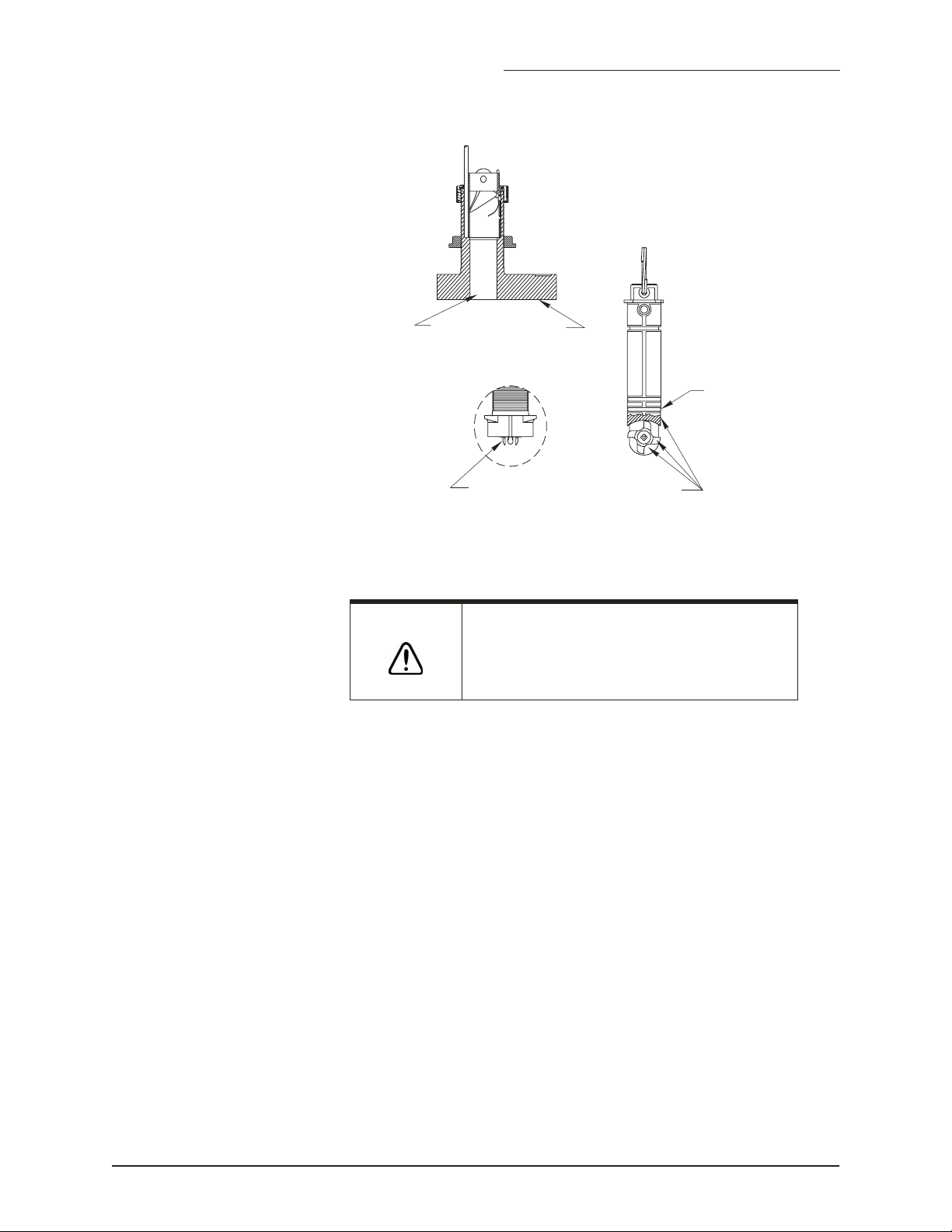
housing
Paint exposed housing
and bore up 30mm (1-1/4")
SECTION TWO — Installing the transducer
paddle wheel
insert
Cleaning a
transducer
detail
including exposed end, paddle wheel cavity and paddle wheel
Paint outside wall below the lower O-ring
lower
O-ring
Anti-fouling paint (B744V shown)
FIGURE 4: Anti-fouling paint areas (for Airmar B744V)
CAUTION!
To clean the transducer of heavy debris or foul sea growth, use a stiff
brush or putty knife, but don’t scratch the surfaces. Check the transducer
every few weeks, maximum.
Use sanding sparingly, as repeated sanding may affect the transducer’s
performance at high speeds. For lighter cleaning, the surface may be
wet-sanded with #220 or finer wet/dry sandpaper.
Use special transducer paint. Other paints may
contain copper, which is conductive and can burn
out the transducer within minutes!
491 INSTALLATION MANUAL Revision A PAGE 9
Page 14

SECTION TWO — Installing the transducer
PAGE 10 491 INSTALLATION MANUAL Revision A
Page 15
SECTION THREE — Installing the 491
Safety considerations
WARNING!
CAUTION!
CAUTION!
Be sure to turn the power off before starting the installation.
Further, it is highly recommended that you keep the power
off while you’re performing the installation. If power is left on
or turned on during the installation, then fire, electrical
shock, or other serious injury may occur.
Be sure to ground the equipment to prevent electrical shock
and mutual interference.
Be sure that the voltage of the power supply is between 10
and 36 volts DC. Connecting to the wrong power supply can
result in fire or damage to equipment.
Be sure to use a 3-amp fuse. Using the incorrect fuse can
result in fire or damage to the 491.
Keep the following safe compass distances from the 491:
1.0 m standard, 0.8 m steering.
Be sure that the 491 doesn’t interfere with any of the
on-board systems. Check all other systems to ensure that
their performance doesn’t degrade when the 491 is turned
on.
If the vessel is out of the water when the echo sounder is
turned on, the transducer may be damaged.
CAUTION!
CAUTION!
491 INSTALLATION MANUAL Revision A PAGE 11
Do not open the 491. There are no serviceable parts inside.
Unauthorized tampering with the unit will automatically void
the warranty.
Do not mount the 491 in the bilge. It is not designed to resist
heavy exposure to water and chemicals.
Page 16

SECTION THREE — Installing the 491
PAGE 12 491 INSTALLATION MANUAL Revision A
Page 17
SECTION THREE — Installing the 491
System components
Shipʼs
Power
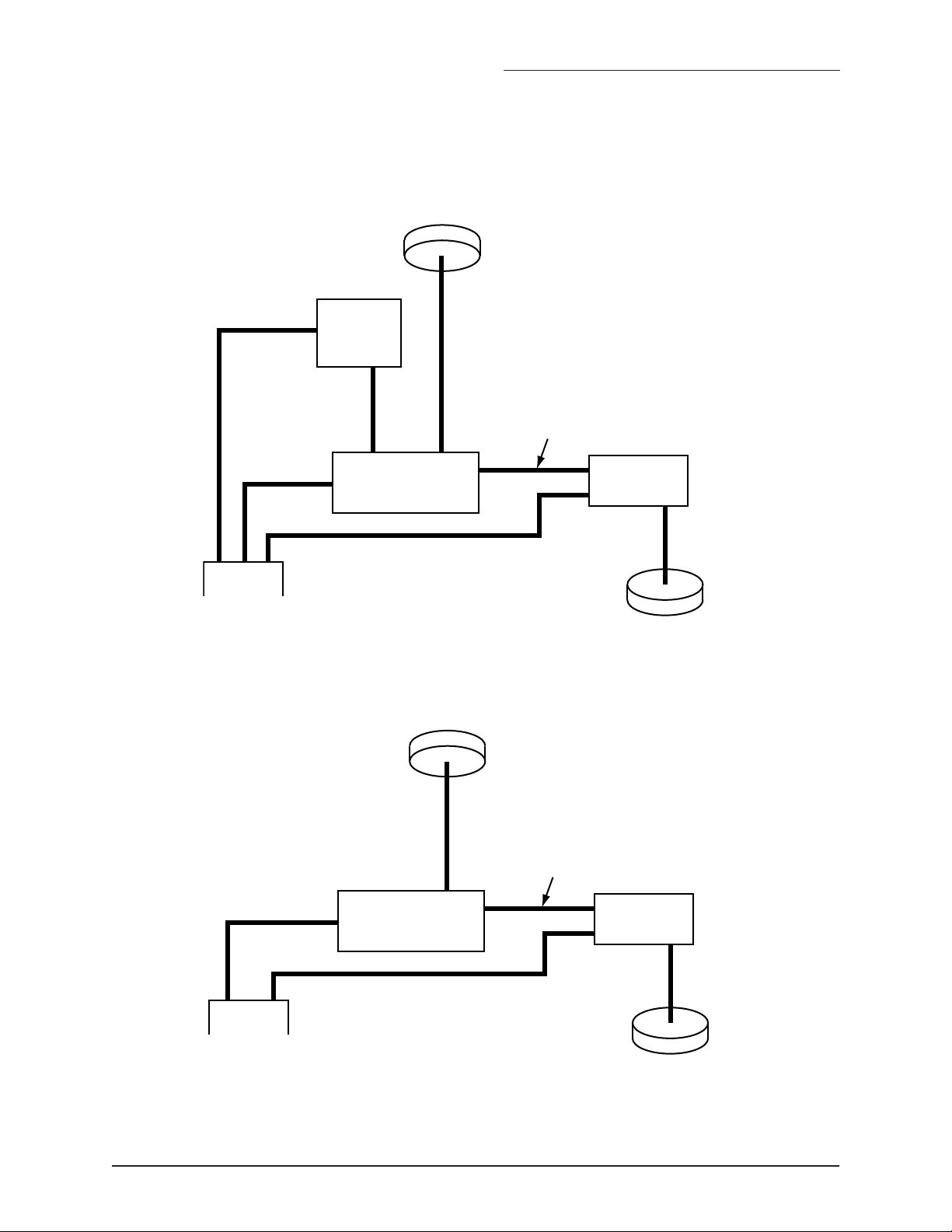
Figure 5 on page 13 shows a configured 961/962 echo sounder system,
and Figure 6 on page 13 shows a configured 957/958/6000i echo sounder
system.
GPS
Antenna
Northstar
961/962
display
10-foot data cable
(Northstar-supplied)
Northstar
961/962
Processor
10-foot power cable
(Northstar-supplied)
Northstar 491
Echosounder
33-foot cable
(Part of transducer)
Transducer
Figure 5: Echo sounder system components with the Northstar 961/962
GPS
Antenna
10-foot data cable
(Northstar-supplied)
Shipʼs
Power
Northstar
957/958/6000i
Navigator
10-foot power cable
(Northstar-supplied)
Northstar 491
Echosounder
33-foot cable
(Part of transducer)
Transducer
Figure 6: Echo sounder system components with the Northstar 957/958/6000i
491 INSTALLATION MANUAL Revision A PAGE 13
Page 18
SECTION THREE — Installing the 491
Choosing a mounting location
Mounting the 491
Before any drilling or cutting takes place, carefully choose a mounting
location for the 491 module that meets the following criteria:
• where the transducer cable is kept securely away from other wires
• where the path for running the required electrical cabling is reason-
ably direct; keep in mind the different cable lengths
• where the 491 won’t be exposed to water
• where the status indicator (on the front of the 491) can be observed
for system testing and troubleshooting.
NEVER MOUNT THE 491 MODULE IN THE BILGE!
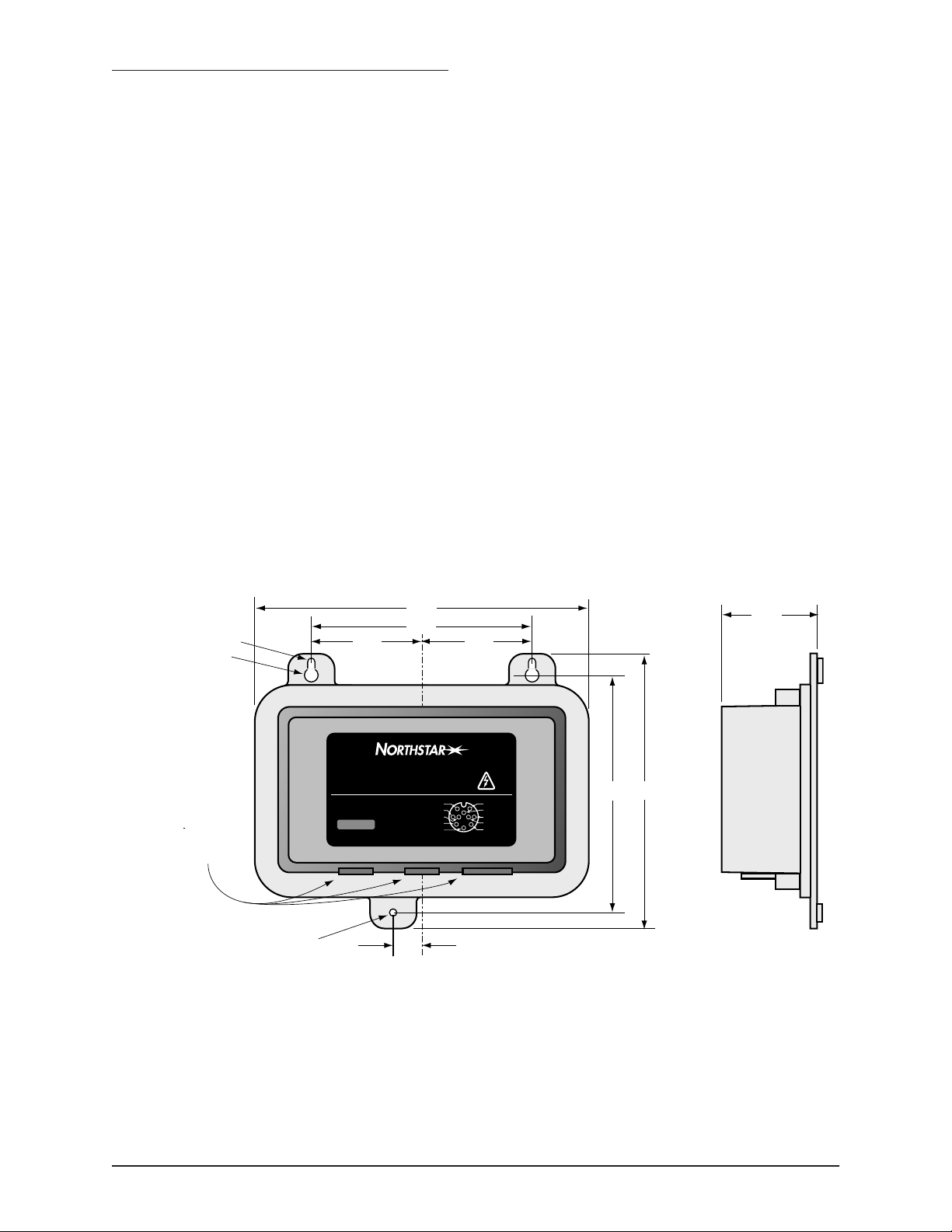
Figure 7 shows the mounting dimensions for the 491. The 491 may be
mounted either horizontally or vertically.
The mounting template supplied with the unit may be helpful in planning the installation and locating the mounting holes. The keyhole slots
make installation in hard-to-reach areas easier, but be sure to tighten all
mounting screws securely. Leave room for installing and removing cables.
0.190 dia.
0.360 dia.
Allow space
for cabling from
connectors.
0.190 dia.
8.78
2.35
5.80
2.90
6.24
Sig
Lo +
Hi –
#2 Speed +V
#3 Speed Gnd
#7Thermistor
#6 Depth
#9 Depth Shields
TRANSDUCER
Lo –
0.75
7.22
Dimensions in inches
8–36 VDC
8Watts
POWER
2.90
491
Echo Sounder
BNT Marine Electronics
30 Sudbury Road
Acton MA 01720
800-628-4487
www.NorthstarNav.com
STATUS
DATA
#1 Speed
#4Thermistor
#5 Depth
#8 Depth Hi +
#10 Depth
FIGURE 7: 491 mounting dimensions and connector locations
PAGE 14 491 INSTALLATION MANUAL Revision A
Page 19
Wiring the 491
SECTION THREE — Installing the 491
Electrical power
requirements
Connecting the 491
to ship’s power
CAUTION!
The majority of installation problems are caused by shortcuts taken with
system cables. When installing the 491, be sure that you:
• assemble connectors carefully
• don’t make sharp bends in the cables
• leave service and drip loops, so that moisture won’t run down the
cables and into the 491 or the navigator
• tie-wrap all cables to keep them secure
• if cables are shortened, lengthened (not recommended), or re-termi-
nated, seal all wiring splices
• prevent interference from the transducer cable
The 491 is a negative-ground system that is reverse-polarity and overvoltage protected. The unit requires 8 to 36 VDC power at 8 Watts.
The connection between ship’s power and the 491 requires the 10-foot
(3-meter) power cable supplied with the 491.
The wires in the power cable must be connected as follows (black and
white can be connected together at the power source):
Make sure that fuse or circuit-breaker protection is
provided at the power source.
Connecting the 491
to the 961/962
• Red → Positive (+) (fused lead)
• Black → Negative (–)
• Green → Ground (earth)
NOTE:
The connection between the 961/962 and the 491 uses the 10-foot
(3-meter) data cable supplied with the 491. The cable connects to the P1
slot on the back of the navigator.
The cable is shipped with a round 6-pin connector that attaches to other
Northstar navigators. To install the 491 with a 961 or 962, you must cut
off and discard the 6-pin connector, and wire the cable as shown below.
Be sure you don’t cut off the 8-pin connector that plugs into the 491!
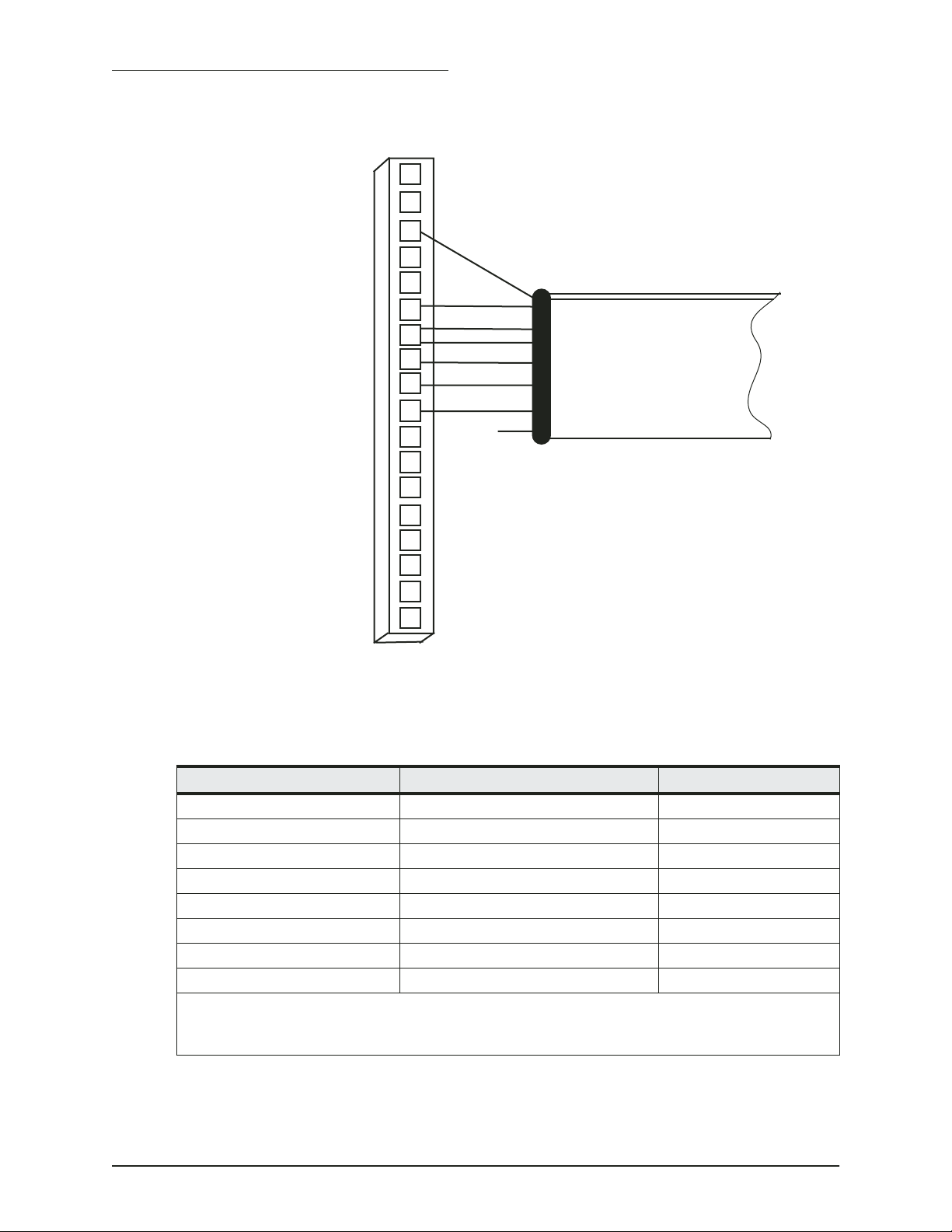
Figure 8 below illustrates the wiring at the 961/962 end of the cable.
Table 4 describes the pin’s functions.
The 491 should be grounded to the vessel to eliminate interference. Secure the green wire to the vessel’s nearest grounding
point. Without an earth grounding, performance may be degraded.
491 INSTALLATION MANUAL Revision A PAGE 15
Page 20
SECTION THREE — Installing the 491
18
17
16
15
14
13
12
11
10
961/962 P1 Connector Plug
(Wiring Side View)
Green
Orange
White
Violet
Brown
Black
Blue
9
Red (not
connected)
8
7
6
5
4
3
2
1
Data Cable
FIGURE 8: Interface cable connection from 961/962 to 491
Table 4: Cable connection between the 961/962 and 491
961/962 pin number 961/962 P1 signal name Cable wire color
9 Port 3 In (A) Blue
10 Port 3 In (B) Black
11 Ground Brown
12* Port 3 Out (A) Violet
12* Port 3 Out (A) White
13 Port 3 Out (B) Orange
16 Ground Green
** Not connected Red
* Connector P1, pin 12 on the 961/962 requires two connections from the cable.
**The red wire is not connected on the 961/962 end, and should be insulated and capped.
PAGE 16 491 INSTALLATION MANUAL Revision A
Page 21
SECTION THREE — Installing the 491
Connecting the 491
to the 957/958/
6000i
The connection between the 957/958/6000i and the 491 requires the
10-foot (3-meter) data cable supplied with the 491. The cable connects to
the AUX port on the back of the navigator.
The cable is shipped with the connector installed — the following information is provided for cases where it is necessary to remove and reinstall
the connector.
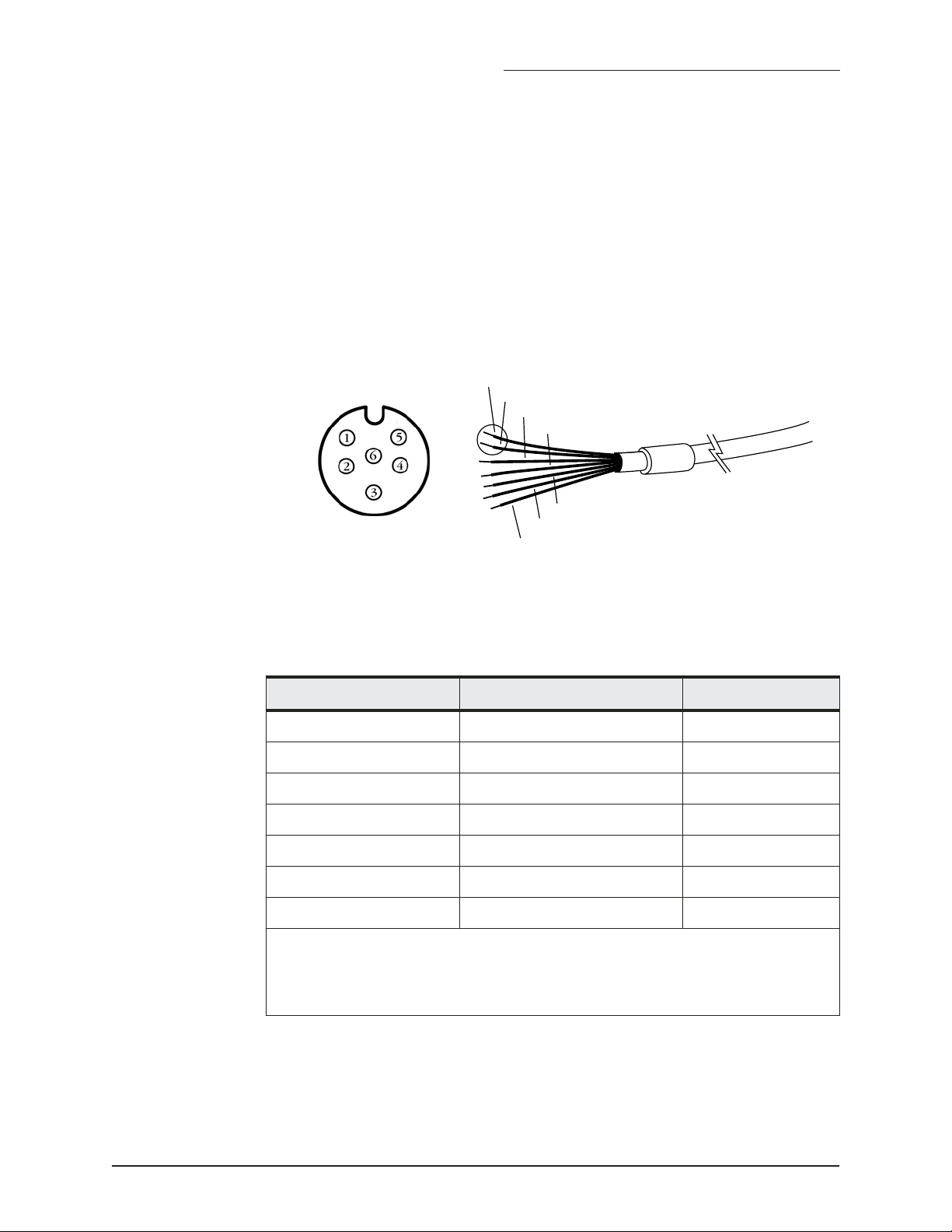
Figure 9 below illustrates the wiring for the navigator end of the cable.
Table 5 describes the pin’s functions.
Brown (pin 1)
Green (pin 1)
White (pin 2)
Blue (pin 6)
Orange (pin 5)
Violet (pin 4)
Black (pin 3)
Figure 9: Interface cable connection from 957/958/6000i to 491
Table 5: Cable connection between the 957/958/6000i and 491
navigator pin number AUX port signal name Cable wire color
1* Shield/Gnd Brown
1* Remote On Gnd Green
2 Remote On input White
3 NMEA AUX In (B) Black
4 NMEA AUX Out (A) Violet
5 NMEA AUX Out (B) Orange
6 NMEA AUX In (A) Blue
* Pin 1 on the 957 AUX port requires two connections from the cable.
The red wire is not connected on the navigator end, and should be insulated
and capped.
491 INSTALLATION MANUAL Revision A PAGE 17
Page 22
SECTION THREE — Installing the 491
Connecting the 491
to a transducer
Transducers purchased from Northstar (see page 4) are shipped with a
connector installed. The following information is supplied for transducers
purchased elsewhere and for cases where it is necessary to remove and
reinstall the connector.
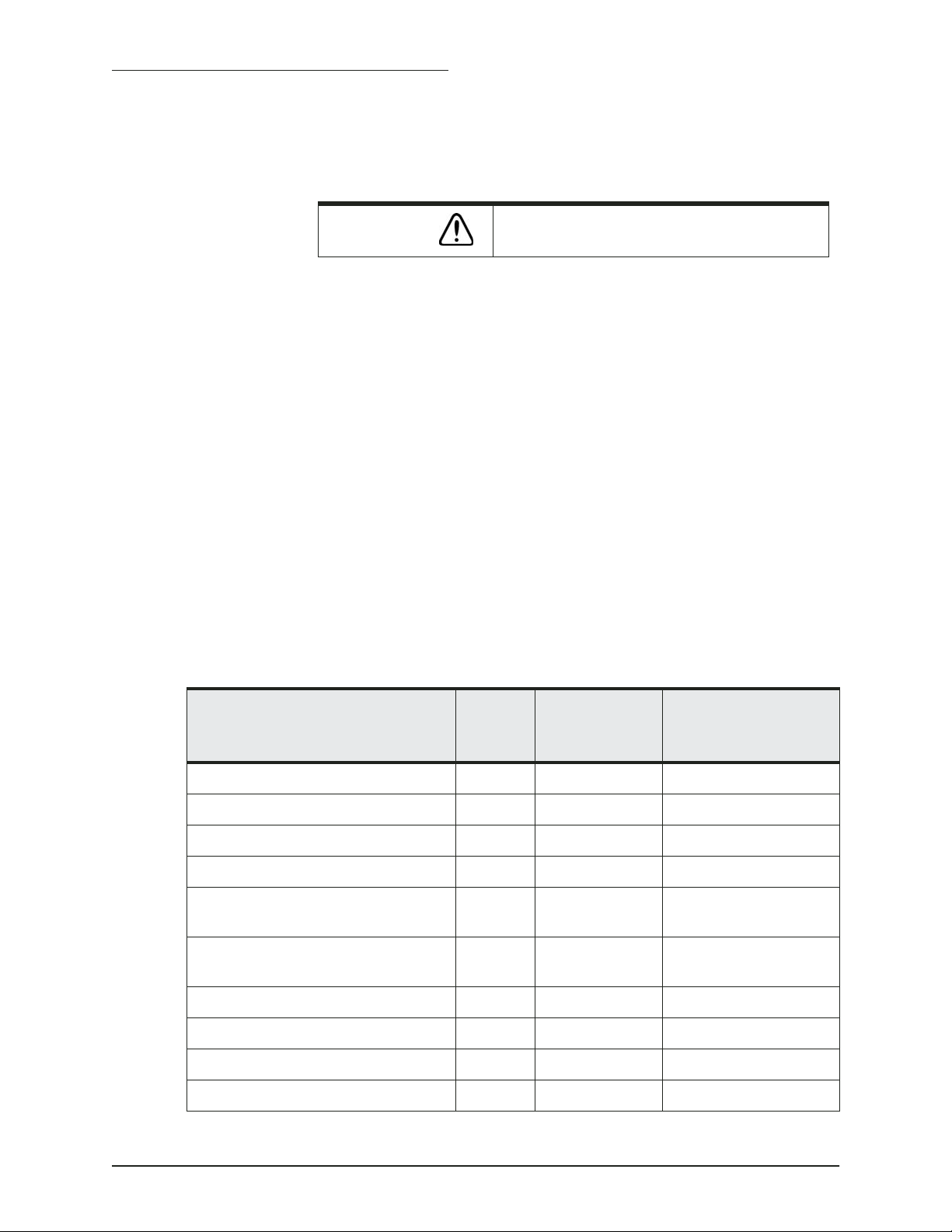
CAUTION!
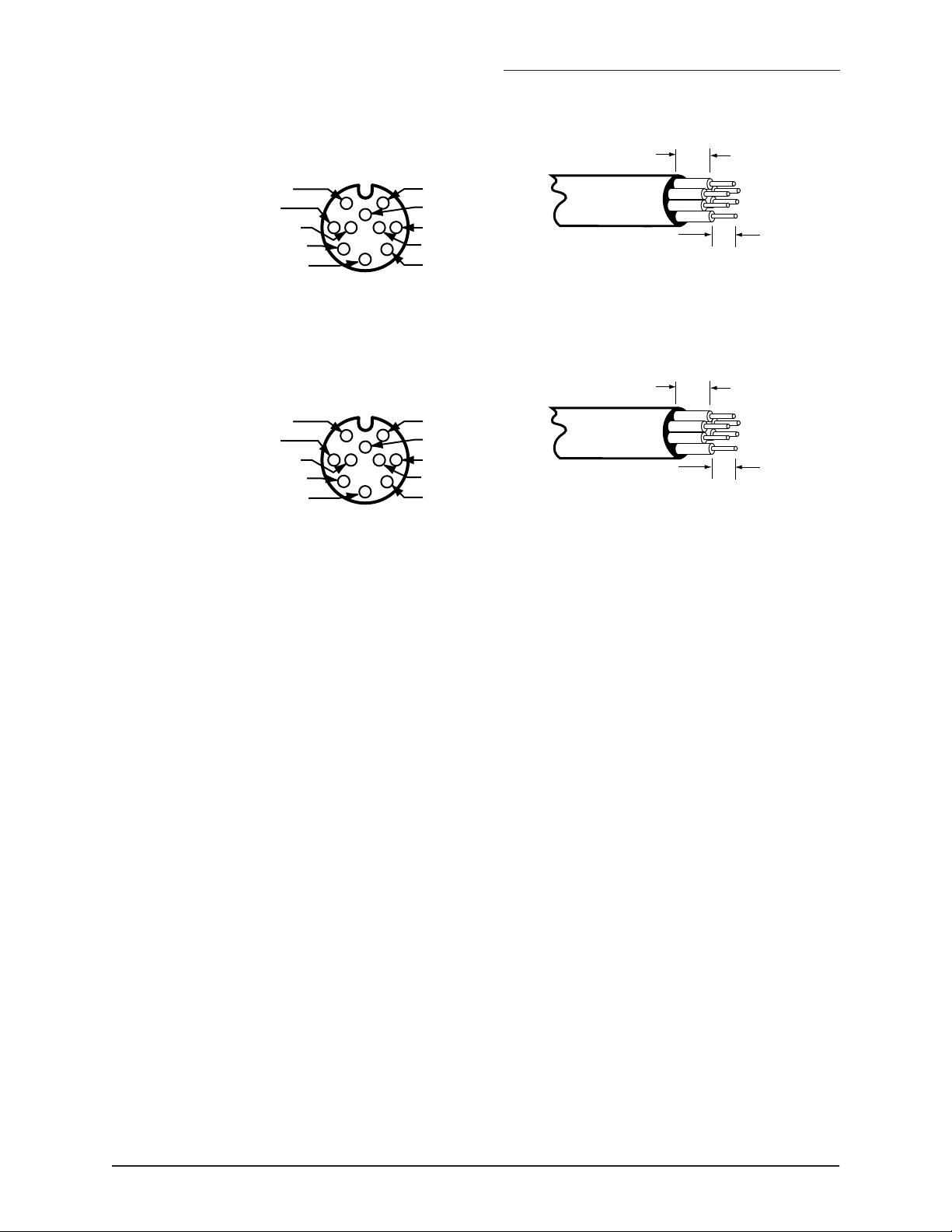
Figure 10 and Figure 11 below show how to install the connector on the
cable.
1. Slide the heat shrink tubing onto the transducer cable.
2. Slide the connector backshell onto the transducer cable.
3. Prepare each wire for insertion into its solder cup by stripping it as
shown below and tinning it.
4. Carefully solder each wire to the appropriate cup as specified in the
table.
5. Slide the backshell down the wire and screw it onto the connector
body. It should be hand-tight.
6. Using the supplied screws, screw the strain relief onto the backshell.
7. Slide the heat shrink tubing onto the connector. Be sure to leave
room for the locking collar to retract.
8. Heat the shrink tubing until it shrinks around the connector providing a watertight seal.
High voltage is present on the transducer wires!
Table 6: 491-to-transducer connector pin wiring
Signal name Pin no. Wire color
(Airmar B260
ONLY)
Speed signal 1 N/A Green
Speed +V 2 N/A Red
Speed ground 3 N/A Bare
Thermistor (temperature) 4 Brown Brown
Depth 50 kHz + (unused on single-frequency transducer)
Depth 50 kHz – (unused on single-frequency transducer)
Thermistor (temperature) 7 White White
Depth 200 kHz + 8 Blue Blue
Depth shields 9 Shields Shields
5 Yellow N/A
6 Blk/Wht N/A
Wire color
(Airmar B44/B744V
and P66 ONLY)
Depth 200 kHz – 10 Black Black
PAGE 18 491 INSTALLATION MANUAL Revision A
Page 23
SECTION THREE — Installing the 491
1/2” Max.
#1 Speed Signal
#4 Thermistor
#5 Depth 50 kHz +
#8 Depth 200 kHz +
#10 Depth 200 kHz –
1
56
4
8
3
10
#2 Speed +V
2
#3 Speed Gnd
#7 Thermistor
7
#6 Depth 50 kHz –
9
#9 Depth Shields
3/16”
Wire stripping detail
FIGURE 10: Wiring of B260 transducer cable (solder-cup side of connector
shown)
1/2” Max.
#1 Speed Signal
#4 Thermistor
#5 Depth 50 kHz +
#8 Depth 200 kHz +
#10 Depth 200 kHz –
1
56
4
8
3
10
#2 Speed +V
2
#3 Speed Gnd
#7 Thermistor
7
#6 Depth 50 kHz –
9
#9 Depth Shields
3/16”
Wire stripping detail
FIGURE 11: Wiring of B44/B744 and P66 transducer cable (solder-cup side of
connector shown)
Plug the transducer cable into the TRANSDUCER connector of the 491.
If your transducer doesn’t support speed, you can connect a separate
speed sensor, such as the Airmar ST650, to pins 1, 2 and 3, as shown in
the table.
Initial checkout
This section assumes that the 491, Northstar navigator, and transducer
are now all properly connected. Turning on the navigator automatically
turns on the 491 (be sure your vessel is in the water). To turn the navigator on, briefly press its PWR key.
Turning the 491 on
For the 961/962
To use the 491 echo sounder, the 961/962 must be running software version 3.0 or higher. If not, contact the factory to obtain the upgrade CD. To
install the upgrade, follow the steps on the back of the jewel box.
You must set the 961/962’s Port 3 to “490”:
1. Press STAR to display the SERVICE MENU screen.
2. Press PORT SETUP.
3. Press PORT 3.
4. Set the FORMAT option to 490.
The STATUS indicator light on the 491 glows steady green when the 491’s
power is on.
491 INSTALLATION MANUAL Revision A PAGE 19
Page 24
SECTION THREE — Installing the 491
For the 957/958/6000i
You must set the navigator’s AUX port to “Sounder”:
1. Press the STAR key to display the OPTIONS/SERVICE INFO screen,
2. Set the AUX PORT option to Sounder, then press the ENTER key.
The STATUS indicator light on the 491 glows steady green when the 491’s
power is on and it is communicating with the navigator.
then press the PORT SETUP OPTIONS key.
Setting up the echo
sounder
Turning the 491 off
Installation test checklist
You’ll need to set the echo sounder display options on the navigator’s
ECHO SOUNDER SETUP screen. Press the STAR key to display this screen
and set these options. For details, see the Northstar 491 Echo Sounder
Operations Manual (GM494).
To turn off the 491, turn off the navigator by pressing and holding PWR
until the screen goes dark. The 491 will turn off automatically.
CAUTION!
1. Make sure the vessel is in the water.
2. To test the system after installation, turn on the navigator and confirm that power is on with no errors. If echo sounder data isn’t moving across the ECHO screen from right to left, see ”Common 491
installation problems” beginning on page 21.
If the vessel is out of the water when the echo
sounder is turned on, the transducer may be damaged. Perform all tests on the with the vessel in the
water.
PAGE 20 491 INSTALLATION MANUAL Revision A
Page 25

SECTION FOUR — Troubleshooting and
servicing the 491
Common 491 installation problems
The status LED
Typical problems you may encounter either during or after the 491
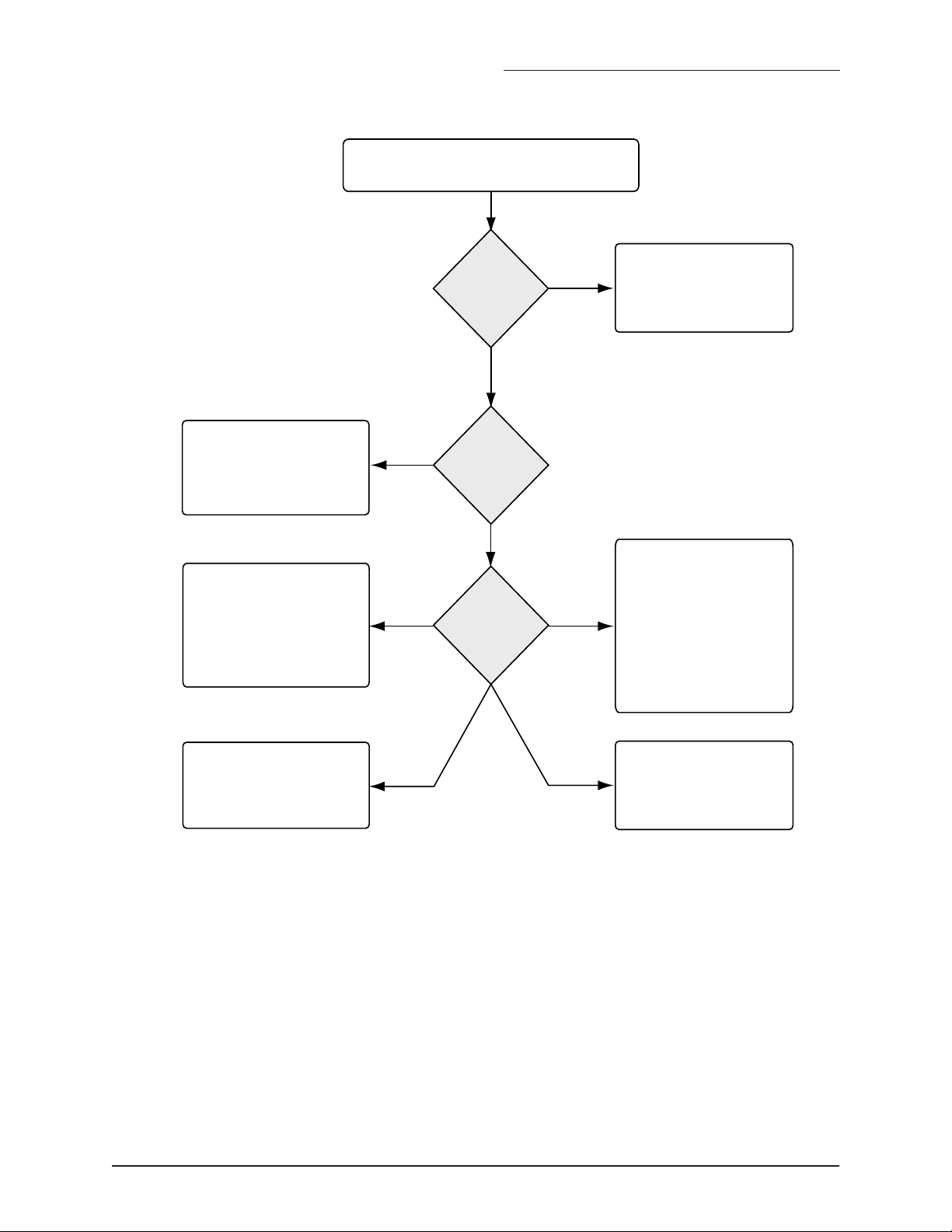
installation process are outlined in Figure 12 on page 22 and Figure 13 on
page 23.
In the 961/962, the diagnostics screen may also help pinpoint a problem.
The two-color LED located behind the 491’s front-panel STATUS window
displays the unit’s current condition.
The LED presents the following information:
• solid green: System has power, self-test passed, and communicating
with navigator.
• Flashing green: 491 is not communicating with the navigator.
• Red: Self-test failed
491 INSTALLATION MANUAL Revision A PAGE 21
Page 26
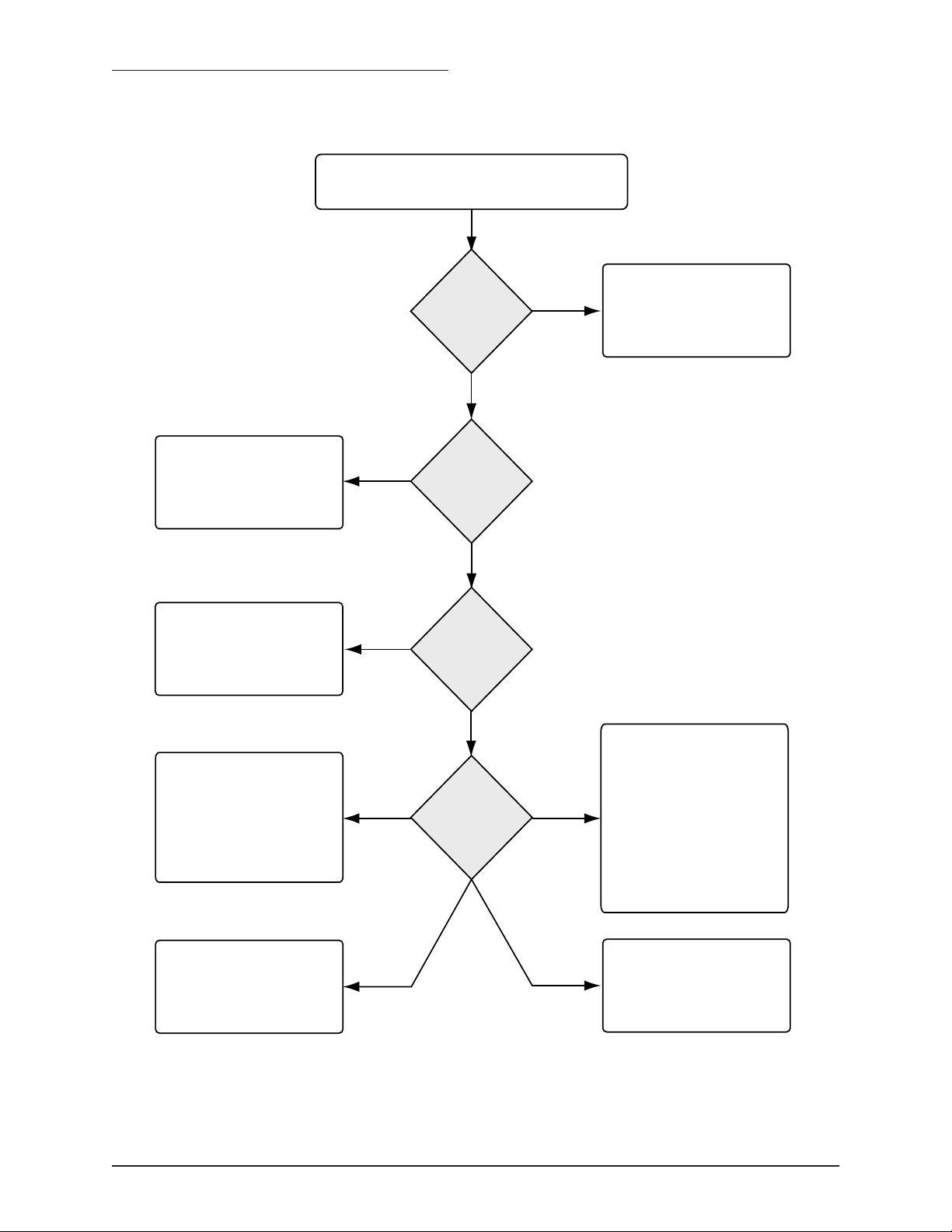
SECTION FOUR — Troubleshooting and servicing the
No echoes displayed when STAR key is pressed.
Contact Northstar Service to
rade to the latest version
upg
of 961/962 software.
Configure NMEA Port 3 for
the 491. See the “Initial
checkout” section of this
manual.
1. Check fuses and circuit
breakers
2. Check power to 491 with
a voltmeter.
3. Verify that the data cable
between the 961/962 and
the 491 is properly wired
and connected.
NO
Version 3.0 or
NO
been configured
OFF
the 491's STAT
FLASHING
GREEN
Is the
Advance
Speed set to
zero?
NO
Is the
961/962
software
greater?
YES
Has
NMEA Port 3
for the 491?
YES
Check
indicator
RED
YES
STEADY
GREEN
Change the Advance Speed
setting.
491 is communicating
with the navigator
1. Check transducer
connector for the
proper wiring.
2. If wiring is correct,check
transducer impedance
with an ohmmeter.
3. If the transducer is open
or shorted, replace it
The 491 and the 961/962
aren't communicating properly.
Check the wiring of the data
cable between the 961/962
and the 491.
There's a hardware problem
with the 491.
Figure 12: 961/962 echo sounder system troubleshooting
PAGE 22 491 INSTALLATION MANUAL Revision A
Page 27
SECTION FOUR — Troubleshooting and servicing the
No echoes displayed on sounder screen.
Is the
Advance
Speed set to
zero?
NO
YES
Change the Advance Speed
setting.
Configure the navigatorʼs
Aux Port for the 491. See
the “Initial checkout”
section of this manual.
1. Check fuses and circuit
breakers.
2. Check power to 491 with
a voltmeter.
3. Verify that the data cable
between the navigator and
the 491 is properly wired
and connected.
The 491 and the navigator
aren't communicating properly.
Check the wiring of the data
cable between the navigator
and the 491.
NO
OFF
the 491's STAT
FLASHING
GREEN
Has the
navigatorʼs
Aux Port been
configured
for the
491?
YES
Check
indicator
RED
STEADY
GREEN
491 is communicating with
the navigator.
1. Check transducer
connector for the
proper wiring.
2. If wiring is correct,check
transducer impedance
with an ohmmeter.
3. If the transducer is open
or shorted, replace it
There's a hardware problem
with the 491.
Figure 13: 957/958/6000i echo sounder system troubleshooting
491 INSTALLATION MANUAL Revision A PAGE 23
Page 28
SECTION FOUR — Troubleshooting and servicing the
Getting technical support
You can E-mail the
Service Department
directly from Northstar’s
website
(www.northstarnav.com).
Here, you also can
access additional
technical information
under either the
Manuals link (you can
download manuals in
PDF form) or Support
link.
After you’ve followed the instructions in this manual, if you need additional technical or operations support for the 491, or if you have any
other service-related questions, you can contact either your dealer or the
Northstar factory. You can reach the Service Department by E-mail, fax,
U.S. mail, or phone as described in Table 7 below.
NOTE: Please have the following items available when you
contact Northstar.
• the 491’s serial number, located on the top of
the unit
• the transducer manufacturer’s name and the
transducer’s model and part number
Please be as complete and accurate as possible when describing the problem so that a service technician can research the problem and provide the
quickest response.
The Northstar Service Department is available between 9:00 AM and 5:00
PM Eastern Time, Monday through Friday, excluding major holidays.
If you have questions about purchasing parts or finding an authorized
Northstar dealer, or if you want basic product information and brochures,
contact the Northstar Sales Department as described in the table below.
Table 7: Contacting Northstar
Email:
Service: [email protected]
Sales: [email protected]
Fax:
Service: 978/897-1595
Sales: 978/897-7241
Telephone:
Main number: 978/897-6600 or 800/
628-4487
Sales: 978/897-0770
Service: 978/897-6600
U.S. mail:
Northstar
30 Sudbury Road
Acton, MA 01720
Website:
www.northstarnav.com (you can send E-mail
to Northstar directly from this site)
PAGE 24 491 INSTALLATION MANUAL Revision A
Page 29
SECTION FOUR — Troubleshooting and servicing the
Hearing from you
Ordering replacement parts
Servicing the 491
Your feedback is important and helps Northstar ensure that this manual
is a valuable resource for all marine technicians. Send your questions,
comments, or suggestions about this manual to:
To order spare parts or replacement/missing parts, call the Sales Department at 978/897-0770.
Repair of the 491 is performed only at the factory. Service includes a complete hardware and software check-out.
NOTE:
Field repairs are not authorized and will void the
warranty!
For transducer service, including parts and repairs,
please contact the transducer manufacturer.
The 491 and any accessories returned for warranty repair that are determined to be without fault are subject to a handling charge.
491 INSTALLATION MANUAL Revision A PAGE 25
Page 30
SECTION FOUR — Troubleshooting and servicing the
y
y
Returning a 491 for service
Before returning the 491
to the factory, to prevent
delays it is critical that
ou first obtain a Return
Materials Authorization
(RMA) number from the
Northstar Service
Department. If the 491
was purchased through a
dealer, call the dealer
with the 491 serial
number so they can help
ou get an RMA number.
The 491’s serial number
can be found on the label
at the top of the 491.
Shipments without a
proper RMA number will
not be accepted!
If you have overnight or second-day shipping requirements, before shipping the 491, please call Northstar for turnaround time, freight charges,
and payment arrangements.
The 491 should be shipped only in a properly designed carton with packing material. Shipments to the Northstar factory should be made to the
following address:
Northstar
Service Department
30 Sudbury Road
Acton, MA 01720 USA
NOTE:
Return the transducer to its manufacturer, not to
Northstar.
PAGE 26 491 INSTALLATION MANUAL Revision A
Page 31
APPENDIX A — Technical specifications
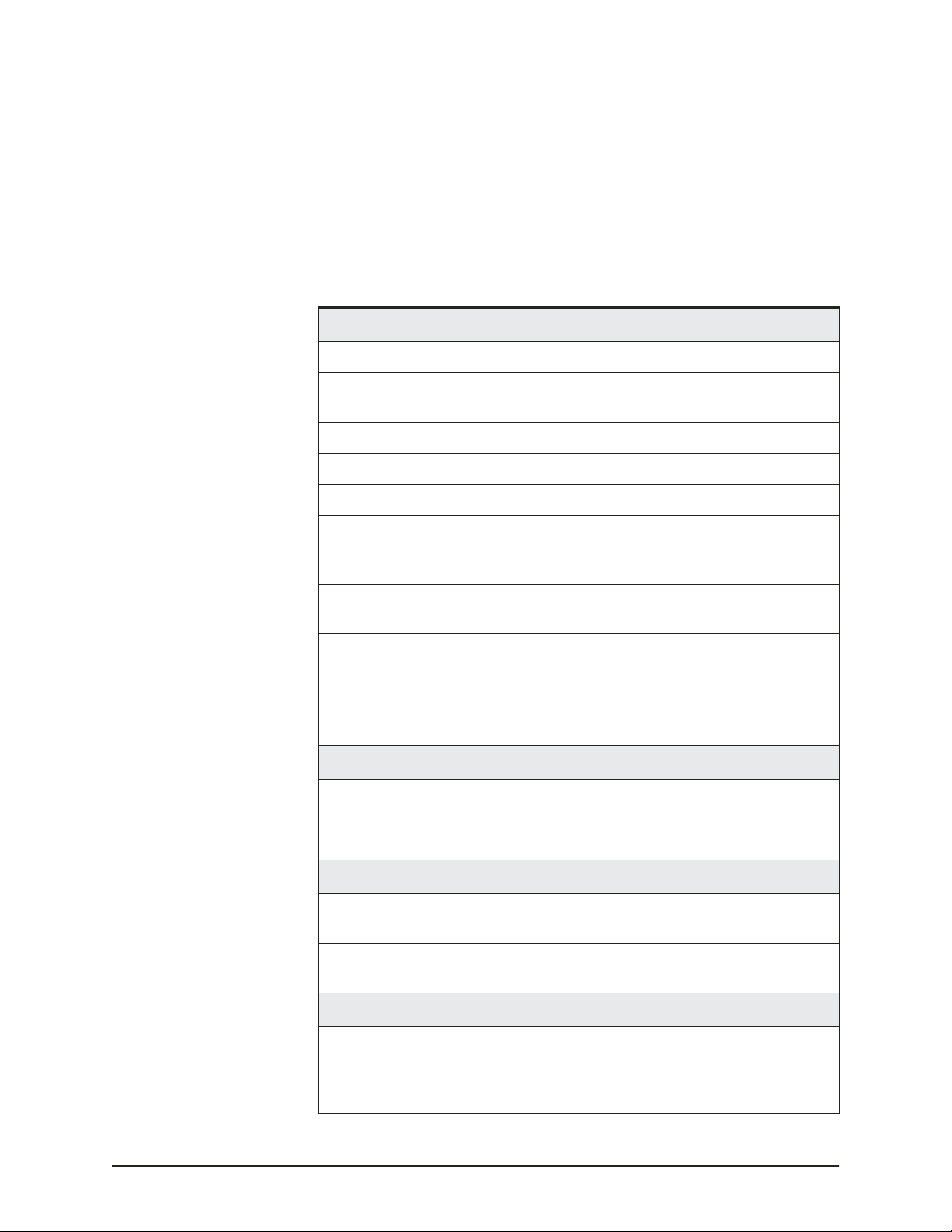
Table 8: 491 technical specifications
Performance characteristics
Frequencies 50 and 200 kHz
Output power 1000 watts with dual-element transducers
600 watts with single-element transducers
Pulse lengths 0.1 to 2 ms
Pulse repetition rate 30 to 600 pulses/min
Alarms Fish, bottom, and temperature
Update rate 10 Hz maximum (depends on water depth)
(up to 20Hz when used with the Northstar
6000i)
Zoom modes Marker, bottom lock, bottom lock/center,
bottom
Auto modes Fishing or cruising
Navigation data Shown on bottom of screen
Display modes Single/dual frequency, split-screen, four
zoom modes, A-Scope
Physical characteristics
Dimensions 8.78 x 7.22 x 2.35 inches (including back-
plate)
Weight 2 pounds
Environmental characteristics
Temperature -25˚C to +60˚C operating temperature
-55˚C to +90˚C storage temperature
Standards Waterproof, sealed design meets the follow-
ing: EN60529 IP65; EN60945 emissions; CE
Electrical characteristics
8 to 36 VDC, 8 watts, reverse polarity and
overvoltage protection
Transducer outputs protected against open
circuit/short circuit
491 INSTALLATION MANUAL Revision A PAGE 27
Page 32
APPENDIX A — Technical specifications
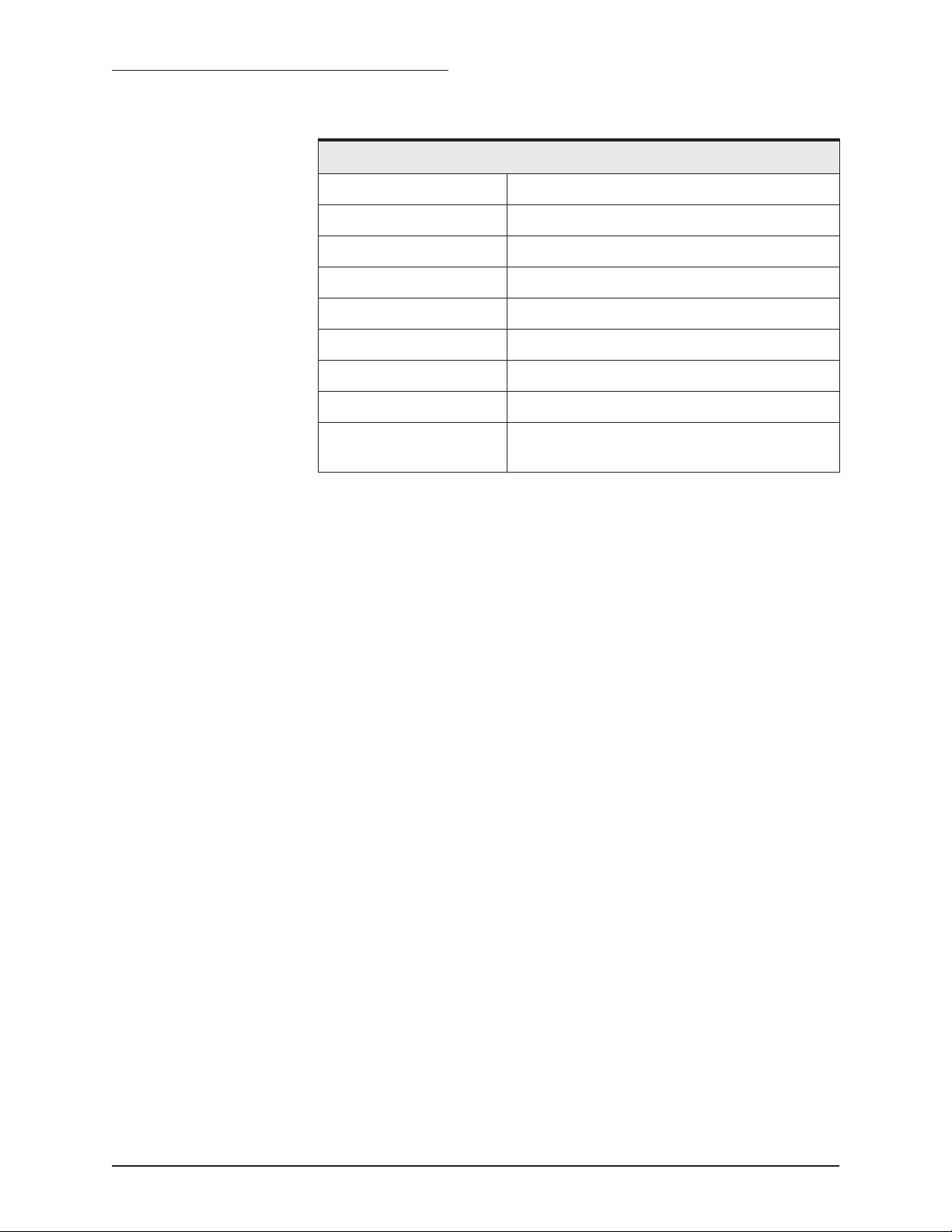
Manual controls
Gain 0 to 75 dB
Clutter 0 to 9
Signal level 0 to 5
Noise limiter ON/OFF
White level Background color
Range up to 3500 feet (1000 meters)
Advance speed 1/8 to 2/1
Depth units Feet, meters, fathoms
Installation calibrations Speed, temperature, gain, transducer depth/
Table 8: 491 technical specifications (Continued)
offset
PAGE 28 491 INSTALLATION MANUAL Revision A
Page 33

Glossary
cavitation
deadrise
echo sounder
fairing block
transducer
water column
The formation of bubbles, which may negatively impact a transducer’s
readings by reducing its ability to put energy into the water.
The rise of the bottom of a vessel above a horizontal line at the center of
the vessel; that is, the slope of the hull away from the horizontal.
An instrument that uses sound waves to measure the depth of a body of
water or an object (such as a school of fish) below the water’s surface.
A block used to create a horizontal surface for mounting a thru-hull
transducer when the vessel’s deadrise is more than 5 degrees.
The device mounted through the hull to send and receive ultrasonic
beams that determine seabed conditions and locate fish. Essentially, a
transducer is an energy converter, which changes electricity to sound
(send) and sound to electricity (receive).
An imaginary column through the water created by the path of a single
transducer ping and its echoes.
491 INSTALLATION MANUAL Revision A PAGE 29
Page 34

Glossary
PAGE 30 491 INSTALLATION MANUAL Revision A
Page 35

A
Airmar Technology Corporation 4
C
Cable
491 and 961/962 14
491 and ship’s power 14
491 to 957/958/6000i 16
Cautions
installation 2, 3, 11
interference with 491 11
tampering with the 491 11
transducer 3, 5, 19
troubleshooting the 491 19
wiring the 491 14, 17
Index
E
Echo sounder
components of system 1, 12
definition of 29
installation. See Installation, 491
serial number 26
setup options 19
specifications 27
STAT indicator light 18
turning off 19
turning on 18
wiring 14
Electrical power, requirements 14
F
Fairing block, definition of 29
I
Installation
491
cautions 2, 11, 14, 17, 19
connecting to 957/958/6000i 16
connecting to 961/962 14
connecting to ship’s power 14
electrical power requirements 14
general considerations 2
mounting dimensions 13
mounting location 13
491 INSTALLATION MANUAL Revision A PAGE 31
Page 36

Index
overview 11
safety considerations 11
troubleshooting 21
wiring 14
transducer
cautions 3, 5, 19
cavitation 5
hull thickness limits 6
noise problems 5
preferred mounting location 5
recommended incline angle 8
thru-hull installation with a fairing block 8
M
Maintenance, transducer 8
N
Northstar
feedback on manuals 25
website. See Website addresses
Northstar 491 Echo Sounder. See Echo sounder
Northstar 957/958 GPS/WAAS Chart Navigator 18
Northstar 957/958/6000i GPS/WAAS Chart Navigator 1
Northstar 961/962 GPS Chart Navigator 1
P
Parts, ordering. See Technical support
S
Safety considerations
491 11
transducer 3
Software upgrades, obtaining 18
Specifications 27
STAT (status) indicator light 18
T
Technical support
contacting Northstar 24
ordering parts 25
repairing the 491 25
repairing the transducer 25
Transducer
definition of 29
installation. See Installation, transducer
maintenance. See Maintenance, transducer
mounting. See Installation, transducer
recommended 4
service, parts and repair 25
Troubleshooting
diagnostics screen 21
flow chart 23
installation checklist 19
installation problems 21
PAGE 32 491 INSTALLATION MANUAL Revision A
Page 37

U
Upgrades, obtaining software 18
W
Water column, definition of 29
Website addresses
Airmar Technology Corporation 4
Northstar 24
Northstar Technologies 24
Index
491 INSTALLATION MANUAL Revision A PAGE 33
Page 38

Index
PAGE 34 491 INSTALLATION MANUAL Revision A
 Loading...