

Page 1
PROGRAMMING
R
COMPUTERIZED SECURITY SYSTEM
ARMED
STATUS
SYSTEM ARMED
01/01/97 12:00AM
1243
56
7890
A
B
C
D
E
F
G
NEXT/YES
PRIOR/NO
AREA
GEMINI
ENT A1
R
INSTRUCTIONS
HARDWIRE WIRELESS
GEM-P3200
CONTROL PANEL/COMMUNICATOR
GEMINI
STATUS
ARMED
A
B
C
COMPUTERIZED SECURITY SYSTEM
Quick Start:
1. Refer to the wiring diagram, connect the keypad(s), siren, aux. power, aux. output, remote bus, earth ground, zone and telephone
wiring. NOTE: See Installation Instructions (WI817).
2. Connect AC power first and then the battery.
3. Configure the keypad (see page 63).
4. Access the Easy Menu Driven (Dealer Program) Mode:
Press
Press
SYSTEM ARMED
SYSTEM ARMED
01/01/00 12:00 AM
01/01/97 12:00AM
1243
56
7890
GEM-RP1CAe2
EEEEEE A
Press
D
NEXT/YES
E
PRIOR/NO
F
AREA
G
R
GEMINI
SYSTEM ARMED
01/01/97 12:00AM
STATUS
ARMED
1243
A
B
C
COMPUTERIZED SECURITY SYSTEM
56
7890
GEM-RP2ASe2
Master Security Code
(on microshield)
g
F
ACTIVATE PROGRAM Y/N
Until “
“17”
(GEM-RP3DGTL) appears on the keypad display.
” (GEM-RP1CAe2), “
To Enter Dealer Program Mode (see page 6).
AC ON
AC ON
READY
D
READY
NEXT/YES
E
PRIOR/NO
F
AREA
G
R
TURNON PROG Y/N
48
” (GEM-RP2ASe2) or
BYPASS FIRE/TBL SYS TBL CHIME
INTERIOR
GEM-RP3DGTL
WI818D 8/00© Napco 2000
Page 2
THIS MANUAL INCLUDES FEATURES WHICH ARE ONLY AVAILABLE IN CONTROL PANEL
FIRMWARE VERSION 20 OR LATER.
CHANGES FROM PREVIOUS EDITION
The following changes have been made to this manual (WI818D) since the last edition (WI818C).
New GEM-P3200 Version 20 Features:
New Easy Menu Programming allows the system to be completely programmed through Menu Driven Easy
!
Program Mode. Requires the use of the following version keypads:
• GEM-RP1CAe2, Version 6
• GEM-RP2ASe2, Version 5b
GEM-RP3DGTL, Version 1c
•
Upon entering program mode, the keypad display will flash the control panel
firmware version, followed by the keypad firmware version:
GEM-RP1CAe2: [2006], GEM-RP2ASe2: [205b], GEM-RP3DGTL: [20/1C]
! Maximum Wireless Zones expanded from 32 to 48
Maximum Number of Users expanded from 32 to 48
!
Chime 2 zone provides second distinct pulsating “Chime Zone” tone
!
! Set System Time and Date in User Program Mode
System Trouble Audible Automatic Timeout
!
Inhibit System Trouble Audible
!
! Easy Programming of PC Preset Auto download ID and Callback Numbers
Support of GEM-PRINT module
!
Cancel Reporting Code
!
! Wireless Trouble Reporting by Zone
Pager (Telco 3) Reporting Delay
!
Pager - Programmable Number of Reports of Same Signal
!
! Pager - Maximum Number of Consecutive Pages
Specific Logging of Communication Failure Modes
!
New Relay Event “Area Disarmed” (PCD3000 programmable only)
!
! Programmable DST start date (PCD3000 programmable only)
20 Digit Dialing Prefix
!
NOTE: Typically, any version GEM-P3200 control panel could be upgraded to the latest firmware by replacing the
EPROM with a newer version. This is no longer the case. The Firmware Version 20 EPROM must only be used in a
Version 18 (or greater) PCBoard. Do NOT attempt to upgrade a GEM-P3200 control panel which currently is running
Firmware Version 11C (or prior) to version 20 (or greater) by replacing the EPROM.
The PCBoard version ( triangle number) is printed on a triangular shaped sticker affixed to the GEM-P3200 circuit board.
NAPCO Security Systems, Inc.
333 Bayview Avenue, Amityville, New York 11701
For Sales and Repairs, call toll free: (800) 645-9445
For direct line to Technical Service, call toll free: (800) 645-9440
Internet: http://www.napcosecurity.com
Page 3

WI818D 8/00
TABLE OF CONTENTS
Page 3
!
SYSTEM PROGRAMMING OPTIONS .............................4
Introduction ..................................................................4
Downloading from a Computer ....................................4
EASY MENU DRIVEN PROGRAM MODE.......................5
Dealer Program - Preliminary Information ...................5
Accessing Dealer Program Mode ................................5
Customizing a Default Program ...................................5
GEM-RP1CAe2 KEYPAD ............................................6
Number of Zones & Keypads per Area...................6
Local or Central Station Reporting System.............6
Central Station Receiver 1 Tel. Number .................7
Central Station Receiver 1 Account Number ..........7
Central Station Receiver 1 Format .........................8
Enter User Codes ...................................................9
RF Transmitter Points.............................................11
Key Fob Transmitters .............................................12
Enter Zone Descriptions .........................................12
Enter Date...............................................................12
Enter Time .............................................................13
Enter Dealer Code ..................................................13
Clear Dealer Program.............................................13
GEM-RP2ASe2 KEYPAD ............................................14
Number of Zones & Keypads per Area ..................14
Local or Central Station Reporting System.............15
Central Station Receiver 1 Tel. Number .................16
Central Station Receiver 1 Account Number ..........16
Central Station Receiver 1 Format .........................16
Enter User Codes ...................................................17
RF Transmitter Points.............................................19
Key Fob Transmitters .............................................20
Enter Date...............................................................21
Enter Time ..............................................................21
Enter Dealer Code ..................................................21
Enter Dealer Program.............................................21
GEM-RP3DGTL KEYPAD ..........................................22
DIRECT ADDRESS PROGRAM MODE...........................29
Keypad Programming Overview ..................................29
Accessing Direct Address Program Mode ...................29
What You See on the Keypad......................................30
Direct Address Program Mode Keypad Commands....30
Programming Overview ...............................................32
Direct Address Programming Example...................33
PROGRAMMING OPTIONS & WORKSHEETS .............. 34
System Delays (Addr 0000-0002, 2402, 2406 & 2414)
..................................................................................... 35
System Delays (Addr 2407, 2408 & 4088) .................. 35
System Delays (Addr 2400, 2401, 2403-2405 & 4083)
..................................................................................... 36
Keypad System Codes (Addr 0490, 0495 & 0500)...... 36
CS Receiver Opt. (Addr 0520, 0521, 0525, 0526, 0550,
0551, 0575 & 0576) ..................................................... 37
CS Receiver Tel. Numbers (Addr 0527-0546, 0552-0571,
0577-0596) .................................................................. 38
Download/Callback Options (Addr 4089, 0600-0619,
0625-0647, 1022 & 1023)............................................ 38
CS Subscriber ID Numbers (Addr 0650-0857) ............ 39
CS Reporting Codes (Addr 0860-0869) ...................... 40
CS Reporting Codes (Addr 0870-0904) ...................... 41
CS Area & System Reporting Opt. (Addr 1024-1027). 41
CS Zone Reporting Codes (Addr 0910-0957) ............. 42
CS User Reporting Codes (Addr 1030-1081).............. 43
Global System Trbl. Reporting Opt. (Addr 1082-1116) 45
Area System Trbl. Reporting Opt. (Addr 1120-1137) .. 46
Zones 1-48 Options (Addr 1200-1786)........................ 47
System Options (Addr 2415-2419) .............................. 51
System Options (Addr 2420-2422 & 4084).................. 52
Keypad Options (Addr 2425-2454).............................. 54
User Area Options (Addr 2500-2547).......................... 55
EZM Group Options (Addr 2600-2627) ....................... 56
Area Arming Options (Addr 2650-2651) ...................... 57
Remote Access Logging (Addr 3184).......................... 57
Area Output Control Options (Addr 2700-2733) .......... 58
RF Rcvrs. & Sup. Timers (Addr 3776 & 3760-3775) ...59
System Reset Features (Addr 4091-4093).................. 60
USER PROGRAM MODE ................................................ 61
Preliminary Information................................................ 61
Accessing User Program Mode................................... 61
User Codes.................................................................. 61
Zone Descriptions........................................................ 62
KEYPAD CONFIGURATION MODE................................ 63
Keypad Installation ...................................................... 63
Configuring the Keypads ............................................. 63
KEYPAD PROGRAMMING MODES ............................... 66
PROGRAMMING OPTIONS INDEX ................................ 71
GEM-P3200 WIRING DIAGRAM ..................................... 75
Refer to accompanying GEM-P3200 Installation Instructions (WI817) for installation information.
NOTE: THESE INSTRUCTIONS ARE INTENDED AND WRITTEN FOR PROFESSIONAL INSTALLATION PERSONNEL HAVING SUITABLE
TRAINING, EXPERIENCE AND INSTALLATION EQUIPMENT. IT IS RECOMMENDED THAT AFTER PROGRAMMING, THE ERROR CHECK
UTILITY OF THE PCD3000 DOWNLOADER BE USED TO VERIFY THAT THE CONTROL PANEL PROGRAM CONTAINS NO ERRORS OR
L
NAPCO Security Systems
CONFLICTS WHICH MAY INHIBIT ITS INTENDED OPERATION.
X
GEM-P3200 Programming Instructions
Page 4

!
Page 4
WI818D 08/00
SYSTEM PROGRAMMING OPTIONS
INTRODUCTION
The GEM-P3200 control panel may be programmed by various means, each of which will be covered in detail in the
sections that follow. Keypad displays shown first are for a GEM-RP1CAe2 (Version 6), the recommended keypad for
programming, then for the GEM-RP2ASe2. The GEM-RP2ASe2 keypad functions similarly; however, because of its
reduced display capabilities, messages are abbreviated and will scroll through two or more screens. Zone descriptions
cannot be programmed using a GEM-RP2ASe2 keypad.
Downloading From a Computer. This is the preferred method. The panel may be downloaded from (or uploaded
!
to) an IBM PC-compatible computer, with a 386 (or higher) microprocessor, either locally or remotely. NAPCO's
PCD3000 Quickloader software, Version Update 3.34 or later features context-sensitive help screens as well as an
error-checking utility that prevents programming of incompatible or conflicting data to ensure proper panel operation.
Easy Menu Driven Program (Dealer Program) Mode - Keypad Programming.
!
Mode allows keypad programming of number of zones in area 1, number of zones in area 2, fire zone numbers (both
4-wire and 2-wire), central station reporting, entry/exit zone numbers, interior zone numbers, number of keypads in
area 1, number of keypads in area 2, central station telephone number, central station account number, auto download
id number & PC preset callback telephone number, central station receiver format, user codes, RF transmitter points,
RF key fob transmitters,zone descriptions,date and time. For new panels, a custom default program may be created
at the keypad. A menu-driven utility prompts the installer to configure the system. Further detailed customization is
done in the Direct Address Program Mode.
Direct Address (Dealer Program) Program Mode - Keypad Programming.
!
is an extension of the Dealer Program Mode wherein data is entered at the keypad by location. This mode is accessed
from the Easy Menu Driven Program Mode by pressing the
C button at any time.
The Easy Menu Driven Program
The Direct Address Program Mode
User Program Mode - Keypad programming.
!
limited to keypad programming of User Codes, Zone Descriptions, Time and Date.
The User Program Mode is intended for authorized users and is
DOWNLOADING FROM A COMPUTER
The control-panel program may be downloaded from the
computer by either of the following methods.
Local Downloading
(Note: This procedure should be used after installation, after peripheral devices are connected.)
For a direct high-speed data transfer to the control panel from a desktop computer, connect the download jack (J1) on the
panel to the LOCAL jack (J3) on the Napco PCI2000/3000 computer interface using the supplied 6-conductor cable.
(Refer to PCI2000/3000 Installation Instructions WI443 for wiring diagram and procedures.)
Similarly, a high-speed local download may be made in the field using a notebook or laptop computer. Connect J1 on the
control panel to a Napco PCI-MINI computer interface using the 6-conductor cable supplied. (Refer to PCI-MINI
Installation Instructions WI767.)
Remote Downloading
(Also see PCI2000/3000 Installation Instructions WI443.)
Function Mode. During this procedure, voice contact will be lost, therefore both the installer and the computer operator
should be familiar with the operation. When a steady high-pitched tone is heard at the site phone, access the “
DOWNLOAD
phone will go dead. Hang up the phone and wait for a call from the central station confirming a successful download.
Callback Method. An installed, unattended panel may be programmed or reprogrammed remotely using the CallbackMethod Download feature of the PCD3000 software. Remote downloading requires a modem compatible with the
PCI2000/3000. Upon answering the call from the computer, the panel will verify the Download Security Code and, if
confirmed, will establish a connection. If a Callback Number is programmed into the panel, the panel will automatically
disconnect and call the computer at this number before establishing a connection. The panel can support two Callback
Numbers to allow downloads from two different offices.
” Function (see Keypad Programming Modes), then press the
J
button or the YES (
E
) button; the site
ACTIVATE
X
GEM-P3200 Programming Instructions
L
NAPCO Security Systems
Page 5
WI818D 8/00
GEMINI
STATUS
EASY MENU DRIVEN PROGRAM MODE
ARMED
A
B
C
COMPUTERIZED SECURITY SYSTEM
DEALER PROGRAM - PRELIMINARY INFORMATION
Only Keypad #1 may be used for both dealer and user programming, however this keypad may be located in any
!
area.
!
The Master Security Code is printed on the panel’s microprocessor can. Use this code to enter the Dealer Program
Mode to program a custom Dealer Security Code. Record the number, then remove the code label to prevent
unauthorized access to the panel. If you forget your Dealer Security Code, use the Master Security Code to enter
programming.
!
After entering codes or data, press the save Jbutton. Data will not be stored into memory unless it is pressed.
!
If the keypad is in the Program Mode and no activity is detected for longer than 4 minutes, a steady tone will sound.
Silence the sounder by pressing the
!
A panel that has been COLD STARTED (Address Location 4093) performs identically to a new panel.
!
When programming more than 2 areas, Direct Address Programming Mode must be used to complete the program.
G button to continue, or by pressing the C button to exit.
Page 5
AI #ZN=08 #KP=1
SYSTEM ARMED
# OF ZONES IN AREA 1
A2 #ZN=00 #KP=0
01/01/97 12:00AM
ENTER # ZONES X X
1243
56
7890
!
NEXT/YES
E
PRIOR/NO
D
F
AREA
G
R
KEYPAD #1: For ease of programming, it is recommended that a GEM-RP1CAe2 (Version 6) be used as Keypad #1.
(Regardless of which keypad is selected, all new keypads are configured as Keypad #1 out of the box.)
If a GEM-RP2ASe2 (Version 5b) is used, configure address jumpers as Keypad #1 (see Configuring the GEM-RP2ASe2
Keypad.).
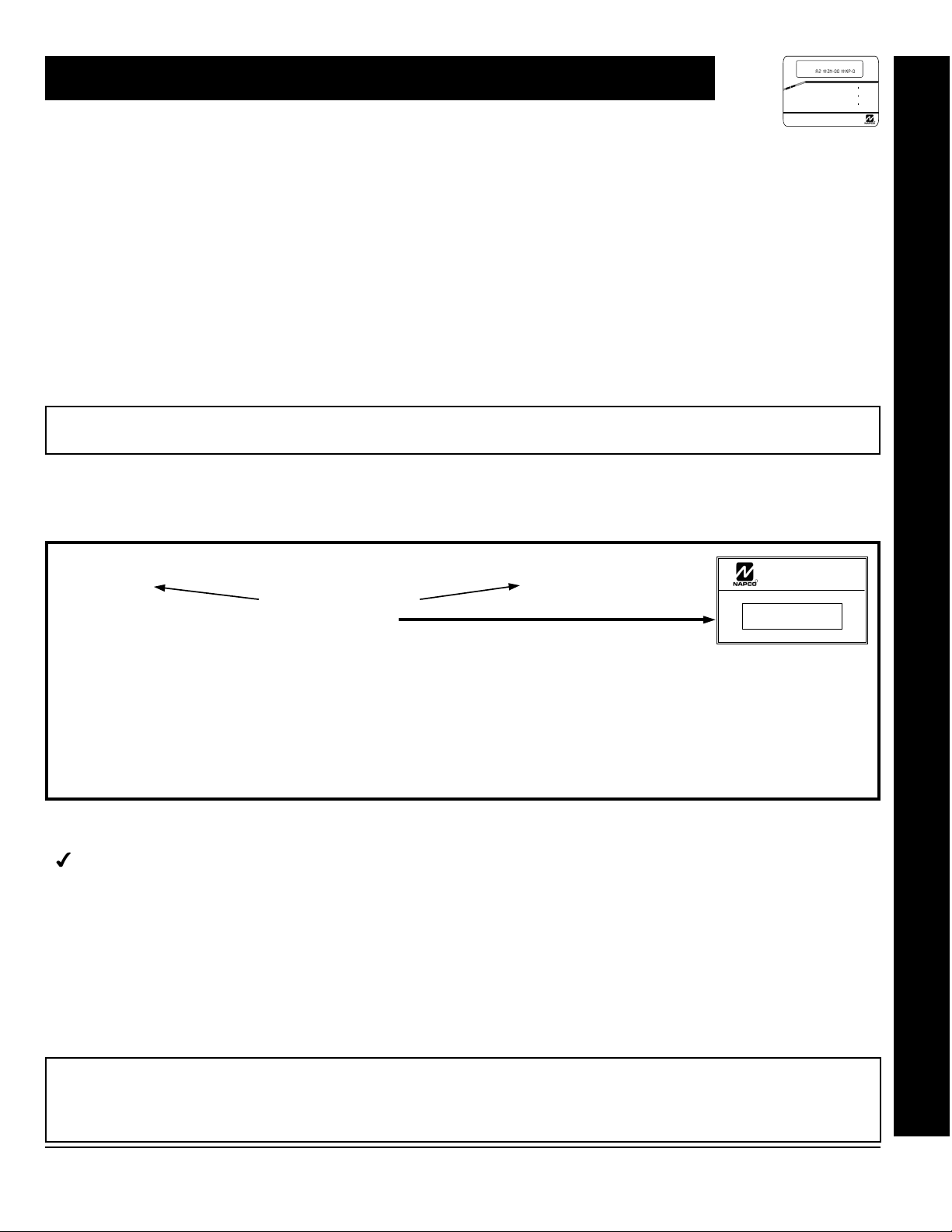
ACCESSING DEALER PROGRAM MODE
1. Press
2. Press
“
3. Press
4. Press
EEEEEE A
Master Security Code
(on microshield)
g
TURNON PROG Y/N
F
CC
Until “
”
ACTIVATE PROGRAM Y/N
(GEM-RP2ASe2) or
” (GEM-RP1CAe2),
“17”
(GEM-RP3DGTL) appears on the keypad display.
To Enter Dealer Program Mode.
To Exit Dealer Program Mode when finished.
GEM-P3200
GEM-P3200
R
MASTER SECURITY CODE
# - # - # - # - # - #
CONTROL
COMMUNCIATOR
CUSTOMIZING A DEFAULT PROGRAM
For any new panel, you can design a default program that will best suit your application. Using this procedure, you will configure the panel for:
Number of Zones in Area 1
!
Number of Zones in Area 2
!
Fire Zones
!
2-Wire Fire Zones
!
Local System or Central Station Reporting
!
Exit/Entry Zones
!
Interior Zones
!
Number of Keypads in Area 1
!
This procedure will automatically set up system keypads, EZMs, wireless transmitters, etc. After your basic default program has been loaded, you
may alter it as necessary in the Direct Address Program Mode.
Number of Keypads in Area 2
!
CS Receiver 1 Telephone Number
!
Auto Download ID Number & PC Preset
!
Callback Telephone Number
CS Receiver 1 Account Number
!
CS Receiver 1 Format
!
User Codes
!
RF Transmitter Points
!
Key Fob Transmitters
!
Zone Descriptions
!
*
Date
!
*
Time
!
Dealer Code
!
* NOTE:
GEM-RP1CAe2 Keypad Only
*
Accessing Dealer Program Mode
NEW PANELS:
The custom default program may be created for new panels only. Once the panel has been programmed by any
means, the number of areas, number of zones, fire zones, entry/exit zones and interior zones will be suppressed and cannot be
changed. Should it be necessary to create a new custom default program, (a) from the Dealer Program Mode, press the
to enter the Direct Address Program Mode; (b) access Location 4091 (Clear Program); (c) press the J button and start over.
L
NAPCO Security Systems
X
button
C
GEM-P3200 Programming Instructions
Page 6

Page 6
!
A. GEM-RP1CAe2 Keypad
GEMINI
AI #ZN=08 #KP=1
SYSTEM ARMED
# OF ZONES I N AREA 1
A2 #ZN=00 #KP=0
01/01/97 12:00AM
ENTER # ZON ES X X
STATUS
ARMED
1243
A
56
B
7890
C
COMPUTERIZED SECURITY SYSTEM
D
To create your customized default program using a GEM-RP1CAe2 keypad, enter the following
parameters. In each of the following steps, press the
NEXT/YES
E
PRIOR/NO
F
AREA
G
button to go forwards, the PRIOR (
R
button twice to exit at any time.
F
WI818D 08/00
A
button to set cursor, the NEXT (
) button to go backwards, the Jbutton to save and the
E
C
)
(Appears for New Panel Only)
1
to save. Press NEXT
J
#OF ZNS IN AREA1
ENTER # ZONES 08
(Direct Entry)
#OF ZNS IN AREA2
ENTER # ZONES 00
(Direct Entry)
Total Number of Zones in Area 1 & Area 2
Directly enter the total number of zones to be programmed for Area 1 and
Area 2, respectively. Valid entries are from 01 to 48. Directly enter the total
number of zones, including leading zeros. Use number buttons
through 9. NOTE: Press the 0 button for a zero. The system is
based on groups of 4 zones each (after the first 8 zones), and will
automatically round up to the next group of 4. For example, if you enter 18,
it will automatically convert this to 20 zones. Press
E) button to proceed.
(
Note: The GEM-P3200 is limited to a combined maximum of 48 zones and 7 keypads. All 48 zones and 7 keypads may
be programmed in the EZ Program Mode. For more options, see Zone and Keypad Options in Direct Address
Programming.
Fire Zones (Appears for New Panel Only)
NOTE:
FIRE ZONES
ENTER ZONE # 00
(Direct Entry)
If you are programming a 2 Area system, enter the zone number of zones required for Areas 1 & 2. All fire zones
Enter the zone number of any Fire Zones (both 2-wire, 4-wire or wireless).
Valid entries are from 01 to 48. Directly enter each zone number, including
leading zeros, and press
zone(s). Press NEXT (
J
E
to save, and then repeat for any additional
) button to proceed.
are common to areas 1 and 2. The Direct Address Program Mode can then be used to customize them as needed. See
Zone Options.
2-Wire Fire Zones (Appears for New Panel Only)
2-WIRE FIRE ZNS
ENTER ZONE # 00
(Direct Entry)
have been designated as Fire Zones can be programmed as 2 Wire Fire zones. Press NEXT (
Enter the zone number of any Fire Zones (from previous question) which
are to be used with 2-wire smoke detectors. The only valid entries are 07
and 08 Directly enter each zone number, including leading zeros. Press
save, and then repeat for any additional zone(s).
NOTE:
E
NOTE: JP7 must be set to “2-WF” position for 2-wire fire zones 7 and 8 (refer to Installation Instructions).
Local System or C.S. Reporting System (Appears for New Panel Only)
REPORT ALL ZONES
TO CENTRAL? Y/N
(Press YES or NO)
Press YES (
for no zones to report (LOCAL SYSTEM).
E
) button for all zones to report; press NO (
GEM-RP1CAe2 Keypad: Zones per Area, Fire Zones, 2-Wire Fire Zones & CS Reporting
to
J
Only zones which
) button to proceed.
F
) button
X
GEM-P3200 Programming Instructions
L
NAPCO Security Systems
Page 7
WI818D 8/00
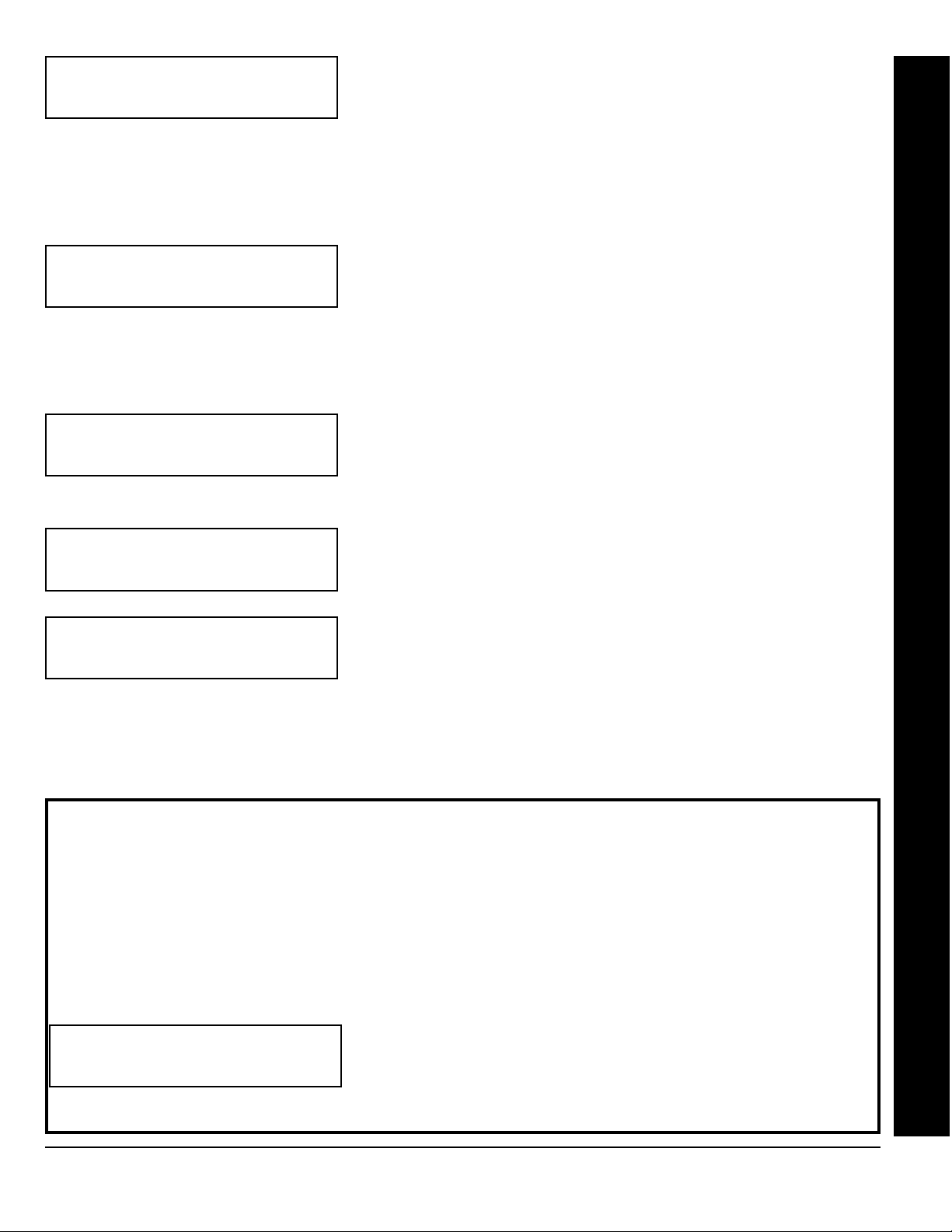
EXIT/ENTRY ZONES
ENTER ZONE # 00
(Direct Entry)
NOTE:
be programmed for all E/E zones. If you are programming a 2 Area system, enter all of the zones required for Areas 1 & 2.
Exit/Entry Zones will have an entry delay of 30 seconds and an exit delay of 60 seconds. Chime will automatically
Exit/Entry Zones
Directly enter the zone numbers which are to be used as Exit/Entry zones.
Valid entries are from 01 to 48. Directly enter each zone number, including
leading zeros. Use number buttons
0
button for a zero. Press Jto save and then repeat for any additional
zone(s). Press NEXT (
(Appears for New Panel Only)
1 through 9. NOTE: Press the
E) button to proceed.
Page 7
!
GEM-RP1CAe2 Keypad: Exit/Entry Zones, Interior Zones, Keypads per Area, CS Tel. No. & CS Acct. No.
Interior Zones
INTERIOR ZONES
ENTER ZONE # 00
(Direct Entry)
NOTE:
2 Area system, enter all the zones required for Areas 1 & 2.
All Interior zones will also be automatically programmed as “Exit/Entry Follower” zones. If you are programming a
# AREA 1 KEYPADS
ENTER #KPS 01
(Direct Entry)
# AREA 2 KEYPADS
ENTER #KPS 00
(Direct Entry)
CENTRAL PHONE #
_____________
(Direct Entry)
Delay = “D”; Dial-Tone Detection = “E”. Pressing the
NEXT (
Direct Address Programming. See CS Receiver Options.
E
) button to proceed. NOTE: Central Station Receiver 2 and 3 Telephone Numbers can only be entered in
Directly enter the zone numbers which are to be used as Interior Zones. Valid
entries are from 01 to 48. Directly enter each zone number, including leading
zeros. Use number buttons
button for a zero. Press Jto save and then repeat for any additional zone(s).
Press NEXT (
Number of Keypads in Area 1
Directly enter the total number of Keypads to be installed in Area 1. Valid
entries are from 01 to 07. Directly enter the number of keypads, including
leading zeros. Use number buttons
0
button for a zero. Press Jto save. Press NEXT (
Number of Keypads in Area 2
Directly enter the total number of Keypads to be installed in Area 2. Valid
entries are from 01 to 07.
Central Station Receiver 1 Telephone Number
Using number buttons, enter telephone number of up to 16 digits including
prefix letters, if necessary, for receiver 1. Use number buttons
9
1
for digits 1–9; press the
through
0 button will produce a blank space (•). Press
(Appears for New Panel Only)
1 through 9. NOTE: Press the 0
E) button to proceed.
1 through 9. NOTE: Press the
G 0
G 5
for letters B–F, respectively. NOTE: Pre-Dial
E
button for a zero and
) to proceed.
1
to save. Press
J
through
G
Easy Programming of Auto download ID #'s and PC Preset Callback Numbers
For unattended PC Preset downloading, it is now possible to set the Auto download ID #’s and PC Preset Callback from
the Keypad Easy Program Mode.
(GEM-RP1CAe2 only)
• At the field for CENTRAL PHONE #, program an "F" followed by the Auto Download ID # (2 digits) and then the
Callback Telco # (up to 13 digits).
• Press [ON/OFF] to save.
• Exit Program Mode ([RESET] [RESET]).
Enter Master Code
•
• Press [FUNCTION]
• Go to Function "ACTIVATE DOWNLOAD Y/N" and press YES (INTERIOR).
• The panel will automatically call the PC Preset computer and download the program on the specified Auto
Download line # of PC Preset.
CENTRAL PHONE #
Example: Program an Auto download ID # of 07 and a PC Preset Callback #
of 1-516-842-9400
F0715168429400
Go to Central Phone # input screen and press: [*] [5] [0] [7] [1] [5] [1] [6] [8] [4] [2] [9] [4] [0] [0] [ON/OFF]
•
L
NAPCO Security Systems
X
GEM-P3200 Programming Instructions
Page 8
!
Page 8
CENTRAL STATION
ACCOUNT #(____ )
(Direct Entry)
SEE WI FOR INFO
RCVR FORMAT (0)
(Direct Entry)
WI818D 08/00
Central Station Receiver 1 Account Number
Enter an account number of up to four digits. Use number buttons
1
through 9 for digits 1–9. NOTE: Press the 0 button for a zero and
press the
G 5
E) button to proceed.
(
NOTE:
G 0
for letters B–F, respectively. Press Jto save . Press NEXT
Central Station Receiver 2 and 3 Account Numbers can only be
buttons for a blank space (•).
G 1
through
entered in Direct Address Programming. See CS Reporting Options.
Central Station Receiver 1 Format
From the table below, enter the central station's receiver format. Use
number buttons
1 through 9.
a zero. and press the
G 1
Press
J
through
to save. Press NEXT (
NOTE:
G 0 buttons for a blank space (•). Press
G 4
for letters B–E, respectively.
E
) button to proceed.
Press the 0 button for
DATA
ENTRY
blank(•) Ademco Slow, Silent Knight Slow
1 Sescoa, Vertex, DCI, Franklin
2 Radionics Fast
3 Silent Knight Fast
4 Radionics, DCI, Franklin Slow
5 Universal High Speed
8 Radionics BFSK
CS RECEIVER 1 FORMAT
Fast
DATA
ENTRY
GEM-RP1CAe2 Keypad: CS Format
CS RECEIVER 1 FORMAT
9FBI 4/3/1
0 Radionics Modem 2
BSIA
C Ademco Point ID
D Ademco Express
E Pager
NOTE: Modem IIe is available only in Direct
Address Programming. Central Station
Receiver 2 and 3 Formats can only be entered
in Direct Address Programming. See CS
Receiver Options.
X
GEM-P3200 Programming Instructions
L
NAPCO Security Systems
Page 9
WI818D 8/00
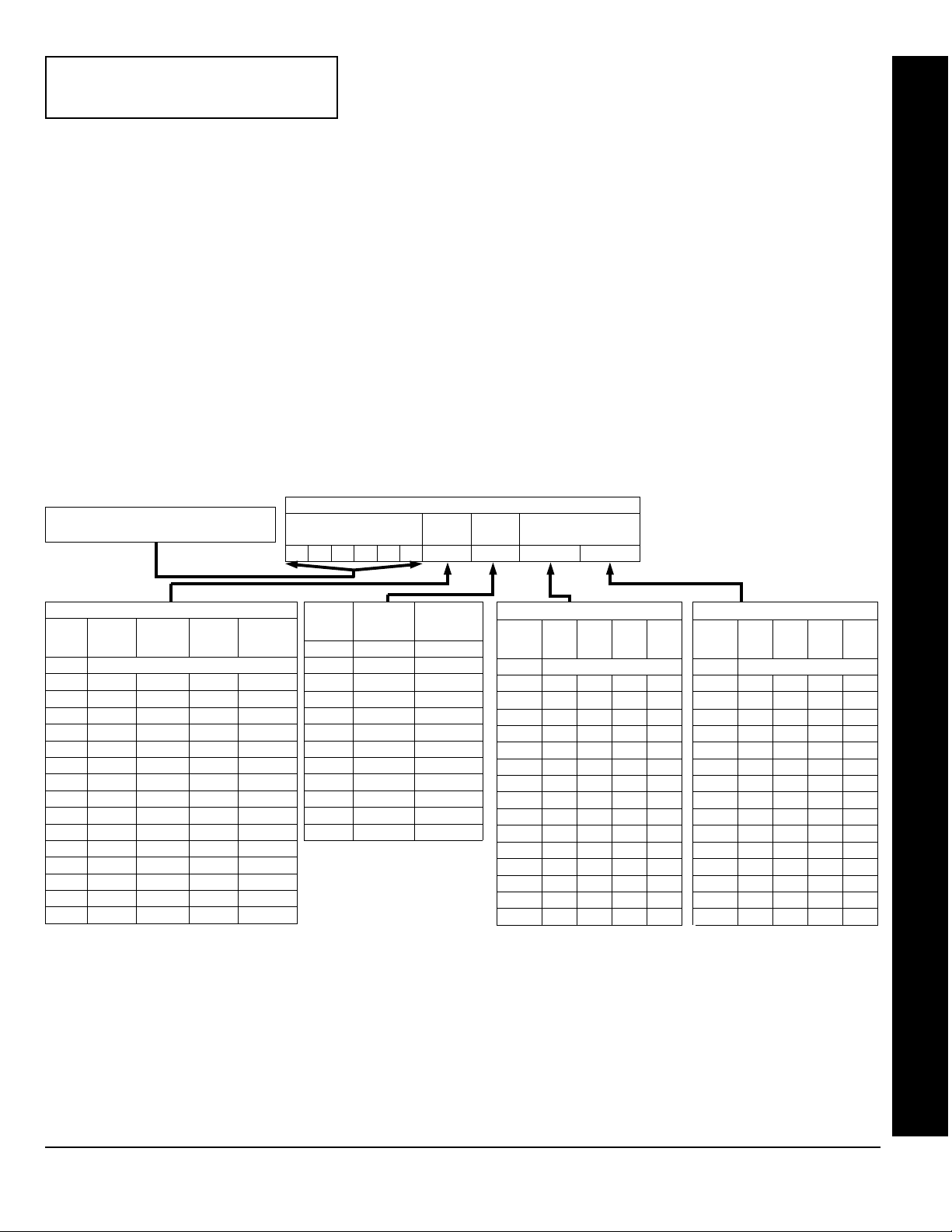
ENTER USER CODE
U01 123___ -F3 -__
User# User Code Option Access
/Level Control
Enter User Codes
(Press the (
A
) button to set cursor.)
Enter up to 48 User Codes with User Options, Authority Level and Access
Control Options (if necessary) for each code. Refer to the tables below and
on the next page for available data entries for User Options, Authority Level
and Access Control Options.
All 48 Users must be assigned to areas
Note:
in “Enable User Code by Area” (Address 2500-2547) in Direct Address
Page 9
Programming. By default, only User 1 is enabled in Area 1 and Area 2.
User 2 - 8 are enabled in Area 1 and user 9 - 16 are enabled in Area 2.
!
Press the (
A
) button to set the cursor to the User Code. Use the number buttons
1
through
9
enter a code of up to 6 digits. Enter up to 6 digits (4 digits is recommended) in the first six boxes from left to right for
button for a zero. No blank spaces in between; leave
each user code. Valid entries are: 0-9. Note: Press the
0
blank (•) any trailing boxes. If an “Ambush Code” (Address 0495) is entered, do not program the first two digits of ANY
User Code as the same digits entered for the “Ambush Code”.
!
If the programmed code is less than 6 digits, press the
A
button to set the cursor to the OPTION/LEVEL. Refer to
the tables below for the available User Option and User Level data entries. Enter the user options data in the left digit.
Enter the level data (with arming options, if any, added) in the right digit. Note: For entries greater than 9, press the
G1
!
For Keypad Access Control, press the A button once again to program applicable keypads. Refer to the tables
buttons through the
G5
buttons for B through F, respectively.
below, use the number buttons to enter the data for Keypad 1–4 in the right digit; and the data for Keypad 5–7 data in
0
the left digit. (Press the
buttons for blank.)
!
to
GEM-RP1CAe2 Keypad: User Codes
Example: Enter a code of “123456” as
“123456” (from left to right).
USER OPTIONS
DATA
BLOCKED
ENTRIES
blank (•) DISABLED
VIEW
1Y
2Y
3Y Y
4Y
5Y Y
6YY
7Y Y Y
8Y
9Y Y
0Y Y
BY Y Y
CYY
DY Y Y
EYYY
FY Y Y Y
Note:
USER
PROGRAM
“Y” indicates option is enabled.
BYPASS OVERVIEW
USER CODE
(UP TO 6 DIGITS)
DATA
ENTRIES
AUTHORITY
LEVEL
blank (•) NONE ARM/DISARM
1 LEVEL 1 ARM/DISARM
2 LEVEL 2 ARM/DISARM
3 LEVEL 3 ARM/DISARM
4 NONE ARM ONLY
5 LEVEL 1 ARM ONLY
6 LEVEL 2 ARM ONLY
7 LEVEL 3 ARM ONLY
8 NONE SERVICE
9 LEVEL 1 SERVICE
0 LEVEL 2 SERVICE
B LEVEL 3 SERVICE
USER OPTIONS
USER
OPTION
USER
LEVEL
CODE
TYPE
ACCESS CONTROL
KEYPADS
ACCESS CONTROL KEYPADS
DATA
K.P. 5 K.P. 6 K.P. 7
ENTRIES
blank (•) NONE
1Y
2Y
3YY
4Y
5Y Y
6YY
7YYY
8
9Y
0Y
BYY
CY
DY Y
EYY
FYYY
“Y” indicates option is enabled.
Note:
ACCESS CONTROL KEYPADS
DATA
ENTRIES
K.P. 1 K.P. 2 K.P. 3 K.P. 4
blank (•) NONE
1Y
2Y
3YY
4Y
5Y Y
6YY
7YYY
8Y
9Y Y
0YY
BYY Y
CYY
DY YY
E YYY
F YYYY
“Y” indicates option is enabled.
Note:
L
NAPCO Security Systems
X
GEM-P3200 Programming Instructions
Page 10
Page 10
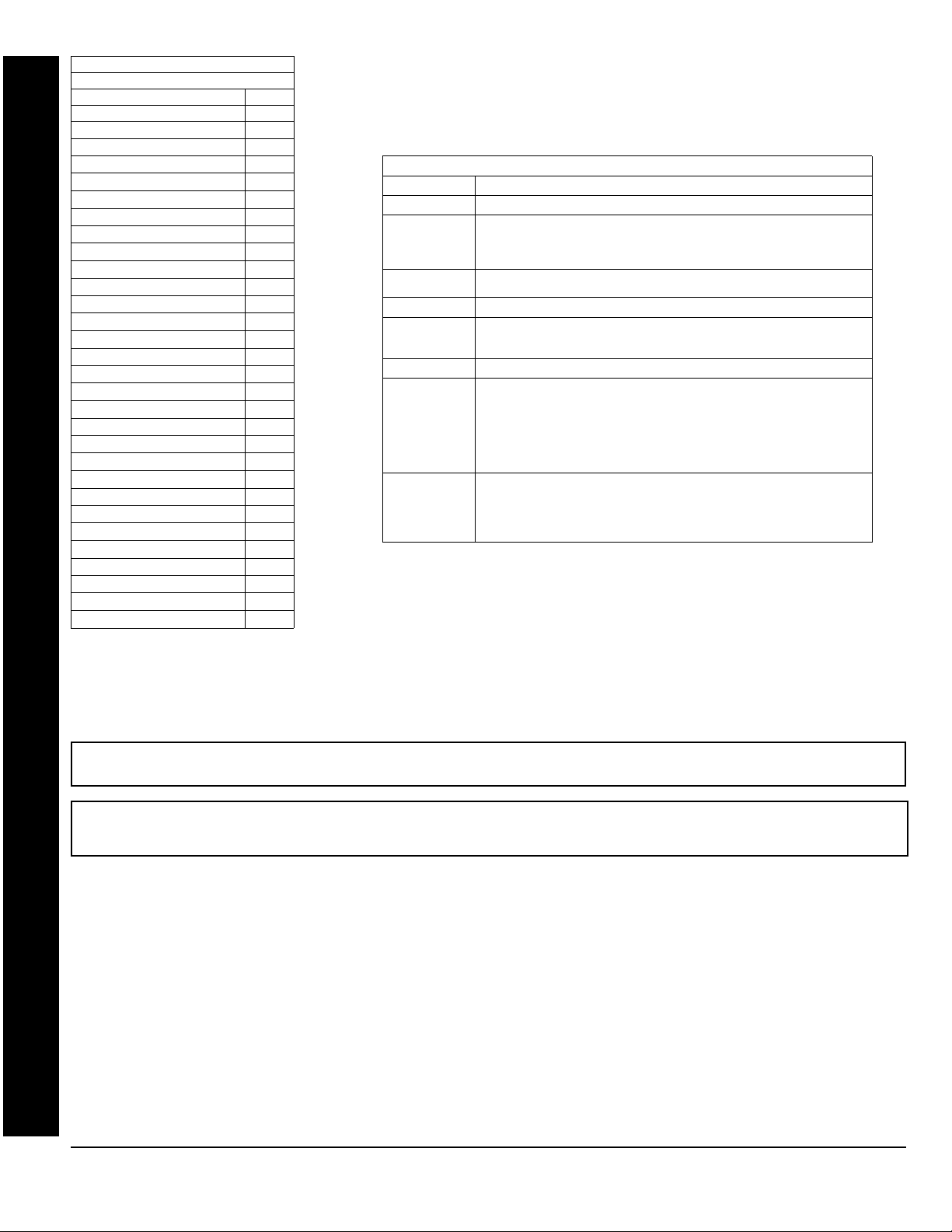
!
USER AUTHORITY LEVEL
KEYPAD DISPLAY FUNCTION MENU
FUNCTION LEVEL*
DISPLAY ZN FAULTS
DISPLAY ZN BYPASSED
DISPLAY ZN DIRECTORY
ACTIVATE BELL TEST
DISPLAY PHONE #’S
DISPLAY SYS TRBL
DISPLAY FIRE ALARM
DISPLAY FIRE TRBL
DISPLAY OP/CL
ACTIVATE OVERVIEW
ACTIVATE CHIME
ACTIVATE WATCH
RESET SYSTEM TRBL
RESET SENSOR MSG
START EXIT TIME
FAULT FIND
ACTIVATE LOCATE
EZM ZONE FIND
ACTIVATE DIALER TEST
DISPLAY ALARM LOG
DISPLAY TOTAL LOG
DISPLAY FIRE LOG
DISPLAY OP/CL LOG
DISPLAY SYSTEM LOG
AUTOARM IN 1-4HRS
DISPLAY AUTOARM SCHD
ACTIVATE PROGRAM
ACTIVATE DOWNLOAD
DISPLY RF XMITTER STAT
RELAY CONTROL
3**
***
***
***
3**
NOTES:
* Minimum Level required to access function
** Level-3 Code with appropriate user option
1
*** Requires Dealer Code
1
1
1
1
1
1
1
3
1
2
3
3
1
3
3
3
3
3
3
2
3
3
1
1
OPTIONS EXPLANATION
Disabled User Code not active in this area.
Blocked View Allows User Code to block another code from being viewed by another user.
User Program User Program Option is enabled for Keypad 1 only, wherever it is connected
Bypass Allows User Code to bypass zones.
Overview This option, along with Level 3 Authorization, enables selection of
Arm Only Prevents User Code from disarming this area.
Service A Service Code has restricted arm/disarm rights; if an area is armed with a
Access This is normally used to activate a door striker while an area is disarmed. A
Related User Options:
An unblocked code cannot view a blocked code, but a blocked code can
view all codes. The master user code and the dealer program code can view
all codes.
(any area). If enabled, Level 3 must also be enabled.
OVERVIEW mode at a keypad. This Mode provides a system status display
of all areas at a glance.
Service Code, a “
on the GEM-RP1CAe2 keypad) and the area can be disarmed with any valid
User Code, including a Service Code. If the area is armed with OTHER than
a Service Code, it CANNOT be disarmed with a Service Code. This is
typically used to allow tradesmen access to premises under control of the
owner.
code with the access option will not function as an arm/disarm code. When
the code is entered, the keypad will display “
Wire on the keypad will become Active Low (Ground Potential) for 7
seconds.
“Ambush Code” (Address 0495), “Panel Access Code” (Address
0490), “Dealer Security Code” (Address 0500) & “Enable User Code by Area” (Address
2500-2547).
USER OPTIONS
SERVICE ON
WI818D 08/00
” appears on the GEM-RP2ASe2 keypad (a “S”
ENTER NOW
” and the Brown
!
Press Jto save each code.
To proceed to the next User Code, set the cursor to the User Number and change it using the number buttons. Program
a new User Code as previously described. Press NEXT (
E
Example: Program a code of “2222” for user 02, with User Option of “User Program”, User “Level 3” and Access Control Option
“Keypad No. 1”. Enter “2222” for a user code, “2 3” for user option and “blank(•) 1” for access control option.
GEM-RP1CAe2 Keypad: User Codes
) button to proceed.
CHANGING OR CANCELING A CODE: To change any code, merely program over the existing code as described above
and press
to save. Similarly, to cancel a code, blank out each number of the code and press Jto save to save.
J
X
GEM-P3200 Programming Instructions
L
NAPCO Security Systems
Page 11
WI818D 8/00
ZN# XMIT#+CS P
ZN01-000000: 0- 0
Zone # Xmitter Check Point
Mapped to ID Sum #
ID Code number, “A” =
G 5. Press
“F” =
G 0
to save. Press NEXT (E) button to proceed.
J
; “B” =
ZN# XMIT#+CS P
ZN01-000000: 0- 0
ZN# XMIT#+CS P
ZN01-ENROLL:A--
4. Install the transmitter battery. The keypad will beep to indicate that the point has been successfully enrolled. Multi-point
transmitters can be mapped to successive zones simultaneously (Example 1) or to selected zones point by point
(Example 2).
Example 1. A 4-point transmitter has the RF ID number 410078:1. Map the first three points to Zones 11–13, respectively.
1. Enter the Enroll mode as described in step 2 above.
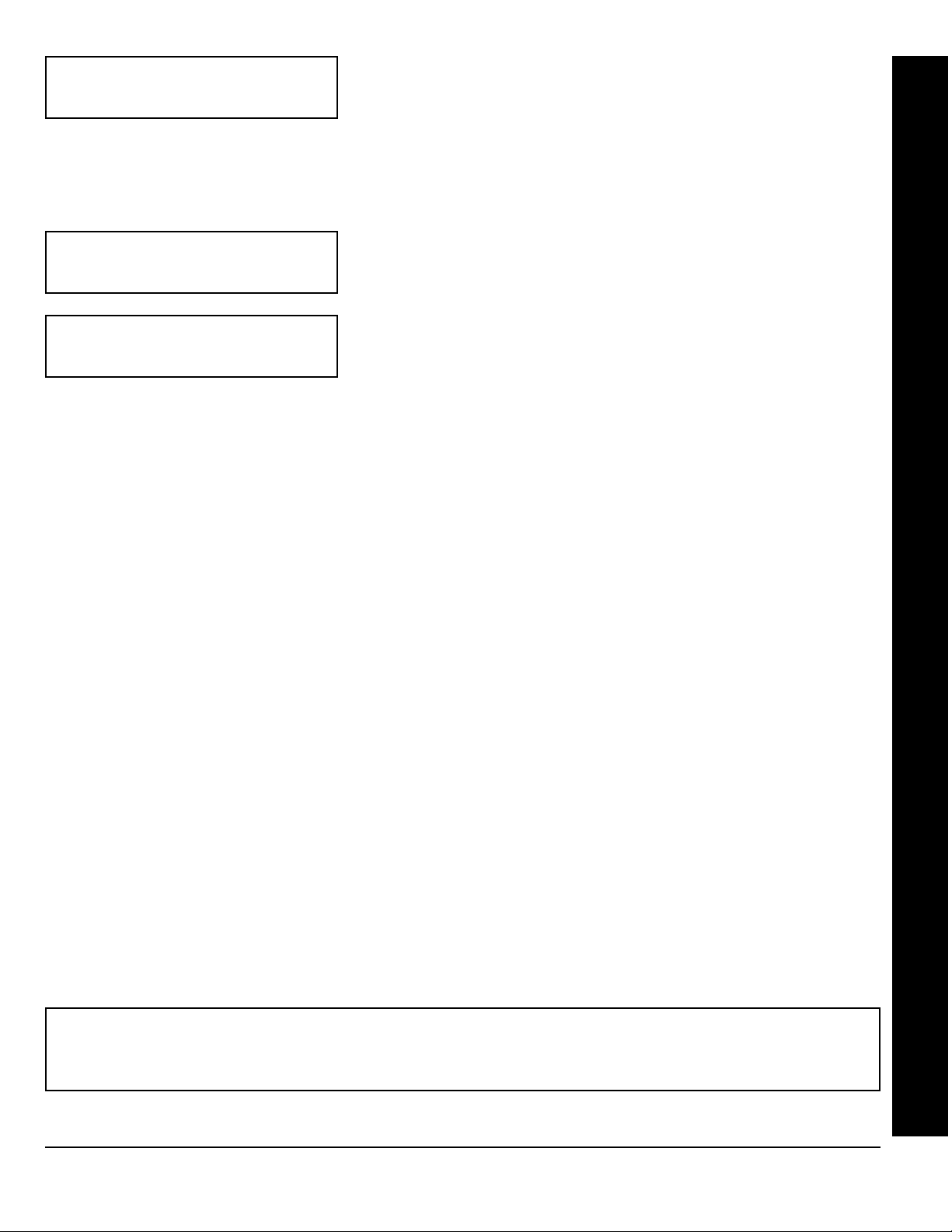
RF Transmitter Points
(For wireless systems only. Also see Quick Method, which follows)
For each transmitter (key fob transmitters also), enter the zone number
(01–48) to which the transmitter will be mapped, the 6-digit RF ID #:1-digit
checksum number printed on the transmitter and box, the point number
(1–4); enter “9” for unsupervised (all points). NOTE: When programming the
G 1
Quick Method. If a receiver is already installed in the panel, Napco
transmitter wireless points can be programmed automatically (“enrolled”)
using the following procedure. NOTE: The transmitter point will be enrolled
only if the signal strength is 3 or greater.
1. Enter the zone number to which the transmitter point will be mapped.
2. Press the
on the keypad will flash and the window will display as shown at left.
3. Open the loop of the point that is to be programmed (GEM-TRANS2 or
GEM-TRANS4 only).
; “C” =
B
(Press the (
G 2
button to enter the Enroll Mode. The red and green LEDs
A
; “D” =
) button to set cursor.)
G 3
; “E” =
Page 11
G 4
!
;
GEM-RP1CAe2 Keypad: RF Transmitter Points
2. Enter Zone “11”.
3. Open the loops of points 1, 2 and 3.
4. Install the transmitter battery. The keypad will beep 3 times to indicate that three points have been programmed.
!
Transmitter 410078:1, point 1 will be mapped to Zone 11.
!
Transmitter 410078:1, point 2 will be mapped to Zone 12.
!
Transmitter 410078:1, point 3 will be mapped to Zone 13.
The keypad will now display Zone 13, the last zone enrolled.
Example 2. A 2-point transmitter has the RF ID number 287613:1. Map point 1 to Zone 6 and point 2 to Zone 9.
1. Enter the Enroll mode as described above.
2. Enter Zone “06”.
3. Open point-1 loop.
4. Install the battery. The keypad will beep once to indicate that one point has been programmed. (Transmitter 287613:1,
point 1 will be mapped to Zone 6.)
5. Enter Zone “09”.
6. Close point-1 loop and open point-2 loop.
7. Remove the transmitter battery, then re-install it. The keypad will beep once to indicate that one point has been
programmed. (Transmitter 287613:1, point 2 is mapped to Zone 9.)
KEY FOB ZONE ASSIGNMENT:
alarm system, each reporting to a central station, a pager or having a description on the keypad that describes the person
holding the key fob, the location where the person holding the key fob is stationed, or the special purpose of the key fob
button being depressed. See the next page on Key fob Zone Assignment.
L
NAPCO Security Systems
Key fobs can also be assigned to zones to allow multiple wireless panic buttons on one
X
GEM-P3200 Programming Instructions
Page 12
Page 12
!
KF A XMIT#+ CS OP
01-0 000000:0 00
DATA
ENTRY
AUX 1/AUX 2 O PTIONS
0None
1 Relay Group 1 Toggle
2 Relay Group 2 Toggle
9Panic
A Auxiliary
B Instant
C Aux. Output Toggle
D Access on Aux. Output
WI818D 08/00
) button to set cursor.)
Key Fob Transmitters
Keyfobs can be programmed as “Arm/Disarm” devices (refer to WI752).
For each Key Fob Transmitter, enter:
!
the Key Fob Transmitter number (01–08).
!
area number to which transmitter is assigned (1-2); enter 0 to disable
keyfob.
!
the 6-digit RF ID # printed on the transmitter (enter all numbers and/or letters, including
leading “0”s, if any).
! 1-digit checksum number printed on the transmitter (enter all numbers and/or letters,
including leading “0”s, if any).
! Aux-1 Option (see key fob aux 1 & aux 2 options).
! Aux-2 Option (see key fob aux 1 & aux 2 options).
If the Key Fob is converted for Two Button “Emergency Use” (by cutting an internal
Note:
jumper), both top or bottom buttons must be depressed to activate an alarm. In this case,
Aux-1 and Aux-2 cannot be programmed. Press
proceed.
(Press the (
A
NOTE: Key fobs 1-8 report openings and
closings as Users 25-32.
to save. Press NEXT (E) button to
J
Key Fob Zone Assignment (refer to display as shown on the previous page: press the (
Each of the 4 key fob buttons can be assigned to a zone. For example, On button = point 1; Off button = point 2; A1 =
point 3; A2 = point 4. Up to 48 key fobs (using 1 button) or 24 key fobs (using 2 buttons) or 14 key fobs (using all 4
buttons) or any combination up to a maximum of 48 controlled zones can be assigned, providing multiple wireless panic
buttons on a system, each reporting to the Central Station or a pager and/or annunciating on a keypad the key fob zone
number with description/location. To assign a key fob to a zone: program the key fob as you would a transmitter, entering
the key fob's ID code, check sum and point number at the appropriate zone. The “Quick Method” is not allowed. The zone
may be hardwired to a sensor as well as assigned to a key fob (either one will activate the zone alarm output). NOTE: If
assigning a key fob to a zone, the “ON/OFF” buttons on the key fob will no longer arm/disarm the system. The key fob is
converted to a “panic only” device.
01-______________
________________
(Direct Entry)
to the next description, place the cursor under the Zone Number (e.g. “01”) and change the Zone Number using the
3 and 6 buttons. Program a new description as above.
the GEM-/RP1CAe2 Keypad or by using the Napco Quickloader Software. Press NEXT (
ENTER DATE
(01/01/99)
(Direct Entry)
Enter Zone and Interior Descriptions
Press the
and 6 buttons to select the character. For each zone, enter a
description of up to two lines. Press
Enter Date
Enter the current date in the format MM/DD/YY, where MM = the month
(01–12); DD=the day (01–31); and YY=the year. Press
NEXT (
1
(Press the (
E) button to proceed.
2
and
buttons to place the cursor; press the
J
NOTE:
Zone Descriptions can only be entered through
A) button to set cursor.)
F
to save each description. To proceed
) button to go backwards.)
E) button to proceed.
J
to save. Press
3
GEM-RP1CAe2 Keypad: Keyfob Transmitters, Zone Descriptions & Date
GEM-P3200 Programming Instructions
X
L
NAPCO Security Systems
Page 13
WI818D 8/00
ENTER TIME
(12:05A)
(Direct Entry)
Page 13
Enter Time (Press the (
Enter the current time in the format HH:MMA/P, where HH=hours (01–12);
MM=minutes (00–59). Select Am or Pm by pressing any number button,
J
then press
once again to save.
A
) button to set cursor.)
!
DEALER CODE
••••••
(Direct Entry)
DEALER CODE
RE-ENTER
(Direct Entry)
EXIT DEALER PROGRAM MODE: This completes the custom default program. Press the
Direct Address Program Mode for further programming or press the
resume normal keypad operation.
CLEAR PROGRAM: Should it be necessary to create a new custom default program, (a) from the Dealer Program Mode,
press the
Start); (c) press
SERVICE
C button to enter the Address Program Mode; (b) access Location 4091 (Clear Program) or 4093 (Cold
and then (d) press the
J
button to silence the keypad.
” will occur. Press the
C
Dealer Code
J
to save.
1
Directly enter the Dealer Code, including leading zeros. Use the
through 9 buttons. NOTE: Press the 0 button for a zero. Press
J
to save.
Re-enter the Dealer Code to verify the previous code. Press
) button to proceed.
Press NEXT (
NOTE:
C
The Dealer Code can be two or more digits (up to 6 digits).
button to exit the Dealer Program Mode. A “
E
C
C
button to enter the
button once again to end all programming and
SYSTEM TROUBLE/E09-00
GEM-RP1CAe2 Keypad: Time, Dealer Code & Exit Dealer Program Mode
4091 ••
GEM-RP1CAe2 Keypad
4093 ••
GEM-RP1CAe2 Keypad
Clear Dealer Program (Erases Dealer Program)
This erases the dealer program. Use this feature to start a
customized default program. Program Data and System
Status Memory is erased where Scheduled Data and Zone
Descriptions are maintained.
Access address 4091, then press the
NOTE: Enter Easy Menu Driven Program Mode to program system again.
button. Data entry is not allowed.
J
Cold Start (Erases Entire Program)
This erases the entire program including Program Data,
Zone Description Data, System Status Data, Schedule Data
and Foreign Language configuration(similar to a new
panel).
Access address 4093, then press the
NOTE: Some features (schedules) can only be programmed again with the
Downloading Software.
button. Data entry is not allowed.
J
L
NAPCO Security Systems
X
GEM-P3200 Programming Instructions
Page 14
Page 14
!
B. GEM-RP2ASe2 Keypad
GEMINI
SYSTEM ARMED
01/01/97 12:00AM
STATUS
ARMED
1243
A
56
B
7890
C
COMPUTERIZED SECURITY SYSTEM
A1#Z08
D
Enter the Master Security Code (printed on microprocessor can) for a new panel or enter your custom
ENT A1
Dealer Program Code if programmed. Press
NEXT/YES
E
PRIOR/NO
F
AREA
PROG
G
R
” is displayed.
button. Press YES (E) to enter the Dealer Program Mode. This keypad displays messages in
multiple segments. Press the
ENT A1
#ZN08
(Direct Entry)
ENT A2
NOTE:
WI818D 08/00
A
If you pass “
A button to scroll through each segment.
TURNON/PROG
followed by NO (
”, you can scroll back by pressing the B
F) repeatedly until “
TURNON/
Total Number of Zones in Area 1 & Area 2 (Appears for New Panel Only)
Directly enter the total number of zones to be programmed for Area 1 and
Area 2, respectively. Valid entries are from 01 to 48. Directly enter the total
number of zones, including leading zeros. Use number buttons
through 9.
NOTE:
Press the 0 button for a zero. The system is
1
based on groups of 4 zones each (after the first 8 zones), and will
automatically round up to the next group of 4. For example, if you enter 18,
it will automatically convert this to 20 zones. Press
E
(
Note:
) button to proceed.
The GEM-P3200 is limited to a combined maximum of 48 zones and
to save. Press NEXT
J
7 keypads. All 48 zones and 7 keypads may be programmed in the EZ
Program Mode. For more options, see Zone and Keypad Options in Direct
Address Programming.
GEM-RP2ASe2 Keypad: Zones/Keypads per Area, Fire Zones & 2-Wire Fire Zones
(Direct Entry)
(Direct Entry)
(Direct Entry)
#ZN00
ENT FR
ZN#00
ENT2WF
ZN# 00
Fire Zones (Appears for New Panel Only)
Enter the zone number of any Fire Zones (both 2-wire, 4-wire or wireless).
Valid entries are from 01 to 48. Directly enter each zone number, including
leading zeros, and press
zone(s). Press NEXT (
E
to save, and then repeat for any additional
J
) button to proceed.
NOTE: If you are programming a 2 Area system, enter the zone number of
zones required for Areas 1 & 2. All fire zones are common to areas 1 and 2.
The Direct Address Program Mode can then be used to customize them as
needed. See Zone Options.
2-Wire Fire Zones (Appears for New Panel Only)
Enter the zone number of any Fire Zones (from previous question) which
are to be used with 2-wire smoke detectors. The only valid entries are 07
and 08. Directly enter each zone number, including leading zeros. Press
to save, and then repeat for any additional zone.
J
NOTE:
Only zones which
have been designated as Fire Zones can be programmed as 2 Wire Fire
zones. Press NEXT (
E) button to proceed.
NOTE:
JP7 must be set to
“2-WF” position for 2-wire fire zones 7 and 8 (refer to Installation
Instructions).
X
GEM-P3200 Programming Instructions
L
NAPCO Security Systems
Page 15
WI818D 8/00
REPORT
ALL ZN?
Y/N
(Press YES or NO)
ENT EE
ZN# 00
(Direct Entry)
Page 15
Local System or C.S. Reporting System (Appears for New Panel Only)
Press YES (
for no zones to report (LOCAL SYSTEM).
Exit/Entry Zones (Appears for New Panel Only)
Directly enter the zone numbers which are to be used as Exit/Entry zones.
Valid entries are from 01 to 48. Directly enter each zone number, including
leading zeros. Use number buttons
0
the
additional zone(s). Press NEXT (
NOTE: Exit/Entry Zones will have an entry delay of 30 seconds and an exit
delay of 60 seconds. Chime will automatically be programmed for all E/E
zones. If you are programming a 2 Area system, enter all of the zones
required for Areas 1 & 2.
E
button for a zero. Press Jto save and then repeat for any
) button for all zones to report; press NO (
1 through 9. NOTE: Press
) button to proceed.
E
F
!
) button
GEM-RP2ASe2 Keypad: CS Reporting, Exit/Entry Zones, Interior Zones & Keypads per Area
(Direct Entry)
ENTFOL
ZN# 00
ENT A1
#KP 01
ENT A2
#KP 00
Interior Zones (Appears for New Panel Only)
Directly enter the zone numbers which are to be used as Interior Zones.
Valid entries are from 01 to 48. Directly enter each zone number, including
leading zeros. Use number buttons
0 button for a zero. Press
the
additional zone(s). Press NEXT (
NOTE: All Interior zones will also be automatically programmed as “Exit/
Entry Follower” zones. If you are programming a 2 Area system, enter all
the zones required for Areas 1 & 2.
Number of Keypads in Area 1
Directly enter the total number of Keypads to be installed in Area 1. Valid
entries are from 01 to 07. Directly enter the number of keypads, including
leading zeros. Use number buttons
0
the
to proceed.
Number of Keypads in Area 2
Directly enter the total number of Keypads to be installed in Area 2. Valid
entries are from 01 to 07. Directly enter the number of keypads, including
leading zeros. Use number buttons
the
to proceed.
button for a zero. Press Jto save . Press NEXT (
0 button for a zero. Press
1
E) button to proceed.
1 through 9. NOTE: Press
1 through 9.
to save . Press NEXT (E) button
J
through
to save and then repeat for any
J
9
. NOTE: Press
E
NOTE:
) button
Press
L
(Direct Entry)
NAPCO Security Systems
X
GEM-P3200 Programming Instructions
Page 16
!
Page 16
(Direct Entry)
ACC#
(____)
(Direct Entry)
PHONE#
______
______
WI818D 08/00
Central Station Receiver 1 Telephone Number
button to scroll screens. Using number buttons, enter
Press the
telephone number of up to 10 digits including prefix letters, if necessary, for
receiver 1. Use number buttons
G 0
the
5
Detection = “E”. Pressing the
Press
NOTE: The GEM-RP2ASe2 keypad provides a maximum of 10 digits in this
mode. To program additional digits, go to the Direct Address Program Mode
and continue from Location 0537. Central Station Receiver 2 and 3
Telephone Numbers can only be entered in Direct Address Programming.
See CS Receiver Options.
Central Station Receiver 1 Account Number
Press the
four digits. Use number buttons
Press the
blank space (•). Press
respectively.
Press
NOTE:
entered in Direct Address Programming. See CS Reporting Options.
A
1
button for a zero and
for letters B–F, respectively. NOTE: Pre-Dial Delay = “D”; Dial-Tone
0 button will produce a blank space (•).
to save. Press NEXT (
J
A
button to scroll screens. Enter an account number of up to
G0 button for a zero and press 0 button for a
G 1
Jto save . Press NEXT (
Central Station Receiver 2 and 3 Account Numbers can only be
E
1
E
through
) button to proceed.
through
through
) button to proceed.
9
G 1
9
G 4
for digits 1–9; press
for digits 1–9. NOTE:
through
for letters B–E,
G
REC FMT
(0)
(Direct Entry)
DATA
ENTRY
blank(•) Ademco Slow, Silent Knight Slow
1 Sescoa, Vertex, DCI, Franklin
2 Radionics Fast
GEM-RP2ASe2 Keypad: CS Tel. No., CS Acct. No. & CS Format
3 Silent Knight Fast
4 Radionics, DCI, Franklin Slow
5 Universal High Speed
8 Radionics BFSK
9FBI 4/3/1
0 Radionics Modem 2
BSIA
C Ademco Point ID
D Ademco Express
E Pager
CS RECEIVER 1 FORMAT
Fast
Central Station Receiver 1 Format
A
Press the
central station's receiver format. Use number buttons
9
. NOTE: Press the
for a blank space (•). Press G 1 through G 4 for letters
B–E, respectively.
Press
NOTE: Modem IIe format is available only in Direct Address
Programming. Central Station Receiver 2 and 3 Formats can only be
entered in Direct Address Programming. See CS Receiver Options.
to save. Press NEXT (
J
button to scroll screens. From the table below, enter the
G 0
E
) button to proceed.
1
button for a zero and press
through
0
X
GEM-P3200 Programming Instructions
L
NAPCO Security Systems
Page 17
WI818D 8/00
) button to set cursor.)
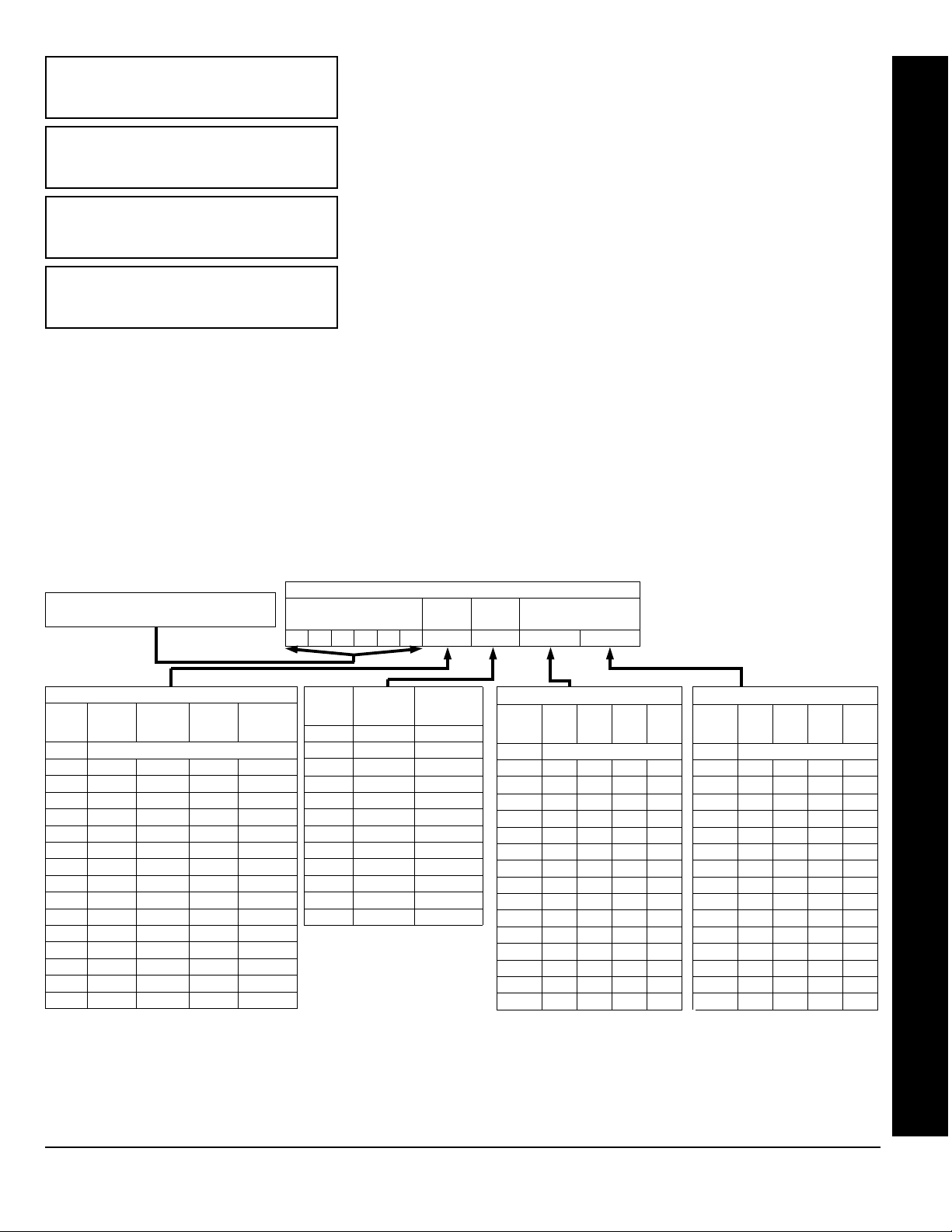
USER01
Enter User Codes
(Press the (
A
Enter up to 48 User Codes with User Options, Authority Level and Access
Control Options (if necessary) for each code. Refer to the tables below and
on the next page for available data entries for User Options, Authority Level
123___
and Access Control Options.
in “Enable User Code by Area” (Address 2500-2547) in Direct Address
All 48 Users must be assigned to areas
Note:
Programming. By default, only User 1 is enabled in Area 1 and Area 2.
User 2 - 8 are enabled in Area 1 and user 9 - 16 are enabled in Area 2
A
) button to set the cursor to the User Number. Use the
1 through 9 to enter the User Number.
1 through 9 to enter a code of up to 6 digits.
OPT F3
ACC_
(Direct Entry)
!
Press the (
number buttons
!
Press the (A) button once to set the cursor to the User Code. Use
the number buttons
Enter up to 6 digits (4 digits is recommended) in the first six boxes from left
to right for each user code. Valid entries are: 0-9. Note: Press the
button for a zero. No blank spaces in between; leave blank (•) any trailing
boxes. If an “Ambush Code” (Address 0495) is entered, do not program the
first two digits of ANY User Code as the same digits entered for the “Ambush Code”.
If the programmed code was less than 6 digits, press the A button to set the cursor to the OPTION/LEVEL.
!
Refer to the tables shown for the available data entries. Enter the options data in the left digit. Enter the level data
(with arming options, if any, added) in the right digit. Note: For entries greater than 9, press the
through the
G5 buttons for B through F, respectively.
G1 buttons
Page 17
0
!
GEM-RP2ASe2 Keypad: User Codes
!
For Keypad Access Control, press the
A
button once again to program applicable keypads. Refer to the tables
shown, use the number buttons to enter the data for Keypad 1–4 data in the right digit; and the data for Keypad 5–7
button for blank.)
data in the left digit. (Press the
Example: Enter a code of “123456” as
“123456” (from left to right).
USER OPTIONS
DATA
BLOCKED
ENTRIES
blank (•) DISABLED
VIEW
1Y
2Y
3Y Y
4Y
5Y Y
6YY
7Y Y Y
8Y
9Y Y
0Y Y
BY Y Y
CYY
DY Y Y
EYYY
FY Y Y Y
Note:
USER
PROGRAM
“Y” indicates option is enabled.
BYPASS OVERVIEW
0
USER CODE
(UP TO 6 DIGITS)
DATA
ENTRIES
AUTHORITY
LEVEL
blank (•) NONE ARM/DISARM
1 LEVEL 1 ARM/DISARM
2 LEVEL 2 ARM/DISARM
3 LEVEL 3 ARM/DISARM
4 NONE ARM ONLY
5 LEVEL 1 ARM ONLY
6 LEVEL 2 ARM ONLY
7 LEVEL 3 ARM ONLY
8 NONE SERVICE
9 LEVEL 1 SERVICE
0 LEVEL 2 SERVICE
B LEVEL 3 SERVICE
USER OPTIONS
USER
OPTION
USER
LEVEL
CODE
TYPE
ACCESS CONTROL
KEYPADS
ACCESS CONTROL KEYPADS
DATA
K.P. 5 K.P. 6 K.P. 7
ENTRIES
blank (•) NONE
1Y
2Y
3YY
4Y
5Y Y
6YY
7YYY
8
9Y
0Y
BYY
CY
DY Y
EYY
FYYY
“Y” indicates option is enabled.
Note:
ACCESS CONTROL KEYPADS
DATA
ENTRIES
K.P. 1 K.P. 2 K.P. 3 K.P. 4
blank (•) NONE
1Y
2Y
3YY
4Y
5Y Y
6YY
7YYY
8Y
9Y Y
0YY
BYY Y
CYY
DY YY
E YYY
F YYYY
“Y” indicates option is enabled.
Note:
L
NAPCO Security Systems
X
GEM-P3200 Programming Instructions
Page 18
Page 18
!
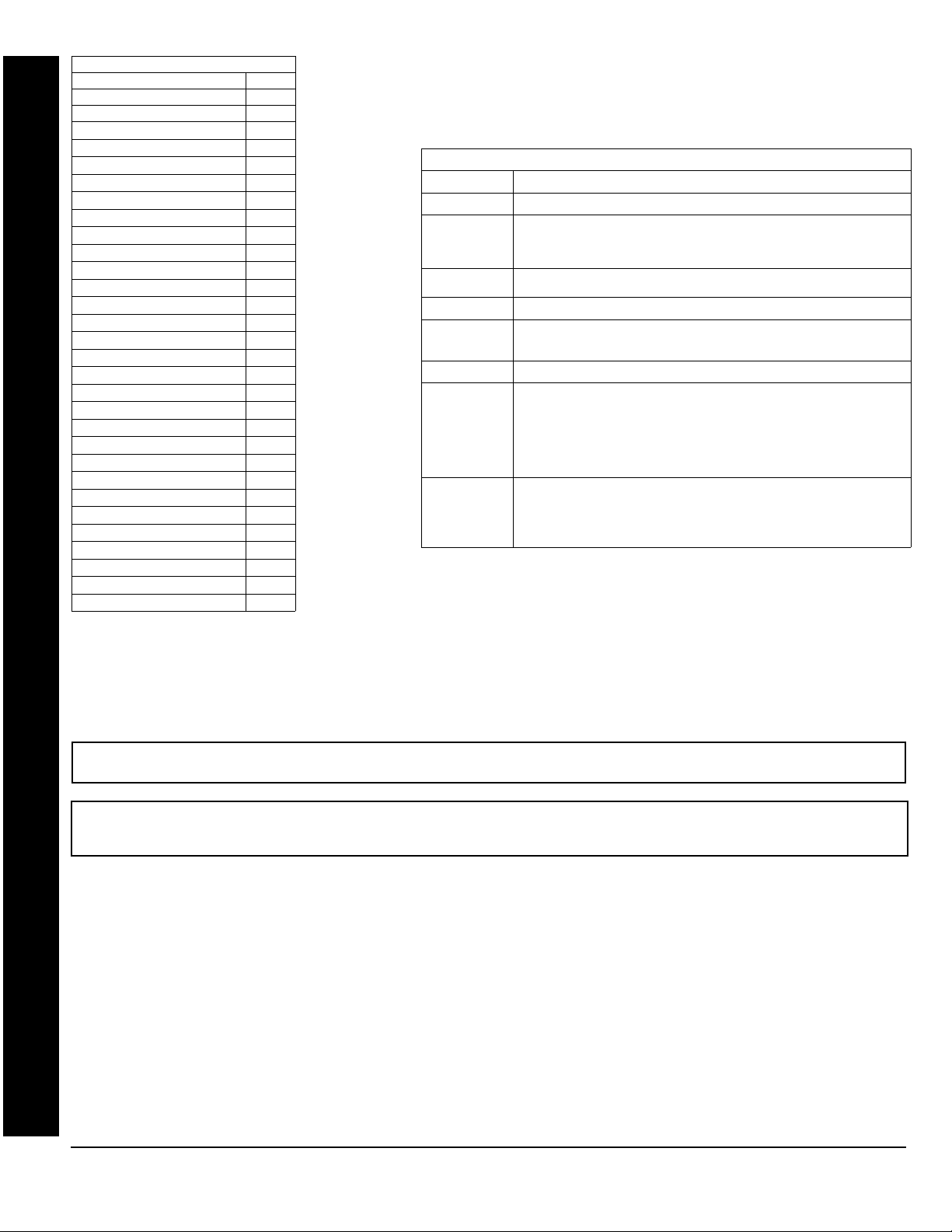
KEYPAD DISPLAY FUNCTION MENU
FUNCTION LEVEL*
DISPLAY ZN FAULTS
DISPLAY ZN BYPASSED
DISPLAY ZN DIRECTORY
ACTIVATE BELL TEST
DISPLAY PHONE #’S
DISPLAY SYS TRBL
DISPLAY FIRE ALARM
DISPLAY FIRE TRBL
DISPLAY OP/CL
ACTIVATE OVERVIEW
ACTIVATE CHIME
ACTIVATE WATCH
RESET SYSTEM TRBL
RESET SENSOR MSG
START EXIT TIME
FAULT FIND
ACTIVATE LOCATE
EZM ZONE FIND
ACTIVATE DIALER TEST
DISPLAY ALARM LOG
DISPLAY TOTAL LOG
DISPLAY FIRE LOG
DISPLAY OP/CL LOG
DISPLAY SYSTEM LOG
AUTOARM IN 1-4HRS
DISPLAY AUTARM SCHD
ACTIVATE PROGRAM
ACTIVATE DOWNLOAD
DISPLY RF XMITTER STAT
RELAY CONTROL
3**
***
***
***
3**
WI818D 08/00
NOTES:
1
1
1
1
1
1
1
1
3
1
2
3
3
1
3
3
3
3
3
3
2
3
3
1
1
* Minimum Level required to access function
** Level-3 Code with appropriate user option
*** Requires Dealer Code
USER OPTIONS
OPTIONS EXPLANATION
Disabled User Code not active in this area.
Blocked View Allows User Code to block another code from being viewed by another user.
User Program User Program Option is enabled for Keypad 1 only, wherever it is connected
Bypass Allows User Code to bypass zones.
Overview This option, along with Level 3 Authorization, enables selection of
Arm Only Prevents User Code from disarming this area.
Service A Service Code has restricted arm/disarm rights; if an area is armed with a
Access This is normally used to activate a door striker while an area is disarmed. A
Related User Options: “Ambush Code” (Address 0495), “Panel Access Code” (Address
0490), “Dealer Security Code” (Address 0500) & “Enable User Code by Area” (Address
2500-2547).
An unblocked code cannot view a blocked code, but a blocked code can
view all codes. The master user code and the dealer program code can view
all codes.
(any area). If enabled, Level 3 must also be enabled.
OVERVIEW mode at a keypad. This Mode provides a system status display
of all areas at a glance.
Service Code, a “
on the GEM-RP1CAe2 keypad) and the area can be disarmed with any valid
User Code, including a Service Code. If the area is armed with OTHER than
a Service Code, it CANNOT be disarmed with a Service Code. This is
typically used to allow tradesmen access to premises under control of the
owner.
code with the access option will not function as an arm/disarm code. When
the code is entered, the keypad will display “
Wire on the keypad will become Active Low (Ground Potential) for 7
seconds.
SERVICE ON
” appears on the GEM-RP2ASe2 keypad (a “S”
ENTER NOW
” and the Brow n
!
Press Jto save each code.
To proceed to the next User Code, set the cursor to the User Number and change it using the number buttons. Program a
E
new User Code as previously described. Press NEXT (
) button to proceed.
Example: Program a code of “2222” for user 02, with User Option of “User Program”, User “Level 3” and Access Control Option “Keypad No. 1”. Enter
“2222” for a user code, “2 3” for user option and “blank(•) 1” for access control option.
GEM-RP2ASe2 Keypad: User Codes
CHANGING OR CANCELING A CODE: To change any code, merely program over the existing code as described above
and press
to save. Similarly, to cancel a code, blank out each number of the code, press Jto save.
J
X
GEM-P3200 Programming Instructions
L
NAPCO Security Systems
Page 19
WI818D 8/00
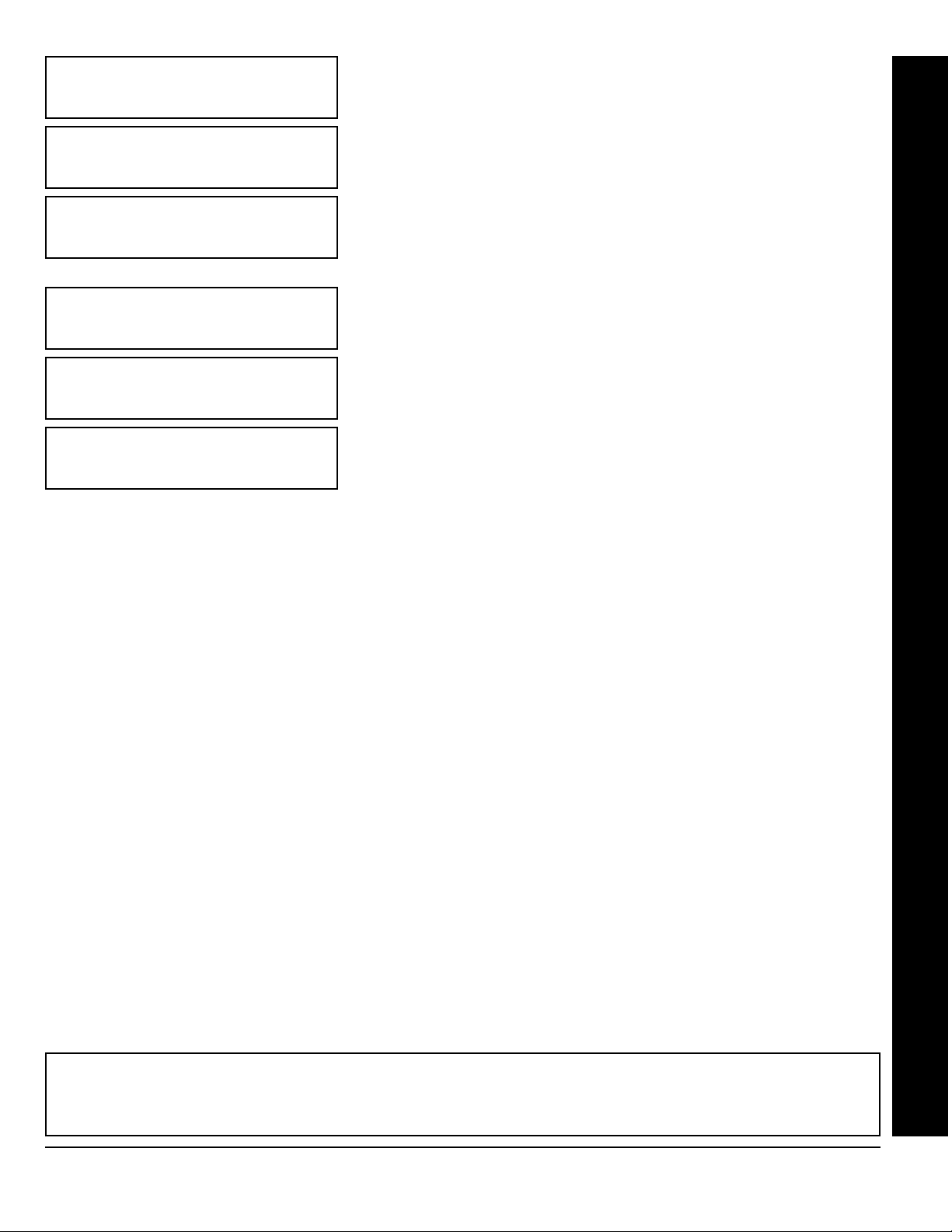
ZN#01
000000
:0 PT0
Page 19
RF Transmitter Points
(For wireless systems only. Also see Quick Method, which follows)
For each transmitter (key fob transmitters also), enter the zone number
(01–48) to which the transmitter will be mapped, the 6-digit RF ID #:1-digit
checksum number printed on the transmitter and box, the point number
(1–4); enter “9” for unsupervised (all points). NOTE: When programming the
ID Code number, “A” =
; “D” = G 3; “E” = G 4; “F” = G 5. Press
2
to save. Press NEXT (
J
(Press the (
G 0
E
A
) button to proceed.
) button to set cursor.)
; “B” =
G 1
; “C” =
!
G
(Direct Entry)
ZN#11
ENROLL
:0 PT-
(Direct Entry)
Example 1. A 4-point transmitter has the RF ID number 410078:1. Map the first three points to Zones 11–13, respectively.
1. Enter the Enroll mode as described in step 2 above.
2. Enter Zone “11”.
3. Open the loops of points 1, 2 and 3.
4. Install the transmitter battery. The keypad will beep 3 times to indicate that three points have been programmed.
!
Transmitter 410078:1, point 1 will be mapped to Zone 11.
!
Transmitter 410078:1, point 2 will be mapped to Zone 12.
Transmitter 410078:1, point 3 will be mapped to Zone 13.
!
The keypad will now display Zone 13, the last zone enrolled.
Quick Method. If a receiver is already installed in the panel, Napco
transmitter wireless points can be programmed automatically (“enrolled”)
using the following procedure.
only if the signal strength is 3 or greater.
1. Enter the zone number to which the transmitter point will be mapped.
B
2. Press the
on the keypad will flash and the window will display as shown at left.
3. Open the loop of the point that is to be programmed (GEM-TRANS2 or
GEM-TRANS4 only).
4. Install the transmitter battery. The keypad will beep to indicate that the
point has been successfully enrolled. Multi-point transmitters can be mapped
to successive zones simultaneously (Example 1) or to selected zones point
by point (Example 2).
button to enter the Enroll Mode. The red and green LEDs
NOTE:
The transmitter point will be enrolled
GEM-RP2ASe2 Keypad: RF Transmitter Points
Example 2. A 2-point transmitter has the RF ID number 287613:1. Map point 1 to Zone 6 and point 2 to Zone 9.
1. Enter the Enroll mode as described above.
2. Enter Zone “06”.
3. Open point-1 loop.
4. Install the battery. The keypad will beep once to indicate that one point has been programmed. (Transmitter 287613:1,
point 1 will be mapped to Zone 6.)
5. Enter Zone “09”.
6. Close point-1 loop and open point-2 loop.
7. Remove the transmitter battery, then re-install it. The keypad will beep once to indicate that one point has been
programmed. (Transmitter 287613:1, point 2 is mapped to Zone 9.)
KEY FOB ZONE ASSIGNMENT: Key fobs can also be assigned to zones to allow multiple wireless panic buttons on one
alarm system, each reporting to a central station, a pager or having a description on the keypad that describes the person
holding the key fob, the location where the person holding the key fob is stationed, or the special purpose of the key fob
button being depressed. See the next page on Key fob Zone Assignment.
L
NAPCO Security Systems
X
GEM-P3200 Programming Instructions
Page 20

Page 20
!
) button to set cursor.)
Key Fob Transmitters (Press the (
KFOB01
AREA 0
000000
Press the (
“Arm/Disarm” devices (refer to WI752). For each Key Fob Transmitter, enter:
!
the Key Fob Transmitter number (01–08).
!
area number to which transmitter is assigned (1 or 2); enter 0 to disable key fob.
!
the 6-digit RF ID # printed on the transmitter (enter all numbers and/or letters,
including leading “0”s, if any).
!
1-digit checksum number printed on the transmitter (enter all numbers and/or
letters, including leading “0”s, if any).
Aux-1 Option (see key fob aux 1 & aux 2 options).
!
Aux-2 Option (see key fob aux 1 & aux 2 options).
!
A
) button to set cursor. Keyfobs can be programmed as
:0 0 0
(Direct Entry)
DATA
ENTRY
0None
1 Relay Group 1 Toggle
2 Relay Group 2 Toggle
9Panic
previous page: press the (
Each of the 4 key fob buttons can be assigned to a zone. For example, On button = point 1; Off button = point 2; A1 =
point 3; A2 = point 4. Up to 48 key fobs (using 1 button) or 24 key fobs (using 2 buttons) or 14 key fobs (using all 4
buttons) or any combination up to a maximum of 48 controlled zones can be assigned, providing multiple wireless panic
buttons on a system, each reporting to the Central Station or a pager and/or annunciating on a keypad the key fob zone
number with description/location. To assign a key fob to a zone: program the key fob as you would a transmitter, entering
the key fob's ID code, check sum and point number at the appropriate zone. The “Quick Method” is not allowed. The zone
may be hardwired to a sensor as well as assigned to a key fob (either one will activate the zone alarm output). NOTE: If
assigning a key fob to a zone, the “ON/OFF” buttons on the key fob will no longer arm/disarm the system. The key fob is
converted to a “panic only” device.
AUX 1/AUX 2
OPTIONS
DATA
ENTRY
A Auxiliary
B Instant
C Aux. Output Toggle
D Access on Aux.
F
) button to go backwards.)
Note: If the Key Fob is converted for Two Button “Emergency Use” (by
AUX 1/AUX 2
OPTIONS
Output
cutting an internal jumper), both top or bottom buttons must be
depressed to activate an alarms. In this case, the Aux-1 and Aux-2
cannot be programmed.
Press
Key Fob Zone Assignment (refer to display as shown on the
to save. Press NEXT (E) button to proceed.
J
A
NOTE: Key fobs 1-8
report openings and
closings as Users 25-32.
WI818D 08/00
ZONE DESCRIPTIONS: GEM-RP2ASe2 cannot be used to enter Zone Descriptions. To enter Zone Descriptions you
must use the GEM-RP1CAe2 Keypad or the Napco Quickloader Software.
GEM-RP2ASe2 Keypad: Keyfob Transmitters
X
GEM-P3200 Programming Instructions
L
NAPCO Security Systems
Page 21
WI818D 8/00
DATE
07/18
/96
(Direct Entry)
Page 21
Enter Date (Press the (
Enter the current date in the format MM/DD/YY, where MM = the month
(01–12); DD=the day (01–31); and YY=the year. Press
NEXT (
E
) button to proceed.
A
) button to set cursor.)
to save. Press
J
!
GEM-RP2ASe2 Keypad: Date, Time, Dealer Code & Exit Dealer Program Mode
TIME
09:10A
(Direct Entry)
(Direct Entry)
(Direct Entry)
(Direct Entry)
DCODE
••••••
RE-ENT
Enter Time
Enter the current time in the format HH:MMA/P, where HH=hours (01–12);
MM=minutes (00–59). Select Am or Pm by pressing any number button,
then press
Dealer Code
Directly enter the Dealer Code, including leading zeros. Use the
through 9 buttons.
to save.
J
Re-enter the Dealer Code to verify the previous code. Press
Press NEXT (
NOTE:
(Press the (
once again to save.
J
E) button to proceed.
The Dealer Code can be two or more digits (up to 6 digits).
A) button to set cursor.)
NOTE:
Press the 0 button for a zero. Press
1
Jto save.
EXIT DEALER PROGRAM MODE: This completes the custom default program. Press the
Direct Address Program Mode for further programming or press the C button once again to end all programming
and resume normal keypad operation.
CLEAR PROGRAM: Should it be necessary to create a new custom default program, (a) from the Dealer Program
Mode, press the
(Cold Start); (c) press
Condition will occur. Press the
L
NAPCO Security Systems
C button to enter the Address Program Mode; (b) access Location 4091 (Clear Program) or 4093
and then (d) press the C button to exit the Dealer Program Mode. A System Trouble
J
C button to silence the keypad.
X
GEM-P3200 Programming Instructions
C
button to enter the
Page 22
Page 22
R
COMPUTERIZED SECURITY SYSTEM
ARMED
STATUS
SYSTEM ARMED
01/01/97 12:00AM
1243
56
7890
A
B
C
D
E
F
G
NEXT/YES
PRIOR/NO
AREA
GEMINI
ENT A1
17
INTERIOR
BYPASS
FIRE/TBL
SYS TBL
CHIME
!
B. GEM-RP3DGTL Keypad
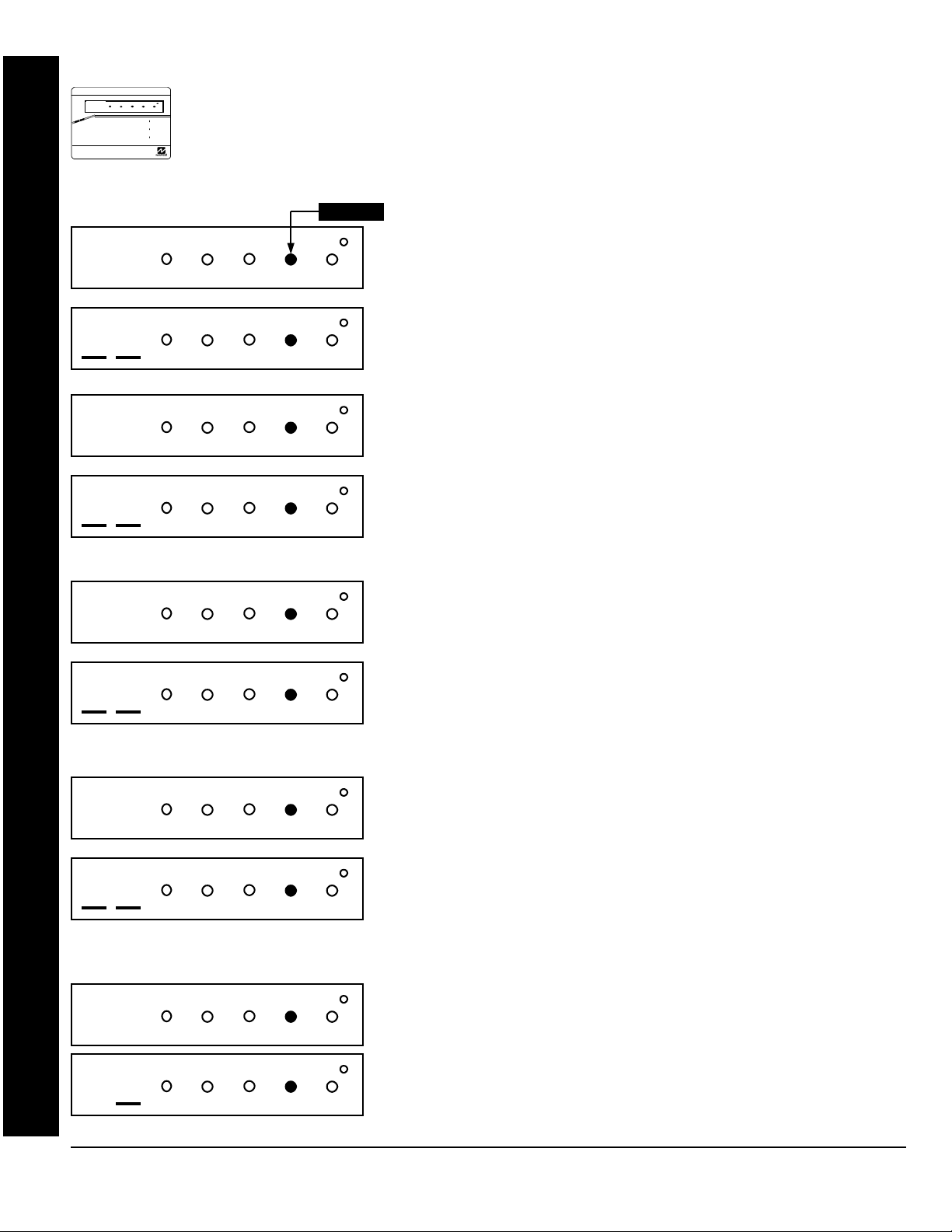
Enter the Master Security Code (printed on microprocessor can) for a new panel or enter your custom
Dealer Program Code if programmed. Press
displayed. NOTE: If you pass Function “17”, you can scroll back by pressing the
E
01
02
YES (
keypad. The questions will be in the form of a 2 digit number flashing in the digital display. Press the
A button to
BYPASS FIRE/TB L SYS TBL CHIME
INTERIOR
BYPASS SYS TBL CHIME
INTERIOR
(Direct Entry)
BYPASS FIRE/TB L SYS TBL CHIME
INTERIOR
) to enter the Dealer Program Mode. The GEM-RP3DGTL is a dual 7-segment digital
FIRE/TBL
Flashing
WI818D 08/00
A,
followed by NO (
F
) repeatedly until “17” is
B
button. Press
scroll through each segment.
Total Number of Zones in Area 1 & Area 2 (Appears for New Panel Only)
Directly enter the total number of zones to be programmed for Area 1 and
Area 2, respectively. Valid entries are from 01 to 48. Directly enter the total
number of zones, including leading zeros. Use number buttons
through 9.
NOTE:
Press the 0 button for a zero. The system is
1
based on groups of 4 zones each (after the first 8 zones), and will
automatically round up to the next group of 4. For example, if you enter 18,
it will automatically convert this to 20 zones. Press
E
(
) button to proceed.
to save. Press NEXT
J
Note: The GEM-P3200 is limited to a combined maximum of 48 zones and
7 keypads. All 48 zones and 7 keypads may be programmed in the EZ
Program Mode. For more options, see Zone and Keypad Options in Direct
Address Programming.
04
05
FIRE/TBL
BYPASS SYS TBL CHIME
INTERIOR
(Direct Entry)
BYPASS FIRE/TB L SYS TBL CHIME
INTERIOR
FIRE/TBL
BYPASS SYS TBL CHIME
INTERIOR
(Direct Entry)
BYPASS FIRE/TB L SYS TBL CHIME
INTERIOR
FIRE/TBL
BYPASS SYS TBL CHIME
INTERIOR
(Direct Entry)
Fire Zones
(Appears for New Panel Only)
Enter the zone number of any Fire Zones (both 2-wire, 4-wire or wireless).
Valid entries are from 01 to 48. Directly enter each zone number, including
leading zeros, and press
zone(s). Press NEXT (
E
to save, and then repeat for any additional
J
) button to proceed.
NOTE: If you are programming a 2 Area system, enter the zone number of
zones required for Areas 1 & 2. All fire zones are common to areas 1 and 2.
The Direct Address Program Mode can then be used to customize them as
needed. See Zone Options.
2-Wire Fire Zones
(Appears for New Panel Only)
Enter the zone number of any Fire Zones (from previous question) which
are to be used with 2-wire smoke detectors. The only valid entries are 07
and 08. Directly enter each zone number, including leading zeros. Press
to save, and then repeat for any additional zone.
J
NOTE:
Only zones
which have been designated as Fire Zones can be programmed as 2 Wire
Fire zones. Press NEXT (
E
) button to proceed. NOTE: JP7 must be set
to “2-WF” position for 2-wire fire zones 7 and 8 (refer to Installation
Instructions).
Local System or C.S. Reporting System (Appears for New Panel Only)
Press YES (
06
GEM-RP3DGTL Keypad: Zones per Area, Fire Zones, 2-Wire Fire Zones & CS Reporting
X
GEM-P3200 Programming Instructions
BYPASS FIRE/TB L SYS TBL CHIME
INTERIOR
FIRE/TBL
BYPASS SYS TBL CHIME
INTERIOR
(Yes or No)
for no zones to report (LOCAL SYSTEM).
E
) button for all zones to report; press NO (
L
NAPCO Security Systems
F
) button
Page 23
WI818D 8/00
07
08
BYPASS FIRE/TB L SYS TBL CHIME
INTERIOR
FIRE/TBL
BYPASS SYS TBL CHIME
INTERIOR
(Direct Entry)
BYPASS FIRE/TB L SYS TBL CHIME
INTERIOR
FIRE/TBL
BYPASS SYS TBL CHIME
INTERIOR
(Direct Entry)
Exit/Entry Zones
Page 23
(Appears for New Panel Only)
!
Directly enter the zone numbers which are to be used as Exit/Entry zones.
Valid entries are from 01 to 48. Directly enter each zone number, including
leading zeros. Use number buttons
0
button for a zero. Press Jto save and then repeat for any additional
zone(s). Press NEXT (
NOTE:
Exit/Entry Zones will have an entry delay of 30 seconds and an exit
E) button to proceed.
1 through 9. NOTE: Press the
delay of 60 seconds. Chime will automatically be programmed for all E/E
zones. If you are programming a 2 Area system, enter all of the zones
required for Areas 1 & 2.
Interior Zones (Appears for New Panel Only)
Directly enter the zone numbers which are to be used as Interior Zones. Valid
entries are from 01 to 48 Directly enter each zone number, including leading
zeros. Use number buttons
1 through 9. NOTE: Press the 0
button for a zero. Press Jto save and then repeat for any additional zone(s).
) button to proceed.
Press NEXT (
E
NOTE: All Interior zones will also be automatically programmed as “Exit/
Entry Follower” zones. If you are programming a 2 Area system, enter all the
zones required for Areas 1 & 2.
GEM-RP3DGTL Keypad: Exit/Entry Zones, Interior Zones, Keypads per Area & CS Tel. No.
09
10
11
BYPASS FIRE/TB L SYS TBL CHIME
INTERIOR
FIRE/TBL
BYPASS SYS TBL CHIME
INTERIOR
(Direct Entry)
BYPASS FIRE/TB L SYS TBL CHIME
INTERIOR
FIRE/TBL
BYPASS SYS TBL CHIME
INTERIOR
(Direct Entry)
BYPASS FIRE/TB L SYS TBL CHIME
INTERIOR
FIRE/TBL
BYPASS SYS TBL CHIME
INTERIOR
(Direct Entry)
Number of Keypads in Area 1
Directly enter the total number of Keypads to be installed in Area 1. Valid
entries are from 01 to 07. Directly enter the number of keypads, including
leading zeros. Use number buttons
0 button for a zero. Press
J
1
through
9
to save . Press NEXT (E) button to
.
NOTE:
Press the
proceed.
Number of Keypads in Area 2
Directly enter the total number of Keypads to be installed in Area 2. Valid
entries are from 01 to 07. Directly enter the number of keypads, including
leading zeros. Use number buttons
0 button for a zero. Press
J
1
through
to save . Press NEXT (E) button to
9
. NOTE: Press the
proceed.
Central Station Receiver 1 Telephone Number
Using number buttons, enter telephone number of up to 16 digits including
prefix letters, if necessary, for receiver 1. Use number buttons
9 for digits 1–9; press the G 0 button for a zero and G
through G 5 for letters B–F, respectively. NOTE: Pre-Dial
1
Delay = “D”; Dial-Tone Detection = “E”. Pressing the
produce a blank space (•). Press
NOTE:
Central Station Receiver 2 and 3 Telephone Numbers can only be
Jto save. Press NEXT (
1 through
0 button will
E
) to proceed.
entered in Direct Address Programming. See CS Receiver Options.
L
NAPCO Security Systems
X
GEM-P3200 Programming Instructions
Page 24

Page 24
!
12
13
BYPASS FIRE/TB L SYS TBL CHIME
INTERIOR
FIRE/TBL
BYPASS SYS TBL CHIME
INTERIOR
(Direct Entry)
BYPASS FIRE/TB L SYS TBL CHIME
INTERIOR
FIRE/TBL
BYPASS SYS TBL CHIME
INTERIOR
(Direct Entry)
WI818D 08/00
Central Station Receiver 1 Account Number
Enter an account number of up to four digits. Use number buttons
1
through 9 for digits 1–9. NOTE: Press the 0 button for a zero and
press the
Press NEXT (
G 0
E) button to proceed.
buttons for a blank space (•). Press Jto save .
NOTE:
Central Station Receiver 2
and 3 Account Numbers can only be entered in Direct Address
Programming. See CS Reporting Options.
Central Station Receiver 1 Format
From the table below, enter the central station's receiver format. Use
number buttons
a zero. and press the
G 1 through G 4 for letters B–E, respectively.
Press
to save. Press NEXT (
J
1 through 9.
G 0
E
buttons for a blank space (•). Press
) button to proceed.
NOTE:
Press the 0 button for
DATA
ENTRY
blank(•) Ademco Slow, Silent Knight Slow
1 Sescoa, Vertex, DCI, Franklin
2 Radionics Fast
3 Silent Knight Fast
4 Radionics, DCI, Franklin Slow
5 Universal High Speed
8 Radionics BFSK
CS RECEIVER 1 FORMAT
Fast
GEM-RP3DGTL Keypad: CS Acct. No. & CS Format
DATA
ENTRY
9FBI 4/3/1
0 Radionics Modem 2
BSIA
C Ademco Point ID
D Ademco Express
E Pager
CS RECEIVER 1 FORMAT
NOTE: Modem IIe is available only in Direct
Address Programming. Central Station
Receiver 2 and 3 Formats can only be entered
in Direct Address Programming. See CS
Receiver Options.
X
GEM-P3200 Programming Instructions
L
NAPCO Security Systems
Page 25

WI818D 8/00
Enter User Codes
(Press the (
A
) button to set cursor.)
Page 25
Enter up to 48 User Codes with User Options, Authority Level and Access
14
BYPASS FIRE/TB L SYS TBL CHIME
INTERIOR
Control Options (if necessary) for each code. Refer to the tables below and
on the next page for available data entries for User Options, Authority Level
and Access Control Options.
All 48 Users must be assigned to areas
Note:
in “Enable User Code by Area” (Address 2500-2547) in Direct Address
FIRE/TBL
BYPASS SYS TBL CHIME
INTERIOR
(Direct Entry)
the number buttons
1
through
9
recommended) in the first six boxes from left to right for each user code. Valid entries are: 0-9. Note: Press the
Programming. By default, only User 1 is enabled in Area 1 and Area 2.
User 2 - 8 are enabled in Area 1 and user 9 - 16 are enabled in Area 2
!
Press the (A) button once to set the cursor to the User Code. Use
to enter a code of up to 6 digits. Enter up to 6 digits (4 digits are
0
button for a zero. No blank spaces in between; leave blank (•) any trailing boxes. If an “Ambush Code” (Address 0495)
is entered, do not program the first two digits of ANY User Code as the same digits entered for the “Ambush Code”.
!
If the programmed code is less than 6 digits, press the A button to set the cursor to the OPTION/LEVEL. Refer to
the tables below for the available User Option and User Level data entries. Enter the user options data in the left digit.
Enter the level data (with arming options, if any, added) in the right digit. Note: For entries greater than 9, press the
G1 buttons through the G5 buttons for B through F, respectively.
!
For Keypad Access Control, press the
button once again to program applicable keypads. Refer to the tables
A
below, use the number buttons to enter the data for Keypad 1–4 in the right digit; and the data for Keypad 5–7 data in
0
the left digit. (Press the
buttons for blank.)
!
GEM-RP3DGTL Keypad: User Codes
Example: Enter a code of “123456” as
“123456” (from left to right).
USER OPTIONS
DATA
BLOCKED
ENTRIES
blank (•) DISABLED
VIEW
1Y
2Y
3Y Y
4Y
5Y Y
6YY
7Y Y Y
8Y
9Y Y
0Y Y
BY Y Y
CYY
DY Y Y
EYYY
FY Y Y Y
Note:
USER
PROGRAM
“Y” indicates option is enabled.
BYPASS OVERVIEW
USER CODE
(UP TO 6 DIGITS)
DATA
ENTRIES
AUTHORITY
LEVEL
blank (•) NONE ARM/DISARM
1 LEVEL 1 ARM/DISARM
2 LEVEL 2 ARM/DISARM
3 LEVEL 3 ARM/DISARM
4 NONE ARM ONLY
5 LEVEL 1 ARM ONLY
6 LEVEL 2 ARM ONLY
7 LEVEL 3 ARM ONLY
8 NONE SERVICE
9 LEVEL 1 SERVICE
0 LEVEL 2 SERVICE
B LEVEL 3 SERVICE
USER OPTIONS
USER
OPTION
USER
LEVEL
CODE
TYPE
ACCESS CONTROL
KEYPADS
ACCESS CONTROL KEYPADS
DATA
K.P. 5 K.P. 6 K.P. 7
ENTRIES
blank (•) NONE
1Y
2Y
3YY
4Y
5Y Y
6YY
7YYY
8
9Y
0Y
BYY
CY
DY Y
EYY
FYYY
“Y” indicates option is enabled.
Note:
ACCESS CONTROL KEYPADS
DATA
ENTRIES
K.P. 1 K.P. 2 K.P. 3 K.P. 4
blank (•) NONE
1Y
2Y
3YY
4Y
5Y Y
6YY
7YYY
8Y
9Y Y
0YY
BYY Y
CYY
DY YY
E YYY
F YYYY
“Y” indicates option is enabled.
Note:
L
NAPCO Security Systems
X
GEM-P3200 Programming Instructions
Page 26

Page 26
!
USER AUTHORITY LEVEL
KEYPAD DISPLAY FUNCTION MENU
FUNCTION LEVEL*
DISPLAY ZN FAULTS
DISPLAY ZN BYPASSED
DISPLAY ZN DIRECTORY
ACTIVATE BELL TEST
DISPLAY PHONE #’S
DISPLAY SYS TRBL
DISPLAY FIRE ALARM
DISPLAY FIRE TRBL
DISPLAY OP/CL
ACTIVATE OVERVIEW
ACTIVATE CHIME
ACTIVATE WATCH
RESET SYSTEM TRBL
RESET SENSOR MSG
START EXIT TIME
FAULT FIND
ACTIVATE LOCATE
EZM ZONE FIND
ACTIVATE DIALER TEST
DISPLAY ALARM LOG
DISPLAY TOTAL LOG
DISPLAY FIRE LOG
DISPLAY OP/CL LOG
DISPLAY SYSTEM LOG
AUTOARM IN 1-4HRS
DISPLAY AUTARM SCHD
ACTIVATE PROGRAM
ACTIVATE DOWNLOAD
DISPLY RF XMITTER STAT
RELAY CONTROL
3**
***
***
***
3**
NOTES:
* Minimum Level required to access function
** Level-3 Code with appropriate user option
1
*** Requires Dealer Code
1
1
1
1
1
1
1
3
1
2
3
3
1
3
3
3
3
3
3
2
3
3
1
1
OPTIONS EXPLANATION
Disabled User Code not active in this area.
Blocked View Allows User Code to block another code from being viewed by another user.
An unblocked code cannot view a blocked code, but a blocked code can view
all codes. The master user code and the dealer program code can view all
codes.
User Program User Program Option is enabled for Keypad 1 only, wherever it is connected
(any area). If enabled, Level 3 must also be enabled.
Bypass Allows User Code to bypass zones.
Overview This option, along with Level 3 Authorization, enables selection of OVERVIEW
mode at a keypad. This Mode provides a system status display of all areas at a
glance.
Arm Only Prevents User Code from disarming this area.
Service A Service Code has restricted arm/disarm rights; if an area is armed with a
Service Code, a “
the GEM-RP1CAe2 keypad) and the area can be disarmed with any valid User
Code, including a Service Code. If the area is armed with OTHER than a
Service Code, it CANNOT be disarmed with a Service Code. This is typically
used to allow tradesmen access to premises under control of the owner.
Access This is normally used to activate a door striker while an area is disarmed. A
code with the access option will not function as an arm/disarm code. When the
code is entered, the keypad will display “
the keypad will become Active Low (Ground Potential) for 7 seconds.
Related User Options: Ambush Code” (Address 0495), “Panel Access Code” (Address 0490),
“Dealer Security Code” (Address 0500) & “Enable User Code by Area” (Address 2500-2547).
USER OPTIONS
SERVICE ON
WI818D 08/00
” appears on the GEM-RP2ASe2 keypad (a “S” on
ENTER NOW
” and the Brow n Wire on
!
Press Jto save each code.
To proceed to the next User Code, set the cursor to the User Number and change it using the number buttons. Program
a new User Code as previously described. Press NEXT (
E
Example: Program a code of “2222” for user 02, with User Option of “User Program”, User “Level 3” and Access Control Option
“Keypad No. 1”. Enter “2222” for a user code, “2 3” for user option and “blank(•) 1” for access control option.
GEM-RP3DGTL Keypad: User Codes
) button to proceed.
CHANGING OR CANCELING A CODE: To change any code, merely program over the existing code as described above
and press
to save. Similarly, to cancel a code, blank out each number of the code press Jto save to save.
J
X
GEM-P3200 Programming Instructions
L
NAPCO Security Systems
Page 27

WI818D 8/00
RF Transmitter Points
15
Quick Method. If a receiver is already installed in the panel, Napco transmitter wireless points can be programmed
automatically (“enrolled”) using the following procedure. NOTE: The transmitter point will be enrolled only if the signal
strength is 3 or greater.
1. Enter the zone number to which the transmitter point will be mapped.
2. Press the
display as shown at left.
3. Open the loop of the point that is to be programmed (GEM-TRANS2 or GEM-TRANS4 only).
4. Install the transmitter battery. The keypad will beep to indicate that the point has been successfully enrolled. Multi-point
transmitters can be mapped to successive zones simultaneously (Example 1) or to selected zones point by point
(Example 2).
Example 1. A 4-point transmitter has the RF ID number 410078:1. Map the first three points to Zones 11–13, respectively.
1. Enter the Enroll mode as described in step 2 above.
BYPASS FIRE/TB L SYS TBL CHIME
INTERIOR
FIRE/TBL
BYPASS SYS TBL CHIME
INTERIOR
(Direct Entry)
B
button to enter the Enroll Mode. The red and green LEDs on the keypad will flash and the window will
(For wireless systems only. Also see Quick Method, which follows)
For each transmitter (key fob transmitters also), enter the zone number
(01–48) to which the transmitter will be mapped, the 6-digit RF ID #:1-digit
checksum number printed on the transmitter and box, the point number
(1–4); enter “9” for unsupervised (all points). NOTE: When programming the
ID Code number, “A” =
; “D” = G 3; “E” = G 4; “F” = G 5. Press
2
to save. Press NEXT (
J
(Press the (
G 0
E
A
) button to proceed.
) button to set cursor.)
; “B” =
G 1
Page 27
; “C” =
!
G
GEM-RP3DGTL Keypad: RF Transmitter Points
2. Enter Zone “11”.
3. Open the loops of points 1, 2 and 3.
4. Install the transmitter battery. The keypad will beep 3 times to indicate that three points have been programmed.
!
Transmitter 410078:1, point 1 will be mapped to Zone 11.
!
Transmitter 410078:1, point 2 will be mapped to Zone 12.
!
Transmitter 410078:1, point 3 will be mapped to Zone 13.
The keypad will now display Zone 13, the last zone enrolled.
Example 2. A 2-point transmitter has the RF ID number 287613:1. Map point 1 to Zone 6 and point 2 to Zone 9.
1. Enter the Enroll mode as described above.
2. Enter Zone “06”.
3. Open point-1 loop.
4. Install the battery. The keypad will beep once to indicate that one point has been programmed. (Transmitter 287613:1,
point 1 will be mapped to Zone 6.)
5. Enter Zone “09”.
6. Close point-1 loop and open point-2 loop.
7. Remove the transmitter battery, then re-install it. The keypad will beep once to indicate that one point has been
programmed. (Transmitter 287613:1, point 2 is mapped to Zone 9.)
KEY FOB ZONE ASSIGNMENT:
alarm system, each reporting to a central station, a pager or having a description on the keypad that describes the person
holding the key fob, the location where the person holding the key fob is stationed, or the special purpose of the key fob
button being depressed. See the next page on Key fob Zone Assignment.
L
NAPCO Security Systems
Key fobs can also be assigned to zones to allow multiple wireless panic buttons on one
X
GEM-P3200 Programming Instructions
Page 28

Page 28
!
16
DATA
ENTRY
0None
1 Relay Group 1 Toggle
2 Relay Group 2 Toggle
9Panic
A Auxiliary
B Instant
C Aux. Output Toggle
D Access on Aux.
BYPASS FIRE/TB L SYS TBL CHIME
INTERIOR
BYPASS SYS TBL CHIME
INTERIOR
(Direct Entry)
AUX 1/AUX 2
OPTIONS
Output
WI818D 08/00
) button to set cursor.)
Key Fob Transmitters
Keyfobs can be programmed as “Arm/Disarm” devices. (refer to WI752).
For each Key Fob Transmitter, enter:
!
the Key Fob Transmitter number (01–08).
area number to which transmitter is assigned (1 or 2); enter 0 to disable keyfob.
!
!
FIRE/TBL
!
Aux-1 Option (see key fob aux 1 & aux 2 options).
!
Aux-2 Option (see key fob aux 1 & aux 2 options).
Note: If the Key Fob is converted for Two Button
“Emergency Use” (by cutting an internal jumper),
both top or bottom buttons must be depressed to activate an alarm. In this case, the Aux-1
and Aux-2 cannot be programmed. Press
proceed.
Key Fob Zone Assignment
F) button to go backwards.)
(
Each of the 4 key fob buttons can be assigned to a zone. For example, On button = point 1;
Off button = point 2; A1 = point 3; A2 = point 4. Up to 48 key fobs (using 1 button) or 24 key
fobs (using 2 buttons) or 14 key fobs (using all 4 buttons) or any combination up to a
maximum of 48 controlled zones can be assigned, providing multiple wireless panic buttons
on a system, each reporting to the Central Station or a pager and/or annunciating on a
keypad the key fob zone number with description/location. To assign a key fob to a zone:
program the key fob as you would a transmitter, entering the key fob's ID code, check sum
and point number at the appropriate zone. The “Quick Method” is not allowed. The zone
may be hardwired to a sensor as well as assigned to a key fob (either one will activate the
zone alarm output).
key fob will no longer arm/disarm the system. The key fob is converted to a “panic only”
device.
the 6-digit RF ID # printed on the transmitter (enter all numbers and/or letters,
including leading “0”s, if any).
!
1-digit checksum number printed on the transmitter (enter all numbers and/or
letters, including leading “0”s, if any).
(refer to display as shown on the previous page: press the
NOTE:
If assigning a key fob to a zone, the “ON/OFF” buttons on the
(Press the (
A
NOTE: Key fobs 1-8 report openings and
closings as Users 25-32.
Jto save. Press NEXT (
E
) button to
Dealer Code
17
rE
EXIT DEALER PROGRAM MODE: This completes the custom default program. Press the
GEM-RP3DGTL Keypad: Keyfob Transmitters & Dealer Code
Direct Address Program Mode for further programming or press the C button once again to end all programming
and resume normal keypad operation.
CLEAR PROGRAM:
press the
Start); (c) press
occur. Press the
C
BYPASS FIRE/TB L SYS TBL CHIME
INTERIOR
FIRE/TBL
BYPASS SYS TBL CHIME
INTERIOR
(Direct Entry)
Should it be necessary to create a new custom default program, (a) from the Dealer Program Mode,
button to enter the Address Program Mode; (b) access Location 4091 (Clear Program) or 4093 (Cold
and then (d) press the C button to exit the Dealer Program Mode. A System Trouble Condition will
J
C button to silence the keypad.
Directly enter the Dealer Code, including leading zeros. Use the
through 9 buttons. NOTE: Press the 0 button for a zero. Press
to save.
J
Re-enter the Dealer Code to verify the previous code. Press
Press NEXT (
NOTE:
E) button to proceed.
The Dealer Code can be two or more digits (up to 6 digits).
C
button to enter the
Jto save.
1
X
GEM-P3200 Programming Instructions
L
NAPCO Security Systems
Page 29

WI818D 8/00
DIRECT ADDRESS PROGRAM MODE
Page 29
GEMINI
SYSTEM ARMED
# OF ZONES IN AREA 1
AI #ZN=08 #KP=1
A2 #ZN=00 #KP=0
01/01/97 12:00AM
ENTER # ZONES X X
STATUS
ARMED
1243
A
56
B
7890
C
COMPUTERIZED SECURITY SYSTEM
!
NEXT/YES
E
PRIOR/NO
D
F
AREA
G
This is an extension of the Dealer Program Mode. This method of programming is used in conjunction with the Keypad
Programming Worksheets that follow. Refer to these worksheets to identify the 4-digit location (address) of the feature to
be programmed. An illustrative example is provided on the next page.
R
ADDRESS
LOCATIONS
0000
DATA ENTRY
LOCATIONS
LEFT DIGIT RIGHT DIGIT
3C
KEYPAD PROGRAMMING OVERVIEW
Direct Address Programming allows you to go directly to the address
locations and change the data entries to customize your control panel
options. Whereas the Easy Menu Program Mode is a simple quick
start guide with limited options, the Direct Address Program Mode is
more flexible allowing you to change all the options.
It consists of multiple address locations (up to 4093) with two data
entry locations each (left and right) as shown in the adjacent diagram.
0000
TO
4093
HEXADECIMAL DATA:
BLANK (•) = No Options
1 to 9 = Entries 1 to 9
0 = Entry of 10
B to F = Entries 11 to 15
ACCESSING DIRECT ADDRESS PROGRAM MODE
1. Press
2. Press
EEEEEE A
Master Security Code
g
TURNON PROG Y/N
“
(printed on microprocessor can)
Dealer Security Code (Address 0500)
Until “
ACTIVATE PROGRAM Y/N
” (GEM-RP2ASe2) or “17” (GEM-RP3DGTL) appears on the
or
” (GEM-RP1CAe2),
keypad display.
Accessing Direct Address Program Mode
L
3. Press
4. Press
NAPCO Security Systems
F
C
To Enter Dealer Program Mode
To Exit Easy Menu Driven Program Mode
& Enter Direct Address Program Mode
X
GEM-P3200 Programming Instructions
Page 30

Page 30
!
KEYPAD ADDRESS PROGRAM MODE DISPLAY
WI818D 08/00
1 2
0000 3C
EXIT TIME DLY
GEM-RP1CAe2 Keypad
(SECONDS)
1
BYPASS FIRE/TB L SYS TBL CHIME
3P
INTERIOR
2
3C
GEM-RP3DGTL Keypad
= ADDRESS LOCATION
1 2
BYPASS SYS TBL CHIME
INTERIOR
(Direct Entry)
FIRE/TBL
1 2
00003C
GEM-RP2ASe2 Keypad
Flashing
Press the
address location. NOTE: The address
location will flash rapidly and then
disappear with the corresponding data
= DATA ENTRY LOCATION (Left and Right Digits)
A
followed by 4 digit
DIRECT ADDRESS PROGRAM MODE KEYPAD COMMANDS
A. GEM-RP1CAe2 Keypads
0000 3C (SECONDS)
0000 3C
Accessing Direct Address Program Mode
X
GEM-P3200 Programming Instructions
L
NAPCO Security Systems
Page 31

WI818D 8/00
R
COMPUTERIZED SECURITY SYSTEM
ARMED
STATUS
SYSTEM ARMED
01/01/97 12:00AM
12
4
3
56
7890
A
B
C
D
E
F
G
NEXT/YES
PRIOR/NO
AREA
GEMINI
ENT A1
3C
INT ERIOR
BYPASS
FIRE/TBL
SYS TBL
CHIME
B. GEM-RP2ASe2 Keypad
Page 31
!
Direct Address Program Mode: Keypad Commands
C. GEM-RP3DGTL Keypad
To access, press the
the Easy Menu Mode.
1. Press the A button.
2. Enter the 4 digit Address location
directly using number buttons (0-9).
3. Enter the 2 digit data directly using
number buttons (0-9).
4. Press the Jbutton to save.
To exit, press the C button
NOTE: “A” =
G 5
G 0
. Press
C
; “B” =
0
for a zero or to clear.
button in
G 1
; “C” =
G 2
; “D” =
G 3
Flashing
; “E” =
G 4
; “F” =
L
NAPCO Security Systems
X
GEM-P3200 Programming Instructions
Page 32

!
Page 32
WI818D 08/00
The displays shown on the previous page will appear after a brief delay.
!
Use the the A button to toggle the cursor between the 4-digit address field and the data entry locations.
!
Enter the address directly using the number buttons.
!
The contents of the address will be read automatically, along with the feature name and programming information.
The cursor will advance to the data field. Enter the required data directly using the number buttons.
!
Press Jto save the contents of each address.
EXIT DIRECT ADDRESS PROGRAM MODE: When done, press the
operation.
PROGRAMMING OVERVIEW
The Keypad Programming Worksheets in the back are
provided as an address-programming reference to help
the installer modify his custom default program or to make
minor field alterations to an existing panel program. It is
recommended that the panel be uploaded to NAPCO's
Quickloader software following any keypad programming
and that the PCD3000's error-check feature be utilized to
reduce the possibility of programming omissions or
conflicts.
Note: Most of the addresses shown comprise two data
entry locations, left and right digits. Program the left digits
on the left data-display segment, and the right digit on the
right segment. For those addresses having only one
programmable nibble, program the right segment only; the
left segment should display a blank (•).
Keep the Keypad Programming Worksheets on file for
future reference.
General Programming Steps
!
1. Contact the central station to ascertain receiver
format, data format, event codes, subscriber numbers
and telephone number(s).
!
2. Select the desired features by circling " the
respective “address” boxes. Refer to the Programming
Options and Worksheets for guidance in selecting the
“data” (1,2,4,8) to be entered into those boxes.
!
3. Program the data entered in the boxes on the
worksheets into the respective addresses. The display
will show the entry numerically, but will display “0” for the
number 10, and letters “B”, “C”, “D”, “E”, and “F” for the
numbers 11 through 15, respectively. To program a 10,
G 0. To program 11 through 15, press
press
G 1 through G 5, respectively.
DATA ENTRY SELECTIONS
(BINARY VALUE CIRCLED)
8421blank
842
84
84
8
8
8
8
$
$
$
$
$#
$#
$#"
$#"!
Table 1. Determining data entry for a location (each
“nibble”). Numbers in parentheses indicate data for
selected zones or features. (See Programming
Worksheets that follow.)
C
#
#
#"
#"!
421 8
42
4
4
button to exit and resume normal keypad
ENTRY
TOTAL
"
!
12
"
"!
21 4
2
!
16
!
110
"
"!
21 12
2
!
114
1
3
5
7
9
11
13
15
PRESS
N
0
1
2
3
4
5
6
7
8
9
G 0
G 1
G 2
G 3
G 4
G 5
KEYPAD
DISPLAYS
•
1
2
3
4
5
6
7
8
9
0
B
C
D
E
F
NOTE: See the Direct Address Programming Example on the following page.
Direct Address Program Mode: Program Overview & General Programming Steps
GEM-P3200 Programming Instructions
X
L
NAPCO Security Systems
Page 33

WI818D 8/00
Direct Address Programming Example
Example: Program Zones 6, 7 and 8 as Exit/Entry Follower Zones.
DETERMINE THE DATA ENTRIES
!
1. Referring to ZONE FEATURES in the Programming Worksheets that follow, Exit/Entry Follower for Zones 5
through 8 are located at address 1218, left digit. Circle
2. Add the data values for Zones 6, 7 and 8: 2+4+8=14. From Tables 1 and 2, “14” (E) is entered as press
!
G4
. The right digit (for Zones 1 through 4, none of which are Exit/Entry Follower Zones) is entered as a
blank (•).
the data values for Zones 5–8.
"
Page 33
!
ZONE OPTION
EXIT/ENTRY FOLLOWER
ZONES
LEFT DATA VALUES
SUM = 14 (CIRCLE
ZN08 ZN07 ZN06 ZN05
$#"
"
)
1
ADDRESS
1218
LADDR R
E 1218 blank (•)
ENTER DATA
"
ZN04 ZN03 ZN02 ZN01
ZONES
RIGHT DATA VALUES
SUM = 0 (CIRCLE
842
"
)
1
PROGRAM THE DATA ENTRIES
1. Enter the panel's Dealer Security Code (Address 0500), then press the A button.
!
!
2. Answer NO (F) to all questions until “
NOTE:
!
3. Press the
!
4. Press 1 2 1 8 to access Address 1218. The data for both digits will display and the cursor
If you pass “
C
ACTIVATE PROGRAM
”, scroll backward using the the
button to enter the Address Program Mode. Address "
ACTIVATE PROGRAM Y/N
” is displayed; then press YES (E).
B button.
0000
" will display.
will advance to the data field.
!
5. Press
6. Press Jto save.
!
G 4
to enter an “E” in the left digit and press
0
to enter a blank (•) in the right digit.
Direct Address Program Mode: Programming Example
L
NAPCO Security Systems
X
GEM-P3200 Programming Instructions
Page 34

Page 34
!
PROGRAMMING OPTIONS & WORKSHEETS
WI818D 08/00
GEMINI
SYSTEM ARMED
# OF ZONES IN AREA 1
AI #ZN=08 #KP=1
A2 #ZN=00 #KP=0
01/01/97 12:00AM
ENTER # ZONES X X
STATUS
ARMED
A
B
C
COMPUTERIZED SECURITY SYSTEM
1243
56
7890
NEXT/YES
E
PRIOR/NO
D
F
AREA
G
R
1. Press
2. Press
Program
Option
3. Press
4. Press
ADDRESS LOC.
LEFT RIGHT
ENTER DATA
PROGRAMMING STEPS:
1. Lookup desired Programming Option by
Address Location (highlighted in black).
2. Select the programming option data entry
from the tables shown, by direct entry or by
adding binary values.
3. Enter the selected data entry in the boxes
shown.
4. For more information on a programming
option refer to the Glossary at the end of this
manual.
Direct Address Program Mode: Programming Options & Worksheets
EEEEEE A
Dealer Code (Address 0500)
g
F
C
Until
screen
ACTIVATE PROGRAM Y/N
“
TURNON PROG Y/N
“
or Function “17”
” (GEM-RP2ASe2)appears on LCD
”
(GEM-RP1CAe2) or
(GEM-RP3DGTL).
To Enter Dealer Program Mode
To Exit Easy Menu Driven Program Mode
& Enter Direct Address Program Mode
"
ENTRY
TOTAL
blank
1
2
3
4
5
6
7
8
9
10
11
12
13
14
15
Determining data entry for a location (each “nibble”).
Numbers in parentheses indicate data for selected
zones or features. (See Programming Worksheets
that follow.)
PRESS
N
0
1
2
3
4
5
6
7
8
9
G 0
G 1
G 2
G 3
G 4
G 5
KEYPAD
DISPLAYS
•
1
2
3
4
5
6
7
8
9
0
B
C
D
E
F
DEFAULTS:
X
The defaults shown on the following pages are automatically set after exiting the Easy Menu Driven Mode.
GEM-P3200 Programming Instructions
L
NAPCO Security Systems
Page 35

WI818D 8/00
Page 35
SYSTEM DELAYS & TIMEOUTS (ADDRESS 0000-0002, 2402, 2406, 2414 & 3902)
!
DELAY
(sec.)
LEFT RIGHT
ADDRESS 0000
EXIT
[Default = 3C]
DATA ENTRIES
LEFT RIGHT
blank (•) blank (•)
blank (•) F
1E
2D
3C
50
78
FF
DELAY/
TIMEOUT
120 sec.
255 sec.
ENTRY
DELAY 1
(sec.)
[Default = 1E]
0 sec.
15 sec.
30 sec.
45 sec.
60 sec.
90 sec.
ADDRESS 0001
LEFT RIGHT
ENTRY
DELAY 2
[Default = 1 E]
!
1. Select delay/timeout (0-255 sec.) from the table shown.
!
2. Enter in corresponding address locations above (left and right digits).
3. For a desired delay/timeout not listed do the following:
!
(sec.)
ADDRESS 0002
LEFT RIGHT
Aux. Output
Acces s
Control
Timeout
(sec.)
[Default = blank (•) blank (•)]
ADDRESS 2402
LEFT RIGHT
ABORT
DELAY
[Default = blank (•) blank (•)]
Telephone
Line Test
Delay
(sec.)
[Default = blank (•) blank (•)]
A. Choose a desired delay/timeout, ex: 20 sec.
B. Divide it by 16
EXIT/ENTRY DELAYS:
1 Quotient Left Digit
16 20
16
4 Remainder Right Digit
Apply only to zones programmed with the following
CS Telco 3
Report
Delay
(sec.)
[Default = blank (•) blank (•)]
options “Entry/Exit 1, Entry/Exit 2, Exit/Entry Follower”. For UL Installations, the maximum exit
delay is 60 seconds and the maximum entry delay is 45 seconds.
(sec.)
ADDRESS 2406
LEFT RIGHT
ADDRESS 2414
LEFT RIGHT
ADDRESS 3902
LEFT RIGHT
PROGRAMMING TIMEOUTS: Either use the tables provide or calculate your own timeout using the steps indicated.
WARNING: Timers have uncertainty of +/-1sec, so a "time" of 1 second may actually timeout IMMEDIATELY.
SYSTEM DELAYS & TIMEOUTS (ADDRESS 2407, 2408 & 4088)
System Delays/Timeouts
CHIME
TIMEOUT
(¼sec.)
[Default = blank (•) 2]
CHIME TIMEOUT OPTIONS
DATA ENTRIES
LEFT RIGHT
blank (•) blank (•)
blank (•) 2
blank (•) 3
blank (•) 4
blank (•) 5
blank (•) 6
blank (•) 7
blank (•) 8
FF
!
1. Select delay/timeout from the table shown.
!
2. Enter in corresponding address locations above (left and right digits).
!
3. For a desired delay/timeout not listed do the following:
ADDRESS 2407
LEFT RIGHT
AC FAIL REPORT DELAY OPTIONS
TIMEOUT
0 ¼sec. = 0 sec.
2 ¼sec. = ½ sec.
3 ¼sec. = ¾ sec.
4 ¼sec. = 1 sec.
5 ¼sec. = 1.25 sec.
6 ¼sec. = 1.5 sec.
7 ¼sec. = 1.75 sec.
8 ¼sec. = 2 sec.
255 ¼sec. = 63.25 sec.
DATA ENTRIES
LEFT RIGHT
blank (•) blank (•)
blank (•) 1
blank (•) 2
blank (•) 3
blank (•) 4
blank (•) 5
blank (•) 6
blank (•) 7
FF
A. Choose a desired delay/timeout , ex: 20.
B. Divide it by 16
1 Quotient Left Digit
16 20
16
4 Remainder Right Digit
AC Fail
Report
Delay
(min.)
[Default = blank (•) blank (•)]
Note:
ADDRESS 2408
LEFT RIGHT
For Sensor Watch only divide it by 10, ex: 20/10 = 2
DELAY
0 min.
10 min.
20 min.
30 min.
40 min.
50 min.
60 min.
70 min.
2550 min. = 42 Hr., 30 min.
Sensor
Watch
Delay
(Hr.)
ADDRESS 4088
LEFT RIGHT
[Default = blank (•) blank (•)]
SENSOR WATCH OPTIONS
DATA ENTRIES
LEFT RIGHT
blank (•) blank (•)
blank (•) 1
blank (•) 2
blank (•) 3
blank (•) 4
blank (•) 5
blank (•) 6
blank (•) 7
FF
DELAY
0 Hr.
1 Hr.
2 Hr.
3 Hr.
4 Hr.
5 Hr.
6 Hr.
7 Hr.
255 Hr.
L
NAPCO Security Systems
X
GEM-P3200 Programming Instructions
Page 36

!
Page 36
WI818D 08/00
SYSTEM DELAYS & TIMEOUTS (ADDRESS 2400, 2401, 2403-2405, 4082 & 4083)
Reset
Output
Timeout
(min.)
[Default = blank (•) blank (•)]
DATA ENTRIES
LEFT RIGHT
blank (•) blank (•)
blank (•) 1
blank (•) 2
blank (•) 3
blank (•) 4
blank (•) 5
blank (•) 6
ADDRESS 2400
LEFT RIGHT
DELAY/
TIMEOUT
1 blank (•)
FF
255 min.
0 min.
1 min.
2 min.
3 min.
4 min.
5 min.
6 min.
16 min.
KEYPAD SYSTEM CODES (ADDRESS 0490, 0495 & 0500)
Aux.
Output
Timeout
(min.)
[Default = blank (•) blank (•) ]
!
!
!
ADDRESS 2401
LEFT RIGHT
1. Select delay/timeout (0-255 min.) from the table shown.
2. Enter in corresponding address locations above (left and right digits).
3. For a desired delay/timeout not listed do the following:
Burg.
Alarm
Output
Timeout
(min.)
[Default = 1 blank (•)]
ADDRESS 2403
LEFT RIGHT
Pulse
Alarm
Output
Timeout
(min.)
[Default = blank (•) 1]
A. Choose a desired delay/timeout, ex: 20 min.
B. Divide it by 16
OUTPUT TIMEOUTS:
If a timeout of “0 min.” is selected, then the output
1 Quotient Left Digit
16 20
16
4 Remainder Right Digit
ADDRESS 2404
LEFT RIGHT
Fire
Output
Timeout
(min.)
[Default = blank (•) blank (•) ]
Report
Cancel
Window
(sec.)
[Default = blank (•) blank (•)]
Auto
Disarm
Rearm
Delay
(min.)
[Default = blank (•) blank (•)]
ADDRESS 2405
LEFT RIGHT
ADDRESS 4082
LEFT RIGHT
ADDRESS 4083
LEFT RIGHT
will remain active (ON) until the system is reset or disarmed. For UL Residential Installations, the
minimum timeout is 4 minutes. For UL Commercial Installations, the minimum timeout is 15
minutes.
ADDRESS 0490-0492
Panel Access
Code
0490 0491 0492
LRLRLR
[Default = blank (•) blank (•) from address 0490-0492]
PANEL ACCESS CODE: Enter up to 6 digits to activate a door strike while the area is disarmed.
!
1. Enter in both left and right digits of address locations.
!
2. Valid entries are: 0-9.
Also, “Access Control on Aux. Output” (Address 2418) and “Aux. Output Access Control Timeout” (Address 2402) must both be
Note:
enabled.
ADDRESS 0495
LEFT RIGHT
System Delays/Timeouts & Keypad Codes
Ambush
Code
[Default = blank (•) blank (•)]
AMBUSH CODE: Enter a 2-digit code used just prior to disarming and will activate an Ambush Condition, causing a SILENT report to
be sent to the central station.
!
1. Enter in both left and right digits of address locations.
!
2. Valid entries are: 0-9.
Also, “Enable Keypad Ambush” (Address 2440-2446), “Report on Ambush Alarm” (Address 1125, 1127, 1135 & 1137) and
Note:
“Ambush Code” (Address 0900) must all be enabled.
Dealer Security
Code
[Default = blank (•) blank (•) from address 0500-0502]
ADDRESS 0500-0502
0500 0501 0502
LRLRLR
DEALER SECURITY CODE: Enter up to 6 digits to be used by the dealer to enter programming.
!
1. Enter in both left and right digits of address locations.
!
2. Valid entries are: 0-9.
If left blank, the Master Security Code must then be used to enter programming.
Note:
X
GEM-P3200 Programming Instructions
L
NAPCO Security Systems
Page 37

WI818D 8/00
Page 37
!
CS RECEIVER FORMAT OPTIONS
CS Receiver 1
Format
ADDRESS 0525
LEFT RIGHT
(ADDRESS 0520, 0521, 0525, 0526, 0550, 0551, 0575 & 0576)
CS Receiver 2
Forma
t
ADDRESS 0550
LEFT RIGHT
CS Receiver 3
Format
ADDRESS 0575
LEFT RIGHT
Default for CS Receiver 1 Format depends on Easy Menu Question “RCVR FORMAT”. [Default = •(blank) •(blank)] for CS Receivers 2 and 3 Formats.
DATA ENTRIES
LEFT RIGHT
blank (•) blank (•)
blank (•) 1
blank (•)
blank (•)
blank (•)
blank (•)
blank (•)
blank (•)
blank (•)
blank (•)
blank (•)
blank (•)
blank (•)
1 blank (•)
2
3
4
5
8
9
0
B
C
D
E
CS RECEIVER FORMATS
Ademco Slow, Silent Knight Slow
Sescoa, Vertex, DCI, Franklin Fast
Radionics Fast
Silent Knight Fast
Radionics, DCI, Franklin Slow
Universal High Speed
Radionics BFSK
FBI 4/3/1
Radionics Modem 2
SIA
Ademco Point ID
Ademco Express
Pager
Radionics Modem IIe
CS RECEIVER FORMATS: Up to 3 CS Formats may be programmed.
!
1. Select the desired CS Receiver Format from the table shown.
!
2. Enter in the corresponding left and right digit address locations for
each CS Receiver.
Dark shaded data value box shows option not available.
NOTE:
Leading Digits for
Pager Format
(1st Digit)
[Default = blank (•) blank (•)]
ADDRESS 0520
LEFT RIGHT
blank (•)
Leading Digits for
Pager Format
(2nd Digit)
ADDRESS 0521
LEFT RIGHT
blank (•)
[Default = blank (•) blank (•)]
LEADING DIGITS FOR PAGER FORMAT: In Pager Format reporting, the message typically begins with “00”. However, for some
pager services, this will cause the Pager's Voice Mail feature to activate. This option allows you to program these digits to any number
desired. Typical Pager report is “003 022 1234”, where 3 is the Event, 22 is the zone, and 1234 is the Subscriber ID number. For
example, if the Leading Digits are programmed as “98”, the Pager report will now appear as “983 022 1234”.
!
1. Enter in 1st and 2nd Leading Digits in right digit only (left digit is not used) as shown.
!
2. Valid entries are: 0-9.
CS Receiver Format Options
CS RECEIVER 1 OPTIONS
Sum Check
3/1 with Extended Restores
RESERVED
RESERVED
CS RECEIVER 2 OPTIONS
Sum Check
3/1 with Extended Restores
RESERVED
RESERVED
CS RECEIVER 3 OPTIONS
Sum Check
3/1 with Extended Restores
RESERVED
RESERVED
CS RECEIVER OPTIONS:
1. Select the desired option by circling " the data values for each digit (left and right).
!
!
2. Add the data values (ex: 15=1+2+4+8) from the selected options.
!
3. Enter in address location (left and right digits).
Dark shaded data value box shows option not available.
NOTE:
LEFT DATA
VALUES
(CIRCLE
"
)
1
2
4
8
LEFT DATA
VALUES
(CIRCLE
1
2
4
8
LEFT DATA
VALUES
(CIRCLE
1
2
4
8
"
"
LEFT DIGIT (SUM
OF DATA VALUES)
[Default = blank (•) blank (•)]
)
LEFT DIGIT (SUM
OF DATA VALUES)
[Default = blank (•) blank (•)]
)
LEFT DIGIT (SUM
OF DATA VALUES)
[Default = blank (•) blank (•)]
Select options for any of the three CS Receivers.
ADDRESS 0526
RIGHT DIGIT (SUM
OF DATA VALUES)
ADDRESS 0551
RIGHT DIGIT (SUM
OF DATA VALUES)
ADDRESS 0576
RIGHT DIGIT (SUM
OF DATA VALUES)
RIGHT DATA
VALUES
(CIRCLE
(CIRCLE
(CIRCLE
"
1
2
4
8
RIGHT DATA
VALUES
"
1
2
4
8
RIGHT DATA
VALUES
"
1
2
4
8
NOTE: * If both are selected, 1400Hz
has priority over 2300Hz.
CS RECEIVER 1 OPTIONS
)
1400Hz Handshake/Kissoff *
2300Hz Handshake/Kissoff *
Enable Zone Number on Pulse Alarm
Single Digit Only
CS RECEIVER 2 OPTIONS
)
1400Hz Handshake/Kissoff *
2300Hz Handshake/Kissoff *
Enable Zone Number on Pulse Alarm
Single Digit Only
CS RECEIVER 3 OPTIONS
)
1400Hz Handshake/Kissoff *
2300Hz Handshake/Kissoff *
Enable Zone Number on Pulse Alarm
Single Digit Only
L
NAPCO Security Systems
X
GEM-P3200 Programming Instructions
Page 38

!
Page 38
WI818D 08/00
CS RECEIVER TELEPHONE NUMBERS
CS Receiver
1 Telephone
Number
(Digits 1-20)
CS Receiver
2 Telephone
Number
(Digits 1-20)
CS Receiver
3 Telephone
Number
(Digits 1-20)
0527 0528 0529 0530 0531 0532 0533 0534 0535 0536 0537 0538 0539 0540 0541 0542 0543 0544 0545 0546
RRRRRRRRRRRRRRRRRRRR
0552 0553 0554 0555 0556 0557 0558 0559 0560 0561 0562 0563 0564 0565 0566 0567 0568 0569 0570 0571
RRRRRRRRRRRRRRRRRRRR
0577 0578 0579 0580 0581 0582 0583 0584 0585 0586 0587 0588 0589 0590 0591 0592 0593 0594 0595 0596
RRRRRRRRRRRRRRRRRRRR
ADDRESS 0527-0546 (RIGHT DIGITS 1-20)
ADDRESS 0552-0571 (RIGHT DIGITS 1-20)
ADDRESS 0577-0596 (RIGHT DIGITS 1-20)
(ADDRESS 0527-0546, 0552-0571, 0577-0596)
Default for CS
Receiver 1
Telephone Number
depends on Easy
Menu Question
“CENTRAL PHONE
#”.
[Default = blank (•)]
across digits 1-20 for
CS Receiver
Telephone Numbers
2 and 3.
CS RECEIVER TELEPHONE NUMBERS: Enter telephone numbers for any of the three CS Receivers (Telco 1, 2 & 3).
!
1. Enter in right digit only (left digit is not used).
2. Enter up to 20 digits from left to right.
!
!
3. Valid entries are: 1-9, B = *button, C = #button, D = 3 sec. pause, E = Wait for dial tone, F = ignore location
NOTE:
DOWNLOAD/CALLBACK OPTIONS
Leave trailing boxes blank (•).
(ADDRESS 4089, 0600-0619, 0625-0647, 1022 & 1023)
No. Rings
Before
Pickup
[Default = blank (•) F]
ADDRESS 4089
LEFT RIGHT
blank (•)
Callback
Telephone
Number 1
(Digits 1-20)
[Default = blank (•) for all digits 1-20]
Callback
Telephone
Number 2
(Digits 1-20)
[Default = blank (•) for all digits 1-20]
NUMBER OF RINGS BEFORE PICKUP: Enter the number of rings before automatic pickup by the
control panel when downloading from a computer (see Glossary at the back for more information).
!
1. Enter in right digit only (left digit is not used).
!
2. Valid entries are: 1-9, 0 = 10, B = 11, C = 12, D = 13, E = 14, F = 15
NOTE:
0600 0601 0602 0603 0604 0605 0606 0607 0608 0609 0610 0611 0612 0613 0614 0615 0616 0617 0618 0619
RRRRRRRRRRRRRRRRRRRR
0625 0626 0627 0628 0629 0630 0631 0632 0633 0634 0635 0636 0637 0638 0639 0640 0641 0642 0643 0644
RRRRRRRRRRRRRRRRRRRR
Default is 15 Rings. Dark shaded data shows option not available.
ADDRESS 0600-0619 (RIGHT DIGITS 1-20)
ADDRESS 0625-0644 (RIGHT DIGITS 1-20)
CALLBACK TELEPHONE NUMBERS: Enter telephone numbers to be used when downloading from a computer.
!
1. Enter in right digit only (left digit is not used).
!
2. Enter up to 20 digits from left to right.
!
CS Receiver Telephone Numbers & Download/Callback Options
3. Valid entries are: 0-9, B = *button, C = #button, D = 3 sec. pause, E = Wait for dial tone, F = ignore location
Download
Security Code
ADDRESS 0645-0647
0645 0646 0647
LRLRLR
NOTE:
Leave trailing boxes blank (•).
Callback
Telephone
No. Select
ADDRESS 1022
LEFT RIGHT
blank (•)
Auto Download
ID No.
ADDRESS 1023
LEFT RIGHT
[Default = blank (•) blank (•)]
DOWNLOAD SECURITY CODE:
for remote access when downloading from a computer.
1. Enter in both left and right digits of address locations.
!
!
2. Valid entries are: 0-9.
Download Security Code must match the code entered in
Note:
the PCD3000 Software.
GEM-P3200 Programming Instructions
X
Enter up to 6 digits to be used
[Default = blank (•) blank (•)]
CALLBACK TELEPHONE NO. SELECT:
for Callback Telephone Number 1 or “2” for Callback
Telephone Number 2.
1. Enter in right digit only (left digit is not used).
!
!
2. Valid entries are: 1 or 2.
Enter either “1”
L
Valid entries - 01-99
[Default = blank (•) blank (•)]
NAPCO Security Systems
Page 39

WI818D 8/00
CS SUBSCRIBER ID NUMBERS (ADDRESS 0650-0787)
CS TELCO 1 SUBSCRIBER OPENING/CLOSING ID NUMBERS
Page 39
!
AREA 1
ADDRESS 0650-0653
(RIGHT DIGITS 1-4)
0650 0651 0652 0653
RRRR
AREA 2
ADDRESS 0654-0657
(RIGHT DIGITS 1-4)
0654 0655 0656 0657
RRRR
CS TELCO 1 SUBSCRIBER EVENT ID NUMBERS
AREA 1
ADDRESS 0682-0685
(RIGHT DIGITS 1-4)
0682 0683 0684 0685
RRRR
AREA 2
ADDRESS 0686-0689
(RIGHT DIGITS 1-4)
0686 0687 0688 0689
RRRR
CS Subscriber ID Numbers (TELCO 1 & 2)
SYSTEM
ADDRESS 0714-0717
(RIGHT DIGITS 1-4)
0714 0715 0716 0717
RRRR
CS TELCO 2 SUBSCRIBER OPENING/CLOSING ID NUMBERS (BACKUP REPORTING)
AREA 1
ADDRESS 0720-0723
(RIGHT DIGITS 1-4)
0720 0721 0722 0723
RRRR
AREA 2
ADDRESS 0724-0727
(RIGHT DIGITS 1-4)
0724 0725 0726 0727
RRRR
CS TELCO 2 SUBSCRIBER EVENT ID NUMBERS (BACKUP REPORTING)
AREA 1
ADDRESS 0752-0755
(RIGHT DIGITS 1-4)
0752 0753 0754 0755
RRRR
AREA 2
ADDRESS 0756-0759
(RIGHT DIGITS 1-4)
0756 0757 0758 0759
RRRR
SYSTEM
ADDRESS 0784-0787
(RIGHT DIGITS 1-4)
0784 0785 0786 0787
RRRR
L
NAPCO Security Systems
X
GEM-P3200 Programming Instructions
Page 40

Page 40
!
CS SUBSCRIBER ID NUMBERS (ADDRESS 0790-0857)
CS TELCO 3 SUBSCRIBER OPENING/CLOSING ID NUMBERS
WI818D 08/00
AREA 1
ADDRESS 0790-0793
(RIGHT DIGITS 1-4)
0790 0791 0792 0793
RRRR
AREA 2
ADDRESS 0794-0797
(RIGHT DIGITS 1-4)
0794 0795 0796 0797
RRRR
CS TELCO 3 SUBSCRIBER EVENT ID NUMBERS
AREA 1
ADDRESS 0822-0825
(RIGHT DIGITS 1-4)
0822 0823 0824 0825
RRRR
AREA 2
ADDRESS 0826-0829
(RIGHT DIGITS 1-4)
0826 0827 0828 0829
RRRR
SYSTEM
ADDRESS 0854-0857
(RIGHT DIGITS 1-4)
0854 0855 0856 0857
RRRR
Default for CS Telco 1 Subscriber Event ID Number (Area 1) depends on Easy Menu Question “ACCOUNT #”. [Default = blank (•) blank (•) blank (•)
blank (•)] for all other ID Numbers.
CS TELCO SUBSCRIBER ID NUMBERS:
Enter the Subscriber Opening/Closing and Event ID Numbers for any of the 3 CS
Receivers.
1. Enter in corresponding right digit address location (left digit is not used).
!
!
2. Enter 3 or 4 digits (depending on the CS receiver format) for each subscriber number from left to right.
NOTE:
!
3. Valid entries are: 0-9, 0 and B-F.
Leave trailing boxes blank (•).
CS REPORTING CODES (ADDRESS 0859-0869)
CS Subscriber ID Numbers (TELCO 3) & CS Reporting Codes
ALARM/ TROUBLE
REPORTING CODES
Cancel
Alarm Restore
Trouble
Trouble Restore
[Default = blank (•) blank (•) from address 0859-0869]
ADDRESS
0860-0862
LEFT ADDR RIGHT
blank (•) 0859
blank (•) 0860
blank (•) 0861
blank (•) 0862
OPENING/CLOSING
REPORTING CODES
Closing
Conditional Closing
Opening
Opening after Alarm
Fail to Close
Fail to Open
ADDRESS
0864-0869
LEFT ADDR RIGHT
blank (•) 0864
blank (•) 0865
blank (•) 0866
blank (•) 0867
0868
0869
CS REPORTING CODES:
!
1. Enter in corresponding address
location (left and right digits).
!
2. Valid entries are: 1-9, 0 and B-F.
Dark shaded data value box
NOTE:
shows option not available.
X
GEM-P3200 Programming Instructions
L
NAPCO Security Systems
Page 41

WI818D 8/00
CS REPORTING CODES (ADDRESS 0870-0904)
Page 41
!
SYSTEM
REPORTING CODES
Test Timer
Alarm Supervisory
Bus Failure
Memory Failure
Panel Low Battery
Panel AC Failure
EZM Tamper
Sensor Watch
RESERVED
RESERVED
Telco Line Failure
ADDRESS
0870-0880
LEFT ADDR RIGHT
0870
0871
0872
0873
0874
0875
0876
0877
blank (•) 0878 blank (•)
blank (•) 0879 blank (•)
0880
SYSTEM
REPORTING CODES
Digital Dialer Test
RESERVED
RESERVED
Service Message
Program Change
RF Receiver Trouble
RF Receiver Tamper
RF Trouble
[Default = blank (•) blank (•) from address 0870-0904]
CS REPORTING CODES:
!
1. Enter in corresponding address location (left and right digits).
!
2. Valid entries are: 1-9, 0 and B-F.
Dark shaded data value box shows option not available.
NOTE:
CAUTION:
For all 2-Digit Reporting Formats (see CS Receiver Format Options), use the following:
Reporting
Code
ADDRESS
0890-0897
LEFT ADDR RIGHT
0890
blank (•) 0891 blank (•)
blank (•) 0892 blank (•)
0893
0894
0895
0896
0897
ADDRESS LOC.
LEFT RIGHT
12
KEYPAD
REPORTING CODES
Ambush
Panic
Fire
Auxiliary
Tamper
ADDRESS
0900-0904
LEFT ADDR RIGHT
0900
0901
0902
0903
0904
CS Reporting Codes & CS Reporting Options
2nd Digit of Reporting Code 1st Digit of Reporting Code
Example: The 2-digit reporting code as shown is “21”.
CS AREA & SYSTEM REPORTING OPTIONS (ADDRESS 1024-1027)
DISABLE OPENING
REPORTS
ADDRESS 1024
LEFT DIGIT RIGHT
DIGIT
blank (•)
AREA
Area 1
Area 2
RESVD
RESVD
LEFT DATA
VALUES
(CIRCLE ")
1
2
4
8
[Default = blank (•) blank (•)]
CS SYSTEM REPORT OPTIONS
Cancel Next Test Timer on any Report
Disable Wait for Silence
Disable Wait for Handshake
Handshake for Local Telemetry
LEFT DATA
VALUES
(CIRCLE
1
2
4
8
"
CS AREA & SYSTEM REPORTING OPTIONS:
!
1. Select the desired option by circling " the data values for each digit (left and
right).
2. Add the data values (ex: 15=1+2+4+8) from the selected options.
!
!
3. Enter in address location (left and right digits).
Dark shaded data value box shows option not available.
NOTE:
)
LEFT DATA
VALUES
(CIRCLE ")
LEFT DIGIT (SUM
OF DATA VALUES)
1
2
4
8
AREA
RESVD
RESVD
RESVD
RESVD
ADDRESS 1027
AREA
Area 1
Area 2
RESVD
RESVD
RIGHT DIGIT (SUM
OF DATA VALUES)
[Default = blank (•) blank (•)]
LEFT DATA
VALUES
(CIRCLE ")
1
2
4
8
DISABLE CLOSING
REPORTS
ADDRESS 1025
LEFT DIGIT RIGHT
DIGIT
blank (•)
[Default = blank (•) blank (•)]
RIGHT DATA
VALUES
(CIRCLE
1
2
4
8
CS SYSTEM REPORT OPTIONS
"
)
Backup Report on Telco 2
TouchTone Dialing Only *
TouchTone Dialing w/Rotary Backup *
Transmit “402” Opening/Closing Code
LEFT DATA
VALUES
(CIRCLE ")
1
2
4
8
AREA
RESVD
RESVD
RESVD
RESVD
* NOTE: If neither TouchTone Dialing nor
TouchTone w/Rotary Backup is selected, then
system defaults automatically to Rotary Dialing.
Leave blank (•) to select Rotary Dialing.
L
NAPCO Security Systems
X
GEM-P3200 Programming Instructions
Page 42

!
Page 42
WI818D 08/00
CS ZONE REPORTING CODES (ADDRESS 0910-0957)
ADDRESS 0910-0917
ZONES REPORT CODE (CONTROL PANEL)
ZONE 1 ZONE 2 ZONE 3 ZONE 4 ZONE 5 ZONE 6 ZONE 7 ZONE 8
0910 0911 0912 0913 0914 0915 0916 0917
LRLRLRLRLRLRLRLR
ADDRESS 0926-0929
ZONES REPORT CODE (GROUP 3)
ZONE 17 ZONE 18 ZONE 19 ZONE 20
0926 0927 0928 0929
LRLRLRLR
ADDRESS 0942-0945
ZONES REPORT CODE (GROUP 7)
ZONE 33 ZONE 34 ZONE 35 ZONE 36
0942 0943 0944 0945
LRLRLRLR
ADDRESS 0930-0933
ZONES REPORT CODE (GROUP 4)
ZONE 21 ZONE 22 ZONE 23 ZONE 24
0930 0931 0932 0933
LRLRLRLR
ADDRESS 0946-0949
ZONES REPORT CODE (GROUP 8)
ZONE 37 ZONE 38 ZONE 39 ZONE 40
0946 0947 0948 0949
LRLRLRLR
ADDRESS 0918-0921
ZONES REPORT CODE (GROUP 1)
ZONE 9 ZONE 10 ZONE 11 ZONE 12
0918 0919 0920 0921
LRLRLRLR
ADDRESS 0934-0937
ZONES REPORT CODE (GROUP 5)
ZONE 25 ZONE 26 ZONE 27 ZONE 28
0934 0935 0936 0937
LRLRLRLR
ADDRESS 0950-0953
ZONES REPORT CODE (GROUP 9)
ZONE 41 ZONE 42 ZONE 43 ZONE 44
0950 0951 0952 0953
LRLRLRLR
ADDRESS 0922-0925
ZONES REPORT CODE (GROUP 2)
ZONE 13 ZONE 14 ZONE 15 ZONE 16
0922 0923 0924 0925
LRLRLRLR
ADDRESS 0938-0941
ZONES REPORT CODE (GROUP 6)
ZONE 29 ZONE 30 ZONE 31 ZONE 32
0938 0939 0940 0941
LRLRLRLR
ADDRESS 0954-0957
ZONES REPORT CODE (GROUP 10)
ZONE 45 ZONE 46 ZONE 47 ZONE 48
0954 0955 0956 0957
LRLRLRLR
CS Zone Reporting Codes
ZONE REPORT
CODE OPTIONS
DATA ENTRIES
LEFT RIGHT
DATA
ENTRIES
LEFT
1
2
3
4
7Gas Alarm
8 Heat Alarm
0 Auxiliary Alarm
B 24 Hour Auxiliary
X
MODEM CODE
Fire *
Panic
Burglary
Hold up
GEM-P3200 Programming Instructions
Default for Group Zone Report Codes depends on Easy Menu Question “RCVR.
NOTE:
Zones 1-8 are included in the control panel and Zones 9-48 are EZM Zones. See Address 2600-2605 to
enable “EZM Zone Groups”.
PULSE EVENT CODE will be the first digit of the 2 digit reporting code. the second digit will be the
second digit of the reporting zone. For example, for zone 9 (address 0918), if the right digit is “3", then
the reporting code is “39”. For example, for zone 15 (address 0924), if the right digit is “4", then the
reporting code is “45”.
MODEM CODES determine the zone types reported for the following formats: SIA and ADEMCO Point
ID.
!
1. Select the desired Modem Code for each zone from the table shown.
L
NAPCO Security Systems
Page 43

WI818D 8/00
CS USER REPORTING CODES (ADDRESS 1030-1055)
Page 43
!
User Opening
Telco 1
User Opening
Telco 1
User Opening
Telco 1
User Opening
Telco 1
LEFT DATA VALUES
User16User15User14User
8421
LEFT DATA VALUES
User32User31User30User
8421
LEFT DATA VALUES
User48User47User46User
8421
ADDRESS 1042
LEFT RIGHT
blank (•)
13
29
45
RIGHT DATA VALUES
User00User99User98User
ADDRESS 1031
LEFT RIGHT
ADDRESS 1033
LEFT RIGHT
ADDRESS 1035
LEFT RIGHT
4
8
97
21
RIGHT DATA VALUES
User12User11User10User
8421
RIGHT DATA VALUES
User28User27User26User
8421
RIGHT DATA VALUES
User44User43User42User
8421
LEFT DATA VALUES
User8User7User6User
9
8421
LEFT DATA VALUES
User24User23User22User
25
8421
LEFT DATA VALUES
User40User39User38User
41
8421
5
21
37
User 97 = Auto Arming/Disarming
User 98 = Quickloader Arming/Disarming
User 99 = Easy Arming
(Opening not applicable)
User 00 = Keyswitch Arming
ADDRESS 1030
LEFT RIGHT
ADDRESS 1032
LEFT RIGHT
ADDRESS 1034
LEFT RIGHT
NOTE:
as the user number shown. Also, Keyfobs
1-8 (see Easy Menu Program Driven
Mode) will report as Users 25-32,
respectively.
RIGHT DATA VALUES
User4User3User2User
1
8421
RIGHT DATA VALUES
User20User19User18User
17
8421
RIGHT DATA VALUES
User36User35User34User
33
8421
These opening events will report
CS User Reporting Codes
User Closing
Telco 1
User Closing
Telco 1
User Closing
Telco 1
User Closing
Telco 1
LEFT DATA VALUES
User16User15User14User
8421
LEFT DATA VALUES
User32User31User30User
8421
LEFT DATA VALUES
User48User47User46User
8421
ADDRESS 1055
LEFT RIGHT
blank (•)
13
29
45
RIGHT DATA VALUES
User00User99User98User
ADDRESS 1044
LEFT RIGHT
ADDRESS 1046
LEFT RIGHT
ADDRESS 1048
LEFT RIGHT
97
8421
RIGHT DATA VALUES
User12User11User10User
8421
RIGHT DATA VALUES
User28User27User26User
8421
RIGHT DATA VALUES
User44User43User42User
8421
LEFT DATA VALUES
User8User7User6User
9
8421
LEFT DATA VALUES
User24User23User22User
25
8421
LEFT DATA VALUES
User40User39User38User
41
8421
5
21
37
User 97 = Auto Arming/Disarming
User 98 = Quickloader Arming/Disarming
User 99 = Easy Arming
(Opening not applicable)
User 00 = Keyswitch Arming
ADDRESS 1043
LEFT RIGHT
ADDRESS 1045
LEFT RIGHT
ADDRESS 1047
LEFT RIGHT
NOTE:
as the user number shown. Also, Keyfobs
1-8 (see Easy Menu Program Driven
Mode) will report as Users 25-32,
respectively.
RIGHT DATA VALUES
User4User3User2User
1
8421
RIGHT DATA VALUES
User20User19User18User
17
8421
RIGHT DATA VALUES
User36User35User34User
33
8421
These opening events will report
L
NAPCO Security Systems
X
GEM-P3200 Programming Instructions
Page 44

!
Page 44
WI818D 08/00
CS USER REPORTING CODES (ADDRESS 1056-1081)
User Opening
Telco 3
User Opening
Telco 3
User Opening
Telco 3
User Opening
Telco 3
LEFT DATA VALUES
User16User15User14User
8421
LEFT DATA VALUES
User32User31User30User
8421
LEFT DATA VALUES
User48User47User46User
8421
ADDRESS 1068
LEFT RIGHT
blank (•)
13
29
45
RIGHT DATA VALUES
User00User99User98User
ADDRESS 1057
LEFT RIGHT
ADDRESS 1059
LEFT RIGHT
ADDRESS 1061
LEFT RIGHT
4
8
97
21
RIGHT DATA VALUES
User12User11User10User
8421
RIGHT DATA VALUES
User28User27User26User
8421
RIGHT DATA VALUES
User44User43User42User
8421
LEFT DATA VALUES
User8User7User6User
9
8421
LEFT DATA VALUES
User24User23User22User
25
8421
LEFT DATA VALUES
User40User39User38User
41
8421
5
21
37
User 97 = Auto Arming/Disarming
User 98 = Quickloader Arming/Disarming
User 99 = Easy Arming
(Opening not applicable)
User 00 = Keyswitch Arming
ADDRESS 1056
LEFT RIGHT
ADDRESS 1058
LEFT RIGHT
ADDRESS 1060
LEFT RIGHT
NOTE:
as the user number shown. Also, Keyfobs
1-8 (see Easy Menu Program Driven
Mode) will report as Users 25-32,
respectively.
RIGHT DATA VALUES
User4User3User2User
1
8421
RIGHT DATA VALUES
User20User19User18User
17
8421
RIGHT DATA VALUES
User36User35User34User
33
8421
These opening events will report
CS User Reporting Codes
User Closing
Telco 3
User Closing
Telco 3
User Closing
Telco 3
User Closing
Telco 3
LEFT DATA VALUES
User16User15User14User
8421
LEFT DATA VALUES
User32User31User30User
8421
LEFT DATA VALUES
User48User47User46User
8421
ADDRESS 1081
LEFT RIGHT
blank (•)
13
29
45
RIGHT DATA VALUES
User00User99User98User
ADDRESS 1070
LEFT RIGHT
ADDRESS 1072
LEFT RIGHT
ADDRESS 1074
LEFT RIGHT
97
8421
RIGHT DATA VALUES
User12User11User10User
8421
RIGHT DATA VALUES
User28User27User26User
8421
RIGHT DATA VALUES
User44User43User42User
8421
LEFT DATA VALUES
User8User7User6User
9
8421
LEFT DATA VALUES
User24User23User22User
25
8421
LEFT DATA VALUES
User40User39User38User
41
8421
5
21
37
User 97 = Auto Arming/Disarming
User 98 = Quickloader Arming/Disarming
User 99 = Easy Arming
(Opening not applicable)
User 00 = Keyswitch Arming
ADDRESS 1069
LEFT RIGHT
ADDRESS 1071
LEFT RIGHT
ADDRESS 1073
LEFT RIGHT
NOTE:
as the user number shown. Also, Keyfobs
1-8 (see Easy Menu Program Driven
Mode) will report as Users 25-32,
respectively.
RIGHT DATA VALUES
User4User3User2User
1
8421
RIGHT DATA VALUES
User20User19User18User
17
8421
RIGHT DATA VALUES
User36User35User34User
33
8421
These opening events will report
X
GEM-P3200 Programming Instructions
L
NAPCO Security Systems
Page 45

WI818D 8/00
GLOBAL SYSTEM TROUBLE REPORTING OPTIONS (ADDRESS 1082-1116)
Page 45
!
SYSTEM RESPONSE
ACTIVATED BY GLOBAL
EVENT/TROUBLE
Burglary Alarm Output
Pulsed Burg. Output
Fire Output
Reset Relay
Auxiliary Relay
Report Event Telco 1
Report Restore Telco 1
Report Event Telco 3
Report Restore Telco 3
See NOTE
SYSTEM RESPONSE
ACTIVATED BY GLOBAL
EVENT/TROUBLE
Burglary Alarm Output
Pulsed Burg. Output
Fire Output
Reset Relay
Auxiliary Relay
Report Event Telco 1
Report Restore Telco 1
Report Event Telco 3
Report Restore Telco 3
GLOBAL SYSTEM EVENT/TROUBLE
)
LEFT DATA VALUES (CIRCLE
SENSOR
WATCH
8
8
8421
8421
8421
8
8
8
8 4
EZM
TAMPER
AC FAIL LOW
421
421
4
421
4
"
BATTERY
21
21
21
[Default = blank (•) blank (•) from address 1082-1092]
GLOBAL SYSTEM EVENT/TROUBLE
)
LEFT DATA VALUES (CIRCLE
RSRVD. RSRVD. RSRVD. RSRVD.
8421
8421
8421
8421
8421
8421
8421
8421
8421
"
[Default = blank (•) blank (•) from address 1094-1104]
ADDRESS
1082-1092
LEFT ADDR RIGHT
1082
1083
1084
1085
1086
1087
1088
1091
1092
ADDRESS
1094-1104
LEFT ADDR RIGHT
blank (•)
blank (•)
blank (•)
blank (•)
blank (•)
blank (•)
blank (•)
blank (•)
blank (•)
1094
1095
1096
1097
1098
1099
1100
1103
1104
GLOBAL SYSTEM EVENT/TROUBLE
RIGHT DATA VALUES (CIRCLE
MEMORY
FAILURE
Telemetry
Failure
COMM.
BUS 1
84
84
84
84
84
8421
8
8421
8 421
GLOBAL SYSTEM EVENT/TROUBLE
RIGHT DATA VALUES (CIRCLE
Telemetry
Trouble
84
84
84
84
84
842
8
842
842 1
ALARM
SUPERV.
4
RSRVD.
4
"
TEST
TIMER
21
21
2 1
2 1
2 1
2 1
"
TELCO
FAIL
2 1
2 1
2 1
2 1
2
2 1
1
1
1
)
Global System Trouble Reporting Options
)
SYSTEM RESPONSE
ACTIVATED BY GLOBAL
EVENT/TROUBLE
Burglary Alarm Output
Pulsed Burg. Output
Fire Output
Reset Relay
Auxiliary Relay
Report Event Telco 1
Report Restore Telco 1
Report Event Telco 3
Report Restore Telco 3
1. Select the desired option by circling " the data values for each digit (left and right).
!
!
2. Add the data values (ex: 15=1+2+4+8) from the selected options.
!
3. Enter in address location (left and right digits).
NOTE:
L
NAPCO Security Systems
GLOBAL SYSTEM EVENT/TROUBLE
"
)
PROGRAM
CHANGE
2
21
LEFT ADDR RIGHT
1
1
1
1
1
1
blank (•)
blank (•)
See NOTE
LEFT DATA VALUES (CIRCLE
RF
TROUBLERFTAMPER
8
8
842
842
842
8
8421
8
8421
RF RCVR.
TROUBLE
42
42
4
4
[Default = blank (•) blank (•) from address 1106-1116]
Dark shaded data value box shows option not available.
ADDRESS
1106-1116
1106
1107
1108
1109
1110
1111
1112
1115
1116
X
GLOBAL SYSTEM EVENT/TROUBLE
"
)
Dialer Test
2
2
2
2
2
2
21
2
1
1
1
1
1
1
1
blank (•)
blank (•)
blank (•)
blank (•)
blank (•)
blank (•)
blank (•)
RIGHT DATA VALUES (CIRCLE
SERVICE
MESSAGE
RSRVD. RSRVD. Digital
8
8
8
8
8
8 4
8
8 4
8421
4
4
4
4
4
4
GEM-P3200 Programming Instructions
Page 46

!
Page 46
AREA SYSTEM TROUBLE REPORTING OPTIONS (ADDRESS 1120-1157)
WI818D 08/00
SYSTEM RESPONSE
ACTIVATED BY AREA 1
EVENT/TROUBLE
Pulsed Burg. Output
Burglary Output
Fire Output
AREA 1
Reset Relay
Auxiliary Relay
Report Alarm Telco 1
Report Alarm Telco 3
SYSTEM RESPONSE
ACTIVATED BY AREA 2
EVENT/TROUBLE
Pulsed Burg. Output
Burglary Output
Fire Output
AREA 2
Reset Relay
Auxiliary Relay
Report Alarm Telco 1
Report Alarm Telco 3
AREA 1 SYSTEM EVENT/TROUBLE
LEFT DATA VALUES (CIRCLE
RSRVD.
FAIL TO
CLOSE
8 421
8 421
8 421
8 421
8 421
8 421
8 421
FAIL TO
OPEN
"
)
KEYPAD
TAMPER
[Defaults as circled from address 1120-1127]
AREA 2 SYSTEM EVENT/TROUBLE
LEFT DATA VALUES (CIRCLE
RSRVD.
FAIL TO
CLOSE
8 421
8 421
8 421
8 421
8 421
8 421
8 421
FAIL TO
OPEN
"
)
KEYPAD
TAMPER
[Default = blank (•) blank (•) from address 1130-1137]
ADDRESS
1120-1127
LEFT ADDR RIGHT
1120
1121
1122
1123
1124
1125
1127
ADDRESS
1130-1137
LEFT ADDR RIGHT
1130
1131
1132
1133
1134
1135
1137
AREA 1 SYSTEM EVENT/TROUBLE
RIGHT DATA VALUES (CIRCLE
KEYPAD
AUX.
KEYPAD
AUX.
KEYPAD
FIRE
84
84
84
84
84
8421
8
AREA 2 SYSTEM EVENT/TROUBLE
RIGHT DATA VALUES (CIRCLE
KEYPAD
FIRE
84
84
84
84
84
8421
8
KEYPAD
PANIC
4
KEYPAD
PANIC
4
"
)
AMBUSH
21
21
21
21
2
21
21
21
21
21
2
21
1
"
)
AMBUSH
1
!
1. Select the desired option by circling " the data values for
each digit (left and right).
Area System Trouble Reporting Options
!
2. Add the data values (ex: 15=1+2+4+8) from the selected
options.
X
GEM-P3200 Programming Instructions
L
NAPCO Security Systems
Page 47

WI818D 8/00
ZONE OPTIONS / ZONES 1-16 (ADDRESS 1200-1386)
Page 47
!
ZONE OPTIONS
50ms Loop Response (A)
20ms Loop Response (A)
#
Priority
Priority with Bypass
Auto-Bypass
#
Selective Bypass
Keyswitch Arming
Auto-Bypass Re-entry
Pre-Alarm Warning
Never Arm
24-Hour Zone
#
Burg. Alarm Output
#
Pulsed Alarm Output
Fire Output (Lug E9)
Reset Relay
Auxiliary Relay
#
Entry/Exit 1
Entry/Exit 2
#
Exit/Entry Follower
#
Auto Reset
#
Swinger Shutdown
#
Chime
Abort Dela y
Power-up Delay
Day Zone Open
Day Zone Short
Alarm on Day Zone
#
Alarm Tel co 1
Alarm Restore 1
Trouble Telco 1
Trouble Restore 1
Alarm Tel co 3
Alarm Restore 3
Trouble Telco 3
Trouble Restore 3
No EOL Resistor
Sensor Watch
Trouble on Open
Trouble on Short
Trouble on Night Open
#
Zone Area 1
#
Zone Area 2
2-Wire Smoke Detectors
#
Zone ANDing Group 1
Zone ANDing Group 2
Interior #1 Bypass
#
Keypad Sounder on Alarm
Fire (C)
#
Fire Alarm Verification (C)
#
Chime 2
ZONES 13-16
LEFT DATA VALUES
(CIRCLE
ZN16 ZN15 ZN14 ZN13
8421
8421
8421
8421
8421
8421
8421
8421
8421
8421
8421
8421
8421
8421
8421
8421
8421
8421
8421
8421
8421
8421
8421
8421
8421
8421
8421
8421
8421
8421
8421
8421
8421
8421
8421
8421
8421
8421
8421
8421
8421
8421
(B)
8421
8421
8421
8421
8421
8421
8421
8421
"
)
ADDRESS
1302-1386
LADDRR
(•) (•)
(•) (•)
1302
1303
1304
1305
1306
1307
1308
1309
1310
1311
1312
1313
1314
1315
1316
1317
1318
1319
1320
1321
1322
1323
1324
1325
1326
1327
1328
1329
1330
1335
1336
1337
1338
1339
1340
1341
1342
1343
1344
1345
(•) (•)
1354
1355
1362
1364
1375
1376
1386
ZONES 9-12
RIGHT DATA VALUES
(CIRCLE
"
ZN12 ZN11 ZN10 ZN9
8421
8421
8421
8421
8421
8421
8421
8421
8421
8421
8421
8421
8421
8421
8421
8421
8421
8421
8421
8421
8421
8421
8421
8421
8421
8421
8421
8421
8421
8421
8421
8421
8421
8421
8421
8421
8421
8421
8421
8421
8421
8421
8421
8421
8421
8421
8421
8421
8421
8421
)
ZONES 5-8
LEFT DATA VALUES
(CIRCLE
"
ZN8 ZN7 ZN6 ZN5
8421
8421
8421
8421
8421
8421
8421
8421
8421
8421
8421
8421
8421
8421
8421
8421
8421
8421
8421
8421
8421
8421
8421
8421
8421
8421
8421
8421
8421
8421
8421
8421
8421
8421
8421
8421
8421
8421
8421
8421
8421
8421
84 21
8421
8421
8421
8421
8421
8421
8421
)
ADDRESS
1200-1286
LADDRR
1200
1201
1202
1203
1204
1205
1206
1207
1208
1209
1210
1211
1212
1213
1214
1215
1216
1217
1218
1219
1220
1221
1222
1223
1224
1225
1226
1227
1228
1229
1230
1235
1236
1237
1238
1239
1240
1241
1242
1243
1244
1245
(•)
1252
1254
1255
1262
1264
1275
1276
1286
ZONES 1-4
RIGHT DATA VALUES
(CIRCLE
"
ZN4 ZN3 ZN2 ZN1
8421
8421
8421
8421
8421
8421
8421
8421
8421
8421
8421
8421
8421
8421
8421
8421
8421
8421
8421
8421
8421
8421
8421
8421
8421
8421
8421
8421
8421
8421
8421
8421
8421
8421
8421
8421
8421
8421
8421
8421
8421
8421
8421
8421
8421
8421
8421
8421
8421
8421
)
Zone Options / Zones 1-16
L
1
!
NAPCO Security Systems
!
2
!
4
!
4
!
2
See Zone Options on Page 50.
!
X
!
4
2
!
4
!
2
GEM-P3200 Programming Instructions
Page 48

Page 48
!
ZONE OPTIONS / ZONES 17-32 (ADDRESS 1402-1586)
ZONES 29-32
ZONE OPTIONS
Priority
#
Priority with Bypass
Auto-Bypass
Selective Bypass
#
Keyswitch Arming
Auto-Bypass Re-entry
Pre-Alarm Warning
Never Arm
24-Hour Zone
Burg. Alarm Output
#
Pulsed Alarm Output
#
Fire Output (Lug E9)
Reset Relay
Auxiliary Relay
Entry/Exit 1
#
Entry/Exit 2
Exit/Entry Follower
#
Auto Reset
#
Swinger Shutdown
#
Chime
#
Abort Dela y
Power-up Delay
Day Zone Open
Day Zone Short
Alarm on Day Zone
Alarm Tel co 1
#
Alarm Restore 1
Trouble Telco 1
Trouble Restore 1
Alarm Tel co 3
Alarm Restore 3
Trouble Telco 3
Trouble Restore 3
No EOL Resistor
Sensor Watch
Trouble on Open
Trouble on Short
Trouble on Night Open
Zone Area 1
Zone Options / Zones 17-32
#
Zone Area 2
#
Zone ANDing Group 1
Zone ANDing Group 2
Interior #1 Bypass
#
Keypad Sounder on Alarm
Fire (C)
#
Fire Alarm Verification (C)
#
Chime 2
LEFT DATA VALUES
(CIRCLE
ZN32 ZN31 ZN30 ZN29
8421
8421
8421
8421
8421
8421
8421
8421
8421
8421
8421
8421
8421
8421
8421
8421
8421
8421
8421
8421
8421
8421
8421
8421
8421
8421
8421
8421
8421
8421
8421
8421
8421
8421
8421
8421
8421
8421
8421
8421
8421
8421
8421
8421
8421
8421
8421
"
)
ADDRESS
1502-1586
LADDRR
1502
1503
1504
1505
1506
1507
1508
1509
1510
1511
1512
1515
1514
1515
1516
1517
1518
1519
1520
1521
1522
1523
1524
1525
1526
1527
1528
1529
1530
1535
1536
1537
1538
1539
1540
1541
1542
1543
1544
1545
1554
1555
1562
1564
1575
1576
1586
ZONES 25-28
RIGHT DATA VALUES
(CIRCLE
ZN28 ZN27 ZN26 ZN25
8421
8421
8421
8421
8421
8421
8421
8421
8421
8421
8421
8421
8421
8421
8421
8421
8421
8421
8421
8421
8421
8421
8421
8421
8421
8421
8421
8421
8421
8421
8421
8421
8421
8421
8421
8421
8421
8421
8421
8421
8421
8421
8421
8421
8421
8421
8421
"
)
ZONES 21-24
LEFT DATA VALUES
(CIRCLE
ZN24 ZN23 ZN22 ZN21
8421
8421
8421
8421
8421
8421
8421
8421
8421
8421
8421
8421
8421
8421
8421
8421
8421
8421
8421
8421
8421
8421
8421
8421
8421
8421
8421
8421
8421
8421
8421
8421
8421
8421
8421
8421
8421
8421
8421
8421
8421
8421
8421
8421
8421
8421
8421
"
)
ADDRESS
1402-1486
LADDRR
1402
1403
1404
1405
1406
1407
1408
1409
1410
1411
1414
1413
1414
1415
1416
1417
1418
1419
1420
1421
1422
1423
1424
1425
1426
1427
1428
1429
1430
1435
1436
1437
1438
1439
1440
1441
1442
1443
1444
1445
1454
1455
1462
1464
1475
1476
1486
WI818D 08/00
ZONES 17-20
RIGHT DATA VALUES
(CIRCLE
ZN20 ZN19 ZN18 ZN17
8421
8421
8421
8421
8421
8421
8421
8421
8421
8421
8421
8421
8421
8421
8421
8421
8421
8421
8421
8421
8421
8421
8421
8421
8421
8421
8421
8421
8421
8421
8421
8421
8421
8421
8421
8421
8421
8421
8421
8421
8421
8421
8421
8421
8421
8421
8421
"
)
X
!
1
!
2
!
4
See Zone Options on Page 50.
GEM-P3200 Programming Instructions
!
4
!
2
!
2
L
!
4
!
4
!
2
NAPCO Security Systems
Page 49

WI818D 8/00
ZONE OPTIONS
Priority
#
Priority with Bypass
Auto-Bypass
Selective Bypass
#
Keyswitch Arming
Auto-Bypass Re-entry
Pre-Alarm Warning
Never Arm
24-Hour Zone
Burg. Alarm Output
#
Pulsed Alarm Output
#
Fire Output (Lug E9)
Reset Relay
Auxiliary Relay
Entry/Exit 1
#
Entry/Exit 2
Exit/Entry Follower
#
Auto Reset
#
Swinger Shutdown
#
Chime
#
Abort Dela y
Power-up Delay
Day Zone Open
Day Zone Short
Alarm on Day Zone
Alarm Tel co 1
#
Alarm Restore 1
Trouble Telco 1
Trouble Restore 1
Alarm Tel co 3
Alarm Restore 3
Trouble Telco 3
Trouble Restore 3
No EOL Resistor
Sensor Watch
Trouble on Open
Trouble on Short
Trouble on Night Open
Zone Area 1
#
Zone Area 2
#
Zone ANDing Group 1
Zone ANDing Group 2
Interior #1 Bypass
#
Keypad Sounder on Alarm
Fire (C)
#
Fire Alarm Verification (C)
#
Chime 2
ZONE OPTIONS / ZONES 33-48 (ADDRESS 1602-1786)
ZONES 45-48
LEFT DATA VALUES
(CIRCLE
ZN48 ZN47 ZN46 ZN45
8421
8421
8421
8421
8421
8421
8421
8421
8421
8421
8421
8421
8421
8421
8421
8421
8421
8421
8421
8421
8421
8421
8421
8421
8421
8421
8421
8421
8421
8421
8421
8421
8421
8421
8421
8421
8421
8421
8421
8421
8421
8421
8421
8421
8421
8421
8421
"
)
ADDRESS
1702-1786
LADDRR
1702
1703
1704
1705
1706
1707
1708
1709
1710
1711
1712
1717
1714
1717
1716
1717
1718
1719
1720
1721
1722
1723
1724
1725
1726
1727
1728
1729
1730
1735
1736
1737
1738
1739
1740
1741
1742
1743
1744
1745
1754
1755
1762
1764
1775
1776
1786
ZONES 41-44
RIGHT DATA VALUES
(CIRCLE
ZN44 ZN43 ZN42 ZN41
8421
8421
8421
8421
8421
8421
8421
8421
8421
8421
8421
8421
8421
8421
8421
8421
8421
8421
8421
8421
8421
8421
8421
8421
8421
8421
8421
8421
8421
8421
8421
8421
8421
8421
8421
8421
8421
8421
8421
8421
8421
8421
8421
8421
8421
8421
8421
"
)
ZONES 37-40
LEFT DATA VALUES
(CIRCLE
ZN40 ZN39 ZN38 ZN37
8421
8421
8421
8421
8421
8421
8421
8421
8421
8421
8421
8421
8421
8421
8421
8421
8421
8421
8421
8421
8421
8421
8421
8421
8421
8421
8421
8421
8421
8421
8421
8421
8421
8421
8421
8421
8421
8421
8421
8421
8421
8421
8421
8421
8421
8421
8421
"
)
ADDRESS
1602-1686
LADDRR
1602
1603
1604
1605
1606
1607
1608
1609
1610
1611
1616
1613
1616
1615
1616
1617
1618
1619
1620
1621
1622
1623
1624
1625
1626
1627
1628
1629
1630
1635
1636
1637
1638
1639
1640
1641
1642
1643
1644
1645
1654
1655
1662
1664
1675
1676
1686
Page 49
ZONES 33-36
RIGHT DATA VALUES
(CIRCLE
ZN36 ZN35 ZN34 ZN33
8421
8421
8421
8421
8421
8421
8421
8421
8421
8421
8421
8421
8421
8421
8421
8421
8421
8421
8421
8421
8421
8421
8421
8421
8421
8421
8421
8421
8421
8421
8421
8421
8421
8421
8421
8421
8421
8421
8421
8421
8421
8421
8421
8421
8421
8421
8421
"
)
!
Zone Options / Zones 33-48
L
1
!
NAPCO Security Systems
!
!
4
2
!
4
!
2
!
2
!
4
!
4
!
2
See Zone Options on Page 50.
X
GEM-P3200 Programming Instructions
Page 50

!
4821
Draw Circle
ZN04 ZN03 ZN02 ZN01
Page 50
WI818D 08/00
ZONE OPTIONS / ZONES 1-48 (ADDRESS 1200-1786)
!
1. Select the desired
zone option.
ZONE OPTIONS
50ms Loop Response
10ms Loop Response
Priority
Priority with Bypass
Auto-Bypass
NOTES: (A) 50ms & 20 ms Loop Response only available for zones 1-8.
DEFAULTS: The zone options indicated are automatically set after exiting the Easy Menu Driven Mode.
(B) 2-wire Smoke Detectors only available for zones 7 and 8.
(C) If Fire Alarm Verification is selected, then Fire must also be selected.
Priority, Selective Bypass, Alarm Output, Auto Reset, Swinger Shutdown , Zone Area 1 and Zone Area 2 are enabled for the total number
!
of zones entered in
Alarm Telco 1 is enabled for all zones if [YES] is entered for “
!
Entry/Exit 1 and Chime are enabled for zone numbers entered in
!
Exit/Entry Follower and Interior Bypass are enabled for zone numbers entered in
!
Fire, Pulse Alarm Output and Fire Verification is enabled for the zone numbers entered in
!
2-Wire Smoke Detector is enabled for zone numbers entered in
!
⇐
!
2. Enable desired options
for each zone by drawing a
circle " around its
corresponding binary data
value.
No circle = feature disabled.
NOTE:
“AREA 1 # ZONES = 08” and “AREA 2 # ZONES = 00”
DIGIT VALUE DATA ENTRY
4821
4821
4821
8124
4821
4821
4821
4821
REPORT ALL ZONES TO CENTRAL ZONES? Y/N
!
3. Search table below
for data entry.
Blank (.)
.
“EXIT / ENTRY ZONES ”
“2 WIRE FIRE ZONES”
DIGIT VALUE DATA ENTRY
8
1
8
2
8
3
8
4
8
5
8
6
8
7
8
“INTERIOR ZONES”
421
421
421
124
4 21
4 21
4 2 1
4 2 1
.
.
8
9
0
B
C
D
E
F
”.
.
“FIRE ZONES”
!
4. Enter data in address
locations (left and right digits).
ADDRESS LOCATION
LADDRR
blank (•) 1200 1
Dark shaded data value box
NOTE:
shows option not available.
See Direct Address
NOTE:
Programming Example on
page 19.
Note: See “Number of Zones &
Keypads per Area” in Easy
.
Menu Driven program Mode.
Zone Options / Zones 1-48
X
GEM-P3200 Programming Instructions
L
NAPCO Security Systems
Page 51

WI818D 8/00
SYSTEM OPTIONS (ADDRESS 2415-2419)
Page 51
!
SYSTEM OPTIONS
RESERVED
RESERVED
RESERVED
RESERVED
SYSTEM OPTIONS
RESERVED
RESERVED
RESERVED
RESERVED
SYSTEM OPTIONS
RESERVED
Answering Machine P/U
W/O Line Seizure
Disable Auto-Unbypass
on Disarming
Bypass
Faulted Zones
LEFT DATA
VALUES
(CIRCLE
1
2
4
8
LEFT DATA
VALUES
(CIRCLE
1
2
4
8
LEFT DATA
VALUES
(CIRCLE
1
2
4
8
"
"
"
RIGHT DATA
VALUES
)
LEFT DIGIT (SUM
OF DATA VALUES)
ADDRESS 2415
RIGHT DIGIT (SUM
OF DATA VALUES)
blank (•)
[Default = blank (•) blank (•)]
)
LEFT DIGIT (SUM
OF DATA VALUES)
ADDRESS 2416
RIGHT DIGIT (SUM
OF DATA VALUES)
blank (•)
[Default = blank (•) blank (•)]
)
LEFT DIGIT (SUM
OF DATA VALUES)
ADDRESS 2417
RIGHT DIGIT (SUM
OF DATA VALUES)
[Default = blank (•) blank (•)]
(CIRCLE
"
1
2
4
8
RIGHT DATA
VALUES
(CIRCLE
"
1
2
4
8
RIGHT DATA
VALUES
(CIRCLE
"
1
2
4
8
SYSTEM OPTIONS
)
Disable Fire Reset
(Area 1)
Disable Fire Reset
(Area 2)
RESERVED
RESERVED
SYSTEM OPTIONS
)
Enable Day Zone Watch
(Area 1)
Enable Day Zone Watch
(Area 2)
RESERVED
RESERVED
SYSTEM OPTIONS
)
Opening Report only
after Alarm Report
Closing Report only on
Cond. Closing (Auto-Byp.)
Include Sel./Grp. Bypass
in Cond. Closing Status
Status Report
(Auto-Byp. Zones on Clos.)
System Options
SYSTEM OPTIONS
Access Control (Panel)
on Aux. Output
Enable Burg. Output
Warning on Entry
Enable
Manager’s Mode
Start Exit Delay
after Ringback
SYSTEM OPTIONS
Disable
Function-Mode Download
Disable
Callback Download
Disable Answering-
Machine Download
Disable Auto-Reset
on Day Zone
LEFT DATA
VALUES
(CIRCLE
LEFT DATA
VALUES
(CIRCLE
!
!
!
NOTE:
)
"
1
2
4
8
)
"
1
2
4
8
LEFT DIGIT (SUM
OF DATA VALUES)
[Default = blank (•) blank (•)]
LEFT DIGIT (SUM
OF DATA VALUES)
[Default = blank (•) blank (•)]
ADDRESS 2418
RIGHT DIGIT (SUM
OF DATA VALUES)
ADDRESS 2419
RIGHT DIGIT (SUM
OF DATA VALUES)
1. Select the desired option by circling "the data values for each digit (left and right).
2. Add the data values (ex: 15=1+2+4+8) from the selected options.
3. Enter in address location (left and right digits).
Dark shaded data value box shows option not available.
RIGHT DATA
(CIRCLE
RIGHT DATA
(CIRCLE
VALUES
1
2
4
8
VALUES
1
2
4
8
SYSTEM OPTIONS
)
"
Auto Bell Test
Auto Reset after
Burg. Output Timeout
Suppress “Bypass”
Reminder when Armed
RESERVED
SYSTEM OPTIONS
)
"
Normally Bypassed
Exit-Delay Restart
Reset Day Zone with
Arm/Disarm Only
Enable Local Alarm on
First Zone “AND” Trip
on Arming
Interior 1
Enable
L
NAPCO Security Systems
X
GEM-P3200 Programming Instructions
Page 52

!
Page 52
WI818D 08/00
SYSTEM OPTIONS (ADDRESS 2420-2422, 3874 & 3879-3881)
SYSTEM OPTIONS
Disable Keypad
Instant Button
Enable
Line-Fault Test
Disable AC Fail Detection
Telco Fail
only when Armed
SYSTEM OPTIONS
Don’t Clear Aux. Relay
with Arm/Disarm
Telco Answering
Service Overide
Disable Auto Status
Veri-phone Zones
trip Fire Output
SYSTEM OPTIONS
Disable Area Entry Relays
Disable Exit/Entry Urgency
Tone at Keypad
Enable Burg. Output for
Keyfob Chirp
Enable Burg. Output on Telco
Fail only when Armed
LEFT DATA
VALUES
(CIRCLE
1
2
4
8
LEFT DATA
VALUES
(CIRCLE
1
2
4
8
LEFT DATA
VALUES
(CIRCLE
1
2
4
8
"
"
"
RIGHT DATA
VALUES
)
LEFT DIGIT (SUM
OF DATA VALUES)
ADDRESS 2420
RIGHT DIGIT (SUM
OF DATA VALUES)
[Default = blank (•) blank (•)]
)
LEFT DIGIT (SUM
OF DATA VALUES)
ADDRESS 2421
RIGHT DIGIT (SUM
OF DATA VALUES)
[Default = blank (•) blank (•)]
If “Automatic Interior Bypass” in
Note:
*
Address 2421 is selected, then “Interior 1
Normally Bypassed” in Address 2419 must
also be selected.
)
LEFT DIGIT (SUM
OF DATA VALUES)
ADDRESS 2422
RIGHT DIGIT (SUM
OF DATA VALUES)
[Default = blank (•) blank (•)]
(CIRCLE
"
1
2
4
8
RIGHT DATA
VALUES
(CIRCLE
"
1
2
4
8
RIGHT DATA
VALUES
(CIRCLE
"
1
2
4
8
SYSTEM OPTIONS
)
Disable System Trouble
Audible at Keypad
Chime on
E4 Lug
Disable Code required
for Func. Mode Lvl. 1
Disable Code required
for Easy Bypass
SYSTEM OPTIONS
)
Automatic
Interior Bypass *
Veri-phone Zones trip
Aux. Relay
Veri-phone Zones Priority
over Alarms
Aux. Output Chirp on
Keyfob Arming
SYSTEM OPTIONS
)
Fire Output Cadence
Wireless Smoke
Low Battery Resound
Supervised
Alarm Output
Enable Smoke Detector
Dirty Trouble
System Options
SYSTEM OPTIONS
Enable Set Time/Date
RESERVED
Enable
Time/Date Display
RESERVED
LEFT DATA
VALUES
(CIRCLE
!
!
!
NOTE:
)
"
1
2
4
8
LEFT DIGIT (SUM
OF DATA VALUES)
[Default = blank (•) blank (•)]
ADDRESS 3874
RIGHT DIGIT (SUM
OF DATA VALUES)
1. Select the desired option by circling "the data values for each digit (left and right).
2. Add the data values (ex: 15=1+2+4+8) from the selected options.
3. Enter in address location (left and right digits).
Dark shaded data value box shows option not available.
ALARM/ TROUBLE
REPORTING CODES
Wireless Low Battery
Wireless Supervisory
Wireless Tamper
[Default = blank (•) blank (•) from address 3879-3881]
ADDRESS
3879-3881
LEFT ADDR RIGHT
blank (•) 3879
blank (•) 3880
blank (•) 3881
RIGHT DATA
(CIRCLE
VALUES
1
2
4
8
SYSTEM OPTIONS
"
)
Enable GEM-PRINT
Cancel Report
to Telco 3
Report Wireless Trouble
to Telco 1
Report Wireless Trouble
to Telco 3
X
GEM-P3200 Programming Instructions
L
NAPCO Security Systems
Page 53

WI818D 8/00
SYSTEM OPTIONS (ADDRESS 3882-3901, 3903-3905 & 4084)
Page 53
!
Telephone Number
Dialing Prefix
(Digits 1-20)
Left digit is RESERVED
Note:
3882 3883 3884 3885 3886 3887 3888 3889 3890 3891 3892 3893 3894 3895 3896 3897 3898 3899 3900 3901
RRRRRRRRRRRRRRRRRRRR
(not used). Enter data in right
digit only.
ADDRESS 3882-3901 (RIGHT DIGITS 1-20)
Pager Format:
Re-sends of
First Report
[Default = blank (•) blank (•)]
Pager Format:
Maximum Pages
per Session
[Default = blank (•) blank (•)]
ADDRESS 3905
LEFT DIGIT (SUM
OF DATA VALUES)
blank (•)
[Default = blank (•) blank (•)]
ADDRESS 3903
LEFT RIGHT
ADDRESS 3904
LEFT RIGHT
RIGHT DIGIT (SUM
OF DATA VALUES)
blank (•)
RIGHT DATA
VALUES
(CIRCLE
"
1
2
4
8
SYSTEM OPTIONS
)
Disable System Trouble
Audible Timeout
RESERVED
RESERVED
RESERVED
System Options
SYSTEM OPTIONS
RESERVED
RESERVED
RESERVED
Disable Auto
Dial Tone Detection
LEFT DATA
VALUES
(CIRCLE
1
2
4
8
"
)
LEFT DIGIT (SUM
OF DATA VALUES)
ADDRESS 4084
RIGHT DIGIT (SUM
OF DATA VALUES)
blank (•)
Right digit is RESERVED
Note:
(not used). Enter data in left digit
only.
[Default = blank (•) blank (•)]
L
NAPCO Security Systems
X
GEM-P3200 Programming Instructions
Page 54

!
Page 54
WI818D 08/00
KEYPAD OPTIONS (ADDRESS 2425-2446)
Keypad 1 Type
& Area
Assignment
ADDRESS 2425
LEFT RIGHT
[Default = blank (•) 1]
Keypad 5 Type
& Area
Assignment
ADDRESS 2429
LEFT RIGHT
blank (•)
[Default = blank (•) blank (•)]
Keypad 2 Type
& Area
Assignment
[Default = blank (•) blank (•)]
Keypad 6 Type
& Area
Assignment
[Default = blank (•) blank (•)]
ADDRESS 2426
LEFT RIGHT
blank (•)
ADDRESS 2430
LEFT RIGHT
blank (•)
Keypad 3 Type
& Area
Assignment
[Default = blank (•) blank (•)]
Keypad 7 Type
& Area
Assignment
[Default = blank (•) blank (•)]
KEYPAD TYPE & AREA ASSIGNMENT: Up to 7 keypads may be programmed, if they are
connected.
See Keypad Configuration Mode. By default from the factory, each keypad is
NOTE:
configured as number 1.
!
1. Select keypad type & area assignment for each keypad from the tables shown.
!
2. Enter in corresponding right and left digit address locations above.
KEYPAD OPTIONS
KEYPAD
NO.
1
2
3
4
5
6
Keypad Options
7
LEFT DATA VALUES (CIRCLE
TOUR
STATION
PANEL
ACCESS
8
8
8
8
8
8
8
421
421
421
421
421
421
421
EASY
ARMIN G
)
"
AMBUSH
ADDRESS
2440-2446
LEFT ADDR RIGHT
2440
2441
2442
2443
2444
2445
2446
ADDRESS 2427
LEFT RIGHT
blank (•)
Keypad 4 Type
& Area
Assignment
[Default = blank (•) blank (•)]
ADDRESS 2431
LEFT RIGHT
blank (•)
KEYPAD TYPE
LEFT OPTION
blank
Burg Keypad
(•)
2 Wizard Keypad
KEYPAD OPTIONS
RIGHT DATA VALUES (CIRCLE
Rem. Acc.
Only *
KEYPAD
PANIC
8421
8421
8421
8421
8421
8421
8421
KEYPAD
AUXILIARY
RIGHT
blank (•)
"
KEYPAD
FIRE
ADDRESS 2428
LEFT RIGHT
blank (•)
KEYPAD AREA
ASSIGNMENT
OPTION
Not Used
1
2
Area 1
Area 2
)
[Default = blank (•) and (7) for address 2440]
KEYPAD OPTIONS: Select options for any of the 7 keypads.
For Remote Access Control only (no Arm/Disarm capability).
1. Select the desired option by circling " the data values for each digit (left and right).
2. Add the data values (ex: 15=1+2+4+8) from the selected options.
3. Enter in address location (left and right digits).
GEM-P3200 Programming Instructions
X
* Note:
!
!
!
NOTE:
Dark shaded data value box shows option not available.
L
NAPCO Security Systems
Page 55

WI818D 8/00
4821
Draw Circle
ZN04 ZN03 ZN02 ZN01
USER AREA OPTIONS (ADDRESS 2500-2547)
Page 55
!
USER
NO.
1
2
3
4
5
6
7
8
9
10
11
12
13
14
15
16
17
18
19
20
21
22
23
24
25
26
27
28
29
30
31
32
33
34
35
36
37
38
39
40
41
42
43
44
45
46
47
48
ADDRESS
2500-2547
L ADDR R
(•) 2500
(•) 2501
(•) 2502
(•) 2503
(•) 2504
(•) 2505
(•) 2506
(•) 2507
(•) 2508
(•) 2509
(•) 2510
(•) 2511
(•) 2512
(•) 2513
(•) 2514
(•) 2515
(•) 2516
(•) 2517
(•) 2518
(•) 2519
(•) 2520
(•) 2521
(•) 2522
(•) 2523
(•) 2524
(•) 2525
(•) 2526
(•) 2527
(•) 2528
(•) 2529
(•) 2530
(•) 2531
(•) 2532
(•) 2533
(•) 2534
(•) 2535
(•) 2536
(•) 2537
(•) 2538
(•) 2539
(•) 2540
(•) 2541
(•) 2542
(•) 2543
(•) 2544
(•) 2545
(•) 2546
(•) 2547
AREAS 1-4
RIGHT DATA VALUES
(CIRCLE
A4 A3
84
84
84
84
84
84
84
84
84
84
84
84
84
84
84
84
84
84
84
84
84
84
84
84
84
84
84
84
84
84
84
84
84
84
84
84
84
84
84
84
84
84
84
84
84
84
84
84
"
)
A2 A1
21
21
21
21
21
21
21
21
21
21
21
21
21
21
21
21
21
21
21
21
21
21
21
21
21
21
21
21
21
21
21
21
21
21
21
21
21
21
21
21
21
21
21
21
21
21
21
21
User Area Options
! 1!
!
1. Select the desired
user number.
USER
NO.
1
2
3
4
5
L
!
4
4
!
2
[Default = blank (•) blank (•) from address 2500-2547]
!
2. Enable desired areas
for each user by drawing a
circle " around its
corresponding binary data
⇐
NAPCO Security Systems
value.
No circle = feature disabled.
NOTE:
A4 A3 A2 A1
!
3.
Search table
for data entry.
DIGIT VALUE DATA ENTRY
4821
4821
4821
8124
4821
4821
4821
4821
Blank (.)
1
2
3
4
5
6
7
X
below
!
4.
Enter data
in address
locations (left and right digits).
DIGIT VALUE DATA ENTRY
8
421
421
8
8
421
8
8
4 21
8
4 21
8
4 2 1
8
4 2 1
8
9
0
B
124
C
D
E
F
ADDRESS LOCATION
LADDRR
blank (•) 2500 1
GEM-P3200 Programming Instructions
Page 56

!
Page 56
WI818D 08/00
EZM GROUP OPTIONS (ADDRESS 2600-2627)
EZM Group 1
ZONES 9-12
ADDRESS 2600
LEFT RIGHT
blank
(•)
NOTE:
Zones 1-8 are included in the control panel and Zones 9-32 (Groups 1-6) are EZM Zones (either Wireless or Hardwired).
EZM Group 2
ZONES 13-16
ADDRESS 2601
LEFT RIGHT
blank
(•)
Default depends on Easy Menu Question “
For example, if 32 zones are used, then all 6 groups will be automatically enabled.
If only 8 zones are used, then groups 1-6 will be automatically disabled.
EZM Group 3
ZONES 17-20
ADDRESS 2602
LEFT RIGHT
blank
(•)
EZM Group 4
ZONES 21-24
ADDRESS 2603
LEFT RIGHT
blank
(•)
# OF ZNS IN AREA1
# OF ZNS IN AREA1
” and “
EZM Group 5
ZONES 25-28
ADDRESS 2604
LEFT RIGHT
blank
(•)
”.
Zones 33-48 must be wireless zones only (No EZM groups can be assigned to these zones).
EZM TYPE
DATA
ENTRIES
RIGHT
blank (•)
1
OPTION
Not used
(No EZM
present)
4-Zone
EZM
EZM GROUP OPTIONS: Up to 6 Groups of 4 Zones each may be programmed depending on the number of
zones used and which EZM modules are connected. Each group represents 4 zones.
!
1. Select EZM type from the table shown.
!
2. Enter in corresponding address locations above (right digit only).
Dark shaded data value box shows option not available.
NOTE:
EZM Group 6
ZONES 29-32
ADDRESS 2605
LEFT RIGHT
blank
(•)
EZM PGM TERMINAL CONTROL
EZM Group Options
GROUP
LEFT DATA VALUES
NO.
1
2
3
4
5
6
(CIRCLE
8421
8421
8421
8421
8421
8421
[Default = blank (•) blank (•) from address 2622-2627]
"
)
ADDRESS
2622-2632
LADDRR
(•) 2622
(•) 2623
(•) 2624
(•) 2625
(•) 2626
(•) 2627
AREAS 1-2
RIGHT DATA VALUES
"
(CIRCLE
8421
8421
8421
8421
8421
8421
)
A2 A1
EZM PGM ARMED TERMINAL CONTROL: For each zone group select the area(s) which, when armed, will activate the PGM Lug on
the corresponding EZM modules. Each zone group corresponds to 4 zones. If 8-Zone EZMs are used each one is treated as TWO zone
groups.
1. Select the desired group number.
!
!
2. Enable desired options for each area by drawing a circle " around its corresponding binary data value.
NOTE:
!
3. Enter data in corresponding left and right digit address locations above.
Lug goes ACTIVE (low) when ANY selected area is armed. When activated, the PGM Lug goes negative (to Ground).
NOTE:
No circle = feature disabled.
X
GEM-P3200 Programming Instructions
L
NAPCO Security Systems
Page 57

WI818D 8/00
AREA ARMING OPTIONS (ADDRESS 2650-2651)
PRIORITY AREA ARMING
ARMIN G
AREA
AREA 1
AREA 2
[Default = blank (•) blank (•) from address 2650-2657]
ADDRESS
2650-2651
LADDRR
(•) 2650
(•) 2651
AREAS 1-2
RIGHT DATA VALUES
(CIRCLE
842 1
8421
)
"
A2 A1
Page 57
!
PRIORITY AREA ARMING:
!
1. Select the desired arming area.
!
2. Enable desired options for each priority area by drawing a circle " around its corresponding binary data value.
No circle = feature disabled.
NOTE:
3. Enter data in corresponding left and right digit address locations above.
!
Dark shaded data value box shows option not available.
NOTE:
REMOTE ACCESS LOGGING (ADDRESS 3184)
SYSTEM OPTIONS
Enable Keypad 5
Enable Keypad 6
Enable Keypad 7
RESERVED
LEFT DATA
VALUES
(CIRCLE
1
2
4
8
"
)
LEFT DIGIT (SUM
OF DATA VALUES)
[Default = blank (•) blank (•)]
ADDRESS 3184
RIGHT DIGIT (SUM
OF DATA VALUES)
RIGHT DATA
VALUES
(CIRCLE
"
1
2
4
8
Area Arming Options & Remote Access Logging
SYSTEM OPTIONS
)
Enable Keypad 1
Enable Keypad 2
Enable Keypad 3
Enable Keypad 4
REMOTE ACCESS LOGGING: Enable logging of every keypad access event.
!
1. Select the desired option by circling "the data values for each digit (left and right).
!
2. Add the data values (ex: 15=1+2+4+8) from the selected options.
!
3. Enter in address location (left and right digits).
Dark shaded data value box shows option not available.
NOTE:
L
NAPCO Security Systems
X
GEM-P3200 Programming Instructions
Page 58

!
Page 58
WI818D 08/00
AREA OUTPUT CONTROL OPTIONS (ADDRESS 2700-2733)
OUTPUT SILENCED
(TURNED OFF)
Burglary Output
Pulsed Burg. Output
Fire Output
Reset Relay
Auxiliary Relay
DISARMING AREA 1 TURNS OFF AREA OUTPUT
LEFT DATA VALUES
"
)
(CIRCLE
842 1
842 1
842 1
842 1
842 1
ADDRESS
2700-2732
LADDRR
(•) 2700
(•) 2708
(•) 2716
(•) 2724
(•) 2732
RIGHT DATA VALUES
AREAS 1-2
"
(CIRCLE
8421
8421
8421
8421
8421
[Default = 2700 (•1) 2708 (•1) ]
)
A2 A1
DISARMING AREA 2 TURNS OFF AREA OUTPUT
LEFT DATA VALUES
"
)
(CIRCLE
8421
8421
8421
8421
8421
ADDRESS
2701-2733
LADDRR
(•) 2701
(•) 2709
(•) 2717
(•) 2725
(•) 2733
RIGHT DATA VALUES
AREAS 1-2
(CIRCLE
8421
8421
8421
8421
8421
)
"
A2 A1
AREA OUTPUT TURNS OFF UPON DISARM: Select options for any of the 5 Outputs per area when disarming a particular area.
!
1. Select the desired option by circling " the data values for left and right digits.
!
2. Add the data values (ex: 15=1+2+4+8) from the selected options.
!
3. Enter in right digit address location.
Dark shaded data value box shows option not available.
NOTE:
Area Output Control
X
GEM-P3200 Programming Instructions
L
NAPCO Security Systems
Page 59

WI818D 8/00
Page 59
!
RF RECEIVERS & SUPERVISORY TIMER OPTIONS
Number of RF
Receivers
Default for Number of Receivers
depends on Easy Menu Question for
RF Transmitters.
RF SUPERVISORY
TIMER
Type 0 Window /Door, 2 Pt.
Type 1 Window /Door, 2 Pt.
Type 2 Window /Door, 2 Pt.
Type 3 Window /Door, 2 Pt.
Type 4 Window /Door, 4 Pt.
Type 5 PIR
Type 6 PIR
Type 7 Smoke Detector
ADDRESS 3776
LEFT RIGHT
blank (•)
RF TRANSMITTER
[Default = blank (•) blank (•) from address 3760-3767]
RF SUPERVISORY TIMERS
DATA ENTRIES
LEFT RIGHT
blank (•) blank (•)
blank (•) 1
blank (•) 2
blank (•) 3
blank (•) 4
blank (•) 5
blank (•) 6
blank (•) 7
blank (•) 8
blank (•) 9
blank (•) 0
blank (•) B
blank (•) C
blank (•) D
blank (•) E
blank (•) F
1 blank (•)
11
12
13
14
15
16
17
18
19
10
1B
1C
1D
1E
1F
2 blank (•)
21
22
23
24
25
DELAY
0 min.
30 min.
60 min.
90 min.
120 min.
150 min.
180 min.
210 min.
240 min.
270 min.
300 min.
330 min.
360 min.
390 min.
420 min.
450 min.
480 min.
510 min.
540 min.
570 min.
600 min.
630 min.
660 min.
690 min.
720 min.
750 min.
780 min.
810 min.
840 min.
870 min.
900 min.
930 min.
960 min.
990 min.
1020 min.
1050 min.
1080 min.
1110 min.
DATA
ENTRIES
RIGHT
blank (•)
1
2
LEFT ADDR RIGHT
RF SUPERVISORY TIMERS
DATA ENTRIES
LEFT RIGHT
26
27
28
29
20
2B
2C
2D
2E
2F
3 blank (•)
31
32
33
34
35
36
37
38
39
30
3B
3C
3D
3E
3F
4 blank (•)
41
42
43
44
45
46
FF
RF Receiver(s)
ADDRESS
3760-3767
3760
3761
3762
3763
3764
3765
3766
3767
DELAY
1140 min.
1170 min.
1200 min.
1230 min.
1260 min.
1290 min.
1320 min.
1350 min.
1380 min.
1410 min.
1440 min.
1470 min.
1500 min.
1530 min.
1560 min.
1590 min.
1620 min.
1650 min.
1680 min.
1710 min.
1740 min.
1770 min.
1800 min.
1830 min.
1860 min.
1890 min.
1920 min.
1950 min.
1980 min.
2010 min.
2040 min.
2070 min.
2100 min.
7650 min. = 127
Hr., 30 min.
None
1
2
RF RECEIVERS: Up to 2 RF Receivers may be programmed.
NOTE:
This adds wireless capability to the system, increasing
up to 48 the number of zones.
!
1. Select the number of receivers from the table shown.
2. Enter in corresponding right digit address location shown
!
(left digit is not used).
RF SUPERVISORY
[Default = blank (•) blank (•) from address 3768-3775]
RF SUPERVISORY TIMERS: RF Supervisory Timers may be
programmed for each type of transmitter used. A transmitter will send a
transmission every time it is tripped, when there is NO activity, the
transmitter sends a status transmission about once an hour. If the
receiver does NOT receive ANY signal (a trip or a status) from a
transmitter in the time specified for transmitter type, a system trouble “
SUPERVISORY FAILURE
!
1. Select timer delay from the table shown. Timers are programmed
in increments of 30 minutes each. Valid entries are 03-FF, 90
minutes-7650 min (127 hr,30 min).
WARNING:
use entries 0-2 (shaded areas).
!
2. Enter in corresponding address locations above (left and right
digits).
!
3. For a desired timer not listed do the following:
A. Choose a desired timer (intervals of 30),
ex: 3000 min. (50 Hours)
B. Divide it by 30, ex: 3000/30 = 100
C. Divide it by 16
NOTE:
RF Transmitters in Easy Menu Driven Mode Programming).
These timers apply only to Supervised RF Transmitters (see
(ADDRESS 3776 & 3760-3775)
TIMER
RF TRANSMITTER
Type 8 Smoke Detector
Type 9 Keyfob
Type A Dual Tech.
Type B Keyfob
Type C Window/Door, 4 Pt.
Type D PIR
Type E Smoke Detector
Type F Napco Glass Break
” will be displayed at the keypad.
Timers have uncertainty of +/-30 minutes. Do not
6 Quotient Left Digit
16 100
96
4 Remainder Right Digit
ADDRESS
3768-3775
LEFT ADDR RIGHT
3768
3769
3770
3771
3772
3773
3774
3775
RF Receivers & Supervisory Timer Options
RF
L
NAPCO Security Systems
X
GEM-P3200 Programming Instructions
Page 60

!
Page 60
WI818D 08/00
SYSTEM RESET OPTIONS (ADDRESS 4091-4093)
4091 XX
GEM-RP1CAe2 Keypad
GEM-RP2ASe2 Keypad
4093 XX
GEM-RP1CAe2 Keypad
GEM-RP2ASe2 Keypad
4091XX
4093XX
Clear Dealer Program (Erases Dealer Program)
This erases the dealer program. Use this feature to start a
customized default program.
Access address 4091, then press the
NOTE:
Enter Easy Menu Driven Program Mode to program system again.
button. Data entry is not allowed.
J
Cold Start (Erases Entire Program)
This erases the entire program (codes, schedules, foreign
language configuration, etc), leaving the panel as it came
right out of the box.
Access address 4093, then press the
NOTE: Some features (schedules, language configuration) can only be
re-programmed with the Downloading Software.
Jbutton. Data entry is not allowed.
System Reset Options
X
GEM-P3200 Programming Instructions
L
NAPCO Security Systems
Page 61

WI818D 8/00
GEMINI
SYSTEM ARMED
ENTER USER CO DE
# OF ZONES IN A REA 1
U01 123___ - _1 - __
01/01/97 12:00AM
ENTER # ZONES X X
STATUS
ARMED
A
B
C
COMPUTERIZED SECURITY SYSTEM
1243
56
7890
NEXT/YES
E
PRIOR/NO
D
F
AREA
G
USER PROGRAM MODE
R
Page 61
PRELIMINARY INFORMATION
The User Program Mode is covered in detail in the operating instructions for the keypad in use.
Only Keypad #1 may be used for programming, however this keypad may be located in any area.
!
!
The Program Mode cannot be accessed while the communicator is transmitting except during the first three minutes after power-
up or while any area is armed.
After entering codes or data, press the save Jbutton. Data will not be stored into memory unless this button is pressed.
!
If the keypad is in the Program Mode and no activity is detected for longer than 4 minutes, a steady tone will sound. Press the
!
C button to silence the sounder and exit the User Program Mode.
For ease of programming, it is recommended that a GEM-RP1CAe2 be used as Keypad #1. (A new GEM-RP1CAe2 is
NOTE:
automatically configured as Keypad #1.)
If a GEM-RP2ASe2 is used, configure address jumpers as Keypad #1 (see the section of this manual Configuring the GEMRP2ASe2 Keypad). Use the A button to manually scroll the display at the end of each programming line.
ACCESSING USER PROGRAM MODE
!
User Program Mode: Accessing Program Mode
1. Press
EEEEEE A
New Panel (Default User Code = 123)
Existing Panel (Any Code with User Program Option Enabled)
2. Press
3. Press
4. Press
g
F
C
Until
To Exit User Program Mode when finished
USER CODES
ENTER USER CODE
U01 123___ -_ _ -__
Up to 48 User Codes may be programmed.
NOTE:
programmable; the accompanying Area Options
must be programmed in the Dealer Program
Mode (see page 9).
!
!
GEM-RP1CAe2 Keypad (Direct Entry)
In this mode, only the code is
Use the A button to place the cursor
over the User Number.
Enter a User Number (01–48) using the
number buttons. The cursor will then
advance to the User Code and read the
existing code, if any.
ACTIVATE PROGRAM Y/N
“
TURNON PROG Y/N
“
” (GEM-RP2ASe2)
”
(GEM-RP1CAe2) or
appears on LCD screen.
To Enter User Program Mode
To Program User Codes
1. Set Cursor Position using
the
2. Enter 2-digit User Number
(01-96) directly using
number buttons (0-9).
3. Enter Code (1-6 digits)
directly using number
buttons (0-9).
4. Press the
each code.
NOTE:
button.
A
button to save
J
Press
G 0
To continue press
E
Programming User Codes
User Code NOT USED
button to clear character at cursor.
F
or
button.
L
NAPCO Security Systems
X
GEM-P3200 Programming Instructions
Page 62

Page 62
!
!
Enter the new User Code using the number buttons (0-9). If an old code is displayed, program over it. To erase the digit at the
cursor, press G 0 button.
!
Press the Jbutton to save the code in memory.
!
Repeat this procedure for each user. To proceed to Zone-Description programming, press the NEXT (E) button .
WI818D 08/00
USER01
GEM-RP2ASe2 Keypad
123___
(Direct Entry)
To Program User Codes
1. Enter 2-digit User Number
(01-96) directly using
number buttons (0-9).
2. Press the
3. Enter Code (1-6 digits)
directly using number
buttons (0-9).
4. Press the
each code.
Press
NOTE:
To continue press E or F button.
button.
A
J
button to save
G 0
Programming User Codes (GEM-RP2ASe2)
button to clear character at cursor.
ZONE DESCRIPTIONS (GEM-RP1CAE2 KEYPADS ONLY)
01-______________
________________
Enter an identifying description for each
zone. Buttons 1 and 2 set the
cursor position; buttons 3 and 6
scroll numbers, letters, punctuation marks,
etc.
!
User Program Mode: Zone Descriptions
Position the cursor over the displayed
Zone Number (i.e., “01”) using buttons
1 and 2.
To Program Zone Descriptions
1. Set the Cursor Position using
buttons
2. Select characters for zone
description using buttons
3
4. Press the
each descriptor.
and 2.
1
and 6.
button to save
J
Change the Zone Number using buttons
!
3 and 6.
Press
G 0
!
Position the cursor over the first
character of the description field.
Advancing the cursor between
characters, program a description of up
to two lines for the new zone using
buttons 3 and 6.
!
Press the Jbutton to save. Advance to the next zone as in Steps 1 and 2 above and repeat this procedure until all zones have
been programmed.
GEM-P3200 Programming Instructions
X
NOTE:
To continue press
button to clear character at cursor.
E
Programming Zone Descriptions
or
F
button.
L
NAPCO Security Systems
Page 63

WI818D 8/00
GEMINI
SYSTEM ARMED
KEYPAD B EEP ON
# OF ZONES IN A REA 1
01/01/97 12:00AM
ENTER # ZONES X X
STATUS
ARMED
A
B
C
COMPUTERIZED SECURITY SYSTEM
1243
56
7890
NEXT/YES
E
PRIOR/NO
D
F
AREA
G
KEYPAD CONFIGURATION MODE
R
Page 63
This section will focus on configuring the GEM-RP1CAe2 and GEM-RP2ASe2 Keypads. If there is more than one keypad in the
system, only Keypad No. 1 may be used for programming.
KEYPAD INSTALLATION
Three types of keypads may be used with the GEM-P9600: the GEM-RP1CAe2, GEM-RP2ASe2 and the GEM-RP3DGTL. Each
must be assigned an address number (1–7 and each requires its own configuration procedure (see CONFIGURING THE KEYPADS,
which follows, and DIRECT ADDRESS KEYPAD AREA OPTIONS). At least 1 keypad must be used; only 1 is required for a singlearea Commercial Burglary installation.
GEM-RP1CAe2
- is a 2-line combination fire/burglary/access keypad capable of supporting 4 EZM zones and a PGM output. A
GEM-RP1CAe2 is recommended for use as Keypad #1.
GEM-RP2ASe2
- is a utility LCD keypad combining several preset LCD words with a limited message line.
NOTE:
Due to space
constraints, available messages are abbreviated and will scroll automatically.
GEM-RP3DGTL
-is a 2 digit LED display keypad for arming and disarming.
CONFIGURING THE KEYPADS
A total of up to 7 keypads may be connected to the panel. GEM-RP1CAe2 and GEM-RP2ASe2 keypads may be intermixed but
require different configuration procedures, as described in the following paragraphs.
Configuring the GEM-RP1CAe2 Keypad
Each GEM-RP1CAe2 keypad must be configured for (a) keypad tactile beep; (b) entry sounder; (c) keypad address; (d) compatibility
number; (e) EZM address; and (f) zone response.
To enter the GEM-RP1CAe2 Configuration Mode:
1. Move jumper JP5 (located at the upper-right corner of the control panel board) from Pins 1-2 (top two) to Pins
2-3 (bottom two).
2. After about 15 seconds, the display will read “
3. Press
11123 A and proceed as follows. (Repeat the following procedure
for all keypads.)
See Wiring Diagram on page 75.
NOTE:
XX OUT OF SYSTEM
”, where XX indicates the keypad address.
NORMAL
KEYPAD
CONFIGURE
!
Keypad Configuration Mode: Configuring the Keypads
Keypad Tactile Beep
KEYPAD BEEP ON
Upon entering the Keypad Configuration Mode, “
KEYPAD BEEP ON
indicating that the tactile beep, which sounds when any button is pressed, is on. To
turn off the tactile beep, press the Jbutton (the Jbutton will toggle the tactile
beep on and off).
Press the
A
button to continue or press the
C
” will be displayed,
button to exit.
Entry Sounder
ENTRY SOUNDER ON
To turn off the keypad sounder during entry time, press the Jbutton (the Jbutton
will toggle the tactile beep on and off). Press the
A button to continue or
press the C button to exit.
Keypad Address
If more than one keypad is installed, each must be assigned a unique keypad
KEYPAD ADDRESS 01
1. Enter the assigned keypad number 01–15, then press the Jbutton to save. A valid number will be acknowledged by a short
beep; an invalid number will be rejected by a long beep.
address (that is, no two keypads may be numbered alike):
keypads must be numbered consecutively (missing numbers are not permitted)
!
only Keypad No. 1 may be used for programming.
!
To assign the keypad number, proceed as follows:
2. Press the
L
NAPCO Security Systems
A button to continue or press the C button to exit.
X
GEM-P3200 Programming Instructions
Page 64

Page 64
!
NEW COMPAT# 0000
keypad may not be removed for use on a system with a different compatibility number. Press the
continue or press the
C
button to exit.
Compatibility Number
The compatibility number is a 4-digit security code that, if programmed into
both the control panel and each GEM-RP1CAe2 keypad, dedicates the
keypad to only that panel. That is, (a) similar keypads not having the
correct compatibility number will not operate in the system and (b) a
A
WI818D 08/00
button to
EZM Address
EZM ADDRESS 01
designate the keypad as Group “01” at the “
group number “01” through “06”. (Each EZM must have a unique assigned group number, starting with “01” and
proceeding consecutively.) Press the
J
The keypad's internal EZM (Expansion Zone Module) may be utilized to
provide four additional wired zones. Whether used alone or in conjunction
with optional GEM-EZM series modules or other keypad EZMs, it must be
assigned a unique address (or Group number, see Keypad Programming
Workbook) similar to its keypad address. If no other EZMs are to be used,
EZM ADDRESS 00
button. Press the
” display. In multiple-EZM systems, enter an assigned
A
button to continue or press the
C
button to exit.
Zone Response
ZONE RESPONSE 00
The normal loop response of each keypad expansion zone is 750mS,
however the response time of any zone can be reduced to 50mS as
follows.
1. Of the following, circle the number(s) in parentheses associated with the zone(s) to be changed:
Zone 1=(1); Zone 2=(2); Zone 3=(4); Zone 4=(8)
2. Add up the circled numbers.
3. At the keypad, enter the sum as a two-digit number “01” through “15” on the display, then press the
Example. Change Zones 2, 3 and 4 to 50mS response.
1. Circle numbers for Zones 2, 3 and 4: (2), (4) and (8).
2. Add up the circled numbers: 2 + 4 + 8 = 14.
3. Enter “14” at the keypad, then press the
Press the
01 OUT OF SYSTEM
“
A button to continue or press the C button to exit the Keypad Configuration Mode (display will read
”). Then replace Jumper JP5 across Pins 1–2 (top two).
button.
J
Keypad Configuration Mode: Configuring the Keypads
button.
J
X
GEM-P3200 Programming Instructions
L
NAPCO Security Systems
Page 65

WI818D 8/00
Page 65
Configuring the GEM-RP2ASe2 and GEM-RP3DGTL Keypad
Up to 7 GEM-RP2ASe2 and/or GEM-RP3DGTL keypads may be connected to the panel (Keypads 1–7). Each must
be configured for a keypad address. In addition, the keypad may be configured to disable (a) touchpad backlight; (b)
LCD backlight; and (c) entry sounder. Keypads are configured by the proper selection of jumpers. Refer to the label
on the circuit board insulation paper for jumper locations and a summary of settings.
!
KEYPAD ADDRESS
KEYPAD
NUMBER
1
2
3
4
5
6
7
KEYPAD NUMBER
123
OFF or
OFF OFF
ON*
OFF ON OFF
ON ON OFF
OFF OFF OFF
ON OFF ON
OFF ON ON
ON ON ON
PARK
STORE SPARE
JUMPER AT THIS
POSITION
If more than one keypad is installed:
!
Each must be assigned a unique address (that is, no two keypads may
be numbered alike).
Keypads must be addressed consecutively (that is, missing numbers are
!
not permitted).
!
Only Keypad No. 1 may be used for programming. (However, for ease of
programming, it is recommended that a GEM-RP1CAe2 be selected as
Keypad #1.)
Assign the keypad address number by selecting Jumpers J1–3 in
accordance with the table at left.
*Note: (1) Keypads are factory supplied with no jumpers installed
and as such are automatically configured as Keypad No. 1. (2) Only
one keypad in the system may be configured as Keypad No. 1,
otherwise none will function.
TOUCHPAD BACK LIGHT
Cut Jumper A to disable touch pad backlighting to conserve 11mA standby current.
LCD BACKLIGHT
Cut Jumper B to disable LCD backlighting.
DISABLE SOUNDER
Cut Jumper C to disable the sounder. (Do not disable in UL applications.)
Keypad Configuration Mode: Configuring the Keypads
L
NAPCO Security Systems
NAPCO Security Systems, Inc.
333 Bayview Avenue, Amityville, New York 11701
For Sales and Repairs, call toll free: (800) 645-9445
For direct line to Technical Service, call toll free: (800) 645-9440
Internet: http://www.napcosecurity.com
X
GEM-P3200 Programming Instructions
Page 66

Page 66
!
KEYPAD PROGRAMMING MODES
Note:
!
1. Functions that are not active, not programmed and/or not applicable to user’s authority level will be
suppressed and will not display.
!
2. Due to space constraints, GEM-RP2ASe2 messages are abbreviated
!
3. Many functions will not be displayed (such as: “
FUNCTION MODE
DISPLAY ZN FAULTS
WI818D 08/00
(D)
.
”). It will require a faulted zone to display.
FUNCTION
A
Press
Keypad Programming Modes: Function Mode
button
DISPLAY ZN FAULTS
DISPLAY ZN BYPASSED
DISPLAY ZN DIRECTORY
ACTIVE BELL TEST
DISPLAY PHONE #’S
DISPLAY SYS TRBL
DISPLAY FIRE ALARM
DISPLAY FIRE TRBL
DISPLAY OP/CL
ACTIVATE OVERVIEW
ACTIVATE CHIME
ACTIVATE WATCH
RESET SYSTEM TRBL
RESET SENSOR MSG
START EXIT TIME
FAULT FIND
ACTIVATE LOCATE
EZM ZONE FIND
LEVEL
3
(C)
(C)
(C)
D
LEVEL
NEXT/YES
E
PRIOR/NO
F
AREA
Yes
No
G
(A)
3
3
3
3
3
(A)
1
1
1
1
1
1
1
1
3
(B)
1
2
3
3
1
Scroll Down
Scroll Up
A
B
C
Exit
FUNCTION
ACTIVATE DIALER TEST
DISPLAY ALARM LOG
DISPLAY TOTAL LOG
DISPLAY FIRE LOG
DISPLAY OP/CL LOG
1243
56
7890
(D)
(D)
(D)
(D)
(A)
Minimum level required to access function
(B)
Level 3 code with appropriate option
(C)
Requires dealer code
(D)
Not available in GEM-RP2ASe2 / GEM-RP3DGTL keypads
(E)
Initial Configuration only; suppressed thereafter
GEM-P3200 Programming Instructions
X
DISPLAY SYSTEM LOG
TO ARM IN 1-4HRS
DISPLAY AUTO ARM SCHD
ACTIVATE PROGRAM
ACTIVATE DOWNLOAD
DISPLAY RF XMITTER STAT
RELAY CONTROL
L
(D)
NAPCO Security Systems
3
2
3
(B)
3
3
3
1
Page 67

WI818D 8/00
DEALER MODE
Enter Dealer Code
FUNCTION
DISPLAY ZN FAULTS
DISPLAY ZN BYPASSED
LEVEL
Page 67
!
Keypad Commands
D
NEXT/YES
E
PRIOR/NO
F
G
(A)
1
1
Scroll Down
Scroll Up
Exit
1243
A
B
C
56
7890
AREA
Yes
No
Press
A
button
DISPLAY ZN DIRECTORY
ACTIVE BELL TEST
DISPLAY PHONE #’S
DISPLAY SYS TRBL
DISPLAY FIRE ALARM
DISPLAY FIRE TRBL
DISPLAY OP/CL
ACTIVATE OVERVIEW
ACTIVATE CHIME
ACTIVATE WATCH
RESET SYSTEM TRBL
RESET SENSOR MSG
START EXIT TIME
FAULT FIND
ACTIVATE LOCATE
EZM ZONE FIND
1
1
1
1
1
1
3
(B)
3
1
2
(C)
(C)
(C)
3
3
1
FUNCTION
ACTIVATE DIALER TEST
DISPLAY ALARM LOG
DISPLAY TOTAL LOG
DISPLAY FIRE LOG
(D)
DISPLAY OP/CL LOG
(D)
(D)
(D)
LEVEL
(A)
3
3
3
3
3
Keypad Programming Modes: Dealer Mode
EASY MENU PROGRAM
(A)
Minimum level required to access function
(B)
Level 3 code with appropriate option
(C)
Requires dealer code
(D)
Not available in GEM-RP2ASe2 / GEM-RP3DGTL keypads
(E)
Initial Configuration only; suppressed thereafter
MODE
DISPLAY SYSTEM LOG
(D)
TO ARM IN 1-4HRS
DISPLAY AUTO ARM SCHD
ACTIVATE PROGRAM
ACTIVATE DOWNLOAD
DISPLAY RF XMITTER STAT
RELAY CONTROL
3
2
3
(c)
3
3
3
1
L
NAPCO Security Systems
X
GEM-P3200 Programming Instructions
Page 68

Page 68
!
EASY MENU MODE
WI818D 08/00
FUNCTION
AREA 1 # OF ZONES
AREA 2 # OF ZONES (E)
FIRE ZONE NUMBERS (E)
2 WIRE FIRE ZONE NUMBERS (E)
REPORT ALL ZONES TO CENTRAL? Y/N
EXIT/ENTRY ZONE NUMBERS (E)
INTERIOR ZONE NUMBERS (E)
AREA 1 # OF KEYPADS
AREA 2 # OF KEYPADS
CENTRAL PHONE NO.
ACCOUNT # (_ _ _ _)
RCVR FORMAT
ENTER USER CODE
ENTER ZONE DESCRIPTIONS
(E)
(E)
C
Press
(at any time)
DIRECT ADDRESS
PROGRAM MODE
button
Keypad Commands
Set Cursor
Exit
A
B
C
Execute
1243
56
D
7890
NEXT/YES
E
PRIOR/NO
F
AREA
G
Yes/
Scroll Do wn
No/
Scroll Do wn
RF XMITTER ID CODE # + POINTS
KEY FOB ID CODE # + OPTIONS
ENTER DATE (MM/DD/YY)
ENTER TIME (HH:MMA/P)
ENTER DEALER CODE
(A)
Minimum level required to access function
(B)
Level 3 code with appropriate option
(C)
Requires dealer code
Keypad Programming Modes: Easy Menu Mode
(D)
Not available in GEM-RP2ASe2 / GEM-RP3DGTL keypads
(E)
Initial Configuration only; suppressed thereafter
X
GEM-P3200 Programming Instructions
L
NAPCO Security Systems
Page 69

WI818D 8/00
USER MODE
Page 69
!
Enter User Code
A
Press
button
FUNCTION
DISPLAY ZN FAULTS
DISPLAY ZN BYPASSED
DISPLAY ZN DIRECTORY
ACTIVE BELL TEST
DISPLAY PHONE #’S
DISPLAY SYS TRBL
DISPLAY FIRE ALARM
DISPLAY FIRE TRBL
DISPLAY OP/CL
ACTIVATE OVERVIEW
ACTIVATE CHIME
ACTIVATE WATCH
RESET SYSTEM TRBL
RESET SENSOR MSG
START EXIT TIME
FAULT FIND
ACTIVATE LOCATE
EZM ZONE FIND
LEVEL
3
(C)
(C)
(C)
(A)
1
1
1
1
1
1
1
1
3
(B)
1
2
3
3
1
Scroll Down/
Keypad Commands
Set Cursor
Scroll Up
Exit
A
B
C
ACTIVATE DIALER TEST
DISPLAY ALARM LOG
DISPLAY TOTAL LOG
DISPLAY FIRE LOG
DISPLAY OP/CL LOG
1243
56
7890
FUNCTION
(D)
(D)
(D)
(D)
Execute
D
NEXT/YES
E
PRIOR/NO
F
G
LEVEL
Yes
AREA
No
Keypad Programming Modes: User Mode
(A)
3
3
3
3
3
DATE AND TIME
C
Press
(at any time)
(A)
Minimum level required to access function
(B)
Level 3 code with appropriate option
(C)
Requires dealer code
(D)
Not available in GEM-RP2ASe2 / GEM-RP3DGTL keypads
(E)
Initial Configuration only; suppressed thereafter
button
ZONE DESCRIPTIONS
(01-96)
USER CODES
DISPLAY SYSTEM LOG
(D)
TO ARM IN 1-4HRS
DISPLAY AUTO ARM SCHD
ACTIVATE PROGRAM
ACTIVATE DOWNLOAD
DISPLAY RF XMITTER STAT
RELAY CONTROL
3
2
3
(B)
3
3
3
1
L
NAPCO Security Systems
X
GEM-P3200 Programming Instructions
Page 70

Page 70
!
KEYPAD CONFIGURATION MODE
WI818D 08/00
GEM-RP1CAe2
KEYPADS
Move Jumper JP5 * from Pins 1-2 to Pins 2-3
button
Configure:
OUT OF SYSTEM
”)
(Wait about 15 seconds: “
Enter Factory Code:
11123
A
Press
Keypad Beep ON/OFF
•
• Entry Sounder
Keypad Address 01
•
• New Compat# 000 **
EZM Address 00
•
• Zone Response 00
Program Control Message# 1
•
GEM-RP2ASe2
KEYPADS
Configure:
Keypad Address (Jumpers J1-J3)
•
•
Touchpad Backlight (Jumper A)
LCD Backlight (Jumper B)
•
• Entry Sounder (Jumper C)
GEM-RP3DGTL
KEYPADS
•
•
Configure:
Keypad Address (Jumpers J1-J3)
Touchpad Backlight (Jumper A)
• Entry Sounder (Jumper C)
Enable Tamper LED (Jumper E)
•
C
Press
01 OUT OF SYSTEM
(“
Return Jumper JP5 * from Pins 2-3 to Pins 1-2
(“
button
SYSTEM READY
”)
”)
* JP5 is located at the top-right corner of the circuit board.
** If a Compatibility Number other than “0000” is programmed, “
Keypad Programming Modes: Keypad Configuration Mode
OLD COMPAT# XXXX
” is displayed.
X
GEM-P3200 Programming Instructions
L
NAPCO Security Systems
Page 71

WI818D 8/00
PROGRAMMING OPTIONS INDEX
Page 71
!
10ms Loop Response Direct Address 1201 47 - 49
PROGRAMMING OPTION PROGRAM MODE ADDRESS LOCATION PAGE NUMBER
1400hz Handshake/Kissoff Direct Address 0526,0551 & 0576 45
2300hz Handshake/Kissoff Direct Address 0526,0551 & 0576 45
24-Hour Zone (Zone Option) Direct Address 1210, 1310, 1410 & 1510 47 - 49
2-Wire Smoke Detectors (Zone Option) Direct Address 1252 47
3/1 With Extended Restores Direct Address 0526,0551 & 0576 45
50ms Loop Response Direct Address 1200 47 - 49
Abort Delay per zone Direct Address 1222, 1322, 1422 & 1522 47 - 49
Abort Delay Timeout Direct Address 2406 35
AC Fail Report Delay Direct Address 2408 35
Access Control (Panel) On Aux. Output Direct Address 2418 51
Alarm On Day Zone Direct Address 1226, 1326 1426 & 1526 47 - 49
Alarm Restore Report Code Direct Address 0860 40
Alarm Restore 1 (Zone Option) Direct Address 1228, 1328, 1428 & 1528 47 - 49
Alarm Restore 3 (Zone Option) Direct Address 1236, 1336, 1436 & 1536 47 - 49
Alarm Supervisory Report Code Direct Address 0871 41
Alarm Telco 1 (Zone Option) Direct Address 1227, 1327, 1427 & 1527 47 - 49
Alarm Telco 3 (Zone Option) Direct Address 1235, 1335, 1435 & 1535 47 - 49
Ambush Report Code Direct Address 0900 41
Ambush (Keypad Option) Direct Address 2440-2446 54
Ambush User Code Direct Address 0495 36
Answering Machine P/U W/O Line Seizure Direct Address 2417 51
Area Output Turns Off Upon Disarm Direct Address 2700-2733 58
Area System Trouble Reporting Options Direct Address 1120-1137 46
Auto Bell Test On Arming Direct Address 2418 51
Auto Disarm Rearm Delay Direct Address 4083 36
Auto Download Id No. Direct Address 1023 38
Auto Reset (Zone Option) Direct Address 1219, 1319, 1419 & 1519 47 - 49
Auto Reset After Burg. Output Timeout Direct Address 2418 51
Auto-Bypass (Zone Option) Direct Address 1204, 1304, 1404 & 1504 47 - 49
Auto-Bypass Re-Entry (Zone Option) Direct Address 1207, 1307, 1407 & 1507 47 - 49
Automatic Interior Bypass Direct Address 2421 52
Aux. Output Access Control Timeout Direct Address 2402 35
Aux. Output Chirp On Keyfob Arming Direct Address 2421 52
Aux. Output Timeout Direct Address 2401 36
Auxiliary KP Report Code Direct Address 0903 41
Auxiliary Relay (Zone Option) Direct Address 1215, 1315, 1415 & 1515 47 - 49
Backup Report On Telco 2 Direct Address 1027 41
Burg. Alarm Output (Zone Option) Direct Address 1211, 1311, 1411 & 1511 47 - 49
Burg. Alarm Output Timeout Direct Address 2403 36
Bus Failure Report Code Direct Address 0872 41
Bypass Faulted Zones Direct Address 2417 51
Callback Telephone No. Select Direct Address 1022 38
Callback Telephone Number 1 Direct Address 0600-0619 38
Callback Telephone Number 2 Direct Address 0625-0644 38
Cancel Next Test Timer On Any Report Direct Address 1027 41
Cancel Report Code Direct Address 0859 40
Cancel Window Time Direct Address 4082 36
Central Station Receiver 1 Account Number Easy Menu Driven N/A 7
Central Station Receiver 1 Format Easy Menu Driven N/A 8
Central Station Receiver 1 Telephone Number Easy Menu Driven N/A 7
Chime (Zone Option) Direct Address 1221, 1321, 1421 & 1521 47 - 49
Chime On E4 Lug Direct Address 2420 52
Chime Timeout Direct Address 2407 35
Clear Dealer Program Direct Address 4091 60
Closing Report Code Direct Address 0864 40
Closing Report Only On Cond. Closing (Auto-Byp.) Direct Address 2417 51
Cold Start Direct Address 4093 60
Conditional Closing Report Code Direct Address 0865 40
CS Receiver 1 Format Direct Address 0525 37
CS Receiver 1 Options Direct Address 0526 37
CS Receiver 1 Telephone Number Direct Address 0527-0546 38
CS Receiver 2 Format Direct Address 0550 37
CS Receiver 2 Options Direct Address 0551 37
CS Receiver 2 Telephone Number Direct Address 0552-0571 38
Programming Options Index
L
NAPCO Security Systems
X
GEM-P3200 Programming Instructions
Page 72

!
Page 72
WI818D 08/00
CS Receiver 3 Format Direct Address 0575 37
CS Receiver 3 Options Direct Address 0576 37
CS Receiver 3 Telephone Number Direct Address 0577-0596 38
CS System Report Options Direct Address 1027 41
CS Telco 1 Subscriber Event Id Number Direct Address 0682-0713 39
CS Telco 1 Subscriber Event Id Number (System) Direct Address 0714-0717 39
CS Telco 1 Subscriber Opening/Closing Id Number ) Direct Address 0650-0681 39
CS Telco 2 Subscriber Event Id Number Direct Address 0752-0783 39
CS Telco 2 Subscriber Event Id Number (System) Direct Address 0784-0787 39
CS Telco 2 Subscriber Opening/Closing Id Number Direct Address 0720-0751 39
CS Telco 3 Subscriber Event Id Number Direct Address 0822-0853 40
CS Telco 3 Subscriber Event Id Number (System) Direct Address 0854-0857 40
CS Telco 3 Subscriber Opening/Closing Id Number Direct Address 0790-0821 40
CS User Reporting Codes Direct Address 1030-1081 43
Day Zone Open (Zone Option) Direct Address 1224, 1324, 1424 & 1524 47 - 49
Day Zone Short (Zone Option) Direct Address 1225, 1325, 1425 & 1525 47 - 49
Dealer Security Code Direct Address 0500-0502 36
Digital Dialer Test Report Code Direct Address 0890 41
Disable Answering-Machine Download Direct Address 2419 51
Disable Auto Dial Tone Detection Direct Address 4084 53
Disable Auto Status Direct Address 2421 52
Disable Auto-Reset On Day Zone Direct Address 2419 51
Disable Auto-Unbypass On Disarming Direct Address 2417 51
Disable Callback Download Direct Address 2419 51
Disable Closing Reports Per Area Direct Address 1025 41
Disable Code Required For Easy Bypass Direct Address 2420 52
Disable Code Required For Func. Mode Lvl. 1 Direct Address 2420 52
Disable Exit/Entry Urgency Tone Direct Address 2422 52
Disable Fire Reset (Area 1) Direct Address 2415 51
Disable Fire Reset (Area 2) Direct Address 2415 51
Disable Function-Mode Download Direct Address 2419 51
Disable Keypad Instant Button Direct Address 2420 52
Disable System Trouble Audible at Keypads Direct Address 2420 52
Disable Opening Reports Per Area Direct Address 1024 41
Disable Wait For Handshake Direct Address 1027 41
Disable Wait For Silence Direct Address 1027 41
Don’t Clear Aux. Relay With Arm/Disarm Direct Address 2421 52
Download Security Code Direct Address 0645-0647 38
Easy Arming Direct Address 2440-2454 54
Enable Output Chirp on Keyfob Arm/Disarm Direct Address 2421 52
Enable Burg. Output for Keyfob Chirp Direct Address 2422 52
Programming Options Index
Enable Burg. Output Warning on Entry Direct Address 2418 51
Enable Burg. Output on Telco Fail only when Armed Direct Address 2422 52
Enable Day Zone Watch (Area 1) Direct Address 2416 51
Enable Day Zone Watch (Area 2) Direct Address 2416 51
Enable Exit-Delay Restart Direct Address 2419 51
Enable Line-Fault Test Direct Address 2420 52
Enable Manager’s Mode Direct Address 2418 51
Enable Reporting To PC Preset Direct Address 2417 51
Enable Smoke Detector Dirty Trouble Direct Address 2422 52
Enable User Code By Area Direct Address 2500-2547 55
Enable Zone Number On Pulse Alarm Direct Address 0526, 0551 & 0576 37
Enter Date Easy Menu Driven N/A 12
Enter Time Easy Menu Driven N/A 13
Enter User Codes Easy Menu Driven N/A 9
Enter Zone Descriptions Easy Menu Driven N/A 12
Entry Delay 1 Direct Address 0001 35
Entry Delay 2 Direct Address 0002 35
Entry/Exit 1 (Zone Option) Direct Address 1216, 1316, 1416 & 1516 47 - 49
Entry/Exit 2 (Zone Option) Direct Address 1217, 1317, 1417 & 1517 47 - 49
PROGRAMMING OPTION PROGRAM MODE ADDRESS LOCATION PAGE NUMBER
X
GEM-P3200 Programming Instructions
L
NAPCO Security Systems
Page 73

WI818D 8/00
Exit Delay Direct Address 0000 35
Exit/Entry Follower (Zone Option) Direct Address 1218, 1318, 1418, . . ., 2318 47 - 49
EZM Group Options Direct Address 2600-2605 56
EZM Pgm Armed Terminal Control Direct Address 2622-2627 56
EZM Tamper Report Code Direct Address 0876 41
Fail To Close Report Code Direct Address 0868 40
Fail To Open Report Code Direct Address 0869 40
Fire KP Reporting Code Direct Address 0902 41
Fire (Zone Option) Direct Address 1275, 1375, 1475, . . ., 2375 47 - 49
Fire Alarm Verification (Zone Option) Direct Address 1276, 1376, 1476, . . ., 2376 47 - 49
Fire Output (Lug E9) Direct Address 1213, 1313, 1413, . . ., 2313 47 - 49
Fire Output Cadence Direct Address 2422 52
Fire Output Timeout Direct Address 2405 36
Global System Trouble Reporting Options Direct Address 1082-1116 45
Handshake For Local Telemetry Direct Address 1027 41
Include Sel./Grp. Bypass In Cond. Closing Status Direct Address 2417 51
Interior 1 Normally Bypassed Direct Address 2419 51
Interior Bypass (Zone Option) Direct Address 1262, 1362, 1462, . . ., 2362 47 - 49
Key Fob Transmitters Easy Menu Driven N/A 12
Keypad Area Assignment Direct Address 2425-2439 54
Keypad Auxiliary Direct Address 2440-2454 54
Keypad Fire Direct Address 2440-2454 54
Keypad Options Direct Address 2440-2454 54
Keypad Panic Direct Address 2440-2454 54
Keypad Sounder On Alarm Direct Address 1264, 1364, 1464, . . ., 2364 47 - 49
Keyswitch Arming Direct Address 1206, 1306, 1406, . . ., 2306 47 - 49
Leading Digits For Pager Format (1st Digit) Direct Address 0520 37
Leading Digits For Pager Format (2nd Digit) Direct Address 0521 37
Local Or Central Station Reporting System Easy Menu Driven N/A 6
Memory Failure Report Code Direct Address 0873 41
Never Arm (Zone Option) Direct Address 1209, 1309, 1409, . . ., 2309 47 - 49
No EOL Resistor (Zone Option) Direct Address 1239, 1339, 1439, . . ., 2339 47 - 49
No. Rings Before Pickup Direct Address 4089 38
Number Of RF Receivers Direct Address 3776 59
Number Of Zones & Keypads Per Area Easy Menu Driven N/A 6,7
Opening Report Code Direct Address 0866 40
Opening After Alarm Reporting Code Direct Address 0867 40
Opening Report Only After Alarm Report Direct Address 2417 51
Panel AC Failure Report Code Direct Address 0875 41
Panel Access Direct Address 2440-2454 54
Panel Access Code Direct Address 0490-0492 36
Panel Low Battery Report Code Direct Address 0874 41
Panic KP Report Code Direct Address 0901 41
Power-Up Delay (Zone Option) Direct Address 1223, 1323, 1423, . . ., 2323 47 - 49
Pre-Alarm Warning (Zone Option) Direct Address 1208, 1308, 1408, . . ., 2308 47 - 49
Priority (Zone Option) Direct Address 1202, 1302, 1402, . . ., 2302 47 - 49
Priority Arming/Areas 1-2 Direct Address 2650-2651 57
Priority With Bypass (Zone Option) Direct Address 1203, 1303, 1403, . . ., 2303 47 - 49
Program Change Report Code Direct Address 0894 41
Pulse Alarm Output Timeout Direct Address 2404 36
Pulsed Alarm Output (Zone Option) Direct Address 1212, 1312, 1412, . . ., 2312 47 - 49
Rem. Acc. Only Direct Address 2440-2454 54
Remote Access Logging Direct Address 3184 57
Reset Day Zone With Arm/Disarm Only Direct Address 2419 51
Reset Output Timeout Direct Address 2400 36
Reset Relay (Zone Option) Direct Address 1214, 1314, 1414, . . ., 2314 47 - 49
Resound On Wireless Smoke Low Battery Direct Address 2419 51
RF Receiver Tamper Report Code (system) Direct Address 0896 41
RF Receiver Trouble Report Code (system) Direct Address 0895 41
RF Transmitter Low Battery Report Code (zone) Direct Address 3879 52
RF Transmitter Supervisory Report Code (zone) Direct Address 3880 52
RF Transmitter Tamper Report Code (zone) Direct Address 3881 52
RF Supervisory Timers Direct Address 3760-3775 59
RF Transmitter Points Easy Menu Driven N/A 11
RF Trouble Report Code Direct Address 0897 41
Selective Bypass (Zone Option) Direct Address 1205, 1305, 1405, . . ., 2305
Sensor Watch Report Code Direct Address 0877 41
Page 73
PROGRAMMING OPTION PROGRAM MODE ADDRESS LOCATION PAGE NUMBER
47 - 49
!
Programming Options Index
L
NAPCO Security Systems
X
GEM-P3200 Programming Instructions
Page 74

!
Page 74
PROGRAMMING OPTION PROGRAM MODE ADDRESS LOCATION PAGE NUMBER
Sensor Watch (Zone Option) Direct Address 1240, 1340, 1440, . . ., 2340 47 - 49
Sensor Watch Delay Direct Address 4088 35
Service Message Report Code Direct Address 0893 41
Single Digit Only Direct Address 0526,0551 & 0576 37
Start Exit Delay After Ringback Direct Address 2418 51
Status Report (Auto-Byp. Zones On Clos.) Direct Address 2417 51
Sum Check Direct Address 0526,0551 & 0576 37
Supervised Alarm Output Direct Address 2422 52
Suppress “Bypass” Reminder When Armed Direct Address 2418 51
Swinger Shutdown (Zone Option) Direct Address 1220, 1320, 1420, . . ., 2320 47 - 49
Tamper Report Code Direct Address 0904 41
Telco Answering Service Overide Direct Address 2421 52
Telco Fail Only When Armed Direct Address 2420 52
Telco Line Failure Direct Address 0880 41
Telephone Dialing Prefix Direct Address 3882 - 3901 53
Telephone Line Test Delay Direct Address 2414 35
Test Timer Report Code Direct Address 0870 41
Touchtone Dialing Only Direct Address 1027 41
Touchtone Dialing W/Rotary Backup Direct Address 1027 41
Transmit “402” Opening/Closing Code Direct Address 1027 41
Trouble Report Code Direct Address 0861 40
Trouble On Night Open Direct Address 1243, 1343, 1443, . . ., 2343 47 - 49
Trouble On Open (Zone Option) Direct Address 1241, 1341, 1441, . . ., 2341 47 - 49
Trouble On Short (Zone Option) Direct Address 1242, 1342, 1442, . . ., 2342 47 - 49
Trouble Restore Direct Address 0862 40
Trouble Restore 1 (Zone Option) Direct Address 1230, 1330, 1430, . . ., 2330 47 - 49
Trouble Restore 3 (Zone Option) Direct Address 1238, 1338, 1438, . . ., 2338 47 - 49
Trouble Telco 1 (Zone Option) Direct Address 1229, 1329, 1429, . . ., 2329 47 - 49
Trouble Telco 3 (Zone Option) Direct Address 1237, 1337, 1437, . . ., 2337 47 - 49
Veri-Phone Zones Priority Over Alarms Direct Address 2421 52
Veri-Phone Zones Trip Aux. Relay Direct Address 2421 52
Veri-Phone Zones Trip Fire Output Direct Address 2421 52
Wireless Smoke Low Battery Resound Direct Address 2422 52
Zone Anding Group 1 (Zone Option) Direct Address 1254, 1354, 1454, . . ., 2354 47 - 49
Zone Anding Group 2 (Zone Option) Direct Address 1255, 1355, 1455, . . ., 2355 47 - 49
Zone Area 1 (Zone Option) Direct Address 1244, 1344, 1444, . . ., 2344 47 - 49
Zone Area 2 (Zone Option) Direct Address 1245, 1345, 1445, . . ., 2345 47 - 49
Zone Options - Zones 1 To 96 Direct Address 1200-2376 47 - 49
Zones Report Code - Zones 1 to 96 Direct Address 0910-1005 42
WI818D 08/00
Programming Options Index
X
GEM-P3200 Programming Instructions
L
NAPCO Security Systems
Page 75

WI818D 8/00
GEM-P3200 WIRING DIAGRAM
8.3 VDC
Page 75
!
GEM-P3200 Wiring Diagram
4 AH, 6 AH OR 7 AH
L
NAPCO Security Systems
X
R
AREA
PRIOR/NO
NEXT/YES
EFG
D
3
56
SYSTEM ARMED
01/01/97 12:00AM
12
GEMINI
ABC
STATUS
ARMED
4
7890
GEM-RP1CAe2
(2 LINE LCD KEYPAD)
COMPUTERIZED SECURITY SYSTEM
GEM-P3200 Programming Instructions
Page 76

!
Page 76
WI818D 08/00
NAPCO LIMITED WARRANTY
NAPCO SECURITY SYSTEMS, INC. (NAPCO) warrants
its products to be free from manufacturing defects in
materials and workmanship for thirty-six months following
the date of manufacture. NAPCO will, within said period,
at its option, repair or replace any product failing to
operate correctly without charge to the original purchaser
or user.
This warranty shall not apply to any equipment, or any
part thereof, which has been repaired by others,
improperly installed, improperly used, abused, altered,
damaged, subjected to acts of God, or on which any serial
numbers have been altered, defaced or removed. Seller
will not be responsible for any dismantling or reinstallation
charges.
THERE ARE NO WARRANTIES, EXPRESS OR
IMPLIED, WHICH EXTEND BEYOND THE
DESCRIPTION ON THE FACE HEREOF. THERE IS NO
EXPRESS OR IMPLIED WARRANTY OF
MERCHANTABILITY OR A WARRANTY OF FITNESS
FOR A PARTICULAR PURPOSE. ADDITIONALLY, THIS
WARRANTY IS IN LIEU OF ALL OTHER OBLIGATIONS
OR LIABILITIES ON THE PART OF NAPCO.
Any action for breach of warranty, including but not limited
to any implied warranty of merchantability, must be
brought within the six months following the end of the
warranty period.
IN NO CASE SHALL NAPCO BE LIABLE TO ANYONE
FOR ANY CONSEQUENTIAL OR INCIDENTAL
DAMAGES FOR BREACH OF THIS OR ANY OTHER
WARRANTY, EXPRESS OR IMPLIED, EVEN IF THE
LOSS OR DAMAGE IS CAUSED BY THE SELLER'S
OWN NEGLIGENCE OR FAULT.
In case of defect, contact the security professional who
installed and maintains your security system. In order to
exercise the warranty, the product must be returned by
the security professional, shipping costs prepaid and
insured to NAPCO. After repair or replacement, NAPCO
assumes the cost of returning products under warranty.
NAPCO shall have no obligation under this warranty, or
otherwise, if the product has been repaired by others,
improperly installed, improperly used, abused, altered,
damaged, subjected to accident, nuisance, flood, fire or
acts of God, or on which any serial numbers have been
altered, defaced or removed. NAPCO will not be
responsible for any dismantling, reassembly or
reinstallation charges.
This warranty contains the entire warranty. It is the sole
warranty and any prior agreements or representations,
whether oral or written, are either merged herein or are
expressly cancelled. NAPCO neither assumes, nor
authorizes any other person purporting to act on its behalf
to modify, to change, or to assume for it, any other
warranty or liability concerning its products.
In no event shall NAPCO be liable for an amount in
excess of NAPCO's original selling price of the product,
for any loss or damage, whether direct, indirect,
incidental, consequential, or otherwise arising out of any
failure of the product. Seller's warranty, as hereinabove
set forth, shall not be enlarged, diminished or affected by
and no obligation or liability shall arise or grow out of
Seller's rendering of technical advice or service in
connection with Buyer's order of the goods furnished
hereunder.
NAPCO RECOMMENDS THAT THE ENTIRE SYSTEM
BE COMPLETELY TESTED WEEKLY.
Warning: Despite frequent testing, and due to, but not
limited to, any or all of the following; criminal tampering,
electrical or communications disruption, it is possible for
the system to fail to perform as expected. NAPCO does
not represent that the product/system may not be
compromised or circumvented; or that the product or
system will prevent any personal injury or property loss by
burglary, robbery, fire or otherwise; nor that the product or
system will in all cases provide adequate warning or
protection. A properly installed and maintained alarm may
only reduce risk of burglary, robbery, fire or otherwise but
it is not insurance or a guarantee that these events will not
occur. CONSEQUENTLY, SELLER SHALL HAVE NO
LIABILITY FOR ANY PERSONAL INJURY, PROPERTY
DAMAGE, OR OTHER LOSS BASED ON A CLAIM THE
PRODUCT FAILED TO GIVE WARNING. Therefore, the
installer should in turn advise the consumer to take any
and all precautions for his or her safety including, but not
limited to, fleeing the premises and calling police or fire
department, in order to mitigate the possibilities of harm
and/or damage.
NAPCO is not an insurer of either the property or safety of
the user's family or employees, and limits its liability for
any loss or damage including incidental or consequential
damages to NAPCO's original selling price of the product
regardless of the cause of such loss or damage.
Some states do not allow limitations on how long an
implied warranty lasts or do not allow the exclusion or
limitation of incidental or consequential damages, or
differentiate in their treatment of limitations of liability for
ordinary or gross negligence, so the above limitations or
exclusions may not apply to you. This Warranty gives you
specific legal rights and you may also have other rights
which vary from state to state.
X
GEM-P3200 Programming Instructions
L
NAPCO Security Systems
 Loading...