

Page 1

www.LockState.com
OPERATING INSTRUCTION for LockState Safe LS-20ED
CAUTION: Do not keep the keys in the safe.
Thank you for purchasing the Lockstate LS-20ED closet safe. This safe will install easily
on floors, walls or in closets. This easy quick-start quide will help you through the
installation and programming process.
1. OPENING THE SAFE THE FIRST TIME
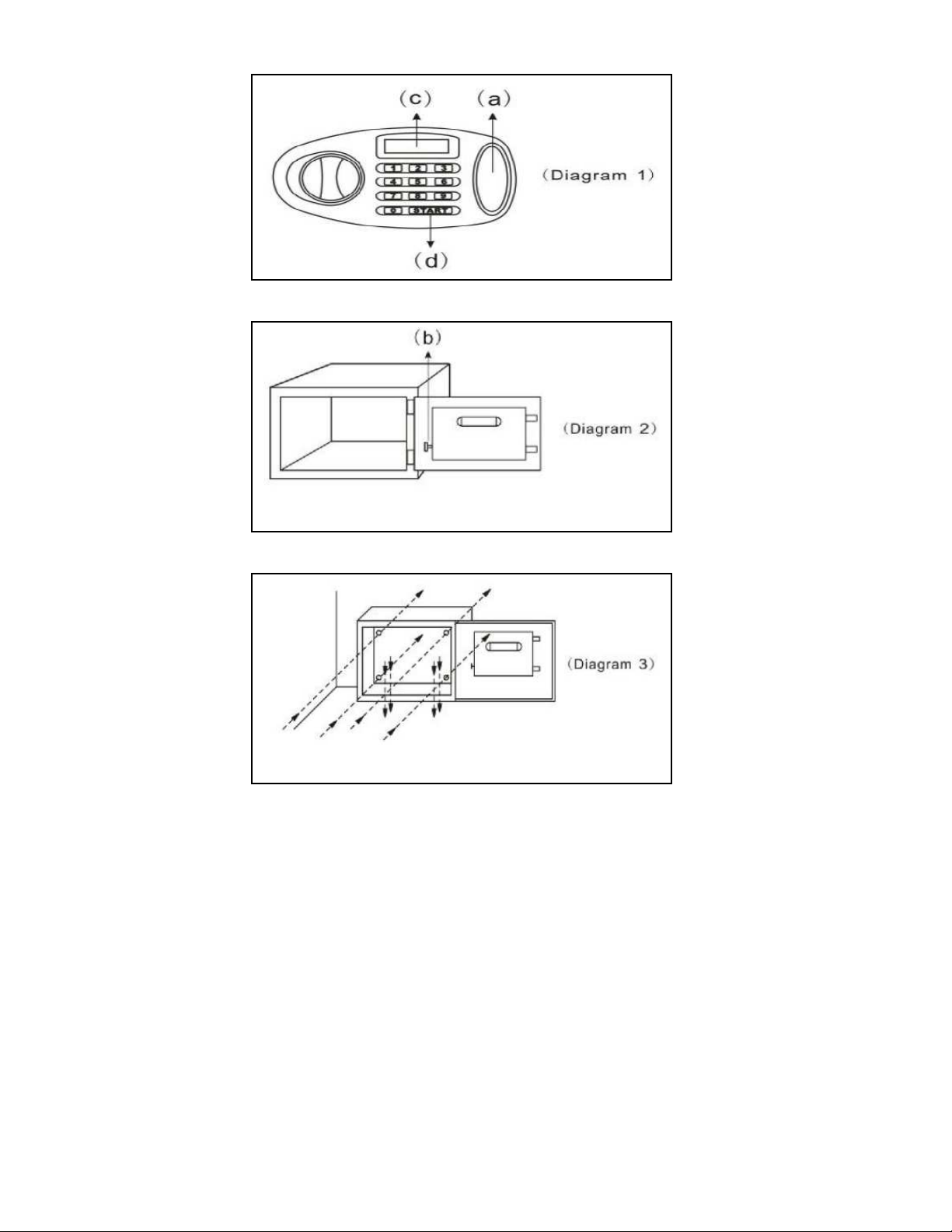
Use a screw driver to pry off the oval-shaped plastic cover situated to the right of the keypad
(see “(a)” in diagram 1), exposing the keyhole underneath. Insert the key into the keyhole
and turn it counter-clockwise. Now, leave the key in the turned position and turn the knob
clockwise to retract the locking bolts. You can follow these steps to manually open your safe
anytime.
2. INSTALLING THE BATTERIES
The safe requires 4 size ‘AA’ (1.5V) batteries. Remove the battery cover (on the back of the
safe door) and install the batteries into the battery compartment. Make sure the batteries are
fitted with the correct corresponding polarity. The display will scan the status of the electronic
lock system automatically and will read ‘good’ (see (c) in diagram 1). Use of alkaline
batteries is recommended.
3. OPENING THE SAFE AFTER INSTALLING THE BATTERIES
A. To open the door of the safe, press the ‘START’ button (see (d) in diagram 1), and the
display will show ‘--------’.
B. Then input one of the two sets of factory-preset codes: 0,0,0,0 (user code) or
8,8,8,8 (master code) immediately and confirm by again pressing the ‘START’ button. You
will hear a beeping sound as the display reads ‘OPEN’.
C. Turn the knob to retract the locking bolts and open the safe (NOTE: you must turn the
knob within approximately 4 seconds or you will need to start the process again)
NOTE: If you do not want the display to show your codes as you enter them press the
‘START’ button twice at the beginning of the process.
4. PROGRAMMING THE CODES
The safe can be programmed with two sets of codes: (1)One Master Code and (2)One User
Code. For the security of your valuables, immediately after installing the batteries, you
should program two new sets codes to replace the two sets of factory-preset codes.
Programming the master code
A. With the door of the safe open, press the red button located on the inside of the door
near the hinge (see ‘(b)’ in diagram 2) then press the ‘START’ button. The display will read
‘oLd CodE’.
B. Now input the original master code (factory preset code: 8,8,8,8) and press the ‘START’
button. The display will read ‘SET’.
C. Enter the new master code (from 3 to 8 digits) and confirm by pressing the ‘START’
button. The display will show ‘rE-InPUT’.
D. Now enter your new master code again and confirm by pressing the ‘START’ button.
After hearing a series of beeps the display will read ‘IN’ and your new master code indicating
that the new master code is confirmed.
Page 2

If you or an intruder tries to open the safe with an incorrect code, you will hear a beep with
the display showing ‘Error’ and the safe will not open. If an incorrect combination code is
used 4 times consecutively, the display will show ‘Error’ and a buzzer will sound for
approximately 3 minutes. The correct code cannot be entered until after this 3 minute delay.
The override key can however be used to open the door during this three minute delay. If the
key is used to open the door, the buzzer can be silenced by pressing the red button on the
safe door.
Programming the user code
A. With the door of the safe open, press the red button located on the inside of the door near
the hinge (see ‘(b)’ in diagram 2) and the display will show ‘SET CodE’.
B. Now enter a new user code (from 3 to 8 digits) and confirm by pressing the ‘START’
button. After hearing a series of beeps, the display will show ‘IN’ and the numbers in your
new user code indicating that the new user code is confirmed.
If you do not want the display to show your codes or numbers when you open the safe,
press the ‘START’ button twice at the beginning of the opening process.
5. BATTERY REPLACEMENT WARNING
To test the batteries, press the ‘START’ button. If the batteries are low, the display will show
‘Lo-BAE’, and you should replace the batteries. Alkaline batteries are recommend.
6. REPLACING THE BATTERIES
The safe requires 4 size ‘AA’ (1.5V) batteries. Open the safe, remove the battery cover on
the back of the door, and replace the old batteries. Alkaline batteries are recommended.
7. OVERRIDE INSTRUCTION TO OPEN THE SAFE
For your convenience, this safe has a manual override system in case you forget your
combination or the batteries die. Use a screw driver to pry off the oval-shaped plastic cover
situated to the right of the keypad (see “(a)” in diagram 1), exposing the keyhole underneath.
Insert the key into the keyhole and turn it counter-clockwise. Now, leave the key in the
turned position and turn the knob clockwise to retract the locking bolts. You can follow these
steps to manually open your safe anytime.
8. INSTALLING THE SAFE
This safe can be secured to the floor, on a wall or in a closet. There are pre-drilled holes in
both the bottom and the back of the safe for mounting (see diagram 3). To secure the safe,
with the safe door open, hold the safe over the exact spot where it will be mounted and use a
pencil to trace the pre-drilled holes on the floor or the wall. Remove the safe and drill a hole
in each marked spot and insert the anchors into the drilled holes. Now, again place the safe
where it will be mounted (door open) and screw in the mounting bolts into the anchors in the
drilled holes from the inside of the safe.
Page 3
 Loading...