

Page 1
Supplementary instructions
Supplementary instructions
UFC 400
UFC 400
UFC 400UFC 400
Supplementary instructions Supplementary instructions
Signal converter for ultrasonic flowmeters
Description of Foundation Fieldbus interface
Description of Foundation Fieldbus interface
Description of Foundation Fieldbus interfaceDescription of Foundation Fieldbus interface
Electronic Revision: ER 2.2.0_
The documentation is only complete when used in combination with the relevant
documentation for the measuring sensor.
© KROHNE 05/2013 - 4002813701 - AD FF UFC 400 R01 en
Page 2

CONTENTS
UFC 400
1 Safety instructions 3
1.1 Scope of the document..................................................................................................... 3
1.2 Device desciption.............................................................................................................. 3
2 Technical data 4
2.1 Foundation Fieldbus data................................................................................................. 4
3 Electrical connections 5
3.1 Cable types ....................................................................................................................... 5
3.2 Shielding and grounding .................................................................................................. 5
3.3 Electrical connection of FOUNDATION Fieldbus ............................................................. 6
3.4 Topology of FF networks .................................................................................................. 7
4 Operation 8
4.1 Settable functions............................................................................................................. 8
4.2 Description of the FF block system.................................................................................. 9
4.3 Used abbreviations ........................................................................................................... 9
4.4 Resource Block (RB) ...................................................................................................... 10
4.5 Analog Input Block (AI 1...4) ........................................................................................... 31
4.6 FLOWTB (Flow Transducer Block)................................................................................. 39
4.7 DIAGTB (Diagnose Transducer Block) ........................................................................... 48
4.8 Integrator Block (IT) ....................................................................................................... 55
4.9 Proportional Integral Derivative Block (PID) ................................................................. 62
2
www.krohne.com 05/2013 - 4002813701 - AD FF UFC 400 R01 en
Page 3
UFC 400
1.1 Scope of the document
These instructions are supplementary to the standard product documentation of the signal
converter. The details depicted therein, in particular the safety information are valid and should
be adhered to. The present supplementary instructions provide additional information for the
devices when being operated and connected to a Foundation Fieldbus.
INFORMATION!
The present supplementary instruction for the signal converter with Foundation Fieldbus
interface, plus the software with the DD and CCF files are included in our scope of supply, in
addition to those items delivered for the standard device.
1.2 Device desciption
This ultrasonic flowmeter is designed for the continuous measurement of actual volume flow,
mass flow, flow speed, velocity of sound, gain, SNR and diagnosis value.
Exclusively for measuring conductive and / or non-conductive fluids in closed, completely filled
pipeline circuits.
SAFETY INSTRUCTIONS 1
Your measuring device is supplied ready for operation. The factory settings for the operating
data have been made in accordance with your order specifications.
The following version is available:
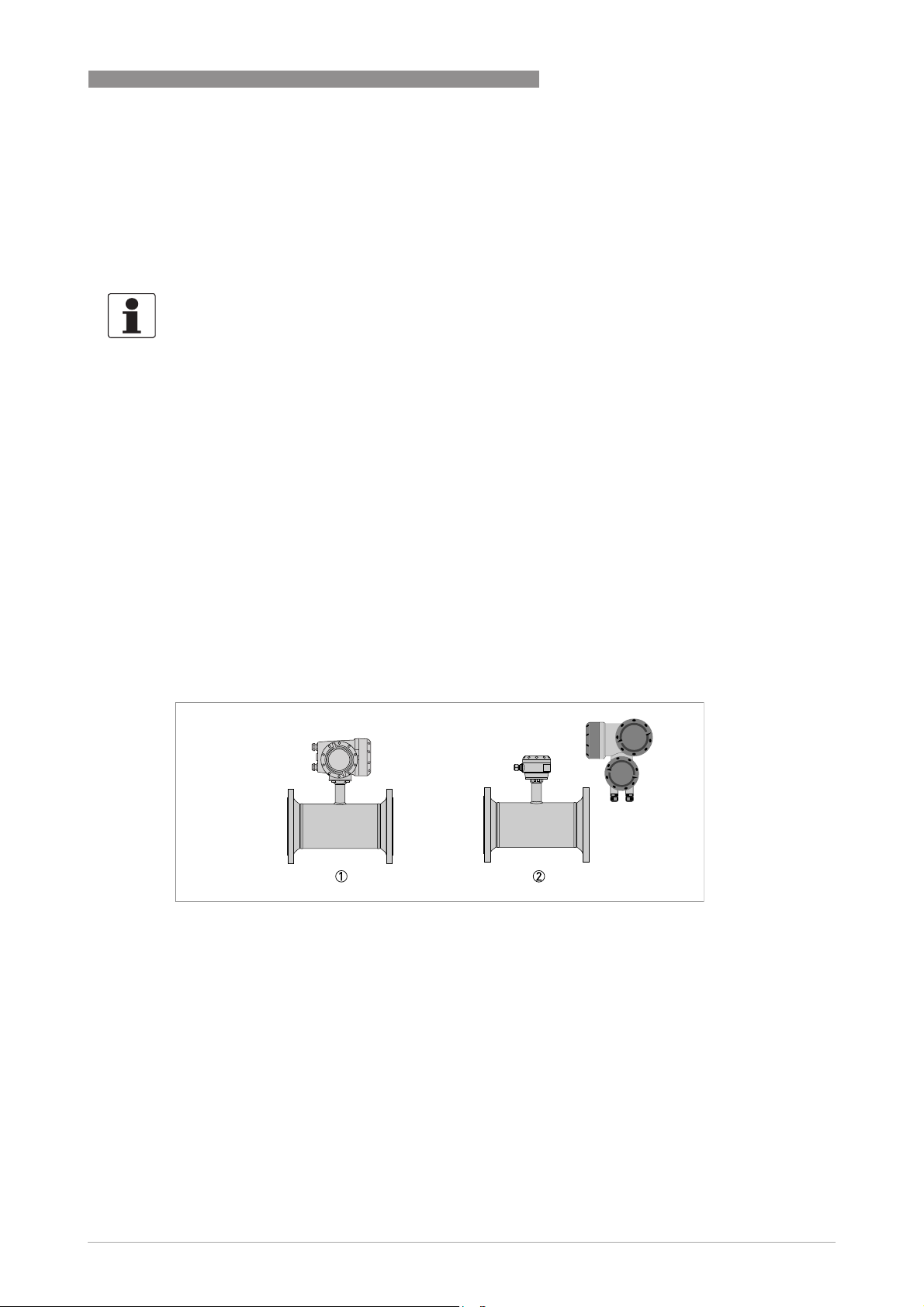
• Compact version (the signal converter is mounted directly on the measuring sensor)
• Remote version (electrical connection to the measuring sensor via signal cable)
1 Compact version
2 Remote version
www.krohne.com05/2013 - 4002813701 - AD FF UFC 400 R01 en
3
Page 4

2 TECHNICAL DATA
2.1 Foundation Fieldbus data
Description
Type Ultrasonic flowmeter
Physical layer Foundation Fieldbus protocol that agrees with IEC 61158-2 and FISCO model;
galvanically isolated
Communication standard H1
ITK version 6.1
NAMUR 107 Supported within FF field diagnosis (FF-912)
Data blocks
Function blocks 1 x Enhanced Resource Block (RB)
1 x Customer Flow Transducer Block (FLOWTB)
1 x Customer Diagnose Transducer Block (DIAGTB)
4 x Analog Input Block (AI)
2 x Integrator Block (IT)
1 x Proportional Integral Derivate Block (PID)
Execution time Analog Input Block: 10 ms
Integrator Block: 15 ms
Proportional Integral Derivate Block: 25 ms
UFC 400
Electrical connections
Device power supply Not intrinsically safe: 9...32 VDC
Intrinsically safe: 9...24 VDC
Basic current 10.5 mA
Maximum error current 16.5 mA (= basic current + error current = 10.5 mA + 6 mA)
Start current after 10 ms 14 mA
Polarity sensitivity No
Minimum cycle time 250 ms
4
www.krohne.com 05/2013 - 4002813701 - AD FF UFC 400 R01 en
Page 5
UFC 400
3.1 Cable types
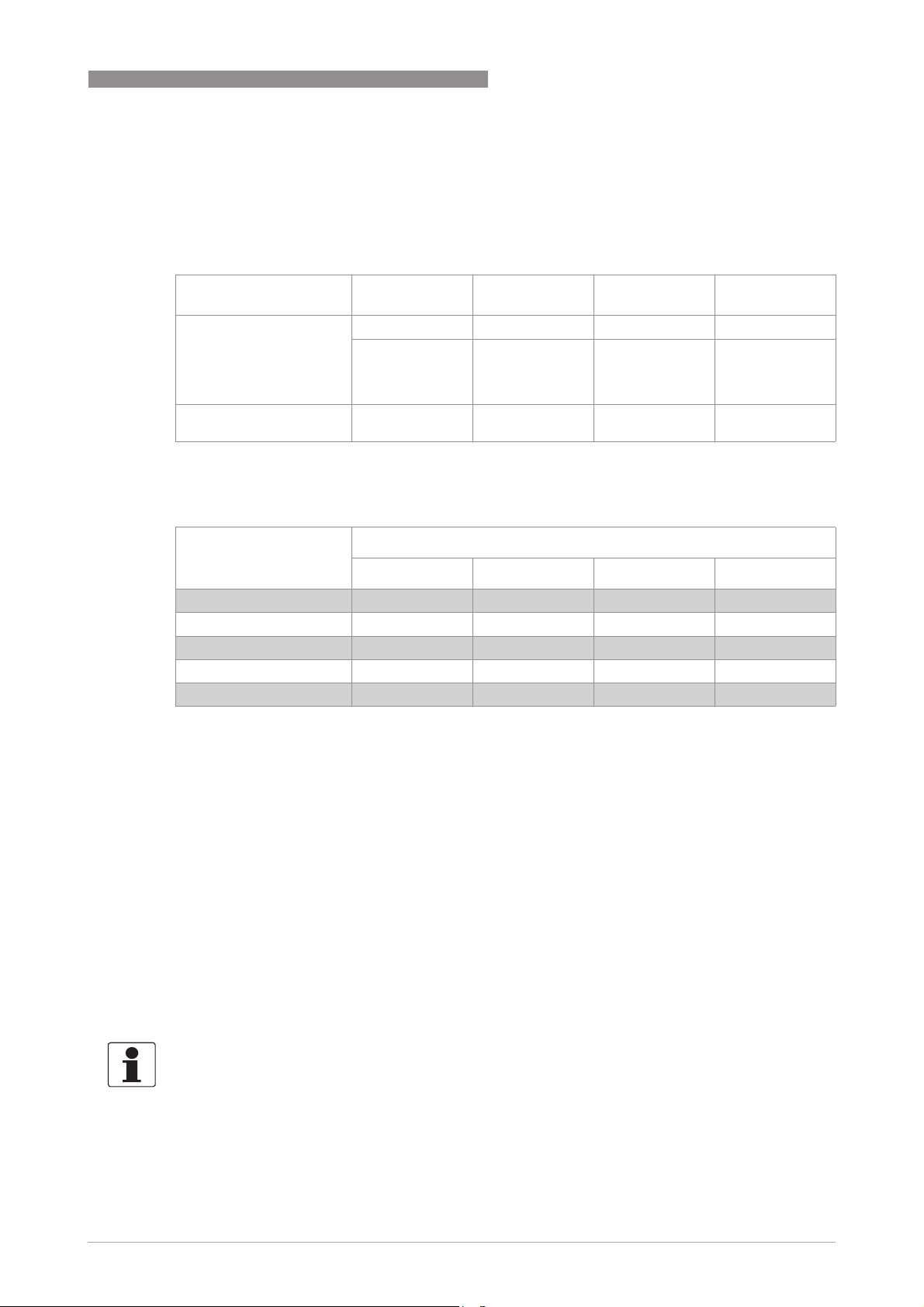
The cable types are specified according to IEC 61158-2. Shielded cables offer the advantage of
malfunction-free operation with adequate protection against electromagnetic influences, and
make it possible to employ the full performance of the Foundation Fieldbus system.
ELECTRICAL CONNECTIONS 3
Core cross-section
Cable type AAAA BBBB CCCC DDDD
Max. length
incl. branch line
0.8 mm2 or
AWG 18
twisted pair,
individually
shielded
1900 m / 6200 ft 1200 m / 3900 ft 400 m / 1300 ft 200 m / 650 ft
0.32 mm2 or
AWG 22
individual or
multiple twisted
pairs with overall
shield
0.13 mm2 or
AWG 26
multiple twisted
pairs, without
shielding
1.25 mm2 or
AWG 16
multiple nontwisted cables,
without shielding
In non-hazardous locations, a maximum of 32 field devices can be connected to the network. For
more data, refer to the table that follows.
Number of devices Cable lengths for number of devices per branch line
1 device 2 devices 3 devices 4 devices
25...32 1m/ 3.3ft 1m/ 3.3ft 1m/ 3.3ft 1m/ 3.3ft
19...24 30 m / 100 ft 1m/ 3.3ft 1m/ 3.3ft 1m/ 3.3ft
15...18 60 m / 200 ft 30 m / 100 ft 1m/ 3.3ft 1m/ 3.3ft
13...14 90 m / 300 ft 60 m / 200 ft 30 m / 100 ft 1m/ 3.3ft
1..12 120 m / 400 ft 90 m / 300 ft 60 m / 200 ft 30 m / 100 ft
All bus segments must be fitted with a terminator at both ends.
3.2 Shielding and grounding
• For optimum electromagnetic compatibility of systems it is extremely important that the
system components, and particularly the bus cables connecting the components, are
shielded and that such shields - if possible - form an unbroken cover.
• Hence, it follows that, for use in non-hazardous duty systems, the cable shield should be
grounded as often as possible.
• In Ex systems an adequate equipotential bonding in the hazardous and non-hazardous
location along the entire Fieldbus installation is strongly recommended. Multiple grounding
of the shield is of advantage.
• In explosion-proof systems the shielding must at least be connected at one end of the cable.
• NAMUR NE 21 compliance is given, provided the above recommended cable types are used.
INFORMATION!
The use of twisted and shielded cables is strongly recommended, otherwise EMC protection of
the signal converter cannot be assured.
www.krohne.com05/2013 - 4002813701 - AD FF UFC 400 R01 en
5
Page 6
3 ELECTRICAL CONNECTIONS
3.3 Electrical connection of FOUNDATION Fieldbus
INFORMATION!
The wiring between the device and the FOUNDATION Fieldbus cable is independant of polarity.
The signal converter FOUNDATION Fieldbus interface will operate only if the additional power
supply for the device is connected/available.
For a detailed description of the electrical connections please refer to the standard signal
converter handbook.
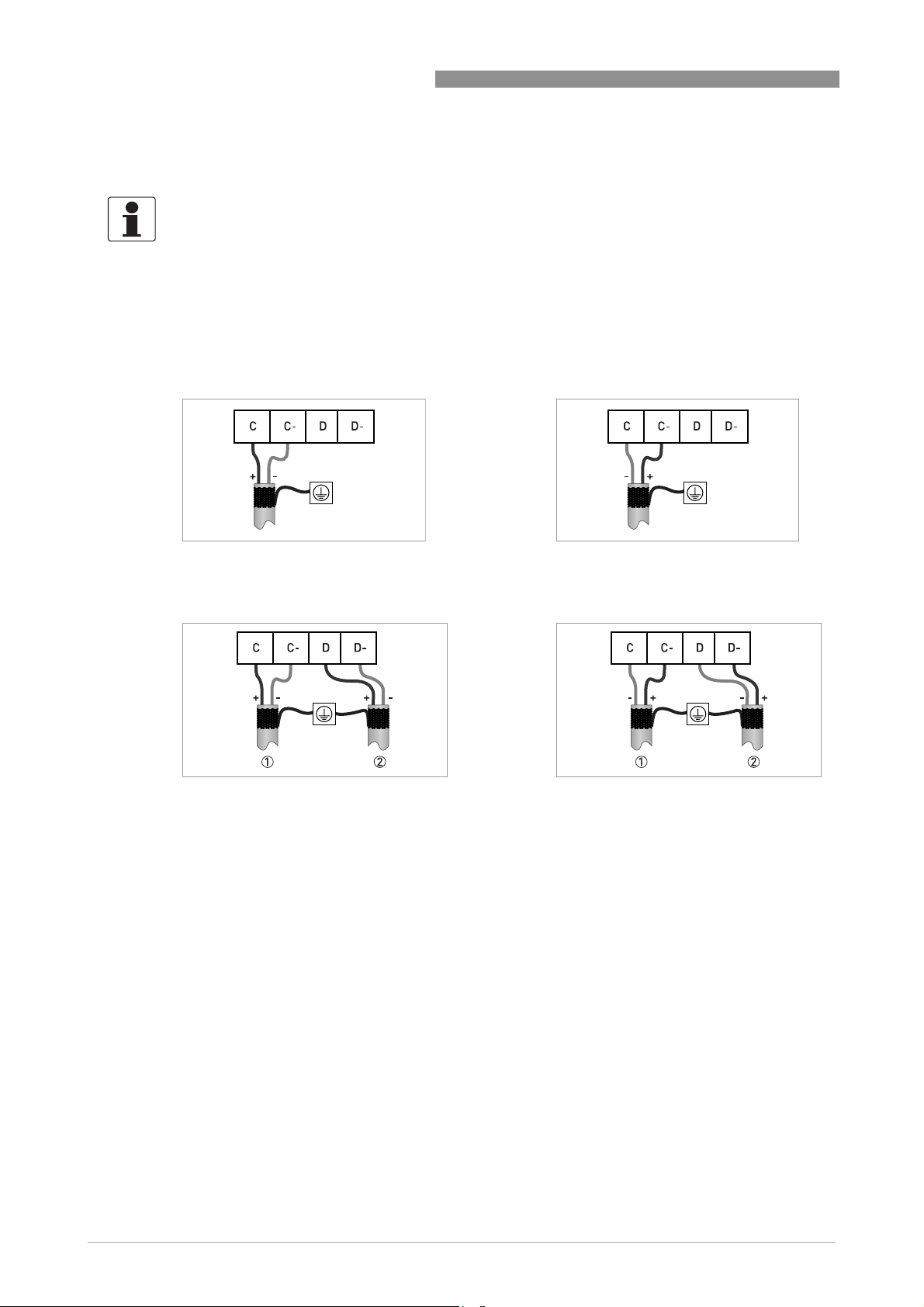
Connection to a spur
or
UFC 400
Connection to a trunk
1 e.g. incoming data lines
2 e.g. outgoing data lines
or
6
www.krohne.com 05/2013 - 4002813701 - AD FF UFC 400 R01 en
Page 7
UFC 400
3.4 Topology of FF networks
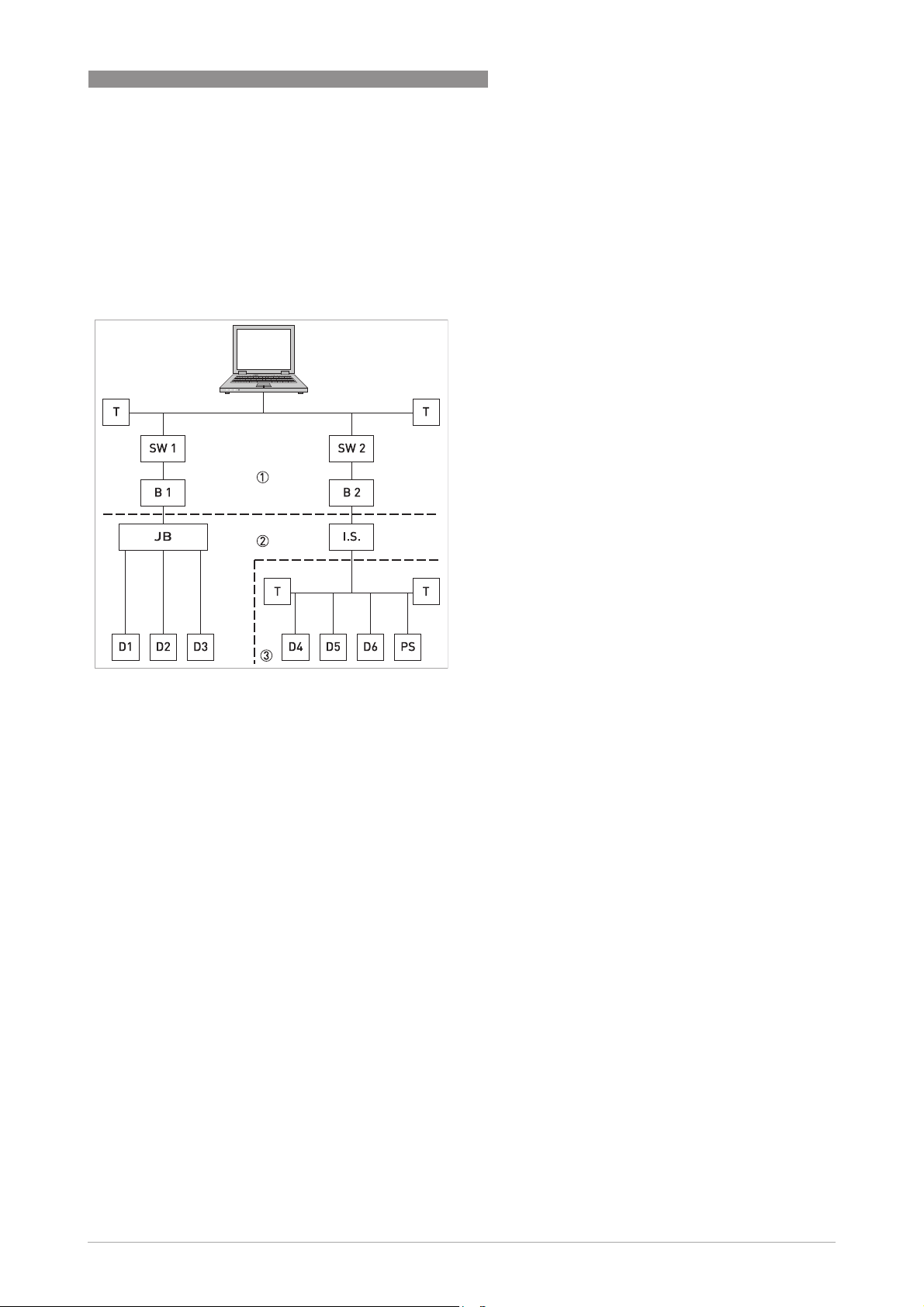
An example of mixed topology of FF networks is shown in the following example.
Connection is best made via short branch cables and T connectors. This connection type makes it
possible to connect and disconnect the devices without interrupting the bus or the
communication.
ELECTRICAL CONNECTIONS 3
1 HSE network
2 H1 bus
3 Intrisically safe, explosive area
B1+B2 Bridge = coupling element for H1 bus
and HSE network
D1-D3 Device = field devices, own power
supply, for non potentially explosive
areas
D4-D6 Intrinsically safe devices, external
power supply, for potentially explosive
areas
I.S. Intrinsically safe barrier
JB Junction box for field devices
PS Power supply
Switch = connection of multiple HSE
sub networks
TTerminator
www.krohne.com05/2013 - 4002813701 - AD FF UFC 400 R01 en
7
Page 8
4 OPERATION
UFC 400
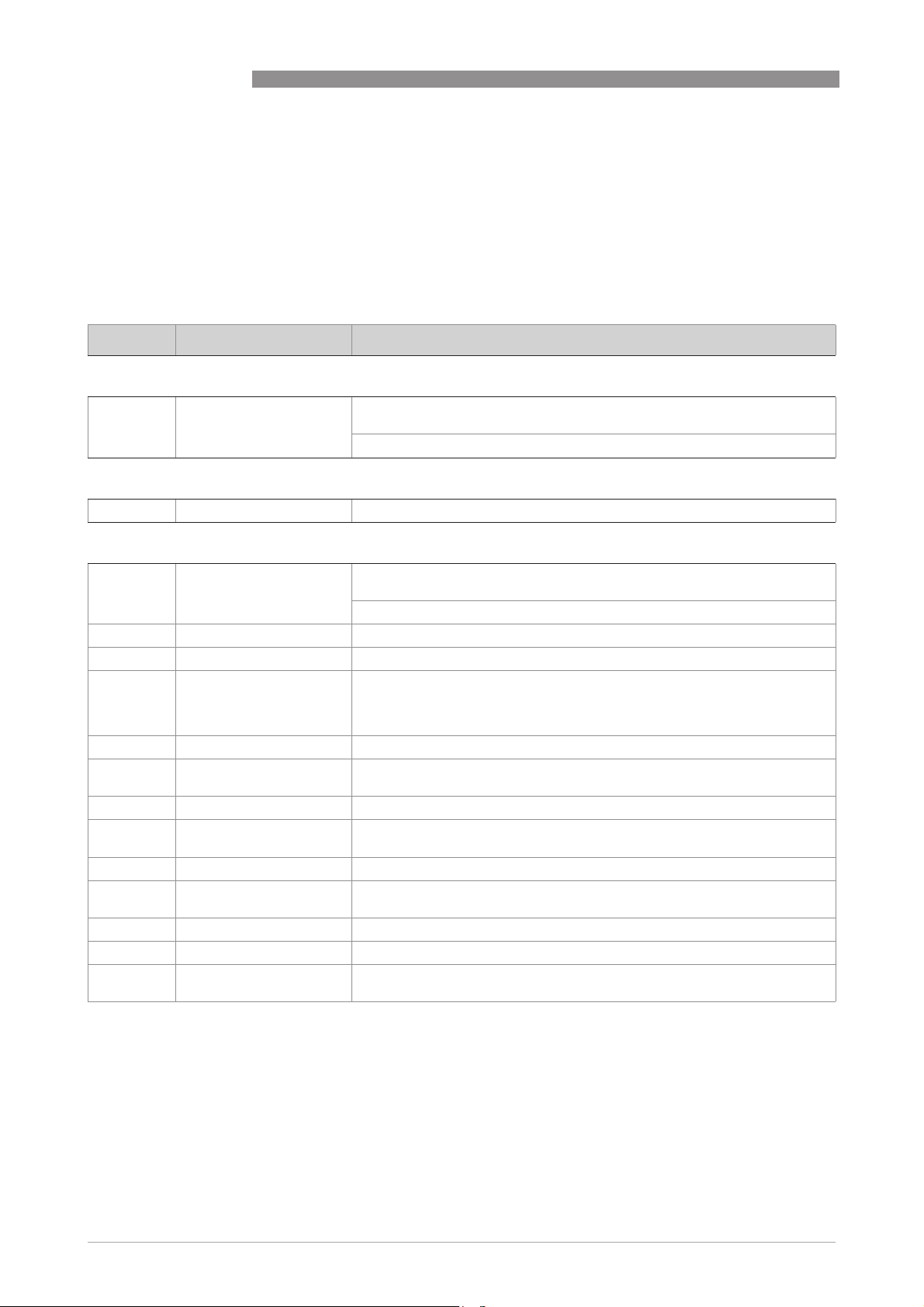
4.1 Settable functions
• For Foundation Fieldbus the totalizers of the signal converter are not available!
• The following tables describe only the menus, functions and parameters that are different
between the standard signal converter and the Foundation Fieldbus signal converter.
• For the electrical connections of the outputs, inputs and all settings of functions that are not
listed in the following tables refer to the standard product documentation.
No. Displayed text Description and settings
A quick setup
A2 Tag Identifier for the measurement in a plant, appears in the display header
B test
B3.7 Foundation fieldbus Display information about Foundation fieldbus interface.
(maximum 8 digits).
Note: Only read, not changeable!
C setup
C5.1.1 Tag Identifier for the measurement in a plant, appears in the display header
C3 Totalizer Not available for Foundation Fieldbus devices!
C4 I/O HART Not available for Foundation Fieldbus devices!
C5.4 2. meas. page In case of Foundation Fieldbus device, the second measurement page is
C5.4.1 measurement 1.line Select: AI1...4 analog inp. / PID / INT1..2 integrator
C5.4.2 format 1.line Fixed number of digits after the decimal point or automatic, where the
C5.4.3 measurement 2.line Select: AI1...4 analog inp. / PID / INT1..2 integrator
C5.4.4 format 2.line Fixed number of digits after the decimal point or automatic, where the
C5.4.5 measurement 3.line Select: AI1...4 analog inp. / PID / INT1..2 integrator
C5.4.6 format 3.line Fixed number of digits after the decimal point or automatic, where the
C5.8 Foundation Field -
C5.8.1 Simulate Select: disabled / enabled
C5.8.2 Information Display information about hardware and software versions, the calibration
(maximum 8 digits).
Note: Only read, not changeable!
meant to check the output values of the different function blocks. Only
Foundation Fieldbus values can be selected here. The analogue inputs are
shown with exactly the value, seen on the bus system.
number of digits is automatically adjusted to the available space.
number of digits is automatically adjusted to the available space.
number of digits is automatically adjusted to the available space.
and test date of this interface.
8
www.krohne.com 05/2013 - 4002813701 - AD FF UFC 400 R01 en
Page 9
UFC 400
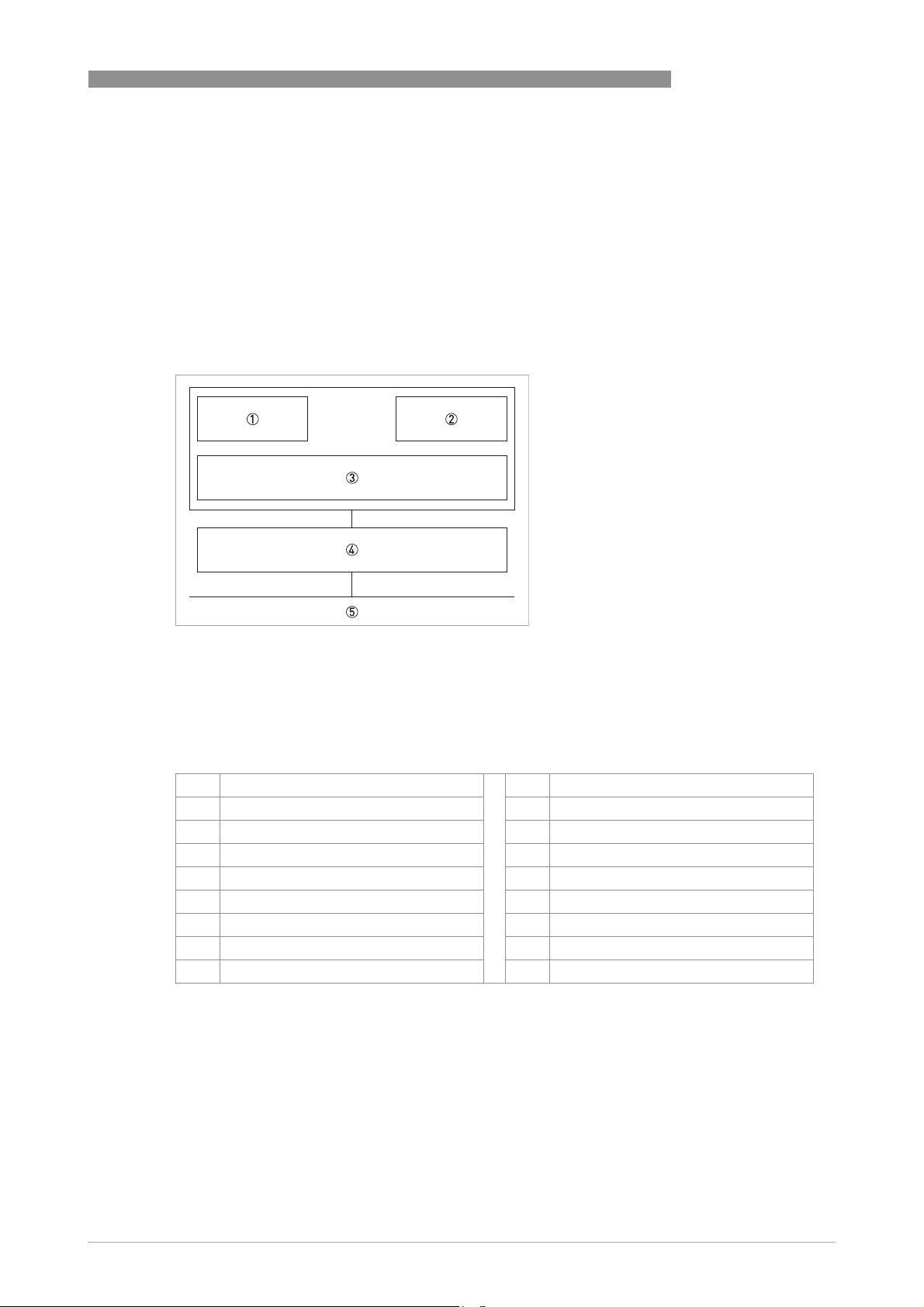
4.2 Description of the FF block system
The Foundation Fieldbus is a Local Area Network (LAN) for connecting field devices like sensors
and actuators. One of the main benefits of Foundation Fieldbus is line saving in comparison to
the traditional 4...20 mA technology.
The different device functions are implemented in a block-based scheme within a user
application. In this block scheme, a distinction is made between the Resource Block, Transducer
Block and Function Block.
OPERATION 4
1 Resource Block (RB)
2 Transducer Block (TB)
3 Function Block (FB)
4 Device FF communication
5 Foundation Fieldbus
4.3 Used abbreviations
AI Analogue Input Block BLK Block mode
IT Integrator Block MAN Manual mode
PID Proportional Integral Derivate Block Mix Mix mode (R, W and R/W)
RB Resource Block Auto Automatic mode
TB Transducer Block OOS Out Of Service mode
R Read OD Object Directory
W Write SP Set Point
R/W Read and Write IV Initial Value
PV Process Value (factory settings)
www.krohne.com05/2013 - 4002813701 - AD FF UFC 400 R01 en
9
Page 10

4 OPERATION
4.4 Resource Block (RB)
The following tables list the Resource Block parameters in alphabetical order.
It describes characteristics of the Fieldbus device (e.g. device name, serial number, etc.) and is
not included in the functional tasks of the signal converter for FF.
The following tables contain short parameter description, factory settings (Initial Value (IV)) and
possible settings.
Parameter
Parameter
ParameterParameter
DD name
ALERT_KEY
ALERT_KEY
ALERT_KEYALERT_KEY
Alert Key
Alert Key
Alert KeyAlert Key
BLOCK_ERR
BLOCK_ERR
BLOCK_ERRBLOCK_ERR
Block Error
Block Error
Block ErrorBlock Error
MODE_BLK
MODE_BLK
MODE_BLKMODE_BLK
Block Mode
Block Mode
Block ModeBlock Mode
TARGET
Target
ACTUAL
Actual
PERMITTED
Permitted
Access Description and settings Initial Value
R/W The identification number of the plant unit. This information
may be used in the host for sorting alarms, etc.
Setting:
1...255
R This parameter reflects the error status associated with the
hardware or software components associated with a block. It
is a bit string, so that multiple errors may be shown.
Setting:
• Other: Non-specific error active
• Block Configuration: Error detected in block configuration
• Link Configuration: Error detected in link configuration
• Simulation Active: Simulation enabled in this block
• Local Override: Output tracking of faultstate active
• Device Fault State: Device faultstate set
• Device Maintenance: Device needs maintenance soon
• Input Failure: Process variable has bad status
• Output Failure: Failure detected in output hardware
• Memory Failure: Memory error detected
• Lost Static Data: Static parameters cannot be recovered
• Lost NV Data: Non-volatile parameters cannot be recovered
• Readback Check: Failure detected in READBACK
• Maintenance Needed: Device NEEDS maintenance NOW
• Power Up: Recovery from power failure
• Out Of Service: Block actual mode is out of service
Mix The actual, target, permitted and normal modes of the block. -
R/W This is the mode requested by the operator. Only one mode
from those allowed by the permitted mode parameter may be
requested.
Setting:
Auto / OOS
R This is the current mode of the block, which may differ from
the target based on operating conditions. Its value is
calculated as part of block execution.
Setting:
Auto / OOS
R/W Defines the modes which are allowed for an instance of the
block. The permitted mode is configured based on application
requirement.
Setting:
Auto / OOS
UFC 400
0
OOS (Out of
Service)
OOS
OOS
Auto
OOS
10
www.krohne.com 05/2013 - 4002813701 - AD FF UFC 400 R01 en
Page 11

UFC 400
Parameter
Parameter
ParameterParameter
DD name
OPERATION 4
Access Description and settings Initial Value
NORMAL
Normal
ST_REV
ST_REV
ST_REVST_REV
Static Revision
Static Revision
Static RevisionStatic Revision
STRATEGY
STRATEGY
STRATEGYSTRATEGY
Strategy
Strategy
StrategyStrategy
TAG_DESC
TAG_DESC
TAG_DESCTAG_DESC
Tag Description
Tag Description
Tag DescriptionTag Description
ACK_OPTION
ACK_OPTION
ACK_OPTIONACK_OPTION
Acknowledge Option
Acknowledge Option
Acknowledge OptionAcknowledge Option
ALARM_SUM
ALARM_SUM
ALARM_SUMALARM_SUM
Alarm Summary
Alarm Summary
Alarm SummaryAlarm Summary
Current R The active status of each alarm. Uninitialized
Unacknowledged R The unacknowledged state of each alarm. Uninitialized
Unreported R The unreported status of each alarm. Uninitialized
Disabled R/W The disabled state of each alarm. Uninitialized
BLOCK_ALM
BLOCK_ALM
BLOCK_ALMBLOCK_ALM
Block Alarm
Block Alarm
Block AlarmBlock Alarm
Unacknowledged R/W A discrete enumeration which is set to "Unacknowledged"
R/W This is the mode which the block should be set to during
normal operating conditions.
Setting:
Auto / OOS
R The revision level of the static data associated with the
function block. The revision value will be incremented each
time a static parameter value in the block is changed.
Setting:
0...65535
R/W The strategy field can be used to identify grouping of blocks.
This data is not checked or processed by the block.
Setting:
0...65535
R/W The user description of the intended application of the block. blanks
Setting:
≤32 digits
R/W Selection of whether alarms associated with the function
block will be automatically acknowledged.
Setting:
Disc Alm Auto Ack / Blk Alm Auto Ack / Fail Alm Auto Ack / Off
Spec Alm Auto Ack / Maint Alm Auto Ack / Check Alm Auto Ack
R The current alert status, unacknowledged states, unreported
states and disabled states of the alarms associated with the
function block.
Setting:
Discrete Alarm / Block Alarm / Fail Alarm / Off Spec Alarm /
Maintenance Alarm / Check Alarm
Setting:
Disc Alm Unack / Block Alm Unack / Fail Alm Unack / Off Spec
Alm Unack / Maint Alm Unack / Check Alm Unack
Setting:
Disc Alm Unrep / Block Alm Unrep / Fail Alm Unrep / Off Spec
Alm Unrep / Maint Alm Unrep / Check Alm Unrep
Setting:
Disc Alm Disabled / Block Alm Disabled / Fail Alm Disabled /
Off Spec Alm Disabled / Maint Alm Disabled / Check Alm
Disabled
The block alarm is used for all configuration, hardware,
connection failure or system problems in the block. The cause
of the alert is entered in the subcode field. The first alert to
become active will set the "Active" status in the "Status"
attribute. As soon as the "Unreported" status is cleared by the
alert reporting task, another block alert may be reported
without clearing the "Active" status, if the subcode has
changed.
when an alarm occurs, and set to "Acknowledged" by a write
from a human interface device or other entity which can
acknowledge that the alarm/event has been noticed.
Setting:
Uninitialized / Acknowledged / Unacknowledged
Auto
0
0
Uninitialized
-
-
Uninitialized
www.krohne.com05/2013 - 4002813701 - AD FF UFC 400 R01 en
11
Page 12

4 OPERATION
Parameter
Parameter
ParameterParameter
DD name
UFC 400
Access Description and settings Initial Value
Alarm State R A discrete enumeration which gives an indication of whether
Time Stamp R The time when evaluation of the block was started and a
Subcode R An enumeration specifying the cause of the alert to be
Value R The value of the associated parameter at the time the alert
CLR_FSTATE
CLR_FSTATE
CLR_FSTATECLR_FSTATE
Clear Fault State
Clear Fault State
Clear Fault StateClear Fault State
CONFIRM_TIME
CONFIRM_TIME
CONFIRM_TIMECONFIRM_TIME
Confirm Time
Confirm Time
Confirm TimeConfirm Time
CYCLE_SEL
CYCLE_SEL
CYCLE_SELCYCLE_SEL
Cycle Selection
Cycle Selection
Cycle SelectionCycle Selection
CYCLE_TYPE
CYCLE_TYPE
CYCLE_TYPECYCLE_TYPE
Cycle Type
Cycle Type
Cycle TypeCycle Type
DD_RESOURCE
DD_RESOURCE
DD_RESOURCEDD_RESOURCE
DD Resource
DD Resource
DD ResourceDD Resource
DD_REV
DD_REV
DD_REVDD_REV
DD Revision
DD Revision
DD RevisionDD Revision
DEV_REV
DEV_REV
DEV_REVDEV_REV
Device Revision
Device Revision
Device RevisionDevice Revision
R/W Writing a "Clear" to this parameter will clear the device fault
R/W The minimum time between retries of alert reports. 640000
R/W Used to select the block execution method for this resource. Uninitialized
R Identifies the block execution methods available for this
R String identifying the tag of the resource which contains the
R Revision of the DD associated with the resource - used by an
R Manufacturer revision number associated with the resource -
the alert is active and whether it has been reported.
Setting:
Uninitialized / Clear - reported / Clear - not reported / Active reported / Active - not reported
change in alarm/event state was detected that is unreported.
The time stamp value will be maintained constant until alert
confirmation has been received - even if another change of
state occurs.
Setting:
MM / DD / YY (Month / Day / Year)
HH:MM:SS (Hour:Minute:Second)
reported.
Setting:
Other / Block Configuration / Link Configuration / Simulation
Active / Local Override / Device Fault State / Device
Maintenance / Input Failure / Output Failure / Memory
Failure / Lost Static Data / Lost NV Data / Readback Check /
Maintenance Needed / Power Up / Out Of Service
was detected.
Setting:
0...255
state if the field condition, if any, has cleared.
Setting:
Uninitialized / Off / Clear
Setting:
0...4294967295 in [1/32 ms]
Setting:
Scheduled / Block execution
resource.
Setting:
Scheduled / Block execution
Device Description for this resource.
Setting:
≤ 32 digits
interface device to locate the DD file for the resource.
Setting:
Dependent on device version.
used by an interface device to locate the DD file for the
resource.
Setting:
Dependent on device version.
Uninitialized
Uninitialized
Other
0
Off
Scheduled
Block execution
blanks
Dependent on
device version.
Dependent on
device version.
12
www.krohne.com 05/2013 - 4002813701 - AD FF UFC 400 R01 en
Page 13

UFC 400
Parameter
Parameter
ParameterParameter
Access Description and settings Initial Value
OPERATION 4
DD name
DEV_TYPE
DEV_TYPE
DEV_TYPEDEV_TYPE
Device Type
Device Type
Device TypeDevice Type
FAULT_STATE
FAULT_STATE
FAULT_STATEFAULT_STATE
Fault State
Fault State
Fault StateFault State
FD_CHECK_ACTIVE
FD_CHECK_ACTIVE
FD_CHECK_ACTIVEFD_CHECK_ACTIVE
Check Active
FD_CHECK_ALM
FD_CHECK_ALM
FD_CHECK_ALMFD_CHECK_ALM
Check Alarm
Unacknowledged R/W A discrete enumeration which is set to "Unacknowledged"
Alarm State R A discrete enumeration which gives an indication of whether
Time Stamp R The time when evaluation of the block was started and a
Subcode R An enumeration specifying the cause of the alert to be
Value R The value of the associated parameter at the time the alert
R Manufacturer's model number associated with the resource -
used by interface devices to locate the DD file for the
resource.
Setting:
UFC400
R Condition set by loss of communication to an output block,
failure promoted to an output block or a physical contact.
When fault state condition is set, then output function blocks
will perform their "FSTATE" actions.
Setting:
Uninitialized / Off / Clear
R This parameter reflects the error conditions that are being
detected as active as selected for this category. It is a bit
string, so that multiple conditions may be shown. See section
2.9.
Setting:
(00) Check / (01) Electronics : Operation Info /
(08) Electronics : Power Fail / (10) Configuration : Totaliser /
(11) Process : Signal Unreliable / (12) Process : Signal Lost /
(13) Process : Empty Pipe / (14) Electronics : IO Connection /
(15) Process : Current input / (16) M Process /
(17) M Configuration / (18) M Electronics / (19) M Sensor /
(20) S Process / (21) S Configuration / (22) S Electronics /
(23) S Sensor / (24) C Process / (25) C Configuration /
(26) C Electronics / (27) C Sensor / (28) F Process / (29) F
Configuration / (30) F Electronics / (31) F Sensor
This parameter is used primarily to broadcast a change in the
associated active conditions, which are not masked, for this
alarm category to a Host System.
when an alarm occurs, and set to "Acknowledged" by a write
from a human interface device or other entity which can
acknowledge that the alarm/event has been noticed.
Setting:
Uninitialized / Acknowledged / Unacknowledged
the alert is active and whether it has been reported.
Setting:
Uninitialized / Clear - reported / Clear - not reported /
Active - reported / Active - not reported
change in alarm/event state was detected that is unreported.
The time stamp value will be maintained constant until alert
confirmation has been received - even if another change of
state occurs.
Setting:
MM / DD / YY (Month / Day / Year)
HH:MM:SS (Hour:Minute:Second)
reported.
was detected.
UFC400
Clear
-
-
Uninitialized
Uninitialized
Uninitialized
-
-
www.krohne.com05/2013 - 4002813701 - AD FF UFC 400 R01 en
13
Page 14

4 OPERATION
Parameter
Parameter
ParameterParameter
DD name
FD_CHECK_MAP
FD_CHECK_MAP
FD_CHECK_MAPFD_CHECK_MAP
Check Map
FD_CHECK_MASK
FD_CHECK_MASK
FD_CHECK_MASKFD_CHECK_MASK
Check Mask
FD_CHECK_PRI
FD_CHECK_PRI
FD_CHECK_PRIFD_CHECK_PRI
Check Priority
FD_FAIL_ACTIVE
FD_FAIL_ACTIVE
FD_FAIL_ACTIVEFD_FAIL_ACTIVE
Fail Active
FD_FAIL_ALM
FD_FAIL_ALM
FD_FAIL_ALMFD_FAIL_ALM
Fail Diagnostic Alarm
Unacknowledged R/W A discrete enumeration which is set to "Unacknowledged"
Alarm State R A discrete enumeration which gives an indication of whether
Access Description and settings Initial Value
R/W This parameter enables or disables conditions to be detected
as active for this alarm category.
Setting:
(00) Check / (01) Electronics : Operation Info /
(08) Electronics : Power Fail / (10) Configuration : Totaliser /
(11) Process : Signal Unreliable / (12) Process : Signal Lost /
(13) Process : Empty Pipe / (14) Electronics : IO Connection /
(15) Process : Current input / (16) M Process /
(17) M Configuration / (18) M Electronics / (19) M Sensor /
(20) S Process / (21) S Configuration / (22) S Electronics /
(23) S Sensor / (24) C Process / (25) C Configuration /
(26) C Electronics / (27) C Sensor / (28) F Process / (29) F
Configuration / (30) F Electronics / (31) F Sensor
R/W This parameter allows the user to suppress any single or
multiple conditions that are active, in this category, from
being broadcast to the host through the alarm parameter.
Setting:
(00) Check / (01) Electronics : Operation Info /
(08) Electronics : Power Fail / (10) Configuration : Totaliser /
(11) Process : Signal Unreliable / (12) Process : Signal Lost /
(13) Process : Empty Pipe / (14) Electronics : IO Connection /
(15) Process : Current input / (16) M Process /
(17) M Configuration / (18) M Electronics / (19) M Sensor /
(20) S Process / (21) S Configuration / (22) S Electronics /
(23) S Sensor / (24) C Process / (25) C Configuration /
(26) C Electronics / (27) C Sensor / (28) F Process / (29) F
Configuration / (30) F Electronics / (31) F Sensor
R/W This parameter allows the user to specify the priority of this
alarm category.
Setting:
0...15
R This parameter reflects the error conditions that are being
detected as active as selected for this category. It is a bit
string, so that multiple conditions may be shown. See section
2.9.
Setting:
(00) Check / (01) Electronics : Operation Info /
(08) Electronics : Power Fail / (10) Configuration : Totaliser /
(11) Process : Signal Unreliable / (12) Process : Signal Lost /
(13) Process : Empty Pipe / (14) Electronics : IO Connection /
(15) Process : Current input / (16) M Process /
(17) M Configuration / (18) M Electronics / (19) M Sensor /
(20) S Process / (21) S Configuration / (22) S Electronics /
(23) S Sensor / (24) C Process / (25) C Configuration /
(26) C Electronics / (27) C Sensor / (28) F Process / (29) F
Configuration / (30) F Electronics / (31) F Sensor
This parameter is used primarily to broadcast a change in the
associated active conditions, which are not masked, for this
alarm category to a Host System.
when an alarm occurs, and set to "Acknowledged" by a write
from a human interface device or other entity which can
acknowledge that the alarm/event has been noticed.
Setting:
Uninitialized / Acknowledged / Unacknowledged
the alert is active and whether it has been reported.
Setting:
Uninitialized / Clear - reported / Clear - not reported / Active reported / Active - not reported
UFC 400
(24) (25) (26) (27)
0
Uninitialized
-
Uninitialized
Uninitialized
14
www.krohne.com 05/2013 - 4002813701 - AD FF UFC 400 R01 en
Page 15

UFC 400
Parameter
Parameter
ParameterParameter
DD name
OPERATION 4
Access Description and settings Initial Value
Time Stamp R The time when evaluation of the block was started and a
Subcode R An enumeration specifying the cause of the alert to be
Value R The value of the associated parameter at the time the alert
FD_FAIL_MAP
FD_FAIL_MAP
FD_FAIL_MAPFD_FAIL_MAP
Fail Map
FD_FAIL_MASK
FD_FAIL_MASK
FD_FAIL_MASKFD_FAIL_MASK
Fail Mask
FD_FAILK_PRI
FD_FAILK_PRI
FD_FAILK_PRIFD_FAILK_PRI
Fail Priority
FD_EXTENDED_
FD_EXTENDED_
FD_EXTENDED_FD_EXTENDED_
ACTIVE_1
ACTIVE_1
ACTIVE_1ACTIVE_1
FD_EXTENDED_
ACTIVE_1
FD_EXTENDED_
FD_EXTENDED_
FD_EXTENDED_FD_EXTENDED_
ACTIVE_2
ACTIVE_2
ACTIVE_2ACTIVE_2
FD_EXTENDED_
ACTIVE_2
R/W This parameter enables or disables conditions to be detected
R/W This parameter allows the user to suppress any single or
R/W This parameter allows the user to specify the priority of this
R An optional parameter to allow the user finer detail on
R An optional parameter to allow the user finer detail on
change in alarm/event state was detected that is unreported.
The time stamp value will be maintained constant until alert
confirmation has been received - even if another change of
state occurs.
Setting:
MM / DD / YY (Month / Day / Year)
HH:MM:SS (Hour:Minute:Second)
reported.
was detected.
as active for this alarm category.
Setting:
(00) Check / (01) Electronics : Operation Info /
(08) Electronics : Power Fail / (10) Configuration : Totaliser /
(11) Process : Signal Unreliable / (12) Process : Signal Lost /
(13) Process : Empty Pipe / (14) Electronics : IO Connection /
(15) Process : Current input / (16) M Process /
(17) M Configuration / (18) M Electronics / (19) M Sensor /
(20) S Process / (21) S Configuration / (22) S Electronics /
(23) S Sensor / (24) C Process / (25) C Configuration /
(26) C Electronics / (27) C Sensor / (28) F Process / (29) F
Configuration / (30) F Electronics / (31) F Sensor
multiple conditions that are active, in this category, from
being broadcast to the host through the alarm parameter.
Setting:
(00) Check / (01) Electronics : Operation Info / (08) Electronics
: Power Fail / (10) Configuration : Totaliser / (11) Process :
Signal Unreliable / (12) Process : Signal Lost / (13) Process :
Empty Pipe / (14) Electronics : IO Connection / (15) Process :
Current input / (16) M Process / (17) M Configuration / (18) M
Electronics / (19) M Sensor / (20) S Process / (21) S
Configuration / (22) S Electronics / (23) S Sensor / (24) C
Process / (25) C Configuration / (26) C Electronics / (27) C
Sensor / (28) F Process / (29) F Configuration / (30) F
Electronics / (31) F Sensor
alarm category.
Setting:
0...15
conditions causing an active condition in the FD_*_ACTIVE
parameter.
Setting:
(00) Optical Interf. Active / (01) Disp. 2 Overrange / (02) Disp. 1
Overrange / (06) RB is set to OOS / (07) Fieldbus No
Connection / (11) Status Out B Active / (13) Status Out A
Active / (14) Control In B Active / (15) Control In A Active / (30)
Sensor Starting up / (31) Zero Calibr. Running
conditions causing an active condition in the FD_*_ACTIVE
parameter.
Setting:
(20) Disp. 2 no measure values / (21) Dsp. 1 no measure
values / (28) IO B No Value for Binary Output / (29) IO B No
Value for Current Output / (30) IO A No Value for Binary
Output / (31) IO A No Value for Current Output
Uninitialized
-
-
(28) (29) (30) (31)
(28) (29) (30) (31)
0
Uninitialized
Uninitialized
www.krohne.com05/2013 - 4002813701 - AD FF UFC 400 R01 en
15
Page 16

4 OPERATION
Parameter
Parameter
ParameterParameter
DD name
FD_EXTENDED_
FD_EXTENDED_
FD_EXTENDED_FD_EXTENDED_
ACTIVE_3
ACTIVE_3
ACTIVE_3ACTIVE_3
FD_EXTENDED_
ACTIVE_3
FD_EXTENDED_
FD_EXTENDED_
FD_EXTENDED_FD_EXTENDED_
ACTIVE_4
ACTIVE_4
ACTIVE_4ACTIVE_4
FD_EXTENDED_
ACTIVE_4
FD_EXTENDED_
FD_EXTENDED_
FD_EXTENDED_FD_EXTENDED_
ACTIVE_5
ACTIVE_5
ACTIVE_5ACTIVE_5
FD_EXTENDED_
ACTIVE_5
FD_EXTENDED_
FD_EXTENDED_
FD_EXTENDED_FD_EXTENDED_
ACTIVE_6
ACTIVE_6
ACTIVE_6ACTIVE_6
FD_EXTENDED_
ACTIVE_6
FD_EXTENDED_
FD_EXTENDED_
FD_EXTENDED_FD_EXTENDED_
ACTIVE_7
ACTIVE_7
ACTIVE_7ACTIVE_7
FD_EXTENDED_
ACTIVE_7
FD_EXTENDED_
FD_EXTENDED_
FD_EXTENDED_FD_EXTENDED_
ACTIVE_8
ACTIVE_8
ACTIVE_8ACTIVE_8
FD_EXTENDED_
ACTIVE_8
FD_EXTENDED_
FD_EXTENDED_
FD_EXTENDED_FD_EXTENDED_
ACTIVE_9
ACTIVE_9
ACTIVE_9ACTIVE_9
FD_EXTENDED_
ACTIVE_9
FD_EXTENDED_
FD_EXTENDED_
FD_EXTENDED_FD_EXTENDED_
ACTIVE_10
ACTIVE_10
ACTIVE_10ACTIVE_10
FD_EXTENDED_
ACTIVE_10
FD_EXTENDED_
FD_EXTENDED_
FD_EXTENDED_FD_EXTENDED_
ACTIVE_11
ACTIVE_11
ACTIVE_11ACTIVE_11
FD_EXTENDED_
ACTIVE_11
FD_EXTENDED_
FD_EXTENDED_
FD_EXTENDED_FD_EXTENDED_
ACTIVE_12
ACTIVE_12
ACTIVE_12ACTIVE_12
FD_EXTENDED_ACTIV
E_12
UFC 400
Access Description and settings Initial Value
R An optional parameter to allow the user finer detail on
conditions causing an active condition in the FD_*_ACTIVE
parameter.
Setting:
(00) Reserved
R An optional parameter to allow the user finer detail on
conditions causing an active condition in the FD_*_ACTIVE
parameter.
Setting:
(00) Reserved
R An optional parameter to allow the user finer detail on
conditions causing an active condition in the FD_*_ACTIVE
parameter.
Setting:
(00) Reserved
R An optional parameter to allow the user finer detail on
conditions causing an active condition in the FD_*_ACTIVE
parameter.
Setting:
(00) Reserved
R An optional parameter to allow the user finer detail on
conditions causing an active condition in the FD_*_ACTIVE
parameter.
Setting:
(00) Reserved
R An optional parameter to allow the user finer detail on
conditions causing an active condition in the FD_*_ACTIVE
parameter.
Setting:
(00) Reserved
R An optional parameter to allow the user finer detail on
conditions causing an active condition in the FD_*_ACTIVE
parameter.
Setting:
(00) Reserved
R An optional parameter to allow the user finer detail on
conditions causing an active condition in the FD_*_ACTIVE
parameter.
Setting:
(00) Reserved
R An optional parameter to allow the user finer detail on
conditions causing an active condition in the FD_*_ACTIVE
parameter.
Setting:
(28) Time of Flight / (29) Path 3 unreliable / (30) Path 2
unreliable / (31) Path 1 unreliable
R An optional parameter to allow the user finer detail on
conditions causing an active condition in the FD_*_ACTIVE
parameter.
Setting:
(29) Signal lost path 3 / (30) Signal lost path 2 / (31) Signal lost
path 1
Uninitialized
Uninitialized
Uninitialized
Uninitialized
Uninitialized
Uninitialized
Uninitialized
Uninitialized
Uninitialized
Uninitialized
16
www.krohne.com 05/2013 - 4002813701 - AD FF UFC 400 R01 en
Page 17

UFC 400
Parameter
Parameter
ParameterParameter
DD name
FD_EXTENDED_
FD_EXTENDED_
FD_EXTENDED_FD_EXTENDED_
ACTIVE_13
ACTIVE_13
ACTIVE_13ACTIVE_13
FD_EXTENDED_ACTIV
E_13
FD_EXTENDED_
FD_EXTENDED_
FD_EXTENDED_FD_EXTENDED_
ACTIVE_14
ACTIVE_14
ACTIVE_14ACTIVE_14
FD_EXTENDED_
ACTIVE_14
FD_EXTENDED_
FD_EXTENDED_
FD_EXTENDED_FD_EXTENDED_
ACTIVE_15
ACTIVE_15
ACTIVE_15ACTIVE_15
FD_EXTENDED_
ACTIVE_15
FD_EXTENDED_
FD_EXTENDED_
FD_EXTENDED_FD_EXTENDED_
ACTIVE_16
ACTIVE_16
ACTIVE_16ACTIVE_16
FD_EXTENDED_
ACTIVE_16
FD_EXTENDED_
FD_EXTENDED_
FD_EXTENDED_FD_EXTENDED_
ACTIVE_17
ACTIVE_17
ACTIVE_17ACTIVE_17
FD_EXTENDED_
ACTIVE_17
FD_EXTENDED_
FD_EXTENDED_
FD_EXTENDED_FD_EXTENDED_
ACTIVE_18
ACTIVE_18
ACTIVE_18ACTIVE_18
FD_EXTENDED_
ACTIVE_18
FD_EXTENDED_
FD_EXTENDED_
FD_EXTENDED_FD_EXTENDED_
ACTIVE_19
ACTIVE_19
ACTIVE_19ACTIVE_19
FD_EXTENDED_
ACTIVE_19
FD_EXTENDED_
FD_EXTENDED_
FD_EXTENDED_FD_EXTENDED_
ACTIVE_20
ACTIVE_20
ACTIVE_20ACTIVE_20
FD_EXTENDED_
ACTIVE_20
FD_EXTENDED_
FD_EXTENDED_
FD_EXTENDED_FD_EXTENDED_
ACTIVE_21
ACTIVE_21
ACTIVE_21ACTIVE_21
FD_EXTENDED_
ACTIVE_21
FD_EXTENDED_
FD_EXTENDED_
FD_EXTENDED_FD_EXTENDED_
ACTIVE_22
ACTIVE_22
ACTIVE_22ACTIVE_22
FD_EXTENDED_
ACTIVE_22
OPERATION 4
Access Description and settings Initial Value
R An optional parameter to allow the user finer detail on
conditions causing an active condition in the FD_*_ACTIVE
parameter.
Setting:
(31) Empty Pipe
R An optional parameter to allow the user finer detail on
conditions causing an active condition in the FD_*_ACTIVE
parameter.
Setting:
(28) IO B Connect. Control Input / (29) IO B Connect. Current
In-/Output / (30) IO A Connect. Control Input / (31) IO A
Connect. Current In-/Output
R An optional parameter to allow the user finer detail on
conditions causing an active condition in the FD_*_ACTIVE
parameter.
Setting:
(30) IO B Error Current / (31) IO A Error Current
R An optional parameter to allow the user finer detail on
conditions causing an active condition in the FD_*_ACTIVE
parameter.
Setting:
(00) Reserved
R An optional parameter to allow the user finer detail on
conditions causing an active condition in the FD_*_ACTIVE
parameter.
Setting:
(30) Backup 2 Data Faulty / (31) Backup 1 Data Faulty
R An optional parameter to allow the user finer detail on
conditions causing an active condition in the FD_*_ACTIVE
parameter.
Setting:
(29) Backplane Difference / (30) Factory Data Faulty / (31)
Backplane Data Faulty
R An optional parameter to allow the user finer detail on
conditions causing an active condition in the FD_*_ACTIVE
parameter.
Setting:
(00) Reserved
R An optional parameter to allow the user finer detail on
conditions causing an active condition in the FD_*_ACTIVE
parameter.
Setting:
(31) Velocity Out of Range
R An optional parameter to allow the user finer detail on
conditions causing an active condition in the FD_*_ACTIVE
parameter.
Setting:
(03) IO B Overrange Binary Output / (04) IO B Overrange
Current Output / (05) IO B Overrange Current In-/Output / (06)
IO A Overrange Binary Output / (07) IO A Overrange Current
Output / (09) IO A Overrange Current In-/Output
R An optional parameter to allow the user finer detail on
conditions causing an active condition in the FD_*_ACTIVE
parameter.
Setting:
(29) Conv. Zero too large
Uninitialized
Uninitialized
Uninitialized
Uninitialized
Uninitialized
Uninitialized
Uninitialized
Uninitialized
Uninitialized
Uninitialized
www.krohne.com05/2013 - 4002813701 - AD FF UFC 400 R01 en
17
Page 18

4 OPERATION
Parameter
Parameter
ParameterParameter
DD name
FD_EXTENDED_
FD_EXTENDED_
FD_EXTENDED_FD_EXTENDED_
ACTIVE_23
ACTIVE_23
ACTIVE_23ACTIVE_23
FD_EXTENDED_
ACTIVE_23
FD_EXTENDED_
FD_EXTENDED_
FD_EXTENDED_FD_EXTENDED_
ACTIVE_24
ACTIVE_24
ACTIVE_24ACTIVE_24
FD_EXTENDED_
ACTIVE_24
FD_EXTENDED_
FD_EXTENDED_
FD_EXTENDED_FD_EXTENDED_
ACTIVE_25
ACTIVE_25
ACTIVE_25ACTIVE_25
FD_EXTENDED_
ACTIVE_25
FD_EXTENDED_
FD_EXTENDED_
FD_EXTENDED_FD_EXTENDED_
ACTIVE_26
ACTIVE_26
ACTIVE_26ACTIVE_26
FD_EXTENDED_
ACTIVE_26
FD_EXTENDED_
FD_EXTENDED_
FD_EXTENDED_FD_EXTENDED_
ACTIVE_27
ACTIVE_27
ACTIVE_27ACTIVE_27
FD_EXTENDED_
ACTIVE_27
FD_EXTENDED_
FD_EXTENDED_
FD_EXTENDED_FD_EXTENDED_
ACTIVE_28
ACTIVE_28
ACTIVE_28ACTIVE_28
FD_EXTENDED_
ACTIVE_28
FD_EXTENDED_
FD_EXTENDED_
FD_EXTENDED_FD_EXTENDED_
ACTIVE_29
ACTIVE_29
ACTIVE_29ACTIVE_29
FD_EXTENDED_
ACTIVE_29
FD_EXTENDED_
FD_EXTENDED_
FD_EXTENDED_FD_EXTENDED_
ACTIVE_30
ACTIVE_30
ACTIVE_30ACTIVE_30
FD_EXTENDED_
ACTIVE_30
FD_EXTENDED_
FD_EXTENDED_
FD_EXTENDED_FD_EXTENDED_
ACTIVE_31
ACTIVE_31
ACTIVE_31ACTIVE_31
FD_EXTENDED_
ACTIVE_31
UFC 400
Access Description and settings Initial Value
R An optional parameter to allow the user finer detail on
conditions causing an active condition in the FD_*_ACTIVE
parameter.
Setting:
(00) Reserved
R An optional parameter to allow the user finer detail on
conditions causing an active condition in the FD_*_ACTIVE
parameter.
Setting:
(00) Reserved
R An optional parameter to allow the user finer detail on
conditions causing an active condition in the FD_*_ACTIVE
parameter.
Setting:
(06) IO B Simulation Active / (07) IO B Sim. Binary Output / (08)
IO B Sim. Current In-/Output / (09) IO B Sim. Limit Sw./Current
Out / (10) IO A Sim. Binary Output / (11) IO A Sim. Current In/Output / (12) IO A Sim. Limit Sw./Current Out / (30) VoS
Simulation Active / (31) Flow Simulation Active
R An optional parameter to allow the user finer detail on
conditions causing an active condition in the FD_*_ACTIVE
parameter.
Setting:
(00) Reserved
R An optional parameter to allow the user finer detail on
conditions causing an active condition in the FD_*_ACTIVE
parameter.
Setting:
(00) Reserved
R An optional parameter to allow the user finer detail on
conditions causing an active condition in the FD_*_ACTIVE
parameter.
Setting:
(00) Reserved
R An optional parameter to allow the user finer detail on
conditions causing an active condition in the FD_*_ACTIVE
parameter.
Setting:
(02) IO B Binary Output Config / (03) IO B Current In-/Output
Config / (04) IO A Binary Output Config / (05) IO A Current In/Output Config. / (10) IO2 Configuration / (11) IO1
Configuration / (12) Display Config. / (26) Process Input
Config. / (30) DM Configuration / (31) BM Configuration
R An optional parameter to allow the user finer detail on
conditions causing an active condition in the FD_*_ACTIVE
parameter.
Setting:
(01) IO B Failure / (02) IO A Failure / (07) IO 2 Failure / (08) IO 1
Failure / (18) Sensor Driver Failure / (19) DSP Failure / (20)
uProc. Failure / (21) FrontEnd Failure / (26) DM Failure / (27)
BM Failure / (28) HW Combination Error / (31) System Error
R An optional parameter to allow the user finer detail on
conditions causing an active condition in the FD_*_ACTIVE
parameter.
Setting:
(31) Crossed Cabling
Uninitialized
Uninitialized
Uninitialized
Uninitialized
Uninitialized
Uninitialized
Uninitialized
Uninitialized
Uninitialized
18
www.krohne.com 05/2013 - 4002813701 - AD FF UFC 400 R01 en
Page 19

UFC 400
Parameter
Parameter
ParameterParameter
DD name
FD_EXTENDED_MAP_
FD_EXTENDED_MAP_
FD_EXTENDED_MAP_FD_EXTENDED_MAP_
1111
FD_EXTENDED_MAP_
1
FD_EXTENDED_MAP_
FD_EXTENDED_MAP_
FD_EXTENDED_MAP_FD_EXTENDED_MAP_
2222
FD_EXTENDED_MAP_
2
FD_EXTENDED_MAP_
FD_EXTENDED_MAP_
FD_EXTENDED_MAP_FD_EXTENDED_MAP_
3333
FD_EXTENDED_MAP_
3
FD_EXTENDED_MAP_
FD_EXTENDED_MAP_
FD_EXTENDED_MAP_FD_EXTENDED_MAP_
4444
FD_EXTENDED_MAP_
4
FD_EXTENDED_MAP_
FD_EXTENDED_MAP_
FD_EXTENDED_MAP_FD_EXTENDED_MAP_
5555
FD_EXTENDED_MAP_
5
FD_EXTENDED_MAP_
FD_EXTENDED_MAP_
FD_EXTENDED_MAP_FD_EXTENDED_MAP_
6666
FD_EXTENDED_MAP_
6
FD_EXTENDED_MAP_
FD_EXTENDED_MAP_
FD_EXTENDED_MAP_FD_EXTENDED_MAP_
7777
FD_EXTENDED_MAP_
7
FD_EXTENDED_MAP_
FD_EXTENDED_MAP_
FD_EXTENDED_MAP_FD_EXTENDED_MAP_
8888
FD_EXTENDED_MAP_
8
FD_EXTENDED_MAP_
FD_EXTENDED_MAP_
FD_EXTENDED_MAP_FD_EXTENDED_MAP_
9999
FD_EXTENDED_MAP_
9
FD_EXTENDED_MAP_
FD_EXTENDED_MAP_
FD_EXTENDED_MAP_FD_EXTENDED_MAP_
10
10
1010
FD_EXTENDED_MAP_
10
OPERATION 4
Access Description and settings Initial Value
R/W Field Diagnostics of "Electronics : Operation Info" Uninitialized
Setting:
(00) Optical Interf. Active / (01) Disp. 2 Overrange / (02) Disp. 1
Overrange / (06) RB is set to OOS / (07) Fieldbus No
Connection / (11) Status Out B Active / (13) Status Out A
Active / (14) Control In B Active / (15) Control In A Active / (30)
Sensor Starting up / (31) Zero Calibr. Running
R An optional parameter to allow the user finer control on
enabling conditions contributing to the conditions in
FD_*_ACTIVE parameter.
Setting:
(20) Disp. 2 no measure values / (21) Dsp. 1 no measure
values / (28) IO B No Value for Binary Output / (29) IO B No
Value for Current Output / (30) IO A No Value for Binary
Output / (31) IO A No Value for Current Output
R An optional parameter to allow the user finer control on
enabling conditions contributing to the conditions in
FD_*_ACTIVE parameter.
Setting:
(00) Reserved
R An optional parameter to allow the user finer control on
enabling conditions contributing to the conditions in
FD_*_ACTIVE parameter.
Setting:
(00) Reserved
R An optional parameter to allow the user finer control on
enabling conditions contributing to the conditions in
FD_*_ACTIVE parameter.
Setting:
(00) Reserved
R An optional parameter to allow the user finer control on
enabling conditions contributing to the conditions in
FD_*_ACTIVE parameter.
Setting:
(00) Reserved
R An optional parameter to allow the user finer control on
enabling conditions contributing to the conditions in
FD_*_ACTIVE parameter.
Setting:
(00) Reserved
R An optional parameter to allow the user finer control on
enabling conditions contributing to the conditions in
FD_*_ACTIVE parameter.
Setting:
(00) Reserved
R An optional parameter to allow the user finer control on
enabling conditions contributing to the conditions in
FD_*_ACTIVE parameter.
Setting:
(00) Reserved
R An optional parameter to allow the user finer control on
enabling conditions contributing to the conditions in
FD_*_ACTIVE parameter.
Setting:
(00) Reserved
Uninitialized
Uninitialized
Uninitialized
Uninitialized
Uninitialized
Uninitialized
Uninitialized
Uninitialized
Uninitialized
www.krohne.com05/2013 - 4002813701 - AD FF UFC 400 R01 en
19
Page 20

4 OPERATION
Parameter
Parameter
ParameterParameter
DD name
FD_EXTENDED_MAP_
FD_EXTENDED_MAP_
FD_EXTENDED_MAP_FD_EXTENDED_MAP_
11
11
1111
FD_EXTENDED_MAP_
11
FD_EXTENDED_MAP_
FD_EXTENDED_MAP_
FD_EXTENDED_MAP_FD_EXTENDED_MAP_
12
12
1212
FD_EXTENDED_MAP_
12
FD_EXTENDED_MAP_
FD_EXTENDED_MAP_
FD_EXTENDED_MAP_FD_EXTENDED_MAP_
13
13
1313
FD_EXTENDED_MAP_
13
FD_EXTENDED_MAP_
FD_EXTENDED_MAP_
FD_EXTENDED_MAP_FD_EXTENDED_MAP_
14
14
1414
FD_EXTENDED_MAP_
14
FD_EXTENDED_MAP_
FD_EXTENDED_MAP_
FD_EXTENDED_MAP_FD_EXTENDED_MAP_
15
15
1515
FD_EXTENDED_MAP_
15
FD_EXTENDED_MAP_
FD_EXTENDED_MAP_
FD_EXTENDED_MAP_FD_EXTENDED_MAP_
16
16
1616
FD_EXTENDED_MAP_
16
FD_EXTENDED_MAP_
FD_EXTENDED_MAP_
FD_EXTENDED_MAP_FD_EXTENDED_MAP_
17
17
1717
FD_EXTENDED_MAP_
17
FD_EXTENDED_MAP_
FD_EXTENDED_MAP_
FD_EXTENDED_MAP_FD_EXTENDED_MAP_
18
18
1818
FD_EXTENDED_MAP_
18
FD_EXTENDED_MAP_
FD_EXTENDED_MAP_
FD_EXTENDED_MAP_FD_EXTENDED_MAP_
19
19
1919
FD_EXTENDED_MAP_
19
FD_EXTENDED_MAP_
FD_EXTENDED_MAP_
FD_EXTENDED_MAP_FD_EXTENDED_MAP_
20
20
2020
FD_EXTENDED_MAP_
20
FD_EXTENDED_MAP_
FD_EXTENDED_MAP_
FD_EXTENDED_MAP_FD_EXTENDED_MAP_
21
21
2121
FD_EXTENDED_MAP_
21
FD_EXTENDED_MAP_
FD_EXTENDED_MAP_
FD_EXTENDED_MAP_FD_EXTENDED_MAP_
22
22
2222
FD_EXTENDED_MAP_
22
FD_EXTENDED_MAP_
FD_EXTENDED_MAP_
FD_EXTENDED_MAP_FD_EXTENDED_MAP_
23
23
2323
FD_EXTENDED_MAP_
23
UFC 400
Access Description and settings Initial Value
R/W Field Diagnostics of "Process : Signal Unreliable" Uninitialized
Setting:
(28) Time of Flight / (29) Path 3 unreliable / (30) Path 2
unreliable / (31) Path 1 unreliable
R/W Field Diagnostics of "Process : Signal Lost" Uninitialized
Setting:
(29) Signal lost path 3 / (30) Signal lost path 2 / (31) Signal lost
path 1
R/W Field Diagnostics of "Process : Empty Pipe" Uninitialized
Setting:
(31) Empty Pipe
R/W Field Diagnostics of "Electronics : IO Connection" Uninitialized
Setting:
(28) IO B Connect. Control Input / (29) IO B Connect. Current
In-/Output / (30) IO A Connect. Control Input / (31) IO A
Connect. Current In-/Output
R/W Field Diagnostics of "Process : Current input" Uninitialized
Setting:
(30) IO B Error Current / (31) IO A Error Current
R Field Diagnostics of "M Process" Uninitialized
Setting:
(00) Reserved
R/W Field Diagnostics of "M Configuration" Uninitialized
Setting:
(30) Backup 2 Data Faulty / (31) Backup 1 Data Faulty
R/W Field Diagnostics of "M Electronics" Uninitialized
Setting:
(29) Backplane Difference / (30) Factory Data Faulty / (31)
Backplane Data Faulty
R Field Diagnostics of "M Sensor" Uninitialized
Setting:
(00) Reserved
R/W Field Diagnostics of "S Process" Uninitialized
Setting:
(31) Velocity Out of Range
R/W Field Diagnostics of "S Configuration" Uninitialized
Setting:
(03) IO B Overrange Binary Output / (04) IO B Overrange
Current Output / (05) IO B Overrange Current In-/Output / (06)
IO A Overrange Binary Output / (07) IO A Overrange Current
Output / (09) IO A Overrange Current In-/Output
R/W Field Diagnostics of "S Electronics" Uninitialized
Setting:
(29) Conv. Zero too large
R Field Diagnostics of "S Sensor" Uninitialized
Setting:
(00) Reserved
20
www.krohne.com 05/2013 - 4002813701 - AD FF UFC 400 R01 en
Page 21

UFC 400
Parameter
Parameter
ParameterParameter
DD name
FD_EXTENDED_MAP_
FD_EXTENDED_MAP_
FD_EXTENDED_MAP_FD_EXTENDED_MAP_
24
24
2424
FD_EXTENDED_MAP_
24
FD_EXTENDED_MAP_
FD_EXTENDED_MAP_
FD_EXTENDED_MAP_FD_EXTENDED_MAP_
25
25
2525
FD_EXTENDED_MAP_
25
FD_EXTENDED_MAP_
FD_EXTENDED_MAP_
FD_EXTENDED_MAP_FD_EXTENDED_MAP_
26
26
2626
FD_EXTENDED_MAP_
26
FD_EXTENDED_MAP_
FD_EXTENDED_MAP_
FD_EXTENDED_MAP_FD_EXTENDED_MAP_
27
27
2727
FD_EXTENDED_MAP_
27
FD_EXTENDED_MAP_
FD_EXTENDED_MAP_
FD_EXTENDED_MAP_FD_EXTENDED_MAP_
28
28
2828
FD_EXTENDED_MAP_
28
FD_EXTENDED_MAP_
FD_EXTENDED_MAP_
FD_EXTENDED_MAP_FD_EXTENDED_MAP_
29
29
2929
FD_EXTENDED_MAP_
29
FD_EXTENDED_MAP_
FD_EXTENDED_MAP_
FD_EXTENDED_MAP_FD_EXTENDED_MAP_
30
30
3030
FD_EXTENDED_MAP_
30
FD_EXTENDED_MAP_
FD_EXTENDED_MAP_
FD_EXTENDED_MAP_FD_EXTENDED_MAP_
31
31
3131
FD_EXTENDED_MAP_
31
FD_MAINT_ACTIVE
FD_MAINT_ACTIVE
FD_MAINT_ACTIVEFD_MAINT_ACTIVE
Maintenance Active
FD_MAINT_ALM
FD_MAINT_ALM
FD_MAINT_ALMFD_MAINT_ALM
Fail Maintenance
Alarm
OPERATION 4
Access Description and settings Initial Value
R Field Diagnostics of "C Process" Uninitialized
Setting:
(00) Reserved
R/W Field Diagnostics of "C Configuration" Uninitialized
Setting:
(06) IO B Simulation Active / (07) IO B Sim. Binary Output / (08)
IO B Sim. Current In-/Output / (09) IO B Sim. Limit Sw./Current
Out / (10) IO A Sim. Binary Output / (11) IO A Sim. Current In/Output / (12) IO A Sim. Limit Sw./Current Out / (30) VoS
Simulation Active / (31) Flow Simulation Active
R Field Diagnostics of "C Electronics" Uninitialized
Setting:
(00) Reserved
R Field Diagnostics of "C Sensor" Uninitialized
Setting:
(00) Reserved
R Field Diagnostics of "F Process" Uninitialized
Setting:
(00) Reserved
R/W Field Diagnostics of "F Configuration" Uninitialized
Setting:
(02) IO B Binary Output Config / (03) IO B Current In-/Output
Config / (04) IO A Binary Output Config / (05) IO A Current In/Output Config. / (10) IO2 Configuration / (11) IO1
Configuration / (12) Display Config. / (26) Process Input
Config. / (30) DM Configuration / (31) BM Configuration
R/W Field Diagnostics of "F Electronics" Uninitialized
Setting:
(01) IO B Failure / (02) IO A Failure / (07) IO 2 Failure / (08) IO 1
Failure / (18) Sensor Driver Failure / (19) DSP Failure / (20)
uProc. Failure / (21) FrontEnd Failure / (26) DM Failure / (27)
BM Failure / (28) HW Combination Error / (31) System Error
R/W Field Diagnostics of "F Sensor" Uninitialized
Setting:
(31) Crossed Cabling
R This parameter reflects the error conditions that are being
detected as active as selected for this category. It is a bit
string, so that multiple conditions may be shown. See section
2.9.
Setting:
(00) Check / (01) Electronics : Operation Info /
(08) Electronics : Power Fail / (10) Configuration : Totaliser /
(11) Process : Signal Unreliable / (12) Process : Signal Lost /
(13) Process : Empty Pipe / (14) Electronics : IO Connection /
(15) Process : Current input / (16) M Process /
(17) M Configuration / (18) M Electronics / (19) M Sensor /
(20) S Process / (21) S Configuration / (22) S Electronics /
(23) S Sensor / (24) C Process / (25) C Configuration /
(26) C Electronics / (27) C Sensor / (28) F Process / (29) F
Configuration / (30) F Electronics / (31) F Sensor
This parameter is used primarily to broadcast a change in the
associated active conditions, which are not masked, for this
alarm category to a Host System.
Uninitialized
www.krohne.com05/2013 - 4002813701 - AD FF UFC 400 R01 en
21
Page 22

4 OPERATION
Parameter
Parameter
ParameterParameter
DD name
UFC 400
Access Description and settings Initial Value
Unacknowledged R/W A discrete enumeration which is set to "Unacknowledged"
Alarm State R A discrete enumeration which gives an indication of whether
Time Stamp R The time when evaluation of the block was started and a
Subcode R An enumeration specifying the cause of the alert to be
Value R The value of the associated parameter at the time the alert
FD_MAINT_MAP
FD_MAINT_MAP
FD_MAINT_MAPFD_MAINT_MAP
Maintenance Map
FD_MAINT_MASK
FD_MAINT_MASK
FD_MAINT_MASKFD_MAINT_MASK
Maintenance Mask
FD_MAINT_PRI
FD_MAINT_PRI
FD_MAINT_PRIFD_MAINT_PRI
Maintenance Priority
R/W This parameter enables or disables conditions to be detected
R/W This parameter allows the user to suppress any single or
R/W This parameter allows the user to specify the priority of this
when an alarm occurs, and set to "Acknowledged" by a write
from a human interface device or other entity which can
acknowledge that the alarm/event has been noticed.
Setting:
Uninitialized / Acknowledged / Unacknowledged
the alert is active and whether it has been reported.
Setting:
Uninitialized / Clear - reported / Clear - not reported / Active reported / Active - not reported
change in alarm/event state was detected that is unreported.
The time stamp value will be maintained constant until alert
confirmation has been received - even if another change of
state occurs.
Setting:
MM / DD / YY (Month / Day / Year)
HH:MM:SS (Hour:Minute:Second)
reported.
was detected.
as active for this alarm category.
Setting:
(00) Check / (01) Electronics : Operation Info /
(08) Electronics : Power Fail / (10) Configuration : Totaliser /
(11) Process : Signal Unreliable / (12) Process : Signal Lost /
(13) Process : Empty Pipe / (14) Electronics : IO Connection /
(15) Process : Current input / (16) M Process /
(17) M Configuration / (18) M Electronics / (19) M Sensor /
(20) S Process / (21) S Configuration / (22) S Electronics /
(23) S Sensor / (24) C Process / (25) C Configuration /
(26) C Electronics / (27) C Sensor / (28) F Process / (29) F
Configuration / (30) F Electronics / (31) F Sensor
multiple conditions that are active, in this category, from
being broadcast to the host through the alarm parameter.
Setting:
(00) Check / (01) Electronics : Operation Info /
(08) Electronics : Power Fail / (10) Configuration : Totaliser /
(11) Process : Signal Unreliable / (12) Process : Signal Lost /
(13) Process : Empty Pipe / (14) Electronics : IO Connection /
(15) Process : Current input / (16) M Process /
(17) M Configuration / (18) M Electronics / (19) M Sensor /
(20) S Process / (21) S Configuration / (22) S Electronics /
(23) S Sensor / (24) C Process / (25) C Configuration /
(26) C Electronics / (27) C Sensor / (28) F Process / (29) F
Configuration / (30) F Electronics / (31) F Sensor
alarm category.
Setting:
0...15
Uninitialized
Uninitialized
Uninitialized
-
-
(16) (17) (18) (19)
0
22
www.krohne.com 05/2013 - 4002813701 - AD FF UFC 400 R01 en
Page 23

UFC 400
Parameter
Parameter
ParameterParameter
Access Description and settings Initial Value
OPERATION 4
DD name
FD_OFFSPEC_ACTIVE
FD_OFFSPEC_ACTIVE
FD_OFFSPEC_ACTIVEFD_OFFSPEC_ACTIVE
Offspec Active
FD_OFFSPEC_ALM
FD_OFFSPEC_ALM
FD_OFFSPEC_ALMFD_OFFSPEC_ALM
Offspec Alarm
Unacknowledged R/W A discrete enumeration which is set to "Unacknowledged"
Alarm State R A discrete enumeration which gives an indication of whether
Time Stamp R The time when evaluation of the block was started and a
Subcode R An enumeration specifying the cause of the alert to be
Value R The value of the associated parameter at the time the alert
FD_OFFSPEC_MAP
FD_OFFSPEC_MAP
FD_OFFSPEC_MAPFD_OFFSPEC_MAP
Offspec Map
R This parameter reflects the error conditions that are being
detected as active as selected for this category. It is a bit
string, so that multiple conditions may be shown. See section
2.9.
Setting:
(00) Check / (01) Electronics : Operation Info /
(08) Electronics : Power Fail / (10) Configuration : Totaliser /
(11) Process : Signal Unreliable / (12) Process : Signal Lost /
(13) Process : Empty Pipe / (14) Electronics : IO Connection /
(15) Process : Current input / (16) M Process /
(17) M Configuration / (18) M Electronics / (19) M Sensor /
(20) S Process / (21) S Configuration / (22) S Electronics /
(23) S Sensor / (24) C Process / (25) C Configuration /
(26) C Electronics / (27) C Sensor / (28) F Process / (29) F
Configuration / (30) F Electronics / (31) F Sensor
This parameter is used primarily to broadcast a change in the
associated active conditions, which are not masked, for this
alarm category to a Host System.
when an alarm occurs, and set to "Acknowledged" by a write
from a human interface device or other entity which can
acknowledge that the alarm/event has been noticed.
Setting:
Uninitialized / Acknowledged / Unacknowledged
the alert is active and whether it has been reported.
Setting:
Uninitialized / Clear - reported / Clear - not reported / Active reported / Active - not reported
change in alarm/event state was detected that is unreported.
The time stamp value will be maintained constant until alert
confirmation has been received - even if another change of
state occurs.
Setting:
MM / DD / YY (Month / Day / Year)
HH:MM:SS (Hour:Minute:Second)
reported.
was detected.
R/W This parameter enables or disables conditions to be detected
as active for this alarm category.
Setting:
(00) Check / (01) Electronics : Operation Info /
(08) Electronics : Power Fail / (10) Configuration : Totaliser /
(11) Process : Signal Unreliable / (12) Process : Signal Lost /
(13) Process : Empty Pipe / (14) Electronics : IO Connection /
(15) Process : Current input / (16) M Process /
(17) M Configuration / (18) M Electronics / (19) M Sensor /
(20) S Process / (21) S Configuration / (22) S Electronics /
(23) S Sensor / (24) C Process / (25) C Configuration /
(26) C Electronics / (27) C Sensor / (28) F Process / (29) F
Configuration / (30) F Electronics / (31) F Sensor
Uninitialized
Uninitialized
Uninitialized
Uninitialized
-
-
(20) (21) (22) (23)
www.krohne.com05/2013 - 4002813701 - AD FF UFC 400 R01 en
23
Page 24

4 OPERATION
Parameter
Parameter
ParameterParameter
DD name
FD_OFFSPEC_MASK
FD_OFFSPEC_MASK
FD_OFFSPEC_MASKFD_OFFSPEC_MASK
Offspec Mask
FD_OFFSPEC_PRI
FD_OFFSPEC_PRI
FD_OFFSPEC_PRIFD_OFFSPEC_PRI
Offspec Priority
FD_RECOMMEN_ACT
FD_RECOMMEN_ACT R This parameter is a device enumerated summarization of the
FD_RECOMMEN_ACTFD_RECOMMEN_ACT
Access Description and settings Initial Value
R/W This parameter allows the user to suppress any single or
multiple conditions that are active, in this category, from
being broadcast to the host through the alarm parameter.
Setting:
(00) Check / (01) Electronics : Operation Info /
(08) Electronics : Power Fail / (10) Configuration : Totaliser /
(11) Process : Signal Unreliable / (12) Process : Signal Lost /
(13) Process : Empty Pipe / (14) Electronics : IO Connection /
(15) Process : Current input / (16) M Process /
(17) M Configuration / (18) M Electronics / (19) M Sensor /
(20) S Process / (21) S Configuration / (22) S Electronics /
(23) S Sensor / (24) C Process / (25) C Configuration /
(26) C Electronics / (27) C Sensor / (28) F Process / (29) F
Configuration / (30) F Electronics / (31) F Sensor
R/W This parameter allows the user to specify the priority of this
alarm category.
Setting:
0...15
most severe condition or conditions detected. The DD help
should describe by enumerated action, what should be done to
alleviate the condition or conditions.
Setting:
(0):Not Initialized / (1):No Action Required / (2):Remove
Simulate Jumper! / (1)(01)(00):Keys can be used 60 sec. after
removal of optical interface. / (1)(01)(01):Check configuration
settings of display line 2. / (1)(01)(02):Check configuration
settings of display line 1. / (1)(01)(06): Set MODE_BLK.TARGET
at RB to AUTO / (1)(01)(07): Check Fieldbus Terminal and
Connection / (1)(01)(11): / (1)(01)(12): / (1)(01)(13): /
(1)(01)(14): / (1)(01)(15): / (1)(01)(30):After starting up the
converter will respond. / (1)(01)(31):Zero Calibration will stop
and normal behavior will follow. / (1)(02)(20): Select another
measuement for meas. page 2 / (1)(02)(21): Select another
measuement for meas. page 1 / (1)(02)(28): Select another
measuement for IO B or activate diagnosis meas. / (1)(02)(29):
Select another measuement for IO B or activate diagnosis
meas. / (1)(02)(30): Select another measuement for IO A or
activate diagnosis meas. / (1)(02)(31): Select another
measuement for IO A or activate diagnosis meas. /
(1)(03)(00):reserved / (1)(04)(00):reserved /
(1)(05)(00):reserved / (1)(06)(00):reserved /
(1)(07)(00):reserved / (1)(08)(00):reserved /
(1)(09)(00):reserved / (1)(10)(00):reserved / (1)(11)(28):Try to
establish a reasonable flow profile or check the fluid /
(1)(11)(29):Check the acoustic properties of the medium for
this path / (1)(11)(30):Check the acoustic properties of the
medium for this path /
UFC 400
(11) (12) (13) (14)
(20) (21) (22) (23)
0
Uninitialized
24
www.krohne.com 05/2013 - 4002813701 - AD FF UFC 400 R01 en
Page 25
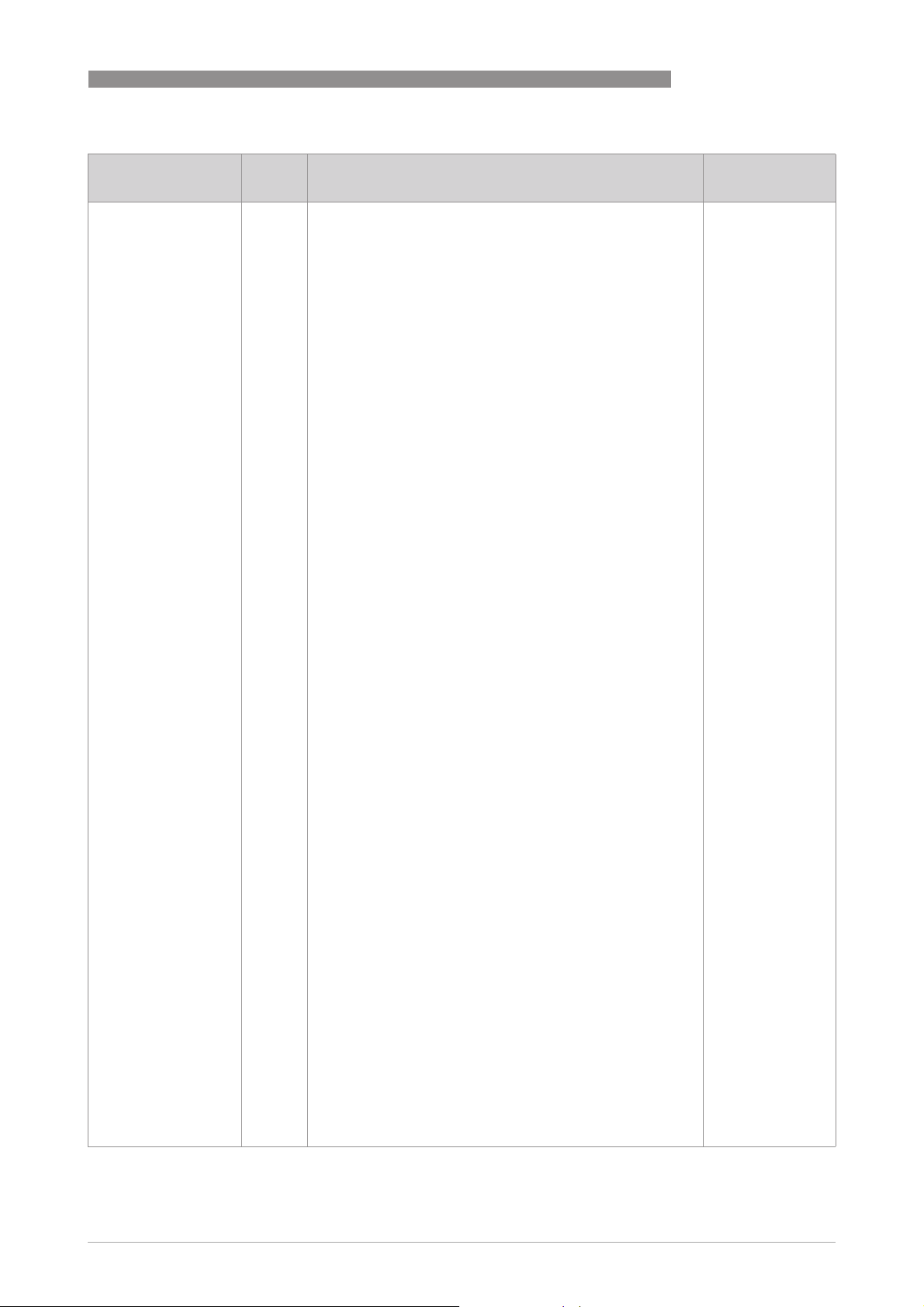
UFC 400
Parameter
Parameter
ParameterParameter
DD name
OPERATION 4
Access Description and settings Initial Value
(1)(11)(31):Check the acoustic properties of the medium for
this path / (1)(12)(29):Remove the damping or blockage in path
3 in the sensor. / (1)(12)(30):Remove the damping or blockage
in path 2 in the sensor. / (1)(12)(31):Remove the damping or
blockage in path 1 in the sensor. / (1)(13)(31):Fill the sensor
with liquid to return to normal operation. / (1)(14)(28):Check
cable and connection at terminal B , reduce load. /
(1)(14)(29):Check cable and connection at terminal B , reduce
load. / (1)(14)(30):Check cable and connection at terminal A ,
reduce load. / (1)(14)(31):Check cable and connection at
terminal A , reduce load. / (1)(15)(30):Check device connected
to current input B. / (1)(15)(31):Check device connected to
current input A. / (1)(16)(00):reserved / (1)(17)(30):Save
settings to Backup 2. / (1)(17)(31):Save settings to Backup 1. /
(1)(18)(29):Change one param. The status should disappear
within 1 minute. / (1)(18)(30):Please contact the factory. /
(1)(18)(31):Check if converter is correctly mounted and fixed
into housing. / (1)(19)(00):reserved / (1)(20)(31):Check process
conditions or pipe diameter settings. / (1)(21)(03):Check the
range settings of the related output. / (1)(21)(04):Check the
range settings of the related output. / (1)(21)(05):Check the
range settings of the related output. / (1)(21)(06):Check the
range settings of the related output. / (1)(21)(07):Check the
range settings of the related output. / (1)(21)(09):Check the
range settings of the related output. / (1)(22)(29):Recalibrate
FrontEnd of the converter or contact the factory. /
(1)(23)(00):reserved / (1)(24)(00):reserved / (1)(25)(06):Turn off
simulation / (1)(25)(07):Turn off simulation / (1)(25)(08):Turn
off simulation / (1)(25)(09):Turn off simulation /
(1)(25)(10):Turn off simulation / (1)(25)(11):Turn off
simulation / (1)(25)(12):Turn off simulation / (1)(25)(30):For
normal operation turn off simulation mode. / (1)(25)(31):For
normal operation turn off simulation mode. /
(1)(26)(00):reserved / (1)(27)(00):reserved /
(1)(28)(00):reserved / (1)(29)(02):Check IO B configuration or
reset to factory configuration. / (1)(29)(03):Check IO B
configuration or reset to factory configuration. /
(1)(29)(04):Check IO A configuration or reset to factory
configuration. / (1)(29)(05):Check IO A configuration or reset to
factory configuration. / (1)(29)(10):Check IO2 configuration or
reset to factory configuration. / (1)(29)(11):Check IO1
configuration or reset to factory configuration. /
(1)(29)(12):Check display configuration or reset to factory
configuration. / (1)(29)(21): Check fieldbus configuration or
reset to factory configuration / (1)(29)(26):Check config. of the
related function. Reset config. to factory. / (1)(29)(30):Check
config. of the related function. Reset config. to factory. /
(1)(29)(31):Check config. of the related function. Reset config.
to factory. / (1)(30)(01):Perform power reset. If the status
returns , contact the factory. / (1)(30)(02):Perform power
reset. If the status returns , contact the factory. /
(1)(30)(07):Perform power reset. If the status returns , contact
the factory. / (1)(30)(08):Perform power reset. If the status
returns , contact the factory. / (1)(30)(16):Perform power
reset. If the status returns , contact the factory. /
(1)(30)(18):Perform power reset. If the status returns , contact
the factory. / (1)(30)(19):Perform power reset. If the status
returns , contact the factory. / (1)(30)(20):Perform power
reset. If the status returns , contact the factory. /
(1)(30)(21):Perform power reset. If the status returns , contact
the factory. / (1)(30)(26):Perform power reset. If the status
returns , contact the factory. / (1)(30)(27):Perform power
reset. If the status returns , contact the factory. /
(1)(30)(28):Perform power reset. If the status returns , contact
the factory. / (1)(30)(31):Perform power reset. If the status
returns , contact the factory. / (1)(31)(31):Check manual for
transducer cabling in case of a remote device.
www.krohne.com05/2013 - 4002813701 - AD FF UFC 400 R01 en
25
Page 26

4 OPERATION
Parameter
Parameter
ParameterParameter
DD name
FD_SIMULATE
FD_SIMULATE
FD_SIMULATEFD_SIMULATE
Field Diagnostic
Simulate
DIAGNOSTIC_
DIAGNOSTIC_
DIAGNOSTIC_DIAGNOSTIC_
SIMULATE_VALUE
SIMULATE_VALUE
SIMULATE_VALUESIMULATE_VALUE
Diagnostic Simulate
Value
DIAGNOSTIC_VALUE
DIAGNOSTIC_VALUE
DIAGNOSTIC_VALUEDIAGNOSTIC_VALUE
Diagnostic Value
ENABLE_DISABLE
ENABLE_DISABLE
ENABLE_DISABLEENABLE_DISABLE
Simulate En/Disable
FD_VER
FD_VER
FD_VERFD_VER
Revision
FEATURES
FEATURES
FEATURESFEATURES
Features
FEATURES_SEL
FEATURES_SEL
FEATURES_SELFEATURES_SEL
Features Selection
FREE_SPACE
FREE_SPACE
FREE_SPACEFREE_SPACE
Free Space
FREE_TIME
FREE_TIME
FREE_TIMEFREE_TIME
Free Time
UFC 400
Access Description and settings Initial Value
Used as the field diagnostic condition when the simulation is
enabled.
R/W Allows the conditions to be manually supplied when
simulation is enabled. The simulate jumper is required for
simulation to be enabled.
Setting:
(00) Check / (01) Electronics : Operation Info /
(08) Electronics : Power Fail / (10) Configuration : Totaliser /
(11) Process : Signal Unreliable / (12) Process : Signal Lost /
(13) Process : Empty Pipe / (14) Electronics : IO Connection /
(15) Process : Current input / (16) M Process /
(17) M Configuration / (18) M Electronics / (19) M Sensor /
(20) S Process / (21) S Configuration / (22) S Electronics /
(23) S Sensor / (24) C Process / (25) C Configuration /
(26) C Electronics / (27) C Sensor / (28) F Process / (29) F
Configuration / (30) F Electronics / (31) F Sensor
R Current field diagnostic condition. Uninitialized
Setting:
(00) Check / (01) Electronics : Operation Info /
(08) Electronics : Power Fail / (10) Configuration : Totaliser /
(11) Process : Signal Unreliable / (12) Process : Signal Lost /
(13) Process : Empty Pipe / (14) Electronics : IO Connection /
(15) Process : Current input / (16) M Process /
(17) M Configuration / (18) M Electronics / (19) M Sensor /
(20) S Process / (21) S Configuration / (22) S Electronics /
(23) S Sensor / (24) C Process / (25) C Configuration /
(26) C Electronics / (27) C Sensor / (28) F Process / (29) F
Configuration / (30) F Electronics / (31) F Sensor
R/W Enable/disable simulation. Uninitialized
Setting:
Uninitialized / Disabled / Active
R The major version of the Field Diagnostics specification used
for the development of this device.
R Used to shows supported resource block options. Reports
Setting:
Reports / Soft W Lock / MVC Report Distribution supported /
MVC Publishing/Subcribing supported / Multi-bit Alarm (BitAlarm) Support
R/W Used to select resource block options. Reports
Setting:
Reports / Soft W Lock / MVC Report Distribution supported /
MVC Publishing/Subscribing supported / Multi-bit Alarm (BitAlarm) Support
R Percent of the memory available for further configuration.
Zero in a preconfigured resource.
Setting:
0.0…100.0
R Percent of the block processing time that is free to process
additional blocks.
Setting:
0.0…100.0
-
Uninitialized
1
Soft W Lock
MVC Report
Distribution
supported
MVC Publishing/
Subcribing
supported
Multi-bit Alarm
(Bit-Alarm)
Support
Soft W Lock
0.0
0.0
26
www.krohne.com 05/2013 - 4002813701 - AD FF UFC 400 R01 en
Page 27

UFC 400
Parameter
Parameter
ParameterParameter
DD name
GRANT_DENY
GRANT_DENY
GRANT_DENYGRANT_DENY
Grant Deny
GRANT
Grant
DENY
Deny
HARD_TYPES
HARD_TYPES
HARD_TYPESHARD_TYPES
Hardware Types
ITK_VER
ITK_VER
ITK_VERITK_VER
ITK Version
(Interoperatibility Test
Kit)
LIM_NOTIFY
LIM_NOTIFY
LIM_NOTIFYLIM_NOTIFY
Limit Notify
MANUFAC_ID
MANUFAC_ID
MANUFAC_IDMANUFAC_ID
Manufacturer ID
MAX_NOTIFY
MAX_NOTIFY
MAX_NOTIFYMAX_NOTIFY
Maximum Notify
MEMORY_SIZE
MEMORY_SIZE
MEMORY_SIZEMEMORY_SIZE
Memory Size
MIN_CYCLE_T
MIN_CYCLE_T
MIN_CYCLE_TMIN_CYCLE_T
Minimium Cycle Time
NV_CYCLE_T
NV_CYCLE_T
NV_CYCLE_TNV_CYCLE_T
Nonvolatile Cycle
Time
RESTART
RESTART
RESTARTRESTART
Restart
RS_STATE
RS_STATE
RS_STATERS_STATE
Resource State
SET_FSTATE
SET_FSTATE
SET_FSTATESET_FSTATE
Set Fault State
OPERATION 4
Access Description and settings Initial Value
R/W Options for controlling access of host computers and local
control panels to operating, tuning and alarm parameters of
the block.
R/W Depending on the philosophy of the plant, the operator or a
higher level device (HLD) or a local operator's panel (LOP) in
the case of "Local", may turn on an item of the "Grant"
attribute - "Program, Tune, Alarm or Local".
Setting:
Program / Tune / Alarm / Local / Operate
R/W The Denied attribute is limited for use by a monitoring
application in an interface device and may not be changed by
an operator.
Setting:
Program denied / Tune denied / Alarm denied / Local denied /
Operate denied
R The types of hardware available as channel numbers. Scalar input
R Major revision number of the interoperability test case used to
register this device.
R/W Maximum number of unconfirmed alert notify messages
allowed.
Setting:
0...255
R Manufacturer identification number - used by an interface
device to locate the DD file for the resource.
Setting:
KROHNE
R Maximum number of unconfirmed alert notify messages
possible.
Setting:
0...255
R Available configuration memory in the empty resource. To be
checked before attempting a download.
R Time duration of the shortest cycle interval of which the
resource is capable (in [1/32 ms]).
R Interval between writing copies of NV parameters to non-
volatile memory. Zero means never (in [1/32 ms]).
R/W Allows a manual restart to be initiated. Several degrees of
restart are possible. They are 1: Run, 2: Restart resource, 3:
Restart with defaults and 4: Restart processor.
Setting:
Uninitialized / Run / Resource / Defaults / Processor
R State of the function block application state machine. Standby
Setting:
Uninitialized / Start_Restart / Initialization / Online Linking /
Online / Standby / Failure
R/W Allows the fault state condition to be manually initiated by
selecting "Set".
Setting:
Off
-
Uninitialized
Uninitialized
5
20
KROHNE
20
0
6400
256000
Run
Off
www.krohne.com05/2013 - 4002813701 - AD FF UFC 400 R01 en
27
Page 28

4 OPERATION
Parameter
Parameter
ParameterParameter
DD name
SHED_RCAS
SHED_RCAS
SHED_RCASSHED_RCAS
Shed Remote Cascade
SHED_ROUT
SHED_ROUT
SHED_ROUTSHED_ROUT
Shed Remote Out
TEST_RW
TEST_RW
TEST_RWTEST_RW
Test R Write
UPDATE_EVT
UPDATE_EVT
UPDATE_EVTUPDATE_EVT
Update Event
Unacknowledged R/W A discrete enumeration which is set to "Unacknowledged"
Update State R A discrete enumeration which gives an indication of whether
Time Stamp R The time when evaluation of the block was started and a
Static Revision R The static revision of the block whose static parameter was
Relative Index R The OD index of the static parameter whose change caused
WRITE_ALM
WRITE_ALM
WRITE_ALMWRITE_ALM
Write Alarm
Unacknowledged R/W A discrete enumeration which is set to "Unacknowledged"
Alarm State R A discrete enumeration which gives an indication of whether
Access Description and settings Initial Value
R/W Time duration at which to give up on computer writes to
function block RCAS locations.
Setting:
0...4294967295 in [1/32 ms]
R/W Time duration at which to give up on computer writes to
function block ROUT locations.
Setting:
0...4294967295 in [1/32 ms]
Read/write test parameter - used only for conformance
testing.
Note: Subelements "1..15" have no function!
This alert is generated by any change to the static data. -
when an update occurs, and set to "Acknowledged" by a write
from a human interface device or other entity which can
acknowledge that the alarm/event has been noticed.
Setting:
Uninitialized / Acknowledged / Unacknowledged
the alert has been reported.
Setting:
Uninitialized / Reported / Not reported
change in alarm/event state was detected that is unreported.
The time stamp value will be maintained constant until alert
confirmation has been received - even if another change of
state occurs.
Setting:
MM / DD / YY (Month / Day / Year)
HH:MM:SS (Hour:Minute:Second)
changed and is being reported. It is possible for the present
value of static revision to be greater than this because static
can be changed at any time.
Setting:
0…65535
this alert, minus the FB starting index. If the update event was
caused by a write to multiple parameters at the same time,
then this attribute will be zero.
Setting:
0…65535
Mix This alert is generated if the write lock parameter is cleared. -
when an alarm occurs, and set to "Acknowledged" by a write
from a human interface device or other entity which can
acknowledge that the alarm/event has been noticed.
Setting:
Uninitialized / Acknowledged / Unacknowledged
the alert is active and whether it has been reported.
Setting:
Uninitialized / Clear - reported / Clear - not reported / Active reported / Active - not reported
UFC 400
640000
640000
-
Uninitialized
Uninitialized
Uninitialized
0
0
Uninitialized
Uninitialized
28
www.krohne.com 05/2013 - 4002813701 - AD FF UFC 400 R01 en
Page 29

UFC 400
Parameter
Parameter
ParameterParameter
DD name
OPERATION 4
Access Description and settings Initial Value
Time Stamp R The time when evaluation of the block was started and a
Subcode R An enumeration specifying the cause of the alert to be
Discrete Value R The value of the associated parameter at the time the alert
WRITE_LOCK
WRITE_LOCK
WRITE_LOCKWRITE_LOCK
Write Lock
WRITE_PRI
WRITE_PRI
WRITE_PRIWRITE_PRI
Write Priority
DIAGNOSIS
DIAGNOSIS
DIAGNOSISDIAGNOSIS
Diagnosis
MEMORY_SUMMARY
Memory Summary
FRAM_DIAG
FRAM Diagnosis
workLOAD R Work load of the processor. 0
EMPTY_PIPE
EMPTY_PIPE
EMPTY_PIPEEMPTY_PIPE
Status Empty Pipe
FORMAT_2P_1L
FORMAT_2P_1L
FORMAT_2P_1LFORMAT_2P_1L
Form. 2.Page 1.Line
R/W If set, no writes from anywhere are allowed, except to clear
R Priority of the alarm generated by clearing the write lock. 0
R Detailed diagnosis of the device. -
R Summary of self diagnosis. Uninitialized
R Result of FRAM self diagnosis. Uninitialized
R/W Defines the influence of the diagnostic ''Process : Empty
R/W No. of decimal places for 1st line of 2nd page (Fct. C5.4.2). X.X
change in alarm/event state was detected that is unreported.
The time stamp value will be maintained constant until alert
confirmation has been received - even if another change of
state occurs.
Setting:
MM / DD / YY (Month / Day / Year)
HH:MM:SS (Hour:Minute:Second)
reported.
Setting:
Other / Block Configuration / Link Configuration / Simulation
Active / Local Override / Device Fault State / Device
Maintenance / Input Failure / Output Failure / Memory
Failure / Lost Static Data / Lost NV Data / Readback Check /
Maintenance Needed / Power Up / Out Of Service
was detected.
Setting:
Discrete State 0...16
WRITE_LOCK. Block inputs will continue to be updated.
Setting:
Uninitialized / Not locked / Locked
Setting:
0...15
Setting:
Task Control / RAM int / RAM ext / ROM boot area / ROM
application / FLASH / FRAM / EEPROM / bit08 / bit09 / bit10 /
bit11 / bit12 / bit13 / bit14 / bit15
Setting:
ok , page high / warning : one header / warning : write
cycles / warning : uncertain / warning : inconsistent / write
error / chip error / page error / parameter error / bit09 /
changed / first init / wait / busy / unknown / not supported
action
Pipe'' (FD_xx_13) to the TB measurements status (Fct.
C1.10.3).
Setting:
Information / Maintenance Required / Checks in progress /
Out Of Specification / Failure
Setting:
#X. / #X.X / #X.XX / #X.XXX / #X.XXXX / #X.XXXXX /
#X.XXXXXX / #X.XXXXXXX / #X.XXXXXXXX / automatic
Uninitialized
Other
State 0
Not locked
Information
www.krohne.com05/2013 - 4002813701 - AD FF UFC 400 R01 en
29
Page 30

4 OPERATION
Parameter
Parameter
ParameterParameter
DD name
FORMAT_2P_2L
FORMAT_2P_2L
FORMAT_2P_2LFORMAT_2P_2L
Form. 2.Page 2.Line
FORMAT_2P_3L
FORMAT_2P_3L
FORMAT_2P_3LFORMAT_2P_3L
Form. 2.Page 3.Line
IO_CONNECTION
IO_CONNECTION
IO_CONNECTIONIO_CONNECTION
Status IO Connection
PASSWRD
PASSWRD
PASSWRDPASSWRD
Password
POWER_FAILURE
POWER_FAILURE
POWER_FAILUREPOWER_FAILURE
Status Power Failure
PROTECT_INFO
PROTECT_INFO
PROTECT_INFOPROTECT_INFO
Access protection
SERIAL_NUMBER
SERIAL_NUMBER
SERIAL_NUMBERSERIAL_NUMBER
Serial Number
SIGNAL_LOST
SIGNAL_LOST
SIGNAL_LOSTSIGNAL_LOST
Status Signal Lost
SIGNAL_UNRELIABLE
SIGNAL_UNRELIABLE
SIGNAL_UNRELIABLESIGNAL_UNRELIABLE
Status Signal
Unreliable
SW_SIMULATE
SW_SIMULATE
SW_SIMULATESW_SIMULATE
SW simulate
Variable_2P_1L
Variable_2P_1L
Variable_2P_1LVariable_2P_1L
Disp. 2.Page 1.Line
Variable_2P_2L
Variable_2P_2L
Variable_2P_2LVariable_2P_2L
Disp. 2.Page 2.Line
UFC 400
Access Description and settings Initial Value
R/W No. of decimal places for 2st line of 2nd page (Fct. C5.4.4). X.X
Setting:
#X. / #X.X / #X.XX / #X.XXX / #X.XXXX / #X.XXXXX /
#X.XXXXXX / #X.XXXXXXX / #X.XXXXXXXX / automatic
R/W No. of decimal places for 3st line of 2nd page (Fct. C5.4.5). X.X
Setting:
#X. / #X.X / #X.XX / #X.XXX / #X.XXXX / #X.XXXXX /
#X.XXXXXX / #X.XXXXXXX / #X.XXXXXXXX / automatic
R/W Defines the influence of the diagnostic ''Electronic : IO
Connection'' (FD_xx_14) to the TB measurements status (Fct.
C1.10.7).
Setting:
Information / Maintenance Required / Checks in progress /
Out Of Specification / Failure
R/W Password to activate access rights to restricted parameters. 0
R/W Defines the influence of the diagnostic ''Electronic : Power
Failure'' (FD_xx_8) to the TB measurements status (Fct.
C1.10.8).
Setting:
Information / Maintenance Required / Checks in progress /
Out Of Specification / Failure
R Current protection level to restricted parameters. Production
Setting:
Concentration / bit 5…6: not use / User / Service level /
Production / Custody Transfer / Write Lock
R Device serial number, serial number of the system. Current serial
R/W Defines the influence of the diagnostic ''Process : Signal
Lost'' (FD_xx_12) to the TB measurements status (Fct.
C1.10.4).
Setting:
Information / Maintenance Required / Checks in progress /
Out Of Specification / Failure
R/W Defines the influence of the diagnostic ''Process : Signal
Unreliable'' (FD_xx_11) to the TB measurements status (Fct.
C1.10.5).
Setting:
Information / Maintenance Required / Checks in progress /
Out Of Specification / Failure
R/W Enable/disable simulation like simulate Hardware jumper. Disable
Setting:
Disable / Active
R/W Select the Function Block output value to display at 2nd page
1st line (Fct. C5.4.1).
Setting:
AI10 / AI2 / AI3 / AI4 / PID / IT1 / IT2
R/W Select the Function Block output value to display at 2nd page
2nd line (Fct. C5.4.3).
Setting:
AI10 / AI2 / AI3 / AI4 / PID / IT1 / IT2
Information
Information
number
Information
Information
AI1
AI1
30
www.krohne.com 05/2013 - 4002813701 - AD FF UFC 400 R01 en
Page 31

UFC 400
Parameter
Parameter
ParameterParameter
Access Description and settings Initial Value
DD name
Variable_2P_3L
Variable_2P_3L
Variable_2P_3LVariable_2P_3L
Disp. 2.Page 3.Line
R/W Select the Function Block output value to display at 2nd page
3rd line (Fct. C5.4.5).
Setting:
AI10 / AI2 / AI3 / AI4 / PID / IT1 / IT2
4.5 Analog Input Block (AI 1...4)
The following tables list the Analog Input Block parameters in alphabetical order.
It describes characteristics of the measurement values obtained from the Transducer Block in a
user defined way and to deliver it to the control system. There are also some parameters in the
Analog Input Block, that can be configured to get a measurement value quality as desired by the
user.
The following tables contain short parameter description, factory settings (Initial Value (IV)) and
possible settings.
OPERATION 4
AI1
Parameter
Parameter
ParameterParameter
DD name
ALERT_KEY
ALERT_KEY
ALERT_KEYALERT_KEY
Alert Key
BLOCK_ERR
BLOCK_ERR
BLOCK_ERRBLOCK_ERR
Block Error
MODE_BLK
MODE_BLK
MODE_BLKMODE_BLK
Block Mode
TARGET
Target
Access Description and settings Initial Value
R/W The identification number of the plant unit. This information
may be used in the host for sorting alarms, etc.
Setting:
1...255
R This parameter reflects the error status associated with the
hardware or software components associated with a block. It
is a bit string, so that multiple errors may be shown.
Setting:
0
Other
• Other: Non-specific error active
• Block Configuration: Error detected in block configuration
• Link Configuration: Error detected in link configuration
• Simulation Active: Simulation enabled in this block
• Local Override: Output tracking of faultstate active
• Device Fault State: Device faultstate set
• Device Maintenance: Device needs maintenance soon
• Input Failure: Process variable has bad status
• Output Failure: Failure detected in output hardware
• Memory Failure: Memory error detected
• Lost Static Data: Static parameters cannot be recovered
• Lost NV Data: Non-volatile parameters cannot be recovered
• Readback Check: Failure detected in READBACK
• Maintenance Needed: Device NEEDS maintenance NOW
• Power Up: Recovery from power failure
• Out Of Service: Block actual mode is out of service
Mix The actual, target, permitted and normal modes of the block. -
R/W This is the mode requested by the operator. Only one mode
from those allowed by the permitted mode parameter may be
requested.
Setting:
Auto / Manual / OOS
OOS
www.krohne.com05/2013 - 4002813701 - AD FF UFC 400 R01 en
31
Page 32

4 OPERATION
Parameter
Parameter
ParameterParameter
DD name
Access Description and settings Initial Value
UFC 400
ACTUAL
Actual
PERMITTED
Permitted
NORMAL
Normal
ST_REV
ST_REV
ST_REVST_REV
Static Revision
STRATEGY
STRATEGY
STRATEGYSTRATEGY
Strategy
TAG_DESC
TAG_DESC
TAG_DESCTAG_DESC
Tag Description
ACK_OPTION
ACK_OPTION
ACK_OPTIONACK_OPTION
Acknowledge
Option
ALARM_HYS
ALARM_HYS
ALARM_HYSALARM_HYS
Alarm Hysteresis
ALARM_SUM
ALARM_SUM
ALARM_SUMALARM_SUM
Alarm Summary
Current R The active status of each alarm. Uninitialized
Unacknowledged R The unacknowledged state of each alarm. Uninitialized
Unreported R The unreported states of each alarm. Uninitialized
R This is the current mode of the block, which may differ from
the target based on operating conditions. Its value is
calculated as part of block execution.
Setting:
Auto / Manual / OOS
R/W Defines the modes which are allowed for an instance in the
block. The permitted mode is configured based on application
requirements.
Setting:
Auto / Manual / OOS
R/W This is the mode which the block should be set to during
normal operating conditions.
Setting:
Auto / Manual / OOS
R The revision level of the static data associated with the
function block. The revision value will be incremented each
time a static parameter value in the block is changed.
Setting:
0...65535
R/W The strategy field can be used to identify grouping of blocks.
This data is not checked or processed by the block.
Setting:
0...65535
R/W This is the user description of the intended application of the
block.
Setting:
≤32 digits
R/W Selection of whether alarms associated with the function
block will be automatically acknowledged.
Setting:
HiHi Alm Auto Ack / Hi Alm Auto Ack / LoLo Alm Auto Ack / Lo
Alm Auto Ack / Blk Alm Auto Ack / Fail Alm Auto Ack / Off
Spec Alm Auto Ack / Maint Alm Auto Ack / Check Alm Auto
Ack
R/W Amount the PV must return within the alarm limits before the
alarm condition clears. Alarm hysteresis is expressed as a
percent of the PV span.
Setting:
0...50%
Mix The current alert status, unacknowledged states, unreported
states and disabled states of the alarms associated with the
function block.
Setting:
HiHi Alarm / Hi Alarm / LoLo Alarm / Lo Alarm / Block Alarm
Setting:
HiHi Alarm Unack / Hi Alarm Unack / LoLo Alarm Unack / Lo
Alarm Unack / Block Alarm Unack
Setting:
HiHi Alarm Unrep / Hi Alarm Unrep / LoLo Alarm Unrep / Lo
Alarm Unrep / Block Alarm Unrep
OOS
Auto
OOS
Auto
0
0
blanks
Uninitialized
0.5
-
32
www.krohne.com 05/2013 - 4002813701 - AD FF UFC 400 R01 en
Page 33

UFC 400
Parameter
Parameter
ParameterParameter
Access Description and settings Initial Value
OPERATION 4
DD name
Disabled R The disabled state of each alarm Uninitialized
Setting:
HiHi Alarm Disabled / Hi Alarm Disabled / LoLo Alarm
Disabled / Lo Alarm Disabled / Block Alarm Disabled
BLOCK_ALM
BLOCK_ALM
BLOCK_ALMBLOCK_ALM
Block Alarm
Unacknowledged R/W A discrete enumeration which is set to "Unacknowledged"
Alarm State R A discrete enumeration which gives an indication of whether
Time Stamp R The time when evaluation of the block was started and a
Subcode R An enumeration specifying the cause of the alert to be
Value R The value of the associated parameter at the time the alert
CHANNEL
CHANNEL
CHANNELCHANNEL
Channel
Mix The block alarm is used for all configuration, hardware,
R/W The number of the logical hardware channel that is connected
connection failure or system problems in the block. The cause
of the alert is entered in the subcode field. The first alert to
become active will set the "Active" status in the "Status"
attribute. As soon as the "Unreported" status is cleared by the
alert reporting task, another block alert may be reported
without clearing the "Active" status, if the subcode has
changed.
when an alarm occurs, and set to "Acknowledged" by a write
from a human interface device or other entity which can
acknowledge that the alarm/event has been noticed.
Setting:
Uninitialized / Acknowledged / Unacknowledged
the alert is active and whether it has been reported.
Setting:
Uninitialized / Clear - reported / Clear - not reported / Active reported / Active - not reported
change in alarm/event state was detected that is unreported.
The time stamp value will be maintained constant until alert
confirmation has been received - even if another change of
state occurs.
Setting:
MM / DD / YY (Month / Day / Year)
HH:MM:SS (Hour:Minute:Second)
reported.
Setting:
Other / Block Configuration / Link Configuration / Simulation
Active / Local Override / Device Fault State / Device
Maintenance / Input Failure / Output Failure / Memory
Failure / Lost Static Data / Lost NV Data / Readback Check /
Maintenance Needed / Power Up / Out Of Service
was detected.
Setting:
0...255
to this I/O block. This information defines the transducer to be
used going to or from the physical world.
Note:
Note:
Note:Note:
W = Writeable only by setting "OOS" in MODE_BLK
Setting:
0 Uninitialized
1 Volume Flow
2 Mass Fow
3 Flow Velocity
4 Velocity of Sound
5 Gain
6 SNR
7 Electronic Temperature
-
Uninitialized
Uninitialized
Uninitialized
Other
0
Uninitialized
www.krohne.com05/2013 - 4002813701 - AD FF UFC 400 R01 en
33
Page 34

4 OPERATION
Parameter
Parameter
ParameterParameter
DD name
FIELD_VAL
FIELD_VAL
FIELD_VALFIELD_VAL
Field Value
Status R Digital transducers, unlike their analogue versions, can detect
Value R A numerical quantity entered by a user or calculated by the
GRANT_DENY
GRANT_DENY
GRANT_DENYGRANT_DENY
Grant Deny
GRANT
Grant
DENY
Deny
HI_ALM
HI_ALM
HI_ALMHI_ALM
High Alarm
HI_HI_ALM
HI_HI_ALM
HI_HI_ALMHI_HI_ALM
High High Alarm
Settings of 5 subelements for previous 2 parameters High Alarm and High High Alarm:
Unacknowledged R/W Setting:
Alarm State R Setting:
Time Stamp R Setting:
Subcode R Setting:
VALUE
Float Value
HI_HI_LIM
HI_HI_LIM
HI_HI_LIMHI_HI_LIM
High High Limit
HI_HI_PRI
HI_HI_PRI
HI_HI_PRIHI_HI_PRI
High High Priority
HI_LIM
HI_LIM
HI_LIMHI_LIM
High Limit
HI_PRI
HI_PRI
HI_PRIHI_PRI
High Priority
Access Description and settings Initial Value
R Raw value of the field device in percent of the PV range, with a
status reflecting the transducer condition, before signal
characterization (L_TYPE) or filtering (PV_FTIME).
faults that make the measurement bad or prevent the
actuator from responding. This additional, valuable
information will be passed along with each transmission of a
data value in the form of a status attribute.
algorithm.
Options for controlling access of host computers and local
control panels to operating, tuning and alarm parameters of
the block.
R/W Depending on the philosophy of the plant, the operator or a
higher level device (HLD) or a local operator's panel (LOP) in
the case of "Local", may turn on an item of the "Grant"
attribute - "Program, Tune, Alarm or Local".
Setting:
Program / Tune / Alarm / Local / Operate
R/W The deny attribute is provided for use by a monitoring
application in an interface device and may not be changed by
an operator.
Setting:
Program denied / Tune denied / Alarm denied / Local denied /
Operate denied
The status for High Alarm and its associated time stamp.
Settings of 5 subelements see in the following part.
Mix The status for High High Alarm and its associated time stamp.
Settings of 5 subelements see in the following part.
Uninitialized / Acknowledged / Unacknowledged
Uninitialized / Clear - reported / Clear - not reported / Active reported / Active - not reported
MM / DD / YY (Month / Day / Year)
HH:MM:SS (Hour:Minute:Second)
Other / Block Configuration / Link Configuration / Simulation
Active / Local Override / Device Fault State / Device
Maintenance / Input Failure / Output Failure / Memory
Failure / Lost Static Data / Lost NV Data / Readback Check /
Maintenance Needed / Power Up / Out Of Service
R A numerical quantity entered by a user or calculated by the
algorithm.
R/W The setting for High High Alarm in engineering units.
Setting range see in the following part.
R/W Priority of the High High Alarm.
Setting see in the following part.
R/W The setting for High Alarm in engineering units.
Setting range see in the following part.
R/W Priority of the High Alarm.
Setting see in the following part.
UFC 400
-
Bad
Non Specific
Not Limited
0.0
-
Uninitialized
Uninitialized
-
-
Uninitialized
Uninitialized
Uninitialized
Other
0.0
NaN
0
NaN
0
34
www.krohne.com 05/2013 - 4002813701 - AD FF UFC 400 R01 en
Page 35

UFC 400
Parameter
Parameter
ParameterParameter
DD name
OPERATION 4
Access Description and settings Initial Value
Setting range for previous 2
parameters:
x_y_LIM
x_y_Limit
Setting for previous 2
parameters:
x_y_PRI
x_y_Priority
IO_OPTS
IO_OPTS
IO_OPTSIO_OPTS
IO Options
(IO = Input/Output)
L_TYPE
L_TYPE
L_TYPEL_TYPE
Linearization Type
LO_ALM
LO_ALM
LO_ALMLO_ALM
Low Alarm
LO_LO_ALM
LO_LO_ALM
LO_LO_ALMLO_LO_ALM
Low Low Alarm
Low Low Alarm
Low Low AlarmLow Low Alarm
Settings of 5 subelements for previous 2 parameters Low Alarm and Low Low Alarm:
Unacknowledged R/W Setting:
Alarm State R Setting:
Time Stamp R Setting:
Subcode R An enumeration specifying the cause of the alert to be
VALUE
Float Value
LO_LIM
LO_LIM
LO_LIMLO_LIM
Low Limit
LO_LO_LIM
LO_LO_LIM
LO_LO_LIMLO_LO_LIM
Low Low Limit
LO_PRI
LO_PRI
LO_PRILO_PRI
Low Priority
LO_LO_PRI
LO_LO_PRI
LO_LO_PRILO_LO_PRI
Low Low Priority
R/W Options which the user may select to alter input and output
R/W Determines if the values passed by the TB to the AI block may
R A numerical quantity entered by a user or calculated by the
R/W The setting for Low Alarm in engineering units.
R/W The setting for Low Low Alarm in engineering units.
R/W Priority of the Low Alarm.
R/W Priority of the Low Low Alarm.
-3.39 E38…+3.39 E38 / - INF (- infinite) / + INF (+ infinite)
0: The associated alert may clear when the priority is changed
to 0, but it will never occur.
1: The associated alert is not send as a notification. If the
priority is above 1, then the alert must be reported.
2: Reserved for alerts that do not require the attention of a
plant operator, e.g. diagnostic and system alerts. Block alarm,
error alarm and update event have a fixed priority of 2.
3...7: Increasing higher priorities - advisory alarms.
8...15: Increasing higher priorities - critical alarms.
block processing.
Setting:
Low Cutoff / Units Conversion
be used directly (Direct) or if the value is in different units and
must be converted linearly (Indirect) or with square root (Ind
Sqr Root), using the input range defined by the transducer and
the associated output range.
W = Writeable only by setting "OOS" in MODE_BLK
Setting:
Uninitialized / Direct / Indirect / Ind Sqr Root
The status for Low Alarm and its associated time stamp.
Settings of 5 subelements see in the following part.
The status for Low Low Alarm and its associated time stamp.
Settings of 5 subelements see in the following part.
Uninitialized / Acknowledged / Unacknowledged
Uninitialized / Clear - reported / Clear - not reported / Active reported / Active - not reported
MM / DD / YY (Month / Day / Year)
HH:MM:SS (Hour:Minute:Second)
reported.
Setting:
Other / Block Configuration / Link Configuration / Simulation
Active / Local Override / Device Fault State / Device
Maintenance / Input Failure / Output Failure / Memory
Failure / Lost Static Data / Lost NV Data / Readback Check /
Maintenance Needed / Power Up / Out Of Service
algorithm.
Setting range see in the following part.
Setting range see in the following part.
Setting see in the following part.
Setting see in the following part.
0
Uninitialized
Uninitialized
-
-
Uninitialized
Uninitialized
Uninitialized
Other
0.0
(-NaN)
(-NaN)
0
0
www.krohne.com05/2013 - 4002813701 - AD FF UFC 400 R01 en
35
Page 36

4 OPERATION
Parameter
Parameter
ParameterParameter
DD name
Access Description and settings Initial Value
UFC 400
Setting range for previous 2
parameters:
x_y_LIM
x_y_Limit
Setting for previous 2
parameters:
x_y_PRI
x_y_Priority
LOW_CUT
LOW_CUT
LOW_CUTLOW_CUT
Low Cutoff
OUT
OUT
OUTOUT
Output
Status R Digital transducers, unlike their analogue versions, can detect
Value R/W A numerical quantity entered by a user or calculated by the
OUT_SCALE
OUT_SCALE
OUT_SCALEOUT_SCALE
Output Scale
EU_100
EU at 100%
EU_0
EU at 0%
UNITS_INDEX
Units Index
DECIMAL
Decimal
PV
PV
PVPV
Process Value
Status R Digital transducers, unlike their analogue versions, can detect
Value R A numerical quantity entered by a user or calculated by the
PV_FTIME
PV_FTIME
PV_FTIMEPV_FTIME
PV F Time
(Process Value
Filter Time)
R/W Limit used in square root processing. A value of zero percent
R/W The primary analogue discrete value calculated as a result of
R/W The high and low scale values, engineering units code and
R/W The engineering unit value which represents the upper end of
R/W The engineering unit value which represents the lower end of
R/W Device Description units code index for the engineering unit
R/W The number of digits to the right of the decimal point which
R/W Time constant of a single exponential filter for the PV, in
-3.39 E38…+3.39 E38 / - INF (- infinite) / + INF (+ infinite)
0: The associated alert may clear when the priority is changed
to 0, but it will never occur.
1: The associated alert is not send as a notification. If the
priority is above 1, then the alert must be reported.
2: Reserved for alerts that do not require the attention of a
plant operator, e.g. diagnostic and system alerts. Block alarm,
error alarm and update event have a fixed priority of 2.
3...7: Increasing higher priorities - advisory alarms.
8...15: Increasing higher priorities - critical alarms.
of scale is used in block processing if the transducer value
falls below this limit, in %of scale. This feature may be used to
eliminate noise near zero for a flow sensor.
Setting:
≥0.0
executing the function.
Note:
Note:
Note:Note:
W = Writeable only by setting "OOS" in MODE_BLK
faults that make the measurement bad or prevent the
actuator from responding. This additional, valuable
information will be passed along with each transmission of a
data value in the form of a status attribute.
algorithm.
number of digits to the right of the decimal point to be used in
displaying the OUT parameter and parameters which have the
same scaling as OUT.
range of the associated block parameter.
range of the associated block parameter.
descriptor for the associated block value.
Setting:
All units are possible.
should be used by an interface device in displaying the
specified parameter.
Either the primary analogue value for use in executing the
function or a process value associated with it.
faults that make the measurement bad or prevent the
actuator from responding. This additional, valuable
information will be passed along with each transmission of a
data value in the form of a status attribute.
algorithm.
seconds.
Setting:
0.0…60.0
0
0
-
-
-
-
100.0
0.0
Uninitialized
0
-
0
0.0
0
36
www.krohne.com 05/2013 - 4002813701 - AD FF UFC 400 R01 en
Page 37

UFC 400
Parameter
Parameter
ParameterParameter
Access Description and settings Initial Value
OPERATION 4
DD name
SIMULATE
SIMULATE
SIMULATESIMULATE
Simulate
Simulate Status R/W Used for the transducer status when simulation is enabled. 0
Simulate Value R/W Used for the transducer value when simulation is enabled. 0.0
Transducer Status R Status of value supplied by transducer. 0
Transducer Value R Current value supplied by transducer. 0.0
Simulate
En/Disable
STATUS_OPTS
STATUS_OPTS
STATUS_OPTSSTATUS_OPTS
Status Option
UPDATE_EVT
UPDATE_EVT
UPDATE_EVTUPDATE_EVT
Update Event
Unacknowledged RW A discrete enumeration which is set to "Unacknowledged"
Update State R A discrete enumeration which gives an indication of whether
Time Stamp R The time when evaluation of the block was started and a
Static Revision R The static revision of the block whose static parameter was
Relative Index R The OD index of the static parameter whose change caused
XD_SCALE
XD_SCALE
XD_SCALEXD_SCALE
Transducer Scale
EU_100
EU at 100%
Mix Allows the transducer analogue input or output to the block to
R/W The parameter "SW_Simulated" in RB Block must be enabled. Disabled
R/W Options which the user may select in the block processing of
R/W The high and low scale values, engineering units code and
R/W The engineering unit value which represents the upper end of
be manually supplied when "Simulate" is enabled. When
simulation is disabled, the simulate value and status track the
actual value and status.
Setting:
-3.39 E38 … +3.39 E38, - INF, + INF
Setting:
Uninitialized / Disabled / Active
status.
Setting:
Propagate Fault Forward / Uncertain if limited / BAD if
limited / Uncertain if Man.
This alert is generated by any change to the static data. -
when an alarm occurs, and set to "Acknowledged" by a write
from a human interface device or other entity which can
acknowledge that the alarm/event has been noticed.
Setting:
Uninitialized / Acknowledged / Unacknowledged
the alert has been reported.
Setting:
Uninitialized / Reported / Not Reported
change in alarm/event state was detected that is unreported.
The time stamp value will be maintained constant until alert
confirmation has been received - even if another change of
state occurs. Time stamp records the time when parameter
was updated.
Setting:
MM / DD / YY (Month / Day / Year)
HH:MM:SS (Hour:Minute:Second)
changed and is being reported. It is possible for the present
value of static revision to be greater than this because static
can be changed at any time.
this alert, minus the FB starting index. If the update event was
caused by a write to multiple parameters at the same time,
then this attribute will be zero.
number of digits to the right of the decimal point used with the
value obtained from the transducer for a specified channel.
Note:
Note:
Note:Note:
W = Writeable only by setting "OOS" in MODE_BLK
range of the associated block parameter.
-
Uninitialized
Uninitialized
Uninitialized
Uninitialized
0
0
-
100
www.krohne.com05/2013 - 4002813701 - AD FF UFC 400 R01 en
37
Page 38

4 OPERATION
Parameter
Parameter
ParameterParameter
DD name
Access Description and settings Initial Value
UFC 400
EU_0
EU at 0%
UNITS_INDEX
Units Index
DECIMAL
Decimal
R/W The engineering unit value which represents the lower end of
R/W Device Description units code index for the engineering unit
R/W The number of digits to the right of the decimal point which
range of the associated block parameter.
descriptor for the associated block value.
Temperature units:
Temperature units:
Temperature units:Temperature units:
K; °C; °F
Mass flow units:
Mass flow units:
Mass flow units:Mass flow units:
kg/s; kg/min; kg/h; kg/d; t/s; t/min; t/h; t/d;g/s; g/min; g/h;
g/d; lb/s; lb/min; lb/h; lb/d; klb(US)/s; klb(US)/min; klb(US)/h;
klb(US)/d; st/s = (Ston/s); st/min = (Ston/min); st/h = (Ston/h);
st/d = (Ston/d); lt/s = (LTon/s); lt/min = (Lton/min); lt/h =
(LTon/h); lt/d = (LTon/d); MLB/H
Volume flow units:
Volume flow units:
Volume flow units:Volume flow units:
m³/s; m³/min; m³/h; m³/d; L/s; L/min; L/h; L/d; kL/s; kL/min;
kL/h; kL/d; mL/min; CFS; CFM; CFH; ft³/d; kCFS; kCFM;
kCFH; kft³/d; gal/s; GPM; gal/h; gal/d; bbl/s; bbl/min; bbl/h;
bbl/d; ImpGal/s; ImpGal/min; ImpGal/h; ImpGal/d
Speed (velocity) units:
Speed (velocity) units:
Speed (velocity) units:Speed (velocity) units:
m/s; mm/s; m/h; km/h; in/s; ft/s; yd/s; in/min; ft/min; yd/min;
in/h; ft/h; yd/h
Gain, SNR units:
Gain, SNR units:
Gain, SNR units:Gain, SNR units:
dB
should be used by an interface device in displaying the
specified parameter.
0.0
Depends on the
type, the device is
calibrated for
0
38
www.krohne.com 05/2013 - 4002813701 - AD FF UFC 400 R01 en
Page 39

UFC 400
4.6 FLOWTB (Flow Transducer Block)
Parameter
Parameter
ParameterParameter
DD name
ALERT_KEY
ALERT_KEY
ALERT_KEYALERT_KEY
Alert Key
BLOCK_ERR
BLOCK_ERR
BLOCK_ERRBLOCK_ERR
Block Error
MODE_BLK
MODE_BLK
MODE_BLKMODE_BLK
Block Mode
TARGET
Target
ACTUAL
Actual
PERMITTED
Permitted
NORMAL
Normal
ST_Rev
ST_Rev
ST_RevST_Rev
Static Revision
Access Description and settings Initial Value
R/W The identification number of the plant unit. This information
may be used in the host for sorting alarms, etc.
Setting:
1...255
R This parameter reflects the error status associated with the
hardware or software components associated with a block. It
is a bit string, so that multiple errors may be shown.
Setting:
• Other: Non-specific error active
• Block Configuration: Error detected in block configuration
• Link Configuration: Error detected in link configuration
• Simulation Active: Simulation enabled in this block
• Local Override: Output tracking of faultstate active
• Device Fault State: Device faultstate set
• Device Maintenance: Device needs maintenance soon
• Input Failure: Process variable has bad status
• Output Failure: Failure detected in output hardware
• Memory Failure: Memory error detected
• Lost Static Data: Static parameters cannot be recovered
• Lost NV Data: Non-volatile parameters cannot be recovered
• Readback Check: Failure detected in READBACK
• Maintenance Needed: Device NEEDS maintenance NOW
• Power Up: Recovery from power failure
• Out Of Service: Block actual mode is out of service
The actual, target, permitted and normal modes of the block. -
R/W This is the mode requested by the operator. Only one mode
from those allowed by the permitted mode parameter may be
requested.
Setting:
Auto / OOS
R This is the current mode of the block, which may differ from
the target based on operating conditions. Its value is
calculated as part of block execution.
Setting:
Auto / OOS
R/W Defines the modes which are allowed for an instance of the
block. The permitted mode is configured based on application
requirement.
Setting:
Auto / OOS
R/W This is the mode which the block should be set to during
normal operating conditions.
Setting:
Auto / OOS
R The revision level of the static data associated with the
function block. The revision value will be incremented each
time a static parameter value in the block is changed.
Setting:
0...65535
OPERATION 4
0
Other
Auto
Auto
Auto
OOS
Auto
0
www.krohne.com05/2013 - 4002813701 - AD FF UFC 400 R01 en
39
Page 40

4 OPERATION
Parameter
Parameter
ParameterParameter
DD name
STRATEGY
STRATEGY
STRATEGYSTRATEGY
Strategy
TAG_DESC
TAG_DESC
TAG_DESCTAG_DESC
Tag Description
BLOCK_ALM
BLOCK_ALM
BLOCK_ALMBLOCK_ALM
Block Alarm
Unacknowledged R/W A discrete enumeration which is set to "Unacknowledged"
Alarm State R A discrete enumeration which gives an indication of whether
Time Stamp R The time when evaluation of the block was started and a
Subcode R An enumeration specifying the cause of the alert to be
Value R The value of the associated parameter at the time the alert
UPDATE_EVT
UPDATE_EVT
UPDATE_EVTUPDATE_EVT
Update Event
Unacknowledged R/W A discrete enumeration which is set to "Unacknowledged"
Access Description and settings Initial Value
R/W The strategy field can be used to identify grouping of blocks.
This data is not checked or processed by the block.
Setting:
0...65535
R/W The user description of the intended application of the block. blanks
Setting:
≤32 digits
The block alarm is used for all configuration, hardware,
connection failure or system problems in the block. The cause
of the alert is entered in the subcode field. The first alert to
become active will set the "Active" status in the "Status"
attribute. As soon as the "Unreported" status is cleared by the
alert reporting task, another block alert may be reported
without clearing the "Active" status, if the subcode has
changed.
when an alarm occurs, and set to "Acknowledged" by a write
from a human interface device or other entity which can
acknowledge that the alarm/event has been noticed.
Setting:
Uninitialized / Acknowledged / Unacknowledged
the alert is active and whether it has been reported.
Setting:
Uninitialized / Clear - reported / Clear - not reported / Active reported / Active - not reported
change in alarm/event state was detected that is unreported.
The time stamp value will be maintained constant until alert
confirmation has been received - even if another change of
state occurs.
Setting:
MM / DD / YY (Month / Day / Year)
HH:MM:SS (Hour:Minute:Second)
reported.
Setting:
Other / Block Configuration / Link Configuration / Simulation
Active / Local Override / Device Fault State / Device
Maintenance / Input Failure / Output Failure / Memory
Failure / Lost Static Data / Lost NV Data / Readback Check /
Maintenance Needed / Power Up / Out Of Service
was detected.
Setting:
0...255
This alert is generated by any change to the static data. -
when an alarm occurs, and set to "Acknowledged" by a write
from a human interface device or other entity which can
acknowledge that the alarm/event has been noticed.
Setting:
Uninitialized / Acknowledged / Unacknowledged
UFC 400
0
-
Uninitialized
Uninitialized
Uninitialized
Other
0
Uninitialized
40
www.krohne.com 05/2013 - 4002813701 - AD FF UFC 400 R01 en
Page 41

UFC 400
Parameter
Parameter
ParameterParameter
DD name
OPERATION 4
Access Description and settings Initial Value
Update State R A discrete enumeration which gives an indication of whether
Time Stamp R The time when evaluation of the block was started and a
Static Revision R The static revision of the block whose static parameter was
Relative Index R The OD index of the static parameter whose change caused
COLLECTION_
COLLECTION_
COLLECTION_COLLECTION_
DIRECTORY
DIRECTORY
DIRECTORYDIRECTORY
Collection
Directory
PRIMARY_VALUE_
PRIMARY_VALUE_
PRIMARY_VALUE_PRIMARY_VALUE_
TYPE
TYPE
TYPETYPE
Primary Value
Type
PRIMARY_VALUE
PRIMARY_VALUE
PRIMARY_VALUEPRIMARY_VALUE
volume flow
STATUS
Status
VALUE
Value
PRIMARY_VALUE_
PRIMARY_VALUE_
PRIMARY_VALUE_PRIMARY_VALUE_
RANGE
RANGE
RANGERANGE
Volume Flow range
EU_100
max value
EU_0
min value
UNITS_INDEX
Units Index
R The type of measurement represented by the primary value.
R Digital transducers, unlike their analogue versions, can detect
R A numerical quantity entered by a user or calculated by the
R The engineering unit value which represents the upper end of
R The engineering unit value which represents the lower end of
R/W Device Description units code index for the engineering unit
the alert has been reported.
Setting:
Uninitialized / Update reported / Update not reported
change in alarm/event state was detected that is unreported.
The time stamp value will be maintained constant until alert
confirmation has been received - even if another change of
state occurs. Time stamp records the time when parameter
was updated.
Setting:
MM / DD / YY (Month / Day / Year)
HH:MM:SS (Hour:Minute:Second)
changed and is being reported. It is possible for the present
value of static revision to be greater than this because static
can be changed at any time.
Setting:
0…65535
this alert, minus the FB starting index. If the update event was
caused by a write to multiple parameters at the same time,
then this attribute will be zero.
Setting:
0…65535
A directory that specifies the number, starting indices and DD
Item IDs of the data collections in each transducer within a
Transducer Block.
For example: mass flow, absolute pressure, differential
temperature
The measured volume flow value and status available to the
Function Block.
faults that make the measurement bad or prevent the
actuator from responding. This additional, valuable
information will be passed along with each transmission of a
data value in the form of a status attribute.
algorithm.
The high and low range limit values, the engineering units
code and the number of digits to the right of the decimal point
to be used to display the Primary Value.
range of the associated Block Parameter.
range of the associated Block Parameter.
descriptor for the associated block value.
Settings:
m³/s; m³/min; m³/h; m³/d; L/s; L/min; L/h; L/d; kL/s; kL/min;
kL/h; kL/d; mL/min; CFS; CFM; CFH; ft³/d; kCFS; kCFM;
kCFH; kft³/d; gal/s; GPM; gal/h; gal/d; bbl/s; bbl/min; bbl/h;
bbl/d; ImpGal/s; ImpGal/min; ImpGal/h; ImpGal/d
Uninitialized
Uninitialized
0
0
-
Volumetric flow
-
-
-
-
NaN
-NaN
m³/h
www.krohne.com05/2013 - 4002813701 - AD FF UFC 400 R01 en
41
Page 42

4 OPERATION
Parameter
Parameter
ParameterParameter
DD name
Access Description and settings Initial Value
UFC 400
DECIMAL
Decimal
PRIMARY_VALUE_
PRIMARY_VALUE_
PRIMARY_VALUE_PRIMARY_VALUE_
103
103
103103
Flow Velocity
STATUS
Status
VALUE
Value
PRIMARY_VALUE_
PRIMARY_VALUE_
PRIMARY_VALUE_PRIMARY_VALUE_
RANGE_103
RANGE_103
RANGE_103RANGE_103
Flow Velocity
Range
EU_100
max value
EU_0
min value
UNITS_INDEX
Units Index
DECIMAL
Decimal (Point)
AVERAGING_MAX_
AVERAGING_MAX_
AVERAGING_MAX_AVERAGING_MAX_
STACKING
STACKING
STACKINGSTACKING
Averaging - Max.
stacking
AVERAGING_MIN_
AVERAGING_MIN_
AVERAGING_MIN_AVERAGING_MIN_
STACKING
STACKING
STACKINGSTACKING
Averaging - Min.
stacking
AVERAGING_
AVERAGING_
AVERAGING_AVERAGING_
MODE
MODE
MODEMODE
Averaging Mode
BLOCK_ERR_
BLOCK_ERR_
BLOCK_ERR_BLOCK_ERR_
DESC_1
DESC_1
DESC_1DESC_1
Block Error
Description
CAL_ACTION
CAL_ACTION
CAL_ACTIONCAL_ACTION
Calibration
R The number of digits to the right of the decimal point which
should be used by an interface device in displaying the
specified parameter.
The measured value and status available to the Function
Block.
R Digital transducers, unlike their analogue versions, can detect
faults that make the measurement bad or prevent the
actuator from responding. This additional, valuable
information will be passed along with each transmission of a
data value in the form of a status attribute.
R A numerical quantity entered by a user or calculated by the
algorithm.
The high and low range limit values, the engineering units
code and the number of digits to the right of the decimal point
to be used to display the Primary Value.
R The engineering unit value which represents the upper end of
range of the associated Block Parameter.
R The engineering unit value which represents the lower end of
range of the associated Block Parameter.
R/W Device Description units code index for the engineering unit
descriptor for the associated block value.
Settings:
m/s; mm/s; m/h; km/h; in/s; ft/s; yd/s; in/min; ft/min; yd/min;
in/h; ft/h; yd/h
R The number of digits to the right of the decimal point which
should be used by an interface device in displaying the
specified parameter.
R/W Max. stacking (Fct. D1.8.3) 7
Settings:
0...7
R/W Min. stacking (Fct. D1.8.2) 0
Settings:
0...7
R/W Mode (Fct. D1.8.1) Off
Settings:
Off / On
R This parameter is used by a device to report more specific
details regarding persistent errors that are reported through
BLOCK_ERR.
Settings:
TB is OOS
R/W Selector to start a calibration. no action
Settings:
PROTECT_INFO = Service Level:
no action / zero factory calibration / zero automatic
calibration / path factory calibration / path calibration / store
calibration / discard calibration
PROTECT_INFO <> Service Level:
no action / zero factory calibration / zero automatic
calibration / store calibration / discard calibration
1
-
-
-
-
NaN
-NaN
m/s
0
Uninitialized
42
www.krohne.com 05/2013 - 4002813701 - AD FF UFC 400 R01 en
Page 43

UFC 400
Parameter
Parameter
ParameterParameter
DD name
CAL_LAST_
CAL_LAST_
CAL_LAST_CAL_LAST_
RESULT
RESULT
RESULTRESULT
Calib. Result
COUNTER_
COUNTER_
COUNTER_COUNTER_
DECREASE
DECREASE
DECREASEDECREASE
Counter Decrease
COUNTER_LIMIT
COUNTER_LIMIT
COUNTER_LIMITCOUNTER_LIMIT
Counter Limit
DEAD_TIME
DEAD_TIME
DEAD_TIMEDEAD_TIME
Dead Time
DENSITY
DENSITY
DENSITYDENSITY
Density
DYN_VISCOSITY
DYN_VISCOSITY
DYN_VISCOSITYDYN_VISCOSITY
Dynamic viscosity
ERROR_LIMIT
ERROR_LIMIT
ERROR_LIMITERROR_LIMIT
Error Limit
FLOW_DIRECTION
FLOW_DIRECTION
FLOW_DIRECTIONFLOW_DIRECTION
Flow Direction
FLUID_VOS
FLUID_VOS
FLUID_VOSFLUID_VOS
Velocity of Sound
GK_VALUE
GK_VALUE
GK_VALUEGK_VALUE
GK
HYSTERISIS
HYSTERISIS
HYSTERISISHYSTERISIS
LFC hysteresis
LIMITATION_MAX
LIMITATION_MAX
LIMITATION_MAXLIMITATION_MAX
Upper Limit
OPERATION 4
Access Description and settings Initial Value
R idle
Settings:
idle
Zero calibration:
Zero calibration:
Zero calibration:Zero calibration:
Passed/ Failed/ 0 %/ 10 %/ 20 %/ 30 %/ 40 %/ 50 %/ 60 %/
70 % / 80 % / 90 % / 100 %
Path calibration:
Path calibration:
Path calibration:Path calibration:
Passed / Failed / 0 % / 10 % / 20 % / 30 % / 40 % / 50 % / 60
% / 70 % / 80 % / 90 % / 100 %
R/W Plausibility counter decrement setting. Number of counts to
be decreased on the plausibility counter when the actual
measured value is within the error limits (Fct. C1.4.2).
Settings:
1...99
R/W Limit setting for the plausibility counter. When this limit is
reached, the measured value will not be discarded when it
exceeds the error limit (Fct. C1.4.3).
Settings:
0...999
R/W Dead time (Fct. D1.7) 2.0 µs
Settings:
0.0...300.0 µs
R/W Sets the density of the fluid (Fct. C1.9). 1.00 kg/L
Settings:
0.1...5.0 kg/L
R/W Dynamic viscosity of fluid (Fct. C1.7.2) 1.0 cP
Settings:
0.1...5000.0 cP
R/W In percentage of the measured value. If the measured value
exceeds this limit compared to the previous measured value,
the measured value will be discarded and the plausibility
counter will be increased (Fct. C1.4.1).
Settings:
0.0...100.00
R/W Selects the direction of the measured flow (Fct. C1.3.2). normal
Settings:
normal / reverse
R/W Velocity of Sound (Fct. D2.2.1) 1485.0 m/s
Settings:
500.0...3000.0 m/s
R/W Sets the meter factor (Fct. C1.2.2). 1.0
Settings:
0.5...10.00
R/W Low flow cutoff hysteresis (Fct. C1.3.4). 0.0 m/s
Settings:
0.0...100.00 m/s
R/W Upper limitation of all flow values , before smoothing by time
constant, affects all outputs (Fct. C1.3.1).
Settings:
0.0010…1000.0 m/s
1
0
10.0
20.0 m/s
www.krohne.com05/2013 - 4002813701 - AD FF UFC 400 R01 en
43
Page 44

4 OPERATION
Parameter
Parameter
ParameterParameter
DD name
LIMITATION_MIN
LIMITATION_MIN
LIMITATION_MINLIMITATION_MIN
Lower Limit
LINEARIZATION
LINEARIZATION
LINEARIZATIONLINEARIZATION
Linearization
LOW_FLOW_
LOW_FLOW_
LOW_FLOW_LOW_FLOW_
CUTOFF
CUTOFF
CUTOFFCUTOFF
Low flow cutoff
METER_SIZE_
METER_SIZE_
METER_SIZE_METER_SIZE_
FREE_VAL
FREE_VAL
FREE_VALFREE_VAL
Meter size
METER_SIZE_
METER_SIZE_
METER_SIZE_METER_SIZE_
TBL_VAL
TBL_VAL
TBL_VALTBL_VAL
Meter size
NUM_PATHS
NUM_PATHS
NUM_PATHSNUM_PATHS
Number of paths
PATH_LENGTH_1
PATH_LENGTH_1
PATH_LENGTH_1PATH_LENGTH_1
Path length 1
PATH_LENGTH_2
PATH_LENGTH_2
PATH_LENGTH_2PATH_LENGTH_2
Path length 2
PATH_LENGTH_3
PATH_LENGTH_3
PATH_LENGTH_3PATH_LENGTH_3
Path length 3
PING_TIME
PING_TIME
PING_TIMEPING_TIME
Ping time
Access Description and settings Initial Value
R/W Lower limitation of all flow values , before smoothing by time
R/W (Compensation for errors made at different Reynolds
R/W Sets the low flow cutoff (Fct. C1.3.4). 0.0 m/s
R/W Sets the pipe diameter (Fct. C1.1). 100.0 mm
R/W Sets the pipe diameter (Fct. C1.1). 100 mm
R/W Sets the number of active paths (Fct. D2.1). 3 paths
R/W Shows/Sets the length of path 1 (Fct. D2.3). 100 mm
R/W Shows/Sets the length of path 2 (Fct. D2.4). 100 mm
R/W Shows/Sets the length of path 3 (Fct. D2.5). 100 mm
R/W Ping time (Fct. D1.11) 15.5 ms
UFC 400
-20.0 m/s
constant, affects all outputs (Fct. C1.3.1).
Settings:
-0.0010…-1000.0 m/s
off
Numbers (Fct. C1.7.1).
Settings:
off / on
Settings:
0.0...100.0 m/s
Settings:
25.0…3000.0 mm
Settings:
250:25 mm (1 inch) / 320:32 mm (1.25 inch) / 400:40 mm (1.5
inch) / 500:50 mm (2 inch) / 650:65 mm (2.5 inch) / 800:80 mm
(3 inch) / 1000:100 mm (4 inch) / 1250:125 mm (5 inch) /
1500:150 mm (6 inch) / 2000:200 mm (8 inch) / 2500:250 mm
(10 inch) / 3000:300 mm (12 inch) / 3500:350 mm (14 inch) /
4000:400 mm (16 inch) / 4500:450 mm (18 inch) / 5000:500
mm (20 inch) / 5500:550 mm (22 inch) / 6000:600 mm (24
inch) / 6500:650 mm (26 inch) / 7000:700 mm (28 inch) /
7500:750 mm (30 inch) / 8000:800 mm (32 inch) / 8500:850
mm (34 inch) / 9000:900 mm (36 inch) / 9500:950 mm (38
inch) / 10000:1000 mm (40 inch) / 10500:1050 mm (42 inch) /
11000:1100 mm (44 inch) / 11500:1150 mm (46 inch) /
12000:1200 mm (48 inch) / 12500:1250 mm (50 inch) /
13000:1300 mm (52 inch) / 13500:1350 mm (54 inch) /
14000:1400 mm (56 inch) / 14500:1450 mm (58 inch) /
15000:1500 mm (60 inch) / 16000:1600 mm (64 inch) /
17000:1700 mm (68 inch) / 18000:1800 mm (72 inch) /
19000:1900 mm (76 inch) / 20000:2000 mm (80 inch) /
21000:2100 mm (84 inch) / 22000:2200 mm (88 inch) /
23000:2300 mm (92 inch) / 24000:2400 mm (96 inch) /
25000:2500 mm (100 inch) / 26000:2600 mm (104 inch) /
27000:2700 mm (108 inch) / 28000:2800 mm (112 inch) /
29000:2900 mm (116 inch) / 30000:3000 mm (120 inch)
Settings:
1 path / 2 paths / 3 paths
Settings:
12.5…6000.0 mm
Settings:
12.5…6000.0 mm
Settings:
12.5…6000.0 mm
Settings:
5.0…15.0 ms
44
www.krohne.com 05/2013 - 4002813701 - AD FF UFC 400 R01 en
Page 45

UFC 400
Parameter
Parameter
ParameterParameter
DD name
PIPE_
PIPE_
PIPE_PIPE_
TEMPERATURE
TEMPERATURE
TEMPERATURETEMPERATURE
Pipe temperature
PROTECT_INFO
PROTECT_INFO
PROTECT_INFOPROTECT_INFO
Access Protection
PULSE_FORM
PULSE_FORM
PULSE_FORMPULSE_FORM
Pulse form
SECONDARY_
SECONDARY_
SECONDARY_SECONDARY_
VALUE
VALUE
VALUEVALUE
Mass Flow Range
STATUS
Status
VALUE
Value
SECONDARY_
SECONDARY_
SECONDARY_SECONDARY_
VALUE_RANGE
VALUE_RANGE
VALUE_RANGEVALUE_RANGE
Mass Flow Range
EU_100
max value
EU_0
min value
UNITS_INDEX
Units Index
DECIMAL
Decimal (Point)
SECONDARY_
SECONDARY_
SECONDARY_SECONDARY_
VALUE_TYPE
VALUE_TYPE
VALUE_TYPEVALUE_TYPE
Secondary Value
Type
SENSOR_CAL_
SENSOR_CAL_
SENSOR_CAL_SENSOR_CAL_
DATE
DATE
DATEDATE
Sensor Calibration
Date
SENSOR_CAL_
SENSOR_CAL_
SENSOR_CAL_SENSOR_CAL_
LOC
LOC
LOCLOC
Sensor Calibration
Location
OPERATION 4
Access Description and settings Initial Value
R/W Input of operational temperature for correction of the thermal
expansion (Fct. C1.8).
Settings:
-200.0…700.0 °C
R Current protection level to restricted parameters. Uninitialized
Settings:
Write Lock / Custody Transfer / Production / Service level /
User / bit 5 / bit 6 / Concentration
R/W Pulse form (Fct. D1.4) Sine
Settings:
Sine / Double sine
The measured value and status available to the Function
Block.
R Digital transducers, unlike their analogue versions, can detect
faults that make the measurement bad or prevent the
actuator from responding. This additional, valuable
information will be passed along with each transmission of a
data value in the form of a status attribute.
R A numerical quantity entered by a user or calculated by the
algorithm.
Defines the ends of the SECONDARY_VALUE, the units of the
SECONDARY_VALUE, and the decimal point position (number
of significant digits to the right of the point). The engineering
units must match the units selected in the parameter
XD_SCALE of the Analog Input Block that reads the channel
with this value.
R The engineering unit value which represents the upper end of
range of the associated Block Parameter.
R The engineering unit value which represents the lower end of
range of the associated Block Parameter.
R/W Device Description units code index for the engineering unit
descriptor for the associated block value.
Settings:
kg/s; kg/min; kg/h; kg/d; t/s; t/min; t/h; t/d;g/s; g/min; g/h;
g/d; lb/s; lb/min; lb/h; lb/d; klb(US)/s; klb(US)/min; klb(US)/h;
klb(US)/d; st/s = (Ston/s); st/min = (Ston/min); st/h = (Ston/h);
st/d = (Ston/d); lt/s = (LTon/s); lt/min = (Lton/min); lt/h =
(LTon/h); lt/d = (LTon/d)
R The number of digits to the right of the decimal point which
should be used by an interface device in displaying the
specified parameter.
R The type of measurement represented by the secondary value.
For Example: Mass Flow, Absolute Pressure, Differential
Temperature.
Settings:
Mass flow
R The date of the last sensor calibration. -
R/W The last physical location at which the sensor was calibrated.
(ex. Acme Labs)
20.0 °C
-
-
-
-
200
0
kg/h
0
Mass flow
-
www.krohne.com05/2013 - 4002813701 - AD FF UFC 400 R01 en
45
Page 46

4 OPERATION
Parameter
Parameter
ParameterParameter
DD name
SENSOR_CAL_
SENSOR_CAL_
SENSOR_CAL_SENSOR_CAL_
WHO
WHO
WHOWHO
Sensor Calibration
Who
SENSOR_SN
SENSOR_SN
SENSOR_SNSENSOR_SN
Sensor Serial
Number
SENSOR_TYPE
SENSOR_TYPE
SENSOR_TYPESENSOR_TYPE
Sensor Type
SIZE_ENTRY
SIZE_ENTRY
SIZE_ENTRYSIZE_ENTRY
Size entry
SNR
SNR
SNRSNR
SNR
T_EXP_COEFF
T_EXP_COEFF
T_EXP_COEFFT_EXP_COEFF
T expansion coeff.
TIME_CONSTANT
TIME_CONSTANT
TIME_CONSTANTTIME_CONSTANT
Time Constant
TRACKING
TRACKING
TRACKINGTRACKING
Tracking
TRANSDUCER_
TRANSDUCER_
TRANSDUCER_TRANSDUCER_
DIRECTORY
DIRECTORY
DIRECTORYDIRECTORY
Transducer
Directory Entry
TRANSDUCER_
TRANSDUCER_
TRANSDUCER_TRANSDUCER_
FREQ
FREQ
FREQFREQ
Transducer
Frequency
TRANSDUCER_
TRANSDUCER_
TRANSDUCER_TRANSDUCER_
TYPE
TYPE
TYPETYPE
Transducer Type
TRANSDUCER_
TRANSDUCER_
TRANSDUCER_TRANSDUCER_
TYPE_VER
TYPE_VER
TYPE_VERTYPE_VER
Transducer Type
Version
Trigger_Level
Trigger_Level
Trigger_LevelTrigger_Level
Trigger Level
Trigger_Margin
Trigger_Margin
Trigger_MarginTrigger_Margin
Trigger Margin
WEIGHT_1
WEIGHT_1
WEIGHT_1WEIGHT_1
Weight 1
Access Description and settings Initial Value
R/W The name of the person responsible for the last sensor
R The sensor serial number. -
R The type of sensor. Ultrasonic (time of
R/W Switches between a free value or a table value for the input of
R/W SNR (Fct. D1.10) Filtered
R/W Sets the temperature expansion coefficient (Fct. D2.9). 1.15e-5°C
R/W Time constant on the Front End for flow-related
R/W Tracking (Fct. D1.9) Normal
R/W Sets the frequency of the transducer (Fct. D1.1). 1 MHz
R Identifies the transducer that follows. Other
R Identifies the version of the transducer that follows. Format is
R/W Trigger level (Fct. D1.5) 30.0 %
R/W Trigger margin (Fct. D1.6) 5.0 %
R/W Sets the weight of path 1 (Fct. D2.6). 1.0
calibration.
Settings:
Ultrasonic (time of travel)
the diameter (Fct. D4.4).
Settings:
value in [mm] / table [mm , inch]
Settings:
Raw / Filtered
Settings:
0.0…0.0001 1/°C
measurement (volume, mass, flow velocity) (Fct. C1.3.3).
Settings:
0.0…1000.0 s
Settings:
Normal / Fast
A directory that specifies the number and starting indices of
the data collections in the transducer block.
Settings:
1 MHz / 2 MHz / 500 kHz
XXYY where XX is the major spec revision and YY is the
manufacturer revision.
Settings:
-99.0…99.0 %
Settings:
0.0…50.0 %
Settings:
0.0…1.0
UFC 400
-
travel)
table
0.0 s
0
0
46
www.krohne.com 05/2013 - 4002813701 - AD FF UFC 400 R01 en
Page 47

UFC 400
Parameter
Parameter
ParameterParameter
DD name
WEIGHT_2
WEIGHT_2
WEIGHT_2WEIGHT_2
Weight 2
WEIGHT_3
WEIGHT_3
WEIGHT_3WEIGHT_3
Weight 3
WINDOW_END
WINDOW_END
WINDOW_ENDWINDOW_END
Window End
WINDOW_START
WINDOW_START
WINDOW_STARTWINDOW_START
Window Start
XD_ERROR
XD_ERROR
XD_ERRORXD_ERROR
Transducer Error
ZERO_
ZERO_
ZERO_ZERO_
PATH_1
PATH_1
PATH_1PATH_1
Zero Offs. - Path 1
ZERO_
ZERO_
ZERO_ZERO_
PATH_2
PATH_2
PATH_2PATH_2
Zero Offs. - Path 2
ZERO_
ZERO_
ZERO_ZERO_
PATH_3
PATH_3
PATH_3PATH_3
Zero Offs. - Path 3
OPERATION 4
Access Description and settings Initial Value
R/W Sets the weight of path 2 (Fct. D2.7). 1.0
Settings:
0.0…1.0
R/W Sets the weight of path 3 (Fct. D2.8). 1.0
Settings:
0.0…1.0
R/W Window end (Fct. D1.3) 2000.0 µs
Settings:
15.0…3200.0 µs
R/W Window start (Fct. D1.2) 32.0 µs
Settings:
15.0…3200.0 µs
One of the transducer error codes defined in the FF
Transducer Specifications in section "4.7 Block Alarm
Subcodes".
Settings:
• 16: Unspecified error
• 17: General error
• 18: Calibration error
• 19: Configuration error
• 20: Electronics Failure
• 21: Mechanical Failure
• 22: I/O Failure
• 23: Data Integrity Error
• 24: Software Error
• 25: Algorithm Error
R/W Result of zero calibration for path 1 (Fct. D3.1.1). 0.0 ps
Settings:
-1000000…1000000 ps
R/W Result of zero calibration for path 2 (Fct. D3.1.2). 0.0 ps
Settings:
-1000000…1000000 ps
R/W Result of zero calibration for path 3 (Fct. D3.1.3). 0.0 ps
Settings:
-1000000…1000000 ps
Uninitialized
www.krohne.com05/2013 - 4002813701 - AD FF UFC 400 R01 en
47
Page 48

4 OPERATION
4.7 DIAGTB (Diagnose Transducer Block)
Parameter
Parameter
ParameterParameter
DD name
ALERT_KEY
ALERT_KEY
ALERT_KEYALERT_KEY
Alert Key
BLOCK_ERR
BLOCK_ERR
BLOCK_ERRBLOCK_ERR
Block Error
MODE_BLK
MODE_BLK
MODE_BLKMODE_BLK
Block Mode
TARGET
Target
ACTUAL
Actual
PERMITTED
Permitted
NORMAL
Normal
ST_Rev
ST_Rev
ST_RevST_Rev
Static Revision
Access Description and settings Initial Value
R/W The identification number of the plant unit. This information
may be used in the host for sorting alarms, etc.
Setting:
1...255
R This parameter reflects the error status associated with the
hardware or software components associated with a block. It
is a bit string, so that multiple errors may be shown.
Setting:
• Other: Non-specific error active
• Block Configuration: Error detected in block configuration
• Link Configuration: Error detected in link configuration
• Simulation Active: Simulation enabled in this block
• Local Override: Output tracking of faultstate active
• Device Fault State: Device faultstate set
• Device Maintenance: Device needs maintenance soon
• Input Failure: Process variable has bad status
• Output Failure: Failure detected in output hardware
• Memory Failure: Memory error detected
• Lost Static Data: Static parameters cannot be recovered
• Lost NV Data: Non-volatile parameters cannot be recovered
• Readback Check: Failure detected in READBACK
• Maintenance Needed: Device NEEDS maintenance NOW
• Power Up: Recovery from power failure
• Out Of Service: Block actual mode is out of service
The actual, target, permitted and normal modes of the block. -
R/W This is the mode requested by the operator. Only one mode
from those allowed by the permitted mode parameter may be
requested.
Setting:
Auto / OOS
R This is the current mode of the block, which may differ from
the target based on operating conditions. Its value is
calculated as part of block execution.
Setting:
Auto / OOS
R/W Defines the modes which are allowed for an instance of the
block. The permitted mode is configured based on application
requirement.
Setting:
Auto / OOS
R/W This is the mode which the block should be set to during
normal operating conditions.
Setting:
Auto / OOS
R The revision level of the static data associated with the
function block. The revision value will be incremented each
time a static parameter value in the block is changed.
Setting:
0...65535
UFC 400
0
Other
Auto
Auto
Auto
OOS
Auto
0
48
www.krohne.com 05/2013 - 4002813701 - AD FF UFC 400 R01 en
Page 49

UFC 400
Parameter
Parameter
ParameterParameter
Access Description and settings Initial Value
OPERATION 4
DD name
STRATEGY
STRATEGY
STRATEGYSTRATEGY
Strategy
TAG_DESC
TAG_DESC
TAG_DESCTAG_DESC
Tag Description
BLOCK_ALM
BLOCK_ALM
BLOCK_ALMBLOCK_ALM
Block Alarm
Unacknowledged R/W A discrete enumeration which is set to "Unacknowledged"
Alarm State R A discrete enumeration which gives an indication of whether
Time Stamp R The time when evaluation of the block was started and a
Subcode R An enumeration specifying the cause of the alert to be
Value R The value of the associated parameter at the time the alert
UPDATE_EVT
UPDATE_EVT
UPDATE_EVTUPDATE_EVT
Update Event
Unacknowledged R/W A discrete enumeration which is set to "Unacknowledged"
R/W The strategy field can be used to identify grouping of blocks.
This data is not checked or processed by the block.
Setting:
0...65535
R/W The user description of the intended application of the block. blanks
Setting:
≤32 digits
The block alarm is used for all configuration, hardware,
connection failure or system problems in the block. The cause
of the alert is entered in the subcode field. The first alert to
become active will set the "Active" status in the "Status"
attribute. As soon as the "Unreported" status is cleared by the
alert reporting task, another block alert may be reported
without clearing the "Active" status, if the subcode has
changed.
when an alarm occurs, and set to "Acknowledged" by a write
from a human interface device or other entity which can
acknowledge that the alarm/event has been noticed.
Setting:
Uninitialized / Acknowledged / Unacknowledged
the alert is active and whether it has been reported.
Setting:
Uninitialized / Clear - reported / Clear - not reported / Active reported / Active - not reported
change in alarm/event state was detected that is unreported.
The time stamp value will be maintained constant until alert
confirmation has been received - even if another change of
state occurs.
Setting:
MM / DD / YY (Month / Day / Year)
HH:MM:SS (Hour:Minute:Second)
reported.
Setting:
Other / Block Configuration / Link Configuration / Simulation
Active / Local Override / Device Fault State / Device
Maintenance / Input Failure / Output Failure / Memory
Failure / Lost Static Data / Lost NV Data / Readback Check /
Maintenance Needed / Power Up / Out Of Service
was detected.
Setting:
0...255
This alert is generated by any change to the static data. -
when an alarm occurs, and set to "Acknowledged" by a write
from a human interface device or other entity which can
acknowledge that the alarm/event has been noticed.
Setting:
Uninitialized / Acknowledged / Unacknowledged
0
-
Uninitialized
Uninitialized
Uninitialized
Other
0
Uninitialized
www.krohne.com05/2013 - 4002813701 - AD FF UFC 400 R01 en
49
Page 50

4 OPERATION
Parameter
Parameter
ParameterParameter
DD name
Access Description and settings Initial Value
UFC 400
Update State R A discrete enumeration which gives an indication of whether
Time Stamp R The time when evaluation of the block was started and a
Static Revision R The static revision of the block whose static parameter was
Relative Index R The OD index of the static parameter whose change caused
COLLECTION_
COLLECTION_
COLLECTION_COLLECTION_
DIRECTORY
DIRECTORY
DIRECTORYDIRECTORY
Collection
Directory
PRIMARY_VALUE_
PRIMARY_VALUE_
PRIMARY_VALUE_PRIMARY_VALUE_
201
201
201201
Velocity of Sound
STATUS
Status
VALUE
Value
PRIMARY_VALUE_
PRIMARY_VALUE_
PRIMARY_VALUE_PRIMARY_VALUE_
RANGE_201
RANGE_201
RANGE_201RANGE_201
Velocity of Sound
Range
EU_100
max value
EU_0
min value
UNITS_INDEX
Units Index
DECIMAL
Decimal
R Digital transducers, unlike their analogue versions, can detect
R A numerical quantity entered by a user or calculated by the
R The engineering unit value which represents the upper end of
R The engineering unit value which represents the lower end of
R/W Device Description units code index for the engineering unit
R The number of digits to the right of the decimal point which
the alert has been reported.
Setting:
Uninitialized / Update reported / Update not reported
change in alarm/event state was detected that is unreported.
The time stamp value will be maintained constant until alert
confirmation has been received - even if another change of
state occurs. Time stamp records the time when parameter
was updated.
Setting:
MM / DD / YY (Month / Day / Year)
HH:MM:SS (Hour:Minute:Second)
changed and is being reported. It is possible for the present
value of static revision to be greater than this because static
can be changed at any time.
Setting:
0…65535
this alert, minus the FB starting index. If the update event was
caused by a write to multiple parameters at the same time,
then this attribute will be zero.
Setting:
0…65535
A directory that specifies the number, starting indices and DD
Item IDs of the data collections in each transducer within a
Transducer Block.
The measured velocity of sound value and status available to
the Function Block.
faults that make the measurement bad or prevent the
actuator from responding. This additional, valuable
information will be passed along with each transmission of a
data value in the form of a status attribute.
algorithm.
The high and low range limit values, the engineering units
code and the number of digits to the right of the decimal point
to be used to display the Primary Value.
range of the associated Block Parameter.
range of the associated Block Parameter.
descriptor for the associated block value.
Settings:
m/s; mm/s; m/h; km/h; in/s; ft/s; yd/s; in/min; ft/min; yd/min;
in/h; ft/h; yd/h
should be used by an interface device in displaying the
specified parameter.
Uninitialized
Uninitialized
0
0
-
-
-
-
-
3000.0
0.0
m/s
2
50
www.krohne.com 05/2013 - 4002813701 - AD FF UFC 400 R01 en
Page 51

UFC 400
Parameter
Parameter
ParameterParameter
DD name
PRIMARY_VALUE_
PRIMARY_VALUE_
PRIMARY_VALUE_PRIMARY_VALUE_
202
202
202202
Gain
STATUS
Status
VALUE
Value
PRIMARY_VALUE_
PRIMARY_VALUE_
PRIMARY_VALUE_PRIMARY_VALUE_
RANGE_202
RANGE_202
RANGE_202RANGE_202
Gain Range
EU_100
max value
EU_0
min value
UNITS_INDEX
Units Index
DECIMAL
Decimal (Point)
PRIMARY_VALUE_
PRIMARY_VALUE_
PRIMARY_VALUE_PRIMARY_VALUE_
203
203
203203
SNR
STATUS
Status
VALUE
Value
PRIMARY_VALUE_
PRIMARY_VALUE_
PRIMARY_VALUE_PRIMARY_VALUE_
RANGE_203
RANGE_203
RANGE_203RANGE_203
SNR Range
EU_100
max value
EU_0
min value
UNITS_INDEX
Units Index
DECIMAL
Decimal (Point)
PRIMARY_VALUE_
PRIMARY_VALUE_
PRIMARY_VALUE_PRIMARY_VALUE_
204
204
204204
Electronic
Temperature
STATUS
Status
OPERATION 4
Access Description and settings Initial Value
The measured value and status available to the Function
Block.
R Digital transducers, unlike their analogue versions, can detect
faults that make the measurement bad or prevent the
actuator from responding. This additional, valuable
information will be passed along with each transmission of a
data value in the form of a status attribute.
R A numerical quantity entered by a user or calculated by the
algorithm.
The high and low range limit values, the engineering units
code and the number of digits to the right of the decimal point
to be used to display the Primary Value.
R The engineering unit value which represents the upper end of
range of the associated Block Parameter.
R The engineering unit value which represents the lower end of
range of the associated Block Parameter.
R/W Device Description units code index for the engineering unit
descriptor for the associated block value.
Settings:
dB
R The number of digits to the right of the decimal point which
should be used by an interface device in displaying the
specified parameter.
The measured value and status available to the Function
Block.
R Digital transducers, unlike their analogue versions, can detect
faults that make the measurement bad or prevent the
actuator from responding. This additional, valuable
information will be passed along with each transmission of a
data value in the form of a status attribute.
R A numerical quantity entered by a user or calculated by the
algorithm.
The high and low range limit values, the engineering units
code and the number of digits to the right of the decimal point
to be used to display the Primary Value.
R The engineering unit value which represents the upper end of
range of the associated Block Parameter.
R The engineering unit value which represents the lower end of
range of the associated Block Parameter.
R/W Device Description units code index for the engineering unit
descriptor for the associated block value.
Settings:
dB
R The number of digits to the right of the decimal point which
should be used by an interface device in displaying the
specified parameter.
The measured value and status available to the Function
Block.
R Digital transducers, unlike their analogue versions, can detect
faults that make the measurement bad or prevent the
actuator from responding. This additional, valuable
information will be passed along with each transmission of a
data value in the form of a status attribute.
-
-
-
-
100.0
-0.0
dB
2
-
-
-
-
100.0
-0.0
dB
2
-
-
www.krohne.com05/2013 - 4002813701 - AD FF UFC 400 R01 en
51
Page 52

4 OPERATION
Parameter
Parameter
ParameterParameter
DD name
Access Description and settings Initial Value
UFC 400
VALUE
Value
PRIMARY_VALUE_
PRIMARY_VALUE_
PRIMARY_VALUE_PRIMARY_VALUE_
RANGE_204
RANGE_204
RANGE_204RANGE_204
Electronic
Temperature
Range
EU_100
max value
EU_0
min value
UNITS_INDEX
Units Index
DECIMAL
Decimal (Point)
C_NUM_
C_NUM_
C_NUM_C_NUM_
DETECTED
DETECTED
DETECTEDDETECTED
C-Number Device
C_NUM_
C_NUM_
C_NUM_C_NUM_
PRODUCTION
PRODUCTION
PRODUCTIONPRODUCTION
C-Number
Production
DEVICE_SN
DEVICE_SN
DEVICE_SNDEVICE_SN
Device serial no.
DIAGNOSIS_
DIAGNOSIS_
DIAGNOSIS_DIAGNOSIS_
VALUE_1
VALUE_1
VALUE_1VALUE_1
Diagnosis 1 Value
DIAGNOSIS_
DIAGNOSIS_
DIAGNOSIS_DIAGNOSIS_
VALUE_2
VALUE_2
VALUE_2VALUE_2
Diagnosis 2 Value
ELECTRONIC_
ELECTRONIC_
ELECTRONIC_ELECTRONIC_
INFO
INFO
INFOINFO
Electronic Revision
IDENT_NUMBER
ID-No. Board
SOFTWARE_VER
Software version
PRODUCTION_
DATE
Production date
ELECTRONIC_SN
ELECTRONIC_SN
ELECTRONIC_SNELECTRONIC_SN
Electronic serial
no.
FIELDBUS_INFO
FIELDBUS_INFO
FIELDBUS_INFOFIELDBUS_INFO
Foundation Fieldb
IDENT_NUMBER
ID-No. Board
SOFTWARE_VER
Software version
PRODUCTION_
DATE
Production date
R A numerical quantity entered by a user or calculated by the
algorithm.
The high and low range limit values, the engineering units
code and the number of digits to the right of the decimal point
to be used to display the Primary Value.
R The engineering unit value which represents the upper end of
range of the associated Block Parameter.
R The engineering unit value which represents the lower end of
range of the associated Block Parameter.
R/W Device Description units code index for the engineering unit
descriptor for the associated block value.
Settings:
K; °C; °F
R The number of digits to the right of the decimal point which
should be used by an interface device in displaying the
specified parameter.
R Current C-Number of this device (Fct. D5.1). -
R C-Number of production; this number identifies the type of
electronics, can be found on the converter assembly sticker
as well (Fct. B3.3, C5.1.2).
R Displays the serial number of the system (Fct. C5.1.3). -
R Diagnosis 1 value 0.0 m/s
R Diagnosis 2 value 0.0 dB
Displays information of the Electronics Revision. Displays the
Electronics Revision of the electronics (Fct. B3.8, C5.1.6).
R ID No. of the circuit board. -
R Software version -
R Production date -
R Displays the serial number of the electronics (Fct. C5.1.4). -
R Displays information of the Foundation Fieldbus interface
(Fct. B3.7).
R ID No. of the circuit board. -
R Software version -
R Production date -
-
-
500.0
-200.0
°C
2
-
-
-
52
www.krohne.com 05/2013 - 4002813701 - AD FF UFC 400 R01 en
Page 53

UFC 400
Parameter
Parameter
ParameterParameter
DD name
MAIN_SW_INFO
MAIN_SW_INFO
MAIN_SW_INFOMAIN_SW_INFO
SW.REV.MS
IDENT_NUMBER
ID-No. Board
SOFTWARE_VER
Software version
PRODUCTION_
DATE
Production date
NUM_PATHS
NUM_PATHS
NUM_PATHSNUM_PATHS
Number of paths
OPERATING_
OPERATING_
OPERATING_OPERATING_
HOURS
HOURS
HOURSHOURS
Operating hours
REYNOLDS_
REYNOLDS_
REYNOLDS_REYNOLDS_
NUMBER
NUMBER
NUMBERNUMBER
Reynolds number
SELECTOR_
SELECTOR_
SELECTOR_SELECTOR_
DIAGNOSIS_1
DIAGNOSIS_1
DIAGNOSIS_1DIAGNOSIS_1
Selector Diagnosis
1
SELECTOR_
SELECTOR_
SELECTOR_SELECTOR_
DIAGNOSIS_2
DIAGNOSIS_2
DIAGNOSIS_2DIAGNOSIS_2
Selector Diagnosis
2
SENSOR_CPU_
SENSOR_CPU_
SENSOR_CPU_SENSOR_CPU_
INFO
INFO
INFOINFO
Sensor CPU
IDENT_NUMBER
ID-No. Board
SOFTWARE_VER
Software version
PRODUCTION_
DATE
Production date
SENSOR_DRIVER_
SENSOR_DRIVER_
SENSOR_DRIVER_SENSOR_DRIVER_
INFO
INFO
INFOINFO
Sensor Driver
IDENT_NUMBER
ID-No. Board
SOFTWARE_VER
Software version
PRODUCTION_
DATE
Production date
OPERATION 4
Access Description and settings Initial Value
Displays information of Main Software (Fct. B3.5).
R ID No. of the circuit board. -
R Software version -
R Production date -
R Number of active paths. 3 paths
Settings:
1 path / 2 paths / 3 paths
R Operating hour since first power up (Fct. B2.8). -
R Actual reynolds number (Fct. B2.7). 0.0
R Select options for diagnosis 1 (Fct. C1.10.1). none
Settings:
Number of paths = 1:
Number of paths = 1:
Number of paths = 1:Number of paths = 1:
none / velocity of sound 1 / flow speed 1
Number of paths = 2:
Number of paths = 2:
Number of paths = 2:Number of paths = 2:
none / velocity of sound 1 / velocity of sound 2 / flow speed 1 /
flow speed 2
Number of paths = 3:
Number of paths = 3:
Number of paths = 3:Number of paths = 3:
none / velocity of sound 1 / velocity of sound 2 / velocity of
sound 3 / flow speed 1 / flow speed 2 / flow speed 3
R Select options for diagnosis 1 (Fct. C1.10.2). none
Settings:
Number of paths = 1:
Number of paths = 1:
Number of paths = 1:Number of paths = 1:
none / gain 1 / SNR 1
Number of paths = 2:
Number of paths = 2:
Number of paths = 2:Number of paths = 2:
none / gain 1 / gain 2 / SNR 1 / SNR 2
Number of paths = 3:
Number of paths = 3:
Number of paths = 3:Number of paths = 3:
none / gain 1 / gain 2 / gain 3 / SNR 1 / SNR 2 / SNR 3
Displays information of the sensor CPU software. Displays the
ID of CPU on the FrontEnd (Fct. B3.4.1 , C1.6.1).
R ID No. of the circuit board. -
R Software version -
R Production date -
Displays information of the sensor driver hardware. Displays
the ID of the Sensor Driver on the FrontEnd (Fct. B3.4.3,
C1.6.3).
R ID No. of the circuit board. -
R Software version -
R Production date -
-
-
www.krohne.com05/2013 - 4002813701 - AD FF UFC 400 R01 en
53
Page 54

4 OPERATION
Parameter
Parameter
ParameterParameter
DD name
SENSOR_DSP_
SENSOR_DSP_
SENSOR_DSP_SENSOR_DSP_
INFO
INFO
INFOINFO
Sensor DSP
IDENT_NUMBER
ID-No. Board
SOFTWARE_VER
Software version
PRODUCTION_
DATE
Production date
USER_INTERFACE
USER_INTERFACE
USER_INTERFACEUSER_INTERFACE
SW.REV.UIS
IDENT_NUMBER
ID-No. Board
SOFTWARE_VER
Software version
PRODUCTION_
DATE
Production date
TRANSDUCER_
TRANSDUCER_
TRANSDUCER_TRANSDUCER_
DIRECTORY
DIRECTORY
DIRECTORYDIRECTORY
Transducer
Directory Entry
TRANSDUCER_
TRANSDUCER_
TRANSDUCER_TRANSDUCER_
TYPE
TYPE
TYPETYPE
Transducer Type
XD_ERROR
XD_ERROR
XD_ERRORXD_ERROR
Transducer Error
V_NO_SENSOR
V_NO_SENSOR
V_NO_SENSORV_NO_SENSOR
V no. sensor
Access Description and settings Initial Value
R ID No. of the circuit board. -
R Software version -
R Production date -
R ID No. of the circuit board. -
R Software version -
R Production date -
R Identifies the transducer that follows. Other
R Displays the order number of the measuring sensor (Fct.
Displays information of the sensor DSP software. Displays the
ID of the DSP on the FrontEnd (Fct. B3.4.2, C1.6.2).
Displays information of User Interface (Fct. B3.6). -
A directory that specifies the number and starting indices of
the data collections in the transducer block.
One of the transducer error codes defined in the FF
Transducer Specifications in section "4.7 Block Alarm
Subcodes".
Settings:
• 16: Unspecified error
• 17: General error
• 18: Calibration error
• 19: Configuration error
• 20: Electronics Failure
• 21: Mechanical Failure
• 22: I/O Failure
• 23: Data Integrity Error
• 24: Software Error
• 25: Algorithm Error
C1.6.6).
UFC 400
-
0
Uninitialized
54
www.krohne.com 05/2013 - 4002813701 - AD FF UFC 400 R01 en
Page 55

UFC 400
4.8 Integrator Block (IT)
The following tables list the 2 Integrator Block parameters in alphabetical order.
It describes characteristics of the signal converter measurements for forward (positive) and
reverse (negative) flow at the same time. Both integrators were intended to totalize the forward
flow Integrator 1 (+ Flow Totalizer) on the one hand and the reverse flow Integrator 2 (- Flow
Totalizer) on the other. The configuration of these blocks is almost the same, unless stated
differently.
The following tables contain short parameter description, factory settings (Initial Value (IV)) and
possible settings.
Parameter
Parameter
ParameterParameter
DD name
Alert Key
Alert Key R/W The identification number of the plant unit. This information
Alert KeyAlert Key
BLOCK_ERR
BLOCK_ERR
BLOCK_ERRBLOCK_ERR
Block Error
Block Error
Block ErrorBlock Error
MODE_BLK
MODE_BLK
MODE_BLKMODE_BLK
Block Mode
Block Mode
Block ModeBlock Mode
TARGET
Target
ACTUAL
Actual
PERMITTED
Permitted
Access Description and settings Initial Value
may be used in the host for sorting alarms, etc.
Setting:
0...255
R This parameter reflects the error status associated with the
hardware or software components associated with a block. It
is a bit string, so that multiple errors may be shown.
Setting:
• Other: Non-specific error active
• Block Configuration: Error detected in block configuration
• Simulation Active: Simulation enabled in this block
• Local Override: Output tracking of faultstate active
• Device Fault State: Device faultstate set
• Device Maintenance: Device needs maintenance soon
• Input Failure: Process variable has bad status
• Output Failure: Failure detected in output hardware
• Memory Failure: Memory error detected
• Lost Static Data: Static parameters cannot be recovered
• Lost NV Data: Non-volatile parameters cannot be recovered
• Readback Check: Failure detected in READBACK
• Maintenance Needed: Device NEEDS maintenance NOW
• Power Up: Recovery from power failure
• Out Of Service: Block actual mode is out of service
Mix The actual, target, permitted and normal modes of the block. -
R/W By setting this parameter to an allowed value (one of the value
from permitted modes) user can change the block execution
mode. Changing of modes is required to change the access
permissions available to various parameters.
Setting:
Auto / Manual / OOS
R This is the current mode of the block, which may differ from
the target based on operating conditions. Its value is
calculated as part of block execution.
R/W This parameter defines allowed modes for this function block
and can be set by user.
Setting:
Auto / Manual / OOS
OPERATION 4
0
Actual measured
value
OOS
Factory Settings
Auto, Manual or
OOS
www.krohne.com05/2013 - 4002813701 - AD FF UFC 400 R01 en
55
Page 56

4 OPERATION
Parameter
Parameter
ParameterParameter
DD name
Access Description and settings Initial Value
UFC 400
NORMAL
Normal
ST_REV
ST_REV
ST_REVST_REV
Static Revision
Static Revision
Static RevisionStatic Revision
STRATEGY
STRATEGY
STRATEGYSTRATEGY
Strategy
Strategy
StrategyStrategy
TAG_DESC
TAG_DESC
TAG_DESCTAG_DESC
Tag Description
Tag Description
Tag DescriptionTag Description
BLOCK_ALM
BLOCK_ALM
BLOCK_ALMBLOCK_ALM
Block Alarm
Block Alarm
Block AlarmBlock Alarm
Unacknowledged R/W A discrete enumeration which is set to "Unacknowledged"
Alarm State R A discrete enumeration which gives an indication of whether
Time Stamp R The time when evaluation of the block was started and a
Subcode R An enumeration specifying the cause of the alert to be
Value R The value of the associated parameter at the time the alert
R/W This is the mode which the block should be set to during
normal operating conditions.
Setting:
Auto
R The revision level of the static data associated with the
function block. The revision value will be incremented each
time a static parameter value in the block is changed.
Setting:
0...65535
R/W The strategy field can be used to identify grouping of blocks.
This data is not checked or processed by the block.
Setting:
0...65535
R/W This is the user description of the block useful for
documentation purpose. Not being updated frequently as it is
not being accessed by application.
Setting:
≤32 digits
Mix The block alarm is used for all configuration, hardware,
connection failure or system problems in the block. The cause
of the alert is entered in the subcode field. The first alert to
become active will set the "Active" status in the "Status"
attribute. As soon as the "Unreported" status is cleared by the
alert reporting task, another block alert may be reported
without clearing the "Active" status, if the subcode has
changed.
when an alarm occurs, and set to "Acknowledged" by a write
from a human interface device or other entity which can
acknowledge that the alarm/event has been noticed.
Setting:
Uninitialized / Acknowledged / Unacknowledged
the alert is active and whether it has been reported.
Setting:
Uninitialized / Clear - reported / Clear - not reported / Active reported / Active - not reported
change in alarm/event state was detected that is unreported.
The time stamp value will be maintained constant until alert
confirmation has been received - even if another change of
state occurs.
Setting:
MM / DD / YY (Month / Day / Year)
HH:MM:SS (Hour:Minute:Second)
reported.
Setting:
Other / Block Configuration / Link Configuration / Simulation
Active / Local Override / Device Fault State / Device
Maintenance / Input Failure / Output Failure / Memory
Failure / Lost Static Data / Lost NV Data / Readback Check /
Maintenance Needed / Power Up / Out Of Service
was detected.
Setting:
0...255
Auto
0
0 (=uninitialized)
spaces
-
Uninitialized
Uninitialized
Uninitialized
Other
0
56
www.krohne.com 05/2013 - 4002813701 - AD FF UFC 400 R01 en
Page 57

UFC 400
Parameter
Parameter
ParameterParameter
Access Description and settings Initial Value
DD name
CLOCK_PER
CLOCK_PER
CLOCK_PERCLOCK_PER
Clock Period
Clock Period
Clock PeriodClock Period
GOOD_LIM
GOOD_LIM
GOOD_LIMGOOD_LIM
Good Limit
Good Limit
Good LimitGood Limit
GRANT_DENY
GRANT_DENY
GRANT_DENYGRANT_DENY
Grant Deny
Grant Deny
Grant DenyGrant Deny
Grant R/W Depending on the philosophy of the plant, the operator or a
Deny R/W The Denied attribute is provided for use by a monitoring
IN_1
IN_1
IN_1IN_1
Input 1
Input 1
Input 1Input 1
Status Status of IN_1
Value Actual value
IN_2
IN_2
IN_2IN_2
Input 2
Input 2
Input 2Input 2
Status Status of IN_2
Value Actual value
OUT_PTRIP
OUT_PTRIP
OUT_PTRIPOUT_PTRIP
Output Pre Trip
Output Pre Trip
Output Pre TripOutput Pre Trip
Status R/W Setting:
Value R/W Setting:
R/W Establishes the period for periodic reset, in seconds. 0
Setting:
Positive or 0
R/W Sets the limit for PCT_INCL. Below this limit OUT receives the
status good.
Setting:
0...100%
R/W Options for controlling access of host computers and local
control panels to operating, tuning and alarm parameters of
the block.
higher level device (HLD), or a local operator's panel (LOP) in
the case of Local, may turn on an item of the Grant attribute Program, Tune, Alarm or Local.
Setting:
Program/ Tune/ Alarm/ Local
application in an interface device and may not be changed by
an operator.
Setting:
Program denied / Tune denied / Alarm denied / Local denied
R/W Input 1 of the Integrator Block. -
R/W Input 2 of the Integrator Block. -
R/W The second discrete output. -
Good Non Cascade / Good Cascade / Uncertain / Bad Not
Connected / Bad
0: Off / 1: On
OPERATION 4
0
-
Uninitialized
Uninitialized
Bad Not Connected
0
www.krohne.com05/2013 - 4002813701 - AD FF UFC 400 R01 en
57
Page 58

4 OPERATION
Parameter
Parameter
ParameterParameter
DD name
INTEG_OPTS
INTEG_OPTS
INTEG_OPTSINTEG_OPTS
Integration Options
Integration Options
Integration OptionsIntegration Options
N_RESET
N_RESET
N_RESETN_RESET
Number of Reset
Number of Reset
Number of ResetNumber of Reset
OP_CMD_INT
OP_CMD_INT
OP_CMD_INTOP_CMD_INT
Operator
Operator
Operator Operator
Command
Command
Command Command
Integration
Integration
IntegrationIntegration
OUT
OUT
OUTOUT
Output
Output
OutputOutput
Status R Actual status of Output. -
Value R Actual value -
OUT_PTRIP
OUT_PTRIP
OUT_PTRIPOUT_PTRIP
Output Pre Trip
Output Pre Trip
Output Pre TripOutput Pre Trip
Status R/W Setting:
Value R/W Setting:
OUT_RANGE
OUT_RANGE
OUT_RANGEOUT_RANGE
Output Range
Output Range
Output RangeOutput Range
EU_100
Engineering Unit
100
EU_0
Engineering Unit 0
Access Description and settings Initial Value
R/W INTEG_OPTS is to be used to specify several integration
options as type of input used in each input, flow direction to be
considered in the totalization, status to be considered in the
totalization and if the totalization residue shall be used in the
next batch after a reset.
The following INTEG_OPTS are possible (see also
INTEG_TYPE):
• Input 1 accumulate: IN_1 is used as pulse (otherwise as rate)
• Input 2 accumulate: IN_2 is used as pulse (otherwise as rate)
• Flow forward: only positive net flow will be taken into
account for totalization
• Flow reverse: only negative net flow will be taken into
account for totalization
• Use Uncertain: IN_1 and IN_2 input will be taken into
account even if their states are "Uncertain" (otherwise the
value with the last "Good" status will be taken)
• Use BAD Input: IN_1 or IN_2 with "Bad" status will be
interpreted as "Good" (Note: only the status is interpreted as
"Good", the value isn't used for totalization, but the good one,
i.e. RTOTAL isn't affected with this setting.
• Carry: integration after a reset starts with the init value, but
with the residual after the trip value.
• Add zero if Bad: if one of the input (IN_1 or IN_2) statuses are
"Bad", not the last "Good" value is used for totalization, but
zero (0).
• Confirm reset: after a manual reset of totalization, the next
manual reset must be preceded by a reset confirmation by
the control system.
• Generate reset event: in case of reset (automatic or manual),
an event notification will be sent to the control system.
(This function is an option and not supported.)
R Counts the number of resets. It can not be written nor reset. -
R/W Operator command. "Reset" resets the totalizer. Off
Setting:
0: Off / 1: Reset
R/W The primary analog value calculated as a result of executing
the function. The display scaling for the corresponding output.
It has no effect on the block.
R/W The second discrete output. -
Good Non Cascade / Good Cascade / Uncertain / Bad Not
Connected / Bad
0: Off / 1: On
R/W This is the display scaling for the output. It has no effect on the
block.
R/W The engineering unit value which represents the upper end of
range of the associated block parameter.
R/W The engineering unit value which represents the lower end of
range of the associated block parameter.
UFC 400
Uninitialized
-
Bad Not Connected
Off
-
100.0
0.0
58
www.krohne.com 05/2013 - 4002813701 - AD FF UFC 400 R01 en
Page 59

UFC 400
Parameter
Parameter
ParameterParameter
DD name
OPERATION 4
Access Description and settings Initial Value
Units Index R/W Setting:
Decimal Point R/W The number of digits to the right of the decimal point which
OUT_TRIP
OUT_TRIP
OUT_TRIPOUT_TRIP
Output Trip
Output Trip
Output TripOutput Trip
Status R/W Setting:
Value R/W Setting:
OUTAGE_LIM
OUTAGE_LIM
OUTAGE_LIMOUTAGE_LIM
Outage Limit
Outage Limit
Outage LimitOutage Limit
PCT_INCL
PCT_INCL
PCT_INCLPCT_INCL
Percentage
Percentage
Percentage Percentage
Increment
Increment
Increment Increment
Calculation
Calculation
CalculationCalculation
PRE_TRIP
PRE_TRIP
PRE_TRIPPRE_TRIP
Pre Trip
Pre Trip
Pre TripPre Trip
PULSE_VAL1
PULSE_VAL1
PULSE_VAL1PULSE_VAL1
Pulse Value 1
Pulse Value 1
Pulse Value 1Pulse Value 1
PULSE_VAL2
PULSE_VAL2
PULSE_VAL2PULSE_VAL2
Pulse Value 2
Pulse Value 2
Pulse Value 2Pulse Value 2
RESET_CONFIRM
RESET_CONFIRM
RESET_CONFIRMRESET_CONFIRM
Reset Confirm
Reset Confirm
Reset ConfirmReset Confirm
Status R/W Setting:
Value R/W Setting:
RESET_IN
RESET_IN
RESET_INRESET_IN
Reset Input
Reset Input
Reset InputReset Input
Status R/W Setting:
Value R/W Setting:
REV_FLOW1
REV_FLOW1
REV_FLOW1REV_FLOW1
Reverse Flow 1
Reverse Flow 1
Reverse Flow 1Reverse Flow 1
Status R/W Setting:
R/W The first discrete output. -
R/W The maximum tolerated duration for power failure. 0
R Indicates the percentage of inputs with good status compared
R/W Adjusts the amount of mass, volume or energy that should set
R/W Determines the mass, volume or energy per pulse. 0.0
R/W Determines the mass, volume or energy per pulse. 0.0
R/W Momentary discrete value which can be written by a host to
R/W Reset the totalizers. -
R/W Indicates reverse flow when true. -
All units are possible.
should be used by an interface device in displaying the
specified parameter.
Good Non Cascade / Good Cascade / Uncertain / Bad Not
Connected / Bad
0: Off / 1: On
Setting:
Positive or 0
to the ones with bad or uncertain and bad status.
OUT_PTRIP when the integration reaches (TOTAL_SP PRE_TRIP) when counting up or PRE_TRIP when counting
down.
Setting:
Positive or 0
Setting:
Positive or 0
Setting:
Positive or 0
enable further resets, if the option confirm reset in
INTEG_OPTS is chosen.
Good Non Cascade / Good Cascade / Uncertain / Bad Not
Connected / Bad / Bad No Comm with Last Useable Value
(LUV)
0: Off / 1: On
Good Non Cascade / Good Cascade / Uncertain / Bad Not
Connected / Bad / Bad No Comm with Last Useable Value
(LUV)
0: Off / 1: On
Good Non Cascade / Good Cascade / Uncertain / Bad Not
Connected / Bad / Bad No Comm with Last Useable Value
(LUV)
-
0
Bad Not Connected
Off
0.0
0
-
Bad Not Connected
Off
Bad Not Connected
Off
Bad Not Connected
www.krohne.com05/2013 - 4002813701 - AD FF UFC 400 R01 en
59
Page 60

4 OPERATION
Parameter
Parameter
ParameterParameter
DD name
Access Description and settings Initial Value
UFC 400
Value R/W Setting:
REV_FLOW2
REV_FLOW2
REV_FLOW2REV_FLOW2
Reverse Flow 2
Reverse Flow 2
Reverse Flow 2Reverse Flow 2
Status R/W Setting:
Value R/W Setting:
RTOTAL
RTOTAL
RTOTALRTOTAL
Rejected Total
Rejected Total
Rejected TotalRejected Total
SRTOTAL
SRTOTAL
SRTOTALSRTOTAL
Snapshot of
Snapshot of
Snapshot of Snapshot of
Rejected Total
Rejected Total
Rejected TotalRejected Total
SSP
SSP
SSPSSP
Snapshot of
Snapshot of
Snapshot of Snapshot of
Setpoint
Setpoint
SetpointSetpoint
STATUS_OPTS
STATUS_OPTS
STATUS_OPTSSTATUS_OPTS
Status Option
Status Option
Status OptionStatus Option
STOTAL
STOTAL
STOTALSTOTAL
Snapshot of Total
Snapshot of Total
Snapshot of TotalSnapshot of Total
TIME_UNIT1
TIME_UNIT1
TIME_UNIT1TIME_UNIT1
Time Unit 1
Time Unit 1
Time Unit 1Time Unit 1
TIME_UNIT2
TIME_UNIT2
TIME_UNIT2TIME_UNIT2
Time Unit 2
Time Unit 2
Time Unit 2Time Unit 2
TOTAL_SP
TOTAL_SP
TOTAL_SPTOTAL_SP
Total Setpoint
Total Setpoint
Total SetpointTotal Setpoint
UNIT_CONV
UNIT_CONV
UNIT_CONVUNIT_CONV
Unit Conversion
Unit Conversion
Unit ConversionUnit Conversion
UPDATE_EVT
UPDATE_EVT
UPDATE_EVTUPDATE_EVT
Update Event
Update Event
Update EventUpdate Event
Unacknowledged R A discrete enumeration which is set to "Unacknowledged"
Update State R A discrete enumeration which gives an indication of whether
R/W Indicates reverse flow when true. -
R/W Indicates the Totalization of BAD or BAD + UNCERTAIN Inputs,
R The snapshot of RTOTAL, just before a reset. 0.0
R The snapshot of TOTAL_SP. 0.0
R/W Options which the user may select in the block processing of
R Indicates the Snapshot of OUT just before a reset. 0.0
R/W Converts the rate time units in seconds. Uninitialized
R/W Converts the rate time units in seconds. Uninitialized
R/W The SP for a batch totalization. Not just SP because SP has PV
R/W Factor to convert the engineering units of input 2 into the
R This alert is generated by any change to the static data. -
0: Forward / 1: Reverse
Good Non Cascade / Good Cascade / Uncertain / Bad Not
Connected / Bad / Bad No Comm with Last Useable Value
(LUV)
0: Forward / 1: Reverse
according to INTEG_OPTS.
status.
Setting:
Uncertain if Man
Setting:
1: seconds / 2: minutes / 3: hour / 4: days
Setting:
1: seconds / 2: minutes / 3: hour / 4: days
units and other special properties not used in this application.
Setting:
Positive or 0
engineering units of input 1.
Setting:
Positive or not 0
when an alarm occurs, and set to "Acknowledged" by a write
from a human interface device or other entity which can
acknowledge that the alarm/event has been noticed.
Setting:
Uninitialized / Acknowledged / Unacknowledged
the alert is active and whether it has been reported.
Setting:
Uninitialized / Acknowledged / Unacknowledged
Forward
Bad Not Connected
Forward
0.0
Uninitialized
0
1.0
Uninitialized
Uninitialized
60
www.krohne.com 05/2013 - 4002813701 - AD FF UFC 400 R01 en
Page 61

UFC 400
Parameter
Parameter
ParameterParameter
DD name
OPERATION 4
Access Description and settings Initial Value
Time Stamp R The time when evaluation of the block was started and a
change in alarm/event state was detected that is unreported.
The time stamp value will be maintained constant until alert
confirmation has been received - even if another change of
state occurs. Time stamp records the time when parameter
was updated.
Setting:
MM / DD / YY (Month / Day / Year)
HH:MM:SS (Hour:Minute:Second)
Static Revision R The static revision of the block whose static parameter was
changed and is being reported. It is possible for the present
value of static revision to be greater than this because static
can be changed at any time.
Relative Index R The OD index of the static parameter whose change caused
this alert, minus the FB starting index. If the update event was
caused by a write to multiple parameters at the same time,
then this attribute will be zero.
Uninitialized
0
0
www.krohne.com05/2013 - 4002813701 - AD FF UFC 400 R01 en
61
Page 62

4 OPERATION
4.9 Proportional Integral Derivative Block (PID)
The following tables list the PID Block parameters in alphabetical order.
The following tables contain short parameter description, factory settings (Initial Value (IV)) and
possible settings.
Parameter
Parameter
ParameterParameter
DD name
ALERT_KEY
ALERT_KEY
ALERT_KEYALERT_KEY
Alert Key
Alert Key
Alert KeyAlert Key
BLOCK_ERR
BLOCK_ERR
BLOCK_ERRBLOCK_ERR
Block Error
Block Error
Block ErrorBlock Error
MODE_BLK
MODE_BLK
MODE_BLKMODE_BLK
Block Mode
Block Mode
Block ModeBlock Mode
TARGET
Target
ACTUAL
Actual
PERMITTED
Permitted
NORMAL
Normal
Access Description and settings Initial Value
R/W The identification number of the plant unit. This information
may be used in the host for sorting alarms, etc.
Setting:
1...255
R This parameter reflects the error status associated with the
hardware or software components associated with a block. It
is a bit string, so that multiple errors may be shown.
Setting:
• Other: Non-specific error active
• Block Configuration: Error detected in block configuration
• Simulation Active: Simulation enabled in this block
• Local Override: Output tracking of faultstate active
• Device Fault State: Device faultstate set
• Device Maintenance: Device needs maintenance soon
• Input Failure: Process variable has bad status
• Output Failure: Failure detected in output hardware
• Memory Failure: Memory error detected
• Lost Static Data: Static parameters cannot be recovered
• Lost NV Data: Non-volatile parameters cannot be recovered
• Readback Check: Failure detected in READBACK
• Maintenance Needed: Device NEEDS maintenance NOW
• Power Up: Recovery from power failure
• Out Of Service: Block actual mode is out of service
Mix The actual, target, permitted and normal modes of the block. -
R/W This is the mode requested by the operator. Only one mode
from those allowed by the permitted mode parameter may be
requested.
Setting:
ROut / RCas / Cas / Auto / Man / OOS
R This is the current mode of the block, which may differ from
the target based on operating conditions. Its value is
calculated as part of block execution.
Setting:
ROut / RCas / Cas / Auto / Man / OOS
R/W Defines the modes which are allowed for an instance of the
block. The permitted mode is configured based on application
requirement.
Setting:
ROut / RCas / Cas / Auto / Man / OOS
R/W This is the mode the block should be set to during normal
operating conditions.
Setting:
Auto
UFC 400
1
Current Block
Error
OOS
Actual mode
ROut, RCas, Cas,
Auto, Man or OOS
Auto
62
www.krohne.com 05/2013 - 4002813701 - AD FF UFC 400 R01 en
Page 63

UFC 400
Parameter
Parameter
ParameterParameter
Access Description and settings Initial Value
DD name
ST_REV
ST_REV
ST_REVST_REV
Static Revision
Static Revision
Static RevisionStatic Revision
STRATEGY
STRATEGY
STRATEGYSTRATEGY
Strategy
Strategy
StrategyStrategy
TAG_DESC
TAG_DESC
TAG_DESCTAG_DESC
Tag Description
Tag Description
Tag DescriptionTag Description
ACK_OPTION
ACK_OPTION
ACK_OPTIONACK_OPTION
Acknowledge
Acknowledge
Acknowledge Acknowledge
Option
Option
OptionOption
R The revision level of the static data associated with the
function block. The revision value will be incremented each
time a static parameter value in the block is changed.
Setting:
0...65535
R/W This parameter can be used to create groups of blocks by
control system. This data is not checked or processed by the
block.
Setting:
0...65535
R/W The user description of the intended application of the block. spaces
Setting:
≤32 digits
R/W Selection of whether alarms associated with the function
block will be automatically acknowledged.
Setting:
• HiHi Alm Disabled: HiHi alarm disabled
• Hi Alm Disabled: Hi alarm disabled
• LoLo Alm Disabled: LoLo alarm disabled
• Lo Alm Disabled: Lo alarm disabled
• DevHi Alm Disabled: Deviation Hi alarm disabled
• DevLo Alm Disabled: Deviation Lo alarm disabled
• Block Alm Disabled: Block alarm disabled
ALARM_HYS
ALARM_HYS
ALARM_HYSALARM_HYS
Alarm Hysteresis
Alarm Hysteresis
Alarm HysteresisAlarm Hysteresis
ALARM_SUM
ALARM_SUM
ALARM_SUMALARM_SUM
Alarm Summary
Alarm Summary
Alarm SummaryAlarm Summary
Current R Setting:
Unacknowledged R Setting:
Unreported R Setting:
Disabled R Setting:
BAL_TIME
BAL_TIME
BAL_TIMEBAL_TIME
Balance Time
Balance Time
Balance TimeBalance Time
R/W Amount the PV must return within the alarm limits before the
alarm condition clears. Alarm hysteresis expressed as a
percent of the span of the PV.
Setting:
0.0...50.0%
Mix The current alert status, unacknowledged states, unreported
states and disabled states of the alarms associated with the
function block.
HiHi Alm Active / Hi Alm Active / LoLo Alm Active / Lo Alm
Active / DevHi Alarm Active / DevLo Alm Active / Block Alm
Active
HiHi Alm Unack / Hi Alm Unack / LoLo Alm Unack / Lo Alm
Unack / DevHi Alarm Unack / DevLo Alm Unack / Block Alm
Unack
HiHi Alm Unrep / Hi Alm Unrep / LoLo Alm Unrep / Lo Alm
Unrep / DevHi Alarm Unrep / DevLo Alm Unrep / Block Alm
Unrep
HiHi Alm Disabled / Hi Alm Disabled / LoLo Alm Disabled / Lo
Alm Disabled / DevHi Alarm Disabled / DevLo Alm Disabled /
Block Alm Disabled
R/W This specifies the time for the internal working value of bias or
ratio to return to the operator set bias or ratio, in seconds. In
the PID block, it may be used to specify the time constant at
which the integral term will move to obtain balance when the
output is limited and the mode is Auto, Cas or RCas.
Setting:
0.0 s
OPERATION 4
0
0 (=uninitialized)
No option selected
0.5
-
Uninitialized
Uninitialized
Uninitialized
Uninitialized
0
www.krohne.com05/2013 - 4002813701 - AD FF UFC 400 R01 en
63
Page 64

4 OPERATION
Parameter
Parameter
ParameterParameter
DD name
BKCAL_HYS
BKCAL_HYS
BKCAL_HYSBKCAL_HYS
Back Calculation
Back Calculation
Back Calculation Back Calculation
Hysteresis
Hysteresis
HysteresisHysteresis
BKCAL_IN
BKCAL_IN
BKCAL_INBKCAL_IN
Back Calculation
Back Calculation
Back Calculation Back Calculation
Input
Input
InputInput
Status R/W Status of BKCAL_IN -
Value R/W Value of BKCAL_IN -
BKCAL_IN
BKCAL_IN
BKCAL_INBKCAL_IN
Back Calculation
Back Calculation
Back Calculation Back Calculation
Input
Input
InputInput
Status R Status of BKCAL_OUT -
Value R Value of BKCAL_OUT -
BLOCK_ALM
BLOCK_ALM
BLOCK_ALMBLOCK_ALM
Block Alarm
Block Alarm
Block AlarmBlock Alarm
Unacknowledged R/W A discrete enumeration which is set to "Unacknowledged"
Alarm State R A discrete enumeration which gives an indication of whether
Time Stamp R The time when evaluation of the block was started and a
Access Description and settings Initial Value
R/W Limits the minimum output value for modes other than
"Manual". The limit status is turned off, expressed as a
percent of the span of the output.
Setting:
0.0...50.0%
R/W The value and status used for backwards tracking of the
output, provided by a link to the back calculation output
parameter of a downstream block.
R The output value and status provided to an upstream block for
output tracking when the loop is broken or limited, as
determined by the status bits. This information is used to
provide bumpless transfer to closed loop control and to
prevent windup under limited conditions when that becomes
possible.
R/W The block alarm is used for all configuration, hardware,
connection failure or system problems in the block. The cause
of the alert is entered in the subcode field. The first alert to
become active will set the "Active" status in the "Status"
attribute. As soon as the "Unreported" status is cleared by the
alert reporting task, another block alert may be reported
without clearing the "Active" status, if the subcode has
changed.
when an alarm occurs, and set to "Acknowledged" by a write
from a human interface device or other entity which can
acknowledge that the alarm/event has been noticed.
Setting:
Uninitialized / Acknowledged / Unacknowledged
the alert is active and whether it has been reported.
Setting:
• Uninitialized
• Clear - reported: Alarm not active and reported
• Clear - not reported: Alarm not active and not reported
• Active - reported: Alarm active and reported
• Active - not reported: Alarm active and not reported
change in alarm/event state was detected that is unreported.
The time stamp value will be maintained constant until alert
confirmation has been received - even if another change of
state occurs.
Setting:
MM / DD / YY (Month / Day / Year)
HH:MM:SS (Hour:Minute:Second)
UFC 400
0.5
-
-
-
Uninitialized
Uninitialized
Uninitialized
64
www.krohne.com 05/2013 - 4002813701 - AD FF UFC 400 R01 en
Page 65

UFC 400
Parameter
Parameter
ParameterParameter
DD name
OPERATION 4
Access Description and settings Initial Value
Subcode R An enumeration specifying the cause of the alert to be
reported.
Setting:
• Other: Non-specific error active
• BlockConfiguration: Error detected in block configuration
• LinkConfiguration: Error detected in link configuration
• SimulationActive: Simulation enabled in this block
• LocalOverride: Output tracking or faultstate active
• DeviceFaultState: DeviceFaultState
• DeviceMaintenance: Device needs maintenance soon
• InputFailure: Process variable has bad status
• OutputFailure: Failure detected in output hardware
• MemoryFailure: Memory error detected
• LostStaticData: Static parameters cannot be recovered
• LostNVData: Non-Volatile parameters cannot be recovered
• ReadbackCheck: Failure detected in READBACK
• MaintenanceNeeded: Device NEEDS maintenance NOW
• PowerUp: Recovery from power failure
• OutOfService: Block actual mode is Out of Service
Value R The value of the associated parameter at the time the alert
BYPASS
BYPASS
BYPASSBYPASS
Bypass
Bypass
BypassBypass
R/W The normal control algorithm may be bypassed through this
was detected.
Setting:
0...255
parameter. When bypass is set, the setpoint value (in percent)
will be directly transferred to the output. To prevent a bump
on transfer to/from bypass, the setpoint will automatically be
initialized to the output value or process variable, respectively,
and the path broken flag will be set for one execution.
Setting:
• ON: normal control algorithm bypassed, output based on
setpoint
• OFF: normal control
CAS_IN
CAS_IN
CAS_INCAS_IN
Cascade Input
Cascade Input
Cascade InputCascade Input
Status R/W Status of CAS_IN -
Value R/W Value of CAS_IN -
R/W This parameter is the remote setpoint value, which must
come from another Fieldbus block or a DCS block through a
defined link.
Other
0
Uninitialized
-
www.krohne.com05/2013 - 4002813701 - AD FF UFC 400 R01 en
65
Page 66

4 OPERATION
Parameter
Parameter
ParameterParameter
DD name
CONTROL_OPTS
CONTROL_OPTS
CONTROL_OPTSCONTROL_OPTS
Control Options
Control Options
Control OptionsControl Options
DV_HI_ALM
DV_HI_ALM
DV_HI_ALMDV_HI_ALM
Deviation High
Deviation High
Deviation High Deviation High
Alarm
Alarm
AlarmAlarm
Unacknowledged R/W A discrete enumeration which is set to "Unacknowledged"
Alarm State R A discrete enumeration which gives an indication of whether
Time Stamp R The time when evaluation of the block was started and a
Access Description and settings Initial Value
R/W Options which the user may select to alter the calculations
done in a control block.
Setting:
• Bypass Enable: This parameter, if true, allows BYPASS to be
set. Some control algorithms cannot provide closed loop
control if bypassed.
• SP-PV Track Man: Permits the setpoint to track the process
variable when the block mode is "Man".
• SP-PV Track ROut: Permits the setpoint to track the process
variable when the block mode is "ROut".
• SP-PV Track LO-IMan: Permits the setpoint to track the
process variable when the block mode is "LO or IMan".
• SP Track retain: Permits the setpoint to track the RCas or
Cas parameter based on the retained target mode when the
actual mode of the block is "Man, LO, Man, or Rout".
• Direct acting: Defines the relationship between changes in
PV and changes to output - when direct is selected, an
increase in PV results in an increase in the output.
• Track enable: This enables the external tracking function –
when TRK_ENA is 1, the preset value in TRK_VAL is output if
TRK_IN_D becomes true.
• Track in manual: This is used only if TRK_ENA is YES (1) -
when the block mode is Man, TRK_IN_D will be acted on only
if the TRK_OVMAN control option is set.
• PV for BKCal_Out: The BKCAL_OUT value may be selected
as the working SP or the PV - normally, BKCAL_OUT is the
working SP.
• Restrict SP to limits in Cas and RCas: If this option is
selected, the setpoint will be restricted to the setpoint
absolute and rate limits in Cas and Rcas modes.
• No output limits in Man: Do not apply OUT_HI_LIM or
OUT_LO_LIM when target and actual modes are "Man".
Mix The status and time stamp associated with the high deviation
alarm.
when an alarm occurs, and set to "Acknowledged" by a write
from a human interface device or other entity which can
acknowledge that the alarm/event has been noticed.
Setting:
Uninitialized / Acknowledged / Unacknowledged
the alert is active and whether it has been reported.
Setting:
• Uninitialized
• Clear - reported: Alarm not active and reported
• Clear - not reported: Alarm not active and not reported
• Active - reported: Alarm active and reported
• Active - not reported: Alarm active and not reported
change in alarm/event state was detected that is unreported.
The time stamp value will be maintained constant until alert
confirmation has been received - even if another change of
state occurs.
Setting:
MM / DD / YY (Month / Day / Year)
HH:MM:SS (Hour:Minute:Second)
UFC 400
No option selected
-
Uninitialized
Uninitialized
Uninitialized
66
www.krohne.com 05/2013 - 4002813701 - AD FF UFC 400 R01 en
Page 67

UFC 400
Parameter
Parameter
ParameterParameter
DD name
OPERATION 4
Access Description and settings Initial Value
Subcode R An enumeration specifying the cause of the alert to be
Value R The value of the associated parameter at the time the alert
DV_HI_LIM
DV_HI_LIM
DV_HI_LIMDV_HI_LIM
Deviation High
Deviation High
Deviation High Deviation High
Limit
Limit
LimitLimit
DV_HI_PRI
DV_HI_PRI
DV_HI_PRIDV_HI_PRI
Deviation High
Deviation High
Deviation High Deviation High
Priority
Priority
PriorityPriority
DV_LO_ALM
DV_LO_ALM
DV_LO_ALMDV_LO_ALM
Deviation Low
Deviation Low
Deviation Low Deviation Low
Alarm
Alarm
AlarmAlarm
Unacknowledged R/W A discrete enumeration which is set to "Unacknowledged"
Alarm State R A discrete enumeration which gives an indication of whether
R/W The setting of the high deviation alarm limit in engineering
R/W Priority of the high deviation alarm. 0
Mix The status and time stamp associated with the low deviation
reported.
Setting:
Settings see above parameter "BLOCK_ALM", subelement
"Subcode".
was detected.
Setting:
0...255
units.
Setting:
0...15
alarm.
when an alarm occurs, and set to "Acknowledged" by a write
from a human interface device or other entity which can
acknowledge that the alarm/event has been noticed.
Setting:
Uninitialized / Acknowledged / Unacknowledged
the alert is active and whether it has been reported.
Setting:
• Uninitialized
• Clear - reported: Alarm not active and reported
• Clear - not reported: Alarm not active and not reported
• Active - reported: Alarm active and reported
• Active - not reported: Alarm active and not reported
Time Stamp R The time when evaluation of the block was started and a
Subcode R An enumeration specifying the cause of the alert to be
Value R The value of the associated parameter at the time the alert
DV_LO_LIM
DV_LO_LIM
DV_LO_LIMDV_LO_LIM
Deviation Low
Deviation Low
Deviation Low Deviation Low
Limit
Limit
LimitLimit
DV_LO_PRI
DV_LO_PRI
DV_LO_PRIDV_LO_PRI
Deviation Low
Deviation Low
Deviation Low Deviation Low
Priority
Priority
PriorityPriority
R/W The setting of the low deviation alarm limit in engineering
R/W Priority of the low deviation alarm. 0
change in alarm/event state was detected that is unreported.
The time stamp value will be maintained constant until alert
confirmation has been received - even if another change of
state occurs.
Setting:
MM / DD / YY (Month / Day / Year)
HH:MM:SS (Hour:Minute:Second)
reported.
Setting:
Settings see above parameter "BLOCK_ALM", subelement
"Subcode".
was detected.
Setting:
0...255
units.
Setting:
0...15
Other
0
+INF
-
Uninitialized
Uninitialized
Uninitialized
Other
0
-INF
www.krohne.com05/2013 - 4002813701 - AD FF UFC 400 R01 en
67
Page 68

4 OPERATION
Parameter
Parameter
ParameterParameter
DD name
FF_GAIN
FF_GAIN
FF_GAINFF_GAIN
Feed Forward Gain
Feed Forward Gain
Feed Forward GainFeed Forward Gain
FF_SCALE
FF_SCALE
FF_SCALEFF_SCALE
Feed Forward
Feed Forward
Feed Forward Feed Forward
Scale
Scale
ScaleScale
EU at 100% R/W The engineering unit value which represents the upper end of
EU at 0% R/W The engineering unit value which represents the lower end of
Units Index R/W Device Description units code index for the engineering unit
FF_VAL
FF_VAL
FF_VALFF_VAL
Feed Forward
Feed Forward
Feed Forward Feed Forward
Value
Value
ValueValue
Status R Status of FF_VAL -
Value R Value of FF_VAL -
GAIN
GAIN
GAINGAIN
Gain
Gain
GainGain
GRANT_DENY
GRANT_DENY
GRANT_DENYGRANT_DENY
Grant Deny
Grant Deny
Grant DenyGrant Deny
Grant R/W Depending on the philosophy of the plant, the operator or a
Deny R/W The "Denied" attribute is provided for use by a monitoring
HI_ALM
HI_ALM
HI_ALMHI_ALM
High Alarm
High Alarm
High AlarmHigh Alarm
Unacknowledged R/W A discrete enumeration which is set to "Unacknowledged"
Access Description and settings Initial Value
R/W The gain that the feed forward input is multiplied by before it
is added to the calculated control output.
R/W The feed forward input high and low scale values, engineering
units code and number of digits to the right of the decimal
point.
range of the associated block parameter.
range of the associated block parameter.
descriptor for the associated block value.
Setting:
All units are possible.
R The feed forward value and status. -
R/W Dimensionless value used by the block algorithm in
calculating the block output.
R/W Options for controlling access of host computers and local
control panels to operating, tuning and alarm parameters of
the block.
higher level device (HLD), or a local operator's panel (LOP) in
the case of Local, may turn on an item of the Grant attribute Program, Tuning, Alarm or Local.
Setting:
• Program: Host may change mode, setpoint or output of block
• Tune: Host may change the tuning parameters of block
• Alarm: Host may change the alarm parameters of block
• Local: A local panel or handheld device may change the
target mode, setpoint or output
application in an interface device and may not be changed by
an operator.
Setting:
• Program denied: Granting of program permission has been
reset
• Tune denied: Granting of tune permission has been reset
• Alarm denied: Granting of alarm permission has been reset
• Local denied: Granting of local permission has been reset
Mix The status for High Alarm and its associated time stamp. -
when an alarm occurs, and set to "Acknowledged" by a write
from a human interface device or other entity which can
acknowledge that the alarm/event has been noticed.
Setting:
Uninitialized / Acknowledged / Unacknowledged
UFC 400
0
-
100
0
Uninitialized
0
-
No option selected
No option selected
Uninitialized
68
www.krohne.com 05/2013 - 4002813701 - AD FF UFC 400 R01 en
Page 69

UFC 400
Parameter
Parameter
ParameterParameter
DD name
OPERATION 4
Access Description and settings Initial Value
Alarm State R A discrete enumeration which gives an indication of whether
the alert is active and whether it has been reported.
Setting:
• Uninitialized
• Clear - reported: Alarm not active and reported
• Clear - not reported: Alarm not active and not reported
• Active - reported: Alarm active and reported
• Active - not reported: Alarm active and not reported
Time Stamp R The time when evaluation of the block was started and a
Subcode R An enumeration specifying the cause of the alert to be
Value R The value of the associated parameter at the time the alert
HI_HI_ALM
HI_HI_ALM
HI_HI_ALMHI_HI_ALM
High High Alarm
High High Alarm
High High AlarmHigh High Alarm
Unacknowledged R/W A discrete enumeration which is set to "Unacknowledged"
Alarm State R A discrete enumeration which gives an indication of whether
Mix The status for High High Alarm and its associated time stamp. -
change in alarm/event state was detected that is unreported.
The time stamp value will be maintained constant until alert
confirmation has been received - even if another change of
state occurs.
Setting:
MM / DD / YY (Month / Day / Year)
HH:MM:SS (Hour:Minute:Second)
reported.
Setting:
Settings see above parameter "BLOCK_ALM", subelement
"Subcode".
was detected.
when an alarm occurs, and set to "Acknowledged" by a write
from a human interface device or other entity which can
acknowledge that the alarm/event has been noticed.
Setting:
Uninitialized / Acknowledged / Unacknowledged
the alert is active and whether it has been reported.
Setting:
• Uninitialized
• Clear - reported: Alarm not active and reported
• Clear - not reported: Alarm not active and not reported
• Active - reported: Alarm active and reported
• Active - not reported: Alarm active and not reported
Time Stamp R The time when evaluation of the block was started and a
Subcode R An enumeration specifying the cause of the alert to be
Value R The value of the associated parameter at the time the alert
change in alarm/event state was detected that is unreported.
The time stamp value will be maintained constant until alert
confirmation has been received - even if another change of
state occurs.
Setting:
MM / DD / YY (Month / Day / Year)
HH:MM:SS (Hour:Minute:Second)
reported.
Setting:
Settings see above parameter "BLOCK_ALM", subelement
"Subcode".
was detected.
Uninitialized
Uninitialized
Other
0
Uninitialized
Uninitialized
Uninitialized
Other
0
www.krohne.com05/2013 - 4002813701 - AD FF UFC 400 R01 en
69
Page 70

4 OPERATION
Parameter
Parameter
ParameterParameter
DD name
HI_HI_LIM
HI_HI_LIM
HI_HI_LIMHI_HI_LIM
High High Limit
High High Limit
High High LimitHigh High Limit
HI_HI_PRI
HI_HI_PRI
HI_HI_PRIHI_HI_PRI
High High Priority
High High Priority
High High PriorityHigh High Priority
HI_LIM
HI_LIM
HI_LIMHI_LIM
High Limit
High Limit
High LimitHigh Limit
HI_PRI
HI_PRI
HI_PRIHI_PRI
High Priority
High Priority
High PriorityHigh Priority
IN
IN
ININ
Input
Input
InputInput
Status R/W Status of IN -
Value R/W Value of IN -
LO_ALM
LO_ALM
LO_ALMLO_ALM
Low Alarm
Low Alarm
Low AlarmLow Alarm
Unacknowledged R/W A discrete enumeration which is set to "Unacknowledged"
Alarm State R A discrete enumeration which gives an indication of whether
Time Stamp R The time when evaluation of the block was started and a
Subcode R An enumeration specifying the cause of the alert to be
Value R The value of the associated parameter at the time the alert
LO_LIM
LO_LIM
LO_LIMLO_LIM
Low Limit
Low Limit
Low LimitLow Limit
Access Description and settings Initial Value
R/W The setting for High High Alarm in engineering units. +INF
R/W Priority of the High High Alarm. 0
Setting:
0...15
R/W The High Limit imposed on the PV compensation term. +INF
R/W Priority of the High Alarm. 0
Setting:
0...15
R/W Primary input value of the block, required for blocks that filter
the input to get the PV.
Mix The status for Low Alarm and its associated time stamp. -
when an alarm occurs, and set to "Acknowledged" by a write
from a human interface device or other entity which can
acknowledge that the alarm/event has been noticed.
Setting:
Uninitialized / Acknowledged / Unacknowledged
the alert is active and whether it has been reported.
Setting:
• Uninitialized
• Clear - reported: Alarm not active and reported
• Clear - not reported: Alarm not active and not reported
• Active - reported: Alarm active and reported
• Active - not reported: Alarm active and not reported
change in alarm/event state was detected that is unreported.
The time stamp value will be maintained constant until alert
confirmation has been received - even if another change of
state occurs.
Setting:
MM / DD / YY (Month / Day / Year)
HH:MM:SS (Hour:Minute:Second)
reported.
Setting:
Settings see above parameter "BLOCK_ALM", subelement
"Subcode".
was detected.
R/W The setting for Low Alarm in engineering units. -INF
UFC 400
-
Uninitialized
Uninitialized
Uninitialized
Other
0
LO_LO_ALM
LO_LO_ALM
LO_LO_ALMLO_LO_ALM
Low Low Alarm
Low Low Alarm
Low Low AlarmLow Low Alarm
70
Mix The status of the Low Low Alarm and its associated time
stamp.
www.krohne.com 05/2013 - 4002813701 - AD FF UFC 400 R01 en
-
Page 71

UFC 400
Parameter
Parameter
ParameterParameter
DD name
OPERATION 4
Access Description and settings Initial Value
Unacknowledged R/W A discrete enumeration which is set to "Unacknowledged"
Alarm State R A discrete enumeration which gives an indication of whether
when an alarm occurs, and set to "Acknowledged" by a write
from a human interface device or other entity which can
acknowledge that the alarm/event has been noticed.
Setting:
Uninitialized / Acknowledged / Unacknowledged
the alert is active and whether it has been reported.
Setting:
• Uninitialized
• Clear - reported: Alarm not active and reported
• Clear - not reported: Alarm not active and not reported
• Active - reported: Alarm active and reported
• Active - not reported: Alarm active and not reported
Time Stamp R The time when evaluation of the block was started and a
Subcode R An enumeration specifying the cause of the alert to be
Value R The value of the associated parameter at the time the alert
LO_LO_LIM
LO_LO_LIM
LO_LO_LIMLO_LO_LIM
Low Low Limit
Low Low Limit
Low Low LimitLow Low Limit
LO_LO_PRI
LO_LO_PRI
LO_LO_PRILO_LO_PRI
Low Low Priority
Low Low Priority
Low Low PriorityLow Low Priority
LO_PRI
LO_PRI
LO_PRILO_PRI
Low Priority
Low Priority
Low PriorityLow Priority
OUT
OUT
OUTOUT
Output
Output
OutputOutput
Status R/W Status of OUT -
Value R/W Value of OUT -
OUT_HI_LIM
OUT_HI_LIM
OUT_HI_LIMOUT_HI_LIM
Output High Limit
Output High Limit
Output High LimitOutput High Limit
OUT_LO_LIM
OUT_LO_LIM
OUT_LO_LIMOUT_LO_LIM
Output Low Limit
Output Low Limit
Output Low LimitOutput Low Limit
OUT_SCALE
OUT_SCALE
OUT_SCALEOUT_SCALE
Output Scale
Output Scale
Output ScaleOutput Scale
EU at 100% R/W The engineering unit value which represents the upper end of
EU at 0% R/W The engineering unit value which represents the lower end of
R/W The setting for Low Low Alarm in engineering units. -INF
R/W Priority of the Low Low Alarm. 0
R/W Priority of the Low Alarm. 1
Mix The primary analog value calculated as a result of executing
R/W Limits the maximum output value for modes other than
R/W Limits the minimum output value for modes other than
R/W The high and low scale values, engineering units code and
change in alarm/event state was detected that is unreported.
The time stamp value will be maintained constant until alert
confirmation has been received - even if another change of
state occurs.
Setting:
MM / DD / YY (Month / Day / Year)
HH:MM:SS (Hour:Minute:Second)
reported.
Setting:
Settings see above parameter "BLOCK_ALM", subelement
"Subcode".
was detected.
Setting:
0...15
Setting:
Max. 15
the function block.
"Manual".
"Manual".
number of digits to the right of the decimal point to be used in
displaying the OUT parameter and parameters which have the
same scaling as OUT.
range of the associated block parameter.
range of the associated block parameter.
Uninitialized
Uninitialized
Uninitialized
Other
0
-
100
0
-
100
0
www.krohne.com05/2013 - 4002813701 - AD FF UFC 400 R01 en
71
Page 72

4 OPERATION
Parameter
Parameter
ParameterParameter
DD name
Access Description and settings Initial Value
UFC 400
Units Index R/W Device Description units code index for the engineering unit
Decimal Point R/W The number of digits to the right of the decimal point which
PV
PV
PVPV
Process Value
Process Value
Process ValueProcess Value
Status R Status of PV -
Value R Value of PV -
PV_FTIME
PV_FTIME
PV_FTIMEPV_FTIME
PV F Time
PV F Time
PV F TimePV F Time
(Process Value
(Process Value
(Process Value (Process Value
Filter Time
Filter Time
Filter Time Filter Time
Constant)
Constant)
Constant)Constant)
PV_SCALE
PV_SCALE
PV_SCALEPV_SCALE
Process Value
Process Value
Process Value Process Value
Scale
Scale
ScaleScale
EU at 100% R/W The engineering unit value which represents the upper end of
EU at 0% R/W The engineering unit value which represents the lower end of
Units Index R/W Device Description units code index for the engineering unit
Decimal Point R/W The number of digits to the right of the decimal point which
RATE
RATE
RATERATE
Rate
Rate
RateRate
RCAS_IN
RCAS_IN
RCAS_INRCAS_IN
Remote Cascade
Remote Cascade
Remote Cascade Remote Cascade
Input
Input
InputInput
Status R Status of RCAS_IN -
Value R Value of RCAS_IN -
RCAS_OUT
RCAS_OUT
RCAS_OUTRCAS_OUT
Remote Cascade
Remote Cascade
Remote Cascade Remote Cascade
Output
Output
OutputOutput
Status R Status of RCAS_OUT -
Value R Value of RCAS_OUT -
RESET
RESET
RESETRESET
Reset
Reset
ResetReset
ROUT_IN
ROUT_IN
ROUT_INROUT_IN
Remote Out Input
Remote Out Input
Remote Out InputRemote Out Input
Status R Status of ROUT_IN -
Value R Value of ROUT_IN -
ROUT_OUT
ROUT_OUT
ROUT_OUTROUT_OUT
Remote Out Output
Remote Out Output
Remote Out OutputRemote Out Output
Status R Status of ROUT_OUT -
R This alert is generated by any change to the static data. -
R/W Time constant of a single exponential filter for the PV, in
R/W The high and low scale values, engineering units code and
R/W Defines the derivative time constant, in seconds. 0
R Target setpoint and status provided by a supervisory host to a
R Block setpoint and status after ramping - provided to a
R/W The integral time constant, in seconds per repeat. +INF
R Target output and status provided by a host to the control
R Block output and status - provided to a host for back
descriptor for the associated block value.
Setting:
All units are possible.
should be used by an interface device in displaying the
specified parameter.
seconds.
Setting:
0.0…30.0
number of digits to the right of the decimal point to be used in
displaying the PV parameter and parameters which have the
same scaling as PV.
range of the associated block parameter.
range of the associated block parameter.
descriptor for the associated block value.
Setting:
All units are possible.
should be used by an interface device in displaying the
specified parameter.
analog control or output block.
supervisory host for back calculation and to allow action to be
taken under limiting conditions or mode change.
block for use as the output (ROut mode).
calculation in ROut mode and to allow action to be taken under
limited conditions or mode change.
Uninitialized
0
0
-
100
0
Uninitialized
0
-
-
-
-
72
www.krohne.com 05/2013 - 4002813701 - AD FF UFC 400 R01 en
Page 73

UFC 400
Parameter
Parameter
ParameterParameter
Access Description and settings Initial Value
OPERATION 4
DD name
Value R Value of ROUT_OUT -
SHED_OPT
SHED_OPT
SHED_OPTSHED_OPT
Shed Options
Shed Options
Shed OptionsShed Options
R/W Defines action to be taken on remote control device timeout. Uninitialized
Setting:
• Uninitialized
• NormalShed_NormalReturn: Actual mode changes to next
lowest priority non-remote mode permitted, but returns to
target remote mode after communications are reestablished
• NormalShed_NoReturn: Target mode changes to next
lowest priority non-remote mode permitted
• ShedToAuto_NormalReturn: Actual mode changes to "Auto",
but returns to target remote mode after communications are
re-established
• ShedToAuto_NoReturn: Target mode changes to "Auto"
• ShedToManual_NormalReturn: Actual mode changes to
"Manual", but returns to target remote mode after
communications are re-established
• NormalShed_NoReturn: Target mode changes to next
lowest priority non-remote mode permitted
• ShedToRetainedTarget_NormalReturn: Shed to previous
target mode and return target remote mode after
communications are re-established
• ShedToRetainedTarget_NoReturn: Target mode changes to
target retained mode
SP
SP
SPSP
Setpoint
Setpoint
SetpointSetpoint
Status Status of SP
Value Value of SP
SP_HI_LIM
SP_HI_LIM
SP_HI_LIMSP_HI_LIM
Setpoint High Limit
Setpoint High Limit
Setpoint High LimitSetpoint High Limit
SP_LO_LIM
SP_LO_LIM
SP_LO_LIMSP_LO_LIM
Setpoint Low Limit
Setpoint Low Limit
Setpoint Low LimitSetpoint Low Limit
SP_RATE_DN
SP_RATE_DN
SP_RATE_DNSP_RATE_DN
Setpoint Rate
Setpoint Rate
Setpoint Rate Setpoint Rate
Down
Down
DownDown
SP_RATE_UP
SP_RATE_UP
SP_RATE_UPSP_RATE_UP
Setpoint Rate Up
Setpoint Rate Up
Setpoint Rate UpSetpoint Rate Up
R/W Setpoint 0
R/W The setpoint high limit is the highest setpoint operator entry
that can be used for the block.
R/W The setpoint low limit is the highest setpoint operator entry
that can be used for the block.
R/W Ramp rate at which downward setpoint changes are acted on
in "Auto" mode, in PV units per second. If the ramp rate is set
to zero or the block is in a mode other than "Auto", then the
setpoint will be used immediately.
Setting:
0.0...+INF
R/W Ramp rate at which upward setpoint changes are acted on in
"Auto" mode, in PV units per second. If the ramp rate is set to
zero or the block is in a mode other than "Auto", then the
setpoint will be used immediately.
Setting:
0.0...+INF
100
0
+INF
+INF
www.krohne.com05/2013 - 4002813701 - AD FF UFC 400 R01 en
73
Page 74

4 OPERATION
Parameter
Parameter
ParameterParameter
DD name
STATUS_OPTS
STATUS_OPTS
STATUS_OPTSSTATUS_OPTS
Status Options
Status Options
Status OptionsStatus Options
TRK_IN_D
TRK_IN_D
TRK_IN_DTRK_IN_D
Tracking Input
Tracking Input
Tracking Input Tracking Input
Discrete
Discrete
DiscreteDiscrete
Status R/W Status of TRK_IN_D -
Value R/W Value of TRK_IN_D -
TRK_SCALE
TRK_SCALE
TRK_SCALETRK_SCALE
Tracking Scale
Tracking Scale
Tracking ScaleTracking Scale
EU at 100% R/W The engineering unit value which represents the upper end of
EU at 0% R/W The engineering unit value which represents the lower end of
Units Index R/W Device Description units code index for the engineering unit
Decimal Point R/W The number of digits to the right of the decimal point which
TRK_VALUE
TRK_VALUE
TRK_VALUETRK_VALUE
Tracking Value
Tracking Value
Tracking ValueTracking Value
Status R/W Status of TRK_VAL -
Value R/W Value of TRK_VAL -
UPDATE_EVT
UPDATE_EVT
UPDATE_EVTUPDATE_EVT
Update Event
Update Event
Update EventUpdate Event
Unacknowledged R A discrete enumeration which is set to "Unacknowledged"
Update State R A discrete enumeration which gives an indication of whether
Access Description and settings Initial Value
R/W Options which the user may select in the block processing of
status.
Setting:
• IFS if Bad IN: Set Initiate Fault State status in OUT if the
status of IN is "Bad".
• IFS if Bad CAS_IN: Set Initiate Fault State status in OUT if the
status of CAS_IN is "Bad".
• Use Uncertain as Good: If the status of IN is "Uncertain",
treat it as "Good" otherwise treat it as "Bad".
• Target to Man if Bad IN: Set the target mode to "Man" if the
status of the IN parameter is "Bad". This latches a PID block
into the "Man" state of the input ever goes "Bad".
• Target to next permitted mode if BAD CAS_IN
R/W This discrete input is used to initiate external tracking of the
block output to the value specified by TRL_VAL.
R/W The high and low scale values, engineering units code and
number of digits to the right of the decimal point associated
with TRK_VAL.
range of the associated block parameter.
range of the associated block parameter.
descriptor for the associated block value.
Setting:
All units are possible.
should be used by an interface device in displaying the
specified parameter.
R/W This input is used as the track value when external tracking is
enabled by TRK_IN_D.
R This alert is generated by any change to the static data. -
when an alarm occurs, and set to "Acknowledged" by a write
from a human interface device or other entity which can
acknowledge that the alarm/event has been noticed.
Setting:
Uninitialized / Acknowledged / Unacknowledged
the alert has been reported.
Setting:
Uninitialized / Reported / Not Reported
UFC 400
No option selected
-
-
100
0
Uninitialized
0
-
Uninitialized
Uninitialized
74
www.krohne.com 05/2013 - 4002813701 - AD FF UFC 400 R01 en
Page 75

UFC 400
Parameter
Parameter
ParameterParameter
DD name
OPERATION 4
Access Description and settings Initial Value
Time Stamp R The time when evaluation of the block was started and a
change in alarm/event state was detected that is unreported.
The time stamp value will be maintained constant until alert
confirmation has been received - even if another change of
state occurs.
Setting:
MM / DD / YY (Month / Day / Year)
HH:MM:SS (Hour:Minute:Second)
Static Revision R The static revision of the block whose static parameter was
changed and is being reported. It is possible for the present
value of static revision to be greater than this because static
can be changed at any time.
Relative Index R The OD index of the static parameter whose change caused
this alert, minus the FB starting index. If the update event was
caused by a write to multiple parameters at the same time,
then this attribute will be zero.
Uninitialized
0
0
www.krohne.com05/2013 - 4002813701 - AD FF UFC 400 R01 en
75
Page 76

KROHNE product overview
• Electromagnetic flowmeters
• Variable area flowmeters
• Ultrasonic flowmeters
• Mass flowmeters
• Vortex flowmeters
• Flow controllers
• Level meters
• Temperature meters
• Pressure meters
• Analysis products
• Products and systems for the oil & gas industry
• Measuring systems for the marine industry
Head Office KROHNE Messtechnik GmbH
Ludwig-Krohne-Str. 5
47058 Duisburg (Germany)
Tel.:+49 (0)203 301 0
Fax:+49 (0)203 301 10389
[email protected]
© KROHNE 05/2013 - 4002813701 - AD FF UFC 400 R01 en - Subject to change without notice.
The current list of all KROHNE contacts and addresses can be found at:
www.krohne.com
 Loading...