

Page 1
INSTRUCTION MANUAL
VHF MOBILE TRANSCEIVER
iF9511S
iF9511T
This dev ic e complies with Part 15 of the FCC Rule s.
Operation is subject to the condition that this device does
not cause harmful interference.
Page 2
IMPORTANT
PRECAUTIONS
READ ALL INSTRUCTIONS carefully and com-
pletely before using the transceiver.
SAVE THIS INSTRUCTION MANUAL — This
instruction manual contains important operating instructions
for the IC-F9511S/T VHF MOBILE TRANSCEIVERS.
EXPLICIT DEFINITIONS
WORD
RWARNING
CAUTION
NOTE
Pers ona l injur y, fi re haz ard o r ele ctric
shock may occur.
Equipment damage may occur.
If disregarded, inconvenience only. No risk
of personal injury, fire or electric shock.
DEFINITION
RWARNING! NEVER connect the transceiver to an
AC outlet. This may pose a fire hazard or result in an electric
shock.
NEVER connect the transceiver to a power source of
more than 16 V DC such as a 24 V battery. This connection
will ruin the transceiver.
NEVER cut the DC power cable between the DC plug and
fuse holder. If an incorrect connection is made after cutting,
the transceiver might be damaged.
NEVER place the transceiver where normal operation of
the vehicle may be hindered or where it could cause bodily
injury.
NEVER allow children to touch the transceiver.
NEVER expose the transceiver to rain, snow or any liq-
See the operating guide for details of MDC 1200 system
and P25 Trunking system operations. Ask your dealer for
details.
Icom, Icom Inc. and the logo are registered trademarks of Icom Incorporated (Japan) in the United states, the United Kingdom, Germany, France,
Spain, Russia and/or other countries.
All other products or brands are registered trademarks or trademarks of their
respective holders.
i
uids.
USE the specified microphone only. Other microphones
have different pin assignments and may damage the transceiver.
DO NOT use or place the transceiver in areas with tem-
peratures below –30°C (–22°F) or above +60°C (+140°F), or
in areas subject to direct sunlight, such as the dashboard.
Page 3

ABOUT APCO PROJECT 25
AVOID operating the transceiver without running the ve-
hicle’s engine. The vehicle’s battery will quickly run out if the
transceiver transmits while the vehicle’s engine OFF.
AVOID placing the transceiver in excessively dusty envi-
ronments.
AVOID placing the transceiver against walls. This will ob-
struct heat dissipation.
AVOID the use of chemical agents such as benzine or
alcohol when cleaning, as they damage the transceiver surfaces.
BE CAREFUL! The transceiver will become hot when
operating continuously for long periods.
For U.S.A. only
CAUTION: Changes or modifications to this transceiver, not expressly approved by Icom Inc., could void your authority to operate
this transceiver under FCC regulations.
This device made under license under one or more of the
following US patents: #4,590,473, #4,636,791, #5,148,482,
#5,185,796, #5,271,017, #5,377,229.
The IMBE™ voice coding Technology embodied in this product is protected by intellectual property rights including patent
rights, copyrights and trade secrets of Digital Voice Systems,
Inc. This voice coding Technology is licensed solely for use
within this Communications Equipment. The user of this Technology is explicitly prohibited from attempting to decompile,
reverse engineer, or disassemble the Object Code, or in any
other way convert the Object Code into a human-readable
form. U.S. Pat. Nos. #5,870,405, #5,826,222, #5,754,974,
#5, 7 0 1 , 390 , # 5 , 7 15, 3 6 5 , #5 , 6 49, 0 5 0 , # 5,6 3 0 , 0 11,
#5, 5 8 1 , 656 , # 5 , 5 17, 5 1 1 , #5 , 4 91, 7 7 2 , # 5,2 4 7 , 5 79,
#5,226,084, #5,195,166.
ii
Page 4

TABLE OF CONTENTS
IMPORTANT .......................................................................... i
EXPLICIT DEFINITIONS ....................................................... i
PRECAUTIONS ..................................................................... i
ABOUT APCO PROJECT 25 ............................................... ii
TABLE OF CONTENTS ....................................................... iii
1
PANEL DESCRIPTION ................................................ 1–8
n Front panel ................................................................... 1
n Function display ...........................................................2
n Programmable function keys ........................................3
2
BASIC OPERATION ..................................................9–13
n Turning power ON ........................................................9
n Channel selection .........................................................9
n Call procedure ............................................................10
n Receiving and transmitting .........................................10
n User set mode ............................................................13
n Scrambler function .....................................................13
3
CONNECTION AND MAINTENANCE ....................14–16
n Rear panel connection ...............................................14
n Supplied Accessories .................................................15
n Mounting the transceiver ............................................16
n Antenna ......................................................................16
n Fuse replacement ......................................................16
n Cleaning ..................................................................... 16
4
OPTIONS .......................................................................17
5
SAFETY TRAINING INFORMATION .............................18
iii
Page 5
PANEL DESCRIPTION
I c o m I n c
yo ru ti
q
e*w
e*
IC-F9511S
IC-F9511T
1
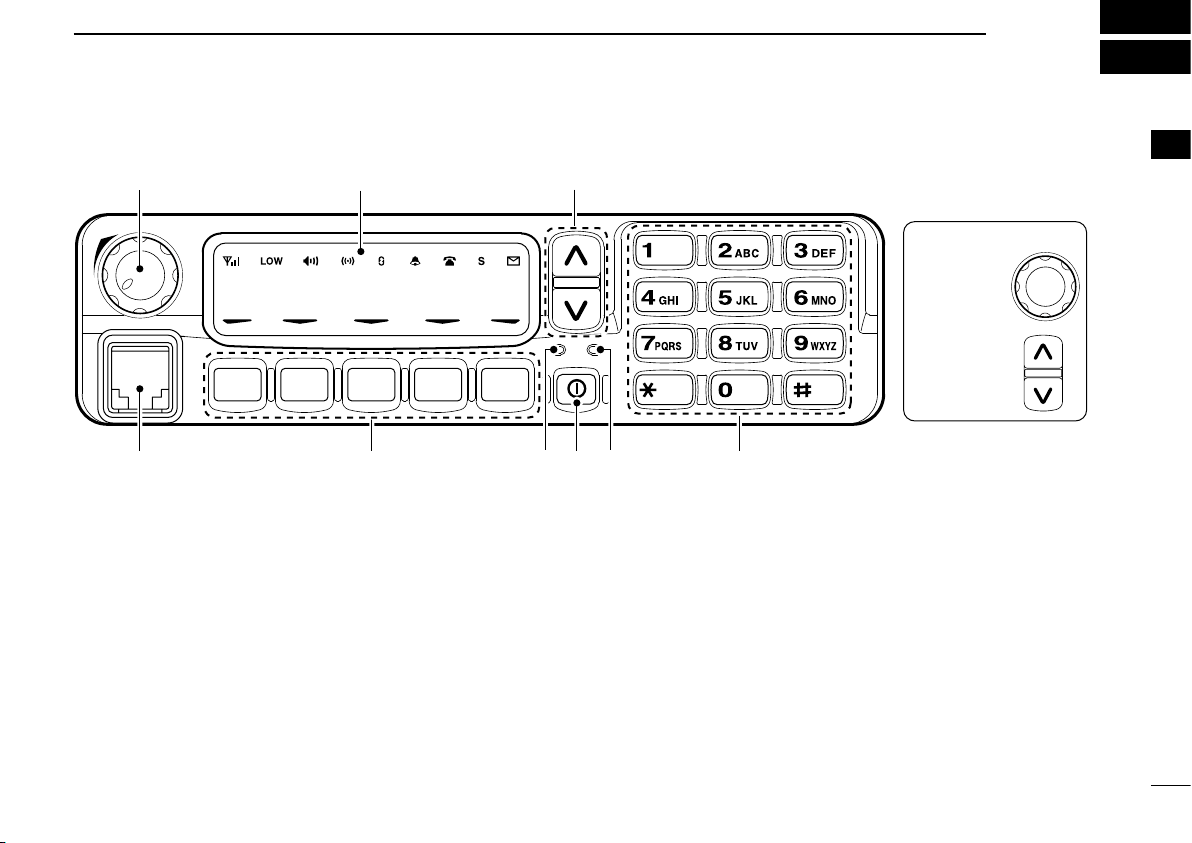
n Front panel
q AF VOLUME CONTROL KNOB
Rotate the knob to adjust the audio output level.
• Minimum audio level is pre-programmed.
w FUNCTION DISPLAY (p. 2)
Displays a variety of information, such as an operating
channel number/name, 2-tone code, DTMF numbers and
audible condition, etc.
e DIAL or UP/DOWN KEYS
• IC-F9511S:
Rotate to select an operating channel, etc.
• IC-F9511T:
Push to select an operating channel, etc.
*The desired function can be assigned by your dealer. (p. 3)
DIAL
UP/DOWN Keys
1
r 10-KEYPAD (IC-F9511T only)
The keypad allows you to enter digits to:
• Select mem or y channels, t one channels and DTMF codes
(when in the DTMF code channel selection mode)
• Set TX code number
• Input text message for SDM operation
• Start up with a password
• Input the Individual ID code for digital operation.
t BUSY INDICATOR
Lights green while receiving a signal, or when the squelch
is open.
1
Page 6
PANEL DESCRIPTION
1 3 6 . 1 N a r
q w e r t y u i o
!1
!0
1
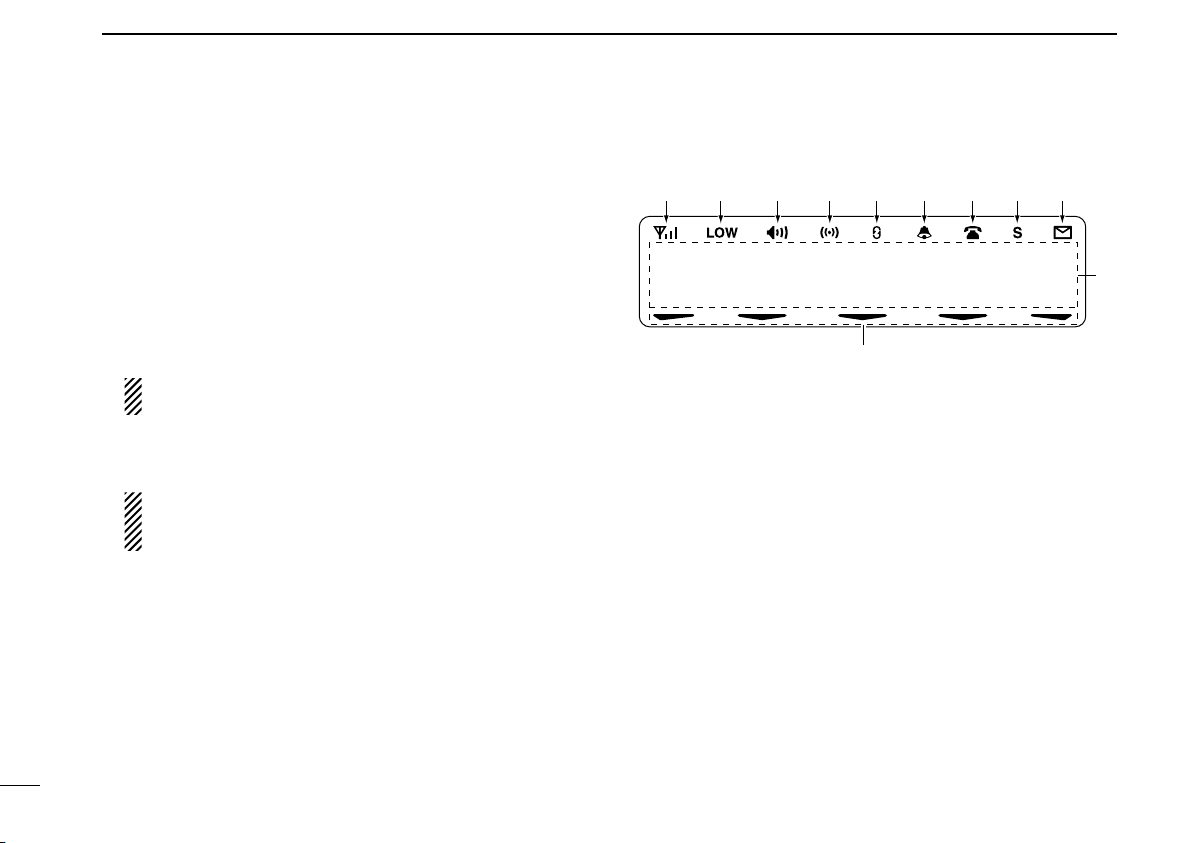
y POWER SWITCH [POWER]
Push to turn the power ON and OFF.
• The following functions are available at power ON as options:
- Automatic scan start
- Password prompt
- Set mode
u TRANSMIT INDICATOR
Lights red while transmitting.
i DEALER-PROGRAMMABLE KEYS
Desired functions can be programmed independently by
your dealer. (p. 3)
In this instruction manual, these keys are from the left,
called [P0]/[P1]/[P2]/[P3]/[P4].
o MICROPHONE CONNECTOR
Connect the supplied microphone or optional DTMF microphone.
NEVER connect non-specified microphones. The pin
assignments may be different and the transceiver may
be damaged.
D MICROPHONE
The supplied microphone has a PTT switch and a hanger
hook.
• The following functions are available when the microphone is on or
off hook:
- Automatic scan start when on hook.
- Automatic priority channel selection when off hook.
- Sets to ‘Inaudible’ condition (mute condition) when on hook.
- Sets to ‘Audible’ condition (unmute condition) when off hook.
n Function display
q SIGNAL STRENGTH INDICATOR
Indicates relative signal strength level.
w LOW POWER INDICATOR
Appears when low output power is selected.
e AUDIBLE INDICATOR
➥ Appears when the channel is in the ‘audible’ (unmute)
condition.
➥ Appears when the specified 2-tone code is received.
r COMPANDER INDICATOR
Appears when the compander function is activated.
t SCRAMBLER INDICATOR
Appears when the voice scrambler function is activated.
2
Page 7

PANEL DESCRIPTION
1
y BELL INDICATOR
Appears/blinks when the specific 2-tone code is received,
according to the pre-programming.
u CALL CODE MEMORY INDICATOR
Appears when the call code memory is selected.
i SDM MEMORY INDICATOR
Appears when the SDM memory is displayed.
o SDM INDICATOR
Appears when an SDM is received, or a transmit SDM is
selected.
!0 ALPHANUMERIC DISPLAY
Displays an operating channel number, channel name,
Set mode contents, DTMF code, etc.
The indication mode can be selected from 1 line or 2
lines. Ask your dealer for details.
In this instruction manual, the LCD illustration is de
scribed using the 2 lines indication mode.
!1 ACTIVATED KEY INDICATOR
Appears above the key assigned as [DIGITAL] key when
that key has been activated.
n Programmable function keys
The following functions can be assigned to [DIAL]*, [UP],
[DOWN], [P0], [P1], [P2], [P3] and [P4] programmable func-
tion keys.
Consult your Icom dealer or system operator for details concerning your transceivers programming.
If the programmable function names are bracketed in the following explanations, the specific key is used to activate the
function depends on the programming.
* The functions you can assign to [DIAL] are limited.
(Only functions marked with ✩ can be assigned.)
✩ CH UP AND DOWN KEYS
➥ Push (or Rotate)* to select an operating channel.
➥ Push (or Rotate)* to select a transmit code channel after
pushing [TX Code CH Select].
➥ Push (or Rotate)* to select a DTMF channel after pushing
[DTMF Autodial].
➥ Push (or Rotate)* to select a scan group after pushing
and holding [Scan A Start/Stop]/[Scan B Start/Stop].
➥ Push (or Rotate)* to select an Individual ID code or Talk-
group ID code after pushing [Individual] or [Talkgroup].
* Rotate when this function is assigned to [DIAL].
✩
ZONE UP AND DOWN KEY (This function is for [DIAL] only)
Rotate to select the desired zone.
1
3
Page 8

PANEL DESCRIPTION
1
ZONE KEY
Push this key, then select the desired zone using [CH Up]/
[CH Down].
What is “zone”?—The desired channels are assigned
into a zone according to the intended use for grouping.
For example, ‘Staff A’ and ‘Staff B’ are assigned into a
“Business” zone, and ‘John’ and ‘Cindy’ are assigned into
a “Private” zone.
SCAN A START/STOP KEY
➥ This key’s operation depends on the Power ON Scan set-
ting.
When the power ON scan function is turned OFF;
Push to start and cancel scanning operation. In case of
transmission during scan, cancels scanning.
When the power ON scan function is turned ON;
Push to pause scanning. Scanning resumes after a
specified time period has passed. In case of transmission
during scan, pauses scanning. Scanning resumes after a
specified time period has passed after the transmission is
finished.
➥ Push and hold this key for 1 sec. to indicate the scan group,
then select the desired group using [CH Up]/[CH Down].
SCAN B START/STOP KEY
➥ Push to start and cancel scanning operation. In case of
transmission during scan, pauses scanning. Scanning resumes after a specified time period has passed after the
transmission is finished.
➥ Push and hold this key for 1 sec. to indicate the scan
group, then select t he desir ed group us ing [CH Up]/
[CH Down].
SCAN ADD/DEL (TAG) KEY
Push to add or delete the selected channel to/from the scan
group.
PRIO A/B KEYS
➥ Push to select Priority A or Priority B channel.
➥ Push and hold [Prio A (Rewrite)] to rewrite the Prio A
channel.
MR-CH 1/2/3/4 KEYS
Push to select an operating channel directly.
MONI (AUDI) KEY
Mute and release the CTCSS (DTCS) or 2-tone squelch
mute. Open any squelch/deactivate any mute while pushing
this key. (LMR operation only)
4
Page 9

PANEL DESCRIPTION
1
PUBLIC ADDRESS KEY
While in the hailer mode, push this key for the audio output
via the hailer amplifier. Ask your dealer for details.
While in the normal mode, the audio output via the cable
can be controlled from the transceiver separately from [VOL]
control knob.
• This audio output can be used as a ‘public address’ function when
an external audio amplifier and speaker are connected additionally.
• Push this key, then speak into the microphone while pushing the
PTT switch.
• [CH Up]/[CH Down] allow you to set the audio output level from
minimum to maximum.
RX SPEAKER KEY
While in the hailer mode, the external speaker drive function
is also available simultaneously when the external connections are made for the ‘public address’ function. The received
audio can be heard via the external speaker when this key is
pushed.
• This function is useful when you are out of the vehicle.
• The audio output level is linked to the transceiver’s volume control.
LIGHT KEY
Push to turn the transceiver’s backlight ON for about 5 sec.
when the backlight function is turned OFF in user set mode.
LOCK KEY
Push and hold to electronically lock all programmable keys
except the following:
[Call] (incl. Call A and Call B), [Moni(Audi)] and [Emergency].
HIGH/LOW KEY
Push to select the transmit output power temporarily or permanently, depending on the pre-setting.
• Ask your dealer for the output power level for each selection.
C.TONE CH ENT KEY
Push to select the continuous tone channel using [CH Up]/
[CH Down] to change the tone frequency/code setting after
pushing this key. The selected channel remains set as the
continuous tone channel until another channel is designated
as such.
TALK AROUND KEY
Turn the talk around function ON and OFF.
• The talk around function equalizes the transmit frequency to the
receive frequency for transceiver-to-transceiver communication.
WIDE/NARROW KEY
Push to toggle the IF bandwidth between wide and narrow.
DTMF AUTODIAL KEY
➥
Push to enter the DTMF channel selection mode. Then
select the desired DTMF channel using [CH Up]/[CH Down].
➥ After selecting the desired DTMF channel, push this key
to transmit the DTMF code.
SCRAMBLER FUNCTION
Push to toggle the voice scrambler function ON and OFF.
1
5
Page 10

PANEL DESCRIPTION
1
RE-DIAL KEY
Push to transmit the last-transmitted DTMF code.
TX CODE CHANNEL SELECT KEY
Push to enter the ID code channel selection mode directly.
Then set the desired channel using [CH Up]/[CH Down].
CALL KEYS
(p. 11)
Push to transmit a 2-tone ID code.
• Call tra nsmissi on is necess ar y before calling another statio n
depending on your signalling system.
• [Call A] and/or [Ca ll B] may b e ava ilable when your s ys tem
employs selective ‘Individual/Group’ calls. Ask your dealer which
call is assigned to each key.
EMERGENCY KEYS
➥ Push and hold to transmit an emergency call.
➥ When [Emergency Single (Silent)] or [Emergency Repeat
(Silent)] is pushed, an emergency call is transmitted without a beep emission and LCD indication change.
• If you want to cancel the emergency call, push (or push and
hold) the key again before transmitting the call.
• The emergency call is transmitted one time only or repeatedly
until receiving a control code depending on the pre-setting.
SURVEILLANCE KEY
✩ TX CODE CHANNEL UP/DOWN KEYS
Push (or Rotate)* to select a TX code channel directly.
* Rotate when this function is assigned to [DIAL].
HOOK SCAN KEY
When the hook on scan function is turned ON, push this key
to stop scanning temporarily. Push this key again to re-start
scanning.
USER SET MODE KEY
➥ Push and hold to enter user set mode.
• During user set mode, push this key to select an item, and
change the value or condition using push [CH Up]/[CH Down].
➥ Push and hold this key again to exit user set mode.
User set mode is also available via the ‘Power ON function.’
Refer to p. 13 also.
Push to turn the surveillance function ON or OFF.
When this function is turned ON, the beep is not emitted and
the LCD backlight does not light when a signal is received or
a key is pushed, etc.
OPT 1/2/3 KEYS
Push to control the output signal level from the optional unit
connector.
COMPANDER KEY
Push to toggle the compander function ON and OFF.
The compander function reduces noise components from
the transmitted audio to provide clear communication.
6
Page 11

PANEL DESCRIPTION
Voice scrambler function ON
Voice scrambler and Encryption transmittion
functions ON
Voice scrambler and Encryption transmittion
functions OFF
Encryption transmittion function ON
PUSH
PUSH
PUSH
PUSH
(
appears)
(
appears)
(
appears)
(
disappears)
1
TONE/NAC CH SELECT KEY
(LMR (P25 Conventional) operation only)
➥ While in the analog mode operation, push to select the
continuous tone channel using [CH Up] or [CH Down] to
change the tone frequency/code setting.
➥ While in the digital mode operation, push to select the
NAC channel using [CH Up] or [CH Down] to change the
NAC code setting.
➥ While in the mixed (digital and analog) mode operation,
push to select the continuous tone channel using [CH Up]
or [CH Down] to change the tone frequency/code setting.
Then push this key to enter the setting. After that, the
NAC channel selection screen appears. Select the NAC
channel using [CH Up] or [CH Down] to change the NAC
code setting. Then push this key to enter the setting.
SCRAMBLER/ENCRYPTION KEY
(LMR (P25 Conventional) operation only)
➥ While in the analog mode operation, push to toggle the
voice scrambler function ON and OFF.
➥ While in the digital mode operation, push to toggle the
encryption transmission function ON and OFF.
➥ While in the mixed (digital and analog) mode operation,
push to toggle the voice scrambler and encryption transmission functions ON and OFF, separately or simultaneously as below.
1
7
Page 12

PANEL DESCRIPTION
1
D For Digital mode operation only
INDIVIDUAL KEY
➥ Push to enter the individual ID code selection mode direct-
ly. Then select the desired individual ID code using [CH
Up]/ [CH Down]. (p. 12)
➥ P ush to stop the bee p e missi o n w hen recei ving a
matched individual ID code.
TALKGROUP KEY
➥ Push to enter the talkgroup ID code selection mode direct-
ly. Then select the desired talkgroup ID code using [CH
Up]/ [CH Down]. (p. 12)
➥ P ush to stop the bee p e missi o n w hen recei ving a
matched talkgroup ID code.
ZEROIZE KEY
Push and hold to zeroize the encryption key data, programmed by the FS-F9511? flash loader.
ENCRYPTION KEY
Push to toggle the encryption transmission function ON or
OFF.
When this function is turned ON, “ ” appears on the function display.
8
Page 13

BASIC OPERATION
KEY
NUMBER
0
5
4
9
3
8
2
7
1
6
P0 P4P3P2P1
P0 P4P3P2P1
*In this instruction manual, these keys are
from the left, called [P0]/[P1]/[P2]/[P3]/[P4].
2
n Turning power ON
q Push [ ] to turn the power ON.
w If the transceiver is programmed for a start up password,
input the digit codes as directed by your dealer.
• 10-keypad* can be used for password input.
*IC-F9511T only:
• The keys as below can be used for password input:
The transceiver detects numbers in the same block as identical.
Therefore “01234” and “56789” are the same.
e When the “PASSWORD” indication does not clear after
inputting 6 digits, the input code number may be incorrect.
Turn the power off and start over in this case.
n Channel selection
Several types of channel selections are available. Methods
may differ according to your system set up.
NON-ZONE TYPE:
Push [CH Up] or [CH Down], or rotate [CH Up/Down] to
select the desired operating channel, in sequence; or, push
one of [MR-CH 1] to [MR-CH 4] keys to select a channel directly.
ZONE TYPE:
Push [Zone] then push [CH Up] or [CH Down], or rotate
[Zone Up/Down] to select the desired zone.
AUTOMATIC SCAN TYPE:
Channel setting is not necessary for this type. When turning
power ON, the transceiver automatically starts scanning.
Scanning stops when receiving a call.
1
2
9
Page 14

BASIC OPERATION
Selective calling
Non-selective calling
2
10
n Call procedure
When your system employs tone signaling (excluding CTCSS
and DTCS), the call pro cedure may be necessary prior to
voice transmission. The tone signalling employed may be a selective calling system which allows you to call specific station(s)
only and prevent unwanted stations from contacting you.
q Select the desired TX code channel, 2-tone code, Indi-
vidual ID code* or Talkgroup ID code* according to your
System Operator’s instructions.
• This may not be necessary depending on programming.
• Refer to pgs. 11–13 for selection.
*Digital mode operation only.
w
Push the call key (assigned to one of the dealer programmable keys; except for the Digital mode operation) or [PTT].
e After transmitting, the remainder of your communication
can be carried out in the normal fashion.
n Receiving and transmitting
Receiving:
q Push [ ] to turn the power ON.
w Push [CH Up] or [CH Down], or rotate [CH Up/Down] to
select a channel, in sequence.
e When receiving a call, adjust the audio output level to a
comfortable listening level.
Transmitting:
Wait for the channel to become clear to avoid interference.
q Take the microphone off hook.
• 2-tone mute may be released. (The ‘audible’ condition is selected and BUSY indicator lights green.)
• A priority channel may be selected automatically.
w Wait for the channel to become clear.
• The channel is busy when BUSY indicator lights green.
e Push [CALL] when initiating a call from your side.
•
Coded audio may be heard from the transceiver, then “ ” appears.
• This operation may not be necessary depending on your signaling system. Ask your dealer for details.
r While pushing and holding [PTT], speak into the micro-
phone at your normal voice level.
t Release [PTT] to receive.
IMPORTANT: To maximize the readability of your signal;
1. Pause briefly after pushing [PTT].
2. Hold the microphone 5 to 10 cm (2 to 4 inches) from
your mouth, then speak into the microphone at a normal voice level.
Page 15

BASIC OPERATION
2
D Transmitting notes
• Transmit inhibit function
The transceiver has several inhibit functions which restrict
transmission under the following conditions:
- The channel is in mute condition (‘Inaudible’ condition;
“ ” does not appear.)
- The channel is busy.
- Un-matched (or matched) CTCSS is received.
(Depending on the pre-setting)
- Un-matched (or matched) NAC is received.*
(Depending on the pre-setting)
- The selected channel is a ‘receive only’ channel.
*Digital mode operation only.
• Time-out timer
After continuous transmission for the pre-programmed time
period, the time-out timer is activated, causing the transceiver to stop transmitting.
• Penalty timer
Once the time-out timer is activated, transmission is further
inhibited for a period determined by the penalty timer.
D TX code channel selection
If the transceiver has [TX Code CH Select] assigned to it,
the indication can be toggled between the operating channel
number (or name) and TX code channel number (or name).
When the TX code channel number (or name) is displayed,
[CH Up]/[CH Down] selects the TX code channel.
USING [TX CODE CH SELECT] KEY:
q Push [TX Code CH Select]— a TX code channel number
(or name) appears.
w Push [CH Up] or [CH Down], or rotate [CH Up/Down] to
select the desired TX code channel.
e Push [Call] to transmit the selected TX code.
USING [TX CODE CH UP]/[TX CODE CH DOWN] KEY:
If the transceiver has a [TX Code CH Up], [TX Code CH
Down] or [TX Code CH Up/Down] key assignment, the programmed TX code channel can be selected directly when
pushed or rotated.
2
11
Page 16

BASIC OPERATION
2
12
D Individual ID code selection
(Digital mode operation only)
If the transceiver has [Individual] assigned to it, the indication
can be toggled between the operating channel number (or
name) and Individual ID code (or name). When the Individual
ID code (or name) is displayed, [CH Up], [CH Down] or [CH
Up/Down] selects the desired Individual ID code.
q
Push [Individual]— an Individual ID code (or name) appears.
w Push [CH Up] or [CH Down], or rotate [CH Up/Down] to
select the desired Individual ID code.
e Push [PTT] to transmit the selected Individual ID code.
r
Push [Individual]— cancels the selected Individual ID code
(return to the pre-set Talkgroup ID code in the channel.)
D Talkgroup ID code selection
(Digital mode operation only)
If the transceiver has [Talkgroup] assigned to it, the indication
can be toggled between the operating channel number (or
name) and Talkgroup ID code (or name). When the Talkgroup
ID code (or name) is displayed, [CH Up], [CH Down] or [CH
Up/Down] selects the desired Talkgroup ID code.
q
Push [Talkgroup]— a Talkgroup ID code (or name) appears.
w Push [CH Up] or [CH Down], or rotate [CH Up/Down] to
select the desired Talkgroup ID code.
e Push [PTT] to transmit the selected Talkgroup ID code.
r Change the channel— cancels the selected Talkgroup ID
code (return to the pre-set Talkgroup ID code in the channel.)
D DTMF transmission
If the transceiver has [DTMF Autodial] assigned to it, the
automatic DTMF transmission function is available. Up to 8
DTMF channels are available.
TO SELECT A TX CODE:
q Push [DTMF Autodial]— a DTMF channel appears.
w Push [CH Up] or [CH Down], or rotate [CH Up/Down] to
select the desired DTMF channel.
e Push [DTMF Autodial] to transmit the DTMF code in the
selected DTMF channel.
Page 17

n User set mode
[P1][P0] [P2] [ ]
[P0] [Up]/[Down] or [DIAL]
[ ]
User set mode is accessed with [User Set Mode] and allows
you to set seldom-changed settings. In this case you can
“customize” the transceiver operation to suit your preferences and operating style.
Entering the user set mode:
q While pushing and holding [P1] and [P2], push [ ] to turn
the power ON. Then, push and hold [P0] to enter user set
mode.
w Push [P0] several times to select the appropriate item.
Then, push [Up] or [Down] or rotate [DIAL] to set the desired level/condition.
• Available set mode functions are Backlight, LCD Contrast,
Beep, Beep L evel, SQL Level, A F Min L evel, Mic Gain ,
Horn, TIme, Date, Wake Up and Sleep.
BASIC OPERATION
e Push [ ] again to exit set mode.
User set mode is also available via a programmable key.
Please refer to p. 6 [User Set Mode] section.
2
n Scrambler function
The voice scrambler function provides private communication between stations. The frequency inversion type is
equipped to all versions, moreover, the optional Rolling or
Non-rolling type can be available.
q Push [Scrambler] to turn the scrambler function ON.
• “ ” appears.
w Push [Scrambler] again to turn the scrambler func-
tion OFF.
• “ ” disappears.
2
13
Page 18

3
r
Antenna
Solder
Crimp
NOTE: Use the terminals as shown
below for the cable connections.
R CAUT ION! N EVER r emo ve
t h e f u se - ho l de r f r o m t h e DC
power cable.
q ANTENNA CONNECTOR
Connects to an antenna.
Contact your dealer about
antenna selection and
placement.
q
ew
e EXTERNAL
SPEAKER JACK
w Reserved for a
future function.
Connect a 4–8 ø
external speaker.
r MICROPHONE HANGER
Connect the supplied microphone hanger to the
vehicle’s ground for micro-
phone on/off hook functions. (See p. 2)
Black
Red
12V
Battery
y
y DC POWER RECEPTACLE
Connects to a 12 V DC battery. Pay attention to polarities. NEVER connect to a 24 V
battery. This could damage the transceiver.
Supplied speaker SP-22
(IC-F9511T only. IC-F9511S have
a built-in speaker.)
t
t IGNITION LEAD
Connects to a ignition line.
R
Do not put a pressure to
this lead.
Binding to the DC power
cable is recommended.
CONNECTION AND MAINTENANCE
n Rear panel connection
14
Page 19

CONNECTION AND MAINTENANCE
KEY-STICKER
Microphone
Microphone hanger
and screw set
Microphone
hanger cable
DC power cable
Mounting bracket
Speaker*
Key cap
Function name
stickers
Flat washers
Spring washers
Bracket bolts
Mounting screws
(M5×12)
Self-tapping screws
(M5×16)
Nuts
*Depending on version
Function name sticker
Key cap
3
n Supplied Accessories
• Function name stickers
There are no names on the programmable function keys
since the functions can be freely assigned to these keys.
Attach the supplied function name stickers as below to the
appropriate keys for easy recognition of that key’s assigned
function.
Then, protect the attached stickers from unsticking with the
supplied key cap as below.
1
2
3
4
5
6
7
8
9
10
11
12
13
14
15
16
15
Page 20

CONNECTION AND MAINTENANCE
Flat washer
Spring washer
When using
self-tapping screws
3
n Mounting the transceiver
The universal mounting bracket supplied with your transceiver allows overhead mounting.
• Mount the transceiver securely with the 4 supplied screws
to a thick surface which can support more than 1.5 kg.
16
n Antenna
A key element in the performance of any communication
system is an antenna. Contact your dealer about antennas
and the best places to mount them.
n Fuse replacement
A fuse is installed in the supplied DC power cable. If a fuse
blows or the transceiver stops functioning, track down the
source of the problem if possible, and replace the damaged
fuse with a new rated one.
q Fuse rating: 20 A
USE the 20 A fuse only.
n Cleaning
If the transceiver becomes dusty or dirty, wipe it clean with a
soft, dry cloth.
AVOID the use of solvents such as benzene or alcohol, as they may damage the transceiver surfaces.
Page 21

OPTIONS
4
• RMK-2 separation kit +
OPC-607/OPC-608/OPC-609 separation cable
Allows you to install the transceiver main unit separately
from the front panel for operating convenience.
• SP-5/SP-10/SP-22 external speakers
Input impedance : 4 Ω
Max. input power : 5 W
SP-5 : Large speaker for good audio quality.
SP-10 : For all-round mobile operation.
SP-22 : Compact and easy-to-install. The same as sup
plied with the transceiver (depending on version.)
• HM-152/HM-152T/HM-148 hand microphones
HM-152 : Hand microphone
HM-152T : DTMF microphone
HM-148 : Heavy duty microphone
• SM-25 desktop microphone
• UT-125 encription board
1
2
3
4
5
6
-
7
8
9
10
11
12
13
14
15
16
17
Page 22

W AR N IN G
CAUTIO N
5
SAFETY TRAINING INFORMATION
Your Icom radio generates RF electromagnetic
energy during transmit mode . This radio is designed for and classified as “Occupational Use
Only”, meaning it must be used only during the
course of employment by individuals aware of the
hazards, and the ways to minimize such hazards.
This radio is NOT intended for use by the “General
Population” in an uncontrolled environment.
• For compliance with FCC and Industry Canada RF Exposure Re-
quirements, the transmitter antenna installation shall comply with
the following two conditions:
1. The transmitter antenna gain shall not exceed 0 dBi.
2. IC-F9511S/T:
The antenna is required to be located outside of a vehicle and
kept at a distance of 48 centimeters or more between the transmitting antenna of this device and any persons during operation.
For small vehicle as worst case, the antenna shall be located on
the roof top at any place on the centre line along the vehicle in
order to achieve 48 centimeters separation distance. In order to
ensure this distance is met, the installation of the antenna must be
mounted at least 48 centimeters away from the nearest edge of
the vehicle in order to protect against exposure to bystanders.
To ensure that your exposure to RF electromagnetic energy is within the FCC allowable limits
for occupational use, always adhere to the following guidelines:
• DO NOT operate the radio without a proper antenna attached,
as this may damage the radio and may also cause you to exceed
FCC RF exposure limits. A proper antenna is the antenna supplied
with this radio by the manufacturer or an antenna specifically authorized by the manufacturer for use with this radio.
• DO NOT transmit for more than 50% of total radio use time (“50%
duty cycle”). Transmitting more than 50% of the time can cause
FCC RF exposure compliance requirements to be exceeded. The
radio is transmitting when the “TX indicator” lights red. You can
cause the radio to transmit by pressing the “PTT” switch.
Electromagnetic Interference/Compatibility
During transmissions, your Icom radio generates RF energy that can
possibly cause interference with other devices or systems. To avoid
such interference, turn off the radio in areas where signs are posted
to do so. DO NOT operate the transmitter in areas that are sensitive
to electromagnetic radiation such as hospitals, aircraft, and blasting
sites.
18
Page 23

MEMO
1
2
3
4
5
6
7
8
9
10
11
12
13
14
15
16
Page 24

A-6625?-1US
Printed in Japan
© 2007 Icom Inc.
Printed on recycled paper with soy ink.
1-1-32 Kamiminami, Hirano-ku, Osaka 547-0003, Japan
 Loading...