

Page 1
MORNING START-UP
Sam’s Club - Inferno 3500
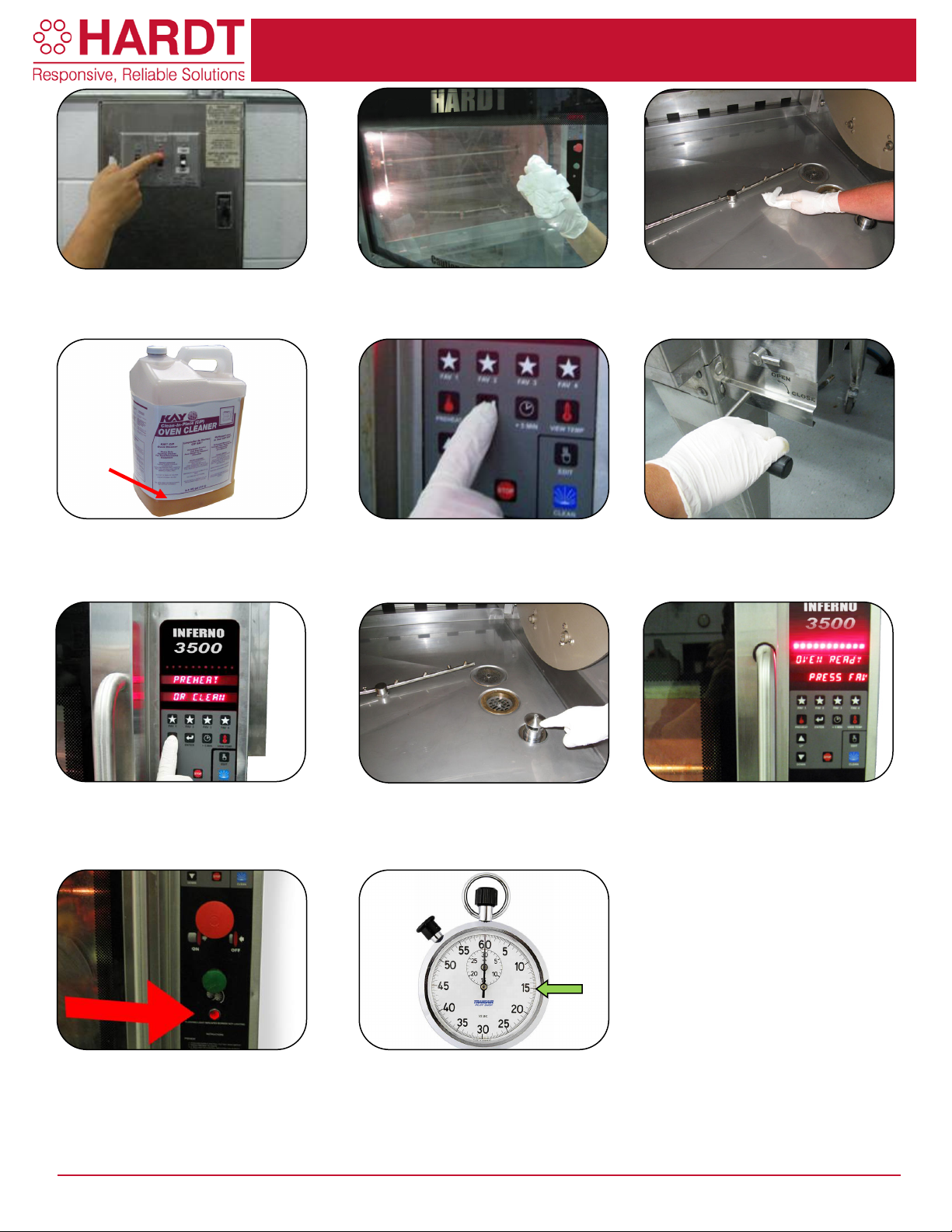
1. Turn on the hood and hood lights.
2. Wipe the door glass with a sanitized
outside and in between the panes.
3. Wipe the water pan clean with a
PUSH DEBRIS INTO THE DRAINS.
4. Check the level of degreaser to ensure
than 2 ¼ inch, replace the bottle.
5. Follow instructions on display and
6. Make sure the drain valve (large
7. Ensure the water pan is dry when you
UNTIL ROTISSERIE IS PREHEATED.
8. Once you see the flame (oven has
not walk away while water is running.
9. Once preheated, an alarm will sound
10. If a safety lock-out occurs, the red
Follow the safety lock-out instructions.
11. The oven must be fully preheated
is preheated after about 15 minutes.
2 ¼”
you have enough to run the Auto Clean
cycle at the end of the day. If it is lower
wet towel and remove deposits inside,
towel removing all particles. DO NOT
then press "ENTER".
handle) and the water inlet (small
handle) are closed.
are ready to preheat the oven. Press the
"PREHEAT" button. DO NOT LOAD
light on the control panel will blink.
CUS-012-0067-03 Page 1 of 1
been on for a few minutes) fill the water
pan to the top of the overflow drain. Do
and the display will read: "OVEN
READY -PRESS FAV OR ARROW".
before loading product into it. The oven
Page 2
CHICKEN PREPARATION
Sam’s Club - Inferno 3500
Cross contamination is very dangerous. Do not load fresh product into the
rotisserie until cooking cycle is complete and all cooked product is
removed from the rotisserie.
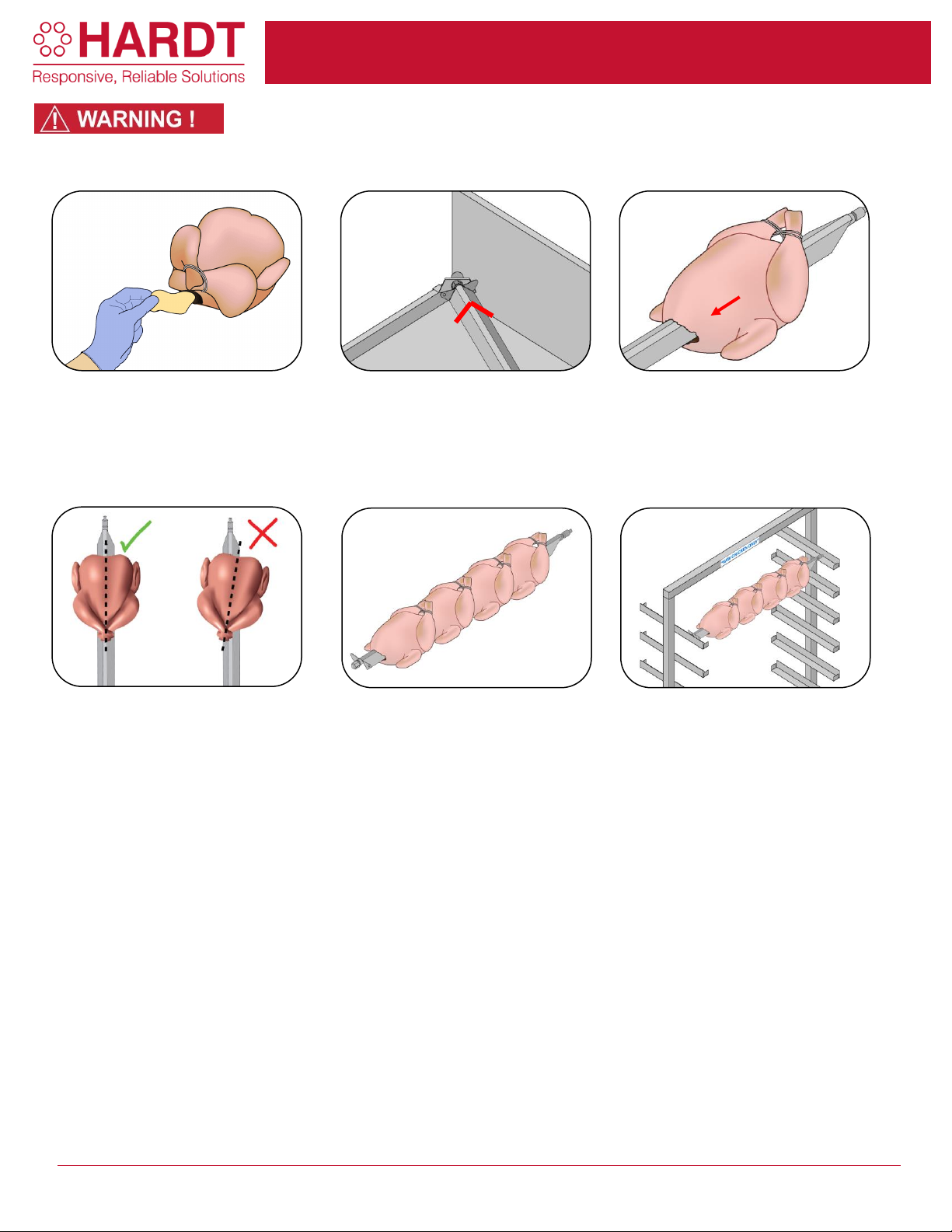
1) Bring raw product to the workstation.
While wearing gloves, take out a
chicken and drain any excess liquid
into the box. Remove excess fat from
the body cavity of the chicken.
2) Take a skewer and place the hex
end into the hole at the back left corner
of the prep table. The skewer should
be positioned with the “V” pointing
down.
3) Take a chicken, neck first, breast up
and place the pointed tip of the skewer
into the cavity. With the midpoint of the
breastbone aligned with the middle of the
skewer, push the bird on. The tied legs
should be above the skewer.
4) There should be some resistance as
the bones open up to lock the chicken
in place. The middle of the chicken
must align with the middle of the
skewer as shown by the dotted line. If
not properly aligned, remove chicken
and try again.
5) Place 4 chickens per skewer.
6) Place the prepared skewers on the
horizontal skewer rack for raw product
and bring it to the rotisserie for loading.
Horizontal
Skewer
Rack
CUS-012-0064-01 Page 1 of 1
Page 3
COOKING PROCEDURES
Sam’s Club - Inferno 3500
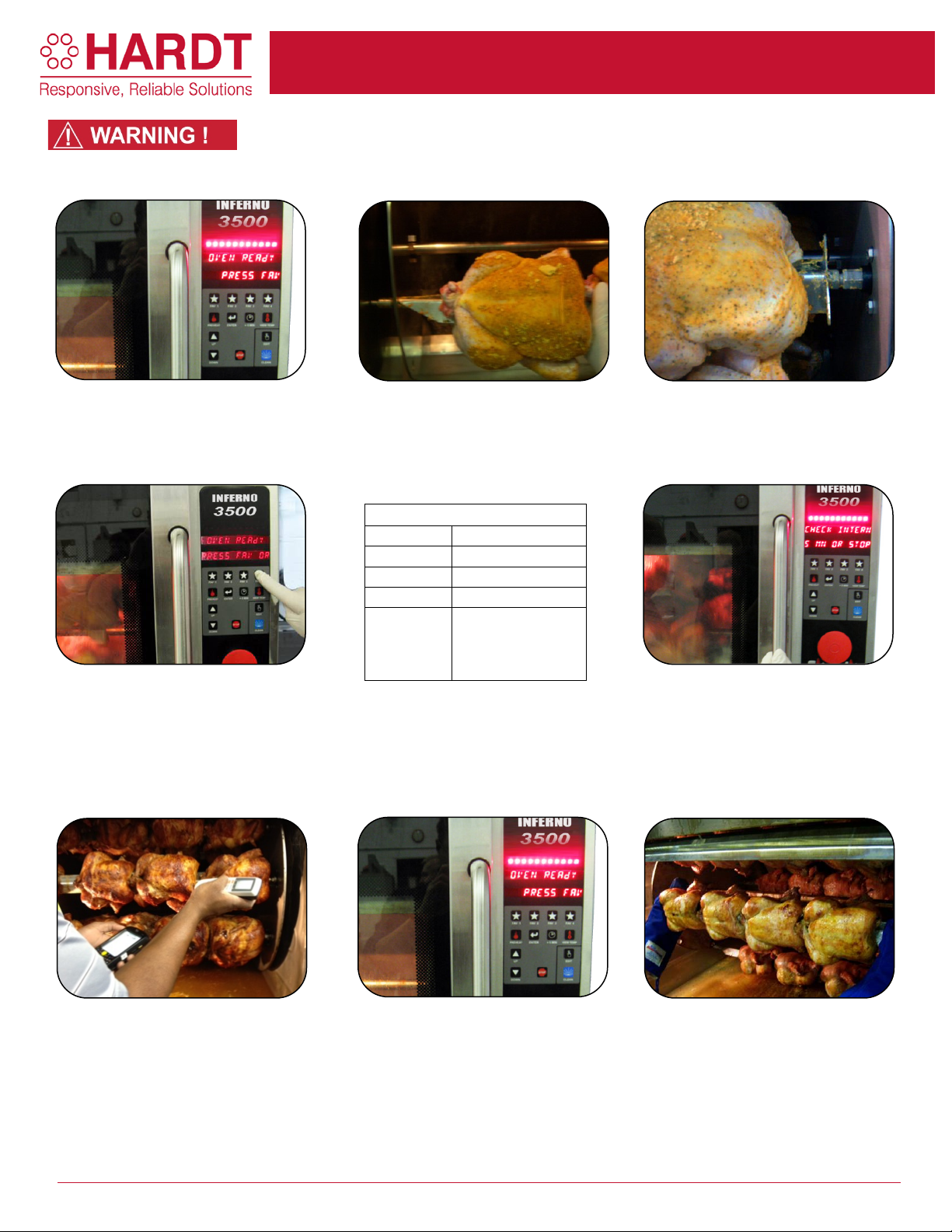
1. Display reads, “OVEN READY -
2. Load skewers by inserting the
3. Place the hexagonal end in the
skewer.
4. If you are cooking chickens on
5. At the end of the cooking cycle a
skewers before unloading.
6. Insert a clean, calibrated Spark System
higher before unloading the product.
7. If the product does not meet the
8. Unload once the required
Cooking Programs
FAV 1
1 - 2 skewers
FAV 2
3 - 4 skewers
FAV 3
5 - 6 skewers
FAV 4
7 - 8 skewers
Up arrow
enter
Cross contamination is very dangerous. Do not load fres h product into
the rotisserie until cooking cycle is complete and all cooked product is
removed from the rotisserie.
PRESS FAV OR ARROW”. Open the
door.
skewers, choose FAV 1 to 4.
For pre-cooked ribs that you will cook in
holding baskets, press the down arrow
two times until you see ribs on the
screen then press enter.
pointed end in a hole on the left-hand
plate.
two times
& press
Pre-cooked ribs
socket on the right. Slide skewer to
left to lock in place. Press the green
button to rotate the drive to load next
buzzer will sound. The display will
read "COOKING FINISHED CHECK
INT. TEMP 180°F". Check
temperature of at least 3 of the
largest chickens from 3 different
Thermometer into the thickest part of the
chicken breast. The thermometer should
be inserted at the center of the breast. It
must be at 180° F or higher before
unloading the product. For pre-cooked
ribs the temperature must be at 165°F or
CUS-012-0063-02 Page 1 of 2
required internal temperature, close the
door and press the "+ 5 MIN" button.
Pressing it twice will add 10 minutes
and 3 times will add 15 minutes.
Measure again until the required
internal temperature is reached.
temperature is reached. While
wearing heat-resistant gloves, lift the
left end of the skewer slightly. Shift
the skewer to the left.
Page 4
COOKING PROCEDURES
Sam’s Club - Inferno 3500
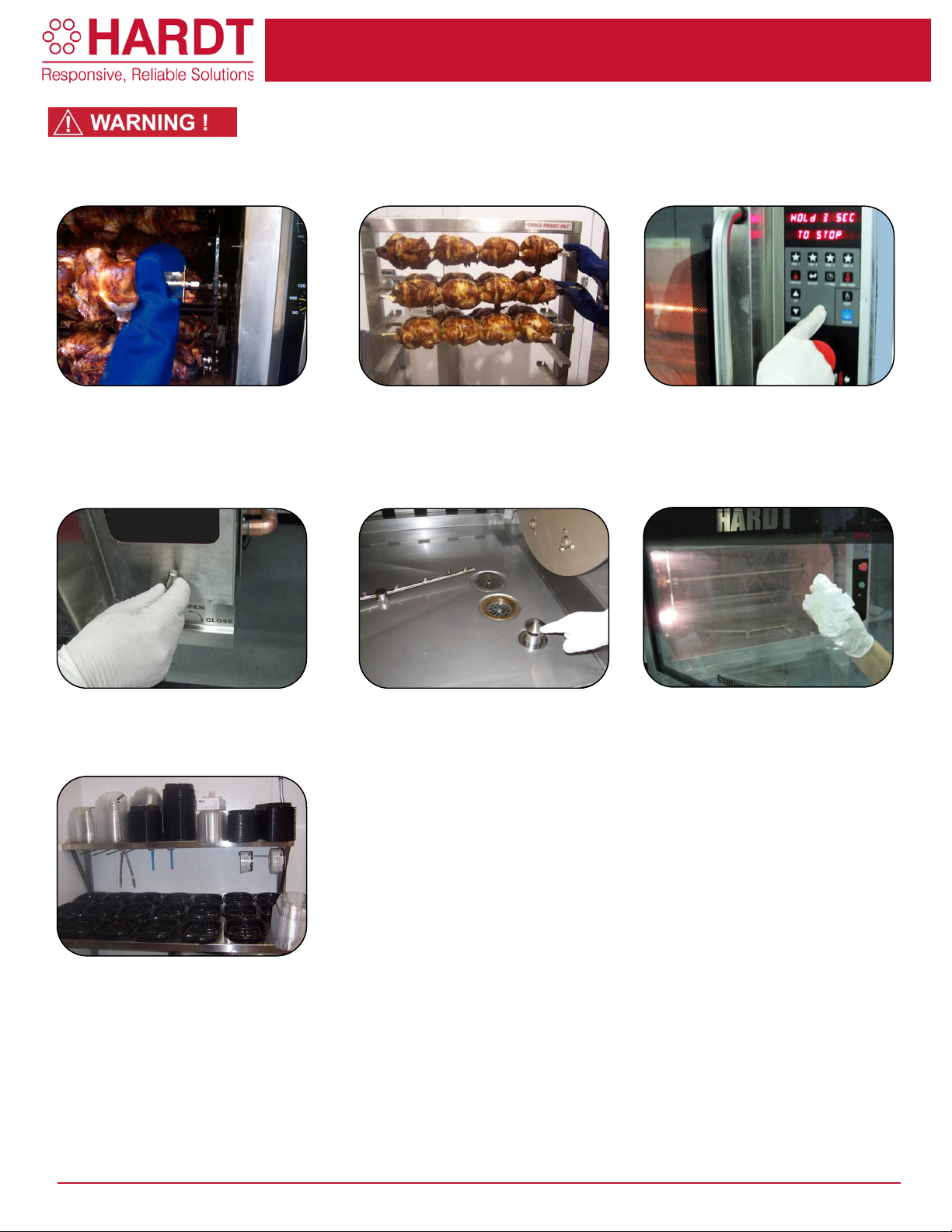
9. The hex end on the right will drop out
10. As products are unloaded, place
11. Press and hold the "STOP"
12. Open the water inlet valve to raise
13. Watch carefully to make sure the
Close the water inlet valve.
14. Wipe the inside of the glass door
clean all day.
15. Proceed with packaging.
Cross contamina tion is very dangerous. Do not load fresh product into
the rotisserie until cooking cycle is complete and all cooked product is
removed from the rotisserie.
of the socket into your hand.
the water level and skim off the grease
down the overflow.
them on the skewer cart marked
"
COOKED PRODUCT ONLY".
button for 3 seconds until the display
reads, “PRESS PREHEAT”. Press
the “PREHEAT” button to reheat the
oven.
water is draining freely and not
overflowing out of the oven door.
using a sanitized wet towel after
each cooking cycle to help keep it
CUS-012-0063-02 Page 2 of 2
Page 5
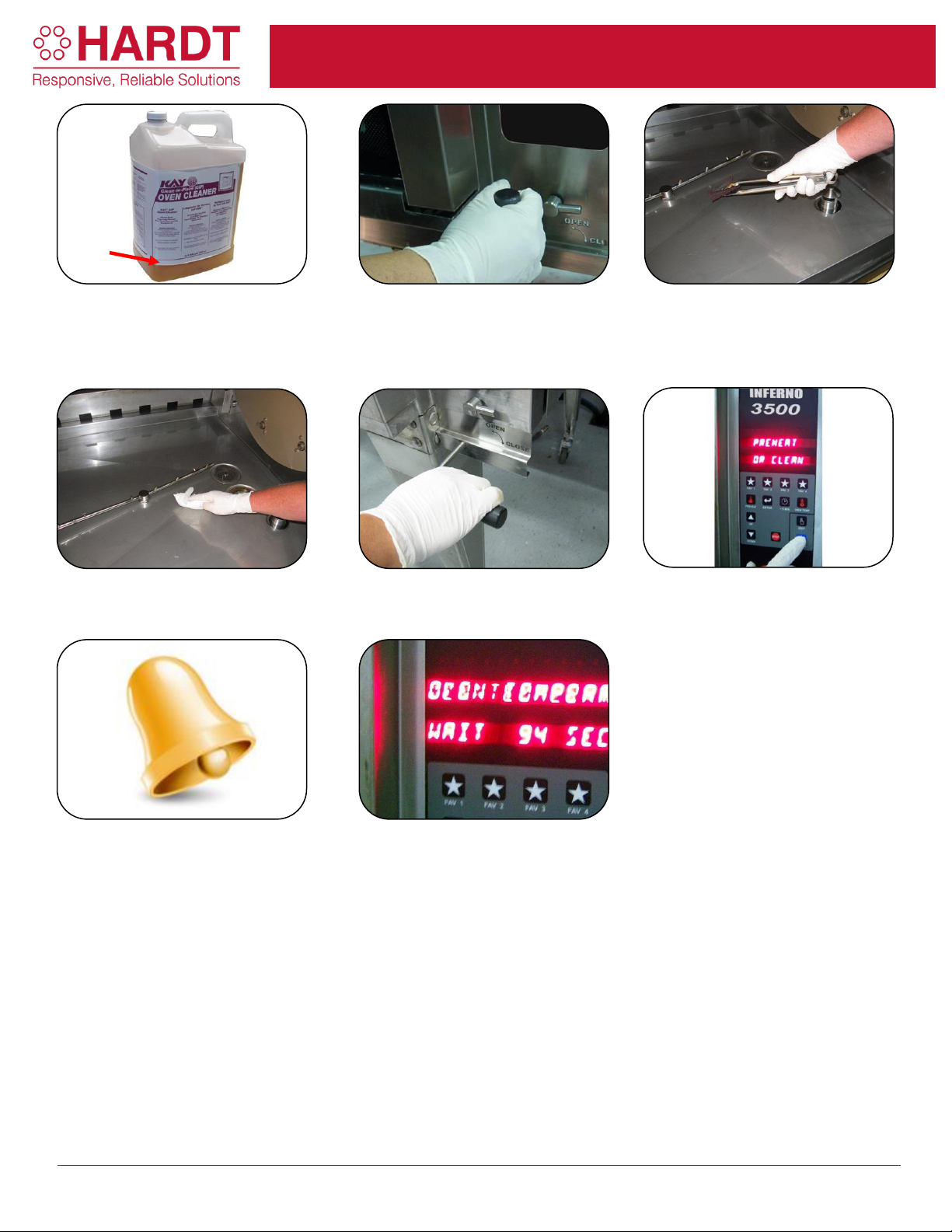
PREPARATION FOR AUTOCLEAN
Sam’s Club - Inferno 3500
1. Check that the level of degreaser is
enough to run the Auto Clean cycle. If it
is under the indicated 2 ¼ inch level,
replace the bottle.
2. Open the drain valve.
3. Remove all debris, chicken parts,
wings, bones, etc., from the water
pan, and put into the garbage. DO
NOT PUSH THE DEBRIS INTO THE
DRAINS.
4. Open the water valve to rinse the
waterpan. Then close the valve and
wipe the pan with paper towel.
5. Make sure the drain valve is closed
(large handle).
6. Press "Clean" and then "Enter".
7. If the drain valve is open an alarm will
sound. Follow instructions on display.
8. The display should read "AUTO
CLEAN WAIT" as the automatic
cleaning cycle starts. Once completed,
the rotisserie will shut off by itself.
2 ¼”
CUS-012-0065-02 Page 1 of 1
Page 6
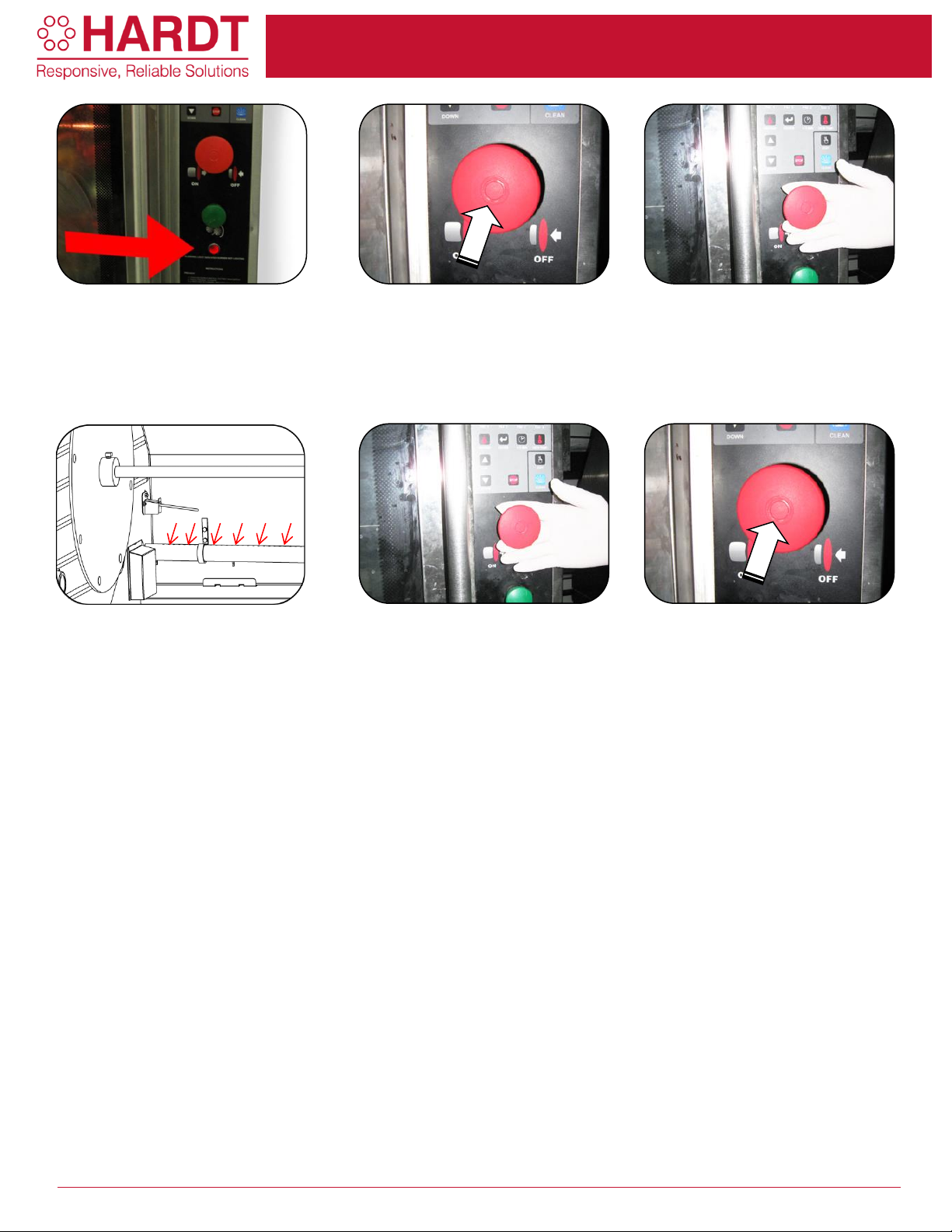
Safety Lock-Out Instructions
Sam’s Club - Inferno 3500
1. If the main ON/OFF (red) switch is
pulled and the igniter glows after several
times but there is no flame, the unit has
gone into "Safety Lock-Out". The light
below the green button will flash.
2. Push the main ON/OFF switch to
turn rotisserie OFF.
3. Verify that the gas supply to the
rotisserie and the main gas valve are
both open. Try to start the unit again
by pulling the ON/OFF switch. If the
unit goes into Safety Lock Out again,
turn it OFF.
4. With the rotisserie in the OFF
position, remove the burner cover, wipe
the burner and go through each hole on
the burner with a paperclip (as an
example).
5. Try starting the rotisserie again by
pulling the main ON/OFF switch and
pressing the PREHEAT button.
6. If the rotisserie does not light
again, there may be a component
failure. Turn the rotisserie OFF by
pushing in the main ON/OFF switch
and contact your local authorized
service provider.
CUS-012-0066-02 Page 1 of 1
 Loading...