

Page 1
Date of Purchase
Dealer Purchase from
Dealer Address
Dealer Phone No.
Model No.
Serial No.
ANT.IN
DURABRAND
Limited
WARRANTY
WAL-MART warrants this product to be free from manufacturing defects, in material and
workmanship under normal use and conditions for a designated period from date of original
purchase in Canada. For a WARRANTY period of
18 MONTHS
Should service be necessary under this warranty for any reason due to manufacturing
defect during the warranty period, Wal-Mart Canada will repair or replace (at its discretion)
the defective merchandise at no charge.
THIS UNIT CAN BE REPAIRED AND OR REPLACED BY WAL-MART CANADASERVICE
NOTE: This warranty is void if the product is:
(a) Damaged through negligence, misuse, abuse, or accident.
(b) Used in a commercial application or rentals.
(c) Modified or repaired by anyone other than Wal-Mart Canada.
(d) Damage caused by improper connection to other equipment.
(e) If the original proof of purchase cannot be supplied.
NOTE: This warranty does not cover:
(a) Damage to the tape or tape cartridge (if applicable).
(b) Cleaning of video heads (if applicable).
(c) Damage occurred or costs incurred in the shipping of the product to Wal-Mart
Canada.
(d) Ordinary adjustments to the product which can be performed by customer as out-
lined in the ownerÕs manual.
(e) Signal reception problems caused by external antenna, cable systems or interference.
(f ) Incompatibility due to the change in TV/CATV broadcast systems after the product
was sold.
THIS WARRANTYIS NON-TRANSFERABLE AND APPLIES ONLY TO THE ORIGNAL PUR-
CHASER AND DOES NOT EXTEND TO SUBSEQUENT OWNERS OF THE PRODUCT, ANY
APPLICABLE IMPLIED WARRANTIES, INCLUDING THE WARRANTY OF MERCHANTABILITY,
ARE LIMITED IN DURA TIONTO APERIOD OF THEEXPRESSED WARRANTYAS PROVIDED
HEREIN BEGINNING WITH THE DATE OF ORIGINAL PURCHASE AT RETAIL AND NO
WARRANTIES, WHETHER EXPRESSED OR IMPLIED, SHALL APPLY TO THIS PRODUCT
THEREAFTER.
UNDER NO CIRCUMSTANCES SHALL WAL-MART CANADA BE LIABLE FOR ANY LOSS,
DIRECT ,INDIRECT,INCIDENTAL,SPECIAL,ORCONSEQUENTIALDAMAGEARISINGOUTOF ,
ORINCONNECTIONWITH THE USE OF THIS PRODUCT.
WAL-MART CANADA Inc.
1940 Argentia Road
Mississauga, Ontario
L5N 1P9
Canada
Owner’s
Manual
FEATURES
● Tinted, Bright Black Matrix Picture Tube
● 181 Channel Selection- All VHF/UHF channels plus up to 125 cable channels.
● PLL Frequency Synthesized Tuning-The latest PLL frequency synthesized electronic tun-
ing system provides free and easy channel selection, and lets you tune directly to any channel
using the channel number buttons (0~9 and +100-key) on the remote control.
● On-Screen Function Display
● Full-Function Remote Control
● Sleep Timer
● Closed Caption Decoder- You may view specially labeled (cc) TV programs, movies, news,
prerecorded tapes, etc. with either a dialogue caption or text display added to the program.
● Auto Shut Off Function- If there is no air signal input from the antenna terminal and no
operation for 15 minutes, the TV will turn itself off automatically.
● V-CHIP- Enables parents to prevent their children from watching inappropriate material on TV.
● Front / Rear AV Input
PRECAUTION
● Place your TV in a room with adequate ventilation.
● Keep your TV set away from sources of direct heat, such as heat registers or direct sunlight.
● Do not place your TV on soft surfaces, such as rugs or blankets.
● Leave enough room for air to circulate around the bottom, top and back of the set.
NOTE: CHANNEL SET UP MUST BE COMPLETED BEFORE THE SET WILL
FUNCTION PROPERLY. SEE INSIDE FOR PROCEDURE.
The serial number of this product may be found on the back of the TV. No others have the same
serial number as yours. You should record the number and other vital information here and retain
this book as a permanent record of your purchase to aid identification in case of theft.
This Owner’s Manual is made of recycled paper.
27 INCH
COLOR TELEVISION
DCT2703R
0EMN02199 Printed in Malaysia
L6605CF * * * * *
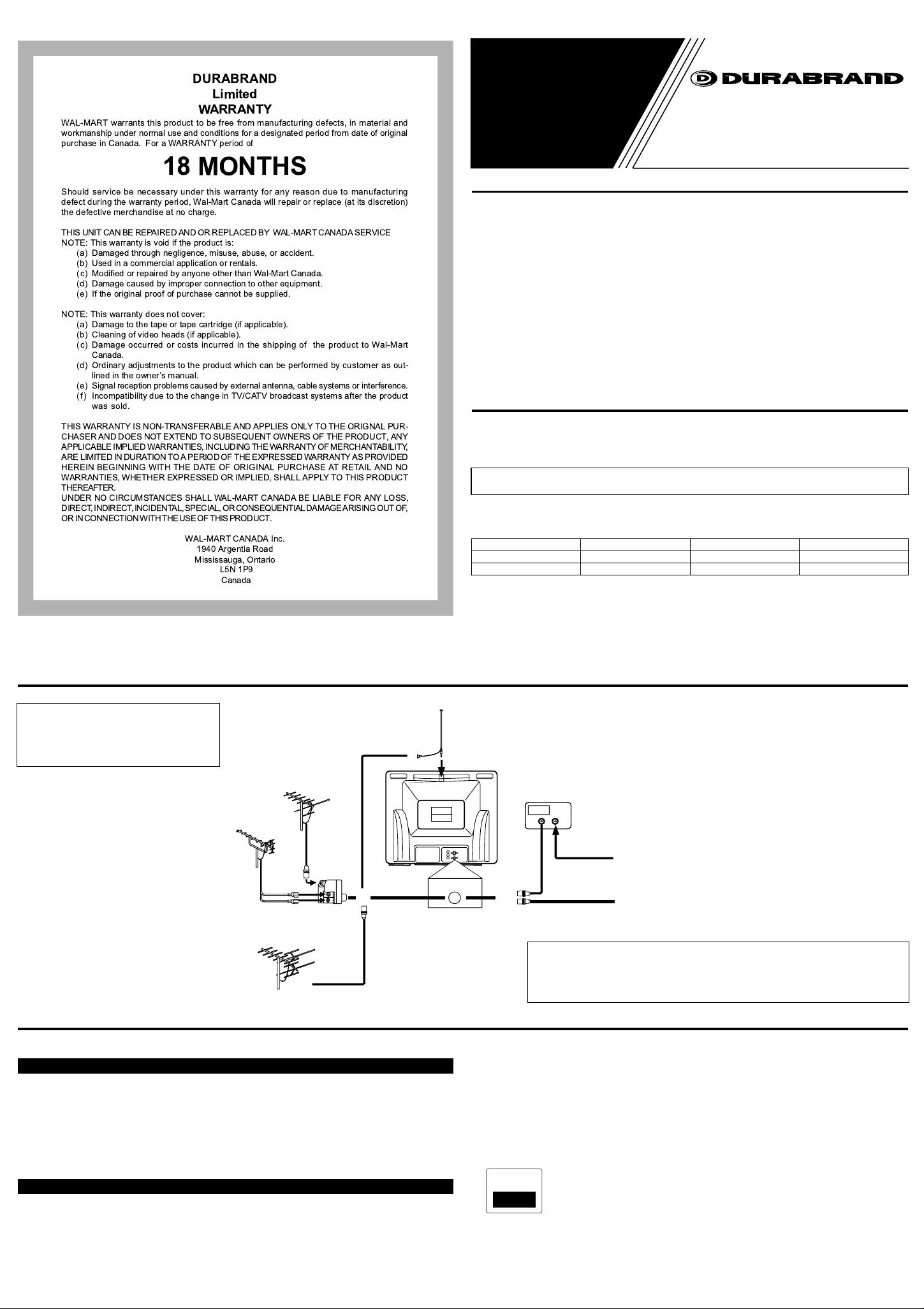
ANTENNA/CABLE CONNECTIONS
CAUTION: TO PREVENT ELECTRIC
SHOCK, MATCH WIDE BLADE OF
PLUG TO WIDE SLOT, FULLY
INSERT.
VHF/UHF
Combination Antenna
(Not supplied)
UHF
Antenna
(Not supplied)
VHF/UHF Combiner
(Not supplied)
VHF
Antenna
(Not supplied)
UHF/VHF Rod
Antenna
(Not supplied)
OR
ANT. IN
*Some cable TV systems use scram-
bled signals and require a special converter to receive these channels.
Consult your local cable company.
CATV Box
or Satellite Box
(Not supplied)
OUT
OR
*
IN
75-ohm
Coaxial Cable
Note to CATVsystem installer:
This reminder is provided to call the CATV system installer's attention to Article 820-40 of
the NEC that provides guidelines for proper grounding and, in particular, specifies that the
cable ground shall be connected to the grounding system of the building as close to the point
of cable entry as practical.
From Cable System
or Satellite Antenna
75-ohm
Coaxial Cable
From Cable System
CLOSED CAPTION
This TV can receive C1 and C2 Caption and Text.
Caption Mode
(1)Closed Caption Characters can be displayed on the TV screen only when the received broad-
cast signal contains the Caption Signals.
(2)Paint-on mode: Displays input characters on the screen immediately.
Pop-on mode: Once characters are stored in memory, they are displayed all at once.
Roll-up mode: Displays the characters continuously by scrolling (max. 4 lines)
Note: If CAPTION C1 or C2 is selected but a Closed Caption signal is not included, characters
will not be displayed.
Text Mode
(1)Displays the text on the screen by scrolling (max. 7 lines)
(2)If the received broadcast signal does not contain caption or text signals, no change will occur.
Notes:
(1)When your TV receives a special effects playback signal (i.e., Search, Slow, Still) from a
VCR’s video output channel (CH3 or CH4), your TV may not display the correct caption or
text.
(2)Captions and texts may not match the TV voice exactly.
(3)Interference may cause the closed caption system not to function properly.
(4)The caption or text characters will not be displayed while the menu display or function’s dis-
play is shown.
(5)If you see this screen:
If your TV displays a black box on the screen, this means that your TV is set to TEXT mode. To
clear screen, select CAPTION C1, C2 or CAPTION [OFF].
Page 2
WARNING
PORTABLE CART WARNING
S3126A
FIGURE A
EXAMPLE OF ANTENNA GROUNDING AS PER
NATIONAL ELECTRICAL CODE
ELECTRIC
SERVICE
EQUIPMENT
GROUND
CLAMP
NEC - NATIONAL ELECTRICAL CODE POWER SERVICE GROUNDING
ELECTRODE SYSTEM
(NEC ART 250, PART H)
S2898A
GROUND CLAMPS
GROUNDING CONDUCTORS
(NEC SECTION 810-21)
ANTENNA
DISCHARGE UNIT
(NEC SECTION 810-20)
ANTENNA
LEAD IN
WIRE
MENU POWER
L - AUDIO - RVIDEOHEADPHONE
VOLUME CHANNEL
1 2 3 4 5 86 7
AUDIO
L
R
VIDEO
ANT.IN
16342
15
POWER
123
456
789
0 +100
DISPLAY
VOL
CH
CH
VOL
SLEEP
CHANNEL
RETURN
8
15
6
5
10
12
11
13
MUTE
MENU
7
GAME
14
:
TO REDUCE THE RISK OF FIRE OR ELECTRIC SHOCK, DO NOT EXPOSE THIS APPLIANCE TO RAIN OR MOISTURE.
RISK OF ELECTRIC SHOCK
DO NOT OPEN
CAUTION: TO REDUCE THE RISK OF ELECTRIC
SHOCK, DO NOT REMOVE COVER (OR BACK) NO
USER SERVICEABLE PARTS INSIDE. REFER SERVICING TO QUALIFIED SERVICE PERSONNEL.
The important note is located on the rear of the cabinet.
CAUTION
THIS SYMBOL INDICATES THATDANGEROUS VOLTAGE CONSTI-TUTING A
RISK OF ELECTRIC SHOCK IS PRESENT WITHIN THIS UNIT.
THIS SYMBOL INDICATES THAT
THERE ARE IMPORTANTOPERATING
AND MAINTENANCE INSTRUCTIONS
IN THE LITERATURE ACCOMPANY-ING
THE APPLIANCE.
IMPORTANT SAFEGUARDS
1. Read instructions-All the safety and operating instructions should be read before the appliance is operated.
2. Retain Instructions-The safety and operating instructions should be retained for future reference.
3. Heed Warnings-All warnings on the appliance and in
the operating instructions should be adhered to.
4. Follow Instructions-All operating and use instructions
should be followed.
5. Cleaning-Unplug TV from the wall outlet before cleaning. Do not use liquid cleaners or aerosol cleaners. Use
a damp cloth for cleaning.
EXCEPTION: A product that is meant for uninterrupted service and, that for some specific reason, such as
the possibility of the loss of an authorization code for a
CATV converter, is not intended to be unplugged by
the user for cleaning or any other purpose, may
exclude the reference to unplugging the appliance in
the cleaning description otherwise required in item 5.
6. Attachments-Do not use attachments not recommended
by the TV manufacturer as they may cause hazards.
7. Water and Moisture-Do not use this TV near water, for
example, near a bath tub, wash bowl, kitchen sink, or
laundry tub, in a wet basement, or near a swimming
pool, and the like.
8. Accessories-Do not place this TV on an unstable cart,
stand, tripod, bracket, or table. The TV may fall, causing serious injury to someone, and serious damage to
the appliance. Use only with a cart, stand, tripod,
bracket, or table recommended by
the manufacturer, or sold with the
TV.
Any mounting of the appliance
should follow the manufacturer’s
instructions and should use a
mounting accessory recommended
by the manufacturer. An appliance and cart combination should be moved with care. Quick stops, excessive
force, and uneven surfaces may cause the appliance
and cart combination to overturn.
9. Ventilation-Slots and openings in the cabinet and the
back or bottom are provided for ventilation and to
ensure reliable operation of the TV and to protect it
from overheating, these openings must not be blocked
or covered. The openings should never be blocked by
placing the TV on a bed, sofa, rug, or other similar surface. This TV should never be placed near or over a
radiator or heat register. This TVshould not be placed
in a built-in installation such as a bookcase or rack
unless proper ventilation is provided or the manufacturer’s instructions have been adhered to .
10.Power Sources-This TV should be operated only from
the type of power source indicated on the marking
label. If you are not sure of the type of power supply to
your home, consult your appliance dealer or local
power company. For TVs intended to operate from battery power, or other sources, refer to the operating
instructions.
11.Grounding or Polarization-This TV is equipped with a
polarized alternating-current line plug(a plug having
one blade wider than the other). This plug will fit into
the power outlet only one way. This is a safety feature.
If you are unable to insert the plug fully into the outlet,
try reversing the plug. If the plug should still fail to fit,
contact your electrician to replace your obsolete outlet.
Do not defeat the safety purpose of the polarized plug.
12.Power-Cord Protection-Power-supply cords should be
routed so that they are not likely to be walked on or
pinched by items placed upon or against them, paying
particular attention to cords at plugs, convenience
receptacles, and the point where they exit from the
appliance.
13.Outdoor Antenna grounding-If an outside antenna or
cable system is connected to the TV, be sure the antenna or cable system is grounded so as to provide some
protection against voltage surges and built-up static
charges. Article 810 of the National Electrical Code,
ANSI/NFPANo. 70, provides information with respect
to proper grounding of the mast and supporting structure, grounding of the lead-in wire to an antenna discharge unit, size of grounding conductors, location of
antenna-discharge unit, connection to grounding electrodes, and requirements for the grounding electrode.
(Fig. A)
14.Lightning-For added protection for this TV receiver
during a lightning storm, or when it is left unattended
and unused for long periods of time, unplug it from the
wall outlet and disconnect the antenna or cable system.
This will prevent damage to the TV due to lightning
and power-line surges.
15.Power Lines-An outside antenna system should not be
located in the vicinity of overhead power lines or other
electric light of power circuits, or where it can fall into
such power lines or circuits. When installing an outside
antenna system, extreme care should be taken to keep
from touching such power lines or circuits as contact
with them might be fatal.
16.Overloading-Do not overload wall outlets and extension cords as this can result in a risk of fire or electric
shock.
17.Object and Liquid Entry-Never push objects of any
kind into this TV through openings as they may touch
dangerous voltage points or short out parts that could
result in a fire or electric shock. Never spill liquid of
any kind on the TV.
18.Servicing-Do not attempt to service this TV yourself as
opening or removing covers may expose you to dangerous voltage or other hazards. Refer all servicing to
qualified service personnel.
19.Damage Requiring Service-Unplug this TV from the
wall outlet and refer servicing to qualified service personnel under the following conditions:
a. When the power supply cord or plug is damaged or
frayed.
b.If liquid has been spilled, or objects have fallen into
the TV.
c. If the TV has been exposed to rain or water.
d.If the TV does not operate normally by following the
operating instructions. Adjust only those controls that
are covered by the operating instructions, as improper
adjustment of other controls may result in damage and
will often require extensive work by a qualified technician to restore the TV to its normal operation.
e. If the TV has been dropped or damaged in any way.
f. When the TV exhibits a distinct change in perfor-
mance-this indicates a need for service.
20.Replacement Parts-When replacement parts are
required, be sure the service technician uses replacement parts specified by the manufacturer that have the
same characteristics as the original part. Unauthorized
substitutions may result in fire, electric shock, injury to
persons or other hazards.
21.Safety Check-Upon completion of any service or
repairs to this TV, ask the service technician to perform
routine safety checks to determine that the TV is in
proper operating condition.
22.Heat-This TV product should be situated away from
heat sources such as radiators, heat registers, stoves, or
other products (including amplifiers) that produce heat.
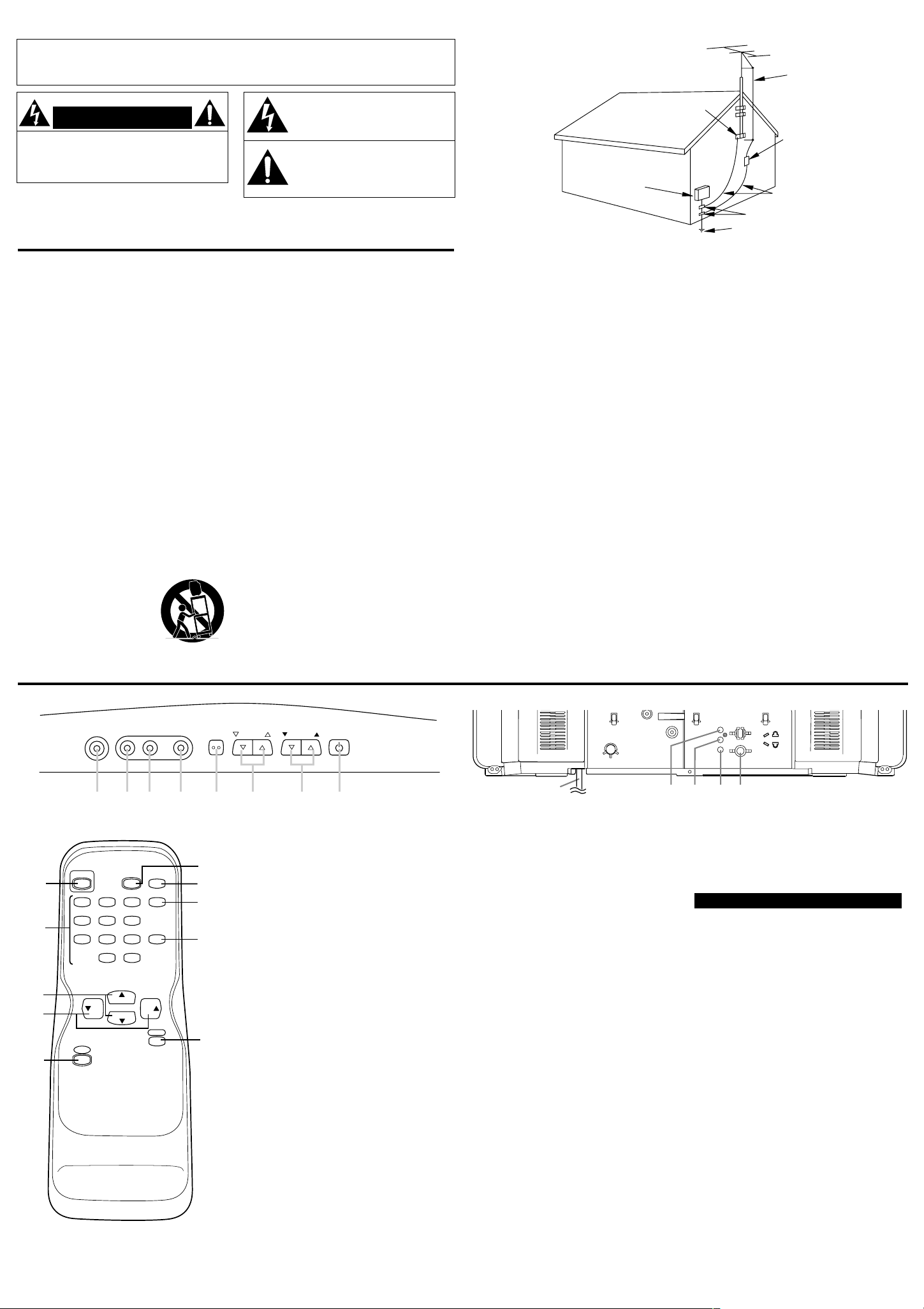
OPERATING CONTROLS AND FUNCTIONS
- FRONT PANEL - - REAR PANEL -
- REMOTE CONTROL -
1. HEADPHONE jack- To connect head-
phone (not supplied) for personal listening.
2. VIDEO (in) jack- Connect to the video
output jack of a video camera or VCR.
3. AUDIO L(in) jack- Connect to the left
channel audio output jack of a video camera
or VCR.
NOTE: The rear-panel AUDIO L (IN) jack
is for mono input. The sound is heard from
both speakers. Use this jack for monaural
audio equipment to be hooked up.
4. AUDIO R (in) jack- Connect to the right
channel audio output jack of a video camera
or VCR.
5. MENU button- Press to display the menu
on the TV screen.
6. VOLUME ▲/▼ buttons- Press to control
the volume level.
Press to determine the setting mode from
the menu on the TV screen. (only the VOL
▲ button)
Press to select or adjust from a particular
menu. (for example: Language Selection,
Channel Presetting, Closed Caption
Selection, Picture Adjustment, V-CHIP Set
Up)
7. CHANNEL▲/▼ buttons- Press to select
memorized channel.
NOTE:You MUST PRESET channels
BEFORE using CHANNEL ▲/▼ buttons.
(See CHANNEL PRESETTING)
Press to select the setting mode from the
menu on the TV screen.
Press to select item you want to adjust in
the picture control mode.
8. POWER button- Press to turn the TV ON
and OFF.
9. MUTE button- Press the MUTE button to
turn off the sound portion of the TV program. (Volume level display turns LIGHT
RED from LIGHT BLUE.) Press the
MUTE button again or press the
VOL(ume) ▲ or ▼ button to restore
sound.
10.CHANNEL RETURN button- Press this
button to go back to the previously viewed
channel. For example, pressing the CHANNEL RETURN button once will change
channel display from CH 3 (present channel) to CH 10 (previously viewed channel),
and pressing it a second time will return
from CH 10 to CH 3.
11.DISPLAYbutton- Press to display the
channel number on the screen. If you press
it again, the channel number will disappear.
12.SLEEP button- Press the SLEEP button to
display the sleep timer and start the function. The shut off time can be determined
by the number of times you press the button. (0, 10, 20, 30,..90, 0 minutes)
13.GAME button- Press to set the Game
mode and external input mode at the same
time. Press the GAME button again to exit
this mode.
14.CHANNEL NUMBER buttons- Press
two digits to directly access the desired
channel. Remember to press a "0" before a
single digit channel.
+100 button- Press to select cable channels higher than 99.
15.AC cord- Connect to a standard AC outlet
(120V/60Hz).
NOTE: Unwrap the AC cord completely
from the backcover before plugging the
cord into an AC outlet.
16.ANT(enna). IN jack- Connect to an anten-
na, cable system, or satellite system.
EXTERNAL INPUT MODE
When using an external input signal (VCR or
camcorder), connect the player’s audio/video
output cables to the AUDIO IN/ VIDEO IN
jacks of your TV. Then press the GAME button.
For details, see “USING THE GAME BUTTON” in PICTURE ADJUSTMENT section.
Page 3
PREPARATION FOR USE
SLEEP 10
PICTURE
CHANNEL SET
[ENGLISH]FRANÇAIS
V-CHIP SET UP
CAPTION [OFF]
PICTURE
CHANNEL SET
[ENGLISH]FRANÇAIS
V-CHIP SET UP
CAPTION [ C1]
PICTURE
CHANNEL SET
[ENGLISH]FRANÇAIS
V-CHIP SET UP
CAPTION [ C2]
PICTURE
CHANNEL SET
[ENGLISH]FRANÇAIS
V-CHIP SET UP
CAPTION [ T1]
PICTURE
CHANNEL SET
[ENGLISH]FRANÇAIS
V-CHIP SET UP
CAPTION [ T2]
PICTURE
CHANNEL SET
[ENGLISH]FRANÇAIS
V-CHIP SET UP
CAPTION [OFF]
ADD/DELETE
AUTO MEMO
STEREO [ON]
ADD/DELETE
AUTO MEMO
STEREO [ON]
PICTURE
CHANNEL SET
[ENGLISH]FRANÇAIS
V-CHIP SET UP
CAPTION [OFF]
PICTURE
CHANNEL SET
[ENGLISH]FRANÇAIS
V-CHIP SET UP
CAPTION [OFF]
PICTURE
CHANNEL SET
[ENGLISH]FRANÇAIS
V-CHIP SET UP
CAPTION [OFF]
PICTURE
CHANNEL SET
[ENGLISH]FRANÇAIS
V-CHIP SET UP
CAPTION [OFF]
PICTURE
CHANNEL SET
[ENGLISH]FRANÇAIS
V-CHIP SET UP
CAPTION [OFF]
ADD/DELETE
AUTO MEMO
STEREO [OFF]
ADD/DELETE
AUTO MEMO
STEREO [ON]
[-]
GAME MODE
[+]
OFF ON
[-]
BRIGHT
[+]
[-]
CONTRAST
[+] [-]
COLOR
[+] [-]
TINT
[+]
[-]
SHARPNESS
[+]
INSTALLING THE BATTERIES
1) Slide the battery compartment cover on the remote unit.
2) Insert 2 "AA" penlight batteries into battery compartment in the direction as indicated by the polarity
(+ / -) markings. Batteries installed with incorrect polarity may damage the remote unit.
3) Replace the cover.
LANGUAGE SELECTION
If you want to change the language of the on-screen menu, follow the procedure below.
1) Connect the power cord to a standard AC outlet.
Note: If some digits appear in the corner of the screen,
press the POWER button without unplugging the power cord.
2) Press the POWER button to turn on the TV.
3) Press the MENU button so that the menu display appears
on the TV screen.
4) Press the CH(annel) ▲ or ▼ button to point to "[ENGLISH]".
5) Select "ENGLISH" or "FRANÇAIS" = French by using
the VOL(ume) ▲ or ▼ button.
6) Press the MENU button to exit the menu.
CHANNEL PRESETTING
NOTE:You MUST PRESET channels BEFORE using CHANNEL ▲ or ▼ button.
To preset a channel or to change a preset channel, follow the procedure
below.
1) Press the POWER button to turn on the TV.
2) Press the MENU button so that the menu display appears
on the TV screen.
3) Press the CH(annel) ▲ or ▼ button to point to "CHANNEL SET".
Then, press the VOL(ume) ▲ button.
4) Press the CH(annel) ▲ or ▼ button to point to "AUTO MEMO".
Then, press the VOL(ume) ▲ button.
The tuner scans and memorizes all active channels in your area.
● The TV distinguishes between standard TV channels and cable channels.
● When AUTO MEMO action is completed, the lowest memorized channel reappears on the
screen.
● When you press the CH(annel) ▲ or ▼ button after selecting AUTO MEMO,
the tuner will stop at the memorized channels only.
● The TV may recognize TV channels to be CATV channels by the receiving conditions. In this
case, try AUTO MEMO action again in the fine receiving conditions.
[ADD/DELETE FUNCTION]
1)Press the MENU button so that the menu display appears on the TV
screen.
2)Press the CH(annel) ▲ or ▼ button to point to "CHANNEL SET".
Then, press the VOL(ume) ▲ button.
3)Press the VOL(ume) ▲ button so that "ADD/DELETE" is selected.
4)Use the CH(annel) ▲ or ▼ button to select the channel you wish to put
into memory or to erase from memory.
Note: The display will return to the screen in about 10 seconds.
Perform "ADD/DELETE" function while this display appears on the
screen.
● Press the VOL(ume) ▲ or ▼ button to light up the channel number
in LIGHT BLUE if you wish to add the channel into memory.
● Press the VOL(ume) ▲ or ▼ button to light up the channel number
in LIGHT RED if you wish to erase the channel from memory.
5)Press the MENU button to exit the menu.
STEREO SOUND SYSTEM
This function is suppresses noise, restores the dynamic range and electronically expands the stereo signal to create a more spacious sound effect.
1)Press the MENU button so that the menu display appears on the TV
screen.
2)Press the CH(annel) ▲ or ▼ button to point to "CHANNEL SET".
Then, press the VOL(ume) ▲ button.
3)Press the CH(annel) ▲ or ▼ button so that "STEREO" is selected.
4)Press the VOL(ume) ▲ or ▼ button to select the stereo mode on or off.
Stereo sound is effective when the "STEREO" is on.
RESUME FUNCTION
If the power fails or is disconnected while the TV is powered on, the TV will turn on automatically when the power resumes.
OPERATIONS
WATCHING ATV PROGRAM
1)Press the POWER button to turn on the TV.
2)Select the desired channel with the CH(annel) ▲ or ▼ button.
3)Adjust the volume to the desired listening level using the VOL(ume) ▲ or ▼ button.
4)Adjust picture controls for a natural looking image. (See "PICTURE ADJUSTMENT".)
SETTING THE SLEEP TIMER
The sleep timer function enables you to shut off the power without pressing
the POWER button after a desired time period.
1)Press the POWER button to turn on the TV and press the SLEEP button
on the remote control .
2)You may change the sleep time by pressing the SLEEP
button on the remote control repeatedly. The timer is set up
to 90 minutes, 10 minutes each time the SLEEP button is
pushed. (The timer display counts up and sleep timer will
be displayed on the screen when you press the SLEEP
button on remote control.)
Note: When you disconnect the unit from the AC outlet, or if you have a power failure, the
sleep time will be lost.
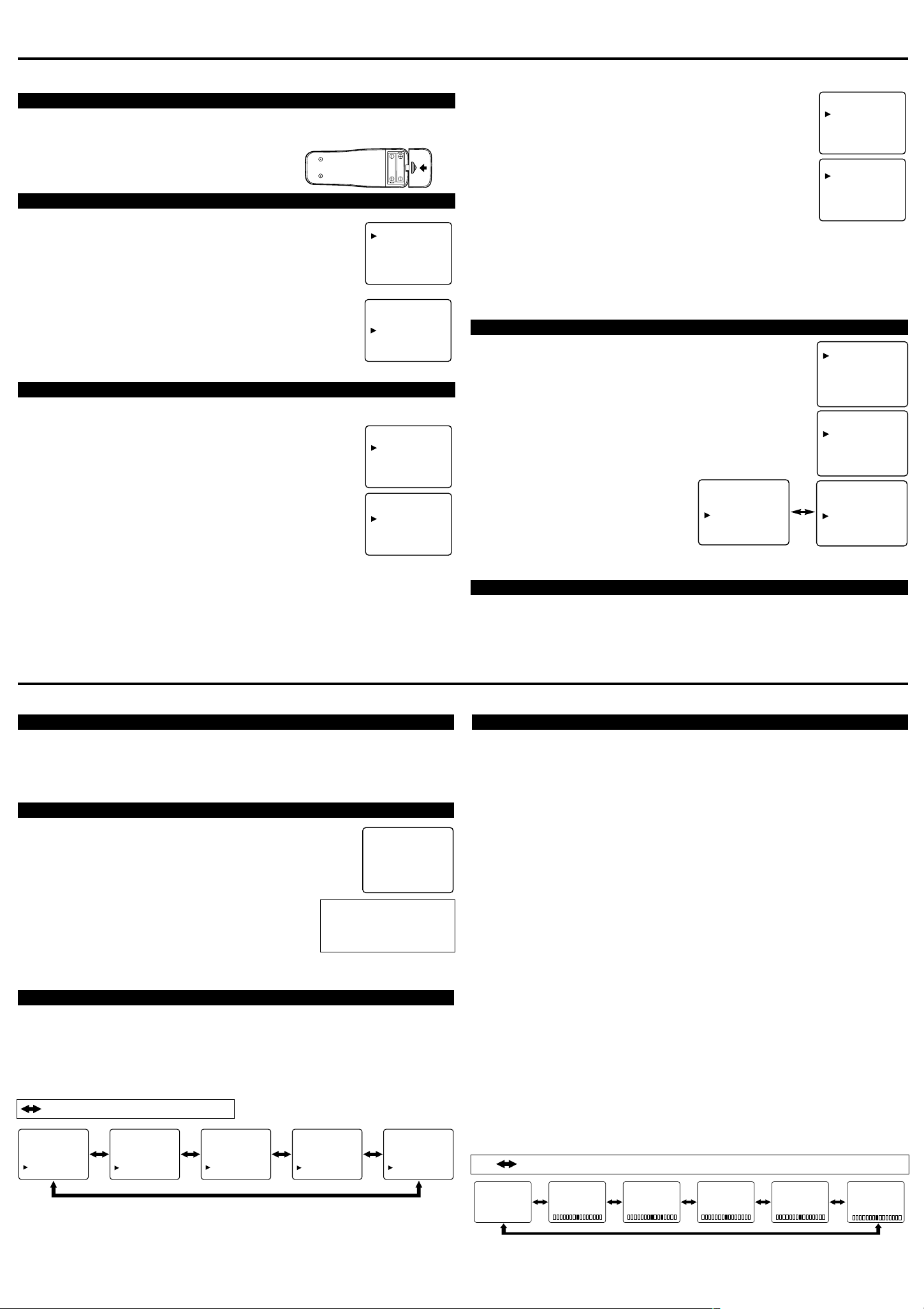
CLOSED CAPTION SELECTION
You may view specially labeled (cc) TV programs, movies, news, prerecorded tapes, etc.
with either a dialogue caption or text display
added to the program.
: Press the VOL(ume) ▲ or ▼ button.
1)Press the MENU button so that the menu
display appears on the TV screen.
2)Press the CH(annel) ▲ or ▼ button to point
to "CAPTION".
3)Press the VOL(ume) ▲ or ▼ button to select
the mode you wish.
4)When done, press the MENU button to exit
the menu.
To cancel the sleep timer:
Press the SLEEP button
repeatedly until "SLEEP 0"
is displayed.
PICTURE ADJUSTMENT
1)Press the MENU button so that the menu display appears on the TV screen.
2)Press the VOL(ume) ▲ button so that "PICTURE" is selected.
3)Select the feature you wish to adjust with the CH(annel) ▲ or ▼ button and adjust it with the
VOL(ume) ▲ or ▼ button.
GAME MODE
Set to the most suitable position for TV
GAME.
[+] : ON [ -] : OFF
BRIGHT
Adjust until the darkest parts of the picture are
as bright as you prefer.
[+] : increase brightness [-] : decrease brightness
CONTRAST
Adjust to increase or decrease contrast.
[+] : increase contrast [-] : decrease contrast
COLOR
Adjust to be brilliant or pale color.
[+] : be brilliant color [-] : be pale color
TINT
Adjust to obtain natural skin tones.
[+] : greenish tone [-] : reddish tone
SHARPNESS
Adjust to detail in the picture.
[+]:increase sharpness [-]:decrease sharpness
Notes:
●
“+” is achieved by pressing the VOL(ume)
▲ button and “-” by pressing the VOL(ume)
▼ button.
●
In the above steps, the picture adjustment
display will disappear from the TV screen
automatically after about 10 seconds if you
do not press any buttons. Press the MENU
and VOL(ume) ▲ button so that "PICTURE" is selected. Then, press the
CH(annel) ▲ or ▼ button repeatedly until
the display returns to the screen.
●
If you adjust any picture control after you
set the Game mode to [ON], the Game mode
is set to [OFF] automatically.
[USING THE GAME BUTTON]
You may also set the Game mode and external
input mode at the same time by pressing the
GAME button on the remote control. “GAME”
appears on the TV screen.
●
To exit the Game mode and external input
mode, press the GAME button on the remote
control again.
●
To cancel the Game mode only, adjust the
picture control. In this case, “VIDEO” instead
of “GAME” appears on the TV screen.
●
If you press the GAME button when the TV
is off, the TV turns on and will be in the
Game mode and external input mode automatically.
: Press the CH(annel) ▲ or ▼ button.
Page 4

OPERATIONS (Continued)
PICTURE
CHANNEL SET
[ENGLISH]FRANÇAIS
V-CHIP SET UP
CAPTION [OFF]
TV RATING
MPAA RATING
G [VIEW]
PG
[VIEW]
PG-13
[VIEW]
R
[BLOCK]
NC-17
[BLOCK]
X
[BLOCK]
PICTURE
CHANNEL SET
[ENGLISH]FRANÇAIS
V-CHIP SET UP
CAPTION [OFF]
TV RATING
MPAA RATING
TV-Y
[VIEW]
TV-Y7 ( )
[VIEW]
TV-G
[VIEW]
TV-PG
( ) [VIEW]
TV-14
( ) [VIEW]
TV-MA ( )
[VIEW]
TV-Y7
[BLOCK]
FV
[BLOCK]
TV-PG
[BLOCK]
D
[BLOCK]
L
[BLOCK]
S
[BLOCK]
V
[BLOCK]
TV-Y
[VIEW]
TV-Y7 (
) [VIEW]
TV-G
[BLOCK]
TV-PG
(DLSV) [BLOCK]
TV-14
(DLSV) [BLOCK]
TV-MA (
LSV) [BLOCK]
QUICK SERVICE CHECK LIST
PROBLEM
POSSIBLE REMEDY
Try a new channel, if OK, then possible station trouble.
Is TV plugged in?
Power at outlet?
Is TV’s POWER button on?
Is antenna connected to terminal on the back of the set?
If outside antenna is being used, check for broken wire.
Check for local interference.
Turn off with POWER button and then turn it on after about a minute.
Adjust COLOR control.
Adjust CONTRAST & BRIGHT control.
Check batteries in Remote Control.
Move the TV away from the nearby appliances which have Magnetism.
Turn off using the POWER button, then turn it on again 30 minutes or so later.
Remote Control Doesn’t Work
Bars On Screen
Picture Distorted
Picture Rolls Vertically
No Color
Poor Reception on Some Channels
Weak Picture
Lines or Streaks in Picture
Ghosts in picture
Picture Blurred
Sound OK, Picture Poor
Picture OK, Sound Poor
No Picture or Sound
Different color marks on screen
As an ENERGY STAR Partner, our company has determined that this product meets
the E
NERGY STAR guidelines for energy efficiency. ENERGY STAR is a U.S. registered mark.
®
®
®
Owner’s
Manual
V-CHIP SET UP
V-CHIP enables parents to prevent their children from watching inappropriate material on TV.
V-CHIP reads the ratings for programming (except for news and sports programs, unedited movies
on premium cable channels, and Emergency Broadcast System signals), then denies access to programming if the program's rating meets the limitations you select. In this case, "PROTECTED
PROGRAM by ..." message appears on the TV screen.
To block ratings, follow the steps below.
● Programming may be rated by the Motion Picture Association of America (MPAA) or according
to the Television Parental Guidelines. In order to block any inappropriate programming, set
your limits in both places (MPAA RATING and TV RATING).
● You cannot access the menu when the "PROTECTED PROGRAM by ..." message appears. In
this case, change to the unblocked channel, then press the MENU button.
[MPAARATING SET UP]
1) Press the MENU button so that the menu display appears on the TV
screen.
2) Press the CH(annel) ▲ or ▼ button to point to "V-CHIP SET UP".
Then, press the VOL(ume) ▲ button.
3)Press the CH(annel) ▲ or ▼ button to point to "MPAA RATING".
Then, press the VOL(ume) ▲ button.
4)Press the CH(annel) ▲ or ▼ button to point to your desired item.
Then, press the VOL(ume) ▲ button to select [BLOCK] or [VIEW].
[TV RATING SET UP]
1) Press the MENU button so that the menu display appears on the TV
screen.
2) Press the CH(annel) ▲ or ▼ button to point to "V-CHIP SET UP".
Then, press the VOL(ume) ▲ button.
3) Press the CH(annel) ▲ or ▼ button to point to "TV RATING".
Then, press the VOL(ume) ▲ button.
4) Press the CH(annel) ▲ or ▼ button to point to your desired item.
Then, press the VOL(ume) ▲ button to select [BLOCK] or [VIEW].
<Selection> <Rating Category Explanations>
• TV-Y: Appropriate for all children
• TV-Y7: Appropriate for children seven and older
• TV-G: General Audience
• TV-PG: Parental Guidance suggested.
• TV-14: Unsuitable for children under 14
• TV-MA: Mature audience only
● When you select the rating category and turn it [BLOCK], the higher rating will turn [BLOCK]
automatically. Also, the lower rating will turn [VIEW] automatically.
● When you turn "TV-Y" to [BLOCK] or [VIEW], the all ratings will turn to [BLOCK] or
[VIEW] automatically.
● When you turn "TV-MA" to [VIEW], the all ratings will turn to [VIEW] automatically.
<Selection> <Rating Category Explanations>
• G: General Audience
• PG: Parental Guidance suggested.
• PG-13: Unsuitable for children under 13
• R: Restricted; under 17 requires accompanying parent or adult guardian
• NC-17: No one under 17 admitted
• X: Mature audience only
● When you select the rating category and turn it [BLOCK], the higher rating will turn [BLOCK]
automatically. Also, the lower rating will turn [VIEW] automatically.
● When you turn "G" to [BLOCK] or [VIEW], the all ratings will turn to [BLOCK] or [VIEW]
automatically.
● When you turn "X" to [VIEW], the all ratings will turn to [VIEW] automatically.
5) Press the MENU button to exit the menu.
TROUBLESHOOTING GUIDE
Sometimes a performance problem can be easily solved by checking seemingly apparent but often overlooked possibilities. Before arranging for service, check these items. It could save your time and money.
When you select TV-Y7, TV-PG, TV-14, or TV-MA and you press the VOL(ume) ▲ button, the
sub-ratings will appear on the TV screen.
If you select the rating category (example: TV-PG) and turn it [BLOCK] or [VIEW], the sub-ratings (example: V for Violence) will turn [BLOCK] or [VIEW] automatically.
You can set the sub-ratings to [BLOCK] or [VIEW] individually when the rating category is set to
[BLOCK]. To set the sub-ratings individually, follow the steps below.
● When you select [TV-Y7]:
Press the CH(annel) ▲ or ▼ button to select "FV" (Fantasy Violence).
Then, press the VOL(ume) ▲ button to select [BLOCK] or [VIEW].
● When you select [TV-PG], [TV-14] or [TV-MA]:
Press the CH(annel) ▲ or ▼ button to select "D"(Suggestive Dialog),
"L"(Coarse Language), "S"(Sexual Situation), or "V"(Violence). Then,
press the VOL(ume) ▲ button to select [BLOCK] or [VIEW].
Note: When you select [TV-MA], "D" does not appear on the TV screen.
● The sub-ratings which set to [BLOCK] appears next to the rating category
in the TV RATING menu.
5) Press the MENU button to exit the menu.
MAINTENANCE
CABINET CLEANING
● Wipe the front panel and other exterior sur-
faces of the TV with a soft cloth immersed
in lukewarm water and wrung dry.
● Never use a solvent or alcohol. Do not spray
insecticide liquid near the TV. Such chemicals may cause damage and discoloration to
the exposed surfaces.
PICTURE TUBE CLEANING
Wipe the picture tube of the TV with a soft
cloth. Before cleaning the picture tube, disconnect the power cord.
Closed Caption Problem Possible Remedy
My TV is showing captions that are
misspelled.
My TV will not show the text in its entirety
or there is a delay of what is being said.
My captions are scrambled with white boxes
on the TV screen.
My program guide listed a TV show as
being closed captioned
but none of the captions were displayed.
My prerecorded videotape does not show
any captions. The tape box mentions it being
closed captioned.
My TV screen shows a black box on certain
channels.
You are watching a live broadcast and spelling errors made by the
closed captioning production company may pass through uncorrected. Aprerecorded program will not show any misspelled words
because of the normal time available for editing the captions.
Captions that are delayed a few seconds behind the actual dialogue
are common for live broadcasts. Most captioning production companies can display a dialogue to a maximum of 220 words per minute.
If a dialogue exceeds that rate, selective editing is used to insure that
the captions remain up-to-date with the current TV screen dialogue.
Interference caused by building, power lines, thunderstorms, etc.
may cause scrambled or incomplete captions to appear.
Broadcasters may at times use a time compression process to the
actual program so that additional advertising time can be given.
Since the decoder cannot read the compressed information, captions
will be lost.
The videotape was either an illegal copying or the tape duplicating
company accidentally left out the captioning signals during the
copying process.
You are in the TEXT mode. Select CAPTION mode or CAPTION
[OFF].
SUPPLIED ACCESSORIES
Remote control unit
(N0108UD or
N0132UD)
Batteries ("AA" x 2)
SPECIFICATIONS
GENERAL SPECIFICATIONS
Television system: NTSC-M TV Standard
Closed Caption
System: §15.119/FCC
Channel coverage
VHF: 2 ~ 13
UHF: 14 ~ 69
CATV: 2 ~ 13, A~ W,
W+1 ~ W+84,
A-5 ~ A-1, 5A
Tuning System 181 channel
frequency synthesized
tuning system
Channel access: Direct access keyboard,
programmable
scan and up/down
Terminals
Antenna input: VHF/UHF/CATV
75 ohm unbalanced
(F-type)
Video input: RCA connector x 2
Audio input: RCAconnector x 4
Headphone: 1/8” stereo (3.5mm)
Stereo Sound System
Sound output: 1W, 8 ohm x2
Remote control: Digital encoded
Operating
temperature: 5°C to 40°C
Power requirements: AC120V, 60Hz
Power consumption
(Maximum): 110W
Picture tube: 27"
Dimensions: H : 22-1/16” (560mm)
Weight: 77.2 lbs. (35kg)
•Designs and specifications are subject to
change without notice and without our
legal obligation.
•If there is a discrepancy between languages,
the default language will be English.
Owner’s Manual
(0EMN02199)
ELECTRICAL SPECIFICATIONS
OTHER SPECIFICATIONS
infrared light system
(41°F~104°F)
W: 26” (660mm)
D : 19-11/16” (500mm)
Page 5

ANT.IN
Manuel du
Date d’achat
Nom du marchand
Adresse du marchand
Numéro de téléphone
Numéro de modèle
Numéro de série
GARANTIE
limitée
DURABRAND
18 MOIS
(a)
(b)
(c)
(d)
(e)
(a)
(b)
(c)
(d)
(e)
(f)
WAL-MART CANADA Inc.
1940 Argentia Road
Mississauga, Ontario
L5N 1P9
Canada
WAL-MART garantit que ce produit sera exempt de vices de fabrication, de matériaux et de
façon dans des conditions d'utilisation normales pendant la période désignée à partir de la
date d'achat originale au Canada. Période de GARANTIE de
Endommagé par négligence, emploi incorrect, mauvais traitement ou accident.
Utilisé dans une application commerciale ou locative.
Modifié ou réparé par quiconque d'autre que Wal-Mart Canada.
Dommages causés par une connexion incorrecte à un autre appareil.
Si la preuve de l'achat original ne peut pas être présentée.
Les dommages de la bande ou cassette (si applicable)
Le nettoyage des têtes vidéo (si applicable)
Les dommages survenus ou les coûts encourus pour le transport du produit à
Wal-Mart Canada.
Les ajustements ordinaires du produit qui peuvent être effectués par le client
comme expliqué dans le mode d'emploi.
Les problèmes de réception de signal causés par une antenne extérieure, des
systèmes câblés ou des interférences.
Une incompatibilité due au changement du système de diffusion TV/CATV après
la vente du produit.
CET APPAREIL PEUT ETRE REPARE ET/OU REMPLACE PAR LE SERVICE WALMART Canada
NOTE: Cette garantie est nulle si le produit est:
CETTE GARANTIE N'EST PAS TRANSFERABLE ET S'APPLIQUE UNIQUEMENT A
L'ACHETEUR D'ORIGINE. ELLE NE S'ETEND PAS AUX PROPRIETAIRES
SUBSEQUENTS DU PRODUIT. TOUTES LES GARANTIES APPLICABLES IMPLIQUEES,
Y COMPRIS LA GARANTIE DE COMMERCIABILITE, SONT LIMITEES EN DUREE A LA
PERIODE DE LA GARANTIE EXPRIMEE INDIQUEE ICI, COMMENCANT A LA DATE DE
L'ACHAT ORIGINAL AU REVENDEUR. AUCUNE GARANTIE, EXPRIMEE OU SOUSENTENDUE, NE S'APPLIQUERA A CE PRODUIT PAR LA SUITE.
EN AUCUN CAS, WAL-MART CANADA NE SERA TENU RESPONSABLE D'UNE PERTE,
D'UN DOMMAGE DIRECT, INDIRECT, INCIDENTEL, SPECIAL OU CONSECUTIF
DECOULANT DE OU EN RELATION AVEC L'EMPLOI DE CE PRODUIT.
NOTE: Cette garantie ne couvre pas:
Si le service est requis sous cette garantie pour une raison due à un vice de fabrication
découvert pendant la période de garantie, Wal-Mart Canada réparera ou remplacera (à sa
discrétion) la marchandise défectueuse à titre gratuit.
propriétaire
TÉLÉVISEUR COULEUR
DE 27 POUCES
DCT2703R
CARACTÉRISTIQUES
● Tube image teinté et brillant avec matrice noire
● Choix de 181 canaux avec syntonisation de l’ensemble des canaux VHF/UHF plus
les 125 canaux du câble.
● Syntonisation de fréquences avec boucle de verrouillage de phase- Le dernier système
électronique de syntonisation de fréquences muni d’une boucle de verrouillage de phase vous permet
d’accéder très simplement et facilement à tous les canaux. Il vous est possible de syntoniser directement
le canal souhaité grâce aux touches numériques (touches 0-9 et +100) de la télécommande.
● Affichage de toutes les fonctions sur l’écran
● Télécommande comprenant l’ensemble des fonctions de l’appareil
● Chronorupteur
●
Décodeur de sous-titres- Il vous est possible de visionner des émissions télévisées (programmes,
films, informations, enregistrements sur vidéocassettes, etc.,) particulièrement identifiées par le
symbole (CC) qui indique que des sous-titres du dialogue ou du texte ont été ajoutés au signal télévisé.
● Fonction de mise hors circuit automatique- Dans le cas où le téléviseur ne reçoit aucun
signal en provenance de la borne d’antenne et qu’il n’y a aucune image sur l’écran pendant 15
minutes, l’appareil s’éteindra automatiquement.
● CIRCUIT V- Permet aux parents d’éviter que leurs enfants ne regardent des programmes
télévisés qui ne leur sont pas destinés.
● Entrée audio / visuelle avant / arrière
PRÉCAUTIONS À SUIVRE
● Installez le téléviseur dans une pièce suffisamment aérée.
● Faites en sorte que le téléviseur soit éloigné de toute source directe de chaleur, tels que des
appareils de chauffage ou d’une lumière solaire directe.
● Ne déposez pas le téléviseur sur une surface molle, telle que celle d’un tapis ou d’une couverture.
● Laissez un espace suffisant sur le dessus, le dessous et l’arrière de l’appareil de manière à
faciliter une circulation d’air adéquate.
REMARQUE:
EFFECTUER LA PROGRAMMATION AUTOMATIQUE DES CANAUX. CONSULTEZ LA SECTION
DU GUIDE QUI S’Y RAPPORTE AFIN DE CONNAÎTRE LA PROCÉDURE À SUIVRE.
Le numéro de série de ce téléviseur est indiqué à l’endos de l’appareil. Aucune autre téléviseur ne
possède le même numéro. Inscrivez-le ici, avec les autres informations pertinentes indiquées ci-dessous
et conservez ce manuel à titre de référence permanente sur la date d’achat et le modèle en cas de vol.
POUR QUE L’APPAREILDONNE SON RENDMENT OPTIMAL, VOUS DEVEZ
Ce Manuel du Propriétaire est fait en papier recyclé.
L6605CF
RACCORDEMENT À L’ANTENNE OU AU RÉSEAU DE CÂBLODISTRIBUTION
Antenne tige
ATTENTION: POUR ÉVITER LES CHOC
ÉLECTRIQUES, INTRODUIRE LA LAME LA PLUS
LARGE DE LA FICHE DANS LA BORNE
CORRESPONDANTE DE LA PRISE ET POUSSER
JUSQU’AU FOND.
Antenne UHF
(non compris)
Antenne VHF
(non compris)
DÉCODEUR DE SOUS-TITRES
Ce téléviseur peut capter les canaux 1 et 2 (S1 et S2) utilisés pour la transmission de sous-titres et
de textes.
MODE D’AFFICHAGE DE SOUS-TITRES
(1)Les sous-titres apparaissent au bas de l’écran du téléviseur lorsque le signal de l’émission
visionnée comprend des sous-titres.
(2)Mode d’affichage instantané des sous-titres : ceux-ci apparaissent à l’écran dès la réception
du signal.
Mode d’affichage séquentiel des sous-titres : une fois qu’ils sont mis en mémoire, les mots
apparaissent à l’écran, tous à la fois, en une seule séquence.
Mode d’affichage continuel des sous-titres : les sous-titres défilement continuellement à
l’écran, quatre (4) lignes de texte à la fois.
Remarque : Même si le canal 1 ou 2 (S1 ou S2) a été sélectionné pour la transmission de sous-
titres, ceux-ci n’apparaîtront pas à l’écran du téléviseur si le signal de l’émission visionnée ne
contient pas de sous-titres.
MODE D’AFFICHAGE DE TEXTE
(1)Le texte défile (7 lignes à la fois) à l’écran du téléviseur.
(2)Si l’émission que vous visionnez n’est pas diffusée avec des sous-titres ou un texte, aucun
changement n’apparaîtra à l’écran.
Antenne VHF/UHF
combinée
(non compris)
Adaptateur combiné
VHF/UHF (non compris)
UHF/VHF
(non compris)
OU
Convertisseur pour la
réception du câble* ou
de la télévision par
satellite (non compris)
ANT. IN
Borne d’entrée d’antenne
(ANT. IN)
SORTIE ENTRÉE
Câble coaxial de
OU
75 ohms
NOTE POUR L’INSTALLATEUR DU SYSTÈME DE TV PAR CÂBLE:
Ce rappel est pour attirer l’attention de l’installateur du système de TV par câble sur l’Article
820-40 du Code National Electrique qui fournit les directives pour une mise à la terre correcte,
plus particulièrement la précision que le câble de mise à la terre doit être connecté au système de
mise à la terre du bâtiment, aussi près que possible du point d’entrée du câble.
Câble coaxial de 75 ohms fournissant le
signal du réseau de câblodistribution ou
de la télévision par satellite
Du réseau de câblodistribution
Remarques :
(1)Lorsque votre téléviseur reçoit une commande de lecture spécifique (telle la recherche visuelle,
le ralenti, l’arrêt sur image) provenant d’un magnétoscope auquel il est raccordé par le canal
commun de transmission 3 ou 4 (CH 3 / CH 4), il se peut que l’affichage des sous-titres (ou du
texte) soit altéré ou n’apparaisse plus à l’écran.
(2)Il est normal que les sous-titres et les textes ne soient pas précisément synchronisé avec la
transmission sonore et visuelle de l’émission.
(3)De l’interférence magnétique causée par un appareil à proximité peut entraîner un mauvais
fonctionnement de l’affichage des sous-titres.
(4)Ce téléviseur ne peut afficher les sous-titres et les textes lorsque la fonction d’affichage à
l’écran du menu des fonctions et commandes est utilisée.
(5)Si l’écran du téléviseur est complètement noir :
Si une boîte noire apparaît au bas de l’écran de votre téléviseur, cela signifie que l’appareil est en
mode d’affichage de texte (S-TITRES T1 ou T2). Libérez l’écran en sélectionnant le canal de
transmission 1 ou 2 (S-TITRES S1, S2) ou désactivez le mode d’affichage des sous-titres et de
texte S-TITRES [HF].
*Certains câblodistributeurs émettent des
signaux brouillés et nécessitent l’utilisation
d’un convertisseur spécifique pour la
réception des canaux du câble. Consultez
votre câblodistributeur à ce sujet.
Page 6

AUDIO
L
R
VIDEO
ANT.IN
16342
15
POWER
123
456
789
0 +100
DISPLAY
VOL
CH
CH
VOL
SLEEP
CHANNEL
RETURN
8
15
6
5
10
12
11
13
MUTE
MENU
7
GAME
14
AVERTISSEMENT:
SYMBOLE D'AVERTISSEMENT POUR
LES COMPOSANTES
APPAREIL ET MEUBLE A ROULETTES
S3126A
Modèle de mise à la terre d’une antenne suivant les
instructions du Code national sur l’électricité.
BOÎTE D’ENTRÉE DE
SERVICE
COLLIER DE MISE
À LA TERRE
CNE-CODE NATIONAL SUR L’ÉLECTRICITÉ SYSTÈME DE MISE À LA TERRE DE L’ENTRÉE DE
SERVICE (CNE, ART. 250, PARTIE H)
S2898A
COLLIERS DE MISE À LA TERRE
CONDUCTEURS DE MISE À LA TERRE
(CNE, SECTION 810-21)
DÉCHARGE D’ANTENNE
(CNE, SECTION 810-20)
DESCENTE D’ANTENNE
MENU POWER
L - AUDIO - RVIDEOHEADPHONE
VOLUME CHANNEL
1 2 3 4 5 86 7
POUR PRÉVENIR TOUT RISQUE D’INCENDIE OU DE CHOC ÉLECTRIQUE, NE PAS
EXPOSER CET APPAREIL À LA PLUIE OU À L’HUMIDITÉ.
ATTENTION
RISQUE DE CHOC
ÉLECTRIQUE. NE PAS OUVRIR
MISE EN GARDE: AFIN DE RÉDUIRE LES
RISQUES DE CHOCS ÉLECTRIQUES, N’ENLEVEZ
PAS LE COUVERCLE (OU L’ARRIÈRE). NE
CONTIENT AUCUNE PIÈCE POUVANT ÊTRE
RÉPAR ÉE PAR L’UTILISATEUR. CONFIEZ TOUTE
RÉPARATION ÀUN TECHNICIEN QUALIFIÉ.
Avertissements importants apposés à l’endos de l’appareil.
Le symbole de l’éclair dans un triangle
équilatéral indique la présence d’une tension
suffisamment élevée pour engendrer un
risque de choc électrique.
Le point d’exclamation dans un triangle
équilatéral indique que le manuel
d’instructions inclus avec l’appareil contient
d’importantes recommandations quant au
fonctionnement et à l’entretien de ce dernier.
MESURES DE SÉCURITÉ À SUIVRE
1. LISEZ CE MANUEL– Avant la mise en marche de cet
appareil, veuillez lire l’ensemble des instructions
concernant la sécurité et le fonctionnement.
2. CONSERVEZ CE MANUEL– Pour pouvoir les
consulter ultérieurement, les instructions concernant la
sécurité et le fonctionnement de l’appareil devront être
conservées.
3. SUIVEZ LES AVERTISSEMENTS– On devra prendre
en considération et les suivre toutes les observations au
sujet de l’appareil et de son fonctionnement.
4. OBSERVEZ LES DIRECTIVES– Vous êtes prié de
suivre toutes les directives concernant le
fonctionnement et l’entretien de l’appareil.
5. NETTOYAGE– Tout d’abord, débranchez l’appareil de
la prise murale. N’utilisez pas de produits à nettoyer
liquides ou en aérosols. Utilisez un tissu doux et
légèrement humecté d’eau.
6. ACCESSOIRES– N’utilisez que les accessoires
recommandés par le fabricant. Tout autre accessoire
risquerait de provoquer un fonctionnement défectueux
ou même dangereux.
7. EAU ET HUMIDITÉ– N’utilisez pas cet appareil à
proximité de l’eau (près d’une baignoire, d’un lavabo,
d’un évier, d’une piscine, d’une machine à laver, dans
un sous-sol humide. etc.).
8. SUPPORT– N’installez pas cet appareil sur un meuble,
un comptoir, un trépied, un support
ou une table instable. L’appareil
risquerait de tomber et de blesser
gravement quelqu’un et, en outre, il
serait sérieusement endommagé.
9. VENTILATION– Les orifices et ouvertures servent à
procurer une ventilation et un fonctionnement adéquat
de l’appareil de manière à ce qu’il ne soit pas
surchauffé.
Ces orifices et ouvertures ne doivent pas être obstrués
ou recouverts.
N’installez jamais l’appareil sur un lit, un canapé, un
tapis ou toute autre surface similaire, ni à proximité
d’un radiateur ou d’un thermostat. Cet appareil ne doit
pas être placé à l’intérieur d’un meuble, telle une
étagère ou une bibliothèque, à moins qu’il n’y ait une
aération suffisante.
10.SOURCE D’ALIMENTATION– Cet appareil ne devra
être branché que sur le type de source d’alimentation
indiqué sur l’étiquette prévue à cet effet. Si vous n’êtes
pas certain du type de source d’alimentation dont vous
disposez, contactez votre revendeur ou votre
compagnie d’électricité. Pour les appareils
fonctionnant avec des piles, consultez les directives de
fonctionnement.
11.MISE À LA TERRE OU POLARISATION– Cet
appareil possède une fiche polarisée pour prise C.A.
(fiche dont une broche est plus large que l’autre).
Cet appareil possède une fiche polarisée pour prise de
C.A. (une des lames est plus large que l’autre). Cette
fiche ne s’insère dans la prise de courant que dans un
sens par mesure de sécurité. Si l’insertion de la fiche
dans un sens donné est difficile, inversez sa position.
Si c’est encore difficile, demandez à un électricien
qualifié de remplacer la prise. Cette fiche étant
sécuritaire, n’essayez pas de la modifier.
12.PROTECTION DES FILS ÉLECTRIQUES– Les fils
d’alimentation devront être disposés de manière à ce
qu’ils ne soient pas écrasés ou tordus par les objets les
entourant. Faites particulièrement attention aux fiches,
aux raccordements et aux endroits où les fils sortent de
l’appareil.
13.MISE À LA TERRE D’UNE ANTENNE
EXTÉRIEURE– Si une antenne extérieure ou un
système de câblo-distribution est raccordé à l’appareil,
veillez à ce que ces derniers soient reliés à la terre afin
de protéger l’appareil contre des surcharges de tension
ou une accumulation d’électricité statique.
14.FOUDRE– Par mesure de protection supplémentaire,
lors d’orages ou d’une inutilisation prolongée,
débranchez l’appareil de la prise murale ainsi que
l’antenne (ou le système de câblo-distribution). Cette
mesure permettra d’éviter que l’appareil ne soit
endommagé lors d’un orage ou d’une surcharge de
tension.
15.FILS ÉLECTRIQUES– Si vous choisissez d’installer
une antenne extérieure, prenez garde à ce qu’elle ne se
trouve pas à proximité de câbles électriques sur
lesquels elle risquerait de tomber.
L’installation d’une telle antenne doit être effectuée
très prudemment afin que l’antenne ou les fils (ou
circuits) électriques n’entrent pas en contact et
n’entraînent une électrocution pouvant être mortelle.
16.SURCHARGE ÉLECTRIQUE– Ne surchargez pas les
prises murales ou les fils de prolongement. Cela
pourrait entraîner un risque d’incendie ou de
commotion électrique.
17.OBJETS ET LIQUIDES– N’essayez jamais d’insérer
un objet à l’intérieur de l’appareil par l’intermédiaire
des orifices, car vous pourriez toucher des pièces sous
tension ou provoquer un court-circuit entraînant un
début d’incendie ou une commotion électrique. Faites
en sorte de ne renverser aucun liquide sur l’appareil.
18. RÉPARATIONS– N’essayez pas de réparer vous-
même l’appareil. Si vous ouvrez l’appareil ou enlevez
des panneaux, vous vous exposerez à une tension
élevée ainsi qu’à d’autres dangers. Pour n’importe
quelle réparation ou vérification, faites appel à un
technicien qualifié.
19.DOMMAGE NÉCESSITANT UNE RÉPARATION–
Débranchez l’appareil de la prise murale et confiez
l’entretien/dépannage à un personnel qualifié dans les
cas suivants:
a. Lorsque le fil d’alimentation ou sa fiche est endommagé.
b.Lorsqu’un liquide ou un objet a pénétré dans l’appareil.
c. Lorsque l’appareil a été exposé à la pluie ou à de l’eau.
d.Si l’appareil ne fonctionne pas normalement bien que
l’on ait suivi les instructions. Ne réglez que les
ajustements décrits dans ce manuel d’instructions. Un
réglage erroné des autres commandes risque
d’endommager l’appareil et de nécessiter un long
travail de la part d’un technicien qualifié pour remettre
l’appareil en état de fonctionner.
e. Lorsqu’on a laissé tomber l’appareil et que le boîtier
est endommagé.
f. Lorsque le fonctionnement de l’appareil diffère de la
période initiale, il sera nécessaire alors de le faire réparer.
20.PIÈCES DE RECHANGE– Lorsque des pièces de
rechange sont nécessaires, assurez-vous que le
technicien utilise les pièces recommandées par le
fabricant ou qu’elles présentent les mêmes
caractéristiques que les pièces d’origine. L’utilisation
de pièces différentes risque de provoquer un incendie,
une commotion électrique ou d’autres dommages.
21.INSPECTION POUR LA SÉCURITÉ– Al’achèvement
de la réparation ou de l’entretien, demandez au
technicien de procéder à une inspection afin de
s’assurer que l’appareil est en état de fonctionner.
22.CHALEUR– L’installation de ce téléviseur doit être
éloignée de sources de chaleur telles que celles d’un
appareil de chauffage, d’une bouche d’air chaud, d’un
four ou de tout autre appareil (y compris des
amplificateurs) dégageant de la chaleur.
DESCRIPTION DES COMMANDES ET FONCTIONS
- VUE DE L’AVANT DU TÉLÉVISEUR - - VUE DE ARRIÈRE DE TÉLÉVISEUR -
- TÉLÉCOMMANDE -
1. Prise pour casque d’écoute
(HEADPHONE)- Sert à brancher le casque
d’écoute (non inclus) sans déranger votre
entourage.
2. Prise entrée vidéo (VIDEO)- Sert à
raccorder à la borne de sortie d’un
composant vidéo, d’un caméscope ou d’un
autre magnétoscope.
3. Prise entrée AUDIO gauche- Sert à
4. Prise entrée AUDIO droite- Sert à
raccorder la prise de sortie audio du canal
de gauche d'un caméscope ou d'un
magnétoscope.
REMARQUE: La prise AUDIO L (IN) sur
le panneau arrière est pour une entrée
monophonique. Le son est entendu à partir
des deux haut-parleurs. Utilisez ce prise
pour un équipement monophonique devant
être connecté.
raccorder la prise de sortie audio du canal
de droite d’un caméscope ou d’un
magnétoscope.
5. Touche MENU- Pressez cette touche afin
de faire apparaître le menu à l’écran du
téléviseur.
6. Commandes du volume (VOLUME
▲/▼)- Pressez ces touches afin de régler le
volume.
Pressez la touche VOL ▲ afin de
déterminer un mode d’ajustement du menu
à l’écran de téléviseur.
Pressez ces touches afin de sélectionner ou
régler dans un menu particulier (par
exemple, Sélection de la langue d’affichage,
Programmation des canaux en mémoire,
Sélection du mode d’affichage des soustitres, Ajustement des aspects de l’image,
Réglage du CIRCUIT V).
7. Commandes des canaux (CHANNEL
▲/▼)- Pressez ces touches afin de
sélectionner un canal dans la mémoire.
NOTA:Vous DEVEZ prérégler les canaux
AVANT d’utiliser la touche de montée et de
diminution des CANAUX ▲/▼. (Consultez
la section sur les préréglages des canaux).
Pressez ces touches afin de sélectionner un
mode d’ajustement du menu à l’écran de
téléviseur.
Pressez ces touches afin de sélectionner
l’article que vous désirez régler dans le
mode d’adjustement des aspects de l’image.
8. Interrupteur d’alimentation (POWER)-
Pressez l’interrupteur d’alimentation pour
mettre le téléviseur en circuit ou l’éteindre.
9. Commande de mise en sourdine
(MUTE)- Pressez cette pour couper la
reproduction sonore émanant du téléviseur
(l’affichage en bleu à l’écran du niveau de
volume passera alors au rouge). Pressez une
seconde fois la commande de mise en
sourdine (MUTE) ou l’une des commandes
de hausse/baisse du volume (VOLUME ▲
ou ▼) afin de réactiver la reproduction
sonore.
10.Commande de syntonisation du canal
précédent (CHANNEL RETURN)-
Pressez cette touche afin que l’appareil
retourne au dernier canal syntonisé avant
celui où il se trouve alors. Par exemple, si
le téléviseur syntonise le canal 3 et que le
dernier canal syntonisé avant ce dernier
était le canal 10, l’appareil retournera
automatiquement au canal 10 lorsque vous
presserez une fois la commande de
syntonisation du canal précédent
(CHANNEL RETURN). Puis pressez à
nouveau la commande pour que le
téléviseur retourne au canal 3.
11.Commande d’affichage (DISPLAY)-
Pressez cette touche afin de faire apparaître
à l’écran du téléviseur le numéro de canal
syntonisé à ce moment. Une seconde
pression de cette touche fera disparaître le
numéro de l’écran.
12.Commande de minuterie-sommeil
(SLEEP)- Pressez cette touche (SLEEP)
afin que la fonction soit affichée à l’écran
et mise en marche. La durée de temps
devant s’écouler avant la mise hors circuit
automatique de l’appareil est déterminée
par le nombre de fois que vous pressez
cette touche (SLEEP). Cela débute à 0, 10,
20, 30, ....jusqu'à 90 minutes et retour à 0
minute.
13.Touche de jeu (GAME)-Appuyez sur
cette touche pour sélectionner
simultanément les modes de jeu et le mode
d’entrée externe. Appuyez de nouveau sur
la touche GAME pour quitter ce mode.
14.Touche numériques- Pressez deux de ces
touches afin de syntoniser directement le
canal de votre choix. Il faut toujours presser
la touche « 0 » avant pour syntoniser un
canal dont le numéro est inférieur à dix
(10).
Touche + 100- Pressez cette touche pour
syntoniser un canal dont le numéro est égal
ou supérieur à 100.
15.Cordon d’alimentation- Branchez-le sur
une prise de courant alternatif
conventionnelle (120 volts / 60 hertz).
REMARQUE: Retirez le câble secteur du
crochet pour éviter de rompre un fil avant
que vous ne raccordiez à une prise de
courant secteur standard.
16.Borne d’entrée d’antenne (ANT. IN)-
Raccordez à cette borne le câble provenant
de l’antenne, du réseau de câblodistribution
ou du système de télévision par satellite.
MODE D’ENTRÉE EXTERNE
Lors de l’utilisation d’un signal d’entrée
externe, (VCR ou caméscope), connectez les
câbles de sortie audio/vidéo du lecteur aux
jacks AUDIO IN/VIDEO IN du téléviseur.
Puis appuyez sur la touche GAME. Pour plus
de détails, reportez-vous à “UTILISATION DE
LA TOUCHE GAME” dans la section
AJUSTEMENT DES ASPECTS DE L’IMAGE.
Page 7

PICTURE
CHANNEL SET
[ENGLISH]FRANÇAIS
V-CHIP SET UP
CAPTION [OFF]
AJOUT/SUPP.
RÉGLAGE AUTO.
STÉRÉO [ÉF]
PICTURE
CHANNEL SET
[ENGLISH]FRANÇAIS
V-CHIP SET UP
CAPTION [OFF]
IMAGE
RÉGL. CAN.
[FRANÇAIS]ENGLISH
RÉGL. CIRCUIT V
S-TITRES [HF]
SOMMEIL 10
[-]
MODE DE JEU
[+]
HF EF
[-]
LUMINOSITÉ
[+]
[-]
CONTRASTE
[+] [-]
COULEUR
[+] [-]
TEINTE
[+]
[-]
NETTETÉ
[+]
IMAGE
RÉGL. CAN.
[FRANÇAIS]ENGLISH
RÉGL. CIRCUIT V
S-TITRES [HF]
IMAGE
RÉGL. CAN.
[FRANÇAIS]ENGLISH
RÉGL. CIRCUIT V
S-TITRES [ S1]
IMAGE
RÉGL. CAN.
[FRANÇAIS]ENGLISH
RÉGL. CIRCUIT V
S-TITRES [ S2]
IMAGE
RÉGL. CAN.
[FRANÇAIS]ENGLISH
RÉGL. CIRCUIT V
S-TITRES [ T1]
IMAGE
RÉGL. CAN.
[FRANÇAIS]ENGLISH
RÉGL. CIRCUIT V
S-TITRES [ T2]
IMAGE
RÉGL. CAN.
[FRANÇAIS]ENGLISH
RÉGL. CIRCUIT V
S-TITRES [HF]
IMAGE
RÉGL. CAN.
[FRANÇAIS]ENGLISH
RÉGL. CIRCUIT V
S-TITRES [HF]
IMAGE
RÉGL. CAN.
[FRANÇAIS]ENGLISH
RÉGL. CIRCUIT V
S-TITRES [HF]
AJOUT/SUPP.
RÉGLAGE AUTO.
STÉRÉO [HF]
AJOUT/SUPP.
RÉGLAGE AUTO.
STÉRÉO [ÉF]
PROGRAMMATION DE L’APPAREIL
MISE EN PLACE DES PILES
1) Glissez le couvercle du compartiment à piles de la télécommande afin de l’ouvrir.
2) Insérez-y deux (2) piles de format AA. Positionnez-les de manière à respecter les polarités (+/-)
indiquées dans le compartiment. Des piles incorrectement positionnées pourraient endommager
la télécommande.
3) Remettez le couvercle du compartiment à piles en place.
SÉLECTION DE LA LANGUE D’AFFICHAGE
Si vous désirez changer la langue d’affichage à l’écran des menus et paramètres,
suivez les procédures ci-dessous.
1) Branchez le cordon d’alimentation du téléviseur sur une prise de courant
alternatif conventionnelle.
Remarque: Si quelques chiffres apparaissent dans le coin de l’écran, pressez
la touche d’alimentation (POWER) sans débrancher le cordon
d’alimentation.
2) Pressez l’interrupteur d’alimentation (POWER) du téléviseur afin de
mettre ce dernier en circuit.
3) Pressez la touche MENU afin de faire apparaître à l’écran du téléviseur le
menu principal des fonctions de l’appareil.
4) Pressez la touche CH(annel) ▲ ou ▼ pour pointer le mot "[ENGLISH]".
5) Sélectionnez "ENGLISH" ou "FRANÇAIS" en utilisant la touche
VOL(ume) ▲ ou ▼.
6) Pressez la touche MENU pour quitter le menu.
PROGRAMMATION DES CANAUX EN MÉMOIRE
NOTA:
Vous DEVEZ prérégler les canaux AVANT d’utiliser la touche de montée et de diminution des
CANAUX
Pour programmer la syntonisation des canaux en mémoire, ou effacer un
canal de la mémoire du syntonisateur, suivez les directives ci-dessous.
1) Pressez l’interrupteur d’alimentation (POWER) du téléviseur afin de
2) Pressez la touche MENU afin de faire apparaître à l’écran du téléviseur le
3) Pressez la touche CH(annel) ▲ ou ▼ pour pointer les mots "RÉGL.
4) Pressez la touche CH(annel) ▲ ou ▼ pour pointer les mots "RÉGLAGE
● Le téléviseur distingue les canaux télédiffusés des canaux distribués par câble.
● Une fois l’action RÉGLAGE AUTO. est effectuée, le plus bas canal en mémoire revient à
● Lorsque vous pressez la touche CH(annel) ▲ ou ▼ après avoir sélectionné
● Le téléviseur peut reconnaître les canaux de télévision pour ceux de télévision pour ceux de
▲/▼
.
mettre ce dernier en circuit.
menu principal des fonctions de l’appareil.
CAN.". Puis pressez la touche VOL(ume) ▲.
AUTO.".
Puis pressez la touche VOL(ume) ▲.
Le syntonisateur effectue le balayage et met en mémoire tous les canaux
qui sont captés dans votre région.
l’écran.
RÉGLAGE AUTO., le syntonisateur s'arrêtera aux canaux en mémoire seulement.
âble à cause des conditions de réception. En ce cas, essayez l’action RÉGLAGE AUTO de
nouveau en les conditions fines réseption.
[FONCTION AJOUT/EFFACEMENT]
1)Pressez la touche MENU afin que l’affichage du menu apparaisse à l’écran
du téléviseur.
2)Pressez la touche CH(annel) ▲ ou ▼ pour pointer les mots "RÉGL.
CAN.". Puis pressez la touche VOL(ume) ▲.
3)Pressez la touche VOL(ume) ▲ pour sélectionner "AJOUT/SUPP.".
4)Utilisez la touche CH(annel) ▲ ou ▼ pour sélectionner le canal que vous
souhaitez ajouter à la mémoire ou effacer de la mémoire.
Remarque: L’affichage reviendra à l’écran environ 10 secondes plus tard.
Effectuez le fonction "AJOUT/SUPP." pendant que cet affichage apparait à
l’écran.
● Pressez la touche VOL(ume) ▲ ou ▼ afin que le numéro du canal
sélectionné apparaisse en bleu lorsque vous désirez ajouter ce dernier
dans la mémoire.
● Pressez la touche VOL(ume) ▲ ou ▼ afin que le numéro du canal
sélectionné apparaisse en rouge lorsque vous désirez effacer ce dernier
dans la mémoire.
5)Pressez la touche MENU pour quitter le menu.
SYSTÈME SONORE STÉRÉOPHONIQUE
Cette fonction sert à supprimer les parasites, rétablit la plage dynamique et
élargit électroniquement le signal stéréo pour créer un plus grand effet
sonore.
1) Pressez la touche MENU afin de faire apparaître à l’écran du téléviseur le
menu principal des fonctions de l’appareil.
2) Pressez la touche CH(annel) ▲ ou ▼ pour pointer les mots "RÉGL.
CAN.". Puis pressez la touche VOL(ume) ▲.
3) Pressez la touche CH(annel) ▲ ou ▼ pour sélectionner "STÉRÉO".
4) Appuyez sur la touche VOL(ume) ▲ ou ▼ pour sélectionner la mise en
circuit ou hors circuit du mode stéréo. Le son stéréophonique devient
effectif lorsque "STEREO" est en circuit.
RETOUR À LA MISE EN MARCHE
Si l'alimentation est en panne ou est débranchée alors que le téléviseur est sous tension, ce dernier
se remettra automatiquement en marche lorsque l'énergie reprendra.
FONCTIONNEMENT DU TÉLÉVISEUR
VISIONNEMENT D’UNE ÉMISSION TÉLÉVISÉE
1)Pressez l’interrupteur d’alimentation (POWER) afin de mettre le téléviseur en circuit.
2)Sélectionnez le canal de votre choix en pressant les touches numériques de la télécommande ou
les commandes de syntonisation canal suivant/précédent (CHANNEL ▲ ou ▼).
3)Réglez le volume au niveau désiré en pressant les commandes de hausse (VOLUME ▲) ou de
baisse (VOLUME ▼) du volume.
4)Réglez les aspects de l’image afin que celle-ci apparaisse la plus naturelle possible (consultez la
section AJUSTEMENT DES ASPECTS DE L’IMAGE).
MISE HORS CIRCUIT AUTOMATIQUE - MINUTERIE-SOMMEIL
La minuterie-sommeil vous permet de programmer à l’avance la mise
hors circuit automatique du téléviseur sans que vous ayez à presser
l’interrupteur d’alimentation.
1)Pressez l’interrupteur d’alimentation (POWER) afin de mettre le
téléviseur en circuit. Pressez la commande de minuterie-sommeil
(SLEEP) se trouvant sur la télécommande.
2)Pressez à plusieurs reprises la commande de minuterie-sommeil
(SLEEP) jusqu'à ce que la durée pendant laquelle vous désirez que le
téléviseur fonctionne encore (avant de s’éteindre de lui-même)
apparaisse à l’écran.
Cette durée peut varier entre 10 et 90 minutes selon le nombre de fois que
vous pressez la commande. Le décompte est ainsi entamé. Pour faire
apparaître à l’écran le nombre de minutes devant s’écouler avant la mise
hors circuit automatique du téléviseur, pressez la commande de minuterie-sommeil (SLEEP).
Remarque : Si l’appareil est débranché du réseau électrique ou si une panne de courant
survient, la mise hors fonction automatique sera désactivée.
SÉLECTION DU MODE D’AFFICHAGE DE SOUS-TITRES
Vous pouvez visionner des émissions télévisées
(émissions, films, informations,
enregistrements sur vidéocassettes, etc.)
spécialement identifiées par le symbole « cc »
qui indique que des sous-titres du dialogue ou
du texte ont été ajoutés au signal télévisé. Pour
activer le mode d’affichage de sous-titres,
procédez comme suit :
: Pressez la touche VOL(ume) ▲ ou ▼.
1)Pressez la touche MENU afin que l’affichage
du menu apparaisse à l’écran de téléviseur.
2)Pressez la touche CH(annel) ▲ ou ▼ pour
pointer le mot "S-TITRES".
3)Pressez la touche VOL(ume) ▲ ou ▼ pour
sélectionner le mode de votre choix.
4)Une fois la sélection est effectuée, pressez la
touche MENU pour quitter le mode.
Pour désactiver la
fonction de mise hors
circuit automatique :
Pressez la commande de
minuterie-sommeil à
plusieurs reprises jusqu'à
ce que le chiffre « 0 »
apparaisse à l’écran.
AJUSTEMENT DES ASPECTS DE L’IMAGE
1)Pressez la touche MENU afin que l’affichage du menu apparaisse à l’écran du téléviseur.
2)Pressez la touche VOL(ume) ▲ afin de sélectionner "IMAGE".
3)Sélectionnez l’aspect que vous souhaitez ajuster en utilisant la touche CH(annel) ▲ ou ▼, et
puis ajustez cet aspect en utilsant la touche VOL(ume) ▲ ou ▼.
MODE DE JEU
Ajustez l’image de manière à convenir aux
jeux vidéo.
[+] : mise en mode
[ -] : mise hors mode
LUMINOSITÉ
Ajustez la luminosité jusqu’à ce que les parties
les plus claires de l’image soient aussi
brillantes que vous le désirez.
[+] : augmente la luminosité
[ -] : diminue la luminosité
CONTRASTE
Augmentez ou diminuez les contrastes.
[+] : augmente le contraste
[ -] : diminue le contraste
COULEUR
Réglez l’intensité (vives ou pâles) des
couleurs.
[+] : couleurs plus vives
[ -] : couleurs plus pâles
TEINTE
Ajustez la teinte pour obtenir la couleur de la
peau naturelle.
[+] : ton plus vert
[ -] : ton plus rouge
NETTETÉ
Ajustez pour détailler l'image
[+] : pour augmenter la netteté
[ -] : pour diminuer la netteté
Remarques:
● Pressez la touche VOL(ume) ▲ pour ajuster
à "+" et la touche VOL(ume) ▼ pour "-".
:
Pressez la touche CH(annel) ▲ ou ▼.
● Il se peut que, pendant les procédures
décrites ci-haut, l’affichage des aspects de
l’image disparaisse de l’écran du téléviseur
après environ 10 secondes sans presser
aucune touche, même si le réglage n’est pas
terminé. Si cela se produit, pressez les
touches MENU et VOL(ume) ▲ pour
sélectionner "IMAGE". Puis pressez la
touche CH(annel) ▲ ou ▼ à plusieurs
reprises jusqu’à ce que l’affichage reviendra
à l’écran.
● Si vous adjustez une autre commande des
aspects de l’image après avoir sélectionné le
mode jeux, l’appareil se met automtiquement
hors ce mode.
[UTILISATION DE LATOUCHE GAME]
Appuyez sur cette touche sure la
télécommande pour sélectionner
simultanément les modes de jeu et le mode
d’entrée externe. L’inscription “JEU” (GAME)
apparaît à l’écran du téléviseur.
● Pour quitter les modes jeux et d’entrée
externe, pressez la touche GAME de la
télécommade de nouveau.
● Pour annuler le mode jeux seulement,
ajustez la commade des aspects de l’image.
En ce cas, "AUX" (VIDEO) apparait à
l’écran du téléviseur à la place de "JEU"
(GAME).
● Lorsque vous pressez la touche GAME
pendant que le téléviseur est hors circuit, le
téléviseur se mettra en ciruit et
automatiquement dans les modes jeux et
d’antrée externe.
Page 8

La télécommande ne fonctionne pas.
Il y a des barres dans l’image.
L’image est déformée.
L’image défile verticalement.
Il n’y a pas de couleur.
Mauvaise réception de certains canaux.
L’image est mauvaise.
Il y a des lignes parasites dans l’image.
L’image se dédouble.
L’image est floue.
Le son est bon mais l’image est mauvaise.
L’image est bonne mais le son est mauvais.
Pas de son ni d’image.
Différentes couleur sur l’écran.
LISTE DE VÉRIFICATIONS À
EFFECTUER AVANT DE
CONTACTER UN RÉPARATEUR
PROBLÈME
MESURE CORRECTIVE
Essayez un autre canal, s’il est bien capté, il se peut que l’autre station éprouve des ennuis.
Le téléviseur est-il branché ?
La prise est-il alimentée ?
L’interrupteur d’alimentation (POWER) a-t-il été pressé ?
L’antenne est-elle bien raccordée à la borne à l’endos de l’appareil ?
Si vous utilisez une antenne extérieure, vérifiez si les câbles ne sont pas endommagés.
Vérifiez s’il n’y pas d’interférence près de chez vous.
Eteignez le téléviseur et allumez-le à nouveau une minute plus tard.
Ajustez les couleurs.
Ajustez le contraste et la luminosité.
Vérifiez l’état des piles.
Eloignez le téléviseur de la proximité des appareils émettant des ondes magnétiques.
Mettez hors circuit à l’aide de la touche d’alimentation, puis remettez en circuit environ
30 minutes plus tard.
®
®®
En tant que partenaire de ENERGY STAR , notre société a conclu que ce produit satisfait les directives d'économie
d'énergie de E
NERGY STAR . ENERGY STAR est une marque déposée aux Etats Unis.
FONCTIONNEMENT DU TÉLÉVISEUR
PICTURE
CHANNEL SET
[ENGLISH]FRANÇAIS
V-CHIP SET UP
CAPTION [OFF]
IMAGE
RÉGL. CAN.
[FRANÇAIS]ENGLISH
RÉGL. CIRCUIT V
S-TITRES [HF]
PICTURE
CHANNEL SET
[ENGLISH]FRANÇAIS
V-CHIP SET UP
CAPTION [OFF]
COTE TV
COTE MPAA
PICTURE
CHANNEL SET
[ENGLISH]FRANÇAIS
V-CHIP SET UP
CAPTION [OFF]
G [VISION]
PG
[VISION]
PG-13
[VISION]
R
[BARRÉ]
NC-17
[BARRÉ]
X
[BARRÉ]
PICTURE
CHANNEL SET
[ENGLISH]FRANÇAIS
V-CHIP SET UP
CAPTION [OFF]
IMAGE
RÉGL. CAN.
[FRANÇAIS]ENGLISH
RÉGL. CIRCUIT V
S-TITRES [HF]
PICTURE
CHANNEL SET
[ENGLISH]FRANÇAIS
V-CHIP SET UP
CAPTION [OFF]
COTE TV
COTE MPAA
PICTURE
CHANNEL SET
[ENGLISH]FRANÇAIS
V-CHIP SET UP
CAPTION [OFF]
TV-Y
[VISION]
TV-Y7 ( )
[VISION]
TV-G
[VISION]
TV-PG
( ) [VISION]
TV-14
( ) [VISION]
TV-MA ( )
[VISION]
PICTURE
CHANNEL SET
[ENGLISH]FRANÇAIS
V-CHIP SET UP
CAPTION [OFF]
TV-Y7
[BARRÉ]
FV
[BARRÉ]
PICTURE
CHANNEL SET
[ENGLISH]FRANÇAIS
V-CHIP SET UP
CAPTION [OFF]
TV-PG
[BARRÉ]
D
[BARRÉ]
L
[BARRÉ]
S
[BARRÉ]
V
[BARRÉ]
PICTURE
CHANNEL SET
[ENGLISH]FRANÇAIS
V-CHIP SET UP
CAPTION [OFF]
TV-Y
[VISION]
TV-Y7 (
) [VISION]
TV-G
[BARRÉ]
TV-PG
(DLSV) [BARRÉ]
TV-14
(DLSV) [BARRÉ]
TV-MA (
LSV) [BARRÉ]
Owner’s
Manual
RÉGLAGE DU CIRCUIT V
Le CIRCUIT V permet aux parents d’éviter que leurs enfants ne regardent des programmes
télévisés qui ne leur sont pas destinés.
Le CIRCUIT V lit les classements pour la programmation (à l’exception des nouvelles et des
programmes de sports, de films non montés sur des canaux de câbles à redevances et des signaux
du système d’émissions d’urgence), et refuse alors l’entrée pour une programmation si le
classement du programme répond aux limitations que vous choisissez. Dans ce cas, "ÉMISSION
PROTÉGÉE par ..." apparaît sur l’écran du téléviseur.
Pour bloquer les classements, suivez les étapes ci-dessous.
● La programmation peut être classée par l’Association des Films des Etats-Unis (MPAA) ou selon
les Règles Directrices Parentales sur la Télévision. De manière à verrouiller n’importe quelle
programmation inappropriée, réglez vos limitations aux endroits COTE MPAA et COTE TV.
● Vous ne pouvez accéder au menu lorsque le message "ÉMISSION PROTÉGÉE par ..." apparaît.
Dans ce cas, changer pour déverrouiller le canal et appuyez ensuite sur la touche MENU.
[REGLAGE COTE MPAA]
1) Appuyez sur la touche MENU de façon à ce que l’affihage du menu
apparaisse sur l’écran du téléviseur.
2)
Appuyez sur la touche CH(annel) ▲ ou ▼ pour pointer sur "RÉGL.
CIRCUIT V".
3) Appuyez sur la touche CH(annel) ▲ ou ▼ pour pointer sur "COTE
MPAA".
Puis, appuyez sur la touche VOL(ume) ▲.
4) Appuyez sur la touche CH(annel) ▲ ou ▼ pour pointer sur l’article que
vous désirez.
Puis, appuyez sur la touche VOL(ume) ▲ pour sélectionner [BARRÉ] ou
[VISION].
<Sélection> <Explications sur la catégorie de classement>
• G: Pour tout le monde.
• PG: Gouverne parentale conseillée.
• PG-13: Ne convient pas pour les enfants au-dessous de 13 ans.
• R: Limité; au-dessous de 17 ans, nécessite la présence des parents ou
• NC-17: Interdit aux enfants au-dessous de 17 ans.
• X: Seulement pour les adultes.
● Lorsque vous choisissez la catégorie de classement et que vous la tourner sur [BARRÉ], le
classement le plus élevé tournera automatiquement sur [BARRÉ]. De même, le classement le
plus bas, tournera automatiquement sur [VISION].
● Lorsque vous tournez "G" sur [BARRÉ] ou [VISION], tous les classements tourneront
automatiquement sur [BARRÉ] ou [VISION].
● Lorsque vous tournez "X" sur [VISION], l’ensemble des classements tournera automatiquement
sur [VISION].
5) Appuyez sur la touche MENU pour quitter le menu.
Puis, appuyez sur la touche VOL(ume) ▲.
d’un adulte.
[RÉGLAGE COTE TV]
1) Appuyez sur la touche MENU de façon à ce que l’affichage du menu
apparaisse sur l’écran du téléviseur.
2) Appuyez sur la touche CH(annel) ▲ ou ▼ pour pointer sur "RÉGL.
CIRCUIT V". Puis, appuyez sur la touche VOL(ume) ▲.
3) Appuyez sur la touche CH(annel) ▲ ou ▼ pour pointer sur "COTE TV".
Puis, appuyez sur la touche VOL(ume) ▲.
4) Appuyez sur la touche CH(annel) ▲ ou ▼ pour pointer sur l’article que
vous désirez.
Puis, appuyez sur la touche VOL(ume) ▲ pour sélectionner [BARRÉ] ou
[VISION].
<Sélection> <Explications sur la catégorie de classement>
• TV-Y: Approprié pour tous les enfants.
• TV-Y7: Appoprié pour les enfants de 7 ans et plus.
• TV-G: Pour tout le monde.
• TV-PG: Gouverne parentale conseillée.
• TV-14: Ne convient pas pour les enfants au-dessous de 14 ans.
• TV-MA: Seulement pour les adultes.
● Lorsque vous choisissez la catégorie de classement et que vous la tourner sur [BARRÉ], le
classement le plus élevé tournera automatiquement sur [BARRÉ]. De même, le classement le
plus bas, tournera automatiquement sur [VISION].
● Lorsque vous tournez "TV-Y" sur [BARRÉ] ou [VISION], tous les classements tourneront
automatiquement sur [BARRÉ] ou [VISION].
● Lorsque vous tournez "TV-MA" sur [VISION], l’ensemble des classements tournera
automatiquement sur [VISION].
Lorsque vous sélectionnez TV-Y7, TV-PG, TV-14 ou TV-MA et que vous
appuyez sur la touche VOL(ume) ▲, les sous-classements apparaîtront sur
l’écran du téléviseur.
Si vous sélectionnez une des catégorie de classement (exemple: TV-PG) et que
vous la tourniez sur [BARRÉ] ou sur [VISION], les sous-classements
(exemple: V pour violence) tourneront automatiquement sur [BARRÉ] ou sur
[VISION].
Vous pouvez régler individuellement les sous-classemements sur [BARR
sur [VISION] lorsque la catégorie de classement est réglée sur [BARR
É
É
]. Pour
] ou
régler individuellement les sous-classements, suivez les étapes ci-dessous.
● Lorsque vous choisissez [TV-Y7]:
Appuyez sur la touche CH(annel) ▲ ou ▼ pour sélectionner "FV"
(violence fantastique). Puis, appuyez sur la touche VOL(ume) ▲ pour
sélectionner [BARRÉ] ou [VISION].
● Lorsque vous choisissez [TV-PG], [TV-14] ou [TV-MA]:
Appuyez sur la touche CH(annel) ▲ ou ▼ pour sélectionner "D" (dialogue
suggestif), "L" (language brutal), "S" (situation sexuelle) ou "V"
(violence). Puis, appuyez sur la touche VOL(ume) ▲ pour sélectionner
[BARRÉ] ou [VISION].
Nota: Lorsque vous sélectionnez [TV-MA], "D" n’apparaîtra pas sur
l’écran du téléviseur.
● Les sous-classements qui sont réglés sur [BARRÉ] apparaîtront ensuite dans la catégorie de
classement sur le menu COTE TV.
5) Appuyez sur la touche MENU pour quitter le menu.
PROBLÈMES DE FONCTIONNEMENT
Parfois, lorsque l’appareil ne fonctionne pas correctement, la cause du problème peut être
facilement identifiée en vérifiant simplement un détail qui a été négligé à prime abord. Avant de
contacter le centre de service autorisé par le plus près de chez vous, nous vous suggérons
d’effectuer les vérifications suivantes. Cela pourrait vous faire économiser temps et argent.
PROBLÈMES AVEC LE
DÉCODEUR DE SOUS-TITRES
Les sous-titres apparaissant au bas de l’écran de
mon téléviseur comportent des fautes
d’orthographe.
Les sous-titres sont incomplets ou mal
synchronisés avec le dialogue (et l’action) à
l’écran.
Les sous-titres sont brouillés, il y a des carrés
blancs à l’écran.
La téléhoraire indique que l’émission visionnée
est diffusée avec sous-titres. Pourtant, il n’y en
a aucun à l’écran.
La bande vidéo que je regarde me donne une
image sans sous-titres. Pourtant, l’emballage de
la vidéocassette indique bien qu’il devrait y
avoir des sous-titres.
Une boîte noire apparaît à l’écran du téléviseur
lorsque l’appareil syntonise certains canaux.
Vous visionnez une émission diffusée en direct qui comprend des sous-titres
comportant des erreurs non corrigées. Les émissions diffusées en différé ne
comporteront pas d’erreur étant donné le temps disponible pour corriger ces
dernières avant la diffusion.
Il est normal que les sous-titres apparaissent à l’écran quelques secondes
après l’action lors de la diffusion d’émissions en direct. La plupart des
entreprises produisant les sous-titres sont en mesure d’afficher 220 mots à
la minute. Si le débit du dialogue est plus rapide, un montage sera effectué
sur le dialogue à afficher afin que le texte demeure synchronisé avec
l’action à l’écran.
Il se peut que cela soit de l’interférence causée par les édifices voisins, les
lignes électriques, les orages, etc. qui brouille les sous-titres ou les
entrecoupe.
Les stations de télévision utilisent parfois un procédé de compression vidéo
afin d’accélérer la présentation d’émissions et laisser plus de temps à la
publicité. Puisque le décodeur ne peut lire de l’information qui a été
resserrée, les sous-titres ne pas affichés au bas de l’écran.
La vidéocassette que vous utilisez a été copiée illégalement ou l’entreprise
qui a effectué le doublage de cette vidéocassette a accidentellement omis
d’inclure les signaux de sous-titres sur la bande vidéo lors du processus de
doublage.
Si le téléviseur est en mode d’affichage de TEXTE, sélectionnez le mode
d’affichage des sous-titres “S-TITRES” (CAPTION) ou “S-TITRES HF”
(CAPTION OFF).
SOLUTION POSSIBLE
ENTRETIENT DE L’APPAREIL
NETTOYAGE DU BOÎTIER DU
TÉLÉVISEUR
● Essuyez le devant du téléviseur et ses autres
surfaces externes à l’aide d’un linge doux
que vous aurez préalablement trempé dans
de l’eau tiède et tordu.
● N’utilisez jamais de solvant ni d’alcool pour
nettoyer l’appareil. Ne vaporisez pas
d’insecticide à proximité du téléviseur. Ces
produits chimiques pourraient endommager
l’appareil et décolorer les surfaces atteintes.
NETTOYAGE DE L’ÉCRAN
Essuyez l’écran en vitre du téléviseur à l’aide
d’un linge doux. Débranchez toujours le
cordon d’alimentation de l’appareil avant de le
nettoyer.
ACCESSOIRES VENDUS AVEC L’APPAREIL
Télécommande
(N0108UD ou N0132UD)
Deux (2) piles AA
Manuel d’instructions
(0EMN02199)
FICHE TECHNIQUE
RENSEIGNEMENTS GÉNÉRAUX
Système télévision : NTSC-M standard
Décodeur de sous-titres : § 15.119 / FCC
Distribution des canaux :
bande VHF : 2 à 13
bande UHF : 14 à 69
câblodistribution :
2 à 13, A ~ W,
W + 1 ~ W + 84,A-5 ~ A-1, 5A
Système de syntonisation :
181 canaux avec syntonisation de
fréquences à synthétiseur
Accès aux canaux :
clavier à accès direct, avec
balayage ascendant/descendant
programmable
Bornes
Entrée d’antenne :
VHF/UHF/CATV
75 ohms non équilibrés (Type F)
Entrée vidéo : Connecteur RCA x 2
Entrée audio : Connecteur RCA x 4
Casque d’écoute : Monoral de 3,5 mm (1/8 po.)
Système sonore stéréophonique
SPÉCIFICATIONS-ÉLECTRICITÉ
Puissance de sortie de la reproduction sonore :
1 watt, 8 ohms x 2
AUTRES SPÉCIFICATIONS
Télécommande : rayon infrarouges avec code
numérique
Température de fonctionnement :
5˚ à 40˚C (41˚ à 104˚F)
Source d’alimentation :
courant alternatif 120 volts, 60 hertz
Consommation (maximale) : 110 watts
Tube image :27 pouces
Dimensions :hauteur 22-1/16"(560mm)
largeur 26"(660mm)
profondeur 19-11/16"(500mm)
Poids : 77.2 lbs. (35kg)
•La conception et les caractéristiques
spécifiques de cet appareil sont sujettes à
modification sans préavis ni obligations
légales.
•S’il y a une différence entre les langues,
l’anglais est décisif.
 Loading...