

Page 1
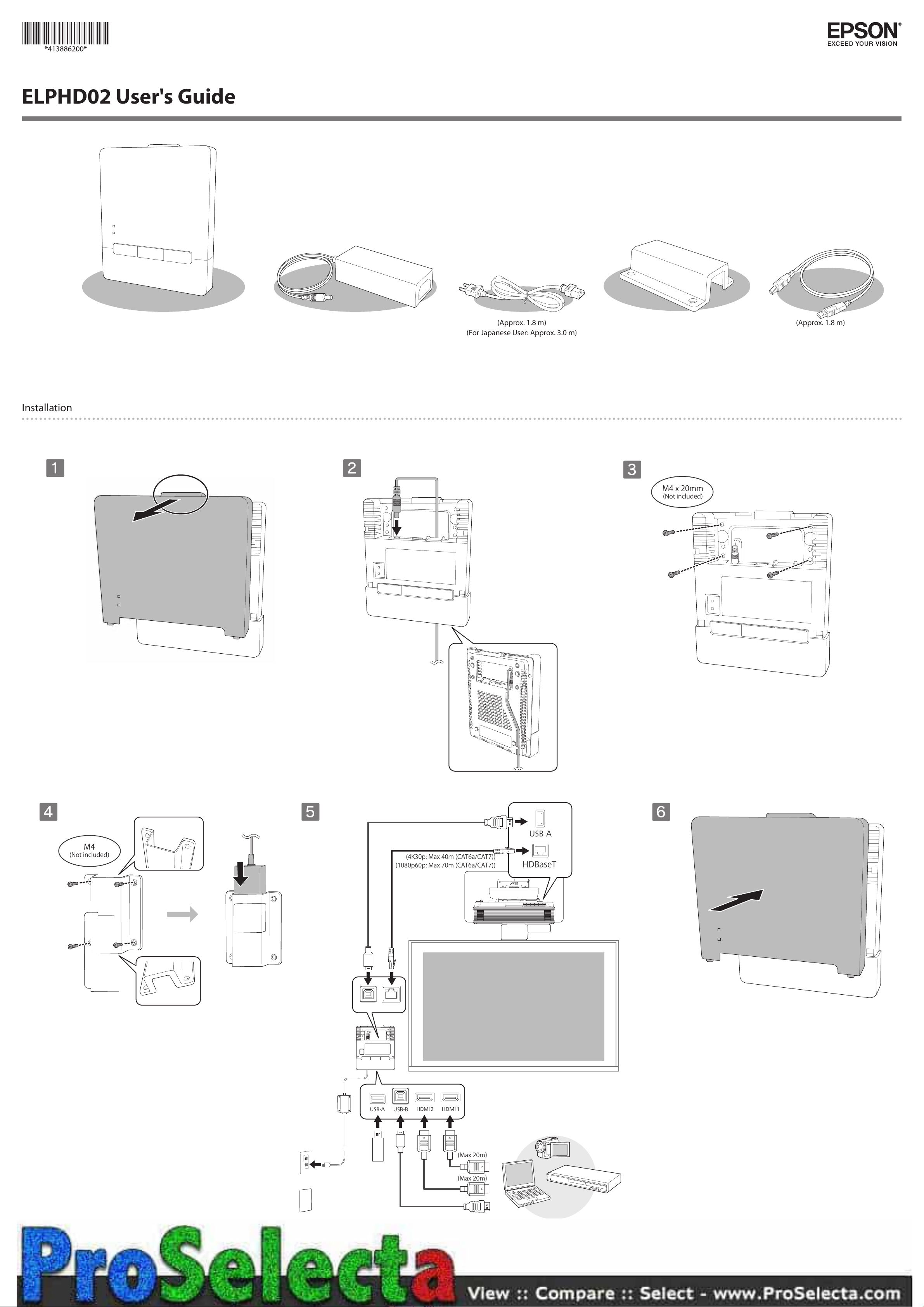
ELPHD02 User's Guide
(Approx. 1.8 m)(Approx. 1.8 m)
(For Japanese User: Approx. 3.0 m)
Installation
A
B
C
M4x20mm
(Notincluded)
D
M4
(Notincluded)
E
F
(4K30p:Max40m(CAT6a/CAT7))
(1080p60p:Max70m(CAT6a/CAT7))
(Max20m)
(Max20m)
Page 2
EN
About This Guide
This guide explains how to install the
ELPHD02.
See the "Installation Guide" that you
can access using the QR code on the
right for more details.
epson.sn
Using the Product Safely
Warning
Do not connect the Control Pad to an unsupported projector
or to another device.
Doing so may damage the device.
The power cable supplied is exclusively for the ELPHD02. Do
not use it with other devices.
Do not disassemble or remodel this product.
WARNING: This product contains chemicals, including lead,
known to the State of California to cause birth defects or
other reproductive harm. Wash hands after handling. (This
notice is provided in accordance with Proposition 65 in Cal.
Health & Safety Code § 25249.5 and following.)
Specications
Item Specications
Control pad mass Approx. 0.6 kg
Power (AC adapter) 100 to 240 V AC +/- 10%, 50/60 Hz
Power 12 VDC 2.5 A 30 W
Electricity consumption
during use
Operating temperature 0 to 40°C
Operating altitudes 0 to 3,048 m
4.5 W
(no condensation)
FR
À propos de ce Guide d'installation
Ce guide explique comment faire
pour installer le ELPHD02.
Consultez le "Guide d'installation"
que vous pouvez ouvrir en utilisant le
code QR à droite pour plus de détails.
epson.sn
Utiliser le produit de façon sûre
Avertissement
Ne connectez pas le Control Pad à un projecteur non pris en
charge ou à un autre appareil.
Cela peut endommager l'appareil.
Le câble d'alimentation fourni est exclusivement conçu pour
le ELPHD02. Ne l'utilisez pas avec d'autres appareils.
Ne démontez et ne remontez pas ce produit.
Spécications
Élément Spécication
Masse du Control Pad Environ 0,6 kg
Alimentation
(adaptateur secteur)
Alimentation 12 V CC, 2,5 A, 30 W
Consommation électrique
pendant l'utilisation
Température
de fonctionnement
Altitudes
de fonctionnement
100 à 240 V CA +/- 10%, 50/60 Hz
4,5 W
0 à 40°C
(sans condensation)
0 à 3048 m
DE
Über diese Installationsanleitung
Diese Anleitung erläutert die
Installation der ELPHD02.
In der über den QR-Code auf
der rechten Seite aufrufbaren
„Installationsanleitung“ nden Sie
weitere Einzelheiten.
epson.sn
Sichere Verwendung des Produktes
Warnung
Verbinden Sie das Control Pad nicht mit einem nicht
unterstützten Projektor oder einem anderen Gerät.
Andernfalls könnte das Gerät beschädigt werden.
Das mitgelieferte Netzkabel ist ausschließlich für den
ELPHD02 vorgesehen. Nicht mit anderen Geräten verwenden.
Demontieren oder verändern Sie dieses Produkt nicht.
Spezikation
Punkt Technische Daten
Gewicht des Control Pad Ca. 0,6 kg
Stromversorgung
(Netzteil)
Stromversorgung 12 V Gleichspannung, 2,5 A, 30 W
Leistungsaufnahme
während des Betriebs
Betriebstemperatur 0 bis 40 °C (ohne Kondensation)
Betriebshöhe 0 bis 3.048 m
100 bis 240 V Wechselspannung
+/- 10 %, 50/60 Hz
4,5 W
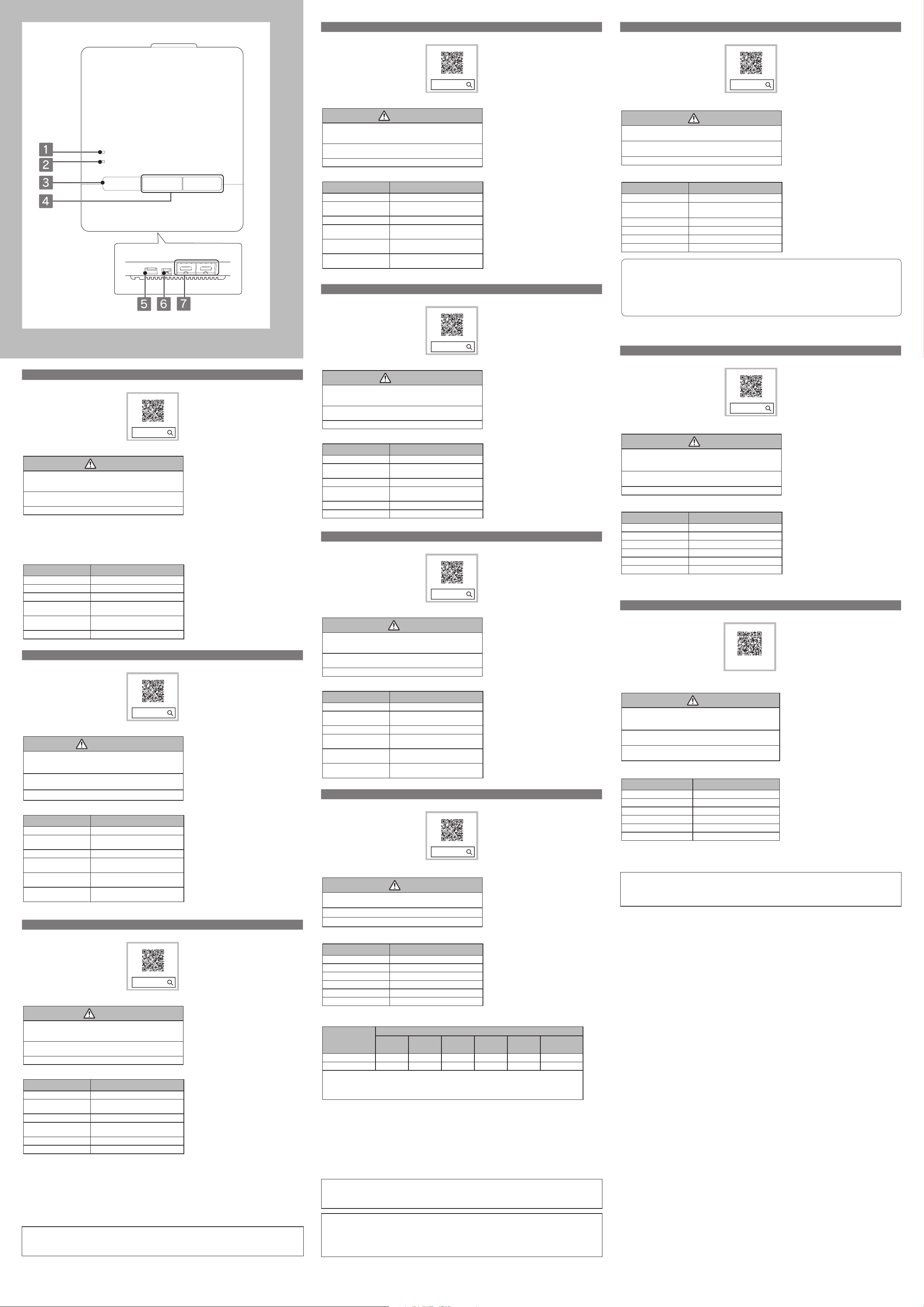
Functions
Link indicator
A
Lit blue means the control pad is
communicating with projector.
Power indicator
B
Lit blue means the power is supplied
to the control pad.
Power button
C
Turns the projector on or o.
HDMI1/HDMI2 button
D
Switches the projector's input source
to HDBaseT and select the input
source from the device connected to
HDMI1 or HDMI2 of the control pad.
USB-A port
E
Connect a USB storage device.
USB-B port
F
Connect a USB cable to the computer
to use the interactive pen as a mouse.
HDMI1/HDMI2 port
G
Inputs video signals from HDMI
compatible video equipment and
computers. This port is compatible
with HDCP2.3.
Fonctions
Témoins lumineux - Liaison
A
Allumé en bleu signie que le control
pad est en train de communiquer avec
le projecteur.
Témoins lumineux - Alimentation
B
Allumé en bleu signie que le control
pad est alimenté.
Bouton d'alimentation
C
Permet d'allumer ou d'éteindre le
projecteur.
Bouton HDMI1/HDMI2
D
Bascule la source d'entrée sur HDBaseT
et projette depuis l’appareil connecté
au port HDMI1 ou HDMI2 sur le control
pad.
Port USB-A
E
Utilisez pour connecter un
périphérique de stockage USB.
Port USB-B
F
Utilisez pour connecter un câble USB
à l'ordinateur an de se servir du stylet
interactif comme d’une souris.
Port HDMI1/HDMI2
G
Reçoit les signaux vidéo
d'équipements vidéo compatibles
HDMI et d'ordinateurs. Ce port est
compatible avec HDCP2.3.
Funktionen
Anzeigen - Link
A
Blaues Leuchten bedeutet, dass
das Control Pad mit dem Projektor
kommuniziert.
Anzeigen - Power
B
Blaues Leuchten bedeutet, dass das
Control Pad mit Strom versorgt wird.
Ein/Aus-Taste
C
Schaltet den Projektor ein oder aus.
HDMI1/HDMI2-Taste
D
Schaltet die Eingangsquelle auf
HDBaseT um und projiziert von dem mit
dem HDMI1- oder HDMI2- Anschluss
am Control Pad verbundenen Gerät.
USB-A-Anschluss
E
Zur Verbindung eines USBSpeichergerätes.
USB-B-Anschluss
F
Zur Verbindung eines USB-Kabels mit
dem Computer, damit der interaktive
Stift als Maus genutzt werden kann.
Anschluss HDMI1/HDMI2
G
Speist Videosignale von den mit
HDMI kompatiblen Videogeräten und
Computern ein. Dieser Anschluss ist
mit HDCP2.3 kompatibel.
ES
Acerca de esta Guía de instalación
En esta guía se explica cómo instalar
su ELPHD02.
Consulte la "Guía de instalación", a
la que puede acceder utilizando el
código QR situado a la derecha, para
obtener más detalles.
epson.sn
Utilizar el producto de forma segura
Advertencia
No conecte el Control Pad a un proyector no admitido ni a
otro dispositivo.
Si no sigue esta recomendación, el dispositivo se puede dañar.
El cable de la alimentación suministrado es exclusivamente
para el modelo ELPHD02. No lo utilice con otros dispositivos.
No desmonte o remodele este producto.
Especicaciones
Elemento Especicación
Peso del Control Pad Aprox. 0,6 kg
Alimentación
(adaptador de CA)
Alimentación 12 VCC 2,5 A 30 W
Consumo eléctrico
durante el uso
Temperatura de
funcionamiento
Altitudes de
funcionamiento
De 100 a 240 VCA +/- 10 %, 50/60 Hz
4,5 W
De 0 a 40 °C
(sin condensación)
De 0 a 3.048 m
Funciones
Link indicator
A
Encendido en azul signica que
el Control Pad se comunica con el
proyector.
Power indicator
B
Encendido en azul signica que se
suministra alimentación al Control Pad.
Botón de encendido/apagado
C
Permite encender o apagar el proyector.
Botón HDMI1/HDMI2
D
Cambia la fuente de entrada a HDBaseT
y proyecta desde el dispositivo
conectado al puerto HDMI1 o HDMI2
en el Conectado.
Puerto USB-A
E
Se usa para conectar un dispositivo de
almacenamiento USB.
Puerto USB-B
F
Se usa para conectar un cable USB
al ordenador para usar el lápiz
interactivo como un mouse.
Puerto HDMI1/HDMI2
G
Recibe señales de vídeo de
ordenadores y equipos de vídeo
compatibles con HDMI. Este puerto es
compatible con HDCP2.3.
IT
Informazioni sulla presente Guida di installazione
Questa guida spiega come installare
ELPHD02.
Per maggiori dettagli, consultare la
"Guida di installazione" accessibile
tramite il codice QR sulla destra.
epson.sn
Uso sicuro del prodotto
Avvertenza
Non collegare il Control Pad a un proiettore o un altro dispositivo
non supportato.
In caso contrario il dispositivo potrebbe danneggiarsi.
Il cavo di alimentazione fornito è da utilizzarsi esclusivamente
con ELPHD02. Non utilizzarlo con altri dispositivi.
Non smontare o modicare il prodotto.
Speciche
Elemento Speciche tecniche
Massa del Control Pad 0,6 kg circa
Alimentazione
(trasformatore CA)
Potenza 12 V CC 2,5 A 30 W
Consumo elettrico
durante l'uso
Temperatura operativa da 0 a 40° C (senza condensa)
Altitudine operativa da 0 a 3.048 m
da 100 a 240 V CA +/- 10%, 50/60 Hz
4,5 W
Funzioni
Spie luminose - Link
A
Acceso in blu signica che il control pad
è in comunicazione con il proiettore.
Spie luminose - Alimentazione
B
Acceso in blu signica che il control
pad è alimentato.
Tasto di alimentazione
C
Accende e spegne il proiettore.
Tasto HDMI1/HDMI2
D
Commuta la sorgente in ingresso su
HDBaseT e proietta dal dispositivo
connesso alla porta HDMI1 o HDMI2 sul
control pad.
Porta USB-A
E
Utilizzare per collegare un dispositivo
d’archiviazione USB.
Porta USB-B
F
Utilizzare per collegare un cavo USB
al computer per utilizzare la penna
interattiva come mouse.
Porta HDMI1/HDMI2
G
Riceve i segnali video da apparecchiature
video e computer compatibili HDMI. La
porta è compatibile con HDCP2.3.
PT
Sobre o Manual de instalação
Este manual explica como instalar o
suporte ELPHD02.
Para mais detalhes, consulte o
"Manual de instalação" que pode ser
acedido com o código QR à direita.
epson.sn
Utilizar o Produto em Segurança
Aviso
Não ligue o Control Pad a um projector não suportado ou a
outro dispositivo.
Caso contrário, poderá danicar o dispositivo.
O cabo de alimentação fornecido destina-se exclusivamente
para o modelo ELPHD02. Não o utilize com outros dispositivos.
Não desmonte nem efectue alterações a este produto.
Especicações
Item Especicação
Peso do control pad Aprox. 0,6 kg
Energia
(Transformador CA)
Potência 12 VDC 2,5 A 30 W
Electricity consumption
during use
Temperatura de
funcionamento
Altitudes de
funcionamento
100 a 240 V CA +/- 10%, 50/60 Hz
4.5W
0 a 40°C (sem condensação)
0 a 3 048 m
Funções
Luzes indicadoras - Link
A
Aceso a azul signica que o Control
Pad está a omunicar com o projector.
Luzes indicadoras - Power
B
Aceso a azul signica que está a ser
fornecida alimentação ao Control Pad.
Botão de energia
C
Liga ou desliga o projector.
Botão HDMI1/HDMI2
D
Muda a fonte de entrada para HDBaseT
e projecta a partir do dispositivo
conectado à porta HDMI1 ou HDMI2 do
Control Pad.
Porta USB-A
E
Para ligação a um dispositivo de
armazenamento USB
Porta USB-B
F
Para ligação de um cabo USB a um
computador para usar a caneta
interactiva como rato.
Porta HDMI1/HDMI2
G
Permite a entrada de sinais de
vídeo de equipamento de vídeo e
computadores compatíveis com HDMI.
Esta porta é compatível com HDCP2.3.
SC
关于本安装手册
本手册介绍了如何安装 ELPHD02。
如需获取更多信息,请扫描右侧二
维码查看“安装手册”。
epson.sn
安全使用产品
警告
请勿将 Control Pad 连接到不受支持的投影机或其它设备。
这样做可能会损坏设备。
提供的电源线仅适用于 ELPHD02。不要将其用于其他设备。
请勿拆解或改动本产品。
规格
项目 规格
Control Pad 重量 约 0.6 kg
电源(AC 适配器) 100 到 240 V AC +/- 10%,50/60 Hz
电源 12 VDC 2.5 A 30 W
使用时的耗电量 4.5 W
操作温度 0 到 40° C(无结露)
操作高度 0 至 2,000 m
功能
指示灯 - 连接
A
呈蓝色亮起表示 Control Pad 正在与
投影机通讯。
指示灯 - 电源
B
呈蓝色亮起表示已向 Control Pad 供
电。
电源按钮
C
打开或关闭投影机。
HDMI1/HDMI2 按钮
D
将输入信号源切换为 HDBaseT,并通
过连接到 Control Pad 上的 HDMI1
或 HDMI2 端口的设备投影。
USB-A 端口
E
用于连接 USB 存储设备。
USB-B 端口
F
用于将 USB 电缆连接到计算机,以
将互动笔用作鼠标。
HDMI1/HDMI2 端口
G
从 HDMI 兼容视频设备和计算机中输
入视频信号。本端口与 HDCP2.3 兼容。
产品中有害物质的名称及含量
有害物质
部件名称
电路板 / 电子部件 × ○ ○ ○ ○ ○
外壳 / 机械部件 × ○ ○ ○ ○ ○
本表格依据 SJ/T11364 的规定编制。
○ :表示该有害物质在该部件所有均质材料中的含量均在 GB/T 26572 规定的限量要求以下。
× :表示该有害物质至少在该部件的某一均质材料中的含量超出 GB/T 26572 规定的限量要求。
但这只是因为在保证产品性能和功能条件下,现在还没有可替代的材料和技术而被使用。
铅(Pb) 汞(Hg) 镉(Cd)
六价铬
(Cr(Ⅵ))
多溴联苯
(PBB)
多溴二苯醚
(PBDE)
产品环保使用期限的使用条件
在中国销售的电子电气产品的环保使用期限,表示按照本产品的安全使用注意事项使用的情况下,从
生产日开始,在标志的年限内使用,本产品含有的有害物质不会对环境、人身和财产造成严重影响。
Indication of the manufacturer and the importer in accordance
with requirements of EU directive
Manufacturer: SEIKO EPSON CORPORATION
Address: 3-5, Owa 3-chome, Suwa-shi, Nagano-ken 392-8502 Japan
Telephone: 81-266-52-3131
http://www.epson.com/
TC
關於本安裝說明書
本指南說明如何安裝 ELPHD02。
請參閱「安裝說明書」,您可以使用
右側的 QR 碼加以存取以取得詳細
資訊。
epson.sn
安全使用本產品
警告
請勿將 Control Pad 連接至不支援的投影機或其他裝置。
否則可能會損壞裝置。
隨附的電源線僅供 ELPHD02 使用。切勿搭配其他裝置使
用。
請勿拆解或改造本產品。
規格
項目 規格
Control Pad 重量 約 0.6 公斤
電源 (AC 變電器 ) 100 至 240 V AC +/- 10%,50/60
電源 12 VDC 2.5 A 30W
使用時的耗電量 4.5 W
操作溫度範圍 0 至 40° C ( 無結露 )
操作海拔 0 至 3,048 m
: SEIKO EPSON CORPORATION
製造商
地址 : 3-5, Owa 3-chome, Suwa-shi, Nagano-ken 392-8502 Japan
電話 : 81-266-52-3131
進口商 : 台灣愛普生科技股份有限公司
地址 : 台北市信義區松仁路 100 號 15 樓
電話 : (02)8786-6688
「限用物質含有情況」標示內容,請至下列網址查詢。
http://www.epson.com.tw/TW_RoHS
Hz
功能
指示燈 - 連結
A
亮起藍燈,表示 Control Pad 正在與
投影機進行通訊。
指示燈 - 電源
B
亮起藍燈,表示正在供電至 Control
Pad。
電源鈕
C
開啟或關閉投影機電源。
HDMI1/HDMI2 鈕
D
將輸入來源切換至 HDBaseT,並
從連接至 Control Pad 上 HDMI1 或
HDMI2 埠的裝置進行投影。
USB-A 埠
E
用於連接 USB 儲存裝置。
USB-B 埠
F
用於將 USB 纜線連接至電腦,即可
將互動筆當作滑鼠使用。
HDMI1/HDMI2 埠
G
輸入來自 HDMI 相容的視頻設備
及電腦的視頻信號。此連接埠與
HDCP2.3 相容。
KO
이 설치 설명서에 대한 소개
이 가이드에서는 ELPHD02 를 설치하
는 방법에 대해 설명합니다 .
자세한 내용은 오른쪽 QR 코드를 통
해 액세스할 수 있는 " 설치 가이드 "
를 참조하십시오 .
epson.sn
제품을 안전하게 사용하는 방법
경고
컨트롤 패드를 지원되지 않는 프로젝터 또는 다른 장치에 연
결하지 마십시오 .
그럴 경우 장치가 손상될 수 있습니다 .
제공된 전원 케이블은 ELPHD02 전용입니다 . 이 케이블을 다
른 장치와 사용하지 마십시오 .
제품을 분해하거나 개조하지 마십시오 .
사양
품목 사양
컨트롤 패드 질량 약 0.6 kg
전원 (AC 어댑터 ) 100 - 240 V AC +/- 10%, 50/60 Hz
전원 12 VDC 2.5 A 30 W
사용 중 전기 소비량 4.5 W
작동 온도 0 - 40° C ( 응축 없음 )
작동 고도 0 - 3,048 m
기능
표시등 - 링크
A
파란색으로 켜지면 제어 패드가 프로
젝터와 통신 중이라는 것을 의미합니
다.
표시등 - 전원
B
파란색으로 켜지면 전원이 제어 패드
로 공급 되고 있다는 것을 의미합니다 .
전원 버튼
C
프로젝터의 전원을 켜거나 끌 수 있습
니다 .
HDMI1/HDMI2 버튼
D
입력 소스를 HDBaseT 로 전환하여 제
어 패드의 HDMI1 또는 HDMI2 포트에
연결된 장치에서 투사 합니다 .
USB-A 포트
E
USB 저장 장치를 연결하는 데 사용됩
니다 .
USB-B 포트
F
인터랙티브 펜을 마우스로 사용하기
위해 USB 케이 블을 컴퓨터에 연결하
는 데 사용됩니다 .
HDMI1/HDMI2 포트
G
HDMI 와 호환되는 비디오 장치나 컴퓨
터로부터 비 디오 신호를 입력합니다 .
이 포트는 HDCP2.3 와 호환됩니다 .
JA
本書について
本書はコントロールパッド
ELPHD02 の取り付け方法につい
て説明しています。
詳しい取り付け方法については、
右記に掲載の『設置工事説明書』
をご覧ください。
epson.jp/lcp/doc/
安全にお使いいただくために
警告
コントロールパッドを指定以外のプロジェクターや他の
機器に接続しないでください。
機器が故障する可能性があります。
同梱の電源ケーブルは ELPHD02 専用です。他の機器に
は使用しないでください。
コントロールパッドの分解・改造は絶対にしないでくだ
さい。
仕様
項目 仕様
コントロールパッド質量 約 0.6kg
電源(AC アダプター) 100 - 240 V AC +/- 10%, 50/60 Hz
電源 12VDC 2.5A 30W
動作時消費電力 4.5W
動作温度範囲 0 ~ 40℃(結露しないこと)
動作高度 0 ~ 3,048m
各部の名称と働き
Link インジケーター
A
コントロ ール パッド が プロ ジェクター
と通信しているとき、青色に点灯し
ます。
Power インジケーター
B
コントロールパッドに電力が供給さ
れているとき、青色に点灯します。
電源ボタン
C
プ ロ ジェクタ ー の電 源を オン / オフし
ます。
HDMI1/HDMI2 ボタン
D
プロジェクターの入力ソースを
HDBaseT に切り替えて、コントロー
ルパッドの HDMI1 または HDMI2 端
子に接続された機器の映像を投写し
ます。
USB-A 端子
E
USB ストレージを接続します。
USB-B 端子
F
USB ケーブルでコン ピューターと接
続して、インタラクティブ ペンで マウ
ス操作をします。
HDMI1/HDMI2 端子
G
HDMI に対応したビデオ機器やコン
ピューターの信号を入力します。
この端子は HDCP2.3 に対応しています。
Supplier's DECLARATION of CONFORMITY
According to 47CFR, Part 2 and 15
Class B Personal Computers and Peripherals; and/or
CPU Boards and Power Supplies used with Class B Personal Computers
We: Epson America, Inc.
Located at: 3840 Kilroy Airport Way
Long Beach, CA 90806
Tel: 562-981-3840
Declare under sole responsibility that the product identied herein, complies with 47CFR Part 2 and 15 of
the FCC rules as a Class B digital device. Each product marketed, is identical to the representative unit tested
and found to be compliant with the standards. Records maintained continue to reect the equipment being
produced can be expected to be within the variation accepted, due to quantity production and testing
on a statistical basis as required by 47CFR 2.906. Operation is subject to the following two conditions : (1)
this device may not cause harmful interference, and (2) this device must accept any interference received,
including interference that may cause undesired operation.
Trade Name: EPSON
Type of Product: HDBASET CONTROL BOX
Model: EAI destination: ELPHD02
Other destination: ---
FCC Compliance Statement
For United States Users
This device complies with part 15 of the FCC Rules. Operation is subject to the following two conditions: (1)
This device may not cause harmful interference, and (2) this device must accept any interference received,
including interference that may cause undesired operation.
This equipment has been tested and found to comply with the limits for a Class B digital device, pursuant
to Part 15 of the FCC Rules. These limits are designed to provide reasonable protection against harmful
interference in a residential installation. This equipment generates, uses, and can radiate radio frequency
energy and, if not installed and used in accordance with the instructions, may cause interference to radio
communications. However, there is no guarantee that interference will not occur in a particular installation.
If this equipment does cause interference to radio and television reception, which can be determined by
turning the equipment o and on, the user is encouraged to try to correct the interference by one or more
of the following measures.
• Reorient or relocate the receiving antenna.
• Increase the separation between the equipment and receiver.
• Connect the equipment into an outlet on a circuit dierent from that to which the receiver is connected.
• Consult the dealer or an experienced radio/TV technician for help.
AEEE Yönetmeliğine Uygundur.
Ürünün Sanayi ve Ticaret Bakanlığınca tespit ve ilan edilen kullanma ömrü 5 yıldır.
Tüketicilerin şikayet ve itirazları konusundaki başvuruları tüketici mahkemelerine ve tüketici hakem
heyetlerine yapılabilir.
©SEIKO EPSON CORPORATION 2019. All rights reserved.
Printed in China
Importer: EPSON EUROPE B.V.
Address: Atlas Arena, Asia Building, Hoogoorddreef 5,1101 BA Amsterdam
Zuidoost
The Netherlands
Telephone: 31-20-314-5000
http://www.epson.eu/
WARNING
The connection of a non-shielded equipment interface cable to this equipment will invalidate the FCC
Certication or Declaration of this device and may cause interference levels which exceed the limits
established by the FCC for this equipment. It is the responsibility of the user to obtain and use a shielded
equipment interface cable with this device. If this equipment has more than one interface connector, do
not leave cables connected to unused interfaces. Changes or modications not expressly approved by the
manufacturer could void the user's authority to operate the equipment.
 Loading...