

Page 1
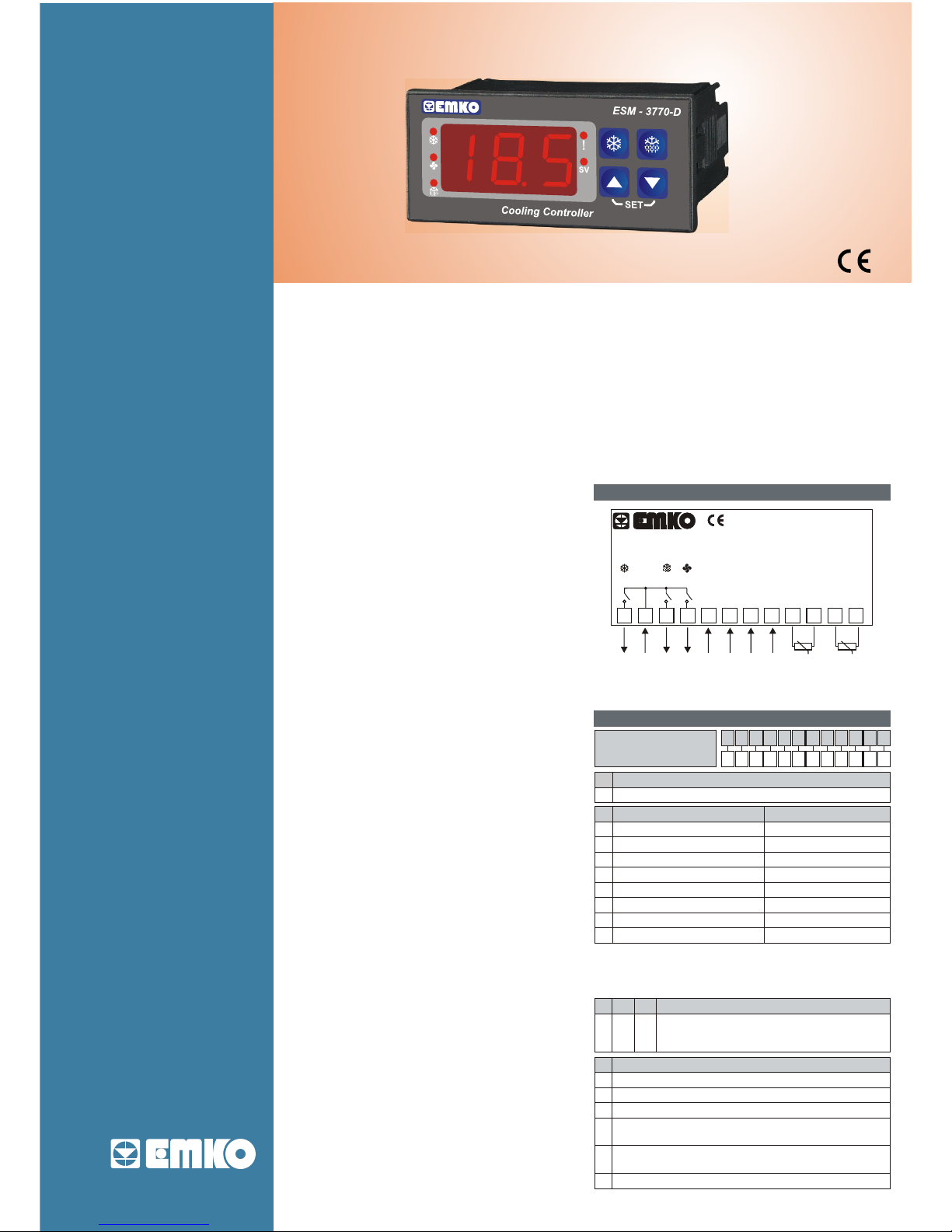
- 3 Digit display
- NTC input or
PTC input or
2-wire PT-100 Input or
2-wire PT-1000 Input(It must be determined in order)
- ON / OFF Temperature Control
- Compressor, Fan and Defrost outputs
- Evaporator and Cabinet sensor inputs
- Compressor OK digital input
- Adjustable hysteresis value
- Determine compressor working period in case of
Cabinet probe defect
- Defrost output controlling parameters
- Fan output controlling parameters
- Password protection for programming mode
Introduction Brochure. ENG ESM-3770-D 01 V01 03/09
ESM-3770-D
Controller
P/N : ESM-3770-D
c
a
2
3
41
5 6 7 8 9 10 11 12
CAT II
DEF. FAN
OUT
OUT OUT
(2x5 )A@250V V (10A@250V V)
Outputs
24 VW
(-%15,+%10)
50/60 Hz
1.5VA
+
--
+
Comp. OK
8...32 VZ
A BC D E FG HI /
/
U
V W Z/
/
0 1 0 0
Supply VoltageA
12
09
PTC (Note-1)
Input Type
BC
Scale(°C)
-50°C
150°C
-19.9°C 99.9°C
PT 100, IEC751(ITS90)
ESM-3770-D (77x35 DIN)
24 V W ( -%15, +%10) 50/60 Hz
2
-50°C
400°C
11
PT 100, IEC751(ITS90)
13
-19.9°C
99.9°C
PT 1000, IEC751(ITS90)
15
-50°C
400°C
14
PT 1000, IEC751(ITS90)
PTC (Note-1)
-19.9°C
99.9°C
2
18
NTC (Note-1)
-50°C
100°C
19
NTC (Note-1)
-19.9°C
99.9°C
COMP.
Temperature Sensor
Input ( NTC, PTC,
PT-100 or PT-1000)
Evaparator Cabinet
Sensor Sensor
Digital ON / OFF Cooling Controller
- Cooling Applications
- Economic
- Easy to Use
SPECIFICATIONS
INPUT
NTC : NTC (10 kW@25 °C)
PTC : PTC (1000 W@25 °C)
Thermoresistance (RTD) : 2-wire PT 100, PT 1000
(IEC 751)(ITS90)
Measurement Range : It is in ordering information
Accuracy : ±1% of scale
Cold Junction Compensation : Automatically
±0.1°C/1°C
Sensor Break Protection : Upscale
Sampling Cycle : 3 samples per second
CONTROL
Control Form : ON/OFF
ON/OFF hysteresis : It can be configured by the user
OUTPUTS
Control Output :
Compressor Out Relay (10A@250VV at resistive load)
Defrost Out Relay (5A@250VV at resistive load)
Fan Out Relay (5A@250VV at resistive load)
DISPLAY
Process Display :
ESM-3770-D : 14 mm Red 3 digits LED Display
LED Indicators :
SV (Red), Compressor Output Active (Red), Error (Red),
Fan Output Active (Red), Defrost Output Active (Red),
ENVIRONMENTAL RATINGS and PHYSICAL
SPECIFICATIONS
Operating Temperature : 0...50°C
Humidity : 0-90%RH (none condensing)
Protection Class : IP65 at front, IP20 at rear
Weight :
ESM-3770-D : 150 gr
Dimension :
ESM-3770-D : 77 x 35 mm, Depth : 62.5 mm
Panel Cut-Out :
ESM-3770-D : 71 x 29 mm
Electrical Wiring
Ordering Information
Note-1 : If input type is selected PTC or NTC (BC = 12, 15, 18, 19 ),
Temperature sensor is given with the device. For this reason,
If input type is selected as PTC, sensor type (V = 0,1 or 2) or
If input type is selected as NTC, sensor type (V = 0,3 or 4) must be
declared in ordering information.
1
Compressor Output(10 A@250 V V at resistive load, 1NO)
Outputs
E01FG01HI
Defrost Output( 5 A@250 V V at resistive load, 1NO)
Fan Output( 5 A@250 V V at resistive load, 1NO)
Temperature Sensor that is given with ESM-3770-D
V
0
None
1
PTC-M6L40.K1.5 (PTC Air Probe with 1.5 m silicon cable)
2
PTCS-M6L30.K1.5.1/8” (PTC Liquid Probe with 1.5 m silicon cable)
3
NTC-M5L20.K1.5 (NTC Probe, thermoplastic moulded with
1.5 m cable for cooling application)
4
NTC-M6L50.K1.5 (NTC Probe, stainless steel housing with
1.5 m cable for cooling application)
9
Customer
POWER SUPPLY
Supply Voltage :
24 V W ( -%15, +%10) 50/60 Hz -1.5 VA
Cooling
Page 2
Entering to Programming Mode
When both and button is pressed, expression
is shown on the display. After 5 secs pressing both buttons,
programming mode accessing password is shown on the
display. After entering the programming mode accessing
password, paramters can be accesing
Press button for showing parameter value and saving the
parameter value, press button for exit from parameter section
without saving parameter value.
Set Value Changing Mode
It can be accessed with or button that is on front panel.
When whichever or button is pressed expression
is shown on the display, after releasing the pressed button set
value is shown on the display and SV led becomes active. Set
value can be adjusted with and buttons.
Press button for exit from set value changing mode with
saving set value or press button for exit from set value
changing mode without saving set value
Front Panel
Hysteresis Parameter for Compressor Output (Default : 4 )
Hysteresis value for compressor output is determined with this
parameter.
It °C °C
°C
can be adjusted from 1 to 10
Evaporator Sensor Selection Parameter (Default : 1)
= Evaporator sensor is
= Evaporator sensor is
passive
active
Compressor Working Period In Case of Cabinet Probe Defect
Parameter
Compressor working period in case of cabinet probe defect is
determined with this parameter.
It
(Default : 10 minutes)
can be adjusted from 1 to 240 minutes
Compressor Working Percentage In Case of Cabinet Probe
Defect Parameter
Compressor working percentage in case of cabinet probe defect
is determined with this parameter.
It
(Default : %70)
can be adjusted from 0 to 100
Defrost Repeat Cycle Parameter
Defrost repeat cycle is determine with this parameter. When
pressed the button for starting the device, this time is starts
It can be adjusted from 1 to 99 hours.
(Default : 2 hours)
Defrost Stopping Temperature Parameter (Default : 2°C)
For evaporator sensor selection parameter = 0 (evaporator
sensor is active) While the defrost operation is in progress, when
the temperature value that is read from the evaporator sensor is
higher than the this parameter value, then defrost operation is
stoppped. It can be adjusted from minimum value to maximum
value of device scale.
Defrost Time Parameter
Defrost time is determined with this parameter
It can be adjusted from 0 to 99 minutes.
(Default : 30 minutes)
Fan Stopping Temperature Parameter (Default : 10°C)
when the temperature value that is read from the cabinet sensor is
lower than the this parameter value, then fan is stopped.
It can be adjusted from minimum value to maximum value of device
scale.
Hysteresis Parameter for Fan Output
Hysteresis value for fan output is determined with this parameter.
It °C °C
(Default : 2°C)
can be adjusted from 1 to 15
Fan Delay Time After Completion of Defrost Time Parameter
(Default : 2 minutes)
It can be adjusted from 0 to 15 minutes.
Programming Mode Accessing Password
It is used for accessing to programming mode. It can be adjusted
from 0 to 999. If it is 0, password is not entered for accessing to the
parameters.
(Default : 0)
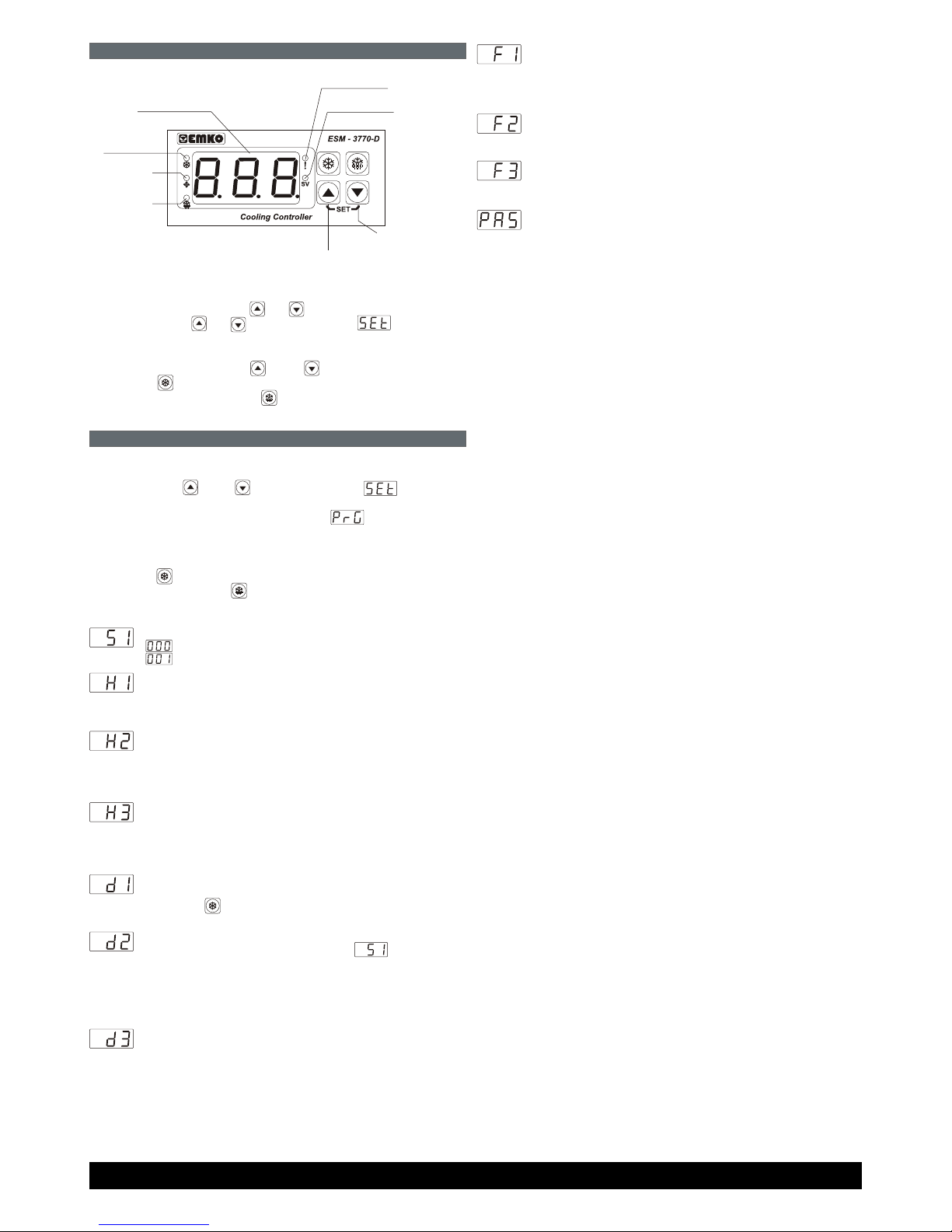
Led Indication of
Defrost Output
Active
Led Indication of
Compressor
Output Active
Led Indication of
Fan Output
Active
Temperature Display
Led Indication of
Compressor Error
Led Indication of SET Value
Changing Mode
Decrement Button
Increment Button
Parameters
Emko Elektronik San. ve Tic. A.S. DOSAB Karanfil Sok. No:6 TR 16369 Bursa/TURKIYE Phone: +90 224 2611900 Fax: +90 224 2611912
www.emkoelektronik.com.tr [email protected]
 Loading...