

Page 1

DGE-510T
Gigabit Ethernet Adapter
for PCI Bus
User’s Guide
First Edition (October 2002)
6DGE510T..01
Printed in Taiwan
RECYCLABLE
Page 2

Trademarks
Copyright 2001 D-Link Corporation.
Contents subject to change without prior notice.
D-Link is a registered trademark of D-Link
Corporation/D-Link Systems, Inc.
All other trademarks belong to their respective
proprietors.
Copyright Statement
No part of this publication may be reproduced in any
form or by any means or used to make any derivative
such as translation, transformation, or adaptation
without permission from D-Link Corporation/D-Link
Systems Inc., as stipulated by the United States
Copyright Act of 1976.
FCC Certifications
This equipment has been tested and found to comply with the limits for a Class B
digital device, pursuant to Part 15 of the FCC Rules. These limits are designed to
provide reasonable protection against harmful interference in a residential installation.
This equipment generates, uses and can radiate radio frequency energy and, if not
installed and used in accordance with the instructions, may cause harmful interference
to radio communications. However, there is no guarantee that interference will not
occur in a particular installation. If this equipment does cause harmful interference to
radio or television reception, which can be determined by turning the equipment off
and on, the user is encouraged to try to correct the interference by one or more of the
following measures:
• Reorient or relocate the receiving antenna.
• Increase the separation between the equipment and receiver.
• Connect the equipment into an outlet on a circuit different from that to which the
receiver is connected.
• Consult the dealer or an experienced radio/TV technician for help.
Shielded interface cables must be used in order to comply with emission limits.
Page 3

You are cautioned that changes or modifications not expressly approved by the party
responsible for compliance could void your authority to operate the equipment.
This device complies with Part 15 of the FCC rules. Operation is subject to the
following two conditions: (1) This device may not cause harmful interference, and (2)
This device must accept any interference received, including interference that may
cause undesired operation.
Limited Warranty
Hardware:
D-Link warrants each of its hardware products to be free from defects in
workmanship and materials under normal use and service for a period
commencing on the date of purchase from D-Link or its Authorized Reseller and
extending for the length of time stipulated by the Authorized Reseller or D-Link
Branch Office nearest to the place of purchase.
This Warranty applies on the condition that the product Registration Card is
filled out and returned to a D-Link office within ninety (90) days of purchase. A
list of D-Link offices is provided at the back of this manual, together with a copy
of the Registration Card.
If the product proves defective within the applicable warranty period, D-Link will
provide repair or replacement of the product. D-Link shall have the sole
discretion whether to repair or replace, and replacement product may be new or
reconditioned. Replacement product shall be of equivalent or better
specifications, relative to the defective product, but need not be identical. Any
product or part repaired by D-Link pursuant to this warranty shall have a
warranty period of not less than 90 days, from date of such repair, irrespective
of any earlier expiration of original warranty period. When D-Link provides
replacement, then the defective product becomes the property of D-Link.
Warranty service may be obtained by contacting a D-Link office within the
applicable warranty period, and requesting a Return Material Authorization
(RMA) number. If a Registration Card for the product in question has not been
returned to D-Link, then a proof of purchase (such as a copy of the dated
purchase invoice) must be provided. If Purchaser's circumstances require
special handling of warranty correction, then at the time of requesting RMA
number, Purchaser may also propose special procedure as may be suitable to
the case.
Page 4

After an RMA number is issued, the defective product must be packaged
securely in the original or other suitable shipping package to ensure that it will
not be damaged in transit, and the RMA number must be prominently marked
on the outside of the package. The package must be mailed or otherwise
shipped to D-Link with all costs of mailing/shipping/insurance prepaid. D-Link
shall never be responsible for any software, firmware, information, or memory
data of Purchaser contained in, stored on, or integrated with any product
returned to D-Link pursuant to this warranty.
Any package returned to D-Link without an RMA number will be rejected and
shipped back to Purchaser at Purchaser's expense, and D-Link reserves the
right in such a case to levy a reasonable handling charge in addition to mailing
or shipping costs.
Software:
Warranty service for software products may be obtained by contacting a D-Link
office within the applicable warranty period. A list of D-Link offices is provided
at the back of this manual, together with a copy of the Registration Card. If a
Registration Card for the product in question has not been returned to a D-Link
office, then a proof of purchase (such as a copy of the dated purchase invoice)
must be provided when requesting warranty service. The term "purchase" in
this software warranty refers to the purchase transaction and resulting license
to use such software.
D-Link warrants that its software products will perform in substantial
conformance with the applicable product documentation provided by D-Link
with such software product, for a period of ninety (90) days from the date of
purchase from D-Link or its Authorized Reseller. D-Link warrants the magnetic
media, on which D-Link provides its software product, against failure during the
same warranty period. This warranty applies to purchased software, and to
replacement software provided by D-Link pursuant to this warranty, but shall
not apply to any update or replacement which may be provided for download via
the Internet, or to any update which may otherwise be provided free of charge.
D-Link's sole obligation under this software warranty shall be to replace any
defective software product with product which substantially conforms to
D-Link's applicable product documentation. Purchaser assumes responsibility
for the selection of appropriate application and system/platform software and
associated reference materials. D-Link makes no warranty that its software
products will work in combination with any hardware, or any application or
system/platform software product provided by any third party, excepting only
such products as are expressly represented, in D-Link's applicable product
documentation as being compatible. D-Link's obligation under this warranty
shall be a reasonable effort to provide compatibility, but D-Link shall have no
Page 5

obligation to provide compatibility when there is fault in the third-party
hardware or software. D-Link makes no warranty that operation of its software
products will be uninterrupted or absolutely error-free, and no warranty that all
defects in the software product, within or without the scope of D-Link's
applicable product documentation, will be corrected.
D-Link Offices for Registration and Warranty Service
The product's Registration Card, provided at the back of this manual, must be
sent to a D-Link office. To obtain an RMA number for warranty service as to a
hardware product, or to obtain warranty service as to a software product,
contact the D-Link office nearest you. An address/telephone/fax/e-mail/Web
site list of D-Link offices is provided in the back of this manual.
LIMITATION OF WARRANTIES
IF THE D-LINK PRODUCT DOES NOT OPERATE AS WARRANTED ABOVE, THE CUSTOMER'S SOLE REMEDY
SHALL BE, AT D-LINK'S OPTION, REPAIR OR REPLACEMENT. THE FOREGOING WARRANTIES AND REMEDIES
ARE EXCLUSIVE AND ARE IN LIEU OF ALL OTHER WARRANTIES, EXPRESSED OR IMPLIED, EITHER IN FACT
OR BY OPERATION OF LAW, STATUTORY OR OTHERWISE , INCLUDING WARRANTIES OF MER CHANTABILITY
AND FITNESS FOR A PARTICULAR PURPOSE. D-LINK NEITHER ASSUMES NOR AUTHORIZES ANY OTHER
PERSON TO ASSUME FOR IT ANY OTHER LIABILITY IN CONNECTION WITH THE SALE, INSTALLATION,
MAINTENANCE OR USE OF D-LINK'S PRODUCTS.
D-LINK SHALL NOT BE LIABLE UNDER THIS WARRANTY IF ITS TESTING AND EXAMINATION DISCLOSE THAT
THE ALLEGED DEFECT IN THE PRODUCT DOES NOT EXIST OR W AS CAUSED BY THE CUSTOMER'S OR ANY
THIRD PERSON'S MISUSE, NEGLE CT, IMPROPER INSTALLATION OR TESTING, UNAUTHORIZED ATTEMPTS TO
REPAIR, OR ANY OTHER CAUSE BEYOND THE RANGE OF THE INTENDED USE, OR BY ACCIDENT, FIRE,
LIGHTNING OR OTHER HAZARD.
LIMITATION OF LIABILITY
IN NO EVENT WILL D-LINK BE LIABLE FOR ANY DAMAGES, INCLUDING L OSS OF DATA, LOSS OF PROFITS,
COST OF COVER OR OTHER INCIDENTAL, CONSEQUENTI AL OR INDIRECT DAMAGES ARISING OUT THE
INSTALLATION, MAINTENANCE, USE, PERFORMANCE, FAILURE OR INTERRUPTION OF A D- LINK PRODUCT,
HOWEVER CAUSED AND ON ANY THEORY OF LIABILITY. THIS LIMITATION WILL APPLY EVEN IF D-LINK HAS
BEEN ADVISED OF THE POSSIBILITY OF SUCH DAMAGE.
IF YOU PURCHASED A D-LINK PRODU CT IN THE UNITED STATES, SOME STATES DO NOT ALLOW THE
LIMITATION OR EXCLUSION OF LIABILITY FOR INCI DENTAL OR CONSEQUENTIAL DAMAGES, SO THE ABOVE
LIMITATION MAY NOT APPLY TO YOU.
Page 6

Table of Contents
INTRODUCTION ............................................................. 1
Features................................................................... 2
INSTALLATION............................................................... 5
Unpack and Inspect ................................................. 5
Installing the Adapter ............................................... 5
Connecting the Network Cable ................................ 6
Software Installation................................................. 7
TROUBLESHOOTING .................................................... 8
SPECIFICATIONS........................................................... 9
Page 7

DGE-510T 10/100/1000 PCI Adapter
1
Introduction
Thank you for choosing D-Link DGE-510T, the value
leader among dual-speed adapters for PCI Bus personal
computers. This introduction gives a general description
of the newer networking technologies found on the
DGE-510T.
The DGE-510T provides the bandwidth capability to
support high-end servers and workstations. With Autonegotiation, this card can run on three different speeds:
10/100Mbps, both half- and full-duplex, and 1000Mbps
at full duplex. When running at 1000Mbps, it provides a
network throughput of 2Gbps in full-duplex mode.
The card supports IEEE 802.1p Traffic Prioritization for
time-sensitive and mission-critical traffic. With IEEE
802.1Q single VLAN support, it provides VLAN tables
that can filter packets by recognized VLAN tags, strip
VLAN tags when received, and insert VLAN tags when
transmitted. VLANs can increase the efficiency of and
provide extra security for your network.
The DGE-510T provides IEEE 802.3x Flow Control
Enhancements, which are needed for a network adapter
to function with a switch. In full-duplex mode, MAC
implements the PAUSE control function. This means
when a switch is connected in full-duplex mode and it
senses that its buffer will overflow in the near future,
Introduction 1
Page 8

DGE-510T 10/100/1000 PCI Adapter
the switch will transmit one standard Ethernet packet
that causes the DGE-510T to pause for a period, thus
avoiding internal buffer overflow and packet loss.
The NIC enables simple, scalable network migration,
providing the benefit of Gigabit Ethernet networking
with the familiarity of Ethernet.
Features
Designed for versatility and performance, the DGE-510T
Adapter provides the following:
• Operability in 32-bit, 33/66 MHz slot servers
• Universal Bus support, 3.3V and 5V
• IPV.4 checksum task off-loading for checksum
generation and verification
• Compliance with IEEE 802.3ab 1000BASE-T Gigabit
Ethernet standards, IEEE 802.3u Fast Ethernet
standards, and IEEE 802.3 Ethernet standards
• Plug-and-Play installation
• Support for 802.1Q VLAN Capacity
• Jumbo frame support (NDIS and Linux drivers)
• Adaptive Inter Frame Spacing (IFS) capacity
• Auto-assignment of IRQ numbers and IO address
• Full-duplex Gigabit Ethernet interface that delivers
2Gbps aggregate bandwidth
2 Introduction
Page 9

DGE-510T 10/100/1000 PCI Adapter
• One built-in RJ-45 connector
• Support for Gigabit Ethernet over standard Category
5 and 5e UTP wiring for distances up to 100 meters
• Auto-negotiation to the highest available speed
• Four LED indicators:
Link/Activity, Full Duplex, 1000Mbps, 100Mbps
• Driver
√ Windows XP √ Windows 2000
√ Windows NT 4.0 √ Linux Kernel v2.4
√ Windows 98/98 SE √ Novell Netware
√ Windows ME
√ Windows 95/OSR2
†
support for:
4.X/5.X/6.X ODI3.31
†
Check http://www.dlink.com for newest release of drivers.
Introduction 3
Page 10

Page 11

DGE-510T 10/100/1000 PCI Adapter
2
Installation
Unpack and Inspect
CAUTION: Under ordinary circumstances, a DGE-510T card
will not be affected by static charge as may be
received through your body during handling of the
unit. In special circumstances where you may
carry an extraordinarily high static charge, it is
good practice to reduce the charge by touching a
ground before handling the adapter card.
Open the shipping carton and carefully remove all
items. In addition to a printed copy of this User's Guide,
ascertain that you have:
• One DGE-510T 10/100/1000 PCI Adapter Card.
• DGE-510T User’s Guide CD-ROM
Installing the Adapter
1. Shut down the computer, unplug its power cord,
and remove the chassis cover.
2. Insert the contact edge of the DGE-510T card into
the connector of any available PCI Bus Master
expansion slot. Press the card firmly into the
connector such that the card’s contacts are fully
seated in the connector.
5 Installation
Page 12

DGE-510T 10/100/1000 PCI Adapter
3. Install the bracket screw that secures the card to the
computer chassis.
4. Replace the computer’s chassis cover.
5. Reconnect the computer’s power cord, and switch
computer power on. If the BIOS section of your
computer’s boot program is Plug-and-Play
compliant, then at power-up the BIOS will
automatically configure any newly installed DGE510T adapter.
NOTE: Due to a fault in some Plug-and-Play BIOS programs, it
happens occasionally that a newly installed adapter is
assigned an Interrupt Number which is already assigned
to another device. In such a case, the conflict of Interrupt
Number will cause faults in the behavior of both devices.
Then it is necessary to run the CMOS Setup utility, and
manually assign a non-conflicting Interrupt Number.
Connecting the Network Cable
1000BASE-T Gigabit Ethernet enables operation over
the extensive installed base of legacy Category 5 cabling
systems and, by default, the Category 5 cabling systems
currently being installed.
It provides optimal full-duplex 1000Mb/s Ethernet
service over Category 5e
links as defined by
ANSI/TIA/EIA-568-A-5. Topology rules for 1000BASE-T
are the same as those used for 100BASE-T. Category 5
and 5e link lengths are limited to 100 meters.
6 Installation
Page 13
DGE-510T 10/100/1000 PCI Adapter
Software Installation
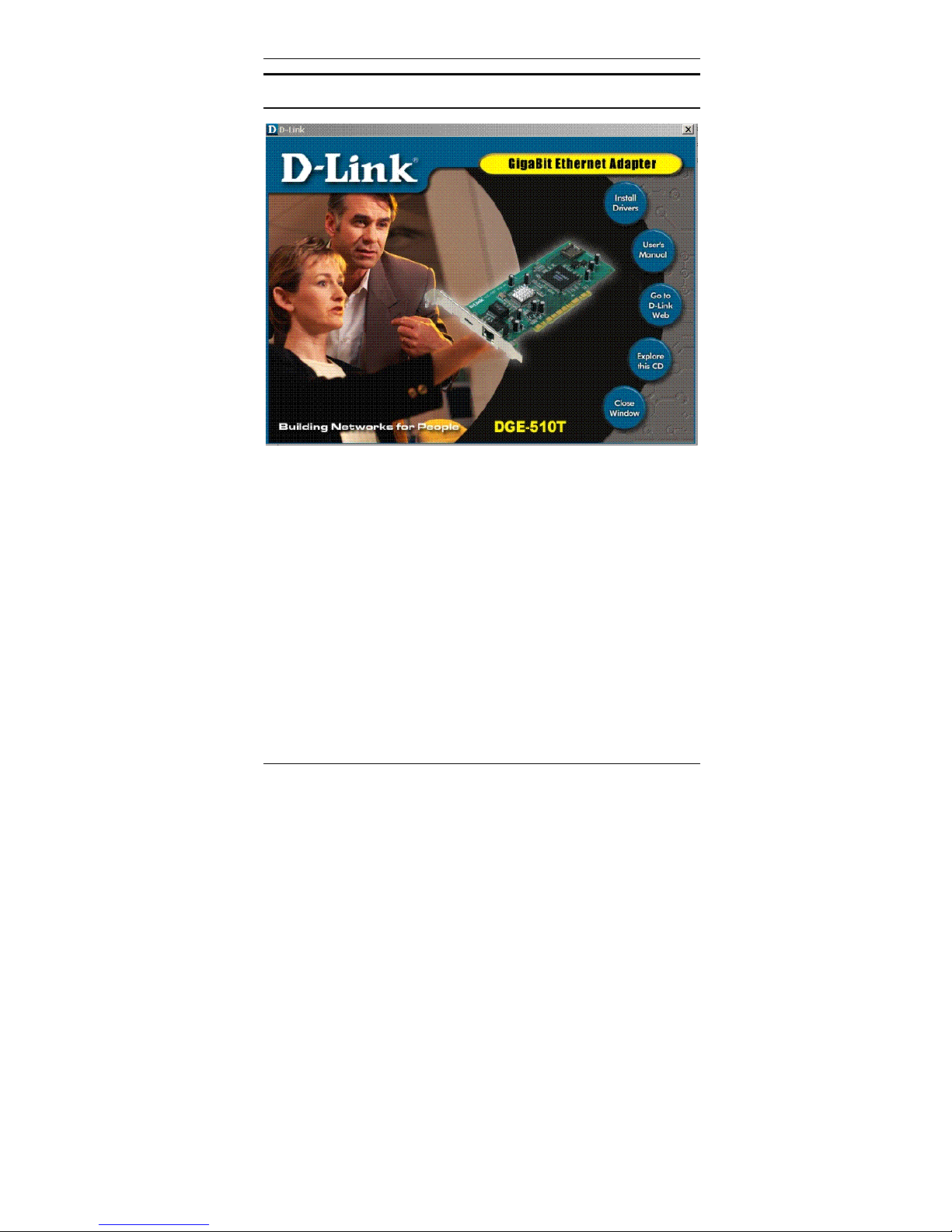
The CD-ROM included with your DGE-510T is designed
to make installation of necessary software a painless
and trouble-free process. Simply click on the “Install
Drivers” button, and an Installation Wizard will guide
you through the process, no matter which operating
system you’re running. The included Adobe Acrobat
Reader, which is needed to read or print out your user
manual, will also come in handy for many other
applications.
Simply follow the directions in the Wizard, and your
DGE-510T will be installed successfully in just a few
minutes, allowing you to enjoy the many advantages of
joining an Ethernet LAN.
7 Installation
Page 14

DGE-510T 10/100/1000 PCI Adapter
3
Troubleshooting
If you experience any problems with the adapter, first:
ascertain that the appropriate driver is loaded; that the
proper grade of cable is employed for the network
connection; and that the supporting hub is properly
qualified for the application.
The DGE-510T Adapter features four LED indicators:
• FDX Steady green indicates the adapter is operating
in full-duplex mode.
• 1000M The LED indicator lights green when a 1000
Mbps device is connected to the adapter.
• 100M The LED indicator lights green when a 100
Mbps device is connected to the adapter.
• Link/Activity Steady green indicates good linkage
between the DGE-510T and its supporting server or
switch. Flashing green indicates activity
(transmitting or receiving) within the adapter.
8 Installation
Page 15

DGE-510T 10/100/1000 PCI Adapter
4
Specifications
Jumperless Hardware
LAN Chip Set:
• Gigabit Media Access controller: DL2001
• Physical interface: 88E 1000T
EMI Certifications:
• FCC Class B
• CE Class B
• BSMI Class B
• VCCI Class B
• C-Tick
Host interface: PCI Bus (Bus Master)
I/O base address assigned by Plug and Play system
Interrupt Number Assigned by Plug and Play system
Physical Dimensions: 166 mm (L) x 73 mm (H)
Environment:
• Storage: −25° to 55°C (-13° to 131° F)
• Operating: 0° to 50° C (32° to 122° F)
• Humidity: 5% to 90% non-condensing
• Power Consumption: 5.48W
9 Installation
Page 16

Offices
AUSTRALIA D-Link Australasia
Unit 16, 390 Eastern Valley Way, Roseville,
NSW 2069 Australia
TEL: 61-2-9417-7100 FAX: 61-2-9417-1077
TOLL FREE (Australia): 1800 177 100
TOLL FREE (New Zealand): 0800-900900
URL: www.dlink.com.au
E-MAIL: [email protected] & [email protected]
CANADA D-Link Canada
2180 Winston Park Drive, Oakville, Ontario, L6H 5W1 Canada
TEL: 1-905-829-5033 FAX: 1-905-829-5095
BBS: 1-965-279-8732
TOLL FREE: 1-800-354-6522
URL: www.dlink.ca FTP: ftp.dlinknet.com
E-MAIL: [email protected]
CHILE D-Link South America
Isidora Goyeechea 2934 of 702, Las Condes, Santiago, Chile
TEL : 56-2-232-3185 FAX: 56-2-232-0923 URL: www.dlink.cl
E-MAIL: [email protected] & [email protected]
DENMARK D-Link Denmark
Naverland 2, DK-2600 Glostrup, Copenhagen, Denmark
EGYPT D-Link Middle East
7 Assem Ebn Sabet Street, Heliopolis, Cairo, Egypt
TEL: 202-245-6176 FAX: 202-245-6192
URL: www.dlink-me.com
E-MAIL: [email protected] & [email protected]
FINLAND D-Link Finland
Tulli-ja Pakkahuone, Katajanokanlaituri 5, Fin – 00160 Helsinki
TEL: 358-9-62291660 FAX: 358-9-62291661
URL: www.dlink-fi.com
FRANCE D-Link France
Le Florilege #2, Allee de la Fresnerie,
78330 Fontenay le Fleury, France
TEL: 33-1-3023-8688 FAX: 33-1-3023-8689
URL: www.dlink-france.fr
E-MAIL: [email protected]
GERMANY D-Link Cent. Europe/D-Link Deutschland GmbH
Schwalbacher Strasse 74, 65760 Eschborn, Germany
TEL: 49-(0) 6196-7799-0 FAX: 49-(0) 6196-7799-300
URL: www.dlink.de
BBS: 49-(0) 6192-971199 (analog)
BBS: 49-(0) 6192-971198 (ISDN)
INFO: 00800-7250-0000 (toll free)
HELP: 00800-7250-4000 (toll free)
REPAIR: 00800-7250-8000 E-MAIL: [email protected]
10 Installation
Page 17

INDIA D-Link India
Plot No.5, Kurla-Bandra Complex Rd., Off Cst Rd.,
Santacruz (E), Bombay, 400 098 India
TEL: 91-22-652-6696 FAX: 91-22-652-8914
URL: www.dlink-india.com E-MAIL: [email protected]
ITALY D-Link Mediterraneo Srl
Via Nino Bonnet n. 6/b, 20154, Milano, Italy
JAPAN D-Link Japan
10F, 8-8-15 Nishi-Gotanda, Shinagawa-ku, Tokyo 141, Japan
RUSSIA D-Link Russia
Michurinski Prospekt 49, 117607 Moscow, Russia
TEL: 7-095-737-3389 & 7-095-737-3492 FAX: 7-095-737-3390
URL: www.dlink.ru E-MAIL: [email protected]
SINGAPORE D-Link International
1 International Business Park, #03-12 The Synergy,
Singapore 609917
TEL: 65-774-6233 FAX: 65-774-6322
E-MAIL: [email protected] URL: www.dlink-intl.com
S. AFRICA D-Link South Africa
Unit 2, Parkside 86 Oak Avenue,
Highveld Technopark Centurion, Gauteng, South Africa
TEL: 27 (0) 126652165 FAX: 27 (0) 126652186
URL: www.d-link.co.za E-MAIL: [email protected]
SWEDEN D-Link Sweden
P. O. Box 15036, S-167 15 Bromma, Sweden
TEL: 46-(0) 8564-61900 FAX: 46-(0) 8564-61901
E-MAIL: [email protected] URL: www.dlink.se
TAIWAN D-Link Taiwan
2F, No. 119 Pao-Chung Rd, Hsin-Tien, Taipei, Taiwan
U.K. D-Link Europe
4
London NW9 5AB U.K.
U.S.A. D-Link U.S.A.
53 Discovery Drive, Irvine, CA 92618, USA
TEL: 1-949-788-0805 FAX: 1-949-753-7033
BBS: 1-949-455-1779 & 1-949-455-9616 INFO: 1-800-326-1688
URL: www.dlink.com
th
Floor, Merit House, Edgware Road, Colindale,
TEL: 44 (0) 20-8731-5555 FAX: 44 (0) 20-8731-5511 BBS: 44 (0) 181235-5511 URL: www.dlink.co.uk E-MAIL: [email protected]
11 Installation
Page 18

Registration Card
Print, type or use block letters.
Your name:
Mr./Ms____________________________________________________________________________
Organization:_____________________________ Dept. ____________________________________
Your title at organization: _____________________________________________________________
Telephone:__________________________ Fax:__________________________________________
Organization's full address: ____________________________________________________________
Country:______________ Date of purchase
(Month/Day/Year):____________________________________
Product
Model
(* Applies to adapters only)
Product was purchased from:
Reseller's name: ____________________________________________________________________
Telephone:_______________________ Fax:______________________________________________
Reseller's full address: _______________________________________________________________
1. Where and how will the product primarily be used?
Home Office Travel Company Business Home Business Personal
2. How many employees work at installation site?
1 employee 2-9 10-49 50-99 100-499 500-999 1000 or more
3. What network protocol(s) does your organization use ?
XNS/IPX TCP/IP DECnet Other_____________________________
4. What network operating system(s) does your organization use ?
D-Link LANsmart Novell NetWare NetWare Lite SCO Unix/Xenix
PC NFS 3Com 3+Open Banyan Vines DECnet Pathwork
Windows NT Windows NTAS Windows '95 Other______________
5. What network management program does your organization use ?
D-View HP OpenView/Windows HP OpenView/Unix SunNet Manager Novell NMS
NetView 6000 Other____________________
6. What network medium/media does your organization use ?
Fiber-optics Thick coax Ethernet Thin coax Ethernet
10BASE-T UTP/STP 100BASE-TX 100BASE-T4 100VGAnyLAN Other_________________
7. What applications are used on your network?
Desktop publishing Spreadsheet Word processing CAD/CAM
Database management Accounting Other_____________________
8. What category best describes your company?
Aerospace Engineering Education Finance Hospital Legal Insurance/Real Estate
Manufacturing Retail/Chainstore/Wholesale Government
Transportation/Utilities/Communication VAR Systemhouse/companyOther_____________
9. Would you recommend your D-Link product to a friend?
Yes No (why?) ______________________ I don’t know yet
10. Your comments on this product:
Product
Serial No.
* Product installed in type of
computer (e.g., Compaq 486)
* Product installed Computer serial
No.
12 Installation
Page 19
13 Installation
 Loading...