

Page 1
14,400 BPS Modem for Data, Fax, Voice
XE1414A
2/97
Description
Xecom's XE1414A combines high-speed data and
Group III send/receive fax in a compact
component.
The XE1414A is not just a modem chip but a
complete modem including the telephone
interface. It provides user transferable FCC Part
68 registration and can connect directly to the
telephone line through an RJ11 jack. The modem
connects to the host through a TTL level serial
interface. The XE1414A also includes MNP2-4
MNP10 and V.42 error control and MNP5
andV.42bis data compression
Xecom designed the XE1414A specifically to be
embedded in commercial and industrial systems
with a need for high-speed communications and
minimal space.
XE1414A PinConfiguration
Features
• Small Size; 2.75 " x 1.38" x 0.42"
• Modem control with "AT" commands
• Class 1 and Class 2 fax commands
• Data transfer up to 14,400 bps
• Send and receive fax to 14,400 bps
• MNP and V.42 Error Control
• MNP10 Error Control for Cellular Links
• MNP5 Data Compression to 28,800 bps
• V.42bis Data Compression to 57,600 bps
• Low power, single +5V supply
Operating Power 600 mW (Typ.)
Sleep mode: 30 mW (Typ.)
• NVRAM for modem configuration storage
xecom
1 40
2 39
3 38
4 37
5 36
6 35
7 34
8 33
9 32
10 31
11 30
12 29
13 28
14 27
15
16
18
22
20 21
NC
NC
RXD
NC
NC
NC
NC
NC
/DTR
NC
/CTS
NC
TXD
/RTS
NC
/RI
TIP
RING
VCC
/DSR
/DCD
NC
RESET
NC
NC
NC
NC
NC
OH
NC
NC
NC
AMP
GND
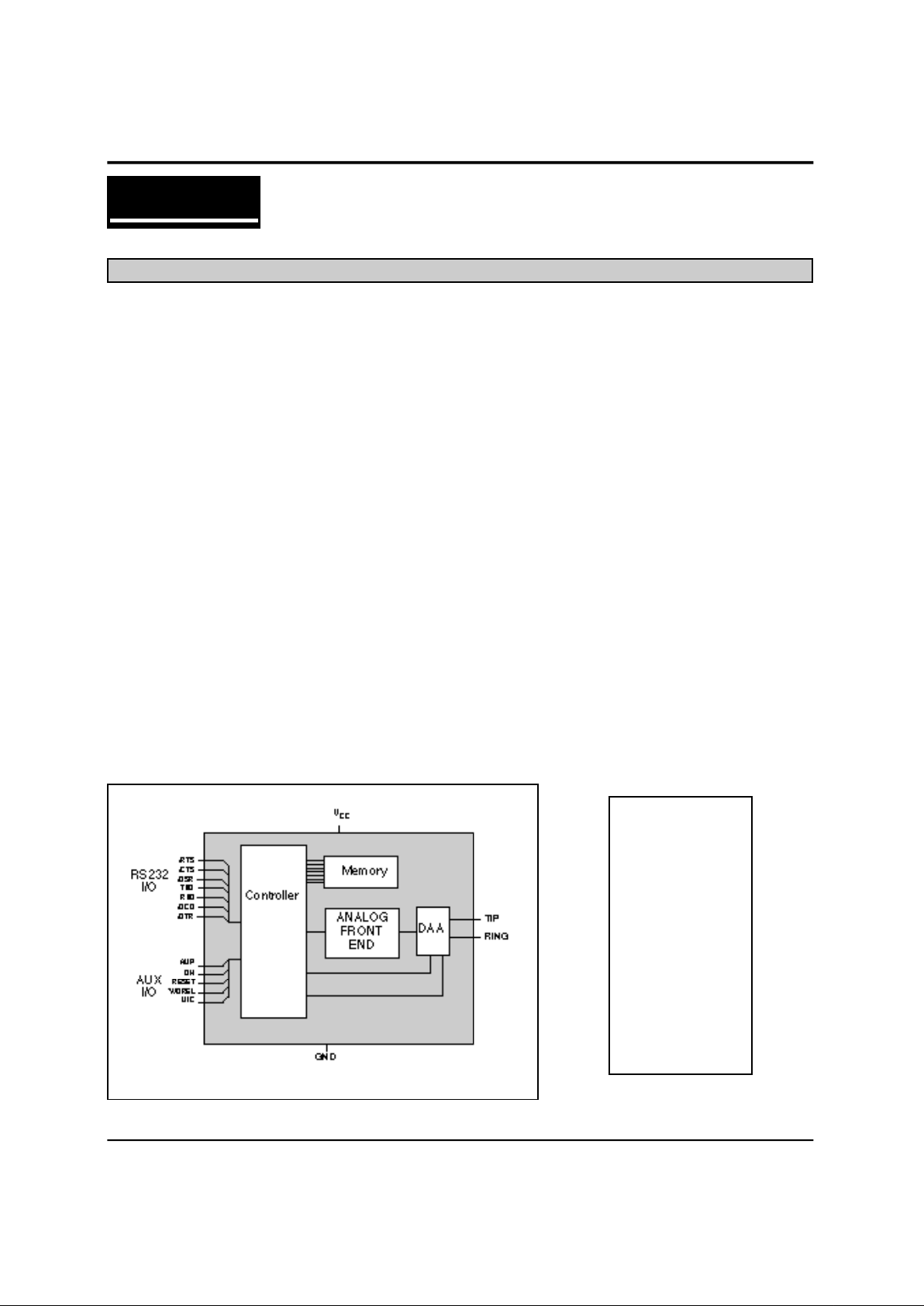
Block Diagram
Page 2
XECOM (2) XE1414A
A 2.74 2.760 69.60 70.10
B 1.370 1.390 34.80 35.31
C 0.420 0.430 10.67 10.92
D 1.190 1.210 30.23 30.73
E 1.890 1.910 48.01 48.51
F 0.125 0.200 3.18 5.08
G 0.080 0.100 2.03 2.54
H 0.415 0.435 10.54 11.05
J 0.090 0.110 2.29 2.79
K 0.020 0.025 0.51 0.64
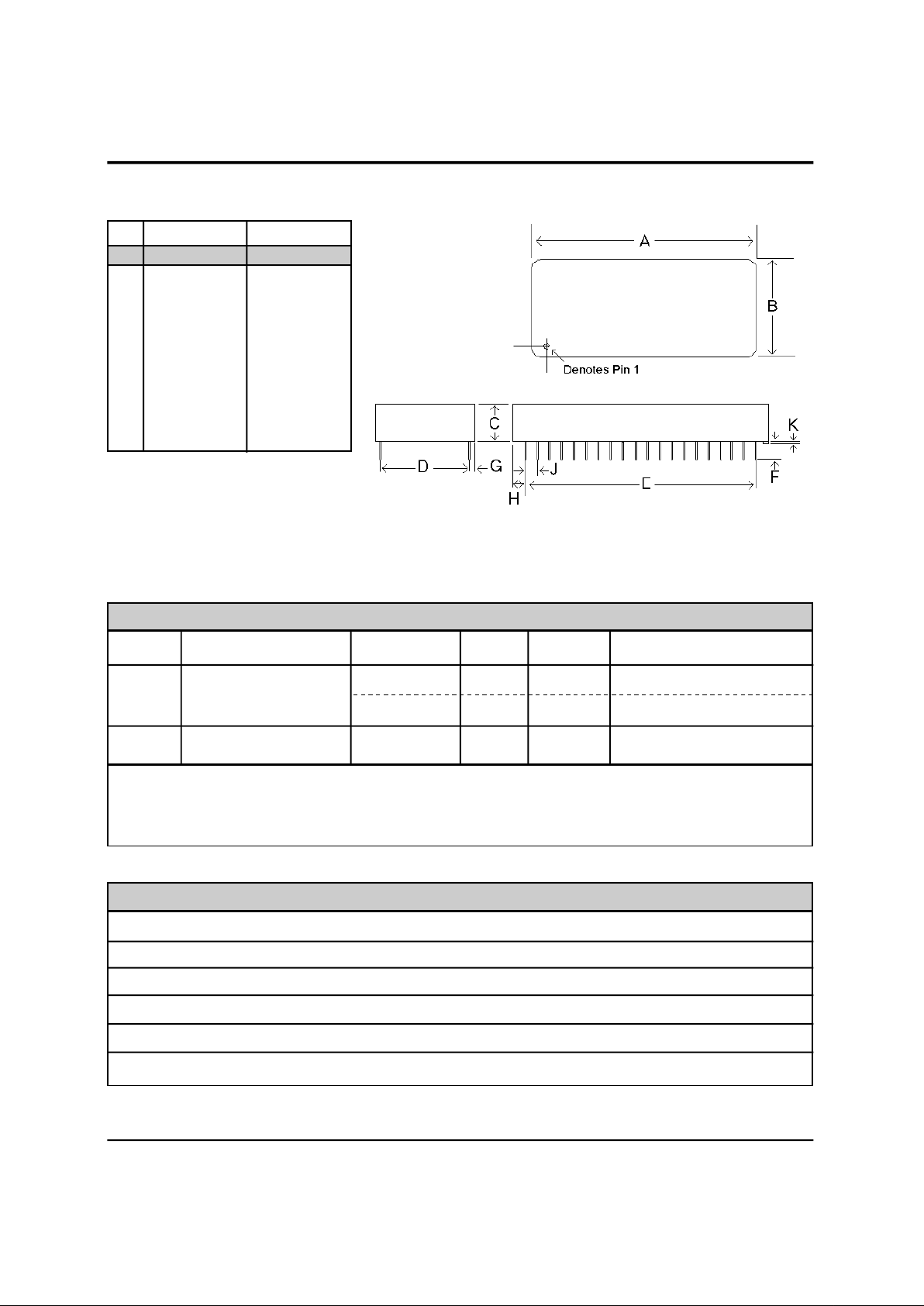
XE1414A Mechanical Specifications
Pins = 0.025 inch square pin
INCHES METRIC(MM)
PIN MIN MAX MIN MAX
Power Management:
The XE1414A has an integrated power management capability. If no activity is detected on
the RXD, DTR, or RI the modem will, within 5 seconds, automatically go into a smart sleep mode. In this mode
power consumption is typically less than 50 milliwatts.
Symbol Parameter Typ Max Units Comments
Vcc Supply Voltage 5.0 5.25 Volts
Icc Vcc Supply Current 120 150 mA Active, On Line
30 mA Active, Idle
Iccs Sleep Current 6.0 10.0 mA Sleep Mode
ABSOLUTE MAXIMUM RATINGS*
SUPPLY VOLTAGE - Vcc +6.5 Volts
DC INPUT VOLTAGE -0.6 Volts to +6.5 Volts
STORAGE TEMPERATURE RANGE -25° C TO +85° C
LEAD TEMPERATURE (Soldering, 2 sec per wave) 260° C
OPERATING TEMPERATURE RANGE 0 TO 70° C
*Exceeding these values may result in permanent damage to the device.
Page 3

XECOM (3) XE1414A
PIN NAME DESCRIPTION
3 RXD Serial data output to the DTE (i.e. external UART). A logic "high" represents a
"mark" and a logic "low" represents a "space", TTL.
9 \DTR Data Terminal Ready, input, active Low, TTL. The function of this pin is set by
the &D command. Normally the modem ignores DTR.
11 \CTS Clear to Send, output, active Low, TTL/CMOS. This pin regulates the flow of
data from the DTE during hardware flow control.
13 TXD Serial data input from the DTE (i.e. external UART). A logic "high" represents a
"mark" and a low represents a"space", TTL.
14 \RTS Request to Send, input, active Low, TTL. This signal regulates the flow of data
from the modem during hardware flow control.
16 \RI Ring Indicator, output, active Low, TTL. When low indicates the modem is
receiving a ring signal.
19 TIP Tip connection to the phone line(RJ11 pin3) from the internal DAA.
20 RING Ring connection to the phone line(RJ11 pin4) from the internal DAA. Caution:
21 GND Ground (0 volts)
22 AMP Audio output function is determined by L & M commands and the value in
register S22. This output can drive a 300 ohm load.
30 OH Oh is an active low output from the modem. Oh goes high when the modem is
"off-hook." This signal can be used to drive and external relay to switch line
usage between the modem and a handset.
36 RESET Hardware reset pin, active High, TTL. Use of an external reset is not
recommended. When not used Reset should be left open. Any signal applied to
Pin 36 must remain high for a minimum of 100 milliseconds.
38 \DCD Data Carrier Detect, output, active Low, TTL/CMOS. Function is set by the &C
command and the value in register S21.
39 \DSR Data Set Ready, output, active Low, TTL/CMOS. Function is set by the &S
command and the value in register S21.
40 Vcc +5 Volt power
XE1414A Pin Descriptions
Page 4
XECOM (4) XE1414A
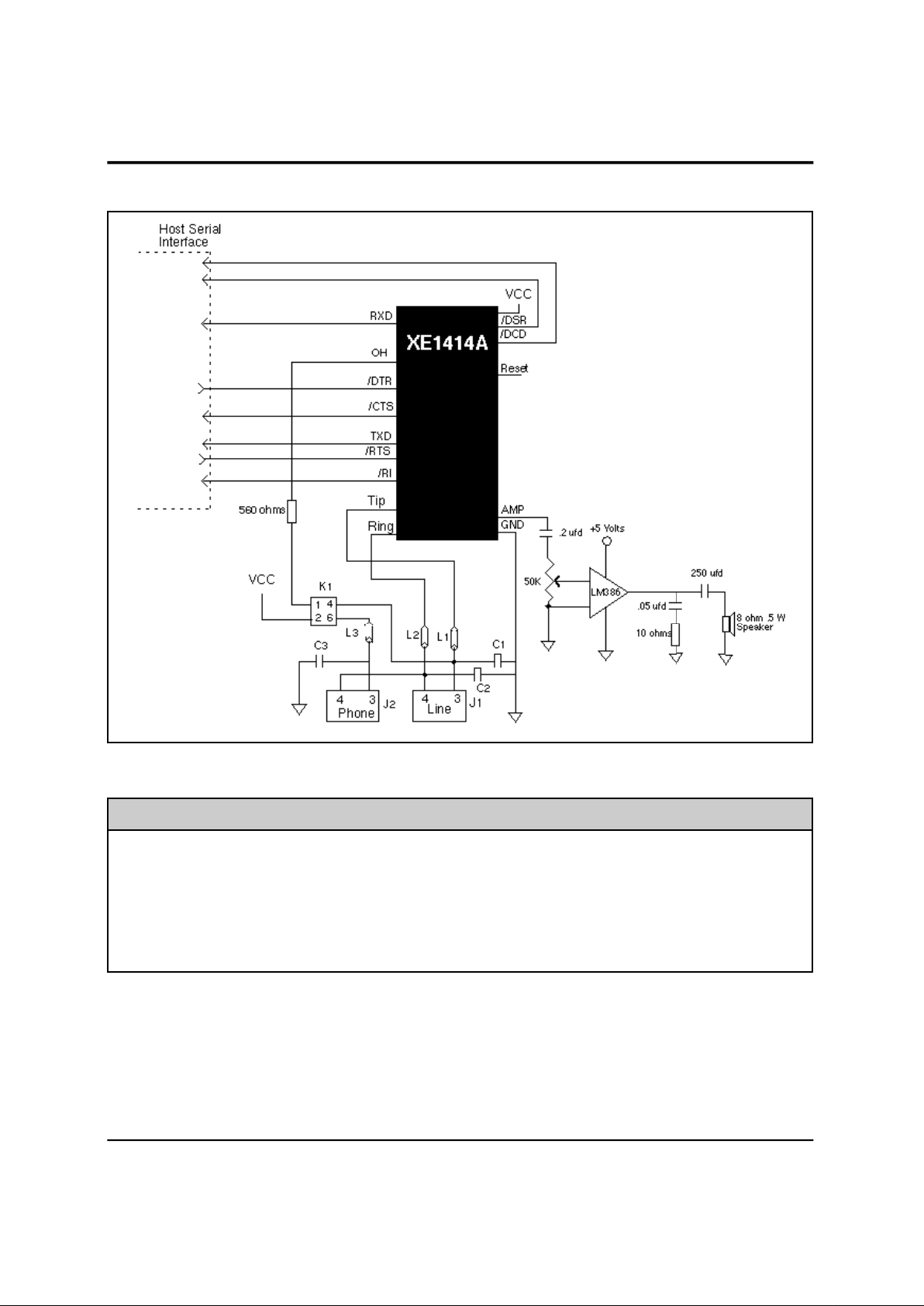
XE1414A Applications Schematic
Note: RJ11 Pin assignments reflect a 6-pin connector. Tip and Ring are always the center pins of the
RJ11 jack.
Recommended Parts
Reference Designation Recommended Part Number
L1, L2, L3 TDK CB30-1812
C1, C2, C3 Sprague 30GAT47, 470 pfd, 3000 Volts
J1, J2 Stewart SS6446NF
K1 Theta J LCB110
Page 5

XECOM (5) XE1414A
AT Commands
The XE1414A uses "AT" commands for modem
configuration and control. Extensions to the AT
commands support fax and voice.
Modes of Operation
The XE1414A has three operational modes; Command,
Fax and Data.
Data Mode: The XE1414A enters data mode after it
establishes a connection and issues a "CONNECT"
result code. In the Data Mode the modem sends all
signals on Transmit Data to the remote modem and puts
data from the remote modem onto Received Data for
the host equipment. When the modem exits data mode,
it issues a "NO CARRIER" result code.
Command Mode: The XE1414A enters command
mode on power-up, reset, loss of the connection, or
receipt of the escape code. In command mode the
modem accepts commands from the host on Transmit
Data. Appropriate result codes are returned on
Received Data.
Fax Mode: The XE1414A enters Class 1 fax mode on
receipt of AT+FCLASS=1 and Class 2 fax mode on
receipt of AT+FCLASS=2. In fax mode commands and
responses are issued at 19,200 bits per second; the
character format is 8 bits no parity. The modem accepts
fax commands only in fax mode. The A/, ATO, AT&T
and escape commands are not valid in fax mode.
Command Line Format
Command lines issued to the modem follow a strict
format. Each command begins with the prefix AT. The
command line is stored in the command buffer and
executed upon receipt of a carriage return. Until
executed, the command line can be editied with the
backspace key.
Command Prefix - The "A" and "T" of the command
prefix may be both capitilized or both lower case but
cannot be of different cases. The prefix identifies the
speed and parity of the host. The modem determines
speed by measuring the width of the incoming bits.
Parity is determined by comparing the parity bits of the
"A" and "T." The XE1414A normally sends result codes
at the speed and parity determined by the prefix.
Command Line - Multiple commands may be placed in
a command line. Commands are executed in the
sequence they appear. Spaces may be inserted to
improve legibility without filling space in the command
buffer. A carriage return terminates the command line
and causes the commands to be executed. Register S3
allows the user to select a character other than a
carriage return to terminate the command line.
Command Buffer - Only 40 characters, including the
AT prefix, may be loaded into the command buffer. If
the command buffer overflows, the modem issues an
"ERROR" result code and commands are not executed.
Command Line Editing - The backspace can be used
to edit the command line. Hitting the backspace key, or
Control and H simultaneously on some systems, erases
the previous character in the command line. All of the
characters can be erased except for the "A" and "T."
Register S5 allows the user to select a character other
than a backspace to edit the command line.
Re-Execute Last Command - The A/ command causes
the modem to re-execute the last command line. This is
the only command which does not require the "AT"
prefix.
Ommitted Parameters - Most commands include a
parameter which determines the command function.
When this parameter is omitted from the command
string, it is assumed to be a 0.
Escape Characters - A three character escape
sequence maybe entered while in data mode to switch
the modem into command mode while remaining on line.
The escape character, set by Register S2, must be
entered 3 times in succession to execute the escape.
The default escape sequence is "+++."
Result Codes - The modem issues a result code after
each action. Result codes may be provided as full
words, numeric codes or may be disabled all together.
Each result code ends with a carriage return when
numeric result codes are chosen. When full word result
codes are chosen, a Line Feed and Carriage Return
precede and follow each result code.
Page 6

XECOM (6) XE1414A
A - Answer Command -
Bn - Select Communications Standard
n=0 Selects CCITT standards
n=1 Selects Bell standards*
D - Dial Command -
L = Re-dial last number
P = Pulse dial
T = Tone dial
S=n = Dial stored number
W = Wait for dial tone
, = Pause for the duration ofr S8
@ = Wait for silence
! = Switch hook flash
; = Return to the command state
En - Command Echo
n=0 Do not echo commands
n=1 Enable command echo*
Fn - Select Line Modulation
n=0 Auto-Detect*
n=1 300 bps (V.21 or Bel 103)
n=3 V.23
n=4 1200 bps (V.22 or Bell212A)
n=5 2400 bps (V.22bis)
n=6 4800 bps (V.32/V.32bis)
n=7 7200 bps (V.32bis)
n=8 9600 bps (V.32/V.32bis)
n=9 12,000 bps (V.32bis)
n=10 14,400 bps (V.32bis)
Hn - Switch Hook Control -
n=0 Switch hook relay opens*
n=1 The switch hook relay closes
In - Modem Identification
Ln - Speaker Volume -
n=0 Lowest speaker volume
n=1 Low speaker volume
n=2 Moderate speaker volume*
n=3 High speaker volume
Mn - Speaker Activity -
n=0 Speaker off
n=1 Speaker on until carrier received*
n=2 Speaker remains on
n=3 Speaker on after dialing until carrier detected.
Nn - Data Rate -
n=0 Handshake only at DTE rate
n=1 Initiate handshaking at Fn rate; Fallback if
unsuccessfull*
On - On Line
n=0 Return On Line with no retrain*
n=1 Initiate retrain returning On Line.
Qn - Responses
n=0 Send responses*
n=1 No Responses
Sr? - Interrogate Register -
Sr=n - Set Register Value -
Vn - Result Codes -
n=0 Numeric Result Codes
n=1 English Word Result Codes*
Wn - Connect Message Rate -
n=0 Send "CONNECT" at DTE Rate*
n=1 Report line and DTE speed and Link protocol
n=2 "CONNECT" Reports Link speed
Xn - Result Code Set -
n=0 Result codes 0 to 4
n=1 Result codes 0 to 5 and 10
n=2 Result codes 0 to 6 and 10
n=3 Result codes 0 to 5, 7 and 10
n=4 Full Result codes*
Yn - Long Space Disconnect -
n=0 Long Space Disconnect Disabled*
n=1 Disconnect on long space
Zn - Reset -
n=0 Reset to user profile 0*
n=1 reset to user profile 1
XE1414A AT Command List
Page 7

XECOM (7) XE1414A
&Cn - DCD Operation
n=0 DCD is forced active.
n=1 DCD indicates a valid carrier*
&Dn - DTR
n=0 DTR is ignored by the modem.
n=1 Modem switches to command mode when
DTR revoked.
n=2 Modem disconnects if DTR revoked.*
n=3 Perform soft reset when DTR revoked
&Fn - Return to Factory Defaults
n=0 Restore configuration 0*
n=1 Restore configuration 1
&Gn - Guard Tone
n=0 Guard Tone Disabled*
n=1 550 Hz Guard Tone
n=2 1800 Hz Guard Tone
&Kn - Flow Control
n=0 Disabled
n=3 RTS/CTS
n=4 XON/XOFF
n=5 Transparent XON/XOFF
n=6 RTS/CTS and XON/XOFF
&Ln - Line Type
n=0 Dial-up line operation
n=3 Dedicated (leased) line operation
&Pn - Dial Pulse Make/Break Ratio
n=0 39/61% @ 10 pps*
n=1 33/67% @ 10 pps
n=2 39/61% @ 20 pps
n=3 33/67% @ 20 pps
&Qn - Line Connection
n=0 Direct mode (no data buffering)*
n=5 Use Error Correction
n=2 Normal Mode (Speed buffering)
&Sn - DSR Operation
n=0 DSR always active*
n=1 DSR in accordance with V.25.
AT Command List (continued)
&Tn - Test Modes
n=0 Exit test mode
n=1 Local analog loopback
n=3 Initiate local digital loopback
n=4 Respond to remote loop request*
n=5 Deny remote loop request
n=6 Intiate a Remote Digital loopback
n=7 Remote digital loopback w self-test
n=8 Local analog loopback w self-test
&Vn - View Configuration Profiles
n=0 View active profile & user profile 0*
n=1 View active profile & user profile 1
&Wn - Store Active Profile
n=0 Store active profile as profile 0*
n=1 Store active profile as profile 1
&Yn Default profile after reset.
n=0 Reset to Profile 0*
n=1 Reset to Profile 1
&Zn=x - Store telephone number "x" in memory
location "n"
%En - Line Quality Monitor/Auto Retrain
n=0 Disabled
n=1 Enabled
n=2 Enable line quality and fallback / fall forward
%L - Read Recevied Signal Level
%Q - Read Line Signal Quality
\An - MNP Block Size
n=0 Maximum 64 characters
n=1 Maximum 128 characters
n=2 Maximum 192 characters
n=3 Maximum 256 characters*
\Bn - Transmit Break
\Gn - Set Modem Port Flow Control
n=0 Disables port flow control*
n=1 XON/XOFF port flow control
Page 8

XECOM (8) XE1414A
AT Command List (continued)
\Jn - DTE Rate Adjust
n=0 Serial port speed independent of link speed*
n=1 Serial port automatically set to link speed*
\Kn - Break control
Break received from host with Reliable link.
n=0 Enter on-line command mode; do not
transmit break
n=1 Purge buffers, immediately transmit break
n=2 Same as n=0
n=3 Immediately send break
n=4 same as n=0
n=5 Send break in sequence with buffered data*
Break received from host with Direct link.
n=0 Immediately transmit break, then enter on-
line command mode
n=1 Immediately send break
n=2 Enter command mode but do not transmit
break signal
n=3 same as n=1
n=4 same as n=0
n=5 same as n=1*
Break received from modem with Normal link.
n=0 Purge buffers, Immediately send break to the
host
n=1 same as n=0
n=2 Immediately send break to the host
n=3 Same as n=2
n=4 Send break to host in sequence with data.
n=5 Same as n=2*
Host initiates break (AT\B); Reliable link.
n=0 Purge buffers; immediately transmit break
n=1 Same as n=0
n=2 Immediately transmit break
n=3 Same as n=1
n=4 Transmit break in sequence w data
n=5 Same as n=4*
\Nn - Error Control Selection
n=0 Normal mode, no error correction
n=1 Direct mode, no buffering, no error correction
n=2 Reliable mode, LAPM or MNP required
n=3 V.42 Auto-reliable mode, accept either an
error controlled or non-error controlled link*
n=4 V.42 Reliable mode, LAPM required
n=5 MNP Reliable mode, MNP required
\On - Originate Reliable Link
\Qn - Flow Control Selection
n=0 Disabled
n=1 XON/XOFF Flow Control
n=2 CTS Flow Control
n=3 RTS/CTS Flow Control*
)Mn - Cellular Power Level Adjustment
n=0 Disabled during MNP10 link negotiations
n=1 Adjust power level during MNP10 link
negotiations
*Hn - MNP10 Link Negotiation Speed
n=0 Link negotiations occur at the highest
supported speed
n=1 Link negotiations at 1200 bps
n=2 Link negotiations at 4800 bps
-Kn - MNP Extended Services
n=0 No LAPM to MNP10 conversion
n=1 LAPM to MNP10 conversion*
n=2 LAPM to MNP10 conversion but no initiation
of MNP Extended Service during V.42 LAPM
answer mode detection.
-Qn - Fallback to V.22bis/V.22
n=0 Fallback enabled only to 4800 bps
n=1 Fallback to 2400 bps or 1200 bps*
@Mn - Initial Cellular Transmit Level
n=0 -26 dBm*
n=1 -30 dBm
n=2-10 -10 dBm
n=11 -11 dBm
n=12 -12 dBm
:
.
n=30 -30 dBmn
n=31 -31 dBm
:En - Compromise Equalizer
n=0 Disabled
n=1 Enabled*
Page 9

XECOM (9) XE1414A
XE1414A Class 1 Fax Command List
AT+FCLASS? - Service Class Indication
0 = Configured as a data modem
1 = Configured for Service Class 1.
AT+FCLASS=? - Service Class Capability
0 = Configured as a data modem
1 = Configured for Service Class 1.
AT+FCLASS=n - Set Service Class
0 = Configured as a data modem
1 = Configured for Service Class 1.
AT+FAE=n - Data/Fax Auto Answer
0 = Answer as a fax modem only
1 = Either a fax or data modem
AT+FF - Enhanced Flow Control
AT+FRH<mod> - Receive HDLC Data
3 V.21 Channel 2, 300 bps
24 V.27ter, 2400 bps
48 V.27ter, 4800 bps
72 V.29, 7200 bps
96 V.29, 9600 bps
97 V.17, 9600 bps
98 V.17 short train, 9600 bps
121 V.17, 12,000 bps
122 V.17 short train, 12,000 bps
145 V.17, 14,400 bps
146 V.17 short train, 14,400 bps
AT+FRM<mod> - Receive Fax
(see AT+FRH for "mod" values)
AT+FRS<time> - Receive Silence
AT+FRTn - Receive Test Data
AT+FTH<mod> - Transmit HDLC Data
(see AT+FRH for "mod" values)
AT+FTM<mod> - Transmit Fax
(see AT+FRH for "mod" values)
AT+FTS<time> - Transmit Silence
AT+FTTn - Transmit Test Data
Page 10

XECOM (10) XE1414A
XE1414A Class 2 Fax Commands
+
FCLASS=n - Set Service Class
n=0 Configured as a data modem
n=1 Configured for Service Class 1
n=2 Configured for Service Class 2
n=3 Reserved for Service Class 3
+FCLASS=? - Available Service Class
+FCLASS? - Current Service Class
+FAA=n - Adaptive Answer
n=0 Answer as selected Service Class
n=1 Answers as a data or fax modem.
+FBOR=n - T.4 Data Bit Order
n=0 Selects direct order for T.4 Data
n=1 Selects reverse order for T.4 data
+FBUF? - Buffer Size
+FCR=n - Capability to Receive
n=0 Do not pass message data to host
n=1 Pass message data to host
+FDCC = VR, BR, WD, LN, DF, ED, BF, ST -Set DCE
Capabilities Parameters
VR - Vertical Resolution
0 98 Lines Per Inch (Normal)
1 196 Lines Per Inch (Fine)
BR - Bit Rate
0 2400 bits per second
1 4800 bits per second
2 7200 bits per second
3 9600 bits per second
4 12,000 bits per second
5 14,400 bits per second
WD - Page Width
0 1728 pixels in 215 millimeters
1 2048 pixels in 255 millimeters
2 2432 pixels in 303 millimeters
LN - Page Length
0 297 millimeters
1 364 millimeters
2 unlimited
DF - Data Compression Format
0 1-D modified Huffman
1 2-D modified Read
ED - Error Correction
0 Disable Error Correction Mode
(Annex A of T.30)
BF - Binary File Transfer
0 Disable Binary File Transfer
1 Enable Binary File Transfer
ST - Scan Time per Line
Normal Resolution Fine Resolution
0 0 milliseconds 0 milliseconds
1 5 milliseconds 5 milliseconds
2 10 milliseconds 5 milliseconds
3 10 milliseconds 10 milliseconds
4 20 milliseconds 10 milliseconds
5 20 milliseconds 20 milliseconds
6 40 milliseconds 20 milliseconds
7 40 milliseconds 40 milliseconds
+FAXERR - Fax Error Value
Code Disconnect Cause
0 Normal fax disconnect
1 Ring detected but handshake unsuccessful
2 Call terminated by the host
3 No telephone loop current
10 Phase A handshaking error
11 No answer, time out
20 Transmit Phase B error
21 Remote cannot receive or send
22 Command error transmit Phase B
23 Invalid command received
24 Response Errors
25 Local capabilites sent 3 times, no response
26 local capabilities not recognized
27 Failed to train at lowest speed
28 Invalid response received
40 T.4 transmit data error
43 No data from host
50 Transmit Phase D error
51 Invalid Response received in transmit Phase D
52 No response to next page message, 3
attempts
53 Invalid respone to the next page message
54 No response to End of Page message, 3
attempts
55 Invalid response to end of page message
56 No response to End of Mesage after 3
attempts
57 Invalid response to End of Message
58 Unable to continue after page interrupt
Page 11

XECOM (11) XE1414A
Class 2 Fax Commands (continued)
Error
Code Disconnect Cause
70 Unspecified phae B error
71 Receive Response Error
72 Command received error
73 T.30 time out, expected page not received
74 T.30 time out after end of messsage received
90 Unspecified Phase C Error
91 Missing End of line after 5 seconds
93 Receive Buffer overflow
94 Bad check sum of frame
100 Receive Phase D errors
101 Invalid response received
102 Invalid command received
103 Unable to continue after page interrupt
+FDCS? - Current Session Results
+FDIS =VR, BR, WD, LN, DF, ED, BF, ST - Set
Current Sessions Capabilities Parameters
+FDR - Begin/Continue Phase C Receive Data
+FDT - Data Transmission
+FET=<ppm> - Transmit Page Punctuation
+FK - Terminate Session
+FLID<local ID>= - Local ID String
+FPHCTO <value>- Phase C Time Out
XE1414A S-Register Summary
Register Range Units Description Default
S0 0-255 rings Number of rings before intiating automatic answer sequence 000
S1 0-255 rings Count number of incoming rings 000
S2 0-127 - ASCII Escape character 043
S3 0-127 - ASCII Carriage return character 013
S4 0-127 - ASCII Line feed character 010
S5 0-32,127 - ASCII Backspace character 008
S6 2-255 sec Wait for Dial tone before Blind Dialing 002
S7 1-60 sec Wait time to detect remote carrier 050
S8 0-255 sec Duration of pause created by comma in the command string 002
S9 1-255 0.1 sec Duration of carrier required for recognition as valid Carrier 006
S10 1-255 0.1 sec Delay from loss of carrier to hang up 014
S11 50-255 msec DTMF dialing speed 095
S12 0-255 0.02 sec TIES Escape Code Time Limit 050
S18 0-255 sec Duration of internal Modem tests. 000
S24 Bit Mapped - Sleep Mode timer 010
S30 0-255 10msec Duration of inactivity on TXD & RXD before automatic Disconnect 000
S32 0-255 - ASCII XON Character for in-band Flow Control 017
S33 0-255 - ASCII XOFF Character for in-band Flow Control 019
S37 Bit Mapped - Maximum Link Speed 000
S46 136/138 - Data Compression Control 138
S48 0,7,128 - V.42 Negotiations 007
Page 12

XECOM (12) XE1414A
XE1414A Result Codes
DIGIT FULL DEFINITIONS
0 OK Successfully executed command line
1 CONNECT 300 bps connection established
2 RING Ring signal detected
3 NO CARRIER Carrier not detected or Carrier lost
4 ERROR Error found in command line; returns to command mode
5 CONNECT 1200 1200 bps connection established
6 NO DIAL TONE No dial tone detected within 5 Sec. after going off-hook
7 BUSY Busy signal detected after automatically dialing a call
8 NO ANSWER 5 seconds of silence not detected
10 CONNECT 2400 Connection established with 2400 bps link or DTE speed
11 CONNECT 4800 Connection established with 4800 bps link or DTE speed
12 CONNECT 9600 Connection established with 9600 bps link or DTE speed
13 CONNECT 7200 Connection established with 7200 bps link or DTE speed
14 CONNECT 12000 Connection established with 12,000 bps link or DTE speed
15 CONNECT 14400 Connection established with 14,400 bps link or DTE speed
16 CONNECT 19200 Connection established with 19,200 bps DTE speed
17 CONNECT 38400 Connection established with 38,400 bps DTE speed
18 CONNECT 57600 Connection established with 57,600 bps DTE speed
22 CONNECT 75TX/1200RX V.23 originate connection established
23 CONNECT 1200TX/75RX V.23 answer connection established
33 FAX Fax connection established
34 DATA Data connection established in Fax mode
40 CARRIER 300 300 bps carrier received
44 CARRIER 1200/75 V.23 reverse channel carrier received
45 CARRIER 75/1200 V.23 forward channel carrier received
46 CARRIER 1200 1200 bps carrier received
47 CARRIER 2400 2400 bps carrier received
48 CARRIER 4800 4800 bps carrier received
49 CARRIER 7200 7200 bps carrier received
50 CARRIER 9600 9600 bps carrier received
51 CARRIER 12000 12,000 bps carrier received
52 CARRIER 14400 14,400 bps carrier received
66 COMPRESSION: CLASS 5 MNP Class 5 data compression has been established
67 COMPRESSION: V.42bis V.42bis data compression has been established
69 COMPRESSION: NONE The link was established without data compression
70 PROTOCOL: NONE The link was established without error correction
77 PROTOCOL: LAPM The link was established with LAPM error correction
80 PROTOCOL: ALT The link was established with MNP error correction
+F4 +FCERROR Fax carrier error detected
Page 13

XECOM (13) XE1414A
XE1414A Electrical Specifications
Parameter Min Typ Max Unit Comments
DTMF Level -2.2 0 dBm 3 second average
Modem Transmit Level -12 -10.5 -9.0 dBm 600 ohm line
Pulse Dialing Rate 10 pps
Pulse Dialing Make/Break 39/61 % USA
Billing Delay Interval 2.0 sec.
Phone Line Impedance Match 600 ohms
Ring Detect Sensitivity 38 150 VRMS Type B Ringer
Telephone Loop Current 0 20 100 milliamps Off-hook
Input High Voltage (TXD, RTS, DTR) 2.0 Volts
Input Low Voltage (TXD, RTS, DTR) 0.8 Volts
Output High Voltage 2.4 Volts RXD -100 microamps;
(DCD, DSR, CTS, RXD, RI, OH) DCD, RI, OH - 1.6 mamps
Output Low Voltage 0.4 Volts RXD - 1.6 milliamps;
(DCD, DSR, CTS, RXD, RI, OH) DCD, RI, OH - 6 milliamps
Output Drive Current (OH) 10 milliamps
Page 14

XECOM (14) XE1414A
FCC Instructions
This product complies with Part 68 of the FCC Rules and Regulations. Each device shipped includes a label which
contains the FCC Registration Number and Ringer Equivalence (REN). If requested, this FCC information must be
provided to the telephone company. A registration label must be affixed to the cabinet's exterior for each device
mounted within a closed assembly.
Ringer Equvalence (REN) is used to calculate the number of devices you may connect to one telephone line and still
have all of the devices respond to an incoming call. Typically, the sum of the RENs of all devices connected to one
line should not exceed five (5.0). Contact your local telephone company to determine the maximum REN for your
area.
Mount this device in the final assembly so as to prevent exposure to any hazardous voltages in the system and to
preserve the high voltage protection between Tip/Ring and the rest of the system. Installation must provide
adequate separation and restraint of cables and cords. Xecom recommends maintaining a minimum of .100 inches
between the Tip and Ring traces and all other circuits. No circuitry may be added between Tip/Ring and the
telephone line connection unless specifically allowed by the rules.
This device requires use of an RSOC RJ-11C jack for the telephone line connection. The jack selected must be
certified to meet FCC Part 68 subpart F requirements.
If you experience trouble with this device, contact XECOM at (408)945-6640 to obtain service. There are no repairs
the customer may make to this device. If your system causes harm to the telephone network, the telephone
company may discontinue service temporarily until the problem has been corrected or it is demonstrated that the
device is not malfunctioning. If possible, you will be notified in advance that service is being discontinued. If
advance notice is not practical, you will be notified as soon as possible.
Your telephone company may make changes to their facilities, equipment, or operation that affect proper functioning
of your equipment. You will be notified in advance of such changes to give you the opportunity to maintain
uninterrupted telephone service.
This device cannot be used on coin operated telephone lines provided by the telephone company. Connection of
this equipment to party lines is subject to state tariffs.
Any one using this device for fax transfer must include sender identification information as required in the Telephone
Consumer Protection Act of 1991. The Telephone Consumer Protection Act of 1991 makes it unlawful to send a fax
without clearly identifying the fax sender (business or individual) and the number of the transmitting fax machine.
This information may be provided either on the first page of the fax or in the top or bottom margin of each page. The
number listed may not be a 900 number or other number for which charges exceed local or long distance
transmission.
The final assembler must provide these FCC instructions to the end user of the equipment.
Page 15

XECOM XE1414A
Devices sold by XECOM are covered by the warranty provisions appearing in its Terms of Sale only. XECOM
makes no warranty, express, statutory, implied, or by description regarding the information set forth herein, or
regarding the freedom of the described devices from patent infringement. XECOM makes no warranty of
merchantability or fitness for any purposes. XECOM reserves the right to discontinue production and change
specifications and prices at any time and without notice. This product is intended for use in normal commercial
applications. Applications requiring extended temperature range, unusual environmental requirements, or high
reliability applications, such as military, medical life-support or life-sustaining equipment, are specifically not
recommended without additional processing and authorization by XECOM for such application.
Xecom assumes no responsibility for the use of any circuitry other than circuitry embodied in a Xecom product. No
other circuits, patents, or licenses are implied.
Xecom's products are not authorized for use as Critical Components in Life Support Devices or Systems.
Life Support Devices or Systems are devices or systems which, (a) are intended for surgical implant into the body,
or (b) support or sustain life, and whose failure to perform, when properly used in accordance with instructions
provided in the labeling, can be reasonably expected to result in significant injury to the user.
A Critical Component is any component of a life support device or system whose failure to perform can be
reasonably expected to cause failure of the life support device or system, or to affect its safety or effectiveness.
Terms of Sale
Life Support Policy
Copyright, Xecom © 1997
While Xecom, Inc. has made every effort to ensure that the information presented here is accurate, Xecom will not
be liable for any damages arising from errors or omission of fact. Xecom reserves the right to modify specifications
and/or prices without notice. Product mentioned herein are used for identification purposes only and may be
trademarks and/or registered trademarks of their respective companies.
X e com Incorporated
374 Turquoise Str eet ,Mi lpitas, CA 95035
Ph:408-945-6640 Fax:4 08-94 2 - 1 346 E-Mail: info@xecom.com
XECOM
 Loading...